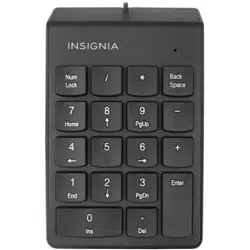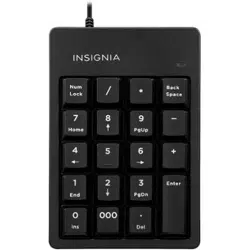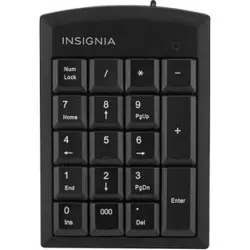

PACKAGE CONTENTS
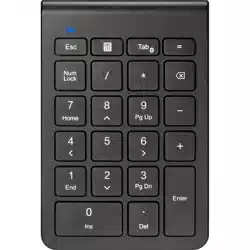
• Full-Sized Number Keypad
• AAA battery
• Quick Setup Guide
NS-PK3KANB24 / NS-PK3KANB24-C
Before using your new product, please read
these instructions to prevent any damage.
QUICK SETUP GUIDE
Full-Sized
Number Keypad
SYSTEM REQUIREMENTS
• Windows® 11 or Windows® 10
• macOS 10.12 through 11.4
• iPadOS 14.4.2
• ChromeOS 89
• Android 6
FEATURES
• Full-sized design with 22 keys includes numbers,
symbols, and special functions
• Scissor switch keys provide a quieter typing
experience
• Bluetooth capability maintains a reliable wireless
connection from up to 32.8 ft. (10 m) away
• LED indicators let you know when specific functions
are on or when the number keypad is with power
• Requires 1 AAA battery for use
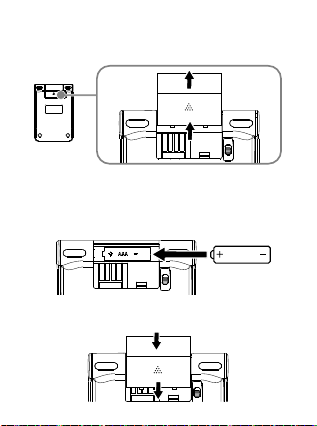
SETTING UP YOUR NUMBER KEYPAD
1 Slide the battery cover o.
2 Insert the included AAA battery into the battery
compartment. Make sure that the + and - signs
match the symbols in the compartment.
3 Replace the battery cover.
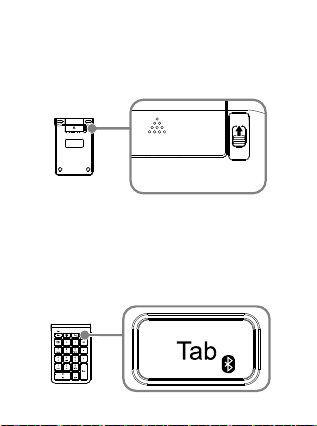
CONNECTING YOUR NUMBER
KEYPAD
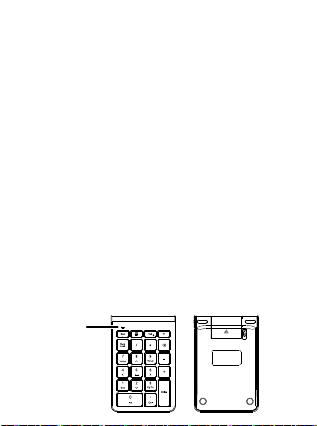
1 Slide the power switch on your number keypad
to ON.
2 Press and hold the Tab key on your number
keypad for three to five seconds.
Your number keypad enters pairing mode when
the blue LED flashes.
3 Open your device settings, turn on Bluetooth,
then select either Insignia BT3.0 Numeric KB or
Insignia BT5.0 Numeric KB from the device list.
If both options are available, select Insignia
BT5.0 Numeric KB for a faster connection.
4 After you see the “Pairing Success” prompt, your
number keypad is ready to use.
Top
OPEN
OFF
Top Bottom
LED indicator
OPEN
ON
OFF
ON
OFF
OPEN
Bottom
AAA
ON
OFF
ON
OFF
OPEN
OPEN
ON
OFF
OPEN
ON
OFF
Bottom
PACKAGE CONTENTS
• Full-Sized Number Keypad
• AAA battery
• Quick Setup Guide
NS-PK3KANB24 / NS-PK3KANB24-C
Before using your new product, please read
these instructions to prevent any damage.
QUICK SETUP GUIDE
Full-Sized
Number Keypad
SYSTEM REQUIREMENTS
• Windows® 11 or Windows® 10
• macOS 10.12 through 11.4
• iPadOS 14.4.2
• ChromeOS 89
• Android 6
FEATURES
• Full-sized design with 22 keys includes numbers,
symbols, and special functions
• Scissor switch keys provide a quieter typing
experience
• Bluetooth capability maintains a reliable wireless
connection from up to 32.8 ft. (10 m) away
• LED indicators let you know when specific functions
are on or when the number keypad is with power
• Requires 1 AAA battery for use
SETTING UP YOUR NUMBER KEYPAD
1 Slide the battery cover o.
2 Insert the included AAA battery into the battery
compartment. Make sure that the + and - signs
match the symbols in the compartment.
3 Replace the battery cover.
CONNECTING YOUR NUMBER
KEYPAD
1 Slide the power switch on your number keypad
to ON.
2 Press and hold the Tab key on your number
keypad for three to five seconds.
Your number keypad enters pairing mode when
the blue LED flashes.
3 Open your device settings, turn on Bluetooth,
then select either Insignia BT3.0 Numeric KB or
Insignia BT5.0 Numeric KB from the device list.
If both options are available, select Insignia
BT5.0 Numeric KB for a faster connection.
4 After you see the “Pairing Success” prompt, your
number keypad is ready to use.
Top
OPEN
OFF
Top Bottom
LED indicator
OPEN
ON
OFF
ON
OFF
OPEN
Bottom
AAA
ON
OFF
ON
OFF
OPEN
OPEN
ON
OFF
OPEN
ON
OFF
Bottom
PACKAGE CONTENTS
• Full-Sized Number Keypad
• AAA battery
• Quick Setup Guide
NS-PK3KANB24 / NS-PK3KANB24-C
Before using your new product, please read
these instructions to prevent any damage.
QUICK SETUP GUIDE
Full-Sized
Number Keypad
SYSTEM REQUIREMENTS
• Windows® 11 or Windows® 10
• macOS 10.12 through 11.4
• iPadOS 14.4.2
• ChromeOS 89
• Android 6
FEATURES
• Full-sized design with 22 keys includes numbers,
symbols, and special functions
• Scissor switch keys provide a quieter typing
experience
• Bluetooth capability maintains a reliable wireless
connection from up to 32.8 ft. (10 m) away
• LED indicators let you know when specific functions
are on or when the number keypad is with power
• Requires 1 AAA battery for use
SETTING UP YOUR NUMBER KEYPAD
1 Slide the battery cover o.
2 Insert the included AAA battery into the battery
compartment. Make sure that the + and - signs
match the symbols in the compartment.
3 Replace the battery cover.
CONNECTING YOUR NUMBER
KEYPAD
1 Slide the power switch on your number keypad
to ON.
2 Press and hold the Tab key on your number
keypad for three to five seconds.
Your number keypad enters pairing mode when
the blue LED flashes.
3 Open your device settings, turn on Bluetooth,
then select either Insignia BT3.0 Numeric KB or
Insignia BT5.0 Numeric KB from the device list.
If both options are available, select Insignia
BT5.0 Numeric KB for a faster connection.
4 After you see the “Pairing Success” prompt, your
number keypad is ready to use.
Top
OPEN
OFF
Top Bottom
LED indicator
OPEN
ON
OFF
ON
OFF
OPEN
Bottom
AAA
ON
OFF
ON
OFF
OPEN
OPEN
ON
OFF
OPEN
ON
OFF
Bottom
PACKAGE CONTENTS
• Full-Sized Number Keypad
• AAA battery
• Quick Setup Guide
NS-PK3KANB24 / NS-PK3KANB24-C
Before using your new product, please read
these instructions to prevent any damage.
QUICK SETUP GUIDE
Full-Sized
Number Keypad
SYSTEM REQUIREMENTS
• Windows® 11 or Windows® 10
• macOS 10.12 through 11.4
• iPadOS 14.4.2
• ChromeOS 89
• Android 6
FEATURES
• Full-sized design with 22 keys includes numbers,
symbols, and special functions
• Scissor switch keys provide a quieter typing
experience
• Bluetooth capability maintains a reliable wireless
connection from up to 32.8 ft. (10 m) away
• LED indicators let you know when specific functions
are on or when the number keypad is with power
• Requires 1 AAA battery for use
SETTING UP YOUR NUMBER KEYPAD
1 Slide the battery cover o.
2 Insert the included AAA battery into the battery
compartment. Make sure that the + and - signs
match the symbols in the compartment.
3 Replace the battery cover.
CONNECTING YOUR NUMBER
KEYPAD
1 Slide the power switch on your number keypad
to ON.
2 Press and hold the Tab key on your number
keypad for three to five seconds.
Your number keypad enters pairing mode when
the blue LED flashes.
3 Open your device settings, turn on Bluetooth,
then select either Insignia BT3.0 Numeric KB or
Insignia BT5.0 Numeric KB from the device list.
If both options are available, select Insignia
BT5.0 Numeric KB for a faster connection.
4 After you see the “Pairing Success” prompt, your
number keypad is ready to use.
Top
OPEN
OFF
Top Bottom
LED indicator
OPEN
ON
OFF
ON
OFF
OPEN
Bottom
AAA
ON
OFF
ON
OFF
OPEN
OPEN
ON
OFF
OPEN
ON
OFF
Bottom

PACKAGE CONTENTS
• Full-Sized Number Keypad
• AAA battery
• Quick Setup Guide
NS-PK3KANB24 / NS-PK3KANB24-C
Before using your new product, please read
these instructions to prevent any damage.
QUICK SETUP GUIDE
Full-Sized
Number Keypad
SYSTEM REQUIREMENTS
• Windows® 11 or Windows® 10
• macOS 10.12 through 11.4
• iPadOS 14.4.2
• ChromeOS 89
• Android 6
FEATURES
• Full-sized design with 22 keys includes numbers,
symbols, and special functions
• Scissor switch keys provide a quieter typing
experience
• Bluetooth capability maintains a reliable wireless
connection from up to 32.8 ft. (10 m) away
• LED indicators let you know when specific functions
are on or when the number keypad is with power
• Requires 1 AAA battery for use
SETTING UP YOUR NUMBER KEYPAD
1 Slide the battery cover o.
2 Insert the included AAA battery into the battery
compartment. Make sure that the + and - signs
match the symbols in the compartment.
3 Replace the battery cover.
CONNECTING YOUR NUMBER
KEYPAD
1 Slide the power switch on your number keypad
to ON.
2 Press and hold the Tab key on your number
keypad for three to five seconds.
Your number keypad enters pairing mode when
the blue LED flashes.
3 Open your device settings, turn on Bluetooth,
then select either Insignia BT3.0 Numeric KB or
Insignia BT5.0 Numeric KB from the device list.
If both options are available, select Insignia
BT5.0 Numeric KB for a faster connection.
4 After you see the “Pairing Success” prompt, your
number keypad is ready to use.
Top
OPEN
OFF
Top Bottom
LED indicator
OPEN
ON
OFF
ON
OFF
OPEN
Bottom
AAA
ON
OFF
ON
OFF
OPEN
OPEN
ON
OFF
OPEN
ON
OFF
Bottom

SPECIFICATIONS
• Dimensions (H×W×D): 0.73 × 3.52 × 5.20 in.
(1.85 × 8.91 × 13.2 cm)
• Weight: 3.25 oz. (92 g)
• Battery: 1 AAA alkaline battery
• Battery life: about 3 months
(based on average usage)
• Bluetooth versions: BT 3.0, BT 5.0
• Operating distance: 32.8 ft. (10 m)
• Electrical rating: 1.5V 5mA
TROUBLESHOOTING
My number keypad isn’t working or sometimes doesn’t work.
• Make sure that your Bluetooth device meets the system
requirements.
• Make sure that the battery has power. The low battery indicator
(blue LED) blinks for three seconds when the battery is low.
• Try moving other wireless Bluetooth devices away from your device
to prevent interference.
• Make sure that your Bluetooth device is within 32.8 ft. (10 m) of
the number keypad.
• If your number keypad disconnects from your device, try turning o
the number keypad and device, then turn them back on. If that
doesn’t work, make sure that the Bluetooth driver is up to date.
See your device’s manual for instructions on updating the driver.
My Bluetooth device won’t pair with the number keypad.
• Shorten the distance between your number keypad and your
Bluetooth device.
• Make sure that you have selected Insignia BT3.0 Numeric KB or
Insignia BT5.0 Numeric KB on your Bluetooth device.
• Make sure that your number keypad and Bluetooth device are not
paired to other Bluetooth devices.
• Make sure that your number keypad and Bluetooth device are both in
pairing mode.
• With the number keypad in pairing mode, refresh the list of Bluetooth
connections on your Bluetooth device.
• Turn your Bluetooth device and keyboard o, then on.
• Re-pair the Bluetooth connection.
• With the number keypad in pairing mode, refresh the list of Bluetooth
connections on your Bluetooth device. For more information, see the
documentation that came with your Bluetooth device.
• If your number keypad disconnects from your device, try turning o
the number keypad and device, then turn them on. If that doesn’t
work, make sure that the Bluetooth driver is up to date. See your
device’s manual for instructions on updating the driver.
LEGAL NOTICES
FCC Information
This device complies with part 15 of the FCC Rules. Operation is
subject to the following two conditions:
(1) This device may not cause harmful interference, and (2) this
device must accept any interference received, including interference
that may cause undesired operation.
FCC Caution
Changes or modifications not expressly approved by the party
responsible for compliance could void the user’s authority to operate
the equipment.
Note: This equipment has been tested and found to comply with the
limits for a Class B digital device, pursuant to part 15 of the FCC Rules.
These limits are designed to provide reasonable protection against
harmful interference in a residential installation. This equipment
generates, uses, and can radiate radio frequency energy and, if not
installed and used in accordance with the instructions, may cause
harmful interference to radio communications. However, there is no
guarantee that interference will not occur in a particular installation.
If this equipment does cause harmful interference to radio or
television reception, which can be determined by one or more of the
following measures:
• Reorient or relocate the receiving antenna.
• Increase the separation between the equipment and receiver.
• Connect the equipment into an outlet on a circuit dierent from that
to which the receiver is connected.
• Consult the dealer or an experienced radio/TV technician for help.
This equipment complies with FCC radiation exposure limits set forth
for an uncontrolled environment.
RSS-Gen statement:
This device contains licence-exempt transmitter(s)/receiver(s) that
comply with Innovation, Science and Economic Development Canada’s
licence-exempt RSS(s). Operation is subject to the following two
conditions:
1. This device may not cause interference.
2. This device must accept any interference, including interference that
may cause undesired operation of the device.
Ce dispositif contient des émetteurs exonérés de
permis(s)/récepteurs)s qui sont conformes aux RSS (s) exemptés de
licence du Canada. L’opération est soumise aux deux conditions
suivantes :
1. Cet appareil peut ne pas causer d’interférences.
2. Ce dispositif doit accepter toute interférence, y compris les
interférences qui peuvent provoquer un fonctionnement indésirable
de l’appareil.
RSS-102 Statement
This equipment complies with I
nnovation, Science and Economic
Development Canada’s radiation exposure limits set forth for an
uncontrolled environment.
Cet équipement est conforme aux limites d’exposition aux rayonnements
de Développement économique
Canada pour l’innovation, les
sciences et le développement économique établies dans un
environnement incontrôlé.
ONE-YEAR LIMITED WARRANTY
Visit www.insigniaproducts.com for details.
CONTACT INSIGNIA:
For customer service, call
1-877-467-4289 (U.S. and Canada)
www.insigniaproducts.com
INSIGNIA is a trademark of Best Buy and its affiliated companies
Distributed by Best Buy Purchasing, LLC
7601 Penn Ave South, Richfield, MN 55423 U.S.A.
©2024 Best Buy. All rights reserved.
V3 ENGLISH 24-0044

SPECIFICATIONS
• Dimensions (H×W×D): 0.73 × 3.52 × 5.20 in.
(1.85 × 8.91 × 13.2 cm)
• Weight: 3.25 oz. (92 g)
• Battery: 1 AAA alkaline battery
• Battery life: about 3 months
(based on average usage)
• Bluetooth versions: BT 3.0, BT 5.0
• Operating distance: 32.8 ft. (10 m)
• Electrical rating: 1.5V 5mA
TROUBLESHOOTING
My number keypad isn’t working or sometimes doesn’t work.
• Make sure that your Bluetooth device meets the system
requirements.
• Make sure that the battery has power. The low battery indicator
(blue LED) blinks for three seconds when the battery is low.
• Try moving other wireless Bluetooth devices away from your device
to prevent interference.
• Make sure that your Bluetooth device is within 32.8 ft. (10 m) of
the number keypad.
• If your number keypad disconnects from your device, try turning o
the number keypad and device, then turn them back on. If that
doesn’t work, make sure that the Bluetooth driver is up to date.
See your device’s manual for instructions on updating the driver.
My Bluetooth device won’t pair with the number keypad.
• Shorten the distance between your number keypad and your
Bluetooth device.
• Make sure that you have selected Insignia BT3.0 Numeric KB or
Insignia BT5.0 Numeric KB on your Bluetooth device.
• Make sure that your number keypad and Bluetooth device are not
paired to other Bluetooth devices.
• Make sure that your number keypad and Bluetooth device are both in
pairing mode.
• With the number keypad in pairing mode, refresh the list of Bluetooth
connections on your Bluetooth device.
• Turn your Bluetooth device and keyboard o, then on.
• Re-pair the Bluetooth connection.
• With the number keypad in pairing mode, refresh the list of Bluetooth
connections on your Bluetooth device. For more information, see the
documentation that came with your Bluetooth device.
• If your number keypad disconnects from your device, try turning o
the number keypad and device, then turn them on. If that doesn’t
work, make sure that the Bluetooth driver is up to date. See your
device’s manual for instructions on updating the driver.
LEGAL NOTICES
FCC Information
This device complies with part 15 of the FCC Rules. Operation is
subject to the following two conditions:
(1) This device may not cause harmful interference, and (2) this
device must accept any interference received, including interference
that may cause undesired operation.
FCC Caution
Changes or modifications not expressly approved by the party
responsible for compliance could void the user’s authority to operate
the equipment.
Note: This equipment has been tested and found to comply with the
limits for a Class B digital device, pursuant to part 15 of the FCC Rules.
These limits are designed to provide reasonable protection against
harmful interference in a residential installation. This equipment
generates, uses, and can radiate radio frequency energy and, if not
installed and used in accordance with the instructions, may cause
harmful interference to radio communications. However, there is no
guarantee that interference will not occur in a particular installation.
If this equipment does cause harmful interference to radio or
television reception, which can be determined by one or more of the
following measures:
• Reorient or relocate the receiving antenna.
• Increase the separation between the equipment and receiver.
• Connect the equipment into an outlet on a circuit dierent from that
to which the receiver is connected.
• Consult the dealer or an experienced radio/TV technician for help.
This equipment complies with FCC radiation exposure limits set forth
for an uncontrolled environment.
RSS-Gen statement:
This device contains licence-exempt transmitter(s)/receiver(s) that
comply with Innovation, Science and Economic Development Canada’s
licence-exempt RSS(s). Operation is subject to the following two
conditions:
1. This device may not cause interference.
2. This device must accept any interference, including interference that
may cause undesired operation of the device.
Ce dispositif contient des émetteurs exonérés de
permis(s)/récepteurs)s qui sont conformes aux RSS (s) exemptés de
licence du Canada. L’opération est soumise aux deux conditions
suivantes :
1. Cet appareil peut ne pas causer d’interférences.
2. Ce dispositif doit accepter toute interférence, y compris les
interférences qui peuvent provoquer un fonctionnement indésirable
de l’appareil.
RSS-102 Statement
This equipment complies with I
nnovation, Science and Economic
Development Canada’s radiation exposure limits set forth for an
uncontrolled environment.
Cet équipement est conforme aux limites d’exposition aux rayonnements
de Développement économique
Canada pour l’innovation, les
sciences et le développement économique établies dans un
environnement incontrôlé.
ONE-YEAR LIMITED WARRANTY
Visit www.insigniaproducts.com for details.
CONTACT INSIGNIA:
For customer service, call
1-877-467-4289 (U.S. and Canada)
www.insigniaproducts.com
INSIGNIA is a trademark of Best Buy and its affiliated companies
Distributed by Best Buy Purchasing, LLC
7601 Penn Ave South, Richfield, MN 55423 U.S.A.
©2024 Best Buy. All rights reserved.
V3 ENGLISH 24-0044

SPECIFICATIONS
• Dimensions (H×W×D): 0.73 × 3.52 × 5.20 in.
(1.85 × 8.91 × 13.2 cm)
• Weight: 3.25 oz. (92 g)
• Battery: 1 AAA alkaline battery
• Battery life: about 3 months
(based on average usage)
• Bluetooth versions: BT 3.0, BT 5.0
• Operating distance: 32.8 ft. (10 m)
• Electrical rating: 1.5V 5mA
TROUBLESHOOTING
My number keypad isn’t working or sometimes doesn’t work.
• Make sure that your Bluetooth device meets the system
requirements.
• Make sure that the battery has power. The low battery indicator
(blue LED) blinks for three seconds when the battery is low.
• Try moving other wireless Bluetooth devices away from your device
to prevent interference.
• Make sure that your Bluetooth device is within 32.8 ft. (10 m) of
the number keypad.
• If your number keypad disconnects from your device, try turning o
the number keypad and device, then turn them back on. If that
doesn’t work, make sure that the Bluetooth driver is up to date.
See your device’s manual for instructions on updating the driver.
My Bluetooth device won’t pair with the number keypad.
• Shorten the distance between your number keypad and your
Bluetooth device.
• Make sure that you have selected Insignia BT3.0 Numeric KB or
Insignia BT5.0 Numeric KB on your Bluetooth device.
• Make sure that your number keypad and Bluetooth device are not
paired to other Bluetooth devices.
• Make sure that your number keypad and Bluetooth device are both in
pairing mode.
• With the number keypad in pairing mode, refresh the list of Bluetooth
connections on your Bluetooth device.
• Turn your Bluetooth device and keyboard o, then on.
• Re-pair the Bluetooth connection.
• With the number keypad in pairing mode, refresh the list of Bluetooth
connections on your Bluetooth device. For more information, see the
documentation that came with your Bluetooth device.
• If your number keypad disconnects from your device, try turning o
the number keypad and device, then turn them on. If that doesn’t
work, make sure that the Bluetooth driver is up to date. See your
device’s manual for instructions on updating the driver.
LEGAL NOTICES
FCC Information
This device complies with part 15 of the FCC Rules. Operation is
subject to the following two conditions:
(1) This device may not cause harmful interference, and (2) this
device must accept any interference received, including interference
that may cause undesired operation.
FCC Caution
Changes or modifications not expressly approved by the party
responsible for compliance could void the user’s authority to operate
the equipment.
Note: This equipment has been tested and found to comply with the
limits for a Class B digital device, pursuant to part 15 of the FCC Rules.
These limits are designed to provide reasonable protection against
harmful interference in a residential installation. This equipment
generates, uses, and can radiate radio frequency energy and, if not
installed and used in accordance with the instructions, may cause
harmful interference to radio communications. However, there is no
guarantee that interference will not occur in a particular installation.
If this equipment does cause harmful interference to radio or
television reception, which can be determined by one or more of the
following measures:
• Reorient or relocate the receiving antenna.
• Increase the separation between the equipment and receiver.
• Connect the equipment into an outlet on a circuit dierent from that
to which the receiver is connected.
• Consult the dealer or an experienced radio/TV technician for help.
This equipment complies with FCC radiation exposure limits set forth
for an uncontrolled environment.
RSS-Gen statement:
This device contains licence-exempt transmitter(s)/receiver(s) that
comply with Innovation, Science and Economic Development Canada’s
licence-exempt RSS(s). Operation is subject to the following two
conditions:
1. This device may not cause interference.
2. This device must accept any interference, including interference that
may cause undesired operation of the device.
Ce dispositif contient des émetteurs exonérés de
permis(s)/récepteurs)s qui sont conformes aux RSS (s) exemptés de
licence du Canada. L’opération est soumise aux deux conditions
suivantes :
1. Cet appareil peut ne pas causer d’interférences.
2. Ce dispositif doit accepter toute interférence, y compris les
interférences qui peuvent provoquer un fonctionnement indésirable
de l’appareil.
RSS-102 Statement
This equipment complies with I
nnovation, Science and Economic
Development Canada’s radiation exposure limits set forth for an
uncontrolled environment.
Cet équipement est conforme aux limites d’exposition aux rayonnements
de Développement économique
Canada pour l’innovation, les
sciences et le développement économique établies dans un
environnement incontrôlé.
ONE-YEAR LIMITED WARRANTY
Visit www.insigniaproducts.com for details.
CONTACT INSIGNIA:
For customer service, call
1-877-467-4289 (U.S. and Canada)
www.insigniaproducts.com
INSIGNIA is a trademark of Best Buy and its affiliated companies
Distributed by Best Buy Purchasing, LLC
7601 Penn Ave South, Richfield, MN 55423 U.S.A.
©2024 Best Buy. All rights reserved.
V3 ENGLISH 24-0044

SPECIFICATIONS
• Dimensions (H×W×D): 0.73 × 3.52 × 5.20 in.
(1.85 × 8.91 × 13.2 cm)
• Weight: 3.25 oz. (92 g)
• Battery: 1 AAA alkaline battery
• Battery life: about 3 months
(based on average usage)
• Bluetooth versions: BT 3.0, BT 5.0
• Operating distance: 32.8 ft. (10 m)
• Electrical rating: 1.5V 5mA
TROUBLESHOOTING
My number keypad isn’t working or sometimes doesn’t work.
• Make sure that your Bluetooth device meets the system
requirements.
• Make sure that the battery has power. The low battery indicator
(blue LED) blinks for three seconds when the battery is low.
• Try moving other wireless Bluetooth devices away from your device
to prevent interference.
• Make sure that your Bluetooth device is within 32.8 ft. (10 m) of
the number keypad.
• If your number keypad disconnects from your device, try turning o
the number keypad and device, then turn them back on. If that
doesn’t work, make sure that the Bluetooth driver is up to date.
See your device’s manual for instructions on updating the driver.
My Bluetooth device won’t pair with the number keypad.
• Shorten the distance between your number keypad and your
Bluetooth device.
• Make sure that you have selected Insignia BT3.0 Numeric KB or
Insignia BT5.0 Numeric KB on your Bluetooth device.
• Make sure that your number keypad and Bluetooth device are not
paired to other Bluetooth devices.
• Make sure that your number keypad and Bluetooth device are both in
pairing mode.
• With the number keypad in pairing mode, refresh the list of Bluetooth
connections on your Bluetooth device.
• Turn your Bluetooth device and keyboard o, then on.
• Re-pair the Bluetooth connection.
• With the number keypad in pairing mode, refresh the list of Bluetooth
connections on your Bluetooth device. For more information, see the
documentation that came with your Bluetooth device.
• If your number keypad disconnects from your device, try turning o
the number keypad and device, then turn them on. If that doesn’t
work, make sure that the Bluetooth driver is up to date. See your
device’s manual for instructions on updating the driver.
LEGAL NOTICES
FCC Information
This device complies with part 15 of the FCC Rules. Operation is
subject to the following two conditions:
(1) This device may not cause harmful interference, and (2) this
device must accept any interference received, including interference
that may cause undesired operation.
FCC Caution
Changes or modifications not expressly approved by the party
responsible for compliance could void the user’s authority to operate
the equipment.
Note: This equipment has been tested and found to comply with the
limits for a Class B digital device, pursuant to part 15 of the FCC Rules.
These limits are designed to provide reasonable protection against
harmful interference in a residential installation. This equipment
generates, uses, and can radiate radio frequency energy and, if not
installed and used in accordance with the instructions, may cause
harmful interference to radio communications. However, there is no
guarantee that interference will not occur in a particular installation.
If this equipment does cause harmful interference to radio or
television reception, which can be determined by one or more of the
following measures:
• Reorient or relocate the receiving antenna.
• Increase the separation between the equipment and receiver.
• Connect the equipment into an outlet on a circuit dierent from that
to which the receiver is connected.
• Consult the dealer or an experienced radio/TV technician for help.
This equipment complies with FCC radiation exposure limits set forth
for an uncontrolled environment.
RSS-Gen statement:
This device contains licence-exempt transmitter(s)/receiver(s) that
comply with Innovation, Science and Economic Development Canada’s
licence-exempt RSS(s). Operation is subject to the following two
conditions:
1. This device may not cause interference.
2. This device must accept any interference, including interference that
may cause undesired operation of the device.
Ce dispositif contient des émetteurs exonérés de
permis(s)/récepteurs)s qui sont conformes aux RSS (s) exemptés de
licence du Canada. L’opération est soumise aux deux conditions
suivantes :
1. Cet appareil peut ne pas causer d’interférences.
2. Ce dispositif doit accepter toute interférence, y compris les
interférences qui peuvent provoquer un fonctionnement indésirable
de l’appareil.
RSS-102 Statement
This equipment complies with I
nnovation, Science and Economic
Development Canada’s radiation exposure limits set forth for an
uncontrolled environment.
Cet équipement est conforme aux limites d’exposition aux rayonnements
de Développement économique
Canada pour l’innovation, les
sciences et le développement économique établies dans un
environnement incontrôlé.
ONE-YEAR LIMITED WARRANTY
Visit www.insigniaproducts.com for details.
CONTACT INSIGNIA:
For customer service, call
1-877-467-4289 (U.S. and Canada)
www.insigniaproducts.com
INSIGNIA is a trademark of Best Buy and its affiliated companies
Distributed by Best Buy Purchasing, LLC
7601 Penn Ave South, Richfield, MN 55423 U.S.A.
©2024 Best Buy. All rights reserved.
V3 ENGLISH 24-0044

SPECIFICATIONS
• Dimensions (H×W×D): 0.73 × 3.52 × 5.20 in.
(1.85 × 8.91 × 13.2 cm)
• Weight: 3.25 oz. (92 g)
• Battery: 1 AAA alkaline battery
• Battery life: about 3 months
(based on average usage)
• Bluetooth versions: BT 3.0, BT 5.0
• Operating distance: 32.8 ft. (10 m)
• Electrical rating: 1.5V 5mA
TROUBLESHOOTING
My number keypad isn’t working or sometimes doesn’t work.
• Make sure that your Bluetooth device meets the system
requirements.
• Make sure that the battery has power. The low battery indicator
(blue LED) blinks for three seconds when the battery is low.
• Try moving other wireless Bluetooth devices away from your device
to prevent interference.
• Make sure that your Bluetooth device is within 32.8 ft. (10 m) of
the number keypad.
• If your number keypad disconnects from your device, try turning o
the number keypad and device, then turn them back on. If that
doesn’t work, make sure that the Bluetooth driver is up to date.
See your device’s manual for instructions on updating the driver.
My Bluetooth device won’t pair with the number keypad.
• Shorten the distance between your number keypad and your
Bluetooth device.
• Make sure that you have selected Insignia BT3.0 Numeric KB or
Insignia BT5.0 Numeric KB on your Bluetooth device.
• Make sure that your number keypad and Bluetooth device are not
paired to other Bluetooth devices.
• Make sure that your number keypad and Bluetooth device are both in
pairing mode.
• With the number keypad in pairing mode, refresh the list of Bluetooth
connections on your Bluetooth device.
• Turn your Bluetooth device and keyboard o, then on.
• Re-pair the Bluetooth connection.
• With the number keypad in pairing mode, refresh the list of Bluetooth
connections on your Bluetooth device. For more information, see the
documentation that came with your Bluetooth device.
• If your number keypad disconnects from your device, try turning o
the number keypad and device, then turn them on. If that doesn’t
work, make sure that the Bluetooth driver is up to date. See your
device’s manual for instructions on updating the driver.
LEGAL NOTICES
FCC Information
This device complies with part 15 of the FCC Rules. Operation is
subject to the following two conditions:
(1) This device may not cause harmful interference, and (2) this
device must accept any interference received, including interference
that may cause undesired operation.
FCC Caution
Changes or modifications not expressly approved by the party
responsible for compliance could void the user’s authority to operate
the equipment.
Note: This equipment has been tested and found to comply with the
limits for a Class B digital device, pursuant to part 15 of the FCC Rules.
These limits are designed to provide reasonable protection against
harmful interference in a residential installation. This equipment
generates, uses, and can radiate radio frequency energy and, if not
installed and used in accordance with the instructions, may cause
harmful interference to radio communications. However, there is no
guarantee that interference will not occur in a particular installation.
If this equipment does cause harmful interference to radio or
television reception, which can be determined by one or more of the
following measures:
• Reorient or relocate the receiving antenna.
• Increase the separation between the equipment and receiver.
• Connect the equipment into an outlet on a circuit dierent from that
to which the receiver is connected.
• Consult the dealer or an experienced radio/TV technician for help.
This equipment complies with FCC radiation exposure limits set forth
for an uncontrolled environment.
RSS-Gen statement:
This device contains licence-exempt transmitter(s)/receiver(s) that
comply with Innovation, Science and Economic Development Canada’s
licence-exempt RSS(s). Operation is subject to the following two
conditions:
1. This device may not cause interference.
2. This device must accept any interference, including interference that
may cause undesired operation of the device.
Ce dispositif contient des émetteurs exonérés de
permis(s)/récepteurs)s qui sont conformes aux RSS (s) exemptés de
licence du Canada. L’opération est soumise aux deux conditions
suivantes :
1. Cet appareil peut ne pas causer d’interférences.
2. Ce dispositif doit accepter toute interférence, y compris les
interférences qui peuvent provoquer un fonctionnement indésirable
de l’appareil.
RSS-102 Statement
This equipment complies with I
nnovation, Science and Economic
Development Canada’s radiation exposure limits set forth for an
uncontrolled environment.
Cet équipement est conforme aux limites d’exposition aux rayonnements
de Développement économique
Canada pour l’innovation, les
sciences et le développement économique établies dans un
environnement incontrôlé.
ONE-YEAR LIMITED WARRANTY
Visit www.insigniaproducts.com for details.
CONTACT INSIGNIA:
For customer service, call
1-877-467-4289 (U.S. and Canada)
www.insigniaproducts.com
INSIGNIA is a trademark of Best Buy and its affiliated companies
Distributed by Best Buy Purchasing, LLC
7601 Penn Ave South, Richfield, MN 55423 U.S.A.
©2024 Best Buy. All rights reserved.
V3 ENGLISH 24-0044