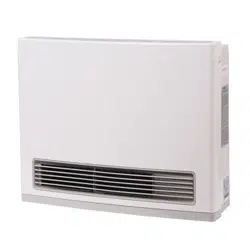
Gas Fan Convecon Heater
Installaon and Operaon Manual
— Donotstoreorusegasolineorotherflammablevaporsandliquidsinthevicinityofthisoranyother
appliance.
—BEFOREOPERATINGsmellaroundtheapplianceforgas.Besuretosmellnexttothefloorbecausesome
gasisheavierthanairandwillseleonthefloor.
— WHATTODOIFYOUSMELLGAS
Donottrytolightanyappliance.
Donottouchanyelectricalswitch;donotuseanyphoneinyourbuilding.
Immediatelycallyourgassupplierfromaneighbor’sphone.Followthegassupplier’sinstrucons.
Ifyoucannotreachyourgassupplier,callthefiredepartment.
— Installaonandservicemustbeperformedbyaqualifiedinstaller,serviceagency,orgassupplier.
Iftheinformaonintheseinstruconsisnotfollowedexactly,afireorexplosion
mayresultcausingpropertydamage,personalinjuryorlossoflife.
WARNING
READALLOFTHEINSTRUCTIONSTHOROUGHLYBEFOREINSTALLINGOROPERATINGTHISHEATER.
This manual provides informaon on the installaon, operaon, and maintenance of the heater. For proper
operaon and safety, it is important to follow the instrucons and adhere to the safety precauons.
A licensed professional must install the fan convecon heater according to the exact instrucons within this
manual.
The consumer must read the enre manual to properly operate the heater and for instrucons on regular
maintenance required to be performed.
ANSIZ21.11.2
FC510...................(RCE‐391A‐H)
FC824...................(RCE‐691TA‐H)
This is an unvented gas‐fired heater. It uses air (oxygen) from the room in which it is installed. Provisions for
adequate combuson and venlaon air must be provided. Refer to page 6 of this manual.
Installer:Leave this manual with the appliance.
Consumer:Retain this manual for future reference.
This appliance may be installed in an aermarket, permanently located, manufactured (mobile) home, where
not prohibited by local codes.
This appliance is only for use with the type of gas indicated on the rang plate. This appliance is not field
converble for use with other gas types.
Service should be performed only by a licensed professional.
2 Fan Convector Manual
TableofContents
This is the safety alert symbol. This symbol alerts you to potenal hazards that can kill or hurt you
and others.
Indicates an imminently hazardous situaon which, if not avoided, will result in death or
serious injury.
Indicates a potenally hazardous situaon which, if not avoided, could result in death or
serious injury.
Indicates a potenally hazardous situaon which, if not avoided, could result in minor or
moderate injury. It may also be used to alert against unsafe pracces.
DANGER
CAUTION
WARNING
Table of Contents ..................................................... 2
Safety Definions ..................................................... 2
Safety Behaviors and Pracces for the
Consumer and Installer ............................................ 3
InstallaonInstrucons.......................................4
Installer Qualificaons ....................................... 4
General Instrucons .......................................... 4
Determine Installaon Locaon ........................ 6
Clearances ......................................................... 6
Gas Connecon .................................................. 7
Electricity ........................................................... 8
Checklist for Gas and Electricity ........................ 8
High Altude Installaons ............................ 9‐10
FinalCheckList ...................................................... 11
Specificaons.....................................................12
OperaonInstrucons .......................................... 13
Consumer Guidelines for Safe Operaon ........ 14
FC510 Control Panel Layout ............................ 16
FC824 Control Panel Layout ............................ 17
Operang the Heater
Turning ON and OFF ..................................... 18
Room Temperature Adjustment .................. 18
Auto Off ........................................................ 18
Economy Mode ............................................. 19
Funcon Lock ................................................ 19
Operang the Timer(s) ................................ 20,22
FC510 Timer .................................................. 20
FC824 Timer .................................................. 22
Seng the Clock (FC824 Only) ......................... 21
Program On/Off Timer(s)(FC824 Only) ............ 21
Override Funcon ............................................ 22
Required Maintenance ..................................... 23
Troubleshoong ............................................ 26
Diagnosc Codes ........................................... 27
Electrical Diagram FC510 ............................... 28
Electrical Diagram FC824 ............................... 29
PartsBreakdown .............................................. 30‐43
FC510 ............................................................ 30‐36
FC824 ............................................................ 37‐43
StateRegulaons ................................................... 44
ConsumerSupport
Limited Warranty Informaon ................... 45‐46
PrivacyNoce ........................................................ 46
ImportantSafetyInformaon
SafetyDefinions
Fan Convector Manual 3
CAUTION
Do not install this appliance above 5,200.
Do not block the warm air discharge. Do not allow
anyone to sleep directly in front of the appliance.
Due to high temperatures, the appliance should be
located out of traffic and away from furniture and
draperies.
Children and adults should be alerted to the hazards of
high surface temperature and should stay away to avoid
burns or clothing ignion.
Young children should be carefully supervised when they
are in the same room as the appliance.
Any safety screen or guard removed for servicing must
be replaced prior to operang the appliance.
Do not insert items into the louvers.
Do not place clothing or other flammable material on or
near the appliance
Do not spray aerosols near the appliance while it is
operang. Most aerosols contain butane gas which is
flammable.
Do not install this appliance in areas where spray
painng or plang is taking place, or in places such as
hair salons where there may be large amounts of dust,
chemical residue, or debris. Using the appliance in such
areas may result in strong odors or irritated eyes and
sinuses.
Turn off the appliance when not in use or when away for
long periods of me.
Do not sit on the appliance.
Do not unplug the appliance while it is operang or
while the fans are on. Do not use a plug in type mer
with this appliance.
SafetyBehaviorsandPraccesfortheConsumerandInstaller
Before operang, smell all around the appliance area for
gas. Be sure to smell next to the floor because some gas
is heavier than air and will sele on the floor.
Early signs of carbon monoxide poisoning resemble the
flu, with headaches, dizziness, or nausea. If you have
these signs, the heater may not be working properly. Get
fresh air at once! Have heater serviced. Some people are
more affected by carbon monoxide than others. These
include pregnant women, people with heart or lung
disease or anemia, those under the influence of alcohol,
and those at high altudes.
Keep the area around the appliance clear and free from
combusble materials, gasoline, and other flammable
vapors and liquids.
Never store liquid propane containers indoors.
Combusble construcon refers to adjacent walls and
ceiling and should not be confused with combusble or
flammable products and materials. Combusble and/or
flammable products and materials should never be
stored in the vicinity of this or any gas appliance.
Use only your hand to push in or turn the gas control
knob. Never use tools. If the knob will not push in or
turn by hand, do not try to repair it; call a licensed
professional. Force or aempted repair may result in a
fire or explosion.
Do not use heater if any part has been under water.
Immediately call a qualified service technician to inspect
the room heater and to replace any part of the control
system and any gas control which has been under water.
WARNING
Ensure the room is sufficiently venlated. Consult your
local gas authority for informaon on venlaon
requirements.
Do not use substute materials. Use only parts cerfied
with the appliance.
Should overheang occur or the gas supply fail to shut
off, turn off the manual gas control valve to the
appliance.
Do not use an extension cord or an adapter plug with
this appliance.
This appliance is equipped with a three‐prong plug for
your protecon against shock hazard and should be
plugged directly into a properly grounded three‐prong
receptacle. Do no cut or remove the ground prong from
this plug.
Do not operate appliance with the front panels removed,
cracked, or broken.. Replacement of the panels should
be done by a licensed professional.
Do no move the heater while it is turned on.
Any alteraon to the appliance or its controls can be
dangerous and will void the warranty.
4 Fan Convector Manual
A licensed professional must install the appliance,
inspect it, and leak test it before use. The warranty
will be voided due to improper installaon.
The installer should have skills such as:
gas sizing
connecng gas lines and electricity
knowledge of applicable naonal, state, and
local codes
If you lack these skills, contact a licensed professional.
InstallaonInstrucons
InstallaonSteps
General Instrucons .......................................... 4
Determine Installaon Locaon ........................ 6
Clearances .......................................................... 6
Gas Connecon .................................................. 7
Electricity ........................................................... 8
Checklist for Gas and Electricity ........................ 8
Final Checklist .................................................. 11
GeneralInstrucons
InstallerQualificaons
DONOT
Do not obstruct the flow of combuson and
venlaon air.
Do not use substute parts that are not authorized
for this appliance.
Typeofinstallaon
This appliance is equipped only for use with type of
gas indicated on the rang plate. This appliance is
not converble for use with other gases.
MUSTDO
The installaon must conform with local codes or,
in the absence of local codes, with the Naonal
Fuel Gas Code, ANSI Z223.1/NFPA 54, or the
Natural Gas and Propane Installaon Code, CSA
B149.1. If installed in a manufactured home, the
installaon must conform with the Manufactured
Home Construcon and Safety Standard, Title 24
CFR, Part 3280 and/or CAN/SCA Z240 MH Series,
Mobile Homes.
The appliance, when installed, must be electrically
grounded in accordance with local codes or, in the
absence of local codes, with the Naonal Electrical
Code, ANSI/NFPA 70.
The appliance and its appliance main gas valve
must be disconnected from the gas supply piping
system during any pressure tesng of that system
at test pressures in excess of 1/2 psi (3.5 kPa)
(13.84 in W.C.).
You must follow the installaon instrucons and
those in Care and Maintenance for adequate
combuson air intake and exhaust.
INFORMATION
Should overheang occur or the gas supply fail to
shut off, turn off the manual gas control valve to
the appliance.
Keep the installaon locaon free of chemicals
such as cleaners that produce fumes. These fumes
can damage components and reduce the life of
your appliance.
Donotspray aerosols near the heater while it is in
use. Many aerosols contain butane gas and can be
a fire hazard. Use of aerosols, paint, polishes, etc.
while the heater is in use may also create odors as
well as irritate the eyes and sinuses.
This appliance is available in natural gas or propane
versions. The appliance cannot be field converted
from one gas type to the other.
WARNING
Improper adjustment, alteraon, service,
maintenance, or installaon of this heater or its
controls can cause death or serious injury.
Read and follow instrucons and precauons in
User’s Informaon manual provided with this heater.
FIRE,EXPLOSION,ANDASPHYXIATIONHAZARD
WARNING

Fan Convector Manual 5
Prepareforinstallaon
Parts included
Tools needed
Materials needed
Gas Fan Convecon Heater
Anchors
Screws
Manual Gas Shut Off Valve
Floor Fixing Plate
Pipe wrenches (2)
Adjustable pliers
Screwdrivers (2)
Wire cuers
Gloves
Safety glasses
Level
Tools that might be needed
Saw
Threading machine with
heads and oiler
Steel pipe cuer
Manometer
Soap soluon or other
appropriate leak
detector soluon.
Approved pipe thread
pipe sealant for either
natural gas or propane.
GeneralInstrucons(connued)
A licensed professional should install the
appliance and inspect it before use.
When unpacking the appliance, check for the
correct gas type and for damage. The Operaon
and Installaon Manual and a manual gas valve
are included.
This appliance is intended for supplemental
heang only. The Internaonal Fuel Gas Code
Standard 620‐6 “Prohibited Use” states that “One
or more unvented room heaters shall not be used
as a sole source of comfort heang in any
dwelling”.
Donotinstall this appliance in a bedroom or
bathroom.
Donotinstall this appliance in a windy area such
as facing a window or near a door leading to the
outside.
DoNotinstall this appliance above 5,200.
If you move, check the gas type in your new area.
The local gas authority will be able to advise on
local regulaons.
If the flooring is carpet, le, or other combusble
material other than wood, then the appliance
must be installed on a metal or wood panel
extending the full width and depth of the
appliance.
This appliance discharges a large volume of warm
air next to the floor. Any parcles in the air such
as cigaree smoke, lint, dust, or debris could
cause discoloraon in nylon carpets containing
dyes or vinyl surfaces.
This appliance is not designed to be built into or
mounted directly in a wall
Rinnai suggests that a dedicated electrical circuit
with a 120VAC, 60 Hz, 10 amp power source be
used.
A 1/8” test plug is provided for tesng of
manifold differenal pressure. It is located on the
modulang gas valve.
The flow of combuson and venlaon air must
not be obstructed.
Note that in some regions, an unvented gas
heater will increase the amount of humidity in the
room.
6 Fan Convector Manual
DetermineInstallaonLoc a on
The heater must not be installed in a confined
space or unusually ght construcon unless
provisions are provided for adequate combuson
and venlaon air.
Naonal Fuel Gas Code, ANSI Z223.1/NFPA 54
defines a confined space as a space whose vol‐
ume is less than 50 cubic feet per 1,000 BTU per
hour (4.8m³ per kW) of the aggregate input rang
of all appliances installed in that space and an
unconfined space as a space whose volume is not
less than 50 cubic feet per 1,000 BTU per hour
(4.8m³ per kW) of the aggregate input rang of all
appliances installed in that space.
Rooms connecng directly with the space in
which the appliances are installed, through
openings not furnished with doors, are
considered a part of the unconfined space.
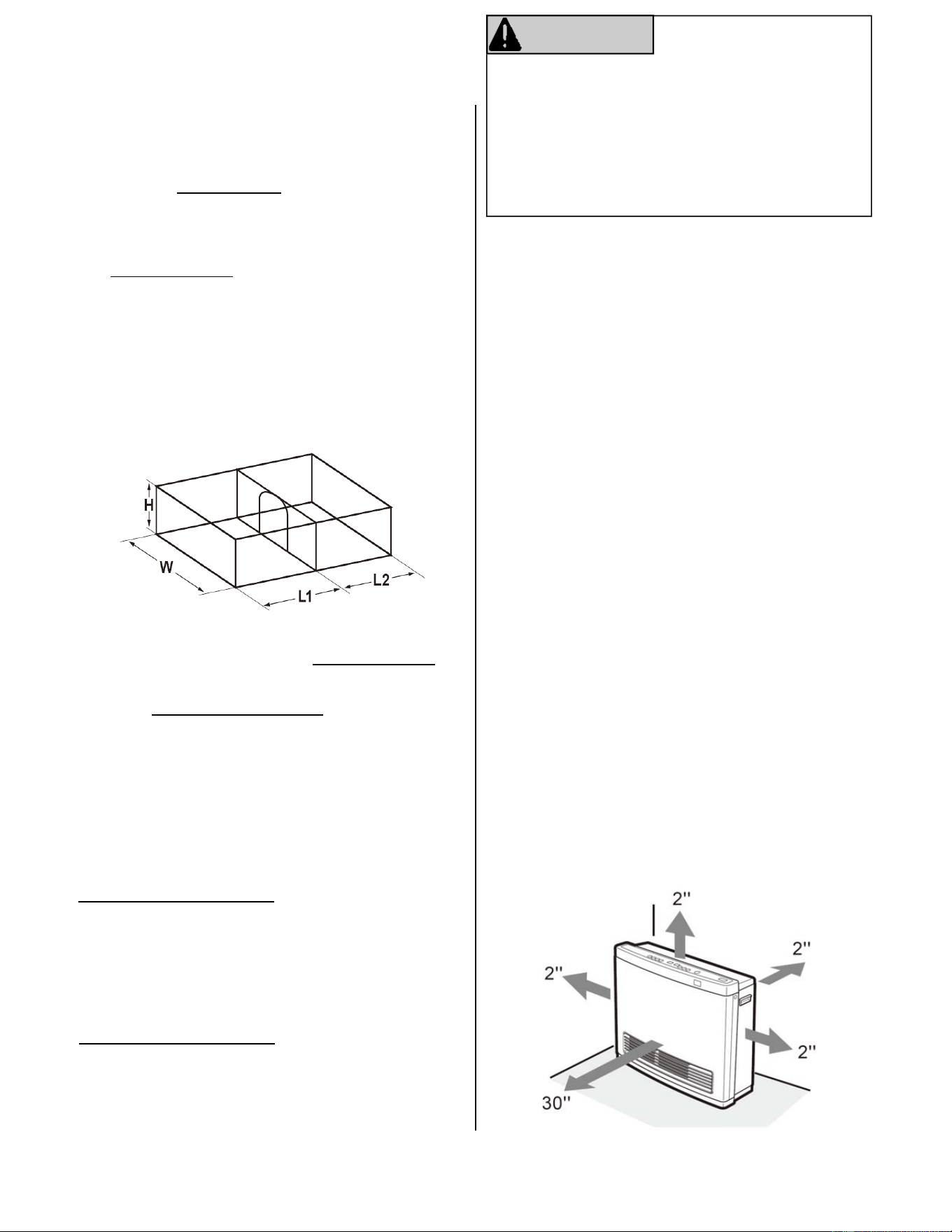
The following formula can be used to determine the
maximum heat rang for a given unconfined space:
BTU/HR=
(All dimensions are in feet.)
For example:
If L1=15.5 , L2=12 , W=12 , H=8 , and there is no
door between the rooms, then for the space to be
considered unconfined the maximum rang is:
=52,800 BTU/HR
If there is a door between the 2 rooms then for the
space to be considered unconfined the maximum
rang is:
=29,760 BTU/HR
If the appliance rang exceeds the maximum heater
rang in the calculaon above, the space is confined.
(L1+L2) X W X H X 1000
50
(15.5+12) X 12 X 8 X 1000
50
15.5 X 12 X 8 X 1000
50
If the area in which the heater may be operated is
smaller than that defined as an unconfined space or if
the building is of unusually ght construcon, provide
adequate combuson and venlaon air by one of
the methods described in the Naonal Fuel Gas Code,
ANSI Z223.1/NFPA 54, Secon 5.3 or applicable local
codes.
WARNING
Unusually ght construcon is defined as construcon
where:
Walls and ceilings exposed to the outside
atmosphere have a connuous water vapor
retarder with a rang of 1 therm or less with
openings gasketed or sealed;
Weather stripping has been added on openable
windows and doors; and caulking or sealants are
applied to areas such as joint around window and
door frames, between sole plates and floors,
between wall ceiling joints, between wall panels,
at penetraons for plumbing, and gas lines, and at
other openings.
Clearances
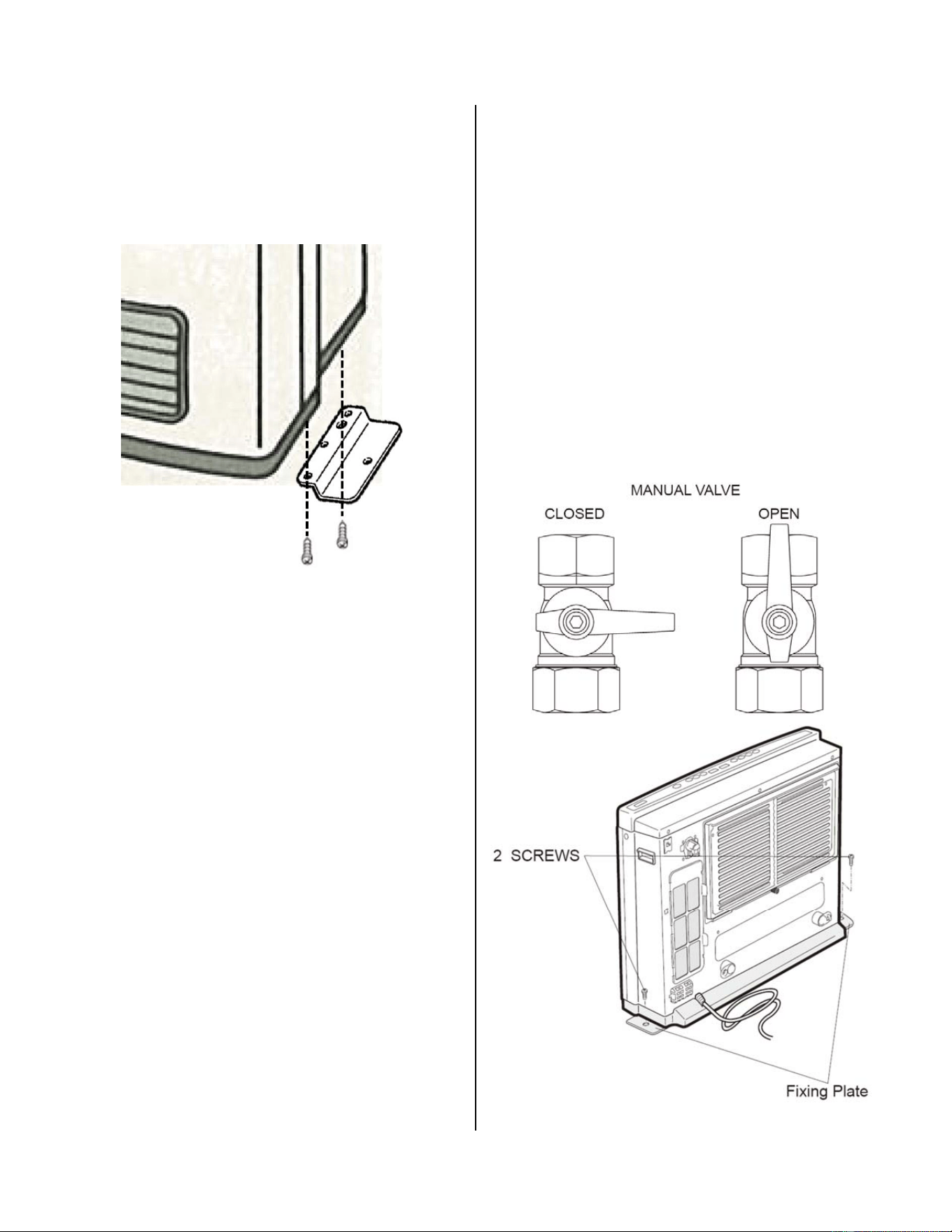
The minimum clearances from combusble materials
and for proper operaon and servicing are as follows:
2 inches from top
2 inches from back (measured from the base of
the appliance)
2 inches from sides
30 inches from front
0 inches from boom
In addion, do not install in areas where curtains,
drapes, clothing, or other moving flammables are
within 12 inches of the appliance.
Fan Convector Manual 7
GasConnecon
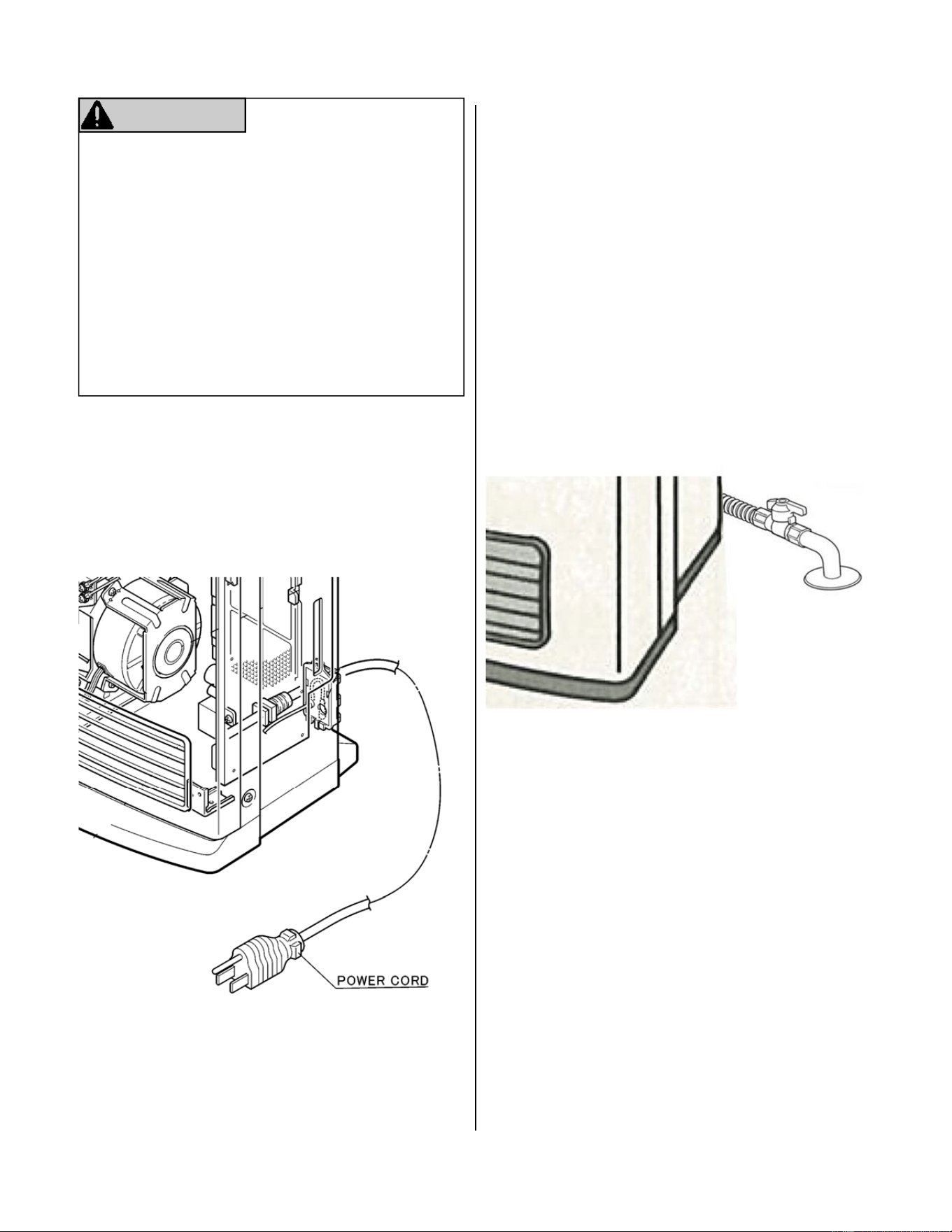
1. Aach 2 fixing plates to the boom of the base
plate before connecng the gas.
2. The gas supply line must be gas ght, sized and
installed so as to provide a supply of a gas
sufficient to meet the maximum demand of the
heater without loss of pressure.
3. The supplied shut off valve must be installed in
the upstream of the gas line to permit servicing.
4. Flexible pipe and any appliance connector valve
used for gas piping must be types approved by
naonally recognized agencies.
5. Any compound used on the threaded joint of the
gas piping must be a type which resists the acon
of propane gas.
6. Check the gas supply pressure immediately
upstream at a locaon provided by the gas
company. Supplied gas pressure must be within
the limits shown in the specificaons secon.
InstallaonLocaon(connued)
7. Aer compleon of gas pipe connecons, all
joints including the heater must be checked for
gas ghtness by means of leak detector soluon,
soap and water, or an equivalent nonflammable
soluon, as applicable. (Since some leak test
soluons, including soap and water, may cause
corrosion or stress cracking, the piping must be
rinsed with water aer tesng, unless it has been
determined that the leak test soluon is
noncorrosive.)
8. Aer compleng pipework, secure the heater to
the floor. Use the 2 screws provided, as shown in
the drawing. To avoid deforming the floor plate,
do not over torque the screws.
8 Fan Convector Manual
Electricity
The heater requires 120 VAC, 60 Hz power from a
properly grounded circuit.
Plug the 6.5 foot (2 meter) long power cord into a
standard 3 prong 120 VAC, 60 Hz properly grounded
wall outlet.
WARNING
DO NOT use an extension cord or an adapter plug
with this appliance.
The heater must be electrically grounded in
accordance with local codes and ordinances or, in the
absence of local codes, in accordance with the
Naonal Electrical Code, ANSI/NFPA No. 70.
The heater is equipped with a three‐prong
(grounding) plug for your protecon against shock
hazard and should be plugged directly into a properly
grounded three‐prong receptacle. Do not cut or
remove the grounding terminal from this plug.
ChecklistforGasandElectricity
□
A manual gas control valve is placed in the gas line
to the heater.
□ Check the gas lines and connecons for leaks.
□ Confirm that the gas inlet pressure is within limits.
□ Confirm that the heater is rated for the gas type
supplied.
□ Confirm that the electricity is supplied from 120
VAC, 60 Hz power source and is in a properly
grounded circuit.
□ An extension cord or an adapter plug has not
been used with the heater.
Manual gas
shut‐off valve
Fan Convector Manual 9
HighAltudeInstallaons
1. Turn off gas and power supply to unit.
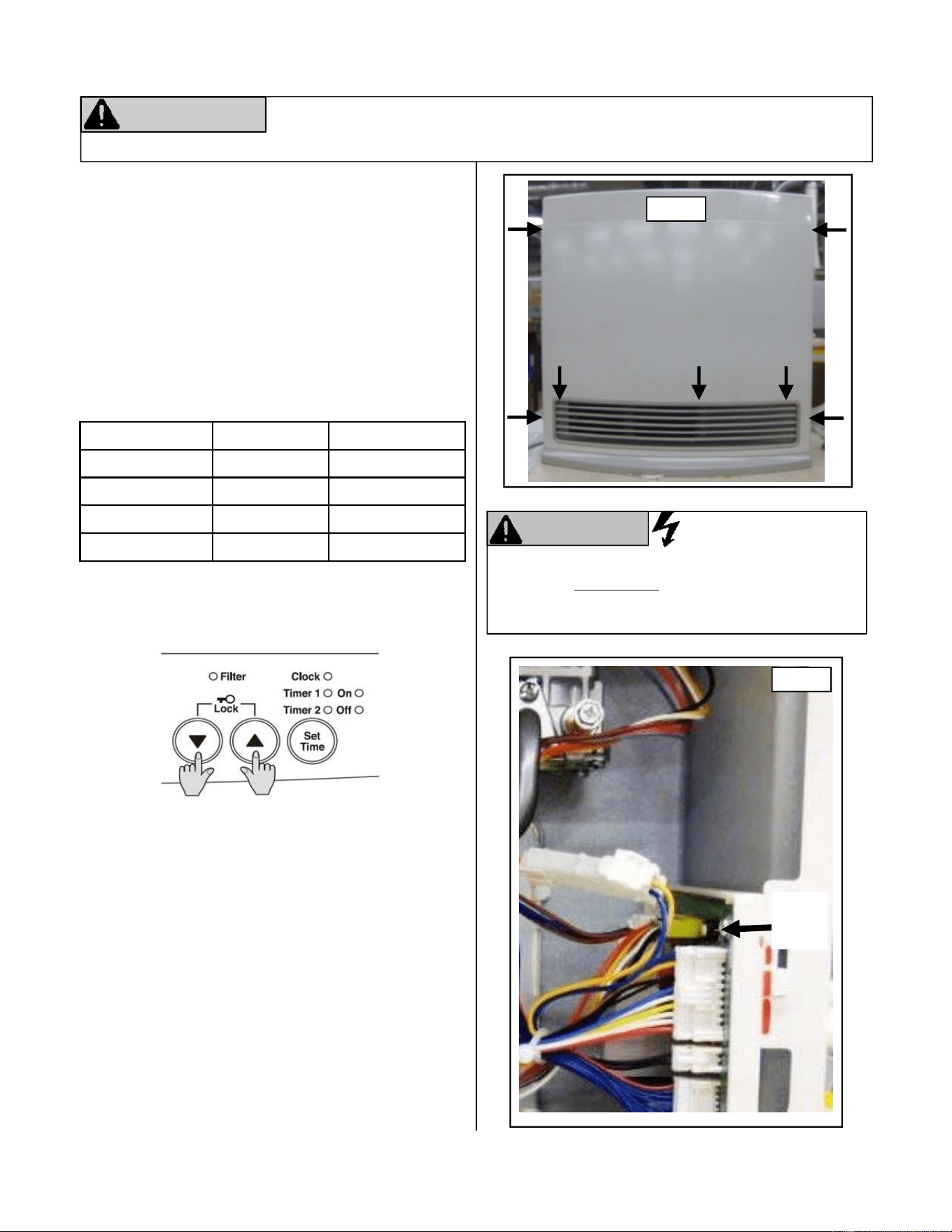
2. Remove 7 screws securing front panel. (FIGURE 1)
3. Remove front panel.
4. Turn on power to the unit.
5. Locate the test switch at the top of the PC Board.
(FIGURE 2)
6. Press and hold the Test Switch for 1‐2 seconds. The
display will now display the current gas type and
altude seng (see chart below).
7. Using the “UP”(▲) and the “DOWN” (▼) buon
s
select the appropriate gas type and altude
range for the applicaon.
8. Once the selecon has been made and is displayed
on the LED, press the Test Switch 3 mes unl the
unit is in the normal off seng.
9. Remove the test port plug on the gas control valve
and connect a manometer using a 1/8” test
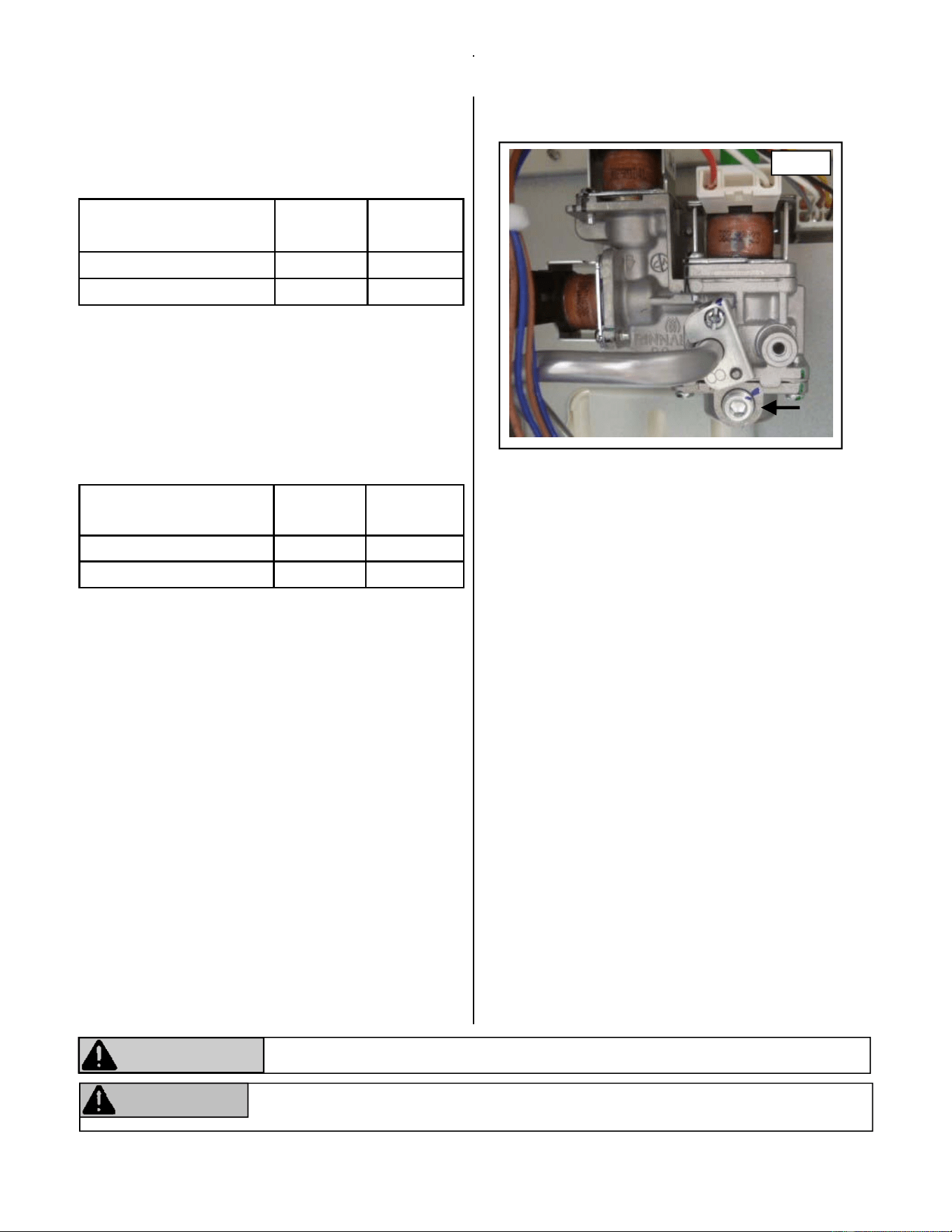
connecon to adjust the pressure sengs.
(FIGURE 3)
10. Turn on gas to the unit.
11. Press the “ON/OFF” buon to place the unit in
operaon.
12. Press the Test switch (FIGURE 2) twice to place the
unit in Low fire mode. “PL” will appear on the
display.
Gas posion Gas type Altude ()
13 Natural Gas 0‐2000
14 Natural Gas 2001‐5200
L1 Propane Gas 0‐2000
L2 Propane Gas 2001‐5200
FIGURE 1
The following procedure for high altude installaons above 2,000 feet must be
performed by a licensed professional. Failure to perform this adjustment may result
in the unit shung down.
ATTENTION
CAUTION
Do not touch any other areas on the PC board
besides the TestSwitchwhile power is supplied to
the appliance. Parts of the PC board are supplied
with 120 volts AC.
Test
Switch
FIGURE 2
10 Fan Convector Manual
13. Adjust the Low fire seng by using the “UP”(▲to
increase) and the “DOWN” (▼to decrease)
buons to adjust the manifold pressures per the
table below.
14. Press the Test switch (FIGURE 2) again to place
the unit in High fire mode. “PH” will appear on
the display.
15. Adjust the High fire seng by using the “UP”(▲to
increase) and the “DOWN” (▼to decrease)
buons to adjust the manifold pressures per the
table below.
16. Press the “ON/OFF” buon to cease operaon.
(The unit will not revert to its normal state unless
the “ON/OFF” buon is pressed.)
17. Press the “ON/OFF” buon once again to
complete procedure.
18. Turn off gas supply. Remove manometer and
reinstall test port plug. (FIGURE 3)
19. Turn on gas supply. Operate the unit normally
checking for normal operaon and gas leaks.
20. Turn off gas and power supply to unit.
21. Reinstall front panel. (FIGURE 1)
22. Turn on gas and power supply and place unit in
normal working condion.
Low pressure
2,001‐5,200
Natural
Gas
Propane
Gas
FC510 0.75” W.C. 1.31” W.C.
FC824 0.61” W.C. 1.17” W.C.
High pressure
2,001‐5,200
Natural
Gas
Propane
Gas
FC510 1.8” W.C. 3.2” W.C.
FC824 3.4” W.C. 6.3” W.C.
Failure to properly follow these instrucons may result in the unit shung down.
ATTENTION
WARNING
Failure to correctly reassemble the components according to these instrucons may
result in a gas leak or explosion.
FIGURE 3
HighAltudeInstallaons

Fan Convector Manual 11
FinalChecklist
□ The heater is not subject to corrosive compounds in the air.
□ Clearances from the heater are met.
□ The unit is not installed above 5,200.
□ The unit has been properly calibrated for the appropriate altude.
□ A manual gas control valve has been placed in the gas line to the heater.
□ Check the gas lines and connecons for leaks.
□ Confirm that the gas inlet pressure is within limits.
□ Confirm that the heater is rated for the gas type supplied.
□ Confirm that the electricity is supplied from a 120 VAC, 60 Hz power source, is in a properly grounded circuit,
and turned on.
□ Explain to the customer the importance of not blocking the warm air discharge.
□ Explain to the customer the operaon of the heater, safety guidelines, maintenance, and warranty.
□ The installaon must conform with local codes or, in the absence of local codes, with the Naonal Fuel Gas
Code, ANSI Z223.1/NFPA 54, or the Natural Gas and Propane Installaon Code, CSA B149.1. If installed in a
manufactured home, the installaon must conform with the Manufactured Home Construcon and Safety
Standard, Title 24 CFR, Part 3280 and/or CAN/SCA Z240 MH Series, Mobile Homes.
□ The heater must not be installed in a confined space or unusually ght construcon unless provisions are
provided for adequate combuson and venlaon air.
□ The appliance is not installed in a bedroom or bathroom.
□ Leavetheenremanualtapedtotheheaterorgivetheenremanualdirectlytotheconsumer.
12 Fan Convector Manual
OverheatSwitch:The appliance will automacally
shut down when the appliance exceeds a
predetermined temperature. Determine the cause
of overheat and resolve the issue (i.e. if the filters
are determined to be the cause, clean the filters)
and allow heater to cool before turning back on.
FlameFailureDevice:The appliance will
automacally shut down if the burner flame is
exnguished.
OxygenDepleonSensor:If the oxygen level in
the room drops below a preset limit, this sensor
disables the gas supply to the heater. If this occurs,
turn the heater off and venlate the room before
turning the heater back on. The heater will not
re‐ignite unl the room is fully venlated.
TiltSwitch:If the heater is knocked over, the lt
switch will disable the gas supply. The fan will
connue to purge. To re‐enable the gas supply,
stand the heater back to its upright posion, turn it
off, and then back on. The lt switch may also
acvate if the heater is jolted or picked up while in
operaon.
PowerFailure:The appliance will disable the gas
supply if it loses electrical power. The appliance
can be restarted aer power is restored.
Fuse:The electrical circuits are protected by a fuse.
When the fuse blows, the heater will not operate
unl the fuse is replaced by a qualified service
provider.
Safety Features
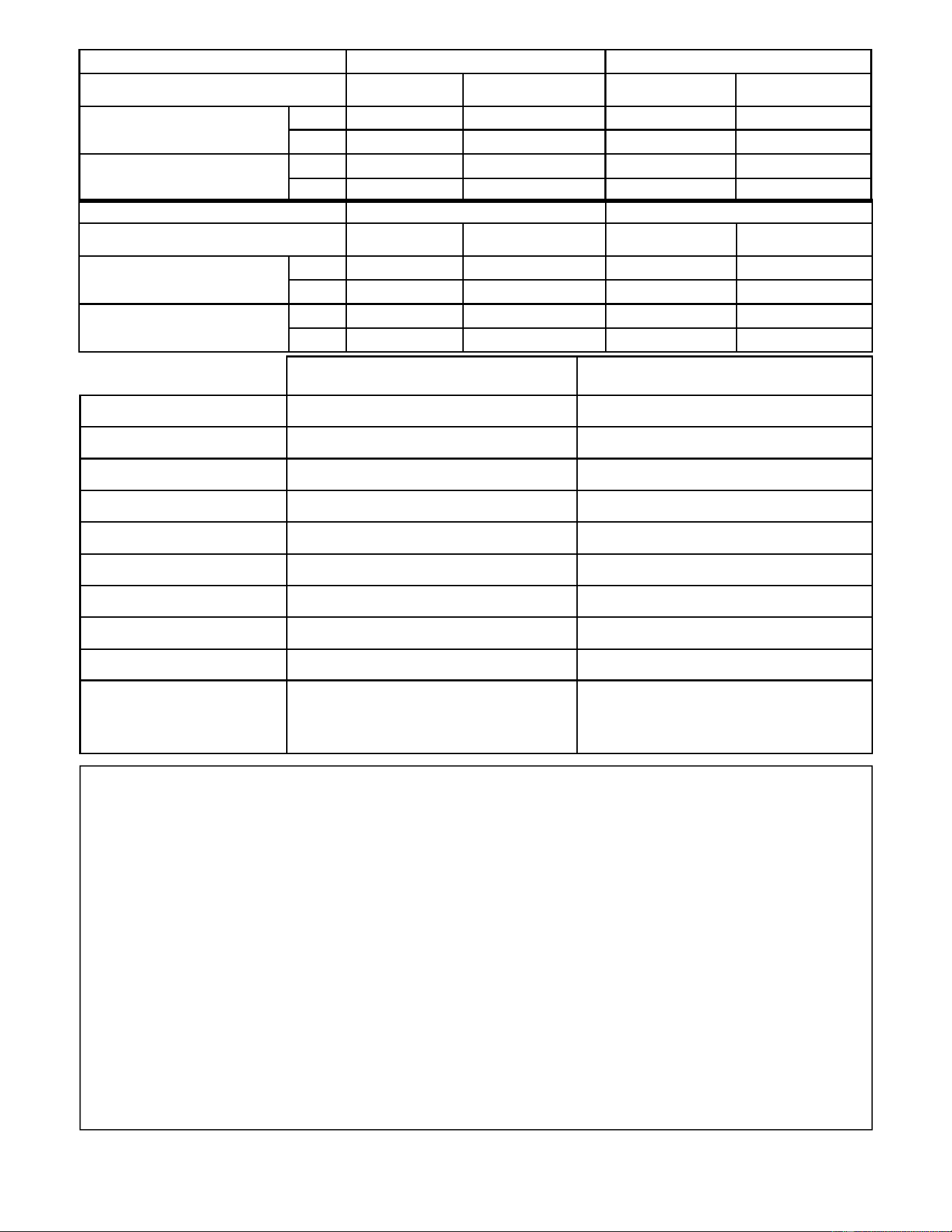
SpecificaƟons
FC510 FC824
GasConnecon 1/2 Inch Male NPT 1/2 Inch Male NPT
GasControl Electronic Electronic
Burners Ceramic Burner Ceramic Burner
TemperatureControl Electronic Thermostat Electronic Thermostat
IgnionSystem Electronic Spark Ignion Electronic Spark Ignion
ElectricalConnecon AC 120V, 60Hz, 19 Was AC 120V, 60Hz, 29 Was
Weight 22.1lb (10kg) 26.5lb (12kg)
Dimensions
Height: 19.4 in (492 mm)
Width: 19.2 in (487 mm)
Depth: 9.6 in (244 mm)
Height: 19 in (482mm)
Width: 24 in (610 mm)
Depth: 9.4 in (239 mm)
FuseSize 5 Amps 5 Amps
FanCFM Low Speed: 67.8/ High Speed: 97.8 Low Speed: 109.5/ High Speed: 215.4
FC510 NaturalGas PropaneGas
Elevaon
0~2000 2001~5200 0~2000 2001~5200
Input
(BTU/h)
Hi 10000 9200 10000 9200
Lo 5500 5500 5600 5600
Hi 1.8 1.8 3.2 3.2
Lo 0.64 0.75 1.12 1.31
ManifoldPressure(inch
H2O)
FC824 NaturalGas PropaneGas
Elevaon
0~2000 2001~5200 0~2000 2001~5200
Input
(BTU/h)
Hi 24000 22000 22000 20000
Lo 8400 8400 8000 8000
Hi 3.4 3.4 6.3 6.3
Lo 0.52 0.61 1.00 1.17
ManifoldPressure(inch
H2O)
Fan Convector Manual 13
GasFanConveconHeater
OperaonInstrucons
ImportantFactsaboutyourGasFanConveconHeater
Thank you for purchasing a Rinnai Gas Fan Convecon Heater. For proper operaon and safety, it is
important to follow the instrucons exactly and adhere to all safety precauons.
Read all of the instrucons and the warranty thoroughly before operang this heater. Keep this
manual in a safe place.
FC510....................(RCE‐391A‐H)
FC824....................(RCE‐691TA‐H)
— Donotstoreorusegasolineorotherflammablevaporsandliquidsinthevicinityofthisorany
otherappliance.
—BEFOREOPERATINGsmellaroundtheapplianceforgas.Besuretosmellnexttothefloorbecause
somegasisheavierthanairandwillseleonthefloor.
— WHATTODOIFYOUSMELLGAS
Donottrytolightanyappliance.
Donottouchanyelectricalswitch;donotuseanyphoneinyourbuilding.
Immediatelycallyourgassupplierfromaneighbor’sphone.Followthegassupplier’s
instrucons.
Ifyoucannotreachyourgassupplier,callthefiredepartment.
— Installaonandservicemustbeperformedbyaqualifiedinstaller,serviceagency,orgas
supplier.
Iftheinformaonintheseinstruconsisnotfollowedexactly,afireor
explosionmayresultcausingpropertydamage,personalinjuryordeath.
WARNING
14 Fan Convector Manual
ConsumerOperaonGuidelinesfortheSafeOperaonofyourFanConveconHeater
FOR YOUR SAFETY READ BEFORE OPERATING
A. This appliance does not have a pilot. It is equipped
with an ignion device that automacally lights the
burner. Donottrytolighttheburnerbyhand.
B. BEFORE OPERATING smell all around the appliance
area for gas. Be sure to smell next to the floor
because some gas is heavier than air and will sele
on the floor.
WHAT TO DO IF YOU SMELL GAS
Do not try to light any appliance.
Do not touch any electric switch; do not use any
phone in your building.
Immediately call your gas supplier from a neighbor’s
phone. Follow the gas supplier’s instrucons.
If you cannot reach your gas supplier, call the fire
department
C. Use only your hand to push the in or turn the gas
control knob. Never use tools, If the knob will not
push in or turn by hand, do not try to repair it; call
a qualified service technician. Force or aempted
repair may result in a fire or explosion.
D. Do not use this appliance if any part has been under
water. Immediately call a licensed professional to
inspect the appliance and to replace any part of the
control system and any gas control which has been
under water.
WARNING
If you do not follow these instrucons exactly, a fire or explosion
may result causing property damage, personal injury or loss of life.
TO TURN OFF GAS TO APPLIANCE
1. Turn off all electric power to the appliance using
the ON/OFF buon.
2. Set the thermostat to the lowest seng.
3. Turn the manual valve clockwise to the full
OFF posion.
OPERATING INSTRUCTIONS
1. STOP! Read the safety informaon above.
2. Set the thermostat to the lowest seng.
3. Turn off all electric power to the appliance using
the ON/OFF buon on the control panel.
4. This appliance is equipped with an ignion device
that automacally lights the burner. Do not try to
light the burner by hand.
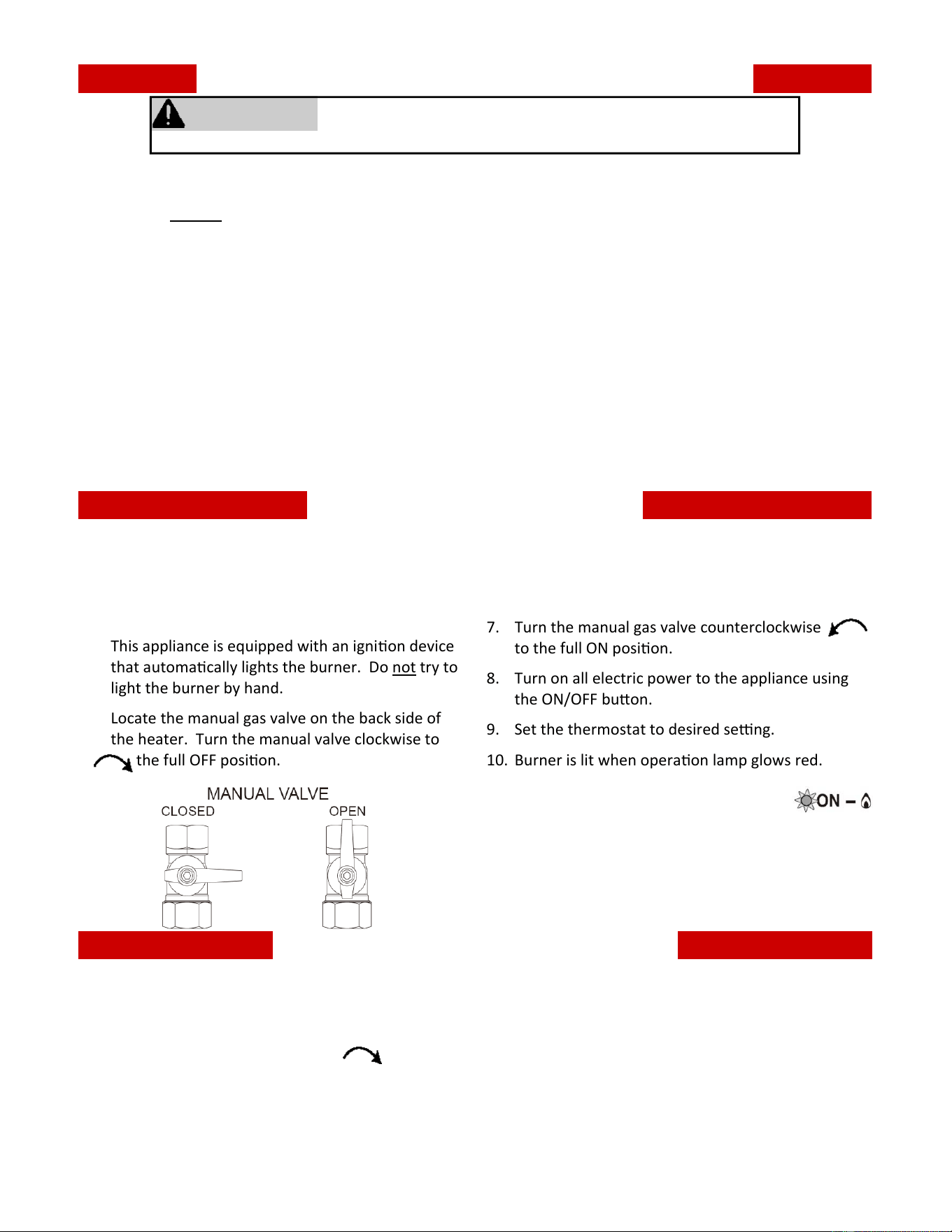
5. Locate the manual gas valve on the back side of
the heater. Turn the manual valve clockwise to
the full OFF posion.
6. Wait five (5) minutes to clear out any gas. Then
smell for gas, including near the floor. If you smell
gas, STOP! Follow “B” in the safety informaon
above. If you don’t smell gas, go to the next step.
7. Turn the manual gas valve counterclockwise
to the full ON posion.
8. Turn on all electric power to the appliance using
the ON/OFF buon.
9. Set the thermostat to desired seng.
10. Burner is lit when operaon lamp glows red.
11. If operaon lamp is flashing red,
burner has not been lit and an error
code will display.
12. If the appliance will not operate, follow the
instrucons “To turn off gas to appliance” and call
your licensed service technician or gas supplier.
Fan Convector Manual 15
WARNING
Before operang, smell all around the appliance area for gas. Be sure to smell next to the floor because
some gas is heavier than air and will sele on the floor.
Keep the area around the heater clear and free from combusble materials, gasoline, and other flammable
vapors and liquids.
Due to the high surface temperature, keep children, clothing and furniture away. Keep burner and control
compartment clean.
Do not use this appliance if any part has been under water. Immediately call a licensed professional to
inspect the appliance and to replace any part of the control system and any gas control which has been un‐
der water.
Should overheang occur or the gas supply fail to shut off, turn off the manual gas control valve to the
appliance.
Do not use an extension cord or an adapter plug with this appliance.
Any alteraon to the appliance or its controls can be dangerous and will void the warranty.
Keep the air intake locaon free of chemicals and combusble materials that produce fumes. These fumes
can damage components and reduce the life of your appliance.
Improper Installaon, adjustment, alteraon, service, or maintenance can cause personal injury or loss of
life. Refer to owner’s manual provided with appliance. Installaon and service must be performed by a
licensed professional.
16 Fan Convector Manual
Operang Instrucons
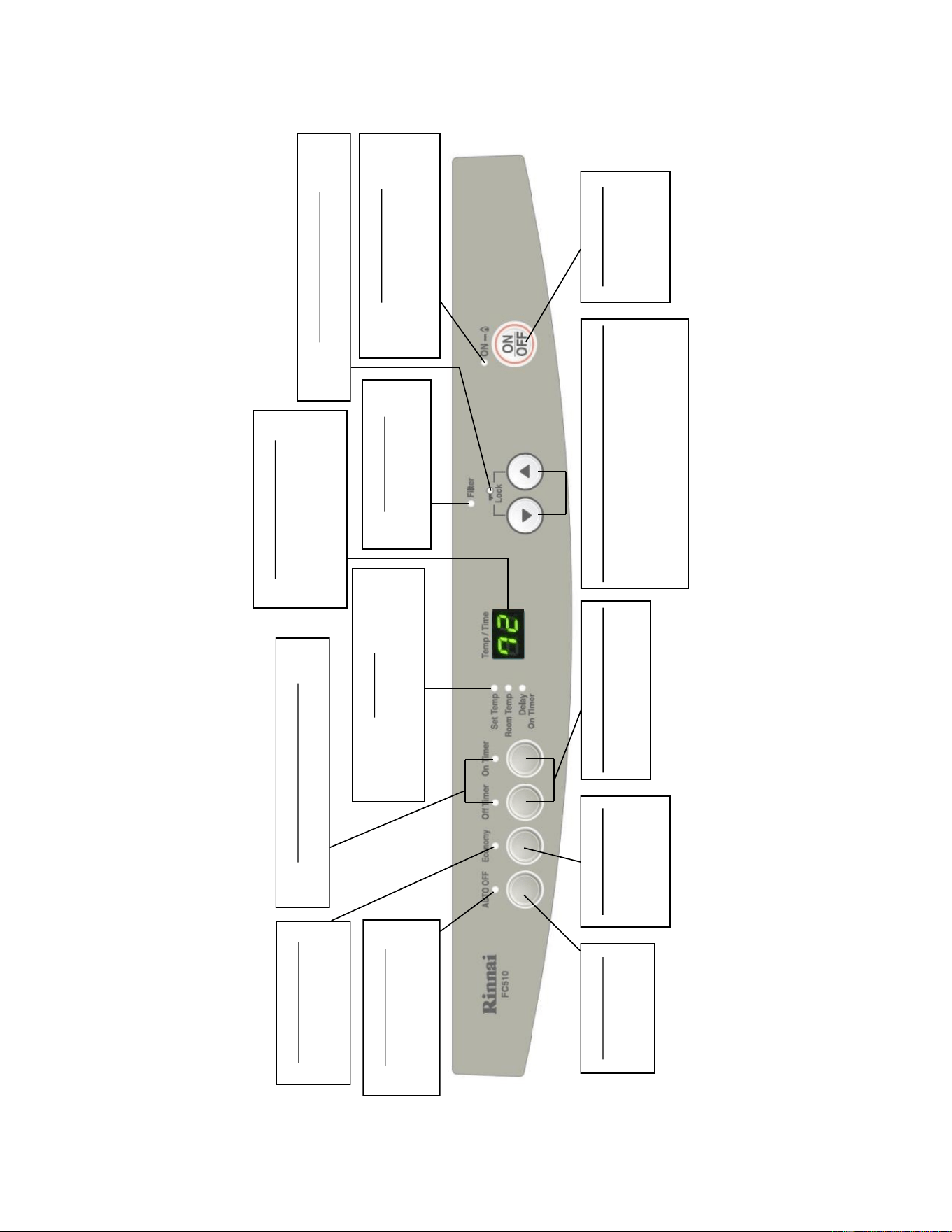
FC510 Control Panel Layout
Auto O Indicator
Indicates the thermostat
o funcon is acvated.
Economy Indicator
Indicates the Economy
mode is in operaon.
O and On Timer Indicators
Indicates mer is in operaon.
Indicators
Indicates what informaon is
currently displayed on LED display.
Temperature Display
Shows either the me of day,
temperatures or error code
Messages.
Filter Indicator
Indicates the lter needs
cleaning.
Funcon Lock Indicator
Indicates Funcon Lock is acvated.
ON/OFF Indicator
Green Indicator
-Unit is in standby
Red Indicator
-Burners are on
Auto O Buon
Selects thermostat
o funcon.
Economy Buon
Selects operang
mode for Economy
funcon.
O and On Timer Buons
Selects the Timer mode.
(OFF or ON)
Time/Temperature Adjustment Buons
Increase/decrease the temperature
seng as well as changing hours or
minutes. (When pressed simultaneously,
will lock all controls except for OFF)
ON/OFF Buon
Main Switch for
turning ON/OFF.
Fan Convector Manual 17
Operang Instrucons
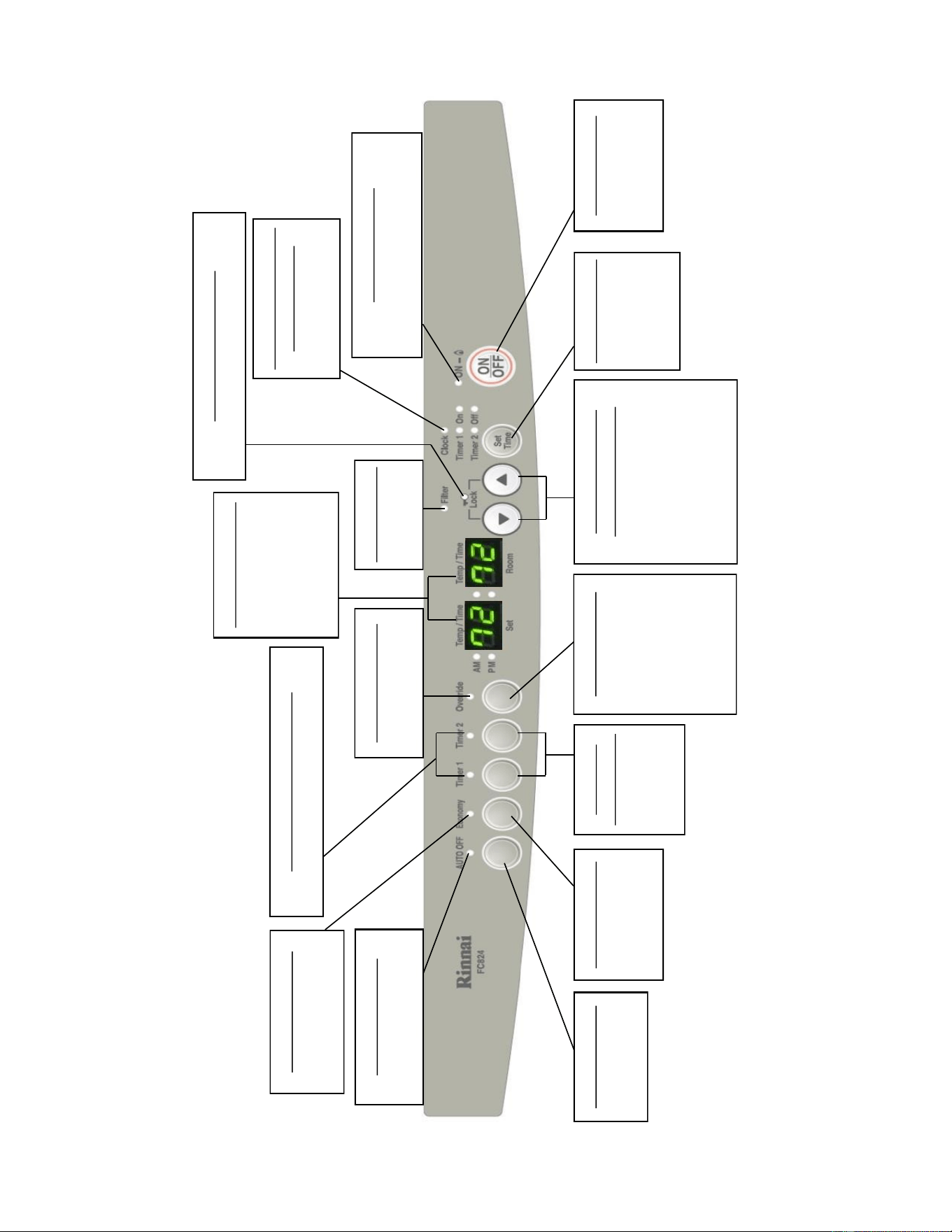
FC824 Control Panel Layout
Auto O Indicator
Indicates the thermostat
o funcon is acvated.
Economy Indicator
Indicates the Economy
mode is in operaon.
O and On Timer Indicators
Indicates mer is in operaon.
Time/Temp Display
Shows either the
me of day,
temperatures, or
error code
Messages.
Filter Indicator
Indicates lter
needs cleaning.
Funcon Lock Indicator
Indicates Funcon Lock is acvated.
Auto O Buon
Selects thermostat
o funcon.
Economy Buon
Selects operang
mode for Economy
funcon.
O and On
Timer Buons
Selects the
Timer mode.
(OFF or ON)
Time/Temperature
Adjustment Buons
Increase/decrease the
temperature seng as well
as changing hours or
minutes. (When pressed
simultaneously, will lock all
controls except for OFF)
ON/OFF Buon
Main Switch for
turning ON/OFF.
Override Indicator
Indicates Override
funcon is acvated.
Override Buon
While in mer
mode, changes
operaon from ON
to OFF or OFF to
ON, unl the next
programed seng is
reached.
Clock Adjustment and
Timer Indicators
Indicates clock or dual
mers being set.
Set Time Buon
Selects clock
and/or mers
for adjusng or
programming.
ON/OFF Indicator
Green Indicator
-Unit is in standby
Red Indicator
-Burners are on
18 Fan Convector Manual
OperangTheHeater
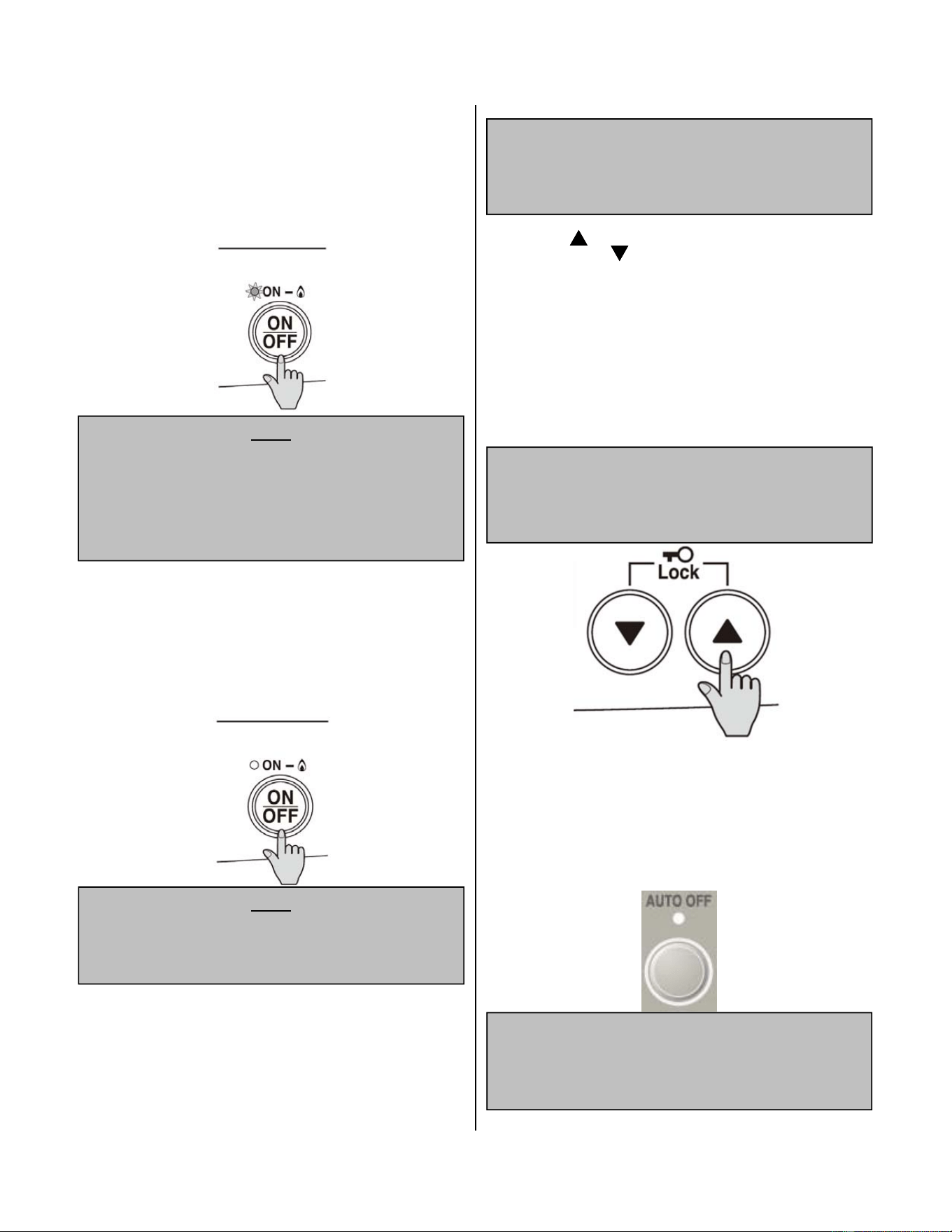
TURNINGON:
Press the ON/OFFbuon to operate the heater. The
ON indicator will glow green. Aer approximately 3
seconds the spark generator will be heard before the
burner ignites and the ON indicator glows red,
indicang that the burner is lit. Warm air can be felt
coming from the louvers approximately 5 seconds
later.
NOTE
If the heater does not ignite on inial try, air may be
remaining in the gas supply line. The spark generator
will only connue for 15 seconds. Aer this, it will be
necessary to press the ON/OFF buon OFF, then ON
again.
TURNINGOFF:
Simply press the ON/OFFbuon to switch off the
heater. The ON indicator will go out. The convecon
fan will connue to operate for several minutes aer
the burner has gone out in order to cool the
appliance. Donotunplugtheappliancewhilethe
conveconfanisrunning.
NOTE
DO NOT turn heater off by unplugging. The
convecon fan will connue to run as the appliance
needs to cool.
RoomTemperatureAdjustment:
NOTE
The room temperature and pre‐set temperatures can
only be displayed and adjusted when the heater is
running.
Press the " " buon to increase the temperature
seng or " " buon to decrease the tem‐
perature seng.
The temperatures can be set to:
a) [L] low (minimum combuson)
b) [60°F] to [80°F] in 2°F increments
c) [H] high (maximum combuson)
(Default temperature seng is 72°F)
NOTE
If the heater does not ignite, then the pre‐set
temperature may not be set to a seng that is
higher than the actual room temperature.
AUTOOFF:
When AUTOOFFis selected, the indicator light will
glow. The unit will now be under full thermostat
control. The heater will operate to reach the
selected room temperature and then turn OFF.Press
AUTO OFF again to disable this funcon.
NOTE
When AUTO OFF indicator light is not glowing , the
unit will connue to produce heat in at least a low fire
capacity unl the unit is manually powered down.
Fan Convector Manual 19
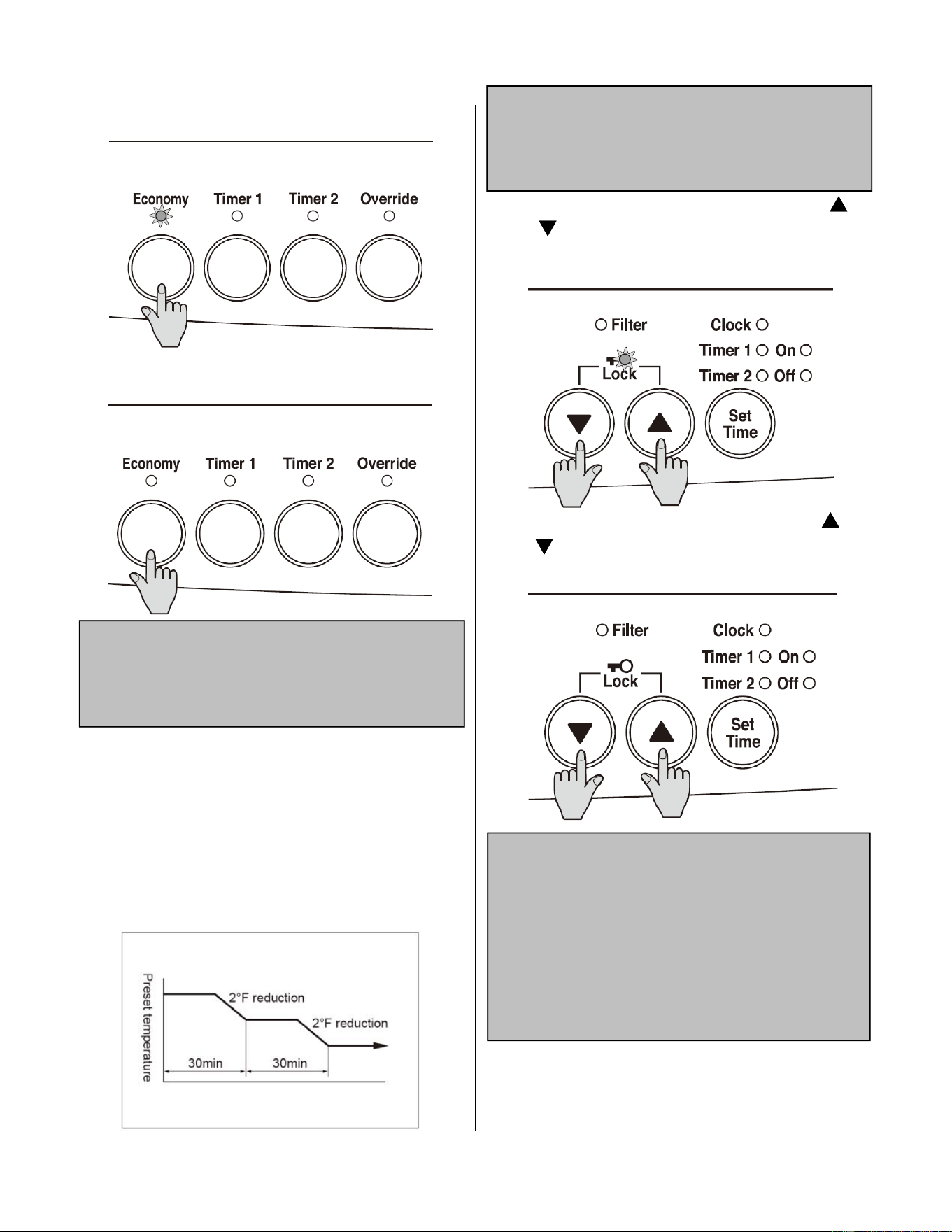
EconomyMode:
Press the Economy buon to start the Economy
funcon. The Economy indicator will glow.
Press the Economy buon once more to switch off
the funcon.
NOTE
The Economy mode may only be acvated when the
heater is turned on. The Economy mode remains ON
and in the system memory unl deacvated.
Aer the room is heated inially the air temperature
may be dropped to a lower level without affecng
comfort. 30 minutes aer the selected room
temperature (set with the thermostat) is reached, the
Economy mode, if ON, reduces the temperature by 2°
F. Aer another 30 minutes it reduces the
temperature by a further 2°F. This is an energy saving
feature. The Economy mode does not operate if the
heater is under capacity for the room size.
FunconLock:
To operate the Funcon Lock simply press the " "
and " " buons at the same me. The funcon is
acvated immediately and the Funcon Lock indica‐
tor will glow.
NOTE
The Funcon Lock will help prevent accidental
operaon as well as making the control panel child
resistant.
To deacvate Funcon Lock simply press the " "
and " " buons at the same me for 2 seconds
and the Funcon Lock indicator will go out.
NOTE
During normal operaon the Funcon Lock may be
acvated and all controls other than the OFF switch
will be locked. Deacvang the lock releases the
controls. If the lock is acvated while the heater is
turned OFF, then all funcons will be locked. If the
heater is turned OFF while the Funcon Lock is
acvated, it cannot be turned ON again unl the lock
is deacvated.
20 Fan Convector Manual
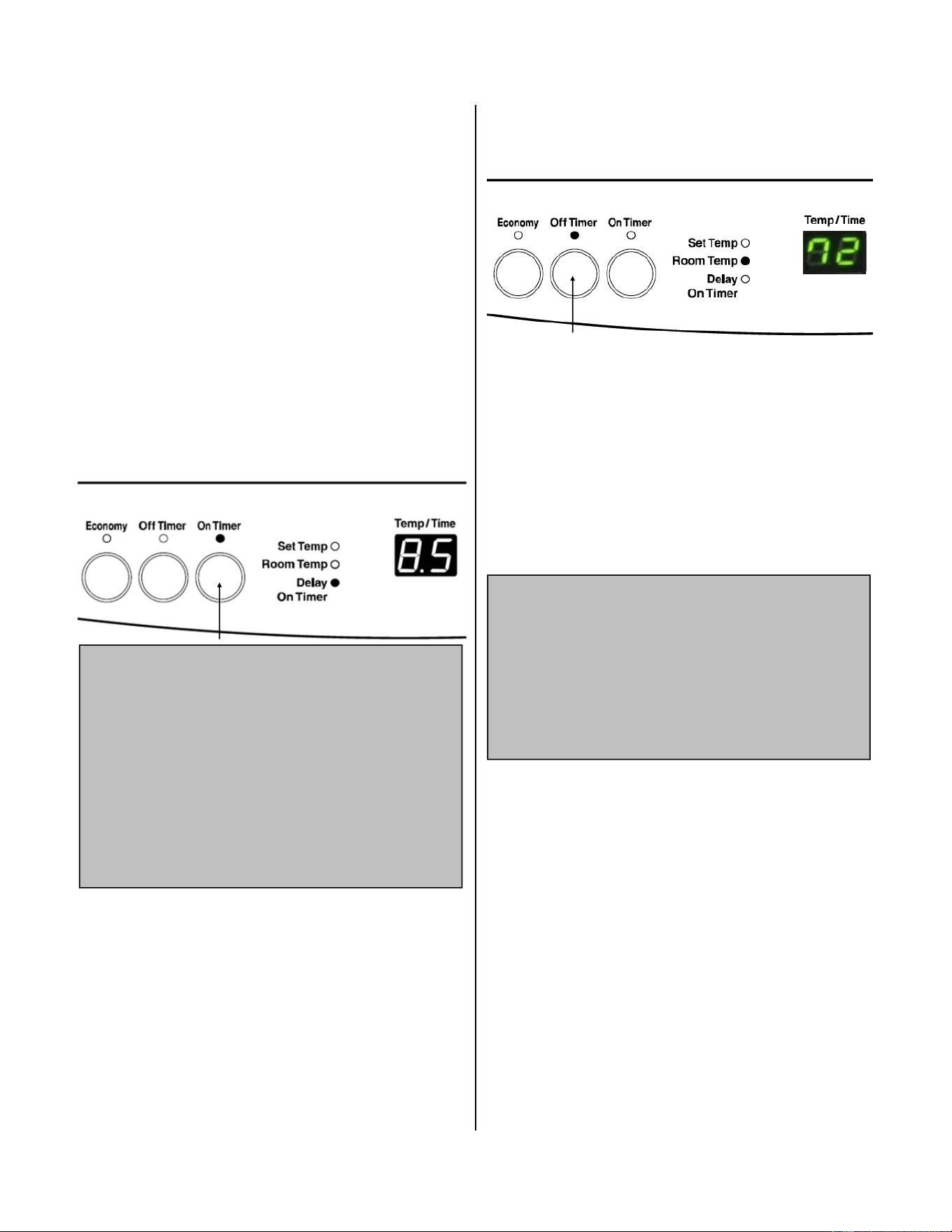
OperangtheTimer(s)(FC510):
Press the On Timer buon . The On Time indicator will
illuminate and the Combuson indicator will be illumi‐
nated green to confirm that the heater is awaing for
the Delay “ON” me period to pass before commenc‐
ing operaon. The Delay On Timer indicator will also
illuminate and the current Delay On Time period will
be displayed on the Digital (Temp / Time) display for
10 seconds. While displayed, the Delay “ON” me can
be adjusted by pressing the Up or Down buons . A
delay me of up to 9½ hours can be set in increments
of 30 minutes and a delay me of up to 24 hours in
increments of 60 minutes. When the programmed
Delay “ON” me period has passed, the heater will
automacally begin operaon.
The Timer feature allows you to delay the start me
of the heater for up to 24 hours.
NOTE
The heater will connue to operate for a period of 60
minutes. On Timer operaon can be cancelled by
pressing either the ON/OFF buon or the Off Timer
buon . The delay ‘On’ me last programmed is
stored in the memory and will be the default unl it is
re‐adjusted.
If the On Timer buon is pressed while the heater is
in operaon the On Timer will override manual
operaon.
Operang the On Timer
Operang the Off Timer
The Off Timer allows you to set a 60 minute delay
before the heater will automacally turn off.
To operate, press the Off Timer buon . The Off
Timer indicator will illuminate and the Combuson
indicator will be illuminated red to confirm that the
heater will connue operaon unl the Delay ‘off’
me period has passed aer which it will stop. The
Delay Off me is 60 minutes. When this me has
passed, the heater will automacally stop operaon
and the Off Timer indicator will go out.
During Off Timer operaon full manual control of the
heater is available.
NOTE
Aer the Off Timer operaon is completed, press the
On/Off buon twice to restart the heater.
The Off Timer and On Timer(s) work independently of
each other. However, if both mers are operang
and the Delay On me period is 30 minutes, the Delay
Off Timer will override the Delay On Timer.
Fan Convector Manual 21
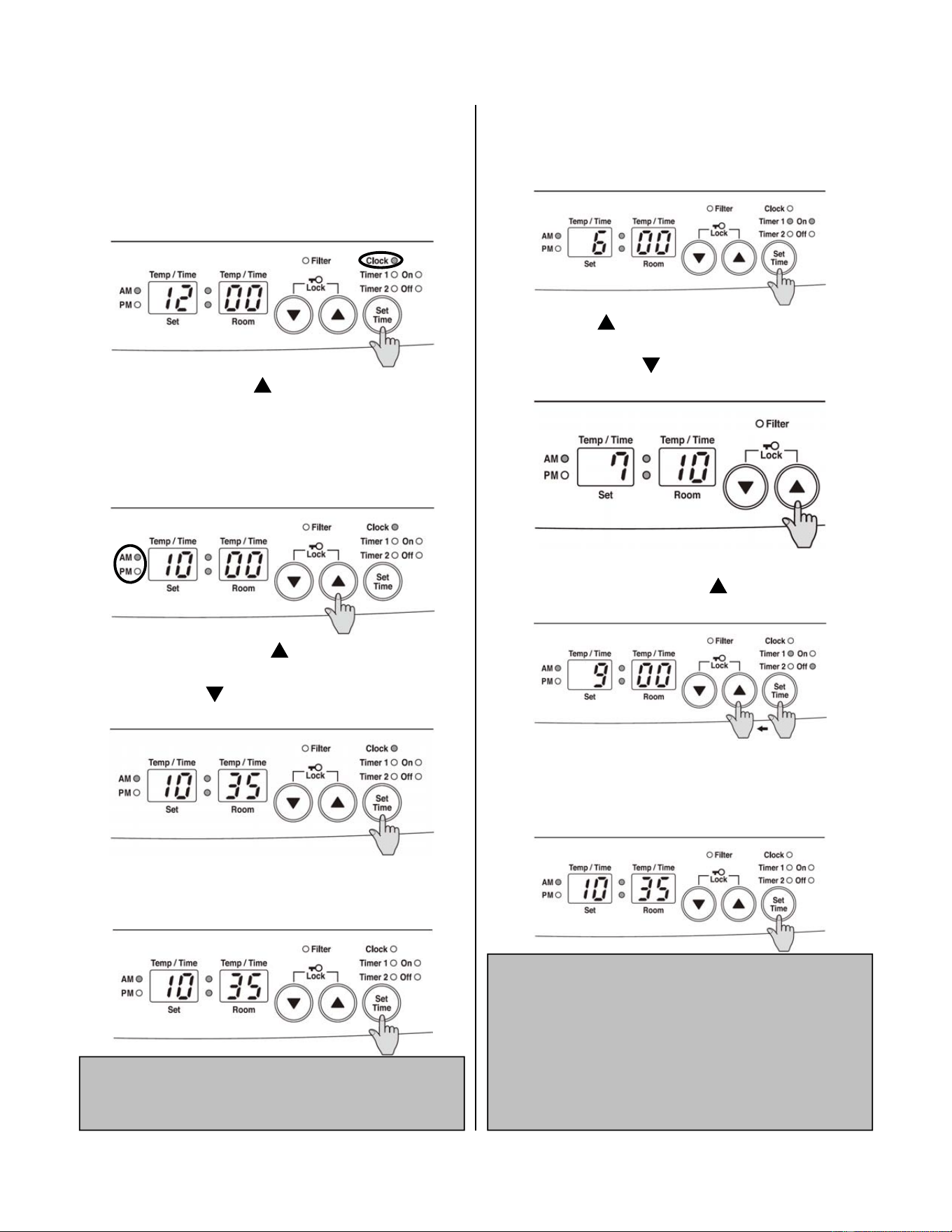
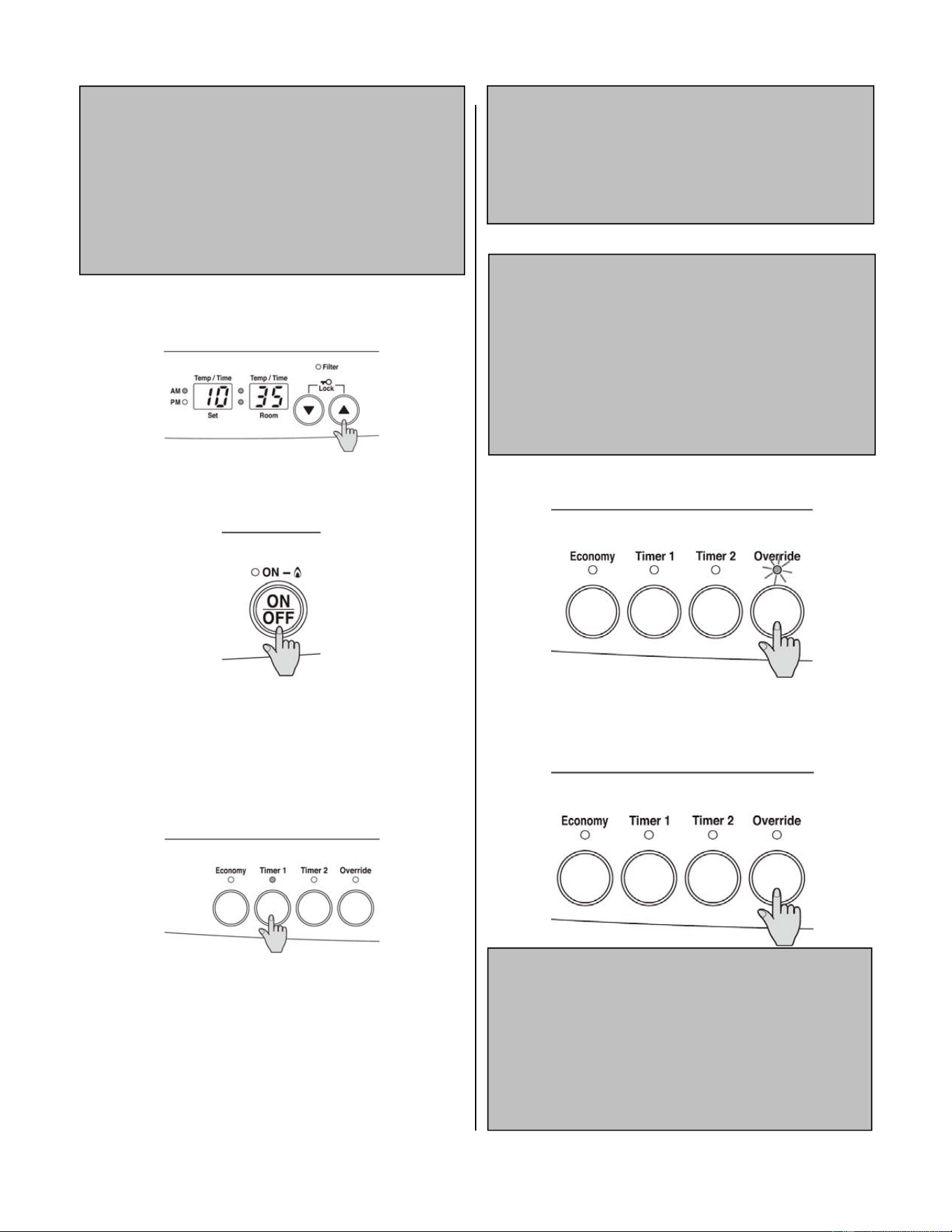
SengtheClock:(FC824)
When the appliance is first plugged in and then
turned on, the digital display will show “‐ ‐:‐ ‐”
Aer 10 seconds the Digital Display will turn off.
Example: seng the clock to 10:35 A.M.
1. Press the Set Time Buon once, the Clock
Indicator will glow.
2. Press and hold the " " buon; the minutes will
begin to change first, then the me will change by
whole hours. Release the buon when AM 10:00
shows on the Digital Display. Confirm that you have
selected AM. A small indicaon on the le hand side
of the Digital Display should indicate the AM seng.
Then press and hold the " " buon again, release
the buon when AM 10:35 shows. If you go past AM
10:35, then the " " buon can be used to change
the me sengs in reverse.
3. Press the Set me buon five mes to lock in the
me. The Clock and Timer indicators will go out. Aer
10 seconds the Digital Display will turn off.
ProgrammingtheOn/OffTimer(s)(FC824)
NOTE
Before programming the Timer(s), ensure the clock
me has been set.
Example: seng Timer 1 to heat between 7:10 A.M to
9:00 A.M.
1. Press the Set Time Buon twice. The digital
display will show AM 6:00. Timer 1 Indicator will glow.
2. Press the " " buon unl AM 7:00 appears.
Release the buon, then press it again unl AM 7:10
appears. (Press the " " buon if you go past AM
7:10.)
3. Press the Set Time buon again, the Timer 1 OFF
indicator will glow. Press the " " buon unl AM
9:00 appears.
4. Press the Set Time buon three mes to lock in
the programmed me. The digital display will show
the current me. Aer 10 seconds the digital display
will turn off.
NOTE
Timer 2 is programmed in the same way simply
choosing Timer 2 instead of Timer 1. Timers can be
programmed to operate for any 2 periods within 24
hours. The programmed me must be selected and
locked in within 1 minute of the Timer Indicators
glowing, otherwise the adjustment will not be saved .
22 Fan Convector Manual
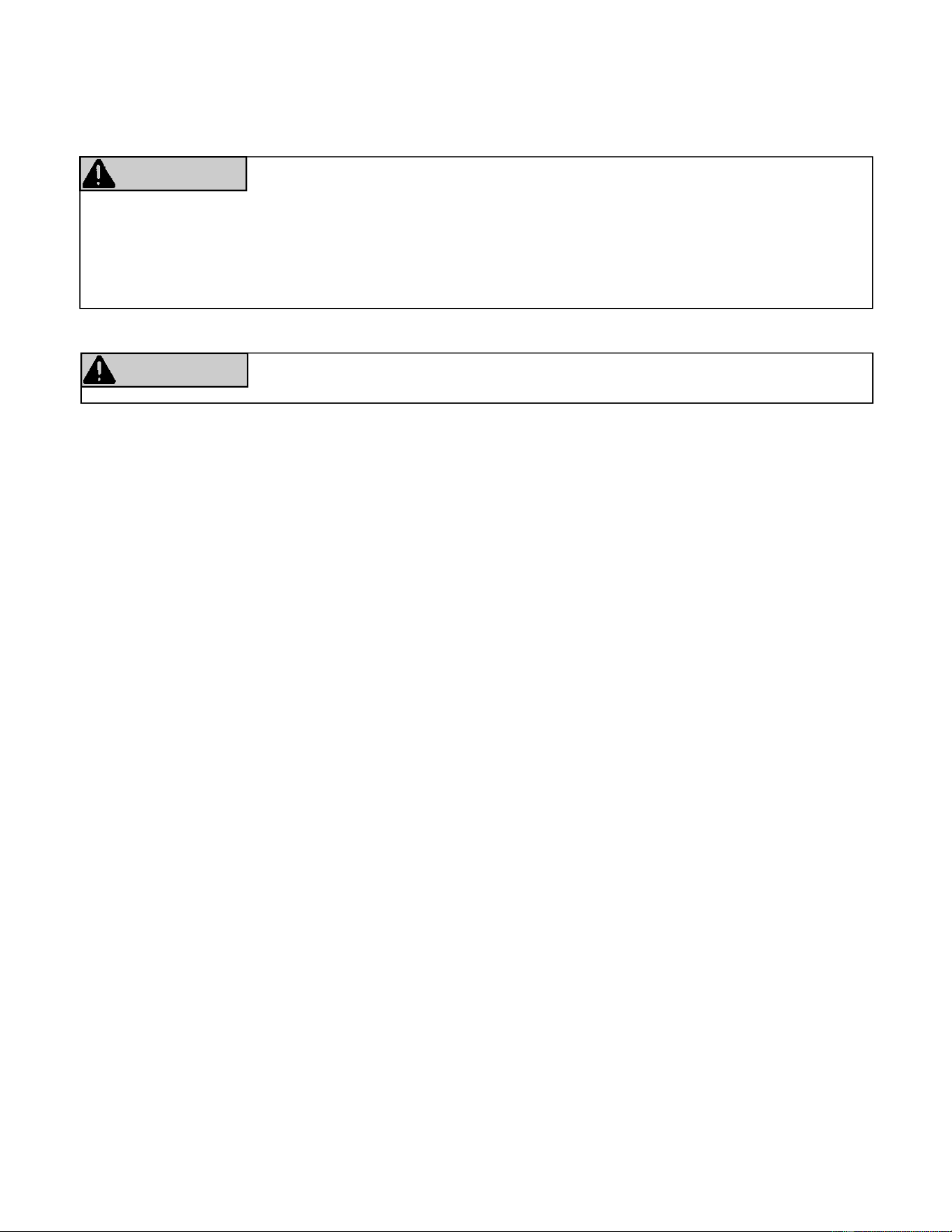
OperangtheTimer(s)(FC824):
NOTE
Before operang the Timer(s), the clock me must be
correct, and a starng me and fi nishing me for the
Timer(s) must be programmed. The two Timers
operate in the same way. This heater will begin
operang before the programmed starng me in
order for the room to reach the temperature seng
by the programmed starng me.
1. To select the Timer(s) to commence heang:
Check that the me shown on the Digital Display is
correct. Check the ON and OFF mes for both Timers.
2. Press the ON‐OFF buon to operate the heater:
The On indicator will glow green and the heater will
begin to operate. Select the desired temperature
seng.
3. Press the Timer 1 and On Timer 2 buon(s). The
Timer indicator(s) will glow and the heater will remain
on standby unl one hour prior to the me
programmed into the selected Timer(s). When this
me is reached, the Timer indicator will flash and the
heater will operate. The ON indicator glows red when
the heater commences operaon.
The heater can be operated to alternate between
Timers automacally during cold weather by selecng
Timer 1 and Timer 2 together. Both Timer indicators
will glow. The appliance will remain on standby at
intervals between the programmed finishing and
starng mes of each Timer. While the heater is
operang during programmed intervals the Timer
indicator will flash.
NOTE
If there is a power failure, the system memory will
retain the Timer programs and the clock will stop at
when the power goes off. The clock will start keeping
me again when the power returns but will have to be
reset to the correct me.
OverrideFuncon:
NOTE
This funcon is intended to be used to manually
override the current operaon of the heater while it is
in Timer mode. For example, if the heater is in standby
(between the end me and start me of the Timer),
and the Override buon is pressed, then the heater
will operate and heat the room. If the heater is in
operaon in Timer mode, then pressing the Override
buon will turn the heater OFF.
To operate the Override simply press the Override
buon. The Override indicator will flash.
To manually deacvate the Override simply press the
Override buon again. The Override indicator will go
out, and the heater will return to standby mode or
ON mode depending on the programmed mes.
NOTE
The heater will connue to operate on Override unl
the Override buon is pressed again, or one of the
Timers takes over the operaon of the appliance. This
means that the Override mode will automacally
drop out if a programmed Starng me is reached.
The appliance will then return to operang at mes
programmed into the Timer(s).
Fan Convector Manual 23
The appliance must be inspected annually by a licensed professional. Repairs and maintenance should be
performed by a licensed professional. The licensed professional must verify proper operaon aer servicing.
Regular inspecons, as outlined in this secon, are strongly recommended as means of keeping your heater
operang efficiently and safely. Access to internal parts is from the front of the heater.
Any safety screen or guard removed for servicing an appliance must be replaced prior to operang the heater.
Both air filters should be cleaned monthly during the heang season. Do not wait for filter warning lamp to come
on before cleaning filters. Do not use the heater with the filter warning lamp on or the appliance will overheat.
Dusty filters reduce the air flow through the heater and reduce the heater’s effecveness. The filters while
installed may be cleaned with a vacuum cleaner.
The heater should be inspected and cleaned annually by a professional service person. More frequent cleaning
may be required due to excessive lint from carpeng and/or other materials. It is imperave that the controls,
burners and circulang air passageways of the appliance be kept clean.
RequiredMaintenance
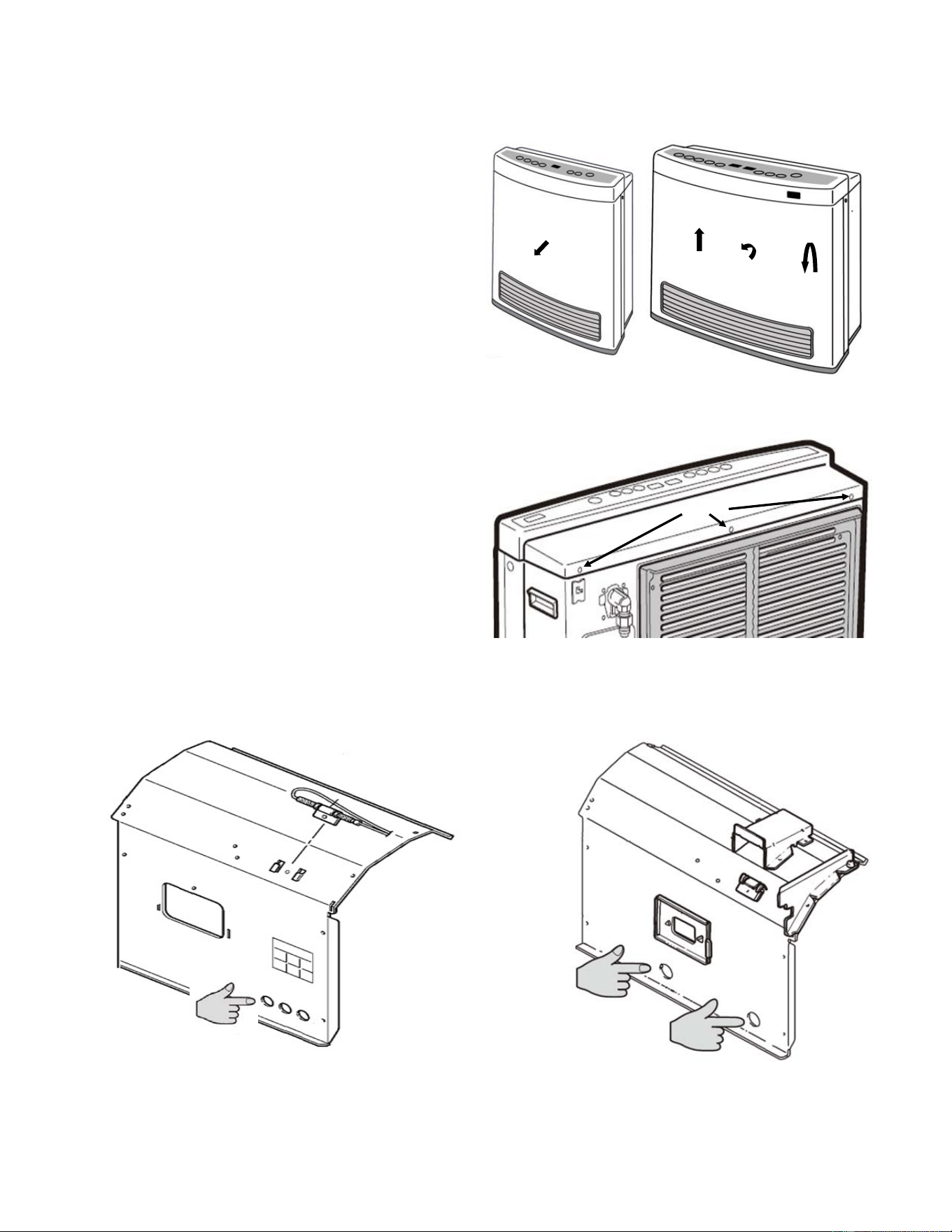
To protect yourself from harm, before performing maintenance:
Turn off the electrical power supply by unplugging the power cord or by turning off the electricity at the
circuit breaker. (The temperature controller does not control the electrical power.)
Turn off the gas at the manual gas valve, usually located immediately below the heater.
WARNING
Keep the appliance area clear and free from combusble materials, gasoline, and other
flammable vapors and liquids.
WARNING
The appliance must be inspected annually by a licensed professional. Repairs and maintenance should be
performed by a licensed professional. The licensed professional must verify proper operaon aer servicing.
Thefollowingmaintenanceitemsarerequiredfortheproperoperaonofyourheater.
24 Fan Convector Manual
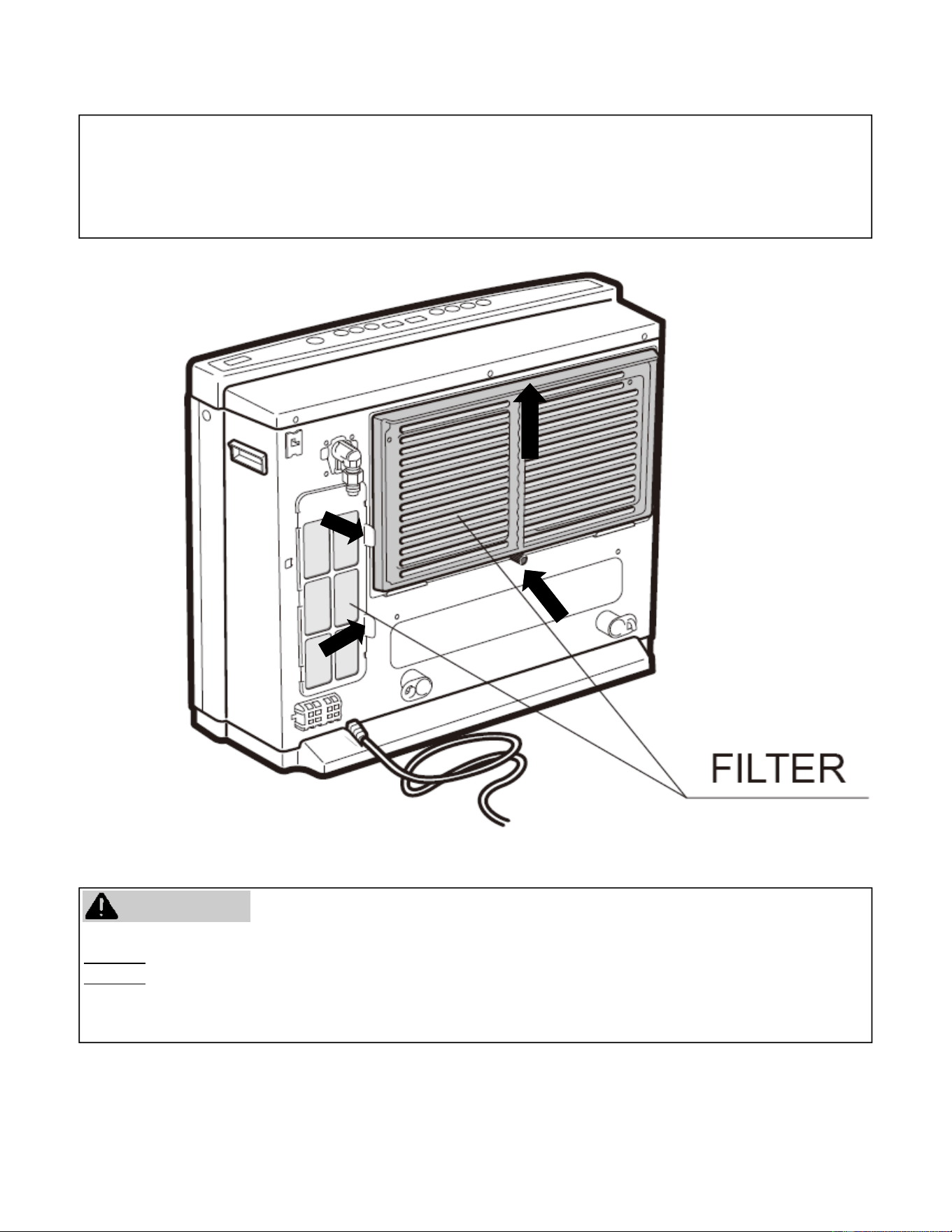
Clean as follows:
1. Turn heater off. Unplug electrical cord and allow
to cool for 1 hour.
2. Remove the louver assembly. (FC510: 3 Screws,
FC824: 2 screws)
3. Remove front panel:
‐FC510:Remove 2 screws near top and 2 screws
near boom of unit and pull front panel off
towards you. (Figure1)
‐FC824:Remove 2 screws near to top of the
appliance as well as the 3 screws on the back of
the control panel (Figure3). Li the front panel
upwards and rotate toward you. Pull downward
to remove the front panel. (Figure2)
4. Use a vacuum cleaner or apply air to remove dust
from around the burner and electrical
components. In addion, apply the vacuum/air
supply to the holes near the boom of the
combuson chamber cover (FC510 has 3 holes
and the FC824 has 2 holes) .
5. All outside parts of the heater can be cleaned
using soap and water on a so damp cloth.
6. Install the front panel and the louver assembly.
RequiredMaintenance(connued)
1.
2.
3.
FC510 FrontPanelRemovalFC824
Figure1
Figure2
Figure3
BackofFC824controlpanel
Screws
APPLY PRESSURE
THROUGH THE
TWO HOLES
APPLY PRESSURE
THROUGH THE
THREE HOLES
FC510
FC824
Fan Convector Manual 25
Failure to keep the primary air openings of the burner clean may result in soong and property damage.
DONOTdamage or distort any parts of the heater.
DONOTuse a wet cloth or spray cleaners on the burner.
Keep the appliance area clear and free from combusble materials (i.e. aerosols or spray paint), gasoline, and
other flammable vapors and liquids.
WARNING
RemovingtheFilters:
1. Unscrew the cap (Philips screw in the center) securing the large filter.
2. Pull the large filter up and away.
3. For the small filter simply pull the two tabs away from the unit.
RequiredMaintenance(connued)
26 Fan Convector Manual
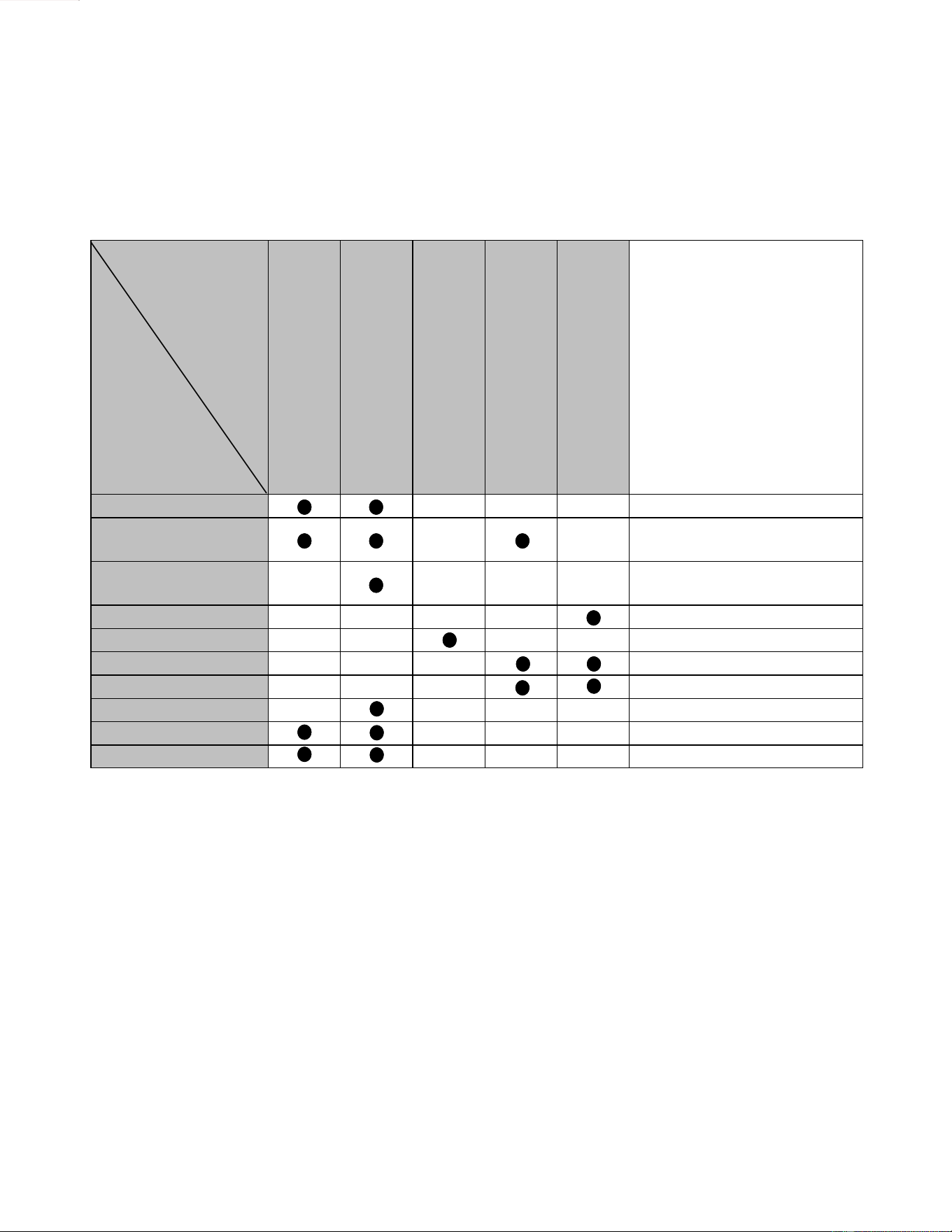
1. Confirm that the heater is properly installed. See Installaon secon.
2. Make sure the gas valve on the propane gas bole or gas supply line is ON and that gas pressure is available.
3. Make a careful visual inspecon of all electrical connecon and wiring.
4. If trouble persists, refer to the following trouble shoong chart and corresponding remedy.
Troubleshoong:
Problem
Cause
No On indicator
Burner does not ignite
Filter warning lamp glows
Combuson stops during operaon
Takes too long to warm the room
Remedy
Not Plugged In
Plug in
Power Failure
Manually operate (push ON/OFF
Buon) aer power is restored.
(Inial Installaon)
Air in gas pipe
Purge air (Installer)
Room too large Check with retailer
Dust on the air filters Clean air filters (WEEKLY)
Louvre obstructed Clean obstrucon
Air filter blocked Clean filter (WEEKLY)
On/Off Timer is set Cancel On/Off Timer
Child Proof Lock set Cancel Child Proof Lock
Gas turned off at meter Turn gas on (SERVICER)
Fan Convector Manual 27
DiagnoscCodes
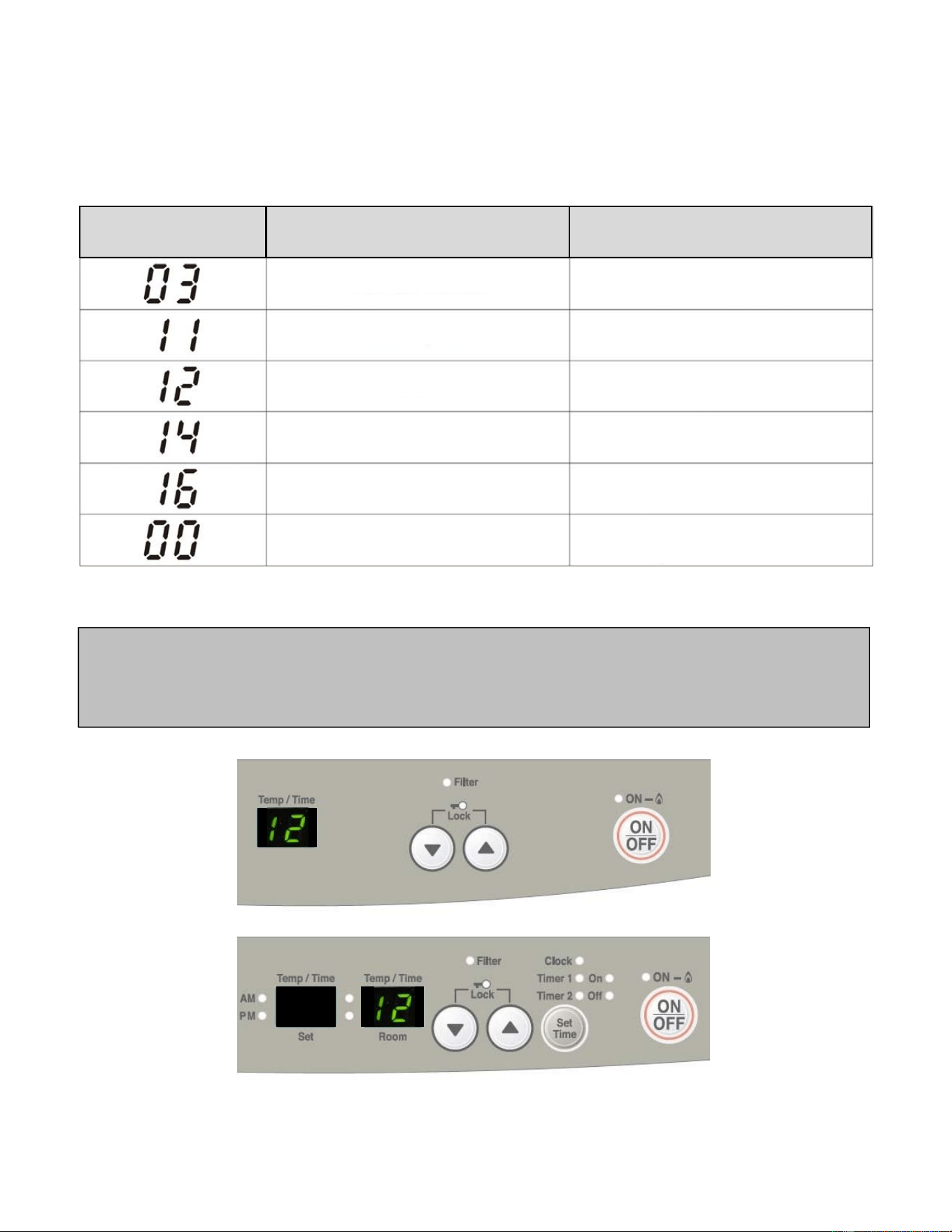
This heater has the ability to check its own operaon connuously. Ifafaultoccurs,anErrorMessagewillflash
onthedigitaldisplayofthecontrolpanel.This assists with diagnosing the fault, and may enable you to
overcome a problem without a service call. Please quote the code displayed when inquiring about service.
If you see other codes displayed, contact Rinnai or your nearest service agent and arrange for a service call.
NOTE
In some cases, you may be able to clear the Error Message simply by turning the heater OFF, then ON again. If
the Error Message sll remains or returns on the next operaon, contact Rinnai or your nearest service agent
and arrange for a service call.
FC510
FC824
CODE DISPLAYED DEFINITION REMEDY
Tilt Switch Acvated
Missed Ignion
Flame Failure
Overheat
Room Overheat
Power Cut
Inspector gas line connecon, aer seng heater
upright. Turn heater ON
Check gas is turned ON,
Service call if repeated
Venlate the room.
Service call if repeated.
Clean filter.
Service call if repeated.
Service call.
Turn Heater OFF, then ON again
28 Fan Convector Manual
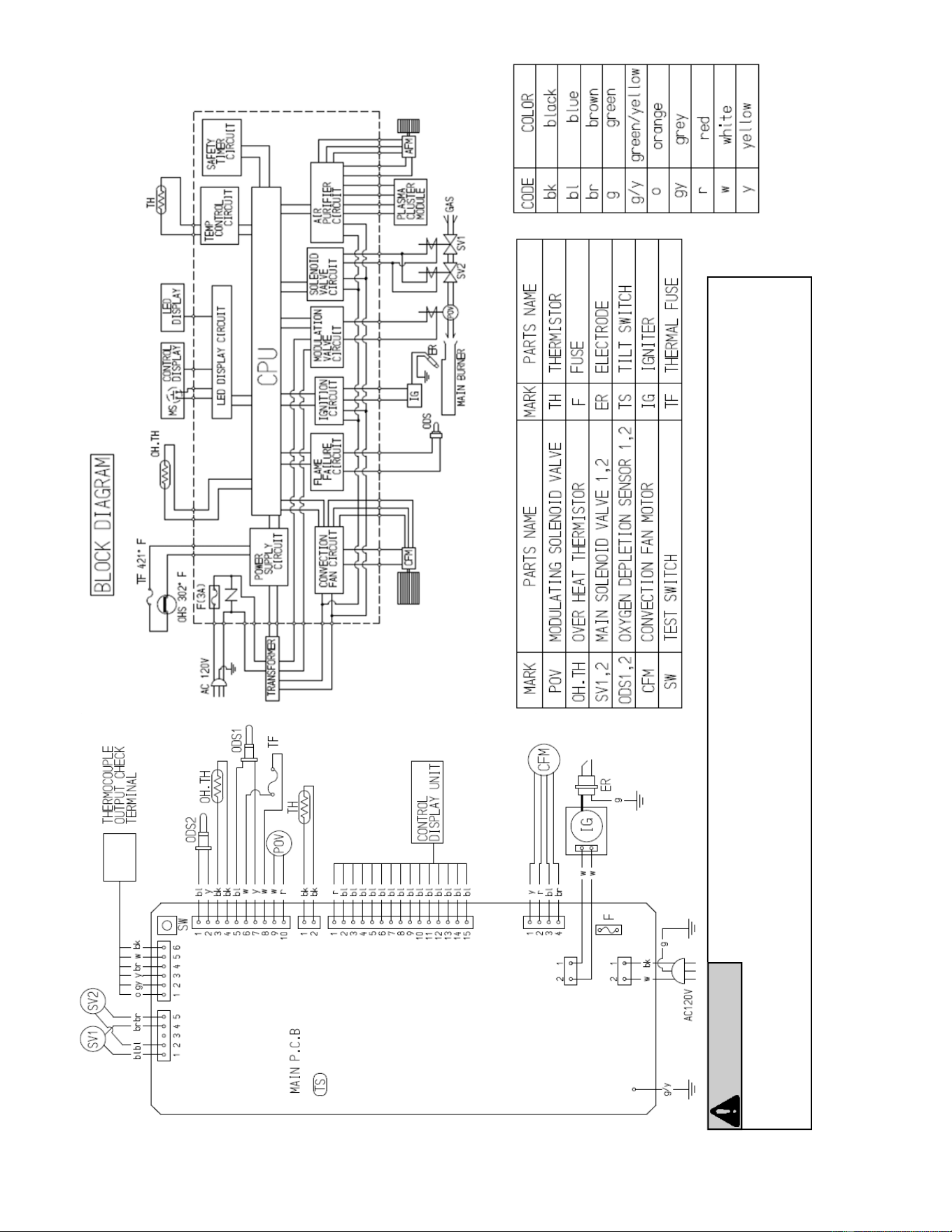
Label all wire prior to disconnecon when servicing controls. Wiring errors can cause improper and dangerous operaon.
Verify proper operaon aer servicing.
CAUTION
If any of the original wire as supplied with the appliance must be replaced, it must be replaced with a wire of at
least a 194°F temperature rang and 18 AWG.
ElectricalDiagramFC510
Fan Convector Manual 29
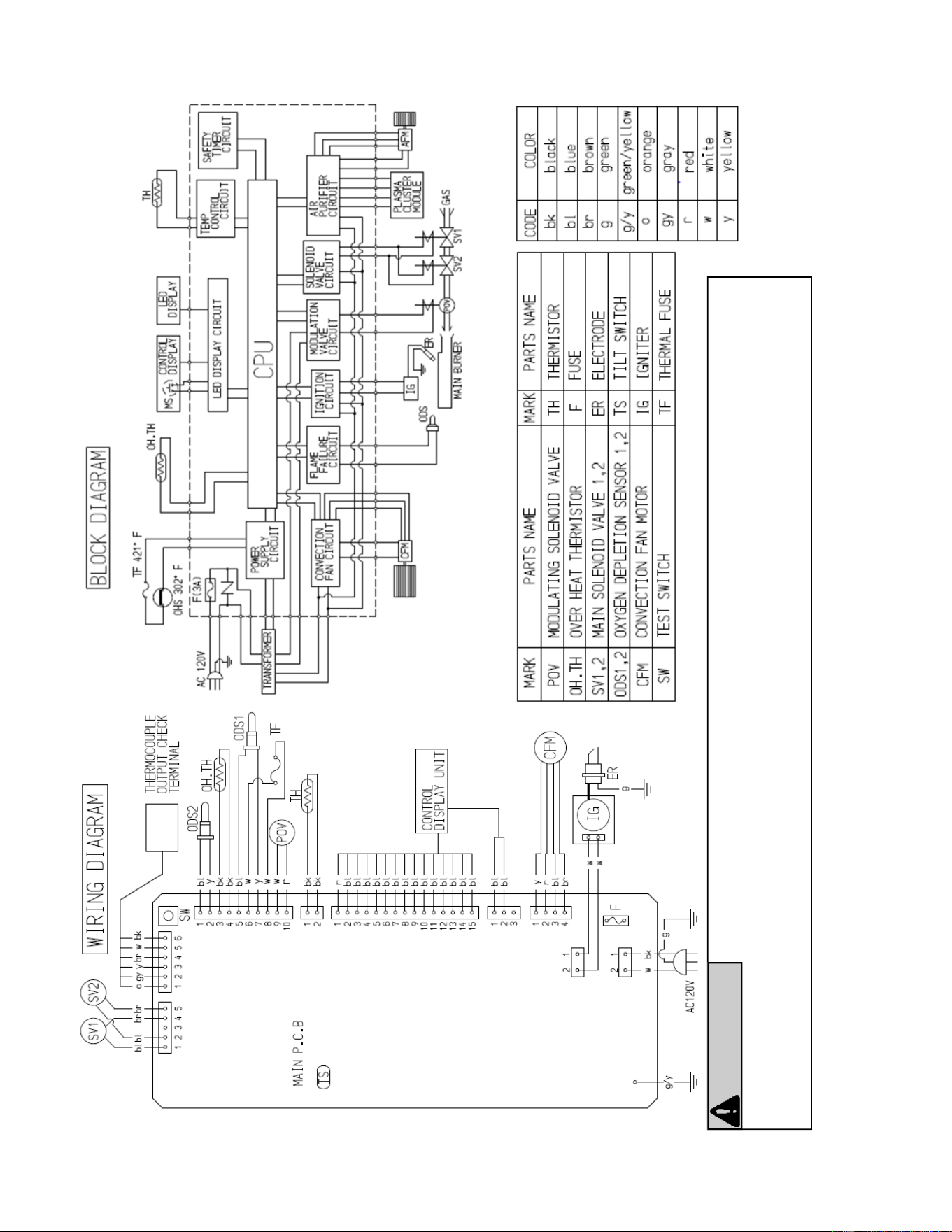
Label all wire prior to disconnecon when servicing controls. Wiring errors can cause improper and dangerous operaon.
Verify proper operaon aer servicing.
CAUTION
If any of the original wire as supplied with the appliance must be replaced, it must be replaced with a wire of at
least a 194°F temperature rang and 18 AWG.
ElectricalDiagramFC824
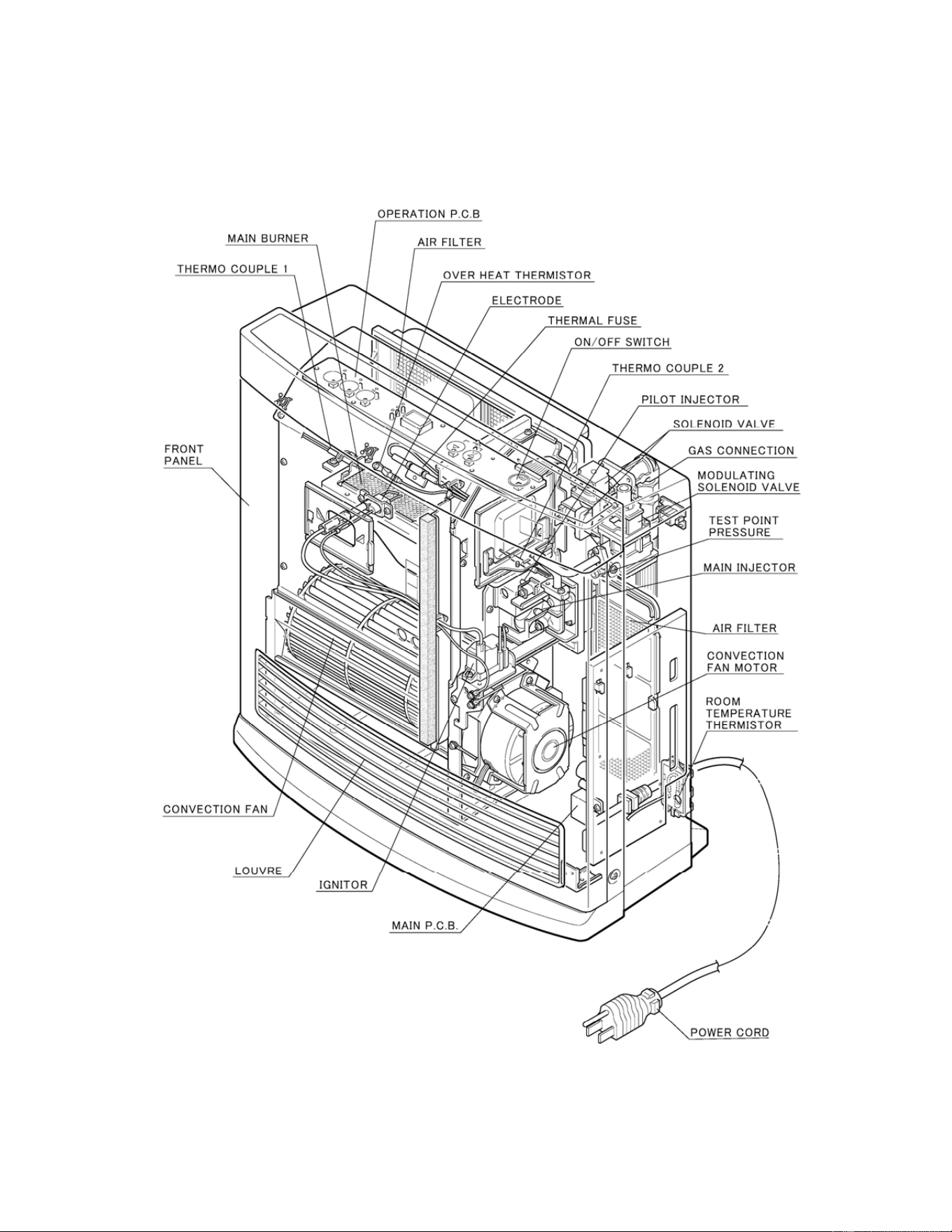
30 Fan Convector Manual
PartsBr eakdownFC510
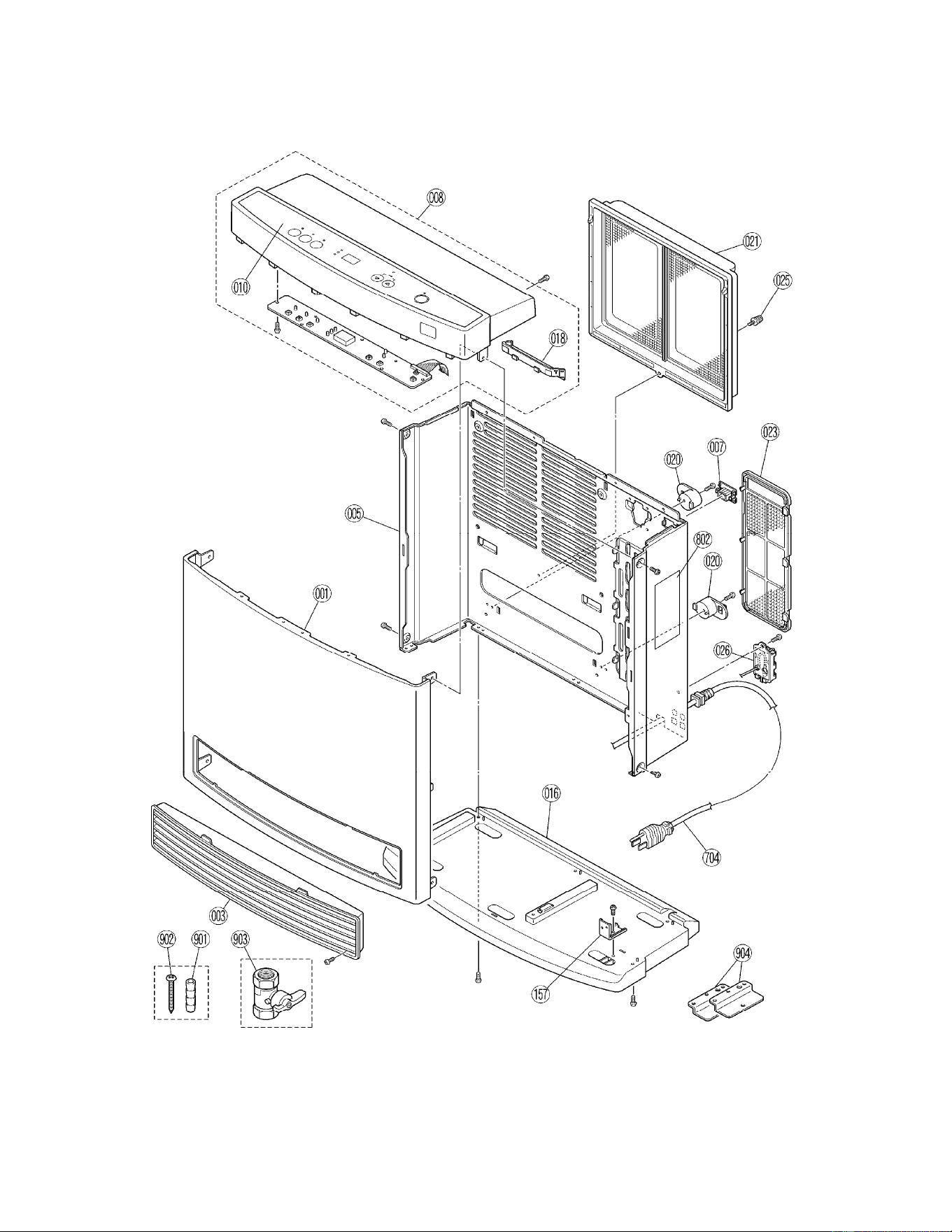
Fan Convector Manual 31
PartsBr eakdownFC510
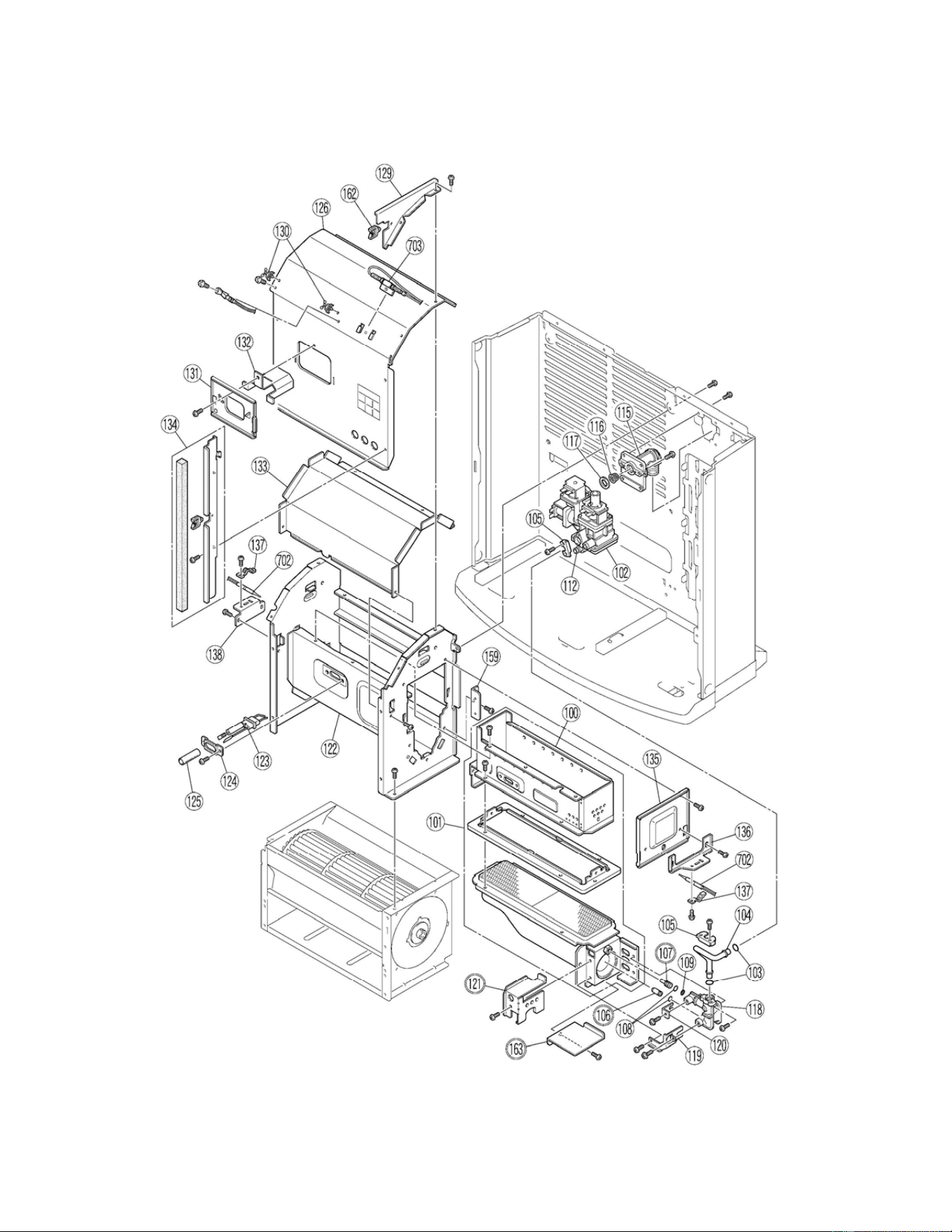
32 Fan Convector Manual
PartsBr eakdownFC510
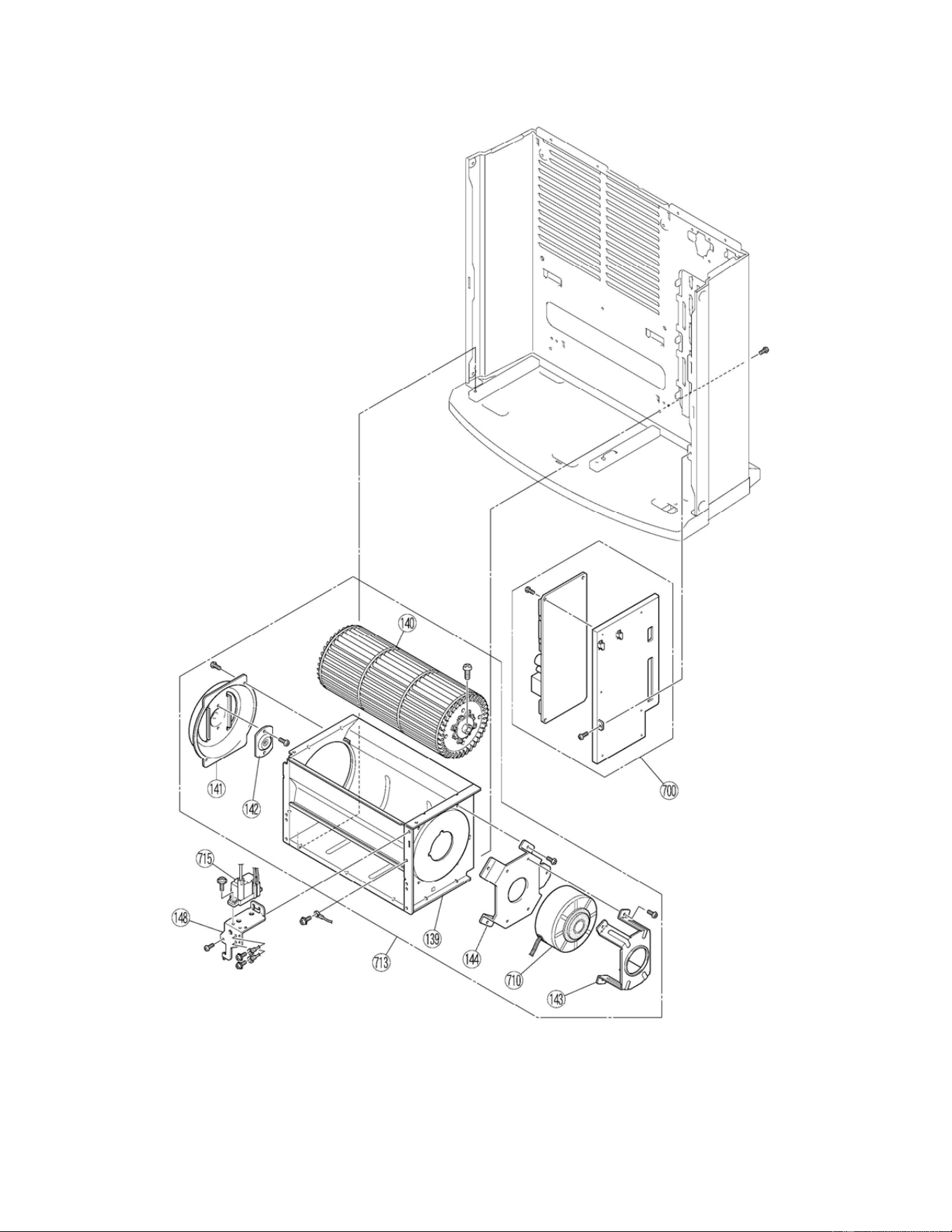
Fan Convector Manual 33
PartsBr eakdownFC510
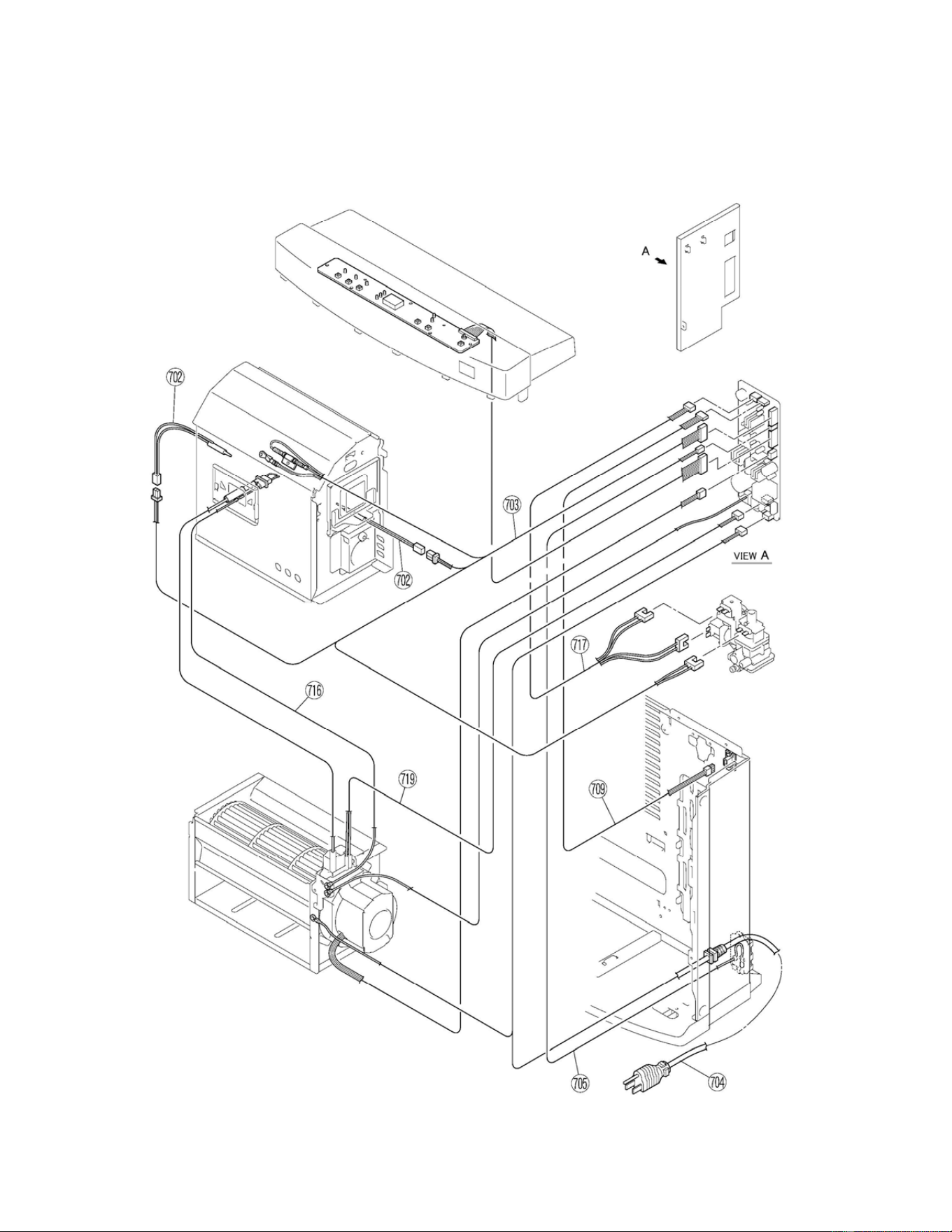
34 Fan Convector Manual
PartsBr eakdownFC510
Fan Convector Manual 35
NO PARTNAME PARTNUMBER QTY.
001 FRONT PANEL 909000001 1
003 LOUVER ASSEMBLY 909000002 1
005 REAR PANEL 909000035 1
007 THERMOCOUPLE TEST PORT 909000003 1
008 TOP PLATE ASSEMBLY 905000013 1
010 INDICATER PANEL 909000037 1
016 BASE 909000004 1
018 HANDLE 909000005 1
020 CORD HOLDER 909000006 2
021 AIR FILTER‐A 908000001 1
023 AIR FILTER‐B 908000002 1
025 RESIN SCREW RC‐513‐20 1
026 THERMISTOR COVER 909000007 1
100 SECONDARY AIR COVER ASSEMBLY 909000008 1
101 BURNER ASSEMBLY 906000001 1
102 GAS CONTROL ASSEMBLY 906000021 1
103 O RING M10B‐1‐8 2
104 CONNECTION PIPE 906000022 1
105 CONNECTION PIPE BRACKET RC‐152‐220X03 2
106 INJECTOR (Natural Gas) 906000002 1
106 INJECTOR (Propane Gas) 906000003 1
107 PILOT INJECTOR (Natural Gas) 906000004 1
107 PILOT INJECTOR (Propane Gas) 906000005 1
108 O RING 909000009 2
109 FILTER 908000003 1
112 BLIND SCREW AU39‐965X01 1
115 GAS INLET 431F‐1110‐2 1
116 FILTER 908000008 1
117 PACKING C311‐7 1
118 INJECTOR HOLDER 906000006 1
119 CONNECTION PIPE FIXING PLATE 909000010 1
120 INJECTOR FIXING PLATE 909000011 1
121 DAMPER (Natural Gas) 906000007 1
121 DAMPER (Propane Gas) 906000008 1
122 COMBUSTION CHAMBER ASSEMBLY 906000009 1
123 ELECTRODE 905000001 1
124 ELECTRODE BRACKET RC‐512‐51 1
125 SILICON TUBE RC‐223‐84‐BX03 1
126 COMBUSTION CHAMBER COVER 906000010 1
129 UPPER SEPARATION BRACKET 909000012 1
130 CABLE CLIP CP‐90125‐4 2
131 LID 909000013 1
132 HEAT SHIELD 906000011 1
133 SEPARATION BOARD 909000014 1
134 PARTITION BOARD 909000015 1
PartsListforFC510
36 Fan Convector Manual
NO PARTNAME PARTNUMBER QTY.
135 BURNER LID 906000012 1
136 THERMOCOUPLE BRACKET‐A 909000016 1
137 THERMOCOUPLE FIXER RC‐210‐89X01 2
138 THERMOCOUPLE BRACKET‐B 909000017 1
139 CASING ASSEMBLY 909000018 1
140 CONVECTION FAN 908000004 1
141 BEARING BRACKET RC‐504‐32 1
142 BEARING RC‐223‐74 1
143 MOTOR BRACKET‐A 909000019 1
144 MOTOR BRACKET‐B 909000020 1
148 IGNITER BRACKET 909000021 1
157 LOUVER ASSEMBLY BRACKET RC‐291‐28 1
159 THROAT COVER 909000022 1
162 EDGE HOLDER CP‐90207 1
163 GUARD PLATE 909000023 1
700 P.C.B. ASSEMBLY 905000006 1
702 THERMOCOUPLE TOTAL ASSEMBLY RC‐511‐166‐3 2
703 THERMAL FUSEHARNESS 905000002 1
704 POWER SUPPLY CORD 905000007 1
705 THERMISTOR RC‐361‐140‐4 1
709 THERMOCOUPLE CHECK LEAD WIRE 905000003 1
710 CONVECTION FAN MOTOR 908000005 1
713 CONVECTION FAN MOTOR ASSEMBLY 908000006 1
715 IGNITER 905000009 1
716 EARTH HARNESS 905000004 1
717 MODULATING VALVE HARNESS 905000005 1
719 IGNITER HARNESS 905000010 1
802 WARNING PLATE RC‐506‐1042 1
888 OWNER'S MANUAL 900000001 1
901 ANCHOR AU102‐902 2
902 SCREW 909000024 2
903 MANUAL VALVE ASSEMBLY BRR37‐244 1
904 FLOOR FIXING PLATE RC‐592‐1035 2
PartsListforFC510(connued)
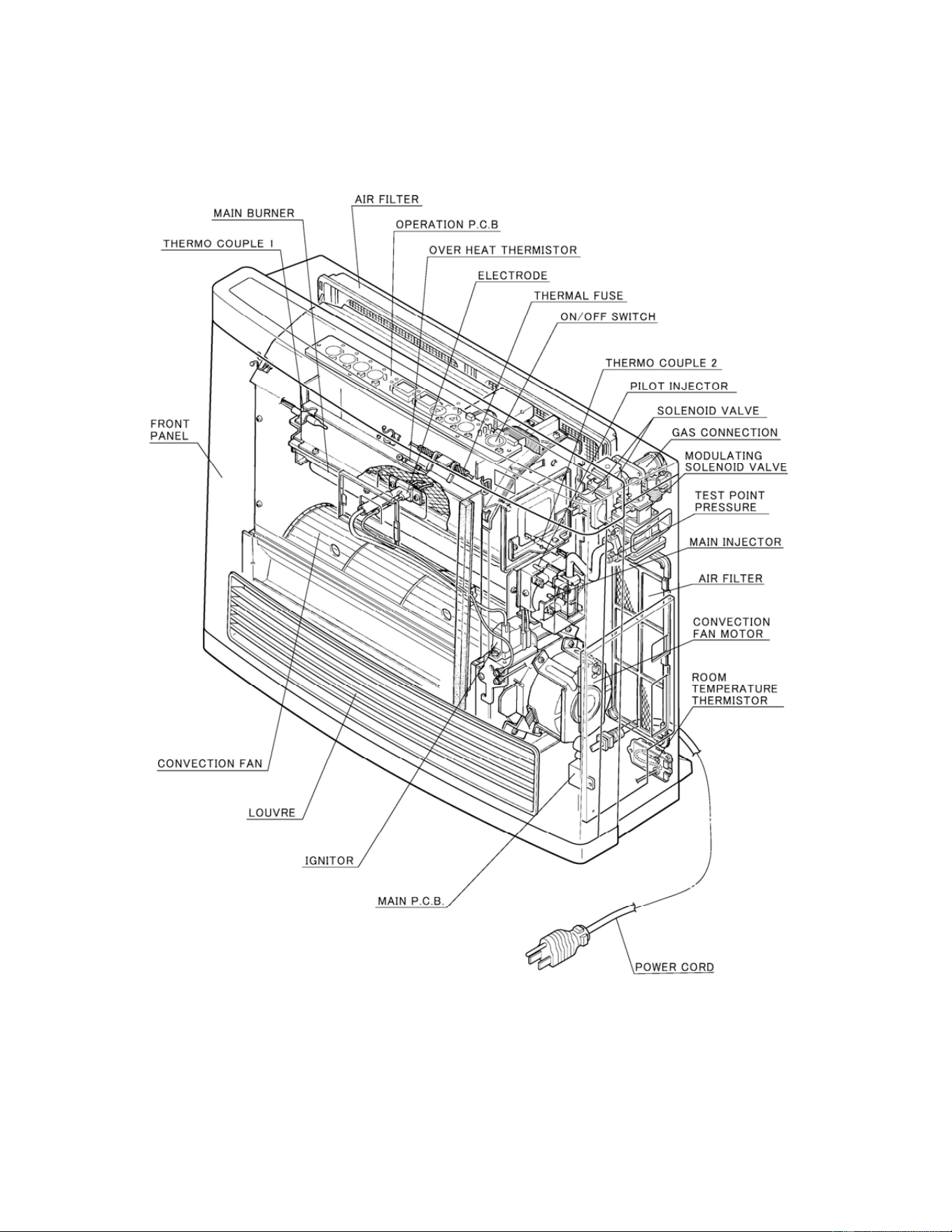
Fan Convector Manual 37
PartsBr eakdownFC824
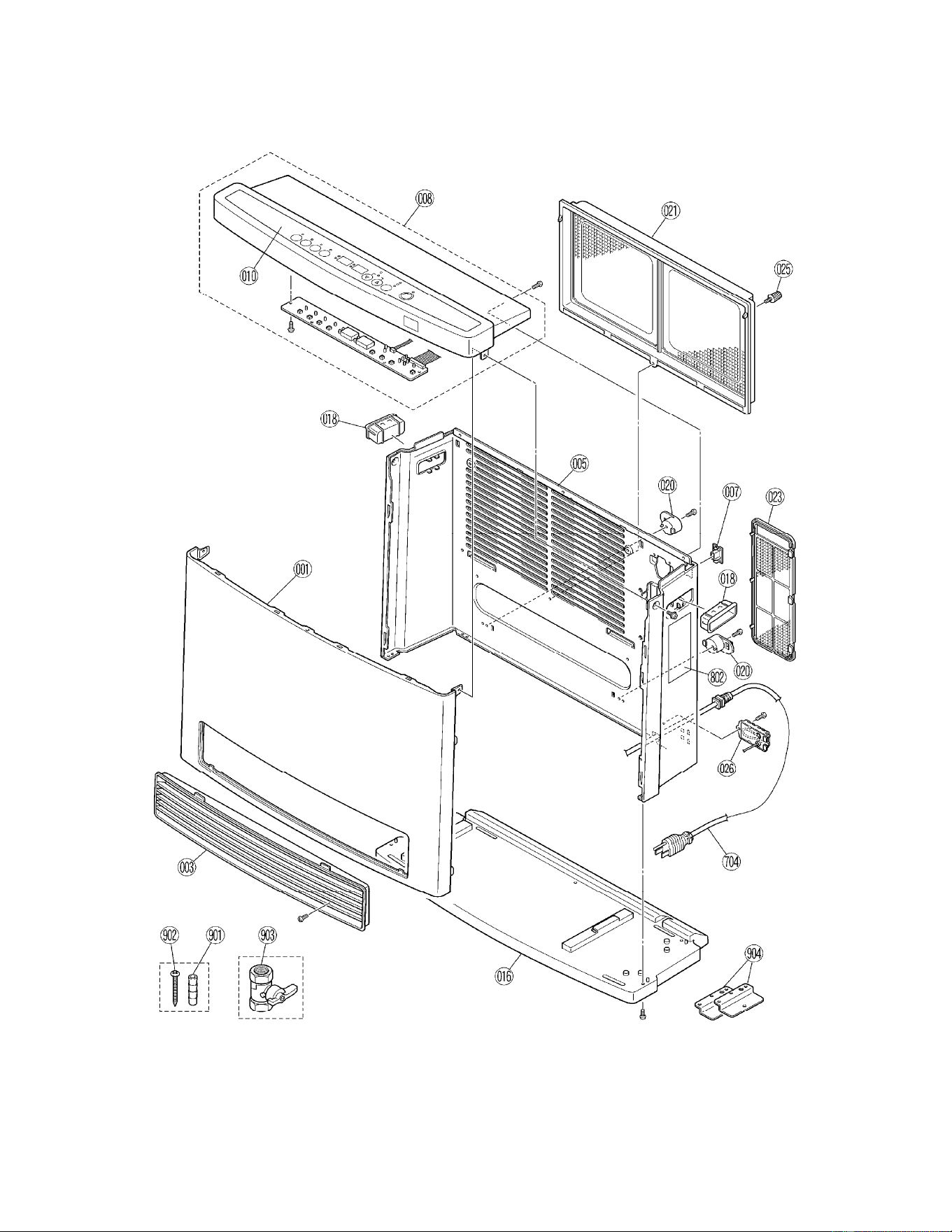
38 Fan Convector Manual
PartsBr eakdownFC824
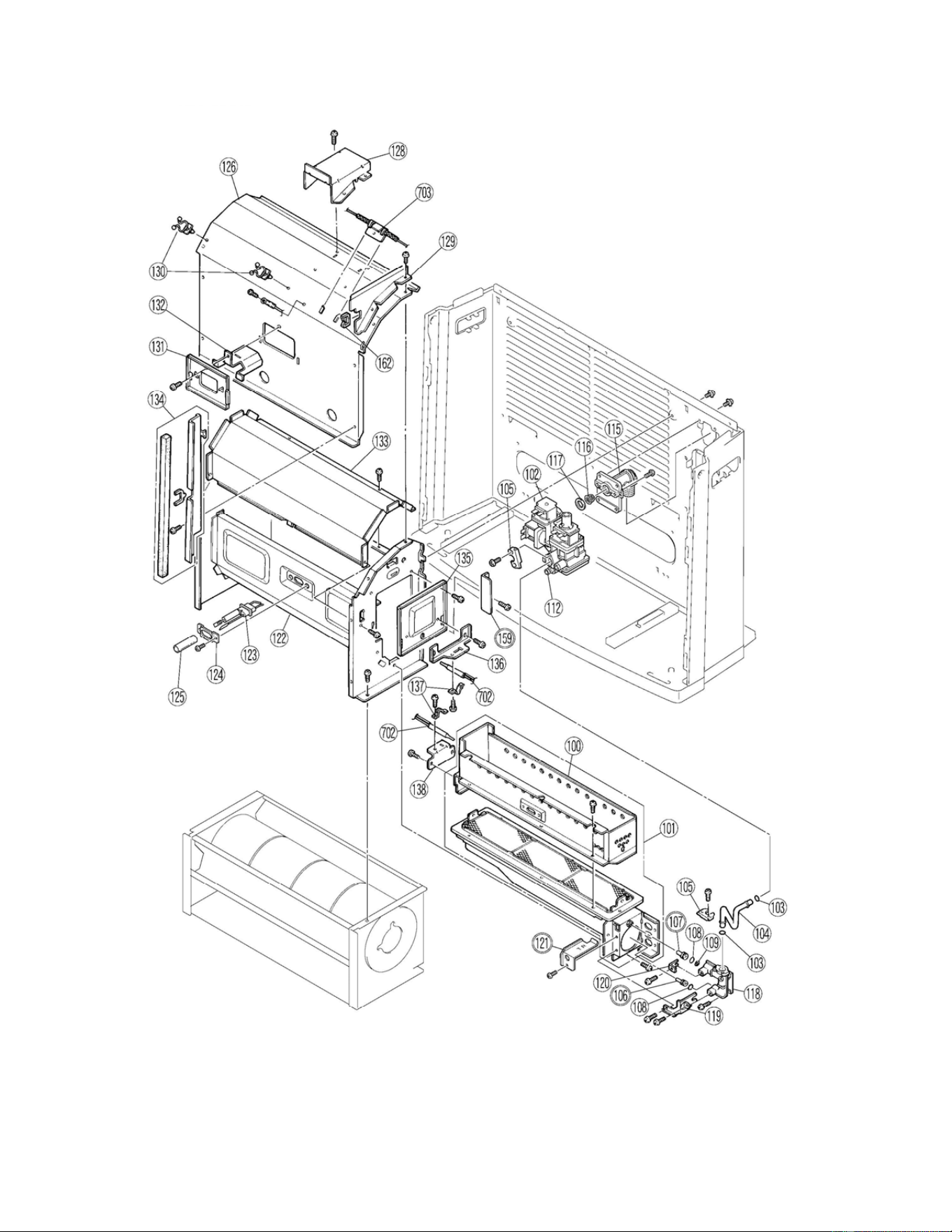
Fan Convector Manual 39
PartsBr eakdownFC824
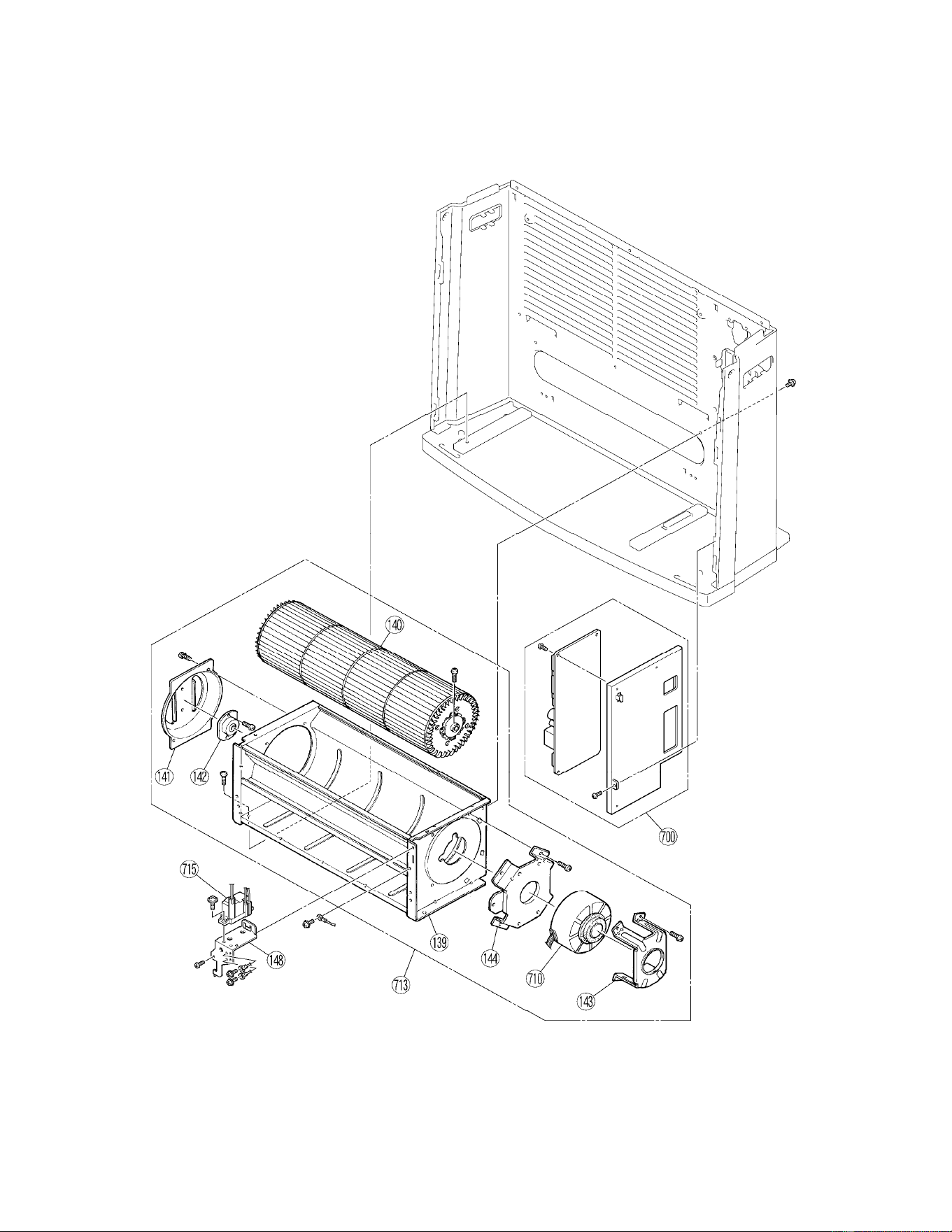
40 Fan Convector Manual
PartsBr eakdownFC824
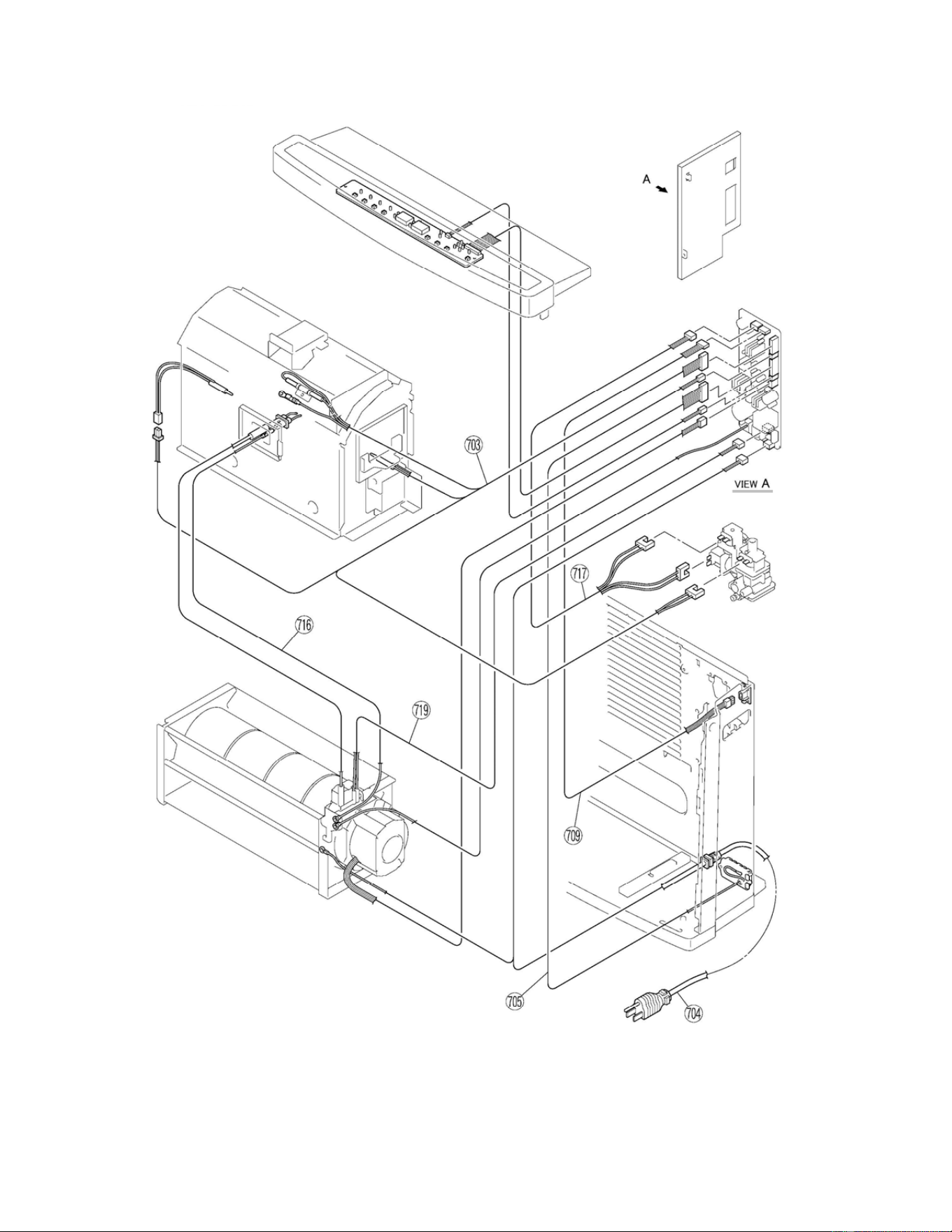
Fan Convector Manual 41
PartsBr eakdownFC824
42 Fan Convector Manual
NO PARTNAME PARTNo. QTY.
001 FRONT PANEL 909000025 1
003 LOUVER ASSEMBLY 909000026 1
005 REAR PANEL 909000038 1
007 THERMOCOUPLE TEST PORT 909000003 1
008 TOP PLATE ASSEMBLY 905000014 1
010 INDICATER PANEL 909000040 1
016 BASE 909000027 1
018 HANDLE 909000028 2
020 CORD HOLDER 909000006 2
021 AIR FILTER‐A 908000007 1
023 AIR FILTER‐B 908000002 1
025 RESIN SCREW RC‐513‐20 1
026 THERMISTOR COVER 909000007 1
100 SECONDARY AIR COVER ASSEMBLY 909000029 1
101 BURNER ASSEMBLY 906000013 1
102 GAS CONTROL ASSEMBLY 906000021 1
103 O RING M10B‐1‐8 2
104 CONNECTION PIPE 906000022 1
105 CONNECTION PIPE BRACKET RC‐152‐220X03 2
106 INJECTOR (Natural Gas) 906000014 1
106 INJECTOR (Propane Gas) 906000015 1
107 PILOT INJECTOR (Natural Gas) 906000016 1
107 PILOT INJECTOR (Propane Gas) 906000005 1
108 O RING 909000009 2
109 FILTER 908000003 1
112 BLIND SCREW AU39‐965X01 1
115 GAS INLET 431F‐1110‐2 1
116 FILTER 908000008 1
117 PACKING C311‐7 1
118 INJECTOR HOLDER 906000006 1
119 CONNECTION PIPE FIXING PLATE 909000010 1
120 INJECTOR FIXER 909000011 1
121 DAMPER (Natural Gas) 906000017 1
121 DAMPER (Propane Gas) 906000018 1
122 COMBUSTION CHAMBER ASSEMBLY 906000019 1
123 ELECTRODE 905000001 1
124 ELECTRODE BRACKET RC‐512‐51 1
125 SILICON TUBE RC‐223‐84‐BX03 1
126 COMBUSTION CHAMBER COVER 906000020 1
128 TOP PLATE SUPPORT 909000030 1
129 UPPER SEPARATION BRACKET 909000012 1
PartsListforFC824
Fan Convector Manual 43
NO PARTNAME PARTNo. QTY.
130 CABLE CLIP CP‐90125‐4 2
131 LID 909000013 1
132 HEAT SHIELD 906000011 1
133 SEPARATION BOARD 909000031 1
134 PARTITION BOARD 909000032 1
135 BURNER LID 906000012 1
136 THERMOCOUPLE BRACKET‐A 909000016 1
137 THERMOCOUPLE FIXER RC‐210‐89X01 2
138 THERMOCOUPLE BRACKET‐B 909000017 1
139 CASING ASSEMBLY 909000033 1
140 CONVECTION FAN 908000011 1
141 BEARING BRACKET RC‐504‐32 1
142 BEARING 908000009 1
143 MOTOR BRACKET‐A 909000019 1
144 MOTOR BRACKET‐A 909000020 1
148 IGNITER BRACKET 909000021 1
159 GUARD PLATE 909000034 1
162 EDGE HOLDER CP‐90207 1
700 P.C.B. ASSEMBLY 905000011 1
702 THERMOCOUPLE TOTAL ASSEMBLY RC‐511‐166‐3 2
703 THERMAL FUSE HARNESS 905000002 1
704 POWER SUPPLY CORD 905000007 1
705 THERMISTOR RC‐361‐140‐4 1
709 THERMOCOUPLE CHECK LEAD WIRE 905000003 1
710 CONVECTION FAN MOTOR 908000005 1
713 CONVECTION FAN MOTOR ASSEMBLY 908000010 1
715 IGNITER 905000009 1
716 EARTH HARNESS 905000004 1
717 MODULATING VALVE HARNESS 905000005 1
719 IGNITER HARNESS 905000010 1
802 WARNING PLATE RC‐506‐1042 1
888 OWNER'S MANUAL 900000001 1
901 ANCHOR AU102‐902 2
902 SCREW CP‐30408 2
903 MANUAL VALVE ASSEMBLY BRR37‐244 1
904 FLOOR FIXING PLATE RC‐592‐1035 2
PartsListforFC824(connued)
44 Fan Convector Manual
StateRegulaons
StateofMassachuses:The installaon must be made by a licensed plumber or gas fier in the Commonwealth
of Massachuses.
Sellers of unvented propane or natural gas‐fired supplemental room heaters are to provide to the purchaser a
copy of 527 CMR 30 at the me of sale of the unit.
In the State of Massachuses, unvented propane and natural gas‐fired space heaters are prohibited in
bedrooms and bathrooms.
It is the responsibility of the installer prior to the purchase/installaƟon of this product to ensure that the
product, sizing, and installaon meets all local codes (state, county, city).
NOTICE
The installaon must conform with local codes or, in the absence of local codes, with the Naonal Fuel Gas
Code, ANSI Z223.1/NFPA 54, or the Natural Gas and Propane Installaon Code, CSA B149.1. If installed in a
manufactured home, the installaon must conform with the Manufactured Home Construcon and Safety
Standard, Title 24 CFR, Part 3280 and/or CAN/SCA Z240 MH Series, Mobile Homes.
Fan Convector Manual 45
Consumer Support Consumer Support
Warranty Informaon
Limited Warranty
GasFanConveconHeater
The installer is responsible for your heater’s correct installaon.
Please complete the informaon below to keep for your records:
Purchased from: _________________________________________________________________
Address: _____________________________ Phone: _________________________________
_____________________________
Date of Purchase: __________________________________
Model No.: ________________________________________
Serial No.: ________________________________________
Installed by: ___________________________ Installer’s License No.: _____________________
Address: _____________________________ Phone: _________________________________
Date of Installaon: __________________________________
Whatiscovered?
This Warranty covers any defects in materials or workmanship, subject to the terms stated below. This Warranty
extends to the original purchaser and subsequent transferees, but only while the product remains at the site of the
original installaon. This Warranty only extends through the first installaon of the product and terminates if the
product is moved or reinstalled at a new locaon.
Howlongdoescoveragelast?
WhatwillRinnaido?
Rinnai will provide a replacement part or component that is defecve in materials or workmanship as set forth. All
repair parts must be genuine Rinnai parts. All repairs must be performed by an individual or servicing company that is
properly trained, state qualified or licensed to do the type of repair.
Item PeriodofCoverage
All Parts 3 years from date of purchase

46 Fan Convector Manual
PRIVACY NOTICE: Rinnai somemes shares customer contact informaon with businesses that we believe
provide products or services that may be useful to you. By providing this informaon, you
agree that we can share your contact informaon for this purpose. If you prefer not to have
your informaon shared with these businesses, please contact customer service and ask not
to have your informaon shared. We will however, connue to contact you with informaon
relevant to the product(s) you registered and/or your account with us.
If you have any quesons or feel that the manual is incomplete contact Rinnai at 1‐800‐621‐9419.
Limited Warranty ‐ connued
Replacement of the product may be authorized by Rinnai only. Rinnai does not authorize any person or company to assume
for it any obligaon or liability in connecon with the replacement of the product. If Rinnai determines that repair of a
product is not possible, Rinnai will replace the product with a comparable product at Rinnai’s discreon. If a component or
product returned to Rinnai is found to be free of defects in material or workmanship, or damaged by improper installaon
or damaged during return shipping, the warranty claim for parts may be denied.
HowdoIgetservice?
You must contact a state qualified/licensed contractor or authorized service provider for the repair of a product under this
Warranty. For the name of a qualified/authorized service provider please contact your place of purchase, visit the Rinnai
website (www.rinnai.us), call Rinnai at 1‐800‐621‐9419 or write to Rinnai at 103 Internaonal Drive, Peachtree City, Georgia
30269.
Proofofpurchaseisrequiredto obtain warranty service. You may show proof of purchase with a dated sales receipt, or by
registering within 30 days of purchasing the product. To register your appliance, please visit www.rinnai.us. For those with‐
out internet access, please call 1‐866‐RINNAI1 (745‐6241). Receipt of Registraon by Rinnai will constute proof‐of‐
purchase for this product. However, Registraon is not necessary in order to validate this Warranty.
Whatisnotcovered?
This Warranty does not cover any failures or operang difficules due to the following:
accident, abuse, or misuse
alteraon of the product or any component part
misapplicaon (the product is not designed to be used as primary/sole heat source and is intended for supplemental
heat only)
force majeure
discoloraon of carpet, walls, flooring, ceilings, furniture or clothing
improper installaon (such as but not limited to, incorrect gas type, or incorrect gas pressure)
improper maintenance
incorrect sizing
any other causes other than defects in materials or workmanship
This Warranty does not apply to any product whose serial number or manufacture date has been defaced.
Limitaononwarranes
No one is authorized to make any other warranes on behalf of Rinnai America Corporaon. Except as expressly provided
herein, there are no other warranes, expressed or implied, including, but not limited to warranes of merchantability or
fitness for a parcular purpose, which extend beyond the descripon of the warranty herein and further Rinnai shall not be
liable for indirect, incidental, special, consequenal or other similar damages that may arise, including lost profits, damage
to person or property, loss of use, inconvenience, or liability arising from improper installaon, service or use. Some states
do not allow the exclusion or limita
on of incidental or consequenal damages, so the above limitaon may not apply to
you.
Any implied warranes of merchantability and fitness arising under state law are limited in duraon to the period of cover‐
age provided by this limited Warranty, unless the period provided by state law is less. Some states do not allow limitaons
on how long an implied Warranty lasts, so the above limitaon may not apply to you.
This Warranty gives you specific legal rights, and you may also have other rights which vary from state to state.

NOTES
900000001(03)
03/2018
105769
RC‐691‐51X01(00)
106561
Learn more about Rinnai high-performance Tankless Water Heaters, Hybrid Water Heating
Systems, Boilers, Vent-Free Fan Convectors and EnergySaver® Direct Vent Wall Furnaces at:
rinnai.us | rinnai.ca
Rinnai America Corporation • 103 International Drive, Peachtree City, GA 30269
1-800-621-9419 • rinnai.us
©2017 Rinnai America Corporation. Rinnai America Corporation continually updates materials, and as such, content is subject to change without notice.
Local, state, provincial, federal and national fuel gas codes must be adhered to prior to and upon installation.
