
1
Operation Manual
HT100B
Non-contact voltage tester
Please read this manual thoroughly before use and keep it for later
reference.
WARNINGS
With this device, life-threatening voltages are tested, so special
care is required!
Always first test the voltage tester on a known circuit to make
sure it works!
When checking uninsulated contacts, wear safety shoes to prevent
electric shock.
When checking uninsulated contacts, hold the tester and make sure
your fingers are behind the anti-slip guard.
Do not use the device if:
- The screen is not lit;
- Damage is evident;
- The tip is not intact.
Do not put the device in more than 1000V
This equipment can only be used indoors and should be protected from
water, high air humidity and heat.
ATTENTION: Even without indication, the voltage could still be present.
The voltage detector indicates the effective voltage when a supply
voltage generates enough intensive electrostatic field. If the field is very
weak, the voltage detector can’t detect the existence of voltage.
We do not accept any liability for property damage or personal injury
caused by incorrect operation or failure to follow safety instructions. In
this case, any warranty claim will lapse.
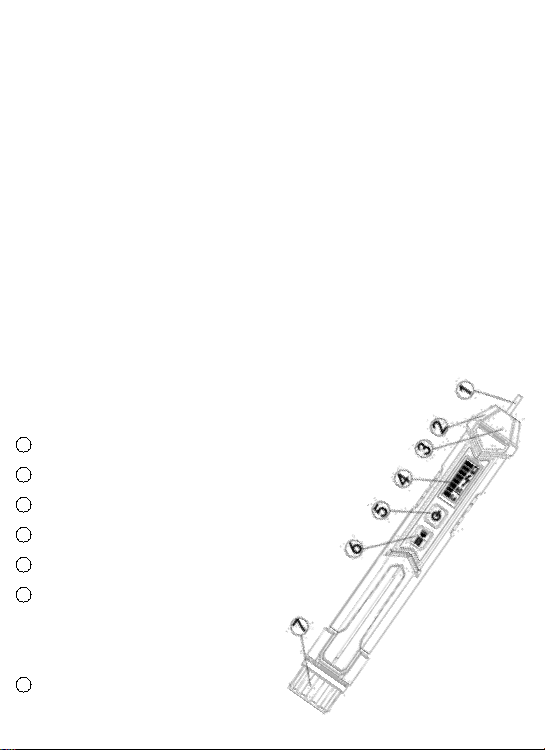
Product Overview
1 Probe (NCV sensor)
2 Flashlight
3 Signal indicator
4 LCD screen
5 Power button(red)
6 S button (green)
Sensitivity (short press)
/ /LED lamp (long press)
7 Battery cover
1
Operation Manual
HT100B
Non-contact voltage tester
Please read this manual thoroughly before use and keep it for later
reference.
WARNINGS
With this device, life-threatening voltages are tested, so special
care is required!
Always first test the voltage tester on a known circuit to make
sure it works!
When checking uninsulated contacts, wear safety shoes to prevent
electric shock.
When checking uninsulated contacts, hold the tester and make sure
your fingers are behind the anti-slip guard.
Do not use the device if:
- The screen is not lit;
- Damage is evident;
- The tip is not intact.
Do not put the device in more than 1000V
This equipment can only be used indoors and should be protected from
water, high air humidity and heat.
ATTENTION: Even without indication, the voltage could still be present.
The voltage detector indicates the effective voltage when a supply
voltage generates enough intensive electrostatic field. If the field is very
weak, the voltage detector can’t detect the existence of voltage.
We do not accept any liability for property damage or personal injury
caused by incorrect operation or failure to follow safety instructions. In
this case, any warranty claim will lapse.
Product Overview
1 Probe (NCV sensor)
2 Flashlight
3 Signal indicator
4 LCD screen
5 Power button(red)
6 S button (green)
Sensitivity (short press)
/ /LED lamp (long press)
7 Battery cover
2
Operation
Turning on / off
Press and hold the power key for more than 2 seconds. A beep sounds
and the display lights up.
Press the power button again and the tester will turn off. After 3 minutes of
non-use, the tester automatically powers off to conserve battery life. The
tester is now deactivated and is not operational.
Checking for the presence of AC voltage
Prior to each use, test on known live circuit to verify
tester functionality!
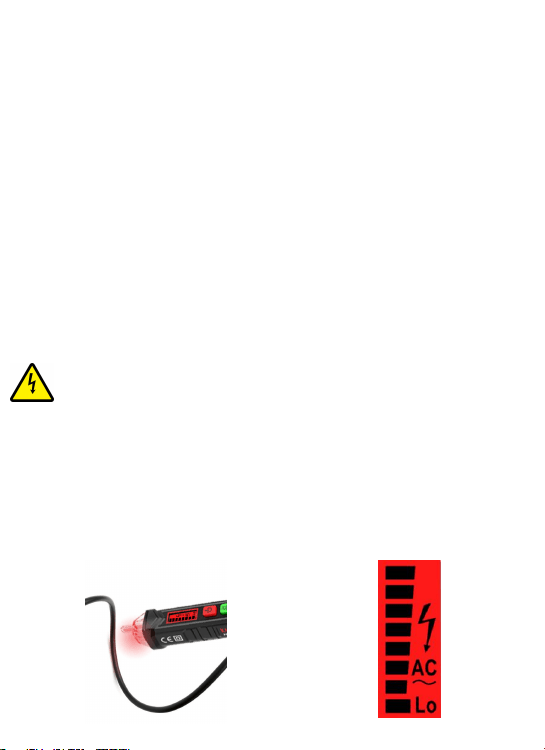
Keep the tester's tip near the AC voltage. When a voltage is detected, a
beep sounds and the tip lights up red.
As the intensity of the voltage signal changes, the bar graph on the screen
becomes higher or lower and the frequency of blinking and beeping
becomes faster or slower with the signal intensity.
The signal intensity is affected by the distance from the voltage. The further
the tester is from the circuit, the weaker the signal becomes.
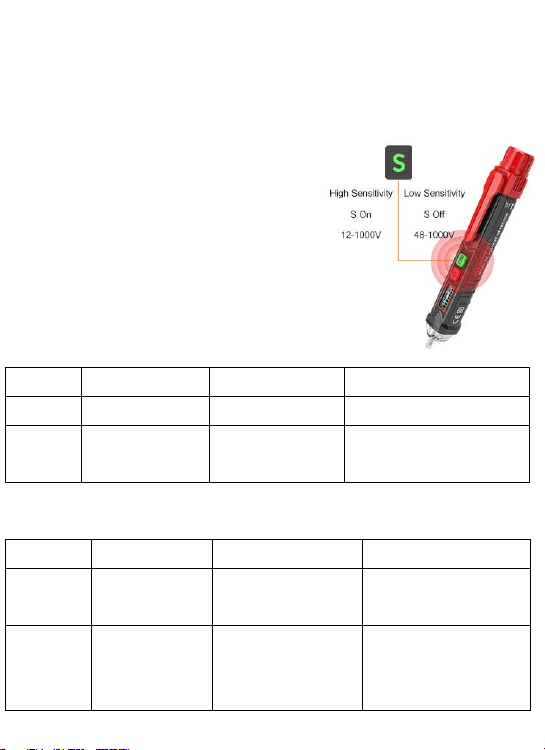
Dual range
When the tester is turned on, it is in
low-sensitivity mode (48 ~ 1000V). Briefly
press the green button to enter the high
sensitivity mode (12 ~ 1000V). Refer to the
following table for each mode.
Low-Sensitivity Mode
POWER-ON
12V TO 48V AC
48V TO 1000 V AC
Audible
Single Beep
No Beep
High-frequency beep
Visual
Green Screen
Green Screen
The red tip illuminates
continuously, red screen
High-Sensitivity Mode
POWER-ON
12V TO 48V AC
48V TO 1000 V AC
Audible
Single Beep
Low-frequency
beep
High-frequency beep
Visual
Green
S-Button and
Screen
The red tip
illuminates
continuously
The red tip illuminates
continuously, red
screen
2
Operation
Turning on / off
Press and hold the power key for more than 2 seconds. A beep sounds
and the display lights up.
Press the power button again and the tester will turn off. After 3 minutes of
non-use, the tester automatically powers off to conserve battery life. The
tester is now deactivated and is not operational.
Checking for the presence of AC voltage
Prior to each use, test on known live circuit to verify
tester functionality!
Keep the tester's tip near the AC voltage. When a voltage is detected, a
beep sounds and the tip lights up red.
As the intensity of the voltage signal changes, the bar graph on the screen
becomes higher or lower and the frequency of blinking and beeping
becomes faster or slower with the signal intensity.
The signal intensity is affected by the distance from the voltage. The further
the tester is from the circuit, the weaker the signal becomes.
Dual range
When the tester is turned on, it is in
low-sensitivity mode (48 ~ 1000V). Briefly
press the green button to enter the high
sensitivity mode (12 ~ 1000V). Refer to the
following table for each mode.
Low-Sensitivity Mode
POWER-ON
12V TO 48V AC
48V TO 1000 V AC
Audible
Single Beep
No Beep
High-frequency beep
Visual
Green Screen
Green Screen
The red tip illuminates
continuously, red screen
High-Sensitivity Mode
POWER-ON
12V TO 48V AC
48V TO 1000 V AC
Audible
Single Beep
Low-frequency
beep
High-frequency beep
Visual
Green
S-Button and
Screen
The red tip
illuminates
continuously
The red tip illuminates
continuously, red
screen
3
In high-sensitivity mode, the tester will be more sensitive and show voltage
indication at a further distance away from high voltage source than in
low-sensitivity mode.
Identify null and live wire
Keep the individual cables as far away from each other as possible and read
the signals.
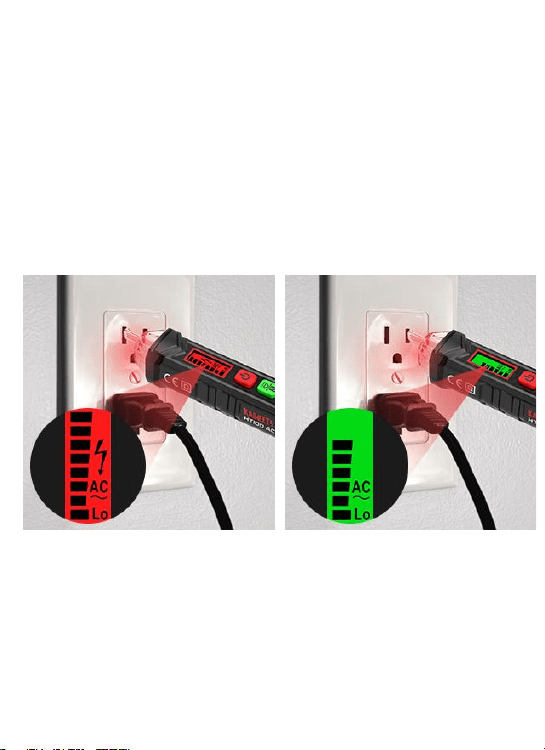
The screen turns red and shows a high voltage symbol when the voltage is
higher than 90V. The neutral wire and live wire should not be distinguished
by the screen color, but by the detected signal intensity. The live wire causes
stronger signals and the neutral causes weaker signals.
It is recommended to activate the high sensitivity mode during identification.
Breakpoint testing
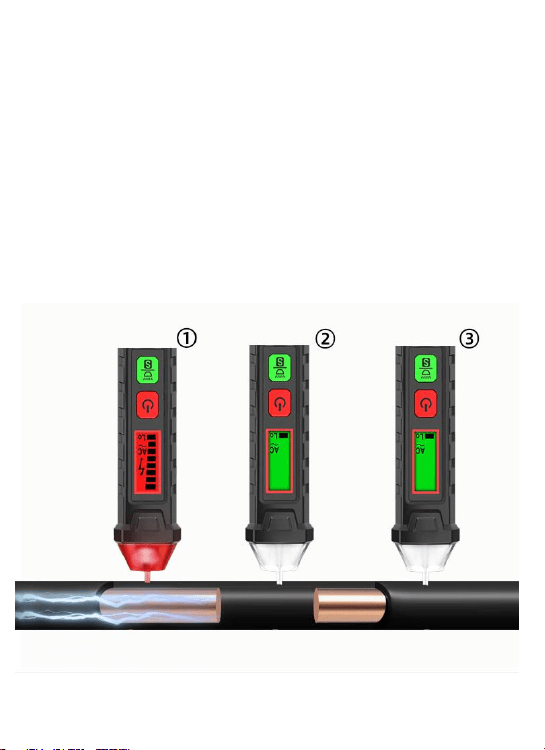
Activate the high sensitivity mode, move the tester's NCV tip
along the cable, the voltage alarm disappears when detected a
breakpoint, as shown in Figure 2.
Caution: Do not use it on cable ducts or metal-clad cables.
Live wire: Up to 8 bar charts
Fast beeps
Red screen
Null wire: Below 6 bar graphs
Slow beeps
Green screen
3
In high-sensitivity mode, the tester will be more sensitive and show voltage
indication at a further distance away from high voltage source than in
low-sensitivity mode.
Identify null and live wire
Keep the individual cables as far away from each other as possible and read
the signals.
The screen turns red and shows a high voltage symbol when the voltage is
higher than 90V. The neutral wire and live wire should not be distinguished
by the screen color, but by the detected signal intensity. The live wire causes
stronger signals and the neutral causes weaker signals.
It is recommended to activate the high sensitivity mode during identification.
Breakpoint testing
Activate the high sensitivity mode, move the tester's NCV tip
along the cable, the voltage alarm disappears when detected a
breakpoint, as shown in Figure 2.
Caution: Do not use it on cable ducts or metal-clad cables.
Live wire: Up to 8 bar charts
Fast beeps
Red screen
Null wire: Below 6 bar graphs
Slow beeps
Green screen

4
LED Flashlight
Press and hold the green button for more than 2 seconds to turn the LED
light on and off. If no button on the tester is pressed and no voltage signal is
detected. After 3 minutes, it will automatically shut down to save power.
Low battery indicator
If the battery voltage is less than 2.5 volts, the display will show the " "
symbol. If the battery voltage is less than 2.3 volts, the tester automatically
turns off.
Technical specifications
Voltage: ........................................ ............................AC 12~1000V,50/60Hz
Operating temperature:.......................................................................0~40℃
Storage temperature:.....................................................................-10~50℃
Humidity:.............................................................................................≤95%
Operating altitude:............................................................................≤2000m
Security level:..........................................CE, CAT III 1000V, CAT IV 600V
Batteries:....................................................................................2×1.5V AAA
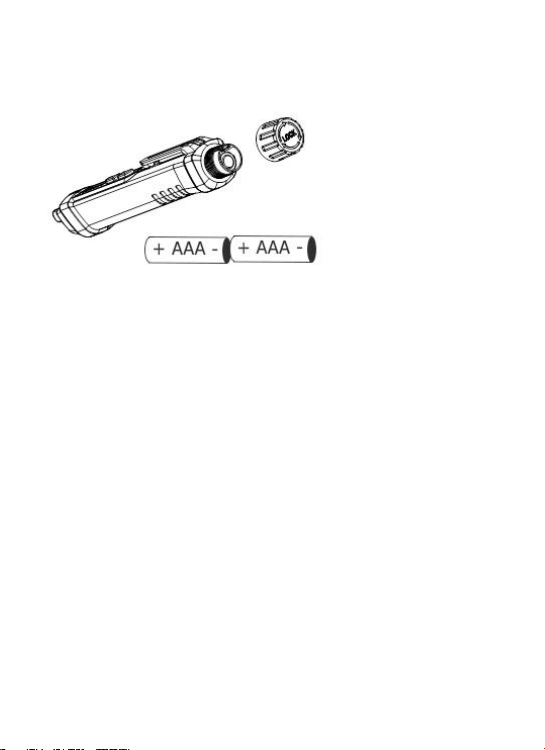
Battery replacement
Rotate the battery cover off body, remove the batteries, and insert
the positive terminal of the new battery toward the tip of the tester.
Rotate cap to the body until it is fully seated. Before locking, do not use the
tester to test the electricity to avoid electric shock.
Cleaning
Use only a soft, slightly damp cloth to clean the device, never use chemicals
or abrasives, alcohol, ammonia or cleaners containing solvents to clean
tester. Make sure that the device is completely dry before use.
Three years warranty
The KAIWEETS electronic test and measurement devices are guaranteed
for three years from the date of purchase.
After-sale: support@kaiweets.com
EN18100V10
4
LED Flashlight
Press and hold the green button for more than 2 seconds to turn the LED
light on and off. If no button on the tester is pressed and no voltage signal is
detected. After 3 minutes, it will automatically shut down to save power.
Low battery indicator
If the battery voltage is less than 2.5 volts, the display will show the " "
symbol. If the battery voltage is less than 2.3 volts, the tester automatically
turns off.
Technical specifications
Voltage: ........................................ ............................AC 12~1000V,50/60Hz
Operating temperature:.......................................................................0~40℃
Storage temperature:.....................................................................-10~50℃
Humidity:.............................................................................................≤95%
Operating altitude:............................................................................≤2000m
Security level:..........................................CE, CAT III 1000V, CAT IV 600V
Batteries:....................................................................................2×1.5V AAA
Battery replacement
Rotate the battery cover off body, remove the batteries, and insert
the positive terminal of the new battery toward the tip of the tester.
Rotate cap to the body until it is fully seated. Before locking, do not use the
tester to test the electricity to avoid electric shock.
Cleaning
Use only a soft, slightly damp cloth to clean the device, never use chemicals
or abrasives, alcohol, ammonia or cleaners containing solvents to clean
tester. Make sure that the device is completely dry before use.
Three years warranty
The KAIWEETS electronic test and measurement devices are guaranteed
for three years from the date of purchase.
After-sale: support@kaiweets.com
EN18100V10