Range Hood
Installation & User Manual
NK36CB665W**
2 English
Contents
Bixby 21
Amazon Alexa & Google Assistant 21
Installation Guide 21
Cleaning and Maintenance 22
Cleaning the range hood 22
Cleaning the Filters 22
Replacing the LED Lamp 22
SmartThings app 23
Open Source Announcement 24
Troubleshooting 25
General 25
Hood Operation 25
Information codes 25
Technical specifications 26
Contents
Important Safety Instructions 3
Installation 6
Installation Requirements 8
General Specifications 8
Mounting Height 8
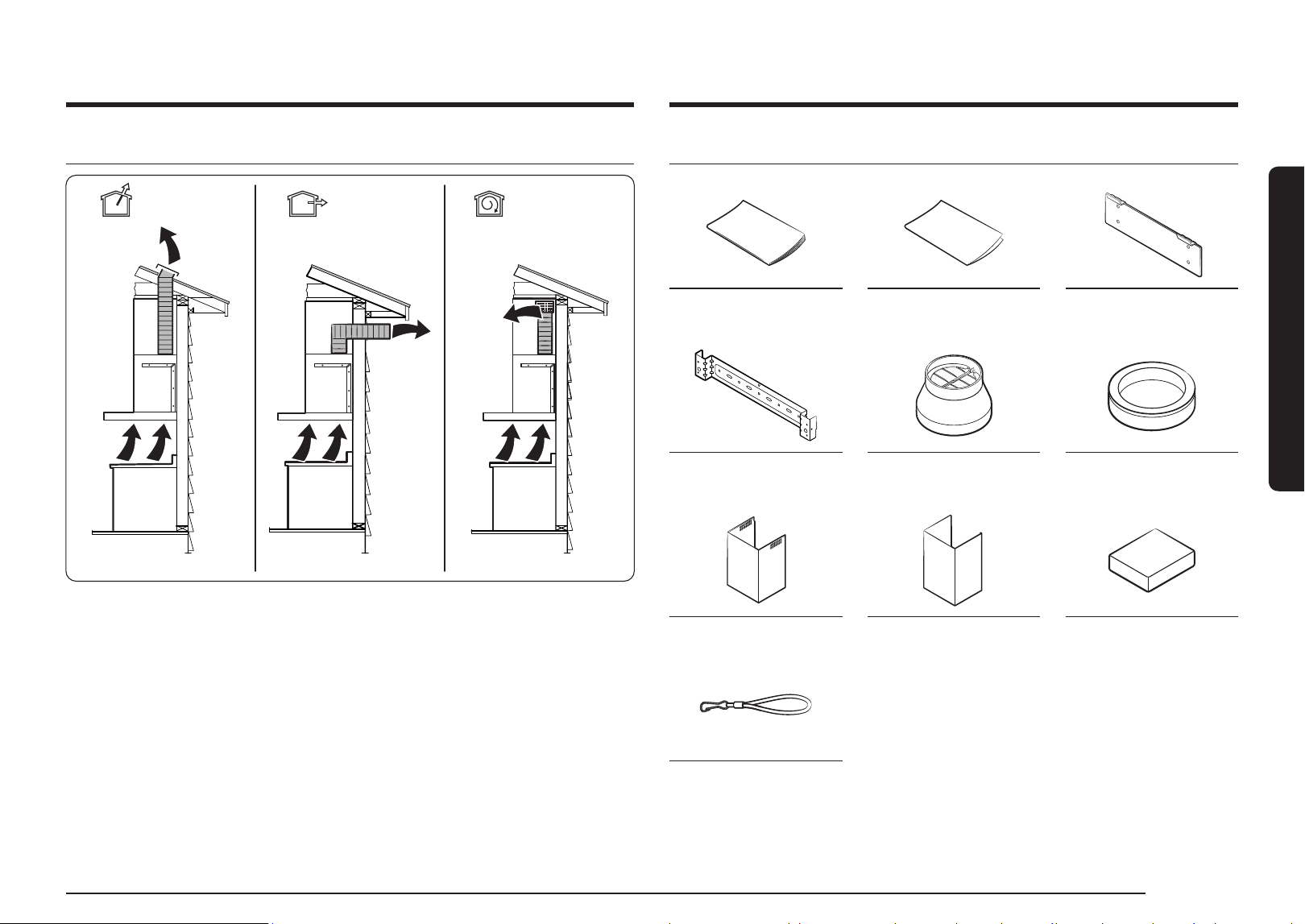
Venting Methods 9
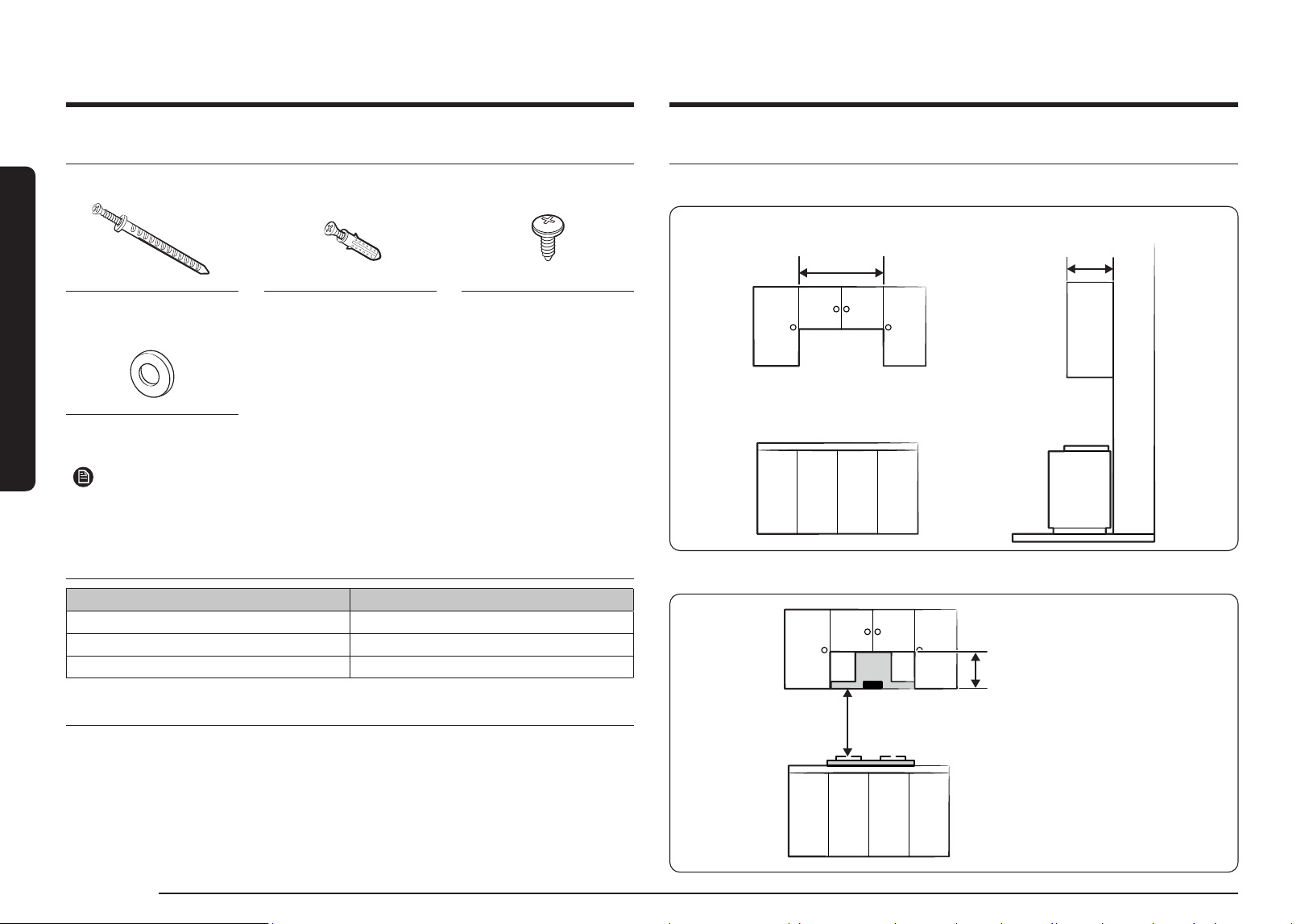
Parts List 9
Sub-Parts List 10
Additional Purchase Accessories 10
Needed Parts list (Not Supplied) 10
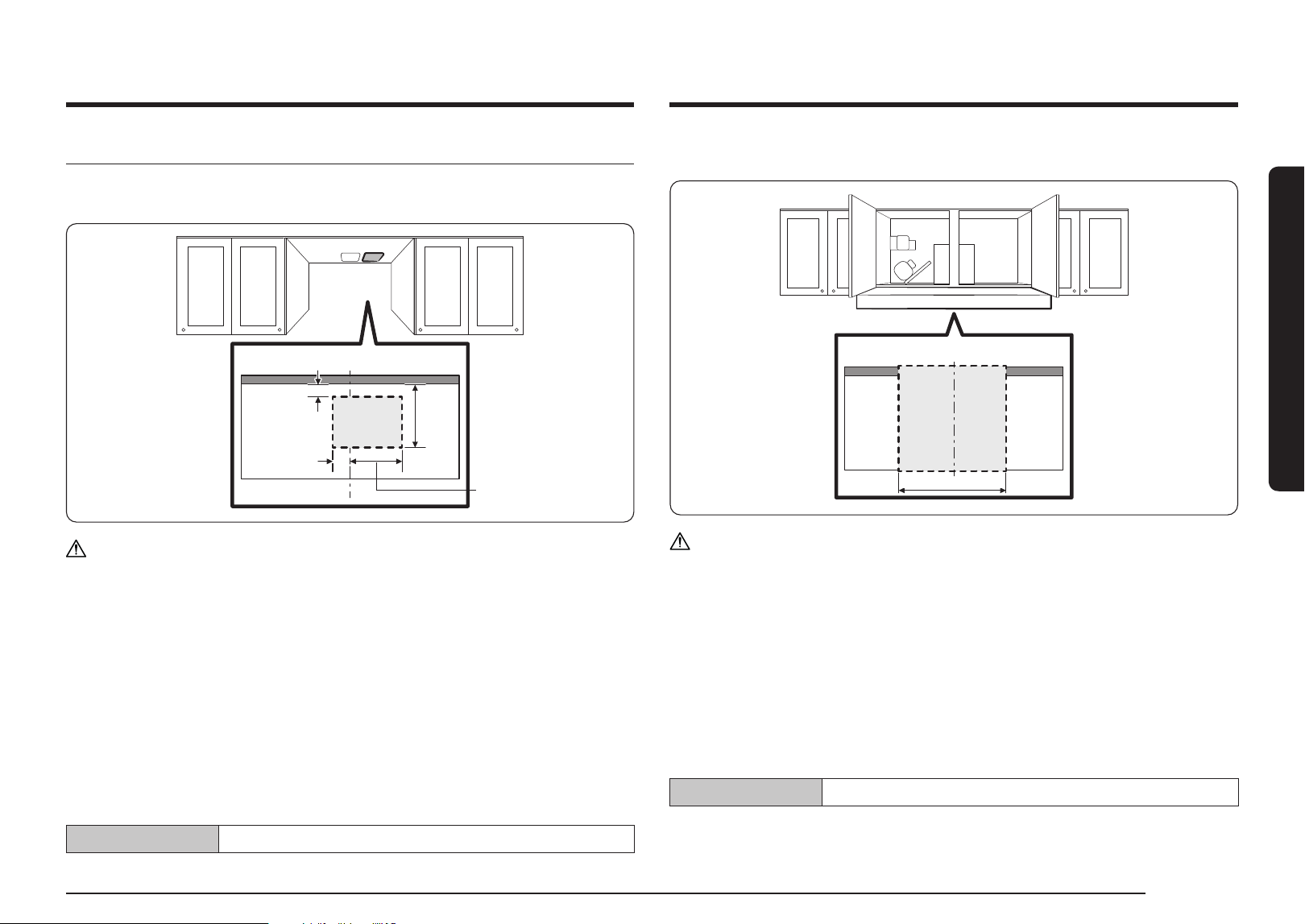
Installation Clearances 10
Making a hole in the furniture 11
Installation 12
Setting the Location 12
Connecting the Vent System 12
Installing the Range Hood 13
Installing the Venting Type
13
Connect the filter support cable 14
Installing the Recirculation Kit
15
Installation of the charcoal filter kit 16
Using the Range Hood 18
Button panel 18
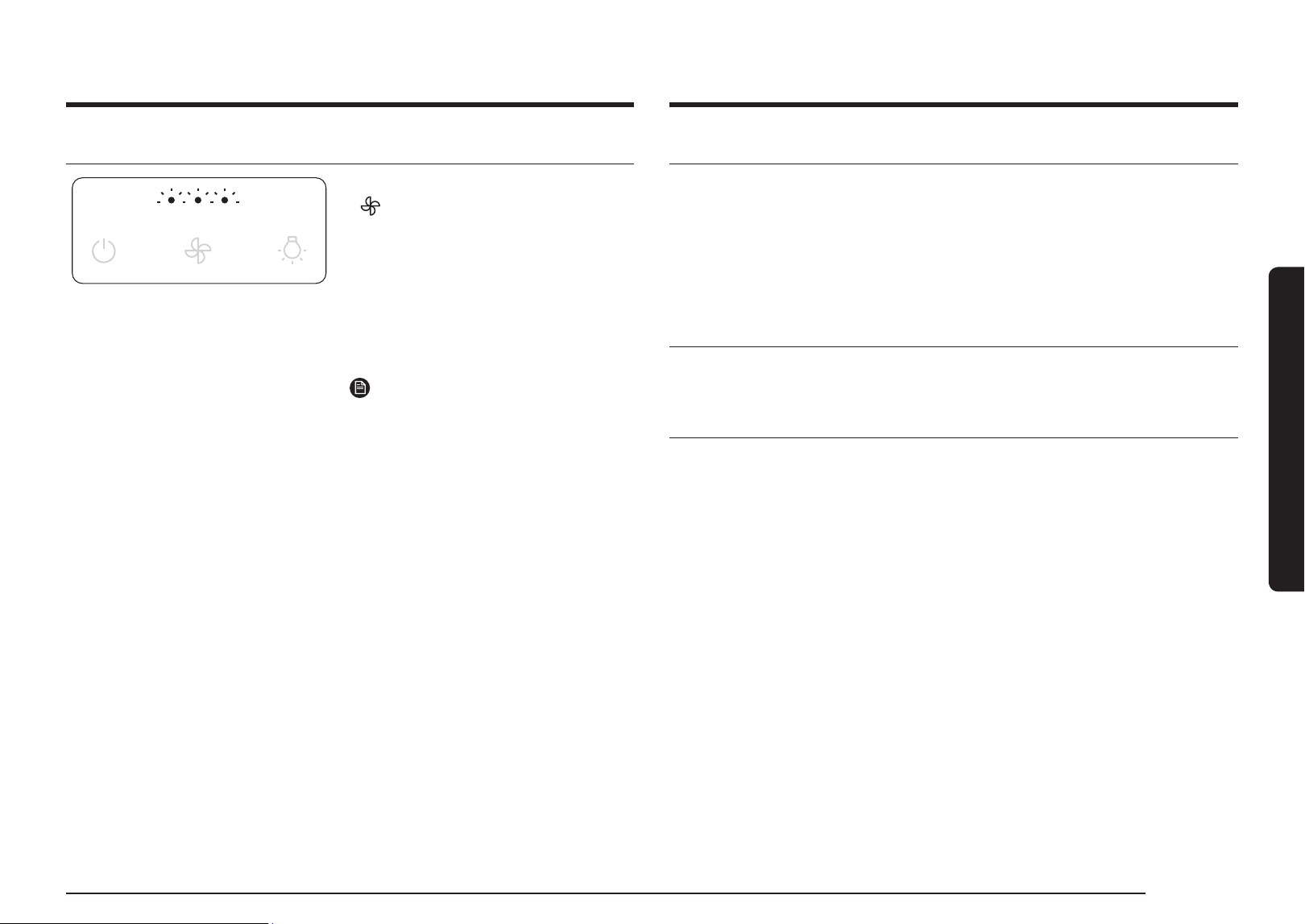
Turning the Range Hood On or Off 18
Changing the operation mode 18
Max mode 19
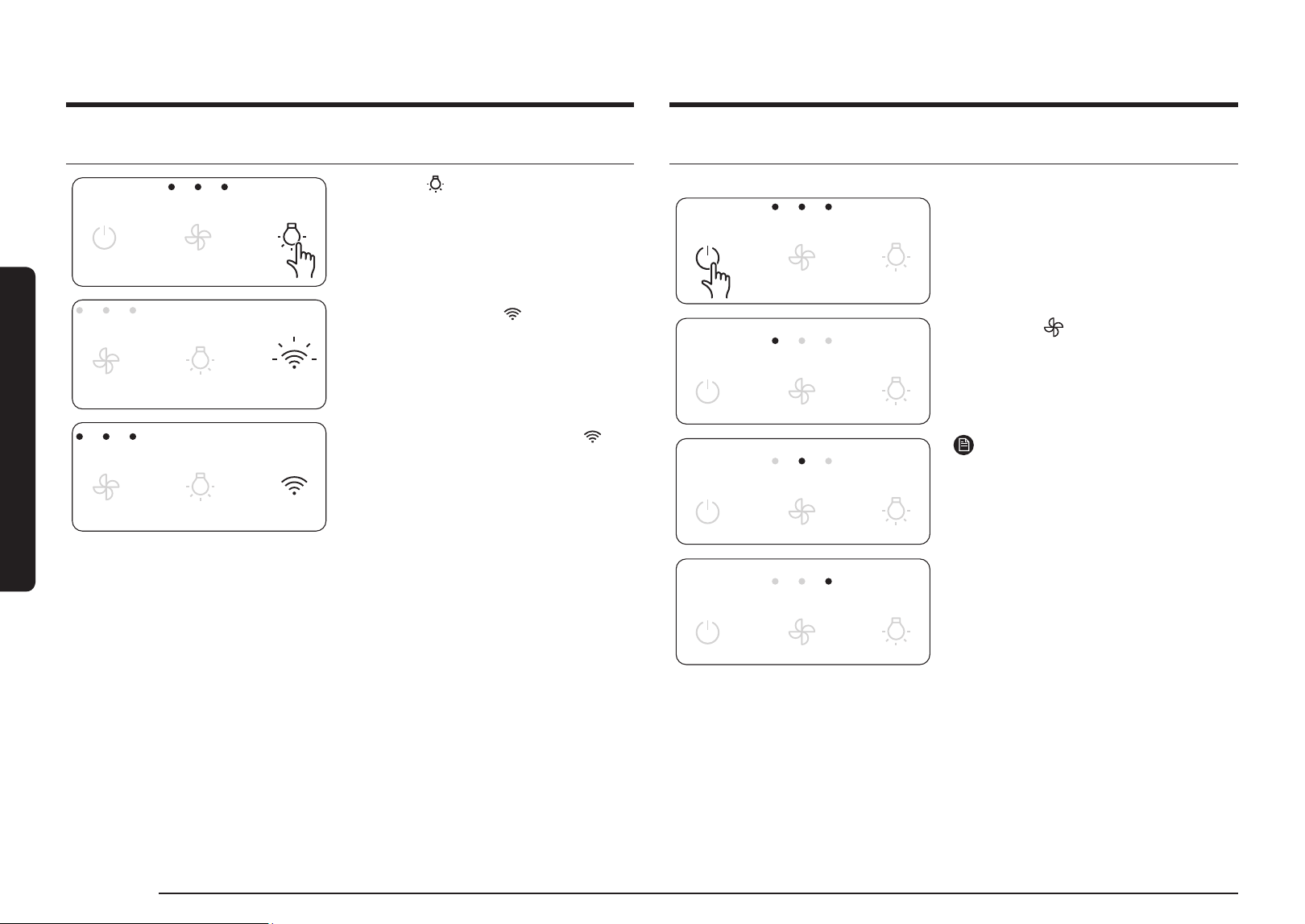
Using the lighting 19
Wi-Fi On/Off 19
Automatic operation to prevent range hood overheating 19
Entering AP (Access Point) 20
Delay off 20
Error indication 21
English 3English 3
Important Safety Instructions
Important Safety Instructions
Symbols used in this manual
WARNING
Hazards or unsafe practices that may result in severe personal
injury or death.
CAUTION
Hazards or unsafe practices that may result in electric shock,
personal injury, or property damage.
NOTE
Useful tips and instructions
These warning icons and symbols are here to prevent injury to you
and others.
Please follow them explicitly. After reading this section, keep it in
a safe place for future reference.
Closely follow the instructions set out in this manual. All
responsibility, for any eventual inconveniences, damages or fires
caused by not complying with the instructions in this manual, is
declined. This appliance is intended to be used in household and
similar application such as: - staff kitchen areas in shop, offices
and other working environments; - farm houses; - by clients in
hotels, motels and other residential type environments; - bed and
breakfast type environments.
The hood can look different to that illustrated in the drawings
in this booklet.
The instructions for use, maintenance and installation,
however, remain the same.
• It is important to conserve this booklet for consultation at
any moment. In the case of sale, cession or move, make sure
it is together with the product.
• Read the instructions carefully: there is important
information about installation, use and safety.
• Do not carry out electrical or mechanical variations on the
product or on the discharge conduits.
• Before proceeding with the installation of the appliance
verify that there are no damaged all components. Otherwise
contact your dealer and do not proceed with the installation.
CAUTION
• Before any cleaning or maintenance operation, disconnect
hood from the mains by removing the plug or disconnecting
the mains electrical supply.
• Always wear work gloves for all installation and maintenance
operations.
• This appliance can be used by children aged from 8 years and
above and persons with reduced physical, sensory or mental
capabilities or lack of experience and knowledge if they have
been given supervision or instruction concerning use of the
appliance in a safe way and understand the hazards involved.
• Children shall not play with the appliance.
• Cleaning and user maintenance shall not be made by
children without supervision.
• The premises where the appliance is installed must be
sufficiently ventilated, when the kitchen hood is used
together with other gas combustion devices or other fuels.
4 English
Important Safety Instructions
Important Safety Instructions
CAUTION
• This appliance is not intended for use by persons (including
children) with reduced physical, sensory or mental
capabilities, or lack of experience and knowledge, unless
they have been given supervision or instruction concerning
use of the appliance by a person responsible for their safety.
Children should be supervised to ensure that they do not play
with the appliance.
• Children less than 8 years of age shall be kept away unless
continuously supervised.
WARNING
Failure to install the screws or fixing device in accordance with
these instructions may result in electrical hazards.
• Do not use or leave the hood without the lamp correctly
mounted due to the possible risk of electric shocks.
• Never use the hood without effectively mounted grids.
• The hood must NEVER be used as a support surface unless
specifically indicated.
• Use only the fixing screws supplied with the product for
installation or, if not supplied, purchase the correct screws
type.
• Use the correct length for the screws which are identified in
the Installation Guide.
• In case of doubt, consult an authorized service assistance
center or similar qualified person.
• The hood must be regularly cleaned on both the inside and
outside (AT LEAST ONCE A MONTH).
• This must be completed in accordance with the maintenance
instructions provided. Failure to follow the instructions provided
regarding the cleaning of the hood and filters will lead to the
risk of fires.
• Do not flamed under the range hood.
• Do not remove filters during cooking.
• For lamp replacement use only lamp type indicated in the
Maintenance/Replacing lamps section of this manual.
The use of exposed flames is detrimental to the filters and
may cause a fire risk, and must therefore be avoided in all
circumstances.
Any frying must be done with care in order to make sure that the
oil does not overheat and ignite.
CAUTION
Accessible parts of the hood may become hot when used with
cooking appliances.
• Do not connect the appliance to the mains until the
installation is fully complete.
• With regards to the technical and safety measures to be
adopted for fume discharging it is important to closely follow
the regulations provided by the local authorities.
• The air must not be discharged into a flue that is used for
exhausting fumes from appliance burning gas or other fuels.
English 5English 5
Important Safety Instructions
WARNING
Range hoods and other cooking fume extractors may adversely
affect the safe operation of appliances burning gas or other
fuels (including those in other rooms) due to back flow of
combustion gases. These gases can potentially result in carbon
monoxide poisoning. After installation of a range hood or other
cooking fume extractor, the operation of flued gas appliances
should be tested by a competent person to ensure that back
flow of combustion gases does not occur.
WARNING
Do not use with a programmer, timer, separate remote control
system or any other device that switches on automatically.
WARNING
Only allow children to use the oven without supervision when
adequate instructions have been given so that the child is able
to use the oven in a safe way and understands the hazards of
improper use.
WARNING
If the supply cord is damaged, it must be replaced by the
manufacturer, its service agent or similarly qualified persons in
order to avoid a hazard.
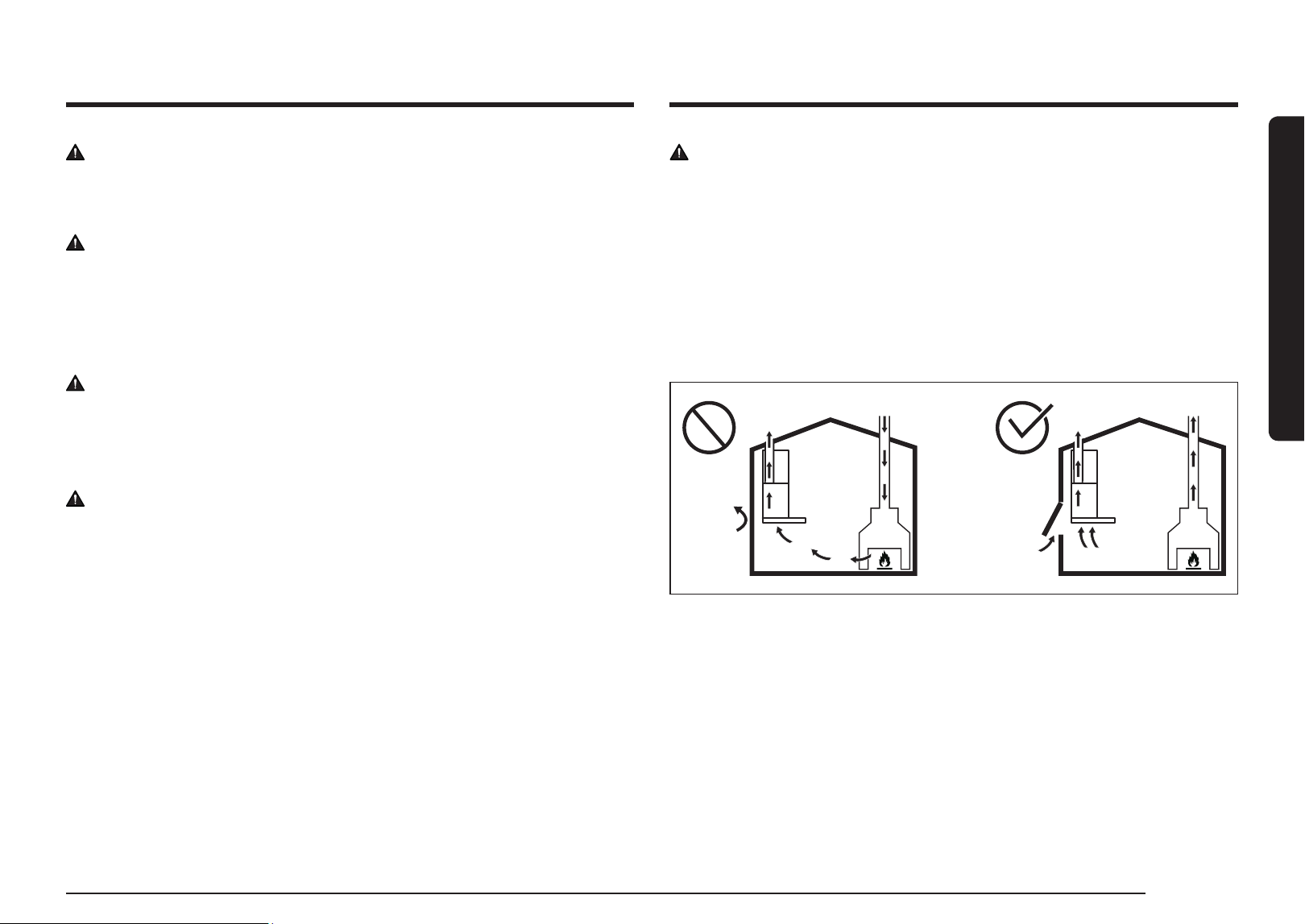
WARNING
The room must be properly ventilated when the cooker hood is
used at the same time as combustion devices(e.g. a chimney),
gas or otherwise. For example in doors, windows, incoming/
exhaust air wall boxes or by other should be used to prevent
sealing when using the hood. and when the cooker hood is used
together with other devices, the negative pressure of the room
must not exceed 4 Pa (4 x 10⁻⁵ bar). Otherwise, there is a risk
that toxic gases burned in the chimney will flow into the living
space.

6 English
Installation Requirements
use in order to reduce the environmental impact: Switch ON
the hood at minimum speed when you start cooking and kept
it running for few minutes after cooking is finished. Increase
the speed only in case of large amount of smoke and vapor
and use boost speed(s) only in extreme situations. Replace
the charcoal filter(s) when necessary to maintain a good
odor reduction efficiency. Clean the grease filter(s) when
necessary to maintain a good grease filter efficiency. Use the
maximum diameter of the ducting system indicated in this
manual to optimize efficiency and minimize noise.
• For information on Samsung's environmental commitments
and product specific regulatory obligations e.g. REACH,
WEEE, Batteries, visit : samsung.com/uk/aboutsamsung/
samsungelectronics/corporatecitizenship/data_corner. html
Installation
The minimum distance between the supporting surface for the
cooking equipment on the hob and the lowest part of the range
hood must be not less than 60 cm from electric cookers and gas
or mixed cookers.
If the instructions for installation for the gas hob specify a
greater distance, this must be adhered to.
* Please check local regulation before installation.
Important Safety Instructions
WARNING
• This appliance is marked according to the European directive
2012/19/EC - UK SI 2013 No.3113 on Waste Electrical and
Electronic Equipment (WEEE).
• By ensuring this product is disposed of correctly, you will help
prevent potential negative consequences for the environment
and human health, which could otherwise be caused by
inappropriate waste handling of this product.
• The symbol on the product, or on the documents accompanying
the product, indicates that this appliance may not be treated as
household waste. Instead it should be taken to the appropriate
collection point for the recycling of electrical and electronic
equipment. Disposal must be carried out in accordance with
local environmental regulations for waste disposal.
• For further detailed information regarding the process,
collection and recycling of this product, please contact the
appropriate department of your local authorities or the local
department for household waste or the shop where you
purchased this product.
Appliance designed, tested and manufactured according to:
• Safety: EN/IEC 60335-1; EN/IEC 60335-2-31, EN/IEC 62233.
• Performance: EN/IEC 61591; ISO 5167-1; ISO 5167-3; ISO 5168;
EN/IEC 60704-1; EN/IEC 60704-2-13; EN/IEC 60704-3; ISO
3741; EN 50564; IEC 62301.
• EMC: EN 55014-1; CISPR 14-1; EN 55014-2; CISPR 14-2; EN/
IEC 61000-3-2; EN/IEC 61000-3-3. Suggestions for a correct

English 7English 7
Installation Requirements
Electrical connection
CAUTION
The mains power supply must correspond to the rating
indicated on the plate situated inside the hood. If provided
with a plug connect the hood to a socket in compliance with
current regulations and positioned in an accessible area,
after installation. If it not fitted with a plug (direct mains
connection) or if the plug is not located in an accessible area,
after installation, apply a double pole switch in accordance with
standards which assures the complete disconnection of the
mains under conditions relating to over-current category III, in
accordance with installation instructions.
WARNING
Before re-connecting the hood circuit to the mains supply and
checking the efficient function, always check that the mains
cable is correctly assembled.
Venting Requirements (ducted models only)
• The vent system must terminate outdoors.
• Do not terminate the vent system in an attic or other
enclosed area.
• Do not use a 10.2 cm laundry-type wall cap.
• Only use metal vents. Plastic vents are not recommended.
• The length of the vent system and the number of
elbows should be kept to a minimum to provide efficient
performance.
For the most efficient and quietest operation:
• Use no more than three 90° elbows.
• Make sure there is a minimum of 60cm of straight vent
between the elbows if more than one elbow is used.
• Do not install two elbows together.
• Use clamps to seal all joints in the vent system.
• The vent system must have a damper.
• Use caulking to seal the exterior wall or roof opening around
the cap.
• The size of the vent should be uniform.
Venting Methods
To use the hood’s top outlet to vent your hood, a 15.2 cm round
vent system is required. To use the hood’s rear outlet, a 8.25 x
25.4 cm rectangular vent system is required. Neither of these
vent systems are included and must be purchased separately.
Mounting Height
Select a mounting height between a minimum of 60 cm for an
electric cooking surface and a gas cooking surface.
For Non-Vented (recirculating) Installations
If it is not possible to vent cooking fumes and vapors to the
outside, the hood can be used in the non-vented (recirculating)
version, fitting a charcoal filter and a plastic grid. Fumes and
vapors are recycled through the recirculation grid.
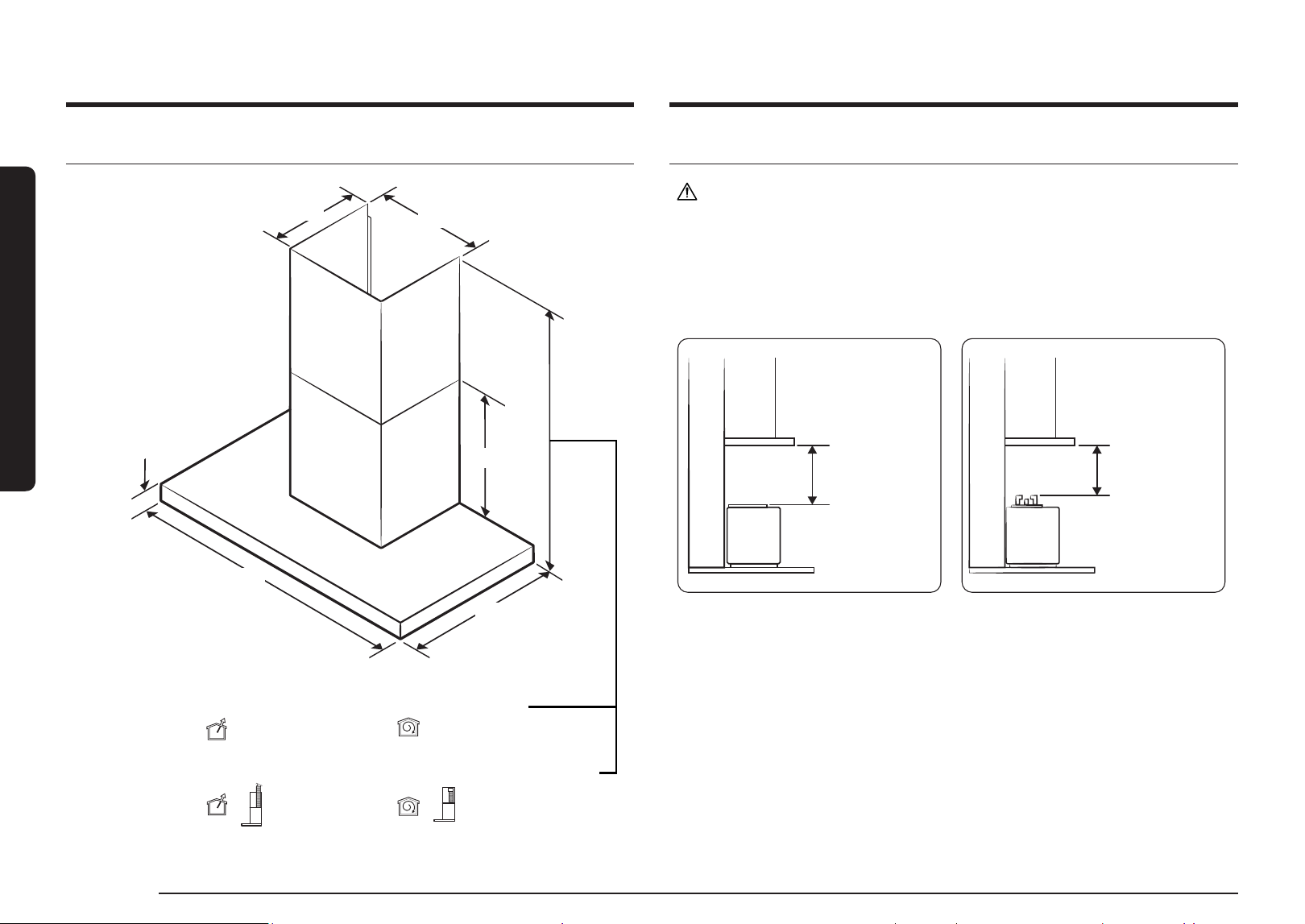
8 English
Installation Requirements
General Specifications
28.5 cm
34.8 cm
5.5 cm
50.0 cm
89.8 cm
55.5 cm
Min 101.6 cm
Max 180.6 cm
( )
Min 106.0 cm
Max 184.0 cm
( )
Vent Mode (Extension Kit) Recirculation Mode (Extension Kit)
Min 64.6 cm
Max 106.6 cm
Min 72.0 cm
Max 113.0 cm
Vent Mode Recirculation Mode
Installation Requirements
Mounting Height
CAUTION
• Be sure to check the mounting height before installing the product.
• The mounting height is measured from the top of the range to the upper cabinets. The
mounting height for an electric cooking surface is measured from its glass cooktop as
shown in the image on the left. For a gas cooking surface, the mounting height is measured
from the top of the burning grates as shown in the image on the right.
Min 24
" (61 cm)
Max 36
" (91.4 cm)
Min 60 cm
Min 27
" (68.5 cm)
Max 36
" (91.4 cm)
Min 60 cm
ELECTRIC RANGES GAS RANGES
English 9English 9
Installation Requirements
Parts List
User & Installation
manual (1)
Template for
Installation (1)
Hood Mounting
Bracket (1)
Duct Cover Mounting
Bracket (1)
Damper (1) Damper Adapter (1)
Upper Duct Cover (1) Lower Duct Cover (1) 5 mm Magnet (2)
Filter Support Cable * (2)
* To reduce the risk of the filter dropping, assemble the filter support cable to the filter.
Venting Methods
Roof Venting Wall Venting (Recirculating)
Roof Venting Wall Venting (Recirculating)
10 English
Installation Requirements
Installation Requirements
Installation Clearances
Upper furniture Dimension
Min : 90.0 cm
Min : 29.0 cm
Required Hood installation Height
Elec, Gas : 60 cm ~
Min (Vent) : 64.6 cm
Min (Recirculation) : 72.0 cm
Sub-Parts List
6 × 130 mm
Screw Anchor (2)
6 × 30 mm
Screw Anchor (7)
4
×
10 mm
Hood Fixing Screw (10)
22 mm Washer (4)
NOTE
Install the product by using the included accessories and materials appropriately and
according to the installation environment and conditions.
Additional Purchase Accessories
Model NK36CB665W**
Recirculation Kit NK-AR7000WB/SA
Charcoal Filter Kit NK-AF7000WB/SA
Hood Extension Kit NK-AE6000W*/SA
Needed Parts list (Not Supplied)
• Gloves
• Safety Glasses
• Pencil
• Measuring Tape or Ruler
• Tape to installation Template
• Spirit Level
• Phillips Screwdrivers
• Electric Drill and 0,6 cm drill bits
• Pliers
• 15,2 cm Flexible Duct
• Duct Clamps
• Duct Sealing Tape
• Knife
• Caulking Gun and compound
• Jigsaw, Grinder
English 11English 11
Installation Requirements
Making a hole in the furniture
Duct hole guide_Op.1
Cabinet floor drilling work: hood exhaust outlet (damper) cutting work
Rear (Wall)
Front
Duct
Hole
Furniture's Center Line
Max 0.5 cm
Min
22.0 cm
Min 16.0 cm
Max 17.0 cm
Min 2.0 cm
CAUTION
• Cut the cabinet in a way that does not interfere with the damper outlet.
• After assembling the duct cover, make sure that the cut surface of the cabinet is not exposed.
(The hole size must be smaller than the duct cover.)
• Vacuum the sawdust to prevent it from blowing away.
• Make sure the cabinets are not damaged.
• Before cutting the cabinet, explain to the customer that the cabinet needs to be cut, and then
obtain consent before proceeding.
Method and sequence of cutting the upper cabinets
1.
Refer to the cutting dimensions above and mark the lines to be cut on the cabinet.
2.
Use a jigsaw to cut the upper cabinets. When cutting, use a vacuum cleaner to minimize the
amount of dust.
Installation Tool Jigsaw
Duct hole guide_Op.2
Cabinet floor drilling work: hood exhaust outlet (damper) cutting work
Rear (Wall)
Front
Furniture's Center Line
Cutting Area
34.0 cm
CAUTION
• Cut the cabinet in a way that does not interfere with the damper outlet.
• Vacuum the sawdust to prevent it from blowing away.
• Make sure the cabinets are not damaged.
• Before cutting the cabinet, explain to the customer that the cabinet needs to be cut, and then
obtain consent before proceeding.
Method and sequence of cutting the upper cabinets
1.
Refer to the cutting dimensions above and mark the lines to be cut on the cabinet.
2.
Use a jigsaw to cut the upper cabinets. When cutting, use a vacuum cleaner to minimize the
amount of dust.
Installation Tool Jigsaw, Grinder
12 English
Installation
Installation
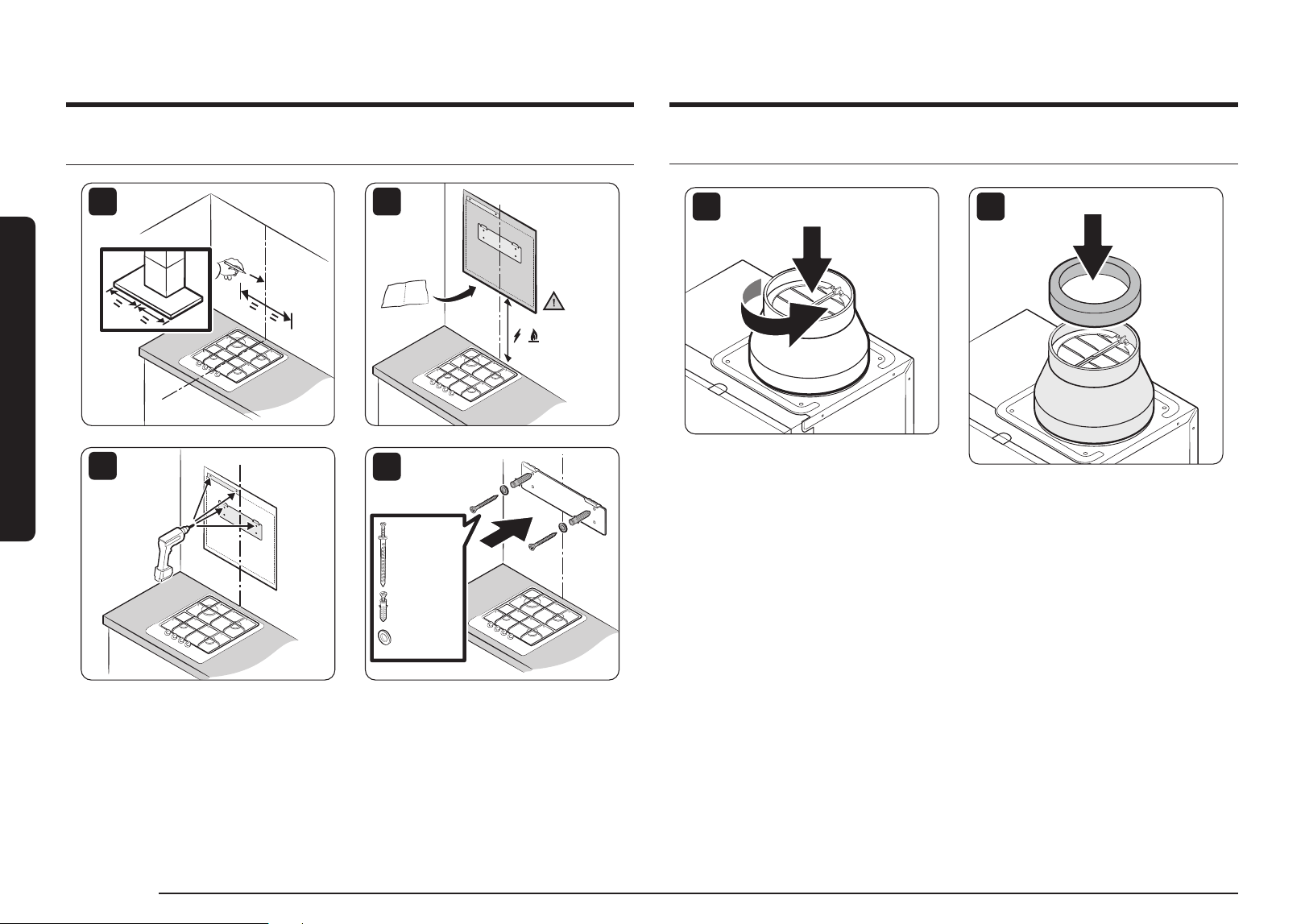
Setting the Location
1
,
≥ 60 cm
2
3
4
130 mm
Screw Anchors
(2 pcs.)
or 30 mm
Screw Anchors
(2 pcs.)
and Washers
(2 pcs.)
Connecting the Vent System
5
6
English 13English 13
Installation
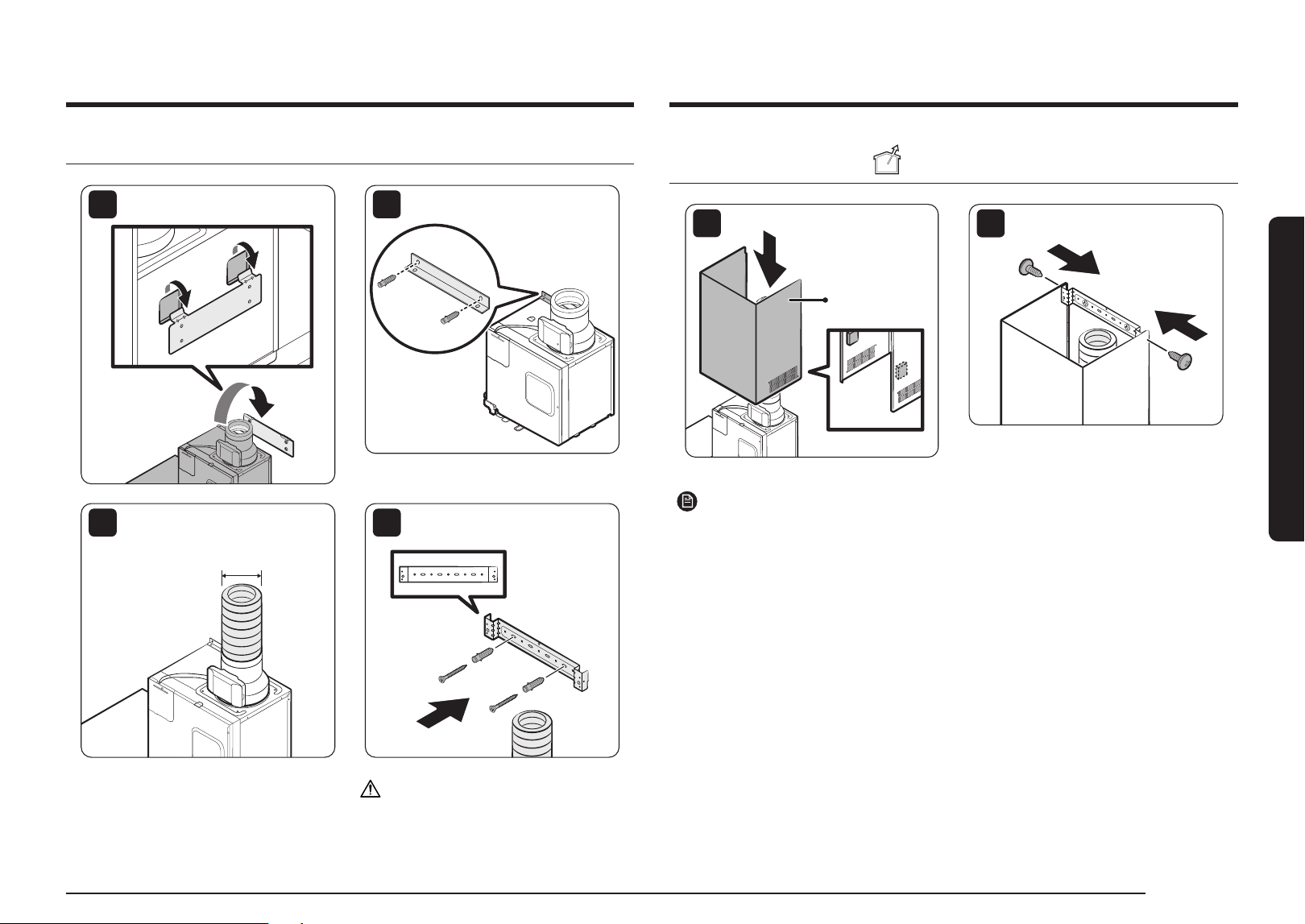
Installing the Range Hood
7
8
30 mm
Screw Anchors
(2 pcs.)
9
15.2 cm
10
30 mm
Screw Anchors
(2 pcs.)
CAUTION
• Install the upper duct closely to the
ceiling and upper cabinets.
• Be careful not to let the upper duct come
into contact with the upper cabinet door.
Installing the Venting Type
11
Upper Duct
12
10 mm
Hood Fixing
Screw (2 pcs.)
NOTE
Magnets are included in the accessory box.
14 English
Installation
Installation
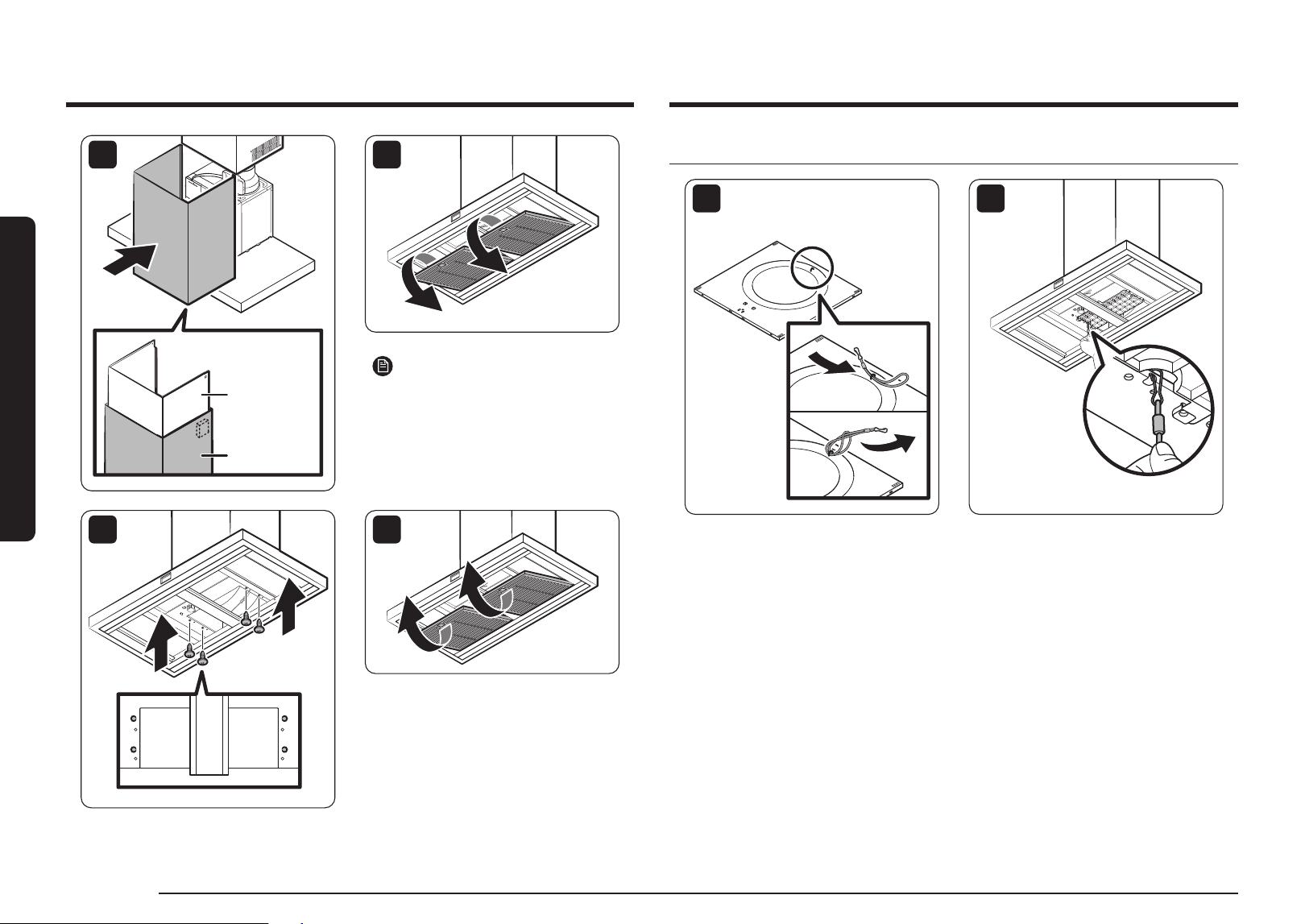
Connect the filter support cable
1
2
13
Upper Duct
Lower Duct
14
NOTE
The magnet must be attached to the
upper line of the lower duct.
15
10 mm
Hood Fixing
Screw (4 pcs.)
16
English 15English 15
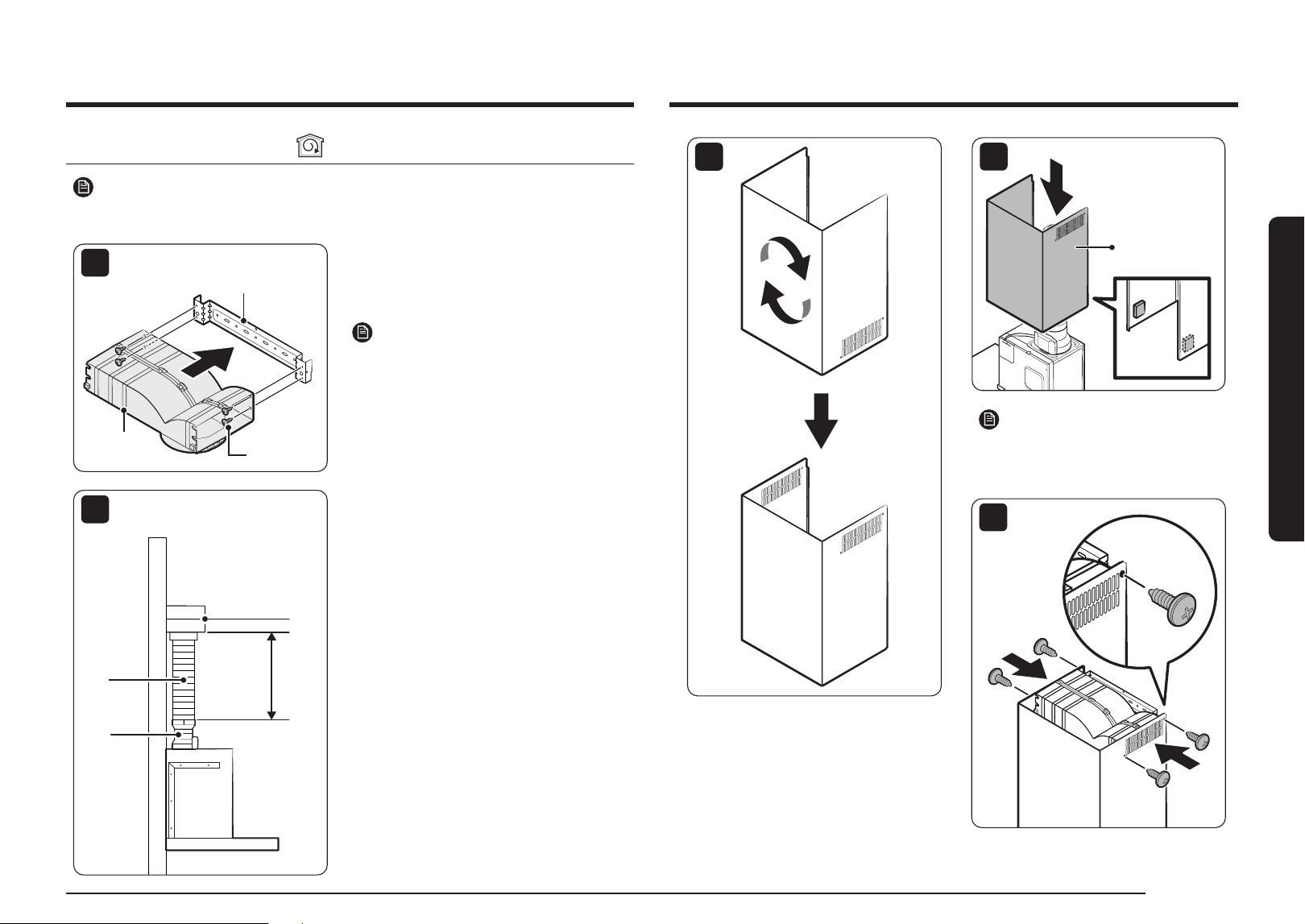
Installation
3
4
Upper Duct
NOTE
Magnets are included in the accessory
box.
5
10 mm
Hood Fixing
Screw (4 pcs.)
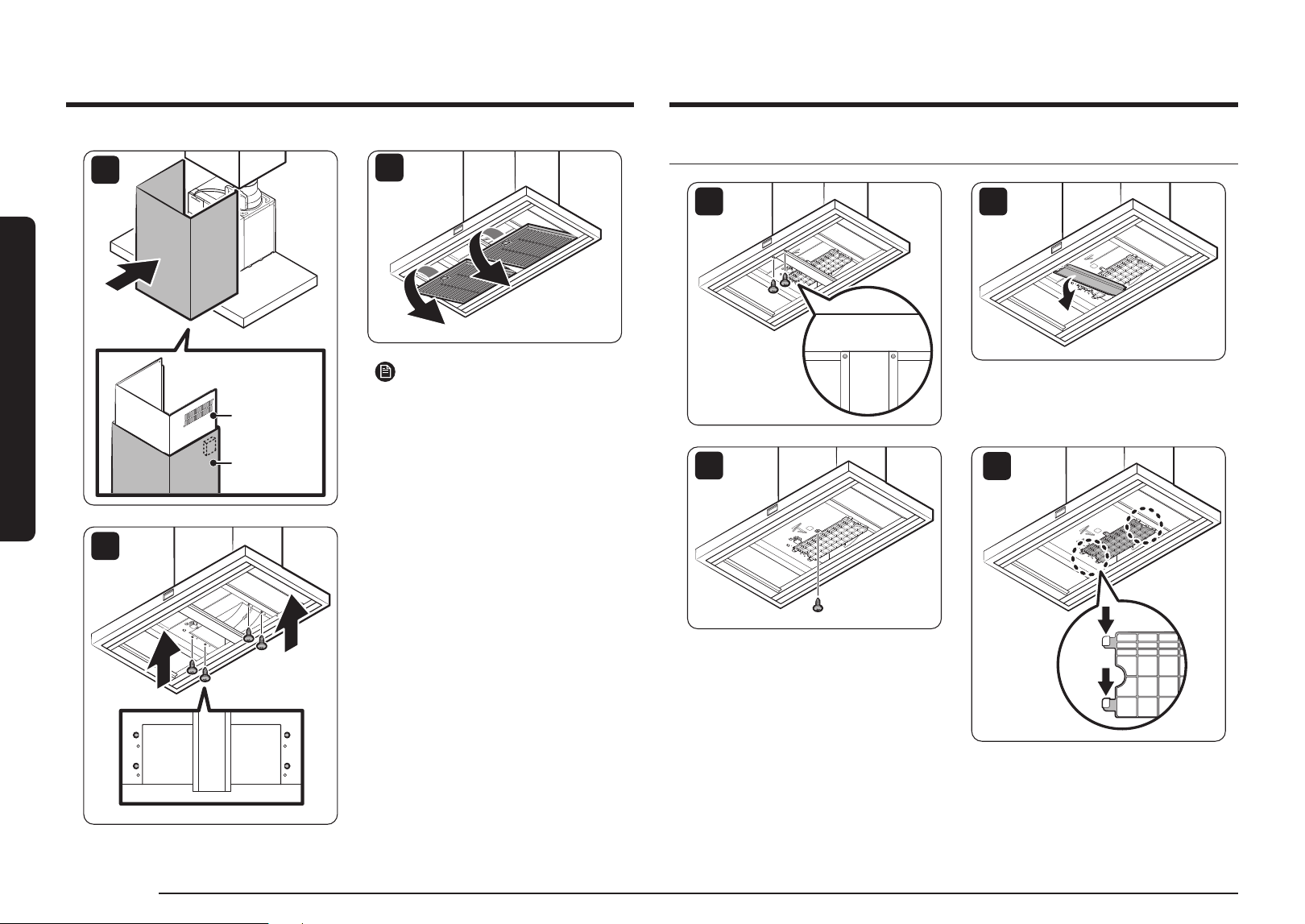
Installing the Recirculation Kit
NOTE
Same process until No. 10
1
Duct Cover Mounting
Bracket
Defletor
Assembly
Screws
• Assemble the air deflector with the duct cover
mounting bracket with the four assembly
screws provided with the Recirculation Kit.
NOTE
• Use of recirculation type hoods in closed
spaces may cause poor ventilation
performance.
• Please ventilate the room by opening the
windows while operating the device.
B
A
D
C
2
• Measure from the bottom of the deflector to
the bottom of the hood outlet.
• Cut the duct to the measured size “X."
• Remove the deflector.
• Slide the duct onto the bottom of the
deflector.
• Place the assembled deflector and duct over
the exhaust outlet from the hood.
• Reassemble the air deflector to the duct cover
mounting bracket with the four assembly
screws.
• Seal the connections with tape.
16 English
Installation
Installation
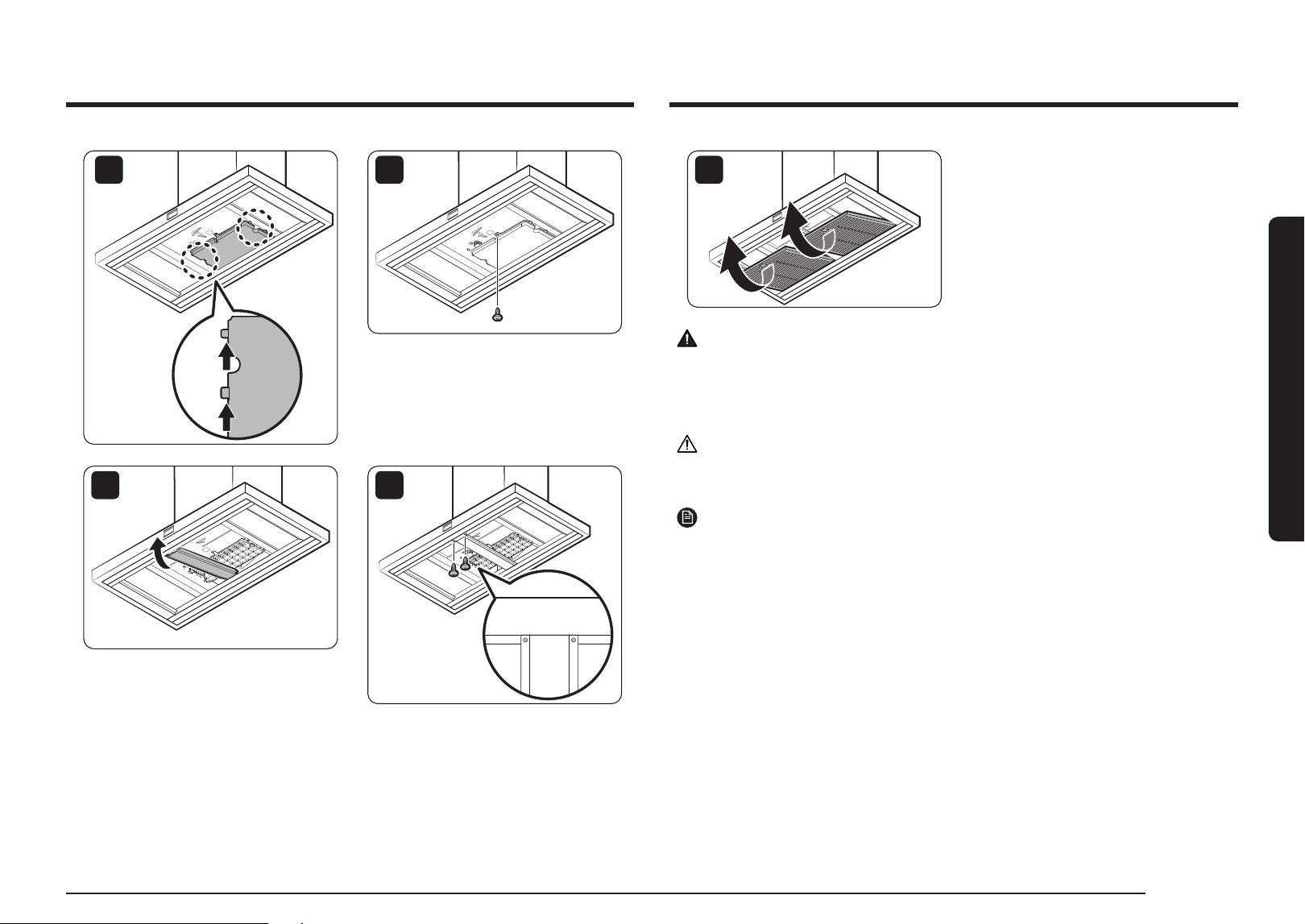
Installation of the charcoal filter kit
9
10
11
12
6
Upper Duct
Lower Duct
7
NOTE
The magnet must be attached to the
upper line of the lower duct.
8
10 mm
Hood Fixing
Screw (4 pcs.)
English 17English 17
Using the Range Hood
17
WARNING
Be sure to use an outlet with a ground terminal for safety. This can prevent the risk of
electric shock, fire, or malfunction. If the outlet does not have a ground terminal, purchase
a separate grounding wire and connect it to the grounding line.
CAUTION
Do not ground on gas pipes, water pipes, telephone lines, etc.
NOTE
Be sure to install a short-circuit breaker where there is a risk of a short circuit.
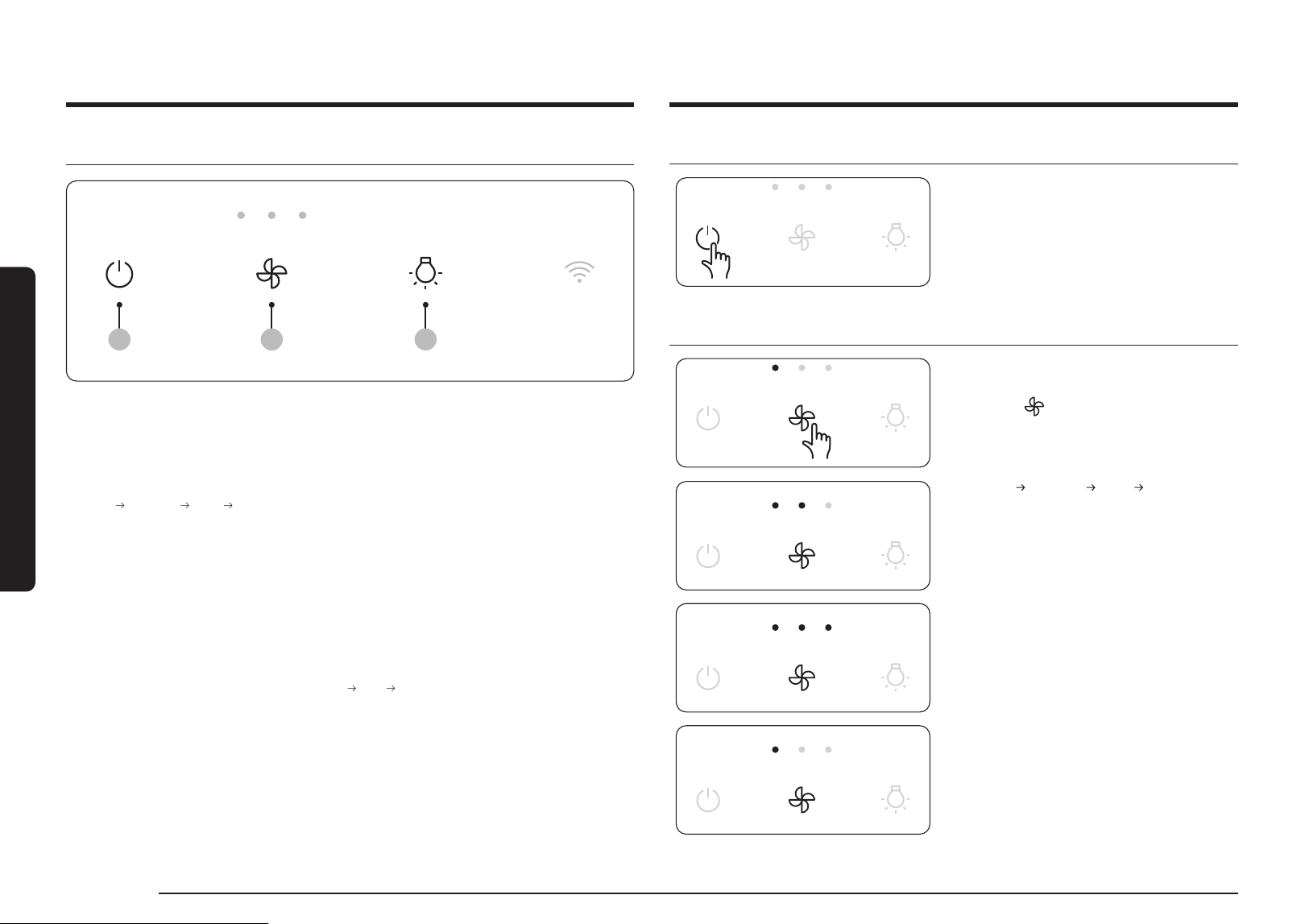
13
14
15
16
18 English
Using the Range Hood
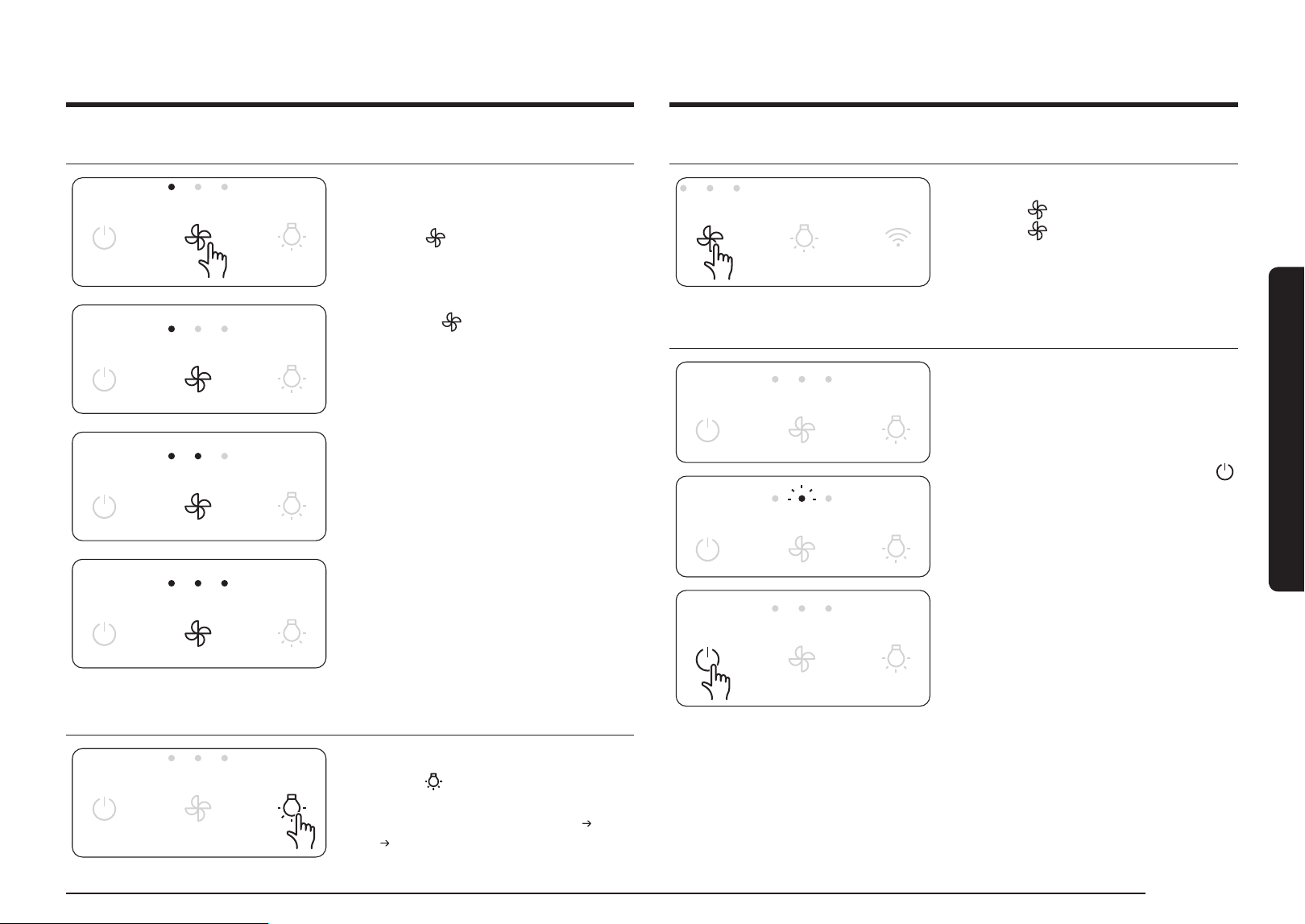
Turning the Range Hood On or Off
The device turns on with a chime sound, and
starts operation in Low mode.
Changing the operation mode
Change the device operation mode as
necessary.
• Press the button to select the operation
mode to use.
– Each time you press the button, the
mode changes in the following order:
Low
Medium High Max
– Operate the MAX mode for
7.5minutes and then change to High
mode.
Using the Range Hood
Button panel
02 0301
01 Power button
• Short press: Turns the device ON/OFF.
02 Mode button
• Short press: Changes the operation mode.
(Low
Medium High Max)
– Operate the MAX mode for 7.5 minutes and then change to High mode.
• 5 second press: Deactivates/activates the Wi-Fi
– Delay off mode can be activated on the SmartThings app.
– Filter usage time can be checked on the SmartThings app.
– The range hood can be operated through automations with registered Samsung products
on the SmartThings app.
03 Light button
• Short press: Changes the light mode (High
Low Off)
• 5 second press: Activates/deactivates the AP
English 19English 19
Using the Range Hood
Wi-Fi On/Off
This feature turns the product's Wi-Fi on or off.
• Press the button for 5seconds.
Press the button again for 5seconds to
turn on Wi-Fi.
Automatic operation to prevent range hood overheating
This feature prevents overheating when the
hood is turned off.
• When the hood temperature rises, the
middle LED on the mode button blinks, and
it operates in Medium mode.
• If the hood temperature stabilizes or the
button is pressed, the hood is turned off.
Max mode
Max mode is a function that allows powerful
exhaust for a short time.
1.
Press the
button for 3 times.
2.
Max mode is operated.
Max mode (Max 780 CMH) is available.
3.
LEDs on the
button are sequentially
filled while the Max mode is on.
− Operate the MAX mode for 7.5 minutes
and then change to High mode.
Using the lighting
Adjusting the lighting level of the product.
• Press the button briefly to select the
desired lighting step.
– It repeats in the order of High
Low
Off.
20 English
Using the Range Hood
Using the Range Hood
Delay off
Delay off is a function that vents the remaining
pollutants in the kitchen after cooking and
operates after the hood is turned off.
• If you set the delay off function in the
SmartThings app and turn off the working
hood, the delay off function will work.
• LEDs on the
button are turned on
sequentially while the delay off function is
in operation.
• The unit will operate for 3 minutes in Low
mode and then turns off automatically.
NOTE
Delay off mode can be used only when the
hood is connected to the SmartThings app.
Entering AP (Access Point)
1.
Press the
button for 5 seconds as
instructed in the app.
2.
When in AP mode, the
icon blinks.
Please proceed with the connection
according to the mobile guide.
3.
When the connection is completed,
icon
remains on.
English 21English 21
Using the Range Hood
Bixby
• Bixby is the name of Samsung's artificial intelligence solution which makes it possible to
control the product through voice.
• To use the voice recognition function, you need to connect the SmartThings app and the
product on your smartphone.
• For models that do not directly recognize voice after connecting with the app, some
functions can be controlled through Bixby on Samsung smartphones.
Amazon Alexa & Google Assistant
Samsung smart home appliances are supported by SmartThings skills in Alexa and Actions in
Google Assistant.
Installation Guide
Here's how to link a SmartThings account with Amazon Alexa or Google Assistant.
The SmartThings app and Alexa app (or Google Assistant app) should be installed on your
phone.
1.
Setup supported devices in SmartThings
2.
After device setup, tap 'Voice assistant' and link your Samsung account to Amazon Alexa.
3.
Check if the devices are visible on Amazon Alexa app. Then account linking is complete.
(Check the devices are visible and set the location (home and room) of devices in the
Google Home app. Then account linking is complete.)
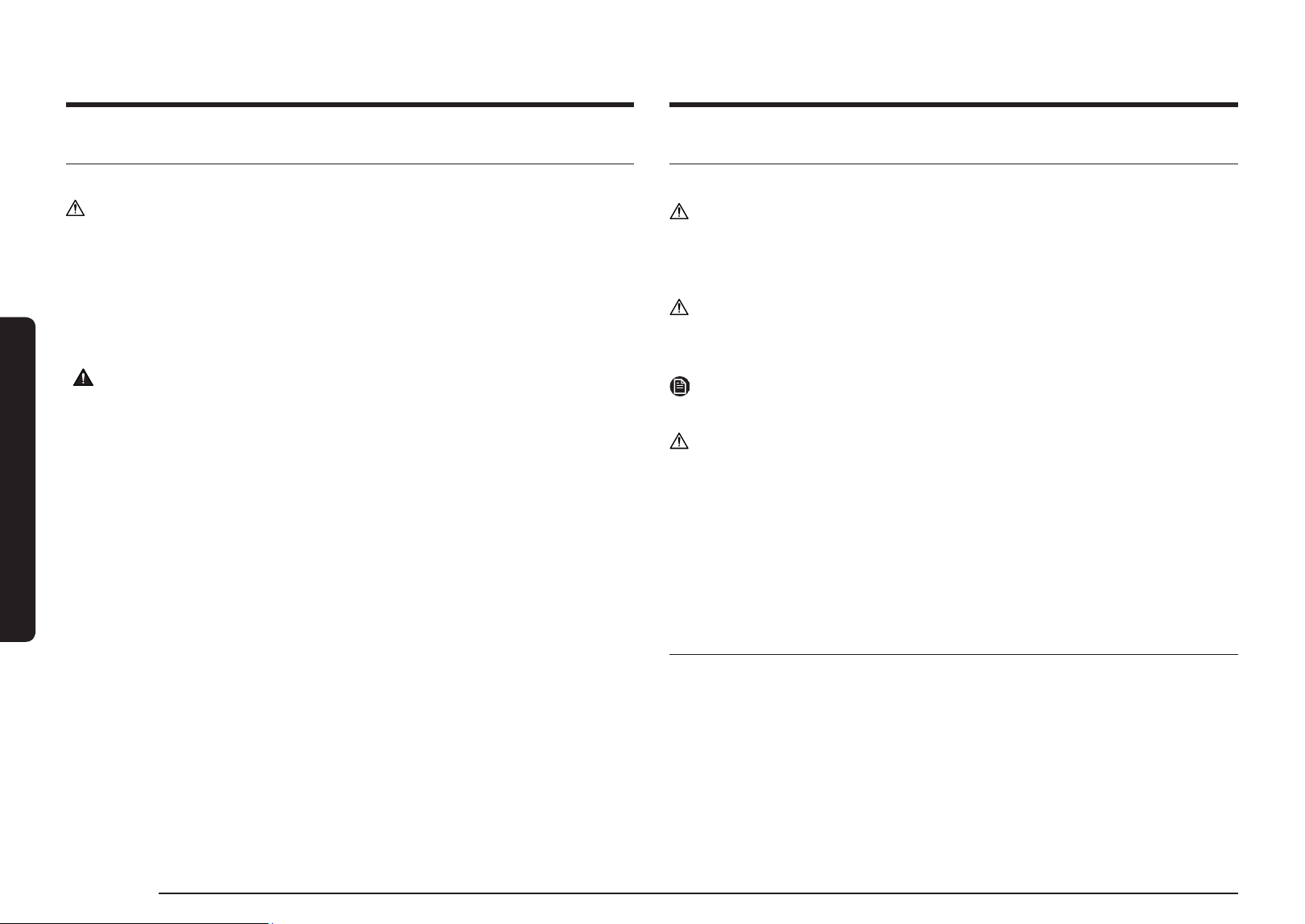
Error indication
• When a product error occurs, all LEDs on the
button blink.
• Errors and actions can be found in the
SmartThings app.
• If the problem persists, disconnect the
power plug for at least 30 seconds, cool the
product sufficiently, and restart it.
If this problem is not solved, contact a Samsung
Electronics Service Center.
NOTE
Check error code function can be used
only when the hood is connected to the
SmartThings app.
22 English
Cleaning and Maintenance
Cleaning and Maintenance
Cleaning the range hood
Wipe the front of the product with a soft cloth soaked in neutral liquid detergent.
CAUTION
• Do not use rough materials such as sponges.
• Do not use baking soda, percarbonate, citric acid, abrasives, alcohol, etc. The surface
coating may be damaged or discolored.
• When cleaning, always wear gloves for safety.
• Be sure to turn off the power when cleaning the hood.
• There is a risk of fire if it is not cleaned according to the user manual.
WARNING
Do cleaning fan, filter and grease laden surfaces frequently.
Be careful when using cleaning agents.
Cleaning and Maintenance
Cleaning the Filters
1.
Please remove the filter at the bottom of the hood.
CAUTION
When separating the filter, use both hands to separate it carefully so that it does not drop.
2.
Soak the filter in lukewarm water with neutral detergent for about 10 minutes, then rinse
it with water and clean it.
CAUTION
Do not use a scrubber to clean the filter.
3.
When cleaning is complete, reassemble the filter in the reverse order of disassembly.
NOTE
Put the filter into the dishwasher and clean it conveniently with a standard wash cycle.
CAUTION
• Filters should be cleaned by hand with neutral detergent once a month, and if washed
with a dishwasher, they should be washed for only a short time at a low temperature.
• Filters may discolor during cleaning, but this does not affect performance.
• Do not spray water directly on the filter while mounted on the hood. There is a risk of
electric shock and fire.
• The front of the filter is made of stainless steel. Please be careful with it.
• Be sure to wear gloves because the edge of the filter can be sharp and cause injury.
Replacing the LED Lamp
This product is equipped with a dedicated LED lamp. If you need a replacement, please
contact the service center.
It must be replaced by a professional repairman, its service agent or similarly qualified
persons in order to avoid a hazard.
English 23English 23
SmartThings app
SmartThings app
Checking the power connections
Check if the power is connected to the
product and the access point.
Setting up and connecting to a
Wi-Fi access point using your
smartphone
1. To connect the product to a Wi-Fi network,
turn on Wi-Fi in "Settings > Wi-Fi", and
then select the access point that you wish
to connect to.
• Only alphanumeric characters are
supported for wireless access point
names (SSIDs). If an SSID has a special
character, rename it before connecting
to it.
• This product supports only 2.4GHz
Wi-Fi.
On
On
WI-FI
On
WI-FI DIRECT
SAMSUNG_2G
SAMSUNG_5G
Select
WI-FI
On
WI-FI DIRECT
2. Turning off "Switch to Mobile Data" in
"Settings > Wi-Fi" on Your Smartphone
• If "Switch to mobile data" or "Adaptive
Wi-Fi" is turned on, you cannot connect
to the network. Be sure to turn off
these functions before connecting to
the network.
Advanced
Switch to mobile data
Insert SIM card to use mobile data.
Off
NOTE
The setup may differ depending on your
smartphone model, OS version, and
manufacturer.
3. Checking Internet Connectivity
• After connecting to Wi-Fi, check that
your smartphone is connected to the
Internet.
NOTE
A firewall may prevent your smartphone
from connecting to the Internet. Contact
your Internet service provider for
troubleshooting.
To use the SmartThings app, connect the product to the network in the sequence described below.
The images shown may differ depending on your smartphone model, OS version, and manufacturer.
You can only set up the Wi-Fi access point when connecting the product to a Wi-Fi network. Once
the product is connected, you can use the SmartThings app via Wi-Fi, 3G, LTE, 5G or other wireless
networks. If the Wi-Fi disconnects, please follow the instructions in the Samsung SmartThings app via
your mobile device or tablet. You can easily install the SmartThings app or use the product with your
smartphone by scanning the QR code on the attached label.
Downloading the SmartThings
app and registering your
Samsung account
1.
Downloading the SmartThings app
• Search for "SmartThings" in the Play
Store or App Store, and download the
SmartThings app to your smartphone.
• If the SmartThings app is already
installed on your smartphone, update it
to the latest version.
SmartThings (Samsung Connect)
Samsung Electronics Co., Ltd.
NOTE
• The SmartThings app supports
Android 7.0 or later (with at least 2
GB RAM) and iOS 12.0 or later. The
app is optimized for iPhone 6s or later
and Samsung smartphones (Galaxy
S and Note series). The updates of
the SmartThings app or the functions
supported by it may be discontinued
for the previously supported OS
versions due to issues like usability
and security.
• The SmartThings app may change
without prior notice to improve
product usability and performance.
2.
Registering your Samsung account
• A Samsung account is required to use
the SmartThings app.
To create a Samsung account and log in
to your account, follow the instructions
displayed on the SmartThings app..
You do not need to install an additional
app.
NOTE
• If you already have a Samsung
account, log in to the account. If
you have a smartphone that is a
Samsung device and you have a
Samsung account, your smartphone
is automatically logged in to your
account.
• If you log in from a smartphone
produced for another country, you
need to log in with its country code
when you create your Samsung
account, and the SmartThings
app may not be usable on some
smartphones.
24 English
SmartThings app
SmartThings app
Connecting the SmartThings app
to your product
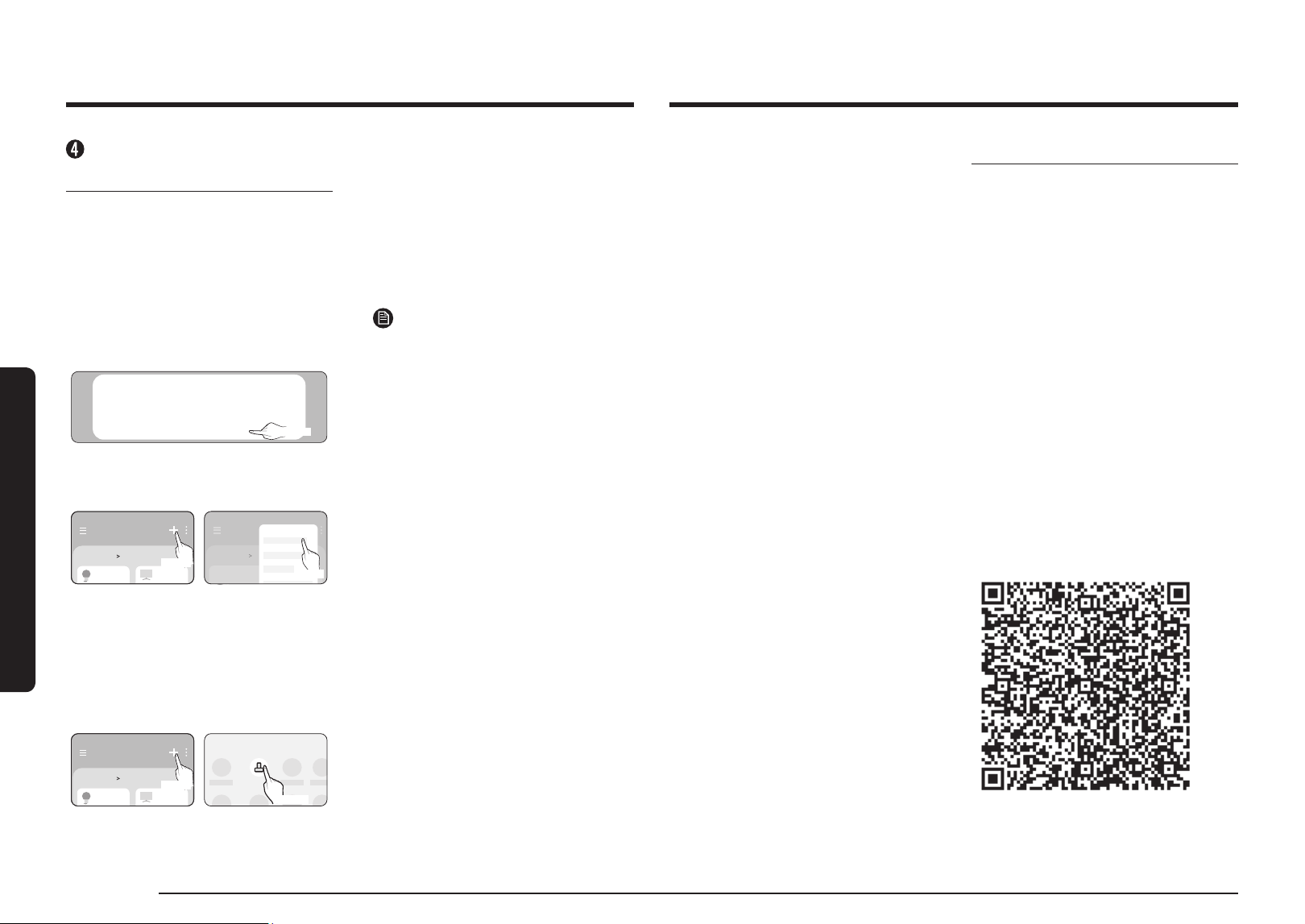
1.
Selecting the product that you want to
connect.
1) Start the SmartThings app about one
minute after turning on the hood.
2) After the SmartThings app is started,
select "ADD NOW" when a pop-up
window saying that a product is found
appears.
A new device has been found.
Add this device to SmartThings?
Don’t add Later Add now
Select
3) If the pop-up window does not appear,
select "+," and then "Add Device."
Home
Living room
Select
Home
Add device
Living room
Select
You can add a product you want to connect
to by selecting it manually or by selecting
"Scan."
• Select manually: Range Hood >
Samsung
• Scan: [Range Hood] Samsung
Home
Living room
Select
By device type
Range Hood
Select
2.
Connecting the SmartThings app to
your product
• Follow the instructions displayed on
the SmartThings app to connect to
your product.
• For information on how to use the
SmartThings app, select the How To
menu in the app.
NOTE
• If any pop-up-window appears on
the top of the smartphone while
connecting to your product, do not
select it.
• If a pop-up window saying that the
device is already registered appears
while connecting to your product,
get permission using "REQUEST
PERMISSION" from a user already
connected to the product, or create
a new account using "REGISTER MY
ACCOUNT" to independently connect
to the product.
• If a Samsung account-related country
error occurs while connecting to
your product, log out of your current
Samsung account, log in to your
previous Samsung account, and then
delete all devices that have been
previously connected. Then, log in to
your current Samsung account again
and configure the settings.
• If a failure message appears while
adding a device, see "Setting up
and connecting to a Wi-Fi access
point using your smartphone" on
page 23. The connection may fail
temporarily due to an installation
location problem with the access
point or other problems.
• If the word "AP" does not disappear
from the display, unplug the power
and plug it in again.
• For the security protocols for
wireless/wired access points,
WPA-PSK and WPA2-PSK are
recommended. For the authentication
method, AES is recommended. New
Wi-Fi authentication specifications
and non-standard WiFi authentication
methods are not supported.
• The product supports the IEEE802.11
b/g/n (2.4 GHz) communication
protocol. (Samsung recommends
IEEE802.11n.)
• If your Internet service provider has
permanently registered the MAC
address (a unique identification
number) of your PC or modem, you
may not be able to connect your
product to the Internet. Contact your
Internet service provider and ask how
to connect devices other than your
PC (such as a Range Hood) to the
Internet.
Open Source Announcement
The software included in this product
contains open source software. You
may obtain the complete corresponding
source code for a period of three years
after the last shipment of this product by
contacting our support team via http://
opensource.samsung.com (please use the
"Inquiry" menu).
It is also possible to obtain the complete
corresponding source code in a physical
medium, such as CD-ROM. A minimal
payment will be required.
The following URL http://opensource.
samsung.com/opensource/SMART_
AT_051/seq/0 leads to the open source
license information as related to this
product. This offer is valid to anyone in
receipt of this information.
English 25English 25
Troubleshooting
Troubleshooting
If you suspect there is a failure while using the product, check the following before requesting
service from the service center. When you request service, you will be charged for the visit and
diagnosing the symptoms even if the product is not broken.
CAUTION
If you require repairs, disconnect the power cord immediately and contact the service
center.
• Model number and serial number (find by removing the filter, listed inside product)
• Product warranty details
• Explanation of the problem
General
Problem Cause Action
It's not working.
Is the power being supplied
like normal?
Please check if there is a power
outage.
Please unplug and plug in the
power cord.
Is there any moisture on the
exterior of the product?
Please remove moisture from the
product.
Are there any foreign
substances on the exterior of
the product?
Please wipe off the foreign
substance.
Hood Operation
Problem Cause Action
The hood's
mode changes
automatically.
Is it working in smart mode?
Smart mode automatically
operates in the High, Medium, and
Low modes depending on the air
quality.
The hood's wind
strength is weak.
Is there a lot of foreign matter
in the filter?
Wipe off the filter with a neutral
detergent in lukewarm water.
Information codes
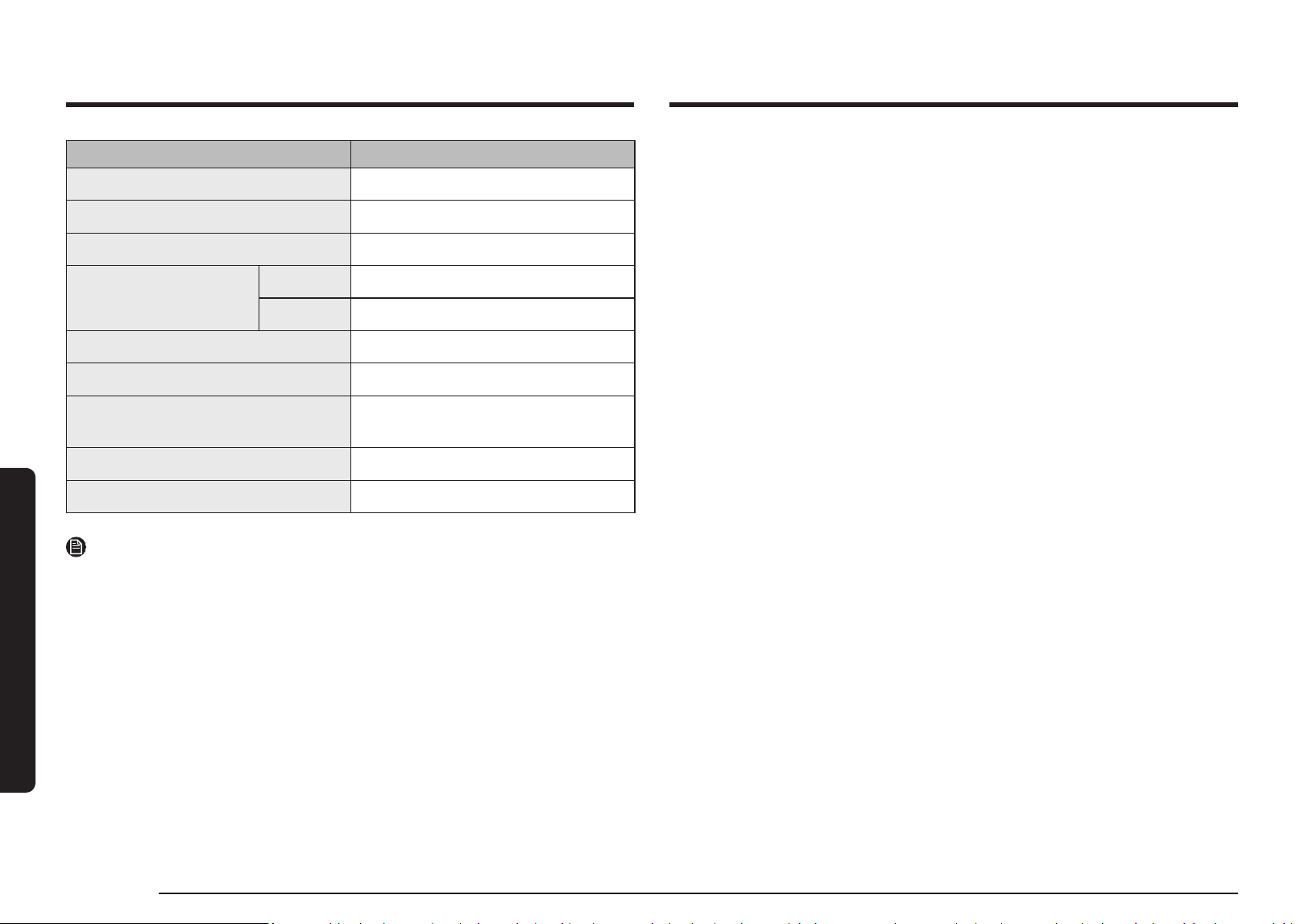
Code Description Action
C121
Temperature sensor is
not working
Press the POWER
button to restart the
product.
If the problem persists, disconnect the power
plug for more than 30 seconds.
Allow the product to cool and restart it.
If it is not resolved, please contact a Samsung
Electronics Service Center.
C154
Main PBA communication
is not working with
Inverter PBA
C162
Only occurs when
EEPROM Read or Write
is not working.
C163
If you need to check the
option code
C203
Inverter PBA
communication is not
working with Main PBA
C446
BLDC Motor or Inverter
PBA is not working
Press the POWER
button to restart the
product.
If the problem persists, disconnect the power
plug for more than 30 seconds.
Allow the product to cool and restart it.
If it is not resolved, please contact a Samsung
Electronics Service Center.
C447
C455
C478
C486
C489
C493
C496
C499
C654
Electric Damper is not
working
Reconnect Electric damper and check any
foreign matter is on the damper.
26 English
Technical specifications
Technical specifications
Model NK36CB665W**SA
Product Weight (kg) 16.2
Rated Voltage (V) 240
Frequency (Hz) 50
Dimensions (W x H x D) (mm)
Main Unit 898 x 646 ~ 1066 x 500
Extension 898 x 1016 ~ 1840 x 500
Lamp Load Power (W) 8
Total Load Power (W) 160
Set Maximum Air Volume (m³/h)
(IEC 61591)
780
Motor Maximum Air Volume (m³/h) 1070
Noise Level (dB) (IEC 60704-2-13) 68
NOTE
Hereby, Samsung declares that this radio equipment is in compliance with Directive 2014/53/
EU and with the relevant statutory requirements in the UK.
The full text of the EU declaration of conformity and the UK declaration of conformtiy is
available at the following internet address: The official Declaration of conformity may be
found at http://www.samsung.com. go to Support > Search Product Support and enter the
model name.
Memo

Memo
DG68-01579C-00
COUNTRY /
LOCATION
CALL WEBSITE
CHINA
400-810-5858 (B2C)
400-910-5858 (VIP)
400-610-5858 (B2B)
www.samsung.com/cn/support
TAIWAN
0800-32-9999 (All Product)
0809-00-5237 (B2B / Dealer)
www.samsung.com/tw/support
HONG KONG
3698 4698 (All Product)
3698 4688 (B2B)
www.samsung.com/hk/
support(Chinese)
www.samsung.com/hk_en/
support(English)
MACAU 0800 333
www.samsung.com/hk/
support(Chinese)
www.samsung.com/hk_en/
support(English)
SINGAPORE 1800 7267864 | 1800-SAMSUNG (Other) www.samsung.com/sg/support
AUSTRALIA 1300 362 603 (Other) www.samsung.com/au/support
NEW ZEALAND 0800 726 786 (All Product) www.samsung.com/nz/support
VIETNAM
www.samsung.com/vn/support
THAILAND
Hotline no : 1282
1800-29-3232 (Toll free for all product)
www.samsung.com/th/support
COUNTRY /
LOCATION
CALL WEBSITE
MYANMAR +95-1-2399-888 www.samsung.com/mm/support
CAMBODIA 1800-20-3232 (Toll free) www.samsung.com/th/support
LAOS +856-214-17333 www.samsung.com/th/support
MALAYSIA
1800-88-9999 (OTH)
+603-7713 7420 (Overseas contact)
www.samsung.com/my/support
INDONESIA
021-5699-7777
0800-112-8888 (All Product, Toll Free)
0800-112-7777 (All Product, Toll Free)
www.samsung.com/id/support
PHILIPPINES
All Products :
1-800-10-7267864 [PLDT-Toll Free]
1-800-8-7267864 [Globe-Toll Free]
84222111 [Landline ]
www.samsung.com/ph/support
JAPAN 0120-363-905 www.samsung.com/jp/support
INDIA
1800 5 SAMSUNG
(1800 5 7267864) (Toll-Free)
1800 40 SAMSUNG
(1800 40 7267864) (Toll-Free)
www.samsung.com/in/support
NEPAL
16600172667 (Toll Free for NTC Only)
9801572667 (Toll Free for Ncell users)
www.samsung.com/in/support
BANGLADESH
08000-300-300 (Toll free)
09612-300-300
www.samsung.com/bd/support
SRI LANKA 011 SAMSUNG (011 7267864) www.samsung.com/in/support
QUESTIONS OR COMMENTS?