www.philips.com/welcome
User manual
Always there to help you
Register your product and get support at
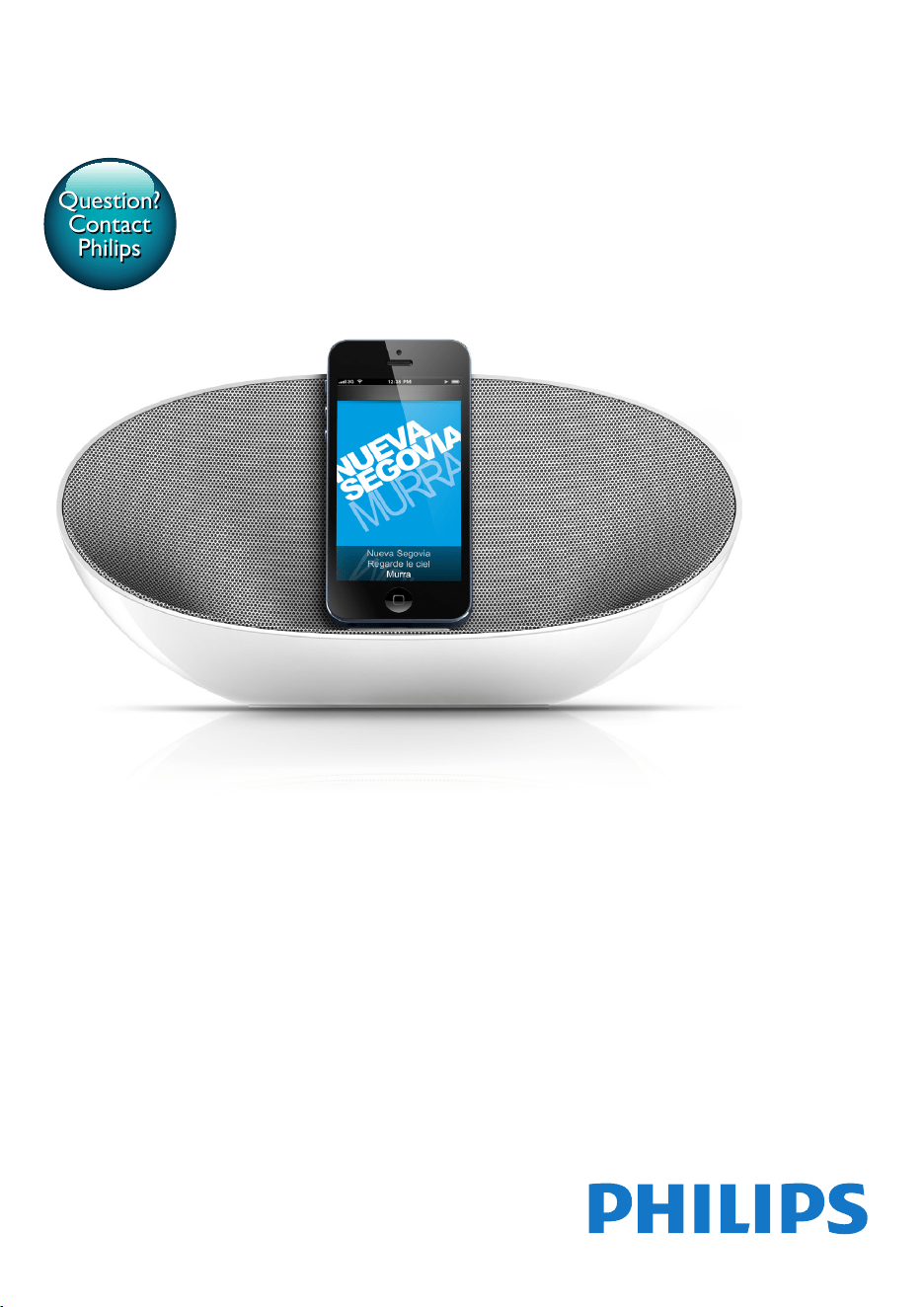
DS3480
Question?
Contact
Philips


1
English
EN
Contents
1 Safety 2
2 Notice 2
Care of the environment 2
Trademark notice 3
Compliance 3
3 Your Docking Speaker 4
What's in the box 4
Overview 4
4 Get started 5
Charge DS3480 5
Switch on or off 5
5 Play 6
Play through the lightning dock 6
Play through Bluetooth 6
Play through an audio cable 8
Adjust the volume 8
6 Charge 9
Charge through the lightning dock 9
Charge through the USB connector 9
7 Updatethermware 9
8 Specications 10
Amplier 10
General information 10
Bluetooth 10
2 EN
1 Safety
• Onlyuseattachments/accessoriesspecied
by the manufacturer.
• Use only power supplies listed in the user
manual.
• The product shall not be exposed to
dripping or splashing.
• Do not place any sources of danger on the
product(e.g.liquidlledobjects,lighted
candles).
• Batteries (battery pack or batteries
installed) shall not be exposed to excessive
heatsuchassunshine,reorthelike.
• Danger of explosion if battery is incorrectly
replaced. Replace only with the same or
equivalent type.
• Where the plug of the Direct Plug-in
Adapterisusedasthedisconnectdevice,
the disconnect device shall remain readily
operable.
Warning
• Never remove the casing of this apparatus.
• Never lubricate any part of this apparatus.
• Never place this apparatus on other electrical
equipment.
• Keepthisapparatusawayfromdirectsunlight,naked
amesorheat.
• Ensure that you always have easy access to the power
cord,plugoradaptortodisconnecttheapparatusfrom
the power.
2 Notice
Anychangesormodicationsmadetothis
device that are not expressly approved by
Philips Consumer Lifestyle may void the user’s
authority to operate the equipment.
Careoftheenvironment
Your product is designed and manufactured
withhighqualitymaterialsandcomponents,
which can be recycled and reused.
When this crossed-out wheeled bin symbol is
attached to a product it means that the product
is covered by the European Directive 2002/96/
EC.
Please inform yourself about the local separate
collection system for electrical and electronic
products.
Please act according to your local rules and
do not dispose of your old products with your
normal household waste. Correct disposal of
your old product helps to prevent potential
negative consequences for the environment and
human health.
Your product contains batteries covered by
theEuropeanDirective2006/66/EC,which
cannot be disposed with normal household
waste.Please inform yourself about the local
rules on separate collection of batteries
because correct disposal helps to prevent
negative consequences for the environmental
and human health.
3
English
EN
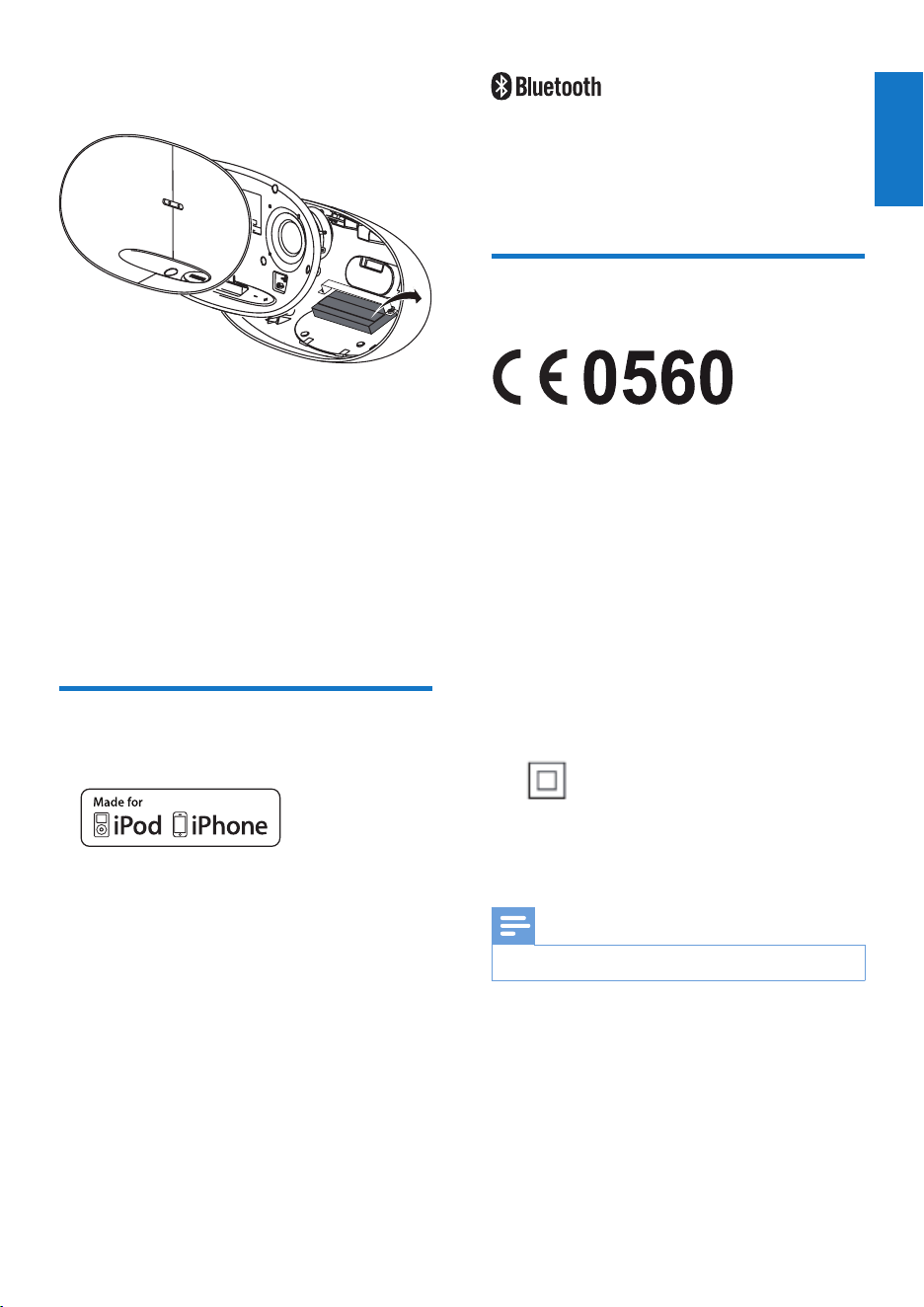
Always bring your product to a professional to
remove the built-in battery.
Environmentalinformation
All unnecessary packaging has been omitted.
We have tried to make the packaging easy to
separateintothreematerials:cardboard(box),
polystyrene foam (buffer) and polyethylene
(bags,protectivefoamsheet.)
Your system consists of materials which can
be recycled and reused if disassembled by a
specialized company. Please observe the local
regulations regarding the disposal of packaging
materials,andoldequipment.
Trademarknotice
“Made for iPod” and “Made for iPhone”
mean that an electronic accessory has been
designedtoconnectspecicallytoiPodor
iPhonerespectively,andhasbeencertiedby
the developer to meet Apple performance
standards. Apple is not responsible for the
operation of this device or its compliance with
safety and regulatory standards. Please note that
the use of this accessory with iPod or iPhone
may affect wireless performance.
iPodandiPhonearetrademarksofAppleInc.,
registered in the U.S. and other countries.
The Bluetooth
®
word mark and logos are
registered trademarks owned by Bluetooth
SIG,Inc.andanyuseofsuchmarksbyPhilipsis
under license.
Compliance
This product complies with the radio
interference requirements of the European
Community.
Hereby,PhilipsConsumerLifestyle,declaresthat
this product is in compliance with the essential
requirements and other relevant provisions of
Directive 1999/5/EC.
A copy of the EC declaration of Conformity
is available in the Portable Document
Format (PDF) version of the user manual at
www.philips.com/support.
ClassIIequipmentsymbol:
CLASSIIapparatuswithdoubleinsulation,and
no protective earth provided.
Note
• The type plate is located in the battery compartment.
4 EN
3 Your Docking
Speaker
What'sinthebox
Check and identify the contents of your
package:
• Main unit
• AC/DC power adapter
• Quick start guide
iOS app for the dock
With the lightning dock on DS3480,your
iPhone/ iPod can work with the following app:
• ClockStudioapp (allows you to select
soundsettings,listentotheInternetradio,
setclockandalarmandupdatermware)
Tip
• You can get the ClockStudio app from the App Store
on your iPhone/ iPod.
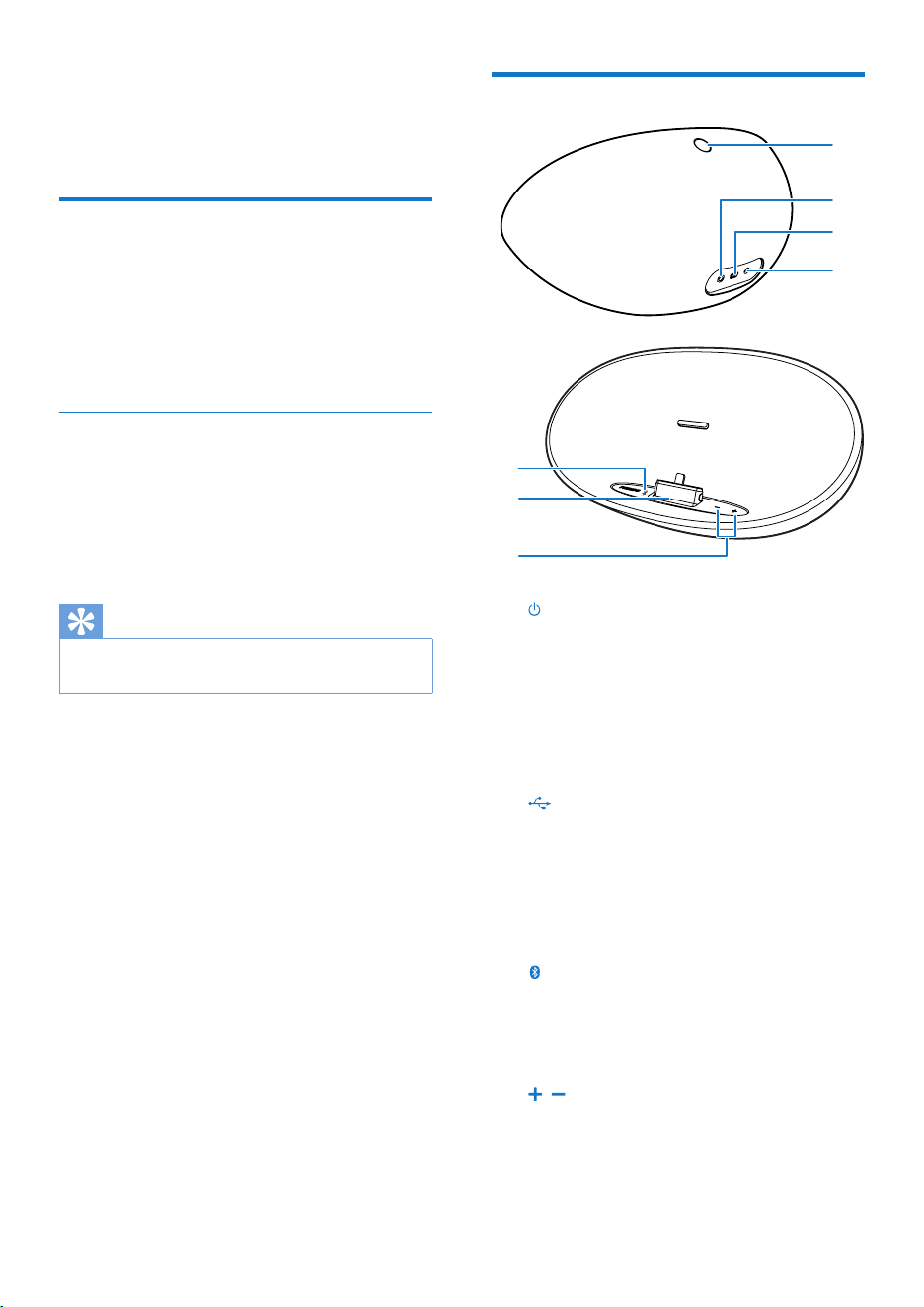
Overview
a
• Press to switch on or off; Press and
hold for 5 seconds to reset Bluetooth
• Battery level indicator
b DC IN
• AC power connector for the supplied
AC/DC power adapter
c
• Power charging connector for an
external device
d AUDIO IN
• Audio input connector for an external
audio device
e
• Bluetooth status indicator
f DockwiththeLightningconnectorfor
the iPod/iPhone
g ,
• Increase or decrease the volume
• Power on/off indicators
f
e
g
a
b
c
d
5
English
EN
4 Get started
Charge DS3480
DS3480 has a built-in battery that can be
charged through the supplied AC/DC power
adapter.
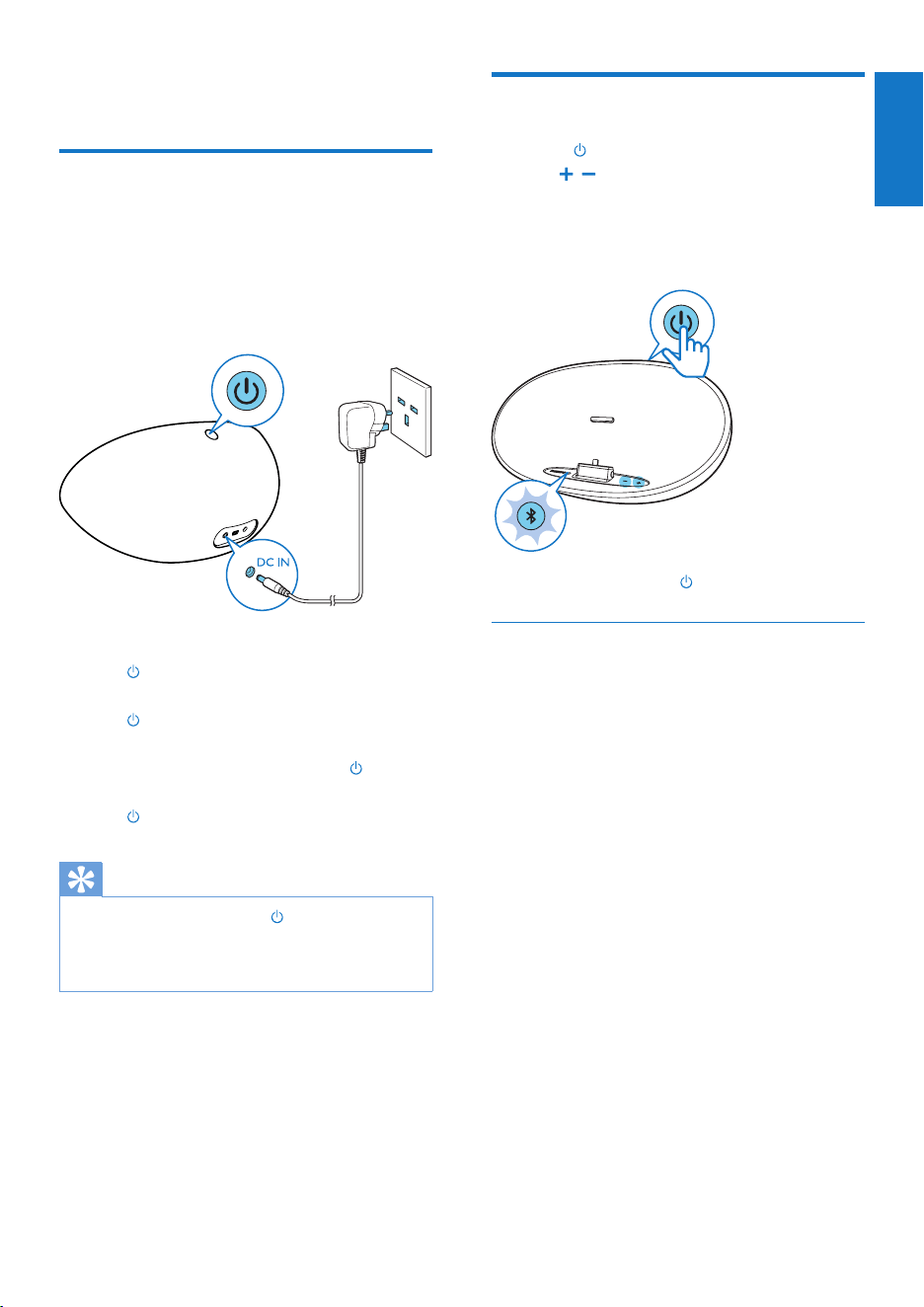
• Connect DS3480 to AC power through
the supplied AC/DC power adapter.
» Duringpowercharging,
ashesingreenifyouhaveswitched
on DS3480.
is always on in red if you have
switched off DS3480.
» Whenthebatteryisfull,the is
always on in green if DS3480 is on; the
turns off if DS3480 is off.
Tip
• Whenthebatterylevelislow, ashesinred.
• Rechargeable batteries have a limited number of charge
cycles. Battery life and number of charge cycles vary by
use and settings.
Switchonoroff
• Press to switch on.
» , lights up amber.
» TheBluetoothstatusindicatorashes.
DS3480 starts to pair or reconnect
through Bluetooth.
• Toswitchoff,press again.
Automaticstandby
After15minutesinidlemode(noplay,no
buttonispressed),theplayerswitchesoff.
6 EN
5 Play
Play through the lightning
dock
With the lightning dock on DS3480,youcan
play from the following iPhone/ iPod:
• iPhone 5
• iPod touch (5th generation)
• iPod nano (7th generation)
1 Make sure that you have switched on
DS3480.
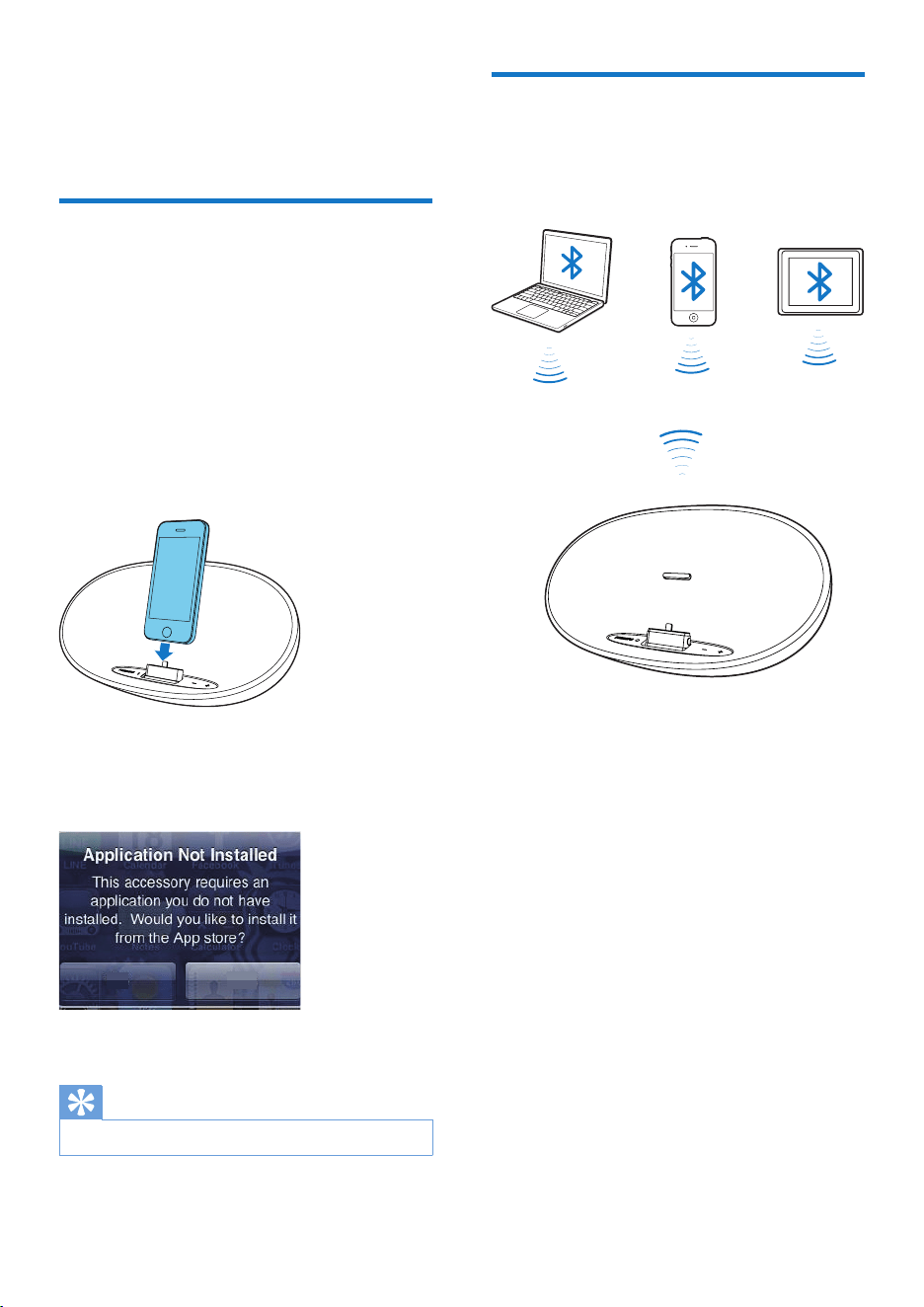
2 Mount your iPhone/ iPod onto the dock.
• Thersttimeyoumountyour
iPhone/ iPod onto DS3480,installthe
ClockStudio app on your iPhone/iPod
as prompted:
3 OnyouriPhone/iPod,startmusicplay.
Tip
• ToremovetheiPhone/iPod,pullitoutofthedock.
App store Ignore
Play through Bluetooth
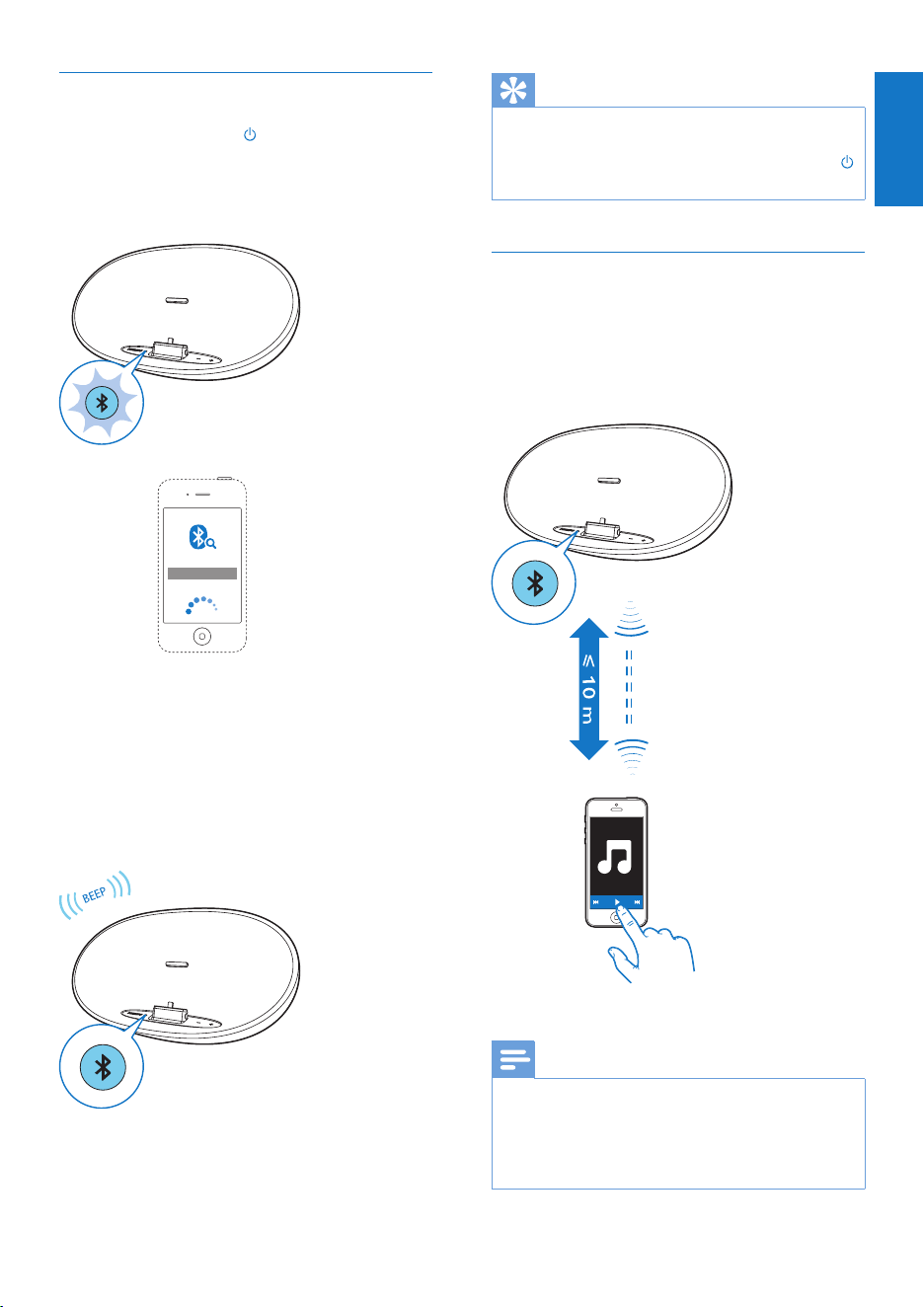
ThroughBluetooth,youcanplayonDS3480
fromaBluetoothdevice,suchasaniPad,
iPhone,Androidphone,orlaptop.
7
English
EN
Connect through Bluetooth
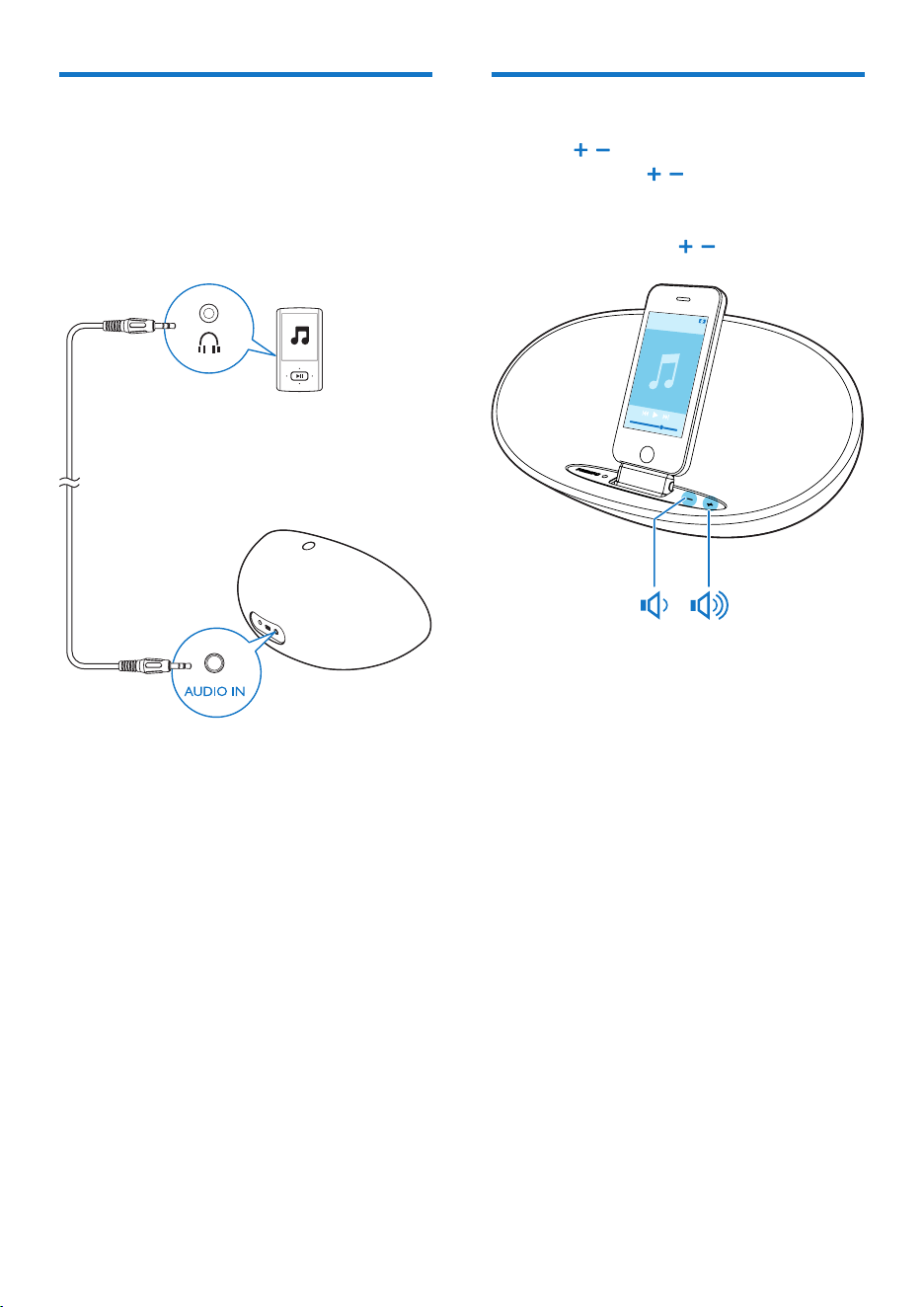
1 On DS3480,press to switch on.
» TheBluetoothstatusindicatorashes.
DS3480 starts to pair or reconnect
through Bluetooth.
2 OnyourBluetoothdevice,activate
Bluetooth and search for Philips DS3480.
• Fortherst-timeconnection,select
Philips DS3480 to start pairing.
» Whentheconnectioniscomplete,the
Bluetooth indicator is always on in blue
and two beeps sound.
» Next time you switch on DS3480,the
speaker connects to the last paired
device automatically.
PHILIPS DS3480
Tip
• To connect DS3480toanotherBluetoothdevice,
switch off Bluetooth on current Bluetooth device.
• To clear paired devices from DS3480,pressandhold
forveseconds.
PlayfromaBluetoothdevice
1 Make sure that you have removed your
iPhone/ iPod from the lightning dock.
2 Aftersuccessfulconnection,startmusic
play on DS3480.
Note
• Make sure the distance between DS3480 and the
Bluetooth device is within 10 meters.
• The music streaming may be interrupted by obstacles
between the device and DS3480,suchaswalls,orother
devices nearby that operate in the same frequency.
8 EN
Playthroughanaudiocable
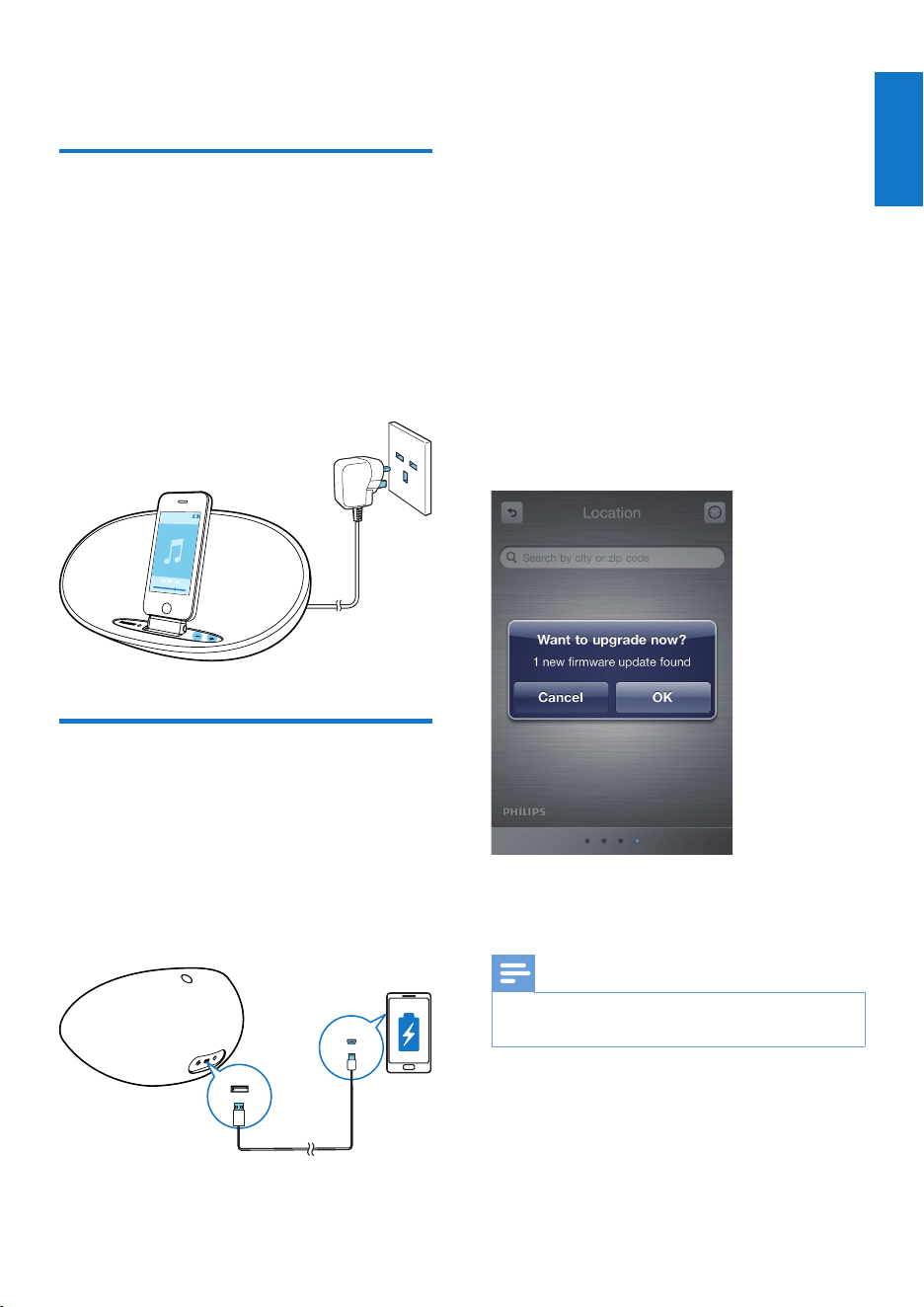
ThroughanMP3linkcable,youcanalsoplayon
DS3480fromanexternalaudiodevice,suchas
an MP3 player.
1 Use an MP3 link cable to connect DS3480
with an external audio device.
2 On DS3480,dothefollowing:
• Make sure that you have paused the
music on your iPhone/ iPod docked on
DS3480;
• Switch off Bluetooth on the Bluetooth
device that is connected to DS3480.
3 Ontheexternalaudiodevice,startmusic
play and change the volume.
Adjustthevolume
• Press , repeatedly; or
• Press and hold , to increase or
decrease the volume quickly.
» When you reach the maximum or
minimumlevel, , ashesinamber.
9
English
EN
6 Charge
Charge through the lightning
dock
With the lightning dock on DS3480,youcan
charge your iPhone/ iPod when music play is on
or off.
1 Mount your iPhone/ iPod onto the
lightning dock on DS3480.
2 Connect DS3480 to power.
Charge through the USB
connector
With the USB connector on DS3480,youcan
charge your mobile phone.
1 Use a USB cable to connect DS3480 with
the external device.
2 Connect DS3480 to power.
7 Update the
firmware
With the ClockStudioapp on your iPhone/
iPod,youcanupdatethermwareofDS3480.
1 Make sure that your iPhone/ iPod is
connected to the Internet.
2 Mount the iPhone/ iPod onto the lightning
dock of DS3480.
» ClockStudio starts to search for
availablermwareupdate.
» Whenthermwareupdateisavailable,
a message is displayed.
3 Follow onscreen instructions to complete
rmwareupdating.
Note
• Duringthermwareupdating,keeptheiPhone/iPod
powered on and docked on DS3480.

10 EN
8 Specifications
Amplier
Rated Output
Power
2 X 5 W RMS
Generalinformation
Power supply
- AC Power
- Battery
Model: KSASB0241200200HK
(Philips) and
KSASB0241200200D5 (Philips);
Input:100-240V~,50/60Hz,
0.6A;
Output: 12 V 2 A
Li-ion battery
Operation Power
Consumption <18 W
Standby Power
Consumption <0.5 W
Max. load for
iPod/iPhone 5 V 1 A
Dimensions
- Main Unit
(W x H x D)
274 x 143 x 109 mm
Weight
- Main Unit 1.2 kg
Operating
temperature
and humidity:
0°Cto45°C,5%to90%
Humidity for all climates.
Storage
temperature
and humidity: -40°Cto70°C,5%to95%
Bluetooth
Bluetooth
version
V2.1+ EDR
Frequency band 2.402-2.480 GHzISM Band
Rang 10m (free space)
Philips Consumer Lifestyle B.V.
Philips Consumer Lifestyle B.V. template AMB 544-9056
HK-1321- DS3480 2013/05
................................................................. ..........................................................................................
(Document No. / Numéro du document) (Year, Month (yyyy/mm) in which the CE mark is affixed /
Année/mois (aaaa/mm) au cours de laquelle le marquage
CE a été apposé)
EUROPEAN DECLARATION OF CONFORMITY
(DECLARATION DE CONFORMITE CE)
We / Nous, PHILIPS CONSUMER LIFESTYLE B.V.
(Company name / Nom de l’entreprise)
TUSSENDIEPEN 4, 9206 AD DRACHTEN, THE NETHERLANDS
(address / adresse)
declare under our responsibility that the product(s):
(déclarons sous notre propre responsabilité que le(s) produit(s))
Philips
.............................................................................
DS3480/12,/05
...........................................................................
(brand name, nom de la marque)
(Type version or model, référence ou modèle)
Docking Speaker
.............................................................................
(
product description, description du produit)
to which this declaration relates is in confirmity with the following harmonized standards:
(auquel cette déclaration se rapporte, est conforme aux normes harmonisées suivantes)
(title, number and date of issue of the standard / titre, numéro et date de parution de la norme)
EN 60065:2006+A1:2006+A11:2008+A2:2010+A12:2011
EN 55013:2001+A1:2003+A2:2006 EN 55020:2007+A11:2011
EN 61000-3-2:2006 + A1:2009+A2:2009 EN 61000-3-3:2008
EN300328 V1.7.1:2006 EN 301489-1 V1.9.2:2011
EN301489-17 V2.2.1:2012 EN 62479:2010
EN 50564:2011 EN50581:2012
following the provisions of :
(conformément aux exigences essentielles et autres dispositions pertinentes de:)
2006/95/EC (Low Voltage Directive)
1999/5/EC (R&TTE Directive)
2004/108/EC (EMC Directive)
2011/65/EU (RoHS Directive)
2009/125/EC (Eco Design) - EC/1275/2008;EC/278/2009
And are produced under a quality scheme at least in conformity with ISO 9001 or CENELEC Permanent Documents
(Et sont fabriqués conformément à une qualité au moins conforme à la norme ISO 9001 ou aux Documents Permanents CENELEC)
Only for Medical Devices and R&TTE products:
The Notified Body:
Telefication/CE0560
..................................................
performed:
NB
........................................................................
(L’Organisme Notifié)
(Name and number/ nom et numéro)
(
a effectué)
(description of intervention / description de ’intervention)
and issued the certificate:
13214079/AA/00
............................................................
(et a délivré le certificat)
(certificate number / numéro du certificat)
Remarks:
Drachten, Netherlands, May 22, 2013 A.Speelman, CL Comliance Manager
.........................................................
.........................................................
(place,date / lieu, date) (signature, name and function / signature, nom et fonction)

Specificationsaresubjecttochangewithoutnotice
© 2013 Koninklijke Philips Electronics N.V.
All rights reserved.
DS3480_05_UM_V1.0