说明书材质:157g双铜
印刷:CMYK彩印
工艺:折页风琴折
尺寸:80×133.2mm
Flight Wireless Smartwatch
Model Number: AVS1633
IMPORTANT – RETAIN THESE INSTRUCTIONS FOR FUTURE REFERENCE
Flight Wireless Smartwatch
Model Number: AVS1633
IMPORTANT – RETAIN THESE INSTRUCTIONS FOR FUTURE REFERENCE
PRIVACY POLICY
At Eurosonic Group Limited (“We“), we are commi ed to protec ng and respec ng your privacy.
This policy (together with our Website Terms of Use and any other documents referred to in it) sets out the basis on which any personal data we collect
from you, or that you provide to us, will be processed by us.
Please read the following carefully to understand our views and prac
ces regarding your personal data and how we will treat it.
By visi
ng www.esgltd.com you are accep ng and consen ng to the prac ces described in this Policy.
For the purpose of the Data Protec
on Act 1998 (“the Act”) and the General Data Protec n Regula n 2016 (GDPR), the data controller is Eurosonic Group
Limited of Brightgate House, 1 Brightgate Way, Manchester M32 0TB.
INFORMATION WE COLLECT FROM YOU
We will collect and process the following data about you:
• Informa
n you give us. This is informa n about you that you give us by filling in forms on our site www.esgltd.com (“our Site”) or by corresponding
with us by phone or e-mail. It includes informa
n you provide when you register to use our Site, subscribe to our Unboxer service, par cipate in
discussion boards or other social media func
ns on our site, enter a compe on, promo n, or survey, click on a link, and when you report a
problem with our Site. The informa
on you give us may include your name, address, e-mail address and phone number,
• Informa
n we collect about you. With regard to each of your visits to our Site we will automa cally collect the following informa n:
• technical informa
n, including the Internet protocol (IP) address used to connect your computer to the Internet, browser type and version, me zone
se
ng, browser plug-in types and versions, and opera ng system and pla orm.
• informa
n about your visit, including the full Uniform Resource Locators (URL), clickstream to, through and from our site ( including date and me),
products you viewed or searched for page response
mes, download errors, length of visits to certain pages, page interac on informa n (such as
scrolling, clicks, and mouse- overs).
COOKIES
Our Site uses cookies to dis
nguish you from other users of our Site. This helps us to provide you with a good experience when you browse our Site and
allows us to make improvements to it from
me to me. For detailed informa n on the cookies, we use and the purposes for which we use them see our
Cookie Policy.
OUR LEGAL BASIS FOR USE OF THE INFORMATION
Before processing any personal data, we ensure that at least one lawful basis under GDPR is met. We will not disclose personal data for any purpose other
than what the data was originally collected for; unless there is an overriding legal basis that enables this processin
g.
We may collect, hold, use and disclose the informa
n collected to compile sta s cal data and to maintain our database; to develop or improve our
website; respond to any queries; no
fy you of any upcoming marke ng or other events that we think may be of interest to you; provide you with
publica
ons; manage quality control and compliance issues; manage systems administra on; provide you or your organisa on w ith advice; no fy you about
important changes or developments to our services; contact you for your views on our services or to determine the suitability for employment
We may also process your personal data in the following circumstances:
• to carry out our obliga
ns arising from any contracts (including the terms of promo ns we may run from me to me) entered between you and us
and to provide you with the informa
on, products and services that you request from us.
• to provide you with informa
n about other goods and services we offer that are like those that you have already purchased or enquired about.
• to provide you with informa
n about goods we feel may interest you. We will contact you by electronic means only if you have consented to this.
• to no
fy you about changes to our service.
• to ensure that content from our Site is presented in the most effec
ve manner for you and for your computer.
• to administer our Site and for internal opera
ons, including troubleshoo ng, data analysis, tes ng, research, sta s cal and survey purposes.
• to improve our Site to ensure that content is presented in the most effec
ve manner for you and for your computer.
• to allow you to par
cipate in interac ve features of our service when you choose to do so.
• as part of our efforts to keep our Site safe and secure.
• to measure or understand the effec
veness of adver sing we serve to you and others, and (only if applicable) to deliver relevant adver sing to you;
and
• to make sugges
ns and recommenda ns to you and other users of our Site about goods or services that may interest you or t hem.
• Informa
n we receive from other sources. We will combine this informa on with informa n you give to us and informa n we collect about you.
We will use this informa
n and the combined informa n for the purposes set out above (depending on the types of informa n we receive).
• For fraud preven
on purposes and to ensure that VAT is paid.
• For marke
ng purposes – you can opt out of group marke ng by emailing customerse[email protected] or (by post) to Customer Services, Eurosonic
Group Limited of Brightgate House, 1 Brightgate Way, Manchester M32 0TB.
DISCLOSURE OF YOUR INFORMATION
You agree that we have the right to share your personal informa
n with:
• Any member of our group, which means our subsidiaries, our ul
mate holding company, and its subsidiaries, as defined in sect ion 1159 of the UK
Companies Act 2006.
• Selected third par
s including:
• our business partners, suppliers and sub-contractors for the performance of any contract we enter into with them or you.
• analy
cs and search engine providers that assist us in the improvement and op misa n of our Site. We will disclose your personal informa
n to
third par
s:
• If we sell or buy any business or assets, in which case we may disclose your personal data to the prospec
ve seller or buyer of such business or assets.
• If Eurosonic Group Limited or substan
ally all its assets are acquired by a third party, in which case personal data held by it about its customers will be
one of the transferred assets.
• If we are under a duty to disclose or share your personal data to comply with any legal obliga
n.
WHERE WE STORE YOUR PERSONAL DATA
All informa
n you provide to us is stored on our secure servers.
We will take all steps reasonably necessary to ensure that your data is treated securely and in accordance with this Privacy Policy.
Unfortunately, the transmission of informa
on via the internet is not completely secure. Although we will do our best to protect your personal data, we
cannot guarantee the security of your data transmi
ed to our Site; any transmission is at your own risk. Once we have received your informa n, we will
use strict procedures and security features to try to prevent unauthorised access.
Flight Wireless Smartwatch
Model Number: AVS1633
IMPORTANT – RETAIN THESE INSTRUCTIONS FOR FUTURE REFERENCE
Flight Wireless Smartwatch
Model Number: AVS1633
IMPORTANT – RETAIN THESE INSTRUCTIONS FOR FUTURE REFERENCE
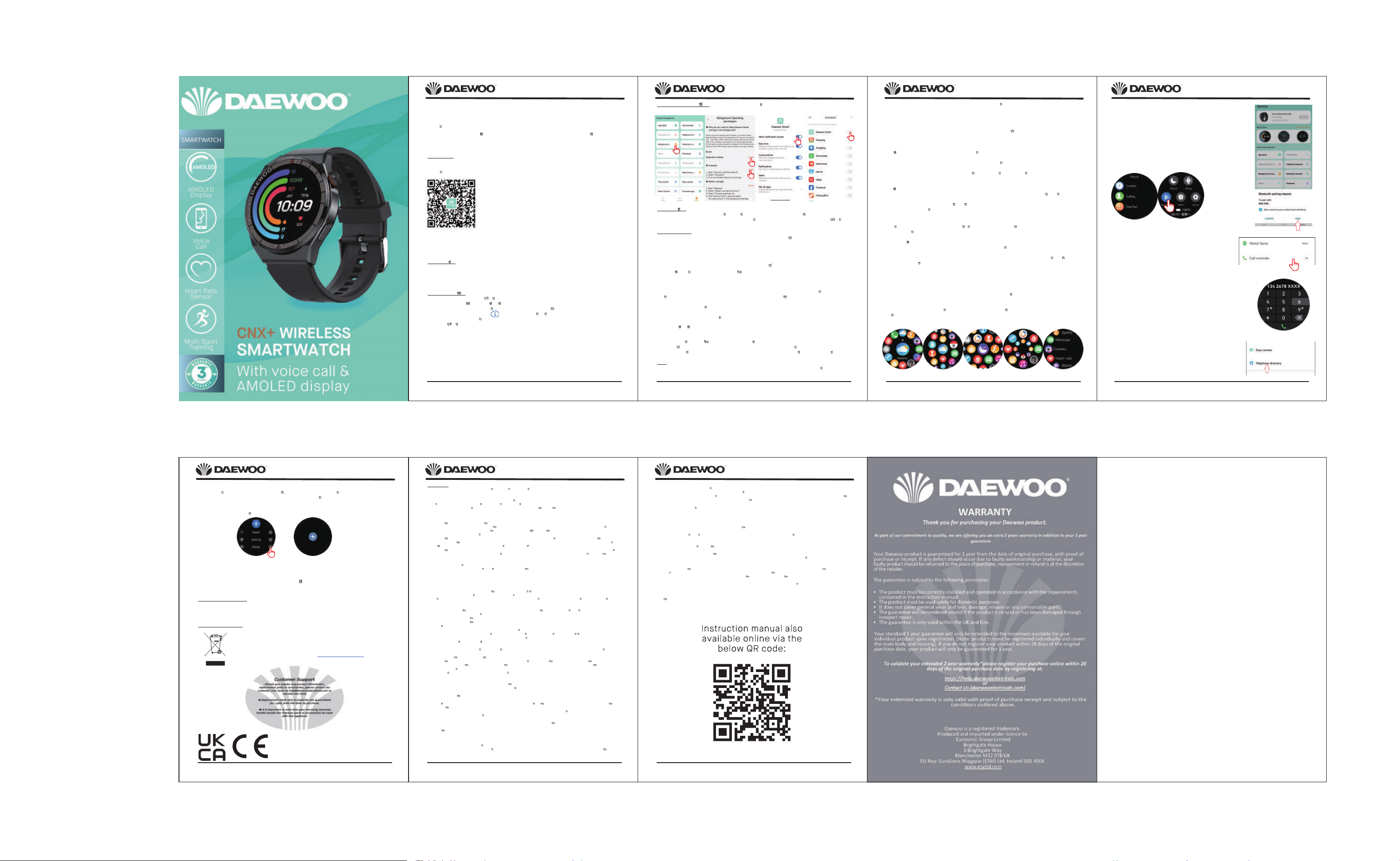
Thank you for purchasing your Daewoo Smartwatch
In the Box:
Your Smart Wath
Charging cable 5V/1.5A
Instruc
on Manual
NOTE: Please ensure the ba ery is fully charged before using your watch for the first me
Note: Waterproof performance - The device is not suitable for diving or swimming in the sea and not suitable for
hot water baths, hot springs, saunas, or constant submersion in water.
APP Download
Scan the QR code to download and install the APP. Note: Downloading the APP on iPad or Tablet is not
supported.
Compa
ble with iOS 9.0 & above and Android 5.0 & above.
If the watch’s firmware or the APP is not the latest version, it may affect the usage of the watch or the APP.
Please update the watch’s firmware and the APP to the latest version.
Firmware Upgrade: [Daewoo Smart] → [Device] → [Firmware upgrade] → [upgrades].
APP Upgrade: [Daewoo Smart] → [Profile] → [About] → [update].
APP Connec
on
Turn on Bluetooth and GPS on your mobile phone. Ensure the watch is not paired with another phone
Connect the Device directly with Mobile APP:
APP- [Daewoo Smart] →[Device] → [Add device] → Tap on the searched watch name to pair it.
Do not connect watch with the phone’s Bluetooth directly.
Mobile Phone Se
ng
Ensure that the permission of no ca ons of APP in your mobile phone is turned on:
[Mobile phone] → [Se
ngs] → [No fica ons] → [Permissions] → [Daewoo Smart] Set all permissions to ON.
Note 1: Apple phones with an opera
ng system above iOS 12, go to [Se ngs] →
[Bluetooth] → [Device name] → tap → [Share system no fica ons] → Ensure its ON.
Note 2: If you open an applica
on (WeChat/Sky- e/WhatsApp, etc.) both on your computer and mobile phone,
then no no
ca on message will be displayed on the watch.
Flight Wireless Smartwatch
Model Number: AVS1633
IMPORTANT – RETAIN THESE INSTRUCTIONS FOR FUTURE REFERENCE
Flight Wireless Smartwatch
Model Number: AVS1633
Blood Oxygen Monitoring: It measures your blood oxygen satura on data. You can check the historical
measurement results in the APP’s blood oxygen interface.
Music Control: (connect watch with App and switch to music page)
Your watch can control the music playback and volume.
Play the Music via the watch speaker: Connect the audio BT to phone se
ng → go to the music interface.
You need to stay connected to in the music interface.
Mul
ple sport modes: Exercise data will be automa cally synchronized to the APP when connected, and
you can check the detailed data records in the sports mode in the APP.
Note: The watch is not built with GPS, however the GPS track func
on can be used in the Sport mode of app.
Breathing Exercises: Follow the on-screen instruc
ons for inhala on and exhala on (Breathing exercises
help relax a person’s mood, reduce psychological stress and improve vital capacity).
Shu
er (watch should be connected to the APP)
Method 1: In the APP: Go to [Daewoo Smart] → [Device] → [Easy camera], and click the shu
er bu on to
take a photo.
Method 2: On the watch: Click the shu
er bu on on the watch’s interface to take a photo, or shake your arm
to take a photo automa
cally.
Sedentary Reminder: Go to [Daewoo Smart] → [Device] →[Sedentary reminder] to enable/disable this
func
on. If the watch detects no enough ac
vi es or steps during the set me period, the sedentary
reminder func
on will be enabled, and the watch will then remind you every one hour.
Alarm Func
on: Go to [Daewoo Smart] → [Device] → [Alarm] to set alarms according to your needs. Up to 5
alarms can be set (The alarm will only give a reminder when the set
me is more than 2 minutes).
Call Reminder: Go to [Daewoo Smart] → [Device] → [Call reminder] to enable/disable this func
on. A er the
call reminder func
on is enabled, then the watch can remind you of the incoming calls on your phone.
Note: The watch cannot be used to answer calls or reply to messages. It can only display messages or reject
the incoming call.
Wake Screen on Wrist Raise: Flip your arm, and the screen will automa
cally light up.
Menu style change:
Your watch has 5 set of menu op
ons. On home page click crown bu on to enter menu double click crown
bu
on to switch between the below 5 menu’s:
IMPORTANT – RETAIN THESE INSTRUCTIONS FOR FUTURE REFERENCE
Flight Wireless Smartwatch
Model Number: AVS1633
IMPORTANT – RETAIN THESE INSTRUCTIONS FOR FUTURE REFERENCE
YOUR RIGHTS
You have various rights under Data Protec
on Law. These include.
• the right to ask us not to process your personal data for marke
ng purposes even if you have given consent.
• We will usually inform you (before collec
ng your data) if we intend to use your data for such purposes or if we intend to disclose your informa n to
any third party for such purposes. We will not process your informa
n and data without your express consent.
• The right to ask us for access to the data we hold about you (see below)
• The right to ask us to rec
fy any data that we hold about you that is inaccurate or incomplete.
• The right to ask us to delete your data in certain circumstances.
• The right to ask us to restrict our processing of your data in certain circumstances.
• The right to object to our processing of your data in certain circumstances.
• You have the right not to be subject to a decision based solely on automated processing. This i
ncludes decisions based on pro filing. If you choose to
exercise this right, then you will no longer receive communica
n based on any automated processing. This may include offers based on customer
purchase history.
• Our Site may, from
me to me, contain links to and from the websites of our partner networks, adver sers, and affiliates. If you follow a link to any of
these websites, please note that these websites have their own privacy policies and that we do not accept any responsibility or liability for these
policies. Please check those policies before you submit any personal data to those websites.
• You can contact us at any
me in rela n to your Privacy rights by.
ACCESS TO INFORMATION
The Act gives you the right to access informa
n held about you. Your right of access can be exercised in accordance with the Act.
You can exercise any of the rights set out above, free of charge, by emailing us at [email protected] or wri
ng to us at Customer Services
Department, Eurosonic Group Limited of Brightgate House, 1 Brightgate Way, Manchester M32 0TB.
In respect of certain of the rights referred to above, your right may be qualified by the GDPR (which we will discuss with you following your request) or we
may need more informa
n from you, which we will ask you for following your request. We may ask you to provide further informa n in order to confirm
your iden
ty. Please also note that if you submit unfounded or excessive (for example repe ve) requests to exercise any of these rights, we reserve the
right to make a reasonable charge for providing the requested informa
n or taking the requested ac n, or to decline your request.
CHANGES TO OUR PRIVACY POLICY
Any changes we make to our Privacy Policy in the future will be posted on this page and, where appropriate, no
fied to you
by e-mail. Please check back frequently to see any updates or changes to our Privacy Policy.
CONTACT
Ques
ns, comments and requests regarding this Privacy Policy are welcomed and should be addressed to customerser[email protected] or (by post) to
Customer Services, Eurosonic Group Limited, Brightgate House, 1 Brightgate Way, Manchester M32 0TB.
Flight Wireless Smartwatch
Model Number: AVS1633
IMPORTANT – RETAIN THESE INSTRUCTIONS FOR FUTURE REFERENCE
Customising the main page:
when we con
nuously swipe the screen from le to right it will show sports ac vity, heart rate, sleep,
weather etc. On the last page you will see a ‘+’ sign this give the op
on to add a feature to the main screen.
You can also remove some of the features and replace with other icons.
Touch the screen center for
3 seconds, a delete icon will appear, swipe and choose which feature icon to
delete and press crown bu
on to exit. You can add back the icon using the ‘+’
IMPORTANT DISCLAIMER
Your Daewoo smart watch is not a medical device and must not in any circumstances,
be used as such.
Any underlying heart or blood pressure condi
ons should always be looked at under the
supervision of a trained GP or Doctor.
Disposal of the Packaging
Dispose of paper and cardboard in appropriate paper re-cycling facilities.
Dispose of recyclable plastics in appropriate plastic re-cycling facilities.
Dispose of non-recyclable plastics in the appropriate plastics collection service.
Disposal of the Product
You should now recycle your waste electrical goods and in doing so
help the environment. This symbol means waste electrical products
at the end of their useful life should not be disposed of with normal
household waste and
not sent to landfill. Please ensure it is taken
to a suitable facility for disposal. Check with your Local Authority or
retailer for recycling advice or visit www.recycle-more.co.uk
, enter
your postcode to find out your nearest recycling site.
Flight Wireless Smartwatch
Model Number: AVS1633
IMPORTANT – RETAIN THESE INSTRUCTIONS FOR FUTURE REFERENCE
Important Informa on: Android phones will automa cally clean up infrequently used APP, causing APP to
be closed in the background. Please turn on the relevant permissions to ensure normal use.
Watch Func
ons
Smart watch supports a variety of func ons: mul ple sport modes, weather informa on, watch face store, heart
rate monitoring, sleep monitoring, blood oxygen satura
on monitoring, find my phone, message no ca ons,
etc.
Change Watch Face
Method 1: Directly change the watch face on the watch. Find the menu: [Se ng] or [More] → [Watch faces]
to change the watch face,
Method 2: Customize the watch face and change the watch face via the APP’s watch face store:
[Daewoo Smart] → [Device] → [Watch faces]→ [More] → [Select picture] → OK to download and change it
with the new watch face (Do not exit the download interface un
the download is 100% completed).
Step Coun
ng: Ac vity data resets every day a r 00:00, and you can check the history records in the APP.
Sleep Monitoring: It records your sleep data, and you can check the history records in the APP (Default sleep
monitoring period: 20:00pm-10:00am.
Weather: You need to connect the watch and Daewoo Smart APP to get the weather informa
on in your
loca
on. Moreover, you can go to [Daewoo Smart] → [Profile] → [Unit Se ng] → [Temperature] to switch
between °C and °F.
Note: The weather informa
on displayed on the smart watch is obtained from a third-party weather service
provider. If your smart phone and smart watch obtain weather data from different weather service providers,
then the displayed weather informa
on may also be different.
Message No
fica on: The watch can save the latest 5 messages.
Heart Rate Monitoring: It measures your heart rate data. To measure your heart rate: Turn on the heart rate
monitoring func
on, and a r 2 seconds it will automa cally measure the heart rate, then wait for about 10-20
seconds un
the measurement is completed. Besides, if you need 24H automa c heart rate monitoring, you can
also set this func
on in the APP: [Daewoo Smart] → [Device] → Turn on [Automa c heart rate detec on].
Note:
Ensure the sensor at the back of the watch slightly touches the skin and the wristband not too ght or too loose.
If you need to measure the exercise heart rate, please go to the exercise mode for measurement.
mobile phone brand
Calling funon:
method #1: Aer the Android phone connect to the watch by App for the first
me successfully, wait for about 10 seconds, and the APP page will pop up an
audio Bluetooth pairing request, just click to pair.
Aer the Iphone connected to the watch via App successfully, it will
automacally pair the audio Bluetooth of watch.
Step#1: Audio Bluetooth→Open.
then search M36 Audio to connect ready to call out once both app BTand
audio BT all connected.
Step#2: Notes:90s aer a phone call, watch will automacally enter the
"low power consumpon mode", the buon will show grey , when the
[incoming call noficaon] permission in the APP is turned on, it will be
automacally acvated when there is an incoming call.
Step#3: aer connect audio BT .
user can click the right finger pointed icon to enter into dial page to dial
phone out .or check contact list or check call history.
Step#4: lf you want audio BT off,then simply click audio BT icon to disable it .
Step#5: Sync contact list .go to app,in telephone directory ,and click “ + ”
to input the contacts user needs to call in daily life then it will sync to the
watch contact list as long as app is connected.