JBL CLICK
JBL CLICK
Quick Start Guide
2
EN
1
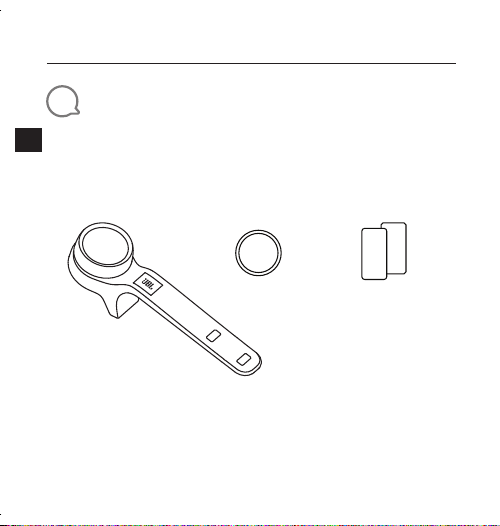
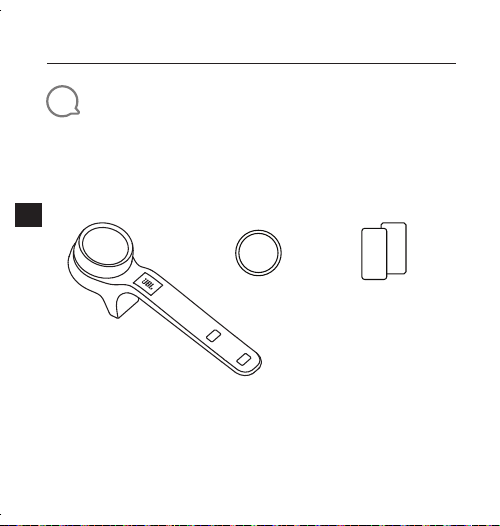
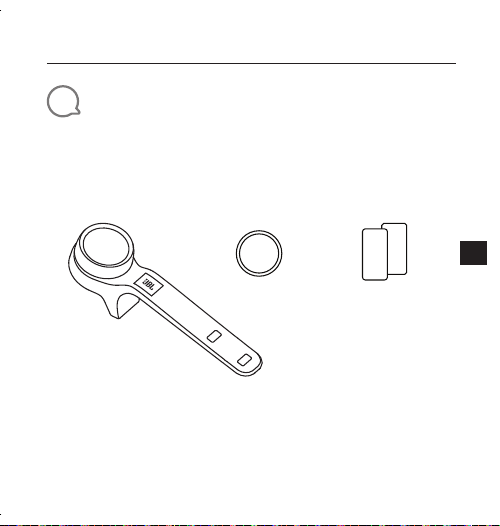
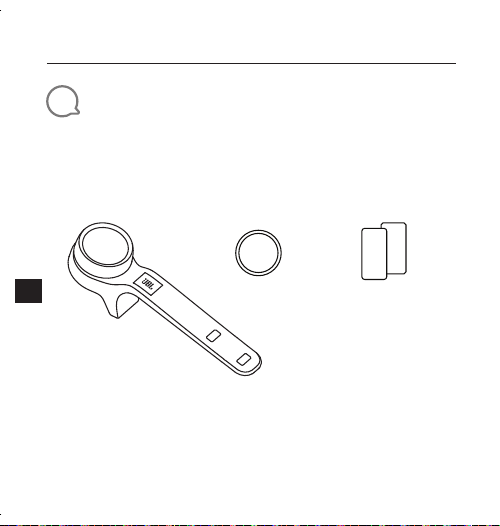
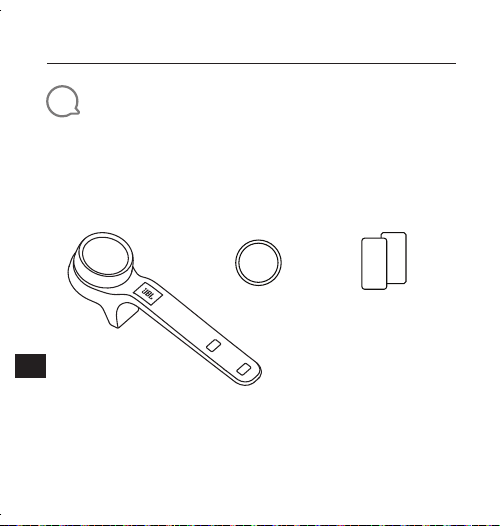
What’s in the box
Q
S
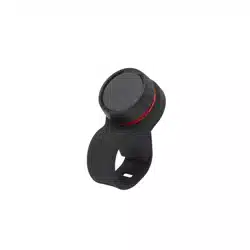
CLICK x 1 CR2032 x 1 Safety Sheet /
QSG x 1
JBL CLICK
Quick Start Guide
3
EN
2
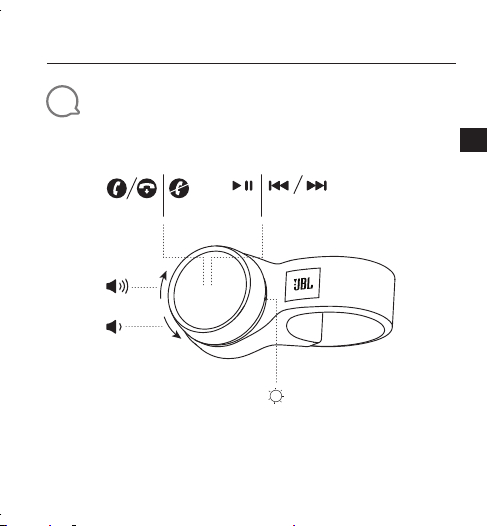
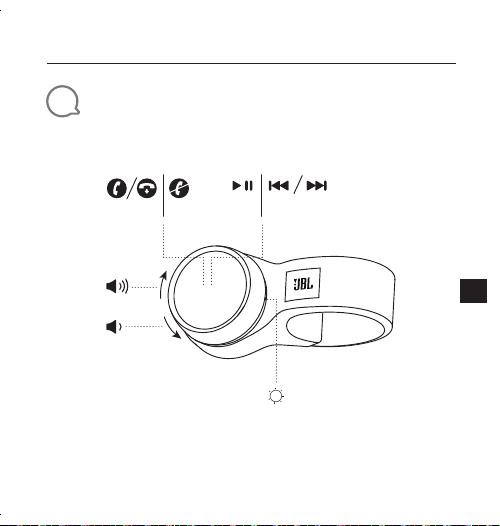
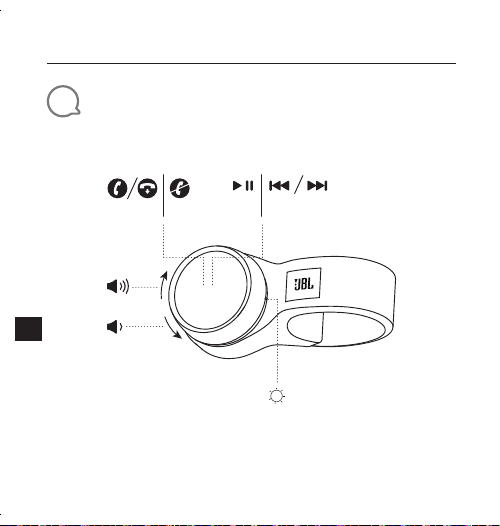
Overview
×1 ×1 ×3 ×2
JBL CLICK
Quick Start Guide
4
EN
3
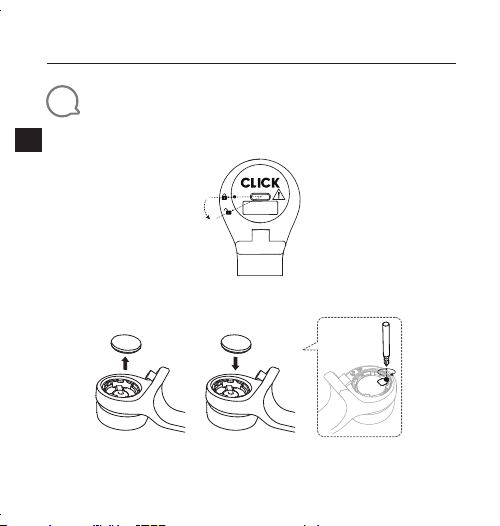
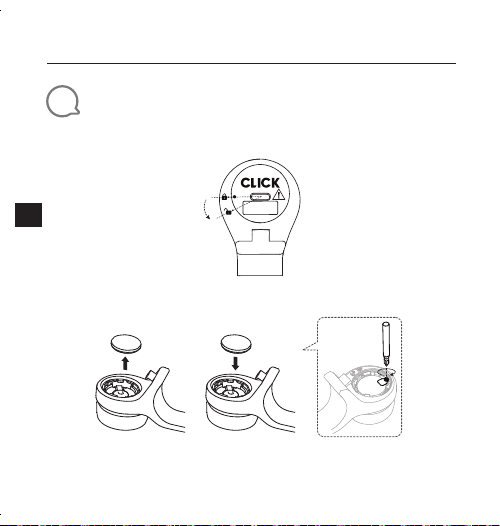
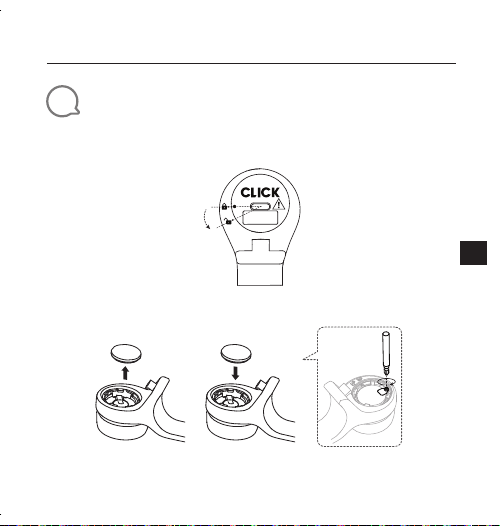
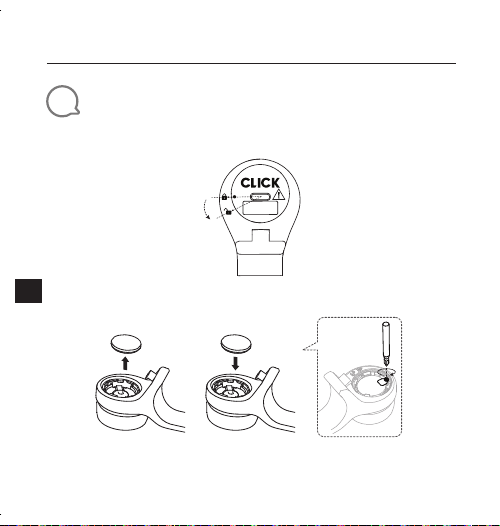
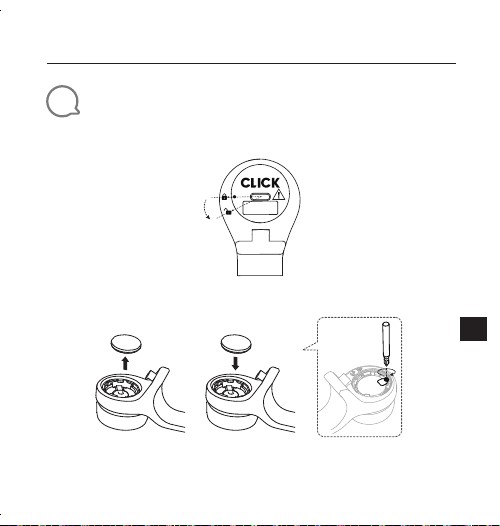
Inserting and replacing battery
1. Open and close the battery cover
Open
Close
* Remove the insulation foil before use
2. Replace the battery
* Change the battery when the LED starts flashing fast (4Hz)
JBL CLICK
Quick Start Guide
5
EN
4
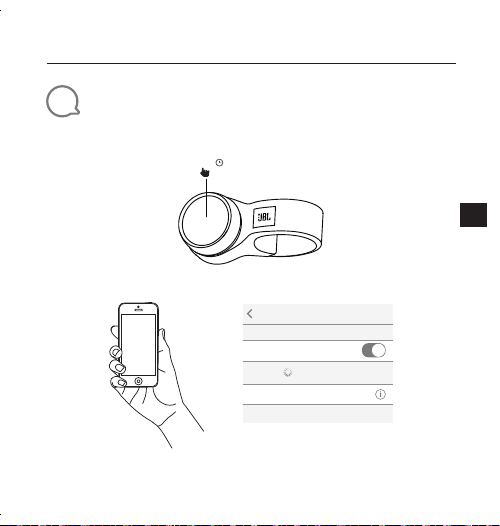
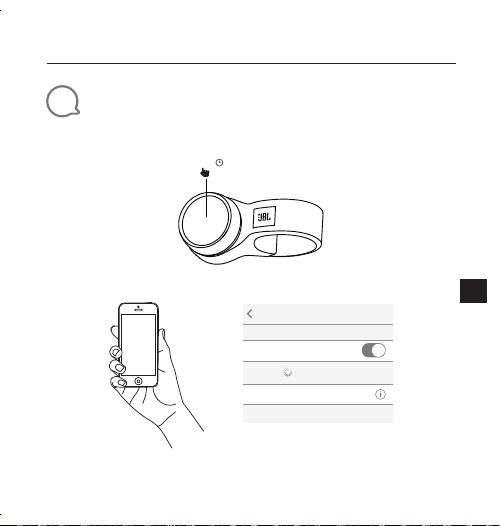
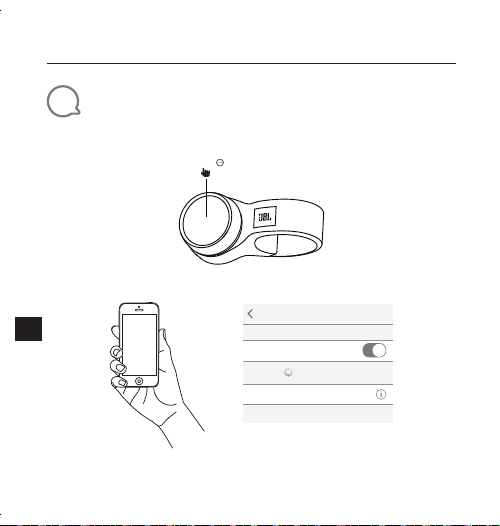
Bluetooth
®
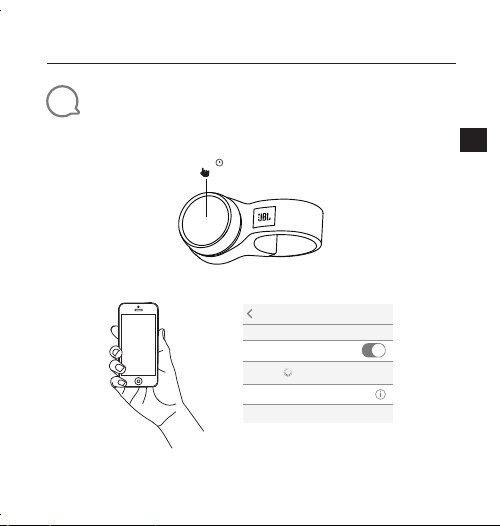
Connection
1. Press and hold the knob
5.0s
2. Connect to Bluetooth device
Choose“JBL Click”to connect
Settings Bluetooth
Bluetooth
DEVICES
JBL Click
Now Discoverable
Connected
JBL CLICK
Quick Start Guide
6
EN
5
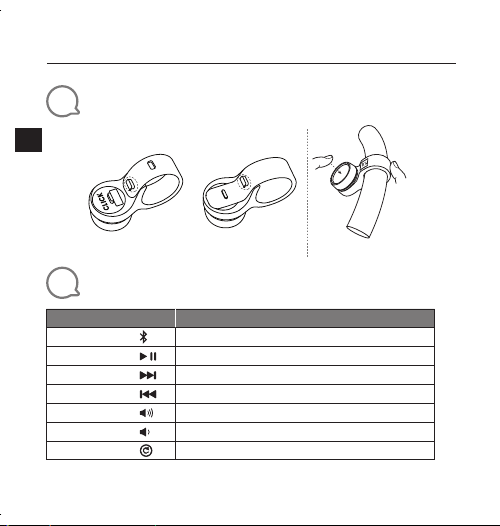
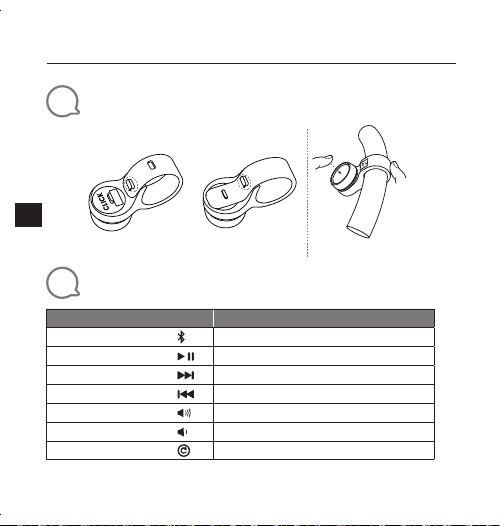
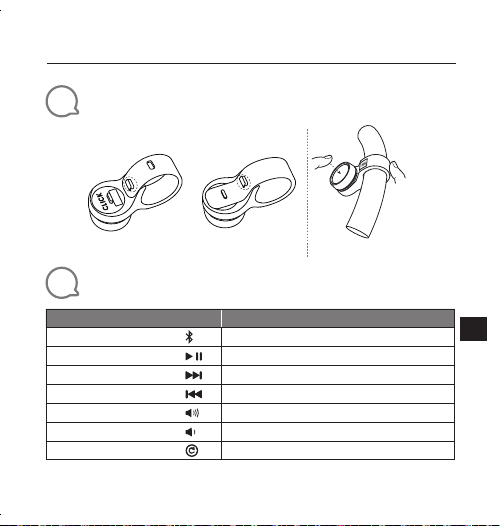
Installation ( Mounting and Dismounting )
Mounting Dismounting
Steering Wheel Handle Bar
6
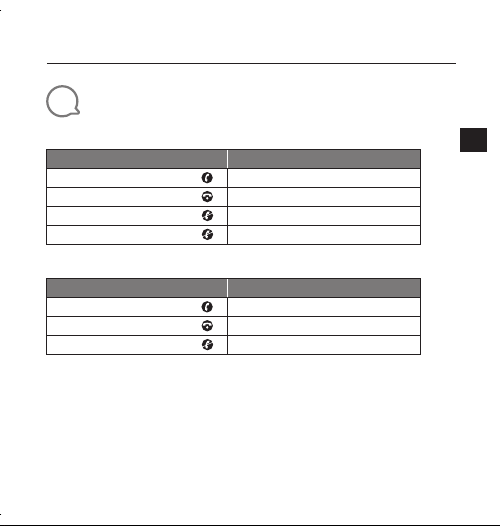
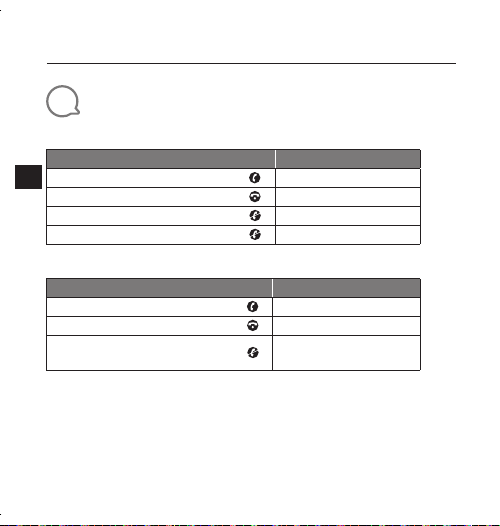
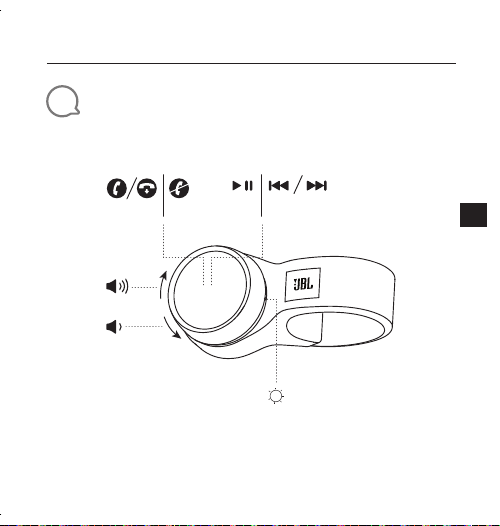
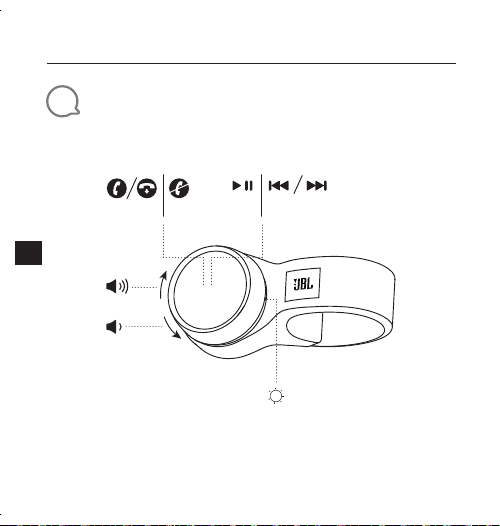
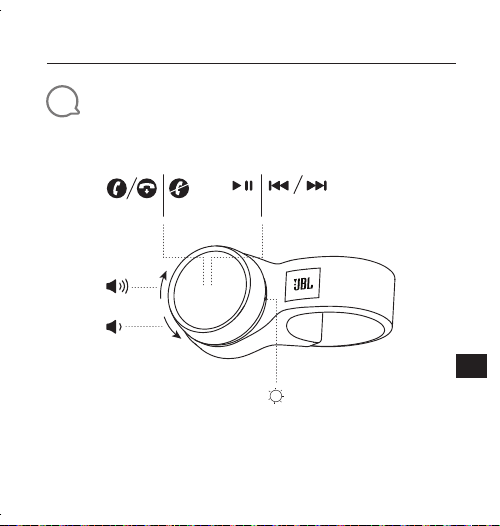
Interaction
Action
Gesture
Activate pairing
Press and hold for 5 seconds
Play/Pause
Press
Next Track
Press twice
Previous Track
Press triple
Volume Up
Rotate the knob to the right
Volume Down
Rotate the knob to the left
Factory Reset
Press and hold for 10 seconds
JBL CLICK
Quick Start Guide
7
EN
7
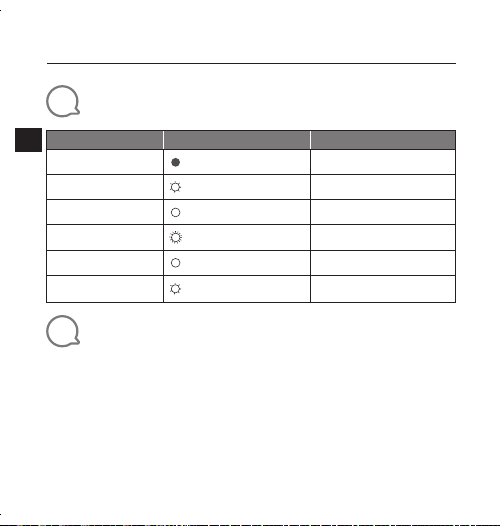
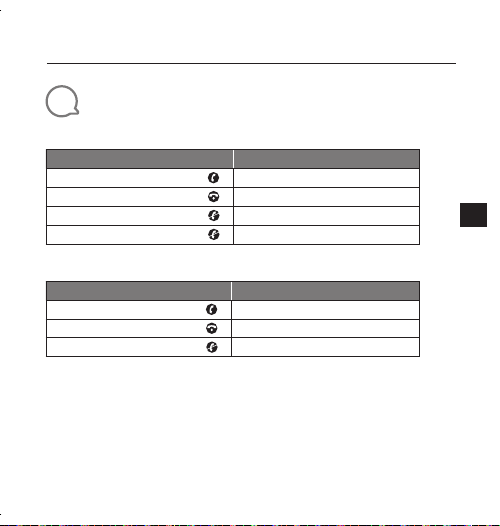
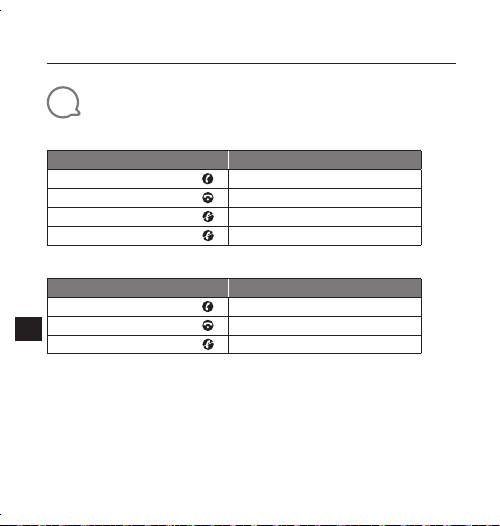
Phone Call
iPhone
Action
Gesture
Answering an incoming call
Press
Ending an active call
Press
Ignoring an incoming call
Press twice
Ending an outgoing call
Not supported
Android phone *
Action
Gesture
Answering an incoming call
Press
Ending an active call
Press
Ignoring an incoming call
Press and hold for 1.5 seconds
* Most of Android phones installed OS 8.0.0 or above support phone call function
* Due to huge variety of android phones, different phones have different key definition for phone
call support.
* Due to Android limitation, most messenger APPs call feature (answer ,reject ,end) on Android
are not supported.
* Some VIVO and OPPO phones don’t support phone call function.
JBL CLICK
Quick Start Guide
8
EN
8
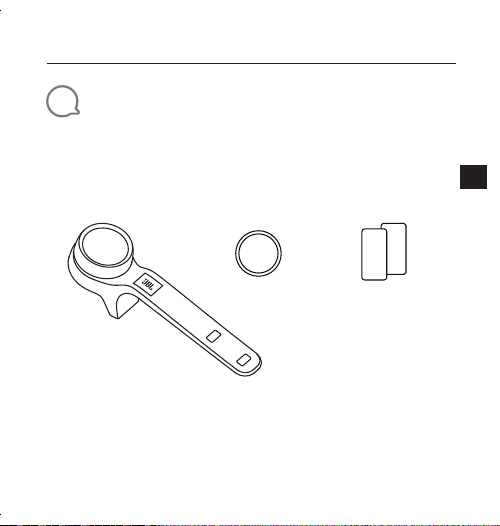
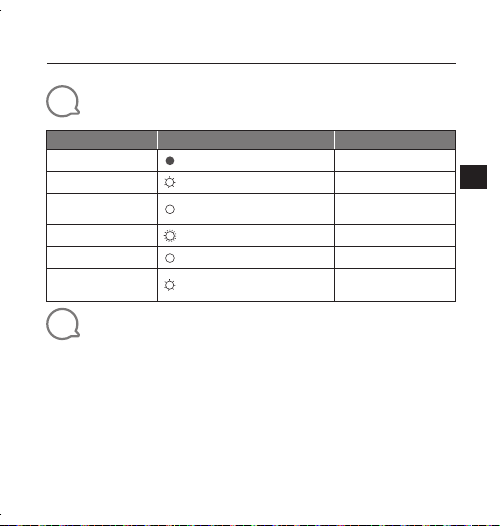
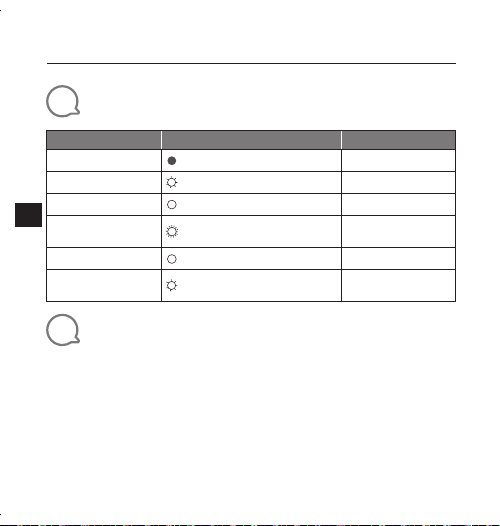
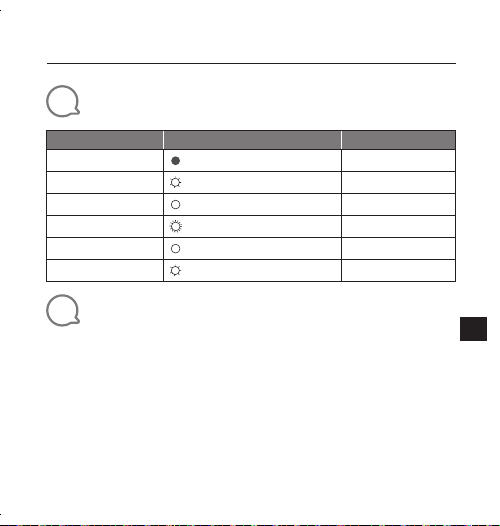
LED Behavior
Mode LED Status
Timeout
Stand-by
Off
Advertising
White, Slow Flash 3 minutes
After battery insertion
White, Constant 5 seconds
Bluetooth pairing
White, Fast Flash(4Hz) 1.5 minutes
Bluetooth connected
White, Constant 3 seconds
Low battery
White, Slow Flash(1Hz) Until the battery power off
9
Technical Specification
• Bluetooth
®
Version: 4.2
• Bluetooth
®
transmitter power: -20 to + 8 dBm
• Bluetooth
®
transmitter frequency range: 2.402 G - 2.480 G
• Support: HID ANCS
• Power Supply: 3 V CR2032 battery
• Dimension (W × D × H): 139.9 x 38.3 x 39.6 mm
• Weight: 38 g
JBL CLICK
Kurzanleitung
9
DE
1
Verpackungsinhalt
Q
S
CLICK x 1 CR2032 x 1 Sicherheitsdatenblatt/
Kurzanleitung x 1
JBL CLICK
Kurzanleitung
10
DE
2
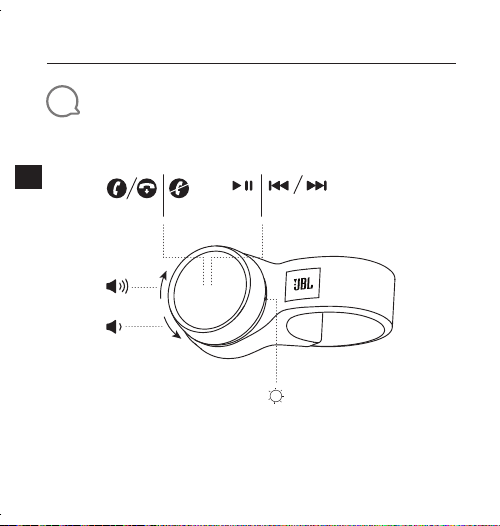
Übersicht
×1 ×1 ×3 ×2
JBL CLICK
Kurzanleitung
11
DE
3
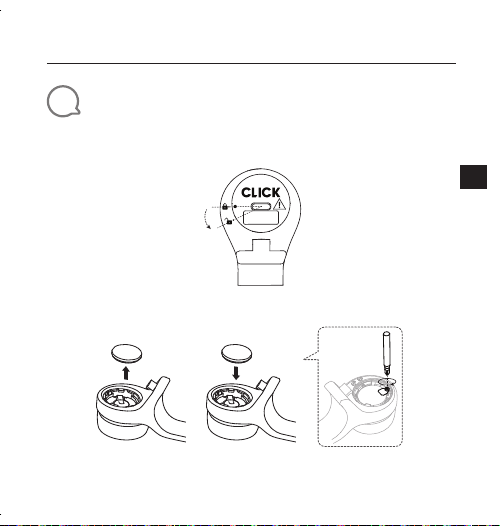
Einsetzen und Auswechseln der Batterie
1. Öffnen und Schließen des Batteriefachs
Offen
Schließen
* Entferne die Isolationsfolie vor dem Gebrauch.
2. Ersetzen der Batterie
* Wechsle die Batterie, wenn die LED schnell zu blinken beginnt (4Hz).
JBL CLICK
Kurzanleitung
12
DE
4
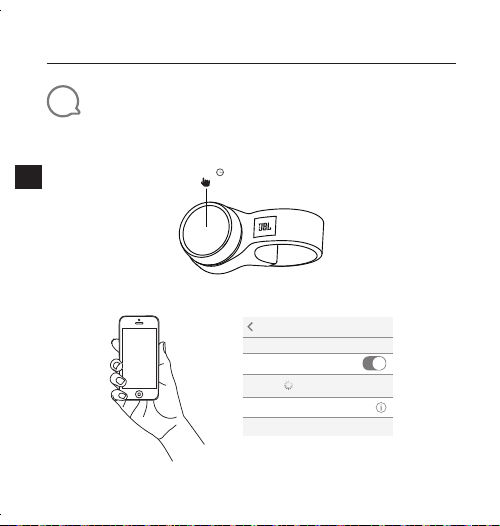
Bluetooth
®
-Verbindung
1. Halte den Knopf gedrückt.
5,0s
2. Mit Bluetooth-Gerät verbinden
Settings Bluetooth
Bluetooth
DEVICES
JBL Click
Now Discoverable
Connected
„JBL Click“ zum Verbinden auswählen
JBL CLICK
Kurzanleitung
13
DE
5
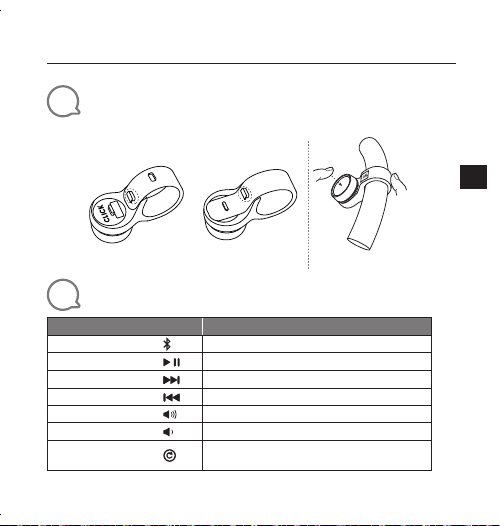
Installation (Montage und Demontage)
Montage Demontage
Lenkrad
Lenker
6
Interaktion
Aktion
Geste
Kopplung aktivieren
Halte die Taste 5 Sekunden lang gedrückt.
Wiedergabe/Pause
Drücke
Nächster Track
Drücke 2 Mal
Vorheriger Track
Drücke 3 Mal
Lautstärke höher
Drehe den Knopf nach rechts
Lautstärke niedriger
Drehe den Knopf nach links
Reset auf die
Werkseinstellungen
Halte die Taste 10 Sekunden lang gedrückt.
JBL CLICK
Kurzanleitung
14
DE
7
Telefonanruf
iPhone
Aktion
Geste
Annehmen eines eingehenden Anrufs
Drücke
Beenden eines aktiven Anrufs
Drücke
Ignorieren eines eingehenden Anrufs
Drücke 2 Mal
Einen ausgehenden Anruf beenden
Wird nicht unterstützt
Android-Mobiltelefon *
Aktion
Geste
Annehmen eines eingehenden Anrufs
Drücke
Beenden eines aktiven Anrufs
Drücke
Ignorieren eines eingehenden Anrufs
Halte die Taste 1,5
Sekunden lang gedrückt.
* Die meisten Android-Telefone, auf denen das Betriebssystem 8.0.0 oder höher installiert
ist, unterstützen die Telefonanruffunktion.
* Aufgrund der großen Vielfalt an Android-Telefonen verfügen verschiedene Telefone über
unterschiedliche Tastendefinitionen für die Unterstützung von Telefonaten.
* Aufgrund der Android-Beschränkung werden die meisten Messenger-Apps mit
Anruffunktion (Annehmen, Ablehnen, Beenden) auf Android nicht unterstützt.
* Einige VIVO und OPPO Telefone unterstützen die Telefonanruffunktion nicht.
JBL CLICK
Kurzanleitung
15
DE
8
LED-Verhalten
Modus LED-Status
Dauer
Stand-by-Modus
Aus
Bereitschaftsanzeige
Weiß, kurzes Blinken 3 Minuten
Nach dem Einlegen
der Batterie
Weiß, leuchtet 5 Sekunden
Bluetooth-Kopplung
Weißer, schnell blinkend (4Hz) 1,5 Minuten
Bluetooth verbunden
Weiß, leuchtet 3 Sekunden
Schwacher Akku
Weiß, langsam blinkend (1Hz)
Bis zur Abschaltung
der Batterie
9
Technische Daten
• Bluetooth
®
-Version: 4.2
• Bluetooth
®
-Übertragungsleistung: -20 bis + 8 dBm
• Frequenzbereich für die Bluetooth
®
-Übertragung:
2,402–2,480 GHz
• Unterstützt: HID ANCS
• Stromversorgung: 3V CR2032-Batterie
• Abmessungen (B x T x H): 139.9 x 38.3 x 39.6mm
• Gewicht: 38g
JBL CLICK
Guía de inicio rápido
16
ES
1
Contenido de la caja
Q
S
CLICK x 1 CR2032 x 1 Lámina de
seguridad /
QSG x 1
JBL CLICK
Guía de inicio rápido
17
ES
2
Resumen
×1 ×1 ×3 ×2
JBL CLICK
Guía de inicio rápido
18
ES
3
Introducir y cambiar la batería
1. Abrir y cerrar la tapa de batería
Abrir
Cerrar
* Saque la película aislante antes del uso
2. Cambiar la batería
* Cambie la batería cuando el LED comience a parpadear rápidamente (4Hz)
JBL CLICK
Guía de inicio rápido
19
ES
4
Bluetooth
®
Conexión
1. Mantenga pulsado el mando
5,0s
2. Conectar con dispositivo Bluetooth
Settings Bluetooth
Bluetooth
DEVICES
JBL Click
Now Discoverable
Connected
Seleccione «JBL Click» para conectar
JBL CLICK
Guía de inicio rápido
20
ES
5
Instalación (montaje y desmontaje)
Soporte Desmontaje
Volante
Manillar
6
Interacción
Acción
Gesto
Activar emparejamiento
Mantener pulsado 5 segundos.
Reproducir/Pausa
Pulse
Pista siguiente
Pulsar dos veces
Pista anterior
Pulsar tres veces
Subir volumen
Gire el mando a la derecha
Bajar volumen
Gire el mando a la izquierda
Reinicio de fábrica
Mantener pulsado 10 segundos.
JBL CLICK
Guía de inicio rápido
21
ES
7
Llamada
iPhone
Acción
Gesto
Responder llamada entrante
Pulse
Finalizar llamada activa
Pulse
Ignorar llamada entrante
Pulsar dos veces
Finalizar una llamada saliente
No se admite
Teléfono Android *
Acción
Gesto
Responder llamada entrante
Pulse
Finalizar llamada activa
Pulse
Ignorar llamada entrante
Mantener pulsado 1,5 segundos.
* La mayoría de teléfonos Android con SO 8.0.0 o superior instalado soportan la función
de llamada.
* Debido a la amplia variedad de teléfonos Android, distintos teléfonos tienen distintas
definiciones de teclas para el soporte de llamadas.
* Debido a las limitaciones de Android, la mayoría de funciones de llamada de APP de
mensajería (responder, rechazar, finalizar) en Android no están soportadas.
* Algunos teléfonos VIVO y OPPO no admiten la función de llamada telefónica.
JBL CLICK
Guía de inicio rápido
22
ES
8
Comportamiento LED
Modo Estado LED
Tiempo excedido
Espera
Apagado
Publicidad
Blanco, parpadeo lento 3 minutos
Tras insertar la batería
Blanco, fijo 5 segundos
Emparejamiento
Bluetooth
Blanco, parpadeo rápido (4 Hz) 1,5 minutos
Bluetooth conectado
Blanco, fijo 3 segundos
Batería baja
Blanco, parpadeo lento (1 Hz)
Hasta que se apague
la batería
9
Especificaciones técnicas
• Bluetooth
®
Versión: 4.2
• Bluetooth
®
potencia de transmisor: -20 a + 8 dBm
• Bluetooth
®
Gama de frecuencia de transmisor:
2,402 G - 2,480 G
• Soporte: HID ANCS
• Alimentación: batería CR2032 3 V
• Dimensiones (L × P × A): 139.9 x 38.3 x 39.6 mm
• Peso: 38 g
JBL CLICK
Guide de démarrage rapide
23
FR
1
Contenu de la boîte
Q
S
1 CLICK 1 CR2032 Fiche de sécurité /
Guide de
démarrage rapide
JBL CLICK
Guide de démarrage rapide
24
FR
2
Présentation
×1 ×1 ×3 ×2
JBL CLICK
Guide de démarrage rapide
25
FR
3
Insérer et remplacer la pile
1. Ouvrir et fermer le couvercle de la pile.
Ouvrir
Fermer
* Retirer le film isolant avant l'utilisation.
2. Remplacement de la pile.
* Remplacer la pile lorsque la LED clignote rapidement (4Hz).
JBL CLICK
Guide de démarrage rapide
26
FR
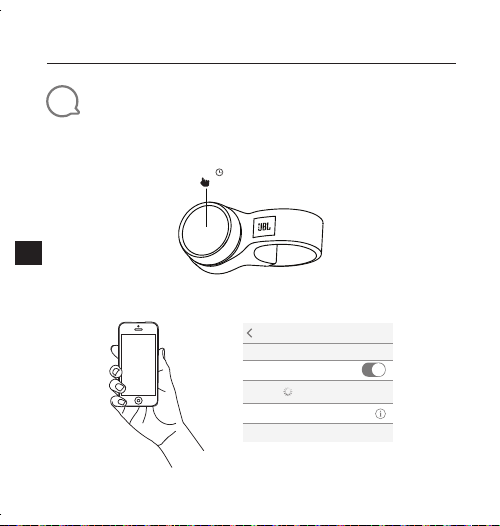
4
Connexion Bluetooth
®
1. Appuyer longuement sur le bouton.
5,0s
2. Connecter à l'appareil Bluetooth.
Settings Bluetooth
Bluetooth
DEVICES
JBL Click
Now Discoverable
Connected
Choisir «JBL Click » pour la connexion.
JBL CLICK
Guide de démarrage rapide
27
FR
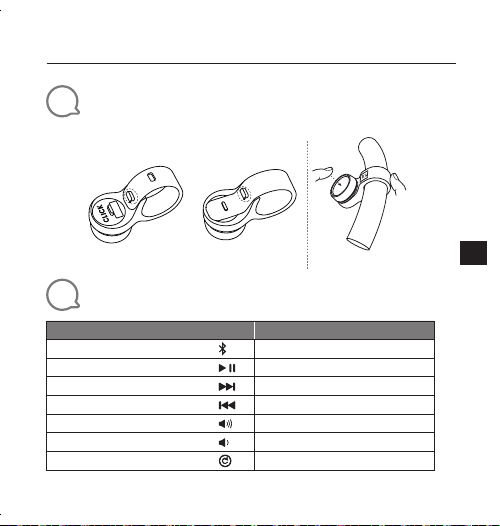
5
Installation (montage et démontage)
Montage Démontage
Volant de direction
Guidon
6
d'interagir
Action
Geste
Activation du jumelage
Appuyer pendant 5 secondes
Lecture/Pause
Appuyer
Piste suivante
Appuyer deux fois
Piste précédente
Appuyer trois fois
Augmentation du volume
Tourner le bouton vers la droite
Diminution du volume
Tourner le bouton vers la gauche
Réinitialisation aux valeurs d'usine
Appuyer pendant 10 secondes
JBL CLICK
Guide de démarrage rapide
28
FR
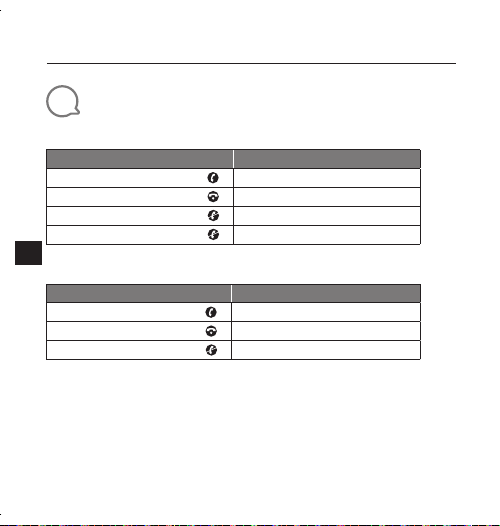
7
Appel téléphonique
iPhone
Action
Geste
Répondre à un appel entrant
Appuyer
Mettre fin à l'appel en cours
Appuyer
Ignorer un appel entrant
Appuyer deux fois
Fin d’un appel sortant.
Non supporté.
Téléphone Android *
Action
Geste
Répondre à un appel entrant
Appuyer
Mettre fin à l'appel en cours
Appuyer
Ignorer un appel entrant
Appuyer pendant 1,5 secondes
* La plupart des téléphones Android utilisant un SE 8.0.0 ou postérieur supportent la
fonction d'appel téléphonique.
* En raison de l'immense variété de téléphones Android, différents téléphones ont des
affectations de touches différentes pour le support de l'appel téléphonique.
* En raison d'une limitation d'Android, la plupart des fonctionnalités d'appel des
applications de messagerie (réponse, rejet, fin) sur Android ne sont pas supportées.
* Certains téléphones VIVO et OPPO ne supportent pas la fonction d’appel téléphonique.
JBL CLICK
Guide de démarrage rapide
29
FR
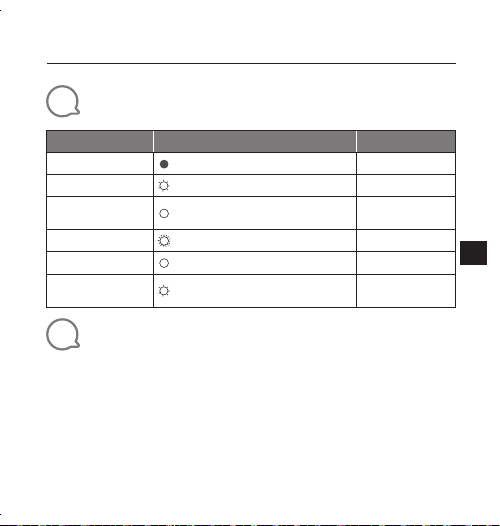
8
Comportement de la LED
Mode État de la LED
Hors délai
Veille
Désactivé
Publicité
Blanche, clignotement lent 3minutes
Après insertion de la
pile
Blanche, fixe 5secondes
Jumelage Bluetooth
Blanche, clignotement rapide (4Hz) 1,5minutes
Bluetooth connecté
Blanche, fixe 3secondes
Batterie faible
Blanche, clignotement lent (1Hz)
Jusqu'à l'extinction
de la pile
9
Spécifications techniques
• Version du Bluetooth
®
: 4.2
• Puissance de l’émetteur Bluetooth
®
: -20 à + 8dBm
• Bande de fréquences de l’émetteur Bluetooth
®
:
2,402G - 2,480G
• Compatibilité: HID ANCS
• Alimentation électrique: Pile 3V CR2032
• Dimensions (L x P x H): 139.9 x 38.3 x 39.6mm
• Poids: 38g
JBL CLICK
Guida di avvio rapido
30
IT
1
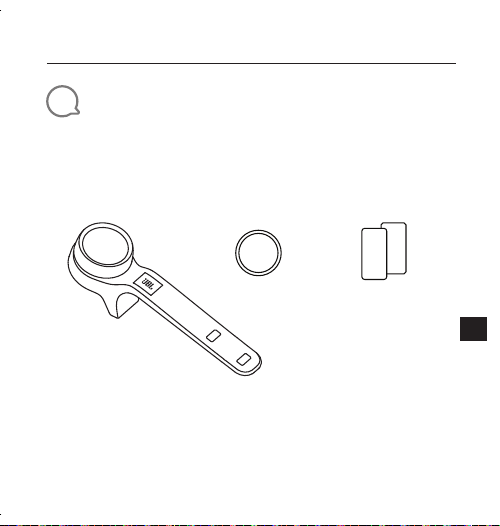
Contenuto della confezione
Q
S
CLICK x 1 CR2032 x 1 Scheda dei dati
di sicurezza /
QSG x 1
JBL CLICK
Guida di avvio rapido
31
IT
2
Panoramica
×1 ×1 ×3 ×2
JBL CLICK
Guida di avvio rapido
32
IT
3
Inserimento e sostituzione della batteria
1. Apertura e chiusura del vano batteria
Aperto
Chiuso
* Rimuovere la pellicola isolante prima dell'uso
2. Sostituzione della batteria
* Sostituire la batteria quando il LED inizia a lampeggiare velocemente (4Hz)
JBL CLICK
Guida di avvio rapido
33
IT
4
Collegamento Bluetooth
®
:
1. Tenere premuta la manopola
5,0s
2. Collegamento ad un dispositivo Bluetooth
Settings Bluetooth
Bluetooth
DEVICES
JBL Click
Now Discoverable
Connected
Scegliere"JBL Click" per collegarsi
JBL CLICK
Guida di avvio rapido
34
IT
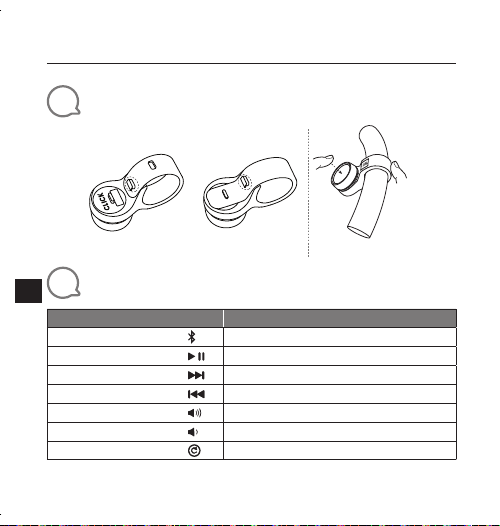
5
Installazione (montaggio e smontaggio)
Montaggio Smontaggio
Volante
Manubrio
6
Interazione
Funzione
Azione
Attivazione abbinamento
Tenere premuto per 5 secondi
Play/Pausa
Premere
Brano successivo
Premere due volte
Brano precedente
Premere tre volte
Volume su
Ruotare la manopola verso destra
Volume giù
Ruotare la manopola verso sinistra
Reset
Tenere premuto per 10 secondi
JBL CLICK
Guida di avvio rapido
35
IT
7
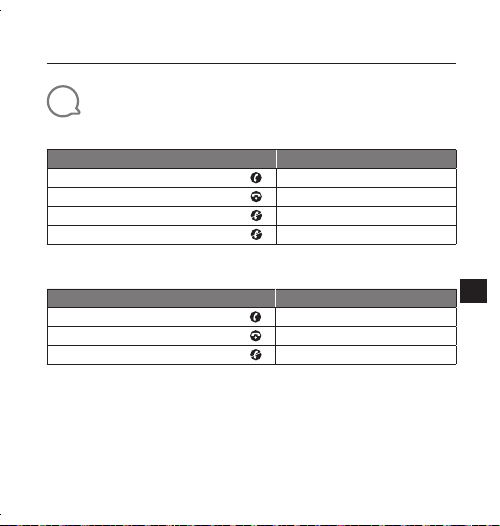
Telefonata
iPhone
Funzione
Azione
Rispondere ad una chiamata in arrivo
Premere
Terminare una chiamata in corso
Premere
Ignorare una chiamata in arrivo
Premere due volte
Termina una chiamata in uscita
Non supportato
Telefono Android *
Funzione
Azione
Rispondere ad una chiamata in arrivo
Premere
Terminare una chiamata in corso
Premere
Ignorare una chiamata in arrivo
Tenere premuto per 1,5 secondi
* La maggior parte dei telefoni Android con installato OS 8.0.0 o superiore supportano la
funzione di chiamata telefonica.
* A causa della grande varietà di telefoni Android, diversi telefoni hanno una diversa definizione
dei tasti per il supporto della chiamata telefonica.
* A causa delle limitazioni di Android, la maggior parte delle funzioni di chiamata delle APP di
messaggistica (risposta, rifiuto, termine) su Android non sono supportate.
* Alcuni telefoni VIVO e OPPO non supportano la funzione di chiamata telefonica.
JBL CLICK
Guida di avvio rapido
36
IT
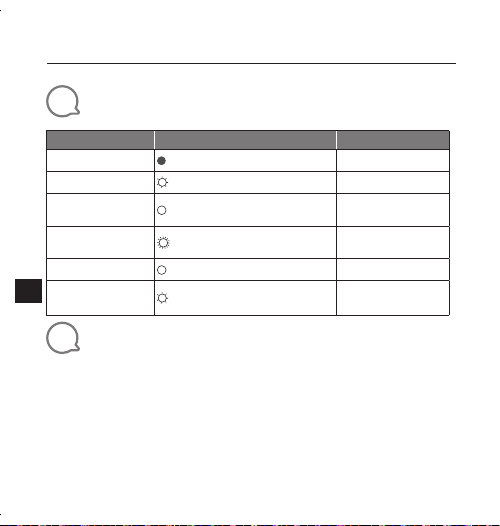
8
Comportamento LED
Modalità Stato LED
Spegnimento
Stand-by
Spento
Esposizione
Bianco, lampeggio lento 3 minuti
Dopo l'installazione
della batteria
Bianco, fisso 5 secondi
Abbinamento
Bluetooth
Bianco, lampeggio veloce (4Hz) 1,5 minuti
Bluetooth connesso
Bianco, fisso 3 secondi
Batteria scarica
Bianco, lampeggio lento (1Hz)
Fino a quando la
batteria è esaurita
9
Specifiche tecniche
• Versione Bluetooth
®
: 4.2
• Potenza del trasmettitore Bluetooth
®
: da -20 a + 8dBm
• Intervallo di frequenza del trasmettitore Bluetooth
®
:
2,402G - 2,480G
• Supporta: HID ANCS
• Alimentazione: Batteria 3V CR2032
• Dimensioni (L x P x A): 139.9 x 38.3 x 39.6 mm
• Peso: 38 g
JBL CLICK
クイックスタートガイド
37
JP
1
同梱品
Q
S
CLICKx1 CR2032x1 安全シート/
QSGx1
JBL CLICK
クイックスタートガイド
38
JP
2
製品概要
×1 ×1 ×3 ×2
JBL CLICK
クイックスタートガイド
39
JP
3
電池の挿入と取り替え
1. 電池カバーの開閉
開く
閉じる
* 使用前に絶縁紙を外します
2. 電池の交換
* LEDが素早く点滅したら、電池を交換してください
JBL CLICK
クイックスタートガイド
40
JP
4
Bluetooth
®
接続
1. ノブを長押ししてください
5.0
秒
2. Bluetooth対応デバイスに接続
Settings Bluetooth
Bluetooth
DEVICES
JBL Click
Now Discoverable
Connected
接続するには「JBL Click」を選択
JBL CLICK
クイックスタートガイド
41
JP
5
装着(取り付けと取り外し)
設置 取り外し
自動車用ハン
ドル
自転車用ハン
ドル
6
対応
作動
ジェスチャー
アクティブペアリング
5秒間押し続ける
再生/一時停止
1回押す
次のトラック
2回押す
前のトラック
3回押す
ボリュームアップ
ノブを右に回転する
ボリュームダウン
ノブを左に回転する
工場出荷時へのリセット
10秒間押し続ける
JBL CLICK
クイックスタートガイド
42
JP
7
通話
iPhone
作動
ジェスチャー
電話の着信に応答する
1回押す
通話を終える
1回押す
電話の着信を無視する
2回押す
電話の発信を終了します
対応していません
Androidスマートホン*
作動
ジェスチャー
電話の着信に応答する
1回押す
通話を終える
1回押す
電話の着信を無視する
1.5秒間押し続ける
* Android スマホは、OS 8.0 以降の通話機能に対応しています
* Android スマホの場合、機種により通話対応キーが異なります。
* Android スマホの場合、Android のメッセンジャーアプリの通話機能 ( 応答、通話拒否、終話 )
には対応していません。
* 一部の VIVO および OPPO ホンは通話機能に対応していません。
JBL CLICK
クイックスタートガイド
43
JP
8
LEDの動作
モード LEDの状態
タイムアウト
スタンバイ
オフ
広告
白色、ゆっくり点滅 3分
電池の挿入後
白色、点灯 5秒
Bluetoothペアリング
白色、素早く点滅 1.5分
Bluetooth接続済み
白色、点灯 3秒
バッテリー残量少
白色、ゆっくり点滅 電池が切れるまで
9
製品仕様
• Bluetooth
®
バージョン:4.2
• Bluetooth
®
対応トランスミッター出力:-20 〜 + 8 dBm
• Bluetooth
®
対応トランスミッター周波数帯域:
2.402 G〜2.480 G
• 対応: HID ANCS
• 電源:3 V CR2032電池
• 寸法(幅x奥行x高さ):
139.9 x 38.3 x 39.6
mm
• 重量:38 g
JBL CLICK
Guia de início rápido
44
PT-
BR
1
Conteúdo da caixa
Q
S
1 × JBL CLICK 1 × Bateria
CR2032
1× Ficha de
Segurança e
Guia de Início Rápido
JBL CLICK
Guia de início rápido
45
PT-
BR
2
Apresentação
×1 ×1 ×3 ×2
JBL CLICK
Guia de início rápido
46
PT-
BR
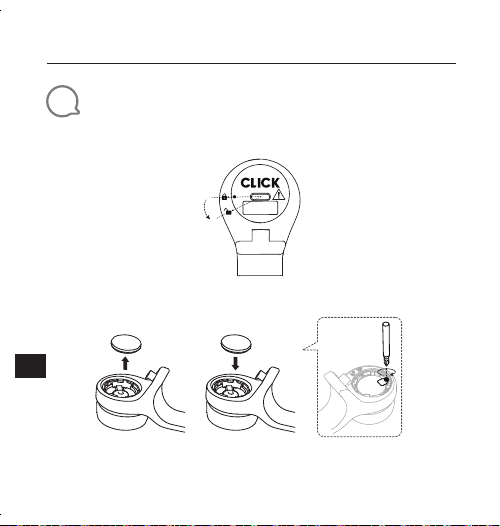
3
Colocação e troca da bateria
1. Abra e feche a tampa do compartimento de bateria
Abrir
Fechar
* Retire o isolante antes de usar
2. Troque a bateria
* Troque a bateria quando o LED começar a piscar rapidamente (4vezes por segundo)
JBL CLICK
Guia de início rápido
47
PT-
BR
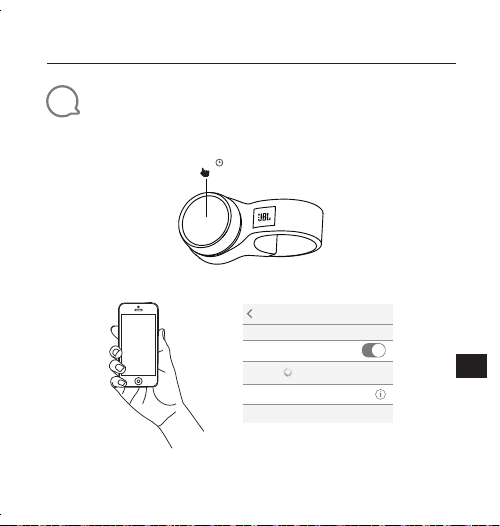
4
Conexão Bluetooth
®
1. Mantenha pressionado o botão
5,0 s
2. Conecte um dispositivo Bluetooth
Settings Bluetooth
Bluetooth
DEVICES
JBL Click
Now Discoverable
Connected
Selecione "JBL Click" para conectar
JBL CLICK
Guia de início rápido
48
PT-
BR
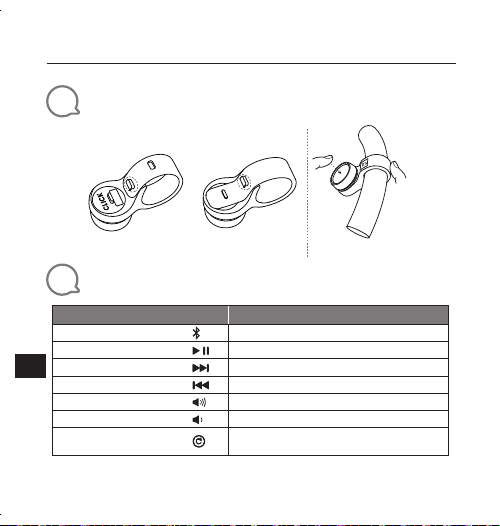
5
Instalação (montagem e desmontagem)
Montagem Desmontagem
Volante
Guidão
6
Interação
Ação
Procedimento
Ativar emparelhamento
Mantenha pressionado por cinco segundos
Play/Pausa
Pressione
Próxima faixa
Pressione duas vezes
Faixa anterior
Pressione três vezes
Aumentar volume
Gire o botão para a direita
Diminuir volume
Gire o botão para a esquerda
Restaurar configurações
de fábrica
Mantenha pressionado por dez segundos
JBL CLICK
Guia de início rápido
49
PT-
BR
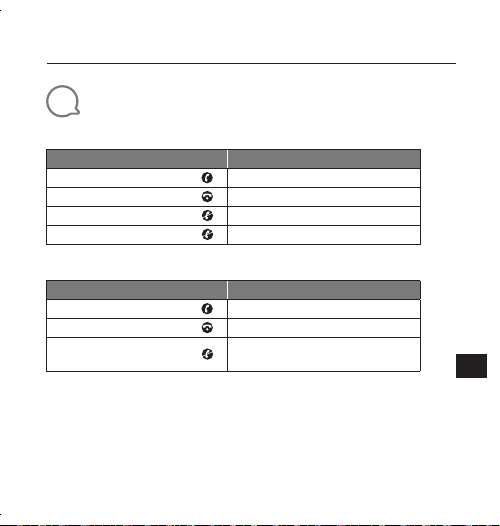
7
Chamada
iPhone
Ação
Procedimento
Atender a uma chamada
Pressione
Encerrar a chamada
Pressione
Recusar uma chamada
Pressione duas vezes
Encerrando chamada
Não suportado
Smartphone Android*
Ação
Procedimento
Atender a uma chamada
Pressione
Encerrar a chamada
Pressione
Recusar uma chamada
Mantenha pressionado por um
segundo e meio
* A maioria dos smartphones Android (versão OS 8.0.0 ou superior) suporta chamadas
* O botão de suporte depende do modelo do smartphone Android.
* Devido a limitações do sistema Android, a maioria dos controles de chamada (atender,
recusar e encerrar) não são suportados.
* Alguns telefones VIVO e OPPO não suportam a função de chamada.
JBL CLICK
Guia de início rápido
50
PT-
BR
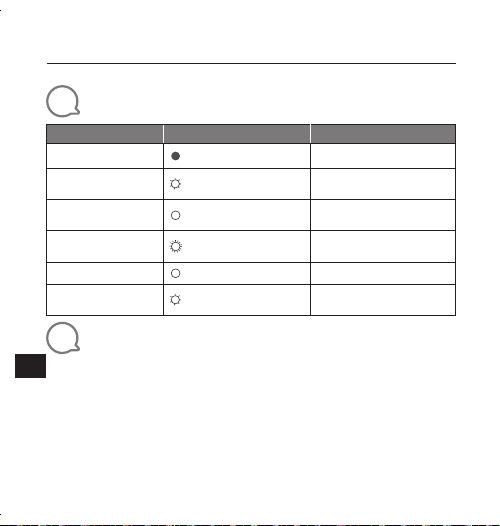
8
Funcionamento do LED
Modo Status do LED
Timeout
Espera
Apagado
Anúncio
Branco piscando
devagar
3 minutos
Após introdução da
bateria
Branco constante 5 segundos
Emparelhamento
Bluetooth
Branco piscando qua-
tro vezes por segundo
1,5 minutos
Bluetooth conectado
Branco constante 3 segundos
Bateria fraca
Branco piscando uma
vez por segundo
Até a bateria acabar
9
Especificações técnicas
• Versão Bluetooth
®
: 4.2
• Potência de transmissão Bluetooth
®
: -20 a + 8dBm
• Faixa de frequência de transmissão Bluetooth
®
:
2,402 a 2,480GHz
• Padrões suportados: HID ANCS
• Alimentação de energia: 3 V (bateria CR2032)
• Dimensões (L x P x A): 139.9 x 38.3 x 39.6 mm
• Peso: 38 g
51
The Bluetooth® word mark and logos are registered trademarks owned by the Bluetooth SIG,
Inc. and any use of such marks by HARMAN International Industries, Incorporated is under
license. Other trademarks and trade names are those of their respective owners.
Este equipamento não tem direito à proteção contra interferência prejudicial e não pode causar
interferência em sistemas devidamente autorizados.
Para maiores informações, consulte o site da ANATEL – www.anatel.gov.br
Este produto está homologado pela ANATEL, de acordo com os procedimentos
regulamentados pela Resolução n°. 242/2000 e atende aos requisitos técnicos aplicados.

Торговая марка: JBL
Назначение товара: Беспроводной пульт управления
Изготовитель: Харман Интернешнл Индастриз Инкорпорейтед,
США, 06901 Коннектикут, г.Стэмфорд, Атлантик Стрит
400, офис 1500
Страна происхождения: Китай
Импортер в Россию: OOO “ХАРМАН РУС СиАйЭс“, Россия, 127018, г.Москва,
ул. Двинцев, д.12, к. 1
Гарантийный период: 1 год
Информация о сервисных центрах: www.harman.com/ru тел. +7-800-700-0467
Срок службы: 3 года
Товар сертифицирован
Дата производства: Дата изготовления устройства определяется по двум
буквенным обозначениям из второй группы символов
серийного номера изделия, следующих после
разделительного знака «-». Кодировка соответствует
порядку букв латинского алфавита, начиная с января
2010 года: -000000MY0000000, где «M» - месяц
производства (А - январь, B - февраль, C - март и т.д.) и
«Y» - год производства (A - 2010, B - 2011, C - 2012 и т.д.).
Используйте устройство только по прямому назначению в соответствии с предоставленной
инструкцией. Не пытайтесь самостоятельно вскрывать корпус товара и осуществлять
ремонт. В случае обнаружения недостатков или дефектов, обращайтесь за гарантийным
обслуживанием в соответствии с информацией из гарантийного талона. Особые условия
хранения, реализации и (или) транспортировки не предусмотрены. Избегайте воздействия
экстремальных температур, долговременного воздействия влаги, сильных магнитных
полей. Устройство предназначено для работы в жилых зонах. Срок годности не ограничен
при соблюдении условий хранения.
JBL_Click_QSG_SOP_V16