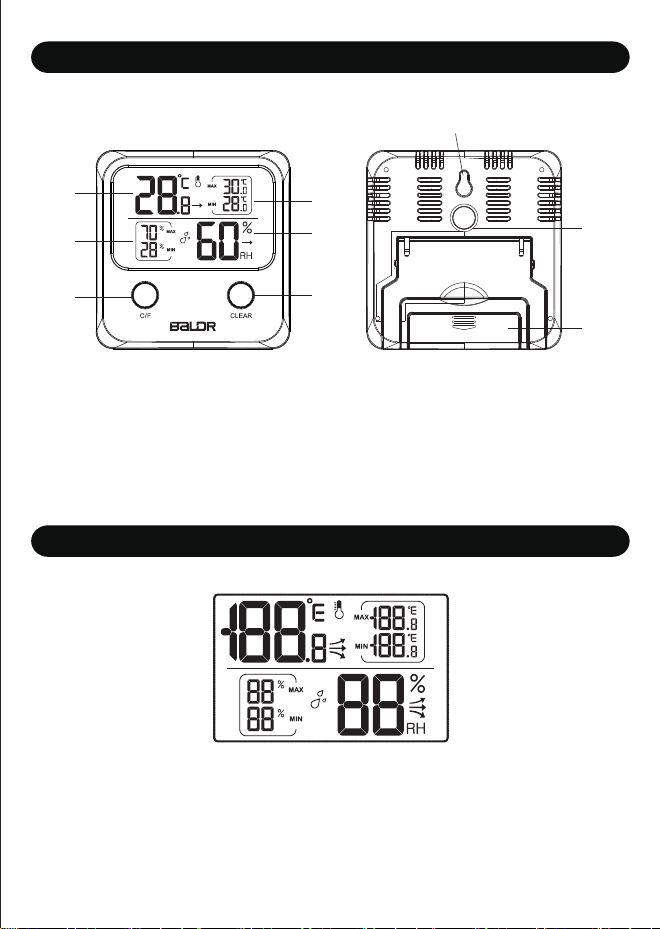
Main Unit
USER MANUAL
MODEL: B0335TH
Digital Hygro-thermometer
We thank you for the purchase of Baldr Digital Hygro-thermometer. It has been designed and
constructed using innovative components and techniques to enable the perfect display of time
by this device. Please read the instructions carefully to become familiar with the properties and
functions before you use the unit.
Powered by :1x AAA Battery (Not included)
Product Overview Features
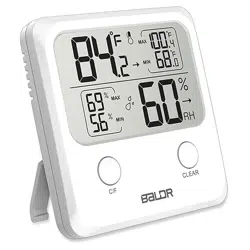
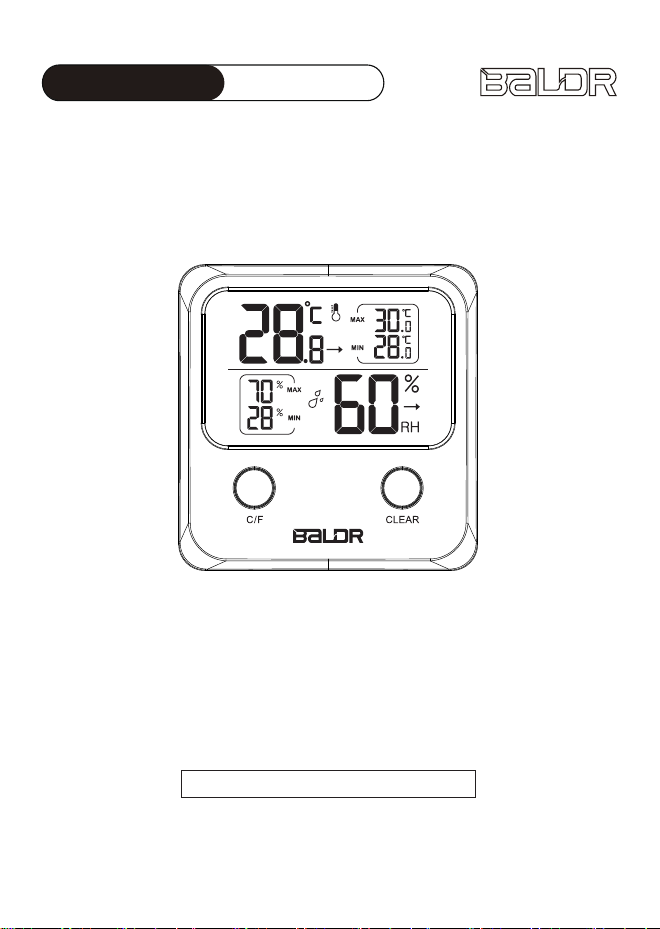
LCD Full Display
1. Indoor Temperature with Arrow Trend
2. Max & Min records of humidity
3. Max & Min records of temperature
4. Indoor Humidity with Arrow Trend
5. Temperature Switch in ℃/℉
6.Clear the Max & Min records
7.Hanging hole
8.Magnet attaching
9.Battery compartment
service@baldr.com
1. Big temperature & humidity display with cute outlook
2. Temperature range: -10°C~50°C(14°F ~122°F)
3. Humidity range: 20%RH~95%RH
4. Max /Min temperature & humidity records within 24 hours
5. Temperature display with °C/°F Selectable
6. Arrow trends for temperature and humidity
7. Wall hanging, table standing or magnet attaching
Package Content
Following contents are included in the package:
1. 1xDigital Hygro-thermometer
2. 1xUser Manual
Getting Started
Operation Instructions
PRECAUTIONS
WARRANTY
Power Supply
Humidity display
1. Remove the battery compartment cover.
2. Insert 1x AAA battery matching the polarity (+and-)
Temperature display
1. After power on, The indoor temperature will display automatically ,it will
update reading each 30 seconds
2. Temperature display range :-10°C~50°C(14°F ~122°F)
3. Accuracy: The accuracy is ±1.5 ℃ when the temperature is between
-10°C~50°C
4. Max/Min temperature will update timely, and the data will automatically be
cleared each 24 hour after power on .
5. The arrow will change direction to show the temperature trend.
6. The temperature will display HH.H when the temperature is higher than
50°C and display LL.L when the temperature is lower than -10°C
1. After power on, The indoor humidity will display automatically ,it will update
reading each 30 seconds
2. Humidity display range : 20%RH~95%RH
3. Accuracy: For humidity between 35%RH~80%RH,the accuracy is ±5%RH,
if out of this range ,the accuracy will be ±8%RH
4. Max/Min humidity will update timely, and the data will automatically be
cleared each 24 hour after power on .
5. The arrow will change direction to show the humidity trend.
6. The humidity will display HH when the humidity is higher than 95%RH and
display LL when the humidity is lower than 20%RH
Button Operations
1. Press “ C/F” key to switch from °C and °F
2. Press and hold the “CLEAR” key for above 2 seconds to clear the MAX and
MIN data
BALDR provides a 1-year limited warranty on this product against
manufacturing defects in materials and workmanship.
Warranty service can only be performed by our authorized service center. The
original dated bill of sale must be presented upon request as proof of purchase
to us, or our authorized service center.
The warranty covers all defects in material and workmanship with the following
specified exceptions:(1) damage caused by accident, unreasonable use or
neglect (including the lack or reasonable and necessary maintenance);
(2) damage occurring during shipment (claims must be presented to the
carrier); (3) damage to, or deterioration of any accessory or decorative surface;
(4) damage resulting from failure to follow instructions contained in your
owner’s manual.
This warranty covers only actual defects within the product itself, and does not
cover the cost of installation or removal from a fixed installation, normal set-up
or adjustments, claims based on misrepresentation by the seller or performance
variations resulting from installation-related circumstances.
To receive warranty service, the purchaser must contact with BALDR
nominated service center for the problem determination and service procedure.
Thank you for your choice of BALDR products!
Do not clean any part of the product with benzene, thinner or other solvent
chemicals. When necessary, clean with a soft cloth.
Never immerse the product in water. This will damage the product.
Do not subject the product to extreme force, shock, or fluctuations in
temperature or humidity.
Do not tamper with the internal components.
Do not mix new and old batteries or batteries of different types.
Do not mix alkaline, standard or rechargeable batteries with this product.
Remove the batteries if storing this product for a long period of time.
Do not dispose of this product as unsorted municipal waste. Collection of
such waste separately for special treatment is necessary.
Positioned Method
The thermometer can be positioned in 3 ways as desired.
A. Pull out the table stand bracket from the rear of the thermo-hygrometer and
place it on table or desk as desired.
B. Hang on the wall by hanging hole.
C. Magnet attaching to a proper surface by the magnet on the back
1
3
7
8
9
4
6
2
5
单页尺寸:105*148mm
Main Unit
USER MANUAL
MODEL: B0335TH
Digital Hygro-thermometer
We thank you for the purchase of Baldr Digital Hygro-thermometer. It has been designed and
constructed using innovative components and techniques to enable the perfect display of time
by this device. Please read the instructions carefully to become familiar with the properties and
functions before you use the unit.
Powered by :1x AAA Battery (Not included)
Product Overview Features
LCD Full Display
1. Indoor Temperature with Arrow Trend
2. Max & Min records of humidity
3. Max & Min records of temperature
4. Indoor Humidity with Arrow Trend
5. Temperature Switch in ℃/℉
6.Clear the Max & Min records
7.Hanging hole
8.Magnet attaching
9.Battery compartment
service@baldr.com
1. Big temperature & humidity display with cute outlook
2. Temperature range: -10°C~50°C(14°F ~122°F)
3. Humidity range: 20%RH~95%RH
4. Max /Min temperature & humidity records within 24 hours
5. Temperature display with °C/°F Selectable
6. Arrow trends for temperature and humidity
7. Wall hanging, table standing or magnet attaching
Package Content
Following contents are included in the package:
1. 1xDigital Hygro-thermometer
2. 1xUser Manual
Getting Started
Operation Instructions
PRECAUTIONS
WARRANTY
Power Supply
Humidity display
1. Remove the battery compartment cover.
2. Insert 1x AAA battery matching the polarity (+and-)
Temperature display
1. After power on, The indoor temperature will display automatically ,it will
update reading each 30 seconds
2. Temperature display range :-10°C~50°C(14°F ~122°F)
3. Accuracy: The accuracy is ±1.5 ℃ when the temperature is between
-10°C~50°C
4. Max/Min temperature will update timely, and the data will automatically be
cleared each 24 hour after power on .
5. The arrow will change direction to show the temperature trend.
6. The temperature will display HH.H when the temperature is higher than
50°C and display LL.L when the temperature is lower than -10°C
1. After power on, The indoor humidity will display automatically ,it will update
reading each 30 seconds
2. Humidity display range : 20%RH~95%RH
3. Accuracy: For humidity between 35%RH~80%RH,the accuracy is ±5%RH,
if out of this range ,the accuracy will be ±8%RH
4. Max/Min humidity will update timely, and the data will automatically be
cleared each 24 hour after power on .
5. The arrow will change direction to show the humidity trend.
6. The humidity will display HH when the humidity is higher than 95%RH and
display LL when the humidity is lower than 20%RH
Button Operations
1. Press “ C/F” key to switch from °C and °F
2. Press and hold the “CLEAR” key for above 2 seconds to clear the MAX and
MIN data
BALDR provides a 1-year limited warranty on this product against
manufacturing defects in materials and workmanship.
Warranty service can only be performed by our authorized service center. The
original dated bill of sale must be presented upon request as proof of purchase
to us, or our authorized service center.
The warranty covers all defects in material and workmanship with the following
specified exceptions:(1) damage caused by accident, unreasonable use or
neglect (including the lack or reasonable and necessary maintenance);
(2) damage occurring during shipment (claims must be presented to the
carrier); (3) damage to, or deterioration of any accessory or decorative surface;
(4) damage resulting from failure to follow instructions contained in your
owner’s manual.
This warranty covers only actual defects within the product itself, and does not
cover the cost of installation or removal from a fixed installation, normal set-up
or adjustments, claims based on misrepresentation by the seller or performance
variations resulting from installation-related circumstances.
To receive warranty service, the purchaser must contact with BALDR
nominated service center for the problem determination and service procedure.
Thank you for your choice of BALDR products!
Do not clean any part of the product with benzene, thinner or other solvent
chemicals. When necessary, clean with a soft cloth.
Never immerse the product in water. This will damage the product.
Do not subject the product to extreme force, shock, or fluctuations in
temperature or humidity.
Do not tamper with the internal components.
Do not mix new and old batteries or batteries of different types.
Do not mix alkaline, standard or rechargeable batteries with this product.
Remove the batteries if storing this product for a long period of time.
Do not dispose of this product as unsorted municipal waste. Collection of
such waste separately for special treatment is necessary.
Positioned Method
The thermometer can be positioned in 3 ways as desired.
A. Pull out the table stand bracket from the rear of the thermo-hygrometer and
place it on table or desk as desired.
B. Hang on the wall by hanging hole.
C. Magnet attaching to a proper surface by the magnet on the back
1
3
7
8
9
4
6
2
5
单页尺寸:105*148mm

Main Unit
USER MANUAL
MODEL: B0335TH
Digital Hygro-thermometer
We thank you for the purchase of Baldr Digital Hygro-thermometer. It has been designed and
constructed using innovative components and techniques to enable the perfect display of time
by this device. Please read the instructions carefully to become familiar with the properties and
functions before you use the unit.
Powered by :1x AAA Battery (Not included)
Product Overview Features
LCD Full Display
1. Indoor Temperature with Arrow Trend
2. Max & Min records of humidity
3. Max & Min records of temperature
4. Indoor Humidity with Arrow Trend
5. Temperature Switch in ℃/℉
6.Clear the Max & Min records
7.Hanging hole
8.Magnet attaching
9.Battery compartment
service@baldr.com
1. Big temperature & humidity display with cute outlook
2. Temperature range: -10°C~50°C(14°F ~122°F)
3. Humidity range: 20%RH~95%RH
4. Max /Min temperature & humidity records within 24 hours
5. Temperature display with °C/°F Selectable
6. Arrow trends for temperature and humidity
7. Wall hanging, table standing or magnet attaching
Package Content
Following contents are included in the package:
1. 1xDigital Hygro-thermometer
2. 1xUser Manual
Getting Started
Operation Instructions
PRECAUTIONS
WARRANTY
Power Supply
Humidity display
1. Remove the battery compartment cover.
2. Insert 1x AAA battery matching the polarity (+and-)
Temperature display
1. After power on, The indoor temperature will display automatically ,it will
update reading each 30 seconds
2. Temperature display range :-10°C~50°C(14°F ~122°F)
3. Accuracy: The accuracy is ±1.5 ℃ when the temperature is between
-10°C~50°C
4. Max/Min temperature will update timely, and the data will automatically be
cleared each 24 hour after power on .
5. The arrow will change direction to show the temperature trend.
6. The temperature will display HH.H when the temperature is higher than
50°C and display LL.L when the temperature is lower than -10°C
1. After power on, The indoor humidity will display automatically ,it will update
reading each 30 seconds
2. Humidity display range : 20%RH~95%RH
3. Accuracy: For humidity between 35%RH~80%RH,the accuracy is ±5%RH,
if out of this range ,the accuracy will be ±8%RH
4. Max/Min humidity will update timely, and the data will automatically be
cleared each 24 hour after power on .
5. The arrow will change direction to show the humidity trend.
6. The humidity will display HH when the humidity is higher than 95%RH and
display LL when the humidity is lower than 20%RH
Button Operations
1. Press “ C/F” key to switch from °C and °F
2. Press and hold the “CLEAR” key for above 2 seconds to clear the MAX and
MIN data
BALDR provides a 1-year limited warranty on this product against
manufacturing defects in materials and workmanship.
Warranty service can only be performed by our authorized service center. The
original dated bill of sale must be presented upon request as proof of purchase
to us, or our authorized service center.
The warranty covers all defects in material and workmanship with the following
specified exceptions:(1) damage caused by accident, unreasonable use or
neglect (including the lack or reasonable and necessary maintenance);
(2) damage occurring during shipment (claims must be presented to the
carrier); (3) damage to, or deterioration of any accessory or decorative surface;
(4) damage resulting from failure to follow instructions contained in your
owner’s manual.
This warranty covers only actual defects within the product itself, and does not
cover the cost of installation or removal from a fixed installation, normal set-up
or adjustments, claims based on misrepresentation by the seller or performance
variations resulting from installation-related circumstances.
To receive warranty service, the purchaser must contact with BALDR
nominated service center for the problem determination and service procedure.
Thank you for your choice of BALDR products!
Do not clean any part of the product with benzene, thinner or other solvent
chemicals. When necessary, clean with a soft cloth.
Never immerse the product in water. This will damage the product.
Do not subject the product to extreme force, shock, or fluctuations in
temperature or humidity.
Do not tamper with the internal components.
Do not mix new and old batteries or batteries of different types.
Do not mix alkaline, standard or rechargeable batteries with this product.
Remove the batteries if storing this product for a long period of time.
Do not dispose of this product as unsorted municipal waste. Collection of
such waste separately for special treatment is necessary.
Positioned Method
The thermometer can be positioned in 3 ways as desired.
A. Pull out the table stand bracket from the rear of the thermo-hygrometer and
place it on table or desk as desired.
B. Hang on the wall by hanging hole.
C. Magnet attaching to a proper surface by the magnet on the back
1
3
7
8
9
4
6
2
5
单页尺寸:105*148mm

Main Unit
USER MANUAL
MODEL: B0335TH
Digital Hygro-thermometer
We thank you for the purchase of Baldr Digital Hygro-thermometer. It has been designed and
constructed using innovative components and techniques to enable the perfect display of time
by this device. Please read the instructions carefully to become familiar with the properties and
functions before you use the unit.
Powered by :1x AAA Battery (Not included)
Product Overview Features
LCD Full Display
1. Indoor Temperature with Arrow Trend
2. Max & Min records of humidity
3. Max & Min records of temperature
4. Indoor Humidity with Arrow Trend
5. Temperature Switch in ℃/℉
6.Clear the Max & Min records
7.Hanging hole
8.Magnet attaching
9.Battery compartment
service@baldr.com
1. Big temperature & humidity display with cute outlook
2. Temperature range: -10°C~50°C(14°F ~122°F)
3. Humidity range: 20%RH~95%RH
4. Max /Min temperature & humidity records within 24 hours
5. Temperature display with °C/°F Selectable
6. Arrow trends for temperature and humidity
7. Wall hanging, table standing or magnet attaching
Package Content
Following contents are included in the package:
1. 1xDigital Hygro-thermometer
2. 1xUser Manual
Getting Started
Operation Instructions
PRECAUTIONS
WARRANTY
Power Supply
Humidity display
1. Remove the battery compartment cover.
2. Insert 1x AAA battery matching the polarity (+and-)
Temperature display
1. After power on, The indoor temperature will display automatically ,it will
update reading each 30 seconds
2. Temperature display range :-10°C~50°C(14°F ~122°F)
3. Accuracy: The accuracy is ±1.5 ℃ when the temperature is between
-10°C~50°C
4. Max/Min temperature will update timely, and the data will automatically be
cleared each 24 hour after power on .
5. The arrow will change direction to show the temperature trend.
6. The temperature will display HH.H when the temperature is higher than
50°C and display LL.L when the temperature is lower than -10°C
1. After power on, The indoor humidity will display automatically ,it will update
reading each 30 seconds
2. Humidity display range : 20%RH~95%RH
3. Accuracy: For humidity between 35%RH~80%RH,the accuracy is ±5%RH,
if out of this range ,the accuracy will be ±8%RH
4. Max/Min humidity will update timely, and the data will automatically be
cleared each 24 hour after power on .
5. The arrow will change direction to show the humidity trend.
6. The humidity will display HH when the humidity is higher than 95%RH and
display LL when the humidity is lower than 20%RH
Button Operations
1. Press “ C/F” key to switch from °C and °F
2. Press and hold the “CLEAR” key for above 2 seconds to clear the MAX and
MIN data
BALDR provides a 1-year limited warranty on this product against
manufacturing defects in materials and workmanship.
Warranty service can only be performed by our authorized service center. The
original dated bill of sale must be presented upon request as proof of purchase
to us, or our authorized service center.
The warranty covers all defects in material and workmanship with the following
specified exceptions:(1) damage caused by accident, unreasonable use or
neglect (including the lack or reasonable and necessary maintenance);
(2) damage occurring during shipment (claims must be presented to the
carrier); (3) damage to, or deterioration of any accessory or decorative surface;
(4) damage resulting from failure to follow instructions contained in your
owner’s manual.
This warranty covers only actual defects within the product itself, and does not
cover the cost of installation or removal from a fixed installation, normal set-up
or adjustments, claims based on misrepresentation by the seller or performance
variations resulting from installation-related circumstances.
To receive warranty service, the purchaser must contact with BALDR
nominated service center for the problem determination and service procedure.
Thank you for your choice of BALDR products!
Do not clean any part of the product with benzene, thinner or other solvent
chemicals. When necessary, clean with a soft cloth.
Never immerse the product in water. This will damage the product.
Do not subject the product to extreme force, shock, or fluctuations in
temperature or humidity.
Do not tamper with the internal components.
Do not mix new and old batteries or batteries of different types.
Do not mix alkaline, standard or rechargeable batteries with this product.
Remove the batteries if storing this product for a long period of time.
Do not dispose of this product as unsorted municipal waste. Collection of
such waste separately for special treatment is necessary.
Positioned Method
The thermometer can be positioned in 3 ways as desired.
A. Pull out the table stand bracket from the rear of the thermo-hygrometer and
place it on table or desk as desired.
B. Hang on the wall by hanging hole.
C. Magnet attaching to a proper surface by the magnet on the back
1
3
7
8
9
4
6
2
5
单页尺寸:105*148mm

Main Unit
USER MANUAL
MODEL: B0335TH
Digital Hygro-thermometer
We thank you for the purchase of Baldr Digital Hygro-thermometer. It has been designed and
constructed using innovative components and techniques to enable the perfect display of time
by this device. Please read the instructions carefully to become familiar with the properties and
functions before you use the unit.
Powered by :1x AAA Battery (Not included)
Product Overview Features
LCD Full Display
1. Indoor Temperature with Arrow Trend
2. Max & Min records of humidity
3. Max & Min records of temperature
4. Indoor Humidity with Arrow Trend
5. Temperature Switch in ℃/℉
6.Clear the Max & Min records
7.Hanging hole
8.Magnet attaching
9.Battery compartment
service@baldr.com
1. Big temperature & humidity display with cute outlook
2. Temperature range: -10°C~50°C(14°F ~122°F)
3. Humidity range: 20%RH~95%RH
4. Max /Min temperature & humidity records within 24 hours
5. Temperature display with °C/°F Selectable
6. Arrow trends for temperature and humidity
7. Wall hanging, table standing or magnet attaching
Package Content
Following contents are included in the package:
1. 1xDigital Hygro-thermometer
2. 1xUser Manual
Getting Started
Operation Instructions
PRECAUTIONS
WARRANTY
Power Supply
Humidity display
1. Remove the battery compartment cover.
2. Insert 1x AAA battery matching the polarity (+and-)
Temperature display
1. After power on, The indoor temperature will display automatically ,it will
update reading each 30 seconds
2. Temperature display range :-10°C~50°C(14°F ~122°F)
3. Accuracy: The accuracy is ±1.5 ℃ when the temperature is between
-10°C~50°C
4. Max/Min temperature will update timely, and the data will automatically be
cleared each 24 hour after power on .
5. The arrow will change direction to show the temperature trend.
6. The temperature will display HH.H when the temperature is higher than
50°C and display LL.L when the temperature is lower than -10°C
1. After power on, The indoor humidity will display automatically ,it will update
reading each 30 seconds
2. Humidity display range : 20%RH~95%RH
3. Accuracy: For humidity between 35%RH~80%RH,the accuracy is ±5%RH,
if out of this range ,the accuracy will be ±8%RH
4. Max/Min humidity will update timely, and the data will automatically be
cleared each 24 hour after power on .
5. The arrow will change direction to show the humidity trend.
6. The humidity will display HH when the humidity is higher than 95%RH and
display LL when the humidity is lower than 20%RH
Button Operations
1. Press “ C/F” key to switch from °C and °F
2. Press and hold the “CLEAR” key for above 2 seconds to clear the MAX and
MIN data
BALDR provides a 1-year limited warranty on this product against
manufacturing defects in materials and workmanship.
Warranty service can only be performed by our authorized service center. The
original dated bill of sale must be presented upon request as proof of purchase
to us, or our authorized service center.
The warranty covers all defects in material and workmanship with the following
specified exceptions:(1) damage caused by accident, unreasonable use or
neglect (including the lack or reasonable and necessary maintenance);
(2) damage occurring during shipment (claims must be presented to the
carrier); (3) damage to, or deterioration of any accessory or decorative surface;
(4) damage resulting from failure to follow instructions contained in your
owner’s manual.
This warranty covers only actual defects within the product itself, and does not
cover the cost of installation or removal from a fixed installation, normal set-up
or adjustments, claims based on misrepresentation by the seller or performance
variations resulting from installation-related circumstances.
To receive warranty service, the purchaser must contact with BALDR
nominated service center for the problem determination and service procedure.
Thank you for your choice of BALDR products!
Do not clean any part of the product with benzene, thinner or other solvent
chemicals. When necessary, clean with a soft cloth.
Never immerse the product in water. This will damage the product.
Do not subject the product to extreme force, shock, or fluctuations in
temperature or humidity.
Do not tamper with the internal components.
Do not mix new and old batteries or batteries of different types.
Do not mix alkaline, standard or rechargeable batteries with this product.
Remove the batteries if storing this product for a long period of time.
Do not dispose of this product as unsorted municipal waste. Collection of
such waste separately for special treatment is necessary.
Positioned Method
The thermometer can be positioned in 3 ways as desired.
A. Pull out the table stand bracket from the rear of the thermo-hygrometer and
place it on table or desk as desired.
B. Hang on the wall by hanging hole.
C. Magnet attaching to a proper surface by the magnet on the back
1
3
7
8
9
4
6
2
5
单页尺寸:105*148mm
Main Unit
USER MANUAL
MODEL: B0335TH
Digital Hygro-thermometer
We thank you for the purchase of Baldr Digital Hygro-thermometer. It has been designed and
constructed using innovative components and techniques to enable the perfect display of time
by this device. Please read the instructions carefully to become familiar with the properties and
functions before you use the unit.
Powered by :1x AAA Battery (Not included)
Product Overview Features
LCD Full Display
1. Indoor Temperature with Arrow Trend
2. Max & Min records of humidity
3. Max & Min records of temperature
4. Indoor Humidity with Arrow Trend
5. Temperature Switch in ℃/℉
6.Clear the Max & Min records
7.Hanging hole
8.Magnet attaching
9.Battery compartment
service@baldr.com
1. Big temperature & humidity display with cute outlook
2. Temperature range: -10°C~50°C(14°F ~122°F)
3. Humidity range: 20%RH~95%RH
4. Max /Min temperature & humidity records within 24 hours
5. Temperature display with °C/°F Selectable
6. Arrow trends for temperature and humidity
7. Wall hanging, table standing or magnet attaching
Package Content
Following contents are included in the package:
1. 1xDigital Hygro-thermometer
2. 1xUser Manual
Getting Started
Operation Instructions
PRECAUTIONS
WARRANTY
Power Supply
Humidity display
1. Remove the battery compartment cover.
2. Insert 1x AAA battery matching the polarity (+and-)
Temperature display
1. After power on, The indoor temperature will display automatically ,it will
update reading each 30 seconds
2. Temperature display range :-10°C~50°C(14°F ~122°F)
3. Accuracy: The accuracy is ±1.5 ℃ when the temperature is between
-10°C~50°C
4. Max/Min temperature will update timely, and the data will automatically be
cleared each 24 hour after power on .
5. The arrow will change direction to show the temperature trend.
6. The temperature will display HH.H when the temperature is higher than
50°C and display LL.L when the temperature is lower than -10°C
1. After power on, The indoor humidity will display automatically ,it will update
reading each 30 seconds
2. Humidity display range : 20%RH~95%RH
3. Accuracy: For humidity between 35%RH~80%RH,the accuracy is ±5%RH,
if out of this range ,the accuracy will be ±8%RH
4. Max/Min humidity will update timely, and the data will automatically be
cleared each 24 hour after power on .
5. The arrow will change direction to show the humidity trend.
6. The humidity will display HH when the humidity is higher than 95%RH and
display LL when the humidity is lower than 20%RH
Button Operations
1. Press “ C/F” key to switch from °C and °F
2. Press and hold the “CLEAR” key for above 2 seconds to clear the MAX and
MIN data
BALDR provides a 1-year limited warranty on this product against
manufacturing defects in materials and workmanship.
Warranty service can only be performed by our authorized service center. The
original dated bill of sale must be presented upon request as proof of purchase
to us, or our authorized service center.
The warranty covers all defects in material and workmanship with the following
specified exceptions:(1) damage caused by accident, unreasonable use or
neglect (including the lack or reasonable and necessary maintenance);
(2) damage occurring during shipment (claims must be presented to the
carrier); (3) damage to, or deterioration of any accessory or decorative surface;
(4) damage resulting from failure to follow instructions contained in your
owner’s manual.
This warranty covers only actual defects within the product itself, and does not
cover the cost of installation or removal from a fixed installation, normal set-up
or adjustments, claims based on misrepresentation by the seller or performance
variations resulting from installation-related circumstances.
To receive warranty service, the purchaser must contact with BALDR
nominated service center for the problem determination and service procedure.
Thank you for your choice of BALDR products!
Do not clean any part of the product with benzene, thinner or other solvent
chemicals. When necessary, clean with a soft cloth.
Never immerse the product in water. This will damage the product.
Do not subject the product to extreme force, shock, or fluctuations in
temperature or humidity.
Do not tamper with the internal components.
Do not mix new and old batteries or batteries of different types.
Do not mix alkaline, standard or rechargeable batteries with this product.
Remove the batteries if storing this product for a long period of time.
Do not dispose of this product as unsorted municipal waste. Collection of
such waste separately for special treatment is necessary.
Positioned Method
The thermometer can be positioned in 3 ways as desired.
A. Pull out the table stand bracket from the rear of the thermo-hygrometer and
place it on table or desk as desired.
B. Hang on the wall by hanging hole.
C. Magnet attaching to a proper surface by the magnet on the back
1
3
7
8
9
4
6
2
5
单页尺寸:105*148mm