

AXIST8705VideoDecoder
TableofContents
Solutionoverview...........................................3
Productoverview...........................................4
Howtoaccesstheproduct....................................5
Howtoaccesstheproductfromabrowser...........................5
Aboutsecurepasswords..........................................5
Setup.....................................................6
Abouttheproduct'sbuilt-inhelp...................................6
Howtocongureamonitor.......................................6
HowtoaddAxiscameras.........................................6
Howtoaddasinglecamera.......................................6
Howtoaddusernamesandpasswordsforcameras....................7
Advancedcamerasettings........................................7
Howtoremoveacamera.........................................7
Troubleshooting............................................8
Howtoresettofactorydefaultsettings.............................8
Howtocheckthecurrentrmware.................................8
Howtoupgradethermware.....................................8
Technicalissues,cluesandsolutions................................9
Specications..............................................
10
LED...........................................................10
Buttons.......................................................
10
Connectors....................................................
10
2
AXIST8705VideoDecoder
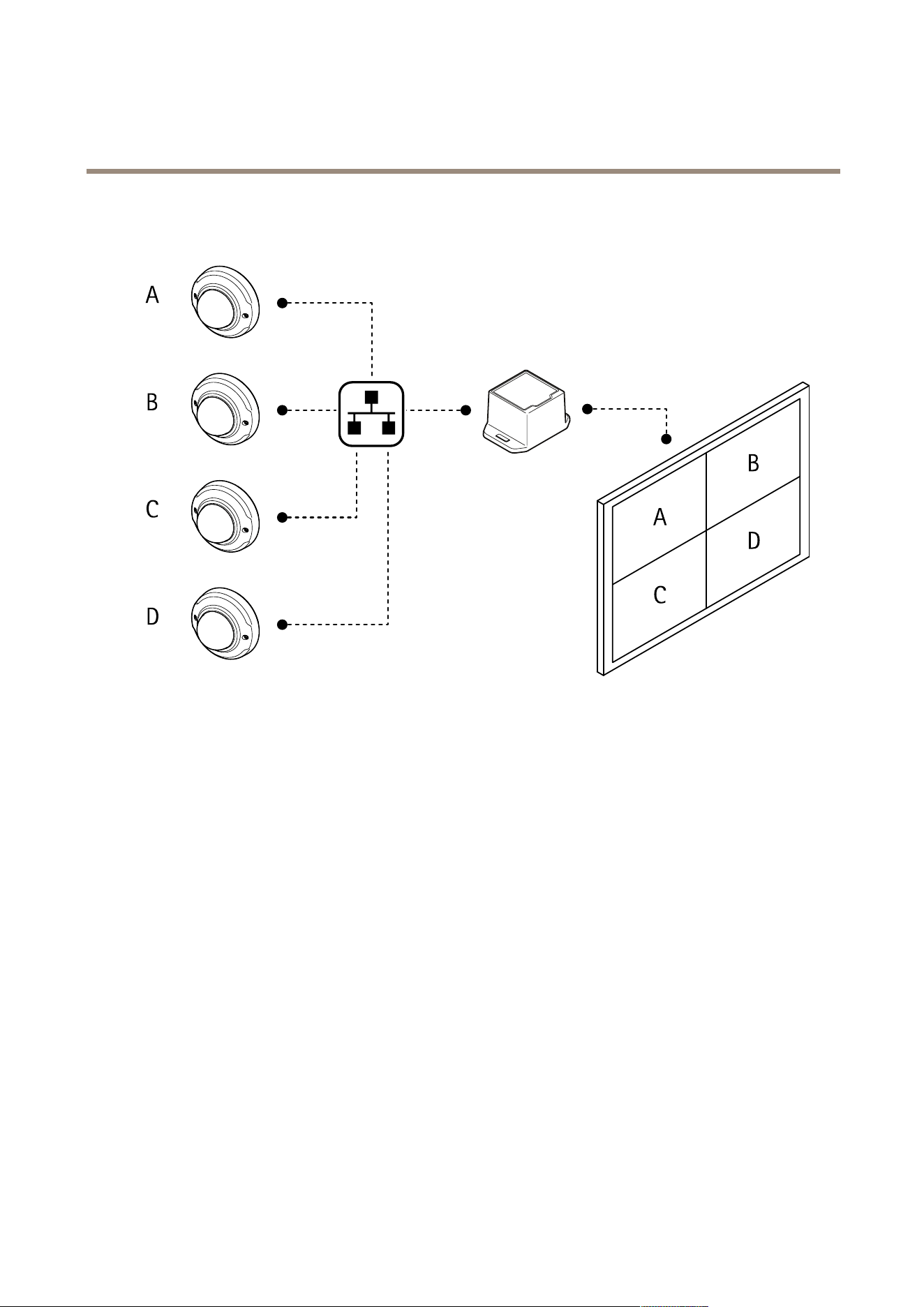
Solutionoverview
Solutionoverview
3
AXIST8705VideoDecoder
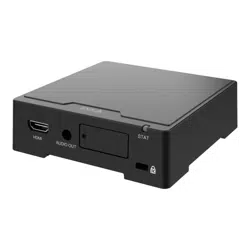
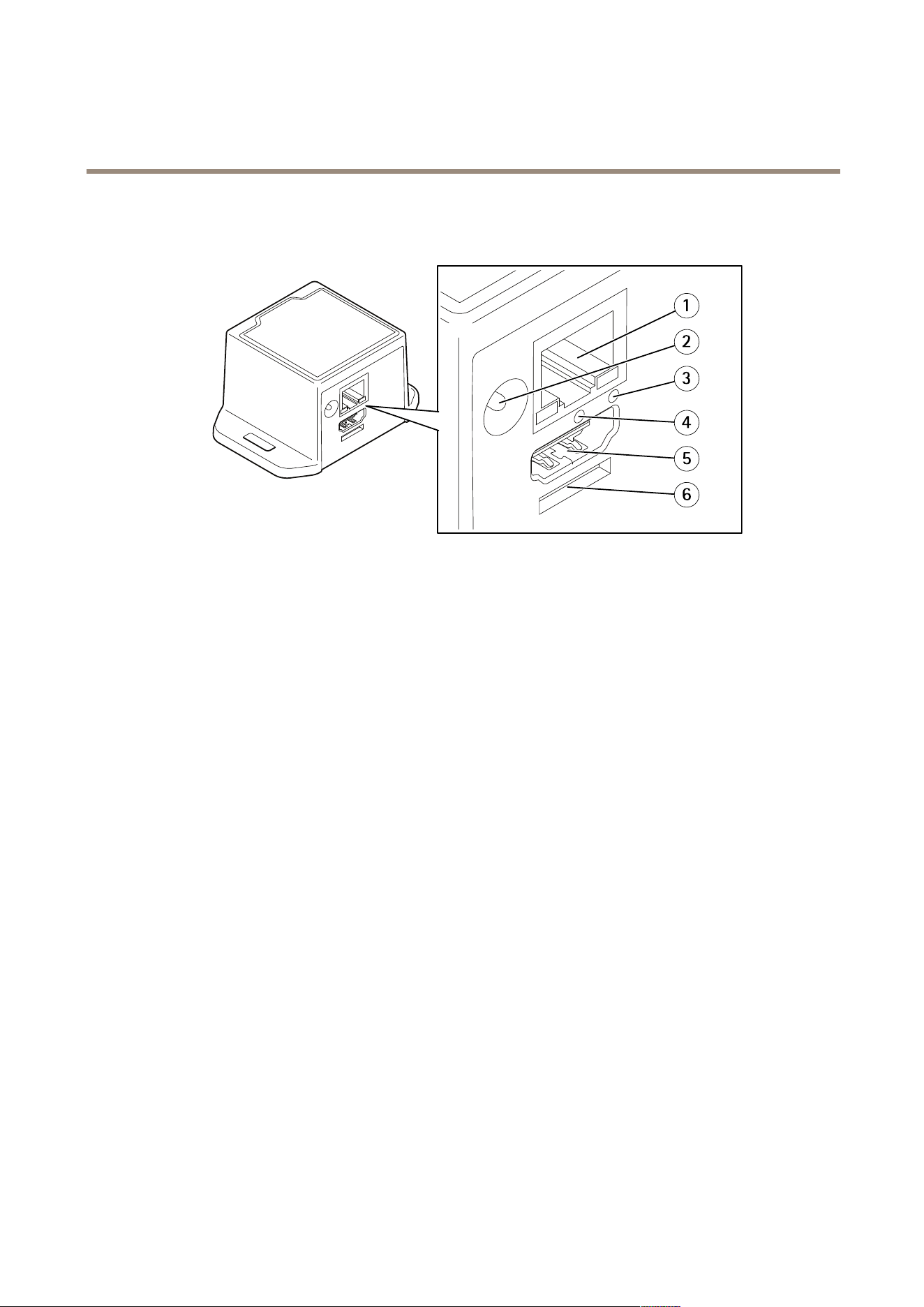
Productoverview
Productoverview
1
Networkconnector
2
Powerconnector
3
NetworkLED
4
Restartbutton
5
HDMIconnector
6
Reservedforoperatingsystem
4

AXIST8705VideoDecoder
Howtoaccesstheproduct
Howtoaccesstheproduct
AXISIPUtilityandAXISCameraManagementarerecommendedmethodsforndingAxisproductsonthenetworkandassigning
themIPaddressesinWindows®.Bothapplicationsarefreeandcanbedownloadedfromaxis.com/support
Theproductcanbeusedwiththefollowingbrowsers:
•Chrome
TM
(recommended),Firefox
®
,Edge
®
,orOpera
®
withWindows
®
•Chrome
TM
(recommended)orSafari
®
withOSX
®
•Chrome
TM
orFirefox
®
withotheroperatingsystems.
Howtoaccesstheproductfromabrowser
1.Startawebbrowser.
2.EntertheIPaddressorhostnameoftheAxisproductinthebrowser’saddresseld.
ToaccesstheproductfromaMaccomputer(OSX),gotoSafari,clickonBonjourandselecttheproductfromthe
drop-downlist.ToaddBonjourasabrowserbookmark,gotoSafari>Preferences.
3.Enteryourusernameandpassword.Ifthisisthersttimetheproductisaccessed,therootpasswordmustrstbe
congured.
Aboutsecurepasswords
Important
Axisdevicessendtheinitiallysetpasswordincleartextoverthenetwork.Toprotectyourdeviceaftertherstlogin,set
upasecureandencryptedHTTPSconnectionandthenchangethepassword.
Thedevicepasswordistheprimaryprotectionforthedataandservices.Axisdevicesdonotimposeapasswordpolicyastheymaybe
usedinvarioustypesofinstallations.Toprotectyourdatawerecommendthatyou:
•Changethedefaultpasswordthatcomeswiththedevices.
•Useapasswordwithatleast8characters,preferablycreatedbyapasswordgenerator.
•Don’texposethepassword.
•Changepasswordatarecurringinterval,atleastonceayear.
Setasecurepasswordfortherootaccount
Important
Theadministratorusernamerootcannotbedeleted.Ifthepasswordforrootislost,thedevicemustberesettothe
factorydefaultsettings.
1.Makesuretofollowtheinstructionsaboutsecurepasswords.SeeAboutsecurepasswordsonpage5.
2.Thersttimeyoulogontothedevice,usethedefaultusernamerootandpasswordpass.
3.Typeanewpasswordandthenretypeittoconrmthespelling.
4.ClickNext.Thepasswordhasnowbeencongured.
5

AXIST8705VideoDecoder
Setup
Setup
Abouttheproduct'sbuilt-inhelp
Youcanaccessthebuilt-inhelpthroughyourproduct’swebpage.Thehelpprovidesmoredetailedinformationontheproduct’s
featuresandtheirsettings.
Therearetwohelpfeaturesintheuserinterface:
•Togetgeneralinformationaboutthecontrolsoneachpage,click
inthebottomrightcornerofthebrowserwindow.
•Togetdetailedinformationaboutanindividualsetting,click
nexttothesetting.
Howtocongureamonitor
1.GotoDisplay.
2.SelectoneoftheseoptionsunderMultimode:
-Toshowthevideosourcesoneatatimeinsequence,selectSequencer,andsettheintervalthateachsource
isdisplayed.
-Toshowmultiplevideosourcesatthesametime,selectMultiview,andselectalayout.
3.UnderVideooutput,selectaresolutionandrefreshratethatworkswithyourdisplay.Seethedocumentationforyour
display.
HowtoaddAxiscameras
Note
ThecamerawizardonlyworkswithAxiscameras.Addcamerasfromotherbrandsoneatatime.SeeHowtoaddasingle
cameraonpage6.
1.GotoVideosources.
2.ClickCamerawizard.
ThewizardsearchesthenetworkforAxiscameras.
3.Whenyouopenthecamerawizard,theAddcredentialswindowopensautomatically.Ifyoudon’twanttoaddany
credentials,closethewindow.
4.SelectthecamerastoaddandclickConnect.
Thedecoderwilltrytoaccessthecamerawithallsavedcredentials.SeeHowtoaddusernamesandpasswordsfor
camerasonpage7.
5.Toaccessmoresettingsforthecameras,seeAdvancedcamerasettingsonpage7.
Howtoaddasinglecamera
1.GotoVideosources.
2.ClickAddcamera.
-ForanAxiscamera:EnteranameandIPaddressforthecamera.
6

AXIST8705VideoDecoder
Setup
-Forotherbrands:Enteraname,aURLthatcanbeusedtoaccessthevideostream,andthecodecusedfor
thestream.
3.Enterausernameandapasswordforthecamera.
4.ClickSaveCamera.
5.Toaccessmoresettingsforthecameras,seeAdvancedcamerasettingsonpage7.
Howtoaddusernamesandpasswordsforcameras
Thedecoderneedsusernamesandpasswordstothecamerasinordertoaccessthevideostreams.
Thedecodercanhavemultiplecredentialssaved.Itwilltrytoaccessallcamerasusingallofthestoredcredentials.
1.GotoVideosources.
2.ClickCamerawizard.
3.Whenyouopenthecamerawizard,theAddcredentialswindowopensautomatically.Tomanuallyopenthewindow,
clickAddunderCredentials.
4.Enteranamefortheaccount,ausername,andapassword.
5.ClickAdd.
Advancedcamerasettings
1.GotoVideosources.
2.Tochangesettingsforavideosource,click
.
Howtoremoveacamera
1.GotoVideosources.
2.Toremoveavideosource,click
.
7

AXIST8705VideoDecoder
Troubleshooting
Troubleshooting
Howtoresettofactorydefaultsettings
Important
Resettofactorydefaultshouldbeusedwithcaution.Aresettofactorydefaultresetsallsettings,includingtheIPaddress,to
thefactorydefaultvalues.
1.GotoMaintenance.
2.SelectDefaultsystemconguration.
3.SelectConrm.
4.ClickSet.
Itisalsopossibletoresetparameterstofactorydefaultwiththerestartbutton.Withthedeviceturnedon,pressandholdthe
restartbuttonfor10seconds.
Howtocheckthecurrentrmware
Firmwareisthesoftwarethatdeterminesthefunctionalityofnetworkdevices.Oneofyourrstactionswhentroubleshootinga
problemshouldbetocheckthecurrentrmwareversion.Thelatestversionmaycontainacorrectionthatxesyourparticular
problem.
Tocheckthecurrentrmware:
1.Gototheproduct’swebpage.
2.SelectStatus.
3.ThermwareversionisshownunderVersion.
Howtoupgradethermware
Important
Preconguredandcustomizedsettingsaresavedwhenthermwareisupgraded(providedthatthefeaturesareavailablein
thenewrmware)althoughthisisnotguaranteedbyAxisCommunicationsAB.
Important
Makesuretheproductremainsconnectedtothepowersourcethroughouttheupgradeprocess.
Note
Whenyouupgradetheproductwiththelatestrmware,theproductreceivesthelatestfunctionalityavailable.Alwaysread
theupgradeinstructionsandreleasenotesavailablewitheachnewreleasebeforeupgradingthermware.Tondthelatest
rmwareandthereleasenotes,gotoaxis.com/support/rmware
1.Downloadthelatestrmwareletoyourcomputer,availablefreeofchargeataxis.com/support/rmware
2.Logintotheproduct.
3.GotoMaintenance.
4.SelectFirmwareupdate,andfollowtheinstructions.Whentheupgradehasnished,theproductrestartsautomatically.
8

AXIST8705VideoDecoder
Troubleshooting
Technicalissues,cluesandsolutions
Ifyoucan’tndwhatyou’relookingforhere,trythetroubleshootingsectionataxis.com/support
Problemsupgradingthermware
FirmwareupgradefailureIfthermwareupgradefails,theproductreloadsthepreviousrmware.Themostcommonreason
isthatthewrongrmwarelehasbeenuploaded.Checkthatthenameofthermwarele
correspondstoyourproductandtryagain.
ProblemssettingtheIPaddress
Theproductislocatedona
differentsubnet
IftheIPaddressintendedfortheproductandtheIPaddressofthecomputerusedtoaccessthe
productarelocatedondifferentsubnets,youcannotsettheIPaddress.Contactyournetwork
administratortoobtainanIPaddress.
TheIPaddressisbeingused
byanotherdevice
DisconnecttheAxisproductfromthenetwork.Runthepingcommand(inaCommand/DOS
window,typepingandtheIPaddressoftheproduct):
•Ifyoureceive:Replyfrom<IPaddress>:bytes=32;time=10...
thismeansthattheIPaddressmayalreadybeinusebyanotherdeviceonthenetwork.
ObtainanewIPaddressfromthenetworkadministratorandreinstalltheproduct.
•Ifyoureceive:Requesttimedout,thismeansthattheIPaddressisavailable
forusewiththeAxisproduct.Checkallcablingandreinstalltheproduct.
PossibleIPaddressconict
withanotherdeviceonthe
samesubnet
ThestaticIPaddressintheAxisproductisusedbeforetheDHCPserversetsadynamicaddress.
ThismeansthatifthesamedefaultstaticIPaddressisalsousedbyanotherdevice,theremay
beproblemsaccessingtheproduct.
Theproductcannotbeaccessedfromabrowser
Cannotlogin
WhenHTTPSisenabled,ensurethatthecorrectprotocol(HTTPorHTTPS)isusedwhenattempting
tologin.Youmayneedtomanuallytypehttporhttpsinthebrowser’saddresseld.
Ifthepasswordfortheuserrootislost,theproductmustberesettothefactorydefaultsettings.
See.
TheIPaddresshasbeen
changedbyDHCP
IPaddressesobtainedfromaDHCPserveraredynamicandmaychange.IftheIPaddresshas
beenchanged,useAXISIPUtilityorAXISCameraManagementtolocatetheproductonthe
network.Identifytheproductusingitsmodelorserialnumber,orbytheDNSname(ifthename
hasbeencongured).
Ifrequired,astaticIPaddresscanbeassignedmanually.Forinstructions,gotoaxis.com/support
Theproductisaccessiblelocallybutnotexternally
Routerconguration
CheckthatyourrouterallowsincomingdatatrafctotheAxisproduct.Theroutermustsupport
UPnP
®
.
Firewallprotection
ChecktheInternetrewallwithyournetworkadministrator.
9

AXIST8705VideoDecoder
Specifications
Specifications
Tondthelatestversionoftheproduct’sdatasheet,gototheproductpageonaxis.comandlocateSupport&Documentation.
LED
NetworkLEDIndication
RedFlashesfornetworkactivity.
UnlitNonetworkconnection.
Buttons
Restartbutton
Presstherestartbuttontorestarttheproduct.
Pressandholdtherestartbuttonfor10secondstoresetallparameterstofactorydefault.
Connectors
HDMIconnector
UsetheHDMI
TM
connectortoconnectadisplayorpublicviewmonitor.
Networkconnector
RJ45Ethernetconnector.
Powerconnector
DCconnector.Usethesuppliedadapter.
10

UserManualVer.M1.16
AXIST8705VideoDecoder
Date:November2017
©AxisCommunicationsAB,2017
PartNo.T10110349