Distributed by:
Perfect Aire, LLC
5401 Dansher Rd.
Countryside, IL 60525
844-4PA-AIRE | 844-472-2473
www.perfectaire.us
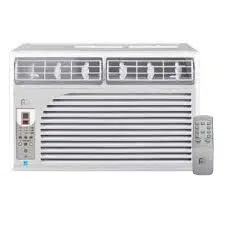
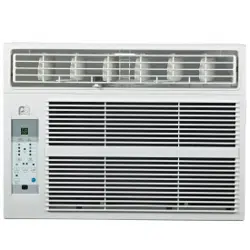
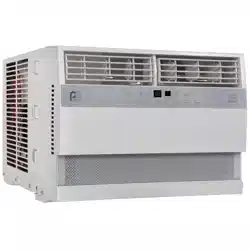
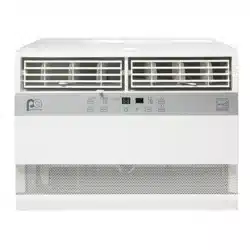
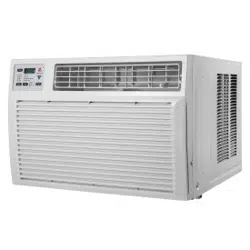
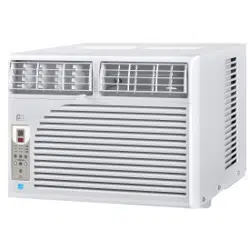
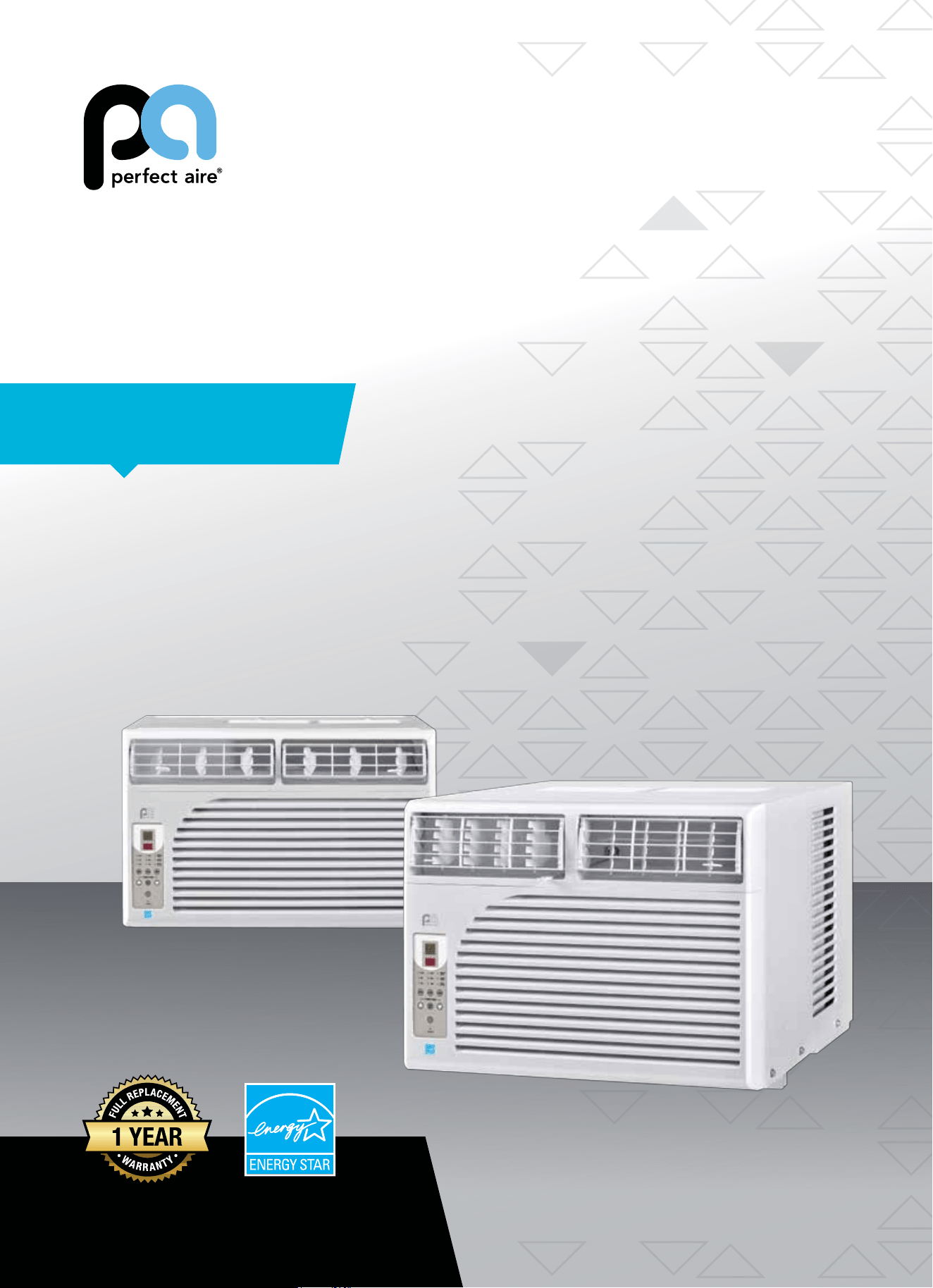
WINDOW
AIR CONDITIONER
FOR MODELS:
1PEC8000
2PEC10000
2PEC12000
Before using your air conditioner, please
read this manual carefully and keep it for
future reference, along with your receipt.
Specification and performance data is subject to change without notice.
Printed in China
PA/User_1PEC8000_2PEC10000_2PEC12000/01162017
USER MANUAL
For your own records, please attach a copy of your sales receipt to this manual and complete the following:
Model Number: _____________________________________ Serial Number: _______________________________________
Purchase Date: ____________________________________ Store Purchased: _____________________________________
Installation Date: ___________________________________ Installation Co.: _______________________________________
Installer Name: _____________________________________ Installer Phone No.: ___________________________________
CONSUMER PRODUCT INFORMATION
SAFETY PRECAUTIONS ...................................................................1
IMPORTANT SAFETY INSTRUCTIONS ...........................................3
PARTS DIAGRAM ..............................................................................4
BEFORE INSTALLING .......................................................................5
INSTALLATION ..................................................................................6
CONTROL PANEL .............................................................................8
REMOTE CONTROL .........................................................................9
CARE & CLEANING ..........................................................................10
TROUBLESHOOTING ....................................................................... 11
CONTENTS
This manual provides the information needed for proper use and mainte-
nance of this air conditioner. Basic preventative care can help extend the life
of this unit. The “Troubleshooting” section in this manual contains a chart
with solutions to the most common problems. Referring to this section may
save time and prevent the need for a service call in the event of a problem.
CAUTION
● Contactanauthorizedservicetechnicianforrepairormaintenanceofthisunit.
● Ifnecessary,contactaninstallerforinstallationofthisunit.
● Theairconditionerisnotintendedforusebyyoungchildrenwithoutsupervision.Youngchildrenshouldbesupervised
to ensure that they do not play with the air conditioner.
● Disabledpersonsmayrequireassistancewithsetup.
● Ifthepowercordistobereplaced,replacementworkshouldbeperformedbyauthorizedpersonnelonly.
● Installationandrepairworkmustbeperformedinaccordancewiththenationalwiringstandardsbyauthorized
personnel only.
● Donotoperateyourairconditionerinawetroomsuchasabathroomorlaundryroom.
NOTE:Alltheillustrationsinthismanualareforexplanationpurposesonly.Unitpurchasedmaybeslightlydierent.
Thedesignandspecicationsaresubjecttochangewithoutpriornoticeforproductimprovement.ContactConsumer
Services at 844-4PA-AIRE (844-472-2473) for details.
1
WARNINGS
Plug in power cord properly. Failuretodosomaycauseelectricshockorredueto
excess heat generation.
DO NOT operate or stop the unit by inserting or pull-
ing out the power plug directly from the wall.
Doingsomaycauseelectricshockorredueto
heat generation.
DO NOT use a damaged power cord.
Doingsomaycauseelectricshockorre.Ifthepower
cord is damaged, it must be replaced by the manufactur-
eroranauthorizedservicecenterorasimilarlyqualied
personinordertoavoidahazard.
DO NOT modify power cord length or share the
outlet with other appliances.
Doingsomaycauseelectricshockorredueto
heat generation.
DO NOT operate with wet hands or in
damp environment.
Doingsomaycauseelectricshock.
DO NOTdirectairowdirectlyatroomoccupants.
This could cause health issues.
Alwaysensureeectivegrounding. Incorrectgroundingmaycauseelectricshock.
DO NOT allow water to run into electric parts.
Doingsomaycausefailureofmachineorelectricshock.
Alwaysinstallcircuitbreakerandadedicated
power circuit.
Incorrectinstallationmaycausereandelectricshock.
Always unplug the unit if strange sounds, smell or
smokecomesfromtheunit.
Failuretodosomaycausereandelectricshock.
DO NOTusethesocketifitislooseordamaged.
Doingsomaycausereandelectricshock.
DO NOT open the unit during operation.
Doingsomaycauseelectricshock.
DO NOTuserearmsnearunit.
Doingsomaycausere.
DO NOT use the power cord close to
heating appliances.
Doingsomaycausereandelectricshock.
DO NOT disassemble, modify, or drill holes into
the air conditioner.
Doingsomaycausefailureandelectricshockandvoid
the manufacturer’s warranty.
Ventilate room before operating air conditioner if
thereisagasleakfromanotherappliancesuchas
a stove.
Failuretodosomaycauseexplosion,reandburns.
DO NOT
usethepowercordnearammablegasor
combustibles,suchasgasoline,benzene,thinner,etc.
Doingsomaycauseanexplosionorre.
READ SAFETY PRECAUTIONS BEFORE INSTALLATION
Topreventinjurytotheuserorotherpeopleandpropertydamage,thefollowinginstructionsmustbefollowed.
Incorrectoperationduetoignoringofinstructionsmaycauseharmordamage.Theseriousnessisclassiedbythe
following indications.
THIS SYMBOL INDICATES THAT IGNORING INSTRUCTIONS MAY CAUSE
DEATH OR SERIOUS INJURY.
NEVER DO THIS.OTHER SYMBOLS: ALWAYS DO THIS.
THIS SYMBOL INDICATES THAT IGNORING INSTRUCTIONS MAY CAUSE
MODERATE INJURY TO YOUR PERSON, OR DAMAGE TO YOUR UNIT OR
OTHER PROPERTY.
SAFETY PRECAUTIONS
2
CAUTIONS
Whenremovingairlter,DO NOT touch metal parts of
the unit.
Doingsomaycauseaninjury.
DO NOT clean with water.
Water may enter the unit and degrade the insulation,
causinganelectricshock.
Ensure proper ventilation, especially in rooms with a
stove or other appliances.
Failure to do so may result in an oxygen shortage.
Unitandcircuitbreaker/fusemustbeswitchedOFF
when cleaning.
CleaningunitwhenpowerisONmaycausereand
electricshockandmaycauseaninjury.
DO NOT put a pet or house plant where it will be ex-
posedtodirectairow.
Thiscouldinjurethepetorplant.
Use ONLY as intended. This unit is NOT intended to preserve precision devic-
es,food,pets,plants,andartobjects.Itmaycause
deteriorationofquality,etc.
Stop operation and close the window in severe
storms or hurricanes.
Operationwithwindowsopenmaycausemoistureto
enter the room.
Hold the plug by the head of the power plug when
takingitout.
Failuretodosomaycauseelectricshock
and damage.
If unit will not be used for a long period of time,
unplug or turn OFF main power switch.
Leavingpoweronmaycauseunitfailureorre.
Do not place obstacles around air-inlets or inside of
air-outlet.
Obstaclesmaycauseappliancefailureoraccident.
Periodicallycheckinstallationbracketfordamage. Prolonged exposure to outdoor elements may cause
damagetoinstallationbracket,causingunittofall.
Alwaysinsertlter(s)securely.Cleanlter(s)AT LEAST
onceeverytwoweeks.
Operationwithoutsecurelyinstalledltersmay
causefailure.Adirtyltercancausetheunittonot
runeciently.
Use only a soft cloth to clean the unit. Cleaners or detergents may change the color or
scratch the surface of the unit.
Usecautionwhenunpackingandinstalling. Sharpedgescouldcauseinjury.
NEVERdrinkwaterdrainedfromairconditioner.
Water from unit contains contaminants and could
cause illness.
DO NOTplaceheavyobjectsonthepowercordand
always ensure that the cord is not compressed.
Thereisdangerofreorelectricshock.
If water enters the unit’s electrical components, turn
theunitoatthepoweroutletandswitchothecir-
cuitbreaker.Isolatesupplybytakingthepower-plug
outandcontactaqualiedservicedtechnician.
Thereisdangerofelectricshock.
3
IMPORTANT SAFETY INSTRUCTIONS
NOTE
:
The power supply cord with this air
conditioner contains a current detection
devicedesignedtoreducetherisk
ofre.Pleaserefertothesection
“OperationofCurrentDevice”(below)
for details. In the event that the power
supply cord is damaged, it cannot be
repaired. It must be replaced by an
authorizedrepairtechnicianwithacord
from the Product Manufacturer.
WARNING
Avoidrehazardsorelectricshock.DO
NOT use an extension cord or an adapter
plug. DO NOT remove any prong from the
power cord.
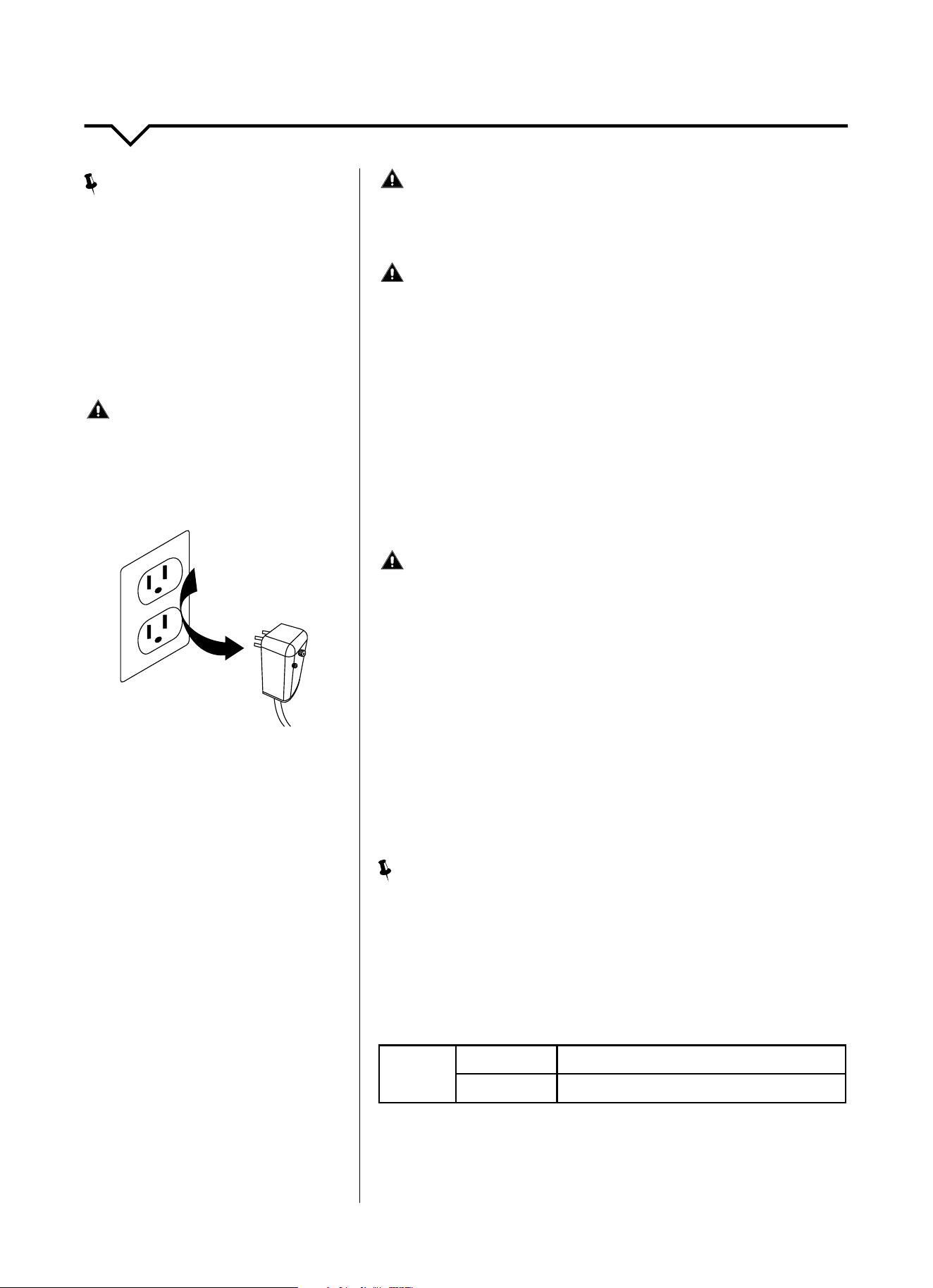
OPERATION OF
CURRENT DEVICE:
The power supply cord contains a
current device that senses damage
to the power cord. To test your power
supply cord, do the following:
1. Plug in the air conditioner.
2. The power supply cord will have
TWObuttonsontheplughead.Press
theTESTbutton.Youwillnoticea
clickastheRESETbuttonpopsout.
3. Press the RESET button. Again,
youwillnoticeaclickasthe
button engages.
4. The power supply cord is now
supplyingelectricitytotheunit.(On
some products this is also indicated
by a light on the plug head.)
WARNING
FORYOURSAFETY:Donotstoreorusegasolineorotherammable
vaporsandliquidsinthevicinityofthisoranyotherappliances.
WARNING - PREVENT ACCIDENTS
Toreducetheriskofre,electricalshock,orinjurytopersonswhenusing
your air conditioner, follow basic precautions, including the following:
● Besuretheelectricalserviceisadequateforthemodelyouhave
chosen. This information can be found on the serial plate, which is
located on the side of the cabinet and behind the grille.
● Iftheairconditioneristobeinstalledinawindow,youwillprobably
wanttocleanbothsidesoftheglassrst.Ifthewindowisatriple-
tracktypewithascreenpanelincluded,removethescreencompletely
before installation.
● Besuretheairconditionerhasbeensecurelyandcorrectlyinstalled
according to the installation instructions in this manual.
●
Save this manual for possible future use in removing or installing this unit.
● Whenhandlingtheairconditioner,becarefultoavoidcutsfromsharp
metalnsonfrontandrearcoils.
WARNING - ELECTRICAL INFORMATION
The complete electrical rating of your new room air conditioner is
statedontheserialplate.Refertotheratingwhencheckingthe
electricalrequirements.
● Besuretheairconditionerisproperlygrounded.Tominimizeshock
andrehazards,propergroundingisimportant.Thepowercordis
equippedwithathree-pronggroundingplugforprotectionagainst
shockhazards.
● Yourairconditionermustbeusedinaproperlygroundedwall
receptacle.Ifthewallreceptacleyouintendtouseisnotadequately
groundedorprotectedbyatimedelayfuseorcircuitbreaker,havea
qualiedelectricianinstalltheproperreceptacle.
● Ensurethereceptacleisaccessibleaftertheunitinstallation.
● Donotrunairconditionerwithoutsideprotectivecoverinplace.This
could result in mechanical damage within the air conditioner.
● Donotuseanextensioncordoranadapterplug.
NOTE
:
Donotusetheplugtoturntheunitonoro.
● AlwaysmakesuretheRESETbuttonispushedinforcorrectoperation.
● ThepowersupplymustbereplacedifitfailsresetwheneithertheTEST
button is pushed or it cannot be reset.
● Ifpowersupplycordisdamaged,itcannotberepaired.Pleasecall
Consumer Services at 844-472-2473 to assist with replacement.
NOTE: This air conditioner is designed to be operated under the
following conditions:
Cooling
Operation
Outdoor Temp:
69–109°F/21–43°C
Indoor Temp:
61–90°F/16–32°C
Performance may be reduced outside of these operating temperatures.
Grounding Type
Wall Receptacle
Do not, under any
circumstances, cut,
remove, or bypass the
ground prong.
Power supply cord
with 3-prong grounding
plug and current
detection device
4
PARTS DIAGRAM
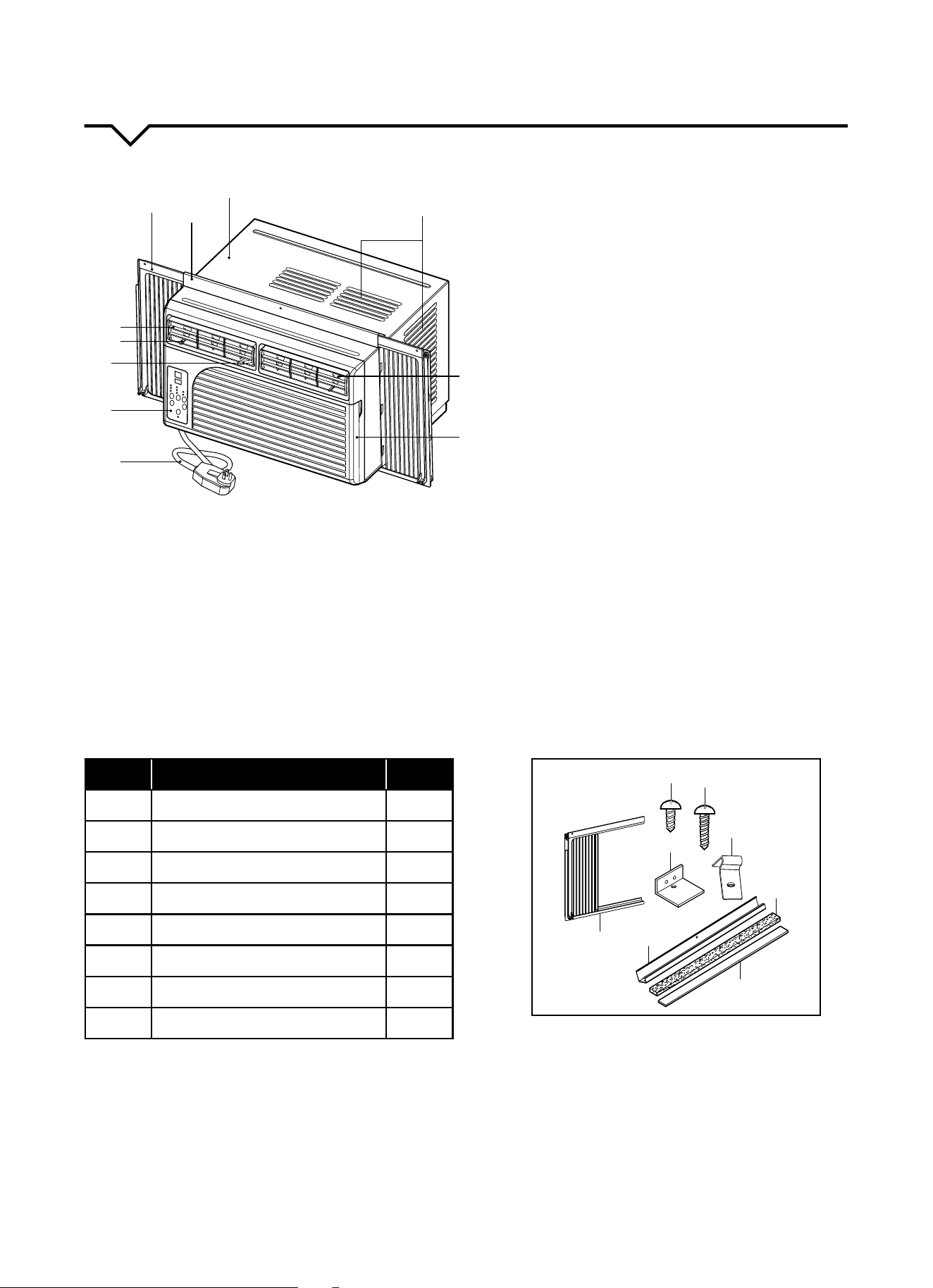
INSTALLATION HARDWARE
Before installing, please ensure you have all installation accessories included with this unit. (See list below.) If missing
parts, please contact Consumer Services at 844-4PA-AIRE (844-472-2473).
1. CABINET
2. TOP RAIL
3. SLIDING ACCORDION PANEL (L/R)
4. UP/DOWN LOUVER ADJUSTMENT:
Holdtheup/downairapandmanually
move it upward or downward to your
desired position.
5. LEFT/RIGHT LOUVER ADJUSTMENT:
Carefully push the air direction control
tableftorrighttoadjustthehorizontal
air direction.
6. CONTROL PANEL
7. POWER CORD
8. FRONT GRILLE (Airlterislocated
behind the front grille)
9. LEFT/RIGHT AIR DIRECTION FIN
10. AIR INLET
11. FRESH AIR SWITCH
NOTE: All of the illustrations in this manual
are for explanation purposes only. Unit
purchasedmaybeslightlydierent.
ITEM NAME OF PART QTY
A ShortScrews(3/8in.) 8
B Wood Screws 12
C Top Rail 1
D Insert Strip 1
E Accordion Panel 2
F CurtainLock 2
G SashLock 2
H Foam Seal 1
A
B
C
D
E
F
G
H
1
2
3
4
5
6
9
8
7
10
11
5
BEFORE YOU BEGIN
Read these instructions completely and carefully.
IMPORTANT- Save these instructions.
IMPORTANT-Observeallgoverningcodes
and ordinances.
Note to Installer- Be sure to leave these instructions with
the Consumer.
Note to Consumer- Keep these instructions for future
reference.
Skill level-Installationofthisappliancerequiresbasic
mechanicalskills.
Completion time- Approximately 1 hour.
We recommend that two people install this product.
Proper installation is the responsibility of the installer.
Product failure due to improper installation is not
covered under the Warranty.
YouMUSTuseallsuppliedpartsanduseproper
installation procedures as described in these
instructions when installing this air conditioner.
INSTALLATION REQUIREMENTS
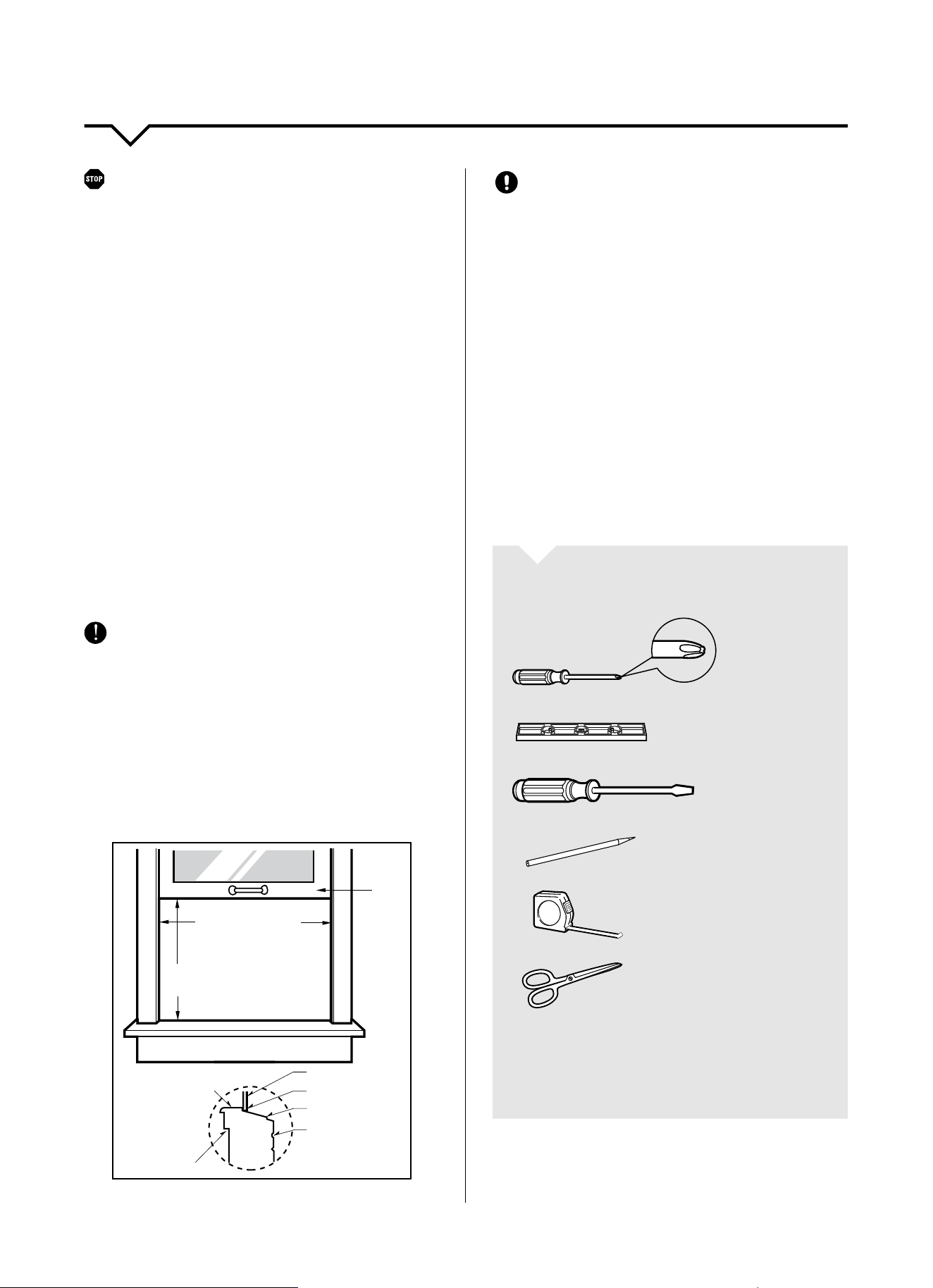
This room air conditioner is designed for installation in
standard double-hung windows with actual opening
widths of 22½ in. to 36¾ in. for 8,000 BTU and 10,000
BTUunitsand28⅛in.to41¾in.for12,000BTUunits.
Lower sash must open sufficiently to allow a clear
vertical opening of 14¾ in. for 8000 BTU & 10000 BTU
units and 18¾ in. for 12000 BTU units. Side louvers and
the rear of the air conditioner must have clear air space
to allow enough airflow through the condenser for heat
removal. The rear of the unit must be outdoors, not
inside a building or garage.
Inner sill
Offset
Window
Sill
Exterior
Interior wall
22½–36¾" (8–10K)
28⅛–41¾" (12K)
14¾" min (8–10K)
18
¾
" min (12K)
Sash
CAUTION
DO NOT, under any circumstances, cut or remove the
third (ground) prong from the power cord.
DO NOT change the plug on the power cord of the air
conditioner.
Aluminum house wiring may present special problems-
consultaqualiedelectrician.
When handling unit, be careful to avoid cuts from sharp
metaledgesandaluminumnsonfrontandrearcoils.
INSTALLATION
Pickalocationwhichwillallowyoutoblowthecoldair
into the area you desire. Windows used for installation
must be strong enough to support the weight of the air
conditioner. Good installation with special attention to
the proper position of the unit will lessen the chance
that service will be needed.
TOOLS YOU WILL NEED
Phillips
Screwdriver
Level
Screwdriver
Pencil
Ruler or Tape
Measure
Scissors or
Knife
NOTE: Save carton and these Installation Instructions for
future reference. The carton is the best way to store unit
during winter or when not in use.
INSTALLATION INSTRUCTIONS
6
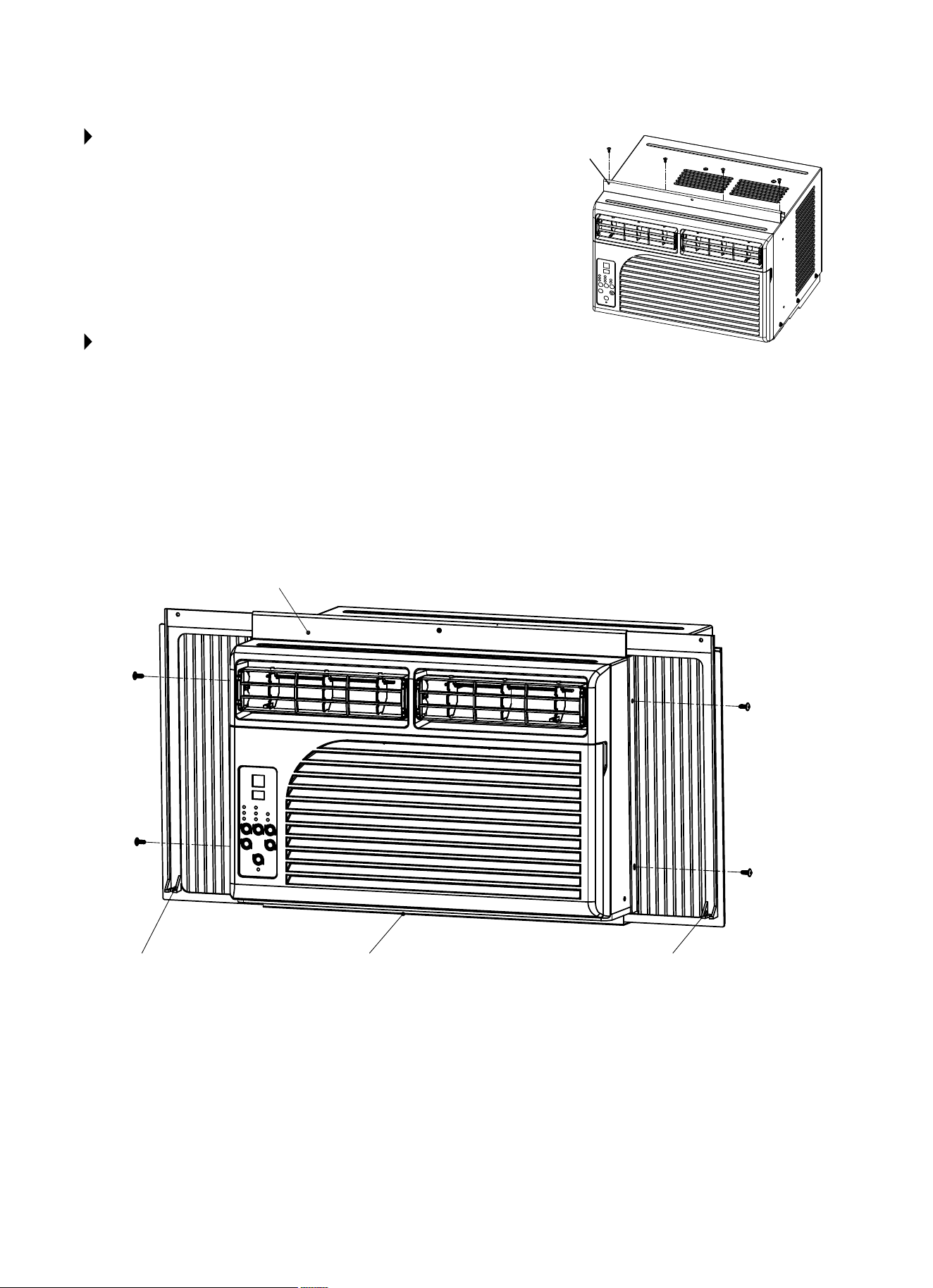
STEP 1:
TOP RAIL
• Removetheairconditionerandtoprailfromthecarton.Place
themonaatsurface.
• Aligntheholesinthetoprailwiththoseonthetopoftheunit.
• Securethetoprailtotheunitwithfourofthe3/8inchshort
screws (A) as shown in diagram to the right.
• NOTE: Higher side of the top rail should be facing the inside of
the room.
STEP 2:
ACCORDION PANEL
NOTE:Toprailandaccordionpanelareosetateachsidetoprovidetheproperpitchtotherearoftheunit.Thisis
necessary for proper drainage.
• Inserttheaccordionpanelsintothetopandbottomrailsoftheairconditioner.Fastentheaccordionpanelstotheunit
with4smallscrewsA(3/8in.),asshowningurebelow.Placetopscrewrstbutdonottightentoallowthebottom
holes to align properly. Place bottom screw and tighten, then secure top screw.
• Thereisaleftandarightaccordionpanel.Besuretousetheproperaccordionpanelforeachside.Holdthe
appropriateaccordionpanelinonehandandgentlypullbackthecentertofreetheopenend.Seegurebelow.
(Wheninstalled,theangeforsecuringthecurtainintothewindowsillwillbefacingtheroomside.)
Higher Side
4x Small
Screws (A) (3/8 in.)
4x Small
Screws (A)
(3/8 in.)
Top Rail
Flange
Bottom Rail Flange
7
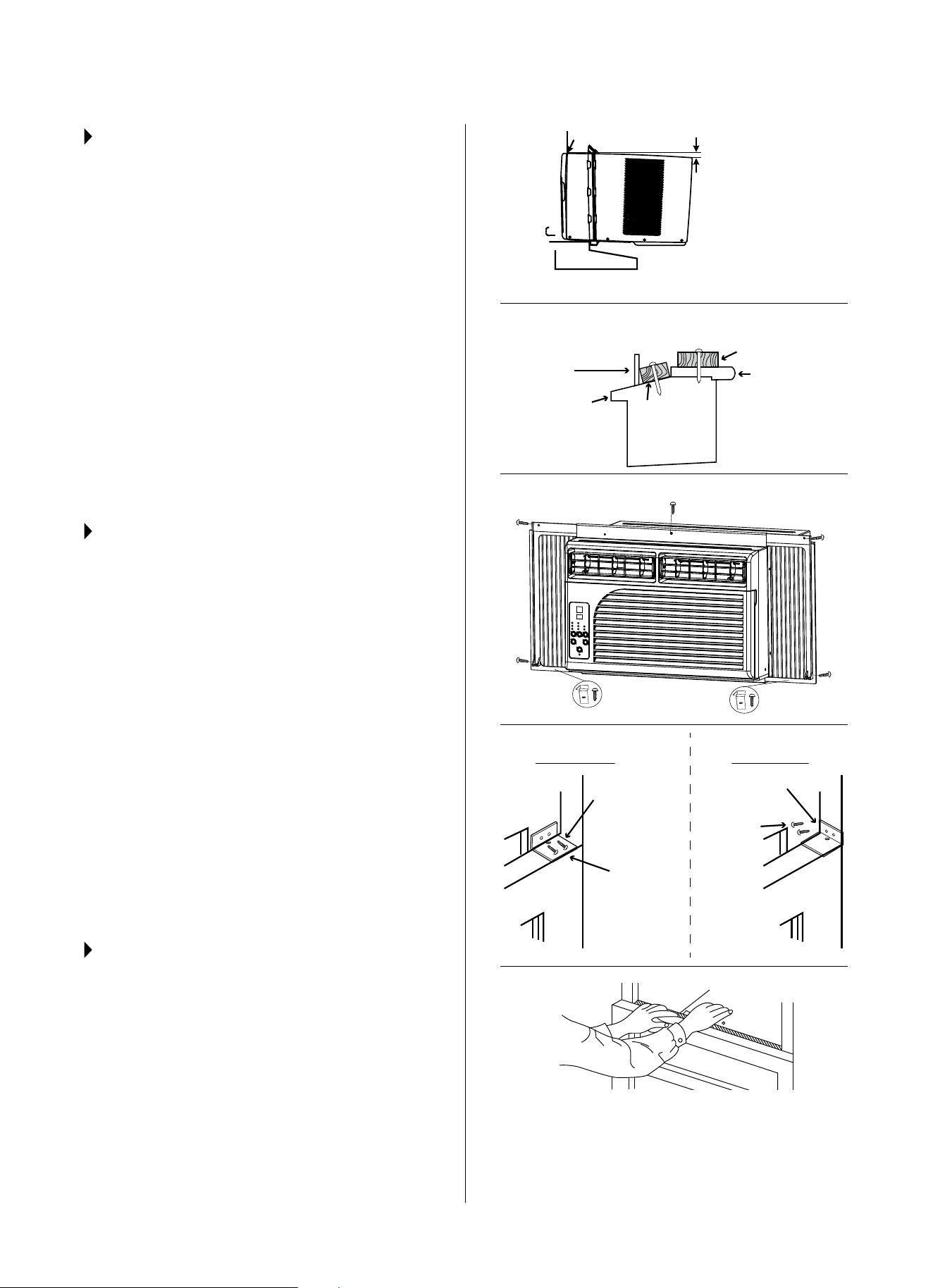
STEP 3:
INSTALL THE AIR CONDITIONER IN
THE WINDOW
• Carefully lift air conditioner and place the unit
into the window opening so the bottom of the air
conditioner frame is against the window sill. Close
the window behind the top rail of the unit. THIS
MAY REQUIRE 2 PEOPLE.
• Checkthattheairconditioneristiltedback
approximately 3°~4° downward to the outside. If
the condensation does not drain after installation,
adjusttheslope.
FOR STORM WINDOWS
• Removethestormwindowandaddwood,as
shown, before installing the air conditioner
• Ifthestormwindowframemustremain,besure
thedrainholesorslotsarenotcaulkedorblocked.
Rain water and condensation must be able to
drain out.
STEP 4:
SECURING THE AIR CONDITIONER
1. Secure the top rail to the window sash with Type B
Wood Screws.
2. Extend the left accordion panel across to reach
the window frame. Secure the top and bottom of
the accordion panel with Type B Wood Screws, as
shown. Repeat this step on the opposite side.
3. InstallCurtainLocks(F)tothebottommiddleof
the accordion panel frame, one on each side.
SecureCurtainLockswithTypeBWoodScrews.
4. InstallUpperSashLock(G)tothewindowframe
and secure with Type B Screws, as shown.
NOTE: Topreventbrokenglassordamageto
the window, for vinyl or similarly constructed
windows,attachtheuppersashlocktothe
windowsidejamb.
5. CuttheFoamSeal(H)tothewindowwidth.Stu
the sash between the glass and the window to
prevent air and insects from getting into the room.
STEP 5:
YOU CAN NOW TURN ON
YOUR UNIT.
Wooden Windows
STEP 4.1
STEP 4.2 STEP 4.2
STEP 4.2 STEP 4.2
STEP 4.3
STEP 4.4
WOOD FRAME
VINYL FRAME
STEP 4.5
STEP 4.3
INSIDE
Inner Sill
Outer Sill
OUTSIDE
H: Approx. 3/4ʺ to 1ʺ for
5,000–8,000 BTU units
H: Approx. 1ʺ to 1
3
/8ʺ for
10,000–12,000 BTU units
H
Measure from the cabinet edge
FOR STORM WINDOWS
Wood for
Inner Sill
Storm Window
Frame
Wood
Strip
Upper Sash
Lock (G)
Upper Sash
Lock (G)
Type B
Screws
Type B
Screws
Foam Seal
8
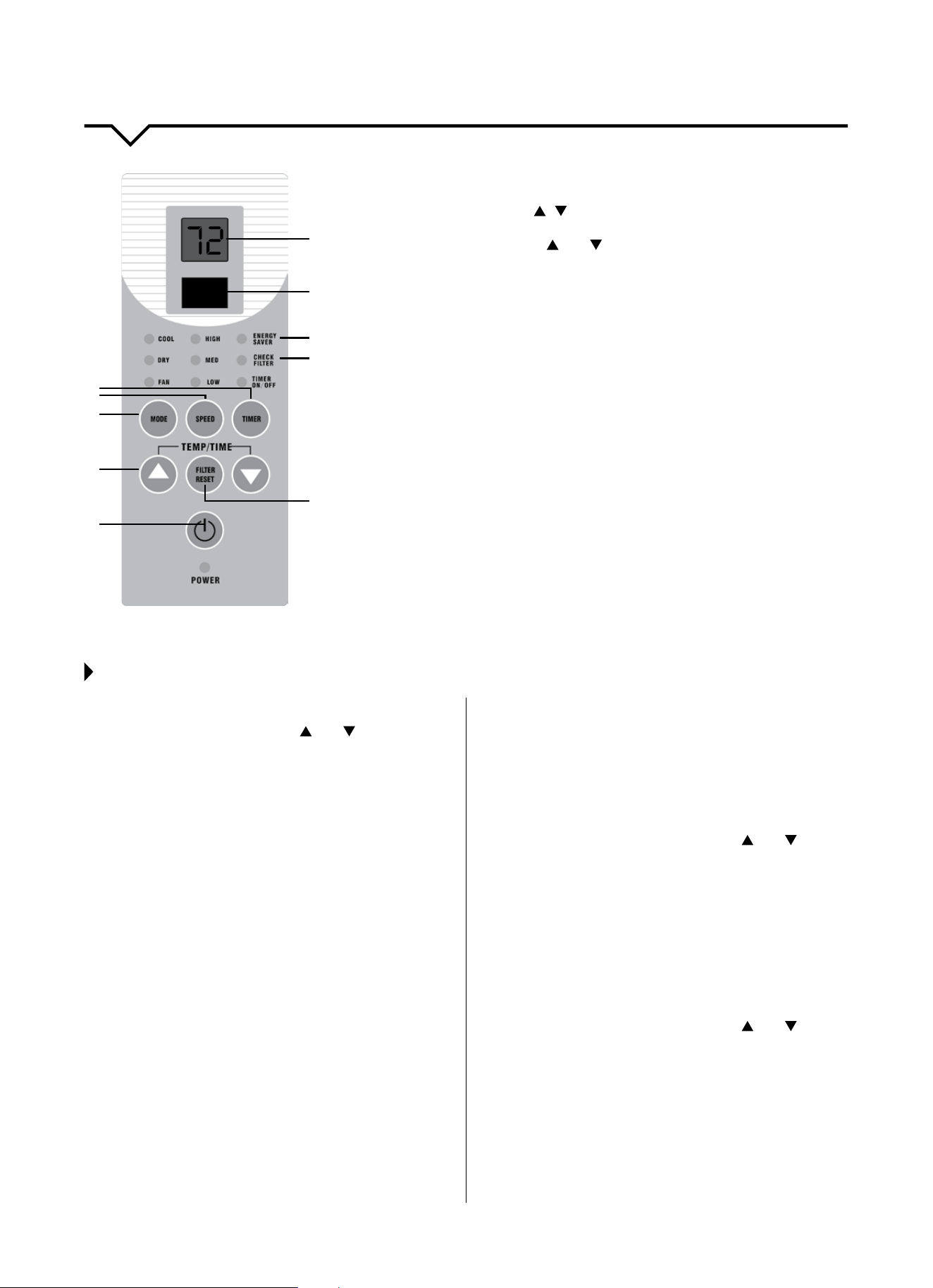
CONTROL PANEL
1. POWER Button
PresstoturntheunitON/OFF.
2. TEMP/TIME Buttons /
PresstoadjustthetemperatureandsetthetimefortheONorOFF
timer. Press both the and at the same time to switch between
°C and °F.
3. MODE Button
PresstoselectCOOL,DRY,FANorENERGYSAVER.
4. SPEED Button
PresstoselectHIGH,MED,orLOWfanspeed.
5. TIMER Button
PresstosetthetimerON/OFF.
6. DIGITAL DISPLAY
•InFANandDRYmode,thisdisplaysroomtemperature.
•InCOOLmode,thisdisplaysthesettemperature.
•InTIMERfunction,ON/OFFtimeisdisplayed.
•IfDisplayshowserrorcodes,contactConsumerServices
at 844-472-2473.
7. REMOTE CONTROL SIGNAL RECEIVER
•Makesuresignalreceiverisunobstructed.
•Max.remotedistanceis26ft.
•Unitwillbeepwhenthesignalfromtheremotehasbeenreceived.
8. ENERGY SAVER MODE (See below.)
9. CHECK FILTER Indicator
Will come on after 250 hours of running the unit.
10. FILTER RESET Button
Pressthisbuttontoresetthe“CheckFilter”indicatoraftercleaning
thelter.
1
2
3
4
5
6
7
8
9
10
USING THE CONTROL PANEL
COOL Mode
• PresstheMODEbuttonuntilCOOLindicatorison.
• PresstheTEMP/TIMEbuttons( and )toadjust
desired room temperature on the display.
• PresstheSPEEDbuttontoselectdesiredfan
speed (High, Med, Low).
DRY Mode
Use this mode to help reduce humidity without
coolingtheroom.InDRYmode,thetemperature
(77°F) and fan speed (Low) are present and cannot
beadjusted.
• PresstheMODEbuttonuntilDRYindicatorison.
FAN Mode
Use this mode to circulate the air in the room without
cooling or dehumidifying the room. In FAN mode, the
temperaturecannotbeadjusted.
• PresstheMODEbuttonuntilFANindicatorison.
• PresstheSPEEDbuttontoadjustthefanspeed
(High, Med, Low).
ENERGY SAVER Mode
Fanoperationshalloccurinconjunctionwiththe
compressoroperation.Thefanshutso1minute
afterthecompressorshutso.Whenthecompressor
iso,thefanstopsfor10minutesandthenwillrun
for 20 seconds prior to the compressor turning on.
• PresstheMODEbuttonuntiltheENERGYSAVER
indicator is on.
TIMER ON/OFF Function
TIMER ON
• Turntheunitontosetthedesiredtemperature
and fan speed for when the unit turns on with
the Timer.
• Turntheunito(Standby).
• PresstheTIMERbutton,“hr”willappearonthe
bottom right of the display.
• PresstheTEMP/TIMEbuttons(
and ) to set
the time on the display from 1–24 hours in 1
hour increments.
• TheTIMERON/OFFindicatorwillbeonwhen
the timer has been set.
TIMER OFF
• Turntheunitontosetthedesiredtemperature
and fan speed.
• PresstheTIMERbutton,“hr”willappearonthe
bottom right of the display.
• PresstheTEMP/TIMEbuttons(
and ) to set
the time on the display from 1–24 hours in 1
hour increments.
• TheTIMERON/OFFindicatorwillbeonwhen
the timer has been set.
NOTE: To cancel the timer function, press the TIMER
button again.
9
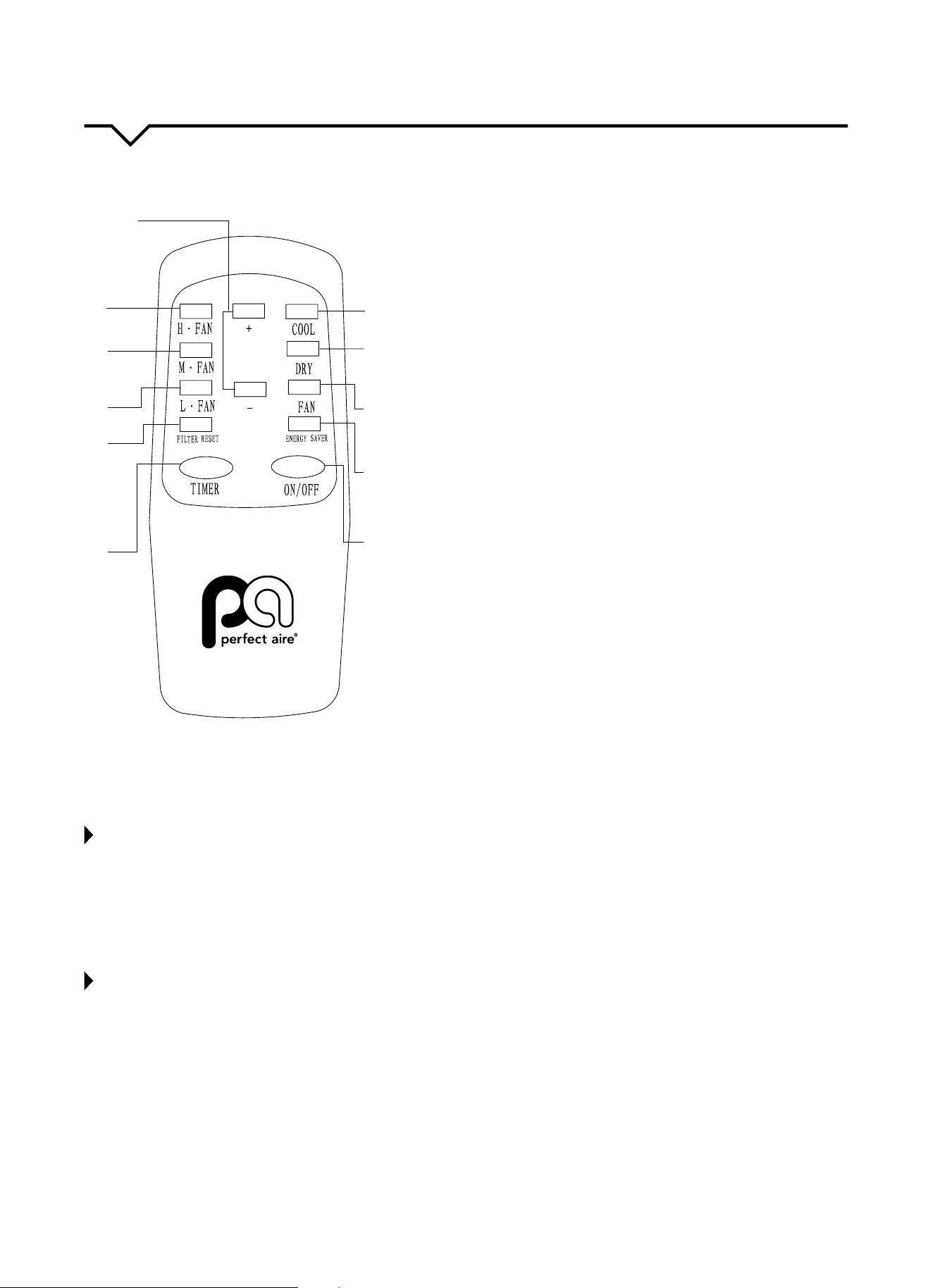
REMOTE CONTROL
1. ON/OFF Button
PresstoturntheunitON/OFF.
2. ENERGY SAVER
Press this button to operate the unit in Energy Saver mode.
(See pg. 8 for more information.).
3. FAN Button
Press this button to operate the unit in FAN mode.
4. DRY Button
PressthisbuttontooperatetheunitinDRYmode.
5. COOL Button
PressthisbuttontooperatetheunitinCOOLmode.
6. +/– BUTTONS
Thesebuttonsareforincreasing/decreasingthetemperature
settings within a range of 61 – 90°F (16 – 32°C) and for setting the
timefortheON/OFFTimer.
7. H • FAN BUTTON
PressthisbuttontomakethefanrunatHIGH speed. The HIGH
indicator light will be illuminated on the unit’s control panel.
8. M • FAN BUTTON
PressthisbuttontomakethefanrunatMEDIUM speed. The
MED indicator light will be illuminated on the unit’s control panel.
9. L • FAN BUTTON
PressthisbuttontomakethefanrunatLOWspeed.TheLOW
indicator light will be illuminated on the unit’s control panel.
10. FILTER RESET Button
After 250 hours of operation, the “CHECK FILTER” LED light will
illuminate on the unit’s control panel, reminding you to clean the
lter.Pressthisbuttontoturnothe“CHECKFILTER”LEDlight
ontheunitandresetthecheckltertimerfor250hours.
11. TIMER Button
PressthisbuttontosettheTimerfortimeSwitch-On,Switch-O
or to cancel the timer. (See page 8 for more information.)
NOTES ABOUT USING THE REMOTE CONTROL
• DO NOT place the remote near something with high temperature, such as an electric heating pad or radiator.
• DO NOT place the remote where it is exposed to direct sunlight or strong lights.
• DO NOT drop anything on the remote as this may cause damage.
• DO NOTblocktheareabetweentheunitandremoteoritwillnotreceivesignalsfromtheremote.
• DO NOTsplashwaterorotherliquidsontotheremote.
• DO NOTplaceheavyobjectsontheremote.
REPLACING THE BATTERIES
Whenthesignalistransmittedtotheairconditionerandtheunitdoesnotgiveanacknowledgmentsound,thebatteries
likelyneedtobereplaced.
1. Removethebatterycasecoverbyslidingthecoveropeninthedirectionofthearrow.Taketheusedbatteriesoutand
dispose of them accordingly.
2. Replacewithnewbatteries,payingattentiontothe“+”and“–”marksofpoleindications.Closethebackcover.
NOTE: DO NOT mix old and new batteries.
10
11
1
2
3
4
5
6
7
8
9
10
CARE AND CLEANING
CAUTION
Cleanairconditioneroccasionallytokeepitlookingandoperatinglikenew.
Be sure to unplug the unit before cleaning to prevent shock or fire hazards.
NOTE: Iftheairlterscreenisblockedbydust,theperformanceoftheunitwillbeaected,theunitwillbelouderthan
normal,andpowerconsumptionwillincrease.Therefore,periodiccleaningoftheairlterscreenisnecessary.
CLEANING THE AIR FILTER
Theairltershouldbecleanedthroughouttheoperationalseason.Itis
recommendedthattheairlterscreenbecleanedonceeverytwoweeksusingthe
method below:
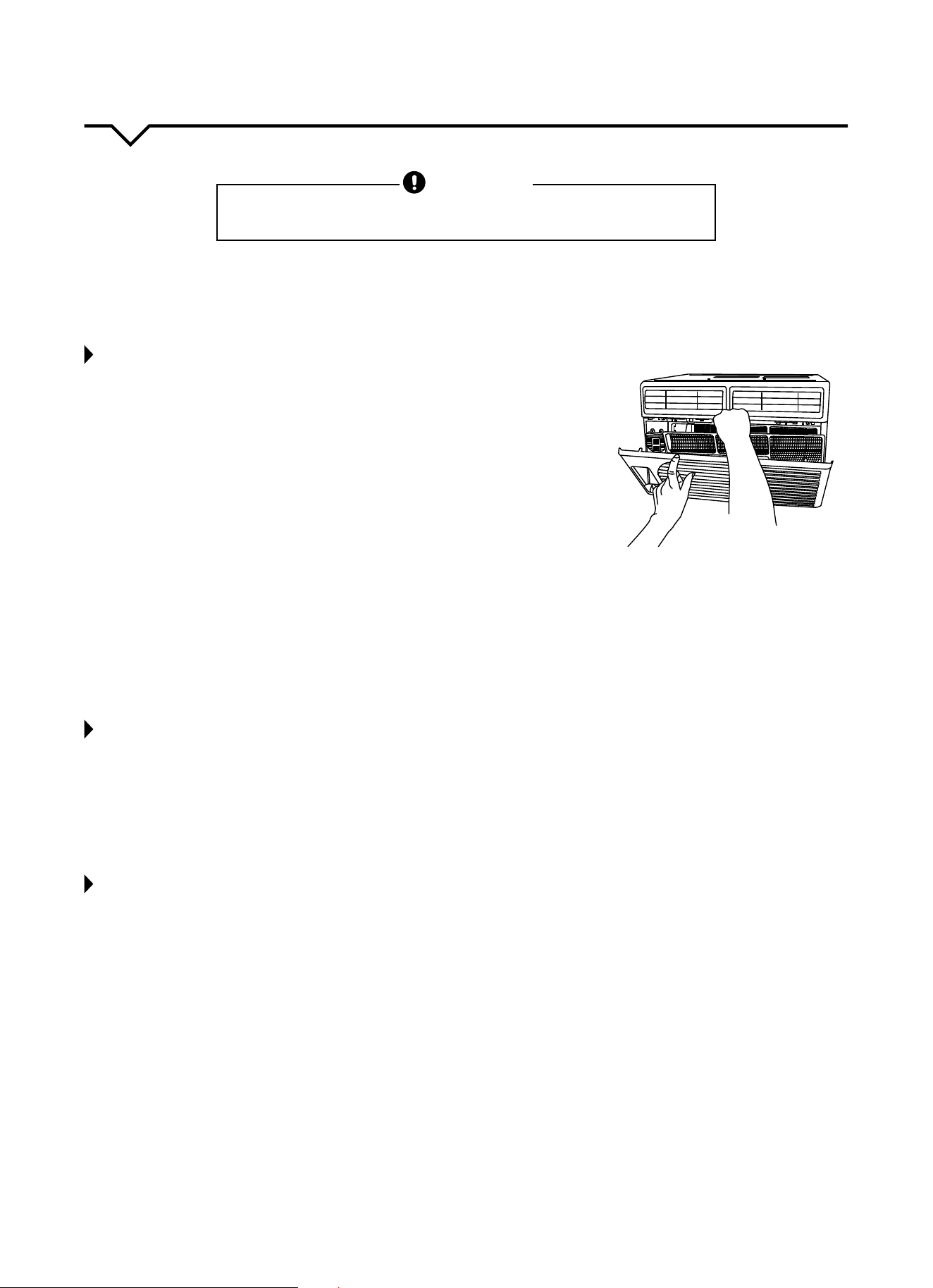
1. Remove the air filter screen
•Gentlyholdandpressthetwolowerendsofthefrontgrilleandopenthegrille.
•Gentlygrabtheairfilterscreenandliftitup;thentakeitoutbypullingit
toward you.
2. Clean the air filter screen
Iftheairfilterscreenisverydirty,youmayuselukewarmwater(about
86ºF/30ºC)tocleanit.Allowittocompletelyairdrybeforereturningitto
the unit.
NOTE: DO NOTuseboilingwatertocleanthescreen;DO NOT pull on the screen
with too much force.
3. Install the air filter screen.
Placetheairfilterbackintothegrille.Iftheairconditionerisoperatedwithoutanairfilterscreen,theinterioroftheunit
will be contaminated with dirt, which may cause performance failure or damage to parts.
4. Clean the air conditioner.
•Useasoft,dryclothtowipetheairconditioneroruseavacuumcleanertodothecleaning.
•Iftheairconditionerisverydirty,youmayuseaclothsoakedwithmildhouseholddetergenttodothecleaning.
BEFORE THE SEASON
1. Checktoseeifanythingisblockingtheairinletandfrontgrille.
2. Ensure the bottom of the unit is not corroded or rusty.
3. Ensure the plug is not damaged.
4. Cleantheairlter.
5. Connecttoanappropriateoutletwithsucientpower.Seeproductstickerforinformation.
6. Load fresh batteries into the remote control.
AFTER THE SEASON
1. Pressthepowerbutton.Setthetemperatureto86°F(30°C)andletthemachineruninCOOLmodeforhalfofaday.
Makesureanysignsofcondensationontheoutsideoftheunitarewipedowithasoft,dry,cleancloth.
2. Turnotheunit.Unplugtheunitduringnon-operationalseasonstosaveenergyandforsafetyreasons.
3. Cleantheairlterscreenandinstallitbackinplace.
4. Clean the unit.
•Useasoft,dryclothtowipetheairconditioneroruseavacuumcleanertodothecleaning.
•Iftheairconditionerisverydirty,youmayuseaclothsoakedwithmildhouseholddetergenttodothecleaning.
5. If air conditioner will be stored during the winter, remove it carefully from the window according to the installation
instructions. Cover it with plastic or return it to the original carton.
6. Remove the batteries from the remote control.
ALWAYS STORE UNIT IN A COOL, DRY ROOM AND IN AN UPRIGHT POSITION.
11
TROUBLESHOOTING
BEFORE CALLING FOR SERVICE, PLEASE REVIEW THE CHART BELOW
ISSUE POSSIBLE CAUSES
AIR CONDITIONER NOT
COOLING ROOM, OR NOT BLOWING
COLD AIR
•Besureunitisnottoolargeortoosmallfortheareaoftheroom.
•Verifythatalldoors,windows,curtainsandanyotheropeningsareclosedo.
Verify nothing is obstructing the front grille of unit, such as curtains, etc.
•Allowenoughtimeforroomtocool,especiallyifoutsidetempisveryhigh.
•Checkthatthelterisnotdirtyandlouversareopenallthewayandblowinginthe
desired direction.
•CheckthatunitissettoCOOLmodeandthattemperatureisdownenough(but
not too low).
•Ifunitisnearaheatsource,suchasastove,etc.,thenrelocateunit.
•Ifaircomingfromunitiscooltothetouch,thenunitisworkingproperly;please
doublechecktherstthreebulletpointsabove.
•IfusingFollowMeremotefeature,moveremoteawayfromunit.
•Temperaturesensorbehindairltertouchingcoldcoil.Thesetwoelementsshould
not be touching. Carefully straighten tube away from coil.
•Unplugunitforatleast5minutes.FollowResetinstructionsonplug.
AIR CONDITIONER COOLING
BUT ROOM IS TOO WARM - ICE
FORMING ON COOLING COIL
BEHIND DECORATIVE FRONT
•Outdoortemperatureisbelow64ºF(18ºC).Todefrostthecoil,settoFAN
only mode.
•Airltermaybedirty.Cleanlter.RefertoCareandCleaningsection.Todefrost,
set to FAN only mode.
•Thermostatissettoocoldfornight-timecooling.Todefrostthecoil,settoFAN
only mode. Then, set temperature to a higher setting.
AIR CONDITIONER CYCLING ON
AND OFF TOO FREQUENTLY OR
NOT ENOUGH
•Besureunitisnottoolargeortoosmallfortheareaoftheroom.
•Removegrilleandmakesurethetemperaturesensorisnottooclosetothecoils.
These two elements should not be touching. Carefully straighten tube away
from coil.
•Makesurenothingisblockingthegrilleorsidevents.
•Makesurethereisnodirtordebrisinsidetheunitoronthelter.
UNIT WILL NOT TURN ON
•Resetcircuitbreaker.Makesuretherearenottoomanyitems(i.e.lamps,TV’s,
etc.)workingothesamebreaker.
•Checkplugconnection.
•Ifplugisoperatingonanon/oswitch,besurethattheswitchis‘on’.
•TimerissetfortheTIMERONmode.IftheairconditionerissetforSwitch-On
operation mode, it will not start operating before the set time is reached.
•Iftheambienttemperatureislowerthan61°F(16°C),theautoprotectionfunction
of the unit will prevent it from the cooling operation.
•Ifyouhavejustturnedtheunito,waitatleast3minutesbeforerestartingit.
The unit will not allow you to power it on during this 3-minute period. This is a
protection feature of the unit.
•Trypluggingunitintoanotheroutlet.
•Unplugunitforatleast5minutes.FollowResetinstructionsonplug.
UNIT BLOWS FUSES OR POPS
CIRCUIT BREAKER
•Makesurethereareenoughavailableampsonthecircuitfortheairconditioner.
•Largeunitswhichrunona230vwillrequireadedicated20or30ampcircuit.
•Adedicatedpoweroutletisrequiredforairconditioners.
AIR CONDITIONER IS
MAKING NOISES
•Checktobesuretheunitisfreefromdebrissuchasleaves,sticks,etc.Verify
nothing is obstructing the unit.
•Checkthefanbladeforcracksorchips.
•Makesuretheunitisproperlyandsecurelymountedinsidethewindoworwall.
•Cleantheairlter.
WATER PUDDLES INSIDE UNIT OR IS
COMING INTO ROOM
•Adjusttheslopeoftheunitsothatitdrainsdownwardtowardtheexteriorofthe
home. (See Installation Instructions.)
•Makesurethatthereisnodebrisblockingthedrainageareaoftheunit.
•Iftheairconditioneroperatesinhighhumidityforalongtime,moisturemaybe
condensed and appear at the air outlets.
WATER DRIPPING OUTSIDE
•Unitisremovingalargequantityofmoisturefromahumidroom.Thisisnormal
during excessively humid days.

12
NOTE
Ahighlyrecommendedtroubleshootforanyissueingeneralconsistsofturningounitandunpluggingfor5minutes.
It is also recommended to try another wall outlet. For further assistance, contact Consumer Services at 844-472-2473.
Inanyofthefollowingcircumstances,pleaseturnoandunplugtheairconditionerandimmediatelycontact
Consumer Services at 844-4PA-AIRE (844-472-2473):
• Thefuseisfrequentlyblownorthebreakerisoftenshuto.
• Theelectricwire,plugorunitturnsabnormallyhot.
• Thereisdamagetothepowercord(orinsulationsheathofthecord).
• Thereareabnormalnoiseswhenthemachineisoperating.
The design and specifications are subject to change without prior notice for
product improvement. Consult with the sales agency or manufacturer for details.
BEFORE CALLING FOR SERVICE, PLEASE REVIEW THE CHART BELOW
ISSUE POSSIBLE CAUSES
FOG IS BLOWN OUT DURING
THE COOLING OPERATION
•Whentheindoortemperatureandhumidityishigh,thismayoccur.Whenthe
indoor temperature and humidity drops, the fog will disappear.
THERE IS AN ODD SMELL
•Thismaybethesmellofsomethinginsidetheairconditioner.
•Checktheoutsideoftheunittomakesurethereisnothingaroundthatwould
produce a smell.
•Cleanthelter.
UNIT DOES NOT RESTART
AFTER POWER OUTAGE
•Thememoryofthemicrochipcomputerisdeleted.
•Restarttheunitwiththecontrolpanelorremotecontrol.
NO REMOTE CONTROL
SIGNAL IS RECEIVED
•Whenthesignalreceiveroftheairconditionerisexposedtosunlightorstrong
lights,itmayfailtoreceivetheremotecontrolsignal.Shadeothesunlightordim
the lighting.
•Ensurenothingisblockingthepathbetweentheremotecontrolandthesignal
receiver on the unit.
•Checkthebatteriesintheremote.
DISPLAY SHOWS “E2”, “E3”, “E8”,
OR WILL NOT MOVE FROM “77”
•ContactConsumerServicesat844-4PA-AIRE(844-472-2473).

Distributed by:
Perfect Aire, LLC
5401 Dansher Rd.
Countryside, IL 60525
844-4PA-AIRE | 844-472-2473
www.perfectaire.us
WINDOW
AIR CONDITIONER
FOR MODELS:
1PEC8000
2PEC10000
2PEC12000
Before using your air conditioner, please
read this manual carefully and keep it for
future reference, along with your receipt.
Specification and performance data is subject to change without notice.
Printed in China
PA/User_1PEC8000_2PEC10000_2PEC12000/01162017
USER MANUAL