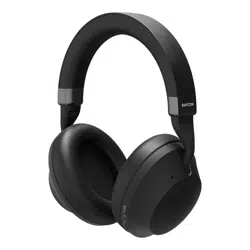
THE EVERYDAY HEADPHONES PRO
https://rayconglobal.com

01
02
03
04
05
06
INTRODUCTION
OVERVIEW ( FEATURES )
WHAT’S IN THE BOX
UNIT AT A GLANCE
FUNCTIONS
SOUND FEATURES
CONTENTS
07
07
08
09
USING YOUR HEADPHONES
Connecting via Bluetooth
Charging Your Device
LED Status
11
12
13
TROUBLESHOOTING / FAQ
COMPLIANCE & REGULATORY INFORMATION
SAFETY & WARRANTY
10
ADVANCED FEATURES (MULTIPOINT )

01
INTRODUCTION
https://rayconglobal.com
Introducing your new Everyday Headphones Pro – an audio companion as strong as you are.
At Raycon, we believe in creating innovative tech designed to embrace and empower your every
day. We’ve teamed up with expert engineers, leading taste-makers, and platinum artists to design
wireless audio you’ll love to use and every day tech that can take whatever life throws your way. We
believe in the early risers and the one-more-milers of the world. Premium audio, inspired by you.
To get the most out of your Everyday Headphones Pro, we strongly encourage you to fully read
through this user guide. You can also visit our support center at www.rayconglobal.com/support.
This web page has more specific guidelines and helpful videos for you to navigate your product.
For best performance, charge fully before first use.

https://rayconglobal.com
02
FEATURES AT A GLANCE
IMMERSIVE NOISE CONTROL
UNSTOPPABLE ENERGY
CRYSTAL CLEAR COMMUNICATION
VERSATILE CONNECTIVITY
• Dive into audio excellence with our most advanced noise cancellation yet: Hybrid
ANC oers superior noise isolation and enhanced Awareness mode allows for
amplified ambient sounds. Tailor your auditory experience to perfection, enjoying a
seamless blend of immersive audio and environmental awareness in any setting.
• The Everyday Headphones Pro redefine endurance with a remarkable 60-hour
playback (ANC o). Activate the immersive Hybrid ANC, and experience an
impressive 48 hours of uninterrupted audio pleasure. Whether on an extended
journey or maneuvering through a bustling day, these headphones ensure a seamless
and enduring audio experience tailored to your needs.
• Immerse yourself in pristine audio communication with Everyday Headphones
Pro, featuring a cutting-edge configuration of six high-performance microphones.
Whether you’re making calls, participating in virtual meetings, or engaging in
voice commands, these headphones are designed to elevate your communication
experience, ensuring crystal clear sound quality in any environment.
• Enhance your connectivity experience with headphones equipped with Multipoint
Technology. Seamlessly connect to both your laptop and phone simultaneously,
ensuring you stay connected and productive without missing crucial calls or emails.
Enjoy the flexibility to eortlessly switch between devices, providing a seamless
transition between work and leisure, all while enjoying your favorite audio content.
Hybrid ANC & Awareness Mode
60 Hours of Battery Life
Six High-Performance Microphones
Multipoint Technology
03
https://rayconglobal.com
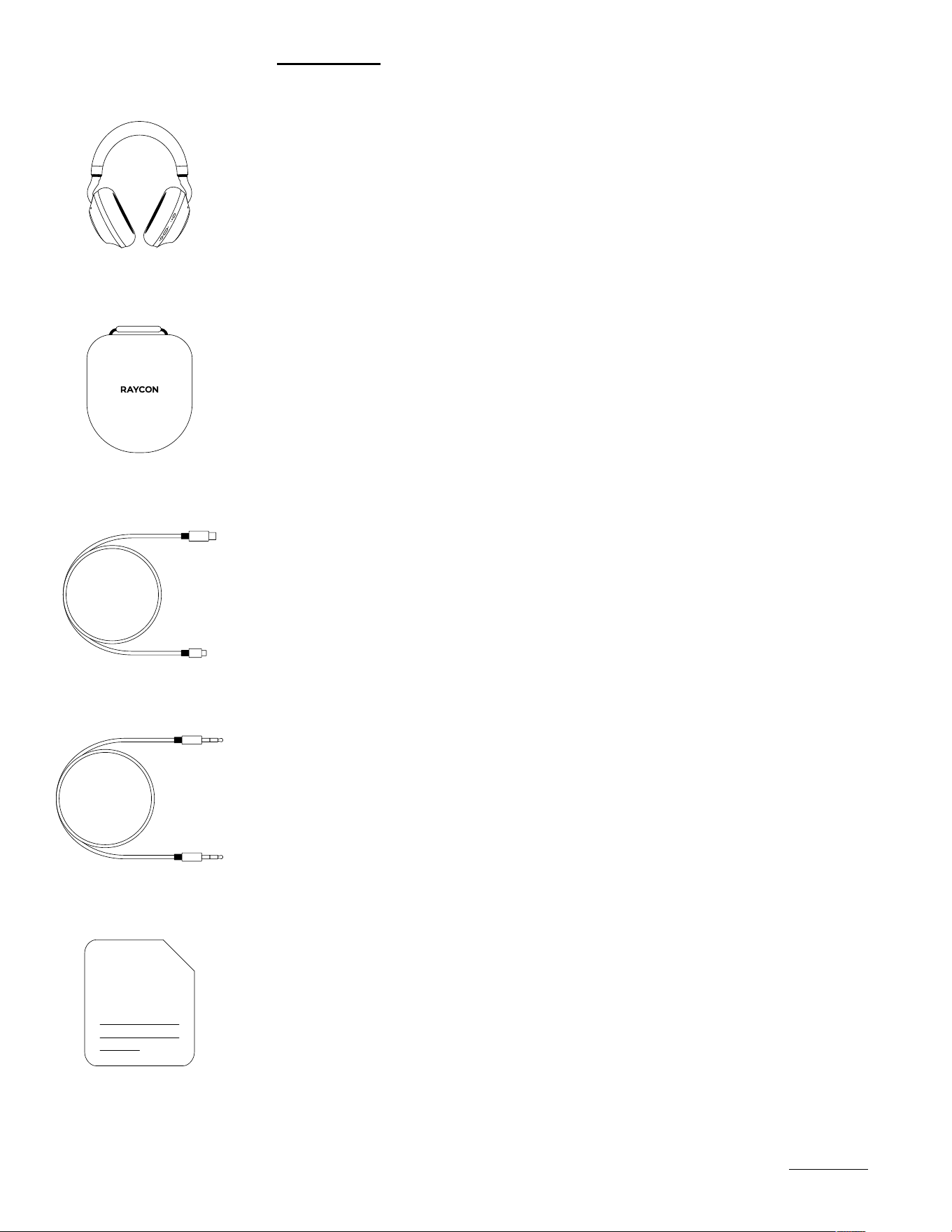
WHAT’S IN THE BOX
Raycon Everyday Headphones Pro
1.
Travel Case
2.
Auxiliary Cord
4.
USB to USB-C Charging Cable
3.
Quick Start Guide & Compliance Booklet
5.
https://rayconglobal.com
UNIT AT A GLANCE
04
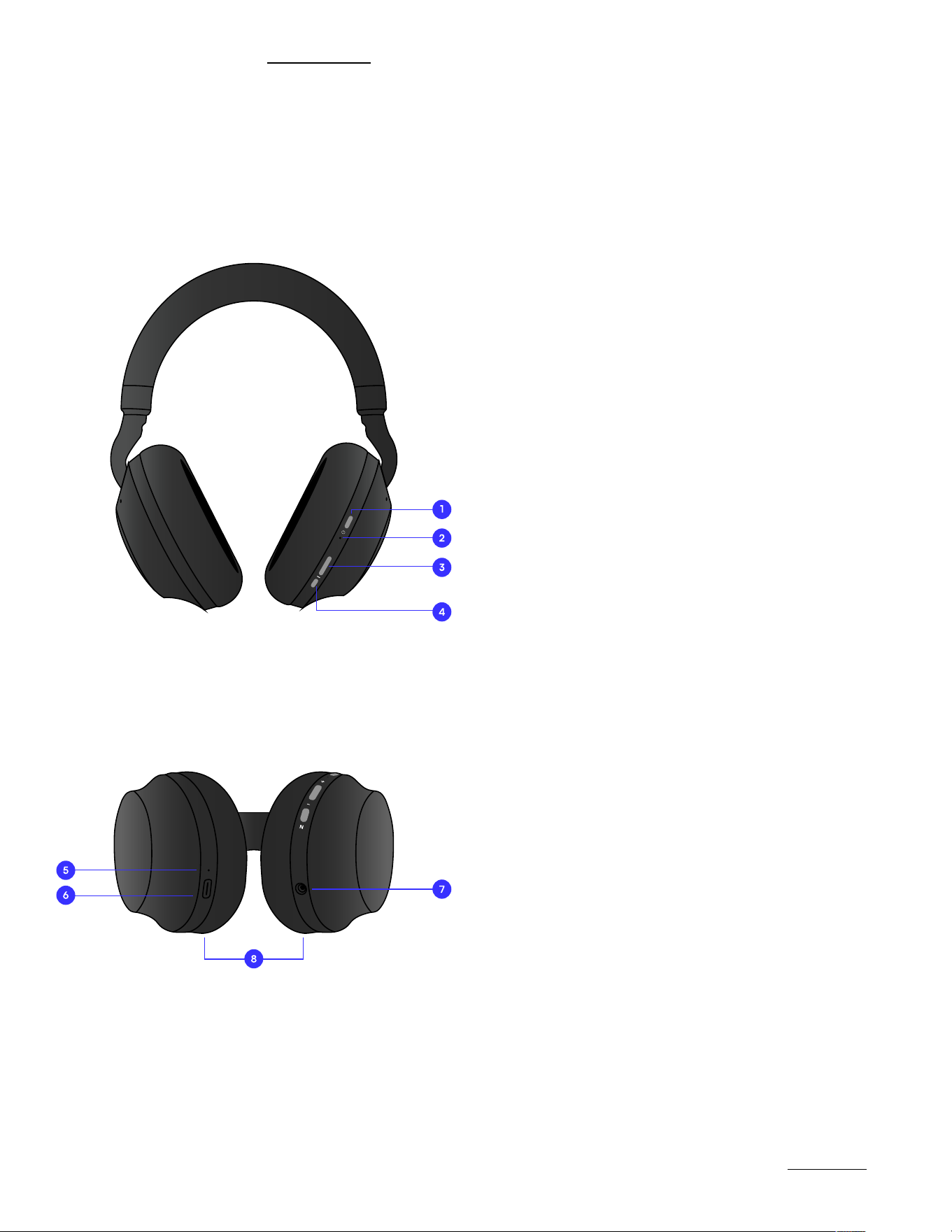
Charging LED Indicator
USB-C Charging Port
3.5mm Auxiliary Input
Ear Cushions
+
N
Power Button
Status LED Indicator
Volume Button
ANC/EQ Button
Charging LED Indicator
USB-C Charging Port
3.5mm Auxiliary Input
Ear Cushions
1.
5.
2.
6.
7.
8.
3.
4.
FUNCTIONS
https://rayconglobal.com
05
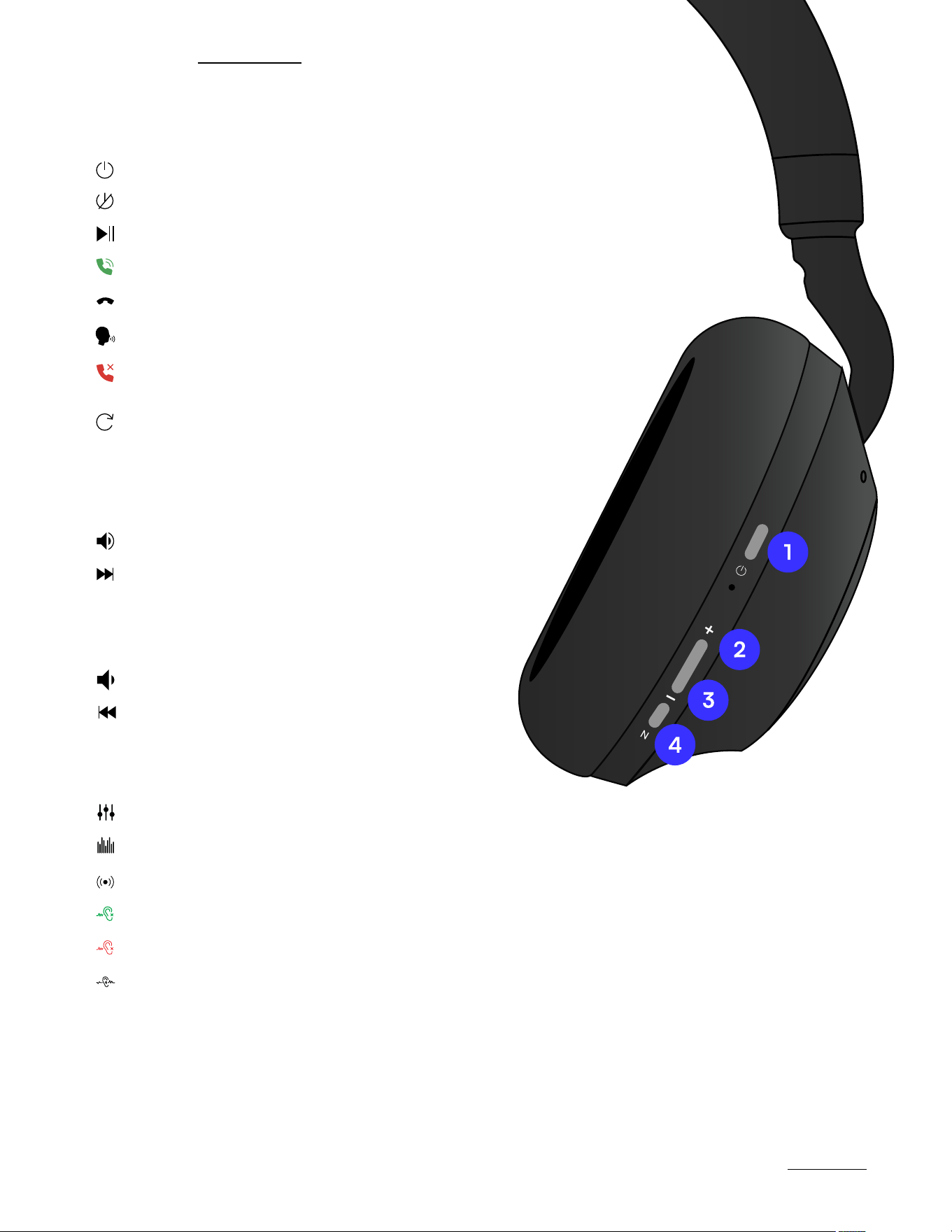
Tap Once
Hold for 2 Seconds
Volume Down
Previous Track
3.
VOLUME DOWN CONTROLS
Tap Once
Hold for 2 Seconds
Volume Up
Skip Track
2.
VOLUME UP CONTROLS
4.
ANC / EQ CONTROLS
Balanced Sound
Bass Sound
Pure Sound
Hold for 1.5 Seconds
Hold for 1.5 Seconds
Hold for 1.5 Seconds
ANC On
ANC O
Awareness Mode
Tap Once
Tap Once
Tap Once
1.
Hold for 3 Seconds
Hold for 5 Seconds until
indicator light flashes blue
Hold for 3 Seconds
Power On
Reset
Power O
Tap Once
Tap Twice
Answer Call
Tap Once
End Call
Voice Command
(While receiving a call)
Hold for 2 Seconds
Reject Call
Play/Pause Tap Once
POWER CONTROLS
+
N
SOUND FEATURES
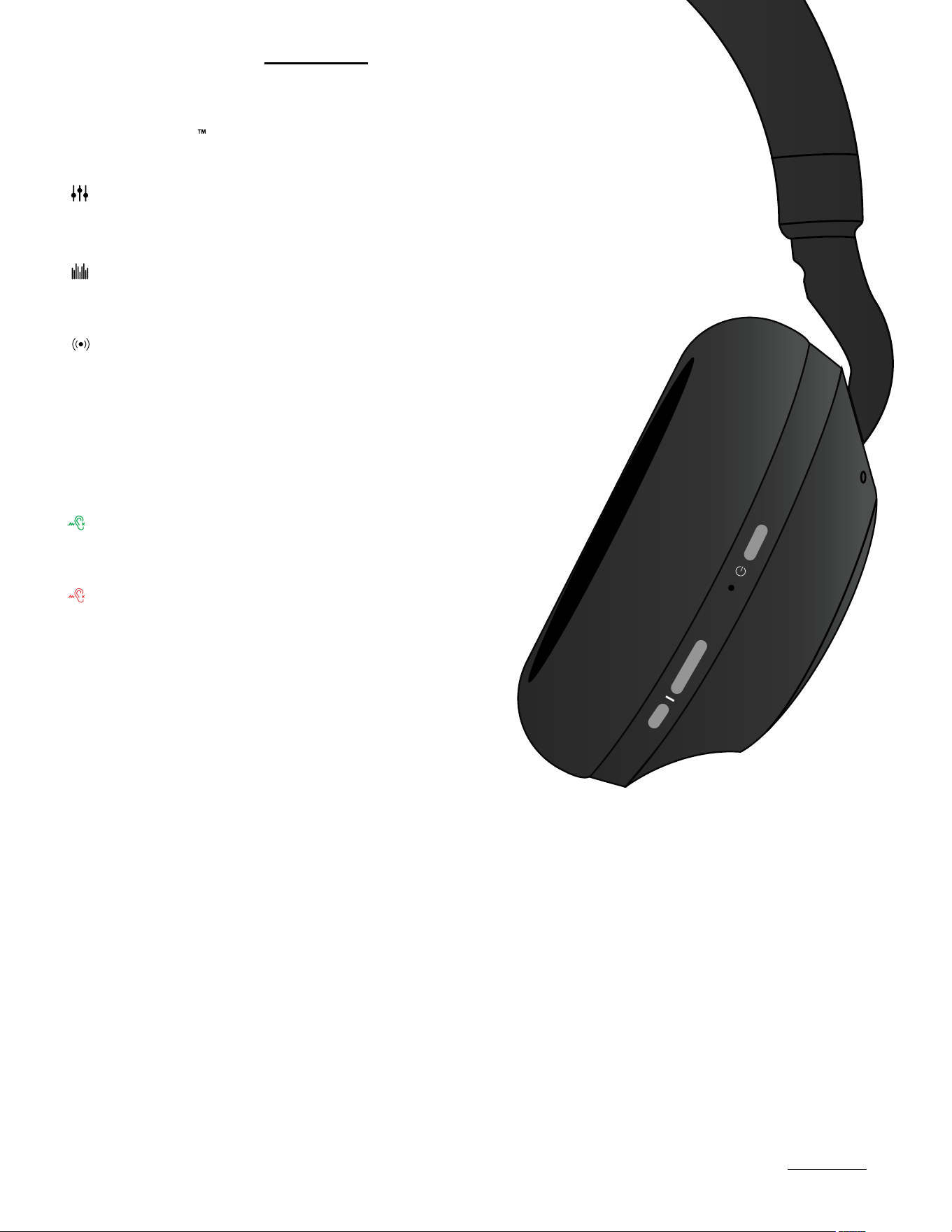
SOUND STYLES & ACTIVE NOISE CANCELLATION
Tap once to toggle between Noise Cancellation and
Awareness Mode
Balanced Sound: A leveled
sound that is great for all around
performance and warmth
Hybrid Active Noise Cancellation (ANC):
Uninterrupted focus by blocking out
unwanted noise
Awareness Mode: Enhance and stay
connected to the world around you
by amplifying external noise.
Bass Sound: Our bass boosted
sound, great for songs with strong
beats and a go-to for bass lovers.
Pure Sound: Our most refined
sound,perfect clarity to hear every
single note.
+
N
https://rayconglobal.com
06
USING YOUR HEADPHONES
https://rayconglobal.com
07
CONNECTING VIA BLUETOOTH
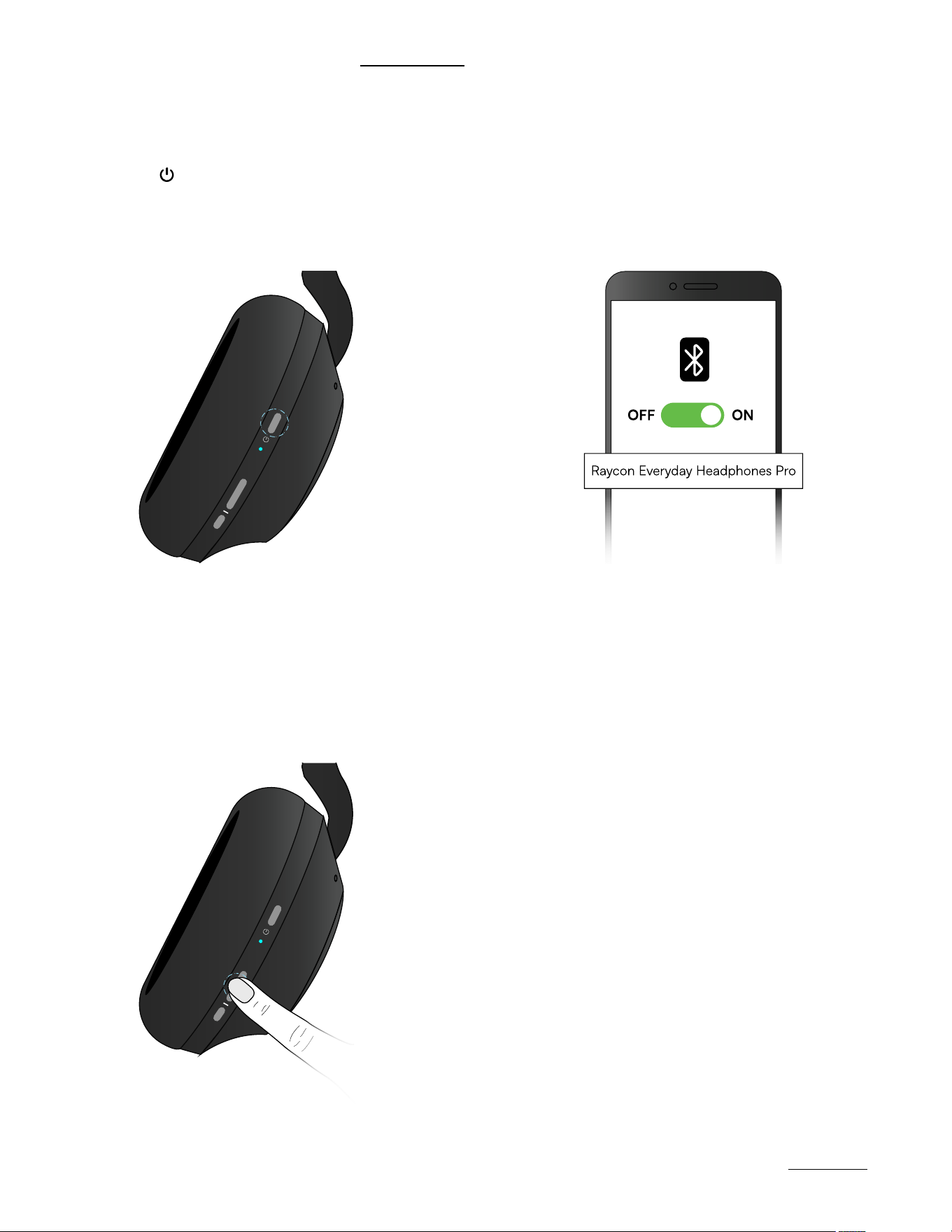
Hold “ ” for 3 seconds to power
on. Headphones will enter pairing
mode automatically.
1.
From the source device, go to Bluetooth settings
and ensure Bluetooth is on. Search for “Raycon
Everyday Headphones Pro” and select it to pair.
2.
+
N
3.
To re-enter pairing mode, either press and hold the power button during startup until the
prompt is heard, or simultaneously press and hold Volume Up and Down for 5 seconds until
the device powers down, disconnecting from any connected device(s).
+
N
CHARGING YOUR DEVICE
https://rayconglobal.com
08
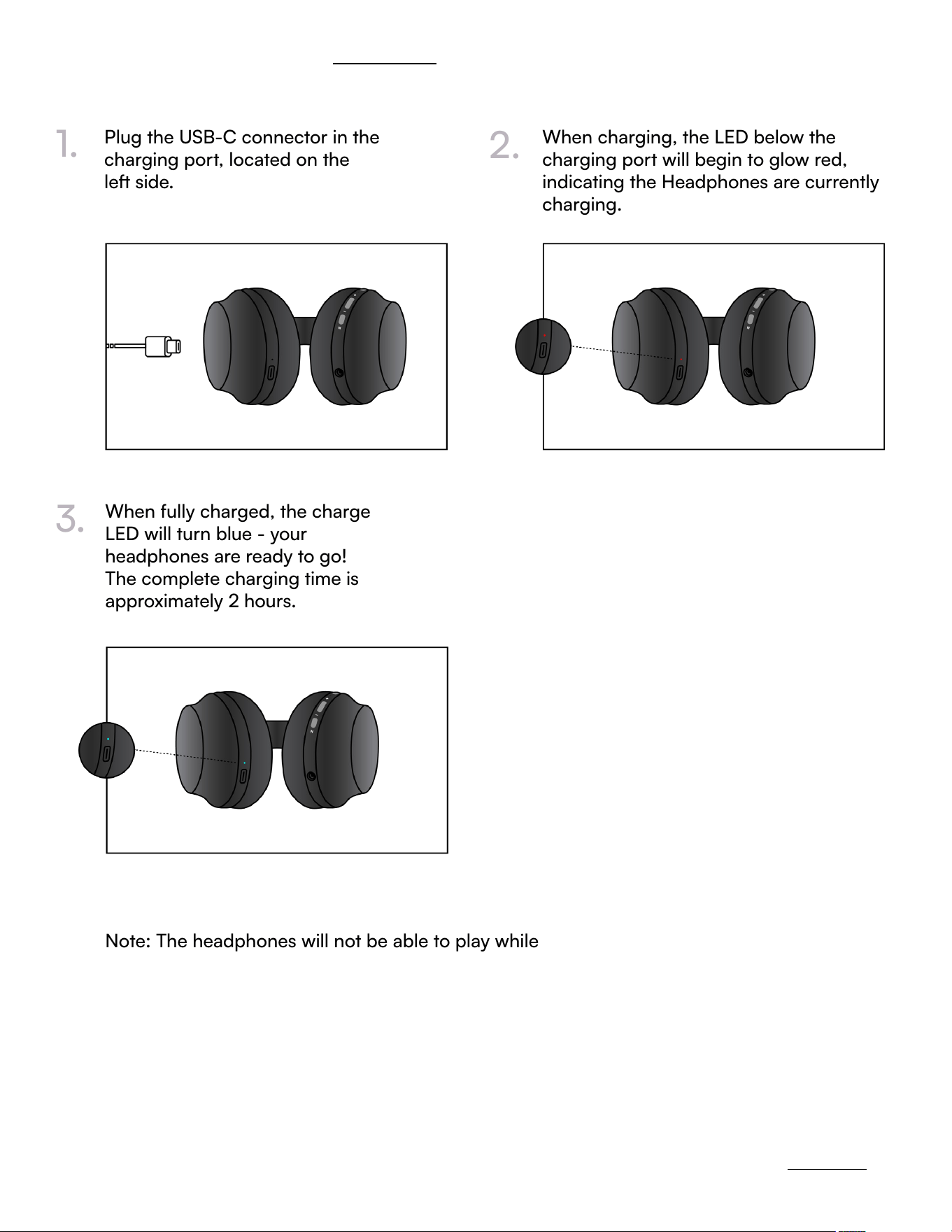
Plug the USB-C connector in the
charging port, located on the
le side.
When charging, the LED below the
charging port will begin to glow red,
indicating the Headphones are currently
charging.
1.
2.
When fully charged, the charge
LED will turn blue - your
headphones are ready to go!
The complete charging time is
approximately 2 hours.
Note: The headphones will not be able to play while charging.
3.
LED STATUS
https://rayconglobal.com
09
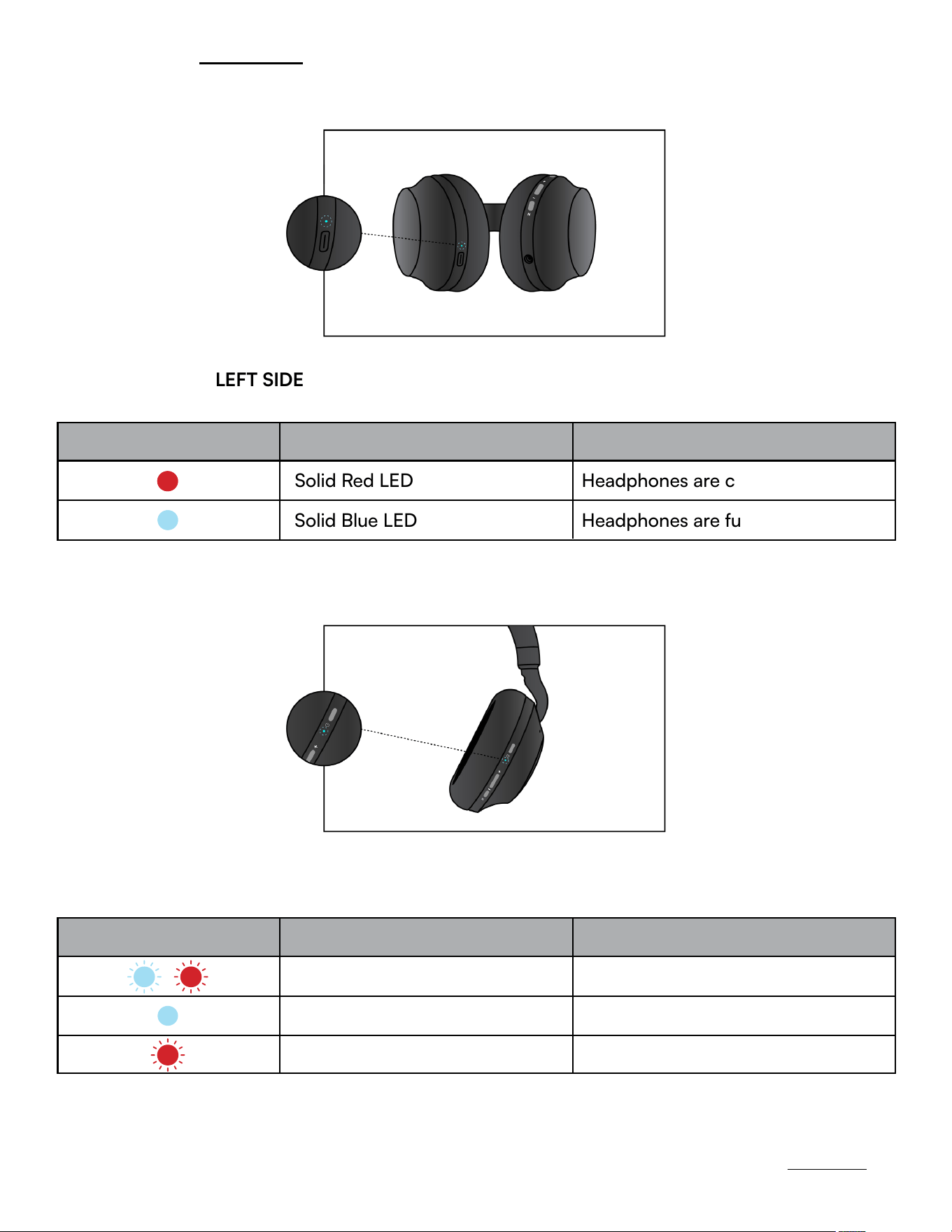
CHARGING LED - LEFT SIDE
STATUS MEANING
LED INDICATION
Solid Red LED
Solid Blue LED
Headphones are charging
Headphones are fully charged
PAIRING LED - RIGHT SIDE
Blinking Red LED Headphones are low in power
STATUS MEANING
LED INDICATION
Alternating Blue and Red Lights
Solid Blue LED
Headphones are in Pairing Mode
Headphones are connected
CHARGING LED - LEFT SIDE
STATUS MEANING
LED INDICATION
Solid Red LED
Solid Blue LED
Headphones are charging
Headphones are fully charged
ADVANCED FEATURES
https://rayconglobal.com
MULTIPOINT
WHAT IS MULTIPOINT?
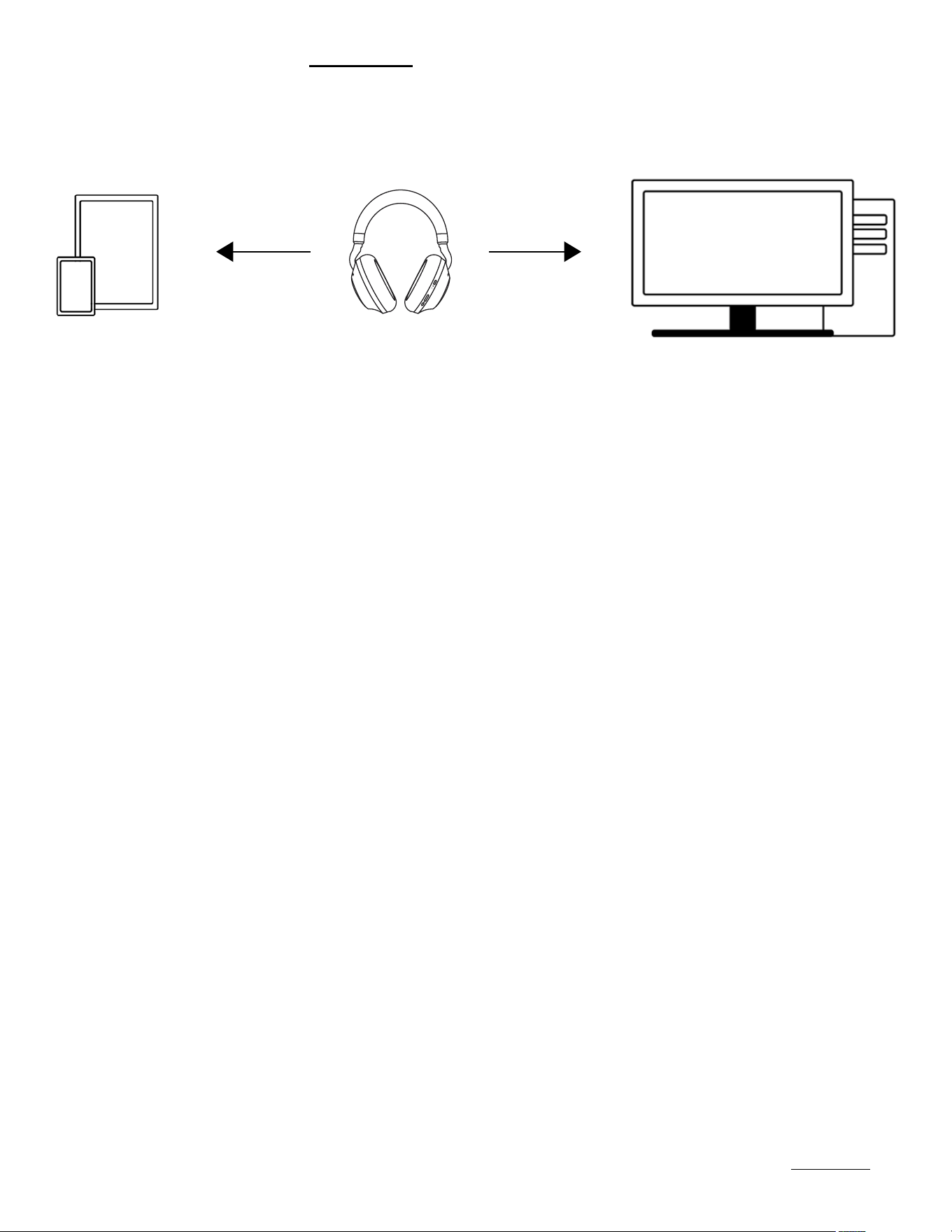
Multipoint allows you to connect your headphones to up to two devices simultaneously, such as
your smartphone, laptop, or tablet - the combinations are endless! This means you can easily switch
between devices without having to disconnect and reconnect each time. Once you have paired your
Everyday Headphones Pro with both devices, they will automatically switch to whichever device
is playing audio. With Multipoint, you can connect your headphones to both your phone and your
laptop, allowing you to easily switch between your workout playlist and work calls without any
interruptions.
To use this feature, make sure both devices are within the Bluetooth range and have Bluetooth
enabled.
Pair the headphones
with your first device
(e.g. your smartphone).
The headphones
will now be able to
connect to both of
your devices when
turned back on.
Disconnect the headphones
from your first device using
the Bluetooth settings on the
device. The headphones will
re-enter Pairing Mode.
Pair the headphones
with your second
device (e.g. your
laptop) via its
Bluetooth settings.
HOW DO YOU SET-UP MULTIPOINT?
1.
4.
2.
3.
10

TROUBLESHOOTING / FAQ
https://rayconglobal.com
HEADPHONES WON’T POWER ON?
HEADPHONES WILL NOT CHARGE?
HEADPHONES HAVE NO SOUND WHEN CONNECTED TO A DEVICE(S)?
• Check that the battery is fully charged - the LED near the charging port will glow red
indicating the headphones are charging
• Ensure you are using the correct cable - to avoid issues, use the provided cable to
charge your Everyday Headphones Pro.
• Verify that the power source is sucient (wall charger is preferred).
• Ensure the headphones is within 10 meters (33 feet) of the connected Bluetooth device.
• Check the battery level: If the battery level of either the headphones or your connected
device is low, it can cause the connection to be weak or to drop.
• Reconnect your headphones by either turning them o and turning them back on or
forgetting the Everyday Headphones Pro from your device and re-pair.
HEADPHONES HAVE NO SOUND WHEN CONNECTED BY 3.5MM AUDIO AUX CABLE?
MULTIPOINT IS NOT WORKING?
HOW DO I CLEAN THE EAR CUSHIONS?
• Check the volume level of the connected device, the music source, and the headphones.
• Ensure that the line connecting the device and the headphones is intact and securely
connected.
• Confirm headphones are charged and that they are disconnected from any
Bluetooth device.
• Confirm headphones are in pairing mode and reconnect devices to Bluetooth.
• Remove the Ear Cushions from the headphones before cleaning - do not wash/clean
while they are on the headphones.
• PU Leather Cushions: Hand wash only with soapy water / damp cloths, and avoid using
harsh chemicals
• Do not allow moisture to get inside the earcups.
11

SAFETY & WARRANTY
https://rayconglobal.com
PRODUCT SPECIFICATIONS
Model: RBH890
Pairing Name: Raycon Everyday Headphones Pro
Bluetooth Version: 5.1
Power Input: DC 5V/A
Li-Battery Capability: 600mAh
Bluetooth Playtime: 60 hours
Charging Time: About 2 hours
Support Profile: A2DP /AVRCP/HFP/HSP
Frequency Response: 20Hz-20KHz
Bluetooth Operating Range: ≤ 10 m
LIMITED WARRANTY
Your Everyday Headphones Pro is covered by a limited warranty. Please visit our website at
www.rayconglobal.com/warranty for more details.
SUPPORT
If your device is not functioning properly, please visit www.rayconglobal.com/support for
customer support, and we will be more than happy to help you.
SAFETY GUIDELINES
• Be wary of any edges, uneven surfaces, and metal parts, including on accessories and
product packaging, to prevent any possible injury or damage.
• Listen to music at a proper volume to avoid damaging your hearing and headphones.
• Do not store in high temperatures, such as in a hot vehicle or in direct sunlight.
• Do not expose the headphones or any of its supplied parts to rain or other liquids for
extended periods of time.
• Do not drop or cause undue impact to the headphones.
• Do not modify, repair, or dismantle the product on your own.
• Do not use any diluent or volatile liquid to clean the product.
• Do not use the product in a hazardous location.
12

13
COMPLIANCE & REGULATORY INFORMATION
https://rayconglobal.com
FCC WARNING
This device complies with Part 15 of the FCC Rules. Operation is subject to the following two
conditions:
• This device may not cause harmful interference, and
• The device must accept any interference received, including interference that may cause
undesired operation. Any changes or modifications not expressly approved by the party
responsible for compliance could void the user’s authority to operate the device.
NOTE: This equipment has been tested and found to comply with the limits for a Class B
digital device, pursuant to Part 15 of the FCC Rules. Those limits are designed to provide
reasonable protection against harmful interference in a residential installation. This equipment
generates, uses, and can radiate radio frequency energy and, if not installed and used in
accordance with the instructions, may cause harmful interference to radio communications.
However, there is no guarantee that interference will not occur in a particular installation.
If this equipment does cause harmful interference to radio or television reception, which can be
determined by turning the equipment o and on, the user is encouraged to try to correct the
interference by one or more of the following measures.
• Reorient or relocate the receiving antenna.
• Increase the separation between the equipment and receiver.
• Connect the equipment into an outlet on a circuit on a circuit dierent from that to which
the receiver is connected.
• Consult the dealer on an experienced radio/TV technician for help. The device has been
evaluated to meet general RF exposure statements. The device can be used in portable
exposure conduction without restriction.
IC WARNING
RF EXPOSURE STATEMENT:
This device contains license-exempt transmitter(s)/receiver(s) that
complies with Innovation, Science and Economic Development Canada’s licence-exempt
RSS(s). Operation is subject to the following two conditions:
The device has been evaluated to meet general RF exposure requirement. The device can be
used in portable exposure condition without restriction.
• This device may not cause interference.
• This device must accept any interference, including interference that may cause undesired
operation of the device.