EN
Quick guide
1
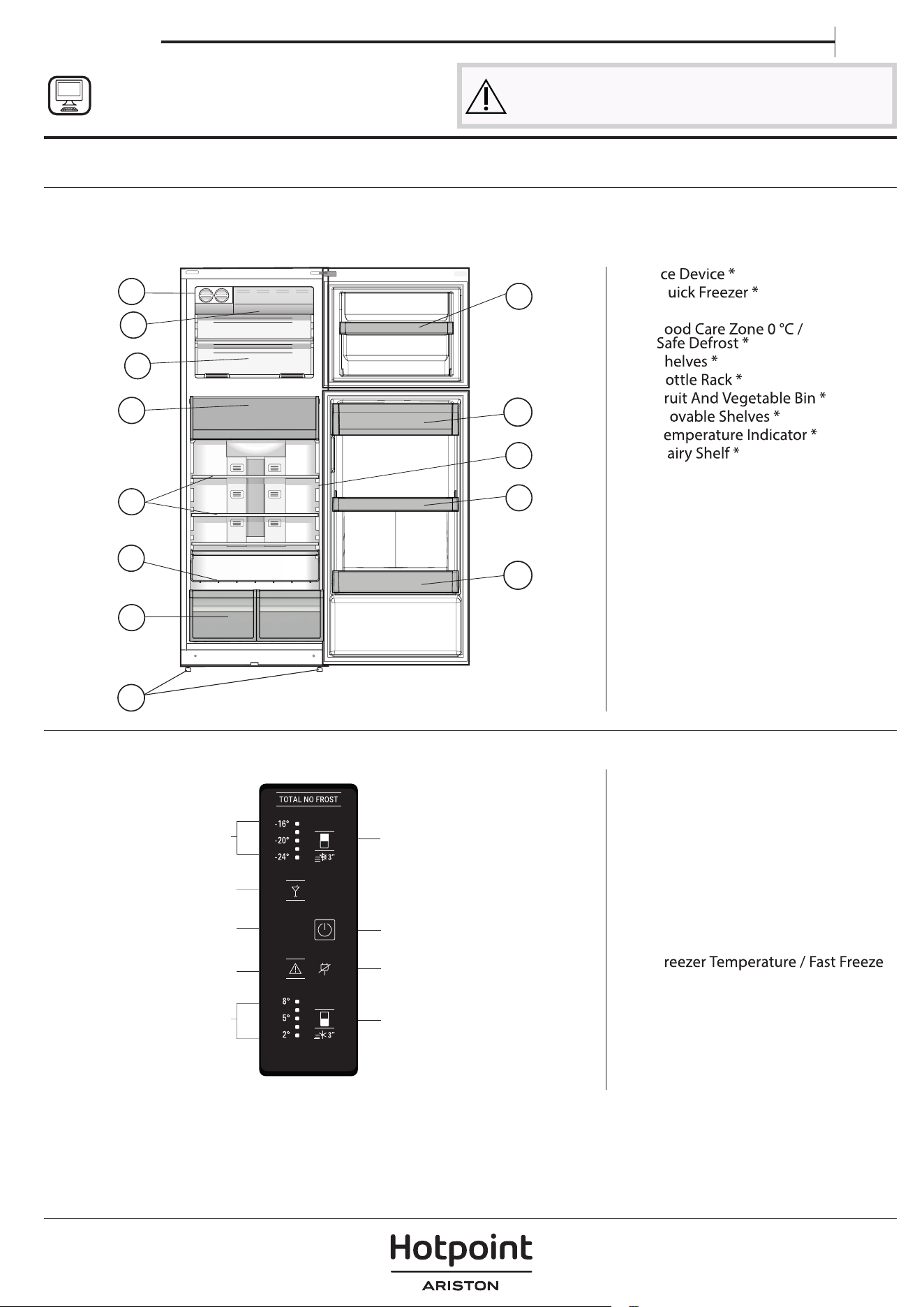
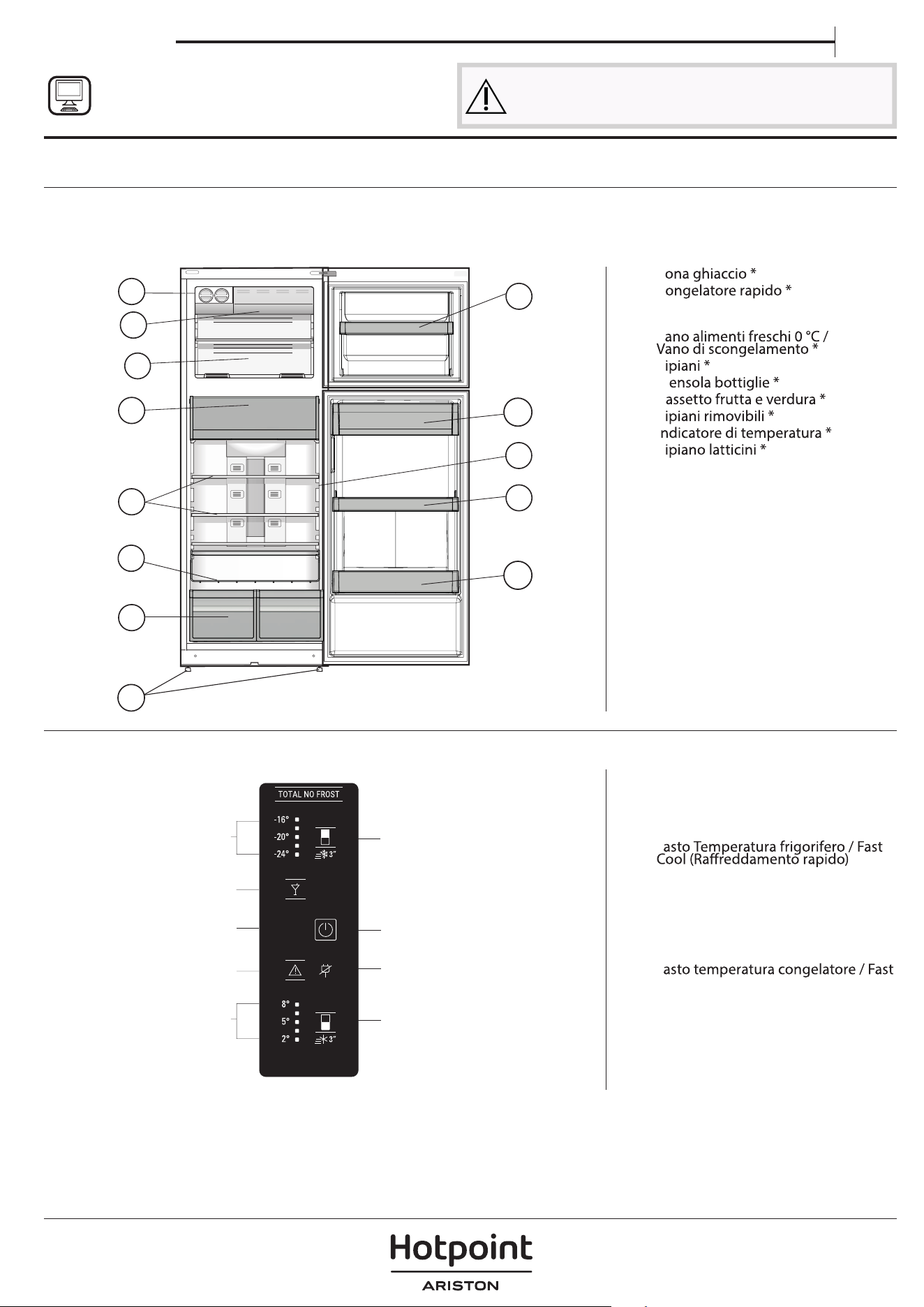
1. ON/STANDBY Indicator and Button
2. Black Out Alarm Long Black-Out
Alarm Indicator
(see the below Alarm Table)
3. Fridge Temperature / Fast Cool
button
4. Fridge Temperature Leds
5. Stop Alarm Button
(see the below Alarm Table)
6.
7.
Vacation (Holiday) Mode
8.
Freezer Temperature Leds
F
button
Before using the appliance carefully read the Safety
Instruction.
PRODUCT DESCRIPTION
APPLIANCE
CONTROL PANEL
1. I
2. Q
3. Freezer And Storage Compartment
4. F
5. S
6. B
7. F
8. M
9. T
10. D
11. Bottle Shelf
12. Levelling Feet
* Varies by number and/or position,
available only on certain models.
4
11
10
1
2
3
5
7
8
8
12
9
6
1
2
3
8
5
6
9
4
7
* Available only on certain models
THANK YOU FOR BUYING A
HOTPOINT-ARISTON PRODUCT
In order to receive a more complete assistance, please
register your product on
www.hotpoint.eu/register
2
ACCESSORIES
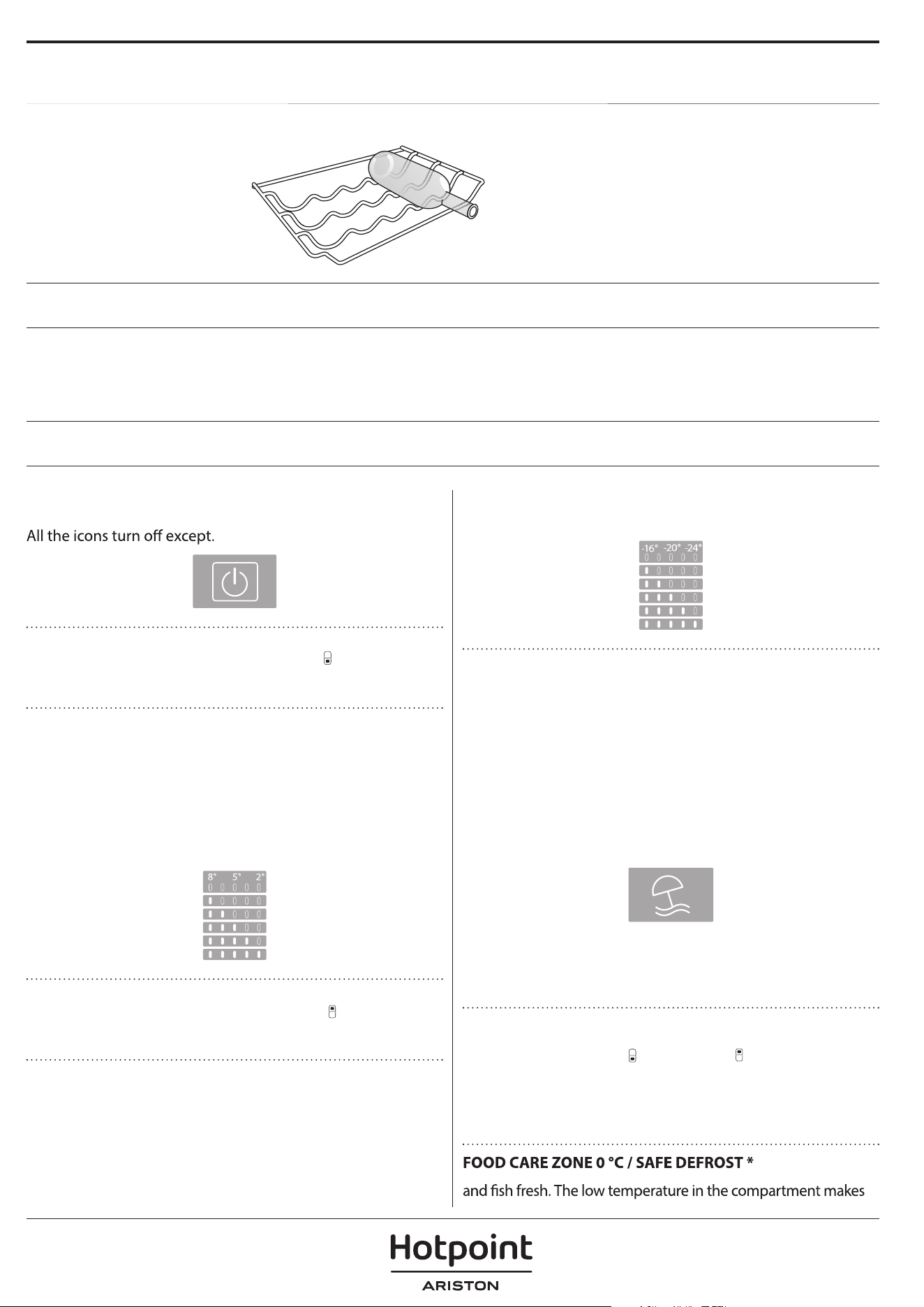
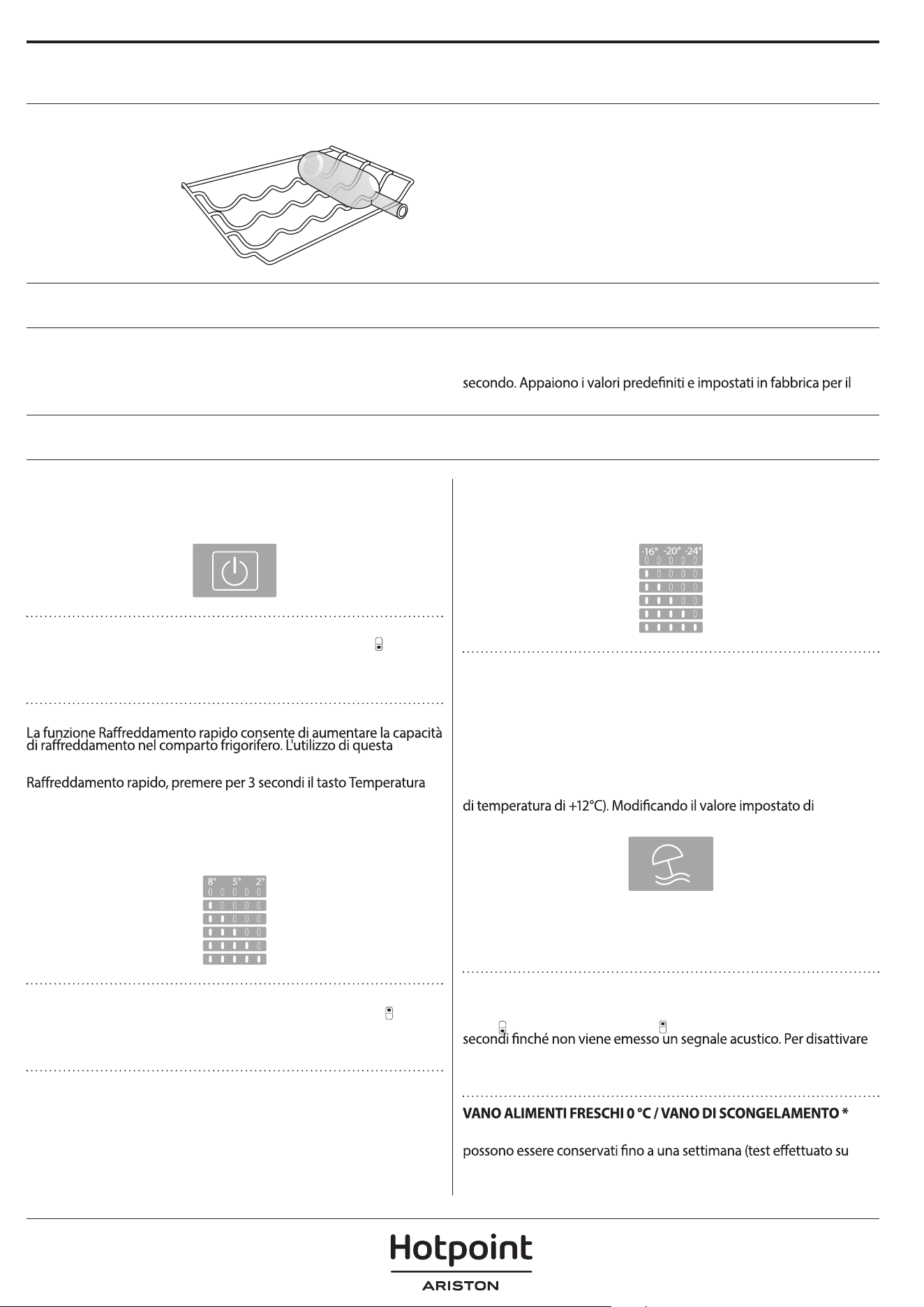
BOTTLE RACK
FIRST TIME USE
HOW TO START THE APPLIANCE
After plugging the appliance to the mains, it starts the
operation automatically. After starting the appliance, wait at
least 4-6 hours before placing food into the fridge and into
the freezer compartment.
When the appliance is connected to the power supply, the
display lights up and all the icons appear on the display for
approximately 1 second. The default (factory) values of the
fridge - freezer compartment settings light-up.
DAILY USE
FUNCTIONS
ON/STANDBY INDICATOR /BUTTON
To put the product in Stand-by, press and hold for 3 seconds.
FRIDGE TEMPERATURE
To adjust the Fridge Temperature, press the
Fridge °C
button. The Fridge Temperature can be adjusted between
+2°C and + 8°C, as shown by the Fridge Temperature LEDs.
FAST COOL
Using Fast Cool function it is possible to increase the cooling
in the refrigerator compartment. The use of this function is
recommended when placing a very high quantity of food
in the refrigerator compartment. Press & hold for 3 sec.
the Fridge °C button to activate Fast Cool function. When
activated, the Fast Cool indication will be displayed by the
Fridge Temperature LEDs as shown in the beside sequence.
The function is automatically disabled after 6 hours, or can be
manually disabled by pressing Fridge °C button.
FREEZER TEMPERATURE
To adjust the Freezer Temperature, press the
Freezer °C
button. The Freezer Temperature can be adjusted between
-16°C and -24°C, as shown by the Freezer Temperature LEDs.
FAST FREEZE
The use of this function is recommended when placing a very
high quantity of food to be frozen in the freezer compartment.
24 hours before freezing fresh food, press & hold for 3 sec.
the Freezer button to activate the Fast Freeze function. When
activated, the Fast Freeze indication will be displayed by the
Freezer Temperature LEDs as shown in beside sequence.
After 24 hours place the food to be frozen in the upper
basket of freezer compartment. The function is automatically
disabled after 48 hours, or can be manually disabled by
pressing Freezer °C button.
VACATION BUTTON
This function can be activated to reduce the energy
consumption of the appliance during a prolonged period of
time. Before activating the feature, all perishable food should
be removed from the refrigeration compartment and make
sure that the door is closed properly, since the refrigerator
will maintain a suitable temperature to prevent the formation
of unpleasant odors (+12°C). To activate/ deactivate
press the Vacation mode button for 3 seconds. When the
function is enabled, the related symbol will light up and the
temperature of the refrigerator compartment will be set to a
higher setpoint (the temperature display will show the new
temperature setpoint of +12°C). Changing the temperature
setpoint will automatically deactivate the function.
SMART DISPLAY
This optional function can be used to save energy. To activate
the Smart Display, press
Fridge °C and Freezer °C buttons
at the same time for 3 seconds until an audible signal sounds.
To deactivate this function repeat the same procedure.
Remember that this function does not disconnect the
appliance from the power supply, but only reduce the power
consumed by external display.
A compartment designed to keep delicate food such as meat
See Use and Care Guide for more details on functions / see last
page for information on how to obtain the Use and Care Guide
* Available only on certain models
3
EN
it possible to store the food for up to one week - tests performed
on meat products - without changing its nutrients, appearance
food defrosting, as low-temperature defrosting prevents any
proliferation of microorganisms, while protecting its taste and
organoleptic properties. It is not suitable for fruit, vegetables and
cooked food or leftovers.
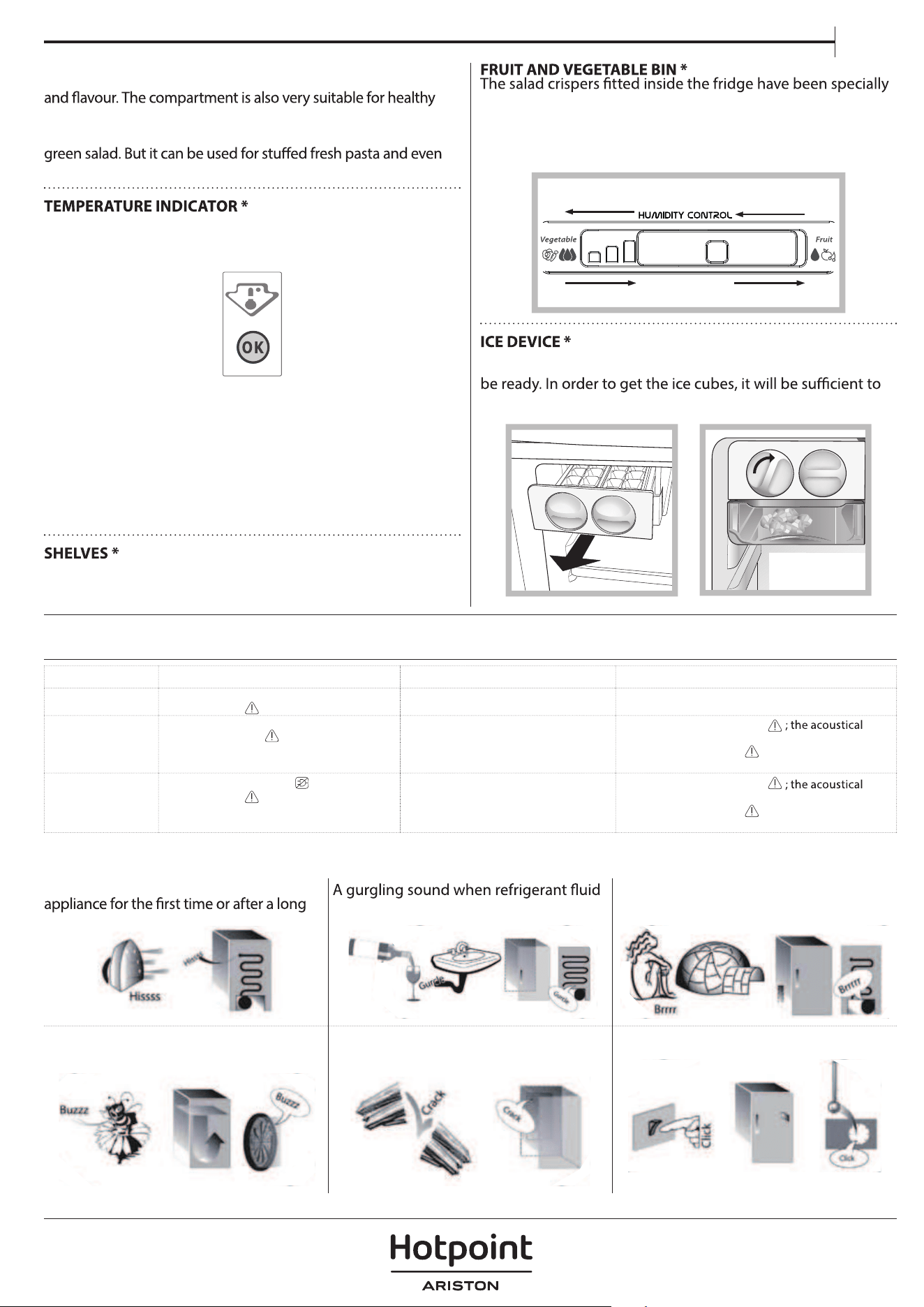
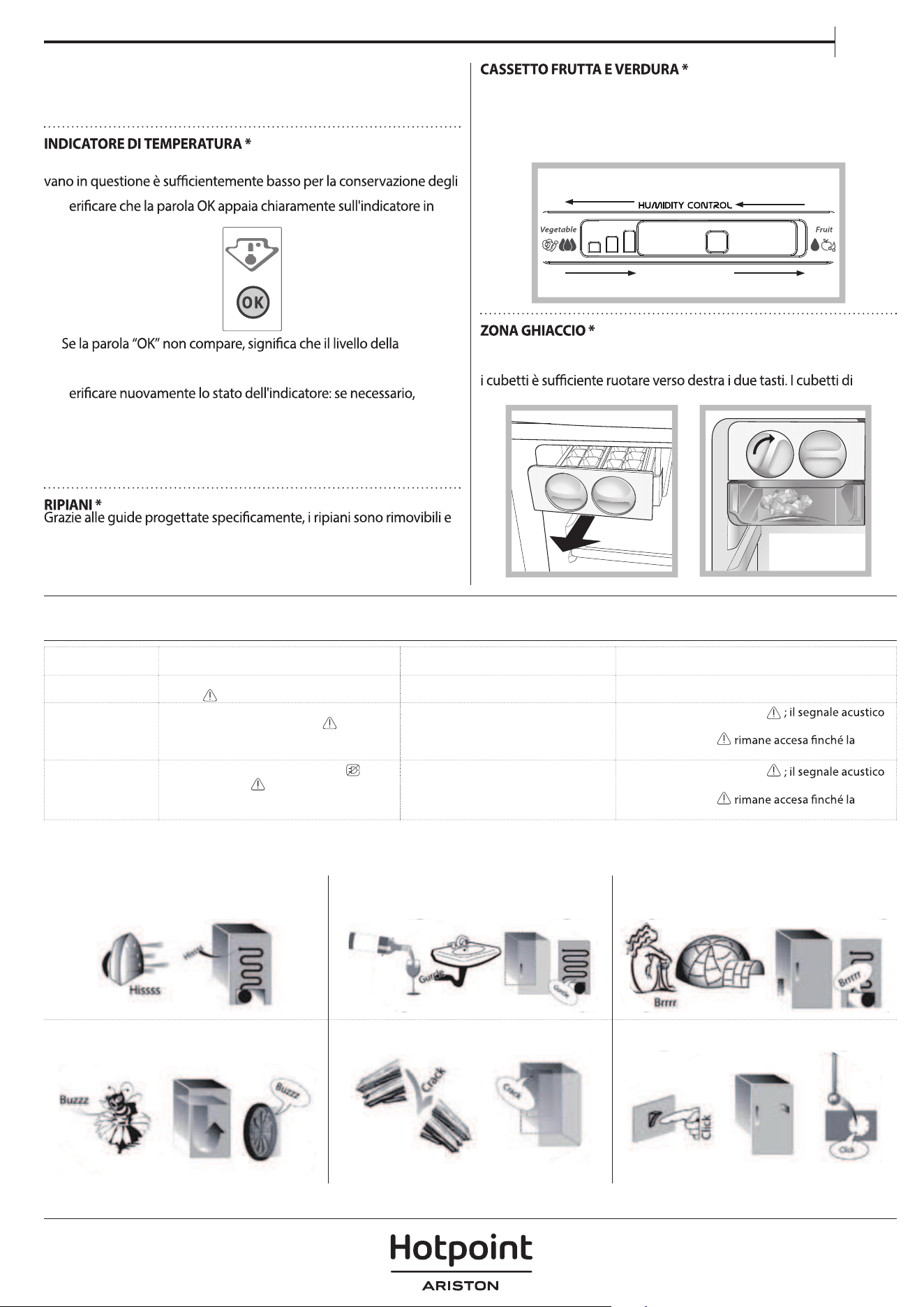
Temperature indicator informs you if the temperature in this
cavity is cold enough for storage with the word “OK”.
1. Check that OK appears clearly on the indicator light (see
the picture below).
2.
If the word “OK” does not appear it means that the
temperature is too high: set a lower temperature and wait
approximately 10 hours until the temperature has been
stabilised.
3. Check the indicator light again: if necessary, readjust it
following the initial process. If large quantities of food have
been added or if the refrigerator door has been opened
frequently, it is normal for the indicator not to show OK.
Wait at least 10 hours before adjusting the REFRIGERATOR
OPERATION knob to a higher setting.
Due to the special guides the shelves are removable and the
height is adjustable, allowing easy storage of large containers
and food.
designed for the purpose of keeping fruit and vegetables
fresh and crisp. Open the humidity regulator (position B)
if you want to store food in a less humid environment like
fruit, or close it (position A) to store food in a more humid
environment like vegetable.
A
B
A
B
After pouring water in the special ice cups, place them in their
places in the ice device. After about 2 hours, the ice cubes will
turn the two buttons to the right. The ice cubes will fall in to
the tray below, ready to be used.
ALARM TABLE
ALARM TYPE SIGNAL CAUSE SOLUTION
Door open alarm The acoustical alarm is activated and the
Alarm Indicator blinks.
The door has remained open for more
than 2 minutes.
Close the door or press the Stop Alarm to mute the
acoustical alarm.
Temparature Alarm The Temperature LEDs display blinks (°C) and
the Alarm Indicator
remains on.
The inside freezer temperature is not
adequate.
Press the Stop Alarm button
alarm stops, the Temperature Display (°C) blinks
and the Alarm Indicator remains on until a
temperature < -10°C is reached.
Long Black-Out
alarm
The Black Out Alarm icon
remains on, the
Alarm indicator blinks
Prolonged power failure, able to cause
the inside temperature to increase to
0°C.
Press the Stop Alarm button
alarm stops, the Temperature Display (°C) blinks
and the Alarm Indicator remains on until a
temperature < -10°C is reached.
SOME OF THE FUNCTIONAL SOUNDS
YOU MIGHT HEAR
A hissing sound when switching on the
pause.
enters into the pipes.
BRRR sound is from the compressor
running.
Buzzing sound when water valve or fan
start working.
A cracking sound when compressor
starts.
The CLICK is from the thermostat which
adjusts how often the compressor is running.
* Available only on certain models
4
HOW TO STORE FOOD
AND BEVERAGE
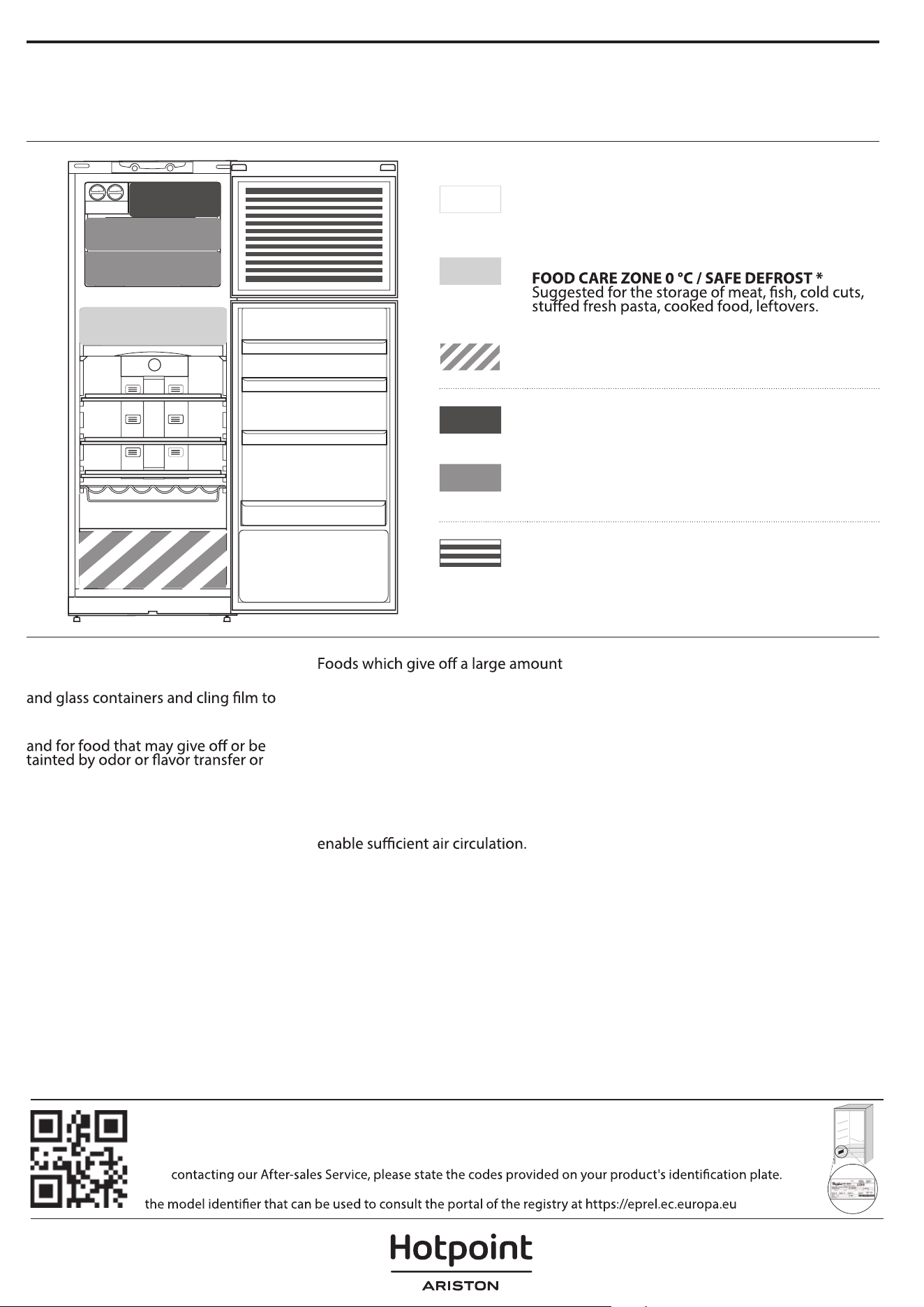
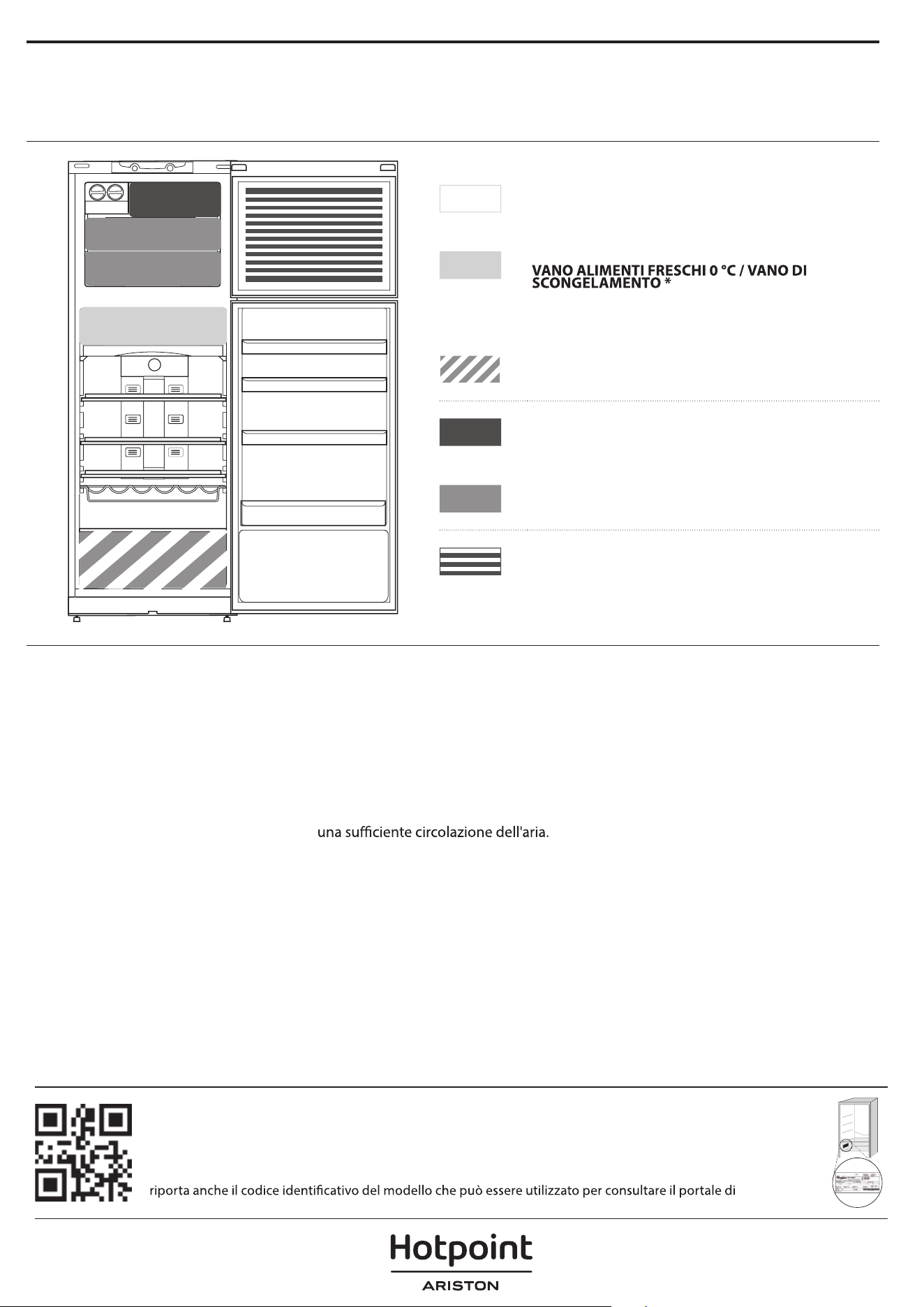
Legend
COOL ZONE
Suggested for the storage of beverage, milk and
food as dairy food, delicatessen, yogurt, eggs,
butter, sauces, pickles, desserts
COOLER ZONE:
This zone is also suggested for food defrosting.
FRUIT & VEGETABLE DRAWER
FAST FREEZING ZONE DRAWER
Max cool zone suggested to freeze fresh food and
cooked food.
NORMAL FREEZER DRAWERS
Suggested for the storage of frozen food and ice
cream.
ICE CREAM LOADING IN THE BALCONIES AREA
Note: The Grey tone of the legend doesn’t match with
the color of drawers
FRIDGE COMPARTMENT
Use recyclable plastic, metal, aluminum
wrap foods.
Always use closed containers for liquids
cover them.
If you have a little quantity of food to
store in the refrigerator, we recommend
to use the shelves above the crisper for
fruits and vegetables since this is the
coolest area of the compartment.
ethylene gas and those that are
sensitive to this gas, such as fruit,
vegetables and salad, should always
be separated or wrapped so as not to
reduce the storage life; for example do
not store tomatoes together with kiwi
fruits or cabbage.
To avoid bottles falling over, you can
use the bottle holder (available on
selected models).
Do not store food too close together to
FREEZER COMPARTMENT
The freezer is the ideal storage location
for store frozen food, make ice cubes
and freeze fresh food in the freezer
compartment.
The maximum number of kilograms
of fresh food that can be frozen within
a 24-hour period is indicated on the
rating plate (…kg/24h).
If you have a little quantity of food to
store in the freezer, we recommend to
use the coldest areas of your freezer
compartment, corresponding to the
middle area.
* Available only on certain models
Policies, standard documentation and additional product information can be found by:
• Visiting our website
docs.hotpoint.eu
• Using QR Code
• Alternatively,
contact our After-sales Service (See phone number in the warranty booklet). When
The model information can be retrieved using the QR-Code reported in the energy label. The label also includes
5897110403
IT
Guida rapida
1
1. Spia e tasto On/Standby
2. Allarme Black Out/Spia di allarme
Black Out prolungato
(vedere la Tabella allarmi sotto
riportata)
3. T
4. Led di temperatura frigorifero
5. Tasto di Fine allarme
(vedere la Tabella allarmi sotto
riportata)
6.
7.
Vacation (modalità vacanza)
8.
LED temperatura congelatore
T
Freeze (Congelamento rapido)
Prima di utilizzare l'apparecchio leggere attentamente le
istruzioni di sicurezza.
DESCRIZIONE PRODOTTO
APPARECCHIO
PANNELLO DI CONTROLLO
1. Z
2. C
3. Comparto congelamento e
conservazione
4. V
5. R
6. M
7. C
8. R
9. I
10. R
11. Balconcino bottiglie
12. Piedini di regolazione altezza
* Varia a seconda di numero e/o posizione,
disponibile soltanto su determinati modelli.
4
11
10
1
2
3
5
7
8
8
12
9
6
1
2
3
8
5
6
9
4
7
* Disponibile solo su alcuni modelli
GRAZIE PER AVER ACQUISTATO
UN PRODOTTO HOTPOINT - ARISTON
Per ricevere un'assistenza più completa, registrare il
prodotto su
www.hotpoint.eu/register
2
ACCESSORI
MENSOLA BOTTIGLIE
PRIMO UTILIZZO
ACCENSIONE DELL'APPARECCHIO
L'apparecchio si avvia in modo automatico, una volta collegato alla
rete di alimentazione. Dopo avere acceso l'apparecchio, attendere
almeno 4-6 ore prima di introdurre alimenti nei comparti frigorifero e
comparto congelatore.
Quando l'apparecchio viene collegato all'alimentazione elettrica, il
display si illumina e tutte le icone appaiono sul display per circa 1
comparto frigorifero - congelatore.
USO QUOTIDIANO
FUNZIONI
TASTO/SPIA ON/STANDBY
Per impostare l'apparecchio in standby, tenere premuto il tasto per 3
secondi. Tutte le icone si spengono eccetto.
TEMPERATURA DEL FRIGORIFERO
Per regolare la temperatura del frigorifero, premere il tasto
Temperatura frigorifero. La temperatura del comparto frigorifero
può essere regolata tra +2°C e +8°C, come mostrato dai LED
corrispondenti.
FAST COOL (RAFFREDDAMENTO RAPIDO)
funzione è raccomandato qualora si collochi all'interno del comparto
frigorifero una grande quantità di alimenti. Per disattivare la funzione
frigorifero. L'attivazione di questa funzione è segnalata dai LED di
temperatura del comparto frigorifero, come si vede nella sequenza qui
a lato.
La funzione viene disattivata automaticamente dopo 6 ore, oppure
è possibile disattivarla manualmente premendo il tasto Temperatura
frigorifero.
TEMPERATURA DEL CONGELATORE
Per regolare la temperatura del congelatore, premere il tasto
Temperatura congelatore. La temperatura del comparto congelatore
può essere regolata tra -16°C e -24°C, come mostrato dai LED della
temperatura comparto frigorifero.
FAST FREEZE (CONGELAMENTO RAPIDO)
L'utilizzo di questa funzione è raccomandato qualora si collochi
all'interno del comparto congelatore una quantità elevata di alimenti.
24 ore prima di congelare alimenti freschi, attivare la funzione di
congelamento rapido premendo il tasto Temperatura congela
tore
per 3 secondi. L'attivazione di questa funzione è segnalata dai LED di
temperatura del comparto congelatore, come si vede nella sequenza
qui a lato.
Dopo 24 ore, riporre gli alimenti da congelare nel cestello inferiore
o nel comparto congelatore. La funzione viene disattivata
automaticamente dopo 48 ore, oppure è possibile disattivarla
manualmente premendo il tasto Temperatura del congelatore.
TASTO VACATION (VACANZA)
Questa funzione può essere attivata per ridurre il consumo di
corrente dell'apparecchio durante un periodo di tempo prolungato.
Prima di attivare la funzione, rimuovere tutti gli alimenti deperibili
dal comparto frigorifero e assicurarsi che la porta sia correttamente
chiusa, dal momento che il frigorifero manterrà una temperatura
adeguata per impedire la formazione di odori sgradevoli (+12°C). Per
attivare/ disattivare, premere il tasto della modalità Vacanza per 3
secondi. Quando la funzione è attivata, il rispettivo simbolo si accende
e la temperatura del comparto frigorifero viene impostata su un valore
più elevato (il display temperatura mostrerà la nuova impostazione
temperatura, la funzione verrà disattivata automaticamente.
DISPLAY INTELLIGENTE
Questa funzione opzionale può essere usata per risparmiare energia.
Per attivare la modalità Display Int., premere contemporaneamente
i tasti
Temperatura frigorifero e Temperatura congelatore per 3
la funzione, ripetere la stessa procedura. Ricordare che questa
operazione non scollega l'apparecchio dall'alimentazione elettrica ma
si limita a ridurre l'alimentazione consumata dal display esterno.
Un vano progettato per mantenere la freschezza di cibi delicati come
carne e pesce. Grazie alla bassa temperatura del vano gli alimenti
prodotti carnei) mantenendo inalterati componenti nutrizionali,
aspetto e aroma. Questo vano è inoltre particolarmente indicato
per scongelare i cibi in modo salutare, in quanto, lo scongelamento
Per maggiori informazioni sulle funzioni, vedere le Use and Care
Guide (Istruzioni per l'uso) / Per informazioni su come ricevere le Use
and Care Guide (Istruzioni per l'uso), vedere l'ultima pagina
* Disponibile solo su alcuni modelli
3
IT
a bassa temperatura inibisce la proliferazione di microrganismi,
preservando il gusto e le proprietà organolettiche del cibo. Non è
adatto per frutta, verdura e insalate. Può anche essere usato per pasta
fresca, pasta fresca ripiena e alimenti cotti o non consumati.
Attraverso la visualizzazione della parola "OK", l'indicatore di
temperatura segnala quando il livello delle temperatura all'interno del
alimenti.
1. V
questione (vedere l'immagine sotto riportata).
2.
temperatura è eccessivamente elevato: impostare quindi una
temperatura inferiore e attendere circa 10 ore che il livello della
temperatura si sia stabilizzato.
3. V
regolare nuovamente la temperatura come già descritto. Nel
caso in cui siano state riposte nell'apparecchio grandi quantità di
alimenti oppure la porta del frigorifero sia stata aperta di frequente,
è normale che sull'indicatore non compaia "OK". Prima di regolare
la manopola FUNZIONAMENTO FRIGORIFERO su di un valore
superiore, attendere pertanto almeno 10 ore.
regolabili in altezza, consentendo la facile conservazione di contenitori
e cibi di grandi dimensioni.
I cassetti frutta e verdura di cui è dotato il frigorifero sono
appositamente progettati per mantenere fresche e fragranti la frutta e
le verdure. Il regolatore di umidità può essere aperto (posizione B) per
ridurre il grado di umidità e favorire così la conservazione della frutta,
oppure chiuso (posizione A) per creare condizioni più umide per la
verdura.
A
B
A
B
Dopo aver versato l'acqua nelle apposite bacinelle per il ghiaccio,
sistemarle nelle relative sedi all'interno della zona ghiaccio. La
formazione dei cubetti di ghiaccio richiede circa 2 ore. Per prendere
giaggiolo cadono a questo punto nel ripiano inferiore, pronti per l'uso.
TABELLA ALLARMI
TIPO DI
ALLARME
SEGNALE CAUSA SOLUZIONE
Allarme di porta
aperta
Il segnale acustico viene attivato e la spia di
allarme lampeggia.
La porta è rimasta aperta per più di 2
minuti.
Chiudere la porta o premere il tasto Fine allarme per
disattivare il segnale acustico.
Allarme temperatura I Led della temperatura lampeggiano (°C) e la
corrispondente spia di allarme
rimane
illuminata.
La temperatura interna del congelatore
non è adeguata.
Premere il tasto Fine allarme
si interrompe, il LED di temperatura (°C) lampeggia
e la spia di allarme
temperatura non scende al di sotto di -10°C.
Allarme di black out
lungo
La spia di allarme black-out rimane
accesa,
la spia di allarme lampeggia
Guasto prolungato dell'alimentazione
elettrica, possibile aumento della
temperatura interna a 0°C.
Premere il tasto Fine allarme
si interrompe, il LED di temperatura (°C) lampeggia
e la spia di allarme
temperatura non scende al di sotto di -10°C.
ALCUNI SEGNALI ACUSTICI CHE SI
POSSONO SENTIRE DURANTE IL
FUNZIONAMENTO
Un sibilo alla prima accensione
dell'apparecchio o dopo un lungo periodo di
inutilizzo.
Un gorgoglio quando il liquido
refrigerante penetra nei tubi.
Un suono tipo "BRRR" dovuto al
funzionamento del compressore.
Un brusio quando si attivano la valvola
dell'acqua o la ventola.
Un crepitio quando si avvia il compressore.
Il CLIC è dovuto al termostato che regola il
funzionamento del compressore.
* Disponibile solo su alcuni modelli
4
COME CONSERVARE ALIMENTI
FRESCHI E BEVANDE
Legenda
ZONA FREDDA
Indicata per la conservazione di bevande, latte e
cibo come latticini, dolci, yogurt, uova, burro, salse,
sottaceti, dessert
ZONA FREDDA:
Indicato per la conservazione di carne, pesce, cibi
freddi, pasta fresca ripiena, cibo cotto, avanzi.
Tale vano è indicato anche per lo scongelamento
degli alimenti.
CASSETTO FRUTTA E VERDURA
CASSETTO ZONA FAST FREEZING
(CONGELAMENTO RAPIDO)
Zona di massimo freddo: consigliata per il
congelamento di alimenti freschi o cucinati.
CASSETTI CONGELATORE NORMALI
Indicato per la conservazione di surgelati e di gelati.
CARICAMENTO DEI GELATI NEGLI APPOSITI
BALCONCINI
Nota: Il colore grigio della legenda non combacia con il
colore dei cassetti
COMPARTO FRIGORIFERO
5897110403
Utilizzare contenitori di metallo,
alluminio, vetro e plastica riciclabile e
avvolgere gli alimenti con una pellicola
trasparente.
Utilizzare sempre contenitori chiusi per i
liquidi e per gli alimenti che potrebbero
emettere odori o essere contaminati da
odori o aromi.
Se gli alimenti da conservare nel
frigorifero occupano solo una parte
dello spazio disponibile, si consiglia di
utilizzare i ripiani sopra il cassetto frutta e
verdura in quanto è la zona più fredda del
comparto.
Gli alimenti che emanano grandi quantità
di etilene o che sono sensibili a questo
gas, come frutta, verdura e insalate,
dovrebbero essere separati o avvolti per
favorirne una conservazione più lunga;
ad esempio, non conservare i pomodori
insieme a cavoli o kiwi.
Per evitare la caduta delle bottiglie,
usare l'apposito accessorio di tenuta
(disponibile in alcuni modelli).
Non disporre gli alimenti a distanza
troppo ravvicinata, in modo da consentire
COMPARTO CONGELATORE
Il congelatore è il luogo ideale per la
conservazione di alimenti congelati, la
produzione di cubetti di ghiaccio e il
congelamento di alimenti freschi nel
comparto congelatore.
La quantità massima in kg di alimenti
freschi che è possibile congelare in 24 ore
è riportata sulla targhetta (…kg/24h).
Se gli alimenti da conservare occupano
solo una parte dello spazio disponibile,
si raccomanda di utilizzare le zone
più fredde del comparto congelatore,
corrispondenti alla zona centrale.
* Disponibile solo su alcuni modelli
Per le linee guida, la documentazione standard e altre informazioni sui prodotti:
• Visitare il sito web
docs.hotpoint.eu
• Usare il codice QR
• Oppure,
contattare il Servizio Assistenza (al numero di telefono riportato sul libretto di garanzia). Quando
si contatta il Servizio Assistenza, fornire i codici presenti sulla targhetta matricola del prodotto.
I dati del modello possono essere richiamati usando il codice QR riportato sull'etichetta energetica. L'etichetta
registrazione su https://eprel.ec.europa.eu