URC 1110
ENGLISH
DEUTSCH
FRANÇAIS
APPLE TV
REPLACEMENT REMOTE

User Manual
English 1
Getting Started
You can pair your remote with only one Apple TV at a time. When you
pair a remote, any previously paired remote is automatically unpaired.
This remote works only with Apple TV HD and Apple TV 4K.
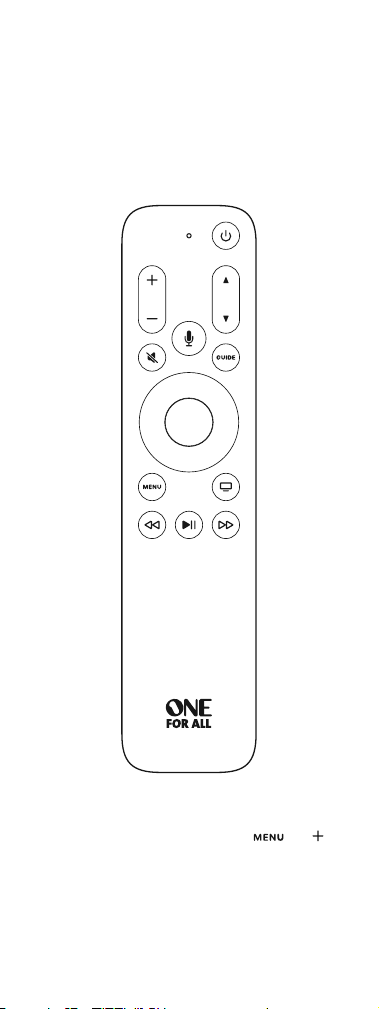
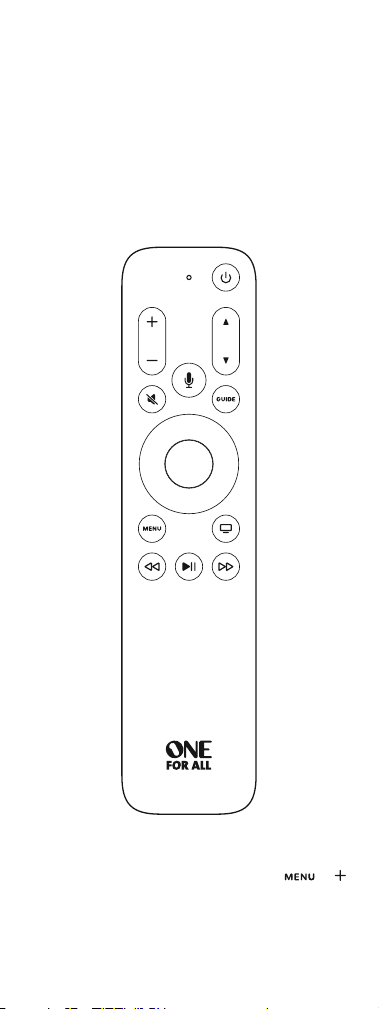
1. IMPORTANT Update your Apple TV to tvOS 14.3 or later.
2. Insert 2 x AAA alkaline batteries. Match the + and – polarity marks.
3. Move the remote within 3 to 4 inches (8 to 10 cm) of your Apple TV.
4. Press any button.
5. If Apple TV does not respond, press and hold
and
for 5 seconds to place the remote into pairing mode.
When you’ve paired your remote, a message appears on Apple TV.
2 English
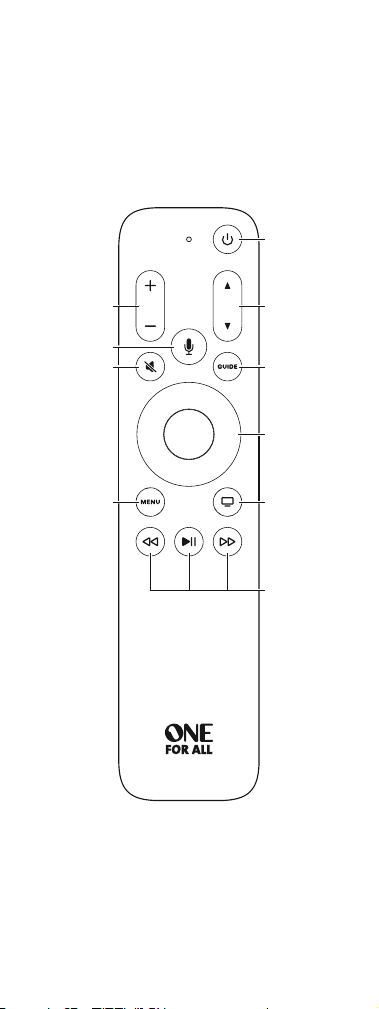
Not all features are available in all areas.
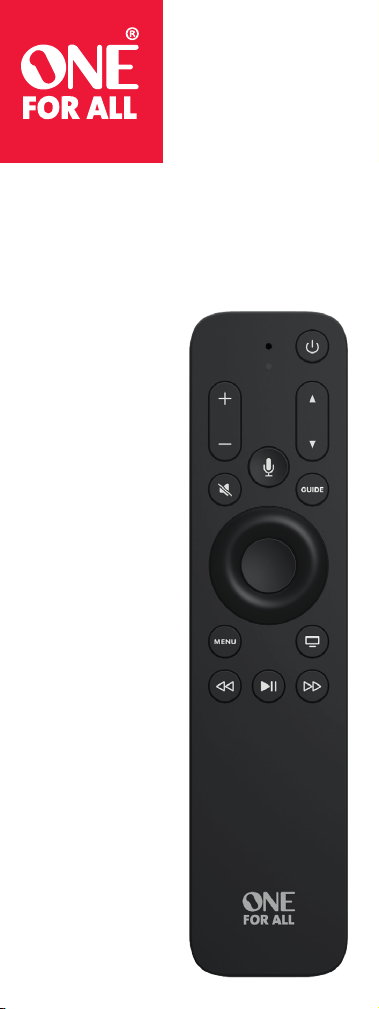
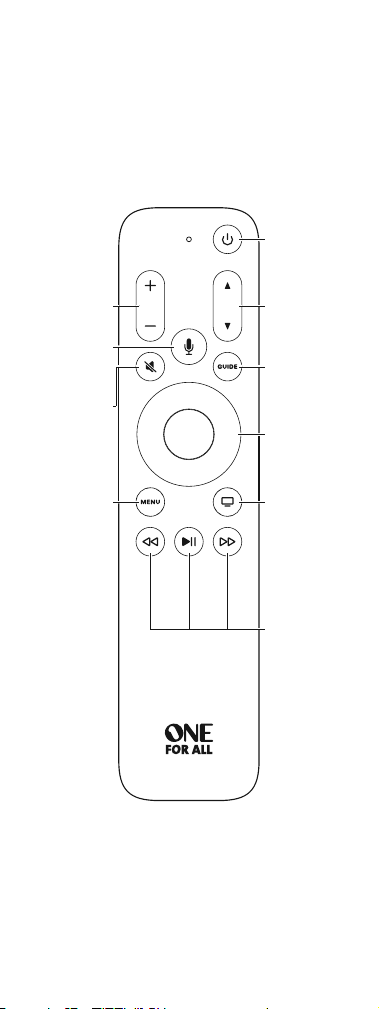
Volume
Mute
Siri
Press and hold to talk.
Menu
Press to return
to previous menu.
Press and hold
to return to
the Home screen.
Power
Press to turn on.
Press and hold
to sleep.
Navigation
Up/down/left/right.
Press center to select.
TV/Home
Press to return to
the TV/Home screen.
Press and hold to
access Control Center.
Playback control
Rewind, play or pause,
and fast forward.
Channel/Page
Program guide
English 3
To use the navigation buttons:
• Press left, right, up, or down to navigate Apple TV menus.
• Press the center button to select a menu item, or press and hold
to access a contextual menu.
• During playback, do any of the following:
• Press left to skip backward, or press right to skip forward.
• Press left and hold to rewind, or press right and hold to fast
forward.
• Press Select or to resume playback.
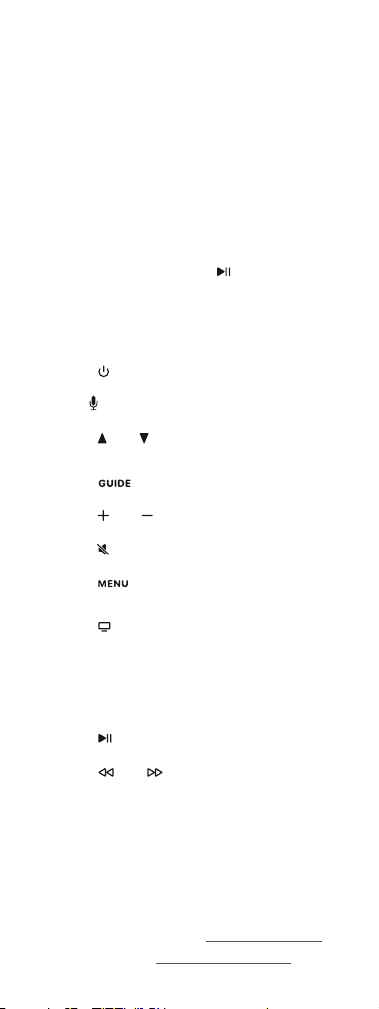
To use the remote buttons:
• Press
to turn on Apple TV. Press and hold to sleep Apple TV.
• Press and hold
to activate Siri. Hold down the Siri button
until you finish speaking.
• Press
or
to change channels while watching your TV
provider’s channels, or to move a page up or down in
the programming guide.
• Press to access your TV Provider’s program guide.
• Press
or to adjust the volume of your TV
or home theater system.
• Press to mute audio. Press again to unmute.
• Press to return to the previous menu. Press and hold
to return to the Home screen.
• Press to go to the TV/Home screen.
• Press twice quickly to view open apps.
To close an app, navigate left or right to app, then press Up
twice quickly.
• Press and hold to access Control Center.
• Press to play or pause a TV show, movie, song, or slideshow.
• Press or to rewind or fast forward 2x/4x/8x, or press
and hold to seek during content playback.
Learn more
The Apple TV User Guide contains comprehensive and up-to-date
product information. Go to help.apple.com/appletv.
For support go to www.oneforall.com/support

Benutzerhandbuch
Deutsch 1
Erste Schritte
Sie können Ihre Fernbedienung jeweils nur mit einem Apple TV
koppeln. Wenn Sie eine Fernbedienung koppeln, wird jede zuvor
gekoppelte Fernbedienung automatisch entkoppelt.
Diese Fernbedienung funktioniert nur mit dem Apple TV HD oder mit
dem Apple TV 4K.
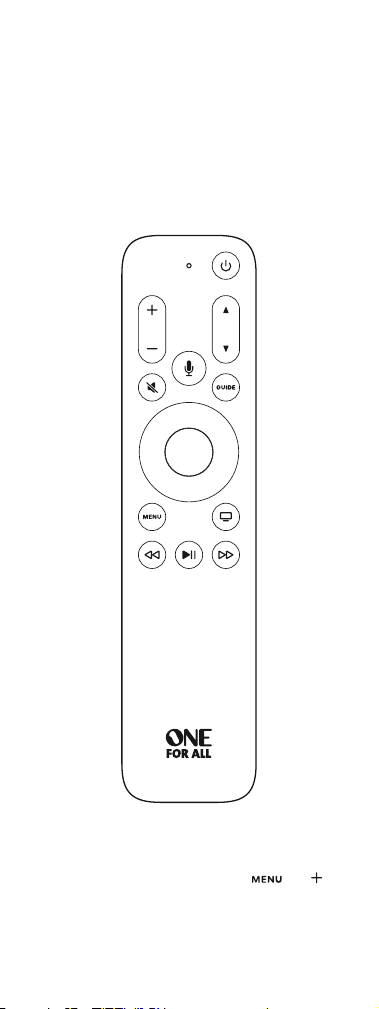
1. WICHTIG: Aktualisieren Sie Ihr Apple TV auf tvOS 14.3 oder höher.
2. Legen Sie 2 x AAA-Alkalibatterien ein. Achten Sie auf
die Polaritätsmarkierungen + und -.
3. Halten Sie die Fernbedienung in einem Abstand von 8 bis 10 cm
zu Ihrem Apple TV.
4. Drücken Sie eine beliebige Taste.
5. Wenn das Apple TV nicht reagiert, halten Sie
und
5 Sekunden lang gedrückt, um den Kopplungsmodus
der Fernbedienung zu aktivieren.
Wenn Sie Ihre Fernbedienung gekoppelt haben, wird auf
dem Apple TV eine Meldung angezeigt.
2 Deutsch
Es sind nicht alle Funktionen in allen Bereichen verfügbar.
Lautstärke
Stumm
Siri
Zum Sprechen
gedrückt halten.
Menü
Drücken Sie
diese Taste, um zum
vorherigen Menü
zurückzukehren.
Halten Sie die Taste
gedrückt, um zum
Home-Bildschirm
zurückzukehren.
Stromversorgung
Zum Einschalten
drücken.
Zum Versetzen in den
Ruhezustand gedrückt
halten.
Navigation
Oben/unten/links/
rechts.
Zum Auswählen die
mittlere Taste drücken.
Fernseher/Home
Drücken Sie diese Taste,
um zum Fernseh-/
Home-Bildschirm
zurückzukehren.
Halten Sie die
Taste gedrückt, um
das Kontrollzentrum
aufzurufen.
Wiedergabe-
steuerung
Zurückspulen,
Abspielen oder Pause
und Vorspulen.
Kanal/Seite
Programmführer
Deutsch 3
Verwendung der Navigationstasten:
• Drücken Sie links, rechts, oben oder unten, um durch die Menüs
des Apple TV zu navigieren.
• Drücken Sie die mittlere Taste, um einen Menüpunkt auszuwählen,
oder halten Sie die Taste gedrückt, um auf ein Kontextmenü
zuzugreifen.
• Führen Sie während der Wiedergabe einen der folgenden Schritte
aus:
• Drücken Sie links, um rückwärts zu springen, oder drücken
Sie rechts, um vorwärts zu springen.
• Halten Sie die linke Taste gedrückt, um zurückzuspulen, oder
halten Sie die rechte Taste gedrückt, um vorzuspulen.
• Drücken Sie die Auswahltaste oder , um die Wiedergabe
fortzusetzen.
Verwendung der Fernbedienungstasten:
• Drücken Sie
, um das Apple TV einzuschalten. Halten Sie die
Taste gedrückt, um das Apple TV in den Ruhezustand zu versetzen.
• Halten Sie
gedrückt, um das Siri zu aktivieren. Halten Sie
die Siri-Taste gedrückt, solange Sie sprechen.
• Drücken Sie
oder
, um den Kanal zu wechseln, während
Sie das Programm Ihres Fernsehanbieters ansehen, oder um im
Programmführer eine Seite nach oben oder unten zu wechseln.
• Drücken Sie , um auf den Programmführer Ihres Fernse-
hanbieters zuzugreifen.
• Drücken Sie
oder , um die Lautstärke Ihres Fernsehers
oder Heimkinosystems einzustellen.
• Drücken Sie , um den Ton stummzuschalten. Drücken Sie
die Taste erneut, um die Stummschaltung aufzuheben.
• Drücken Sie , um zum vorherigen Menü zurückzukehren.
Halten Sie die Taste gedrückt, um zum Home-Bildschirm zurück-
zukehren.
• Drücken Sie , um zum Fernseh-/Home-Bildschirm
zu gelangen.
• Drücken Sie diese Taste zweimal schnell hintereinander,
um geöffnete Apps anzuzeigen.
Zum Schließen einer App navigieren Sie nach links oder rechts
zur App und drücken Sie die Aufwärtstaste zweimal schnell
hintereinander.
• Halten Sie diese Taste gedrückt, um auf das Kontrollzentrum
zuzugreifen.
• Drücken Sie , um eine Fernsehsendung, einen Film, ein Lied
oder eine Diashow abzuspielen oder anzuhalten.
• Drücken Sie oder , um mit 2-facher/4-facher/8-facher
Geschwindigkeit zurück- oder vorzuspulen, oder halten Sie die
Taste gedrückt, um die Suche während der Inhaltswiedergabe
zu verwenden.
Weitere Informationen
Das Apple TV Benutzerhandbuch enthält umfassende und aktuelle
Produktinformationen. Besuchen Sie help.apple.com/appletv.
Support erhalten Sie unter www.oneforall.com/support

Guide d’utilisation
Français 1
Premiers pas
Votre télécommande ne peut être jumelée qu’avec une seule
Apple TV à la fois. Lorsque vous jumelez une télécommande,
toute télécommande précédemment jumelée est automatiquement
dissociée.
Cette télécommande fonctionne uniquement avec les Apple TV HD
ou Apple TV 4K.
1. IMPORTANT Mettez à jour votre Apple TV vers tvOS 14.3 ou
version ultérieure.
2. Insérez 2 piles alcalines AAA. Faire correspondre les marques
de polarité + et -.
3. Placez la télécommande à 8 à 10 centimètres de l’Apple TV.
4. Appuyez sur n’importe quel bouton.
5. Si l’Apple TV ne répond pas, maintenez les touches
et
enfoncées pendant 5 secondes pour faire passer la télécommande
en mode de jumelage.
Une fois votre télécommande jumelée, un message s’affichera
sur l’Apple TV.
2 Français
Toutes les fonctionnalités ne sont pas disponibles dans toutes les régions.
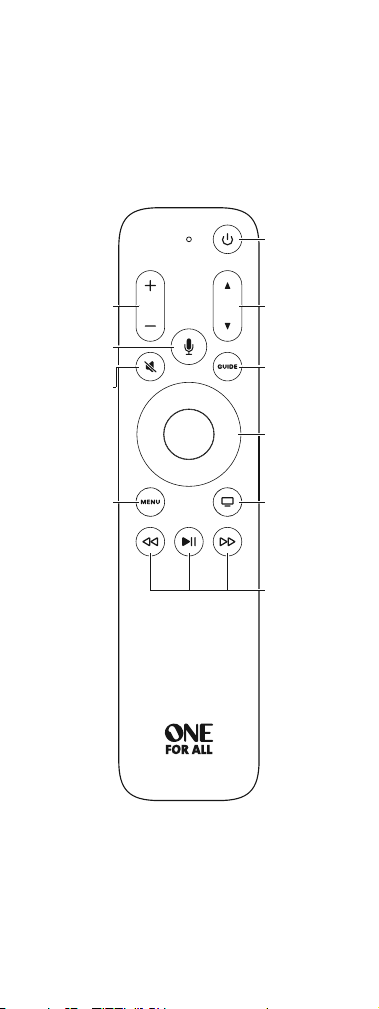
Volume
Désactiver le son
Siri
Appuyez longuement
pour parler.
Menu
Appuyez pour revenir
au menu précédent.
Appuyez longuement
pour revenir à l’écran
d’accueil.
Mise sous tension
Appuyez pour mettre
sous tension.
Appuyez longuement
pour mettre en veille.
Navigation
Haut/Bas/Gauche/
Droite.
Appuyez sur le bouton
central pour faire votre
sélection.
TV/Accueil
Appuyez pour revenir
à l’écran TV/Accueil.
Appuyez longuement
pour accéder au
Centre de contrôle.
Commande
de lecture
Retour, lecture, pause
et avance rapide.
Chaîne/page
Guide
des programmes

Français 3
Pour utiliser les boutons de navigation :
• Appuyez sur les boutons Gauche, Droite, Haut ou Bas pour
naviguer dans les menus de l’Apple TV.
• Appuyez sur le bouton central pour sélectionner un élément
du menu, ou appuyez longuement pour accéder à un menu
contextuel.
• Pendant la lecture, vous pouvez effectuer les actions suivantes :
• Appuyez sur le bouton Gauche pour reculer ou sur le bouton
Droite pour avancer.
• Appuyez longuement sur le bouton Gauche pour inverser
la lecture, ou appuyez longuement sur le bouton Droite pour
avancer rapidement.
• Appuyez sur Sélectionner ou sur pour reprendre la lecture.
Pour utiliser les boutons de la télécommande :
• Appuyez sur
pour mettre l’Apple TV sous tension. Appuyez
longuement pour mettre l’Apple TV en veille.
• Appuyez longuement sur
pour activer Siri. Maintenez
le bouton Siri enfoncé jusqu’à ce que vous ayez fini de parler.
• Appuyez sur
ou
pour parcourir vos chaînes TV ou pour
faire défiler une page vers le haut ou vers le bas dans le guide
des programmes.
• Appuyez sur pour accéder au guide des programmes
de votre fournisseur TV.
• Appuyez sur
ou pour régler le volume de votre téléviseur
ou de votre système home-cinéma.
• Appuyez sur pour désactiver le son. Appuyez à nouveau pour
le réactiver.
• Appuyez sur pour revenir au menu précédent.
Appuyez longuement pour revenir à l’écran d’accueil.
• Appuyez sur pour accéder à l’écran TV/Accueil.
• Appuyez deux fois rapidement pour afficher les applications
ouvertes.
Pour fermer une application, naviguez jusqu’à celle-ci vers
la gauche ou la droite, et appuyez deux fois rapidement
sur la flèche vers le haut.
• Appuyez longuement pour accéder au centre de contrôle.
• Appuyez sur pour mettre en lecture ou en pause
une émission, un film, une chanson ou un diaporama.
• Appuyez sur ou pour inverser la lecture ou avancer
rapidement en vitesse 2x/4x/8X, ou appuyez longuement pour
effectuer une recherche pendant la lecture du contenu.
En savoir plus
Le manuel d’utilisation de l’Apple TV comprend des informations
complètes et à jour sur le produit.
Rendez-vous sur le site help.apple.com/appletv.
Pour obtenir de l’aide, consultez le site www.oneforall.com/support

WARRANTY / GUARANTEE
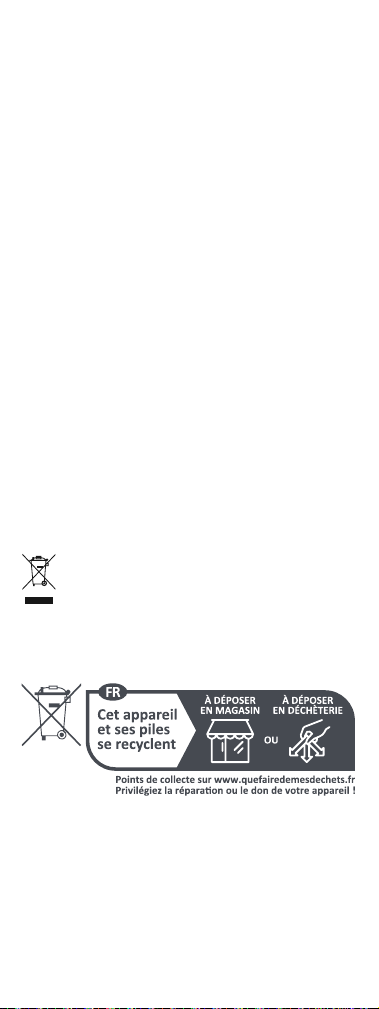
PRODUCT DISPOSAL (EUROPEAN DIRECTIVE 2012/19/EU)
The crossed out wheeled bin symbol on this product ensures
that this product is manufactured using high quality compo-
nents that can be recycled and reused according European
Directive 2012/19/EU. Please do not dispose of this product
with your normal household waste, refer to local regulations
for the proper collection or disposal of electrical and elec-
tronic products. This will help this will help in preventing
negative effects on the environment and/or human health.
BATTERY DISPOSAL (EUROPEAN DIRECTIVE 2006/66/EC)
Please do not dispose of your batteries with your normal household
waste, refer to local regulations for the proper collection or disposal.
This will help preventing potential negative effects on the environ-
ment and/or human health.
GUARANTEE TERMS AND CONDITIONS UNIVERSAL ELECTRONICS
warrants to the original purchaser that this product will be free from
defects in materials and workmanship under normal and correct use
for a period of 3 years from the date of original purchase. This product
will be repaired or if necessary, replaced free of charge if it has been
proven to be defective within the 3 year warranty period. The forwar-
ding costs are on the account of the owner; the costs of returning the
product are on the account of UNIVERSAL ELECTRONICS.
This warranty does not cover damage or failures caused by products
or services not supplied by UNIVERSAL ELECTRONICS, or which result
from not mounting the product according to manual instructions. This
also applies when the product has been modified / repaired by others
than UNIVERSAL ELECTRONICS or if a fault is the result of accident, mi-
suse, abuse, neglect, mishandling, misapplication, faulty installation,
improper maintenance, alteration, modifications, fire, water, lightning,
natural disasters, wrong use or carelessness.
To obtain warranty service during the warranty period contact […],
and please note that we need your original purchase receipt so that
we may establish your eligibility for service. If you have bought this
product for purposes which are not related to your trade, business or
profession, you may have legal rights under your national legislation
governing the sale of consumer goods. This guarantee does not affect
those rights. www.oneforall.com
GARANTIEBEDINGUNGEN
ENTSORGUNG VON ELEKTRO- UND
ELEKTRONIK-ALTGERÄTEN (EUROPÄISCHE RICHTLINIE
2012/19/EU)
Das Symbol der durchgestrichenen Mülltonne bedeutet,
dass dieses Produkt bei der Entsorgung nicht mit unsortier-
tem Siedlungsabfall vermischt werden darf.
Es gibt ein separates Sammelsystem für Elektro- und
Elektronik-Altgeräte. Für weitere Informationen wenden Sie
sich bitte an die zuständigen städtischen Behörden oder an
den Händler, bei dem Sie das Produkt gekauft haben.
Die ordnungsgemäße Entsorgung stellt sicher, dass
Elektro- und Elektronik-Altgeräte angemessen recycelt
und wiederverwendet werden. Sie trägt dazu bei, mögliche
Schäden für die Umwelt und die menschliche Gesundheit
zu vermeiden und die natürlichen Ressourcen zu erhalten.
BATTERIE-ENTSORGUNG (EUROPÄISCHE RICHTLINIE 2006/66/EG).
Wie elektrische und elektronische Produkte können auch die in Bat-
terien enthaltenen Stoffe negative Auswirkungen auf die Umwelt und
die menschliche Gesundheit haben, wenn sie nicht ordnungsgemäß
entsorgt werden. Wir bitten Sie daher, die Batterien aus den Produkten
zu entfernen und diese ordnungsgemäß zu entsorgen.
Remotes
Antenna’s
INFORMATIONS SUR LA GARANTIE
MISE AU REBUT DU PRODUIT (DIRECTIVE EUROPÉENNE
2012/19/EU)
Le symbole représentant une poubelle sur roues marquée
d’une croix apposé sur ce produit garantit qu’il a été
fabriqué à l’aide de composants de haute qualité pouvant
être recyclés et réutilisés conformément à la Directive
européenne 2012/19/UE. Vous ne devez pas jeter ce produit
avec les déchets ménagers courants. Reportez-vous aux
réglementations locales pour connaître les procédures
de collecte spécifiques aux équipements électroniques
et électriques. Celles-ci ont pour objectif de minimiser les
effets nocifs sur l’environnement et/ou la santé humaine.
MISE AU REBUT DES BATTERIES/PILES (DIRECTIVE EUROPÉENNE
2006/66/CE)
Vous ne devez pas jeter vos batteries/piles avec les déchets ménagers
courants. Reportez-vous aux réglementations locales pour connaître
les procédures de collecte spécifiques. Celles-ci ont pour objectif de
minimiser les effets nocifs sur l’environnement et/ou la santé humaine.
CONDITIONS GENERALES DE GARANTIE UNIVERSAL ELECTRONICS /
ONE FOR ALL garantit à l’acheteur initial que ce produit, dansdes con-
ditions normales et correctes d’utilisation, sera dépourvu de dysfonc-
tionnement matériel et de vice de fabrication pendant une période de
3 ans à compter de la date d’achat originale du produit.
Si, pendant cette période de garantie de 3 ans, il devait s’avérer que
GARANTIEBEDINGUNGEN UNIVERSAL ELECTRONICS garantiert dem
Originalkäufer für den Zeitraum von 3 Jahren, ab dem Datum des
Originalkaufs, die Material- und Mängelfreiheit dieses Produkts bei
üblicher und korrekter Benutzung. Dieses Produkt wird kostenlos
repariert oder, falls erforderlich, ersetzt, wenn es sich nachweislich
innerhalb der Garantiefrist von 3 Jahren als defekt erwiesen hat. Die
Versandkosten gehen zu Lasten des Eigentümers,die Kosten für die
Rücksendung des Produkts gehen zu Lasten von UNIVERSAL ELEC-
TRONICS. Die Garantieabdeckung erstreckt sich geographisch auf alle
Staaten, in denen wir dieses Produkt anbieten.
Diese Garantie deckt keine Schäden oder Fehler ab, die verursacht
sind von Produkten oder Leistungen, die nicht von UNIVERSAL ELEC-
TRONICS geliefert wurden, oder die daraus resultieren, dass das Pro-
dukt nicht gemäß der Bedienungsanweisungen montiert wurde. Dies
gilt auch, wenn das Produkt von anderen als UNIVERSAL ELECTRONICS
modifiziert / repariert wurde, oder wenn ein Defekt die Folge eines
Unfalls, Missbrauchs, falscher Benutzung, Fahrlässigkeit, falscher An-
wendung, falscher Installation, unsachgemäßer Wartung,Änderung,
Feuer, Wasser, Blitzschlag, Naturkatastrophen oder Unachtsamkeit ist.
Bitte nehmen Sie zur Kenntnis, dass Sie uns für den Erhalt der Garan-
tieleistung während der Garantie Ihre Originalkaufquittung vorlegen
müssen, damit wir Ihren Anspruch auf die Leistung überprüfen kön-
nen. Wenn Sie dieses Produkt nicht für einen Zweck gekauft haben,
der mit Ihrem Handel, Geschäft oder Beruf zusammenhängt, beachten
Sie bitte, dass Ihnen möglicherweise gesetzliche Rechte als Verbrau-
cher zustehen, die den Verkauf der Verbrauchsgüter betreffen. Die
Garantie beeinflusst diese Rechte nicht. Wenn Sie diese Garantie in
Anspruch nehmen wollen, kontaktieren Sie bitte www.oneforall.com
Remotes
Antenna’s

© 2024 Universal Electronics Inc.
All rights reserved.
Apple, Apple TV and Siri are trademarks of Apple Inc.
registered in the U.S. and other countries.
Universal Electronics BV – Europe & International
P.O. Box 3332, 7500 DH Enschede, The Netherlands
713678 RDN1270324
le produit était défectueux, ce produit sera réparé ou, si nécessaire,
remplacé gratuitement. Les frais d’expédition seront à la charge
du propriétaire ; les frais de réexpédition seront à la charge de UNI-
VERSAL ELECTRONICS. Cette garantie ne couvre pas les dommages
ou les dysfonctionnements provoqués par des produits ou par des
services non fournis par UNIVERSAL ELECTRONICS, ou résultant
d’un montage non conforme du produit à ce qui est indiqué dans le
manuel d’instructions. Cette règle s’applique également si le produit
a été réparé et / ou modifié par d’autres que UNIVERSAL ELECTRONICS
ou si le dysfonctionnement résulte d’un accident, d’une utilisation
incorrecte, d’un usage abusif, d’une négligence, d’une mauvaise ma-
nipulation, d’une application incorrecte, d’une installation incorrecte,
d’une maintenance inadaptée, d’une altération, de modifications,
de dommages provoqués par le feu, par l’eau, par un éclair, par une
catastrophe naturelle, par une utilisation inadaptée ou par une absen-
ce d’entretien. Pour être en mesure d’obtenir le service de garantie
pendant la période de garantie contactez UNIVERSAL ELECTRONICS:
www.oneforall.com, et veuillez noter qu’il nous faut votre bon d’achat
(facture) original afin que nous puissions établir si vous pouvez
effectivement bénéficier du service de la garantie.
Si vous avez acheté ce produit sans raison commerciale ni profession-
nelle, veuillez noter qu’il est possible que la législation de protection
des consommateurs de votre pays vous donne certains droits. Cette
garantie n’affectera pas ces droits. www.oneforall.com
RADIO TRANSMISSION INFORMATION
Operating Frequency: 2402MHz to 2480MHz;
Power Class < 10mW; EIRP 8.71dBm
Hereby, Universal Electronics BV declares that the radio equipment
model UEI-R39000/URC 1110 is in compliance with Directive 2014/53/EU.
The full text of the EU declaration of conformity is available at the
following INTERNET address:
https://www.oneforall.com/documents
SAFETY INSTRUCTION
Caution Please read all safety instructions to ensure personal safety
and prevent damage to equipment.
WARNING
• Do not place remote control in fire or near a source of heat.
• Keep the battery and/or the remote control away from direct
sunlight, moist or any source of heat.
• Do not disassemble the remote control.
• Risk of explosion if any of the batteries are replaced by an incorrect
type.
• Always use new batteries for replacement.
• Disposal of a battery into fire or a hot oven, or mechanically crushing
or cutting of a battery can result in an explosion.
• Do not leave the battery in an extreme environment such as high
temperature or low air pressure. This may result to explosion or
leakage of hazardous substances.