NOTE:
Please read all
instructions
carefully before
using this product
Table of Contents
Safety Notice
Hardware Pack
Assembly
Instruction
Parts List
Warranty
Ordering Parts
Model
XJ-6860RW
Retail This
Manual for
Reference
220928
OWNER’S
MANUAL
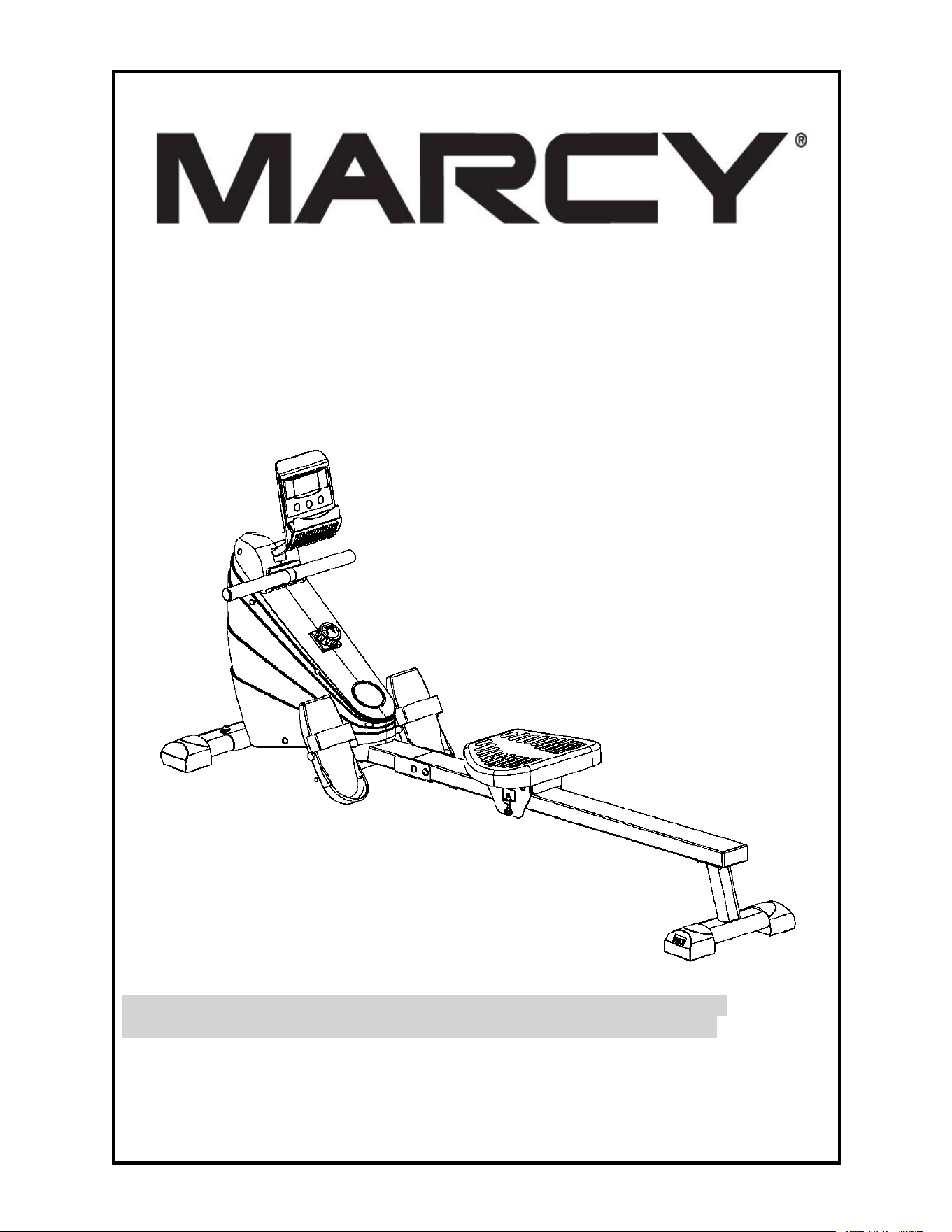
ROWING MACHINE
XJ-6860RW
IMPEX
®
INC.
2801 S. Towne Ave. Pomona, Ca 91766
Tel: (800)999-8899 Fax: (626)961-9966
www.marcypro.com
support@impex-fitness.com

1
©Impex Inc. www.marcypro.com
TABLE OF CONTENTS
BEFORE YOU BEGIN
1
IMPORANT SAFETY NOTICES
2
WARNING LABEL PLACEMENT
3
HARDWARE PACK
4
COMPONENT FOR ASSEMBLY
5
CARE AND MAINTENANCE AND STORAGE
7
PARTS LIST
8
EXPLODED DIAGRAM
10
COMPUTER FUNCTIONS AND OPERATION
11
OPERATING NOTES
13
EXERCISE GUIDELINES
14
WARRANTY
16
ORDERING PARTS
16
BEFORE YOU BEGIN
Thank you for selecting the MARCY XJ-6860RW Rowing Machine by
IMPEX
®
INC. For your safety and benefit, read this manual carefully before
using the Machine. As a manufacturer, we are committed to provide you
complete customer satisfaction. If you have any questions, or find there are
missing or damaged parts, we guarantee you complete satisfaction through
direct assistance from our factory. To avoid unnecessary delays, please
call our TOLL-FREE customer service number. Our Customer Service
Agents will provide immediate assistance to you.
Toll-Free Customer Service Number
1-800-999-8899
Mon. - Fri. 9 a.m. - 5 p.m. PST
www.marcypro.com
support@impex-fitness.com

2
©Impex Inc. www.marcypro.com
IMPORTANT SAFETY NOTICE
PRECAUTIONS
This exercise machine is built for optimum safety. However, certain precautions apply
whenever you operate a piece of exercise equipment. Be sure to read the entire
manual before you assemble or operate your rower. In particular, note the following
safety precautions:
1. Keep children and pets away from the Rowing Machine at all times. DO NOT
leave children unattended in the same room with the Rowing Machine.
2. Only one person at a time should use the Rowing Machine.
3. If the user experiences dizziness, nausea, chest pain, or any other abnormal
symptoms, STOP the workout at once. CONSULT A PHYSICIAN IMMEDIATELY.
4. Position the unit on a clear, leveled surface. DO NOT use the Rowing Machine near
water or outdoors.
5. Keep hands away from all moving parts.
6. Always wear appropriate workout clothing when exercising. DO NOT wear robes or
other clothing that could become caught in the Rowing Machine. Running or
aerobic shoes are also required when using the Rowing Machine.
7. Use the rowing machine only for its intended use as described in this manual. DO
NOT use attachments not recommended by the manufacturer.
8. Do not place any sharp object around the Rowing Machine.
9. Disabled person should not use the Rowing Machine without a qualified person or
physician in attendance.
10. Before using the Rowing Machine to exercise, always do stretching exercises to
properly warm up.
11. Never operate the Rowing Machine if it is not functioning properly.
12. Read all warnings posted on the Rowing Machine.
13. Inspect the Rowing Machine for worn or loose component prior to use.
Tighten/replace any loose or wore components prior to use.
14. Care should be taken in mounting or dismounting the Rowing Machine.
15. This Rowing Machine is for consumer and home use only.
WARNING: BEFORE BEGINNING ANY EXERCISE PROGRAM, CONSULT YOUR
PHYSICIAN. THIS IS ESPECIALLY IMPORTANT FOR INDIVIDUALS OVER THE
AGE OF 35 OR PERSONS WITH PRE-EXISTING HEALTH PROBLEMS. READ ALL
INSTRUCTIONS BEFORE USING ANY FITNESS EQUIPMENT. IMPEX INC.
ASSUMES NO RESPONSIBILITY FOR PERSONAL INJURY OR PROPERTY
DAMAGE SUSTAINED BY OR THROUGH THE USE OF THIS PRODUCT.
SAVE THESE INSTRUCTIONS.
3
©Impex Inc. www.marcypro.com
WARNING LABEL PLACEMENT
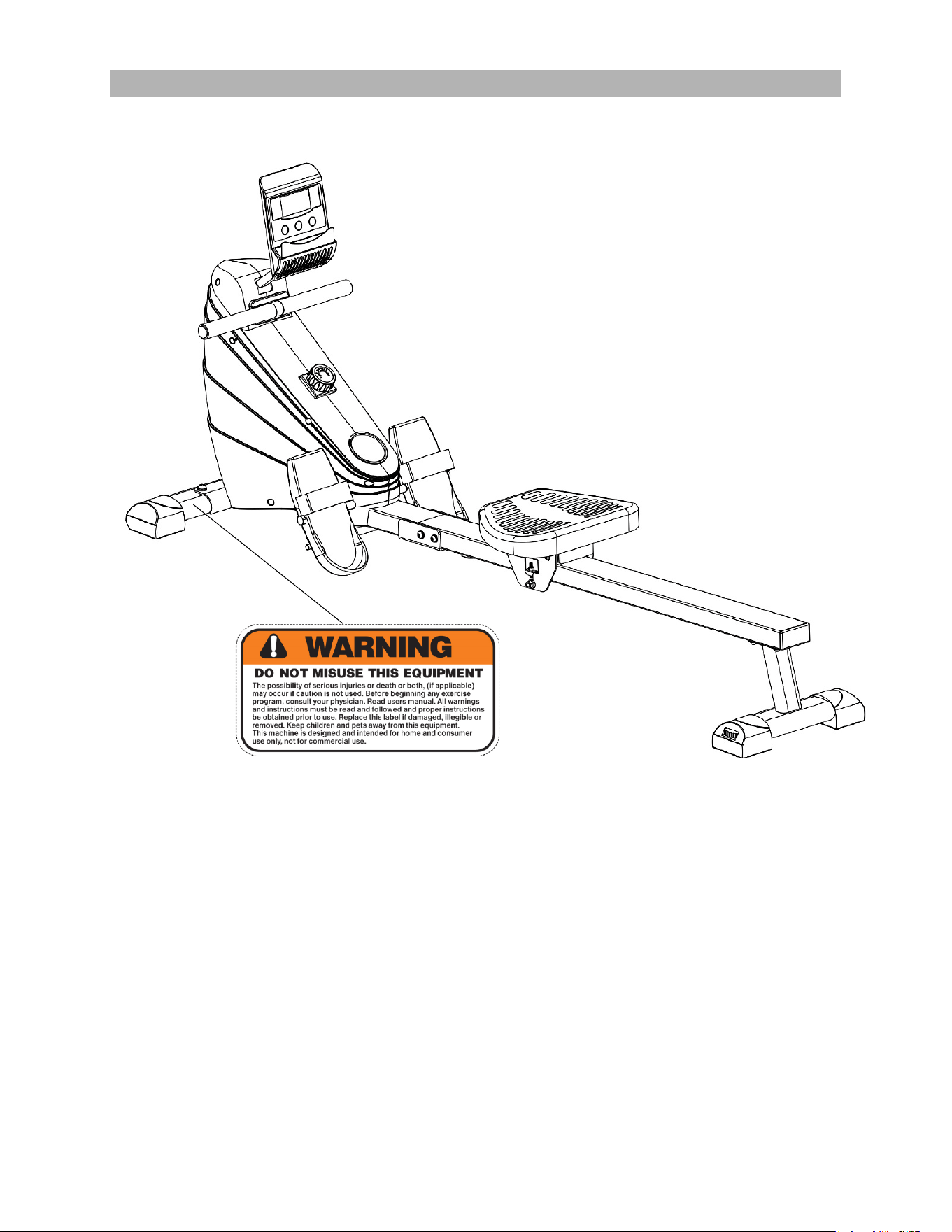
The Warning Labels and Caution Label shown here have been placed on the
Front Stabilizer and Main Frame.
If the labels are missing or illegible, please call customer service at 1-800-999-
8899 for replacement. Apply the labels in location shown.
4
©Impex Inc. www.marcypro.com
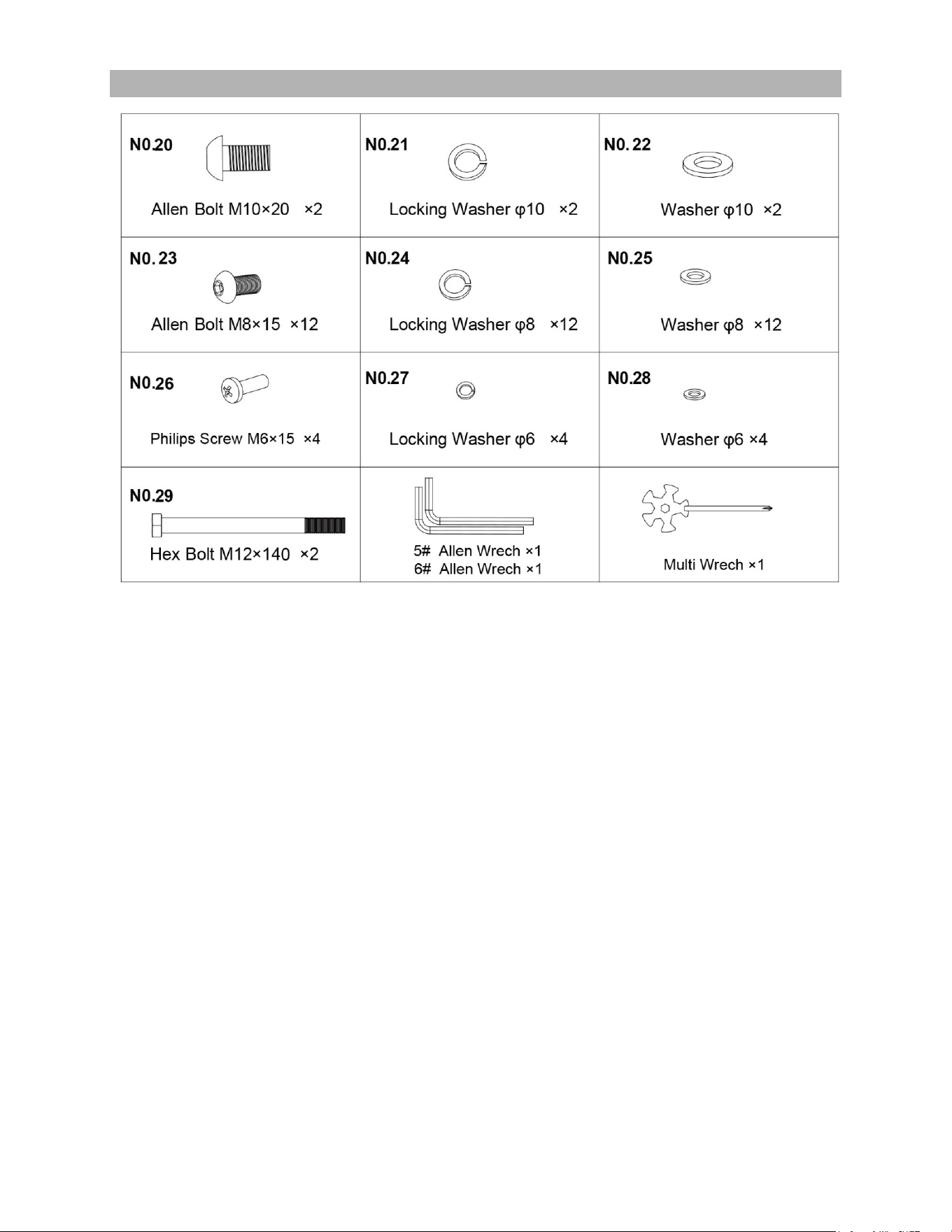
HARDWARE PACK
5
©Impex Inc. www.marcypro.com
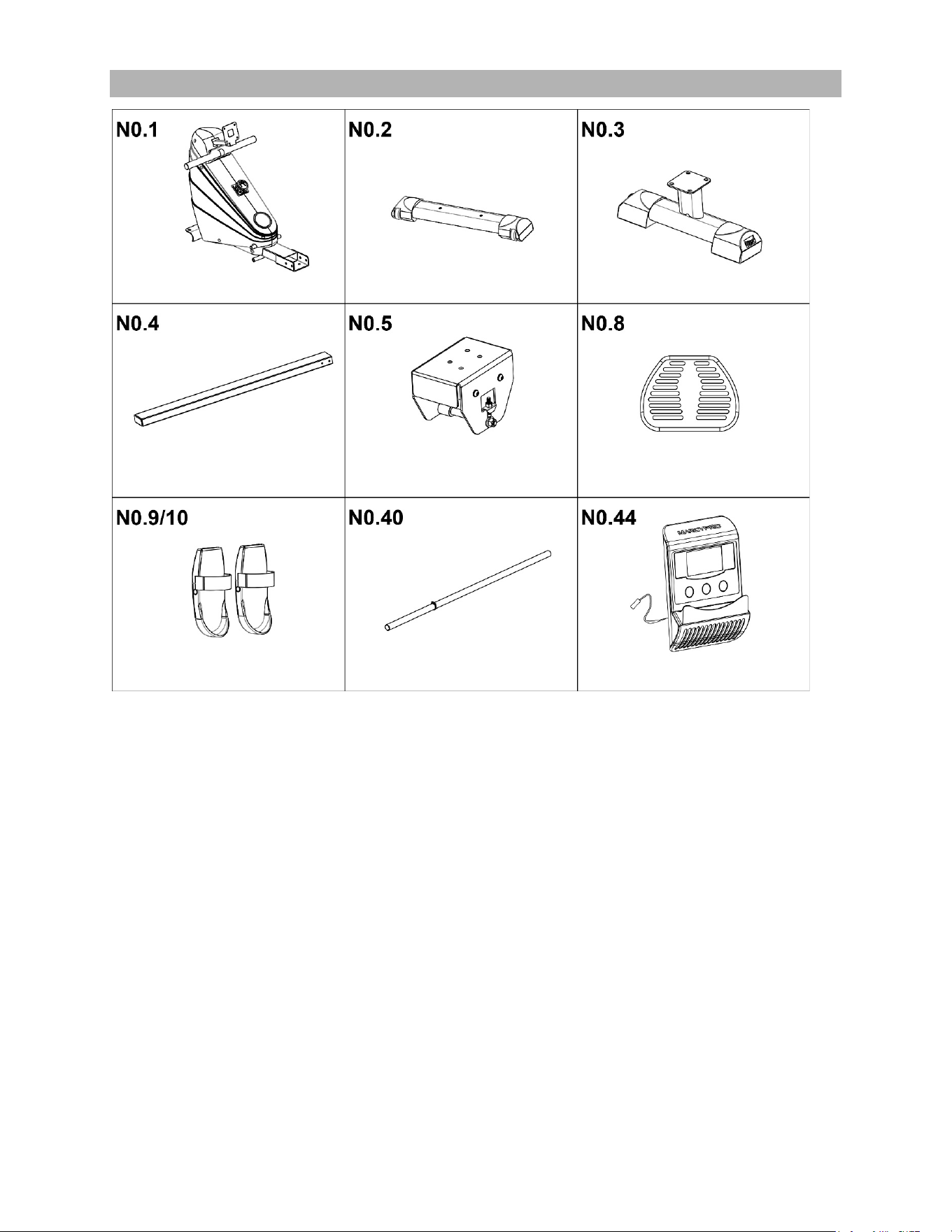
COMPONENTS FOR ASSEMBLY

6
©Impex Inc. www.marcypro.com
IMPORTANT ASSEMBLY INFORMATION
Tools Required for Assembling the Machine: Two Adjustable Wrenches
and Allen Wrenches.
NOTE: It is strongly recommended that this equipment is assembled by two
or more people to avoid possible injury.
Ensure Carriage Bolts are inserted through the SQUARE holes on components
that need to be assembled. Attach washer only to end of the Carriage Bolt.
Use Allen Bolts or Hex Bolts inserted through the ROUND hole on
components that need to be assembled.
Always wait until all bolts are assembled onto the bench before tightening the
bolts. Do not tighten each bolt right after it is installed
Fasten Nuts and Bolts
Securely tighten all Nuts and Bolts after all
components have been assembled in current and
previous steps.
NOTE: Do not over tighten any component with
pivoting function.
Make sure all pivoting components are able to
move freely.
Do not tighten all Nuts and Bolts in this step.

7
©Impex Inc. www.marcypro.com
CARE, MAINTENANCE AND STORAGE
1. Inspect and tighten all parts each time you use the Rowing Machine. Replace any
worn parts immediately.
2. The Rowing Machine can be cleaned using a damp cloth and mild non-abrasive
detergent. Do not use solvents.
3. Store the Rowing Machine IN-DOOR. Excess moisture and water would cause rust
on the frame.
4. The Rowing Machine shall be placed at least 24 inches away from the wall or/and
any other object such as furniture to provide safe access to and passage around the
rowing machine.
5. To avoid possible injury, the help of two or more people is needed when moving the
Rowing Machine around.
6. Disposal Instructions – The equipment can be safely disassembled and disposed
without unreasonable hazards. Call your local recycle agency regarding details of
recycling.
7. The maximum user weight is 250 lbs.
8. Assembled Dimension: 68.5”x19.6”x31.2”.

8
©Impex Inc. www.marcypro.com
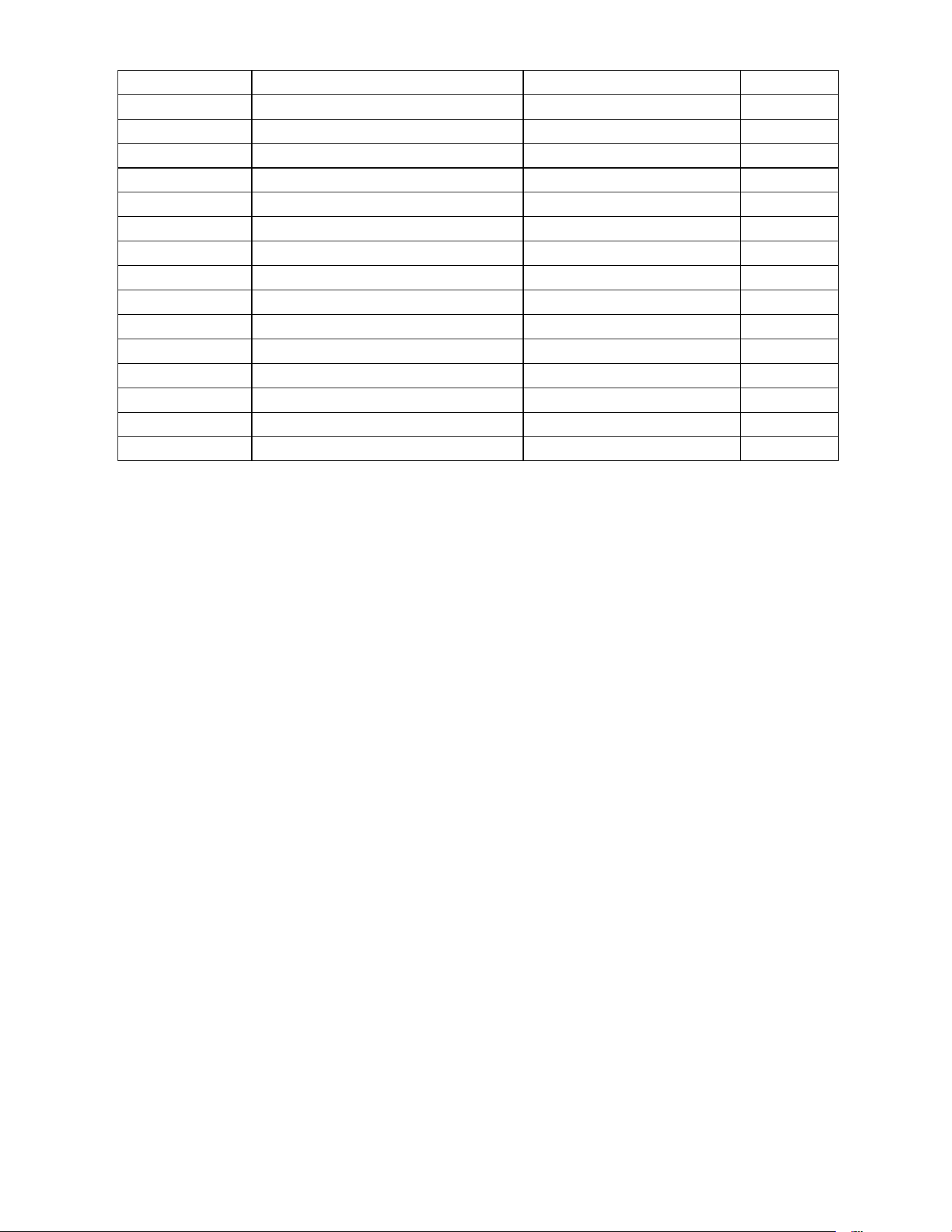
XJ-6860RW PARTS LIST
Part #
Description
Size
Qty
1
Main Frame
1
2
Front Stabilizer
1
3
Rear Stabilizer
1
4
Slide Rail
1
5
Roller Bracket
1
6
Computer Bracket
1
7
Rowing Handle
1
8
Seat Pad
1
9
Left Pedal
1
10
Right Pedal
1
11
Left Front Stabilizer End Cap
1
12
Right Front Stabilizer End Cap
1
13
Rear Stabilizer End Cap
2
14
Slide Rail End Cap
40×80×1.5
1
15
Slide Rail Stopper
1
16
Rowing Handle End Cap
Φ25×1.5
2
17
Rowing Handle Grip
Φ31×Φ25×190
2
18
Roller Wheel
4
19
Roller Wheel Axel Bushing
2
20
Allen Bolt
M10×20
2
21
Washer
Φ10
2
22
Locking Washer
Φ10
2
23
Allen Bolt
M8×15
12
24
Washer
Φ8
12
25
Locking Washer
Φ8
12
26
Phillips Bolt
M6×15
4
27
Washer
Φ6
4
28
Locking Washer
Φ6
4
29
Hex Bolt
M12×140
2
30
Allen Bolt
M6×45
1
31
Nylon Washer
Φ6
2
32
Aircraft Nut
M6
1
33
Phillips Bolt
M5×10
4
34
Allen Bolt
M6×16
4
35
Washer
Φ18×Φ6.5
4
36
Bushing
Φ14×Φ10×12.5
4
37
Top Roller Wheel Axel
2
38
Roller Wheel Axel Sleeve
2
9
©Impex Inc. www.marcypro.com
39
Bottom Roller Wheel Axel
1
40
Pedal Stopper
1
41
Self Tapping Screw
ST4.8×15
2
42
Self Tapping Screw
ST4.2×15
4
43
C-Clip
Φ10
1
44
Computer
1
45
Roller Wheel Adjustment Bolt
M6
2
46
Tension Knob
1
47
Right Shroud
1
48
Left Shroud
1
49
Rowing Handle Rest
1
50
Cup Holder
1
51
Aircraft Nut
M8
2
52
Leveler
1
A
Computer Cable
1
B
Computer Receiver Cable
1
10
©Impex Inc. www.marcypro.com
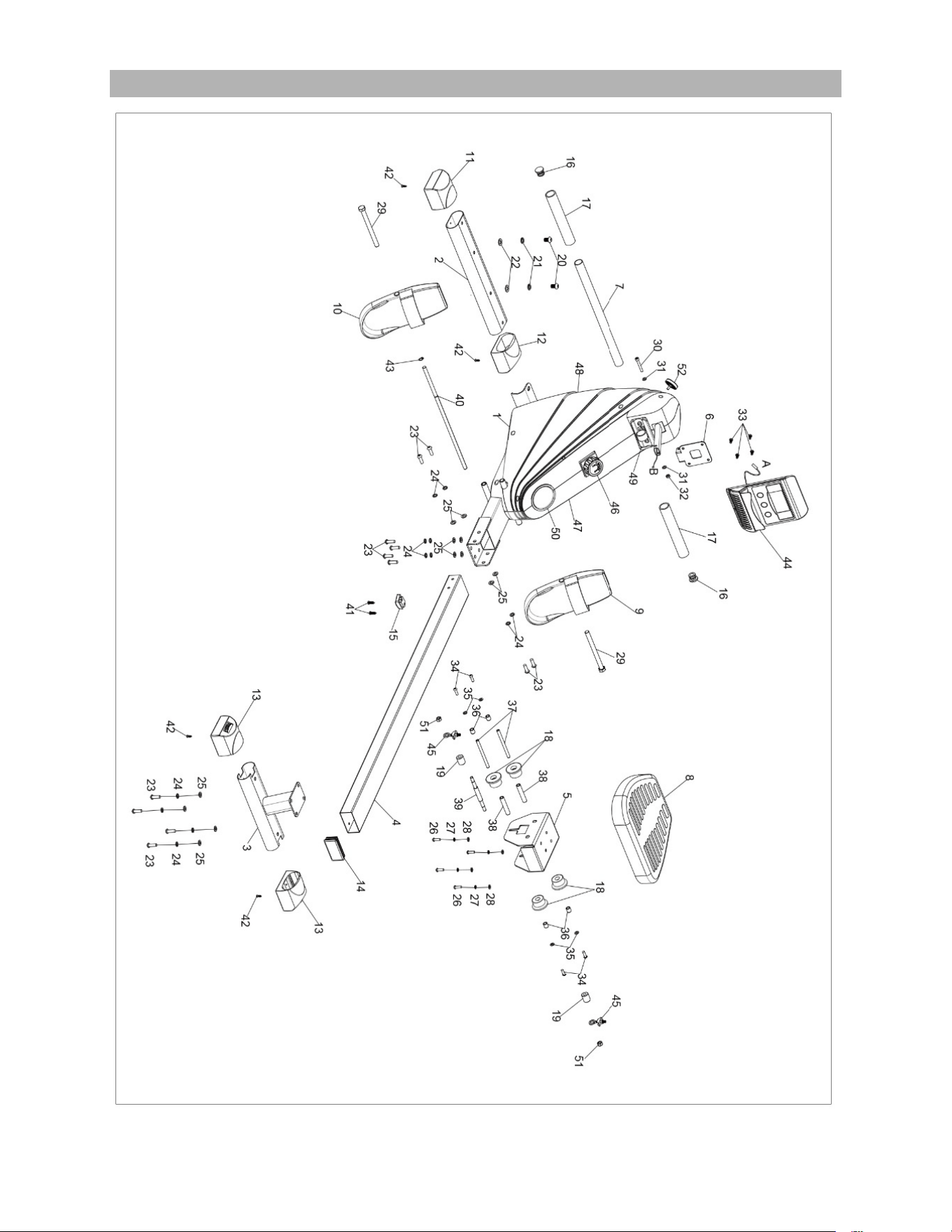
EXPLODED DIAGRAM
11
©Impex Inc. www.marcypro.com
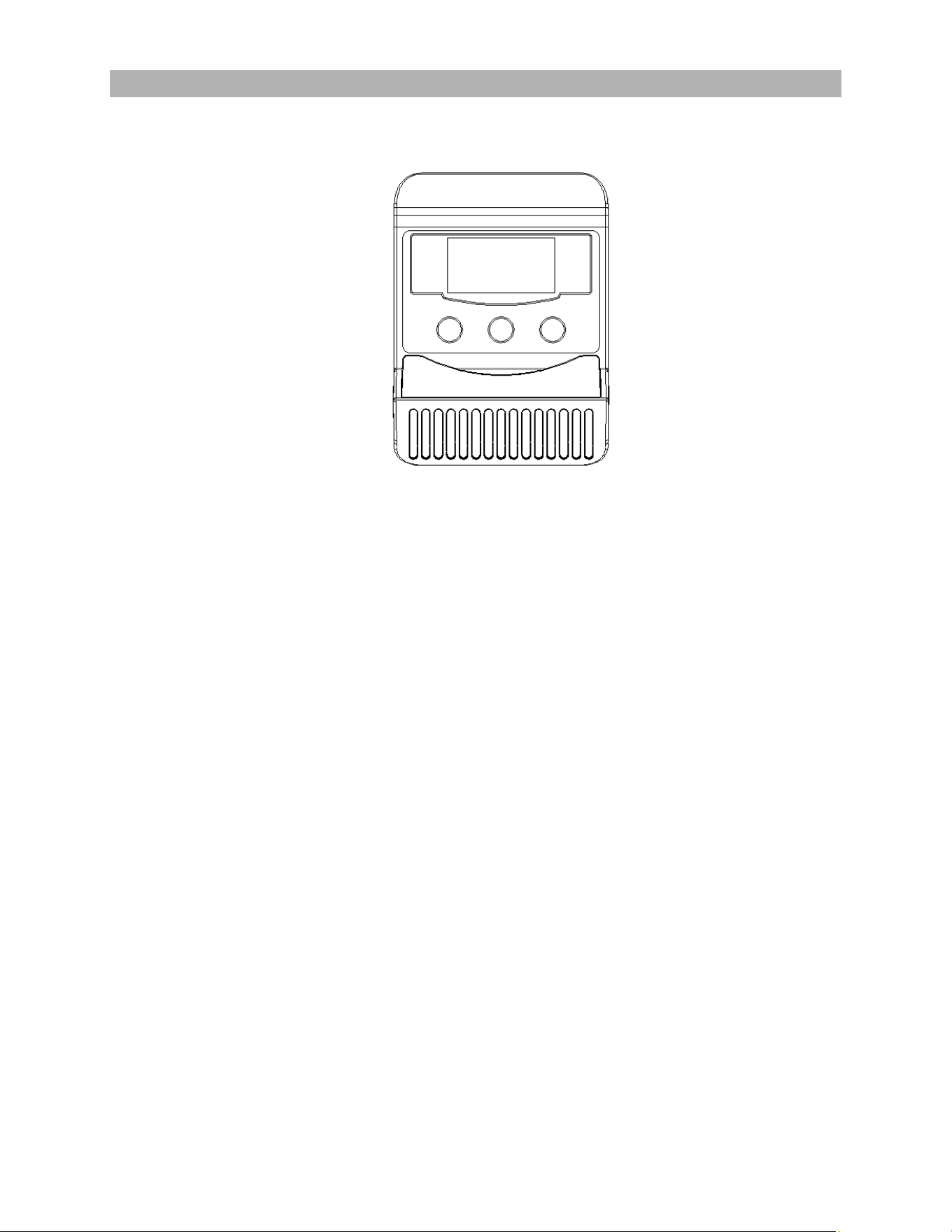
OPERATION PROCEDURES:
1. AUTO ON/OFF
1.The system turns on when any key is pressed or
when it sensor an input from the speed sensor.
2.The system turns off automatically when the
rowing machine has detected no activity for 4
minutes.
2.MODE:
1. Pressing Mode allows you to change the
Display function on the console.
2.To choose the SCAN or LOCK if you do not want
the scan mode, press the MODE key when the
pointer on the function you want which begins
blinking.
3.SET: Press to confirm your target time, count,
calories.
4. RESET:
1.The key to reset the value to zero by pressing the
key.
2.The unit can be reset by either changing the
batteries or pressing the MODE key for 3
Computer
FUNCTIONS:
1.COUNT: Press Mode until Count is displayed.
This indicates the number of pulls performed.
2.CALORIE: Press MODE until Calorie is
displayed. The number of calories burnt will now be
displayed during your workout.
3.TCNT: Total Count. This displays the cumulative
number of pulls performed since the last reset.
3. SCAN:
The display will change every 4 seconds scrolling
through TCNT,RPM,TIME,COUNT,CAL(calories).
5.RPM: Press Mode until RPM is selected. This
displays the current RPM being performed.
6.TIME: Press Mode until TIME is selected. This
displays the elapsed time.
BATTERY:
If the display starts to fade, the batteries need
replacing.
12
©Impex Inc. www.marcypro.com
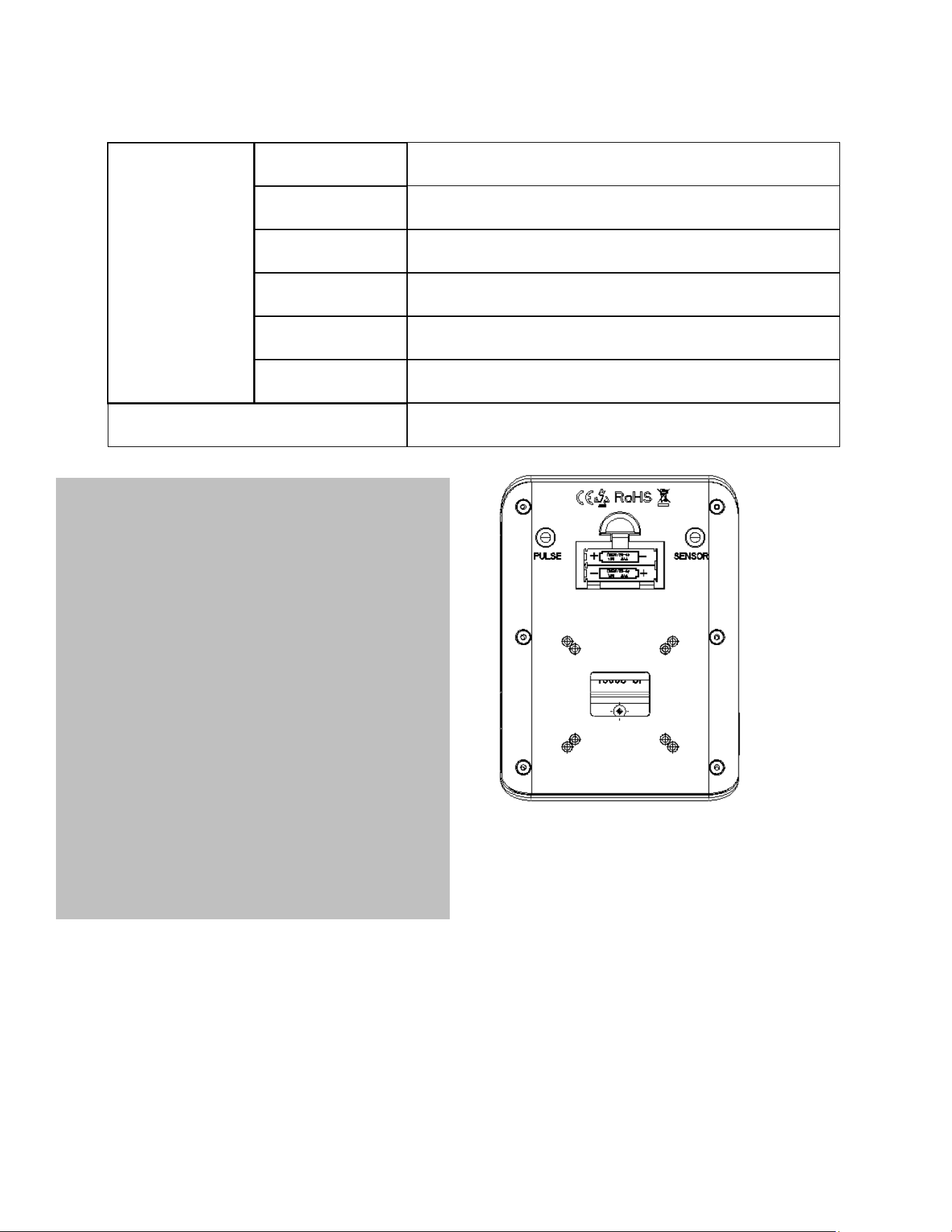
Function
Auto Scan
Every 4 Seconds
TCNT
0-9999
Time
0:00 – 99:59 (Minute: Second )
Calories
0.0 – 999.9 Cal
COUNT
0-9999
RPM
0~9999
Battery type
2 x SIZE – AAA (not included)
1. Remove the battery cover on the back of
the computer.
2. Replace 2x1.5V (AAA) batteries.
3. Make sure the batteries are installed
correctly and the polarities are correct.
4. The battery life is approx. 10 months under
normal usage.
5. When the batteries are removed, all values
will reset to zero.
13
©Impex Inc. www.marcypro.com
Operating Notes
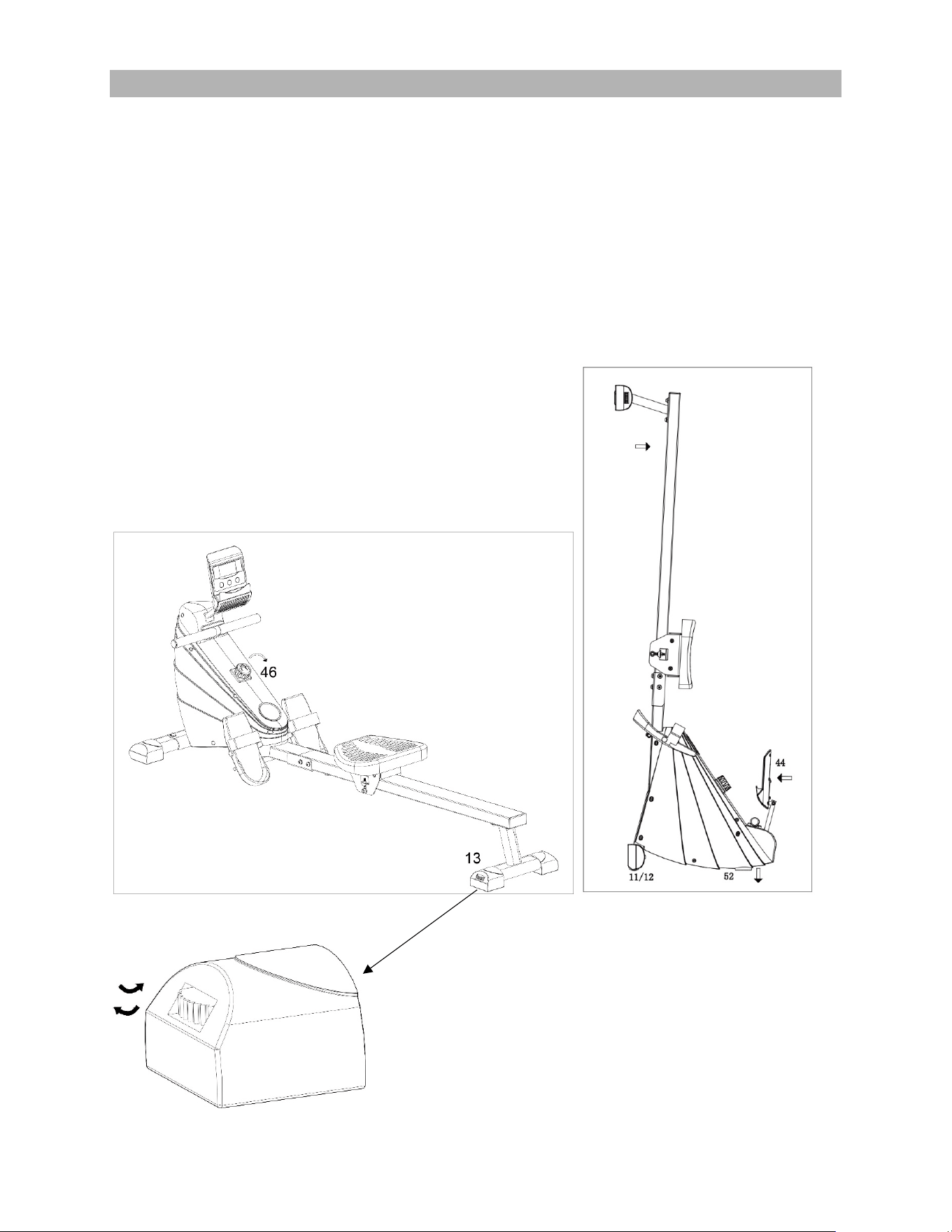
• To adjust resistance, turn resistance knob (#46) clockwise to increase resistance,
counter-clockwise to reduce resistance.
• The feet on the rear stabilizer are adjustable levelers and can be rotated to ensure the
rower sits flat on the ground as shown in the diagram. Turn it counter-clockwise to
increase height and turn it clockwise to decrease height.
• To store the rower, please lower the computer, and stand the rower upright with
the front of the rower facing down. Adjust the leveler (52) on the front of the
rower to ensure that the rower is in a stable position and perpendicular to the
floor.
14
©Impex Inc. www.marcypro.com
EXERCISE GUIDELINES
Using your Rowing Machine
will provide you with several benefits, it will improve your
physical fitness, tone muscle and in conjunction with calorie controlled diet help you
lose weight.
1. The Warmup Phase
This stage helps get the blood flowing around the body and the muscles working
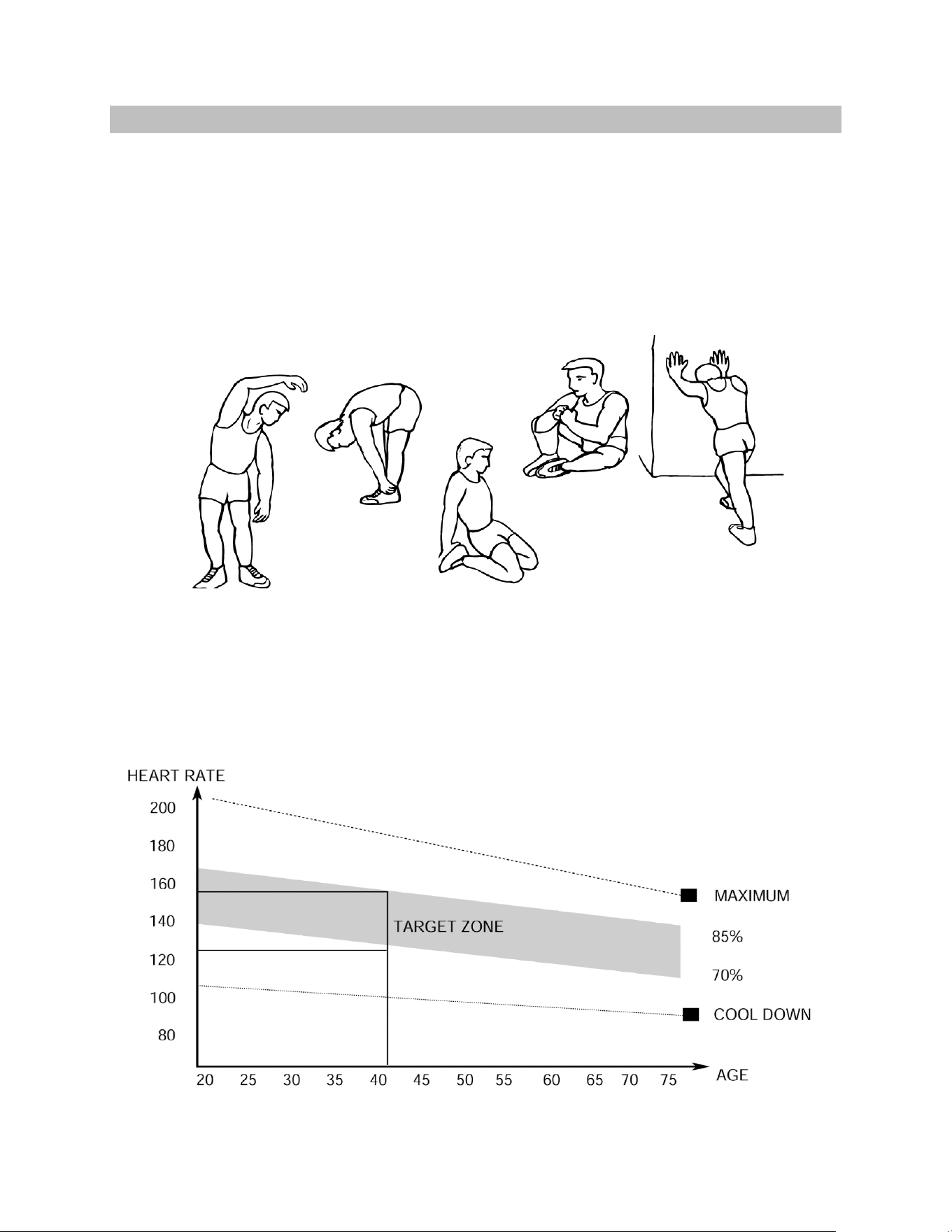
properly. It will also reduce the risk of cramp and muscle injury. It is advisable to do a
few stretching exercises as shown below. Each stretch should be held for approximately
30 seconds, do not force or jerk your muscles into a stretch - if it hurts, STOP.
2. The Exercise Phase
This is the stage where you put the effort in. After regular use, the muscles in your legs
will become more flexible. Work to your speed but it is very important to maintain a
steady tempo throughout. The rate of work should be sufficient to raise your heartbeat
into the target zone shown on the graph below.
SIDE BENDS OUTER THIGH
INNER THIGH
FORWARD
BENDS
CALF / ACHILLES

15
©Impex Inc. www.marcypro.com
This stage should last for a minimum of 12 minutes though most people start at
about 15-20 minutes.
3. The Cool Down Phase
This stage is to let your Cardio-vascular System and muscles wind down. This is a
repeat of the warmup exercise e.g. reduce your tempo, continue for approximately 5
minutes. The stretching exercises should now be repeated, again remembering not to
force or jerk your muscles into the stretch.
As you get fitter you may need to train longer and harder. It is advisable to train at least
three times a week, and if possible, space your workouts evenly throughout the week.
MUSCLE TONING
To tone muscle while on your Rowing Machine you will need to have the resistance set
quite high. This will put more strain on your leg muscles and may mean you cannot train
for as long as you would like. If you are also trying to improve your fitness you need to
alter your training program. You should train as normal during the warmup and cool
down phases, but towards the end of the exercise phase you should increase
resistance making your legs work harder. You will have to reduce your speed to keep
your heart rate in the target zone.
WEIGHT LOSS
The important factor here is the amount of effort you put in. The harder and
longer you work the more calories you will burn. Effectively this is the same as if
you were training to improve your fitness, the difference is the goal.

16
©Impex Inc. www.marcypro.com
IMPEX
®
INC.
LIMITED WARRANTY
IMPEX Inc. ("IMPEX
®
") warrants this product to be free from defects in workmanship and material, under
normal use and service conditions, for a period of two years on the Frame from the date of purchase. This
warranty extends only to the original purchaser. IMPEX's obligation under this Warranty is limited to
replacing or repairing, at IMPEX's option.
All returns must be pre-authorized by IMPEX. Pre-authorization may be obtained by calling IMPEX
Customer Service Department at 1-800-999-8899. All freights for products return to IMPEX must be prepaid
by the customer. This warranty does not extend to any product or damage to a product caused by or
attributable to freight damage, abuse, misuse, improper or abnormal usage or repairs not provided by an
IMPEX authorized service center or for products used for commercial or rental purposes. No other warranty
beyond that specifically set forth above is authorized by IMPEX.
IMPEX is not responsible or liable for indirect, special or consequential damages arising out of or in
connection with the use or performance of the product or other damages with respect to any economic loss,
loss of property, loss of revenues or profits, loss of enjoyments or use, costs of removal, installation or other
consequential damages or whatsoever natures. Some states do not allow the exclusion or limitation of
incidental or consequential damages. Accordingly, the above limitation may not apply to you.
The warranty extended hereunder is in lieu of any and all other warranties and any implied warranties of
merchantability or fitness for a particular purpose is limited in its scope and duration to the terms set forth
herein. Some states do not allow limitations on how long an implied warranty lasts. Accordingly, the above
limitation may not apply to you.
This warranty gives you specific legal right. You may also have other rights which vary from state to state.
Register on-line www.marcypro.com
IMPEX
®
INC.
2801 South Towne Avenue,
Pomona, California 91766
ORDERING REPLACEMENT PARTS
Replacement parts can be ordered by calling our Customer Service Department toll-free at 1-800-999-
8899 during our regular business hours: Monday through Friday, 9 am until 5 pm Pacific standard time.
www.marcypro.com
support@impex-fitness.com
When ordering replacement part, always give the following information.
1. Model
2. Description of Parts
3. Part Number
4. Date of Purchase