

Legalconsiderations
Videoandaudiosurveillancecanberegulatedby
lawsthatvaryfromcountrytocountry.Checkthe
lawsinyourlocalregionbeforeusingthisproduct
forsurveillancepurposes.
Liability
Everycarehasbeentakeninthepreparationofthis
document.PleaseinformyourlocalAxisofceof
anyinaccuraciesoromissions.AxisCommunications
ABcannotbeheldresponsibleforanytechnicalor
typographicalerrorsandreservestherighttomake
changestotheproductandmanualswithoutprior
notice.AxisCommunicationsABmakesnowarranty
ofanykindwithregardtothematerialcontained
withinthisdocument,including,butnotlimitedto,
theimpliedwarrantiesofmerchantabilityandtness
foraparticularpurpose.AxisCommunicationsAB
shallnotbeliablenorresponsibleforincidental
orconsequentialdamagesinconnectionwiththe
furnishing,performanceoruseofthismaterial.This
productisonlytobeusedforitsintendedpurpose.
Intellectualpropertyrights
AxisABhasintellectualpropertyrightsrelatingto
technologyembodiedintheproductdescribedinthis
document.Inparticular,andwithoutlimitation,these
intellectualpropertyrightsmayincludeoneormore
ofthepatentslistedatwww.axis.com/patent.htmand
oneormoreadditionalpatentsorpendingpatent
applicationsintheUSandothercountries.
Equipmentmodications
Thisequipmentmustbeinstalledandusedin
strictaccordancewiththeinstructionsgivenin
theuserdocumentation.Thisequipmentcontains
nouser-serviceablecomponents.Unauthorized
equipmentchangesormodicationswillinvalidate
allapplicableregulatorycerticationsandapprovals.
Trademarkacknowledgments
AXISCOMMUNICATIONS,AXIS,ETRAX,ARTPEC
andVAPIXareregisteredtrademarksortrademark
applicationsofAxisABinvariousjurisdictions.All
othercompanynamesandproductsaretrademarksor
registeredtrademarksoftheirrespectivecompanies.
Regulatoryinformation
Europe
Thisproductcomplieswiththeapplicable
CEmarkingdirectivesandharmonizedstandards:
•ElectromagneticCompatibility(EMC)Directive
2014/30/EU.SeeElectromagneticcompatibility
(EMC)2.
•LowVoltage(LVD)Directive2014/35/EU.See
Safety3.
•RestrictionsofHazardousSubstances(RoHS)
Directive2011/65/EU.SeeDisposaland
recycling3.
Acopyoftheoriginaldeclarationofconformity
maybeobtainedfromAxisCommunicationsAB.See
Contactinformation3.
Electromagneticcompatibility(EMC)
Thisequipmenthasbeendesignedandtestedtofulll
applicablestandardsfor:
•Radiofrequencyemissionwheninstalled
accordingtotheinstructionsandusedinits
intendedenvironment.
•Immunitytoelectricalandelectromagnetic
phenomenawheninstalledaccordingto
theinstructionsandusedinitsintended
environment.
USA
Thisequipmenthasbeentestedusingashielded
networkcable(STP)andfoundtocomplywiththe
limitsforaClassAdigitaldevice,pursuanttopart15
oftheFCCRules.Theselimitsaredesignedtoprovide
reasonableprotectionagainstharmfulinterference
whentheequipmentisoperatedinacommercial
environment.Thisequipmentgenerates,uses,and
canradiateradiofrequencyenergyand,ifnot
installedandusedinaccordancewiththeinstruction
manual,maycauseharmfulinterferencetoradio
communications.Operationofthisequipmentina
residentialareaislikelytocauseharmfulinterference
inwhichcasetheuserwillberequiredtocorrectthe
interferenceathisownexpense.Theproductshallbe
connectedusingashieldednetworkcable(STP)that
isproperlygrounded.
Canada
Thisdigitalapparatuscomplieswith
CANICES-3(ClassA).Theproductshallbe
connectedusingashieldednetworkcable(STP)that
isproperlygrounded.Cetappareilnumériqueest
conformeàlanormeNMBICES-3(classeA).Le
produitdoitêtreconnectéàl'aided'uncâbleréseau
blindé(STP)quiestcorrectementmisàlaterre.
Europe
ThisdigitalequipmentfulllstherequirementsforRF
emissionaccordingtotheClassAlimitofEN55022.
Theproductshallbeconnectedusingashielded
networkcable(STP)thatisproperlygrounded.Notice!
ThisisaClassAproduct.Inadomesticenvironment
thisproductmaycauseRFinterference,inwhichcase
theusermayberequiredtotakeadequatemeasures.
ThisdigitalequipmentfulllstherequirementsforRF
emissionaccordingtotheClassAlimitofEN55032.
Theproductshallbeconnectedusingashielded
networkcable(STP)thatisproperlygrounded.Notice!
ThisisaClassAproduct.Inadomesticenvironment
thisproductmaycauseRFinterference,inwhichcase
theusermayberequiredtotakeadequatemeasures.
Thisproductfulllstherequirementsforemission
andimmunityaccordingtoEN50121-4and
IEC62236-4railwayapplications.
Thisproductfulllstherequirementsforimmunity
accordingtoEN61000-6-1residential,commercial
andlight-industrialenvironments.

Thisproductfulllstherequirementsforimmunity
accordingtoEN61000-6-2industrialenvironments.
Thisproductfulllstherequirementsforimmunity
accordingtoEN55024ofceandcommercial
environments.
Australia/NewZealand
Thisdigitalequipmentfulllstherequirements
forRFemissionaccordingtotheClassAlimitof
AS/NZSCISPR22.Theproductshallbeconnected
usingashieldednetworkcable(STP)thatisproperly
grounded.Notice!ThisisaClassAproduct.Ina
domesticenvironmentthisproductmaycauseRF
interference,inwhichcasetheusermayberequired
totakeadequatemeasures.
Japan
この装置は、クラスA情報技術装置です。こ
の装置を家庭環境で使⽤すると電波妨害を引
き起こすことがあります。この場合には使⽤
者が適切な対策を講ずるよう要求されるこ
とがあります。本製品は、シールドネット
ワークケーブル(STP)を使⽤して接続してくだ
さい。また適切に接地してください。
Korea
이기기는업무용(A급)전자파적합기기로
서판매자또는사용자는이점을주의하
시기바라며,가정외의지역에서사용하는
것을목적으로합니다.적절히접지된STP
(shieldedtwistedpair)케이블을사용하여제
품을연결하십시오.
Safety
ThisproductcomplieswithIEC/EN/UL60950-1,
SafetyofInformationTechnologyEquipment.
Ifitsconnectingcablesareroutedoutdoors,the
productshallbegroundedeitherthroughashielded
networkcable(STP)orotherappropriatemethod.
Disposalandrecycling
Whenthisproducthasreachedtheendofits
usefullife,disposeofitaccordingtolocallaws
andregulations.Forinformationaboutyour
nearestdesignatedcollectionpoint,contactyour
localauthorityresponsibleforwastedisposal.In
accordancewithlocallegislation,penaltiesmaybe
applicableforincorrectdisposalofthiswaste.
Europe
Thissymbolmeansthattheproductshall
notbedisposedoftogetherwithhouseholdor
commercialwaste.Directive2012/19/EUonwaste
electricalandelectronicequipment(WEEE)is
applicableintheEuropeanUnionmemberstates.
Topreventpotentialharmtohumanhealthandthe
environment,theproductmustbedisposedofinan
approvedandenvironmentallysaferecyclingprocess.
Forinformationaboutyournearestdesignated
collectionpoint,contactyourlocalauthority
responsibleforwastedisposal.Businessesshould
contacttheproductsupplierforinformationabout
howtodisposeofthisproductcorrectly.
Thisproductcomplieswiththerequirementsof
Directive2011/65/EUontherestrictionoftheuse
ofcertainhazardoussubstancesinelectricaland
electronicequipment(RoHS).
China
Thisproductcomplieswiththerequirements
ofSJ/T11364-2014,Markingfortherestrictionof
hazardoussubstancesinelectricalandelectronic
products.
Contactinformation
AxisCommunicationsAB
Emdalavägen14
22369Lund
Sweden
Tel:+46462721800
Fax:+4646136130
www.axis.com
Warrantyinformation
ForinformationaboutAxis’productwarranty
andtheretorelatedinformation,goto
www.axis.com/warranty/
Support
Shouldyourequireanytechnicalassistance,please
contactyourAxisreseller.Ifyourquestionscannot
beansweredimmediately,yourresellerwillforward
yourqueriesthroughtheappropriatechannelsto
ensurearapidresponse.Ifyouareconnectedtothe
Internet,youcan:
•downloaduserdocumentationandsoftware
updates
•ndanswerstoresolvedproblemsintheFAQ
database.Searchbyproduct,category,or
phrase
•reportproblemstoAxissupportstaffbylogging
intoyourprivatesupportarea
•chatwithAxissupportstaff
•visitAxisSupportatwww.axis.com/techsup/
Learnmore!
VisitAxislearningcenterwww.axis.com/academy/for
usefultrainings,webinars,tutorialsandguides.

AXIST815460WSFPMidspan
Safetyinformation
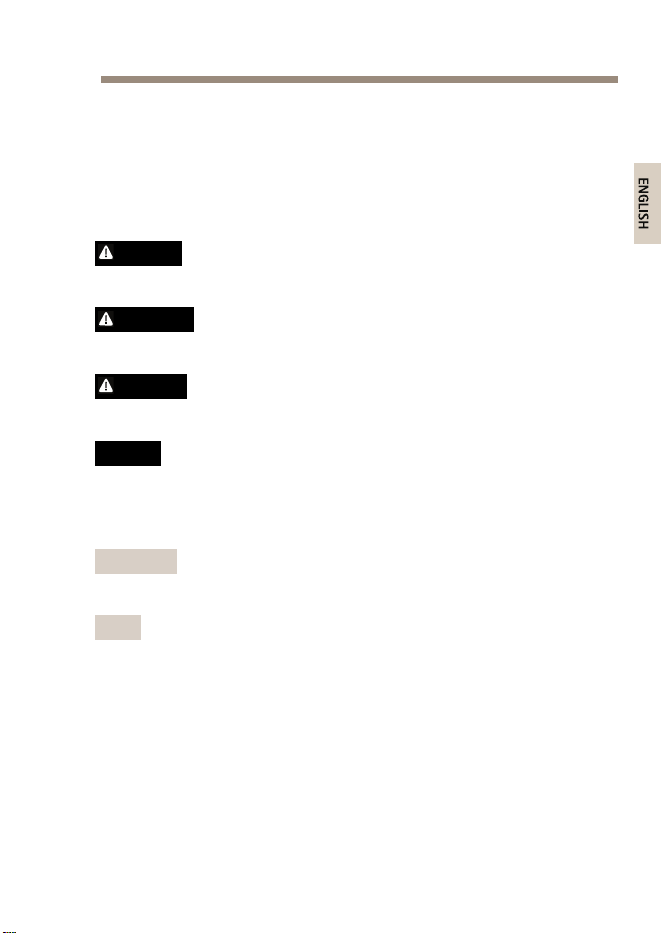
ReadthroughthisInstallationGuidecarefullybeforeinstallingtheproduct.
KeeptheInstallationGuideforfuturereference.
Hazardlevels
DANGER
Indicatesahazardoussituationwhich,ifnotavoided,willresult
indeathorseriousinjury.
WARNING
Indicatesahazardoussituationwhich,ifnotavoided,couldresult
indeathorseriousinjury.
CAUTION
Indicatesahazardoussituationwhich,ifnotavoided,couldresult
inminorormoderateinjury.
NO NO
NO
TICE TICE
TICE
Indicatesasituationwhich,ifnotavoided,couldresultindamage
toproperty.
Othermessagelevels
Important
Indicatessignicantinformationwhichisessentialforthe
producttofunctioncorrectly.
Note
Indicatesusefulinformationwhichhelpsingettingthemostout
oftheproduct.
5

AXIST815460WSFPMidspan
Safetyinstructions
WARNING
TheAxisproductshallbeinstalledbyatrainedprofessional,and
incompliancewithlocallawsandregulations.
NO NO
NO
TICE TICE
TICE
•TheAxisproductshallbeusedincompliancewithlocallaws
andregulations.
•Theproductshallbegroundedeitherthroughashieldednetwork
cable(STP)orotherappropriatemethod.
•TousetheAxisproductoutdoors,orinsimilarenvironments,it
shallbeinstalledinanapprovedoutdoorhousing.
•StoretheAxisproductinadryandventilatedenvironment.
•AvoidexposingtheAxisproducttoshocksorheavypressure.
•AvoidexposingtheAxisproducttovibration.
•Donotinstalltheproductonunstablepoles,brackets,surfaces
orwalls.
•Donotinstalltheproductonvibratingpoles,brackets,surfaces
orwalls.
•UseonlyapplicabletoolswheninstallingtheAxisproduct.
Usingexcessiveforcewithpowertoolscouldcausedamage
totheproduct.
•Donotusechemicals,causticagents,oraerosolcleaners.
•Useacleanclothdampenedwithpurewaterforcleaning.
•Useonlyaccessoriesthatcomplywiththetechnicalspecication
oftheproduct.ThesecanbeprovidedbyAxisorathirdparty.
•UseonlysparepartsprovidedbyorrecommendedbyAxis.
•Donotattempttorepairtheproductyourself.ContactAxis
supportoryourAxisresellerforservicematters.
6

AXIST815460WSFPMidspan
Transportation
NO NO
NO
TICE TICE
TICE
•WhentransportingtheAxisproduct,usetheoriginalpackaging
orequivalenttopreventdamagetotheproduct.
7

AXIST815460WSFPMidspan
Packagecontents
•AXIST815460WSFPMidspan
•Powercable
•Printedmaterials
-InstallationGuide(thisdocument)
8
AXIST815460WSFPMidspan
Howtoinstalltheproduct
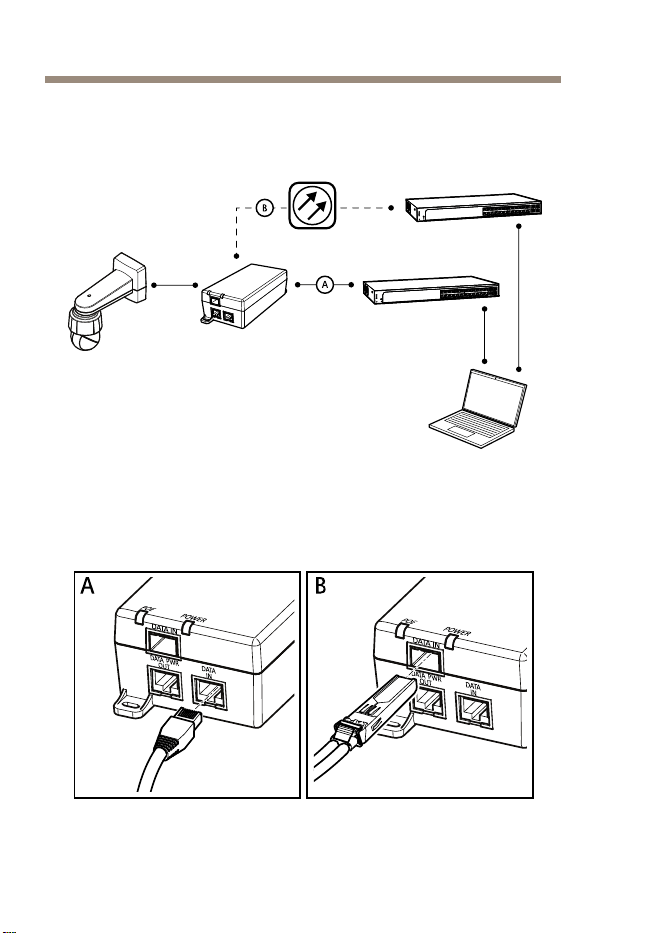
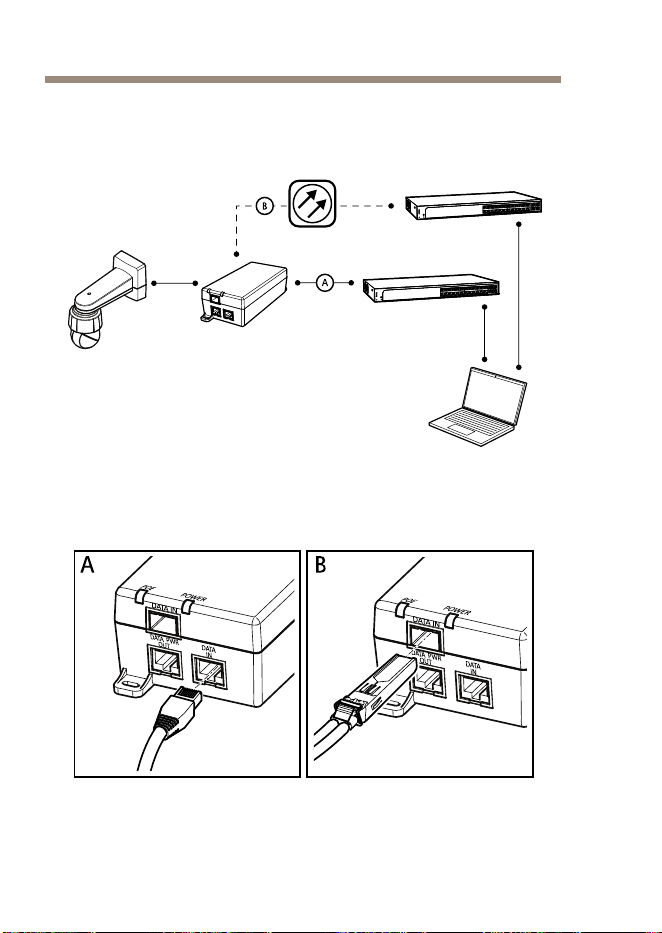
1.Connectthemidspantothenetworkswitchinoneofthe
alternativeways:
10

AXIST815460WSFPMidspan
NO NO
NO
TICE TICE
TICE
Useashieldednetworkcable(STP)CAT5orhigher.
-A:viaanEthernetRJ45cablethatisconnectedto
themidspan’sRJ45port(DATAIN).
-B:viaanopticalbrecableattachedtoanSFP
modulethatisconnectedtothemidspan’sSFPslot
(DATAIN).
2.Connectthemidspan(DATAPWROUT)tothecamera’sRJ45
portusinganEthernetRJ45cable.
3.Connectthemidspantoagrounded(earthed)mainspower
outlet(100–240VAC)usingthesuppliedpowercable.
4.VerifythatthemidspanLEDsindicatethecorrectstatuses.
SeeLEDindicatorsonpage13.
11

AXIST815460WSFPMidspan
Furtherinformation
•Forthelatestversionofthisdocument,seewww.axis.com
•Forusefulonlinetrainingsandwebinars,see
www.axis.com/academy
Optionalaccessories
Foracompletelistofavailableaccessoriesforthisproduct,goto
www.axis.com
Warrantyinformation
ForinformationaboutAxis’productwarrantyandtheretorelated
information,gotowww.axis.com/warranty/
12
AXIST815460WSFPMidspan
Technicalspecifications
Youcanndthelatestversionofthetechnicalspecicationsat
www.axis.com
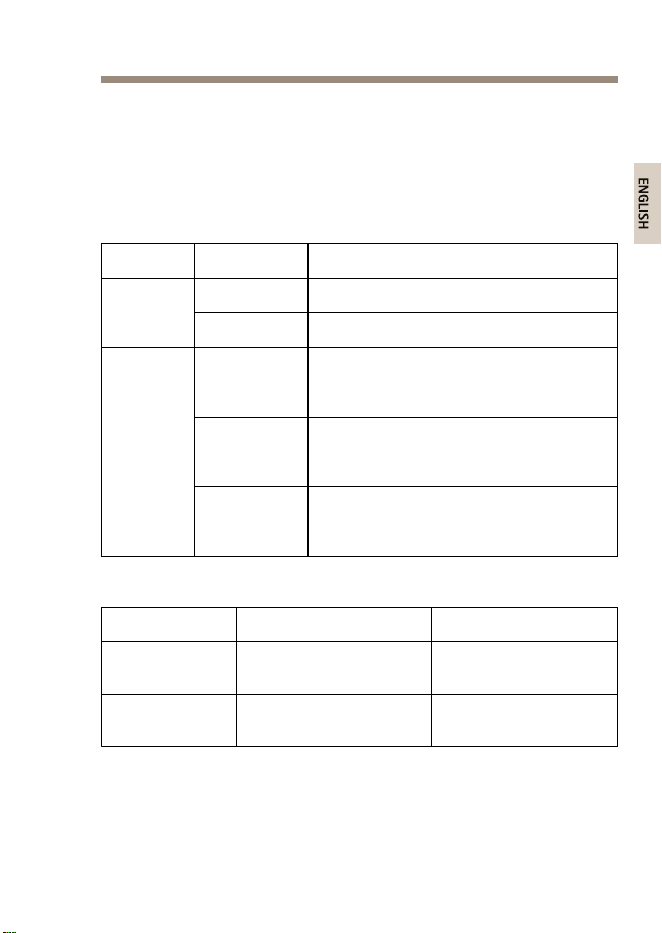
LEDindicators
LED
Color,status
Indication
Off
Poweroff Power
Green,static
Poweron
Green,static
Aremotedeviceisconnected,PoE
negotiationhassucceededandtheport
isprovidingload
Green,
blinking
NoremotedeviceisconnectedorthePoE
loadhasdroppedbelowtheminimum
level
Port
Red,staticAremotedeviceisconnectedbutPoE
negotiationhasfailedortheportis
overloadedorshorted
Operatingconditions
ModeTemperatureHumidity
Operatingupto
60W
-10°Cto45°C
(14°Fto113°F)
Max90%RH
(non-condensing)
Operatingupto
30W
-10°Cto55°C
(14°Fto131°F)
Max90%RH
(non-condensing)
13
AXIST815460WSFPMidspan
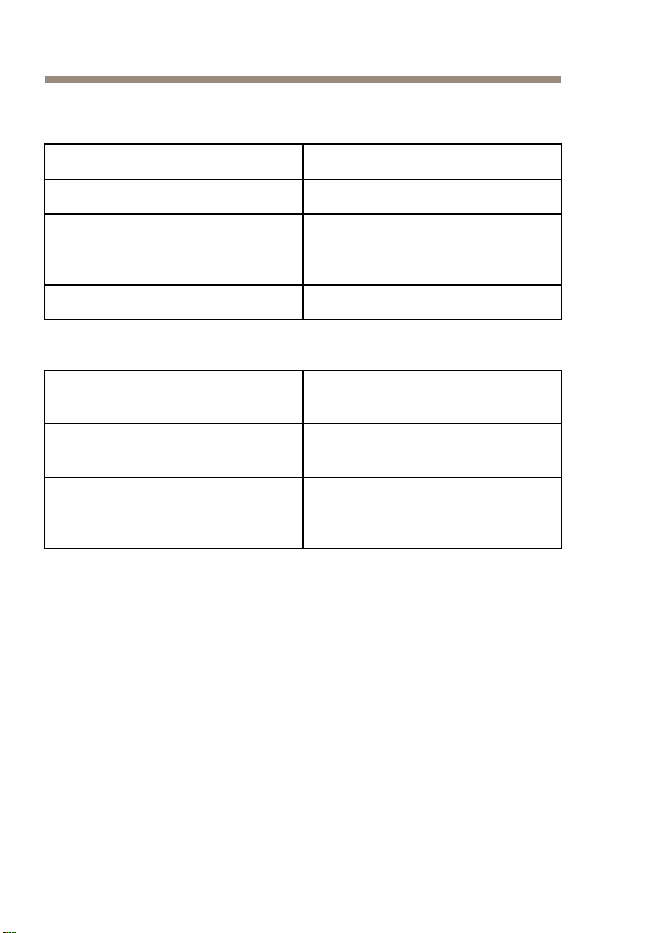
Powerconsumption
Inputvoltage
100–240VAC50/60Hz
Maximuminputcurrent1.5Ampere
Maximumavailableoutputpower
(HighPoweroverEthernet)
60W
Nominaloutputvoltage
56VDC
EthernetInterface
Input(DATAIN)
Ethernet10/100/1000Base-T
RJ45femalesocket
Input(DATAIN)
SFP100/1000Base-T
SFPslot
Output(DATA&POWEROUT)
Ethernet10/100/1000Base-T,
55VDC
RJ45femalesocket,with
DCvoltageonwirepairs
1–2,3–6,4–5and7–8
14
AXIST815460WSFPMidspan
Troubleshooting
SymptomCorrectiveaction
Unplugandthenre-plugthemidspan’spower
cableandcheckthepowerLEDindicatorstatus
duringthepower-upsequence.
Verifythatthepowerinletvoltageisbetween
100–240VAC.
Themidspandoes
notpowerup
Verifythatthepowerinletcableis
intact/functional.
VerifythattheremotedeviceisdesignedforPoE
operation.
Verifythattheremotedeviceisconnectedto
themidspan’sDATAPWROUTportusinga
standardSTPCAT5orhigher,straight-wired
networkcablewithfourpairs.
Ifanexternalpowersplitterisinuse,verifythat
itworks.
Verifythatthereisnoshortcircuitonanyofthe
twistedpaircablesorRJ45connectors.
Theremotedevice
connectedtothe
midspandoesnot
powerup
Ifpossible,connecttheremotedevicetoa
differentmidspan.
15
AXIST815460WSFPMidspan
SymptomCorrectiveaction
IfusinganEthernetRJ45cable,verifythatitis
astandardSTPCAT5orhigher,straight-wired
networkcablewithfourpairs.
IfusinganEthernetRJ45cable,verifythatits
lengthbetweenthenetworkswitchandthe
remotedeviceislessthan100m(330ft).
Ifusinganopticalbrecable,verifythatthe
cableandtheSFPmoduleareofthecorrect
type,andthatthecableisintact/functional.
Theremotedevice
connectedtothe
midspanpowersup
butthereisnodata
link
Ifpossibleconnecttheremotedevicetoa
differentmidspan.
16
AXIST815460WSFPMidspan
Informationssurlasécurité
Lisezattentivementceguided'installationavantd'installerl'appareil.
Conservezleguided'installationpourtouteréférenceultérieure.
Niveauxderisques
DANGER
Indiqueunesituationdangereusequi,siellen'estpasévitée,
entraîneraledécèsoudesblessuresgraves.
AVERTISSEMENT
Indiqueunesituationdangereusequi,siellen'estpasévitée,
pourraitentraînerledécèsoudesblessuresgraves.
ATTENTION
Indiqueunesituationdangereusequi,siellen'estpasévitée,
pourraitentraînerdesblessureslégèresoumodérées.
A A
A
VIS VIS
VIS
Indiqueunesituationqui,siellen'estpasévitée,pourrait
endommagerl'appareil.
Autresniveauxdemessage
Important
Indiquelesinformationsimportantes,nécessairespourassurerle
bonfonctionnementdel’appareil.
Note
Indiquelesinformationsutilesquipermettrontd’obtenirle
fonctionnementoptimaldel’appareil.
17

AXIST815460WSFPMidspan
Consignesdesécurité
AVERTISSEMENT
LeproduitAxisdoitêtreinstalléparunprofessionnelqualiéet
conformémentauxloisetrèglementationslocalesenvigueur.
A A
A
VIS VIS
VIS
•LeproduitAxisdoitêtreutiliséconformémentauxloiset
règlementationslocalesenvigueur.
•Ildoitêtremisàlaterresoitàl'aided'uncâbleréseaublindé
(STP),soitàl'aided'uneautreméthodeappropriée.
•PourpouvoirutiliserleproduitAxisàl'extérieur,oudansdes
environnementssimilaires,ildoitêtreinstallédansunboîtier
d'extérieurhomologué.
•ConserverceproduitAxisdansunenvironnementsecetventilé.
•NepasexposerceproduitAxisauxchocsouauxfortespressions.
•NepasexposerceproduitAxisauxvibrations.
•Nepasinstallerceproduitsurdespoteaux,supports,surfaces
oumursinstables.
•Nepasinstallerceproduitsurdespoteaux,supports,surfaces
oumurssoumisàdesvibrations.
•Utiliseruniquementdesoutilsrecommandéspourl'installation
del'appareilAxis.L'applicationd'uneforceexcessivesur
l'appareilavecdesoutilspuissantspourraitl'endommager.
•Nepasutiliserdeproduitschimiques,desubstancescaustiques
oudenettoyantspressurisés.
•Utiliserunchiffonpropreimbibéd'eaupurepourlenettoyage.
•Utiliseruniquementdesaccessoiresconformesaux
caractéristiquestechniquesduproduit.Ilspeuventêtrefournis
parAxisouuntiers.
•Utiliseruniquementlespiècesderechangefourniesou
recommandéesparAxis.
18
AXIST815460WSFPMidspan
•Nepasessayerderéparervous-mêmeceproduit.Contacter
l'assistancetechniqued'AxisouvotrerevendeurAxispourdes
problèmesliésàl'entretien.
Transport
A A
A
VIS VIS
VIS
•LorsdutransportduproduitAxis,utilisezl'emballaged'origine
ouunéquivalentpouréviterd'endommagerleproduit.
19

AXIST815460WSFPMidspan
Contenudel’emballage
•InjecteurSFPAXIST815460W
•Câbled’alimentation
•Documentsimprimés
-Guided’installation(cedocument)
20
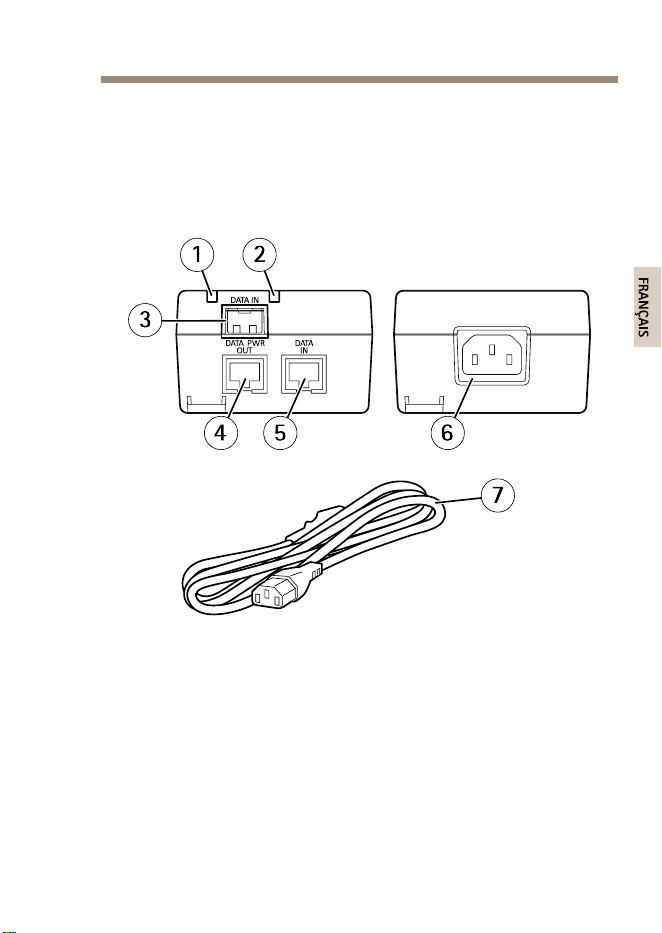
AXIST815460WSFPMidspan
Aperçudumatériel
Pourconnaîtrelescaractéristiquesdescomposantsmatériels,consultez
Caractéristiquestechniquespage25.
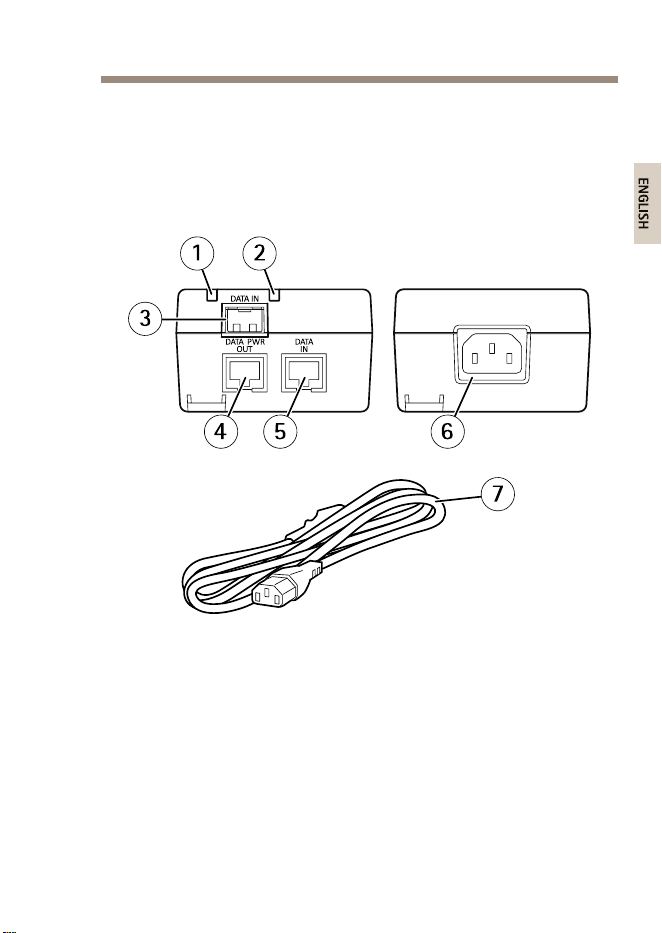
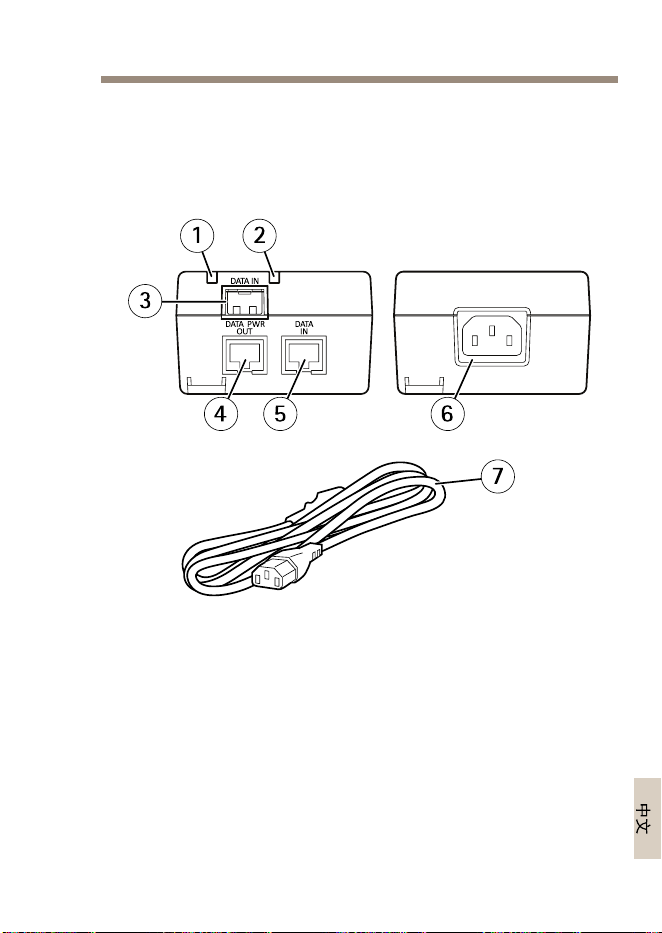
1
DELduport
2
Voyantd’alimentation
3
EmplacementSFPpourmodulebreoptiqueSFP
(moduleSFPnoninclus)
4
PortRJ45etPoE
5
PortRJ45
6
Connecteurd'alimentation(entrée100-240VCA)
7
Câbled’alimentation
21
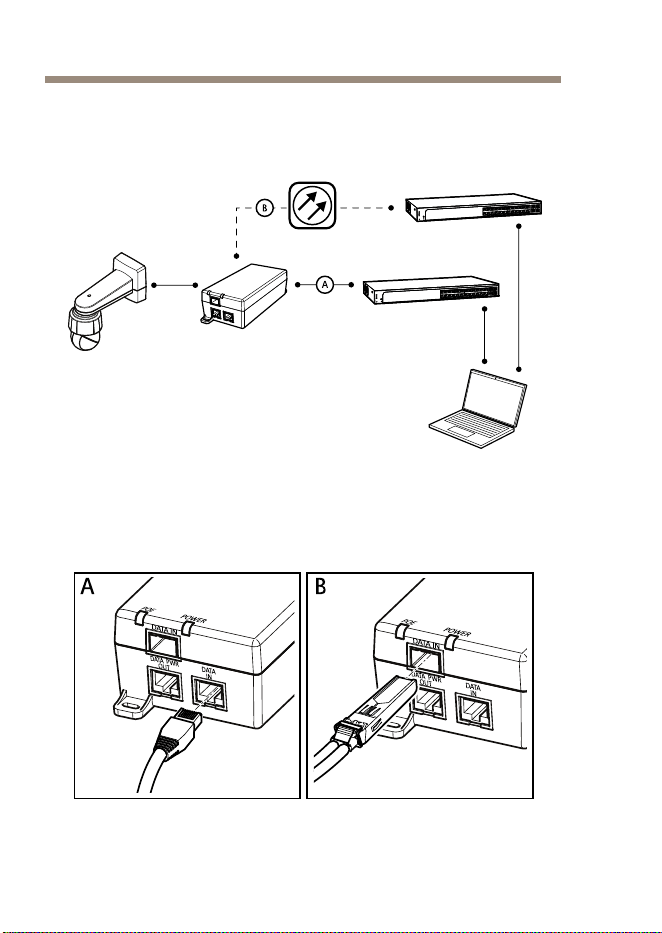
AXIST815460WSFPMidspan
Commentinstallerleproduit
1.Branchezl'injecteuraucommutateurréseaudel'unedes
façonssuivantes:
22

AXIST815460WSFPMidspan
A A
A
VIS VIS
VIS
Utilisezuncâbleréseaublindé(STP)CAT5ousupérieur.
-A:viauncâbleEthernetRJ45branchésurleport
RJ45del'injecteur(ENTRÉEDONNÉES).
-B:viauncâbleàbreoptiqueraccordéàun
moduleSFPbranchésurl'emplacementSFPde
l'injecteur(ENTRÉEDONNÉES).
2.Connectezl'injecteur(DATAPWROUT)auportRJ45dela
caméraàl'aided'uncâbleEthernetRJ45.
3.Connectezl'injecteuràunesortiedusecteurmiseàlaterre
(100–240VCA)àl'aideducâbled’alimentationfourni.
4.VériezquelesvoyantsDELdel'injecteurindiquentlesétats
defonctionnementcorrects.Cf.VoyantsDELpage25.
23

AXIST815460WSFPMidspan
Informationscomplémentaires
•Pourladernièreversiondecedocument,consultezlesite
www.axis.com
•Pourensavoirplussurlesformations,leswebinaires,les
tutorielsetlesguides,visitezlesitewww.axis.com/academy.
Accessoiresenoption
Pourobtenirlalistecomplètedesaccessoiresdisponiblespourceproduit,
consultezwww.axis.com
Informationssurlagarantie
PourobtenirdeplusamplesinformationssurlagarantieduproduitAXIS
etdesrenseignementsconnexes,visitezlesitewww.axis.com/warranty/
24
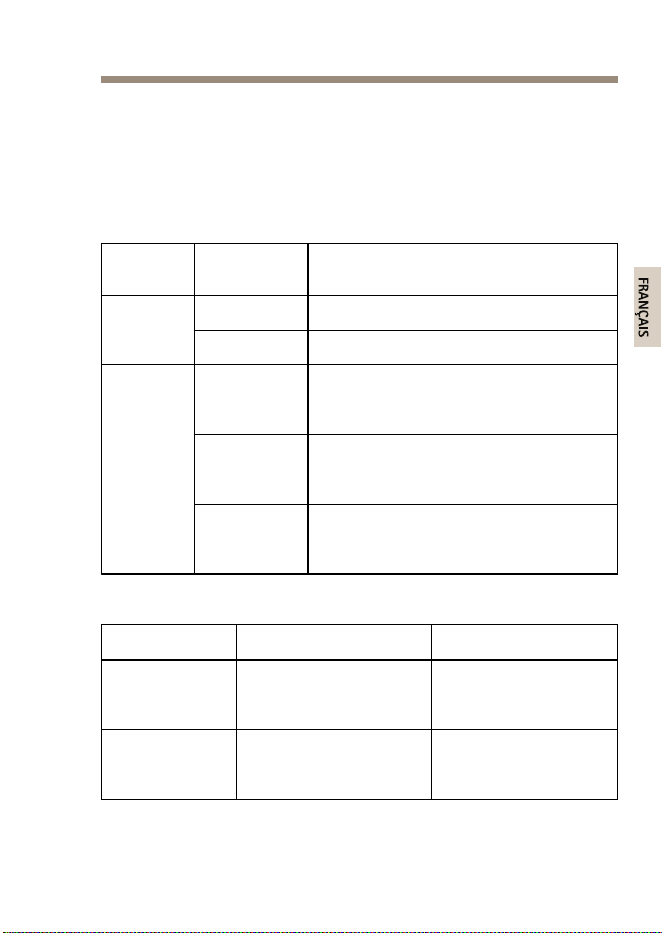
AXIST815460WSFPMidspan
Caractéristiquestechniques
Vouspouvezobtenirladernièreversiondescaractéristiquestechniques
surwww.axis.com
VoyantsDEL
Voyant
DEL
Couleur,état
Indication
DésactivéHorstension Alimenta-
tion
Vert,xe
Soustension
Vert,xeUnpériphériquedistantestconnecté,la
négociationPoEaréussietleportfournit
unecharge
Vert,
clignotant
Aucunpériphériquedistantn'est
connectéoulachargePoEesttombésous
leniveauminimal
Port
Rouge,xeUnpériphériquedistantestconnecté,
maislanégociationPoEaéchouéoule
portestsurchargéoucourt-circuité
Conditionsd'utilisation
Mode
TempératureHumidité
Fonctionnement
jusqu'à60W
-10°Cà45°C
(14°Fà113°F)
Humiditérelative
maximalede90%
(sanscondensation)
Fonctionnement
jusqu'à30W
-10°Cà55°C
(14°Fà131°F)
Humiditérelative
maximalede90%
(sanscondensation)
25

AXIST815460WSFPMidspan
Consommationd'énergie
Tensiond'entrée
100–240VCA50/60Hz
Courantd'entréemaximal
1,5ampère
Puissancedesortiedisponible
maximale
(Alimentationhautepuissancepar
Ethernet)
60W
Tensiondesortienominale
56VCC
InterfaceEthernet
Entrée(DATAIN)
Ethernet10/100/1000Base-T
PrisefemelleRJ45
Entrée(DATAIN)
SFP100/1000Base-T
LogementSFP
Sortie(SORTIEDONNÉESET
ALIMENTATION):
Ethernet10/100/1000Base-T,
55VCC
PrisefemelleRJ45,avectension
continuesurlespairesde
conducteur1–2,3–6,4–5et7–8
26
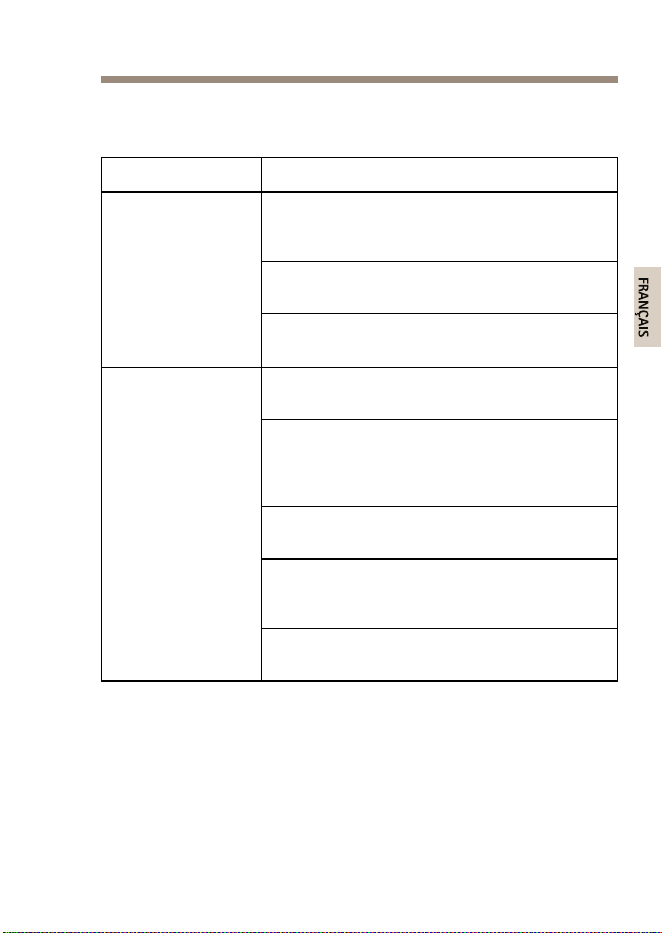
AXIST815460WSFPMidspan
Dépannage
Symptôme
Actioncorrective
Débranchez,puisrebranchezlecâble
d'alimentationdel'injecteuretvériezl'étatdu
voyantLEDpendantlamisesoustension.
Vériezquelatensionàl’arrivéesesitueentre
100et240VCA.
L’injecteurne
semetpassous
tension.
Vériezquelecâbled'alimentationestintact/
fonctionne.
Vériezquelepériphériquedistantabienété
conçupourunfonctionnementPoE.
Vériezquelepériphériquedistantestraccordé
auportDATAPWROUTdel'injecteuràl'aide
d'uncâbleréseaudroitstandardSTPCAT5ou
supérieuràquatrepairesdels.
Siundiviseurd’alimentationexterneestutilisé,
vériezqu'ilfonctionne.
Vériezqu’iln’yapasdecourt-circuit
surlescâblesàpairestorsadéesnisurles
connecteursRJ45.
Lepériphérique
distantraccordéà
l'injecteurnesemet
passoustension
Sipossible,branchezlepériphériquedistantà
uninjecteurdifférent.
27

AXIST815460WSFPMidspan
Symptôme
Actioncorrective
SivousutilisezuncâbleEthernetRJ45,vériez
qu'ils'agitd'uncâbleréseaudroitstandardSTP
CAT5ousupérieuràquatrepairesdels.
SivousutilisezuncâbleEthernetRJ45,vériez
quesalongueurentrelecommutateurréseau
etlepériphériquedistantestinférieurà
100m(330pi).
Sivousutilisezuncâbleàbreoptique,vériez
quelecâbleetlemoduleSFPsontd'untype
correctetquelecâbleestintact/fonctionnel.
Lepériphérique
distantraccordé
àl'injecteurse
metsoustension,
maisaucuneliaison
dedonnéesn'est
établie
Sipossible,branchezlepériphériquedistantà
uninjecteurdifférent.
28
AXIST815460WSFPMidspan
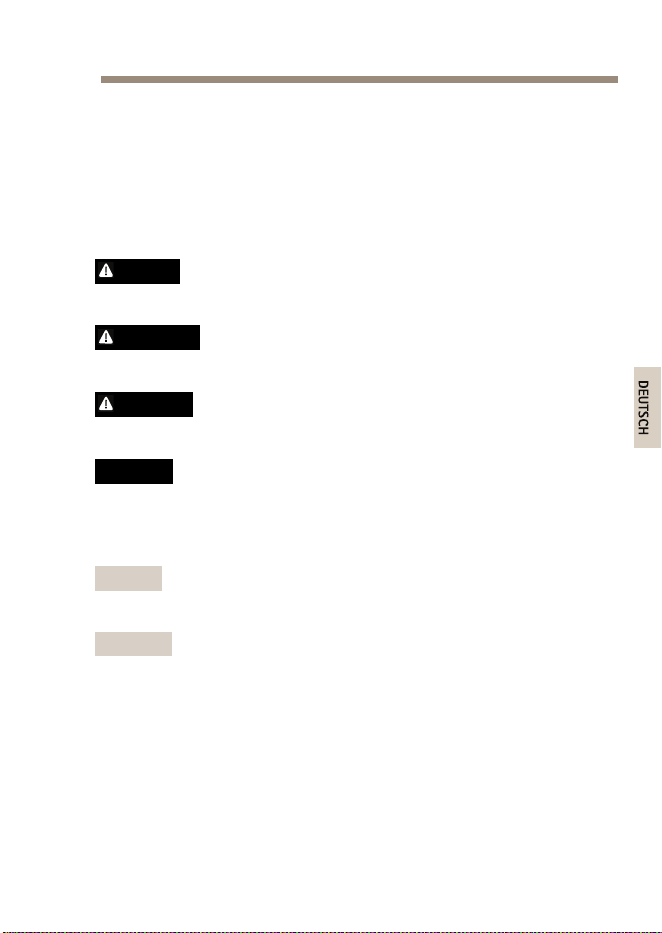
Sicherheitsinformation
LesenSievorderInstallationdesProduktssorgfältigdie
Installationsanleitung.BewahrenSiedasInstallationshandbuchfür
zukünftigeZweckeauf.
Gefährdungsstufen
GEFAHR
WeistaufeinegefährlicheSituationhin,welchezumTododerzu
schwerenVerletzungenführt.
WARNUNG
WeistaufeinegefährlicheSituationhin,welche,fallsnicht
verhindert,zuTododerschwerenVerletzungenführenkann.
VORSICHT
WeistaufeinegefährlicheSituationhin,welche,fallsnicht
verhindert,zugeringfügigerodermäßigerVerletzungführenkann.
HINWEIS HINWEIS
HINWEIS
WeistaufeinegefährlicheSituationhin,welche,fallsnicht
verhindert,zuSachschädenführenkann.
WeitereNachrichtenstufen
Wichtig
WeistaufwichtigeInformationenhin,diedenrichtigenBetrieb
desProduktsgewährleisten.
Beachten
WeistaufnützlicheInformationenhin,diedieoptimale
VerwendungdesProduktsunterstützen.
29

AXIST815460WSFPMidspan
Sicherheitsanweisungen
WARNUNG
DasAxisProduktmussvonfachmännischemPersonalundunter
EinhaltungderörtlichgeltendenBestimmungeninstalliert
werden.
HINWEIS HINWEIS
HINWEIS
•DieAnwendungdesAxisProduktsmussunterBeachtungder
örtlichgeltendenrechtlichenBestimmungenerfolgen.
•DasProduktmussentwederübereingeschirmtesNetzwerkkabel
(STP)oderdurchAnwendungeineranderengeeignetenMethode
geerdetwerden.
•BeiderAnwendungvonAxisProduktenimAußenbereich
oderähnlichenUmgebungenmüssendieseinzugelassenen
Außengehäuseninstalliertwerden.
•LagernSiedasAxisProduktineinertrockenenundbelüfteten
Umgebung.
•AchtenSiedarauf,dassdasAxisProduktwederStößennoch
starkemDruckausgesetztist.
•AchtenSiedarauf,dassdasAxisProduktkeinenVibrationen
ausgesetztist.
•InstallierenSiedasProduktnichtaninstabilenMasten,
Halterungen,OberächenoderWänden.
•InstallierenSiedasProduktnichtanvibrierendenMasten,
Halterungen,OberächenoderWänden.
•VerwendenSiebeiderInstallationdesAxisProdukts
ausschließlichpassendeWerkzeuge.EinzugroßerKraftaufwand
mitelektrischenWerkzeugenkanndasProduktbeschädigen.
•VerwendenSiekeinechemischen,ätzendenoderaerosolhaltigen
Reinigungsmittel.
•VerwendenSiezumReinigeneinsauberes,mitdestilliertem
WasserangefeuchtetesTuch.
30

AXIST815460WSFPMidspan
•VerwendenSienurZubehör,dasdentechnischenDatendes
Produktsentspricht.DiesesistvonAxisoderDrittanbietern
erhältlich.
•VerwendenSieausschließlichErsatzteiledievonAxis
bereitgestelltoderempfohlenwerden.
•VersuchenSienicht,dasProduktselbstständigzureparieren.
WendenSiesichbezüglichReparaturundWartungandenAxis
SupportoderIhrenAxisHändler.
Transport
HINWEIS HINWEIS
HINWEIS
•BeiBedarftransportierenSiedasAxisProduktinder
OriginalverpackungodereinerentsprechendenVerpackung,so
dassSchädenvermiedenwerden.
31

AXIST815460WSFPMidspan
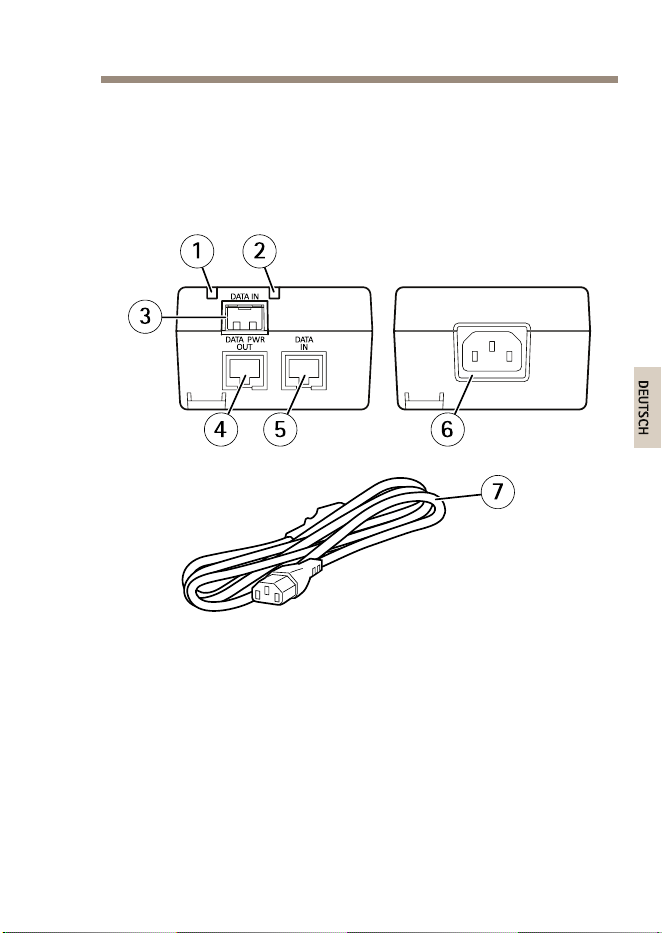
Lieferumfang
•AXIST815460WSFPMidspan
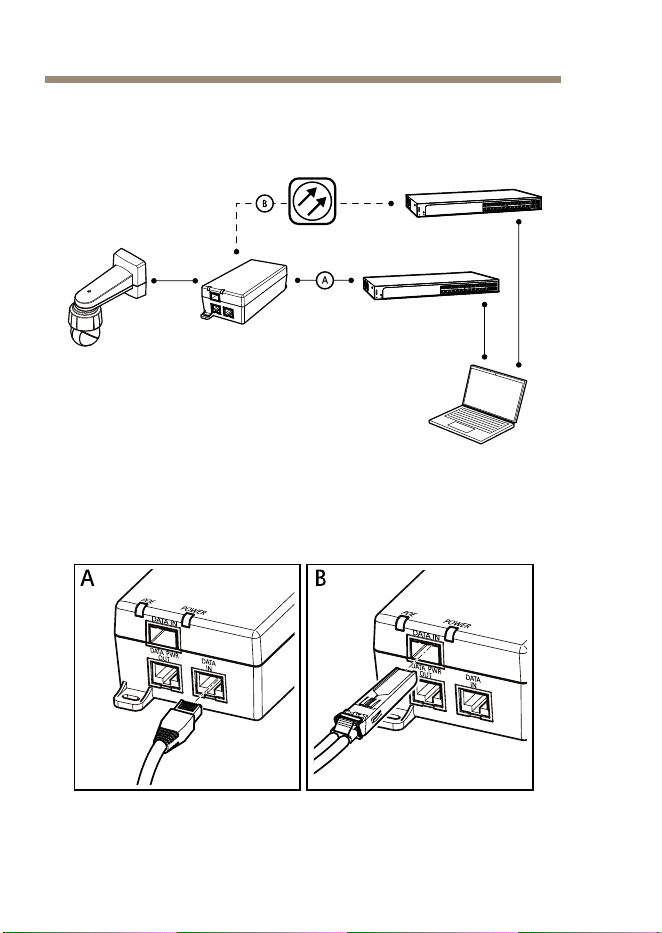
•Stromkabel
•Dokumente
-Installationsanleitung(diesesDokument)
32
AXIST815460WSFPMidspan
InstallierendesProdukts
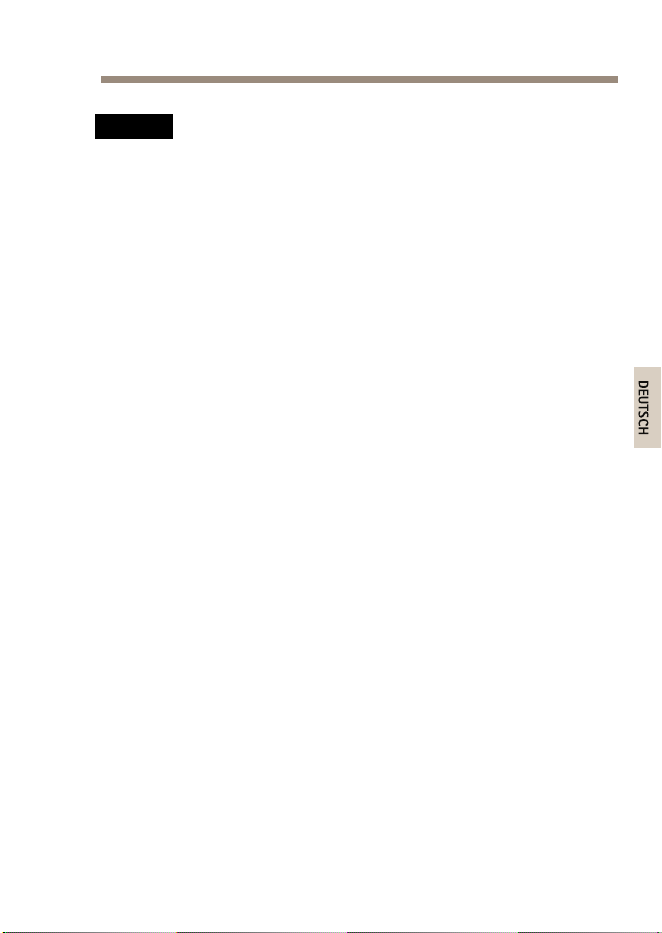
1.SchließenSiedenMidspanfolgendermaßenanden
Netzwerkswitchan:
34
AXIST815460WSFPMidspan
HINWEIS HINWEIS
HINWEIS
VerwendenSieeingeschirmtesNetzwerkkabel(STP)derKategorie
5oderhöher.
-A:MithilfeeinesRJ-45-Ethernet-Kabels,das
andenRJ-45-Port(DATAIN)desMidspans
angeschlossenwird.
-B:MithilfeeinesGlasfaserkabels,dasmiteinem
SFP-ModulüberdenSFP-Einschub(DATAIN)an
denMidspanangeschlossenwird.
2.SchließenSiedenMidspan(DATAPWROUT)mithilfeeines
RJ-45-Ethernet-KabelsandenRJ-45-PortderKameraan.
3.VerbindenSiedenMidspanmithilfedesmitgelieferten
NetzkabelsmiteinergeerdetenNetzsteckdose(100–240VAC).
4.ÜberprüfenSie,dassdieLEDsdesMidspansdieBetriebsstatus
korrektangeben.SieheLED-AnzeigenaufSeite37.
35

AXIST815460WSFPMidspan
WeitereInformationen
•Unterwww.axis.comndenSiedieaktuelleVersiondieses
Dokuments.
•NützlicheOnlineschulungenundWebinarendenSieunter
www.axis.com/academy.
OptionalesZubehör
EinevollständigeListemitZubehörfürdiesesProduktndenSieunter
www.axis.com.
Gewährleistungsinformationen
InformationenzurGewährleistungderAxisProdukteundandere,hierzu
relevanteInformationenndenSieunterwww.axis.com/warranty/
36
AXIST815460WSFPMidspan
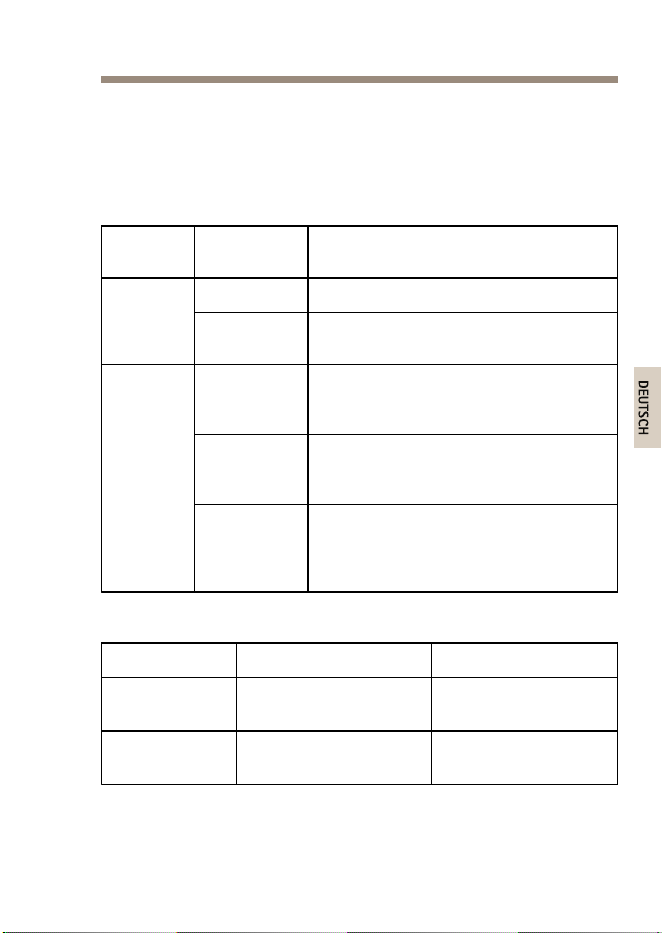
TechnischeDaten
DieaktuelleVersiondertechnischenDatenndenSieunterwww.axis.com.
LED-Anzeigen
LEDFarbe,
Status
Bedeutung
AusDeaktiviert
Stromver-
sorgung
Grün,
permanent
Aktiviert
Grün,
permanent
EsisteinRemote-Gerätangeschlossen,
diePoE-Aushandlungwarerfolgreichund
derPortliefertStrom.
Grün,
blinkend
EsistkeinRemote-Gerätangeschlossen
oderdiePoE-Stromversorgungliegtunter
demMinimalwert.
Port
Rot,
permanent
EsisteinRemotegerätangeschlossen,
aberPoE-Aushandlungistfehlgeschlagen
oderderPortistüberlastetbzw.
kurzgeschlossen.
Betriebsbedingungen
ModusTemperatur
Luftfeuchtigkeit
Betriebbis60W
-10°Cbis45°C
Max.90%RH(nicht
kondensierend)
Betriebbis30W
-10°Cbis55°C
Max.90%RH(nicht
kondensierend)
37
AXIST815460WSFPMidspan
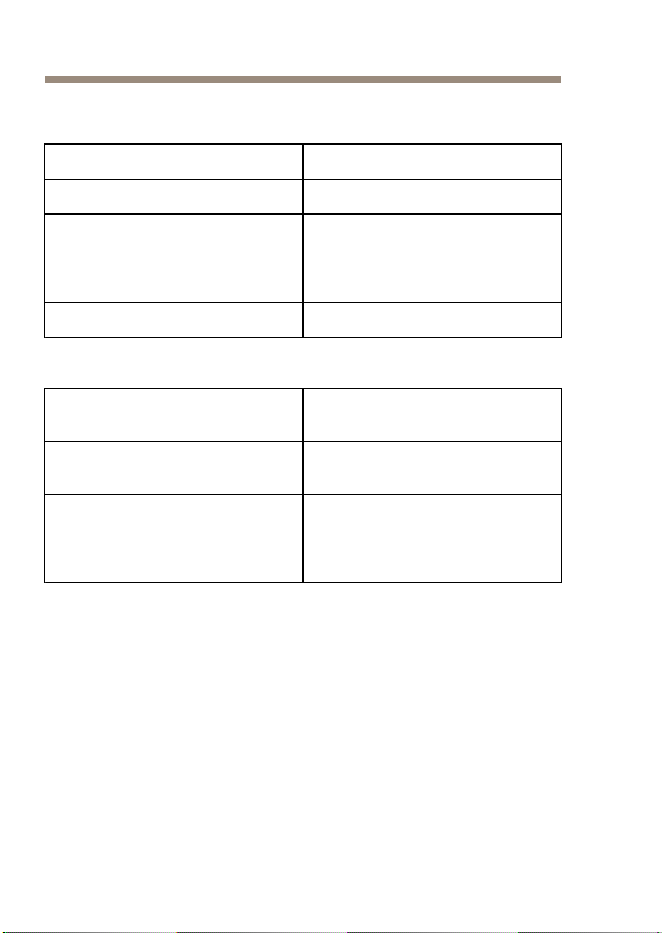
Leistungsaufnahme
Eingangsspannung
100bis240VAC50/60Hz
MaximalerEingangsstrom1,5Ampere
Maximalverfügbare
Ausgangsleistung
(HighPoweroverEthernet)
60W
Ausgangsnennspannung
56VDC
Ethernet-Schnittstelle
Eingang(DATAIN)
Ethernet10/100/1000Base-T
RJ-45-Buchse
Eingang(DATAIN)
SFP100/1000Base-T
SFP-Einschub
Ausgang(DATA&POWEROUT)
Ethernet10/100/1000Base-T,
55VDC
RJ-45-Buchsemit
Gleichstrom-Spannung
andenKabelpaaren
1–2,3–6,4–5und7–8
38
AXIST815460WSFPMidspan
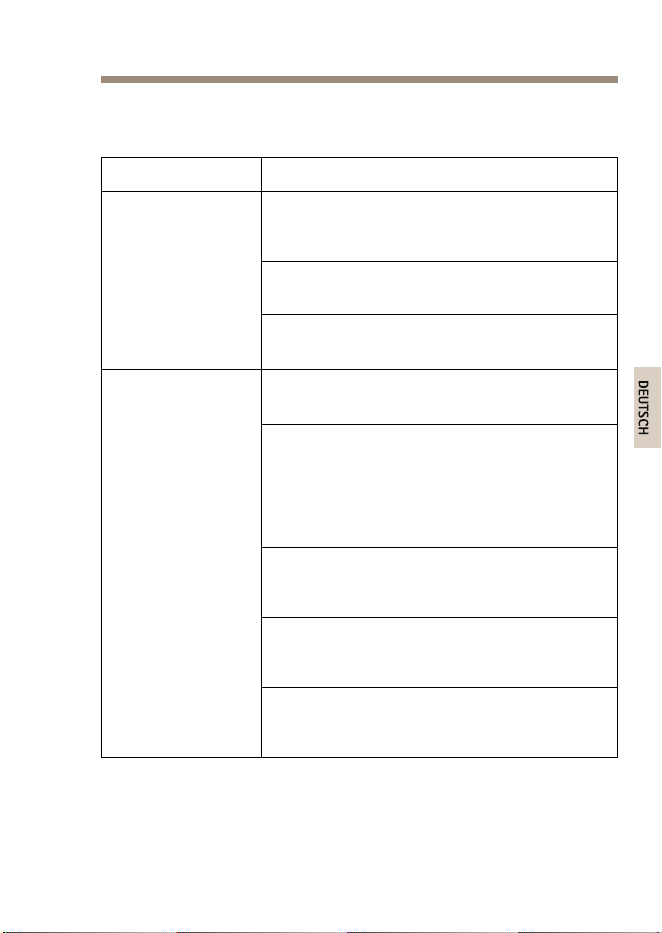
Fehlerbehebung
SymptomMaßnahme
ZiehenSiedasNetzkabelvomMidspanab,
steckenSieeserneuteinundprüfenSiedann
beimHochfahrendieLED-Statusanzeige.
PrüfenSie,obdieSpannungamNetzeingang
zwischen100und240VWechselstromliegt.
DerMidspanfährt
nichthoch.
ÜberprüfenSie,obdasNetzkabelintaktund
funktionsfähigist.
ÜberprüfenSie,obdasRemote-Gerätfürden
PoE-Betriebgeeignetist.
StellenSiesicher,dassdasRemote-Gerätan
denDATAPWROUT-PortdesMidspans
angeschlossenistunddasshierfür
eingeschirmtes(STP)1:1-verdrahtetes
Standard-NetzwerkkabelderKategorie5oder
höhermit4Paarenverwendetwird.
WennSieeinenexternenPower-Splitter
verwenden,stellenSiesicher,dassdieser
funktioniert.
StellenSiesicher,dasskeinKurzschlusszwischen
denTwisted-Pair-Kabelnoderzwischenden
RJ-45-Steckernbesteht.
DasandenMidspan
angeschlossene
Remote-Gerät
lässtsichnicht
einschalten.
Wennmöglich,solltenSiedasselbe
Remote-GerätaneinenanderenMidspan
anschließen.
39

AXIST815460WSFPMidspan
SymptomMaßnahme
WennSieeinRJ-45-Ethernet-Kabelverwenden,
stellenSiesicher,dassessichumeingeschirmtes
(STP)1:1-verdrahtetesStandard-Netzwerkkabel
derKategorie5oderhöherhandelt.
WennSieeinRJ-45-Ethernet-Kabelverwenden,
stellenSiesicher,dassdieKabellängezwischen
NetzwerkswitchundRemote-Gerätwenigerals
100Meterbeträgt.
WennSieeinGlasfaserkabelverwenden,stellen
Siesicher,dassessichbeiKabelundSFP-Modul
umdenjeweilsrichtigenTyphandeltunddass
dasKabelintakt/funktionsfähigist.
DasandenMidspan
angeschlossene
Remote-Gerät
lässtsich
einschalten,aber
esbestehtkeine
Datenverbindung.
Wennmöglich,solltenSiedasselbe
Remote-GerätaneinenanderenMidspan
anschließen.
40
AXIST815460WSFPMidspan
Informazionidisicurezza
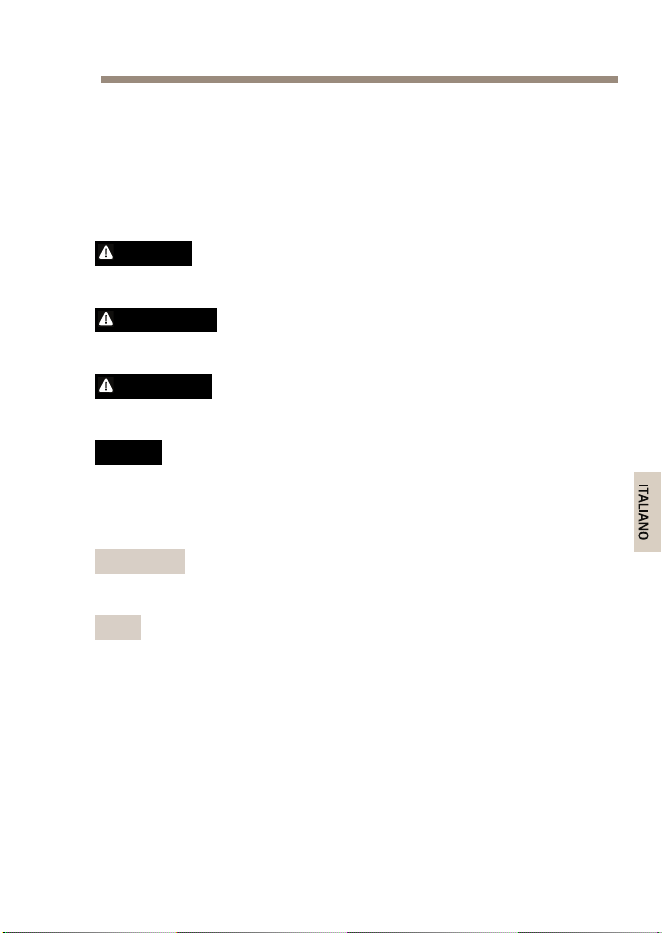
Leggereconattenzionelaguidaall'installazioneprimadiinstallareil
dispositivo.Conservarequestodocumentoperusifuturi.
Livellidipericolo
PERICOLO
Indicaunasituazionepericolosache,senonevitata,provoca
morteolesionigravi.
AVVERTENZA
Indicaunasituazionepericolosache,senonevitata,potrebbe
provocarelamorteolesionigravi.
ATTENZIONE
Indicaunasituazionepericolosache,senonevitata,potrebbe
provocarelesionimedieominori.
A A
A
VVISO VVISO
VVISO
Indicaunasituazioneche,senonevitata,potrebbedanneggiare
laproprietà.
Altrilivellidimessaggio
Importante
Indicainformazioniimportanti,essenzialiperilcorretto
funzionamentodeldispositivo.
Nota
Indicainformazioniutilicheaiutanoaottenereilmassimodal
dispositivo.
41

AXIST815460WSFPMidspan
Informazionidisicurezza
AVVERTENZA
IldispositivoAxisdeveessereinstallatodaunprofessionista
qualicato,inconformitàalleleggiealledisposizionilocali.
A A
A
VVISO VVISO
VVISO
•IldispositivoAxisdeveessereutilizzatoinconformitàalleleggi
ealledisposizionilocali.
•Ildispositivodeveesserecollegatoaterratramiteuncavodi
reteschermato(STP)oaltrometodoappropriato.
•PerutilizzareildispositivoAxisinambientiesterni,oin
ambientisimili,deveessereinstallatoinunacustodiaperesterni
approvata.
•ConservareildispositivoAxisinunambienteasciuttoeventilato.
•EvitarediesporreildispositivoAxisaurtiopressionieccessive.
•EvitarediesporreildispositivoAxisavibrazione.
•Noninstallareildispositivosusupporti,superci,paretiopali
instabili.
•Noninstallareildispositivosusupporti,superci,paretiopali
chevibrano.
•Utilizzaresolostrumentiapplicabiliquandosiinstallail
dispositivoAxis.Sesiutilizzaunaforzaeccessivaconstrumenti
nonadattièpossibilecausaredannialdispositivo.
•Nonutilizzaresostanzechimiche,agenticausticiodetergenti
aerosol.
•Utilizzareunpannopulitoinumiditoinacquapuraperlapulizia.
•Utilizzaresoloaccessoricompatibiliconlespecichetecniche
deldispositivo.QuestipossonoesserefornitidaAxisodaterze
parti.
•UtilizzaresolopartidiricambioforniteoconsigliatedaAxis.
42

AXIST815460WSFPMidspan
•Nontentarediriparareildispositivodasoli.Contattare
l'assistenzaoilrivenditoreAxisperquestionirelativealla
manutenzione.
Trasporto
A A
A
VVISO VVISO
VVISO
•DuranteiltrasportodeldispositivoAxis,utilizzarel'imballaggio
originaleoequivalenteperevitaredannialdispositivo.
43

AXIST815460WSFPMidspan
Contenutodellaconfezione
•MidspanAXIST815460WSFP
•Cavodialimentazione
•Documentazione
-Guidaall'installazione(questodocumento)
44
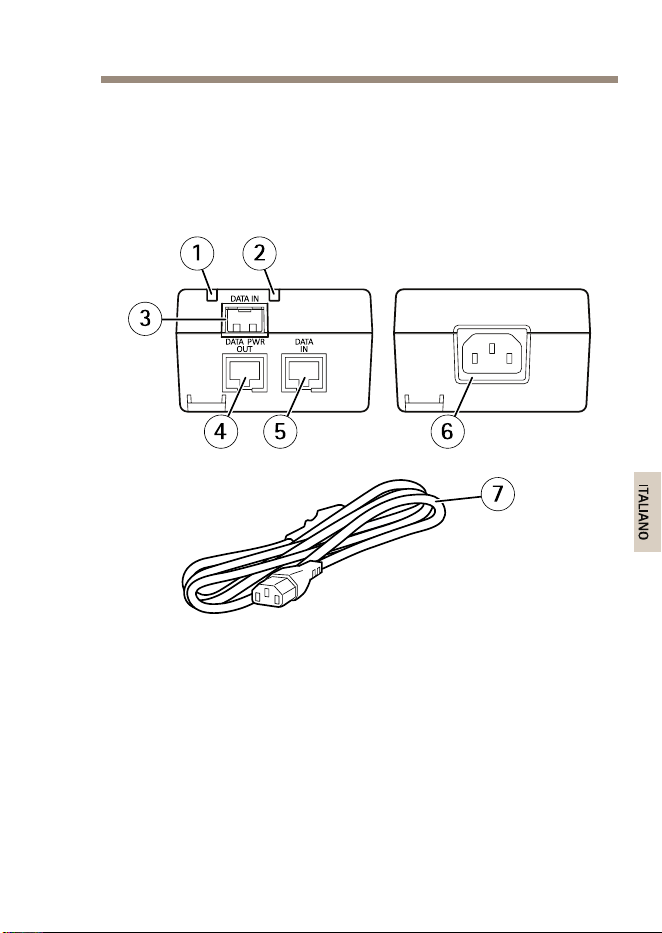
AXIST815460WSFPMidspan
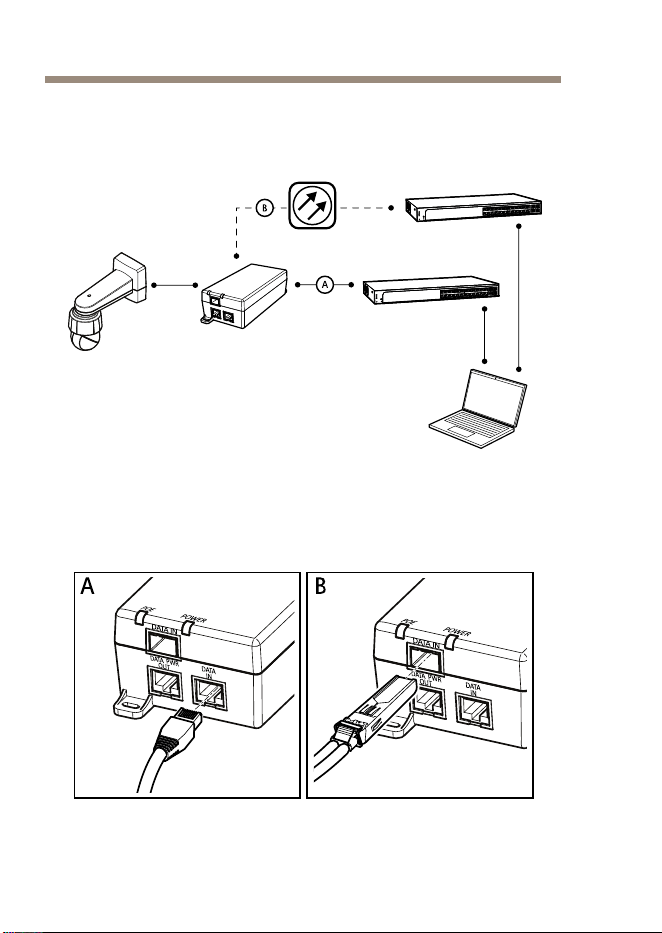
Comeinstallareildispositivo
1.Collegareilmidspanalloswitchdireteinunadellemodalità
alternativeseguenti:
46

AXIST815460WSFPMidspan
A A
A
VVISO VVISO
VVISO
Usodiuncavodireteschermato(STP)CAT5osuperiore.
-A:tramiteuncavoRJ45Ethernetcollegatoalla
portaRJ45delmidspan(DATAIN).
-B:tramiteuncavodibraotticassatoaun
moduloSFPcollegatoalloslotSFPdelmidspan
(DATAIN).
2.Collegareilmidspan(DATAPWROUT)allaportaRJ45della
videocamerautilizzandouncavoRJ45Ethernet.
3.Collegareilmidspanaunapresadialimentazionedirete
(100-240VCA)conmessaaterrautilizzandoilcavodi
alimentazioneindotazione.
4.VericarecheiLEDdelmidspanindichinoglistaticorretti.
ConsultareIndicatoriLEDallapagina49.
47

AXIST815460WSFPMidspan
UlterioriInformazioni
•Perlaversionepiùrecentediquestodocumento,visitareil
sitoall'indirizzowww.axis.com
•Perservizidiformazioneutiliewebinar,visitailsito
www.axis.com/academy
Accessoriopzionali
Perunelencocompletodegliaccessoridisponibiliperquestodispositivo,
andarealsitowww.axis.com
Informazionisullagaranzia
PerinformazionisullagaranziadeldispositivoAxiseinformazioniadesso
relative,consultarelapaginawww.axis.com/warranty/
48
AXIST815460WSFPMidspan
Specifichetecniche
Laversionepiùaggiornatadellespecichetecnicheèdisponibile
all'indirizzowww.axis.com
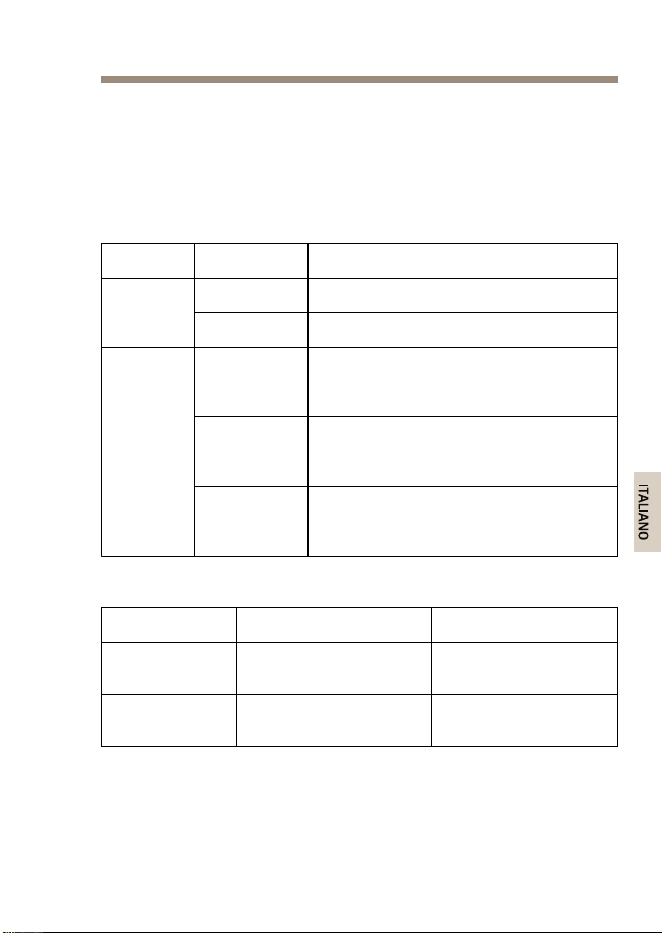
IndicatoriLED
LED
Colore,stato
Indicazione
OffSpento
Alimen-
tazione
Verde,ssoAcceso
Verde,ssoDispositivoremotocollegato,
negoziazionePoEriuscitaeporta
infasedicarico
Verde,lam-
peggiante
Nessundispositivoremotocollegato
oppurecaricoPoEaldisottodellivello
minimo
Porta
Rosso,ssoDispositivoremotocollegatoma
negoziazionePoEnonriuscitaoppure
portasovraccaricaoincorto
Condizionidifunzionamento
Modalità
Temperatura
Umidità
Funzionamento
noa60W
Da-10°Ca45°C
Max.90%relativa
(senzacondensa)
Funzionamento
noa30W
Da-10°Ca55°C
Max.90%relativa
(senzacondensa)
49
AXIST815460WSFPMidspan
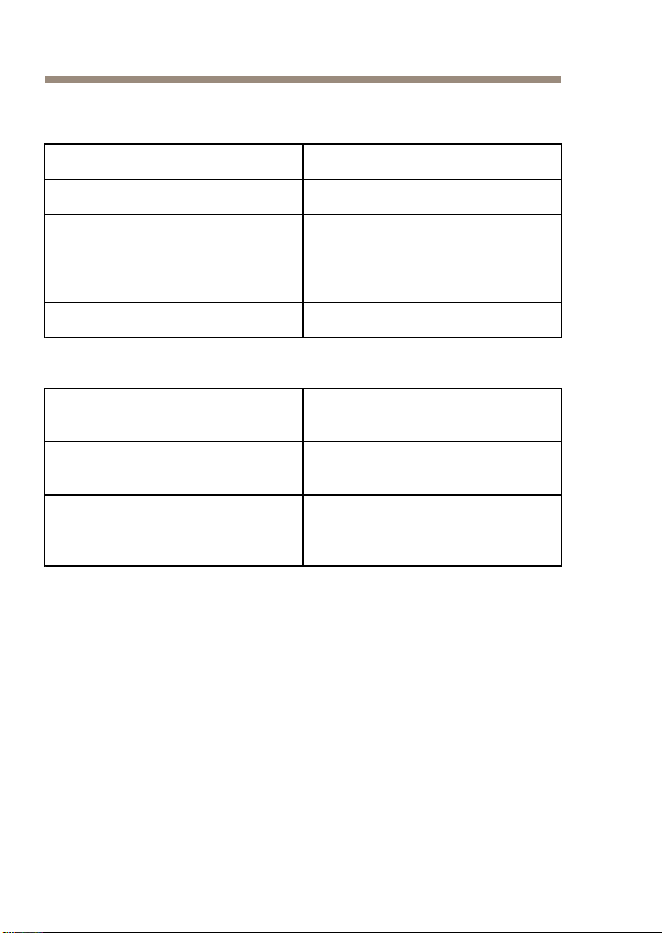
Consumoelettrico
Tensioneiningresso
100-240VCA50/60Hz
Correnteiningressomassima
1,5A
Potenzamassimadisponibilein
uscita
(PoweroverEthernetelevata)
60W
Tensionenominaleinuscita
56VCC
InterfacciaEthernet
Ingresso(DATAIN)
Ethernet10/100/1000Base-T
ConnettorefemminaRJ45
Ingresso(DATAIN)
SFP100/1000Base-T
SlotSFP
Uscita(DATA&POWEROUT)
Ethernet10/100/1000Base-T,
55VCC
ConnettoreRJ45femminacon
tensioneCCsullecoppiedicavi
1-2,3-6,4-5e7-8
50
AXIST815460WSFPMidspan
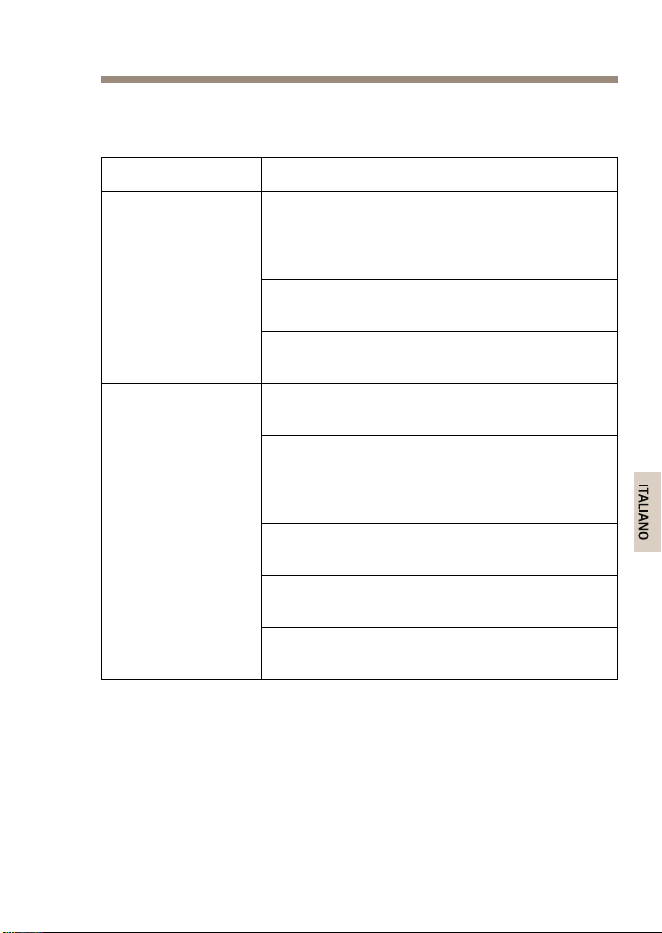
Risoluzionediproblemi
Sintomo
Azionecorrettiva
Staccareeriattaccareilcavodialimentazione
delmidspanecontrollarelostatodell'indicatore
delpowerLEDdurantelasequenzadi
accensione.
Vericarechelatensionedialimentazionein
ingressosiacompresatra100e240VCA.
Ilmidspannonsi
accende
Vericarecheilcavodellapresadialimentazione
iningressosiaintegro/funzionale.
Vericarecheildispositivoremotopossaessere
usatoconlatecnologiaPoE.
Vericarecheildispositivoremotosiacollegato
allaportaDATAPWROUTdelmidspantramite
uncavodiretecablatodirettoSTPCAT5
standard,osuperiore,conquattrodoppini.
Sesiutilizzaunosplitterdialimentazione
esterno,vericarechefunzionicorrettamente.
Vericarechenonvisianocortocircuitisuicavi
adoppiniosuiconnettoriRJ45.
Ildispositivo
remotocollegato
almidspannonsi
accende
Sepossibile,collegareildispositivoremotoaun
midspandiverso.
51

AXIST815460WSFPMidspan
Sintomo
Azionecorrettiva
SesiutilizzauncavoEthernetRJ45,vericare
chesitrattidiuncavodiretecablatodirettoSTP
CAT5standard,osuperiore,conquattrodoppini.
SesiutilizzauncavoEthernetRJ45,vericare
chelarelativalunghezzatraloswitchdiretee
ildispositivoremotosiainferiorea100m.
Sesiutilizzauncavodibraottica,vericare
chetalecavoeilmoduloSFPsianodeltipo
conformeecheilcavosiaintegro/funzionale.
Ildispositivo
remotocollegatoal
midspansiaccende,
maidatinon
vengonotrasmessi
Sepossibile,collegareildispositivoremotoaun
midspandiverso.
52
AXIST815460WSFPMidspan
Informacióndeseguridad
LeaestaGuíadeinstalaciónconatenciónantesdeinstalarelproducto.
GuardelaGuíadeinstalaciónparapoderconsultarlaenotromomento.
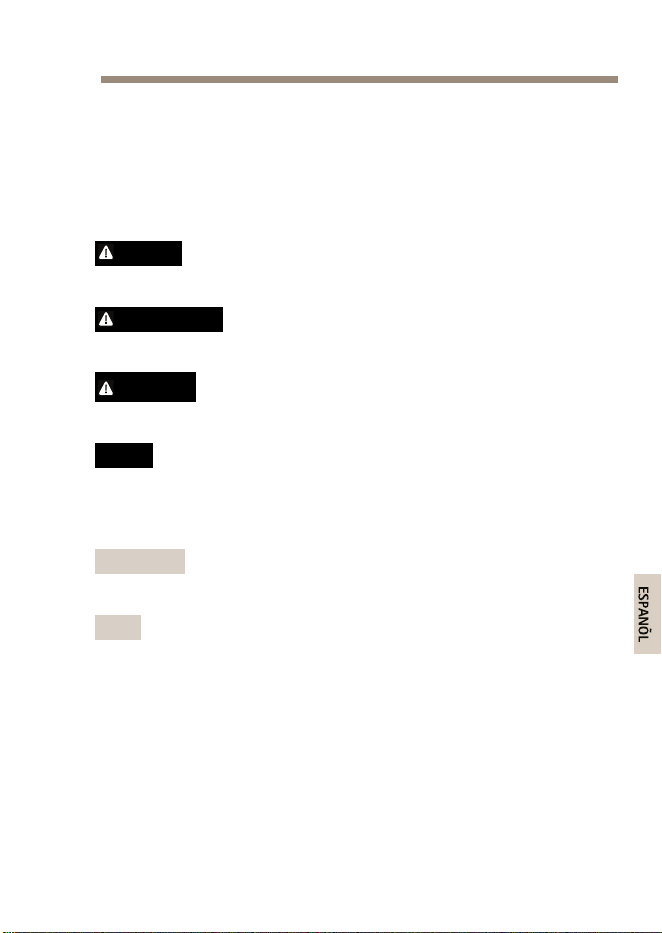
Nivelesdepeligro
PELIGRO
Indicaunasituaciónpeligrosaque,sinoseevita,provocará
lesionesgravesolamuerte.
ADVERTENCIA
Indicaunasituaciónpeligrosaque,sinoseevita,puedeprovocar
lesionesgravesolamuerte.
ATENCIÓN
Indicaunasituaciónpeligrosaque,sinoseevita,puedeprovocar
lesionesmoderadasoleves.
A A
A
VISO VISO
VISO
Indicaunasituaciónpeligrosaque,sinoseevita,puedeprovocar
dañosmateriales.
Otrosnivelesdemensaje
Importante
Indicainformaciónimportantequeesfundamentalparaqueel
productofuncionecorrectamente.
Nota
Indicainformaciónútilqueayudaaaprovecharelproductoal
máximo.
53

AXIST815460WSFPMidspan
Instruccionesdeseguridad
ADVERTENCIA
ElproductodeAxisdebeinstalarlounprofesionalformado
conformelasleyesynormativaslocales.
A A
A
VISO VISO
VISO
•ElproductodeAxisdebeutilizarsedeacuerdoconlasleyesy
normativaslocales.
•Elproductodebeconectarseatierramedianteuncabledered
blindadouotrométodoadecuado.
•ParausarelproductodeAxisenexteriores,oenentornos
similares,debeinstalarseenunacarcasaexterioraprobada.
•AlmaceneelproductodeAxisenunentornosecoyventilado.
•EvitelaexposicióndelproductodeAxisachoquesoauna
fuertepresión.
•EvitelaexposicióndelproductodeAxisavibraciones.
•Noinstaleelproductoenpostes,soportes,superciesoparedes
inestables.
•Noinstaleelproductoenpostes,soportes,superciesoparedes
quevibren.
•Utilicesololasherramientascorrespondientescuandoinstale
elproductodeAxis.Laaplicacióndeunafuerzaexcesivacon
herramientaseléctricaspuedeprovocardañosenelproducto.
•Noutilicelimpiadoresenaerosol,agentescáusticosniproductos
químicos.
•Limpieconunpañolimpiohumedecidoconaguapura.
•Utilicesoloaccesoriosquecumplanconlasespecicaciones
técnicasdelproducto.Estosaccesorioslospuedeproporcionar
Axisountercero.
•Utilicesolopiezasderepuestoproporcionadasorecomendadas
porAxis.
54

AXIST815460WSFPMidspan
•Nointenterepararelproductoustedmismo.Póngaseen
contactoconelserviciodeasistenciatécnicadeAxisoconsu
distribuidordeAxisparatratarasuntosdereparación.
Transporte
A A
A
VISO VISO
VISO
•CuandotransporteelproductodeAxis,utiliceelembalaje
originalounequivalenteparaevitardañosenelproducto.
55

AXIST815460WSFPMidspan
Contenidodelpaquete
•MidspanSFPde60WAXIST8154
•Cabledealimentación
•Materialesimpresos
-Guíadeinstalación(estedocumento)
56
AXIST815460WSFPMidspan
Informacióngeneraldelhardware
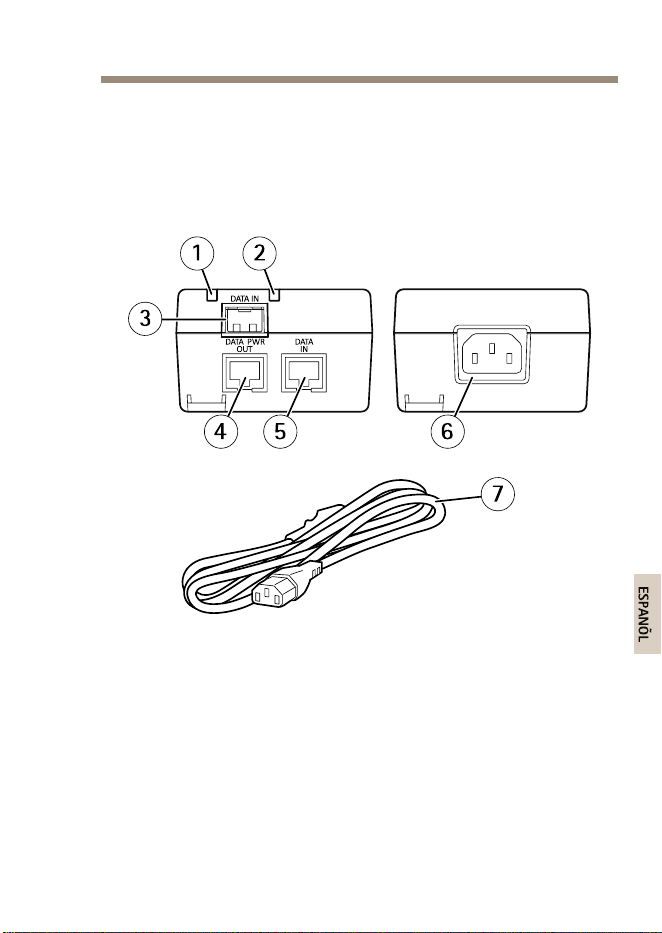
Paraconocerlasespecicacionesdeloscomponentesdelhardware,vea
Especicacionestécnicasenlapágina61.
1
PuertoLED
2
LEDdealimentación
3
RanuraSFPparamóduloSFPdebraóptica(módulo
SFPnoincluido)
4
PuertoRJ45yPoE
5
PuertoRJ45
6
Conectordecorriente(entradade100-240VCA)
7
Cabledealimentación
57
AXIST815460WSFPMidspan
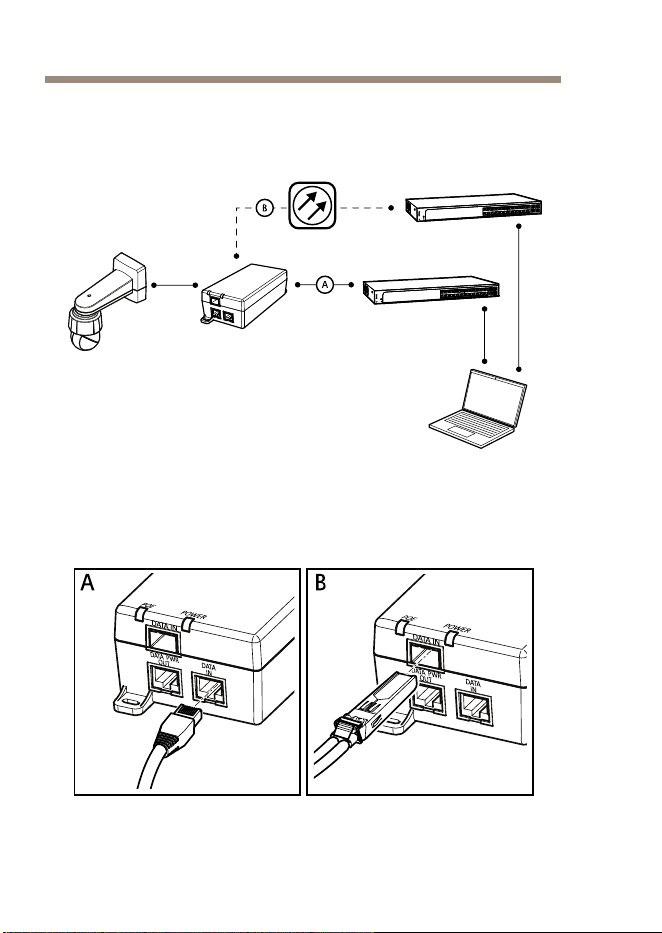
Cómoinstalarelproducto
1.Conecteelmidspanalswitchdereddeunadelassiguientes
formas:
58

AXIST815460WSFPMidspan
A A
A
VISO VISO
VISO
Utiliceuncablederedblindado(STP)CAT5osuperior.
-A:atravésdeuncableEthernetRJ45queesté
conectadoalpuertodeentradadedatos(DATAIN)
RJ45delmidspan.
-B:atravésdeuncabledebraópticaconectado
aunmóduloSFPqueestéconectadoalslotSFP
delmidspan(DATAIN).
2.Conecteelmidspan(DATAPWROUT)alpuertoRJ45dela
cámarautilizandouncableEthernetRJ45.
3.Conecteelmidspanaunenchufedecorrientecontomade
tierra(100–240VCA)conelcabledecorrienteproporcionado.
4.CompruebequelosLEDdelmidspanindiquenlosestados
adecuados.VeaIndicadoresLEDenlapágina61.
59

AXIST815460WSFPMidspan
Másinformación
•Paraconsultarlaversiónmásrecientedeestedocumento,
vayaawww.axis.com
•Paraconsultarseminarioswebycursosenlíneaquepueden
resultarleútiles,vayaawww.axis.com/academy
Accesoriosopcionales
Paraconocerunalistacompletadelosaccesoriosdisponiblesparaeste
producto,vayaawww.axis.com
Informacióndegarantía
ParaobtenermásdetallessobrelagarantíadelproductoAxisyla
informaciónrelacionadaconella,visitewww.axis.com/warranty/
60
AXIST815460WSFPMidspan
Especificacionestécnicas
Puedeencontrarlaversiónmásrecientedelasespecicacionestécnicas
enwww.axis.com
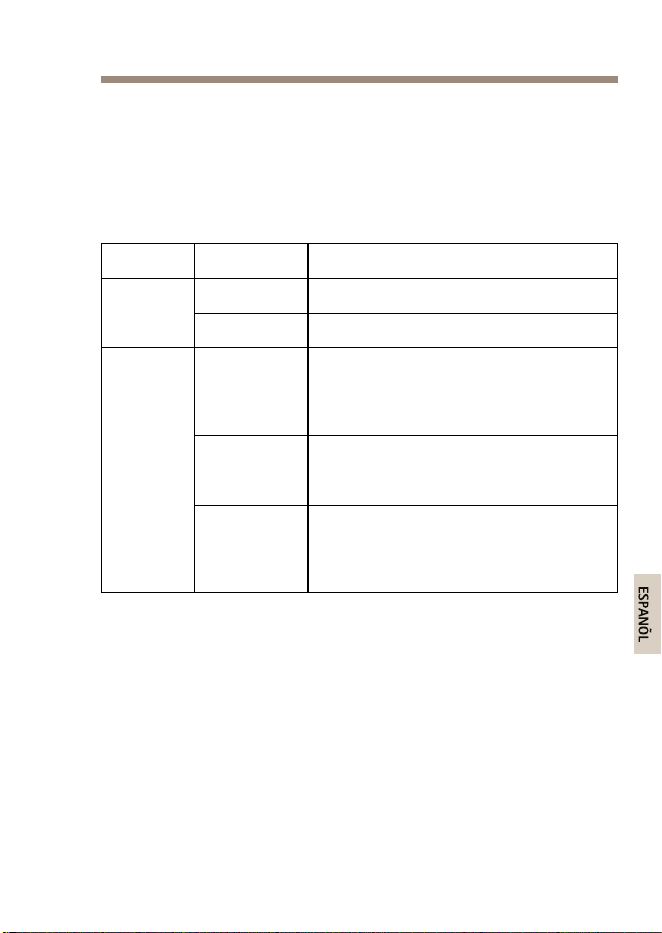
IndicadoresLED
LED
Color,estado
Indicación
Apagado
Sinalimentación
Alimenta-
ción
Verde,joEncendido
Verde,jo
Sehaconectadoundispositivoremoto,
lanegociaciónPoEseharealizado
correctamenteyelpuertoproporciona
alimentación.
Verde,
parpadeante
Nosehaconectadoningúndispositivo
remotoolaalimentaciónPoEha
descendidopordebajodelnivelmínimo.
Puerto
Rojo,jo
Sehaconectadoundispositivoremoto
perolanegociaciónPoEhafracasado
oelpuertoestásobrecargadoo
cortocircuitado.
61

AXIST815460WSFPMidspan
Condicionesdefuncionamiento
ModoTemperaturaHumedad
En
funcionamiento
hasta60W
De-10°Ca45°C
90%dehumedad
relativamáxima(sin
condensación)
En
funcionamiento
hasta30W
De-10°Ca55°C
90%dehumedad
relativamáxima(sin
condensación)
Consumodeenergía
Tensióndeentrada
100–240VCA50/60Hz
Corrientedeentradamáxima
1,5A
Potenciadesalidamáxima
disponible
(Alimentacióndealtapotenciaa
travésdeEthernet)
60W
Tensióndesalidanominal
56VCC
InterfazEthernet
Entrada(DATAIN)
Ethernet10/100/1000Base-T
ConectorhembraRJ45
Entrada(DATAIN)
SFP100/1000Base-T
SlotSFP
Salida(DATA&POWEROUT)
Ethernet10/100/1000Base-T,
55VCC
ConectorhembraRJ45,con
tensiónCCenlospares
1–2,3–6,4–5y7–8
62
AXIST815460WSFPMidspan
Solucióndeproblemas
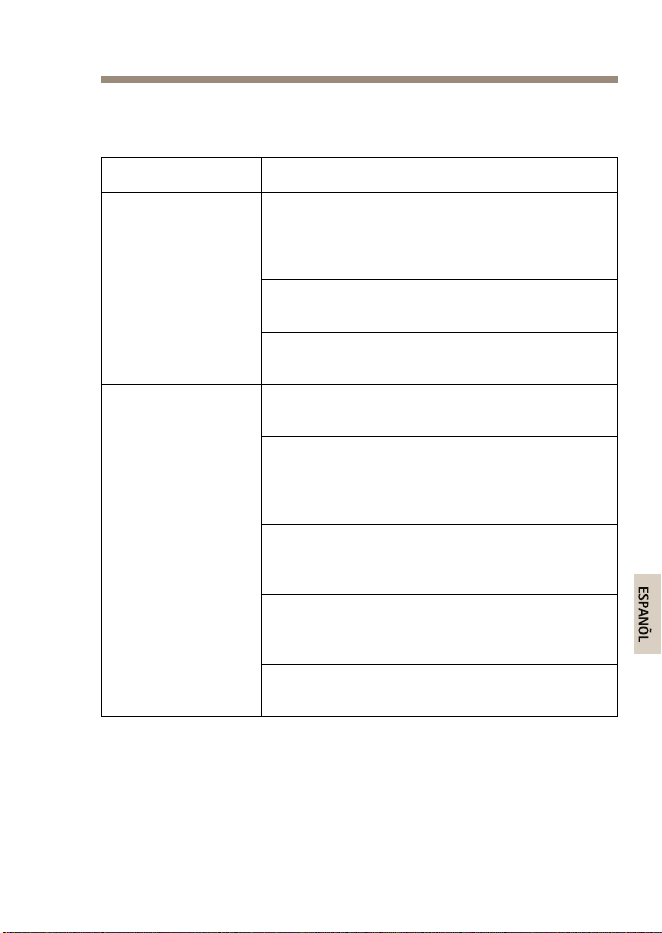
SíntomaAccióncorrectiva
Desenchufeelcabledealimentacióndel
midspanyvuelvaaenchufarlo;compruebe
elestadodelindicadorLEDdealimentación
durantelasecuenciadeencendido.
Compruebequelatensióndelatomade
corrienteseencuentraentre100–240VCA.
Elmidspannose
enciende.
Compruebequeelcabledelatomadecorriente
estáintactoyfuncionacorrectamente.
Compruebequeeldispositivoremotoesté
diseñadoparaseralimentadoporPoE.
Compruebequeeldispositivoremotoesté
conectadoalpuertoDATAPWROUTdelmidspan
utilizandouncablederedestándarsincruces
STPCAT5osuperior,concuatropares.
Sihayunaunidaddedistribuciónde
alimentaciónexternaconectada,compruebe
quefuncionacorrectamente.
Compruebequenohayacortocircuitosen
ningunodeloscablesdepartrenzadooenlos
conectoresRJ45.
Eldispositivo
remotoconectado
almidspannose
enciende.
Siesposible,conecteeldispositivoremotoaun
midspandiferente.
63

AXIST815460WSFPMidspan
SíntomaAccióncorrectiva
SiestáutilizandouncableEthernetRJ45,
compruebequesetratadeuncabledered
estándarsincrucesSTPCAT5osuperior,con
cuatropares.
SiestáutilizandouncableEthernetRJ45,
compruebequelalongitudentreelswitchde
redyeldispositivoremotoseainferiora100m.
Siestáutilizandouncabledebraóptica,
compruebequeelcableyelmóduloSFPsean
deltipoadecuadoyqueelcableestéintactoy
funcionescorrectamente.
Eldispositivo
remotoconectado
almidspanse
enciendeperono
hayenlacededatos.
Siesposible,conecteeldispositivoremotoaun
midspandiferente.
64
AXIST815460WSFPMidspan
安 安
安
全 全
全
情 情
情
報 報
報
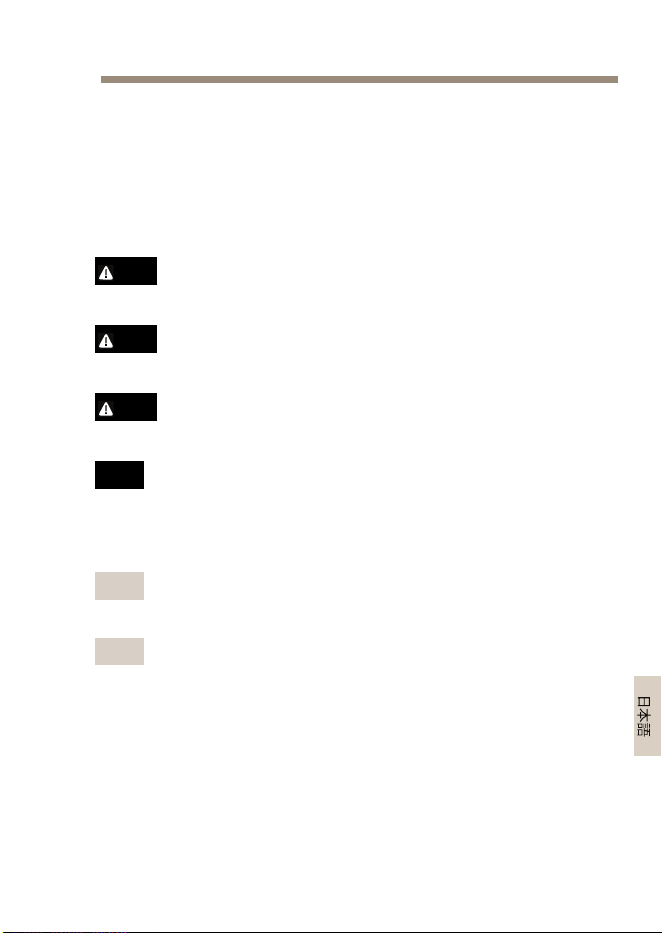
本製品を設置する前に、このインストールガイドをよくお読み
ください。インストールガイドは、後で参照できるように保管
しておいてください。
危 危
危
険 険
険
レ レ
レ
ベ ベ
ベ
ル ル
ル
危険
回避しない場合、死亡または重傷につながる危険な状
態を⽰します。
警告
回避しない場合、死亡または重傷につながるおそれのあ
る危険な状態を⽰します。
注意
回避しない場合、軽傷または中程度の怪我につながるお
それのある危険な状態を⽰します。
注 記
回避しない場合、器物の破損につながるおそれのあ
る状態を⽰します。
そ そ
そ
の の
の
他 他
他
の の
の
メ メ
メ
ッ ッ
ッ
セ セ
セ
ー ー
ー
ジ ジ
ジ
レ レ
レ
ベ ベ
ベ
ル ル
ル
重要
製品を正しく機能させるために不可⽋な重要情報を
⽰します。
注意
製品を最⼤限に活⽤するために役⽴つ有⽤な情報を
⽰します。
65

AXIST815460WSFPMidspan
安 安
安
全 全
全
⼿ ⼿
⼿
順 順
順
警告
本製品の設置は、お使いになる地域の法律や規制に準拠
して、訓練を受けた専⾨技術者が⾏ってください。
注 記
•本製品は、お使いになる地域の法律や規制に準拠して
使⽤してください。
•本製品は、シールドネットワークケーブル(STP)また
は他の適切な⽅法を⽤いて接地してください。
•本製品を屋外またはそれに準じる環境で使⽤する場
合は、認定済みの屋外⽤筐体に収納して設置する必
要があります。
•本製品は乾燥した換気のよい環境に保管してくださ
い。
•本製品に衝撃または強い圧⼒を加えないでください。
•本製品に振動を加えないでください。
•本製品を不安定なポール、ブラケット、表⾯、または
壁に設置しないでください。
•本製品を振動するポール、ブラケット、表⾯、または
壁に設置しないでください。
•本製品を設置する際には、適切な⼯具のみを使⽤して
ください。電動⼯具を使⽤して過剰な⼒をかけると、
製品が損傷することがあります。
•化学薬品、腐⾷剤、噴霧式クリーナーは使⽤しないで
ください。
•清掃には、きれいな⽔に浸した清潔な布を使⽤して
ください。
•製品の技術仕様に準拠したアクセサリーのみを使⽤
してください。これらのアクセサリーは、Axisまたは
サードパーティから⼊⼿できます。
66

AXIST815460WSFPMidspan
•Axisが提供または推奨する交換部品のみを使⽤して
ください。
•製品を⾃分で修理しないでください。修理について
は、Axisサポートまたは販売代理店にお問い合わせ
ください。
輸 輸
輸
送 送
送
注 記
•本製品を運搬する際は、製品が損傷しないよう、元の
梱包か同等の梱包を使⽤してください。
67

AXIST815460WSFPMidspan
パ パ
パ
ッ ッ
ッ
ケ ケ
ケ
ー ー
ー
ジ ジ
ジ
の の
の
内 内
内
容 容
容
•AXIST815460WSFPミッドスパン
•電源ケーブル
•印刷物
-インストールガイド(本書)
68
AXIST815460WSFPMidspan
製 製
製
品 品
品
の の
の
取 取
取
り り
り
付 付
付
け け
け
⽅ ⽅
⽅
法 法
法
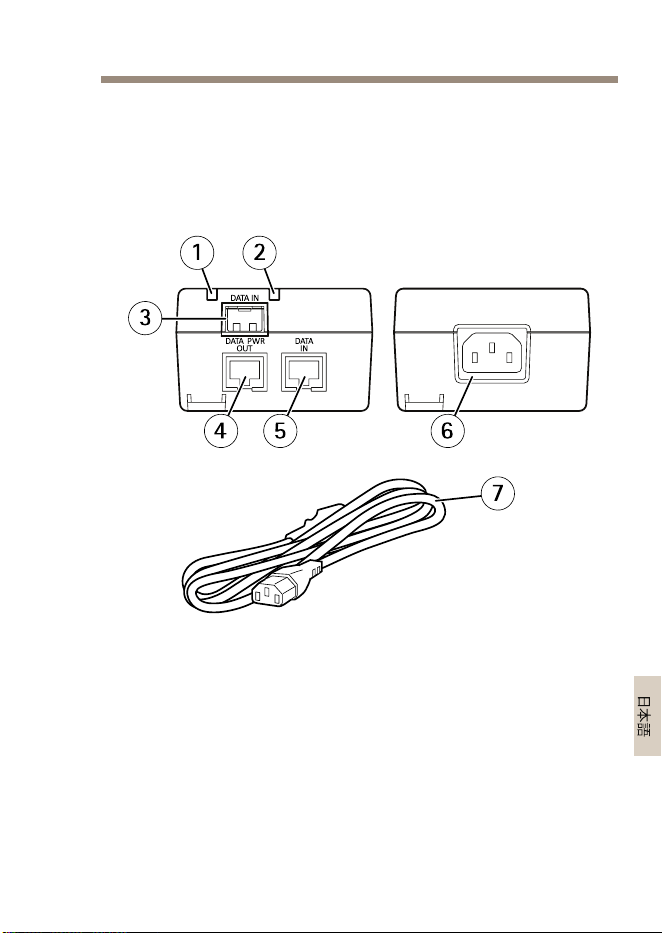
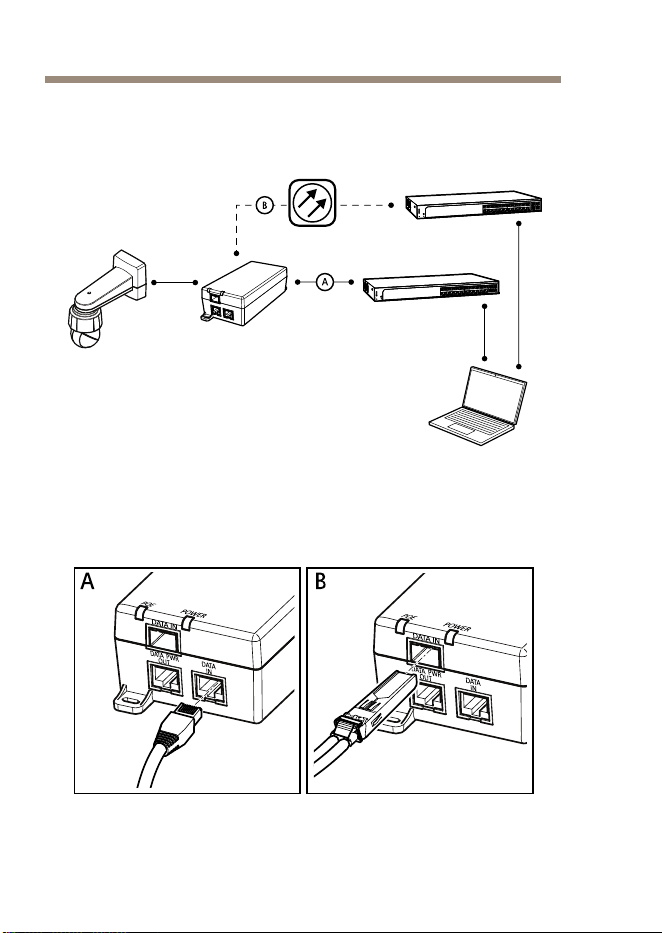
1.以下のいずれかの⽅法で、ミッドスパンをネットワー
クスイッチに接続します。
70

AXIST815460WSFPMidspan
注 記
シールドネットワークケーブル(STP)CAT5以上を使⽤
します。
-A:RJ45イーサネットケーブルを介してミッ
ドスパンのRJ45ポート(DATAIN)に接続。
-B:SFPモジュールに接続された光ファイバー
ケーブルを介してミッドスパンのSFPポー
ト(DATAIN)に接続。
2.RJ45イーサネットケーブルを使⽤して、ミッドス
パン(DATAPWROUT)をカメラのRJ45ポートに接続
します。
3.付属の電源ケーブルを使⽤して、ミッドスパンを接
地(アース)されたコンセント(100〜240VAC)に接
続します。
4.ミッドスパンのLEDが正常な状態を⽰すことを確認
します。
73 ペ ー ジ の 、 LED イ ン ジ ケ ー タ ー
を参照
してください。
71

AXIST815460WSFPMidspan
関 関
関
連 連
連
情 情
情
報 報
報
•本書の最新バージョンについては、
www .axis.com
に
アクセスしてください。
•役に⽴つオンライントレーニングおよびWebセミナー
をご⽤意しております。
www .axis.com/academy
を
ご覧ください。
オ オ
オ
プ プ
プ
シ シ
シ
ョ ョ
ョ
ン ン
ン
ア ア
ア
ク ク
ク
セ セ
セ
サ サ
サ
リ リ
リ
ー ー
ー
本製品で利⽤可能なすべてのアクセサリーについて
は、
www .axis.com
を参照してください
保 保
保
証 証
証
情 情
情
報 報
報
Axisの製品保証と関連情報について
は、
www .axis.com/warranty/
をご覧ください
72
AXIST815460WSFPMidspan
技 技
技
術 術
術
仕 仕
仕
様 様
様
最新バージョンの技術仕様については、Axisのホームページ
(
www .axis.com
)を参照してください
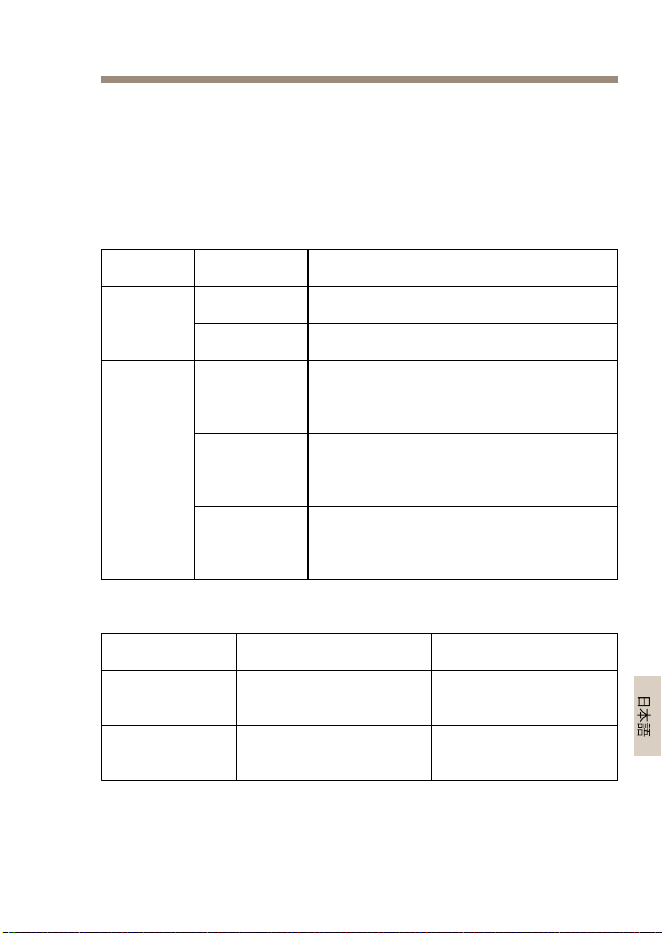
LED LED
LED
イ イ
イ
ン ン
ン
ジ ジ
ジ
ケ ケ
ケ
ー ー
ー
タ タ
タ
ー ー
ー
LED LED
LED
⾊ ⾊
⾊
、 、
、
状 状
状
態 態
態
説 説
説
明 明
明
オフ
電源オフ 電源
緑、点灯
電源オン
緑、点灯
リモートデバイスが接続され、PoE
ネゴシエーションが成功し、ポー
トが負荷を供給中
緑、点滅
リモートデバイスが接続されてい
ないか、PoE負荷が最⼩レベルよ
り下がった
ポート
⾚、点灯
リモートデバイスが接続されたが、
PoEネゴシエーションが失敗した
か、ポートが過負荷または短絡
動 動
動
作 作
作
条 条
条
件 件
件
モ モ
モ
ー ー
ー
ド ド
ド
温 温
温
度 度
度
湿 湿
湿
度 度
度
最⼤60Wまで
動作
-10°C〜45°C
最⼤90%RH(結露不
可)
最⼤30Wまで
動作
-10°C〜55°C
最⼤90%RH(結露不
可)
73
AXIST815460WSFPMidspan
消 消
消
費 費
費
電 電
電
⼒ ⼒
⼒
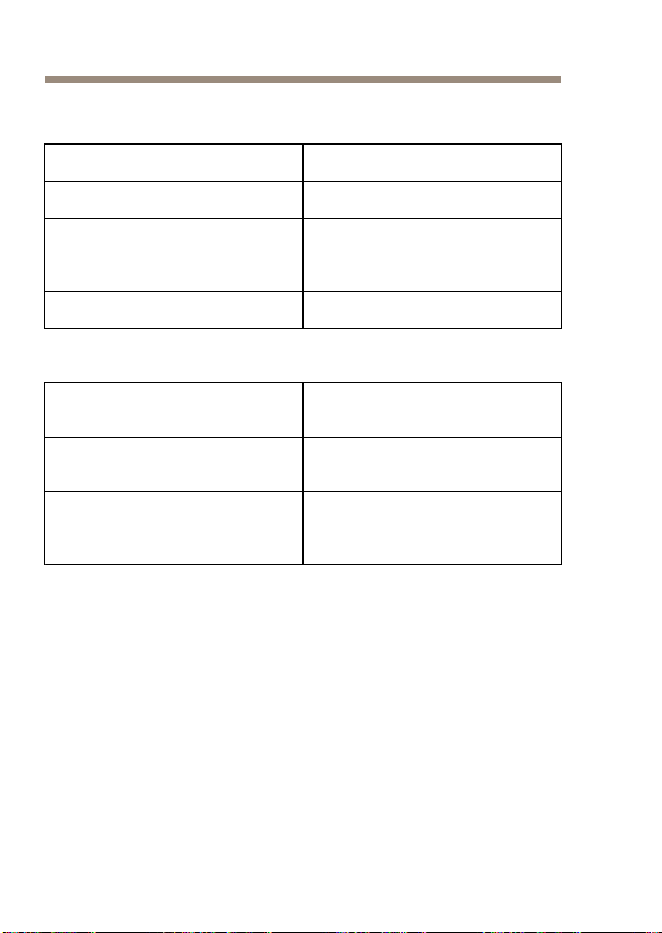
⼊⼒電圧
100〜240VAC50/60Hz
最⼤⼊⼒電流
1.5A
最⼤出⼒
(HighPoweroverEthernet)
60W
通常出⼒電圧
56VDC
イ イ
イ
ー ー
ー
サ サ
サ
ネ ネ
ネ
ッ ッ
ッ
ト ト
ト
イ イ
イ
ン ン
ン
タ タ
タ
ー ー
ー
フ フ
フ
ェ ェ
ェ
ー ー
ー
ス ス
ス
⼊ ⼊
⼊
⼒ ⼒
⼒
(DA (DA
(DA
T T
T
A A
A
IN) IN)
IN)
イーサネット10/100/1000Base-T
RJ45メス型ソケット
⼊ ⼊
⼊
⼒ ⼒
⼒
(DA (DA
(DA
T T
T
A A
A
IN) IN)
IN)
SFP100/1000Base-T
SFPスロット
出 出
出
⼒ ⼒
⼒
(DA (DA
(DA
T T
T
A A
A
& &
&
POWER POWER
POWER
OUT OUT
OUT
) )
)
イーサネット10/100/1000Base-T、55VDC
RJ45メス型ソケッ
ト、1‒2、3‒6、4‒5、および7‒8の
ワイヤーペアでDC電圧
74
AXIST815460WSFPMidspan
ト ト
ト
ラ ラ
ラ
ブ ブ
ブ
ル ル
ル
シ シ
シ
ュ ュ
ュ
ー ー
ー
テ テ
テ
ィ ィ
ィ
ン ン
ン
グ グ
グ
現 現
現
象 象
象
解 解
解
決 決
決
⽅ ⽅
⽅
法 法
法
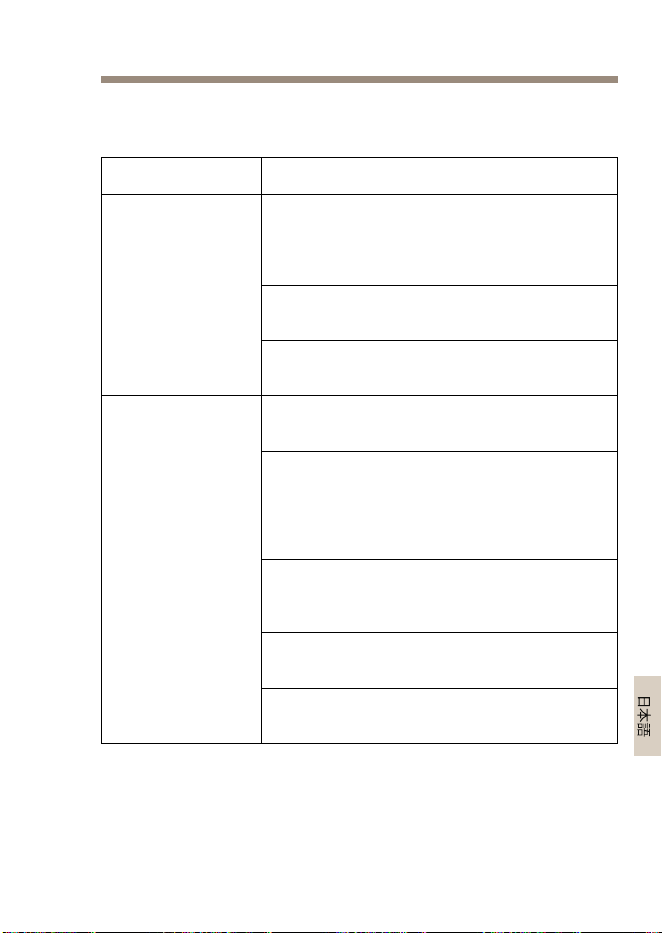
ミッドスパンの電源ケーブルを抜いて
再び差し込み、電源投⼊シーケンス中
の電源LEDインジケーターの状態を確認
します。
コンセントの電圧が100〜240VACであ
ることを確認します。
ミッドスパンの
電源が⼊らない
電源ケーブルに損傷がなくて正常に機能
することを確認します。
リモートデバイスがPoE動作に対応して
いることを確認します。
リモートデバイスが、4つのワイヤーペ
アを有する、標準のSTPCAT5以上のスト
レートネットワークケーブルを使⽤し
て、ミッドスパンのDATAPWROUTポー
トに接続されていることを確認します。
パワースプリッターを使⽤している場
合は、正常に動作していることを確認
します。
ツイストペアケーブルまたはRJ45コネク
タに短絡がないことを確認します。
ミッドスパン
に接続されたリ
モートデバイス
の電源が⼊らな
い
可能な場合は、リモートデバイスを別の
ミッドスパンに接続します。
75

AXIST815460WSFPMidspan
現 現
現
象 象
象
解 解
解
決 決
決
⽅ ⽅
⽅
法 法
法
RJ45イーサネットケーブルを使⽤してい
る場合は、それが4つのワイヤーペアを
有する、標準のSTPCAT5以上のストレー
トネットワークケーブルであることを確
認します。
RJ45イーサネットケーブルを使⽤してい
る場合は、ネットワークスイッチからリ
モートデバイスまでのケーブルの⻑さ
が100m未満であることを確認します。
光ファイバーケーブルを使⽤している場
合は、ケーブルとSFPモジュールが正し
いタイプであり、ケーブルに損傷がなく
正常に機能することを確認します。
ミッドスパン
に接続された
リモートデバイ
スの電源は⼊る
が、データリン
クが確⽴されな
い
可能な場合は、リモートデバイスを別の
ミッドスパンに接続します。
76
AXIST815460WSFPMidspan
安 安
安
全 全
全
信 信
信
息 息
息
安装产品之前,请仔细阅读此安装指南。保留安装指南以备将来
参考。
危 危
危
险 险
险
等 等
等
级 级
级
危险
表示如果不避免则会导致死亡或严重伤害的危险情况。
警告
表示如果不避免则可能导致死亡或严重伤害的危险情况。
小心
表示如果不避免则可能导致轻微或中度伤害的危险情况。
注 意
表示如果不避免则可能导致财产损失的情况。
其 其
其
他 他
他
消 消
消
息 息
息
等 等
等
级 级
级
重要
表示产品正常工作所必需的重要信息。
备注
表示有助于充分利用产品的有用信息。
77

AXIST815460WSFPMidspan
安 安
安
全 全
全
说 说
说
明 明
明
警告
安讯士产品应由受过培训的专业人员进行安装,并遵
守当地法律和法规。
注 意
•使用安讯士产品时应遵守当地法律和法规。
•该产品应通过屏蔽网络电缆(STP)或其他适当的方法
接地。
•要在室外或类似环境中使用安讯士产品,应将该产品
安装在获得批准的室外防护罩中。
•在干燥通风的环境中存放安讯士产品。
•避免将安讯士产品暴露在冲击或重压下。
•避免将安讯士产品暴露在振动中。
•请勿将本产品安装在不稳定的立杆、支架、表面或墙
壁上。
•请勿将本产品安装在振动的立杆、支架、表面或墙壁
上。
•安装安讯士产品时,仅使用适用的工具。使用电动工具
过度施力可能导致产品损坏。
•请勿使用化学品、腐蚀剂或气雾剂。
•使用蘸纯净水的干净布进行清洁。
•仅使用符合产品技术规格的附件。这些附件可由安讯士
或第三方提供。
•仅使用安讯士提供或推荐的备件。
•请勿尝试自行维修产品。有关服务事项,请联系安讯士
支持部门或安讯士经销商。
78

AXIST815460WSFPMidspan
运 运
运
输 输
输
注 意
•安讯士产品运输途中,应使用其原包装或等效包装,以
防对产品造成损坏。
79

AXIST815460WSFPMidspan
包 包
包
装 装
装
内 内
内
容 容
容
•AXIST815460WSFP中跨
•电源线
•印刷资料
-安装指南(本文档)
80
AXIST815460WSFPMidspan
如 如
如
何 何
何
安 安
安
装 装
装
产 产
产
品 品
品
1.使用以下几种方法之一将中跨连接到网络交换机:
82


AXIST815460WSFPMidspan
更 更
更
多 多
多
信 信
信
息 息
息
•有关本文档的最新版本,请参见
www.axis.com
•如需有用的在线培训和在线研讨会,请参见
www.axis.com/academy
可 可
可
选 选
选
附 附
附
件 件
件
有关本产品可用附件的完整列表,请转到
www.axis.com
质 质
质
保 保
保
信 信
信
息 息
息
有关安讯士产品质保的信息及相关信息,请转到
www.axis.com/warranty/
84
AXIST815460WSFPMidspan
技 技
技
术 术
术
规 规
规
格 格
格
您可在
www.axis.com
上找到最新版本的技术规格
LED LED
LED
指 指
指
示 示
示
灯 灯
灯
LED LED
LED
颜 颜
颜
色 色
色
, ,
,
状 状
状
态 态
态
指 指
指
示 示
示
关闭
电源关闭 电源
绿色,静态
电源打开
绿色,静态
远程设备已连接,PoE协商成功,
并且端口正在提供负载
绿色,闪烁
未连接远程设备,或PoE负载已降
至最低水平以下
端口
红色,静态
远程设备已连接,但PoE协商失
败,或端口过载或短路
工 工
工
作 作
作
条 条
条
件 件
件
模 模
模
式 式
式
温 温
温
度 度
度
湿 湿
湿
度 度
度
可在高达60
W的功率下运
行
-10°C到45°C
(14°F到113°F)
最高90%RH(非冷
凝)
可在高达30
W的功率下运
行
-10°C到55°C
(14°F到131°F)
最高90%RH(非冷
凝)
85
AXIST815460WSFPMidspan
功 功
功
耗 耗
耗
输入电压
100–240VAC50/60Hz
最大输入电流1.5安培
最大可用输出功率
(高功率以太网供电)
60W
标称输出电压
56VDC
以 以
以
太 太
太
网 网
网
接 接
接
口 口
口
输 输
输
入 入
入
(DATA (DATA
(DATA
IN) IN)
IN)
以太网10/100/1000Base-T
RJ45母插座
输 输
输
入 入
入
(DATA (DATA
(DATA
IN) IN)
IN)
SFP100/1000Base-T
SFP插槽
输 输
输
出 出
出
(DATA (DATA
(DATA
& &
&
POWER POWER
POWER
OUT) OUT)
OUT)
以太网10/100/1000Base-T,55VDC
RJ45母插座,线对
1–2、3–6、4–5和7–8上采
用DC电压
86
AXIST815460WSFPMidspan
故 故
故
障 障
障
排 排
排
除 除
除
症 症
症
状 状
状
修 修
修
正 正
正
措 措
措
施 施
施
拔下中跨的电源线并重新插上,然后在上
电顺序期间检查电源LED指示灯状态。
验证电源输入电压是否介于
100–240VAC之间。
中跨未通电
验证电源输入电缆是否完好/正常。
验证远程设备是否设计用于PoE操作。
验证远程设备是否使用标准STPCAT5或
更高版本的直连四对网络电缆连接到中跨
的DATAPWROUT端口。
如果使用外部功率分配器,请验证其是否
正常工作。
验证是否所有双绞线电缆或RJ45连接器
均没有短路。
连接到中跨的远
程设备未通电
如果可能,请将远程设备连接到不同中
跨。
87

AXIST815460WSFPMidspan
症 症
症
状 状
状
修 修
修
正 正
正
措 措
措
施 施
施
如果使用以太网RJ45电缆,请验证其是
否为标准STPCAT5或更高版本的直连
四对网络电缆。
如果使用以太网RJ45电缆,请验证其在
网络交换机与远程设备之间的长度是否小
于100米(330英尺)。
如果使用光纤电缆,请验证电缆和SFP
模块的类型是否正确,以及电缆是否完
好/正常。
连接到中跨的远
程设备已通电,
但没有数据链路
如果可能,请将远程设备连接到不同中
跨。
88

89

InstallationGuide
Ver.M1.2
AXIST815460WSFPMidspan
Date:January2017
©AxisCommunicationsAB,2017
PartNo.1596169