
LegalConsiderations
Videoandaudiosurveillancecanberegulatedby
lawsthatvaryfromcountrytocountry.Checkthe
lawsinyourlocalregionbeforeusingthisproduct
forsurveillancepurposes.
Liability
Everycarehasbeentakeninthepreparationofthis
document.PleaseinformyourlocalAxisofceof
anyinaccuraciesoromissions.AxisCommunications
ABcannotbeheldresponsibleforanytechnicalor
typographicalerrorsandreservestherighttomake
changestotheproductandmanualswithoutprior
notice.AxisCommunicationsABmakesnowarranty
ofanykindwithregardtothematerialcontained
withinthisdocument,including,butnotlimitedto,
theimpliedwarrantiesofmerchantabilityandtness
foraparticularpurpose.AxisCommunicationsAB
shallnotbeliablenorresponsibleforincidental
orconsequentialdamagesinconnectionwiththe
furnishing,performanceoruseofthismaterial.This
productisonlytobeusedforitsintendedpurpose.
IntellectualPropertyRights
AxisABhasintellectualpropertyrightsrelatingto
technologyembodiedintheproductdescribedinthis
document.Inparticular,andwithoutlimitation,these
intellectualpropertyrightsmayincludeoneormore
ofthepatentslistedatwww.axis.com/patent.htmand
oneormoreadditionalpatentsorpendingpatent
applicationsintheUSandothercountries.
EquipmentModications
Thisequipmentmustbeinstalledandusedin
strictaccordancewiththeinstructionsgivenin
theuserdocumentation.Thisequipmentcontains
nouser-serviceablecomponents.Unauthorized
equipmentchangesormodicationswillinvalidate
allapplicableregulatorycerticationsandapprovals.
TrademarkAcknowledgments
AXISCOMMUNICATIONS,AXIS,ETRAX,ARTPEC
andVAPIXareregisteredtrademarksortrademark
applicationsofAxisABinvariousjurisdictions.All
othercompanynamesandproductsaretrademarksor
registeredtrademarksoftheirrespectivecompanies.
Support
Shouldyourequireanytechnicalassistance,please
contactyourAxisreseller.Ifyourquestionscannot
beansweredimmediately,yourresellerwillforward
yourqueriesthroughtheappropriatechannelsto
ensurearapidresponse.Ifyouareconnectedtothe
Internet,youcan:
•ndanswerstoresolvedproblemsintheFAQ
database.Searchbyproduct,category,or
phrase
•reportproblemstoAxissupportstaffbylogging
intoyourprivatesupportarea
•chatwithAxissupportstaff(selectedcountries
only)
•visitAxisSupportatwww.axis.com/techsup/
LearnMore!
VisitAxislearningcenterwww.axis.com/academy/for
usefultrainings,webinars,tutorialsandguides.
RegulatoryInformation
Europe
Thisproductcomplieswiththeapplicable
CEmarkingdirectivesandharmonizedstandards:
•ElectromagneticCompatibility(EMC)
Directive2004/108/EC.SeeElectromagnetic
Compatibility(EMC)onpage2.
•LowVoltage(LVD)Directive2006/95/EC.See
Safetyonpage3.
•RestrictionsofHazardousSubstances(RoHS)
Directive2011/65/EU.SeeDisposaland
Recyclingonpage3.
Acopyoftheoriginaldeclarationofconformity
maybeobtainedfromAxisCommunicationsAB.See
ContactInformationonpage3.
ElectromagneticCompatibility(EMC)
Thisequipmenthasbeendesignedandtestedtofulll
applicablestandardsfor:
•Radiofrequencyemissionwheninstalled
accordingtotheinstructionsandusedinits
intendedenvironment.
•Immunitytoelectricalandelectromagnetic
phenomenawheninstalledaccordingto
theinstructionsandusedinitsintended
environment.
USA
Thisequipmenthasbeentestedusingashielded
networkcable(STP)andfoundtocomplywiththe
limitsforaClassBdigitaldevice,pursuanttopart15
oftheFCCRules.Theselimitsaredesignedtoprovide
reasonableprotectionagainstharmfulinterferencein
aresidentialinstallation.Thisequipmentgenerates,
usesandcanradiateradiofrequencyenergyand,
ifnotinstalledandusedinaccordancewiththe
instructions,maycauseharmfulinterferencetoradio
communications.However,thereisnoguaranteethat
interferencewillnotoccurinaparticularinstallation.
Ifthisequipmentdoescauseharmfulinterference
toradioortelevisionreception,whichcanbe
determinedbyturningtheequipmentoffandon,the
userisencouragedtotrytocorrecttheinterference
byoneormoreofthefollowingmeasures:
•Reorientorrelocatethereceivingantenna.
•Increasetheseparationbetweentheequipment
andreceiver.
•Connecttheequipmentintoanoutletona
circuitdifferentfromthattowhichthereceiver
isconnected.
•Consultthedealeroranexperiencedradio/TV
technicianforhelp.
Theproductshallbeconnectedusingashielded
networkcable(STP)thatisproperlygrounded.
Canada
Thisdigitalapparatuscomplieswith
CANICES-3(ClassB).Theproductshallbe
connectedusingashieldednetworkcable(STP)that
isproperlygrounded.
Cetappareilnumériqueestconformeàlanorme
CANNMB-3(classeB).Leproduitdoitêtreconnecté
àl'aided'uncâbleréseaublindé(STP)quiest
correctementmisàlaterre.
Europe
ThisdigitalequipmentfulllstherequirementsforRF
emissionaccordingtotheClassBlimitofEN55022.
Theproductshallbeconnectedusingashielded
networkcable(STP)thatisproperlygrounded.
Thisproductfulllstherequirementsforimmunity
accordingtoEN55024ofceandcommercial
environments
Australia/NewZealand
Thisdigitalequipmentfulllstherequirements
forRFemissionaccordingtotheClassBlimitof
AS/NZSCISPR22.Theproductshallbeconnected
usingashieldednetworkcable(STP)thatisproperly
grounded.
Japan
この装置は、クラスB情報技術装置です。こ
の装置は、家庭環境で使用することを目的
としていますが、この装置がラジオやテレビ
ジョン受信機に近接して使用されると、受信
障害を引き起こすことがあります。取扱説明
書に従って正しい取り扱いをして下さい。本
製品は、シールドネットワークケーブル(STP)
を使用して接続してください。また適切に
接地してください。
Korea
이기기는가정용(B급)전자파적합기기로서
주로가정에서사용하는것을목적으로하며,
모든지역에서사용할수있습니다.적절히
접지된STP(shieldedtwistedpair)케이블을
사용하여제품을연결하십시오.
Safety
ThisproductcomplieswithIEC/EN/UL60950-1,
SafetyofInformationTechnologyEquipment.Ifits
connectingcablesareroutedoutdoors,theproduct
shallbegroundedeitherthroughashieldednetwork
cable(STP)orotherappropriatemethod.
DisposalandRecycling
Whenthisproducthasreachedtheendofits
usefullife,disposeofitaccordingtolocallaws
andregulations.Forinformationaboutyour
nearestdesignatedcollectionpoint,contactyour
localauthorityresponsibleforwastedisposal.In
accordancewithlocallegislation,penaltiesmaybe
applicableforincorrectdisposalofthiswaste.
Europe
Thissymbolmeansthattheproductshall
notbedisposedoftogetherwithhouseholdor
commercialwaste.Directive2012/19/EUonwaste
electricalandelectronicequipment(WEEE)is
applicableintheEuropeanUnionmemberstates.
Topreventpotentialharmtohumanhealthandthe
environment,theproductmustbedisposedofinan
approvedandenvironmentallysaferecyclingprocess.
Forinformationaboutyournearestdesignated
collectionpoint,contactyourlocalauthority
responsibleforwastedisposal.Businessesshould
contacttheproductsupplierforinformationabout
howtodisposeofthisproductcorrectly.
Thisproductcomplieswiththerequirementsof
Directive2011/65/EUontherestrictionoftheuse
ofcertainhazardoussubstancesinelectricaland
electronicequipment(RoHS).
China
Thisproductcomplieswiththerequirements
ofthelegislativeactAdministrationontheControlof
PollutionCausedbyElectronicInformationProducts
(ACPEIP).
ContactInformation
AxisCommunicationsAB
Emdalavägen14
22369Lund
Sweden
Tel:+46462721800
Fax:+4646136130
www.axis.com


AXIST8134Midspan60W
SafetyInformation
ReadthroughthisInstallationGuidecarefullybeforeinstallingtheproduct.
KeeptheInstallationGuideforfuturereference.
HazardLevels
DANGER
Indicatesahazardoussituationwhich,ifnot
avoided,willresultindeathorseriousinjury.
WARNING
Indicatesahazardoussituationwhich,ifnot
avoided,couldresultindeathorseriousinjury.
CAUTION
Indicatesahazardoussituationwhich,ifnot
avoided,couldresultinminorormoderateinjury.
NO NO
NO
TICE TICE
TICE
Indicatesasituationwhich,ifnotavoided,could
resultindamagetoproperty.
OtherMessageLevels
ImportantIndicatessignicantinformationwhichis
essentialfortheproducttofunctioncorrectly.
NoteIndicatesusefulinformationwhichhelpsin
gettingthemostoutoftheproduct.
5
ENGLISH

AXIST8134Midspan60W
SafetyInstructions
WARNING
•TheAxisproductshallbeinstalledbyatrainedprofessional.
NO NO
NO
TICE TICE
TICE
•TheAxisproductshallbeusedincompliancewithlocallaws
andregulations.
•TousetheAxisproductoutdoors,orinsimilarenvironments,it
shallbeinstalledinanapprovedoutdoorhousing.
•StoretheAxisproductinadryandventilatedenvironment.
•AvoidexposingtheAxisproducttoshocksorheavypressure.
•AvoidexposingtheAxisproducttovibration.
•Donotinstalltheproductonunstablebrackets,surfacesor
walls.
•Donotinstalltheproductonvibratingbrackets,surfacesor
walls.
•UseonlyapplicabletoolswheninstallingtheAxisproduct.
Excessiveforcecouldcausedamagetotheproduct.
•Donotusechemicals,causticagents,oraerosolcleaners.
•Useacleanclothdampenedwithpurewaterforcleaning.
•Useonlyaccessoriesthatcomplywithtechnicalspecicationof
theproduct.ThesecanbeprovidedbyAxisorathirdparty.
•UseonlysparepartsprovidedbyorrecommendedbyAxis.
•Donotattempttorepairtheproductbyyourself.ContactAxis
supportoryourAxisresellerforservicematters.
6

AXIST8134Midspan60W
Transportation
NO NO
NO
TICE TICE
TICE
•WhentransportingtheAxisproduct,usetheoriginalpackaging
orequivalenttopreventdamagetotheproduct.
7
ENGLISH

8

AXIST8134Midspan60W
InstallationGuide
ThisInstallationGuideprovidesinstructionsforinstallingAXIST8134on
yournetwork.
InstallationSteps
1.Makesurethepackagecontents,toolsandothermaterials
necessaryfortheinstallationareinorder.SeePackage
Contentsonpage9
2.Studythehardwareoverview.Seepage9.
3.Studythespecications.Seepage10.
4.Installthehardware.Seepage11.
PackageContents
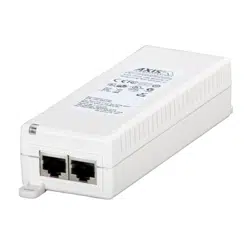
•AXIST8134Midspan60W
•ACpowercable
•Printedmaterials
-InstallationGuide(thisdocument)
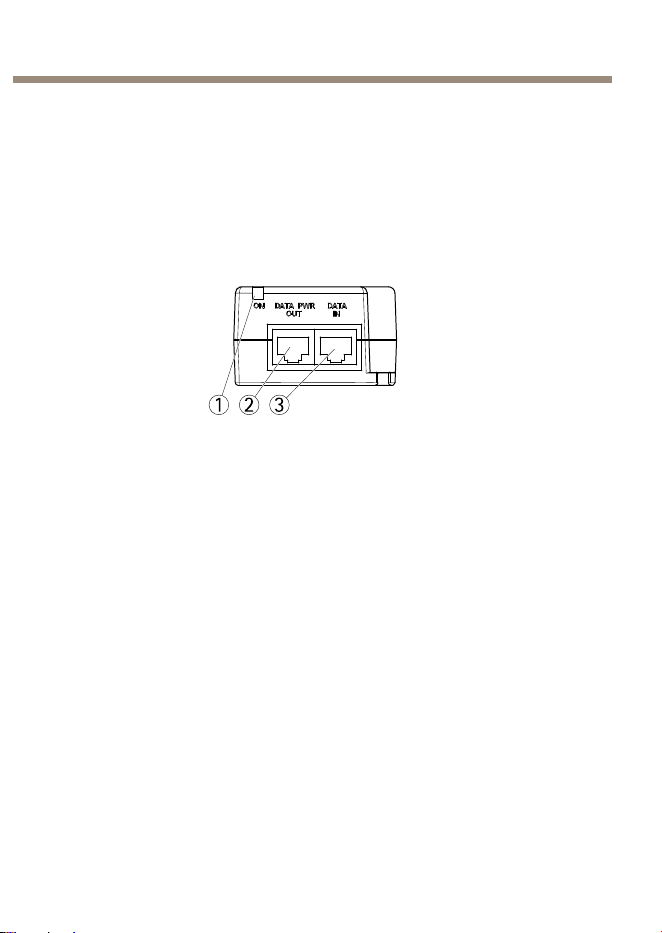
HardwareOverview
1 2 3
1
PortLEDindicator
2
DATA&POWEROUT
3
DATAIN
9
ENGLISH
AXIST8134Midspan60W
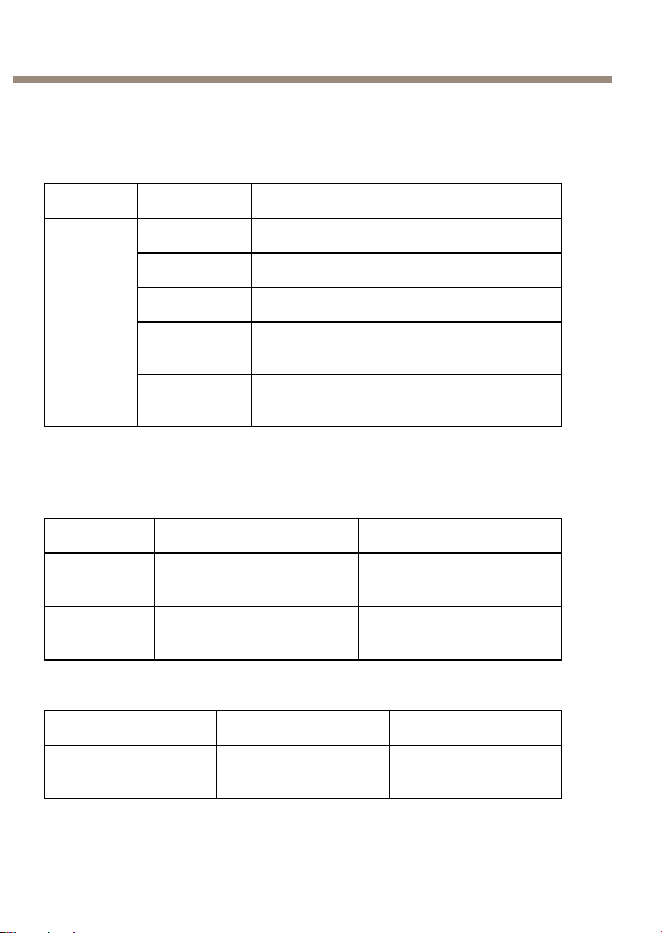
Indicators
AXIST8134MidspanLEDIndicators
LED
Color
Indication
Off
Poweroff
Orange
Poweron
Green
Aremoteterminalisconnected
Orange,
ashing
Non-standardpowereddeviceis
connectedtotheportterminal
Port
Green,
ashing
Portwaspoweredatfourpairs.Thenport
wasoverloaded/shorted/underload.
Specications
OperatingConditions
ModeTemperatureHumidity
Operating
upto60W
-10°Cto45°C
(14°Fto113°F)
Max90%RH(non-
condensing)
Operating
upto30W
-10°Cto55°C
(14°Fto131°F)
Max90%RH(non-
condensing)
StorageConditions
ModeTemperatureHumidity
Storage-20°Cto70°C
(-4°Fto158°F)
Max95%RH(non-
condensing)
10

AXIST8134Midspan60W
PowerConsumption
InputVoltage
100—240VAC50/60Hz
MaximalInputCurrent
1.5Ampere(max)
AvailableOutputPower(max)
60W
NominalOutputVoltage55VDC
HighPoweroverEthernet,max.60W
EthernetInterface
Input(DataIn)
Ethernet10/100/1000Base-T
RJ45femalesocket
Output(Data&PowerOut)
Ethernet10/100/1000Base-T,plus
55VDC
RJ45femalesocket,with
DCvoltageonwirepairs
1–2,3–6,4–5and7–8
ConnectorsandButtons
Forspecicationsandoperatingconditions,seepage10.
NetworkConnector
RJ45withHighPoweroverEthernet(HighPoE).
InstalltheHardware
InstallingAXIST8134
1.Connectthemidspan(DATAIN)tothenetworkswitchusinga
networkcable(Category5/5e/6).
11
ENGLISH
AXIST8134Midspan60W
2.Connectthemidspan(DATA&POWEROUT)tothecamera,
usingthenetworkcable(Category5/5e/6)thathasbeen
connectedtothecamera.
3.Connectthemidspantoagrounded(earthed)mainspower
outlet(100–240VAC)usingthesuppliedpowercable.
4.MakesurethattheLEDsonthemidspanindicatethecorrect
conditions.SeeIndicatorsonpage10
1 2 3
1
PortLEDindicator
2
DATA&POWEROUT
3
DATAIN
12

AXIST8134Midspan60W
NO NO
NO
TICE TICE
TICE
•Keepthemidspanawayfromexcessiveheatandhumidityand
freefromvibrationanddust.
•EnsurethatthecablelengthfromEtherhetnetworksourceto
theterminaldoesnotexceed100m(330ft).ThePoEisnota
repeateranddoesnotamplifytheEthernetdatasignal.
•Ifasplitteristobeused,makesureitisconnectedclosetothe
terminalandnotonthemidspan.
•NoON-OFFswitchexists,simplyplugthemidspanintoanAC
powersource.
•EnsurethatallnetworkcablesusedintheinstallationareSTP
andCategory5/5e/6.
•Donotusecountersunkscrewswhenmountingthemidspan.
Screwsize4mm.
Troubleshooting
AXIST8134doesnotpowerup
•Removeandre-applypowertothedeviceandcheckthe
indicatorsduringpowerupsequence.
•Verifythatthevoltageatthepowerinletisbetween
100—240VAC.
•Verifythatthepowerinletcableisfunctional.
Thepowereddevicedoesnotoperate
•VerifythatthepowereddeviceisdesignedforPoEoperation.
•VerifythatastandardCategory5/5e/6,straight-wiredcable
withfourpairsisused.
•VerifythattheinputEthernetcableisconnectedtothe
DATAINport.
•Verifythatthepowereddeviceisconnectedtothe
DATA&POWEROUTport.
13
ENGLISH

AXIST8134Midspan60W
•Ifanexternalpowersplitterisinuse,verifythatitworks.
•Verifythatthereisnoshortoveronanyofthetwistedpair
cablesorovertheRJ45connectors.
•Ifpossiblereconnectthesamepowereddeviceintoadifferent
midspan.
Theenddeviceoperates,butthereisnodatalink
•Verifythattheportonthefrontpaneliscontinuouslylit.
•VerifythatastandardCategory5/5e/6,straight-wiredcable
withfourpairsisused.
•VerifythattheEthernetcablelengthislessthan
100m(330ft)fromtheEthernetsourcetotheload/remote
terminal.
•Ifanexternalpowersplitterisinuse,verifythatitworks.
•Ifpossiblereconnectthesamepowereddeviceintoadifferent
midspan.
WarrantyInformation
ForinformationaboutAxis’productwarrantyandtheretorelated
information,seewww.axis.com/warranty/
14
AXIST8134Midspan60W
Informationssurlasécurité
Lisezattentivementceguided'installationavantd'installerl'appareil.
Conservezleguided'installationpourtouteréférenceultérieure.
Niveauxderisques
DANGER
Indiqueunesituationdangereusequi,siellen'est
pasévitée,entraîneraledécèsoudesblessures
graves.
AVERTISSEMENT
Indiqueunesituationdangereusequi,siellen'est
pasévitée,pourraitentraînerledécèsoudes
blessuresgraves.
ATTENTION
Indiqueunesituationdangereusequi,sielle
n'estpasévitée,pourraitentraînerdesblessures
légèresoumodérées.
A A
A
VIS VIS
VIS
Indiqueunesituationqui,siellen'estpasévitée,
pourraitendommagerl'appareil.
Autresniveauxdemessage
ImportantIndiquelesinformationsimportantes,nécessaires
pourassurerlebonfonctionnementdel'appareil.
NoteIndiquelesinformationsutilesquipermettront
d'obtenirlefonctionnementoptimaldel'appareil.
15
FRANÇAIS

AXIST8134Midspan60W
Consignesdesécurité
AVERTISSEMENT
•LeproduitAxisdoitêtreinstalléparunprofessionnelhabilité.
16

AXIST8134Midspan60W
A A
A
VIS VIS
VIS
•LeproduitAxisdoitêtreutiliséconformémentauxloiset
règlementationslocalesenvigueur.
•PourpouvoirutiliserleproduitAxisàl'extérieur,oudansdes
environnementssimilaires,ildoitêtreinstallédansunboîtier
d'extérieurhomologué.
•ConserverceproduitAxisdansunenvironnementsecetventilé.
•NepasexposerceproduitAxisauxchocsouauxfortespressions.
•NepasexposerceproduitAxisauxvibrations.
•Nepasinstallerceproduitsurdessupports,surfacesoumurs
instables.
•Nepasinstallerceproduitsurdessupports,surfacesoumurs
soumisàdesvibrations.
•Utiliseruniquementdesoutilsrecommandéspourl'installation
del'appareilAxis.Uneforceexcessiveappliquéesurl'appareil
pourraitl'endommager.
•Nepasutiliserdeproduitschimiques,desubstancescaustiques
oudenettoyantspressurisés.
•Utiliserunchiffonpropreimbibéd'eaupurepourlenettoyage.
•Utiliseruniquementdesaccessoiresconformesaux
caractéristiquestechniquesduproduit.Ilspeuventêtrefournis
parAxisouuntiers.
•Utiliseruniquementlespiècesderechangefourniesou
recommandéesparAxis.
•Nepasessayerderéparerceproduitparvous-même.Contacter
l'assistancetechniqued'AxisouvotrerevendeurAxispourdes
problèmesliésàl'entretien.
17
FRANÇAIS

AXIST8134Midspan60W
Transport
A A
A
VIS VIS
VIS
•LorsdutransportduproduitAxis,utilisezl'emballaged'origine
ouunéquivalentpouréviterd'endommagerleproduit.
18
AXIST8134Midspan60W
Guided'installation
CeGuided'installationfournitdesinstructionspourl'installationde
l'injecteurAXIST8134survotreréseau.
Procéduresd’installation
1.Assurez-vousquelesoutilsetautresmatérielsnécessaires
àl'installationsontinclusdansl'emballage.Cf.Contenude
l'emballagepage19
2.Consultezladescriptiondumatériel.Cf.page19.
3.Étudiezlescaractéristiques.Cf.page10.
4.Installezlematériel.Cf.page22.
Contenudel'emballage
•InjecteurAXIST813460W
•Câbled'alimentationCA
•Documentsimprimés
-Guided'installation(cedocument)
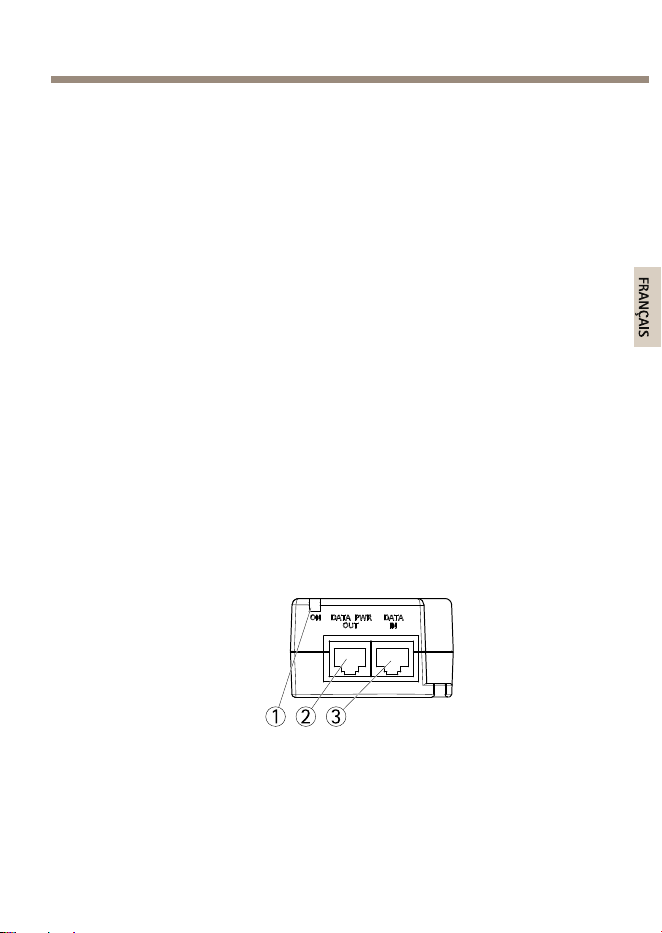
Aperçudumatériel
1 2 3
1
VoyantDELduport
2
SORTIEDONNÉESETALIMENTATION
3
ENTRÉEDONNÉES
19
FRANÇAIS
AXIST8134Midspan60W
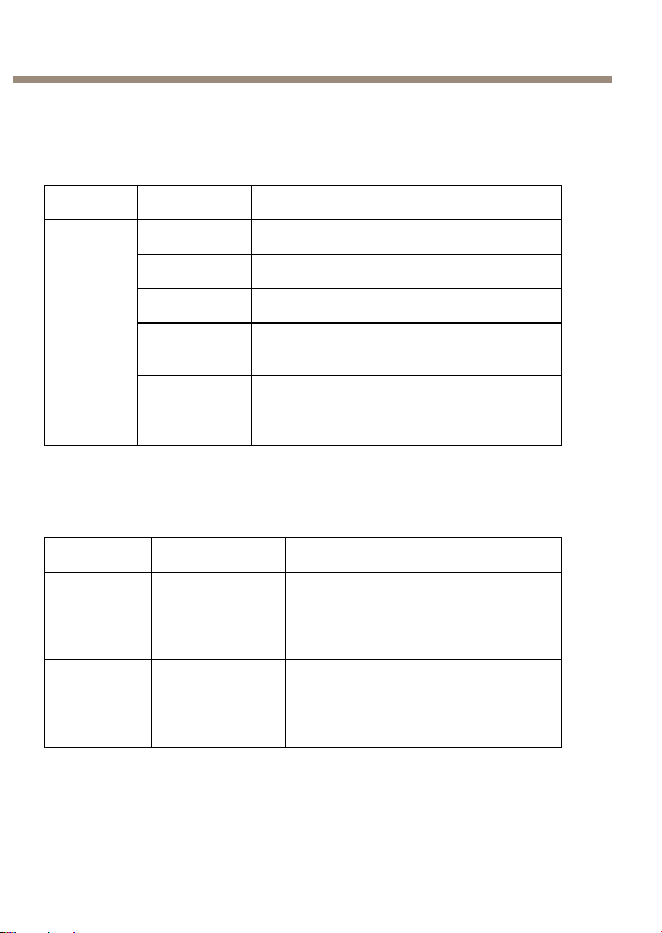
Voyants
VoyantsDELdel'injecteurAXIST8134
Voyant
Couleur
Indication
DésactivéHorstension
OrangeSoustension
VertUnterminaldistantestconnecté
Orange,
clignotant
Unappareilalimenténonconformeest
connectéàlaborneduport
Port
Vert,
clignotant
Leportétaitalimentéauniveaudes
quatrepaires.Puis,leportétait
surchargé/court-circuité/encharge.
Caractéristiquestechniques
Conditionsd'utilisation
Mode
TempératureHumidité
Fonction-
nement
jusqu'à
60W
-10°Cà45°C
(14°Fà113°F)
Humiditérelativemaximalede90%
(sanscondensation)
Fonction-
nement
jusqu'à
30W
-10°Cà55°C
(14°Fà131°F)
Humiditérelativemaximalede90%
(sanscondensation)
20
AXIST8134Midspan60W
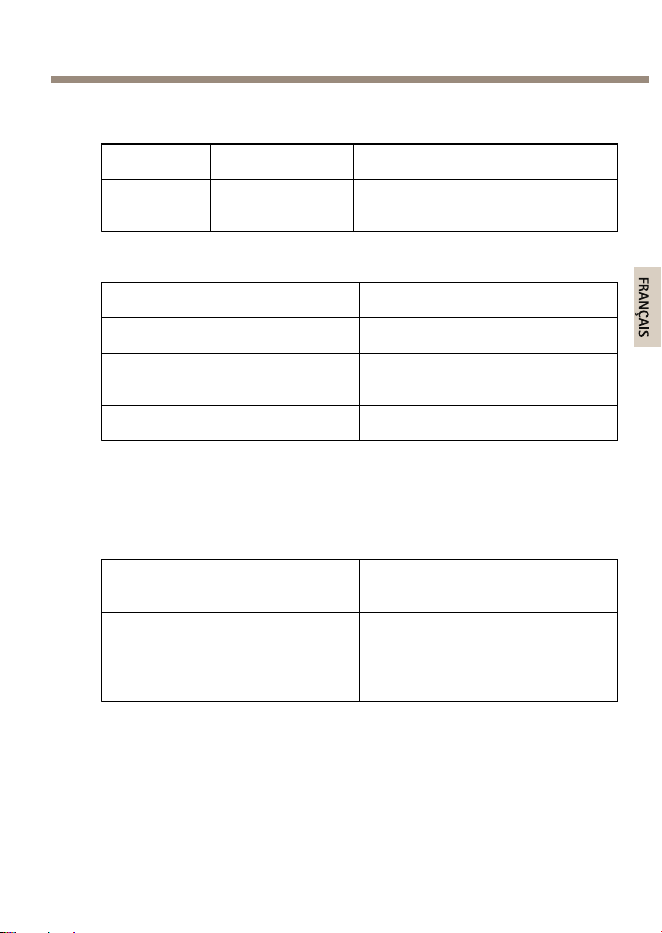
Conditionsdestockage
Mode
TempératureHumidité
stockage
-20°Cà70°C
(-4°Fà158°F)
Humiditérelativemaximalede95%
(sanscondensation)
Consommationélectrique
Tensiond'entrée
100—240VCA50/60Hz
Courantd'entréemaximal
1,5Ampère(max)
Puissancedesortiedisponible
(max.)
60W
Tensiondesortienominale
55VCC
AlimentationhautepuissanceparEthernet,max.60W
InterfaceEthernet
Entrée(donnéesd'entrée)
Ethernet10/100/1000Base-T
PrisefemelleRJ45
Sortie(donnéesetalimentation
desortie)
Ethernet10/100/1000Base-T,plus
55VCC
PrisefemelleRJ45,avectension
continuesurlespairesde
conducteur1–2,3–6,4–5et7–8
Connecteursetboutons
Pourlescaractéristiquesetlesconditionsd'utilisation,consultezpage20.
21
FRANÇAIS
AXIST8134Midspan60W
Connecteurréseau
RJ45avecalimentationhautepuissanceparEthernet(PoEhaute
puissance).
Installationdumatériel
Installationdel'injecteurAXIST8134
1.Branchezl'injecteur(ENTRÉEDONNÉES)aucommutateur
réseauàl'aided'uncâbleréseau(catégorie5/5e/6).
2.Branchezl'injecteur(SORTIEDONNÉESETALIMENTATION)àla
caméravialecâbleréseau(catégorie5/5e/6)quiaétébranché
àlacaméra.
3.Connectezl'injecteuràunesortiedusecteurmiseàlaterre
(100–240VCA)àl'aideducâbled’alimentationfourni.
4.Assurez-vousquelesvoyantsDELsurl'injecteurindiquentles
conditionsadéquates.Cf.Voyantspage20
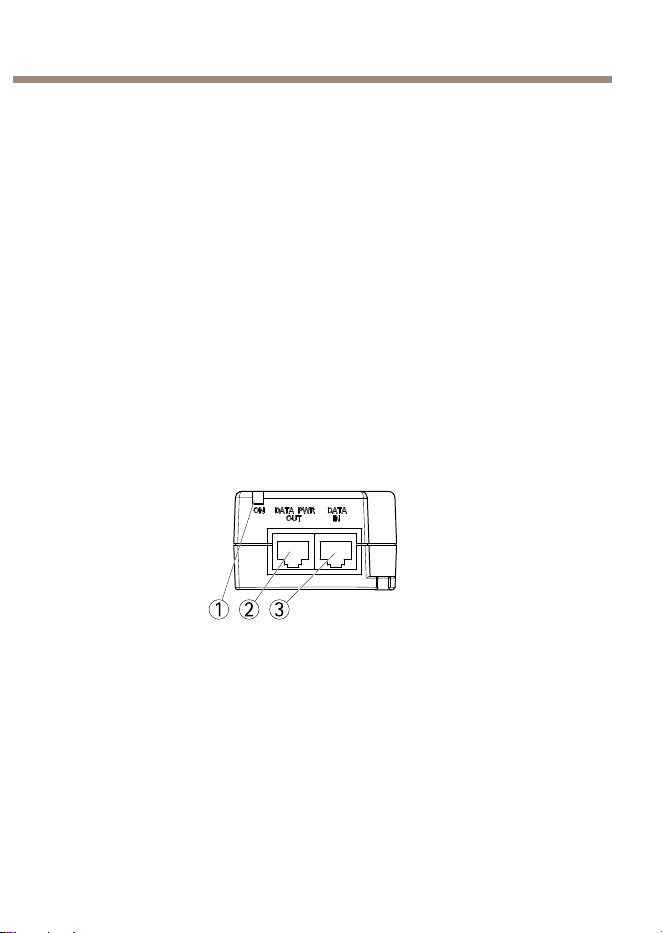
1 2 3
1
VoyantDELduport
2
SORTIEDONNÉESETALIMENTATION
3
ENTRÉEDONNÉES
22
AXIST8134Midspan60W
A A
A
VIS VIS
VIS
•Conservezl'injecteuràl'abridetoutechaleurouhumidité
excessive,desvibrationsetdelapoussière.
•Veillezàcequelalongueurdecâbleentrelasourceduréseau
Ethernetetleterminalnedépassepas100m(330pi.).LePoE
n'estpasunrépéteuretn'ampliepaslesignaldesdonnées
Ethernet.
•Sivousutilisezundiviseur,assurez-vousqu'ilestraccordéprès
delaborneetnonpasàl'injecteur.
•Iln'existepasd'interrupteurMarche/Arrêt.Ilsuftdebrancher
l’injecteursuruneprisedecourantCApourlemettreenmarche.
•Assurez-vousquetouslescâblesréseauutilisésdans
l'installationsontSTPetdecatégorie5/5e/6.
•N’utilisezpasdevisàtêtefraiséepourmonterl'injecteur.Taille
devis4mm.
Dépannage
L'AXIST8134nes'allumepas
•Mettezl'appareilhorstensionetrallumez-leenvériantles
indicateurspendantlamisesoustension.
•Vériezquelatensionàl’arrivéesesitueentre100—240VCA.
•Vériezquelecâbled'alimentationfonctionne.
L'appareilsoustensionnefonctionnepas
•Vériezquel'appareilsoustensionabienétéconçupourun
fonctionnementPoE.
•Vériezquevousutilisezuncâbledroitstandardde
catégorie5/5e/6àquatrepairesdels.
•VériezquelecâbleEthernetd'entréeestbranchésurleport
deENTRÉEDONNÉES.
23
FRANÇAIS

AXIST8134Midspan60W
•Vériezquel'appareilsoustensionestbienraccordéauport
SORTIEDONNÉESETALIMENTATION.
•Siundiviseurd’alimentationexterneestutilisé,vériezqu'il
fonctionne.
•Vériezqu’iln’yapasdecourt-circuitsurlescâblesàpaires
torsadéesnisurlesconnecteursRJ45.
•Sipossible,branchezl'appareilconnectéàuninjecteur
différent.
L'appareilfonctionne,maisaucuneliaisondedonnéesn'estétablie
•Vériezquelevoyantduportàl'avantdel'appareilestallumé
encontinu.
•Vériezquevousutilisezuncâbledroitstandardde
catégorie5/5e/6àquatrepairesdels.
•VériezquelecâbleEthernetnefaitpasplusde
100m(330pi.)delongentrelasourceEthernetetleterminal
distant/decharge.
•Siundiviseurd’alimentationexterneestutilisé,vériezqu'il
fonctionne.
•Sipossible,branchezl'appareilconnectéàuninjecteur
différent.
Informationssurlagarantie
Pourobtenirplusd'amplesinformationssurlagarantieduproduitAXISet
desrenseignementsconnexes,allezsurlesitewww.axis.com/warranty/
24

AXIST8134Midspan60W
Sicherheitsinformation
LesenSiedasInstallationshandbuchsorgfältigdurchbevorsiedasProdukt
installieren.BewahrenSiedasInstallationshandbuchfürzukünftige
Zweckeauf.
Gefährdungsstufen
GEFAHRWeistaufeinegefährlicheSituationhin,welche,
fallsnichtverhindert,zuTododerschweren
Verletzungenführt.
WARNUNGWeistaufeinegefährlicheSituationhin,welche,
fallsnichtverhindert,zuTododerschweren
Verletzungenführenkann.
VORSICHTWeistaufeinegefährlicheSituationhin,welche,
fallsnichtverhindert,zugeringfügigeroder
mäßigerVerletzungführenkann.
HINWEIS HINWEIS
HINWEIS
WeistaufeinegefährlicheSituationhin,welche,
fallsnichtverhindert,zuSachschädenführen
kann.
WeitereNachrichtenstufen
WichtigWeistaufwichtigeInformationenhin,dieden
richtigenBetriebdesProduktsgewährleisten.
BeachtenWeistaufnützlicheInformationenhin,diedie
optimaleVerwendungdesProduktsunterstützen.
25
DEUTSCH

AXIST8134Midspan60W
Sicherheitsanweisungen
WARNUNG
•DasAxisProduktmussvonfachmännischemPersonalinstalliert
werden.
26

AXIST8134Midspan60W
HINWEIS HINWEIS
HINWEIS
•DieAnwendungdesAxisProduktsmussunterBeachtungder
örtlichgeltendenrechtlichenBestimmungenerfolgen.
•BeiderAnwendungvonAxisProduktenimAußenbereich
oderähnlichenUmgebungen,müssendieseinzugelassenen
Außengehäuseninstalliertwerden.
•LagernSiedasAxisProduktineinertrockenenundbelüfteten
Umgebung.
•AchtenSiedarauf,dassdasAxisProduktwederStößennoch
starkemDruckausgesetztist.
•AchtenSiedarauf,dassdasAxisProduktkeinenVibrationen
ausgesetztist.
•InstallierenSiedasProduktnichtaninstabilenHalterungen,
OberächenoderWänden.
•InstallierenSiedasProduktnichtanvibrierendenHalterungen,
OberächenoderWänden.
•VerwendenSiebeiderInstallationdesAxisProdukts
ausschließlichpassendeWerkzeuge.EinzugroßerKraftaufwand
kanndasProduktbeschädigen.
•VerwendenSiekeinechemischen,ätzendenoderaerosolhaltigen
Reinigungsmittel.
•VerwendenSiezumReinigeneinsauberes,mitlauwarmem
WasserangefeuchtetesTuch.
•VerwendenSienurZubehör,dasdentechnischenDatendes
Produktsentspricht.DiesesistvonAxisoderDrittanbietern
erhältlich.
•VerwendenSieausschließlichErsatzteiledievonAxis
bereitgestelltoderempfohlenwerden.
•VersuchenSienicht,dasProduktselbstständigzureparieren.
WendenSiesichbezüglichReparaturundWartungandenAxis
SupportoderIhrenAxisHändler.
27
DEUTSCH

AXIST8134Midspan60W
Transport
HINWEIS HINWEIS
HINWEIS
•BeiBedarftransportierenSiedasAxisProduktinder
OriginalverpackungodereinerentsprechendenVerpackung,so
dassSchädenvermiedenwerden.
28
AXIST8134Midspan60W
Installationsanleitung
IndieserAnleitungwirddieInstallationvonAXIST8134ineinemNetzwerk
beschrieben..
Installationsschritte
1.StellenSiesicher,dassPackungsinhalte,Werkzeugeundandere
fürdieInstallationnotwendigeMaterialieninOrdnungsind.
SieheLieferumfangaufSeite29
2.MachenSiesichmitderHardware-Übersichtvertraut.Siehe
Seite29.
3.MachenSiesichmitdentechnischenDatenvertraut.Siehe
Seite30.
4.InstallierenSiedieHardware.SieheSeite32.
Lieferumfang
•AXIST8134-Midspan60W
•Wechselstrom-Netzkabel
•GedruckteDokumente
-Installationsanleitung(diesesDokument)
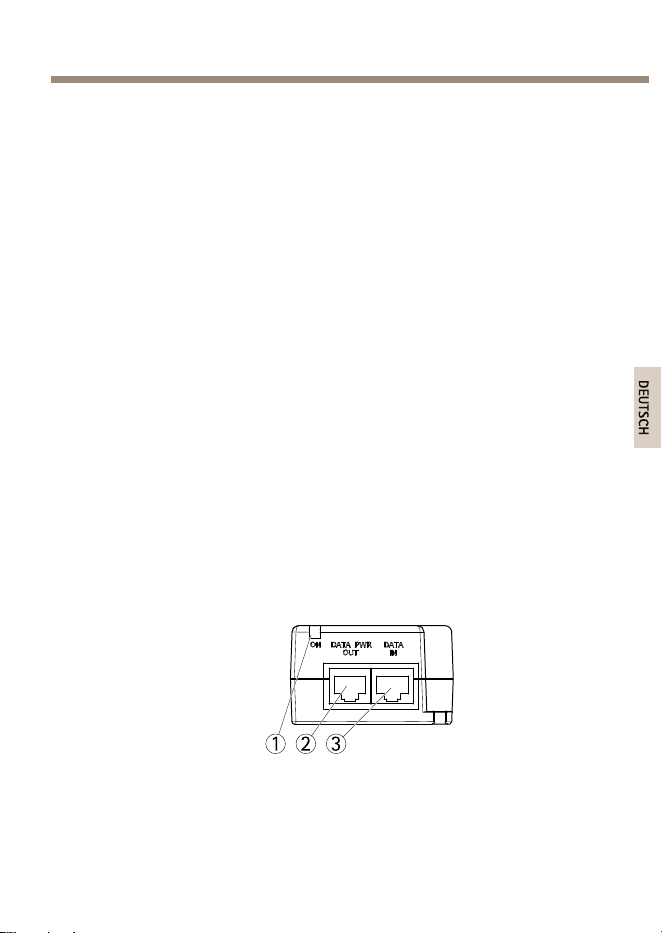
ÜbersichtüberdieHardware
1 2 3
1
Port-LED-Anzeige
2
DATA&POWEROUT(AUSGANG)
29
DEUTSCH
AXIST8134Midspan60W
3
DATAIN(EINGANG)
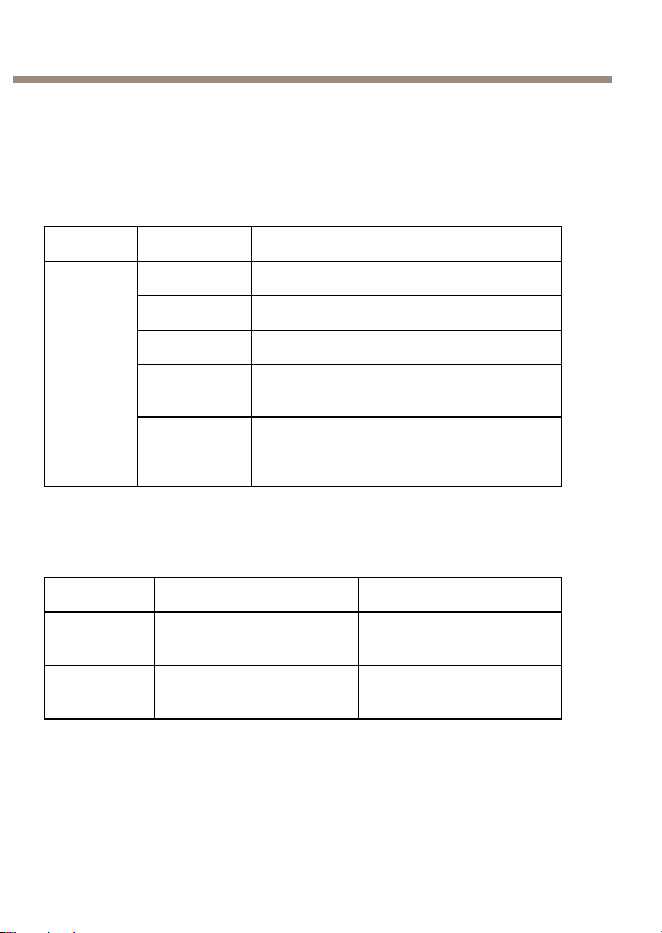
Indikatoren
AXIST8134Midspan-LED-Anzeigen
LEDFarbeBedeutung
AusDeaktiviert
Orange
Aktiviert
Grün
EinEndgerätistangeschlossen.
Orange
blinkend
EinnichtnormgerechtesaktiviertesGerät
istamPortangeschlossen.
Port
Grün
blinkend
DerPortwurdeanvierPaaren
aktiviertundanschließendüberlastet,
kurzgeschlossenoderunterLastgesetzt.
TechnischeDaten
Betriebsbedingungen
ModusTemperatur
Luftfeuchtigkeit
Betriebbis
60W
-10°Cbis45°C
(14°Fbis113°F)
Max.90%RH(nicht
kondensierend)
Betriebbis
30W
-10°Cbis55°C
(14°Fbis131°F)
Max.90%RH(nicht
kondensierend)
30

AXIST8134Midspan60W
Lagerbedingungen
ModusTemperatur
Luftfeuchtigkeit
Lagerung
-20°Cbis70°C
(-4°Fbis158°F)
Max.95%RH(nicht
kondensierend)
Stromverbrauch
Eingangsspannung
100-240VWechselstrom,50/60
Hz
MaximalerEingangsstrom
1,5Ampere(max.)
VerfügbareAusgangsleistung
(max)
60W
Ausgangsnennspannung
55VGleichstrom
HighPoweroverEthernet,max.60W
Ethernet-Schnittstelle
Eingang(DataIn)
Ethernet10/100/1000Base-T
RJ45-Buchse
Ausgang(Data&PowerOut)
Ethernet10/100/1000Base-T,plus
55VGleichstrom
RJ45-Buchsemit
Gleichstrom-Spannunganden
Kabelpaaren1-2,3-6,4-5und7-8
AnschlüsseundTasten
FürdietechnischenDatenundBetriebsbedingungensieheSeite30.
31
DEUTSCH
AXIST8134Midspan60W
Netzwerkanschluss
RJ45mitHighPoweroverEthernet(HighPoE).
InstallierenderHardware
InstallierenvonAXIST8134
1.VerbindenSiedenMidspan(DATAIN)übereinNetzwerkkabel
(Kategorie5/5e/6)mitdemNetzwerkswitch.
2.VerbindenSiedenMidspan(DATA&POWEROUT)über
einandieKameraangeschlossenesNetzwerkkabel
(Kategorie5/5e/6)mitderKamera.
3.SchließenSiedenMidspanüberdasmitgelieferteNetzkabel
aneinegeerdeteSteckdose(100–240VWechselstrom)an.
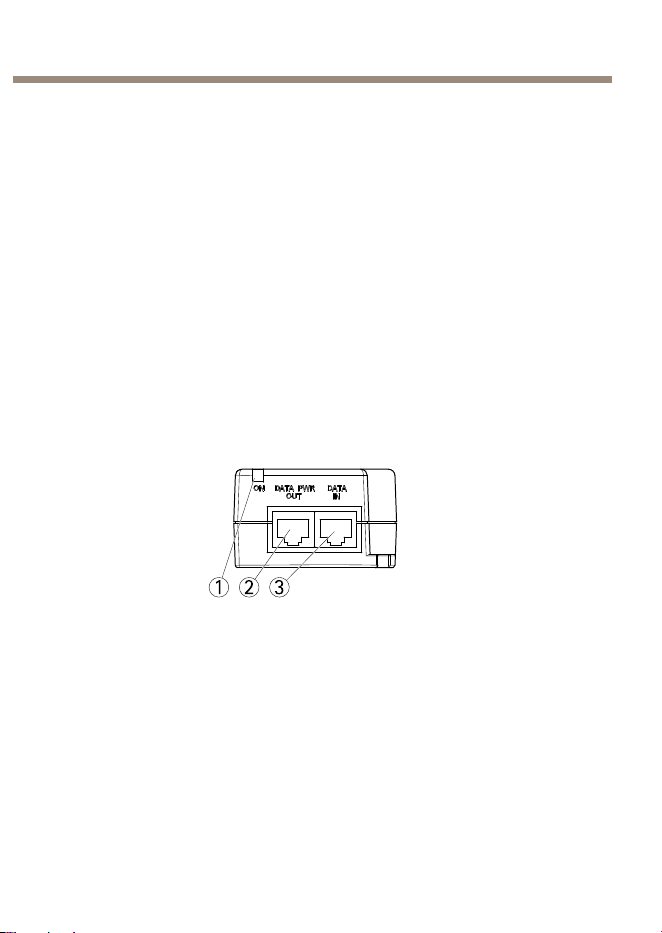
4.ÜberprüfenSie,obdieLEDsamMidspandierichtigen
Bedingungenanzeigen.SieheIndikatorenaufSeite30
1 2 3
1
Port-LED-Anzeige
2
DATA&POWEROUT(AUSGANG)
3
DATAIN(EINGANG)
32

AXIST8134Midspan60W
HINWEIS HINWEIS
HINWEIS
•HaltenSiedenMidspanvonübermäßigerWärmeund
FeuchtigkeitfernundsetzenSieihnwederVibrationennoch
Staubaus.
•StellenSiesicher,dassdieKabellängevonder
Ethernet-NetzwerkquellezumEndgerät100Meternicht
überschreitet.DerPoEistkeinRepeaterundverstärktdaher
nichtdasDatensignalderEthernet-Verbindung.
•FallsSieeinenSplitterverwenden,stellenSiesicher,dasserin
derNähedesEndgerätsundnichtamMidspanangeschlossen
ist.
•EsgibtkeinenNetzschalter;schließenSiedenMidspaneinfach
aneineNetzstromquellean.
•AllezurInstallationverwendetenNetzwerkkabelmüssen
abgeschirmt(STP)seinundderKategorie5/5e/6entsprechen.
•VerwendenSiebeiderMontagedesMidspankeine
Senkkopfschrauben.Schraubengröße:4mm.
Fehlerbehebung
AXIST8134lässtsichnichteinschalten
•ZiehenSiedasNetzkabelvomGerätab,steckenSieeserneut
ein,undprüfenSiedanndieAnzeigenbeimHochfahren.
•PrüfenSie,obdieSpannungamNetzeingangzwischen
100und240VWechselstromliegt.
•ÜberprüfenSie,obdasNetzkabelfunktionsfähigist.
DaseingeschalteteGerätarbeitetnicht
•ÜberprüfenSie,obdasGerätfürdenPoE-Betriebgeeignetist.
•ÜberprüfenSie,obSieein1:1-verdrahtetesStandardkabelder
Kategorie5/5e/6mitvierPaarenverwenden.
•StellenSiesicher,dassdasEingangs-Ethernet-Kabelanden
AnschlussDATAIN(Eingang)angeschlossenist.
33
DEUTSCH

AXIST8134Midspan60W
•StellenSiesicher,dassdaseingeschalteteGerätandenPort
DATA&POWEROUT(Ausgang)angeschlossenist.
•WennSieeinenexternenPower-Splitterverwenden,stellenSie
sicher,dassdieserfunktioniert.
•StellenSiesicher,dasskeinKurzschlusszwischenden
Twisted-Pair-KabelnoderzwischendenRJ-45-Steckern
besteht.
•Wennmöglich,solltenSiedasselbebetriebeneGerätaneinen
anderenMidspananschließen.
DasEndgerätfunktioniert,aberesbestehtkeineDatenverbindung
•ÜberprüfenSie,obderPortanderVorderseiteununterbrochen
leuchtet.
•ÜberprüfenSie,obSieein1:1-verdrahtetesStandardkabelder
Kategorie5/5e/6mitvierPaarenverwenden.
•StellenSiesicher,dassdieLängedesEthernet-Kabels
100MetervonderEthernet-QuellezumLast-bzw.ortsfernen
Endgerätnichtüberschreitet.
•WennSieeinenexternenPower-Splitterverwenden,stellenSie
sicher,dassdieserfunktioniert.
•Wennmöglich,solltenSiedasselbebetriebeneGerätaneinen
anderenMidspananschließen.
Garantieinformationen
InformationenzurGarantiederAxisProdukteundhierzuverbundene
Informationen,ndenSieunterwww.axis.com/warranty/
34

AXIST8134Midspan60W
InformazionidiSicurezza
LeggerequestaGuidaall'Installazioneprimadiinstallareilprodotto.
ConservarelaGuidaall'Installazioneperusifuturi.
Livellidipericolo
PERICOLO
Indicaunasituazionepericolosache,senon
evitata,provocamorteolesionigravi.
AVVERTENZAIndicaunasituazionepericolosache,senon
evitata,puòprovocarelamorteolesionigravi.
ATTENZIONE
Indicaunasituazionepericolosache,senon
evitata,puòprovocarelesionimedieominori.
A A
A
VVISO VVISO
VVISO
Indicaunasituazioneche,senonevitata,può
danneggiarelaproprietà.
Altrilivellid'informazione
ImportanteIndicainformazioniimportanti,essenzialiperil
correttofunzionamentodelprodotto.
NotaIndicainformazioniutilicheaiutanoaottenereil
massimodalprodotto.
35
ITALIANO

AXIST8134Midspan60W
Istruzionidisicurezza
AVVERTENZA
•IlprodottoAxisdeveessereinstallatodaunprofessionista
qualicato.
A A
A
VVISO VVISO
VVISO
•IlprodottoAxisdeveessereutilizzatoinconformitàalleleggie
alledisposizionilocali.
•PerutilizzareilprodottoAxisinambientiesterni,oinambienti
simili,deveessereinstallatoinunacustodiaperesterni
approvata.
•ConservareilprodottoAxisinunambienteasciuttoeventilato.
•EvitarediesporreilprodottoAxisaurtiopressionieccessive.
•EvitarediesporreilprodottoAxisavibrazione.
•Noninstallareilprodottosusupporti,supercioparetiinstabili.
•Noninstallareilprodottosusupporti,supercioparetiche
vibrano.
•Utilizzaresolostrumentiapplicabiliquandosiinstallailprodotto
Axis.Unaforzaeccessivapuòcausaredannialprodotto.
•Nonutilizzaresostanzechimiche,agenticausticiodetergenti
aerosol.
•Utilizzareunpannopulitoinumiditoinacquapuraperlapulizia.
•Utilizzaresoloaccessoricompatibiliconlespecichetecniche
delprodotto.QuestipossonoesserefornitidaAxisodaterze
parti.
•UtilizzaresolopartidiricambioforniteoconsigliatedaAxis.
•Nontentarediriparareilprodottodasoli.Contattare
l'assistenzaoilrivenditoreAxisperquestionirelativealla
manutenzione.
36

AXIST8134Midspan60W
Trasporti
A A
A
VVISO VVISO
VVISO
•DuranteiltrasportodelprodottoAxis,utilizzarel'imballaggio
originaleoequivalenteperevitaredannialprodotto.
37
ITALIANO

38
AXIST8134Midspan60W
Guidaall'installazione
Lapresenteguidaall'installazionefornisceleistruzioninecessarieper
installareAXIST8134nellareteinuso.
Procedurediinstallazione
1.Assicurarsicheilcontenutodellaconfezione,glistrumenti
ealtrimaterialinecessariperl'installazionesianoinordine.
ConsultareContenutodellaConfezioneallapagina39
2.Studiareladescrizionedell'hardware.Consultarepagina39.
3.Studiarelespeciche.Consultarepagina40.
4.Installarel’hardware.Consultarepagina42.
ContenutodellaConfezione
•AXIST8134Midspan60W
•CavodialimentazioneCA
•Materialistampati
-Guidaall’installazione(questodocumento)
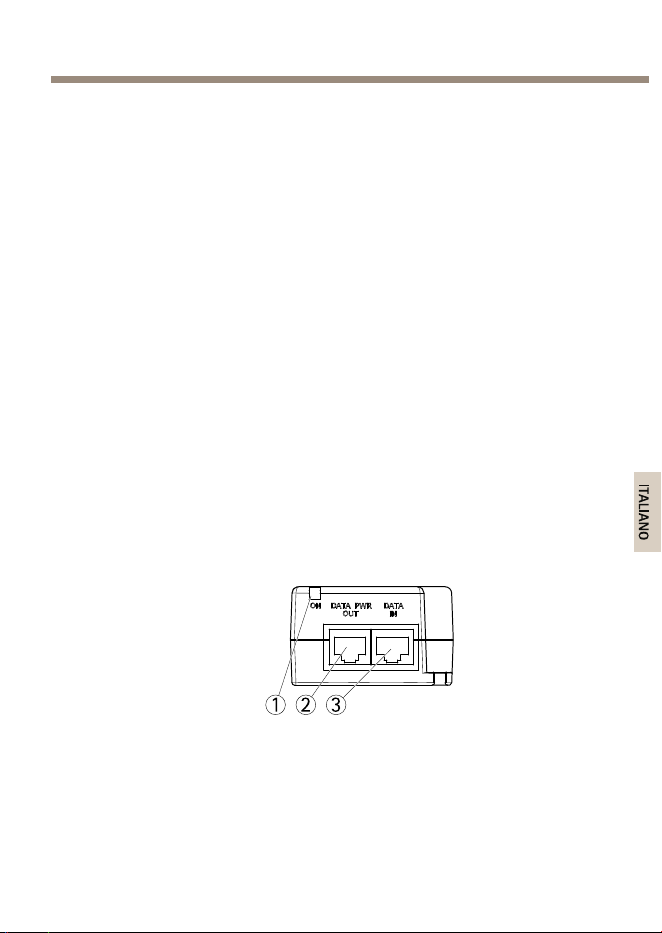
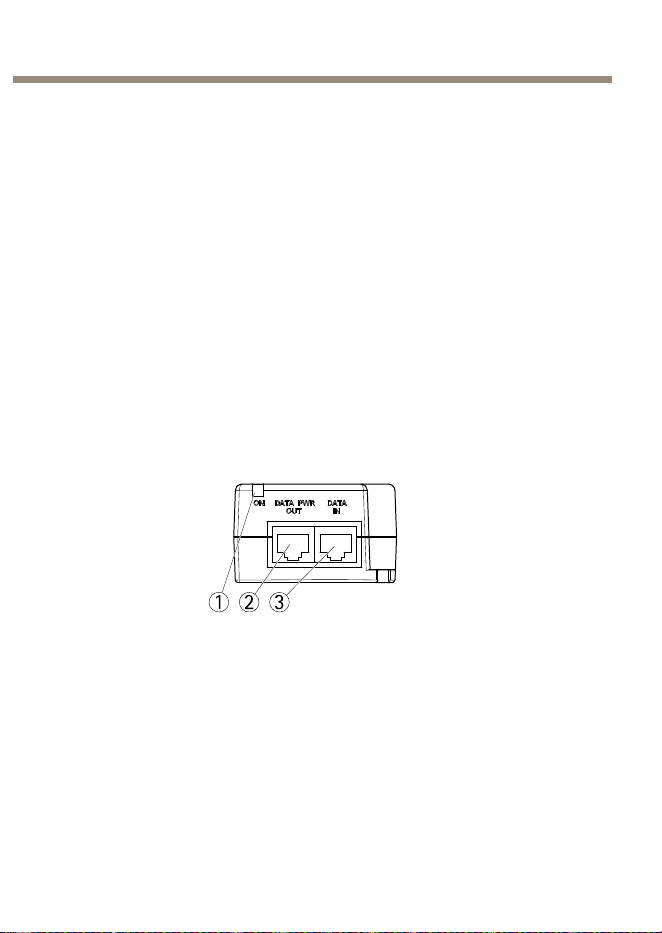
Panoramicadell'hardware
1 2 3
1
IndicatoreLEDporta
2
DATIEALIMENTAZIONE
3
INGRESSODATI
39
ITALIANO
AXIST8134Midspan60W
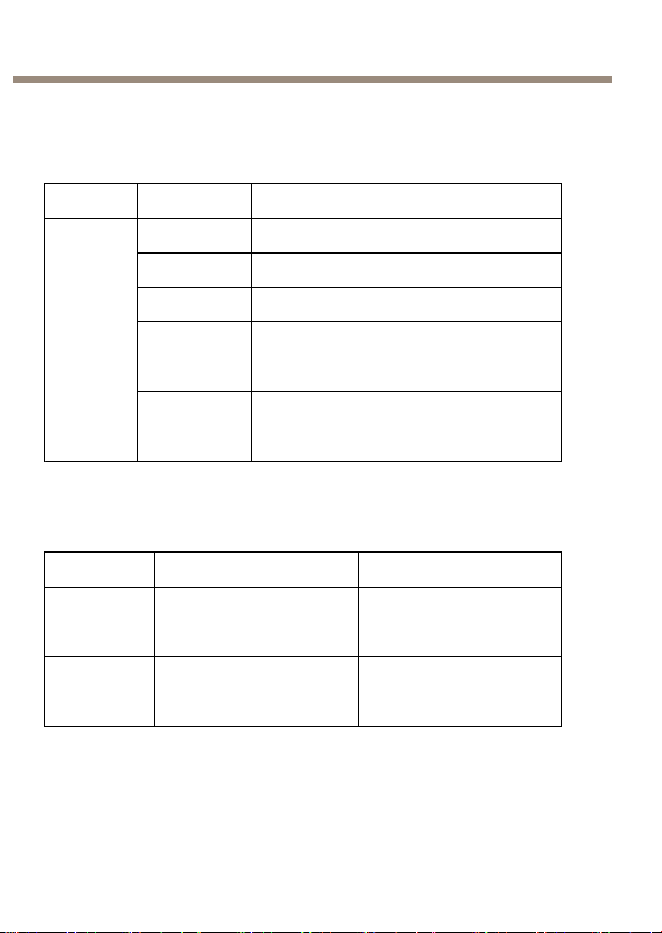
Indicatori
IndicatoriLEDdelMidspanAXIST8134
LED
Colore
Indicazione
Off
Alimentazionespenta
ArancioAcceso
VerdeUnterminaleremotoècollegato
Arancio,luce
lampeg-
giante
Undispositivononstandardeconnesso
alterminaledellaporta
Porta
Verde,luce
lampeg-
giante
Laportaeraalimentataaquattro
doppini.Quindisièvericatoun
sovraccarico/corto/sottocarico.
Datitecnici
Condizionidifunzionamento
Modalità
Temperatura
Umidità
Funziona-
mentonoa
60W
Da-10°Ca45°C
(da14°Fa113°F)
Max.90%relativa(senza
condensa)
Funziona-
mentonoa
30W
Da-10°Ca55°C
(da14°Fa131°F)
Max.90%relativa(senza
condensa)
40

AXIST8134Midspan60W
Condizionidistoccaggio
Modalità
Temperatura
Umidità
Immagazzinaggio
Da-20°Ca70°C
(da-4°Fa158°F)
Max.95%relativa
(senzacondensa)
Consumoenergetico
Tensioneiningresso
100—240VAC50/60Hz
Correnteiningressomassima
1,5Ampere(max)
Potenzainuscitadisponibile
(max)
60W
Tensionenominaleinuscita
55VCC
HighPoweroverEthernet,max.60W
InterfacciaEthernet
Ingresso(dati)
Ethernet10/100/1000Base-T
ConnettorefemminaRJ45
Uscita(datiealimentazione)
Ethernet10/100/1000Base-T,più
55VCC
ConnettoreRJ45femminacon
tensioneCCsullecoppiedicavi
1–2,3–6,4–5e7–8
Connettoriepulsanti
Perlespecicheelecondizionidifunzionamento,consultarepagina40.
41
ITALIANO
AXIST8134Midspan60W
Connettoredirete
RJ45conHighPoweroverEthernet(HighPoE).
Installazionedell'Hardware
InstallazionediAXIST8134
1.Collegareilmidspan(INGRESSODATI)alloswitchdirete
utilizzandouncavodirete(categoria5/5e/6).
2.Collegareilmidspan(USCITADATIEALIMENTAZIONE)alla
telecameratramiteilcavodirete(categoria5/5e/6)cheè
statocollegatoallatelecamera.
3.Collegareilmidspanadunapresadialimentazionedirete
(100–240VCA)conmessaaterrautilizzandoilcavodi
alimentazioneindotazione.
4.AssicurarsicheiLEDdelmidspanindichinolecondizioni
corrette.ConsultareIndicatoriallapagina40
1 2 3
1
IndicatoreLEDporta
2
DATIEALIMENTAZIONE
3
INGRESSODATI
42

AXIST8134Midspan60W
A A
A
VVISO VVISO
VVISO
•Tenereilmidspanlontanodacaloreeumiditàeccessivi,nonché
davibrazioniepolvere.
•VericarechelalunghezzadelcavoEthernettralapresadirete
eilterminaleremotosiainferiorea100m.IlPoEnonèun
ripetitoreenonamplicailsegnaledatiEthernet.
•Seènecessariousareunosplitter,accertarsichesiacollegatoil
piùvicinopossibilealterminaleenonalmidspan.
•NonèdisponibileunoswitchON-OFF;collegaresemplicemente
ilmidspanaunapresadialimentazioneCA.
•Assicurarsichetuttiicavidireteutilizzatinell'istallazionesiano
STPecategoria5/5e/6.
•Nonutilizzarevitisvasateduranteilmontaggiodelmidspan.
Dimensionedellavite:4mm.
Risoluzionedeiproblemi
AXIST8134nonsiaccende
•Rimuovereeriapplicarel'alimentazionealdispositivoe
osservaregliindicatoriluminosidurantelasequenzadi
accensione.
•Vericarechelatensionedialimentazioneiningressosia
compresatra100—240VCA.
•Vericareilfunzionamentodelcavodellapresadi
alimentazione.
Ildispositivoalimentatononfunziona
•Vericarecheildispositivoalimentatopossaessereusatocon
latecnologiaPoE.
•AccertarsidiutilizzareuncavostandardCat5/5e/6acablaggio
direttoconquattrodoppini.
•VericarecheilcavoEthernetdiingressosiacollegatoalla
portadiINGRESSODATI.
43
ITALIANO

AXIST8134Midspan60W
•Vericarecheildispositivoalimentatosiaconnessoallaporta
diuscitaDATIEALIMENTAZIONE.
•Sesiutilizzaunosplitterdialimentazioneesterno,vericare
chefunzionicorrettamente.
•Vericarechenoncisianocortocircuitisuicaviadoppini
incrociatiosuiconnettoriRJ45.
•Sepossibile,ricollegarelostessodispositivoalimentatoaun
midspandiverso.
Ildispositivoterminalefunziona,maidatinonvengonotrasmessi
•Vericarechelaportasulpannelloanterioresiaaccesa.
•AccertarsidiutilizzareuncavostandardCat5/5e/6acablaggio
direttoconquattrodoppini.
•VericarechelalunghezzadelcavoEthernettralapresadi
reteeilterminaleremotosiainferiorea100m.
•Sesiutilizzaunosplitterdialimentazioneesterno,vericare
chefunzionicorrettamente.
•Sepossibile,ricollegarelostessodispositivoalimentatoaun
midspandiverso.
Informazionisullagaranzia
PerinformazionisullagaranziadelprodottoAxiseinformazioniadesso
relative,consultarelapaginawww.axis.com/warranty/
44

AXIST8134Midspan60W
Informacióndeseguridad
LeaestaGuíadeinstalaciónconatenciónantesdeinstalarelproducto.
GuardelaGuíadeinstalaciónparapoderconsultarlaenotromomento.
Nivelesdepeligro
PELIGRO
Indicaunasituaciónpeligrosaque,sinoseevita,
provocarálesionesgravesolamuerte.
ADVERTENCIA
Indicaunasituaciónpeligrosaque,sinoseevita,
puedeprovocarlesionesgravesolamuerte.
ATENCIÓN
Indicaunasituaciónpeligrosaque,sinoseevita,
puedeprovocarlesionesmoderadasoleves.
A A
A
VISO VISO
VISO
Indicaunasituaciónpeligrosaque,sinoseevita,
puedeprovocardañosmateriales.
Otrosnivelesdemensaje
ImportanteIndicainformaciónimportantequees
fundamentalparaqueelproductofuncione
correctamente.
NotaIndicainformaciónútilqueayudaaaprovechar
elproductoalmáximo.
45
ESPANÕL

AXIST8134Midspan60W
Instruccionesdeseguridad
ADVERTENCIA
•ElencargadodeinstalarelproductodeAxisdebeserun
profesionalconexperiencia.
46
AXIST8134Midspan60W
A A
A
VISO VISO
VISO
•ElproductodeAxisdebeutilizarsedeacuerdoconlasleyesy
normaslocales.
•ParausarelproductodeAxisenexteriores,oenentornos
similares,debeinstalarseenunacarcasaexterioraprobada.
•AlmaceneelproductodeAxisenunentornosecoyventilado.
•EvitelaexposicióndelproductodeAxisachoquesoauna
fuertepresión.
•EvitelaexposicióndelproductodeAxisavibraciones.
•Noinstaleelproductoensoportes,superciesoparedes
inestables.
•Noinstaleelproductoensoportes,superciesoparedesque
vibren.
•Utilicesololasherramientascorrespondientescuandoinstaleel
productodeAxis.Laaplicacióndeunafuerzaexcesivapuede
provocardañosenelproducto.
•Noutilicelimpiadoresenaerosol,agentescáusticosniproductos
químicos.
•Limpieconuntrapolimpiohumedecidoconaguapura.
•Utilicesoloaccesoriosquecumplanconlasespecicaciones
técnicasdelproducto.Estosaccesorioslospuedeproporcionar
Axisountercero.
•Utilicesolopiezasderepuestoproporcionadasorecomendadas
porAxis.
•Nointenterepararelproductoustedmismo.Póngaseen
contactoconelserviciodeasistenciatécnicadeAxisoconsu
distribuidordeAxisparatratarasuntosdereparación.
47
ESPANÕL

AXIST8134Midspan60W
Transporte
A A
A
VISO VISO
VISO
•CuandotransporteelproductodeAxis,utiliceelembalaje
originalounequivalenteparaevitardañosenelproducto.
48
AXIST8134Midspan60W
Guíadeinstalación
EstaGuíadeinstalaciónincluyelasinstruccionesnecesariasparainstalar
elAXIST8134ensured.
Pasosdelainstalación
1.Asegúresedequedisponedelcontenidodelpaquete,las
herramientasylosdemásmaterialesnecesariosparala
instalación.VeaContenidodelpaqueteenlapágina49.
2.Estudielainformacióngeneraldelhardware.Veapágina49.
3.Estudielasespecicaciones.Veapágina50.
4.Instaleelhardware.Veapágina52.
Contenidodelpaquete
•MidspanAXIST813460W
•CabledealimentacióndeCA
•Materialesimpresos
-Guíadeinstalación(estedocumento)
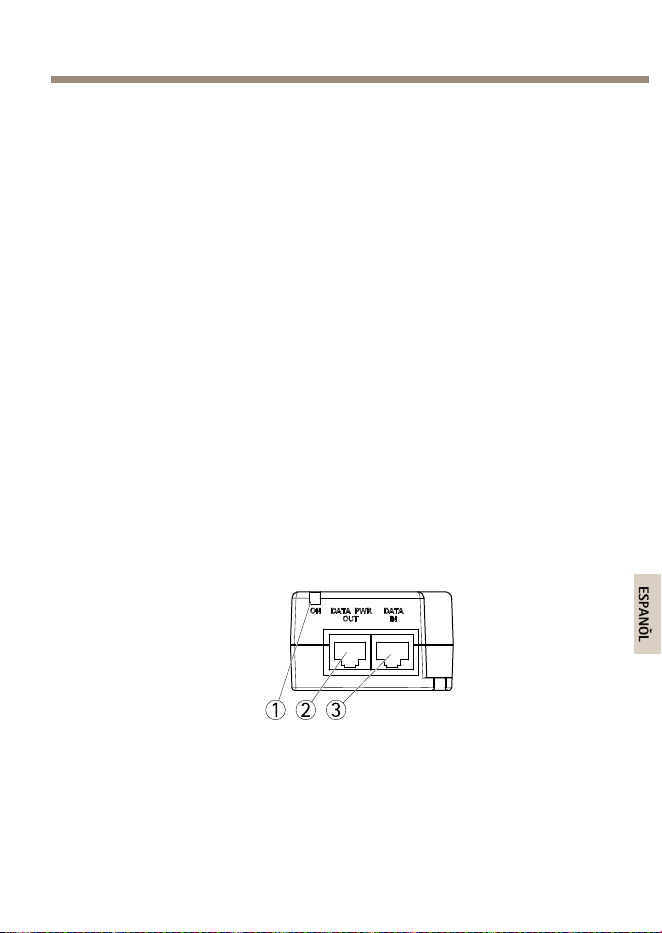
Informacióngeneraldelhardware
1 2 3
1
IndicadorLEDdepuerto
2
DATA&POWEROUT
3
DATAIN
49
ESPANÕL
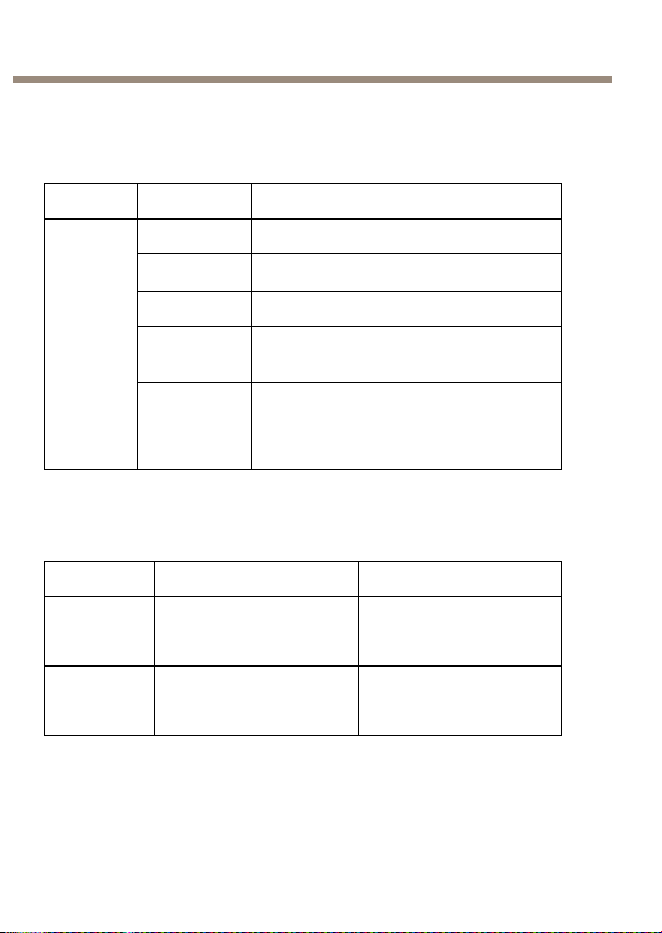
AXIST8134Midspan60W
Indicadores
IndicadoresLEDparaelmidspanAXIST8134
LED
Color
Indicación
Apagado
Sinalimentación
Ámbar
Encendido
Verde
Sehaconectadounterminalremoto
Ámbar
parpadeante
Sehaconectadoalterminaldelpuerto
undispositivonoestándarconcorriente
Puerto
Verde
parpadeante
Elpuertorecibióalimentaciónenlos
cuatropares.Entonces,elpuertose
sobrecargó/cortocircuitó/estuvobajo
carga.
Especicaciones
Condicionesdefuncionamiento
ModoTemperaturaHumedad
Enfun-
cionamiento
hasta60W
De-10°Ca45°C
90%dehumedad
relativamáxima(sin
condensación)
Enfun-
cionamiento
hasta30W
De-10°Ca55°C
90%dehumedad
relativamáxima(sin
condensación)
50
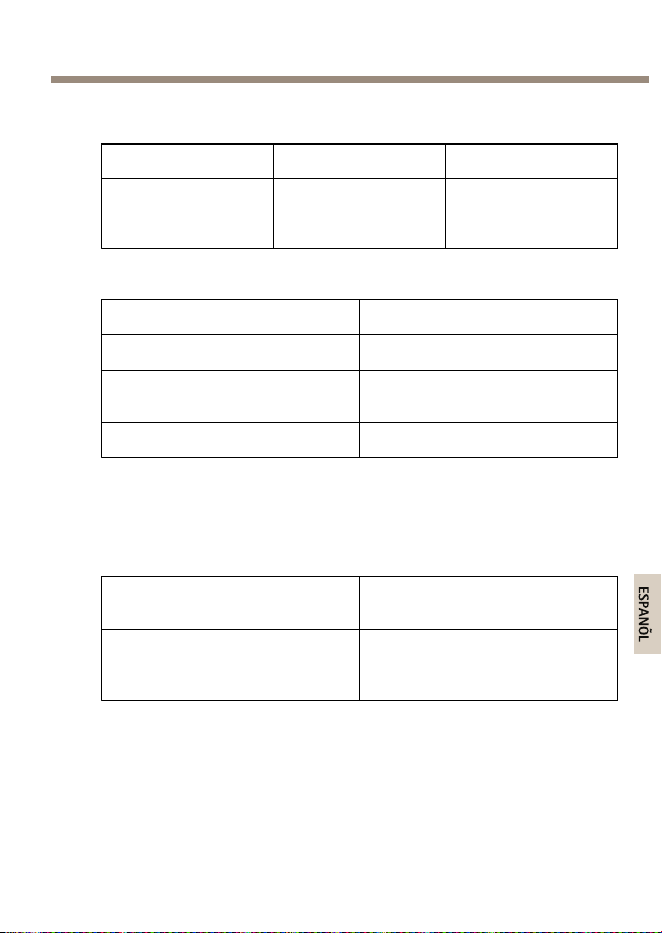
AXIST8134Midspan60W
Condicionesdealmacenamiento
ModoTemperaturaHumedad
Almacenamiento
De-20°Ca70°C
95%dehumedad
relativamáxima(sin
condensación)
Consumo
Tensióndeentrada
100—240VCA50/60Hz
Corrientedeentradamáxima
1,5A(máx.)
Potenciadesalidamáxima
disponible
60W
Tensióndesalidanominal
55VCC
AlimentacióndealtapotenciaatravésdeEthernet,máx.60W
InterfazEthernet
Entrada(DataIn)
Ethernet10/100/1000Base-T
ConectorhembraRJ45
Salida(Data&PowerOut)
Ethernet10/100/1000Base-T,Plus
55VCC
ConectorhembraRJ45,con
tensiónCCenlospares
1–2,3–6,4–5y7–8
Conectoresybotones
Paraconocerlasespecicacionesylascondicionesdefuncionamiento,
veapágina50.
51
ESPANÕL

AXIST8134Midspan60W
Conectordered
ConectorRJ45conalimentacióndealtapotenciaatravésdeEthernet
(HighPoE).
Instalacióndelhardware
InstalacióndeAXIST8134
1.Conecteelmidspan(DATAIN)alconectorderedmedianteun
cabledered(Categoría5/5e/6).
2.Conecteelmidspan(DATA&POWEROUT)alacámara
medianteelcabledered(Categoría5/5e/6)queseha
conectadoalacámara.
3.Conecteelmidspanaunatomadetierradecorrienteprincipal
(100–240VCA)conelcabledecorrienteproporcionado.
4.AsegúresedequelosindicadoresLEDdelmidspanindicanlas
condicionescorrectas.VeaIndicadoresenlapágina50.
1 2 3
1
IndicadorLEDdepuerto
2
DATA&POWEROUT
3
DATAIN
52
AXIST8134Midspan60W
A A
A
VISO VISO
VISO
•Mantengaelmidspanalejadodelexcesodecalorydehumedad,
delasvibracionesydelpolvo.
•Asegúresedequelalongituddelcabledesdeelorigendelared
Ethernethastaelterminalnosuperalos100m.LaunidadPoE
noesunrepetidorynoamplíalaseñaldedatosdeEthernet.
•Sivaautilizarunaunidaddedistribución,asegúresedeque
estáconectadacercadelterminalynoenelmidspan.
•Noexisteningúninterruptordeencendido(On-Off):solotiene
queconectarelmidspanaunatomadecorrientedeCA.
•Asegúresedequetodosloscablesdereddelainstalaciónson
STPydeCategoría5/5e/6.
•Noutilicetornillosdecabezaavellanadacuandoinstaleel
midspan.Tamañodetornillo:4mm.
Solucióndeproblemas
ElAXIST8134noseenciende
•Desenchufelacorrientedeldispositivoyvuelvaaenchufarla
(compruebelosindicadoresdurantelasecuenciadeencendido).
•Compruebequelatensióndelatomadecorrienteseencuentra
entre100—240VCA.
•Compruebequeelcabledelatomadecorrientefunciona
correctamente.
Eldispositivoconectadoalacorrientenofunciona
•Compruebequeeldispositivoconectadosehadiseñadopara
sufuncionamientoPoE(alimentaciónatravésdeEthernet).
•Compruebequeestáutilizandouncablerectoestándarde
categoría5/5e/6concuatropares.
•AsegúresedequeelcableEthernetdeentradaestéconectado
alpuertodeentradadedatosDATAIN.
53
ESPANÕL

AXIST8134Midspan60W
•Compruebequeeldispositivoestéconectadoalpuertode
datosyalimentaciónDATA&POWEROUT.
•Sihayunaunidaddedistribucióndealimentaciónexterna
conectada,compruebequefuncionacorrectamente.
•Compruebequenohayacortocircuitosenningunodelos
cablesdepartrenzadooenlosconectoresRJ45.
•Siesposible,vuelvaaconectarelmismodispositivode
alimentaciónaunmidspandiferente.
Eldispositivonalfunciona,peronohayconexióndedatos
•Compruebequeelpuertodelpanelfrontalestéiluminadode
formapermanente.
•Compruebequeestáutilizandouncablerectoestándarde
categoría5/5e/6concuatropares.
•CompruebequelalongituddelcableEthernetdesdelatoma
delaredEthernetalterminaldecarga/remotonosuperelos
100metros.
•Sihayunaunidaddedistribucióndealimentaciónexterna
conectada,compruebequefuncionacorrectamente.
•Siesposible,vuelvaaconectarelmismodispositivode
alimentaciónaunmidspandiferente.
Informacióndelagarantía
ParaobtenermásinformaciónacercadelagarantíadelproductoAxise
informaciónrelacionada,visitewww.axis.com/warranty/
54
AXIST8134Midspan60W
安 安
安
全 全
全
情 情
情
報 報
報
本製品を設置する前に、このインストールガイドをよくお読み
ください。インストールガイドは、後で参照できるように保管
しておいてください。
危 危
危
険 険
険
レ レ
レ
ベ ベ
ベ
ル ル
ル
危 危
危
険 険
険
回避しない場合、死亡または重傷につな
がる危険な状態を示します。
警 警
警
告 告
告
回避しない場合、死亡または重傷につなが
るおそれのある危険な状態を示します。
注 注
注
意 意
意
回避しない場合、軽傷または中程度の怪
我につながるおそれのある危険な状態を
示します。
注 注
注
記 記
記
回避しない場合、器物の破損につながる
おそれのある状態を示します。
そ そ
そ
の の
の
他 他
他
の の
の
メ メ
メ
ッ ッ
ッ
セ セ
セ
ー ー
ー
ジ ジ
ジ
レ レ
レ
ベ ベ
ベ
ル ル
ル
重要
製品を正しく機能させるために不可欠な
重要情報を示します。
注意製品を最大限に活用するために役立つ有
用な情報を示します。
55
ò
ò
¨
¨
¾
¾

AXIST8134Midspan60W
安 安
安
全 全
全
手 手
手
順 順
順
警 警
警
告 告
告
•本製品の設置は、訓練を受けた専門技術者が行って
ください。
56

AXIST8134Midspan60W
注 注
注
記 記
記
•本製品は、お使いになる地域の法律や規制に準拠して
使用してください。
•本製品を屋外またはそれに準じる環境で使用する場
合は、認定済みの屋外用筐体に収納して設置する必
要があります。
•本製品は乾燥した換気のよい環境に保管してくださ
い。
•本製品に衝撃または強い圧力を加えないでください。
•本製品に振動を加えないでください。
•本製品を不安定なブラケット、表面、または壁に設置
しないでください。
•本製品を振動するブラケット、表面、または壁に設置
しないでください。
•本製品を設置する際には、適切な工具のみを使用して
ください。過剰な力がかかると、製品が損傷するこ
とがあります。
•化学薬品、腐食剤、噴霧式クリーナーは使用しないで
ください。
•清掃には、きれいな水に浸した清潔な布を使用して
ください。
•製品の技術仕様に準拠したアクセサリーのみを使用
してください。これらのアクセサリーは、Axisまたは
サードパーティから入手できます。
•Axisが提供または推奨する交換部品のみを使用して
ください。
•製品を自分で修理しないでください。修理について
は、Axisサポートまたは販売代理店にお問い合わせ
ください。
57
ò
ò
¨
¨
¾
¾

AXIST8134Midspan60W
輸 輸
輸
送 送
送
注 注
注
記 記
記
•本製品を運搬する際は、製品が損傷しないよう、元の
梱包か同等の梱包を使用してください。
58

AXIST8134Midspan60W
イ イ
イ
ン ン
ン
ス ス
ス
ト ト
ト
ー ー
ー
ル ル
ル
ガ ガ
ガ
イ イ
イ
ド ド
ド
このインストールガイドでは、AXIST8134をお使いのネット
ワークにインストールする手順について説明します。
設 設
設
置 置
置
手 手
手
順 順
順
1.パッケージの内容、ツールなど、設置に必要な物が
そろっているかを確認します。
59 ペ ー ジ の 、 パ ッ
ケ ー ジ の 内 容
を参照してください。
2.ハードウェアの概要を確認します。
59 ペ ー ジ
を参
照してください。
3.仕様を確認します。
60 ペ ー ジ
を参照してください。
4.ハードウェアを設置します。
62 ペ ー ジ
を参照して
ください。
パ パ
パ
ッ ッ
ッ
ケ ケ
ケ
ー ー
ー
ジ ジ
ジ
の の
の
内 内
内
容 容
容
•AXIST8134ミッドスパン60W
•AC電源ケーブル
•印刷物
‑インストールガイド(本書)
ハ ハ
ハ
ー ー
ー
ド ド
ド
ウ ウ
ウ
ェ ェ
ェ
ア ア
ア
の の
の
概 概
概
要 要
要
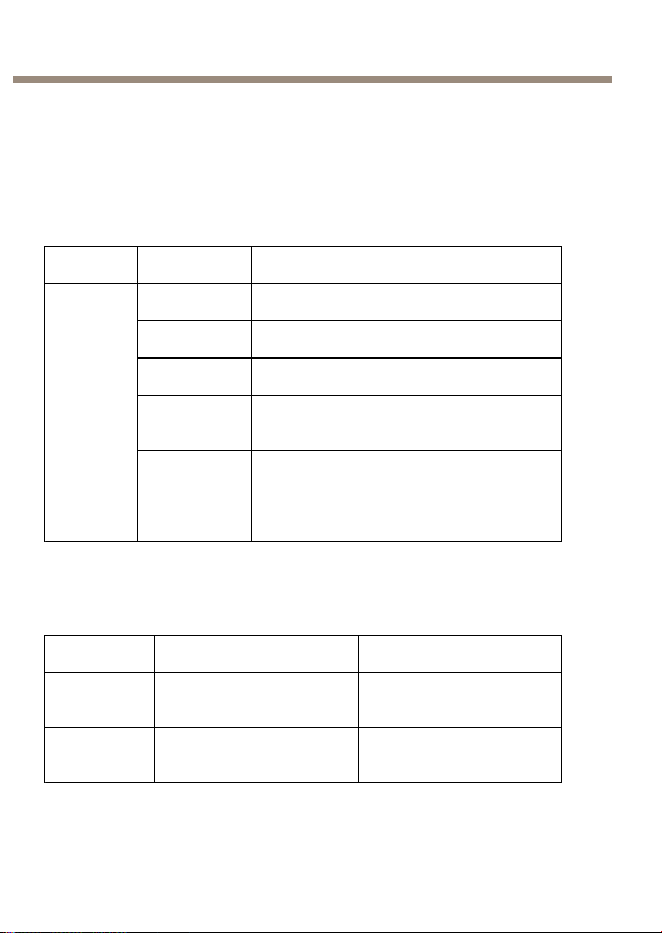
1 2 3
1
ポ ー ト イ ン ジ ケ ー タ ー LED
59
ò
ò
¨
¨
¾
¾
AXIST8134Midspan60W
2
DA T A & POWER OUT
3
DA T A IN
イ イ
イ
ン ン
ン
ジ ジ
ジ
ケ ケ
ケ
ー ー
ー
タ タ
タ
ー ー
ー
AXIS AXIS
AXIS
T8134 T8134
T8134
ミ ミ
ミ
ッ ッ
ッ
ド ド
ド
ス ス
ス
パ パ
パ
ン ン
ン
イ イ
イ
ン ン
ン
ジ ジ
ジ
ケ ケ
ケ
ー ー
ー
タ タ
タ
ー ー
ー
LED LED
LED
LED LED
LED
色 色
色
説 説
説
明 明
明
オフ
電源オフ
オレンジ
電源オン
緑
リモート端末が接続中
オレンジ、
点滅
非標準の受電側デバイスがポート
ターミナルに接続中
ポート
緑、点滅
ポートが4つのペアで給電されまし
た。その結果、ポートが過負荷、
短絡、または負荷不足になりまし
た。
仕 仕
仕
様 様
様
動 動
動
作 作
作
条 条
条
件 件
件
モ モ
モ
ー ー
ー
ド ド
ド
温 温
温
度 度
度
湿 湿
湿
度 度
度
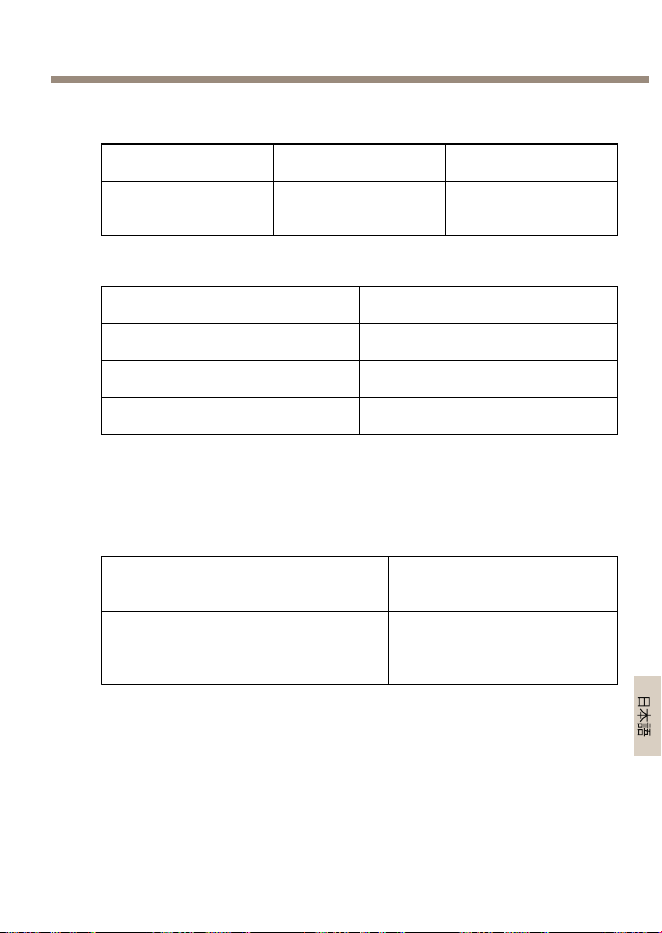
最大60W
まで動作
‑10°C~45°C
最大90%RH(結露不可)
最大30W
まで動作
‑10°C~55°C
最大90%RH(結露不可)
60
AXIST8134Midspan60W
保 保
保
管 管
管
条 条
条
件 件
件
モ モ
モ
ー ー
ー
ド ド
ド
温 温
温
度 度
度
湿 湿
湿
度 度
度
ストレージ
‑20°C~70°C
最大95%RH(結露
不可)
消 消
消
費 費
費
電 電
電
力 力
力
入力電圧
100—240VAC(50/60Hz)
最大入力電流1.5A(最大)
出力可能電力(最大)
60W
通常出力電圧
55VDC
HighPoweroverEthernet、最大60W
イ イ
イ
ー ー
ー
サ サ
サ
ネ ネ
ネ
ッ ッ
ッ
ト ト
ト
イ イ
イ
ン ン
ン
タ タ
タ
ー ー
ー
フ フ
フ
ェ ェ
ェ
ー ー
ー
ス ス
ス
入 入
入
力 力
力
(DA (DA
(DA
T T
T
A A
A
IN) IN)
IN)
イーサネット10/100/1000Base‑T
RJ45メス型ソケット
出 出
出
力 力
力
(DA (DA
(DA
T T
T
A A
A
& &
&
POWER POWER
POWER
OUT OUT
OUT
) )
)
イーサネット10/100/1000Base‑T
+55VDC
RJ45メス型ソケッ
ト、1–2、3–6、4–5と7–8の
ワイヤーペアでDC電圧
コ コ
コ
ネ ネ
ネ
ク ク
ク
タ タ
タ
ー ー
ー
と と
と
ボ ボ
ボ
タ タ
タ
ン ン
ン
仕様と動作条件については、
60 ペ ー ジ
を参照してください。
61
ò
ò
¨
¨
¾
¾

AXIST8134Midspan60W
ネ ネ
ネ
ッ ッ
ッ
ト ト
ト
ワ ワ
ワ
ー ー
ー
ク ク
ク
コ コ
コ
ネ ネ
ネ
ク ク
ク
タ タ
タ
RJ45、HighPoweroverEthernet(HighPoE)対応。
ハ ハ
ハ
ー ー
ー
ド ド
ド
ウ ウ
ウ
ェ ェ
ェ
ア ア
ア
の の
の
設 設
設
置 置
置
AXIS AXIS
AXIS
T8134 T8134
T8134
の の
の
設 設
設
置 置
置
1.ネットワークケーブル(Category5/5e/6)を使用し
て、ミッドスパンの(DATAIN)とネットワークスイッ
チを接続します。
2.カメラに接続したネットワークケーブル
(Category5/5e/6)使用して、ミッドスパン
(DATA&POWEROUT)をカメラに接続します。
3.付属の電源ケーブルを使用して、ミッドスパンを接
地(アース)されたコンセント(100–240VAC)に接
続します。
4.ミッドスパンのLEDが正しい状態を示しているかを
確認します。
60 ペ ー ジ の 、 イ ン ジ ケ ー タ ー
を参照し
てください
1 2 3
1
ポ ー ト イ ン ジ ケ ー タ ー LED
2
DA T A & POWER OUT
3
DA T A IN
62

AXIST8134Midspan60W
注 注
注
記 記
記
•ミッドスパンは極端な高温や高湿度、振動やホコリを
避けて設置してください。
•イーサネットネットワークのソースから端末機器ま
でのケーブルの長さが100mを超えないようにしま
す。PoEは中継装置ではなく、イーサネットデータ信
号を増幅しません。
•スプリッターを使用する場合は、ミッドスパンではな
く端末装置に近いポイントに接続してください。
•ミッドスパンをAC電源に接続してください。ON‑OFFス
イッチはありません。
•設置に使用されているすべてのネットワークケーブ
ルがSTPおよびCategory5/5e/6であることを確認して
ください。
•ミッドスパンを取り付ける際は皿頭ネジを使用しない
でください。ネジサイズは4mmです。
ト ト
ト
ラ ラ
ラ
ブ ブ
ブ
ル ル
ル
シ シ
シ
ュ ュ
ュ
ー ー
ー
テ テ
テ
ィ ィ
ィ
ン ン
ン
グ グ
グ
AXIS AXIS
AXIS
T8134 T8134
T8134
の の
の
電 電
電
源 源
源
が が
が
入 入
入
ら ら
ら
な な
な
い い
い
•電源を切断し、その後再投入して、電源投入シーケ
ンス中のインジケーターの状態を確認します。
•コンセントの電圧が100—240VACであるかを確
認します。
•電源ケーブルが正常に機能することを確認します。
電 電
電
源 源
源
を を
を
投 投
投
入 入
入
し し
し
て て
て
も も
も
機 機
機
器 器
器
が が
が
動 動
動
作 作
作
し し
し
な な
な
い い
い
•受電側機器がPoEに対応しているかを確認します。
•4つのワイヤーペアを有する標準のカテゴリー5/5e/6の
ストレートケーブルを使用しているかを確認します。
•入力イーサネットケーブルがDATAINポートに接続さ
れていることを確認します。
63
ò
ò
¨
¨
¾
¾

AXIST8134Midspan60W
•受電側機器がDATA&POWEROUTポートに接続されて
いることを確認します。
•パワースプリッターを使用している場合は、正常に
動作しているかを確認します。
•ツイストペアケーブルまたはRJ45ケーブルに短絡
(ショート)がないことを確認します。
•受電側機器を別のミッドスパンに接続し、動作を確
認します。
端 端
端
末 末
末
機 機
機
器 器
器
は は
は
動 動
動
作 作
作
し し
し
て て
て
い い
い
る る
る
が が
が
、 、
、
デ デ
デ
ー ー
ー
タ タ
タ
リ リ
リ
ン ン
ン
ク ク
ク
が が
が
確 確
確
立 立
立
さ さ
さ
れ れ
れ
な な
な
い い
い
•フロントパネルのポートインジケーターが点灯し続
けていることを確認します。
•4つのワイヤーペアを有する標準のカテゴリー5/5e/6の
ストレートケーブルを使用しているかを確認します。
•イーサネットソースから負荷/端末機器までのイー
サーネットケーブルの長さが100mを超えていないこ
とを確認します。
•パワースプリッターを使用している場合は、正常に
動作しているかを確認します。
•受電側機器を別のミッドスパンに接続し、動作を確
認します。
保 保
保
証 証
証
Axisの製品保証と関連情報については、
www .axis.com/warranty
を
ご覧ください。
64

65

InstallationGuide
Ver.M1.3
AXIST8134Midspan60WDate:October2014
©AxisCommunicationsAB,2014
PartNo.60125