SET UP GUIDE
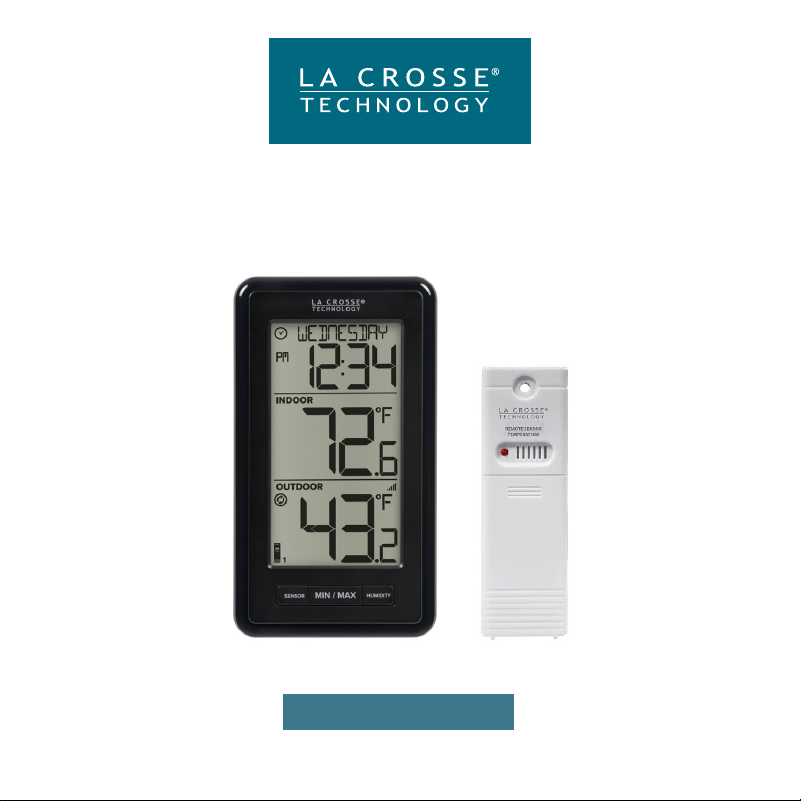
MODEL: WS-9160Uv3-BK-IT
Wireless Thermometer

Table of Contents
Power Up
Custom Calendar Display
Settings Menu
03
03
04
09
10
11
11
11
12
12
12
BASICS
TEMPERATURE/HUMIDITY
APPENDIX
Temp./Humidity Readings
Temp./Humidty Records
Reset Records
05
06
07
2
Stay in Touch
Specifications
Care & Maintenance
California Statement
FCC Statement
We’re Here to Help
Warranty & Patents
ADD-ON SENSORS
Add Sensors
View Add-on Sensors
Purchase Add-on Sensors
09
09
09
SENSORS
Sensor Mounting
Search for Sensors
Factory Restart
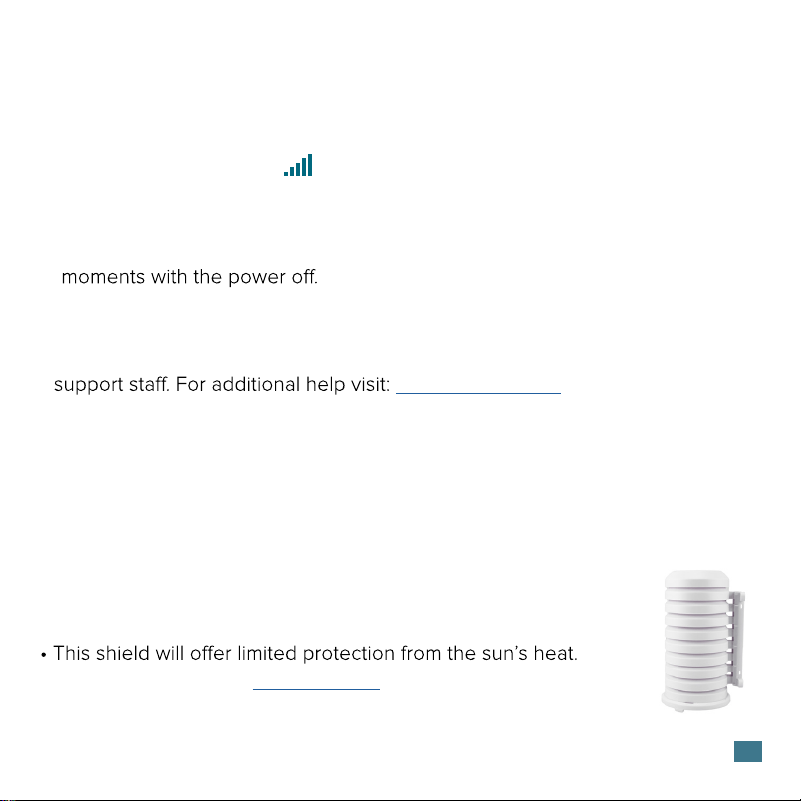
Sensor Weather Shield
07
08
08
08
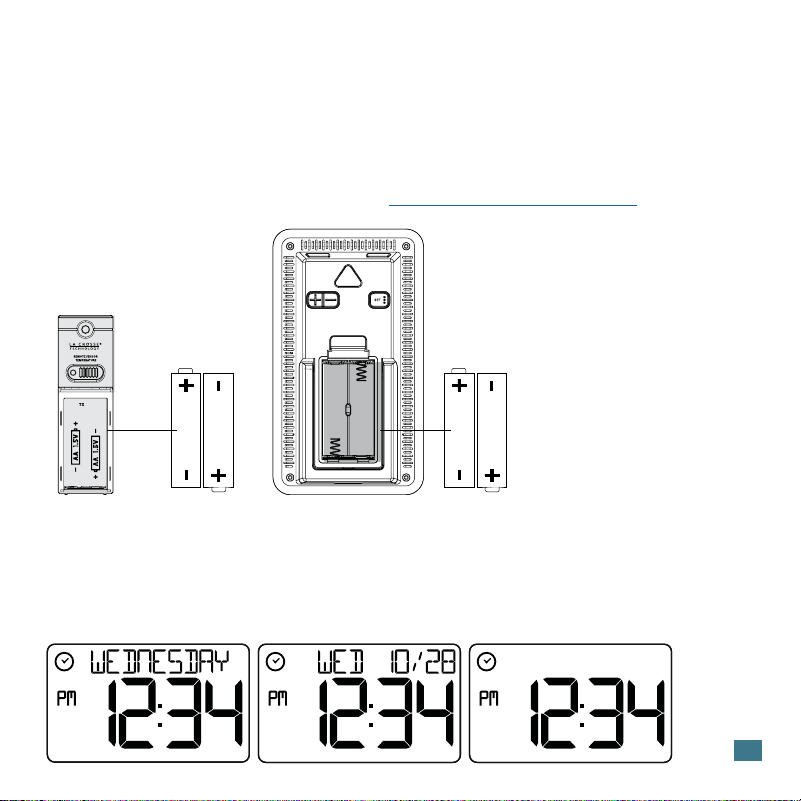
1. Insert 2-AA batteries into your Temperature Sensor.
2. Insert 2-AA batteries into your Station.
4. Once readings from you sensor appears on your station, you can mount
it outside. See page 7 for more details.
Watch our sensor mounting videos: bit.ly/th_sensor_mounting
Power Up
3
Weather Station
WS-9160Uv3-BK-IT
AA
AA
• Press and release the DATE button to change the display of the Calendar,
or have it not show.
• Thermometer will stay on selection.
Custom Calendar Display
AA
AA
Outdoor Sensor
TX141-Bv4

4
Settings Menu
1. Hold the SET button until the display changes, to enter the Settings
Menu.
2. Press and release the +/- buttons to adjust values. Hold to adjust quickly.
3. Press and release the SET button to confirm values and move to
the next setting or exit.
Settings Menu Order:
• Hello
• Language (English, Español, Français, Deutsch)
• 12/24 Hour Format
• Hour
• Minutes
• Year
• Month
• Date
• Month/Date, Date/Month
• Fahrenheit/Celsius
• Thank You
Language: The language selected in this menu will control other menu
items as well as your full weekday readout.
Weekday: The Weekday will set automatically when your Year, Month and
Date are set.
5
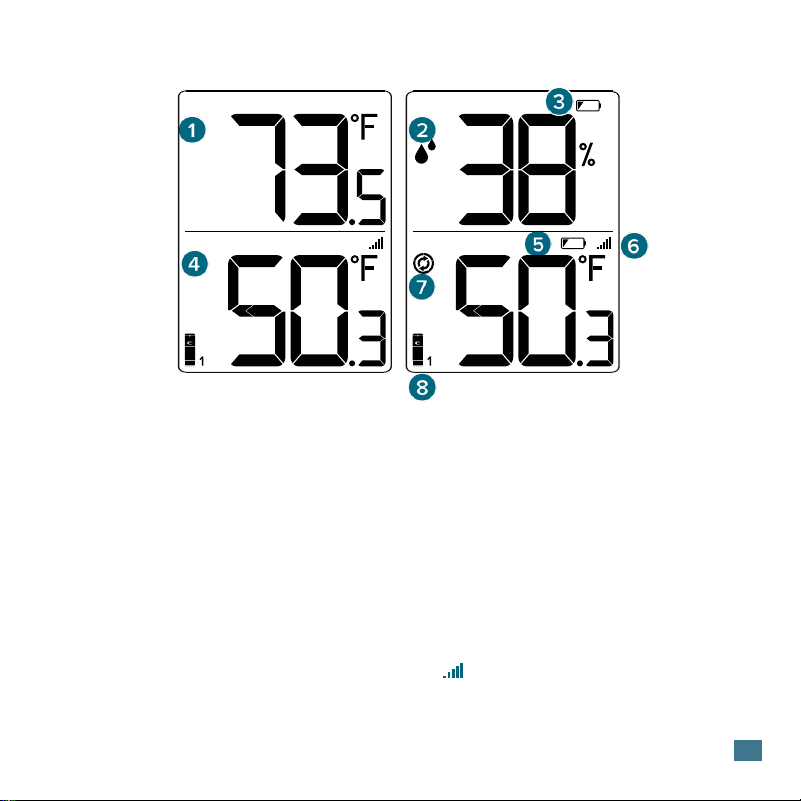
Temperature/Humidity Readings
Current Indoor Humidity.
Press the HUMIDITY
button to view.
Indicates readings from
sensor on channel 1, 2, or
3 if multiple sensors are
connected to the station.
Current Indoor
Temperature.
Current Outdoor
Temperature.
Low Battery in Station
3. LOW BATTERY ICON
1. INDOOR TEMPERATURE
Indicates if the station is
receiving data from the
sensor.
6. RECEPTION ICON
8. CHANNEL INDICATOR
4. OUTDOOR TEMPERATURE
2. INDOOR HUMIDITY
Readings will automatically
scroll through each
channel when multiple
sensors are connected..
7. AUTO-SCROLL ICON
INDOOR
OUTDOOR
INDOOR
OUTDOOR
Low Battery in Sensor
5. LOW BATTERY ICON
6
Viewing Records
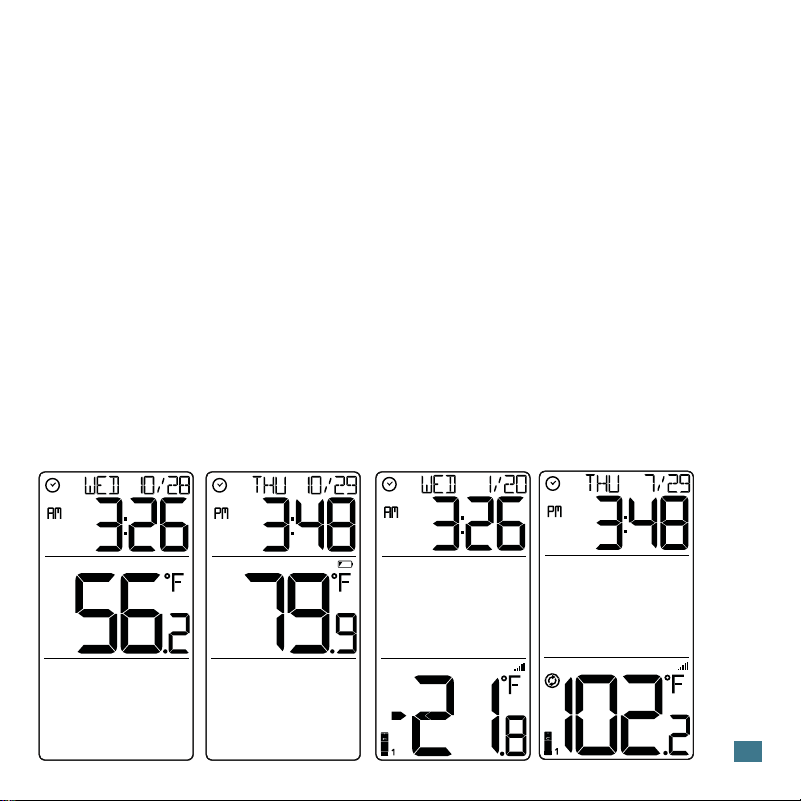
Temperature Records (MIN/MAX)
Press and release the MIN/MAX button to toggle MIN/MAX readings with
time/date stamp. Time and date of the record will show.
Viewing Order:
• Indoor Minimum Temperature Record
• Indoor Maximum Temperature Record
• Outdoor Minimum Temperature Record Channel 1
• Outdoor Maximum Temperature Record Channel 1
Note: If additional Temperature sensors are added, additional presses of
the MIN/MAX button will show those records as well.
INDOOR
OUTDOOR
MAX
INDOOR
OUTDOOR
MIN
INDOOR
OUTDOOR
MAX
INDOOR
OUTDOOR
MIN
Indoor MIN Temp. Indoor MAX Temp. Outdoor MIN Temp. Outdoor MAX Temp.
7
Reset Temperature Records
1. Press and release the MIN/MAX button to view the individual
temperature values you’d like to reset.
2. Hold the MINUS (-) button until dashes appear.
3. The reading will then reset to the current value.
Sensor Mounting
For Accurate Temperature Measurements
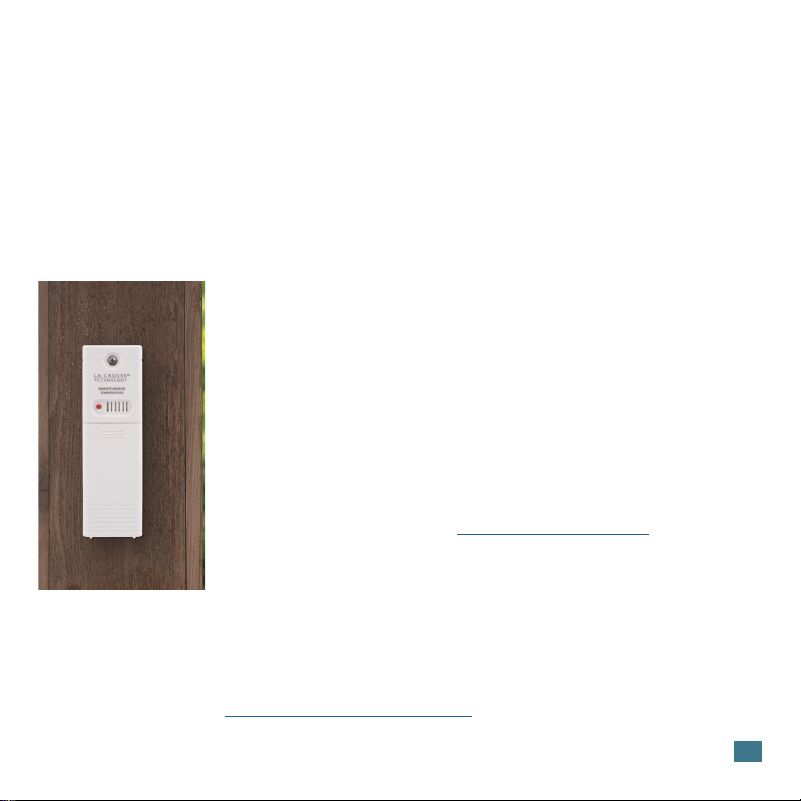
• Insert a mounting screw through the hole at the top to
securely mount the sensor. It can also hang from the
back using a nail.
• Mount the sensor vertically in a protected well-shaded
area. Keeping it out of direct weather elements such
as sunlight, rain, snow, etc. will help avoid inaccurate
readings.
• For additional protection against weather elements, a
Sensor Weather Shield: bit.ly/weather-shield can be
purchased separately.
• The maximum wireless transmission range to the station
is up to 330ft (100m) in open air. This does not include
walls, floors, or other large obstructions.
• For online video instructions, visit:
bit.ly/th_sensor_mounting
8
If you are seeing “NO” or dashes for any sensor readings, please try the
following steps:
1. Hold the SENSOR button to search for all sensors.
The Reception Indicator will begin to animate.
2. If after 3 minutes the sensor still isn’t connected, bring the sensor inside next
to the display and remove power from the sensor and station.
3. Press any button on the station 20 times and leave the parts sit for a few
4. Install a new set of alkaline batteries into the sensor, then power up your
station again.
5. If your sensor data is still not appearing after these steps, please contact our
bit.ly/basic_restart
Search for Sensors
• The Sensor Weather Shield is designed to protect your outdoor
sensor from rain and snow.
• Optional purchase at: bit.ly/925-1418
Sensor Weather Shield (not included)
Factory Restart
If your station is acting strangly, hold the DATE and RAIN buttons together to
factory restart your station.
9
This station can read an add-on Rain Sensor, which will read in the Time Area. It can
also read up to two additional Temperature/Humidity Sensors , which will show as
Channel 2 or 3 in the Outdoor Temperature Area.
Add Sensors
1. Install batteries into your add-on Rain or Temperature/Humidity sensor(s).
Note: For Temp/Humidity sensors, be sure to select channel (2 or 3) before you
insert batteries.
2. Hold the SENSOR button until the Reception Indicator starts to animate. This
will start a search for your sensors.
3. Your sensor(s) should connect within the next few minutes.
View Add-on Sensors:
• Press the RAIN button to view Rain readings and history.
• Press the SENSOR button to toggle through readings from sensors 1, 2 or 3.
Note: When multiple sensors are connected the you can view individual sensors or
auto-scroll through all three channels. The auto-scroll indicator will lose one
segment every 1 second, for 5 seconds, then switch to the next channel.
Purchase Extra Sensors
Visit: bit.ly/ws-9160uv3-bk-it_parts to find and purchase
compatible add-on sensors.
Optional Add-on Sensors
SCAN HERE
For Parts
Stay in Touch!
Ask questions, watch set up videos, and provide feedback on our social media outlets.
Follow La Crosse Technology on Youtube, Facebook, Instagram, & X (Twitter).
10
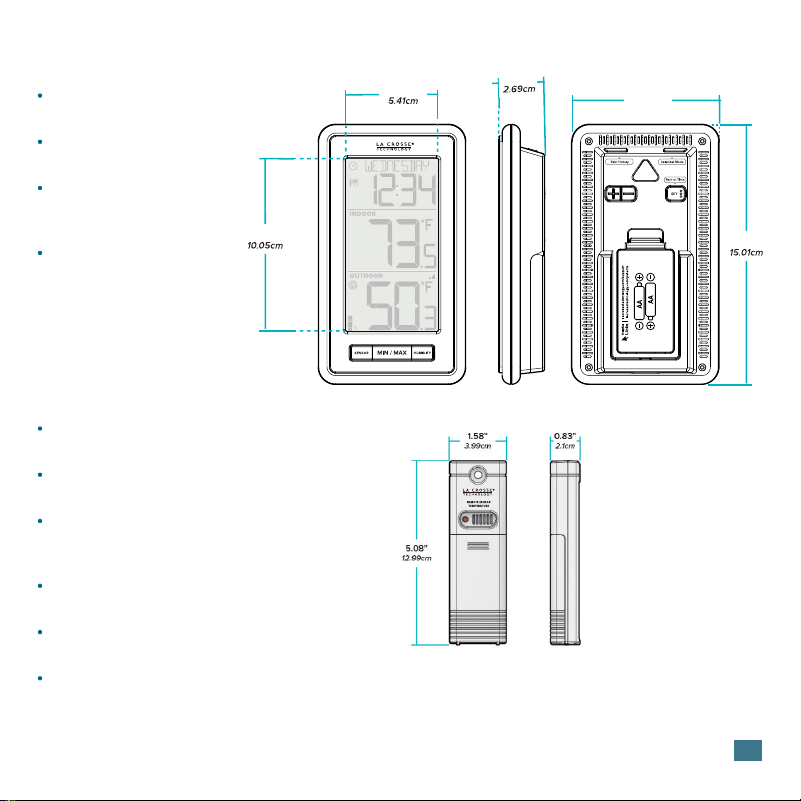
Weather Station (WS-9160Uv3-BK-IT)
Temperature Range:
32ºF to 122ºF (0ºC to 50ºC)
Humidity Range:
10% - 99% RH
Power:
2-AA, IEC, LR6 batteries
(not included)
Battery Life:
Over 24 months
Specifications
Outdoor Sensor (TX141-Bv4)
Temperature Range:
-40°F to 140°F (-40°C to 60°C)
Humidity Range:
10% - 99% RH
Transmission Range:
Over 330 feet (100 meters) in
open air RF 433MHz
Update Interval:
About every 51 seconds
Power:
2-AA, IEC, LR6 batteries (not included)
Battery Life:
Over 24 months
3.96”
2.13”
1.06”
3.35”
5.91”
8.50cm
This equipment has been tested and found to comply with the limits for a Class B digital device, pursuant to part 15 of the FCC
Rules. These limits are designed to provide reasonable protection against harmful interference in a residential installation.
This equipment generates, uses and can radiate radio frequency energy and, if not installed and used in accordance with the
instructions, may cause harmful interference to radio communications. However, there is no guarantee that interference will
not occur in a particular installation. If this equipment does cause harmful interference to radio or television reception, which
more of the following measures:
Reorient or relocate the receiving antenna.
Increase the separation between the equipment and receiver.
Consult the dealer or an experienced radio/TV technician for help.
This device complies with Part 15 of the FCC Rules. Operation is subject to the following two conditions:
(1) This device may not cause harmful interference, and
(2) This device must accept any interference received, including interference that may cause undesired operation.
Caution!
Any changes or modifications not expressly approved by the party responsible for compliance could void the user’s authority
to operate the equipment.
All rights reserved. This manual may not be reproduced in any form, even in part, or duplicated or processed using electronic,
mechanical or chemical process without the written permission of the publisher. This booklet may contain errors or misprints.
The information it contains is regularly checked and corrections are included in subsequent editions. We disclaim any
responsibility for any technical error or printing error, or their consequences. All trademarks and patents are recognized.
The manufacturer is not responsible for any radio or TV interference caused by unauthorized changes or modifications to this
equipment. Such changes or modifications could void the user authority to operate the equipment.
FCC Statement
Care & Maintenance
personal injury.
• Do not mix Alkaline, Lithium, standard, or rechargeable batteries.
• Always purchase the correct size and grade of battery most suitable for the intended use.
•
types.
• Clean the battery contacts and also those of the device prior to battery installation.
• Ensure the batteries are installed correctly with regard to polarity (+ and -).
• Remove batteries from product during periods of non-use. Battery leakage can cause corrosion and damage to this
product.
• Remove used batteries promptly.
• For recycling and disposal of batteries, and to protect the environment, please check the internet or your local phone
directory for local recycling centers and/or follow local government regulations.
11
www.P65Warnings.ca.gov
WARNING: This product can expose you to chemicals including acrylonitrile, 1,3-butadiene, and styrene, which are
known to the State of California to cause cancer and birth defects or other reproductive harm. For more information,
go to:
If you require additional assistance, get in touch with our friendly
customer support team based in La Crosse, WI.
Self Help: bit.ly/ws-9160uv3-bk-it_support
Online: bit.ly/contact_techsupport
Phone: 1.608.782.1610
Our knowledgable customer support team is available:
Mon-Fri 8am-6pm CST
We’re Here to Help
SCAN HERE
Additional Info
and Support
Warranty & Patents
Designed in La Crosse, Wisconsin Made in China Printed in China DC 081424
DOUBLE YOUR WARRANTY
Scan Here
Scan the QR Code or visit: bit.ly/ws-9160uv3-bk-it_register
to register your product and double the standard 1-year
warranty for free by opting to recieve occasional product
emails.
12
La Crosse Technology Ltd. provides a 1-year limited-time warranty on this product
relating to manufacturing defects in materials & workmanship. Per the Song-Beverly
Act, in the state of California, the warranty on this item becomes eective on the
date of delivery.
La Crosse Technology, Ltd, 2830 S. 26th St., La Crosse, WI 54601
For Full Warranty Details, Visit: www.lacrossetechnology.com/pages/warranty
Patents: www.lacrossetechnology.com/pages/patents