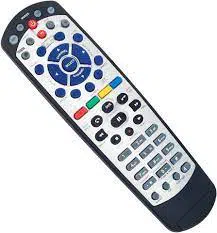

Remote Control
Quick Start Guide
Models 21.0 & 21.1
TV1 is located in the same room as your DISH
receiver. If this remote control is to be used with TV1,
go to Set Up Your Remote for TV1 in this guide.
If this remote control is to be used in a room that is
dierent from the one with the DISH receiver (TV2),
go to Activate Your Remote.
2 Decide your next step
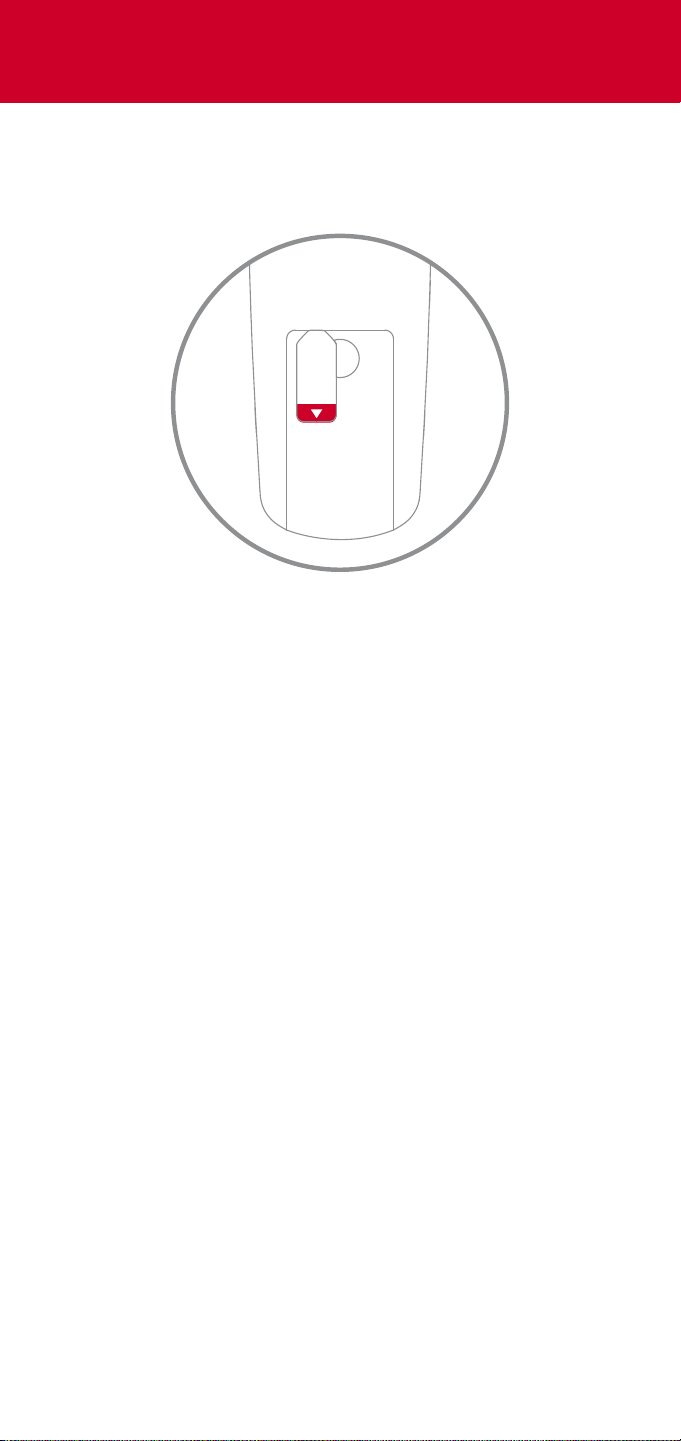
PULL
1 Remove the PULL tab on the back of your
remote control
Get Started
Continue to Activate Your
Remote on the next page
4 Replace the battery cover
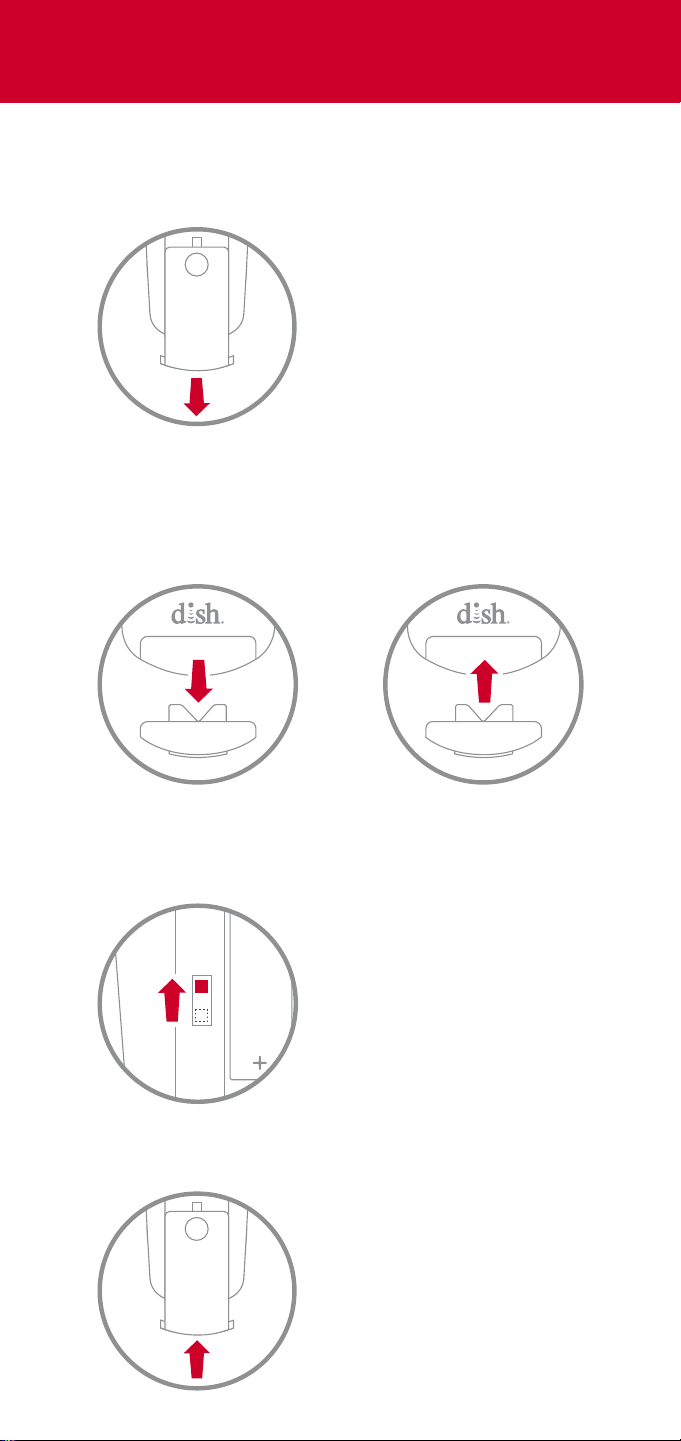
This switch is located to the left
of the batteries
IRUHF
3 Move the signal switch on the back of the
remote from UHF to IR using the tip of a pen
2
1
2 Pull out the key on the front of the remote
using your thumbnail, turn it over, and reinsert
it, so the number 1 is showing
While pushing the circular
indentation, slide the cover
downward
1 Remove the battery cover on the back of your
remote control
Set Up Your Remote for TV1
You’re ready to watch TV!
Done Cancel
Secondary Remote Address
Secondary Remote Address
2
4 Select Done on the screen
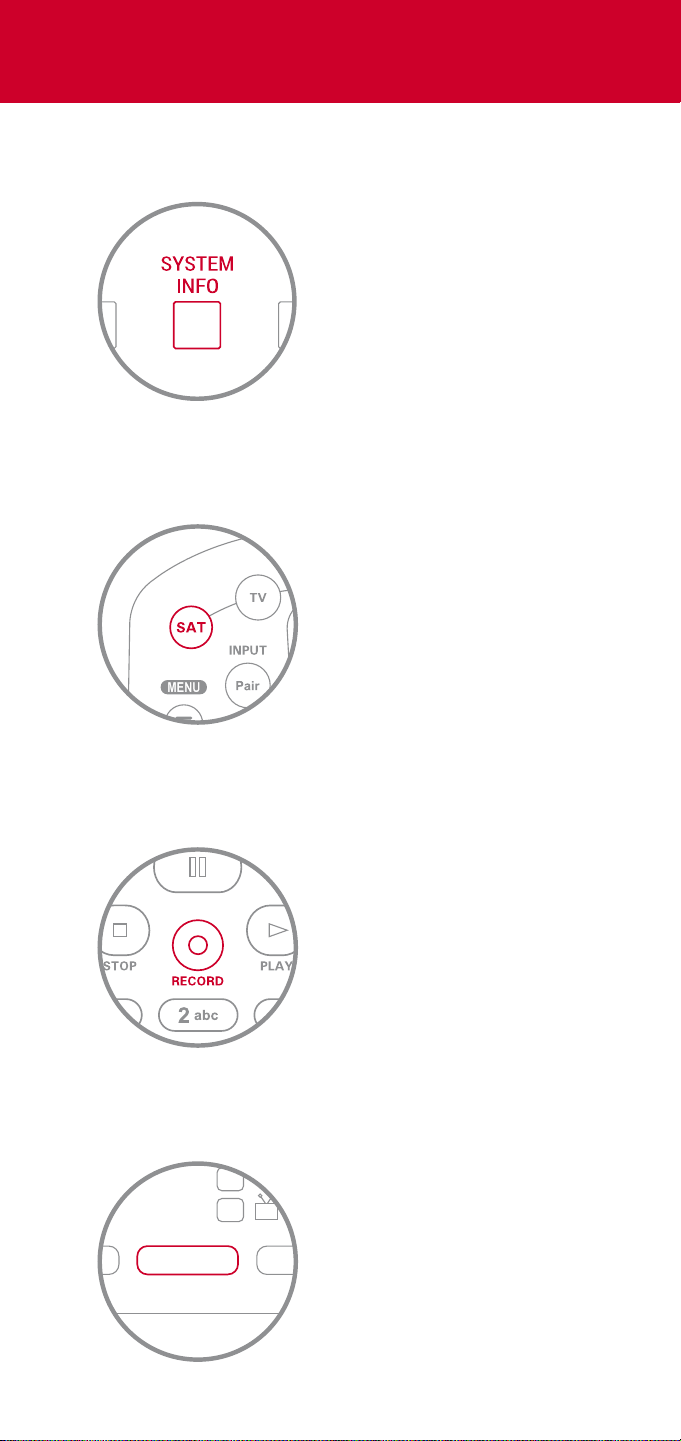
The SAT button will light
up again
3 Press RECORD on your remote
The SAT button will light up,
indicating it has paired with
your DISH receiver
2 Press SAT on your remote
The appearance and location
of the SYSTEM INFO button
varies from receiver to receiver
This button is located behind a
door on the front of some
receivers
1 Press SYSTEM INFO on your receiver
Activate Your Remote
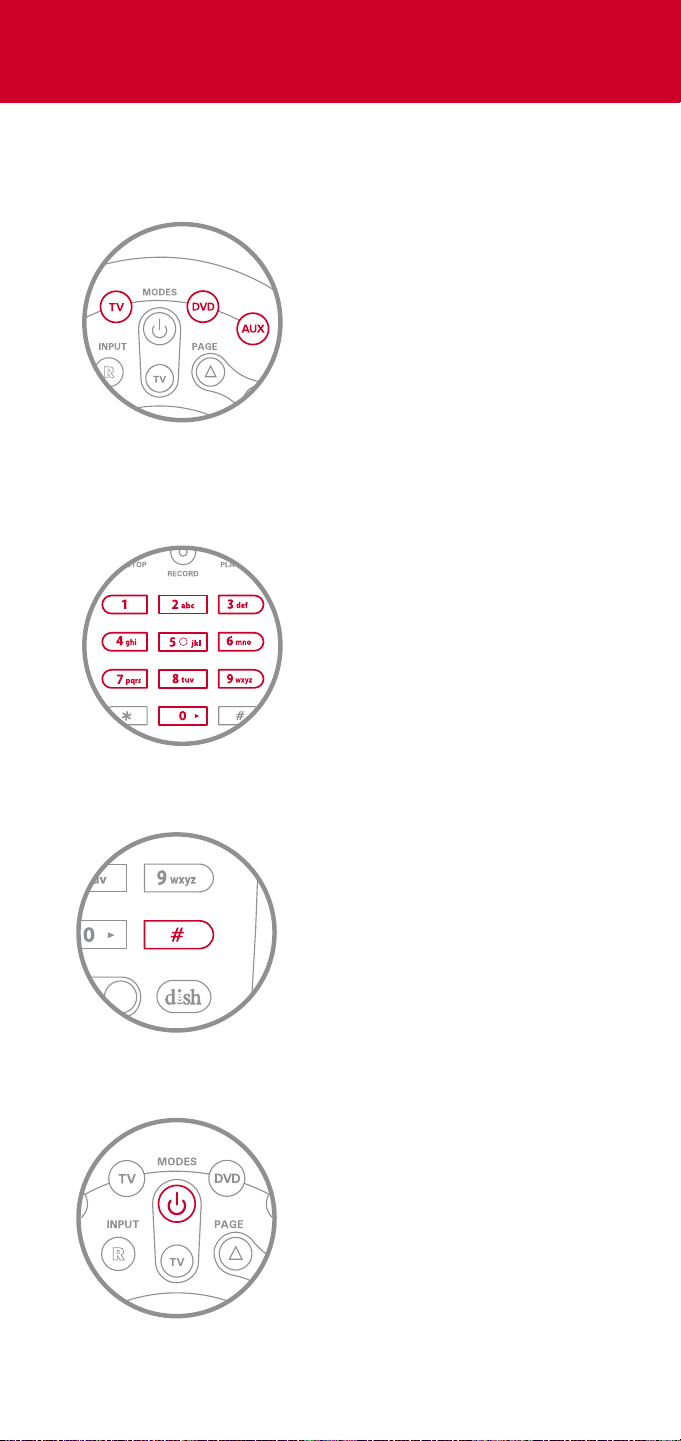
4 Press the device power button
Your device will turn on or o
Ensure you are within ten feet of
your device, pointing the remote
control directly at it
If your device does not turn o or on, return to step 1,
trying a dierent code for the manufacturer of your device
The device button you selected will
flash three times
3 Press #
If you’ve chosen the AUX button,
precede the three-digit code with
∙ 0 for a TV (”0680” for code 680)
∙ 1 for a Blu-ray or DVD player
∙ 2 for any other device
See Device Codes in this guide
2 Enter the three-digit code for your device
while the device buttons are lit
1 Press and hold the device button you want to
program until all four device buttons light up
Press and hold
∙ TV to pair with your TV
∙ DVD or AUX to pair with any
other device
Pair Your Remote
Explore Your Remote
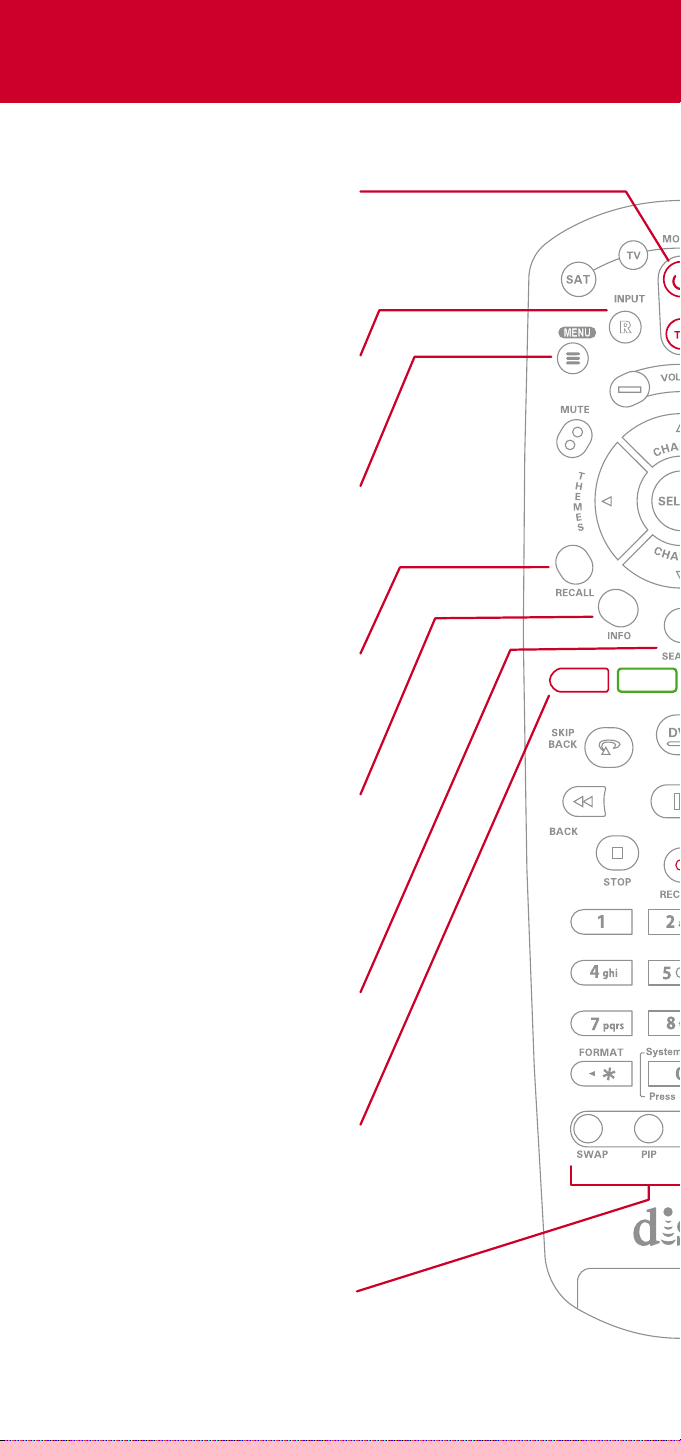
Device Power
Turn your DISH receiver–
or another device you
are controlling–on or o
Menu
Access your DISH
receiver’s features
and settings
Colored Buttons
Access options and
features available on
the current menu
Picture in Picture (PiP)
Control PiP windows
and their orientations
Info
Get more information
about the program
you’re watching or one
you’ve highlighted
Recall
Return to the last channel
you were watching
Input
Change your TV’s input
when in TV mode
Search
Find your favorite TV
shows, movies, and sports

Playback Control
While watching TV, use
these buttons to pause,
rewind, fast-forward,
record, and more
Cancel
Go back one menu
View Live TV
Return to the program
you are watching
DVR
Access your recorded
TV shows and movies
Page Up & Down
Page through menus
such as the Guide
Device Buttons
Change the device you
want to control: SAT
(your DISH receiver), TV,
Blu-ray/DVD player, or
auxiliary device
TV Power
Turn your TV on or o
DISH
Go to the DishHOME
interactive TV app

Device Codes
Insignia
LG
Magnavox
Panasonic
Philips
Pioneer
RCA
Samsung
Sanyo
Sharp
Sony
TCL
Toshiba
VIZIO
Westinghouse
834 538 533 720 539 727 411 751
627 615 505 520 421 733 553 848
560 566 829 747 579 550
512 876 780 811 577 508 784 765
747 827 566 550 627 658
547
831 627 503
680 738 601 004 681 880 727 908
590 683 726
628 835 505 178
500 837 590 677
535 651 523 645 544
852 757 631
505 523 598 627 720 520
795 553 738 500 720
LG
Magnavox
Panasonic
Philips
Pioneer
Samsung
Sanyo
Sony
615 683 824 626 899
829 674 420 328 662 798 801
627 855 782
565 801 554 556
719 665 754
643 668 900 644 506
659 581 549 789 675
847 582 827 831 902 817 731
Televisions
Blu-ray/DVD Players

Bose
Boston Acoustics
Denon
Harman/Kardon
JBL
Kenwood
Marantz
Nakamichi
Onkyo
Panasonic
Pioneer
Polk Audio
Sony
Toshiba
Yamaha
656 780 761 535
713
669 762
640 725
642
828 830 658 774 795
854 787 725
649
671 650 671 695 788
810 799 783 817 643 677 678
845 664 666 772
640
766 794 654 784 803 766 794 793 773
675 822
786 848
No luck yet?
If you’ve chosen the AUX button, be sure to
precede the three-digit code with 0 for a TV, 1 for a
Blu-ray/DVD player, or 2 for any other device
Your can also visit mydish.com/remote-codes for a
complete list of supported manufacturers and their
device codes
Audio Devices
Notes
Write any useful notes, such as your device’s
codes
Refer servicing to qualified personnel when a solid object or
liquid has fallen onto or into the device.
Do NOT attempt to service this device. Refer all servicing to
qualified personnel. Opening covers other than the battery
cover will void the warranty.
This device complies with Part 15 of FCC Rules. Operation is subject to the following
two conditions:
1. This device may not cause harmful interference,
and
2. This device must accept any interference received, including
interference that may cause undesired operation.
This equipment has been tested and found to comply with the limits for a Class B
digital device, pursuant to Part 15 of the FCC Rules. These limits are designed to
provide protection against harmful interference in a residential installation. This
equipment generates, uses, and can radiate radio frequency energy and, if not
installed and used in accordance with the instructions, may cause harmful
interference to radio communications. However, there is no guarantee that
interference will not occur in a particular installation. If this equipment does cause
harmful interference to radio or television reception, which can be determined by
turning the equipment o and on, the user is encouraged to try to correct the
interference by following one or more of the following measures:
∙ Reorient or relocate the receiving antenna.
∙ Increase the separation between the equipment and receiver.
∙ Connect the equipment into an outlet on a circuit dierent from that
to which the receiver is connected.
∙ Consult the dealer or an experienced radio/TV technician for help.
Changes or modifications to this device may void your authority to operate this
equipment.
Safety Instructions
You must keep safety in mind while using this device. Keep these and any other
instructions for future reference.
Observe Warnings: Carefully follow all warnings on the device and in the operating
instructions.
Heat: Do NOT place the device near heat sources such as radiators, stoves, heat
registers, or other appliances that produce heat.
Case and Use
Cleaning: Do NOT use liquid, abrasive, solvent, or aerosol cleaners. Use a damp
cloth for cleaning.
When Not in Use: Remove the batteries if this device is to be left unattended or
unused for a long period of time.
WARNING - This product can expose you to Bisphenol A (BPA),
which is known to the State of California to cause birth defects or
other reproductive harm. For more information go to
www.P65Warnings.ca.gov
Regulatory Information
DN011583
Warranty, safety, regulatory, and legal information
can be found at mydish.com/support/remotes
Need Help?
mydish.com/support/products/remotes/20hx
1.800.333.DISH (3474)
