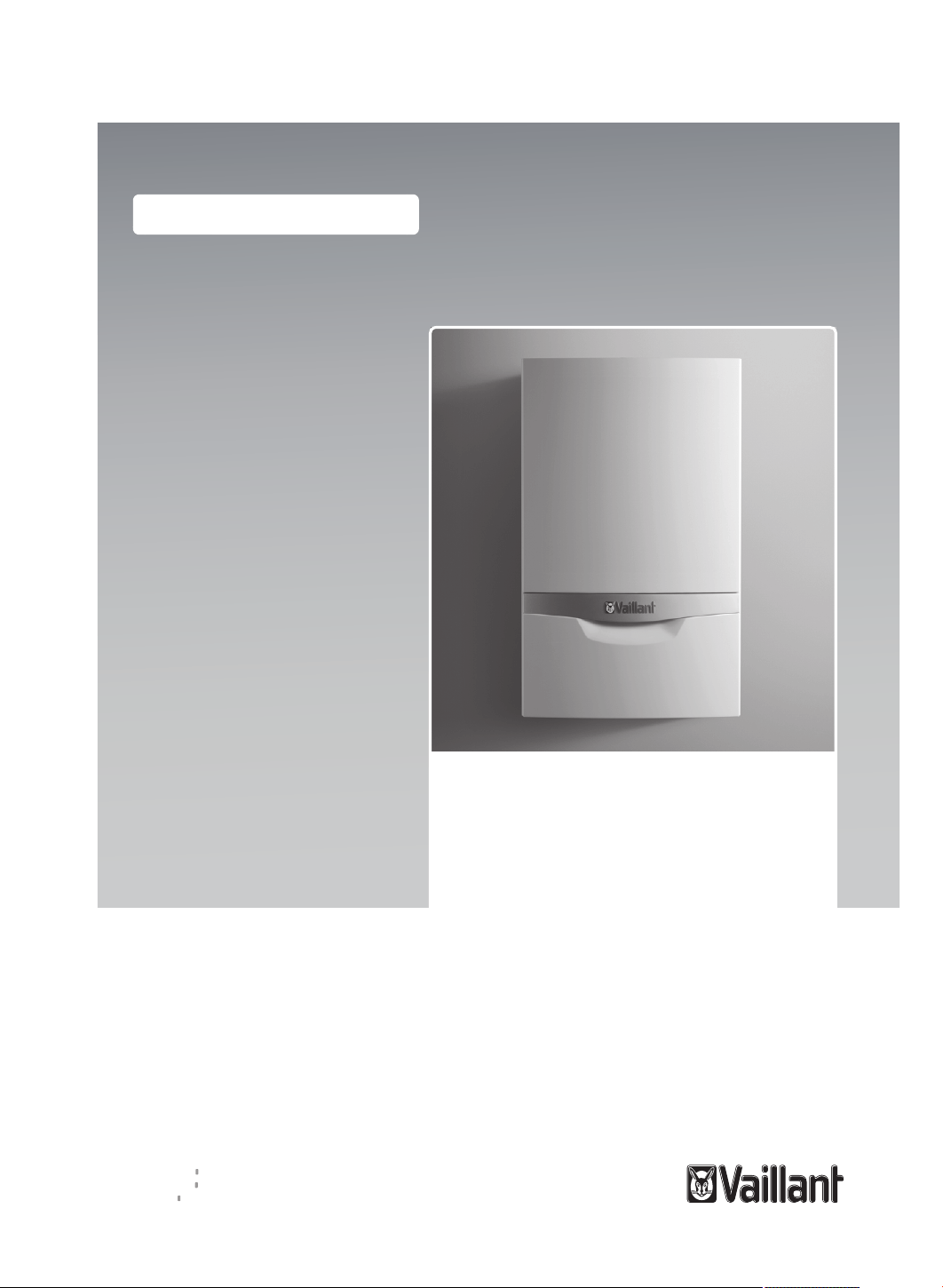
Operating instructions
ecoTEC plus
VU 446/5-5 (H-GB)
VU 606/5-5 (H-GB)
GB, IE, NZ
Publisher/manufacturer
Vaillant GmbH
Berghauser Str. 40 D-42859 Remscheid
Tel. +49 21 91 18‑0 Fax +49 21 91 18‑2810
[email protected] www.vaillant.de

Contents
2 Operating instructions ecoTEC plus 0020261390_01
Contents
1 Safety ............................................ 3
1.1 Action-related warnings ................. 3
1.2 Intended use .................................. 3
1.3 General safety information............. 4
2 Notes on the documentation ...... 8
2.1 Observing other applicable
documents ..................................... 8
2.2 Storing documents......................... 8
2.3 Validity of the instructions .............. 8
2.4 Benchmark..................................... 8
3 Product description..................... 9
3.1 Product design............................... 9
3.2 Displayed symbols......................... 9
3.3 Display ........................................... 9
3.4 Protecting the heating
installation against frost ............... 10
3.5 Data plate .................................... 11
3.6 CE label ....................................... 11
3.7 Energy Saving Trust Endorsed
Products....................................... 11
4 Operation.................................... 12
4.1 Operating concept ....................... 12
4.2 Adjustment and display levels ..... 12
4.3 Basic display................................ 12
4.4 Menu display................................ 13
4.5 Starting up the product ................ 13
4.6 Setting the language.................... 13
4.7 Opening the isolator devices ....... 13
4.8 Setting the heating flow
temperature ................................. 13
4.9 Setting the domestic hot water
temperature ................................. 13
4.10 Switching off the product's
functions ...................................... 14
5 Care and maintenance .............. 14
5.1 Caring for the product .................. 14
5.2 Maintenance ................................ 14
5.3 Draining the heating
installation.................................... 14
5.4 Guaranteeing the correct filling
pressure in the heating circuit...... 14
5.5 Checking the condensate
discharge pipe and tundish.......... 16
6 Troubleshooting ........................ 16
6.1 Reading maintenance
messages .................................... 16
6.2 Eliminating faults.......................... 16
6.3 Eliminating an ignition fault .......... 16
6.4 Displaying the status codes
(Live Monitor)............................... 16
7 Decommissioning...................... 16
7.1 Temporarily decommissioning
the product................................... 16
7.2 Permanently decommissioning
the product................................... 16
8 Recycling and disposal............. 16
9 Guarantee and customer
service ........................................ 17
9.1 Guarantee.................................... 17
9.2 Customer service......................... 17
Appendix ............................................... 18
A End user level – overview ......... 18
B Status codes – Overview........... 18
C Fault codes................................. 19
D Troubleshooting ........................ 19
Safety 1
0020261390_01 ecoTEC plus Operating instructions 3
1 Safety
1.1 Action-related warnings
Classification of action-re-
lated warnings
The action-related warnings
are classified in accordance
with the severity of the pos-
sible danger using the following
warning signs and signal words:
Warning symbols and signal
words
Danger!
Imminent danger to life
or risk of severe personal
injury
Danger!
Risk of death from electric
shock
Warning.
Risk of minor personal
injury
Caution.
Risk of material or envir-
onmental damage
1.2 Intended use
There is a risk of injury or death
to the user or others, or of dam-
age to the product and other
property in the event of im-
proper use or use for which it
is not intended.
This product is a heat gener-
ator that has been specially de-
signed for closed heating in-
stallations.
Intended use includes the fol-
lowing:
– observance of the operating
instructions included for the
product and any other system
components
– compliance with all inspection
and maintenance conditions
listed in the instructions.
This product can be used by
children aged from 8 years
and above and persons with
reduced physical, sensory or
mental capabilities or lack of
experience and knowledge if
they have been given supervi-
sion or instruction concerning
use of the product in a safe way
and understand the hazards in-
volved. Children must not play
with the product. Cleaning and
user maintenance work must
not be carried out by children
unless they are supervised.
Any other use that is not spe-
cified in these instructions, or
use beyond that specified in this
document shall be considered
improper use. Any direct com-
mercial or industrial use is also
deemed to be improper.
Caution.
Improper use of any kind is
prohibited.

1 Safety
4 Operating instructions ecoTEC plus 0020261390_01
1.3 General safety
information
1.3.1 Installation by
competent persons only
The installation, inspection,
maintenance and repair of the
product, as well as the gas ratio
settings, must only be carried
out by a competent person.
1.3.2 Danger caused by
improper operation
Improper operation may present
a danger to you and others, and
cause material damage.
▶ Carefully read the enclosed
instructions and all other ap-
plicable documents, particu-
larly the "Safety" section and
the warnings.
▶ Only carry out the activities
for which instructions are
provided in these operating
instructions.
1.3.3 Risk of death from
escaping gas
Applicability: Except Great
Britain, Except Ireland
What to do if you smell gas in
the building:
▶ Avoid rooms that smell of
gas.
▶ If possible, open doors and
windows fully and ensure
adequate ventilation.
▶ Do not use naked flames (e.g.
lighters, matches).
▶ Do not smoke.
▶ Do not use any electrical
switches, mains plugs, door-
bells, telephones or other
communication systems in
the building.
▶ Close the emergency control
valve or the main isolator.
▶ If possible, close the gas isol-
ator cock on the product.
▶ Warn other occupants in the
building by yelling or banging
on doors or walls.
▶ Leave the building immedi-
ately and ensure that others
do not enter the building.
▶ Alert the police and fire bri-
gade as soon as you are out-
side the building.
▶ Use a telephone outside the
building to inform the emer-
gency service department of
the gas supply company.
1.3.4 Risk of death from
escaping gas
Applicability: Great Britain
OR Ireland
What to do if you smell gas in
the building:
▶ Avoid rooms that smell of
gas.

Safety 1
0020261390_01 ecoTEC plus Operating instructions 5
▶ If possible, open doors and
windows fully and ensure
adequate ventilation.
▶ Do not use naked flames (e.g.
lighters, matches).
▶ Do not smoke.
▶ Do not use any electrical
switches, mains plugs, door-
bells, telephones or other
communication systems in
the building.
▶ If it is safe to do so, close the
emergency control valve or
the main isolator.
▶ If possible, close the gas isol-
ator cock on the product.
▶ Warn other occupants in the
building by yelling or banging
on doors or walls.
▶ Leave the building immedi-
ately and ensure that others
do not enter the building.
▶ Notify the gas supply com-
pany or the National Grid
+44 (0) 800 111999 by tele-
phone once you are outside
of the building.
1.3.5 Risk of death due to
blocked or leaking flue
pipework
What to do if you smell flue gas
in the property:
▶ Open all accessible doors
and windows fully to provide
ventilation.
▶ Switch off the product.
▶ Inform a competent person.
1.3.6 Risk of death due to
explosive and flammable
materials
▶ Do not use the product in
storage rooms that contain
explosive or flammable sub-
stances (such as petrol, pa-
per or paint).
1.3.7 Risk of death due
to changes to the
product or the product
environment
▶ Never remove, bridge or
block the safety devices.
▶ Do not tamper with any of the
safety devices.
▶ Do not damage or remove
any seals on components.
▶ Do not make any changes:
– The product itself
– to the gas, air, water and
electricity supplies
– to the entire flue gas install-
ation
– to the entire condensate
drain system
– to the expansion relief valve
– to the drain pipework
– to constructional condi-
tions that may affect the
operational reliability of the
product

1 Safety
6 Operating instructions ecoTEC plus 0020261390_01
1.3.8 Risk of death due to
cabinet-type casing
Cabinet-type casing can give
rise to dangerous situations
when used on a product which
is operated with an open flue.
▶ Ensure that the product is
supplied with sufficient com-
bustion air.
1.3.9 Risk of poisoning
caused by insufficient
combustion air supply
Conditions: Open-flued opera-
tion
▶ Ensure that there is a suffi-
cient combustion air supply.
1.3.10 Risk of corrosion
damage due to
unsuitable combustion
and room air
Sprays, solvents, chlorinated
cleaning agents, paint, adhes-
ives, ammonia compounds,
dust or similar substances may
lead to corrosion on the product
and in the air/flue pipe.
▶ Ensure that the supply of
combustion air is always free
of fluorine, chlorine, sulphur,
dust, etc.
▶ Ensure that no chemical sub-
stances are stored at the in-
stallation site.
1.3.11 Risk of material
damage caused by
frost
▶ Ensure that the heating in-
stallation always remains in
operation during freezing con-
ditions and that all rooms are
sufficiently heated.
▶ If you cannot ensure the op-
eration, have a competent
person drain the heating in-
stallation.
1.3.12 Risk of injury and
material damage due
to maintenance and
repairs carried out
incorrectly or not
carried out at all
▶ Never attempt to carry out
maintenance work or repairs
on your product yourself.
▶ Faults and damage should
be immediately rectified by a
competent person.
▶ Adhere to the maintenance
intervals specified.
1.3.13 Starting up the product
▶ Only start up the product
once the casing has been
completely closed.
1.3.14 Risk of material
damage
The product's casing is not
designed to withstand loads.
There is a risk that it will be-

Safety 1
0020261390_01 ecoTEC plus Operating instructions 7
come deformed due to the ef-
fect of bearing weight.
▶ Do not place any objects on
the product.
2 Notes on the documentation
8 Operating instructions ecoTEC plus 0020261390_01
2 Notes on the
documentation
2.1 Observing other applicable
documents
▶ You must observe all operating instruc-
tions enclosed with the system compon-
ents.
2.2 Storing documents
▶ Keep this manual and all other applic-
able documents safe for future use.
2.3 Validity of the instructions
These instructions apply only to:
Product article number
VU 446/5-5 (H-GB)
ecoTEC plus
0010021520
VU 606/5-5 (H-GB)
ecoTEC plus
0010021521
Gas Council Number
VU 446/5-5 (H-GB)
ecoTEC plus
41-694-28
VU 606/5-5 (H-GB)
ecoTEC plus
41-694-29
2.4 Benchmark
Applicability: Great Britain
Vaillant is a licensed member of the
Benchmark Scheme which aims to im-
prove the standards of installation and
commissioning of domestic heating and
hot water systems in the UK and to en-
courage regular servicing to optimise
safety, efficiency and performance.
Benchmark is managed and promoted
by the Heating and Hotwater Industry
Council. For more information visit
www.benchmark.org.uk.
▶ Please ensure that the installer has fully
completed the Benchmark Checklist on
the inside back pages of the installation
instructions supplied with the product
and that you have signed it to say that
you have received a full and clear ex-
planation of its operation. The installer
is legally required to complete a com-
missioning checklist as a means of
complying with the appropriate Build-
ing Regulations (England and Wales).
All installations must be notified to Local
Area Building Control either directly or
through a Competent Persons Scheme.
A Building Regulations Compliance Certi-
ficate will then be issued to the customer
who should, on receipt, write the Notifica-
tion Number on the Benchmark Checklist.
This product should be serviced regularly
to optimise its safety, efficiency and per-
formance. The service engineer should
complete the relevant Service Record on
the Benchmark Checklist after each ser-
vice.
The Benchmark Checklist will be required
in the event of any warranty.
Product description 3
0020261390_01 ecoTEC plus Operating instructions 9
3 Product description
3.1 Product design
1
2
3
4
1 Plate with serial
number on the
rear
2 On and off but-
ton
3 Operator control
element
4 Installation loca-
tion for the op-
tional control
system
3.2 Displayed symbols
50
F.01
3
4
1
2
3
4
5
6
7
8
1 Display
2 Access to the
menu for addi-
tional information
3 Right selection
button
4
button
5 Reset button
6 Chimney sweep
mode (for chim-
ney sweeps)
7
button
8 Left selection
button
3.3 Display
50
F.01
1
2
3
6
5
4
1 Heating installa-
tion filling pres-
sure
2 Current heating
flow temperat-
ure, additional
information
3 Current assign-
ment of the right-
hand selection
button
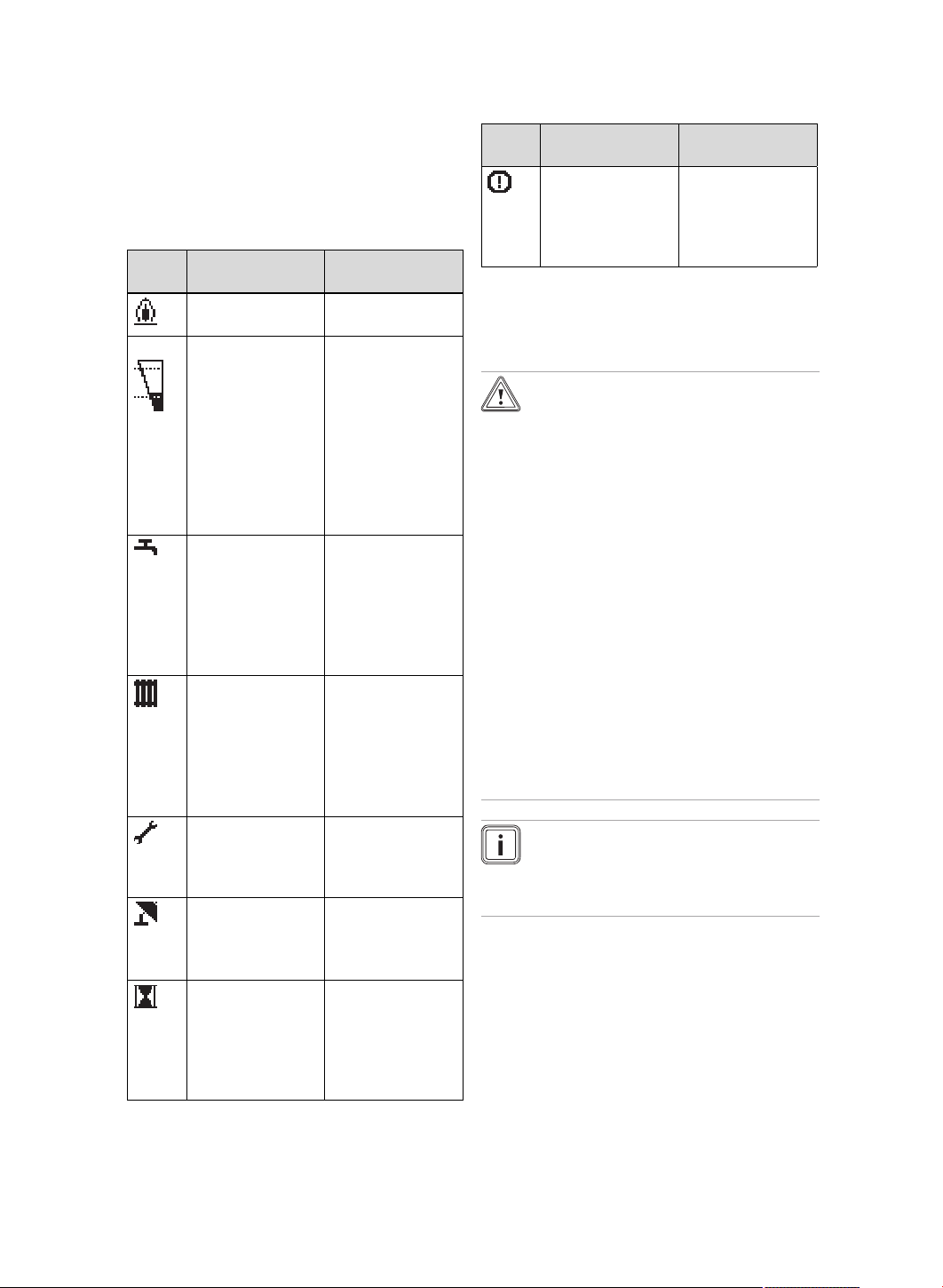
3 Product description
10 Operating instructions ecoTEC plus 0020261390_01
4 Current assign-
ment of the left-
hand selection
button
5 Active operating
mode
6 Burner informa-
tion
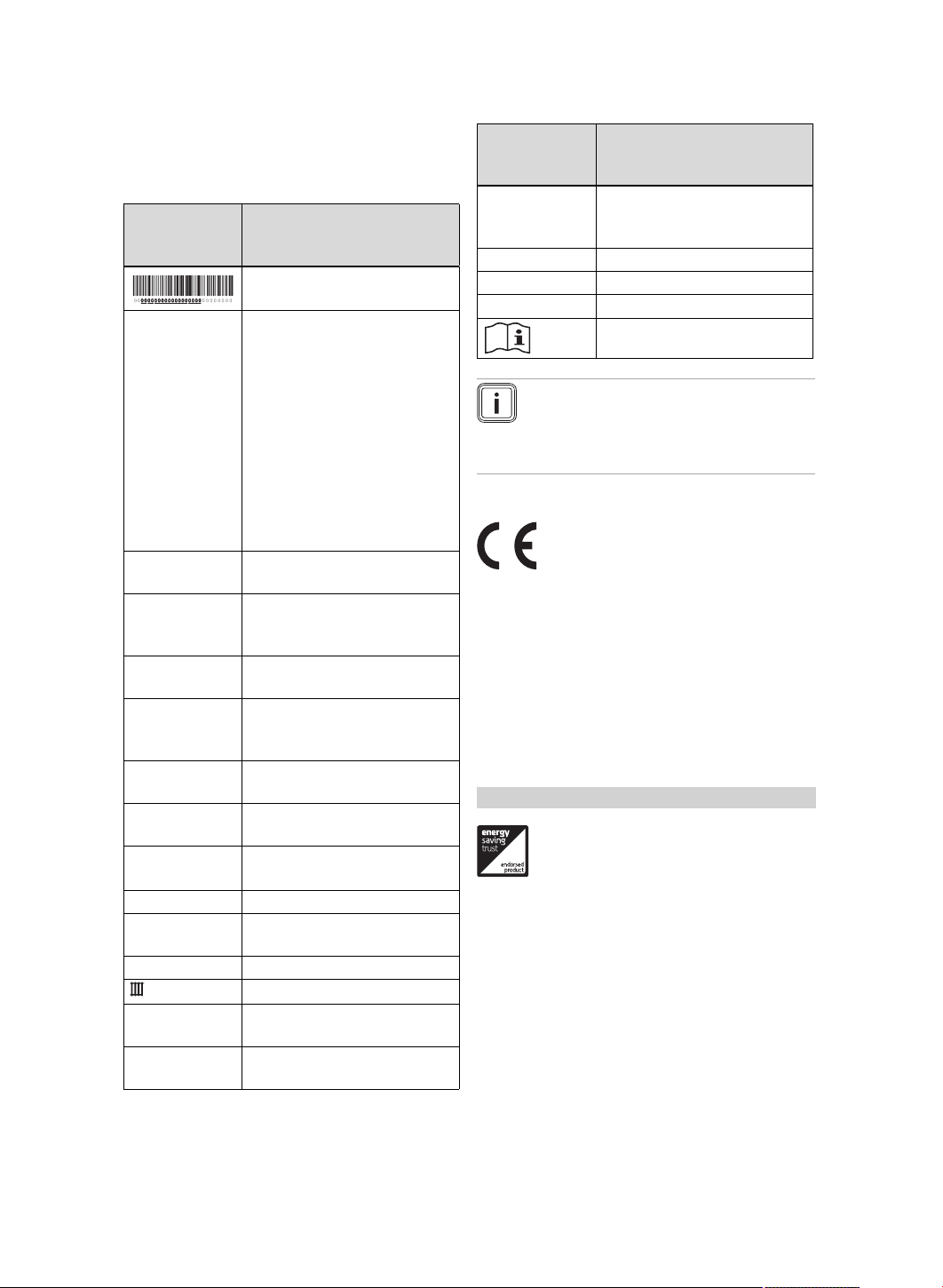
Sym-
bol
Meaning Explanation
Burner operating
correctly
Burner on
bar
Current filling
pressure of the
heating installa-
tion
The dashed lines
show the permit-
ted range.
– Permanently
on: Filling
pressure in
the permitted
range
– Flashing:
Filling pres-
sure outside
the permitted
range
Domestic hot wa-
ter generation
active
– Permanently
on: Draw-off
mode before
burner is on
– Flashing:
Burner on in
draw-off mode
Heating mode
active
– Permanently
on: Heat de-
mand in heat-
ing mode
– Flashing:
Burner on in
heating mode
Maintenance re-
quired
Information on
the maintenance
message in the
"Live Monitor"
Summer mode
active
Heating mode is
switched off
Burner anti-cyc-
ling time is active
To avoid the
need for frequent
switching on and
off (increases the
product's service
life).
Sym-
bol
Meaning Explanation
F. X X
Fault in the
product
Appears instead
of the basic
display, may be
an explanatory
plain text display.
3.4 Protecting the heating
installation against frost
3.4.1 Frost protection function
Caution.
Risk of material damage due
to frost.
The frost protection function
cannot guarantee circulation
through the entire heating in-
stallation. Under certain circum-
stances, there is therefore a risk
of frost to certain parts of the
heating installation, which may
cause damage.
▶ During a period of frost, en-
sure that the heating installa-
tion remains in operation and
that all rooms are sufficiently
heated, even when you are
away.
Note
To ensure that the frost protection
devices remain ready for operation,
the boiler must be switched on.
If the heating flow temperature falls below
5 °C when the on/off button is switched
on, the product starts up and heats the
circulating water on the heating side to
approx. 30 °C.
Product description 3
0020261390_01 ecoTEC plus Operating instructions 11
3.5 Data plate
The data plate is mounted on the under-
side of the product in the factory.
Information
on the data
plate
Meaning
Barcode with serial number
Serial number For quality control purposes;
3rd and 4th digits = year of
production
For quality control purposes;
5th and 6th digits = week of
production
For identification purposes;
7th to 16th digits = product
article number
For quality control purposes;
17th to 20th digits = place of
manufacture
... ecoTEC
Plus ...
Product designation
2H / 2E / 3P /
2L...
Gas group and gas connec-
tion pressure as set at the
factory
II2H3P / I2E /
I3P...
Approved gas category
Condensing
technology
Efficiency class of the boiler
in accordance with EC Dir-
ective 92/42/EEC
Type: Xx3(x) Permissible flue gas connec-
tions
PMS Maximum water pressure in
heating mode
V
Hz
Electrical connection –
Voltage – Frequency
Hi Lower gross calorific value
W Max. electrical power con-
sumption
IP Protection class
Heating mode
Qn Nominal heating load range
in heating mode
Pn Nominal heat output range
in heating mode
Information
on the data
plate
Meaning
Pnc Nominal heat output range
in heating mode (condensing
technology)
Tmax Maximum flow temperature
NOx NOx class for the product
Code (DSN) Specific product code
Read the instructions.
Note
Make absolutely sure that the
product is compatible with the gas
group at the installation site.
3.6 CE label
The CE label shows that the products
comply with the basic requirements of the
applicable directives as stated on the iden-
tification plate.
The declaration of conformity can be
viewed at the manufacturer's site.
3.7 Energy Saving Trust Endorsed
Products
Applicability: Great Britain
Only the most energy efficient products
can carry the ‘Energy Saving Trust En-
dorsed Product’ brandmark making it easy
for consumers to choose products that
have met strict energy performance cri-
teria.
Available for: Boilers, Heating controls and
chemical inhibitors, the Energy Saving
Trust endorsed product brandmark gives
consumers confidence that a product will
cost less to run, help lower energy bills
and reduce carbon emissions.
4 Operation
12 Operating instructions ecoTEC plus 0020261390_01
About the Energy Saving Trust
Energy Saving Trust is an independent
and impartial organisation that provides
trusted energy saving advice to empower
millions of people to lead affordable, low
energy lifestyles. For more information visit
energysavingtrust.org.uk
4 Operation
4.1 Operating concept
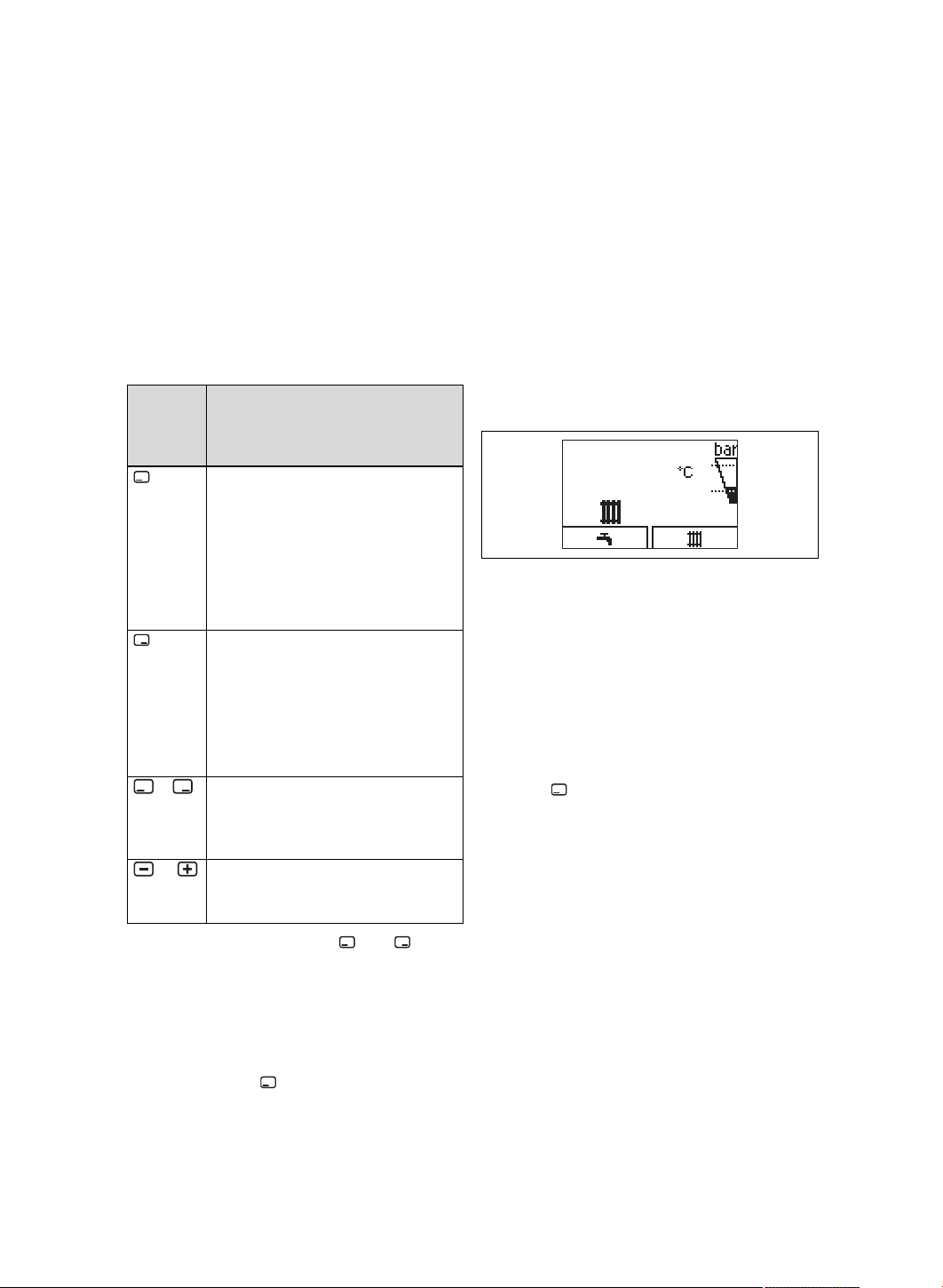
Op-
erator
control
element
Operation
– Setting the domestic hot water
temperature
– Cancelling the activation of an
operating mode
– Cancelling a change to a set
value
– Going one selection level
higher
– Setting the heating flow tem-
perature
– Reading the system pressure
– Activating the comfort mode
– Activating the operating mode
– Confirm set value
– Going one selection level lower
+
at the
same
time
– Calling up the menu
or
– Reducing or increasing the set
value
– Scrolling through menu entries
The current function of the and but-
tons is shown in the display.
Adjustable values are always displayed as
flashing.
You must always confirm a change to a
value. Only then is the new setting saved.
You can use the button to cancel a pro-
cess at any time.
4.2 Adjustment and display levels
The product has two adjustment and
display levels.
The end user level contains information
and setting options that you require as the
end user.
The installer level is reserved for the com-
petent person. It is protected by a code.
Only competent persons may change any
settings in the installer level.
End user level – overview (→ Page 18)
4.3 Basic display
50
The basic display shows the current condi-
tion of the product. If you press a selection
button, the activated function is displayed
in the display.
Which of these functions is available de-
pends on whether a control is connected
to the product.
You can switch back to the basic display
by:
– Press to exit the selection level
– Not pressing any button for longer than
15 minutes.
If there is an error message present, the
basic displays switches to the error mes-
sage.
Operation 4
0020261390_01 ecoTEC plus Operating instructions 13
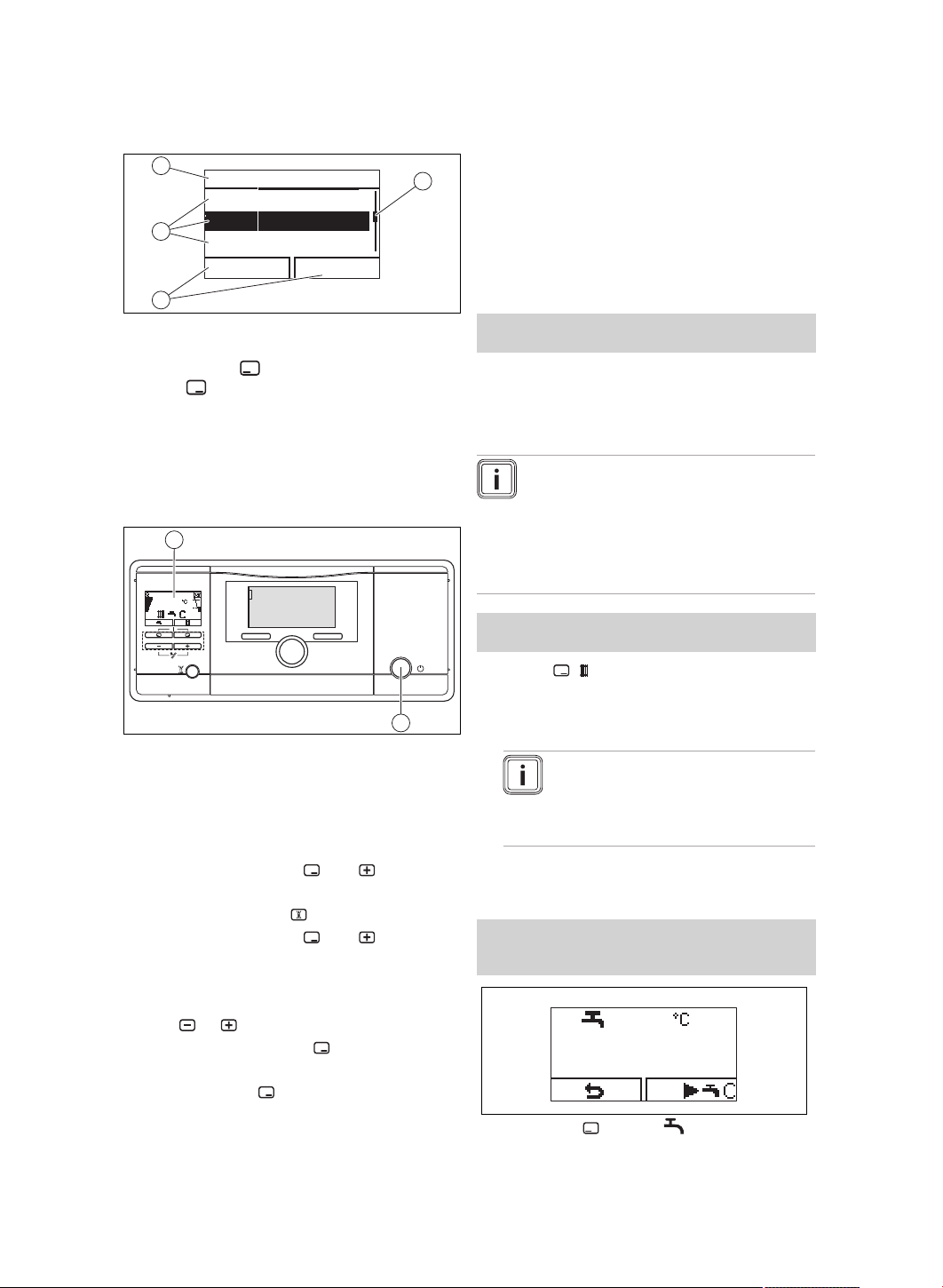
4.4 Menu display
Xxxx
Xxxxxxxxxxx
Xxxx Xxxxxxx
Xxxxxxxxxx
xxxxxx Xxxxxxx
1
4
3
2
1 Scroll bar
2 Current assign-
ment of the
and buttons.
3 Selection level
list entries
4 Name of the se-
lection level
You can find an overview of the menu
structure in the appendix.
End user level – overview (→ Page 18)
4.5 Starting up the product
50
1
2
▶ Press the on/off button (1).
◁ The "Basic display" appears in the
display (2).
4.6 Setting the language
1. Press and hold the and buttons at
the same time.
2. Also briefly press .
3. Press and hold the and buttons
until the display shows the language
setting.
4. Select the required language by press-
ing or .
5. Confirm by pressing .
6. Once you have set the correct lan-
guage, press again to confirm this.
4.7 Opening the isolator devices
1. Ask the competent person who in-
stalled the product to explain to you
where these isolator devices are loc-
ated and how to handle them.
2. Open the gas stopcock fully.
3. Open the service valves in the heating
installation's flow and return.
Applicability: Product with connected domestic hot
water cylinder
▶ Open the cold-water isolation valve.
4.8 Setting the heating flow
temperature
Note
The product has test devices for
the air and water flow rate, which
use a waiting period of max. one
minute for each heat demand be-
fore the heating starts.
Conditions: The unit is not connected to an external
or internal control
▶ Press ( ).
◁ The target value of the heating flow
temperature appears on the display.
Note
The competent person may
have adjusted the maximum
possible temperature.
4.9 Setting the domestic hot water
temperature
Conditions: If an external domestic hot water cylin-
der is connected to the boiler and a cylinder temper-
ature sensor is connected.
45
▶
Press the button ( ).

5 Care and maintenance
14 Operating instructions ecoTEC plus 0020261390_01
◁ The set target hot water temperature
that is set flashes on the display.
▶ Change the domestic hot water temper-
ature by pressing or .
▶ Press ( ) to confirm this change.
4.10 Switching off the product's
functions
4.10.1 Switching off heating mode
(Summer mode)
1. To switch off heating mode without
switching off the domestic hot water
generation, press ( ).
◁ The value of the heating flow tem-
perature appears in the display.
2. Use the button to set the heating
flow temperature to Heating off.
3. Confirm by pressing .
◁ Heating mode is switched off
◁ The symbol appears in the
display.
4.10.2 Deactivating the domestic
hot water generation
1. To deactivate cylinder charging while
leaving heating mode active, press
( ).
◁ The set domestic hot water temper-
ature flashes in the display.
2. Use the button to set the domestic
hot water temperature to Heating off.
3. Confirm by pressing .
◁ Cylinder charging is switched off.
◁ Only the cylinder's frost protection
function remains active.
5 Care and maintenance
5.1 Caring for the product
▶ Clean the casing with a damp cloth and
a little solvent-free soap.
▶ Do not use sprays, scouring agents,
detergents, solvents or cleaning agents
that contain chlorine.
5.2 Maintenance
Applicability: Except Great Britain
An annual inspection and biennial main-
tenance of the product carried out by a
competent person is a prerequisite for
ensuring that the product is permanently
ready and safe for operation, reliable,
and has a long service life. The inspec-
tion may require maintenance to be carried
out earlier, depending on the results.
Applicability: Great Britain
An annual inspection of the product carried
out by a competent person is a prerequis-
ite for ensuring that the product is perman-
ently ready and safe for operation, reliable,
and has a long working life.
5.3 Draining the heating
installation
When the unit is switched off for an exten-
ded period, frost protection can be guar-
anteed by completely draining the heating
installation and the product.
▶ Consult a competent person about this.
5.4 Guaranteeing the correct
filling pressure in the heating
circuit
5.4.1 Heating installation filling
pressure
If the heating installation's filling pressure
falls below a value of 0.05 MPa (0.5 bar),
the product switches off. The display al-
ternates between fault message F.22 and
the current filling pressure. In addition,

Care and maintenance 5
0020261390_01 ecoTEC plus Operating instructions 15
the symbol appears after approx. one
minute.
5.4.2 Checking the filling pressure
of the heating installation
1. Press twice.
◁ The values for the current filling
pressure and for the minimum and
maximum filling pressures appear in
the display.
2.
Alternatives 1 / 2
Conditions: The heating installation's filling
pressure is correct
▶ Check the filling pressure in the
display.
Recommended filling pressure
range: 0.15 … 0.25 MPa (1.50
… 2.50 bar)
The filling pressure is within the
recommended pressure range.
2.
Alternatives 2 / 2
Conditions: Filling pressure in the heating in-
stallation is too low.
▶ Fill the heating installation.
◁ If the heating installation extends
over several storeys, a higher
filling pressure may be required
for the heating installation. Ask a
competent person for details.
◁ If you have topped up the install-
ation with sufficient heating wa-
ter, the fault message automat-
ically disappears after approx.
20 seconds.
5.4.3 Filling the heating installation
Caution.
Risk of material damage due
to heating water that is ex-
tremely calciferous or corros-
ive or contaminated by chem-
icals.
Unsuitable tap water damages
the seals and diaphragms,
blocks components in the
product and heating installation
through which the water flows
and causes noise.
▶ Only fill the heating install-
ation with suitable heating
water.
1. Ask a competent person where the
filling tap is located.
2. Connect the filling tap to a heating wa-
ter supply in the way you were told by
the competent person.
3. Open all radiator valves (thermostatic
valves) of the heating installation.
4. Open the heating water supply.
5. Turn the filling tap on slowly and allow
water to flow in until the required filling
pressure has been reached.
6. Close the heating water supply.
7. Purge all radiators.
8. Check the filling pressure in the
display.
9. Top up with more water if necessary.
10. Close the filling tap.
11. Return to the basic display.

6 Troubleshooting
16 Operating instructions ecoTEC plus 0020261390_01
5.5 Checking the condensate
discharge pipe and tundish
The condensate discharge pipe and tun-
dish must always be penetrable.
▶ Regularly check the condensate dis-
charge pipe and tundish for faults and,
particularly, for blockages.
You must not be able to see or feel any
obstructions in the condensate discharge
pipe and tundish.
▶ If you notice a fault, have it eliminated
by a competent person.
6 Troubleshooting
6.1 Reading maintenance
messages
If the symbol is shown in the display, the
product requires maintenance work.
The product is not in fault mode; it is oper-
ating normally.
▶ Consult a competent person about this.
▶ If the water pressure is flashing at the
same time, simply add more heating
water.
6.2 Eliminating faults
▶ If faults occur, proceed in accordance
with the table in the appendix.
Troubleshooting (→ Page 19)
▶ If the fault cannot be eliminated using
the specified measures or if fault mes-
sages (F.xx) occur, contact a compet-
ent person.
6.3 Eliminating an ignition fault
If the burner fails to ignite after five igni-
tion attempts, the product does not oper-
ate and switches to "Fault". This is indic-
ated by the fault code F.28 or F.29 in the
display.
The product will only ignite automatically
again once you have eliminated the fault
manually.
▶ Ensure that the gas stopcock is open.
▶ Press the reset button to reset the unit.
▶ Contact a competent person if the ig-
nition problem is not eliminated after
three reset attempts.
6.4 Displaying the status codes
(Live Monitor)
▶ Press and at the same time.
Status codes – Overview (→ Page 18)
◁ The current operating moed (status
code) is shown on the display.
7 Decommissioning
7.1 Temporarily decommissioning
the product
Temporarily decommission the product
only if there is no risk of frost.
▶ Press the on/off button.
◁ The display goes out.
▶ When decommissioning the product
for a prolonged period (e.g. holiday),
close the gas stopcock and also, for
combination products, the cold-water
isolation valve.
7.2 Permanently
decommissioning the product
▶ Employ a competent person to perman-
ently decommission the product.
8 Recycling and disposal
▶ The competent person who installed
your product is responsible for the dis-
posal of the packaging.
If the product is labelled with this
mark:
▶ In this case, do not dispose of the
product with the household waste.

Guarantee and customer service 9
0020261390_01 ecoTEC plus Operating instructions 17
▶ Instead, hand in the product to a collec-
tion centre for waste electrical or elec-
tronic equipment.
If the product contains batteries that
are labelled with this mark, these batteries
may contain substances that are hazard-
ous to human health and the environment.
▶ In this case, dispose of the batteries at
a collection point for batteries.
9 Guarantee and customer
service
9.1 Guarantee
Applicability: New Zealand
For information on the manufacturer's
guarantee, you can write to the contact
address that is provided on the back page.
Applicability: Great Britain
OR Ireland
– Five year guarantee for ecoTEC plus
appliances
Vaillant undertakes to rectify any man-
ufacturing defect that occurs within
a five year period of the installation
date/manufacturing date (if the installation
date cannot be determined) provided that:
An annual service has been carried out by
a competent person approved at the time
by the Health and Safety Executive. The
cost of these services is not included in
the guarantee. The water flowing through
the boiler is maintained with adequate
and appropriate inhibitors. Any additional
guarantee applies only if the boiler and
system has been maintained as above
and the boiler is protected from the system
by a plate heat exchanger. If there is no
evidence that the boiler and system has
been maintained in an appropriate manner
the standard 1yr guarantee applies. Your
statutory rights are unaffected.
– Registering with us
Registration is simple. Just complete the
Guarantee Registration Card and return to
Vaillant within 30 days of installation. Your
details will then be automatically registered
within the Vaillant scheme.
– Immediate help
If your Vaillant boiler develops a fault your
first action should be to contact your in-
staller, as his professional assessment is
needed under the terms of our Guarantee.
If you are unable to contact your installer,
phone Vaillant Service Solutions:
Telephone: 0330 100 3461
9.2 Customer service
Applicability: New Zealand
For contact details for our customer ser-
vice department, you can write to the ad-
dress that is provided on the back page, or
you can visit www.vaillant.com.
Applicability: Great Britain
OR Ireland
To ensure efficient and reliable operation
of your boiler it is recommended that regu-
lar servicing is carried out by your service
provider.
Appendix
18 Operating instructions ecoTEC plus 0020261390_01
Appendix
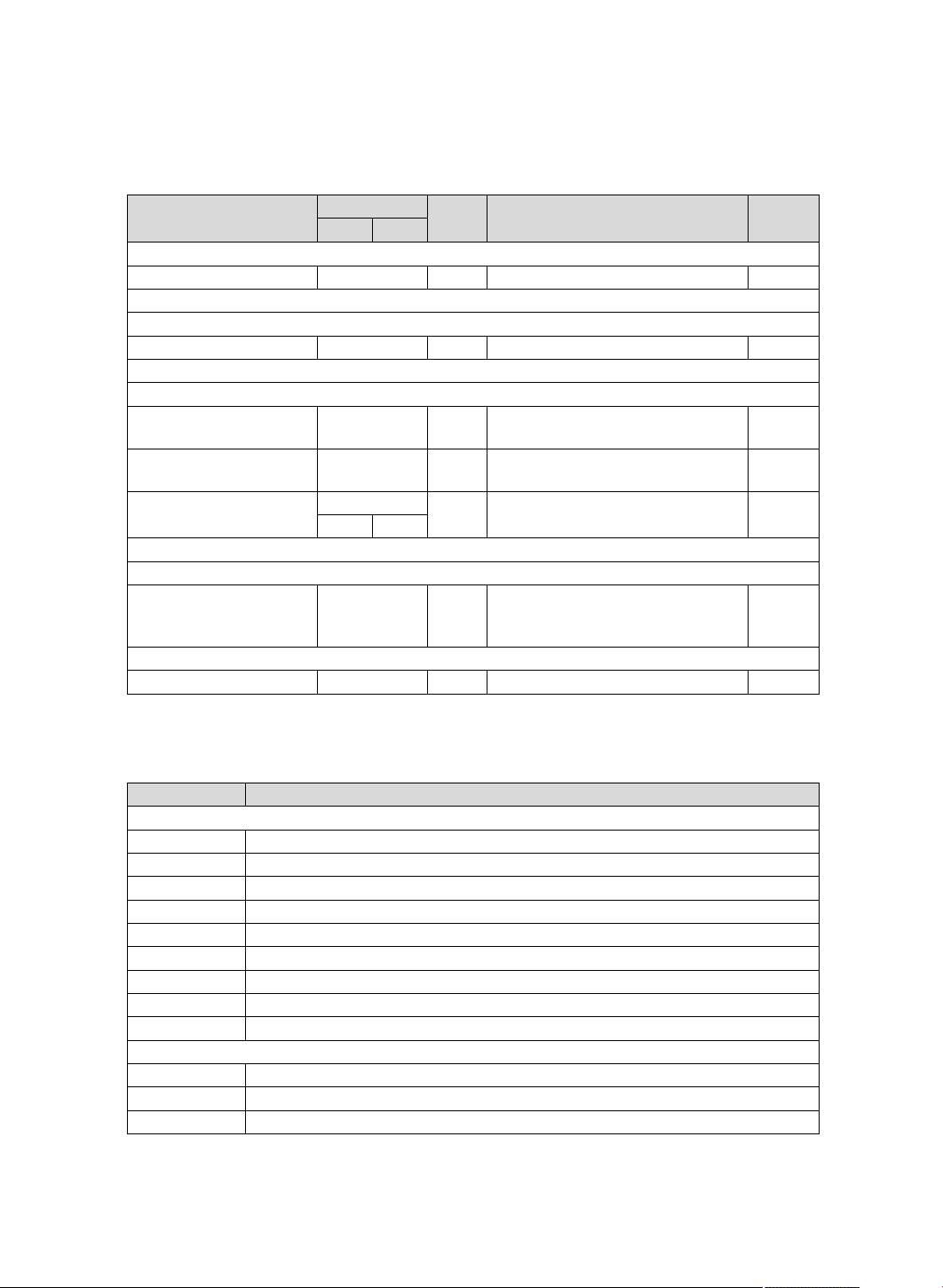
A End user level – overview
Setting level Values Unit Increment, select Default
setting
Min. Max.
Water pressure →
Water pressure Current value bar
Live monitor →
Status Current value
Information →
Contact details Phone num-
ber
Serial number Permanent
value
Display contrast Current value 1 25
15 40
Basic settings →
Language Current lan-
guage
Languages available for selection Coun-
try-spe-
cific
Resets →
Reset anti-cycl. time Current value min
B Status codes – Overview
Status codes that are not listed here can be viewed in the installation instructions.
Status code Meaning
Heating mode
S.00 Heating demand
S.01 Heating mode: Fan start-up
S.02 Heating mode: Pump start-up
S.03 Heating mode: Ignition
S.04 Heating mode: Burner on
S.05 Heating mode: Pump/fan overrun
S.06 Heating mode: Fan reduction
S.07 Heating mode: Pump overrun
S.08 Heating mode, burner anti-cycling time
Cylinder charging mode
S.20 Domestic hot water requirement
S.21 DHW mode: Fan start-up
S.22 Domestic hot water mode: Pump running
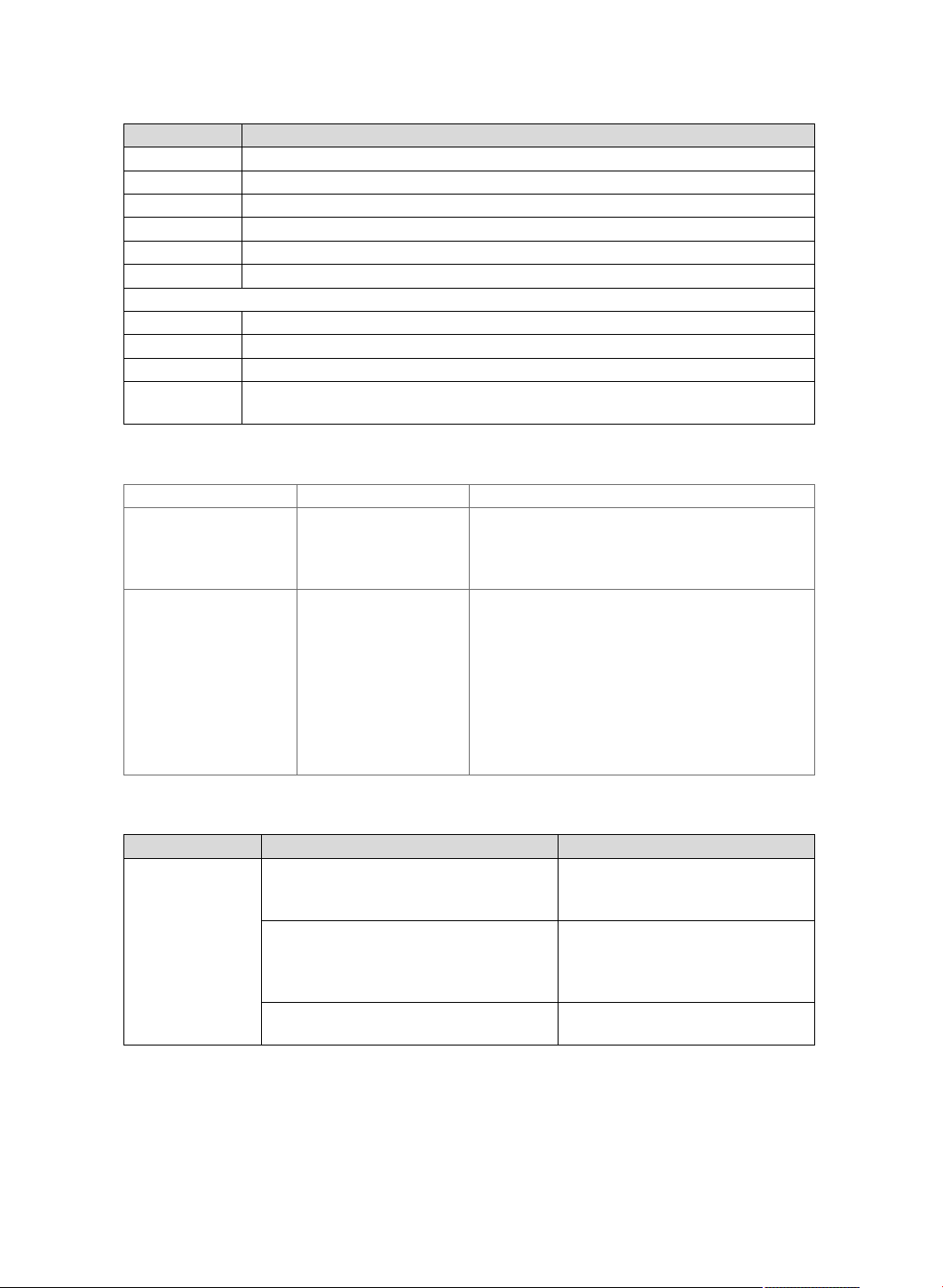
Appendix
0020261390_01 ecoTEC plus Operating instructions 19
Status code Meaning
S.23 DHW mode: Ignition
S.24 DHW mode: Burner on
S.25 DHW mode: Pump/fan overrun
S.26 DHW mode: Fan overrun
S.27 DHW mode: Pump overrun
S.28 Domestic hot water burner anti-cycling time
Other displays
S.30 Room thermostat (RT) is blocking heating mode
S.31 Summer mode active or eBUS controller is blocking heating mode
S.34 Frost protection active
S.85 Service message "Insufficient water flow rate, product in standby mode for 10
minutes"
C Fault codes
Message Possible cause Measure
F.22 System pressure
too low
The system pressure
is too low. Water de-
ficiency in the heating
installation.
▶ Fill the heating installation.
F.28 Ignition unsuc-
cessful
After five unsuccessful
ignition attempts, the
product has switched
to fault mode.
1. Check whether the gas stopcock is open.
2. Check whether the siphon is free.
3. Check whether the flue is free.
4. Press and hold the reset button for one
second.
– Reset attempts: ≤ 5
5. If you have been unable to eliminate the
ignition fault after the reset attempt, consult
a competent person.
D Troubleshooting
Fault Cause Measure
Product does not
start up:
– No domestic
hot water
– Heating does
not heat up
The gas stopcock installed on-site
and/or the gas stopcock on the product
is closed.
Open both gas stopcocks.
The power supply in the building is dis-
connected.
Check the fuse in the build-
ing. The product automatically
switches on after the power
supply is restored.
The product is switched off. Switch on the product (→ "Switch-
ing on the product" section).

Appendix
20 Operating instructions ecoTEC plus 0020261390_01
Fault Cause Measure
Product does not
start up:
– No domestic
hot water
– Heating does
not heat up
The heating flow temperature is set
too low or to the Heating off position,
and/or the domestic hot water temperat-
ure is set too low.
Set the heating flow temperature
and domestic hot water temper-
ature (→ "Setting the heating flow
temperature" section/→ "Setting
the domestic hot water temperat-
ure" section).
The system pressure is insufficient.
Water deficiency in the heating installa-
tion (fault message: F.22).
Fill the heating installation (→
"Filling the heating installation"
section).
There is air in the heating installation. Have your competent person
purge the heating installation.
After five unsuccessful ignition attempts,
the product switches to fault mode (fault
message: F.28).
Press the reset button for one
second. The product carries out
a new ignition attempt.
If the ignition problem is not elim-
inated after three reset attempts,
contact a competent person.
The hydraulic circuit is closed Ensure that the stopcocks for the
hydraulic circuit(s) are open
Domestic hot wa-
ter generation
functioning cor-
rectly; heating
does not start up.
The external control is not set correctly. Set the external control correctly
(→ Control operating instructions).




0020261390_01 02.11.2017
Supplier
Vaillant Ltd.
Nottingham Road Belper Derbyshire DE56 1JT
Telephone 0330 100 3461
[email protected] www.vaillant.co.uk
Vaillant Group International GmbH
Berghauser Strasse 40 42859 Remscheid
Tel. +49 21 91 18‑0
www.vaillant.info
© These instructions, or parts thereof, are protected by copyright and may be
reproduced or distributed only with the manufacturer's written consent.
We reserve the right to make technical changes.
0020261390_01