
1
INSTRUCTION MANUAL
PowerDot M2 user manual
Rev. 1.0.0a (Feb 2022 )

1

3
YOUR POWERDOT M2
Congratulations on getting a PowerDot
M2 device! Your PowerDot PD-01M2
uses electrical muscle stimulation (EMS,
also known as neuromuscular electrical
stimulation or NMES) and transcutaneous
electrical nerve stimulation (also known
as TENS) technologies to stimulate your
muscles and nerves for therapeutic purposes.
You can operate your PowerDot wirelessly
using the companion PowerDot Patient
application on your phone.
INDICATIONS FOR USE
PowerDot PD-01M2 stimulator is intended
to be used under the direction of a physical
therapist, athletic trainer, caregiver, or
healthcare provider.
The device can be either used by the
therapist in healthcare facility setting (when
operated from PowerDot Doctor mobile
application) or by patient/lay operator in
a home environment (when operated from
PowerDot Patient mobile application).
PowerDot PD-01M2 has the following
indications for use:
NMES
• Slowing or preventing disuse atrophy
• Maintaining or increasing range of
motion
• Re-educating muscles
• Relaxation of muscle spasms
• Increasing local blood circulation
• Prevention of venous thrombosis of the
calf muscles immediately after surgery
• Stimulation of healthy muscles in
order to improve or facilitate muscle
performance
TENS
• Symptomatic relief and management of
chronic pain
• Managing post-surgical and post-trauma
acute pain
• Temporary relief of pain associated with
sore and aching muscles due to strain
from exercise or normal household and
work activities
Caution: Federal law restricts prescription of
certain stimulation programs by or on the
order of a practitioner licensed by the law
of the State in which he/she practices to
use or order the use of prescribed programs.
4
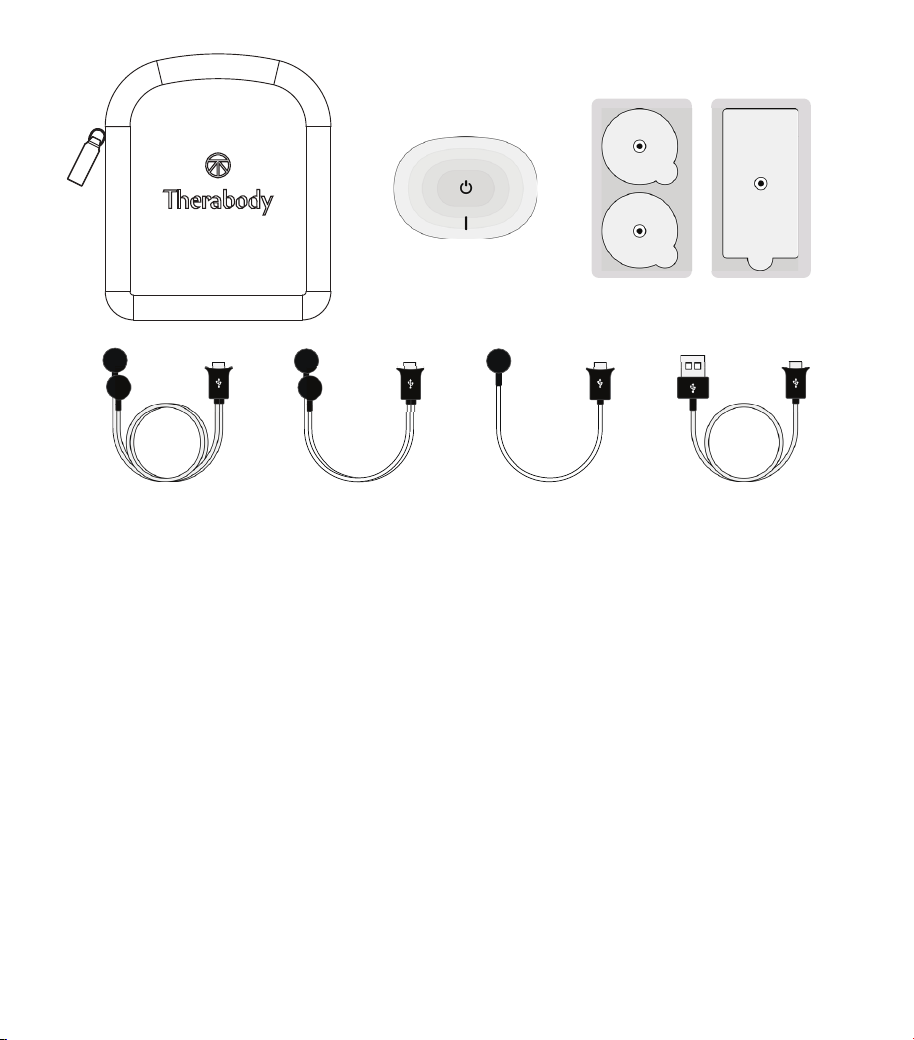
PACKAGE CONTENTS
(from left to right)
A. CARRY CASE
For storing and carrying your
PowerDot PD-01M2 (or two
PowerDots), your electrode
pads, and cables.
B. POWERDOT PD-01M2 UNIT (Pod
Generates and sends electrical signals
via electrode pads to your muscles
and nerves.
C. ROUND/RECTANGULAR ADHESIVE
ELECTRODE PADS
Self-adhesive electrode pads that
connect to the lead cables via
magnetic connectors. NOTE: always
follow the pad placement instructions
from the PowerDot App or within this
manual.
D. USB CHARGING CABLE
For charging and recharging
PowerDot pods. (Pods come charged;
battery life is shown on the mobile
app).
E. LEAD CABLES (Electrode Cables)
Used to transmit electrical signals
from the pods to electrode pads.
PowerDot lead cables are either
6"(15 cm) or 18"(45 cm) long. Depending
on the muscle group or body area
you are targeting, and your own
physique, you can use either of these
cables. For example, in most cases
the 6" lead cable will suffice for
abdominal muscles, while the 18" lead
cable will be more suitable for longer
quadriceps muscles.

5
WARNINGS AND
SAFETY GUIDELINES
COUNTERINDICATIONS
NEVER use PowerDot without your
physician’s approval if you have ANY of the
following:
• Cardiac stimulator (pacemaker),
implanted defibrillator or other
implanted metallic or electronic device.
Such use could cause electric shock,
burns, electrical interference, or death.
• Epilepsy
• Cancer or cancerous lesions
• Any heart problem or condition
• Pregnancy
• Abdominal or inguinal hernia
SAFETY MEASURES
• Do not recharge PowerDot when it is
attached to electrodes or any part of
your body.
• Do not apply near the area of an implant,
such as cochlear implants, pacemakers,
electrical or skeletal anchorage implants
or any other active implanted or body
worn devices. Such use could cause
electric shock, burns, implantable/
body worn device malfunction due to
electrical interference, or death.
• Do not apply near metal. Remove
jewelry, body piercings, belt buckles or
any other r
emovable metallic product or
device in the area of stimulation.
• If pregnant, do not place electrodes
directly over the uterus or connect
pairs of electrodes across the
abdomen.
• Do not use PowerDot in water (bath,
shower, pool, etc.) or in a humid
atmosphere (sauna, hydrotherapy, etc.).
• Do not use PowerDot in an oxygen-rich
atmosphere, such as operating rooms.
• Do not connect pods, leads, or pads to
any other objects.
• During a PowerDot session, do not
disconnect electrodes when running.
Stop t
he ses
sion first.
• Do not use the PowerDot while driving,
operating machinery, cycling or
during any activity in which electrical
stimulation can put you at risk of injury.
• Do not apply while sleeping.
• Do not allow movement resulting from
muscular contraction during a session.
You should try to always stimulate
muscles in an isometric way; this means
that the extremities of the limb in which
a muscle is being stimulated must
be firmly fixed, so as to prevent any
movement resulting from contraction.
•
Keep PowerDot device and its
accessories out of reach of children and
pets. Do not allow any foreign objects
(soil, water, metal, etc.) to get into any
part of the device.
• Sudden temperature changes can cause
condensation to build up inside the
6
stimulator. Only use the device once it
has reached ambient temperature.
• Do not exert yourself when using
electrical muscle stimulation. I.e.,
PowerDot is meant for use after
workouts, never during.
• Do not use the stimulator at altitudes
of over 1.75 miles (9842 feet, or 3000
meters).
• Do not use PowerDot if you are
connected to a high-frequency surgical
instrument, as this could cause skin
irritations or burns under the electrodes.
• Do not use PowerDot in areas where
unprotected devices are u
sed to emit
e
lectromagnetic radiation. Portable
communications equipment, RFID and
electromagnetic security systems (e.g.,
metal detectors and EAS) can interfere
with PowerDot and alter the current
generated by it.
Some RF emitters, such as
RFID syste ms, might not
be visible to you. If you
experience unexpected change
in sti m u lation intensities,
please terminate stimulation
imme d i ate ly, a s ad vis ed
in section “6 . Terminating
Stimulation” of this User Manual.
• Do not use PowerDot in close proximity
of medical devices such as MRI, CT,
diathermy, X-Ray as those could alter
the current generated by the PowerDot
and possibly cause tissue damage,
resulting in severe injury or death. If you
have any doubts when using PowerDot
stimulator in close proximity to another
medical device, please contact the
device manufacturer or your doctor.
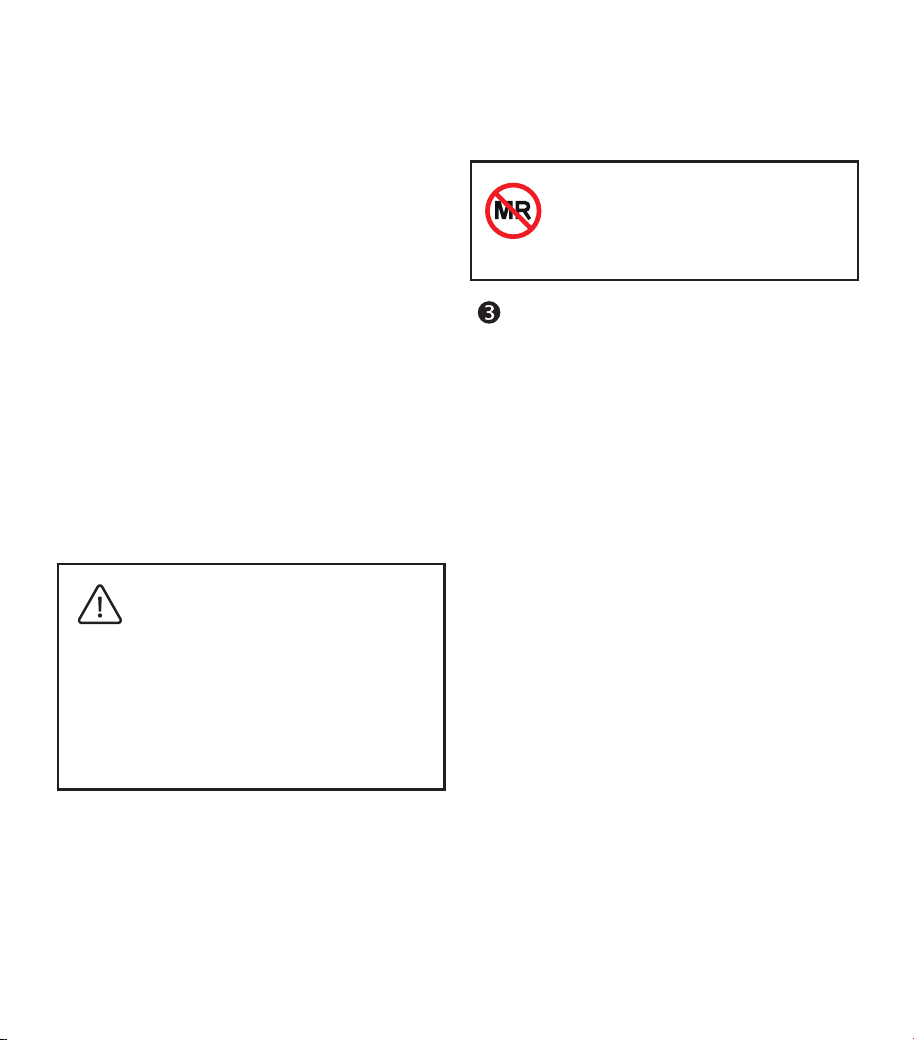
PowerDot is an MR unsafe
device. Do not use PowerDot
PD-01M2 near, on, or in in the
MRI scanner
(magnet) room.
PAD PLACEMENT
PRECAUTIONS
NEVER attach electrode pads:
• Near or to your head, as the effects
of NMES and TENS stimulation on the
brain are unknown.
• On the front and sides of the neck
or mouth, as this could cause severe
muscle spasms resulting in closure of
your airway, difficulty in breathing, or
adverse effects on heart rhythm or
blood pressure.
• Across your chest, as the introduction
of electrical current into the chest may
cause rhythm disturbances to your
heart, which could be lethal.
• Simultaneously to your front torso (i.e.,
chest or abs) and back torso (i.e. upper
back, lower back). You may, of course,
use PowerDot on those muscle groups,
but never at the same time. Work
your front torso and your back torso
separately.
• Over open wounds or rashes, or over
swollen, red, infected, or inflamed

7
areas or skin eruptions (e.g., phlebitis,
thrombophlebitis, varicose veins).
• Over, or in proximity to, cancerous
lesions.
PAD USAGE PRECAUTIONS
• Only use electrode pads supplied by
PowerDot Inc. Other electrodes may
cause potential allergic reactions
due poor biocompatibility, or
have electrical properties that are
unsuitable for PowerDot PD-01M2.
Replacement PowerDot electrodes can
be obtained from PowerDot official
distributors, authorized resellers and/
or from PowerDot Online Store (http://
powerdot.com).
• Do not immerse the pads in water.
• Do not apply solvents of any kind to the
pads.
• Do not attempt to place pads on any
p
art of the body that you yourself
cannot see without assistance. E.g.,
on your back without a mirror to view
placement.
• For best results, wash and clean your
skin and dry it completely before
attaching the pads.
• When attaching the pads, please ensure
that the entire surface of the pad is in
contact with the skin.
• For hygienic reasons, each patient must
have his/her own set of pads. Do not use
the same pads on different people.
• Never use a set of adhesive pads for
more than 20 stimulation sessions
as their bonding power deteriorates
overtime and optimal contact is very
important for both patient comfort and
stimulation efficacy.
• Use caution if stimulation is applied over
areas of skin that lack normal sensation.
• Use caution if you may have internal
bleeding, such as following an injury or
fracture.
ADVERSE REACTIONS
• Some people with very sensitive skin
may experience redness under the pads
after the stimulation session. Generally,
this redness is completely harmless
and disappears after 15 to 20 minutes.
However, avoid starting a stimulation
session on the same area until the
redness is no longer visible.
• You may experience headaches and
other painful sensations during or
following the application of electrical
stimulation near your eyes and to your
head and face.
WARNING: Stop using PowerDot and
consult with your physician if you
experience ANY adverse reactions.
8
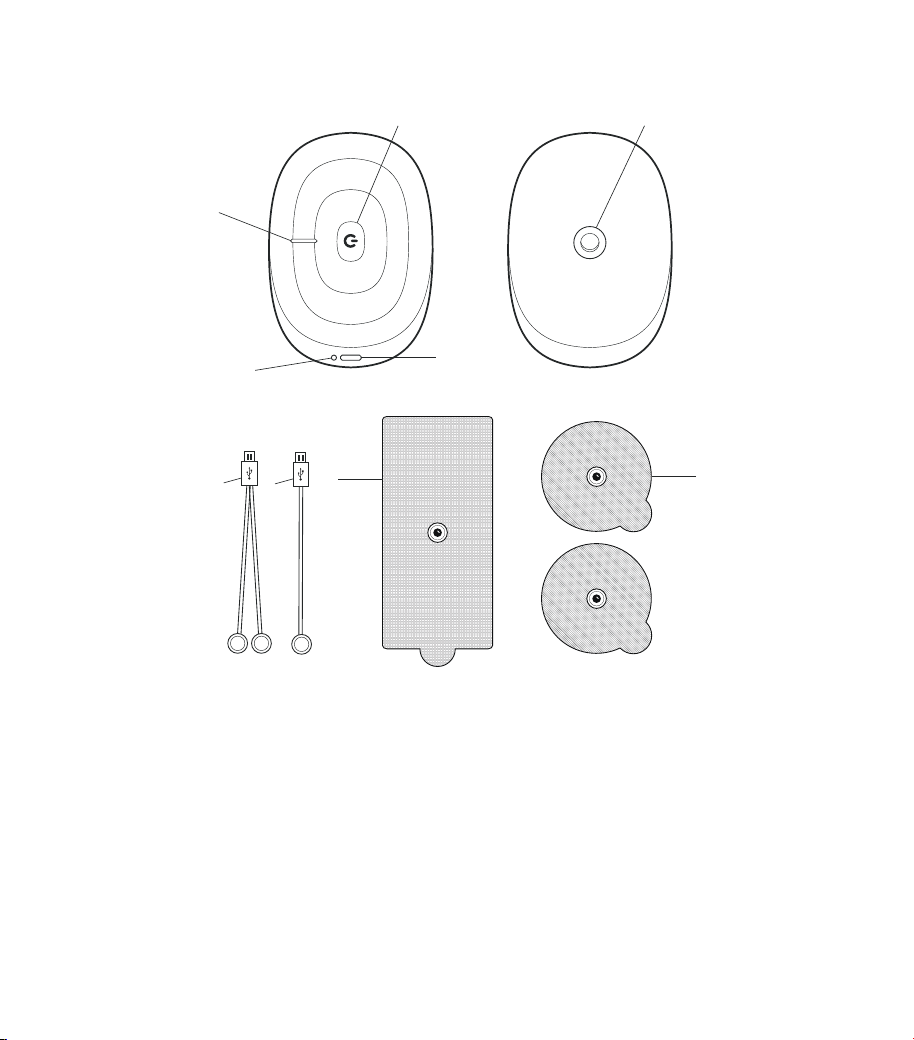
POWERDOT PD-01M2 DEVICE & ACCESSORIES
1
2
3
4
5
8
9
6
7
1. Power/Stimulation indicator
2. Multifunction button
3. Micro USB connector (dual function: connects either leads or charging cable)
4. Charging indicator (lights while charging)
5. Female magnetic pad connector
6. Lead cable with two female magnetic connectors
7. Lead cable with one female magnetic connector
8. Rectangular pad with male magnetic connector
9. Round pads with male magnetic connector
9
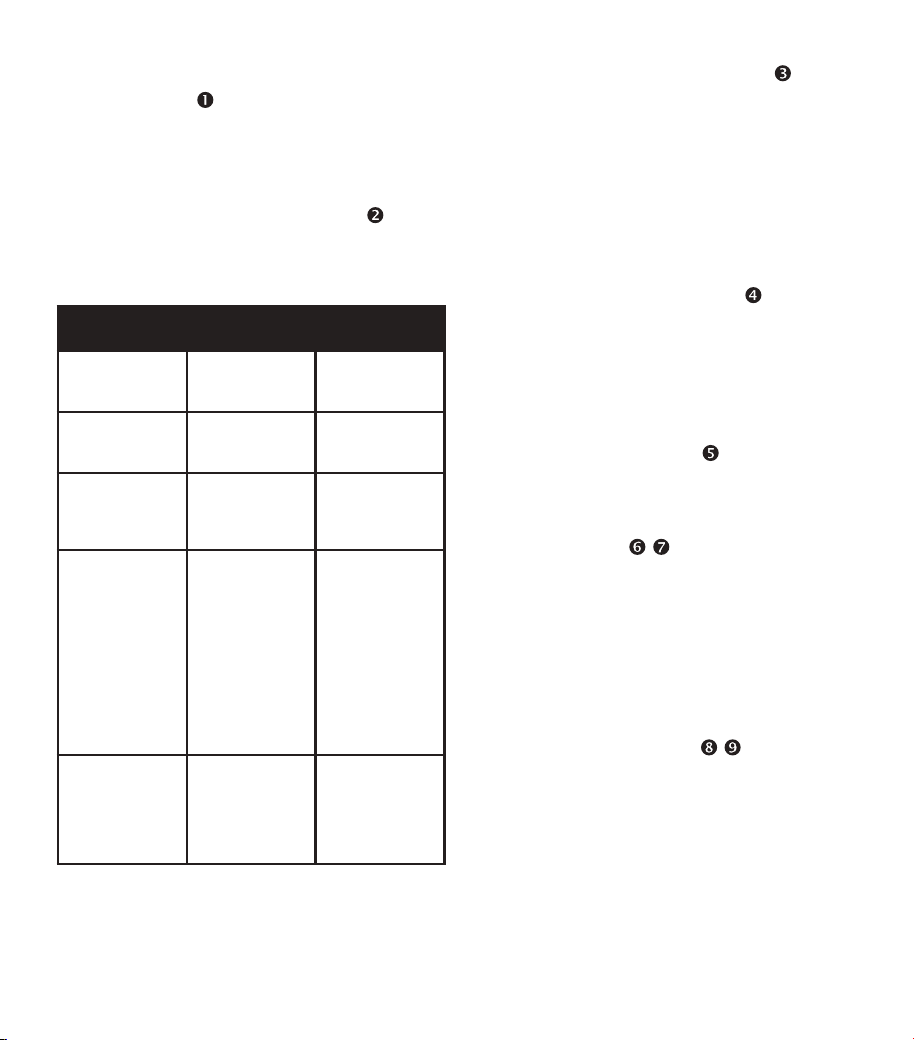
POWER/STIMULATION
INDICATOR
:
Can be either WHITE (when the PowerDot is
on or on standby mode) or ORANGE (when
it’s being used for stimulation).
MULTIFUNCTION BUTTON
MODES:
Multifunction Button carries out these
PowerDot functions:
Multi-function
Button Action
PowerDot
Initial State
PowerDot
Resulting State
Hold for ~1
second
PowerDot is
OFF (no lights)
PowerDot is
now ON (white
light is on)
Hold for ~1
second
PowerDot is
ON (white light
is on)
PowerDot is
now OFF (no
lights)
Quick Click PowerDot is
in Stimulation
(orange light
is ON)
Stimulation
stops (orange
light is ON)
Hold for 5
seconds
Device is ON Full Factory
Reset:
activation lock
is released,
Power LED
turns OFF. After
a few seconds,
it turns ON
again, blink
s
several times
and PowerDot
turns OFF.
Hold for 3
seconds
Device is OFF Soft Reset:
Activation lock
is released,
Power LED
blinks several
times.
MICRO-USB CONNECTOR
:
PowerDot uses the same high voltage
micro -US B connector (3) fo r lead
cable connection and for charging.
If the device is being used for stimulation, it
will immediately stop once the lead cables
are disconnected from the micro-USB
connector.
CHARGING INDICATOR
:
While the device is still charging, you will see
the ORANGE Charging Indicator (4) next to
the micro-USB charging connector. Refer to
the Recharging PowerDot section below for
more information on PowerDot charging.
SNAP CONNECTOR
:
Used to attach and hold the PowerDot
device in place on the rectangular pad.
LEAD CABLE
, :
For an easier, more comfortable PowerDot
session, two lead cables of different lengths
(
6"/15cm) and 18"/45cm
) (6,7) are provided
with each PowerDot. These give you the
option to choose the right cable to reach the
muscle group you’re targeting, depending
on your physique.
ELECTRODE PADS ( ,
):
PowerDot uses two types of electrode pads
— a pair of 2.2”/5.5cm round pads (9) and
a 3.5x2”/9x5cm rectangular pad (8). The
rectangular pad also acts as a holder for
PowerDot pod.
P o w er D o t p a d s u s e u ni q u e s ki n
biocompatible hydrogel with superb
10
conductive qualities and adhesiveness.
The lifetime of PowerDot pads depends a lot
on your individual skin properties, level of
hairlessness and the quality of maintenance.
On average, each pad lasts for around 20
sessions. After that, adhesiveness and
conductive properties of the pads may start
deteriorating.
Store your pads on the safety
film in a dry environment (either
in the original zipper plastic bag
or inside the PowerDot carry
case). Make sure you attach the
pads to clean and dry skin!
DIRECTIONS FOR USE
INSTALLING/LAUNCHING
POWERDOT APP
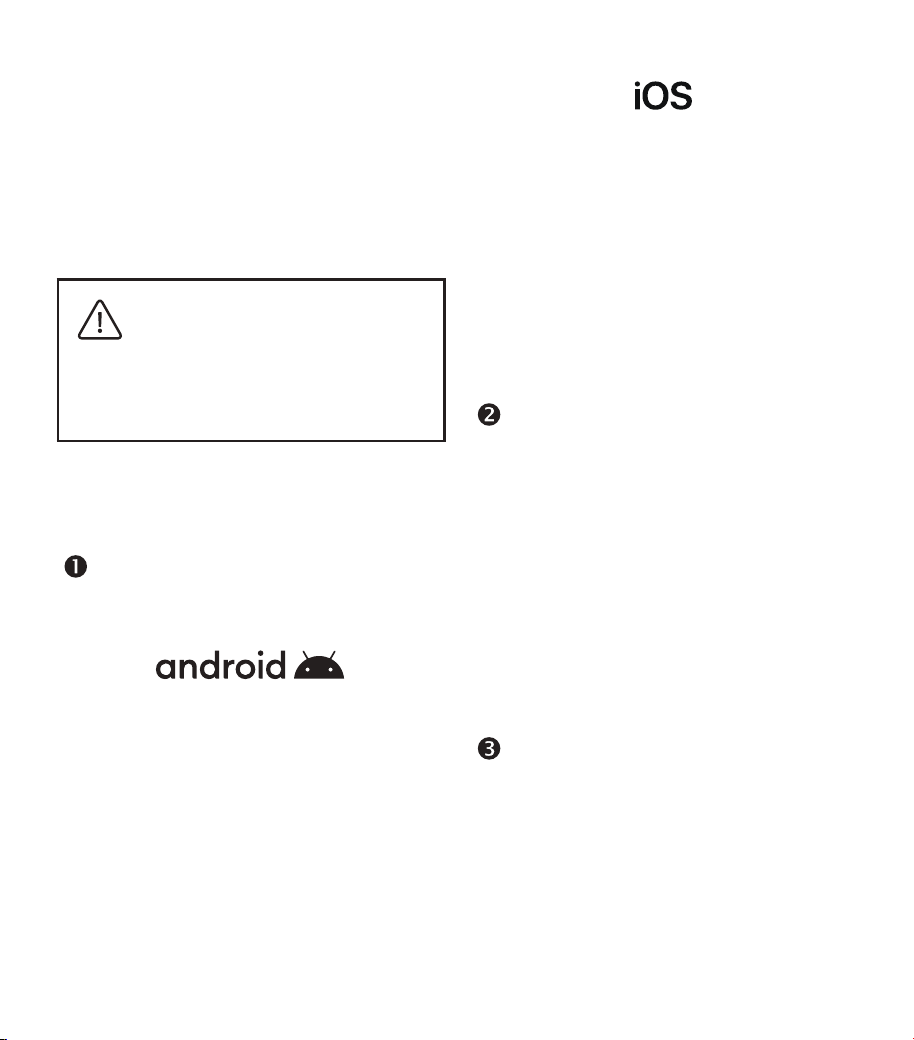
1. Make sure your mobile device a) runs
on Android OS 6.0 or later and b) is
Bluetooth -enabled.
2. Launch Google Play application;
search for “PowerDot” mobile
application and install.
3. Launch the installed PowerDot
application, create your profile then
follow instructions to locate and
activate your PowerDot(s) for first
use.
1. Make sure your mobile device a) runs
iOS 9.0 or later and b) is an iPhone 5
or later.
2. Launch Apple App Store application;
search for “PowerDot” mobile
application and install it.
3. Launch the installed PowerDot
application, create your profile and
then follow instructions to locate and
activate your PowerDot(s) for first use.
TURNING POWERDOT ON/
OFF
To turn on your PowerDot unit, hold the
Multifunction Button for approximately 1
second, until you see the white power light
turn on. When PowerDot is not being used
for a stimulation session, you can turn it off
by holding the Multifunction Button again
for approximately 1 second.
When a stimulation is ongoing, click on
the Multifunction Button once to stop the
stimulation and then hold the Multifunction
Button to turn off the Pow
erDot.
ACTIVATING POWERDOT
Before PowerDot can be used for muscle
stimulation, it must be activated from within
your PowerDot App.
When PowerDot is activated, it gets paired
with your mobile phone securely. Neither you
nor anyone else will be able to connect and
use your PowerDot from any other mobile
phone.
11
Follow the App’s onscreen advice to scan for
and activate your PowerDot(s). Make sure
your PowerDot(s) is turned on before you
start scanning.
Use the My Devices screen (available from
the PowerDot App menu bar) to activate
another or additional PowerDot device or
to deactivate previously activated ones. You
can activate and use up to two PowerDots
at the same time.
Remember, you won’t be able to
use your PowerDot(s)until you
activate it with your PowerDot
App on your smartphone!
PREPARING AND PLACING
THE POWERDOT
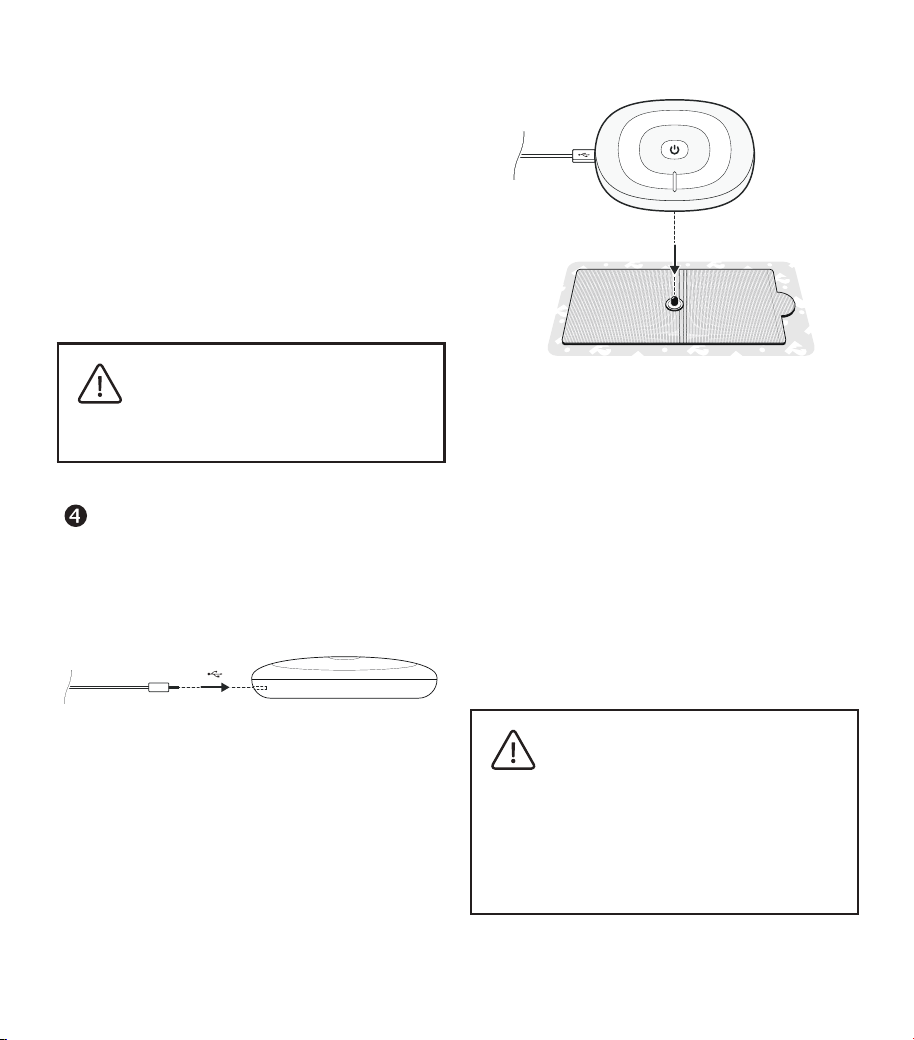
1. Plug the lead cable you intend to use
into the micro-USB connector on your
PowerDot device.
2. Detach both the round pads and
rectangular pad from their safety film
and stick them to the targeted part
of your body according to the pad
placement visual guidelines provided
by PowerDot App or in this manual.
3. Attach female magnetic round pad
connectors on the lead cable to the
male snaps on the round pads. Attach
PowerDot device female magnetic
connector to the male snap on the
rectangular pad.
4. Make sure the entire surface of the
round and rectangular pads are
completely and securely attached to
your body.
5. Turn on your PowerDot(s) if you
haven’t already done so.
Always thoroughly inspect the
lead cable and PowerDot device
for any signs of damage BEFORE
every stimulation session. Do
not use damaged accessories
or devices. For your safety, you
are strongly advised to replace
them before using again.
12
LAUNCHING &
CONTROLLING A
STIMULATION SESSION
Once you select muscle group for stimulation,
assemble and place your PowerDot(s) (or
PowerDots) and pads as directed. The App
will automatically check for, and display,
remaining battery level and lead cable
connection status. After the checks, Get
Started button will appear, which means you
can launch the stimulation session.
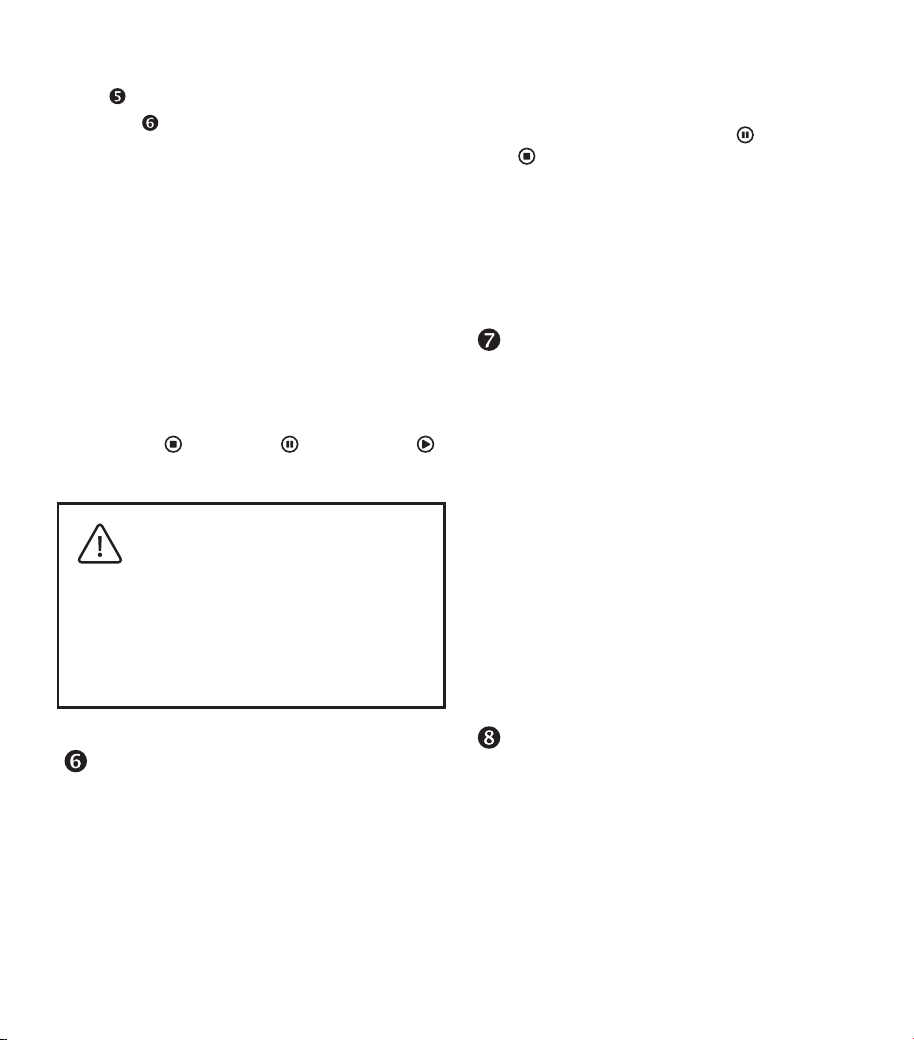
Using the PowerDot Patient App, you can
control your stimulation session from the
Stimulation Dashboard, which has the
following controls available:
Timer Indicator displays the remaining
time for the total stimulation session as
well as time left for the currently active
stimulation phase. Stimulation program and
stimulation phase names are also displayed
here.
Contraction/Rest Indicator – for the
programs and phases involving muscle
contractions, which helps you understand
the time between and during contraction
and rest intervals.
Intensity Adjustment controls – Tap on
Intensity Increase (or “+”) and Intensity
Decrease (or “-“) buttons for a gradual
adjustment, or hold either button down for
a faster adjustment.
13
Stimulation Channel-level Intensities
Lock and Device-level Intensities Lock
controls synchronize intensity changes
either a) between two stimulation channels
of PowerDot PD-01M2 device; b) between
PowerDot PD-01M2 devices (this setting
applies to two-device Duo stimulation mode
only).
Both controls are enabled by default and
can be used to fine-tune the intensity of your
current stimulation session. However, it’s
best to use them only when you really need
them (e.g. ,for a better balance between your
left and right sides, when your muscles are
not evenly developed).
Use Stop ( ), Pause ( ), Resume ( )
controls to control your stimulation session.
If you ex p eri e nc e m a jor
discomfort or pain – PAUSE
your stimulation session and/
or DECREASE intensities. For
your safety, after a PAUSE, your
stimulation session will resume
at only 80% of your previous
intensity values.
TERMINATING STIMULATION
It’s important to know the quick ways to
end your stimulation when something
unexpected happens (e.g., one of the pads
gets detached; the stimulation area gets
wet, etc.).
There are 3 primary means of immediately
terminating a session:
1. The recommended/most commonly
used option: Tap Pause (
) or Stop
( ) on the Stimulation Dashboard.
2. OR: press the Multifunctional
Button on your PowerDot (or on any
PowerDot when in Duo mode).
3. OR: quickly unplug the lead cable
from PowerDot.
CARRYING & STORING
POWERDOT
PowerDot PD-01M2 carry case is specifically
designed for carrying and storing up to 2
PowerDot devices, their lead cables and
electrode pads.
To keep electrode pads clean and make them
last longer, always re-attach them to the
safety film in between use, and store them
in your carrying case pocket. You can use
both sides of a single safety film to attach
one set of PowerDot electrode pads (one
side for the rectangular pad and the other
for the two round pads).
DEACTIVATING POWERDOT
PowerDots can be deactivated and unpaired
from a mobile phone either from within the
PowerDot App or by manually resetting the
PowerDot device.
For manual deactivation: when PowerDot is
OFF, press and hold Multi-function button for
3 seconds until you see the power indicator
14
blinking.
Deactivation from the PowerDot App is
performed from the My Devices screen:
when your active PowerDot device is on,
deactivate it by tapping on the cross icon
in the top right corner.
Upon successful deactivation, the power
indicator will blink several times.
Forgot to deactivate your
device from the PowerDot App?
Deactivate manually by turning
off your PowerDot and then
holding down the Multifunction
Button on the device for 3
seconds!
GENERAL USAGE
GUIDELINES
PAD PLACEMENTS
When using doctor prescribed
stimulation programs, discuss
the best pad placement positions
as well as best positions to
maintain during stimulation with
your doctor and/or follow his/
her advice and instructions with
that regard.
When running a non-prescribed
NMES or Pain Relief TENS sessions,
ALWAYS follow pad placement
guidelines from PowerDot App
or this manual. The manufacturer
disclaims all responsibility
injuries, damages and other
consequences arising from
the stimulations where pad
place
ment recommendations
were not followed exactly.
ADJUSTING STIMULATION
INTENSITIES
For TENS programs or less demanding
NMES programs, you are generally required
to progressively increase the stimulation
intensities until you see muscle twitches or
feel a comfortable sensation.
For the majority of NMES stimulation
programs, the efficacy of the treatment can
be proportional to the maximum number of
fibers being recruited; therefore, it is often
required to adjust your stimulation intensity
to the maximum level you can comfortably
endure.
Keep in mind that maximum intensity levels
15
may vary, not only from one stimulation
session to another, but also within the course
of a single stimulation session. It’s possible
your muscles will adapt to stimulation at a
certain intensity level reasonably quickly.
Various conditions, such as differences in
skin dampness or sweat, or the rate of the
electrode pad deterioration, may affect the
intensity of stimulation.
When using doctor prescribed
stimulation programs, follow
your doctor’s recommendations
on the intensity levels to use.
For non-prescription Pain Relief
TENS sessions, always follow
your own feelings and sensations
when you increase intensities
during stimulation. Familiarize
yourself with the controls and
sensations at the lower and more
comfortable intensities, before
trying out higher intensity levels.
RECHARGING
POWERDOT
PowerDot can be recharged from any reliable
USB connection (e.g., your laptop, mobile
phone charger, wall USB charger, etc.). It
takes around 60 minutes for the device to
go from zero charge to a full charge.
NEVER charge or recharge your
PowerDot when it is attached to
your body.
Always use the charging cable
provided in your PowerDot
package. (You may order new
ones at powerdot.com).
Never charge or recharge
PowerDot from unreliable or
problematic sources!
When using 3rd party party USB
AC chargers, we recommend
unplugging the AC plug from
the wall before connecting your
PowerDot device.
PowerDot uses built-in Lithium Polymer
battery, which requires recharging after
approximately 5–6 hours of continuous
usage. The battery will last for at least 500
charging cycles.
If you plan to store your PowerDot unused
for longer than six months, charge it to at
least 50% every six months.
In the PowerDot App, the current battery
charge level is displayed at the Stimulation
Dashboard next to the PowerDot device
silhouette.
When you see the ORANGE charging light
next to micro-USB connector, it means your
PowerDot is charging.
Once PowerDot is fully charged, the
ORANGE light will turn off.

16
PATIENT STIMULATION
PROGRAMS
PowerDot App is designed to run two
categories of stimulation programs:
PRESCRIBED NMES/TENS
PROGRAMS
NMES/TENS programs prescribed by the
doctor general have stimulation parameters
tuned to specifically address your medical
condition.
Once your prescription programs are
scheduled by the doctor through PowerDot
Doctor App or Doctor Frontend, these
programs will become
automatically
accessible from the separate tab of
PowerDot App.
Based on scheduling parameters and your
notification settings, PowerDot ¨¨App will
be automatically offering or hiding your
prescription programs, automatically
updating to new parameters or settings
made by your doctor, as well as notifying
you about upcoming or missing sessions.
NON-PRESCRIPTION
NMES PROGRAMS
Performance Programs
Performance Programs are designed to
complement your regular sports & fitness
workouts, and help you improve and
maintain your muscle performance.
It’s ideal to run the Performance Programs
3-5 times per week during preparatory
mid-season period, and 1-2 times per week
during competition season or transition
periods. Your daily stimulation session should
usually involve stimulation of 1-3 muscle
groups of your choice (and depending on the
specifics and objectives of your sport) . If you
use only one PowerDot device, you will need
to run separate stimulation session for the left
and the right sides of your muscle groups.
All Performance Programs start with a
recommended 3 minutes Warm Up followed
by a Main Workout phase (depending on a
program, this can take anywhere from 10 to
50 minutes), which is then followed by
recommended 5-minute Recovery phase.
Muscle Endurance
Improves muscle
endurance and fatigue resistance.
Perfect for complementing your physical
endurance training workouts. Recom-
mended for slow twitch muscle groups.
For best efficiency, plan your PowerDot
Muscle Endurance sessions BEFORE
your usual endurance workouts.
We recommend using your PowerDot
Muscle Endurance Program 4-5 times a
week per muscle group during prepara-
tion period (pre-season) and 2-3 times a
week during competition period
(mid-season).
Strength Endurance
Improves muscle
ability to resist intense and prolonged
effort, muscle tone and definition.
Recommended for slow and some slow-
fast twitch balanced muscle groups.
1.
2.

17
For best efficiency, plan your PowerDot
Strength Endurance sessions BEFORE
or AFTER your usual strength
endurance workouts.
We recommend using your PowerDot
Strength Endurance Program 3-4 times
a week per muscle group during
preparation period (pre-season) and
1-2 times a week during competition
period (mid-season).
Resistance
Improves muscle ability to
resist intense and prolonged effort,
increases muscle hypertrophy. Recom-
mended for slo-fast twitch balanced and
some fast muscle groups.
For best efficiency, plan your PowerDot
Resistance sessions in between or after
your usual workouts.
We recommend using your PowerDot
Resistance Program 2-3 times a week
per muscle group during preparation
period (pre-season) and 1 time a week
during competition period (mid-season).
Strength
Improves muscle strength.
Recom-mended for fast twitch muscle
groups.
For best efficiency, plan your PowerDot
Strength sessions in between or after
your strength training workouts.
We recommend using your PowerDot
Strength Program up to 1-3 times a week
per muscle group during preparation
period (pre-season) and not more than
once time a week during competition
3.
4.
(mid-season) or de-training periods.
Explosive Strength
Focuses on rapid
muscle strength development. Recom-
mended for fast and fast-fast twitch
muscle groups.
For best efficiency, plan your PowerDot
Explosive Strength sessions in between
your physical workouts and with
maximum possible rest interval.
We recommend using your PowerDot
Strength Program up to 3 times a week
per muscle group during preparation
period (pre-season) and not more than
once week during competition
(mid-season) or de-training periods.
Everyday Programs
Everyday Programs do not depend as much
on meticulous planning and regularity as
Performance Programs do.
While Performance Programs are intensive
training programs, Everyday Programs are
designed either for post-training recovery
and relaxation or for pre-training preps.
5.5.
1.
2.
3.
Active Recovery
Improves and acceler-
ates the muscle recovery after an intens
-ive endurance exercise. Use within 2 hours
of intensive workout or competition.
Extended Recovery
Similar to Active
Recovery, but runs longer for better effect.
Light Recovery
Low frequency non-fa-
tiguing recovery intervention. Use within
2 hours after prolonged exercise or at
your convenience.

18
NON-PRESCRIPTION PAIN
RELIEF (TENS) PROGRAMS
TENS Pain Relief programs can be used at
any time without restrictions.
The actual stimulation programs and
parameters are automatically recommended
by the App based on the following selections
(provided by you):
•
Body part/treatment area (see Pad
Placement Guidelines below)
•
Type of pain: e.g., acute or chronic
• Pain Score: mild (0–3), medium (4–7),
strong (8–10)
• In some cases, level of sensitivity of the
trea
tment area
In general, PowerDot over-the-counter TENS
programs can be classified into 7 categories:
1. Conventional High Frequency TENS
(30 minutes).
Recommended for mild pain of acute
nature
Pulses: continuous, bi-phasic, 32 µS,
64 µS or 208 µS (depending on
treatment area sensitivity), 100 Hz.
4.
5.
6.
Smart Recovery
Smart Recovery
programs are based on the Active
Recovery stimulation parameters but can
customize durations of the stimulation
phases as well as pulse width based on
the intensity of the physical workout you
have completed.
Warm Up/Potentiation
Increases
contraction speed and prepares muscles
for max power output. Use 5-10 minutes
before important competitions events
(better after regular warm-ups and
stretching).
Massage/Wellness Programs
Massage
and Wellness Programs are designed to
temporarily increase blood circulation in
the area applied. Use at your conve-
nience during your rest periods.
Recommended for some medium pain
of chronic nature (e.g., deep muscular
pain, central pain, cervical pain,
sciatica pain).
Pulses: 2 bursts per second/5 pulses
per burst, bi-phasic, 208 µS, 80 Hz
bursts.
2. Mixed (also known as Hans) TENS (30
minutes).
Recommended for medium-to-strong
acute pain, as well as some medium
pain of chronic nature.
Pulses: 3 sec 80 Hz/3 sec 2 Hz duty
cycle, bi-phasic, 208 µS.
3. 1 Hz (also known as Decontraction)
TENS (30 minutes).
Recommended for sharp pain
associated with, for example, lumbago
or torticollis.
P
ulses: continuous, bi-phasic, 240 µS,
1 Hz.
4. Low Frequency (also known as
Endorphinic or Acupuncture) TENS
(30 minutes).
Recommended for mild pain of
chronic nature.
Pulses: continuous, bi-phasic, 240 µS,
5 Hz.
5. Burst TENS (30 minutes).

19
6. Modulated Frequency TENS (30
minutes).
Recommended for strong pain of
chronic nature and certain medium-
to-strong acute pain.
Pulses: continuous modulation, bi-
phasic, 240
sec, 40-100 Hz@ 3 sec, 50-150 Hz@2
sec
µS, 3 ranges: 1-8 Hz@5
7. Modulated Pulse TENS (30 minutes)
Recommended for cer
tain types of
medium-to-strong acute pain (e.g.,
traps pain, knee pain).
Pulses: 2 sec continuous modulation,
bi-phasic, 2 ranges: 64-208 µS at 80
Hz, 40-160 µS at 60 Hz
BASIC
TROUBLESHOOTING
DEVICE DOESN’T TURN ON
PowerDot is probably low on battery. Charge
your PowerDot for a few hours.
DURING PRE-STIMULATON SET
UP, POWERDOT(S) CANNOT
BE FOUND (OR ARE NOT
CONNECTED)
Check out PowerDot App My Devices screen
and make sure that the PowerDot device
you’re trying to use is in the list of active
devices.
Make sure your PowerDot is turned on (the
white light is on in the device).
If device is charged and active but still
doesn’t connect. Terminate your PowerDot
App through the Task Manager, restart
Bluetooth (via your mobile phone’s Settings
menu) and try again.
STIMULATION DOES NOT PRODUCE
THE USUAL SENSATION
Check that your electrode pads are firmly
attached to your body and are correctly
positioned (as advised on the Pre-Stimulation
screen). Put the stimulation on pause, re-
attach or reposition pads, then resume
stimulation.
THE STIMULATION CAUSES DISCOM-
FORT OR A BURNING FEELING
If you’re using standard intensity modes,
then your pads may be worn out and and/
or losing their bonding strength. Pause
the stimulation and re-attach your pads
firmly, then resume stimulation. If the same
sensation continues, pause the stimulation
again, and replace your pads.
ELECTRODE PADS DON’T STICK
TO THE BODY OR STIMULATION
IS SURPRISINGLY VERY WEAK
EVEN ON HIGHER INTENSITIES
,ylekil tsoM .sdap edortcele ruoy ecalpeR
they’re worn out. If that doesn’t work, check
your lead cable for physical damage. If there
s any damage, replace the lead cable.
i

20
CAN’T ACTIVATE POWERDOT
DEVICE OR MOBILE PHONE
STOPPED CONNECTING TO THE
POWERDOT
• Remove all active PowerDots from your
My Devices menu option. To remove, tap
and hold on the PowerDot device image,
then tap on the right top corner cross icon.
• Perform manual factory reset of your
PowerDot(s) by turning the device off
and then holding the button on the
device for around 5 seconds until you
see power light blinking several times.
• Terminate your PowerDot App using the
task manager on your mobile device.
•
Go your phone/tablet Bluetooth Settings
and remove/forget all devices that start
with PowerDot. For later Android phone
models, clearing Bluetooth caches is
also highly recommended (it can be
done from Settings
Application
Manager All Bluetooth).
• Restart your phone.
• Launch your PowerDot App and try to
activate your device.
• If after taking all of the steps above, you
still experience connectivity problems,
please send your phone model,
OS version, and the list of actions
you performed to reactivate your
PowerDot(s) to service@powerdot.com.
We will respond within 24 hours.
PAD PLACEMENT
GUIDELINES
When running doctor prescribed NMES and
TENS programs, please refer to PowerDot
App pre-stimulation screens, which contain
the most suitable visual or photo-based
guidelines from your doctor.
For TENS programs, the following set ups
are recommended:
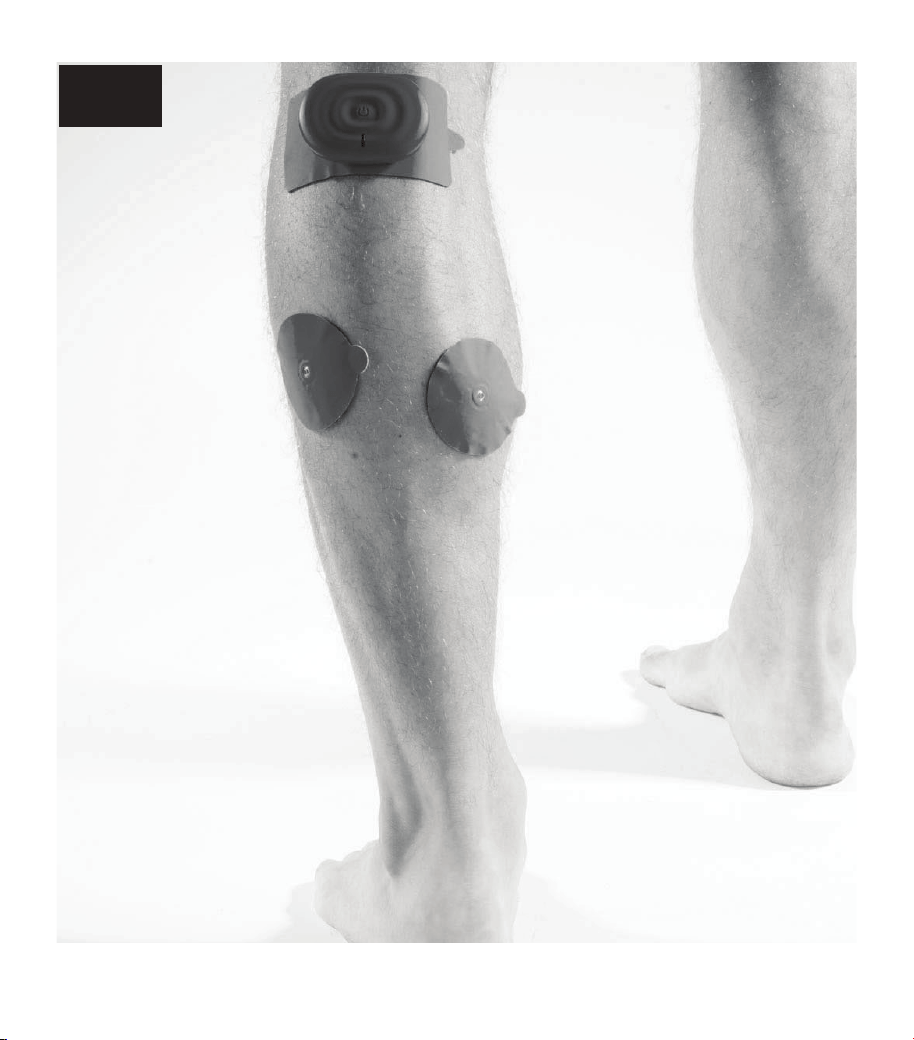
21
CALF
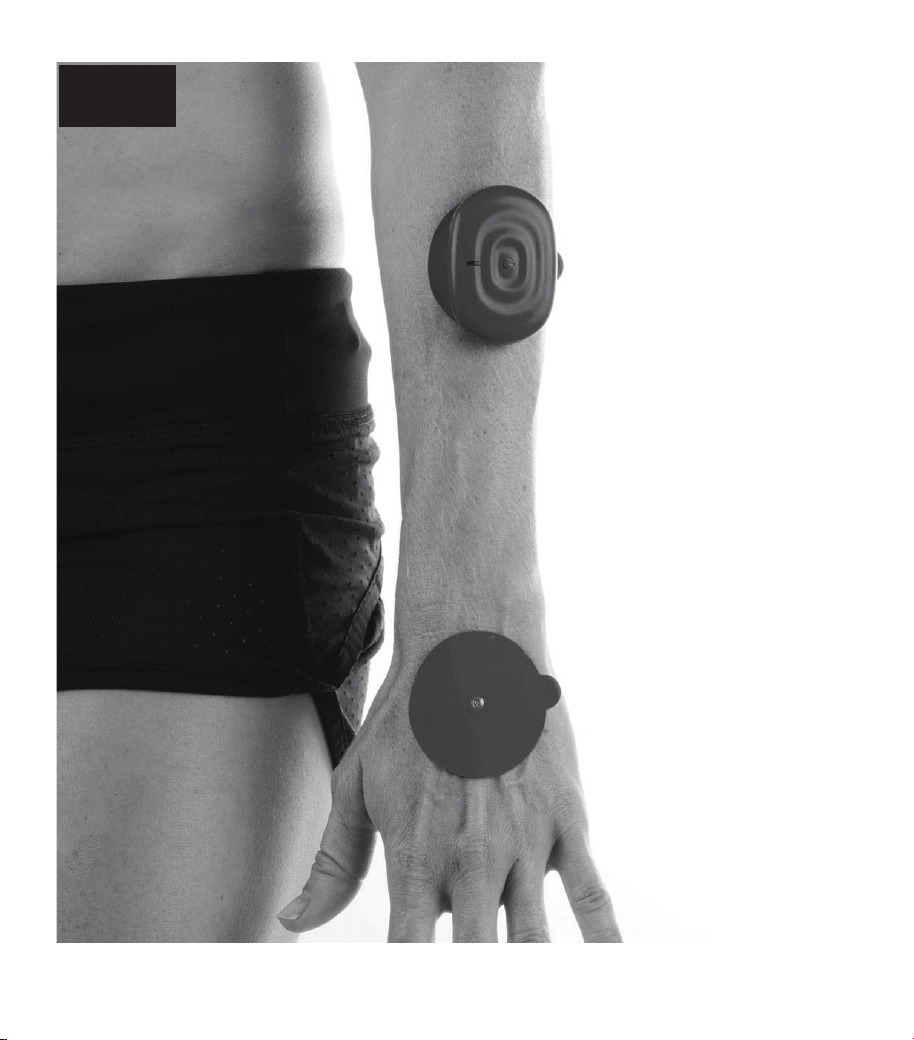
22
WRIST
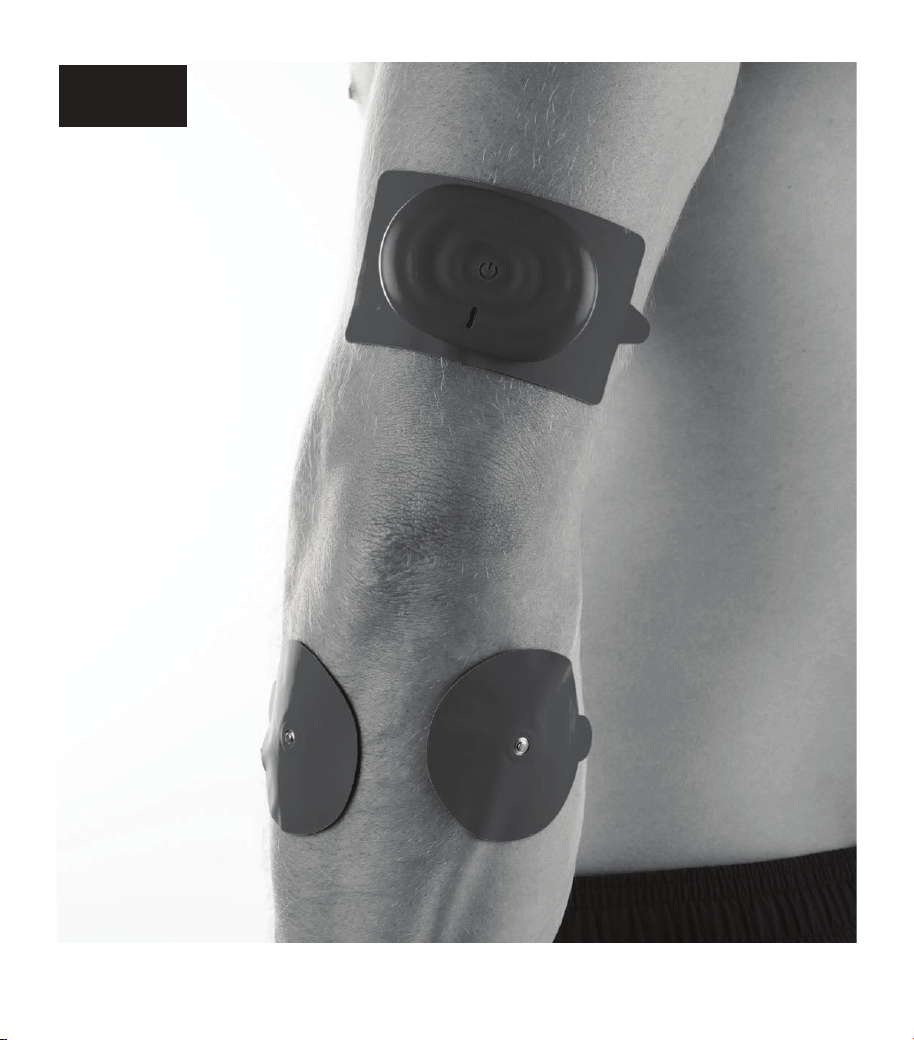
23
ELBOW
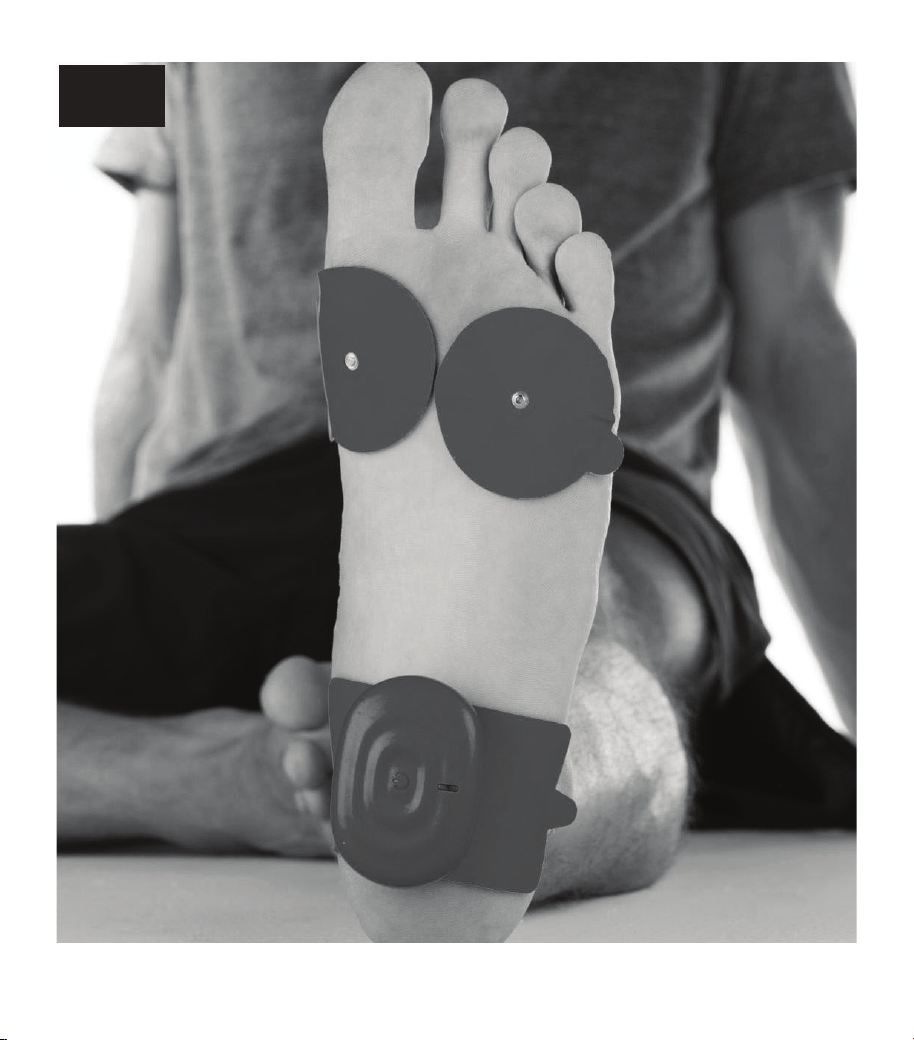
24
FOOT
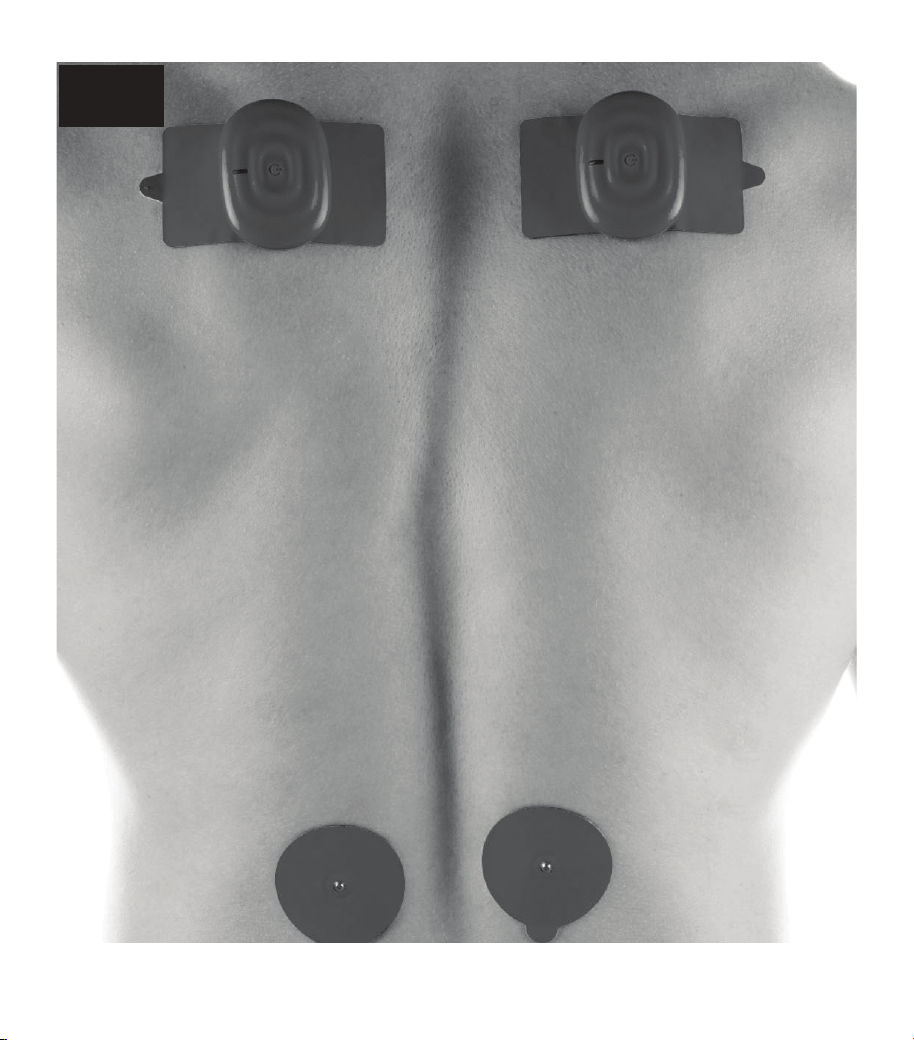
25
BACK
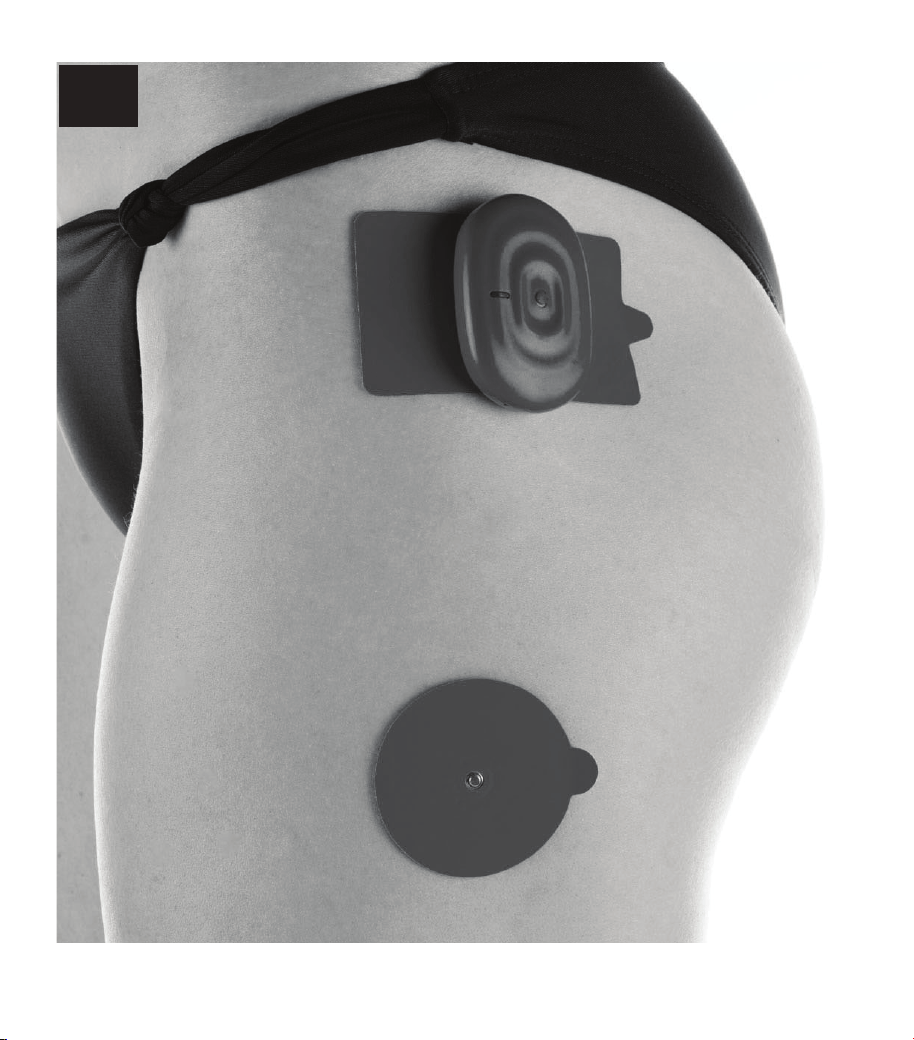
26
HIP
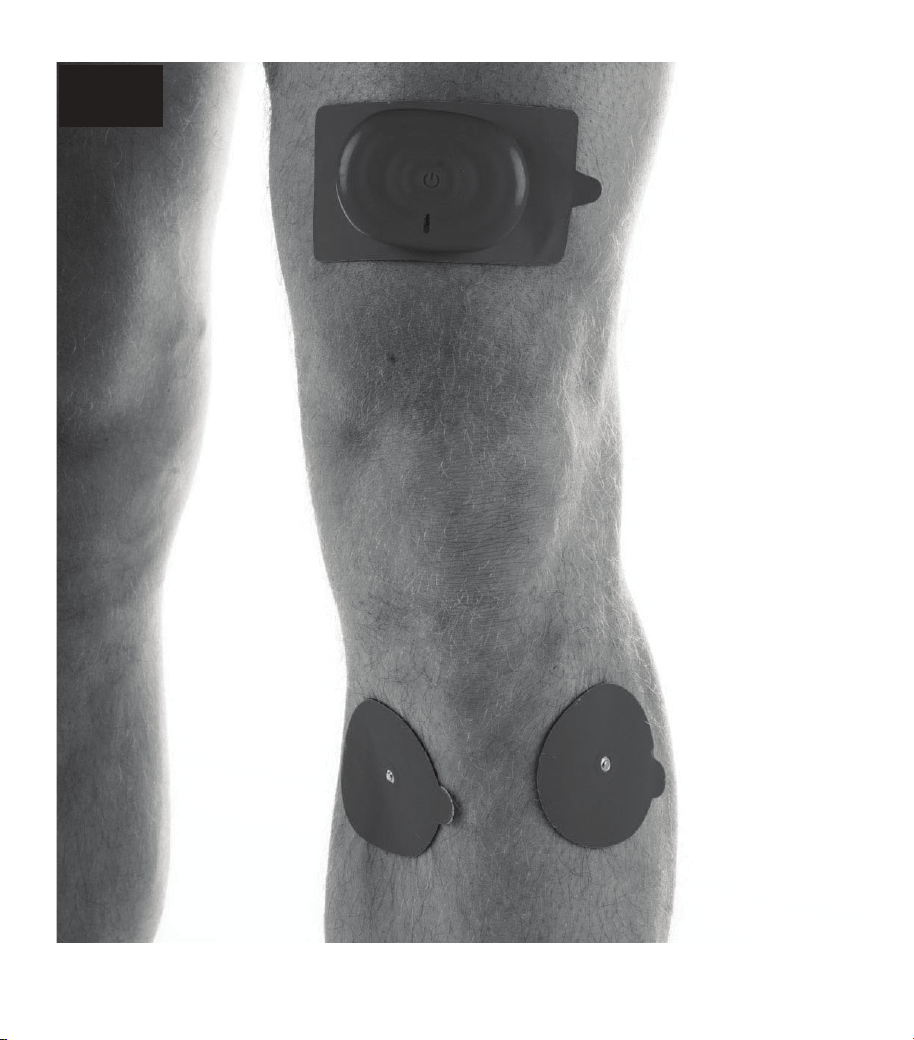
27
KNEE
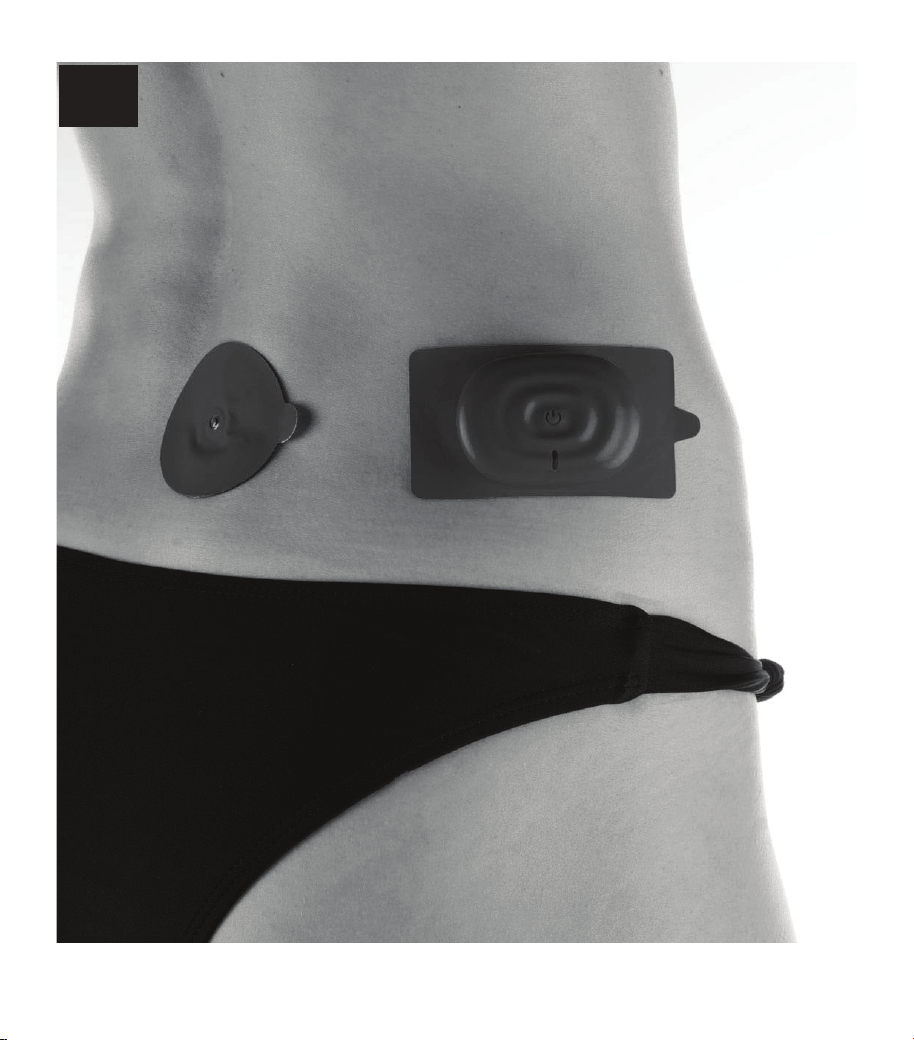
28
HIP
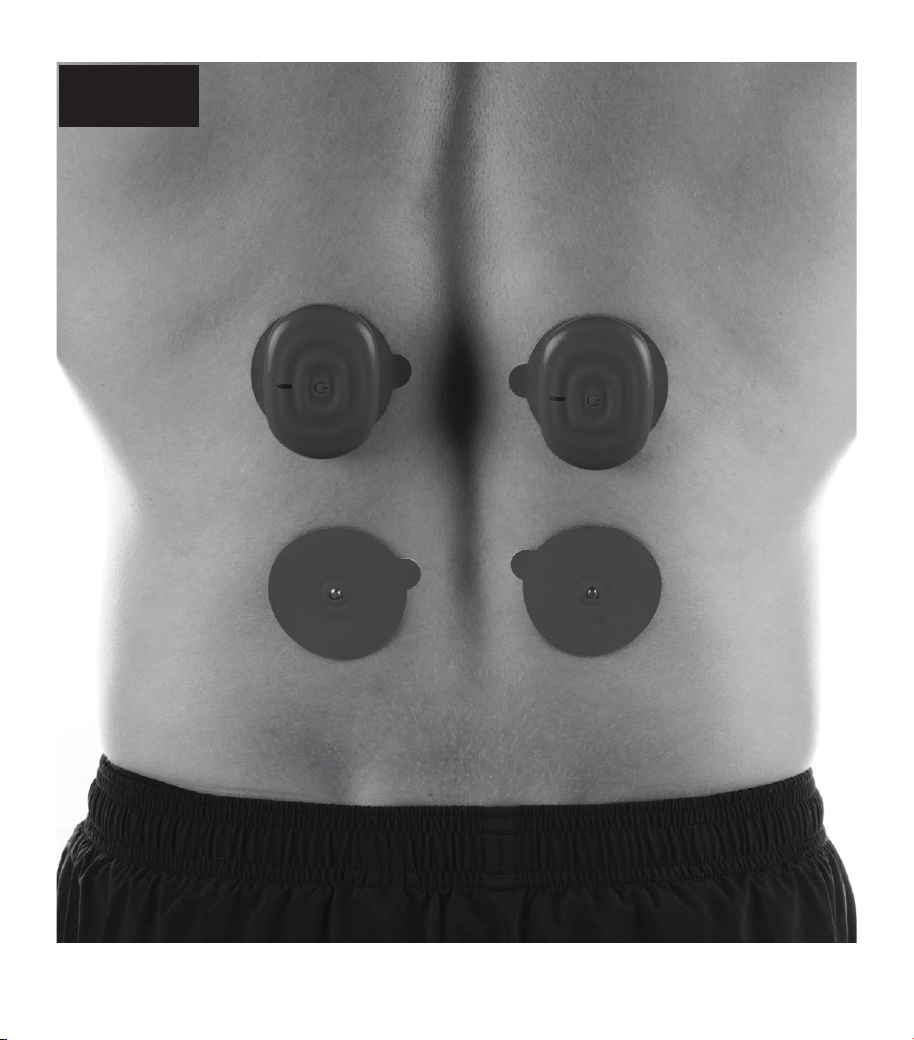
29
LUMBAR
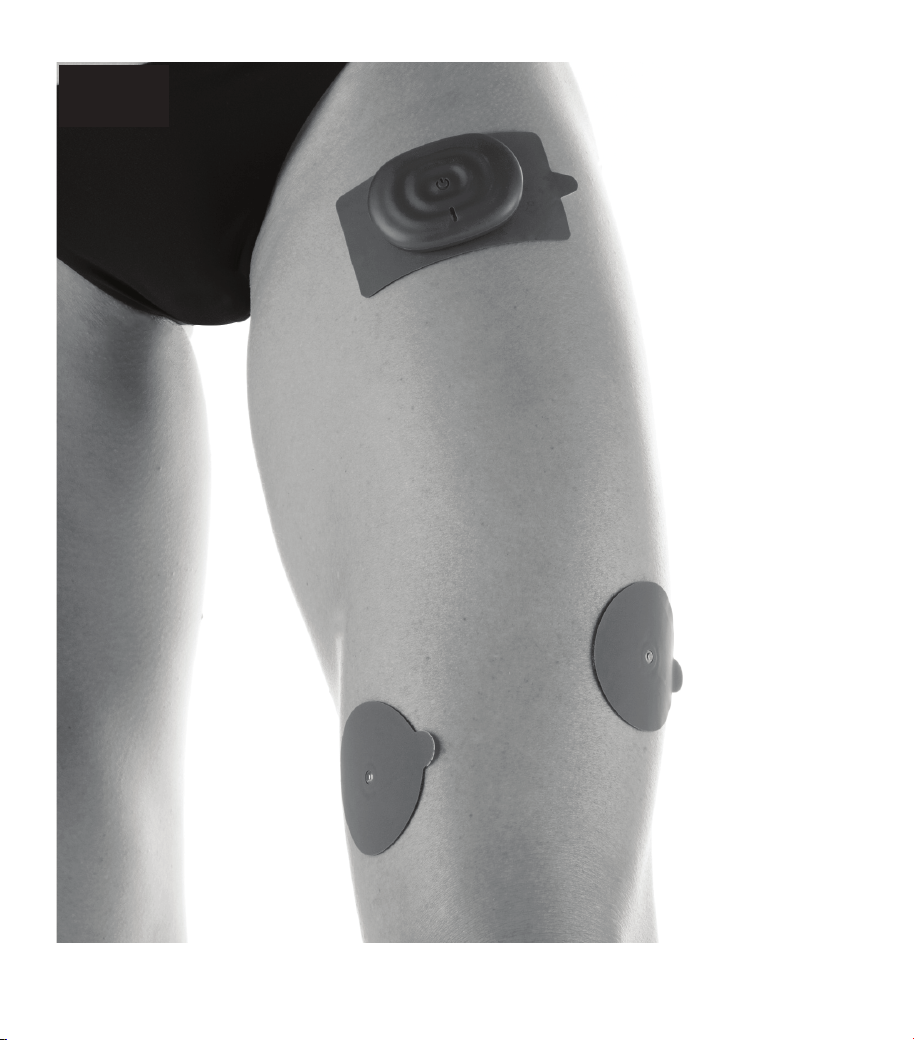
30
QUAD
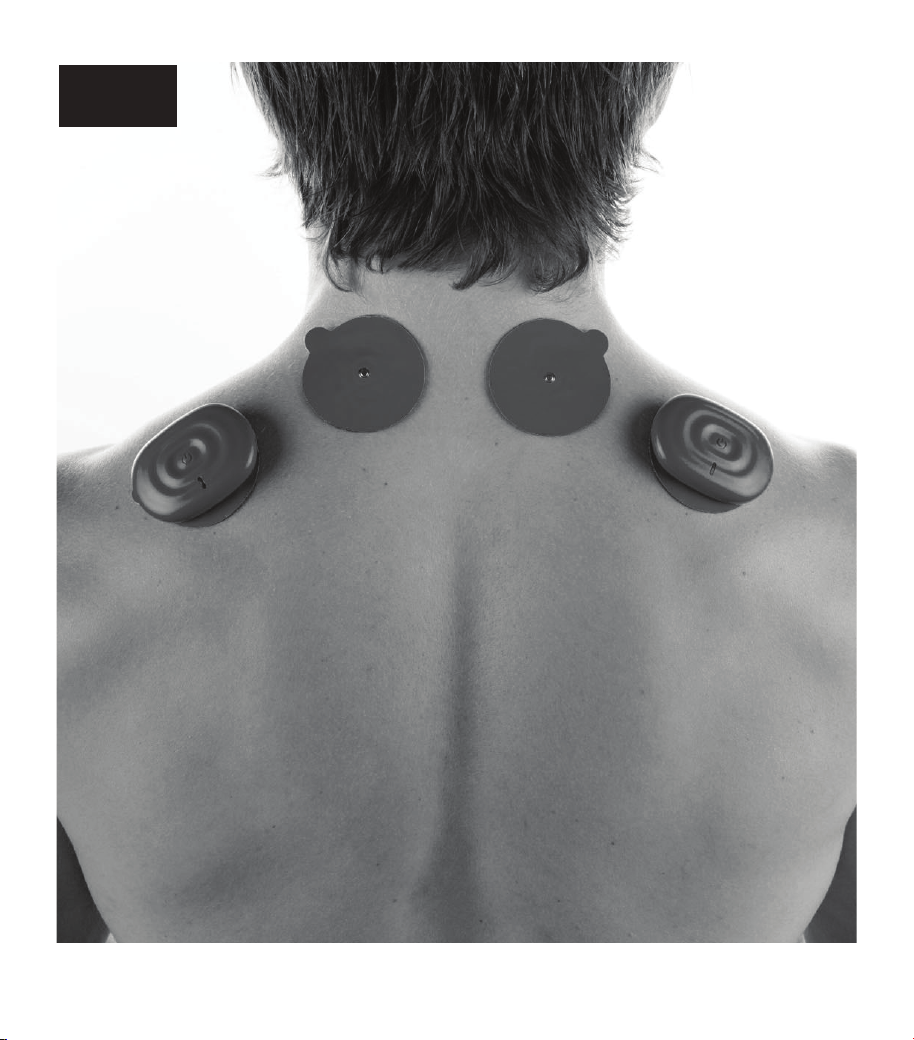
31
TRAPS
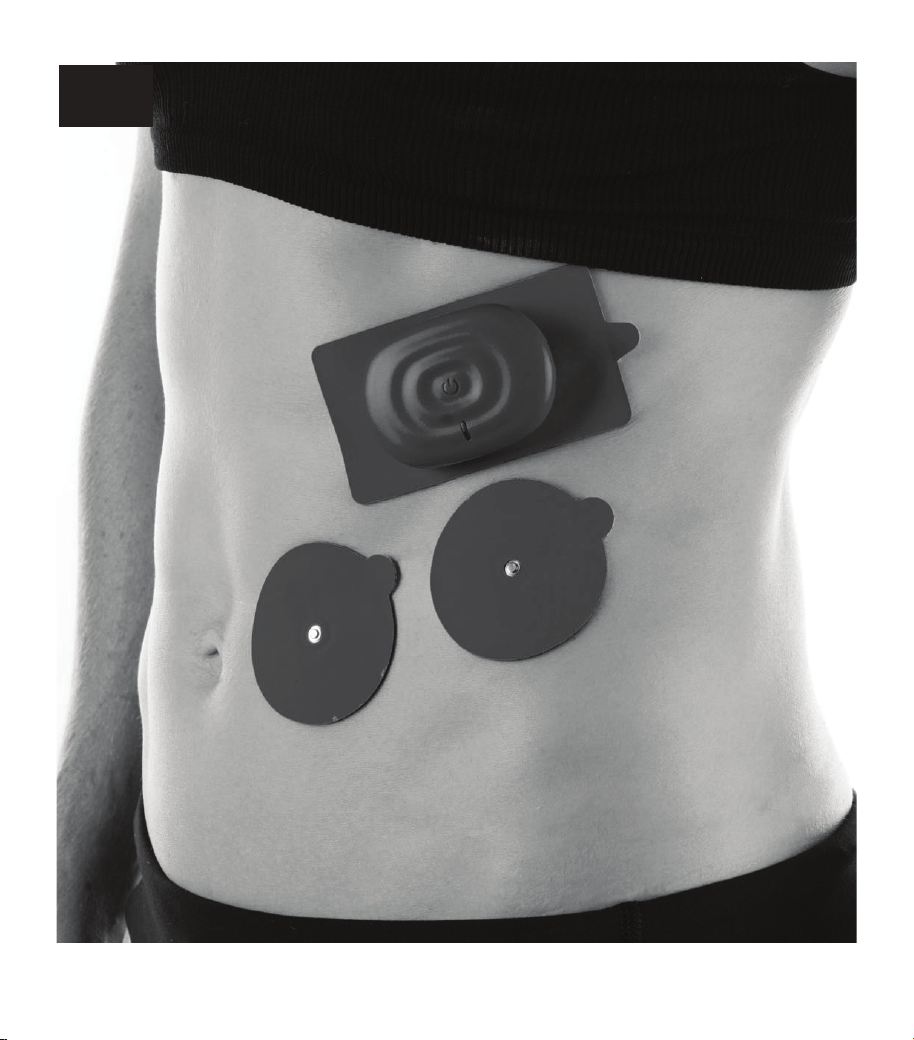
32
RIBS
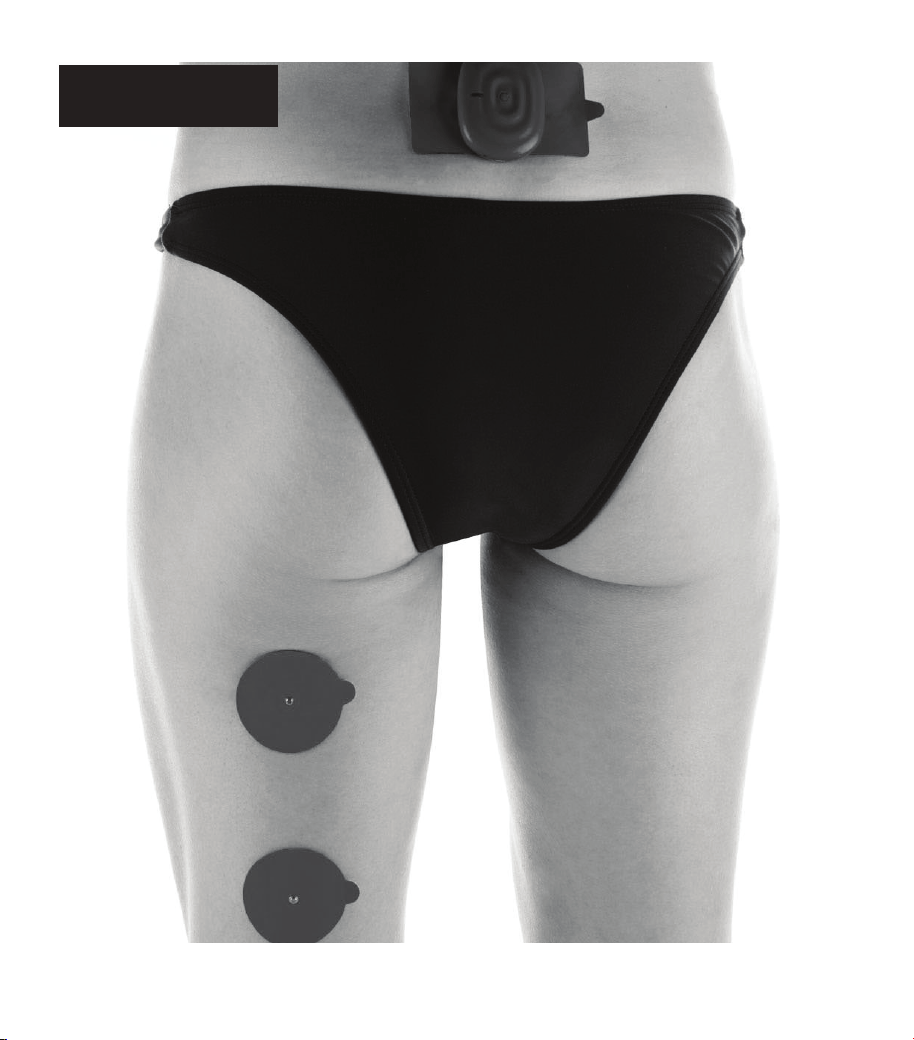
33
SCIATIC NERVE
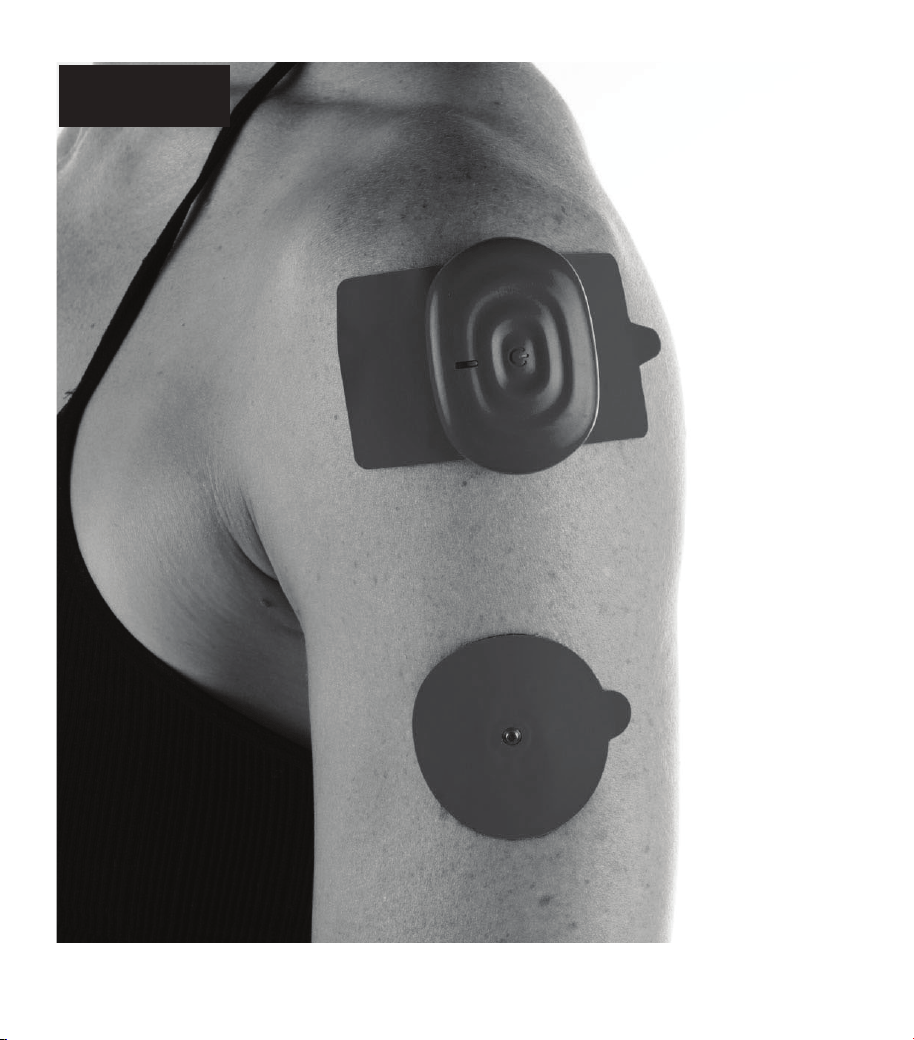
34
SHOULDER
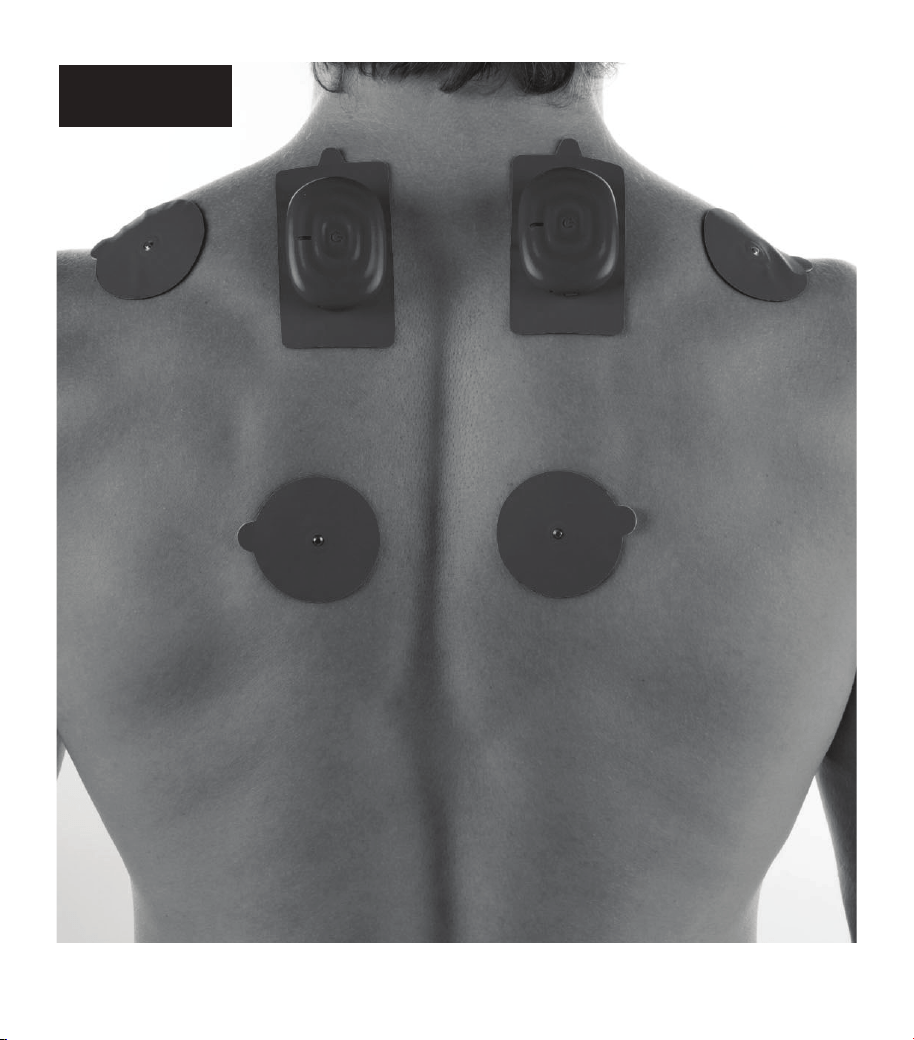
35
TRAPEZIUS
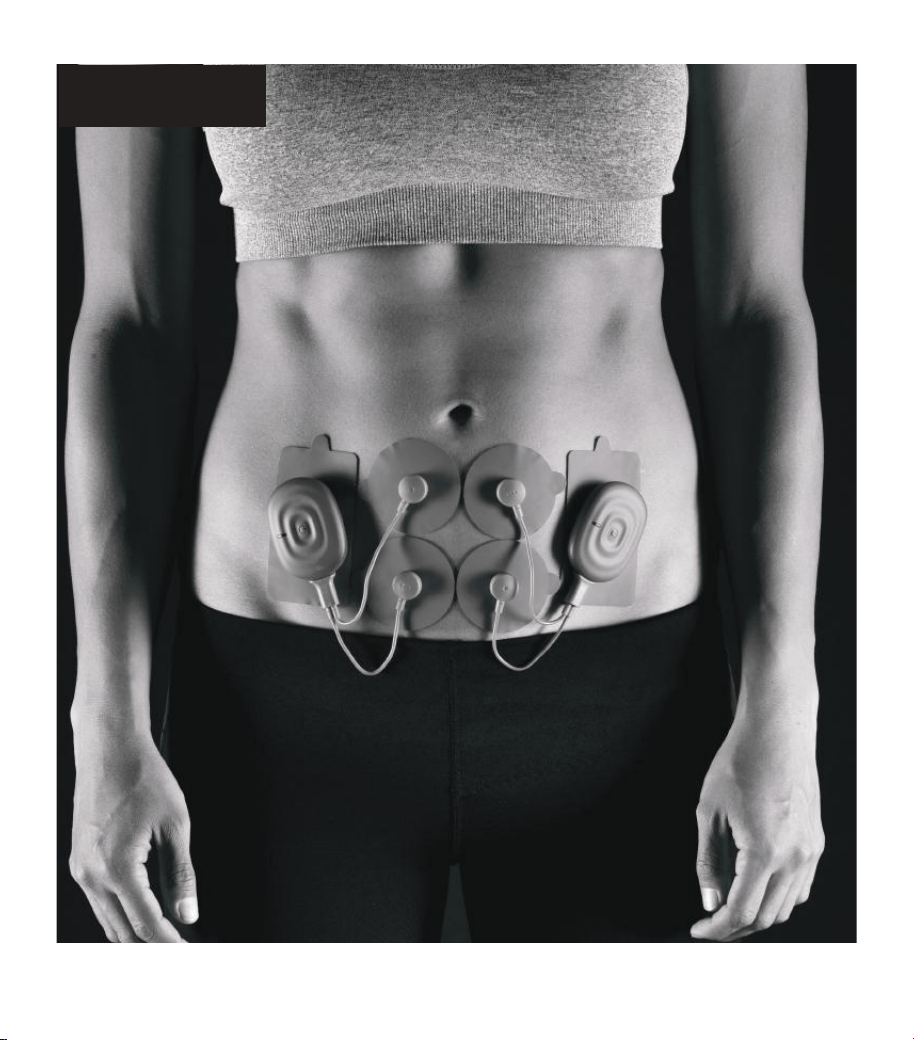
36
PERIOD PAINS
37
POWERDOT
MAINTENANCE
Your PowerDot pod(s) and accessories
should be kept in your PowerDot carry case
and carefully stored on a secure surface,
under the conditions listed in the Warnings
above.
Replace your electrode pads
after 20 uses as recommended.
Deteriorated & worn out pads
can cause major discomfort
during stimulation, impacting
the ef fectiveness of your
PowerDot(s) and even lead to
minor injury.
Cleaning: only clean PowerDot
device and electrode pads using
a dry soft cloth.
Keep PowerDot device and
electrode pads away from water.
Store them in a dry place, in
protective packaging or in the
PowerDot carry case.
PowerDot devices do not require calibration
or verification of performance parameters.
The characteristics are systemically verified
and validated for each device manufactured.
Those characteristics are stable and do not
vary when used under normal conditions.
The manufacturer states that PowerDot
cannot be repaired by personnel external
to the company. Any work of this nature
carried out by personnel not authorized
by the manufacturer will be classified as
tampering with the unit, thereby releasing
the manufacturer from any responsibility
with regards to the warranty and hazards
that the operator or user may be exposed to.
POWERDOT
WARRANTY
PowerDot is covered by a worldwide
warranty of 2 years, which comes into effect
on the date of purchase of the device (proof
of purchase is required).
The warranty does not apply to the electrode
pads and carry cases. Within the warranty
period, manufacturer will replace your
faulty PowerDot or accessories at no charge
(except shipping & handling fees in some
cases), provided that the product:
• Has been used for the intended purpose
and in the manner described in this
manual
• Has not been connected to an un
suitabl
e
pow
er source
• Has not been subjected to misuse or
neglect
• Has not been modified or repaired
• Has not been damaged further by shock
• Legal rights are not affected by this
warranty.

38
TECHNICAL
SPECIFICATIONS
All electrical specifications are given for an
impedance of 1000
per channel.
Battery: Lithium Polymer (LiPo) rechargeable
3.7 V, 210 mAh (~5–6 hours of continuous
stimulation on average parameters).
Charging Input: 5V through USB 2.0 or 3.0
connections (custom micro-USB to USB
charging cable is provided as part of the
package), I/P rating: 5Vdc 1-2.1A
Stimulation Channels: 2 independent,
optically isolated
S t i m u l a t i o n Wa v efo r m : B i - p ha si c
rectangular with zero mean (under load)
Supported Stimulation Frequency Range:
1-150 Hz
Supported Stimulation Pulse Width: 32-416
µs (for main/positive phase)
Maximum output voltage/amperage: 125
V/125 mA (+-5%)
Bluetooth: Built-in Bluetooth Low Energy
5.0
Electro-compatibility (EMC): ETSI EN 301
489-1/EN 301 489-17/EN 50385/EN 55011/
IEC 60601-
1-2
C RF Data:
• Operating Frequency Range: 2402 MHz-
2480 MHz (ISM range)
• Modulation Type: GFSK with AFH
• Peak Transmit Power: -15.86dBm (0.026
mW)
• Channel Spacing/Number of Channels: 2
MHz, 40 channels (3 for advertising, 37
for data)
• Antenna Type: PCB Antenna, 2 dBi (1.58
mW) gain
Mobile Application Compatibility:
• Android 6.0 Marshmallow (or later)
powered smart phone with Bluetooth
Smart Ready compatibility and High
Definition (or better) tou
ch screen
• Apple iPhone 4S/iP
od 5th Gen or newer
smart phone powered by iOS 8.0 (or
later)
Device Dimensions: 60.4x43.5x13.6 mm
Device Weight: 25 g
Environment Specifications:
• Operating/Storage/Transport:
Temperature from 0˚C to +40˚C
The maximum temperature of the
applied part could be 42.3˚C while
using in the 40˚C environment.
• Humidity: 10-90% RH
• Atmospheric pressure: from 700 hPa
to 1060 hPa
Product Expected Lifetime: 5 years
Housing: ABS & TPU
39
Limitations: product is not suitable for use in the environments with a high concentration
of oxygen and/or flammable liquids and/or flammable gas; do not use with equipment for
electro surgery or short-wave or microwave therapy; the device may be interfered by other
equipment, even if that other equipment complies with CISPR EMISSION requirements.
PowerDot PD-01M2 has been tested to the compliance with the following Emission and
Immunity standards:
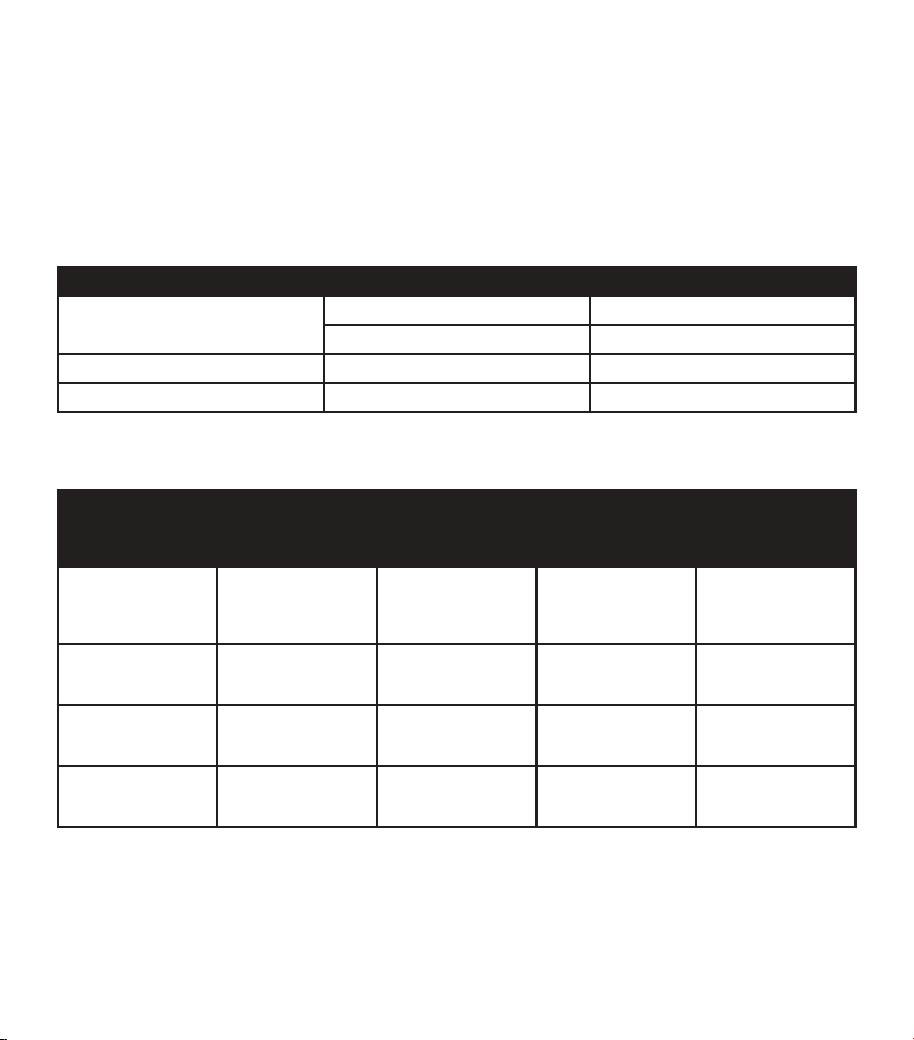
EMMISSION:
STANDARD ITEM REMARKS
CISPR 11: 2011 Conducted Class B
Radiated Class B
IEC 61000-3-2:2014 Harmonic current emissions
IEC 61000-3-3:2013 Voltage fluctuations & flicker
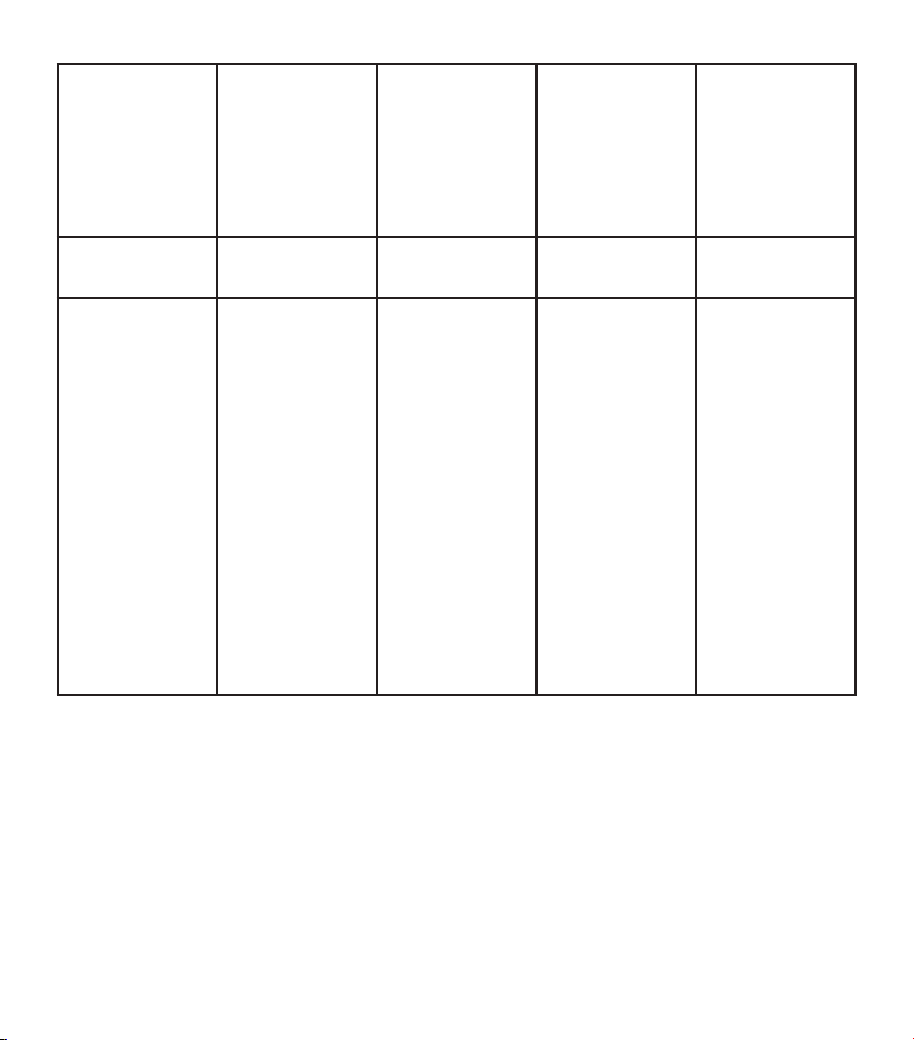
IMMUNITY:
STANDARD ITEM IEC 60601-1-2
Test Levels for
Home Healthcare
Environment
PowerDot PD-01 M2
Test Levels
REMARKS
IEC 61000-4-2:2008 ESD 8 kV contact;
2 kV, 4 kV,
8 kV, 15 kV air
2 kV, 4 kV, 8 kV
contact;
2 kV, 4 kV,
8 kV, 15 kV air
No performance
degradation
observed.
IEC 61000-4-3:2010 RS 10 V/m
80 MHz – 2.7 GHz
80% AM at 1 kHz
10 V/m
80 MHz – 5.785 GHz
80% AM at 1 kHz
No performance
degradation
observed.
IEC 61000-4-4:2012 EFT 2 kV
100 kHz repetition
frequency
2 kV
100 kHz repetition
frequency
No performance
de
gradation
observed.
IEC 61000-4-5:2014 Surge 0.5 kV, 1 kV 0.5 kV, 1 kV No performance
degradation
observed.
40
IEC 61000-4-6:2013 CS 3V 0.15 MHz – 80
MHz
6V in ISM and
amateur bands
between 0.15 MHz
and 80 MHz
80% AM at 1 kHz
10V 0.15 MHz – 80
MHz
80% AM at 1 kHz
No performance
degradation
observed.
IEC 61000-4-
8:2009
PFMF 30 A/m
50 Hz or 60 Hz
30 A/m
50 Hz
No performance
degradation
observed.
IEC 61000-4-
11:2004
Voltage dips &
voltage variations
Voltage Dips:
1) 0% UT; 0,5 cycle
at 0º. 45º, 90º, 135º,
225º, 270º, 315º
2) 0% UT; 1 cycle;
Single phase at 0º
3) 70% UT; 25/30
cycles; Single phase
at 0º
Voltage
Interru
ptions:
0% U
T; 250/300
cycle;
As on the previous
column
Voltage Dips:
1) No performance
degradation
observed
2) No performance
degradation
observed
3) No performance
degradation
observed
Voltage
Interruptions:
Performance
degradation (device
stopped charging)
has been observed
only during voltage
interruption testing,
but no degradation
observed after the
testing

41
BLUETOOTH
CONNECTIVITY
PowerDot stimulators are controlled through
Bluetooth Low Energy wireless radio
interface.
PowerDot is specifically designed to be
used together with PowerDot App, which
is supported for the selected Android and
iOS mobile devices.
SECURE PAIRING
Your PowerDot is paired with your mobile
phone using secure 8 digit numeric code
which, by design, prohibits any other mobile
phones or wireless devices to connect to
your PowerDot. Secure pairing takes place
during PowerDot activation process (see
Activating PowerDot above) and, once
your PowerDot becomes active, numeric
activation code is written into PowerDot’s
flash memory and gets verified by your
PowerDot App after every PowerDot restart.
All Bluetooth commands sent from your
mobile phone to PowerDot device are
securely encrypted using Bluetooth AES-
128 encryption protocol.
DISCONNECTIONS AND QUALITY
OF SERVICE
PowerDot Mobile App and PowerDot PD-
01M2 Bluetooth communication interface
are specifically designed to accommodate
temporarily and permanent Bluetooth
disconnections during a stimulation session.
PowerDot PD-01M2 device is capable of
independent execution of a pre-loaded
stimulation program with the latest intensity
values as well as implements automatic
Bluetooth re-connections.
In this regard, temporary radio frequency
interference (e.g. caused by co-existence
of multiple Bluetooth and/or Wi-Fi devices
in your range) should not affect the overall
efficiency and safety of your stimulation
session.
Due to hardware-level emergency stop
mechanisms (see Directions For Use),
Blu e tooth disconn e ctions of more
permanent nature should not affect the
safety of stimulation, and can only cause
temporary inconvenience by forcing you to
postpone your planned stimulation session
until a more favorable Bluetooth connectivity
environment is established.
Like any wireless device, PowerDot PD-
01M2 emits very low levels in the radio
frequency (RF) interval, and, is therefore
not likely to cause any interference with
nearby electronic equipment (e.g. radios,
computers, telephones, etc.).
PowerDot PD-01M2 is designed to withstand
foreseeable disturbances originating from
electrostatic discharges, mains supply
magnetic fields, or radio frequency
transmitters.
Despite this, it is not possible to guarantee
that the stimulator will not be affected by
strong RF (radio frequency) fields emitting
from other sources (such as in the proximity
42
of working microwave oven).
Try not to use PowerDot closer
than 1.5 meters to a working
microwave oven as radio
interference from a microwave
is likely to cause disconnection
between PowerDot and your
mobile phone.
TROUBLESHOOTING WIRELESS
CONNECTIVITY
If you run into issues with Bluetooth wireless
connectivity (e.g., your PowerDot PD-01M2
device becomes unresponsive to PowerDot
App commands during stimulation session
or you were not able to connect to your
PowerDot and initiate stimulation), try
terminating your stimulation session
manually by shortly pressing Power button
on your PowerDot device.
PowerDot App has built-in re-connection
and disconnection detection mechanisms
and, in most cases, it will re-connect to your
PowerDot shortly and allow you to resume
your session using the Resume button on
the screen.
If you fail to re-connect and resume your
session after several attempts, consider
stopping your stimulation session using
Stop button on the Stimulation Screen and
postponing it for later.
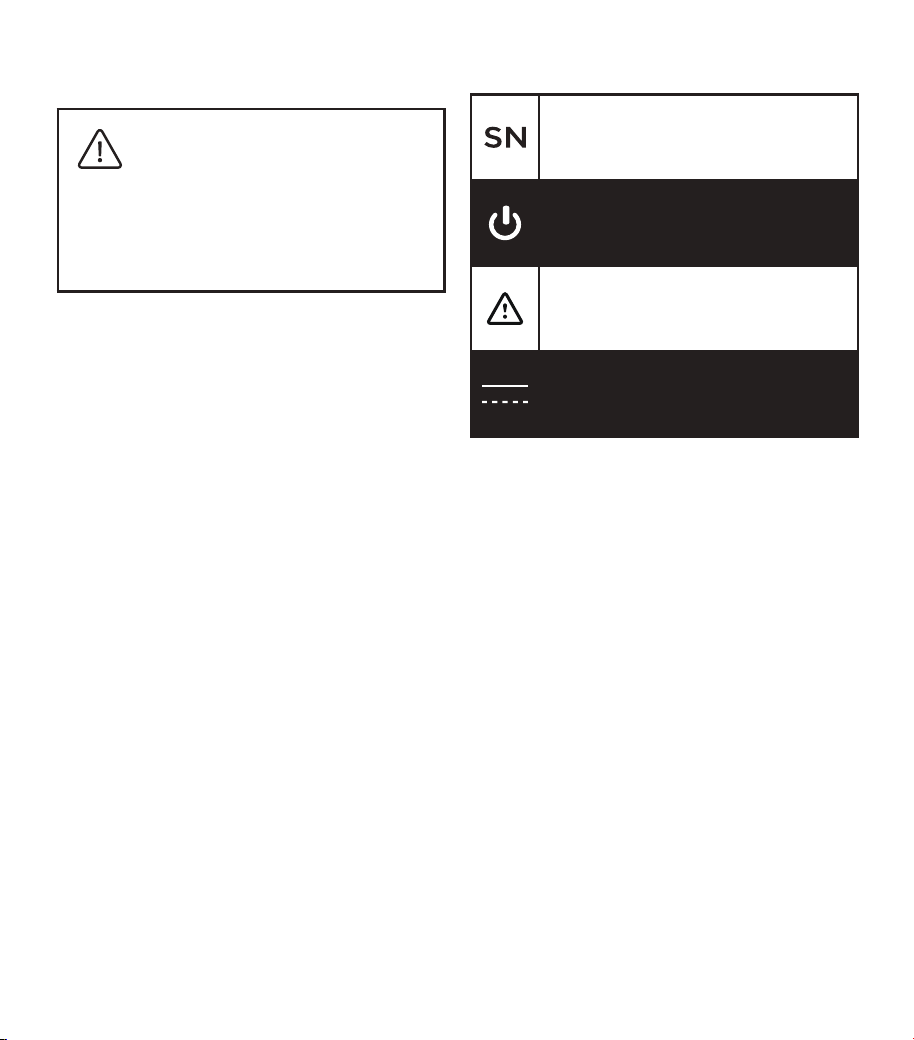
USED SYMBOLS
Serial Number
Stand by
Attention
Direct Current (DC)
The device complies with Part 15 of FCC.
Changes or modifications not expressly
approved by the party responsible for
compliance could void the user’s authority
to operate the equipment.
This equipment has been tested and found
to comply with the limits for a Class B digital
device, pursuant to Part 15 of the FCC Rules.
These limits are designed to provide
reasonable protection against harmful
interference in a residential installation.
Operation is subject to the following
conditions:
A. This device may not cause harmful
interference, and
B. This device must accept any
interference received, including
interference that may cause undesired
operation.
43
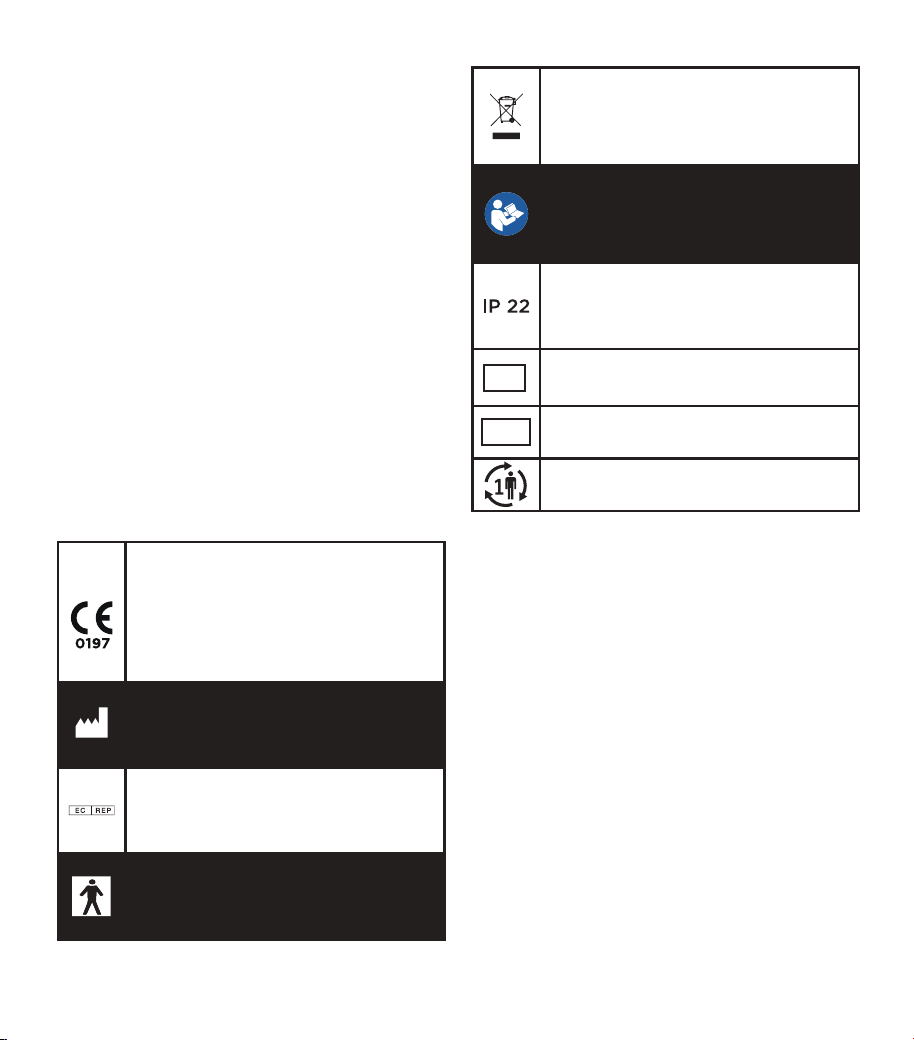
EU ONLY SYMBOLS:
The symbol on your PowerDot
unit is to indicate conformity
with the requirements of the
MDD (Medical Device Directive
93/42/EEC) & MDR (Medical
Device Regulation 2017/745)
Manufacturer
EU Authorized representative
Internally powered device Class
II with Type BF applied parts
Product subject to WEEE
regulations concerning separate
waste collection
Read the instructions for use
carefully before using this
device
I
An indication that the device
is a medical device
P22 IP Rating IP22
MANUFACTURER &
AFTER-SALE SERVICE
Smartmissmo Technologies Pte Ltd
4 Shenton Way, #15-01
SGX Centre II
Singapore 068807
E-Mail: service@powerdot.com
Phone: +1-844-479-7368
Contact for any assistance in setting up,
using, maintaining, or reporting unexpected
operation or events.
EU AUTHORISED
REPRESENTATIVE:
Medical Technology Promedt Consulting
GmbH,
Altenhostrasse 80, 66386, St. Ingbert,
Germany
MD
Unique Device Identification
for medical device
UDI
Pads intended for single-user
only for hygiene purposes
This equipment generates, uses and can
radiate radio frequency energy and, if not
installed and used in accordance with the
instructions, may cause harmful interference
to radio communications. However, there
is no guarantee that interference will not
occur in a particular installation.
If this equipment does cause harmful
interference to radio or television reception,
which can be determined by turning the
equipment off and on, the user is encouraged
to try to correct the interference by one or
more of the following measures:
-- Reorient or relocate the receiving antenna.
-- Increase the separation between the
equipment and receiver.
-- Connect the equipment into an outlet
on a circuit different from that to which
the receiver is connected.
-- Consult the dealer or an experienced
radio/TV technician for help.
44
stations, airports, hotels, hostels, pensions,
museums, theatres.
PowerDot PD-01M2 is designed to support
anticipated disturbance originating from
electrostatic discharge, magnetic fields
for the power supply or radiofrequency
emitters.
However, the performance of PowerDot
PD-01M2 device can still affected by radio
frequency fields originating from other
sources.
For more information about EMC emissions
and immunity, contact the manufacturer.
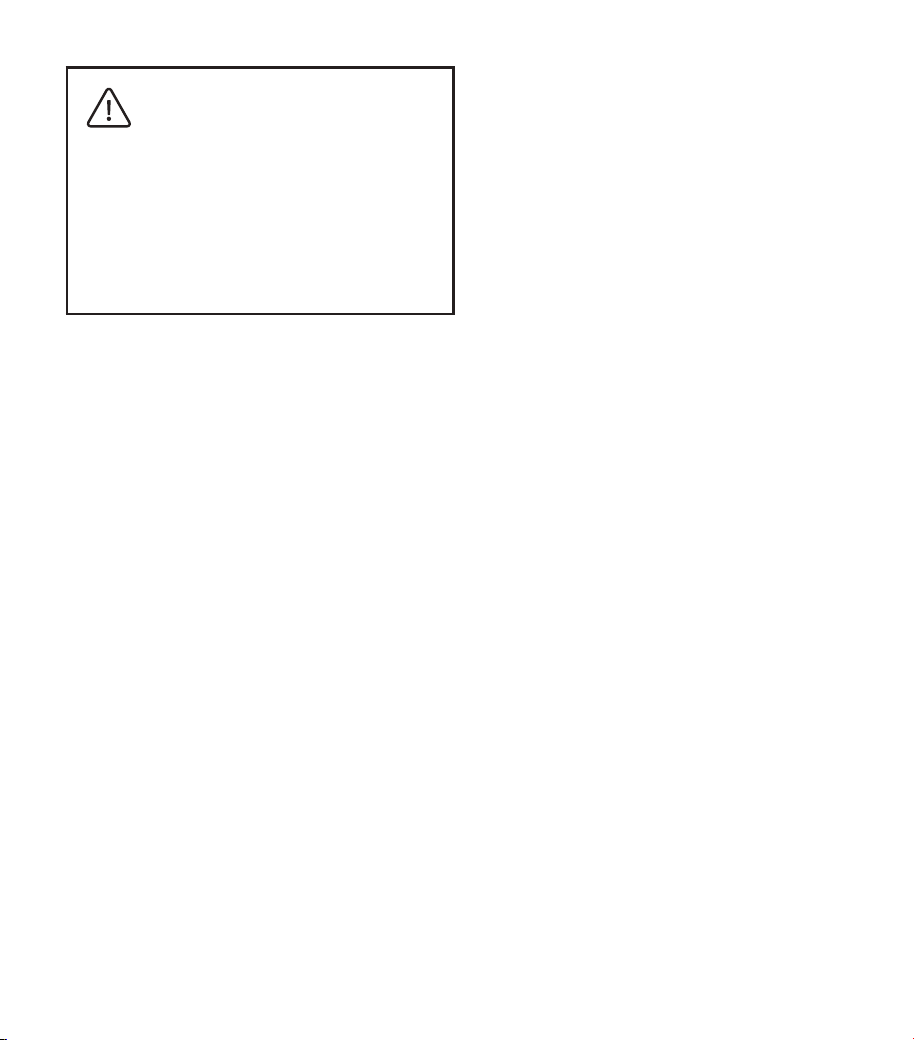
The device should not be used
adjacent to or stacked with
other equipment. If adjacent or
stacked use is necessary, the
device should be observed to
verify normal operation in the
configuration in which it will be
used.
Th e u se of a cc es so r ie s ,
t r a n sd u c e r s a n d ca b l e s
others than those specified or
provided by the manufacturer
of this equipment could result
in increased electromagnetic
e mi s si o ns o r de c re a se d
electromagnetic immunity of
this equipment and result in
improper operation.
Portable RF communications
e q u i p m e n t ( i n c l u d i n g
peripherals such as antenna
cables and external antennas)
should be used no closer than
30 cm (12 inches) to any part
of the PowerDot PD- 01M 2,
including cables specified by
the manufacturer. Otherwise,
degradation of the performance
of this equipment could result.
ELECTROMAGNETIC
COMPATIBILITY (EMC)
PowerDot PD-01M2 is designed to be used in
home healthcare environments in accordance
with the EMC safety standard IEC 60601-1-2
(4th Edition) and with limitations, defined by
the warnings and precautions in this manual
(e.g. operation near RFID emitters, working
microwave ovens, etc.).
Examples of home healthcare environment
include restaurants, cafes, shops, stores,
markets, schools, churches, libraries,
outdoors (streets, sidewalks, parks),
domiciles (residences, homes, nursing
homes), vehicles (cars, buses, trains, boats,
planes, helicopters), train stations, bus
45
session immediately by using one of the
methods provided in the Terminating
Stimulation section.
The following device function is considered
essential to the safety of the user: ability
to maintain consistent stimulation intensity
(amplitude), pulse frequency and pulse
waveform (both shape and width).
In case if the essential performance is
lost or degraded due to electromagnetic
disturbances, stimulation safety and
effectiven ess can be compromised.
Whenever the patient realizes unexpected
change in any of stimulation parameters,
it’s is advised to terminate the stimulation
PowerDot PD-01M2 battery
charging performance might
degrade in the environments with
frequent voltage interruptions
(when charging from the wall
adapter). To support consistent
and reliable charging, the usage
of uninterrupted power supply
(UPS) is highly recommended, if
operating in such environments.

46
CONTENTS
POWERDOT M2 3
INDICATIONS FOR USE 3
WARNINGS AND SAFETY GUIDELINES 5
DIRECTIONS FOR USE 10
GENERAL USAGE GUIDELINES 14
CHARGING POWERDOT 15
PATIENT STIMULATION PROGRAMS 16
BASIC TROUBLESHOOTING 19
PAD PLACEMENT GUIDELINES 20
POWERDOT MAINTENANCE 37
POWERDOT WARRANTY 37
TECHNICAL SPECIFICATIONS 38
BLUETOOTH CONNECTIVITY 41
MANUFACTURER & AFTER-SALE SERVICE 43
ELECTROMAGNETIC COMPATIBILITY (EMC) 44

1

VAB