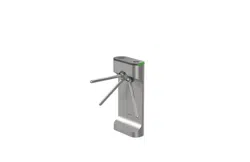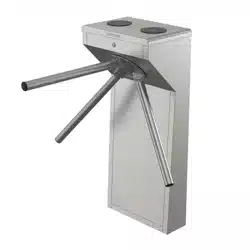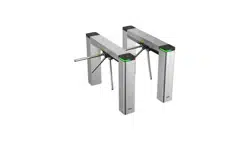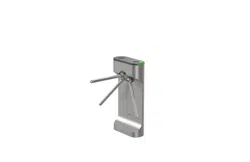

DS-K3G411LX Series Tripod Turnsle
User Manual

Legal Informaon
About this Document
●
This Document includes instrucons for using and managing the Product. Pictures, charts,
images and all other informaon hereinaer are for descripon and explanaon only.
●
The informaon contained in the Document is subject to change, without noce, due to
rmware updates or other reasons. Please nd the latest version of the Document at the
Hikvision website ( hps://www.hikvision.com ). Unless otherwise agreed, Hangzhou Hikvision
Digital Technology Co., Ltd. or its aliates (hereinaer referred to as "Hikvision") makes no
warranes, express or implied.
●
Please use the Document with the guidance and assistance of professionals trained in
supporng the Product.
About this Product
●
This product can only enjoy the aer-sales service support in the country or region where the
purchase is made.
●
If the product you choose is a video product, please scan the following QR code to obtain the
"Iniaves on the Use of Video Products", and read it carefully.
Acknowledgment of Intellectual Property Rights
●
Hikvision owns the copyrights and/or patents related to the technology embodied in the
Products described in this Document, which may include licenses obtained from third pares.
●
Any part of the Document, including text, pictures, graphics, etc., belongs to Hikvision. No part
of this Document may be excerpted, copied, translated, or modied in whole or in part by any
means without wrien permission.
●
and other Hikvision's trademarks and logos are the properes of Hikvision in
various jurisdicons.
●
Other trademarks and logos menoned are the properes of their respecve owners.
LEGAL DISCLAIMER
●
TO THE MAXIMUM EXTENT PERMITTED BY APPLICABLE LAW, THIS DOCUMENT AND THE
PRODUCT DESCRIBED, WITH ITS HARDWARE, SOFTWARE AND FIRMWARE, ARE PROVIDED "AS
IS" AND "WITH ALL FAULTS AND ERRORS". HIKVISION MAKES NO WARRANTIES, EXPRESS OR
DS-K3G411LX Series Tripod Turnsle User Manual
i

IMPLIED, INCLUDING WITHOUT LIMITATION, MERCHANTABILITY, SATISFACTORY QUALITY, OR
FITNESS FOR A PARTICULAR PURPOSE. THE USE OF THE PRODUCT BY YOU IS AT YOUR OWN RISK.
IN NO EVENT WILL HIKVISION BE LIABLE TO YOU FOR ANY SPECIAL, CONSEQUENTIAL,
INCIDENTAL, OR INDIRECT DAMAGES, INCLUDING, AMONG OTHERS, DAMAGES FOR LOSS OF
BUSINESS PROFITS, BUSINESS INTERRUPTION, OR LOSS OF DATA, CORRUPTION OF SYSTEMS, OR
LOSS OF DOCUMENTATION, WHETHER BASED ON BREACH OF CONTRACT, TORT (INCLUDING
NEGLIGENCE), PRODUCT LIABILITY, OR OTHERWISE, IN CONNECTION WITH THE USE OF THE
PRODUCT, EVEN IF HIKVISION HAS BEEN ADVISED OF THE POSSIBILITY OF SUCH DAMAGES OR
LOSS.
●
YOU ACKNOWLEDGE THAT THE NATURE OF THE INTERNET PROVIDES FOR INHERENT SECURITY
RISKS, AND HIKVISION SHALL NOT TAKE ANY RESPONSIBILITIES FOR ABNORMAL OPERATION,
PRIVACY LEAKAGE OR OTHER DAMAGES RESULTING FROM CYBER-ATTACK, HACKER ATTACK,
VIRUS INFECTION, OR OTHER INTERNET SECURITY RISKS; HOWEVER, HIKVISION WILL PROVIDE
TIMELY TECHNICAL SUPPORT IF REQUIRED.
●
YOU AGREE TO USE THIS PRODUCT IN COMPLIANCE WITH ALL APPLICABLE LAWS, AND YOU ARE
SOLELY RESPONSIBLE FOR ENSURING THAT YOUR USE CONFORMS TO THE APPLICABLE LAW.
ESPECIALLY, YOU ARE RESPONSIBLE, FOR USING THIS PRODUCT IN A MANNER THAT DOES NOT
INFRINGE ON THE RIGHTS OF THIRD PARTIES, INCLUDING WITHOUT LIMITATION, RIGHTS OF
PUBLICITY, INTELLECTUAL PROPERTY RIGHTS, OR DATA PROTECTION AND OTHER PRIVACY
RIGHTS. YOU SHALL NOT USE THIS PRODUCT FOR ANY PROHIBITED END-USES, INCLUDING THE
DEVELOPMENT OR PRODUCTION OF WEAPONS OF MASS DESTRUCTION, THE DEVELOPMENT OR
PRODUCTION OF CHEMICAL OR BIOLOGICAL WEAPONS, ANY ACTIVITIES IN THE CONTEXT
RELATED TO ANY NUCLEAR EXPLOSIVE OR UNSAFE NUCLEAR FUEL-CYCLE, OR IN SUPPORT OF
HUMAN RIGHTS ABUSES.
●
IN THE EVENT OF ANY CONFLICTS BETWEEN THIS DOCUMENT AND THE APPLICABLE LAW, THE
LATTER PREVAILS.
Data Protecon
●
To protect data, the development of Hikvision Products incorporates privacy by design
principles. For example, for Products with facial recognion features, biometrics data is stored in
your Products with encrypon method; for ngerprint Products, only ngerprint template will be
saved, which is impossible to reconstruct a ngerprint image.
●
As a data controller/processor, you may process personal data, including collecon, storage, use,
processing, disclosure, deleon, etc. You are advised to pay aenon to and comply with
applicable laws and regulaons related to the protecon of personal data, including without
limitaon, conducng security controls to safeguard personal data, such as, implemenng
reasonable administrave and physical security controls, conduct periodic reviews and the
assessments of the eecveness of your security controls.
© Hangzhou Hikvision Digital Technology Co., Ltd. All rights reserved.
DS-K3G411LX Series Tripod Turnsle User Manual
ii
Regulatory Informaon
FCC Informaon
Please take aenon that changes or modicaon not expressly approved by the party responsible
for compliance could void the user’s authority to operate the equipment.
FCC compliance: This equipment has been tested and found to comply with the limits for a Class A
digital device, pursuant to part 15 of the FCC Rules. These limits are designed to provide
reasonable protecon against harmful interference when the equipment is operated in a
commercial environment. This equipment generates, uses, and can radiate radio frequency energy
and, if not installed and used in accordance with the instrucon manual, may cause harmful
interference to radio communicaons. Operaon of this equipment in a residenal area is likely to
cause harmful interference in which case the user will be required to correct the interference at his
own expense.
FCC Condions
This device complies with part 15 of the FCC Rules. Operaon is subject to the following two
condions:
1. This device may not cause harmful interference.
2. This device must accept any interference received, including interference that may cause
undesired operaon.
EU Conformity Statement
This product and - if applicable - the supplied accessories too are marked with "CE"
and comply therefore with the applicable harmonized European standards listed
under the EMC Direcve 2014/30/EU, RE Direcve 2014/53/EU,the RoHS Direcve
2011/65/EU
2012/19/EU (WEEE direcve): Products marked with this symbol cannot be disposed
of as unsorted municipal waste in the European Union. For proper recycling, return
this product to your local supplier upon the purchase of equivalent new equipment,
or dispose of it at designated collecon points. For more informaon see:
www.recyclethis.info
2006/66/EC (baery direcve): This product contains a baery that cannot be
disposed of as unsorted municipal waste in the European Union. See the product
documentaon for specic baery informaon. The baery is marked with this
symbol, which may include leering to indicate cadmium (Cd), lead (Pb), or mercury
(Hg). For proper recycling, return the baery to your supplier or to a designated
collecon point. For more informaon see:www.recyclethis.info
DS-K3G411LX Series Tripod Turnsle User Manual
iii

This device complies with Industry Canada licence-exempt RSS standard(s). Operaon is subject to
the following two condions:
(1) this device may not cause interference, and
(2) this device must accept any interference, including interference that may cause undesired
operaon of the device.
Le présent appareil est conforme aux CNR d'Industrie Canada applicables aux appareils
radioexempts de licence. L'exploitaon est autorisée aux deux condions suivantes :
(1) l'appareil ne doit pas produire de brouillage, et
(2) l'ulisateur de l'appareil doit accepter tout brouillage radioélectrique subi, même si le
brouillage est suscepble d'en compromere le fonconnement.
COMPLIANCE NOTICE
The thermal series products might be subject to export controls in various countries or regions,
including without limitaon, the United States, European Union, United Kingdom and/or other
member countries of the Wassenaar Arrangement. Please consult your professional legal or
compliance expert or local government authories for any necessary export license requirements if
you intend to transfer, export, re-export the thermal series products between dierent countries.
DS-K3G411LX Series Tripod Turnsle User Manual
iv

Safety Instrucon
These instrucons are intended to ensure that user can use the product correctly to avoid danger
or property loss.
The precauon measure is divided into Dangers and Cauons:
Dangers: Neglecng any of the warnings may cause serious injury or death.
Cauons: Neglecng any of the cauons may cause injury or equipment damage.
Dangers: Follow these safeguards to prevent
serious injury or death.
Cauons: Follow these precauons to prevent
potenal injury or material damage.
Danger:
●
In the use of the product, you must be in strict compliance with the electrical safety regulaons
of the naon and region.
●
The equipment must be connected to an earthed mains socket-outlet.
●
Shock hazard! Disconnect all power sources before maintenance.
●
Do not touch the bare metal contacts of the inlets aer the circuit breaker is turned o.
Electricity sll exists.
●
indicates hazardous live and the external wiring connected to the terminals requires
installaon by an instructed person.
●
Keep body parts away from fan blades. Disconnect the power source during servicing.
●
Keep body parts away from motors. Disconnect the power source during servicing.
●
To prevent possible hearing damage, do not listen at high volume levels for long periods.
●
All the electronic operaon should be strictly compliance with the electrical safety regulaons,
re prevenon regulaons and other related regulaons in your local region.
●
Do not connect several devices to one power adapter as adapter overload may cause over-heat
or re hazard.
●
Please make sure that the power has been disconnected before you wire, install or dismantle the
device.
If the top caps should be open and the device should be powered on for maintenance, make
sure:
1. Power o the fan to prevent the operator from geng injured accidentally.
2. Do not touch bare high-voltage components.
3. Make sure the switch’s wiring sequence is correct aer maintenance.
●
Please make sure that the power has been disconnected before you wire, install or dismantle the
device.
●
When the product is installed on wall or ceiling, the device shall be rmly xed.
●
If smoke, odors or noise rise from the device, turn o the power at once and unplug the power
cable, and then please contact the service center.
DS-K3G411LX Series Tripod Turnsle User Manual
v

●
Do not ingest baery, Chemical Burn Hazard.
This product contains a coin/buon cell baery. If the coin/buon cell baery is swallowed, it
can cause severe internal burns in just 2 hours and can lead to death.
Keep new and used baeries away from children. If the baery compartment does not close
securely, stop using the product and keep it away from children. If you think baeries might have
been swallowed or placed inside any part of the body, seek immediate medical aenon.
●
If the product does not work properly, please contact your dealer or the nearest service center.
Never aempt to disassemble the device yourself. (We shall not assume any responsibility for
problems caused by unauthorized repair or maintenance.)
●
Operaon of this equipment in a residenal environment could cause radio interference.
●
The device do not support the PoE network switch. Connecng with the PoE network switch may
damage the control board.
Cauons:
●
The equipment shall not be exposed to dripping or splashing and that no objects lled with
liquids, such as vases, shall be placed on the equipment.
●
Ensure correct wiring of the terminals for connecon to an AC mains supply.
●
The equipment has been designed, when required, modied for connecon to an IT power
distribuon system.
●
+ idenes the posive terminal(s) of equipment which is used with, or generates direct current.
+ idenes the negave terminal(s) of equipment which is used with, or generates direct
current.
●
No naked ame sources, such as lighted candles, should be placed on the equipment.
●
This equipment is suitable for mounng on concrete or other non-combusble surface only.
●
Install the equipment according to the instrucons in this manual.
●
To prevent injury, this equipment must be securely aached to the oor/wall in accordance with
the installaon instrucons.
●
The main element of the turnsle is stainless steel, which is rustless (anoxidant) and corrosion
resistant (The an corrosion ability in the medium of acid, alkali, and salt). In order to keep the
stainless steel from being oxidized or corroded, you should clean and care the turnsle surface
periodically.
The instrucons and ps for maintaining the turnsle are as follows:
○
Select dierent stainless steel types according to the variety of the environments. You can
select 304 stainless steel for common circumstances and 316 stainless steel for the scenarios
of seasides and chemical plants.
○
Keep the device surface clean and dry.
○
Use non-woven cloth and ethyl alcohol to clean the dirt on the device surface.
○
Use sourcing pad (do not use mesh cleaning ball) to clean the rust on the device surface by
following the wire drawing on the stainless steel. And then use non-woven cloth and stainless
steel cleaner to wipe the device surface.
○
Clean and maintain the device by using non-woven cloth and stainless steel cleaner
periodically. It is suggest to clean the device every month in common circumstances and every
week for severe environments (seaside and chemical plants for instance.
DS-K3G411LX Series Tripod Turnsle User Manual
vi

●
Do not drop the device or subject it to physical shock, and do not expose it to high
electromagnesm radiaon. Avoid the equipment installaon on vibraons surface or places
subject to shock (ignorance can cause equipment damage).
●
Do not place the device in extremely hot (refer to the specicaon of the device for the detailed
operang temperature), cold, dusty or damp locaons, and do not expose it to high
electromagnec radiaon.
●
The device cover for indoor use shall be kept from rain and moisture.
●
Exposing the equipment to direct sun light, low venlaon or heat source such as heater or
radiator is forbidden (ignorance can cause re danger).
●
Do not aim the device at the sun or extra bright places. A blooming or smear may occur
otherwise (which is not a malfuncon however), and aecng the endurance of sensor at the
same me.
●
Please use the provided glove when open up the device cover, avoid direct contact with the
device cover, because the acidic sweat of the ngers may erode the surface coang of the device
cover.
●
Please use a so and dry cloth when clean inside and outside surfaces of the device cover, do
not use alkaline detergents.
●
Please keep all wrappers aer unpack them for future use. In case of any failure occurred, you
need to return the device to the factory with the original wrapper. Transportaon without the
original wrapper may result in damage on the device and lead to addional costs.
●
Improper use or replacement of the baery may result in hazard of explosion. Replace with the
same or equivalent type only. Dispose of used baeries according to the instrucons provided by
the baery manufacturer.
●
Biometric recognion products are not completely applicable to an-spoong environments. If
you require a higher security level, use mulple authencaon modes.
●
Do not stay in the lane when the device is reboong.
●
RISK OF EXPLOSION IF BATTERY IS REPLACED BY AN INCORRECT TYPE. DISPOSE OF USED
BATTERIES ACCORDING TO THE INSTRUCTIONS.
●
SUITABLE FOR MOUNTING ON CONCRETE OR OTHER NON-COMBUSTIBLE SURFACE ONLY.
●
The instrucons shall require connecon of the equipment protecve earthing conductor to the
installaon protecve earthing conductor.
DS-K3G411LX Series Tripod Turnsle User Manual
vii

Available Models
Product Name Model
Tripod Turnsle DS-K3G411LX
DS-K3G411LX Series Tripod Turnsle User Manual
viii

Contents
Chapter 1 Overview .................................................................................................................... 1
1.1 Introducon ........................................................................................................................... 1
1.2 Main Features ........................................................................................................................ 1
Chapter 2 System Wiring ............................................................................................................ 3
Chapter 3 Installaon ................................................................................................................. 4
3.1 Disassemble Pedestals ........................................................................................................... 4
3.2 Install Pedestals ..................................................................................................................... 4
Chapter 4 General Wiring ........................................................................................................... 7
4.1 Components Introducon ...................................................................................................... 7
4.2 Wiring Electric Supply ............................................................................................................ 8
4.3 Terminal Descripon ............................................................................................................ 10
4.3.1 Lane Control Board Terminal Descripon ................................................................... 10
4.3.2 General Wiring ............................................................................................................ 10
Chapter 5 Device Sengs via Buon ........................................................................................ 12
5.1 Conguraon via Buon ...................................................................................................... 13
5.2 Pair Keyfob via Buon .......................................................................................................... 15
Appendix A. Buon Conguraon Descripon ......................................................................... 16
Appendix B. Event and Alarm Type ........................................................................................... 19
Appendix C. Table of Audio Index Related Content ................................................................... 20
Appendix D. Communicaon Matrix and Device Command ...................................................... 21
DS-K3G411LX Series Tripod Turnsle User Manual
ix
Chapter 1 Overview
1.1 Introducon
The tripod turnsle is designed to detect unauthorized entrance or exit. By adopng the turnsle
integratedly with the access control system, person should authencate to pass through the lane
via swiping IC or ID card, scanning QR code, etc. It is widely used in aracons, stadiums,
construcon sites, residences, etc.
1.2 Main Features
●
32-bit high-speed processor
●
Remaining open/closed mode selectable
●
Bidireconal (Entering/Exing) lane
The barrier opening and closing speed can be congured according to the visitor ow
●
Self-detecon, Self-diagnoscs, and automac alarm
●
Remote control and management
●
Online/oine operaon
●
LED indicates the entrance/exit and passing status
●
Barrier is in free status when powered down. People can pass through the lane along single/both
singe and double direcons
●
Fire alarm passing
When the re alarm is triggered, the barrier will be dropped down automacally for emergency
evacuaon
●
Valid passing duraon sengs
DS-K3G411LX Series Tripod Turnsle User Manual
1

System will cancel the passing permission if a person does not pass through the lane within the
valid passing duraon
●
Up to 3000 visitor cards and up to 60,000 cards except for visitor cards can be added
●
Up to 180,000 presenng card events can be recorded
DS-K3G411LX Series Tripod Turnsle User Manual
2
Chapter 2 System Wiring
The preparaon before installaon and general wiring.
Steps
1.
Draw a central line on the installaon surface of the le or right pedestal.
2.
Draw other parallel lines for installing the other pedestals.
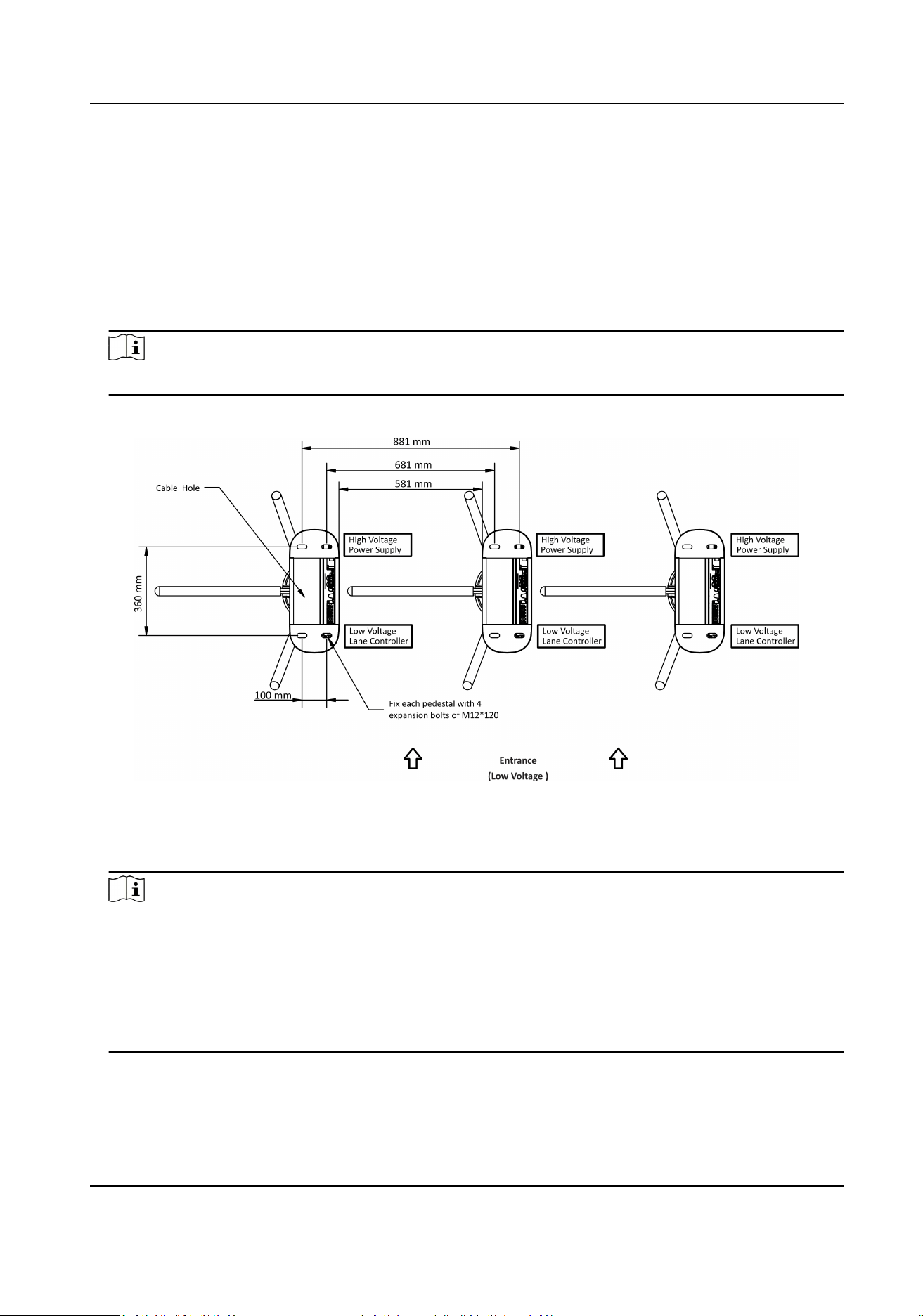
Note
The distance between the nearest two line is L+200 mm. L represents the lane width.
3.
Slot on the installaon surface and dig installaon holes according to the diagram.
Figure 2-1 Hole Posion Diagram
4.
Bury cables. Each lane buries 1 network cable and 1 high voltage cable. For details, see the
system wiring diagram above.
Note
●
The suggested inner diameter of the low voltage conduit is larger than 30 mm.
●
If the face recognion module are required to be connected on the le lane, you should
increase the conduit diameter or bury another conduit for the external cables.
●
You should bury one network cable and one high voltage conduit for the right and middle
lane.
●
The network cable must be CAT5e or the network cable has beer performance.
DS-K3G411LX Series Tripod Turnsle User Manual
3
Chapter 3 Installaon
3.1 Disassemble Pedestals
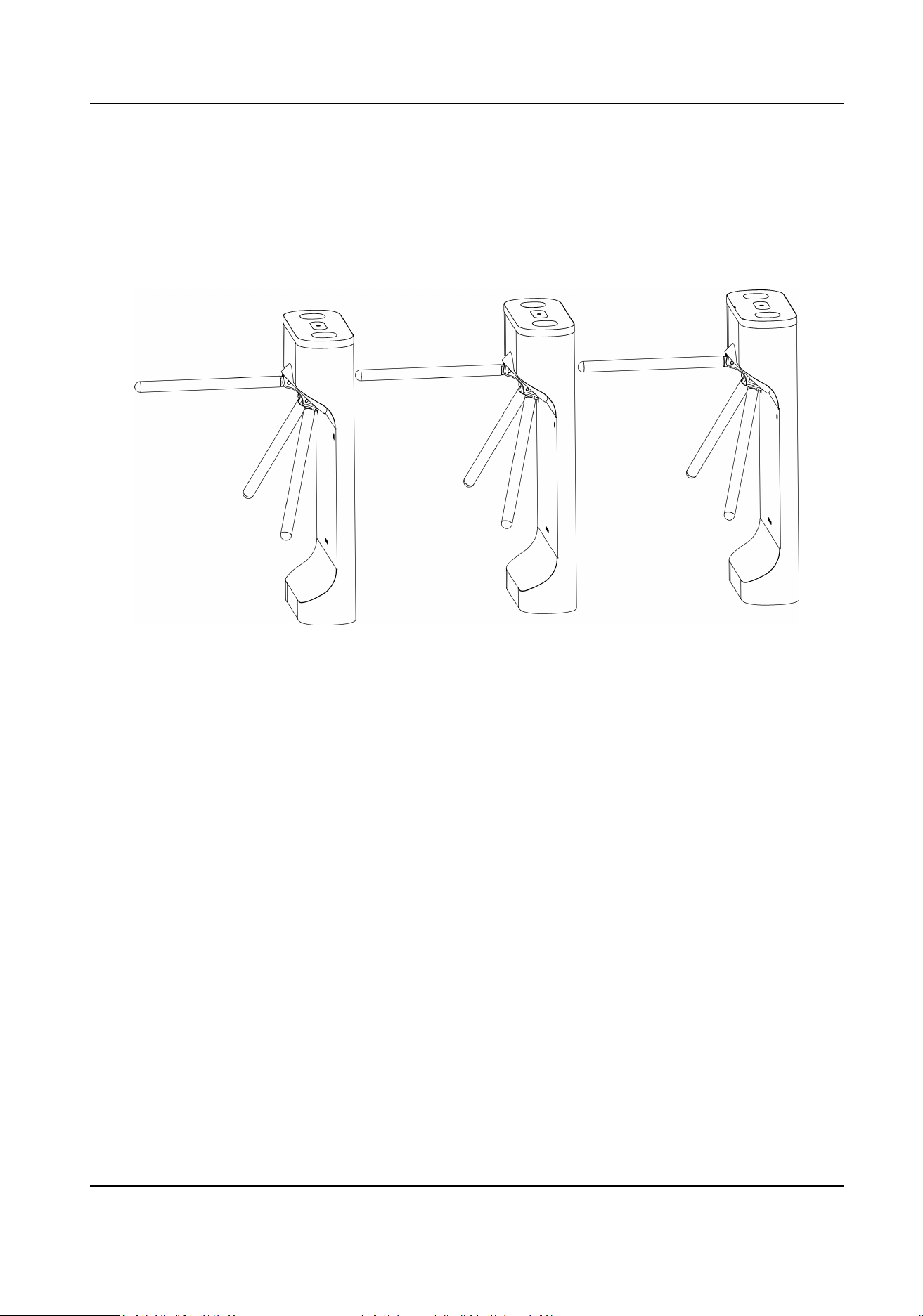
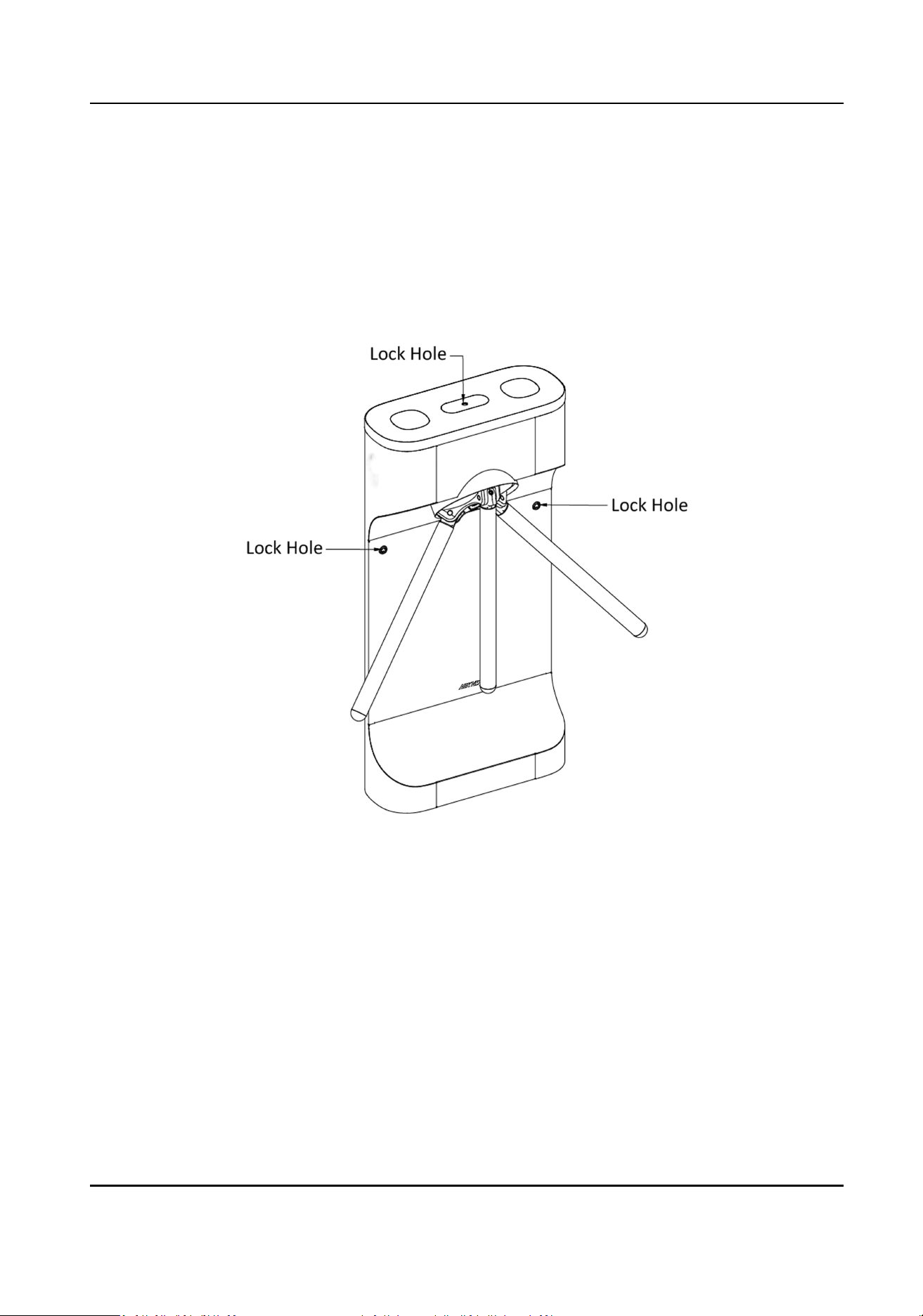
Before installaon, you should use the key to open the pedestals.
View the pictures below to nd the lock holes.
Figure 3-1 Lock Holes
3.2 Install Pedestals
Before You Start
Prepare for the installaon tools, check the device and the accessories, and clear the installaon
base.
DS-K3G411LX Series Tripod Turnsle User Manual
4
Steps
Note
●
The device should be installed on the concrete surface or other non-ammable surfaces.
●
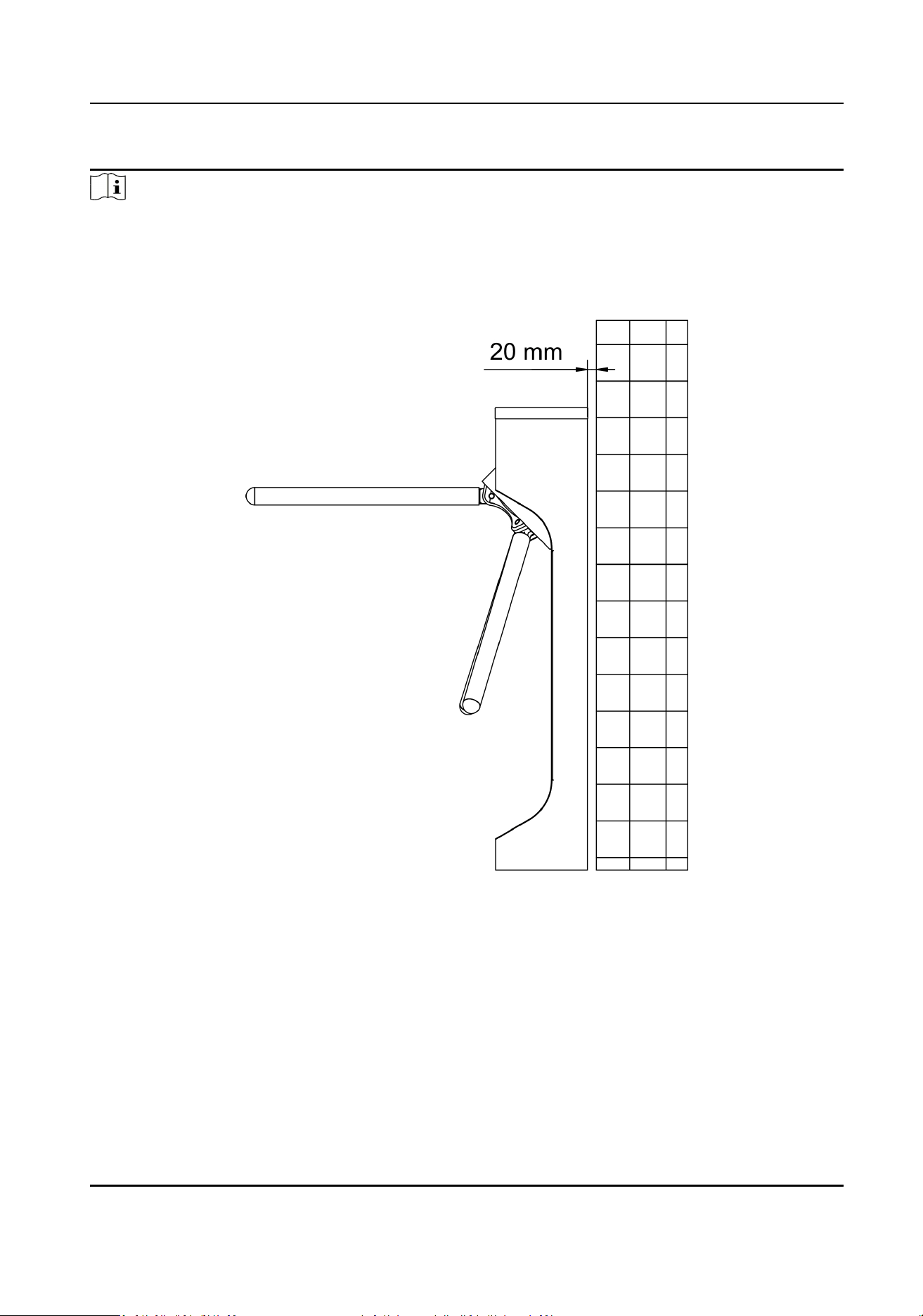
If the installaon area is too close to the wall, make sure the distance between the pedestal
(with or without face recognion terminal) and the wall should be more than 20 mm, or the
surface may be scratched.
●
The dimension is as follows.
DS-K3G411LX Series Tripod Turnsle User Manual
5
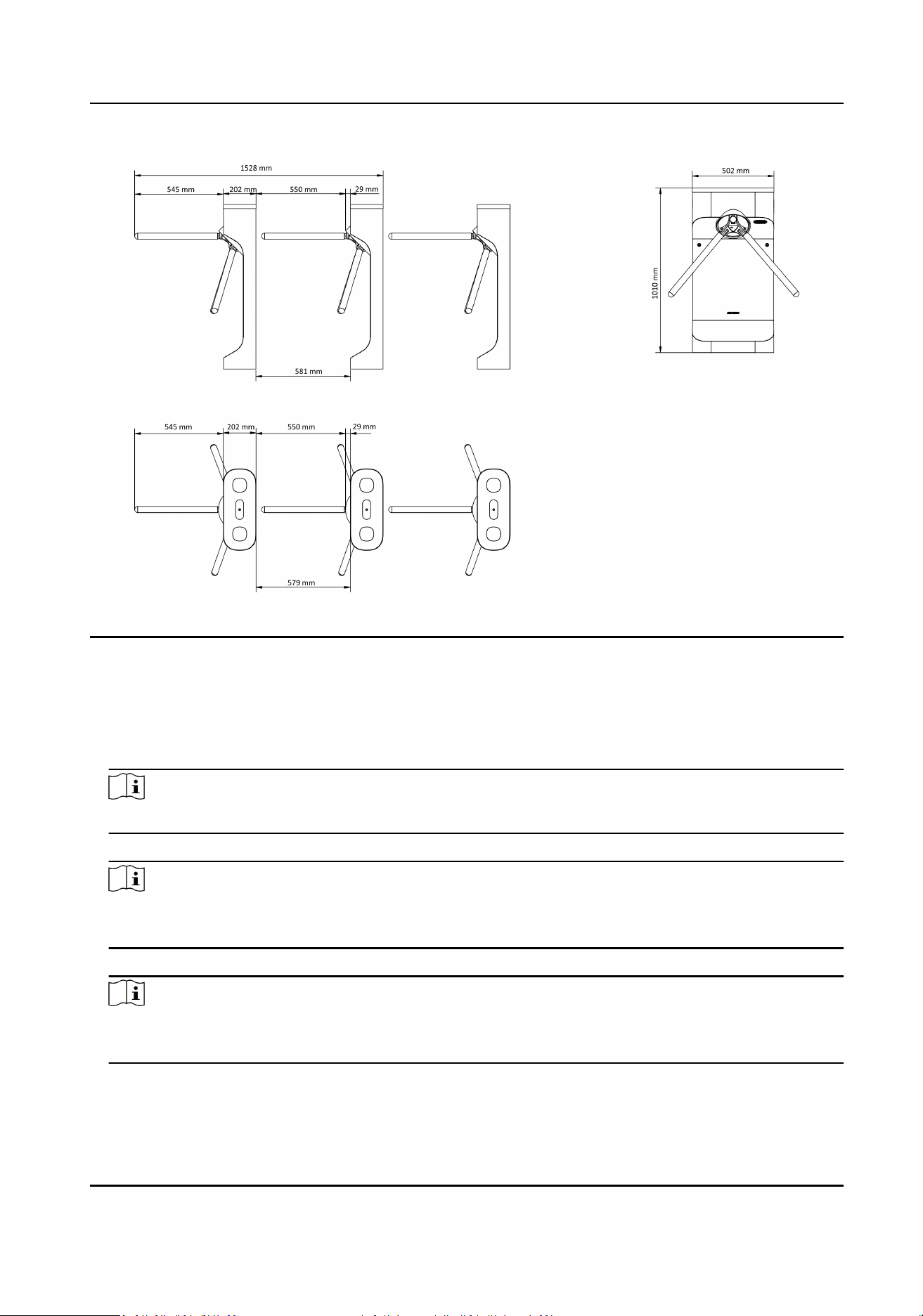
Figure 3-2 Dimension
1.
Prepare for the installaon tools, check the components, and prepare for the installaon base.
2.
Drill holes on the ground according to the installaon holes on the pedestals and insert the
expansion sleeves.
3.
Place the pedestals properly on the base.
4.
Seal the boom of the turnsle to avoid water from entering.
Note
Make sure the installaon holes on the pedestals and the base are aligned with each other.
5.
Secure the pedestals with expansion bolts.
Note
Do not immerse the pedestal in the water. In special circumstances, the immersed height should
be no more than 690 mm.
6.
Install the arms with 3 screws.
Note
Apply thread glue on the screws before securing the arms, in order to prevent the arms from
dropping down because of the vibraon or the long me usage of the device.
DS-K3G411LX Series Tripod Turnsle User Manual
6
Chapter 4 General Wiring
4.1 Components Introducon
By default, basic components of the turnsle are connected well. The turnsle supports wiring the
AC electric supply for the whole system's power supply.
Note
The voltage uctuaon of the electric supply is between 100 VAC and 240 VAC, 50 to 60 Hz.
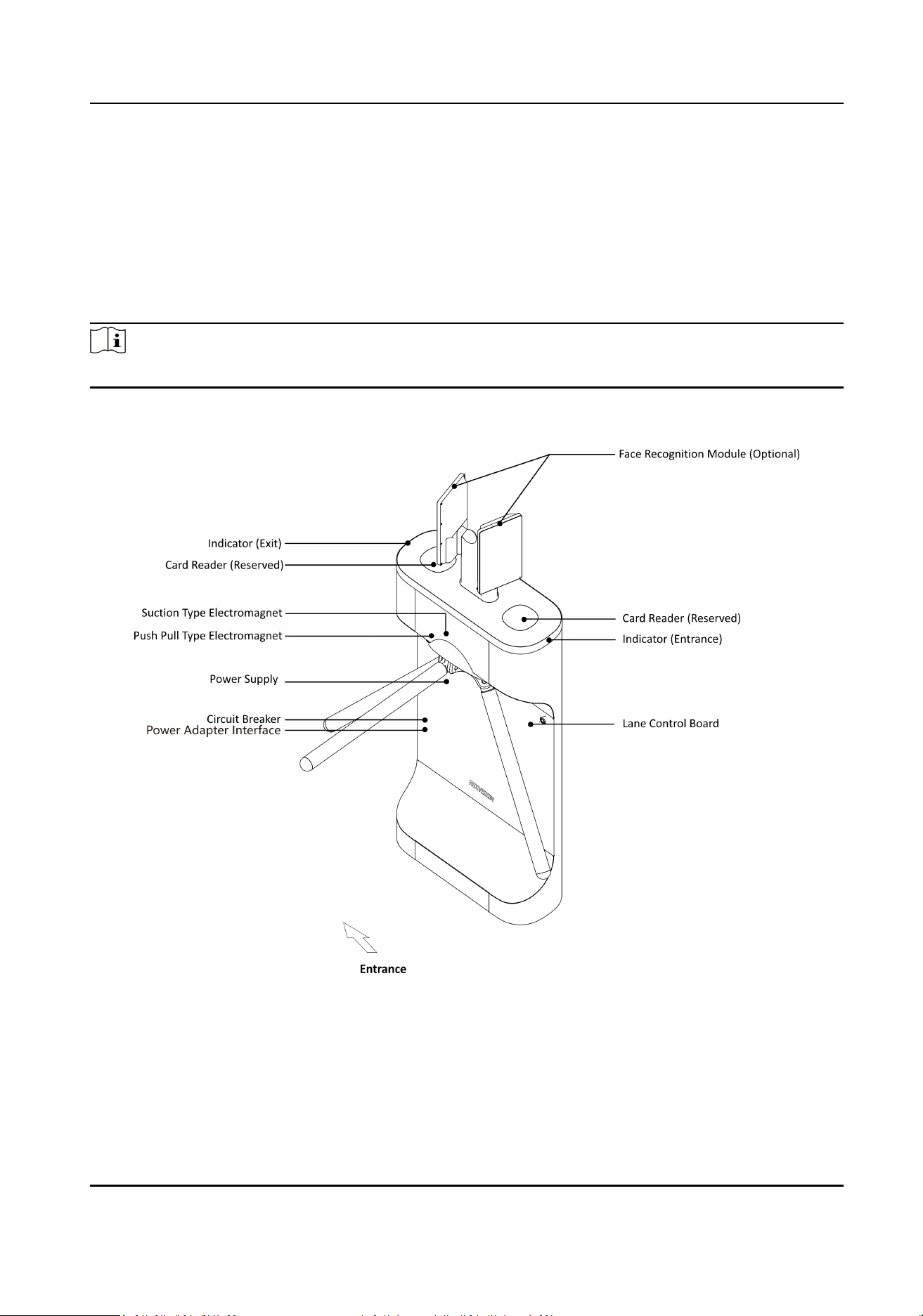
The picture displayed below describes each component's posion on the turnsle.
Figure 4-1 Components Diagram
DS-K3G411LX Series Tripod Turnsle User Manual
7
4.2 Wiring Electric Supply
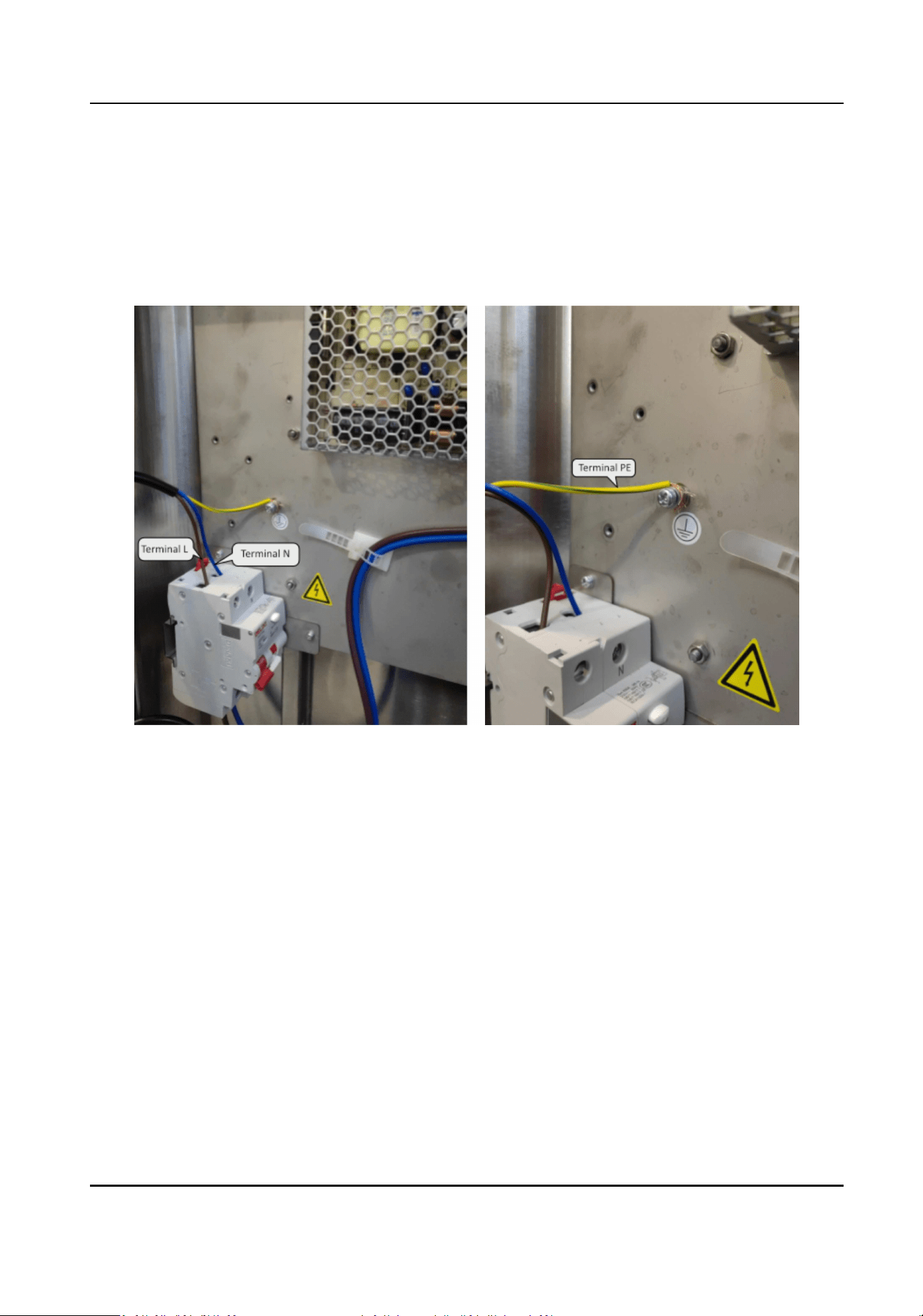
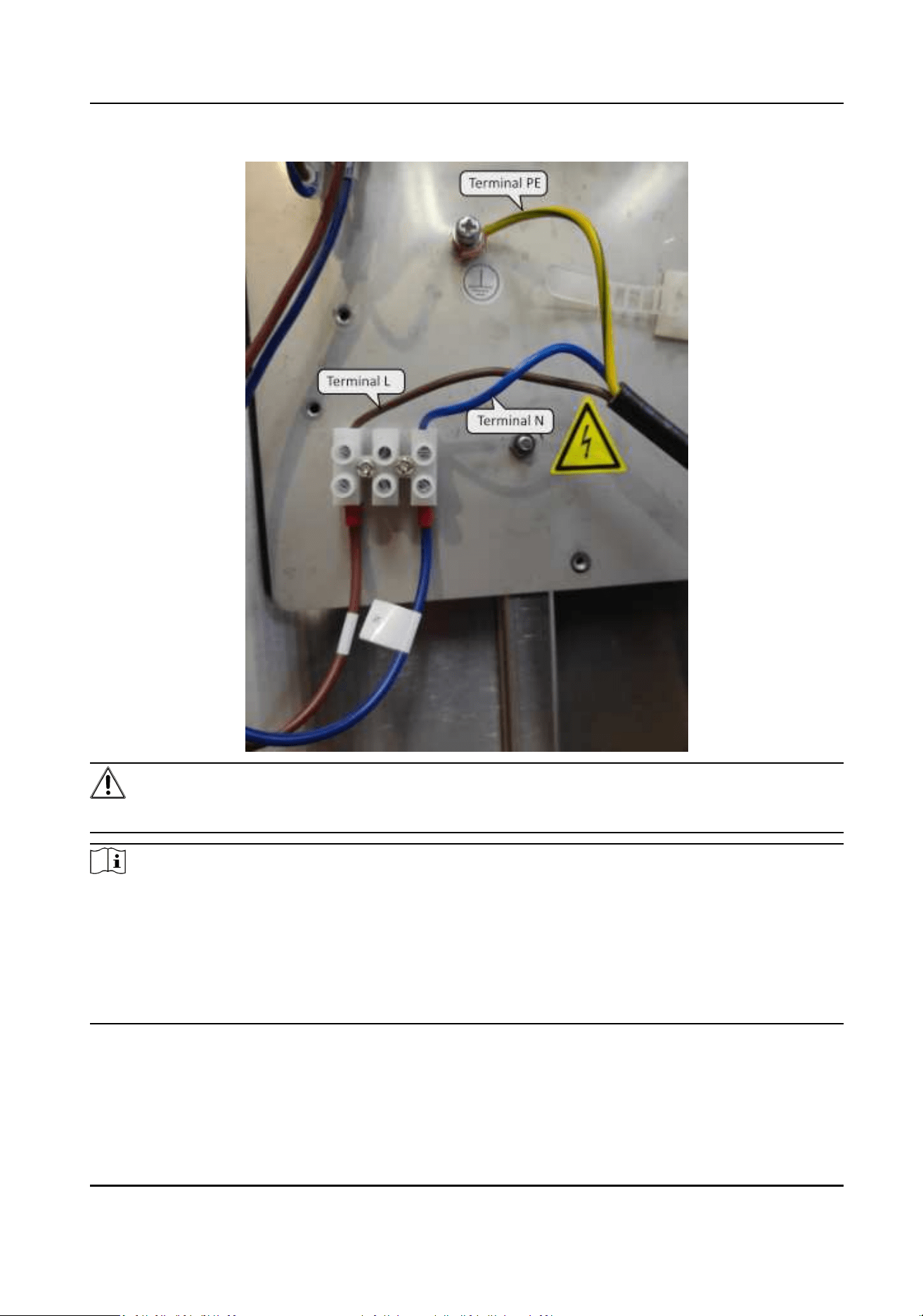
Wire electric supply with the switch in the pedestal. Terminal L (brown) and terminal N (Blue) are
on the switch, while terminal PE should connect to a ground wire (yellow and green wire).
For product with switching power supply, the wiring diagram is as follows:
For product with switching power adapter, the wiring diagram is as follows:
DS-K3G411LX Series Tripod Turnsle User Manual
8
Warning
Terminal PE should connect to a ground wire to avoid hazard when people touching the device.
Note
●
The cable bare part should be no more than 8 mm. If possible, wear an insulaon cap at the end
of the bare cable. Make sure there's no bare copper or cable aer the wiring.
●
The Terminal L and the Terminal N cannot be wired reversely. Do not wire the input and output
terminal reversely.
●
To avoid people injury and device damage, when tesng, the ground resistance of the
equipotenal points should not be larger than 2 Ω。
DS-K3G411LX Series Tripod Turnsle User Manual
9
4.3 Terminal Descripon
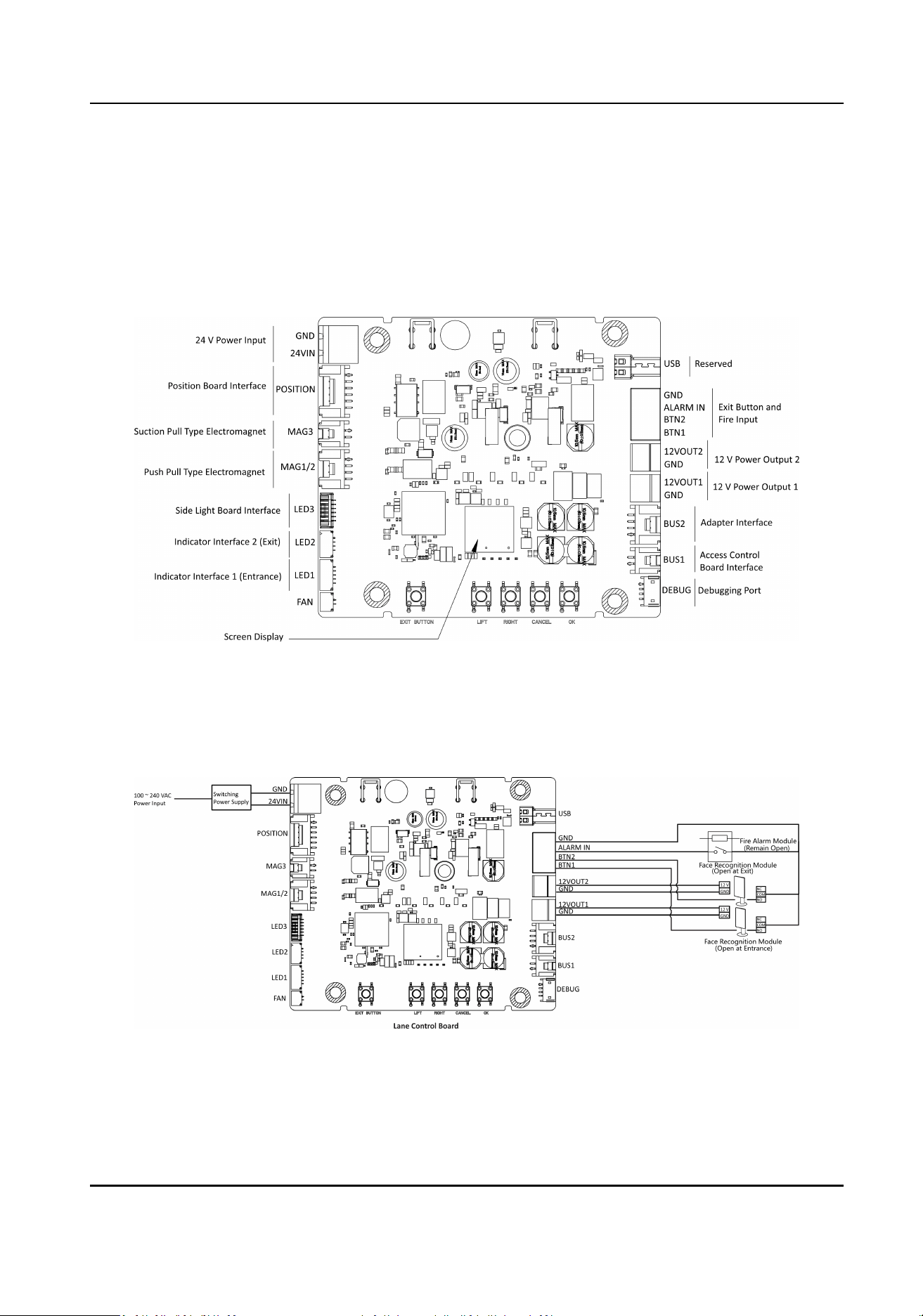
4.3.1 Lane Control Board Terminal Descripon
The picture displayed below is the main control board diagram.
4.3.2 General Wiring
The general peripheral wiring of the lane control board.
Figure 4-2 General Wiring of Pedestal with Power Switch
DS-K3G411LX Series Tripod Turnsle User Manual
10
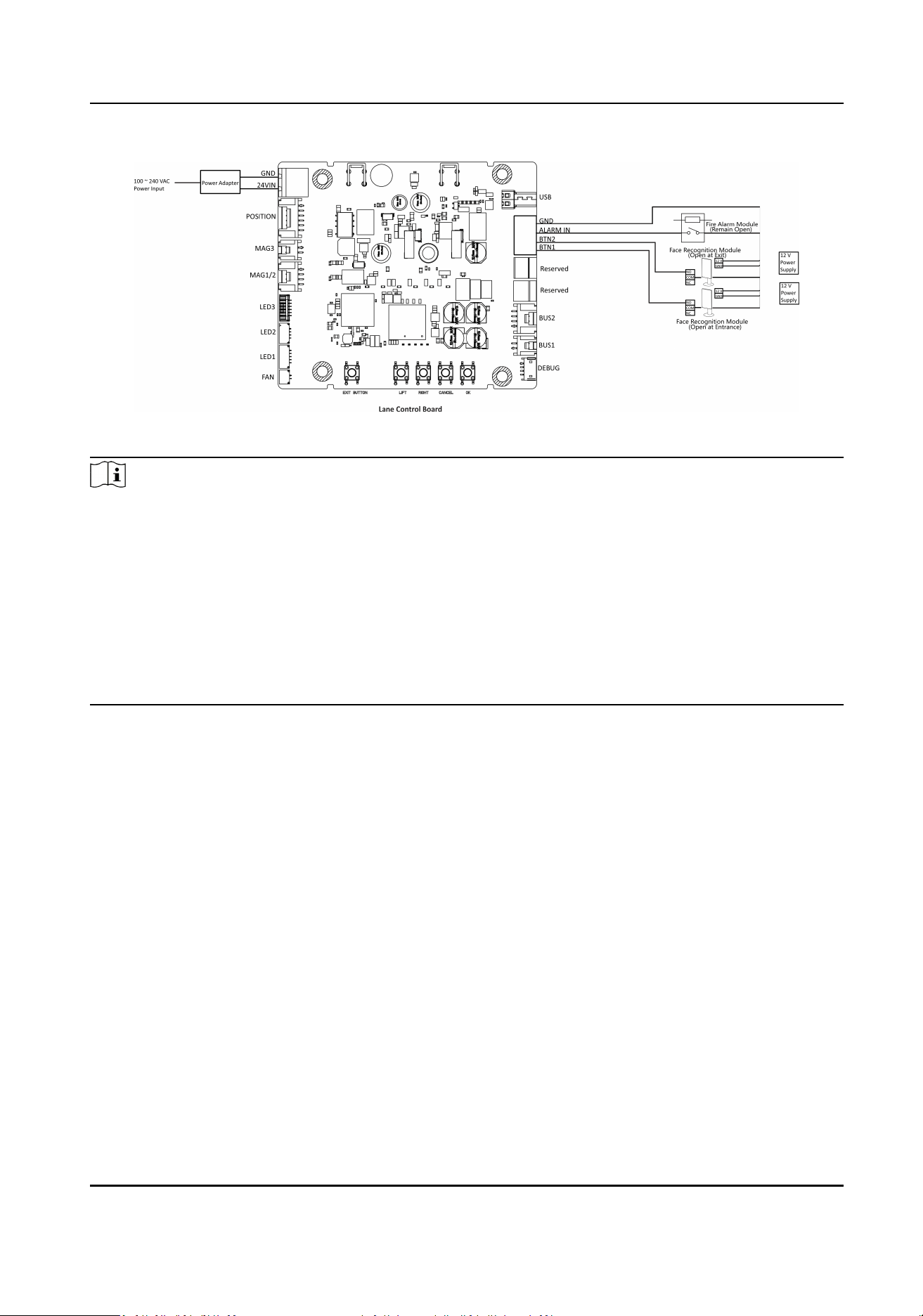
Figure 4-3 General Wiring of Pedestal with Power Adapter
Note
●
You will need to prepare the 14AWG power cable to connect the AC power input to power
supply.
●
The re alarm module, face recognion module and exit buon use the same grounding
interface.
●
Gate opens at the entrance/exit: connect to BTN1/BTN2 and GND.
●
The two 12 V power output interfaces are the power supply for face recognion terminals,
which is only supported by the product with power switch.
●
For models with power adapter, the power supply for face recognion modules is not contained
in package.
DS-K3G411LX Series Tripod Turnsle User Manual
11

Chapter 5 Device Sengs via Buon
You can congure the device via buon on the main lane control board.
Funcon Main Lane Control Board Only
Working Mode
keyfob Pairing Congure via buon (refer to Pair Keyfob via
Buon )
Passing Mode Congure via buon
Memory Mode Congure via buon
Parameter Sengs
Keyfob Working Mode Congure via buon
Barrier Opening Duraon Congure via buon
Barrier Closing Duraon Congure via buon
Volume Adjustment Congure via buon
Authencated Passing Not support
Invalid Card No. Not support
Unmatched Fingerprint Not support
Reverse Intrusion Congure via buon
Passing Timeout Congure via buon
Unauthorized Passing Not support
Authencaon Timeout Not support
Authencaon Failure Not support
Expired Cercate Not support
Light Brightness Congure via buon
Clearing People Counng Congure via buon
Fire Protecon Type Congure via buon
Restore to Default Congure via buon
Refer to Buon Conguraon Descripon for detailed informaon.
DS-K3G411LX Series Tripod Turnsle User Manual
12
5.1 Conguraon via Buon
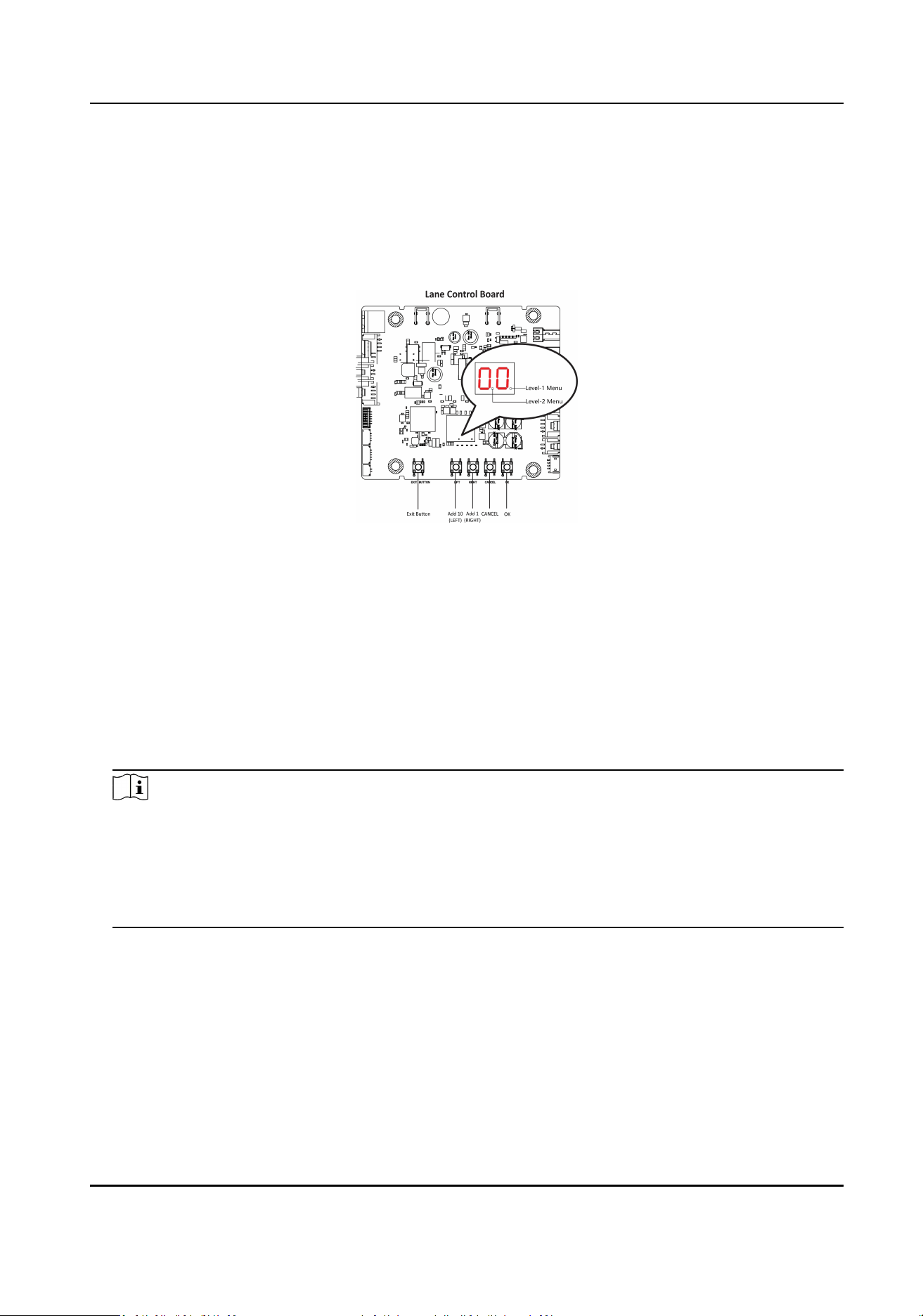
Buon Descripon
The buons are on the lane control board.
Figure 5-1 Buon
Exit Buon
●
Single press to open the gate from the entrance posion.
●
Double press to open the gate from the exit posion.
Parameter Conguraon Buon
●
LEFT: Press to add ten to conguraon data
●
RIGHT: Press to add one conguraon data
●
CANCEL: Return to the level-1 menu, or exit the conguraon from the level-1 menu
●
OK: Conrm the data, or enter conguraon mode, or enter the submenu
Note
●
Conguraon data is displayed by two digital tubes.
●
Level-1 Menu: If the decimal point on the right is on, it indicates the level-1 menu. The
number represents the conguraon item number.
●
Level-2 Menu: if the decimal point in the middle is on, it indicates the level -2 menu. The
number represents the parameters of a conguraon item.
DS-K3G411LX Series Tripod Turnsle User Manual
13
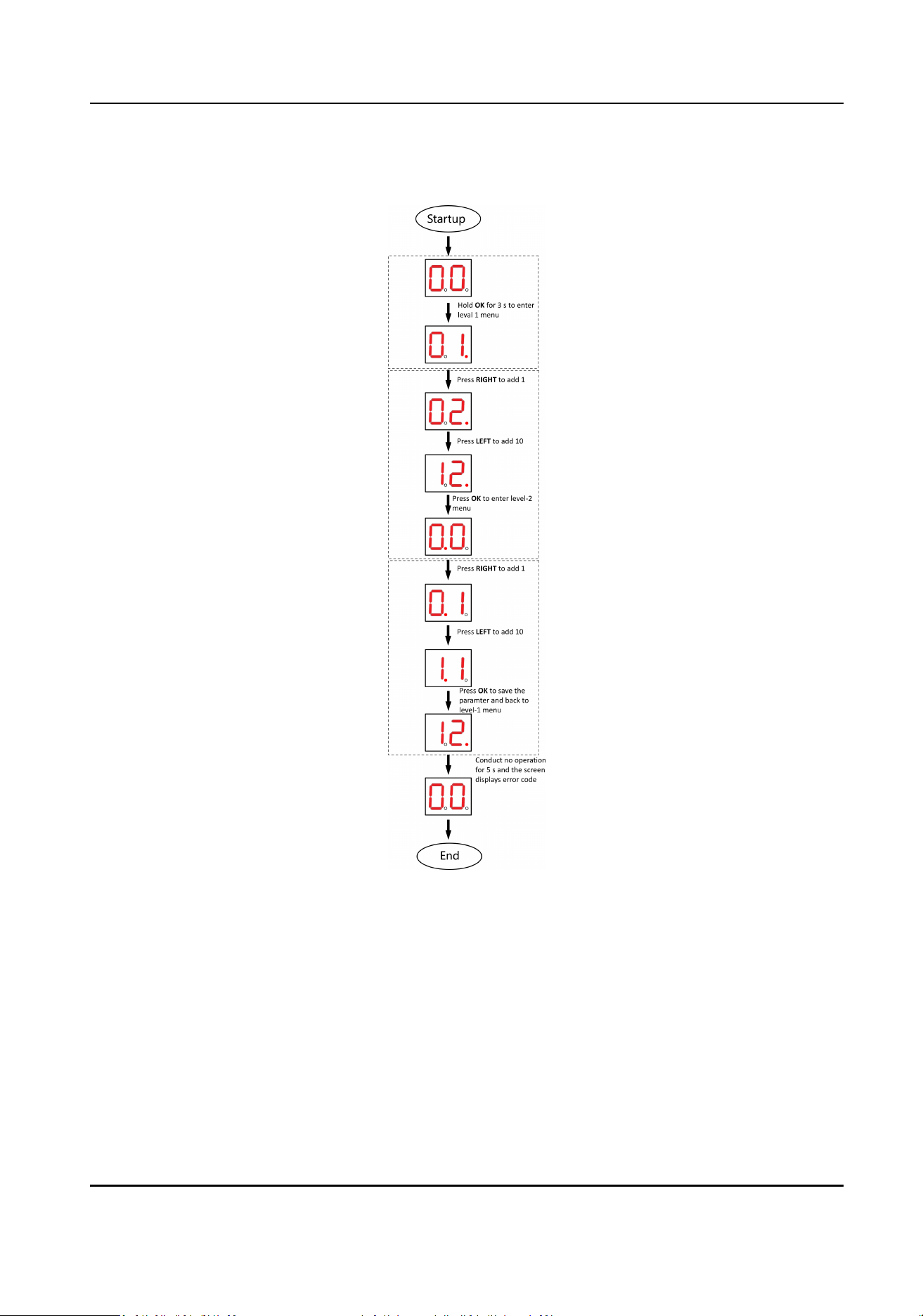
Buon Conguraon Procedure
Figure 5-2 Procedure
Steps:
1. Enter the conguraon mode. The number of 1 will show up on the right side of the screen and
the device is ready for conguraon.
2. Press LEFT and RIGHT to set the conguraon No. Press OK to enter the level-2 menu and view
the parameters. Press CANCEL, or conduct no operaon for 5 s to cancel conguraon.
3. Press LEFT and RIGHT to set the parameters at your needs. Press OK to save the changes or
press CANCEL back to conguraon No. seng without saving changes. Conduct no operaons
for 5 s to cancel conguraon.
DS-K3G411LX Series Tripod Turnsle User Manual
14

5.2 Pair Keyfob via Buon
Pair the keyfob to the device via buon to open/close the barrier remotely.
Before You Start
●
Oponal board is necessary for keyfob funcons.
●
Ask our technique supports or sales and purchase the keyfob.
Steps
Note
●
For details about buon's operaon, see Conguraon via Buon .
●
For details about the conguraon No. and its related funcon, see Buon Conguraon
Descripon .
●
For details about the keyfob operaon instrucons, see the keyfob's user manual.
1.
Enter the keyfob pairing mode.
1) Enter the conguraon mode.
2) Set the conguraon No. in Level-1 to 2. The device will enter the keyfob pairing mode.
3) Set the conguraon No. in the Level-2 menu to 2. The device will enter the keyfob pairing
mode.
2.
Hold the Close buon for more than 10 seconds.
The keyfob's indicator will ash if the pairing is completed.
3.
Exit the keyfob pairing mode.
1) Enter the conguraon mode.
2) Set the conguraon No. in Level-1 to 2. The device will enter the keyfob pairing mode.
3) Set the conguraon No. in the Level-2 menu to 1. The device will exit the keyfob pairing
mode.
DS-K3G411LX Series Tripod Turnsle User Manual
15

Appendix A. Buon Conguraon Descripon
Refer to the table below for device conguraon via buon on the lane control board.
No. Descripon Default Value Parameters Notes
2 keyfob Pairing 1 1-Normal Mode
2-Pairing Mode
3 Passing Mode 1 1-Both sides
under control
2-Entrance under
control; exit
prohibited
3-Entrance under
control; exit on
free passing mode
4-Both sides on
free passing mode
5-Entrance on
free passing
mode; exit under
control
6-Entrance on
free passing
mode; exit
prohibited
7-Both sides
prohibited
8-Entrance
prohibited; exit
under control
9-Entrance
prohibited; exit on
free passing mode
4 Memory Mode 2 1-Disable
2-Enable
5 keyfob Remote
Control
2 1-one to one
1-one to mulple
DS-K3G411LX Series Tripod Turnsle User Manual
16

No. Descripon Default Value Parameters Notes
9 Enter Duraon 5 5-5s,6-6s,7-
7s, ..., 60-60s
10 Exit Duraon 5 5-5s,6-6s,7-
7s, ..., 60-60s
21 Volume 2 1-0,2-1,3-2,4-
3,5-4
The device will be
muted when set
to "1".
22 Authencated
Passing
1 1-Disable
2-Enable
Unable to change
23 Invalid Card No. 1 1-Disable
2-Enable
Unable to change
24 Fingerprint
Unmatched
1 1-Disable
2-Enable
Unable to change
26 Reverse Passing 1 1-Disable
2-Enable
27 Exceeding Passing
Duraon
1 1-Disable
2-Enable
31 Unauthorized
Passing
1 1-Disable
2-Enable
Unable to change
32 Exceeding
Authencaon
Duraon
1 1-Disable
2-Enable
Unable to change
33 Failed
Authencaon
1 1-Disable
2-Enable
Unable to change
34 Expired Cercate 1 1-Disable
2-Enable
Unable to change
39 Brightness of
Light
3 0-0,1-1,2-2, … ,
10-10
The higher the
value is, the
brighter the light
will be.
42 Clearing People
Counng
1 1-Default
2-Enable
DS-K3G411LX Series Tripod Turnsle User Manual
17

No. Descripon Default Value Parameters Notes
43 Fire Protecon
Type
2 1-Remain Closed
2-Remain Open
99 Restore to Default 1 1- Default
2- Start
The device will
reboot.
DS-K3G411LX Series Tripod Turnsle User Manual
18

Appendix B. Event and Alarm Type
Event Alarm Type
Passing Timeout None
DS-K3G411LX Series Tripod Turnsle User Manual
19

Appendix C. Table of Audio Index Related Content
Index Content
1 Authencated.
2 Card No. does not exist.
3 Card No. and ngerprint mismatch.
4 Passing meout.
5 No permissions.
6 Authencaon me out.
7 Authencaon failed.
8 Expired card.
DS-K3G411LX Series Tripod Turnsle User Manual
20
Appendix D. Communicaon Matrix and Device
Command
Communicaon Matrix
Scan the following QR code to get the device communicaon matrix.
Note that the matrix contains all communicaon ports of Hikvision access control and video
intercom devices.
Figure D-1 QR Code of Communicaon Matrix
Device Command
Scan the following QR code to get the device common serial port commands.
Note that the command list contains all commonly used serial ports commands for all Hikvision
access control and video intercom devices.
Figure D-2 Device Command
DS-K3G411LX Series Tripod Turnsle User Manual
21

UD30763B