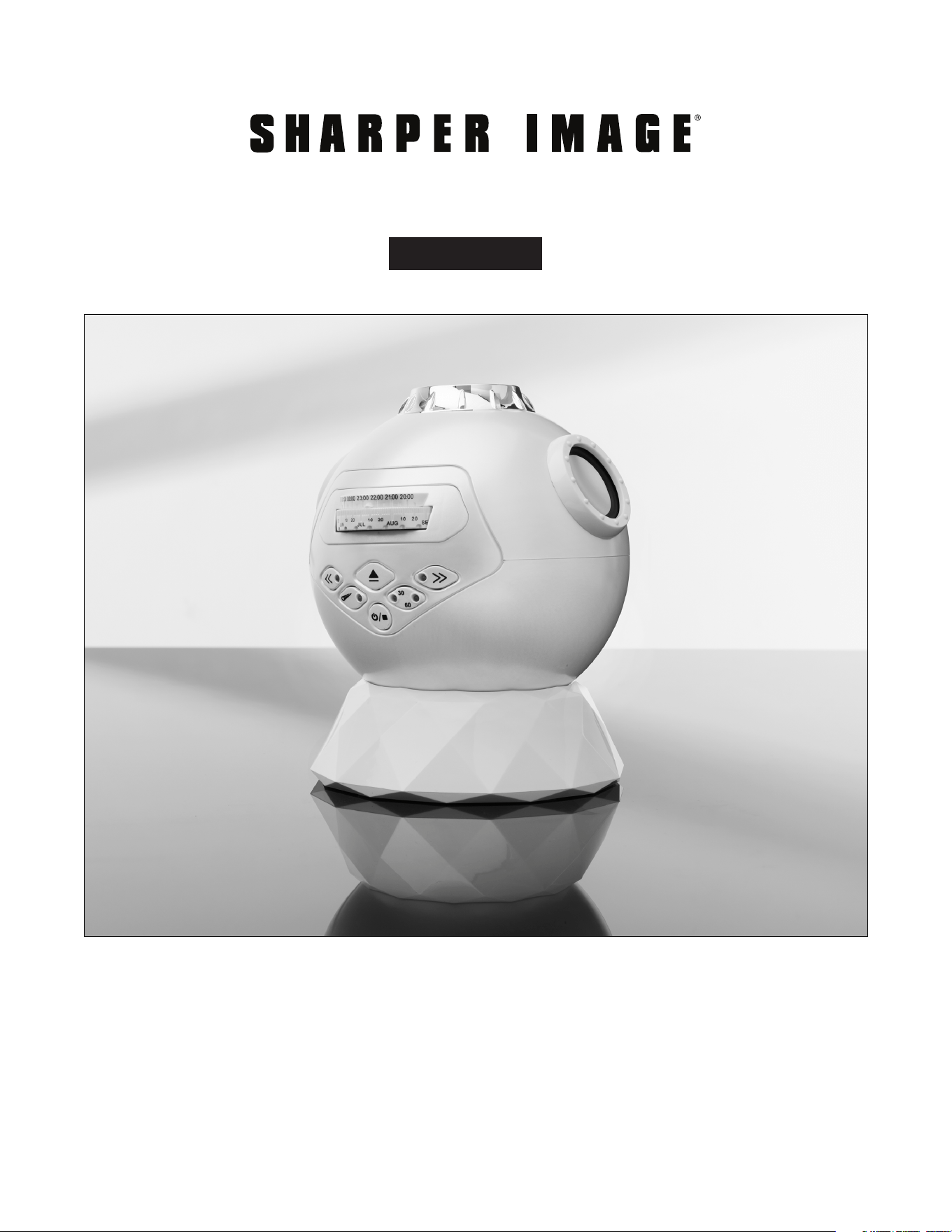
Item No. 207639
PLANETARIUM PROJECTOR
User Guide
- 1 -
Thank you for purchasing the Sharper Image Planetarium Projector. Please take
a moment to read this guide and store it for future reference.
- 2 -
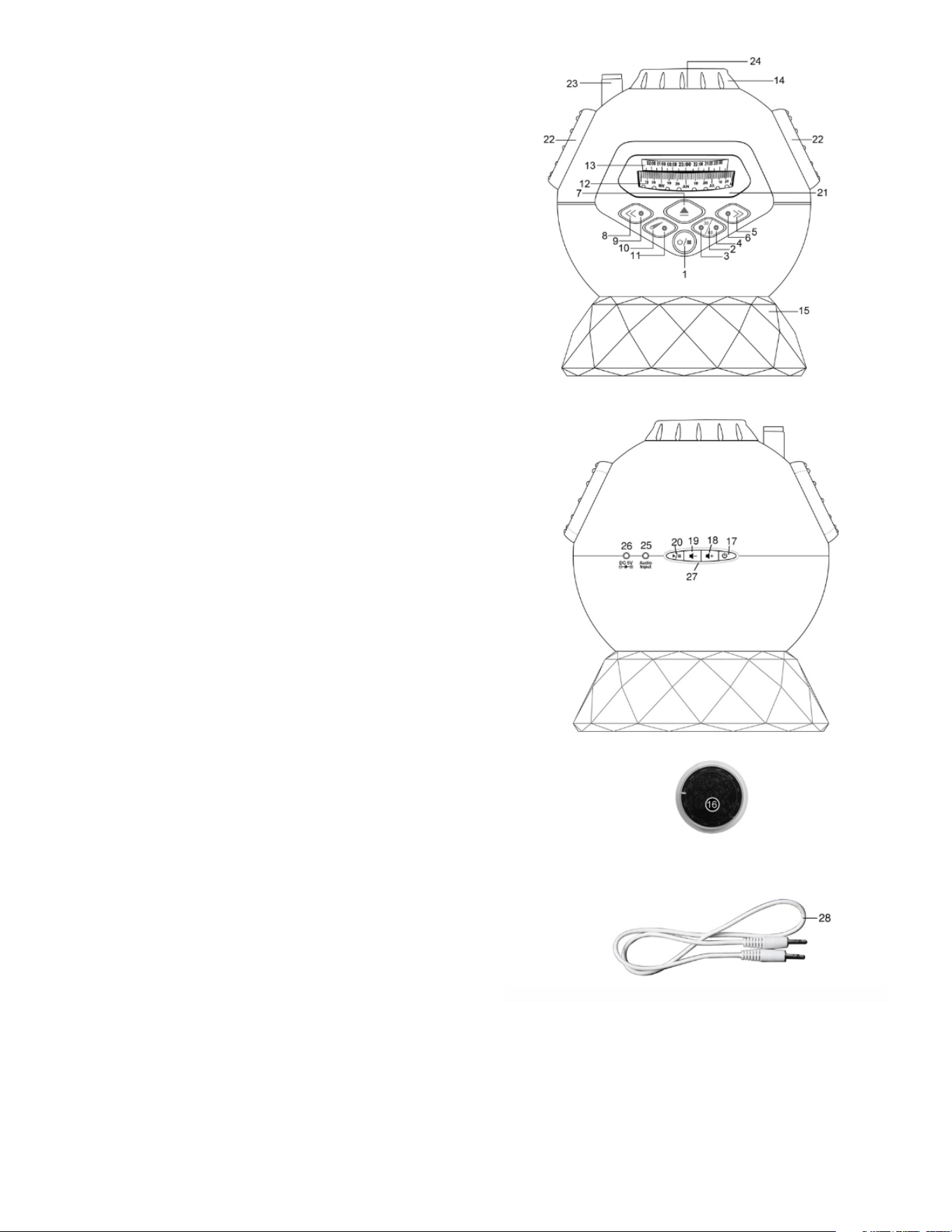
COMPONENTS
1. ON/STOP/OFF switch
2. Sleep Timer Button
3. 30 Minute Sleep Indicator
4. 60 Minute Sleep Indicator
5. Rotate Right Button
6. Rotate Right Indicator
7. Slide Tray Eject Button
8. Rotate Left Button
9. Rotate Left Indicator
10. Shooting Star Button
11. Shooting Star Indicaton
12. Date Dial
13. Time Scale
14. Focus Dial
15. Stand
16. Star Discs (2 pieces)
17. Speaker ON/OFF/Pairing Button
18. Vol + / Next Song Button
• Quickpress = Next Song
• Press & Hold = Volume Up
19. Vol – / Previous Song Button
• Quickpress = Previous Song
• Press & Hold = Volume Down
20. Play/Pause Button
21. Star Disc tray
22. Speakers
23. Shooting star projection lens
24. Main projection lens
25. Audio IN Connector
26. 5V DC IN Connector
27. Speaker Status LED
28. Audio cable
- 3 -
SETTING UP THE PLANETARIUM PROJECTOR
1. Open the battery cover at the bottom of the unit and insert 3 AA size batteries.
Please refer to the “Battery Installation Section” below. Replace battery cover firmly.
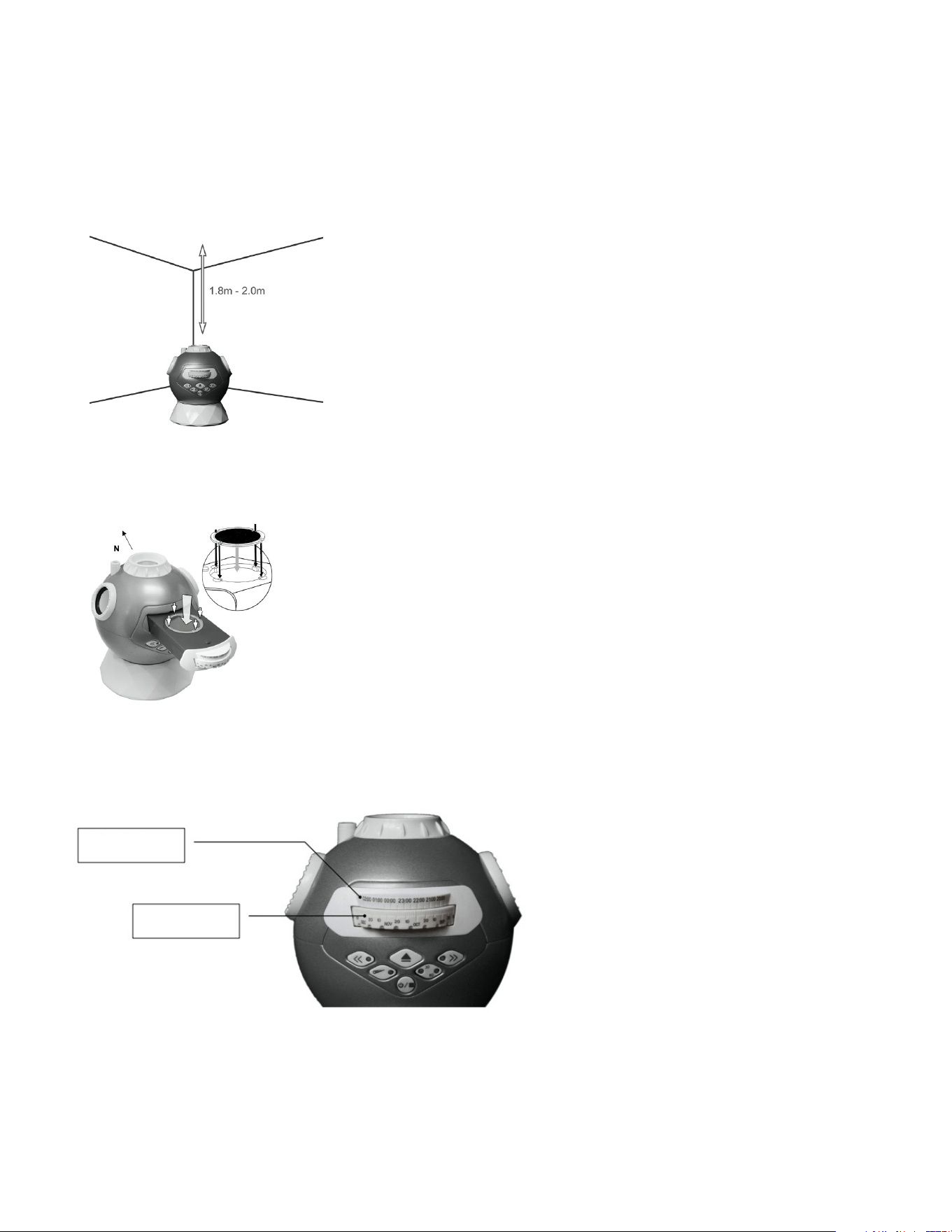
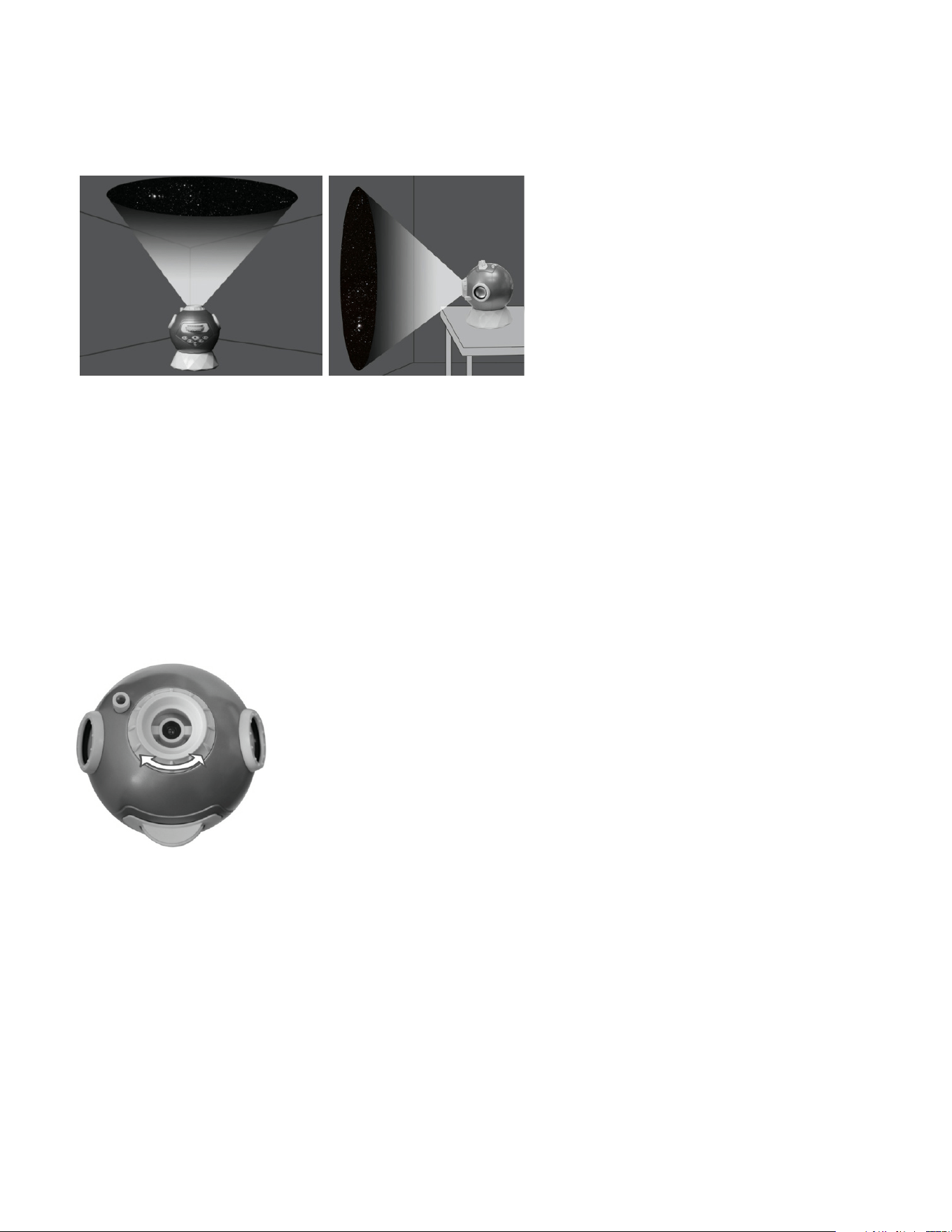
2. Place the unit over the stand (15) on a flat and stable platform (e.g. a table), the
optimum project distance is about 1.8m to 2m. (6 to 6.5 ft.).
3. Press the Slide Tray Eject Button (7) to open the tray and install the star disc (16).
Note: The keys on the disc must match the ridges on the tray.
4. While the slide tray is still open, set the time and date of the night sky you want to
view by aligning the desired date on Date Dial with the desired hour on the Time Scale.
TIME SCALE
DATE DIAL
- 4 -
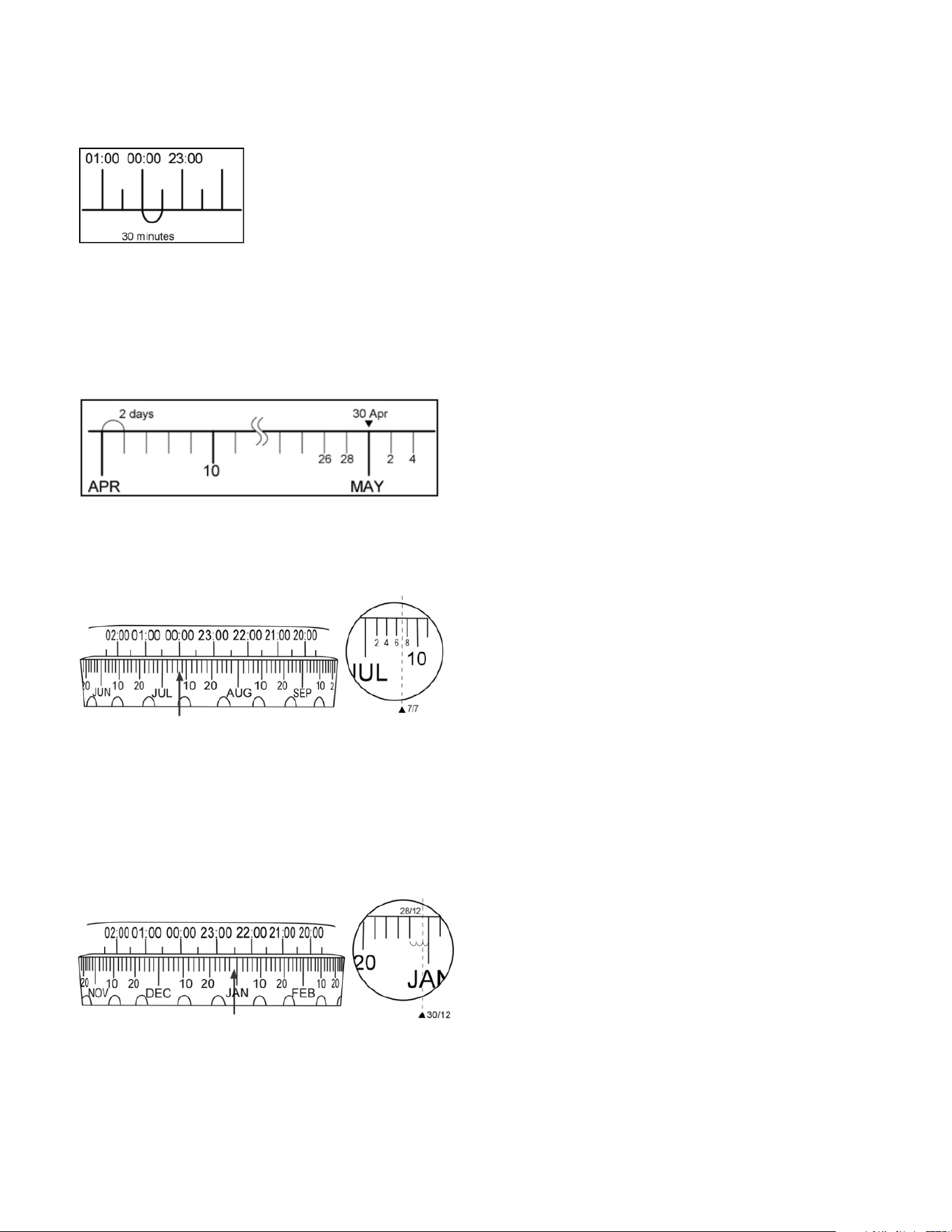
Time Scale (Fixed)
Time from 20:00 (8 p.m.) to 02:00 (2 a.m.) is shown. Align the Date Dial with it to
project stars at a particular time. (Each subdivision equals 30 minutes.)
Date Dial (Adjustable)
The Date Dial has 365 days. Adjust the dial to project stars you want to see on a
particular date. (Each subdivision equals to 2 days. The long mark corresponds to the
last day of the previous month.)
Example 1: If you want to see the star pattern at midnight (00:00) on 7th July, align
00:00 on the time scale with 7th July. Position of the date 7th is between 6th and 8th.
Example 2: If you want to see the star pattern at 22:30 (10:30 p.m.) on 30th
December, align 22:30 on the time scale with 30th December. As shown in the figure,
the small marking represents 3 days. Therefore, the day 30th would be at 2/3 of the
marking. (The same setting applies to January, March, May, July, August and October.)
Note that 28th and 29th of February are at the same mark.
- 5 -
5. Close the tray. Note that you are looking to the north when you face the star
projector from the front. Please do not turn the Date Dial when the tray is closed. You
need to open the tray again if you want to set the date, or you can use the Rotate Left
(8) or Rotate Right button (5) while the unit is turned on.
6. Press the ON/STOP/OFF switch (1) once to turn on the Projector Light. Dim or turn
off the light in the room for the best visual experience. Note that the unit cannot be
turned on when the tray is opened.
7. You can freely adjust the projection angle of the projection head over the stand (15)
to suit viewing on the ceiling or sidewall.
8. Adjust the focus dial (14) until the projected star field is sharp. The optimum project
distance is 1.8m to 2m. The image will become blurry if the distance is too near or too
far.
Using the Star Motion Function
1. Press the Rotate Left Button (8) to rotate the night sky anticlockwise, which is the
motion of the stars in the Northern hemisphere. Press the button again to increase
the rotation speed. A total of five speeds are available. Each press will select the next
higher speed. The Rotate Left Indicator (9) will blink according to the speed. Press the
“ON/STOP/OFF” button to stop.
2. Similarly, press the Rotate Right Button (5) to rotate the stars clockwise, which is
the motion of the stars in the Southern hemisphere. A total of five speeds are also
selectable.

- 6 -
Using the Shooting Star Function
When the night sky is in the rotating state, press the Shooting Star Button (10) to
enable the shooting star function. A shooting star will appear in the night sky at
regular time intervals. It will appear more frequently if the rotating speed is set higher.
Press the same button again to disable the shooting star function.
Using the Timer Function
Press the Sleep Timer button (2) to enable 30 or 60 minute sleep timer. The
corresponding LED indicator will show the current selected timer. To disable Sleep
Timer, press the timer button until both timer indicator lights (3,4) are off. However,
the projector will always turn off automatically in 2 hours to conserve battery power.
Powering OFF
Press and hold the ON/STOP/OFF (1) button to turn off the projector.
Setting up the Bluetooth speaker
Note: Ensure the audio cable is removed from the “Audio Input” jack (25) of the
speaker in order to use the Bluetooth function.
Pairing the speaker and a device
Make sure the speaker is turn off and keep it within 30 feet of the device it is paired
to. Now press and hold the On/Off/Pairing button until a second tone is emitted. The
status LED (27) will flash in RED and BLUE alternatively, indicating it is in pairing
mode.
On your device (smartphone or tablet), locate your Bluetooth setting and turn on
Bluetooth.
In Bluetooth Settings, scan for devices if necessary, then select “Planetarium Spkr”
from your device’s list. The status LED will change to blinking twice (in BLUE) every 5
seconds if the connection is successful. Your device and speaker are paired and your
speaker is ready to use.
Pairing another device
Turn off the speaker by pressing and holding the On/Off/Pairing button until a second
tone is emitted. The status LED (27) will turn off. Repeat steps 1-3 above to connect
to a new device.
Reconnecting to a paired device
Turn on the speaker by pressing and holding the On/Off/Pairing button until a first
tone is emitted. The status LED (27) will flash BLUE quickly indicating it is in device
searching mode.
- 7 -
Turn on Bluetooth function of your device within 45 seconds. Connection is established
automatically and a double tone will sound. However, if Bluetooth is turned on after
this period or automatic connection is unsuccessful, you can still connect manually by
selecting “Planetarium Spkr” from your device’s list.
Playing Music
Select the desired music and press “Play” button on your paired device. The speaker
will automatically start playing back the music.
1. On the speaker, press and hold the or button (18,19) to increase or
decrease volume.
2. Quickpress the or button to skip forward or backward a track.
3. Press button (20) to pause or resume play.
LED Status Lights
Mode Light Function
Pairing mode RED and BLUE LED blinks alternatively
every second
Searching connection BLUE LED blinks once every half second
Disconnected BLUE LED blinks once every 5 seconds
Connected BLUE LED blinks twice every 5 seconds
Playing music RED and BLUE LED blinks every 5 seconds
Power on / Power off RED and BLUE LED blinks 3 times
Connecting a Music Player via Audio Cable
Connect a music player’s audio output or smartphone’s headphone output to the
Audio IN connector (25) at the back of the unit with a 3.5mm audio cable (included).
The speaker automatically disconnects from Bluetooth. Press and hold the or
buttons to adjust the volume.

- 8 -
TROUBLESHOOTING
Problem Check the following points
Power does not come on. • Check the battery.
The speaker won’t pair. • Move the speaker and your device close
together.
• Pairing mode is disabled automatically
after about 45 seconds. Turn the speaker
off, then long press the On/Off/Pairing
button until a second tone is emitted to
enter pairing mode.
• Forget the “Planetarium Spkr” device in
your device list. Scan for new Bluetooth
device. Then try pairing again.
The sound is too quiet or too loud. • Adjust the volume on your device. It
should be about 50%.
• Adjust the speaker volume.
The speaker is powered off automatically. • The battery is exhausted. Replace the
battery or connect the AC adapter (not
included)
No sound output. • Check if the volume level of the speaker
is set to the minimum.
• Check if the volume level of your
Bluetooth device connected to the
system is set to minimum or set to mute.
• Check if your audio cable is connected to
the Audio In jack of the speaker. Unplug
the cable.
I hear crackling noises. • For best audio quality, keep the speaker
close to your device.
No sound output via Bluetooth or
Bluetooth connection cannot be restored
automatically.
• The speaker may be powered off and
powered on when playing back a track
over Bluetooth connection. You need to
make the connection again.
Speaker does not power off with the
Planetarium Projector.
• The speaker and planetarium functions
are independent and operate separately.
Power on/off the speaker using the ON/
OFF/Pairing button.
- 9 -
BATTERY INSTALLATION
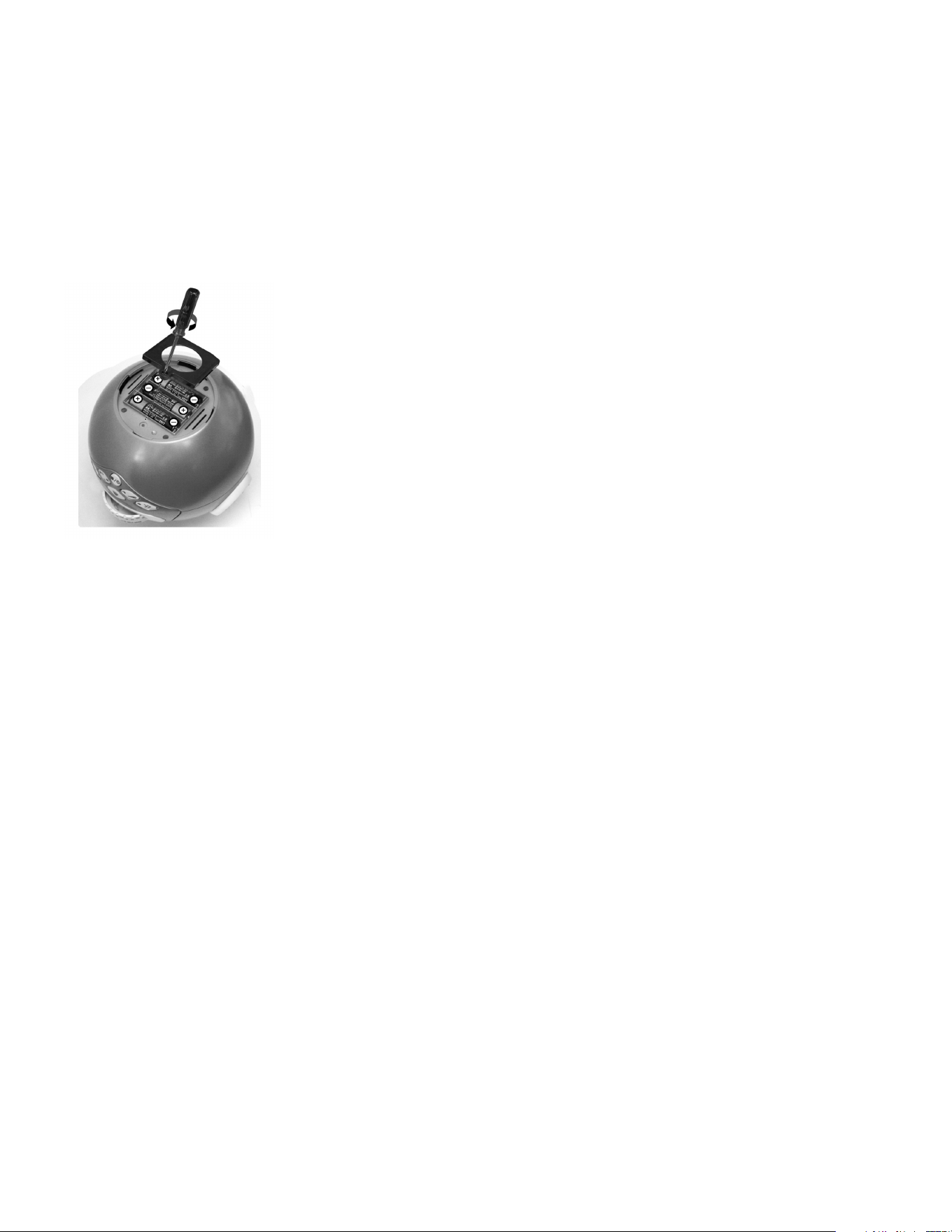
The Planetarium Projector requires 3 AA (LR6) batteries (not included):
• Twist and open the battery compartment door at the bottom.
• Remove the battery cover with a screwdriver.
• Insert three AA (LR6) batteries into the unit with polarity as indicated on the battery
compartment.
• Replace the battery cover and battery door.
• Replace a new battery when the light becomes dim.
• Insert new batteries according to the polarity marks.
Using an AC/DC adapter (not included)
This unit can be powered by an AC/DC adapter (not included). Connect an AC/DC
adapter (5V 1000mA Output, 3.5mm Center Positive Plug into the Planetarium’s 5V DC
IN connector (26) and plug it into an AC wall outlet.
IMPORTANT: Keep these instructions. DO NOT DISCARD.
Only adults should install and replace batteries. Alkaline batteries are recommended.
If the unit has not been used for a long time, remove the batteries. Non-rechargeable
batteries are not to be recharged. Rechargeable batteries are to be removed from
the unit before being charged. Rechargeable batteries are only to be charged under
adult supervision. Do not mix old and new batteries. Do not mix alkaline, standard
(carbon zinc) or rechargeable (nickel cadmium) batteries. Exhausted batteries are
to be removed from the unit. The supply terminals are not to be short-circuited. Only
batteries of the same or equivalent type as recommended are to be used. Batteries
are to be inserted with the correct polarity.
WARNING
Choking hazard. Never try to dismantle the product yourself, or push objects of any
kind into the product, as this may cause short circuits which could result in a fire or
electric shock. Do not expose this product to rain or moisture.

- 10 -
FCC INFORMATION
This equipment complies with FCC radiation exposure limits set forth for an
uncontrolled environment. This equipment should be installed and operated with
minimum distance 8 inches between the radiator and your body.
This device complies with Part 15 of the Federal Communications Commission (FCC)
Rules. Operation is subject to the following two conditions:
• This device may not cause harmful interference.
• This device must accept any interference received, including interference that may
cause undesired operation.
CAUTION
Changes or modifications to this unit not expressly approved by the party responsible
for compliance could void the user’s authority to operate this equipment.
This equipment has been tested and found to comply with the limits for a Class B
digital device, pursuant to Part 15 of the FCC Rules. These limits are designed to
provide reasonable protection against harmful interference in a residential installation.
This equipment generates, uses and can radiate radio frequency energy and, if not
installed and used in accordance with the manufacturer’s instructions, may cause
interference harmful to radio communications.
There is no guarantee, however, that interference will not occur in a particular
installation. If this equipment does cause harmful interference to radio or television
reception, which can be determined by turning the equipment off and on, the user
is encouraged to try to correct the interference by one or more of the following
measures:
• Reorient or relocate the receiving antenna.
• Increase the separation between the equipment and receiver.
• Connect the equipment to an outlet on a circuit different from that to which the
receiver is connected.
• Consult the dealer or an experienced radio or TV technician for help.
TECHNICAL SPECIFICATIONS
Projection Method: Optical
Viewing Location: N35O
Constellations: 61
Stars: 8000
Light Source: High Brightness White LED
Star Field Orientation Adjustment: Date, Hour
Projection Area: 1.8 x 2.2m at 2.0m distance
Number of Stars: 8000 (each star disc)
Auto Off Timer: 30 / 60 minutes
Power: 5V DC / 3 x 1.5V AA/LR6
Speaker Power: 1.5W x 2
Bluetooth: Version 3.0+EDR A2DP

- 11 -
If at any time in the future you should need to dispose of this product please note that
waste electrical products should not be disposed of with household waste. Please
recycle where facilities exist. Check with your Local Authority or retailer for recycling
advice. (Waste Electrical and Electronic Equipment Directive)
Item No.: 207639
Input: 3 X 1.5V LR6 / DC 5V 1000mA
Made in China
WARRANTY / CUSTOMER SERVICE
Sharper Image branded items purchased from SharperImage.com include a 1-year
limited replacement warranty. If you have any questions not covered in this guide,
please call our Customer Service department at 1 (877) 210-3449. Customer Service
agents are available Monday through Friday, 9:00 a.m. to 6:00 p.m. ET.
The SHARPER IMAGE® name and logo are registered trademarks.
©Sharper Image. All Rights Reserved.

