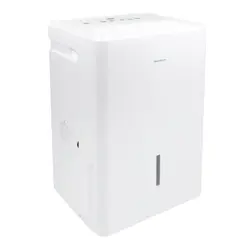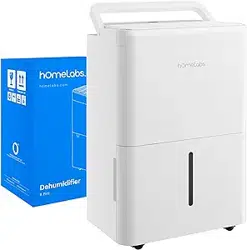
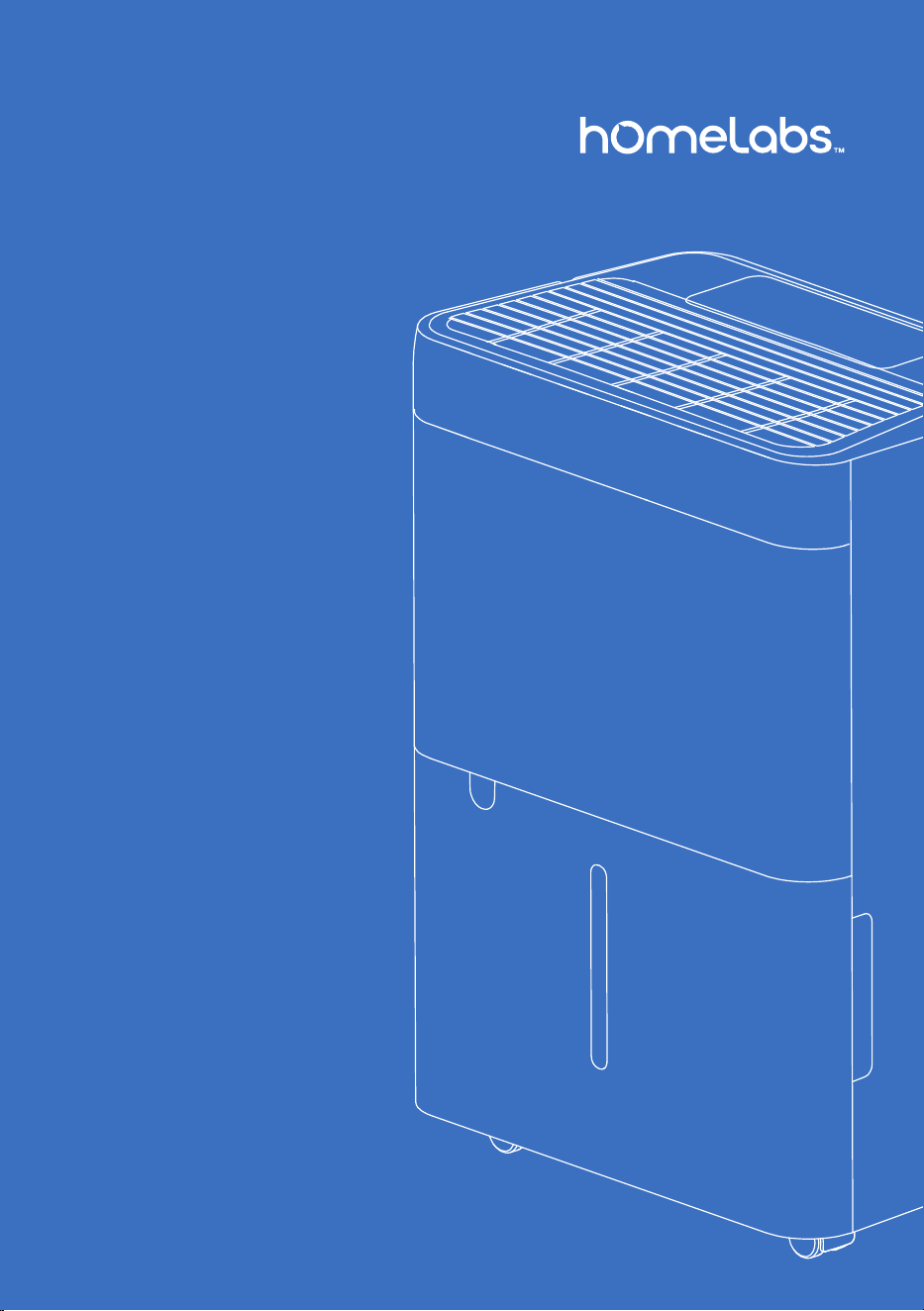
Dehumidier
MODEL: HME0081
8 Pint
Thank you for purchasing our
appliance. Please be sure to
read the entirety of this user
manual carefully prior to using
this appliance. If you have any
questions regarding the use of
this product, please contact
Customer Service
at homelabs.com/help
or help@homelabs.com
2 3
Before First Use
To prevent any internal damage, it is very important to
keep the units upright throughout its journey. Please leave it standing
upright and outside the box for 24 HOURS before plugging it in.
In the event this product malfunctions, or you believe it is
defective, please contact Customer Service at homelabs.com/help
or [email protected] and hold onto the defective product
(pending further instruction). A defective product should
be clearly marked or stored where it cannot be used by mistake.
Failure to keep the product in its original quality from the time of
receipt may impede hOmeLabs’s ability to correct any legitimate
problem and may limit the extent to which hOmeLabs
may provide recourse.
Important Safety Instructions ........................................... 4–7
Parts Description .................................................................. 8–9
Operation.............................................................................. 10–12
Cleaning and Maintenance................................................. 14–15
Troubleshooting................................................................... 16–17
Warranty................................................................................... 18
Manufacturing Info.................................................................. 19
Warning..................................................................................... 19
Contact Us................................................................................ 19
Table of Contents
on bringing home your new appliance!
Congratulations
Don’t forget to register your product at homelabs.com/reg
for updates, coupons, and other relevant information.
Although greatly appreciated, product registration
is not required to activate any warranty.

2 3
Before First Use
To prevent any internal damage, it is very important to
keep the units upright throughout its journey. Please leave it standing
upright and outside the box for 24 HOURS before plugging it in.
In the event this product malfunctions, or you believe it is
defective, please contact Customer Service at homelabs.com/help
or help@homelabs.com and hold onto the defective product
(pending further instruction). A defective product should
be clearly marked or stored where it cannot be used by mistake.
Failure to keep the product in its original quality from the time of
receipt may impede hOmeLabs’s ability to correct any legitimate
problem and may limit the extent to which hOmeLabs
may provide recourse.
Important Safety Instructions ........................................... 4–7
Parts Description .................................................................. 8–9
Operation.............................................................................. 10–12
Cleaning and Maintenance................................................. 14–15
Troubleshooting................................................................... 16–17
Warranty................................................................................... 18
Manufacturing Info.................................................................. 19
Warning..................................................................................... 19
Contact Us................................................................................ 19
Table of Contents
on bringing home your new appliance!
Congratulations
Don’t forget to register your product at homelabs.com/reg
for updates, coupons, and other relevant information.
Although greatly appreciated, product registration
is not required to activate any warranty.

5
• This appliance is for household use only.
• Disconnect the appliance from its power source during service and when
replacing parts and cleaning.
• Please note: Check the nameplate for the type of refrigerant gas used in your
appliance.
• Specic information regarding appliances with refrigerant gas.
• Do not pierce the cooling circuit of the machine. At the end of its useful life, deliver
the appliance to a special waste collection centre for disposal.
• GWP (Global Warming Potential): R410A: 2088, R134a: 1430, R290: 3, R32: 675.
• This hermetically sealed system contains uoridated greenhouse gases.
• ENVIRONMENTAL INFORMATION: This unit contains uoridated greenhouse gases
covered by the Kyoto Protocol.
• Do not use this unit for functions other than those described in this instruction
manual.
• Make sure the plug is plugged rmly and completely into the outlet. Failure to rmly
secure the plug in the outlet may result the risk of electric shock or re.
• Do not plug other appliances into the same outlet, it can result in the risk of electric
shock.
• Do not disassemble or modify the appliance or the power cord, it can result in the
risk of electric shock or re. All other services should be referred to a qualied
technician.
• Do not place the power cord or appliance near a heater, radiator, or other heat
source. It can result in the risk of electric shock or re.
• This unit is equipped with a cord that has a earthed wire connected to an earthed
pin or grounding tab. The plug must be plugged into a socket that is properly
installed and earthed. Do not under any circumstances cut or remove the earthed
pin or grounding tab from this plug.
• The unit should be used or store in such a way that it is protected from moisture e.g.
condensation, splashed water, etc. Unplug unit immediately if this occurs.
• Always transport your appliance in a vertical position and place on a stable, level
surface during use. If the unit is transported laying on its side, stand the unit upright
and unplugged for 24 hours before use.
• Always use the switch on the control panel or remote controller to turn the unit off,
and do not start or stop operation by plugging in or unplugging the power cord. It
can result in the risk of electric shock.
• Do not touch the buttons on the control panel with wet or damp ngers.
• Do not use hazardous chemicals to clean or come into contact with the unit. To
prevent damage to the surface nish, use only a soft cloth to clean the appliance.
Do not use wax, thinner, or a strong detergent. Do not use the unit in the presence of
inammable substance or vapour such as alcohol, insecticides, gasoline, etc.
• If the appliance is making unusual sounds or is emitting smoke or an unusual odor,
unplug it immediately.
• Do not clean the unit with water. Water can enter the unit and damage the insulation,
creating a shock hazard. If water enters the unit, unplug it immediately and contact
Customer Service.

5
• This appliance is for household use only.
• Disconnect the appliance from its power source during service and when
replacing parts and cleaning.
• Please note: Check the nameplate for the type of refrigerant gas used in your
appliance.
• Specic information regarding appliances with refrigerant gas.
• Do not pierce the cooling circuit of the machine. At the end of its useful life, deliver
the appliance to a special waste collection centre for disposal.
• GWP (Global Warming Potential): R410A: 2088, R134a: 1430, R290: 3, R32: 675.
• This hermetically sealed system contains uoridated greenhouse gases.
• ENVIRONMENTAL INFORMATION: This unit contains uoridated greenhouse gases
covered by the Kyoto Protocol.
• Do not use this unit for functions other than those described in this instruction
manual.
• Make sure the plug is plugged rmly and completely into the outlet. Failure to rmly
secure the plug in the outlet may result the risk of electric shock or re.
• Do not plug other appliances into the same outlet, it can result in the risk of electric
shock.
• Do not disassemble or modify the appliance or the power cord, it can result in the
risk of electric shock or re. All other services should be referred to a qualied
technician.
• Do not place the power cord or appliance near a heater, radiator, or other heat
source. It can result in the risk of electric shock or re.
• This unit is equipped with a cord that has a earthed wire connected to an earthed
pin or grounding tab. The plug must be plugged into a socket that is properly
installed and earthed. Do not under any circumstances cut or remove the earthed
pin or grounding tab from this plug.
• The unit should be used or store in such a way that it is protected from moisture e.g.
condensation, splashed water, etc. Unplug unit immediately if this occurs.
• Always transport your appliance in a vertical position and place on a stable, level
surface during use. If the unit is transported laying on its side, stand the unit upright
and unplugged for 24 hours before use.
• Always use the switch on the control panel or remote controller to turn the unit off,
and do not start or stop operation by plugging in or unplugging the power cord. It
can result in the risk of electric shock.
• Do not touch the buttons on the control panel with wet or damp ngers.
• Do not use hazardous chemicals to clean or come into contact with the unit. To
prevent damage to the surface nish, use only a soft cloth to clean the appliance.
Do not use wax, thinner, or a strong detergent. Do not use the unit in the presence of
inammable substance or vapour such as alcohol, insecticides, gasoline, etc.
• If the appliance is making unusual sounds or is emitting smoke or an unusual odor,
unplug it immediately.
• Do not clean the unit with water. Water can enter the unit and damage the insulation,
creating a shock hazard. If water enters the unit, unplug it immediately and contact
Customer Service.

6 7
• Air always contains a certain amount of water in the form of vapour. This
determines the level of humidity in an atmosphere. The capacity of the air to
hold water vapour increases with temperature. This is why in our homes, as soon
as the temperature decreases, the vapour contained in the air condenses, as is
evident on the colder surfaces in the room, such as the windows, walls etc. The
purpose of a Dehumidier is to remove the excess moisture from the air, avoiding
the damage caused by condensation.
• Experts have established that the optimum environmental conditions for our
well being and for the home are obtained between 40% and 60% relative
humidity. With very low temperatures, you are recommended to heat the
room even minimally. This considerably increases the dehumidifying power of
the appliance. With heating, the condensation formed by the water vapour on
windows and other cold surfaces evaporates into the air to be collected by the
Dehumidier. Air leaving the Dehumidier is usually about 1–2°C warmer than
room temperature.
Before plugging the appliance into the mains socket, check that:
• The mains power supply corresponds to the value indicated on the rating plate on
the back of the appliance.
• The power socket and electrical circuit are adequate for the appliance.
• The mains socket matches the plug. If this is not the case, have the plug replaced.
• The mains socket is adequately earthed. Failure to follow these important safety
instructions absolves the manufacturer of all liability.
SOME NOTIONS ON HUMIDITY
ELECTRICAL CONNECTIONS
save these
instructions
For Household Use Only
• This appliance is not intended for use by persons (including children) with
reduced physical, sensory or mental capabilities, or lack of experience and
knowledge, unless they have been given supervision or instruction concerning use
of the appliance by a person responsible for their safety.
• Children should be supervised to ensure that they do not play with the appliance.
• If the SUPPLY CORD is damaged, it must be replaced by the manufacturer, its
service agent or similarly qualied persons in order to avoid a hazard.
• The appliance should be installed in accordance with national wiring regulations.
• Do not use any means to accelerate the defrosting process or to clean, other
than those recommended by the manufacturer.
• The appliance should be stored in a room that does not contain continuously
operating ignition sources (for example: open ames, an operating gas appliance
or an operating electric heater.
• Do not pierce or burn.
• Be aware that refrigerants may not contain an odour.
• If you suspect a leak or the unit is not performing as expected, immediately stop
using the unit and contact Customer Service
WARNING
• Utilize two or more people to lift and install the unit.
• Always grasp the plug when plugging in or unplugging the appliance. Never unplug by
pulling on the cord, it can result in the risk of electrical shock and damage.
• Install the appliance on a sturdy, level oor capable of supporting up to 110 lb
(50 kg). Installation on a weak or unlevel oor can result in the risk of property
damage and personal injury.
• Details of type and rating of fuses: T, 250V AC, 3.15A.

6 7
• Air always contains a certain amount of water in the form of vapour. This
determines the level of humidity in an atmosphere. The capacity of the air to
hold water vapour increases with temperature. This is why in our homes, as soon
as the temperature decreases, the vapour contained in the air condenses, as is
evident on the colder surfaces in the room, such as the windows, walls etc. The
purpose of a Dehumidier is to remove the excess moisture from the air, avoiding
the damage caused by condensation.
• Experts have established that the optimum environmental conditions for our
well being and for the home are obtained between 40% and 60% relative
humidity. With very low temperatures, you are recommended to heat the
room even minimally. This considerably increases the dehumidifying power of
the appliance. With heating, the condensation formed by the water vapour on
windows and other cold surfaces evaporates into the air to be collected by the
Dehumidier. Air leaving the Dehumidier is usually about 1–2°C warmer than
room temperature.
Before plugging the appliance into the mains socket, check that:
• The mains power supply corresponds to the value indicated on the rating plate on
the back of the appliance.
• The power socket and electrical circuit are adequate for the appliance.
• The mains socket matches the plug. If this is not the case, have the plug replaced.
• The mains socket is adequately earthed. Failure to follow these important safety
instructions absolves the manufacturer of all liability.
SOME NOTIONS ON HUMIDITY
ELECTRICAL CONNECTIONS
save these
instructions
For Household Use Only
• This appliance is not intended for use by persons (including children) with
reduced physical, sensory or mental capabilities, or lack of experience and
knowledge, unless they have been given supervision or instruction concerning use
of the appliance by a person responsible for their safety.
• Children should be supervised to ensure that they do not play with the appliance.
• If the SUPPLY CORD is damaged, it must be replaced by the manufacturer, its
service agent or similarly qualied persons in order to avoid a hazard.
• The appliance should be installed in accordance with national wiring regulations.
• Do not use any means to accelerate the defrosting process or to clean, other
than those recommended by the manufacturer.
• The appliance should be stored in a room that does not contain continuously
operating ignition sources (for example: open ames, an operating gas appliance
or an operating electric heater.
• Do not pierce or burn.
• Be aware that refrigerants may not contain an odour.
• If you suspect a leak or the unit is not performing as expected, immediately stop
using the unit and contact Customer Service
WARNING
• Utilize two or more people to lift and install the unit.
• Always grasp the plug when plugging in or unplugging the appliance. Never unplug by
pulling on the cord, it can result in the risk of electrical shock and damage.
• Install the appliance on a sturdy, level oor capable of supporting up to 110 lb
(50 kg). Installation on a weak or unlevel oor can result in the risk of property
damage and personal injury.
• Details of type and rating of fuses: T, 250V AC, 3.15A.
8 9
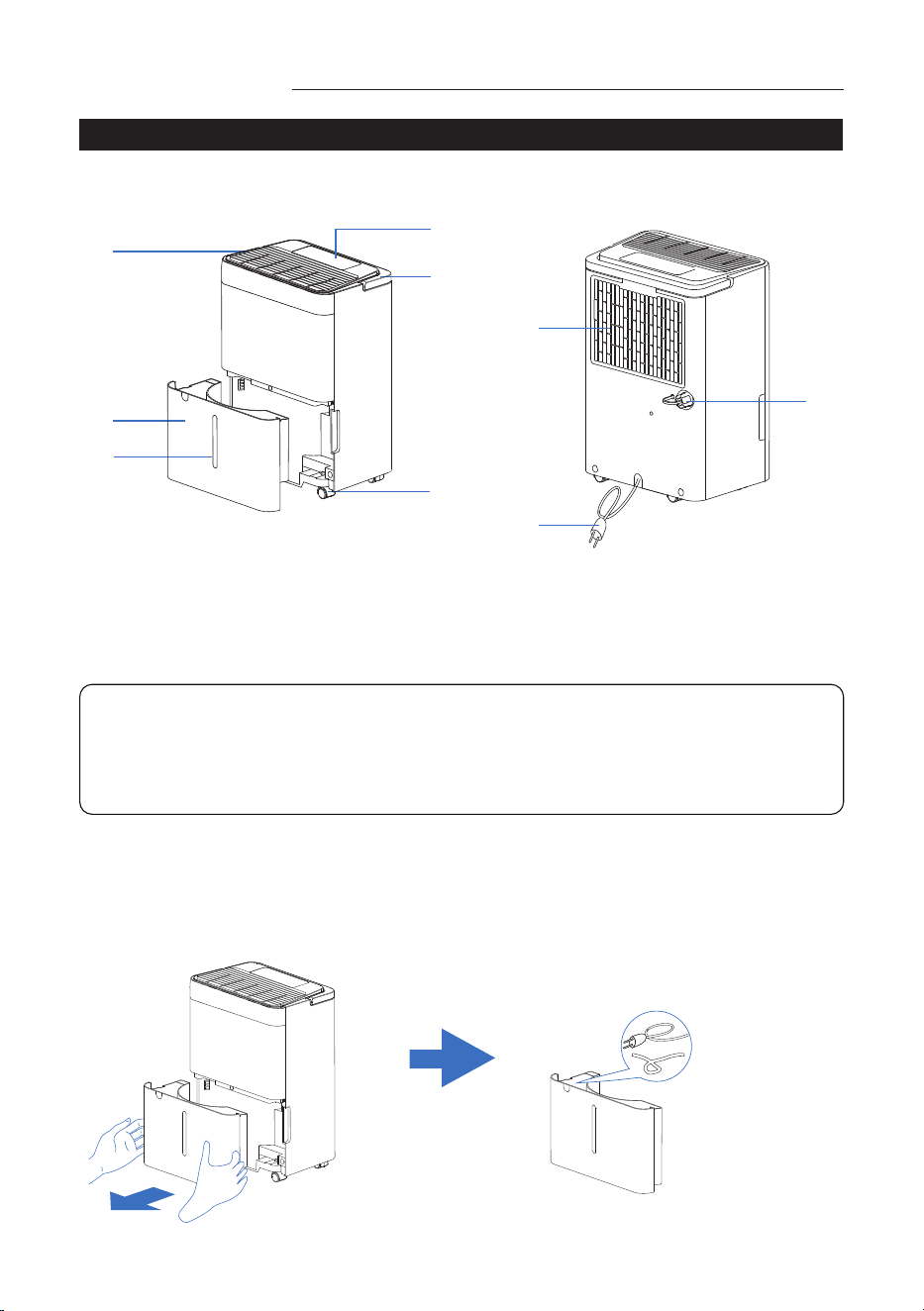
Parts Description Parts Description
COMPONENT DESCRIPTION ACCESSORIES INCLUDED
FRONT REAR
1
2
3
5
8
9
4
7
6
1
2
3
5
8
9
4
7
6
1. Control Panel
2. Air Outlet
3. Bucket
4. Water Level View Window
5. Handle
6. Castor
7. Air Intake Grille
8. Power Cord
9. Drain Port with Drain Cover
Before use remove the accessory from the bucket
• Remove the bucket from appliance.
• Take out of the the plug, and other accessories.
• Correctly put back the bucket into the appliance.
NOTE:
All the illustrations in the manual are for explanation purpose only. Your
Dehumidier may vary slightly. The design and specications are subject to
change without prior notice for product improvement. Consult Customer
Service for details.
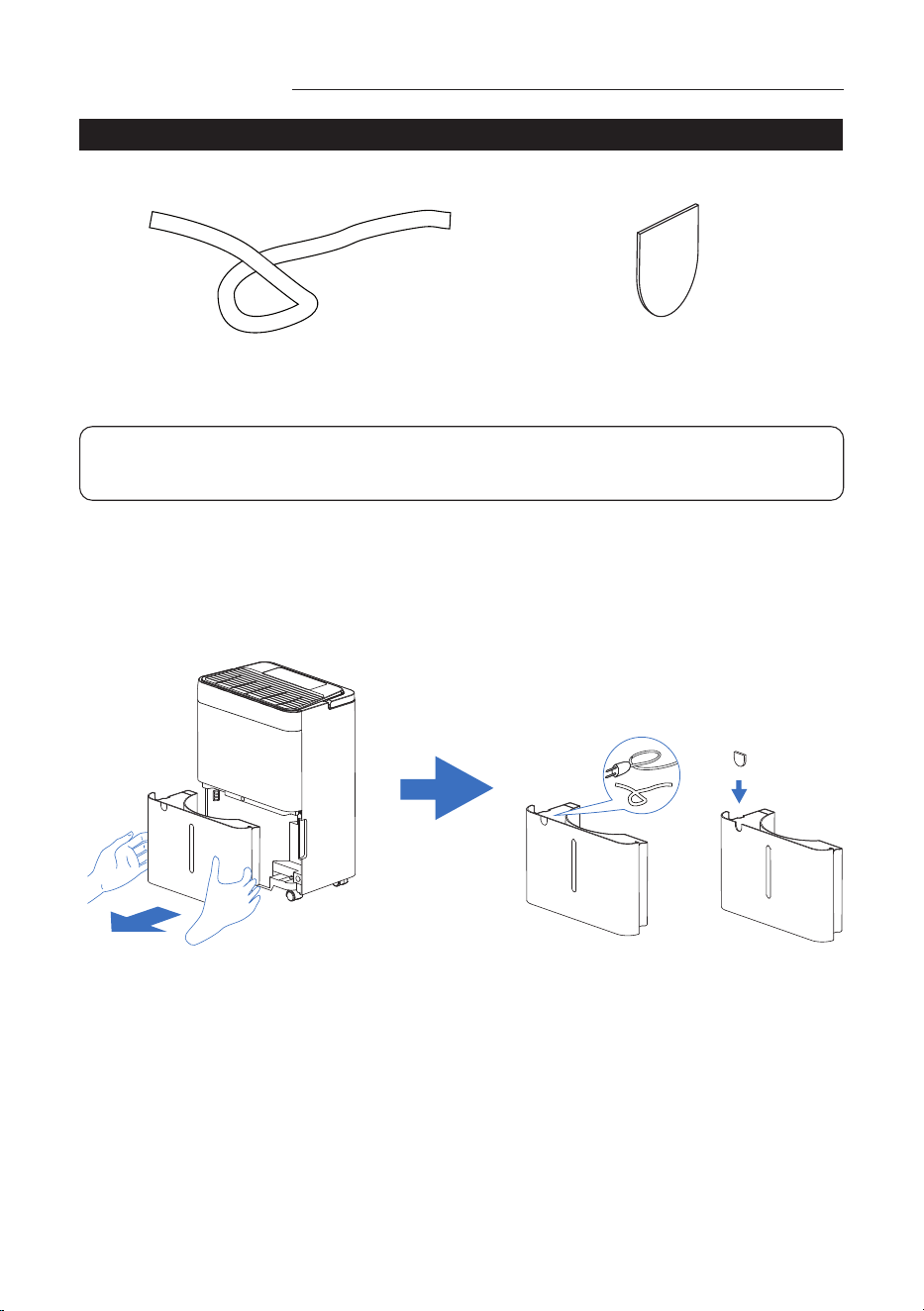
Drain Pipe
1 set
length: 1 m, ID 12.7 mm, OD 15.5 mm
Chip of Bucket
1 set
1
2
3
5
8
9
4
7
6
1
2
3
5
8
9
4
7
6
NOTE: Be sure all accessories are removed from the packing and Bucket
before use.
Installation
• Take out the power cord from bucket.
• Take out the bucket, remove the power cord, check there is any other accessories
and take out.
• Install the chip on the bucket.
8 9
Parts Description Parts Description
COMPONENT DESCRIPTION ACCESSORIES INCLUDED
FRONT REAR
1
2
3
5
8
9
4
7
6
1
2
3
5
8
9
4
7
6
1. Control Panel
2. Air Outlet
3. Bucket
4. Water Level View Window
5. Handle
6. Castor
7. Air Intake Grille
8. Power Cord
9. Drain Port with Drain Cover
Before use remove the accessory from the bucket
• Remove the bucket from appliance.
• Take out of the the plug, and other accessories.
• Correctly put back the bucket into the appliance.
NOTE:
All the illustrations in the manual are for explanation purpose only. Your
Dehumidier may vary slightly. The design and specications are subject to
change without prior notice for product improvement. Consult Customer
Service for details.
Drain Pipe
1 set
length: 1 m, ID 12.7 mm, OD 15.5 mm
Chip of Bucket
1 set
1
2
3
5
8
9
4
7
6
1
2
3
5
8
9
4
7
6
NOTE: Be sure all accessories are removed from the packing and Bucket
before use.
Installation
• Take out the power cord from bucket.
• Take out the bucket, remove the power cord, check there is any other accessories
and take out.
• Install the chip on the bucket.
10 11
C
E D
A
B
1 ~ 34~ 6
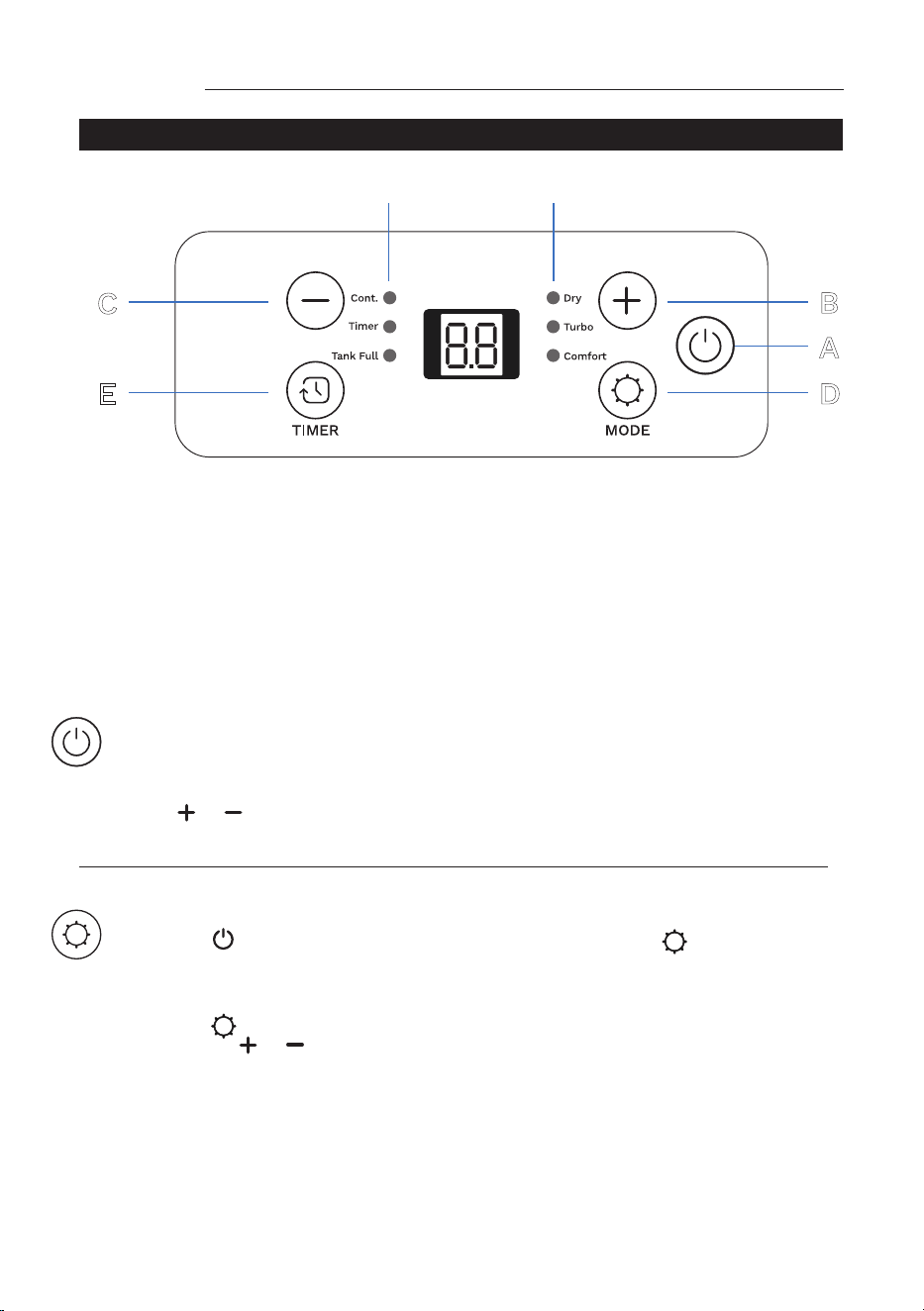
A. On / Off button
B. Increase button
C. Decrease button
D. Mode button
E. Timer button
1. Dry Indicator
2. Turbo Indicator
3. Comfort Indicator
4. Continuous Indicator
5. Timer Indicator
6. Tank Full Indicator
Operation
CONTROL PANEL
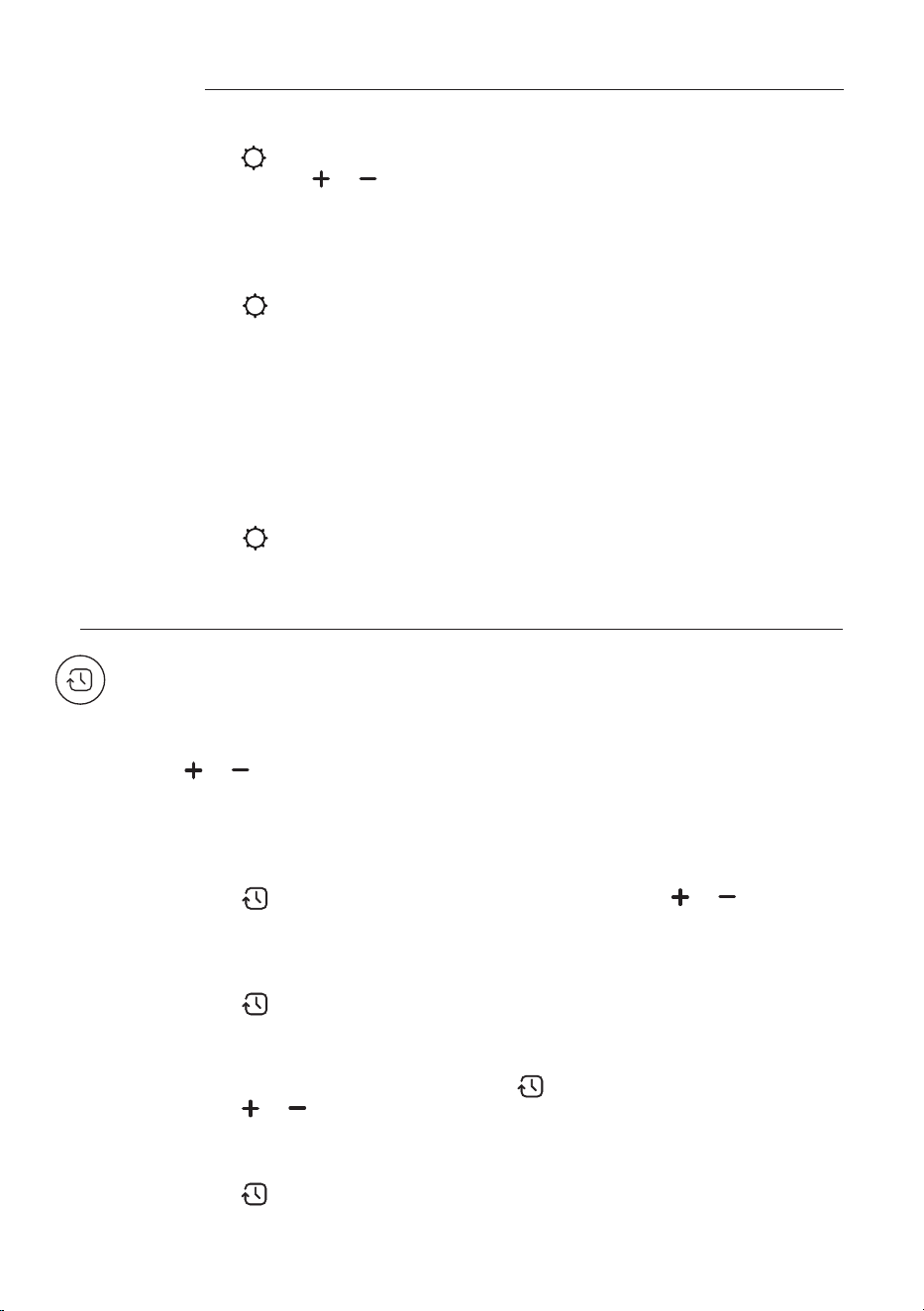
“Power” buon
On / off power supply, used to control the start-up or shut down the appliance.
Decrease / Increase buon
Press or to select the indoor humidity level you expect to achieve,
or set the time.
“Timer” buon
This timer can be used to delay the appliance start-up or shutdown, this avoids
wasting electricity by optimizing operating periods.
Decrease / Increase buon
Press or to select the indoor humidity level you expect to achieve, or set
the time.
“Mode” buon
Press the button to turn on the appliance, and press the button to
choose different modes.
*Dry mode
Press the button until the “DRY“ indicator lights.
• Press the or to choose the humidity desired. The humidity adjustable
range is 35%RH–80%RH. The screen will display the setting humidity, and after
few seconds, turn to display the ambient humidity.
• When the ambient humidity lower than setting humidity, the compressor stop
running, and after few minutes the fan stop running.
• The fan speed is low and cannot be adjusted.
*Comfort mode
• Press the button until the “Comfort” indicator is lights, the appliance will
setting humidity according to the ambient temperature. So the humidity can
not be adjusted and show the ambient humidity.
• The fan speed is low and can not be adjusted.
• When active the comfort mode, the screen light will go to dim, after
1 minute later the screen will turn off.
• Press other button to check the status, the screen will light again and after
1 minute later will turn off.
• The fan speed is low and cannot be adjusted.
*Continuous mode
• Press the button until the “Cont.” indicator is lights, the setting humidity
is 15%RH and can not be adjusted, the unit will continuously run.
• The fan speed is low and can not be adjusted.
*Turbo mode
• Press the button until the “Turbo” indicator lights, the setting humidity is
35%RH, press the or to choose the humidity desired.
• The screen will display the setting humidity, and after 2 seconds, turn to
display the ambient humidity.
• The fan speed is high and cannot be adjusted.
*Programming start-up
• Turn on the appliance, choose the mode you want, for example Dry mode,
65%RH. Turn off the appliance.
• Press the button , the screen starts to ash, press the or to adjust
the set time from 0.5–24 hours.
• In 5 seconds without the operation, the timer start function, then the “Timer”
indicator lights.
• The control will count down the time remaining until start-up.
• Press the button again to cancel the Timer, and the “Timer” indicator will
disappear.
*Programming shut down
• When the appliance is running, press the button, the screen starts to ash,
press the or to adjust the set time from
0.5–24hours.
• In 5 seconds without the operation, the timer start function, then the “Timer”
indicator lights.
• Press the button again to cancel the Timer, and the “Timer” indicator will
disappear.
Operation
10 11
C
E D
A
B
1 ~ 34~ 6
A. On / Off button
B. Increase button
C. Decrease button
D. Mode button
E. Timer button
1. Dry Indicator
2. Turbo Indicator
3. Comfort Indicator
4. Continuous Indicator
5. Timer Indicator
6. Tank Full Indicator
Operation
CONTROL PANEL
“Power” buon
On / off power supply, used to control the start-up or shut down the appliance.
Decrease / Increase buon
Press or to select the indoor humidity level you expect to achieve,
or set the time.
“Timer” buon
This timer can be used to delay the appliance start-up or shutdown, this avoids
wasting electricity by optimizing operating periods.
Decrease / Increase buon
Press or to select the indoor humidity level you expect to achieve, or set
the time.
“Mode” buon
Press the button to turn on the appliance, and press the button to
choose different modes.
*Dry mode
Press the button until the “DRY“ indicator lights.
• Press the or to choose the humidity desired. The humidity adjustable
range is 35%RH–80%RH. The screen will display the setting humidity, and after
few seconds, turn to display the ambient humidity.
• When the ambient humidity lower than setting humidity, the compressor stop
running, and after few minutes the fan stop running.
• The fan speed is low and cannot be adjusted.
*Comfort mode
• Press the button until the “Comfort” indicator is lights, the appliance will
setting humidity according to the ambient temperature. So the humidity can
not be adjusted and show the ambient humidity.
• The fan speed is low and can not be adjusted.
• When active the comfort mode, the screen light will go to dim, after
1 minute later the screen will turn off.
• Press other button to check the status, the screen will light again and after
1 minute later will turn off.
• The fan speed is low and cannot be adjusted.
*Continuous mode
• Press the button until the “Cont.” indicator is lights, the setting humidity
is 15%RH and can not be adjusted, the unit will continuously run.
• The fan speed is low and can not be adjusted.
*Turbo mode
• Press the button until the “Turbo” indicator lights, the setting humidity is
35%RH, press the or to choose the humidity desired.
• The screen will display the setting humidity, and after 2 seconds, turn to
display the ambient humidity.
• The fan speed is high and cannot be adjusted.
*Programming start-up
• Turn on the appliance, choose the mode you want, for example Dry mode,
65%RH. Turn off the appliance.
• Press the button , the screen starts to ash, press the or to adjust
the set time from 0.5–24 hours.
• In 5 seconds without the operation, the timer start function, then the “Timer”
indicator lights.
• The control will count down the time remaining until start-up.
• Press the button again to cancel the Timer, and the “Timer” indicator will
disappear.
*Programming shut down
• When the appliance is running, press the button, the screen starts to ash,
press the or to adjust the set time from
0.5–24hours.
• In 5 seconds without the operation, the timer start function, then the “Timer”
indicator lights.
• Press the button again to cancel the Timer, and the “Timer” indicator will
disappear.
Operation
12 13
Alarm of Full Bucket
• When bucket is full, the compressor will shut off, the fan will stop for a few
minutes, and make a beeping noise, “Tank Full“ indicator is ashing.
• The unit will not run again until the bucket is emptied and properly placed back
inside the unit.
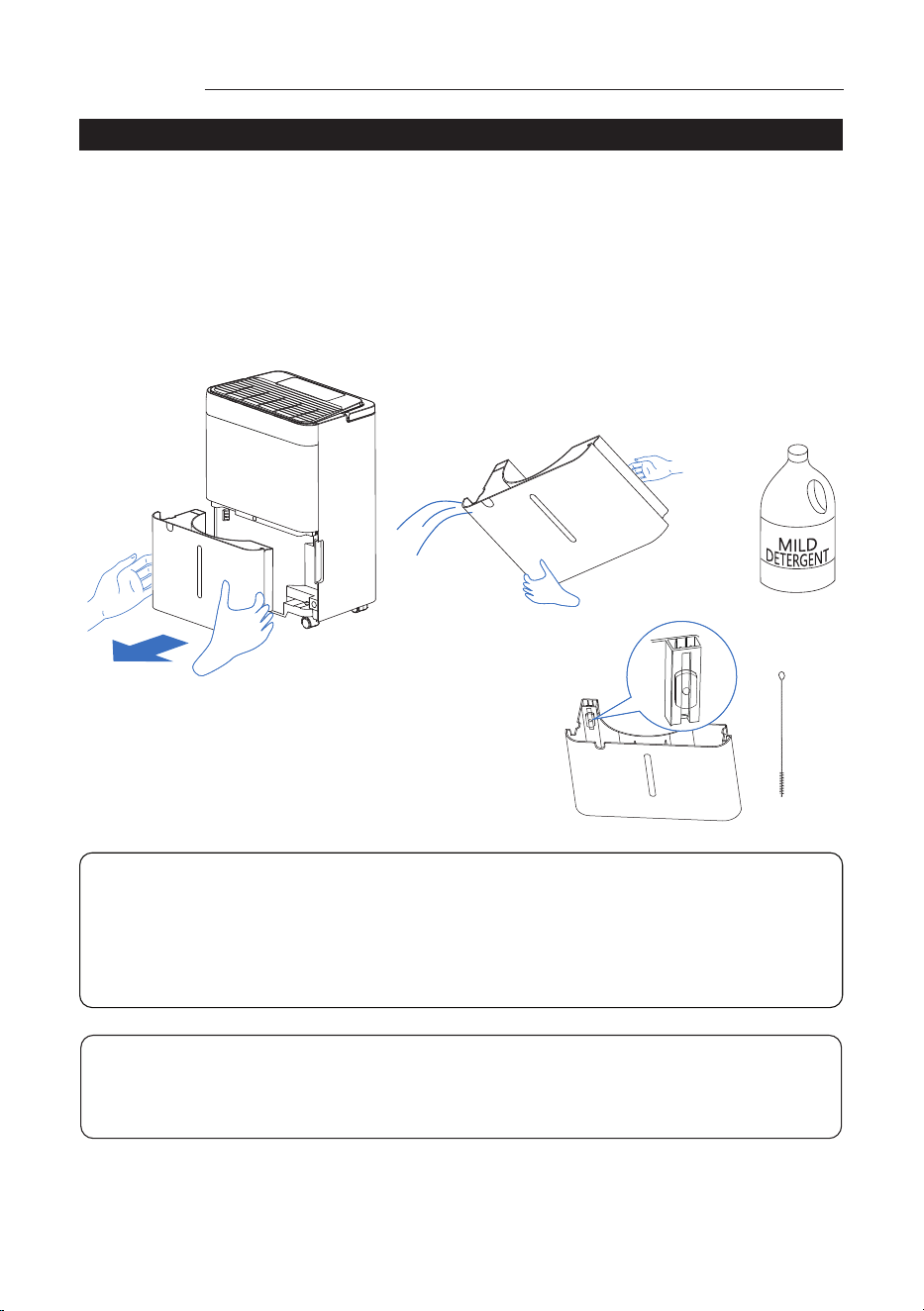
• The bucket should be cleaned every week to prevent the growth of mold, mildew
and bacteria. Use a mild detergent to clean. Once clean, completely dry the
bucket and place it back inside unit.
Operation
ALARM OF FULL BUCKET
• To prevent the water tank oat from being
blocked by dust, clean the oat with a brush
once a month to ensure that the oat can
oat freely and not be trapped by dust.
CAUTION:
Do not place the Bucket on the oor when it is full as the boom of the Bucket
is uneven and may spill water.
NOTE: Hold the bucket with both hands when emptying.
NOTE: When the bucket is full or removed from the unit, the compressor will
turn off but the fan will continue to run for a few minutes. This is completely
normal. The unit will not be removing moisture from the air at this time.
NOTE: During operation, it is normal for the unit to exhaust warm air from the
side of the unit.
NOTE: If no need the function of continuous drain, please install the cap on
the drain hole back of the unit, then the water will ow into the bucket.
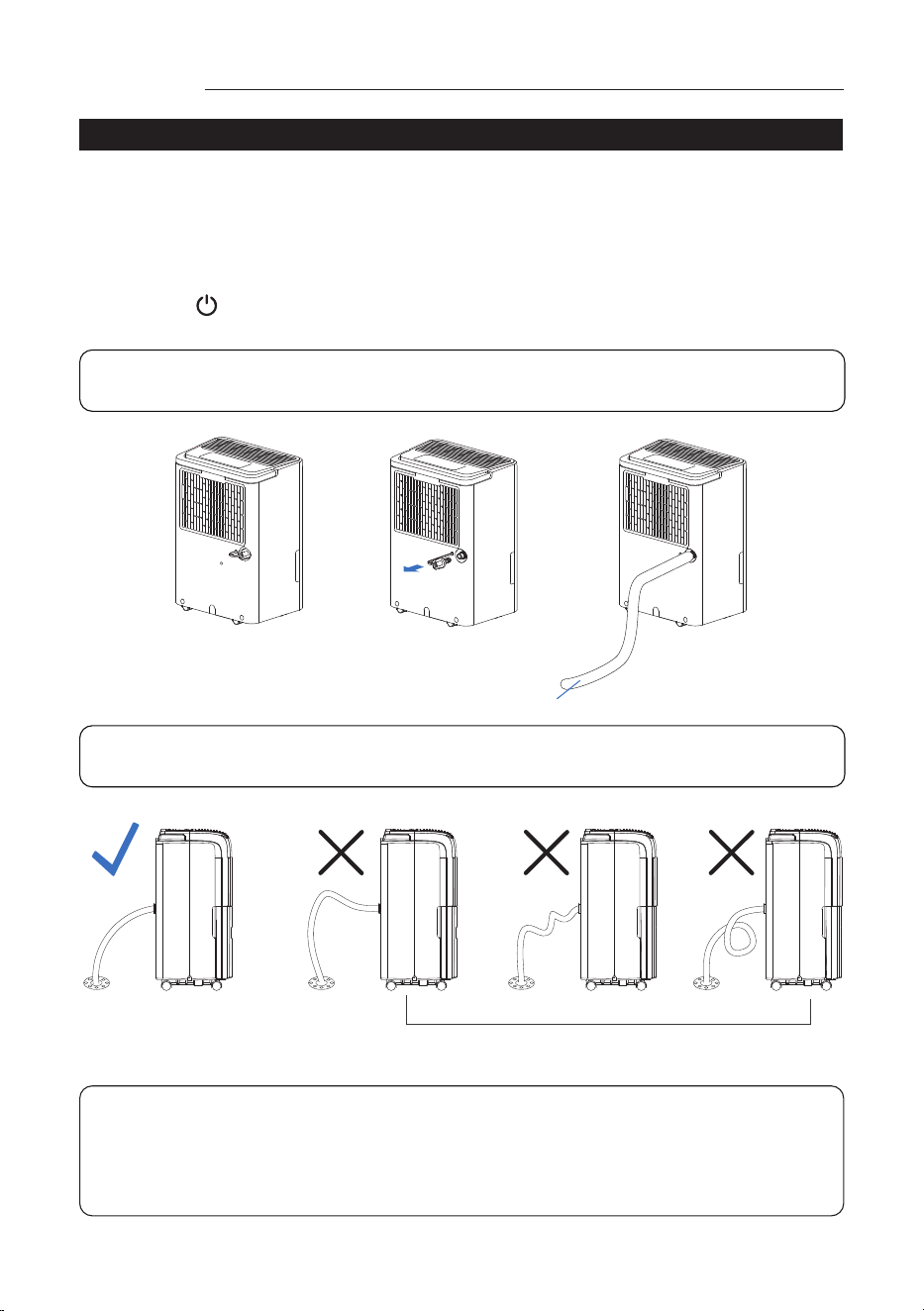
NOTE: Please install the drain pipe follow below picture. Please install the
drain pipe correctly, or the water cannot drain from the pipe.
CONTINUOUS DRAIN
Operation
Continuous Drain
Connect the drain pipe on the back of unit, then the unit can continuous run without
clean the bucket.
1. Put the unit on level oor, unscrew the cap on the back of unit;
2. Install the connector of drain and gasket;
3. Install the drain pipe on connector;
4. Press button to run the unit.
Drain Hose
Correct Incorrect
NOTE:
Make sure the unit is put on level ground and the Drain Pipe is installed
correctly, otherwise the Bucket will be full of water, and the unit stop run.
If this issue occurs, please ensure that the ground is level and the drain pipe
is correctly installed. Make sure the Bucket is installed correctly.
12 13
Alarm of Full Bucket
• When bucket is full, the compressor will shut off, the fan will stop for a few
minutes, and make a beeping noise, “Tank Full“ indicator is ashing.
• The unit will not run again until the bucket is emptied and properly placed back
inside the unit.
• The bucket should be cleaned every week to prevent the growth of mold, mildew
and bacteria. Use a mild detergent to clean. Once clean, completely dry the
bucket and place it back inside unit.
Operation
ALARM OF FULL BUCKET
• To prevent the water tank oat from being
blocked by dust, clean the oat with a brush
once a month to ensure that the oat can
oat freely and not be trapped by dust.
CAUTION:
Do not place the Bucket on the oor when it is full as the boom of the Bucket
is uneven and may spill water.
NOTE: Hold the bucket with both hands when emptying.
NOTE: When the bucket is full or removed from the unit, the compressor will
turn off but the fan will continue to run for a few minutes. This is completely
normal. The unit will not be removing moisture from the air at this time.
NOTE: During operation, it is normal for the unit to exhaust warm air from the
side of the unit.
NOTE: If no need the function of continuous drain, please install the cap on
the drain hole back of the unit, then the water will ow into the bucket.
NOTE: Please install the drain pipe follow below picture. Please install the
drain pipe correctly, or the water cannot drain from the pipe.
CONTINUOUS DRAIN
Operation
Continuous Drain
Connect the drain pipe on the back of unit, then the unit can continuous run without
clean the bucket.
1. Put the unit on level oor, unscrew the cap on the back of unit;
2. Install the connector of drain and gasket;
3. Install the drain pipe on connector;
4. Press button to run the unit.
Drain Hose
Correct Incorrect
NOTE:
Make sure the unit is put on level ground and the Drain Pipe is installed
correctly, otherwise the Bucket will be full of water, and the unit stop run.
If this issue occurs, please ensure that the ground is level and the drain pipe
is correctly installed. Make sure the Bucket is installed correctly.
14 15
AUTOMATIC DEFROST
CLEANING AND MAINTENANCE
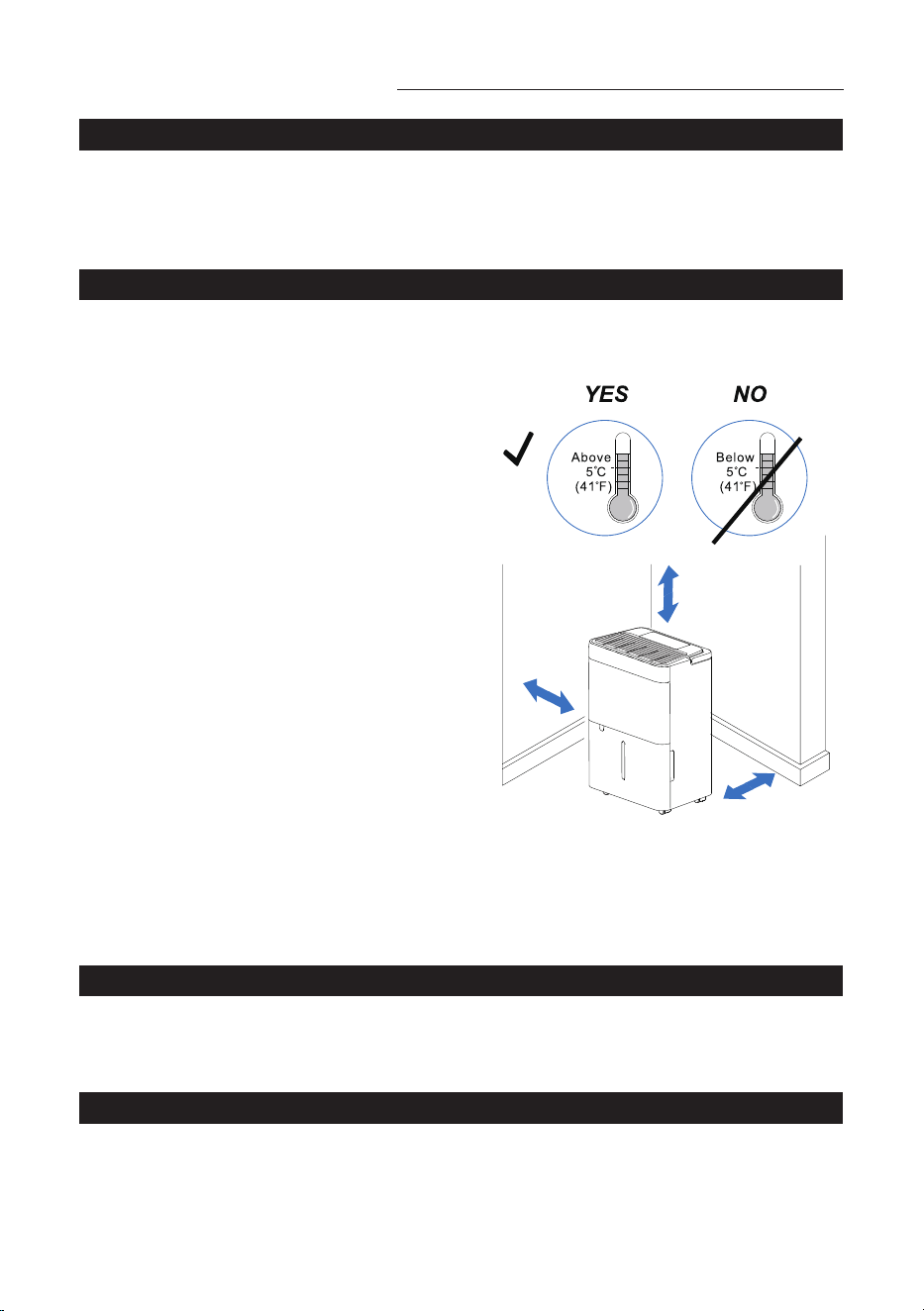
CHOOSING A LOCATION
END OF SEASON OPERATIONS
START OF SEASON CHECKS
CLEANING THE CABINET
When frost builds up on the evaporator coils, the compressor will cycle off and the
fan will continue to run until the frost disappears. When the coils are completely
defrosted, the compressor or fan (depending on the model) will automatically
restart. The unit start to dehumidify the room.
Before cleaning or maintenance, turn the appliance off by pressing the “POWER”
button on the control panel, wait for a few minutes then unplug from the mains
socket.
• Unplug the unit from the outlet, empty the Bucket and remove the drain cap.
• Run off all water left inside the appliance. When all the water has been drained,
put the cap back in place.
• Clean the lter and dry it thoroughly before putting back.
• Cover the appliance to avoid dust accumulation.
• Store the appliance upright in a dry location.
Make sure the power cable and plug are undamaged and the earth system is
efcient. Follow the installation instructions precisely.
You should clean the appliance with a slightly damp cloth then dry with a dry cloth.
● Never wash the appliance with water, it could be dangerous.
● Never use petrol, alcohol or solvents to clean the appliance.
● Never spray insecticide liquids or similar.
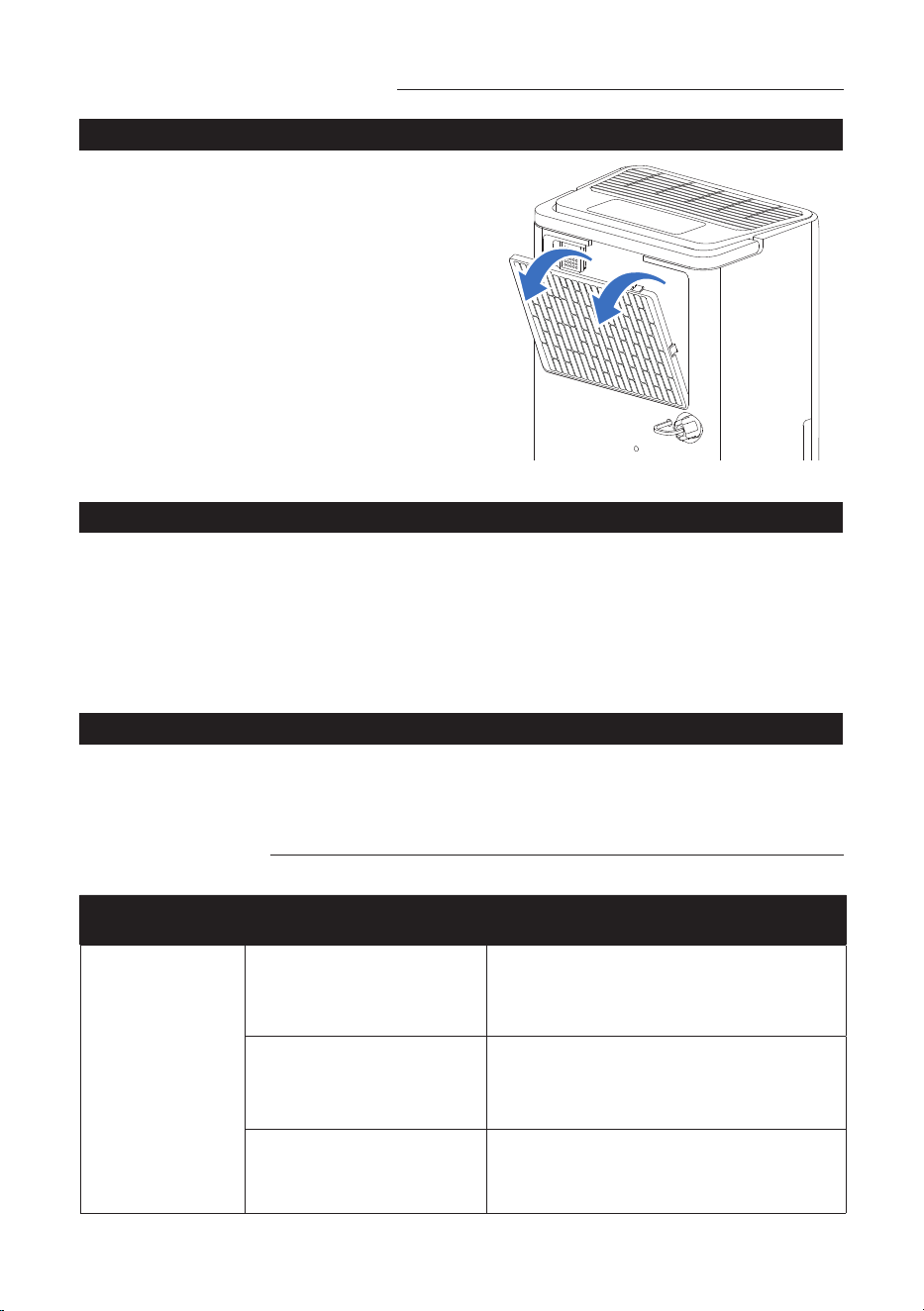
• To keep your appliance working
efciently, clean the lter every month
of operation.
• The lter can take out like g.
• To avoid possible cuts, avoid contacting
the metal parts of the appliance when
removing or re-installing the lter. It can
result in the risk of personal injury.
• Use a vacuum cleaner to remove dust
from the lter. If the lter is very dirty,
immerse it in warm water and rinse it a
number of times. The water temperature
should not be higher than 104°F (40°C).
After washing, leave the lter to dry.
The unit operating in a basement will have little no effect in drying out an adjacent
enclosed storage area, such as a closet, unless there is adequate circulation of air in
and out of the area.
45 cm
45 cm
45 cm
1. Do not use outdoors.
2. This appliance is intended for indoor
use only. Place the appliance on a
smooth, level oor surface that is
strong enough to support the unit with
a full bucket of water.
3. Allow at least 18 inches (45 cm) of
around and above space away from the
wall for efcient working.
4. Place the appliance in an area where
the temperature will not fall 41°F (5°C).
5. Use the Dehumidier in cooking,
laundry, bathing and dish-washing
areas that have excessive moisture.
6. Place the Dehumidier away from a
clothes dryer.
7. Use the Dehumidier in a basement to
help prevent moisture damage.
8. The Dehumidier must be operated in
an enclosed area to be most effective,
close all doors, windows and other
outside openings to the room.
9. Do not block the air inlet or outlet of
the appliance. Reduced air ow will
result in poor performance and could
damage the unit.
Cleaning and Maintenance
Troubleshooting
CLEANING THE FILTER
Cleaning and Maintenance
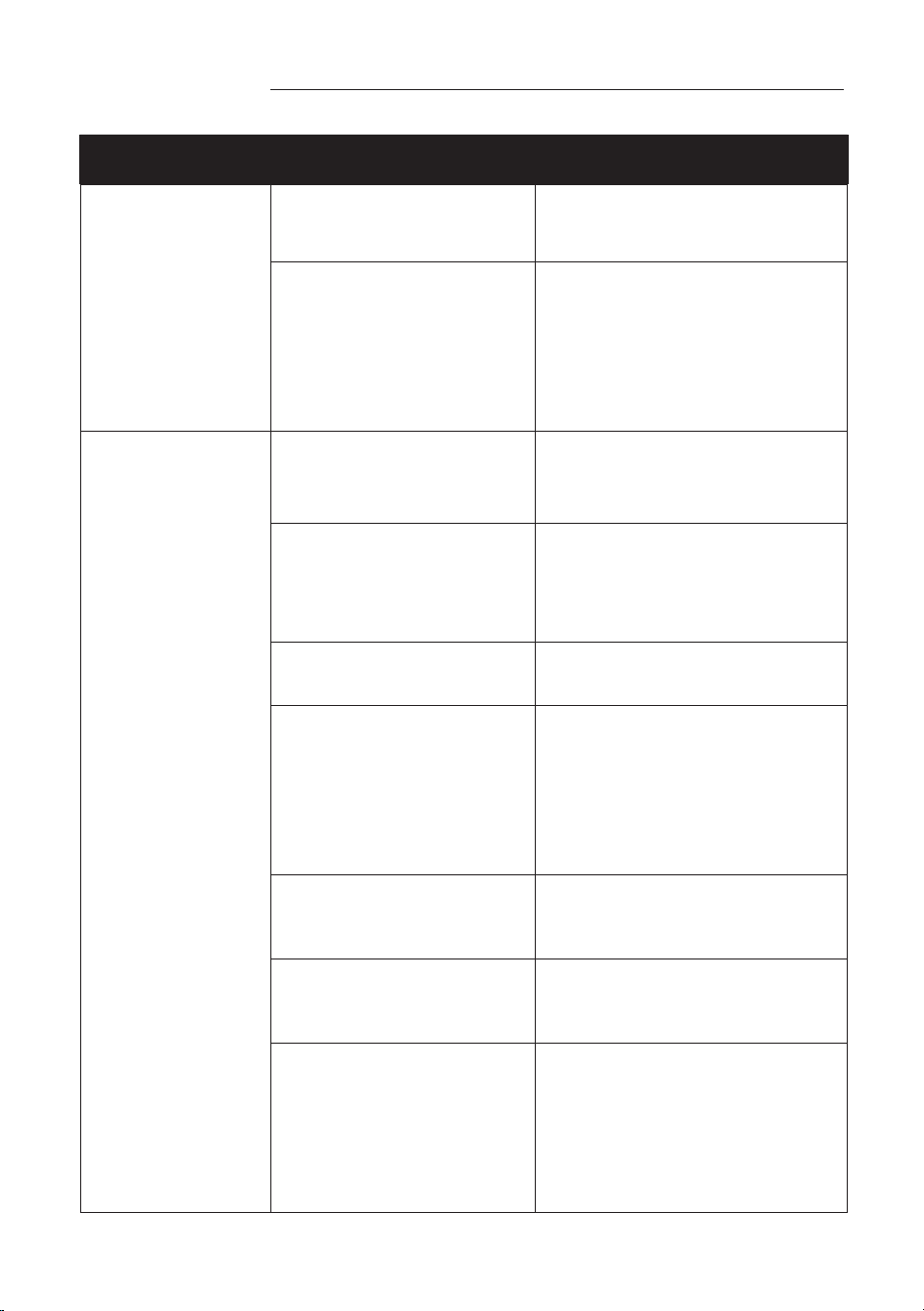
PROBLEM POSSIBLE CAUSES SOLUTIONS
Dehumidier
does not start.
The Dehumidier is
unplugged.
Make sure the Dehumidier’s plug is
pushed completely into the outlet.
The fuse is blown/circuit
breaker is tripped.
Check the house fuse/circuit breaker
box and replace the fuse or reset the
circuit breaker.
Dehumidier has
reached its present level
or the Bucket is full.
Change to a lower setting; Empty the
water Bucket and replace it properly.
14 15
AUTOMATIC DEFROST
CLEANING AND MAINTENANCE
CHOOSING A LOCATION
END OF SEASON OPERATIONS
START OF SEASON CHECKS
CLEANING THE CABINET
When frost builds up on the evaporator coils, the compressor will cycle off and the
fan will continue to run until the frost disappears. When the coils are completely
defrosted, the compressor or fan (depending on the model) will automatically
restart. The unit start to dehumidify the room.
Before cleaning or maintenance, turn the appliance off by pressing the “POWER”
button on the control panel, wait for a few minutes then unplug from the mains
socket.
• Unplug the unit from the outlet, empty the Bucket and remove the drain cap.
• Run off all water left inside the appliance. When all the water has been drained,
put the cap back in place.
• Clean the lter and dry it thoroughly before putting back.
• Cover the appliance to avoid dust accumulation.
• Store the appliance upright in a dry location.
Make sure the power cable and plug are undamaged and the earth system is
efcient. Follow the installation instructions precisely.
You should clean the appliance with a slightly damp cloth then dry with a dry cloth.
● Never wash the appliance with water, it could be dangerous.
● Never use petrol, alcohol or solvents to clean the appliance.
● Never spray insecticide liquids or similar.
• To keep your appliance working
efciently, clean the lter every month
of operation.
• The lter can take out like g.
• To avoid possible cuts, avoid contacting
the metal parts of the appliance when
removing or re-installing the lter. It can
result in the risk of personal injury.
• Use a vacuum cleaner to remove dust
from the lter. If the lter is very dirty,
immerse it in warm water and rinse it a
number of times. The water temperature
should not be higher than 104°F (40°C).
After washing, leave the lter to dry.
The unit operating in a basement will have little no effect in drying out an adjacent
enclosed storage area, such as a closet, unless there is adequate circulation of air in
and out of the area.
45 cm
45 cm
45 cm
1. Do not use outdoors.
2. This appliance is intended for indoor
use only. Place the appliance on a
smooth, level oor surface that is
strong enough to support the unit with
a full bucket of water.
3. Allow at least 18 inches (45 cm) of
around and above space away from the
wall for efcient working.
4. Place the appliance in an area where
the temperature will not fall 41°F (5°C).
5. Use the Dehumidier in cooking,
laundry, bathing and dish-washing
areas that have excessive moisture.
6. Place the Dehumidier away from a
clothes dryer.
7. Use the Dehumidier in a basement to
help prevent moisture damage.
8. The Dehumidier must be operated in
an enclosed area to be most effective,
close all doors, windows and other
outside openings to the room.
9. Do not block the air inlet or outlet of
the appliance. Reduced air ow will
result in poor performance and could
damage the unit.
Cleaning and Maintenance
Troubleshooting
CLEANING THE FILTER
Cleaning and Maintenance
PROBLEM POSSIBLE CAUSES SOLUTIONS
Dehumidier
does not start.
The Dehumidier is
unplugged.
Make sure the Dehumidier’s plug is
pushed completely into the outlet.
The fuse is blown/circuit
breaker is tripped.
Check the house fuse/circuit breaker
box and replace the fuse or reset the
circuit breaker.
Dehumidier has
reached its present level
or the Bucket is full.
Change to a lower setting; Empty the
water Bucket and replace it properly.
16 17
PROBLEM POSSIBLE CAUSES SOLUTIONS
Dehumidier
does not start.
Bucket is not in the proper
position.
The Bucket must be in place
and securely seated for the
Dehumidier to operate.
Power failure.
There is a protective time delay
(up to 3 min.) to prevent the
compressor from overloading.
For this reason, the unit may
not start work immediately, but
delay 3 min when power
is resumed.
Dehumidier does
not dry the air as
it should.
Not enough time allowed
for unit to remove
moisture.
When rst installed, allow at
least 24 hours to maintain the
desired dryness.
Airow is restricted.
Make sure there are no
curtains, blinds or furniture
block the front or back of the
Dehumidier. See the CHOOSING
A LOCATION section.
Dirty lter. Clean the lter. See the
CLEANING THE FILTER section.
The Humidity Control may
not be set low enough.
For drier air, press the
“Decrease” button
to lower the percent humidity
desired in the room, or
set the Dehumidier to
continuous mode for maximum
dehumidifying.
Doors and windows may
not be closed tightly.
Check that all doors, windows,
and other openings are securely
closed.
Clothes dryer may be
blowing moist air into the
room.
Install the Dehumidier away
from the dryer. The dryer should
be vented outside.
Room temperature
is too low.
Moisture removal is best at
higher room temperatures.
Lower room temperatures will
reduce the moisture removal
rate. This model is designed to
operate at temperatures
above 41°F (5°C).
PROBLEM POSSIBLE CAUSES SOLUTIONS
Appliance runs
too long
The area is too large
The capacity of the appliance
can not meet the area of the
room
Doors and windows are
open
Close the door and window
Frost appears on
heat-exchanger
Appliance runs recently or
the room temperature is
too low
It is normal, frost usually
disappear in 60 min
Fan noise The air is passing through
the appliance
This is normal
Water on the oor
The drain connection may
be aging or loose
Check the drain connection and
the appliance is placed level
The drain pipe is
connected, but the water
is not drained
If use the bucket, remove the
drain pipe and put back the
drain cover; or install the drain
pipe correctly
Troubleshooting Troubleshooting
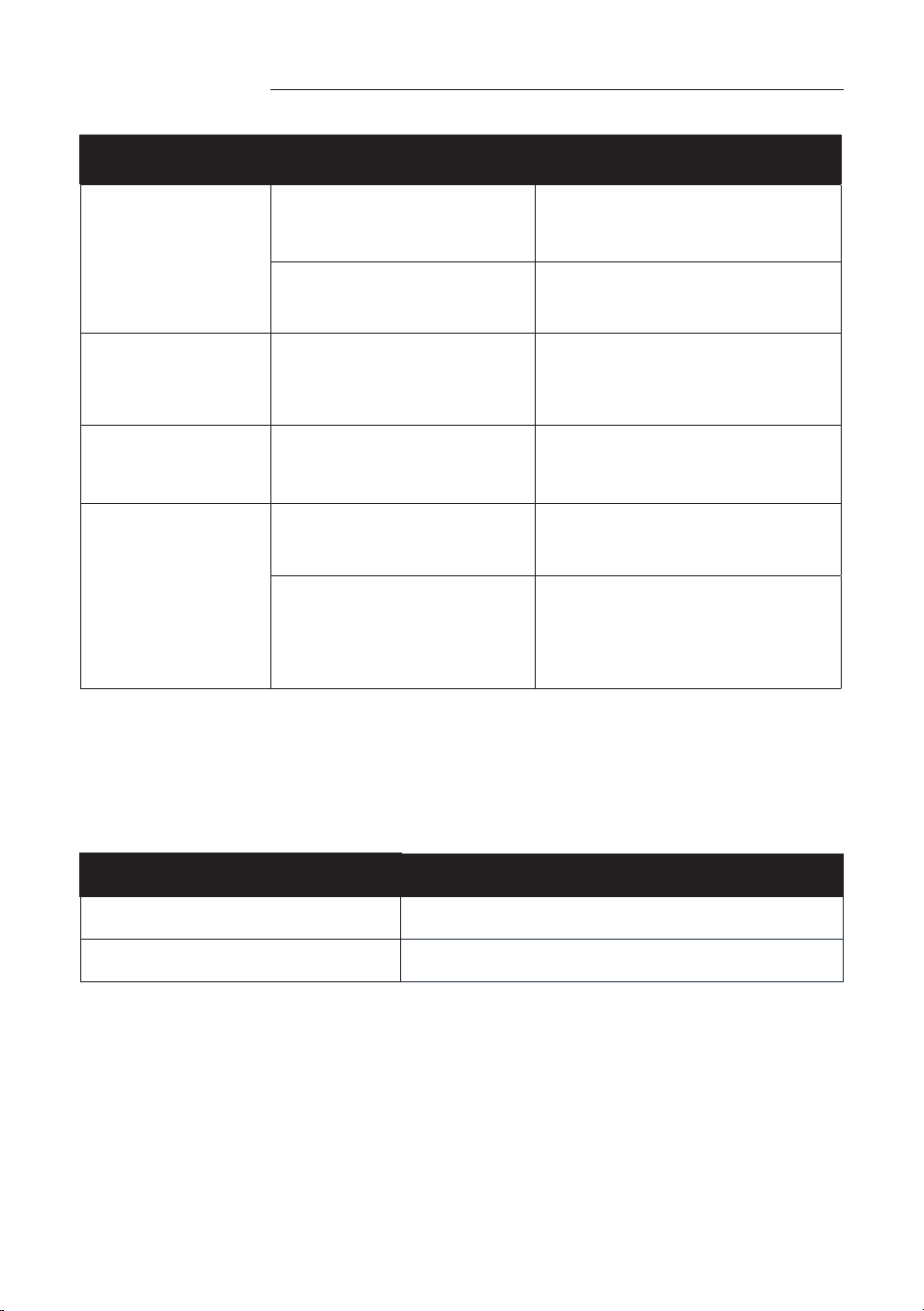
Occasionally, you may encounter some problems that are of a minor nature and a
service call may not be necessary. Use this troubleshooting guide to identify possible
problems you may be experiencing.
Strictest operation environment:
41°F~90°F (5°C~32°C), 30%RH~90%RH.
If the following error code appears, contact the after-sales service department for
inspection and repair.
CODE DESCRIPTION
EH Humidity sensor failure
E2 Temperature sensor failure
16 17
PROBLEM POSSIBLE CAUSES SOLUTIONS
Dehumidier
does not start.
Bucket is not in the proper
position.
The Bucket must be in place
and securely seated for the
Dehumidier to operate.
Power failure.
There is a protective time delay
(up to 3 min.) to prevent the
compressor from overloading.
For this reason, the unit may
not start work immediately, but
delay 3 min when power
is resumed.
Dehumidier does
not dry the air as
it should.
Not enough time allowed
for unit to remove
moisture.
When rst installed, allow at
least 24 hours to maintain the
desired dryness.
Airow is restricted.
Make sure there are no
curtains, blinds or furniture
block the front or back of the
Dehumidier. See the CHOOSING
A LOCATION section.
Dirty lter. Clean the lter. See the
CLEANING THE FILTER section.
The Humidity Control may
not be set low enough.
For drier air, press the
“Decrease” button
to lower the percent humidity
desired in the room, or
set the Dehumidier to
continuous mode for maximum
dehumidifying.
Doors and windows may
not be closed tightly.
Check that all doors, windows,
and other openings are securely
closed.
Clothes dryer may be
blowing moist air into the
room.
Install the Dehumidier away
from the dryer. The dryer should
be vented outside.
Room temperature
is too low.
Moisture removal is best at
higher room temperatures.
Lower room temperatures will
reduce the moisture removal
rate. This model is designed to
operate at temperatures
above 41°F (5°C).
PROBLEM POSSIBLE CAUSES SOLUTIONS
Appliance runs
too long
The area is too large
The capacity of the appliance
can not meet the area of the
room
Doors and windows are
open
Close the door and window
Frost appears on
heat-exchanger
Appliance runs recently or
the room temperature is
too low
It is normal, frost usually
disappear in 60 min
Fan noise The air is passing through
the appliance
This is normal
Water on the oor
The drain connection may
be aging or loose
Check the drain connection and
the appliance is placed level
The drain pipe is
connected, but the water
is not drained
If use the bucket, remove the
drain pipe and put back the
drain cover; or install the drain
pipe correctly
Troubleshooting Troubleshooting
Occasionally, you may encounter some problems that are of a minor nature and a
service call may not be necessary. Use this troubleshooting guide to identify possible
problems you may be experiencing.
Strictest operation environment:
41°F~90°F (5°C~32°C), 30%RH~90%RH.
If the following error code appears, contact the after-sales service department for
inspection and repair.
CODE DESCRIPTION
EH Humidity sensor failure
E2 Temperature sensor failure

18 19
hOmeLabs offers a limited one-year warranty (“warranty period”) on all of our
products purchased new and unused from hOmeLabs Technologies, LLC or an
authorized reseller, with an original proof of purchase and where a defect has arisen,
wholly or substantially, as a result of faulty manufacture, parts, or workmanship
during the one-year warranty period. The warranty does not apply where damage
is caused by other factors, including but without limitation to: (a) normal wear and
tear; (b) abuse, mishandling, accident, or failure to follow operating instructions; (c)
exposure to liquid or inltration of foreign particles; (d) servicing or modications of
the product other than by hOmeLabs; (e) commercial or non-household use.
The hOmeLabs warranty covers all costs related to restoring the proven defective
product through repair or replacement of any defective part and necessary labor
so that it conforms to its original specications. A replacement product may be
provided instead of repairing a defective product. hOmeLabs’s exclusive obligation
under this warranty is limited to such repair or replacement.
A receipt indicating the purchase date is required for any claim, so please keep
all receipts in a safe place. We recommend that you register your product on our
website: homelabs.com/reg. Although greatly appreciated, the product registration
is not required to activate any warranty and product registration does not eliminate
the need for the original proof of purchase. The warranty becomes void if attempts
at repair are made by non-authorized third parties and/or if spare parts, other than
those provided by hOmeLabs, are used. You may also arrange for service after the
warranty expires at an additional cost.
These are our general terms for warranty service, but we always urge our customers
to reach out to us with any issue, regardless of warranty terms. If you have an issue
with a hOmeLabs product, please contact Customer Service at homelabs.com/help
or help@homelabs.com.
This warranty gives you specic legal rights, and you may have other legal rights
which vary from state to state, country to country, or province to province. The
customer may assert any such rights at their sole discretion.
HME0081
Model: HME0081
Rated voltage/Frequency: 115 V~, 60 Hz;
Operating condition: 41–90°F / 30–90% RH
Contact Us
Manufacturer, distributor, importer and seller are not liable for ANY
damage caused by improper use, storage, care or failure to follow
warnings associated with this product.
WARNING: Keep all plastic bags away from children.
help@homelabs.com
EMAIL US
homelabs.com/help
CHAT WITH US
Warranty
This manual is to be used with all items with the model number
Manufacturing Info
18 19
hOmeLabs offers a limited one-year warranty (“warranty period”) on all of our
products purchased new and unused from hOmeLabs Technologies, LLC or an
authorized reseller, with an original proof of purchase and where a defect has arisen,
wholly or substantially, as a result of faulty manufacture, parts, or workmanship
during the one-year warranty period. The warranty does not apply where damage
is caused by other factors, including but without limitation to: (a) normal wear and
tear; (b) abuse, mishandling, accident, or failure to follow operating instructions; (c)
exposure to liquid or inltration of foreign particles; (d) servicing or modications of
the product other than by hOmeLabs; (e) commercial or non-household use.
The hOmeLabs warranty covers all costs related to restoring the proven defective
product through repair or replacement of any defective part and necessary labor
so that it conforms to its original specications. A replacement product may be
provided instead of repairing a defective product. hOmeLabs’s exclusive obligation
under this warranty is limited to such repair or replacement.
A receipt indicating the purchase date is required for any claim, so please keep
all receipts in a safe place. We recommend that you register your product on our
website: homelabs.com/reg. Although greatly appreciated, the product registration
is not required to activate any warranty and product registration does not eliminate
the need for the original proof of purchase. The warranty becomes void if attempts
at repair are made by non-authorized third parties and/or if spare parts, other than
those provided by hOmeLabs, are used. You may also arrange for service after the
warranty expires at an additional cost.
These are our general terms for warranty service, but we always urge our customers
to reach out to us with any issue, regardless of warranty terms. If you have an issue
with a hOmeLabs product, please contact Customer Service at homelabs.com/help
or help@homelabs.com.
This warranty gives you specic legal rights, and you may have other legal rights
which vary from state to state, country to country, or province to province. The
customer may assert any such rights at their sole discretion.
HME0081
Model: HME0081
Rated voltage/Frequency: 115 V~, 60 Hz;
Operating condition: 41–90°F / 30–90% RH
Contact Us
Manufacturer, distributor, importer and seller are not liable for ANY
damage caused by improper use, storage, care or failure to follow
warnings associated with this product.
WARNING: Keep all plastic bags away from children.
EMAIL US
homelabs.com/help
CHAT WITH US
Warranty
This manual is to be used with all items with the model number
Manufacturing Info

Distributed by hOmeLabs™, LLC
350 Springeld Avenue, Suite #200,
Summit, NJ 07901
help@homelabs.com
homelabs.com/help
All rights reserved, hOmeLabs™.
Made in China.
For Household Use Only