OWNER’S MANUAL
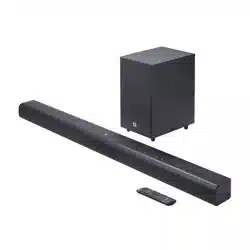
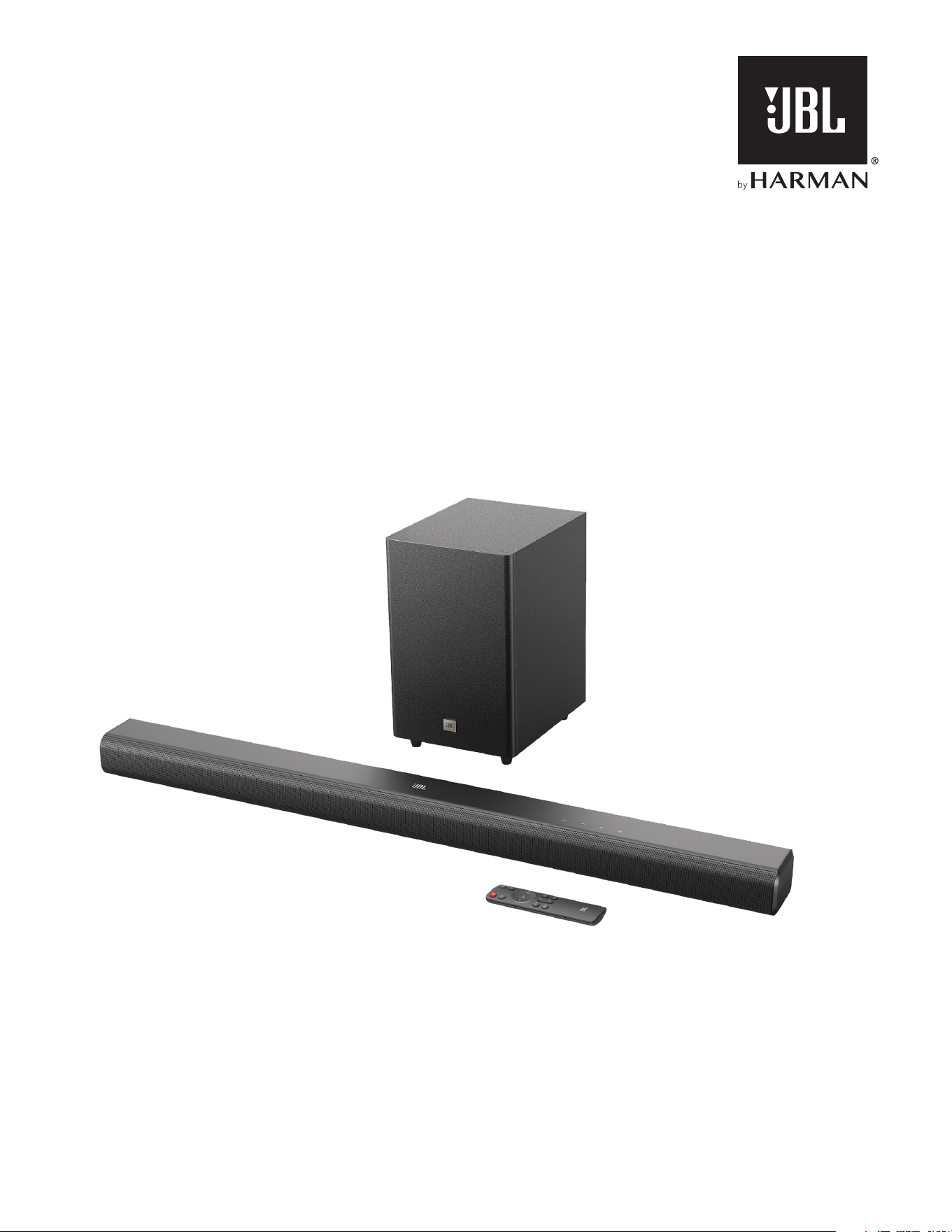
CINEMA SB560

22
IMPORTANT SAFETY INSTRUCTIONS
Verify Line Voltage Before Use
The JBL CINEMA BAR SB560 (soundbar and subwoofer) has
been designed for use with 100-240 volt, 50/60 Hz AC current.
Connection to a line voltage other than that for which your
product is intended can create a safety and re hazard and may
damage the unit. If you have any questions about the voltage
requirements for your specic model or about the line voltage in
your area, contact your retailer or customer service representative
before plugging the unit into a wall outlet.
Do Not Use Extension Cords
To avoid safety hazards, use only the power cord supplied
with your unit. We do not recommend that extension cords be
used with this product. As with all electrical devices, do not run
power cords under rugs or carpets, or place heavy objects on
them. Damaged power cords should be replaced immediately
by an authorized service center with a cord that meets factory
specications.
Handle the AC Power Cord Gently
When disconnecting the power cord from an AC outlet, always
pull the plug; never pull the cord. If you do not intend to use this
speaker for any considerable length of time, disconnect the plug
from the AC outlet.
Do Not Open the Cabinet
There are no user-serviceable components inside this product.
Opening the cabinet may present a shock hazard, and any
modication to the product will void your warranty. If water
accidentally falls inside the unit, disconnect it from the AC power
source immediately, and consult an authorized service center.

www.jbl.com
English
33
TABLE OF CONTENTS
IMPORTANT SAFETY INSTRUCTIONS 2
1. INTRODUCTION 4
2. WHAT’S IN THE BOX 5
3. PRODUCT OVERVIEW 6
3.1 Controls and indicators 6
3.2 Connectors 6
3.3 Subwoofer 6
3.4 Remote control 7
4. PLACEMENT 8
4.1 Desktop placement 8
4.2 Wall-mounting 8
5. CONNECT 9
5.1 TV connection 9
5.2 Bluetooth connection 9
6. PLAY 10
6.1 Power-on/Auto standby/Auto wakeup 10
6.2 Play from the TV source 11
6.3 Play from the Bluetooth source 11
7. SOUND SETTINGS 12
7.1 Pre-defined EQ settings 12
7.2 Bass adjustment 12
8. RESTORE FACTORY SETTINGS 13
9. RE-CONNECT THE SUBWOOFER 13
10. PRODUCT SPECIFICATIONS 14
11. TROUBLESHOOTING 15
12. TRADEMARKS 16

44
1. INTRODUCTION
Thank you for purchasing the JBL CINEMA BAR SB560 (soundbar
and subwoofer) which is designed to bring an extraordinary sound
experience to your home entertainment system. We encourage
you to take a few minutes to read through this manual, which
describes the product and includes step-by-step instructions for
setting up and getting started.
Designs and specications are subject to change without notice.
If you have any questions about the soundbar, installation or
operation, please contact your retailer or customer service
representative, or visit our website: www.jbl.com.
www.jbl.com
English
55
2. WHAT’S IN THE BOX
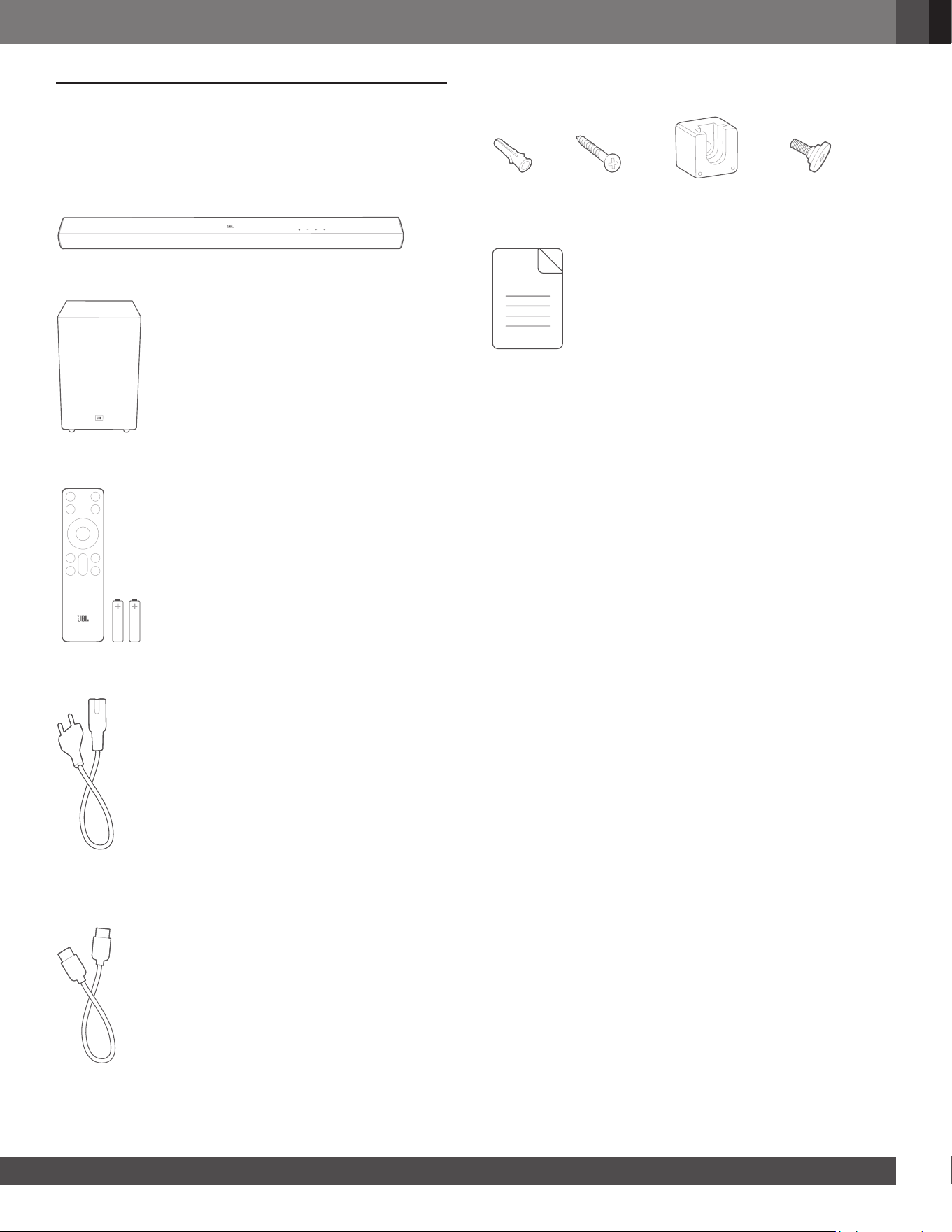
Unpack the box carefully and ensure that the following parts are
included. If any part is damaged or missing, do not use it and
contact your retailer or customer service representative.
Main unit
Subwoofer
Remote control (with 2 AAA batteries)
(AAA)
Power cord*
x 2
* Power cord quantity and plug type vary by regions.
HDMI cable
Wall-mounting kit
x 2 x 2 x 2 x 2
Product information & wall-mounting template
66
3. PRODUCT OVERVIEW
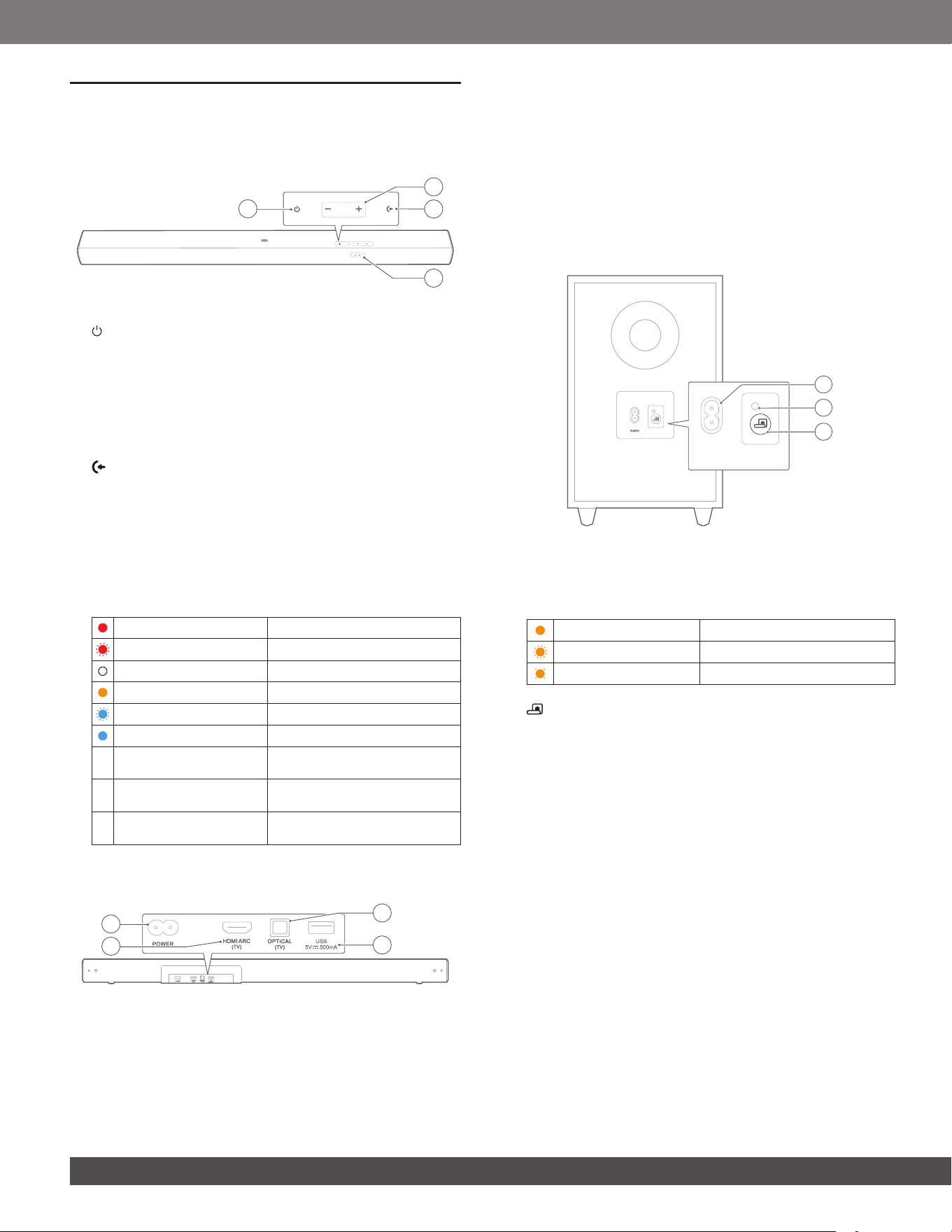
3.1 Controls and indicators
1
3
4
2
1. (Power)
• Switch on or to standby.
2. -/+ (Volume)
• Press to decrease or increase the volume.
• Hold to decrease or increase the volume continuously.
• Hold both buttons together to mute or unmute.
3. (Source)
• Select a sound source: TV (default, for audio input from
TV connection where the HDMI ARC (TV) connector
is prioritized over the OPTICAL (TV) connector), or
Bluetooth.
• In Bluetooth mode, hold for more than 3 seconds to enter
Bluetooth pairing mode.
4. Status indicator
Solid (red) Standby mode
Fast flashing (red) System startup
Solid (white) HDMI ARC source selected
Solid (amber) Optical source selected
Fast flashing (blue) Bluetooth pairing mode
Solid (blue) Connected to Bluetooth
\
Flashing (current sound
source)
Adjusting volume level
\
Slow flashing (current
sound source)
Maximum / minimum volume
level reached
\
Continuous slow flashing
(current sound source)
Sound muted
3.2 Connectors
2
1
4
3
1. POWER
• Connect to power.
2. HDMI ARC (TV)
• Connect to the HDMI ARC input on your TV.
3. OPTICAL (TV)
• Connect to the optical output on your TV.
4. USB
• USB connector for software update (for service only).
• Connect to USB storage device for MP3 le playback (for
US version only).
3.3 Subwoofer
PPOOWWEERR
2
3
1
1. POWER
• Connect to power.
2. Connection status indicator
Solid amber Connected to the soundbar
Fast flashing (amber) Pairing mode
Slow flashing (amber) Standby mode / Disconnected
3.
• Hold for 3 seconds to reconnect the subwoofer with the
soundbar.
www.jbl.com
English
77
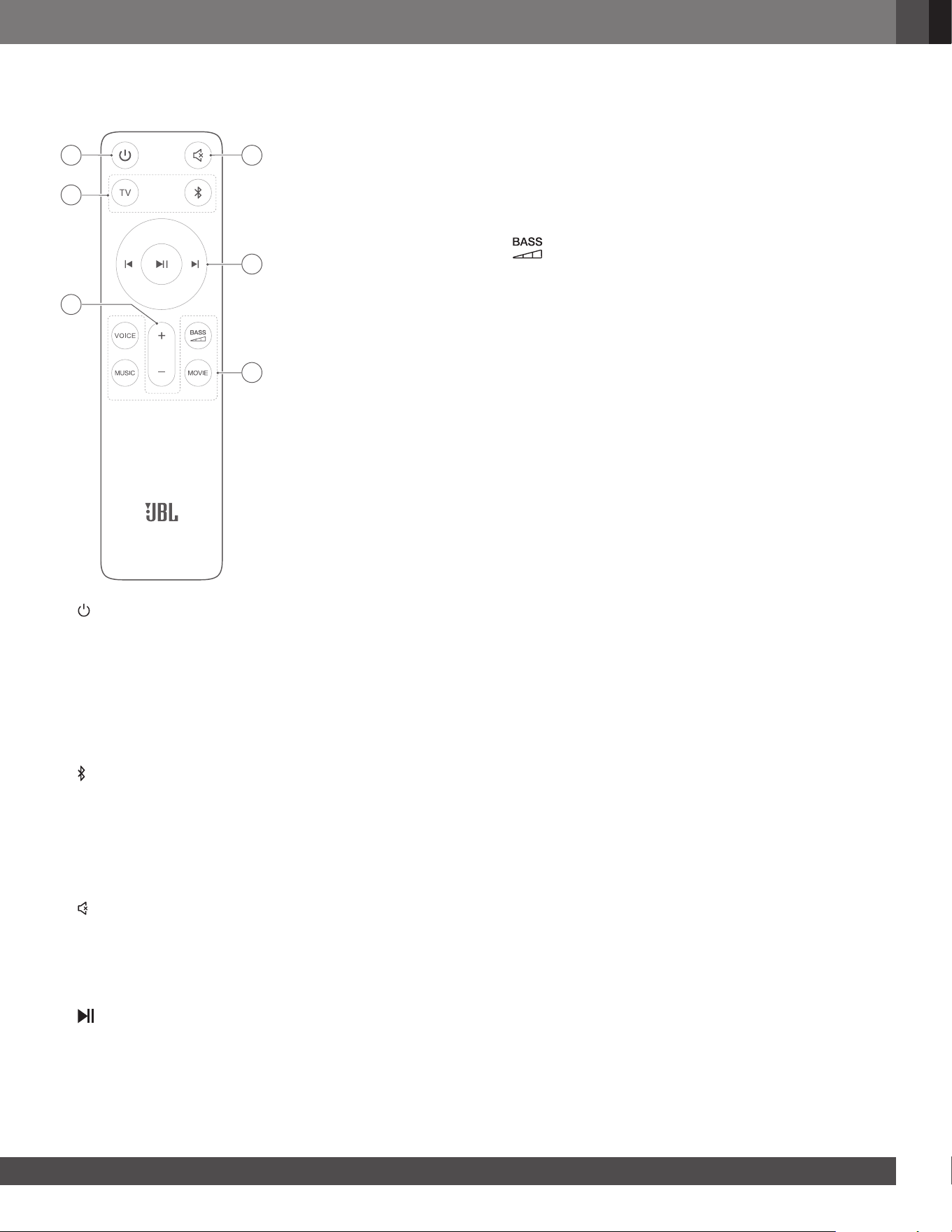
3.4 Remote control
4
5
6
1
3
2
1.
• Switch on or to standby.
2. Source selectors
TV
• Select the TV source (automatically switches to eARC/
ARC or Optical source when the HDMI / optical cable is
connected; HDMI ARC (TV) connector is prioritized over
the OPTICAL (TV) connector).
(Bluetooth mode)
• Select the Bluetooth source.
• Hold for 3 seconds to enter Bluetooth pairing mode.
3. + / -
• Press to increase or decrease the volume.
• Hold to increase or decrease the volume continuously.
4. (Mute)
• Mute or unmute.
5. Playback buttons
I/I
• Bluetooth source: Skip to the previous or next track.
• Bluetooth source: Start or pause playback.
6. Sound effect buttons
VOICE
• Select the pre-dened EQ (equalizer) settings for news.
MUSIC
• Select the pre-dened EQ (equalizer) settings for music.
MOVIE
• Select the pre-dened EQ (equalizer) settings for movie.
• Select the bass level for subwoofer: 1/2/3 (default)/4/5.
88
4. PLACEMENT
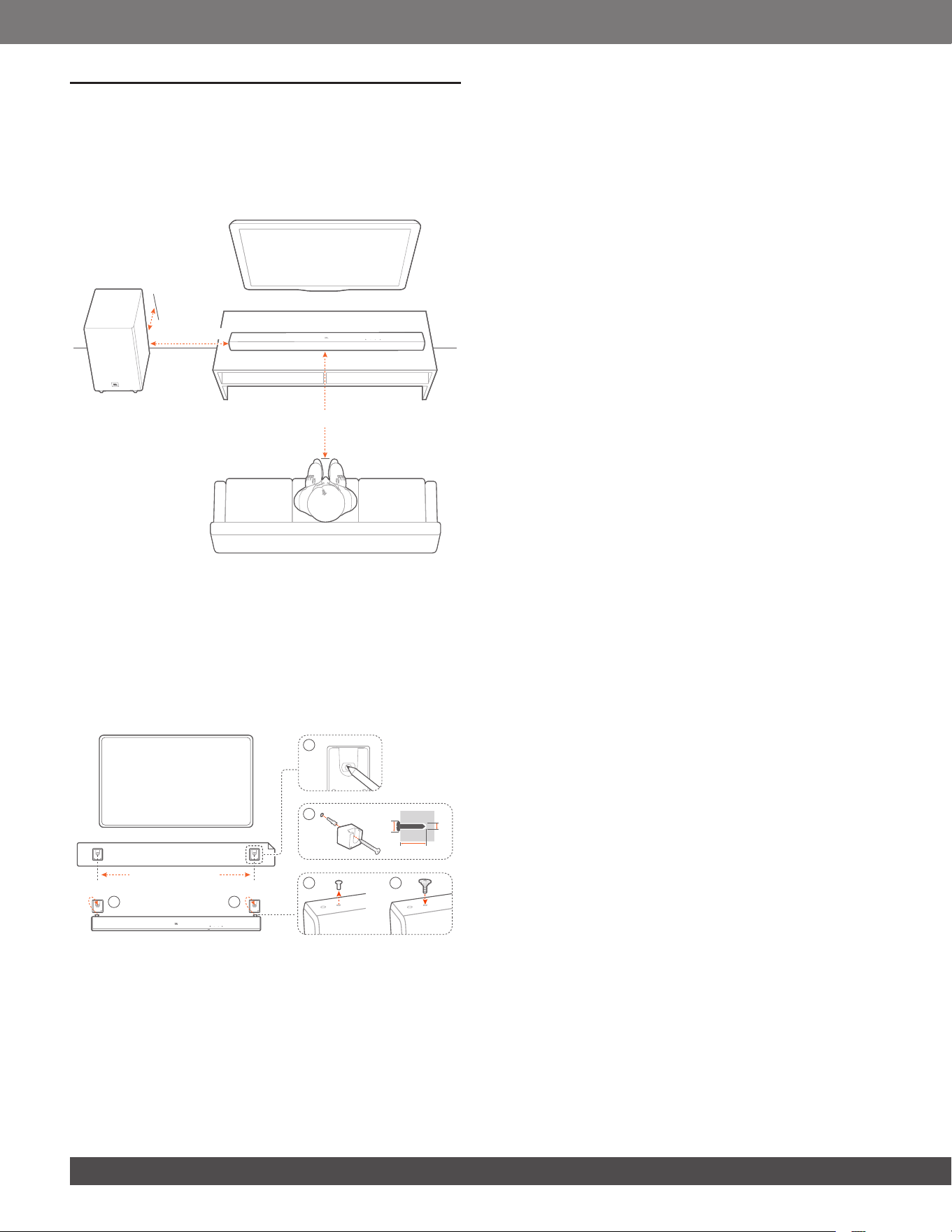
4.1 Desktop placement
Place the soundbar and subwoofer on a at and stable surface.
Make sure that the subwoofer is at least 1 m / 3 ft away from the
soundbar, and 10 cm / 4" away from a wall.
2.5-3.0 m / 8.2-9.8 ft
1-6 m / 3-20 ft
> 10 cm / 4
"
NOTES:
– The power cord shall be properly connected to power.
– Do not place any objects on the top of the soundbar or subwoofer.
– Make sure that the distance between the subwoofer and the
soundbar is less than 6 m / 20 ft.
4.2 Wall-mounting
880 mm / 34.65"
5
5
2
1
3
4
≤8mm/0.31"
4mm/0.16"
≥33.5mm/1.32"
1. Preparation:
a) Stick the supplied wall-mounting template to a wall by
using adhesive tapes.
b) Use your ballpen tip to mark the screw holder location.
Remove the template.
c) On the marked location, drill a 4 mm / 0.16” hole. Refer to
Figure 2 for the screw size.
2. Install the wall-mounting bracket.
3. As shown in the diagram, remove the fastening screw by
using a screwdriver.
4. Fasten the wall-mounting screw included in the supplied
mounting kit.
5. Mount the soundbar.
NOTES:
– Make sure that the wall can support the weight of the soundbar.
– Install on a vertical wall only.
– Avoid a location under high temperature or humidity.
– Before wall-mounting, make sure that cables can be properly
connected between the soundbar and external devices.
– Before wall-mounting, make sure that the soundbar is unplugged
from power. Otherwise, it may cause an electric shock.
www.jbl.com
English
99
5. CONNECT
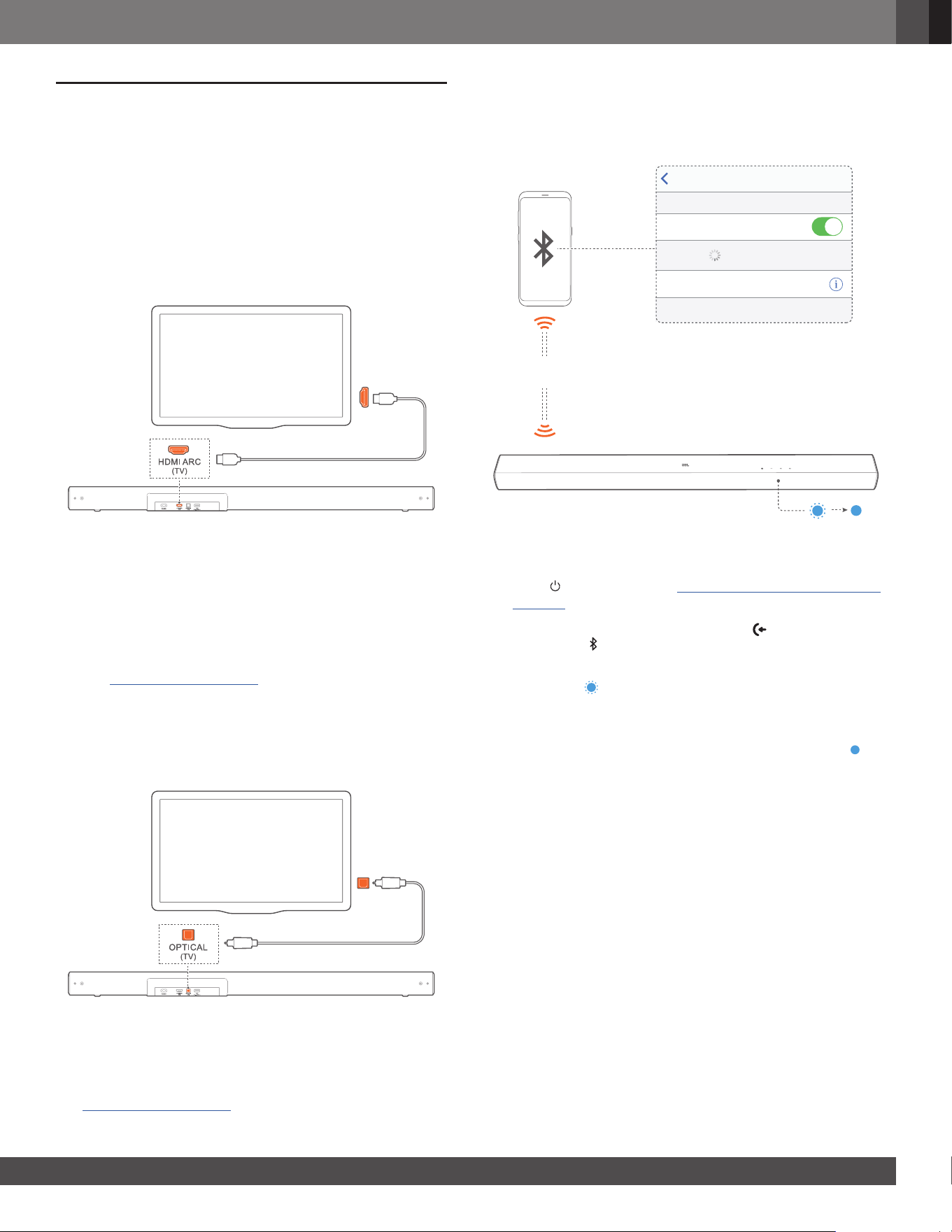
5.1 TV connection
Connect the soundbar with your TV through the supplied HDMI
cable or an optical cable (sold separately).
5.1.1 Through the supplied HDMI cable
An HDMI connection supports digital audio and video with a
single connection. HDMI connectivity is the best option for your
soundbar.
HDMI (ARC)
1. Connect the soundbar with your TV by using the supplied
HDMI ARC cable.
2. On your TV, check that HDMI-CEC and HDMI ARC have been
enabled. Refer to the owner’s manual of your TV for more
information.
NOTES:
– To play audio through the HDMI ARC cable, select the TV source
(See “6.2 Play from the TV source”).
– Full compatibility with all HDMI-CEC devices is not guaranteed.
– Contact your TV manufacturer if you have problems with the HDMI-
CEC compatibility of your TV.
5.1.2 Through an optical cable
OPTICAL
OUT
Connect the soundbar with your TV by using an optical cable
(sold separately).
NOTE:
– To play audio through the optical cable, select the TV source (See
“6.2 Play from the TV source”).
5.2 Bluetooth connection
Through Bluetooth, connect the soundbar with your Bluetooth
device, such as a smartphone, tablet and laptop.
< 10 m / 33 ft
Settings Bluetooth
Bluetooth
DEVICES
JBL CINEMA SB560
Now Discoverable
Connected
5.2.1 Connect a Bluetooth device
1. Press to switch on (See “6.1 Power-on/Auto standby/Auto
wakeup”).
2. To select the Bluetooth source, press repeatedly on the
soundbar or on the remote control.
→ Ready for pairing: The status indicator ashes blue
quickly ( ).
3. On your Bluetooth device, enable Bluetooth and search for
“JBL CINEMA SB560” within three minutes.
→ Connected: The status indicator turns solid blue ( ). A
conrmation tone is heard.
5.2.2 Reconnect the last paired device
Your Bluetooth device is retained as a paired device when the
soundbar goes to standby mode. Next time you switch to the
Bluetooth source, the soundbar reconnects the last paired
device automatically.
1010
5.2.3 Connect to another Bluetooth device
3S
1. In the Bluetooth source, hold on the soundbar or on the
remote control until the status indicator ashes blue.
→ The soundbar enters the Bluetooth pairing mode.
2. Follow Step 3 under “5.2.1 Connect a Bluetooth device”.
• If the device has ever been paired with the soundbar, rst
unpair “JBL CINEMA SB560” on the device.
NOTES:
– The Bluetooth connection will be lost if the distance between the
soundbar and Bluetooth device exceeds 10 m / 33 ft.
– Electronic devices may cause radio interference. Devices that
generate electromagnetic waves must be kept away from the
soundbar, such as microwaves and wireless LAN devices.
6. PLAY
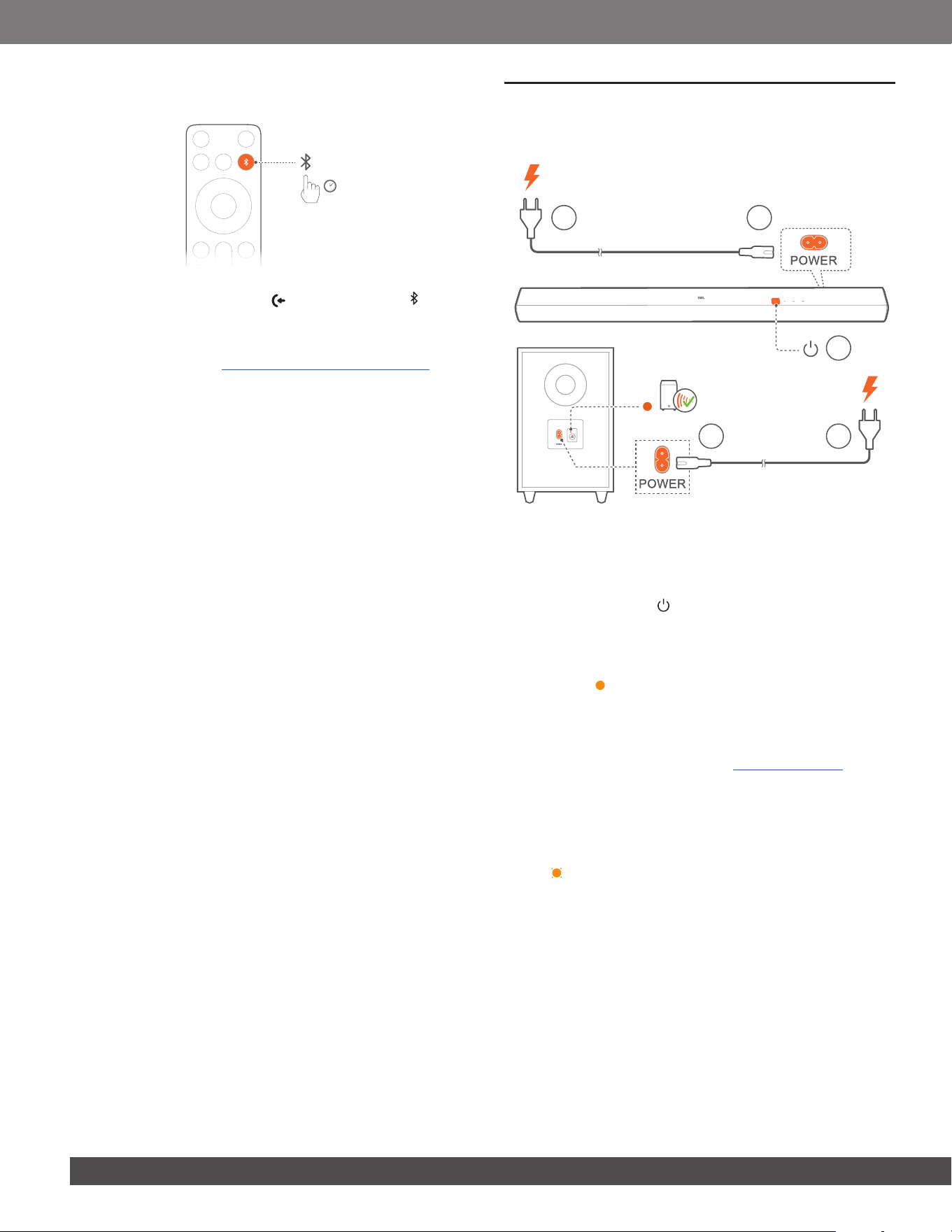
6.1 Power-on/Auto standby/Auto wakeup
2 1
1 2
3
Switch on
1. Connect the soundbar and subwoofer to power by using the
supplied power cords.
2. To switch on, press on the soundbar or on the remote
control.
→ The subwoofer is connected to the soundbar automatically.
→ Connected: The connection status indicator turns solid
amber ( ).
NOTES:
– Use the supplied power cord only.
– Before switching on the soundbar, make sure that you have
completed all other connections (See “5.1 TV connection”).
Auto standby
If the soundbar is inactive for more than 10 minutes, it will switch
to standby mode automatically. The subwoofer also goes to
standby, and the connection status indicator slowly ashes
amber ( ).
→ Next time you switch on the soundbar, it returns to the last
selected source.
Auto wakeup
In standby mode, the soundbar will wake up automatically when
• the soundbar is connected to your TV through the HDMI
ARC connection and your TV is switched on;
• the soundbar is connected to your TV through an optical
cable and audio signals are detected from the optical cable.
www.jbl.com
English
1111
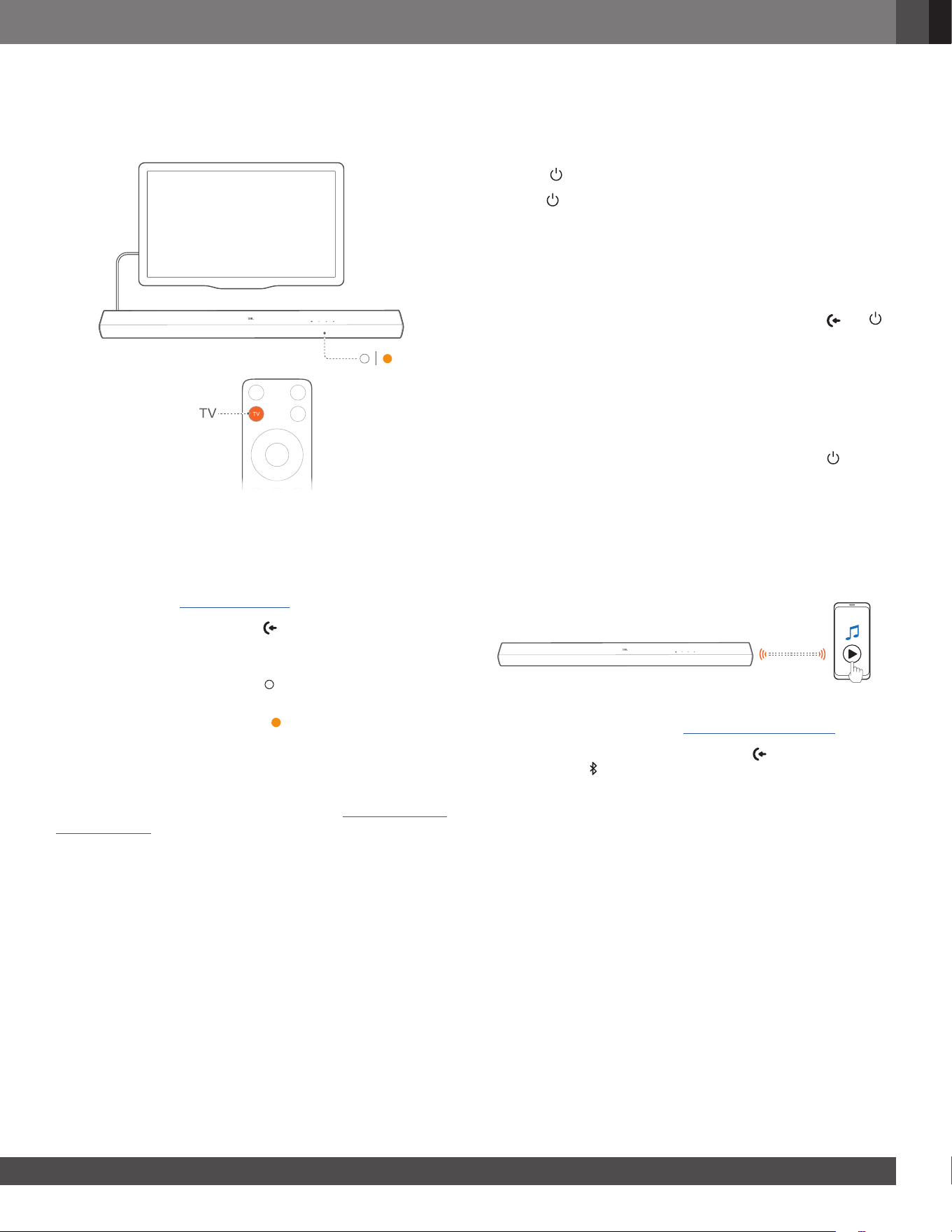
6.2 Play from the TV source
With the soundbar connected, you can enjoy TV audio from the
soundbar speakers.
1. Make sure that your TV is set to support external speakers
and the built-in TV speakers are disabled. Refer to the owner’s
manual of your TV for more information.
2. Make sure that the soundbar has been properly connected
to your TV (See “5.1 TV connection”).
3. To select the TV source, press repeatedly on the soundbar
or TV on the remote control.
→ When playing through an HDMI ARC cable, the status
indicator turns solid white ( ).
→ When playing through an optical cable, the status
indicator turns solid amber ( ).
6.2.1 TV remote control setup
To use your TV remote control for both your TV and the soundbar,
check that your TV supports HDMI-CEC. If your TV does not
support HDMI-CEC, follow the steps under “6.2.2 TV remote
control learning”.
HDMI-CEC
If your TV supports HDMI-CEC, enable the functions as instructed
in your TV’s user manual. You can control the volume +/-, sound
source, and power on/standby functions on your soundbar
through the TV remote control.
6.2.2 TV remote control learning
Through IR learning, you can program the soundbar to accept IR
commands from your TV remote control, and then use your TV
remote control for simple commands.
1. Press to switch on.
2. Hold and + together for more than 10 seconds until the
status indicator ashes amber.
→ The soundbar enters the TV remote control learning
mode.
3. Point your TV remote control at the soundbar. Follow the
instructions below:
a) On the soundbar, hold one of these buttons: +, -, and
until the status indicator ashes red three times.
b) On your TV remote control, press the desired button twice.
→ When the status indicator on the soundbar ashes
amber, the function of the soundbar button is learnt
by your TV remote control button.
4. Repeat Step 3 to complete the button learning.
5. To exit the TV remote control learning mode, hold and +
on the soundbar until the status indicator ashes amber three
times.
6.3 Play from the Bluetooth source
Through Bluetooth, stream audio from your Bluetooth device to
the soundbar.
< 10 m / 33 ft
1. Check that the soundbar has been properly connected to
your Bluetooth device (See “5.2 Bluetooth connection”).
2. To select the Bluetooth source, press repeatedly on the
soundbar or on the remote control.
3. Start audio play on your Bluetooth device.
4. Adjust the volume on the soundbar or your Bluetooth device.
1212
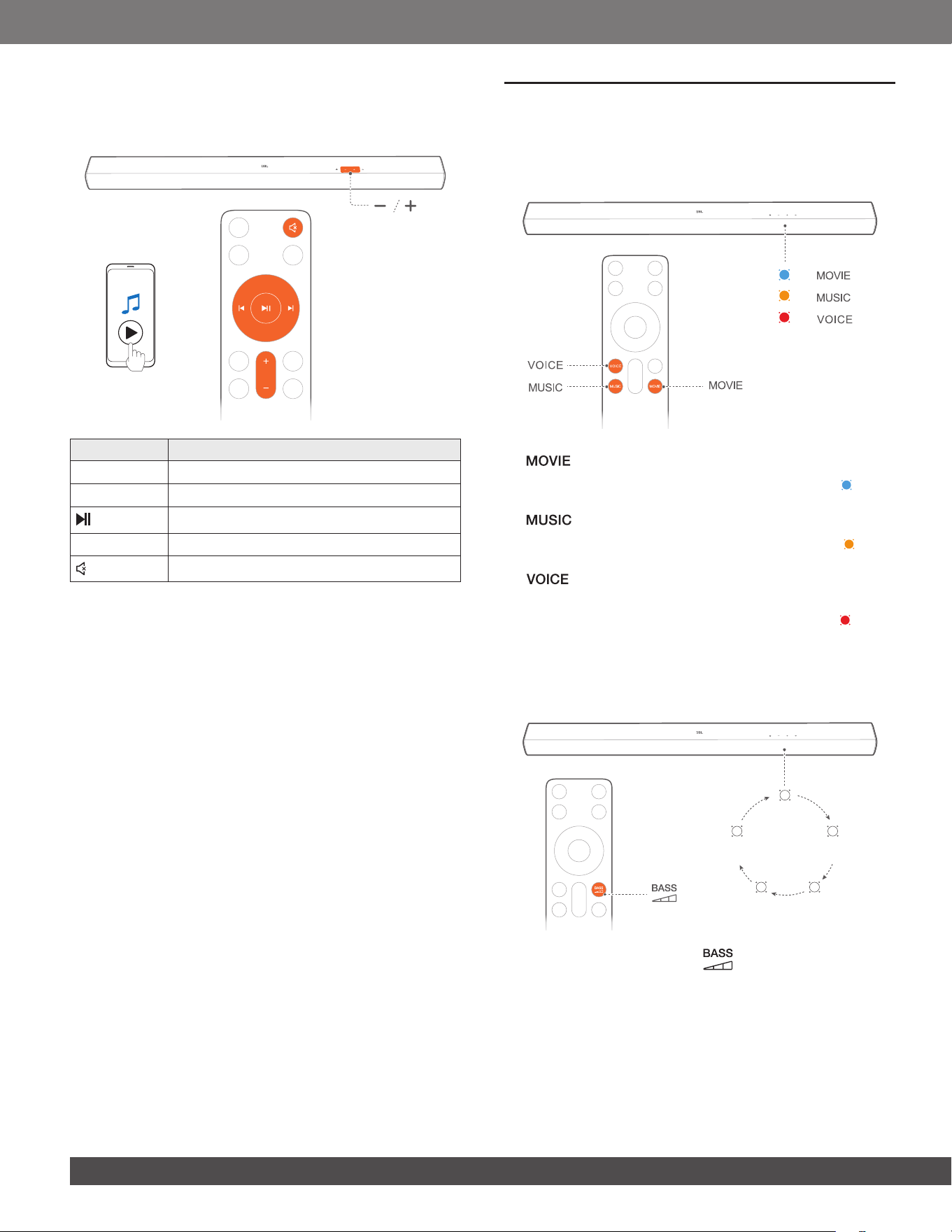
6.3.1 Control music playback
In Bluetooth mode, you can control music playback through the
buttons on the remote control or on the soundbar.
Button Function
I
Skip to the previous track.
I
Skip to the next track.
Start or pause playback.
+ ⁄ -
Increase or decrease the volume.
(Mute)
Mute or unmute.
7. SOUND SETTINGS
7.1 Pre-defined EQ settings
With the remote control, select the pre-dened EQ (equalizer)
effects to suit your video or music.
x 2
x 2
x 2
• : sound mode for movies
→ The status indicator slowly ashes blue twice ( ), if the
movie mode is enabled on the soundbar.
• : sound mode for music
→ The status indicator slowly ashes amber twice ( ), if the
music mode is enabled on the soundbar.
• : sound mode for TV programs such as news and
weather forecasts
→ The status indicator slowly ashes red twice ( ), if the
voice mode is enabled on the soundbar.
7.2 Bass adjustment
You can make bass adjustment as needed.
Level 3
x 3
Level 4
x 4
Level 2
x 2
Level 5
x 5
Level 1
x 1
• On the remote control, press to toggle between bass
levels: Level 1, 2, 3, 4, 5 (Default: “Level 3”).
www.jbl.com
English
1313
8. RESTORE FACTORY SETTINGS
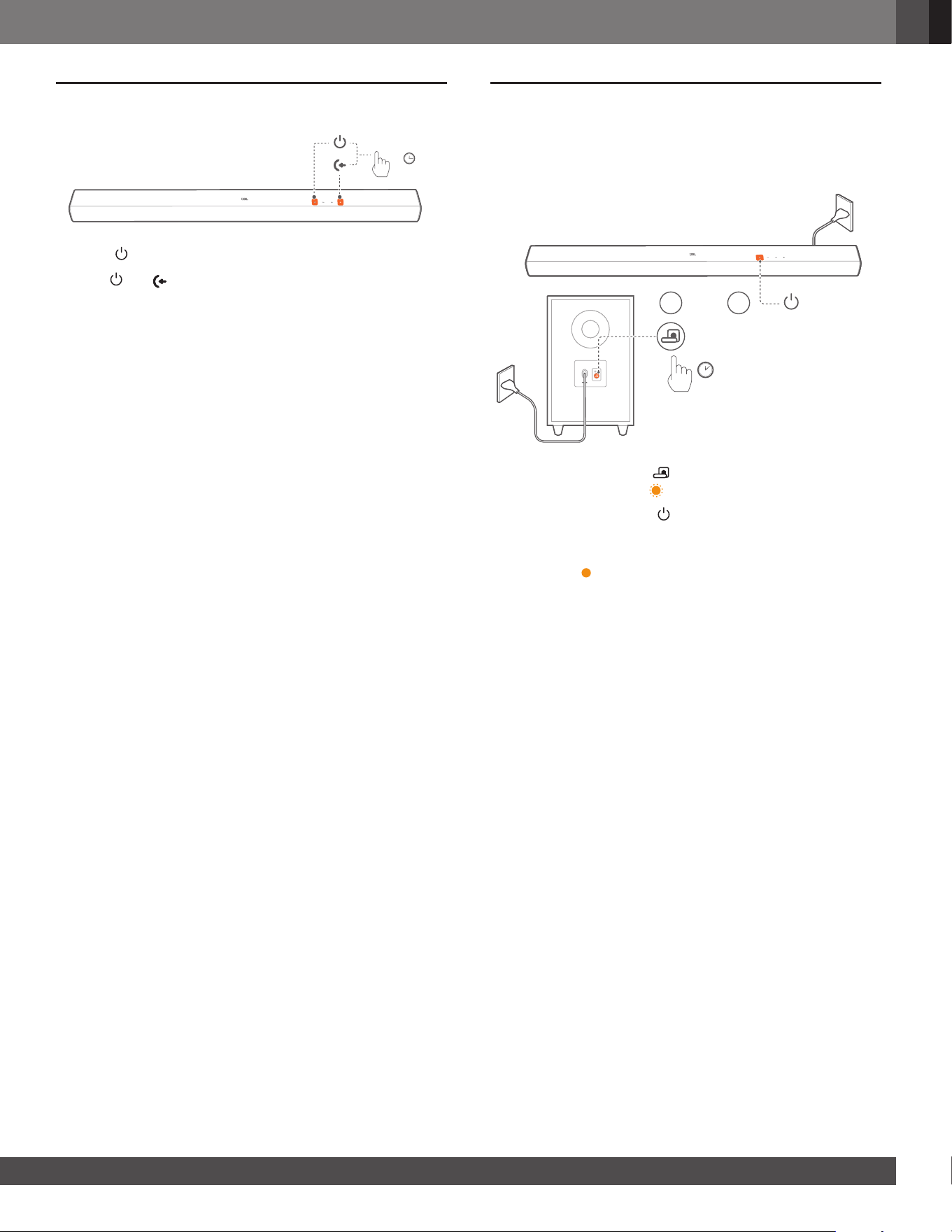
> 10S
1. Press to switch on.
2. Hold and on the soundbar for more than 10 seconds to
restore factory settings.
→ All your personalized settings will be removed from the
soundbar.
9. RE-CONNECT THE SUBWOOFER
The soundbar and subwoofer are paired at factories. After power-
on, they are paired and connected automatically. In some special
cases, you may need to pair them again.
3S
1 2
1. On the subwoofer, hold until the connection status indicator
ashes amber quickly ( ).
2. On the soundbar, press to switch on.
→ The subwoofer is connected to the soundbar automatically.
Connected: The connection status indicator turns solid
amber ( ).
NOTE:
– If the wireless connection fails again, check if there is a conict or
strong interference (e.g. interference from an electronic device)
around the location. Remove these conicts or strong interferences
and repeat the above procedures.

1414
10. PRODUCT SPECIFICATIONS
General specication
• Model: CINEMA SB560
• Sound system: 3.1 channel
• Power supply: 100 - 240 V AC, ~ 50/60 Hz
• Total speaker power output (Max @THD 1%): 250 W
• Soundbar output power (Max @THD 1%): 150 W
• Subwoofer output power (Max. @THD 1%): 100 W
• Soundbar transducer: 3x (45 x 100) mm racetrack drivers +
2x 13 mm tweeters
• Subwoofer transducer: 5.25" (133 mm), wireless subwoofer
• Standby power: < 0.5 W
• Operating temperature: 0°C - 45 °C
HDMI specication
• HDMI ARC (Audio Return Channel): 1
• HDMI HDCP version: 1.4
Audio specication
• Frequency response: 45 Hz - 20 kHz (-10 dB)
• Audio inputs: 1 Optical, Bluetooth and USB (USB playback is
available in US version. For other versions, USB is for Service
only.)
USB specication
• USB port: Type A
• USB rating: 5V DC, 0.5A
• Supporting le formats: mp3
• MP3 codec: MPEG 1 Layer 2/3, MPEG 2 Layer 3,
MPEG 2.5 Layer 3
• MP3 sampling rate: 16 - 48 kHz
• MP3 bitrate:
MPEG 1 Layer 1: 32 kbps - 448 kbps;
MPEG 1 Layer 2: 32 kbps - 384 kbps;
MPEG 1 Layer 3: 32 kbps - 320 kbps;
MPEG 2/2.5 Layer 1: 32 kbps - 256 kbps;
MPEG 2/2.5 Layer 2/3: 8 kbps - 160 kbps
Wireless specication
• Bluetooth version: 5.3
• Bluetooth prole: A2DP 1.3, AVRCP 1.6
• Bluetooth transmitter frequency range: 2400 MHz - 2483.5 MHz
• Bluetooth Max. transmitting power: <10 dBm (EIRP)
• Bluetooth modulation: GFSK, π/4 DQPSK, 8DPSK
• 2.4G wireless transmitter frequency range: 2402 - 2481 MHz
• 2.4G wireless transmitter power: <10 dBm (EIRP)
• 2.4G wireless modulation: GFSK
Dimensions
• Soundbar dimensions (W x H x D):
950 x 64 x 80 mm / 37.4" x 2.5" x 3.1"
• Subwoofer dimensions (W x H x D):
200 x 324 x 250 mm / 7.9" x 12.8" x 9.9"
• Soundbar weight: 2.5 kg / 5.5 lbs
• Subwoofer weight: 4.2 kg / 9.3 lbs
• Packaging dimensions (W x H x D):
1025 x 235 x 397 mm / 40.4" x 9.3" x 15.6"
• Packaging weight: 8.8 kg / 19.4 lbs

www.jbl.com
English
1515
11. TROUBLESHOOTING
Never try to repair the product yourself. If you have problems
using this product, check the following before you request
services.
System
The unit will not turn on.
• Check if the power cord is plugged into power and the
soundbar.
The soundbar has no response to button pressing.
• Restore the soundbar to factory settings (See “8. RESTORE
FACTORY SETTINGS”).
Sound
No sound from the soundbar
• Make sure that the soundbar is not muted.
• Select the correct audio input source on the remote control.
• Connect the soundbar to your TV or other devices properly.
• Restore the soundbar to its factory settings by holding and
on the soundbar for more than 10 seconds.
Distorted sound or echo
• If you play audio from your TV through the soundbar, make
sure that your TV is muted or the built-in TV speaker is
disabled.
Bluetooth
A device cannot be connected with the soundbar.
• Check if you have enabled Bluetooth on the device.
• If the soundbar has been paired with another Bluetooth
device, reset Bluetooth (see “5.2.3 Connect to another
Bluetooth device”).
Poor audio quality from a connected Bluetooth device
• The Bluetooth reception is poor. Move the source device
closer to the soundbar, or remove any obstacle between the
source device and the soundbar.
The connected Bluetooth device connects and disconnects
constantly.
• The Bluetooth reception is poor. Move the source device
closer to the soundbar, or remove any obstacle between the
source device and the soundbar.
• For some Bluetooth devices, the Bluetooth connection can
be deactivated automatically to save power. This does not
indicate any malfunction of the soundbar.
Remote control
The remote control does not work.
• Check if the batteries are drained. If so, replace them with
new ones.
• Reduce the distance and angle between the remote control
and the main unit.
Failed to complete the TV remote control learning.
• Check if you are using an infra-red TV remote control. The IR
learning is not supported by a Bluetooth TV remote control.

1616
12. TRADEMARKS
The Bluetooth
®
word mark and logos are registered trademarks
owned by Bluetooth SIG, Inc. and any use of such marks by
HARMAN International Industries, Incorporated is under license.
Other trademarks and trade names are those of their respective
owners.
The terms HDMI, HDMI High-Denition Multimedia Interface,
HDMI trade dress and the HDMI Logos are trademarks or
registered trademarks of HDMI Licensing Administrator, Inc.
Manufactured under license from Dolby Laboratories. Dolby,
Dolby Audio, and the double-D symbol are trademarks of Dolby
Laboratories Licensing Corporation.

HARMAN International Industries,
Incorporated 8500 Balboa Boulevard,
Northridge, CA 91329 USA
www.jbl.com
© 2024 HARMAN International Industries, Incorporated.
All rights reserved.
JBL is a trademark of HARMAN International Industries, Incorporated, registered in
the United States and/or other countries. Features, specications and appearance are
subject to change without notice.
HA_JBL_SB560_OM_Global_EN_V1