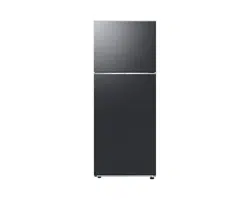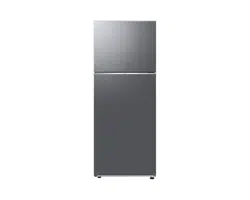
Refrigerator
User manual
Free Standing Appliance
Untitled-3 1Untitled-3 1 2024-07-04 2:32:182024-07-04 2:32:18
English2
Contents
Contents
Safety information 3
What you need to know about the safety instructions 3
Important safety symbols and precautions: 5
Important safety precautions 6
Severe warning signs for transportation and site 10
Critical installation warnings 10
Installation cautions 14
Critical usage warnings 14
Usage cautions 19
Cleaning cautions 22
Critical disposal warnings 24
Additional tips for proper usage 25
Instructions about the WEEE 26
Installation 27
Refrigerator at a glance 28
Step-by-step installation 32
Operations 52
Main panel 52
SmartThings 60
Special features 63
Maintenance 75
Handling and care 75
Cleaning 81
Replacement 82
Troubleshooting 85
General 85
Do you hear abnormal sounds from the refrigerator? 89
SmartThings 91
LCD 92
Open Source Announcement 93
Untitled-3 2Untitled-3 2 2024-07-04 2:32:182024-07-04 2:32:18
English 3
Safety information
Before using your new Samsung Refrigerator, please read this manual thoroughly to ensure
that you know how to operate the features and functions that your new appliance offers
safely and efciently.
What you need to know about the safety
instructions
• Warnings and Important Safety Instructions in this manual
do not cover all possible conditions and situations that
may occur.
It is your responsibility to use common sense, caution,
and care when installing, maintaining, and operating your
appliance.
• Because these following operating instructions cover
various models, the characteristics of your refrigerator
may differ slightly from those described in this manual and
not all warning signs may be applicable. If you have any
questions or concerns, contact your nearest service center
or nd help and information online at www.samsung.com.
• R-600a or R-134a is used as a refrigerant. Check the
compressor label on the rear of the appliance or the rating
label inside the fridge to see which refrigerant is used for
your appliance. When this product contains ammable gas
(Refrigerant R-600a), contact your local authority in regard
to safe disposal of this product.
• In order to avoid the creation of a ammable gas-air
mixture if a leak in the refrigerating circuit occurs, the size
of the room in which the appliance may be sited depends
on the amount of refrigerant used.
Safety information
Untitled-3 3Untitled-3 3 2024-07-04 2:32:182024-07-04 2:32:18
Safety information
English4
Safety information
• Never start up an appliance showing any signs of damage.
If in doubt, consult your dealer. The room must be 1 m
3
in size for every 8 g of R-600a refrigerant inside the
appliance.
The amount of refrigerant in your particular appliance is
shown on the identication plate inside the appliance.
• Refrigerant squirting out of the pipes could ignite or cause
an eye injury. When refrigerant leaks from the pipe, avoid
any naked ames and move anything ammable away
from the product and ventilate the room immediately.
- Failing to do so may result in re or explosion.
• To avoid contamination of food, please respect the
following instructions:
- Opening the door for long periods can cause a
signicant increase of the temperature in the
compartments of the appliance.
- Clean regularly surfaces that can come in contact with
food and accessible drainage systems.
- Clean water tanks if they have not been used for 48 h;
ush the water system connected to a water supply if
water has not been drawn for 5 days.
- Store raw meat and sh in suitable containers in the
refrigerator, so that it is not in contact with or drip onto
other food.
- Two-star frozen-food compartments are suitable for
storing pre-frozen food, storing or making icecream and
making ice cubes.
- One-, two- and three-star compartments are not suitable
for the freezing of fresh food.
Untitled-3 4Untitled-3 4 2024-07-04 2:32:182024-07-04 2:32:18
English 5
Safety information
- If the refrigerating appliance is left empty for long
periods, switch off, defrost, clean, dry, and leave the
door open to prevent mould developing within the
appliance.
• It is hazardous for anyone other than an Authorized
Service Person to service this appliance. In Queensland
– the authorized Service Person MUST hold a Gas Work
Authorization or Licence for hydrocarbon refrigerants, to
carry out Servicing or repairs which involve the removal of
covers. (For Australia only)
Important safety symbols and precautions:
Please follow all safety instructions in this manual. This
manual uses the following safety symbols.
WARNING
Hazards or unsafe practices that may result in severe personal
injury, property damage, and/or death.
CAUTION
Hazards or unsafe practices that may result in severe personal
injury and/or property damage.
NOTE
Useful information that helps users understand or benet
from the refrigerator.
These warning signs are here to prevent injury to you and
others.
Untitled-3 5Untitled-3 5 2024-07-04 2:32:182024-07-04 2:32:18
Safety information
English6
Safety information
Please follow them carefully.
After reading this section, keep it in a safe place for future
reference.
Important safety precautions
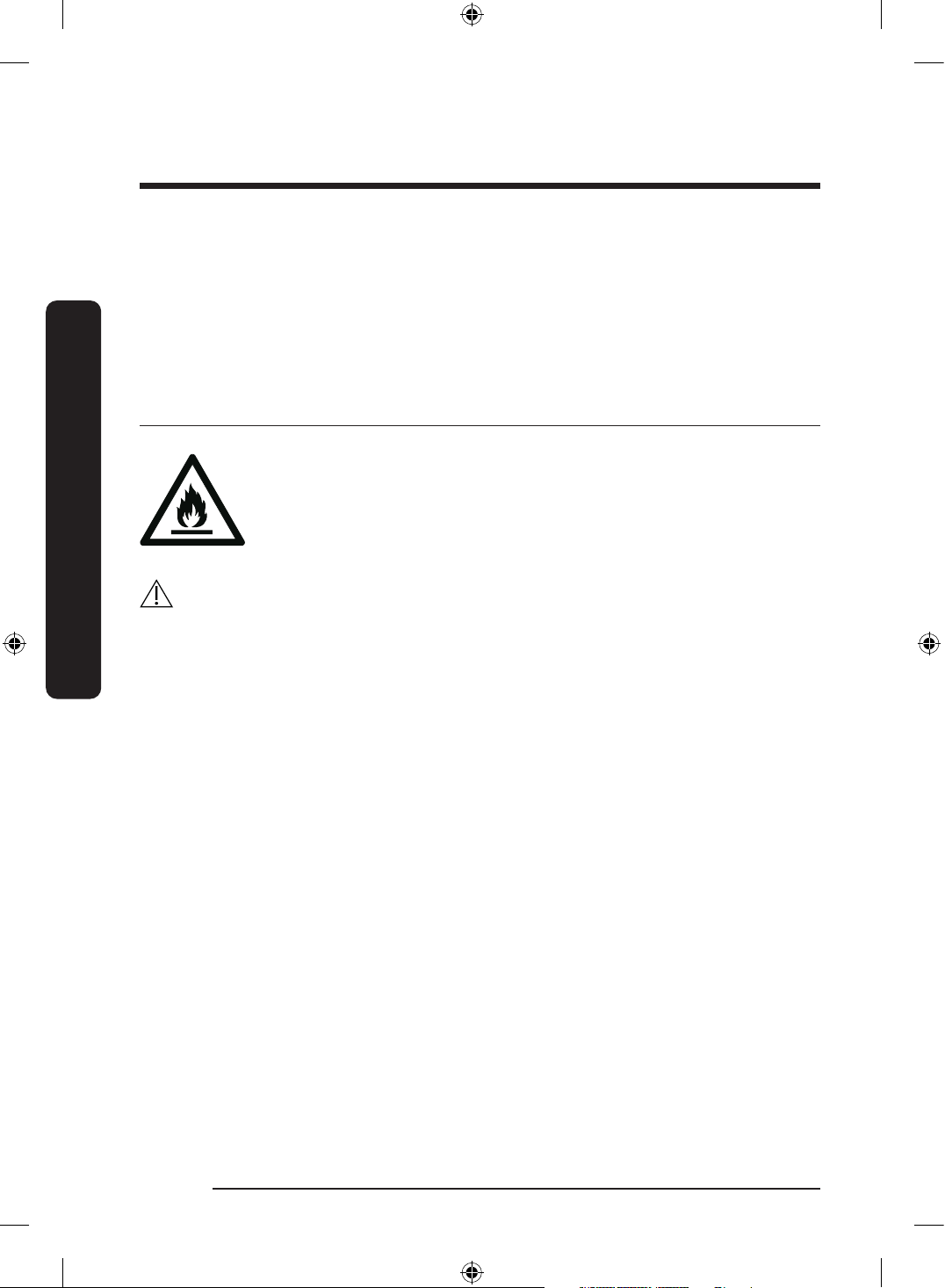
WARNING; Risk of re / ammable materials
WARNING
• When positioning the appliance, ensure the supply cord is
not trapped or damaged.
• Do not locate multiple portable socket-outlets or portable
power supplies at the rear of the appliance.
• Fill with potable water only.
• Connect to potable water supply only.
• Keep ventilation openings, in the appliance enclosure or in
the built-in structure, clear of obstruction.
• Do not use mechanical devices or any other means
to accelerate the defrosting process, other than those
recommended by the manufacturer.
• Do not damage the refrigerant circuit.
• Do not use electrical appliances inside the food storage
compartments of the appliance, unless they are of the type
recommended by the manufacturer.
Untitled-3 6Untitled-3 6 2024-07-04 2:32:182024-07-04 2:32:18
English 7
Safety information
• This appliance is not intended for use by persons
(including children) with reduced physical, sensory, or
mental capabilities, or those who lack experience and
knowledge, unless they have been given supervision or
instruction concerning the use of the appliance by a person
responsible for their safety.
• This appliance can be used by children aged from 8 years
and above and persons with reduced physical, sensory or
mental capabilities or lack of experience and knowledge
if they have been given supervision or instruction
concerning use of the appliance in a safe way and
understand the hazards involved. Children shall not play
with the appliance. Cleaning and user maintenance shall
not be made by children without supervision. Children
aged from 3 to 8 years are allowed to load and unload
refrigerating appliances.
• If the supply cord is damaged, it must be replaced by
the manufacturer, its service agent or similarly qualied
persons in order to avoid a hazard.
• The socket must be easily accessible so that the appliance
can be quickly disconnected from the supply in an
emergency.
- It must be outside the area of the rear of the appliance.
• Do not store explosive substances such as aerosol cans
with a ammable propellant in this appliance.
• If the product is equipped with LED lamps, do not
disassemble the Lamp Covers and LED lamps yourself.
- Contact a Samsung service center.
- Use only the LED Lamps provided by the manufacturer
or its service agents.
Untitled-3 7Untitled-3 7 2024-07-04 2:32:182024-07-04 2:32:18
Safety information
English8
Safety information
• New hose-sets supplied with the appliance are to be used
and old hose-sets should not be reused.
• Have the refrigerator’s water supply connected only to a
potable water supply. To operate the ice maker properly,
water pressure of 206-861 kPa (30-125 psi) is required.
• For the most efcient use of energy, please keep the all
inner ttings such as baskets, drawers, shelves on the
position supplied by manufacturer.
• To get the best energy efciency of this product, please
leave all shelves, drawers and baskets on their original
position.
How to minimize the energy consumption
• Install the appliance in a cool, dry room with adequate
ventilation.
• Ensure that it is not exposed to direct sunlight and never
put it near a direct source of heat (radiator, for example).
- Not to block any vents or grilles is recommended for
energy efciency.
- Allow warm food to cool down before placing it in the
appliance.
- Put frozen food in the refrigerator to thaw. You can
then use the low temperatures of the frozen products to
cool food in the refrigerator.
- Do not keep the door of the appliance open for too long
when putting food in or taking food out.
- The shorter time for which the door is open, the less ice
will form in the freezer.
Untitled-3 8Untitled-3 8 2024-07-04 2:32:182024-07-04 2:32:18
English 9
Safety information
- Clean the rear of the refrigerator regularly. Dust
increases energy consumption.
- Do not set temperature colder than necessary.
- Ensure sufcient air exhaust at the refrigerator base
and at the back wall of the refrigerator. Do not cover air
vent openings.
- Allow clearance to the right, left, back and top when
installing. This will help reduce power consumption and
keep your energy bills lower.
This appliance is intended to be used in household and similar
applications such as
- staff kitchen areas in shops, ofces and other working
environments;
- farm houses and by clients in hotels, motels and other
residential type environments;
- bed and breakfast type environments;
- catering and similar non-retail applications.
Untitled-3 9Untitled-3 9 2024-07-04 2:32:182024-07-04 2:32:18
Safety information
English10
Safety information
Severe warning signs for transportation and site
WARNING
• When transporting and installing the appliance, care should
be taken to ensure that no parts of the refrigerating circuit
are damaged.
- Refrigerant leaking from the pipe work could ignite
or cause an eye injury. If a leak is detected, avoid any
naked ames or potential sources of ignition and air
the room in which the appliance is standing for several
minutes.
- This appliance contains a small amount of isobutane
refrigerant (R-600a), a natural gas with high
environmental compatibility that is, however, also
combustible. When transporting and installing the
appliance, care should be taken to ensure that no parts
of the refrigerating circuit are damaged.
• When transporting and installing the refrigerator, do not
touch the water hose on the back side of the refrigerator.
- This may damage the refrigerator and as a result the
water dispenser can not be used.
Critical installation warnings
WARNING
• Do not install the refrigerator in a damp location or place
where it may come in contact with water.
- Deteriorated insulation on electrical parts may cause an
electric shock or re.
Untitled-3 10Untitled-3 10 2024-07-04 2:32:182024-07-04 2:32:18
English 11
Safety information
• Do not place this refrigerator in direct sunlight or expose it
to the heat from stoves, room heaters, or other appliances.
• Do not plug several appliances into the same multiple
power strip. The refrigerator should always be plugged
into its own individual electrical outlet which has a voltage
rating that matches the voltage listed on the refrigerator’s
rating plate.
- This provides the best performance and also prevents
overloading of house wiring circuits, which could cause
a re hazard from overheated wires.
• If the wall socket is loose, do not insert the power plug.
- There is a risk of electric shock of re.
• Do not use a power cord that has cracks or abrasion
damage along its length or at either end.
• Do not bend the power cord excessively or place heavy
objects on it.
• Do not pull or excessively bend the power cord.
• Do not twist or tie the power cord.
• Do not hook the power cord over a metal object, place a
heavy object on the power cord, insert the power cord
between objects, or push the power cord into the space
behind the appliance.
• When moving the refrigerator, be careful not to roll over or
damage the power cord.
- This may result in an electric shock or re.
• Never unplug your refrigerator by pulling on the power
cord. Always grip the plug rmly and pull straight out from
the outlet.
- Damage to the cord may cause a short-circuit, re, and/
or electric shock.
Untitled-3 11Untitled-3 11 2024-07-04 2:32:182024-07-04 2:32:18
Safety information
English12
Safety information
• Do not use aerosols near the refrigerator.
- Using aerosols near the refrigerator may cause an
explosion or re.
• Do not install this appliance near a heater or inammable
material.
• Do not install this appliance in a location where gas may
leak.
- This may result in an electric shock or re.
• This refrigerator must be properly located and installed in
accordance with the instructions in this manual before you
use it.
• Connect the power plug in the proper position with the
cord hanging down.
- If you connect the power plug upside down, the wire
can get cut off and cause a re or electric shock.
• Make sure that the power plug is not crushed or damaged
by the back of the refrigerator.
• Keep the packing materials out of reach of children.
- There is a risk of death from suffocation if a child puts
the packing materials on his or her head.
• Do not install this appliance in a humid, oily or dusty
location, in a location exposed to direct sunlight and water
(rain drops).
- Deteriorated insulation of electrical parts may cause an
electric shock or re.
• Do not stand on top of the appliance or place objects (such
as laundry, lighted candles, lighted cigarettes, dishes,
chemicals, metal objects, etc.) on the appliance.
- This may result in an electric shock, re, problems with
the product, or injury.
Untitled-3 12Untitled-3 12 2024-07-04 2:32:192024-07-04 2:32:19
English 13
Safety information
• You need to remove all the protective plastic lm before
you initially plug the product in.
• Children should be supervised to ensure that they do not
play with the snap rings used for door adjustment or the
water tube clips.
- There is risk of death by suffocation if a child swallows
a snap ring or water tube clip. Keep the snap rings and
water tube clips out of children’s reach.
• The refrigerator must be safely grounded.
- Always make sure that you have grounded the
refrigerator before attempting to investigate or repair
any part of the appliance. Power leakages can cause
severe electric shock.
• Never use gas pipes, telephone lines, or other potential
lightning attractors as an electrical ground.
- You must ground the refrigerator to prevent any power
leakages or electric shocks caused by current leakage
from the refrigerator.
- This may result in an electric shock, re, explosion, or
problems with the product.
• Plug the power plug into the wall socket rmly. Do not use
a damaged power plug, damaged power cord, or loose wall
socket.
- This may result in an electric shock or re.
• The fuse on the refrigerator must be changed by a
qualied technician or service company.
- Failing to do so may result in an electric shock or
personal injury.
Untitled-3 13Untitled-3 13 2024-07-04 2:32:192024-07-04 2:32:19
Safety information
English14
Safety information
Installation cautions
CAUTION
• Allow sufcient space around the refrigerator and install it
on a at surface.
- If your refrigerator is not level, cooling efciency and
durability can be declined.
• Allow the appliance to stand for 2-3 hours before loading
foods after installation and turning on.
• We strongly recommend you have a qualied technician or
service company install the refrigerator.
- Failing to do so may result in an electric shock, re,
explosion, problems with the product, or injury.
Critical usage warnings
WARNING
• Do not insert the power plug into a wall socket with wet
hands.
- This may result in an electric shock.
• Do not store articles on the top of the appliance.
- When you open or close the door, the articles may fall
and cause personal injury and/or material damage.
• Do not insert hands, feet or metal objects (such as
chopsticks, etc.) into the bottom or the back of the
refrigerator.
- This may result in an electric shock or injury.
- Any sharp edges may cause a personal injury.
Untitled-3 14Untitled-3 14 2024-07-04 2:32:192024-07-04 2:32:19
English 15
Safety information
• Do not touch the inside walls of the freezer or products
stored in the freezer with wet hands.
- This may cause frostbite.
• Do not put a container lled with water on the refrigerator.
- If spilled, there is a risk of re or electric shock.
• Do not keep volatile or ammable objects or substances
(benzene, thinner, propane gas, alcohol, ether, LP gas, and
other such products) in the refrigerator.
- This refrigerator is for storing food only.
- This may result in re or explosion.
• Children should be supervised to ensure that they do not
play with the appliance.
- Keep ngers out of “pinch point” areas. Clearances
between the doors and cabinet are necessarily small. Be
careful when you open the doors if children are in the
area.
• Do not put your ngers or children's ngers between the
doors.
- Keep ngers out of the left and right door gaps. Be
careful when you open the doors if your ngers are in
between the doors.
• Do not let children hang on the door or door bins. A
serious injury may occur.
• Do not let children go inside the refrigerator. They could
become trapped.
• Do not insert your hands into the bottom area under the
appliance.
- Any sharp edges may cause personal injury.
Untitled-3 15Untitled-3 15 2024-07-04 2:32:192024-07-04 2:32:19
Safety information
English16
Safety information
• Do not store pharmaceutical products, scientic materials,
or temperature sensitive products in the refrigerator.
- Products that require strict temperature controls must
not be stored in the refrigerator.
• If you smell pharmaceutical or smoke, pull out power plug
immediately and contact your Samsung Electronics service
center.
• If any dust or water is in Refrigerator, pull out power plug
and contact your Samsung Electronics service center.
- Otherwise there is a risk of re.
• Do not let children step on a drawer.
- The drawer may break and cause them to slip.
• Do not leave the doors of the refrigerator open while the
refrigerator is unattended and do not let children enter
inside the refrigerator.
• Do not allow babies or children go inside the drawer.
- It can cause death from suffocation by entrapment or
personal injury.
• Do not overll the refrigerator with food.
- When you open the door, an item may fall out and
cause personal injury or material damage.
• Do not spray volatile material such as insecticide onto the
surface of the appliance.
- As well as being harmful to humans, it may also result
in an electric shock, re, or problems with the product.
• Never put ngers or other objects into the water dispenser
hole, ice chute and ice maker bucket.
- It may cause a personal injury or material damage.
Untitled-3 16Untitled-3 16 2024-07-04 2:32:192024-07-04 2:32:19
English 17
Safety information
• Do not use or place any substances sensitive to
temperature such as ammable sprays, ammable objects,
dry ice, medicine, or chemicals near or inside of the
refrigerator.
• Do not use a hair dryer to dry the inside of the
refrigerator. Do not place a lighted candle in the
refrigerator for removing bad odours.
- This may result in an electric shock or re.
• Fill the water tank and ice cube trays with potable water
only (tap water, mineral water, or puried water).
- Do not ll the tank with tea or a sports drink. This may
damage the refrigerator.
• Do not stand on top of the appliance or place objects (such
as laundry, lighted candles, lighted cigarettes, dishes,
chemicals, metal objects, etc.) on the appliance. This may
result in an electric shock, re, problems with the product,
or injury. Do not put a container lled with water on the
appliance.
- If spilled, there is a risk of re or electric shock.
• Never stare directly at the UV LED lamp for long periods of
time.
- This may result in eye strain due to the ultraviolet rays.
• Do not put shelf in upside down. Shelf stopper could not
work.
- It may cause a personal injury because of glass shelf
drop.
• If a gas leak is detected, avoid any naked ames or
potential sources of ignition, and air the room in which the
appliance is standing for several minutes.
- Do not touch the appliance or power cord.
Untitled-3 17Untitled-3 17 2024-07-04 2:32:192024-07-04 2:32:19
Safety information
English18
Safety information
- Do not use a ventilating fan.
- A spark may result in explosion or re.
• Bottles should be stored tightly together so that they do
not fall out.
• This product is intended only for the storage of food in a
domestic environment.
• Never put ngers or other objects into the water dispenser
hole, ice chute and ice maker bucket.
- It may cause a personal injury or material damage.
• Do not attempt to repair, disassemble, or modify the
refrigerator yourself.
• Do not use any fuse (such as cooper, steel wire, etc.) other
than a standard fuse.
• If your refrigerator needs to be repaired or reinstalled,
contact your nearest service center.
- Failing to do so may result in an electric shock, re,
problems with the product, or injury.
• If the refrigerator emits a burning smell or smoke, unplug
the refrigerator immediately and contact your Samsung
Electronics service center.
- Failing to do so may result in an electric or re hazards.
• Pull the power plug out of the socket before changing the
interior lamps of the refrigerator.
- Otherwise, there is a risk of electric shock.
• If you experience difculty changing a non-LED light,
contact a Samsung service center.
• Plug the power plug into the wall socket rmly.
• Do not use a damaged power plug, damaged power cord or
loose wall socket.
- This may result in an electric shock or re.
Untitled-3 18Untitled-3 18 2024-07-04 2:32:192024-07-04 2:32:19
English 19
Safety information
Usage cautions
CAUTION
• Do not refreeze thawed food.
- Frozen and thawed food will develop harmful bacteria
faster than fresh.
- The second thaw will break down even more cells,
leaching out moisture and changing the integrity of the
product.
• Do not thaw meat at room temperature.
- Safety will depend on whether the raw product was
handled properly.
• Do not place glass bottles or carbonated beverages into
the freezer.
- The container may freeze and break, and this may
result in injury.
• Use only the ice maker provided with the refrigerator.
• If you will be away from home for a long period of time
(on vacation, for example) and won’t be using the water or
ice dispensers, close the water valve.
- Otherwise, water leakage may occur.
• If you won’t be using the refrigerator for a very long
period of time, (3 weeks or more) empty the refrigerator
including the ice bucket, unplug it, close the water valve,
wipe excess moisture from the inside walls, and leave the
doors open to prevent odors and mold.
• To get the best performance from the product:
- Do not place food too close to the vents at the rear of
the refrigerator as this can obstruct free air circulation
in the refrigerator compartment.
Untitled-3 19Untitled-3 19 2024-07-04 2:32:192024-07-04 2:32:19
Safety information
English20
Safety information
- Wrap food up properly or place it in airtight containers
before putting it into the refrigerator.
- Please observe maximum storage times and expiration
dates of frozen goods.
- There is no need to disconnect the refrigerator from
the power supply if you will be away for less than
three weeks. However, if you will be away for more
than three weeks, remove all the food and ice in the ice
bucket, unplug the refrigerator, close the water valve,
wipe excess moisture from the inside walls, and leave
the doors open to prevent odors and mold.
• Service Warranty and Modication.
- Any changes or modications performed by a 3rd
party on this nished appliance are not covered
under Samsung warranty service, nor is Samsung
responsible for safety issues that result from 3rd party
modications.
• Do not block the air vents inside the refrigerator.
- If the air vents are blocked, especially with a plastic
bag, the refrigerator can be over cooled. If a cooling
period lasts too long, the water lter may break and
cause water leakage.
• Use only the ice-maker provided with the refrigerator.
• Wipe excess moisture from the inside and leave the doors
open.
- Otherwise, odor and mold may develop.
• If the refrigerator is disconnected from the power supply,
you should wait for at least ve minutes before plugging it
back in.
Untitled-3 20Untitled-3 20 2024-07-04 2:32:192024-07-04 2:32:19
English 21
Safety information
• When the refrigerator got wet by water, pull out the power
plug and contact your Samsung Electronics service center.
• Do not strike or apply excessive force to any glass surface.
- Broken glass may result in a personal injury and/or
property damage.
• Be careful that your ngers are not caught in.
• If the refrigerator is ooded, make sure to contact your
nearest service center.
- There is a risk of electric shock or re.
• Do not keep vegetable oil in your refrigerator’s door bins.
The oil can solidify, making it foul-tasting and difcult to
use. In addition, the open container can leak and the leaked
oil can cause the door bin to crack. After opening an oil
container, it is best to keep the container in a cool and
shaded place such as a cupboard or pantry.
- Examples of vegetable oil: olive oil, corn oil, grape-seed
oil, etc.
Untitled-3 21Untitled-3 21 2024-07-04 2:32:192024-07-04 2:32:19
Safety information
English22
Safety information
Cleaning cautions
CAUTION
• Do not spray water directly on the inside or outside the
refrigerator.
- There is a risk of re or electric shock.
• Do not use a hair dryer to dry the inside of the
refrigerator.
• Do not place a lighted candle in the refrigerator to remove
bad odors.
- This may result in an electric shock or re.
• Do not spray cleaning products directly on the display.
- Printed letters on the display may come off.
• If any foreign substance such as water has entered the
appliance, unplug the power plug and contact your nearest
service center.
- Failing to do so may result in an electric shock or re.
• Use a clean, dry cloth to remove any foreign matter or dust
from the power plug blades. Do not use a wet or damp
cloth when cleaning the plug.
- Otherwise, there is a risk of re or electric shock.
• Do not clean the appliance by spraying water directly onto
it.
• Do not use benzene, thinner, or Clorox, Chloride for
cleaning.
- They may damage the surface of the appliance and may
cause a re.
• Never put ngers or other objects into the dispenser hole.
- It may cause a personal injury or material damage.
Untitled-3 22Untitled-3 22 2024-07-04 2:32:192024-07-04 2:32:19
English 23
Safety information
• Before cleaning or performing maintenance, unplug the
appliance from the wall socket.
- Failing to do so may result in an electric shock or re.
• Use a clean sponge or soft cloth and a mild detergent in
warm water to clean the refrigerator.
• Do not use abrasive or harsh cleansers such as window
sprays, scouring cleansers, ammable uids, muriatic
acid, cleaning waxes, concentrated detergents, bleaches,
or cleansers containing petroleum products on exterior
surfaces (doors and cabinet), plastic parts, door and interior
liners, and gaskets.
- These can scratch or damage the material.
• Do not clean glass shelves or covers with warm water
when they are cold. Glass shelves and covers may break if
exposed to sudden temperature changes or impacts such
as bumping or dropping.
Untitled-3 23Untitled-3 23 2024-07-04 2:32:192024-07-04 2:32:19
Safety information
English24
Safety information
Critical disposal warnings
WARNING
• Please dispose of the packaging material from this product
in an environmentally friendly manner.
• Ensure that none of the pipes on the back of the
refrigerator are damaged prior to disposal.
• R-600a or R-134a is used as a refrigerant. Check the
compressor label on the rear of the appliance or the rating
label inside the fridge to see which refrigerant is used for
your refrigerator. If this refrigerator contains ammable
gas (Refrigerant R-600a), contact your local authority in
regard to safe disposal of this product.
• When disposing of this refrigerator, remove the door/
door seals and door latch so that small children or
animals cannot become trapped inside. Children should
be supervised to ensure that they do not play with the
appliance. If trapped inside, a child may get hurt or
suffocate to death.
- If trapped inside, the child may become injury and
suffocate to death.
• Cyclopentane is used in the insulation. The gases in the
insulation material require a special disposal procedure.
Please contact your local authorities in regard to the
environmentally safe disposal of this product.
• Keep all packaging materials well out of the reach of
children, as packaging materials can be dangerous to
children.
- If a child places a bag over his or her head, the child
could suffocate.
Untitled-3 24Untitled-3 24 2024-07-04 2:32:192024-07-04 2:32:19
English 25
Safety information
Additional tips for proper usage
• In the event of a power failure, call the local ofce of your
electric company and ask how long the failure is going to
last.
- Most power failures that are corrected in an hour or two
will not affect your refrigerator temperatures. However,
you should minimize the number of door openings
while the power is off.
- Should the power failure last more than 24 hours,
remove and discard all frozen food.
• The refrigerator might not operate consistently (frozen
contents can thaw or temperatures can become too
warm in the frozen food compartment) if sited for an
extended period of time in a location where ambient air
temperatures are constantly below the temperatures for
which the appliance is designed.
• In case of particular foods, keeping it under refrigeration
can have a bad effect on preservation due to its properties.
• Your appliance is frost free, which means there is no need
to manually defrost your appliance. This will be carried out
automatically.
• Temperature rise during defrosting complies with ISO
requirements. If you want to prevent an undue rise in the
temperature of frozen food while the appliance defrosts,
wrap the frozen food in several layers of newspaper.
• Do not re-freeze frozen foods that have thawed
completely.
Untitled-3 25Untitled-3 25 2024-07-04 2:32:192024-07-04 2:32:19
Safety information
English26
Safety information
• The temperature of two star section (sections) or
compartment (compartments) which have two star symbol
( ) is slightly higher than other freezer compartment
(compartments).
The two star section (sections) or compartment
(compartments) is (are) based on the instruction and/or the
condition as delivered.
Instructions about the WEEE
Correct Disposal of This Product (Waste Electrical & Electronic Equipment)
(Applicable in countries with separate collection systems)
This marking on the product, accessories or literature indicates that the
product and its electronic accessories (e.g. charger, headset, USB cable)
should not be disposed of with other household waste at the end of their
working life. To prevent possible harm to the environment or human
health from uncontrolled waste disposal, please separate these items
from other types of waste and recycle them responsibly to promote the
sustainable reuse of material resources.
Household users should contact either the retailer where they purchased
this product, or their local government ofce, for details of where and
how they can take these items for environmentally safe recycling.
Business users should contact their supplier and check the terms and
conditions of the purchase contract. This product and its electronic
accessories should not be mixed with other commercial wastes for
disposal.
For information on Samsung’s environmental commitments
and product regulatory obligations, e.g. REACH, WEEE or
Batteries, visit our sustainability page available via www.
samsung.com
(For products sold in European countries and in the UK only)
Untitled-3 26Untitled-3 26 2024-07-04 2:32:192024-07-04 2:32:19
English 27
Installation
Follow these instructions carefully to ensure a proper installation of this refrigerator and to
prevent accidents before using it.
WARNING
• Use the refrigerator only for its intended purpose as described in this manual.
• Any servicing must be performed by a qualied technician.
• Dispose of the product packaging material in compliance with the local regulations.
• To prevent electric shock, unplug the power plug before servicing or replacing parts.
Installation
Untitled-3 27Untitled-3 27 2024-07-04 2:32:192024-07-04 2:32:19
Installation
English28
Installation
Refrigerator at a glance
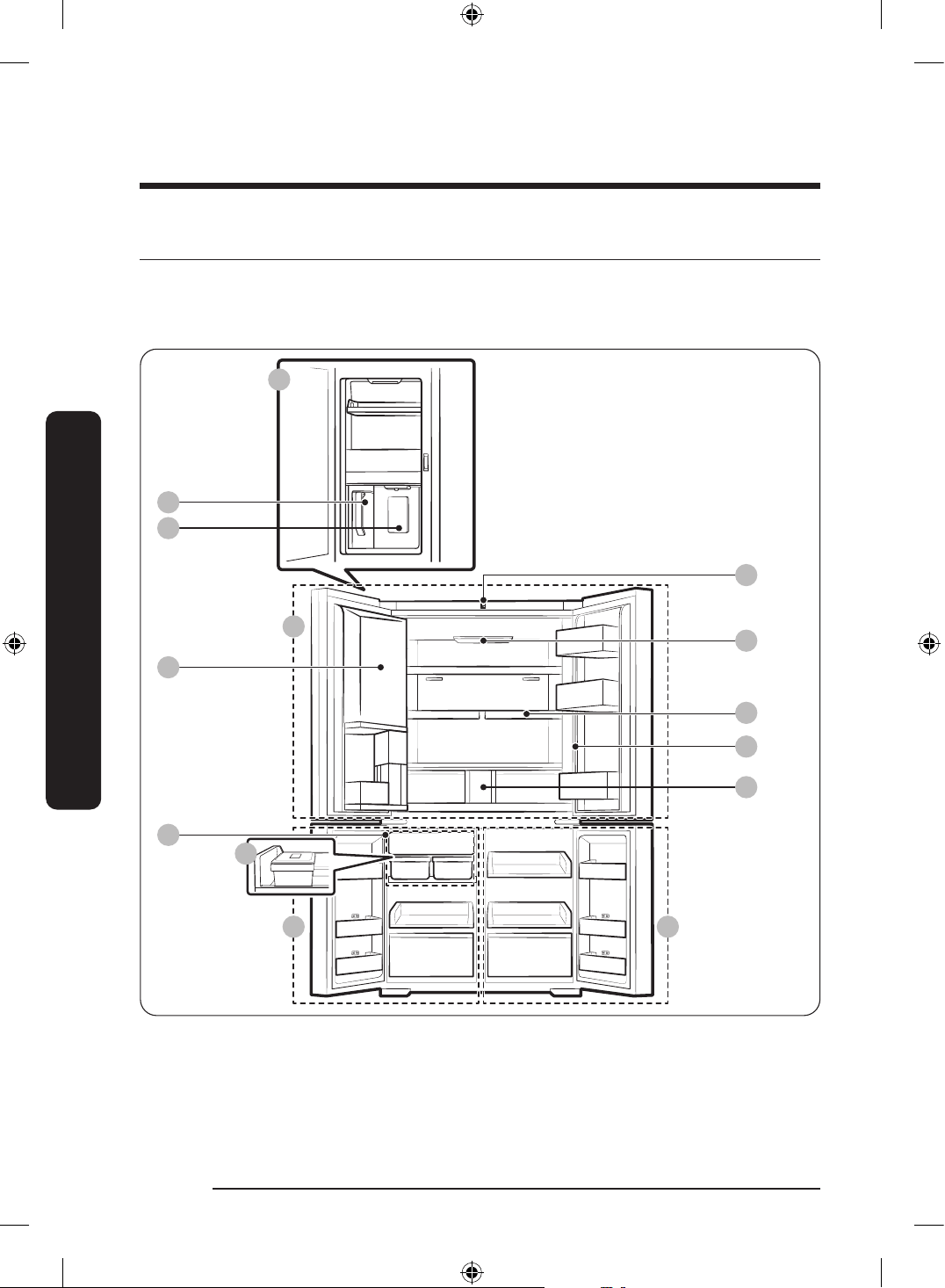
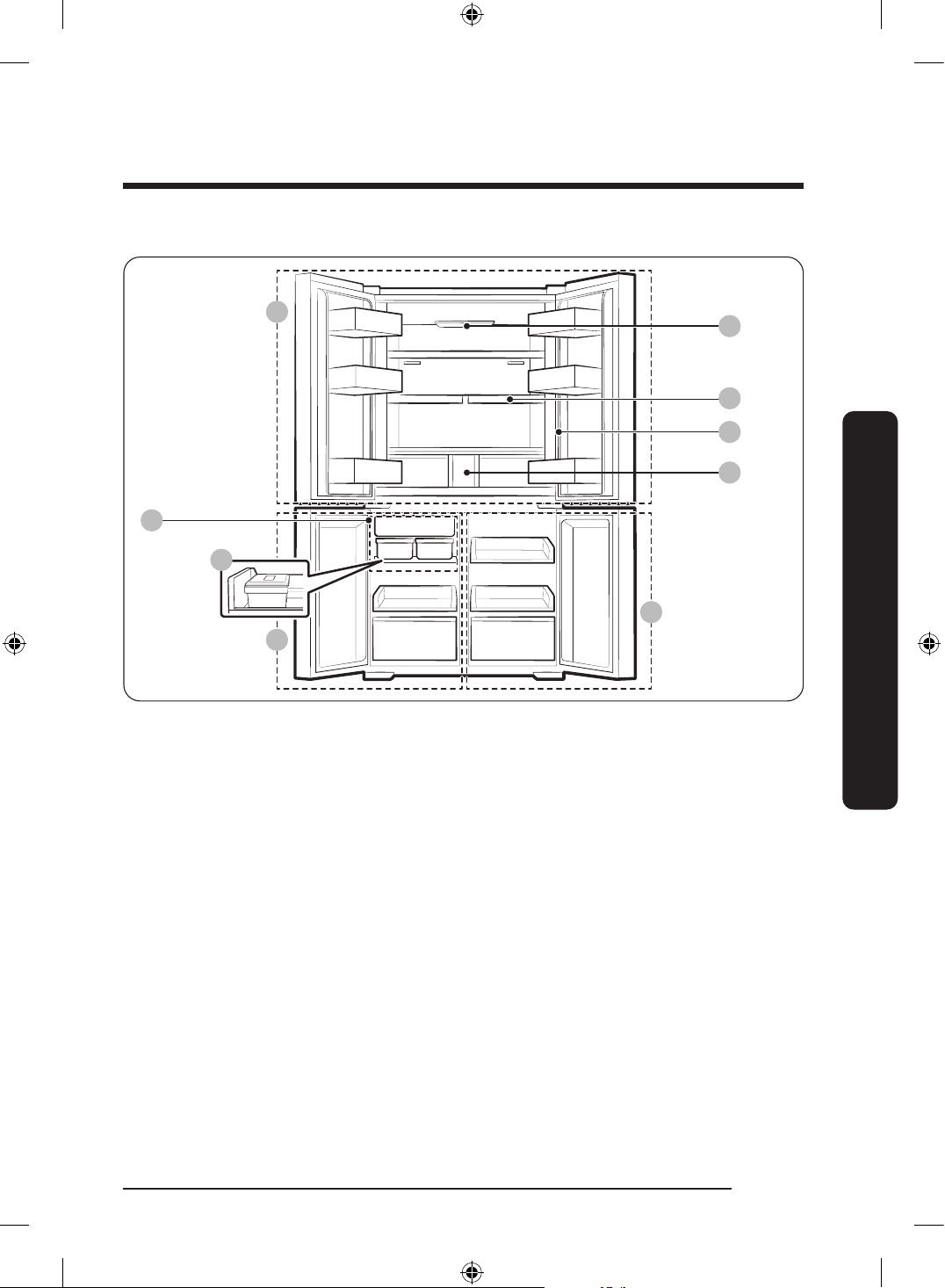
The actual refrigerator and provided component parts of your refrigerator may differ from
the illustrations in this manual, depending on the model and the country.
Type A
01
03
09
08
02
A
B
C D
04
05
06
10
07
Untitled-3 28Untitled-3 28 2024-07-04 2:32:192024-07-04 2:32:19
English 29
Installation
Type B
09
08
A
C
D
05
06
10
07
01 AutoFill Pitcher ** A. Fridge
B. Beverage Center **
C. Freezer
D. FlexZone
02 Water dispenser **
03 Beverage Zone *
04 Camera *
05 UV Deodorizing Filter *
06 Quick Space shelf
07 Water lter **
08 Tray Ice Maker *
09 Auto Ice Maker **
10 Main panel * (General type)
* Applicable models only
** Dispenser models only
Untitled-3 29Untitled-3 29 2024-07-04 2:32:202024-07-04 2:32:20
Installation
English30
Installation
NOTE
• For energy efciency, keep all shelves, drawers, and baskets in their original positions.
• When closing the door, make sure the vertical hinged section is in the correct position
to avoid scratching the other door.
• If the vertical hinged section is reversed, put it back into the correct position, and then
close the door.
• Moisture may form at times on the vertical hinged section.
• If you close a door forcefully, the other door may open.
• If the internal or external LED lamp is out of order, contact a local Samsung service
center.
Untitled-3 30Untitled-3 30 2024-07-04 2:32:202024-07-04 2:32:20
English 31
Installation
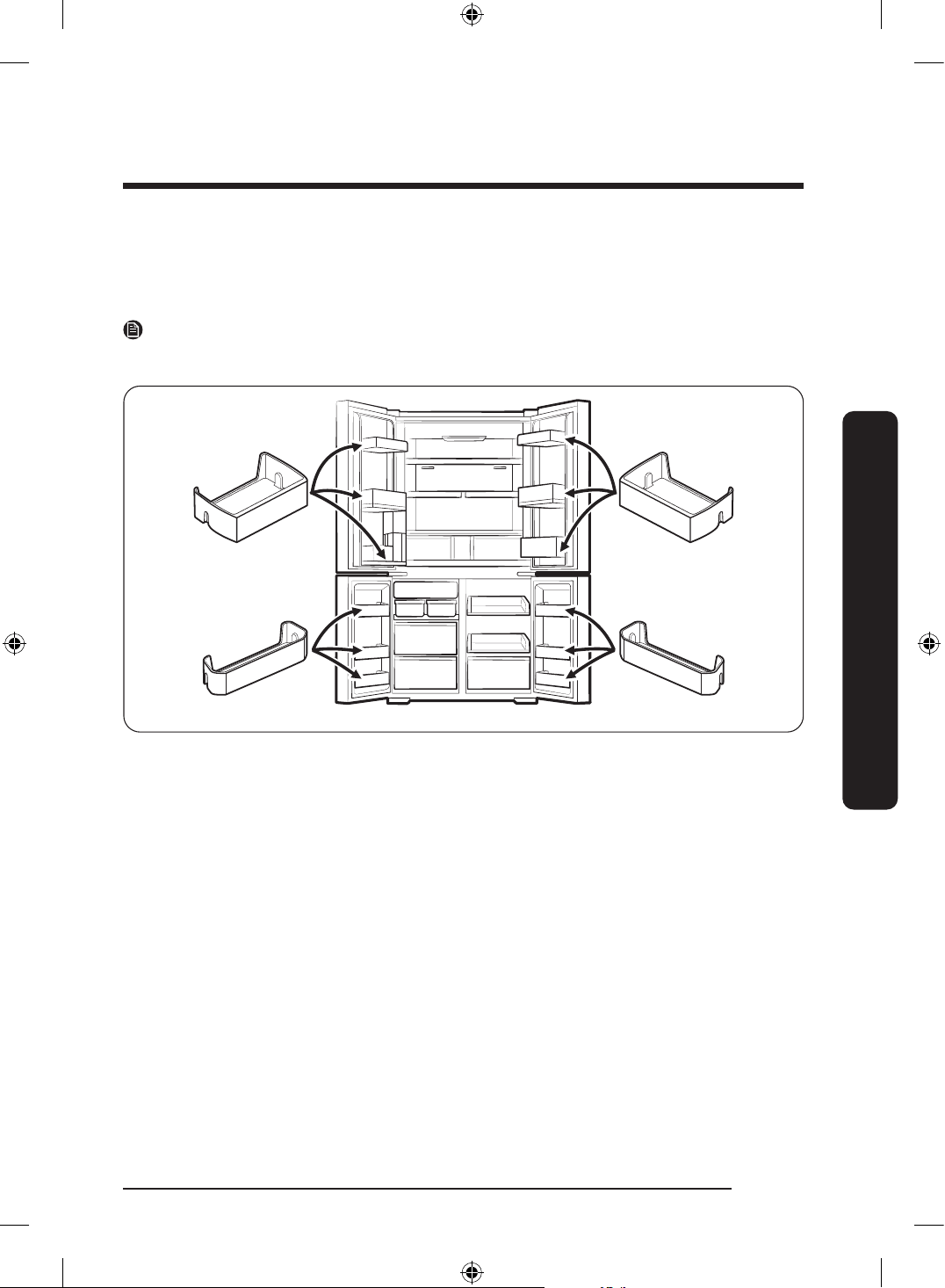
Door bins
Your refrigerator ships with door bins of different types and sizes. If the door bins for your
refrigerator were packaged separately, use the gure below to help you position the bins
properly.
NOTE
The actual refrigerator and provided component parts of your refrigerator may differ from
the illustrations in this manual, depending on the model and the country.
Untitled-3 31Untitled-3 31 2024-07-04 2:32:202024-07-04 2:32:20
Installation
English32
Installation
Step-by-step installation
STEP 1 Select a site
The site must:
• Have a solid level surface without carpeting or ooring that may obstruct ventilation
• Be out of direct sunlight
• Have adequate room for opening and closing the door
• Be away from any heat source
• Provide room for maintenance and servicing
• Have a temperature range between 10 °C and 43 °C
Untitled-3 32Untitled-3 32 2024-07-04 2:32:202024-07-04 2:32:20
English 33
Installation
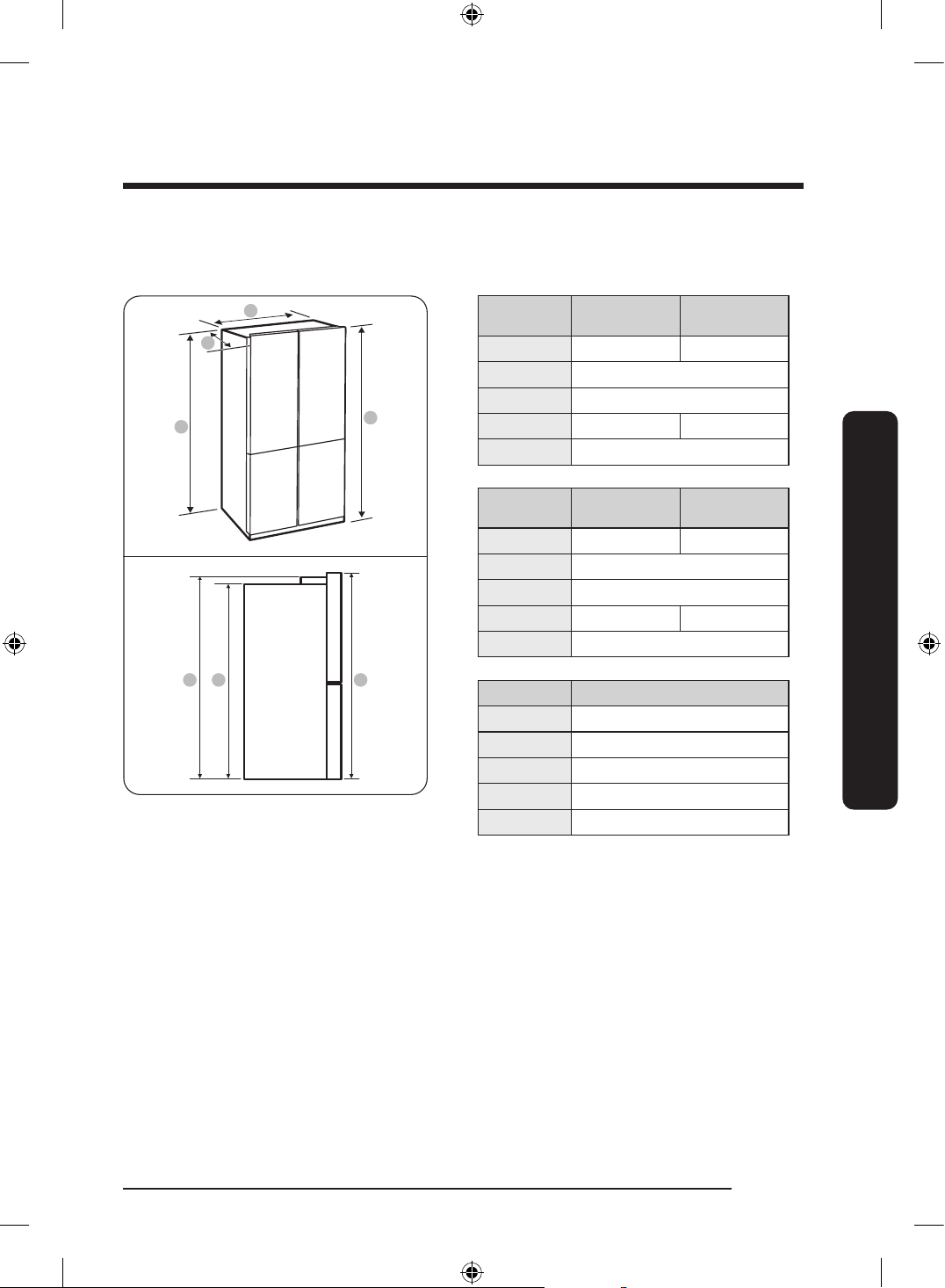
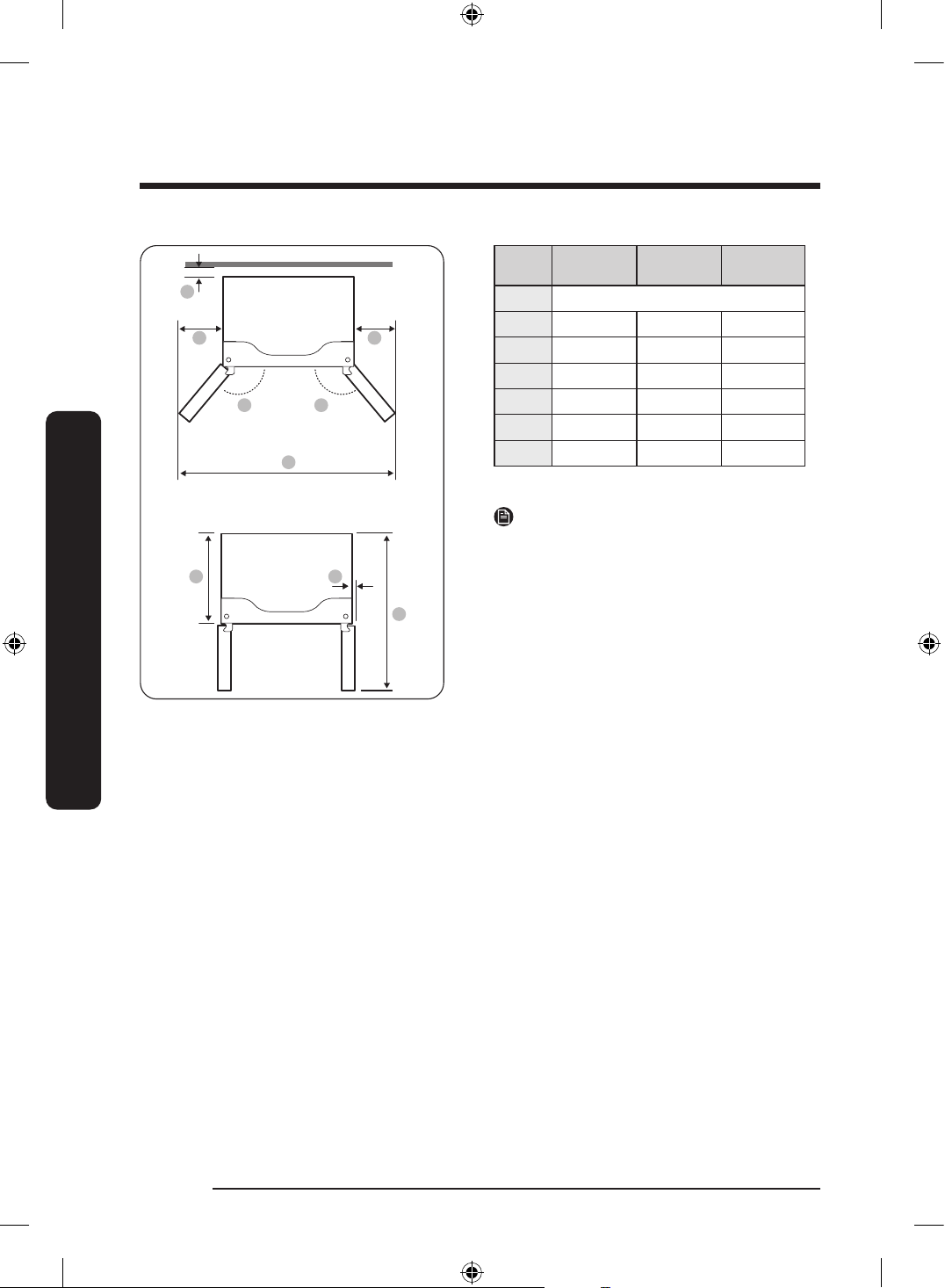
Clearance
See the following gures and tables for installation space requirements.
A
B
C
C DE
D
A. Depth
B. Width
C. Height (without hinge)
D. Overall Height
E. Height (with hinge)
Model
RF65DB*
(Bespoke)
RF65DG*
A 731 723
B 912
C 1797
D 1853 1830
E 1830
Model
RF71DB*
(Bespoke)
RF71DG*
A 869 861
B 912
C 1797
D 1853 1830
E 1830
Model RF62DB* (Kitchen Fit)
A 673
B 912
C 1797
D 1853
E 1853
(Unit: mm)
Untitled-3 33Untitled-3 33 2024-07-04 2:32:202024-07-04 2:32:20
Installation
English34
Installation
01
02 02
04 04
03
0605
07
Model RF65D** RF71D**
RF62DB*
(Kitchen Fit)
01 more than 50 mm recommended
02 125° 125° 105°
03 1498 1498 1126
04 295 295 109
05 610 748 610
06 55 55 7
07 1093 1231 1088
(Unit: mm)
NOTE
The measurements in the tables may differ
slightly from the actual measurements,
depending on the measuring and rounding
method.
Untitled-3 34Untitled-3 34 2024-07-04 2:32:202024-07-04 2:32:20
English 35
Installation
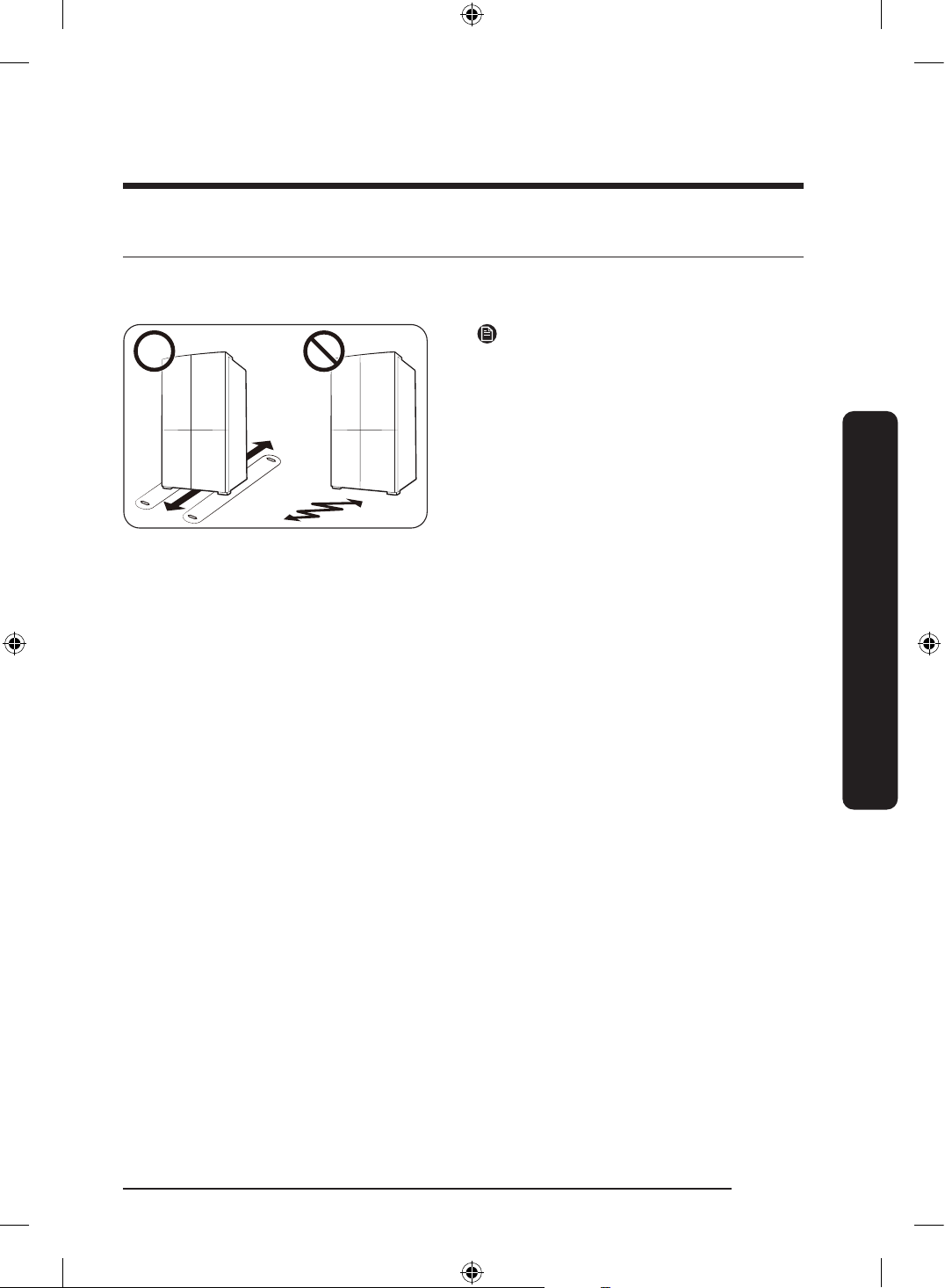
STEP 2 Flooring
If the refrigerator cannot pass through the entrance due to its size, see STEP 3 Door
removal for entrance.
NOTE
To prevent oor damage, make sure the
front leveling legs are in the upright
position.
• The surface you install the refrigerator
on must support a fully loaded
refrigerator.
• To protect the oor, put a large piece
of cardboard along the path to the
refrigerator's nal installation location.
• Once the refrigerator is in its nal
position, do not move it unless
necessary to protect the oor. If you
have to move the refrigerator, place
thick paper or cloth such as old carpets
along the path of movement.
Untitled-3 35Untitled-3 35 2024-07-04 2:32:202024-07-04 2:32:20
Installation
English36
Installation
STEP 3 Door removal for entrance
If the refrigerator cannot pass through the entrance to your home or kitchen due to its
size, follow these instructions to remove and then re-install the refrigerator's doors. If you
do not need to remove the doors, go to page 44 to continue the installation procedure.
WARNING
Unplug the power cord of the refrigerator before removing the doors.
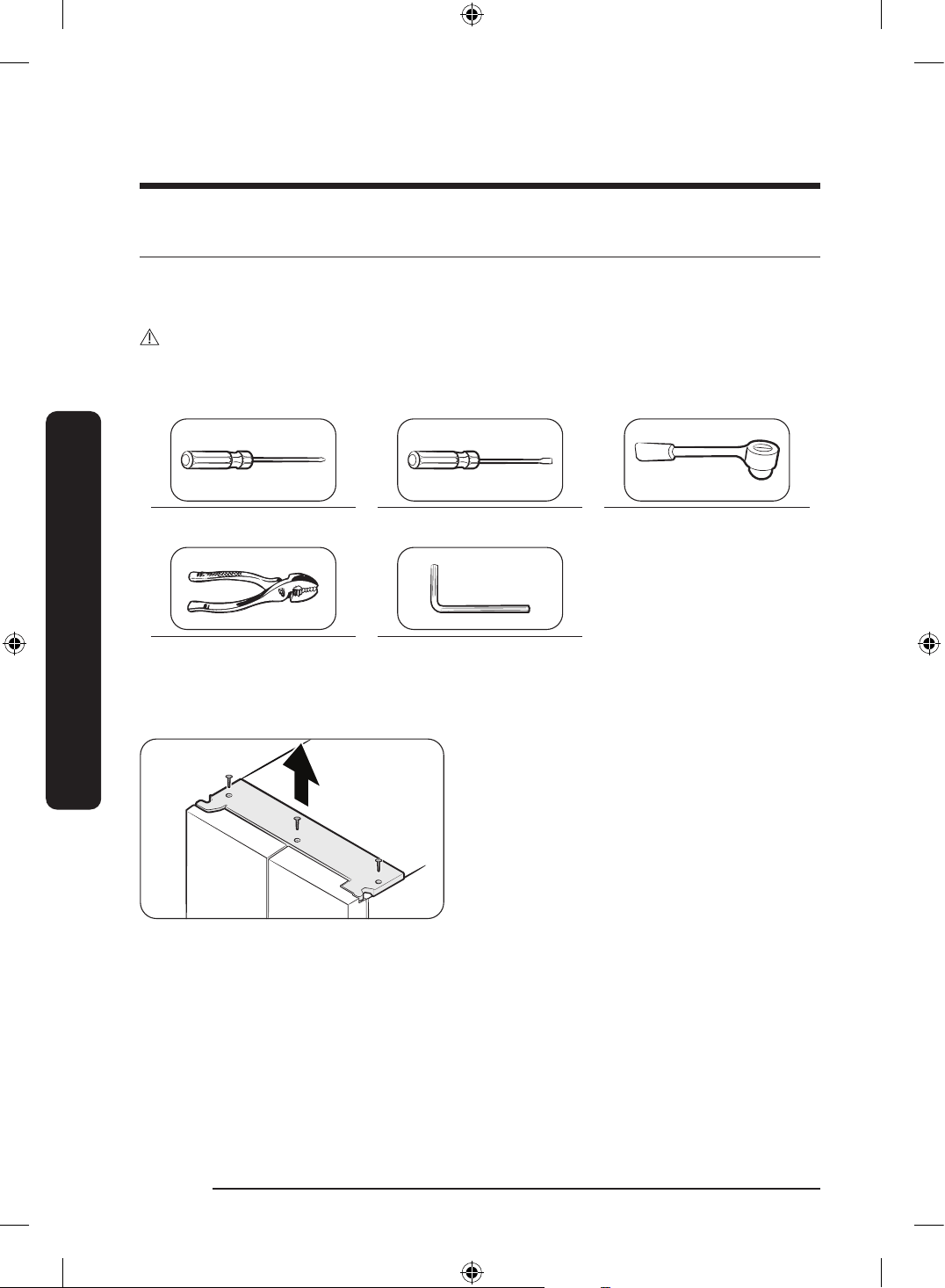
Tools required (not provided)
Phillips screwdriver Flat-head screwdriver Socket wrench
3
/8" (10 mm)
Pliers Allen wrench
1
/4" (5 mm)
Detach the fridge doors
1. With the doors closed, use a Phillips
screwdriver to remove the screws (x3)
from the top cover. Pull up and remove
the top cover with the connectors.
Untitled-3 36Untitled-3 36 2024-07-04 2:32:212024-07-04 2:32:21
English 37
Installation
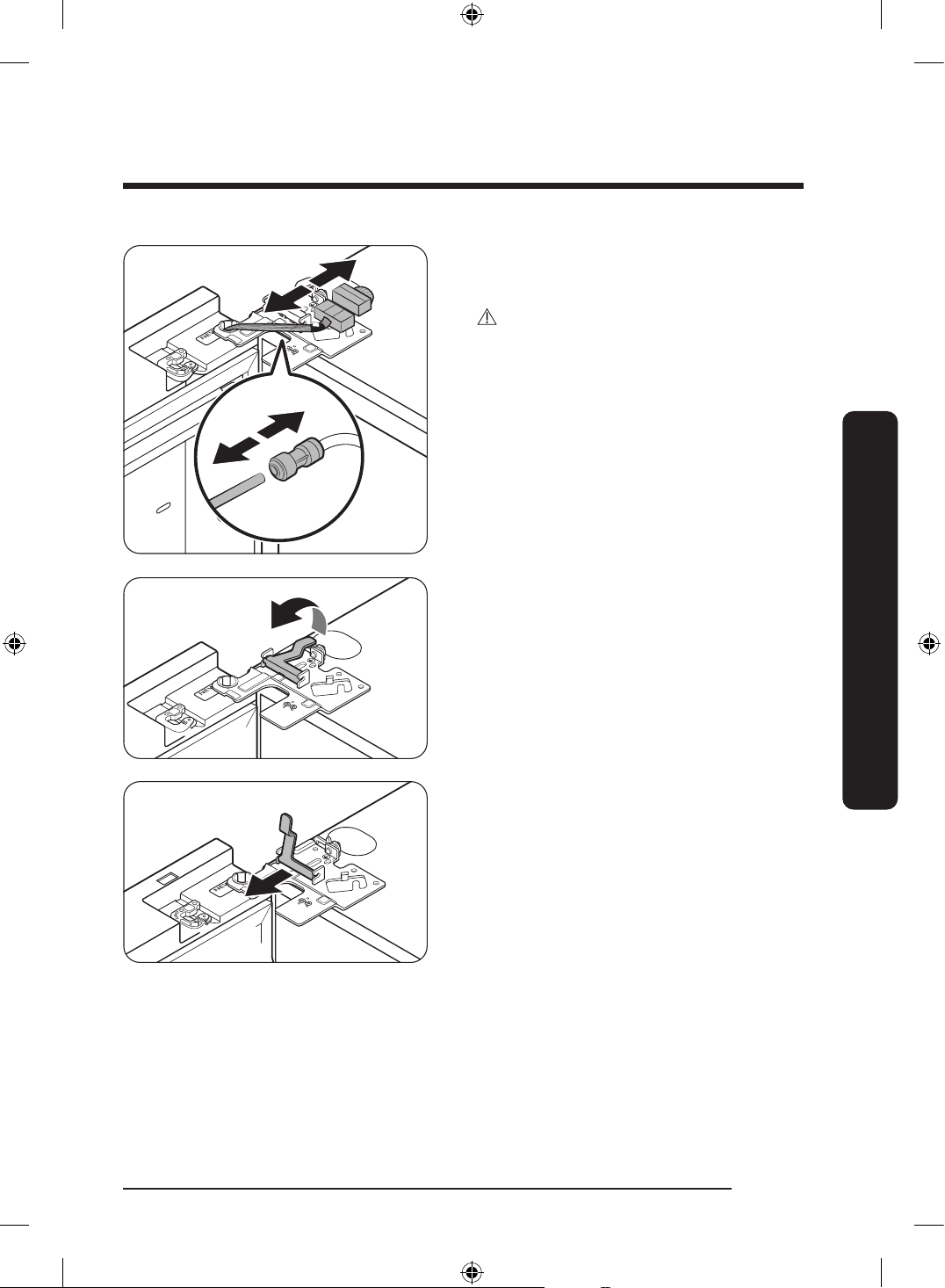
2. Disconnect the two wire connectors
on the left door. The position of the
connectors differs with the model.
CAUTION
• Do not remove both doors
simultaneously. Make sure to remove
one door at a time. Otherwise, any of
the doors may fall and cause physical
injury.
• Make sure the refrigerator is off before
disconnecting the connectors.
3. Disconnect the water tube from the
coupler on the left door as shown.
- This step does not apply to the
models without the AutoFill pitcher
and the water dispenser.
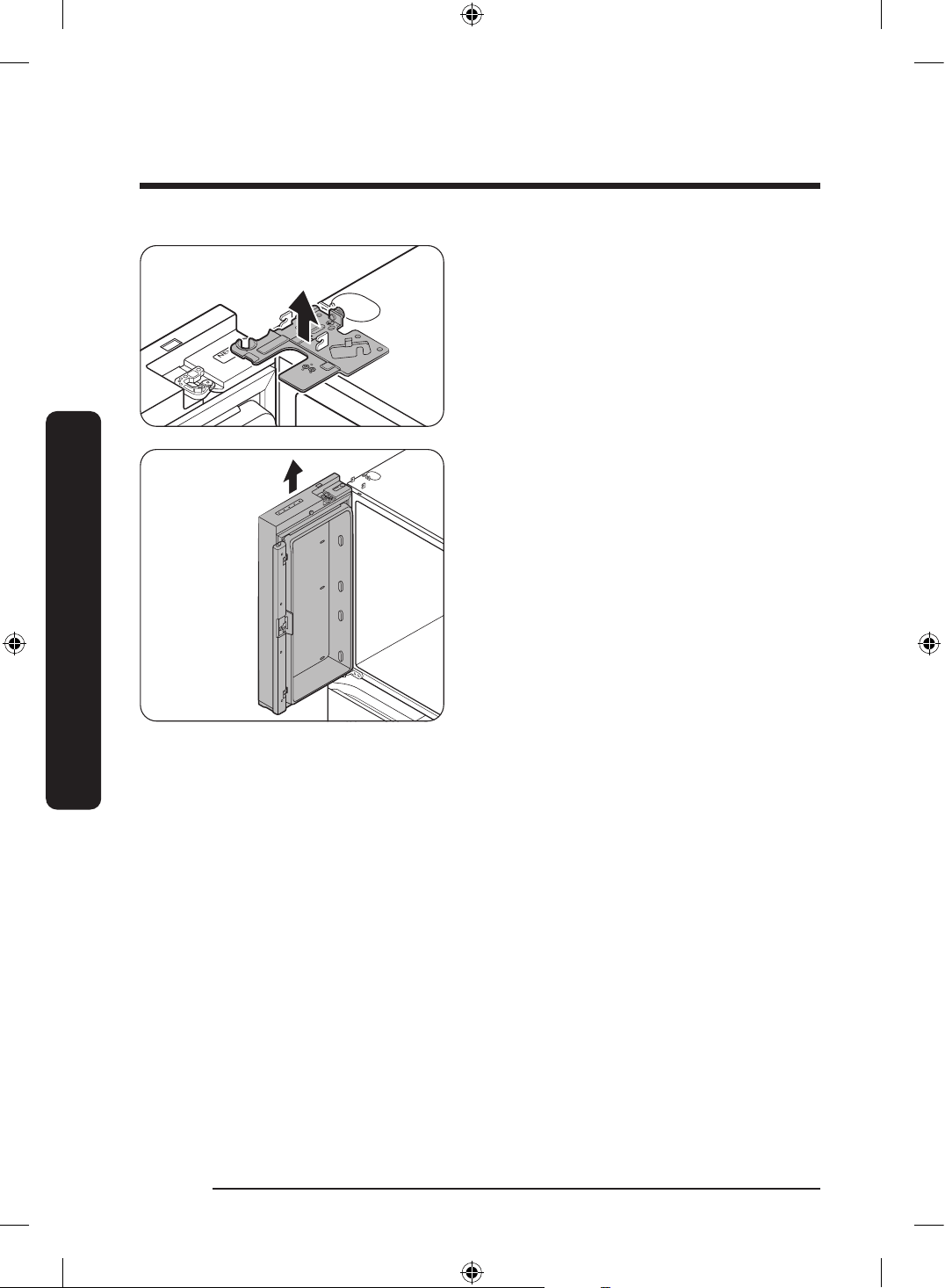
4. Gently draw up the clamp in several
steps. To prevent nger injuries, do not
apply a sudden force to the clamp.
5. Pull up the clamp to remove.
Untitled-3 37Untitled-3 37 2024-07-04 2:32:212024-07-04 2:32:21
Installation
English38
Installation
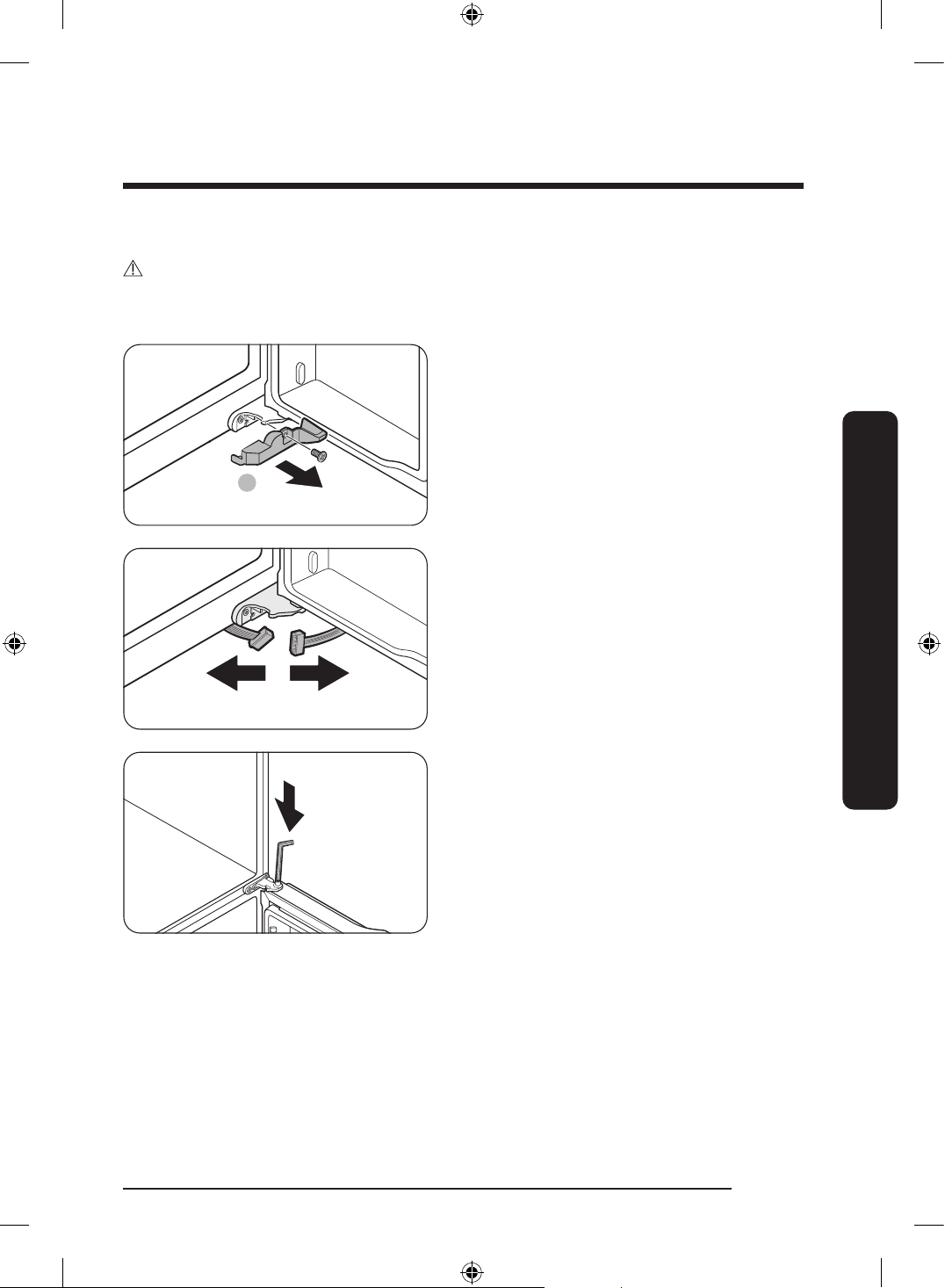
6. Open the door 90 degrees. While
holding the door, pull up and remove
the top hinge. Be careful not to damage
the connector wires when you remove
the hinge.
7. Gently pull up the door vertically to
remove. Do not apply excessive force
to the door. The door may fall, causing
physical injury.
8. Lay the door down on a at surface.
9. Repeat steps 1-8 for the other door,
except for step 3. There is no water tube
on the right side door.
- Step 2 does not apply to the models
without the Showcase door.
Untitled-3 38Untitled-3 38 2024-07-04 2:32:212024-07-04 2:32:21
English 39
Installation
Detach the freezer doors
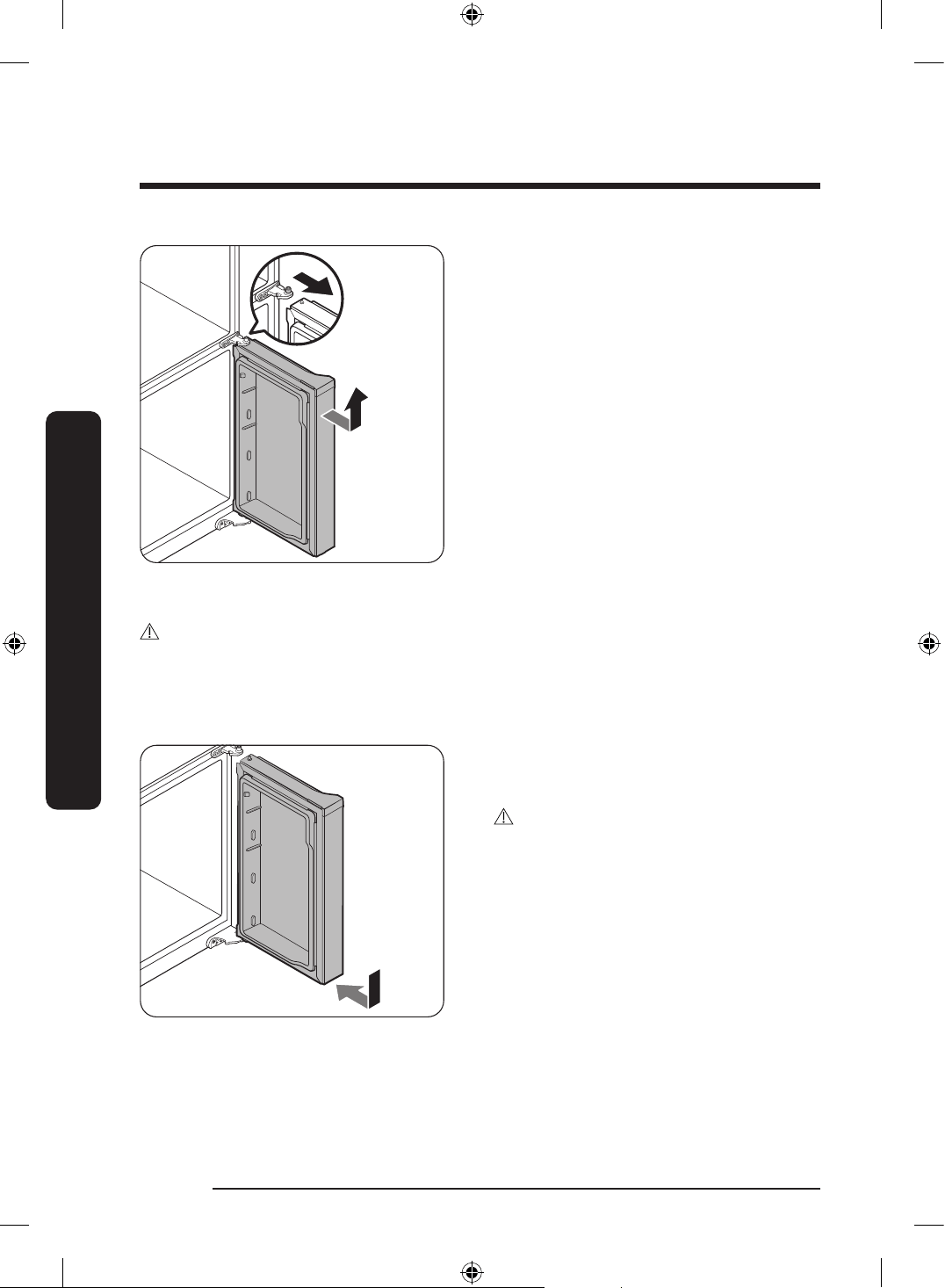
CAUTION
• Be sure to remove the fridge doors before removing the freezer doors.
• Use caution when disconnecting the bottom connectors.
A
1. Open the freezer door.
2. Use a Phillips screwdriver to remove the
screw holding the cover (A).
- This step only applies to the right
side freezer door (FlexZone door).
3. Disconnect the wire connectors.
- This step only applies to the right
side freezer door (FlexZone door).
4. Locate the hinge shaft. While holding
the door with one hand, use a at-head
screwdriver or Allen wrench to press the
shaft down. Make sure to hold the door
to prevent the door from falling.
Untitled-3 39Untitled-3 39 2024-07-04 2:32:212024-07-04 2:32:21
Installation
English40
Installation
5. To prevent contact with the middle
hinge, slightly tilt the door to the front,
and then lift it up to remove.
6. Repeat steps 1-5 for the other door,
except for steps 2 and 3.
To reattach the freezer doors
CAUTION
• After re-attaching the doors, make sure all the electrical connectors are properly
connected.
• The freezer doors must be re-attached before the fridge doors.
• Be careful not to damage or step on the wires during this process.
1. Insert the freezer door into the bottom
hinge while pushing the freezer door in
the direction of the arrow.
CAUTION
• Be careful not to damage or step on the
wires during this process.
Untitled-3 40Untitled-3 40 2024-07-04 2:32:212024-07-04 2:32:21
English 41
Installation
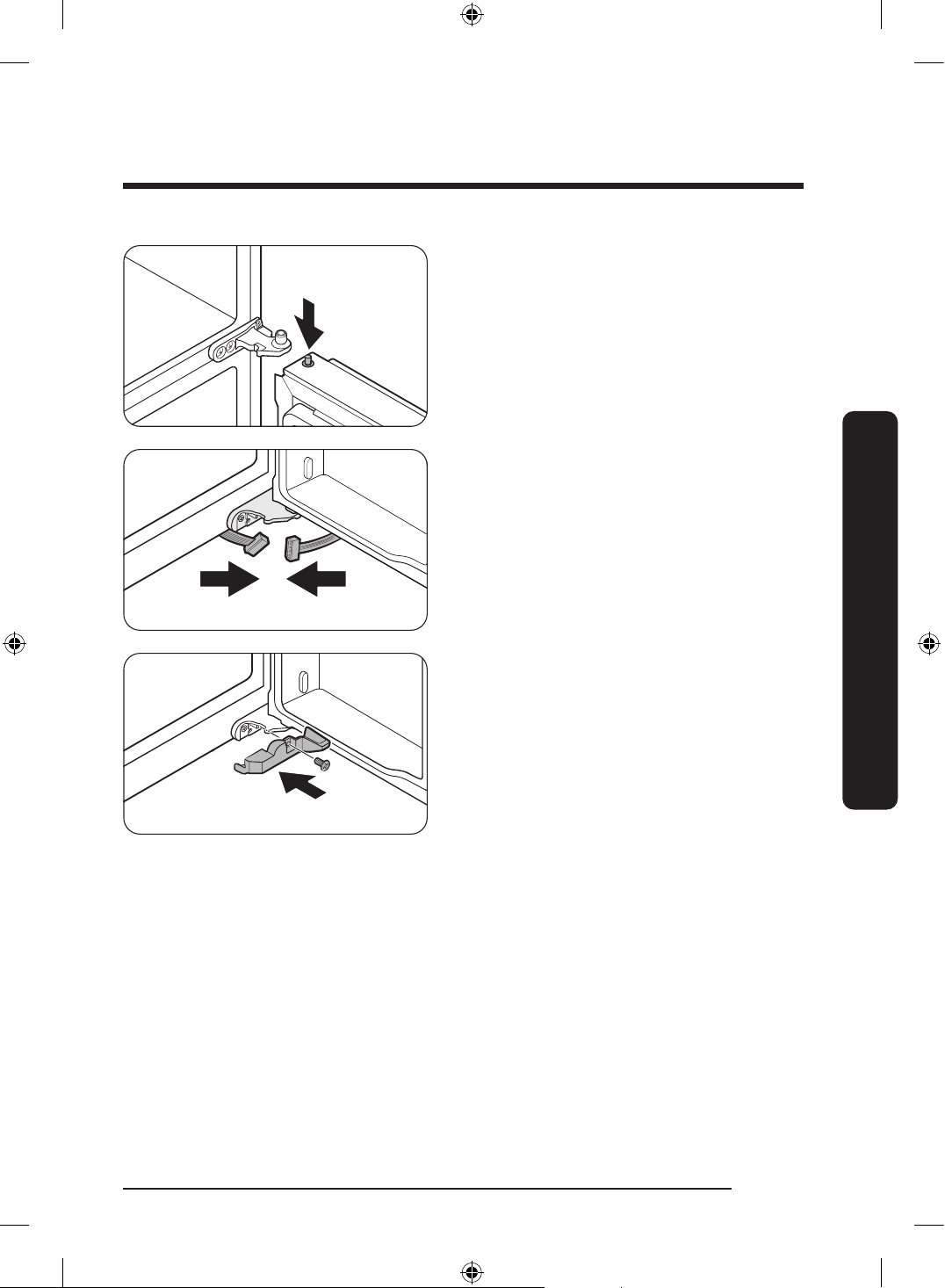
2. While pressing the hinge shaft down,
position the door so that the hinge shaft
is below the shaft hole in the middle
hinge. Release the hinge shaft so that it
enters the shaft hole.
3. With the door open, connect the bottom
connectors in the direction of the
arrows.
- This step only applies to the right
side freezer door (FlexZone door).
4. Attach the cover using a Phillips
screwdriver. Be careful not to damage or
step on the connectors.
- This step only applies to the right
side freezer door (FlexZone door).
5. Repeat steps 1-5 for the other door,
except for steps 3 and 4.
Untitled-3 41Untitled-3 41 2024-07-04 2:32:222024-07-04 2:32:22
Installation
English42
Installation
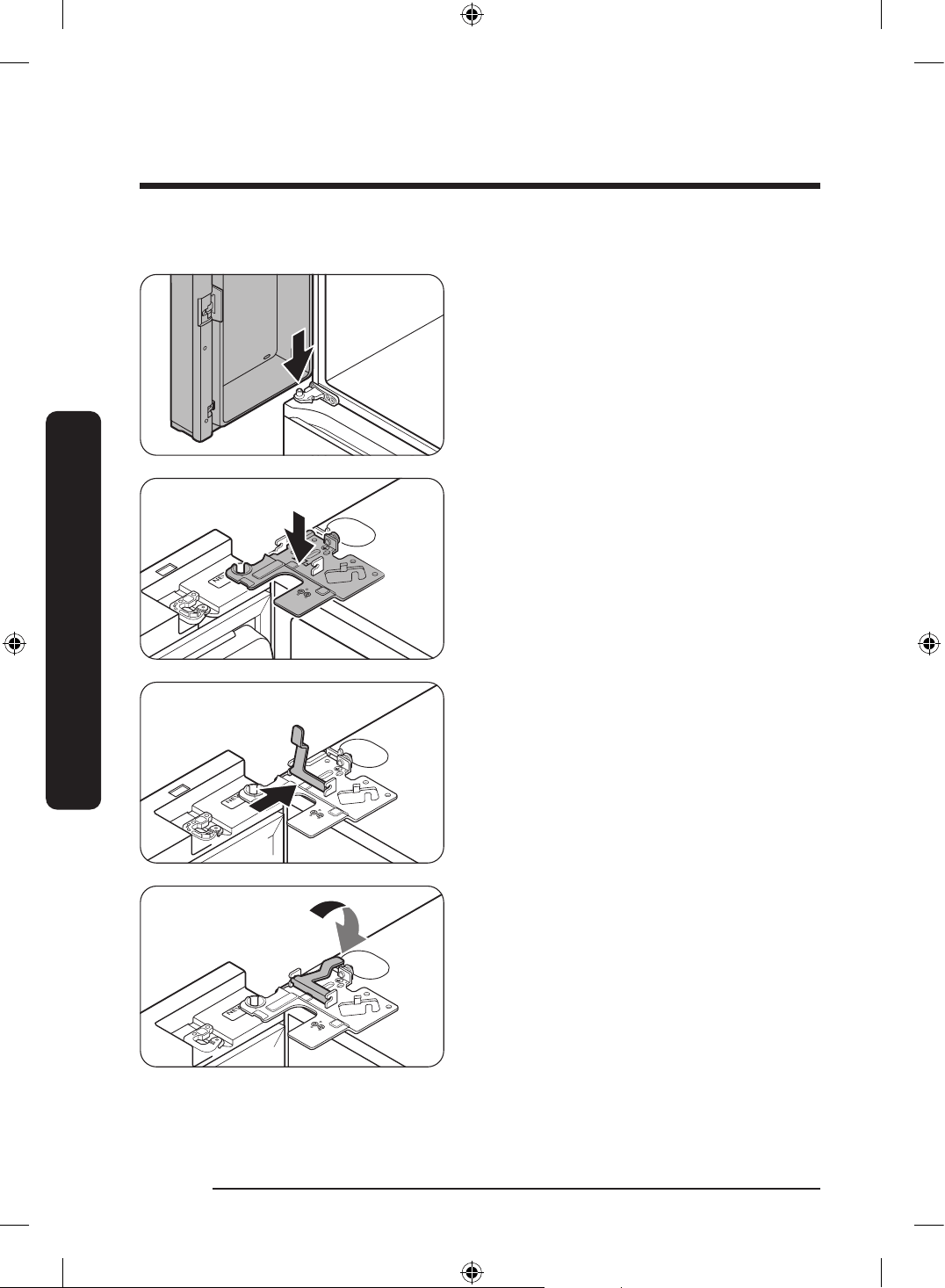
To reattach the fridge doors
1. While holding the door open by more
than 90 degrees, insert the shaft on
the middle hinge into the hole on the
bottom of the door.
2. Put the top hinge into position on the
top of the refrigerator, and then insert
the hinge shaft into the top hole of the
door. Make sure the wires from the door
pass through the hole in the hinge shaft.
3. Insert the clamp in the direction of the
arrow.
4. Push back the clamp as shown.
Untitled-3 42Untitled-3 42 2024-07-04 2:32:222024-07-04 2:32:22
English 43
Installation
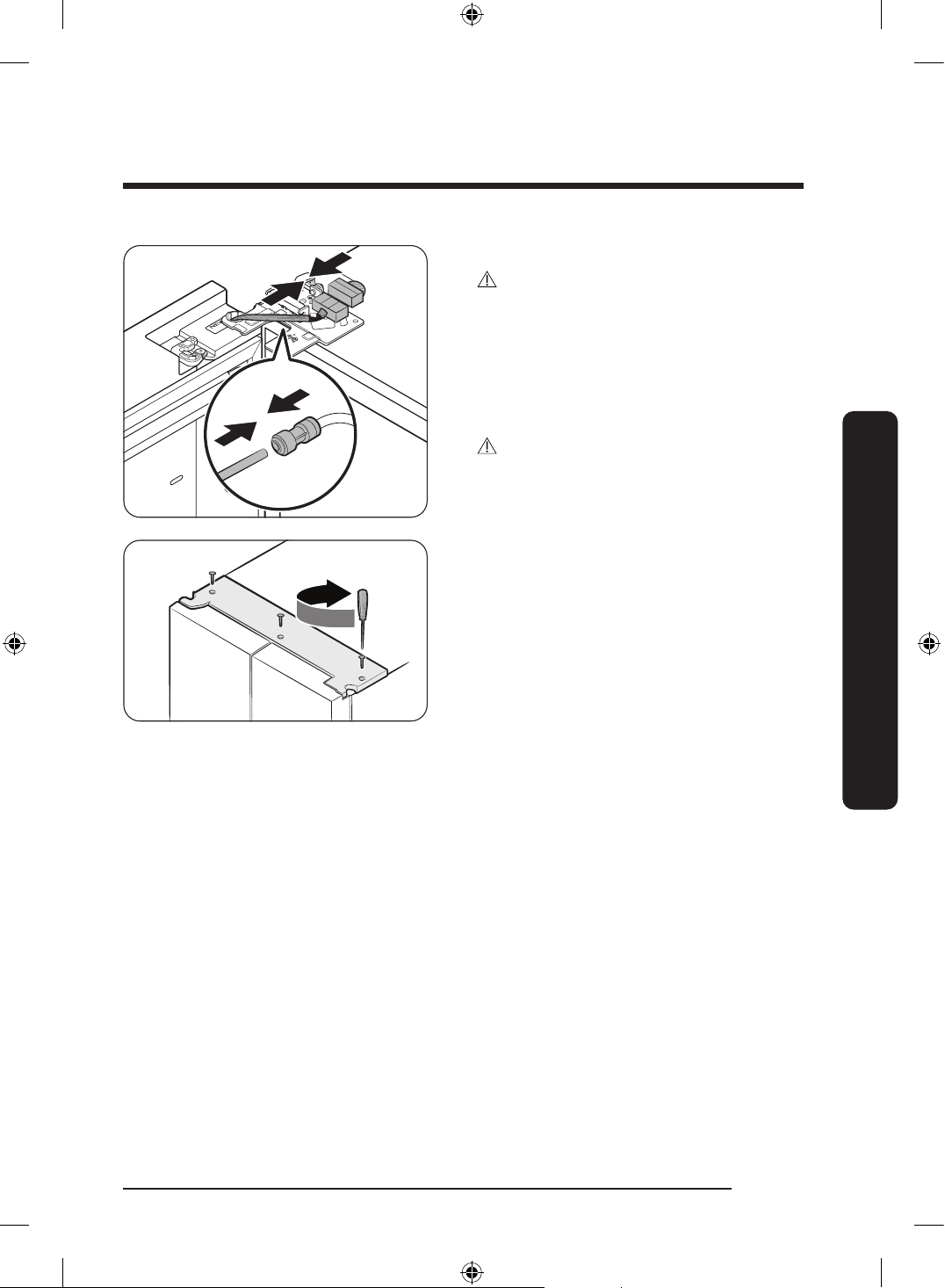
5. Connect the wire connectors.
CAUTION
• Make sure the wire connectors are
connected properly. Otherwise, the
display will not operate.
6. Connect the water tube.
- This step does not apply to the
models without the AutoFill pitcher
and the water dispenser.
CAUTION
• To prevent water leaks, make sure the
red clips tighten the coupler properly.
• Keep the clips out of children’s reach.
7. Repeat steps 1-5 for the other door.
- Step 5 does not apply to the models
without the Showcase door.
8. Attach the top cover with the front side
rst, and then press down on its back
to get it into position. Then, tighten the
screws (x3).
Untitled-3 43Untitled-3 43 2024-07-04 2:32:222024-07-04 2:32:22
Installation
English44
Installation
STEP 4 Leveling the refrigerator
CAUTION
• When installed, the refrigerator must be leveled on a at, solid oor. Not leveling the
refrigerator can cause damage to the refrigerator or physical injury.
• Leveling must be performed with the refrigerator empty. Make sure no food items are
inside the refrigerator.
• For safety reasons, adjust the front a little higher than the rear.
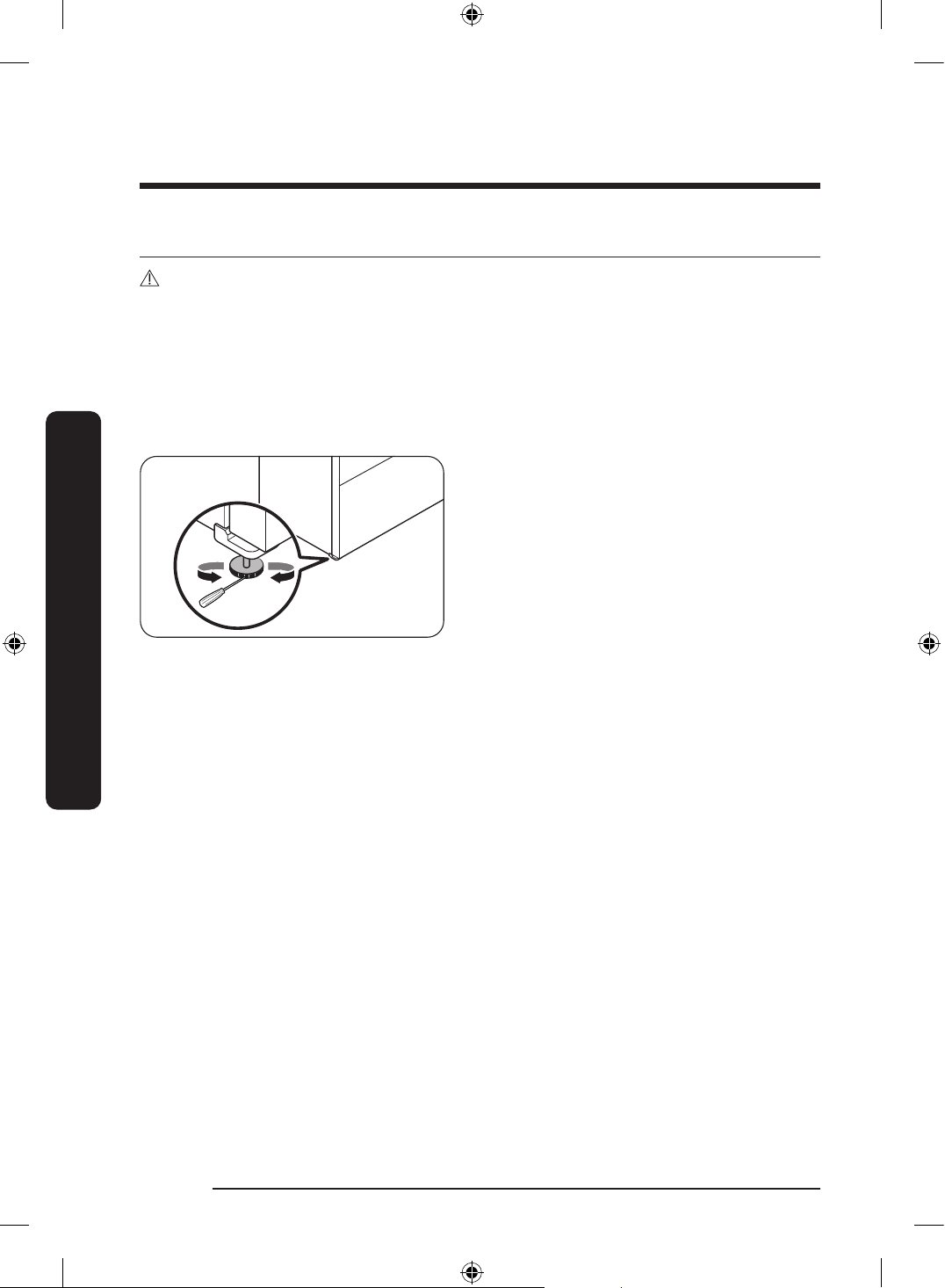
Level the refrigerator using the special screws (levelers) on the front legs. Use a at-head
screwdriver to turn the levelers.
Insert a at-head screwdriver into the
leveler of the front left or right leg. Turn
the leveler clockwise to raise or turn it
counterclockwise to lower.
Untitled-3 44Untitled-3 44 2024-07-04 2:32:222024-07-04 2:32:22
English 45
Installation
STEP 5 Adjust the door height
Adjusting the height with the height lever (applicable models only)
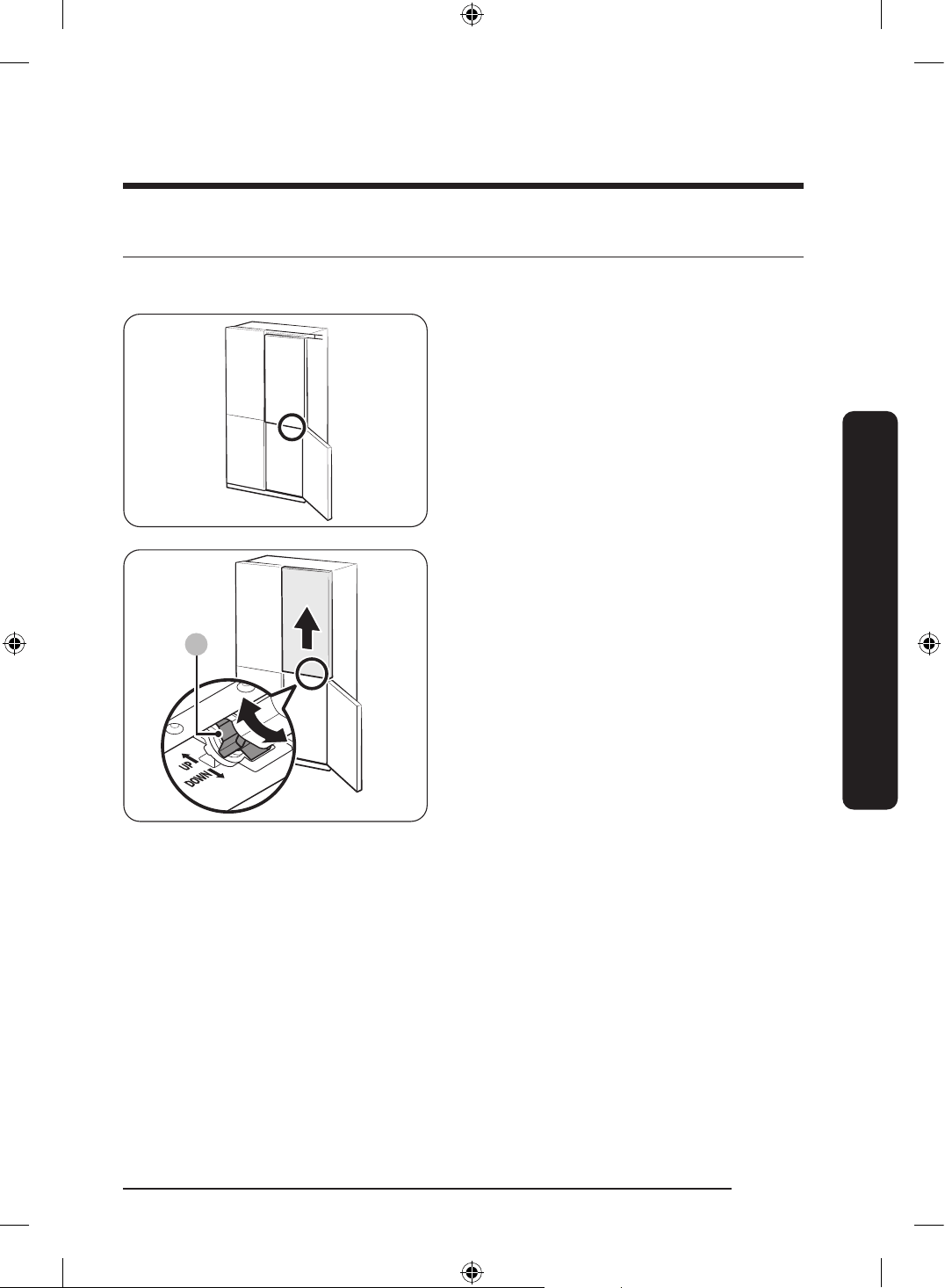
• Before aligning the door height, make
sure the refrigerator is level. Use the
leveling legs for this purpose.
• You can use the height lever at the
bottom of the right-side door of the
fridge. Open the right-side door of the
freezer with both fridge doors closed
and use the lever to adjust the door
height.
A
• Turn the height lever (A) until the two
doors are aligned at the top. Turn the
lever toward UP (as marked) to raise
the right-side door and turn it toward
DOWN (as marked) to lower the door.
• Lift the fridge door slightly to make
alignment easier. The maximum
adjustable height is 3 mm.
- The lever will not turn past the
maximum limit. It may make a noise
it if is turned too far.
- Excessive height may interfere with
the upper hinge cover of the fridge
door.
• If you align the door height with the
door bins empty and then store items in
the bins, the heights may differ again. If
this happens, follow the steps above to
realign the doors.
Untitled-3 45Untitled-3 45 2024-07-04 2:32:232024-07-04 2:32:23
Installation
English46
Installation
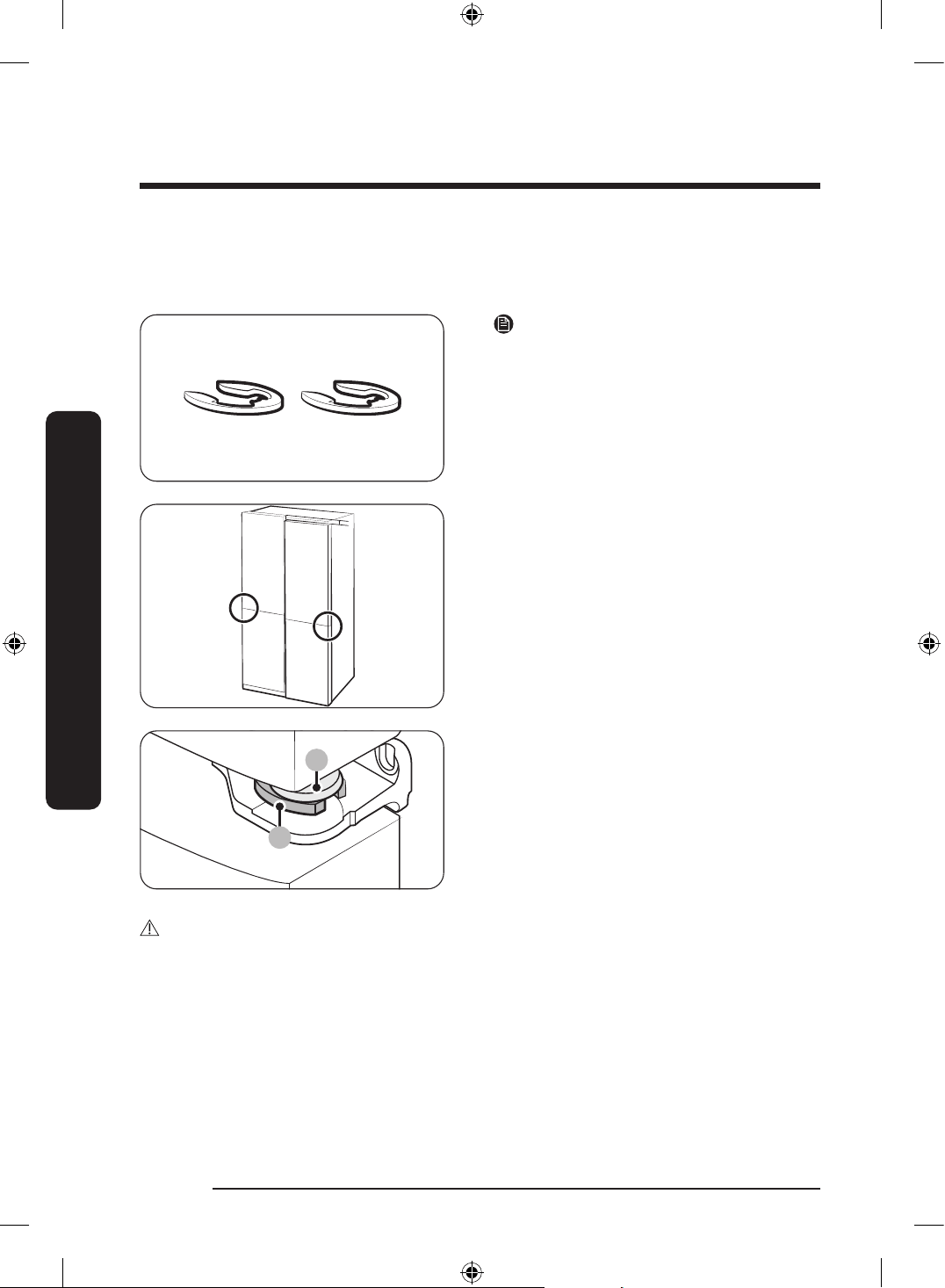
Adjusting the height with the snap rings
For the models with the height lever on the right-side door of the fridge, use the snaps
rings only if you cannot align the doors with the height lever.
NOTE
The height of a door can be adjusted using
the provided snap rings, which come in
4 different sizes (1 mm, 1.5 mm, 2 mm, and
2.5 mm).
1. Check the height difference between the
doors, and then lift up and hold the door
with the lower height.
A
B
2. Insert a suitable-sized snap ring (A)
between the door grommet (B) and the
hinge as shown.
CAUTION
• Insert only one snap ring. If you insert two or more snap rings, the rings may slip out or
make a rubbing noise.
• Keep the snap rings out of children’s reach and keep them for future use.
• Do not raise the door too much. The door can contact and damage the top cover.
Untitled-3 46Untitled-3 46 2024-07-04 2:32:232024-07-04 2:32:23
English 47
Installation
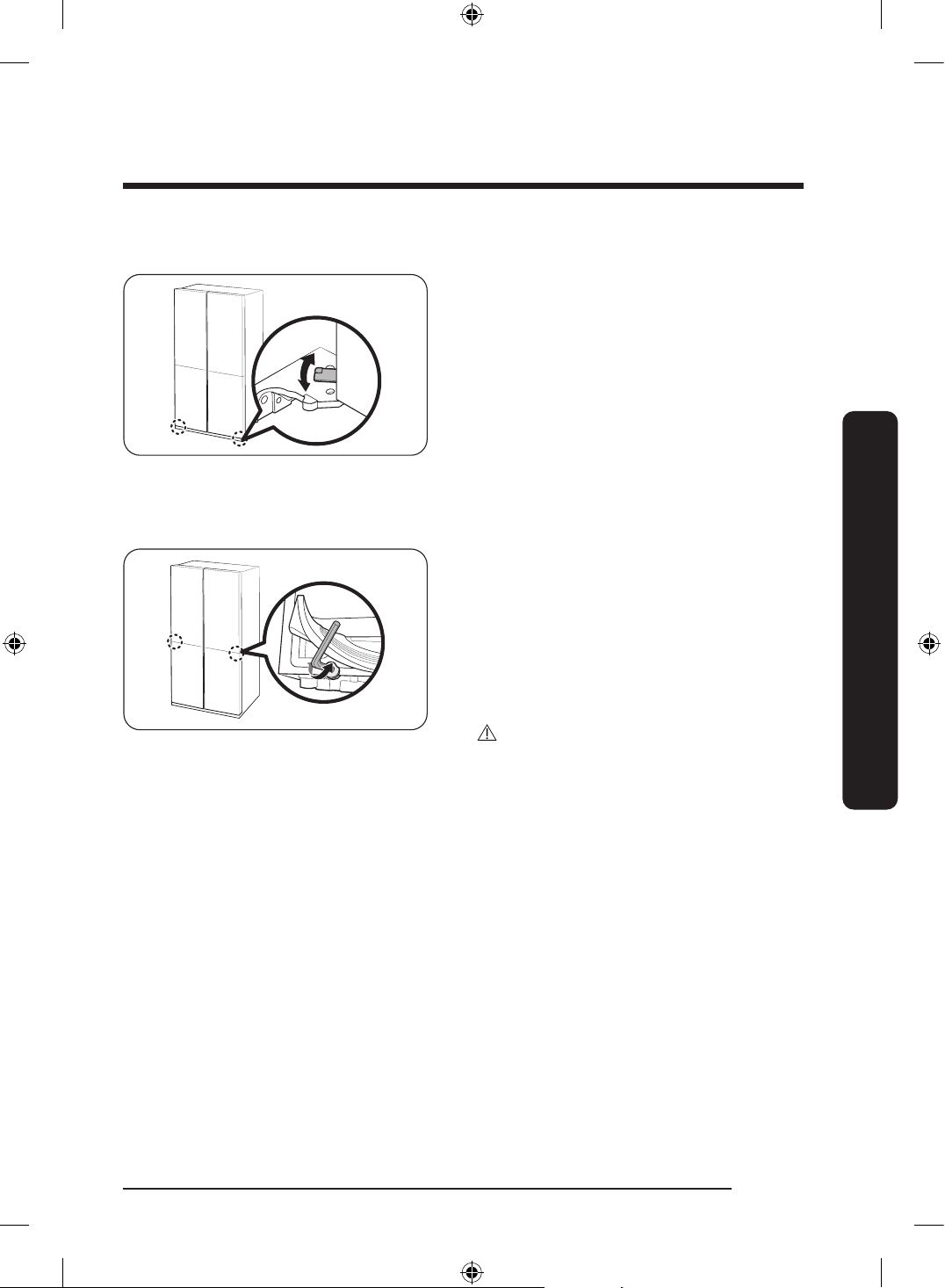
Adjusting the freezer door height (applicable models only)
• Before aligning the door height, make
sure the refrigerator is level. Use the
leveling legs for this purpose.
• You can adjust the height of both
freezer doors using the lever located at
the bottom hinge.
• Open the door, lift it a little, and then
turn the lever left or right to adjust the
height.
Adjusting the gap between the fridge doors and the main body of the refrigerator
(applicable models only)
• You can adjust the gap between both
fridge doors and the main body of the
refrigerator using the adjustment bolt
located at the bottom of the fridge
compartment.
• Lift the door gasket and located the
adjustment bolt underneath the gasket.
Use the 4 mm Allen wrench to adjust
the gap.
CAUTION
Make sure you rmly attach the gasket.
Otherwise, cold air from the refrigerator
may leak.
Untitled-3 47Untitled-3 47 2024-07-04 2:32:232024-07-04 2:32:23
Installation
English48
Installation
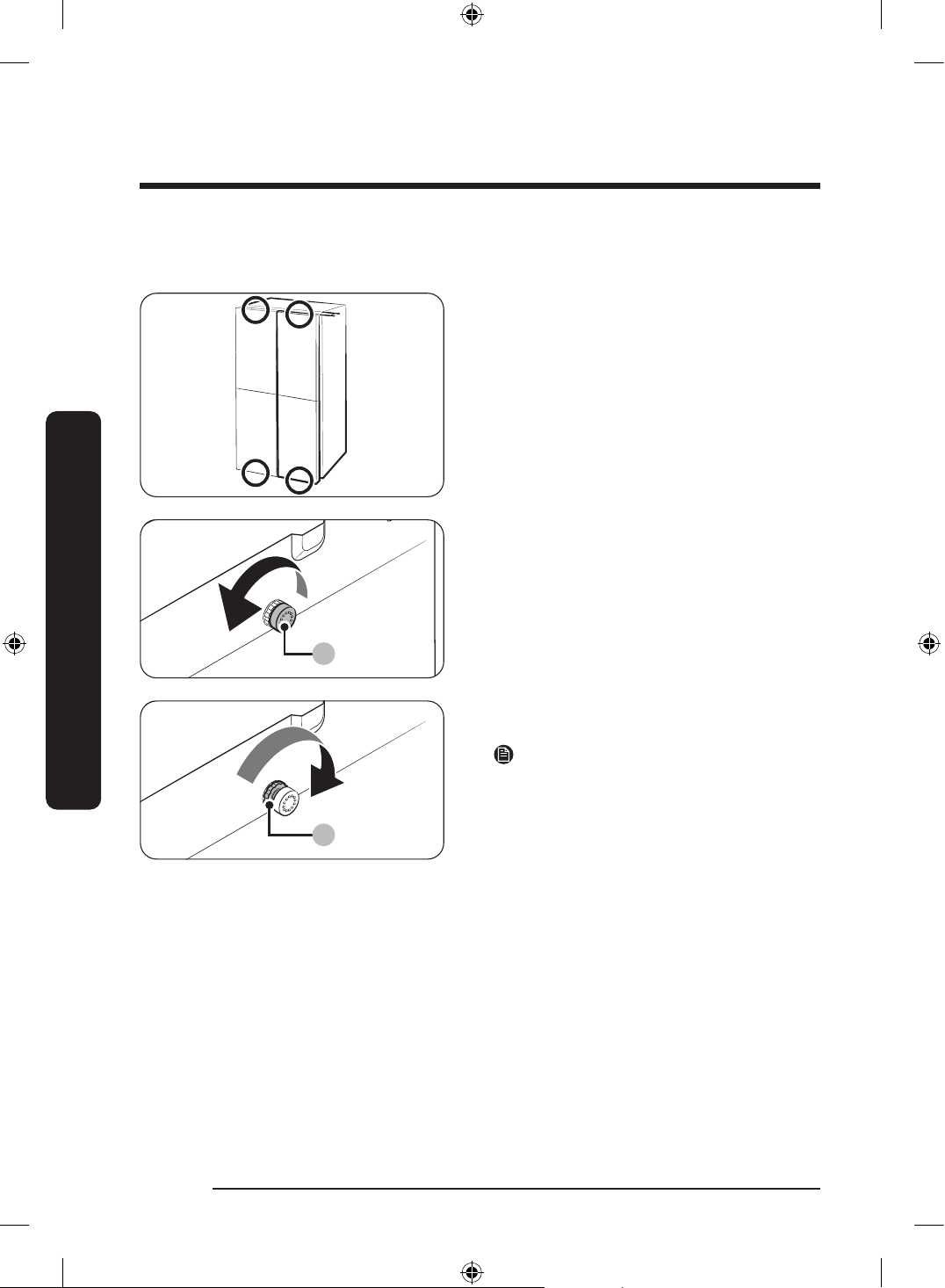
Adjusting the gap between the doors and the main body of the refrigerator (applicable
models only)
You can adjust the gap between all
four doors and the main body of the
refrigerator using the adjustment dial.
(Refer to the gure for the location of the
adjustment dial.)
A
1. Open the door that is closer to the main
body than the others. Then, turn the
adjustment dial (A) counterclockwise
until the gap becomes even with the
others.
B
2. After adjusting the gap, turn the locking
nut (B) to lock the adjustment dial.
NOTE
Each time you turn the adjustment dial,
the gap is adjusted by 1 mm. However, the
door may not close properly if you adjust
the door by more than 1.5 mm.
Untitled-3 48Untitled-3 48 2024-07-04 2:32:232024-07-04 2:32:23
English 49
Installation
STEP 6 Connect to a water line (applicable models only)
CAUTION
• The new hose-sets supplied with the appliance are to be used and that old hose-sets
should not be reused.
• The water line must be connected by a qualied technician.
• The warranty for your refrigerator does not cover the water line installation. The
water line installation will be performed at your own costs unless the installation fee is
included in the retailer’s price.
• Samsung takes no responsibility for the water line installation. If water leaks occur,
contact the installer of the water line.
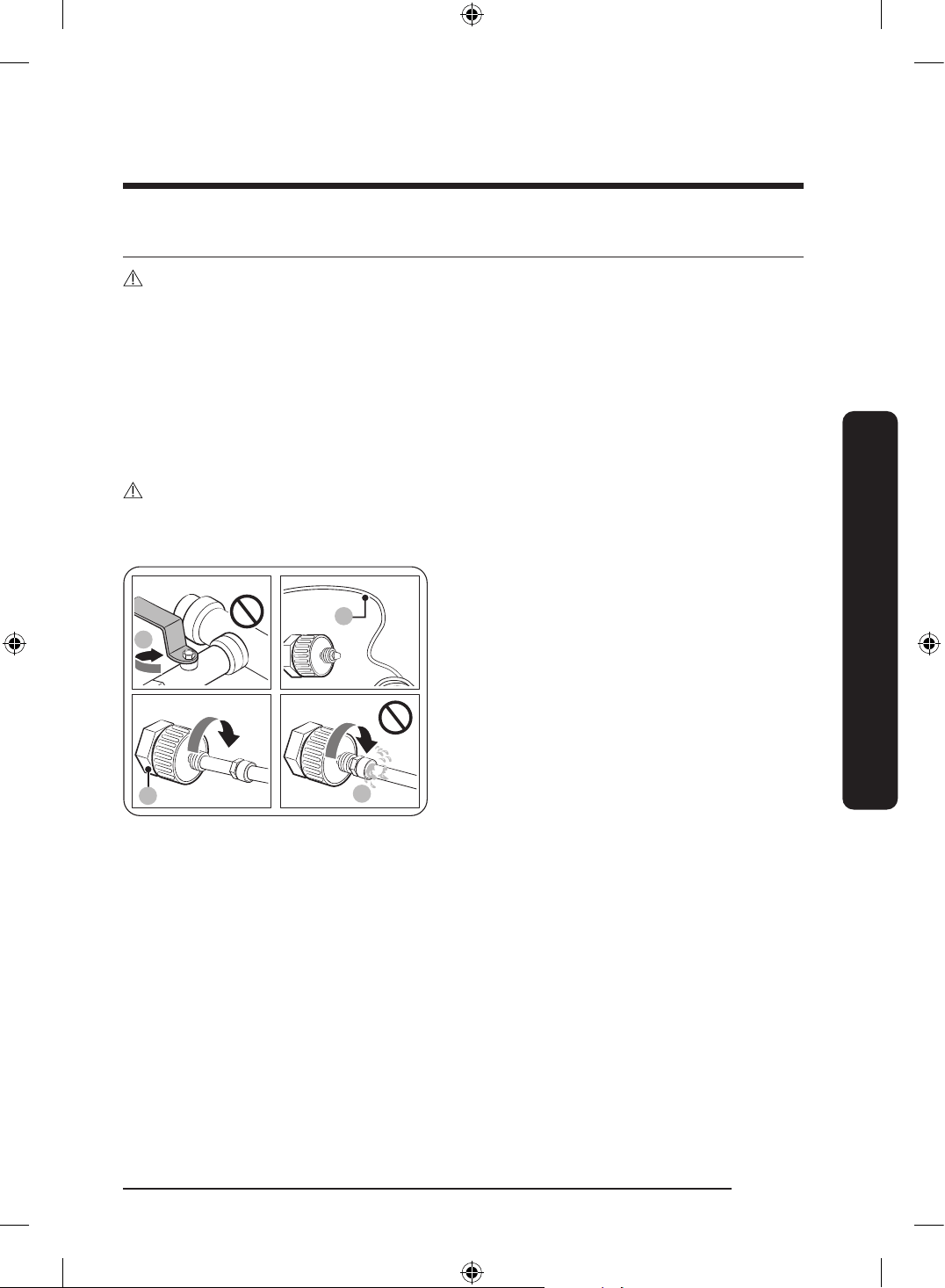
To connect the cold water pipe to the water ltering hose
CAUTION
• Make sure the water ltering hose is connected to a cold, potable water source pipe.
Connecting to the hot water pipe may cause the purier to malfunction.
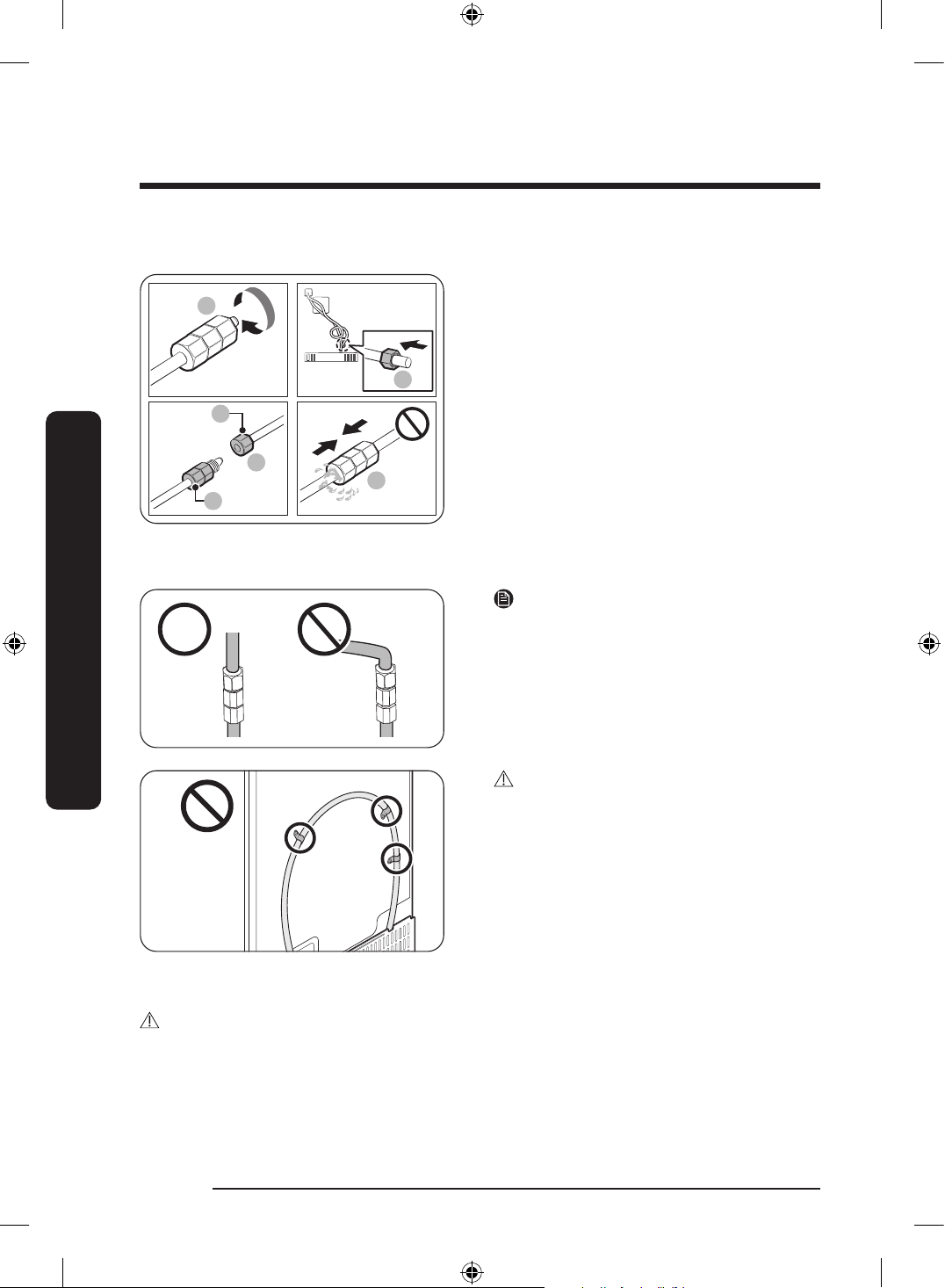
1
A
B
A
A. Close Main Water pipe
B. No gap
1. Shut off the main water supply by
closing the main water valve.
2. Locate the cold, potable water pipe (1).
3. Follow the Water Line Installation to
connect to the water pipe.
4. When connection is complete, open the
main water valve and dispense about
3 liters of water. This is to remove
impurities inside the pipe.
Untitled-3 49Untitled-3 49 2024-07-04 2:32:232024-07-04 2:32:23
Installation
English50
Installation
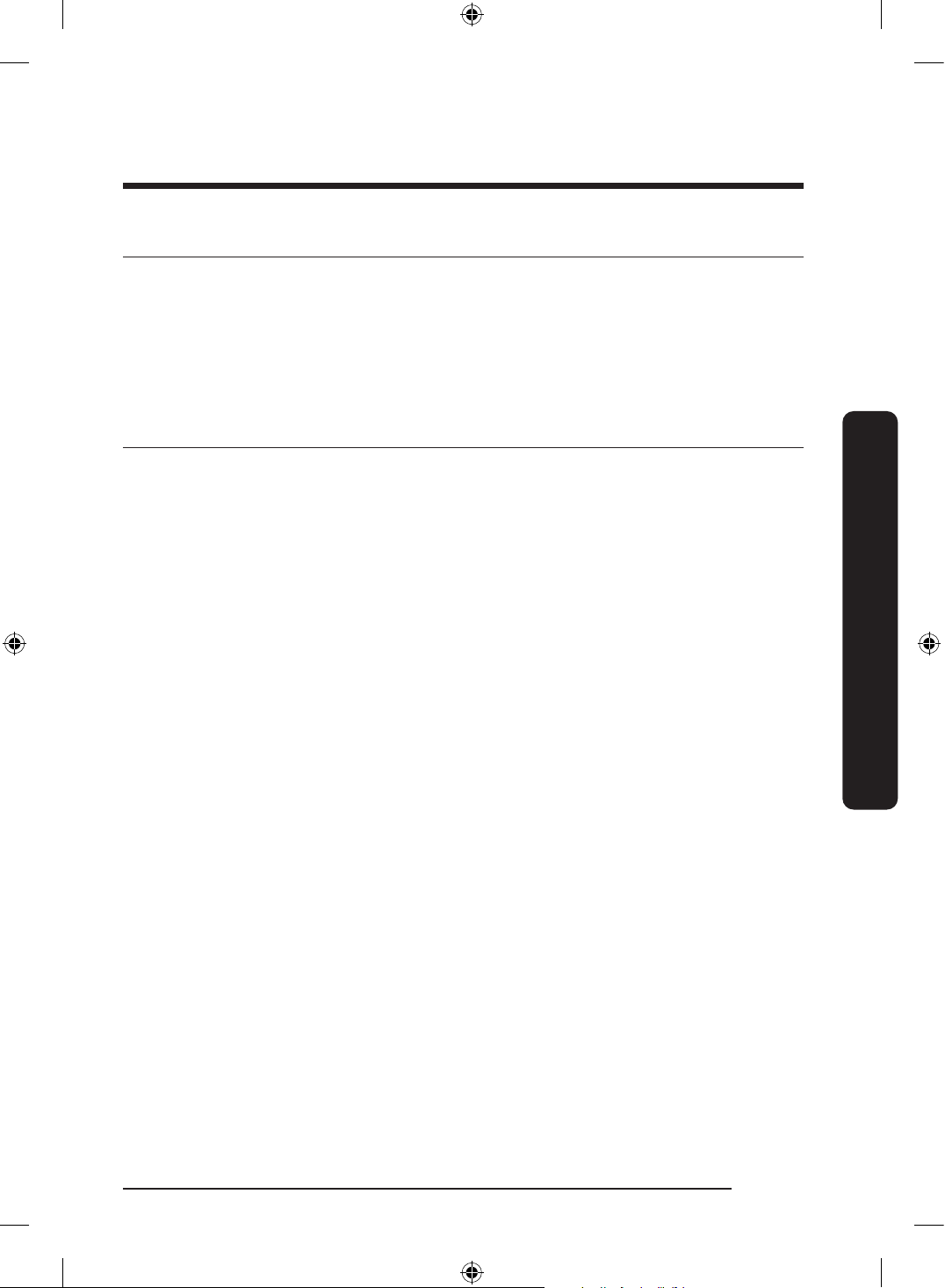
To connect the water ltering hose to the water line
Remove capRemove cap
a
a
A
B
03
a
A. Water Line from unit
B. Water Line from Kit
1. Loosen and remove the compression
nut (a) from the water line of the
refrigerator, and insert it to the water
ltering hose.
2. Tighten up the compression nut (a) to
connect the water ltering hose and the
water line.
3. Open the main water valve and check
for any leaks.
4. If there are no leaks, dispense about a
3 liters of water before actually using
the refrigerator to remove impurities
inside the water ltering system.
NOTE
If you have to relocate the refrigerator
after connecting the water line, make sure
the joined section of the water line must is
straight.
CAUTION
Do not mount the water lter on any part
of the refrigerator. This may damage the
refrigerator.
To repair the water line
CAUTION
The waterline must be repaired by a qualied professional. If you encounter a water leak,
contact a local Samsung service centre or the installer of the waterline.
Untitled-3 50Untitled-3 50 2024-07-04 2:32:242024-07-04 2:32:24
English 51
Installation
STEP 7 Initial settings
By completing the following steps, the refrigerator should be fully functioning.
1. Plug the power cord into the wall socket to turn the refrigerator on.
2. Open the door, and check if the interior light lights up.
3. Set the temperature to the coldest setting, and wait for about an hour. Then, the freezer
will be slightly chilled, and the motor should be running smoothly.
4. Wait until the refrigerator reaches the set temperature. Now the refrigerator is ready
for use.
STEP 8 Final check
When installation is complete, conrm that:
• The refrigerator is plugged into an electrical outlet and grounded properly.
• The refrigerator is installed on a at, level surface with a reasonable clearance from
walls and cabinets.
• The refrigerator is level and is sitting rmly on the oor.
• The door opens and closes freely, and the interior light turns on automatically when you
open the door.
Untitled-3 51Untitled-3 51 2024-07-04 2:32:242024-07-04 2:32:24
English52
Operations
Main panel
General type
01
02
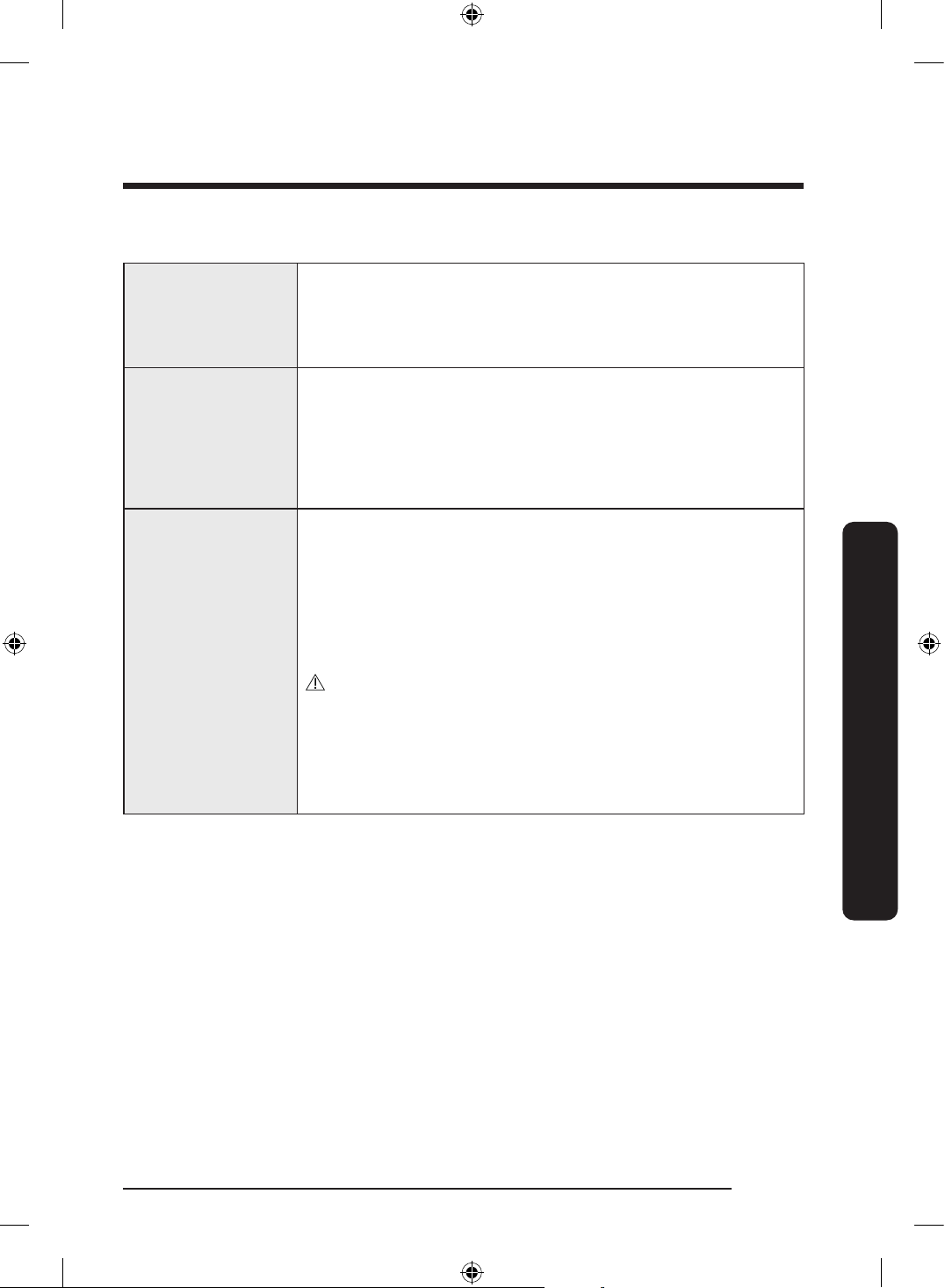
01 Display Displays the menu, settings, and other information.
02 Buttons
• When the display is off, tap any button to wake up the display.
• Tap or to navigate left and right.
• Tap OK to conrm your selection.
• Tap and hold OK to enter the AP mode. (For more information,
see the “SmartThings > Getting started” section on page 61.)
NOTE
• If the door is left open for 5 minutes, the internal light will blink for 5 minutes and
turn off. It is to alert deaf and hard of hearing users that a door is open. Note that this
function is normal.
• When you change the temperature on the panel, the panel displays the actual
temperature inside the refrigerator until the temperature matches the temperature you
set. Then, the panel displays the new set temperature. Note that it will take time for the
refrigerator to reach the new temperature. It is normal. During this time, you need not
set the temperature again.
Using the main panel
1. Tap any button ( , OK, or ) to wake up the display.
2. Tap or to select the desired menu, and then tap OK to conrm.
3. Tap or to select the desired setting, and then tap OK to conrm.
- For more information on available settings, see the Menu descriptions section.
Operations
Untitled-3 52Untitled-3 52 2024-07-04 2:32:242024-07-04 2:32:24
English 53
Operations
Menu descriptions
Fridge
• You can set the fridge temperature from 1 to 7 °C or set the
Power Cool function.
• Power Cool speeds up the cooling process at maximum fan
speed. The fridge keeps running at full speed for two and a
half hours and then returns to the previous temperature.
Freezer
• You can set the freezer temperature from -23 to -15 °C or set
the Power Freeze function.
• Power Freeze speeds up the freezing process at maximum fan
speed. The freezer keeps running at full speed for 50 hours
and then returns to the previous temperature. To freeze large
amounts of food, activate Power Freeze for at least 20 hours
before putting food in the freezer.
FlexZone
• You can set the FlexZone mode from one of the following
modes.
- Freeze: The temperature is set to the same temperature as
the freezer.
- Soft Freeze: The temperature is set to -5 °C.
- Meat/Fish: The temperature is set to -1 °C.
- Fruit/Veggies: The temperature is set to 2 °C.
- Beverage: The temperature is set to 5 °C.
CAUTION
• Select the FlexZone mode according to the type of food you
store in there.
• Do not store meat or food in the FlexZone with the Fruit/
Veggies or Beverage mode. Meat or food may spoil.
• Do not store glass bottles in the FlexZone in Freeze or Soft
Freeze mode. They may break and cause physical injury.
Untitled-3 53Untitled-3 53 2024-07-04 2:32:242024-07-04 2:32:24
Operations
English54
Operations
Beverage Zone *
• You can set the Beverage Zone mode from one of the
following modes.
- Beverage: The temperature is set to the same temperature
as the fridge.
- Wine/Dessert: The temperature is set to 4 to 5 °C higher
than the fridge, which is ideal for keeping desserts, wines,
butter, and jam.
CAUTION
• Storing food in Wine/Dessert mode can result in a shorter
storage time period because the temperature is higher than in
the fridge. Therefore, if the food is not going to be consumed
within a few days or is sensitive to temperature changes, keep
it in the fridge.
• Store any opened or leftover desserts, butter, jams, etc. in the
Beverage mode or in the fridge.
NOTE
• Beverage Zone is for storing beverages, wines, and desserts
that you plan to consume immediately.
• The number of door openings, amount of stored foods, and
temperature setting can affect the storage time.
AutoFill Pitcher *
• You can set the AutoFill Pitcher mode from one of the
following modes.
- On: Set to ll your water pitcher automatically.
- Off: Set to turn off the function.
NOTE
You can put tea or fruit into the infuser to make infused tea
or water. If you want to keep the infused water in its initial
concentration, turn the AutoFill Pitcher function off. (For more
information, see the Water pitcher (Autoll Pitcher) (applicable
models only) section on page 66.)
Cubed Ice * You can start or stop making cubed ice.
Ice Bites * You can start or stop making ice bites.
Untitled-3 54Untitled-3 54 2024-07-04 2:32:242024-07-04 2:32:24
English 55
Operations
Whiskey Ball Ice *
• You can start or stop making ice balls. The ice maker can make
3 ice balls at once, and the ice maker can make 3 to 9 ice balls
every 24 hours.
• You can select the option from 3 spheres, 6 spheres,
9 spheres*, Off. (Default setting: 6 spheres)
- 3 spheres: The ice maker makes 3 ice balls approximately
every 24 hours.
- 6 spheres: The ice maker makes 3 ice balls approximately
every 12 hours.
- 9 spheres*: The ice maker makes 3 ice balls approximately
every 8 hours.
• The ice is more transparent if you choose the smaller amount.
• The ice maker stops making ice when it detects the full ice
bucket (usually about 12 to 15 ice balls, depending on how the
ice balls are stacked within the ice bucket).
- To make new ice, make some room in the ice bucket by
removing the ice balls.
• The ice maker may stop making ice depending on the way ice
balls stack in the ice bucket. Arrange the ice balls if too many
ice balls stack on one side of the bucket.
• The ice maker may not produce perfect sphere-shaped ice or
you may notice air bubbles in the ice after the freezer has just
been installed, the lter has been replaced, or if the power has
been off for a certain time because of a power outage.
- If you want to eliminate air bubbles in the ice, pour out the
AutoFill Pitcher 6 times (about 12 liters).
CAUTION
• Make sure to put the whiskey ball ice maker pad in the right
direction. (For more information, see the Auto Ice maker
(applicable models only) section on page 70.)
- The ice maker may stop making whiskey ball ice if you
remove the whiskey ball ice maker pad from the ice bucket
or if it is inserted in the wrong direction.
Untitled-3 55Untitled-3 55 2024-07-04 2:32:242024-07-04 2:32:24
Operations
English56
Operations
Settings
You can change the settings for the following functions.
Tap or to select the menu, and then tap OK to conrm.
UV Deodorizing Filter *: You can turn the UV Deodorizing Filter
on or off.
Water Filter Reset *: When you get the lter replacement
message on the display, select this menu, and replace the lter
according to onscreen instructions.
Welcome Lighting *: You can turn on or off the Welcome Lighting
(For more information, see the Welcome Lighting (applicable
models only) section on page 64.)
Sounds: You can turn on or off the sound of the buttons.
Door Alarm: You can turn on or off the Door Alarm.
Wi-Fi: You can turn on or off the Wi-Fi Connect. Turn it on to
control and monitor your refrigerator on the SmartThings app.
(For more information on SmartThings, see the SmartThings
section on page 60.)
* applicable models only
NOTE
Using Power Cool or Power Freeze increases energy consumption.
Untitled-3 56Untitled-3 56 2024-07-04 2:32:242024-07-04 2:32:24
English 57
Operations
Family Hub type
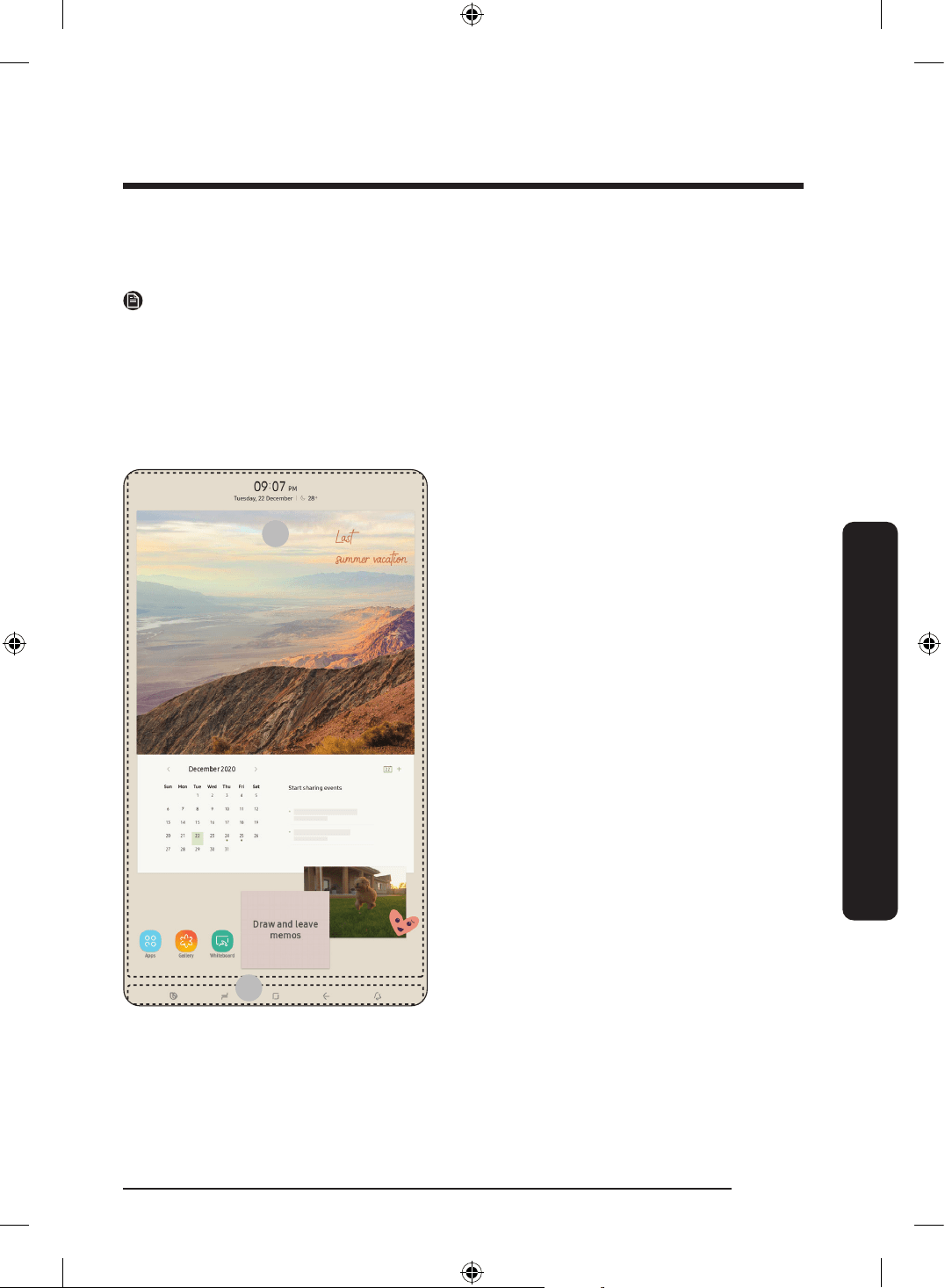
Home screen
NOTE
• For more information about other menus and apps available on the Refrigerator app.
See the Online manual of your refrigerator.
• The content of apps and widgets, or their design is subject to change or support may be
discontinued without notice, depending on the content provider’s policy.
• Children's use of the refrigerator's functions, apps, and services must be supervised by
adults.
• Underage transactions with the services must be supervised by adults.
01
02
01 Home screen
02 Soft buttons
Untitled-3 57Untitled-3 57 2024-07-04 2:32:252024-07-04 2:32:25
Operations
English58
Operations
01 Home screen
• Tap a desired app or widget to launch it.
• On the home screen, you can add or remove items such as apps, widgets, pictures,
videos, drawings, and texts.
• Tap and hold an item to enter Edit mode. In Edit mode, you can drag and drop an item
to a new location on the home screen. When you move the item to a new location, the
item turns red if the location is not available.
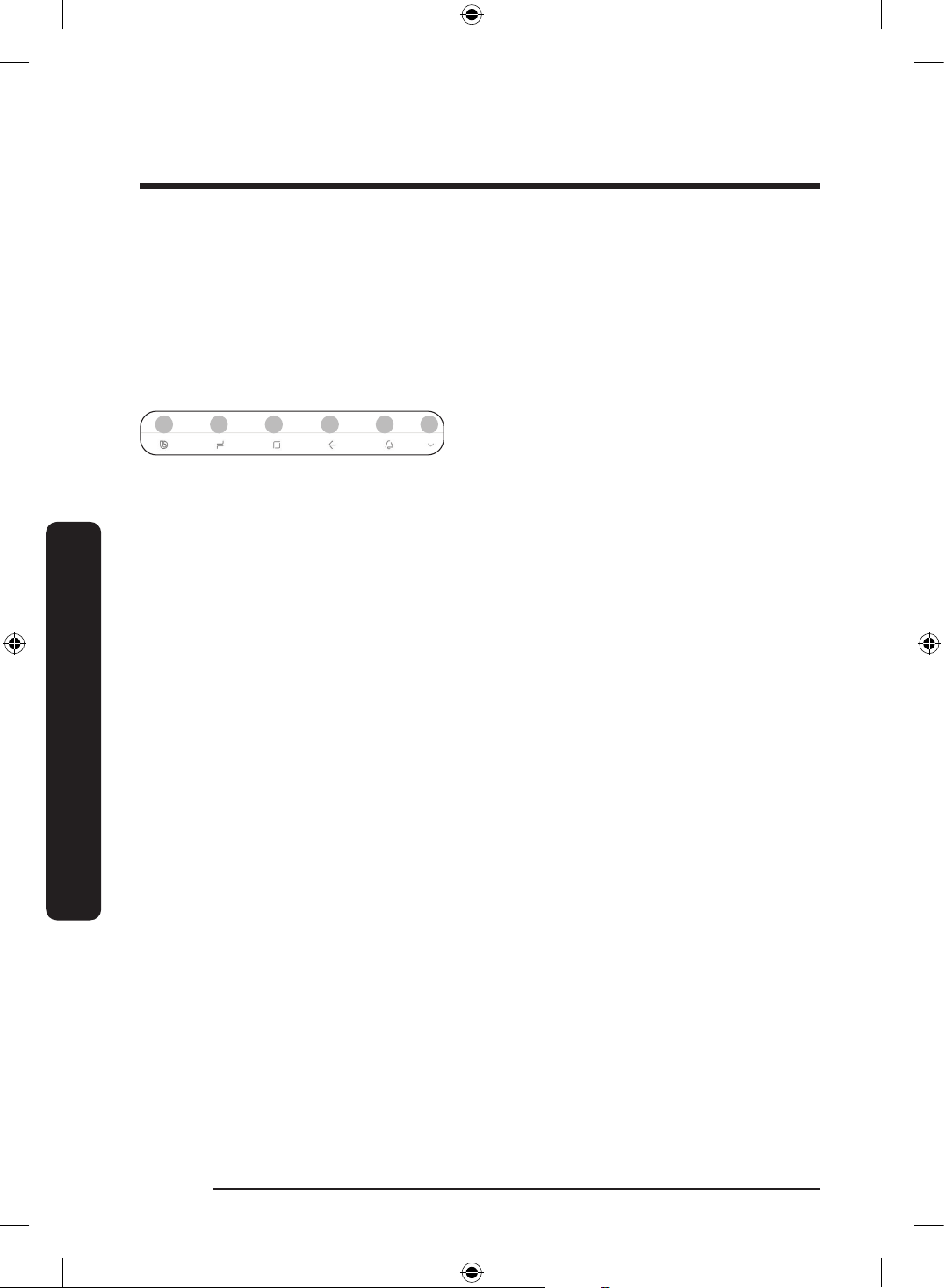
02 Soft buttons
01 02 03 04 05 06
01 Bixby
- Tap to use Bixby.
02 Task Manager
- Tap to open the Task Manager.
03 Home
- Tap to open the Home screen.
04 Return
- Tap to return to the previous screen.
05 Notication
- Tap to display the Quick Panel.
06 Hide/Show
- Tap to hide or show Soft buttons.
- The Hide/Show button only appears
when an app is active.
Untitled-3 58Untitled-3 58 2024-07-04 2:32:252024-07-04 2:32:25
English 59
Operations
Fridge Manager
On the Home screen, tap the Fridge Manager app.
• You can set the desired temperature or modes for each compartment.
• For more detailed information on the Fridge Manager app, check the online manual.
• To access the online manual from your Family Hub refrigerator, tap Setting > Help &
Contact Us > Online Manual.
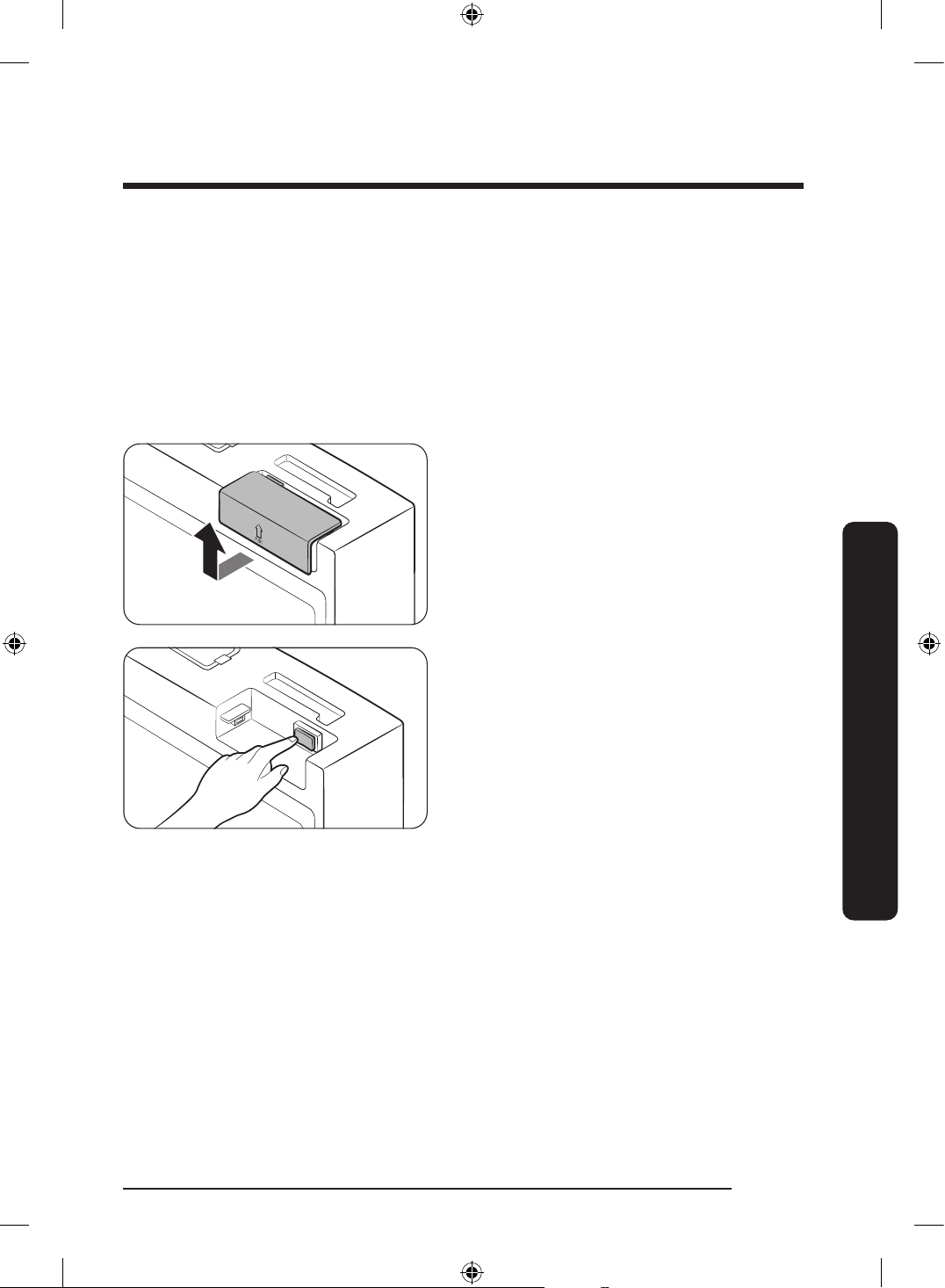
Display reset (applicable models only)
If you encounter an abnormal symptom on the display, try resetting the display. This may
solve the symptom.
1. Open the right-side fridge door and
locate the switch cover on the top right
corner of the door.
2. Push up the cover to reveal the power
switch.
3. Turn the switch off and turn it on again.
4. Reinsert the switch cover to the end
until you hear a clicking sound.
Untitled-3 59Untitled-3 59 2024-07-04 2:32:252024-07-04 2:32:25
Operations
English60
Operations
SmartThings
Installation
Visit the Google Play Store, Galaxy Apps, or Apple App Store and search for “SmartThings”.
Download and install the SmartThings app provided by Samsung Electronics to your smart
device.
NOTE
• The supporting software version of the SmartThings app is subject to change according
to the OS supporting policy the manufacturer provides. In addition, as for the
SmartThings app or the functions that the app supports, the new application update
policy on the existing OS version can be suspended due to usability or security reasons.
• The SmartThings app is subject to change without notice to improve usability or
performance. As the mobile phone OS version is updated every year, the SmartThings is
also updated continually according to the latest OS. If you have enquiries regarding the
items mentioned above, please contact us on s[email protected]
• Recommended encryption systems include WPA/TKIP and WPA2/AES. Any newer or
non-standard Wi-Fi authentication protocols are not supported.
• Wireless networks may be affected by the surrounding wireless communication
environment.
• If your Internet service provider has registered the MAC address of your PC or modem
for identication, your Samsung Smart Refrigerator may fail to connect to the Internet.
If this happens, contact your Internet service provider for technical assistance.
• The rewall settings of your network system may prevent your Samsung Smart
Refrigerator from accessing the Internet. Contact your Internet service provider for
technical assistance. If this symptom continues, contact a local Samsung service center
or retailer.
• To congure the wireless access point (AP) settings, see the user manual of the AP
(router).
• Samsung Smart Refrigerators support both Wi-Fi 2.4 GHz with IEEE 802.11 b/g/n and
Soft-AP protocols. (IEEE 802.11 n is recommended.)
• Unauthorized Wi-Fi wireless routers may fail to connect to applicable Samsung Smart
Refrigerators.
Untitled-3 60Untitled-3 60 2024-07-04 2:32:252024-07-04 2:32:25
English 61
Operations
Samsung account
You are required to register your Samsung account to use the app. If you don’t have a
Samsung account, follow the app’s onscreen instructions to create a free Samsung account.
Getting started
Turn on the device you want to connect, open the SmartThings app on your phone, and
then follow the instructions below.
If a pop-up appears saying that a new device has been found, tap ADD NOW.
If a pop-up doesn't appear, tap the + button, and then select the device you want to
connect from the list of available devices.
If your device isn't in the list of available devices, tap Supported Devices, select the device
type (Refrigerator), and then select the specic device model.
Follow the instructions in the app to set up your device. Once setup is complete, your
refrigerator will appear as a "card" on your Devices screen.
Integrated control
You can monitor and control your refrigerator at home and on the go.
• Tap the refrigerator icon on the SmartThings Dashboard or tap the Devices icon at the
bottom of the Dashboard, and then tap the refrigerator "card" to open the Refrigerator
page.
• Check the operation status or notications related to your refrigerator, and then change
options or settings if necessary.
NOTE
Some options or settings of the refrigerator may not be available for remote control.
Untitled-3 61Untitled-3 61 2024-07-04 2:32:252024-07-04 2:32:25
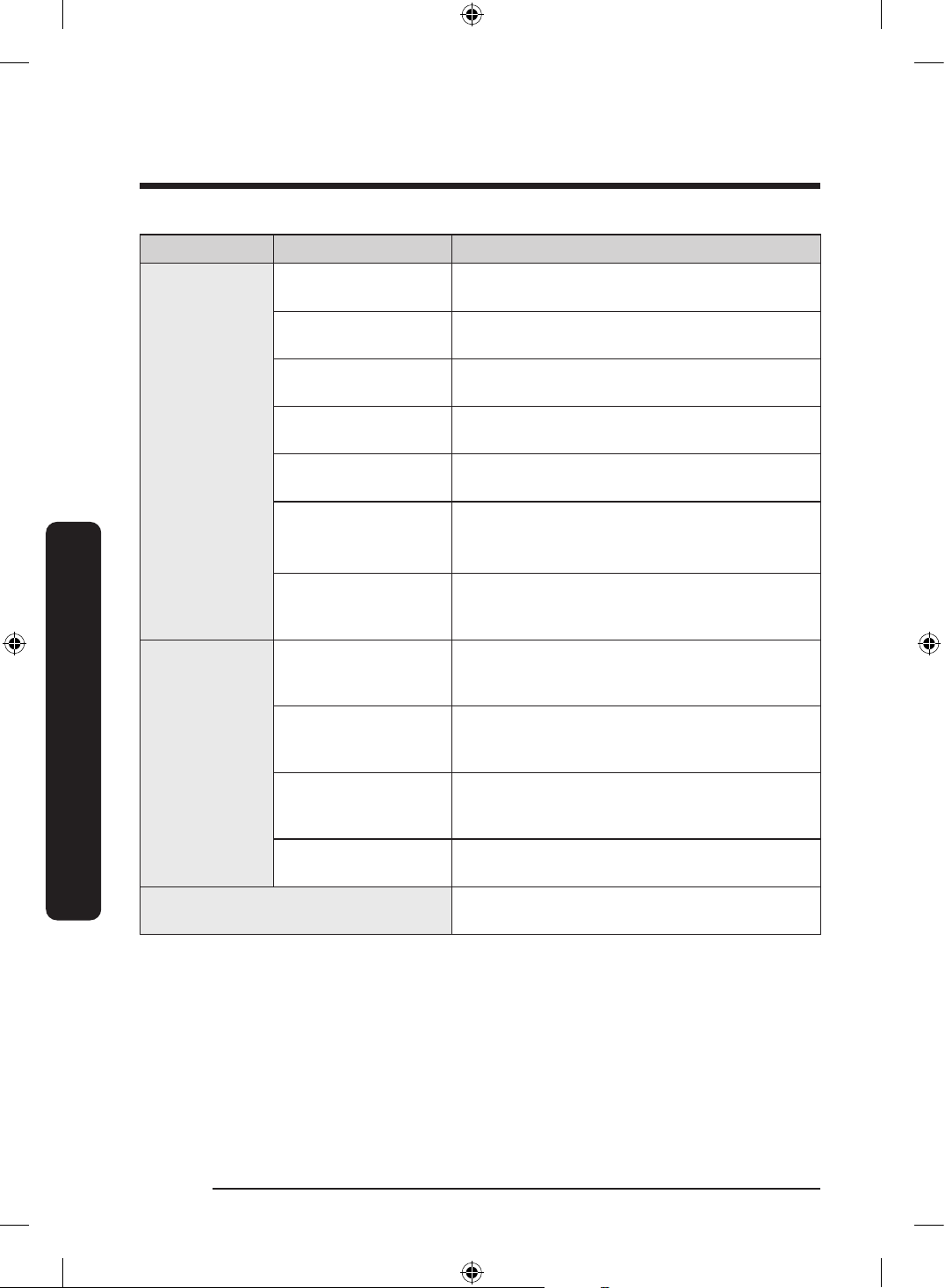
Operations
English62
Operations
Category Item Description
Monitor &
Control
Fridge Temperature
You can set and monitor the desired
temperature of the fridge.
Freezer Temperature
You can set and monitor the desired
temperature of the freezer.
Power Cool
You can turn Power Cool on or off, and check
the current settings.
Power Freeze
You can turn Power Freeze on or off, and check
the current settings.
FlexZone
You can set and monitor the desired mode of
the FlexZone.
Cubed Ice *
Ice Bites *
Whiskey Ball Ice *
You can turn the ice making function on or off,
and check the current settings of the function.
AutoFill Pitcher *
You can turn the AutoFill Pitcher function on
or off, and check the current settings of the
function.
Alarms
Abnormally high
temperature
This alarm is triggered when the fridge, the
freezer, or the FlexZone has abnormally high
temperatures.
Door opening
This alarm is triggered if the fridge door, the
freezer drawer, or the FlexZone drawer is open
for a specic time.
Autoll Pitcher
overowing *
If the Autoll Pitcher function senses an
overow, it triggers this alarm to let you know
the status of the overow.
Water lter
replacement *
This alarm reminds you that the water lter
must be replaced.
inside image *
You can view the inside of the refrigerator and
can see if you need to replace food items.
* applicable models only
Untitled-3 62Untitled-3 62 2024-07-04 2:32:252024-07-04 2:32:25
English 63
Operations
Special features
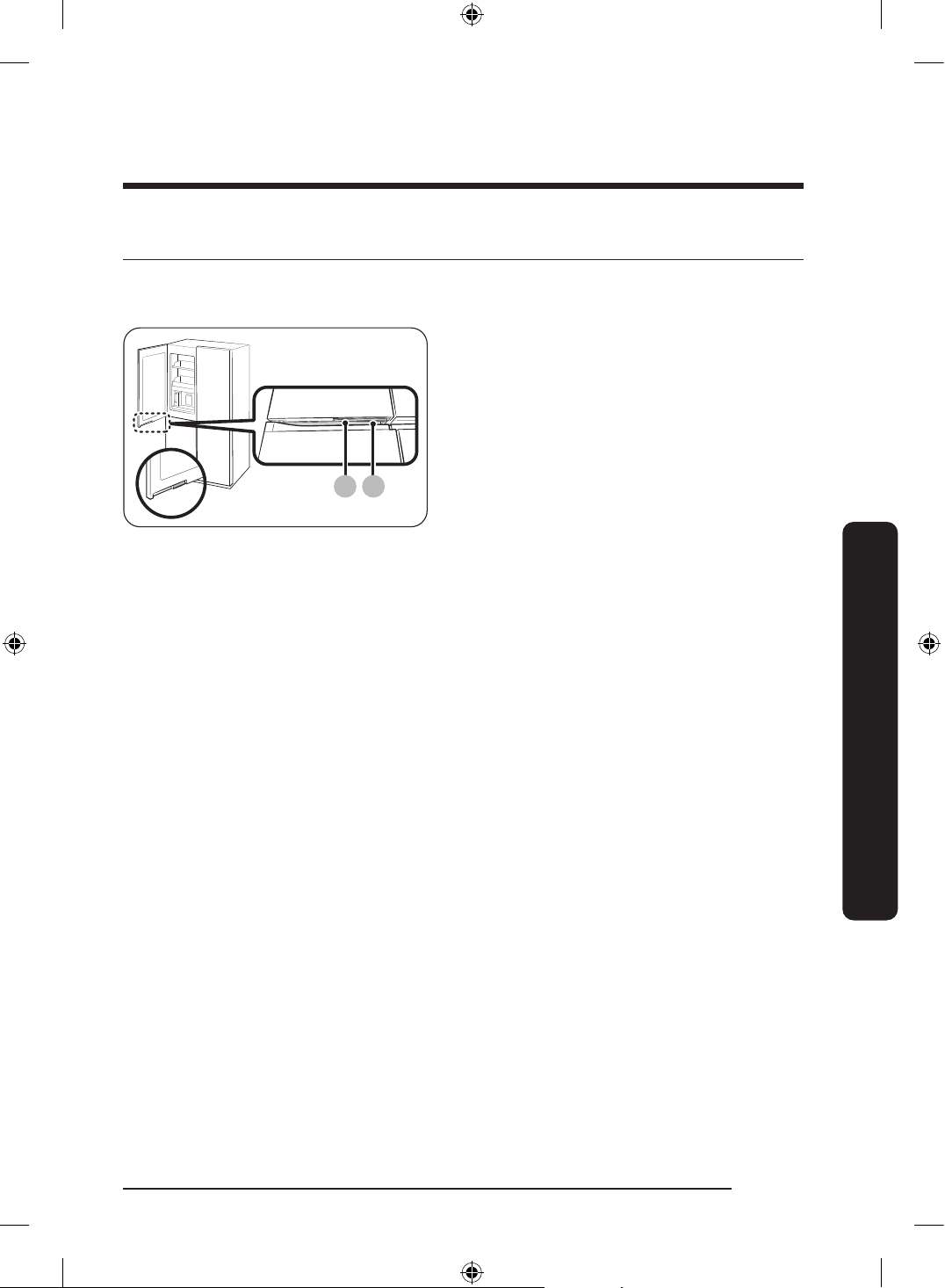
Beverage Center (applicable models only)
B A
A. Fridge door handle
B. Beverage Center handle
The left fridge door has two handles on the
bottom. To use the autoll pitcher, drink
cold or puried water, press handle (B) to
open the Beverage Center.
Untitled-3 63Untitled-3 63 2024-07-04 2:32:252024-07-04 2:32:25
Operations
English64
Operations
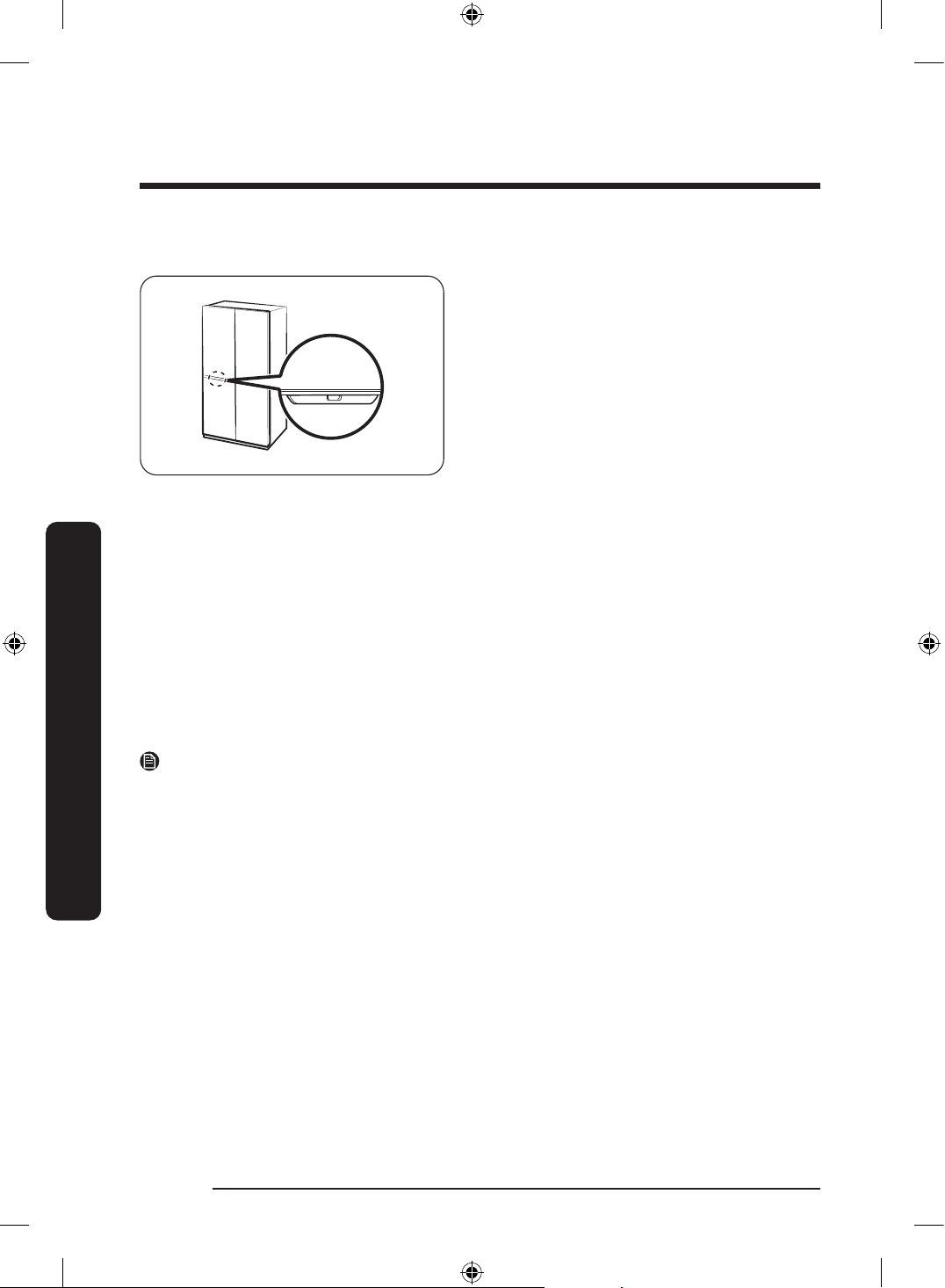
Welcome Lighting (applicable models only)
• When you get close to the refrigerator,
the fridge light turns on automatically,
allowing you to see inside the fridge
without opening the doors.
- There is a motion detection sensor on
the underside of the fridge door.
- The maximum time for the fridge
light to stay on is 30 seconds.
• If you have installed the refrigerator for
the rst time or re-installed it, you must
set the Welcome Lighting function to On
from the main panel or the SmartThings
app to use the function.
- The default setting is Off.
• You can change the Distance and Reaction time settings of the Welcome Lighting sensor
in the SmartThings app.
- The default Distance setting is Middle (about 50 cm).
- The default Reaction time setting is Fast.
- You must be within the detection distance of the sensor for the Welcome Lighting to
work.
- The distance which the Welcome Lighting sensor detects can vary depending on
the installation and usage environment in your home. (Approaching direction to the
refrigerator, material, and color of the recognizable parts such as clothes, objects,
etc., movement through the kitchen, etc.)
NOTE
• The Welcome Lighting can turn on even when a person or large pet walks past in front
of the refrigerator.
• If the Welcome Lighting sensor detects an object, the Welcome Lighting may turn on
and off. Move any object (such as a chair) away from the Welcome Lighting sensor.
• The Welcome Light sensor can be desensitized when it becomes dirty with foreign
substances or dust. Regularly clean the sensor with a clean cloth.
• Highly reective objects, such as mirrors, within the Welcome Lighting sensor’s range
can make the Welcome Lighting work from a distance.
Untitled-3 64Untitled-3 64 2024-07-04 2:32:252024-07-04 2:32:25
English 65
Operations
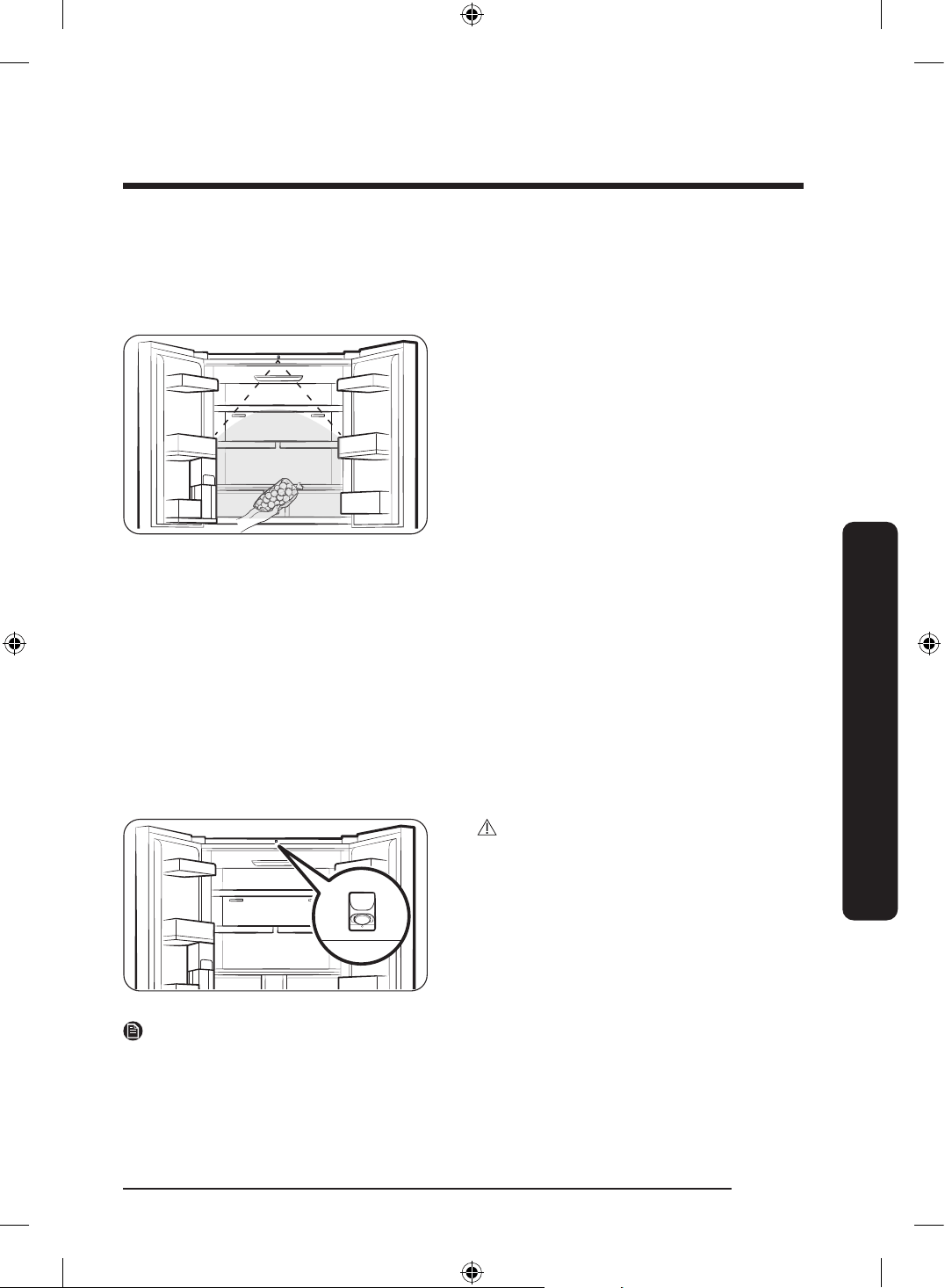
AI Vision Inside (applicable models only)
• The AI Vision Inside does not support food management for the freezer.
• For the Family Hub type model, tap AI Vision Inside > Settings > AI food recognition
guide to see the user guide.
• You can manage the food coming in and
out of the fridge using the camera on
the top part of the fridge.
- To use this feature, your refrigerator
must be connected to a network
through SmartThings.
- You must complete the initial setup of
the camera to use it.
• It checks food stored on the fridge
shelves and door bins, or alerts you
about the food that is nearing the
expiration date.
• When you open the fridge door, it is
recommended that you put food in
or out of the fridge after hearing the
recognition beep. Pause for a moment or
move slowly within the camera range.
- If you put several foods in the fridge
at once, they will be registered
as one food, so please put them
separately.
- When you take out a food, let the
same side exposed to the camera as
when you put it, and it must not be
covered by more than 65%.
CAUTION
Do not get close to the camera. Otherwise,
you will be photographed of your body.
• If you do not wish to use the AI Vision
Inside feature, turn off the AI Vision
camera on the AI Vision Inside app's
settings or cover the AI Vision camera
with a sticker.
NOTE
• If the fridge lights are turned off or the surroundings are dark, its recognition rate may
be lower.
• Ensure that the characteristics of an incoming item such as food are clearly visible (so
clearly distinguished from other items), which can improve the accuracy of incoming/
outgoing matching.
Untitled-3 65Untitled-3 65 2024-07-04 2:32:262024-07-04 2:32:26
Operations
English66
Operations
• Food in storage containers can be written in large and bold letters to help with
incoming/outgoing matching.
Water pitcher (Autoll Pitcher) (applicable models only)
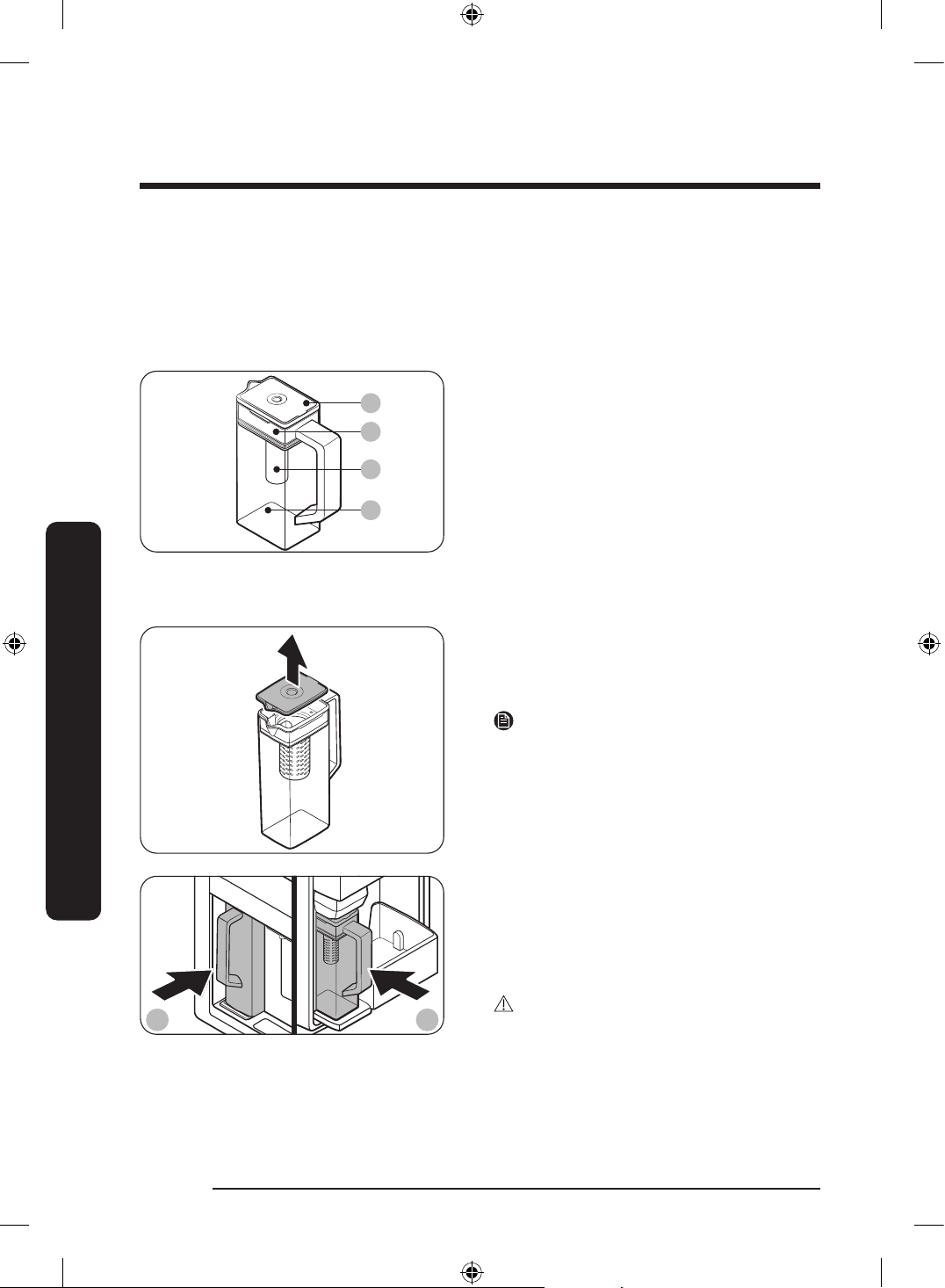
Cold, puried water is always ready in the AutoFill Pitcher. You can put tea or fruits in the
infuser to enjoy the various infused water you like.
01
02
03
04
01 Lid
02 Infuser holder
03 Infuser
04 Body
To ll the Water pitcher
1. Grasp a handle groove of the lid, and
then pull up to open the lid.
2. Put tea leaves or fruit to your taste into
the infuser.
NOTE
If you want to keep the infused water in
its initial concentration, turn the AutoFill
Pitcher function off.
A B
A. Type A models
B. Type B models
3. Enable the AutoFill Pitcher function
on the main panel. Open the Beverage
Center door (Type A) or the left door of
the fridge (Type B), and then mount the
water pitcher onto the holder. Push it
straight in as shown in the gure.
CAUTION
Make sure the water pitcher ts in the
water pitcher holder.
4. Close the door. The water pitcher will
start to ll with chilled water a short
time later.
Untitled-3 66Untitled-3 66 2024-07-04 2:32:262024-07-04 2:32:26
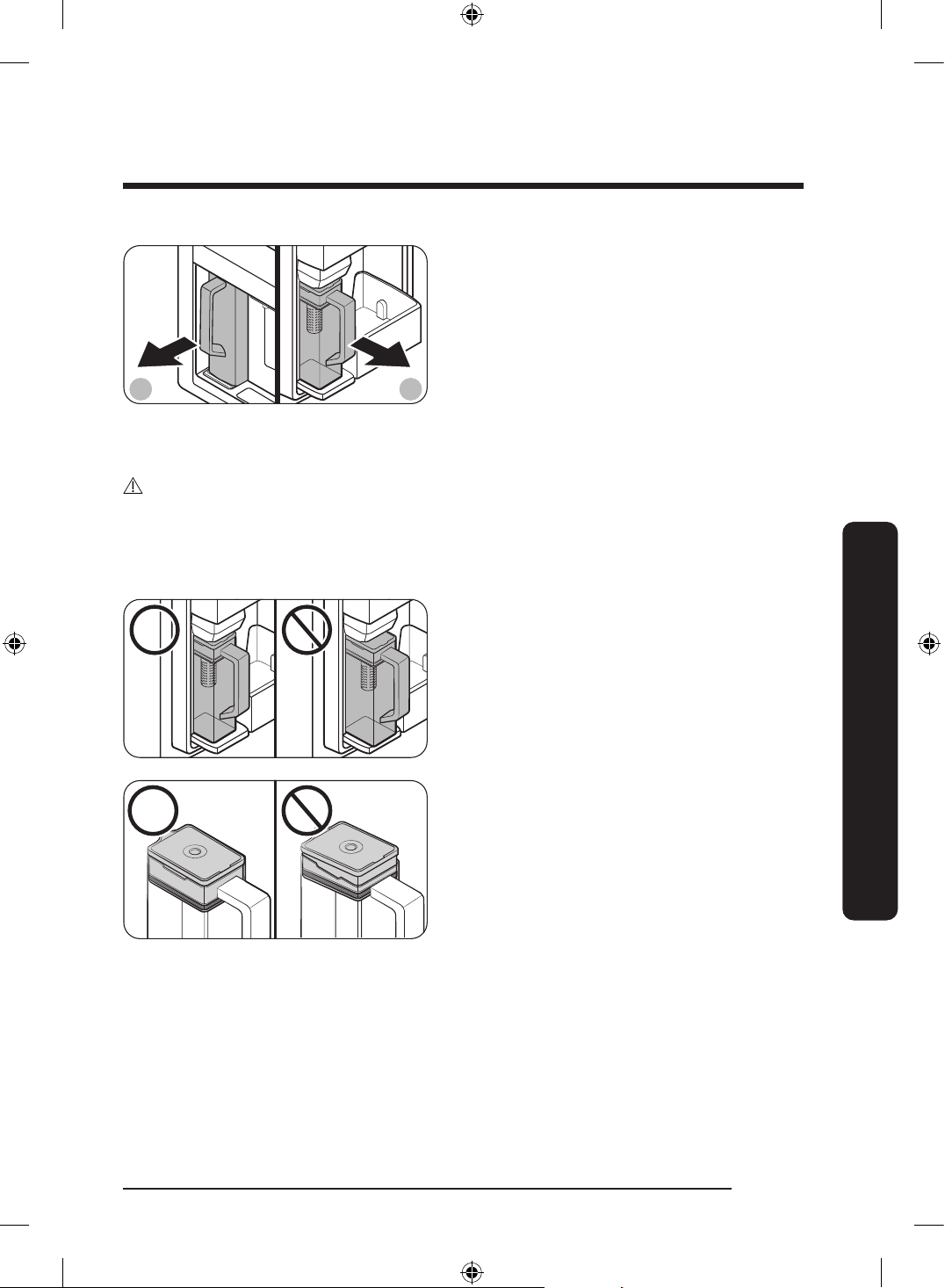
English 67
Operations
A B
A. Type A models
B. Type B models
5. To drink tea, open the Beverage Center
door (Type A) or the left door of the
fridge (Type B), and then detach the
water pitcher. Pull it straight out.
CAUTION
• We recommend consuming fruit infused water within 24 hours. After that, the infused
water can spoil over time.
• You must clean the water pitcher after you have consumed the infused water. Also clean
the water pitcher if you haven't used it for a long time.
• To prevent the water pitcher from
tipping over or leaking, make sure the
water pitcher ts in the water pitcher
holder.
• To prevent the water pitcher from
spilling over or leaking, make sure the
infuser holder is properly inserted.
Untitled-3 67Untitled-3 67 2024-07-04 2:32:262024-07-04 2:32:26
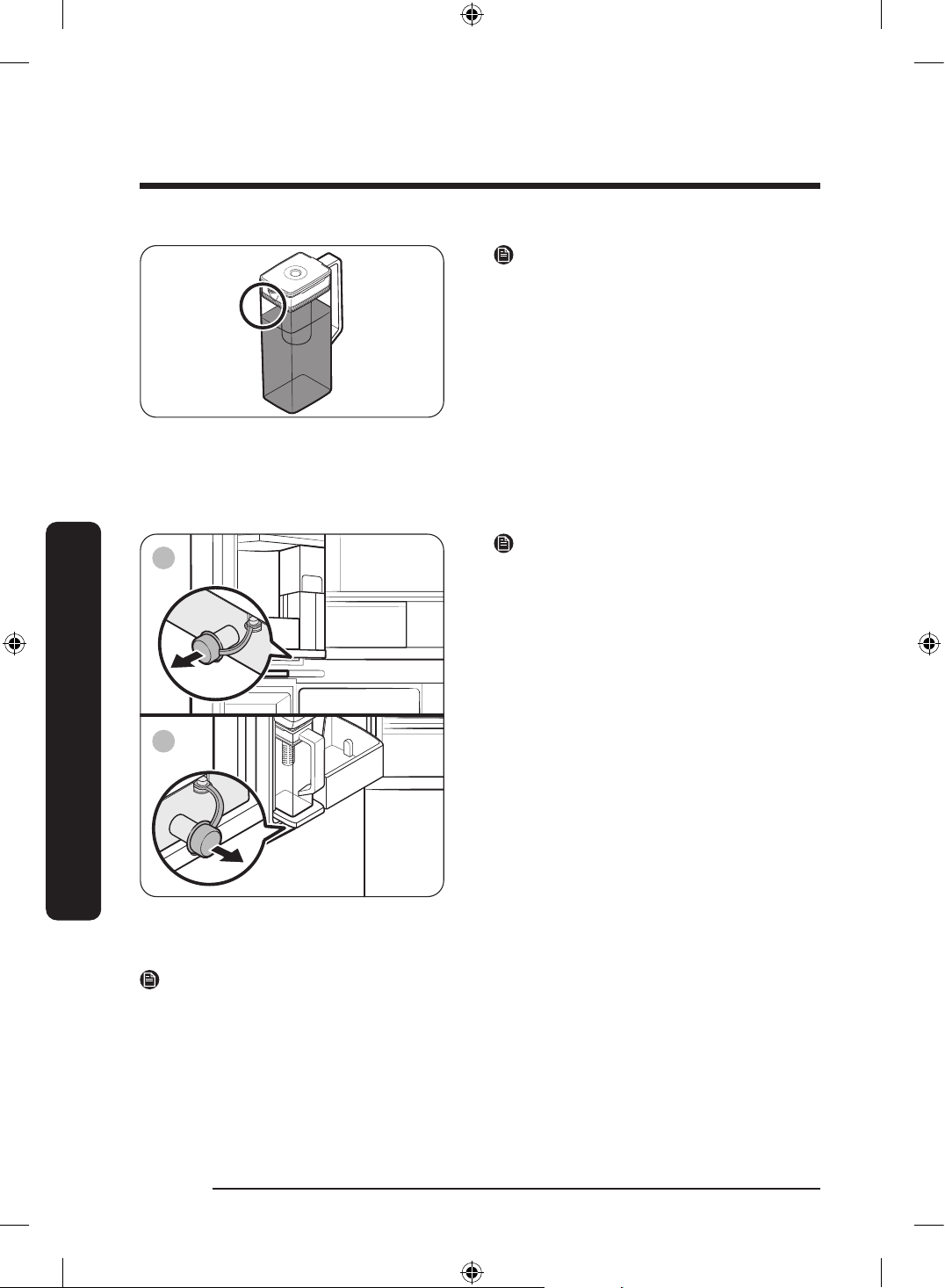
Operations
English68
Operations
NOTE
• If the front side (specically marked
area) of the water pitcher has too much
moisture, the water pitcher may not
fully ll. Remove the moisture, and then
try again.
• Autoll Pitcher function will stop
supplying water to the water pitcher if
the water pitcher does not ll after a
certain amount of time. If this happens,
check if the water line is properly
connected. Remove and reinsert the
water pitcher, and then try again.
A
B
A. Type A models
B. Type B models
NOTE
• Wipe around the water pitcher holder if
the water pitcher overows or leaks.
• Water drops off if the rubber cap is
opened.
• An alert message appears on the main
panel if there is a leak. In case of a leak,
open the rubber cap so that the leaked
water drains. If the alert message does
not disappear after draining, there might
be a system failure. Contact your local
Samsung service center.
NOTE
• You must clean the water pitcher after you have consumed the infused water. You must
also clean the water pitcher if you have not used it for a long time or left the pitcher
full for more than three days.
• If the infuser is not properly cleaned, the scent of the tea or fruits you previously used
in the infuser may remain. If you are not going to use the infuser, separate it from the
pitcher and store it safely.
• If you have not used the water lter for a long time, dump out the rst two pitchers of
water. Then, clean the water pitcher thoroughly and use it.
Untitled-3 68Untitled-3 68 2024-07-04 2:32:262024-07-04 2:32:26
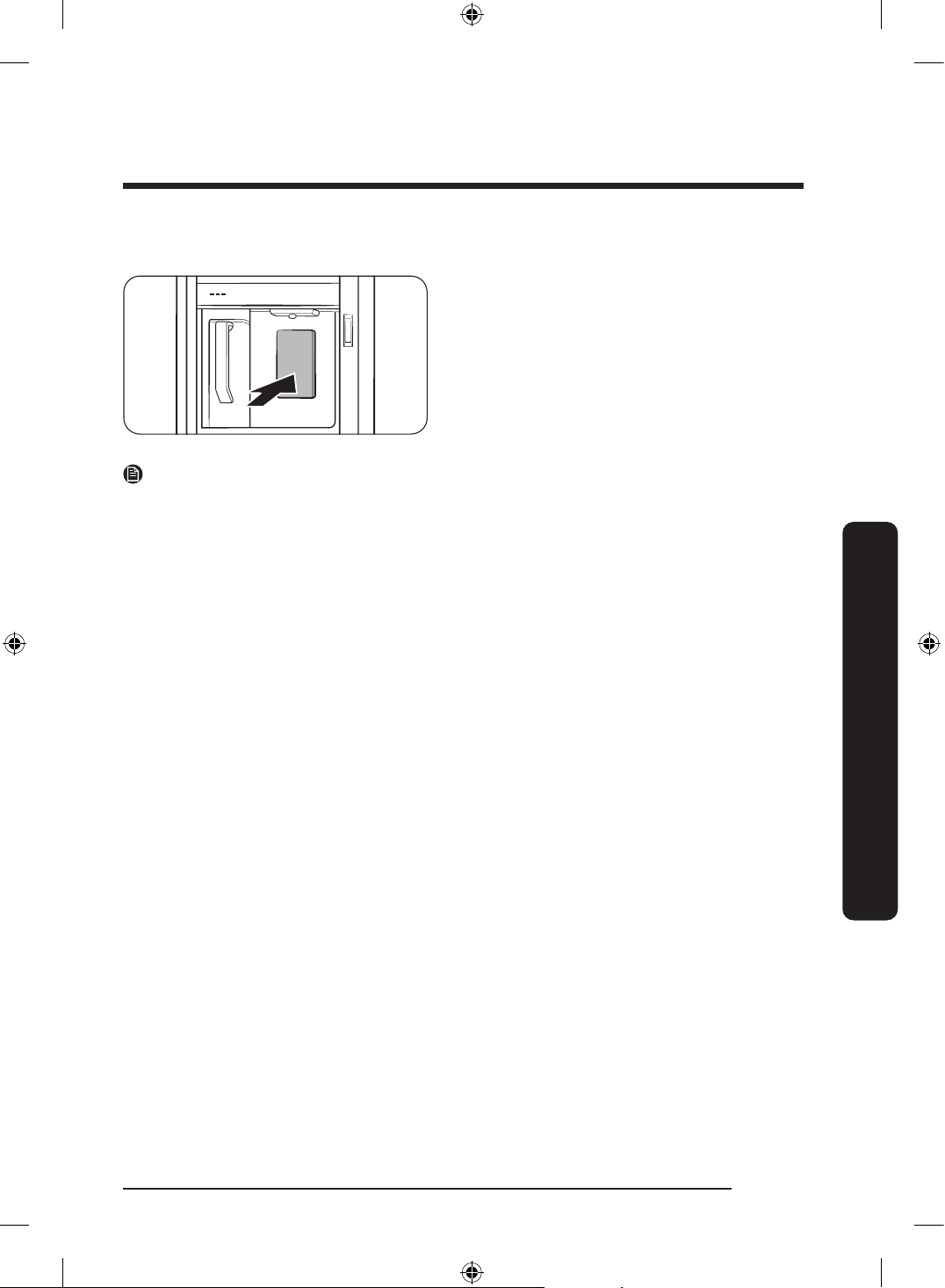
English 69
Operations
Water dispenser (applicable models only)
To dispense chilled water, open the
Beverage Center and press the dispenser
lever.
NOTE
• The dispenser will stop dispensing if you keep pushing the dispenser lever for about
1 minute. To dispense more water, release and push the lever again.
• Make sure the glass is in line with the dispenser to prevent the dispensed water from
spilling out.
• If you do not use the water dispenser for 2-3 days, the dispensed water may have an
abnormal smell or taste. This is not a system failure. Discard the rst 1-2 glasses of
water.
Water clouding
Water supplied to the refrigerator ows through a core alkaline lter. During this ltering
process, the water pressure of the water increases and the water becomes saturated with
oxygen and nitrogen. This causes the water to look misty or cloudy temporarily when
dispensed. This is normal and the water will look clear after a few seconds.
Untitled-3 69Untitled-3 69 2024-07-04 2:32:272024-07-04 2:32:27
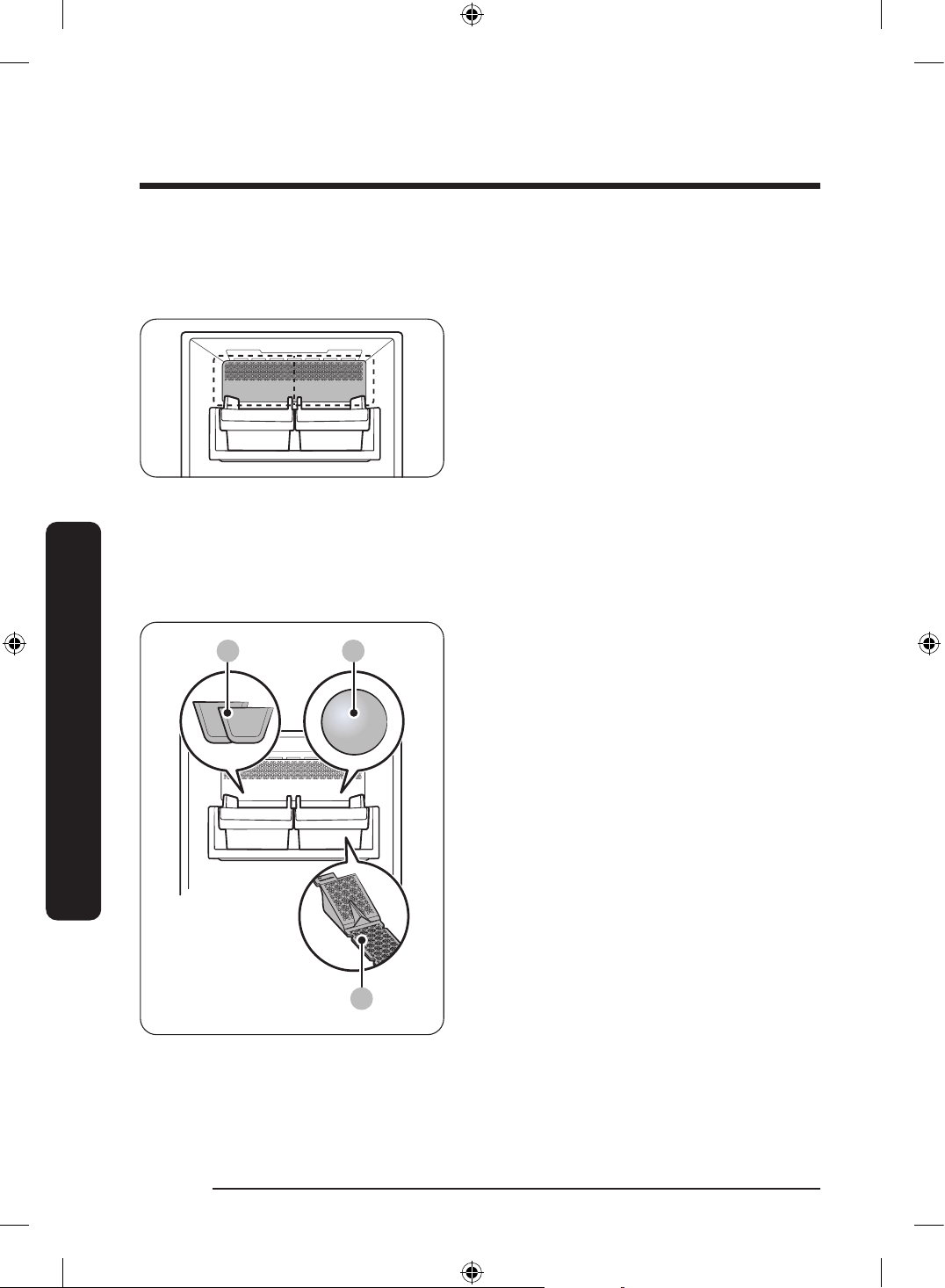
Operations
English70
Operations
Auto Ice maker (applicable models only)
The refrigerator has a built-in ice maker that automatically dispenses ice.
• The overall design and/or accessories may differ with the model.
For rst-time use
• Let the ice maker make ice for 1-2 days.
• Discard the rst 1-2 buckets of ice to remove impurities in the water supply system.
Cubed ice/ice bites and whiskey ball ice maker (Applicable models only)
A B
C
A. Cubed ice * or ice bites *
B. Whiskey ball ice *
C. Whiskey ball ice maker pad *
Untitled-3 70Untitled-3 70 2024-07-04 2:32:272024-07-04 2:32:27
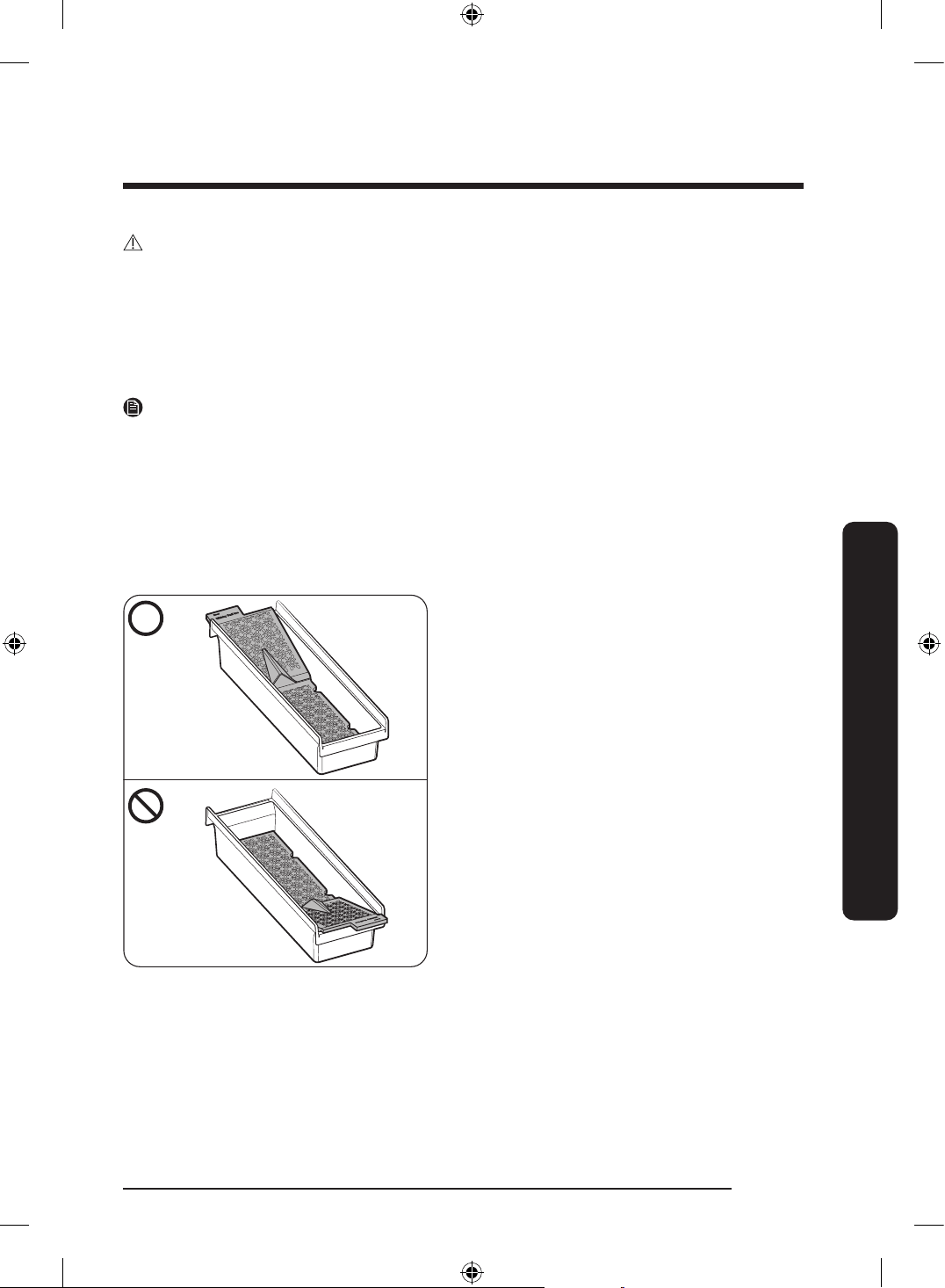
English 71
Operations
CAUTION
• Do not put your nger into the ice maker.
• Do not freeze water directly in the ice bucket. The ice bucket can get damaged.
• If you leave the door open too long, ice in the ice bucket may melt and clump together.
• If the ice inside the ice bucket melts into water (due to a power outage, etc.) empty the
ice bucket. Otherwise, it may cause the ice bucket to break when the water refreezes.
• When the Ice function is on, the ice maker will keep making ice even if there is no ice
bucket in place. Make sure you turn off the function if you do not want to make ice.
NOTE
• Empty the ice bucket regularly.
- Newly produced ice may clump with old ice, and old ice may stick to the ice bucket.
• The size, shape, and transparency of the ice may vary depending on the water pressure
and the usage condition (such as ambient temperature, freezer temperature, and
frequency of the door opening).
• You may hear a sound when the ice drops into the ice bucket.
• Hold the ice bucket with both hands when you remove it from the freezer to prevent
dropping it.
• Make sure to put the whiskey ball ice
maker pad in the right direction, and do
not get it mixed up with the cubed ice
maker pad.
- The ice maker may stop making
whiskey ball ice if you remove the
whiskey ball ice maker pad from the
ice bucket or if it is inserted in the
wrong direction.
- Place the side with the letter 'Rear' on
the pad and ice bucket in the same
direction.
Untitled-3 71Untitled-3 71 2024-07-04 2:32:272024-07-04 2:32:27
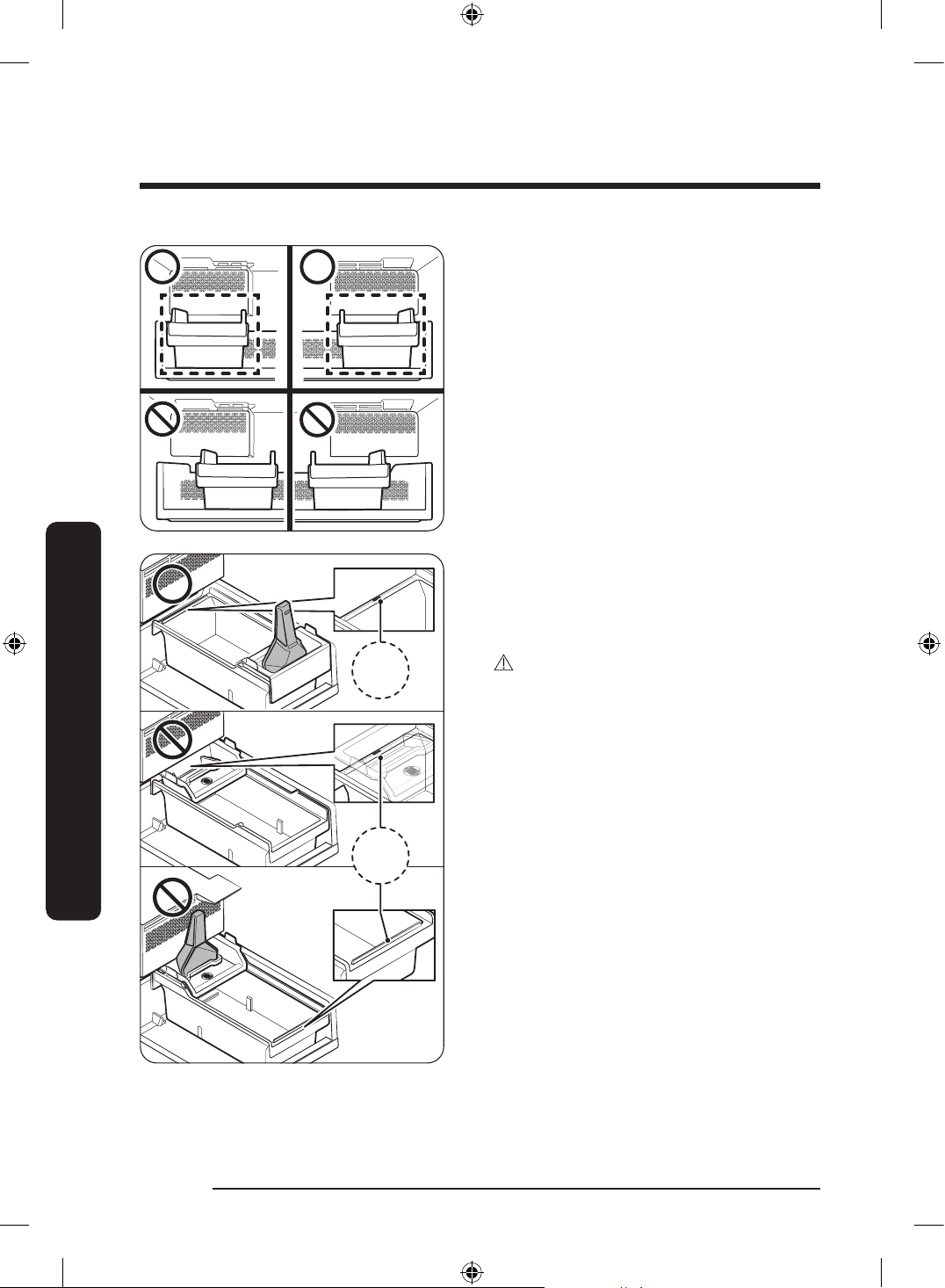
Operations
English72
Operations
• Check the position of the ice bucket
before using each ice maker.
- Place the ice bucket against the wall
directly underneath the ice maker.
If the ice bucket is not directly
underneath the ice maker, the ice
maker may not make ice.
R
E
A
R
RE
A
R
REAR
REAR
R
REAR
REAR
REAR
R
REAR
REAR
REAR
REARREAR
REARREAR
REAR
REAR
R
REAR
REAR
REAR
R
REAR
REAR
REAR
REAR
RE
AR
REAR
REAR
REAR
• Place the ice bucket under the ice maker
with the side marked ‘REAR’ facing the
back.
• Place the scoop holder at the front of
the ice bucket.
CAUTION
Ice may not be produced if the scoop
holder and ice bucket are not positioned
correctly.
Untitled-3 72Untitled-3 72 2024-07-04 2:32:272024-07-04 2:32:27
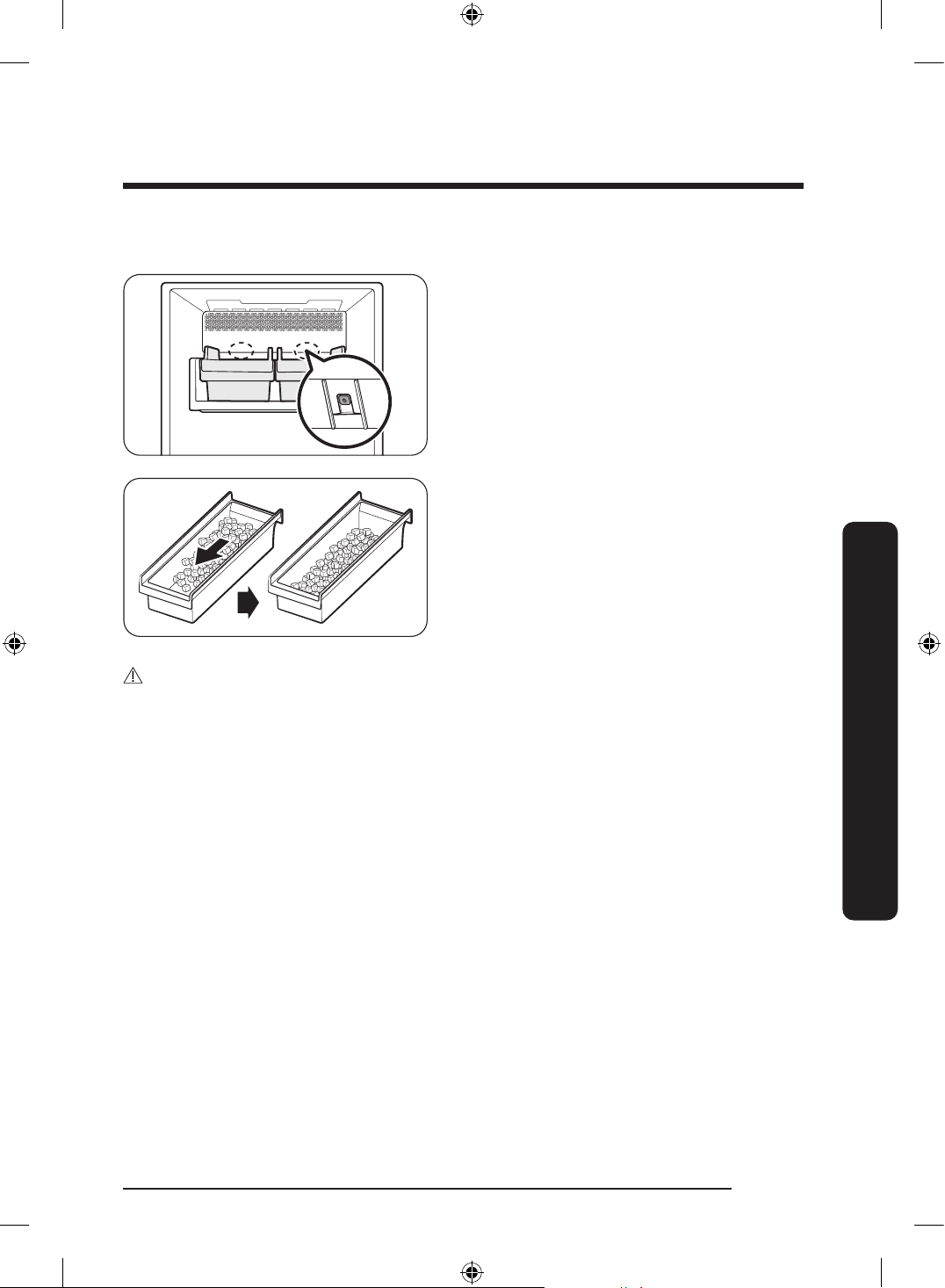
English 73
Operations
Diagnosis
• The overall design and/or accessories
may differ with the model.
• If ice does not dispense, rst check the
status of ice maker using the Test button
on the bottom of the ice maker.
• Press the Test button on the back of the
ice maker. You will hear a chime (ding-
dong) when you press the button. You
will hear another chime if the ice maker
is operating properly.
• Ice accumulating on one side of the tray
is normal. Arrange the ice evenly in the
tray to store more ice.
CAUTION
• Leaving the water line disconnected may cause the water valve to produce a buzzing
sound over time. If this is the case, make sure to turn the ice making function off.
• If the ice making chime rings repeatedly, contact the waterline installer or a local
Samsung service center.
• Do not put food in the ice bucket. The frozen food may damage the ice maker, especially
when you open or close the door.
• When the refrigerator recovers power after a power failure, the ice bucket may
contain a mix of melted and jammed ice cubes, which can prevent the ice maker from
working properly. To prevent this, make sure to empty the ice bucket before using the
refrigerator.
• Do not put ngers or any objects into the ice maker. This can cause physical injury or
property damage.
• Ice stored in the freezer for a long time gets smaller and then forms large ice chunks
caused by sublimation. Therefore, if you are not planning to use the ice maker for a long
time, turn it off and empty the ice bucket.
• Use the new hose-sets supplied with the appliance only. Do not re-use an old hose set.
Untitled-3 73Untitled-3 73 2024-07-04 2:32:282024-07-04 2:32:28
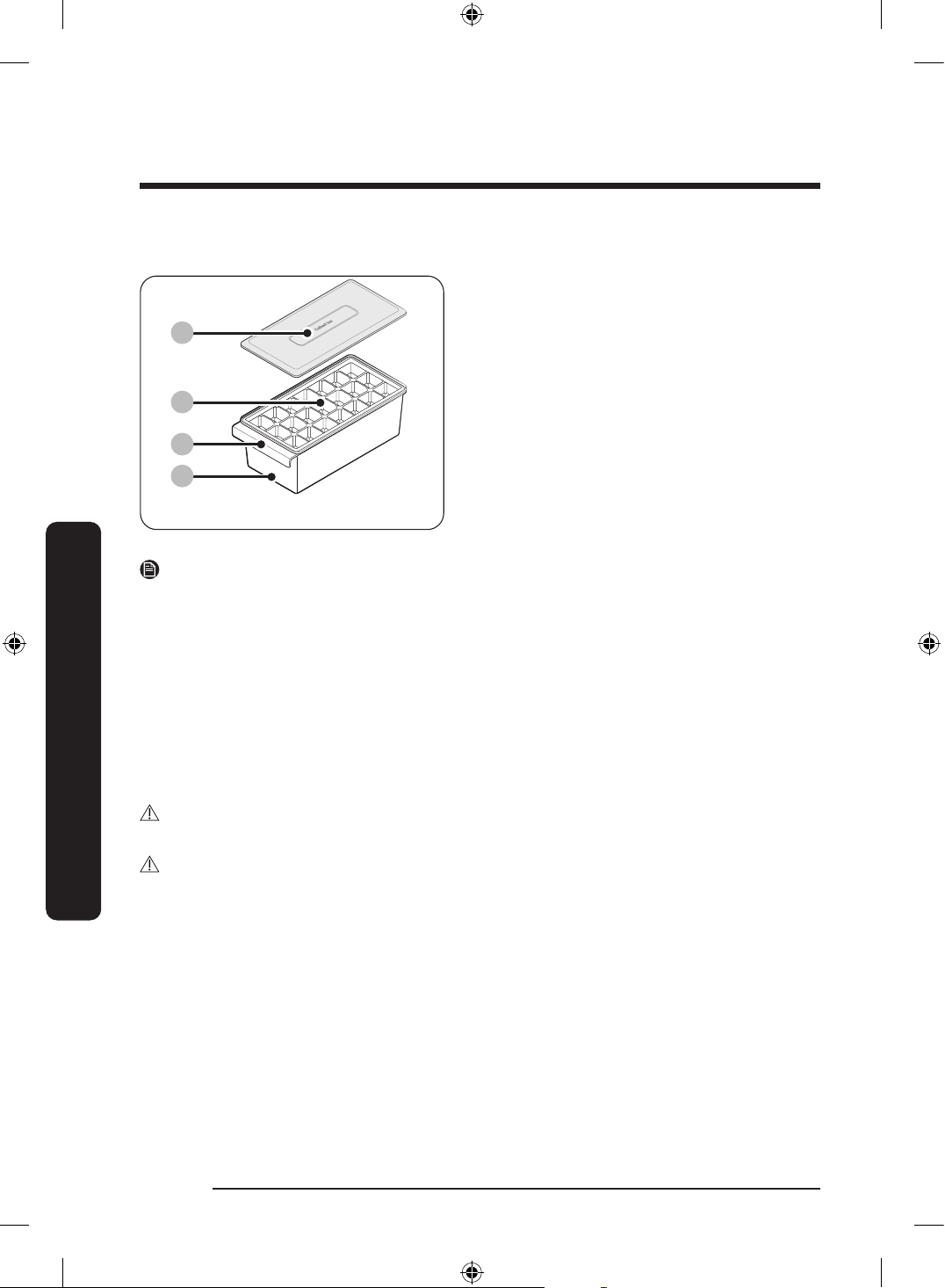
Operations
English74
Operations
Tray Ice Maker (applicable models only)
01
02
03
04
01 Ice bucket cover
02 Ice tray (inside)
03 Ice bucket handle
04 Ice bucket
NOTE
• If you do not need to make ice, you can take out the Tray Ice Maker to make more room
in the freezer.
• Clean the Tray Ice Maker before using it for the rst time.
- Do not use the Tray Ice Maker in microwaves or sterilize with heat. It will cause
product deformation.
1. Fill the ice tray with water. Overlling the ice tray can cause the ice to clump together
and not fall into cubes.
2. To remove the ice from the ice tray, hold both ends of the ice tray and gently twist.
- Depending on how frozen the ice is, it might not drop all at once.
- Beverages other than water (such as green tea or milk) may not stick to the tray and
not drop well.
WARNING
Use only potable water to make ice cubes.
CAUTION
• Do not freeze water directly in the ice bucket. The ice bucket can get damaged.
• After cleaning the Ice Tray Maker, completely dry all parts before use.
- Clean the Tray Ice Maker once every one to two weeks.
Untitled-3 74Untitled-3 74 2024-07-04 2:32:282024-07-04 2:32:28
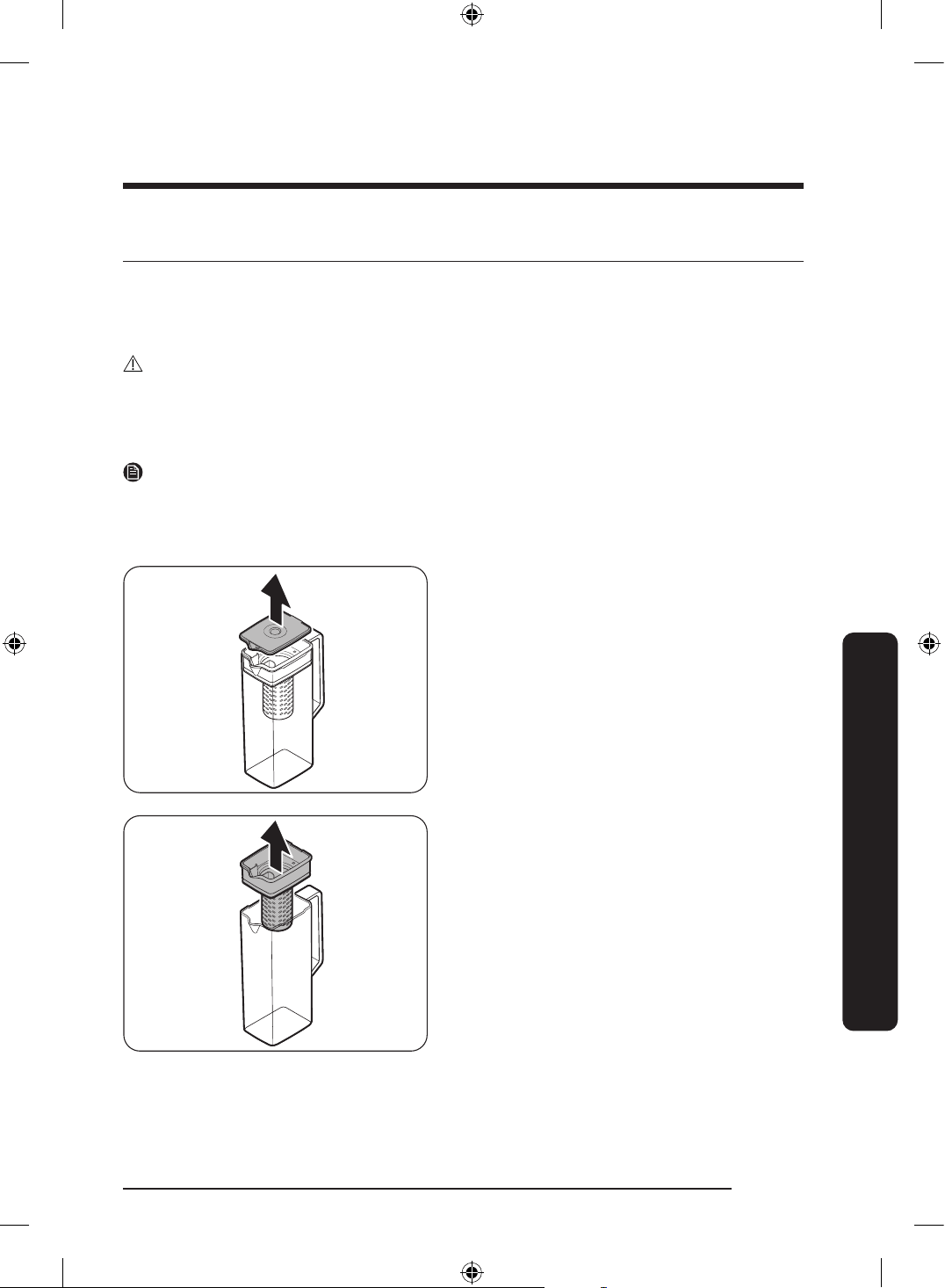
English 75
Maintenance
Handling and care
Ice bucket (applicable models only)
If you do not dispense ice for an extended period, ice may form clumps inside the bucket.
If this happens, remove and empty the ice bucket.
CAUTION
• To prevent injury, make sure to clean up any ice or water that has fallen on the oor.
• To prevent accidents or injury, do not let children play with the water dispenser or the
ice maker.
• Use only the provided ice bucket. Third-party ice buckets may cause a system failure.
NOTE
Noise from the ice maker as it produces ice during the ice making process is normal.
Autoll pitcher (applicable models only)
1. Grasp a handle groove of the lid, and
then pull up to remove.
2. Grasp both sides of the infuser holder,
and then lift to remove.
Maintenance
Untitled-3 75Untitled-3 75 2024-07-04 2:32:282024-07-04 2:32:28
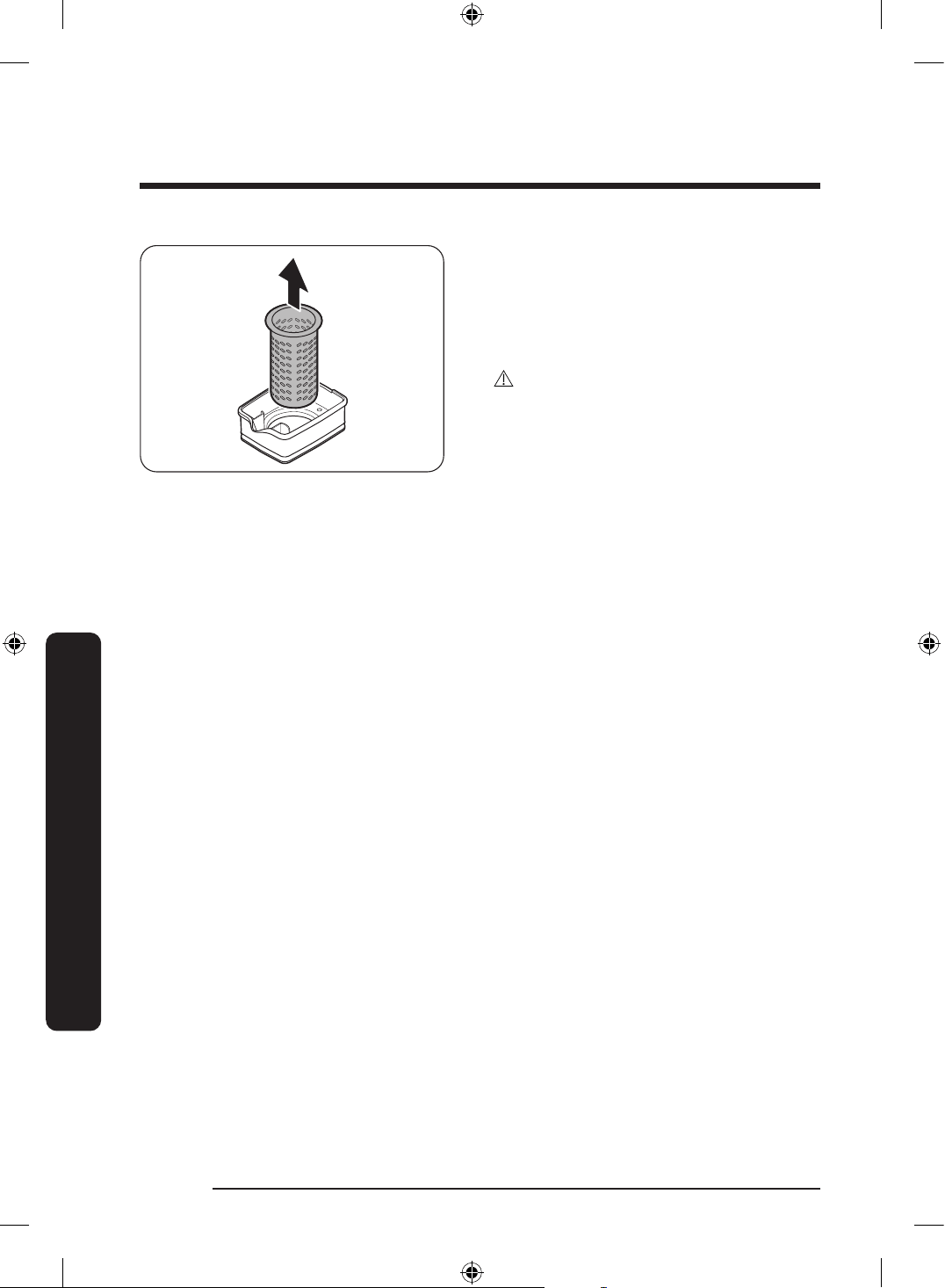
Maintenance
English76
Maintenance
3. While slightly twisting the infuser, pull
it out of the sealed mouth.
4. Clean the infuser with neutral agents
and running water. Rinse and dry well.
5. Reassemble the Autoll pitcher in the
reverse order of disassembly.
CAUTION
The water pitcher and lid are not
microwave safe and can melt or deform
if exposed to heat (including hot water).
Please hand wash in cool or warm water as
needed. (The water temperature must be
below 70 °C.)
Untitled-3 76Untitled-3 76 2024-07-04 2:32:282024-07-04 2:32:28
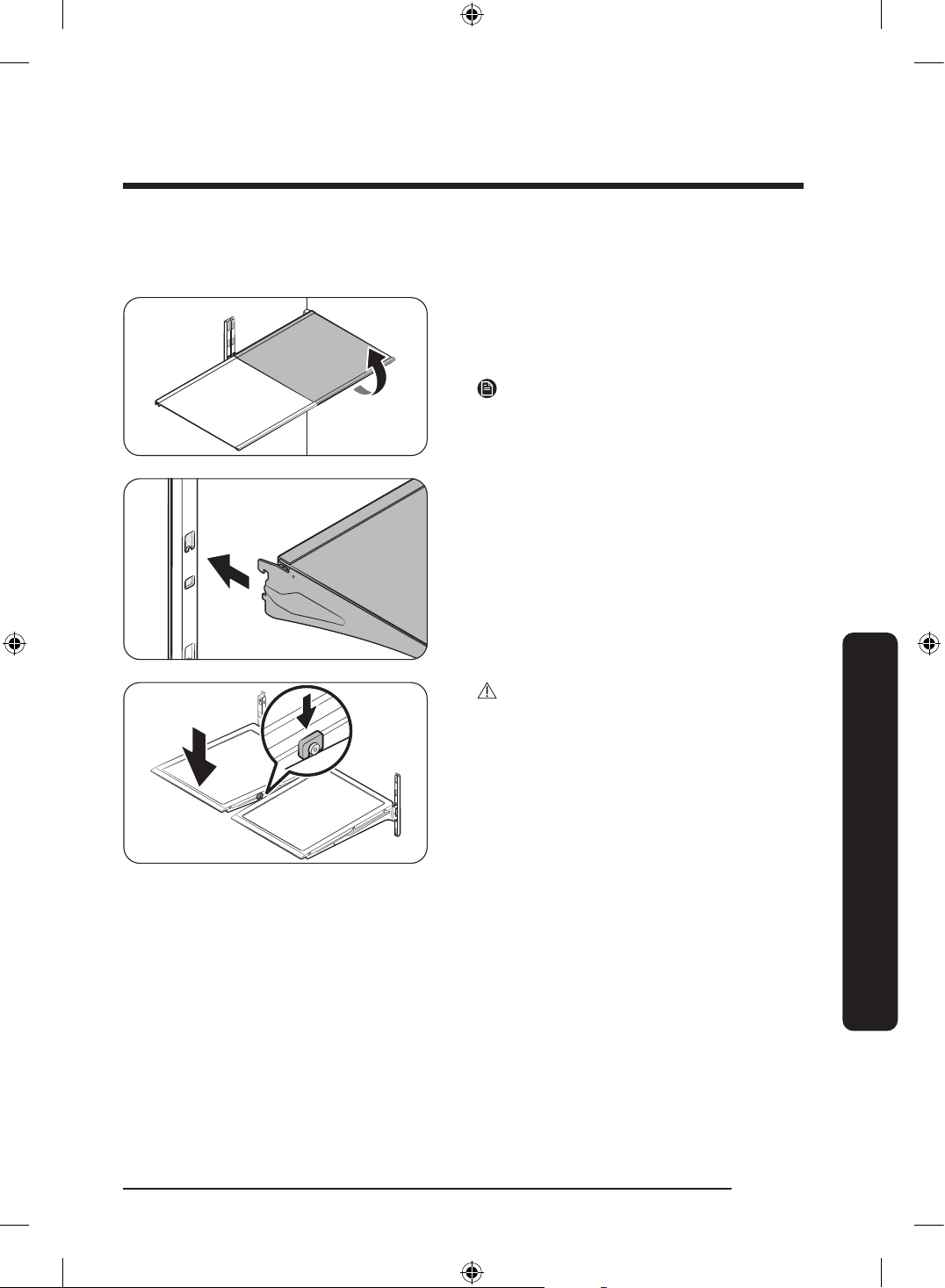
English 77
Maintenance
Fridge shelves
The appearance of the shelves differs by model.
• To remove a shelf, fully open the
corresponding door. Hold the front of
the shelf, and then gently lift up and pull
out.
NOTE
Do not lift up the shelf fully when
removing or reinserting the shelf. The rear
wall of the fridge room can be dented.
• To reinsert, hold the shelf at an angle
so the front is higher than the back, and
then insert the top hook into the top
shelf notch. Then, lower the shelf and
insert the bottom shelf hook into the
bottom shelf notch.
CAUTION
• The tempered glass shelves are heavy.
Use caution when removing them.
• The shelf must be inserted correctly. Do
not insert upside down.
• Glass containers may scratch the surface
of glass shelves.
Untitled-3 77Untitled-3 77 2024-07-04 2:32:282024-07-04 2:32:28
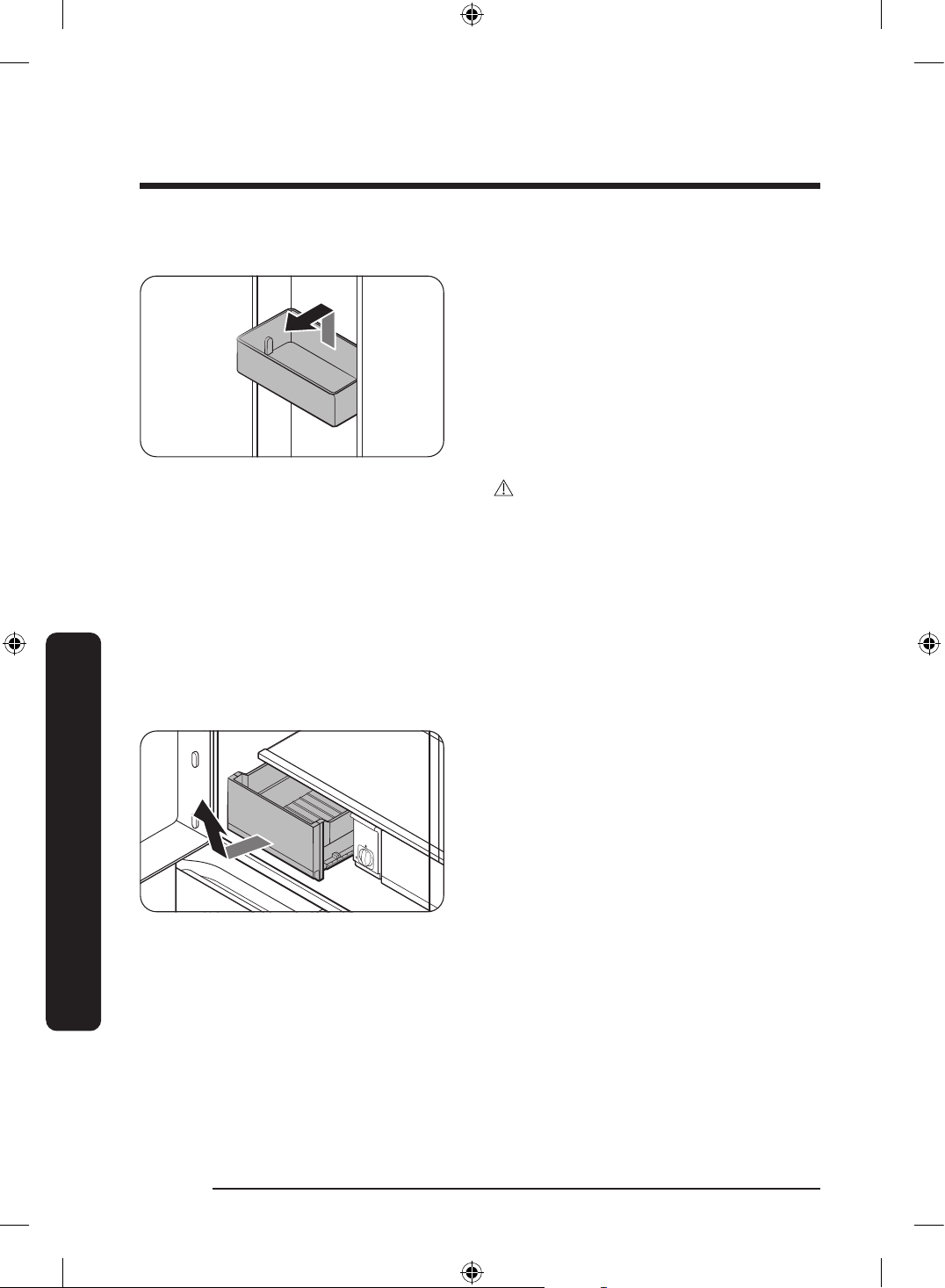
Maintenance
English78
Maintenance
Door bins
• To remove the door bin, hold the front
sides of the bin, and then gently lift up
to remove.
• To reinsert, insert the door bin slightly
above its nal location making sure that
the back of the bin is against the door.
Hold the rear of the door bin with both
hands, and then press down so that it
ts snugly.
CAUTION
• Do not remove a bin that is lled with
food. Empty the bin beforehand.
• Use caution when opening the door if
the bottom bin contains larger bottles,
which may fall over.
• Do not allow children to play with the
bins. Sharp corners of the bin may cause
injury.
Fridge drawers
Gently lift up the front of the drawer and
slide out.
• We recommend that you remove the
door bins before removing the drawer.
This is to prevent damage to the door
bins.
• To reinsert, insert the drawer into the
frame rails and then slide inward.
Untitled-3 78Untitled-3 78 2024-07-04 2:32:282024-07-04 2:32:28
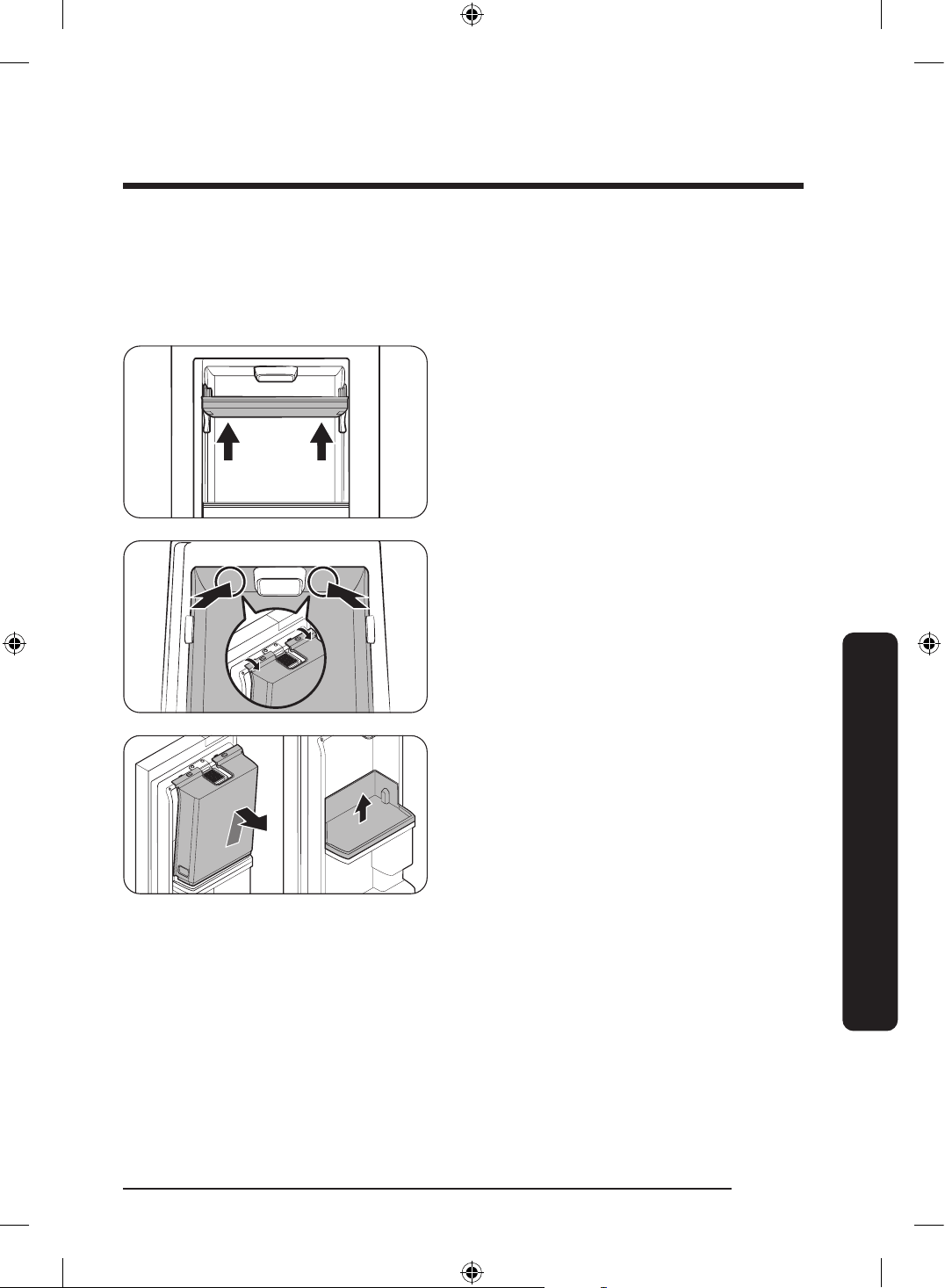
English 79
Maintenance
Beverage Zone (applicable models only)
You can select the Beverage or Wine/Dessert mode. Store items that are suitable for the
selected mode.
Disassembling the Beverage Zone
1. Open the left Showcase door, and then
hold the upper door bin with both hands
and lift up to remove it.
2. With the left Showcase door open, open
the fridge door. Then, push the upper
part of the Beverage Zone (left and right
side of the fan) from inside to release
the snap joints securing the Beverage
Zone cover to the door.
3. If the snap joints at the upper part are
released, hold the Beverage Zone cover
and lift it to remove it.
- After disassembling the Beverage
Zone cover, you can hold the lower
door bin with both hands and lift it to
remove it.
Untitled-3 79Untitled-3 79 2024-07-04 2:32:292024-07-04 2:32:29
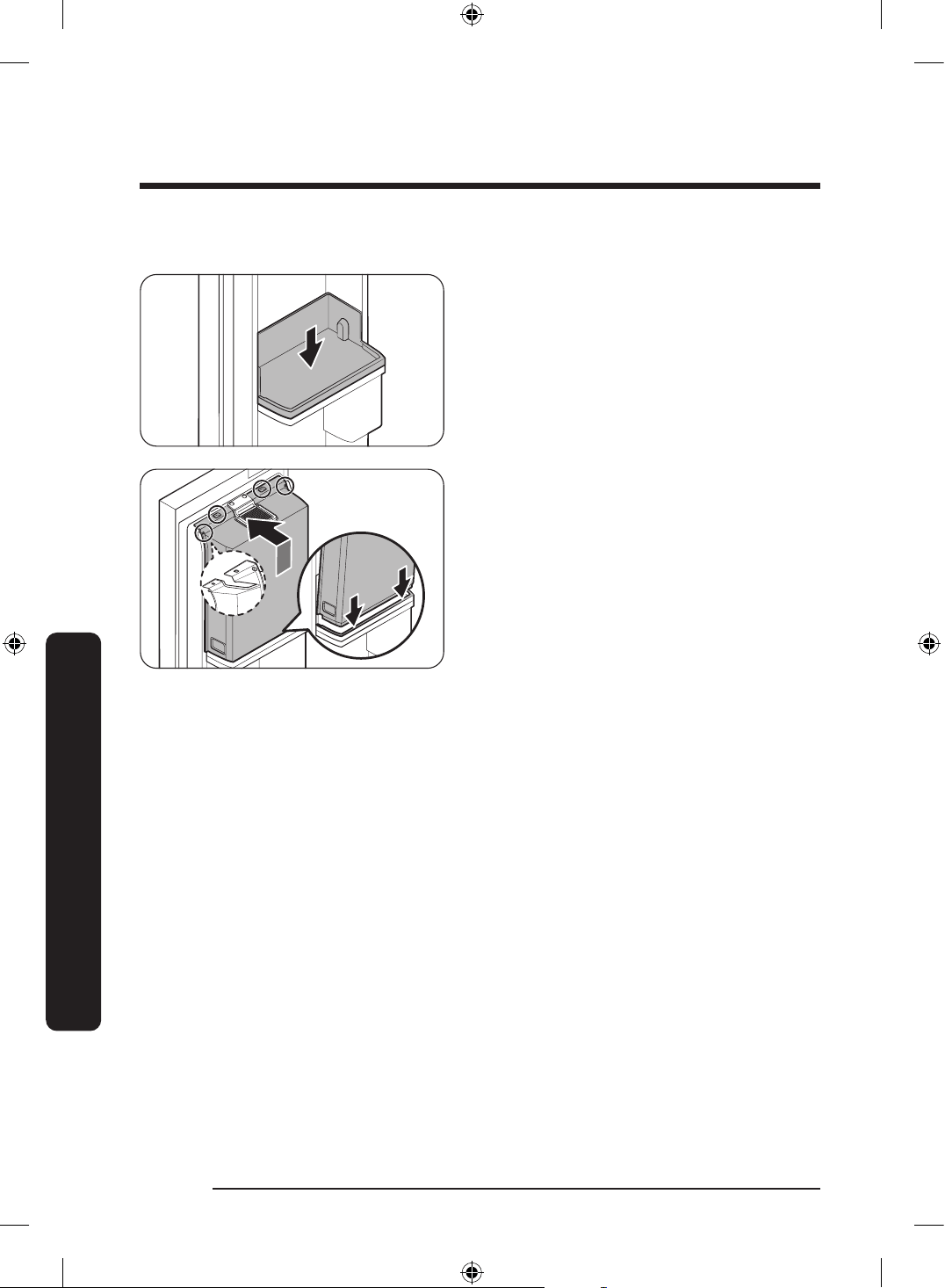
Maintenance
English80
Maintenance
Assembling the Beverage Zone
1. With the fridge door or the Showcase
door open, align the grooves on the left
and right side of the bottom door bin,
and then insert it.
2. Open the fridge door, and then assemble
the snap joints at the bottom and top
of the Beverage Zone cover in order.
(Reversed order of the disassembly)
- To assemble the upper door bin, open
the Showcase door, align the grooves
on the left and right side, and then
insert it.
Untitled-3 80Untitled-3 80 2024-07-04 2:32:292024-07-04 2:32:29
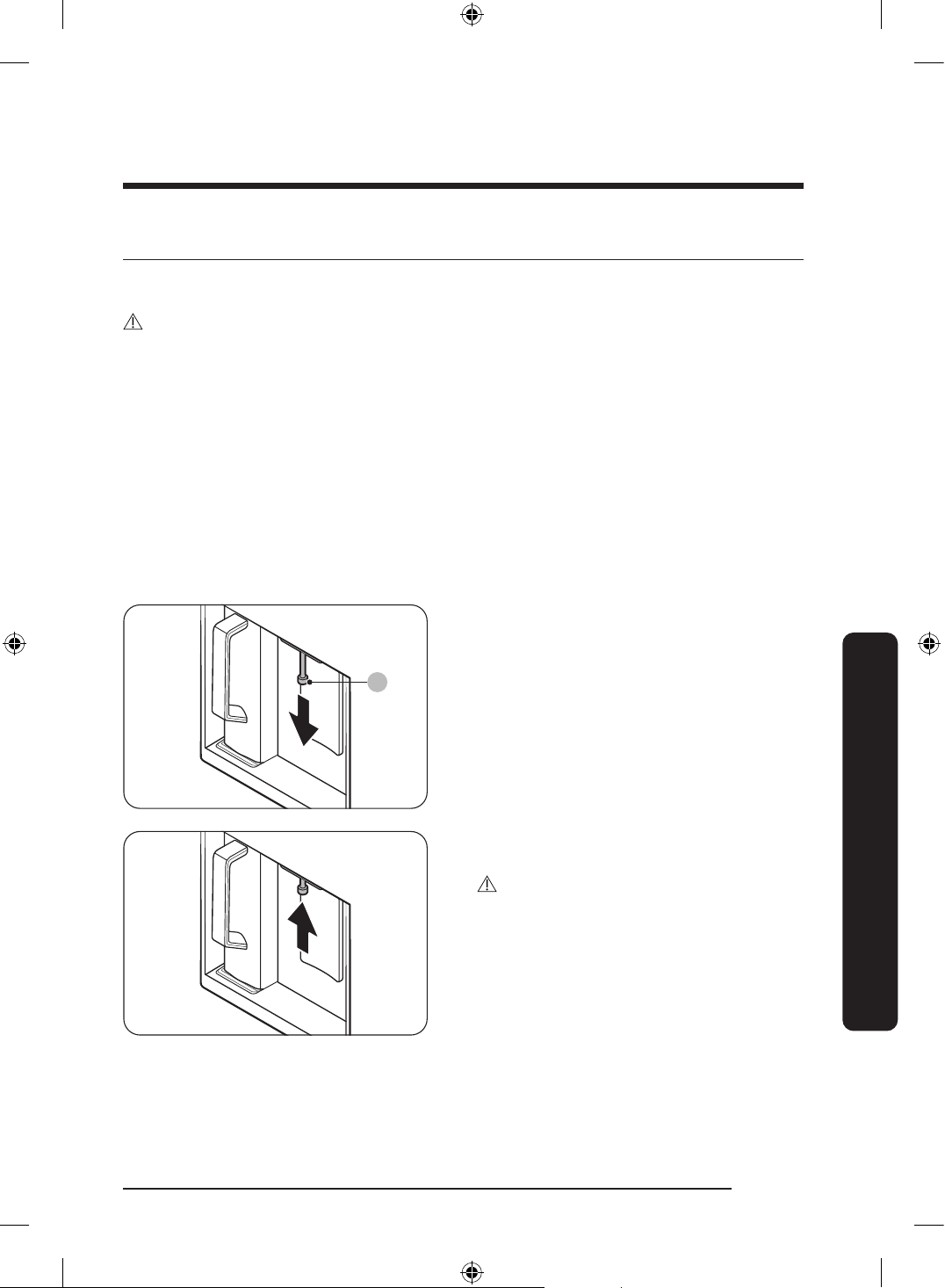
English 81
Maintenance
Cleaning
Interior and exterior
WARNING
• Do not use benzene, thinner, home/car detergent, or Clorox™ to clean the refrigerator.
They may damage the surface of the refrigerator and cause a re.
• Do not spray water onto the refrigerator. This may cause electric shock.
Regularly use a dry cloth to remove all foreign substances such as dust or water from the
power plug terminals and contact points.
1. Unplug the power cord.
2. Use a moistened, soft, lint-free cloth or paper towel to clean the refrigerator’s interior
and exterior.
3. When done, use a dry cloth or paper towel to dry well.
4. Plug in the power cord.
Dispenser nozzle (applicable models only)
A
1. Hold the end of the dispenser nozzle (A).
2. While turning the dispenser nozzle (A)
left, pull it down to remove it from the
dispenser.
3. Clean the dispenser nozzle thoroughly,
and then assemble it back.
CAUTION
• Fully insert the dispenser nozzle, so it is
back to its original position.
• Do not use a sponge with rough textures
for cleaning the dispenser nozzle.
Untitled-3 81Untitled-3 81 2024-07-04 2:32:292024-07-04 2:32:29
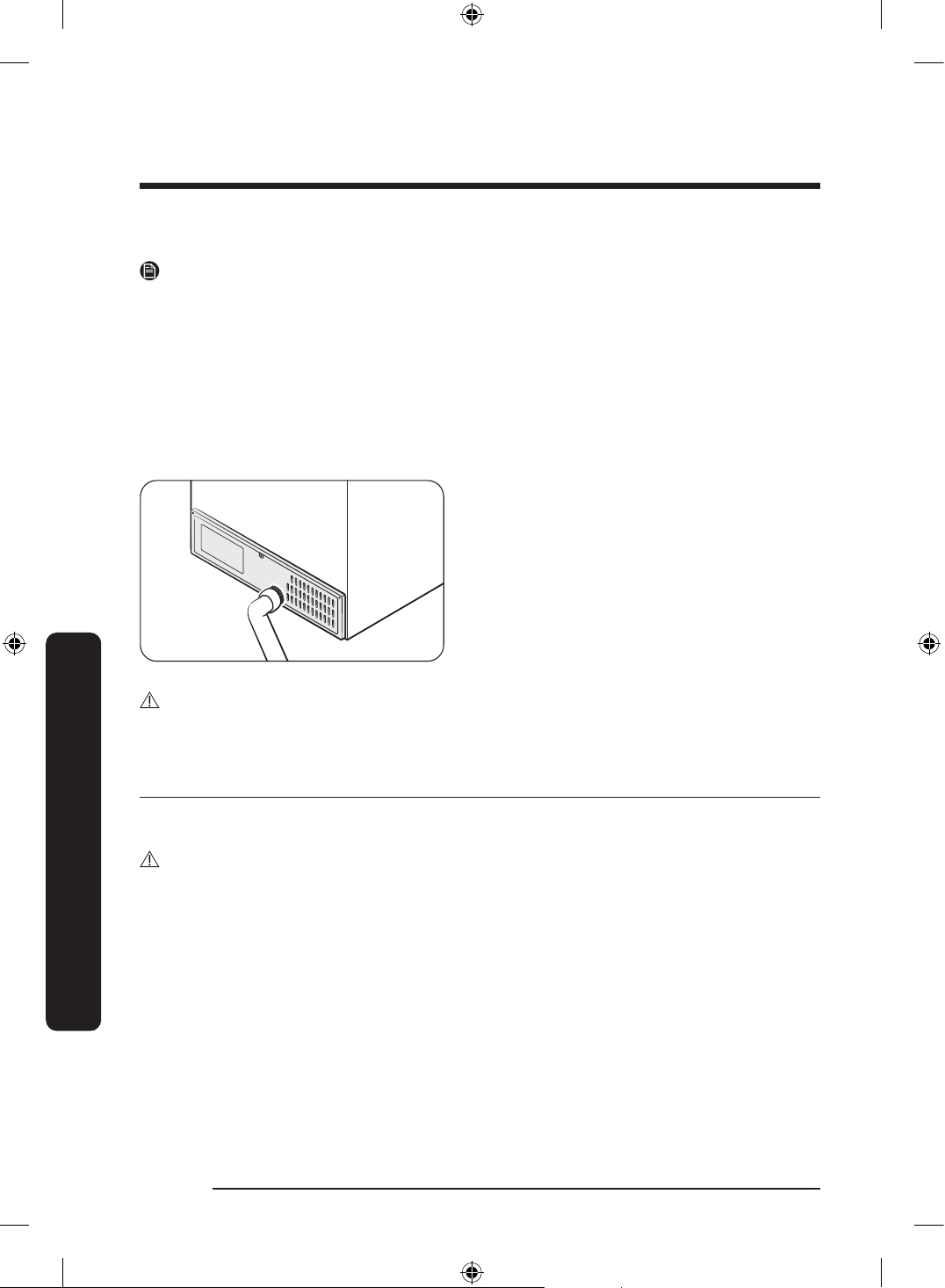
Maintenance
English82
Maintenance
Inner-view camera (applicable models only)
NOTE
Use a cotton swab or microber cloth to clean the camera on the top part of the fridge
(with the fridge door open).
Rubber seals
If the rubber seals of a door become dirty, the door may not close properly and reducing
refrigerator performance and efciency. Use a mild detergent and damp cloth to clean the
rubber seals. Then, dry well with a cloth.
Rear panel
To keep cords and exposed parts of the
rear panel free of dirt, vacuum the panel
once or twice a year.
CAUTION
Do not remove the rear panel cover. Electric shock may occur.
Replacement
Water lter (applicable models only)
WARNING
• Do not use third-party water lters. Use only Samsung-provided or -approved lters.
• Unapproved lters may leak and damage the refrigerator, causing electric shock.
Samsung is not responsible for any damage that may occur from use of third-party
water lters.
The “Replace water lter” message appears on the main panel to let you know it is time to
replace the water lter. Before replacing the lter, make sure the main water supply is shut
off
Untitled-3 82Untitled-3 82 2024-07-04 2:32:292024-07-04 2:32:29
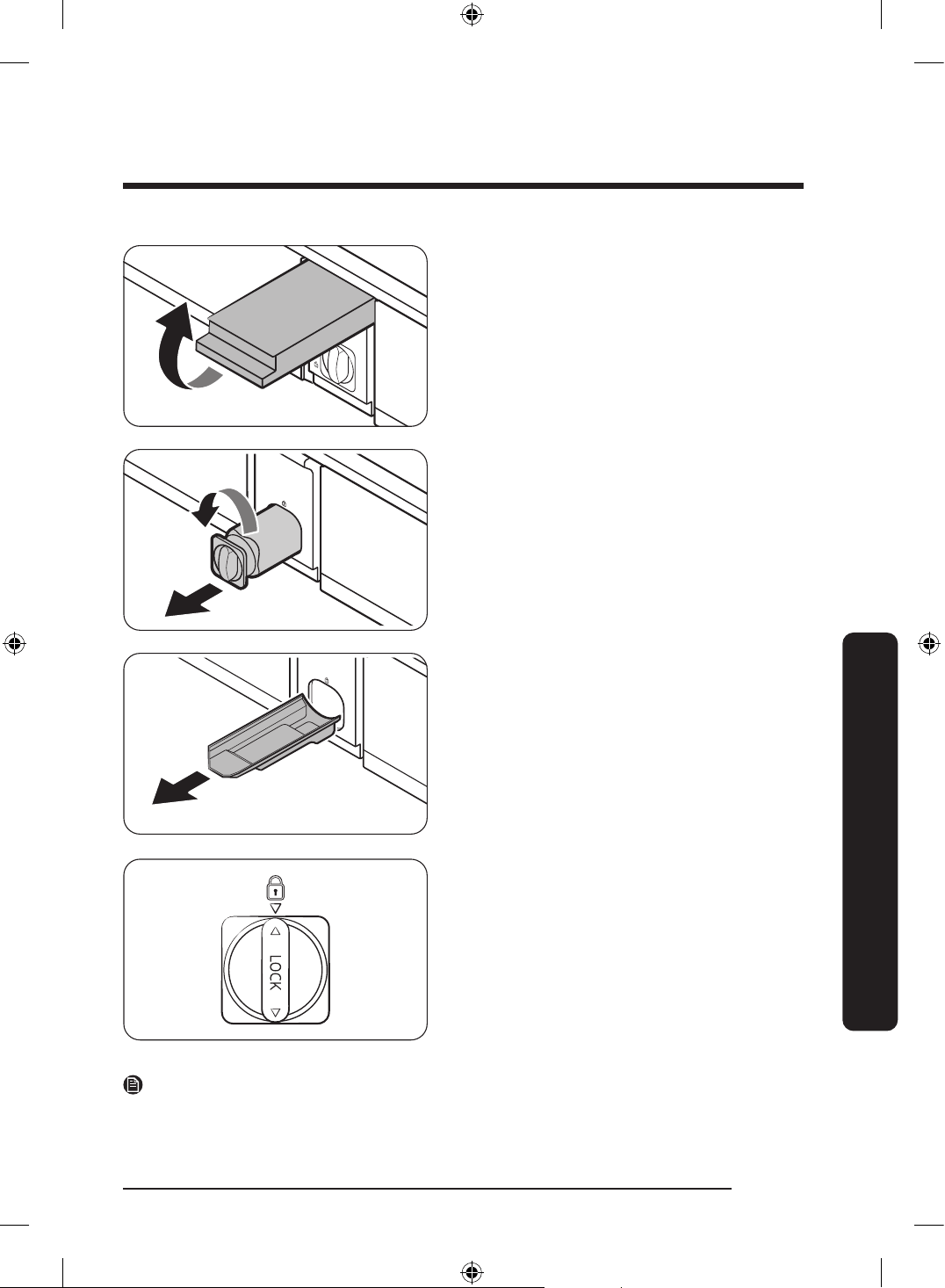
English 83
Maintenance
1. Shut off the main water supply.
2. Open the lter cartridge cover.
3. Turn the knob of the lter cartridge
counter clockwise 90 degrees (
1
/4 turn).
The lter cartridge unlocks.
4. Pull out to remove the cartridge.
- If the water lter is severely
contaminated, the cartridge may not
be easy to remove. If that is the case,
use force to remove the cartridge.
- To prevent water leaks from the lter
opening, pull the cartridge straight
out while removing it.
5. Insert a new lter cartridge. Use only
Samsung-provided or approved lters.
6. Turn the cartridge knob clockwise to
lock into place.
7. Close the lter cartridge cover.
8. Reset the lter on the main panel.
- General type: On the main panel, go
to Settings, and then run Filter Reset.
- Family Hub type: On the Home
screen, tap Fridge Manager > Fridge
Settings > Water Filter, and then
select Reset.
NOTE
• A newly installed lter may cause the water dispenser to spurt water briey. This is
because air has entered the waterline.
Untitled-3 83Untitled-3 83 2024-07-04 2:32:302024-07-04 2:32:30
Maintenance
English84
Maintenance
• The replacement process may cause the water dispenser to drip for a short period of
time. If it drips, simply wipe up any water on the oor with a dry towel.
Reverse osmosis water ltration system
The water pressure of the water supply system to a reverse osmosis water ltration
system must be between 206-861 kPa.
The water pressure of the reverse osmosis water ltration system to the refrigerator’s cold
water line must be at least 206 kPa. If the water pressure is below these specications:
• Check if the sediment lter in the reverse osmosis system is blocked. Replace the lter
if necessary.
• Rell the water tank in the reverse osmosis system with water.
• If your refrigerator has a water lter, it may further reduce the water pressure when
used in conjunction with a reverse osmosis system. Remove the water lter.
For more information or servicing, contact a licensed plumbing professional.
Ordering a new lter
To purchase a new water lter, contact a local Samsung service center.
LED Lamps
To replace the lamps of the refrigerator, contact a local Samsung service center.
WARNING
• The lamps are not user-serviceable. Do not attempt to replace a lamp yourself. This can
cause electric shock.
Door panel (applicable models only)
NOTE
You may not be able to purchase the Door panel separately in some countries.
You can select the door panel you prefer for your BESPOKE refrigerator. Purchase the door
panel at a Samsung retail store and an authorized installer will install the panel for you.
CAUTION
• Disassembling or assembling the door panel on your own may result in product damage
or personal injury. If you nd any problems with the door panel, contact a Samsung
service center
• A service fee may be charged for panel replacement even within the warranty period.
Untitled-3 84Untitled-3 84 2024-07-04 2:32:302024-07-04 2:32:30
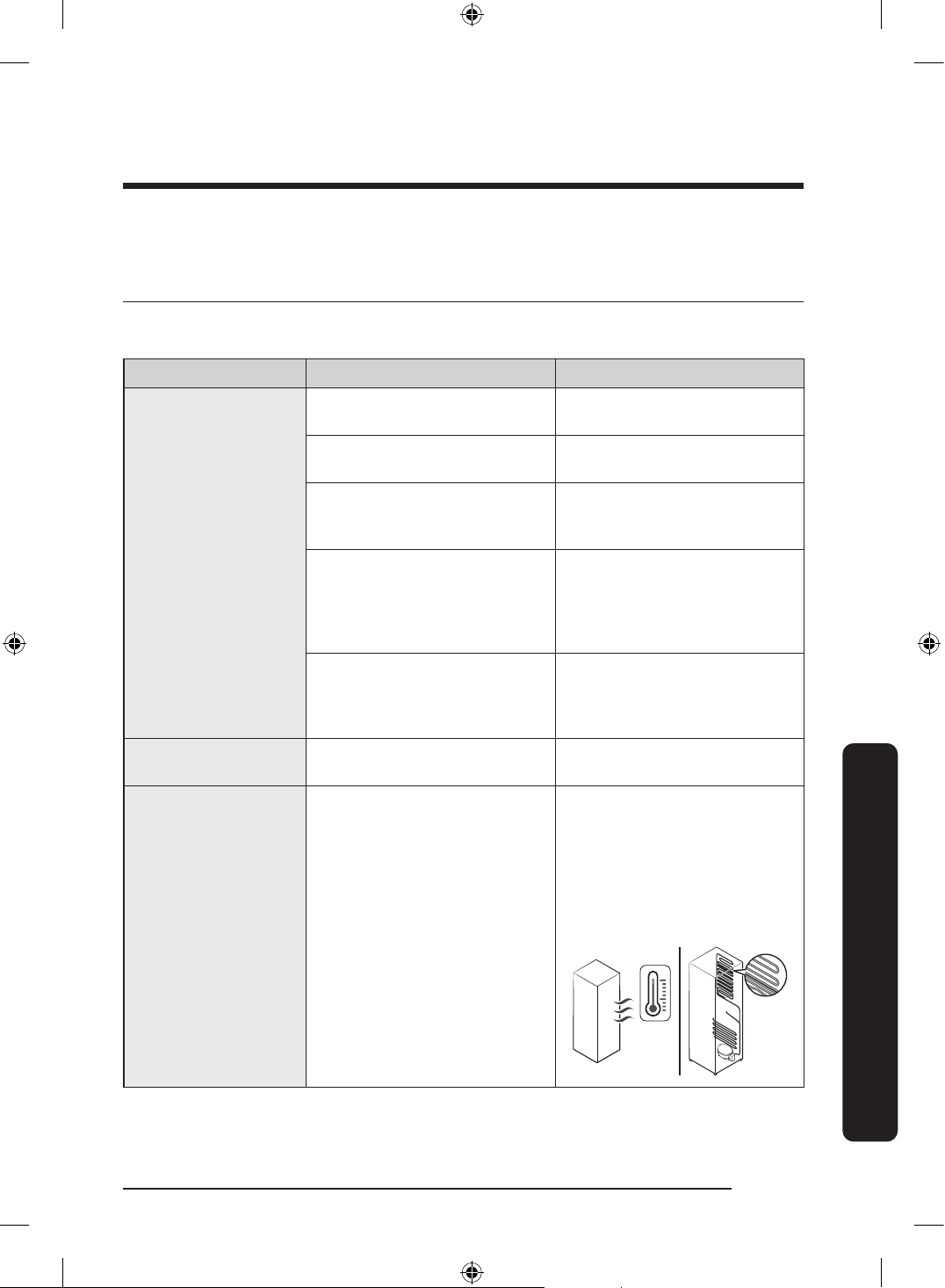
English 85
Troubleshooting
Before calling for service, review the checkpoints below. Any service calls regarding
normal situations (No Defect Cases) will be charged to users.
General
Temperature
Symptom Possible causes Solution
Fridge/freezer does
not operate.
Fridge/freezer
temperature is warm.
• Power cord is not plugged
in properly.
• Properly plug in the power
cord.
• Temperature control is not
set correctly.
• Set the temperature lower.
• Refrigerator is located near
a heat source or direct
sunlight.
• Keep the refrigerator away
from direct sunlight or a
heat source.
• Not enough clearance
between refrigerator and
nearby walls or cabinets.
• We recommend that
the gap between the
refrigerator and nearby
walls (or cabinets) is more
than 2" (50 mm).
• The refrigerator is
overloaded. Food is
blocking the refrigerator
vents.
• Do not overload the
refrigerator. Do not allow
food to block vents.
Fridge/freezer is
over-cooling.
• Temperature control is not
set correctly.
• Set the temperature higher.
Interior wall is hot.
• Refrigerator has heat-proof
piping in the interior wall.
• To prevent condensation
from forming, the
refrigerator has heat-proof
piping in the front corners.
If the ambient temperature
rises, this equipment may
not work effectively. This is
not a system failure.
Troubleshooting
Untitled-3 85Untitled-3 85 2024-07-04 2:32:302024-07-04 2:32:30
Troubleshooting
English86
Troubleshooting
Odors
Symptom Possible causes Solution
Refrigerator has
odors.
• Spoiled food.
• Clean the refrigerator and
remove any spoiled food.
• Food with strong odors.
• Make sure strong smelling
food is wrapped airtight.
Frost
Symptom Possible causes Solution
Frost around the
vents.
• Food is blocking the vents.
• Make sure no food blocks
the refrigerator vents.
Frost on interior
walls.
• Door is not closed properly.
• Make sure food does not
block the door. Clean the
door gasket.
Fruits or vegetables
are frozen.
• Fruits or vegetables are
stored in the FlexZone.
• Do not store most kinds of
fruit or vegetables in the
FlexZone.
Condensation
Symptom Possible causes Solution
Condensation forms
on the interior walls.
• If door is left open,
moisture enters the
refrigerator.
• Remove the moisture and
do not leave a door open
for extended periods of
time.
• Food with high moisture
content.
• Make sure food is wrapped
airtight.
Untitled-3 86Untitled-3 86 2024-07-04 2:32:302024-07-04 2:32:30
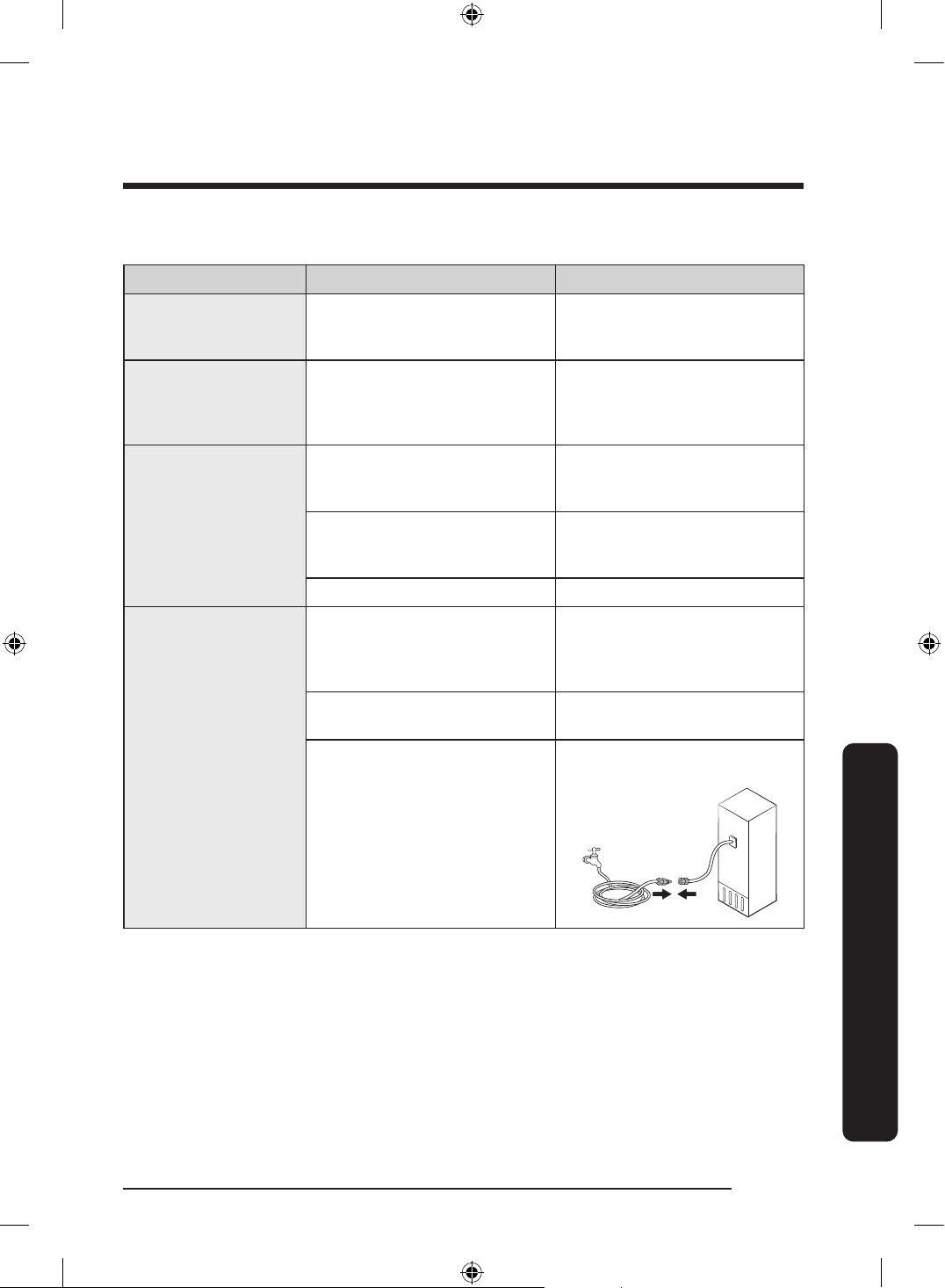
English 87
Troubleshooting
Water/ice (dispenser models only)
Symptom Possible causes Solution
Water ow is weaker
than normal.
• Water pressure is too low.
• Make sure the water
pressure is between 206-
861 kPa.
Ice maker makes a
buzzing sound.
• The ice maker function is
activated, but the water
supply to the refrigerator
has not been connected.
• Turn off the Ice Maker.
Ice maker does not
make ice.
• Ice maker has just been
installed.
• You must wait for 24 hours
for the refrigerator to make
ice.
• Freezer temperature is too
high.
• Set the freezer temperature
below -18 °C or -20 °C in
warm ambient air.
• Ice maker is off. • Turn on the ice maker.
Ice does not dispense.
• Ice may jam if the ice
dispenser is not used for a
long time (approx. 3 weeks).
• If you won't be using the
refrigerator for a long time,
empty the ice bucket and
turn off the ice maker.
• Ice bucket is not properly
inserted.
• Make sure the ice bucket is
properly inserted.
• Water line is not connected
properly or water supply is
not on.
• Check the water installation
conditions.
Untitled-3 87Untitled-3 87 2024-07-04 2:32:302024-07-04 2:32:30
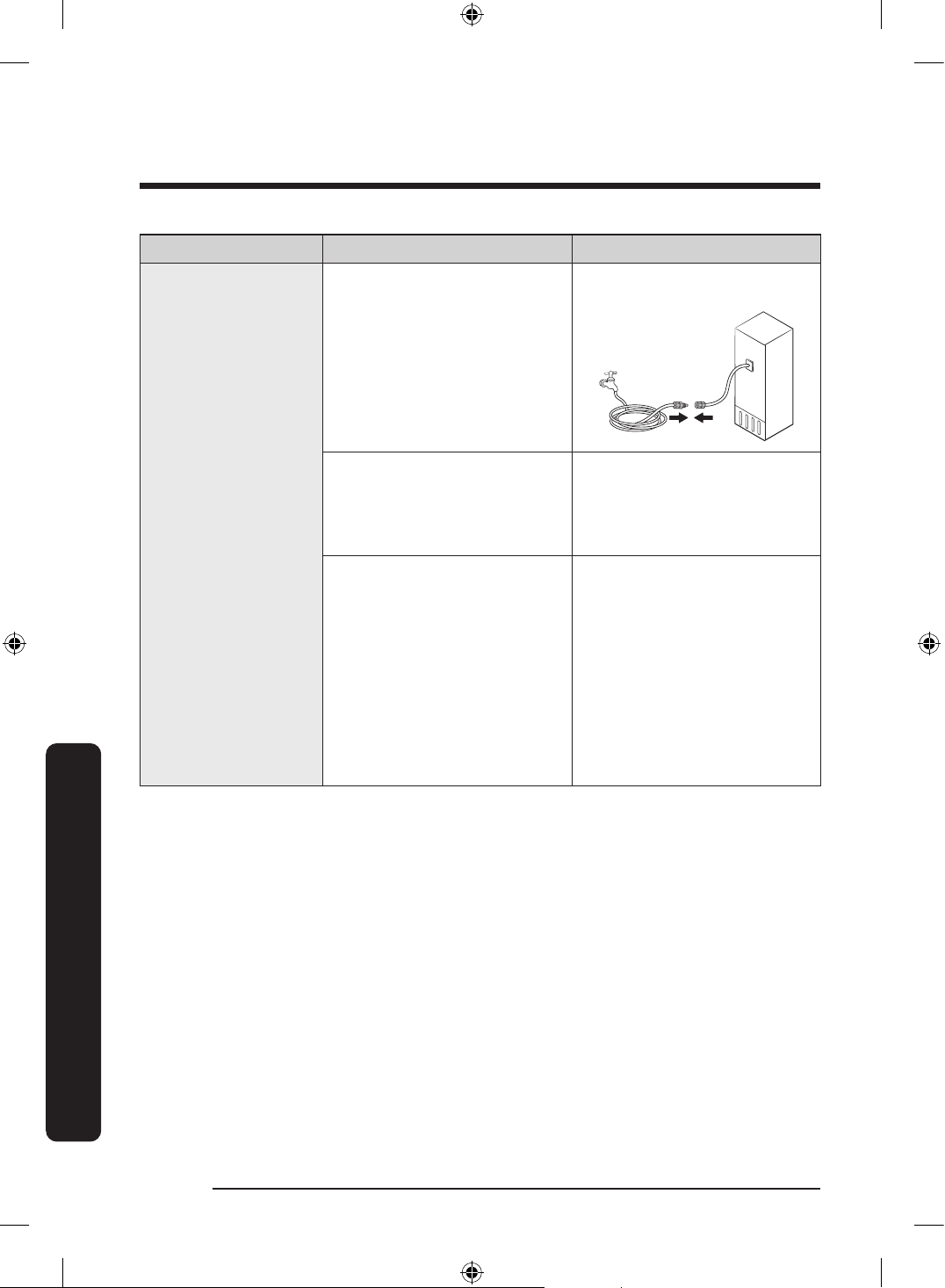
Troubleshooting
English88
Troubleshooting
Symptom Possible causes Solution
Water does not
dispense.
• Water line is not connected
properly or water supply is
not on.
• Check the water installation
conditions.
• A third-party water lter
was installed.
• Use only Samsung-provided
or approved lters.
• Unapproved lters may
leak and damage the
refrigerator.
General type
• The “Replace water lter”
message appars on the
main panel.
Family Hub type
• The water lter indicator
turns on red.
General type
• Replace the water lter.
Then on the main panel, go
to Settings, and then run
Filter Reset.
Family Hub type
• Replace the water lter.
After replacing, reset the
lter in Fridge Manager
> Fridge Settings > Water
Filter.
Untitled-3 88Untitled-3 88 2024-07-04 2:32:302024-07-04 2:32:30
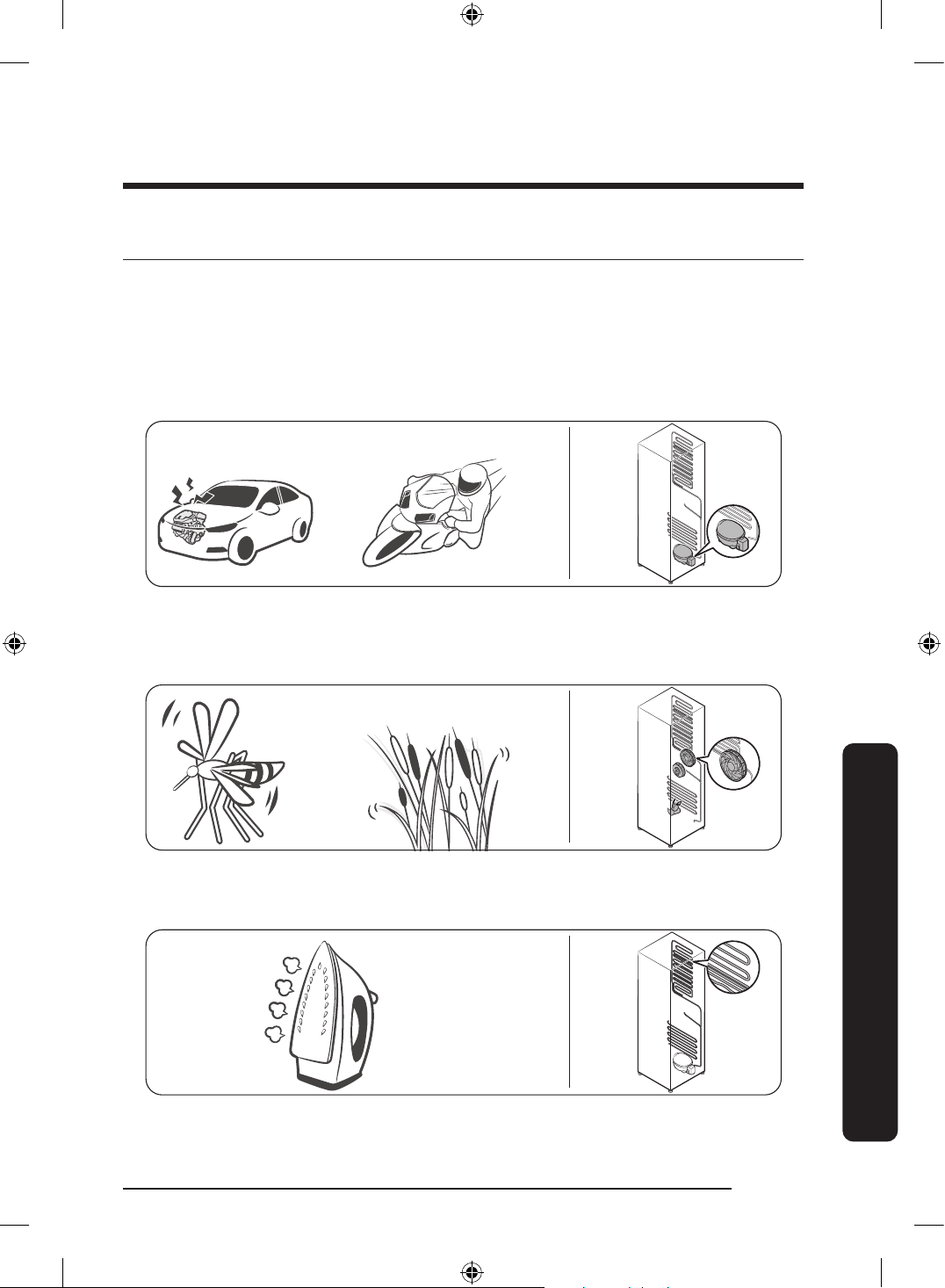
English 89
Troubleshooting
Do you hear abnormal sounds from the refrigerator?
Before calling for service, review the checkpoints below. Any service calls related to
normal sounds will be charged to the user.
These sounds are normal.
• When starting or ending an operation, the refrigerator may make sounds similar to a
car engine igniting. As the operation stabilizes, the sounds will decrease.
Clicking!
or Chirping!
Buzzing!
• While the fan is operating, these sounds may occur. When the refrigerator reaches the
set temperature, no fan sound will occur.
SSSRRR!
Whir!
• During a defrost cycle, water may drip on the defrost heater, causing sizzling sounds.
HiSS!
Untitled-3 89Untitled-3 89 2024-07-04 2:32:302024-07-04 2:32:30
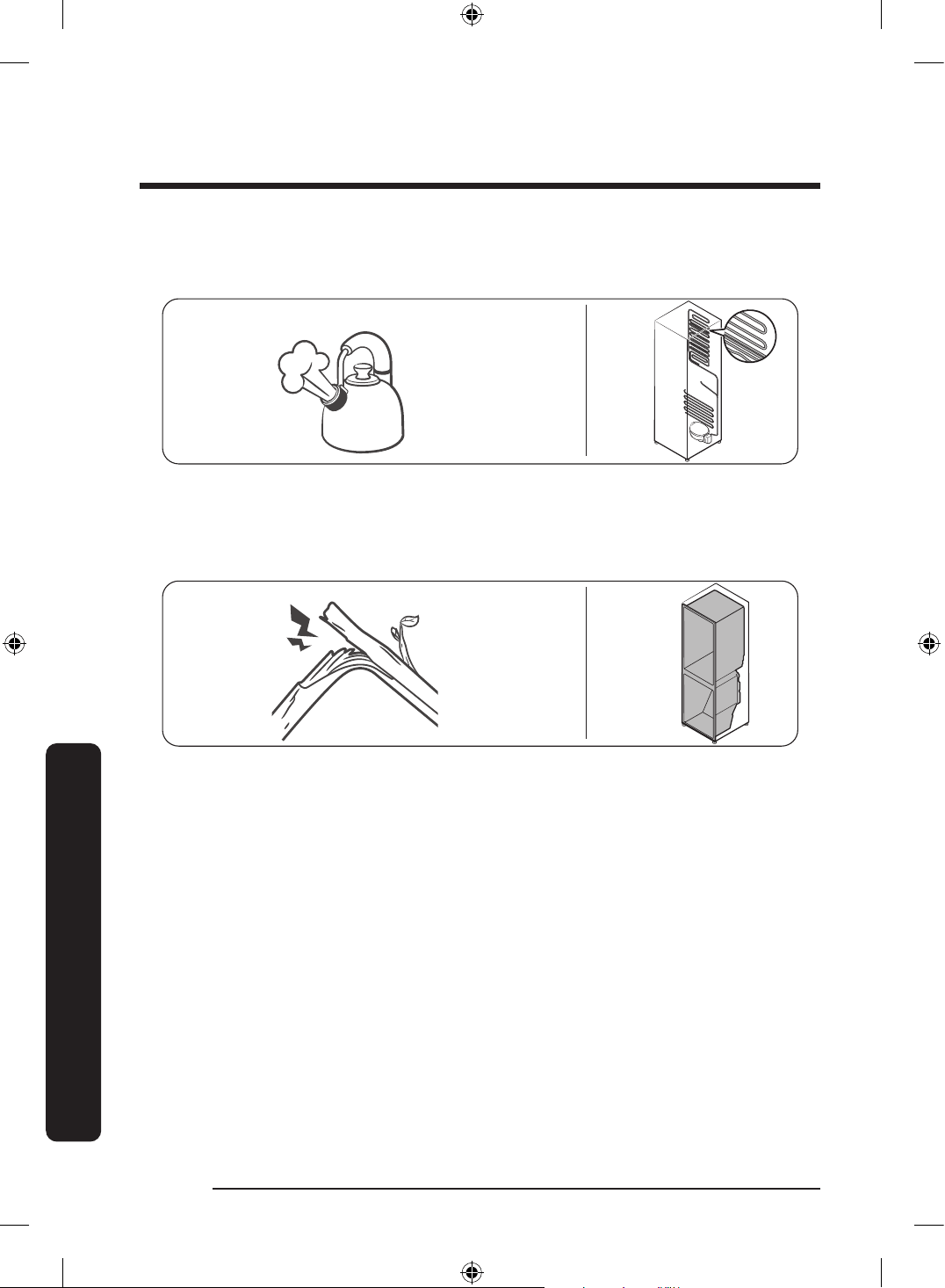
Troubleshooting
English90
Troubleshooting
• As the refrigerator cools or freezes, refrigerant gas moves through sealed pipes, causing
bubbling sounds.
Bubbling!
• As the refrigerator temperature increases or decreases, plastic parts contract and
expand, creating knocking noises. These noises occur during the defrosting cycle or
when electronic parts are working.
Cracking!
• For ice maker models: When the water valve opens to ll the ice maker, buzzing sounds
may occur.
• Because of pressure equalizing when opening and closing the refrigerator door,
whooshing sounds may occur.
Untitled-3 90Untitled-3 90 2024-07-04 2:32:302024-07-04 2:32:30
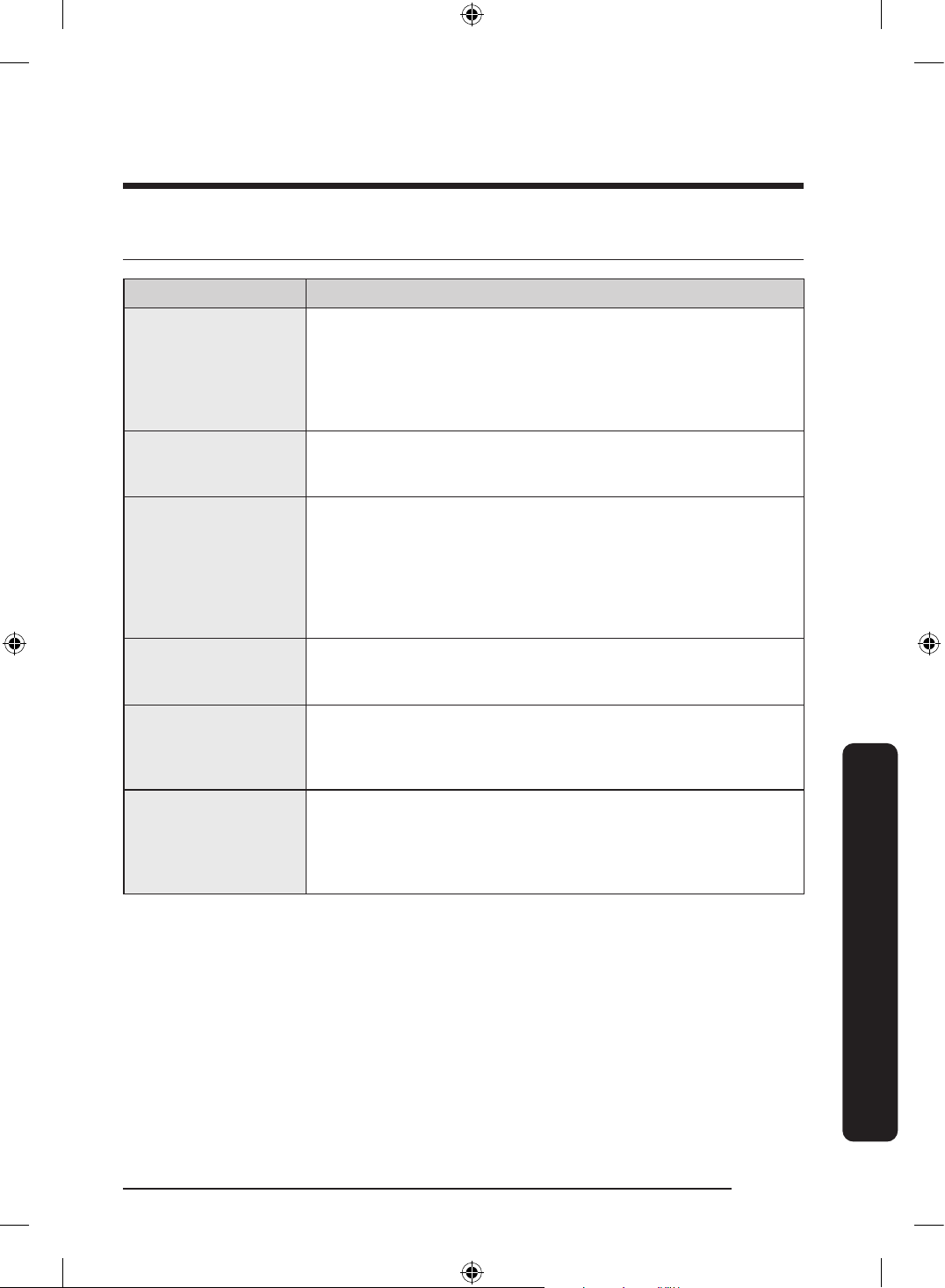
English 91
Troubleshooting
SmartThings
Symptom Action
Could not nd
“SmartThings” in the
app market.
• The supporting software version of the SmartThings app is
subject to change according to the OS supporting policy the
manufacturer provides. In addition, as for the SmartThings
app or the functions that the app supports, the new
application update policy on the existing OS version can be
suspended due to usability or security reasons.
The SmartThings app
fails to operate.
• The SmartThings app is available for applicable models only.
• The old Samsung Smart Refrigerator app cannot connect with
Samsung Smart Home models.
The SmartThings
app is installed but is
not connected to my
refrigerator.
• You must log into your Samsung account to use the app.
• Make sure that your router is operating normally.
• If the Wi-Fi icon on the refrigerator’s display is off, this
indicates that no network connection has been established
yet. In this case, use the SmartThings app to connect and
register your refrigerator to the access point (AP) of your
house.
Could not log into the
app.
• You must log into your Samsung account to use the app.
• If you don’t have a Samsung account, follow the app’s
onscreen instructions to create one.
An error message
appears when I
try to register my
refrigerator.
• Easy Connection may fail due to the distance from your
access point (AP) or electrical interference from the
surrounding environment. Wait a moment and try again.
The SmartThings
app is successfully
connected to my
refrigerator but does
not run.
• Exit and restart the SmartThings app, or disconnect and
reconnect the router.
• Power off the refrigerator, and then power it on again after
1 minute.
Untitled-3 91Untitled-3 91 2024-07-04 2:32:312024-07-04 2:32:31
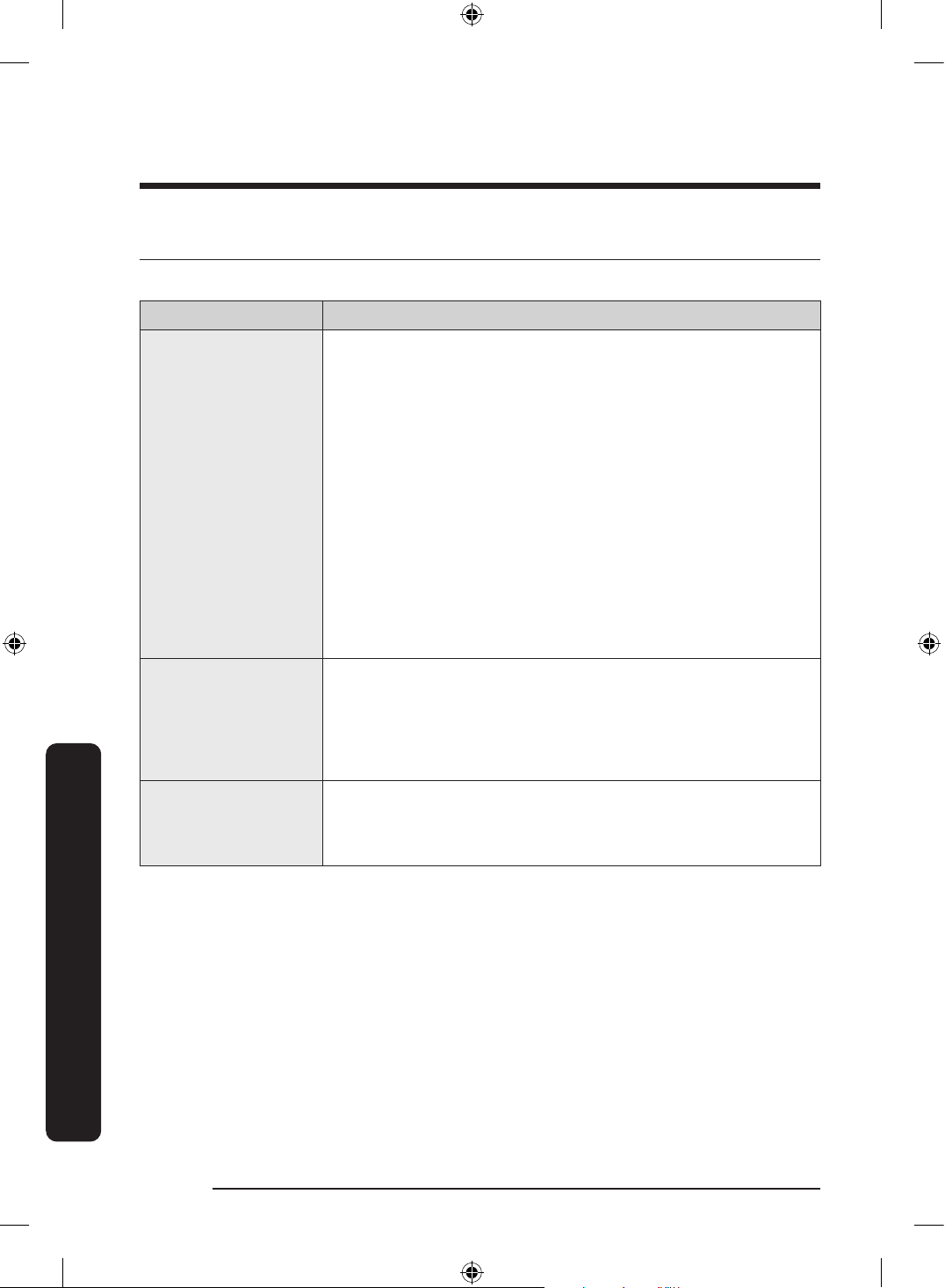
Troubleshooting
English92
Troubleshooting
LCD
(Applicable to Family Hub type only)
Symptom Action
Cannot connect to
my TV.
• Check if your TV supports the “TV to Mobile” function.
- You may nd your model name on the label attached to
your TV's back or on your TV's Settings menu.
- Search for your model on Samsung website and check the
specications section to see if your model supports the
function.
- 2015-2016 : (J/K models) : JU6400/KU6400 series or
above
- 2017 : Q6FM or above, MU6400 or above, LS003(frame)
- 2018 : Q6FN or above, NU7400 or above, LS03N(frame)
- 2019 : Q60R or above, LS03R(frame), LS01R(serif),
LS05R(sero. Korea only)
- Models released in 2020 and after: Q70 series or above,
LS01 series (serif), LS03 series (frame, except 32” models),
LS05 series (sero).
• Network connections may suffer temporary interruptions.
Turn your TV off, and then try again.
The inner view
picture looks bulged
out or incomplete.
• The edges of the inner view may look bulged out. The
bulging is caused by the convex lens of the camera.
• The inner view may be incomplete due to the blind spots
on the left and right corners or screened depending on the
layout of food items. Make sure to place food items in the
front center.
The displayed
measurement on the
Fridge Manager is not
correct.
• The displayed conditions may differ from the actual
temperature and humidity.
Untitled-3 92Untitled-3 92 2024-07-04 2:32:312024-07-04 2:32:31
English 93
Open Source Announcement
(Applicable to general type only. For Family Hub type, refer to the online manual.)
The software included in this product contains open source software.
The following URL http://opensource.samsung.com/opensource/SMART_TP1_0/seq/0 leads
to open source license information as related to this product.
Untitled-3 93Untitled-3 93 2024-07-04 2:32:312024-07-04 2:32:31
Memo
Untitled-3 94Untitled-3 94 2024-07-04 2:32:312024-07-04 2:32:31
Memo
Untitled-3 95Untitled-3 95 2024-07-04 2:32:312024-07-04 2:32:31
Contact SAMSUNG WORLD WIDE
If you have any questions or comments relating to Samsung products, please contact the
SAMSUNG customer care centre.
Country Contact Center Website
AUSTRALIA
1300 362 603 (Other)
1300 425 299 (HHP)
www.samsung.com/au/support
NEW ZEALAND
0800 726 786 (All Product)
0800 6 726 786 (Support for Smart Mobile
Devices)
www.samsung.com/nz/support
DA68-04782H-01
Untitled-3 96Untitled-3 96 2024-07-04 2:32:312024-07-04 2:32:31