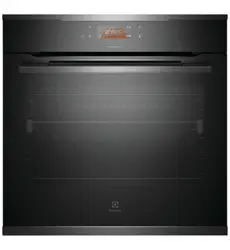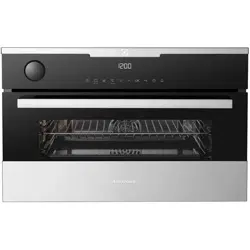
User manualCooking
EVE602, EVE614, EVE615, EVE636,
EVEP614, EVEP615, EVEP616,
EVEP618, EVEP619, EVEP626,
Enjoy peace of mind.
Register your appliance today.
Stay updated on better living services, safety notices and shop
for accessories.
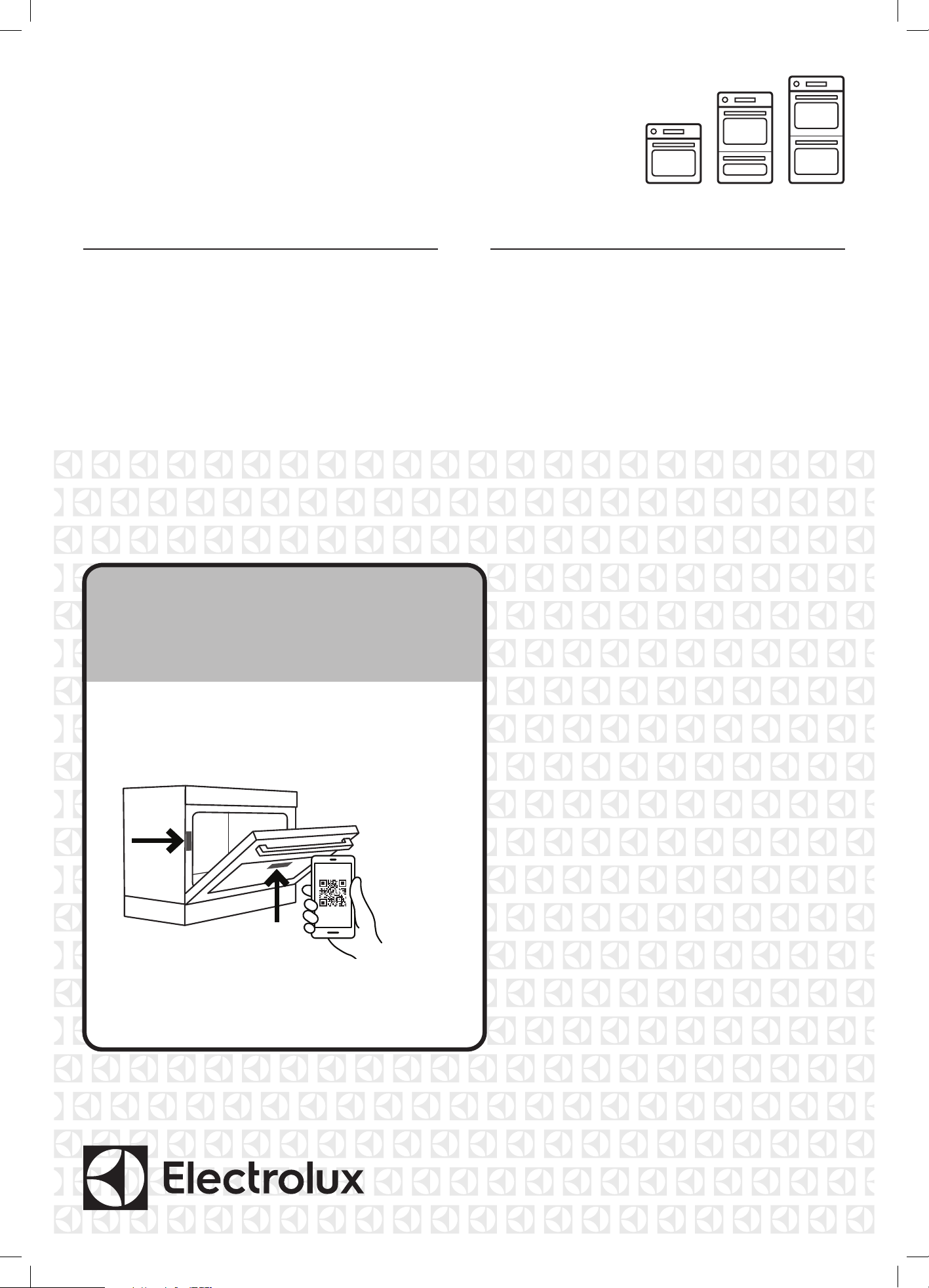
1. Open the camera app on your smartphone and
point at the QR code to scan
Product Registration QR code is located on the
front of your appliance or inside the door rim*.
2. Tap the notification or link to open the registration form
3. Complete your details and enjoy peace of mind
*Exact location of QR code may vary depending on oven model
2 electrolux.com.au
CONTENTS
Important instructions ______________________________ 3
Before using your appliance _____________________ 3
Information on disposal for users ________________ 3
Important safety instructions ____________________ 3
General cautions ______________________________ 4
Installation of the appliance _____________________ 5
Installing the oven accessories __________________ 7
Using the appliance ___________________________ 9
Getting to know the oven _____________________ 10
Technical specications ___________________________ 11
EVE602, EVE614 _________________________________ 12
Before using the appliance ____________________ 13
Cooking functions ____________________________ 14
Operating sequence __________________________ 15
Using the appliance __________________________ 15
EVEP614 ________________________________________ 17
Cooking functions ____________________________ 18
Operating sequence __________________________ 19
Using the appliance __________________________ 19
Before first use ______________________________ 20
Daily use ___________________________________ 21
Clock functions ______________________________ 22
Menu _______________________________________ 25
Pyrolytic cleaning the oven ____________________ 27
EVE636, EVEP626 ________________________________ 28
EVEP618, EVEP619 _______________________________ 29
EVE615, EVEP615, EVEP616 _______________________ 30
Using the appliance ___________________________ 31
Display _____________________________________ 32
Condition the oven ___________________________ 33
Daily use ____________________________________ 33
Additional functions ___________________________ 34
Cooking functions ____________________________ 36
Menu _______________________________________ 39
Pyrolytic cleaning ________________________________ 42
All models __________________________________ 42
EVEP626 ___________________________________ 43
Assisted cooking recipes __________________________ 44
Steam assisted cooking ___________________________ 45
EVE602, EVE614 ____________________________ 45
EVEP614 ___________________________________ 45
EVE615, EVE636, EVEP615, EVEP616, EVEP626 _ 46
EVEP618, EVEP619 __________________________ 47
Cooking function – Steam assist ________________ 47
Steam cooking operation ______________________ 48
Steam maintenance __________________________ 48
Steam service functions _______________________ 49
Water hardness ______________________________ 50
Steam cooking guide _________________________ 51
Using the food sensor/probe _______________________ 52
Cooking guide ___________________________________ 55
Dealing with cooking problems ____________________ 60
Cleaning the appliance ____________________________ 61
Tips and troubleshooting __________________________ 68
Shortcuts _______________________________________ 70
Troubleshooting __________________________________ 71
Notes ________________________________________ 73
Warranty ________________________________________ 75
CONGRATULATIONS
Dear customer,
Thank you for purchasing an Electrolux oven.
You’ve chosen a product that brings with it decades
of professional experience and innovation. Ingenious
and stylish, it has been designed with you in mind.
So whenever you use it, you can be safe in the
knowledge that you’ll get great results every time.
Welcome to Electrolux.
The symbols you will see in this booklet have
these meanings:
WARNING
This symbol indicates information concerning your
personal safety.
CAUTION
This symbol indicates information on how to avoid
damaging the cooker or cabinet.
IMPORTANT
This symbol indicates tips and information about
use of the cooker.
ENVIRONMENT
This symbol indicates tips and information about
economical and ecological use of the cooker.
NOTE: Model codes shown in this manual are the generic
code. Your product will also include a two letter suffix
which denotes colour and series level.
CONDITIONS OF USE
This appliance is intended to be used in household and
similar applications such as:
• Staff kitchen areas in shops, offices and other
working environments
• Farm houses
• By clients in hotels, motels and other residential
type environments
• Bed and breakfast type environments
• Catering and similar non-retail applications
Record model and serial number here:
Model number: ____________________________________
Serial number: _____________________________________

3
SOFTWARE LICENSES
The software in this product contains components that are
based on free and open source software. Electrolux gratefully
acknowledges the contributions of the open software and
robotics communities to the development project.
To access the source code of these free and open source
software components whose license conditions require
publishing, and to see their full copyright information and
applicable license terms, please visit: http://electrolux.
opensoftwarerepository.com (folder NIU5)”
BEFORE USING YOUR APPLIANCE
Before you use the appliance, we recommend that
you read through the relevant sections of this manual,
which provides the description of your appliance and
its functions.
To avoid the risks that are always present when you use
an appliance, it is important that the appliance is installed
correctly and that you read the safety instructions carefully
to avoid misuse and hazards.
We recommend that you keep this instruction booklet for
future reference and pass it on to any future owners.
This appliance complies with the requirements of
Australian Standards AS/NZS 60335.2.6
IMPORTANT
Check for any damage or marks. If you find the
appliance is damaged or marked, you must report
it within 7 days if you wish to claim for damage/
marks under the manufacturer’s warranty. This
does not affect your statutory rights.
Preparing the oven
1. Please remove all stickers and protective film from
doors and control panel, and remove all leaflets and
boxes from the floor of the oven before operation.
2. Please wipe out the oven interior prior to operation
IMPORTANT INSTRUCTIONS
with warm soapy water and polish dry with a soft
clean cloth. Do not close the oven door until the oven
is completely dry.
3. Do not line the oven with foil. It will damage
the enamel.
4. For model EVEP618, check the water drawer interior
for dust or contaminates. Wipe clean with a damp
cloth if necessary.
IMPORTANT
New appliances can have a smell during first use.
It is recommended to ‘run in’ the oven before
cooking for the first time. Operate the oven,
empty, at a temperature of 180°C for
approximately 30 minutes.
Please ensure the room is well ventilated
during this process.
INFORMATION ON DISPOSAL
FOR USERS
ENVIRONMENT
Most of the packing materials are recyclable.
Please dispose of those materials through your
local recycling depot or by placing them in
appropriate collection containers.
If you wish to discard this appliance, please
contact your local authorities and ask for the
correct method of disposal.
IMPORTANT SAFETY INSTRUCTIONS
WARNING
These warnings have been provided in the interest
of safety. You MUST read them carefully before
installing or using the appliance.
• An authorised person must install this appliance.
(Certificate of Compliance to be retained).
• Before using the appliance, ensure that all packing
materials are removed from the appliance.
• In order to avoid any potential hazard, the enclosed
installation instructions must be followed.
• Ensure that all specified vents, openings and air
spaces are not blocked.
• Where the appliance is built into a cabinet, the
cabinet material must be capable of withstanding
70°C. If adjacent to vinyl-wrapped surfaces, use
installation kit from vinyl wrap supplier.
Important Information that may impact your
Manufacturer’s Warranty
Adherence to the directions for use in this manual
is extremely important for health and safety. Failure
to strictly adhere to the requirements in this manual
may result in personal injury, property damage and
affect your ability to make a claim under the Electrolux
manufacturer’s warranty provided with your product.
Products must be used, installed and operated in
accordance with this manual. You may not be able to
claim on the Electrolux manufacturer’s warranty in the
event that your product fault is due to failure to adhere
to this manual.

4 electrolux.com.au
IMPORTANT INSTRUCTIONS (CONTINUED)
• Only authorised personnel should carry out
servicing. (Certificate of Compliance to be retained)
• Always ensure the appliance is switched off before
cleaning or replacing parts.
• For model EVEP618/619, do not open the oven
door during steam cooking. Steam can be released.
There is a risk of skin burns. There is a risk that
steam causes moisture damage to cabinets.
• Allow the oven to cool down for 30 minutes before
you drain the water tank in a steam oven. Scalding
water may be released.
• In order to avoid fire, the appliance must be kept
clean and vents kept unobstructed.
• Do not spray flammable materials in or under the
appliance, e.g. aerosols.
• Always use gloves when handling hot items inside
the oven.
• Always turn the grill off immediately after use as fat
left behind may catch fire.
• Do not cover the grill dish insert with foil, as fat left
there may catch fire.
• Always keep the grill dish clean as any fat residue
may catch fire.
• Do not leave the grill on unattended.
• To avoid fire, ensure that the grill trays and fittings
are always inserted into the appliance in accordance
with the instructions.
• To avoid any electric shock, switch the appliance
off before removing the oven light glass for globe
replacement.
• To avoid an accident, ensure that the oven shelves
and fittings are always inserted into the appliance in
accordance with the instructions.
• This appliance must be earthed.
NOTE: The cooking process must be supervised. A short
term cooking process has to be supervised continuously.
Child safety
This appliance is not intended for use by persons
(including children) with reduced physical, sensory or
mental capabilities, or lack of experience and knowledge,
unless they have been given supervision or instruction
concerning use of the appliance by a person responsible
for their safety.
• Children should be supervised to ensure that they
do not play with the appliance.
• During use this appliance becomes hot. Care should
be taken to avoid touching hot surfaces, e.g. oven
door, heating elements.
• Accessible parts will also become hot when in use.
To avoid burns and scalds children should be
kept away.
GENERAL CAUTIONS
Read the following carefully to avoid damage or injury.
It is important to use the appliance safely.
Check these safety points before using the appliance.
• This appliance must not be used as a space heater.
• Do not place thick portions of food under the grill.
Foods may curl, catch and ignite.
• Do not use the door as a shelf.
• Do not push down on the open oven door.
• Do not use harsh abrasive cleaners or sharp metal
scrapers to clean the oven door glass since they can
scratch the surface, and may result in shattering of
the glass.
• Do not use steam cleaners, as this may cause
moisture build-up.
• Always clean the appliance immediately after any
food spills.
• Only use the Food Sensor/probe recommended
for this appliance or the correct replacement parts
(selected models only).
WARNING
To maintain safe operation, it is recommended that
the product be inspected every five years by an
authorised service person.
ENVIRONMENT
To save energy and to help protect the
environment, we recommend these hints:
• Use the oven efficiently, by cooking many trays of
food at the same time. Cook 2 trays of scones, small
cakes or sausage rolls at the same time.
• Select the correct shelf location for food
being cooked.
• Do not open the oven door more than necessary.
NOTE: You must read these warnings carefully before
installing or using the appliance. If you need assistance,
contact your Customer Care Centre. The manufacturer will
not accept liability, should these instructions or any other
safety instructions incorporated in this book be ignored.
5
INSTALLATION OF THE APPLIANCE
WARNING
The appliance must not be installed behind a
decorative door in order to avoid overheating.
To avoid any potential hazard, you must follow
our instructions when you install your appliance.
Failure to install the appliance correctly could
invalidate any warranty or liability claims and lead
to prosecution.
Use an authorised person
As stated in the local municipal building codes and other
relevant statutory regulations:
• Wiring connections must be in accordance with AS/
NZS 3000 Wiring Rules and any particular conditions
of the local authority.
•
Refer to data plate for rating information. The data
plate is positioned behind the bottom of the oven door.
• For appliances with open cooking surfaces, a
disconnect functional switch should be provided near
the appliance in an accessible position. Refer to
AS/NZS 3000 clause 4.7.1
•
Wiring should be protected against mechanical failure.
Refer to AS/NZS3000 clauses 3.3.2.6, 3.9, 3.10
• A means of disconnection with a contact separation
of at least 3mm must be supplied in the fixed wiring.
• This appliance must be connected with cable of 75°C
rating minimum.
• This product has passed the insulation resistance
test after manufacture. If the resistance reading is low
at installation, it is probably caused by moisture from
the atmosphere being absorbed by the elements
after the appliance has been produced. (pass at
0.01MΩ AS/NZS 3000 Wiring Rules Clause 8.3.6.2).
WARNING
This appliance must be properly earthed.
• Do not lift the appliance by the door handles.
• Prepare the cupboard opening to match your
appliance measurements. (See diagrams)
• Slide appliance into the cupboard, ensuring that the
supply cable (where fitted) does not kink.
• To prevent tipping, use the screws supplied to
secure your appliance into the cupboard by fastening
through the 4 holes to the front panel.
• Where the appliance is built into a cabinet, the
cabinet must be capable of withstanding 70°C.
Installation into low temperature tolerant cabinetry
(e.g. Vinyl coated) may result in deterioration of the
low temperature coating by discolouring or bubbling.
• If the appliance is to be installed adjacent to vinyl
wrapped surfaces, use an installation kit available
from the vinyl-wrap supplier.
•
Electrolux Home Products cannot accept
responsibility for damage caused by installation into
low temperature tolerant cabinets.
•
After installation, test and ensure that the appliance
operates correctly before handing it over to the customer.
NOTE: If a powerpoint is fitted it must be accessible with
the appliance installed, as the plug must be accessible
after installation.
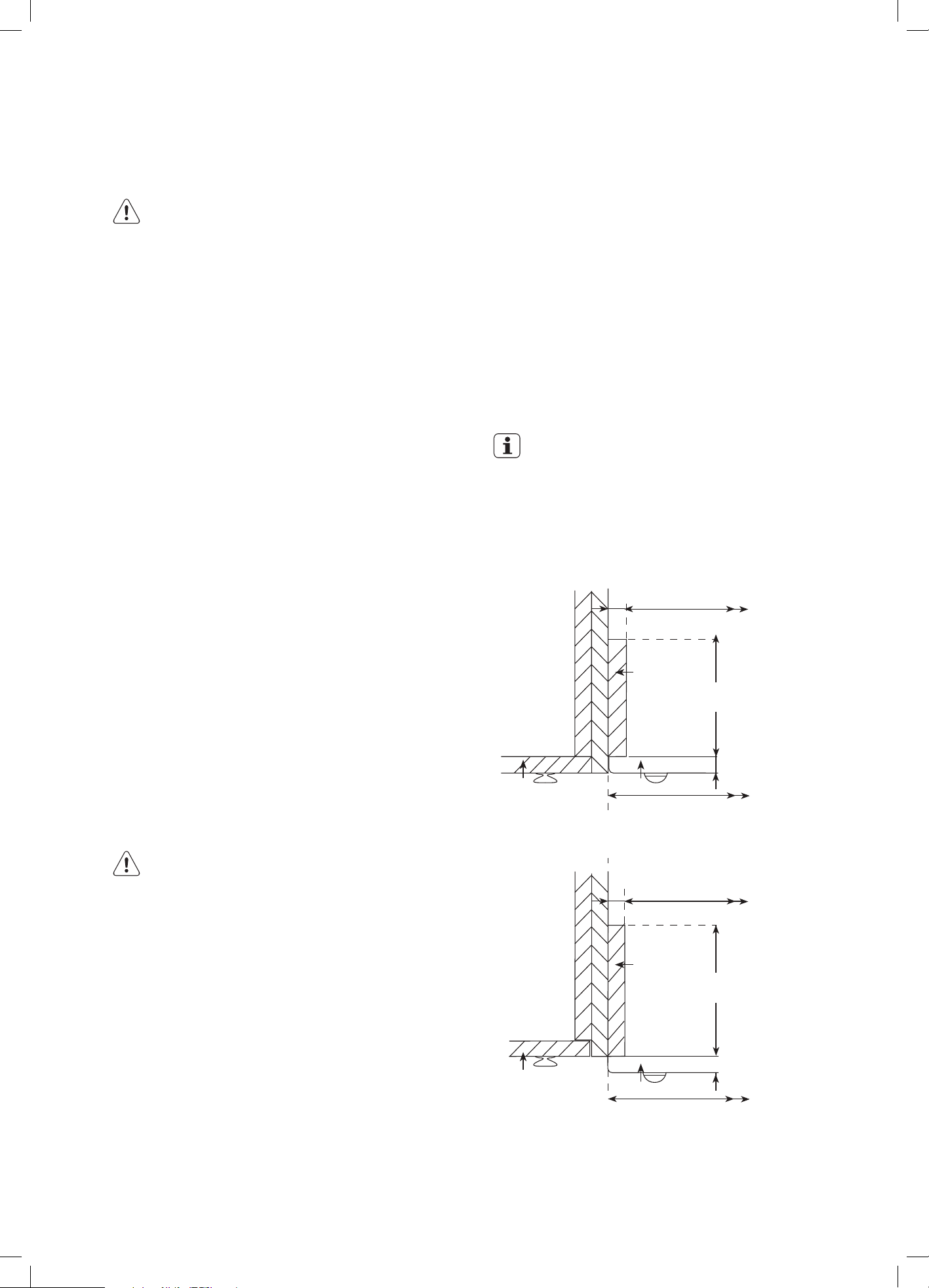
Cabinet construction for your appliance
For the best integration within a kitchen, install this appliance
in a standard 600mm wide cupboard that gives a flush fit
(Figure A) with the surrounding cupboard fronts. Non-pyrolytic
appliances can also be installed using a proud fit (Figure B).
IMPORTANT
For all Pyrolytic clean models, the “infill panel”
MUST not exceed 100mm in length. This ensures
a 16mm gap is maintained between the cabinet
and side of the appliance to prevent the cupboard
overheating.
Figure A – Flush Fit
568mm
568mm
Cupboard
door
Cupboard
door
20mm
600mm
600mm
Oven
Oven
16mm
16mm
Infill panel
Infill
panel
100mm max
for pyro oven
Figure B – Proud Fit
NOTE: Your appliance must be mounted on a flat
horizontal surface for the full width and depth of
the product
100mm max
for pyro oven
20mm
6 electrolux.com.au
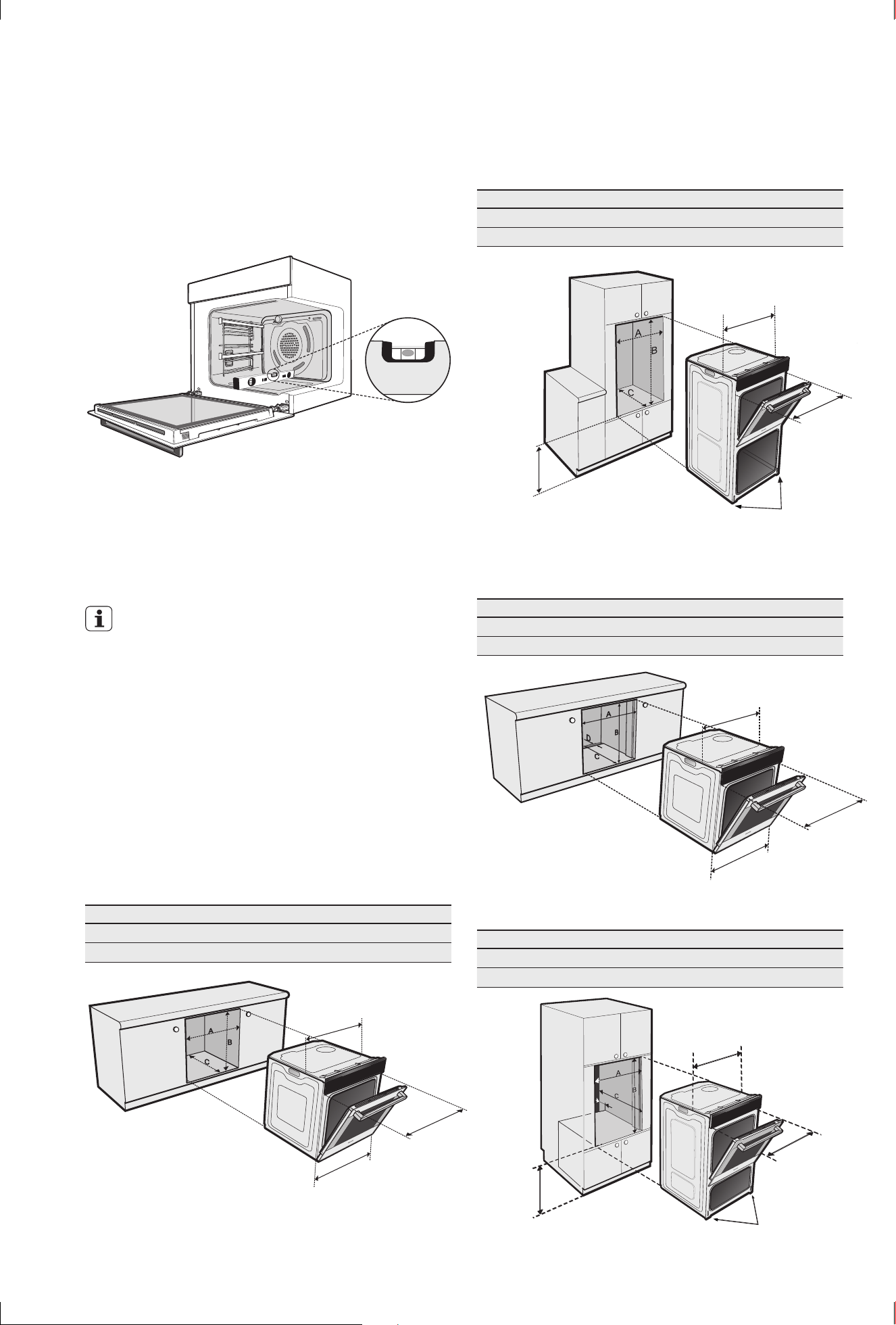
Levelling oven
Place a level in the oven as below making sure the level sits
on the front and rear forms. The level needs to be correct
to prevent slides from moving in or out with gravity.
✓
Underbench oven
Your underbench oven looks best when the control panel
is directly under the benchtop. An upper infill panel may
be added if the cooktop placed above the benchtop is too
deep. Refer to cooktop installation instructions for required
clearance between cooktop and oven.
IMPORTANT!
Note: Dimension ‘D’*
A requirement for all EVEPxxxx pyrolytic clean
ovens and all Duo ovens – for proper ventilation
there MUST be a gap at the bottom rear of the
cabinet. This can be a full width opening 20mm
deep. Refer to dimension “D” in relevant diagram.
Power point connection for the EVEP618/619 must be
accessible with the appliance fully installed. If the supply
cord is damaged it must be replaced by the manufacturer,
its service agent or similarly qualified persons in order to
avoid a hazard.
Cut-out dimensions
type of fit A (width) B (height) C (depth)
Flush fit (mm) 600 600 581 min.
Proud fit (mm) 568 590 560 min.
561mm
mounting
holes
582mm.
Fit black
screws
provided.
596mm
Double oven Cut-out dimensions
type of fit A (width) B (height) C (depth)
Flush fit (mm) 600 1086 581 min.
Proud fit (mm) 568 1078 560 min.
561mm
recommended
450mm min.
mounting
holes
582mm.
Fit black
screws
provided
mounting holes.
Fit black screws
with plastic
spacers provided
Pyrolytic underbench Cut-out dimensions
type of fit A (width) B (height) C (depth) D*
Flush fit (mm) 600 600 581 min. 20
Proud fit (mm) 565 590 560 min. 20
mounting
holes
582mm. Fit
black screws
provided
561mm
596mm
Duo oven Cut-out dimensions
type of fit A (width) B (height) C (depth) D*
Flush fit (mm) 600 893 581 min. 20
Proud fit (mm) 565 885 560 min. 20
D
D
561mm
mounting
holes 582mm.
Fit black
screws
provided
mounting holes. Fit
black screws with plastic
spacers provided
recommended
650mm min.
IMPORTANT INSTRUCTIONS (CONTINUED)
7
INSTALLING THE OVEN
ACCESSORIES
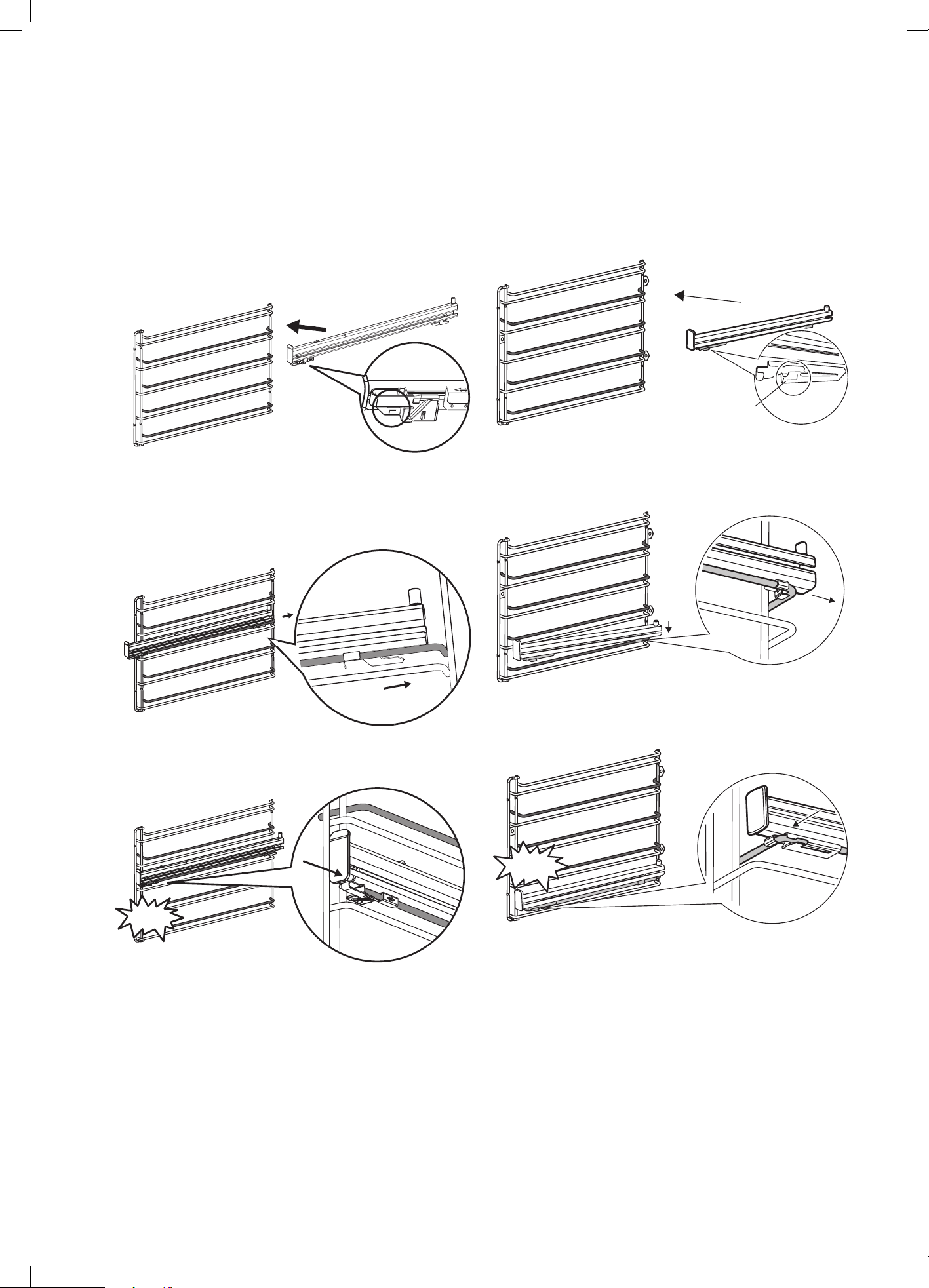
Slides (Telescopic runners)
1. Obtain left hand side rack and left hand slide – see
image to identify.
2. The shaded wires indicate the wire the slide can be
mounted on. Fit slide rear clips to the rear of wire at
an angle as shown below.
1
2
3. Push slide front clip over wire until secured
CLICK !
3
Pyro proof slides
1. Obtain left hand side rack and left hand slide – see
image to identify.
L = left hand side
R = right hand side
2. The shaded wires indicate the wire the slide can be
mounted on. Fit slide rear clips to the rear of wire at
an angle as shown below.
1
2
3. Push slide front clip over wire until secured
3
CLICK!
8 electrolux.com.au
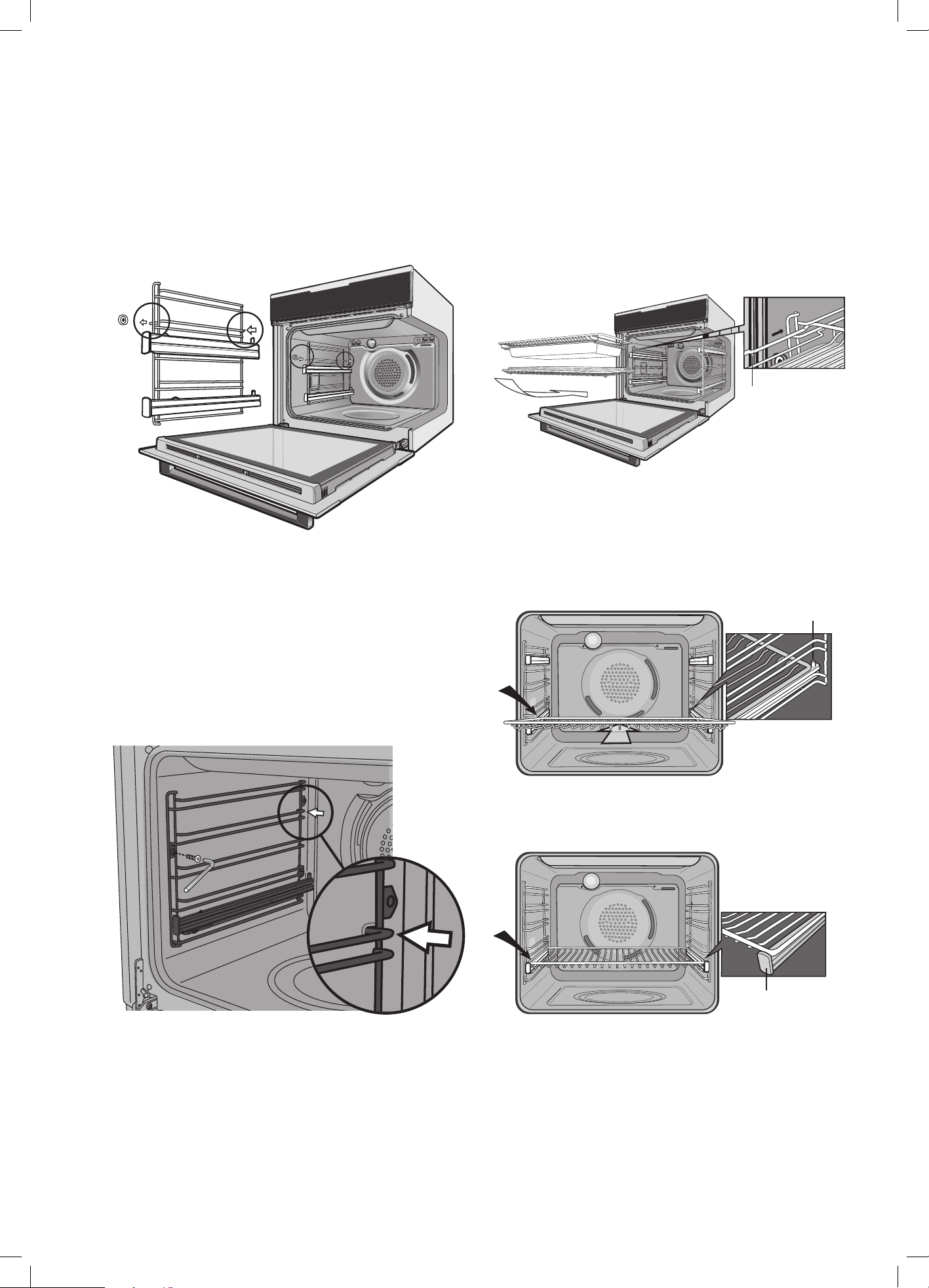
Side racks
1. Insert the rear peg into the rear access hole provided,
ensuring peg is fully inserted.
2. Then locate the front peg into the front access hole
and push in firmly.
NOTE: If you have purchased a two cavity appliance you
will have additional side racks for the lower oven/grill. These
are fitted in a similar manner.
Pyro proof side racks
1. Insert the rear peg into the rear access hole provided,
ensuring peg is fully inserted.
2. Then locate the front hole and insert screw.
3. Tighten with Allen key.
Shelves
The shelves are designed so that they have maximum
extension but cannot be accidentally pulled right out.
To fit a shelf to side racks:
NOTE: To Locate the rear edge of the shelves, the detents
on the side wires should be towards the oven back wall.
See image.
1.
Rest the rear edge of the shelf on the lower guide rail
of the side rack - see diagram. Ensure the same rail
positions on both sides of the oven are being engaged.
2. With the front edge raised, begin to slide the shelf in
between the guide rails of the side rack.
3. Once the detents have passed the front edge of the
side rack, the shelf can be pushed fully in.
Detent
4. When fully inserted the shelf should not interfere with
the closed oven door.
To fit a shelf or tray to telescopic slides:
1. Push the shelf or tray along the top of the slide until it
hits the back post.
Back post
2. Drop the front of the shelf or tray onto the slide
ensuring it sits behind the front post of the slide.
Front post
3. When fully inserted the shelf/tray should not interfere
with the closed oven door.
The appliance is supplied with two types of shelves
1. Standard shelf
2. Grill shelf – The roasting dish can be suspended
under the grill shelf to catch dripping fat. Rest the tray
on two side rails of the grill shelf and push all the way
in. Once the tray is pushed in fully it should sit inside
the side rails.
IMPORTANT INSTRUCTIONS (CONTINUED)
9
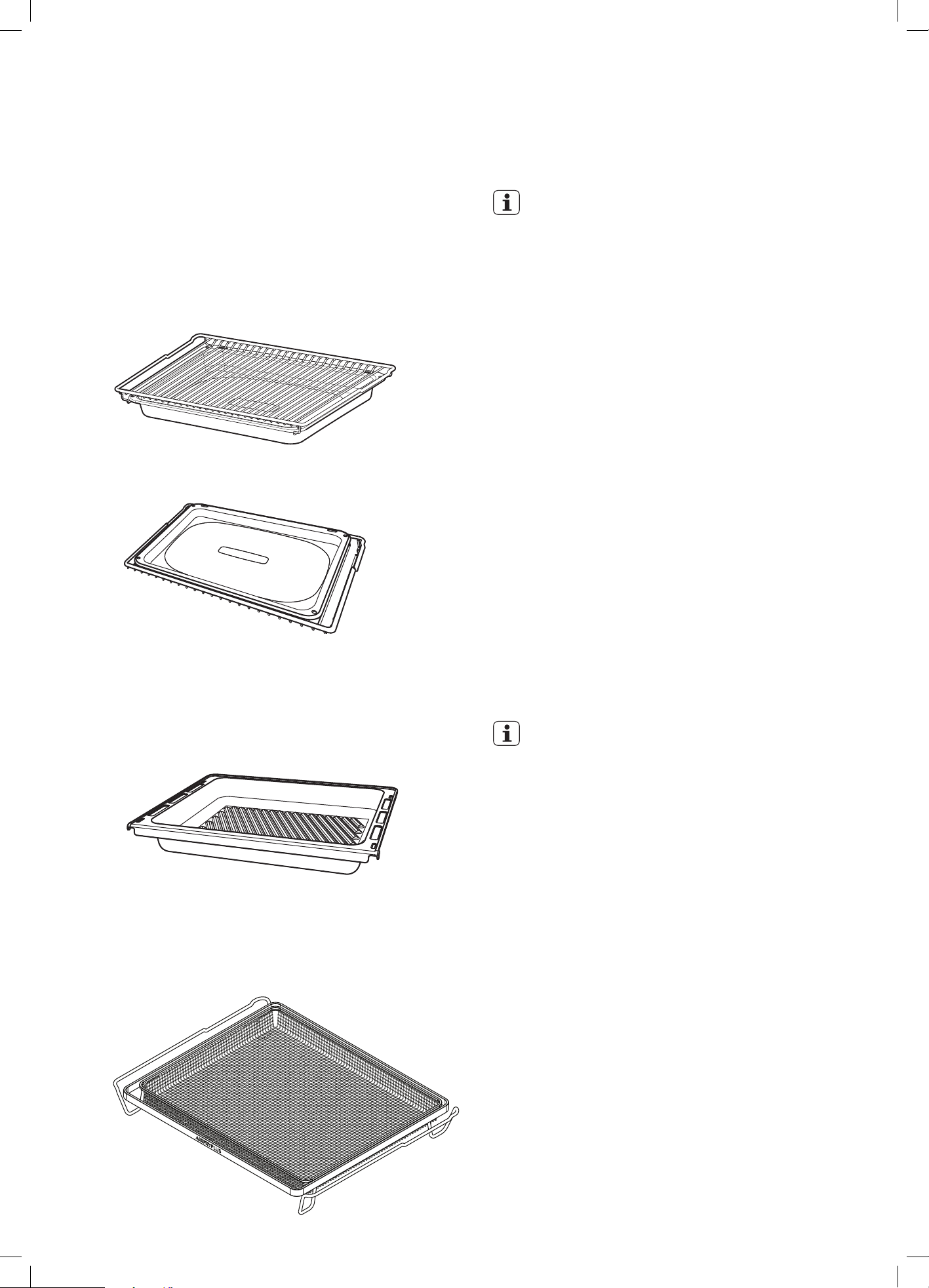
Trays
The appliance is supplied with Baking tray, Roasting tray
and on selected models Cast roasting dish/AirFry Plus tray.
The baking tray and roasting dish can be placed on top of
the shelves or can be suspended under the grill shelf.
Grill shelf and Roasting tray
Baking tray
Cast roasting dish
The Cast roasting dish can be inserted between rack wires
or can be fitted on telescopic slides.
NOTE: Do not fit cast roasting dish under telescopic slides.
AirFry Plus tray
The AirFry Plus tray can be inserted between rack wires or
can be fitted on telescopic slides.
USING THE APPLIANCE
IMPORTANT
Pre-heating
For best cooking results pre-heat the oven.
Pre-heating allows the oven to reach the required
temperature quickly and efficiently as well as cook food at
the correct temperature for the entire cook time.
1. With ‘Rapid Heat’ function
This function allows the oven to reach preset
temperature quicker than any other cooking function.
Turn the function selector to ‘Rapid Heat’, then
set the desired temperature, by rotating the oven
temperature selector.
When the heating light goes out, the oven has
reached the desired temperature. Select the oven
function required and place the food in the oven.
2. With other oven functions
Set the desired temperature. Once the oven has
reached the desired preset temperature, place your
food in the oven, close the door and set the timer if
you desire.
3. With ‘Grill’ function
Pre-heat the grill for at least 3 minutes to obtain best
results. This will help to seal the natural juices of
steak, chops and other meats for a better flavour.
IMPORTANT
Cooling / Vent fan
The built-in appliance is fitted with a cooling fan.
This prevents the kitchen cabinet from overheating and
reduces the condensation inside the oven. It will operate
whenever the oven is in use and blow warm air across the
top of the oven door.
Condensation
Excess condensation may fog the oven door. This may
happen when cooking large quantities of food from a cold
start. Minimise condensation by:
• Keeping the amount of water used whilst cooking to a
minimum.
• Making sure the oven door is firmly closed.
• Baking custard in a baking dish that is slightly smaller
than the water container.
• Cooking casseroles with the lid on.
NOTE: If using water in cooking, this will turn to steam
and may condense outside your appliance. This is not a
problem or fault with your oven.

10 electrolux.com.au
GETTING TO KNOW THE OVEN
Get to know your new oven with this ‘Simple
Test Cake’
Although we strive for a perfect performing oven, it’s
possible that there will be some variation in colour when
baking. Therefore, we suggest to make this simple, easy
and delicious Simple Test Cake to help you understand
your new oven. All ovens do sometimes have hot or cold
spots, therefore it is important to judge with your eye as
you may require to rotate during baking.
‘Simple Test Cake’
125g butter, softened to room temperature
1 cup caster sugar
1 teaspoon pure vanilla essence
4 large eggs
2 cups self-raising flour
pinch of salt
4 tablespoons (80mL) full-cream milk
Method:
1. Butter base and sides of two, 20cm straight-sided
round or square cake pans. Then line the base with
grease proof or baking paper.
2. Preheat oven to moderate ‘180ºC’ (170ºC fan
forced) and ensure oven shelf is in the centre
position of oven.
3. Cream softened butter and sugar until light in colour.
4. Add vanilla essence.
5. Then eggs one at a time, beating well after
each addition.
6. Sift flour and salt into the mixture and beat until
well combined.
7. Add milk and beat or stir to combine.
8. Spoon mixture equally between prepared cake pans.
9. Bake in preheated oven, middle shelf for about 25
to 35 minutes or until when tested with a fine cake
skewer it comes out clean or the edges of the cakes
have come away slightly from the sides of the
cake pans.
10. Remove from oven to wire cake rack and rest for 5
minutes before removing from cake pans.
11. Cool completely.
To Serve:
Sandwich together with your favourite jam or conserve,
and dust top with pure icing sugar.
NOTE: if desired substitute butter for either margarine or
olive oil spread. Recipe is based on the Australian standard
metric 250mL cup and 20mL tablespoon sets.
IMPORTANT INSTRUCTIONS (CONTINUED)
11
TECHNICAL SPECIFICATIONS
model
product dimensions
(h x w x d) mm
electrical
connection
min. fuse rating
max.
power rating
max.
current rating
EVE602 597 x 596 x 568 230-240V / 50Hz 16A 3.1k W 12.9A
EVE614 597 x 596 x 568 230-240V / 50Hz 16A 3.1k W 12.9A
EVE615 597 x 596 x 568 230-240V / 50Hz 16A 3.1k W 12.9A
EVEP614 597 x 596 x 572 230-240V / 50Hz 16A 3.1k W 12.9A
EVEP615 597 x 596 x 572 230-240V / 50Hz 16A 3.1k W 12.9A
EVEP616 597 x 596 x 572 230-240V / 50Hz 16A 3.1k W 12.9A
EVEP618 597 x 596 x 572 230-240V / 50Hz 16A 3.1k W 12.9A
EVEP619 597 x 596 x 572 230-240V / 50Hz 16A 3.1k W 12.9A
EVEP626 890 x 596 x 572 230-240V / 50Hz 25A 5.3kW 22.1A
EVE636 1083 x 596 x 568 230-240V / 50Hz 32A 6.2kW 25.8A
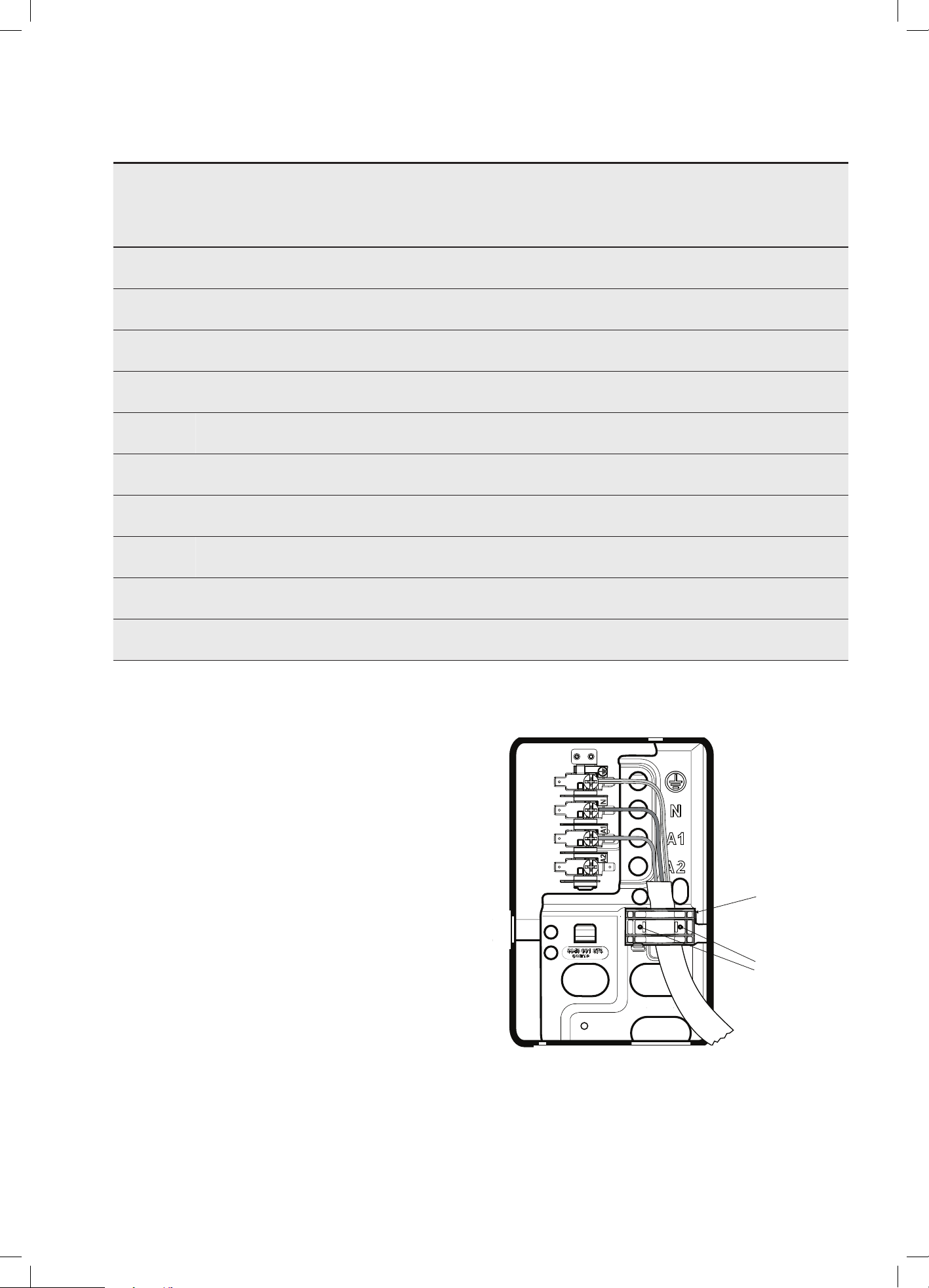
Hard wiring details
1. Remove terminal cover plate from rear panel of
appliance.
2. Fit wires through hole in cover plate and make
connections to terminals.
3. Engage wires into plastic clip. Secure plastic clip with
two long silver screws (supplied in separate bag).
4. Replace cover plate onto rear panel.
Plastic clips
Plastic clip
securing points
12 electrolux.com.au
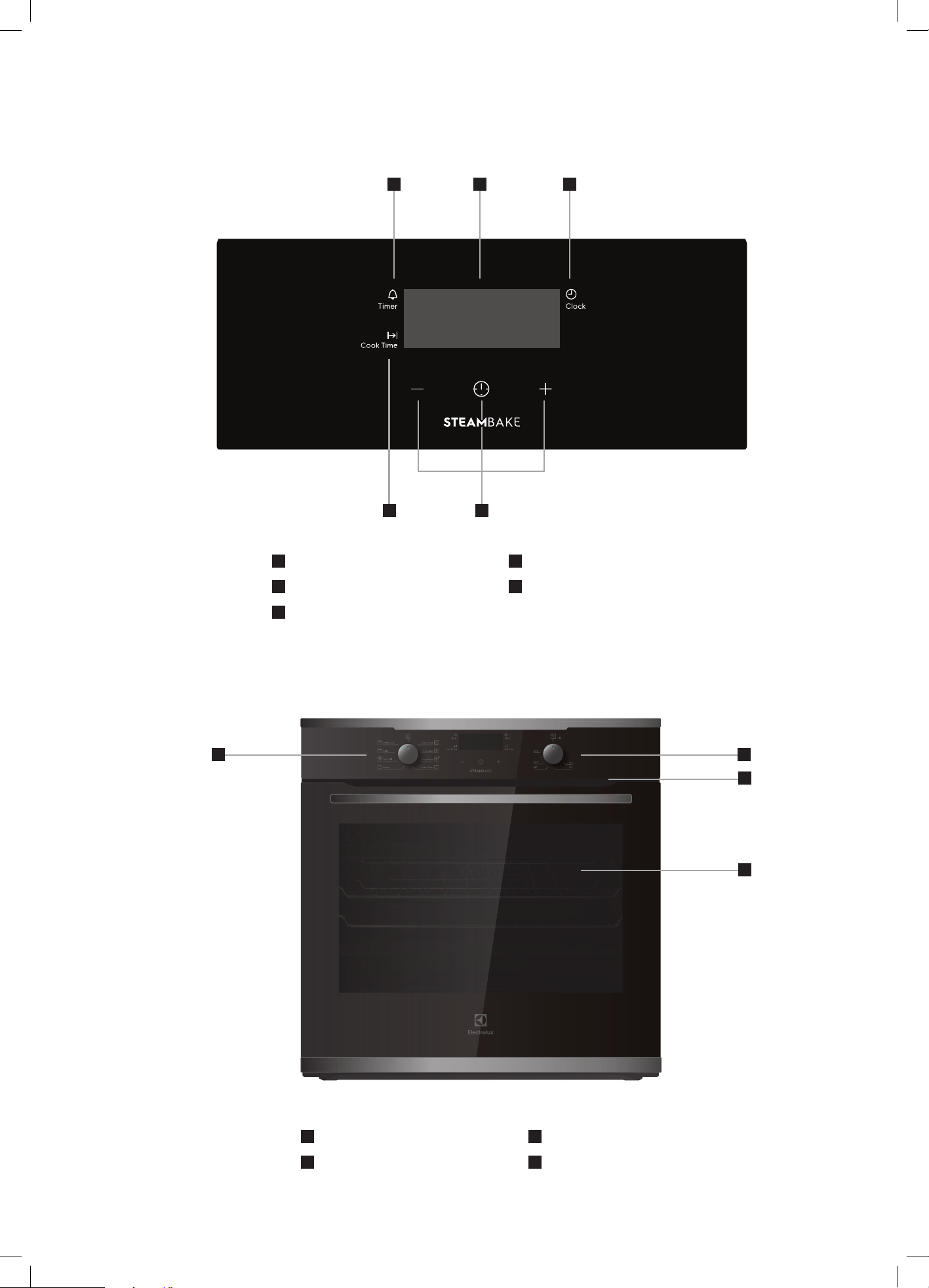
1
Timer indicator
2
Display
3
Clock button
4
Cook time
5
Timer
EVE602 / EVE614 COMPONENTS
7
Function selector
8
Temperature selector
9
Warm air exhaust
10
Double glazed door (EVE602)
Triple glazed door (EVE614)
8
10
9
4
321
7
5
13
BEFORE USING THE APPLIANCE
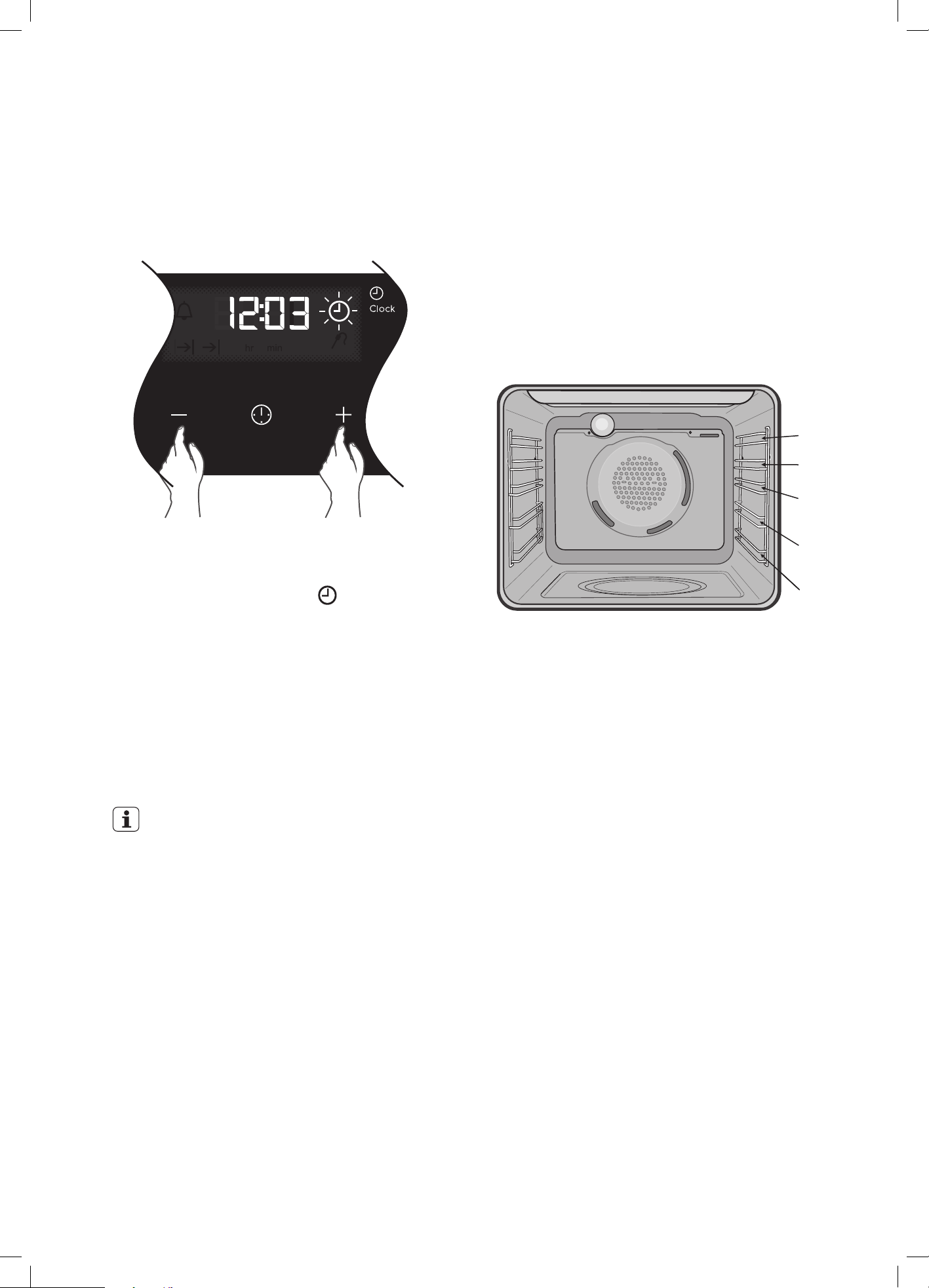
Setting the time
Before the appliance can be used, the time must be set.
After the appliance has been electrically connected
‘12:00’ will be displayed and the
clock icon
will flash.
To set the time of day in hours and minutes touch the
+ or
– symbols. Refer to the diagram above.
5 seconds after the last change, the clock symbol
will disappear, confirming the time has been set.
Once the time has been entered, the clock advances
minute by minute.
NOTE: The clock has a 24 hour display.
EVE602 / EVE614
IMPORTANT
Oven will not operate until you set the clock
Cooking guide
• Select the correct shelf location for food being cooked.
• Make sure dishes will fit into the oven before it is
switched on.
• Keep edges of non Electrolux baking dishes at least
40mm from the side of the oven. This allows free
circulation of heat and ensures even cooking.
• Do not open the oven door more than necessary.
• Do not place foods with a lot of liquid into the oven
with other foods. This will cause food to steam and
not brown.
• After the oven is turned off it retains the heat for some
time. Use this heat to finish custards or to dry bread.
• Do not use a lot of cooking oil when roasting. This will
prevent splattering oil on the sides of the oven and the
oven door.
• When cooking items that require a high heat (e.g.
tarts), place the cooking dish on a scone tray in the
desired shelf position.
• For sponges and cakes use aluminium, bright finished
or non-stick cookware.
Oven shelf location
The oven has 5 positions for shelves (as shown in the
diagram below). To give maximum space above and below
the shelves, load them in this way:
When cooking with 1 shelf, position at 1 or 2.
When cooking with 2 shelves, position them at 2 and 4.
For more detailed shelf locations. Refer to cooking tables
for individual cooking functions.
1
2
3
5
4
14 electrolux.com.au
COOKING FUNCTIONS
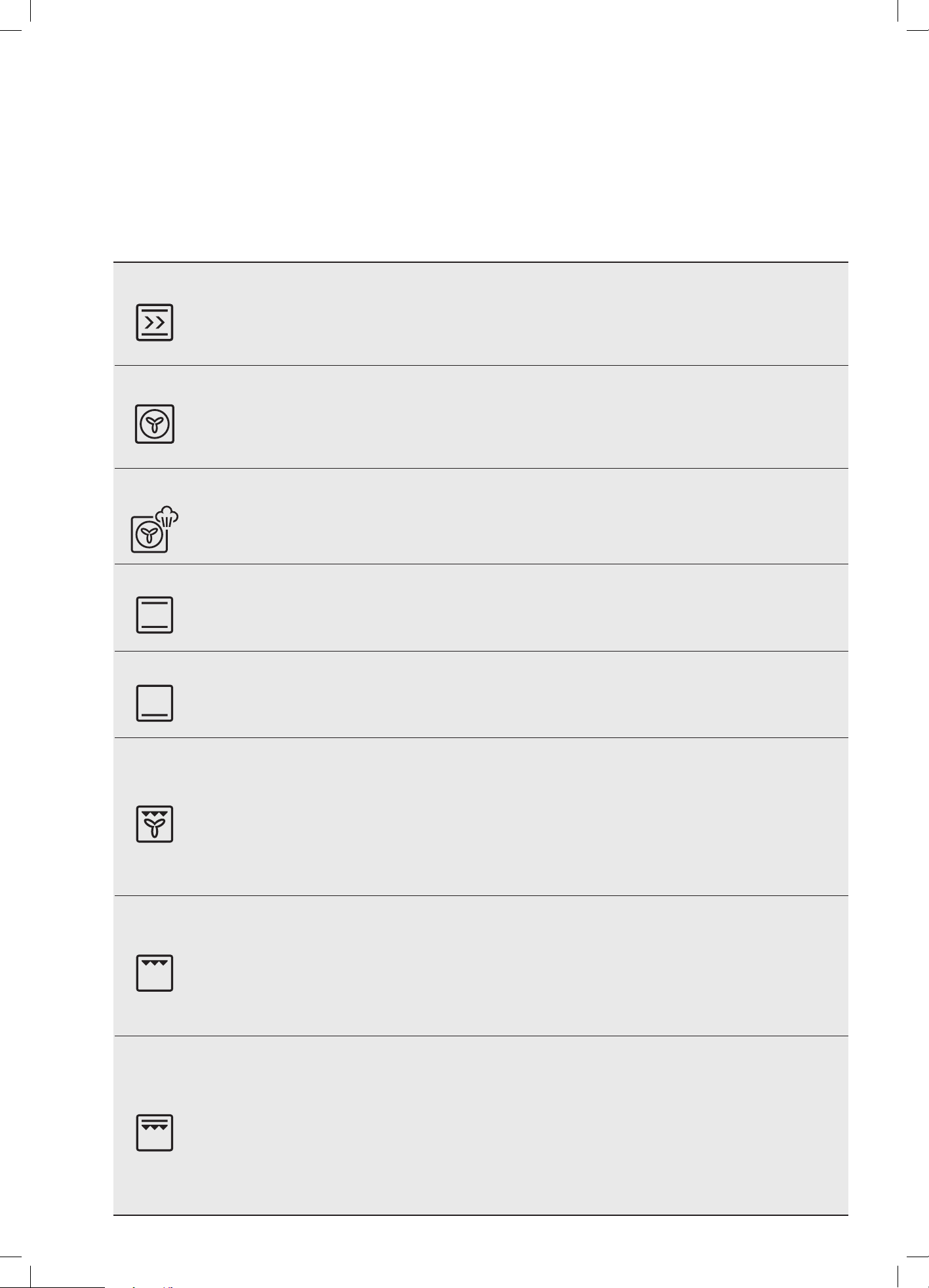
Symbol Function description
Rapid Heat
Heat comes from the element surrounding the fan as well as the smaller element above the food. This
allows you to preheat your oven 30% quicker than on standard ‘Bake/Pizza’. ‘Rapid Heat’ is ideal for
cooking frozen pre-cooked foods such as savoury pastries, pizzas, mini meals (TV dinners), meat pies and
fruit pies. Simply place the food in the oven straight from the freezer and heat. Cook in the upper half of the
oven for best results.
Fan Bake
Heat comes from the element surrounding the fan. This fan circulates the hot air around the oven cavity
so that you can put your food in different places in the oven and still cook them at the same time. You
can use ‘Fan Bake’ function for multi-shelf cooking, reheating cooked foods, pastries and complete oven
meals. It will cook at a lower temperature and be faster than baking. Please note that some variation in
browning is normal.
SteamBake
SteamBake adds humidity at the beginning of the baking process. In bakery products, this allows
the dough to rise and helps create a moist interior while obtaining a golden and crispy crust. Before
preheating, when the oven is cold, add water to the cavity well. Refer to chapter ‘Steam assisted cooking’
for more details. For best results preheat the empty oven for 10 minutes prior to inserting food.
Bake/pizza
Heat comes from two elements, one above and one below the food. The bottom element is a clean heat
element and is below the floor of the oven. Both elements are controlled by the thermostat and will turn
on and off to maintain set temperature. You can use the ‘Bake/pizza’ function for single trays of biscuits,
scones, muffins, cakes, slices, casseroles, baked puddings, roasts and delicate egg dishes.
Pastry
Heat comes from the clean heat element below the food. The element is controlled by the thermostat
and will turn on and off to maintain the set temperature. The ‘Pastry’ function can be used to add extra
browning to the bases of pizzas, pies, and pastries. Cook in the lower half of the oven when you are using
only one shelf.
Fan Grill
‘Fan Grill’ offers you the benefits of both ‘Fan Cook’ and traditional ‘Grill’ functions. The grill element turns
on and off to maintain set temperature while the fan circulates the heated air.
Fan grill with the oven door closed.
You can use ‘Fan Grill’ for large cuts of meat, which gives you a result that is similar to ‘rotisserie’ cooked
meat. Put your food on the grill shelf in position 2. Place the grill dish under the grill shelf to catch any spills.
When using ‘Fan Grill’ it is not necessary to turn food over during the cooking cycle. Set temperature
to 180°C.
Grill
‘Grill’ function directs radiant heat from the powerful upper element onto the food. You can use the
‘Grill’ function for tender cuts of meat, steak, chops, sausages, fish, cheese toasties and other quick
cooking foods.
Grill with the oven door closed.
Preheat your grill for 3 minutes to get the best results. This will help seal in the natural juices of steak,
chops etc for better flavour. Place grill shelf in position 4 with grill dish below to catch any spills.
Grill Boost
‘Grill Boost’ directs radiant heat from 2 powerful upper elements onto the food. You can use the
‘Grill Boost’ function for tender cuts of meat, steak, chops, sausages, fish, cheese toasties and other
quick cooking foods.
Grill with the oven door closed.
‘Grill Boost’ allows you to take full advantage of the large grill dish area and will cook faster than normal
‘Grill’. For best results it is recommended to preheat your grill for 3 minutes. This will help seal in the natural
juices of steak, chops etc for a better flavour. Place grill shelf in position 4 with grill dish below to catch
any spills.
EVE602 / EVE614 (CONTINUED)
15
OPERATING SEQUENCE
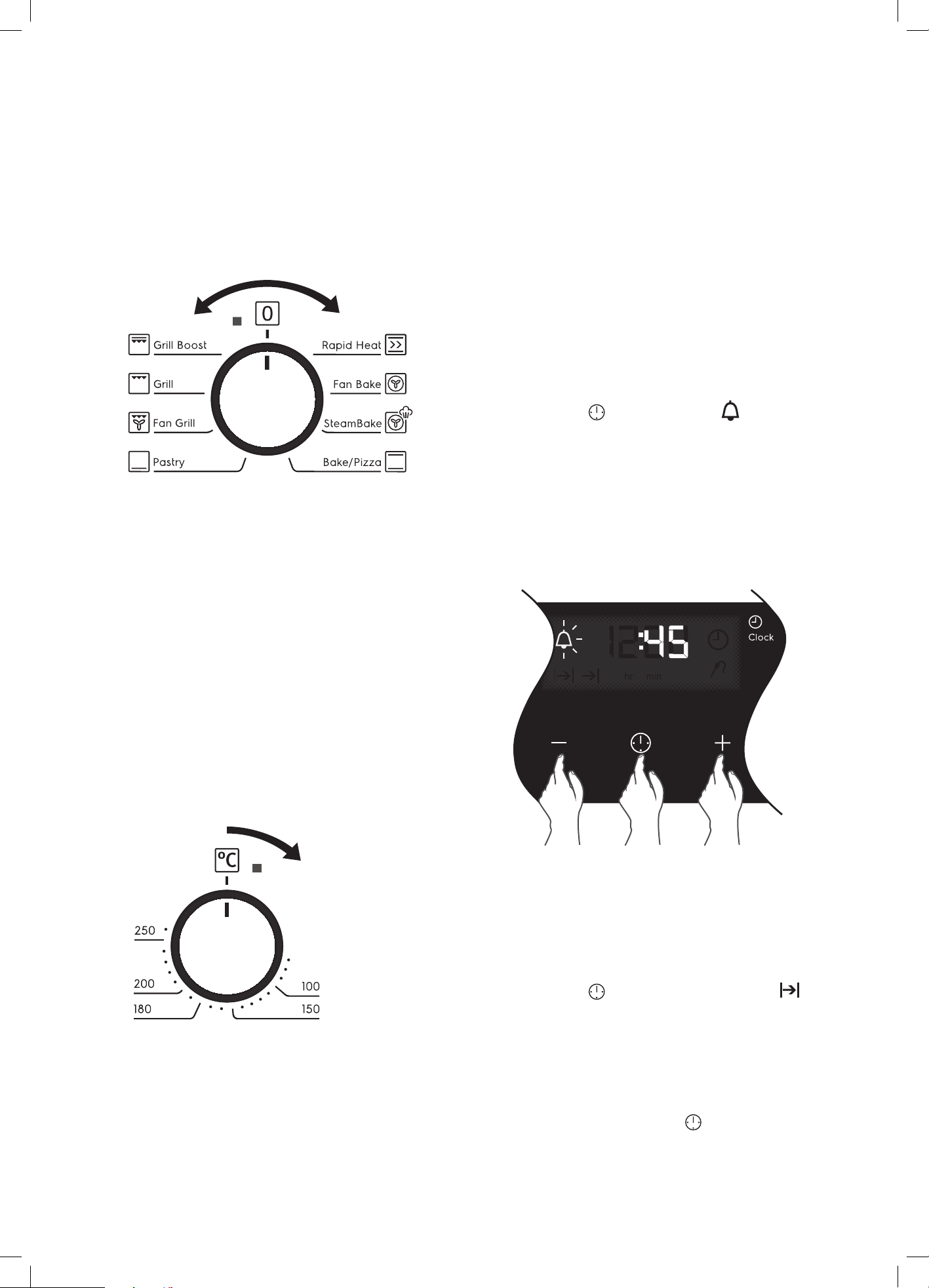
Select the cooking function
Turn the function selector in any direction to the desired
cooking function. The oven cavity light will come on.
Select the temperature
To set the temperature, turn the temperature selector in a
clockwise direction to the desired setting. An indicator light
in the display will come on.
A thermostat controls the temperature in your oven. When
the temperature is reached, the heating source switches
itself off and the indicator light goes out. When the oven
temperature falls below the desired setting, the heating
source switches on and the indicator light comes on again.
Once the food is cooked, turn the temperature selector
back in an anti-clockwise direction. Do not force it right
round in a clockwise direction as this will result in damage
to the thermostat.
NOTE: The desired cooking function must be selected
before the oven will operate.
USING THE APPLIANCE
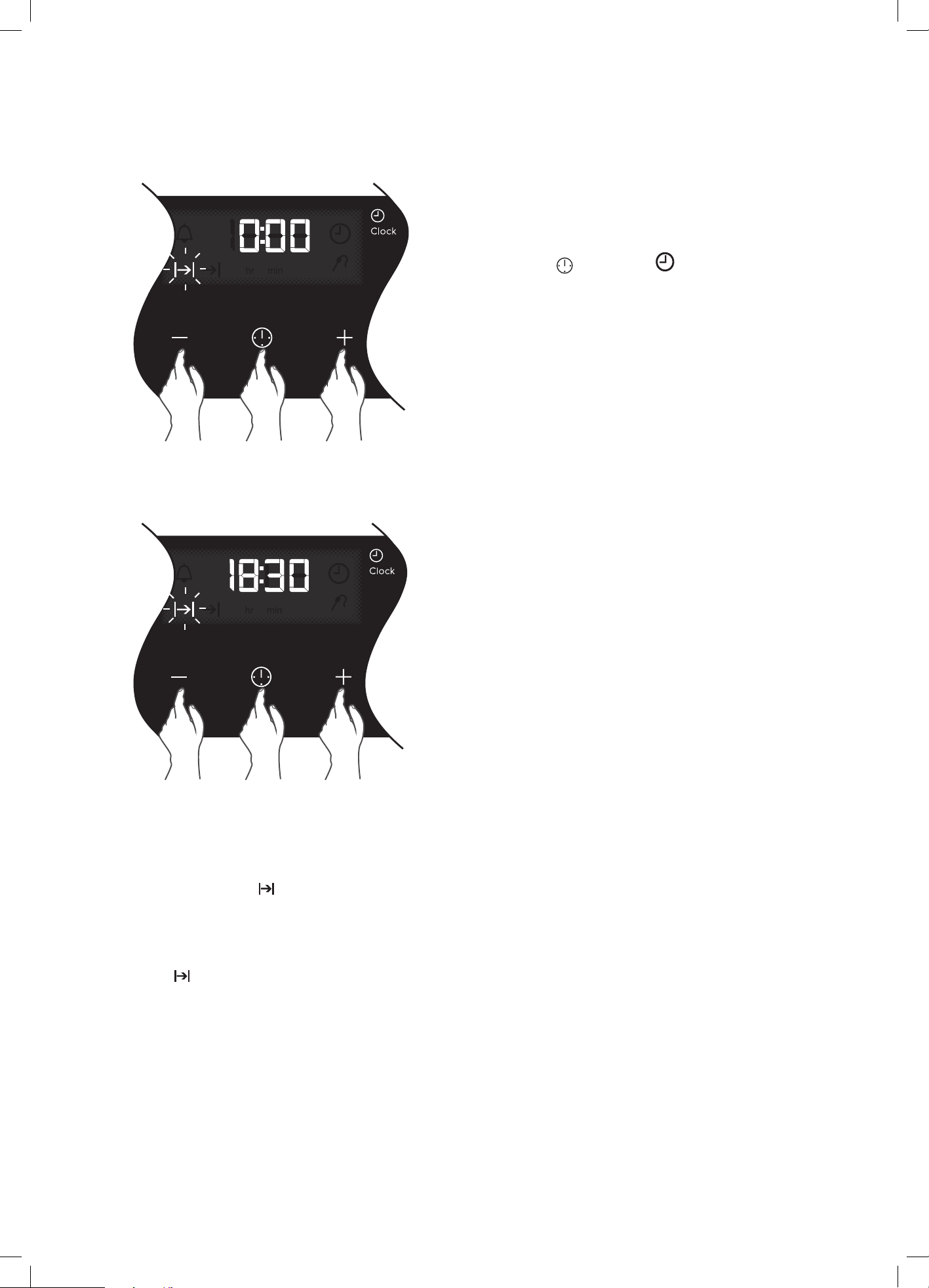
Cooking with the timer
The appliance is equipped with a timer that has the
following features:
• Timer - sets a countdown time that will beep when
the set time has elapsed.
• Cook time - sets cooking duration. A timer will count
down the preset cooking time, beep when the time
has elapsed and turn the appliance off.
Selecting the timer
• Touch the
icon until the timer icon
begins flashing.
• Set the countdown time you want by using the
+ and – symbols. 5 seconds after the last change
the timer icon will stop flashing and the countdown
will start in minutes.
• To stop the beeper, touch any symbol.
• Maximum countdown time is 2hrs 30mins.
Setting the cooking duration
• Select the desired oven function and temperature.
• The oven indicator light will glow and the heating
source will come on.
• Touch the
icon until the cook time icon begins
flashing.
• Set the cooking duration you want by using the
+
and – symbols. Five seconds after the last change
the cook time icon will stop flashing, and the time of
day will be displayed. The oven will automatically shut
off once the set duration is reached. To check how
much time remains, press
until the cook time icon
is lit. The remaining time will be displayed.
• When the oven shuts off an alarm will beep. To stop
the beeper, touch any symbol.
NOTE: Remember to add pre-heating time if necessary.\
16 electrolux.com.au
To check or cancel settings:
• To cancel ‘auto shut off’ touch the MODE symbol
until the cook time
icon flashes. Touch and hold
the – button until the clock no longer reverses (at
0:00 a beep will be heard). This automatically cancels
‘auto shut off’. If the temperature and function knobs
are still at a setting, the oven will start once the cook
time icon stops flashing. Because ‘auto off’ is
cancelled the oven will continue to heat until it is
manually turned off.
On completion of cooking
The heat source will turn off, the timer will beep and the
cook time icon will flash.
Even though the heating element turns off the oven
will still retain substantial heat. This will continue to cook
the food until it is removed or the oven cools down. If you
do not plan on being present when the oven turns off, you
should take this extra heating time into account.
Turn the function and temperature controls to the
off position.
Touch any button to stop the timer beeping.
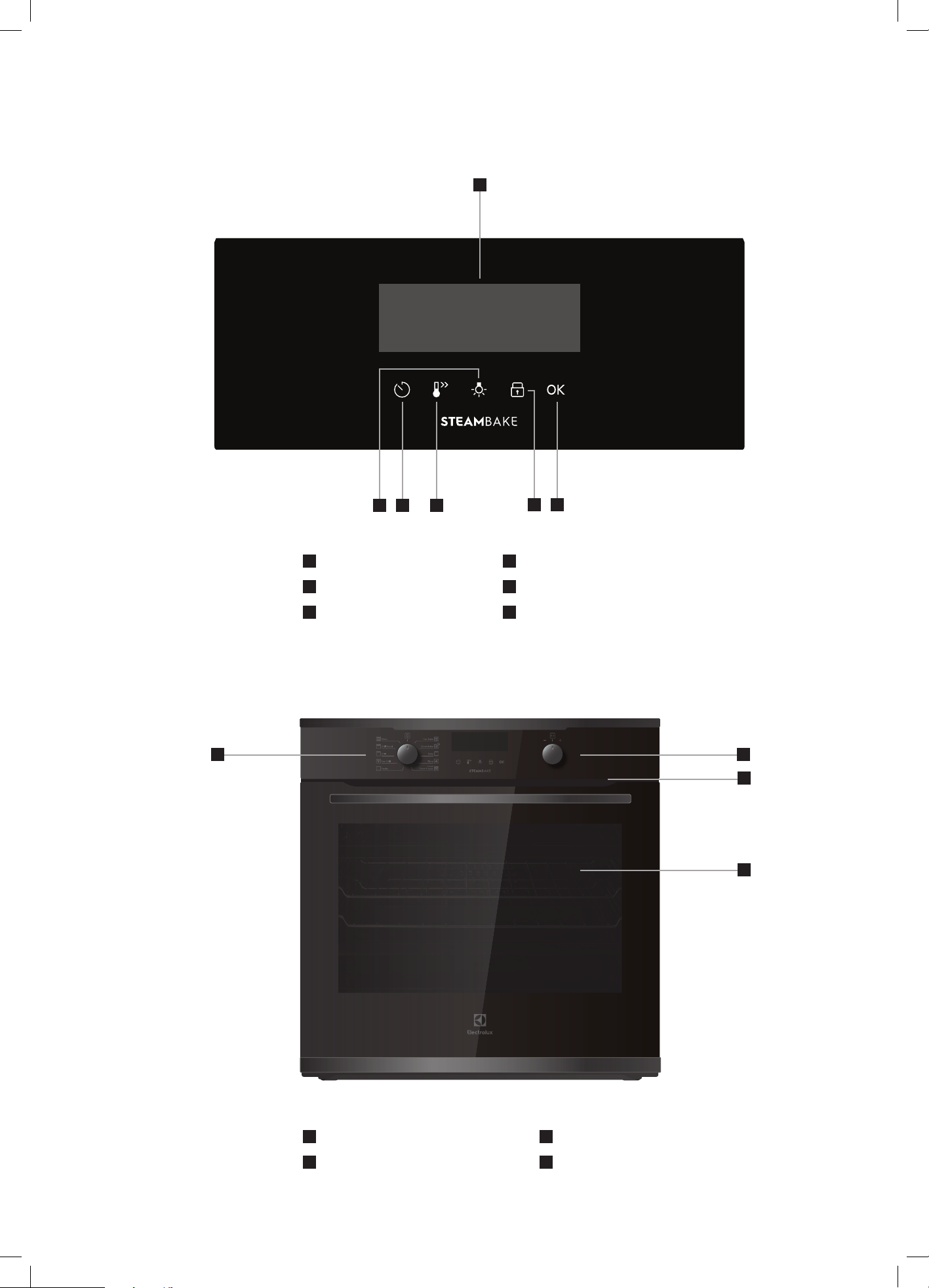
Adjusting the clock
Touch the
icon until the clock icon
begins flashing.
Touch the + and – symbols to change the time of day.
5 seconds after the last change, the clock icon will
disappear, confirming the time has been adjusted.
EVE602 / EVE614 (CONTINUED)
17
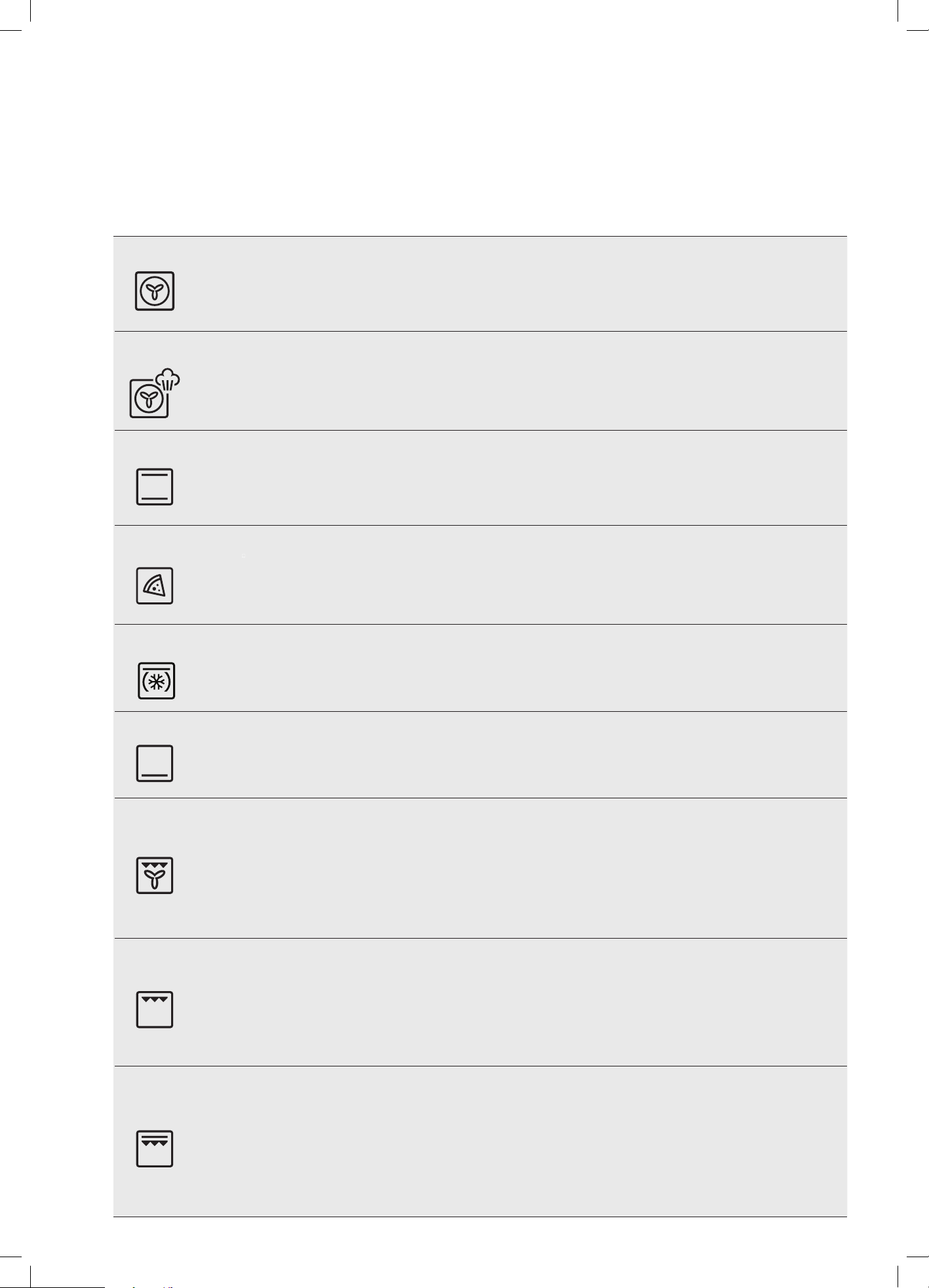
EVEP614 COMPONENTS
7
Function selector
8
Temperature/timer adjustment
9
Warm air exhaust
10
Quadruple glazed door
8
10
9
7
1
Display
2
Light button
3
Timer button
4
Rapid heat button
5
Child lock button
6
OK button
32
4
65
1
18 electrolux.com.au
COOKING FUNCTIONS
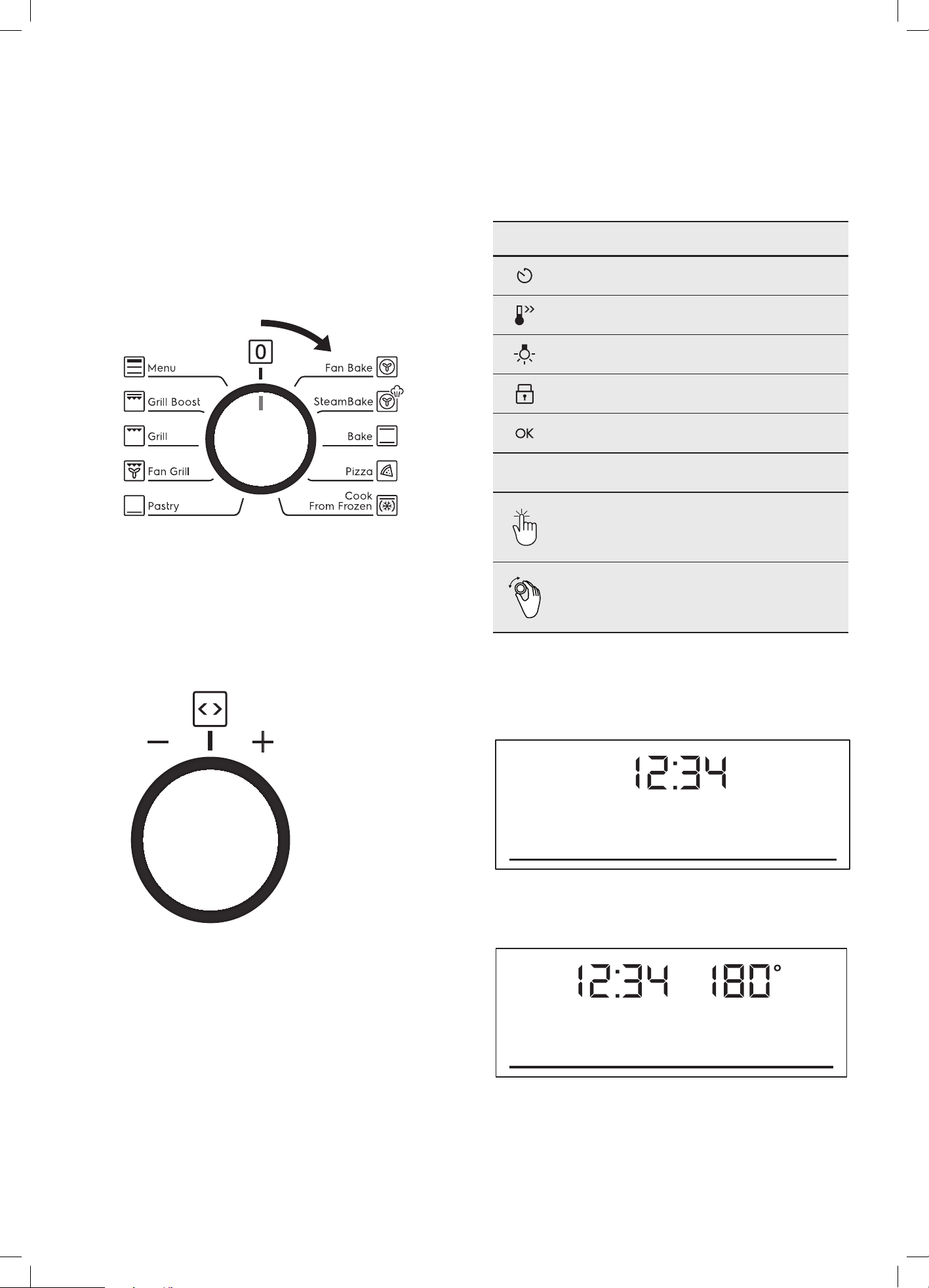
Symbol Function description
Fan Bake
Heat comes from the element surrounding the fan. This fan circulates the hot air around the oven cavity so that you can put
your food in different places in the oven and still cook them at the same time. You can use ‘Fan Bake’ function for multi-shelf
cooking, reheating cooked foods, pastries and complete oven meals. It will cook at a lower temperature and be faster than
baking. Please note that some variation in browning is normal.
SteamBake
SteamBake adds humidity at the beginning of the baking process. In bakery products, this allows the dough to rise and
helps create a moist interior while obtaining a golden and crispy crust. Before preheating, when the oven is cold, add water
to the cavity well. Refer to chapter ‘Steam assisted cooking’ for more details. For best results preheat the empty oven for
10 minutes prior to inserting food.
Bake
Heat comes from two elements, one above and one below the food. The bottom element is a clean heat element and
is below the floor of the oven. Both elements are controlled by the thermostat and will turn on and off to maintain set
temperature. You can use the ‘Bake’ function for single trays of biscuits, scones, muffins, cakes, slices, casseroles, baked
puddings, roasts and delicate egg dishes.
Pizza
‘Pizza’ is a combination of ‘Pastry’ and ‘Fan Cook’ and offers you the combined benefits of both functions. Heat comes
from the element surrounding the fan as well as the clean heat element below the oven floor. The ‘pizza’ function is ideal for
foods that require cooking and browning of the base. It is great for foods such as pizzas, quiches, meat pies and fruit pies.
Simply put the food in the middle of the oven and select the desired temperature.
Cook from
frozen
This function can be used to make convenience food (eg. french fries, potato wedges or spring rolls) crispy.
Pastry
Heat comes from the clean heat element below the food. The element is controlled by the thermostat and will turn on and
off to maintain the set temperature. The ‘Pastry’ function can be used to add extra browning to the bases of pizzas, pies,
and pastries. Cook in the lower half of the oven when you are using only one shelf.
Fan Grill
‘Fan Grill’ offers you the benefits of both ‘Bake’ and traditional ‘Grill’ functions. The grill element turns on and off to maintain
set temperature while the fan circulates the heated air.
Fan grill with the oven door closed.
You can use ‘Fan Grill’ for large cuts of meat, which gives you a result that is similar to ‘rotisserie’ cooked meat.
Put your food on the grill shelf in position 2. When using ‘Fan Grill’ it is not necessary to turn food over during the cooking cycle.
Set temperature to 180°C.
Grill
‘Grill’ function directs radiant heat from the powerful upper element onto the food. You can use the ‘Grill’ function for tender cuts
of meat, steak, chops, sausages, fish, cheese toasties and other quick cooking foods.
Grill with the oven door closed.
Preheat your grill for 3 minutes to get the best results. This will help seal in the natural juices of steak, chops etc for better
flavour. Place the grill shelf in position 4 with grill dish below to catch any spills.
Grill Boost
‘Grill Boost’ directs radiant heat from 2 powerful upper elements onto the food. You can use the ‘Maxi Grill’ function for tender cuts
of meat, steak, chops, sausages, fish, cheese toasties and other quick cooking foods.
Grill with the oven door closed.
‘Grill Boost’ allows you to take full advantage of the large grill dish area and will cook faster than normal ‘Grill’. For best
results it is recommended to preheat your grill for 3 minutes. This will help seal in the natural juices of steak, chops etc for a
better flavour. Place the grill shelf in position 4 with grill dish below to catch any spills..
EVEP614 (CONTINUED)
19
OPERATING SEQUENCE
Select the oven function
Turn the oven function selector clockwise to select the
desired oven function.
NOTE: each oven function has a default temperature which
can then be adjusted as outlined below.
This knob cannot be
turned anticlockwise
from off position
Selecting the oven temperature
Rotate the temperature selector (left
– or right +) as
required to set the desired cooking temperature in °C.
NOTE: the temperature can be adjusted at any time
throughout the cooking time.
USING THE APPLIANCE
Control panel
Control panel sensor fields
Timer
Fast heat up
Light
Child lock
Confirm selection
Legend
Press
Turn the knob
Select a heating function to turn on the oven.
Turn the function selector to the off position to turn the
oven off.
When the knob for the heating functions is in the off
position, the display goes to standby.
When you cook, the display shows the set temperature,
time of day and other available options.
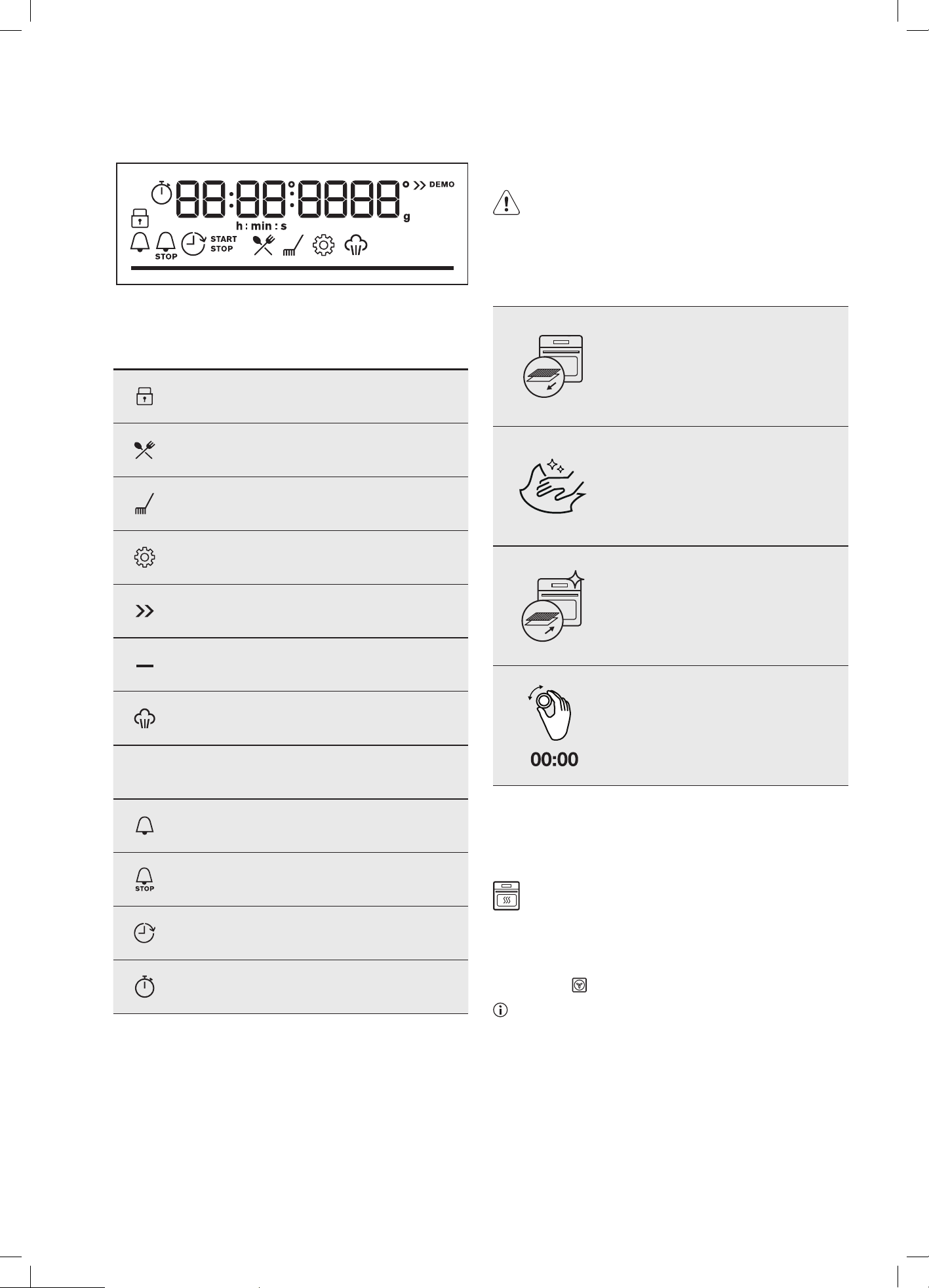
20 electrolux.com.au
The display with the maximum number of functions set.
Display indicators
Lock
Assisted cooking
Cleaning
Settings
Fast heat up
Progress bar for temperature or time
Steam cooking indicator
Timer indicators
Minute minder
Cooking time
Time delay
Uptimer
BEFORE FIRST USE
WARNING
Refer to safety chapters.
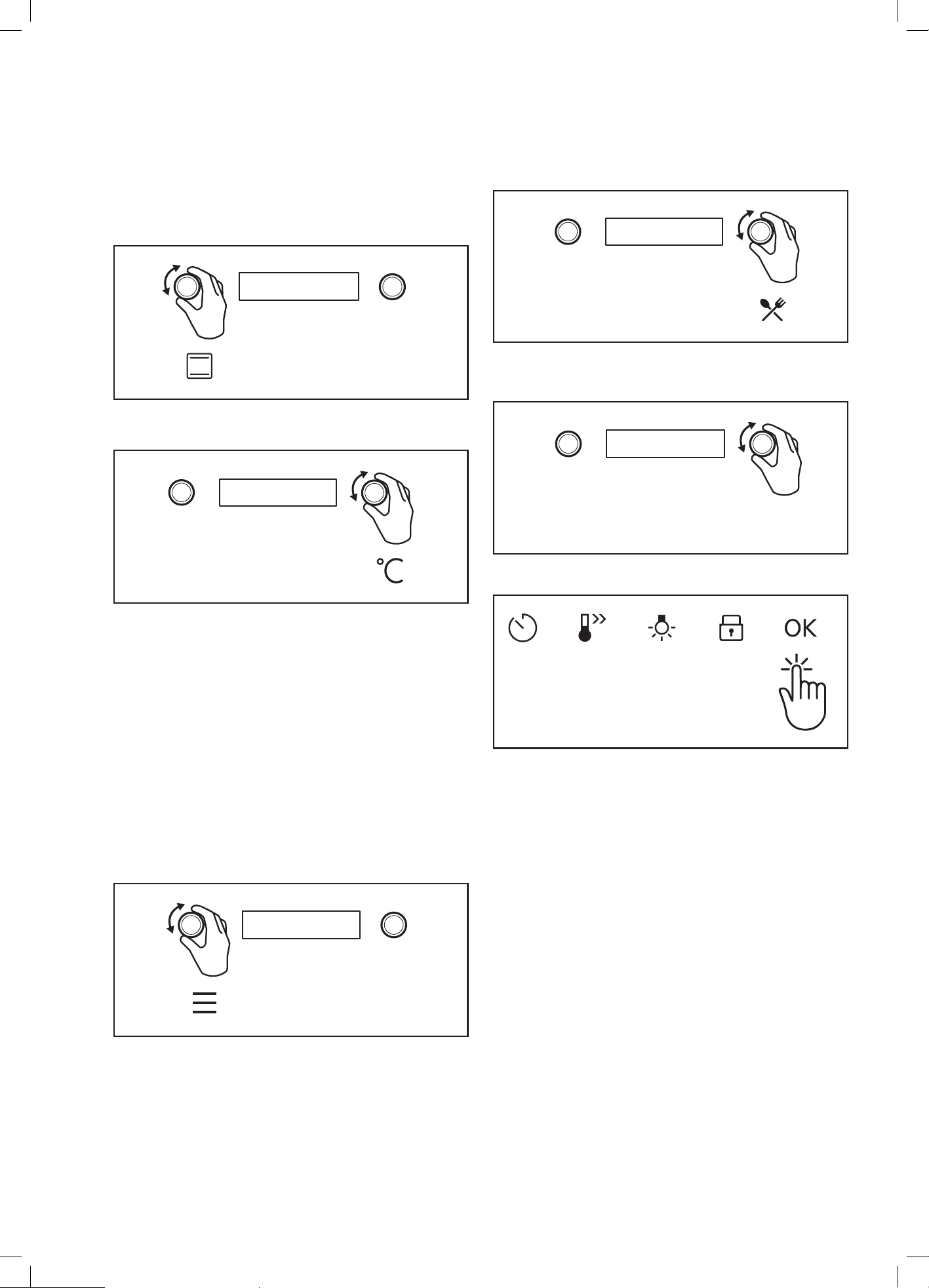
Initial cleaning
Before the first use, clean the empty oven and set the time:
Remove all accessories and
removable shelf supports from the
oven.
Clean the oven and accessories with
a soft cloth, warm water and a mild
detergent.
Place the accessories and the
removable supports in the oven.
Set the time. Press OK.
CONDITION THE OVEN
(TO BURN OFF ANY RESIDUE)
Run in the empty oven before the first use.
1. Remove all accessories and removable shelf
supports from the oven.
2. Set the temperature to 180°C for the function: Fan
cooking
. Let the oven operate for 30 minutes.
The oven can emit an odour and smoke during burn
off. Make sure that the room is ventilated.
EVEP614 (CONTINUED)
21
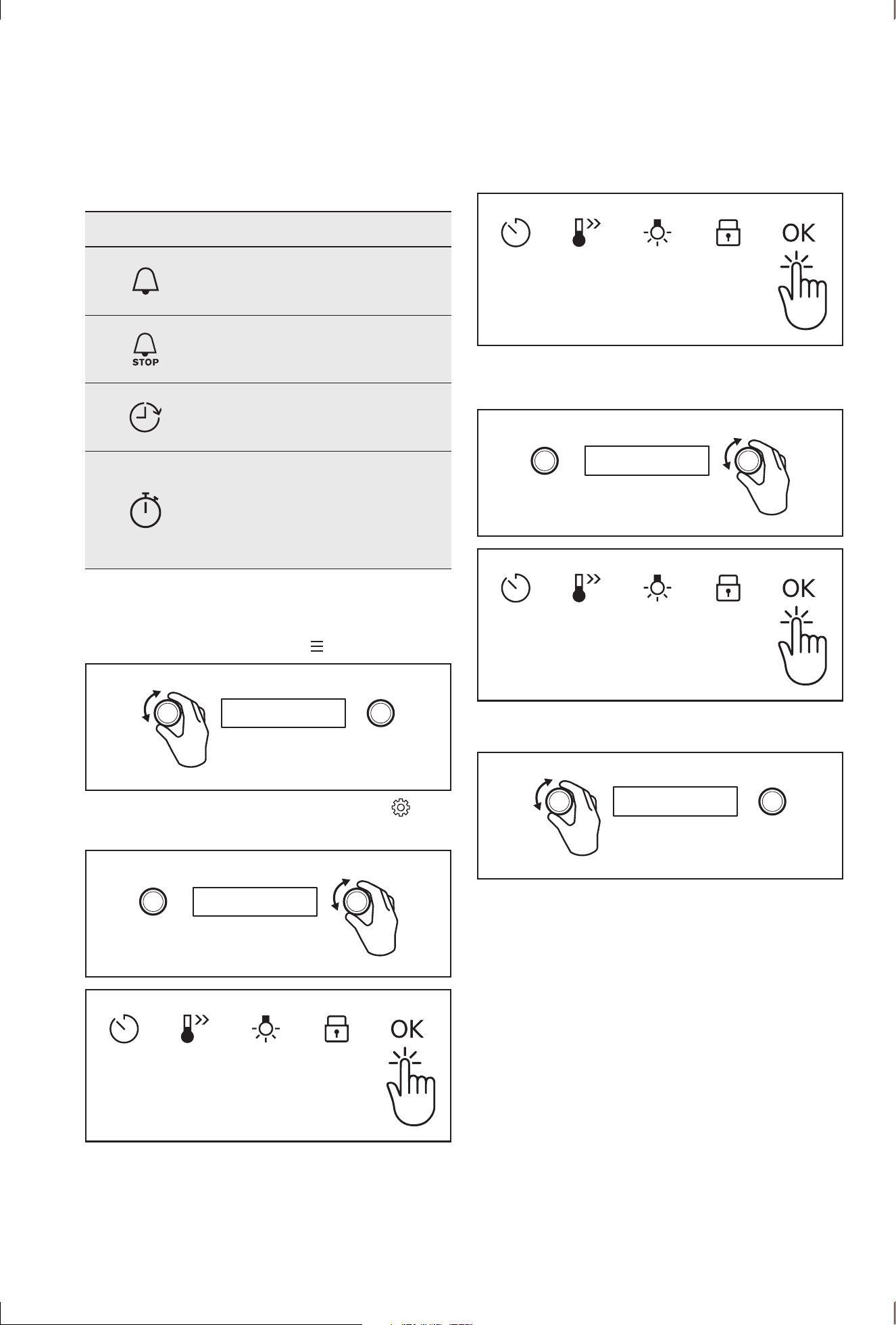
2. Select Assisted Cooking. Press OK.
3. Select the dish. Press OK. Refer to "Menu structure"
chapter.
P1 - P41
4. Insert the dish into the oven. Confirm setting.
DAILY USE
Start cooking
1. Set a heating function.
2. Set the temperature.
How to set: Assisted Cooking
Every dish in this submenu has a recommended function
and temperature. You can adjust the time and the
temperature during cooking.
The degree to which a dish is cooked:
• Rare
• Medium
• Well done
Assisted Cooking – use it to prepare a dish quickly
with default settings:
1. Enter the menu
22 electrolux.com.au
EVEP614 (CONTINUED)
CLOCK FUNCTIONS
Clock function Application
Minute minder. When the timer ends,
the signal sounds.
Cooking time. When the timer ends,
the signal sounds and the heating
function stops.
Time Delay. To postpone the start
and / or end of cooking.
Uptimer. Maximum is 23 hours 59
minutes. This function has no effect
on the operation of the oven. To turn
the Uptimer on and off, select: Menu,
Settings.
How to set: clock functions
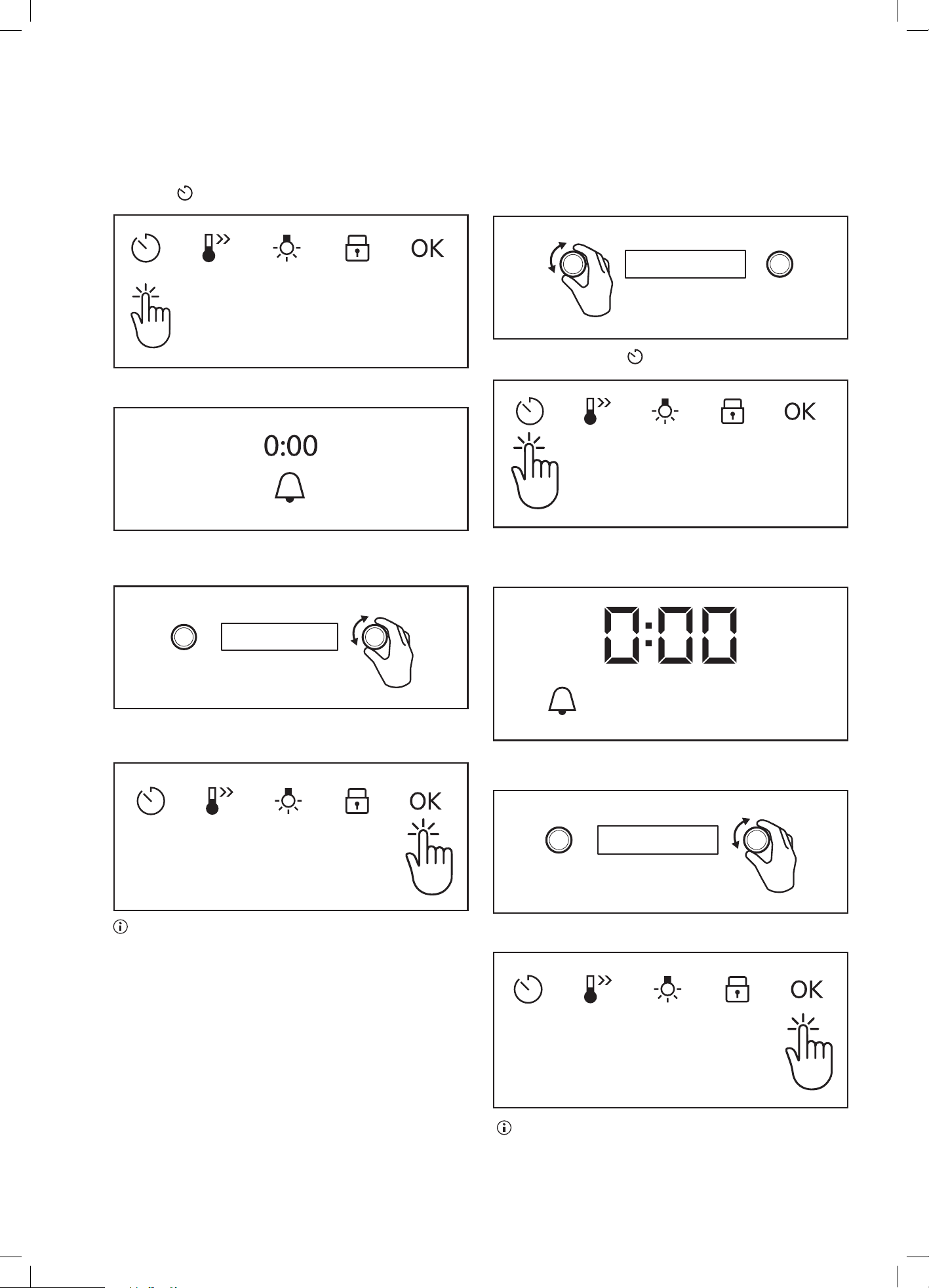
How to set: Time of day
1. Turn Function Selector to Menu
.
2. Turn Temperature Selector to select Settings and
Press OK.
3. Press OK again.
4. Rotate Temperature Selector until the current time is
reached. Press OK.
5. Turn Function Selector to Off.
6. After 6 seconds has elapsed, the time is set.
23
How to set: Minute minder
1. Press
The display shows:
2. Set the Minute minder
3. Press OK.
Timer starts counting down immediately.
How to set: Cooking time
1. Choose a heating function and set the temperature.
2 Press repeatedly:
The display shows:
h:min
STOP
3. Set the cooking time.
4. Press OK.
Timer starts counting down immediately.
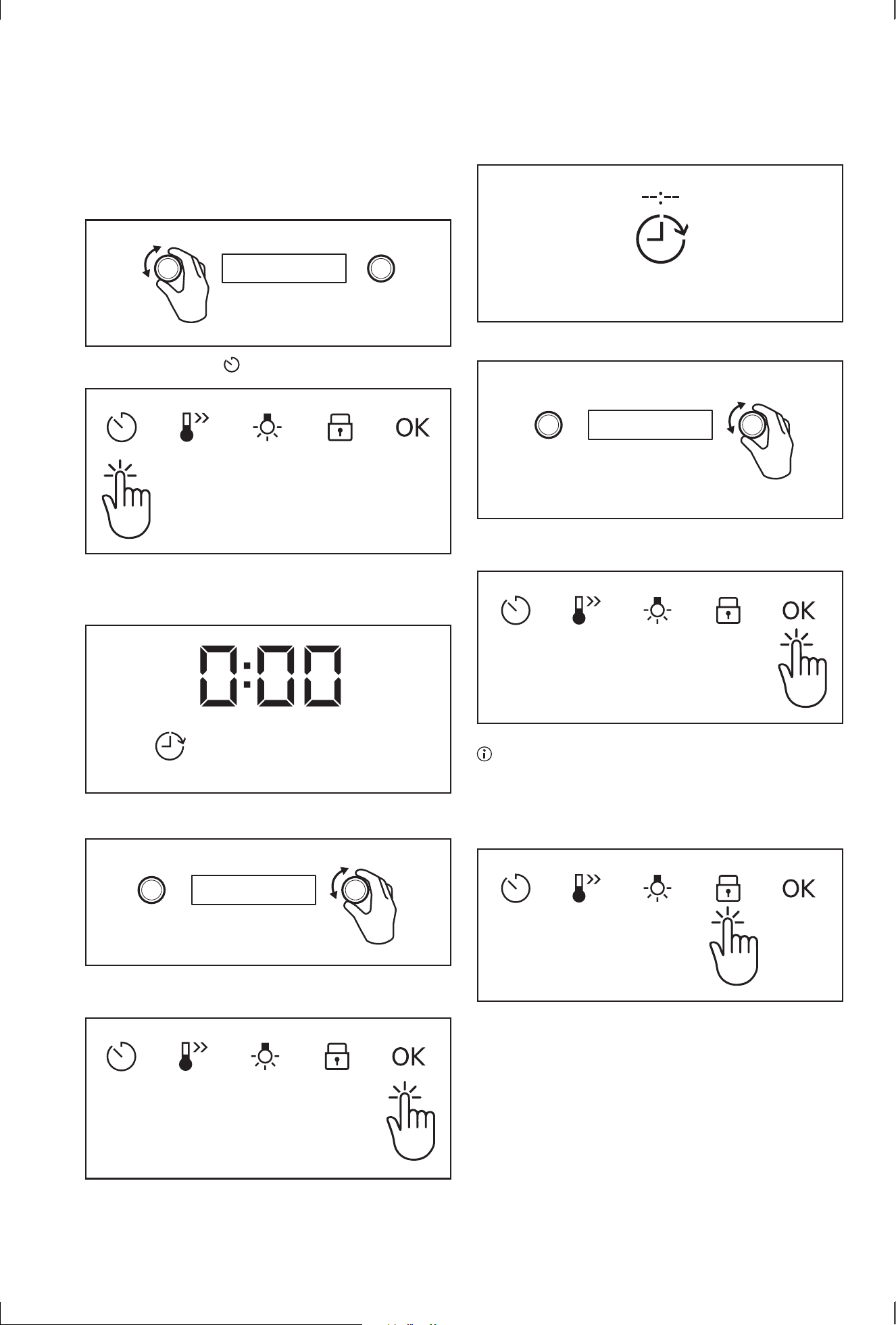
24 electrolux.com.au
How to set: Time Delay
1. Select the heating function.
2. Press repeatedly:
The display shows: the time of day
h:min
START
STOP
3. Set the start time.
4. Press OK.
The display shows:
EVEP614 (CONTINUED)
START
STOP
5 Set the end time.
6 Press OK.
Timer starts counting down immediately.
How to set: Child lock
1. Press and hold lock icon to turn Child Lock ON/OFF.
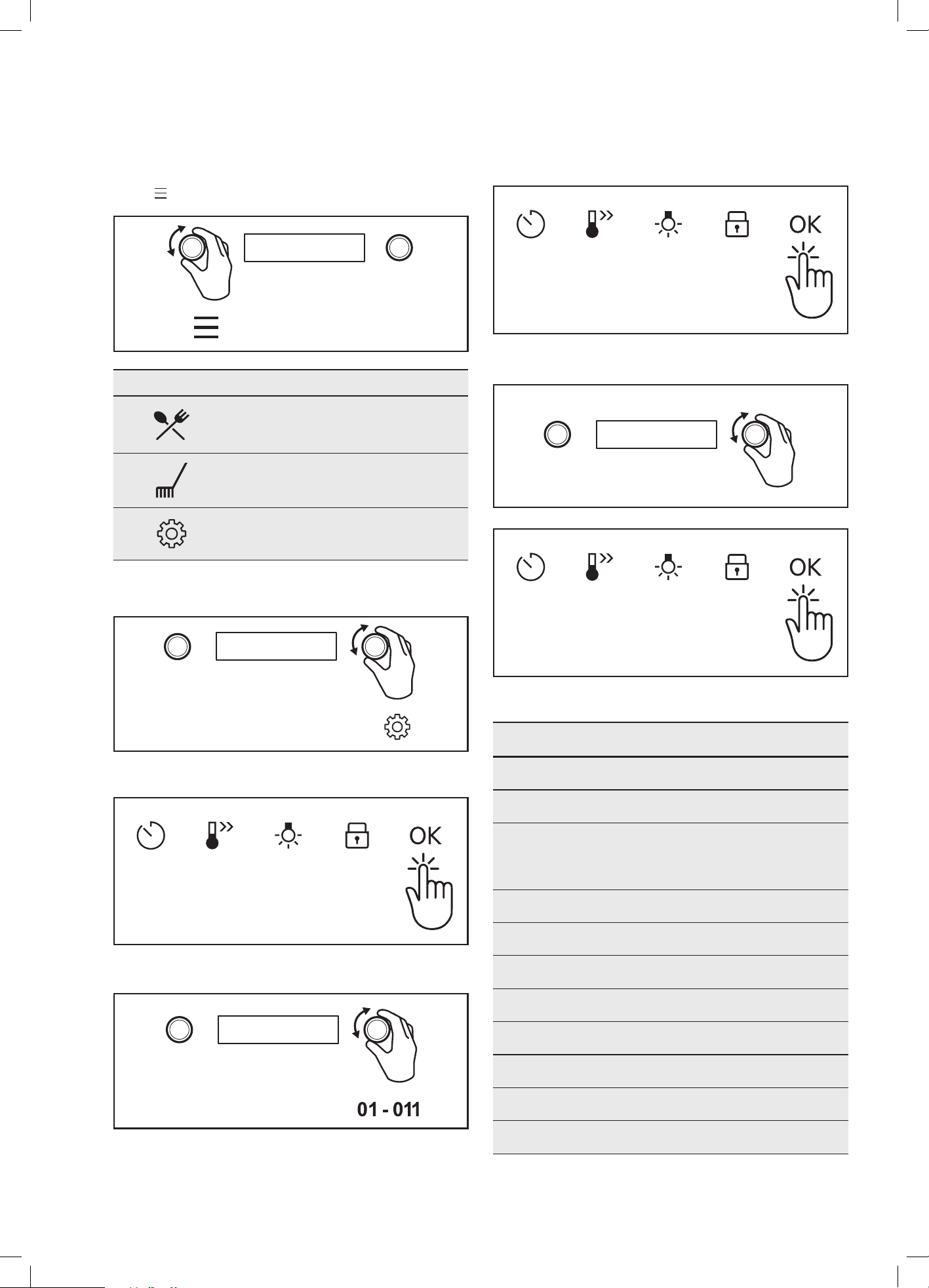
25
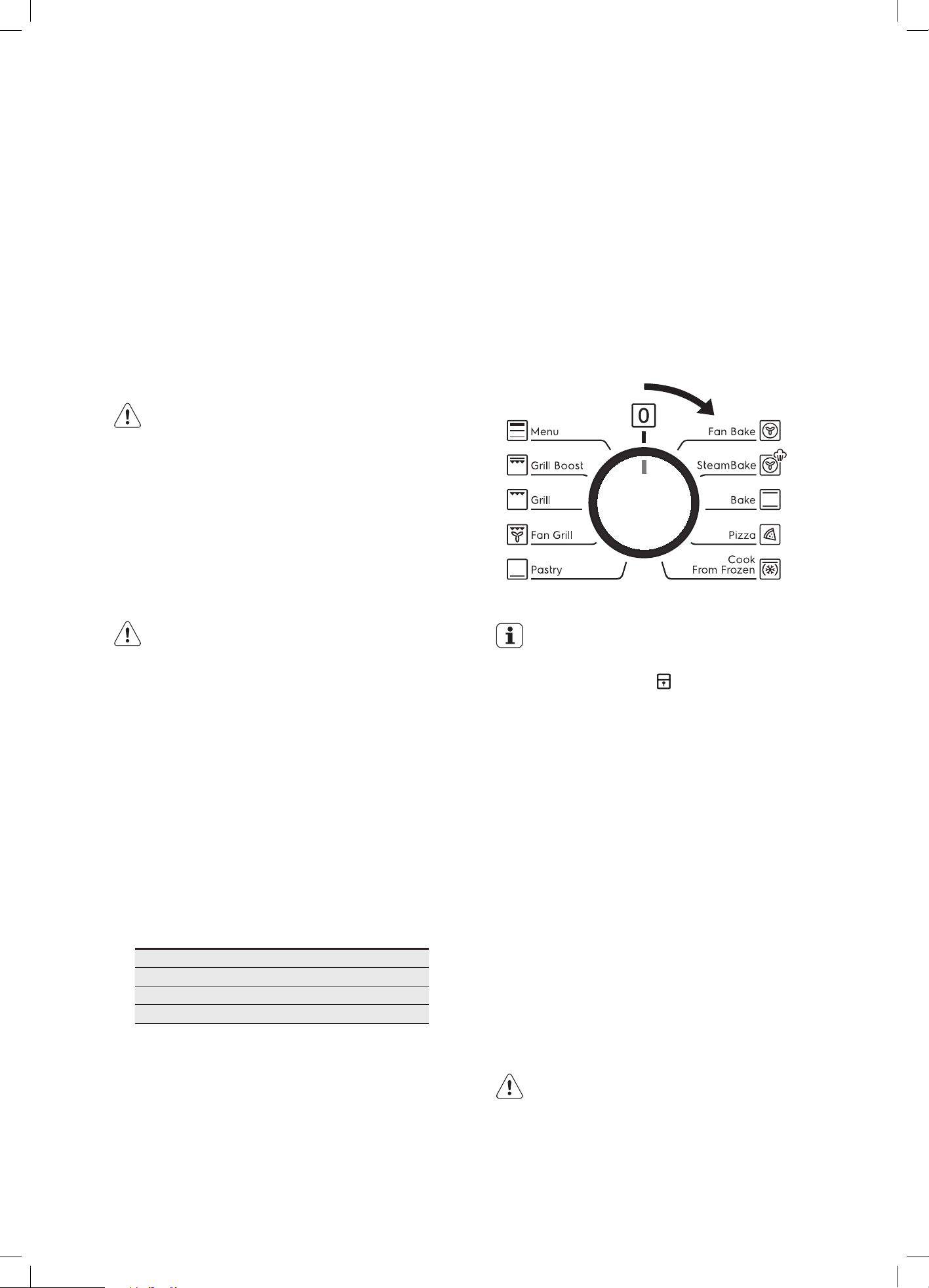
How to change: Settings
Select
.
Menu structure
Assisted cooking
Cleaning
Settings
1. Select Settings.
2. Press OK.
3. Select the required setting 01 to 11
4. Press OK to confirm selection.
5. Adjust the value and press OK.
Settings
1 Time of Day Change
2 Display Brightness Change
3 Key Tones
1 - Beep
2 - Click
3 - Sound off
4 Buzzer Volume 1 - 4
5 Uptimer On/off
6 Light On/off
7 Fast Heat Up On/off
8 Cleaning Reminder On/off
9 Demo Mode Activation code: 2468
10 Software Version Check
11 Reset All Settings Yes/No

26 electrolux.com.au
EVEP614 (CONTINUED)
Assisted cooking settings
P1 Jacket Potato Wedges
P2 Hash Browns
P3 Lasagne
P4 Potato Gratin
P5 Pasta Bake
P6 Vegetable Gratin
P7 Pizza
P8 Pizza frozen
P9 Quiche
P10 Ciabatta
P11 Rolls
P12 Baguette
P13 Wholegrain Bread
P14 White Bread
P15 Dark Bread
P16 Almond Cake
P17 Apple Pie
P18 Baked Cheesecake
P19 Apple Cake, covered
P20 Short crust pastry case
P21 Sponge flan case
P22 Madeira Cake
P23 Sponge Cake
P24 Tarts
P25 Apple Strudel, froz.
P26 Baked Cheesecake
P27 Christmas Stollen
P28 Sponge Cake
P29 Sugar Cake
P30 Swiss Roll
P31 Swiss Tarte, sweet
P32 Yeast Cake
P33 Brownies
P34 Cakes, small
P35 Cream Puffs
P36 Eclairs
P37 Macaroons
P38 Muffins
P39 Pastry Strips
P40 Puff Pastry
P41 Shortbread
27
PYROLYTIC CLEANING THE OVEN
Pyrolytic cleaning of the oven cavity
The oven has the Pyrolytic self-cleaning function. It
cleans by burning off the spatters and accumulated dirt
and grease from the oven liner, at high temperature. This
process produces ash which can then be wiped out of the
oven cavity.
Pyrolytic cleaning will not remove salt and mineral
residue left in the cavity well when water evaporates.
It is recommended that the residue is cleaned prior
to conducting pyrolytic cleaning cycles. See section
‘Cleaning the cavity well’.
WARNING
During the pyrolytic cleaning process the oven
becomes extremely hot.
• Please keep small children at a safe distance.
• Never clean non-stick baking trays and tins in the
oven during the pyrolytic cycle. High temperatures
damage the non-stick coating and poisonous gas
is released.
• To prevent damage, do not use acids, sprays or
similar cleaning agents.
CAUTION
• During pyrolytic cleaning the air outlet
exhaust above the door must be kept clear of
any obstruction (eg. bulky tea towels).
• Do not use the oven to clean miscellaneous
items (eg. cookware).
Before carrying out the Pyrolytic function
1. All accessories must be removed from the oven,
including shelves, trays and side racks.
2. Clean large deposits, spills or grease from the
oven cavity.
3. Ensure the cavity well is free of limestone scaling
(refer to cleaning the cavity well chapter)
4. Choose the Pyrolytic cleaning cycle from
the following:
Cleaning level duration
C1 - Quick 1 hour 30 minutes
C2 - Normal 2 hours
C3 - Intense 2 hours 30 minutes
NOTE: Duration includes heat-up time, excluding
cool-down time.
Light clean
This is an energy saving cycle that can be used on a
regular basis if the oven is lightly soiled. Possibly after
every 2nd or 3rd roast.
Medium clean
Use this as the regular cycle about once every 2-3
months.
Heavy clean
When the oven is very dirty it may need a longer cycle to
clean it thoroughly. This cycle will clean the dirtiest of ovens.
Pyrolytic Cleaning Operation
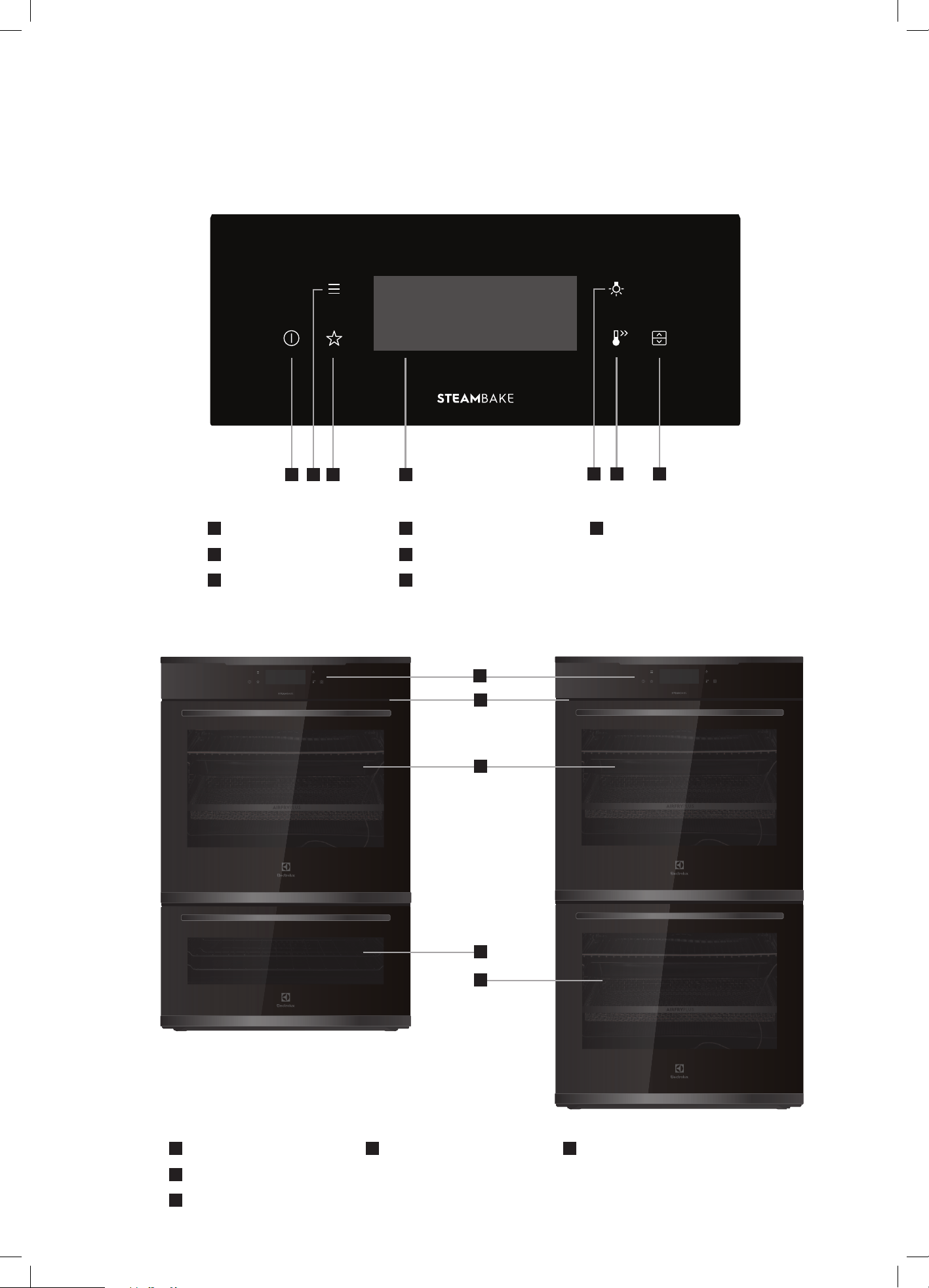
The pyrolytic cleaning function can be selected by turning
the function selector switch clockwise to the pyrolytic
position. Use
+ or – to select a pyrolytic cleaning time
of 1:30 hours or 2:30 hours. The pyrolytic function can
be stopped at any time by turning the function selector
counterclockwise to the OFF position.
This knob cannot be
turned anticlockwise
from off position
IMPORTANT
During Pyrolytic cleaning the door will
automatically lock and
will appear on the
display. During the pyrolytic cleaning cycle there
may be some burn off odours. It is advised to keep
the room well ventilated during this cycle.
When the pyrolytic cleaning function is on, it is advisable
not to use a cooktop if it is fitted above the oven. This
could cause overheating and damage to both appliances.
The door will only unlock when the oven has cooled to a
safe temperature. Turning the function off will not unlock
the door. This will only happen when safe temperature
is reached.
NOTE: The cooling fan will operate at an increased speed
for Pyrolytic cleaning and will continue to run until the oven
has cooled down. This is normal. It is recommended to
clean the oven regularly to keep it in its best condition.
After Pyrolytic cleaning
After cool-down, wipe the ash out of the oven with a soft
damp cloth and warm water.
To restore the enamel shine to more difficult areas, use a
damp cloth with vinegar and detergent.
CAUTION
Do not turn off the mains power supply to the
oven during the pyrolytic cycle. This could
damage the appliance.
28 electrolux.com.au
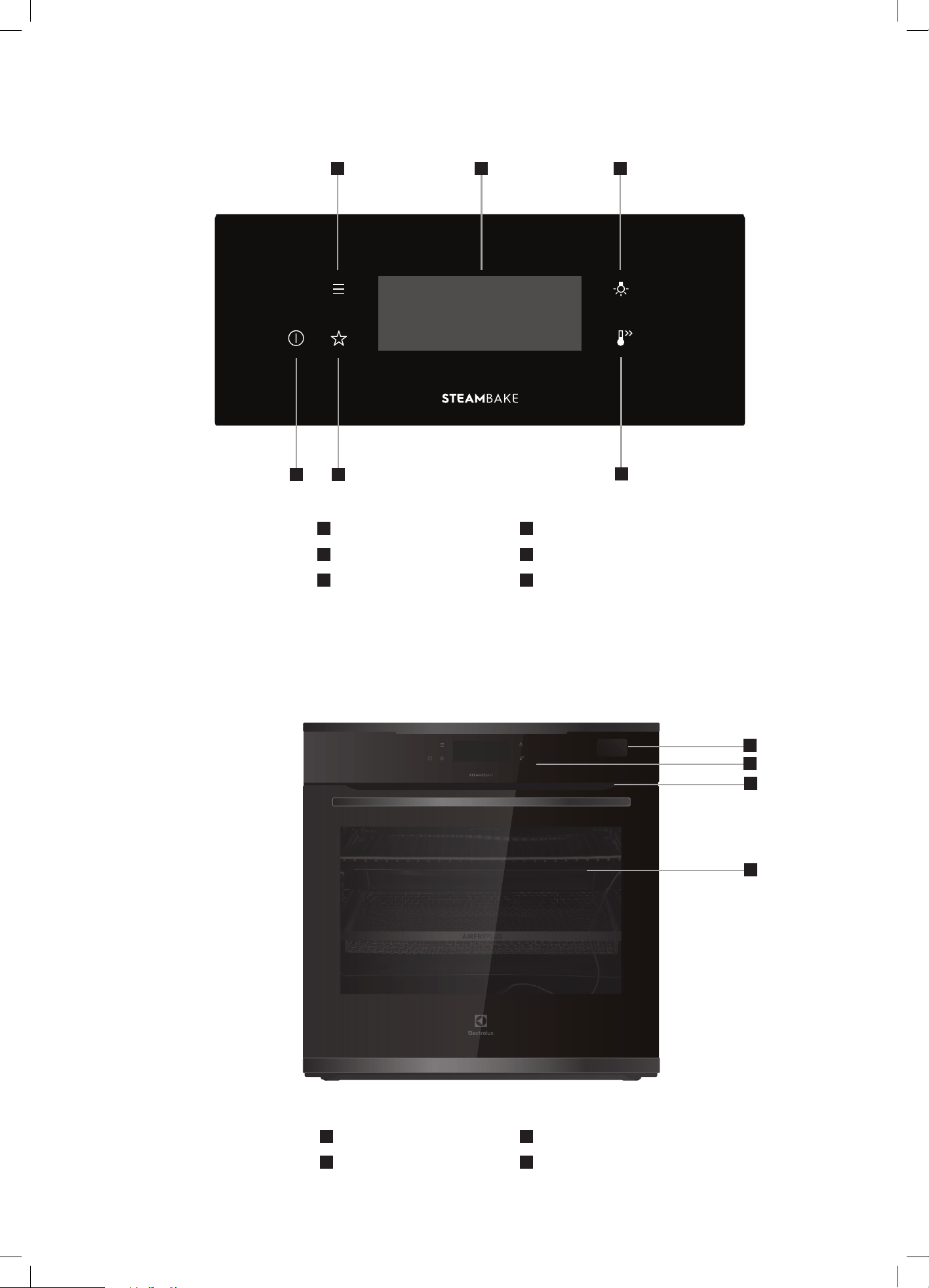
EVE636 / EVEP626 DESCRIPTION
8
Control panel
9
Warm air exhaust
10
Quadruple glazed door
11
Lower (half sized) oven
with triple/quadruple
glazed door
12
Lower (full sized) oven
with triple glazed door
1
On / Off button
2
Menu
3
Favourite button
4
Touch screen display
5
Light button
6
Fast Heat Up button
7
Oven cavity selection
1
2 3 4
765
8
10
11
12
9
29
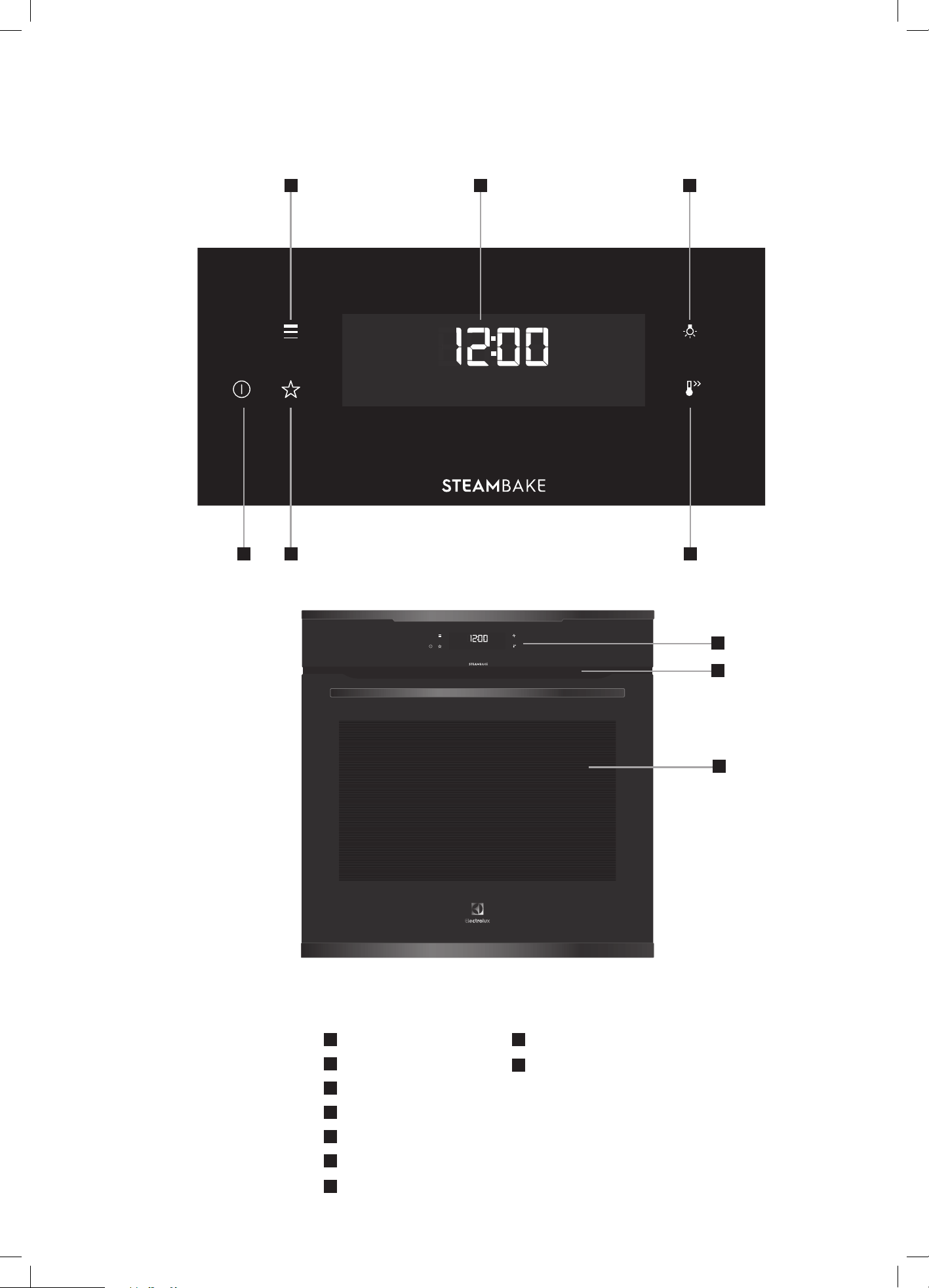
EVEP618 / EVEP619 DESCRIPTION
1
Menu button
2
Touch screen display
3
Light button
4
On / Off button
5
Favourite button
6
Fast Heat Up button
4
5
6
1 2 3
7
Water drawer
8
Control panel
9
Warm air exhaust
10
Quadruple glazed door
8
7
10
9
30 electrolux.com.au
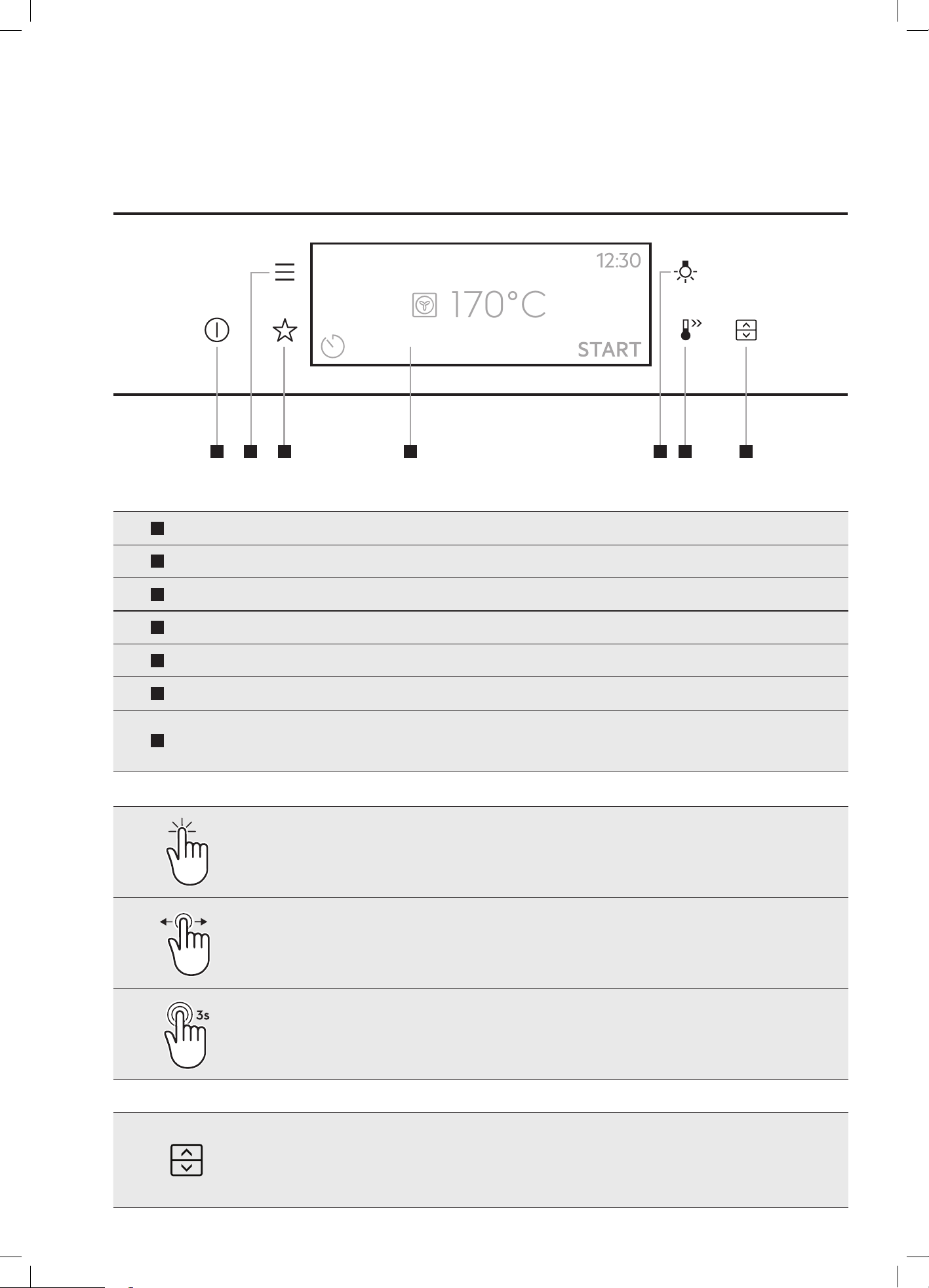
8
7
1
On / Off
2
Favourites
3
Fast Heat Up button
4
Menu
5
Touch screen display
6
Light switch
7
Control panel
8
Warm air exhaust
9
Triple / Quadruple
glazed door
5 6
2 3
9
EVE615 / EVEP615 / EVEP616 DESCRIPTION
1
4
31
EVE615 / 636, EVEP615/ 616 / 618 / 619 / 626
USING THE APPLIANCE
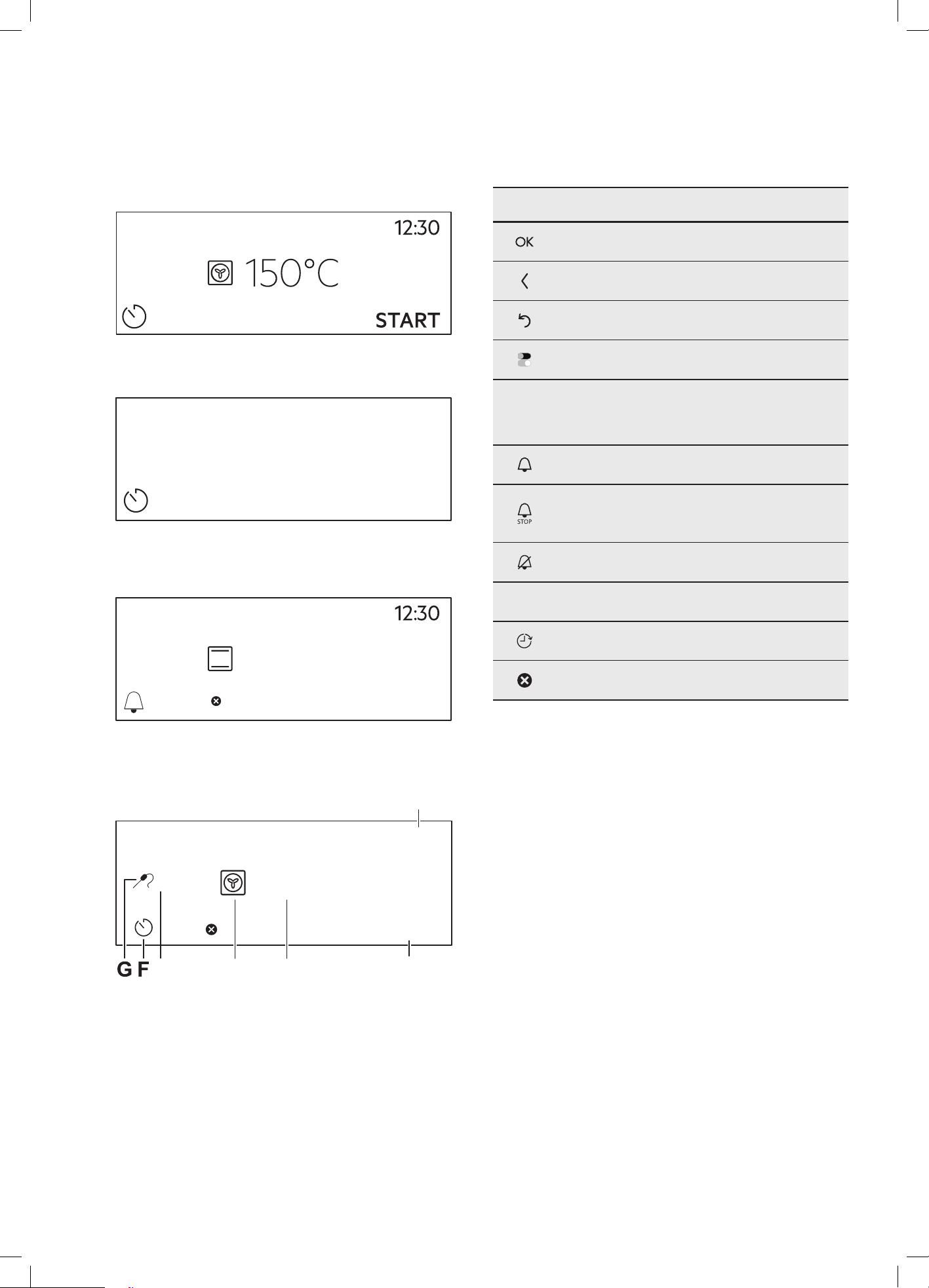
170°C
1
On / Off
Press and hold to turn the oven on and off
2
Menu
Lists the oven functions
3
Favourites
Lists the favourite settings
4
Touch display Shows the current settings of the oven
5
Light switch To turn the lamp on and off
6
Fast Heat Up To deactivate the Fast Heat Up function
7
Oven selection
To change between selection options
(EVE636 & EVEP626 models only)
Press
Touch the surface with your fingertip
Left/Right
swipe
Slide fingertip over the surface
Press and
hold
Touch the surface for 3 seconds
The models with this icon have the added feature of being able to turn the oven ON
and OFF by pressing the oven toggle symbol
1 2 3 5 6 74
32 electrolux.com.au
EVE615 / 636, EVEP615/ 616 / 618 / 619 / 626 (CONTINUED)
DISPL AY
How to turn the oven on and off
12:34
If you do not use the oven for 2 minutes, the display goes
to standby.
11min
150°C
STOP
When you cook, the display shows the set functions and
other available options.
12:30
15min
START
85°C
DE
BC
A
170˚C
The display with the maximum number of functions set.
A. Time of day
B. Start / stop
C. Oven temperature
D. Heating functions
E. Food sensor/probe temperature
F. Timer
H. Food sensor/probe (selected models only)
Display indicators
Basic indicators – to navigate on the display
To confirm the selection / setting
To go one level back in the menu
To undo the last action
To turn the options on and off
Sound alarm function indicators – when the set
time of cooking ends, the signal sounds
The function is on
The function is on.
Cooking stops automatically
Sound alarm is off
Timer indicators
To set the function: delayed start
To cancel the setting
33
CONDITION THE OVEN
(TO BURN OFF ANY RESIDUE)
Run in the empty oven before the first use.
1. Remove all accessories and removable shelf
supports from the oven.
2. Set the temperature to 180°C for the function: Fan
cooking
. Let the oven operate for 30 minutes.
The oven can emit an odour and smoke during burn
off. Make sure that the room is ventilated.
DAILY USE
WARNING
Refer to safety chapters
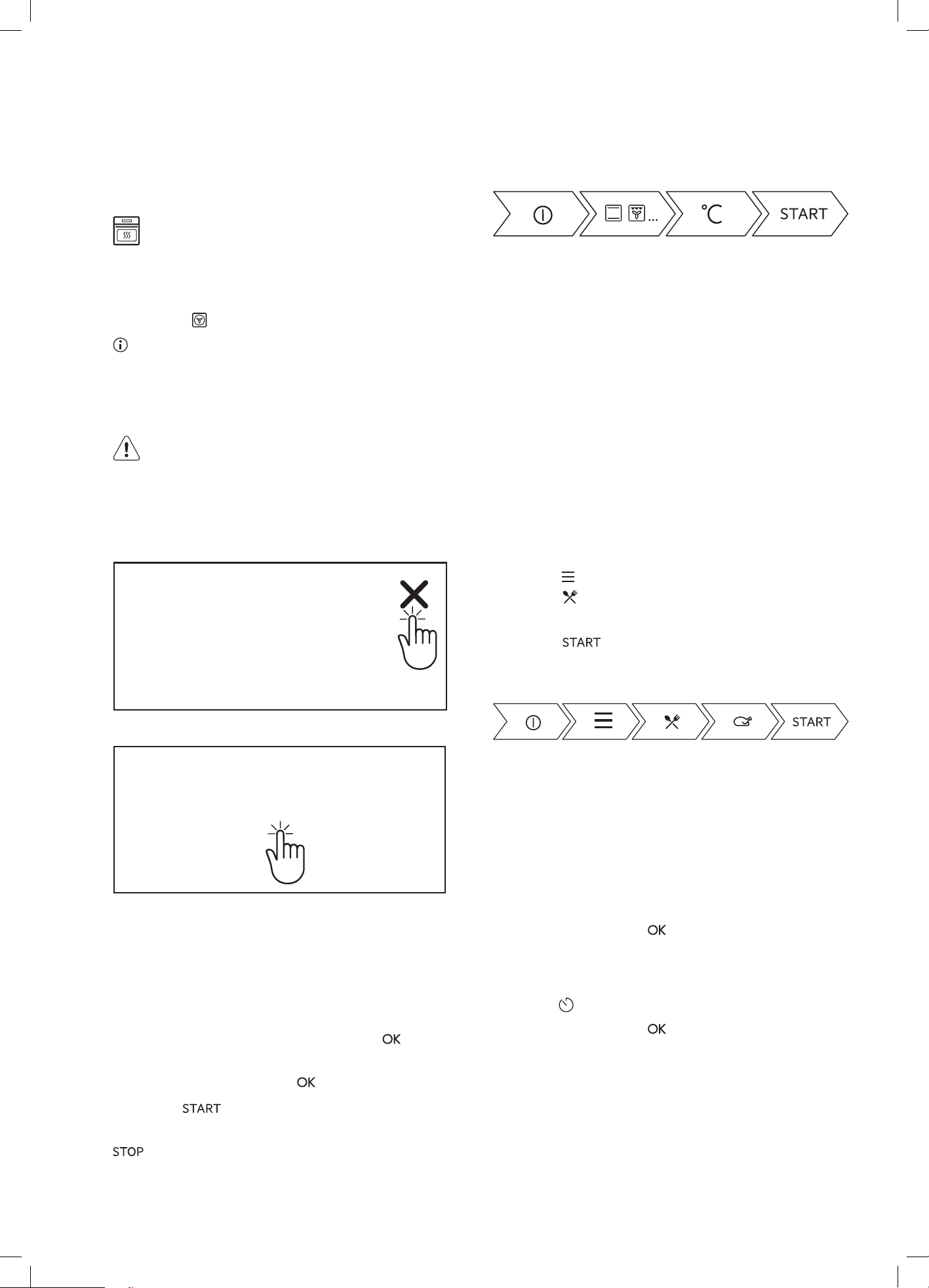
The touch screen display will display prompts or
messages. It may be necessary to touch the 'X'
Message
or the middle of the message to respond.
Message
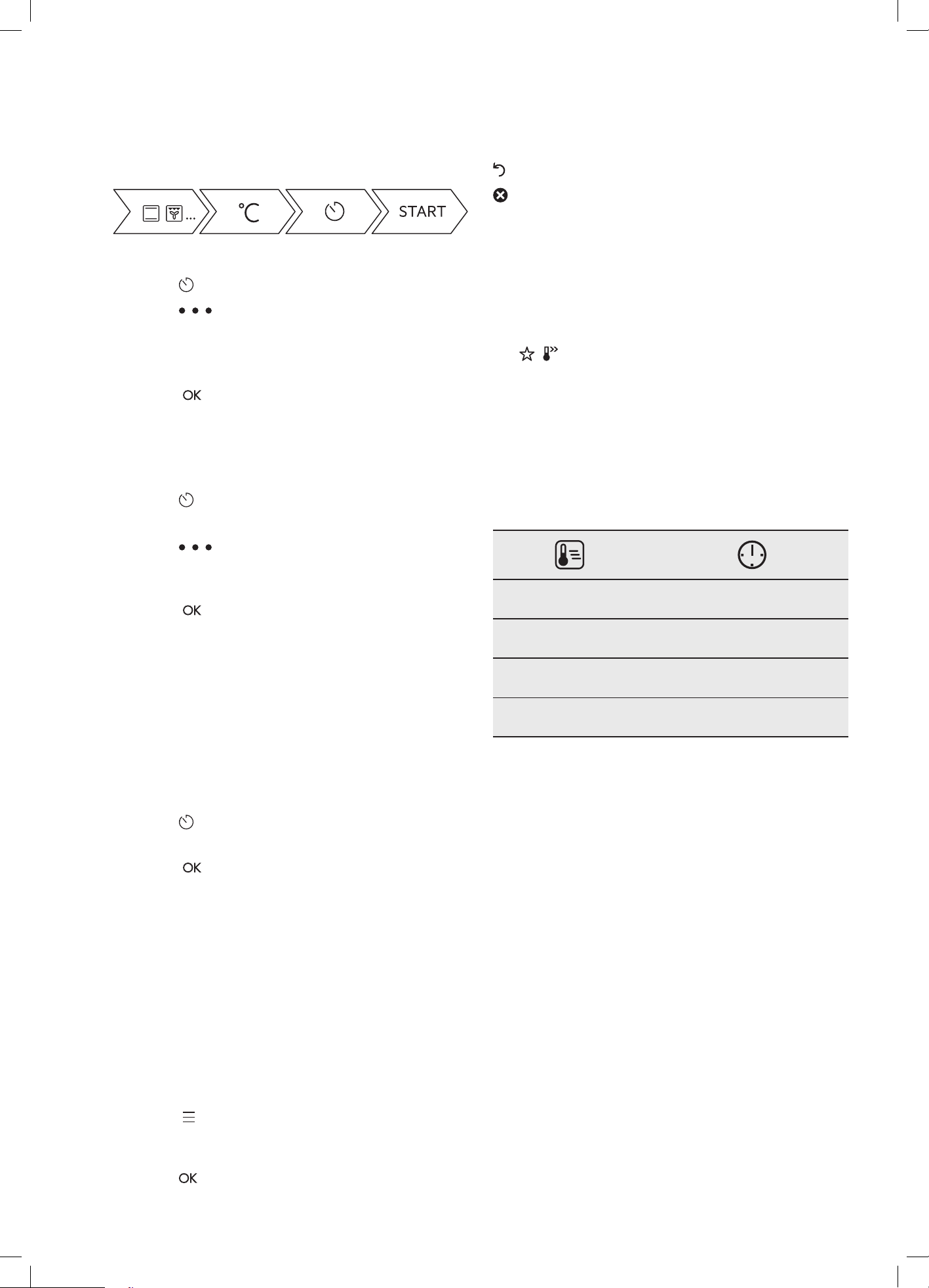
How to set Heating Functions
1. Turn ON the oven. The display shows the default
heating function.
2. Press the symbol of the heating function to enter
the submenu.
3. Select the heating function and press:
The display shows: temperature.
4. Set: temperature. Press:
5. Press: . Food Sensor/probe - you can plug
the sensor at any time before or during cooking
– press to turn off the heating function.
6. Turn OFF the oven.
Take a shortcut!
How to set Assisted Cooking
Every dish in this submenu has a recommended
function and temperature. You can adjust the time and
the temperature.
For some of the dishes you can also cook with:
• Weight Automatic
• Food Sensor/probe
The degree to which a dish is cooked:
• Rare or Less
• Medium
• Well done or More
1. Turn on the oven
2. Press: . Select: Settings / Connections
3. Press: . Enter: Assisted cooking.
4. Choose a dish or a food type.
5. Press:
Take a shortcut!
How to set Clock functions
How to set the clock
1. Turn ON
2. Press Menu
3. Go to Settings
4. Press Setup
5. Select: Time of day
6. Set the time. Press:
How to set cooking time
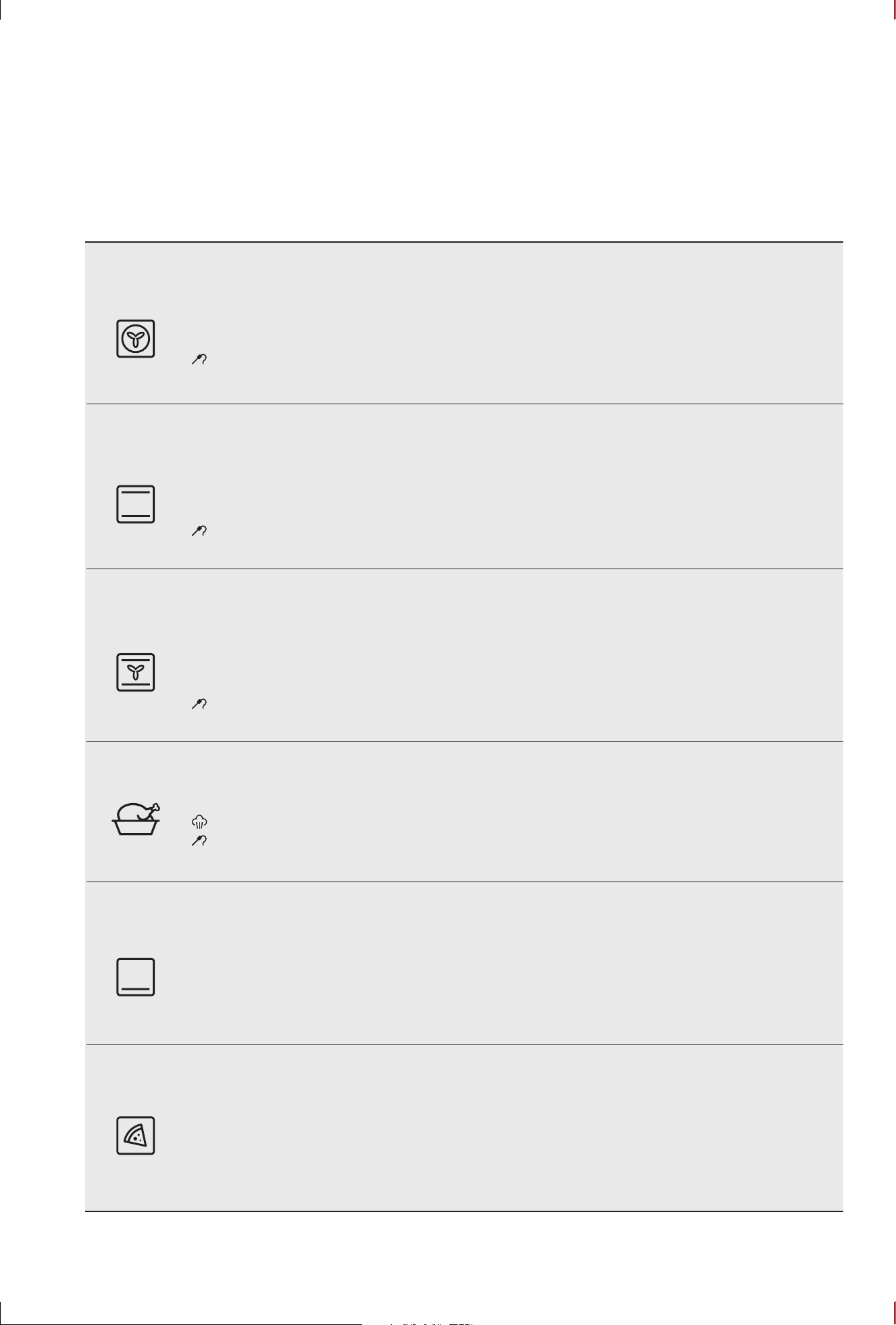
1. Choose a heating function and set the temperature.
2. Press
3. Set the time. Press:
34 electrolux.com.au
EVE615 / 636, EVEP615/ 616 / 618 / 619 / 626 (CONTINUED)
Take a shortcut!
How to choose end option
1. Press
2. Press
3. Select End action from timer
4. Press End action
5. Select preferred option
6. Press:
. Repeat the action until the display shows
the main screen.
How to delay start of cooking
1. Set the heating function and the temperature.
2. Press
3. Set the cooking time.
4. Press
5. Press: Delayed start.
6. Choose the value.
7. Press:
. Repeat the action until the display shows
the main screen.
How to extend cooking time
When 10% of cooking time is left and the food seems
not to be ready, you can extend cooking time. You can
also change the heating function.
Press +1min to extend the cooking time.
How to change timer settings
1. Press
2. Press the timer value.
3. Press:
You can change the set time during cooking at any time.
ADDITIONAL FUNCTIONS
How to save Favourites
You can save your favourite settings, such as the heating
function, the cooking time, the temperature or the
cleaning function. You can save 3 favourite settings.
1. Turn on the oven.
2. Select the preferred setting.
3. Press:
. Select: Favourites.
4. Select: Save current settings.
5. Press + to add the setting to the list of: Favourites.
Press
– press to reset the setting.
– press to cancel the setting.
Function lock
This function prevents an accidental change of the
heating function.
1. Turn on the oven.
2. Select a heating function.
3.
, – press at the same time to turn on the
function lock.
To turn off the function lock repeat step 3.
Automatic switch off
For safety reasons the oven turns off after some time,
if a heating function works and you do not change any
settings.
(°c)
(h)
30 - 115 12.5
120 - 195 8.5
200 - 245 5.5
250 - maximum 3
The Automatic switch-off does not work with the
functions: Light, Food sensor/probe, End time, Slow
Cooking.
Cooling fan
When the oven operates, the cooling fan turns on
automatically to keep the surfaces of the oven cool.
If you turn off the oven, the cooling fan can continue
to operate until the oven cools down.

35
How to manage error codes
When the software error occurs, the display shows error message. In this section, you will find the list of the
problems that you can handle on your own.
Code and description
Remedy
C2
–
the Food sensor/probe is in the oven cavity
during Pyrolytic Cleaning.
Take out the Food sensor/probe.
C3
–
the door is not fully closed during Pyrolytic
Cleaning.
Close the door.
F111 – Food sensor/probe is not correctly inserted
into the socket.
Fully plug Food sensor/probe into the socket.
F240, F439 – the touch fields on the display do
not work properly.
Clean the surface of the display with micro fibre cloth. Make
sure there is no dirt on the touch fields.
F908, F113 – the oven system cannot connect
with the control panel.
Turn power OFF and ON.
When one of these error messages continues to appear, please contact the Customer Care Centre using details on
the back cover of this user manual.
36 electrolux.com.au
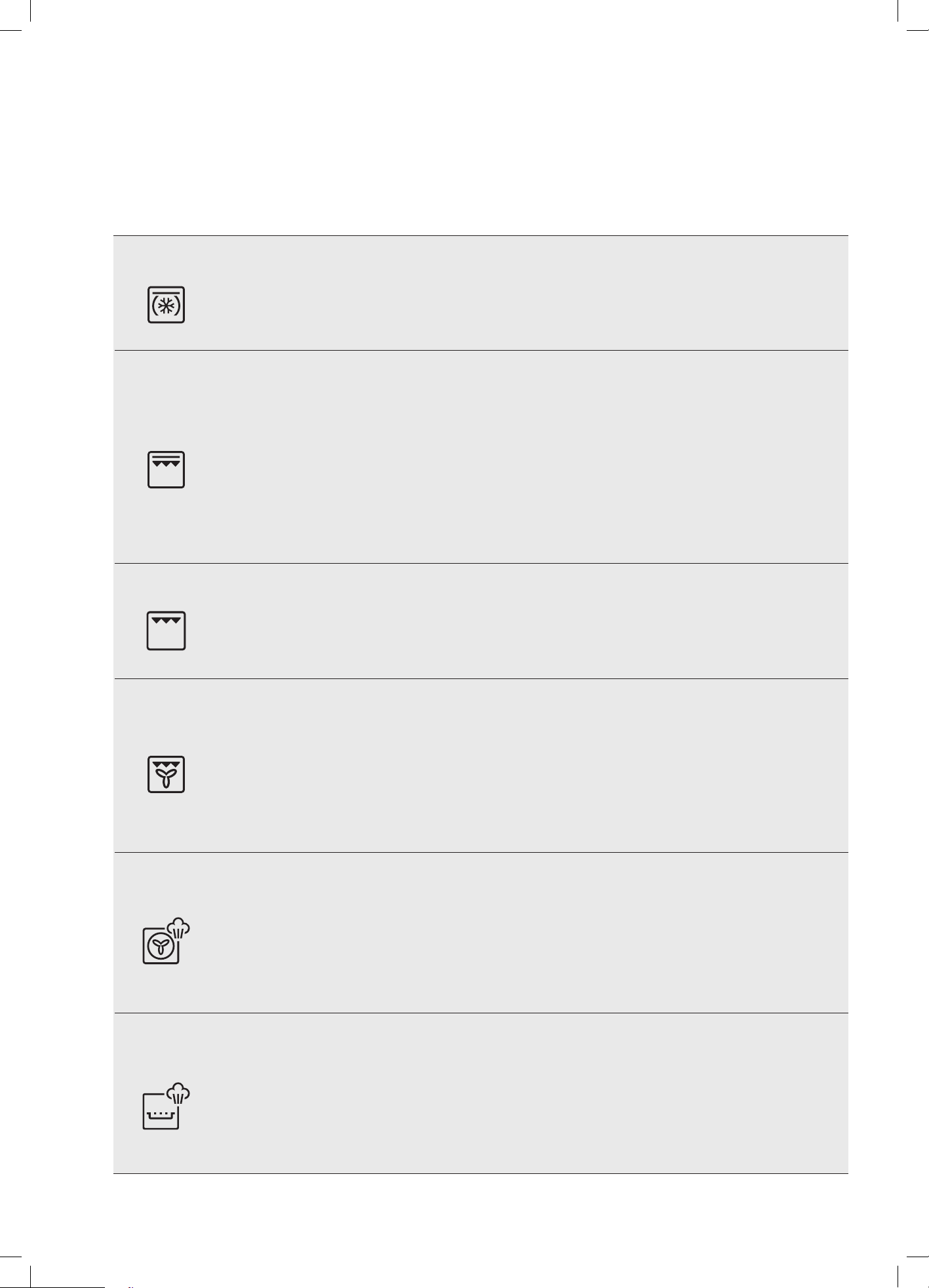
COOKING FUNCTIONS - STANDARD (Functions listed may not apply to all models.)
Symbol Function description
Fan cooking
Heat comes from the element surrounding the fan. This fan circulates the hot air around the oven cavity so that
you can put your food in different places in the oven and still cook them at the same time. You can use the ‘Fan
Cooking’ function for multi-shelf cooking, reheating cooked foods, pastries and complete oven meals. It will cook
at a lower temperature and be faster than baking. Please note that some variation in browning is normal.
NOTE: Food sensor/probe function can be introduced into this cooking cycle.
Traditional
bake
Heat comes from two elements, one above and one below the food. The bottom element is a clean heat
element and is below the floor of the oven. Both elements are controlled by the thermostat and will turn on and
off to maintain set temperature. You can use the ‘Traditional Bake’ function for single shelf cooking, single trays
of biscuits, scones, muffins, cakes, slices, casseroles, baked puddings, roasts and delicate egg dishes. This is a
general function that can be used for most cooking.
NOTE: Food sensor/probe function can be introduced into this cooking cycle.
Fan assist
bake
Heat comes from two elements, one above and one below the food. The fan circulates the hot air around the
oven cavity so that you can put the food in different places in the oven and still cook them at the same time. You
should only use a maximum of two shelves with ‘Fan Assist Bake’.
Do not use the bottom shelf. If the two shelves are used, food on the shelf in the higher position will cook first
and should then be removed to allow the food on the lower shelf to finish cooking.
NOTE: Food sensor/probe function can be introduced into this cooking cycle.
Roast
The Roast function is designed for roasting meats, poultry and fish by utilising heat from all elements in
combination with the fan to surround the food. This provides even cooking throughout and enhanced browning.
NOTE: EVEP618 / EVEP619 gives you the option to introduce steam into this cooking cycle.
NOTE: Food sensor/probe function can be introduced into this cooking cycle.
Pastry
The ‘Pastry’ function is specially designed for food that require extra browning such as the bases of pastries and
pies. Heat comes from the element below the food. If you choose the default setting, the oven will heat up to
230°C in order to brown the food.
You should then lower the temperature as required. Cook in the lower half of the oven when you are using only
one shelf.
Pizza
‘Pizza’ is a combination of ‘Pastry’ and ‘Fan Assist Bake’ and offers you the combined benefits of both functions.
Heat switches between the element surrounding the fan and the clean heat element below the oven floor.
The ‘Pizza’ function is ideal for foods that require cooking and browning on the base. It is for foods such as
pizzas, quiches, meat pies and fruit pies. Simply place the food in the middle of the oven and set the desired
temperature.
EVE615 / 636, EVEP615/ 616 / 618 / 619 / 626
37
COOKING FUNCTIONS (CONTINUED)
Symbol Function description
Cook from frozen
The ‘Cook from Frozen’ function is ideal for cooking frozen precooked foods such as savoury pastries, pizzas,
mini meals (TV dinners), meat pies and fruit pies. Heat comes from the element surrounding the fan as well as
a smaller element above the food. Simply place the food in the oven straight from the freezer and heat. Cook in
the upper half of the oven for best results.
Grill boost
‘Grill Boost’ direct radiant heat from two powerful upper elements onto the food. You can use ‘Grill Boost’
function for tender cuts of meat, steak, chops, sausages, fish, cheese toasties and other quick cooking foods.
Grill with the oven door closed.
‘Grill Boost’ allows you to take full advantage of the large grill dish area and will cook faster than the ‘Grill’
function. For best results it is recommended to preheat your grill for three minutes. This will help seal in the
natural juices of steak, chops etc for a better flavour.
Place the grill shelf in position 4 with the grill dish below to catch any spills. ‘Grill Boost’ has 2 temperature
settings, ‘LO’ and ‘HI’.
Grill
The ‘Grill’ directs radiant heat from only one of the powerful upper elements onto the food. The ‘Grill’ function
is used instead of ‘Grill Boost’ when only half the amount of heat is needed. ‘Grill’ has 2 temperature settings,
‘LO’ and ‘HI’.
Grill with the oven door closed.
Fan grill
‘Fan Grill’ offers you the benefits of both traditional bake and traditional grill functions. The grill element turns on
and off to maintain set temperature while the fan circulates the heated oven air.
Grill with the oven door closed.
You can use ‘Fan Grill’ for large cuts of meat, which gives you a result similar to ‘rotisserie’ cooked meat. Place
your food on the grill shelf in position 2 with the grill dish below to catch any spills. When using ‘Fan Grill’ it is not
necessary to turn the food over during the cooking cycle. Set temperature to 180°C.
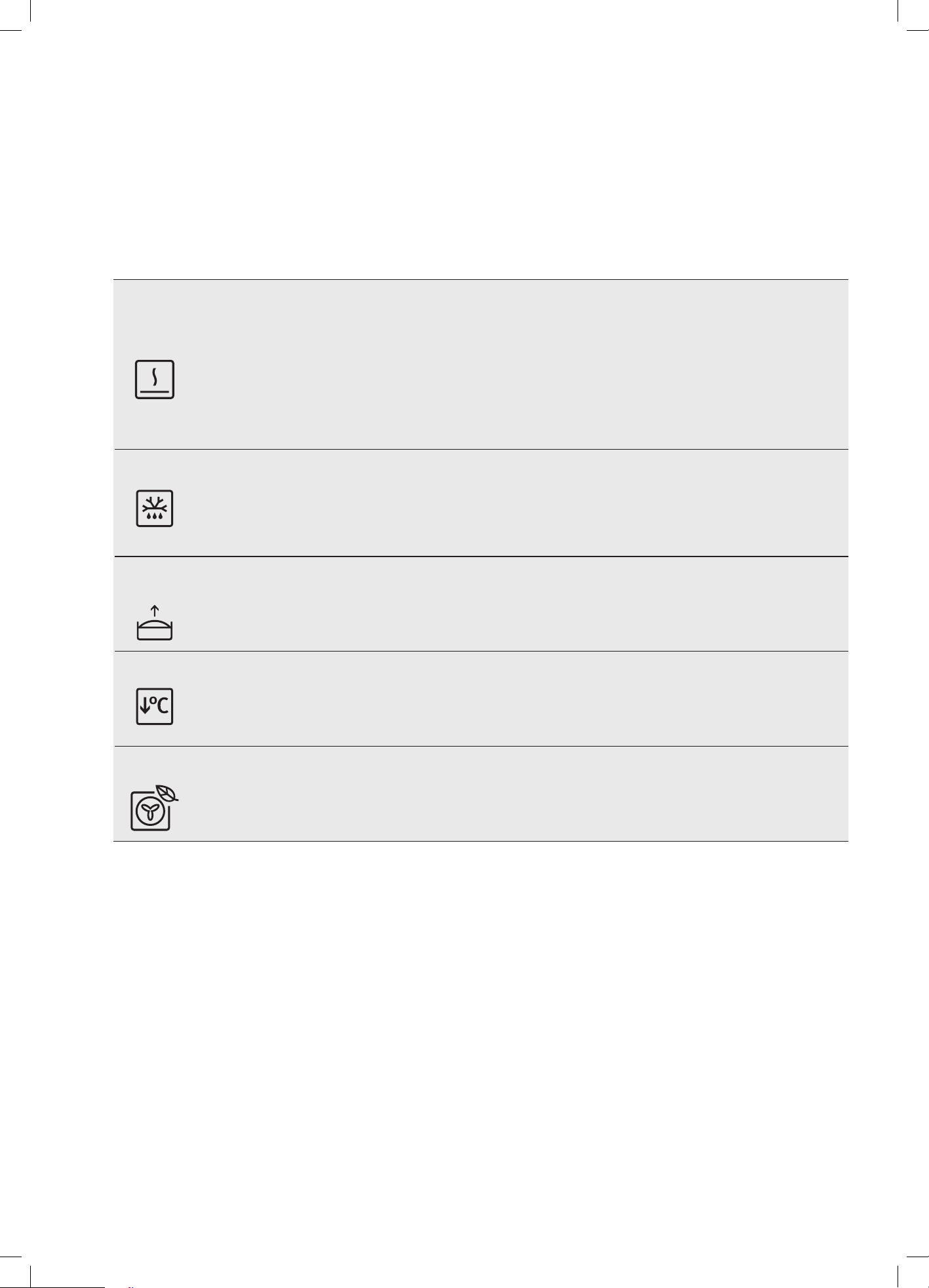
SteamBake
Adding steam to your baking program can lift your baking skills to a whole new level.
Shelf guide: position 3. (See diagram on page 41)
AirFry Plus
Using the dedicated tray with this function delivers great tasting foods that are crisper with juicy centres. Shelf
guide: AirFryPlus Tray position 3 and catch tray position 1. (See diagram on page 41)
38 electrolux.com.au
EVE615 / 636, EVEP615/ 616 / 618 / 619 / 626 (CONTINUED)
COOKING FUNCTIONS – SPECIAL
(Functions listed may not apply to all models.)
Symbol Function description
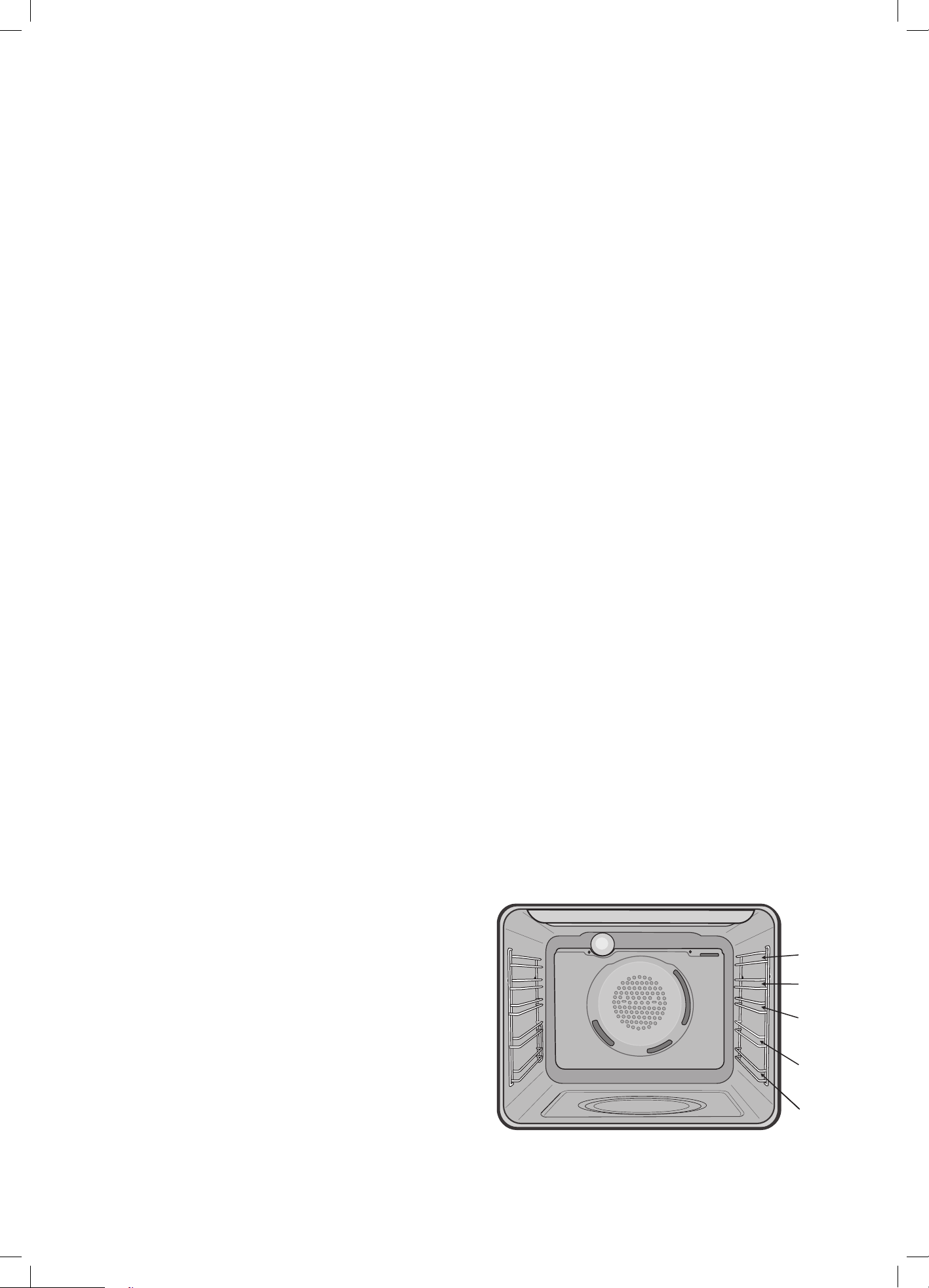
Keep warm
The ‘Keep Warm’ function is a low temperature oven function designed to keep your food at a perfect eating
temperature without cooking it further. Heat comes from the smaller elements above the food and is circulated by the
fan. Use ‘Keep Warm’ to keep your food warm while you prepare the rest of the meal or afterwards while you wait for
the late arrival.
NOTE: After cooking, the oven retains enough heat to continue to cook food even if the elements are turned off. The
‘Keep warm’ function recognises this by giving you a warning message. If this happens the function will
not start.
Defrost
The ‘Defrost’ function uses low temperature air that is circulated by the fan. You can defrost (thaw) your food before
you cook it. You can also use ‘defrost’ to raise your yeast dough and to dry fruit, vegetables and herbs. The ‘Defrost’
function does not have a suggested temperature but uses the ambient heat in the oven cavity.
Dough
proving
The Dough Proving function offers ideal humidity and heat which speeds up and improves the dough proving,
prevents surface drying and keeps the dough elastic.
Slow
cooking
The Slow Cooking function is great for gentle and slow cooking of lean and tender pieces of meat and fish.
Eco mode
Eco mode function is designed to save energy during cooking. The oven retains moisture in the cavity and runs in
energy-saving mode

39
MENU
Main menu
Press:
to open Menu
Menu item
Application
Assisted cooking
Lists automatic programmes.
Cleaning
Lists cleaning programmes.
Favourites Lists the favourite settings.
Options To set the oven configuration.
Settings Setup To set the oven configuration
Service Shows the software version and configuration
Submenu for Pyrolytic Cleaning – Applicable to Pyrolytic models only
Submenu
Application
Quick
Duration: 1 hour 30 minutes
Normal
Duration: 2 hours
Intense Duration: 2 hours 30 minutes
Submenu for Options
Submenu
Application
Light
Turns the light on and off.
Child lock
Prevents accidental activation of the oven. When the option is on, the text "Child Lock"
appears on the display when you turn on the oven. To enable the oven use, choose the
code letters in the alphabetical order. When the Child Lock is on and the oven is turned
off the oven door are locked.
Fast heat up Shortens heat up time. It is available only for some of the oven functions.
Cleaning Reminder Turns the reminder on and off.
Time indication Turns the clock on and off.
Digital clock style Changes the format of the displayed time indication.

40 electrolux.com.au
EVE615 / 636, EVEP615/ 616 / 618 / 619 / 626 (CONTINUED)
Submenu for Setup
Submenu
Application
Language
Sets the oven language.
Display brightness
Sets the display brightness.
Key tones
Turns the tone of the touch fields on and off. It is not possible to mute the tone for
.
Buzzer volume Sets the volume of key tones and signals.
Time of day Sets the current time and date.
Submenu for Service
Submenu
Application
Demo mode
Activation / deactivation code: 2468
Software version
Information about software version.
Reset all settings Restores factory settings.
41
Using the SteamBake function
(EVEP618 / EVEP619 model only)
To aid you in baking bread here is a basic recipe to
understand and experiment with the bread baking
function.
‘Test loaf from base ingredients’
500g wheat flour
10g salt
10g butter at room temperature
280 +/- 20g water at 37 °C +/- 2 °C
3g sugar
20g fresh yeast
Method
1. Weigh wheat flour, salt and butter in mixing bowl of
the food processor.
2. Dissolve sugar and yeast in the warm water and add
to the flour.
3. If using a mixing machine, mix on slow speed for
2 minutes. Then mix on medium for 8 minutes or until
dough is smooth.
4. Shape round ball of 750g of the dough, put in a bowl,
cover with cling film and let it rise for 45 minutes in
the oven at 30°C (or in defrost mode).
5. Shape a longish loaf, cover with a towel and let it rise
for 45 minutes in the oven at 30°C (or in
defrost mode).
6. Carve the surface of the bread with a serrated knife,
depth of the cuts around 5mm.
7. Choose ‘SteamBake’ function, ensure water is
in the tank and pre-heat the oven to 180°C for
10 minutes.
8. Place the dough in shelf level 2 (second from bottom)
and cook for 40-45 minutes.
9. Refill the water tank if it becomes empty before the
end of the cycle.
10. Remove loaf and allow to cool.
11. Drain any left over water from the tank once the
appliance is cool.
Cooking guide
• Select the correct shelf location for food being cooked.
• Make sure dishes will fit into the oven before it is
switched on.
• Keep edges of non Electrolux baking dishes at least
40mm from the side of the oven. This allows free
circulation of heat and ensures even cooking.
• Do not open the oven door more than necessary.
• Do not place foods with a lot of liquid into the oven
with other foods. This will cause food to steam and
not brown.
• After the oven is turned off it retains the heat for some
time. Use this heat to finish custards or to dry bread.
• Do not use a lot of cooking oil when roasting. This will
prevent splattering oil on the sides of the oven and the
oven door.
• When cooking items that require a high heat (e.g.
tarts), place the cooking dish on a scone tray in the
desired shelf position.
• For sponges and cakes use aluminium, bright finished
or non-stick cookware.
Condensation
Excess condensation may fog the oven door. This may
happen when you are cooking large quantities of food from
a cold start. Minimise condensation by:
• Keeping the amount of water used whilst cooking to
a minimum.
• Making sure the oven door is firmly closed.
• Baking custard in a baking dish that is slightly smaller
than the water container.
• Cooking casseroles with the lid on.
If water is being used in cooking, it will turn to steam
and may condense outside your appliance. This is not a
problem or fault with the appliance.
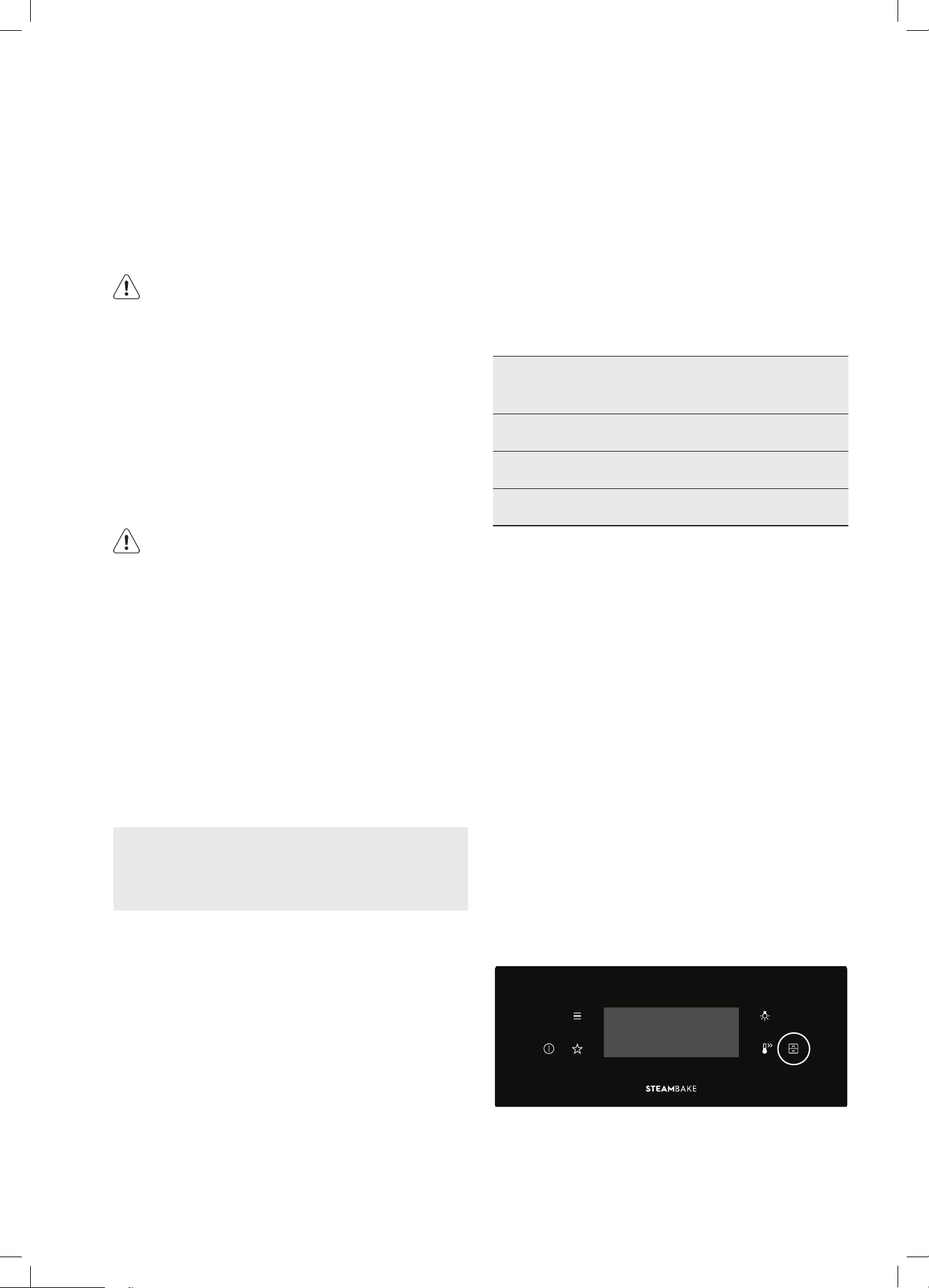
Oven shelf location
The oven has 5 positions for shelves (as shown in the
diagram below). To give maximum space above and below
the shelves, load them in this way:
When cooking with 1 shelf, position at 1 or 2.
When cooking with 2 shelves, position them at 2 and 4.
For more detailed shelf locations. Refer to cooking tables
for individual cooking functions.
1
2
3
5
4
42 electrolux.com.au
PYROLYTIC CLEANING
Pyrolytic cleaning of the oven cavity
The oven has the Pyrolytic self-cleaning function, it
cleans by burning off the spatters and accumulated dirt
and grease from the oven liner, at high temperature. This
process produces ash which can then be wiped out of
the oven cavity.
WARNING
During the Pyrolytic cleaning process the oven
becomes extremely hot
• Please keep small children at a safe distance.
• Never clean non-stick baking trays and tins in the oven
during the pyrolytic cycle. High temperatures damage
the non-stick coating and poisonous gas is released.
• Do not put water into the water tank during the
cleaning procedure.
• To prevent damage, do not use acids, sprays or
similar cleaning agents.
CAUTION
During pyrolytic cleaning the air outlet exhaust
above the door must be kept clear of any
obstruction (eg. bulky tea towels).
Do not use your oven to clean miscellaneous items
(eg. cookware).
If you have a steam oven, do not cause the water
tank to overflow during the cleaning cycle. This
could damage the enamel.
Before carrying out the Pyrolytic function
• All accessories must be removed from the oven,
including shelves, trays and side racks.
Pyro proof models (EVEP616/619) are designed
for side racks and slides to remain during
pyrolytic cycle but shelves and dishes must be
removed.
• Clean large deposits, spills or grease from the oven
cavity.
• If you have a steam oven ensure the water tank is
empty.
• Pyrolytic cleaning can release fumes that are not
harmful to humans, including infants or persons
with medical conditions, however you are strongly
advised to provide good ventilation during and after
each pyrolytic cleaning process.
• Unlike humans, some birds and reptiles can be
extremely sensitive to the potential fumes emitted
during the pyrolytic cleaning process. It is strongly
advised to remove any pets (especially birds) from
the vicinity of the appliance during and after each
pyrolytic cleaning process.
• Small pets can also be highly sensitive to the
localized temperature changes in the vicinity of all
pyrolytic ovens when the pyrolytic self cleaning
program is in operation.
• Pyrolytic cleaning will not remove salt and mineral
residue left in the cavity well when water evaporates.
It is recommended that the residue is cleaned prior
to conducting pyrolytic cleaning cycles. See section
‘Cleaning the cavity well’.
Choose your Pyrolytic cleaning cycle from the
following:
Submenu Application
Quick Duration: 1 hour 30 minutes
Normal Duration: 2 hours
Intense Duration: 2 hours 30 minutes
NOTE: Duration includes heat-up time, excludes cool-
down time.
Light clean
This is an energy saving cycle that can be used on a
regular basis if the oven is lightly soiled. Possibly after
every 2nd or 3rd roast.
Medium clean
Use this as the regular cycle about once every 2-3
months.
Heavy clean
When the oven is very dirty it may need a longer cycle to
clean it thoroughly. This cycle will clean the dirtiest of ovens.
Menu > Cleaning > Pyrolytic cleaning > Select cycle from
sub menu.
Selecting the upper or lower oven (EVEP626 only)
This model is equipped with two ovens. Use the oven selector
symbol to toggle between the upper and lower ovens.
The oven cavity icon on the control panel will show which
oven is currently active. Only one cavity can be cleaned at
a time.

43
IMPORTANT
At the beginning of Pyrolytic cleaning, the door will
automatically lock and the lock symbol will appear
on the display. During the Pyrolytic cleaning cycle
there may be some burn off odours. It is advised to
keep the room well ventilated during this cycle.
EVEP626
For this model with two ovens, both doors will lock
automatically at the beginning of the pyrolytic cleaning.
Cooking is not permitted in either oven during the
pyrolytic cleaning function.
The door(s) will only unlock when the oven has cooled
to a safe temperature. Turning the function off will not
unlock the door(s). This will only happen when safe
temperatures are reached.
NOTE: The cooling fan will operate at an increased
speed for Pyrolytic cleaning and will continue to run
until the oven has cooled down. This is normal. It is
recommended to clean the oven regularly to keep it in its
best condition.
After Pyrolytic Cleaning
After cool-down wipe the ash out of the oven with a soft
damp cloth and warm water. To restore the enamel shine
to more difficult areas, use a damp cloth with vinegar
and detergent.
CAUTION
Do not turn off the mains power supply to the oven
during the Pyrolytic cycle. This could damage the
appliance.

44 electrolux.com.au
Food category Type of food Type
Side / Oven Dishes Side Dishes Jacket Potato Wedges
Hash Browns
Oven Dishes Lasagne
Potato Gratin
Pasta Bake
Vegetable Gratin
Savoury Baking Pizza Pizza
Quiche Quiche
Bread Ciabatta
Rolls
Baguette
Wholegrain Bread
White Bread
Dark Bread
Cake in Tin Almond Cake
Apple Pie
Baked Cheesecake
Apple Cake, covered
Short crust pastry case
Sponge flan case
Madeira Cake
Sponge Cake
Tarts
Desserts / Sweet Baking Cake on Tray Apple Strudel, froz.
Baked Cheesecake
Christmas Stollen
Sponge Cake
Sugar Cake
Swiss Roll
Swiss Tarte, sweet
Yeast Cake
Brownies
Small Pastry Cakes, small
Cream Puffs
Eclairs
Macaroons
Muffins
Pastry Strips
Puff Pastry
Shortbread
ASSISTED COOKING RECIPES
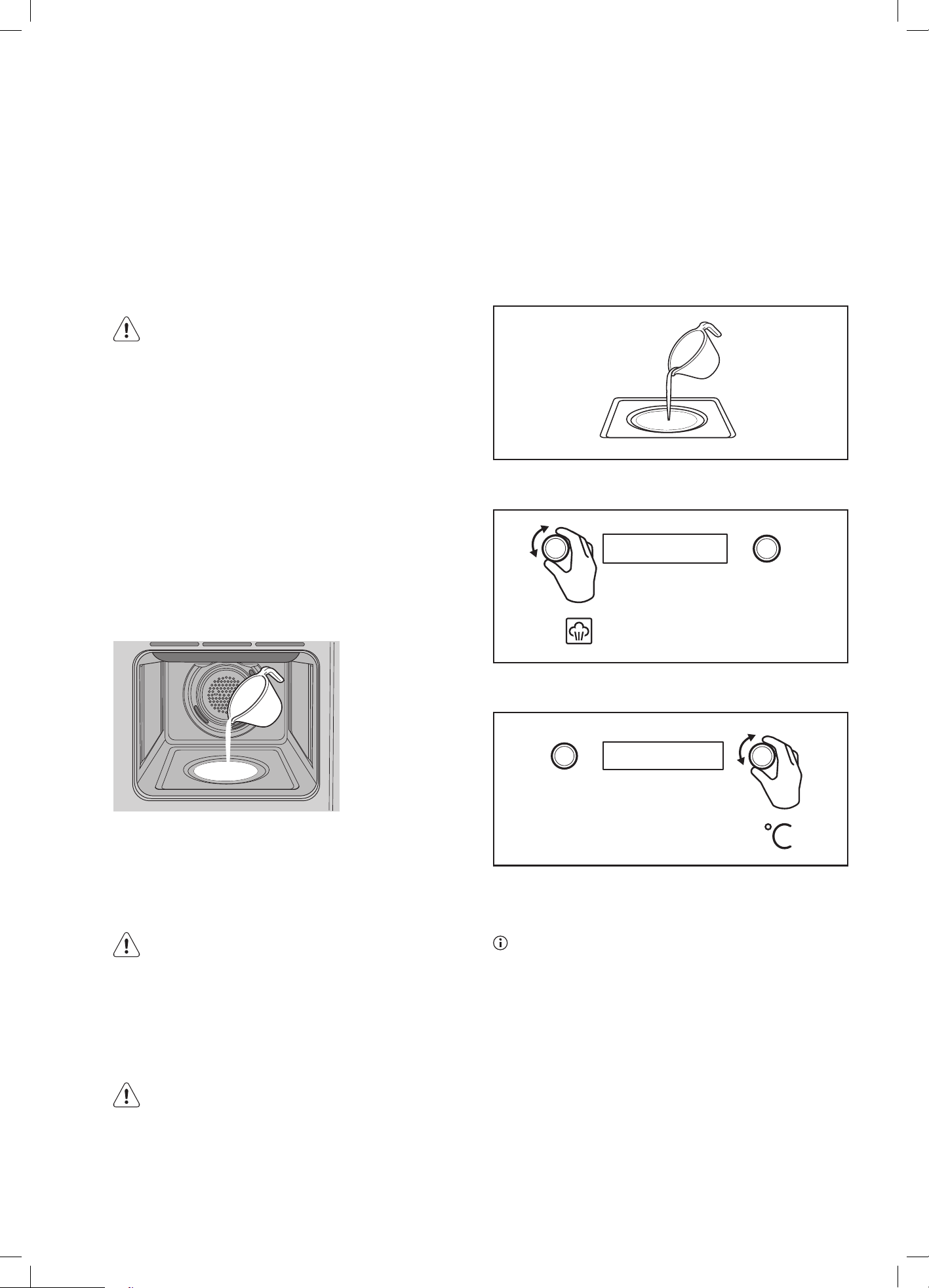
45
STEAM ASSISTED COOKING
All Electrolux range of ovens have the ability to add steam
while baking.
Cooking with steam is a great addition to ‘hot air’ cooking.
Steam brings out all the natural flavours and goodness in
the food, cooks evenly from surface to centre and retains
more nutrients and vitamins. Steam assisted cooking
consistently produces juicy, succulent interiors with crisp,
golden exteriors.
WARNING
Risk of burns and damage to the appliance
• Do not open the appliance door when the steam
function operates, with the exception of preheating.
• Open the appliance door with care after the steam
function stops.
• Refer to cleaning the appliance for cleaning after the
steam function operates.
EVE602, EVE614
1. Open the oven door
2. Add 150ml of tap water to the cavity well. Only add
water when the oven is cold.
3. Set the ‘SteamBake’ function.
4. Preheat the oven for 10 minutes or according to the
recipe suggestions.
5. Place food in the appliance and close the oven door.
CAUTION
Do not refill the cavity well with water during
cooking or when the oven is hot.
7. To deactivate the appliance, turn the knob for the
oven functions to off position.
8. Remove water from the cavity well.
WARNING
Make sure that the appliance is cool before you remove
the remaining water from the cavity well.
EVEP614 MODEL ONLY
Steam cooking
Make sure that the oven is cold.
1. Add 150ml of tap water to the cavity well. Only add
water when the oven is cold.
2. Set the steam heating function.
3. Set the temperature
4. Preheat the empty oven for 10 minutes to create
humidity. Put food in the oven.
The maximum capacity of the cavity embossment
is 250ml. Do not refill the cavity embossment during
cooking or when the oven is hot.
When the steam cooking ends
1. Turn the knob for the heating functions to the off
position to turn off the oven.
2. Carefully open the door. Released humidity can cause
burns.
3. Make sure that the oven is cold. Remove the
remaining water from the cavity embossment.
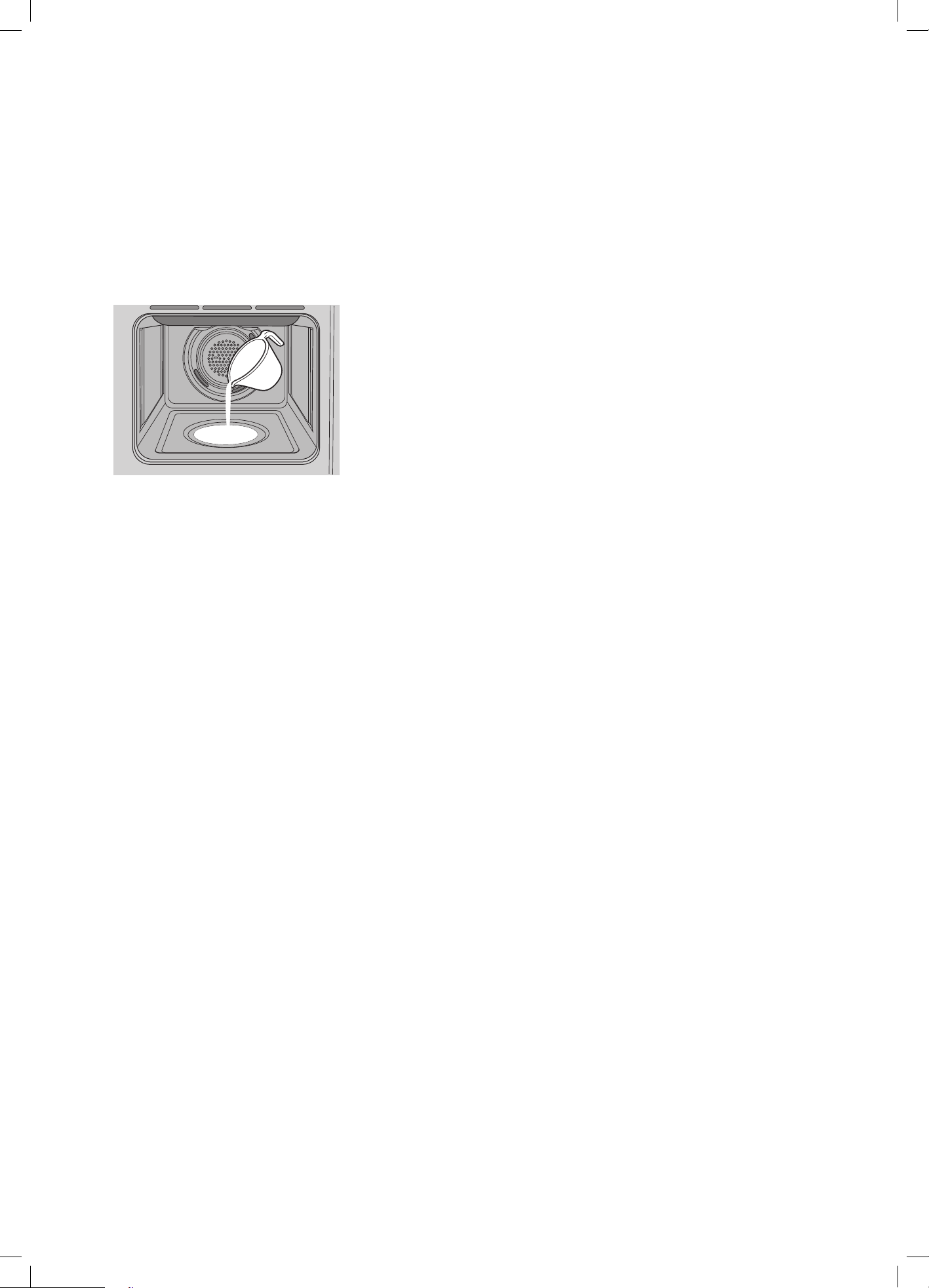
46 electrolux.com.au
EVE615, EVE636, EVEP615,
EVEP616, EVEP626
1. Open the oven door.
2. Add 150ml of tap water to the cavity well. Only add
water when the oven is cold.
3.
Select any of the STEAM ASSIST functions.
4. Set the temperature and press START to commence.
5. Preheat the oven for 10 minutes or according to the
recipe suggestion.
6. Place food in the appliance and close the oven door.
STEAM ASSISTED COOKING
(CONTINUED)
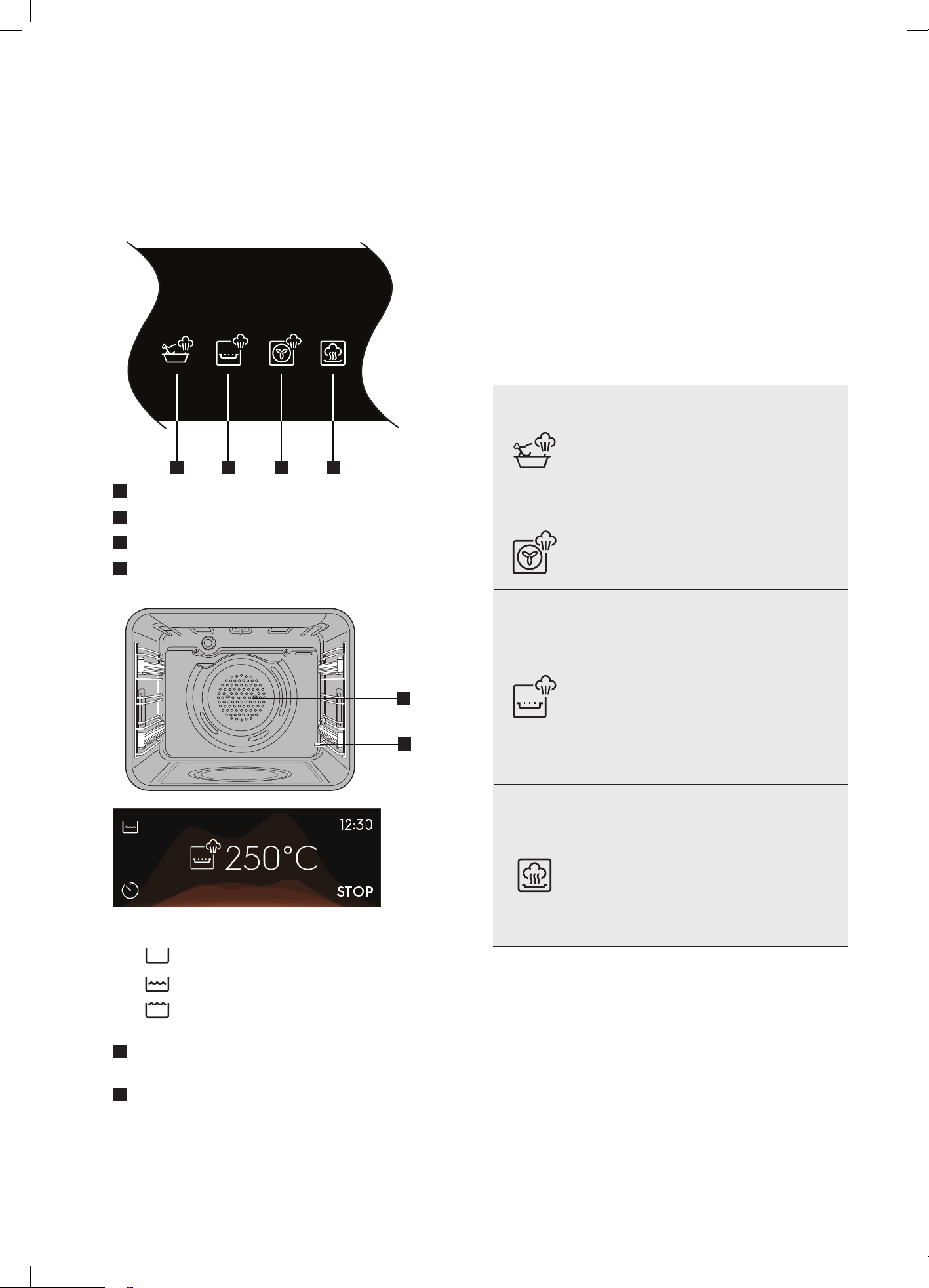
47
EVEP618 / EVEP619
Steam product description
STEAM ASSIST
1 2 3 4
1
SteamRoast
2
AirFry Plus
3
SteamBake
4
Steam Reheat
1
2
Water tank Level Indicator
– Tank empty.
– Water present.
– Tank full. Overfill alarm will sound.
Press ‘OK’ to continue.
1
Steam outlet. This is where steam is injected into
the oven, which is behind the fan cover.
2
Water overflow pipe / drain pipe. If the water tank is
over filled, water will be dispensed into the oven from
here. This is not a fault with the appliance. It prevents
water spilling out of the water drawer which could
create a hazard. If this occurs mop up the overflow
with a clean cloth and continue with the cooking
function.
COOKING FUNCTION –
STEAM ASSIST
Steam comes from the outlet pipe and heat comes from the
element surrounding the fan. This fan circulates the hot air and
steam around the oven cavity so that you can put your food in
different places in the oven. This combination of steam and hot
air together cooks food with a tender interior and crisp exterior.
Browning of meat or fish will be perfect with the best cooking
result at the core. The shape will be always be preserved and
evenly firm. Vegetables will benefit with a high retention of
nutrients.
SteamRoast
The function is suitable for meat, poultry,
oven dishes and casseroles. Thanks to the
combination of steam and heat, meat gets a
tender and juicy texture along with a crusty
surface.
SteamBake
Use this function to prepare bread and bread
rolls with a very good professional-like result in
terms of crispiness, colour and crust gloss.
AirFry Plus
Use this function in combination with dedicated
tray to get advanced convection cooking
function, delivering improved colour, more
moisture retained and crispier precooked food
as Potatoes, finger food.
To obtain optimal results, start the function with
an empty oven, then when the oven reaches
temperature insert the AirFry Plus tray with food
and set timer option to "Sound Alarm and
stop function", or the function will not cycle
properly.
Steam Reheat
Food reheating with steam prevents surface
drying.
Heat is distributed in a gentle and even way,
which allows to recover taste and aroma of
food as just prepared. This function can be
used to reheat food directly on a plate. You can
regenerate more than one plate at the same
time, using different shelf positions.
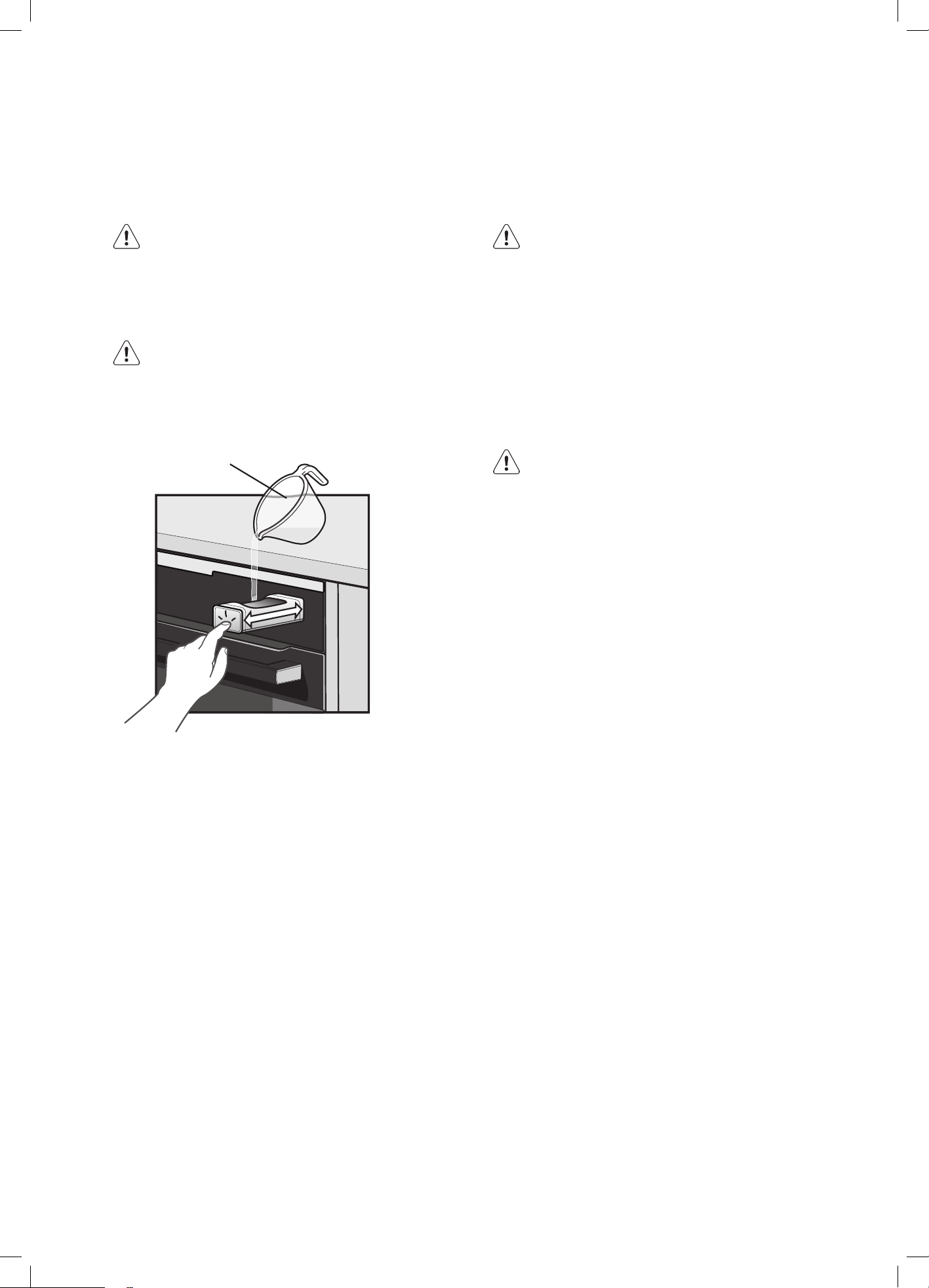
48 electrolux.com.au
STEAM COOKING OPERATION
The water drawer cover is in the control panel.
WARNING
Use only cold tap water. Do not use filtered (de-
mineralised) or distilled water. Do not use other
liquids. Do not put flammable or alcoholic liquids
into the water drawer.
WARNING
The steam is not visible inside the oven but it is
there. Opening the oven door to place, remove
or inspect food will release it. Stand back when
opening the door to avoid the risk of burns.
Use measuring
jug
1. Press the cover of the water drawer to open it.
2. Fill the water drawer with cold water to the maximum
level (around 950ml) until the signal sounds or the
display shows the message. Do not fill the water
drawer over its maximum capacity. If the tank is
overfilled, the excess will flow in to the oven. This
prevents leakage onto cabinets and is not a fault.
Sponge up overflows if they occur.
3. Push the water drawer to its initial position.
4. Turn on the appliance.
5. Select steam heating function from STEAM ASSIST
sub menu and set the temperature.
6. If necessary, set the function: Duration or: End Time
The steam appears after approximately 2 minutes. When
the appliance reaches the set temperature, the signal
sounds. When the water drawer is running out of water,
the signal sounds and the water drawer needs to be
refilled to continue the steam cooking as described above.
The signal sounds at the end of the cooking time.
7. Turn off the appliance.
8. Empty the water tank after the steam cooking is
completed.
STEAM MAINTENANCE
Refer to the cleaning function: Tank emptying.
CAUTION
The appliance is hot. There is a risk of burns.
9. After Steam Cooking steam can condensate on the
bottom of the cavity. Always dry the bottom of the
cavity when the appliance is cool.
Let the appliance dry fully with the door open. To
speed up the drying you can close the door and
heat up the appliance with function: Fan Cooking at
temperature 150° C for approximately 15 minutes.
WARNING
Water in the tank can still be hot. Wait until the
appliance is cool before the water tank is drained.
Do not use the drained water to fill the water
tank again.
Every dish in this submenu has a proposed function and
temperature.
Those parameters can be adjusted manually according to
the user's preference.
For some of the dishes You can also choose way of
cooking:
• Manual
• Food Sensor/probe
The level to which a dish is cooked:
• Rare
• Medium
• Well Done
Note: to obtain a perfect result when you cook
something from frozen with your AirFry Plus tray, insert a
timer after the oven reached temperature and the tray is
inserted. To verify which timer setting is optimal for the
recipe, consult the dedicated table in the paragraphs
below.
STEAM ASSISTED COOKING
(CONTINUED)

49
if the procedure is not completed correctly, the display
prompts to repeat the procedure.
Descaling reminder
There are two reminders which prompt you to descale the
oven. You cannot disable the descaling reminder.
Type
Description
Soft reminder
Recommends you descale the
oven
Hard reminder
Obligates you to descale the oven.
If you do not descale the oven
when the hard reminder is on, the
steam functions are disabled.
Rinsing
Before you start:
• Turn off the oven and wait until it is cold
1. Place the deep pan on the base of the oven.
2. Fill the water drawer with water to the maximum
level until the signal sounds or the display shows a
message.
3. Select: Menu / Cleaning / Rinsing.
Duration: approx 30 min
4. Turn on the function and follow the instruction on the
display.
5. When the function ends, remove the deep pan.
When this function works, the lamp is off.
STEAM SERVICE FUNCTIONS
Menu > Cleaning > Steam maintenance
Submenu
Application
Descaling
Procedure for cleaning the
steam generation circuit from
residual limestone.
Rinsing
Procedure for rinsing and
cleaning the steam generation
circuit after frequent use of the
steam functions.
Tank emptying
Procedure for removing the
residual water from the water
drawer after use of the steam
functions.
Descaling Function
Before you start:
• Turn off the oven and wait until it is cold
• Empty the water drawer (use tank empty function)
Duration of the first part: around 100 minutes
1. Select Menu/Cleaning/Descaling
2. Place the deep pan on the oven base
3. Fill the drawer with 250ml of descaling agent
4. Fill the remaining part with 700 ml of water, until signal
sound or display shows the message
5. Launch the function
6. After the first part is over, empty the deep pan and put
it back on the oven base
Duration of the second part: approx 35min
7. Fill the remaining part of the water drawer with water
to the maximum level until the signal sounds or the
display shows a message.
8. When the function ends, remove the deep pan.
When this function works, the light is off.
When descaling ends:
• Turn off the oven.
• When the oven is cold, dry the cavity with a
soft cloth.
• Leave the oven door open and wait until the
cavity is dry.
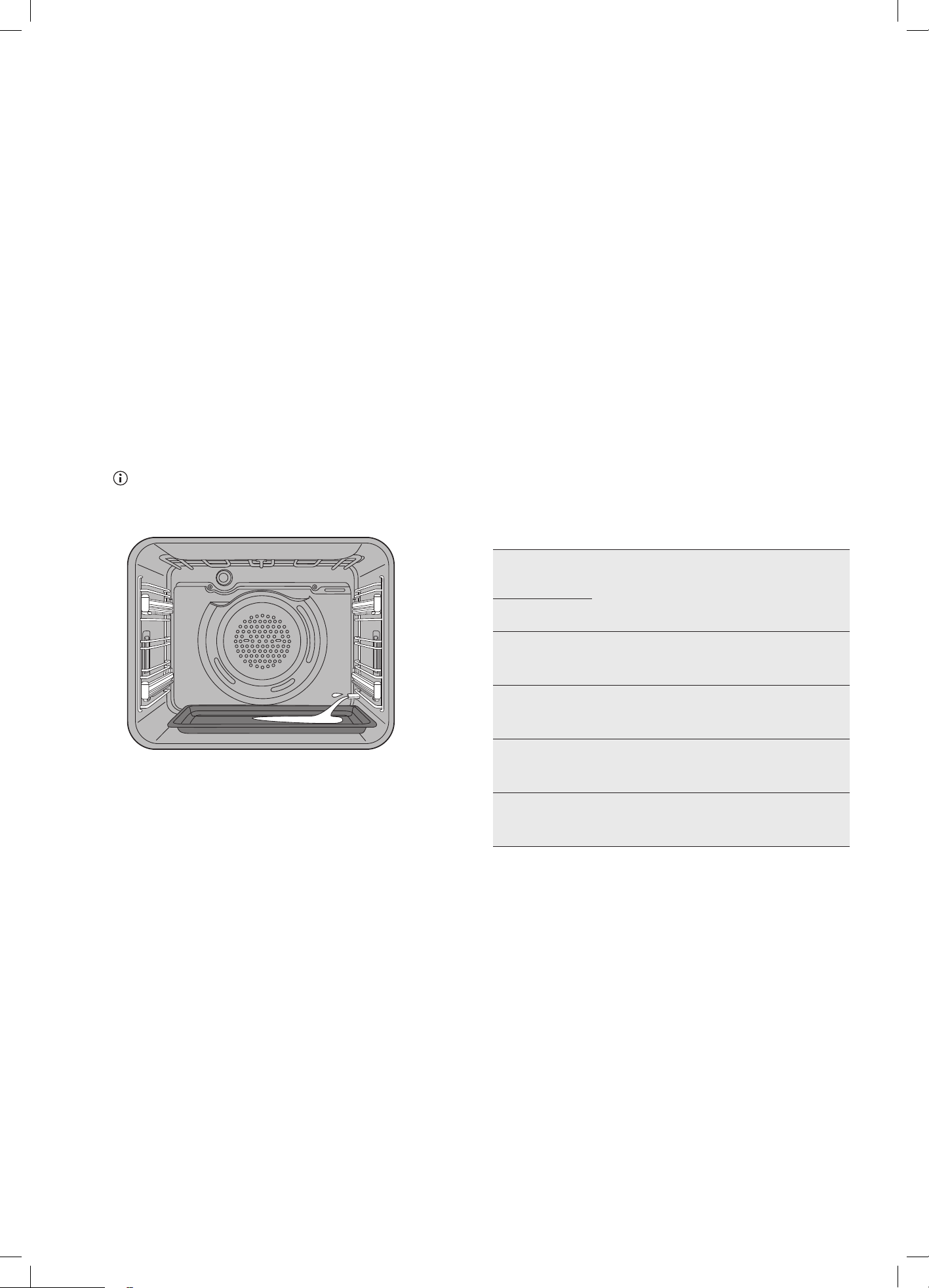
50 electrolux.com.au
Tank Emptying
Use this function after cooking with a steam heating
function to remove the residual water from the water
drawer.
Before you start:
• Turn off the oven and wait until it is cold
1. Place the deep pan on the base of the oven.
2. Select: Menu / Cleaning / Steam maintenance / Tank
emptying.
Duration: 6 minutes
3. Turn on the function and follow the instruction on the
display.
4. When the function ends, remove the deep pan.
When this function works, the lamp is off.
Always remove tray for normal cooking or enamel damage
may occur.
Any residual water on the cavity should be cleaned off with
a dry cloth to avoid staining of the enamel. If there is a stain
on the cavity, it can be removed by placing paper towel
soaked in vinegar solution on the stain. (Equal parts of
water/white vinegar solution).
STEAM ASSISTED COOKING
(CONTINUED)
WATER HARDNESS
How to set water hardness:
When the oven is first turned ON, the water hardness level
needs to be set. The default value in your controller is 4. To
lower or increase your water hardness value, follow below
procedure.
1. Go to menu.
2. Press: Settings
3. Press: Set up
4. Select water hardness value using the table below as
a guide.
Contact your water supplier to check the water hardness
level in your area if you are unsure.
The table below shows water hardness range (dH) with
the corresponding level of calcium deposit and the water
classification. Adjust the water hardness level according to
the table.
Water
hardness
Calcium
deposit
(mmol/l)
Calcium
deposit
(mg/l)
Water
classification
Level
dH
1
0-7 0-1.3 0-50 soft
2
8-14 1.4-2.5 51-100
moderately
hard
3
15-
21
2.6-3.8 101-150 hard
4 ≥22 ≥3.9 ≥151 very hard
When the tap water hardness level is 4, fill the water
drawer with still bottled water.

51
COOKING GUIDE
Recipe
Function
Shelf
position
Temp (C) Preheat
Cooking time
(min excluding
preheat)
Size/portion Accessory
Chicken
nuggets
AirFry Plus 3 220 Y 15-25 600g AirFry Plus Tray
Croquettes
AirFry Plus 3 220 Y 15-25 450g AirFry Plus Tray
Crumbed
fish
AirFry Plus 3 220 Y 15-25 6pcs AirFry Plus Tray
Chicken
schnitzel
AirFry Plus 3 230 Y 15-20 6pcs AirFry Plus Tray
French fries
AirFry Plus 3 220 Y 25-30 1kg AirFry Plus Tray
Frozen
croissant
AirFry Plus 2 170 Y 30-40 6
Grid and baking
paper
Bread
Reheating 2 130 N 20-25 700g AirFry Plus Tray
Focaccia
Reheating 2 130 N 20-25 3-4 portions Tray
Casserole Reheating 2 130 N 20-30 2-3 portions Round glass pyrex
Side dishes Reheating 2 130 N 15-20 2-3 portions Plate
Fish Reheating 2 130 N 15-25
Fillet or
whole
Round glass pyrex
Meat Reheating 2 140 Y 20-25
Chicken,
pork, beef
Round glass pyrex
Whole
Chicken
Steam
Roast
2 230 N 55-65 1.2 kg Grid/tray
Spare ribs
Steam
Roast
2 130 N
10 mins grill
at 230°C
2 racks Grid/tray
Whole fish
Steam
Roast
2 180-190 N 25-30
2 fish, 700g
each
Tray
Potato
gratin
Steam
Roast
2 160 N 60-80 1
Pyrex glass round
21cm
Lasagna
Steam
Roast
2 180 N 45-60 1
Pyrex squared
35 x 24 x 6cm
White bread
Steam
bake
2 180 N 50-65 750g Tray
Bread rolls
Steam
bake
2 200 N 30-40 9 Tray
Gluten free
bread
Steam
bake
2 200 N 50-65 1 Tin cake mould
Apple pie
Steam
bake
2 160 N 90-110 1 Round tin 21cm
Focaccia
Steam
bake
2 200-210 N 25-35 1 Tray
Biscuits
Steam
bake
2 160-170 N 20-40 20 Tray
*count shelf from the bottom up
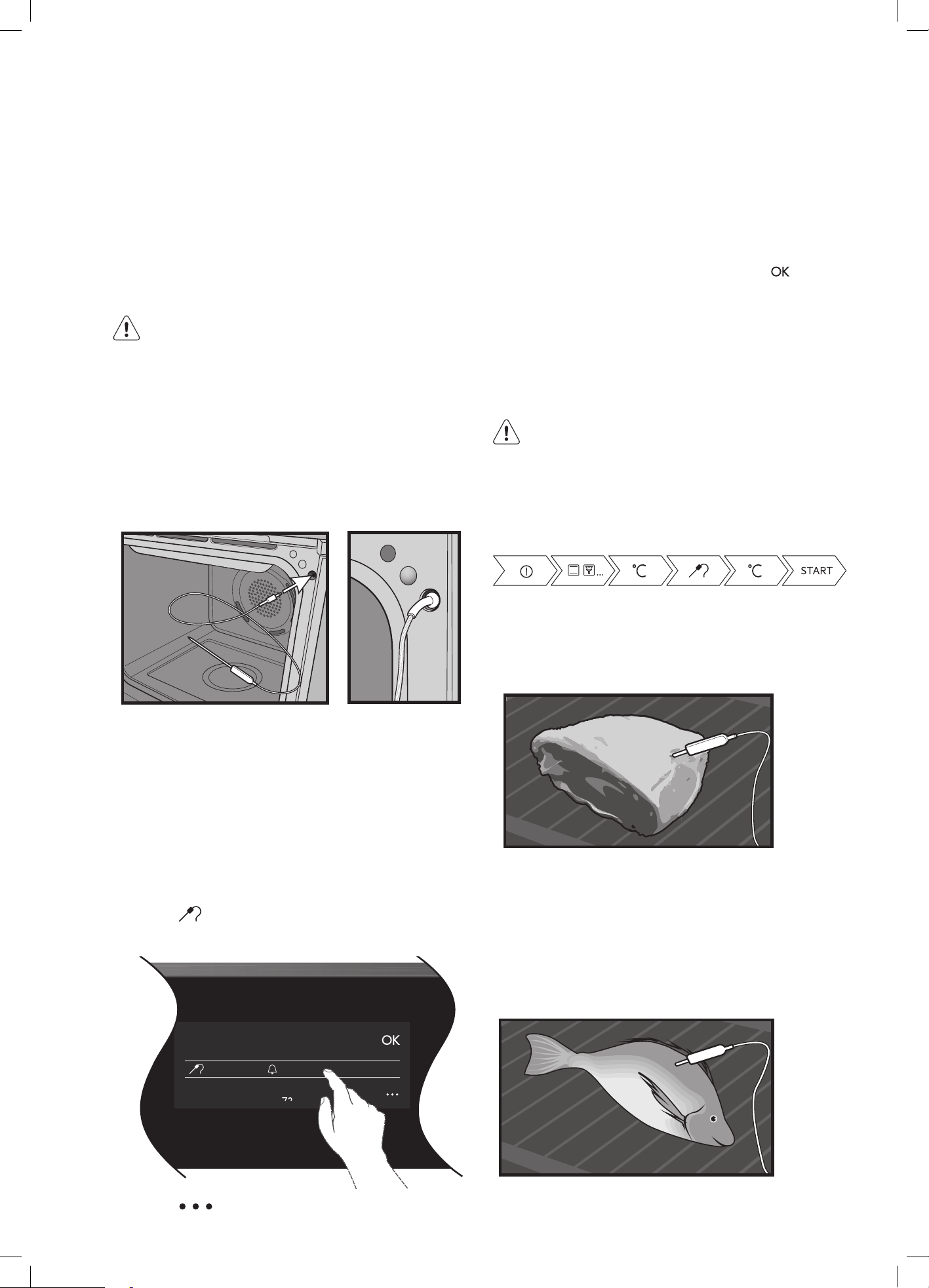
52 electrolux.com.au
The Food Sensor/Probe measures the core temperature
of the food. When the food reaches the desired set core
temperature, the oven turns off. The Food Sensor/Probe
has a core temperature range of 50-99°C.
There are two temperatures to set:
• The oven temperature
• The core temperature of the food
WARNING
Only use the Food Sensor/probe supplied or the
correct replacement parts.
NOTE: Food must be completely defrosted when inserting
the Food Sensor/probe. If the food is too cold, the Food
Sensor/probe function will not work.
Put the plug of the Food Sensor/probe into the socket on
the top right hand corner of the front frame. Ensure the
plug is fully inserted into the socket.
ALL FOOD SENSOR/PROBE MODELS
1. Turn on the oven.
2. Set a heating function and, if necessary, the oven
temperature.
3. Insert the Food Sensor/probe.
4. Plug the Food Sensor/probe into the socket at the
front of the oven. The display shows the current
temperature of the Food Sensor/probe.
5. Press
to set the core temperature of the
Sensor/probe.
Target Temperature
22˚C 70˚C
71
6. Press to set the preferred option:
• Sound alarm – when the food reaches the core
temperature, the signal sounds.
• Sound alarm and stop cooking – when food
reaches the core temperature, the signal
sounds and the oven stops.
7. Select the option and repeatedly press:
to go to
the main screen.
8. Press: When food reaches the set temperature,
the signal sounds. You can choose to stop or to
continue cooking to make sure the food is well done.
9. Remove the Food Sensor/probe plug from the
socket and remove the dish from the oven.
WARNING
There is a risk of burns as the Food Sensor/Probe
becomes hot. Be careful when you unplug it and
remove it from the food.
Take a shortcut!
Meat
For large pieces of meat, insert the tip of the Food Sensor/
probe into the centre of the meat, with at least 75% of the
sensor/probe inserted into the meat.
Fish
For best results, place the whole fish onto the wire rack
and prop it up in the swimming position (i.e. using half
a potato or onion). Alternatively the fish can be laid flat.
Insert the Food Sensor/probe behind the head with at least
75% of the Sensor/probe inserted into the fish towards the
bones in the middle of the fish.
USING THE FOOD SENSOR/PROBE
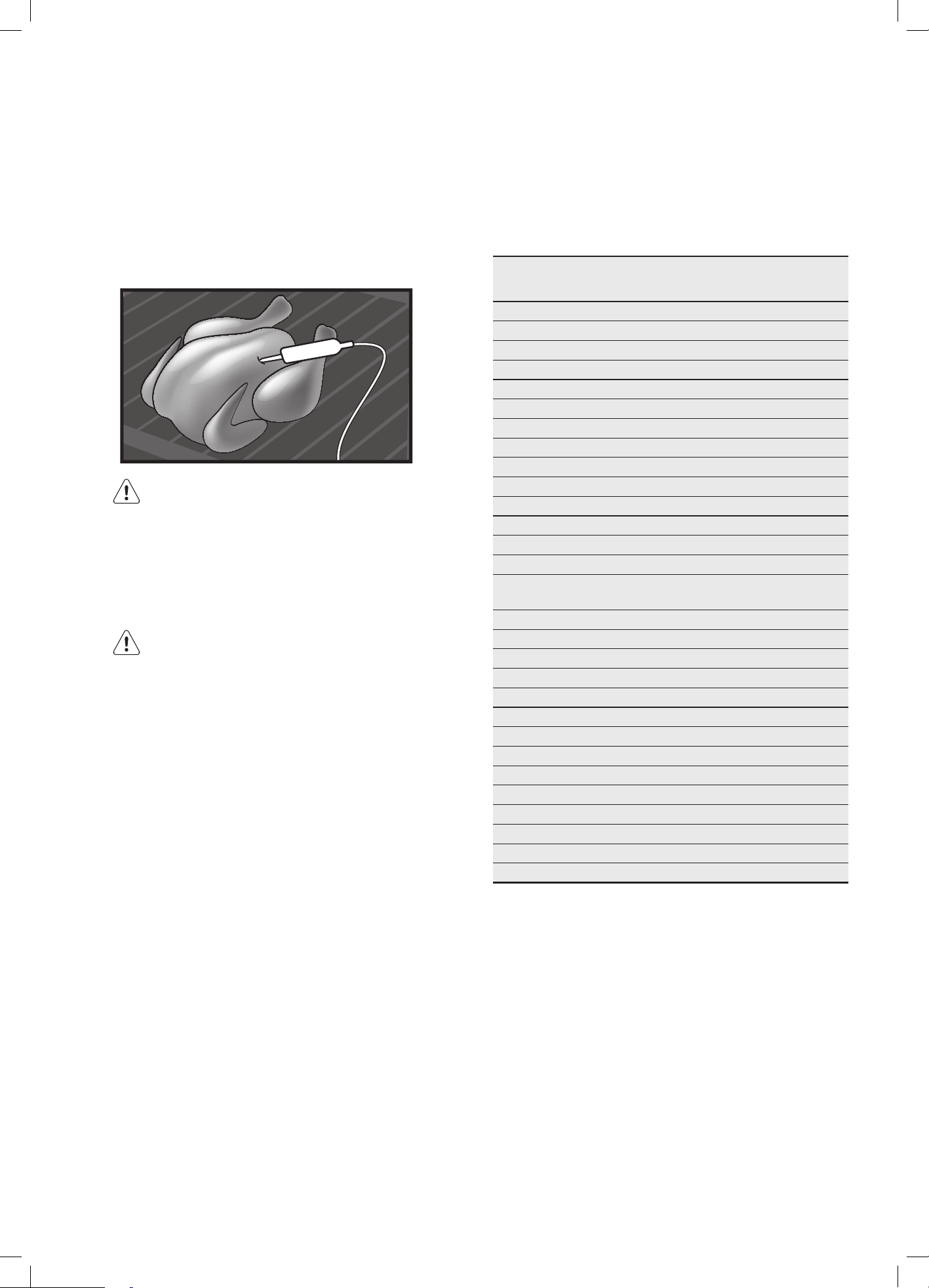
53
Poultry
Place the whole poultry on the wire rack breast side up.
Insert the Food Sensor/probe with at least 75% of the
Sensor/probe into the breast of the poultry. Place the
Sensor/probe in a direction toward the neck end of the
poultry.
CAUTION
To prevent the Food Sensor/probe from being
damaged by excessive heat, there must be a gap
of a few centimetres between the grill element and
the Food Sensor/probe. The meat may expand
during the cooking process.
CAUTION
After pre-heating, the front of the oven will be hot.
Care should be taken when inserting the food
sensor/probe plug.
NOTE: The Food Sensor/probe will only work for the
following functions
• Fan cooking
• Steam cooking (EVEP618 / EVEP619 only)
• Traditional bake
• Fan assist bake
• Roast
If you have selected a function that is not compatible
with the Food Sensor/probe, you will see the message
“REMOVE FOOD PROBE”.
Core temperatures of different foods
The temperatures in the table are given as a guide and
may vary depending on the composition of the food.
Food Core
Temperature in °C
Poultry
Chicken 80-85
Chicken breast 75-80
Duck 80-85
Duck breast, rare to medium rare 55-60
Turkey 80-85
Turkey breast 80-85
Goose 80-90
Pork
Shoulder of pork 85-90
Fillet of pork, rare to medium rare 62-70
Loin of pork, well done 72-80
Beef
Tenderloin or sirloin, rare 45-52
Tenderloin or sirloin, medium rare
to medium
55-62
Tenderloin or sirloin, well done 65-75
Veal *
Joint of veal or shoulder, lean 75-80
Joint of veal, shoulder 75-80
knuckle of veal 85-90
Lamb **
Leg of lamb, medium rare 60-65
Leg or lamb, well done 70-80
Saddle of lamb, medium rare 55-60
Fish
Whole fish 65-70
Fish fillet 60-65
Miscellaneous
Meat loaf, all kinds 80-90
* Veal core temperatures are for well done.
** Lamb temperatures are for cuts of Lamb with the bone
still in. For boneless, cooking times will be slightly less.
NOTE: The oven temperature needs to be set at least 10°
higher than the desired food core temperature.
7. The appliance will calculate the approximate end
time. The end time is different for different quantities
of food, set oven temperatures and function modes.
NOTE: The estimated end time will be displayed after
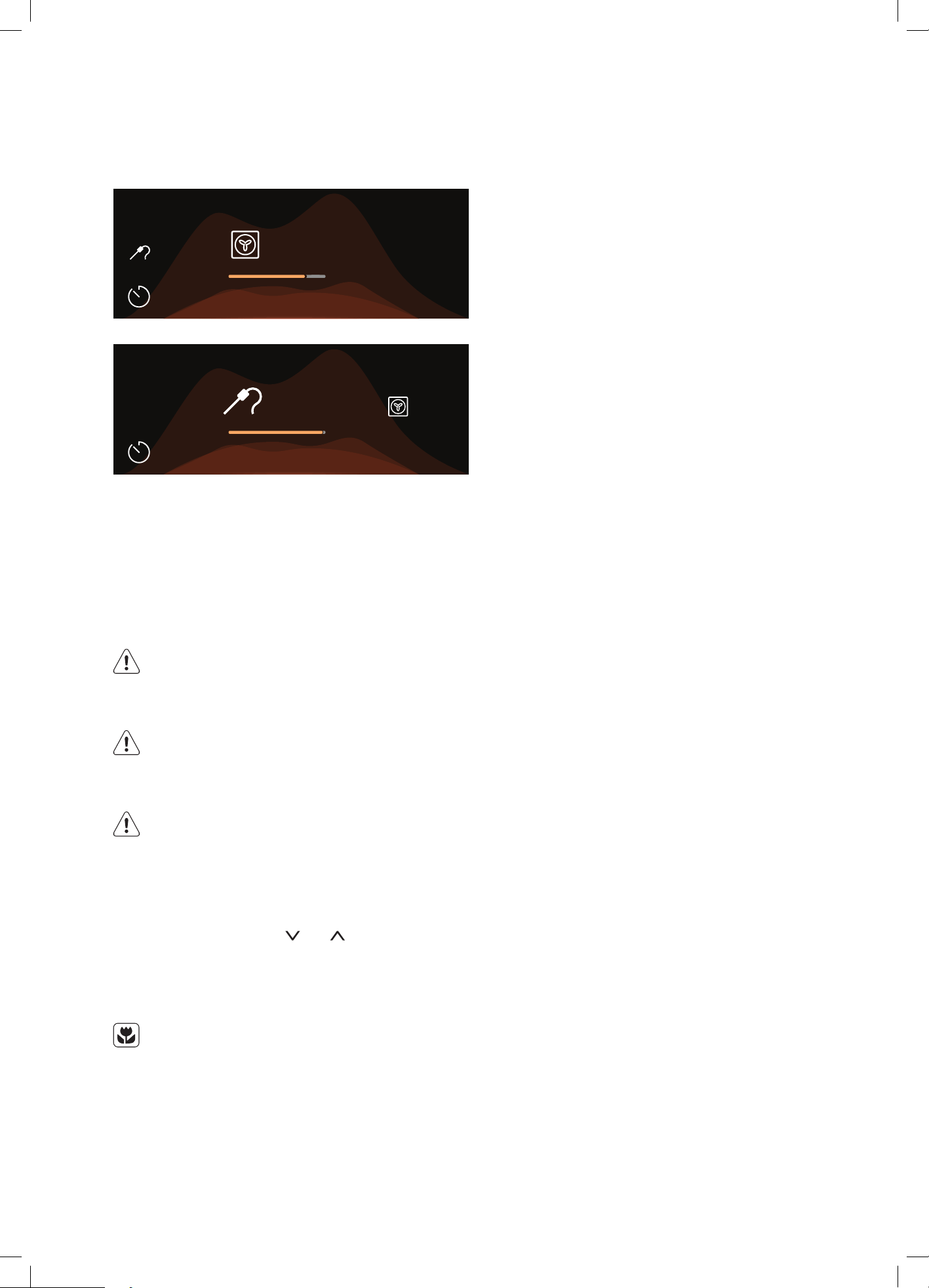
54 electrolux.com.au
approximately 30 minutes.
Heating up
STOPSTOP
81°C
95°C
12:3012:30
81°C81°C
STOPSTOP
76°C
80°C
12:3012:30
80°C
NOTE: The Food Sensor/probe temperature will not be
displayed until the oven is at the desired temperature.
Once the oven is at the desired temperature, the Food
Sensor/probe temperature will cycle between the
desired food core temperature and the actual food core
temperature.
NOTE: All meat/fish/poultry should be rested, covered for
at least 10 minutes.
CAUTION
Always check if food is cooked throughout
before eating.
WARNING
After use, always remove the Food Sensor/probe
from the oven cavity.
WARNING
The Food Sensor/probe is hot. There is a risk of
burns. Be careful when you remove the tip and
plug of the Food Sensor/probe.
To change the desired food core temperature during
cooking, press and hold the
and at the same time.
To cancel the Food Sensor/probe operation, simply unplug
the sensor/probe from the socket.
ENVIRONMENT
To save energy and to help protect the
environment, we recommend these hints:
Use the oven efficiently by cooking many trays of food at
the same time. For example:
• Cook 2 trays of scones, small cakes or sausage rolls.
• Cook a roast dinner at the same time as you cook
chips or vegetables.
USING FOOD SENSOR/PROBE
(CONTINUED)
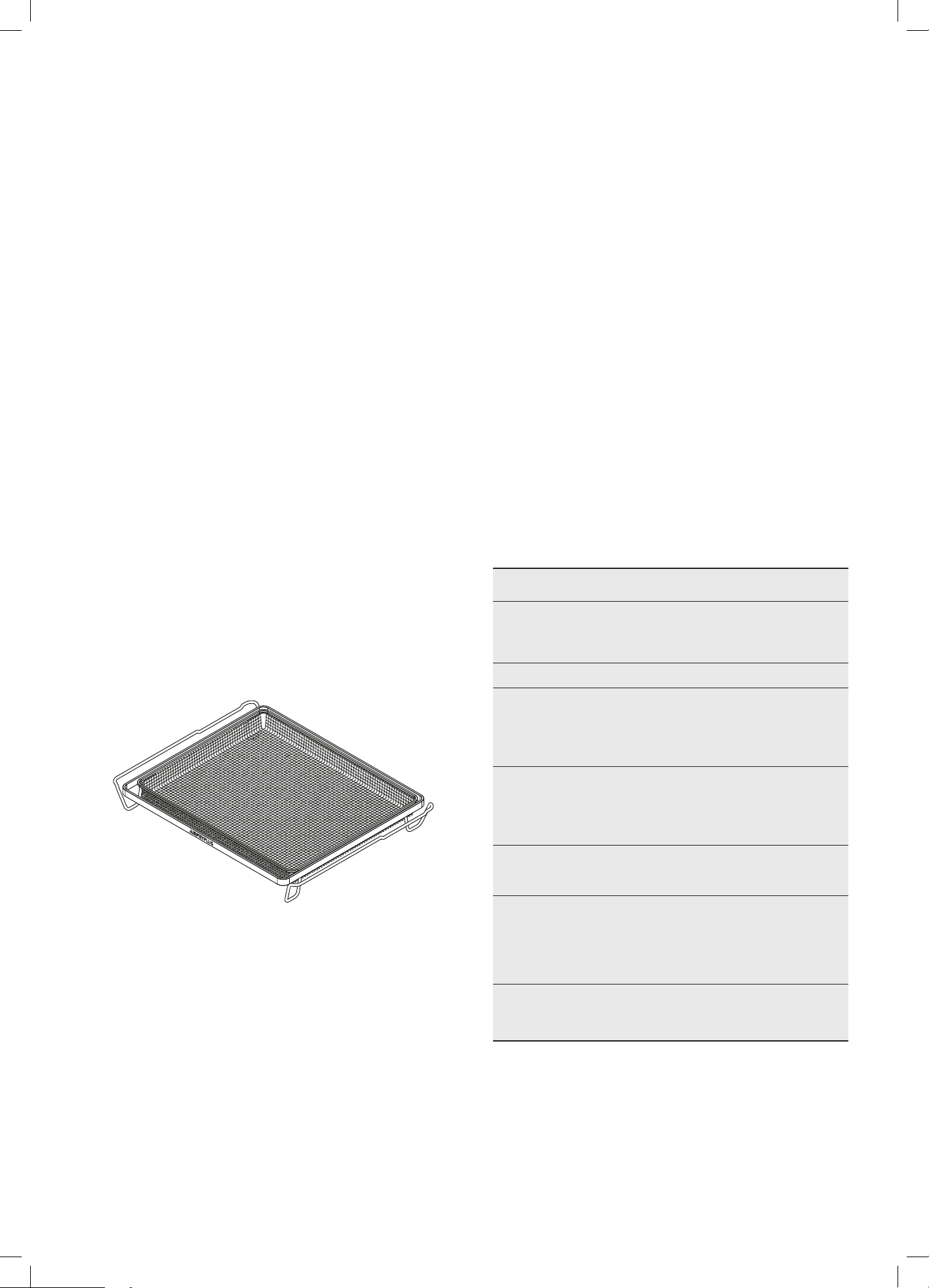
55
Roasting meat (use roasting tray & insert)
• Place the meat in the oven and set the temperature
between 180°C and 200°C. (It is recommended to
wrap your meats in an oven roasting bag or foil to
prevent fats and oils from splattering. This will make it
easier to clean the oven.)
• Use the grill/oven dish.
• Do not pierce the meat.
• When the meat is cooked, take the roast out of the
oven, wrap in aluminium foil and leave to stand for
about 10 minutes. This will help retain the juices
when the meat is carved. The table below shows
temperatures and cooking times for different kinds of
meat. These may vary depending on the thickness
and bone content of the meat.
Roasting poultry and fish
• Place the poultry or fish in an oven set at a moderate
temperature of 180°C-200°C.
• Place a layer of foil over the fish for about three
quarters of the cooking time The table shows the
temperatures and the cooking times for different
kinds of fish and poultry. These may vary depending
on the thickness and bone content of the meat.
AirFry Plus cooking (applicable models only)
The AirFry Plus feature works best for single shelf baking.
AirFry plus is suitable for French Fries, Chicken Wings,
Chicken Nuggets and similar products, see settings in the
following table.
Important:
• AirFry Plus is designed for single shelf cooking.
• Food should be arranged in a single layer on the AirFry
Plus tray.
• A separate tray should be placed on the bottom shelf
position to catch any fat or crumbs dropping from
the AirFry Plus tray during cooking. This tray must be
removed for normal baking.
• Some experimenting may be required to find the
best cooking time.
• Food may need to be removed early and should be
checked at minimum recommended bake time.
• Some frozen dense food with cook times less than 15
minutes may require additional baking time.
To set the AirFry Plus function:
1. Arrange food on to the AirFry Plus tray.
2. Select AirFry plus setting and suggested temperature
from the table below.
3. For best results pre-heat the oven
4. When the oven reaches the set temperature place the
AirFry Plus tray on the suggested oven shelf position.
Note: Set the minute minder for the minimum
suggested time and check for desired results when
timer ends.
5. When cooking is complete turn the oven off.
6. Clean the AirFry Plus tray after each use. Wash the
tray in the sink with warm soapy water and a stainless-
steel scourer.
food Temp
Shelf
position*
Time in
minutes
Scotch fillet
steak, seared
first
220 2 or 3
8-12
(rare/med)
Frozen chips 220 2 or 3 15-20
Chicken
drumettes/
wingettes with a
dry rub
220 3 15-20
Fresh
barramundi fillet
with crumb
220 3 15-20
Potatoes cut
into wedges
220 3 20-25
Frozen goods
(Chicken
nuggets/
crumbed fish)
220 3 15-20
Smashed chats
parboiled
220 3 15-20
*Count shelf position from the bottom up.
COOKING GUIDE

56 electrolux.com.au
Cooking guide
meat
recommended
temperature °C
minutes per kg
beef 200
rare: 35-40
medium: 45-50
well done 55-60
lamb 200
medium: 40
well done 60
veal 180 well done 60
pork 200 well done 60
poultry
& fish
recommended
temperature °C
minutes per kg
chicken 200 45-50
duck 200 60-70
turkey 180
40-45 (<10kg)
35 -4 0 (>10 kg)
fish 180 20
IMPORTANT
For best cooking results pre-heat your oven and
grill. Pre-heating reaches the required temperature
quickly and efficiently as well as cook your food at
the correct temperature for the entire cook time.
When not using steam, for best baking results
preheat oven for 30 minutes.
Temperature estimations
If a recipe calls for Fahrenheit (°F) or no actual
temperatures, use the following table to determine
the temperature (°C).
oven temp. °C temp. °F
low heat
cool 80 175
very slow 100-110 210-230
slow 130 -140 265-285
moderate
heat
moderately slow
150-160 300-320
moderate 170-180 340-355
moderately hot 190-200 375-390
high heat
hot 200-210 390-410
very hot 220-230 430-450
extremely hot 240-250 465-480
COOKING GUIDE (CONTINUED)

57
TRADITIONAL BAKING
food temperature °c
oven shelf position* time in minutes
scones – plain or fruit 220 2 or 3 10
biscuits – rolled 170 2 or 3 10-15
– spooned 190 2 or 3 12-15
– shortbread biscuits 160 2 or 3 30-35
meringues – hard – individual 110 2 or 3 90
– soft – individual 180 2 or 3 15-20
– pavlova – 4 egg whites 110 2 75
cakes – patty cakes 190 2 or 3 15-20
– sponge – 4 eggs 180 2 or 3 20-30
– shallow butter cake 180 2 or 3 30-40
– boiled fruit cake 180 2 or 3 60-70
pastry – shortcrust – cornish pasties 200 2 or 3 40-45
– custard tart 200/180 2 or 3 10/30-30
pastry – choux – cream puffs 210 2 or 3 25-30
yeast goods – bread 210 2 or 3 25-30
– pizza 220 2 or 3 18
*Counting from the bottom position up
FAN COOKING
food temperature °c
oven shelf position* time in minutes
scones – plain or fruit 210 1 and 4 10 -15
biscuits – rolled 150 any 10-15
– spooned 180 any 10-15
– shortbread biscuits 150 any 10 -15
meringues – hard – individual 100 any 90
– soft – individual 165 any 15-20
– pavlova – 4 egg whites 100 1 and 4 75
cakes – patty cakes 180 1 and 4 15-20
– sponge – 4 eggs 170 1 and 4 20-30
– shallow butter cake 170 any 30-40
– boiled fruit cake 170 1 60-70
pastry – shortcrust – cornish pasties 180 any 40-45
– custard tart 190/170 any 20-30
pastry – choux – cream puffs 200 any 25-30
yeast goods – bread 210 1 25-30
– pizza 220 1 18

58 electrolux.com.au
STEAM COOKING
IMPORTANT
For best results, preheat oven for 10 minutes. Refer to steam assisted cooking section for details.
SteamBake function
(EVE602, EVE614, EVE615, EVEP614, EVEP615, EVEP616, EVEP626, EVE636)
food Water on cavity
bottom (ml)
Temperature °C Oven shelf
position*
Time in minutes
Yeast goods Bread loaves 150 180-200 2 35 - 45
Bread rolls 150 190-210 2 20 - 25
Gluten free bread 150 180-200 2 40 - 50
Pizza (fresh) 150 210-220 2 15 - 20
Focaccia 150 200-210 2 20 - 30
Biscuits Rolled 150 160 -170 2 10 - 15
Spooned 150 160-170 2 10 - 15
Scones Plain or fruit 150 200-210 2 10 - 15
Cakes Cupcakes 150 180 2 20 - 25
Sponge - 4 eggs 150 170 2 20 - 30
Shallow butter cake 150 170 2 25 - 30
Pastry - choux Cream puffs 150 200 2 20 - 30
Puff pastry 150 200 2 15-20
Frozen croissants 150 170 -180 2 15-25
*Counting from the bottom position up
Steam function (EVEP618 / EVEP916 model only)
food temperature °C
oven shelf position* time in minutes
cakes and pastries – apple cakes in a 20cm cake tin 140 1 60-80
– biscuits on a baking tray 150 2 (1 and 3) 20-40
– sweet buns on a baking tray 180-200 1 10-20
flan – vegetable in a dish 170 -180 1 20-40
– lasagne in a dish 170-180 1 40-50
– potato gratin in a dish 160 -170 1 50-60
meat – roast pork 180-200 1 9 0-110/ kg
– veal 180 1 35-45/kg
– roast beef
• rare 210 1 35-40/kg
• medium 200 1 40-45/kg
• well done 190 1 50-55/kg
– whole chicken 200 1 50-55/kg
fish and seafood – snapper 1-1.5kg 140 -150 1 15-25
– barramundi 4 fillets 180 1 10 -15
miscellaneous tray of vegetables 500g 130 1 20-25
pizza (fresh) 210 1 14-18
*Counting from the bottom position up
COOKING GUIDE (CONTINUED)

59
STEAMBAKE
food temperature °c
oven shelf position* time in minutes
bread – rolls 200 1 20-25
– loaves 180 1 35-45
– focaccia 200-210 1 15-25
GRILLING
Grilling hints
As a method of cooking, grilling can be used to:
• Enhance the flavours of vegetables, fish, poultry
and meat.
• Seal the surface of the food and retain natural juices.
• Grill with the door closed.
This table shows how to grill different types of meat:
food grilling method
beef – tenderloin, rump
and sirloin.
brush with oil or melted
butter, especially if the meat
is very lean
lamb – loin chops,
shortloin chops, chump
chops and forequarter
chops.
remove skin or cut at
intervals to avoid curling.
brush with oil or melted
butter
sausages
prick sausages to stop skin
from bursting
poultry
divide into serving pieces.
brush with oil
fish
brush with oil or melted
butter and lemon juice
bacon
remove rind, grill flat and
make into rolls
WARNING
Always clean the grill/oven dish after every use.
Excessive fat build up may cause a fire.
Guide to better grilling
No definite times can be given for grilling because
this depends on your own tastes and the size of the
food. These times should only be used as a guide and
remember to turn the food over half way through the
cooking process.
food time in minutes
Steak 15-20
Chops 20-30
Fish 8-10
Bacon 4-5
For better grilling results, follow these easy instructions:
• Remove oven/grill dish and grill shelf and preheat grill
for about 5 minutes.
• Choose only prime cuts of meat or fish. If the cut is
less than 5mm thick it will dry out. If the cut is more
than 40mm thick, the outside may burn whilst the
inside remains raw.
WARNING
Do not place aluminium foil under food as this
prevents fats and oils from draining away, which
could result in a fire.
• Baste the food during grilling with butter, olive oil
or marinade. Grilled food is better if marinated
before cooking.
• Use tongs to turn food as a fork pierces the surface
and will let juices escape.
Fan grill
The ‘fan grill’ function will assist the grilling process
by circulating the heat evenly around the food. The
recommended temperature setting is 180°C for all fan
grilling functions.
Use the grill shelf with dish below for all fan grilling. Position
the shelf in the lower half of the oven for the best results.
Wipe off any oil or fat which splatters while the oven
is still warm.
There is no need to turn meat as both sides are cooked at
the same time which means the food is succulent.

60 electrolux.com.au
DEALING WITH COOKING PROBLEMS
problem possible causes remedies
Uneven cooking Incorrect shelf position • Select shelf suitable for cooking function. See cooking
function tables in cooking guide
Oven tray too large • Experiment with other trays or dishes
Trays not centralised • Centre trays
Air flow in oven uneven • Rotate food during cooking
Grill dish affecting thermostat • Remove grill dish from oven on bake modes
Baked products too brown
on top
Oven not preheated • Preheat oven
Baking tins too large for the recipe • Use correct size tins
Baking tins not evenly spaced •
Stagger baking tins at least 3cm between tins and oven walls
Products not evenly sized or spaced
on trays
•
Make into same size and shape, and spread evenly over trays
Baking temperature too high • Lower the temperature
Baked products too brown
on bottom
Baking tins too large for the recipe • Use correct size tins
Baking tins are a dark metal or glass • Change to shiny, light tins or lower the temp by 10°C
Food too low in the oven • Cook one shelf higher
Oven door opened too frequently
during baking
• Don’t open the door until at least half the cooking time
has passed
Baking temperature too high • Lower the temperature
Grill dish affecting thermostat • Remove grill dish from oven on bake modes
Cakes have a cracked
thin crust
Baking temperature too high • Lower the temperature
Food too high in oven • Cook one shelf lower
Cake batter over mixed • Mix just long enough to combine ingredients
Pan too deep • Check size of pan
Baking pans dark • Change to shiny pans
Baked products are
pale, flat and
undercooked
Baking temperature too low • Raise the temperature
Food too low in oven • Cook one shelf higher
Baking time too short • Increase the cooking time
Incorrect size tin • Use the correct size tin
Cakes fallen in the centre Baking temperature too low • Raise the temperature
Baking time too short • Increase the cooking time
Proportions of ingredients incorrect • Check recipe
Door opened too early in baking • Do not open door until the last quarter of cooking time
Roast meat, potatoes not
browning in fan oven
Poor air circulation • Elevate food onto a rack to allow air circulation
Grill dish affecting thermostat • Remove grill dish from oven on bake modes
Juices running out of meat • Do not pierce meat with a fork
Grilled meats outside is
overcooked and centre
is raw
• Grill in a lower position
Grilled chops and steaks
curling
• Cut into fat every 2cm
The steam cooking does
not operate
There is no water in the tank • Fill the water tank
Limescale is obstructing the hole • Check the steam outlet opening and remove the lime
It takes more than three
minutes to empty the water
tank or the water tank leaks
from the steam outlet
There are lime deposits in the
appliance
• Check the water tank and refer to the chapter on
Cleaning the water tank.
Steam and condensation
settle on the food and in the
appliance
The dish has been left in the oven for
too long
• Do not keep the dishes in the appliance for longer than
15-20 minutes after the cooking ends
Food Sensor/probe function
will not display when
plugged in
• Ensure food is fully defrosted
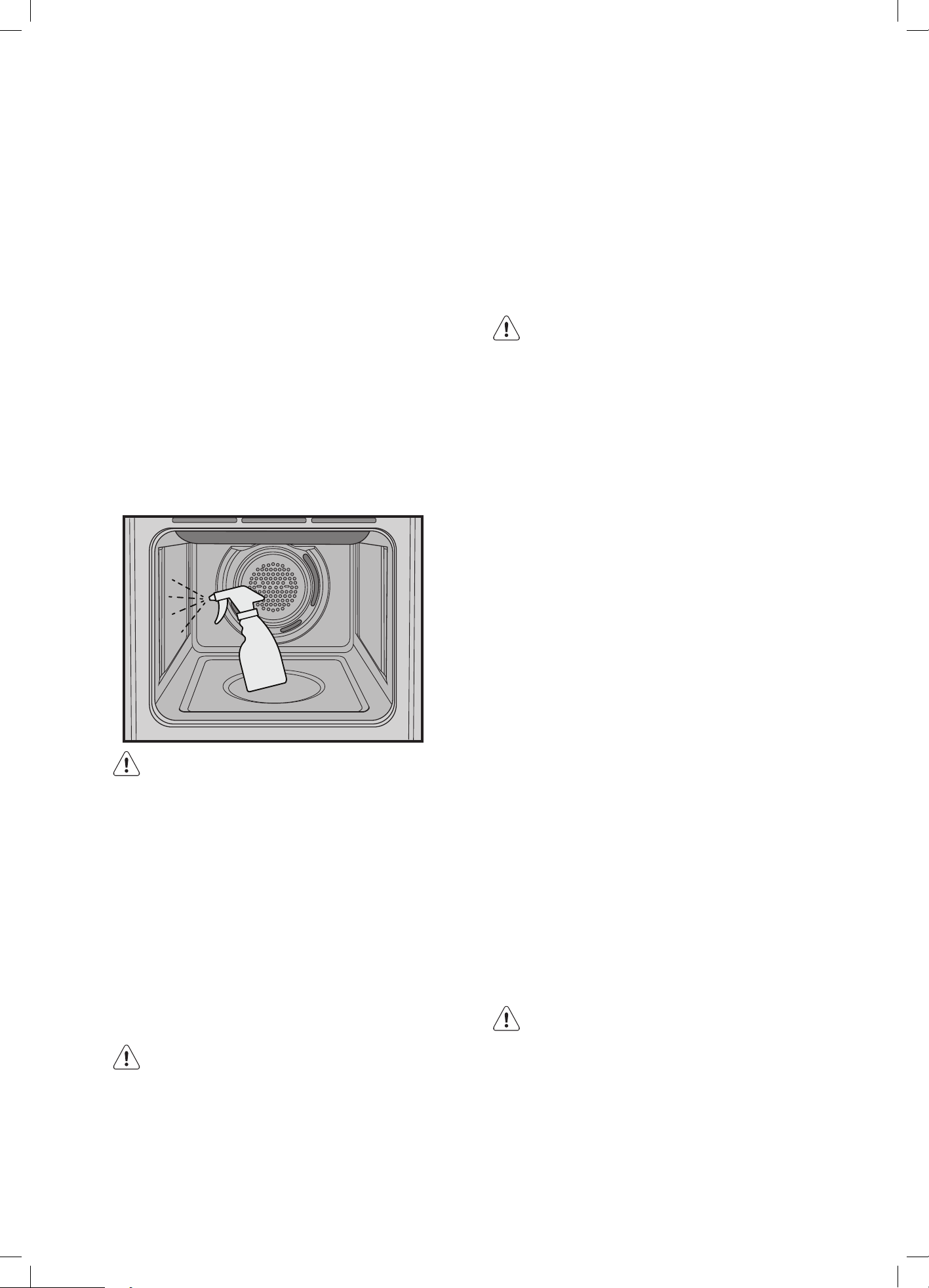
61
STEAM ASSISTED CLEANING
This function assists in the removal of food residue from inside
the oven. This method is effective in removing light soiling
only. It is not effective in removing stubborn baked-on stains.
This function can only be used when the oven is cold.
Procedure for cleaning:
1. Remove all shelves, dishes and side racks.
2. Make a solution of water (85%), white vinegar (10%),
and dishwashing detergent (5%) and spray liberally on
to the door, side walls and back wall of the oven cavity.
3. Pour 40ml of water into the cavity base well.
4. Select Steam Assist from the Cleaning submenu
5. Wait until the cleaning procedure is finished.
6. Allow to cool to a safe level before wiping the surface
with a wet cloth.
WARNING
• Do not use steam cleaners.
• Do not line the bottom of the oven with foil
or cookware.
Stainless steel
All grades of stainless steel can stain, discolour or become
greasy. You must clean these areas regularly by following
the procedures below, if you want your appliance to look
its best, perform well and have a long life.
Care must be taken when wiping exposed stainless
steel edges, they can be sharp!
A suitable cleaner can be purchased from Electrolux
Customer Care Centres.
CAUTION
The oven door and control panel are decorated with a
special stainless steel that resists finger marks and should
only be cleaned with warm water and a mild detergent.
DO NOT use stainless steel cleaners, abrasive cleaners or
harsh solvents.
NOTE: Make sure you follow the polish or brushing lines in
the steel.
CLEANING THE APPLIANCE
Glass
• Glass surfaces on doors and control panels are best
cleaned immediately after soiling.
• A damp cloth may help remove baked on
food deposits.
• Oven cleaners can be used to remove stubborn
marks and stains.
WARNING
The door glass on this appliance is made from a
tough, durable material that withstands heating
and cooling without breaking. However, it must be
remembered that it is GLASS, it may break. Treat it
accordingly! Should you have any questions about
the glass in your new appliance, please contact the
customer care centre by dialling 1300 363 640.
Do not use harsh abrasive cleaners or sharp metal
scrapers to clean the oven door since they can
scratch the surface, which may result in shattering
of the glass.
Oven
• Always keep the appliance clean. Ensure fats and oils
do not accumulate around elements, burners or fans.
• Always keep oven dish, bake trays and grill dish inserts
clean, as any fat deposits may catch fire.
• It is recommended to wrap meats in foil or an oven
roasting bag to minimise cleaning.
• Any polyunsaturated fats can leave a varnish-like
residue which is very difficult to remove.
Grill
• Always keep grill dish clean, as any fat deposits may
catch fire.
Food Sensor/probe (selected models only)
• Clean the Food Sensor/probe after each use and let it
dry. Use a soft cloth with warm water and a cleaning
agent. Only clean the sensor/probe end and not the plug.
Cleaning the cavity well
The cleaning procedure removes limestone residue from
the cavity well after cooking with steam.
WARNING
Perform the cleaning procedure after every
Steam cooking cycle.
1. Mix 150ml of tap water with 100ml of white vinegar
and put the mix in the cavity well.
2. Let the water+vinegar-mix dissolve the limestone
residue at the ambient temperature for 45 minutes.
3. Remove the water+vinegar-mix with a soft cloth and
clean the cavity with warm water and a soft cloth.
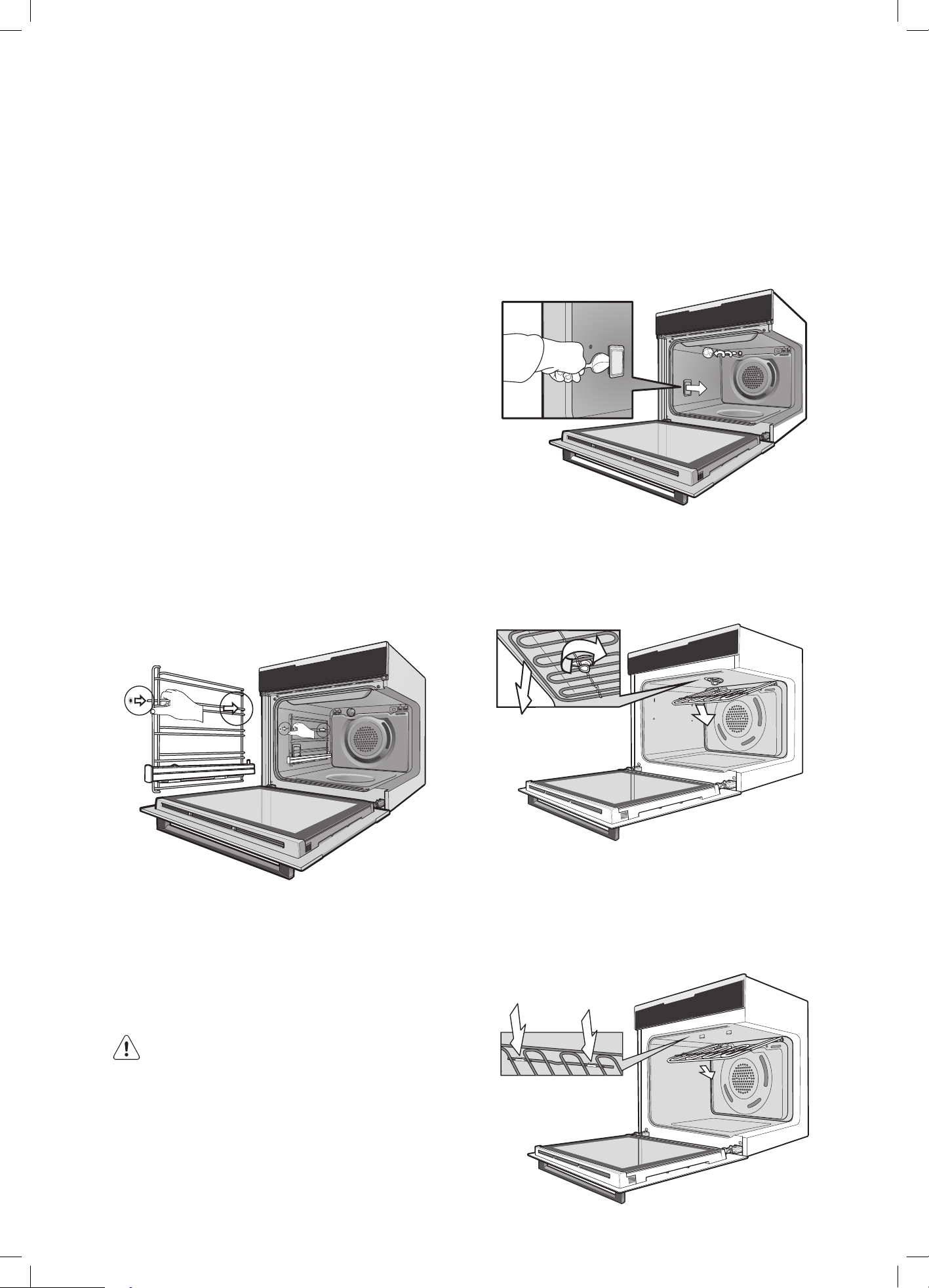
62 electrolux.com.au
CLEANING THE ACCESSORIES
Removing the trays and shelves from the
appliance
1. Slide the tray and shelves towards you until they
reach the front stop.
2. Tilt them up at the front to clear the side supports,
taking care not to spill the contents.
3. Lift them clear.
4. Wash the tray and shelves in hot soapy water.
5. Reverse the above steps to put the tray and shelves
back again.
6. Ensure that they are placed between two
support wires.
7. To remove a shelf from slides:
- Pull shelf towards you until it stops.
- Lift the shelf clear.
Removing the side racks
(Not required for models EVEP616 / EVEP619)
1. Grasp the middle wire at the front.
2. Pull firmly inwards while pushing back.
Slides (Telescopic runners)
• Do not subject slides to temperatures greater
than 300°C.
• Do not place slides in a dishwasher
• Do not use a knife or sharp object to clean slides.
• Do not add oil or any other lubricant to slides.
WARNING
Make sure the appliance is turned off before you
remove or replace parts to avoid the possibility of
electric shock.
Removing and replacing the oven back light and
side light (if fitted)
• Turn oven light glass anti-clockwise to remove it for
globe replacement.
• To remove side light, place a spoon under the light
glass and lever off. Replace globe and snap glass
cover back into position.
• A special high temperature resistant globe should
be used. This can be purchased from Electrolux
Customer Care Centres.
Releasing the grill element
Rotating latch models - rotate latch 180º and the grill
element will drop down freely. After cleaning, raise the grill
element and secure by rotating the latch back 180º.
Retaining clips models - The upper grill element is secured
with 2 clips which can be removed to help clean the oven
cavity ceiling. To disengage the clips, push the edge of
the clip towards back of the oven as shown below.
After cleaning raise the grill element and secure clips
back in position.
CLEANING THE APPLIANCE (CONTINUED)
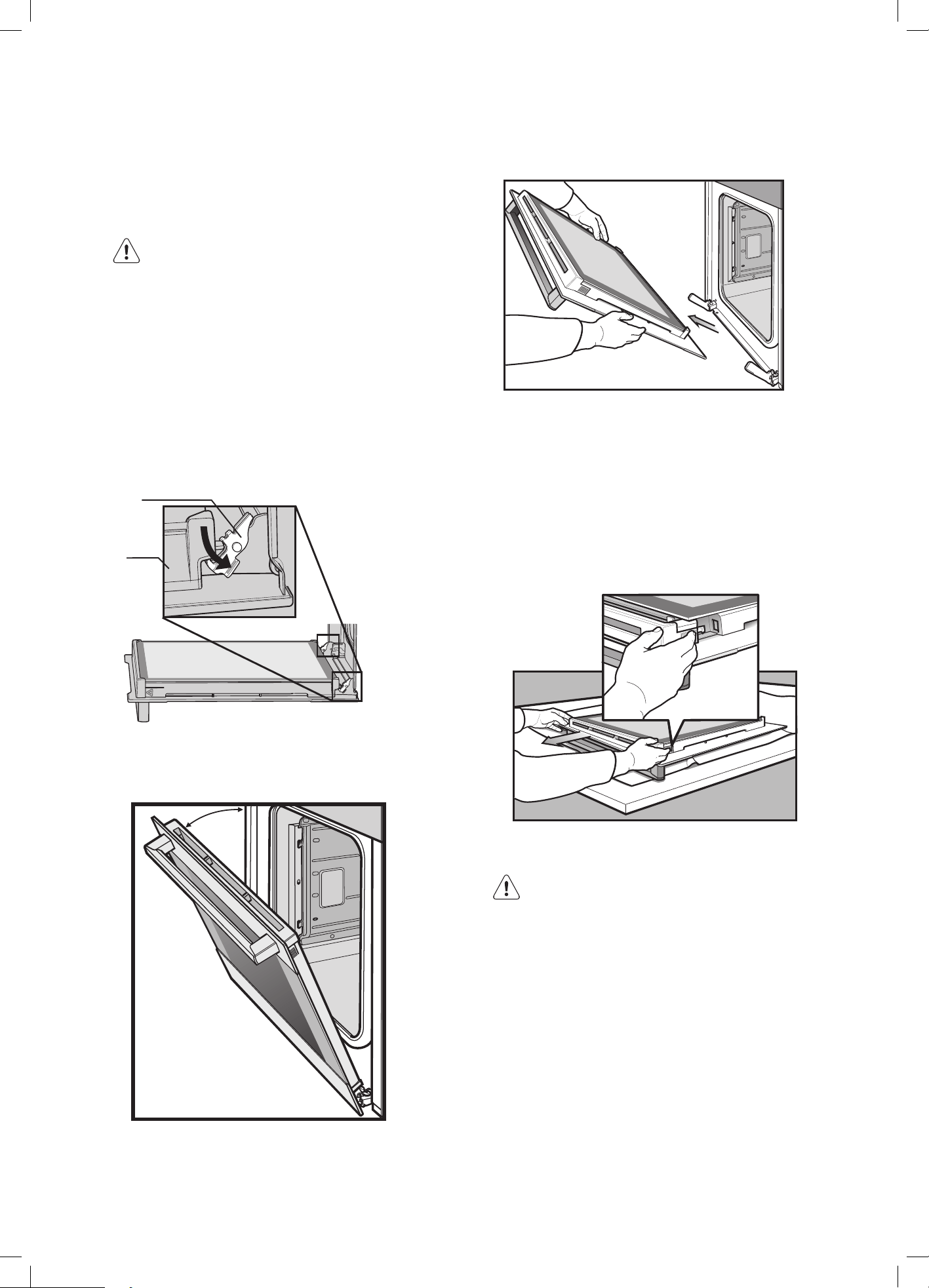
63
CLEANING THE DOUBLE/TRIPLE
GLAZED DOOR (NON PYROLYTIC
MODELS)
WARNING
Do not lift the door by the handle. Rough handling
will cause glass to break.
Removing the oven door
The oven is equipped with a door that can be
disassembled in order to clean all the panes of glass.
Remove the door before cleaning.
1. Open the door fully to access the hinges then rotate
the ‘stirrups’ (highlighted in the diagram) on both
hinges fully to the open position.
Door
column
Stirrup in the open position
2. Slowly close the oven door until it is stops against the
‘stirrups’ (about 45°).
3. Grasp the oven door with a hand each side of
the door and remove it from the oven by pulling it
towards you.
4. Lay the oven door with the outer side facing
downwards on something soft and flat (for example
a cloth/towel on a kitchen bench/table) to
prevent scratches.
Removing the oven door top trim
• Take hold of the grid embossed sections of the door
trim at each end and press inwards to release the
clips. Remove the door trim by pulling it towards you.
Removing door glass panels
WARNING
Rough handling, especially around the edges can
cause the glass to break.
• Lift the black bordered glass panel out of the guide.
• Repeat this for the smaller clear glass panel.
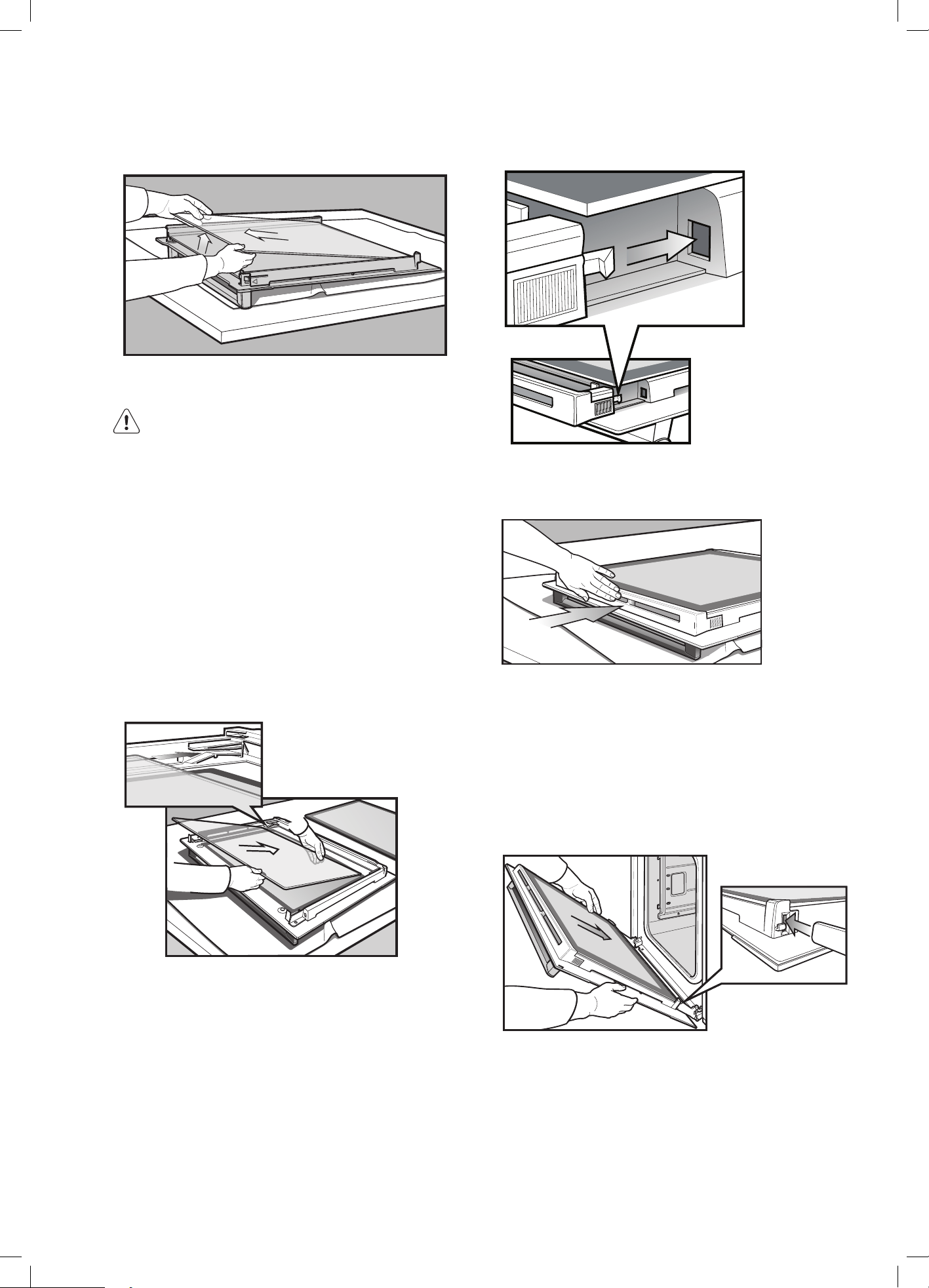
64 electrolux.com.au
Cleaning the door glass panels
CAUTION
• Do not to use harsh abrasives on the glass
panes as the reflective surface plays a role in
the function of the oven to keep the door cool.
• Do not place glass in dishwasher. Hand wash
only with a soft cloth and warm soapy water.
When dry polish with a soft cloth and ensure
the glass is dry before reassembly.
• Be careful not to hit the corners of the glass
on the benchtop as the glass may break.
Replacing the door glass panels
1. Insert the smaller clear glass panel first from above
and at an angle to the profile of the door.
2.
Repeat for the black bordered glass panel ensuring
the painted surface is facing to the downside.
Replacing the top door trim
1. Take hold of the top door trim at each side and
position it to the inside edge of the glass.
2. Push the trim down with its top edge over glass panel
until the clip snaps in on each side of the trim.
3. Push the middle of the trim down to ensure it is
straight and firm against the glass panel.
Fitting the oven door
1. Take hold of the oven door with a hand on each side
and with the door at an angle of 45º, position the
recesses at the bottom of the door onto the hinge
arms of the oven. Let the door slide down the hinge
arms as far as it will go.
2. Open the door fully to access the hinges.
3. Rotate the ‘stirrups’ (see the diagram below) until
they lock into the hook. The oven door may now
be closed.
CLEANING THE APPLIANCE (CONTINUED)
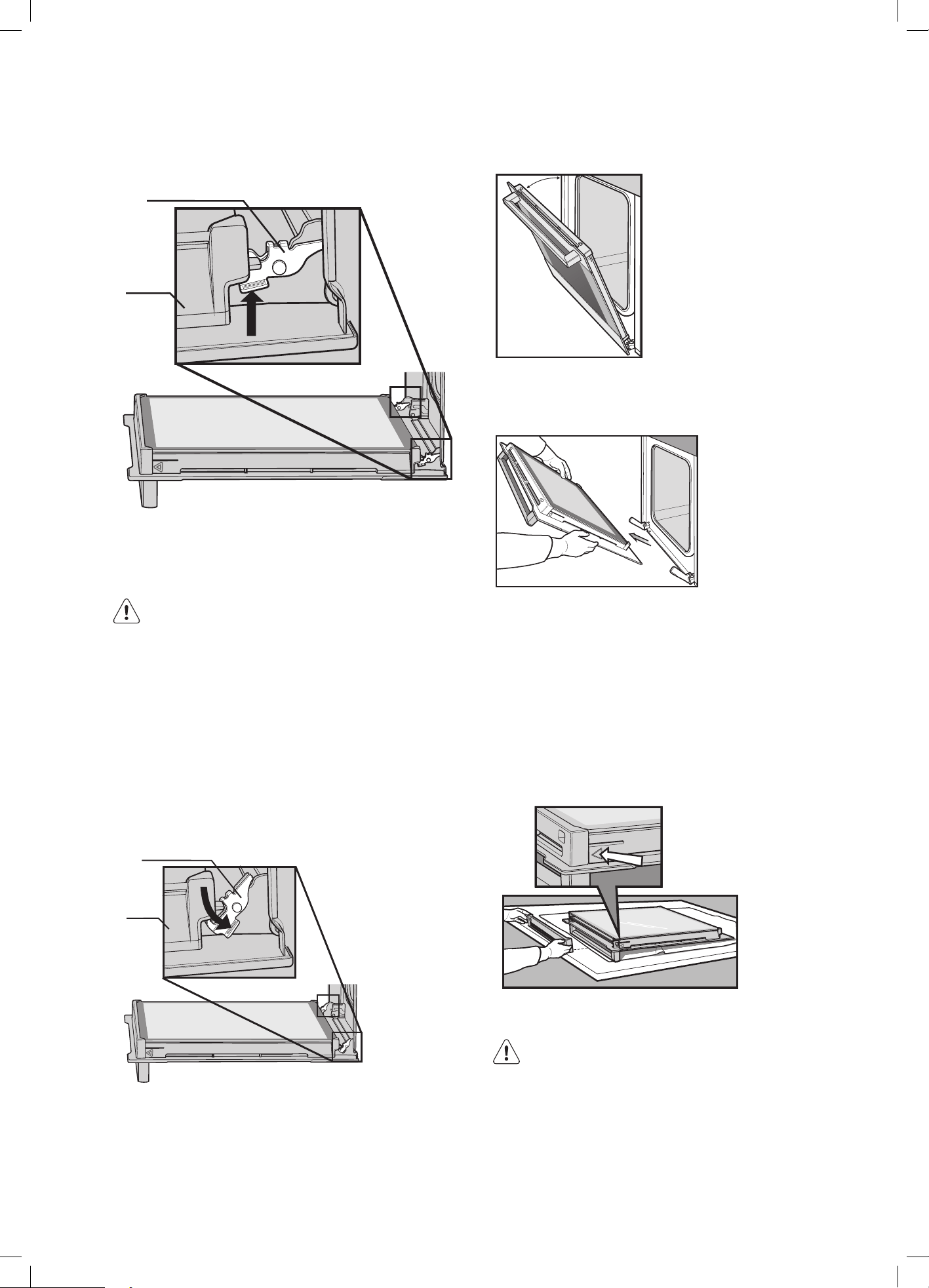
65
Door
column
Stirrup in
locked position
CLEANING THE QUAD GLAZED
DOOR (PYROLYTIC MODELS)
WARNING
Do not lift the door by the handle. Rough handling
will cause glass to break.
Removing the oven door
The oven is equipped with a door that can be
disassembled in order to clean all the panes of glass.
Remove the door before cleaning.
1. Open the door fully to access the hinges then rotate
the ‘stirrups’ (highlighted in the diagram) on both
hinges fully to open position.
Door
column
Stirrup in the open position
2. Slowly close the oven door until it is stops against the
‘stirrups’ (about 30°).
3. Hold the oven door with a hand each side and
remove it from the oven by pulling it towards you.
4. Lay the oven door with the outer side facing
downwards on something soft and flat (for example
a cloth/towel on a kitchen bench/table) to prevent
scratches.
Removing the oven door top trim
• Hold the embossed sections of the door columns
at each end and press inwards to release
the clips. Remove the upper door trim by pulling it
towards you.
Removing door glass panels
WARNING
Rough handling, especially around the edges can
cause the glass to break.
• Lift the black bordered glass panel out of the guide.
• Repeat this for the smaller clear glass panels.
• When removing panel 3, ensure that the two
rubber spacers are removed before cleaning.
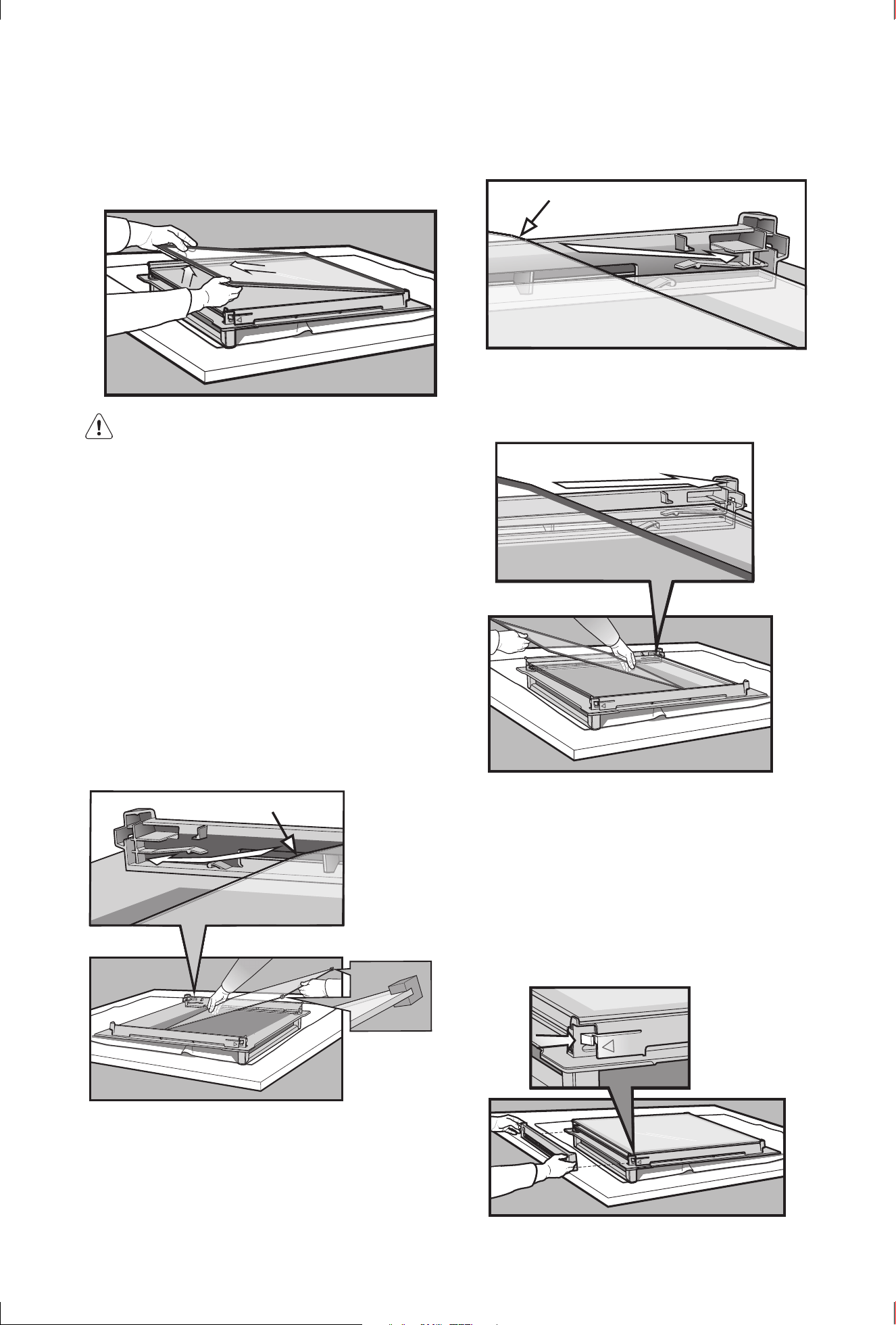
66 electrolux.com.au
CLEANING THE APPLIANCE (CONTINUED)
Do not misplace them!
CAUTION
• Do not to use harsh abrasives on the glass
panes as the reflective surface plays a role in
the function of the oven.
• Do not place glass in dishwasher. Hand wash
only with a soft cloth and warm soapy water.
When dry, polish with a soft cloth and ensure
the glass is dry before reassembly.
• Be careful not to hit the corner of the glass on
the benchtop as the glass my break.
Replacing door glass panels
1. Assemble the silicone spacers to the upper corners
of one of the clear glass panels. Position the panel
into the lower position of the door, ensuring the
chamfered corner of the panel is placed in the correct
location as shown in the image below.
Silicone
spacers
2. Insert the remaining smaller clear glass panel into the
middle position, ensuring the chamfered corner of the
panel is placed in the correct location as shown in the
image below.
Chamfer to be located in this corner
3. Insert the black bordered glass panel into the upper
position, ensuring the painted surface is facing the
downside as per the image below.
Replacing the top door trim
1. Hold the top door trim at each side and position it to
the inside edge of the glass with trim vent opening
closest to glass.
2. Push the trim down with its top edge over the glass
panel until the clip snap in on each side of the trim.
3. Push the middle of the trim down to ensure it is
straight and firm against the glass panel.
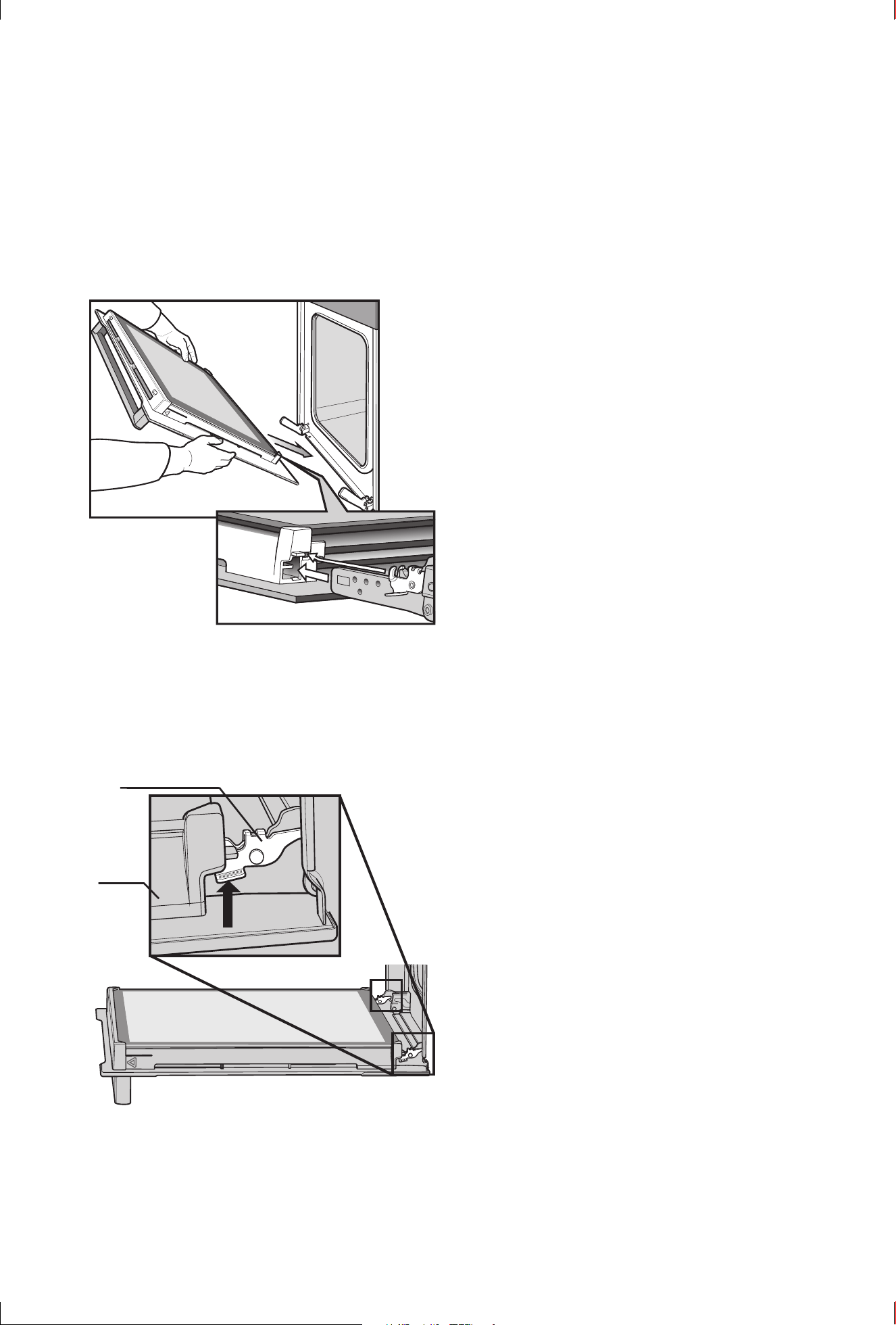
67
Fitting the oven door
1. Take hold of the oven door with a hand on each side
and with the door at an angle of 30˚, position the
recesses at the bottom of the door onto the hinge
arms of the oven. Let the door slide down the hinge
arms as far as it will go.
2. Open the door fully to access the hinges.
3. Rotate the ‘stirrups’ (see the diagram below) until
they lock into the hook. The oven door may now
be closed.
Door
column
Stirrup in
locked position
68 electrolux.com.au
TIPS AND TROUBLESHOOTING
Before the first use, have you to set:
• Language
• Display brightness
• Key tones
• Buzzer volume
• Water hardness
• Time of day
Start using the oven
Quickstart
Turn on the oven and start cooking with the default
temperature and time of the function.
• Press and hold:
• – select the preferred function.
• Press
Quick OFF
Turn off the oven, any screen or message at any time.
• Press and hold:
until the oven turns off.
Start cooking
1.
– press to turn on the oven
2.
– select the heating function
3.
– set the temperature.
4.
– Press to confirm.
5.
– Press to start cooking.
Get to know how to cook quickly
Use the automatic programmes to prepare a dish
quickly with the default settings:
Assisted cooking
1. Press
.
2. Press
3. Press Assisted Cooking
4. Choose the dish.
IMPORTANT
Cooling/ventilation fan
This appliance is fitted with a cooling fan. This
prevents your kitchen cabinet from overheating
and reduces the condensation inside the oven. It
will operate whenever you are using the oven and
blow warm air across the top of the oven door.
NOTE: If the oven is still hot from cooking, the cooling fan
will keep running to cool the oven down and will switch off
by itself once cool.
CAUTION
Using the oven
• Always cook with the oven door closed.
• Stand clear when opening the drop down oven door.
Do not allow it to fall open. Always support the door
using the door handle until it is fully open.
• Do not lean on an open oven door, or place heavy
items on it. This could damage the appliance. Take
care in the region of the hinges.
IMPORTANT
Condensation and steam
This appliance is supplied with an exclusive system which
produces a natural circulation of air and the constant
recycling of steam.
This steam makes it possible to cook in a steamy
environment ensuring that dishes are soft inside and crusty
on the outside. This process also reduces cooking time
and energy consumption. During cooking steam may be
produced and released when the door is opened. This is
absolutely normal.
When food is heated it produces steam in the same way a
boiling kettle does. When steam comes into contact with
the oven door glass it will condense and produce water
droplets. To reduce condensation, ensure that the oven is
well heated before placing food in the oven cavity.
Oven pre-heating is necessary before any cooking.
It is recommended that condensation is wiped away after
each use of the oven.
The effects of dishes on cooking results
Dishes and tins vary in their thickness, heat conductivity,
colour etc. which affects the way they transfer heat to the
food inside them.
• Aluminium, earthenware, oven glassware and bright
shiny utensils reduce cooking and base browning.
• Enamelled cast iron, anodized aluminium, aluminium
with non-stick interior and coloured exterior and dark,
heavy utensils increase cooking and base browning.
• To increase base browning simply lower the shelf
position. To increase top browning, raise the shelf
position.
• Always place dishes centrally on the shelf to ensure
even browning.
• Single level cooking gives best results in conventional
modes that do not use the oven fan. If cooking on
more than one level, use the fan cooking function.
• Do not place trays on the base of the oven. This may
damage the enamel.

69
Faults
If there is a problem with the oven or grill, please check
the points listed below before calling for service. It may be
possible to avoid a call by fixing the problem yourself - and
so continue cooking.
Data plate
When you need information, service or spare parts please
be prepared to tell us the:
Model number:
Serial number:
These are shown on the data plate. The data plate is
visible when the oven or grill door is open.
Customer Care Centre
If you need more information, please contact the Customer
Care Centre:
Australia: 1300 363 640, 8am – 5pm EST Mon – Fri.
New Zealand: +649 573 2384, 8am – 5pm EST Mon – Fri.
If you have a warranty or spare parts enquiry, you should
call the number listed on the back page.
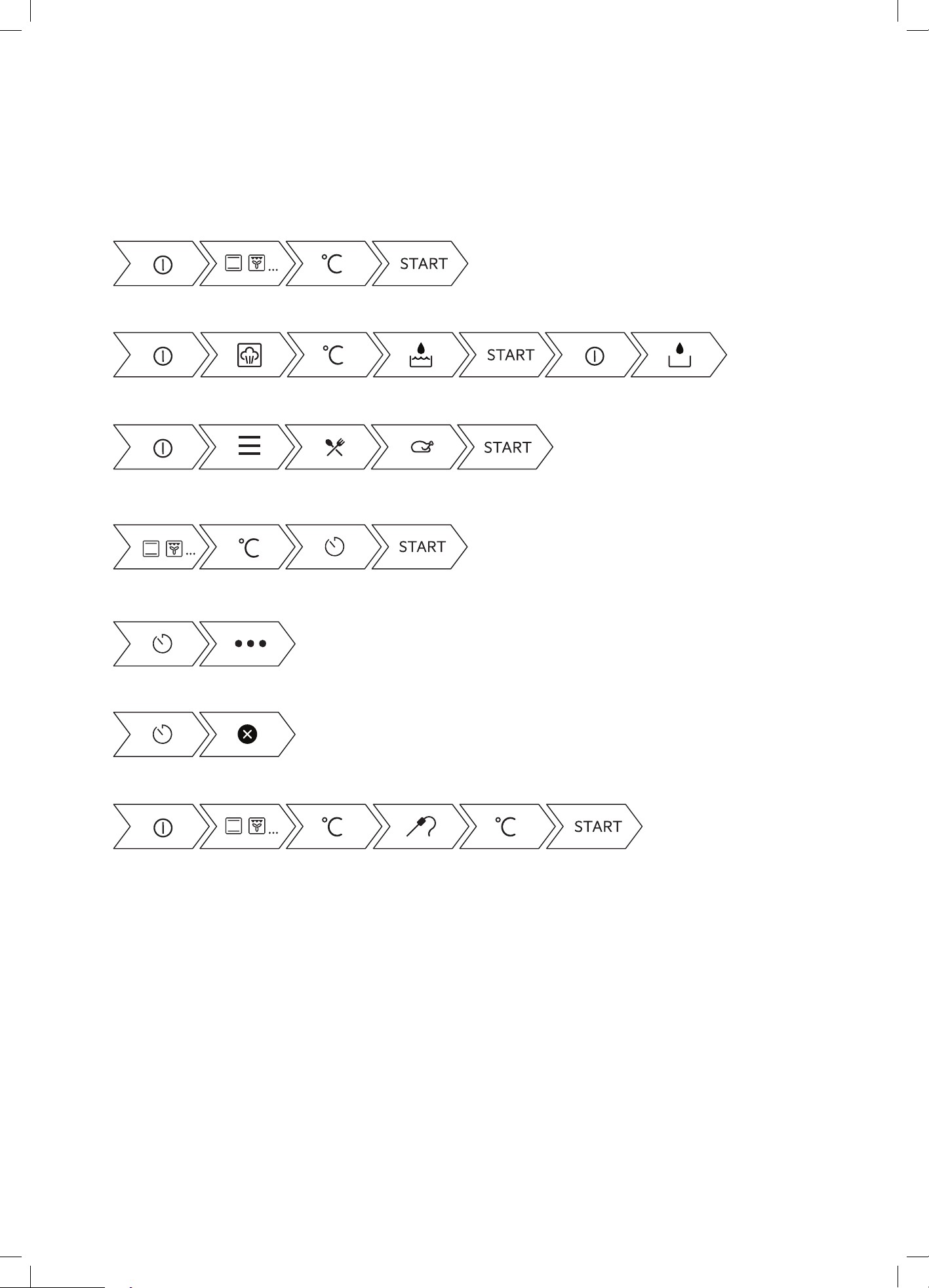
70 electrolux.com.au
SHORTCUTS
Here you can see all the useful shortcuts. You can also find
them in the dedicated chapters in the user manual.
How to set: heating functions
How to set: cooking with a steam heating function
How to set: assisted cooking
How to set: cooking time
How to delay: start and end of cooking
How to cancel: set timer
How to cancel: set timer

71
TROUBLESHOOTING
NOTE: We may charge for service even in the warranty period if your problem is due to the causes listed below.
problem possible cause
Oven or grill not working • Time of day is not set.
• Power is not turned on.
• Controls are incorrectly set .
• Oven is in ‘Demo’ mode, refer to Additional Functionality.
• Household fuse has blown or power supply is off. (If the household fuse
continues to blow, call the Service Centre).
• Child-proof oven lock is activated. ‘LOCKED’ is displayed when control is
touched. (Refer to operating instructions).
Oven light not working • Light may be turned off at control panel.
• Lamp blown or loose socket.
• Household fuse has blown. (If the household fuse continues to blow, call the
Service Centre).
Oven not heating enough • Foil trays on bottom of oven.
• Timer is in ‘AUTO’ mode. (Refer to operating instructions).
• Household fuse has blown or power supply is off. (If the household fuse
continues to blow, call the Service Centre).
• Oven not pre-heated - pre-heat oven for 30 minutes.
There is warm air coming from the top
of the oven door
• The oven is located under the control panel. When the oven is on, the air
passes through this vent. This venting is necessary for proper air circulation in
the oven and good baking results. Do not block oven vent.
Clock flashing on display • Reset time of day and any cooking functions you were using.
Unit smoking when first used • Protective oils being removed.
Condensation build up • Reduce the amount of water used in cooking. (Sometimes condensation
is normal).
Door cannot be replaced after
removal
• Stirrup not engaged properly.
Functions and temperature appear on
display but oven does not work
• Oven is in ‘Demo’ mode, refer to Additional Functionality.
When the door is open the fan stops
(underbench only)
• This is a function of the power board to help reduce the blast of air when
opening the door.
When a non fan mode is selected the
fan starts
• Most oven modes have a fast heat up function that uses the fan, fan element
and top (boost) elements. Auto fast heat up can be overridden by selecting
a temperature of 120°C or less, allowing the function to start, then increasing
the temperature to the desired level.
The light stays on when the door is
closed
• An oven function has been selected.
• The light has been turned on at the control panel.
The light does not turn *ON* when the
door is opened
• Oven light may need replacing.
Error message “REMOVE FOOD
PROBE” after connecting Food
Sensor/probe to appliance
• The cooking function selected is not compatible with the food sensor/probe.
Refer Food Sensor/robe instructions page.
Food Sensor/probe temperature
setting not displayed
• Ensure Food Sensor/probe plug is fully inserted into the socket on the front
panel.
• Incorrect Food Sensor/probe used. Only use the Food Sensor/probe
recommended for this appliance.
• Ensure food is fully defrosted
Troubleshooting continued over page

72 electrolux.com.au
When using the Food Sensor/probe,
centre of the food is undercooked
• Ensure the Food Sensor/probe is inserted at least 75% into the food.
• Ensure that food has been adequately rested after cooking.
Shelf or telescopic runner slides out
when door is opened
• Oven cavity is not level, you can perform a check using a level to verify this
(refer to installation section). If not level refer to installer.
Door locked (switching off Pyro
function quickly)
• Go back into Pyro mode and switch off Pyro function after few seconds for
the lock to open completely.
Lime scale residue on base of oven • Follow the procedure for cleaning the cavity well. There may be some minor
residual marks after cleaning.
Oven seal loose • The oven seal of non pyrolytic models is only attached at each corner. It may
seem like a loose fit, but when the oven is closed it will function correctly.
Steam functions (EVEP618/619 models only)
Steam and condensation settle on the
food and in the cavity of the oven
You left the dish in the oven for too long. Do not leave dishes in the oven for
longer than 15-20 minutes after the cooking process ends.
The descaling procedure is
interrupted before it finishes.
This could have been caused by a power outage. Repeat the procedure.
The descaling procedure is
interrupted before it finishes.
If the function was stopped by the user, repeat the procedure.
There is no water inside the grill /
roasting pan after the descaling
procedure.
This could be caused by the water drawer not being filled to the maximum
level. Check if the descaling agent / water is present in the water drawer body.
Repeat the procedure.
There is dirty water on the bottom of
the cavity after the descaling cycle.
The grill/roasting pan could have been in the wrong position. Remove the
residual water and the descaling agent from the bottom of the oven.
Put the grill / roasting pan on the first shelf position.
TROUBLESHOOTING (CONTINUED)

73
NOTES

74 electrolux.com.au
NOTES

75
This document sets out the terms and conditions of the product
warranties for Electrolux Appliances. It is an important document.
Please keep it with your proof of purchase documents in a safe place
for future reference should there be a manufacturing defect in your
Appliance. This warranty is in addition to other rights you may have
under the Australian Consumer Law.
1. In this warranty:
(a) ‘ACL’ or ‘Australian Consumer Law’ means Schedule 2 to the
Competition and Consumer Act 2010;
(b) ‘Appliance’ means any Electrolux product purchased by you and
accompanied by this document;
(c) ‘ASC’ means Electrolux’s authorised serviced centres;
(d) ‘Electrolux’ is the brand controlled by Electrolux Home Products Pty
Ltd of 163 O’Riordan Street, Mascot NSW 2020, ABN 51 004 762
341 in respect of Appliances purchased in Australia and Electrolux
(NZ) Limited (collectively “Electrolux”) of 3-5 Niall Burgess Road, Mount
Wellington, in respect of Appliances purchased in New Zealand;
(e) ‘WarrantyPeriod’meanstheperiodspeciedinclause3ofthis
warranty;
(f) ‘you’ means the purchaser of the Appliance not having purchased
the Appliance for re-sale, and ‘your’ has a corresponding meaning.
2. Application: This warranty only applies to new Appliances, purchased
and used in Australia or New Zealand and is in addition to (and does not
exclude, restrict, or modify in any way) other rights and remedies under
a law to which the Appliances or services relate, including any non-
excludable statutory guarantees in Australia and New Zealand.
3. Warranty Period: Subject to these terms and conditions, this warranty
continues in Australia for a period of 24 months and in New Zealand
for a period of 24 months, following the date of original purchase of the
Appliance.
4. Repair or replace warranty: During the Warranty Period, Electrolux
or its ASC will, at no extra charge if your Appliance is readily accessible
for service, without special equipment and subject to these terms and
conditions, repair or replace any parts which it considers to be defective.
Electrolux may, in its absolute discretion, choose whether the remedy
oeredforavalidwarrantyclaimisrepairorreplacement.Electroluxorits
ASC may use refurbished parts to repair your Appliance. You agree that
any replaced Appliances or parts become the property of Electrolux.
5. Travel and transportation costs: Subject to clause 7, Electrolux will
bear the reasonable cost of transportation, travel and delivery of the
Appliance to and from Electrolux or its ASC. Travel and transportation
will be arranged by Electrolux as part of any valid warranty claim.
6. Proof of purchase is required before you can make a claim under this
warranty.
7. Exclusions: You may not make a claim under this warranty unless
the defect claimed is due to faulty or defective parts or workmanship.
This warranty does not cover:
(a) lightglobes,batteries,ltersorsimilarperishableparts;
(b) parts and Appliances not supplied by Electrolux;
(c) cosmeticdamagewhichdoesnotaecttheoperationofthe
Appliance;
(d) damage to the Appliance caused by:
(i) negligence or accident;
(ii) misuse or abuse, including failure to properly maintain or service;
(iii) improper, negligent or faulty servicing or repair works done by
anyone other than an Electrolux authorised repairer or ASC;
(iv) normal wear and tear;
(v) power surges, electrical storm damage or incorrect power supply;
(vi) incomplete or improper installation;
(vii) incorrect, improper or inappropriate operation;
(viii) insect or vermin infestation;
(ix) failure to comply with any additional instructions supplied with
the Appliance;
In addition, Electrolux is not liable under this warranty if:
(a) the Appliance has been, or Electrolux reasonably believes that the
Appliance has been, used for purposes other than those for which
the Appliance was intended, including where the Appliance has
been used for any non-domestic purpose;
(b) theApplianceismodiedwithoutauthorityfromElectroluxinwriting;
(c) the Appliance’s serial number or warranty seal has been removed
or defaced
8. How to claim under this warranty: To enquire about claiming under
this warranty, please follow these steps:
(a) carefully check the operating instructions, user manual and the terms
of this warranty;
(b) have the model and serial number of the Appliance available;
(c) have the proof of purchase (e.g. an invoice) available;
(d) telephone the numbers shown below.
9. Australia: For Appliances and services provided by Electrolux in
Australia: Electrolux goods come with guarantees that cannot be
excluded under the Australian Consumer Law. You are entitled to a
replacement or refund for a major failure and for compensation for any
other reasonably foreseeable loss or damage. You are also entitled to
have the Appliance repaired or replaced if the Appliance fails to be of
acceptable quality and the failure does not amount to a major failure.
‘Acceptable quality’ and ‘major failure’ have the same meaning as
referred to in the ACL.
10. New Zealand: For Appliances and services provided by Electrolux
in New Zealand, the Appliances come with a guarantee by Electrolux
pursuant to the provisions of the Consumer Guarantees Act, the Sale
of Goods Act and the Fair Trading Act. Where the Appliance was
purchased in New Zealand for commercial purposes the Consumer
Guarantee Act does not apply.
11.Condentiality: You accept that if you make a warranty claim, Electrolux
and its agents including ASC may exchange information in relation to you
to enable Electrolux to meet its obligations under this warranty.
Warranty
FOR SALES IN AUSTRALIA AND NEW ZEALAND
APPLIANCE: ELECTROLUX BUILT-IN OVENS, COOKTOPS,
FREESTANDING COOKER AND WARMING DRAWER
ECook_Warr_Jul19
Important Notice
Before calling for service, please ensure that the steps listed in clause 8 above have been followed.
AUSTRALIA
FOR SERVICE
ortondtheaddressofyournearest
authorised service centre in Australia
PLEASE CALL 13 13 49
For the cost of a local call
FOR SPARE PARTS
ortondtheaddressofyournearest
spare parts centre in Australia
PLEASE CALL 13 13 50
For the cost of a local call
NEW ZEALAND
FOR SERVICE
ortondtheaddressofyournearest
authorised service centre in New Zealand
PLEASE CALL 0800 10 66 10
FOR SPARE PARTS
ortondtheaddressofyournearest
spare parts centre in New Zealand
PLEASE CALL 0800 10 66 20
shop.electrolux.com.au
Electrolux Home Products Australia
telephone: 13 13 49
email: customercare@electrolux.com.au
web: electrolux.com.au
Electrolux Home Products New Zealand
telephone: 0800 10 66 10
email: customercare@electrolux.co.nz
web: electrolux.co.nz
To add a touch of
professional inspiration
to your home,
visit electrolux.com.au
or electrolux.co.nz
electrolux.com.au
or electrolux.co.nz
ANC A21031901 Rev C
© 2022 Electrolux Home Products Pty Ltd.
ABN 51 004 762 341
E_MAN_Ovens_A4_Jun22