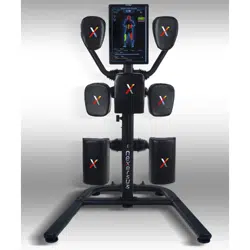
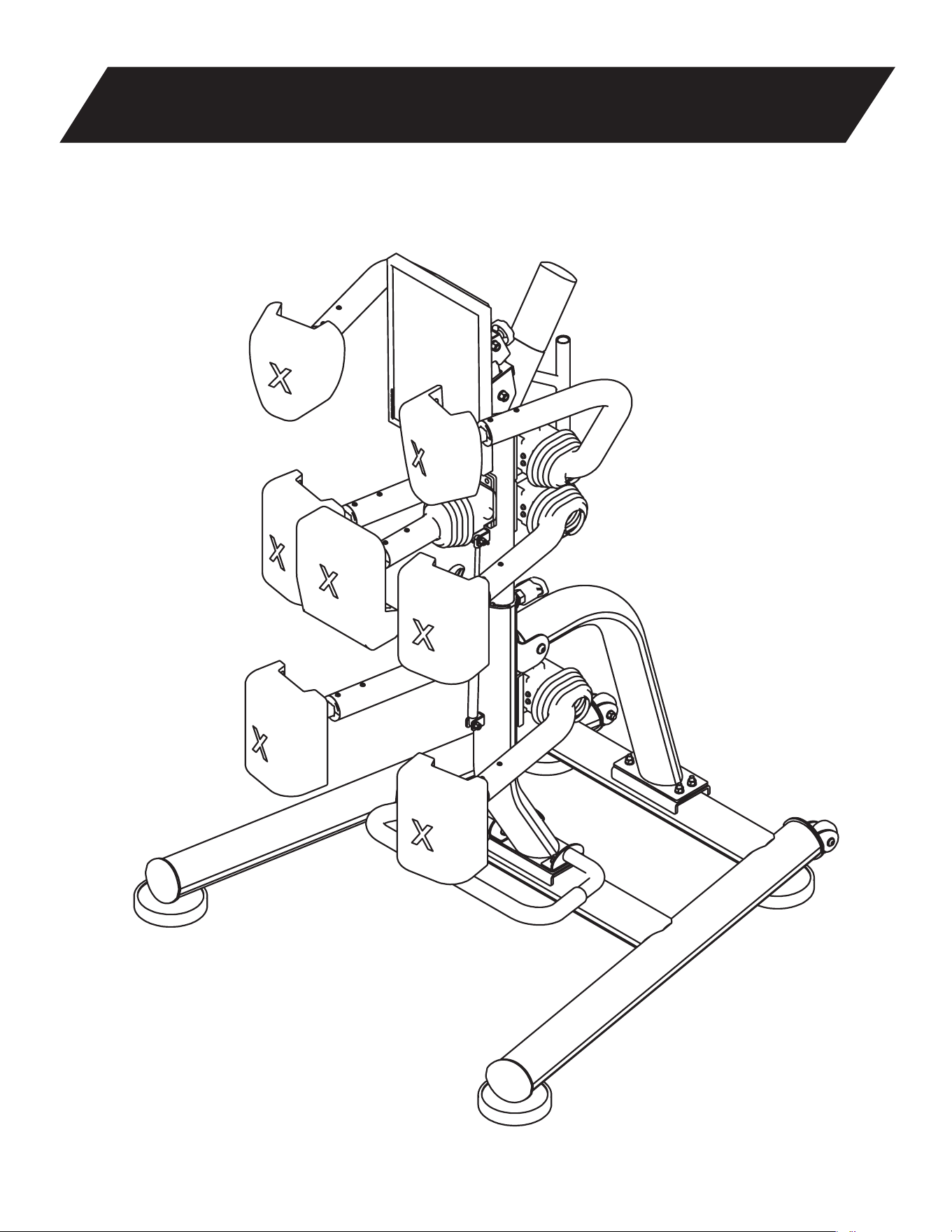
Nexersys - Commercial
NXSC 3.0 Owner’s Manual

Contents
Introduction .............................................................................................................................................1
Important Safety Instructions ..............................................................................................................3
Product
Specifications ......................................................................................................................
....5
Parts & Reference Guide ....................................................................................................................6
Step 1: Spine Support Assembly ........................................................................................................12
Step 2: Spine Assembly ..................................................................................................................... 14
Step 3: Mount Tablet to Nexersys .....................................................................................................15
Step 4: Connect USB and Power Cords Tablets.............................................................................16
Step 5: Connect AC Power Supply ................................................................................................... 17
Step 6: Turn On Power ....................................................................... ............................................... 18
Features and Use ................................................................................................................................20
Intensity ...............................................................................................................................................23
Strike Technique ................................................................................................................................. 24
Maintenance ........................................................................................................................................26
Troubleshooting ..................................................................................................................................27
Limited Warranty ............................................................................................................................... 30
Contacts ...............................................................................................................................................33

1
NXSC Owner’s Manual
Introduction
Nexersys is high intensity interval cross training that delivers an Effective and Total Body workout to all users
– those with no striking experience, to those trained in Boxing or MMA. With 5 different workout programs,
3 difficulty levels, over 100 instructional videos, and thousands of workout possibilities, Nexersys Training
adapts to your fitness needs.
The on-board Nexersys trainer will begin training with basic strikes from base level fitness and incrementally
progress users to advanced-level strike combinations. Inexperienced strikers will learn new skills while
engaging in active cardio, striking and core intensive workouts and experienced strikers alike, will pick up
some new techniques while honing existing skills and improving all areas necessary for peak performance.
Please review the Owner’s Manual to check your component inventory and to ensure you assemble your unit
properly. Please review all safety, maintenance and usage instructions and warranty and return policies as
are included in this Owner’s Manual before using your Nexersys.
Customer Satisfaction is our priority. Please call with any questions or issues and we will do our best to serve
you – (512) 782-2940.
Thank you!
Team Nexersys

2
NXSC Owner’s Manual
Before Assembly
Select where you are going to locate your Nexersys carefully. The best place for the machine is on
a sturdy, level surface. For best results, assemble the Nexersys in the location where you intend to use it.
Allow a workout area of at least 10ft by 6ft of free space for safe operation of the Nexersys. Below are a few
basic tips that will make your assembly of the Nexersys quick and easy. By using these principles, you can
simplify each process and save yourself extra time and effort.
• To make the assembly process go faster, remember the location of the pieces you need for each step
and thoroughly read the assembly instructions for that step prior to starting assembly for the step.
• When tightening a locknut on a bolt, use a combination wrench to grip the locknut and ensure that it is
fastened securely.
• When attaching two pieces, gently lift and look through the bolt holes to help guide the bolt through the
holes.
• As a general rule, and for all bolts and nuts on the machine, turn bolts or nuts toward the right to tighten
(clock-wise) and left to loosen (counter clock-wise).
Tools
In order to construct your machine, you will need:
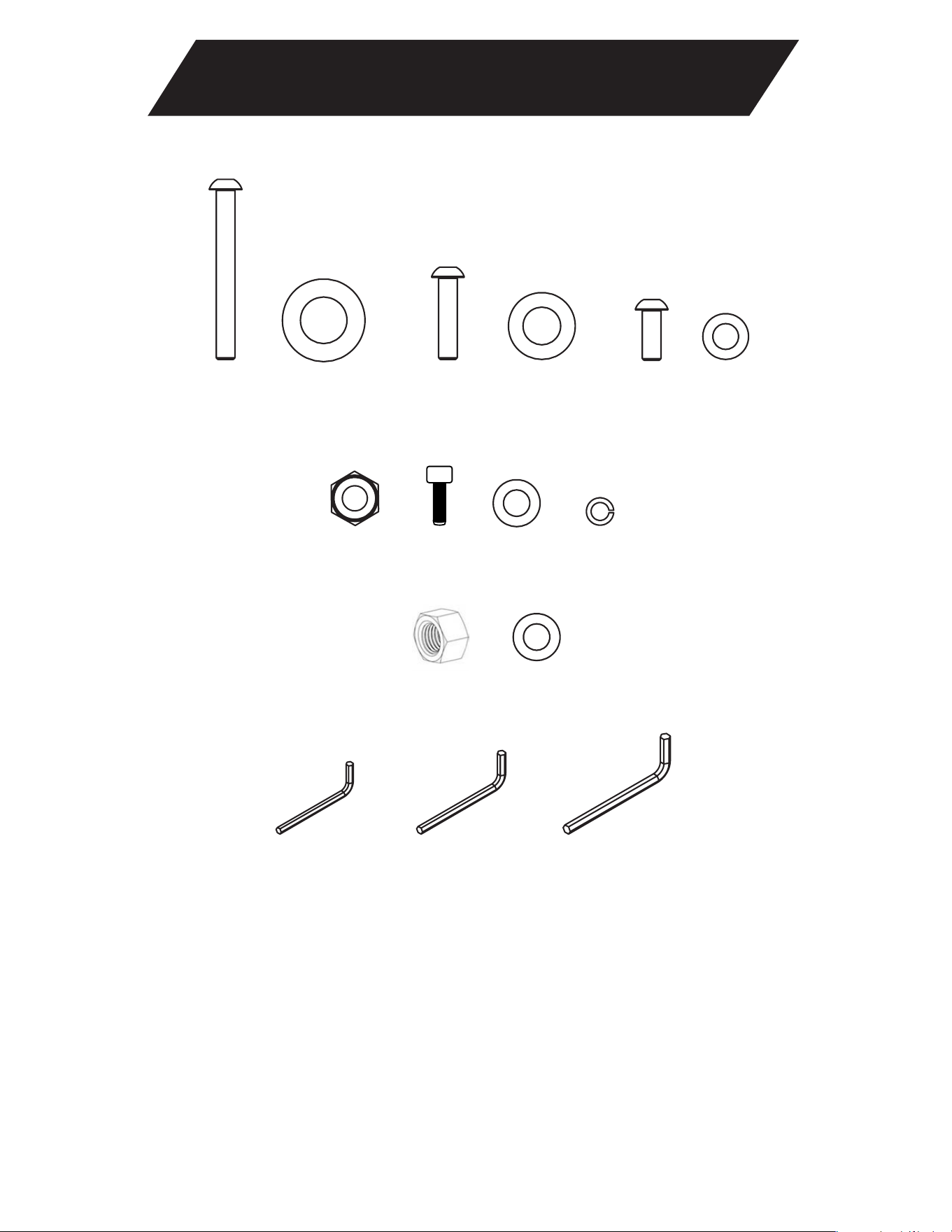
• Crescent Wrench (Included)
• Hex Keys (Included)
Unpacking Your Nexersys
Inside the Nexersys box you will find: tools to help you with assembly, each unique piece, and all
necessary hardware to assemble the Nexersys. To make set-up easier, lay out each piece in the box where it
is visible and check the lists on the following pages to make sure that the box contains the correct amount of
each component. Try and remember where you laid out each piece so that you can find them quickly when
you need them.
Introduction
3
NXSC Owner's Manual
Be careful when dealing with larger Nexersys components, as they might require effort to lift and
attach. Some steps require two individuals. Have a second person assist you during assembly. Before using
the Nexersys, make sure that all screws have been tightened securely, as the Nexersys will endure shock
forces during most workouts.
This icon means a potentially hazardous situation which, if not avoided, could result in death
or serious injury.
Obey the following warnings:
Read and understand all warnings on this machine.
Carefully read and understand the Nexersys Owner’s Manual.
• Keep bystanders and children away from the Nexersys you are assembling at all times.
• Do not assemble this Nexersys outdoors or in a wet or moist location.
• Make sure assembly is done in an appropriate work space away from foot traffic and exposure to
bystanders.
• Some components of the Nexersys can be heavy or awkward. Use a second person when doing
the assembly steps involving these parts. Do not do steps that involve heavy lifting or awkward
movements on your own.
• Set up this Nexersys on a solid, level, horizontal surface.
• Do not try to change the design or functionality of this machine. This could compromise the safety
and can void the warranty.
• If replacement parts are necessary use only genuine Nexersys replacement parts and hardware.
Failure to use genuine replacement parts can cause a risk to users, keep the Nexersys from
operating correctly or void the warranty.
• Do not attempt to service the Nexersys yourself other than the assembly and in a manner found in
the maintenance instructions of this manual.
• Do not use or put the Nexersys into service until the machine has been fully assembled and
inspected for correct performance in accordance with Owner’s Manual.
• Before each use check all bolts, pads, and framework for wear and proper function. Tighten all
fasteners as necessary.
Important Safety Instructions

4
NXSC Owner’s Manual
Important Safety Instructions
• Always wear gloves or wraps when using this product to avoid injury to your hands and damage to
the pads from rings or other objects.
• Wear proper exercise clothing and shoes for your workout.
• Do not hit the machine with excessive force. THIS CAN CAUSE INJURY to you or to the machine
and will invalidate the warranty. You will be warned by a loud buzz if you strike too hard. If you
strike with truly excessive force, the software will pause and provide a warning. This is for your
safety and to protect the machine.
• Supervise teenagers and children using the Nexersys.
• Replace warning labels if damaged, illegible, or missing.
• Do not rock the unit.
• Turn OFF and unplug the Nexersys when adjusting cables, frame, and monitor.
• To prevent shock, keep all electrical components, such as the monitor, power cable etc., away from
water or other liquids. Never place liquids on any part of the unit.
• Do not overexert yourself or work to exhaustion. Stop your workout immediately and consult your
physician if you feel any pain, dizziness, shortness of breath, or other abnormal symptoms.
• You should always consult your physician before beginning a new exercise program or nutrition
plan.

5
NXSC0XOFShT Manual
Product Specifications
Nexersys Equipment
• Weight: 315 lbs
• Frame Box: 58” x 32” x 25”
• Base Box: 53” x 53” x 5”
• Equipment Footprint: 4’W x 4’L x 6’8”H
• Workout Area: 6’W x 10’L
• Industrial grade steel frame
• Professionally tested for 3,500 hours of continuous use
Tablet, Aggregator PCB and Software
• 22” LCD touch screen tablet
• Carton Size: 24” x 5” x 17”
• Custom built Aggregated Printed Circuit Board
• Custom Nexersys software running on Android
• 3-axis accelerometer on PCB mounted in each pad to capture strike
data
6
NXSC Owner's Manual
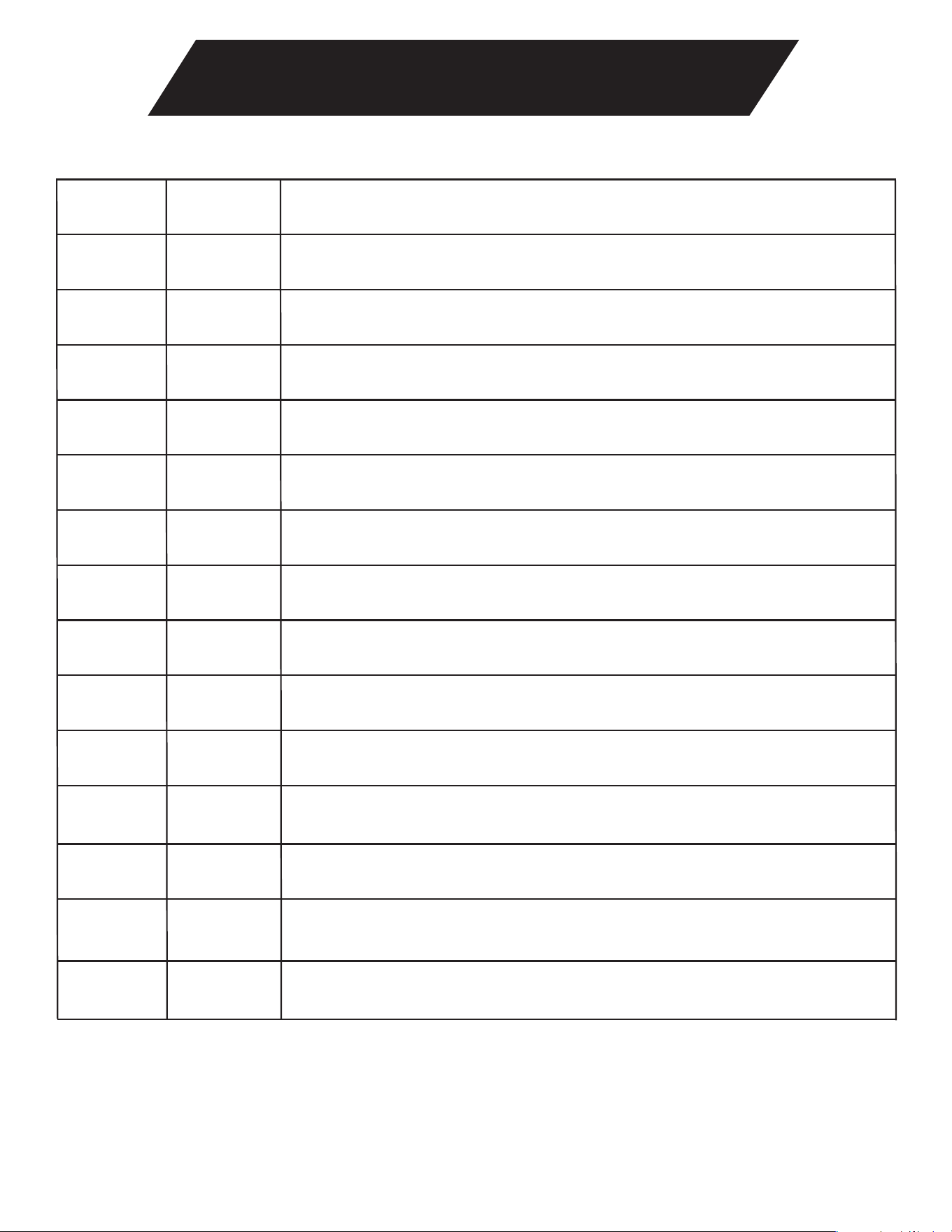
Parts & Reference Guide
A B
G H
I
J
M
L
K
N O
D E FC
7
NXSC Owner’s Manual
Parts & Reference Guide
Hex Key, size = 6
M8 Flat Washer (Fastened to each pad)
M6 Nylon Lock Nut
Hex Key, size = 5/32”
M8 Flat Washer
M8 20mm Bolt
M8 Lock Washer (Fastened to each pad)
M3.5 Flat Washer
Hex Key, size = 5
M8 20mm Bolt (Fastened to each pad)
M12 Nylock Nut
M10 25mm Bolt
M12 Flat Washer
M10 Flat Washer
M12 160mm Bolt
DescriptionQuantity
1
4
1
4
1
1
8
2
8
2
2
1
28
28
28
Item
A
F
E
H
G
J
L
C
B
D
I
K
N
M
O
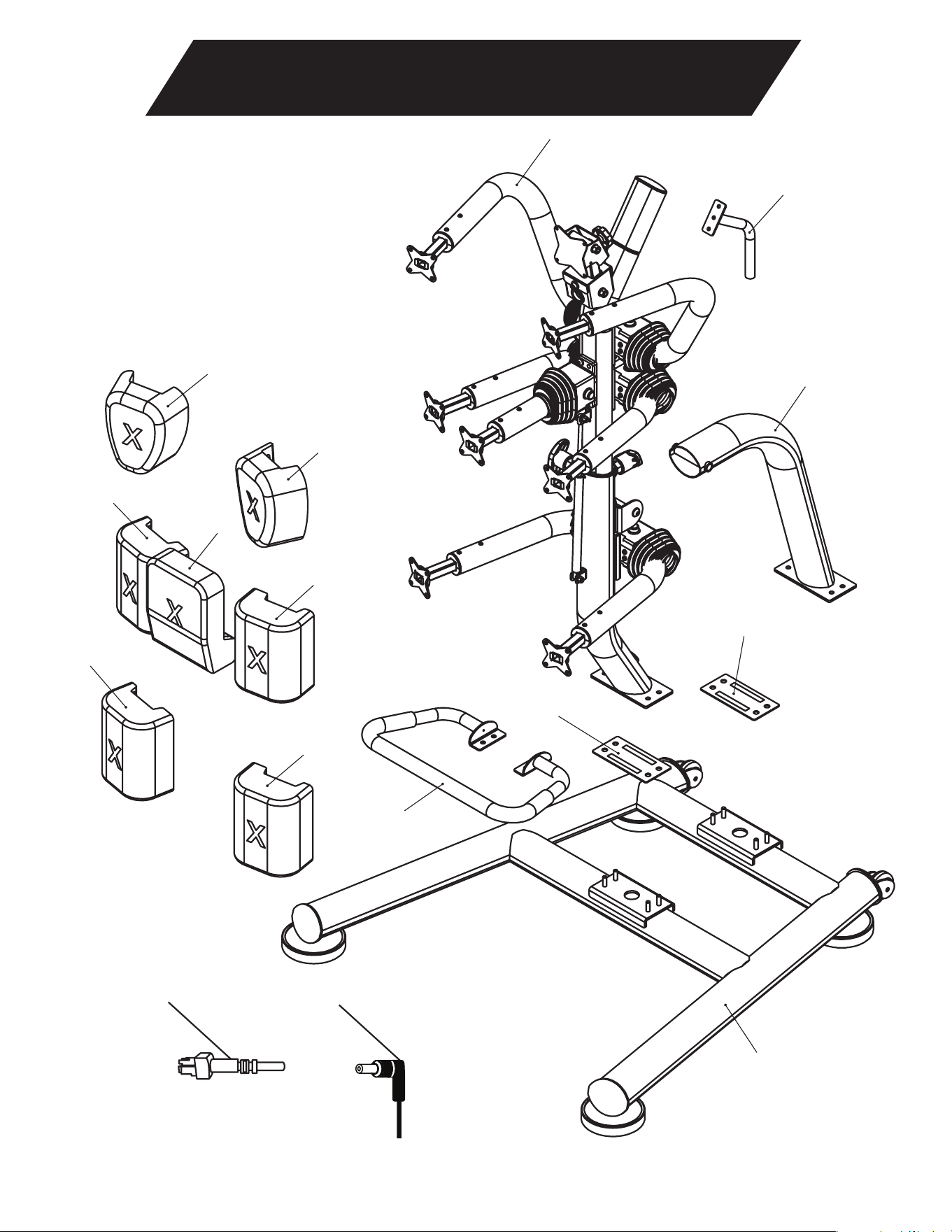
13
14
5
1
2
3
3
4
15
6
7
8
9
10
11
12
Parts & Reference Guide
8
NXSC Owner's Manual
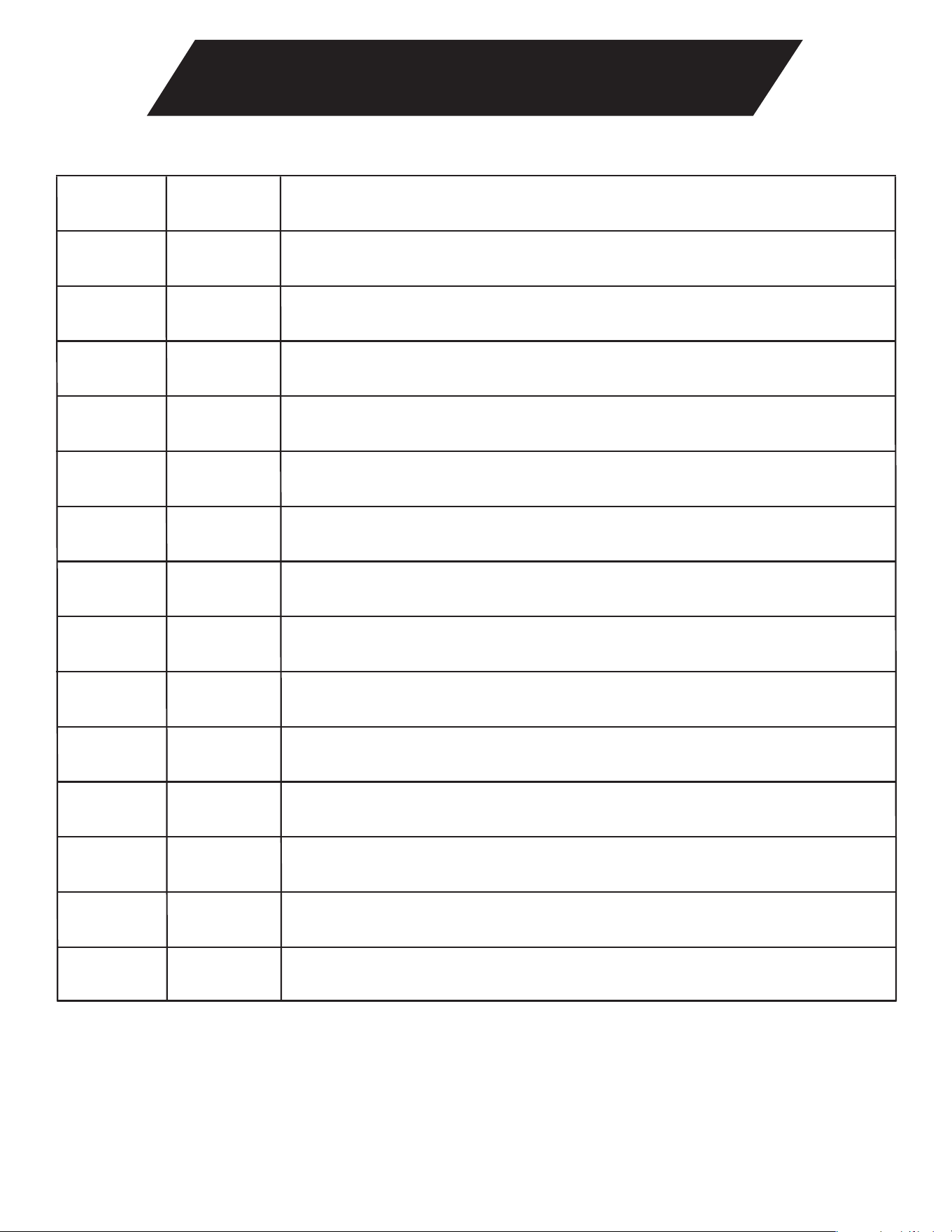
9
NXSC Owner's Manual
Parts & Reference Guide
Accelerometer Cables
Left Kick Pad
Center Body Pad
Right Head Pad
Spine
Rubber Gasket
DC Power Cable
Sit Up Bar
Right Kick Pad
Right Body Pad (Kidney Pad)
Left Body Pad (Kidney Pad)
Left Head Pad
Base
Spine Support
Spine Handle
DescriptionQuantityItem
1 1
1
1
1
1
1
1
1
1
1
1
7
1
1
2
2
3
4
5
6
7
8
9
10
11
12
13
14
15
10
NXSC Owner's Manual
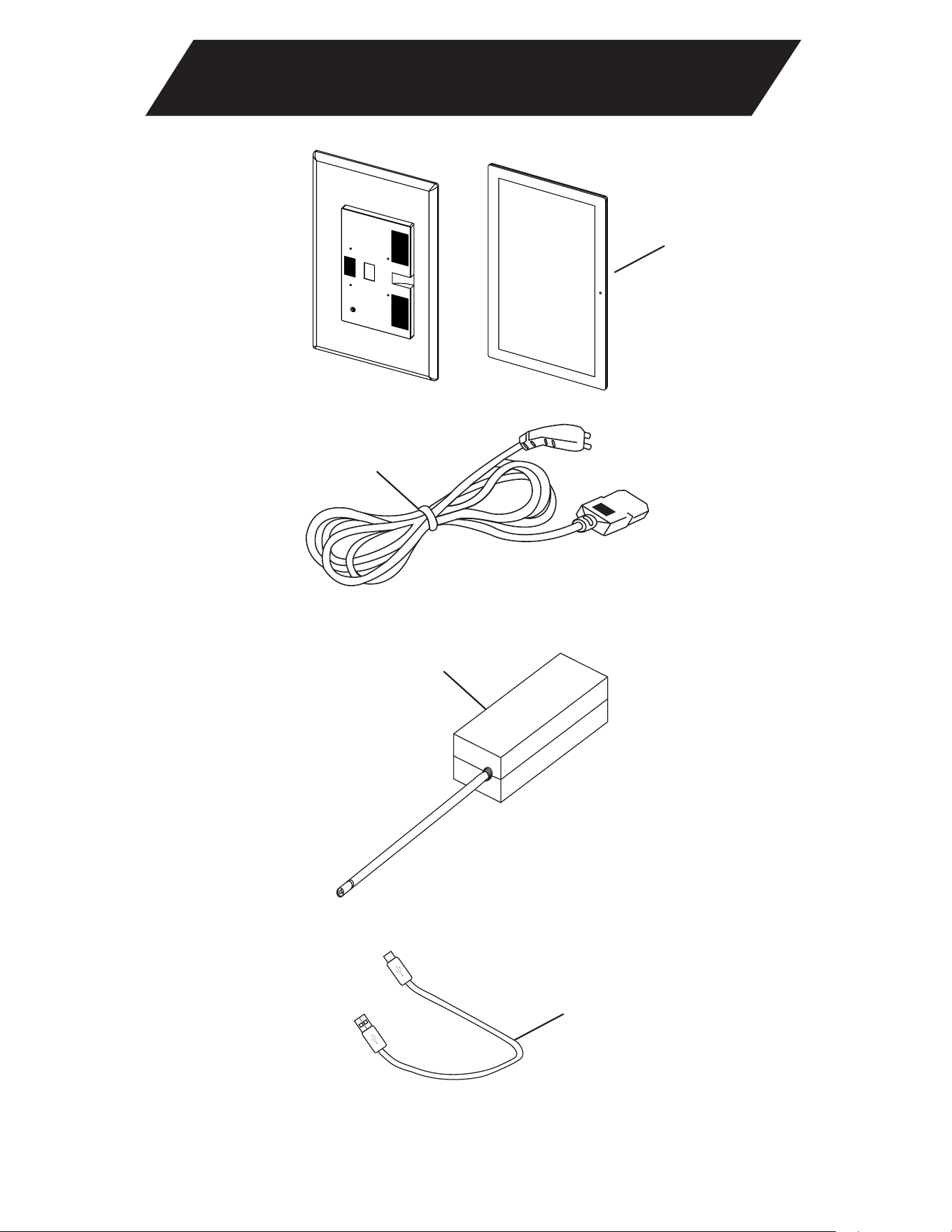
Parts & Reference Guide
16
19
17
18
11
NXS-P/NXS-C Owner’s Manual
Parts & Reference Guide
AC Power Brick
USB Cable
AC Cable
22” Tablet
DescriptionQuantityItem
16
17
18
19
1
1
1
1
12
NXSC Owner’s Manual
Assembly
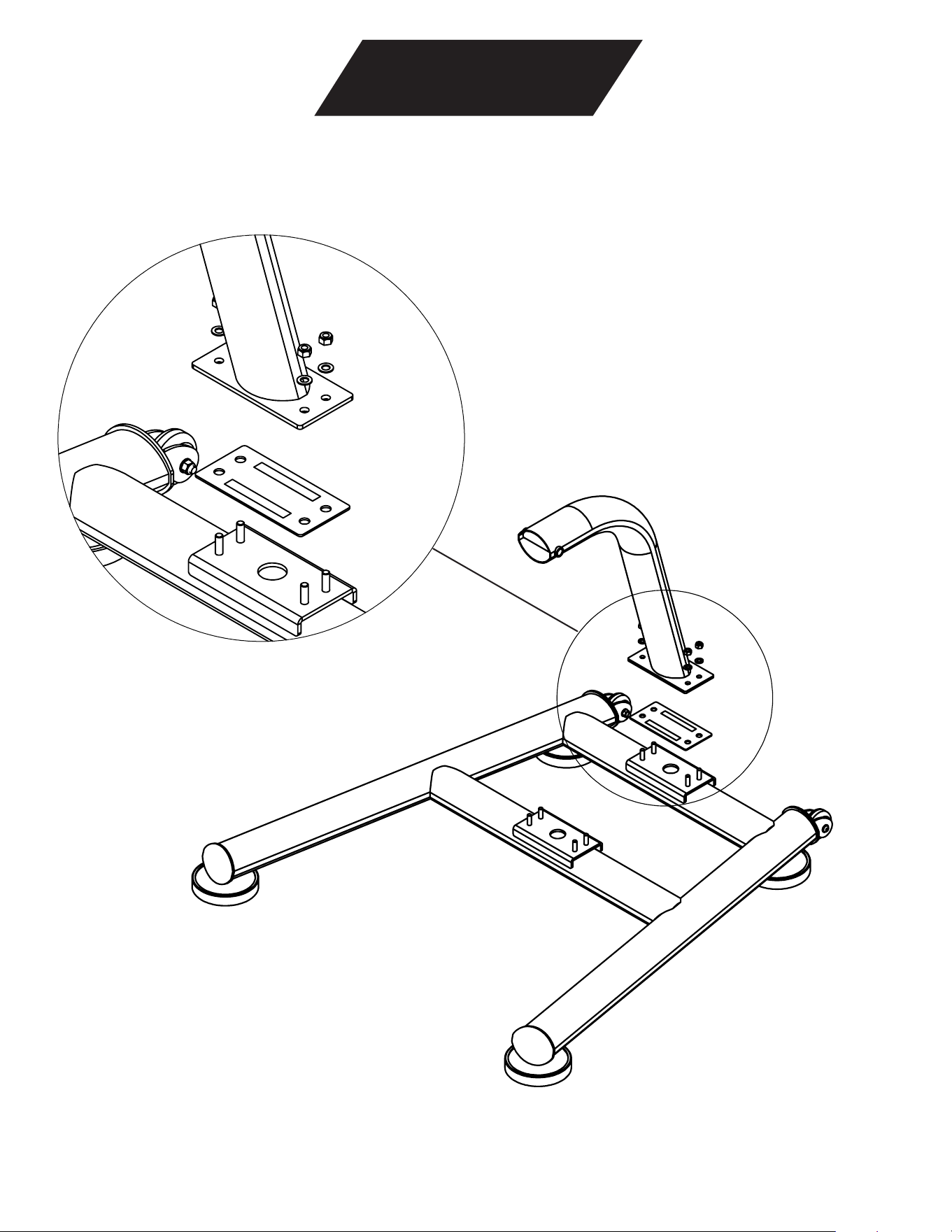
Step 1: Spine Support Assembly
Parts Needed: Base, Spine Support, Rubber Gasket
Hardware Needed: M10 25mm Bolt (4); M10 Flat Washer (4)
I
Assembly
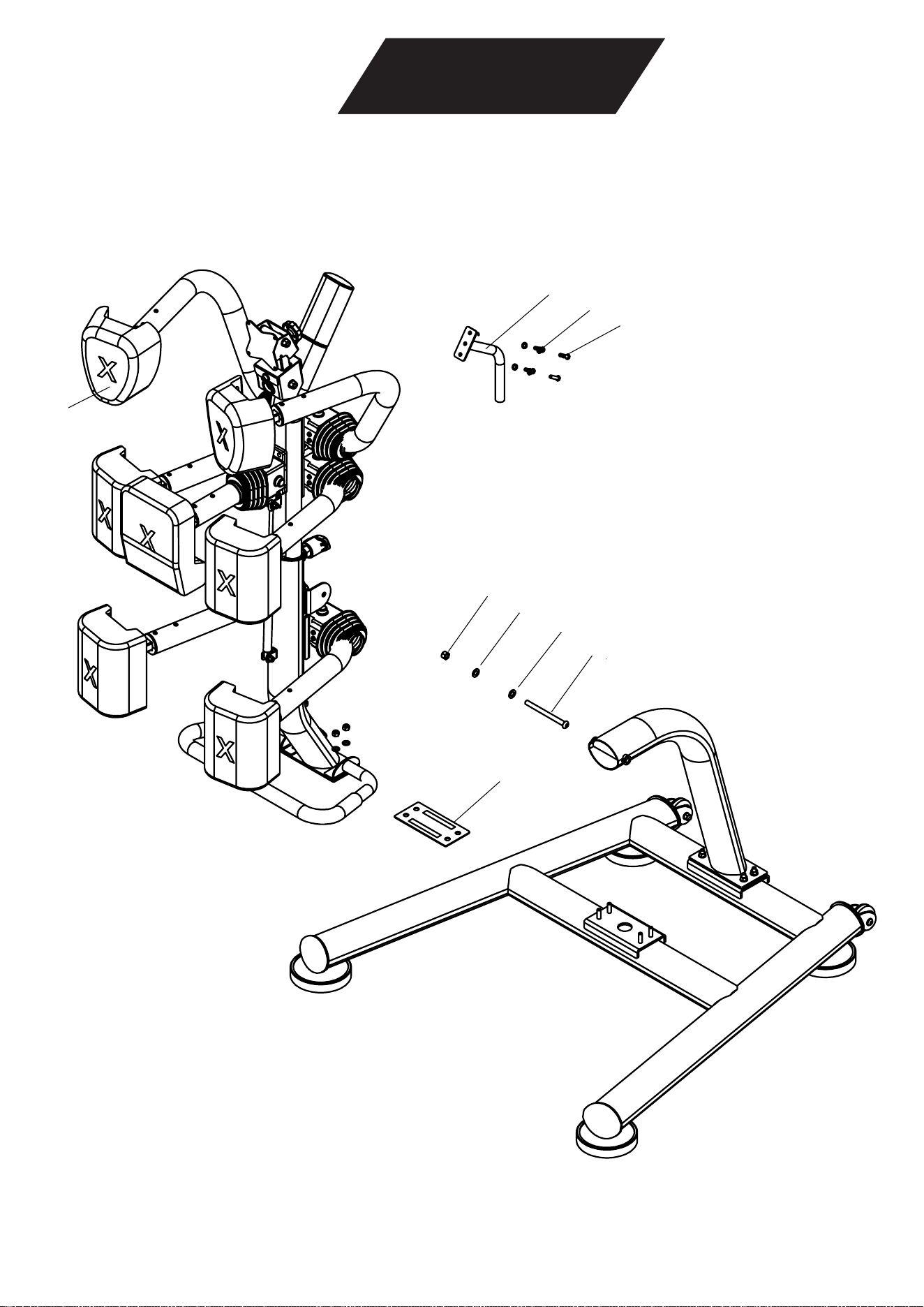
Step 2: Spine Assembly
Additional Parts Needed: Spine; Rubber Gasket; Spine Handle
Hardware Needed: M10 25mm Bolt (4); M10 Flat Washer (4); M12 Nylock Nut, M12 Flat Washer (2); M12
160mm Bolt; M8 20mm Bolt (2); M8 Flat Washer (2)
5
1
F
E
B
G
B
A
3
13
NXSC Owner’s Manual
14
NXSC Owner’s Manual
Assembly
Step 2: Spine Assembly Continued
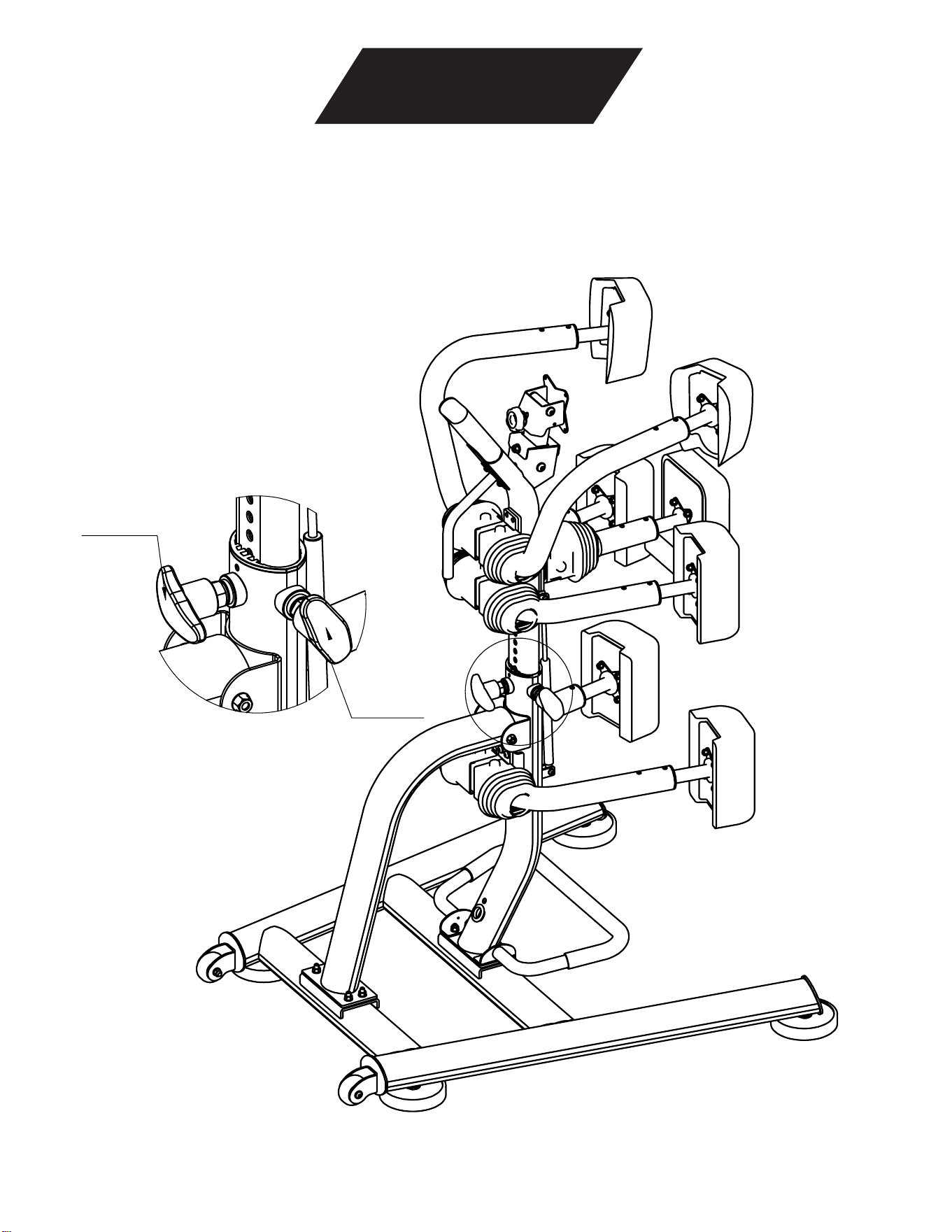
To adjust the height of your unit, turn the back side knobs to the left to loosen, pull back knob out to
disengage pin-lock, move the spine to your preferred height, and then turn the knobs right to tighten and
secure.
BackKnob
SideKnob
I
15
NXSC Owner’s Manual
Assembly
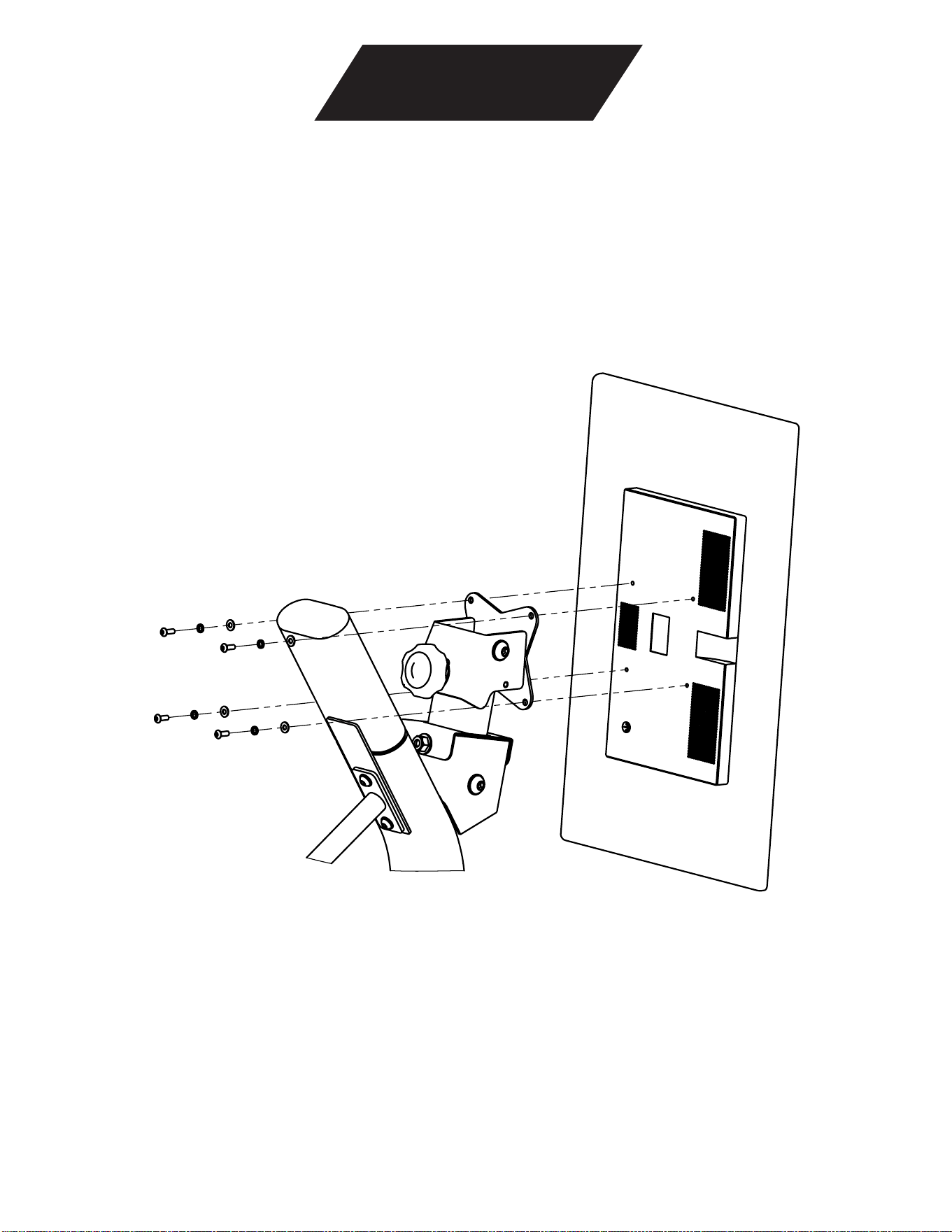
Step 3 - Mount Tablet to Nexersys
Note: Both the lock washer and flat washer are required for proper assembly.
16
NXSC Owner’s Manual
Assembly
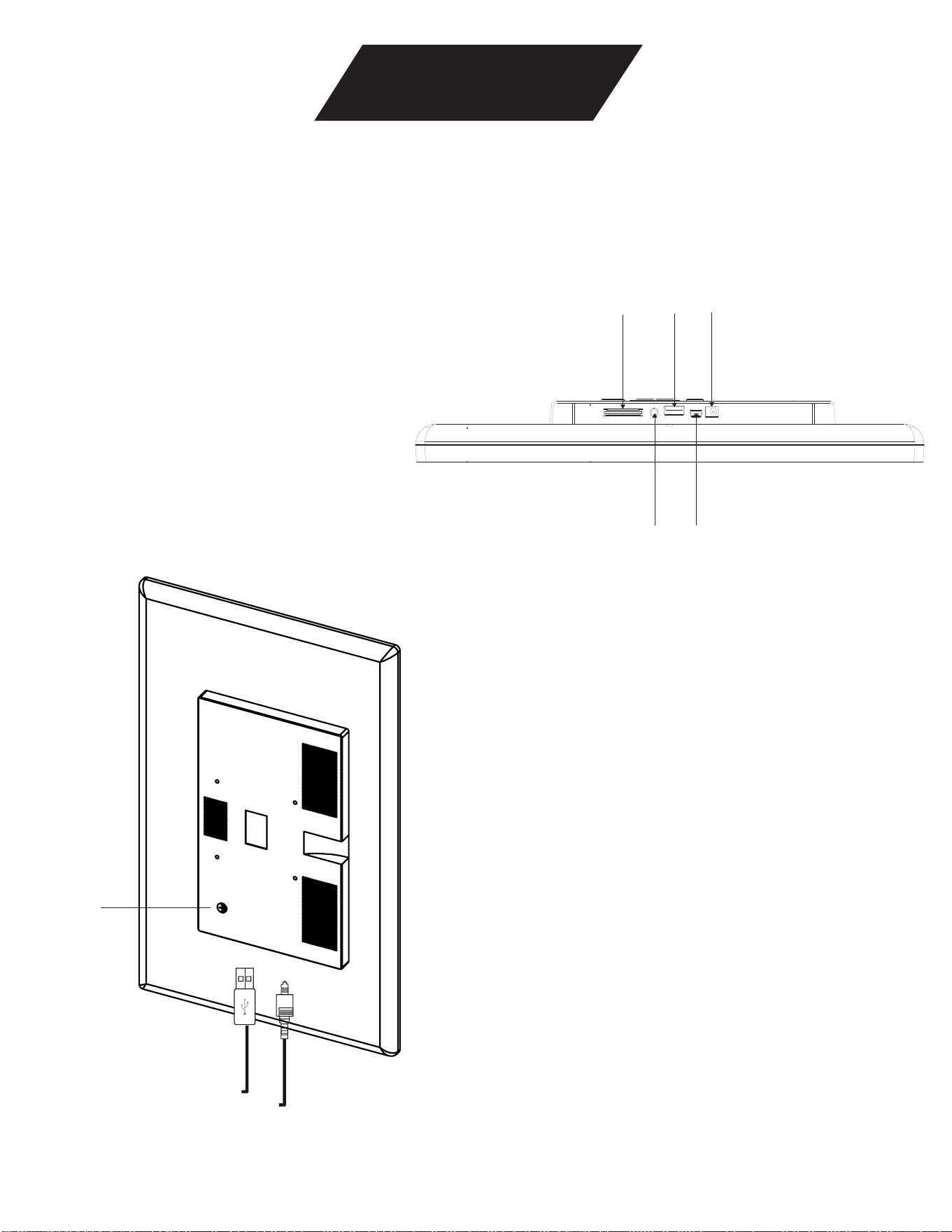
Step 4 - Connect USB and Power Cords to Tablets
USB 2.0
SD card slot
EarPhone
Mini USB
DC power
Power button
17
NXSC Owner’s Manual
Assembly
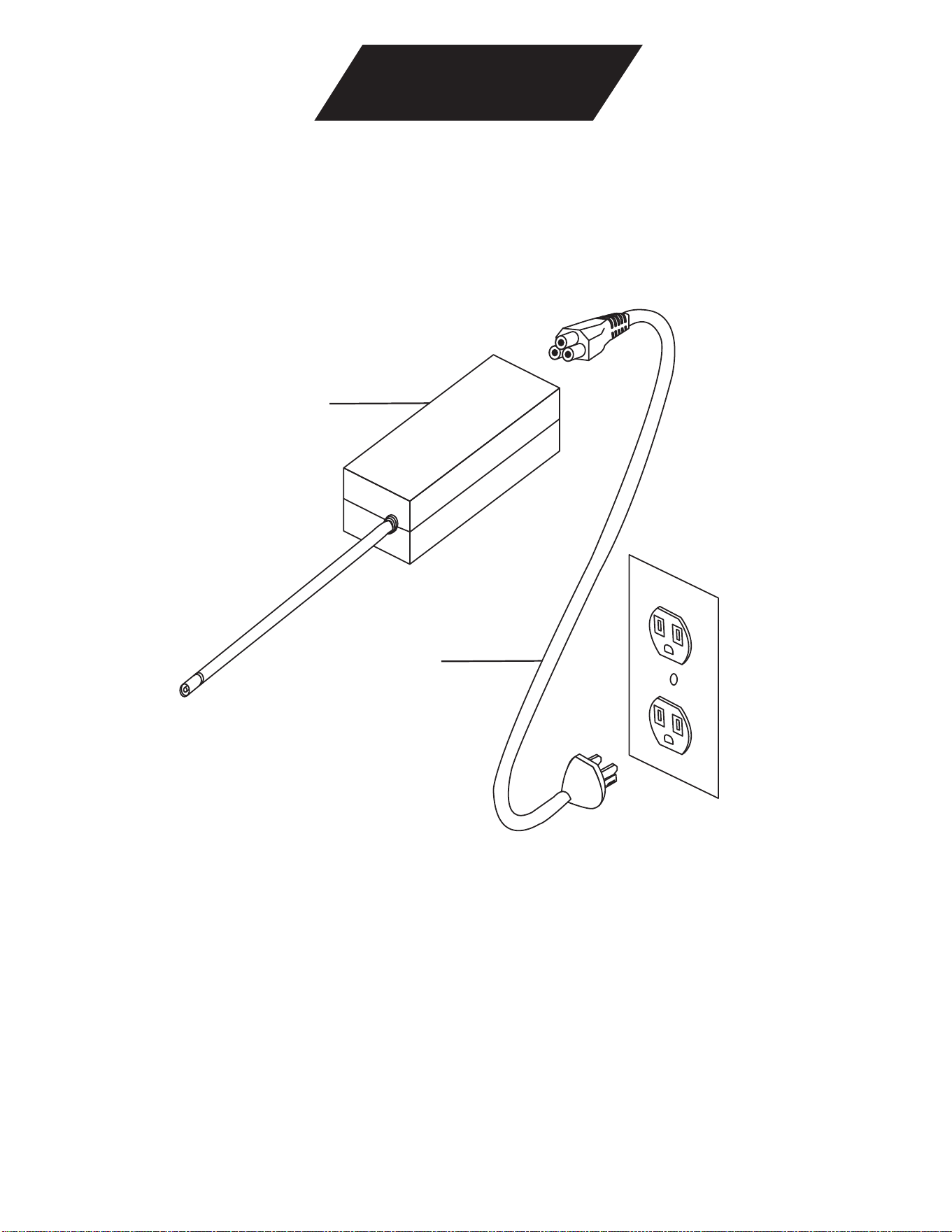
Step 5 - Connect AC Power Supply
Note: Connect DC Cable from AC power supply to DC cable at base of Nexersys.
19
18
Assembly
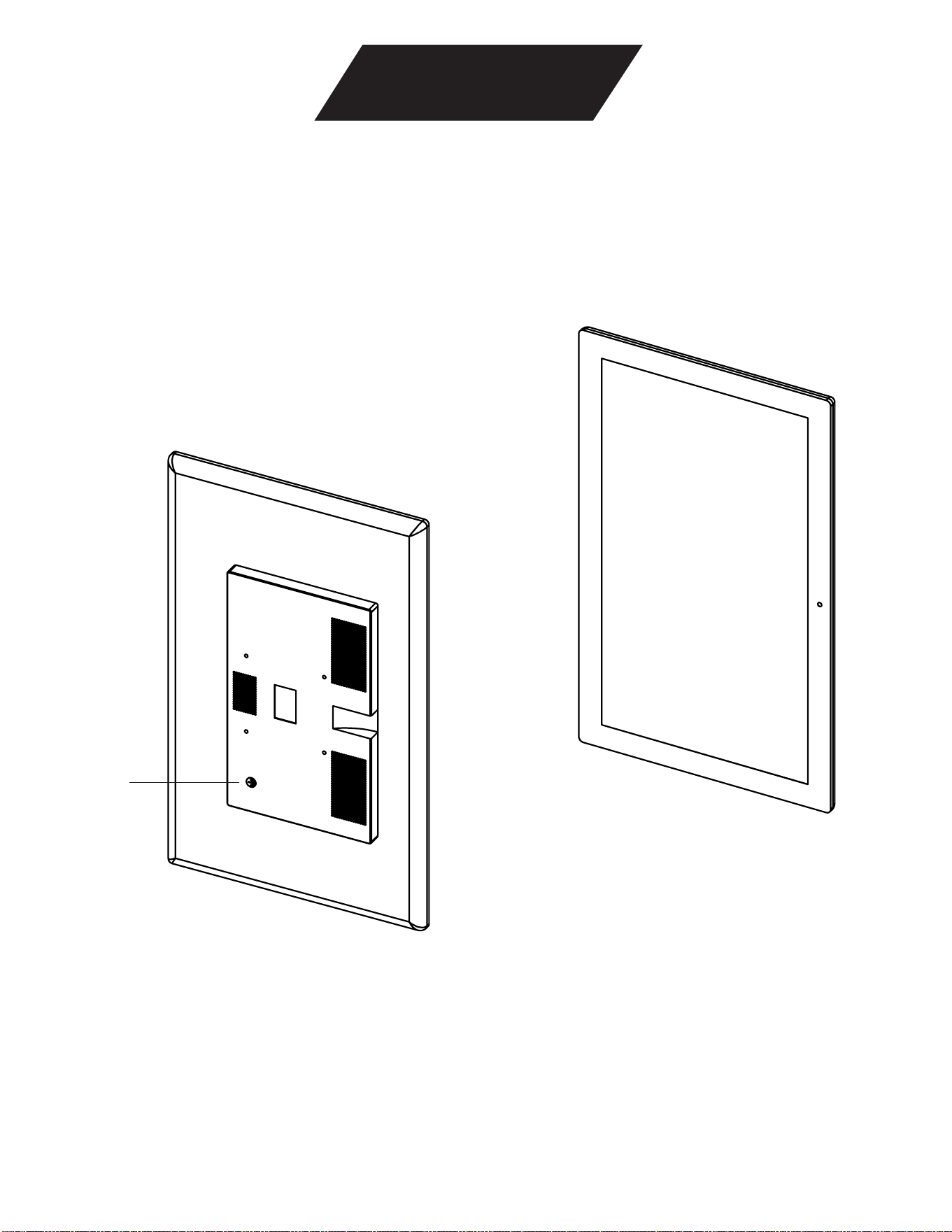
Step 6 - Turn On Power
Note: Please wait at least 20 seconds for software license screen.
Nexersys
Power button
18
NXSC Owner’
s Manual

Assembly
Step 7 - Register Tablet
Once you have assembled your tablet, select a wi-fi network and register your device.
19
NXSC Owner’s Manual
20
NXSC Owner’s Manual
Assembly
Final Inspection
Inspect your Nexersys to ensure that all fasteners are tight and components are properly assembled.
Failure to visually check and test assembly before use can cause damage to the equipment. It
can also cause serious injury to users and bystanders.
Check that all pads are properly installed and that X’s on pads are oriented correctly.
21
NXSC Owner’s Manual
Features and Use
Nexersys will alert you when you are hitting the machine too hard with a warning buzz. If you continue to hit
too hard, the machine will automatically pause and warn you to adjust your stance and your power. Hitting
too hard does not help improve the effectiveness of your workout. Additionally, excessive force can cause
premature wear and tear, damage your machine, and cause injury to you.
DISCLAIMER: Sparring is about exercise, technique and form.
Interactive Feedback and Cues
Nexersys provides many visual and auditory cues detailed below to prompt and respond to your action, as
well as performance summaries at the conclusion of each workout.
Visual Cues
Visual cues include pad history, strike icons, a combo counter, and a combo tracker.
Audio Cues
• Double Clap – happens 10 seconds before the first bell to indicate your workout is about to start. It
happens again 30 seconds before the last bell to indicate that it’s time to give it all you’ve got for the
last 30 seconds.
• Single Bell – the single bell starts the 3 minute round.
• Double Bell – the double bell ends the 3 minute round.
• Buzzer – indicates that you have hit too hard.
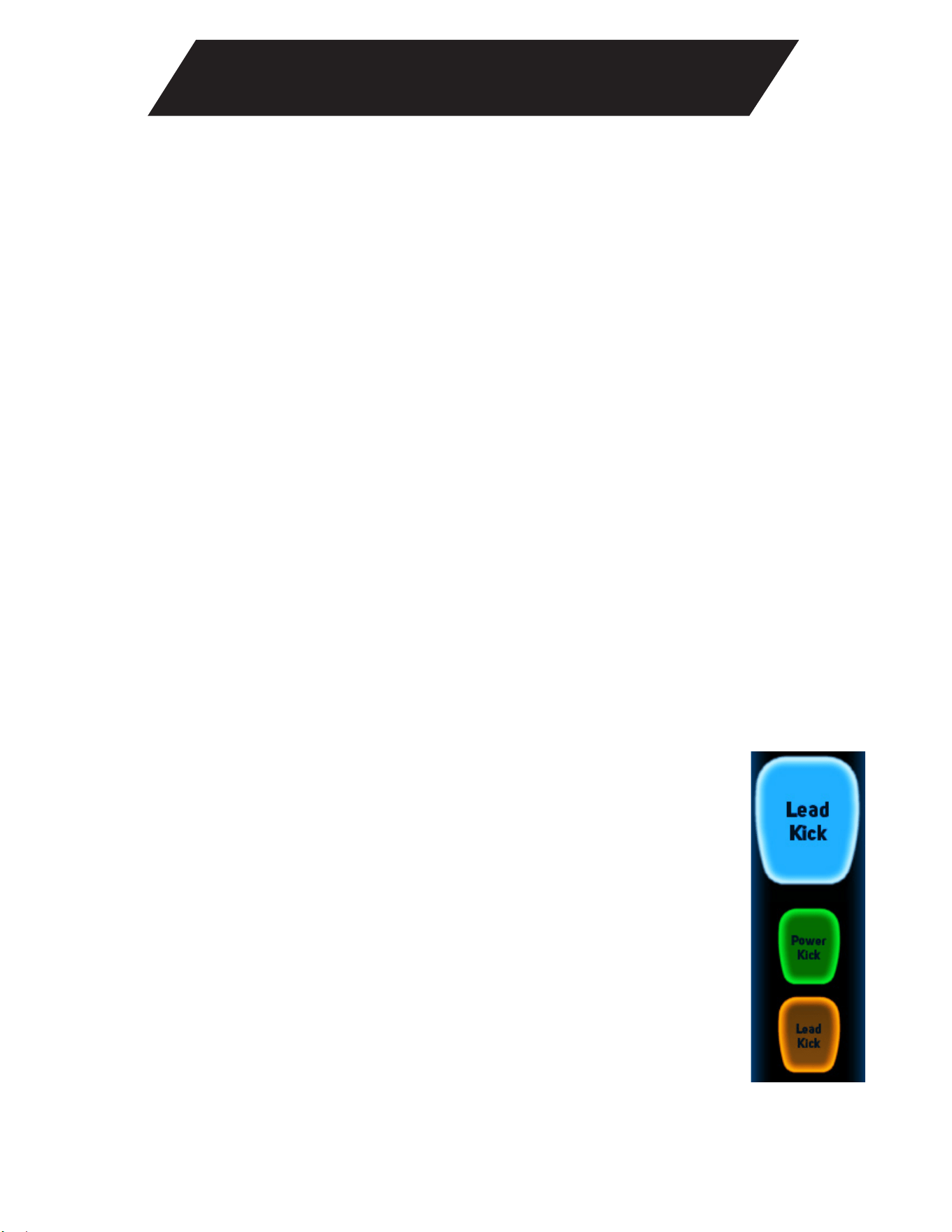
Pad History
The pad history consists of three pads in descending order. In pad history you will see what strike you should
throw now as well as the prior two. The first pad indicates the current strike that should be thrown, and will
appear on the side you use to throw the strike. Facing the screen, in Traditional stance,
the Jab would appear on the left side of the screen.The current pad will be blue and
has the strike name written on it as seen in Figure 1. If you land your strike in time, the
current pad will turn green. If you fail to land your strike in time, it will turn orange.
The current pad will then move down, as either green or orange, as the next strike pad
pops up. Figure 3 shows the pad history.
Figure 1. Pad History
22
NXSC Owner’s Manual
Features and Use
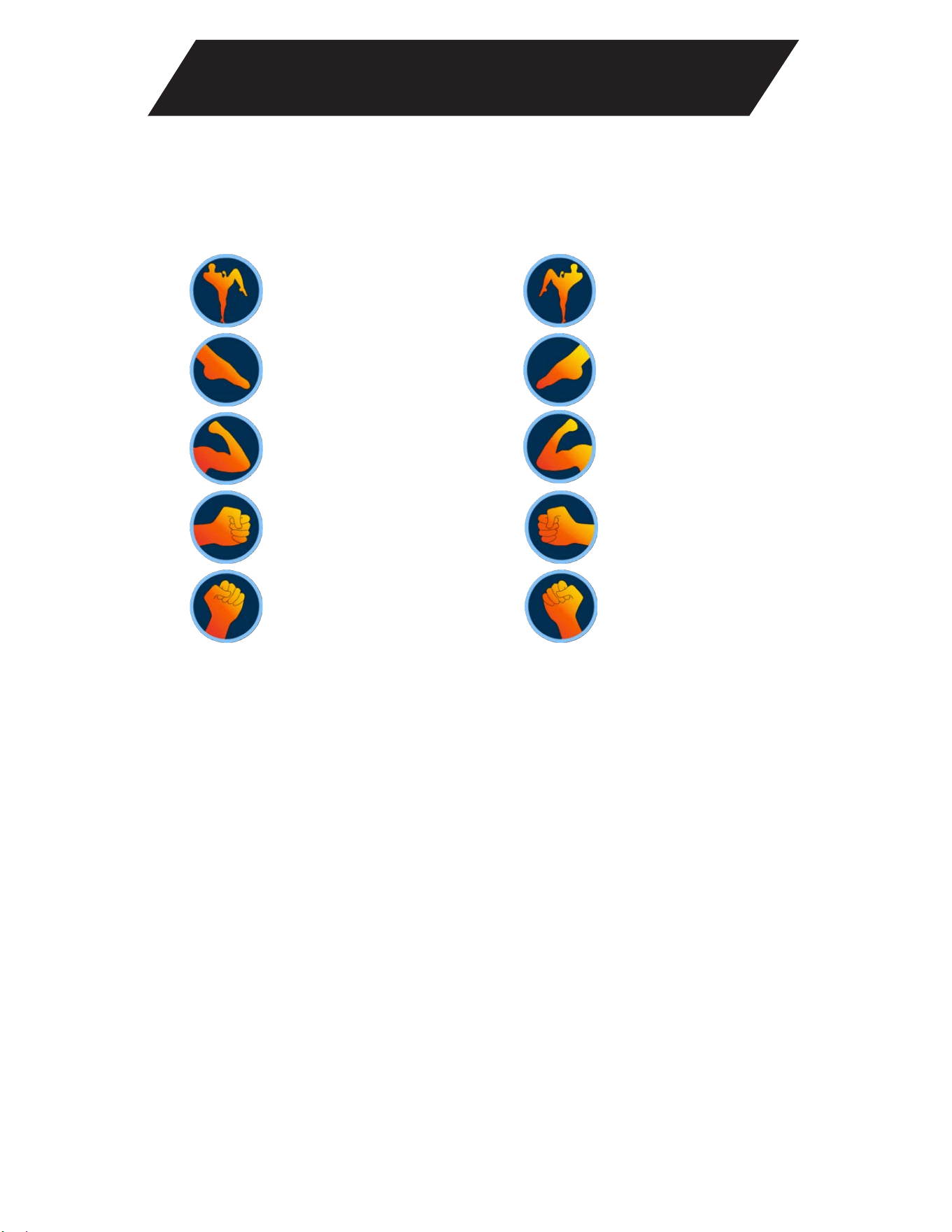
Strike Icons
The strike icons listed below provide a visual cue on which strike you are supposed to throw. They will pop
up next to the strike zone where you should throw your strike. For instance, the knee icon will appear at the
waistband, the hook icon next to the head and the kick icon next to the legs
Figure 2. Rotational Strike Icons
Power UppercutLead Uppercut
Power HookLead Hook
Power ElbowLead Elbow
Power SweepLead Sweep
Power KneeLead Knee
23
NXSC Owner’s Manual
Features and Use
Round Wrap-up
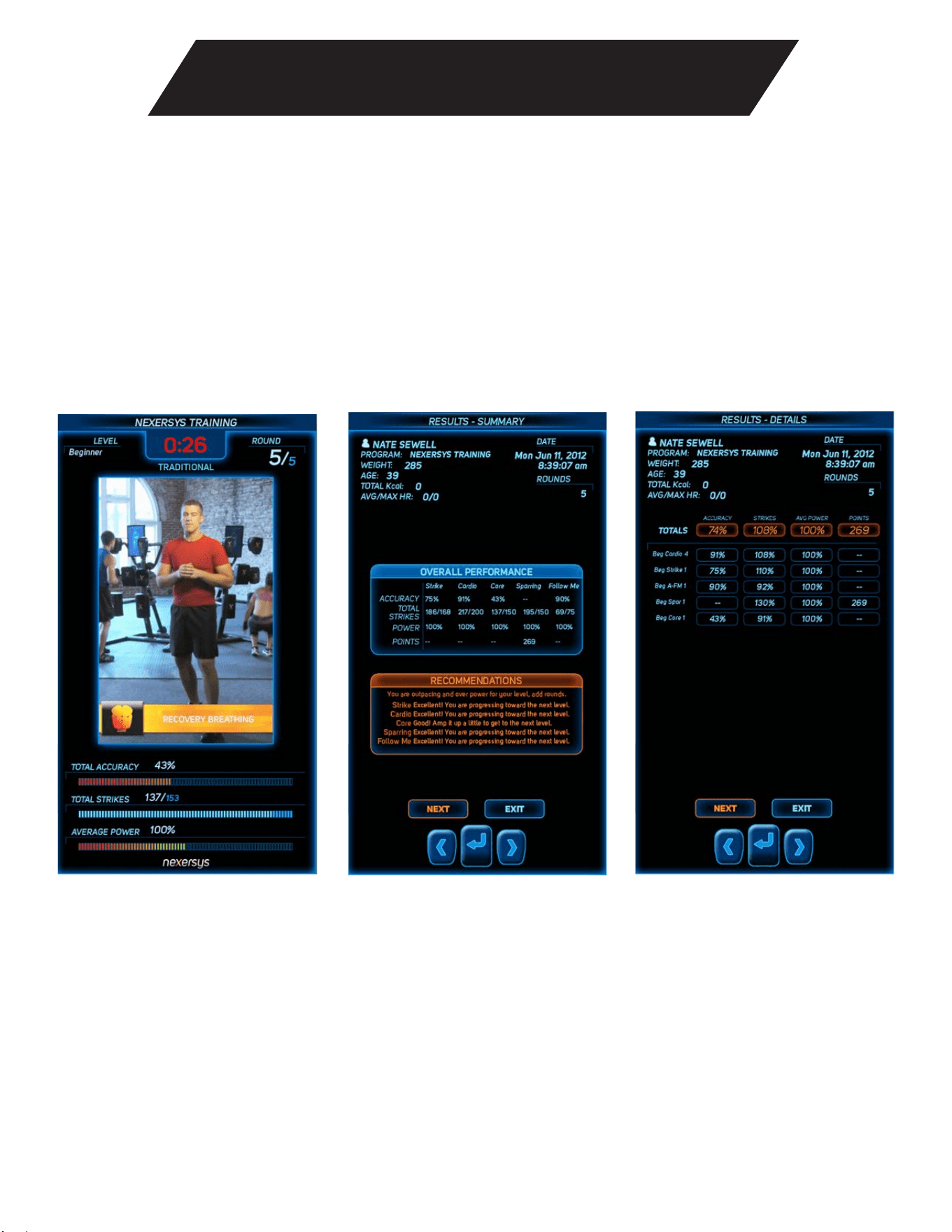
At the end of each round, you will receive a round wrap-up showing the average accuracy, total number of
strikes, average power, total calories burned, and total points scored as relevant for that round. Figure 3 is a
screenshot of a typical round wrap-up.
At the end of a program (1-15 rounds), you will receive a workout wrap-up that provides a summary of all
rounds completed (Figure 3 left) and a detail page with the round wrap-up stats from each round (Figure 3
right). These workout wrap-ups will be stored in the Historical Data folder found under Profiles & Settings /
View Historical Data.
Figure 3. Round Wrap-up

Intensity Levels
Nexersys allows you to train at three different intensity levels of increasing difficulty – Beginner,
Intermediate, Advanced.
Beginner Level
Beginner level moves at a slower but consistent pace allowing the trainer to teach each move. Beginner
does not mean easy. The goal is to learn basic punches, kicks, and a jab/cross combo using excellent
form while getting the user striking and working immediately. This workout program will build on the
strikes learned in the Beginner level to add more challenging moves, combinations and speed to increase
complexity as a user progresses. The Beginner level includes two technique training rounds that provide
detailed instruction on how to throw each strike worked during this level. Training videos measure accuracy,
power and the number of strikes per round. Based on the measurements captured over time, Nexersys will
tell the user when it’s time for them to move to the next level.
Intermediate Level
Intermediate level builds on the foundation created during the Beginner level videos. The Intermediate levels
will include all direct strikes taught in Beginner training, and add instruction on more challenging, rotational
strikes including knees, elbows, lead and power sweep kicks, and more complex combinations. There are
two technique training videos in the Intermediate level that provide detailed instruction on new strikes in
this level. The pace is faster and the trainer will call for more strikes during these sessions. Training videos
measure accuracy, power, and the number of strikes per round. Based on the measurements captured over
time, Nexersys will tell the user when it’s time for them to move to the next level.
Advanced Level
Advanced level training works all Beginner and Intermediate strikes in challenging combinations and in
both stances. The trainer will teach the combinations at the beginning of each round, set the pace, and get
the user working at a high level of intensity. The number of strikes per round increases again. The goal for
the user is to combine what they have learned, work at their highest intensity level, and have fun doing it.
The Advanced level also includes two technique rounds that focus on using flow, momentum and timing to
work the Advanced combos like a pro. Training videos measure accuracy, power, and the number of strikes
per round. Based on the measurements captured over time, Nexersys will show where a user can focus to
improve performance and results in the round and workout wrap-ups.
24
NXSC Owner’s Manual

25
NXSC Owner’s Manual
Strike Technique
• Traditional Stance
• Southpaw Stance
• Jab
• Cross
• Lead Body
• Power Body
• Lead Dig
• Power Dig
• Lead Kick
• Power Kick
Choose this stance if your right hand is your power hand. For foot
placement, stand hip width apart and take a step back with your right leg.
Drop your back knee to the ground. Your back knee should be even with
the heel of your front foot. Your weight is balanced in the center and your
knees are slightly bent. Left hand is your lead hand, right hand is your
power hand. Both hands are in a fist, arms are bent, fists are up by your
face, protecting the jaw. Ab muscles are tight and you have a slight hunch
in your torso.
Choose this stance if your left hand is your power hand. For foot
placement, stand hip width apart and take a step back with your left leg.
Drop your back knee to the ground. Your back knee should be even with
the heel of your front foot. Weight is balanced in the center and your knees
are slightly bent. Right hand is your lead hand, left hand is your power
hand. Both hands are in a fist, arms are bent, fists are up by your face
protecting the jaw. Ab muscles are tight and you have a slight hunch in
your torso.
Lead hand punches opposite head pad.
Power hand punches opposite head pad.
Squat into stance, lead hand to center body pad. Fully extended strike.
Squat into stance, power hand to center body pad. Fully extended strike.
Lead hand to same side kidney pad. Tight strike.
Power hand to same side kidney pad. Tight strike.
Lead leg kicks front of same side kick pad. With balance, pull lead leg knee
up, extend leg with slight push into kick pad – no more than 1-2 inches
compression, bend leg again and replace foot back into stance.
Power leg kicks front of same side kick pad. With balance, pull power
leg knee up, extend leg with slight push into kick pad – no more than 1-2
inches compression, bend leg again and replace foot back into stance.

26
NXSC Owner’s Manual
Strike Technique
• Lead Hook
• Power Hook
• Lead Elbow
• Power Elbow
• Lead Uppercut
• Power Uppercut
• Lead Knee
• Power Knee
• Lead Sweep
• Power Sweep
Lead hand throws a hook to the inside of the opposite head pad. Fist to
elbow is parallel to the ground. Big rotation in the core.
Power hand throws a hook punch to the inside of the opposite head pad.
Lead elbow to the opposite head pad. Step in and strike through the pad
with your elbow.
Power elbow to the opposite head pad. Step in and strike through the pad
with your elbow.
Lead hand comes under and up into the center body pad. Tight strike.
Power hand comes under and up into the center body. Tight strike.
Lead knee to the center body pad.
Power knee to the center body pad.
Lead leg sweeps around, as body pivots with it. Lead leg strikes the inside
of the opposite leg pad.
Power leg sweeps around, as body pivots with it. Power leg strikes the
inside of the opposite leg pad.

Maintenance
Cleaning
Wipe down all parts and components with a soft cloth. Avoid water. To disinfect, a gentle cleaning solution
may be used on the pads and a screen cleaner solution on the monitor.
Frame
Before each use check all bolts, pads, cables, and framework for wear and proper function. Tighten all
fasteners as necessary.
Pads
IMPORTANT NOTE: Never hang a pad from a cable. Make sure the pads are always securely attached to the
pad arms.
Wear gloves made for striking – MMA or Boxing gloves – every time you use your Nexersys. If you want
additional protection for your hands, wrap them first and then put on gloves.
Tablet
Every time you use Nexersys, make sure the tablet is securely fastened to the frame. If the tablet comes
loose during use, it could fall to the floor and break. Therefore, be sure to tighten all fasteners as necessary
before each use.
Power Cords and Cables
Avoid twisting or creasing the power cords and cables. Contact customer service if you are having problems
with your cords or cables.
27
NXSC Owner’s Manual

28
NXSC Owner’s Manual
1. Power down Nexersys, remove the SD card, reinsert it and power back up.
2. Call Customer Service.
My Nexersys is Not Turning On
Check that the Tablet power cable is inserted properly, that your Nexersys is plugged in, and that the power
cable is securely connected to the AC power brick.
The red light on the power switch turns on but nothing happens
Check to ensure power button on back of tablet has been turned ON.
After turning your Nexersys on, it will need at least 20 seconds to boot up before you will see activity on
the screen.
Aggregator and Accelerometer Bootload
The computer must program each accelerometer when the Nexersys iPower Trainer is first powered on.
This process is called bootloading. You may receive an error message during the bootload process that
identifies an accelerometer is not connected – or the bootload process may stop (i.e. hang). Please turn off
the Tablet, check the connection of any reported pad error, and then restart the Tablet.
The pad layout corresponding to the accelerometer numbers is shown below:
Please don’t hesitate to contact Nexersys support if you have any questions.
Troubleshooting

Pads Not Working Correctly
One or more pads do not register my strikes
Upon power up, are you asked to check pad cabling?
If one or more pads report “Check pad cabling” during startup, contact Nexersys Support.
Are pads in the correct orientation? All pads should be oriented such that the white corner of the ‘X’ is in the
top left position.
Are you on the proper difficulty setting? More advanced rounds require you to hit harder.
One or more pads register my strikes incorrectly
Are cables in the proper order?
See physical layout of pads on page 18.
Ensure that your Nexersys is level and stable. Otherwise, intense vibrations could cause false hits.
Tablet
Tablet is on but the colors are wrong
Check that the tablet cable is inserted properly.
Video does not fill the screen
The aspect ratio on the tablet may be set wrong. The SCALE will toggle the display from 4:3 aspect ratio to
16:10.
I cannot hear any sound coming from my Nexersys OR Music or voice volume is too loud
Check that audio cable is inserted all the way on the tablet side.
Ensure that the volume on the tablet is turned up. You can change the tablet volume using the DOWN key.
This will bring up the Volume setting on the tablet. Increase volume using the UP key. Decrease volume using
the DOWN key.
Adjust the music and voice/sound effects volume by user under My Training > Other > Set Volume.
Time Not Saving
The battery on your tablet may be poorly seated. Contact Nexersys Support for further information.
29
NXSC Owner’s Manual
Troubleshooting

30
NXSC Owner’s Manual
Long Term Storage
For ideal storage, set-up Nexersys in a climate controlled environment.
Troubleshooting

31
NXSC Owner’s Manual
Limited Warranty
Who is Covered
This warranty is valid for the original purchaser and is not transferable or applicable to any other person(s).
What is Covered
XFit, Inc. warrants that this product is free from defects in materials and workmanship, when used for the
purpose intended, under normal conditions, and provided it receives proper care and maintenance as
described in the Product’s Assembly and Owner’s Manual. This warranty is good only for authentic,
original, legitimate machines manufactured by XFit, Inc. and sold through an authorized agent.
Terms
• Mechanical and Electronic Parts (tablet, Agg PCB, accelerometers, cables & power supply)
•
2 years
7 years
1 year
• Wear Parts (pads, boots, springs, bushings and
connectors)
• Frame
• Labor
• Upholstery
1 year
How
XFit, Inc. Will Support the Warranty
Throughout and as set forth under the terms of the Warranty, XFit, Inc. will provide a replacement for any
component or part that proves to be defective in materials or workmanship. XFit, Inc. reserves the right to
substitute material of equal or better quality if identical materials are not available under this warranty.
In the event that replacement parts or components do not correct the issue, XFit, Inc. reserves the right to
replace the product or apply a limited credit reimbursement toward another XFit, Inc. brand product, at our
discretion. Reasonable substitution may be required depending upon Product availability. Any replacement
of the Product under the terms of the Warranty in no way extends the original Warranty period. THESE
REMEDIES ARE THE EXCLUSIVE AND SOLE REMEDIES FOR ANY BREACH OF WARRANTY.
Owner’s Responsibility
• Retain appropriate and acceptable Proof of Purchase
• Operate, maintain, and inspect the product as specified in the Product Documentation (Assembly
Manual, Owner’s Manual, etc.)
• Product must be used exclusively for the purpose intended.
• Notify XFit, Inc. within 30 days after detecting an issue with the product and request a return
authorization. If a return authorization is issued, you must return the defective part to XFit, Inc. for
inspection.
• Install replacement parts or components in accordance with any Nexersys instructions.
2 years

Limited Warranty
• Perform diagnostic procedures with a trained XFit, Inc. representative if requested.
• The warranty does not cover labor costs or related charges.
What is Not Covered
• Damage due to abuse, tampering or modification of the Product, failure to properly follow assembly
instructions, maintenance instructions, or safety warnings as stated in the Product Documentation
(Assembly and Owner’s Manuals, etc.), rust or corrosion as a result of the Product’s physical location,
misuse, mishandling, accident, natural disasters, power surges.
• Damage caused by hitting the machine too hard as noted in the Owner’s Manual and on the Warning
Label.
• Damage due to normal usage and wear and tear.
How to Obtain Warranty Support
Exclusions
The preceding warranties are the sole and exclusive express warranties made by XFit, Inc.. They supersede
any prior, contrary or additional representations, whether oral or written. No agent, representative, dealer,
person or employee has the authority to alter or increase the obligations or limitations of this warranty. Any
implied warranties, including the WARRANTY OF MERCHANTABILITY and any WARRANTY OF FITNESS
FOR A PARTICULAR PURPOSE, are limited in direction to the term of the applicable express warranty
provided above, whichever is longer. Some states do not allow limitations on how long an implied warranty
lasts, so the above limitation may not apply to you.
Limitation of Remedies
EXCEPT AS OTHERWISE REQUIRED BY APPLICABLE LAW, THE PURCHASER’S EXCLUSIVE REMEDY IS
LIMITED TO REPAIR OR REPLACEMENT OF ANY COMPONENT DEEMED BY XFIT, INC. TO BE
DEFECTIVE UNDER THE TERMS AND CONDITIONS STATED HEREIN. IN NO EVENT WILL XFit, Inc. BE
LIABLE FOR ANY SPECIAL, CONSEQUENTIAL, INCIDENTAL, INDIRECT OR ECONOMIC DAMAGES,
REGARDLESS OF THE THEORY OF LIABILITY (INCLUDING, WITHOUT LIMITATION, PRODUCT LIABILITY,
NEGLIGENCE OR OTHER TORT) OR FOR ANY LOST REVENUE, PROFIT, DATA, PRIVACY OR FOR ANY
PUNITIVE DAMAGES ARISING OUT OF OR RELATED TO THE USE OF
THE FITNESS MACHINE EVEN IF XFIT, INC. HAS BEEN ADVISED OF THE POSSIBILITY OF SUCH
DAMAGES. THIS EXCLUSION AND LIMITATION SHALL APPLY EVEN IF ANY REMEDY FAILS OF ITS
ESSENTIAL PURPOSE. SOME STATES DO NOT ALLOW THE EXCLUSION OR LIMITATION OF
CONSEQUENTIAL OR INCIDENTAL TYPE DAMAGES SO THE ABOVE LIMITATION MAY NOT
APPLY TO YOU.
State Laws
This warranty gives you specific legal rights. You may also have other rights, which vary from state to state.
32
NXSC Owner’s Manual

33
NXSC Owner’s Manual
Limited Warranty
Expirations
If the warranty has expired, XFit, Inc. may assist with replacements or repairs to parts and labor, but there
will be a charge for these services. Contact Nexersys for information on post-warranty parts and services.
XFit, Inc. does not guarantee availability of spare parts after expiration of warranty period.
International Purchases
If you purchased this machine outside of the United States consult your local distributor or dealer for
warranty coverage.
Important Product Information
Please visit www.nexersys.com/warrantyapp to register your product. In order to receive FREE basic
Nexersys software upgrades, you must visit the link above and enter in complete and accurate information
within 30 days of receiving your Nexersys. If you fail to register your product within the time frame listed
above, your warranty will be voided.
34
NXSC Owner’s Manual
Contacts
TECHNICAL / CUSTOMER SERVICE
E-mail: [email protected]
Phone: (512) 782-2940
Website: www.nexersys.com
CORPORATE HEADQUARTERS
XFit, Inc.
7500 Rialto Blvd
Bldg. 1, STE 122
Austin TX, 78735
USA
Phone: (512) 782-2940
E-mail: [email protected]
Serial Number
Date of Purchase