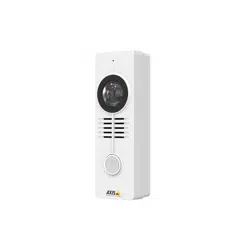


AboutthisDocument
ThismanualisintendedforadministratorsandusersofAXISA8105–E
NetworkVideoDoorStation,andisapplicabletormware1.58.2and
later.Itincludesinstructionsforusingandmanagingtheproducton
yournetwork.Previousexperienceofnetworkingwillbeofusewhen
usingthisproduct.SomeknowledgeofUNIXorLinux-basedsystems
mayalsobeusefulwhendevelopingshellscriptsandapplications.Later
versionsofthisdocumentwillbepostedatwww.axis.com.Seealsothe
product’sonlinehelp,availablethroughtheweb-basedinterface.
LegalConsiderations
Videoandaudiosurveillancecanberegulatedbylawsthatvaryfrom
countrytocountry.Checkthelawsinyourlocalregionbeforeusing
thisproductforsurveillancepurposes.
Thisproductincludesone(1)H.264decoderlicenseandone(1)AAC
decoderlicense.Topurchasefurtherlicenses,contactyourreseller.
Liability
Everycarehasbeentakeninthepreparationofthisdocument.Please
informyourlocalAxisofceofanyinaccuraciesoromissions.Axis
CommunicationsABcannotbeheldresponsibleforanytechnicalor
typographicalerrorsandreservestherighttomakechangestothe
productandmanualswithoutpriornotice.AxisCommunicationsAB
makesnowarrantyofanykindwithregardtothematerialcontained
withinthisdocument,including,butnotlimitedto,theimplied
warrantiesofmerchantabilityandtnessforaparticularpurpose.Axis
CommunicationsABshallnotbeliablenorresponsibleforincidentalor
consequentialdamagesinconnectionwiththefurnishing,performance
oruseofthismaterial.Thisproductisonlytobeusedforitsintended
purpose.
IntellectualPropertyRights
AxisABhasintellectualpropertyrightsrelatingtotechnologyembodied
intheproductdescribedinthisdocument.Inparticular,andwithout
limitation,theseintellectualpropertyrightsmayincludeoneormore
ofthepatentslistedatwww.axis.com/patent.htmandoneormore
additionalpatentsorpendingpatentapplicationsintheUSandother
countries.
Thisproductcontainslicensedthird-partysoftware.Seethemenuitem
“About”intheproduct’suserinterfaceformoreinformation.
ThisproductcontainssourcecodecopyrightAppleComputer,
Inc.,underthetermsofApplePublicSourceLicense2.0(see
www.opensource.apple.com/apsl).Thesourcecodeisavailablefrom
https://developer.apple.com/bonjour/
EquipmentModications
Thisequipmentmustbeinstalledandusedinstrictaccordancewiththe
instructionsgivenintheuserdocumentation.Thisequipmentcontains
nouser-serviceablecomponents.Unauthorizedequipmentchangesor
modicationswillinvalidateallapplicableregulatorycertications
andapprovals.
TrademarkAcknowledgments
AXISCOMMUNICATIONS,AXIS,ETRAX,ARTPECandVAPIXare
registeredtrademarksortrademarkapplicationsofAxisABinvarious
jurisdictions.Allothercompanynamesandproductsaretrademarksor
registeredtrademarksoftheirrespectivecompanies.
Apple,Boa,Apache,Bonjour,Ethernet,InternetExplorer,Linux,
Microsoft,Mozilla,Real,SMPTE,QuickTime,UNIX,Windows,Windows
VistaandWWWareregisteredtrademarksoftherespectiveholders.
JavaandallJava-basedtrademarksandlogosaretrademarksor
registeredtrademarksofOracleand/oritsafliates.UPnP
TM
isa
certicationmarkoftheUPnP
TM
ImplementersCorporation.
SD,SDHCandSDXCaretrademarksorregisteredtrademarksofSD-3C,
LLCintheUnitedStates,othercountriesorboth.Also,miniSD,microSD,
miniSDHC,microSDHC,microSDXCarealltrademarksorregistered
trademarksofSD-3C,LLCintheUnitedStates,othercountriesorboth.
RegulatoryInformation
Europe
ThisproductcomplieswiththeapplicableCEmarkingdirectives
andharmonizedstandards:
•ElectromagneticCompatibility(EMC)Directive2014/30/EU.See
ElectromagneticCompatibility(EMC)onpage2.
•LowVoltage(LVD)Directive2014/35/EU.SeeSafetyonpage2.
•RestrictionsofHazardousSubstances(RoHS)Directive201 1/65/EU.
SeeDisposalandRecyclingonpage3.
Acopyoftheoriginaldeclarationofconformitymaybeobtainedfrom
AxisCommunicationsAB.SeeContactInformationonpage3.
ElectromagneticCompatibility(EMC)
Thisequipmenthasbeendesignedandtestedtofulllapplicable
standardsfor:
•Radiofrequencyemissionwheninstalledaccordingtothe
instructionsandusedinitsintendedenvironment.
•Immunitytoelectricalandelectromagneticphenomenawhen
installedaccordingtotheinstructionsandusedinitsintended
environment.
USA
Thisequipmenthasbeentestedusinganunshieldednetworkcable
(UTP)andfoundtocomplywiththelimitsforaClassAdigitaldevice,
pursuanttopart15oftheFCCrules.Thisequipmenthasalsobeen
testedusingashieldednetworkcable(STP)andfoundtocomplywith
thelimitsforaClassAdigitaldevice,pursuanttopart15oftheFCC
rules.Theselimitsaredesignedtoprovidereasonableprotectionagainst
harmfulinterferencewhentheequipmentisoperatedinacommercial
environment.Thisequipmentgenerates,uses,andcanradiateradio
frequencyenergyand,ifnotinstalledandusedinaccordancewith
theinstructionmanual,maycauseharmfulinterferencetoradio
communications.Operationofthisequipmentinaresidentialarea
islikelytocauseharmfulinterferenceinwhichcasetheuserwillbe
requiredtocorrecttheinterferenceathisownexpense.
Canada
ThisdigitalapparatuscomplieswithCANICES-3(ClassA).Theproduct
shallbeconnectedusingashieldednetworkcable(STP)thatis
properlygrounded.Cetappareilnumériqueestconformeàlanorme
NMBICES-3(classeA).Leproduitdoitêtreconnectéàl'aided'uncâble
réseaublindé(STP)quiestcorrectementmisàlaterre.
Europe
ThisdigitalequipmentfulllstherequirementsforRFemission
accordingtotheClassAlimitofEN55032.Theproductshallbe
connectedusingashieldednetworkcable(STP)thatisproperly
grounded.Notice!ThisisaClassAproduct.Inadomesticenvironment
thisproductmaycauseRFinterference,inwhichcasetheusermaybe
requiredtotakeadequatemeasures.
Thisproductfulllstherequirementsforimmunityaccording
toEN61000-6-1residential,commercialandlight-industrial
environments.
Thisproductfulllstherequirementsforimmunityaccordingto
EN61000-6-2industrialenvironments.
Thisproductfulllstherequirementsforimmunityaccordingto
EN55024ofceandcommercialenvironments.
Thisproductfulllstherequirementsforimmunityaccordingto
EN50130-4residential,commercial,light-industrialandindustrial
environments.
Australia/NewZealand
ThisdigitalequipmentfulllstherequirementsforRFemission
accordingtotheClassAlimitofAS/NZSCISPR32.Theproductshall
beconnectedusingashieldednetworkcable(STP)thatisproperly
grounded.Notice!ThisisaClassAproduct.Inadomesticenvironment
thisproductmaycauseRFinterference,inwhichcasetheusermaybe
requiredtotakeadequatemeasures.
Korea
이기기는가정용(B급)전자파적합기기로서주로가정에
서사용하는것을목적으로하며,모든지역에서사용할수
있습니다.적절히접지된STP(shieldedtwistedpair)케이
블을사용하여제품을연결하십시오.
Safety
ThisproductcomplieswithIEC/EN/UL62368-1and
IEC/EN/UL60950-22,SafetyofInformationTechnology
Equipment.Theproductshallbegroundedeitherthroughashielded
networkcable(STP)orotherappropriatemethod.
Thepowersupplyusedwiththisproductshallfullltherequirements
forSafetyExtraLowVoltage(SELV)andLimitedPowerSource(LPS)
accordingtoIEC/EN/UL62368-1.

Battery
TheAxisproductusesa3.0VCR2032lithiumbatteryasthepower
supplyforitsinternalreal-timeclock(RTC).Undernormalconditions
thisbatterywilllastforaminimumofveyears.
LowbatterypoweraffectstheoperationoftheRTC,causingittoreset
ateverypower-up.Whenthebatteryneedsreplacing,alogmessage
willappearintheproduct’sserverreport.Formoreinformationabout
theserverreport,seetheproduct´ssetuppagesorcontactAxissupport.
Thebatteryshouldnotbereplacedunlessrequired,butifthebattery
doesneedreplacing,contactAxissupportatwww.axis.com/techsupfor
assistance.
Lithiumcoincell3.0Vbatteriescontain1,2-dimethoxyethane;ethylene
glycoldimethylether(EGDME),CASno.1 10-71-4.
WARNING
•Riskofexplosionifthebatteryisincorrectlyreplaced.
•Replaceonlywithanidenticalbatteryorabatterywhichis
recommendedbyAxis.
•Disposeofusedbatteriesaccordingtolocalregulationsor
thebatterymanufacturer'sinstructions.
DisposalandRecycling
Whenthisproducthasreachedtheendofitsusefullife,disposeof
itaccordingtolocallawsandregulations.Forinformationabout
yournearestdesignatedcollectionpoint,contactyourlocalauthority
responsibleforwastedisposal.Inaccordancewithlocallegislation,
penaltiesmaybeapplicableforincorrectdisposalofthiswaste.
Europe
Thissymbolmeansthattheproductshallnotbedisposedof
togetherwithhouseholdorcommercialwaste.Directive2012/19/EU
onwasteelectricalandelectronicequipment(WEEE)isapplicablein
theEuropeanUnionmemberstates.Topreventpotentialharmto
humanhealthandtheenvironment,theproductmustbedisposed
ofinanapprovedandenvironmentallysaferecyclingprocess.For
informationaboutyournearestdesignatedcollectionpoint,contact
yourlocalauthorityresponsibleforwastedisposal.Businessesshould
contacttheproductsupplierforinformationabouthowtodispose
ofthisproductcorrectly.
ThisproductcomplieswiththerequirementsofDirective201 1/65/EUon
therestrictionoftheuseofcertainhazardoussubstancesinelectrical
andelectronicequipment(RoHS).
China
Thisproductcomplieswiththerequirementsofthelegislative
actAdministrationontheControlofPollutionCausedbyElectronic
InformationProducts(ACPEIP).
ContactInformation
AxisCommunicationsAB
Emdalavägen14
22369Lund
Sweden
Tel:+46462721800
Fax:+4646136130
www.axis.com
WarrantyInformation
ForinformationaboutAxis’productwarrantyandtheretorelated
information,seewww.axis.com/warranty/
Support
Shouldyourequireanytechnicalassistance,pleasecontactyourAxis
reseller.Ifyourquestionscannotbeansweredimmediately,your
resellerwillforwardyourqueriesthroughtheappropriatechannelsto
ensurearapidresponse.IfyouareconnectedtotheInternet,youcan:
•downloaduserdocumentationandsoftwareupdates
•ndanswerstoresolvedproblemsintheFAQdatabase.Search
byproduct,category,orphrase
•reportproblemstoAxissupportstaffbyloggingintoyourprivate
supportarea
•chatwithAxissupportstaff
•visitAxisSupportatwww.axis.com/techsup/
LearnMore!
VisitAxislearningcenterwww.axis.com/academy/forusefultrainings,
webinars,tutorialsandguides.

AXISA8105-ENetworkVideoDoorStation
TableofContents
SafetyInformation..........................................6
HazardLevels...................................................6
OtherMessageLevels............................................6
RequirementsforCompliancewithUL2946thEdition.............7
PerformanceLevelsforAccessControl...............................8
HardwareOverview..........................................9
TypicalScenarios................................................10
ConnectorsandButtons..........................................11
LEDIndicators..................................................11
AccesstheProduct..........................................13
AccessfromaBrowser...........................................13
AccessfromtheInternet..........................................13
SettheRootPassword...........................................14
SetPowerLineFrequency.........................................14
TheLiveViewPage..............................................14
MediaStreams.............................................18
HowToStreamH.264............................................18
MJPEG........................................................18
AXISMediaControl(AMC)........................................18
AlternativeMethodsofAccessingtheVideoStream....................19
AccessAudioStreams............................................19
SetUptheProduct..........................................21
BasicSetup....................................................21
VideoandAudio............................................22
SetUpVideoStreams............................................22
Aboutstreamproles............................................25
AboutONVIFmediaproles.......................................25
CameraSettings................................................25
ViewArea.....................................................27
Aboutoverlays..................................................28
Aboutprivacymasks.............................................30
SetUpAudio...................................................30
AudioClips....................................................32
VoiceoverIP(VoIP).........................................33
VoIPOverviewPage..............................................33
ConguretheSIPSettings........................................33
ConguretheVMSSettings.......................................35
TheAccountSettingsPage........................................36
Dual-ToneMulti-Frequency(DTMF).................................40
ConguretheLiveViewPage.................................42
DefaultViewerforBrowsers.......................................42
ViewerSettings.................................................42
UserDenedLinks...............................................43
LightButtons...................................................43
OutputButtons.................................................43
PTZ(PanTiltZoom).........................................44
Aboutpresetpositions...........................................44
Aboutguardtours...............................................44
Advanced......................................................45
ControlQueue..................................................46
Detectors..................................................47
CameraTampering..............................................47
ShockDetection................................................47
TiltDetection...................................................47
AudioDetection................................................48
Applications...............................................49
ApplicationLicenses.............................................49
UploadApplication..............................................49
ApplicationConsiderations........................................49
AXISVideoMotionDetection.................................51
Considerations..................................................51
4

AXISA8105-ENetworkVideoDoorStation
TableofContents
StartandStoptheApplication.....................................51
CongureApplication............................................51
UsingtheApplicationinanActionRule.............................54
Events....................................................56
SetUpActionRules.............................................56
AddRecipients..................................................60
CreateSchedules................................................61
SetUpRecurrences..............................................61
Pre-conguredActionRules.......................................62
Recordings.................................................63
FindRecordings.................................................63
PlayRecording..................................................63
ExportVideoClip................................................64
ContinuousRecording............................................64
Languages.................................................65
SystemOptions.............................................66
Security.......................................................66
Date&Time....................................................68
Network.......................................................69
Storage.......................................................74
Ports&Devices.................................................77
Maintenance...................................................77
Support.......................................................78
Advanced......................................................78
ResettoFactoryDefaultSettings...................................79
Troubleshooting............................................80
ChecktheFirmware.............................................80
UpgradetheFirmware...........................................80
Symptoms,PossibleCausesandRemedialActions.....................81
TechnicalSpecications......................................84
Connectors....................................................86
ConnectionDiagrams............................................87
PerformanceConsiderations.......................................87
5

AXISA8105-ENetworkVideoDoorStation
SafetyInformation
SafetyInformation
HazardLevels
DANGER
Indicatesahazardoussituationwhich,ifnotavoided,willresultindeathorseriousinjury.
WARNING
Indicatesahazardoussituationwhich,ifnotavoided,couldresultindeathorseriousinjury.
CAUTION
Indicatesahazardoussituationwhich,ifnotavoided,couldresultinminorormoderateinjury.
NO NO
NO
TICE TICE
TICE
Indicatesasituationwhich,ifnotavoided,couldresultindamagetoproperty.
OtherMessageLevels
Important
Indicatessignicantinformationwhichisessentialfortheproducttofunctioncorrectly.
Note
Indicatesusefulinformationwhichhelpsingettingthemostoutoftheproduct.
6

AXISA8105-ENetworkVideoDoorStation
RequirementsforCompliancewithUL2946thEdition
RequirementsforCompliancewithUL2946thEdition
ThissectioncontainsinformationandinstructionsrequiredforULcompliance.TomakesuretheinstallationisULcompliant,follow
theinstructionsbelowinadditiontothegeneralinformationandinstructionsprovidedthroughoutthisdocument.Incaseswhere
piecesofinformationcontradicteachother,therequirementsforULcompliancealwaysreplacegeneralinformationandinstructions.
SafetyInstructions
•TheAxisproductshallbeinstalledandservicedbyafactorytrainedprofessional.
•TheAxisproductshallbeinstalledwithintheprotectedpremises(securedarea).
•ThisproductmustbepoweredbyaUL294ListedClass2powerlimitedPoEinjector,providing44–57VDC,15.4W.
•AllwiringmethodsshallbeperformedinaccordancewithNFPA70,localcodesandauthoritieshavingjurisdiction.
•WhentheAxisproducthasreachedtheendofitsusefullife,disposeofitaccordingtolocallawsandregulations.The
productshouldnotbedisposedoftogetherwithhouseholdorcommercialwaste.SeeDisposalandRecyclingonpage3.
•Battery
-The3.0VlithiumbatteryusedbytheAxisproductisaULRecognizedcomponent:TypeCR2032,manufacturers:
Fuji,Maxell,Renata,Varta,Panasonic,JHIH,PowerGloryBatteryTech
-Usersshallnotreplacethebattery.Ifthebatteryneedsreplacing,afactorytrainedserviceprofessionalshall
contactAxissupportatwww.axis.com/techsupforassistance.
-Usedbatteriesshallbedisposedofaccordingtolocallawsandregulations,whichmayvaryfromstatetostate.
WasteCRlithiumcellsareneitherlistednorexemptedfromtheUSEPAhazardouswasteregulations.Waste
lithiumbatteriescanbeconsideredreactivehazardouswasteifthereisasignicantamountofunreacted,or
unconsumedlithiumremaining.Forinformationabouthowtodisposeofusedlithiumbatteries,contact
yourlocalauthorityforwastedisposal.
SetUptheProduct
•WallandFlushMount
-IfusingaushmounttomounttheAxisproduct,theushmountshallbeULListed.
•Wiring
-CompliancewithIEEE802.3(atoraf)specicationshasnotbeenveriedaspartofUL294/B.
-ProductisnotintendedforoutsidewiringascoveredbyArticle800intheNationalElectricalCode,NFPA70.
-TheminimumconductorgaugepermittedtoconnectbetweenthePSEorpowerinjectorandthePDshall
be26AWG.
-AllinterconnectingdevicesandwiringmustbeListed.
-Category5ecablingistheminimumperformancecategoryrecommended.
-AllwiringshallbeperformedinaccordancewithNFPA70,localcodesandauthoritieshavingjurisdiction.
•SystemConsiderations
-Theaccesscontrolsystemshallnotimpairtheintendedoperationofthepanichardwareusedinconjunction
withit.
•Tampering
-TocomplywithUL294/38.1.3(ElectricalSupervision),theaccelerometershalltriggeranactionwhenthe
Axisproductissubjectedtotampering.
7

AXISA8105-ENetworkVideoDoorStation
RequirementsforCompliancewithUL2946thEdition
•FirmwareVersion
-Firmwareversion:AXISA8105NetworkDoorStation–1.58.2.
PerformanceLevelsforAccessControl
ThissectioncontainsperformancelevelinformationrequiredforUL294compliance.
FeatureLevel
DestructiveAttackTestI
LineSecurity
I
EnduranceIV
StandbyPower
I
8
AXISA8105-ENetworkVideoDoorStation
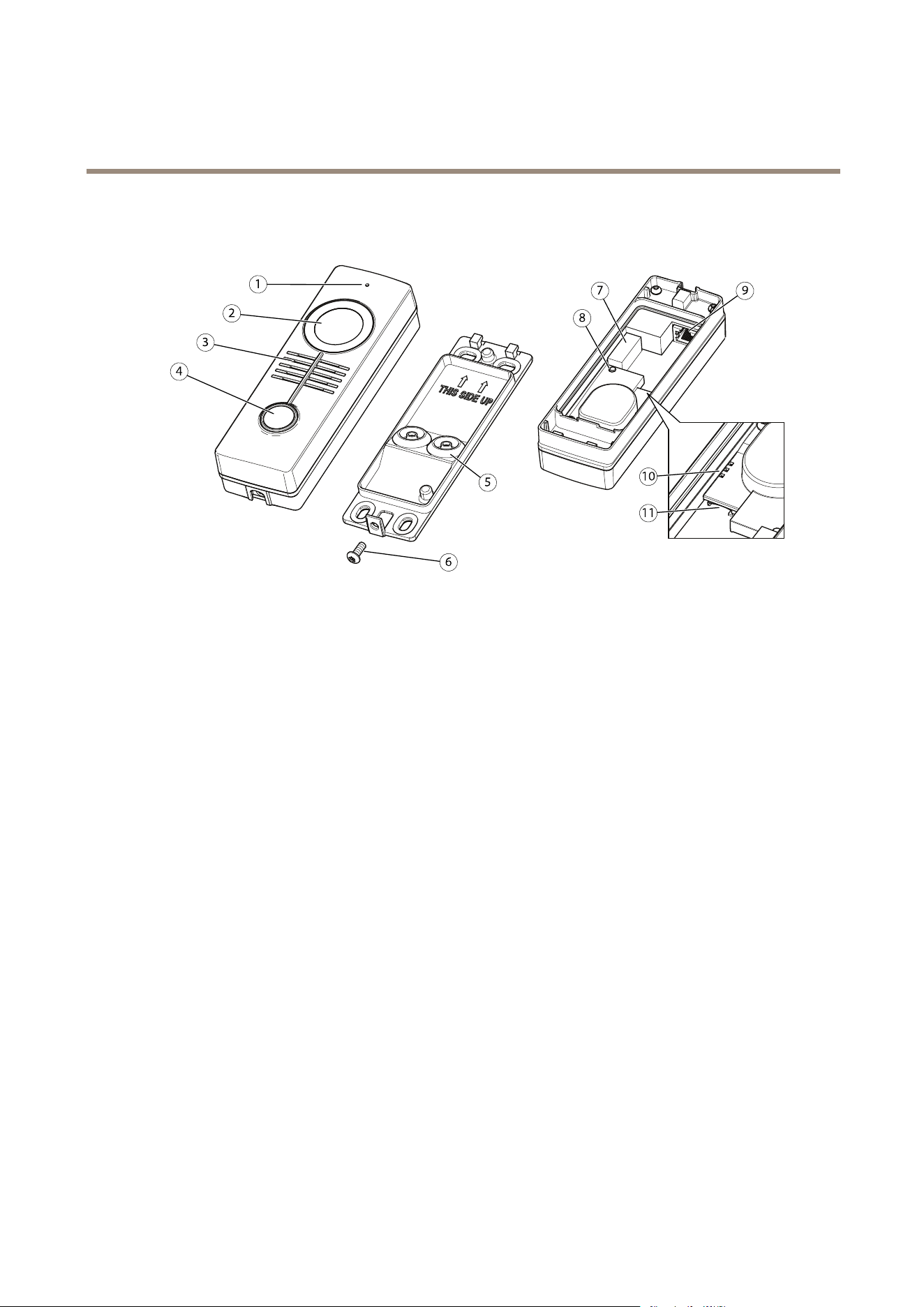
HardwareOverview
HardwareOverview
1.
Microphone
2.
Camera
3.
Speaker
4.
Callbutton
5.
Gasket
6.
Resistorxscrew
7.
I/Oconnector
8.
Controlbutton
9.
Networkconnector(PoE)
10.
Network,StatusandPowerLEDs
11.
microSD/microSDHC/microSDXCslotsupportingmemorycardupto64GB(cardnotincluded)
9
AXISA8105-ENetworkVideoDoorStation
HardwareOverview
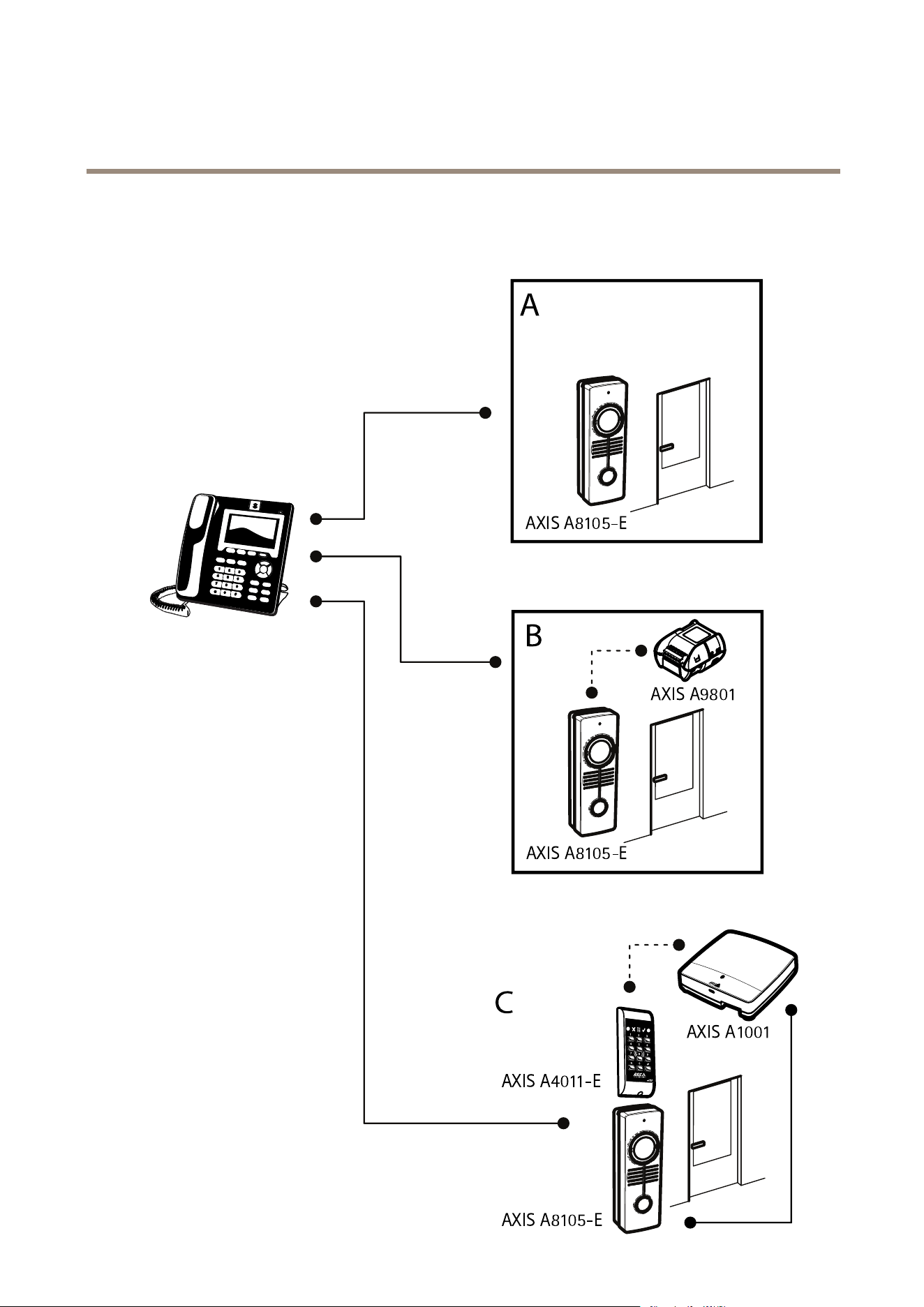
TypicalScenarios
10

AXISA8105-ENetworkVideoDoorStation
HardwareOverview
ConnectorsandButtons
NetworkConnector
RJ45EthernetconnectorwithPoweroverEthernet(PoE).
NO NO
NO
TICE TICE
TICE
Duetolocalregulationsortheenvironmentalandelectricalconditionsinwhichtheproductistobeused,ashieldednetwork
cable(STP)maybeappropriateorrequired.Allcablesconnectingtheproducttothenetworkandthatareroutedoutdoors
orindemandingelectricalenvironmentsshallbeintendedfortheirspecicuse.Makesurethatthenetworkdevices
areinstalledinaccordancewiththemanufacturer’sinstructions.Forinformationaboutregulatoryrequirements,see
ElectromagneticCompatibility(EMC)onpage2.
I/OConnector
Usewithexternaldevicesincombinationwith,forexample,tamperingalarms,motiondetection,eventtriggering,andalarm
notications.Inadditiontothe0VDCreferencepointandpower(DCoutput),theI/Oconnectorprovidestheinterfaceto:
•Digitaloutput–ForconnectingexternaldevicessuchasrelaysandLEDs.Connecteddevicescanbeactivatedbythe
VAPIX®ApplicationProgrammingInterface,outputbuttonsontheLiveViewpageorbyanActionRule.Theoutputwill
showasactive(shownunderSystemOptions>Ports&Devices)ifthealarmdeviceisactivated.
•Digitalinput–Analarminputforconnectingdevicesthatcantogglebetweenanopenandclosedcircuit,forexample:
PIRs,door/windowcontacts,glassbreakdetectors,etc.Whenasignalisreceivedthestatechangesandtheinputbecomes
active(shownunderSystemOptions>Ports&Devices).
SDcardslot
NO NO
NO
TICE TICE
TICE
•RiskofdamagetoSDcard.Donotusesharptools,metalobjectsorexcessiveforcewheninsertingorremovingthe
SDcard.Useyourngerstoinsertandremovethecard.
•Riskofdatalossandcorruptedrecordings.DonotremovetheSDcardwhiletheproductisrunning.Disconnectpoweror
unmounttheSDcardfromtheAxisproduct’swebpagesbeforeremoval.
ThisproductsupportsmicroSD/microSDHC/microSDXCcards(notincluded).
ForSDcardrecommendations,seewww.axis.com
ControlButton
Forlocationofthecontrolbutton,seeHardwareOverviewonpage9.
Thecontrolbuttonisusedfor:
•Resettingtheproducttofactorydefaultsettings.Seepage79.
•ConnectingtoanAXISVideoHostingSystemservice.Seepage70.Toconnect,pressandholdthebuttonforabout3
secondsuntiltheStatusLEDashesgreen.
•ConnectingtoAXISInternetDynamicDNSService.Seepage70.Toconnect,pressandholdthebuttonforabout3seconds.
LEDIndicators
Note
•TheStatusLEDcanbeconguredtobeunlitduringnormaloperation.Tocongure,gotoSetup>SystemOptions>Ports
&Devices>LED.Seetheonlinehelpformoreinformation.
•TheStatusLEDcanbeconguredtoashwhileaneventisactive.
•TheStatusLEDcanbeconguredtoashforidentifyingtheunit.GotoSetup>SystemOptions>Maintenance.
11

AXISA8105-ENetworkVideoDoorStation
HardwareOverview
StatusLED
Indication
Unlit
Connectionandnormaloperation.
GreenShowssteadygreenfor10secondsfornormaloperationafterstartupcompleted.
Amber
Steadyduringstartup.Flashesduringrmwareupgrade.
Amber/RedFlashesamber/redifnetworkconnectionisunavailableorlost.
RedFlashesredforrmwareupgradefailure.
12

AXISA8105-ENetworkVideoDoorStation
AccesstheProduct
AccesstheProduct
ToinstalltheAxisproduct,seetheInstallationGuidesuppliedwiththeproduct.
Theproductcanbeusedwithmostoperatingsystemsandbrowsers.Werecommendthefollowingbrowsers:
•InternetExplorer
®
withWindows
®
•Safari
®
withOSX
®
•Chrome
TM
orFirefox
®
withotheroperatingsystems.
ToviewstreamingvideoinInternetExplorer,allowinstallationofAXISMediaControl(AMC)whenprompted.
TheAxisproductincludesone(1)H.264decoderlicenseforviewingvideostreamsandone(1)AACaudiolicense.Thelicensesare
automaticallyinstalledwithAMC.Theadministratorcandisabletheinstallationofthedecoderstopreventinstallationofunlicensed
copies.
Note
•QuickTime
TM
isalsosupportedforviewingH.264streamsandforaudio.
AccessfromaBrowser
1.Startawebbrowser.
2.EntertheIPaddressorhostnameoftheAxisproductinthebrowser’sLocation/Addresseld.
ToaccesstheproductfromaMaccomputer(OSX),gotoSafari,clickonBonjourandselecttheproductfromthe
drop-downlist.
IfyoudonotknowtheIPaddress,useAXISIPUtilitytolocatetheproductonthenetwork.Forinformationabout
howtodiscoverandassignanIPaddress,seethedocumentAssignanIPAddressandAccesstheVideoStreamonAxis
Supportwebatwww.axis.com/techsup
Note
ToshowBonjourasabrowserbookmark,gotoSafari>Preferences.
3.Enteryourusernameandpassword.Ifthisisthersttimetheproductisaccessed,therootpasswordmustrstbe
congured.Forinstructions,seeSettheRootPasswordonpage14.
4.Theproduct’sLiveViewpageopensinyourbrowser.
Note
ThecontrolsandlayoutoftheLiveViewpagemayhavebeencustomizedtomeetspecicinstallationrequirementsand
userpreferences.Consequently,someoftheexamplesandfunctionsfeaturedheremaydifferfromthosedisplayedin
yourownLiveViewpage.
AccessfromtheInternet
Onceconnected,theAxisproductisaccessibleonyourlocalnetwork(LAN).ToaccesstheproductfromtheInternetyoumust
congureyournetworkroutertoallowincomingdatatrafctotheproduct.Todothis,enabletheNAT-traversalfeature,which
willattempttoautomaticallyconguretheroutertoallowaccesstotheproduct.ThisisenabledfromSetup>SystemOptions>
Network>TCP/IPAdvanced.
Formoreinformation,seeNATtraversal(portmapping)forIPv4onpage72.SeealsoAXISInternetDynamicDNSServiceat
www.axiscam.net
ForTechnicalnotesonthisandothertopics,visittheAxisSupportwebatwww.axis.com/techsup
13

AXISA8105-ENetworkVideoDoorStation
AccesstheProduct
SettheRootPassword
ToaccesstheAxisproduct,youmustsetthepasswordforthedefaultadministratoruserroot.ThisisdoneintheCongureRoot
Passworddialog,whichopenswhentheproductisaccessedforthersttime.
Topreventnetworkeavesdropping,therootpasswordcanbesetviaanencryptedHTTPSconnection,whichrequiresanHTTPS
certicate.HTTPS(HypertextTransferProtocoloverSSL)isaprotocolusedtoencrypttrafcbetweenwebbrowsersandservers.The
HTTPScerticateensuresencryptedexchangeofinformation.SeeHTTPSonpage67.
Thedefaultadministratorusernamerootispermanentandcannotbedeleted.Ifthepasswordforrootislost,theproductmustbe
resettothefactorydefaultsettings.SeeResettoFactoryDefaultSettingsonpage79.
TosetthepasswordviaastandardHTTPconnection,enteritdirectlyinthedialog.
TosetthepasswordviaanencryptedHTTPSconnection,followthesesteps:
1.ClickUseHTTPS.
Atemporarycerticate(validforoneyear)iscreated,enablingencryptionofalltrafctoandfromtheproduct,andthe
passwordcannowbesetsecurely.
2.Enterapasswordandthenre-enterittoconrmthespelling.
3.ClickOK.Thepasswordhasnowbeencongured.
SetPowerLineFrequency
PowerlinefrequencyissetthersttimetheAxisproductisaccessedandcanonlybechangedfromPlainCong(seepage79)
orbyresettingtheproducttofactorydefault.
Selectthepowerlinefrequency(50Hzor60Hz)usedatthelocationoftheAxisproduct.Selectingthewrongfrequencymaycause
imageickeriftheproductisusedinuorescentlightenvironments.
Whenusing50Hz,themaximumframerateislimitedto25fps.
Whenusing60Hz,themaximumframerateislimitedto20fps(withWDR)and30fps(withoutWDR).
Note
Powerlinefrequencyvariesdependingongeographicregion.TheAmericasusuallyuse60Hz,whereasmostotherpartsof
theworlduse50Hz.Localvariationscouldapply.Alwayscheckwiththelocalauthorities.
TheLiveViewPage
ThecontrolsandlayoutoftheLiveViewpagemayhavebeencustomizedtomeetspecicinstallationrequirementsanduser
preferences.Consequently,someoftheexamplesandfunctionsfeaturedheremaydifferfromthosedisplayedinyourownLiveView
page.Thefollowingprovidesanoverviewofeachavailablecontrol.
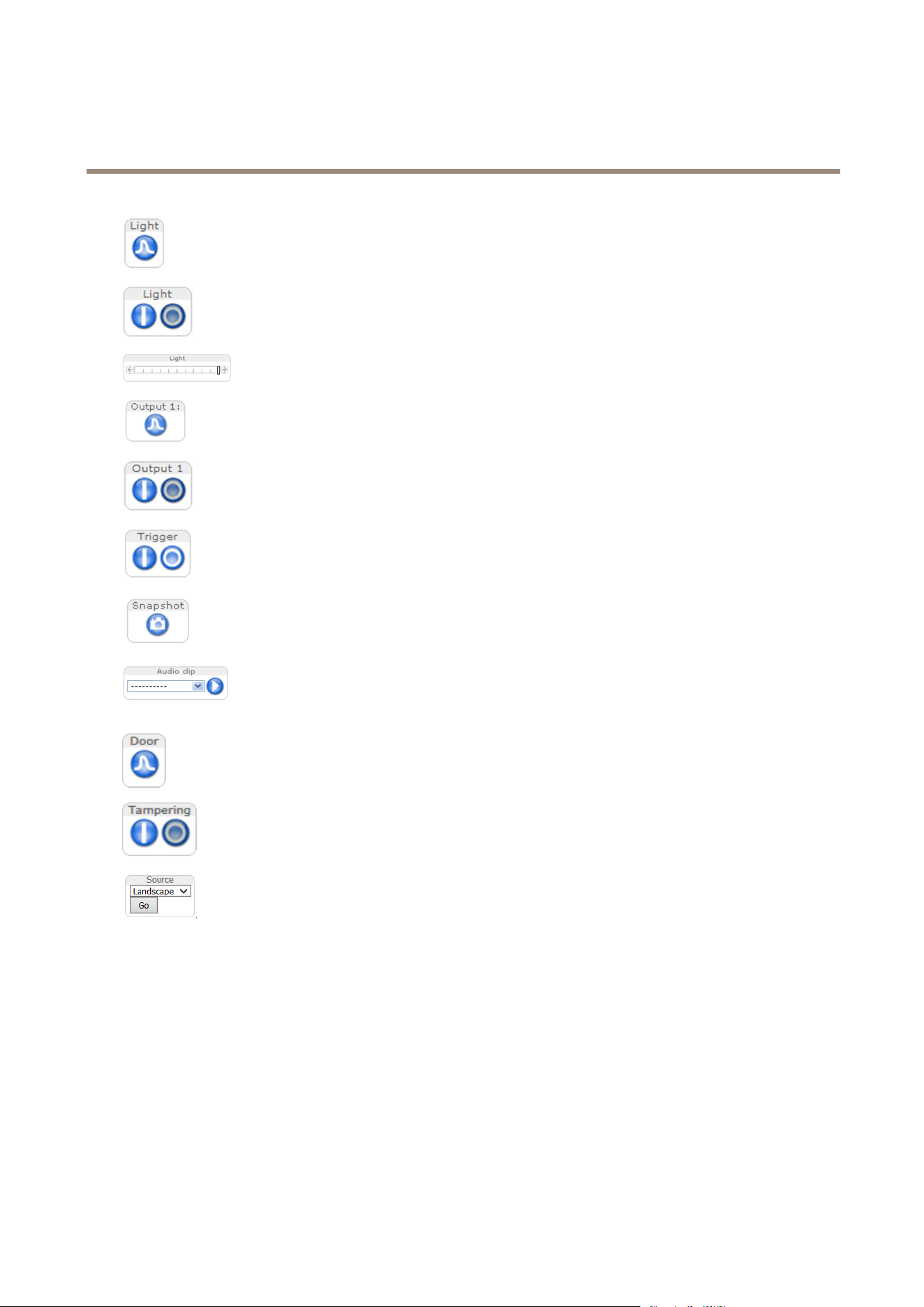
ControlsontheLiveViewPage
ClicktheViewsizebuttonstoshowtheimageinfullsize(rightbutton)ortoscaledowntheimageto
tthebrowserwindow(leftbutton).
ClickWDRontoenableWDRinintensebacklightconditions.ClickWDRofftodisableWDRinlow
lightconditionsforoptimalexposure.
SelectastreamprolefortheLiveViewpagefromtheStreamProledrop-downlist.Forinformation
abouthowtocongurestreamproles,seepage25.
14
AXISA8105-ENetworkVideoDoorStation
AccesstheProduct
ClickPulsetoactivatethebuilt-inlightforadenedperiodoftime,forexample20seconds.
ClicktheActive/Inactivebuttonstomanuallyturnthebuilt-inlightonandoff.
UsetheSlidertocontrolthebrightnessofthebuilt-inlight,slidelefttodimandsliderightdoto
brighten.
ClickPulsetoactivatetheproduct’soutputportforadenedperiodoftime.Forinformationabouthow
toenableandcongureoutputbuttons,seepage43.Theoutputbuttonnamemaydifferdependingon
thenameenteredintheI/OPortsconguration.
ClicktheActive/Inactivebuttonstomanuallyactivateandinactivetheproduct’soutputport.For
informationabouthowtoenableandcongureoutputbuttons,seepage43.
UsetheManualTriggerbuttontotriggeranactionrulefromtheLiveViewpage.Forinformationabout
howtocongureandenablethebutton,seeManualTriggeronpage15.
ClickSnapshottosaveasnapshotofthevideoimage.Thisbuttonisprimarilyintendedforusewhen
theAXISMediaControlviewertoolbarisnotavailable.EnablethisbuttonfromLiveViewCong>
ActionButtons.
TheAudioclipdrop-downlistallowsyoutoplayanaudioclipfromtheLiveViewpage.Selectthe
audioclipandclickthePlaybutton.
ClickPulsetoactivatetheproduct’sdoorrelayforadenedperiodoftime.
ClicktheActiveTampering/InactiveTamperingbuttonstomanuallyactivateandinactivetheproduct’s
Tamperingoutputport.
Selectapre-conguredviewareaorapresetposition.Viewareasandpresetpositionsareconguredin
Setup>Video&Audio>ViewAreas.
ManualTrigger
TheManualTriggerisusedtotriggeranactionrulefromtheLiveViewpage.Themanualtriggercanforexamplebeusedto
validateactionsduringproductinstallationandconguration.
Tocongurethemanualtrigger:
1.GotoSetup>Events.
2.ClickAddtoaddanewactionrule.
3.FromtheTriggerdrop-downlist,selectInputSignal.
4.Fromtheseconddrop-downlist,selectManualTrigger.
15

AXISA8105-ENetworkVideoDoorStation
AccesstheProduct
5.Selectthedesiredactionandconguretheothersettingsasrequired.
Formoreinformationaboutactionrules,seeEventsonpage56.
ToshowthemanualtriggerbuttonsintheLiveViewpage:
1.GotoSetup>LiveViewCong.
2.UnderActionButtons,selectShowmanualtriggerbutton.
AXISMediaControlviewertoolbar
TheAXISMediaControlviewertoolbarisavailableinInternetExploreronly.SeeAXISMediaControl(AMC)onpage18formore
information.Thetoolbardisplaysthefollowingbuttons:
ThePlaybuttonconnectstotheAxisproductandstartsplayingamediastream.
TheStopbuttonstopsthemediastream.
TheSnapshotbuttontakesasnapshotofthevideoimage.
ClicktheViewFullScreenbuttonandthevideoimagewilllltheentirescreen.PressESC(Escape)onthecomputer
keyboardtocancelfullscreenview.
TheRecordbuttonisusedtorecordthecurrentvideostreamonyourcomputer.Thelocationwheretherecordingissaved
canbespeciedintheAMCControlPanel.EnablethisbuttonfromLiveViewCong>ViewerSettings.
AMCAudioControls
AMCaudiobuttonscontrolthespeakersandmicrophoneconnectedtotheclientcomputer.Thebuttonsareonlyvisiblewhen
audioisenabled.
Forinformationabouthowtocongureaudio,see.
Speakerbutton—Clicktoturnthespeakersonoroff.
Microphonebutton–Clicktomuteorunmutethemicrophone.InSimplex-speakeronlymode,theMicrophoneandTalk
buttonsmustbothbeactivetosendaudiototheAxisproduct.Clickeitherbuttontostopaudiotransmission.
Usetheslidertocontrolthevolumeofthespeakersandthemicrophone.
Half-duplexmode
TheTalk/Listenbuttonisusedtoswitchbetweensendingandreceivingaudio.Thebuttoncanbecongured
fromtheAudiotabintheAMCControlpanel:
•Push-To-Talkmode:Clickandholdthebuttontotalk/send.Releasethebuttontolisten.
•Togglemode:Clickoncetoswitchbetweentalkingandlistening.
Simplex–speakeronlymode
Tosendaudio,theTalkandMicrophonebuttonsmustbothbeactive.Clickeitherbuttontostopaudio
transmission.
PTZControls
Note
ThesecontrolsareavailableifdigitalPTZisenabledintheselectedviewarea,seeViewAreaonpage27.
16

AXISA8105-ENetworkVideoDoorStation
AccesstheProduct
WiththePTZControlQueueenabledthetimeeachuserisincontrolofthePTZsettingsislimited.Clickthebuttonstorequestor
releasecontrolofthePTZcontrols.ThePTZControlQueueissetupunderPTZ>ControlQueue.
ClicktheEmulatejoystickmodebuttonandclickintheimagetomovethecameraviewinthedirectionofthe
mousepointer.
ClicktheCentermodebuttonandclickintheimagetocenterthecameraviewonthatposition.
Thecentermodebuttoncouldalsobeusedtozoominonaspecicarea.Clickintheimageanddragtodrawa
rectanglesurroundingtheareatobemagnied.Tozoomout,rotatethemousewheel.
Toviewaspecicviewareaorpresetposition,selectitfromtheSourcelist.
PanandTiltbars–Usethearrowstopanandtiltthecameraview,orclickonapositiononthebartosteerthecameraviewto
thatposition.
Zoombar–Usethearrowstozoominandout,orclickonapositiononthebartozoomtothatposition.
ThePTZcontrolscanbedisabledunderPTZ>Advanced>Controls,seeControlsonpage45.
17

AXISA8105-ENetworkVideoDoorStation
MediaStreams
MediaStreams
TheAxisproductprovidesseveralaudioandvideostreamformats.Yourrequirementsandthepropertiesofyournetworkwill
determinethetypeyouuse.
TheLiveViewpageintheproductprovidesaccesstoH.264andMotionJPEGvideostreams,audiostreamsandtothelistofavailable
streamproles.Otherapplicationsandclientscanaccessvideoandaudiostreamsdirectly,withoutgoingviatheLiveViewpage.
HowToStreamH.264
H.264can,withoutcompromisingimagequality,reducethesizeofadigitalvideolebymorethan80%comparedwiththeMotion
JPEGformatandasmuchas50%morethantheMPEG-4standard.Thismeansthatmuchlessnetworkbandwidthandstoragespace
arerequiredforavideole.Orseenanotherway,muchhighervideoqualitycanbeachievedforagivenbitrate.
Decidingwhichcombinationofprotocolsandmethodstousedependsonyourviewingrequirements,andonthepropertiesof
yournetwork.TheavailableoptionsinAXISMediaControlare:
UnicastRTP
Thisunicastmethod(RTPoverUDP)isused
forliveunicastvideo,especiallywhenitis
importanttohaveanup-to-datevideostream,
evenifsomeframesaredropped.
RTPoverRTSP
Thisunicastmethod(RTPtunneledoverRTSP)
isusefulasitisrelativelysimpletocongure
rewallstoallowRTSPtrafc.
RTPoverRTSPoverHTTP
Thisunicastmethodcanbeusedtotraverse
rewalls.Firewallsarecommonlyconguredto
allowtheHTTPprotocol,thusallowingRTPto
betunneled.
Unicastingisusedforvideo-on-demand
transmissionsothatthereisnovideotrafc
onthenetworkuntilaclientconnectsand
requeststhestream.
Notethatthereareamaximumof8
simultaneousunicastconnections.
MulticastRTP
Thismethod(RTPoverUDP)shouldbeusedforlivemulticastvideo.Thevideostreamisalways
up-to-date,evenifsomeframesaredropped.
Multicastingprovidesthemostefcientusageofbandwidthwhentherearelargenumbersof
clientsviewingsimultaneously.Amulticastcannothowever,passanetworkrouterunlessthe
routerisconguredtoallowthis.ItisnotpossibletomulticastovertheInternet,forexample.
Notealsothatallmulticastviewerscountasoneunicastviewerinthemaximumtotalof8
simultaneousconnections.
AXISMediaControlnegotiateswiththeAxisproducttodeterminethetransportprotocoltouse.Theorderofpriority,listedinthe
AMCControlPanel,canbechangedandtheoptionsdisabled,tosuitspecicrequirements.
Note
H.264islicensedtechnology.TheAxisproductincludesoneH.264viewingclientlicense.Installingadditionalunlicensed
copiesoftheclientisprohibited.Topurchaseadditionallicenses,contactyourAxisreseller.
MJPEG
ThisformatusesstandardJPEGstillimagesforthevideostream.Theseimagesarethendisplayedandupdatedataratesufcient
tocreateastreamthatshowsconstantlyupdatedmotion.
TheMotionJPEGstreamusesconsiderableamountsofbandwidth,butprovidesexcellentimagequalityandaccesstoeveryimage
containedinthestream.TherecommendedmethodofaccessingMotionJPEGlivevideofromtheAxisproductistousetheAXIS
MediaControlinInternetExplorerinWindows.
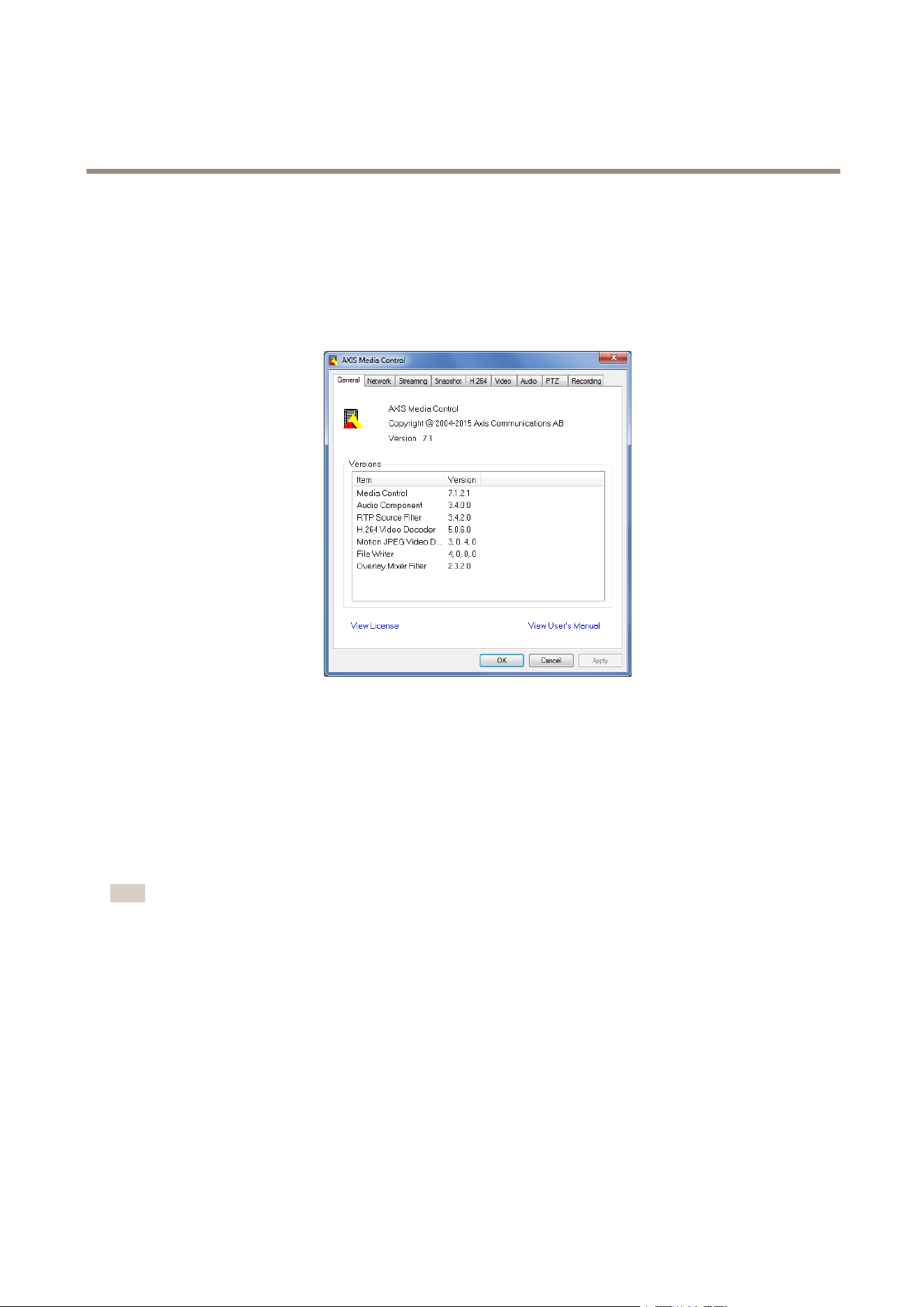
AXISMediaControl(AMC)
AXISMediaControl(AMC)inInternetExplorerinWindowsistherecommendedmethodofaccessinglivevideofromtheAxisproduct.
18
AXISA8105-ENetworkVideoDoorStation
MediaStreams
TheAMCControlPanelcanbeusedtocongurevariousvideoandaudiosettings.PleaseseetheAXISMediaControlUser’s
Manualformoreinformation.
TheAMCControlPanelisautomaticallyinstalledonrstuse,afterwhichitcanbecongured.OpentheAMCControlPanelfrom:
•WindowsControlPanel(fromtheStartscreenorStartmenu)
•Alternatively,right-clickthevideoimageinInternetExplorerandclickSettings.
AlternativeMethodsofAccessingtheVideoStream
YoucanalsoaccessvideoandimagesfromtheAxisproductinthefollowingways:
•MotionJPEGserverpush(ifsupportedbytheclient,ChromeorFirefox,forexample).ThisoptionmaintainsanopenHTTP
connectiontothebrowserandsendsdataasandwhenrequired,foraslongasrequired.
•WindowsMediaPlayer.ThisrequiresAXISMediaControlandtheH.264decodertobeinstalled.Thefollowingpaths
canbeused:
•QuickTime
TM
.Thefollowingpathscanbeused:
Note
•<ip>=IPaddress
•TheAxisproductsupportsQuickTime6.5.1andlater.
•QuickTimemayaddlatencytothevideostream.
•ItmaybepossibletouseotherplayerstoviewtheH.264streamusingthepathsabove,althoughAxisdoesnotguarantee
this.
AccessAudioStreams
TheLiveViewpageprovidesaccesstoaudiothroughAXISMediaControl;inadditionaudiocanbeaccessedinthefollowingways:
•VAPIX®ApplicationProgrammingInterface(API)Formoreinformation,visitwww.axis.com/developer
•WindowsMediaPlayersupportssimplexaudio.Thefollowingpathscanbeused:
-UnicastviaRTP:axrtpu://<ip>/axis-media/media.amp
19

AXISA8105-ENetworkVideoDoorStation
MediaStreams
-UnicastviaRTSP:axrtsp://<ip>/axis-media/media.amp
-UnicastviaRTSP,tunneledviaHTTP:axrtsphttp://<ip>/axis-media/media.amp
-Multicast:axrtpm://<ip>/axis-media/media.amp
•QuickTime
TM
supportsG.711andAACaudioencoding.Thefollowingpathscanbeused:
-rtsp://<ip>/axis-media/media.amp
-rtsp://<ip>/axis-media/media.3gp
20

AXISA8105-ENetworkVideoDoorStation
SetUptheProduct
SetUptheProduct
TheAxisproductcanbeconguredbyuserswithadministratororoperatorrights.Toopentheproduct’sSetuppages,clickSetupin
thetopright-handcorneroftheLiveViewpage.
•Administratorshaveunrestrictedaccesstoallsettings.
•Operatorshaverestrictedaccesstosettings,seeUsersonpage66
Seealsotheonlinehelp
.
BasicSetup
BasicSetupprovidesshortcutstothesettingsthatshouldbemadebeforeusingtheAxisproduct:
1.Users.Seepage66.
2.TCP/IP.Seepage69.
3.Date&Time.Seepage68.
4.VideoStream.Seepage22.
5.AudioSettings.See.
6.VoIPSettings.See.
TheBasicSetupmenucanbedisabledfromSystemOptions>Security>Users.
21

AXISA8105-ENetworkVideoDoorStation
VideoandAudio
VideoandAudio
Thevideoandaudiosettingscanbeusedtooptimizevideoandaudioquality.Youcancongurethefollowing:
•Videostreamsettings.Seepage22.
•Streamproles.Seepage25.
•ONVIFMediaProles.Seepage25.
•Camerasettings.Seepage25.
•Viewareas.Seepage27.
•Overlayimage.Seepage28.
•Privacymask.Seepage30.
•Audiosettings.See.
•Audioclips.Seepage32.
SetUpVideoStreams
Tosetuptheproduct’svideostreams,gotoVideo&Audio>VideoStream.
Thevideostreamsettingsaredividedintothefollowingtabs:
•Image.Seepage22.
•Audio.See.
•H.264.Seepage23.
•MJPEG.Seepage25.
PixelCounter
Thepixelcountershowsthenumberofpixelsinanareaoftheimage.Thepixelcounterisusefulinsituationswherethereis
aspecicsizerequirement,forexampleinfacerecognition.
Thepixelcountercanbeused:
•Whensettingupavideostream,seeSetUpVideoStreamsonpage22.UnderPreview,clickOpenandselecttheShow
pixelcounteroptiontoenabletherectangleintheimage.Usethemousetomoveandresizetherectangle,orenterthe
numberofpixelsintheWidthandHeighteldsandclickApply.
•WhenaccessingtheLiveViewpageinInternetExplorerwithAXISMediaControl(AMC)inWindows.Right-clickinthe
imageandselectPixelcounter.Usethemousetomoveandresizetherectangle.
Image
ThedefaultimagesettingscanbeconguredunderVideo&Audio>VideoStream.SelecttheImagetab.
Thefollowingsettingsareavailable:
•Resolution.Selectthedefaultresolution.
•Compression.Thecompressionlevelaffectstheimagequality,bandwidthandlesizeofsavedimages;thelowerthe
compression,thehighertheimagequalitywithhigherbandwidthrequirementsandlargerlesizes.
•Mirrorimage.Ifrequired,theimagecanbemirrored.
22

AXISA8105-ENetworkVideoDoorStation
VideoandAudio
•Rotateimage.Ifrequired,theimagecanberotated.
•Maximumframerate.Toavoidbandwidthproblems,theframerateallowedtoeachviewercanbeLimitedtoaxed
amount.Alternatively,theframeratecanbesetasUnlimited,whichmeanstheAxisproductalwaysdeliversthehighest
frameratepossibleunderthecurrentconditions.
•Overlaysettings.SeeAboutoverlaytextonpage28.
ClickSavetoapplythenewsettings.
AboutH.264
H.264,alsoknownasMPEG-4Part10/AVC,isavideocompressionstandardthatprovideshighqualityvideostreamsatlowbitrates.
AnH.264videostreamconsistsofdifferenttypesofframessuchasI-framesandP-frames.AnI-frameisacompleteimage,whereas
P-framesonlycontainthedifferencesfrompreviousframes.
AboutGOPlength
AGroupofPictures(GOP)containsoneI-framefollowedbyanumberofP-frames.TheGOPlengthisthenumberofframes
betweentwoI-frames.
IfyousettheGOPlengthandtheframerateequallyyouwillgetoneGOPpersecond.IfyouchangetheGOPlengthtoahigher
valueyouwillgetmoresmallsizedP-framesandlessbigsizedI-frameswhilekeepingthesameframerate.Inotherwords,ahigh
GOP-lengthvaluesavesbandwidth,butthevideoqualitymaydecrease.AlowGOP-lengthvalueincreasesthevideoquality
butneedsmorebandwidth.
AboutH.264proles
TheAxisproductsupportsthefollowingH.264prole(s):
•Baseline:UsetheBaselineproleiftheclientdoesnotsupportCABACentropycoding.
•Main:TheMainproleusesCABACandprovidesabettercompressionwithmaintainedvideoquality.Itrequiresalarger
amountofprocessingpowertodecodethantheBaselineprole.
•High:TheHighproleprovidesahighercompressionthanbothMainandBaselineproles,butrequiresmoreprocessing
powertodecode.Highprolesupports8x8blocks,whichreducesthebitratefurthercomparedtotheMainprole.
Aboutbitratecontrol
Bitratecontrolisusefultomakesurethevideostreamingdoesnottakeuptoomuchbandwidth.
Aboutvariablebitrate
Variablebitrate(VBR)adjuststhebitrateaccordingtotheimagecomplexity.Whentheactivityinthesceneincreases,VBRadjusts
thebitrateaccordingtothecomplexity,usingupmorebandwidthforincreasedactivityinthescene,andlessforlowersceneactivity.
Variablebitrateissuitableifthereisasurplusinbandwidth,wheretheincreasedbitratemaynotbeanissue.
Aboutmaximumbitrate
Ifyouhavelimitedbandwidth,werecommendMaximumbitrate(MBR).MBRallowsyoutosetatargetbitratetocontrolthe
bandwidthconsumption.Thetargetvaluelimitsthebitrate,butitmaintainsaexibilitytobeabletoprioritizeacontinuousvideo
stream.Consequently,theframeratemightneedtogodownandtheimagequalitymightdecrease.Topartlycompensateforthis,
youcanselectwhichvariableshallbeprioritized.Notsettingaprioritymeansthatframerateandimagequalityareequallyaffected.
23

AXISA8105-ENetworkVideoDoorStation
VideoandAudio
Aboutconstantbitrate
HowtosetanH.264prole
1.TochangethesettingsforallH.264streamsthatdonotuseastreamprole,gotoVideo&Audio>VideoStream>H.264.
2.ToincreaseordecreasethenumberofframesperGOP,settheGOPlength.
3.SelectoneoftheH.264proles.
4.Selectonofthefollowing:
-Variablebitrate
-Maximumbitrate
5.IfyouselectMaximumbitrate,selectwhichvariabletoprioritizeinthePrioritydrop-downlist.
6.ClickSave.
Howtoincludecurrentbitrateinatextoverlay
1.GotoVideo&Audio>VideoStream>OverlaySettings.
2.IntheIncludetexteldenter#b.
3.ClickSave.
AboutZipstream
Axis’ZipstreamTechnologyisabitratereductiontechnologyoptimizedforvideosurveillance.Zipstreamreducestheaveragebitrate
intheH.264streambyremovingunnecessarydataandmakesitpossibletoallowhigherresolutions,reducestoragecostor
tokeeprecordingsforalongertime.
Toreducethebitrate,Zipstreamreducesthenumberofbitsintheareasoftheimagethatarelessinterestingfromavideo
surveillanceperspective,forexamplethebackground.Imagedetailsthatareimportantforforensicvideoanalysis,forexamplefaces
andlicenseplates,arepreservedwithenoughnumberofbits.
Axis’ZipstreamTechnologyforH.264conformstotheH.264standardandiscompatiblewiththird-partyclientsandVMSsolutions
thatdecodeH.264video.
Recommendeduseofbitratereduction
Zipstreamoffersanumberofbitratereductionpresets,fromLowtoExtreme.Lowbitratereductionisenabledbydefaultandis
safetouseinallapplicationswhilestillreducingthebitrate.
Forcloud-connectedcamerasorcamerasusingedgestoragethatneedtolimitthebitrateforincreasedstoragetimeitis
recommendedtoselecttheExtremebitratereduction.Thissettingissuitabletocombinewithmotiondetectiontriggeringand
variablebitrate(VBR)wherethebitrateisallowedtoadapttochangesincomplexityinthescene.
HowtosavebandwidthandstorageusingZipstream
ThebitratecontrollerbuiltintotheproductcanbecombinedwithZipstreamtoensureamaximumbitrate(MBR)limit.We
recommendusingVBRorMBRwithahighbitratelimittoenablethefullpotentialofZipstream.Forinstanceinrailwaysurveillance
whereattimesthereisalotofmovementinthesceneandwhereitisimportanttocapturedetails,suchasfacialfeatures,theMBR
shouldbesetto10Mbit/s(for1080presolutionat30fps).
TofurthersavebandwidthgotoSetup>Video&Audio>VideoStreamanddooneormoreofthefollowing:
•GototheImagetabandsetalowMaximumframeratevalue.
•GototheH.264tabandsetahighGOPlengthvalue.
24

AXISA8105-ENetworkVideoDoorStation
VideoandAudio
•GototheZipstreamtabandselectExtremeH.264bitratereduction.
•GototheZipstreamtab.EnableDynamicGOPandsetahighMaxdynamicGOPlengthvalue.
Alwaysverifythatthevideostreammeetsthequalityrequirementsforyoursurveillancepurposesafterchangingthevideostream
settings.
MJPEG
Sometimestheimagesizeislargeduetolowlightorcomplexscenery.Adjustingthemaximumframesizehelpstocontrolthe
bandwidthandstorageusedbytheMotionJPEGvideostreaminthesesituations.SettingtheframesizetotheDefaultsetting
providesconsistentlygoodimagequalityattheexpenseofincreasedbandwidthandstorageusageinlowlight.Limitingtheframe
sizeoptimizesbandwidthandstorageusage,butmaygivepoorimagequality.Topreventincreasedbandwidthandstorageusage,
themaximumframesizeshouldbesettoanoptimalvalue.
Aboutstreamproles
Astreamproleisasetofpredenedstreamsettingsincludingresolution,compression,framerateandoverlaysettings.Stream
prolescanbeused:
•Whensettinguprecordingusingactionrules.SeeEventsonpage56.
•Whensettingupcontinuousrecording.SeeContinuousRecordingonpage64.
•IntheLiveViewpage–selectthestreamprolefromtheStreamproledrop-downlist.
Tocreateanewproleormodifyanexistingprole,gotoSetup>Video&Audio>StreamProles.
ToselectadefaultstreamprolefortheLiveViewpage,gotoSetup>LiveViewCong.
AboutONVIFmediaproles
AnONVIFmediaproleconsistsofasetofcongurationsthatcanbeusedtochangemediastreamsettings.ONVIFmediaproles
canbeusedbyaclienttoconguremediastreamproperties.
TheONVIFMediaProlespagelistsallpreconguredproles.Theseprolesareincludedintheproductforquicksetup.Youcan
add,modifyorremoveONVIFmediaprolesfromthispage.
CameraSettings
TheVideo&Audio>CameraSettingspageprovidesaccesstoadvancedimagesettingsfortheAxisproduct.
Aboutcapturemodes
Thecapturemodesettingreducesimageickerinuorescentlightenvironmentsasimagedataissampledataratethatmatchesthe
localpowerlinefrequency.Capturemodeissetthersttimetheproductisaccessed.Selectthecapturemodewiththepowerline
frequency(50Hzor60Hz)usedatthelocationoftheAxisproductandclickOK.Whenusing50Hz,themaximumframerateis
limitedto25fps.Whenusing60Hz,themaximumframerateislimitedto20fps(withWDR)and30fps(withoutWDR).
Note
Powerlinefrequencyisdifferentindifferentgeographicregions.IntheAmericas,60Hzisusuallyused;mostotherpartsof
theworlduse50Hz.Localvariationsmayapply,alwayscheckwiththelocalauthorities.
Tochangecapturemode,followthesesteps:
1.GotoSetup>Video&Audio>CameraSettings.
2.Selectthenewcapturemode.
25

AXISA8105-ENetworkVideoDoorStation
VideoandAudio
3.ClickSave.
ImageAppearance
TochangeImageAppearancegotothemenusunderSetup>Video&Audio>CameraSettings.
IncreasingtheColorlevelincreasesthecolorsaturation.Thevalue100givesmaximumcolorsaturationandthevalue0gives
minimumcolorsaturation.
TheimageBrightnesscanbeadjustedintherange0–100,whereahighervalueproducesabrighterimage.
IncreasingtheSharpnesscanincreasebandwidthusage.Asharperimagemightincreaseimagenoiseespeciallyinlowlight
conditions.Alowersettingreducesimagenoise,butthewholeimagewillappearlesssharp.
TheContrastchangestherelativedifferencebetweenlightanddark.Itcanbeadjustedusingtheslidebar.
LocalContrastappliescontrasttoaspecicareaoftheimage.Usetheslidertoadjustthecontrast,whereahighervalueproduces
animagewithhighcontrastbetweenthedarkandlightareasandissuitableforsceneswithwidedynamicrange.
ImageCorrection
TochangethesesettingsgotoSetup>Video&Audio>CameraSettings.
BarrelDistortionCorrection
Barreldistortionisalenseffectthatcausesanimagetolookcurved.Theextentofdistortiondependsonthezoomlevel.
Toeditbarreldistortionsettings,clickEditfromVideo&Audio>CameraSettings>ImageCorrection.IntheBarrelDistortion
Correctionwindow,adjusttheslidertocorrectthedistortion,usingthegridforassistance.Ahighervalue(Full)impliesthat
theimagewidthisretainedattheexpenseofimageheightandresolution.Asmallervalue(Crop)impliesthatimageheight
andresolutionareretainedattheexpenseofimagewidth.
EnableDefog
EnablethisfeaturefromVideo&Audio>CameraSettingstocountertheeffectsoffoggyweatherandgetaclearimage.Orclick
theDefogbuttonintheproduct’sLiveViewpage.ThisbuttoncanbeconguredtoappearintheLiveViewpagefromLiveView
Cong>LiveViewLayout.UsetheDefogEffectslidertoadjustthedegreeofcounteringasrequired.
Note
Toomuchbrightnesscannegativelyimpactimagequalitywhendefogisactive.
WhiteBalance
TochangethissettinggotoSetup>Video&Audio>CameraSettings
Whitebalanceisusedtomakecolorsintheimageappearthesameregardlessofthecolortemperatureofthelightsource.TheAxis
productcanbesettoautomaticallyidentifythelightsourceandcompensateforitscolor.Alternatively,selectthetypeoflight
sourcefromthedrop-downlist.Foradescriptionofeachavailablesetting,seetheonlinehelp
.
ThewhitebalancewindowisenabledfortheAutomaticandAutomaticoutdooroptionsthatappearintheWhitebalancedrop-down
list.Selectoneoftheoptionsfromthedrop-downlisttosetthewhitebalancewindowproperties.SelectAutomatictousethe
defaultsettingsfortheAutomaticandAutomaticoutdooroptions(intheWhitebalancedrop-downlist).SelectCustomtomanually
setareferencewindowforwhitebalanceintheviewarea.
WideDynamicRange
Widedynamicrange(WDR-ForensicCapture)providesbalancedimagesinsceneswhenthereisaconsiderablecontrastbetween
lightanddarkareasintheimage.Thecameraautomaticallyhandlesthetransitionbetweensuchscenesandlow-lightconditions.In
rarelightconditionsdisablingWDRmightgiveabetterimage.
26

AXISA8105-ENetworkVideoDoorStation
VideoandAudio
Important
UseWDRincombinationwithautomaticexposurecontrol.Otherexposuresettingscouldgiveundesirableresults.
UsetheHighlightsrecoveryslidertoimprovetheimageappearancebydecreasingbrightnessinthebrightpartsoftheimage.
UsetheShadowsrecoveryslidertoimprovetheimageappearancebyincreasingbrightnessinthedarkpartsoftheimage.
ExposureSettings
Exposureistheamountoflightthecamera’ssensorcapturesforascene.Toomuchlightresultsinawashedoutimageandtoo
littlelightresultsinadarkimage.
Exposurecontrol-Selectasuitableoptiontocontrolexposure.
FormostscenestheAutomaticoptionwillprovidethebestresults.Theshutterspeedisautomaticallysettoproduceoptimum
imagequality.
Iftheimageickersthatcanbecausedbyuorescentlampsorotherlightsources.Toreduceickerintheimage,selecttheFlicker
optionthatmatchesthepowerlinefrequency.
TheHoldcurrentoptionlocksthecurrentexposuresettings.
Howtosetupnormallightandlowlight
WhenShutterandGainarebothsettoAuto,itispossibletosetthePrioritybetweenlowmotionblurandlownoisemanuallyandto
useadifferentPriorityinNormalLightandinLowLight.
Example
Consideranareawherepeopleorvehiclesmoveduringtheday,butwherethereshouldbenomovementsduringnight.Tobeableto,
forexample,recognizefacesorlicenseplates,movethenormallightpriorityslidertowardlowmotionblur.Atnighttime,motion
detectionismoreimportantthanidentication.Motionblurisacceptableandsincelowlightcancausealotofnoise,move
thelowlightpriorityslidertowardlownoise.
Normallightpriority
1.UsetheslidertosetthePrioritybetweenLowmotionblurandLownoise.Whenprioritizinglownoise(slideralltheway
totheleft)theAxisproductwillautomaticallydecreaseshutterspeedasbrightnessdecreases.Whentheshutterspeed
reaches1/30sthecameraproductincreasesgainuntilthesetmaximumgainfornormallightisreached.
Lowlightpriority
2.UsetheslidertosetthePrioritybetweenLowmotionblurandLownoise.Whenprioritizinglowmotionblur(slider
allthewaytotheright)thecameraautomaticallyincreasesgainasbrightnessdecreases.Whenthegainreachesthe
setmaximumgainforlowlight,thecamerawilldecreaseshutterspeeduntilthesetmaximumshutterforlowlightis
reached.Thisisthedefaultprioritysettingforlowlight.
3.SelecttheMaxgainvaluefromthedrop-downlist.Thisdenestheupperlimitforgaininthecontextofnormallight.
4.Maxfastshuttersetsshutterspeedlimitinnormallightconditions.Dependingonthescenario,theshutterspeedlimit
mayneedtobedened.ThisisdonethroughSystemOptions>Advanced>PlainCong.
ViewArea
Aviewareaisacroppedpartofthefullview.EachviewareaistreatedasavideosourceinLiveViewandhasitsownvideo
streamandPTZsettings.
Whensettingupaviewareaitisrecommendedthatthevideostreamresolutionisthesamesizeasorsmallerthantheviewarea
size.Settingthevideostreamresolutionlargerthantheviewareasizeimpliesdigitallyscaledupvideoaftersensorcapture,
requiringmorebandwidthwithoutaddingimageinformation.
Toenable,gotoVideo&Audio>CameraSettingsandselectEnableViewAreas.
Toaddanewviewarea:
27

AXISA8105-ENetworkVideoDoorStation
VideoandAudio
1.GotoVideo&Audio>ViewArea.
2.ClickAdd.
3.ThenewviewareaappearsunderSelectedviewarea.EnteradescriptivenameintheNameeld.
4.SelectanAspectratioandaVideostreamresolution.
5.Anewviewareacoversthewholeimage.Usethemousetomoveandresizetheviewarea.
6.SelectEnablePTZtoenabledigitalPTZfortheviewarea.
7.ClickSavetosavethesettings.
Tomodifyaviewarea,selecttheviewareainthelistandmodifythesettingsasrequired.ClickSave.
Toremoveaviewarea,selecttheviewareaandclickRemove.
Note
ThePTZfunctionalityisusefulduringinstallationoftheAxisproduct.Useaviewareatocropoutaspecicpartofthe
fullview.
Pre-ConguredViewAreas
Note
Forthepre-conguredviewareas,theimageisbydefaultautomaticallyrotated.Tochangethesettings,gototheVideo
Streamsettingpageforthatviewarea.
Theproducthasthreepre-conguredviewareas:
•Landscape–Givesyouahorizontallyorientedview,suitableforscenesthatrequireawideeldofview.
•Corridor–AXISDigitalCorridorFormatallowsyoutogetaverticallyoriented,portrait-shapedviewfromthecamera,
suitableforscenessuchasstaircases,hallwaysandaisles.
•Fullsensor–Givesyouawidehemisphericalview,suitableforscenesthatrequireawideeldofviewinalldirections.
Aboutoverlays
Note
OverlaysarenotincludedinthevideostreamwhenusingSIPcalls.
Overlaysaresuperimposedoverthevideostream.Theyareusedtoprovideextrainformationduringrecordings,suchasatimestamp,
orduringproductinstallationandconguration.
Aboutoverlaytext
Anoverlaytextcanincludethecurrentdateandtime,oratextstring.Whenusingatextstring,so-calledmodierscanbeusedto
displayforexamplethecurrentbitrateorthecurrentframerate.
Youcanchoosebetweenthefollowingtextoverlaysizes:
Size
TextheightBackgroundheight
Small
10pixels20pixels
Medium16pixels28pixels
Large21pixels36pixels
Itisalsopossibletodisplaytextwhenanactionruleistriggered,seeHowtoincludeoverlaytextinanactionruleonpage29.
28

AXISA8105-ENetworkVideoDoorStation
VideoandAudio
Howtoincludeoverlaytext
1.GotoVideo&Audio>VideoStreamandselecttheImagetab.
2.Toincludedateandtime,selectIncludedateandIncludetime.
3.Toincludeatextstring,selectIncludetextandenterthetextintheeld.Modierscanbeused,seeFileNaming&
Date/TimeFormatsintheonlinehelp
.
4.Selectsize,color,andplacementofthetextstring.
5.ClickSave.
Tomodifythedateandtimeformat,gotoSystemOptions>Date&Time.SeeDate&Timeonpage68.
Howtoincludeoverlaytextinanactionrule
Note
Todisplayoverlaytextinmultipleviewareas,overlaytextmustbeenabledineachviewarea.
1.GotoVideo&Audio>VideoStreamandselecttheImagetab.
2.UnderOverlaySettings,selectIncludetext.
3.Enterthemodier#D.Whentheruleistriggered,#Disreplacedbythetextspeciedintheactionrule.
Additionaltextinthiseldwillbedisplayedalsowhentheactionruleisnotactive.
4.GotoEvents>ActionRulesandcreateyouractionrule.
5.FromtheActionslist,selectOverlayText.
6.EnterthetexttodisplayintheTexteld.
7.SpecifytheDuration.Thetextcanbedisplayedwhiletheruleisactiveorforaxednumberofseconds.
Aboutoverlayimages
Anoverlayimageisastaticimagesuperimposedoverthevideostream.Theimage,forexampleacompanylogo,isrstuploadedto
theAxisproductandthenusedtoprovideextrainformationortomaskapartoftheimage.
Imagespecications:
•TheuploadedimageshouldbeaWindows24-bitBMPimagewithmaximum250colors.
•Theimagewidthandheight,inpixels,mustbeexactlydivisiblebyfour.
•Theimagecannotbelargerthanthemaximumimageresolution.
•Ifyoucombineatextoverlaywithandimageoverlay,thetextoverlayalwaystakespresidenceovertheoverlayimagein
height.Atextoverlayalwaysstretchesacrossthewholevideoimagewhichmeansyoucannotshrinktheoverlaystripto
makeroomforanimage.Forinformationaboutthedifferenttextoverlayheights,seeAboutoverlaytext.
Sinceitisstatic,thepositionandsizeofanoverlayimageremainsthesameregardlessofresolutionandpan,tiltorzoommovements.
Toalwayscoveraselectedpartofthemonitoredarea,useaprivacymask.SeeAboutprivacymasksonpage30.
Howtouploadanoverlayimage
1.GotoVideo&Audio>OverlayImage.
2.ClickBrowseandbrowsetothele.
29

AXISA8105-ENetworkVideoDoorStation
VideoandAudio
3.ClickUpload.
4.TheTransparencySettingspageisnowdisplayed:
-Tomakeacolorintheoverlayimagetransparent,selectUsetransparencyandentertheRGBhexadecimalvalue
forthecolor.Example:Tomakewhitetransparent,enterFFFFFF.
Formoreexamplesofhexadecimalvalues,seetheonlinehelp
.
-Toscaletheimageautomatically,selectScalewithresolution.Theimagewillbescaleddowntotthe
resolutionusedbytheAxisproduct.
5.ClickSave.
Howtoincludeanoverlayimage
1.GotoVideo&Audio>OverlayImage.
2.SelecttheimagetousefromtheUseoverlayimagelistandclickSave.
3.GotoVideo&Audio>VideoStreamandselecttheImagetab.
4.UnderOverlaySettings,selectIncludeoverlayimageatthecoordinates.
5.Tocontroltheimage’sposition,entertheX(horizontal)andY(vertical)coordinates.TheX=0andY=0positionis
thetopleftcorner.Ifapartoftheimageispositionedoutsidethevideoimage,theoverlayimagewillbemovedso
thatthewholeimageisvisible.
6.ClickSave.
Aboutprivacymasks
ThePrivacyMaskList(Video&Audio>PrivacyMask)showsallthemasksthatarecurrentlyconguredintheAxisproductand
indicatesiftheyareenabled.
Youcanaddanewmask,re-sizethemaskwiththemouse,chooseacolorforthemask,andgivethemaskaname.
Formoreinformation,seetheonlinehelp
Important
Ifyouaddmanyprivacymasks,thismayaffecttheproduct’sperformance.
SetUpAudio
Tochangetheproduct’saudiosettings,gotoVideo&Audio>AudioSettings.
AudioModes
TheAxisproductsupportsthefollowingaudiomodes:
•Fullduplex–Simultaneoustwo-wayaudioallowingtheAxisproducttotransmitandreceiveaudioatthesametime.
•Half-duplex–AudiocanbetransmittedtoandfromtheAxisproductbutonlyinonedirectionatatime.Totransmit
audiousingtheLiveViewpage,usetheTalkandListenbuttons,seeAMCAudioControlsonpage16.
•Simplex–NetworkCameraspeakeronly-AudioistransmittedfromaclienttotheAxisproductandcanbeplayedby
aspeakerconnectedtotheproduct.TotransmitaudiousingtheLiveViewpage,theTalkandMicrophoneonbuttons
mustbothbeactive,seeAMCAudioControlsonpage16.
30

AXISA8105-ENetworkVideoDoorStation
VideoandAudio
•Simplex–NetworkCameramicrophoneonly-Audiocapturedbytheproductmicrophoneistransmittedfromthe
Axisproducttooneormoreclients.
Tosettheaudiomode,gotoVideo&Audio>AudioSettingsandselectthedesiredmodefromtheAudiomodedrop-downlist.
DynamicProcessing
Dynamicprocessingisusedtoimprovetheperceivedsoundquality.Itconsistsofagroupoftechnologiesthatcorrectandcontrol
audiosignals.Commondynamicprocessingmethodsincludereducingthevolumeofloudunwantedsoundsandamplifyingquiet
sounds.
IntheAxisproduct,thefollowingdynamicprocessingmethodsareavailable:
•Audioprocessing–Selecttoenableaudioprocessing,whichincludesequalizationthatbalancesthelevelsofdifferent
frequenciesandautomaticgaincontrolthatampliesweaksignals.
Whenselected,echocancellationandnoisereductionareautomaticallyenabled.
•Echocancellation–Selecttocancelechoesfromtransmittedsignals.Echoestypicallyoccurwhensoundstravelfromthe
speakerandbacktothemicrophone.Thesesignalswillbeidentiedandcanceled,savingusersfromhearingrepetitions
oftheirownvoices.
•Noisereduction–Selecttoreducebackgroundnoiseandenhancespeech.Unwantedprocessingnoise,forexamplemusic
playinginthebackground,willbeavoidedandspeechwillsoundclearer.
AudioInput
ConguretheaudioinputsettingsunderAudio>AudioSettings.
Sourceliststhebuilt-inmicrophone.
UsetheInputgaintocontrolthevolume(dBFullScale)oftheaudioinput.Ifthesoundistoolow,chooseahigherdB,toamplify
thesound.Ifthesoundistoohigh,choosealowerdB.TheLevelbargivesavisualrepresentationoftheaudiosignallevelindB
relativetothefull-scaleinputlevel.
•Green–thesignalisatagoodlevel.
•Yellow–thesignalisbecomingdistorted.
•Red–thesignalisdistorted.
UsetheEncodingoptiontoselectdigitalaudioencodingformat.
•AACisusedforencodingonlyintheAxisproduct.Fordecoding,nolicenseisincludedintheAxisproduct.
•G711isanunlicensedstandardcodecthatisusefulwhenintegratingaudiointoaVoIPsystem
•G726isanunlicensedspeechcodecthatismostcommonlyusedwithinthesecurityindustry.
TheSampleratedenesthenumberoftimespersecondthesoundissampled.Ahighersampleratewillprovidebetteraudio
quality,butalsorequiresagreaterbandwidth.
SettherequiredBitratedependingontheselectedencoding.Ahigherbitratewillgivebetteraudioquality.Alowerbitrate
mayhavelatencyordelay,butwillrequirelessbandwidth.
Formoreinformationaboutthesesettings,pleaseseetheonlinehelp
.
AudioOutput
ConguretheaudiooutputsettingsunderVideo&Audio>AudioSettings.
Outputgain-Controlthevolumeofthelineaudiooutput.Ifthesoundistoolow,chooseahigherdBvalue.Ifthesoundis
toohigh,choosealowerdBvalue.
31

AXISA8105-ENetworkVideoDoorStation
VideoandAudio
AudioClips
AnaudioclipisasoundlethatcanbeplayedwheneventsoccurordirectlyfromtheLiveViewpage.Theaudioclipmustrstbe
uploadedtotheAxisproductorrecordedbyamicrophoneconnectedtotheproduct.
Toadd,download,modifyorremoveaudioclips,gotoVideo&Audio>AudioClips.Formoreinformationseetheonlinehelp
.
ToconguretheAxisproducttoplayaudioclipswhenaneventoccurs,anactionrulemustbesetup.Formoreinformation,
seeEventsonpage56.
Note
Audioclipscannotbeusediftheproduct’saudiofunctionalityisenabled.TheaudiofunctionalityisenabledontheAudio
tabunderVideo&Audio>VideoStream.
32

AXISA8105-ENetworkVideoDoorStation
VoiceoverIP(VoIP)
VoiceoverIP(VoIP)
VoiceoverIP(VoIP)isagroupoftechnologiesthatenablesvoicecommunicationandmultimediasessionsoverIPnetworks.Inthe
Axisproduct,VoIPisenabledthroughtheSessionInitiationProtocol(SIP)andDual-ToneMulti-Frequency(DTMF)signaling.
Toopentheproduct’sVoIPpages,gotoSetup>VoIP.
TheVoIPsettingsincludethefollowingpages:
•VoIPOverview.SeeVoIPOverviewPageonpage33.
•SIPSettings.SeeConguretheSIPSettingsonpage33.
•VMSSettings.SeeConguretheVMSSettingsonpage35
•AccountSettings.SeeCreateorEditAccountsonpage36.
•DTMFSettings.SeeDual-ToneMulti-Frequency(DTMF)onpage40.
TheVoIPsettingscanbeconguredbyuserswithadministratorrights.
VoIPOverviewPage
TheVoIPOverviewpageshowsbasicinformationabouttheSIP,VoIPactionrules,andAccountSettings.
•SIPSettings–ShowsthebasicSessionInitiationProtocol(SIP)settings,andindicateswhetherSIPisenabledand
allowsincomingcallsornot.
Tochangethesettings,clickCongureorgotoVoIP>SIPSettings.Formoreinformation,seeConguretheSIPSettings
onpage33.
Tochangethesettings,clickCongure.Formoreinformation,seeConguretheSIPSettingsonpage33.
•VoIPActionRules–ShowsanoverviewoftheVoIPactionrules.
Tosetupanewactionruleorseeallactionrules,clickCongureorgotoEvents>ActionRules.Formoreinformation
abouteventsandactionrulesingeneral,seeEventsonpage56.
•AccountSettings–ShowsanoverviewoftheSIPaccountsettings.SeealsoTheAccountSettingsPageonpage36.
Tocreateanewaccount,testanaccount,orchangetheaccountsettings,clickCongureorgotoVoIP>Account
Settings.Formoreinformation,seeCreateorEditAccounts.
ConguretheSIPSettings
SessionInitiationProtocol(SIP)isatext-basedprotocol,similartoHTTPandSMTP,forinteractivecommunicationsessionsbetween
users.Thesessionscanincludevoiceandvideoelements.SeeAboutSIPAddressesonpage39.
BeforetheAxisproductcanbeusedtomakeandreceivecalls,youneedtoconguretheSIPsettings.ThisincludesenablingSIP,
conguringtheports,andsettingtherulesforNetworkAddressTranslation(NAT)traversal.
ToconguretheSIPsettings:
1.GotoSetup>VoIP>SIPSettings.
2.ClickStarttostarttheSIPSetupAssistant.Formoreinformation,seeSIPSetupAssistantonpage34.
Or:
1.GotoSetup>VoIP>SIPSettings.
33

AXISA8105-ENetworkVideoDoorStation
VoiceoverIP(VoIP)
2.SelectEnableSIP.
3.ToallowtheAxisproducttoreceivecalls,selectAllowincomingSIPcalls.
4.EntertheSIPportnumberandtheSIPTLSportnumber.Formoreinformation,seePortSettingsonpage34.
5.SelecttheprotocolsyouwanttoenableforNATtraversal.SeeNetworkAddressTranslation(NAT)Traversal(port
forwarding)onpage34.
6.ClickSave.
NO NO
NO
TICE TICE
TICE
AllowingincomingcallsenablestheAXISproducttoacceptcallsfromanydeviceconnectedtothenetwork.Itis
recommendedtodisableincomingcallsforproductsthatareaccessiblefrompublicnetworksortheInternet.
Note
EvenifyouchoosetonotenableSIP,youcanconguretheSIPsettings.ButrememberthatwhenSIPisdisabled,you
cannotmakeorreceivecalls.
SIPSetupAssistant
TheSIPSetupAssistanthelpsyouwiththeSIPconguration.Aftercompletingallthestepsinthesetupassistant,theproductis
readytoperformbasicVoIPactions,suchasmakingacallwhenthecallbuttonispressed.EachtimeyounishtheSIPsetup
assistant,newactionrulesandDTMFruleswillbecreated.
PortSettings
•SIPport–EntertheportusedforSIPsessions.Thesignallingtrafcthroughthisportwillbenon-encrypted.Thedefault
portnumberis5060.
•SIPTLSport–EntertheportusedforSIPSsessionsandTLS-securedSIPsessions.Thesignallingtrafcthroughthisport
willbeencryptedusingTransportLayerSecurity(TLS).Thedefaultportnumberis5061.
•RTPstartport–EntertheportusedfortherstRTPmediastreaminaSIPcall.Thedefaultstartportformediatransport
is4000.SomerewallsmightblockRTPtrafconcertainportnumbers.Aportnumbermustbebetween1024and65535.
Note
IfthePBXchangestheportusedforSIPmessages,itispossibletoreceiveanoticationregardingthis.EnabletheAllow
portupdatemessagesthroughMWIoptionfromtheAddAccountwindow(Applications>VoIPClient>VoIPSettings.
ClickCongureunderAccountSettings.ClickAdd).
NetworkAddressTranslation(NAT)Traversal(portforwarding)
UseNATtraversalwhentheAxisproductisconnectedtothenetworkbehindaNATrouterorrewalldevice.
WithoutSIP-specicportforwarding,usersofclientswithinthesameprivatenetworkwouldbeabletotalktoeachotherbut
usersofclientsindifferentnetworkswouldnot.
ThefollowingNATtraversalsettingsareavailable:
•STUN–SessionTraversalUtilitiesforNAT(STUN).
•TURN–TraversalUsingRelaysaroundNAT(TURN).
•ICE–InteractiveConnectivityEstablishment(ICE).
EachNATtraversalprotocolcanbeusedseparatelyorindifferentcombinationsdependingonthenetworkenvironment.
Note
Formoreinformationabouttheproduct’sgeneralNATtraversalsettings,seeNATtraversal(portmapping)forIPv4onpage72.
34

AXISA8105-ENetworkVideoDoorStation
VoiceoverIP(VoIP)
InteractiveConnectivityEstablishment(ICE)
InteractiveConnectivityEstablishment(ICE)enablestheproducttosendarequestthatincludesmultipleaddressestothereceiving
device.Initsresponse,thereceivingdevicealsoincludesmultipleaddresses.Throughaprocessofconnectivitychecks,alsocalled
handshakes,thechannelforcommunicationisestablished.
ICEincreasesthechancesofndingthemostefcientpathtosuccessfulcommunicationbetweenpeerdevices.Ifyoualsoenable
STUNandTURN,youimprovetheICEprotocol’schancesofndingthemostefcientpathtosuccessfulcommunication.
SessionTraversalUtilitiesforNAT(STUN)
SessionTraversalUtilitiesforNAT(STUN)isaclient-servernetworkprotocolthatenablestheproducttoaskaSTUNserveronthe
InternetforamappedpublicIPaddress.TheSTUNserverresponseincludesthisIPaddressandportsothattheclientcanusethem
initsSIPmessagestootherhostsandclients.
LikeTURN,STUNcanbeusedinfull-cone,address-restrictedcone,andport-restrictedconeNATsetups.STUNisfastbecauseit
islightweight.However,STUNdoesnotallowincomingmessagesfromsymmetricNATs,anditcannotcommunicatewithapeer
behindthesameNATdevice.
TraversalUsingRelaysaroundNAT(TURN)
TraversalUsingRelaysaroundNAT(TURN)isaclient-servernetworkprotocolthatenablestheproducttoaskaTURNserverfora
relayedIPaddress.TheTURNserverrespondswithitsIPaddressandportsothattheclientcanusetheminitsSIPmessages.
TURNisprimarilyusedinsymmetricNATsetups.LikeSTUN,TURNcanalsobeusedinfull-cone,address-restrictedcone,and
port-restrictedconeNATsetups.ButbecausetheIPaddressandportprovidedbytheTURNserverarethoseoftheTURNserver
itself,itworkslikearelaythatforwardsinformationtoandfromtheclient.ThismeansthatwhileTURNserversarereliable,
theysometimescauseabitoflatency.
AudioCodecSettings
1.Findoutwhichaudiocodecsthatyourcallrecipientsuse.
2.LocateoneorseveralaudiocodecsunderAvailablecodecsthatmatchyourcallrecipientcodecs.
3.Usethearrowstomoveyourselections,onebyone,betweenAvailablecodecsandSelectedcodecs.
4.ClicktheupanddownarrowstoadjusttheprioritybetweenyourSelectedcodecs.
5.ClickSave.
AdvancedSIPSettings
SIPcantemporarilyswitchtransportprotocolfromUDPtoTCP,ifarequestiswithin200bytesoftheMTUorlargerthan1300bytes,
toavoidfragmentation.ForsystemsnotlisteningtoSIPtrafcoverTCP,thissettingcanbedisabledtoenhancecompatibility.
ConguretheVMSSettings
VideoManagementSoftware(VMS)settingsareusedtosimulateVoIPcallsinaVMSsystem.Acallisactivewhenthenumberof
streamsareequalorabovethesetstreamvalues.
WhenVMScallsareenabled,outgoingcallscanbeinitiatedbypressingthedevicebutton.TheringtoneandLEDstateactinthe
samewayasforaSIPcall.
EnableVMScall-SelecttosimulateVoIPcallsbytrackingmediastreams.
Setthenumberofstreamstoorfromthedevicethatclassiesthecallstateasactive:
Numberofaudiostreamsfromdevice-Setarangebetween0and8.
35

AXISA8105-ENetworkVideoDoorStation
VoiceoverIP(VoIP)
Numberofaudiostreamstodevice-Setarangebetween0and1.
Numberofvideostreamsfromdevice-Setarangebetween0and8.
Calltimeout-Thenumberofsecondstowaitbeforethecalltimesout.
TheAccountSettingsPage
TheAccountSettingspageallowsyoutosetupandmanageSIPaccounts.SeeCreateorEditAccountsonpage36.TheSIPaccounts
canbeveriedbyusingTestSIPCall.SeeMakeTestCallsonpage38.
TheAccountSettingspagealsoincludesanaccountlistthatshowsanoverviewoftheSIPaccountsettings,including:
•Name.SeealsoAccountInformationonpage37.
•SIPaddress.SeealsoAboutSIPAddressesonpage39.
•Transportmode.SeealsoTransportSettingsonpage37.
•Default.SeealsoAccountInformationonpage37.
•Registrationstatus.SeeRegistrationStatusonpage36.
RegistrationStatus
Theaccountstatusisindicatedwithdotsindifferentcolors.Formoredetailedinformationaboutanaccount’sstatus,hoverthe
mousepointeroverthestatusdotorselecttheaccountintheaccountlistandclickModify.
SIPdisabled–SIPisdisabled.
Accountnotregistered–TheSIPaccountisnotregisteredwithaPBX,ortheSIPaccountisapeer-to-peeraccount
whichdoesnotregisteritself.
Provisional–Theproductistryingtoregistertheaccount.
Redirection–Theaccountoraddressneedstoberedirected.
Successful–TheaccounthassuccessfullyregisteredwiththeSIPregistrar.
Failure–Thereisaproblemwiththeaccount,suchastheaccountcredentialsarewrong.
CreateorEditAccounts
TosetupaSIPaccount:
1.GotoSetup>VoIP>AccountSettings.
2.ClickAdd.
3.Entertheaccountdetails.
UndertheGeneraltab:
-SeeAccountInformationonpage37.
-SeeAccountCredentialsonpage37.
-SeeSIPServerSettingsonpage37.
UndertheNetworktab:
-SeeTransportSettingsonpage37.
36

AXISA8105-ENetworkVideoDoorStation
VoiceoverIP(VoIP)
-SeeCerticatesonpage38
-SeeProxySettingsonpage38.
UndertheVideotab:
-SeeVideoSettingsonpage38
4.ClickOK.
Toeditanaccount,selecttheaccountintheaccountlistandclickModify.
Toremoveanaccount,selecttheaccountintheaccountlistandclickRemove.
AccountInformation
•Name–Enteradescriptivename.Thiscanforexamplebearstandlastname,arole,oralocation.Thenameisusedas
analiasandisespeciallyusefulwhenseveralaccountshavethesameuserID.
•Defaultaccount–Selecttomakethisthedefaultaccount.Onlyoneaccountcanbethedefaultaccount.
Atstartup,thersttimetheproductisaccessedorafterareset,apeeraccountiscreatedautomaticallyandsettobethe
defaultaccount.Thispeeraccountcanonlyberemovedifatleastonemoreaccounthasbeenaddedtothelist.
ThedefaultaccountwillbeusedwhenmakingaVAPIX
®
ApplicationProgrammingInterface(API)callwithoutspecifying
whichSIPaccounttocallfrom.Formoreinformation,visitwww.axis.com/developer.
AccountCredentials
•UserID–UserIDistypicallytheextensionorphonenumberassignedtotheAxisproductattheSIPserver.Itisalso
possibletouseaSIPURIasaUserIDifrequiredbytheSIPserver.
•AuthenticationID–EntertheAuthenticaionIDusedforauthenticatingagainsttheSIPserver.Thisistypicallythe
sameastheUserID.
•Password–EnterthepasswordassociatedwiththeSIPaccountforauthenticatingagainsttheSIPserver.
•CallerID–ThenamethatispresentedtotherecipientofcallsfromthisAxisproduct.
TocreateanaccountthatisregisteredwithaPBXoraserviceprovider,entertheuserID,password,andtheregistraraddressor
domainname.SeeSIPServerSettingsbelow.IfyouonlyenterauserID,theaccountwillbeusedasapeer-to-peeraccount.
Note
UnlessthedevicesareconnectedtoNATswithSIP-specicportforwardingsuchasSTUNorTURN,theaccountwillonlybe
abletocommunicatewithdevicesthatareconnectedtothesameprivatenetwork.Formoreinformation,seeNetwork
AddressTranslation(NAT)Traversal(portforwarding)onpage34.
SIPServerSettings
•Domainname–Ifavailable,enterthepublicdomainname.ThedomainnamewillbeshownaspartoftheSIPaddress
whencallingotheraccounts.Formoreinformation,seeAboutSIPAddressesonpage39.
•Registraraddress–EntertheSIPserver’sregistraraddress.ThisistopointouttheSIPregistrarwithwhichtheaccount
shouldregisteritself.TheSIPregistraristhepartofthePBXthatkeepstrackofalltheextensions.
Important
TheregistraraddressshouldbeanIPv4address.Theproduct’sVoIPcapabilitiescurrentlydonotincludesupportforIPv6.
TransportSettings
•EnableSIPS–SelecttouseSecureSessionInitiationProtocol(SIPS).SIPSusestheTLStransportmodetoencrypttrafc.If
youenableSIPS,youcannotselectanyothertransportmodethanTLS.
37

AXISA8105-ENetworkVideoDoorStation
VoiceoverIP(VoIP)
•Transportmode–SelecttheSIPtransportmodefortheaccount:UDP,TCP,orTLS.Bydefault,TLSisusedwhenmedia
encryptionisactivated.
•Mediaencryption–Encryptsmedia(audioandvideo)inSIPcalls.
-SRTPBestEffort–Supportsbothencryptedandunencryptedmedia.Encryptionisalwaysusedifavailable.
SupportedcryptosuitesareAES_CM_128_HMAC_SHA1_80andAES_CM_128_HMAC_SHA1_32.
-SRTPMandatory–Supportsonlyencyptedmedia,thatis,SIPcallsareonlysetupiftheremote
partyoffersSRTPmediaencryption.SupportedcryptosuitesareAES_CM_128_HMAC_SHA1_80and
AES_CM_128_HMAC_SHA1_32.
Note
IfmorethanoneTLSpeer-to-peeraccountiscreatedandtheyareusingdifferentmediaencryption,thestrictestvalueis
appliedtoallofthem.Registeredaccountsarenotaffected.
•AllowportupdatemessagesthroughMWI–Messagewaitingindicator(MWI)notiestheuserofchangesinthe
portsettings.
ThedifferencebetweenSIPS(EnableSIPS)andSIPoverTLS(Transportmode–TLS)isthatSIPSensuresthateachmessagetransfer
isencrypted,whileTLSonlyensuresencryptionoftheSIPtrafctothenextnodeinthenetwork.
SIPoverUDPTransportmode–UDPisgenerallyfasterasthemessagewillbesentwithoutthehandshakesthatSIPS,SIPoverTLS,
andSIPoverTCPTransportmode–TCPoffer.
Certicates
CerticatesareonlyavailablewhenTLSisusedastransportmode.
TheproductsupportsServer/ClientcerticatesandCAcerticates.CerticatesaremanagedinSystemOptions>Certicates.
Certicates–TheselectedcerticateisappliedtoalltheaccountsthatusetransportmodeTLS.Tostopusingthecerticate,
unselectitordeactivateTLSforallaccounts.
Verifyservercerticate–SelecttoverifythecerticateoftheservertheproductisconnectingtoagainsttheCACerticates
listontheproduct.
ProxySettings
ASIPproxymanagesregistrationandroutingrequestsfromcallingdevices.TheSIPproxycommunicateswiththeprivatebranch
exchange(PBX)inordertondaroutethatacallhastotaketoreachadevicethatissetinadifferentlocationorsite.
Address-EntertheSIPproxyserver'saddress.
Username-EnterausernamefortheSIPproxyserverifrequired.
Password-EnterapasswordfortheSIPproxyserverifrequired.
VideoSettings
Resolution-Selectaresolution.ThissettingisusedforallSIPcallsforthisaccount.Ahigherresolutionusesmorebandwidth
andsystemresources.
Framerate-Selectaframeratebetween1-30fps.ThissettingisusedforallSIPcallsforthisaccount.Ahigherframerateuses
morebandwidthandsystemresources.
Viewarea-SelectoneoftheavailableviewareastobeusedinaSIPcall.AdditionalviewareascanbesetupinVideo&Audio
>ViewAreas.
MakeTestCalls
TomakesurethatcallscanbemadefromtheAxisproduct,youcanmakeatestcall:
38

AXISA8105-ENetworkVideoDoorStation
VoiceoverIP(VoIP)
1.GotoVoIP>AccountSettings.
2.FromthelistontheAccountSettingspage,selecttheaccounttomakethetestcallfrom.
3.Inthetestcalleld,enteravalidSIPaddresstotheotherdevice.Usetheformatsip:<extension>@<domain>or
sips:<extension>@<domain>.Formoreinformationandexamples,seeAboutSIPAddressesonpage39.
4.ClickTestcall.Formoreinformation,seeTransportSettingsonpage37.
Thecallstatusisdisplayed.Formoreinformation,seeCallStatusonpage39.
5.Toendthecall,clickEndcall.
AboutSIPAddresses
SIPaddressesareusedtoidentifyuserswithinanetworkjustlikeyouwoulduseaphonenumberoranemailaddresstocontacta
friendorcolleague.
Likeemailaddresses,SIPaddressesareatypeofuniformresourceidentier(URI)thatincludetwouser-specicparts,auserIDor
extensionandadomainorIPaddress.Togetherwithaprexandthe@symbol,theymakeupauniqueaddress.Forexample,if
CaesarofancientRomehadbothanemailaddressandaSIPaddress,theywouldbemailto:[email protected]
andsip:[email protected]respectively.Forlocalpeer-to-peercallsonlytheIPaddressisrequired.Formore
examplesanddescriptions,seebelow.
SIPaddressesarealsoknownasSIPURIsor,insomecases,SIPnumbers.Formoreinformation,seethePBX’sandserviceprovider’s
instructions.
Example
sip:192.168.0.90
Description
sip:
PrexthattellsthesystemthataSIPsessionisbeingstarted.
sips:
PrexthattellsthesystemthataSIPSsessionisbeingstarted.
<extension>
TheuserIDorextensionoftherecipientofthecall.
Or,ifitisapeer-to-peercall,theIPaddressofthereceivingdevice.
@<domain>
Thedomainnameorregistraraddress(IPv4address)ofthereceivingdevice.
Important
TheAxisproduct’sVoIPfunctionalitydoesnotincludesupportforIPv6.
FormoreinformationaboutSIP,SIPS,andTLS,seePortSettingsonpage34andTransportSettingsonpage37.
Formoreinformationaboutregistraraddressesanddomains,seeAccountCredentialsonpage37.
CallStatus
Thecallstatusisindicatedwithdotsindifferentcolors.Moreinformationaboutthecallstatusisshownnexttothestatusdot.
Idle–Noactivecalls.
Terminated–Thecallwasdeniedorended,therewasnoanswer,ortheconnectionfailed.
Calling–Callingandwaitingforananswer.
Active–Thecallhasbeenansweredandisongoing.
39

AXISA8105-ENetworkVideoDoorStation
VoiceoverIP(VoIP)
Dual-ToneMulti-Frequency(DTMF)
Dual-ToneMulti-Frequency(DTMF),alsoknownastouch-tone,isasignalingsystemusedbytelecommunicationdevices.DTMF
canbeusedtoremotelycontrolotherdevices.Whenyoupressabuttononakeypad,aDTMFpacketiscreatedandsenttothe
otherdevice.Thereceivingdevicethendecodesandperformstherequestedaction.
EditDTMFCongurations
Note
OnceyoucreateaDTMFsequenceitappearsasatriggerandcanhaveanactionassociatedwithit.GotoEvents>Action
RulesandclickAdd.Selectthetrigger(Call>DTMF)andthecorrespondingactionfromtheActionRuleSetupwindow.
TomodifyaDTMFconguration:
1.GotoSetup>VoIP>DTMFSettings.
2.ClickthesymbolModifyDTMFCongurationforSIPAccount.
3.SelectthedesiredDTMFprotocol(s).
Note
BothSIPINFOandRTPareout-of-bandmethods,meaningthattheDTMFpacketissentinadedicatedchannel,separated
fromtheoneusedforthevoicecall.Digitalout-of-bandpackets,asopposedtoanalogin-bandtonesignals,cannotbe
heardbythecallersandareresistanttofalsing.
IfyouhaveenabledSIPSwithTLSasthetransportmodeandifyouchooseDTMFusingSIPINFO(RFC2976),thesame
encryptedtransportmodewillbeusedforDTMFasforSIPtrafc.
4.EnteranameandaDTMFsequence.
-Allowedcharacters:0–9,A–D,*,#.
-WhenhavingtwoDTMFsequencesthatstartwiththesamesequence,forexample,01and0123,onlythe01
DTMFeventwillbetriggered.Thisisbecause01willalwaysbetherstmatch.Totriggeronbothsequences,
addasufxthatwilldifferentiatethesequences.Forexample,01#isnotaprexto0123#,henceboth
sequenceswillbetriggered.
-Duplicatesequencesarenotallowed.
DTMFCongurationProperties
•DTMFusingSIPINFO(RFC2976)–TheDTMFattributesaresentinaSessionInitiationProtocol(SIP)messageaccording
totheRFC2976standard.
•DTMFusingRTPINFO(RFC2833)–ADTMFeventissentwiththeReal-timeTransportProtocol(RTP)streamaccording
totheRFC2833standard.
BothSIPINFOandRTPareout-of-bandmethods,meaningthattheDTMFpacketissentinadedicatedchannel,separatedfrom
theoneusedforthevoicecall.Digitalout-of-bandpackets,asopposedtoanalogin-bandtonesignals,cannotbeheardbythe
callersandareresistanttofalsing.
CreateandeditDTMFSequences
TheDTMFsequenceslistshowsalltheavailableDTMFsequences.
TocreateanewDTMFsequence:
1.GotoSetup>VoIP>DTMFSettings.
2.ClickModifyDTMFCongurationforSIPAccount
.
40

AXISA8105-ENetworkVideoDoorStation
VoiceoverIP(VoIP)
3.ClickAdd.
4.Enteraname.SeeDTMFSequencePropertiesonpage41.
5.Enterthesequence.SeeDTMFSequencePropertiesonpage41.
6.ClickOK.
ToeditaDTMFsequence,selecttheiteminthesequencelistandclickModify.
ToremoveaDTMFsequence,selecttheiteminthesequencelistandclickRemove.
DTMFSequenceProperties
•Name(required)–Enteraname.Thiscouldbeadescriptivenameorthecharactersofthesequence.TheDTMF
sequencecanbeusedtotriggeranaction.Whencreatinganactionrule,thenameoftheDTMFsequencewillappear
inthetriggerlist.
•Sequence(required)–EnteravalidDTMFsequence.
-Allowedcharacters:0–9,A–D,*,#.
-WhenhavingtwoDTMFsequencesthatstartwiththesamesequence,forexample,01and0123,onlythe01
DTMFeventwillbetriggered.Thisisbecause01willalwaysbetherstmatch.Totriggeronbothsequences,
addasufxthatwilldifferentiatethesequences.Forexample,01#isnotaprexto0123#,henceboth
sequenceswillbetriggered.
-Duplicatesequencesarenotallowed.
41

AXISA8105-ENetworkVideoDoorStation
ConfiguretheLiveViewPage
ConfiguretheLiveViewPage
YoucancustomizetheLiveViewpageandalterittosuityourrequirements.Itispossibletodenethefollowingfeaturesof
theLiveViewpage.
•StreamProle.Seepage25.
•DefaultViewerforBrowser.Seepage42.
•ViewerSettings.Seepage42.
•ActionButtons.ThesearethebuttonsdescribedinControlsontheLiveViewPageonpage14.
•TemperatureSettings.See.
•UserDenedLinks.Seepage43.
•LightButtons.Seepage43.
•OutputButtons.Seepage43.
DefaultViewerforBrowsers
FromLiveViewCong>DefaultViewerselectthedefaultmethodforviewingvideoimagesinyourbrowser.Theproductattempts
toshowthevideoimagesintheselectedvideoformatandviewer.Ifthisisnotpossible,theproductoverridesthesettingsand
selectsthebestavailablecombination.
BrowserViewerDescription
AMC
RecommendedviewerinInternetExplorer(H.264/MotionJPEG).
QuickTime
H.264.
WindowsInternetExplorer
StillimageDisplaysstillimagesonly.ClicktheRefreshbuttoninyourbrowsertoviewa
newimage.
ServerPush
Recommendedviewerforotherbrowsers(MotionJPEG).
QuickTime
H.264.
Otherbrowsers
StillimageDisplaysstillimagesonly.ClicktheRefreshbuttoninyourbrowsertoviewa
newimage.
Formoreinformation,pleaseseetheonlinehelp.
ViewerSettings
Tocongureoptionsfortheviewer,gotoLiveViewCong>ViewerSettings.
•SelectShowviewertoolbartodisplaytheAXISMediaControl(AMC)ortheQuickTimeviewertoolbarunderthevideo
imageinyourbrowser.
•H.264decoderinstallation.TheadministratorcandisableinstallationoftheH.264decoderincludedwithAXISMedia
Control.Thisisusedtopreventinstallationofunlicensedcopies.Furtherdecoderlicensescanbepurchasedfromyour
Axisreseller.
•SelectShowcrosshairinPTZjoystickmodetoenableacrossthatwillindicatethecenteroftheimageinPTZjoystick
mode.
•SelectUsePTZjoystickmodeasdefaulttoenablejoystickmode.Themodecanbechangedtemporarilyfromthe
PTZcontrolpanel.
42

AXISA8105-ENetworkVideoDoorStation
ConfiguretheLiveViewPage
•SelectEnablerecordingbuttontoenablerecordingfromtheLiveViewpage.Thisbuttonisavailablewhenusingthe
AMCviewer.TherecordingsaresavedtothelocationspeciedintheAMCControlPanel.SeeAXISMediaControl
(AMC)onpage18.
UserDenedLinks
Todisplayuser-denedlinksintheLiveViewpage,selecttheShowcustomlinkoption,givethelinkanameandthenentertheURL
tolinkto.Whendeningaweblinkdonotremovethe'http://'fromtheURLaddress.Customlinkscanbeusedtorunscriptsor
activateexternaldevicesconnectedtotheproduct,ortheycanlinktoawebpage.Customlinksdenedascgilinkswillrunthe
scriptinthebackground,inahiddenframe.Deningthelinkasaweblinkwillopenthelinkinanewwindow.
LightButtons
Thebuilt-inlightontheAXISproductcanbecontrolleddirectlyfromtheLiveViewpagebyenablingthedisplayoflightbuttons.
TodisplaythelightbuttonsintheLiveviewPage,selectthetypeofcontrolfromthedrop-downlistunderLiveViewCong>
LightButtons:
•Pulseactivatesthelightforadenedperiodoftime.Thepulsetimecanbesetasshortas1/100second,andaslongas
60seconds
•Active/Inactivedisplaystwobuttons(on/off).
•Slidercontrolsthebrightnessofthebuilt-inlight,slidelefttodimandsliderightdotobrighten.
OutputButtons
ExternalI/OdevicesconnectedtotheAxisproduct’soutputportscanbecontrolleddirectlyfromtheLiveViewpage.
TodisplayoutputbuttonsintheLiveViewpage:
1.GotoSetup>LiveViewCong.
2.UnderOutputButtons,selectthetypeofcontroltouse:
-Pulseactivatestheoutputforadenedperiodoftime.Thepulsetimecanbesetfrom1/100secondto60
seconds.
-Active/Inactivedisplaystwobuttons,oneoreachaction.
Toconguretheactiveandinactivestates,gotoSystemOptions>Ports&Devices>I/OPortsandsettheport’sNormalstate.
FormoreinformationaboutI/Oports,seeI/OPortsonpage77.
43

AXISA8105-ENetworkVideoDoorStation
PTZ(PanTiltZoom)
PTZ(PanTiltZoom)
PTZ(pan,tiltandzoom)isavailableifyouhaveenableddigitalPTZintheselectedviewarea.Formoreinformationonviewareas,
seeViewAreaonpage27.
Aboutpresetpositions
Apresetpositionisasavedviewthatcanbeusedtoquicklysteerthecameratoaspecicposition.Apresetpositionconsistsof
thefollowingvalues:
•Panandtiltpositions
•Zoomposition
Eachviewareahasitsownpresetpositions.
Howtoaccessthepresetpositions
Presetpositionscanbeaccessedinseveralways:
•ByselectingthepresetfromtheSourcedrop-downlistintheLiveViewPage.
•Whensettingupactionrules.Seepage56.
Howtoaddapresetposition
1.GotoSetup>PTZ>PresetPositions.
2.Clickintheimageorusethecontrolstosteerthecameraviewtothedesiredposition.
3.WriteanameintheCurrentpositioneld.
4.ClickAddtosavethepresetposition.
SettheHomePosition
TheentireviewareaistreatedastheHomepositionwhichisreadilyaccessiblebyclickingtheHomebuttonontheLiveView
pageandinthePresetPositionssetupwindow.
TheproductcanbeconguredtoreturntotheHomepositionwhenthePTZfunctionalityhasbeeninactiveforaspeciedlengthof
time.EnterthelengthoftimeintheReturntohomeaftereldandclickSave.Setthetimetozerotopreventtheproductfrom
automaticallyreturningtotheHomeposition.
Aboutguardtours
Aguardtourdisplaysthevideostreamfromdifferentpresetpositions,one-by-one,inapredeterminedorderoratrandomandfor
congurabletimeperiods.Theenabledguardtourwillkeeprunningaftertheuserhasloggedofforclosedthebrowser.
Howtocreateaguardtour
1.GotoSetup>PTZ>GuardTour.
2.ClickAdd.
3.Typeaname.
4.Specifythepauselengthbetweenruns.
5.Selectapresetpositionfromthedrop-downlistandclickAdd.
44

AXISA8105-ENetworkVideoDoorStation
PTZ(PanTiltZoom)
6.Foreachpresetposition,entertheViewTimeinsecondsorminutes.
7.SpecifytheViewOrderofthepresetpositions,orselectRandomvieworder.
8.ClickSave.
Howtoeditaguardtour
1.GotoSetup>PTZ>GuardTour.
2.SelecttheguardtourintheGuardTourList.
3.ClickModify.
Howtodeleteaguardtour
1.GotoSetup>PTZ>GuardTour.
2.SelecttheguardtourintheGuardTourList.
3.ClickRemove.
TourRecording
Theguardtourfunctioninthisproductincludestourrecording,whichallowsrecordingofacustomtourusinganinputdevicesuchas
ajoystick,mouse,keyboardorthroughtheVAPIX®ApplicationProgrammingInterface(API).Arecordedtourisareplayofarecorded
sequenceofPan/Tilt/Zoommovements,includingtheirvariablespeedsandlengths.
1.GotoPTZ>GuardTourandclickAdd.
2.SelectCreatearecordtourandclickOK.
3.Enteradescriptivename.
4.Specifythepauselengthbetweenruns.
5.Click
tostartrecordingthePan/Tilt/Zoommovements.
6.Whensatised,click
.
7.ClickOK.
Note
Onlythenameoftherecordedtourandpausebetweenrunscanbemodied.Startinganewrecordingwilloverwritethe
existingguardtour.
TherecordedtourcanbeactivatedfromtheLiveViewandGuardTourpagesorthroughevents.Formoreinformationseethe
onlinehelp
.
Advanced
Controls
AdvancedPTZsettingscanbeconguredunderPTZ>Advanced>Controls.
ThePanelShortcutCommandButtonslistshowstheuser-denedbuttonsthatcanbeaccessedfromtheLiveViewpage’sCtrl
panel.ThesebuttonscanbeusedtoprovidedirectaccesstocommandsissuedusingtheVAPIX®applicationprogramminginterface.
ClickAddtoaddanewshortcutcommandbutton.
45

AXISA8105-ENetworkVideoDoorStation
PTZ(PanTiltZoom)
ThefollowingPTZcontrolsareenabledbydefault:
•Pancontrol
•Tiltcontrol
•Zoomcontrol
Todisablespeciccontrols,deselecttheoptionsunderEnable/Disablecontrols.
Ifusingmultipleviewareas,deselectingacontrolwillonlydisablethecontrolintheselectedviewarea.
Note
DisablingPTZcontrolswillnotaffectpresetpositions.Forexample,ifthetiltcontrolisdisabled,theproductcanstillmoveto
presetpositionsthatrequireatiltmovement.
ControlQueue
Note
•TheadministratorcanenableanddisablePTZcontrolsforselectedusers.
•Toidentifydifferentusersintheviewergroup,cookiesmustbeenabledontheclient.
•TheControlqueuepolltimeismeasuredinseconds.Formoreinformationseetheonlinehelp
.
TheadministratorcansetupaqueueforPTZcontrollersfromPTZ>ControlQueue.Oncesetup,thePTZControlQueuebuttons
appearintheLiveViewpageofferingoneviewerexclusivecontrolforalimitedperiodoftime.Otheruserswillbeplacedinqueue.
Auserwhobelongstoagroup(seeUsersonpage66)withahigherPTZprioritycangobeforeotherusersinthequeueandtake
controloftheproduct.Theorderofpriorityisasfollows:
1.Administrator—AnadministratortakesoverPTZcontrolregardlessofwhoisrstinqueue.Theadministratorwillbe
removedfromthequeue60secondsafterthelastPTZcontrolcommand.
2.Event—TheAxisproductcanbeconguredtogotoapresetpositionwhentriggeredbyanalarm(seeEventsonpage56).
Theeventwillimmediatelybeplacedrstinthequeueexceptwhenanadministratorisincontrol.
3.Operator—Sameasadministratorbutwithlowerpriority
4.Viewer—Multipleviewersmustwaitfortheirturn.Theviewerhas60secondsPTZcontrolbeforecontrolispassed
ontothenextviewerinqueue.
46

AXISA8105-ENetworkVideoDoorStation
Detectors
Detectors
CameraTampering
CameraTamperingcangenerateanalarmwheneverthecameraisrepositioned,orwhenthelensiscovered,spray-paintedorseverely
defocused.Tosendanalarm,forexampleanemail,anactionrulemustbesetup.
Toconguretamperingdetection:
1.GotoDetectors>CameraTampering.
2.SettheMinimumduration,thatis,thetimethatmustelapsebeforeanalarmisgenerated.Increasetimetoprevent
falsealarmsforknownconditionsthataffecttheimage.
3.SelectAlarmfordarkimagesifanalarmshouldbegeneratediflightsaredimmedorturnedoff,orifthelensissprayed,
covered,orrenderedseverelyoutoffocus.
4.ClickSave.
Toconguretheproducttosendanalarmwhentamperingoccurs:
1.GotoEvents>ActionRules.
2.ClickAddtosetupanewactionrule.
3.EnteraNamefortheactionrule.
4.UnderCondition,selectDetectorsfromtheTriggerlist.
5.SelectTamperingfromthelistofdetectors.
6.Optionally,selectascheduleandsetadditionalconditions.
7.Selecttheaction.Tosendanemail,selectSendNoticationandselectaRecipientfromthelistofdenedrecipients.
Note
TheWhiletheruleisactiveoptionunderDurationcannotbeusedwithcameratampering,sincecameratamperingdoesnot
haveadurationandonceithasbeentriggereditwillnotautomaticallyreturntoitsuntriggeredstate.
Formoreinformationonactionsrules,seeEventsonpage56.
ShockDetection
EnableShockDetectionfromtheDetectorsmenu.Shockdetectionisused,forexample,togenerateanalarmiftheproductishit
byanobjectoriftheproductistamperedwith.
UsetheShocksensitivityslidertoadjustthesensitivitylevelatwhichtheproductshouldsendanalarm.Lowsensitivityvalue
impliesthattheproductwillgenerateanalarmonlyifthehitispowerful.Ahighsensitivityvalueimpliesthattheproductwill
generateanalarmevenwithmildtampering.
TiltDetection
TheAxisproductcandetectifithasbeentilted.Itispossibletogenerateanalarmiftheproduct'smountedpositionchanges,for
exampleiftheproductismanipulated.Thedefaulttilttriggerangleissetto3degrees.
IfanAxissecurityrelayisconnectedtotheproduct,tiltdetectiontriggersthesecurityrelay.
47

AXISA8105-ENetworkVideoDoorStation
Detectors
AudioDetection
TheAxisproductcanbeconguredtogenerateanalarmwhenaudiorisesaboveorfallsbelowthethresholdvalue.Thethreshold
valuecanbesetintherange0–100where0isthemostsensitiveand100theleastsensitive.
1.GotoDetectors>AudioDetection.
2.SettheaudioalarmlevelandclickSave.
3.GotoEvents>ActionRulesandsetupanactionrule,seeSetUpActionRulesonpage56.
DetectedaudioisindicatedbycoloredpeaksintheActivityindicator.Aneventistriggeredwhendetectedaudiorisesaboveorfalls
belowthethresholdvalue,whichisrepresentedbythebar.
48

AXISA8105-ENetworkVideoDoorStation
Applications
Applications
AXISCameraApplicationPlatform(ACAP)isanopenplatformthatenablesthirdpartiestodevelopanalyticsandotherapplications
forAxisproducts.Forinformationaboutavailableapplications,downloads,trialsandlicenses,gotowww.axis.com/applications
Note
•TheapplicationAXISVideoMotionDetectionisincludedwiththisproduct.SeeAXISVideoMotionDetectiononpage51.
•Severalapplicationscanrunatthesametimebutsomeapplicationsmightnotbecompatiblewitheachother.Certain
combinationsofapplicationsmightrequiretoomuchprocessingpowerormemoryresourceswhenruninparallel.Verify
thattheapplicationsworktogetherbeforedeployment.
ApplicationLicenses
Someapplicationsneedalicensetorun.Licensescanbeinstalledintwoways:
•Automaticinstallation—requiresaccesstotheInternet
•Manualinstallation—obtainthelicensekeyfromtheapplicationvendoranduploadthekeytotheAxisproduct
Torequestalicense,theAxisproductserialnumber(S/N)isrequired.Theserialnumbercanbefoundontheproductlabelandunder
SystemOptions>Support>SystemOverview.
UploadApplication
Touploadandstartanapplication:
1.GotoSetup>Applications.
2.UnderUploadApplication,clickBrowse.LocatetheapplicationleandclickUploadPackage.
3.Installthelicense(ifapplicable).Forinstructions,seethedocumentationprovidedbytheapplicationvendor.
4.Starttheapplication.GotopageApplications,selecttheapplicationinthelistofinstalledapplicationsandclickStart.
5.Conguretheapplication.Forinstructions,seethedocumentationprovidedbytheapplicationvendor.
Note
•Applicationscanbeuploadedbyproductadministrators.
•ApplicationsandlicensescanbeinstalledonmultipleproductsatthesametimeusingAXISCameraManagement,version
3.10andlater.
Togeneratealoglefortheapplication,gotoApplications.SelecttheapplicationandclickLog.
ApplicationConsiderations
Ifanapplicationisupgraded,applicationsettings,includingthelicense,willberemoved.Thelicensemustbereinstalledand
theapplicationrecongured.
IftheAxisproduct’srmwareisupgraded,uploadedapplicationsandtheirsettingswillremainunchanged,althoughthisisnot
guaranteedbyAxisCommunications.Notethattheapplicationmustbesupportedbythenewrmware.Forinformationabout
rmwareupgrades,seeUpgradetheFirmwareonpage80.
IftheAxisproductisrestarted,runningapplicationswillrestartautomatically.
IftheAxisproductisrestored,uploadedapplicationsremainunchangedbutmustberestarted.Tostarttheapplication,goto
Setup>Applications.SelecttheapplicationinthelistofinstalledapplicationsandclickStart.Forinformationaboutrestoring
theAxisproduct,seeMaintenanceonpage77.
49


AXISA8105-ENetworkVideoDoorStation
AXISVideoMotionDetection
AXISVideoMotionDetection
AXISVideoMotionDetectionisanapplicationthatdetectsmovingobjectsinthecamera’seldofview.Whenamovingobject
isdetected,AXISVideoMotionDetectionsendsanalarmthatcanbeusedbytheAxisproductorbythird-partysoftwareto
forexample,recordvideoorsendanotication.
AXISVideoMotionDetection3isincludedwiththeAxisproductandisavailableunderSetup>Applications.TouseAXISVideo
MotionDetection,theapplicationmustrstbestarted.Toavoiddetectingunwantedobjects,theapplicationshouldbecongured.
Duringconguration,visualconrmationcanbeusedtohelpunderstandtheeffectofthedifferentlters.Whenvisualconrmation
isenabled,redpolygonsshowwhichobjectstheapplicationdetectsandgreenpolygonsshowwhichobjectstheapplicationignores.
Considerations
BeforeusingAXISVideoMotionDetection3,takethefollowingintoconsideration:
•Smallanddistantobjectsmightnotbedetected.
•Detectionaccuracymaybeaffectedbyweatherconditionssuchasheavyrainorsnow.
•MakesurethatthelightingconditionsarewithintheAxisproduct’sspecication.Addadditionallightingifneeded.
•Makesurethatthecameraisnotsubjecttoexcessivevibrations.Vibrationsmightcausefalsedetections.
StartandStoptheApplication
Tostarttheapplication,selectitintheInstalledApplicationslistontheApplicationspageandclickStart.
Tostoptheapplication,selectitinthelistandclickStop.
CongureApplication
TheapplicationisavailablefromSetup>Applications>MotionDetection3.GotoSettingsandthenclickAXIS AXIS
AXIS
Video Video
Video
Motion Motion
Motion
Detection Detection
Detection
settings settings
settings
toopentheapplication’swebpage.
TocongureAXISVideoMotionDetection3,followthesesteps:
1.Modifythesizeandpositionoftheincludearea.Thisistheareainwhichmovingobjectswillbedetected.SeeInclude
Areaonpage51.
2.Optionally,addoneormoreexcludeareas.Objectsinanexcludeareawillbeignored.SeeExcludeAreaonpage52.
3.ClickSavetoapplythechanges.
4.Usevisualconrmationtoverifythesettings.SeeVisualConrmationonpage52.
5.Iftoomanyunwantedobjectsaredetected,enableandcongureoneormoreoftheignorelters.SeeIgnoreFilters
onpage53.
Aftermodifyingasetting,clickSavetoapplythechanges.Thevideostreamwillberestartedanditmaytakeafewseconds
beforethechangeisapplied.
IncludeArea
Theincludeareaistheareainwhichmovingobjectswillbedetected.Objectsmovingoutsidetheincludeareawillbeignored.
Theobjectwillbedetectedalsoifonlyapartoftheobjectisinsidetheincludearea.
Note
Tomodifytheincludearea,InternetExplorerandAXISMediaControl(AMC)mustbeused.
51

AXISA8105-ENetworkVideoDoorStation
AXISVideoMotionDetection
Thedefaultincludeareaisasquarethatcoversthewholeimage.Clickontheicontohighlightthearea.
Usethemousetoreshapeandresizetheareasothatitonlycoversthepartoftheimageinwhichmovingobjectsshouldbedetected.
Thedefaultsquarecanbechangedtoapolygonwithupto20points(corners).
•Toaddanewpoint,clickontheincludeareaborder.Dragthepointtothedesiredposition.
•Toremoveapoint,right-clickonthepoint.
•Tomoveapoint,dragthepointtothenewposition.
•Tomovetheentireincludearea,placethemousepointerinsidethearea.Whenthepointerbecomesacross,dragthe
areatothenewposition.
•Toselecttheincludearea,clickontheborder.
Toresettheincludeareatoitsdefaultsize,clickReset.
ExcludeArea
Anexcludeareaisanareainwhichmovingobjectswillbeignored.Useexcludeareasifthereareareasinsidetheincludearea
thattriggeralotofunwanteddetectedobjects.Upto10excludeareascanbeused.
Note
Toaddandmodifyexcludeareas,InternetExplorerandAXISMediaControl(AMC)mustbeused.
Toaddanexcludearea,clickAdd.Thedefaultexcludeareaisarectangleplacedinthecenteroftheimage.Usethemouse
tomove,reshapeandresizetheareasothatitcoversthedesiredpartoftheimage.Thedefaultsquarecanbechangedtoa
polygonwithupto20points(corners).
•Tomovetheexcludearea,placethemousepointerinsidethearea.Whenthepointerbecomesacross,dragthearea
tothenewposition.
•Toaddanewpoint,clickontheexcludeareaborder.Dragthepointtothedesiredposition.
•Toremoveapoint,right-clickonthepoint.
•Tomoveapoint,dragthepointtothenewposition.
•Toselectanexcludearea,clickontheborder.
Toremoveanexcludearea,selecttheareaandthenclickRemove.
Tohighlighttheexcludeareas,clickonthe
icon.
VisualConrmation
Visualconrmationisusedtovalidatethatthesettingsarecorrect,thatis,thatallobjectsthatshouldbedetectedaredetected.
Note
Tousevisualconrmation,InternetExplorerandAXISMediaControl(AMC)mustbeused.
Whenvisualconrmationisenabled,allmovingobjectsfoundbytheapplicationwillbeencircledandfollowedbypolygons.Ared
polygonindicatesthattheobjectisfoundandisdetectedasamovingobject.Agreenpolygonindicatesthattheobjectisfoundbut
isignoredbecauseitisnotintheincludeareaorbecauseofoneoftheignorelters.
Toenablevisualconrmation:
1.SelecttheEnablevisualconrmationoption.
2.ClickSave.
52

AXISA8105-ENetworkVideoDoorStation
AXISVideoMotionDetection
Note
•Visualconrmationisdisabledafter15minutes.
•Aftermodifyingasetting,clickSavetoapplythechange.Thevideostreamwillberestartedanditmaytakeafewseconds
beforethechangeisapplied.
•Enablingvisualconrmationmayintroducevideolatency.
IgnoreFilters
IfAXISVideoMotionDetection3detectstoomanyunwantedobjects,startbymodifyingtheincludeandexcludeareas.Ifstilltoo
manyobjectsaredetected,useoneormoreoftheignorelters.
Supportedignorelters:
•Swayingobjects—Usedtoignoreobjectsthatonlymoveashortdistance
•Short-livedobjects—Usedtoignoreobjectsthatonlyappearintheimageforashortperiodoftime
•Smallobjects—Usedtoignoresmallobjects
Ignoreltersareappliedtoallmovingobjectsfoundbytheapplicationandshouldbeconguredwithcaretoensurethatno
importantobjectsareignored.
Onlyuseignoreltersifneededanduseasfewltersaspossible.Enableandcongureonelteratatimeandusevisualconrmation
toverifythesettingsbeforeenablinganotherlter.Whenconguringalter,startwithasmallltersize,clickSaveandusevisual
conrmationtoverifythesettings.Ifrequired,increasetheltersizeinsmallstepsuntilthenumberofunwantedobjectsisreduced.
SwayingObjectIgnoreFilter
Theswayingobjectlterisusedtoavoiddetectingobjectsthatonlymoveashortdistance,forexamplemovingtrees,agsandtheir
shadows.Usethelterifsuchobjectscausealotoffalsedetections.Iftheswayingobjectsinthescenearelarge,forexamplelarge
pondsorlargetrees,useexcludeareasinsteadofthelter.Thelterwillbeappliedtoallmovingobjectsinsceneand,ifsetto
avaluetoolarge,importantobjectsmightnotbedetected.
Whentheswayingobjectlterisenabledandtheapplicationndsamovingobject,theobjectwillnotbereportedasdetected(red
polygoninvisualconrmation)untilithastravelledadistancelargerthanthesetltersize.Thealarmsentbytheapplicationwillbe
sentwhentheobjectisdetected.Ifthealarmisusedtostartarecording,congurethepre-triggertimesothattherecordingalso
includesthetimetheobjectmovedinthescenebeforebeingdetected.
Toenablethelter:
1.SelecttheSwayingobjectsoption.
2.Clickonthe
icontoshowtheltersizeintheimage.
3.Usethemousetoadjusttheltersize.Startwithasmallsize.Objectsmovingadistanceshorterthanthedistancefrom
thecenterofthecrosstooneofthearrowheadswillbeignored.Theltercanbemovedtothelocationofaswaying
objecttomakeiteasiertoadjustthesize.Notethatthelterwillbeappliedtoallobjectsintheimage,notonlytothe
onesatthelocationwherethelterisplaced.
4.ClickSavetoapplythelter.
5.Usevisualconrmationtoverifythesettings.
6.Iftheresultisnotsatisfactory,increasetheltersizeinsmallsteps.
Theltersizecanalsobesetbyenteringavaluebetween10and50intheeld.Thevaluecorrespondstothedistancefromthe
centerofthecrosstooneofthearrowheads.Thevalue100impliesthatanobjectmusttravelfromitsinitialpointtoonethirdofthe
imagewidthorheightbeforebeingdetected.Thevalue50implieshalfthatdistance,thatis,theobjectmusttraveladistanceof
onesixthoftheimagewidthorheightbeforebeingdetected.
53

AXISA8105-ENetworkVideoDoorStation
AXISVideoMotionDetection
Short-LivedObjectIgnoreFilter
Theshort-livedobjectlterisusedtoavoiddetectingobjectsthatonlyappearforashortperiodoftime,suchaslightbeamsfroma
passingcarandquicklymovingshadows.Usethelterifsuchobjectscausealotoffalsedetections.
Whentheshort-livedobjectlterisenabledandtheapplicationndsamovingobject,theobjectwillnotbereportedasdetected
(redpolygoninvisualconrmation)untilthesettimeaspassed.Thealarmsentbytheapplicationwillbesentwhentheobjectis
detected.Ifthealarmisusedtostartarecording,congurethepre-triggertimesothattherecordingalsoincludesthetimethe
objectmovedinthescenebeforebeingdetected.
Toenablethelter:
1.SelecttheShort-livedobjectsoption.
2.Enterthenumberofsecondsintheeld.Thenumberofsecondsistheminimumtimethatmustpassbeforetheobjectis
detected.Startwithasmallnumber.
3.ClickSavetoapplythelter.
4.Usevisualconrmationtoverifythesettings.
5.Iftheresultisnotsatisfactory,increasetheltersizeinsmallsteps.
SmallObjectIgnoreFilter
Thesmallobjectlterisusedtoavoiddetectingobjectsthataretoosmall.Forexample,ifonlymovingcarsshouldbedetected,the
smallobjectltercanbeusedtoavoiddetectingpeopleandanimals.
Ifusingthesmallobjectlter,takeintoconsiderationthatanobjectfarfromthecameraappearssmallerthananobjectclosetothe
camera.Ifthelterissettoignoreobjectsthesizeofaperson,peoplethatareclosetobecameracanstillbedetectedbecause
theyarelargerthantheltersize.
Toenablethelter:
1.SelecttheSmallobjectsoption.
2.Clickonthe
icontoshowtheltersizeintheimage.
3.Usethemousetoadjusttheltersize.Startwithasmallsize.Movingobjectsthattinsidetherectanglewillbeignored.
Thelterdisplayedintheimagecanbemovedtomakeiteasiertocomparetheltersizewiththesizeofobjects
intheimage.Notethatthelterwillbeappliedtoallobjectsintheimage,alsotoobjectsthatarenotlocatedat
thepositionofthedisplayedlter.
4.ClickSavetoapplythelter.
5.Usevisualconrmationtoverifythesettings.
6.Iftheresultisnotsatisfactory,increasetheltersizeinsmallsteps.
Theltersizecanalsobesetbyenteringthewidthandheightintheelds.Thewidthandheightarethemaximumwidthand
maximumheightoftheobjectstoignoreandaremeasuredinpercentoftheimagewidthandheight.Valuesbetween5and100
canbeused.
UsingtheApplicationinanActionRule
ThefollowingexampleshowshowtoconguretheAxisproducttorecordvideowhenAXISVideoMotionDetection3detectsmotion.
1.InsertanSDcardintheAxisproduct,orgotoSetup>SystemOptions>StorageintheAxisproduct’swebpagesand
conguretheproducttouseanetworkshare.
2.Optionally,gotoSetup>Video&Audio>StreamProlesandcreateastreamproletouseforrecording.
3.GotoSetup>Events>ActionRulesandclickAddtocreateanewactionrule.
54

AXISA8105-ENetworkVideoDoorStation
AXISVideoMotionDetection
4.FromtheTriggerdrop-downlist,selectApplicationsandthenselectVMD3.
5.Congureothersettingsasrequired.Forexample,toonlyrecordvideoduringcertaintimeperiods,selectaSchedule.
6.UnderActions,selectRecordVideofromtheTypedrop-downlist.
7.Selectthestreamproleandstoragedevicetouseandcongurethepre-andpost-triggertimes.
8.MakesurethattheruleisenabledandthenclickOK.
Note
ToappearintheTriggerlist,theapplicationmustbestartedanditsstatusmustbeIdleorRunning.
55

AXISA8105-ENetworkVideoDoorStation
Events
Events
TheEventpagesallowyoutoconguretheAxisproducttoperformactionswhendifferenteventsoccur.Forexample,theproduct
canstartarecordingorsendanemailnoticationwhenmotionisdetected.Thesetofconditionsthatdeneshowandwhen
theactionistriggerediscalledanactionrule.
SetUpActionRules
Anactionruledenestheconditionsthatmustbemetfortheproducttoperformanaction,forexamplerecordvideoorsendan
emailnotication.Ifmultipleconditionsaredened,allofthemmustbemettotriggertheaction.
Formoreinformationaboutavailabletriggersandactions,seeTriggersonpage58andActionsonpage59.
Thefollowingexampledescribeshowtosetupanactionruletosendanemailnoticationwithanattachedjpegimagewhenthe
callbuttonispushed.
1.GotoEvents>ActionRulesandclickAdd.
2.SelectEnableruleandenteradescriptivenamefortherule.
3.SelectInputSignalfromtheTriggerdrop-downlist.
4.SelectDigitalInputPortfromtheseconddrop-downlist.
5.SelectCallButtonfromthethirddrop-downlist.
6.Optionally,selectaScheduleandAdditionalconditions.Seebelow.
7.SelectSendImagesfromtheActionsdrop-downlist.
8.SelectSendonlytherstandenter1.
9.SelectanemailrecipientfromtheRecipientdrop-downlist.Orcreateanewrecipient.SeeSetUpEmailRecipients
onpage61.
10.ClickOK.
Thefollowingexampledescribeshowtosetupanactionruletorecordvideotoanetworkshareifthereismovementinthe
camera’seldofview.
Setupmotiondetectionandaddanetworkshare:
1.GotoApplicationstostartandcongureAXISVideoMotionDetection3.SeeAXISVideoMotionDetection.
2.GotoSystemOptions>Storageandsetupthenetworkshare.Seepage76.
Setuptheactionrule:
1.GotoEvents>ActionRulesandclickAdd.
2.SelectEnableruleandenteradescriptivenamefortherule.
3.SelectApplicationsfromtheTriggerdrop-downlistandthenselectVMD3
4.Optionally,selectaScheduleandAdditionalconditions.Seebelow.
5.UnderActions,selectRecordVideofromtheTypedrop-downlist.
6.SelectaStreamproleandconguretheDurationsettingsasdescribedbelow.
7.SelectNetworkSharefromtheStoragedrop-downlist.
56

AXISA8105-ENetworkVideoDoorStation
Events
Tousemorethanonetriggerfortheactionrule,selectAdditionalconditionsandclickAddtoaddadditionaltriggers.Whenusing
additionalconditions,allconditionsmustbemettotriggertheaction.
Topreventanactionfrombeingtriggeredrepeatedly,aWaitatleasttimecanbeset.Enterthetimeinhours,minutesandseconds,
duringwhichthetriggershouldbeignoredbeforetheactionrulecanbeactivatedagain.
TherecordingDurationofsomeactionscanbesettoincludetimeimmediatelybeforeandaftertheevent.SelectPre-triggertime
and/orPost-triggertimeandenterthenumberofseconds.WhenWhiletheruleisactiveisenabledandtheactionistriggered
againduringthepost-triggertime,therecordingtimewillbeextendedwithanotherpost-triggertimeperiod.
Formoreinformation,seetheonlinehelp
.
Setupmultipleactionrulestocallpredenedrecipientsandassignthecalltotherstrecipient
Createamaximumofsixactionrulesaccordingtothefollowing:
1.GotoEvents>ActionRulesandclickAdd.
2.SelectEnableruleandenteradescriptivenamefortherule.
3.SelectInputSignalfromtheTriggerdrop-downlist.
4.SelectDigitalInputPortfromtheseconddrop-downlist.
5.SelectCallButton(Port1)fromthethirddrop-downlist.
6.Optionally,selectaScheduleandAdditionalconditions.
7.SelectMakeCallfromtheActionsdrop-downlist.
8.SelectarecipientfromtheRecipientdrop-downlist.OrclickNewRecipienttocreateanewrecipient.
9.ClickOK.
Setupanactionruletocallalternativerecipientswhentherstrecipientfailstoanswer
1.GotoEvents>ActionRulesandclickAdd.
2.SelectEnableruleandenteradescriptivenamefortherule.
3.SelectCallfromtheTriggerdrop-downlist.
4.SelectStateChangefromtheseconddrop-downlist.
5.Selectoneofthefollowingfromthethirddrop-downlist:
Busy:Therecipientisinacall.
Denied:Therecipientreceivesthecallbutchoosestorejectthecall.
Failed:Nocontactcanbeestablishedwiththerecipient,forexampleifthenumberdoesnotexistonthenetwork.
NoAnswer:Therecipientdoesnotanswerandthecalltimesout.
6.Optionally,selectaScheduleandAdditionalconditions.
7.SelectMakeCallfromtheActionsdrop-downlist.
8.SelectarecipientfromtheRecipientdrop-downlist.OrclickNewRecipienttocreateanewrecipient.
9.ClickOK.
57

AXISA8105-ENetworkVideoDoorStation
Events
Triggers
Availableactionruletriggersandconditionsinclude:
•Applications–Useinstalledapplicationstotriggertherule.SeeApplicationsonpage49.
-VMD3–TriggertherulewhenAXISVideoMotionDetectiondetectsamovingobject.SeeAXISVideoMotion
Detection.
•Detectors
-AudioDetection–Triggertherulewhenaudioisdetected.SeeAudioDetectiononpage48.
-LiveStreamAccessed–Triggertherulewhenanystreamisaccessedandduringedgestorageplayback.
Thiscanforexamplebeusedtosendnotications.
-ShockDetection–TriggertherulewhentheAxisproductdetectsithasbeentiltedorhit.SeeShockDetection
onpage47.
-TemperatureDetection–Triggertherulewheneverthealarmconditionsofthetemperaturezonearemet.See.
-TiltDetection–Triggertherulewhenevertheproduct'smountingpositionchangesduetointentionalor
unintentionaltiltingoriftheproduct'scasingisopenedorremoved.SeeTiltDetectiononpage47.
-Tampering–Triggertherulewhentamperingisdetected.See.
•Call
-DTMF–TriggerstheActionrulewhenaconguredDTMFSequenceisactivated.Thistriggercanforexample,
beusedtoopenadoororturnonlight.
-State–Triggerstheactionrulewhenacallservicestatechangestoactive,callingoridle.Thistriggercan,for
example,beusedtoplayadialtonewhenacallisconnecting.
-StateChange–Triggerstheactionrulewhenacallstatechanges.Thistriggercanforexample,beused
toplayabusytonewhenacallisbusy.
•Hardware
-Network–Triggertheruleifnetworkconnectionislostorrestored.Thiscanforexamplebeusedtostart
recordingtotheSDcard.
•InputSignal
-DigitalInputPort–TriggertherulewhenanI/Oportreceivesasignalfromaconnecteddevice.SeeI/O
Portsonpage77.
TheinputportnamedCallButtonisdedicatedtotheproduct’sCallButton.
-ManualTrigger–TriggertheruleusingtheManualTriggerbuttonintheLiveViewpage.SeeControlson
theLiveViewPageonpage14.Thiscanforexamplebeusedtovalidateactionsduringproductinstallation
andconguration.
-VirtualInputs–canbeusedbyaVMS(VideoManagementSystem)totriggeractions.Virtualinputscan,for
example,beconnectedtobuttonsintheVMSuserinterface.
•PTZ
-Moving–TriggertherulewhenthecameraviewmovesduetoaPTZoperation.Thiscanforexamplebeused
asanadditionalconditiontopreventanactionruletriggeredbymotiondetectiontorecordvideowhilethe
cameraviewmovesduetoaPTZoperation.
-PresetReached–Triggertherulewhenthecamerastopsatapresetposition.Thiscanbeforexamplebeused
withtheSendImagesactiontouploadimagesfromthepresetposition.
58

AXISA8105-ENetworkVideoDoorStation
Events
•Storage
-Disruption–Triggertheruleifstorageproblemsaredetected,forexampleifthestoragedeviceisunavailable,
removed,full,lockedorifotherreadorwriteproblemsoccur.Thiscanforexamplebeusedtosendmaintenance
notications.
-Recording–TriggerstherulewhentheAxisproductrecordstothestoragedevice.Therecordingstatustrigger
canbeusedtonotifytheoperator,forexamplebyashingLEDlights,iftheproducthasstartedorstoppedto
recordtothestoragedevice.Notethat,thistriggercanbeusedonlyforedgestoragerecordingstatus.
•System
-SystemReady–Triggertherulewhentheproducthasbeenstartedandallservicesarerunning.Thiscanfor
examplebeusedtosendanoticationwhentheproductrestarts.
•Time
-Recurrence–Triggertheruleperiodically.SeeSetUpRecurrencesonpage61.Thiscanforexamplebeusedto
uploadanimageevery5minutes.
-UseSchedule–Triggertheruleaccordingtotheselectedschedule.SeeCreateSchedulesonpage61.
Actions
Availableactionsinclude:
•ActivateLight–Turnthebuilt-inlightonoroff.
•AxisDoorControl–ControlsadoorthatisconnectedtoanAXISNetworkDoorController.
•DefogMode–SetDefogModetoOnorOff.Thisactionmaybeusedtochangebetweenthemodesautomatically.
•MakeCall–MakesacalltothespeciedSIPorVideoManagementSystem(VMS)recipient.
•OutputPort–ActivateanI/Oporttocontrolanexternaldevice.
•OverlayText–Displayanoverlaytext.SeeHowtoincludeoverlaytextinanactionruleonpage29.
•PlayAudioClip–SeeAudioClipsonpage32.
•PTZControl
-PresetPosition–Gotoapresetposition.
•RecordVideo–Recordvideoandaudiotoaselectedstorage.Torecordaudio,useAACaudioencodingandmakesurethat
audioisenabledintheselectedstreamprole.
•SendImages–Sendimagestoarecipient.
•SendNotication–Sendanoticationmessagetoarecipient.
•SendSNMPTrap–SendanSNMPtrapmessagetotheoperator.MakesurethatSNMPisenabledandcongured
underSystemOptions>Network>SNMP.
•SendVideoClip–Sendavideocliptoarecipient.
•StatusLED–FlashtheLEDindicator.Thiscanforexamplebeusedtovalidatetriggerssuchasmotiondetectionduring
productinstallationandconguration.
•StopAudioClip–StopsplayingarecordedaudioclipwhentheActionruleistriggered.
•WDRMode–TheWDRModecanbeturnedonoroffwhentheactionruleistriggered.
59

AXISA8105-ENetworkVideoDoorStation
Events
AddRecipients
Theproductcansendmedialesandmessagestonotifyusersaboutevents.Beforetheproductcansendmedialesornotication
messages,youmustdeneoneoremorerecipients.Forinformationaboutavailableoptions,seeRecipientTypesonpage60.
Toaddarecipient:
1.GotoEvents>RecipientsandclickAdd.
2.Enteradescriptivename.
3.SelectarecipientType.
4.Entertheinformationneededfortherecipienttype.
5.ClickTesttotesttheconnectiontotherecipient.
6.ClickOK.
RecipientTypes
Thefollowingrecipientsareavailable:
RecipientUsewithactionNotes
AxisDoorControllerAxisDoorControlAnAxisDoorControllerenablesaccessmanagementofdoors
thatareconnectedtoit.TheAxisDoorControllerrecipientis
typicallyusedwhensendingaDTMFsequencetoopenadoor.
Email
SendImages
SendNotication
SendVideoClip
Anemailrecipientcancontainmultipleemailaddresses.
FTP
SendImages
SendVideoClip
SFTPSendImages
SendVideoClip
EncryptedletransferusingSSHFileTransportProtocol
(SFTP).SFTPisamoresecuremethodthanFTPbutle
transfermightbeslower,especiallyforlargelessuchashigh
resolutionvideo.
SpecifylogininformationfortheSFTPserverandtheserver’s
publickeyMD5ngerprint(32hexadecimaldigits).
TheSFTPrecipientsupportsSFTPserversusingSSH-2with
RSAandDSAhostkeytypes.RSAisthepreferredmethod.To
useDSA,disabletheRSAkeyontheSFTPserver.
HTTP
SendImages
SendNotication
SendVideoClip
HTTPSSendImages
SendNotication
SendVideoClip
EncryptedletransferusingHyperTextTransferProtocol
Secure(HTTPS).
SpecifylogininformationfortheHTTPSserverandvalidate
theserver’scerticate.IfthereisaproxybetweentheAxis
productandtheHTTPSserver,alsospecifytheproxysettings.
60

AXISA8105-ENetworkVideoDoorStation
Events
NetworkShareSendImages
SendVideoClip
Anetworksharecanalsobeusedasastoragedevicefor
recordedvideo.GoSystemOptions>Storagetocongure
anetworksharebeforesettingupacontinuousrecordingor
anactionruletorecordvideo.Formoreinformationabout
storagedevices,seeStorageonpage74.
SIPMakeCallTypicallyusedasarecipientforSIPcallswhenusingthecall
button.
TCPSendNotication
SetUpEmailRecipients
Emailrecipientscanbeconguredbyselectingoneofthelistedemailproviders,orbyspecifyingtheSMTPserver,portand
authenticationusedby,forexample,acorporateemailserver.
Note
Someemailprovidershavesecurityltersthatpreventusersfromreceivingorviewinglargeattachments,fromreceiving
scheduledemailsandsimilar.Checktheemailprovider’ssecuritypolicytoavoiddeliveryproblemsandlockedemailaccounts.
Tosetupanemailrecipientusingoneofthelistedproviders:
1.GotoEvents>RecipientsandclickAdd.
2.EnteraNameandselectEmailfromtheTypelist.
3.EntertheemailaddressestosendemailstointheToeld.Usecommastoseparatemultipleaddresses.
4.SelecttheemailproviderfromtheProviderlist.
5.EntertheuserIDandpasswordfortheemailaccount.
6.ClickTesttosendatestemail.
Tosetupanemailrecipientusingforexampleacorporateemailserver,followtheinstructionsabovebutselectUserdenedas
Provider.EntertheemailaddresstoappearassenderintheFromeld.SelectAdvancedsettingsandspecifytheSMTPserver
address,portandauthenticationmethod.Optionally,selectUseencryptiontosendemailsoveranencryptedconnection.Theserver
certicatecanbevalidatedusingthecerticatesavailableintheAxisproduct.Forinformationonhowtouploadcerticates,see.
CreateSchedules
Schedulescanbeusedasactionruletriggersorasadditionalconditions,forexampletorecordvideoifmotionisdetectedoutside
ofcehours.Useoneofthepredenedschedulesorcreateanewscheduleasdescribedbelow.
Tocreateanewschedule:
1.GotoEvents>SchedulesandclickAdd.
2.Enteradescriptivenameandtheinformationneededforadaily,weekly,monthlyoryearlyschedule.
3.ClickOK.
Tousethescheduleinanactionrule,selecttheschedulefromtheScheduledrop-downlistintheActionRuleSetuppage.
SetUpRecurrences
Recurrencesareusedtotriggeractionrulesrepeatedly,forexampleevery5minutesoreveryhour.
Tosetuparecurrence:
1.GotoEvents>RecurrencesandclickAdd.
61

AXISA8105-ENetworkVideoDoorStation
Events
2.Enteradescriptivenameandrecurrencepattern.
3.ClickOK.
Tousetherecurrenceinanactionrule,rstselectTimefromtheTriggerdrop-downlistintheActionRuleSetuppageandthen
selecttherecurrencefromtheseconddrop-downlist.
Tomodifyorremoverecurrences,selecttherecurrenceintheRecurrencesListandclickModifyorRemove.
Pre-conguredActionRules
TheAxisproductispre-conguredwithasetofactionrulesinordertosimplifydifferentsetuprequirements.
AUDIO:Calling-TriggerstheActionrulewhenacallservicestatechangestocalling.Anaudioclipisplayedwhenacallisconnecting.
AUDIO:StoponActivecall-TriggerstheActionrulewhenacallservicestatechangestoactive.Anactiveaudioclipisstopped
whenacallisanswered.
AUDIO:StoponIdlecall-TriggerstheActionrulewhenacallservicestatechangestoidle.Anactiveaudioclipisstoppedwhen
allcallsend.
BUTTON:VMScall-TriggerstheActionrulewhendigitalinputportisactive.AcallrequestismadetoaVideoManagement
System(VMS)recipient.
LIGHT:Activecall-TriggerstheActionrulewhenacallstatechangestoactive.Thebuilt-inilluminatorfadesto90%intensity
whenacallisongoing.
LIGHT:Calling-TriggerstheActionrulewhenacallstatechangestocalling.Thebuilt-inilluminatorasheswhenacall
isconnecting.
LIGHT:Idle-TriggerstheActionrulewhenacallstatechangestoidle.Thebuilt-inilluminatorfadesto10%intensitywhena
callends.
TAMPERING:Tiltdetected-TriggerstheActionruleiftheproductistiltedmorethanthedenednumberofdegrees.
TAMPERING:Shockdetected-TriggerstheActionruleiftheAxisproductdetectsithasbeentiltedorhit.Whentheoutputportis
activated,theAXIS9801securityrelaybox(notincluded)connectedtoPort2willlockitselfdowntopreventanymaliciousperson
fromshortcircuitingthelock/device/doorconnectedtoit.Itisrecommendedtotunetheshockdetectionlevelorturnoffthisruleif
thedoorstationisinstalledonmaterialsthatarepronetomovements,forexample,plasterwalls,postsandmetalsheets.
62

AXISA8105-ENetworkVideoDoorStation
Recordings
Recordings
TheAxisproductcanbeconguredtorecordvideocontinuouslyoraccordingtoanactionrule:
•Tostartacontinuousrecording,seepage64.
•Tosetupactionrules,seepage56.
•Toaccessrecordings,seeFindRecordingsonpage63.
•Toplayrecordings,seePlayRecordingonpage63.
•Toexportarecordingasavideoclip,seeExportVideoCliponpage64.
•Tocongurecameracontrolledstorage,seeStorageonpage74.
FindRecordings
RecordingsstoredontheSDcardornetworksharecanbeaccessedfromtheRecordings>Listpage.Thepagelistsallrecordingson
thestoragedeviceandshowseachrecording’sstartdateandtime,durationandtheeventthattriggeredtherecording.
Note
Therecording’sstartdateandtimeissetaccordingtotheAxisproduct’sdateandtimesettings.IftheAxisproductis
conguredtouseatimezonedifferentfromthelocaltimezone,makesuretoconguretheRecordingtimeltersaccording
totheproduct’stimezone.DateandtimesettingsareconguredunderSystemOptions>Date&Time,seeDate&Time
onpage68.
Tondarecording,followthesesteps:
1.GotoRecordings>List.
2.Toreducethenumberofrecordingsdisplayed,selectthedesiredoptionsunderFilter:
Recordingtime–ListrecordingsthatstartedbetweentheFromandTotimes.
Event–Listrecordingsthatweretriggeredbyaspecicevent.Selectcontinuoustolistcontinuousrecordings.
Storage–Listrecordingsfromaspecicstoragedevice.
Sort–Specifyhowrecordingsshouldbesortedinthelist.
Results–Specifythemaximumnumberofrecordingstodisplay.
3.Toapplythelters,clicktheFilterbutton.Someltersmaytakealongtimetocomplete.
4.TherecordingsaredisplayedintheRecordinglist.
Toplayarecording,selecttherecordingandclickPlay.SeealsoPlayRecordingonpage63.
Toviewdetailedinformationaboutarecording,selecttherecordingandclickProperties.
Toexportarecordingorapartofarecordingasavideoclip,selecttherecordingandclickExport.SeealsoExportVideoClipon
page64.
Toremovearecordingfromthestoragedevice,selecttherecordingandclickRemove.
PlayRecording
RecordingsontheSDcardornetworksharecanbeplayeddirectlyfromtheAxisproduct’swebpages.
63

AXISA8105-ENetworkVideoDoorStation
Recordings
Toplayarecording,followthesesteps:
1.GotoRecordings>List.
2.Toreducethenumberofrecordingsdisplayed,selectthedesiredoptionsunderFilterandclicktheFilterbuttonto
applythelters.SeealsoFindRecordingsonpage63.
3.SelecttherecordingandclickPlay.Therecordingwillbeplayedinanewbrowserwindow.
ExportVideoClip
RecordingsontheSDcardornetworksharecanbeexportedasvideoclips.Itispossibletoexportacompleterecordingora
partofarecording.
Note
TheexportedrecordingisaMatroskavideole(.mkv).ToplaytherecordinginWindowsMediaPlayer,AXISMatroskaFile
Splittermustbeinstalled.AXISMatroskaFileSplittercanbedownloadedfromwww.axis.com/techsup/software
Toexportavideoclip,followthesesteps:
1.GotoRecordings>List.
2.Toreducethenumberofrecordingsdisplayed,selectthedesiredoptionsunderFilterandclicktheFilterbuttonto
applythelters.SeealsoFindRecordingsonpage63.
3.SelecttherecordingandclickExport.TheExportRecordingdialogopens.
4.Bydefault,thecompleterecordingisselected.Toexportapartoftherecording,modifythestartandstoptimes.
5.Optionally,enteralenamefortherecording.
6.ClickExport.
Note
Recordingscanalsobeexportedfromtheplaybackwindow.
ContinuousRecording
TheAxisproductcanbeconguredtocontinuouslysavevideotoastoragedevice.Forinformationaboutstoragedevices,seeStorage
onpage74.Topreventthediskfrombecomingfull,itisrecommendedtocongurethedisktoautomaticallyremoveoldrecordings.
Ifanewstreamproleisselectedwhilearecordingisongoing,therecordingwillbestoppedandsavedintherecordinglistanda
newrecordingwiththenewstreamprolewillstart.Allpreviouscontinuousrecordingswillremainintherecordinglistuntilthey
areremovedmanuallyorthroughautomaticremovalofoldrecordings.
Tostartacontinuousrecording,followthesesteps:
1.GotoRecordings>Continuous.
2.SelectEnabled.
3.SelectthetypeofstoragedevicefromtheStoragelist.
4.SelectaStreamproletouseforcontinuousrecordings.Toincludeaudiointherecording,useAACaudioencodingand
makesurethataudioisenabledintheselectedstreamprole.
5.ClickSavetosaveandstarttherecording.
64

AXISA8105-ENetworkVideoDoorStation
Languages
Languages
MultiplelanguagescanbeinstalledintheAxisproduct.Allwebpagesincludingtheonlinehelpwillbedisplayedintheselected
language.Toswitchlanguages,gotoSetup>Languagesandrstuploadthenewlanguagele.Browseandlocatetheleandclick
theUploadLanguagebutton.SelectthenewlanguagefromthelistandclickSave.
Note
•Resettingtheproducttofactorydefaultsettingswilleraseanyuploadedlanguagelesandresettheproductlanguageto
English.
•ClickingtheRestorebuttonontheMaintenancepagewillnotaffectthelanguage.
•Armwareupgradewillnotaffectthelanguageused.Howeverifyouhaveuploadedanewlanguagetotheproductand
laterupgradethermware,itmayhappenthatthetranslationnolongermatchestheproduct'swebpages.Inthiscase,
uploadanupdatedlanguagele.
•Alanguagealreadyinstalledintheproductwillbereplacedwhenacurrentoralaterversionofthelanguageleisuploaded.
65

AXISA8105-ENetworkVideoDoorStation
SystemOptions
SystemOptions
Security
Users
UseraccesscontrolisenabledbydefaultandcanbeconguredunderSystemOptions>Security>Users.Anadministratorcan
setupotherusersbygivingthemusernamesandpasswords.Itisalsopossibletoallowanonymousviewerlogin,whichmeans
thatanybodymayaccesstheLiveViewpage.
Theuserlistdisplaysauthorizedusersandusergroups(accesslevels):
•ViewershaveaccesstotheLiveViewpage
•Operatorshaveaccesstoallsettingsexcept:
-creatingandmodifyingPTZpresets
-creatingandmodifyingPTZcontrolsettings
-creatingandmodifyingprivacymasksettings
-uploadingapplicationsandlanguageles
-anyofthesettingsincludedintheSystemOptions
•Administratorshaveunrestrictedaccesstoallsettings.Theadministratorcanadd,modifyandremoveotherusers.
Note
NotethatwhentheoptionEncrypted&unencryptedisselected,thewebserverwillencryptthepassword.Thisisthedefault
optionforanewunitoraunitresettofactorydefaultsettings.
UnderHTTP/RTSPPasswordSettings,selectthetypeofpasswordtoallow.Youmayneedtoallowunencryptedpasswordsifthereare
viewingclientsthatdonotsupportencryption,orifyouupgradedthermwareandexistingclientssupportencryptionbutneed
tologinagainandbeconguredtousethisfunctionality.
UnderUserSettings,selecttheEnableanonymousviewerloginoptiontoallowanonymoususersaccesstotheLiveViewpage.
SelecttheEnableanonymousPTZcontrollogintoallowanonymoususersaccesstothePTZcontrols.
DeselecttheEnableBasicSetupoptiontohidetheBasicSetupmenu.BasicSetupprovidesquickaccesstosettingsthatshouldbe
madebeforeusingtheAxisproduct.
ONVIF
ONVIF(OpenNetworkVideoInterfaceForum)isaglobalinterfacestandardthatmakesiteasierforendusers,integrators,consultants,
andmanufacturerstotakeadvantageofthepossibilitiesofferedbynetworkvideotechnology.ONVIFenablesinteroperability
betweendifferentvendorproducts,increasedexibility,reducedcostandfuture-proofsystems.
BycreatingauseryouautomaticallyenableONVIFcommunication.UsetheusernameandpasswordwithallONVIFcommunication
withtheproduct.Formoreinformationseewww.onvif.org
IPAddressFilter
IPaddresslteringisenabledontheSystemOptions>Security>IPAddressFilterpage.Onceenabled,thelistedIPaddressare
allowedordeniedaccesstotheAxisproduct.SelectAlloworDenyfromthelistandclickApplytoenableIPaddressltering.
Theadministratorcanaddupto256IPaddressentriestothelist(asingleentrycancontainmultipleIPaddresses).
66

AXISA8105-ENetworkVideoDoorStation
SystemOptions
HTTPS
HTTPS(HyperTextTransferProtocoloverSecureSocketLayer,orHTTPoverSSL)isawebprotocolprovidingencryptedbrowsing.
HTTPScanalsobeusedbyusersandclientstoverifythatthecorrectdeviceisbeingaccessed.Thesecuritylevelprovidedby
HTTPSisconsideredadequateformostcommercialexchanges.
TheAxisproductcanbeconguredtorequireHTTPSwhenusersfromdifferentusergroups(administrator,operator,viewer)login.
TouseHTTPS,anHTTPScerticatemustrstbeinstalled.GotoSystemOptions>Security>Certicatestoinstallandmanage
certicates.See.
ToenableHTTPSontheAxisproduct:
1.GotoSystemOptions>Security>HTTPS
2.SelectanHTTPScerticatefromthelistofinstalledcerticates.
3.Optionally,clickCiphersandselecttheencryptionalgorithmstouseforSSL.
4.SettheHTTPSConnectionPolicyforthedifferentusergroups.
5.ClickSavetoenablethesettings.
ToaccesstheAxisproductviathedesiredprotocol,intheaddresseldinabrowser,enterhttps://fortheHTTPSprotocol
andhttp://fortheHTTPprotocol.
TheHTTPSportcanbechangedontheSystemOptions>Network>TCP/IP>Advancedpage.
IEEE802.1X
IEEE802.1Xisastandardforport-basedNetworkAdmissionControlprovidingsecureauthenticationofwiredandwirelessnetwork
devices.IEEE802.1XisbasedonEAP(ExtensibleAuthenticationProtocol).
ToaccessanetworkprotectedbyIEEE802.1X,devicesmustbeauthenticated.Theauthenticationisperformedbyanauthentication
server,typicallyaRADIUSserver,examplesofwhichareFreeRADIUSandMicrosoftInternetAuthenticationService.
InAxisimplementation,theAxisproductandtheauthenticationserveridentifythemselveswithdigitalcerticatesusingEAP-TLS
(ExtensibleAuthenticationProtocol-TransportLayerSecurity).ThecerticatesareprovidedbyaCerticationAuthority(CA).
Youneed:
•aCAcerticatetoauthenticatetheauthenticationserver.
•aCA-signedclientcerticatetoauthenticatetheAxisproduct.
Tocreateandinstallcerticates,gotoSystemOptions>Security>Certicates.See.ManyCAcerticatesarepreinstalled.
ToallowtheproducttoaccessanetworkprotectedbyIEEE802.1X:
1.GotoSystemOptions>Security>IEEE802.1X.
2.SelectaCACerticateandaClientCerticatefromthelistsofinstalledcerticates.
3.UnderSettings,selecttheEAPOLversionandprovidetheEAPidentityassociatedwiththeclientcerticate.
4.ChecktheboxtoenableIEEE802.1XandclickSave.
Note
Forauthenticationtoworkproperly,thedateandtimesettingsintheAxisproductshouldbesynchronizedwithanNTP
server.SeeDate&Timeonpage68.
67

AXISA8105-ENetworkVideoDoorStation
SystemOptions
Certicates
Certicatesareusedtoauthenticatedevicesonanetwork.Typicalapplicationsincludeencryptedwebbrowsing(HTTPS),network
protectionviaIEEE802.1Xandsecureuploadofimagesandnoticationmessagesforexampleviaemail.Twotypesofcerticates
canbeusedwiththeAxisproduct:
Server/Clientcerticates-ToauthenticatetheAxisproduct.
CAcerticates-Toauthenticatepeercerticates,forexamplethecerticateofanauthenticationserverincasetheAxisproductis
connectedtoanIEEE802.1Xprotectednetwork.
Note
Installedcerticates,exceptpreinstalledCAcerticates,willbedeletediftheproductisresettofactorydefault.Preinstalled
CAcerticatesthathavebeendeletedwillbereinstalled.
AServer/Clientcerticatecanbeself-signedorissuedbyaCerticateAuthority(CA).Aself-signedcerticateofferslimited
protectionandcanbeusedbeforeaCA-issuedcerticatehasbeenobtained.
Toinstallaself-signedcerticate:
1.GotoSetup>SystemOptions>Security>Certicates.
2.ClickCreateself-signedcerticateandprovidetherequestedinformation.
TocreateandinstallaCA-signedcerticate:
1.Createaself-signedcerticateasdescribedabove.
2.GotoSetup>SystemOptions>Security>Certicates.
3.ClickCreatecerticatesigningrequestandprovidetherequestedinformation.
4.CopythePEM-formattedrequestandsendtotheCAofyourchoice.
5.Whenthesignedcerticateisreturned,clickInstallcerticateanduploadthecerticate.
Server/ClientcerticatescanbeinstalledasCerticatefromsigningrequestorasCerticateandprivatekey.SelectCerticate
andprivatekeyiftheprivatekeyistobeuploadasaseparateleorifthecerticateisinPKCS#12format.
TheAxisproductisshippedwithseveralpreinstalledCAcerticates.Ifrequired,additionalCAcerticatescanbeinstalled:
1.GotoSetup>SystemOptions>Security>Certicates.
2.ClickInstallcerticateanduploadthecerticate.
AudioSupport
SelectEnableaudiosupporttoallowclientstoretrieveaudiostreamsfromtheAxisproduct.Forinformationonhowtocongure
audiosettings,see.
Note
DeselectingthisoptionwilldisableaudiogloballyintheAxisproduct,forconguredeventsandproleswithaudioaswell.
Date&Time
TheAxisproduct’sdateandtimesettingsareconguredunderSystemOptions>Date&Time.
CurrentServerTimedisplaysthecurrentdateandtime(24hclock).Thetimecanbedisplayedin12hclockinthetextoverlay(see
below).
Tochangethedateandtimesettings,selectthepreferredTimemodeunderNewServerTime:
68

AXISA8105-ENetworkVideoDoorStation
SystemOptions
•Synchronizewithcomputertime–Setsdateandtimeaccordingtothecomputer’sclock.Withthisoption,dateand
timearesetonceandwillnotbeupdatedautomatically.
•SynchronizewithNTPServer–ObtainsdateandtimefromanNTPserver.Withthisoption,dateandtimesettingsare
updatedcontinuously.ForinformationonNTPsettings,seeNTPCongurationonpage71.
IfusingahostnamefortheNTPserver,aDNSservermustbecongured.SeeDNSCongurationonpage71.
•Setmanually–Allowsyoutomanuallysetdateandtime.
IfusinganNTPserver,selectyourTimezonefromthedrop-downlist.Ifrequired,checkAutomaticallyadjustfordaylightsaving
timechanges.
TheDate&TimeFormatUsedinImagesisthedateandtimeformatdisplayedasatextoverlayinthevideostream.Usethe
predenedformatsorseeFileNaming&Date/TimeFormatsintheonlinehelp
forinformationonhowtocreatecustomdateand
timeformats.Toincludedateandtimeintheoverlaytext,gotoVideo&AudioandselectIncludedateandIncludetime.
Network
BasicTCP/IPSettings
TheAxisproductsupportsIPversion4andIPversion6.Bothversionscanbeenabledsimultaneously,andatleastoneversion
mustalwaysbeenabled.
IPv4AddressConguration
Bydefault,theAxisproductissettouseIPv4(IPversion4)andtoobtaintheIPaddressautomaticallyviaDHCP.TheIPv4settingsare
conguredunderSystemOptions>Network>TCP/IP>Basic.
DHCP(DynamicHostCongurationProtocol)allowsnetworkadministratorstocentrallymanageandautomatetheassignmentof
IPaddresses.DHCPshouldonlybeenabledifusingdynamicIPaddressnotication,oriftheDHCPcanupdateaDNSserver.Itis
thenpossibletoaccesstheAxisproductbyname(hostname).
IfDHCPisenabledandtheproductcannotbeaccessed,runAXISIPUtilitytosearchthenetworkforconnectedAxisproducts,orreset
theproducttothefactorydefaultsettings(seepage79)andthenperformtheinstallationagain.
TouseastaticIPaddress,checkUsethefollowingIPaddressandspecifytheIPaddress,subnetmaskanddefaultrouter.
IPv6AddressConguration
IfIPv6(IPversion6)isenabled,theAxisproductwillreceiveanIPaddressaccordingtothecongurationinthenetworkrouter.
ToenableIPv6,gotoSystemOptions>Network>TCP/IP>Basic.OthersettingsforIPv6shouldbeconguredinthenetworkrouter.
ARP/Ping
Theproduct’sIPaddresscanbeassignedusingARPandPing.Forinstructions,seeAssignIPAddressUsingARP/Pingonpage69.
TheARP/Pingserviceisenabledbydefaultbutisautomaticallydisabledtwominutesaftertheproductisstarted,orassoonasanIP
addressisassigned.Tore-assignIPaddressusingARP/Ping,theproductmustberestartedtoenableARP/Pingforanadditional
twominutes.
Todisabletheservice,gotoSystemOptions>Network>TCP/IP>BasicandcleartheoptionEnableARP/PingsettingofIPaddress.
Pingingtheproductisstillpossiblewhentheserviceisdisabled.
AssignIPAddressUsingARP/Ping
Theproduct'sIPaddresscanbeassignedusingARP/Ping.Thecommandmustbeissuedwithin2minutesofconnectingpower.
69

AXISA8105-ENetworkVideoDoorStation
SystemOptions
1.AcquireafreestaticIPaddressonthesamenetworksegmentasthecomputer.
2.Locatetheserialnumber(S/N)ontheproductlabel.
3.Openacommandpromptandenterthefollowingcommands:
Linux/Unixsyntax
arp-s<IPaddress><serialnumber>temp
ping-s408<IPaddress>
Linux/Unixexample
arp-s192.168.0.12500:40:8c:18:10:00temp
ping-s408192.168.0.125
Windowssyntax(thismayrequirethatyourunthecommandpromptasanadministrator)
arp-s<IPaddress><serialnumber>
ping-l408-t<IPaddress>
Windowsexample(thismayrequirethatyourunthecommandpromptasanadministrator)
arp-s192.168.0.12500-40-8c-18-10-00
ping-l408-t192.168.0.125
4.Checkthatthenetworkcableisconnectedandthenrestarttheproductbydisconnectingandreconnectingpower.
5.ClosethecommandpromptwhentheproductrespondswithReplyfrom192.168.0.125:...orsimilar.
6.Openabrowserandtypehttp://<IPaddress>intheLocation/Addresseld.
ForothermethodsofassigningtheIPaddress,seethedocumentAssignanIPAddressandAccesstheVideoStreamonAxisSupport
webatwww.axis.com/techsup
Note
•ToopenacommandpromptinWindows,opentheStartmenuandtypecmdintheRun/Searcheld.
•TousetheARPcommandinWindows8/Windows7/WindowsVista,right-clickthecommandprompticonandselect
Runasadministrator.
•ToopenacommandpromptinMacOSX,opentheTerminalutilityfromApplication>Utilities.
AXISVideoHostingSystem(AVHS)
AVHSusedinconjunctionwithanAVHSservice,provideseasyandsecureInternetaccesstoliveandrecordedvideoaccessiblefrom
anylocation.FormoreinformationandhelptondalocalAVHSServiceProvidergotowww.axis.com/hosting
TheAVHSsettingsareconguredunderSystemOptions>Network>TCPIP>Basic.ThepossibilitytoconnecttoanAVHSservice
isenabledbydefault.Todisable,cleartheEnableAVHSbox.
One-clickenabled-Pressandholdtheproduct’scontrolbutton(seeHardwareOverviewonpage9)forabout3secondsto
connecttoanAVHSserviceovertheInternet.Onceregistered,AlwayswillbeenabledandtheAxisproductstaysconnectedto
theAVHSservice.Iftheproductisnotregisteredwithin24hoursfromwhenthebuttonispressed,theproductwilldisconnect
fromtheAVHSservice.
Always-TheAxisproductwillconstantlyattempttoconnecttotheAVHSserviceovertheInternet.Onceregisteredtheproductwill
stayconnectedtotheservice.Thisoptioncanbeusedwhentheproductisalreadyinstalledanditisnotconvenienttousethe
one-clickinstallation.
AXISInternetDynamicDNSService
AXISInternetDynamicDNSServiceassignsahostnameforeasyaccesstotheproduct.Formoreinformation,seewww.axiscam.net
70

AXISA8105-ENetworkVideoDoorStation
SystemOptions
ToregistertheAxisproductwithAXISInternetDynamicDNSService,gotoSystemOptions>Network>TCP/IP>Basic.Under
Services,clicktheAXISInternetDynamicDNSServiceSettingsbutton(requiresaccesstotheInternet).Thedomainnamecurrently
registeredatAXISInternetDynamicDNSservicefortheproductcanatanytimeberemoved.
Note
AXISInternetDynamicDNSServicerequiresIPv4.
AdvancedTCP/IPSettings
DNSConguration
DNS(DomainNameService)providesthetranslationofhostnamestoIPaddresses.TheDNSsettingsareconguredunderSystem
Options>Network>TCP/IP>Advanced.
SelectObtainDNSserveraddressviaDHCPtousetheDNSsettingsprovidedbytheDHCPserver.
Tomakemanualsettings,selectUsethefollowingDNSserveraddressandspecifythefollowing:
Domainname-Enterthedomain(s)tosearchforthehostnameusedbytheAxisproduct.Multipledomainscanbeseparatedby
semicolons.Thehostnameisalwaystherstpartofafullyqualieddomainname,forexample,myserveristhehostnameinthe
fullyqualieddomainnamemyserver.mycompany.comwheremycompany.comisthedomainname.
Primary/SecondaryDNSserver-EntertheIPaddressesoftheprimaryandsecondaryDNSservers.ThesecondaryDNSserveris
optionalandwillbeusediftheprimaryisunavailable.
NTPConguration
NTP(NetworkTimeProtocol)isusedtosynchronizetheclocktimesofdevicesinanetwork.TheNTPsettingsareconguredunder
SystemOptions>Network>TCP/IP>Advanced.
SelectObtainNTPserveraddressviaDHCPtousetheNTPsettingsprovidedbytheDHCPserver.
Tomakemanualsettings,selectUsethefollowingNTPserveraddressandenterthehostnameorIPaddressoftheNTPserver.
HostNameConguration
TheAxisproductcanbeaccessedusingahostnameinsteadofanIPaddress.ThehostnameisusuallythesameastheassignedDNS
name.ThehostnameisconguredunderSystemOptions>Network>TCP/IP>Advanced.
SelectObtainhostnameviaIPv4DHCPtousehostnameprovidedbytheDHCPserverrunningonIPv4.
SelectUsethehostnametosetthehostnamemanually.
SelectEnabledynamicDNSupdatestodynamicallyupdatelocalDNSserverswhenevertheAxisproduct’sIPaddresschanges.
Formoreinformation,seetheonlinehelp
.
Link-LocalIPv4Address
Link-LocalAddressisenabledbydefaultandassignstheAxisproductanadditionalIPaddresswhichcanbeusedtoaccess
theproductfromotherhostsonthesamesegmentonthelocalnetwork.TheproductcanhaveaLink-LocalIPandastatic
orDHCP-suppliedIPaddressatthesametime.
ThisfunctioncanbedisabledunderSystemOptions>Network>TCP/IP>Advanced.
HTTP
TheHTTPportusedbytheAxisproductcanbechangedunderSystemOptions>Network>TCP/IP>Advanced.Inadditiontothe
defaultsetting,whichis80,anyportintherange1024–65535canbeused.
71

AXISA8105-ENetworkVideoDoorStation
SystemOptions
HTTPS
TheHTTPSportusedbytheAxisproductcanbechangedunderSystemOptions>Network>TCP/IP>Advanced.Inadditionto
thedefaultsetting,whichis443,anyportintherange1024–65535canbeused.
ToenableHTTPS,gotoSystemOptions>Security>HTTPS.Formoreinformation,seeHTTPSonpage67.
NATtraversal(portmapping)forIPv4
Anetworkrouterallowsdevicesonaprivatenetwork(LAN)toshareasingleconnectiontotheInternet.Thisisdonebyforwarding
networktrafcfromtheprivatenetworktothe“outside”,thatis,theInternet.Securityontheprivatenetwork(LAN)isincreased
sincemostroutersarepre-conguredtostopattemptstoaccesstheprivatenetwork(LAN)fromthepublicnetwork(Internet).
UseNATtraversalwhentheAxisproductislocatedonanintranet(LAN)andyouwishtomakeitavailablefromtheother(WAN)side
ofaNATrouter.WithNATtraversalproperlycongured,allHTTPtrafctoanexternalHTTPportintheNATrouterisforwardedto
theproduct.
NATtraversalisconguredunderSystemOptions>Network>TCP/IP>Advanced.
Note
•ForNATtraversaltowork,thismustbesupportedbytherouter.TheroutermustalsosupportUPnP
TM
.
•Inthiscontext,routerreferstoanynetworkroutingdevicesuchasaNATrouter,Networkrouter,InternetGateway,
Broadbandrouter,Broadbandsharingdevice,orasoftwaresuchasarewall.
Enable/Disable-Whenenabled,theAxisproductattemptstocongureportmappinginaNATrouteronyournetwork,usingUPnP
TM
.
NotethatUPnP
TM
mustbeenabledintheproduct(seeSystemOptions>Network>UPnP).
UsemanuallyselectedNATrouter-SelectthisoptiontomanuallyselectaNATrouterandentertheIPaddressfortherouterin
theeld.Ifnorouterisspecied,theproductautomaticallysearchesforNATroutersonyournetwork.Ifmorethanonerouteris
found,thedefaultrouterisselected.
AlternativeHTTPport-SelectthisoptiontomanuallydeneanexternalHTTPport.Enteraportintherange1024–65535.Ifthe
porteldisemptyorcontainsthedefaultsetting,whichis0,aportnumberisautomaticallyselectedwhenenablingNATtraversal.
Note
•AnalternativeHTTPportcanbeusedorbeactiveevenifNATtraversalisdisabled.ThisisusefulifyourNATrouterdoesnot
supportUPnPandyouneedtomanuallycongureportforwardingintheNATrouter.
•Ifyouattempttomanuallyenteraportthatisalreadyinuse,anotheravailableportisautomaticallyselected.
•Whentheportisselectedautomaticallyitisdisplayedinthiseld.Tochangethis,enteranewportnumberandclickSave.
FTP
TheFTPserverrunningintheAxisproductenablesuploadofnewrmware,userapplications,etc.TheFTPservercanbedisabled
underSystemOptions>Network>TCP/IP>Advanced.
Note
ThisFTPserverhasnothingtodowiththeproduct’sabilitytotransferimagesviaFTPtootherlocationsandservers.
RTSP
TheRTSPserverrunningintheAxisproductallowsaconnectingclienttostartanH.264stream.TheRTSPportnumbercanbe
changedunderSystemOptions>Network>TCP/IP>Advanced.Thedefaultportis554.
Note
H.264videostreamswillnotbeavailableiftheRTSPserverisdisabled.
72

AXISA8105-ENetworkVideoDoorStation
SystemOptions
SOCKS
SOCKSisanetworkingproxyprotocol.TheAxisproductcanbeconguredtouseaSOCKSservertoreachnetworksontheother
sideofarewallorproxyserver.ThisfunctionalityisusefuliftheAxisproductislocatedonalocalnetworkbehindarewall,and
notications,uploads,alarms,etcneedtobesenttoadestinationoutsidethelocalnetwork(forexampletheInternet).
SOCKSisconguredunderSystemOptions>Network>SOCKS.Formoreinformation,seetheonlinehelp
.
QoS(QualityofService)
QoS(QualityofService)guaranteesacertainlevelofaspeciedresourcetoselectedtrafconanetwork.AQoS-awarenetwork
prioritizesnetworktrafcandprovidesagreaternetworkreliabilitybycontrollingtheamountofbandwidthanapplicationmayuse.
TheQoSsettingsareconguredunderSystemOptions>Network>QoS.UsingDSCP(DifferentiatedServicesCodepoint)values,the
Axisproductcanmarkdifferenttypesoftrafc.
Note
LiveaudioDSCPwillbeequaltolivevideoDSCPifH.264overRTSPisused.
SNMP
TheSimpleNetworkManagementProtocol(SNMP)allowsremotemanagementofnetworkdevices.AnSNMPcommunityisthe
groupofdevicesandmanagementstationrunningSNMP.Communitynamesareusedtoidentifygroups.
AXISVideoMIB(ManagementInformationBase)forvideohardwarecanbeusedtomonitorAxis-specic,hardware-related
issuesthatmayneedadministrativeattention.FormoreinformationaboutAXISVideoMIBandtodownloadMIBles,goto
www.axis.com/techsup
ToenableandcongureSNMPintheAxisproduct,gototheSystemOptions>Network>SNMPpage.
Dependingonthelevelofsecurityrequired,selecttheversiononSNMPtouse.
TrapsareusedbytheAxisproducttosendmessagestoamanagementsystemonimportanteventsandstatuschanges.CheckEnable
trapsandentertheIPaddresswherethetrapmessageshouldbesentandtheTrapcommunitythatshouldreceivethemessage.
Note
IfHTTPSisenabled,SNMPv1andSNMPv2cshouldbedisabled.
TrapsforSNMPv1/v2areusedbytheAxisproducttosendmessagestoamanagementsystemonimportanteventsandstatus
changes.CheckEnabletrapsandentertheIPaddresswherethetrapmessageshouldbesentandtheTrapcommunitythat
shouldreceivethemessage.
Thefollowingtrapsareavailable:
•Coldstart
•Warmstart
•Linkup
•Authenticationfailed
Note
AllAXISVideoMIBtrapsareenabledwhenSNMPv1/v2ctrapsareenabled.Itisnotpossibletoturnonoroffspecictraps.
SNMPv3providesencryptionandsecurepasswords.TousetrapswithSNMPv3,anSNMPv3managementapplicationisrequired.
TouseSNMPv3,HTTPSmustbeenabled,seeHTTPSonpage67.ToenableSNMPv3,checktheboxandprovidetheinitialuser
password.
73

AXISA8105-ENetworkVideoDoorStation
SystemOptions
Note
Theinitialpasswordcanonlybesetonce.Ifthepasswordislost,theAxisproductmustberesettofactorydefault,see
ResettoFactoryDefaultSettingsonpage79.
UPnP
TM
TheAxisproductincludessupportforUPnP
TM
.UPnP
TM
isenabledbydefaultandtheproductisautomaticallydetectedbyoperating
systemsandclientsthatsupportthisprotocol.
UPnP
TM
canbedisabledunderSystemOptions>Network>UPnP
RTP/H.264
TheRTPportrangeandmulticastsettingsareconguredunderSystemOptions>Network>RTP.
TheRTPportrangedenestherangeofportsfromwhichthevideo/audioportsareautomaticallyselected.Formulticaststreams,
onlycertainIPaddressesandportnumbersshouldbeused.
SelectAlwaysMulticastVideoand/orAlwaysMulticastAudiotostartmulticaststreamingwithoutopeninganRTSPsession.
Bonjour
TheAxisproductincludessupportforBonjour.Bonjourisenabledbydefaultandtheproductisautomaticallydetectedbyoperating
systemsandclientsthatsupportthisprotocol.
BonjourcanbedisabledunderSystemOptions>Network>Bonjour.
Storage
SDCard
NO NO
NO
TICE TICE
TICE
Topreventdatacorruption,theSDcardshouldbeunmountedbeforeremoval.
Note
ForSDcardrecommendationsseewww.axis.com
TheAxisproductsupportsmicroSD/microSDHC/microSDXCcards.
ThefollowingSDcardlesystemsaresupported:
•ext4—recommendedduetoitsresilienceagainstdatalossifthecardisejectedorifthereisabruptpowerloss.Toaccess
datastoredonthecardfromtheWindowsoperatingsystem,athird-partyext4driverorapplicationisrequired.
•vFAT—supportedbymostoperatingsystemsforpersonalcomputers.
TheSDcardismanagedontheSystemOptions>Storagepage.ClickSDCardtoopenStorageManagement.
Ifthecard’sstatusshowsasfailed,clickCheckdisktoseeiftheproblemcanbefoundandthentryRepair.Thisoptionisonly
availableforSDcardswithext4.ForSDcardswithvFAT,useacardreaderorcomputertotroubleshootthecard.
Toavoidllingthecard,itisrecommendedtoremoverecordingscontinuously.UnderGeneralSettings,selectRemoverecordings
olderthanandselectthenumberofdaysorweeks.
Tostopwritingtothecardandprotectrecordingsfrombeingremoved,selectLockunderGeneralSettings.
74

AXISA8105-ENetworkVideoDoorStation
SystemOptions
MountandUnmountSDCard
NO NO
NO
TICE TICE
TICE
Topreventcorruptionofrecordings,theSDcardshouldalwaysbeunmountedbeforeitisejected.
TheSDcardisautomaticallymountedwhenthecardisinsertedintotheAxisproductorwhentheproductisstarted.Amanual
mountisonlyrequiredifthecardhasbeenunmountedandnotejectedandre-inserted.
TounmounttheSDcard:
1.OpentheAxisproduct’swebpagesandgotoSetup>SystemOptions>Storage.
2.ClickSDCard.
3.ClickUnmount.
4.Thecardcannowberemoved.
FormatSDCard
NO NO
NO
TICE TICE
TICE
FormattingtheSDcardwillremovealldataandrecordingsstoredonthecard.
TheAxisproductcanbeconguredtoautomaticallyformatSDcardsthatareinsertedintotheproduct.Ifautoformatisenabledand
anSDcardisinserted,theproductwillcheckiftheSDcardhastheext4lesystem.Ifthecardhasadifferentlesystem,the
cardwillautomaticallybeformattedtoext4.
Important
Ifautoformatisenabled,onlyuseneworemptySDcards.Anydatastoredonthecardwillbelostwhenthecardisinserted
intotheAxisproduct.
Toenableautomaticformatting,followthesesteps:
1.OpentheAxisproduct’swebpagesandgotoSetup>SystemOptions>Storage.
2.ClickSDCard.
3.UnderGeneralSettings,selectAutoformatto.
4.ClickOKtosavesettings.
AnSDcardinsertedintotheproductcanbemanuallyformattedtooneofthesupportedlesystems.Tomanuallyformatthe
SDcard,followthesesteps:
1.InserttheSDcardintheSDcardslot.
2.OpentheAxisproduct’swebpagesandgotoSetup>SystemOptions>Storage.
3.ClickSDCard.
4.ClickFormatandselectthedesiredlesystem.
5.ClickOKtostartformattingthecard.
EncryptSDCardData
Topreventunauthorizedindividualsandsystemsfromaccessingrecordedvideo,theSDcardcontentcanbeencrypted.Encryption
canonlybeenabledwhenthecardisunmounted.Afterenablingencryption,theSDcardmustbeformattedsothatnounencrypted
dataremainsonthecard.Thecardmustalsobemountedbeforeitcanbeused.
75

AXISA8105-ENetworkVideoDoorStation
SystemOptions
Note
Ifautoformatisenabled,thecardwillbeformattedandmountedautomaticallywhenencryptionisenabled.Theformatand
mountstepsbelowshouldthenbeskipped.
ToencrypttheSDcardcontent:
1.OpentheAxisproduct’swebpagesandgotoSetup>SystemOptions>Storage.
2.ClickSDCardtoopenStorageManagement.
3.IftheSDcardismounted,clickUnmounttounmountthecard.
4.ClickEncrypt.
5.SelectEnableSDcardencryptionandenterapassphrase.
6.BackinStorageManagement,clickFormattoformattheSDcard.
7.ClickMounttomounttheSDcard.
Itispossibletochangethepassphrasewithoutreformattingthecard.OpenStorageManagement,clickEncryptandentertheold
andnewpassphrases.Thepassphrasecanonlybechangedwhenthecardismounted.Ongoingrecordingswillnotbeaffectedif
thepassphraseischanged.
Todisableencryption,unmounttheSDcardandfollowthestepsabovebutcleartheEnableSDcardencryptionoption.Thecard
mustbeformattedandmountedwhenencryptionhasbeendisabled.
NetworkShare
NetworkshareallowsyoutoaddnetworkstoragesuchasaNAS(network-attachedstorage).TheNASshallbededicatedfor
recordingsanddatafromtheAxisproductsconnectedtothenetwork.ForinformationaboutreferenceNASdevices,goto
www.axis.com/products/axis-camera-companion/support-and-documentation
Note
ForNASrecommendationsseewww.axis.com
Toaddanetworkshare:
1.GotoSystemOptions>Storage.
2.ClickNetworkShare.
3.EntertheIPaddress,DNSorBonjournametothehostserverintheHosteld.
4.EnterthenameoftheshareintheShareeld.Subfolderscannotbeused.
5.Ifrequired,selectThesharerequiresloginandentertheusernameandpassword.
6.ClickConnect.
ToclearallrecordingsanddatafromtheAxisproduct’sfolderonthedesignatedshare,clickClearunderStorageTools.
Toavoidllingtheshare,itisrecommendedtoremoverecordingscontinuously.UnderRecordingSettings,selectRemoverecordings
olderthanandselectthenumberofdaysorweeks.
Tostopwritingtotheshareandprotectrecordingsfrombeingremoved,selectLockunderRecordingSettings.
76

AXISA8105-ENetworkVideoDoorStation
SystemOptions
Ports&Devices
I/OPorts
TheAxisproductprovidesfourcongurableinputandoutputportsforconnectionofexternaldevices.Forinformationabout
howtoconnectexternaldevices,seeConnectorsonpage86.
ToconguretheI/Oports,gotoSystemOptions>Ports&Devices>I/OPorts.Eachportcanfunctionasinputoroutput:
•InputasOpencircuit–Theinputbecomesactivewhenthecircuitisgroundedby,forexample,aREXdevice.Itremains
inactiveaslongasitsnormalstateequalsitscurrentstatus.
•InputasGroundedcircuit–Theinputbecomesactivewhenthecircuitisopenedbyforexampleamonitor.
•OutputasOpencircuit–Theoutputportisinanon-conductivestatewhenitscurrentstatusisopencircuit.Thecurrent
statusofanoutputportcanbechangedby,forexample,anactionrule.
•OutputasGroundedcircuit–Theoutputportisinaconductivestatewhenitscurrentstatusisgroundedcircuit.
Theproductalsoprovidesanon-congurableinputthatisdedicatedtothecallbutton.
PortStatus
ThelistontheSystemOptions>Ports&Devices>PortStatuspageshowsthestatusoftheproduct’sinputandoutputports.
Maintenance
TheAxisproductprovidesseveralmaintenancefunctions.TheseareavailableunderSystemOptions>Maintenance.
ClickRestarttoperformacorrectrestartiftheAxisproductisnotbehavingasexpected.Thiswillnotaffectanyofthecurrent
settings.
Note
ArestartclearsallentriesintheServerReport.
ClickRestoretoresetmostsettingstothefactorydefaultvalues.Thefollowingsettingsarenotaffected:
•thebootprotocol(DHCPorstatic)
•thestaticIPaddress
•thedefaultrouter
•thesubnetmask
•thesystemtime
•theIEEE802.1Xsettings
•uploadedapplicationsarekeptbutmustberestarted
ClickDefaulttoresetallsettings,includingtheIPaddress,tothefactorydefaultvalues.Thisbuttonshouldbeusedwithcaution.The
Axisproductcanalsoberesettofactorydefaultusingthecontrolbutton,seeResettoFactoryDefaultSettingsonpage79.
ToidentifytheproductortesttheStatusLED,clickFlashLEDunderIdentifyandspecifythedurationinseconds,minutesorhours.
Thiscanbeusefulforidentifyingtheproductamongotherproductsinstalledinthesamelocation.
Forinformationaboutrmwareupgrade,seeUpgradetheFirmwareonpage80.
77

AXISA8105-ENetworkVideoDoorStation
SystemOptions
Support
SupportOverview
TheSystemOptions>Support>SupportOverviewpageprovidesinformationontroubleshootingandcontactinformation,
shouldyourequiretechnicalassistance.
SeealsoTroubleshootingonpage80.
SystemOverview
TogetanoverviewoftheAxisproduct’sstatusandsettings,gotoSystemOptions>Support>SystemOverview.Informationthat
canbefoundhereincludesrmwareversion,IPaddress,networkandsecuritysettings,eventsettings,imagesettingsandrecentlog
items.ManyofthecaptionsarelinkstotheproperSetuppage.
Logs&Reports
TheSystemOptions>Support>Logs&Reportspagegenerateslogsandreportsusefulforsystemanalysisandtroubleshooting.If
contactingAxisSupport,pleaseprovideavalidServerReportwithyourquery.
SystemLog-Providesinformationaboutsystemevents.
AccessLog-Listsallfailedattemptstoaccesstheproduct.TheAccessLogcanalsobeconguredtolistallconnectionstothe
product(seebelow).
ServerReport-Providesinformationabouttheproductstatusinapop-upwindow.TheAccessLogisautomaticallyincluded
intheServerReport.
Youcanviewordownloadtheserverreport.Downloadingtheserverreportcreatesa.ziplethatcontainsacompleteserverreport
textleinUTF–8format.SelecttheIncludesnapshotwithdefaultimagesettingsoptiontoincludeasnapshotoftheproduct’sLive
View.Theserverreport.zipleshouldalwaysbeincludedwhencontactingsupport.
ParameterList-Showstheproduct'sparametersandtheircurrentsettings.Thismayproveusefulwhentroubleshootingor
whencontactingAxisSupport.
ConnectionList-Listsallclientsthatarecurrentlyaccessingmediastreams.
CrashReport-Generatesanarchivewithdebugginginformation.Thereporttakesseveralminutestogenerate.
TheloglevelsfortheSystemLogandtheAccessLogaresetunderSystemOptions>Support>Logs&Reports>Conguration.
TheAccessLogcanbeconguredtolistallconnectionstotheproduct(selectCritical,Warnings&Info).
Advanced
Scripting
Scriptingallowsexperienceduserstocustomizeandusetheirownscripts.
NO NO
NO
TICE TICE
TICE
ImproperusemaycauseunexpectedbehaviorandlossofcontactwiththeAxisproduct.
Axisstronglyrecommendsthatyoudonotusethisfunctionunlessyouunderstandtheconsequences.AxisSupportdoesnotprovide
assistanceforproblemswithcustomizedscripts.
ToopentheScriptEditor,gotoSystemOptions>Advanced>Scripting.Ifascriptcausesproblems,resettheproducttoits
factorydefaultsettings,seepage79.
Formoreinformation,seewww.axis.com/developer
78

AXISA8105-ENetworkVideoDoorStation
SystemOptions
FileUpload
Files,forexamplewebpagesandimages,canbeuploadedtotheAxisproductandusedascustomsettings.Touploadale,go
toSystemOptions>Advanced>FileUpload.
Uploadedlesareaccessedthroughhttp://<ipaddress>/local/<user>/<filename>where<user>isthe
selectedusergroup(viewer,operatororadministrator)fortheuploadedle.
PlainCong
PlainCongisforadvanceduserswithexperienceofAxisproductconguration.Mostparameterscanbesetandmodiedfrom
thispage.
ToopenPlainCong,gotoSystemOptions>Advanced>PlainCong.AxisSupportdoesnotprovideassistance.
ResettoFactoryDefaultSettings
Important
Resettofactorydefaultshouldbeusedwithcaution.Aresettofactorydefaultwillresetallsettings,includingtheIP
address,tothefactorydefaultvalues.
Note
Theinstallationandmanagementsoftwaretoolsareavailablefromthesupportpagesonwww.axis.com/techsup
Toresettheproducttothefactorydefaultsettings:
1.Disconnectpowerfromtheproduct.
2.Pressandholdthecontrolbuttonandreconnectpower.SeeHardwareOverviewonpage9.
3.Keepthecontrolbuttonpressedfor15–30secondsuntilthestatusLEDindicatorashesamber.
4.Releasethecontrolbutton.TheprocessiscompletewhenthestatusLEDindicatorturnsgreen.Theproducthasbeenreset
tothefactorydefaultsettings.IfnoDHCPserverisavailableonthenetwork,thedefaultIPaddressis192.168.0.90
5.Usingtheinstallationandmanagementsoftwaretools,assignanIPaddress,setthepassword,andaccessthevideostream.
Itisalsopossibletoresetparameterstofactorydefaultviathewebinterface.GotoSetup>SystemOptions>Maintenanceand
clickDefault.
79

AXISA8105-ENetworkVideoDoorStation
Troubleshooting
Troubleshooting
ChecktheFirmware
Firmwareissoftwarethatdeterminesthefunctionalityofnetworkdevices.Oneofyourrstactionswhentroubleshootingaproblem
shouldbetocheckthecurrentrmwareversion.Thelatestversionmaycontainacorrectionthatxesyourparticularproblem.The
currentrmwareversionintheAxisproductisdisplayedinthepageSetup>BasicSetupandinSetup>About.
UpgradetheFirmware
Important
•Yourdealerreservestherighttochargeforanyrepairattributabletofaultyupgradebytheuser.
•Preconguredandcustomizedsettingsaresavedwhenthermwareisupgraded(providingthefeaturesareavailableinthe
newrmware)althoughthisisnotguaranteedbyAxisCommunicationsAB.
Note
•Aftertheupgradeprocesshascompleted,theproductwillrestartautomatically.Ifrestartingtheproductmanuallyafterthe
upgrade,wait10minutesevenifyoususpecttheupgradehasfailed.
•WhenyouupgradetheAxisproductwiththelatestrmwarefromAxiswebsite,theproductreceivesthelatestfunctionality
available.Alwaysreadtheupgradeinstructionsandreleasenotesavailablewitheachnewreleasebeforeupgrading
thermware.
Toupgradetheproduct’srmware:
1.Downloadthelatestrmwareletoyourcomputer,availablefreeofchargeatwww.axis.com/techsup
2.GotoSetup>SystemOptions>Maintenanceintheproduct’swebpages.
3.UnderUpgradeServer,clickBrowseandlocatetheleonyourcomputer.
4.ClickUpgrade.
5.Waitapproximately10minuteswhiletheproductisbeingupgradedandrestarted.Thenaccesstheproduct.
6.GotoSetup>BasicSetuptoverifythermwareupgrade.
AXISCameraManagementcanbeusedformultipleupgrades.Seewww.axis.comformoreinformation.
EmergencyRecoveryProcedure
Ifpowerornetworkconnectionislostduringtheupgrade,theprocessfailsandtheproductmaybecomeunresponsive.Flashing
redStatusindicatorindicatesafailedupgrade.Torecovertheproduct,followthestepsbelow.Theserialnumberisfoundon
theproduct’slabel.
1.InUNIX/Linux,typethefollowingfromthecommandline:
arp-s<IPaddress><serialnumber>temp
ping-l408<IPaddress>
InWindows,typethefollowingfromacommand/DOSprompt(thismayrequirethatyourunthecommandpromptas
anadministrator):
arp-s<IPaddress><serialnumber>
ping-l408-t<IPaddress>
2.Iftheproductdoesnotreplyin30seconds,restartitandwaitforareply.PressCTRL+CtostopPing.
80

AXISA8105-ENetworkVideoDoorStation
Troubleshooting
3.Openabrowserandtypeintheproduct’sIPaddress.Inthepagethatopens,usetheBrowsebuttontoselecttheupgrade
letouse.ThenclickLoadtorestarttheupgradeprocess.
4.Aftertheupgradeiscomplete(1–10minutes),theproductautomaticallyrestartsandshowsasteadygreenonthe
Statusindicator.
5.Reinstalltheproduct,referringtotheInstallationGuide.
Iftheemergencyrecoveryproceduredoesnotgettheproductupandrunningagain,contactAxissupportatwww.axis.com/techsup/
Symptoms,PossibleCausesandRemedialActions
Problemsupgradingthermware
Firmwareupgradefailure
Ifthermwareupgradefails,theproductreloadsthepreviousrmware.Checkthermware
leandtryagain.
ProblemssettingtheIPaddress
WhenusingARP/Ping
Trytheinstallationagain.TheIPaddressmustbesetwithintwominutesafterpowerhasbeen
appliedtotheproduct.EnsurethePinglengthissetto408.Forinstructions,seeAssignIPAddress
UsingARP/Pingonpage69.
Theproductislocatedona
differentsubnet
IftheIPaddressintendedfortheproductandtheIPaddressofthecomputerusedtoaccessthe
productarelocatedondifferentsubnets,youwillnotbeabletosettheIPaddress.Contactyour
networkadministratortoobtainanIPaddress.
TheIPaddressisbeingused
byanotherdevice
DisconnecttheAxisproductfromthenetwork.RunthePingcommand(inaCommand/DOS
window,typepingandtheIPaddressoftheproduct):
•Ifyoureceive:Replyfrom<IPaddress>:bytes=32;time=10...
thismeansthattheIPaddressmayalreadybeinusebyanotherdeviceonthenetwork.
ObtainanewIPaddressfromthenetworkadministratorandreinstalltheproduct.
•Ifyoureceive:Requesttimedout,thismeansthattheIPaddressisavailable
forusewiththeAxisproduct.Checkallcablingandreinstalltheproduct.
PossibleIPaddressconict
withanotherdeviceonthe
samesubnet
ThestaticIPaddressintheAxisproductisusedbeforetheDHCPserversetsadynamicaddress.
ThismeansthatifthesamedefaultstaticIPaddressisalsousedbyanotherdevice,theremay
beproblemsaccessingtheproduct.
Theproductcannotbeaccessedfromabrowser
Cannotlogin
WhenHTTPSisenabled,ensurethatthecorrectprotocol(HTTPorHTTPS)isusedwhenattempting
tologin.Youmayneedtomanuallytypehttporhttpsinthebrowser’saddresseld.
Ifthepasswordfortheuserrootislost,theproductmustberesettothefactorydefaultsettings.
SeeResettoFactoryDefaultSettingsonpage79.
TheIPaddresshasbeen
changedbyDHCP
IPaddressesobtainedfromaDHCPserveraredynamicandmaychange.IftheIPaddresshas
beenchanged,useAXISIPUtilityorAXISCameraManagementtolocatetheproductonthe
network.Identifytheproductusingitsmodelorserialnumber,orbytheDNSname(ifthename
hasbeencongured).
Ifrequired,astaticIPaddresscanbeassignedmanually.Forinstructions,seethedocumentAssign
anIPAddressandAccesstheVideoStreamonAxisSupportwebatwww.axis.com/techsup.
Certicateerrorwhenusing
IEEE802.1X
Forauthenticationtoworkproperly,thedateandtimesettingsintheAxisproductshouldbe
synchronizedwithanNTPserver.SeeDate&Timeonpage68.
81

AXISA8105-ENetworkVideoDoorStation
Troubleshooting
Theproductisaccessiblelocallybutnotexternally
RoutercongurationTocongureyourroutertoallowincomingdatatrafctotheAxisproduct,enabletheNAT-traversal
featurewhichwillattempttoautomaticallyconguretheroutertoallowaccesstotheAxis
product,seeNATtraversal(portmapping)forIPv4onpage72.TheroutermustsupportUPnP
TM
.
Firewallprotection
ChecktheInternetrewallwithyournetworkadministrator.
Defaultroutersrequired
CheckifyouneedtoconguretheroutersettingsfromSystemOptions>Network>TCP/IP>
Basic.
ProblemswithstreamingH.264
ProblemswithAXISMedia
Control(InternetExplorer
only)
ToenabletheupdatingofvideoimagesinInternetExplorer,setthebrowsertoallowActiveX
controls.Also,makesurethatAXISMediaControlisinstalledonyourcomputer.
NoH.264displayedinthe
client
CheckthattherelevantH.264connectionmethodsandcorrectinterfaceareenabledintheAMC
ControlPanel(streamingtab).SeeAXISMediaControl(AMC)onpage18.
IntheAMCControlPanel,selecttheH.264tabandclickSettodefaultH.264decoder.
CheckthatRTSPisenabledunderSystemOptions>Network>TCP/IP>Advanced.
MulticastH.264only
accessiblebylocalclients
Checkifyourroutersupportsmulticasting,oriftheroutersettingsbetweentheclientandthe
productneedtobecongured.TheTTL(TimeToLive)valuemayneedtobeincreased.
NomulticastH.264
displayedintheclient
CheckwithyournetworkadministratorthatthemulticastaddressesusedbytheAxisproduct
arevalidforyournetwork.
Checkwithyournetworkadministratortoseeifthereisarewallpreventingviewing.
PoorrenderingofH.264
images
Ensurethatyourgraphicscardisusingthelatestdriver.Thelatestdriverscanusuallybe
downloadedfromthemanufacturer’swebsite.
Colorsaturationisdifferent
inH.264andMotionJPEG
Modifythesettingsforyourgraphicsadapter.Refertotheadapter’sdocumentationformore
information.
Lowerframeratethan
expected
SeePerformanceConsiderationsonpage87.
Reducethenumberofapplicationsrunningontheclientcomputer.
Limitthenumberofsimultaneousviewers.
Checkwiththenetworkadministratorthatthereisenoughbandwidthavailable.
CheckintheAMCControlPanel(H.264tag)thatvideoprocessingisNOTsettoDecodeonly
keyframes.
Lowertheimageresolution.
Themaximumframespersecondisdependentontheutilityfrequency(60/50Hz)oftheAxis
product.SeetheDatasheetofyourproductformoreinformation.
Videoandimageproblems,general
Imageunsatisfactory
CheckthevideostreamandcamerasettingsunderSetup>Video&Audio>VideoStreamand
Setup>Video&Audio>CameraSettings.
Disturbedfocus
Setthefocusmanuallybygentlypushandturnthefocusring.
SeeHardwareOverviewonpage9
82

AXISA8105-ENetworkVideoDoorStation
Troubleshooting
Noaudio
Incorrectsetup
Checkthesoundcardinthecomputer.Ensurethatmuteisnotselectedandthatthevolume
settingsarecorrect.
CheckthatEnableaudiosupportisselectedunderSetup>SystemOptions>Security>Audio
Support.
CheckthatthecorrectAudioInputsourceisselectedunderSetup>Video&Audio>Audio
Settings.
Pooraudioquality
Stuttering
Reducethenumberoflistenersandviewers.Decreaseimageresolutionandcompression.
Unsynchronizedaudioand
videousingH.264
Synchronizetheproduct’sdateandtimesettingswithanNTPserver.GotoSetup>System
Options>Date&Time.
Distortedaudio
CheckthatthecorrectAudioInputsourceisselectedunderSetup>Video&Audio>Audio
Settings.
Storageanddiskmanagementproblems
Storagedisruption
Astoragedisruptionalarmissentifastoragedeviceisunavailable,removed,full,lockedorifother
readorwriteproblemsoccur.Toidentifythesourceoftheproblem,checktheSystemLogunder
SystemOptions>Support>Logs&Reports.Dependingontheproblem,itmightbenecessaryto
re-mountthestoragedevice.
Forinformationonhowtosetupastoragedisruptionalarm,seeEventsonpage56.
Videocannotberecorded
CheckthattheSDcardisnotwriteprotected(thatis,readonly).
SDcardcannotbemountedReformattheSDcardandthenclickMount.
NO NO
NO
TICE TICE
TICE
Formattingthecardwillremoveallcontent,includingallrecordings,fromtheSDcard.
83

AXISA8105-ENetworkVideoDoorStation
TechnicalSpecifications
TechnicalSpecifications
Youcanndthelatestversionofthetechnicalspecicationsatwww.axis.com
Camera
Imagesensor
1/2.8"progressivescanRGBCMOS
Lens2.8mm,F2.8
Horizontaleldofview:180°
Verticaleldofview:120°
Fixedfocus,IRcorrected
Minimum
illumination
LEDlit:0lux
LEDunlit(withWDR):2.23lux
LEDunlit(withoutWDR):1.96lux
Shuttertime
1/143000sto2swith50Hz
1/143000sto2swith60Hz
Video
Video
compression
H.264(MPEG-4Part10/AVC),Baseline,Main,andHighproles
MotionJPEG
Resolutions
1920x1200to160x90
Framerate
Capturemodes:1920x120025/20fps(WDR),1920x120050/30fps(noWDR)
Video
streaming
Multiple,individuallycongurablestreamsinH.264andMotionJPEG
Axis'ZipstreamtechnologyinH.264
Controllableframerateandbandwidth
Imagesettings
Compression,Color,Brightness,Sharpness,Contrast,Whitebalance,Exposurecontrol,Fine-tuningofbehaviorat
lowlight,WDR-forensiccapture,Rotation:Auto,0°,90°,180°,270°includingAxis’DigitalCorridorFormat,
Portrait/Landscape,Textandimageoverlay,Mirroringofimages,Privacymask.
Pan/Tilt/Zoom
DigitalPTZ
Audio
Audio
streaming
Two-way,fullduplex
Echocancellationandnoisereduction
Audio
compression
AAC-LC8/16kHz,G.711PCM8kHz,G.726ADPCM8kHz,OPUS(inSIPcallsonly)
Congurablebitrate
Audio
input/output
Built-inmicrophone(canbedisabled),Built-inspeaker
85dB(at0.5m/20in)
Lockcontrol
Lock
integration
IntegrationwithAXISA9801SafetyRelayBox:300mAat12VDC
IntegrationwithAXISA1001NetworkDoorController:maximumvoltage/current:0.7Aat30V
Network
SecurityPasswordprotection,IPaddressltering,HTTPS
a
encryption,IEEE802.1X
a
networkaccesscontrol,Digest
authentication,Useraccesslog,CentralizedCerticateManagement
Supported
protocols
IPv4/v6,HTTP,HTTPS
a
,SSL/TLS
a
,QoSLayer3DiffServ,FTP,CIFS/SMB,SMTP,Bonjour,UPnP
TM
,SNMPv1/v2c/v3
(MIB-II),DNS,DynDNS,NTP,RTSP,RTP,TCP,UDP,IGMP,RTCP,ICMP,DHCP,ARP,SOCKS,SIP,SIPS
Systemintegration
Application
Programming
Interface
OpenAPIforsoftwareintegration,includingVAPIX®andAXISCameraApplicationPlatform;specications
atwww.axis.com
AXISVideoHostingSystem(AVHS)withOne-ClickConnection
84

AXISA8105-ENetworkVideoDoorStation
TechnicalSpecifications
ONVIFProleS,specicationatwww.onvif.org
SoftwareThird-partyvideomanagementsoftwareandmobileapplications.Seewww.axis.comforcombatibility
VoIP
SupportforSessionInitiationProtocol(SIP)forintegrationwithVoiceoverIP(VoIP)systems,peertopeeror
integratedwithSIP/PBX.
TestedwithvariousSIPsoftwaresuchasCisco,BriaandGrandstream
TestedwithvariousPBXsoftwaressuchasCisco,AvayaandAsterisk
AXISParallelCallForking,AXISSequentialCallForking
Analytics
AXISVideoMotionDetection3,Activetamperingalarm,Audiodetection
SupportforAXISCameraApplicationPlatformenablinginstallationofadditionalapplications,
seewww.axis.com/acap
EventtriggersAnalytics,Externalinput,Edgestorageevents
Call:DTMF,State,Statechanges
Detectors:Audiodetection,Livestreamaccessed,Shockdetection
Hardware:Temperature,Tiltdetection,Network
InputSignal:DigitalInputPort,Manualtrigger,Virtualinputs
Storage:Disruption,Recording
System:Systemready
Time:Recurrence,Useschedule
EventactionsAxisdoorcontrol,videoandaudiorecordingtoedgestorage,Pre-andpost-alarmvideobuffering,Externaloutput
activation,Playaudioclip,Overlaytext,PTZcontrol,StatusLED,WDRmode
Makecall:SIP,API
FileuploadviaFTP,SFTP,HTTP,HTTPSnetworkshareandemail
Noticationviaemail,HTTP,HTTPSandTCP
Data
streaming
Eventdata
Built-in
installation
aids
Pixelcounter
General
Casing
IP65-andNEMA4-rated,aluminumcasing,stainlesssteelbutton,polycarbonate(PC)dome
Color:WhiteNCSS1002-B
Forrepaintinginstructionsofskincoverorcasingandimpactonwarranty,contactyourAxispartner.
SustainabilityPVCfree
Memory256MBRAM,128MBFlash
Power
Powerout:1x12VDC,Max.out:350mAat12VDC
Relay:SeeLockcontrol
PoweroverEthernetIEEE802.3af/802.3atType1Class3,
b
Connectors
RJ4510BASE-T/100BASE-TXPoE
I/O:6-pin3.81mmterminalblock.2I/O,12Voutput(max350mA)and1relay.
Storage
SupportformicroSD/microSDHC/microSDXCcard
Supportforrecordingtodedicatednetwork-attachedstorage(NAS)
ForSDcardandNASrecommendationsseewww.axis.com
Operating
conditions
-25°Cto55°C(-13°Fto131°F)
Approvals
EN55032ClassA,EN55024,EN61000-6-1,EN61000-6-2,FCCPart15SubpartBClassA,ICES-003ClassA,
RCMAS/NZSCISPR22ClassA,IEC/EN/UL60950-22,IEC/EN/UL62368-1,EN50581,IEC60529IP65,
NEMA250Type4,IEC60068-2-1,IEC60068-2-2,IEC60068-2-6,IEC60068-2-14,IEC60068-2-27,UL294
DimensionsHxDxW:147.5mmx35mmx48mm
Flushmount:217mmx40mmx105mm
Weight
280g(9.88oz)
85

AXISA8105-ENetworkVideoDoorStation
TechnicalSpecifications
Included
accessories
InstallationGuide,ResitorxT20bit,Terminalblockconnector,Cablegasket,AXISConnectorguardA,AVHS
Authenticationkey
Mounting
option
WallmountorrecessedwithAXISA8105-EFlushMountaccessory.
Optional
accessories
AXISA8105–EFlushMount
AXISA9801SecurityRelayBox
AXIST8120PoEInjector
Formoreaccessories,seewww.axis.com
Video
management
software
VideomanagementsoftwarefromAxisandApplicationDevelopmentPartners(notincluded).Formoreinformation,
seewww.axis.com/products/video/software
Languages
English,German,French,Spanish,Italian,Russian,SimpliedChinese,Japanese,Korean,Portuguese,Traditional
Chinese
Warranty
Axis3-yearwarrantyandAXISExtendedWarrantyoption,seewww.axis.com/warranty
a.ThisproductincludessoftwaredevelopedbytheOpenSSLProjectforuseintheOpenSSLToolkit.(www.openssl.org),and
cryptographicsoftwarewrittenbyEricYoung([email protected]).
b.Supportforonelock(max.total300mA).Forhigherpowerrequirementsconnectexternalpower(max.30VDC0.7A).
Environmentalresponsibility:
www.axis.com/environmental-responsibility
Connectors
I/Oconnector
6-pincongurableterminalblock
Foranexamplediagram,seeConnectionDiagramsonpage87.
FunctionPinNotes
Specications
0VDC(-)
1
0VDC
12VDC
2
Maxcurrent=350mA
Digitalinput–Connecttopin1toactivate,orleaveoating
(unconnected)todeactivate.
0tomax30VDC Congurable
(InputorOutput)
3-4
Digitaloutput–Connectedtopin1whenactivated,oating
(unconnected)whendeactivated.Ifusedwithaninductive
load,e.g.arelay,adiodemustbeconnectedinparallelwith
theload,forprotectionagainstvoltagetransients.
0tomax30VDC
Normally
open/normally
closed
5
Forconnectingrelaydevices.Thetworelaypinsare
galvanicallyseparatedfromtherestofthecircuitry.
Maxcurrent/voltage=700mAat30
Vexternalsourced
Common
6
Maxcurrent/voltage=700mAat30
Vexternalsourced
86
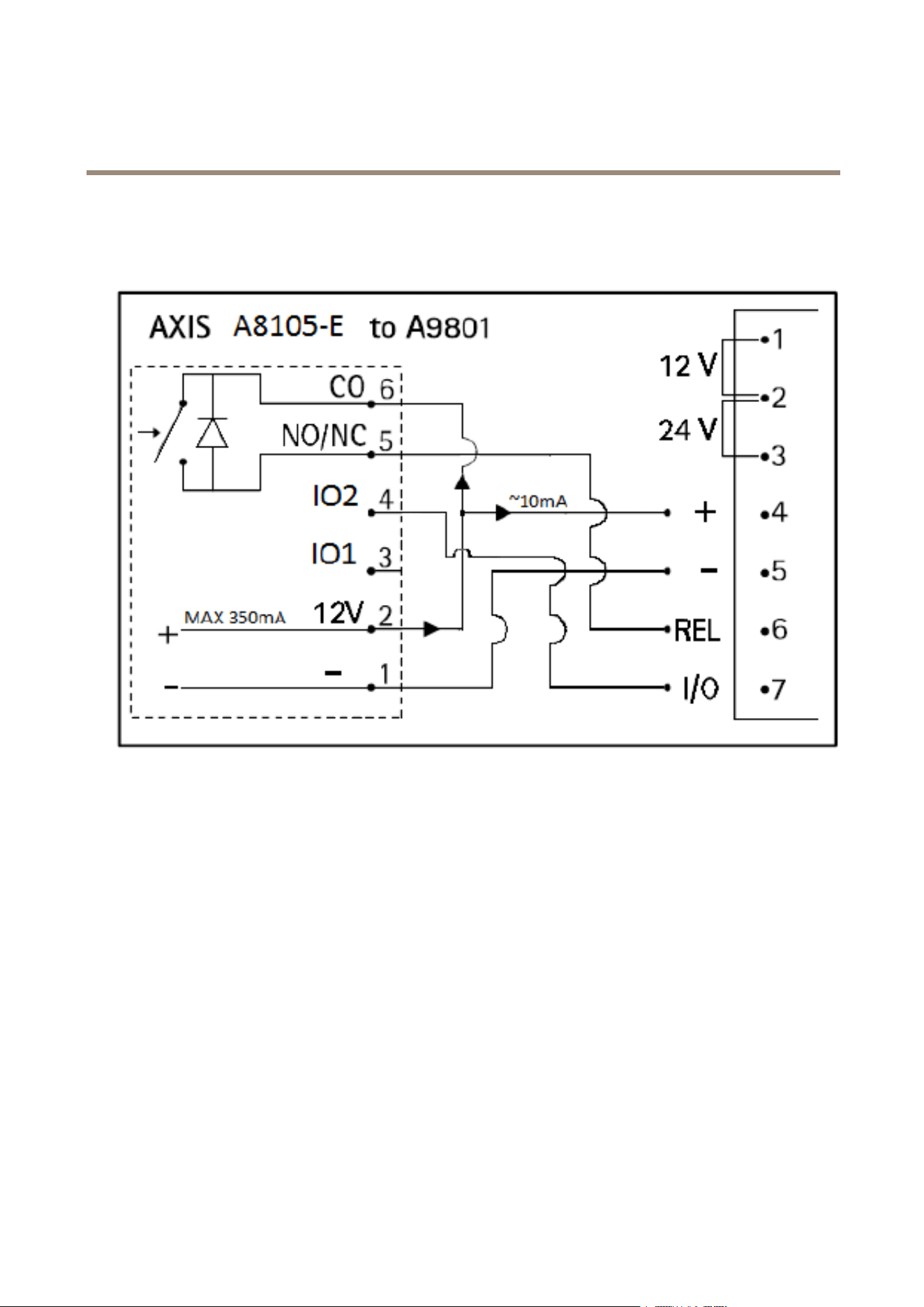
AXISA8105-ENetworkVideoDoorStation
TechnicalSpecifications
ConnectionDiagrams
I/OConnector
ExamplesetupoftheI/Oconnector:AXISA8105–EconnectedtoAXISA9801SecurityRelay
1
0VDC(-)
2
DCoutput12V,maxcurrent350mA
3
I/O1conguredasinput
4
I/O2conguredasoutput
5
Normallyopen/normallyclosed.Forconnectingrelaydevices.Maxcurrent/voltage=700mAat30Vexternal
sourced
6
Common.Maxcurrent/voltage=700mAat30Vexternalsourced
PerformanceConsiderations
Whensettingupyoursystem,itisimportanttoconsiderhowvarioussettingsandsituationswillaffectperformance.Somefactors
affecttheamountofbandwidth(thebitrate)required,otherscanaffecttheframerate,andsomeaffectboth.Iftheloadonthe
CPUreachesitsmaximum,thiswillalsoaffecttheframerate.
Thefollowingfactorsareamongthemostimportanttoconsider:
•Highimageresolutionand/orlowercompressionlevelsresultinimagescontainingmoredata.Bandwidthaffected.
•AccessbylargenumbersofMotionJPEGand/orunicastH.264clients.Bandwidthaffected.
•Simultaneousviewingofdifferentstreams(resolution,compression)bydifferentclients.Effectonframerateand
bandwidth.
87

AXISA8105-ENetworkVideoDoorStation
TechnicalSpecifications
•AccessingMotionJPEGandH.264videostreamssimultaneously.Framerateandbandwidthaffected.
•Heavyusageofeventsettingsaffecttheproduct’sCPUload.Framerateaffected.
•UsingHTTPSmayreduceframerate,inparticularifstreamingMotionJPEG.
•Heavynetworkutilizationduetopoorinfrastructure.Bandwidthaffected.
•Viewingonpoorlyperformingclientcomputerslowersperceivedperformance.Framerateaffected.
•RunningmultipleAXISCameraApplicationPlatform(ACAP)applicationssimultaneouslymayaffecttheframerateand
thegeneralperformance.
88

UserManualVer.M1.16
AXISA8105-ENetworkVideoDoorStation
Date:June2016
©AxisCommunicationsAB,2016
PartNo.1581456