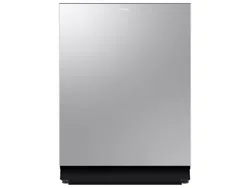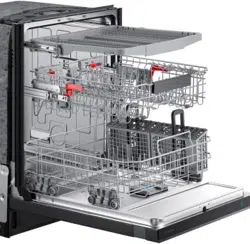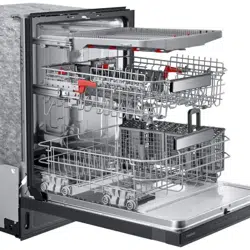
Dishwasher
User manual
DW80DG55**, DW80DG52**
DW0009_IB_DW7000KM_English.indd 1 2024-03-04() 7:02:20
English2
Contents
Contents
Safety information 4
What you need to know about the safety instructions 4
Important safety symbols 4
Before using your dishwasher 7
Before you start 8
Unpacking your dishwasher 8
Checking parts 9
Unsuitable items for the dishwasher 11
Using your dishwasher 12
Basic use of racks 12
Detergent guidelines 19
Touchpad responsiveness 22
Operations 23
Control panel 23
Cycle overview 26
Simple steps to start your dishwasher 27
Settings 28
Special features 30
Maintenance 31
Cleaning 31
Long-term care 36
Storing your dishwasher 36
DW0009_IB_DW7000KM_English.indd 2 2024-03-04() 7:02:20
English4
SAVE THESE INSTRUCTIONS
Safety information
Safety information
Congratulations on your new Samsung dishwasher. This manual contains important
information on the installation, use, and care of your appliance. Please take time to read
this manual to take full advantage of your dishwasher’s many benets and features.
What you need to know about the safety instructions
Warnings and Important Safety Instructions in this manual do not cover all possible
conditions and situations that may occur. It is your responsibility to use common sense,
caution, and care when installing, maintaining, and operating your dishwasher.
Important safety symbols
What the icons and signs in this user manual mean:
WARNING
Hazards or unsafe practices that may result in severe personal injury or death.
To reduce the risk of re, explosion, electric shock, or personal injury when using your
dishwasher, follow these basic safety precautions:
CAUTION
Hazards or unsafe practices that may result in minor personal injury or property damage.
NOTE
These warning signs are here to prevent injury to you and others.
Please follow them explicitly.
After reading this section, keep it in a safe place for future reference.
DW0009_IB_DW7000KM_English.indd 4 2024-03-04() 7:02:20
English 5
SAVE THESE INSTRUCTIONS
Safety information
California Proposition 65 Warning
WARNING: Cancer and Reproductive Harm -
www.P65Warnings.ca.gov.
WARNING
When using your dishwasher, follow basic precautions, including the following:
1. Read all instructions before using the dishwasher.
2. Use the dishwasher only for its intended function.
3. Use only detergents or wetting agents recommended for use in a dishwasher and keep
them out of the reach of children.
4. When loading items to be washed:
- locate sharp items so that they are not likely to damage the door seal, and
- load sharp knives with the handles up to reduce the risk of cut-type injuries.
5. Do not wash plastic items unless they are marked “dishwasher safe” or the equivalent.
For plastic items not so marked, check the manufacturer’s recommendations.
6. Do not touch the HEATING ELEMENT during or immediately after use.
7. Do not operate your dishwasher unless all ENCLOSURE panels are properly in place.
8. Do not tamper with the controls.
9. Do not abuse, sit on, or stand on the door or dish rack of the dishwasher.
10. To reduce the risk of injury, do not allow children to play in or on the dishwasher.
11. Under certain conditions, hydrogen gas may be produced in a hot-water system that
has not been used for two weeks or more. HYDROGEN GAS IS EXPLOSIVE. If the hot-
water system has not been used for such a period, before using the dishwasher turn
on all hot-water faucets and let the water ow from each for several minutes. This will
release any accumulated hydrogen gas. As the gas is ammable, do not smoke or use
an open ame during this time.
12. Remove the door to the washing compartment when removing an old dishwasher from
service or discarding it.
DW0009_IB_DW7000KM_English.indd 5 2024-03-04() 7:02:20
English6
SAVE THESE INSTRUCTIONS
Safety information
Safety information
CAUTION
• After unpacking the dishwasher, keep the packaging out of the reach of children.
• The dishwasher is extremely heavy. Do not attempt to move or carry the dishwasher
by yourself. Two or more people are needed to move a dishwasher and avoid potential
injuries.
• As with any equipment using electricity, water, and moving parts, potential hazards
exist.
• Do not install the dishwasher near electrical components. Keep the dishwasher away
from open ames.
• Install and level your dishwasher on an uncarpeted oor that can support its weight.
• Your dishwasher must be properly grounded. Never connect it to an ungrounded outlet.
See page 7 for more information on grounding your dishwasher.
• Connect the ground wire to the green ground connector in the terminal box.
• After the dishwasher is installed, check that the drain hose is properly connected and
that there is no leakage from the hose connectors. If the drain hose is loose, it may
cause property damage.
• The water supply line is susceptible to breakage. As time goes by, it becomes less
exible. Check the line periodically. If it is swollen, torn, cut, or there is a water leak,
replace it immediately.
• To safely operate this appliance, familiarize yourself with its operations and exercise
care when using it.
• Do not put gasoline, solvents, or other flammable materials inside the dishwasher. Do
not wash dishes exposed to these materials.
• Keep your dishwasher detergent out of the reach of children. Detergent has an adverse
effect on human organs. It contains elements for polishing and is corrosive. Avoid
letting the detergent come into contact with your skin and eyes.
• Do not push or place pressure on the door when it is open, as this may damage the
dishwasher or cause harm.
• Do not allow children to play in or on the dishwasher. They may harm themselves or
damage the dishwasher.
• Disconnect the power cord (or set the circuit breaker to off) before servicing your
dishwasher.
• Do not repair, replace, or service any part of your dishwasher yourself. Disassembly,
repairs, and modications are permitted by authorized service technicians only. Work
done by an unauthorized person may void your warranty.
DW0009_IB_DW7000KM_English.indd 6 2024-03-04() 7:02:20
English 7
SAVE THESE INSTRUCTIONS
Safety information
• Before disposing of your dishwasher, remove the door of the washing compartment or
the door latch so that children or small animals cannot get trapped inside.
• If the dishwasher is left unused for an extended period of time, turn off the water
supply.
• This dishwasher is intended for residential use only.
Before using your dishwasher
WARNING
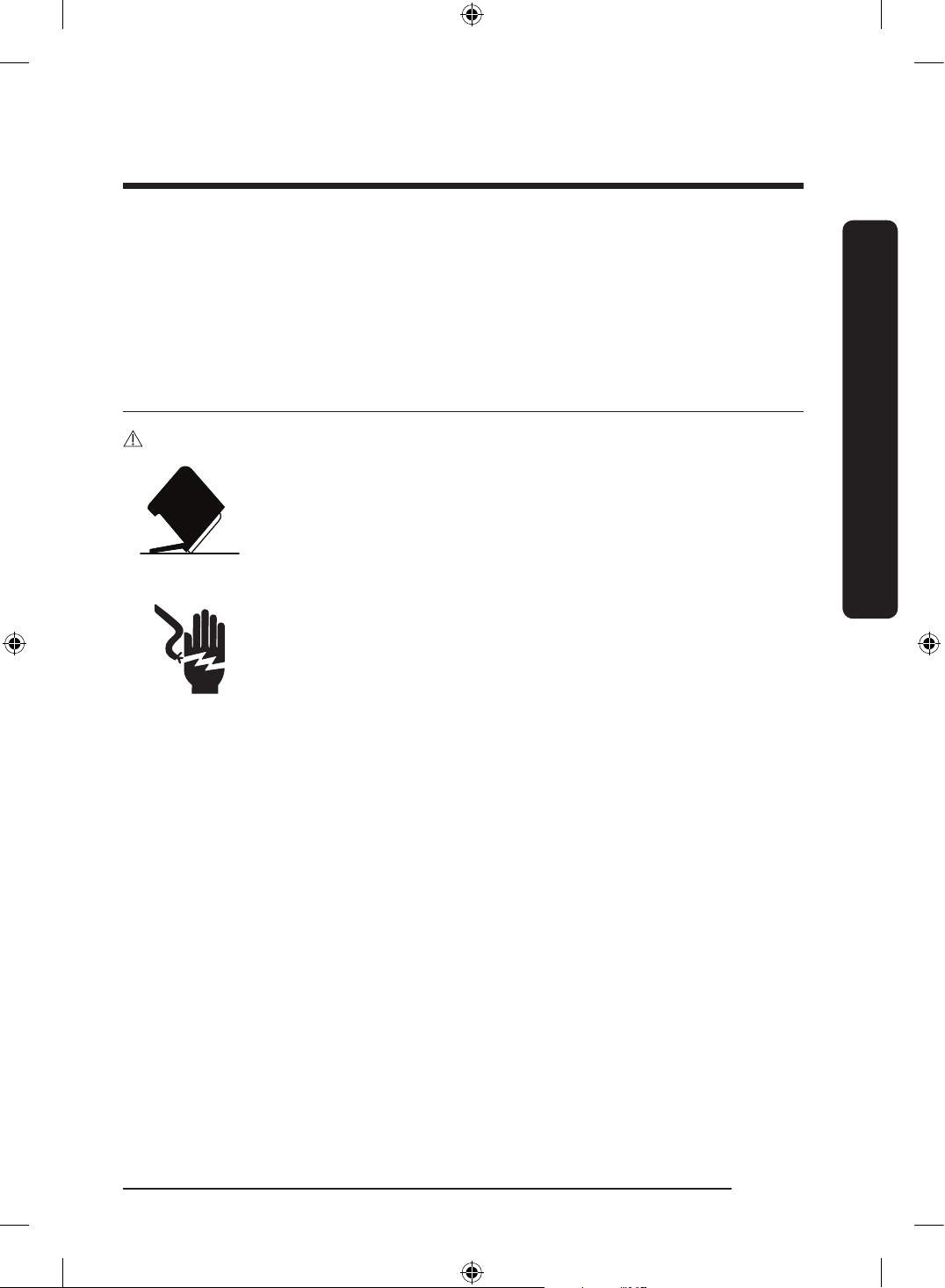
Tip-Over Hazard
• Do not use the dishwasher until it is correctly installed.
• Do not push down on the dishwasher door when it is open.
• Do not place excessive weight on the dishwasher door when it is
open.
Electric Shock Hazard
Failure to follow these instructions can result in death, re, or electric
shock:
• Electrically ground the dishwasher
• Connect the ground wire to the green ground connector in the
junction box.
• Do not use an extension cord.
DW0009_IB_DW7000KM_English.indd 7 2024-03-04() 7:02:20
English8
Before you start
Before you start
Be sure to have your installer follow these instructions closely so that your new
dishwasher works properly and that you’re not at risk of injury when washing dishes.
Unpacking your dishwasher
• Once your new dishwasher has been delivered to you, carefully unpack it and check for
any damage.
If the dishwasher has been damaged, make note of it on the waybill and keep a copy.
Do not install the dishwasher, and contact Samsung Customer Service at the number
listed on the next page.
• If there is no damage to the product, you can proceed with the installation. If you are
going to install it yourself, make sure to read through the installation guide and follow
the directions inside.
• After unpacking your dishwasher, keep the packaging out of the reach of children to
ensure their safety.
DW0009_IB_DW7000KM_English.indd 8 2024-03-04() 7:02:20
English 9
Before you start
Checking parts
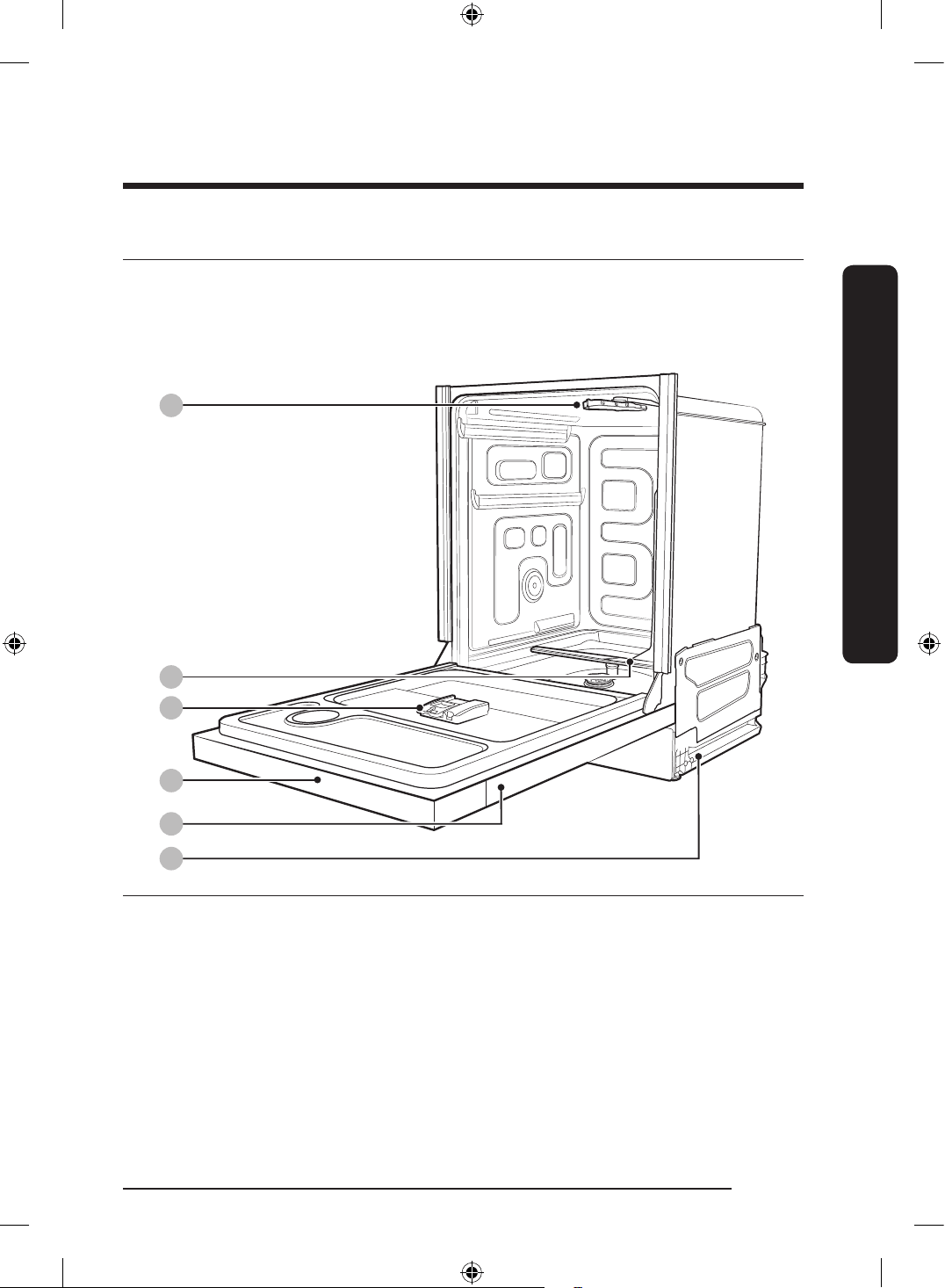
When your dishwasher has been unpacked, make sure you’ve received all the parts shown
below.
If your dishwasher was damaged during shipping, or if you do not have all the parts,
contact Samsung Customer Service at 1-800-SAMSUNG (726-7864).
02
03
04
05
06
01
01 Top nozzle 02 Lower nozzle 03 Dispenser
04 Control panel 05 Door 06 Base
DW0009_IB_DW7000KM_English.indd 9 2024-03-04() 7:02:21
English10
Before you start
Before you start
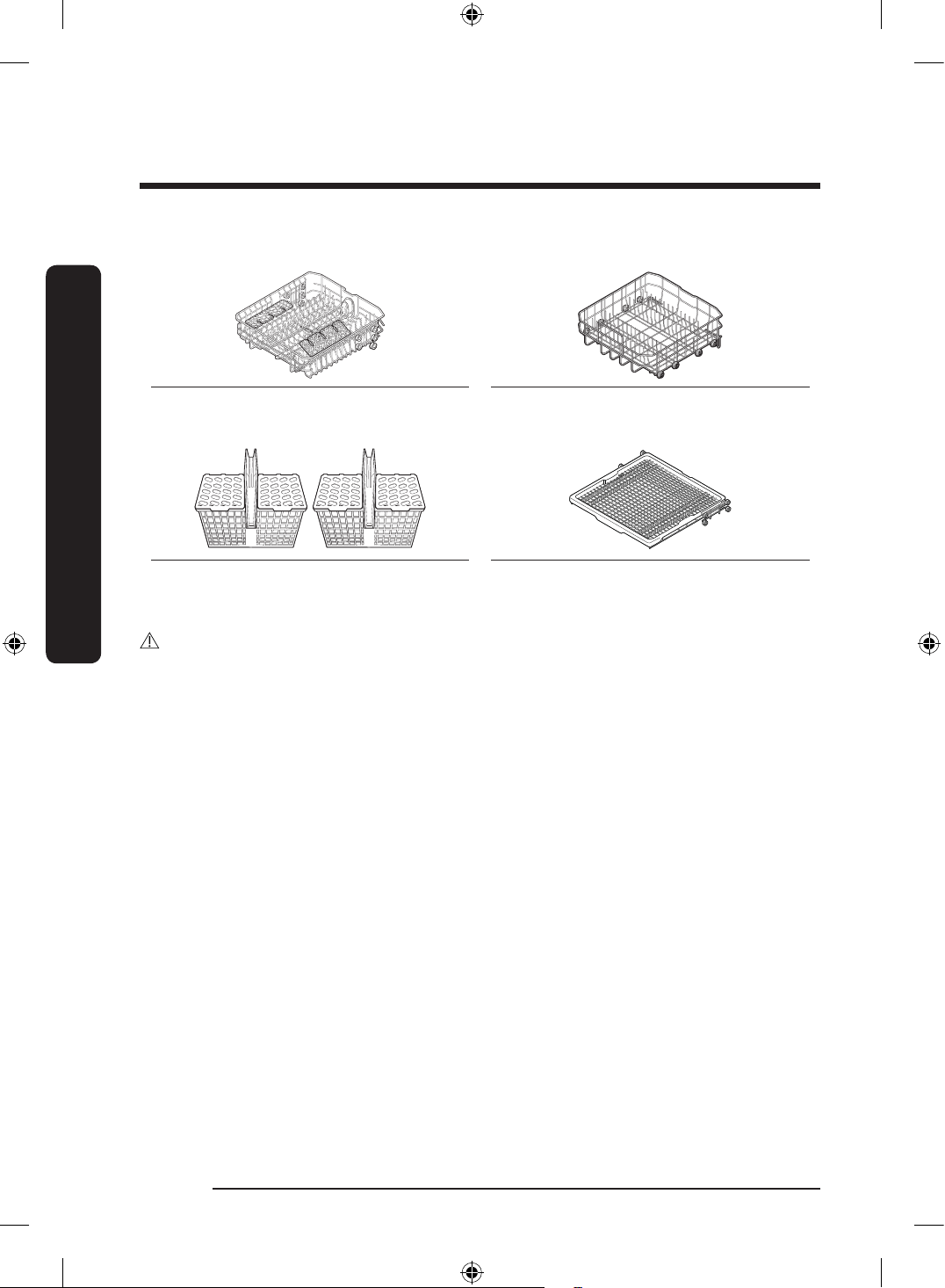
Accessories
Upper rack Lower rack
Cutlery rack (2) 3
rd
rack (DW80DG55** only)
CAUTION
• Do not wash items that are covered with ash, sand, wax, lubricating grease, or paint.
These materials will damage the dishwasher. Ash does not dissolve and will spread
inside the dishwasher.
• Remove food remains such as bones, fruit seeds, etc. and waste such as toothpicks,
paper napkins, etc. from your dishes. Food remains and waste can make noise, cause the
dishwasher to malfunction, and damage your dishes and dishwasher.
DW0009_IB_DW7000KM_English.indd 10 2024-03-04() 7:02:21
English 11
Before you start
Unsuitable items for the dishwasher
WARNING
Wash only items such as glass, porcelain, and cutlery which the manufacturer states is
dishwasher safe. Do not wash aluminium (for example grease lters). The dishwasher may
damage aluminium, or in extreme cases, cause a severe chemical reaction.
Do not wash the following items in the dishwasher.
• Copper, brass, tin, ivory, and aluminium items or items with adhesive
• Non-heat resistant plastics
• Craft items, antiques, valuable vases, and decorative glassware
• Pottery or glazed-ceramic items
• Wooden cutlery and crockery or items with wooden parts. (Including silver & gold)
• Delicate glassware or glassware containing lead crystal. Clouding may occur on the
glassware after frequent washing.
• Silver cutlery, crockery or items with silver parts.
NOTE
Silverware that has contacted food containing sulphur may become discoloured. Food with
sulphuric content include egg yolks, onions, mayonnaise, mustard, sh, sh brine, and
marinades.
DW0009_IB_DW7000KM_English.indd 11 2024-03-04() 7:02:21
English12
Using your dishwasher
Using your dishwasher
Basic use of racks
Adjusting the height of the upper rack
You can adjust the height of the upper rack in your Samsung dishwasher so that the lower
rack can accommodate larger sized dishes. Depending on where you set the upper rack
height, the lower rack can accommodate plates up to 14 in. (36 cm) in diameter and the
upper rack can accommodated plates up to 12 in. (30 cm) in diameter.
DW80DG55 / DW80DG52 series
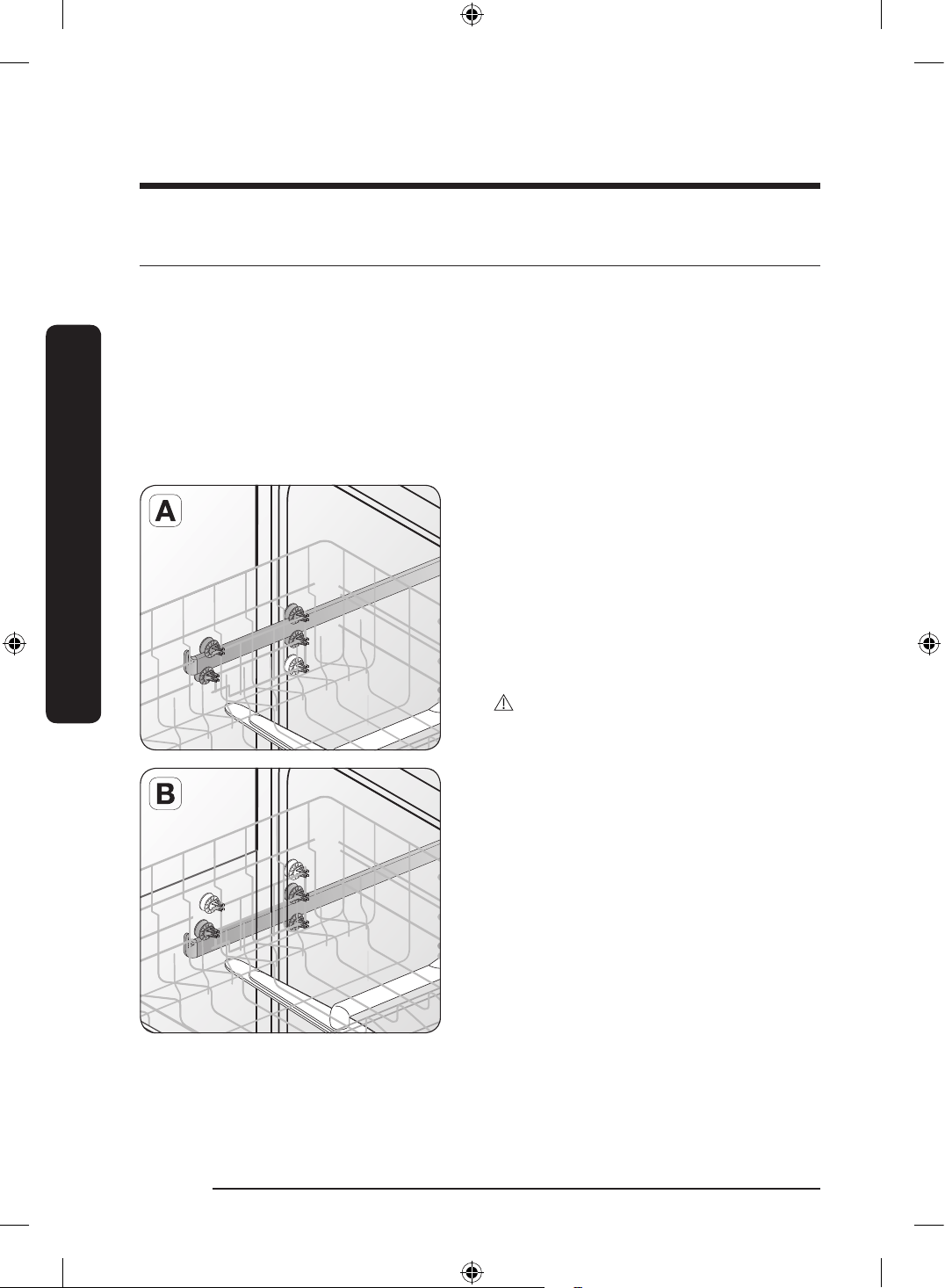
To adjust the height of the upper rack, follow these steps:
1. Remove the upper rack following the
directions in Removing the Upper Rack
below.
2. If you want to lower the upper rack,
re-install the rack as shown in Figure A
to the right.
3. If you want to raise the upper rack,
re-install the rack as shown in Figure B
to the right.
CAUTION
Recommended adjusting the height of the
upper rack before loading dishes into the
rack. If you adjust the the rack after loading
the dishes, you may damage the dishes.
DW0009_IB_DW7000KM_English.indd 12 2024-03-04() 7:02:22
English 13
Using your dishwasher
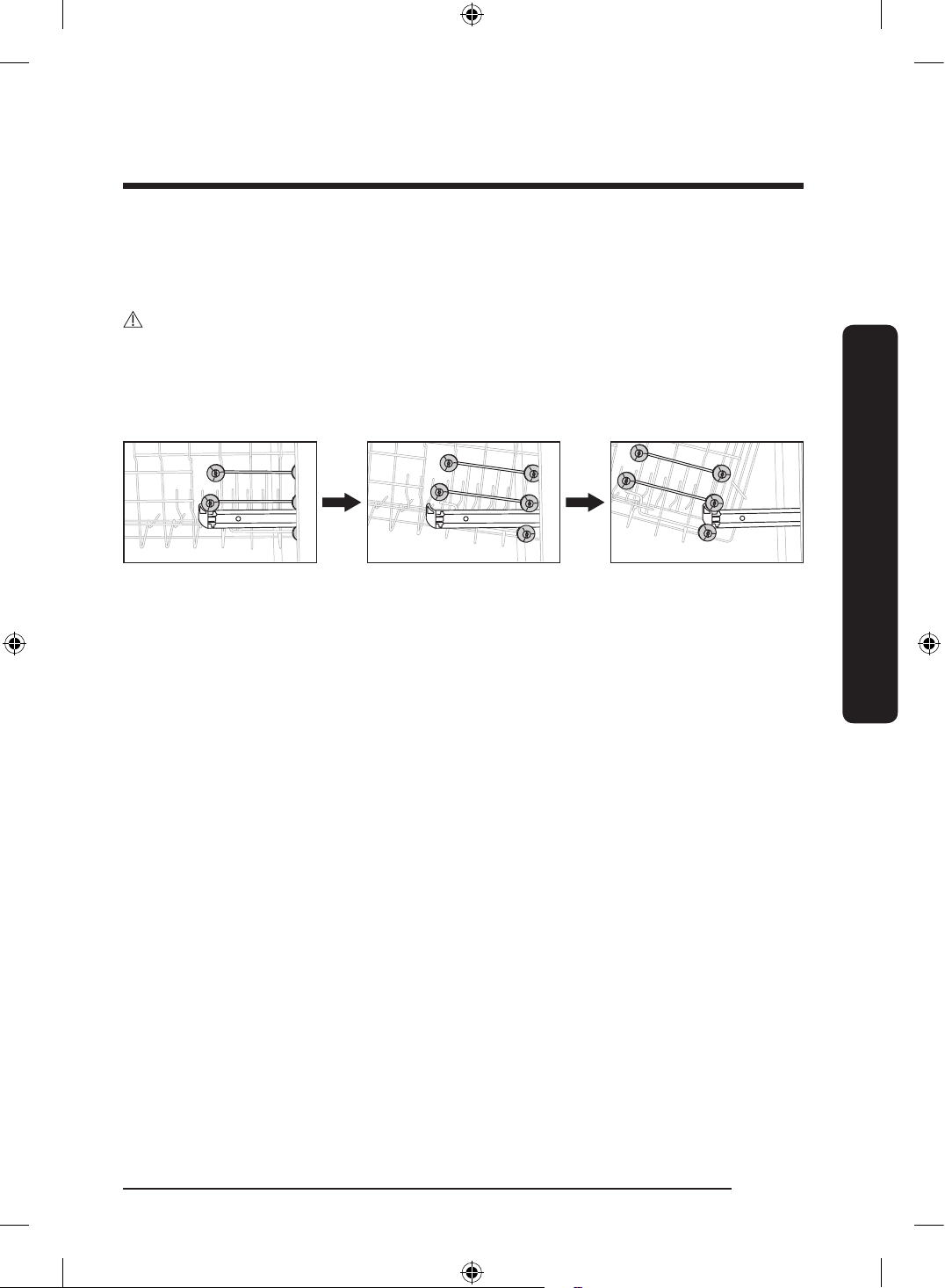
Removing the upper rack
Pull the upper rack towards the front and then remove it by lifting it up slightly and
pulling it towards the front. See the illustrations below.
CAUTION
While the upper rack is removable, it must be installed for the dishwasher to operate
properly.
If you attempt to operate the dishwasher without the rack, noise will occur and the
dishwasher will perform poorly.
Step 1. Step 2. Step 3.
DW0009_IB_DW7000KM_English.indd 13 2024-03-04() 7:02:22
English14
Using your dishwasher
Using your dishwasher
Loading dishes
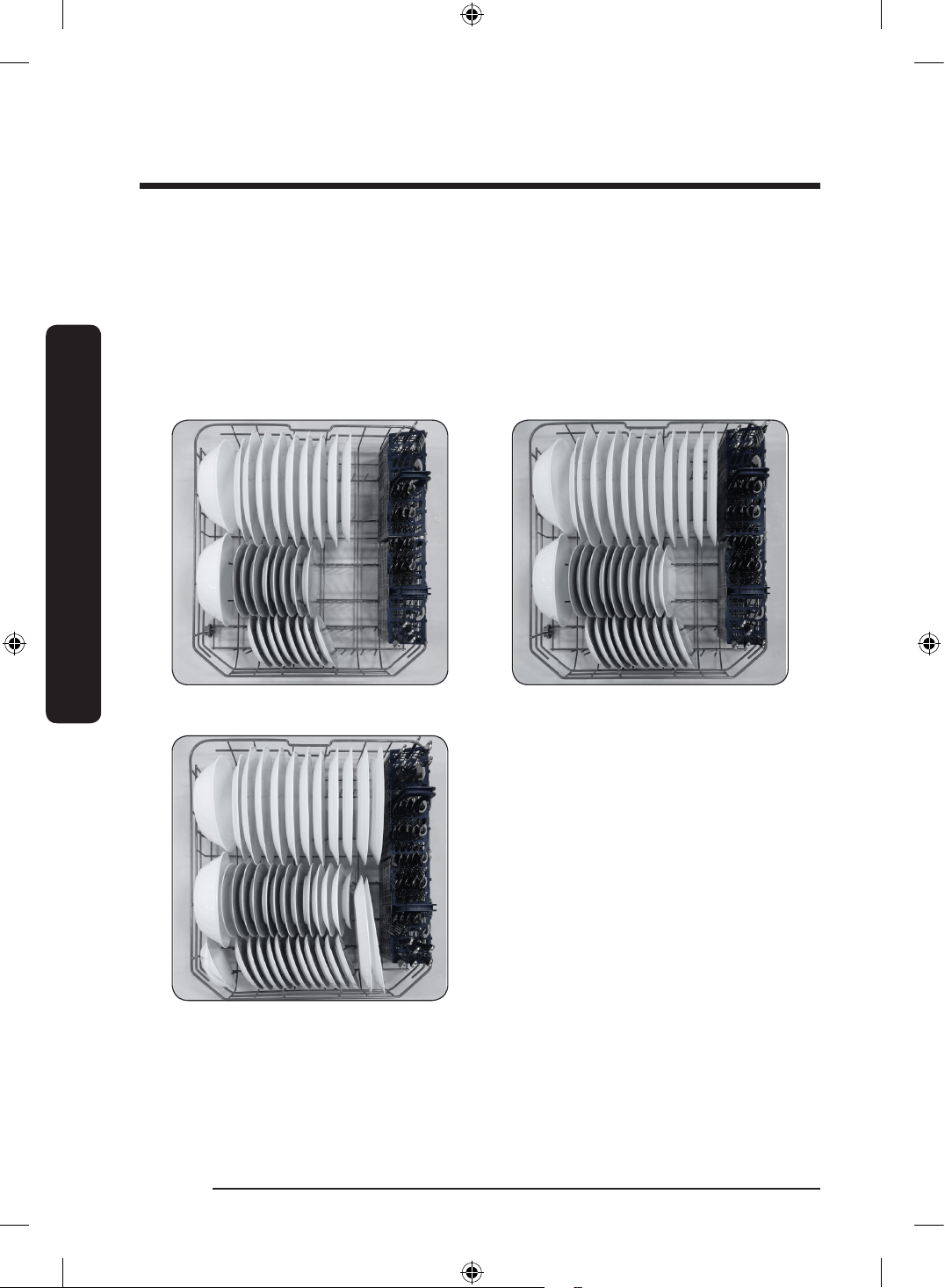
Loading the lower rack
The lower rack has been especially designed for dinner dishes, soup bowls, plates, pots,
lids, casserole dishes, and plates.
Load large items such as pans and pots into the dishwasher so their open sides face
downwards. Recommended loading cups, stemware, and small plates into the upper rack.
See the recommended loading patterns below.
8 place settings
10 place settings
12 place settings
DW0009_IB_DW7000KM_English.indd 14 2024-03-04() 7:02:22
English 15
Using your dishwasher
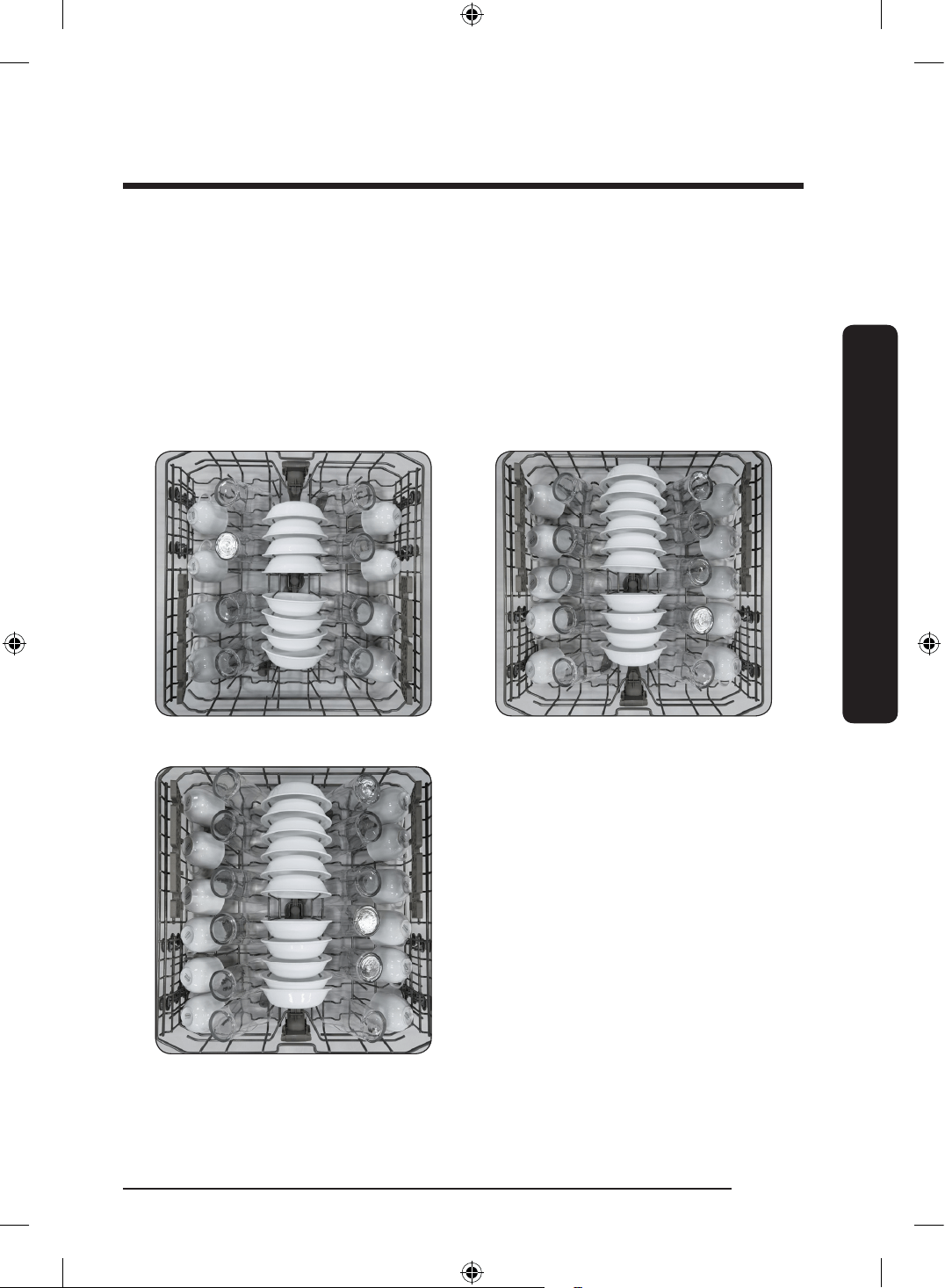
Loading the upper rack
The upper rack has been designed for small plates, mugs, glasses, and plastic items marked
“dishwasher safe”. Load your plates into the dishwasher in two half rows, so that the front
of each plate faces the back of the plate in front of it, and the open sides of the plates at
the center of the dishwasher face each other. See the illustrations below.
Make sure the loaded dishes do not interfere with the rotation of the nozzle which is
located at the bottom of the upper rack. (Check this by rotating the nozzle by hand.)
When loading dishes, pull the upper rack out sufciently so you can load it without striking
the counter above.
8 place settings 10 place settings
12 place settings
DW0009_IB_DW7000KM_English.indd 15 2024-03-04() 7:02:23
English16
Using your dishwasher
Using your dishwasher
Using the glass support
The glass support is used for cups, small items, and long cookware, and especially suited
for wine glasses. Hang wine glasses onto the pegs of the cup shelves. Fold the glass
support back when it is not being used.
CAUTION
• Do not adjust the level of the upper rack with the glass support propped up. This will
make it impossible to push the glass support in the upper rack.
• Check whether cups are interfering with the 3
rd
rack when pushing in the upper rack
after loading cups onto the glass support. Cups may be damaged or displaced.
Loading the 3
rd
Rack
(applicable models only)
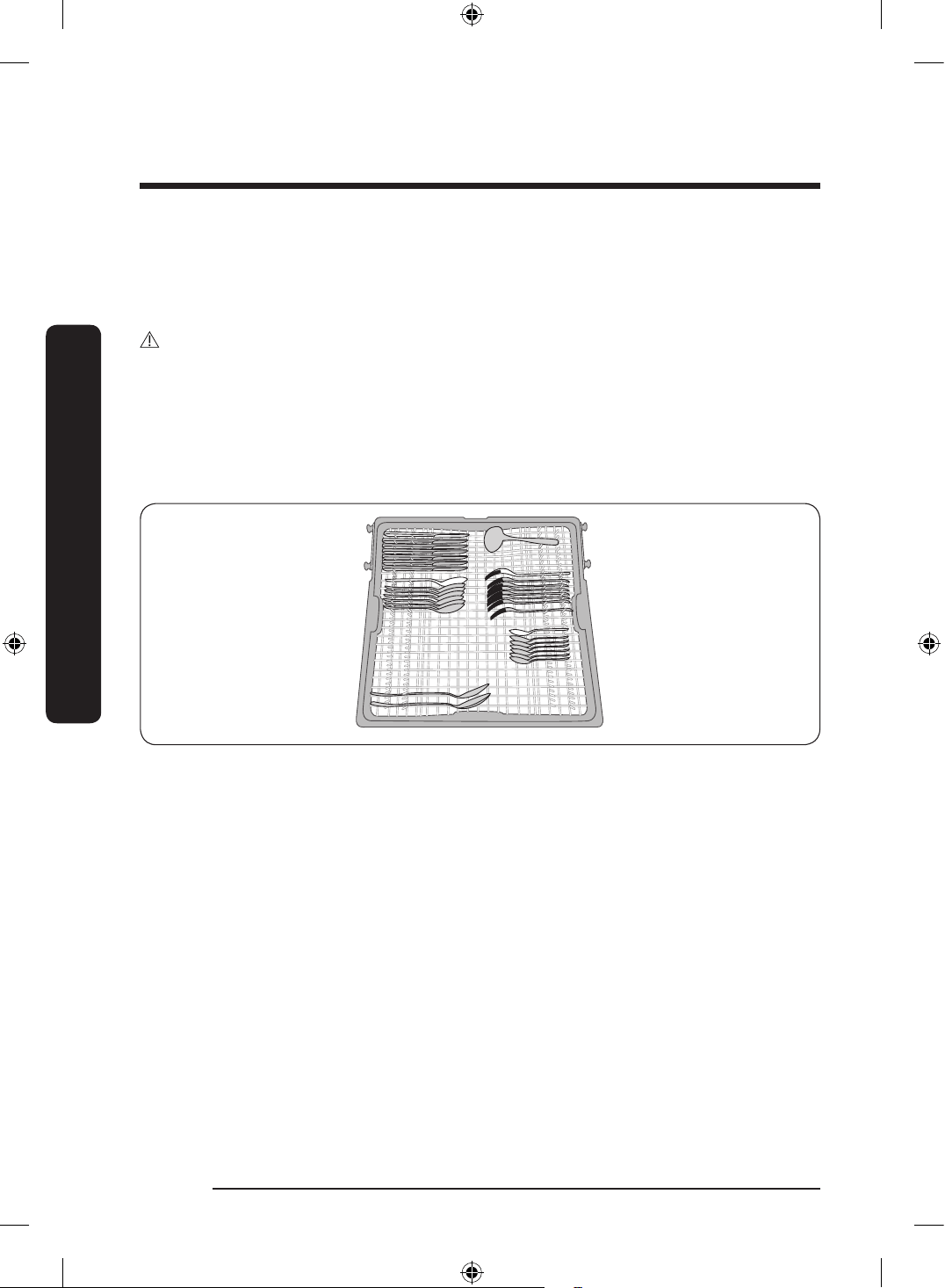
The 3
rd
rack is best suited for atware and cooking or serving utensils. Use it with the
spoon stands in the lower basket. You can load cutlery and utensils in the 3
rd
rack or the
spoon stands in the lower basket.
Removing the 3
rd
rack
The entire cutlery rack can be removed if more space is needed on the upper rack for
larger items.
* When loading the cutlery and utensils onto the cutlery rack, make sure they do not
interfere with the top nozzle of the rack. If they interfere, remove the cutlery pad and try
again.
DW0009_IB_DW7000KM_English.indd 16 2024-03-04() 7:02:24
English 17
Using your dishwasher
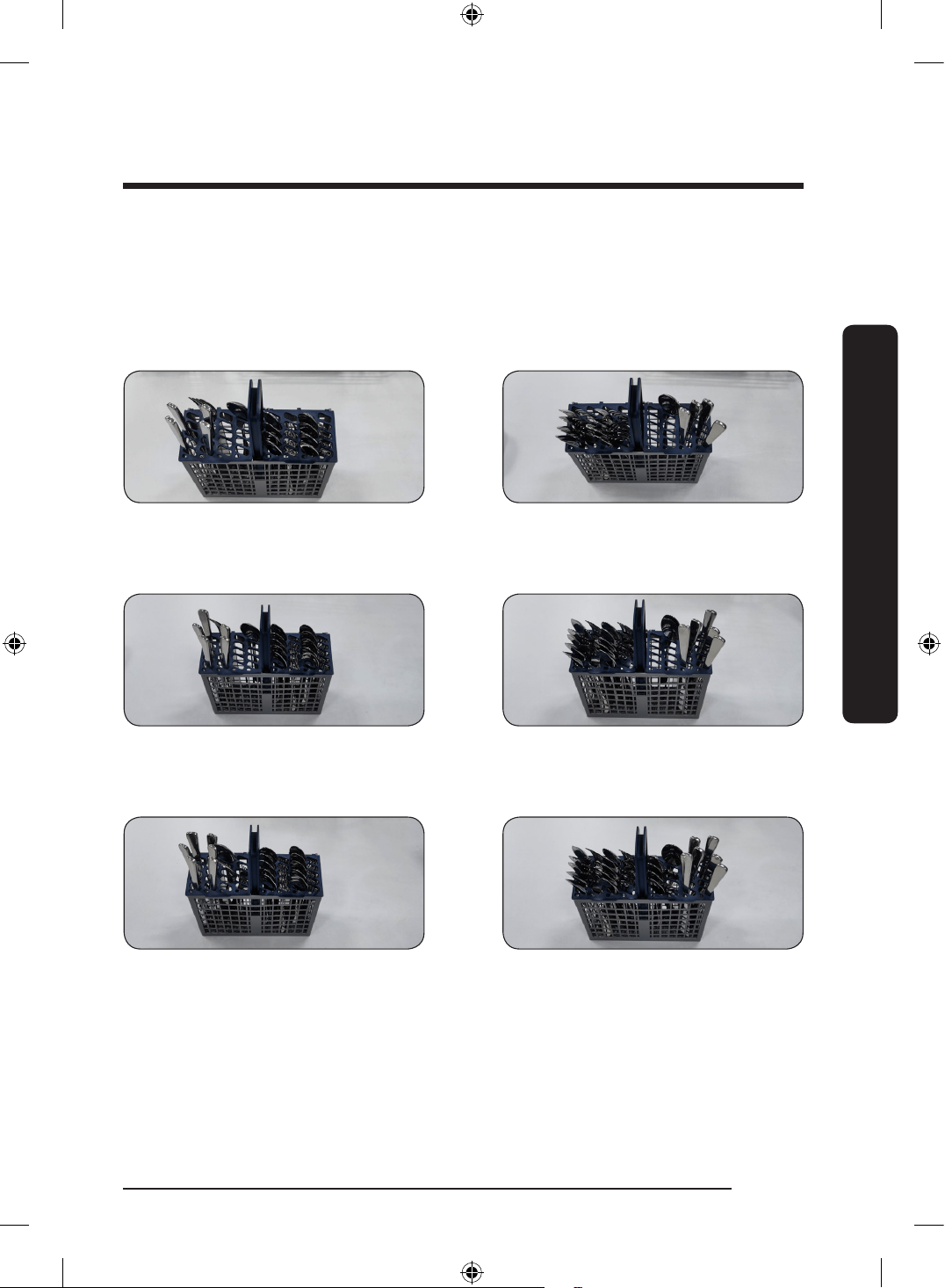
Loading the Cutlery rack
The cutlery rack consists of two compartments.
You can place each knife, spoon, or fork separately into the spoon stands in the basket’s
covers to prevent chipping and discoloration. See the illustrations below.
You can use the cutlery rack with the cover open. Refer to the illustration on the left.
Left Right
8 place settings
Left Right
10 place settings
Left Right
12 place settings
DW0009_IB_DW7000KM_English.indd 17 2024-03-04() 7:02:24
English18
Using your dishwasher
Using your dishwasher
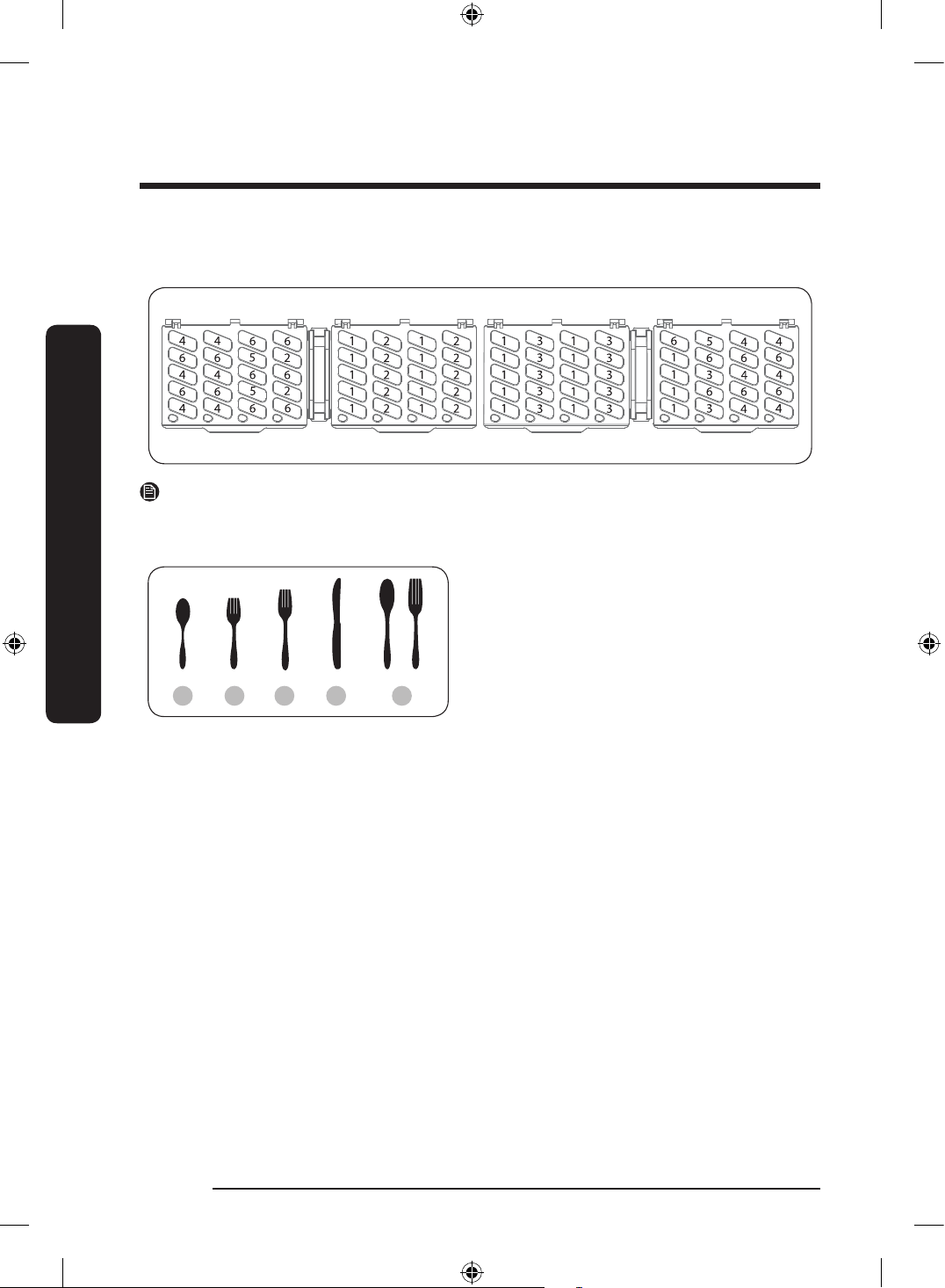
The spoon stands as seen from above with the suggested placement of cutlery items.
Match the numbers in the diagram to the numbers in the list of cutlery items below.
NOTE
Do NOT let any item extend through the bottom. Do not load chopsticks in this rack.
Chopsticks should be loaded on the 3
rd
rack.
1 2 3 4 5
1. Tea spoons
2. Salad forks
3. Dinner forks
4. Knives
5. Serving spoons and Serving forks
6. Remaining items
DW0009_IB_DW7000KM_English.indd 18 2024-03-04() 7:02:24
English 19
Using your dishwasher
Detergent guidelines
All dishwasher cycles require detergent in the detergent compartment. Apply detergent as
appropriate for the selected cycle to ensure best performance.
WARNING
• Do not consume dishwasher detergent. Avoid breathing in detergent fumes. Dishwasher
detergent contains irritants and caustic chemicals that can induce respiratory conditions.
If you have consumed dishwasher detergent or inhaled detergent fumes, seek medical
attention immediately.
• Keep dishwasher detergent out of children’s reach.
CAUTION
Use dishwasher detergent only. Other types of detergent produce excessive foam, which
may decrease the dishwasher’s performance or cause it to malfunction.
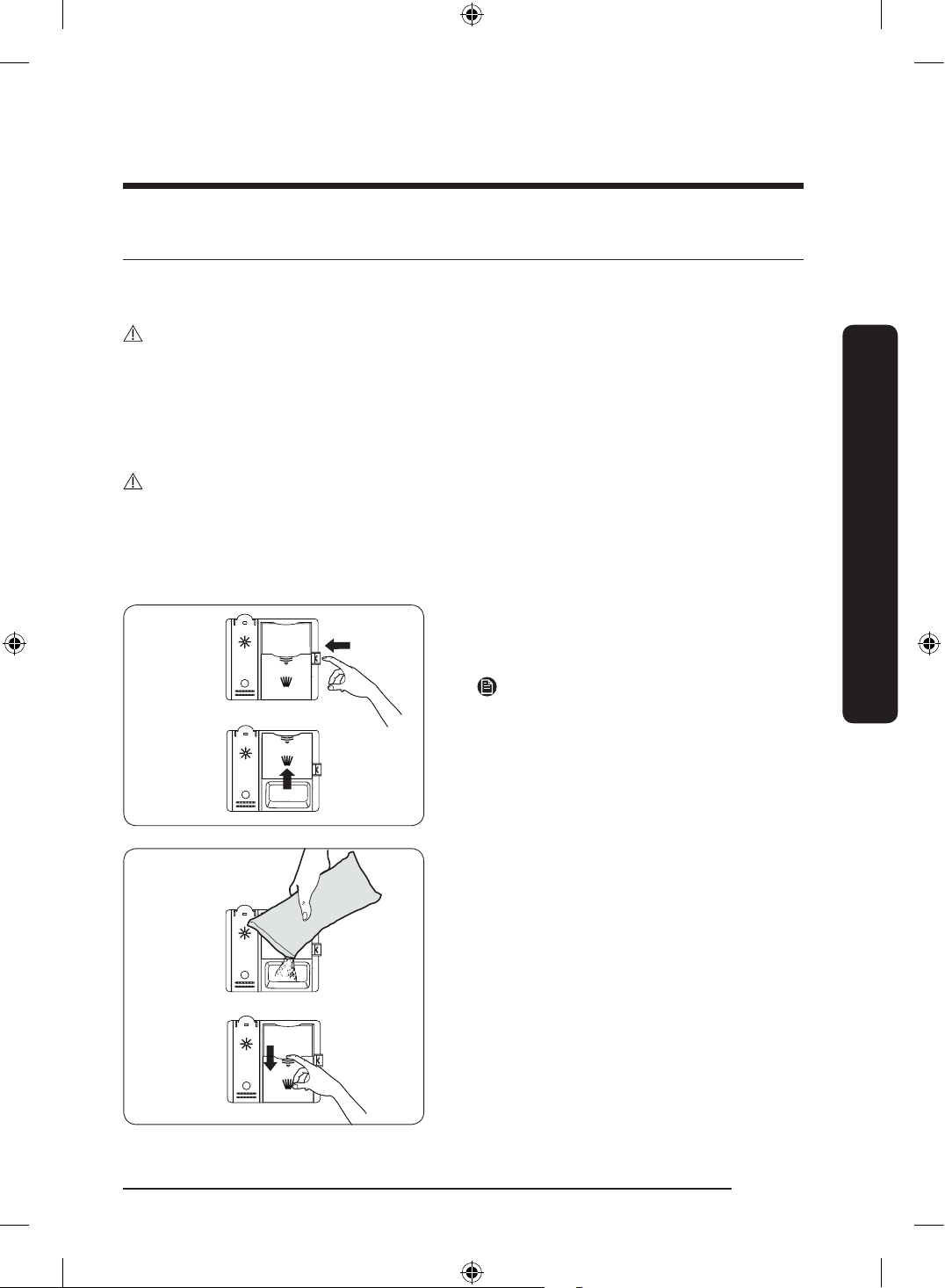
Filling the detergent dispenser
1. Open the detergent dispenser c ap
by pushing the detergent dispenser
release button.
NOTE
The ap is always open at the end of a
washing cycle.
2. Add the recommended amount of
detergent to the main wash detergent
compartment.
3. Close the ap by pressing it down.
DW0009_IB_DW7000KM_English.indd 19 2024-03-04() 7:02:25
English20
Using your dishwasher
Using your dishwasher
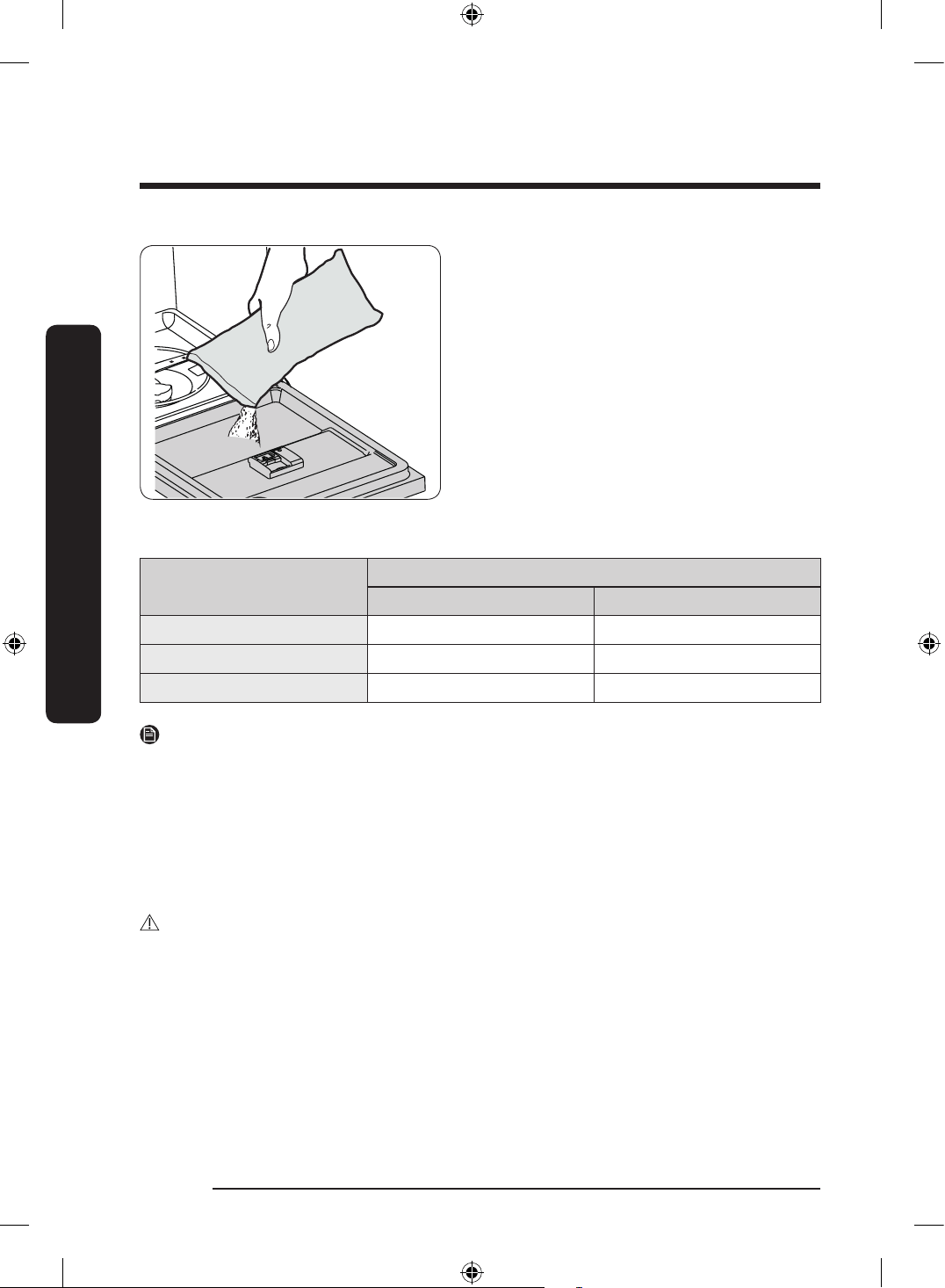
4. For better cleaning result,pour a small
amount (about 15 g) of detergent onto
the door.
The additional detergent will be used
during the pre-wash phase.
The cover opens automatically to dispense the detergent during the wash.
Cycle
Amount of detergent
Main wash dispenser Onto the door for pre-wash
Auto, Normal 3/4 oz (20 g) 1/3 oz (10 g)
Heavy, Express 60' 1 oz (30 g) 1/2 oz (15 g)
Delicate 3/4 oz (20 g) 1/5 oz (5 g)
NOTE
The numbers inside the dispenser refer to grams.
Rinse aid
Rinse aid improves the drying performance of the dishwasher. When the Rinse Rell
indicator lights up on the control panel, rell with rinse aid. Only use liquid rinse aid.
Powdered rinse aid will clog the compartment opening and cause the dishwasher to
malfunction.
CAUTION
• Do not apply any type of detergent to the rinse aid compartment.
• Do not over ll the compartment. Excessive rinse aid may overow during a cycle.
DW0009_IB_DW7000KM_English.indd 20 2024-03-04() 7:02:25
English 21
Using your dishwasher
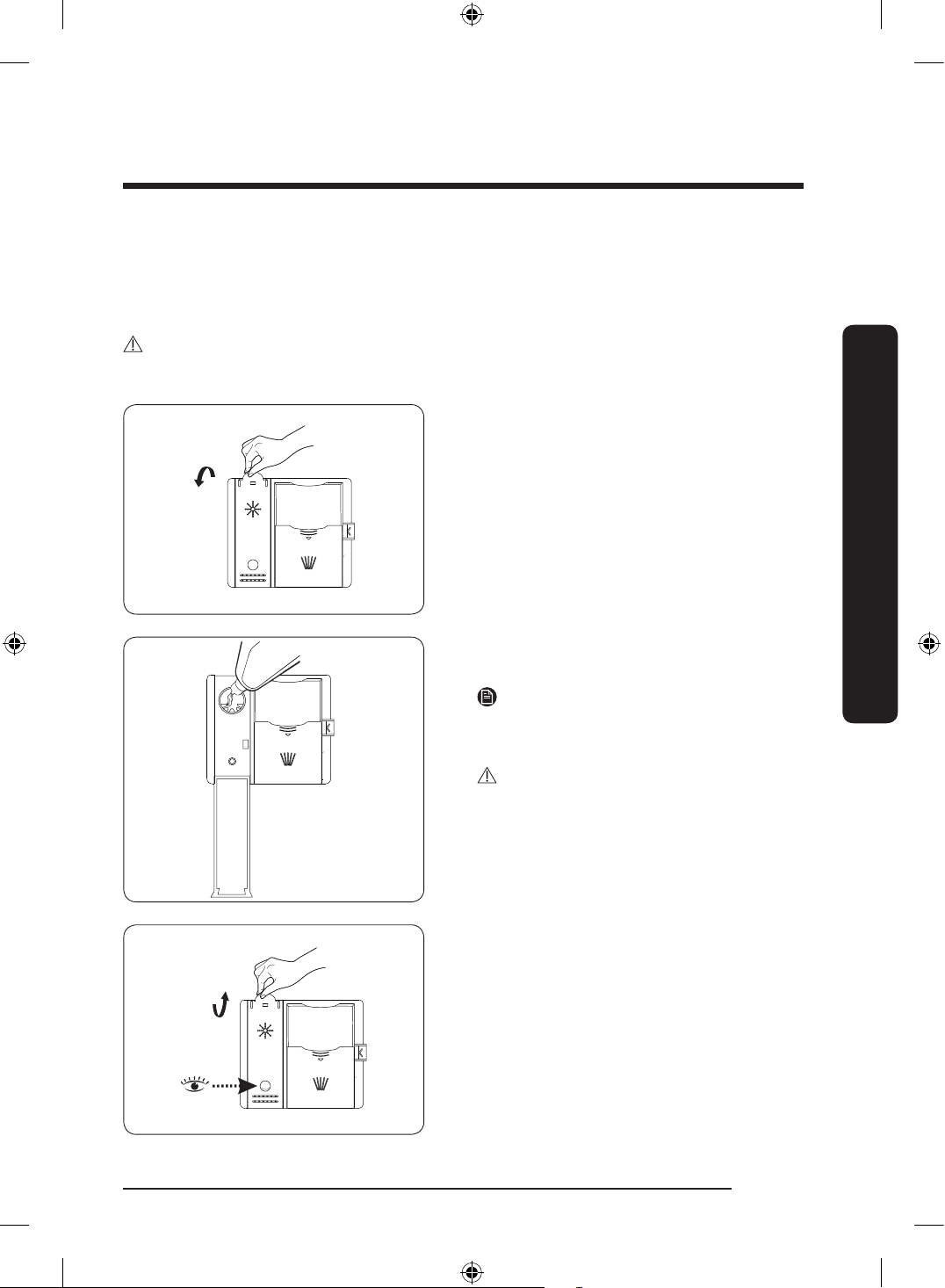
Filling the rinse aid reservoir
Your dishwasher has been designed to use liquid rinse aid only.
Using a powdered rinse aid will clog the reservoir opening and cause the dishwasher to
malfunction. Rinse aid improves the drying performance of the dishwasher.
CAUTION
Do not add regular detergent to the rinse aid reservoir.
1. Open the rinse aid reservoir cap.
2. Fill the rinse aid reservoir with rinse
aid.
NOTE
Use the viewing port when lling the rinse
aid reservoir.
CAUTION
• Do not ll the reservoir above the full
level indicator.
• Excess rinse aid can overow during the
wash cycle.
3. View the amount of rinse aid in the
reservoir through the clear viewing
port. Stop adding when the reservoir
reaches the full level.
4. Close the rinse aid reservoir cap.
DW0009_IB_DW7000KM_English.indd 21 2024-03-04() 7:02:26
English22
Using your dishwasher
Using your dishwasher
Touchpad responsiveness
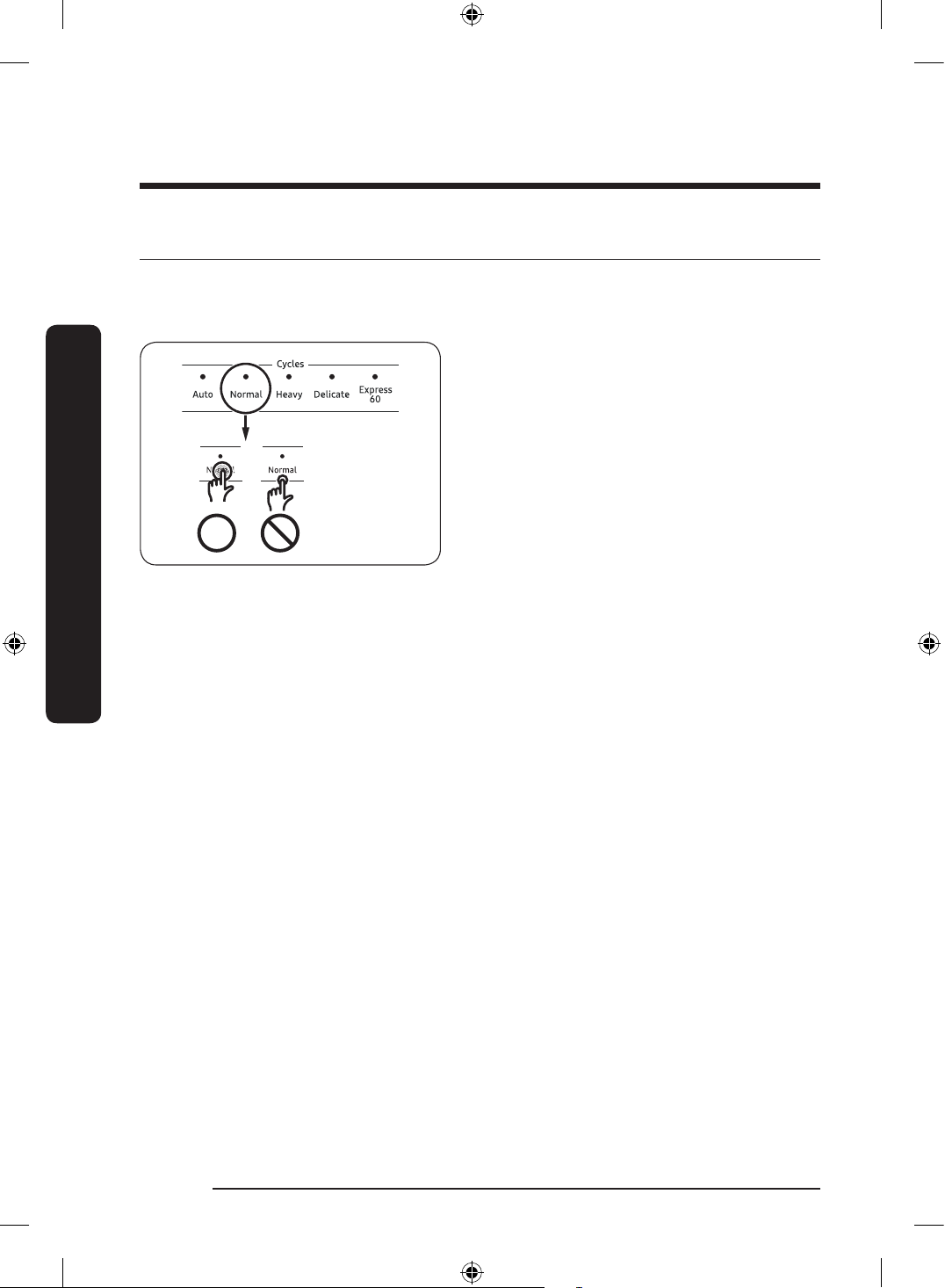
To prevent the touch-enabled controls from losing responsiveness, follow these
instructions.
• Touch the center of each button with
one nger.
• Do not touch more than one button at a
time, except as directed.
• Clean the surface of the control panel
regularly with a soft, damp cloth.
DW0009_IB_DW7000KM_English.indd 22 2024-03-04() 7:02:26
English 23
Operations
Operations
WARNING
To reduce the risk of re, electric shock, or injury to persons, read the IMPORTANT SAFETY
INSTRUCTIONS before operating this appliance.
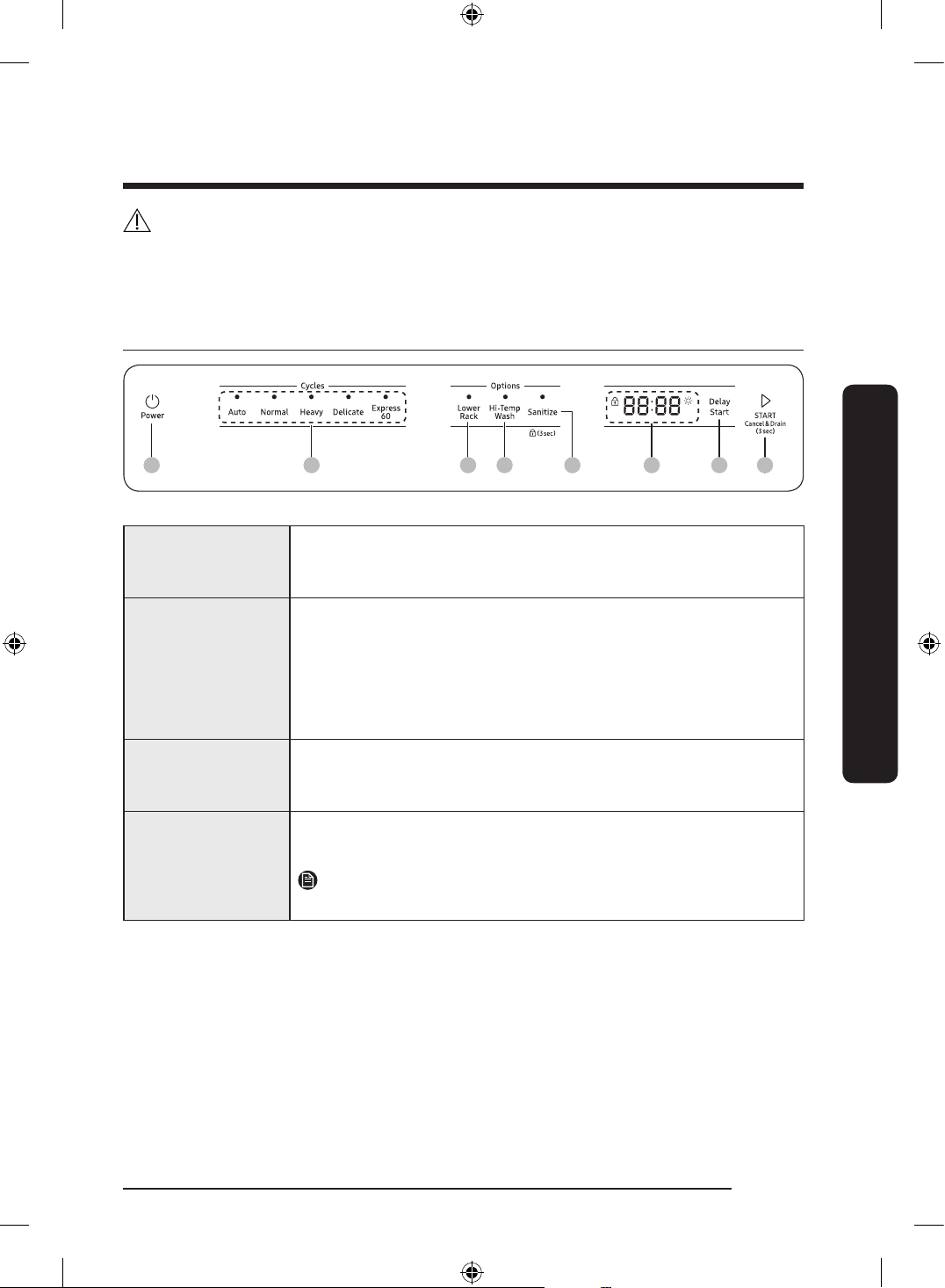
Control panel
01 02 03 04 05 06 0807
01 Power
When you press the Power button, the Cycle On light for the
most recently started cycle turns on. When the selected cycle is
complete, the dishwasher powers off automatically.
02 Cycle Selector
Select the appropriate wash cycle depending on the soil level of
your dishes. After you select a cycle, the Cycle On light for that
cycle lights.
If you want to change the cycle once it has started, press the
Power button. Then, turn on the dishwasher again and select a
new cycle.
03 Lower Rack
If selected, only the lower rack nozzle is activated to reduce both
the cycle time and power consumption. Use this cycle to wash a
small load of dishes or glasses in the lower rack.
04 Hi-Temp Wash
Raises the main wash temperature to improve cleaning for loads
containing tough, baked-on food.
NOTE
Hi-Temp Wash is not available for the Delicate cycle.
DW0009_IB_DW7000KM_English.indd 23 2024-03-04() 7:02:26
English24
Operations
Operations
05 Sanitize /
Control Lock
With the Sanitize option selected, the water temperature is
increased to 163 ˚F (73 ˚C) in the nal rinse cycle for high
temperature sanitization.
If you select the Sanitize option, the "Sanitize" lamp blinks
when the water temperature reaches the sanitary temperature
(over 157 ˚F (69 ˚C)), and then remains illuminated until the Sanitize
option ends.
When you open the door or press the Power button, the "Sanitize"
lamp turns off.
Control Lock allows you to lock the buttons on the control panel
so children cannot accidently start the dishwasher by pressing the
buttons on the panel.
To lock and unlock the buttons on the control panel, press and
hold Sanitize for 3 seconds when the power is on.
NOTE
Sanitize is not available for the Delicate cycle.
Only Normal cycle with the Sanitize option has been designed to
meet the requirements for soil removal and sanitization efcacy
in NSF 184. Certied residential dishwashers are not intended for
licensed food establishments.
For the Sanitize mode, the amount of detergent as
3
/4 oz (20 g) in
Main wash dispenser and
1
/3 oz (10 g) on the door for pre-wash is
used.
06 Display
Displays information about the current cycle including the cycle
time, remaining time, Delay Start settings, and other cycle-specic
information.
If a problem occurs during operation, an information code will
appear with a warning sound. Refer to the information codes on
page 42.
07 Delay Start
Delay a cycle for up to 24 hours in one-hour increments. To
increase the delay start time, press or hold the Delay Start button.
The hour displayed indicates the time at which the wash will start.
- After setting the delay time, press the Start button, and then
close the door to start the cycle.
- To change the delay time after the dishwasher has started,
rst turn the dishwasher off and turn it back on. Then, select a
new cycle and change the delay time settings.
DW0009_IB_DW7000KM_English.indd 24 2024-03-04() 7:02:26
English 25
Operations
08 Start
To start a cycle, press the Start button before closing the door.
Cancel & Drain: To cancel a currently running cycle and drain the
dishwasher, press and hold the Start button for three (3) seconds.
Once the dishwasher is reset, select a cycle and option, and then
press Start to restart the dishwasher.
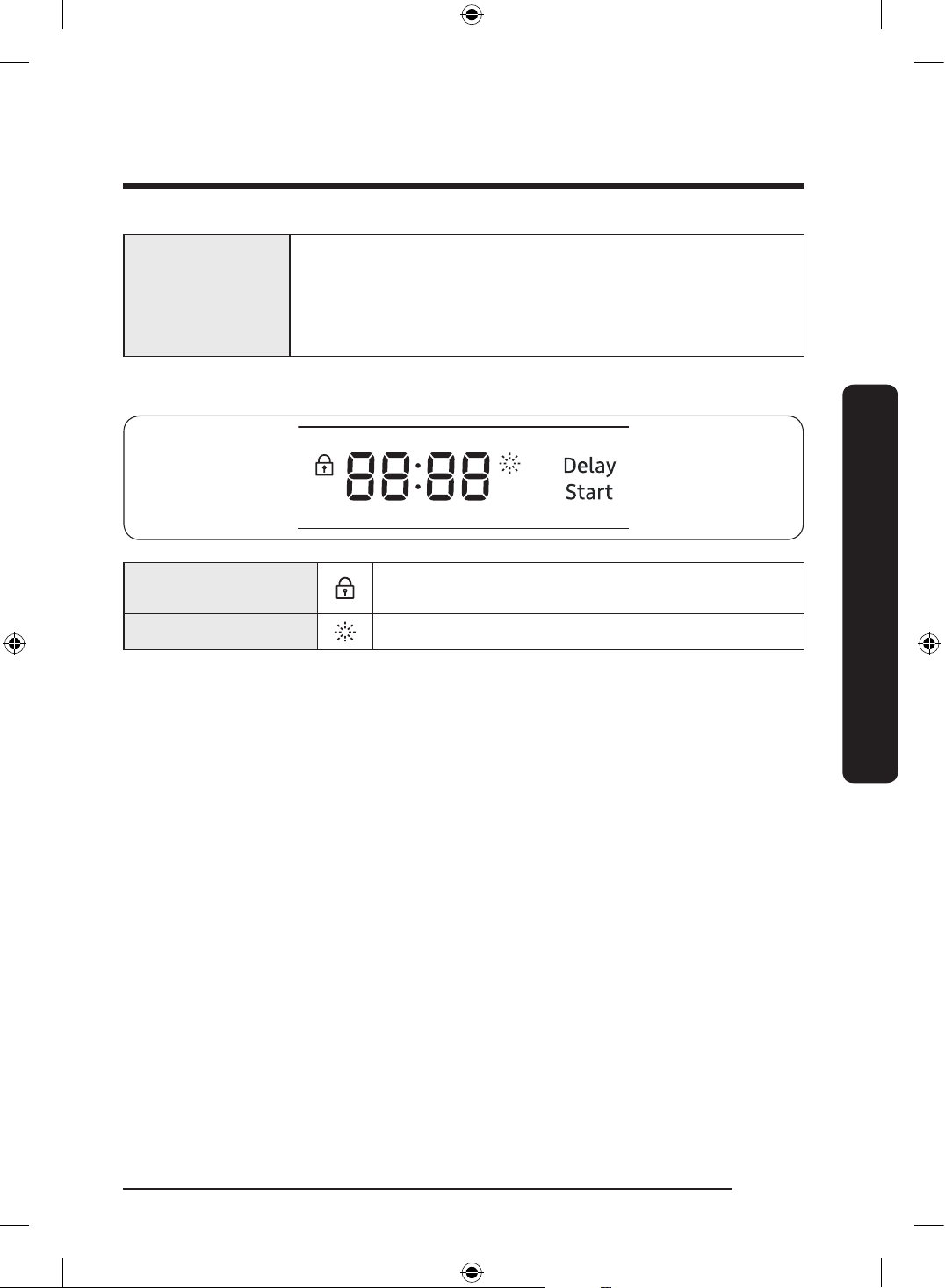
Indicators
Control Lock indicator
Lights up if Control Lock is activated, and blinks if any
button except for the Power button is pressed.
Rinse Refll indicator Lights up if the dishwasher runs out of rinse aid.
DW0009_IB_DW7000KM_English.indd 25 2024-03-04() 7:02:27
English26
Operations
Operations
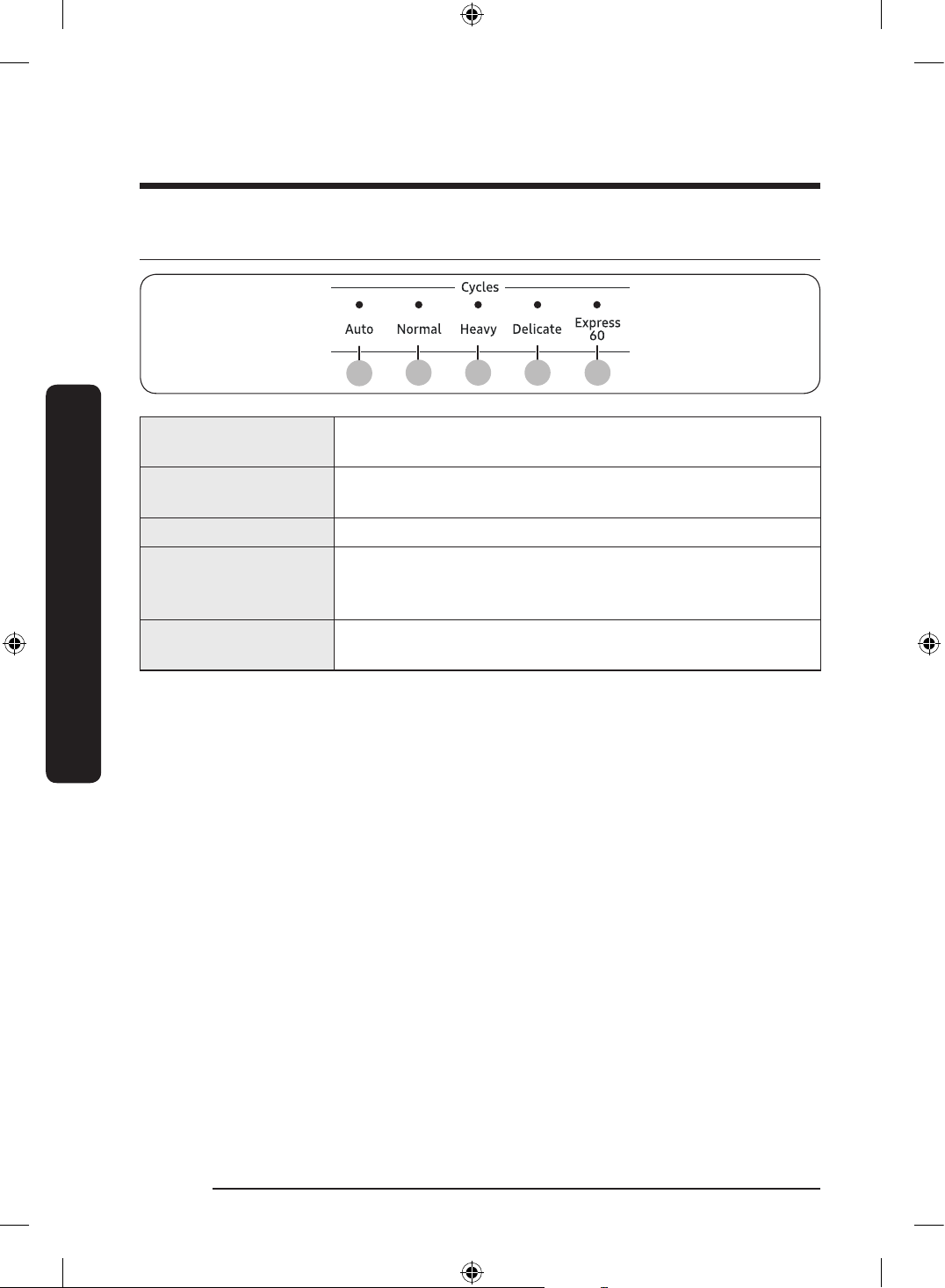
Cycle overview
01
02 03 04
05
01 Auto
This cycle detects the level of soil and automatically initiates
the optimal cycle after a few minutes of operation.
02 Normal
Use this cycle for normally soiled dishes.
The energy-usage label is based on this cycle.
03 Heavy Use this cycle for heavily soiled dishes.
04 Delicate
Use this cycle for soiled, fragile items such as ne glassware
and crystal glass (wine glass). Do not use this cycle for other
glassware because clouding or etching may occur.
05 Express 60'
Use this cycle when you need to wash dishes quickly. It takes
about 1 hour.
DW0009_IB_DW7000KM_English.indd 26 2024-03-04() 7:02:27
English 27
Operations
Simple steps to start your dishwasher
1. Open the door, and then load the dishwasher. Make sure dishes are empty.
2. Place dishes into the upper and lower racks, unless you have selected Lower Rack.
3. Add detergent to the detergent dispenser. For better results, add rinse aid to the rinse
aid compartment.
NOTE
You should use rinse aid for better drying performance. You can further improve drying
performance by also selecting the Sanitize option.
4. Press Power, and then select a cycle with necessary options (Lower Rack,
Hi-Temp Wash, Sanitize).
If you change the cycle after selecting an option, the option is released.
5. Press Start, and then close the door within 3 seconds. The dishwasher starts the cycle
after draining for a few seconds.
NOTE
• To change the cycle after it has started, press and hold Start for 3 seconds to cancel the
cycle. Then, select a new cycle.
• To resume after you have opened the door to stop the dishwasher while operating,
simply press Start rst, then close the door.
DW0009_IB_DW7000KM_English.indd 27 2024-03-04() 7:02:27
English28
Operations
Operations
Settings
You can change the Sound, Rinse aid amount, and Auto Release™ Dry settings to
your preference. To change the settings, press the Sanitize and Delay Start buttons
simultaneously for 3 seconds. Press Sanitize to navigate through the sub menus, and then
press Delay Start to conrm your changes.
Sound
U1/U0
Rinse aid amount
F1~F5
Auto Release™ Dry
A1/A0
After setting is nished, press Power button or Sanitize and Delay Start buttons.
Sound
Press Sanitize repeatedly until ‘U1’ or ‘U0’ is displayed. To mute the dishwasher, select ‘U0’,
and then press Delay Start. To unmute, select ‘U1’, and then press Delay Start.
The factory default level is ‘U1’.
Rinse aid amount
Press Sanitize until ‘F1~F5’ is displayed. The higher the number, the more rinse aid the
dishwasher uses. To improve drying performance, select a higher number.
If your dishes appear discolored after a wash, switch to a lower number.
The factory default level is ‘F4’.
DW0009_IB_DW7000KM_English.indd 28 2024-03-04() 7:02:27
English 29
Operations
Auto Release™ Dry
The Auto Release™ Dry function, which is designed to improve drying performance,
automatically opens the dishwasher’s door 1 to 15 minutes before a cycle ends.
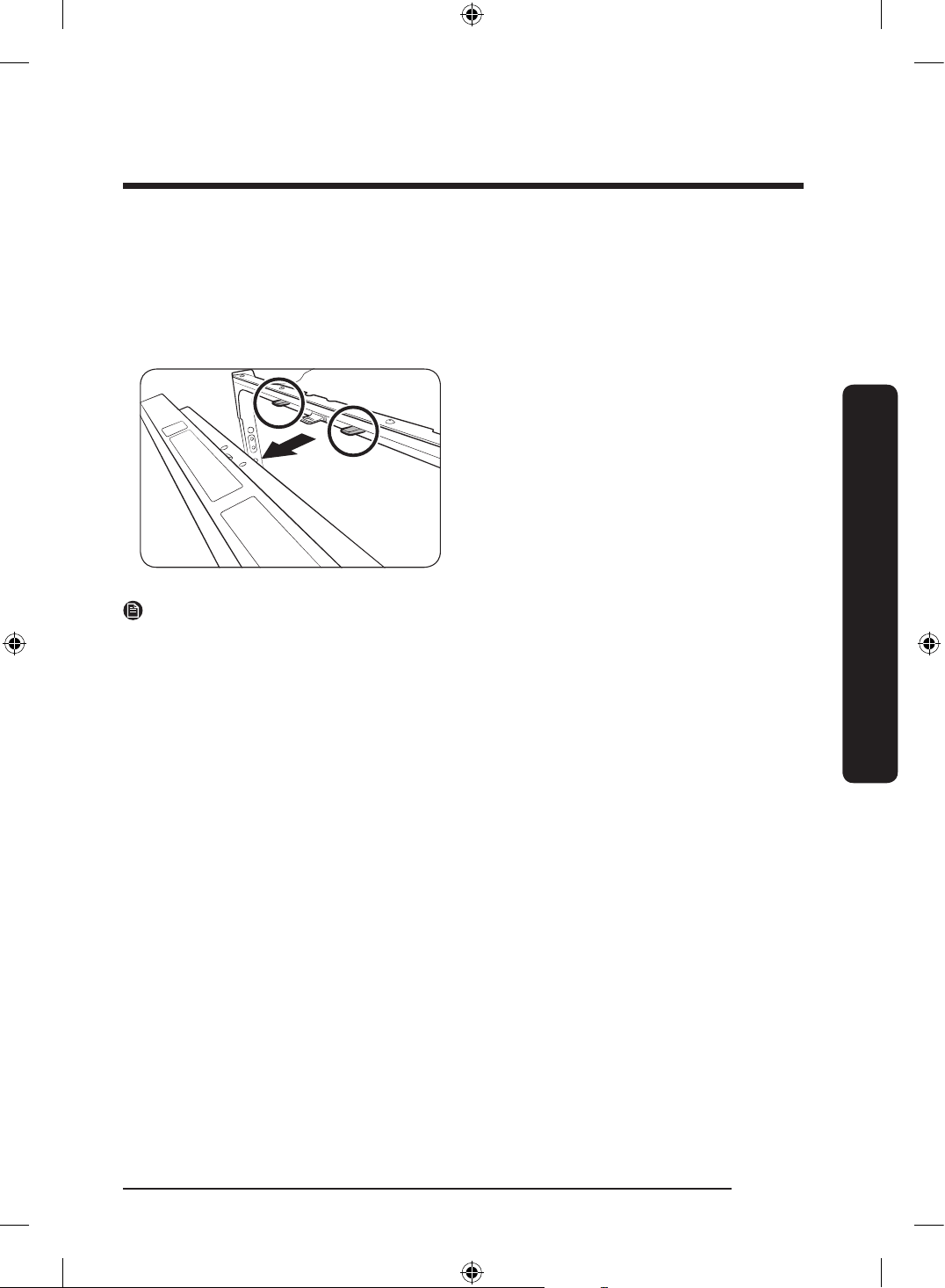
You can enable or disable Auto Release™ Dry by using the Setting Mode which is described
as shown below.
Press Sanitize until ‘A1’ or ‘A0’ is displayed.
Then, press Delay Start to enable (A1) or
disable (A0) Auto Release™ Dry.
The factory default level is ‘A1’.
NOTE
• Once the door opens on the Auto Release™ Dry mode, the door cannot be closed
manually for the next 2 minutes.
• Disabling (A0) “Auto Release™ Dry” can affect the drying results. Enable (A1)
“Auto Release™ Dry” for better drying result.
• After a cycle is complete, the door automatically opens to let steam out. This is normal
and not a product malfunction.
DW0009_IB_DW7000KM_English.indd 29 2024-03-04() 7:02:27
English30
Operations
Operations
Special features
Delay Start
You can delay the cycle starting time up to 24 hours in 1-hour increments. To increase the
delay time, press Delay Start. The hour displayed indicates the time at which the cycle will
start.
1. Open the door, and then load the dishwasher.
2. Press Delay Start, and then press or hold Delay Start to change the time in 1-hour
increments.
3. Close the door, and then press Start.
NOTE
To change the delay time once the dishwasher has started, press Power and then restart
the dishwasher.
Touch Controls
Touch controls allow you to operate the dishwasher easily.
• They are convenient to operate, requiring only a soft touch.
• Have a simple and stylish design.
• Are easy to clean.
NOTE
If you have children or you want to clean the Control Interface, recommended activating
the Control Lock feature to lock the control buttons.
Control Lock
To prevent children from playing with the dishwasher, Control Lock locks all button
controls except for Power.
• To activate Control Lock, press and hold Sanitize for 3 seconds. With Control Lock
activated, you cannot select a cycle or option, or start an operation.
• To deactivate Control Lock, press and hold Sanitize again for 3 seconds.
• Control Lock remains active after the dishwasher restarts. To cancel Control Lock, you
must deactivate it rst.
DW0009_IB_DW7000KM_English.indd 30 2024-03-04() 7:02:27
English 31
Maintenance
Maintenance
Cleaning
Keep the dishwasher clean to improve performance, reduce unnecessary repairs, and
lengthen its lifecycle.
Exterior
Clean spills on the surface of the dishwasher as they occur. Use a soft, damp cloth on the
control panel to gently wipe away spills and dust.
CAUTION
• Do not use benzene, wax, thinner, chlorine bleach, alcohol, or other chemical substances.
These materials may discolour the surface of the dishwasher and cause stains.
• The dishwasher has electric parts inside. Do not sprinkle water directly onto the
dishwasher. Protect electrical components from coming in contact with water.
• For a stainless-steel door panel, clean using a stainless steel cleaner for home
appliances and a clean, soft cloth.
Interior
Clean the interior of the dishwasher on a regular basis to remove any dirt or food particles.
Wipe inside the dishwasher and inside the door with a wet dishcloth. To maintain optimum
cleanliness, recommended running the Self Clean cycle periodically with the dishwasher
empty.
To keep the cutlery pad clean, turn it over after each use. To remove white spots and odors
from the cutlery pad, run the Self Clean cycle with the dishwasher empty and no detergent
until the cutlery pad ushes. Then, stop the cycle and put an 8-ounce cup of white vinegar
into the lower basket. Close the door, and then resume the cycle.
Use a damp cloth to remove lime scale or grease deposits inside the dishwasher.
Alternatively, apply some detergent, and then run an empty cycle using the highest rinse
temperature.
CAUTION
• Do not remove the front seal (the long rubber seal enclosing the opening of the
dishwasher). The seal keeps the inner side of the dishwasher sealed.
DW0009_IB_DW7000KM_English.indd 31 2024-03-04() 7:02:27
English32
Maintenance
Maintenance
Nozzles
To prevent the nozzles from being clogged or if the nozzles are clogged, remove and clean
each nozzle. Use caution when removing the nozzles as they may break.
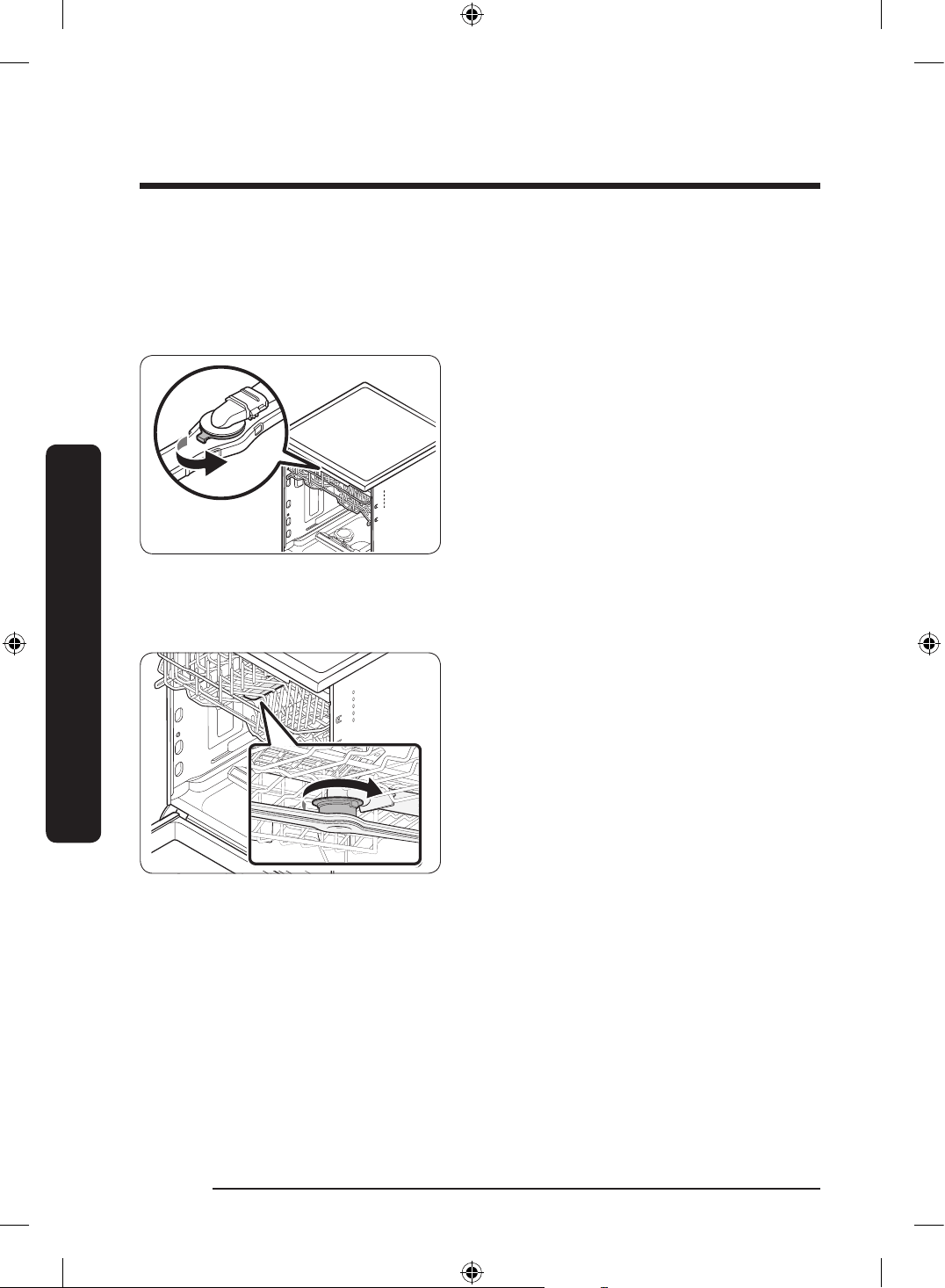
Top nozzle
1. Open the door, then pull out the upper
rack. The top nozzle is visible on the
top.
2. Turn counter clockwise and remove the
nozzle cap, then remove the nozzle.
3. Unclog and clean the nozzle.
4. Reinsert the nozzle, then tighten the
cap clockwise.
5. Rotate the nozzle by hand to make sure
the nozzle is engaged correctly.
Upper nozzle
1. Open the door, then pull out the upper
rack to reveal the upper nozzle.
2. Loosen and remove the nut, then
remove the nozzle.
3. Unclog and clean the nozzle.
4. Reinsert the nozzle, then tighten the
nut by hand.
5. Rotate the nozzle by hand to make sure
the nozzle is engaged correctly.
DW0009_IB_DW7000KM_English.indd 32 2024-03-04() 7:02:27
English 33
Maintenance
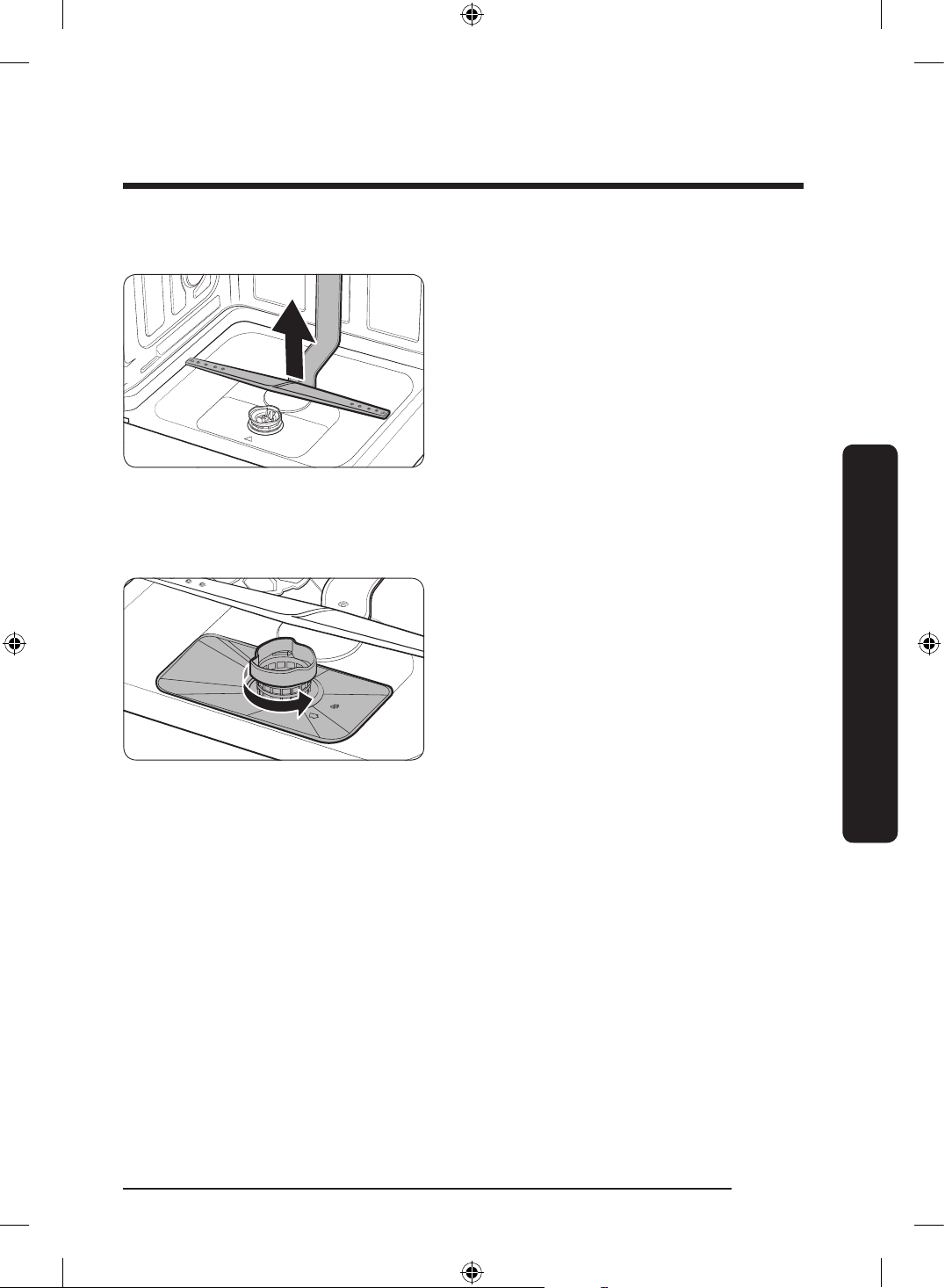
Lower nozzle
1. Open the door, then pull out the lower
rack. The lower nozzle is visible on the
bottom.
2. Unclog and clean the nozzle.
3. Reinsert the nozzle.
4. Rotate the nozzle by hand to make sure
the nozzle is engaged correctly.
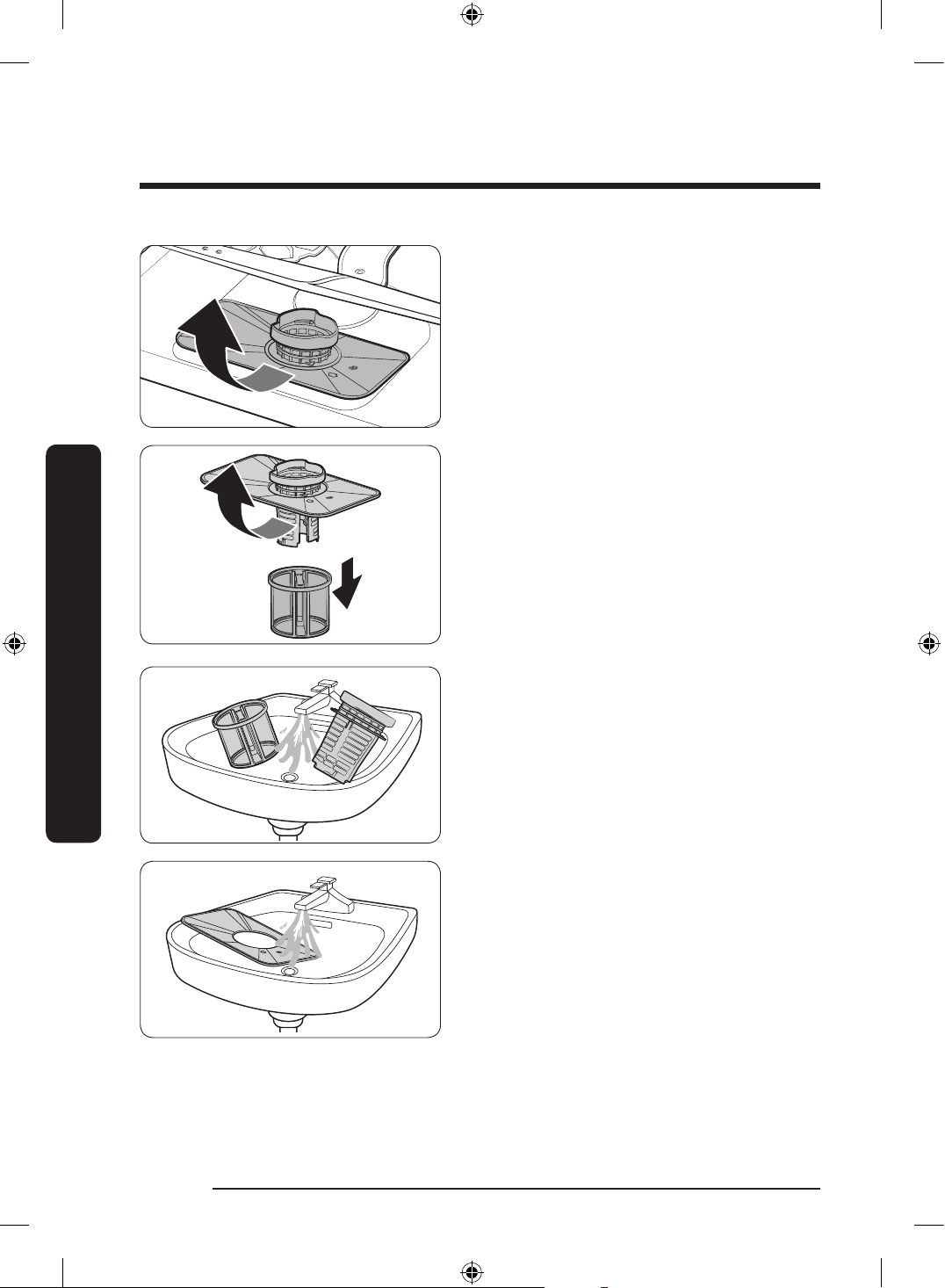
Filter
Recommended cleaning the lter every month.
1. Open the door, then remove the lower
rack rst.
2. Turn the lter handle counterclockwise
to unlock the Coarse lter.
DW0009_IB_DW7000KM_English.indd 33 2024-03-04() 7:02:28
English34
Maintenance
Maintenance
3. Remove the Coarse lter, then the
cylindrical micro lter underneath.
4. Remove any dirt and impurities from
the micro lter and the Coarse lter.
5. Rinse both lters with running water,
and then dry well.
DW0009_IB_DW7000KM_English.indd 34 2024-03-04() 7:02:28
English 35
Maintenance
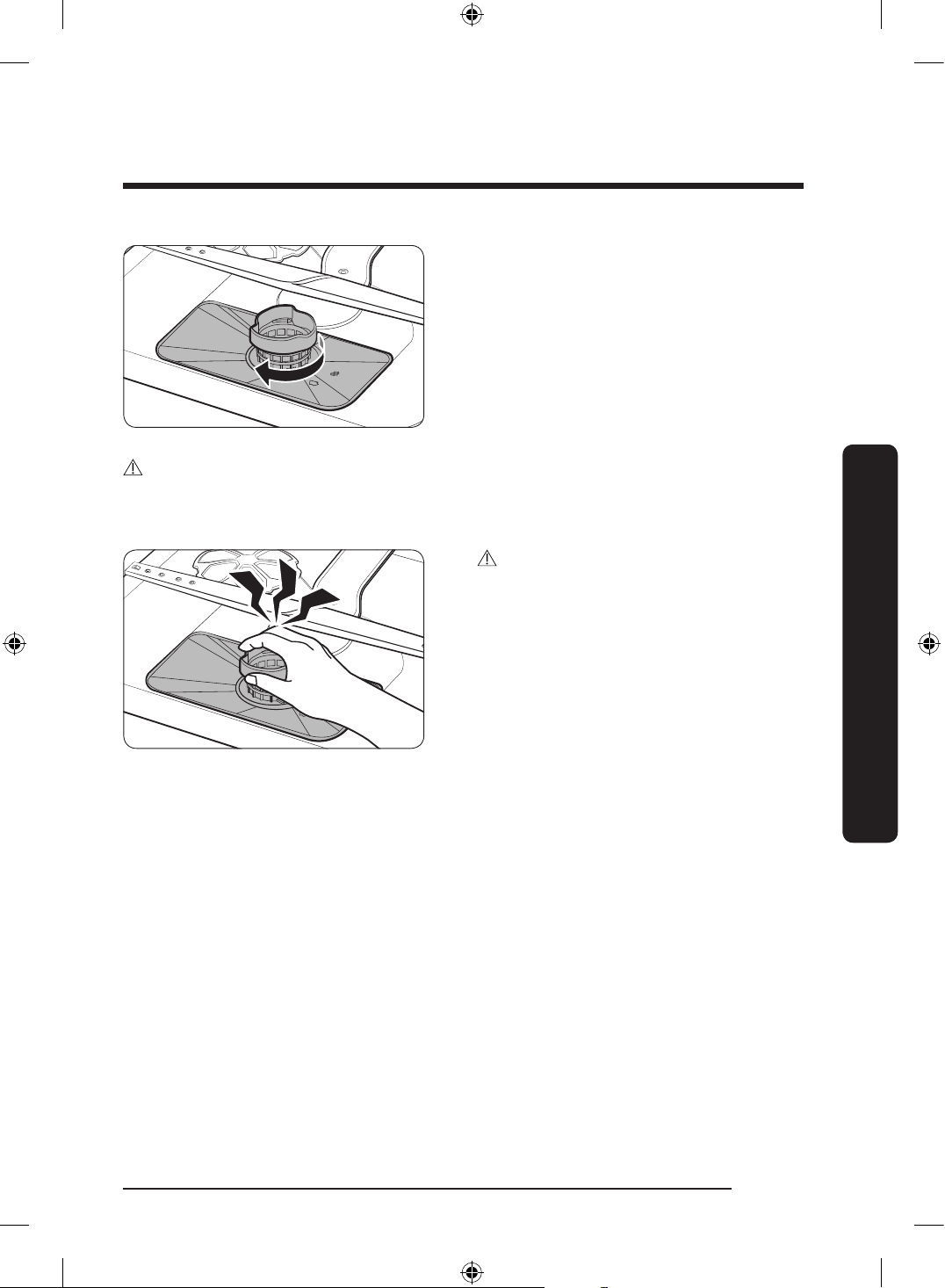
6. Reinsert the lter, and then the Coarse
lter.
7. Turn the lter handle clockwise to lock.
CAUTION
Make sure the Coarse lter is closed properly. A loose cover can reduce the ltering
performance.
CAUTION
When removing the lter, the hand can
caught between the rotor and lter.
DW0009_IB_DW7000KM_English.indd 35 2024-03-04() 7:02:29
English36
Maintenance
Maintenance
Long-term care
If you are not using the dishwasher for an extended period of time, rst drain the unit
completely, and then disconnect the water hose. Shut off the water supply valve and the
circuit breaker. Water remaining in the hoses or the internal components can damage the
dishwasher.
Storing your dishwasher
If you need to store your dishwasher for an extended period of time, rst drain and
disconnect it. If water remains in the hoses and internal components, you can damage the
dishwasher.
After draining and disconnecting the dishwasher, be sure to turn off the water supply valve
and circuit breaker.
DW0009_IB_DW7000KM_English.indd 36 2024-03-04() 7:02:29
English 37
Troubleshooting
Troubleshooting
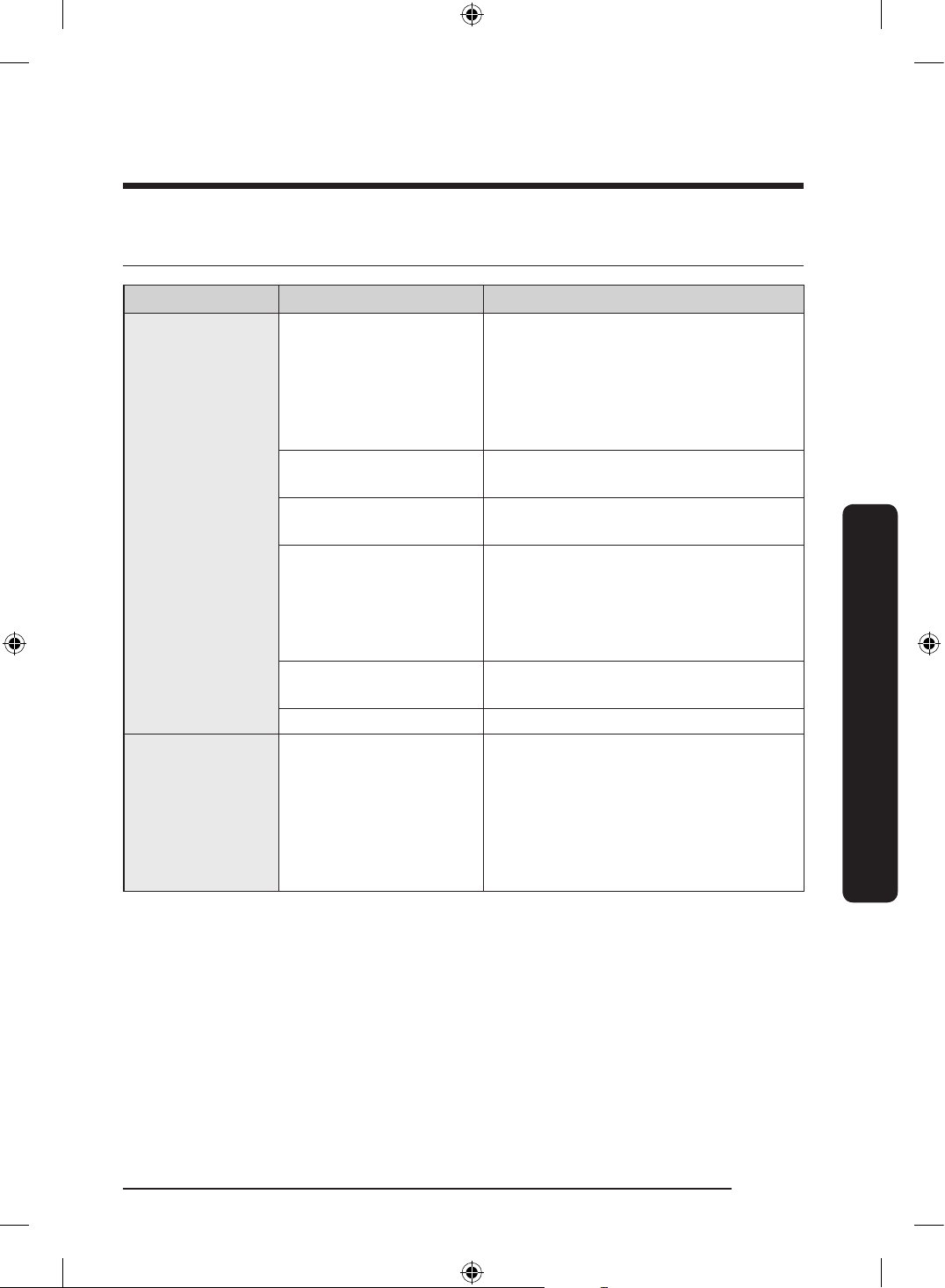
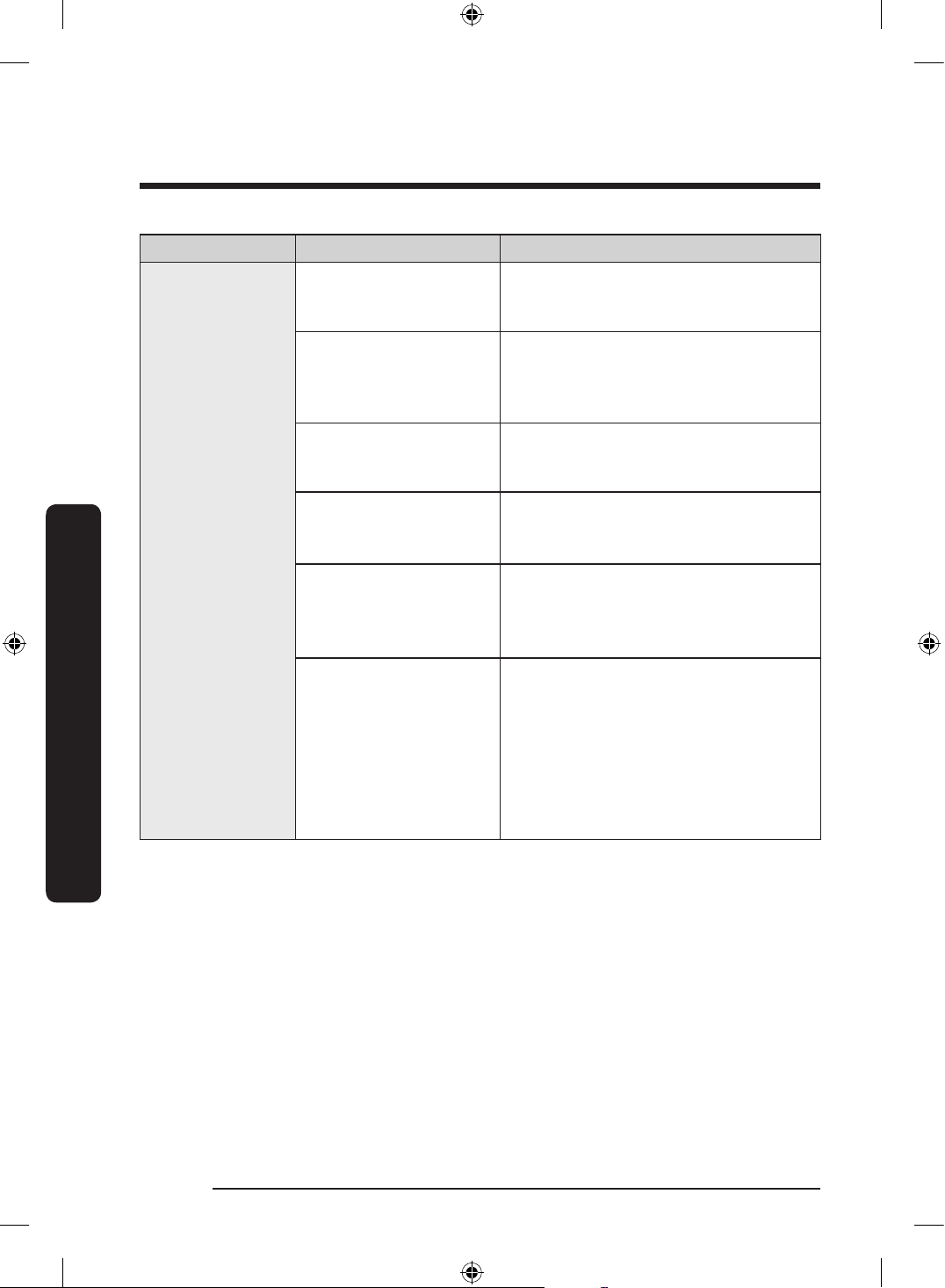
Check these solutions if your dishwasher…
Problem Possible cause Solution
Will not start.
The door is not closed
completely.
• Check if the door is latched and
closed completely. Check whether the
Upper Rack is properly joined to the
Duct Nozzle.
• Also, check if the Upper Rack is
crooked or unbalanced.
The Start button was not
pressed.
• Check the information code on page 42
that appears on the display.
Doesn't operate at all.
• Make sure the power cord is
connected properly.
The water supply does
not work.
• Check if the water supply valve is
open.
• Check if the supplied water pressure
is between 20 and 120 psi (between
140 and 830 kPa).
The Control Panel is
locked.
• Unlock the Control Lock, (See page
30.)
A circuit breaker is open. • Reset the circuit breaker.
An operation or
cycle is taking too
long.
The dishwasher is
connected to a cold water
supply.
• Check if the water supply line is
connected to a cold water supply. To
work properly, the dishwasher must
be connected to a hot water supply.
(If connected to a cold water supply,
additional time is required to heat the
cold water.)
DW0009_IB_DW7000KM_English.indd 37 2024-03-04() 7:02:29
English38
Troubleshooting
Troubleshooting
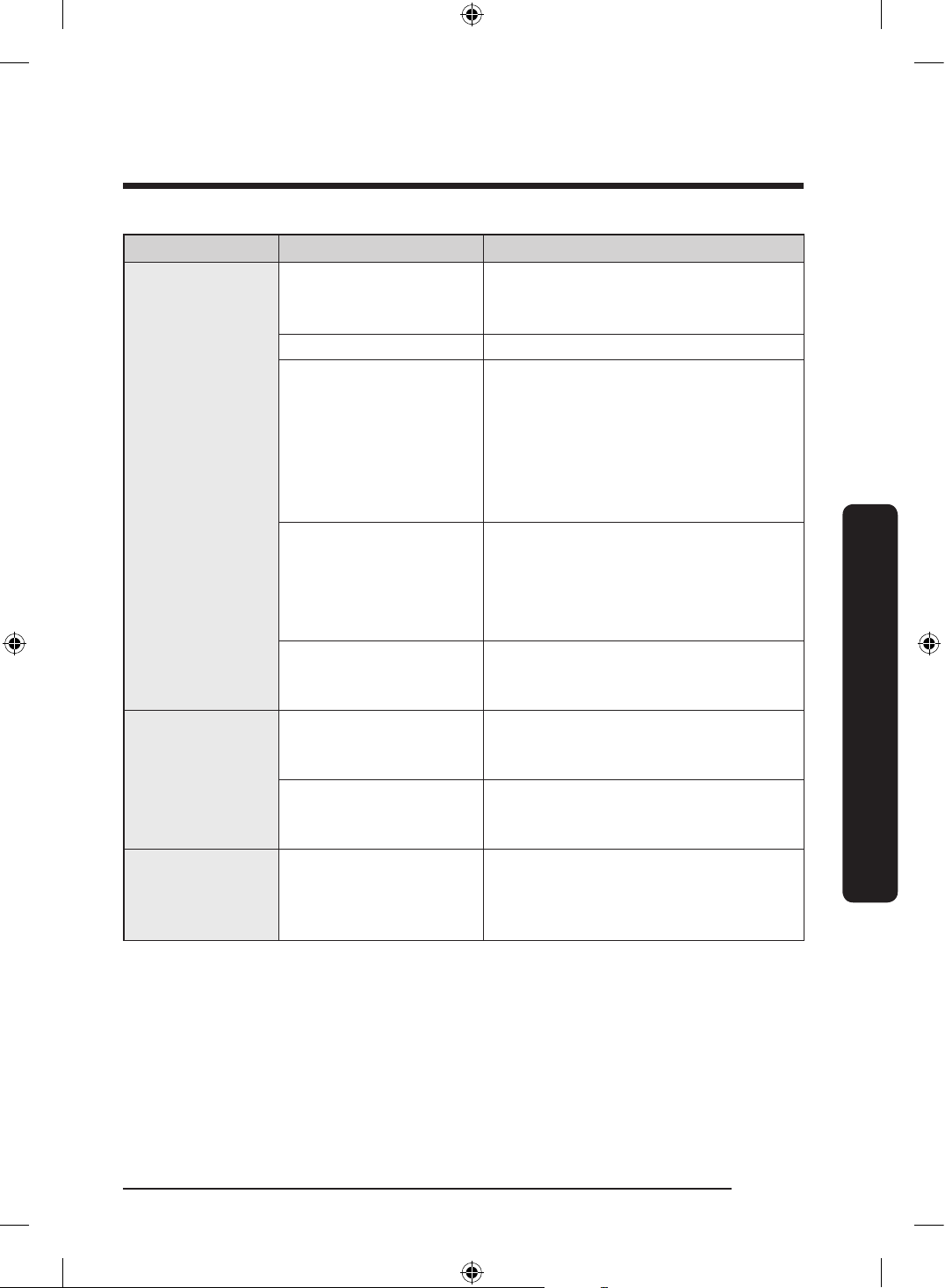
Problem Possible cause Solution
There are
food particles
remaining on
dishes.
(Not cleaning
properly.)
The cycle selected was
unsuitable.
• Select a cycle according to the
number and soil level of the dishes, as
directed in this manual.
The water temperature
is low.
• Connect the water supply line to a hot
water supply. For best performance,
the temperature of the supplied water
should be 120 ˚F (49 ˚C).
Low water pressure.
• The water pressure should be
between 20 and 120 psi (140-
830 kPa).
The water is too hard.
(water hardness)
• Use a commercial dishwasher cleaner.
• Use high-quality, fresh detergent with
rinse aid.
Dishwasher detergent
was not used.
• Use automatic dishwasher detergent.
• Recommended a powder type or
multi-function tablet dishwasher
detergent.
Detergent remains in the
dispenser.
• Make sure large items such as cookie
sheets, cutting boards, or contaners,
etc. are not blocking the detergent
dispenser and preventing it from
opening properly.
• Rearrange the dishes so they do not
interfere with detergent dispenser
operation.
DW0009_IB_DW7000KM_English.indd 38 2024-03-04() 7:02:29
English 39
Troubleshooting
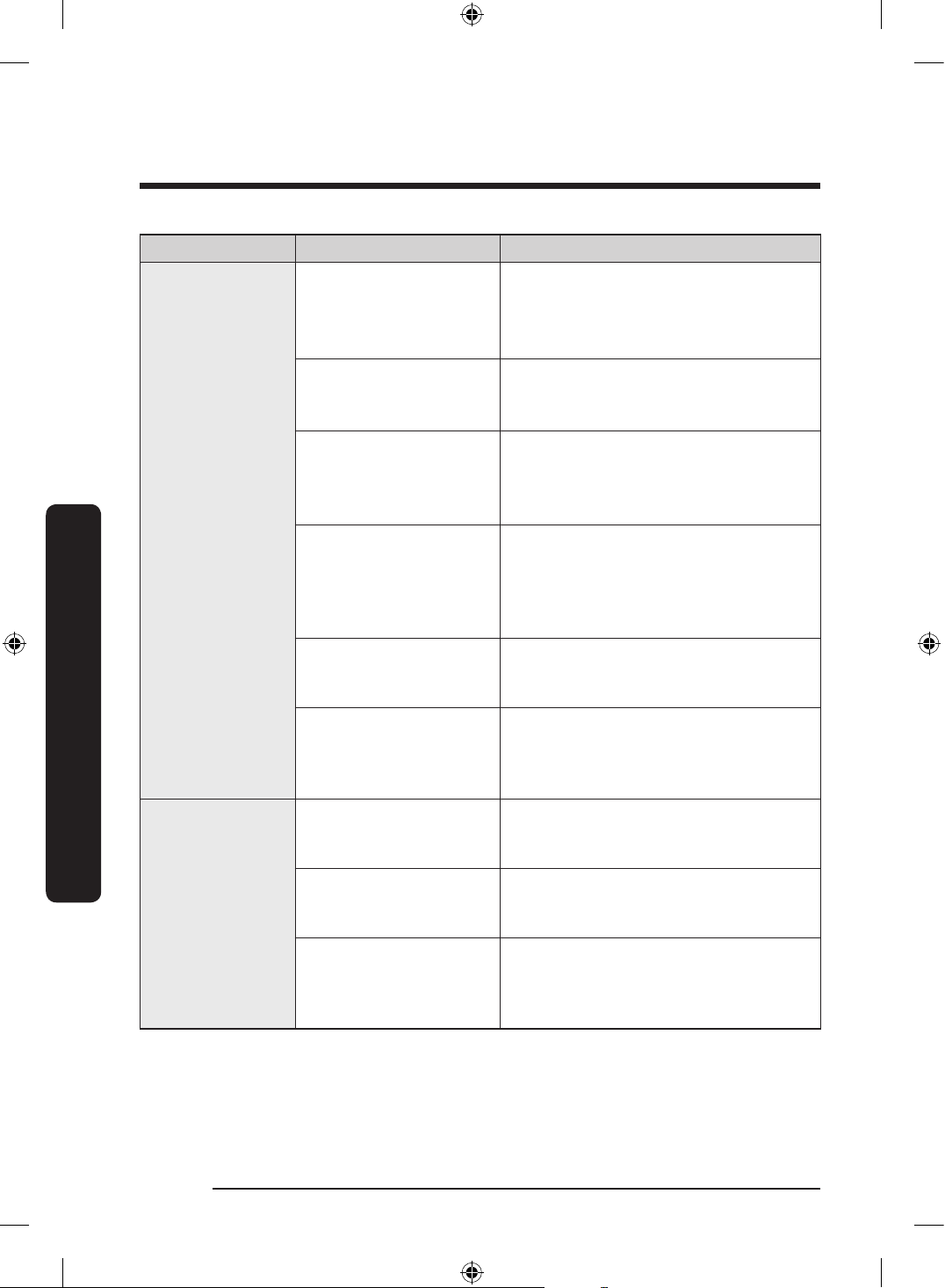
Problem Possible cause Solution
There are
food particles
remaining on
dishes.
(Not cleaning
properly.)
There is no rinse aid.
• Check the dispenser and add rinse
aid.
• Use liquid type rinse aid.
A nozzle is clogged. • Clean the nozzle. See page 33.
The dishes are
improperly loaded.
Too many dishes have
been loaded.
• Rearrange the dishes so they do not
interfere with nozzle rotation and
detergent dispenser operation.
• Load only an appropriate number of
dishes.
• Load your dishes as recommended.
(See page 14.)
The lters are clogged or
not correctly fastened.
(Food soils remain on the
lter.)
• Scrape food from dishes prior to
loading. (Do not pre-rinse.)
• Clean the lter. (See page 33.)
• Make sure the lters are correctly
fastened.
Less water than required
is supplied.
• Check if the supplied water pressure
is between 20 and 120 psi (between
140 and 830 kPa).
Leaves glasses
with a light flm.
The water supplied
is hard and too much
detergent was used.
• Underload the dishwasher and use a
rinse aid to minimize this.
Aluminum dishes were
included in the wash
load.
• Remove the marks on the dishes
using a low sensitivity cleaner.
Leaves a yellow
or brown flm on
the inside of the
dishwasher.
This is caused by coffee
and tea soils.
• Remove the soils using a spot cleaner.
• Use a cycle with a higher
temperature.
DW0009_IB_DW7000KM_English.indd 39 2024-03-04() 7:02:29
English40
Troubleshooting
Troubleshooting
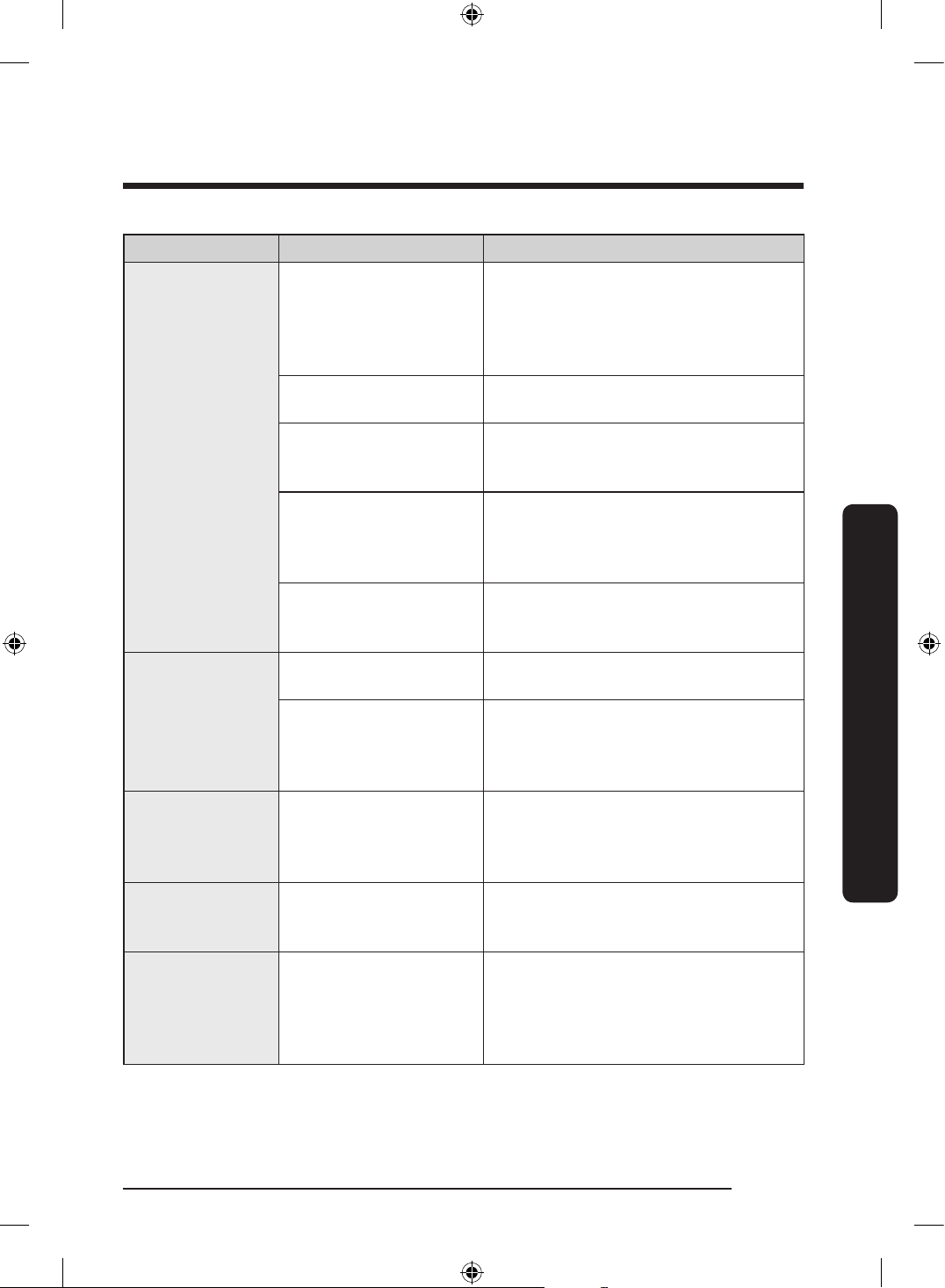
Problem Possible cause Solution
Does not dry
dishes well.
There is no rinse aid
in the dispenser or not
enough rinse aid was
used.
• Check the dispenser and add rinse
aid.
• Use a liquid type rinse aid.
• Check the rinse aid settings.
The temperature of the
water is low when the
dishwasher is running.
• Connect the water supply line to a hot
water supply.
• Use rinse aid with the Sanitize option.
Too many dishes have
been loaded.
• Proper loading of items can affect
drying.
• Load your dishes as recommended.
(See page 14.)
Glasses and cups with
concave bottoms hold
water. This water may
spill onto other items
when you unload.
• After nishing the cycle, empty the
lower rack rst and then the upper
rack. This will prevent water dripping
from the upper rack onto the dishes
in the lower rack.
Auto Release™ Dry is
turned off.
• Turn Auto Release™ Dry on.
Multiple detergent
tablets were used
without selecting the
Sanitize option.
• Select the Sanitize option or use rinse
aid.
Has a bad odor.
Water was left over from
an incomplete cycle.
• Clean the dishwasher by running the
Heavy cycle with the dishwasher
empty and no detergent.
The Drain Hose is
obstructed.
• Contact a qualied service technician
to remove any obstruction from the
drain hose.
The dishwasher is not
used daily or soiled
dishes are left in unit too
long.
• With the dishwasher empty and no
detergent, place a glass with 8 ounces
of vinegar upright into the lower rack,
and then run a Heavy cycle.
DW0009_IB_DW7000KM_English.indd 40 2024-03-04() 7:02:29
English 41
Troubleshooting
Problem Possible cause Solution
Is too noisy.
Sound is generated when
the dispenser cover is
open and the drain pump
is operating in an early
stage.
• This is normal operation.
The dishwasher is not
leveled.
• Ensure the dishwasher is leveled
properly.
Foreign material (a screw,
a plastic piece) is in the
pump chamber.
• Contact a qualied service technician
to remove foreign material from the
pump chamber.
There is a ‘chopping’
sound because a nozzle
is bumping against the
dishes.
• Rearrange the dishes.
Less water than required
is supplied.
• Check if the supplied water pressure
is between 20 and 120 psi (between
140 and 830 kPa).
Does not have a
smoothly rotating
nozzle.
Nozzle holes are clogged
with food particles.
• Clean the nozzle holes. (See page 33.)
The nozzle is blocked by
a dish or pot and cannot
rotate.
• After placing the dishes into the
racks, rotate the nozzles by hand
to check whether any of the dishes
interfere with them.
Water won’t
pump out of the
dishwasher.
The drain is clogged.
• Contact a qualied service technician
to remove any obstruction from the
drain hose and check the drain pump
operation.
Has a bent upper
rack after dishes
are loaded.
The dishes are not loaded
properly.
• Load your dishes as recommended.
(See page 14.)
Cannot close the
door.
Auto Release™ Dry mode
is in operation.
• Once the door opens in the
Auto Release™ Dry mode, the door
cannot be closed manually for the
next 2 minutes. You may close the
door after 2 minutes.
DW0009_IB_DW7000KM_English.indd 41 2024-03-04() 7:02:29
English42
Troubleshooting
Troubleshooting
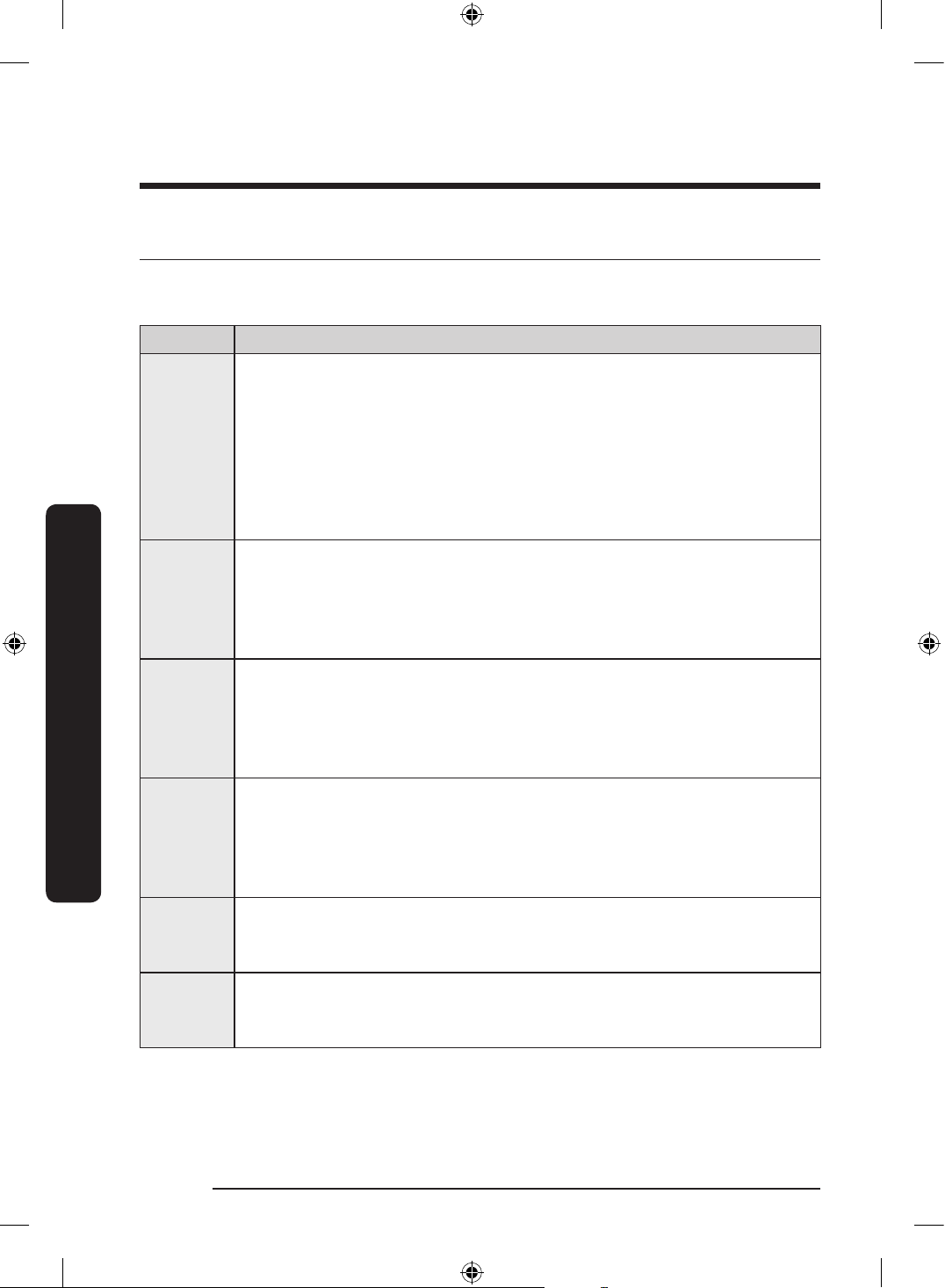
Information codes
The Control Panel displays information codes to help you understand what is occurring
with your dishwasher.
Code Action
LC
Leakage check / Overow check
• If a leak occurs on the water supply valve connection, close the water
supply valve and go to your house circuit breaker panel, set the
dishwasher’s circuit breaker switch to off, and then contact the installer
to x.
If the problem continues, contact an authorized Samsung service center.
• After closing the water supply valve, check if there is any drainage
problem or leak problem.
4C
Water supply check.
• Check if the water supply valve is closed or clogged, or is frozen. Also
check if the supplied water pressure is less than required.
If the problem continues, close the water supply valve, and then contact
an authorized Samsung service center.
5C
Drain check.
• After closing the water supply valve, check whether the drain hose is
clogged or folded. Also, check whether the drain hole inside the sump is
clogged.
If the problem continues, contact an authorized Samsung service center.
HC
High temperature heating check.
• Functional check. With the dishwasher empty, add detergent, and then
run a cycle. If the problem continues, go to your house circuit breaker
panel, set the dishwasher’s circuit breaker switch to off, and then contact
an authorized Samsung service center.
3C
Pump operation check.
• Functional check. Turn off the dishwasher and try to start it again.
If the problem continues, contact an authorized Samsung service center.
PC
Zone wash function check.
• Functional check. Turn off the dishwasher and try to start it again.
If the problem continues, contact an authorized Samsung service center.
DW0009_IB_DW7000KM_English.indd 42 2024-03-04() 7:02:29
English 43
Troubleshooting
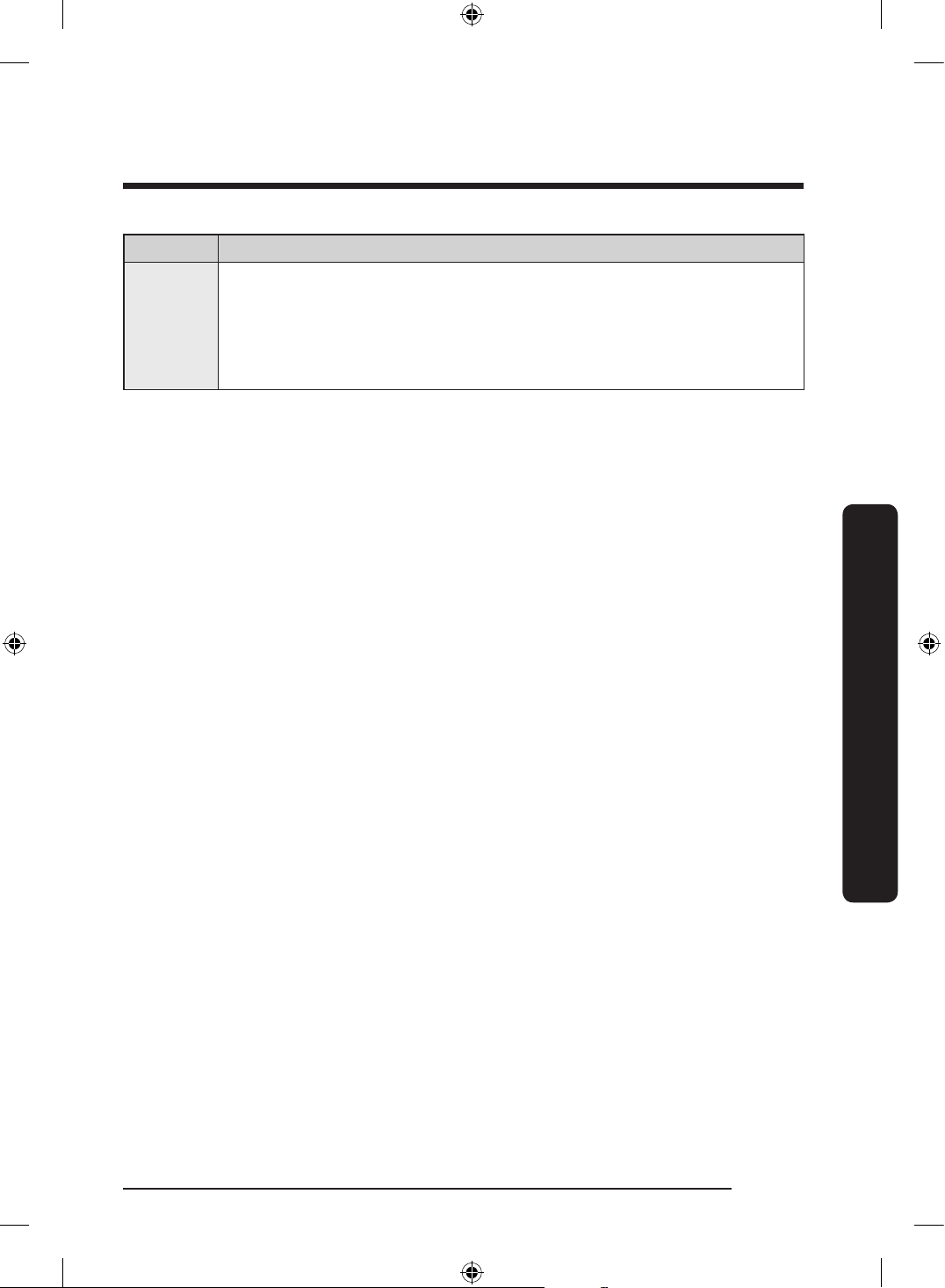
Code Action
1C
Low-water level check
• Check if the lter is clogged.
• Make sure to use dishwasher detergent.
• Make sure that the dishes are loaded evenly.
• Turn the dishwasher off and turn it on again. Then, try again.
For any codes not listed above, call 1-800-SAMSUNG (726-7864).
DW0009_IB_DW7000KM_English.indd 43 2024-03-04() 7:02:29
English44
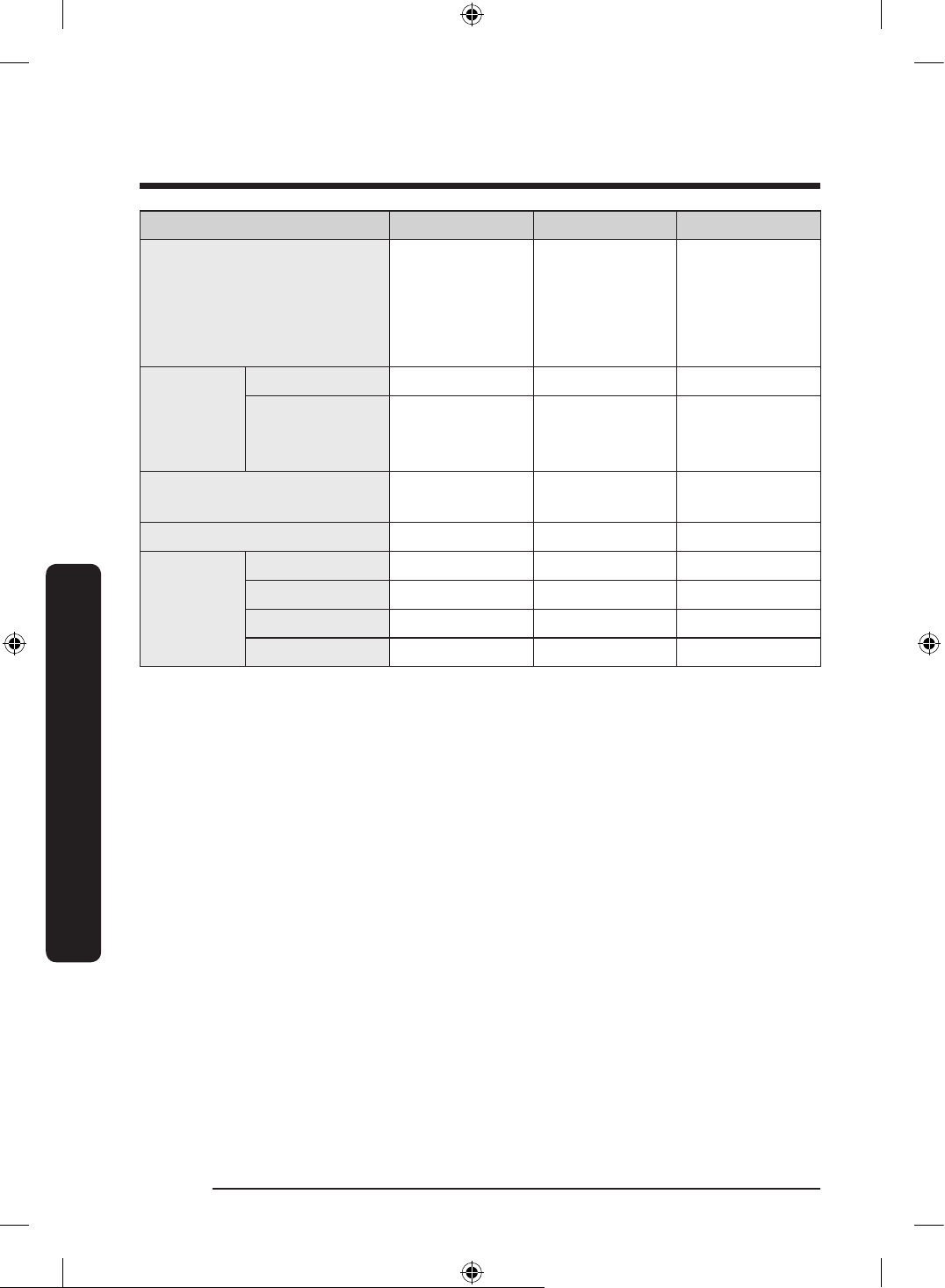
Cycle chart
Cycle chart
Cycle Auto Normal Heavy
Cycle sequence
Prewash
Mainwash
Rinse
Hot Rinse
Dry End
Prewash
Mainwash
Rinse
Hot Rinse
Dry End
Prewash
Mainwash
Rinse
Hot Rinse
Dry End
Temp
[˚F (˚C)]
Main wash 113-140 (45-60) 108-136 (42-58) 146 (63)
Hot Rinse
*Sanitize 163 ˚F
(73 ˚C)
144-149 (62-65) 140-144 (60-62) 149 (65)
Water consumption
[gal (ℓ)]
2.6-5.1
(9.7-19.2)
2.6-5.1
(9.7-19.2)
5.1 (19.2)
Cycle time (min) 111-138 105-150 152
Available
Options
Lower Rack O O O
Hi-Temp Wash O O O
Sanitize O O O
Delay Start O O O
DW0009_IB_DW7000KM_English.indd 44 2024-03-04() 7:02:29
English 45
Cycle chart
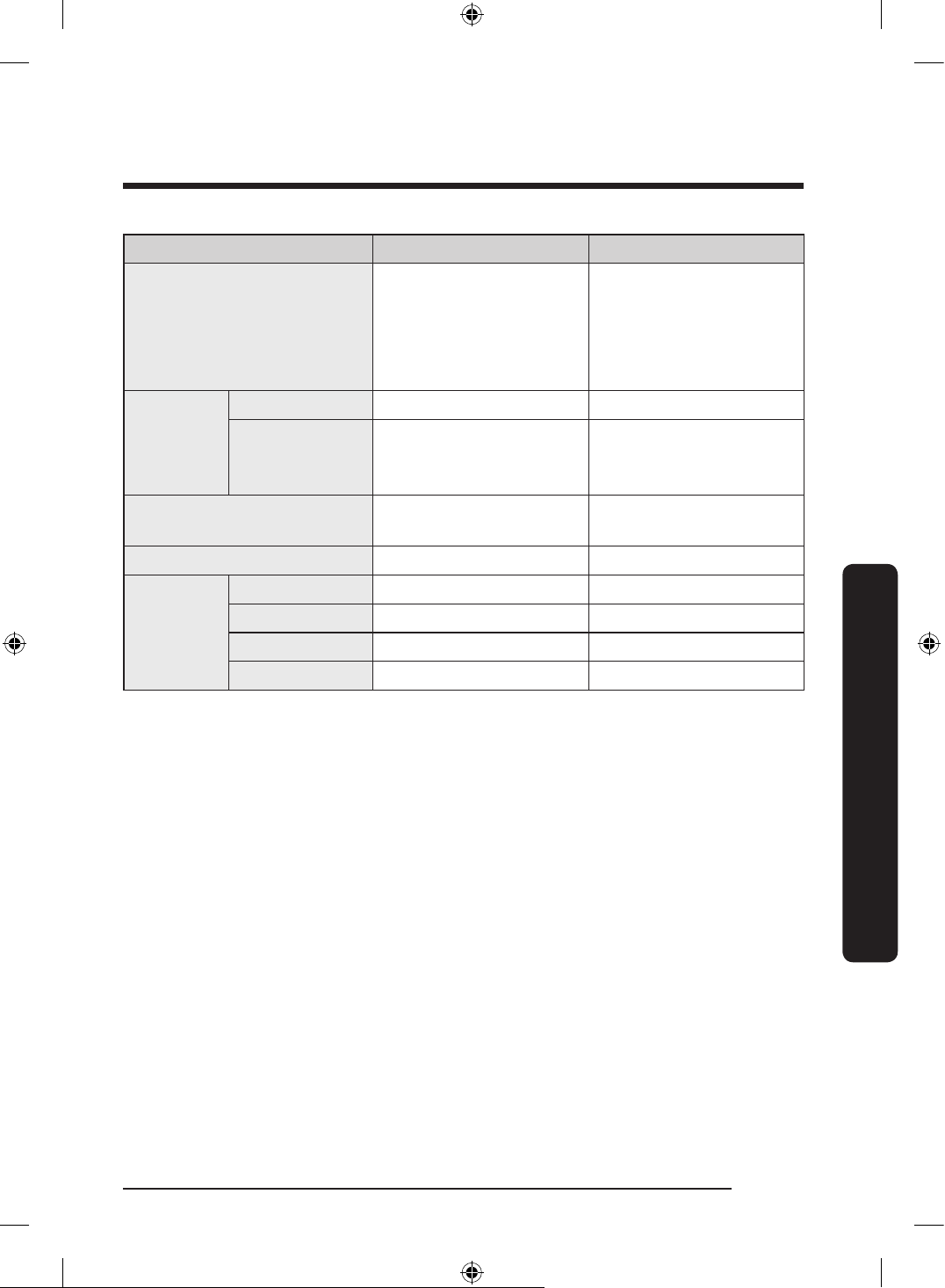
Cycle Delicate Express 60'
Cycle sequence
Prewash
Mainwash
Rinse
Hot Rinse
Dry End
Prewash
Mainwash
Rinse
Hot Rinse
Dry End
Temp
[˚F (˚C)]
Main wash 122 (50) 131 (55)
Hot Rinse
*Sanitize 163 ˚F
(73 ˚C)
140 (60) 131 (55)
Water consumption
[gal (ℓ)]
4.2 (16) 3.4 (12.9)
Cycle time (min) 112 60
Available
Options
Lower Rack O O
Hi-Temp Wash X O
Sanitize X O
Delay Start O O
• When you select the Auto or Normal cycle, running the Prewash and Rinse cycles
depends on the soil level of the load.
• The water consumption and wash time varies depending on the steps or options you
add, and on the pressure and temperature of the supplied water.
• When you select any options, the cycle time can be changed.
• It is stated that the actual water temperature may differ from the declared cycle
temperature.
DW0009_IB_DW7000KM_English.indd 45 2024-03-04() 7:02:29
English46
Appendix
Appendix
Helping the environment
• Your dishwasher is manufactured from recyclable materials. If you decide to dispose of
it, please observe local waste disposal regulations. Cut off the power cord so that the
appliance cannot be connected to a power source.
• Remove the door so that animals and small children cannot get trapped inside the
appliance.
• Do not exceed the detergent quantities recommended in the detergent manufacturers’
instructions.
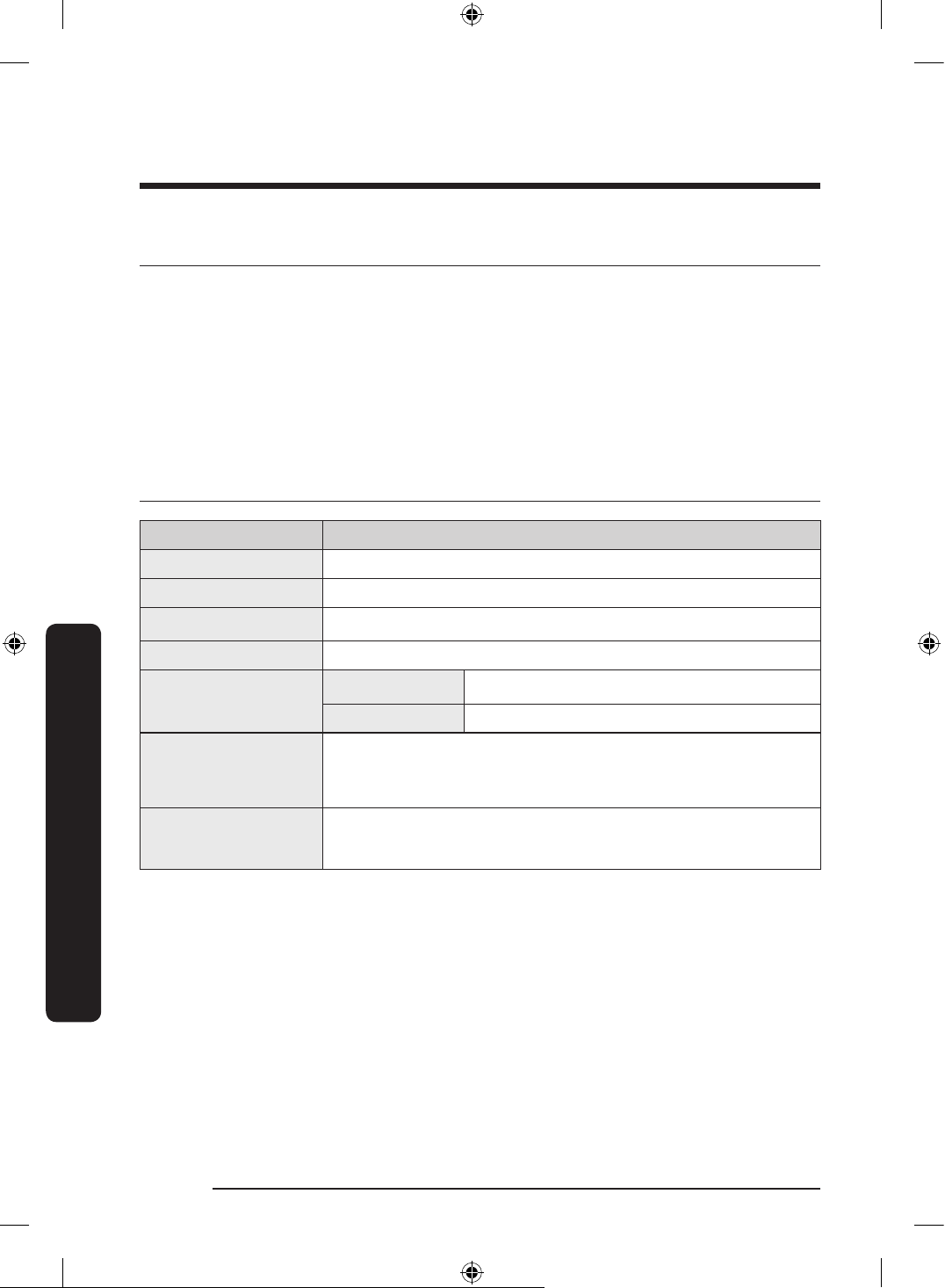
Specications
MODEL DW80DG5500SR / DW80DG5200SR
Type Built-in Dishwasher
Power 120 V / 60 Hz AC only, 15 A circuit breaker
Wash capacity 15 place settings
Used water pressure 20-120 psi (140-830 kPa)
Rated power uasge
Wash Motor 60-100 W
Heater 1000 W
Dimensions
(Width × Depth ×
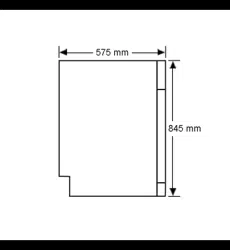
Height)
23
7
⁄8 x 24
3
⁄4 x 33
7
⁄8 in. (605 x 627 x 860 mm)
Weight (Unpacked)
DW80DG5500**: 83.8 lb (38 kg)
DW80DG5200**: 79.4 lb (36 kg)
DW0009_IB_DW7000KM_English.indd 46 2024-03-04() 7:02:29
English 47
Warranty (U.S.A)
Warranty (U.S.A)
SAMSUNG DISHWASHER
LIMITED WARRANTY TO ORIGINAL CONSUMER PURCHASER WITH PROOF OF PURCHASE
AND/OR PROOF OF DELIVERY
This SAMSUNG brand product, as supplied and distributed by SAMSUNG ELECTRONICS
AMERICA, INC. (SAMSUNG) and delivered new, in the original carton to the original
consumer purchaser, is warranted by SAMSUNG against manufacturing defects in materials
or workmanship for the following limited warranty periods, starting on the date of
delivery to the original consumer purchaser:
One (1) year parts and labor
Five (5) years, Printed Circuit Board, Racking and Stainless Door Liner & Tub for leakage
(Parts Only)
This limited warranty is valid only on products purchased and used in the United States
that have been installed, operated, and maintained according to the instructions attached
to or furnished with the product. To receive warranty service, the purchaser must contact
SAMSUNG at the address or phone number provided below for problem determination and
service procedures. Warranty service can only be performed by a SAMSUNG authorized
service center. The original dated bill of sale or proof of delivery must be presented upon
request to SAMSUNG or SAMSUNG’s authorized service center to receive warranty service.
SAMSUNG will provide in-home service within the contiguous United States during the
warranty period at no charge, subject to availability of SAMSUNG authorized servicers
within the customer’s geographic area. If the product is located in an area where service by
a SAMSUNG authorized servicer is not available, you may be responsible for a trip charge
or required to bring the product to a SAMSUNG authorized service center for service.
To receive in-home service, product must be unobstructed and accessible to the service
agent.
During the applicable warranty period, a product will be repaired, replaced, or the purchase
price refunded, at the sole option of SAMSUNG. SAMSUNG may use new or reconditioned
parts in repairing a product, or replace the product with a new or reconditioned product.
Replacement parts and products are warranted for the remaining portion of the original
product’s warranty or ninety (90) days, whichever is longer. All replaced parts and products
are the property of SAMSUNG and you must return them to SAMSUNG.
DW0009_IB_DW7000KM_English.indd 47 2024-03-04() 7:02:29
English48
Warranty (U.S.A)
Warranty (U.S.A)
This limited warranty covers manufacturing defects in materials or workmanship
encountered in normal household, noncommercial use of this product and shall not
cover the following: damage that occurs in shipment, delivery, installation, and uses for
which this product was not intended; damage caused by unauthorized modication or
alteration of the product; product where the original factory serial numbers have been
removed, defaced, changed in any way, or cannot be readily determined; cosmetic damage
including scratches, dents, chips, and other damage to the product’s nishes; damage
caused by abuse, misuse, pest infestations, accident, re, oods, or other acts of nature or
God; damage caused by use of equipment, utilities, services, parts, supplies, accessories,
applications, installations, repairs, external wiring or connectors not supplied or authorized
by SAMSUNG; damage caused by incorrect electrical line current, voltage, uctuations
and surges; damage caused by failure to operate and maintain the product according
to instructions; in-home instruction on how to use your product; and service to correct
installation not in accordance with electrical or plumbing codes or correction of household
electrical or plumbing (that is house wiring, fuses, or water inlet hoses).
The cost of repair or replacement under these excluded circumstances shall be the
customer’s responsibility.
Visits by an authorized servicer to explain product functions, maintenance or installation
are not covered by this limited warranty. Please contact SAMSUNG at the number below
for assistance with any of these issues.
EXCLUSION OF IMPLIED WARRANTIES
IMPLIED WARRANTIES, INCLUDING THE IMPLIED WARRANTIES OF MERCHANTABILITY OR
FITNESS FOR A PARTICULAR PURPOSE, ARE LIMITED TO ONE YEAR OR THE SHORTEST
PERIOD ALLOWED BY LAW. Some states do not allow limitations on how long an implied
warranty lasts, so the above limitations or exclusions may not apply to you. This warranty
gives you specic rights, and you may also have other rights, which vary from state to
state.
DW0009_IB_DW7000KM_English.indd 48 2024-03-04() 7:02:29
English 49
Warranty (U.S.A)
LIMITATION OF REMEDIES
YOUR SOLE AND EXCLUSIVE REMEDY IS PRODUCT REPAIR, PRODUCT REPLACEMENT,
OR REFUND OF THE PURCHASE PRICE AT SAMSUNG’S OPTION, AS PROVIDED IN THIS
LIMITED WARRANTY. SAMSUNG SHALL NOT BE LIABLE FOR SPECIAL, INCIDENTAL OR
CONSEQUENTIAL DAMAGES, INCLUDING BUT NOT LIMITED TO TIME WAY FROM WORK,
HOTELS AND/OR RESTAURANT MEALS, REMODELING EXPENSES, LOSS OF REVENUE OR
PROFITS, FAILURE TO REALIZE SAVINGS OR OTHER BENEFITS REGARDLESS OF THE LEGAL
THEORY ON WHICH THE CLAIM IS BASED, AND EVEN IF SAMSUNG HAS BEEN ADVISED OF
THE POSSIBILITY OF SUCH DAMAGES. Some states do not allow exclusion or limitation of
incidental or consequential damages, so the above limitations or exclusions may not apply
to you. This warranty gives you specic rights, and you may also have other rights, which
vary from state to state.
SAMSUNG does not warrant uninterrupted or error-free operation of the product. No
warranty or guarantee given by any other person, rm, or corporation with respect to this
product shall be binding on SAMSUNG.
To obtain warranty service, please contact SAMSUNG at:
In USA
Samsung Electronics America, Inc.
85 Challenger Road
Ridgefeld Park, NJ 07660
1-800-SAMSUNG (726-7864)
www.samsung.com/us/support
DW0009_IB_DW7000KM_English.indd 49 2024-03-04() 7:02:29
English50
Warranty (CANADA)
Warranty (CANADA)
SAMSUNG DISHWASHER
LIMITED WARRANTY TO ORIGINAL PURCHASER
This SAMSUNG brand product, as supplied and distributed by SAMSUNG ELECTRONICS
CANADA, INC. (SAMSUNG) and delivered new, in the original carton to the original
consumer purchaser, is warranted by SAMSUNG against manufacturing defects in materials
and workmanship for a limited warranty period of:
One (1) year parts and labor
Five (5) years, Printed Circuit Board, Racking and Stainless Door Liner & Tub for leakage
(Parts Only)
This limited warranty begins on the original date of purchase, and is valid only on products
purchased and used in the Canada. To receive warranty service, the purchaser must contact
SAMSUNG for problem determination and service procedures. Warranty service can only
be performed by a SAMSUNG authorized service center. The original dated bill of sale must
be presented upon request as proof of purchase to SAMSUNG or SAMSUNG’s authorized
service center. SAMSUNG will provide in-home service during the warranty period at no
charge, subject to availability within the contiguous Canada.
In home service is not available in all areas.
To receive in-home service, product must be unobstructed and accessible to the service
agent.
SAMSUNG will repair, replace, or refund this product at our option and at no charge as
stipulated herein, with new or reconditioned parts or products if found to be defective
during the limited warranty period specied above. All replaced parts and products
become the property of SAMSUNG and must be returned to SAMSUNG. Replacement parts
and products assume the remaining original warranty, or ninety (90) days, whichever is
longer.
DW0009_IB_DW7000KM_English.indd 50 2024-03-04() 7:02:29
English 51
Warranty (CANADA)
This limited warranty covers manufacturing defects in materials and workmanship
encountered in normal, noncommercial use of this product and shall not apply to the
following: damage that occurs in shipment; delivery and installation; applications and
uses for which this product was not intended; altered product or serial numbers; cosmetic
damage or exterior nish; accidents, abuse, neglect, re, water, lightning, or other acts
of nature or God; use of products, equipment, systems, utilities, services, parts, supplies,
accessories, applications, installations, repairs, external wiring or connectors not supplied
or authorized by SAMSUNG that damage this product or result in service problems;
incorrect electrical line voltage, uctuations and surges; customer adjustments and
failure to follow operating instructions, maintenance and environmental instructions that
are covered and prescribed in the instruction book; product removal and reinstallation;
problems caused by pest infestations. This limited warranty does not cover problems
resulting from incorrect electric current, voltage or supply, light bulbs, house fuses, house
wiring, cost of a service call for instructions, or xing installation errors. SAMSUNG does
not warrant uninterrupted or error-free operation of the product.
EXCEPT AS SET FORTH HEREIN, THERE ARE NO WARRANTIES ON THIS PRODUCT EITHER
EXPRESS OR IMPLIED, AND SAMSUNG DISCLAIMS ALL WARRANTIES INCLUDING, BUT
NOT LIMITED TO, ANY IMPLIED WARRANTIES OF MERCHANTABILITY, INFRINGEMENT OR
FITNESS FOR A PARTICULAR PURPOSE. NO WARRANTY OR GUARANTEE GIVEN BY ANY
PERSON, FIRM, OR CORPORATION WITH RESPECT TO THIS PRODUCT SHALL BE BINDING
ON SAMSUNG. SAMSUNG SHALL NOT BE LIABLE FOR LOSS OF REVENUE OR PROFITS,
FAILURE TO REALIZE SAVINGS OR OTHER BENEFITS, OR ANY OTHER SPECIAL, INCIDENTAL
OR CONSEQUENTIAL DAMAGES CAUSED BY THE USE, MISUSE, OR INABILITY TO USE THIS
PRODUCT, REGARDLESS OF THE LEGAL THEORY ON WHICH THE CLAIM IS BASED, AND
EVEN IF SAMSUNG HAS BEEN ADVISED OF THE POSSIBILITY OF SUCH DAMAGES.
NOR SHALL RECOVERY OF ANY KIND AGAINST SAMSUNG BE GREATER IN AMOUNT THAN
THE PURCHASE PRICE OF THE PRODUCT SOLD BY SAMSUNG AND CAUSING THE ALLEGED
DAMAGE.
WITHOUT LIMITING THE FOREGOING, PURCHASER ASSUMES ALL RISK AND LIABILITY
FOR LOSS, DAMAGE, OR INJURY TO PURCHASER AND PURCHASER’S PROPERTY AND TO
OTHERS AND THEIR PROPERTY ARISING OUT OF THE USE, MISUSE, OR INABILITY TO USE
THIS PRODUCT. THIS LIMITED WARRANTY SHALL NOT EXTEND TO ANYONE OTHER THAN
THE ORIGINAL PURCHASER OF THIS PRODUCT, IS NONTRANSFERABLE AND STATES YOUR
EXCLUSIVE REMEDY.
DW0009_IB_DW7000KM_English.indd 51 2024-03-04() 7:02:29
English52
Warranty (CANADA)
Warranty (CANADA)
Some states or provinces do not allow limitations on how long an implied warranty
lasts, or the exclusion or limitation of incidental or consequential damages, so the above
limitations or exclusions may not apply to you. This warranty gives you specic rights, and
you may also have other rights, which vary from state to state or province to province.
To obtain warranty service, please contact SAMSUNG at:
In CANADA
Samsung Electronics Canada Inc.
2050 Derry Road West
Mississauga, Ontario L5N 0B9 Canada
1-800-SAMSUNG (726-7864)
www.samsung.com/ca/support (English)
www.samsung.com/ca_fr/support (French)
DW0009_IB_DW7000KM_English.indd 52 2024-03-04() 7:02:29
Memo
DW0009_IB_DW7000KM_English.indd 53 2024-03-04() 7:02:29
Memo
DW0009_IB_DW7000KM_English.indd 54 2024-03-04() 7:02:29
Memo
DW0009_IB_DW7000KM_English.indd 55 2024-03-04() 7:02:30
QUESTIONS OR COMMENTS?
COUNTRY CALL OR VISIT US ONLINE AT
U.S.A
- Consumer Electronics
1-800-SAMSUNG (726-7864) www.samsung.com/us/support
CANADA 1-800-SAMSUNG(726-7864)
www.samsung.com/ca/support (English)
www.samsung.com/ca_fr/support (French)
bit.ly/samsungdishwashers
DW0009_IB_DW7000KM_English.indd 56 2024-03-04() 7:02:30