©2016 CAD Audio Part No. 62221-03-02 Feb2016
StageSelect
TM
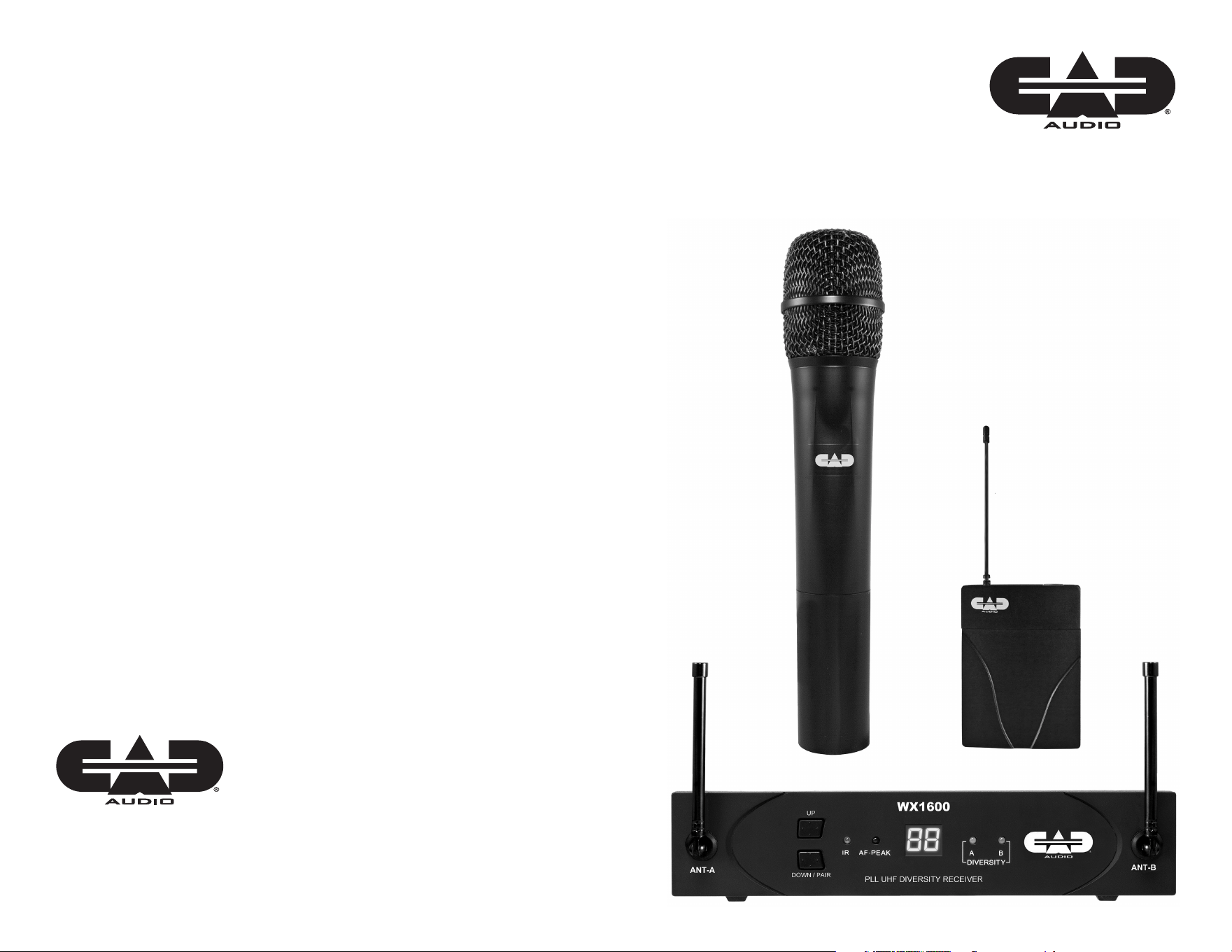
1600 Series
Wireless Microphone System
Manual and
Quick Start-up Guide
Individuals with cardiac pacemakers and other similar medical devices should
consult with their physician before using any RF devices. Though the output level
of this wireless system is below 50 milliwatts, the proximity of the transmitter to the
implant device could pose a threat.
As with any wireless product, environmental conditions can reduce or in some cases
prohibit a successful connection between the transmitter and the receiver.
This device complies with Part 15 of the FCC Rules. Most users of
CAD Audio wireless products in the United States do not need a license for
operation. However, the rules for unlicensed operation state that this device must
not operate in excess of 50 milliwatts and it must not cause harmful interference to
other wireless devices, and must accept interference received from other devices.
Wireless products meeting CAD factory standards adhere to these rules. The
FCC reserves the right to change these rules at any time. For more information
contact the FCC at 1-888-CALL-FCC (TTY: 1-888-TELL-FCC) or visit the FCC’s wireless
microphone website at:
www.fcc.gov/cgb/wirelessmicrophones
This device complies with Industry Canada licence-exempt RSS standard(s).
Operation is subject to the following two conditions: (1) this device may not cause
interference, and (2) this device must accept any interference, including interference
that may cause undesired operation of the device.
Under Industry Canada regulations, this radio transmitter may only operate using
an antenna of a type and maximum (or lesser) gain approved for the transmitter by
Industry Canada. To reduce potential radio interference to other users, the antenna
type and its gain should be so chosen that the equivalent isotropically radiated
power (e.i.r.p.) is not more than that necessary for successful communication.
Conformément à la réglementation d’Industrie Canada, le présent émetteur radio
peut fonctionner avec une antenne d’un type et d’un gain maximal (ou inférieur)
approuvé pour l’émetteur par Industrie Canada. Dans le but de réduire les risques
de brouillage radioélectrique à l’intention des autres utilisateurs, il faut choisir le
type d’antenne et son gain de sorte que la puissance isotrope rayonnée équivalente
(p.i.r.e.) ne dépasse pas l’intensité nécessaire à l’établissement d’une communication
satisfaisante.
Le présent appareil est conforme aux CNR d’Industrie Canada applicables aux
appareils radio exempts de licence. L’exploitation est autoris é e aux deux conditions
suivantes : (1) l’appareil ne doit pas produire de brouillage, et (2) l’utilisateur de
l’appareil doit accepter tout brouillage radioélectrique subi, même si le brouillage est
susceptible d’en compromettre le fonctionnement.
2
StageSelect
TM
1600 Series
Introduction
Thank you for purchasing the CAD Audio StageSelect
TM
system. We hope
that you enjoy the easy and exciting performance that the StageSelect
TM
delivers for your next gig. CAD Audio/Astatic Commercial has been
creating high-value products since 1938 and prides itself on supporting
and developing the live performer. Our design criterion for the 1600
Series was straightforward: develop a high-performance wireless
microphone system agile enough to cope with today’s dynamic RF
environment that is both easy to use and exciting to operate.
The StageSelect
TM
1600 Series includes the following features:
• 100 Channel UHF Agility for frequency plan exibility
• Diversity Operation to minimize multipath interference
• Scan-Link
TM
technology for instantaneous “scan” of the
RF environment and automatic “link” to the transmitter.
- First, the receiver conducts an environmental
frequency evaluation then selects a channel.
- Second, the receiver links to the transmitter
and sets the transmit frequency automatically.
• CADLock
TM
Automatic Tone Encoded Squelch to eliminate
unauthorized interference.
• Transmitters have Softtouch
TM
Switches with multicolor
LED indicators of On/Mute and Low Battery.
• AA batteries with >15hrs of battery life
• Metal Chassis for a durable and formidable
shielded enclosure with included rack ears.
7
Channelization
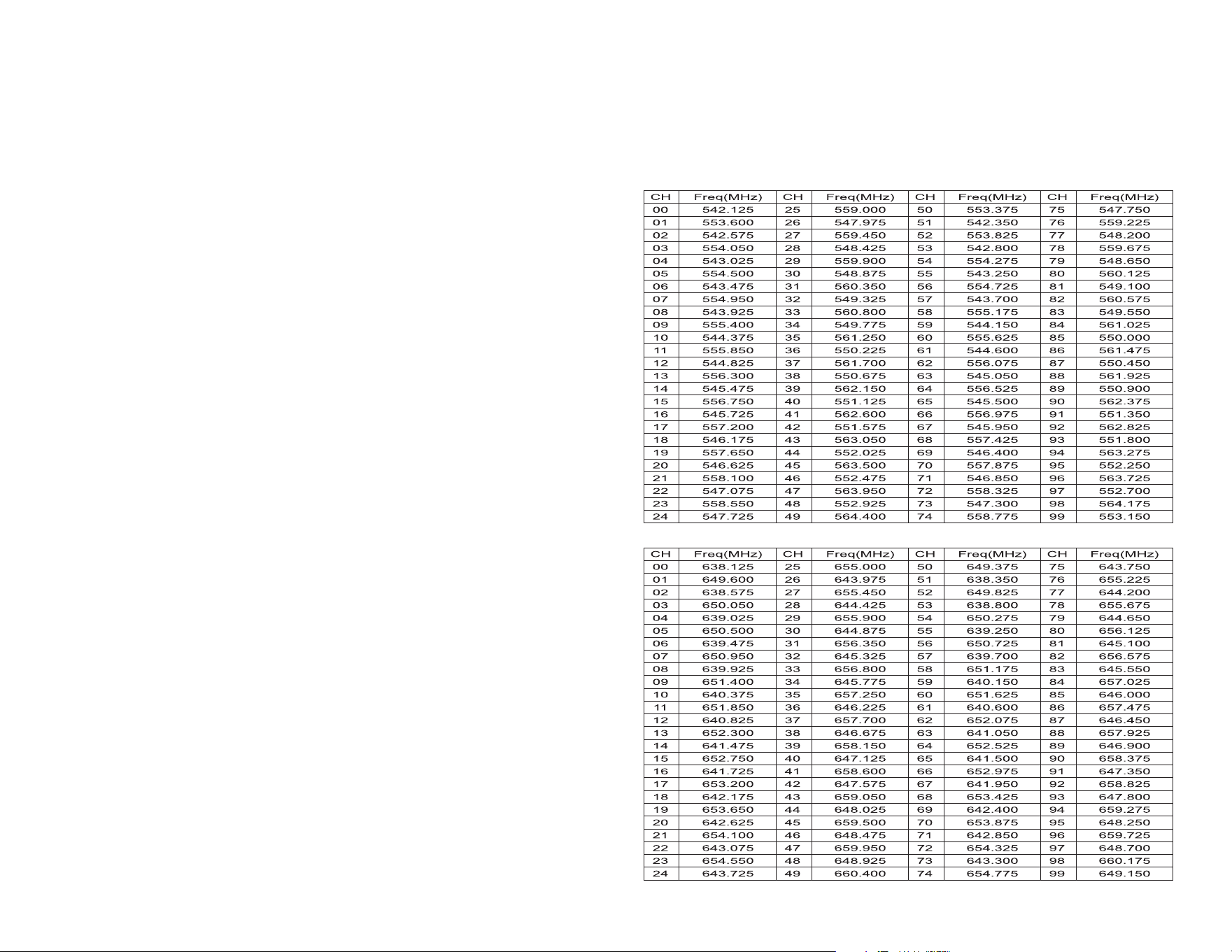
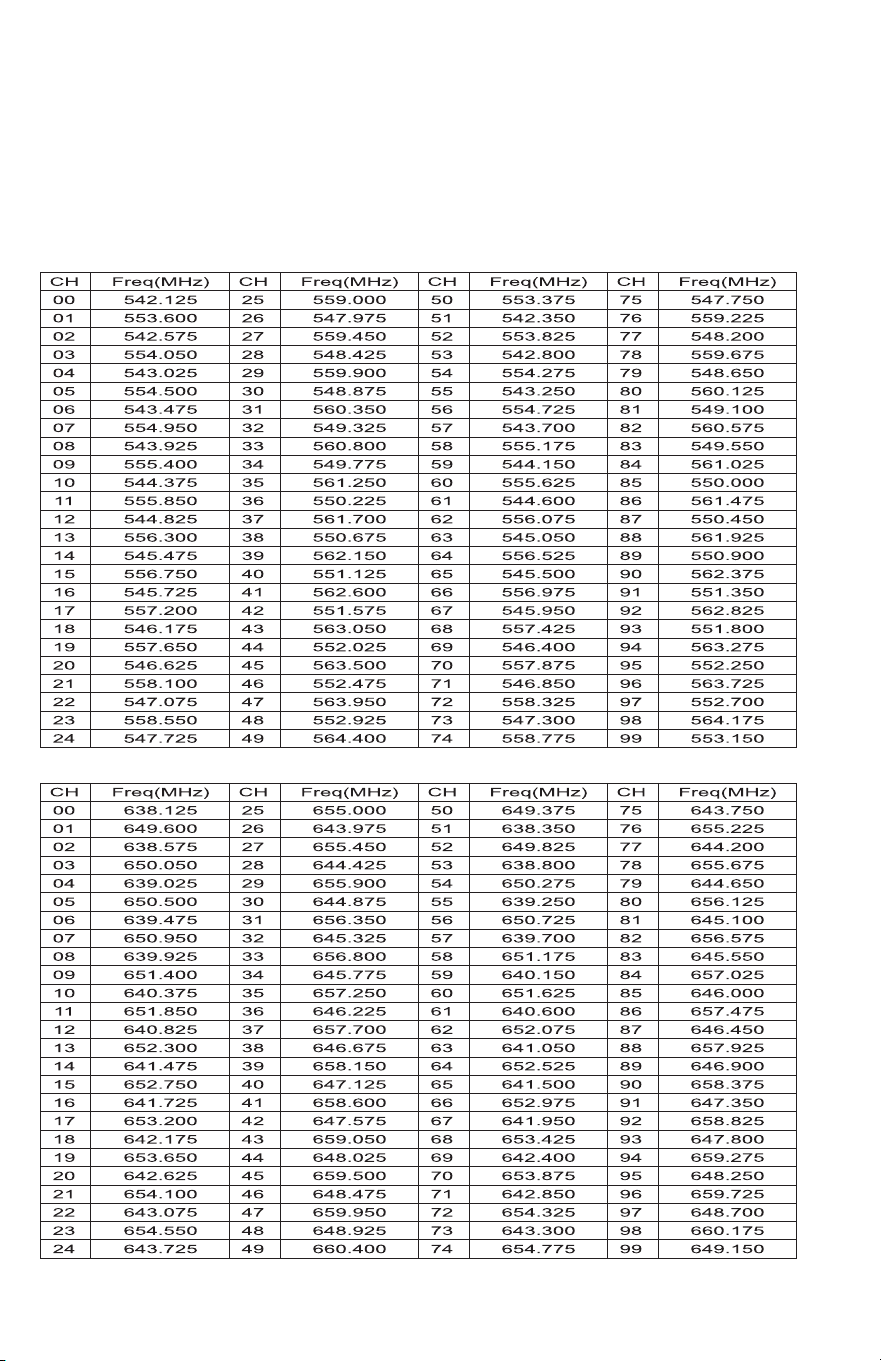
The CAD 1600 Series wireless has 100 selectable UHF channels. Channel indicators 0
through 99 are displayed on the receiver. Corresponding frequencies (in MHz) are listed below.
CH 13, CH 17, CH 34, CH 37, CH 50, CH 51, CH 57 and CH 59 are recommended for
simultaneous usage for both G and F Bands.
These frequencies have been approved for use within the United States and Canada as of
the date of publication of this manual. It is the user’s responsibility to comply with local
regulations.
638 - 662MHz Channel Table Band F
542.125 - 564.175MHz Channel Table Band G
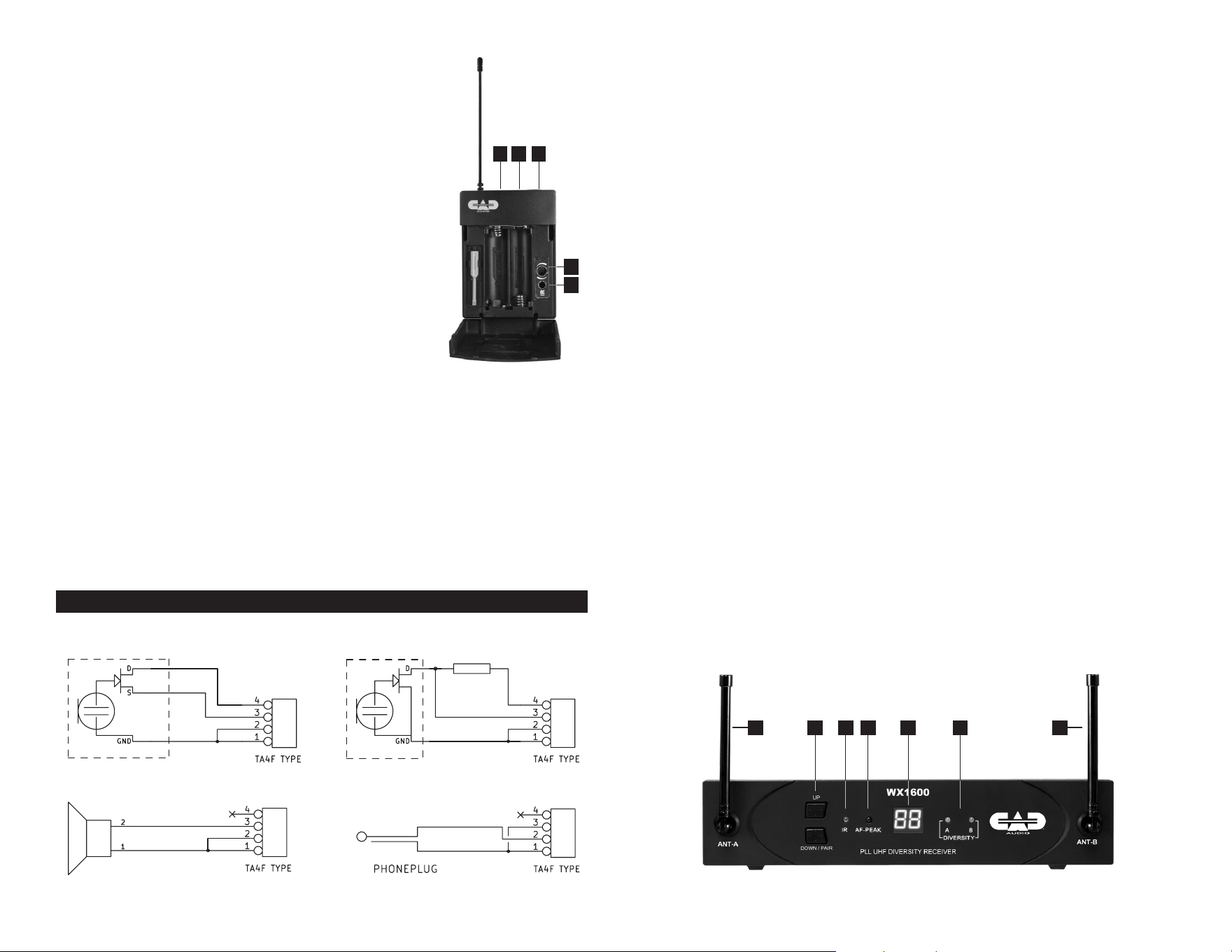
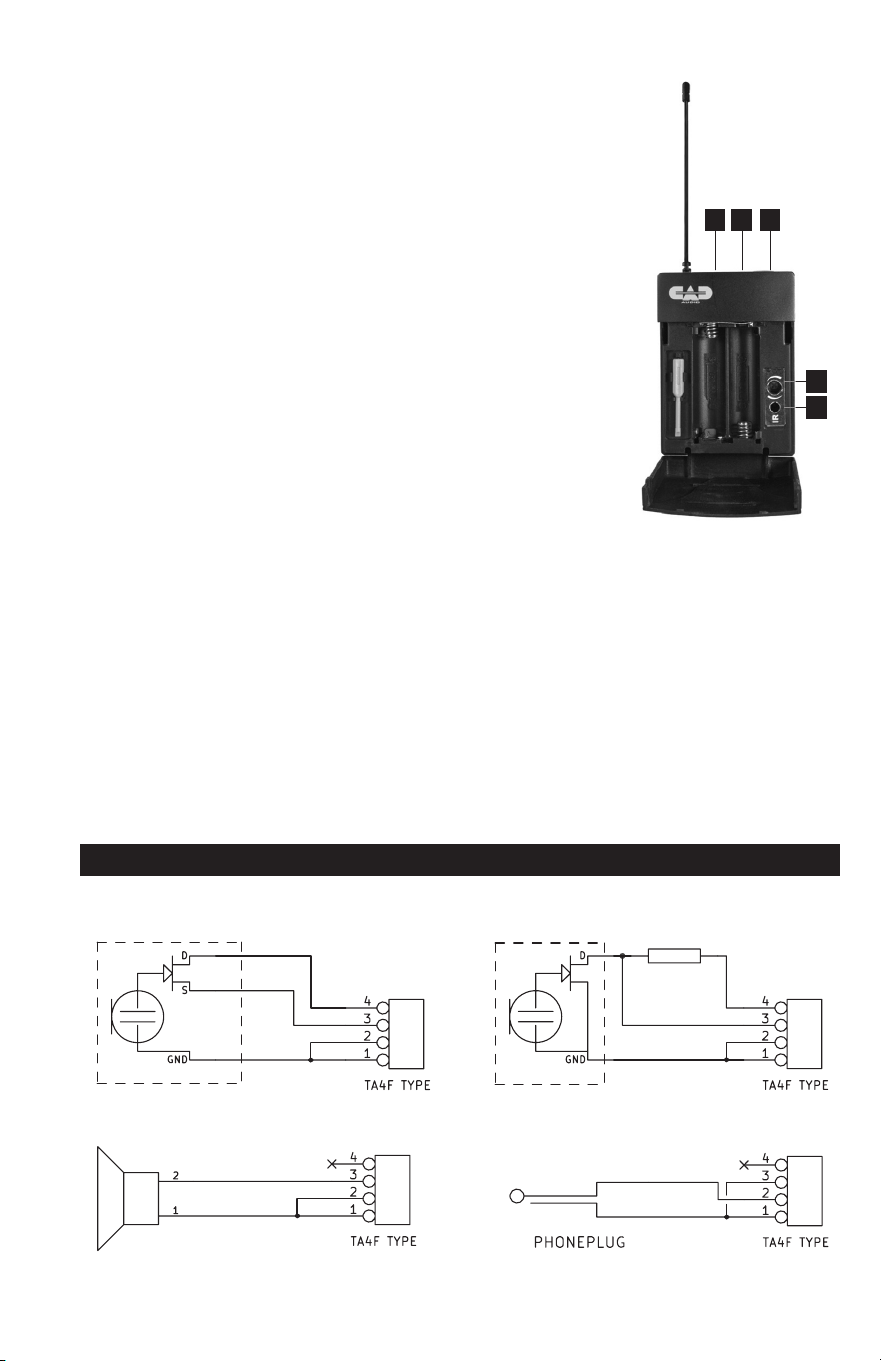
Bodypack TX1610 Transmitter
1. IR Node for Scan-Link
TM
operation
2. 4 pin connector (TB4M-type)
3. 3 Color LED indicator
- Green = Transmitter is powered up
and audio is live
- Orange = Transmitter is powered up
and audio is muted
- Flashing Red = Low battery status
(change battery ASAP)
4. Power Switch – Soft touch switch
- Holding the switch for 2 seconds turns
the transmitter on/off
- Quick momentary press of the switch
mutes or unmutes the audio
5. Volume control
Specications TX1610
Frequency Response ................................................................40Hz – 15KHz
Maximum Input Level
Microphone Input: ................................................................. -10dBV
Instrument Input: ..................................................................+15dBV
RF Output ............................................................................................. 10mW
Dimensions .............................................. 2-9/16" [6.5cm] x 4 -1/4" [10.8cm]
x 15/16" [2.3cm]
Net Weight .................................................................................... 2.8oz [82g]
Power Requirements ............................................................ 2x AA batteries
Battery Life ...................................... >15hrs, high- quality alkaline batteries
3
6
Operating Instructions
• Insert new high-quality alkaline AA batteries into your transmitter,
observing proper direction.
• Power up the receiver and transmitter.
• Scan-Link
TM
your system by pressing the Down/Pair button for
approximately 1 second on the receiver to automatically activate
the Scan-Link
TM
function. A clean channel will be selected and the
display will ash.
• While the receiver display is ashing hold the transmitter
IR node in alignment with the receiver IR node within a distance
of approximately 12". The receiver will automatically set the
transmitter channel. When the display stops ashing the system
is “Scan-Link’d.” (The IR node on the handheld transmitter is on
the bottom near the on/off switch. The IR node on the bodypack is
inside the battery compartment.)
• To set up additional units continue the sequence while keeping
previously linked transmitters away from the receiver (and out of
the way of the IR Beam, about 2-3 feet away) that is attempting to
Scan-Link
TM
.
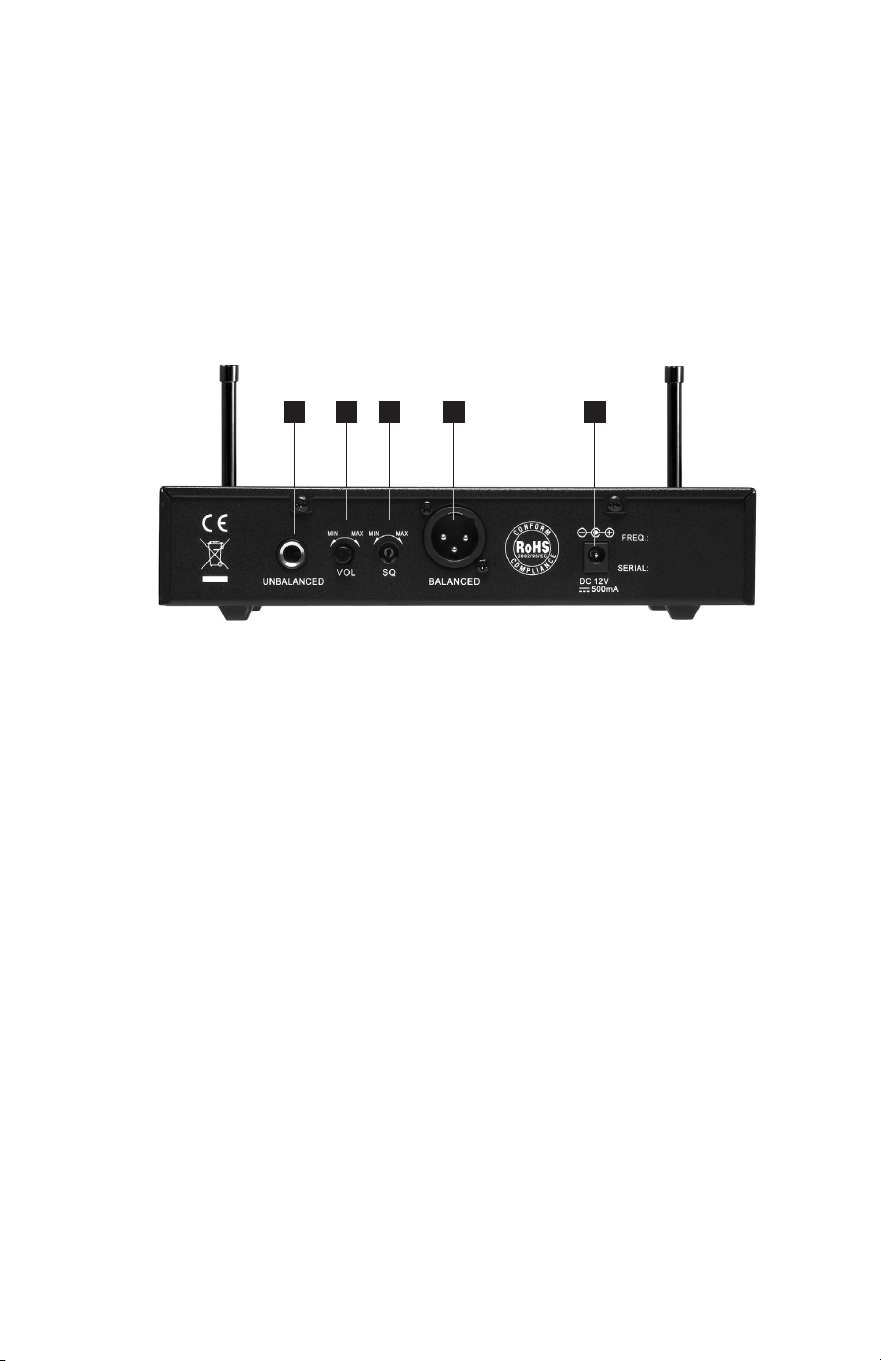
Receiver RX1600 (Front)
1. Antenna A
2. Channel up/Channel down/pair
3. IR node
4. AF peak indicator
5. Channel display
6. Diversity active
7. Antenna B
Interfacing to TX1610 input connector
3k3
3k3
3k3
3k3
3-wire type electret mic
Dynamic mic
2-wire type electret mic
Instrument
1 72 3 4 5 6
1
5
43
2
4 5
Receiver RX1600 (Rear)
1. 1/4" unbalanced output
2. Volume control
3. Squelch adjustment (factory preset - do not adjust
without factory support)
4. XLR- type balanced output
5. DC power jack (use included supply)
Specications RX1600
Maximum Output Level
Balanced Output ................................................................................-3dBV
Unbalanced Output ............................................................................0dBV
Output Impedance
Balanced Output .......................................................................... 350ohms
Unbalanced Output ..................................................................... 250ohms
Switchable Channels ................................................................................100
Dimensions .............................................. 9 -1/2" [23.0cm] x 4 -1/2" [11.4cm]
x 1-9/16" [4.0cm]
Weight ........................................................................................12.3oz [350g]
Power requirements .................................................... 12-15VDC, =<500mA
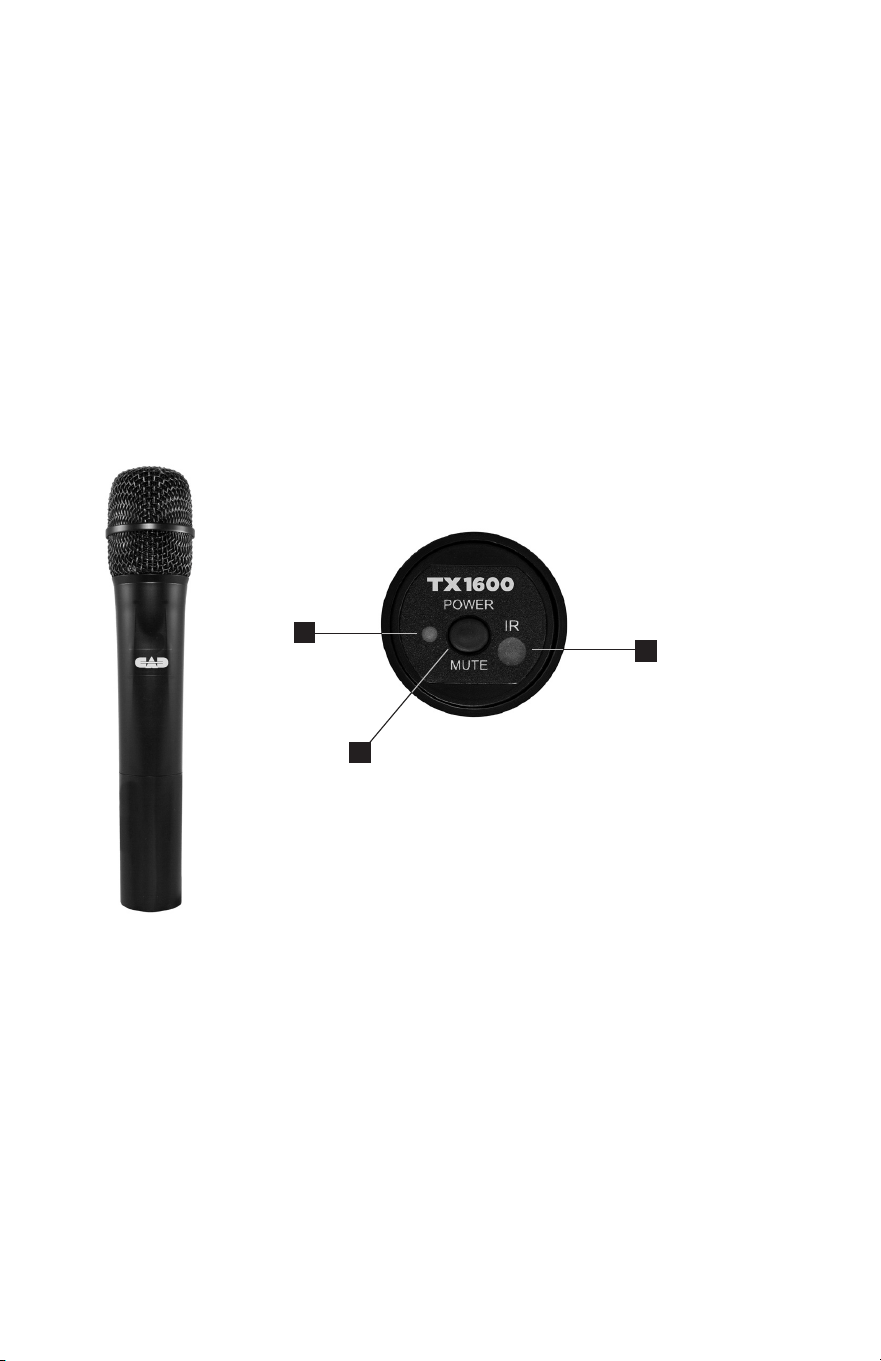
Handheld TX1600 Transmitter
1. Power Switch – Soft touch switch
- Holding the switch for 2 seconds turns the transmitter
on or off
- Quick momentary press of the switch mutes or unmutes
the audio
2. Tri-color LED indicator
- Green = transmitter is powered up and audio is live
- Orange = transmitter is powered up and audio is muted
- Flashing Red = low battery status (change battery ASAP)
3. IR node for Scan-Link
TM
operation
1 2 53 4
Specications TX1600
Microphone Operating Principle ............................... Moving coil dynamic
Polar Pattern ..................................................................................... Cardioid
Frequency Response ............................................................... 40Hz – 15KHz
Maximum SPL ...................................................................................... 130dB
Dynamic Range ..................................................................................... 110dB
RF Output ............................................................................................. 10mW
Dimensions ............................................... 9-1/2” [24.1cm] x 1-7/8” [4.8cm]
Net Weight ................................................................................... 7.3oz [208g]
Power requirements ............................................................. 2x AA batteries
Battery Life ...................................... >15hrs, high-quality alkaline batteries
1
2
3
4 5
Receiver RX1600 (Rear)
1. 1/4" unbalanced output
2. Volume control
3. Squelch adjustment (factory preset - do not adjust
without factory support)
4. XLR- type balanced output
5. DC power jack (use included supply)
Specications RX1600
Maximum Output Level
Balanced Output ................................................................................-3dBV
Unbalanced Output ............................................................................0dBV
Output Impedance
Balanced Output .......................................................................... 350ohms
Unbalanced Output ..................................................................... 250ohms
Switchable Channels ................................................................................100
Dimensions .............................................. 9 -1/2" [23.0cm] x 4 -1/2" [11.4cm]
x 1-9/16" [4.0cm]
Weight ........................................................................................12.3oz [350g]
Power requirements .................................................... 12-15VDC, =<500mA
Handheld TX1600 Transmitter
1. Power Switch – Soft touch switch
- Holding the switch for 2 seconds turns the transmitter
on or off
- Quick momentary press of the switch mutes or unmutes
the audio
2. Tri-color LED indicator
- Green = transmitter is powered up and audio is live
- Orange = transmitter is powered up and audio is muted
- Flashing Red = low battery status (change battery ASAP)
3. IR node for Scan-Link
TM
operation
1 2 53 4
Specications TX1600
Microphone Operating Principle ............................... Moving coil dynamic
Polar Pattern ..................................................................................... Cardioid
Frequency Response ............................................................... 40Hz – 15KHz
Maximum SPL ...................................................................................... 130dB
Dynamic Range ..................................................................................... 110dB
RF Output ............................................................................................. 10mW
Dimensions ............................................... 9-1/2” [24.1cm] x 1-7/8” [4.8cm]
Net Weight ................................................................................... 7.3oz [208g]
Power requirements ............................................................. 2x AA batteries
Battery Life ...................................... >15hrs, high-quality alkaline batteries
1
2
3
Bodypack TX1610 Transmitter
1. IR Node for Scan-Link
TM
operation
2. 4 pin connector (TB4M-type)
3. 3 Color LED indicator
- Green = Transmitter is powered up
and audio is live
- Orange = Transmitter is powered up
and audio is muted
- Flashing Red = Low battery status
(change battery ASAP)
4. Power Switch – Soft touch switch
- Holding the switch for 2 seconds turns
the transmitter on/off
- Quick momentary press of the switch
mutes or unmutes the audio
5. Volume control
Specications TX1610
Frequency Response ................................................................40Hz – 15KHz
Maximum Input Level
Microphone Input: ................................................................. -10dBV
Instrument Input: ..................................................................+15dBV
RF Output ............................................................................................. 10mW
Dimensions .............................................. 2-9/16" [6.5cm] x 4 -1/4" [10.8cm]
x 15/16" [2.3cm]
Net Weight .................................................................................... 2.8oz [82g]
Power Requirements ............................................................ 2x AA batteries
Battery Life ...................................... >15hrs, high-quality alkaline batteries
3
6
Operating Instructions
• Insert new high-quality alkaline AA batteries into your transmitter,
observing proper direction.
• Power up the receiver and transmitter.
• Scan-Link
TM
your system by pressing the Down/Pair button for
approximately 1 second on the receiver to automatically activate
the Scan-Link
TM
function. A clean channel will be selected and the
display will ash.
• While the receiver display is ashing hold the transmitter
IR node in alignment with the receiver IR node within a distance
of approximately 12". The receiver will automatically set the
transmitter channel. When the display stops ashing the system
is “Scan-Link’d.” (The IR node on the handheld transmitter is on
the bottom near the on/off switch. The IR node on the bodypack is
inside the battery compartment.)
• To set up additional units continue the sequence while keeping
previously linked transmitters away from the receiver (and out of
the way of the IR Beam, about 2-3 feet away) that is attempting to
Scan-Link
TM
.
Receiver RX1600 (Front)
1. Antenna A
2. Channel up/Channel down/pair
3. IR node
4. AF peak indicator
5. Channel display
6. Diversity active
7. Antenna B
Interfacing to TX1610 input connector
3k3
3k3
3k3
3k3
3-wire type electret mic
Dynamic mic
2-wire type electret mic
Instrument
1 72 3 4 5 6
1
5
43
2
2
StageSelect
TM
1600 Series
Introduction
Thank you for purchasing the CAD Audio StageSelect
TM
system. We hope
that you enjoy the easy and exciting performance that the StageSelect
TM
delivers for your next gig. CAD Audio/Astatic Commercial has been
creating high-value products since 1938 and prides itself on supporting
and developing the live performer. Our design criterion for the 1600
Series was straightforward: develop a high-performance wireless
microphone system agile enough to cope with today’s dynamic RF
environment that is both easy to use and exciting to operate.
The StageSelect
TM
1600 Series includes the following features:
• 100 Channel UHF Agility for frequency plan exibility
• Diversity Operation to minimize multipath interference
• Scan-Link
TM
technology for instantaneous “scan” of the
RF environment and automatic “link” to the transmitter.
- First, the receiver conducts an environmental
frequency evaluation then selects a channel.
- Second, the receiver links to the transmitter
and sets the transmit frequency automatically.
• CADLock
TM
Automatic Tone Encoded Squelch to eliminate
unauthorized interference.
• Transmitters have Softtouch
TM
Switches with multicolor
LED indicators of On/Mute and Low Battery.
• AA batteries with >15hrs of battery life
• Metal Chassis for a durable and formidable
shielded enclosure with included rack ears.
7
Channelization
The CAD 1600 Series wireless has 100 selectable UHF channels. Channel indicators 0
through 99 are displayed on the receiver. Corresponding frequencies (in MHz) are listed below.
CH 13, CH 17, CH 34, CH 37, CH 50, CH 51, CH 57 and CH 59 are recommended for
simultaneous usage for both G and F Bands.
These frequencies have been approved for use within the United States and Canada as of
the date of publication of this manual. It is the user’s responsibility to comply with local
regulations.
638 - 662MHz Channel Table Band F
542.125 - 564.175MHz Channel Table Band G

©2016 CAD Audio Part No. 62221-03-02 Feb2016
StageSelect
TM
1600 Series
Wireless Microphone System
Manual and
Quick Start-up Guide
Individuals with cardiac pacemakers and other similar medical devices should
consult with their physician before using any RF devices. Though the output level
of this wireless system is below 50 milliwatts, the proximity of the transmitter to the
implant device could pose a threat.
As with any wireless product, environmental conditions can reduce or in some cases
prohibit a successful connection between the transmitter and the receiver.
This device complies with Part 15 of the FCC Rules. Most users of
CAD Audio wireless products in the United States do not need a license for
operation. However, the rules for unlicensed operation state that this device must
not operate in excess of 50 milliwatts and it must not cause harmful interference to
other wireless devices, and must accept interference received from other devices.
Wireless products meeting CAD factory standards adhere to these rules. The
FCC reserves the right to change these rules at any time. For more information
contact the FCC at 1-888-CALL-FCC (TTY: 1-888-TELL-FCC) or visit the FCC’s wireless
microphone website at:
www.fcc.gov/cgb/wirelessmicrophones
This device complies with Industry Canada licence-exempt RSS standard(s).
Operation is subject to the following two conditions: (1) this device may not cause
interference, and (2) this device must accept any interference, including interference
that may cause undesired operation of the device.
Under Industry Canada regulations, this radio transmitter may only operate using
an antenna of a type and maximum (or lesser) gain approved for the transmitter by
Industry Canada. To reduce potential radio interference to other users, the antenna
type and its gain should be so chosen that the equivalent isotropically radiated
power (e.i.r.p.) is not more than that necessary for successful communication.
Conformément à la réglementation d’Industrie Canada, le présent émetteur radio
peut fonctionner avec une antenne d’un type et d’un gain maximal (ou inférieur)
approuvé pour l’émetteur par Industrie Canada. Dans le but de réduire les risques
de brouillage radioélectrique à l’intention des autres utilisateurs, il faut choisir le
type d’antenne et son gain de sorte que la puissance isotrope rayonnée équivalente
(p.i.r.e.) ne dépasse pas l’intensité nécessaire à l’établissement d’une communication
satisfaisante.
Le présent appareil est conforme aux CNR d’Industrie Canada applicables aux
appareils radio exempts de licence. L’exploitation est autoris é e aux deux conditions
suivantes : (1) l’appareil ne doit pas produire de brouillage, et (2) l’utilisateur de
l’appareil doit accepter tout brouillage radioélectrique subi, même si le brouillage est
susceptible d’en compromettre le fonctionnement.