User Manual
EN - English
Refrigeration
0000000000
Important safety instructions
Refrigerator Features
Installing your new refrigerator
Using your refrigerator
About the User Interface
General information
Error codes
Cleaning the refrigerator food
Storage guide
Troubleshooting
Ice maker troubleshooting
CONTENTS
CONGRATULATIONS
Dear customer,
Congratulations and thank you for choosing our
refrigerator. We are sure you will find your new refrigerator
a pleasure to use. Before you use the refrigerator we
recommend that you read through the relevant sections of
this manual, which provides a description of your
refrigerator and its functions.
To avoid the risks that are always present when you use an
electric appliance, it is important that the refrigerator is
installed correctly and that you read the safety instructions
carefully to avoid misuse and hazards.
We recommend that you keep this instruction booklet for
future reference and pass it on to any future owners.
After unpacking the refrigerator, please check it is not
damaged. If in doubt, do not use the refrigerator but
contact your local customer care centre.
WARNING
This symbol indicates information concerning your personal
safety.
CAUTION
T
his symbo
l indica
tes information
on how to avoid
damagin
g the
refrige
rator
IMPORTANT
This symbol indicates tips and information about use of the
refrigerator
ENVIRONMENT
This symbol indicates tips and information about
economical and ecological use of the refrigerator
Conditions of use
This refrigerator is designed and intended to be used in
n
ormal domestic applications only.
Record model and serial number here:
Model number: ...............................................................................
Serial number: ..................................................................................
ETB4600 & ETB5400 model
EBE4500 model
ETE5720 & EHE5224model
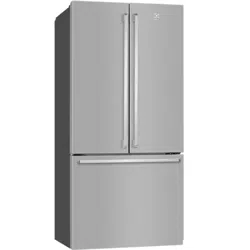
Top mount refrigerator features
Bottom mount refrigerator features
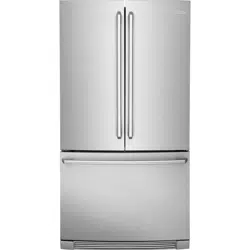
French door ice &
water refrigerator features
Unpacking your refrigerator
Locating your refrigerator
Installing your refrigerator
Fitting the handles
Removing features
Crisper drawer
NutriPlus
TM
(Anti-Oxidant Filter)
Glass shelves
Freezer shelves
Drawers with telescopic slides
Twist & Serve ice
LED Lighting
Temperature control
2 CONTENTS
........................................... 4
..................................... 6
................ 7
............................................................ 3
................................................... 8
........................................................ 8
........................................................ 8
....................................................................... 9
................................................................... 10
............................................................................ 10
....................................... 10
............................................................................... 10
.......................................................................... 10
............................................. 10
........................................................................ 11
.................................................................................. 11
................................................................ 12
................................................... 13
........................................................................... 14
................................................... 15
................................................................................. 17
........................................... 18
.............................................................................. 19
......................................................................... 20
.................................................... 23
The symbols you will see in this booklet have these meanings:
ARNING
WARNING
• This appliance is not intended for use by persons
(including children) with reduced physical, sensory or
mental capabilities, or lack of experience and
knowledge, unless they have been given supervision or
instruction concerning use of the appliance by a person
responsible for their safety. Children should
be supervised to ensure that they do not play with the
appliance.
• I t is essential the power point is properly earthed to
ground. Consult a qualified electrician if you
are unsure.
• Do not use electrical appliances inside the food storage
compartments of the appliance, unless they are of the
type recommended by the manufacturer.
• Unplug the refrigerator before cleaning or moving it to
avoid electric shock.
• Never unplug the refrigerator by pulling the electrical
cord as this may damage it. Grip the plug firmly and pull
straight out.
• I f the power cord is damaged, it must be replaced by
the manufacturer, its service agent or similarly qualified
persons in order to avoid a hazard.
• Don’t use a steam cleaner. If live components come into
contact with condensing steam, they may short-circuit
or cause an electric shock.
• Do not store explosive substances such as aerosol cans
with a flammable propellant
in this appliance. If pressurised aerosol
containers bear the word ‘flammable’ and/
or a small flame symbol, do not store them
inside any refrigerator or freezer. If you do
so you may cause an explosion.
• Do not damage the refrigerant circuit.
• This appliance contains insulation formed with
flammable blowing gases. Avoid safety hazards by
carefully disposing of this appliance.
• I f you wish to discard this refrigerator, please contact
your local authorities and ask for the correct method of
disposal.
• When you dispose of your old refrigerators and
freezers, remove any doors. Children can suffocate if
they get trapped inside.
• The plug must be accessible when the appliance is in
position.
• Never try to repair the refrigerator yourself, only use a
qualified or authorized service person for repairs.
IMPORTANT SAFETY INSTRUCTIONS
Note: You must read these warnings carefully before
installing or using t
he refrigerator. If you need assistance,
contact your customer care centre. The manufacturer will
not accept liability, should these instructions or any other
safety instructions incorporated in this book be ignored.
ARNING
WARNING
R600a REFRIGERANT WARNING
This appliance contains flammable R600a refrigerant.
Avoid safety hazards by carefully installing, handling,
servicing and disposing of this appliance.
• Ensure th
at the tubing of the refrigerant circuit is not
damaged during transportation and installation.
• Leaking refrigerant may cause eye injuries or ignite.
• The room for installing appliance must be at least 1m
3
per 8g of refrigerant. The amount of refrigerant in the
appliance can be found on the rating plate inside the
appliance.
• I f you are unsure of the refrigerant check the rating
plate inside the refrigerator compartment.
• I t is hazardous for anyone other than an Authorised
Service Person to service this appliance. In
Queensland Australia the Authorisation Service Person
MUST hold a Gas Work Authorisation for hydrocarbon
refrigerants to carry out servicing or repairs which
involve the removal of covers.
• Keep ventilation openings in the appliance enclosure
or in the built-in structure, clear of obstruction.
• Do not use mechanical devices or other means to
accelerate the defrosting process, other than those
recommended by the manufacturer.
SAFETY 3
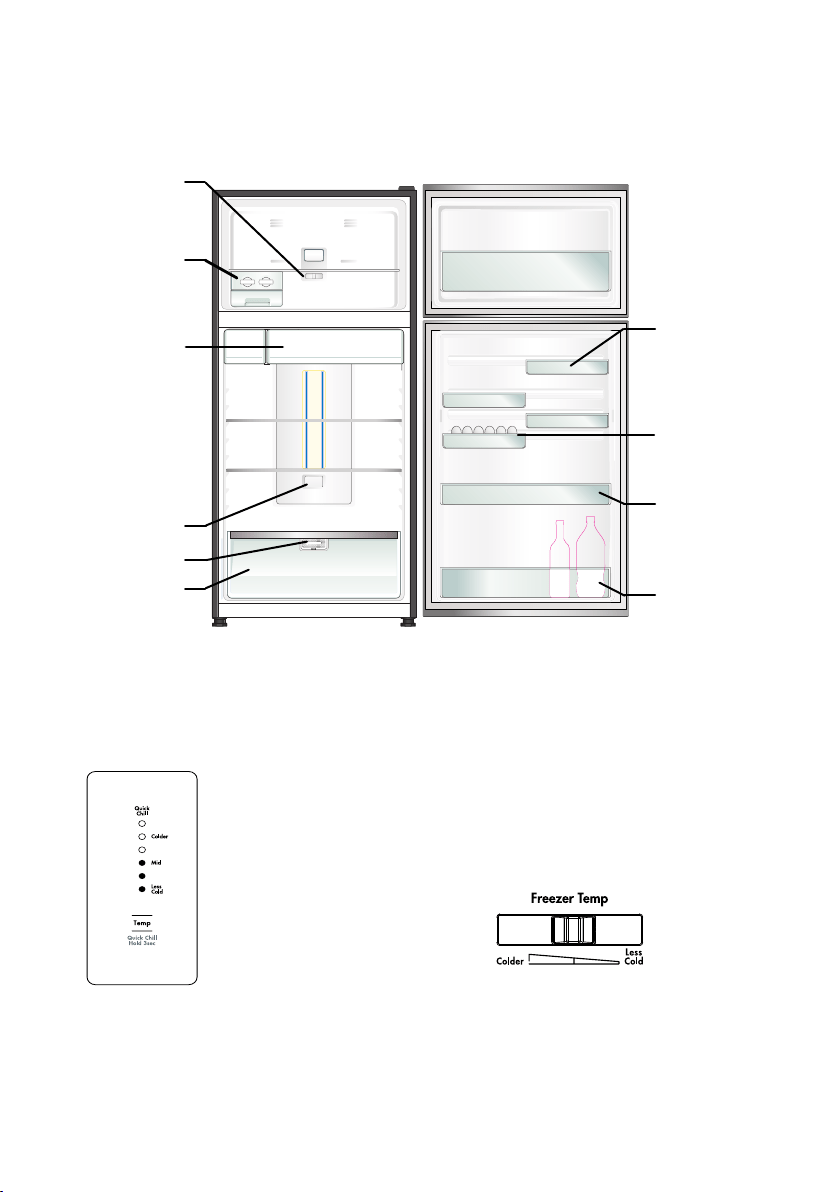
Features may vary depending on model. Not all models will have features listed.
Chiller drawer
Use the chiller drawer to
store foods like small
goods, fresh or cooked
meat and cheese, or as an
additional crisper. The
drawer will prevent strong
food odours from
impacting the rest of the
refrigerator. To remove the
chiller drawer, pull it
forward, then lift it up and
pull it further forward.
Crisper
Use the crisper to store
vegetables, fruit or small
goods.
Bottle storage bin
Use the bottle bin for tall
bottle storage. The bottle
bin can be removed by
lifting it up over the
support lugs. To replace,
push down over the
support lugs to lock in
place.
Twist & Serve Ice
Refer to the section “Using
your Refrigerator” for
details on removing,
relocating and using this
feature.
Freezer temperature
control
Refer to the section
“Temperature Control” for
details on using this feature.
Freezer control
T
his is a simple slide control t
o adjust the temperature
of you
r
freezer com
partme
nt.
For further information on how to use this feature refer
to the section “Temperature Control”.
ETB5400 illustrated
Refrigerator control panel
From this panel you can control the
temperature of the refrigerator
compartment as well as setting the
quick chill function or resetting the
door alarm.
For further information on how to
use this feature refer to the section
“About the User Interface”.
Door storage bin
The door bin can be
removed by lifting it
up over the support lugs.
To replace, push down
over the support lugs to
lock in place.
FlexStor® bins
Slide the bins to meet
different storage needs.
To remove, lift and tilt.
To replace, tilt the top
and push down until
locked in place.
TOP MOUNT REFRIGERATOR FEATURES ETB4600 & ETB5400
TasteGuard Deodoriser
Removable egg tray
provided for your
convenience.
Egg tray
Anti-Oxidant Filter
NutriPlus
TM
4 FEATURES
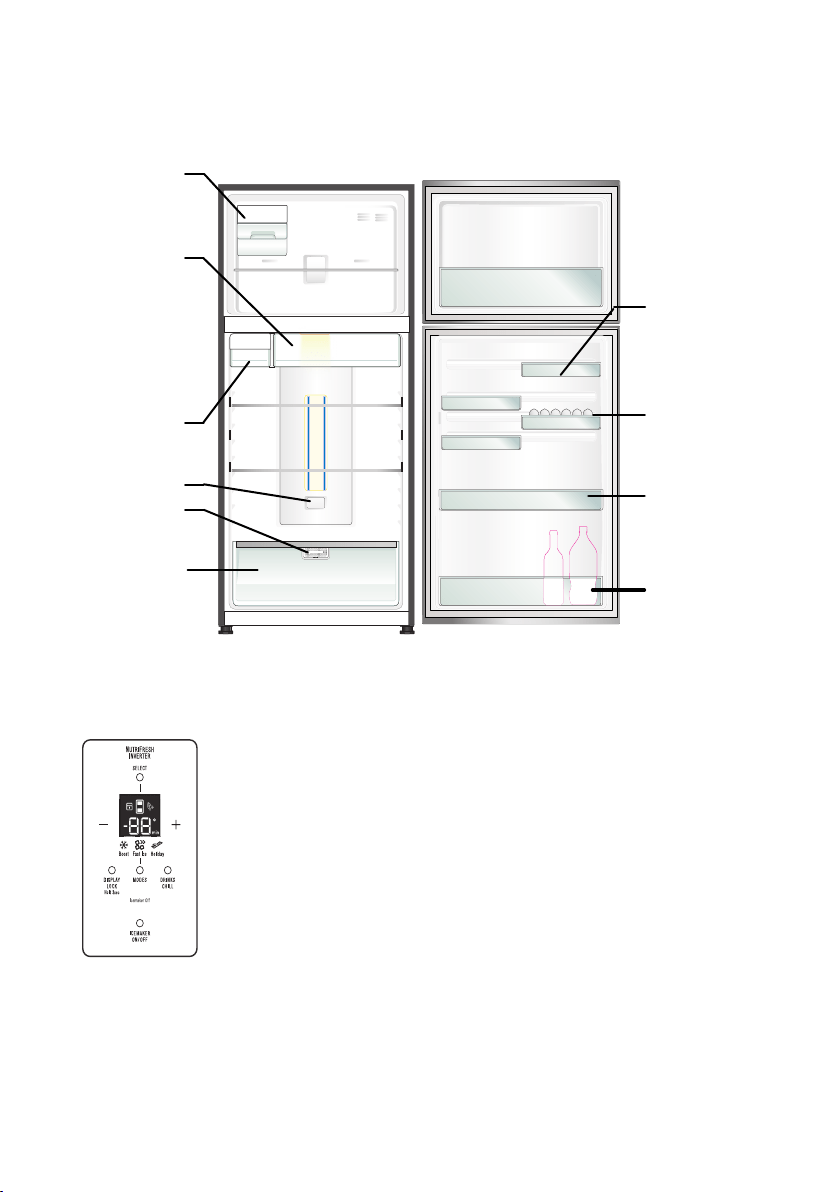
Chiller drawer
Use the chiller drawer to
store foods like small
goods, fresh or cooked
meat and cheese, or as an
additional crisper. The
drawer will prevent strong
food odours from
impacting the rest of the
refrigerator. To remove the
chiller drawer, pull it
forward, then lift it up and
pull it further forward.
Crisper
Use the crisper to store
vegetables, fruit or small
goods.
Bottle storage bin
Use
the
bottle bin for tal
l
bottle storage. The bottle bin
can be removed by lifting it
up over the support lugs. To
replace, push down over the
support lugs to lock in place.
ETE5720 illustrated
Door storage bin
The door bin can be
removed by lifting it up over
the support lugs.
To replace, push down
over the support lugs to lock
in place.
Slide t
he bins to meet
different storage needs.
To remove, lift and tilt. To
replace, tilt the top and
push down until locked in
place.
TOP MOUNT REFRIGERATOR FEATURES ETE5720
Egg tray
Removable egg
tray provided for your
convenience.
TasteGuard Deodoriser
Automatic Ice Maker
Refer to the section “Using
your Refrigerator” for details
on using this feature.
Water Tank
FEATURES 5
Refrigerator/freezer
control pa
nel
From this panel you can control the
temperature of the refrigerator and
freezer compartments as well as
setting the Boost function, controlling
the Ice Maker or resetting the door
alarm.
For further information on how to use
this feature refer to the section
“About the User Interface”.
Features may vary de
pending on model. Not all models will have features listed.
Anti-Oxidant Filter
Nutri
Plus
TM
FlexStor® bins
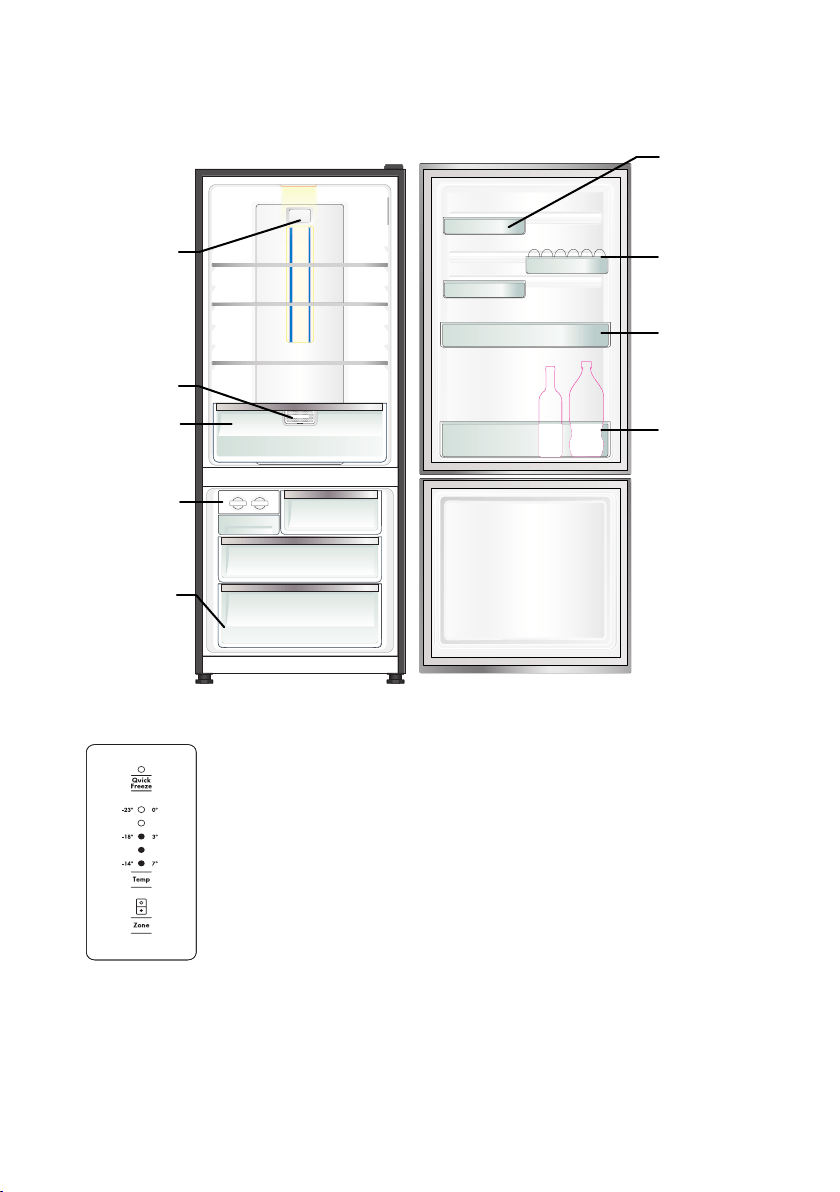
BOTTOM MOUNT REFRIGERATOR FEATURES EBE4500
Twist & Serve Ice
Refer to the section
“Using your
Refrigerator” for details
on removing, relocating
and using this feature
Refrigerator/freezer control panel
From this panel you can control the
temperature of the refrigerator and
freezer compartments as well as
setting the quick freeze function or
resetting the door alarm.
For further information on how to use
this feature refer to the section
“About the User Interface”.
Features may vary depending on model. Not all models will have features listed.
Freezer storage bin
Refer to the section
“Using your Refrigerator”
for details on removing,
and using this feature.
Crisper
Use the crisper to store
vegetables, fruit or small
goods.
Slide the bins to meet
different storage needs.
To remove, lift and tilt. To
replace, tilt the top and
push down until locked in
place.
EBE4500 illustrated
Removable egg
tray provided for your
convenience.
Bottle storage bin
Use the bottle bin for tall
bottle storage. The bottle
bin can be removed by
lifting it up over the
support lugs. To replace,
push down over the
support lugs to lock in
place.
Door storage bin
The door bin can be
removed by lifting it up
over the support lugs. To
replace, push down over
the support lugs to lock in
place.
6 FEATURES
Egg tray
Anti-Oxidant Filter
Nutri
Plus
TM
FlexStor® bins
TasteGuard Deodoriser
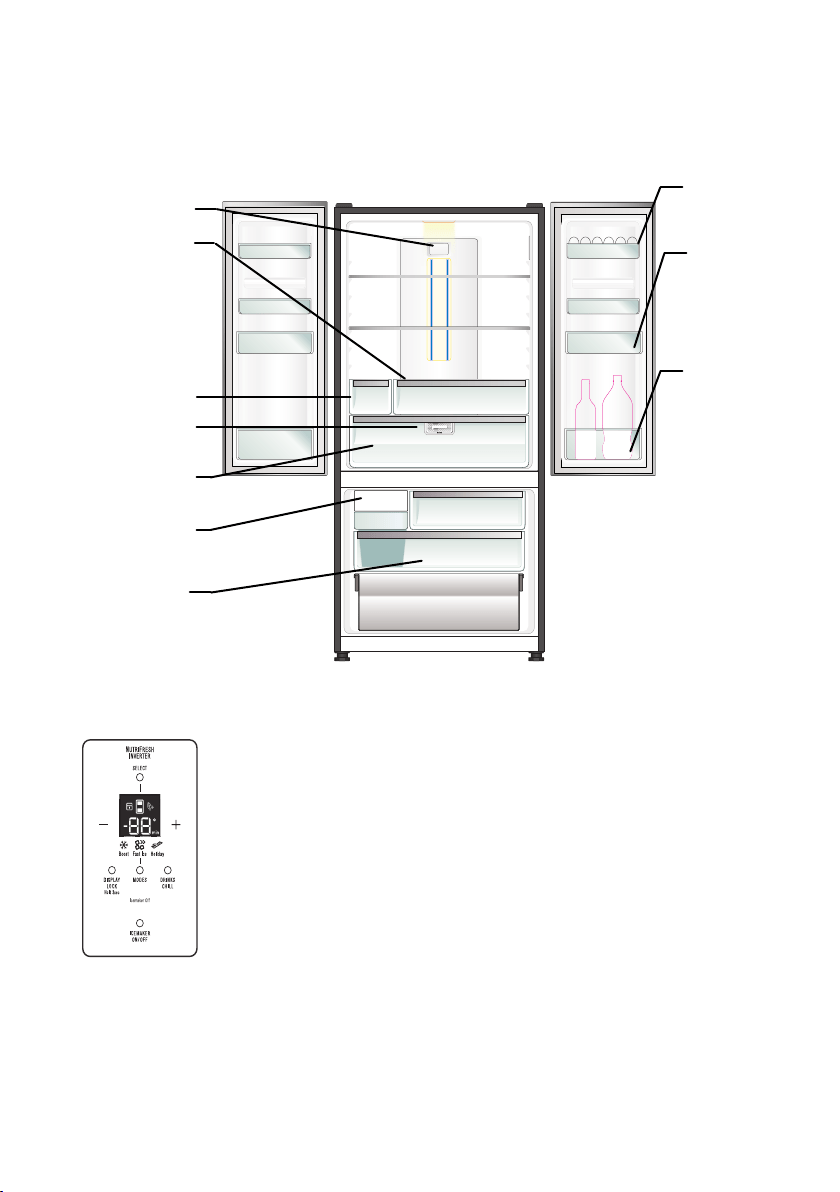
FRENCH DOOR ICE & WATER REFRIGERATOR FEATURES EHE5224
Automatic Ice Maker
Refer to the section “Using
your Refrigerator” for details
o
n
u
s
in
g
thi
s
feat
ure.
Refrigerator/freezer
control panel
From this panel you can control the
temperature of the refri
gerator and
freezer compartments as well as
setting the Boost function, controlling
the Ice Maker or resetting the door
alarm.
For further information on how to use
this feature refer to the section “About
the User Interface”.
Features may vary depending on model. Not all models will have features listed.
Freezer storage bin
Refer to the section “Using
your Refrigerator” for details
on
u
si
n
g this feat
ure.
Crisper
Use the crisper to store
vegetables, fruit or small
goods.
Deli drawer
Use the chiller drawer to
store foods like small goods,
fresh or cooked meat and
cheese, or as an additional
crisper. The drawer will
prevent strong food odours
from impacting the rest of
the refrigerator. To remove
the chiller drawer, pull it
forward, then lift it up and
pull it further forward.
Water Tank
Bottle storage bin
Use the bottle bin for
tall bottle storage.
The bottle bin can
be removed by
lifting it up over the
support lugs. To
replace, push down
over the support
lugs to lock in place.
The door bin can be
removed by lifting it
up over the support
lugs.
To replace, push
down over the
support lugs to lock
in place.
Removable egg
tray provided for
your convenience.
EHE5224 illustrated
FEATURES 7
Egg tray
Anti-Oxidant Filter
NutriPlus
TM
FlexStor® bins
TasteGuard Deodoriser
VIRONMENTAL TIPS
ARNING
CAUTION
Automatic aerosol systems (such as insect control)
should not be located adjacent to the product as the
spray may cause long term damage to the external
plastics of the appliance.
Do not put the refrigerator in a location that is too
cold or is unprotected, for example in a garage or on a
veranda. The ambient temperature should be above 10°C.
Put the refrigerator in a dry place avoiding areas of high
moisture or humidity.
Ensure the refrigerator is located on an even surface.
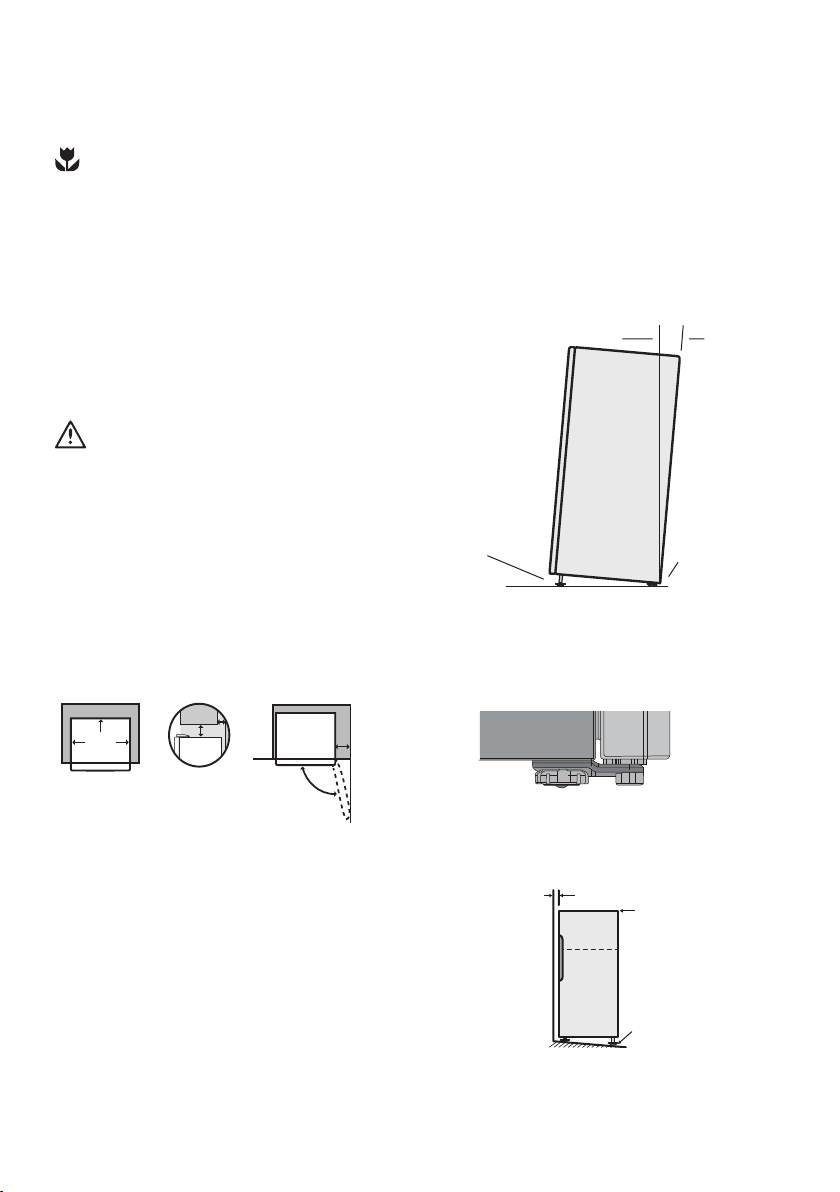
Adequate ventilation around your refrigerator
The diagram below shows the recommended airspace to
allow for ventilation of your refrigerator.
350mm
50mm
Recommended
air space
CABINET
DOOR
30mm
30mm
X
Y
If you have a cupboard above the refrigerator with a rear
gap of less than 100 mm (Y), recommended clearance at
the top of the refrigerator increases from 50mm to 90mm
(X) minimum.
When positioned in a corner area, spacing of at least
350mm (300mm for multi-door models) on the hinge side
will allow the doors to open enough to enable the removal
of bins and shelves.
NOTE: Doors are designed to sit proud of cabinetry
(not flush). The clearances shown above are the
recommended minimum clearances.
The clearance at the rear must not exceed 75mm.
Unpacking
ENVIRONMENT
Most of the packing materials are recyclable. Please
dispose of those materials through your local recycling
depot or by placing them in appropriate collection
containers.
Important – check for any damages or marks. If you find the
refrigerator is damaged or marked, you must report it
within 7 days should you wish to claim for damage/ marks
under the manufacturers warranty. This does not affect
your statutory rights.
Clean your refrigerator thoroughly following the instructions
in the “Cleaning” section and wipe off any dust that has
accumulated during shipping.
Locating the refrigerator
Installing your refrigerator
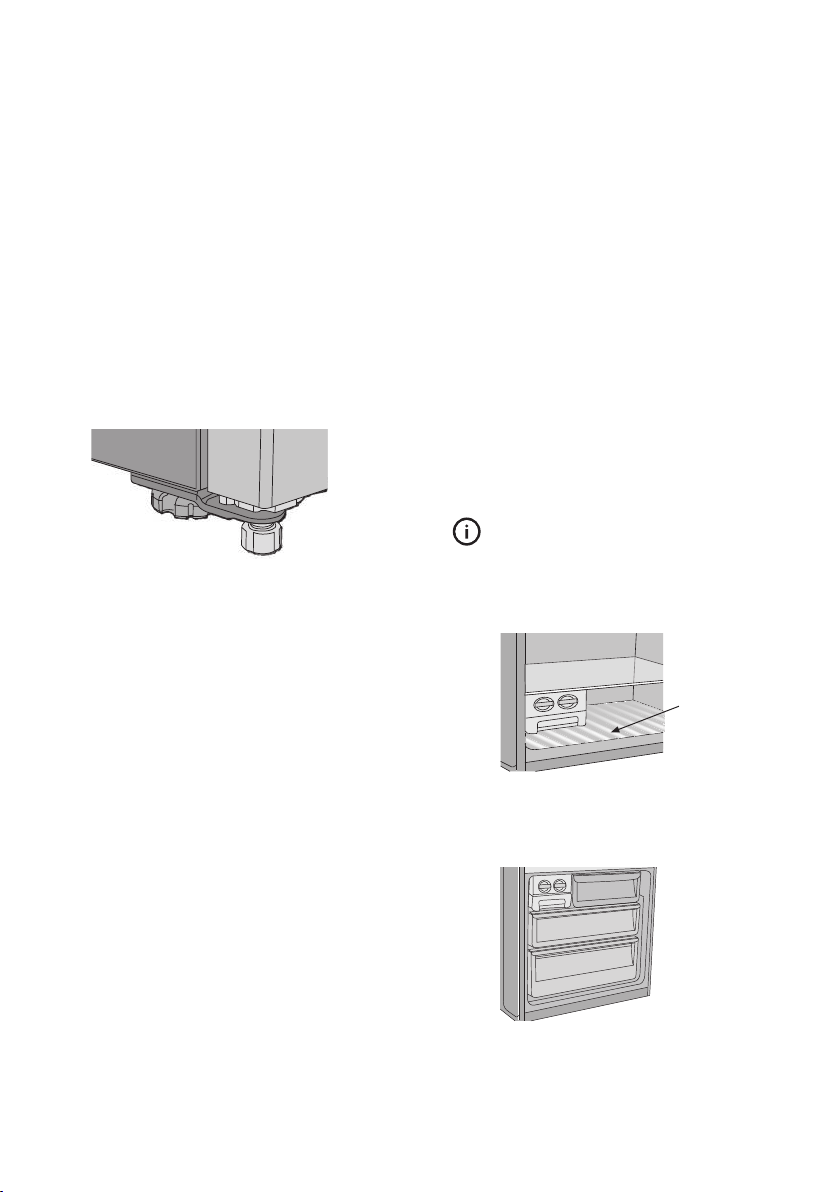
1. Roll the refrigerator into place. The rollers are
designed for forward or backward movement only.
They are not castors. Moving the refrigerator
sideways may damage your floor and the rollers.
Before moving your refrigerator ensure height
adjusting nut and the stability foot are fully wound up
off the floor.
2. Wind the large height adjusting nut under door hinge
down until the refrigerator is tilted back by 10mm
(see diagram).
Height adjusting nut
Fixed rear rollers
10 -15mm
3. Wind the large height adjusting nut on the handle side
down until the refrigerator is level and stable. If you
have difficulty winding the nut or height adjusting foot
down, have someone
tilt the refrigerator back so you
have better access.
stability foot
wound up
4. Check the alignment of the refrigerator to the
surrounding cupboards to see if it is level. You can
adjust the level as detailed in step 2 and 3.
aligned to
cupboards
ie. even gap
top of refrigerator is
level ie. horizontal
adjust front feet for
uneveness of floor
eg. wind this foot
down or up
8 INSTALLATION
INSTALLING YOUR NEW REFRIGERATOR
INSTALLING YOUR NEW REFRIGERATOR
5. I f you find your refrigerator rocks from corner to
corner, it means your floor is uneven. Find a piece of
plastic or hardboard etc. and pack it firmly under the
roller.
6. You may now need to fine-tune the installation by
repeating steps 3, 4 and 5.
7. When you have the appliance in its final position, it
needs to be stabilised. Wind the stability foot under the
door hinge down to the floor until it just makes contact
with the floor. Lift the front of the appliance to take the
weZight off the stability foot, then turn it half a turn
further to ensure firm contact with the floor. Wind the
large height adjusting nut back up to ensure all the
weight is now on the front stability foot.
8. Repeat step 7 for the stability foot on the handle side.
Whenever you need to move the appliance, be sure to
wind the feet back up so that the appliance can roll
freely and be sure to reset it when reinstalling.
Fitting the handles
The handles are supplied prepackaged in
side your
refrigerator and will require fitting.
Refer to the instructions provided in the pack.
Congratulations! You have successfully installed your new
refrigerator.
USING YOUR REFRIGERATOR
Refrigerators work by transferring heat from the food inside
to the outside
air. This operation makes the back and sides
of the refrigerator feel warm or even hot particularly at
start-up and on warm days – this is normal.
Avoid placing food against the air vents in the refrigerator
as it affects efficient circulation. If the door is opened
frequently, a light frosting will occasionally occur on the
freezer’s interior. This is normal and will clear after a few
days. If the freezer door is accidentally kept open, a heavy
frost will coat the inside walls and should be removed.
Your new refrigerator uses a high-speed compressor, along
with other energy-efficient components, which may make
unusual sounds and be more noticeable at night and
quieter times. These sounds simply indicate your refrigerator
is working how it should. They include:
• Compressor running noises;
• Air movement n
oise from the small fan motor;
• A gurgling sound, similar to water boiling;
• A popping noise, heard during automatic defrosting;
and
• A clicking noise, prior to compressor start-up. Further
details can be found in the Troubleshooting Guide.
TIPS & INFORMATION
IMPORTANT
For top mount refrigerators (where the freezer is on top of
the fresh food compartment).
• Don’t place food forward of the ri
bs on the freezer
floor, as it will keep the door open.
Ribs
For bottom mount refrigerators (where freezer is below the
fresh food compartment):
• Ensure all freezer drawers and shelves are pushed
back comple
tely to prevent them from keeping the
door open.
stability foot
wound
down
Large height
adjusting nut
wound up.
USING YOUR REFRIGERATOR 9
9. Plug your refrigerator straight into its own power point
and never use a double adapter. If you need to roll the
refrigerator to get to the plug, remember to raise the
stability foot first.
10. Before you put any food in your refrigerator, it’s
recommended you leave it on for 2 or 3 hours to check
it is running properly.
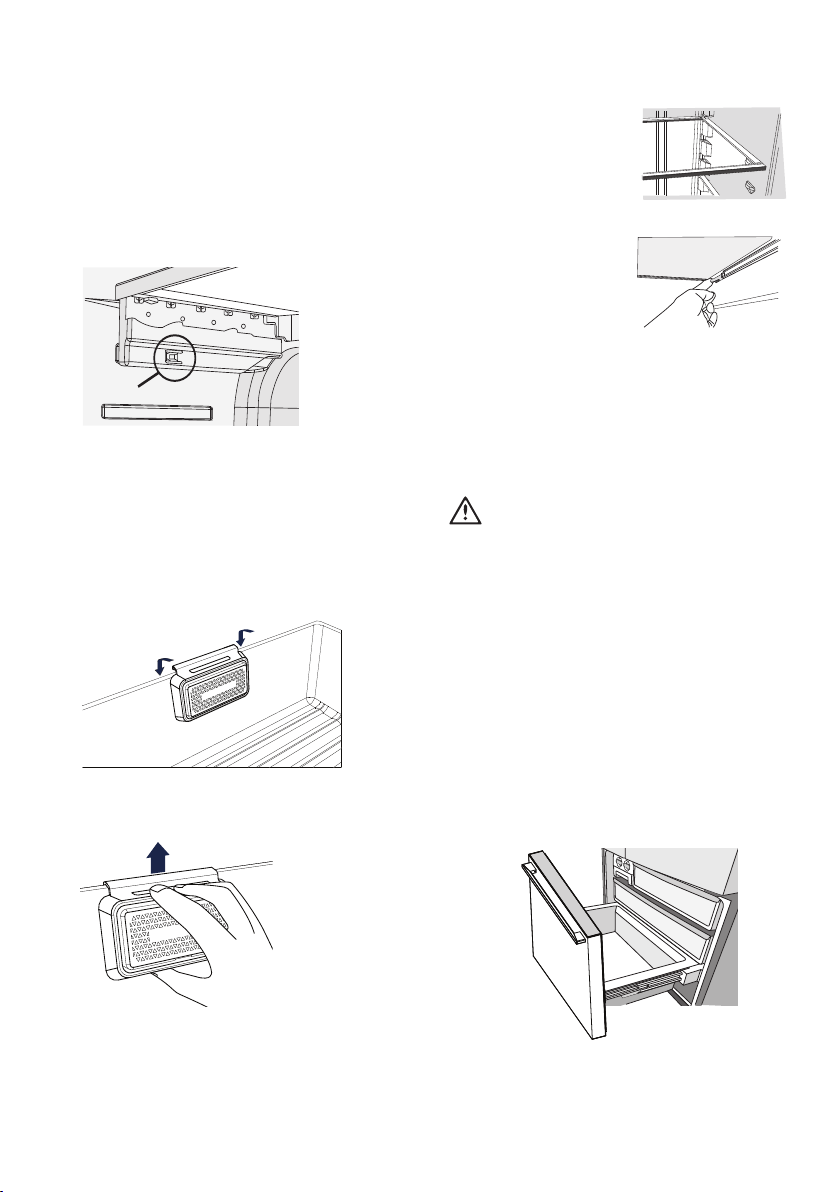
Never close the door while the telescopic slides are
extended. T
his may damage the slide and/or refrigerator or
cause the slide to become disengaged from the refrigerator.
To replace the drawer:
1. Ensure the telescopic slides are pushed in all the way.
2. Slide the drawer into place over the slides and push
the bin in until it stops.
3. Drop drawer into position.
REMOVING FEATURES
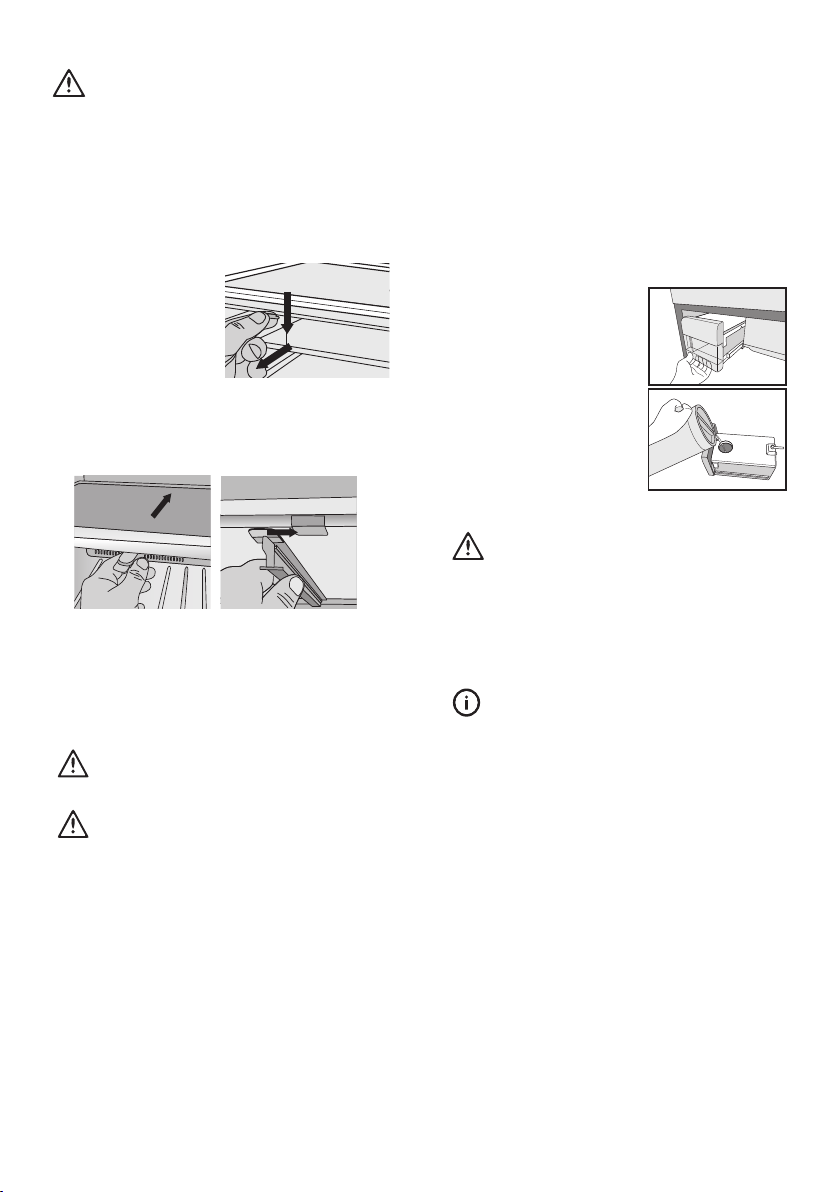
Removal of Crisper Drawer:
1. Empty food from the crisper. On some models it will be
necessary to remove the bottle storage bins.
2. Remove the crisper by pulling forward, then up and
forward again.
3. For top mount models, remove the crisper shelf by lifting
the catches on the left and right underside of the shelf
and pulling the shelf forward.
CATCH
Replacing Filter Cartridge
The filter is located at the back of the crisper.
Hold the filter, move upwards to release from the hooks.
Glass shelves
To remove the shelves, gently
pull them forward until the shelf
comes clear of the shelf guides.
To return the shelf, ma
ke sure
there is nothing behind that
may obstruct movement. Gently
push the shelf, into the
cabinet
and back into position.
Freezer shelf
Remove the freezer shelf
by lifting the catches on th
e
right and left underside of
the shelf to release the shelf
then pull the shelf toward you.
Drawers fitted with telescopic slides
To remove the drawer for cleaning.
1. Empty food from the drawer.
2. Remove the drawer by pulling it forward and lifting the
front to unhook it from the slides. Once you have
removed the drawer, ensure the slides are pushed back
so they are fully closed.
WARNING
Freezer bottom bin
To remove the bin, pull the drawer out unt
il it is open all
the way then lift bin out from the front of the bin. When
refitting insert the rear of the bin first then lower into
position.
When replacing the bins after cleaning, we recommend
fitting the lower bin first.
10 REMOVING FEATURES
NutriPlus
TM
(Anti-Oxidant Filter)
Installing Filter Cartridge
Your filter can be found in the crisper. To enjoy the full
benefit of NutriPlus
TM
, it is important to install it after
turning on the refrigerator. For installation, please follow
the following instruction.
1. Remove plastic wrap
2. Hook the filter to the back of the crisper bin.
WARNING
CAUTION
ARNING
Do not fill the water tank with anything other than clean
water (Filtered or Mineral water).
Soft drink, juice, tea or hot water etc, can damage your
automatic icemaker.
The water tank can withstand a maximum water
temperature of 60°C.
S & INFORM ATION
Remove and
clean
ice bin and water tank once a month,
di
scardi
ng unused ice and water. This will ensure fresh ice
and smooth operatio n of your icemaker.
Make sure your refrigerator is level to avoid uneven ice
cubes.
Tips and Useful Information
Fill the ice tube tray with potable water only.
LED lighting
Your appliance is fitted with long life LED lighting. In the
unlikely event the LED lights should fail, then the LED lights
should be serviced by the manufacturer.
Refer to the warranty page for contact details.
CAUTION
4. Refit the runner into the rear of the shelf on the right
hand side and then
engage the front.
5. Fit the carriage by sliding it into the runners until the
front if the carriage engages with the shelf.
6. Refit the ice tray and ice bin.
Insert into the slot at the rear
of the shelf
Then engage into the front
of the shelf
2. Before you remove the ice carriage, remember to
disengage it from the glass shelf as it may result in
damage to the assembly.
3. Remove the centre runner by disengaging it at the front
of the shelf, and removing it from the rear.
CAUTION
1. Remove the ice
bin and ice cube
tray. If the ice tray
assembly is frozen to
the carriage, simply
squeeze the
tray
and shelf together to
break the ice.
Never close the door while the telescopic slides are
extended. It may damage the slide and/or the refrigerator
or cause the slide to become disengaged from the
refrigerator.
Twist and Serve Ice
Mounting the twist & serve dispenser to the other side of
the freezer.
Note : This is only possible on top mount models.
Step 4. Ensure ice maker is
switched ON (refer control
instructions).
Automatic Ice Maker
The automatic ice making function pumps water from
the water tank located
in the refrigerator and dispenses it
into the automatic ice maker in the freezer.
The ice will then be dropped into the ice bin located
beneath the ice maker
If the water tank is empty, the ice maker will automatically
turn off after 3 attempts at pumping water from the tank.
The ice maker indicator on the user interface shows the
operational status of the ice maker (Refer control
instructions).
Water Tank Refilling
Step 1. Pull the tank directly out of
the tank housing frame.
Step 2. Pour potable water
through the lid at the top of the
water tank.
Step 3. Push the tank directly into
the tank housing frame. To avoid
water leaks ensure that the tank
nozzle fully engages with the
housing socket.
REMOVING FEATURES 11
IMPORTANT
When you set a temperature, you set an average
temperature for the whole refrigerator cabinet.
Checking the softness of ice cream is a good indication
that your freezer is the right temperature, while checking
the temperature of water kept in the refrigerator is a good
way of checking the temperature of the food
compartment.
Temperatures inside each compartment may vary,
depending on how much food you store and where you
place it.
High or low room temperature may also affect the actual
temperature inside the refrigerator.
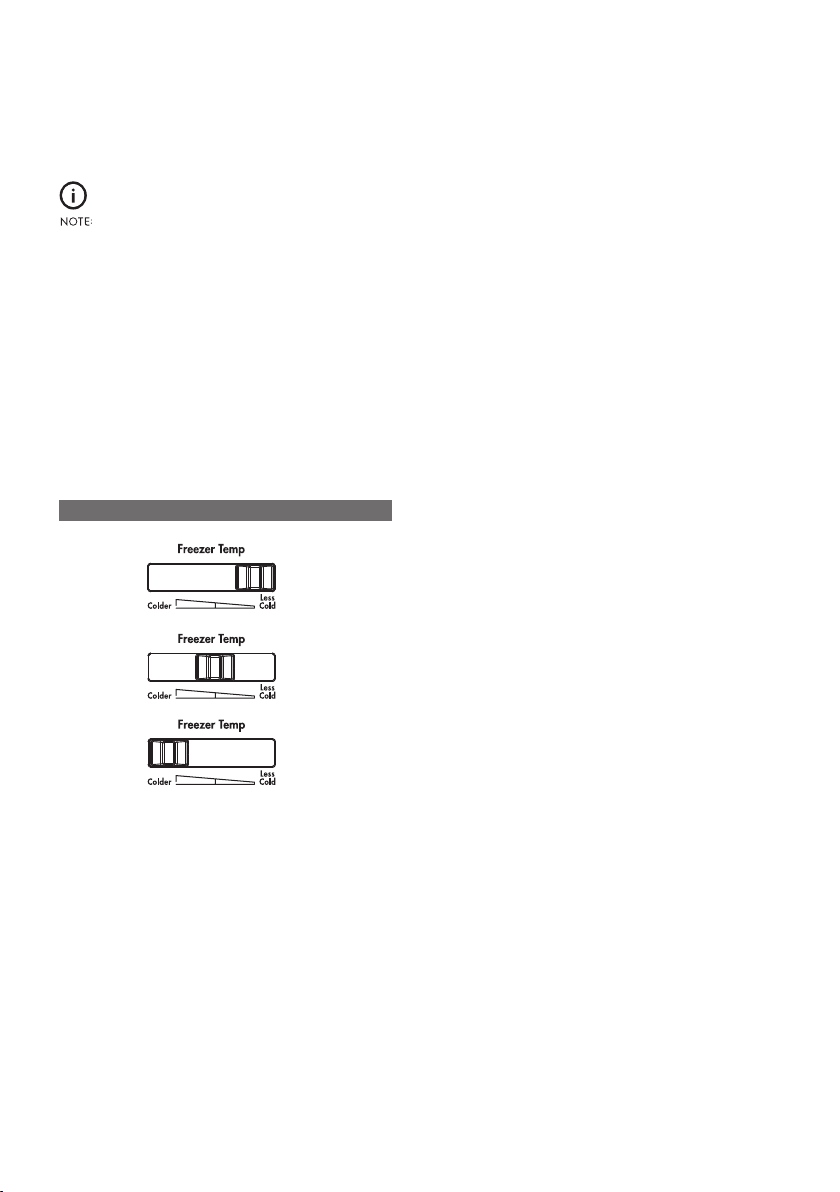
Top mount freezer temperature adjustment
1. Select the freezer control.
2. Slide the control to the right (as per image
below).
3. Slide the control to the left (as per image below).
Set to less coldSummer (> 35°c)
Normal
Winter (<15°c) Set to colder
FREEZER TEMPERATURE SETTING RECOMMEDATION
TEMPERATURE CONTROL
If you want to change the temperature, follow the
instructions in the section About the User Interface for
your model. Ensure that you make only small adjustments
and wait 24 hours to see if it’s to your liking.
12 TEMPERATURE CONTROL
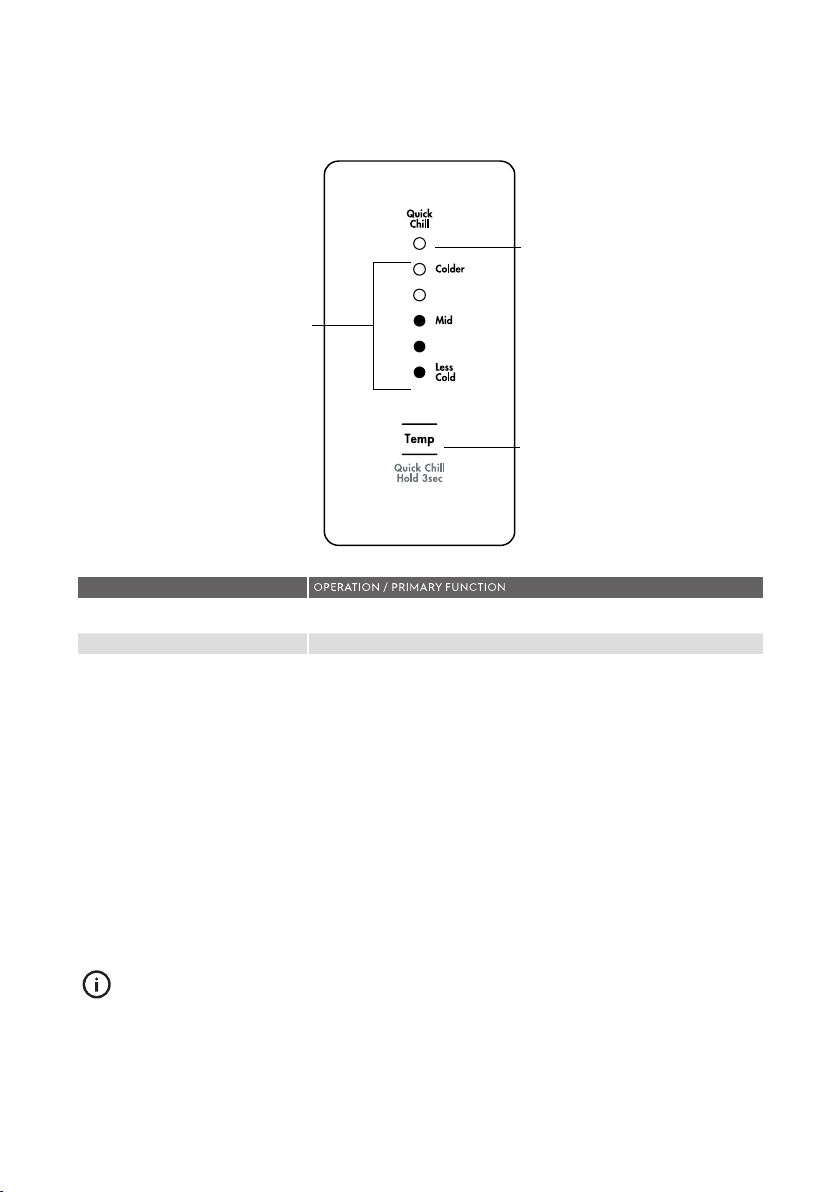
DESCRIPTION
Refrigerator temperature scale icons
Quick Chill On/ Off icon
• Indicates the temperature setting of the refrigerator compartment.
• Indicates the status of the Quick Chill function.
Temperature adjust/ quick chill
on/ off button
Temperature Control
• Touch the ‘Temp’ button to awaken control.
• Touch the ‘Temp’ button to decrease the refrigerator temperature.
There are 8 temperature settings indicated by the illumination
sequence on the display. Once the coldest temperature is reached the
display will return to the warmest setting with the next press.
Quick Chill
• Use the quick chill function when you add a large amount of food to
the refrigerator compartment.
• Press and hold the ‘Temp’ button for 3 seconds. The Quick Chill icon
will flash indicating that the Quick Chill is active.
• Your refrigerator will run at 2°C for 90 minutes, then automatically
return to normal mode.
• The Quick Chill function can be cancelled anytime by pressing the
‘Temp’ button again.
IMPORTANT
The factory default settings for the refrigerator is “Mid”. If you
want to change the temperature, remember to make only
small adjustments and wait 24 hours to see if it’s correct.
ABOUT THE USER INTERFACE
Control – ETB4600 & ETB5400
USER INTERFACE 13
Refrigerator
temperature
scale icons
Quick chill o
n/off icon
T
emperature
adjust/quick c
hill
o
n/off button
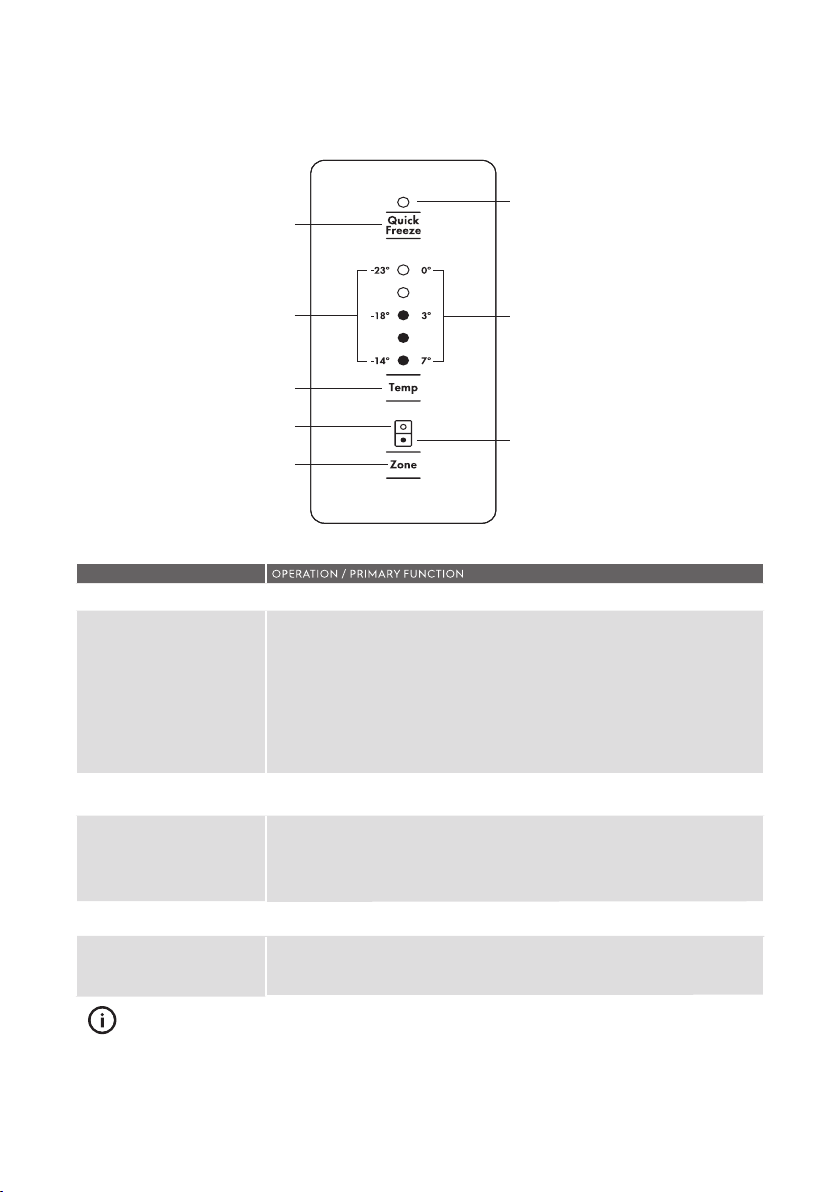
Quick Freeze button
Use the Quick Freeze function when you add a large amount of food to the
freezer compartment.
Refrigerator / Freezer
temperature scale icons
Temperature adjust button
Refrigerator/Freezer
indication icon
Compartment select button
• Press the ‘Quick Freeze’ button. The Quick Freeze icon will flash indicating
that the quick freeze is active and the compressor will run continuously for
90 minutes.
• After 90 minutes the freezer will automatically return to normal mode.
• The Quick Freeze function can be cancelled anytime by pressing the
button again.
• Indicates the temperature setting of the refrigerator compartment.
• Indicates the temperature setting of the freezer compartment.
• Touch any button to awaken control.
• Touch the ‘Temp’ button to decrease the selected compartment temperature. There
are 8 temperature settings indicated by the illumination sequence on the display.
Once the coldest temperature is reached the display will return to the warmest
setting with the next press.
• Indicates the selected zone.
• Press to select the desired compartment.
• The refrigerator / freezer indication icon will show which zone is selected.
DESCRIPTION
Quick Freeze on/ off icon
• Indicates the status of the Quick Freeze function.
IMPORTANT
The factory default s
ettings for the refrigerator is “3°C” and
“-18°C” for the freezer. If you want to change the
temperature, remember to make only small adjustments and
wait 24 hours to see if it’s correct.
ABOUT THE USER INTERFACE
Control – EBE4500
Quick freeze on/off icon
Temperature adjust
Refrigerator indication icon
Compartment select button
Freezer temperature
scale icons
Quick freeze button
Refrigerator temperature
scale icons
Freezer indi
cation icon
14 USER INTERFACE
AB
OUT THE USER INTERFACE
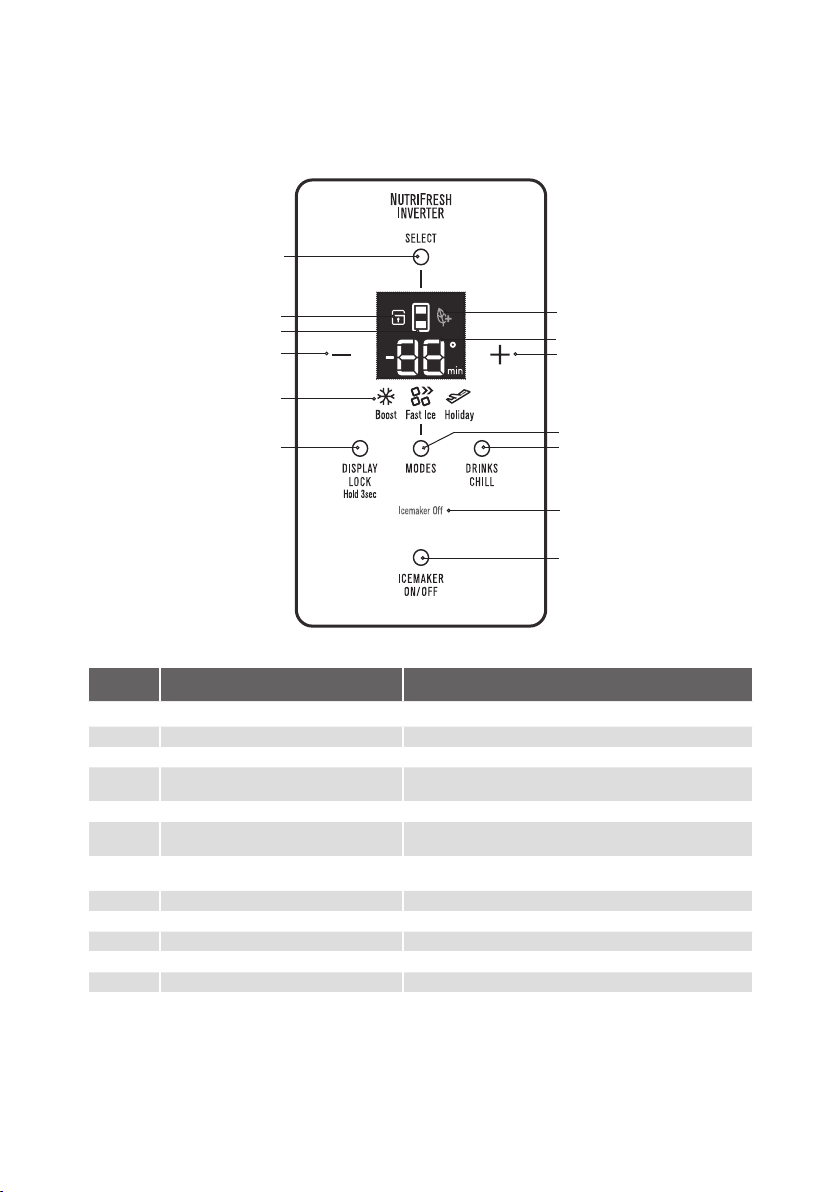
Control – ETE5720 & EHE5224
BUTTON /
ICON
DESCRIPTION PRIMARY FUNCTION
1 Compartment Selector button Selects controllable compartment.
2 Lock Icon Indicates if the user interface is locked.
3 Compartment Icon Indicates controllable compartment.
4
ECO Icon
Indicates if the appliance is operating in its most energy
efficient mode.
5 Digital dis
pla
y Indicates temperature of selected compartment.
6 Decrease button Decreases temperature of selected compartment as well
as the drinks chill time
7 Increase button
Increases temperature of selected compartment as well as
the drinks chill time.
8 Mode indicators (Boost, Fast Ice, Holiday) Indicates appliance operation mode.
9 Display Lock button Selects lock state of user interface.
10 Mode select button Selects operation mode of appliance.
11 Drinks Chill button Selects drinks chill timer.
12 Icemaker status indicator Shows operational status .
13 Icemaker on/off button Selects operation of icemaker.
1
2
3
6
8
9
4
5
7
10
11
12
13
USER INTERFACE 15
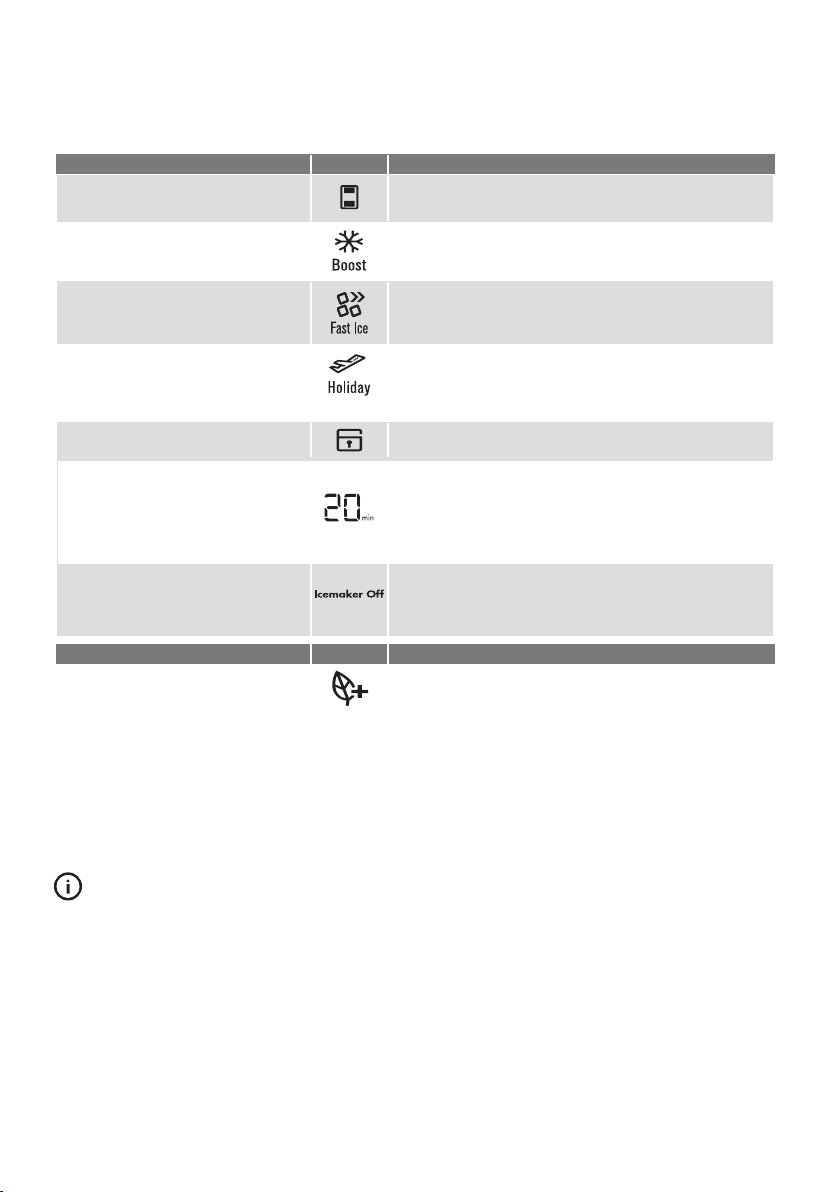
Setting the temperature
• Press button 1 until the desired compartment is displayed on
icon 3.
• Press buttons 6 or 7 to adjust temperature up or down.
Boost mode
Increases the chill rate of the refrigerator
for 90mins before returning to pre-set
mode.
• Press button 10 until the boost icon is illuminated.
• Boost mode can be deselected using button 10.
Fast Ice
Decreases the freezer temperature to -23°C
for 26 hours before returning to pre-set
mode.
• Press button 10 until the fast ice icon is illuminated.
• Fast Ice mode can be deselected using button 10.
Holiday mode
The refrigerator minimises defrosting to
save energy when doors remain closed for
an extended period.
• Press button 10 until the holiday icon is illuminated.
• Holiday mode can be deselected using button 10 or opening
the fridge door.
• When holiday made is disabled the temperature settings will
revert to the previous settings.
Display Lock
Deactivates the user interface controls.
• To turn on/off press and hold button 9 for 3 seconds, the lock
icon is illuminated when activated.
Drinks Chill
Sets a timer for between 1 and 30 minutes
as a reminder for when drinks are placed in
the freezer for quick chill.
• To turn on press button 11 and initial time of 20 mins will appear on
digital display. To adjust time use buttons 6 and 7.
•
Alarm will sound when time is finished.
•
Press button 11 to turn off during or after countdown. The time
taken to chill depends on the size of your bottle.
•
Do not leave the bottle inside the freezer longer than the time
needed for chilling.
Ice on/off
Enables/disables ice maker
• To enable/disable press button 13 to cycle through
on/off modes.
• Indicator 12 will illuminate when the ice maker is deactivated.
• The ice maker will turn off automatically after sensing that the
water tank is empty.
INDICATOR ICON OPERATION
Eco Mode
Enabled when appliance set to energy
efficient operating temperatures.
• ECO icon automatically appears when refrigerator is set
between +3°C and +7°C and freezer is set between -14°C and
-18°C
FUNCTIONS OF THE USER INTERFACE
Control – ETE5720 & EHE5224 models.
IMPORTANT
The factory default settings for the refrigerator is “3°” and “-18°C” for
the freezer. If you want to
change the temperature, remember to
make only small adjustments and wait 24 hours to see if it’s correct.
FUNCTION ICON OPERATION
16 USER INTERFACE
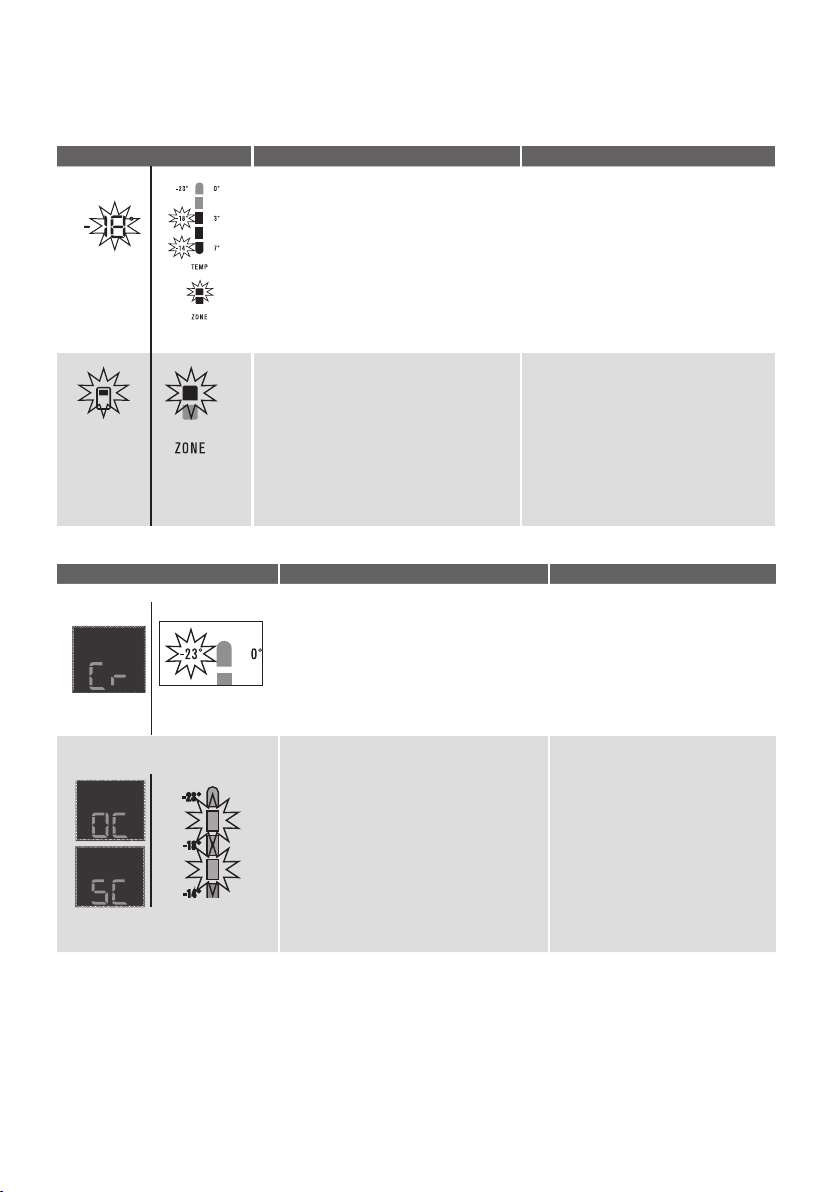
ERROR CODE WHAT IT MEANS… WHAT TO DO…
Communication Error
If you see this icon displayed (electronic
display models) or the top temperat
ure icon
is flashing it means that the control has lost
contact with the main control board.
The appliance will operate at its last
known setting, all auxillary functions will not
work.
Turn the unit off at the power point
for 5 minutes and then turn it back on.
Under most circumstances this will
reset the display enabling normal
function to continue.
If the error re-occurs then call
for service.
Sensor – Open Circuit /
Short Circuit
If you see this icon displayed (electronic
display models) or any combination of the
second and fourth temperature icons are
flashing it means that an error has been
detected on a sensor.
The refrigerator will run in a default cycle to
prevent food spoilage.
Call for service.
ALARM ICON WHAT IT MEANS OPERATION
Freezer Temperature Alarm
Activates if the freezer temperature is 10°c
over set temperature for a period of 50
minutes (except during a defrost).
An alarm will sound the
temperature icons
will flash.
• To deactivate the alarm for 50 minutes
press any button.
• To deactivate alarm for 12 hrs on the ice
& water model press and hold Select
Mode for 10 seconds for non ice and
water models press and hold any button
for 10 se
conds.
Non Electronic
Display
Door Alarm
Activates if the refrigerator or freezer doors
are left open for longer than 2 minutes.
An alarm will sound and the affected
compartment icon will flash and the
temperature and icons will fade on and off.
• Alarm will sound and icon will flash
indicating which door is open.
(Ice & water models)
• To silence the alarm for 8 minutes while
the door is open press an
y button (the
icons will continue to flash until door is
closed).
ERROR COD
ES & ALARM
S
A
l
a
rms
Error codes
Non Electronic
Display
Non Electronic
Display
Non Electronic
Display
ERROR CODES AND ALARMS 1
7
ARNING
WARNING
BEFORE CLEANING: Turn the refrigerator off at the power
point and unplug the cord to prevent any chance of
electrocuting yourself.
Doors and exterior (white and silver):
You should only clean the doors with lukewarm soapy
water and a soft cloth.
ARNING
CAUTION
Never use stainless steel cleaners, abrasive pads or other
cleaners that will scratch the surface. Damage to the
appliance after delivery is not covered by your warranty.
Interior
Clean the inside of your refrigerator regularly with a soft
cloth, unscented mild soap and lukewarm water.
Thoroughly dry all surfaces and removable parts and
avoid getting water on the controls. Replace removable
parts, plug power cord in and switch the power on before
returning the food.
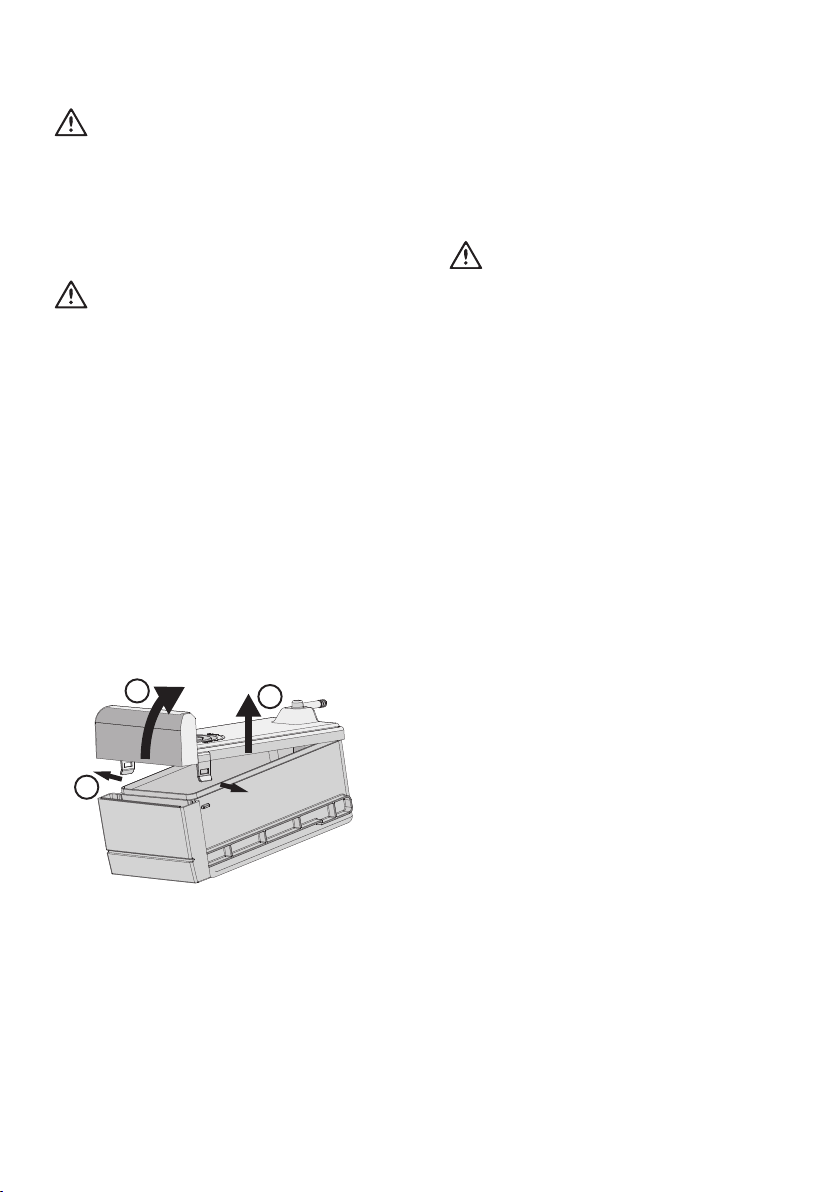
Water Tank Assembly
Clean the inside of the water tank regularly with a soft
cloth, unscented mild soap and rinse thoroughly with
lukewarm water to completely remove any soap residue.
To remove the lid follow these steps:
1. Unclip the front 2 clips and
2. rotate lid up and off the rear clip.
3. Lift lid off tank
CLEANING YOUR REFRIGERATOR
Door seals
Always keep door seals clean by washing them with a mild
detergent and warm water, followed by a th
orough drying.
Sticky food and drink can cause seals to stick to the cabinet
and tear when you open the door.
ARNING
CAUTION
Never use hot water, solvents, commercial kitchen cleaners,
aerosol cleaners, metal p
olishes, caustic or abrasive
cleaners, or scourers to clean your refrigerator. Many
commercially available cleaning products and detergents
contain solvents that will damage your refrigerator. Use only
a soft cloth with an unscented mild soap and lukewarm
water.
To clean a crisper or freezer bin with telescopic extension
slides, simply wipe with a damp cloth and warm soapy
water. Never immerse the cover in water, as this could affect
the operation of the slide.
Switching off your refrigerator
If you switch off your refrigerator for an extended period,
follow these steps to reduce the chances of mould:
1. Remove all food.
2. Remove the power plug from the power point.
3. Thoroughly clean and dr
y the Interior.
4. Ensure that all the doors are wedged open slightly for
air circulation.
2
3
1
18
CLEANING
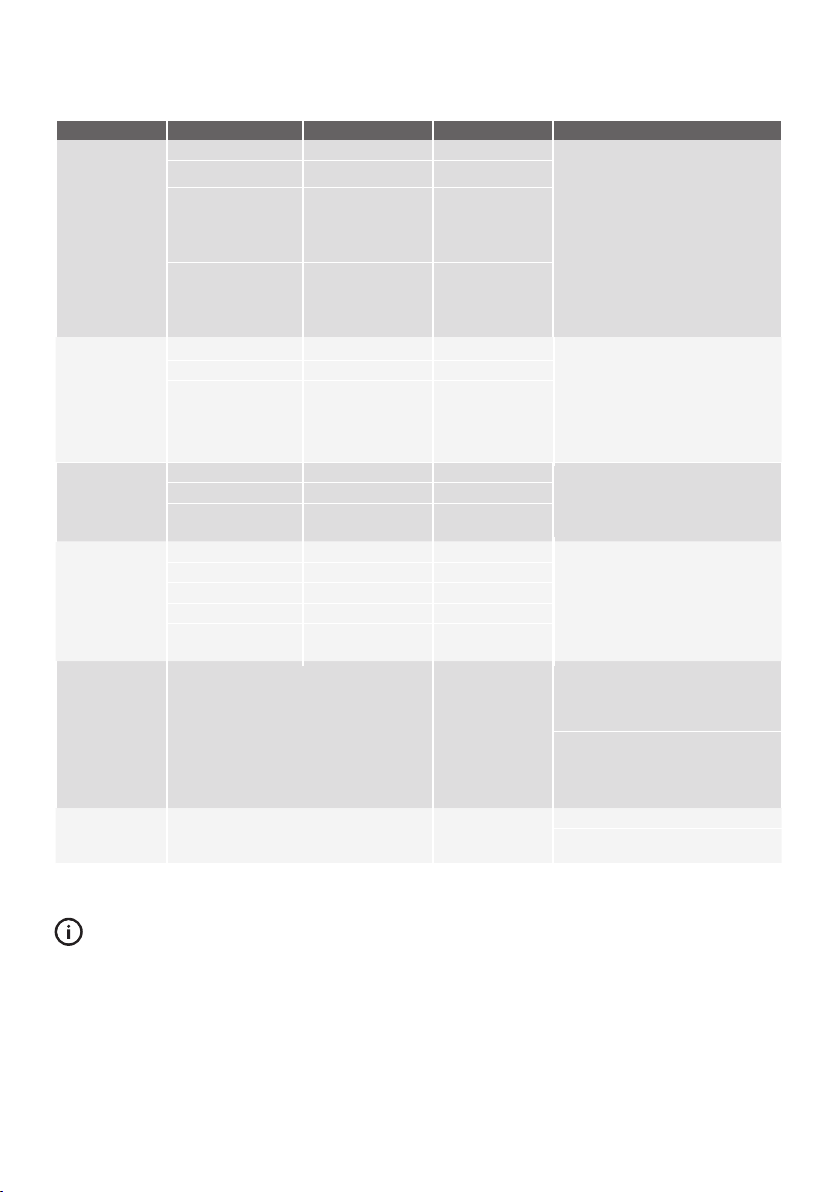
FOOD STORAGE GUIDE
CATEGORY PRODUCT REFRIGERATOR FREEZER STORAGE TIPS
MEAT
Sausages and Mince 1-2 Days 2-3 Months
Keep cold meat at the back of the
refrigerator where i
t is coldest.
Plastic can cause meat to sweat if
stored in refrigerator for more than
a day.
Roast can take up to 48 hours to
defrost properly, transfer frozen
roast to the refrigerator 2 days
before use.
Chops and Steak 3-4 Days 4-6 Months
Cold Meats 3-5 Days 4-6 Months
Roasts 3-5 Days 12 Months
POULTRY
Chicken 1-2 Days 2 Months
If poultry takes on a smell or colour
you are unsure about it is best to
throw it out.
Whole eggs are not suitable for
freezing, slightly beaten eggs may
be frozen for four months.
Roast Chicken 3-5 Days 12 Months
Eggs 6 Weeks Not Suitable
SEAFOOD
Whole fish and fillets 2-3 Days 2 Months
Store in an air tight container or foil.
Never freeze prawns in salty water as
this will dehydrate the flesh.
Lobster and crabs 1-2 Days 2 Months
Prawns 1-2 Days 2 Months
DAIRY
Milk Until Expiry Date Not Suitable
If dairy takes on a smell or colour and
you are unsure about it, it is best to
throw it out.
De
pending on the
variet
y ha
rd
cheese can la
st from 2 weeks
to
2 months
.
Yoghurt 7- 10 Days Not Suitable
Hard Cheeses 2 Weeks – 2 Months 2 Months (Grated)
Soft Cheeses 1-2 Weeks Not Suitable
Butter 8 Weeks 12 Months
FRUIT &
VEGETABLES
Every fruit and vegetable has a
different shelf life. Some stay fresh for
a couple of days e.g beans, others
can last for a couple of months e.g.
onions.
8-12 Months
When freezing
chop and blanch
in small portions.
Keep vegetables in the crisper and
away from the air vents to avoid
freezing.
Don’t wash fruit and vegetables
before storing them in the refrigerator
as this can make them susceptible to
rotting.
LEFT OVERS
Homemade meals 3-4 Days 2-6 Months Store in sealed container.
Freeze meals in small portion sizes
to limit wastage.
TIPS & INFORMATION
IMPORTANT
Please note, use this information as
a guide only, actual storage
times will vary depending on how you use your refrigerator, climatic
conditions and the freshness of the food.
FOOD STORAGE GUIDE
19
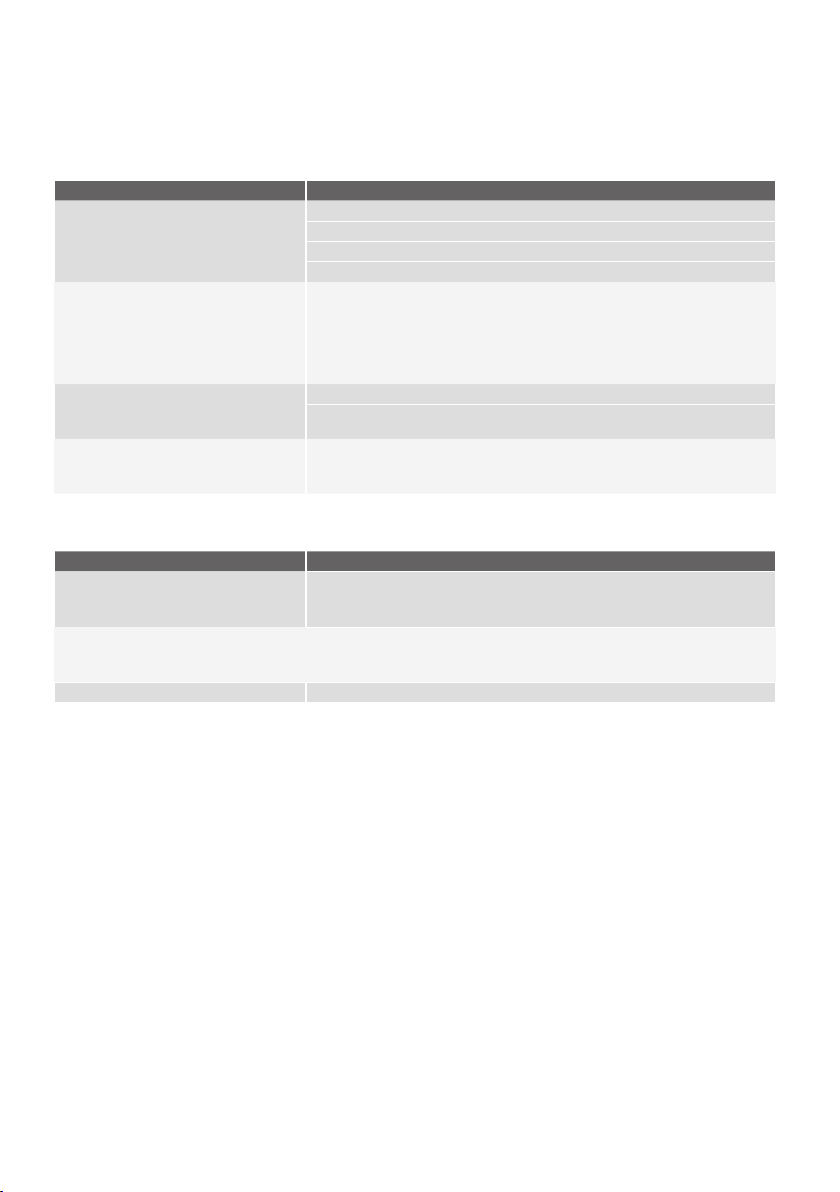
TROUBLESHOOTING
Applia
nce does not operate at desired temperature
In a modern frost free refrigerator / freezer, cold air is circulated around the various compartments through air
vents using a high efficiency fan.
CONCERN WHAT TO DO
Refrigerator is too warm Ensure food is allowed to cool before placing inside the refrigerator.
Ensure the appliance is set up as per instructions on page 11.
Ensure that contents are not obstructing the cooling vents.
Ensure the door is not held open or is being opened too frequently.
Freezer is too warm
Adjust temperature to a colder setting.
Ensure food is allowed to cool before placing inside the freezer.
Ensure the appliance is set up as per instructions on page 11.
Ensure that contents are not obstructing the cooling vents.
Ensure the door is not held open or is being opened too frequently.
Food is freezing in the refrigerator Adjust temperature to a warmer setting.
Ensure that fruit and vegetables are stored in
the crisper. Items with a high water
content should not be placed near the cooling vents.
Unable to change temperature settings Refer to function guide in Controlling Your Refirgerator.
Ensure that user interface is in "awake"
mode before trying to adjust temperature
settings.
Crisper Operation
CONCERN WHAT TO DO
Excess moisture build up in crisper
It is normal for there to be
some mo
isture
and h
um
idit
y in
the crisp
er bin.
Ensure that the crisper is not over packed.
Crisper bin can not be removed
If crisper bin interferes with the door bins, remove door bins before removin
g
crisper.
Position cabinet so that the door can be fully opened.
Freezing items in the crisper Adjust temperature to a warmer setting.
20 TROUBLESHOOTING
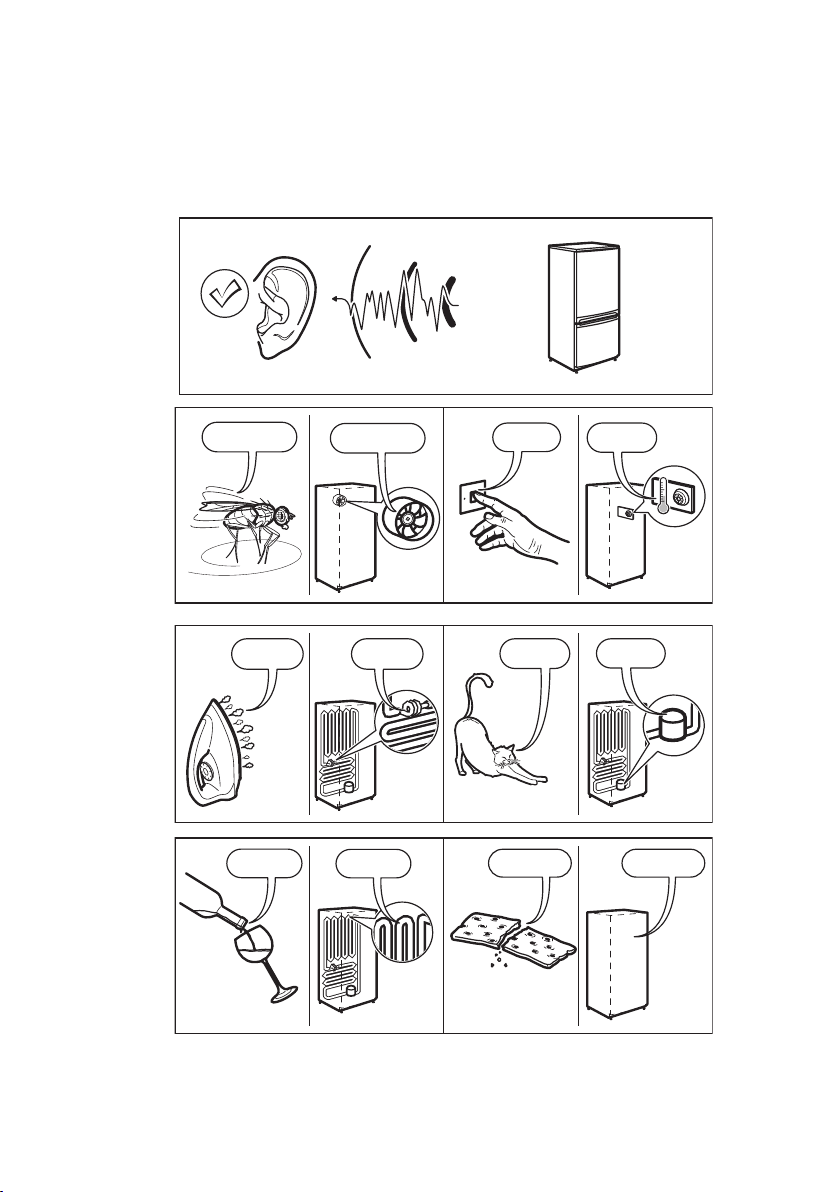
BRRR
!
HISSS!
CLICK!
BLUBB!
CRACK!
SSSRR
R!
OK
CLICK!
CLICK!
SSSRRR!
SSSRRR!
BRRR!
BRRR!
HISSS!
HISSS!
BLUBB!
BLUBB!
CRACK!CRACK!
TROUBLESHOOTING
Appliance noise
Your new refrigerator may make sounds that your old one didn’t make. Because the sounds are new to you, you might be
concerned about them. Most of the new sounds are normal. Hard surfaces, like the floor, walls and cabinets, can make the
sounds seem louder than they actually are. The following describes the kinds of sounds and what may be making them.
TROUBLESHOOTING 21
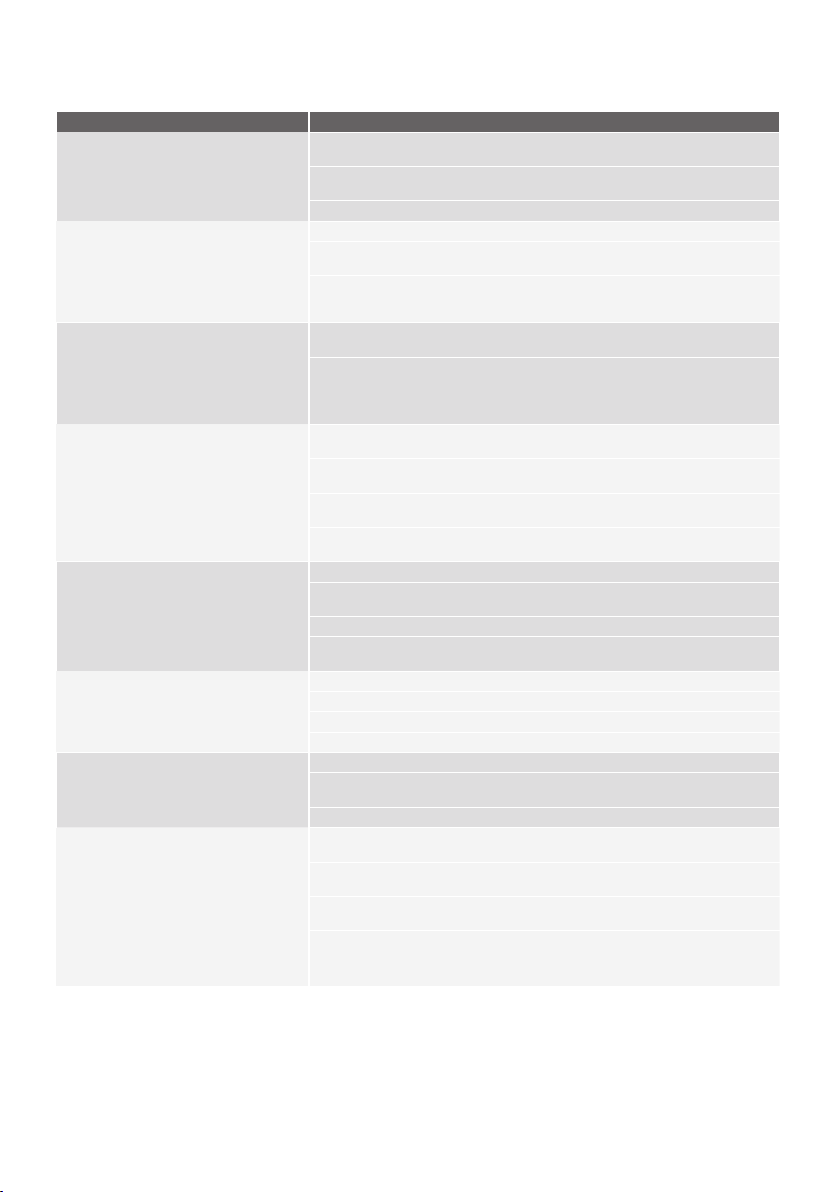
Refrigerator operation
CONCERN WHAT TO DO
Appliance will not run
It is normal for the freezer fan not to
operate during the automatic defrost cycle,
or for a short time after the appliance is
switched on.
Ensure that the cord is plugged into a live power outlet and outlet is switched on.
Ensure that the household circuit breaker has not tri
pped or that the fuse has not
blown.
The appliance maybe in defrost mode, check again in half an hour.
Compressor motor seems to run too long
At normal room temperatures, expect your
motor to run about 40% to 80%
of the time.
Under warmer conditions, expect it to run
even more often.
Ensure that the doors are not held open
Check that large amounts of warm food have not just been placed inside the
appliance.
Note that the appliance will run more than normal just after you install it or when
adjusting to temperature setting changes.
The exterior of the appliance is warm or hot
to touch
This is normal because the appliance
transfers heat from the inside out through
the outer panels and the divider between
the doors.
Ensure the appliance has the external clearances recom
mended in the section
“Installing your new appliance”.
The exterior of the cabinet will be much warmer on warmer days it may even feel
hot to touch, as the appliance is working harder.
User interface will not respond
To ensure settings are not accidentally
changed the user interface will go into
slee
p mode when not in use. Press any
button to wake user interface
Check that the user interface is in awake mode, refer to section “About the user
interface”.
Check that the user interface is not locked, refer to section “About the user
interface”.
If the user interface is frozen turn the appliance off for five minutes for the memory to
clear, then turn back on.
Check that the user interface is not in Sabbath Mode, refer to control instructions.
(I&W models only).
Alarms Sounding Check that all doors are fully closed.
Ensure that the over temperature alarm is not being activated by hot food placed in
the freezer.
Check if the drinks timer has ended, refer control instructions.
Check if the Filter Replacement alert is activated, refer control instructions.
(I&W models only)
Frost build up Check that all doors are fully closed.
Ensure that the doors are not opened too often.
Ensure that the return air vents are not blocked with packaging.
Ensure the seals are clean and not obstructed.
Odours The interior may need cleaning, refer to cleaning guide.
Ensure that food is stored correctly as some food, containers and wrapping can
produce odours.
Check appliance for old or unusual food.
Lights not working
The LED lighting is designed to dim
automatically if the door is left opened
for more than 5 minutes and turn off
completely if the door is open for more
than 7 minutes. Closing the door will reset
the timer.
The LED lighting is also designed to turn
on gradually.
Ensure that the cord is plugged into a live power outlet and outlet is switched on.
Ensure that the household circuit breaker has not tripped or that the fuse has not
blown.
Check that the user interface is not in Sabbath Mode, refer to control instructions.
Check the appliance features section to determine lighting configuration for your
model. Check that the doors are closed completely
22
TROUBLESHOOTING
If you still require service
If you have a problem, and the problem persi
sts after you have made the checks mentioned, contact your nearest
Electrolux approved Service Centre or the dealer you bought the refrigerator from. Be ready to quote the model
number, the 9-digit PNC and 8-digit serial number, which is stated on the label inside the refrigerator
compartment.
Automatic Ice maker system
CONCERN WHAT TO DO
Ice maker does not produce ice or
not enough ice
The icemaker is designed to produce a
tray of ice approximately every 3 hours,
depending on the con
ditions.
Ensure that the Ice Maker is switched on at the user interface refer to "Abo
ut the
User Interface" for details.
Ensure water tank is full and contains clean water (if liquids other than clean
water have been used, call Electrolux Customer Care).
Ensure water tank is securely pushed into pump housing.
Ice has bad odour or taste
If the freezer compartment is too
warm, refer to "freezer is too warm" then wait
24 hours for the freezer to reach ideal temperature.
Turn the unit off at the mains and leave for 2 minutes then turn the appliance
back on (this will reset the icemaker unit). Check for ice production after 24 hours.
Check that there is no obstruction under the ice maker and ensure the ice bi
n is
fitted correctly.
Cover food to e
nsure i
ce
does
no
t
absor
b
foreign odours.
Interior of appliance or ice bin may require cleaning, refer to “Cleaning your
refrigerator”.
Discard stale ice monthly and allow ice maker to produce a fresh supply.
TROUBLESHOOTING
Door operation
CONCERN WHAT TO DO
Freezer door pops open.
This is normal and should re-close. This happens when the refrigerator door is
closed too quickly.
If the freezer door stays open, it indicates that the appliance needs to be tilted
backwards a little further.
Refer to section “Installing your new appliance”.
Self close not working. Check if your appliance has self closing hinges as not all m
odels do.
It indicates that the appliance needs to be
tilted backwards a little further. Refer
to section “Installing your new appliance”.
Door not sealing properly
Ensure there is nothing that is preventing the door from
closing such as appliance
contents or items placed near the appliance.
Ensure that the crisper/freezer bin is closed completely.
Refit if required as
referred to in the section "Using your refri
gerator".
Ensure the appliance is set up as
per recommendations.
Door difficult to open and close
If the door is difficult to open just after you have closed it this is due to the
pressure equalising, the door will open normally after a few minutes.
TROUBLESHOOTING
23