


AXISP3245NetworkCameraSeries
TableofContents
Aboutthismanual..........................................3
Solutionoverview...........................................4
Productoverview...........................................5
Findthedeviceonthenetwork................................8
Browsersupport................................................8
Accessthedevice...........................................9
Setasecurepasswordfortherootaccount..........................9
Securepasswords...............................................9
Setup.....................................................10
Webpageoverview..............................................10
Imagequality...................................................12
Privacymasks..................................................16
Overlays.......................................................16
Streamingandstorage...........................................17
Events........................................................19
Applications....................................................23
Troubleshooting............................................25
Resettofactorydefaultsettings...................................25
Checkthecurrentrmware.......................................25
Upgradethermware............................................25
Technicalissues,cluesandsolutions................................
26
Performanceconsiderations.......................................
27
Specications..............................................28
LEDindicators..................................................
28
SDcardslot....................................................
28
Buttons.......................................................
28
Connectors....................................................
28
2

AXISP3245NetworkCameraSeries
Aboutthismanual
Aboutthismanual
Thisusermanualdescribesmultipleproducts.Someoftheinstructionsmaynotberelevantforyourproduct.
3

AXISP3245NetworkCameraSeries
Solutionoverview
Solutionoverview
1
AXISP3245–LV
2
AXISP3245–LVE
3
Surveillancecenter
4

AXISP3245NetworkCameraSeries
Productoverview
Productoverview
AXISP3245–LV
1
Mountingbracket
2
Cameraunit
3
Dome
4
Lid
5
Domecover
5

AXISP3245NetworkCameraSeries
Productoverview
1
Networkconnector(PoE)
2
SDmemorycardslot
3
StatusLEDindicator
4
Audioconnector
5
Controlbutton
6
I/Oconnector
AXISP3245–LVE
1
Mountingbracket
2
Cameraunit
3
Lid
4
Dome
6

AXISP3245NetworkCameraSeries
Productoverview
1
Networkconnector(PoE)
2
SDmemorycardslot
3
StatusLEDindicator
4
Audioconnector
5
Controlbutton
6
I/Oconnector
7

AXISP3245NetworkCameraSeries
Findthedeviceonthenetwork
Findthedeviceonthenetwork
TondAxisdevicesonthenetworkandassignthemIPaddressesinWindows®,useAXISIPUtilityorAXISDeviceManager.Both
applicationsarefreeandcanbedownloadedfromaxis.com/support.
FormoreinformationabouthowtondandassignIPaddresses,seethedocumentHowtoassignanIPaddressandaccessyour
deviceonthedevicepageataxis.com.
Browsersupport
Youcanusethedevicewiththefollowingbrowsers:
Chrome
TM
Firefox
®
Edge
®
Safari
®
Windows
®
recommended
xx
OSX
®
recommended
x
Otheroperatingsystems
xx
Ifyouneedmoreinformationaboutrecommendedbrowsers,gotoaxis.com/browser-support.
8

AXISP3245NetworkCameraSeries
Accessthedevice
Accessthedevice
1.OpenabrowserandentertheIPaddressorhostnameoftheAxisdevice.
IfyouhaveaMaccomputer(OSX),gotoSafari,clickonBonjourandselectthedevicefromthedrop-downlist.Toadd
Bonjourasabrowserbookmark,gotoSafari>Preferences.
IfyoudonotknowtheIPaddress,useAXISIPUtilityorAXISDeviceManagertondthedeviceonthenetwork.
2.Entertheusernameandpassword.Ifyouaccessthedeviceforthersttime,youmustsettherootpassword.See
Setasecurepasswordfortherootaccountonpage9.
3.Theliveviewpageopensinyourbrowser.
Setasecurepasswordfortherootaccount
Important
Thedefaultadministratorusernameisroot.Ifthepasswordforrootislost,resetthedevicetofactorydefaultsettings.
1.Typeapassword.Followtheinstructionsaboutsecurepasswords.SeeSecurepasswordsonpage9.
2.Retypethepasswordtoconrmthespelling.
3.ClickCreatelogin.Thepasswordhasnowbeencongured.
Securepasswords
Important
Axisdevicessendtheinitiallysetpasswordincleartextoverthenetwork.Toprotectyourdeviceaftertherstlogin,set
upasecureandencryptedHTTPSconnectionandthenchangethepassword.
Thedevicepasswordistheprimaryprotectionforyourdataandservices.Axisdevicesdonotimposeapasswordpolicyasthey
maybeusedinvarioustypesofinstallations.
Toprotectyourdatawestronglyrecommendthatyou:
•Useapasswordwithatleast8characters,preferablycreatedbyapasswordgenerator.
•Don’texposethepassword.
•Changethepasswordatarecurringinterval,atleastonceayear.
9

AXISP3245NetworkCameraSeries
Setup
Setup
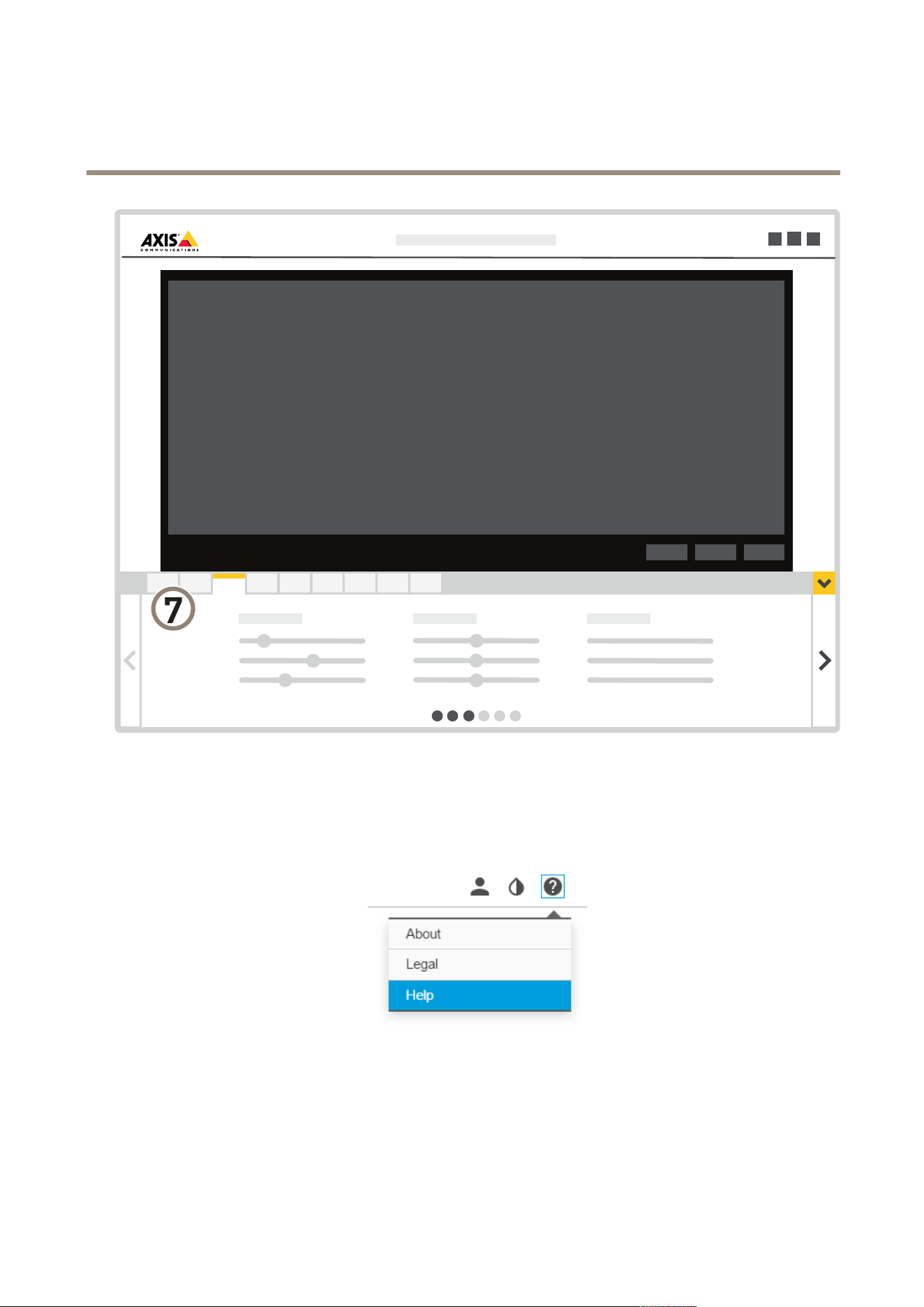
Webpageoverview
1
Liveviewcontrolbar
2
Liveview
3
Productname
4
Userinformation,colorthemes,andhelp
5
Videocontrolbar
6
Settingstoggle
10
AXISP3245NetworkCameraSeries
Setup
7
Settingstabs
Needmorehelp?
Youcanaccessthebuilt-inhelpfromthedevice’swebpage.Thehelpprovidesmoredetailedinformationonthedevice’sfeaturesand
theirsettings.
11

AXISP3245NetworkCameraSeries
Setup
Imagequality
Capturemodes
CapturemodedenesthemaximumframerateavailableintheAxisproduct.Dependingonwhichcapturemodeyouselect,you
maynotbeabletouseWDR.
CapturemodedenesthemaximumresolutionandmaximumframerateavailableintheAxisproduct.Ifusingacapturemodewith
asmallerresolutionthanthemaximumresolution,theangleofviewisreduced.Thecapturemodealsoaffectslightsensitivity.A
capturemodewithahighmaximumframeratehasreducedlightsensitivityandviceversa.
Thelowerresolutioncapturemodeiscroppedoutfromthehighestresolution.
Theimageshowshowtheeldofviewandaspectratiocanchangebetweentwodifferentcapturemodes.
Whichcapturemodetochoosedependsontherequirementsofframerateandresolutionforthespecicsurveillancesetup.For
specicationsaboutavailablecapturemodes,seetheproduct’sdatasheetataxis.com.
Remotefocusandzoom
Theremotefocusandzoomfunctionalityallowsyoutomakefocusandzoomadjustmentstoyourcamerafromacomputer.Itisa
convenientwaytoensurethatthescene’sfocus,viewingangleandresolutionareoptimizedwithouthavingtovisitthecamera’s
installationlocation.
Left:nofocus.Right:remotefocusapplied.
12

AXISP3245NetworkCameraSeries
Setup
Left:nozoom.Right:remotezoomapplied.
Selectexposuremode
Therearedifferentexposuremodeoptionsinthecamerathatadjustsaperture,shutterspeed,andgaintoimproveimagequalityfor
specicsurveillancescenes.GotoSettings>Image>Exposureandselectbetweenthefollowingexposuremodes:
•Formostusecases,selectAutomaticexposure.
•Forenvironmentswithcertainarticiallighting,forexampleuorescentlighting,selectFlicker-free.
Selectthesamefrequencyasthepowerlinefrequency.
•Forenvironmentswithcertainarticiallightandbrightlight,forexampleoutdoorswithuorescentlightingatnightand
sunduringdaytime,selectFlicker-reduced.
Selectthesamefrequencyasthepowerlinefrequency.
•Tolockthecurrentexposuresettings,selectHoldcurrent.
BenetfromIRlightinlow-lightconditionsusingnightmode
Yourcamerausesvisiblelighttodelivercolorimagesduringtheday.Astheavailablelightdiminishes,youcansetthecamerato
automaticallyshifttonightmode,inwhichthecamerausesbothvisiblelightandnear-infraredlighttodeliverblack-and-white
images.Sincethecamerausesmoreoftheavailablelightitcandeliverbrighter,moredetailed,images.
1.GotoSettings>Image>Dayandnight,andmakesurethattheIRcutlterissettoAuto.
2.Todetermineatwhatlightlevelyouwantthecameratoshifttonightmode,movetheThresholdslidertowardBright
orDark.
3.EnableAllowIRilluminationandSynchronizeIRilluminationtousethecamera’sIRlightwhennightmodeisactivated.
Note
Ifyousettheshifttooccurwhenit’sbrighter,theimageremainssharperastherewillbelesslow-lightnoise.Ifyouset
theshifttooccurwhenit’sdarker,theimagecolorsaremaintainedforlonger,buttherewillbemoreimageblurdue
tolow-lightnoise.
Reducenoiseinlow-lightconditions
Toreducenoiseinlow-lightconditions,youcanadjustoneormoreofthefollowingsettings:
•Settheexposuremodetoautomatic.
Note
Ahighmaxshuttervaluecanresultinmotionblur.
13

AXISP3245NetworkCameraSeries
Setup
•Toslowdowntheshutterspeed,setmaxshuttertothehighestpossiblevalue.
•Reducesharpnessintheimage.
•Setthemaxgaintoalowervalue.
Handlesceneswithstrongbacklight
Dynamicrangeisthedifferenceinlightlevelsinanimage.Insomecasesthedifferencebetweenthedarkestandthebrightest
areascanbesignicant.Theresultisoftenanimagewhereeitherthedarkorthebrightareasarevisible.Widedynamicrange
(WDR)makesbothdarkandbrightareasoftheimagevisible.
1.GotoSettings>Image>Widedynamicrange.
2.Ifrequired,turnonWDR.
3.UsetheLocalcontrastslidertoadjusttheamountofWDR.
ImagewithoutWDR.
ImagewithWDR.
Note
WDRmaycauseartifactsintheimage.
FindoutmoreaboutWDRandhowtouseitataxis.com/web-articles/wdr.
Compensateforbarreldistortion
Barreldistortionisaphenomenonwherestraightlinesappearincreasinglybentclosertotheedgesoftheframe.Awideeldofview
oftencreatesbarreldistortioninanimage.Barreldistortioncorrectioncompensatesforthisdistortion.
Note
Barreldistortioncorrectionaffectstheimageresolutionandeldofview.
1.GotoSettings>Image>Imagecorrection.
14

AXISP3245NetworkCameraSeries
Setup
2.TurnonBarreldistortioncorrection(BDC).
3.Setthelevelofcorrectionthatgivesyouthebestimage.
Monitorlongandnarrowareas
Usecorridorformattobetterutilizethefulleldofviewinalongandnarrowarea,forexampleastaircase,hallway,road,ortunnel.
1.Dependingonyourdevice,turnthecameraorthe3-axislensinthecamera90°or270°.
2.Ifthedevicedoesn’trotatetheviewautomatically,logintothewebpageandgotoSettings>System>Orientation.
3.Click
.
4.Rotatetheview90°or270°.
Findoutmoreataxis.com/axis-corridor-format.
Improvefacialrecognition
Tobetterrecognizethefaceofapersonpassingbythecamera,youcansettheoptimalpixelresolutionwiththecamera’spixel
counter.
1.GotoSettings>System>Orientationandclick.
15

AXISP3245NetworkCameraSeries
Setup
2.Inthecamera’sliveview,adjustthesizeandplacementoftherectanglearoundtheareaofinterest,forexample,where
thefacesofpassingpersonsareexpectedtoappear.Youcanthenseethenumberofpixelsrepresentedbythesidesof
therectangle.
Note
Youcanuseanobjectofaknownsizeintheviewasareferencetodecidehowmuchresolutionisneededforrecognition.
Viewarea
Aviewareaisacroppedpartofthefullview.Youcanstreamandstoreviewareasinsteadofthefullviewtominimizebandwidth
andstorageneeds.IfyouenablePTZforaviewarea,youcanpan,tiltandzoomwithinit.Byusingviewareasyoucanremoveparts
ofthefullview,forexample,thesky.
Whenyousetupaviewarea,werecommendyoutosetthevideostreamresolutiontothesamesizeasorsmallerthantheviewarea
size.Ifyousetthevideostreamresolutionlargerthantheviewareasizeitimpliesdigitallyscaledupvideoaftersensorcapture,
whichrequiresmorebandwidthwithoutaddingimageinformation.
Privacymasks
Aprivacymaskisauser-denedareathatpreventsusersfromviewingapartofthemonitoredarea.Inthevideostream,privacy
masksappearasblocksofsolidcolor.
You’llseetheprivacymaskonallsnapshots,recordedvideo,andlivestreams.
YoucanusetheVAPIX®applicationprogramminginterface(API)toturnofftheprivacymasks.
Important
Ifyouusemultipleprivacymasksitmayaffecttheproduct’sperformance.
Important
Setthezoomandfocusbeforeyoucreateaprivacymask.
Hidepartsoftheimagewithprivacymasks
Createaprivacymasktohideapartoftheimage:
1.GotoSettings>Privacymask.
2.ClickNew.
Overlays
Note
OverlaysarenotincludedinthevideostreamwhenusingSIPcalls.
Overlaysaresuperimposedoverthevideostream.Theyareusedtoprovideextrainformationduringrecordings,suchasatimestamp,
orduringproductinstallationandconguration.Youcanaddeithertextoranimage.
Thevideostreamingindicatorisanothertypeofoverlay.Itshowsyouthattheliveviewvideostreamislive.
Showanimageoverlay
Toaddanimageasanoverlayinthevideostream:
1.GotoSettings>Overlay.
2.ClickImagelist.
3.UploadanimageandclickDone.
16

AXISP3245NetworkCameraSeries
Setup
4.ClickCreateoverlay.
5.SelectImageandclickCreate.
6.Selecttheimagefromthedrop-downlist.
7.Topositiontheimageoverlay,chooseCustomoroneofthepresets.
8.ClickCreate.
Streamingandstorage
HowdoImage,Stream,andStreamprolesettingsrelatetoeachother?
TheImagetabcontainscamerasettingsthataffectallvideostreamsfromtheproduct.Ifyouchangesomethinginthistab,it
immediatelyaffectsallvideostreamsandrecordings.
TheStreamtabcontainssettingsforvideostreams.Yougetthesesettingsifyourequestavideostreamfromtheproductanddon’t
specifyforexampleresolution,orframerate.WhenyouchangethesettingsintheStreamtab,itdoesn’taffectongoingstreams,but
itwilltakeeffectwhenyoustartanewstream.
TheStreamprolessettingsoverridethesettingsfromtheStreamtab.Ifyourequestastreamwithaspecicstreamprole,the
streamcontainsthesettingsofthatprole.Ifyourequestastreamwithoutspecifyingastreamprole,orrequestastreamprole
thatdoesn'texistintheproduct,thestreamcontainsthesettingsfromtheStreamtab.
Videocompressionformats
Decidewhichcompressionmethodtousebasedonyourviewingrequirements,andonthepropertiesofyournetwork.The
availableoptionsare:
MotionJPEG
Note
ToensuresupportfortheOpusaudiocodec,theMotionJPEGstreamisalwayssentoverRTP.
MotionJPEG,orMJPEG,isadigitalvideosequencethatismadeupofaseriesofindividualJPEGimages.Theseimagesarethen
displayedandupdatedataratesufcienttocreateastreamthatshowsconstantlyupdatedmotion.Fortheviewertoperceivemotion
videotheratemustbeatleast16imageframespersecond.Fullmotionvideoisperceivedat30(NTSC)or25(PAL)framespersecond.
TheMotionJPEGstreamusesconsiderableamountsofbandwidth,butprovidesexcellentimagequalityandaccesstoeveryimage
containedinthestream.
H.264orMPEG-4Part10/AVC
Note
H.264isalicensedtechnology.TheAxisproductincludesoneH.264viewingclientlicense.Toinstalladditionalunlicensed
copiesoftheclientisprohibited.Topurchaseadditionallicenses,contactyourAxisreseller.
H.264can,withoutcompromisingimagequality,reducethesizeofadigitalvideolebymorethan80%comparedtotheMotion
JPEGformatandbyasmuchas50%comparedtotheMPEG-4standard.Thismeansthatlessnetworkbandwidthandstoragespace
arerequiredforavideole.Orseenanotherway,highervideoqualitycanbeachievedforagivenbitrate.
H.265orMPEG-HPart2/HEVC
Note
H.265islicensedtechnology.TheAxisproductincludesoneH.265viewingclientlicense.Toinstalladditionalunlicensed
copiesoftheclientisprohibited.Topurchaseadditionallicenses,contactyourAxisreseller.
17

AXISP3245NetworkCameraSeries
Setup
Bitratecontrol
Bysettingthebitratecontrolyoucanmanagethebandwidthconsumptionforyourvideostream.
Variablebitrate(VBR)
Withvariablebitratethebandwidthvariesbasedonthelevelofactivityinthescene.Themoreactivityinthescene,themore
bandwidthisrequired.Thisoptionguaranteesthatimagequalityisconstantbutrequiresstoragemargins.
Maximumbitrate(MBR)
Themaximumbitrateoptionallowsyoutosetatargetbitratevaluetobeabletohandlesystembitratelimitations.Tokeepthe
instantaneousbitratebelowthespeciedtargetbitrate,theremaybeadecreaseinimagequalityortheframeratemaydecrease.
Youhavetheoptiontoprioritizeeitherimagequalityorframerate.Itisrecommendedtocongurethetargetbitratehigherthanthe
expectedbitratetohavemarginsforadditionalcomplexitythatneedstobecaptured.
Averagebitrate(ABR)
Withaveragebitrate,thebitrateisautomaticallyadjustedoveralongertimescaletomeetthespeciedtargetandprovidethe
bestqualityonthevideostreambasedonavailablestorage.Imagequalityisdecreaseduniformly.Youcanstillgetgoodimage
qualitywhenthereisactivityinthescene.Theaveragebitrateoptionallowsyoutodenethetotalstoragerequiredtostorethe
videostreamforaspeciedamountoftime(retentiontime)whenimagequalityisadjustedtomeetthespeciedtargetbitrate.
Specifytheaveragebitratesettingsinoneofthefollowingways:
•Setthetargetbitrateandtheretentiontimetocalculatetheestimatedstorageneed.
•Usethetargetbitratecalculatortocalculatetheaveragebitrate,basedonavailablestorageanddesiredretentiontime.
Youhavealsotheoptiontoturnonmaximumbitratetospecifyabitratelimit.
Reducebandwidthandstorage
Important
Ifyoureducethebandwidthitcanresultinlossofdetailsinthepicture.
1.GotoliveviewandselectH.264.
2.GotoSettings>Stream.
3.Dooneormoreofthefollowing:
-TurnontheZipstreamfunctionalityandselectthedesiredlevel.
Note
ThezipstreamsettingsareusedforbothH.264andH.265.
-TurnondynamicGOPandsetahighGOPlengthvalue.
-Increasethecompression.
-TurnondynamicFPS.
Note
WebbrowsersdonotsupportH.265decoding.UseavideomanagementsystemorapplicationsupportingH.265decoding.
Setupnetworkstorage
Tostorerecordingsonthenetwork,youneedtosetupnetworkstorage:
1.GotoSettings>System>Storage.
2.ClickSetupunderNetworkstorage.
3.EntertheIPaddressofthehostserver.
18

AXISP3245NetworkCameraSeries
Setup
4.Enterthenameofthesharedlocationonthehostserver.
5.Movetheswitchifthesharerequiresalogin,andenterusernameandpassword.
6.ClickConnect.
Addaudiotoyourrecording
Editthestreamprolewhichisusedfortherecording:
1.GotoSettings>StreamandclickStreamproles.
2.SelectthestreamproleandclickAudio.
3.SelectthecheckboxandselectInclude.
4.ClickSave.
5.ClickClose.
Recordandwatchvideo
Torecordvideoyoumustrstsetupnetworkstorage,seeSetupnetworkstorageonpage18,orhaveanSDcardinstalled.
1.Gotothecamera’sliveview.
2.ClickonRecordoncetostartrecordingandonemoretimetostoprecording.
Towatchyourrecording:
1.ClickonStorage>Gotorecordings.
2.Selectyourrecordinginthelistanditwillplayautomatically.
Events
Setuprulesandalerts
Youcancreaterulestomakeyourdeviceperformanactionwhencertaineventsoccur.Aruleconsistsofconditionsandactions.
Theconditionscanbeusedtotriggertheactions.Forexample,thedevicecanstartarecordingorsendanemailwhenitdetects
motion,orshowanoverlaytextwhenitrecords.
Recordvideowhenthecameradetectsmotion
ThisexampleexplainshowtosetupthecameratostartrecordingtotheSDcardvesecondsbeforeitdetectsmotionandto
stoponeminuteafter.
MakesuretheAXISVideoMotionDetectionapplicationisrunning:
1.GotoSettings>Apps>AXISVideoMotionDetection.
2.Starttheapplicationifitisnotalreadyrunning.
3.Makesureyouhavesetuptheapplicationaccordingtoyourneeds.
Createarule:
1.GotoSettings>System>Eventsandaddarule.
2.Typeanamefortherule.
3.Inthelistofconditions,underApplication,selectAXISVideoMotionDetection(VMD).
19

AXISP3245NetworkCameraSeries
Setup
4.Inthelistofactions,underRecordings,selectRecordvideowhiletheruleisactive.
5.Selectanexistingstreamproleorcreateanewone.
6.Settheprebuffertimeto5seconds.
7.Setthepostbuffertimeto60seconds.
8.Inthelistofstorageoptions,selectSDcard.
9.ClickSave.
Showatextoverlayinthevideostreamwhenthedevicedetectsmotion
Thisexampleexplainshowtodisplaythetext“Motiondetected”whenthedevicedetectsmotion:
MakesuretheAXISVideoMotionDetectionapplicationisrunning:
1.GotoSettings>Apps>AXISVideoMotionDetection.
2.Starttheapplicationifitisnotalreadyrunning.
3.Makesureyouhavesetuptheapplicationaccordingtoyourneeds.
Addtheoverlaytext:
4.GotoSettings>Overlay.
5.SelectCreateoverlayandselectTextoverlay.
6.Enter#Dinthetexteld.
7.Choosetextsizeandappearance.
8.Topositionthetextoverlay,chooseCustomoroneofthepresets.
Createarule:
9.GotoSystem>Events>Rulesandaddarule.
10.Typeanamefortherule.
11.Inthelistofconditions,selectAXISVideoMotionDetection.
12.Inthelistofactions,selectUseoverlaytext.
13.Selectaviewarea.
14.Type“Motiondetected”.
15.Settheduration.
16.ClickSave.
Note
Ifyouupdatetheoverlaytextitwillbeautomaticallyupdatedonallvideostreamsdynamically.
Sendlivevideoandaudiotoamobilephone
Inthisexample,wesetupthecameratomakeaSIPcalltoamobilephonewhenthecameradetectsmotion.TheSIPcalltransmits
thelivevideoandaudiostreamfromthecameratothemobilephone.
Beforeyoustart
•InstallaSIPclientonamobilephone.
20

AXISP3245NetworkCameraSeries
Setup
•RegisterwithaSIPserverorPBX.
•SetupAXISVideoMotionDetectioninthecamera.
MakebasicSIPsettings
1.GotoSettings>System>SIP.
2.SelectAllowSIP.
3.ClickNATtraversalandenableSTUN.
4.Typetheserveraddress.
5.ClickSave.
SetuparegisteredSIPaccountonthecamera
1.GotoSettings>System>SIPandclick
underAccounts.
2.ClickRegistered.
3.Typeanamefortheaccount,forexample“Registered”.
4.Typeauserid,domain,password,andregistrar.
5.ClickSave.
Createarecipient
1.GotoSettings>System>Events>Recipientsandaddarecipient.
2.Typeanamefortherecipient,forexample“SIPclient”.
3.InType,selectSIP.
4.InToSIPaddress,typetheSIPaddress.
5.InFromSIPaccount,selectRegistered.
6.Totesttheconnection,clickTest.
7.ClickSave.
SetupthecameratomakeaSIPcallwhenitdetectsmovement
1.GotoSettings>System>Events>Rulesandaddarule.
2.Typeanamefortherule,forexample“VMDtriggersSIPcall”.
3.Inthelistofconditions,underApplications,selectVMD4.
4.Inthelistofactions,underCalls,selectMakeSIPcalls.
5.Inthelistofrecipients,selectSIPclient.
6.ClickSave.
Recordvideowhenthecameradetectsloudnoises
ThisexampleexplainshowtosetupthecameratostartrecordingtotheSDcardvesecondsbeforeitdetectsloudnoiseandto
stoponeminuteafter.
Turnonaudio:
21

AXISP3245NetworkCameraSeries
Setup
1.Setupthestreamproletoincludeaudio,seeAddaudiotoyourrecordingonpage19.
Turnonaudiodetection:
1.GotoSettings>System>Detectors>Audiodetection.
2.Adjustthealarmlevelaccordingtoyourneeds.
Createarule:
1.GotoSettings>System>Eventsandaddarule.
2.Typeanamefortherule.
3.Inthelistofconditions,underAudio,selectAudioDetection.
4.Inthelistofactions,underRecordings,selectRecordvideo.
5.Selectthestreamprolewhereaudiohasbeenturnedon.
6.Settheprebuffertimeto5seconds.
7.Setthepostbuffertimeto60seconds.
8.Inthelistofstorageoptions,selectSDcard.
9.ClickSave.
Detecttamperingwithinputsignal
Thisexampleexplainshowtotriggeranalarmwhentheinputsignalhasbeencutorshort-circuited.Formoreinformationaboutthe
I/Oconnector,seepage29.
1.GotoSettings>System>I/OPortsandturnonSupervisedI/O.
Createarule:
1.GotoSettings>System>Eventsandaddarule.
2.Typeanamefortherule.
3.Inthelistofconditions,selectDigitalinputandthenselectaport.
4.Inthelistofactions,selectSendnoticationtoemailandthenselectarecipientfromthelist.GotoRecipients
tocreateanewrecipient.
5.Typeasubjectandamessagefortheemail.
6.ClickSave.
Sendanemailautomaticallyifsomeonespraypaintsthelens
1.GotoSystem>Detectors.
2.TurnonTriggerondarkimages.Thiswilltriggeranalarmifthelensissprayed,covered,orrenderedseverelyoutoffocus.
3.SetadurationforTriggerafter.Thevalueindicatesthetimethatmustpassbeforeanemailissent.
Createarule:
1.GotoEvents>Rulesandaddarule.
2.Typeanamefortherule.
3.Inthelistofconditions,selectTampering.
22

AXISP3245NetworkCameraSeries
Setup
4.Inthelistofactions,selectSendnoticationtoemailandthenselectarecipientfromthelist.GotoRecipients
tocreateanewrecipient.
5.Typeasubjectandamessagefortheemail.
6.ClickSave.
Setupintrusionalarm
Important
TosetupanintrusionalarmyouneedtheAXISDomeIntrusionSwitchC.
Withadomeintrusionswitchmountedinsidethecamera,youcanreceiveanoticationifsomeoneremovesthecameradome.
Beforeyoustart
•Connecttheintrusionalarmswitchtopin1(ground)andpin3(digitalinput)ofthecamera’sI/Oconnector.
Conguretheinputport
1.GotoSettings>System>I/Oports.
2.ForPort1:
2.1SelectClosedcircuit(NC)inthedrop-downmenu
.
Createarule
1.GotoSettings>System>Eventsandaddarule.
2.Typeanamefortherule.
3.Inthelistofconditions,underI/O,selectDigitalinput.
4.Inthelistofports,selectInput1.
5.Inthelistofactions,underNotications,selectSendnoticationtoemail.
6.SelectarecipientfromthelistorgotoRecipientstocreateanewrecipient.
7.Typeasubjectandamessagefortheemail.
8.ClickSave.
Applications
Applications
AXISCameraApplicationPlatform(ACAP)isanopenplatformthatenablesthirdpartiestodevelopanalyticsandotherapplications
forAxisproducts.Tondoutmoreaboutavailableapplications,downloads,trialsandlicenses,gotoaxis.com/applications.
TondtheusermanualsforAxisapplications,gotoaxis.com.
Note
•Severalapplicationscanrunatthesametimebutsomeapplicationsmightnotbecompatiblewitheachother.Certain
combinationsofapplicationsmightrequiretoomuchprocessingpowerormemoryresourceswhenruninparallel.Verify
thattheapplicationsworktogetherbeforedeployment.
23

AXISP3245NetworkCameraSeries
Setup
AXISPeopleCounter
AXISPeopleCounterisananalyticapplicationthatcanbeinstalledonanetworkcamera.
Thecounterisembeddedinthecamerawhichmeansyoudonotneedadedicatedcomputertoruntheapplication.
AXISPeopleCounterisintendedforretailenvironments,likestoresorshoppingmalls,orotherenvironmentswhereyouwantto
countpeople.
24

AXISP3245NetworkCameraSeries
Troubleshooting
Troubleshooting
Ifyoucan’tndwhatyou’relookingforhere,trythetroubleshootingsectionataxis.com/support.
Resettofactorydefaultsettings
Important
Resettofactorydefaultshouldbeusedwithcaution.Aresettofactorydefaultresetsallsettings,includingtheIPaddress,to
thefactorydefaultvalues.
Toresettheproducttothefactorydefaultsettings:
1.Disconnectpowerfromtheproduct.
2.Pressandholdthecontrolbuttonwhilereconnectingpower.SeeProductoverviewonpage5.
3.Keepthecontrolbuttonpressedfor15–30secondsuntilthestatusLEDindicatorashesamber.
4.Releasethecontrolbutton.TheprocessiscompletewhenthestatusLEDindicatorturnsgreen.Theproducthasbeenreset
tothefactorydefaultsettings.IfnoDHCPserverisavailableonthenetwork,thedefaultIPaddressis192.168.0.90.
5.UsetheinstallationandmanagementsoftwaretoolstoassignanIPaddress,setthepassword,andaccessthevideostream.
Theinstallationandmanagementsoftwaretoolsareavailablefromthesupportpagesonaxis.com/support.
Itisalsopossibletoresetparameterstofactorydefaultthroughthewebinterface.GotoSettings>System>Maintenanceand
clickDefault.
Checkthecurrentrmware
Firmwareisthesoftwarethatdeterminesthefunctionalityofnetworkdevices.Oneofyourrstactionswhentroubleshootinga
problemshouldbetocheckthecurrentrmwareversion.Thelatestversionmaycontainacorrectionthatxesyourparticular
problem.
Tocheckthecurrentrmware:
1.Gototheproduct’swebpage.
2.Clickonthehelpmenu.
3.ClickAbout.
Upgradethermware
Important
Preconguredandcustomizedsettingsaresavedwhenthermwareisupgraded(providedthatthefeaturesareavailablein
thenewrmware)althoughthisisnotguaranteedbyAxisCommunicationsAB.
Important
Makesuretheproductremainsconnectedtothepowersourcethroughouttheupgradeprocess.
Note
Whenyouupgradetheproductwiththelatestrmwareintheactivetrack,theproductreceivesthelatestfunctionality
available.Alwaysreadtheupgradeinstructionsandreleasenotesavailablewitheachnewreleasebeforeupgradingthe
rmware.Tondthelatestrmwareandthereleasenotes,gotoaxis.com/support/rmware.
25

AXISP3245NetworkCameraSeries
Troubleshooting
1.Downloadthermwareletoyourcomputer,availablefreeofchargeataxis.com/support/rmware.
2.Logintotheproductasanadministrator.
3.GotoSettings>System>Maintenance.Followtheinstructionsonthepage.Whentheupgradehasnished,the
productrestartsautomatically.
AXISDeviceManagercanbeusedformultipleupgrades.Findoutmoreataxis.com/products/axis-device-manager.
Technicalissues,cluesandsolutions
Ifyoucan’tndwhatyou’relookingforhere,trythetroubleshootingsectionataxis.com/support.
Problemsupgradingthermware
FirmwareupgradefailureIfthermwareupgradefails,thedevicereloadsthepreviousrmware.Themostcommonreason
isthatthewrongrmwarelehasbeenuploaded.Checkthatthenameofthermwarele
correspondstoyourdeviceandtryagain.
ProblemssettingtheIPaddress
Thedeviceislocatedona
differentsubnet
IftheIPaddressintendedforthedeviceandtheIPaddressofthecomputerusedtoaccessthe
devicearelocatedondifferentsubnets,youcannotsettheIPaddress.Contactyournetwork
administratortoobtainanIPaddress.
TheIPaddressisbeingused
byanotherdevice
DisconnecttheAxisdevicefromthenetwork.Runthepingcommand(inaCommand/DOSwindow,
typepingandtheIPaddressofthedevice):
•Ifyoureceive:Replyfrom<IPaddress>:bytes=32;time=10...
thismeansthattheIPaddressmayalreadybeinusebyanotherdeviceonthenetwork.
ObtainanewIPaddressfromthenetworkadministratorandreinstallthedevice.
•Ifyoureceive:Requesttimedout,thismeansthattheIPaddressisavailable
forusewiththeAxisdevice.Checkallcablingandreinstallthedevice.
PossibleIPaddressconict
withanotherdeviceonthe
samesubnet
ThestaticIPaddressintheAxisdeviceisusedbeforetheDHCPserversetsadynamicaddress.
ThismeansthatifthesamedefaultstaticIPaddressisalsousedbyanotherdevice,theremay
beproblemsaccessingthedevice.
Thedevicecannotbeaccessedfromabrowser
Cannotlogin
WhenHTTPSisenabled,ensurethatthecorrectprotocol(HTTPorHTTPS)isusedwhenattempting
tologin.Youmayneedtomanuallytypehttporhttpsinthebrowser’saddresseld.
Ifthepasswordfortheuserrootislost,thedevicemustberesettothefactorydefaultsettings.
SeeResettofactorydefaultsettingsonpage25.
TheIPaddresshasbeen
changedbyDHCP
IPaddressesobtainedfromaDHCPserveraredynamicandmaychange.IftheIPaddresshasbeen
changed,useAXISIPUtilityorAXISDeviceManagertolocatethedeviceonthenetwork.Identify
thedeviceusingitsmodelorserialnumber,orbytheDNSname(ifthenamehasbeencongured).
Ifrequired,astaticIPaddresscanbeassignedmanually.Forinstructions,gotoaxis.com/support.
Thedeviceisaccessiblelocallybutnotexternally
Toaccessthedeviceexternally,werecommendusingoneofthefollowingapplicationsforWindows
®
:
•AXISCompanion:freeofcharge,idealforsmallsystemswithbasicsurveillanceneeds.
•AXISCameraStation:30-daytrialversionfreeofcharge,idealforsmalltomid-sizesystems.
Forinstructionsanddownload,gotoaxis.com/products/axis-companion.
26

AXISP3245NetworkCameraSeries
Troubleshooting
Problemswithstreaming
MulticastH.264only
accessiblebylocalclients
Checkifyourroutersupportsmulticasting,oriftheroutersettingsbetweentheclientandthe
deviceneedtobecongured.TheTTL(TimeToLive)valuemayneedtobeincreased.
NomulticastH.264
displayedintheclient
CheckwithyournetworkadministratorthatthemulticastaddressesusedbytheAxisdevice
arevalidforyournetwork.
Checkwithyournetworkadministratortoseeifthereisarewallpreventingviewing.
PoorrenderingofH.264
images
Ensurethatyourgraphicscardisusingthelatestdriver.Thelatestdriverscanusuallybe
downloadedfromthemanufacturer’swebsite.
Colorsaturationisdifferent
inH.264andMotionJPEG
Modifythesettingsforyourgraphicsadapter.Gototheadapter’sdocumentationformore
information.
Lowerframeratethan
expected
•SeePerformanceconsiderationsonpage27.
•Reducethenumberofapplicationsrunningontheclientcomputer.
•Limitthenumberofsimultaneousviewers.
•Checkwiththenetworkadministratorthatthereisenoughbandwidthavailable.
•Lowertheimageresolution.
•Logintothedevice’swebpageandsetacapturemodethatprioritizesframerate.
Changingthecapturemodetoprioritizeframeratemightlowerthemaximum
resolutiondependingonthedeviceusedandcapturemodesavailable.
Can'tselectH.265encoding
inliveview
WebbrowsersdonotsupportH.265decoding.Useavideomanagementsystemorapplication
supportingH.265decoding.
Performanceconsiderations
Whensettingupyoursystem,itisimportanttoconsiderhowvarioussettingsandsituationsaffecttheperformance.Somefactors
affecttheamountofbandwidth(thebitrate)required,otherscanaffecttheframerate,andsomeaffectboth.Iftheloadonthe
CPUreachesitsmaximum,thisalsoaffectstheframerate.
Thefollowingfactorsarethemostimportanttoconsider:
•Highimageresolutionorlowercompressionlevelsresultinimagescontainingmoredatawhichinturnaffectsthe
bandwidth.
•RotatingtheimageintheGUIwillincreasetheproduct'sCPUload.
•AccessbylargenumbersofMotionJPEGorunicastH.264clientsaffectsthebandwidth.
•Simultaneousviewingofdifferentstreams(resolution,compression)bydifferentclientsaffectsbothframerateand
bandwidth.
Useidenticalstreamswhereverpossibletomaintainahighframerate.Streamprolescanbeusedtoensurethat
streamsareidentical.
•AccessingMotionJPEGandH.264videostreamssimultaneouslyaffectsbothframerateandbandwidth.
•Heavyusageofeventsettingsaffectstheproduct’sCPUloadwhichinturnaffectstheframerate.
•UsingHTTPSmayreduceframerate,inparticularifstreamingMotionJPEG.
•Heavynetworkutilizationduetopoorinfrastructureaffectsthebandwidth.
•Viewingonpoorlyperformingclientcomputerslowersperceivedperformanceandaffectsframerate.
•RunningmultipleAXISCameraApplicationPlatform(ACAP)applicationssimultaneouslymayaffecttheframerateand
thegeneralperformance.
27

AXISP3245NetworkCameraSeries
Specifications
Specifications
Tondthelatestversionoftheproduct’sdatasheet,gototheproductpageataxis.comandlocateSupport&Documentation.
LEDindicators
StatusLED
Indication
Unlit
Connectionandnormaloperation.
GreenShowssteadygreenfor10secondsfornormaloperationafterstartupcompleted.
Amber
Steadyduringstartup.Flashesduringrmwareupgradeorresettofactorydefault.
Amber/RedFlashesamber/redifnetworkconnectionisunavailableorlost.
SDcardslot
NO NO
NO
TICE TICE
TICE
•RiskofdamagetoSDcard.Donotusesharptools,metalobjects,orexcessiveforcewheninsertingorremovingthe
SDcard.Useyourngerstoinsertandremovethecard.
•Riskofdatalossandcorruptedrecordings.DonotremovetheSDcardwhiletheproductisrunning.UnmounttheSDcard
fromtheproduct’swebpagebeforeremoval.
ThisproductsupportsmicroSD/microSDHC/microSDXCcards.
ForSDcardrecommendations,seeaxis.com.
microSD,microSDHC,andmicroSDXCLogosaretrademarksofSD-3CLLC.microSD,microSDHC,microSDXCare
trademarksorregisteredtrademarksofSD-3C,LLCintheUnitedStates,othercountriesorboth.
Buttons
Controlbutton
Thecontrolbuttonisusedfor:
•Resettingtheproducttofactorydefaultsettings.SeeResettofactorydefaultsettingsonpage25.
•ConnectingtoanAXISVideoHostingSystemservice.Toconnect,pressandholdthebuttonforabout3secondsuntilthe
statusLEDashesgreen.
Connectors
Networkconnector
RJ45EthernetconnectorwithPoweroverEthernet(PoE).
Audioconnector
4-pinterminalblockforaudioinputandoutput.
28

AXISP3245NetworkCameraSeries
Specifications
FunctionPinNotes
GND
1
Ground
Ringpower
2
12Vforexternalsource
Microphone/Linein
3
Microphone(analogordigital)orlinein(mono).5Vmicrophonebiasisavailable.
Lineout
4
Linelevelaudiooutput(mono).Canbeconnectedtoapublicaddress(PA)systemoran
activespeakerwithabuilt-inamplier.
I/Oconnector
UsetheI/Oconnectorwithexternaldevicesincombinationwith,forexample,motiondetection,eventtriggering,andalarm
notications.Inadditiontothe0VDCreferencepointandpower(DCoutput),theI/Oconnectorprovidestheinterfaceto:
Digitalinput-Forconnectingdevicesthatcantogglebetweenanopenandclosedcircuit,forexamplePIRsensors,door/window
contacts,andglassbreakdetectors.
Supervisedinput-Enablespossibilitytodetecttamperingonadigitalinput.
Digitaloutput-ForconnectingexternaldevicessuchasrelaysandLEDs.ConnecteddevicescanbeactivatedbytheVAPIX®
ApplicationProgrammingInterfaceorfromtheproduct’swebpage.
4-pinterminalblock
FunctionPinNotes
Specications
DCground
1
0VDC
DCoutput
2
Canbeusedtopowerauxiliaryequipment.
Note:Thispincanonlybeusedaspowerout.
12VDC
Maxload=25mA
DigitalInputor
SupervisedInput
3
Connecttopin1toactivate,orleaveoating(unconnected)
todeactivate.Tousesupervisedinput,installend-of-line
resistors.Seeconnectiondiagramforinformationabouthow
toconnecttheresistors.
0tomax30VDC
DigitalOutput
4
Internallyconnectedtopin1(DCground)whenactive,
andoating(unconnected)wheninactive.Ifusedwithan
inductiveload,e.g.,arelay,connectadiodeinparallelwith
theload,toprotectagainstvoltagetransients.
0tomax30VDC,opendrain,
100mA
Example
29

AXISP3245NetworkCameraSeries
Specifications
1
DCground
2
DCoutput12V,max25mA
3
Supervisedinput
4
Digitaloutput
30

UserManualVer.M3.2
AXISP3245NetworkCameraSeriesDate:September2019
©AxisCommunicationsAB,2019
PartNo.T10137037