1
INSTRUCTION MANUAL: UPSHOT 8+
FOR
AGES
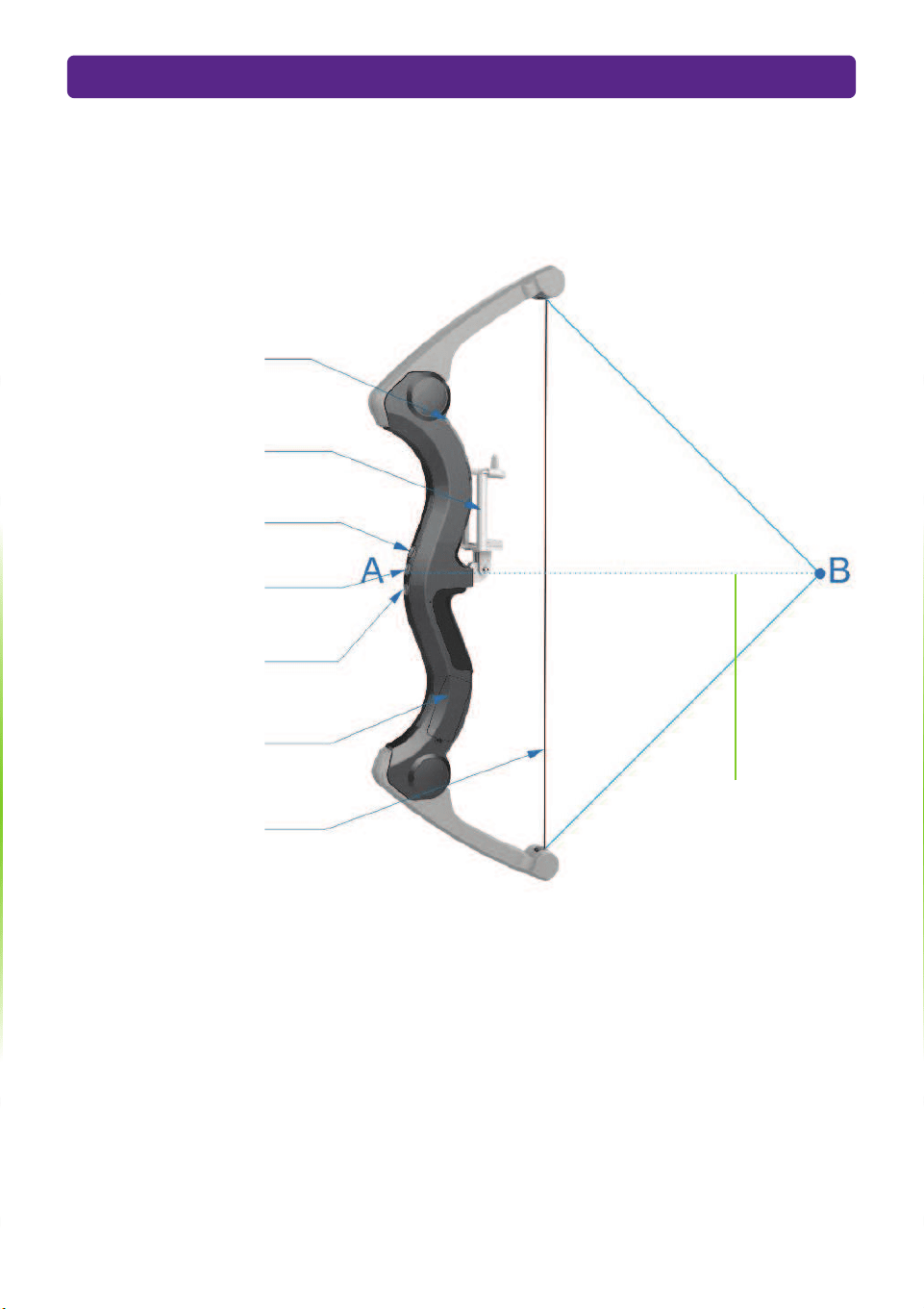
PARTS OF THE BOW
2
Bow Opening Latch
Smartphone Holder
Power Button
Button “B”
Button “A”
Battery Compartment
Bowstring
Pull the bow string
back to position B
and release to fire
your virtual arrows
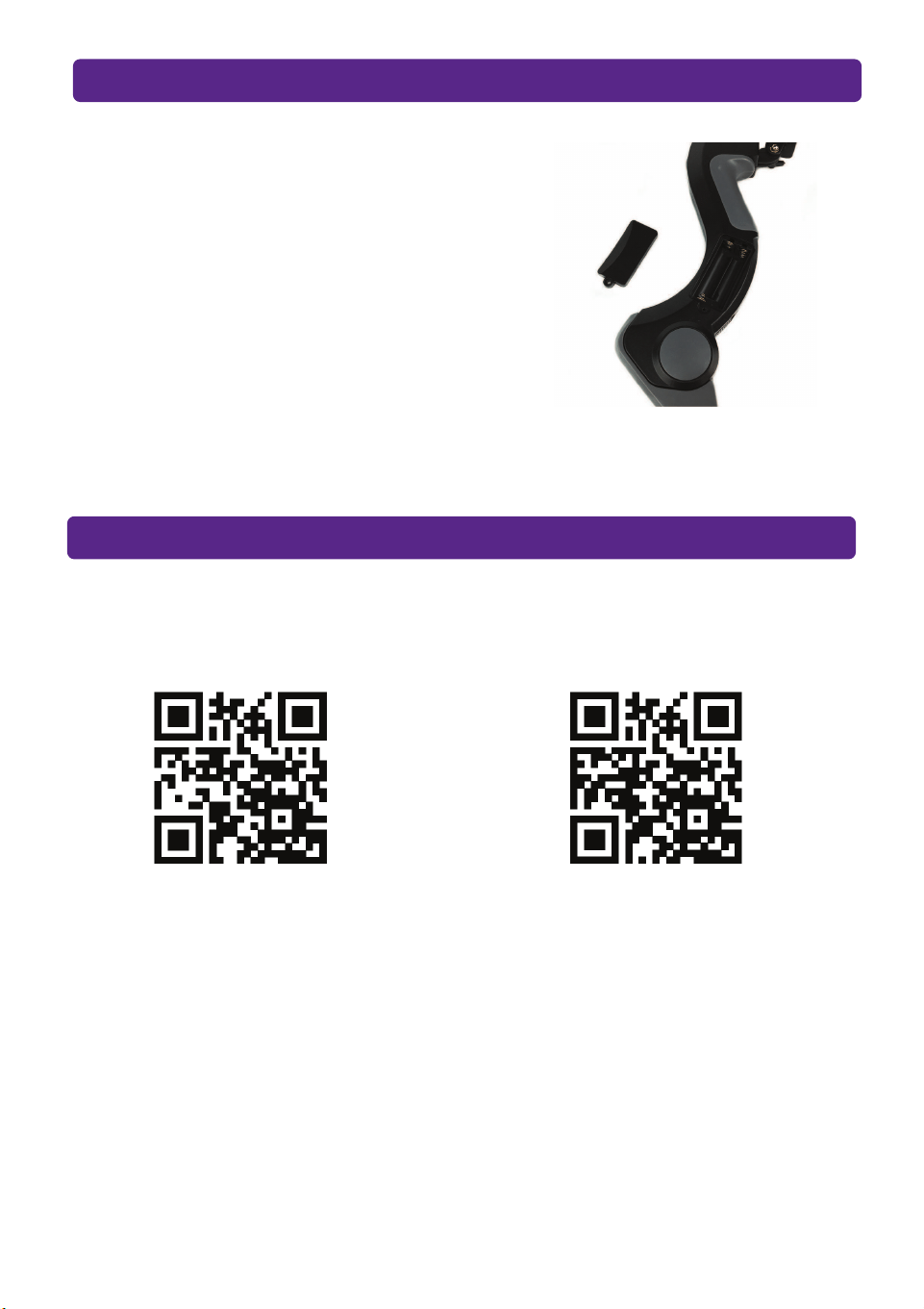
DOWNLOAD THE APPS
INSTALLING THE BOW BATTERIES
3
1. Using a Phillips screwdriver, unscrew
the battery cover screw and open.
2. Install 2x new AAA batteries taking
care to match the correct polarity (+/-).
3. Close the cover and tighten the battery
cover screw.
UpShot is compatible with two APPs. To download either app scan a QR code below.
Apple and Android users can also search for “UPSHOT: DRAGONS” or
UPSHOT: ARCHERY” in the App Store and Google Play.
1. Make sure your bluetooth is on, but you don’t need to connect to the bow - the APP will
automatically search and connect to your Bow.
2. Press the power button on the bow and then open either APP on your smartphone.
3. When you are finished playing long press the power button for 5 seconds to turn the bow off.
QR Code for the “UPSHOT: ARCHERY” AppQR Code for the “UPSHOT: DRAGONS” App
BLUETOOTH CONNECTION
PLAYING “UPSHOT: DRAGONS”
4
UPSHOT: DRAGONS is a fantasy style AR archery game. Protect your castle from invading
dragons, before the dragons destroy the castle!
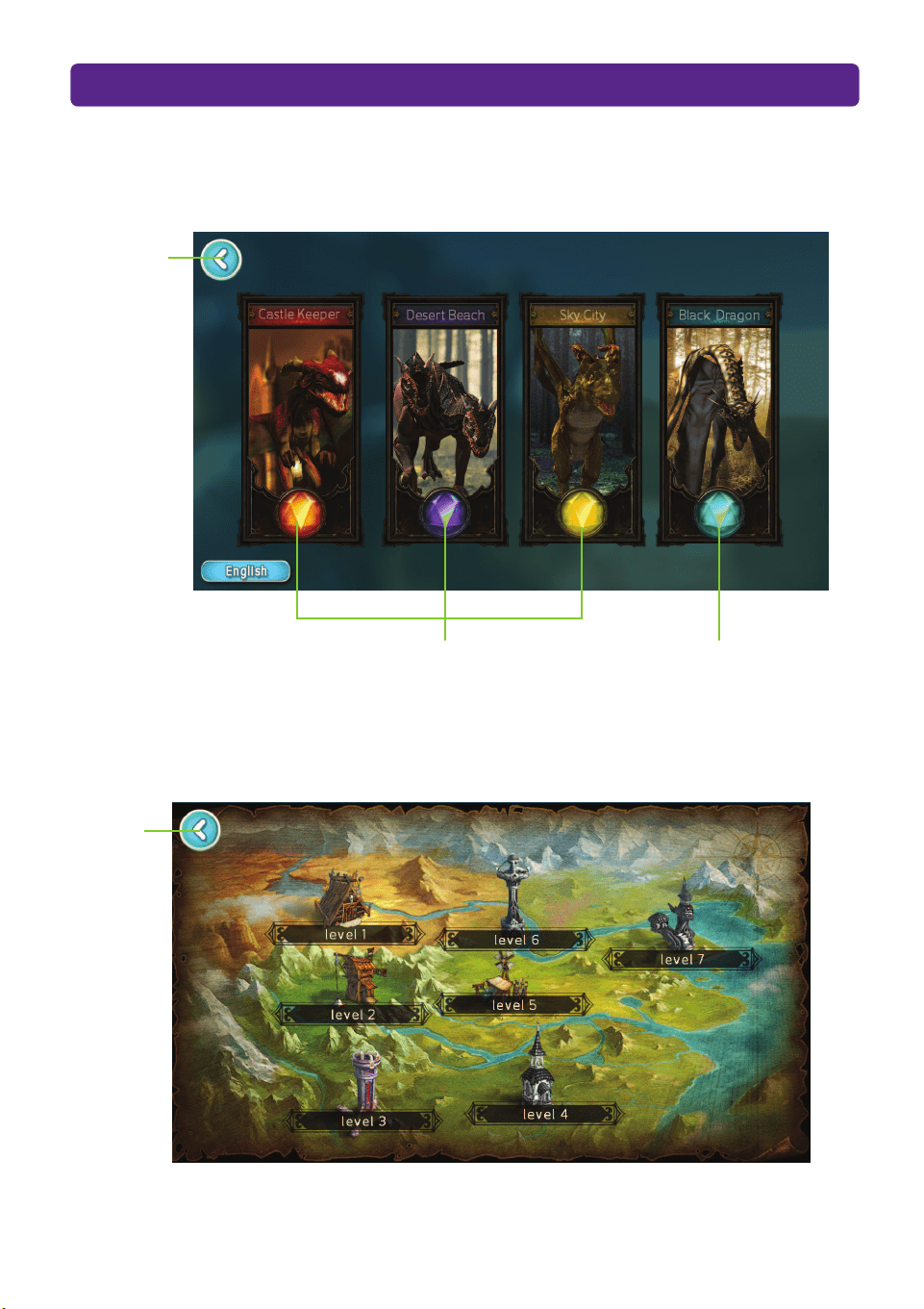
UPSHOT: DRAGON’S HOME SCREEN
LEVEL SELECTION SCREEN
Select one of three castle worlds
to defend from the dragons!
Play hunting missions
with changing objectives!
Select any one of the multiple difficulty levels.
Quit game
Exit to
Home Screen
5
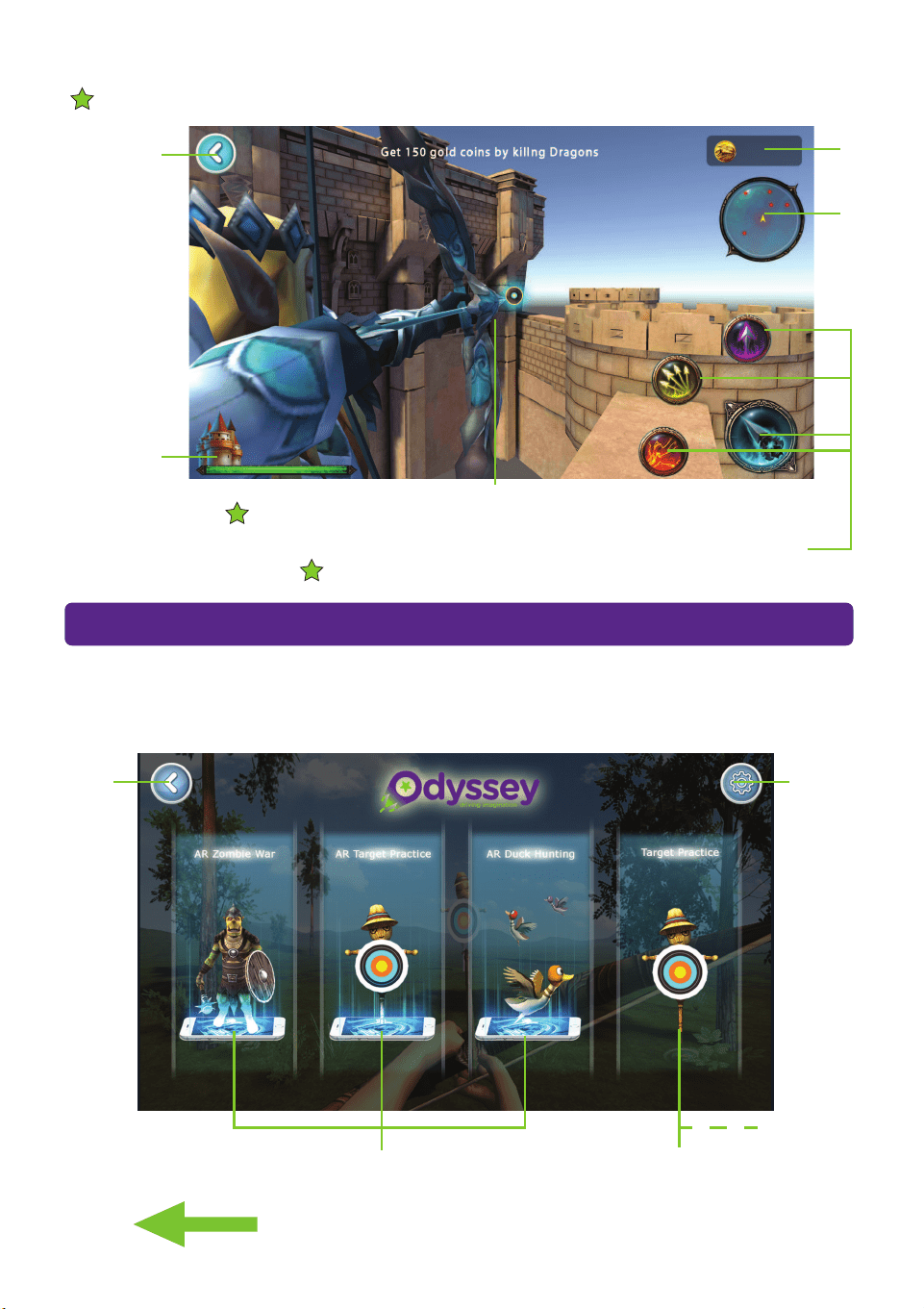
GAMEPLAY SCREEN
Exit to Level
Selection Screen
Castle Health
Dragon
Radar
Bow Aim
Coins
Scored
Touch to select one of four skills.
Tip. Use Button “B” on your bow to quickly cycle between skills.
Tip. Make sure to move your smartphone and bow up, down and around all 360
o
to find all the dragons!
Tip. Use Button “A” on your bow to zoom in on your target.
PLAYING “UPSHOT: ARCHERY”
UPSHOT: ARCHERY contains 3 different games that you can play with computer generated
graphics, or in full augmented reality mode using your smartphones back camera.
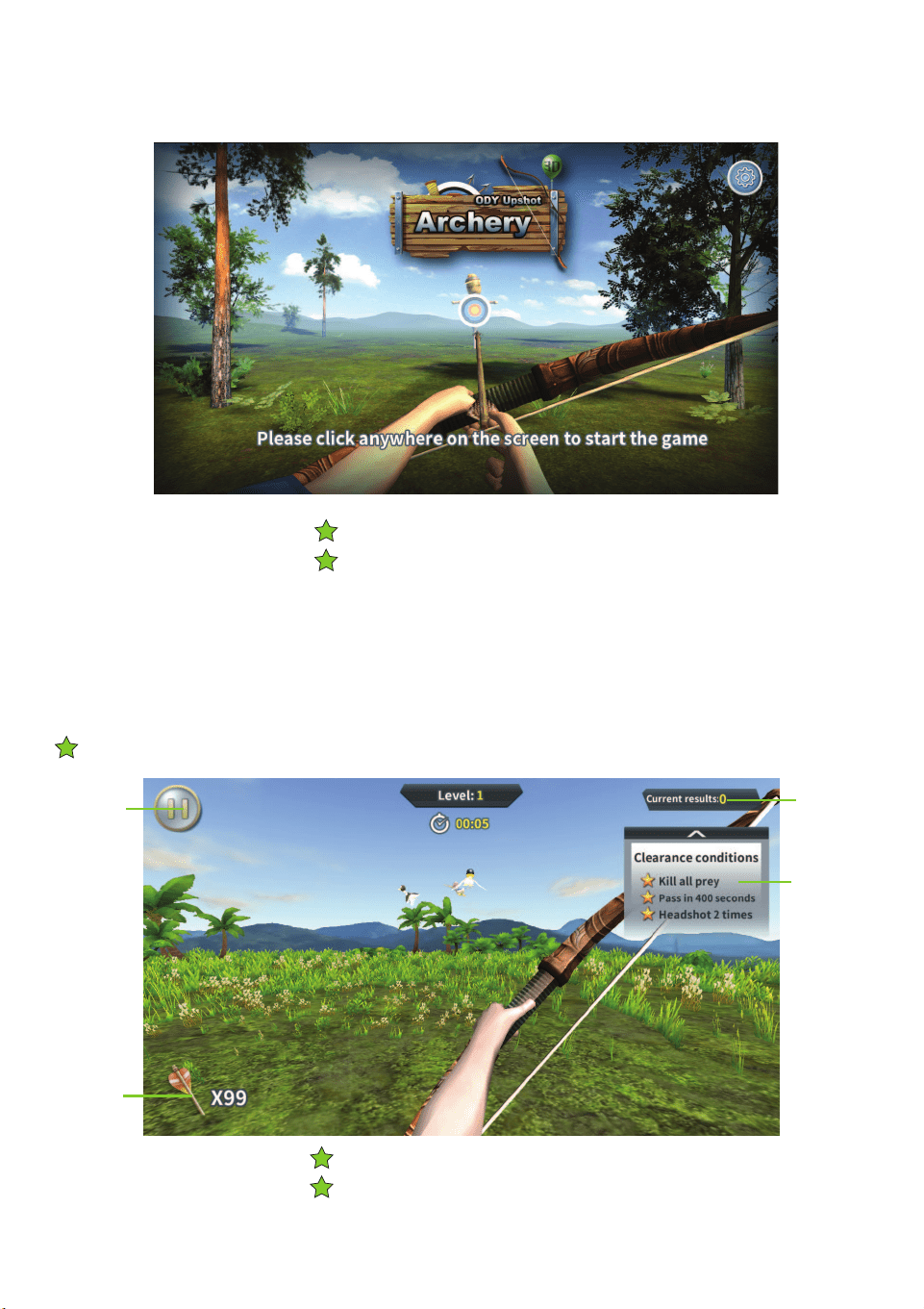
UPSHOT:ARCHERY’S HOME SCREEN
Select one of the three games
and play in augmented reality.
Scroll to the right to play the same three games with computer
generated landscapes.
Quit
game
Change
Sound
Settings
Select one of the three games
and play with computer graphics.
6
Practice your archery skills!
Go on a virtual duck hunt!
PLAYING DUCK HUNTING
PLAYING TARGET PRACTICE
Tip. Pull back on the bow string to show your bow’s aim.
Tip. Use Button “A” on your bow to zoom in on your target.
Tip. Pull back on the bow string to show your bow’s aim.
Tip. Use Button “A” on your bow to zoom in on your target.
Arrows
Remaining
Pause/Quit
Game
Score
Level
Objectives
Tip. Make sure to move your smartphone and bow up, down and around all 360
o
to find all the ducks!
7
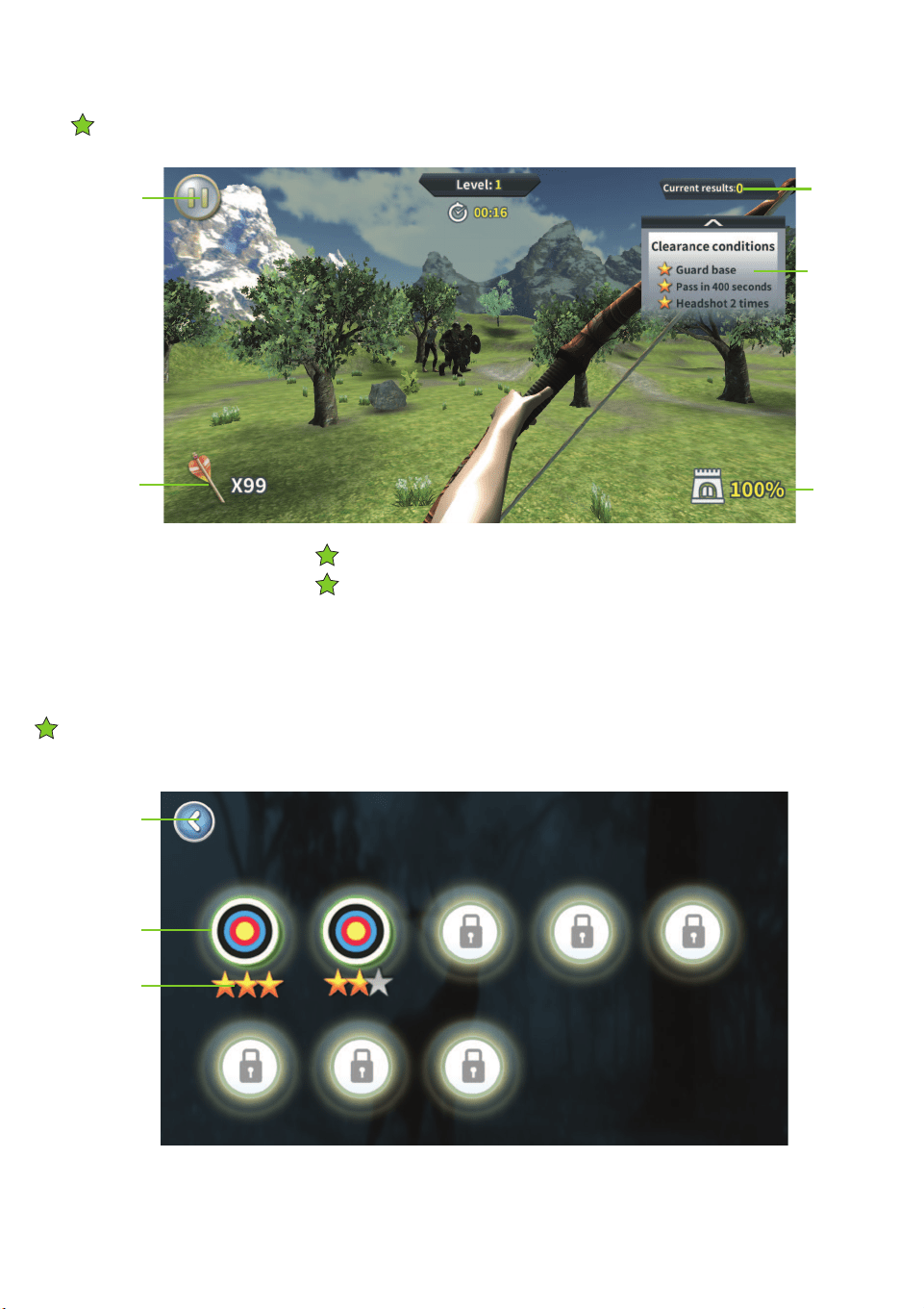
Protect your base from the invaders!
TIP. LEVEL SELECTION
PLAYING ZOMBIE WAR
Tip. Pull back on the bow string to show your bow’s aim.
Tip. Use Button “A” on your bow to zoom in on your target.
Exit to
Home Screen
Select Level
Objectives
Completed
Arrows
Remaining
All the games have 8 difficulty levles. Keep completeing the objectives to advance to the next level.
Pause/Quit
Game
Score
Level
Objectives
Base
Health
Tip. Make sure to move your smartphone and bow up, down and around all 360
o
to find all the invaders!

8
CARE & MAINTENANCE
CAUTIONS & WARNINGS
•Suitable for ages 8 and up. Adult supervision is always recommended.
•This product contains small parts which are a choking hazard. Keep
away from small children.
•Manufacturers and dealers disclaim all responsibility for damage caused
by misuse.
•Keep hair and loose clothing away from the UpShot when in use.
• If the UpShot will be stored and unused for an extended period of time,
please remove the batteries.
• Check the batteries regularly for potential leakage or corrosion that may
occur.
• When installing the batteries carefully follow the polarity marking +/-.
• Do not mix different battery types.
•Remove exhausted or drained batteries
• Do not submerge the unit in any liquids.
• Keep the unit dry.
•Do not place the unit near powerful, un-shielded magnets.
•Do not expose the unit to extreme hot or cold temperatures.
•Do not hit, drop, or smash the unit with extreme force.
•Do not disassemble the unit for any reason.
NOT FOLLOWING THESE PRECAUTIONS WILL VOID YOUR WARRANTY.
For Customer Service please email:
Care@OdysseyToys.com
Please note the units model number and name in your email:
Model no. ODY-420 •UpShot
www.OdysseyToys.com