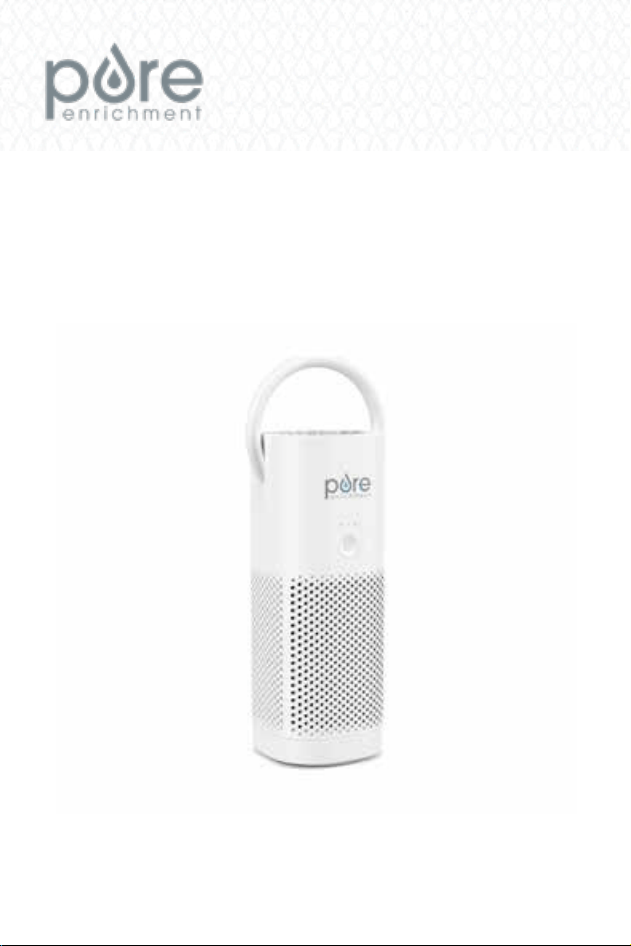
PORTABLE AIR PURIFIERPORTABLE AIR PURIFIER
USER MANUALUSER MANUAL
MODELS: PEPERSAP / PEPERSAP-KMODELS: PEPERSAP / PEPERSAP-K
55
YEARYEAR
WARRANTYWARRANTY
PUREZONE MINIMINI

1
WARNINGS AND PRECAUTIONS
Read this entire instruction manual before operation. Failure to adhere
to the following warnings can cause harm to you or the unit.
1. Ensure the USB plug ts properly into the USB-C port when charging so
that the lithium-ion battery can be recharged properly.
2. Improper usage may lead to product damage.
3. DO NOT place the air purier near sources of heat.
4. DO NOT sit on or place anything on top of the air purier.
5. DO NOT immerse the air purier in water or liquids.
6. DO NOT use the air purier in wet or humid environments.
7. DO NOT let children use the air purier alone. Keep it away from pets.
8. DO NOT place the air purier in an unstable area.
9. DO NOT attempt to repair or disassemble. Doing so will void the
warranty. The inside of this unit contains no user-serviceable parts.
10. When not in use, turn the air purier off to prevent overheating.
11. DO NOT insert ngers or objects into the air outlet when it is on.
12. When using in an automobile, place the unit where it will not interfere
with driving. DO NOT adjust settings while driving.
13. If the air purier stops working or will not turn on, recharge the battery.
14. Replace the air lter every 6 months. This time may vary depending on
air quality and frequency of use.
PRODUCT SPECIFICATIONS
Size: 8.5” x 3.3” x 2.7”
Power: Input Voltage: DC 5V, 1A; Rated Power: 7.5 W
Fan Speeds: 3 Speeds: low, medium, and high
Battery Run Time*: Approximately 2.5 to 12 hours
Charge Time: Approximately 4 hours
Weight: 0.58 lbs
Filter: Nylon pre-lter & True HEPA 13 lter with activated carbon
Noise Level: <50dB
Coverage Area: Up to 54 sq. ft.
*Run time may vary depending on selected fan speed.
3
FCC NOTICE
Model: PureZone Mini Portable Air Purier (PEPERSAP / PEPERSAP-K)
This device complies with part 15 of the FCC Rules. Operation is subject to the
following two conditions: (1) This device may not cause harmful interference,
and (2) this device must accept any interference received, including
interference that may cause undesired operation.
Pure Enrichment
14505 Astronautics Lane
Huntington Beach, CA 92647
www.pureenrichment.com
The product is protected against unauthorized use. DO NOT modify it without
the authorization of the manufacturer, or the user’s authority to operate could
be voided.
Note: This equipment has been tested and found to comply with the limits for
a Class B digital device, pursuant to part 15 of the FCC Rules. These limits
are designed to provide reasonable protection against harmful interference
in a residential installation. This equipment generates, uses and can radiate
radio frequency energy and, if not installed and used in accordance with
the instructions, may cause harmful interference to radio communications.
However, there is no guarantee that interference will not occur in a particular
installation. If this equipment does cause harmful interference to radio or
television reception, which can be determined by turning the equipment off and
on, the user is encouraged to try to correct the interference by one or more of
the following measures:
• Reorient or relocate the receiving antenna.
• Increase the separation between the equipment and receiver.
• Connect the equipment into an outlet on a circuit different
from that to which the receiver is connected.
• Consult the dealer or an experienced radio/TV technician for help.
2
1
WARNINGS AND PRECAUTIONS
Read this entire instruction manual before operation. Failure to adhere
to the following warnings can cause harm to you or the unit.
1. Ensure the USB plug ts properly into the USB-C port when charging so
that the lithium-ion battery can be recharged properly.
2. Improper usage may lead to product damage.
3. DO NOT place the air purier near sources of heat.
4. DO NOT sit on or place anything on top of the air purier.
5. DO NOT immerse the air purier in water or liquids.
6. DO NOT use the air purier in wet or humid environments.
7. DO NOT let children use the air purier alone. Keep it away from pets.
8. DO NOT place the air purier in an unstable area.
9. DO NOT attempt to repair or disassemble. Doing so will void the
warranty. The inside of this unit contains no user-serviceable parts.
10. When not in use, turn the air purier off to prevent overheating.
11. DO NOT insert ngers or objects into the air outlet when it is on.
12. When using in an automobile, place the unit where it will not interfere
with driving. DO NOT adjust settings while driving.
13. If the air purier stops working or will not turn on, recharge the battery.
14. Replace the air lter every 6 months. This time may vary depending on
air quality and frequency of use.
PRODUCT SPECIFICATIONS
Size: 8.5” x 3.3” x 2.7”
Power: Input Voltage: DC 5V, 1A; Rated Power: 7.5 W
Fan Speeds: 3 Speeds: low, medium, and high
Battery Run Time*: Approximately 2.5 to 12 hours
Charge Time: Approximately 4 hours
Weight: 0.58 lbs
Filter: Nylon pre-lter & True HEPA 13 lter with activated carbon
Noise Level: <50dB
Coverage Area: Up to 54 sq. ft.
*Run time may vary depending on selected fan speed.
3
FCC NOTICE
Model: PureZone Mini Portable Air Purier (PEPERSAP / PEPERSAP-K)
This device complies with part 15 of the FCC Rules. Operation is subject to the
following two conditions: (1) This device may not cause harmful interference,
and (2) this device must accept any interference received, including
interference that may cause undesired operation.
Pure Enrichment
14505 Astronautics Lane
Huntington Beach, CA 92647
www.pureenrichment.com
The product is protected against unauthorized use. DO NOT modify it without
the authorization of the manufacturer, or the user’s authority to operate could
be voided.
Note: This equipment has been tested and found to comply with the limits for
a Class B digital device, pursuant to part 15 of the FCC Rules. These limits
are designed to provide reasonable protection against harmful interference
in a residential installation. This equipment generates, uses and can radiate
radio frequency energy and, if not installed and used in accordance with
the instructions, may cause harmful interference to radio communications.
However, there is no guarantee that interference will not occur in a particular
installation. If this equipment does cause harmful interference to radio or
television reception, which can be determined by turning the equipment off and
on, the user is encouraged to try to correct the interference by one or more of
the following measures:
• Reorient or relocate the receiving antenna.
• Increase the separation between the equipment and receiver.
• Connect the equipment into an outlet on a circuit different
from that to which the receiver is connected.
• Consult the dealer or an experienced radio/TV technician for help.
2
2 3
USING PUREZONE MINI
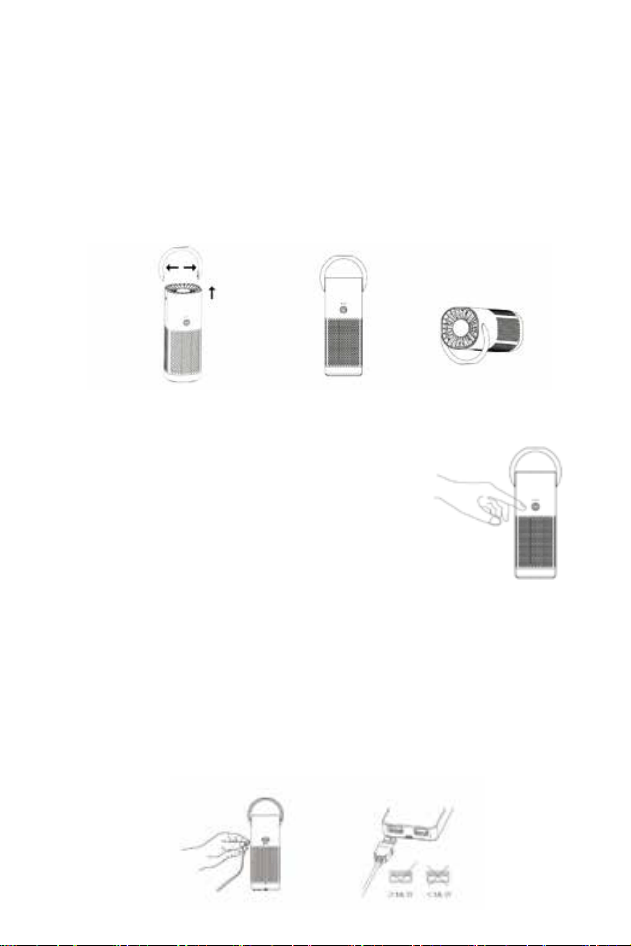
Using the Stand/Handle
1. Attach the handle by slightly opening the handle arms and placing them
into the handle slots on the sides of the air purier.
2. The handle may be used as a stand by rotating the handle to the back of
the unit.
3. Remove the handle by slightly opening the handle arms and pulling them
away from the unit.
Operating the Air Purier
Press the power button (the green Indicator Light will
come on):
• 1st press - Low Speed
• 2nd press - Medium Speed
• 3rd press - High Speed
• 4th press - Turn Off
Charging the Battery
If the air purier stops working or does not turn on, please charge the battery.
1. Insert the USB-C charging cable into the USB-C port on the back of the
air purifier and connect the charging cable to a laptop or other USB-
compatible power outlet.
2. The indicator light next to the USB-C port will be red while charging. It
will turn off when fully charged. NOTE: Input power should be at least
5V, 1A. This unit is not compatible with USB PD3.0 quick chargers.
INTRODUCTION
Thank you for purchasing the PureZone Mini Portable Air Purier from Pure
Enrichment. This lightweight, travel-friendly air purifier offers two-stage air
purication that captures up to 99% of dust, pollen, pet dander, smoke, and
other airborne allergens within your personal space (up to 54 sq. ft.).
PRODUCT FEATURES
PureZone Mini is designed with several features that make it the perfect
solution for breathing cleaner, healthier air everywhere you go. These include:
• Sleek Cordless Design
• USB-Powered Rechargeable Lithium-Ion Battery with Charging Cable
• True HEPA Filtration
• 3 Fan Speeds
• 2-in-1 Handle Design (doubles as a stand)
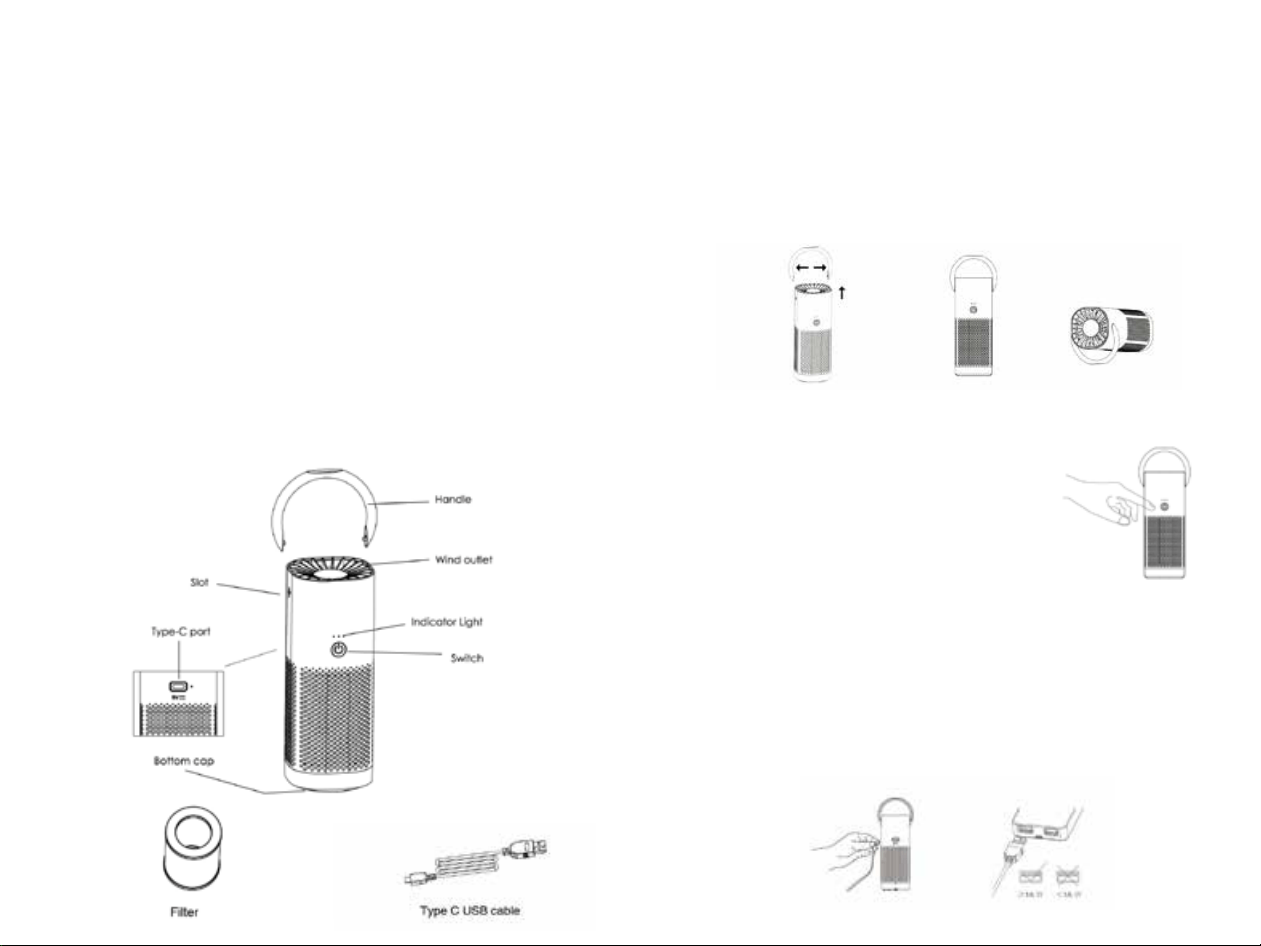
PRODUCT DIAGRAM
The diagram below highlights all of the important features of this product.
4 5
Accessories:
2 3
USING PUREZONE MINI
Using the Stand/Handle
1. Attach the handle by slightly opening the handle arms and placing them
into the handle slots on the sides of the air purier.
2. The handle may be used as a stand by rotating the handle to the back of
the unit.
3. Remove the handle by slightly opening the handle arms and pulling them
away from the unit.
Operating the Air Purier
Press the power button (the green Indicator Light will
come on):
• 1st press - Low Speed
• 2nd press - Medium Speed
• 3rd press - High Speed
• 4th press - Turn Off
Charging the Battery
If the air purier stops working or does not turn on, please charge the battery.
1. Insert the USB-C charging cable into the USB-C port on the back of the
air purifier and connect the charging cable to a laptop or other USB-
compatible power outlet.
2. The indicator light next to the USB-C port will be red while charging. It
will turn off when fully charged. NOTE: Input power should be at least
5V, 1A. This unit is not compatible with USB PD3.0 quick chargers.
INTRODUCTION
Thank you for purchasing the PureZone Mini Portable Air Purier from Pure
Enrichment. This lightweight, travel-friendly air purifier offers two-stage air
purication that captures up to 99% of dust, pollen, pet dander, smoke, and
other airborne allergens within your personal space (up to 54 sq. ft.).
PRODUCT FEATURES
PureZone Mini is designed with several features that make it the perfect
solution for breathing cleaner, healthier air everywhere you go. These include:
• Sleek Cordless Design
• USB-Powered Rechargeable Lithium-Ion Battery with Charging Cable
• True HEPA Filtration
• 3 Fan Speeds
• 2-in-1 Handle Design (doubles as a stand)
PRODUCT DIAGRAM
The diagram below highlights all of the important features of this product.
4 5
Accessories:
4 5
CARE & MAINTENANCE
To prolong the life of your PureZone Mini Portable Air Purier, proper care and
cleaning are essential. Before performing maintenance, turn off the power and
unplug the USB cable.
Cleaning the Unit
• Use a soft cloth to wipe the unit clean.
• DO NOT immerse the air purier in water or liquids.
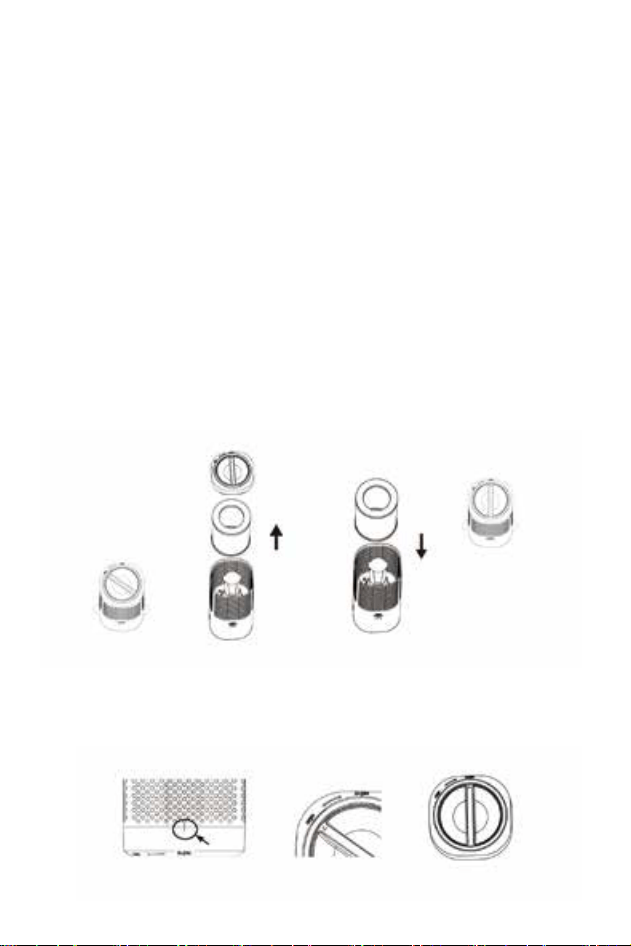
Replacing the Air Filter
For optimal performance, replace the lter every 6 months. This time may
vary depending on air quality and frequency of use. Replacement lters are
available at www.pureenrichment.com. Select Model No: PEPERSFIL to
purchase the correct lter for this air purier.
1. Unscrew the bottom of the air purier by turning the arrow on the cap to
OPEN and remove the cap and lter.
2. Insert a new lter.
3. Align the arrow on the cap with OPEN on the unit and screw it in towards
the CLOSE position.
6 7
WARRANTY
PureZone Mini comes with an industry-leading 5 Year Warranty that begins on
the date of purchase.
The warranty applies to the portable air purier and necessary parts and
labor relating thereto. The warranty does not apply to damage resulting from
failure to follow the operating instructions, accidents, abuse, alterations, or
disassembly by unauthorized individuals.
PRODUCT REGISTRATION
To ensure your full warranty, and to receive product updates and streamlined
customer support, remember to register your product at:
www.pureenrichment.com/productregistration
ARE YOU 100% SATISFIED?
If you have product questions or concerns, don’t hesitate to contact us directly at:
Pure Enrichment has an award-winning warranty, exchange, and customer
service program that guarantees hassle-free solutions to any issue you might
have within 24 hours!

4 5
CARE & MAINTENANCE
To prolong the life of your PureZone Mini Portable Air Purier, proper care and
cleaning are essential. Before performing maintenance, turn off the power and
unplug the USB cable.
Cleaning the Unit
• Use a soft cloth to wipe the unit clean.
• DO NOT immerse the air purier in water or liquids.
Replacing the Air Filter
For optimal performance, replace the lter every 6 months. This time may
vary depending on air quality and frequency of use. Replacement lters are
available at www.pureenrichment.com. Select Model No: PEPERSFIL to
purchase the correct lter for this air purier.
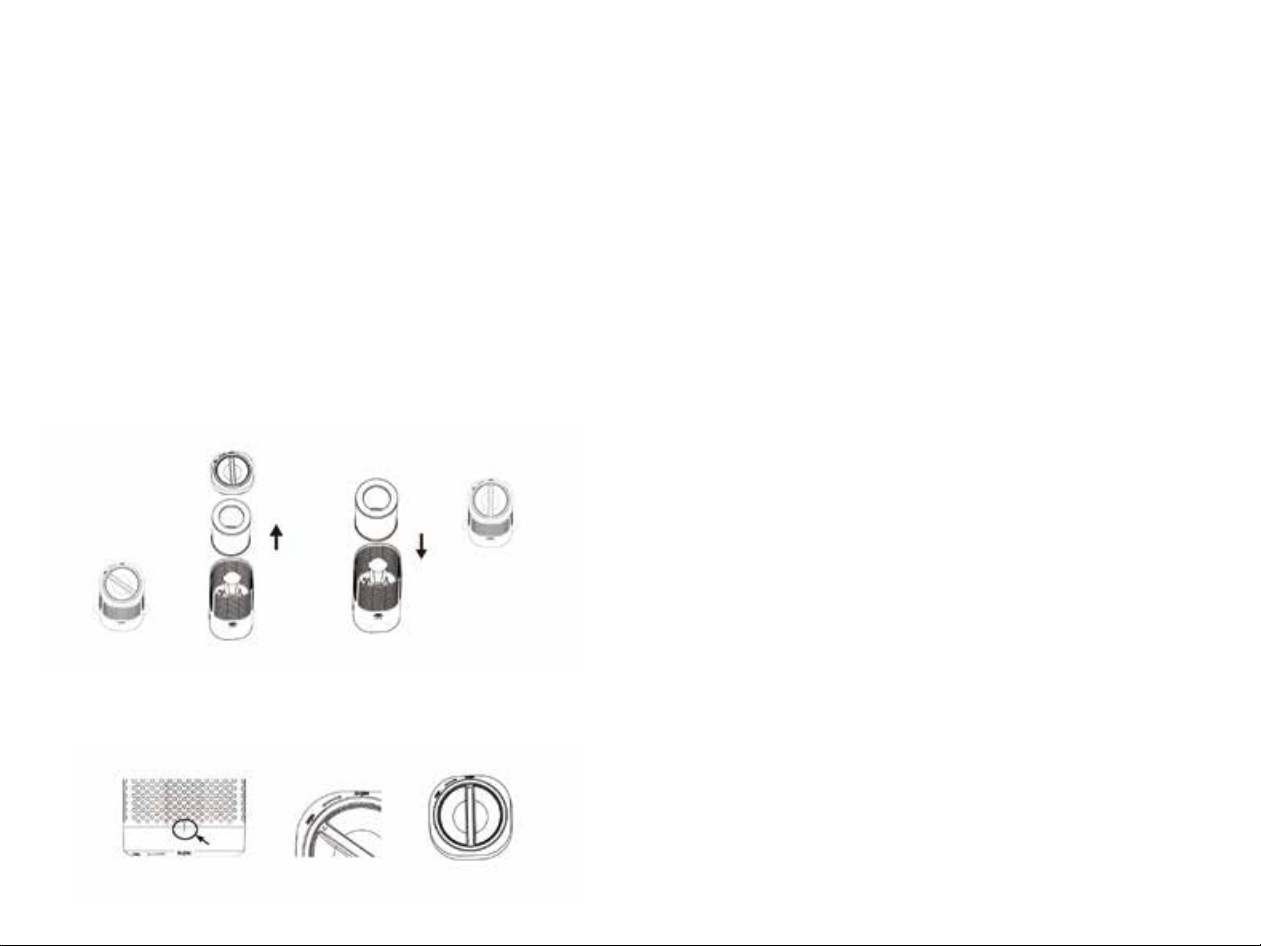
1. Unscrew the bottom of the air purier by turning the arrow on the cap to
OPEN and remove the cap and lter.
2. Insert a new lter.
3. Align the arrow on the cap with OPEN on the unit and screw it in towards
the CLOSE position.
6 7
WARRANTY
PureZone Mini comes with an industry-leading 5 Year Warranty that begins on
the date of purchase.
The warranty applies to the portable air purier and necessary parts and
labor relating thereto. The warranty does not apply to damage resulting from
failure to follow the operating instructions, accidents, abuse, alterations, or
disassembly by unauthorized individuals.
PRODUCT REGISTRATION
To ensure your full warranty, and to receive product updates and streamlined
customer support, remember to register your product at:
www.pureenrichment.com/productregistration
ARE YOU 100% SATISFIED?
If you have product questions or concerns, don’t hesitate to contact us directly at:
Pure Enrichment has an award-winning warranty, exchange, and customer
service program that guarantees hassle-free solutions to any issue you might
have within 24 hours!

Huntington Beach, CA 92647
www.pureenrichment.com
REV: 05-2020