١
٣
٢
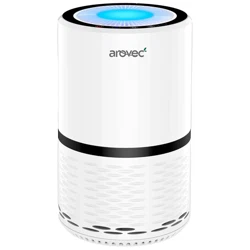
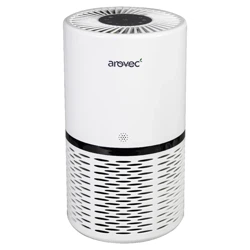
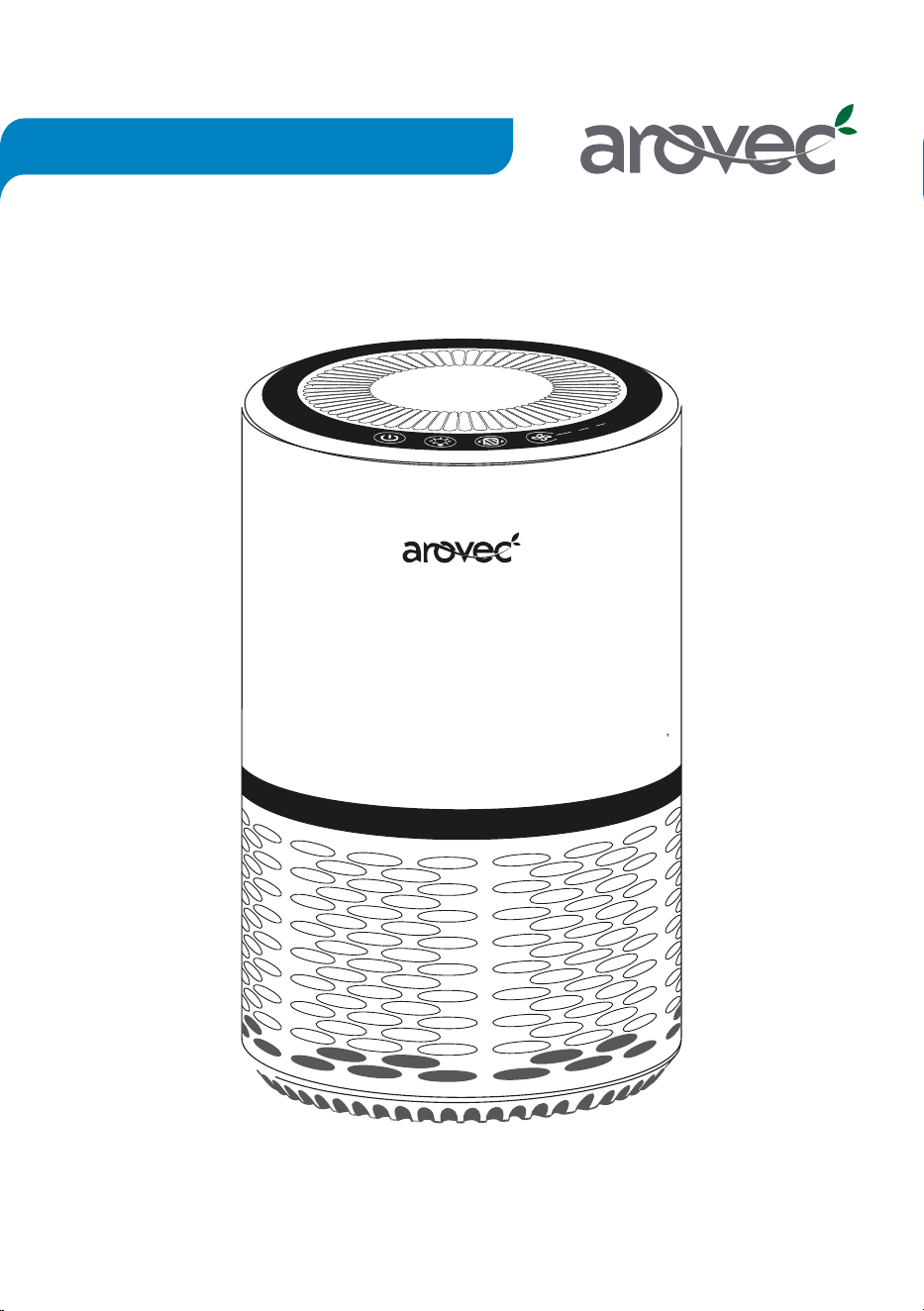
True HEPA Air Purifier
This manual provides safety and opera�ng instruc�ons.
Please read this user manual thoroughly before using the product.
This manual will help get your air purifier going in just a few quick minutes.
Model: AV-P152, AV-P152B
USER MANUAL

Copyright © Since 2019, Arovec, Australia. All Rights Reserved.
TABLE OF CONTENTS
Important Safety Instruc�ons
Introduc�on
Ge�ng to Know Your Air Purifier
Before Using For The First Time
General Tips
Opera�on
Replacing The Filters
Cleaning & Care
Storage
Disposal
Troubleshoo�ng
Warranty Informa�on
Customer Support - Australia
4
5
6
7
9
10
11
14
14
14
15
16
20
PACKAGE CONTENTS
1 × H13 True HEPA Air Purifier
1 × Preliminary Filter (Pre-fi�ed)
1 × Ac�vated Carbon and HEPA Filter (pre-fi�ed)
1 × User Manual
1 × Warranty Card
PRODUCT SPECIFICATION
Power Supply
Rated Power
Effec�ve Range
Opera�ng Condi�ons
Noise Level
Standby Power
Weight
Dimensions
CADR (smoke)
Filters
THANK YOU FOR CHOOSING TO BUY AN
AROVEC AIR PURIFIER
We are here to help you with any ques�ons.
Customer Support - AUSTRALIA
www.arovec.com.au
support@arovec.com.au
@aroveclifestyle
3
220 V - 240 V ,50 Hz
25 W
Areas up to 15 m
2
Temperature: -10
o
C to 40
o
C
28-50 dB
< 0.8 W
2.5 kg
ø 20 × H 32 cm
100 m
3
/h
Preliminary Filter
H13 True HEPA Filter
Activated Carbon Filter

IMPORTANT SAFETY INSTRUCTIONS
Please read all instruc�ons before use to reduce the risk of injury, fire, electric shock or damage.
Use your purifier safely by following the instruc�ons in this manual.
• DO NOT use the air purifier before removing the plas�c packaging from the filter. It is a fire
hazard to use your air purifier with the filter s�ll inside its packaging.
• DO NOT use the air purifier if it has been dropped, damaged, le� outside, dropped in water,
is defec�ve or not working properly.
• DO NOT use the air purifier if the cord or plug looks damaged.
• DO NOT use the air purifier near gas appliances, fire places, stoves, candles, or hea�ng devices.
• DO NOT use the air purifier in an area with insect repellents, burning incense, toxic fumes,
flammable dust or oxygen tanks. Always leave at least 1.5 m of clear space from any oxygen
being administered.
• DO NOT touch any part of the air purifier or its plug with wet hands.
• DO NOT run the power cord under furniture, other appliances, carpet, or cover with rugs,
runners or floor coverings.
• ALWAYS tuck away the power cord to prevent tripping accidents.
• DO NOT use the air purifier and power plug on wet or damp surfaces.
• DO NOT put the air purifier in water or liquids.
• DO NOT use the air purifier outdoor.
• DO NOT keep air purifier under an air condi�oner to help prevent moisture ge�ng into the unit.
• DO NOT use the air purifier in a room that can have a big change in temperature. This will help
minimise the risk of condensa�on.
• DO NOT put fingers or any objects into the air inlet/outlet of the air purifier.
• DO NOT use a defec�ve air purifier or a�empt to repair/adjust any electrical or mechanical
func�ons, this may cause danger and void the warranty.
• DO NOT let children or people with reduced physical or mental capabili�es to use or clean the
air purifier.
• DO NOT let children play with this appliance or its packaging including plas�c bag. Children
must be supervised around the air purifier to help keep them safe.
• DO NOT sit on the air purifier or put any objects on top of the unit.
• DO NOT block/obscure the air inlet or outlet. Keep free of anything that could reduce airflow.
• DO NOT fit the air purifier with a different power supply unit.
• DO NOT spray air fresheners, perfumes or oils on or near the filter.
• DO NOT clean the air purifier or change the filter with the power cord plugged in.
• DO NOT use the air purifier for commercial purposes. This appliance is for household use only.
• It is recommended to NOT use the unit with an extension cord to avoid electrical shock or spark.
• TURN OFF the air purifier when it is not being used. Hold the plug and remove it from the
electrical source. Do not unplug by pulling the cable.
• WARNING: This air purifier does not remove carbon monoxide or radon from the air. It must
not be used to prevent or clean up accidents with combus�on processes and hazardous
chemicals.
KEEP THESE INSTRUCTIONS IN A SAFE PLACE
4

INTRODUCTION
The AV-P152 H13 True HEPA air purifier removes contaminants from the air to improve indoor
air quality.
Arovec AV-P152 H13 True HEPA air purifeir uses a system of internal fan to pull the air in your
room through a high efficiency filtra�on system that removes harmful airborne par�cles.
Keep your environment healthy with AV-P152 H13 True HEPA air purifier.
Product Features
Peaceful Sleep: Have an undisturbed deep while the air purifier is quietly opera�ng.
You can also turn OFF the display and light for a dark sleeping-environment.
High Efficiency Filtra�on System: This air purifier uses mul�ple stage filtra�on system, which
removes 99.97% of air pollutants including par�culate ma�ers PM2.5, dust, pollen, odour,
allergens, smoke, and bacteria.
1. Preliminary Filter:
Captures large par�cles such as dust, pet dander and hair.
2. H13 True HEPA Filter: Removes fine par�cles such as PM2.5, dust mits, allegens,
airborn bacteria and pollon.
3. High-Efficiency Granular Ac�vated Carbon Filter: Removes various odours and
smokes such as cigare�e smoke, cooking smell and pet odours.
5
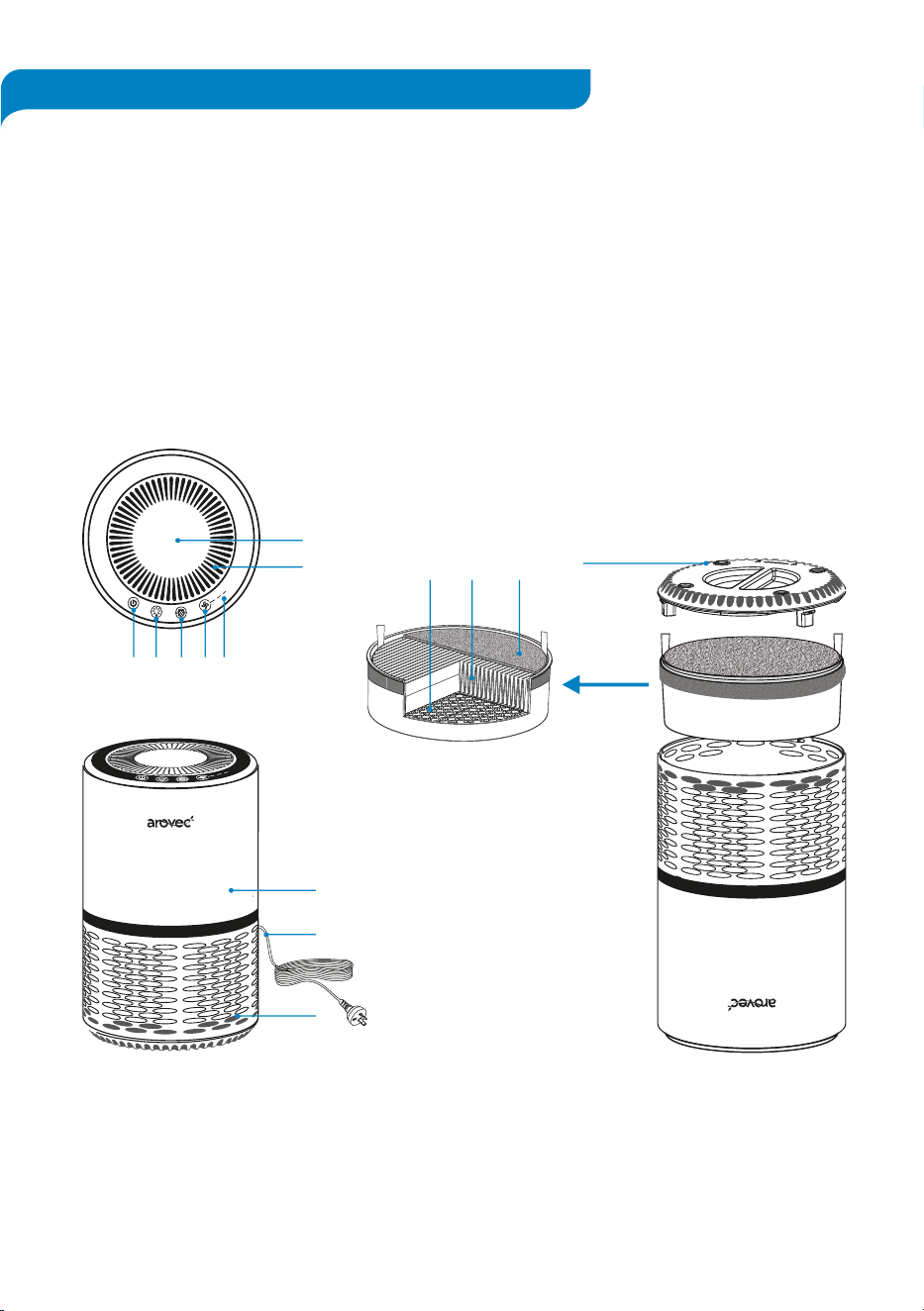
Ge�ng to Know Your Air Purifier
1. LED Night Light
2. Air Outlet
3. Power Bu�on
4. Night Light Bu�on
5. Filter Reset Bu�on
6. Fan Speed Bu�on
7. Fan Speed Indicator
8. Upper Body
9. Power Cord
10. Air Inlet
11. Base Cover
12. Preliminary Filter
13. H13 True HEPA Filter
14. Ac�vated Carbon Filter
Front View
Upside Down View
6
Top View
Filters Internal Details
١
٢
٣
3
4
6
75
2
1
11
14 13 12
١
٣
٢
9
8
10
BEFORE USING FOR THE FIRST TIME
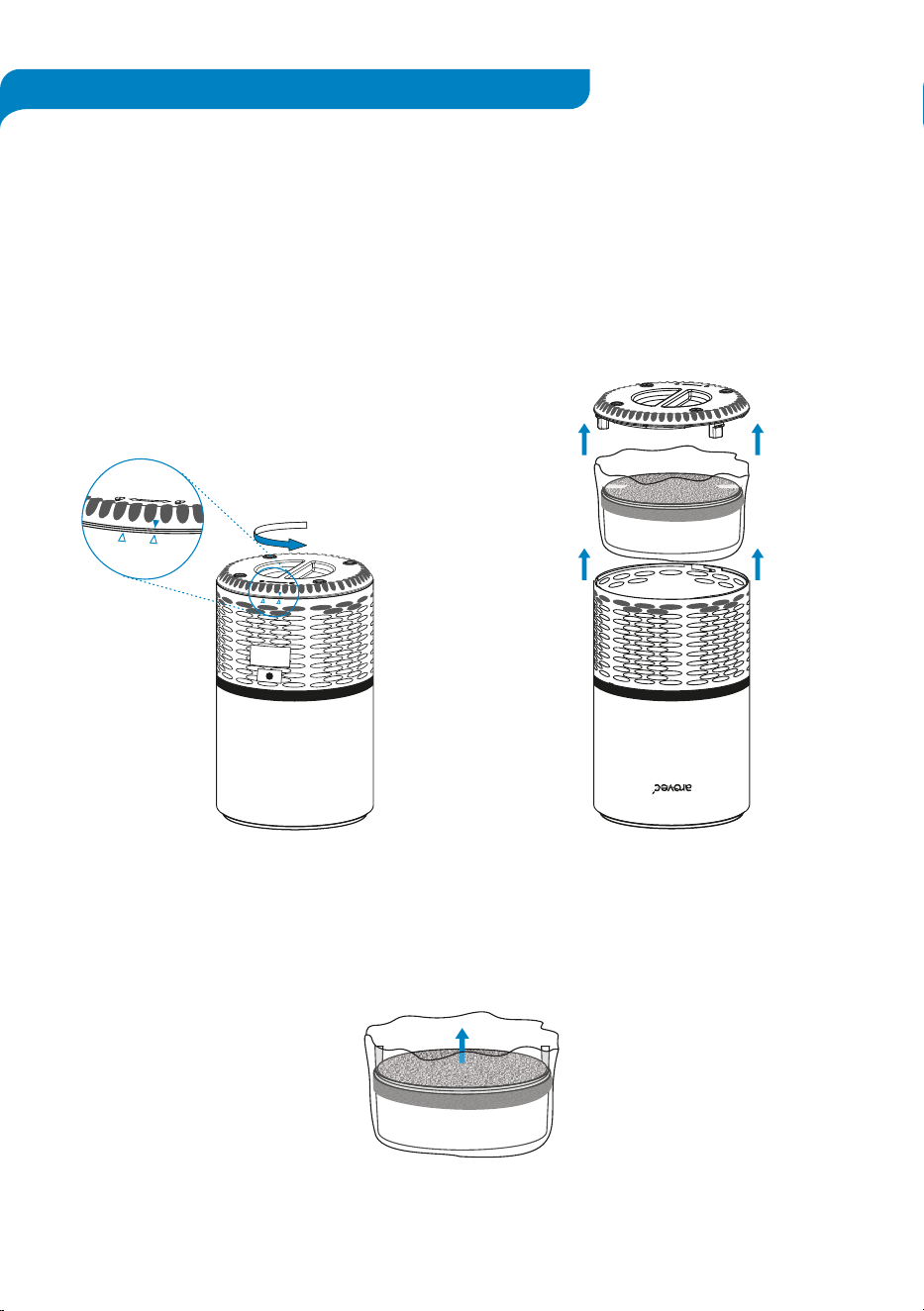
The air purifier comes with the filters fi�ed inside, but they are packaged in plas�c.
You must remove the filters from their packaging before turning the air purifier on.
1. Turn the air purifier upside down
on a so� cloth. [Figure1.1]
2. Turn the base cover an�clockwise
to unlock the cover.
[Figure 1.1]
3. Remove the base cover. [Figure 1.2]
4. Remove the filters from the air purifier.
[Figure 1.2]
7
OPEN
LOCK
OPEN
LOCK
Figure 1.1
Figure 1.2
5. Remove the filters from the packaging. [Figure 1.3]
Figure 1.3
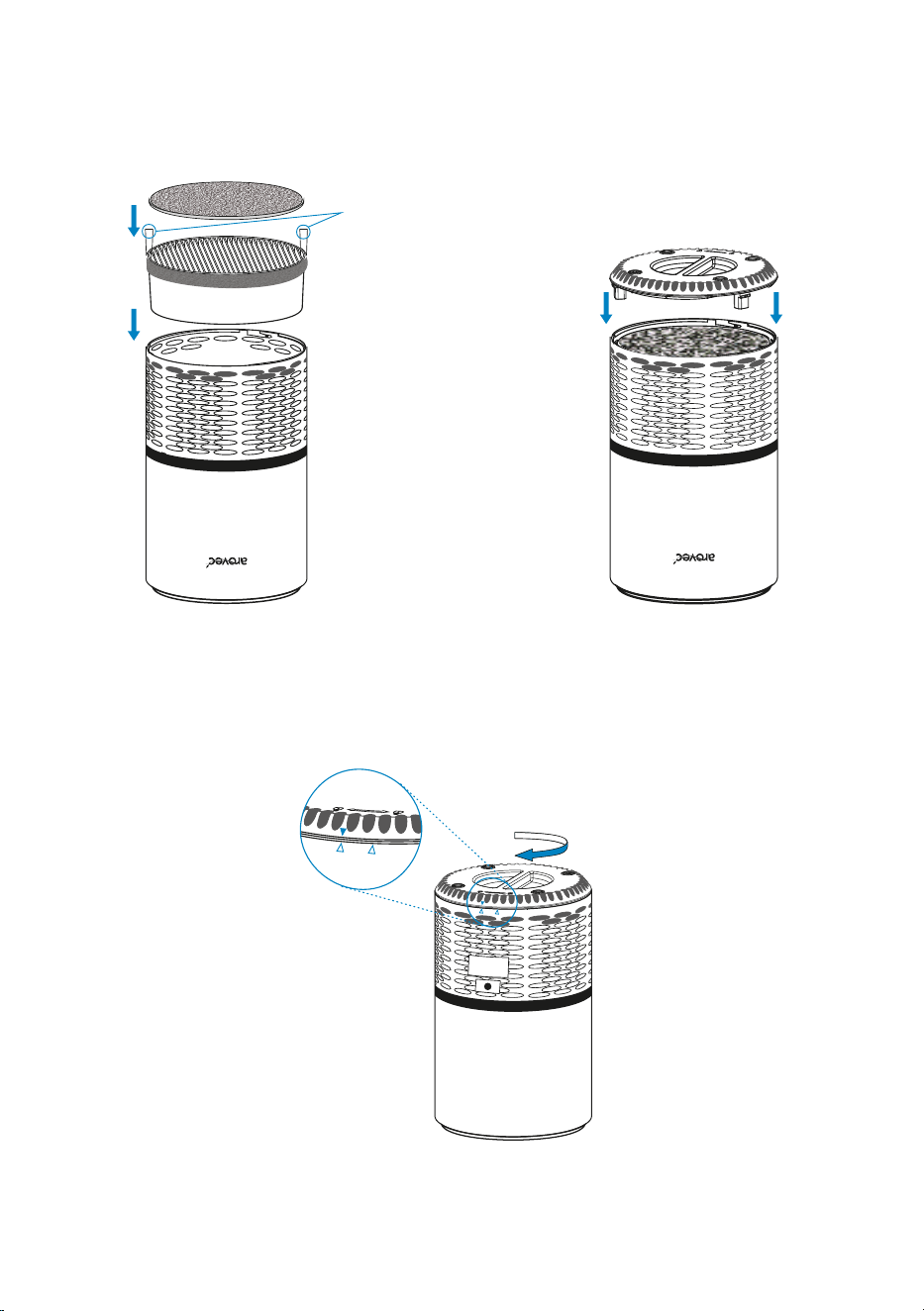
6. Put the filters back into the air purifier.
[Figure 1.4]
- Make sure the grey pre-filter is on top of the white HEPA filter.
- Make sure the white tabs are poin�ng upward.
7. Put the base cover back on. [Figure 1.5]
8
Figure 1.4 Figure 1.5
8. Turn the base cover clockwise to the lock posi�on. [Figure 1.6]
Tabs poin�ng
upward
OPEN
LOCK
OPEN
LOCK
Figure 1.6
GENERAL TIPS
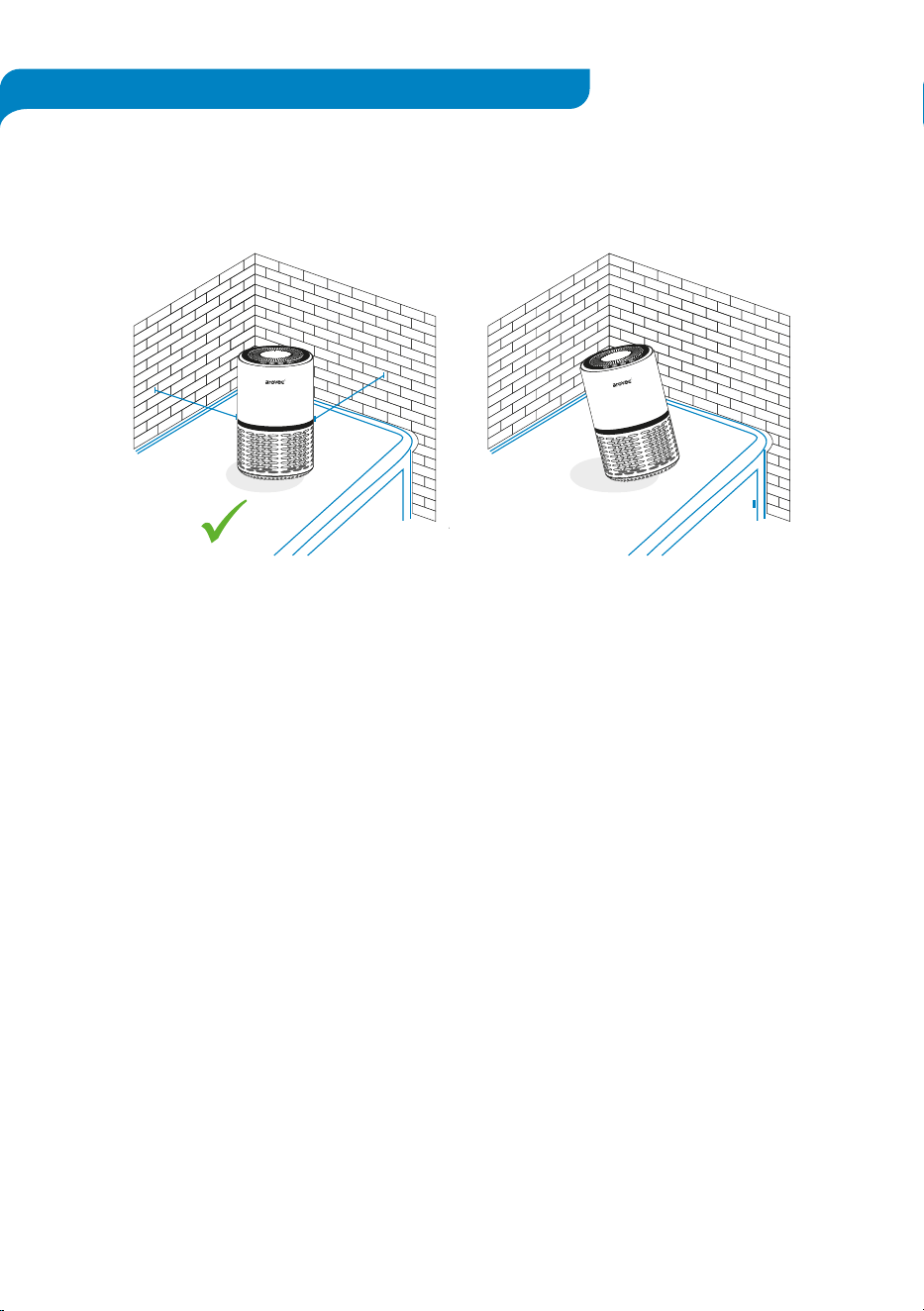
• The air purifier should be on a flat, level surface, with the night light facing up before switching
it on.
[Figure 2.1]
• Leave at least 40 cm of clear space around each side of the air purifier when it is turned on.
[Figure 2.1]
• Shut nearby windows when the air purifier is turned on to help clean the air.
• For best results, use the purifier for 15-20 minutes at the maximum fan speed, then adjust the
fan speed as required.
9
1
3
2
1
3
2
x
Figure 2.1
40 cm
40 cm

OPERATION
Plug-in the air purifier into an electrical outlet.
CONTROL PANEL:
Power Bu�on:
Night Light Bu�on:
Filter Change Bu�on:
Fan Speed Bu�on:
•
Tap ( ) once to turn the air purifier ON or OFF.
• Tap ( ) to adjust the brightness or turn OFF the night light.
• Each tap will toggle to the next se�ng, ON DIM OFF ON.
• Tap and hold ( ) for 3-5 seconds to turn OFF all the bu�ons
indicators and lights.
•
The light can be used as a sleep-light with blue colour even if the air
purifier is not running.
• The ( ) will light up to remind you to replace the filters.
• Tap and hold the ( ) for 3-5 seconds a�er replacing the filters.
• The ( ) indicator light will turn off a�er successfully filter reset.
• There are 3 fan speeds: 1 (low), 2 (medium) and 3 (high).
• Each tap will toggle to the next fan speed level.
• The air purifier keeps the control se�ngs when it’s turned OFF.
• The fan speed level will return to the previous se�ng when the air
purifier is turned back on.
• Please note that the air purifier must remain plugged in for this
memory func�on to work.
Memory Func�on:
10
REPLACING THE FILTERS
The ( ) will light up to remind you to replace the filters.
DO NOT wash/clean or reuse the filters. Only use Arovec AV-P152RF replacement filters when
changing the filters are required. This will help your air purifier to work effec�vely and last
longer.
Replacement filters are available at
www.arovec.com.au
OR scan the QR Code.
When to Replace the Filters:
• It’s best to change the filters every 6 months (4320 hours). You may need to change the filters
more o�en or less o�en, depending on how much you use your air purifier and on how much
pollu�on is in the air.
• You don’t need to wait for the ( ) to turn on for changing the filters. You may need to change
the filters if you no�ce any of the following:
- Increased noise from the purifier when it’s switched ON.
- No effec�ve difference in air quality.
- Decreased airflow.
- Unusual odours.
- Clogged filters.
11
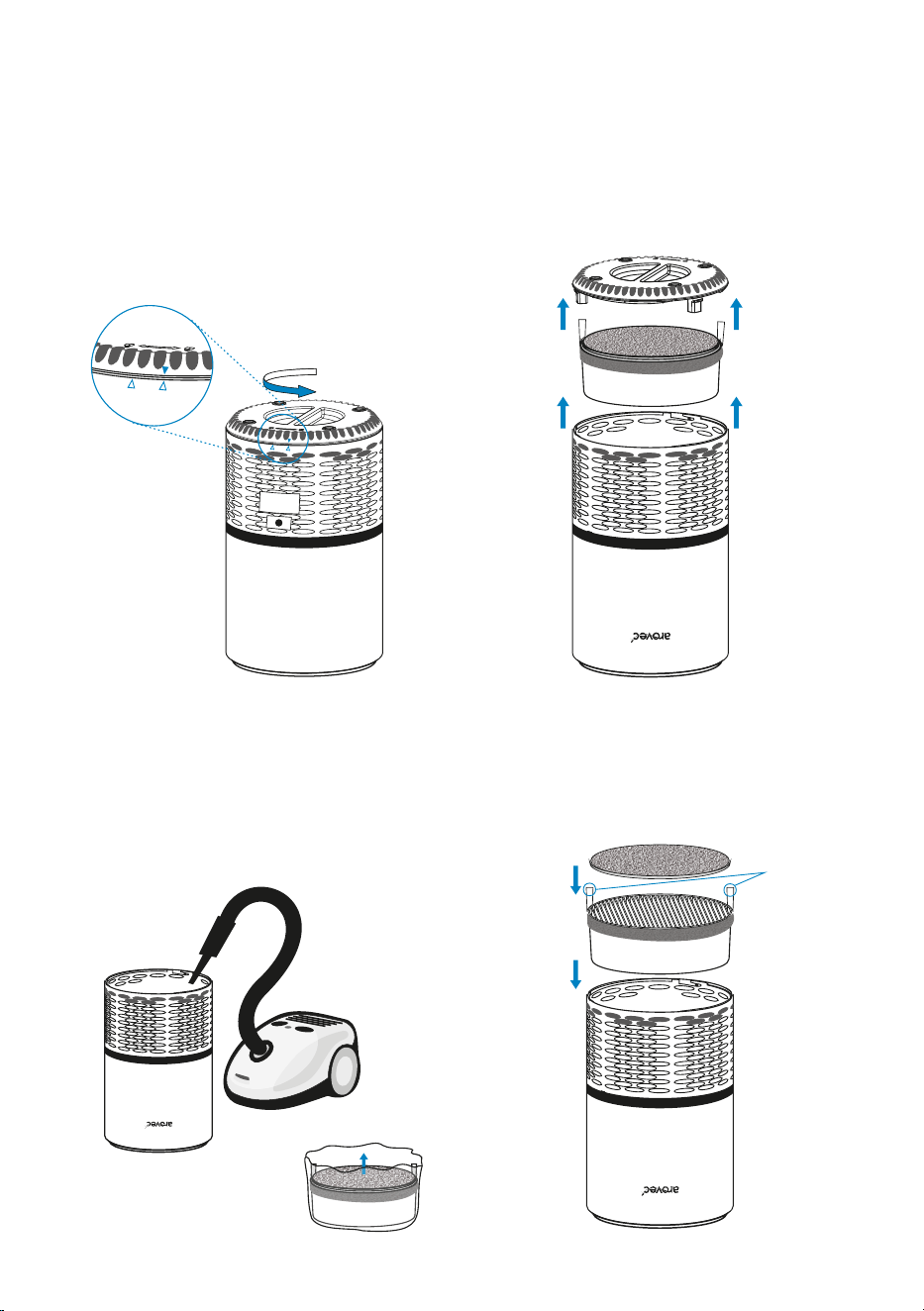
Steps for Replacing the Filters:
1.
Turn OFF and unplug the air purifier.
2. Turn the purifier upside down on a so�
cloth.
[Figure 3.1]
3. Turn the base cover an�clockwise to unlock
the cover.
[Figure 3.1]
4. Remove the base cover. [Figure 3.2]
5. Remove the used filters. [Figure 3.2]
6. Clean any remaining dust or hair inside the
purifier with a vacuum cleaner. DO NOT use
water or any liquids to clean the air purifier.
[Figure 3.3]
7. Remove the new filters from their packaging.
[Figure 3.4]
Follow these steps to replace the filters:
Figure 3.1
Figure 3.2
Figure 3.3
Figure 3.4 Figure 3.5
8. Place the new filters into the purifier.
[Figure 3.5]
- Make sure the grey pre-filter is on top of the white HEPA filter.
- Make sure the white tabs are poin�ng upward.
12
OPEN
LOCK
OPEN
LOCK
Tabs poin�ng
upward
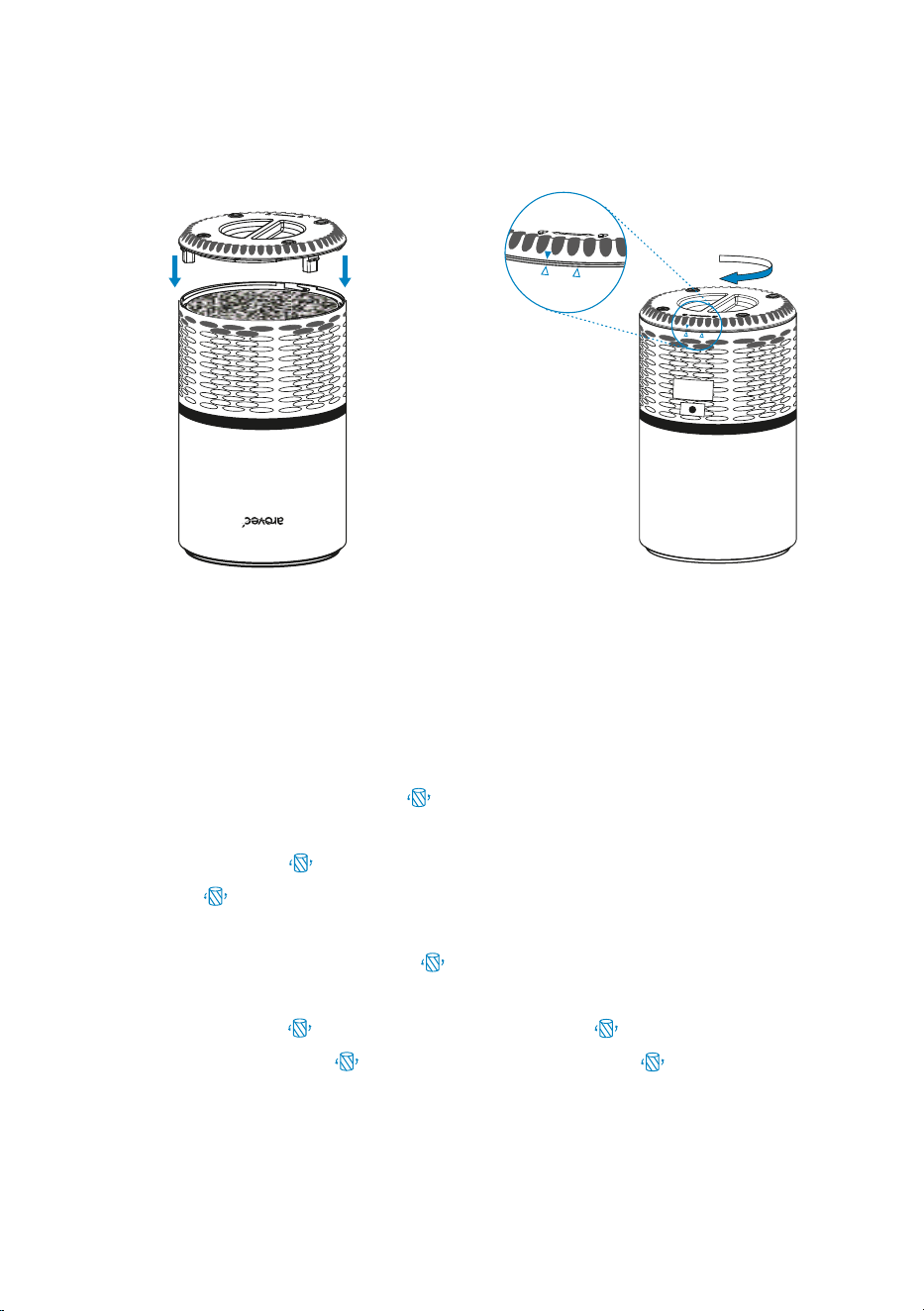
9. Put the base cover back on. [Figure 3.6] 10. Turn the base cover clockwise to the lock
posi�on.
[Figure 3.7]
Figure 3.6
Figure 3.7
You will need to reset the air purifier in two condi�ons.
1. If the filters were replaced a�er the ( ) light up:
- Turn on the air purifier.
- Press and hold ( ) for 3-5 Seconds.
- The ( ) light should turn off, which indicates that the purifier has been reset.
2. If the filters were replaced before the ( ) light up:
- Plug in the air purifier a�er filters replacement, but do not turn on the air purifier.
- Press and hold ( ) for 3-5 Seconds, to light up the ( ).
- Press and hold again ( ) for 3-5 seconds, to turn off the ( ), the reset is
now complete.
- You can turn on and use the air purifier with the new filter.
Rese�ng the Air Purifier A�er Filters Replacement:
13
OPEN
LOCK
OPEN
LOCK
CLEANING & CARE
STORAGE
DISPOSAL
• Unplug the air purifier before you clean it.
• Wipe down the outside of purifier regularly with a so� and clean cloth.
• DO NOT use any harsh cleaning agents e.g., bleach or alcohol to clean any part of
the air purifier.
• If not using the air purifier for an extended period of �me, It is a good idea to wrap
both the air purifier and the filters in plas�c packaging and store in a dry place to
avoid moisture damage.
• Ensure the air purifier is powered OFF by removing the power plug from the power
outlet.
• Store the air purifier in an upright posi�on. Do not store anything on the top of air
purifier.
To prevent possible harm to the environment or human health from uncontrolled
waste disposal, separate the unneeded air purifier and its related accessories from
other types of wastes. Ask your local council where to dispose of your air purifier and
its related accessories. You should not throw your air purifier and its related accesso-
ries away with the daily normal household waste.
14
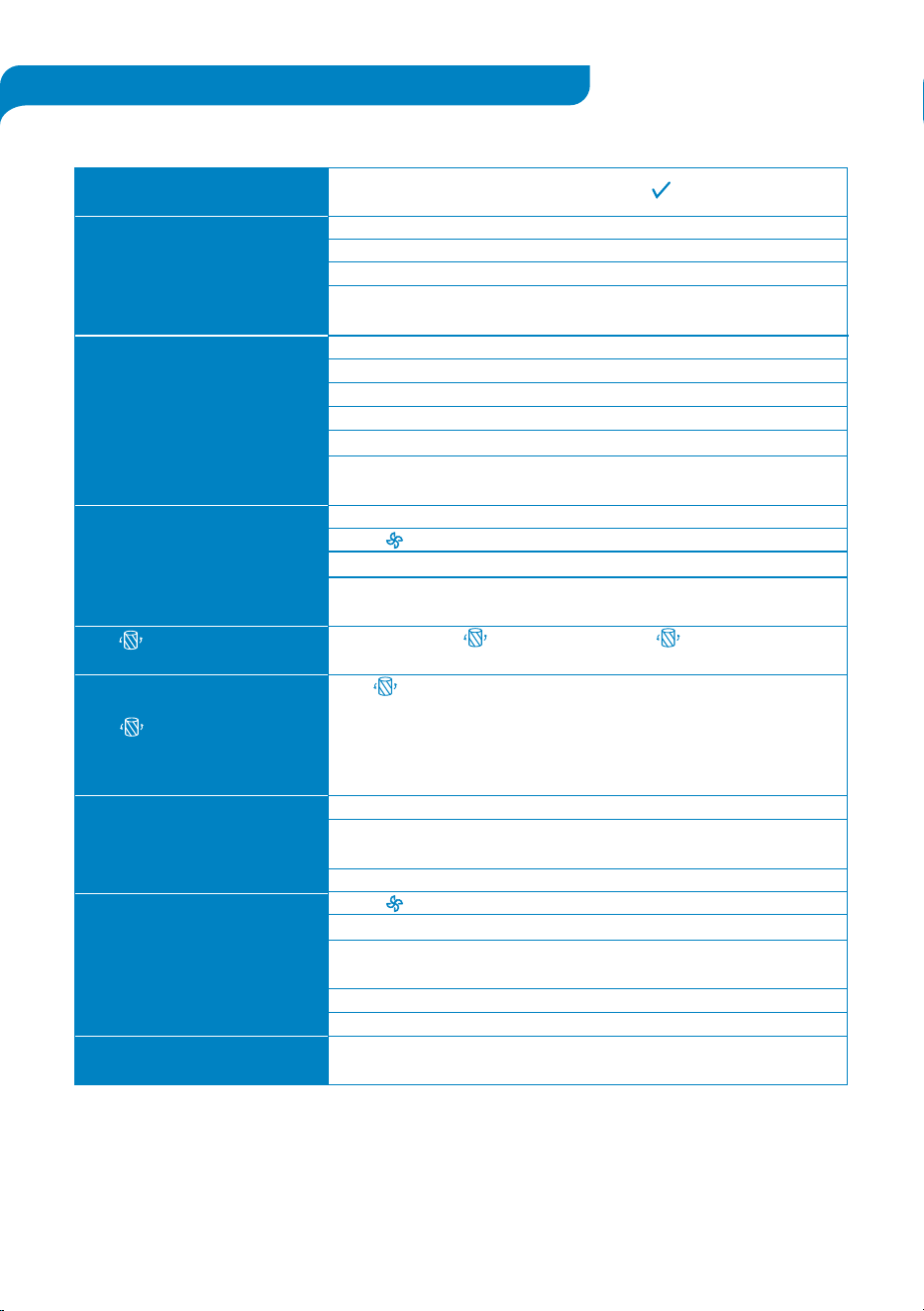
Problem ! Possible Solu�on
15
TROUBLESHOOTING
If your problem isn’t listed in the above table, please contact customer support at
support@arovec.com.au for assistance.
Here are some �ps to try if your air purifier isn’t working properly.
Air purifier won’t turn on or
bu�ons not working
Air purifier makes an unusual
noise
Significantly reduced airflow
The ( ) indicator light is s�ll on
a�er changing the filters
The ( ) indicator light hasn’t
turned on in 6 months
There is a strange smell when the
air purifier is ON
The air purifica�on quality is low
The air does not flow evenly from
the air purifier
Plug into a powered electrical outlet.
Try plugging the air purifier into a different outlet.
Air purifier or the cord might be damaged.
If these solu�ons don’t work, DO NOT use the air purifier.
Contact Customer Support. (See page 17)
Ensure that the filters is removed from their packaging. (See page 6)
Ensure that the filter is placed correctly as described in this user manual.
Replace the filters.(See page 10)
Check the air purifier is on a hard, flat and dry surface.
Air Purifier might be damaged or have a foreign object stuck inside.
If these solu�ons do not work, DO NOT use the air purifier and DO NOT
try to fix the problem. Contact Customer Support. (See page 17)
Ensure that the filter is removed from its packaging. (See page 6)
Press ( ) to increase the fan speed.
Replace the filters. (See page 10)
Check there is at least 40 cm of free space around the air purifier on each
side. (See page 8)
Tap and hold the ( ) for 3-5 seconds. The ( ) indicator light should
turn OFF to indicate that the air purifier has been reset. (See page 12)
The ( ) indicator light might not turned on if you have not used your
air purifier o�en in the past 6 months.
You may need to change the filters more o�en or less o�en, depending
on how much you use your air purifier and on how much pollu�on is in
the air. (See page 10)
Check if the filters need to be replaced. (See page 10)
Ensure that the area is not humid or there aren’t any essen�al oils or
perfumes in the area.
Air purifier might be damaged. Contact Customer Support. (See page 17)
Press ( ) to increase the fan speed.
The air purifier is effec�ve in area up to 15 m².
Remove any debris blocking the airflow (inlet and outlet) of the air
purifier.
Ensure that the doors and windows are closed. (See page 8)
Check if the filters need to be replaced. (See page 10)
Due to the design of this air purifier, this is normal and will not affect the
efficiency of air purifier.
WARRANTY AND DISCLAIMER FOR PRODUCTS
Arovec air purifiers are designed and manufactured to the highest quality standards. Your air
purifier is covered for parts and labour (excluding filters) for 2 years, which includes 1 year
standard warranty and 1 - addi�onal year upon registra�on (free of charge within 14 days) from the
date of purchasing.
This warranty and disclaimer applies to all products purchased via the website www.arovec.com.au
(hereina�er “Products”) or a third party seller authorised by Arovec.
Note: When the product is purchased from an authorised third party seller, for warranty claim,
return and replacement of a defec�ve product, the enquiry should be lodged via the
related third party seller.
(1) Warranty Against Defects
1.1 For Brand-new Products:
We provide a 12-month standard warranty against defects with the Products, from the date
of purchase.
We provide an op�onal addi�onal free 12-month extended warranty against defects with the
Products (resul�ng in a 24-month warranty against defects with the Products, from the date
of purchase).
In order to claim the addi�onal 12-month extended warranty, you must register your Product
(free of charge) online at
www.arovec.com.au, within 14 days of the date of purchase. While
registra�on, make sure that the related data entry including the date of purchasing are accurate.
16
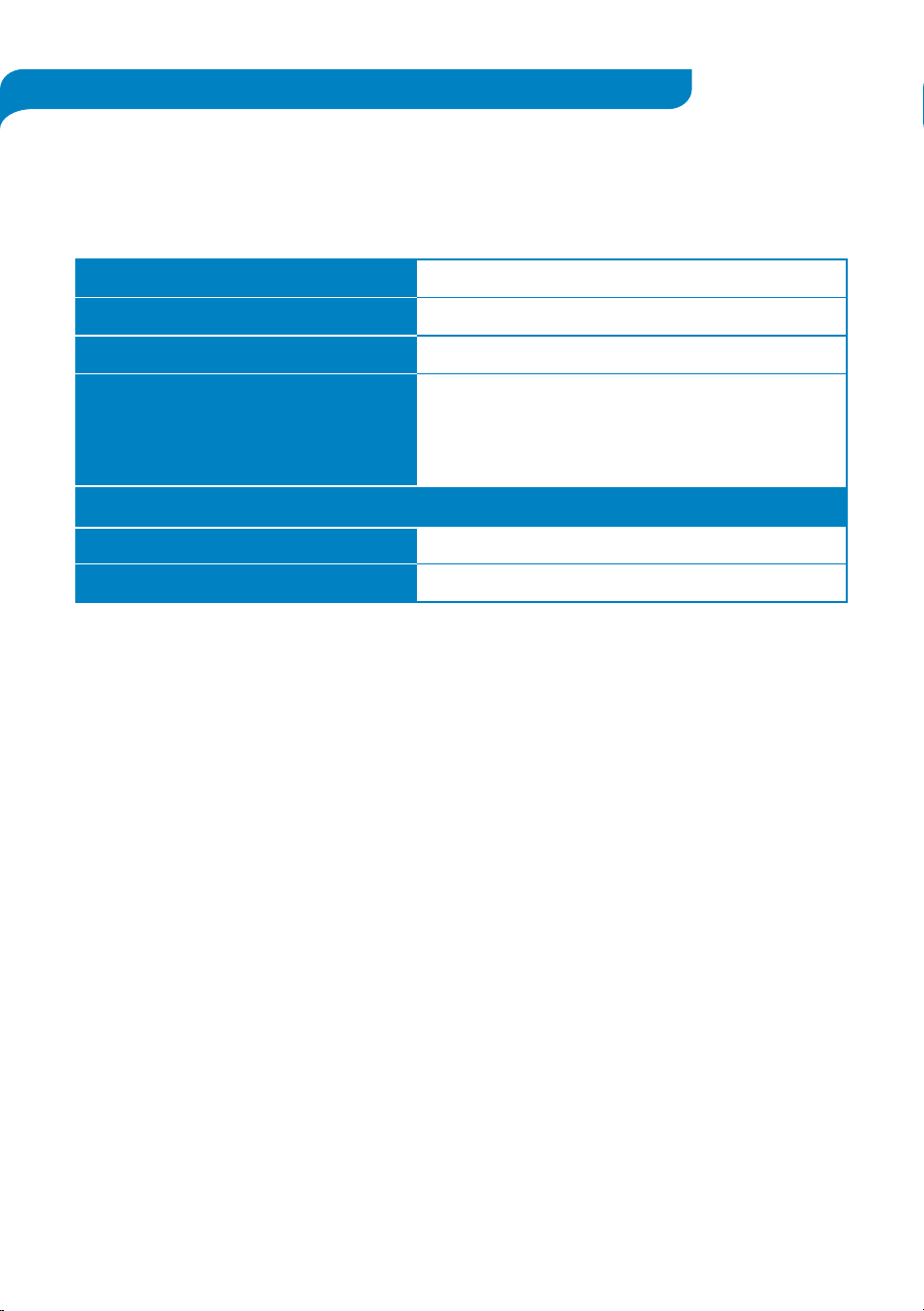
Product name
Model
Standard warranty period
Addi�onal warranty
Record your order details here. This will help if you have any warranty ques�ons in the future.
Date of original purchase
Order number
H13 True HEPA Air Purifier
AV-P152 / AV-P152B
1 Year
Extend your warranty for one addi�onal year;
Simply register on to
arovec.com.au/warranty
within the first 14 days of your purchase.

17
In the event of a defect with the Product, you may be en�tled to have the Product replaced
In order to be en�tled to a replacement Product, you must:
- immediately stop using the Product; and
- no�fy us of the defect during the warranty period.
In order to claim a replacement Product, you must contact us using the details at the
CUSTOMER SUPPORT sec�on, to no�fy us of the defect, providing your proof of purchase and
warranty registra�on confirma�on as well as your contact details.
You may either:
- return the product for our further inves�ga�on; or
- send us a video of the defec�ve Product, which demonstrates to our reasonable
sa�sfac�on that the Product is defec�ve and undertake to safely dispose the defec�ve
Product. For safety reasons you must not con�nue to use the defec�ve Product.
Upon receipt of the defec�ve Product, or a video of the defec�ve Product, we will inspect it. If
the defect is the result of a manufacturer fault, we will determine if the fault requires a
replacement or repair and either send you a replacement Product or effect a repair.
This warranty against defects is in addi�on to any other rights and remedies to which you may
be en�tled under Australian law.
To Clarify:
What is covered by the warranty:
•
The repair or replacement of your Arovec product (at Arovec’s discre�on) if the product is
found to be defec�ve due to faulty manufacture. Arovec reserves the right to determine if
the fault requires a replacement or repair.
• Packaging and instruc�ons of a faulty product may also be replaced if damaged.
• This warranty is valid for using your personal use of your device within Australia only.
What is not covered by the warranty:
•
Using the products for commercial purposes, or anything other than normal domes�c
personal use.
• Use of the product outside Australia.
• Accidental damage or faults caused by negligence, misuse, vandalism or neglect.
• Damage or faults caused by not following the instruc�ons in the user manual.
• Unsupervised use by children under the age of 18.
• Repairs or altera�ons carried out by par�es other than Arovec or an authorised agent.
• Any other condi�ons not listed above, are not covered by Arovec warranty.

18
1.2 For Renew Products:
A renew Product, which is purchased from a seller that is authorised by Arovec, is only
covered under six months warranty and is not eligible for the free warranty extension.
1.3 For Replacements:
Replacement of a brand-new Product is only covered by the one-year standard warranty
from the date of replacement arrangement and is not eligible for the one-addi�onal year
free warranty extension.
Replacement of a renew Product that is purchased from a seller and is authorised by Arovec
is only covered by six months warranty from the date of replacement arrangement and is
not eligible for the free warranty extension.
(2) Australian Consumer Law
Our goods come with guarantees that cannot be excluded under the Australian Consumer
Law. You are en�tled to a replacement or refund for a major failure and compensa�on for
any other reasonably foreseeable loss or damage. You are also en�tled to have the goods
repaired or replaced if the goods fail to be of acceptable quality and the failure does not
amount to a major failure.
(3) Disclaimer
You are solely responsible for evalua�ng the Product and determining whether it is fit for your
purpose.
You acknowledge and agree that Product is not safe for use by children.
You acknowledge and agree that working with the Product is dangerous and carries the risk of
electric shock, burns, lacera�ons, other injuries and death.
You acknowledge that you use the Product at your own risk and that you are responsible at all
�mes for evalua�ng whether or not it is safe to use the Product.
(4) Limita�on of Liability
In addi�on to the requirements set out in clause 1 of this warranty and disclaimer document,
the warranty provided under that clause will not apply:
- if a defect with the Product results in any way from some act or omission by you in rela�on
to the appropriate care, maintenance and/or use of the Product; or
- if a defect with the Product results from ordinary wear and tear; or
- if you fail to follow our or the manufacturer’s instruc�ons for care, maintenance and/or use
of the Product; or
- if you are unable to provide proof of purchase.

Except as otherwise provided by law, we accept no liability for any loss, damage or injury which
may arise in any way from the use of the Product by you or by any other person.
Except as otherwise provided in this warranty and disclaimer, to the maximum extent permi�ed
by law, we exclude all condi�ons and warran�es implied by custom, law or statute, and we
expressly disclaim all warran�es of any kind including but not limited to implied warran�es that
the Product is fit for a par�cular purpose.
You hereby agree that we are not liable for any direct, indirect, consequen�al or incidental loss
or damage which may result from your use of the Product.
Except as otherwise provided by law or as otherwise set out in this warranty and disclaimer, our
liability to you shall be limited to the cost of replacement of the Product, together with your
reasonable costs of postage and/or delivery in connec�on with your returning of the Product.
(5) Indemnity
You agree to defend, indemnify and hold us and our officers, directors, employees, contractors,
members, agents and licensees harmless from and against any and all claims, charges, ac�ons,
liabili�es, inves�ga�ons, demands and similar including but not limited to any costs, losses,
damages whether direct, indirect, consequen�al or special and all legal fees resul�ng from your
use of the Product, including but not limited to any third party claims.
19

CUSTOMER SUPPORT - AUSTRALIA
Feel free to contact our helpful customer support team with any questions or inquiries regarding
your product.
Your satisfaction is our priority.
Ausbrilliant Brands
PO Box2, Ermington NSW 1700, Australia
www.arovec.com.au
support@arovec.com.au
Please provide your order number when you contact customer support.
Alterna�vely, you may contact us using the contact us form on the website.
20

NOTES

NOTES

V6.1121
www.arovec.com.au