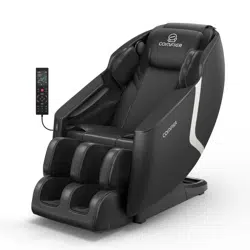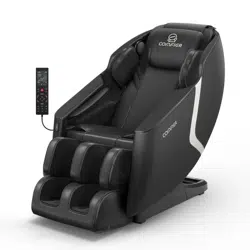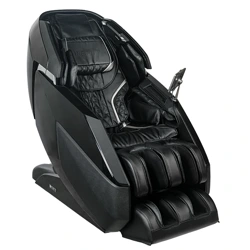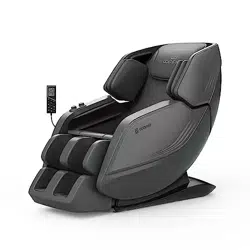
Intelligent Advanced Massage Chair
User Manual
CF-9216

Thank you for choosing this product. Before you use it, please read this
instruc�on manual carefully so that you can master the correct way to use this
product. When referring to it, please pay special a�en�on to important safety
warnings and keep the instruc�on manual properly for reference.
Note: The company reserves the right to change and explain the design of the
product. If there is any change, we will not give no�ce. Product color in kind prevail.
CONTENTS
Safety Precau�ons 01
Prepara�on for Use 03
Trouble shoo�ng
15
Care & Maintenance
14
Product Specifica�ons
16
Warranty
17
Fcc Statement
19
04Product Descrip�on
Remote Controller
05
& Opera�on Guide
The leg installa�on instruc�ons
12

01
1.People with the following condi�ons should consult their physican before using the product:
* who uses a medical electronic device, which is embedded in the body, such as a pacermaker.
* Who suffers from heart disease.
* Who suffers from backbone disease.
* Who is suffering from bone fragility. especially on the backbone.
* Afrter surgery.
* Who is pregnant, a�er delivery or in a period of monthly llness.
* Who suffers from malignant tumors.
* Who is suffering from oseoporosis.
* who is suffering from skin disease or affec�on.
* Who is undergoing medical treatment or feels some physical abnormality prevlously or is
being treated now.
* Who has some abnormmality or deformity of limbs or backbone.
* Who has backbone problems or lnJuries due to llness or aceldent.
Note: Never massage the swollen or inflamed parts of the body.
2. Do not let water enter the product or splash the surface of the product.
3. Water contact with electricity is dangerous. Do not leave the product in a humid environment
(such as in bathroom or shower room or next to swimming pool).
4. Before connec�ng the product to the power supply, make sure the product voltage and
supply voltage are the sams.
5. If the plug,power cord or product itself is damaged, do not use the product.
6. ln order to prevent the risk of electric shock, do not open the product outer casing.
7. Product is not intended for use by the disabled,sensory or mental impaired (including children),
unless there is supervision or guidance by the people responsible for their salety when they use
the product.
8. lf the product or the power cord is damaged,in order to avoid danger, do not try to repair the
product. This must be handled by specialist/technician, or product quality rmhaintenance
guarantee will be void.
9. Children should not use the product. They should be under supervision to ensure that they will
not treat the product as a tay.
10. lf unusual sound or noise is being heard from the product,turn off the product.and immediatly
disconnect the power connec�on.Please contact its authorised dealer.
11. Do not use the product if cover is damaged or if there is a mechanical or electronic failure.
You should contact its authorised dealer.
SAFETY PRECAUTIONS

02
12. Use or place the product only in accordance with the instruc�ons in this manual.
13. Do not use it in a room with damp and high temperature or next to hot objects (such as
heaters, furnaces, etc.) Use this product.
14. Do not apply medical or cosme�c cream to the product or your body before or during use
of this product.
15. If you need to massage the neck or around it, please be careful with the moving roller
and avoid using excessive force.
16. Do not break, bend, pull, twist or bind the power cord. Damaged power lines can cause
fire Or get an electric shock.
17. Do not use this product on bare skin.
18. It is recommended to use it for 30 minutes or less every day.
19. This product can bear the maximum weight of 100kg, more than this weight, may cause
permanent damage to the massage machine parts of this product.
20. Always keep the product clean and avoid inser�ng other objects into or near the crevices
of the product.
21. This product is designed for home use only.
22. Do not stand, sit or jump on the leg massager rack to avoid injury or destruc�on.
23. Do not a�empt to stand on the backrest or handrail to avoid product toppling and
resul�ng in accident.
24. Before using this product, please remove the ornaments on your body first.
25. When using this product, do not fall asleep, get drunk or when you have a fever.
26. Do not use this product immediately a�er ea�ng. Wait at least one hour before using.
27. If you have long hair, please �e it before using this product.
Electromagne�c field (EMF)
In addi�on to the safety test, the product has also been tested for electromagne�c interference
and meets the standard requirements.
SAFETY PRECAUTIONS
03
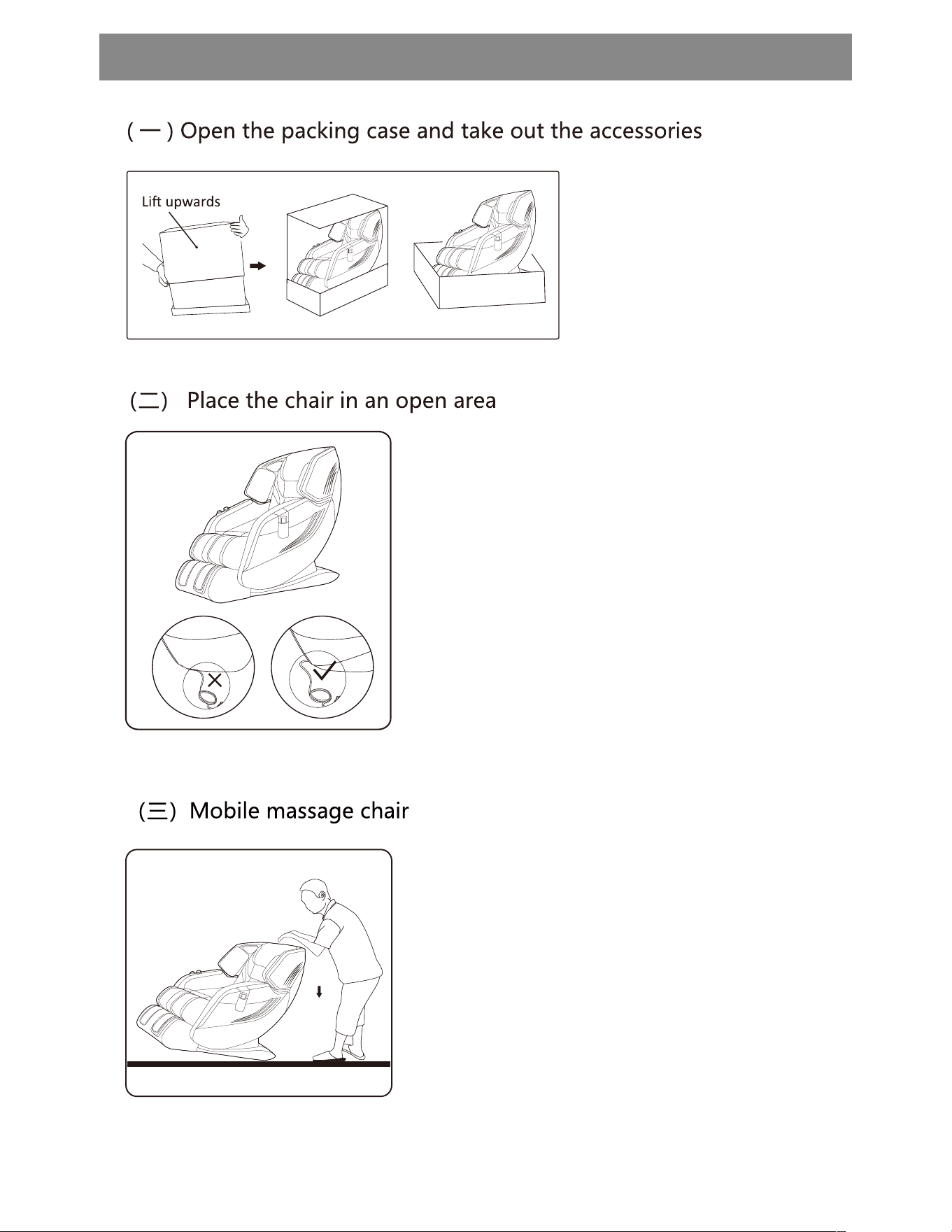
· First press the back of the chair with both hands, so that the chair is
�lted back about 45 degrees.
· Use casters to carefully push the massage chair forward or backward.
· Slowly lay the massage chair flat un�l it is moved to the appropriate
posi�on.
Note:
Do not move the massage chair when someone is in it or in use.
The floor may be damaged when moving the massage chair. It is
recommended to protect the floor (e.g Products under the mat or
carpet, etc.).
In order to avoid falling and damaging the body, please be sure to
move the massage chair Hold the massage chair firmly.
It is recommended that two people move the massage chair together
and with extra cau�on.
1. Open the packing tape of the outer box of
the massage chair body, li� the outer box up
and move it out.
2. This product adopts split package, and the
legs are packed independently. Take out the
massage chair, calf accessories and accesso -
ries box and put them away separately.
3. Items in the accessory box include
instruc�ons, power cables, etc.
· Please leave room for the chair to stretch.
· In order to prevent damage to the floor and reduce noise, please
put cushions under the chairs.
· Please ensure that there are no obstacles in front and behind the
massage chair.
· Do not place in damp or uneven places.
· To prevent signal interference, please stay more than one meter away
from TV, radio and other equipment.
· Do not expose the massage chair to direct sunlight or high tempera
ture, otherwise it will lead Cause the leather to fade or harden.
Note:
Do not press the power cord under the massage chair!
Do not roll over the power line when moving!
PREPARATI ON FOR USE
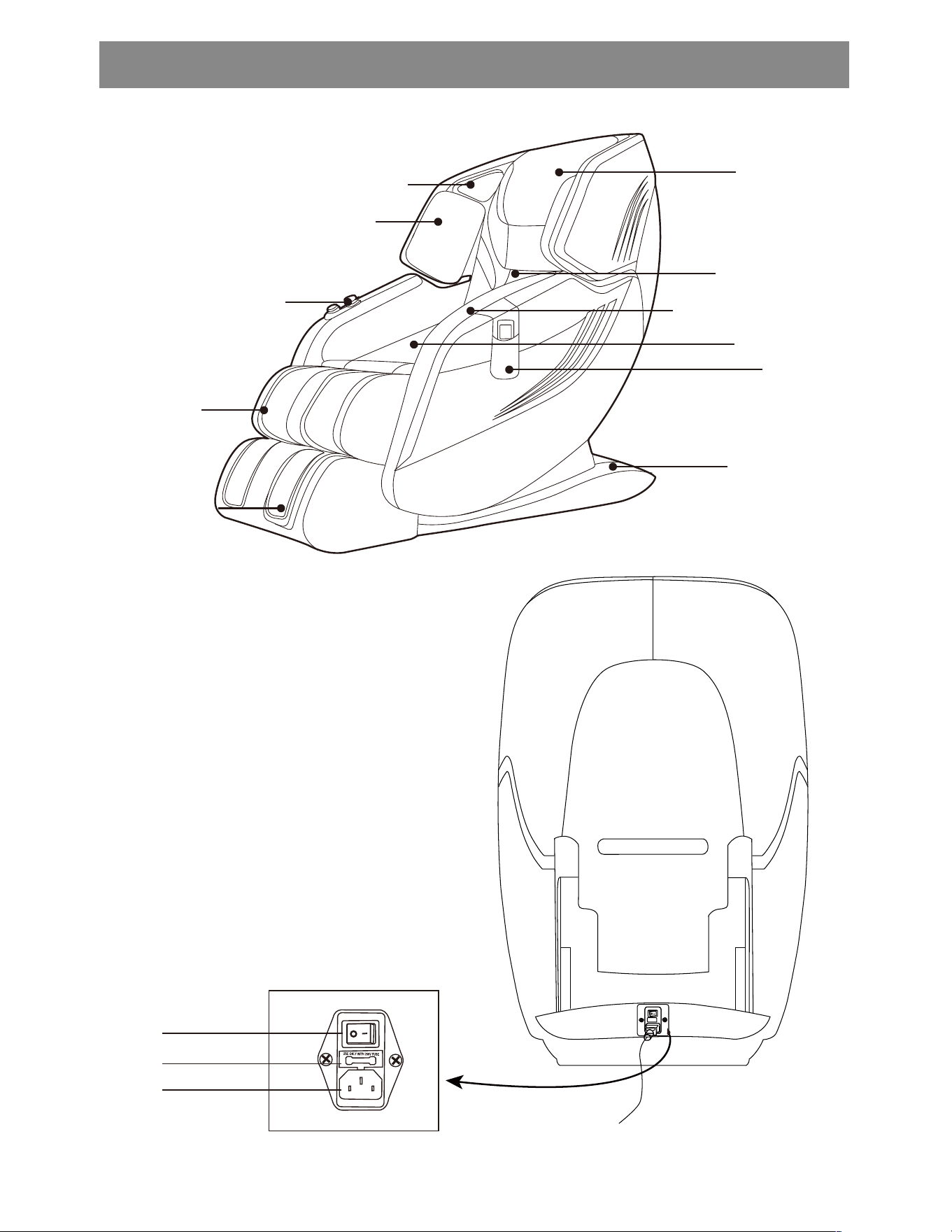
Pan
The armrest
Seat
Hand bag
Back of a chair
The horn
Quick opera�on knob
The shoulder bag
The foot wheel
The strakes
04
Leg
Headrest
PRODUCT DESCRIPTION
Massage chair movement
Power Switch
Main Power
Socket
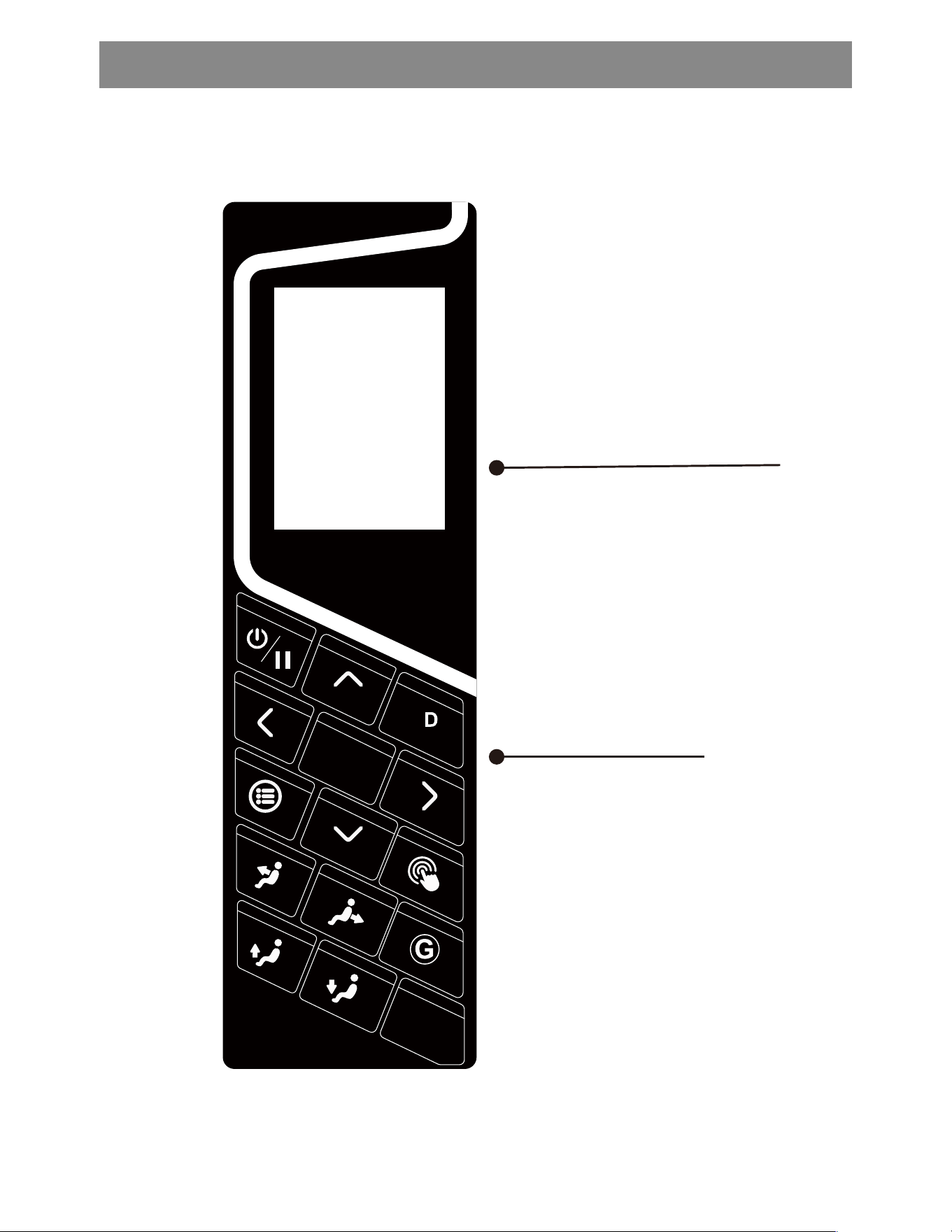
1. Main panel descrip�on
Hand controller display screen
05
Hand control bu�on
����
��
����
REMOTE CONTROLLER
4
06
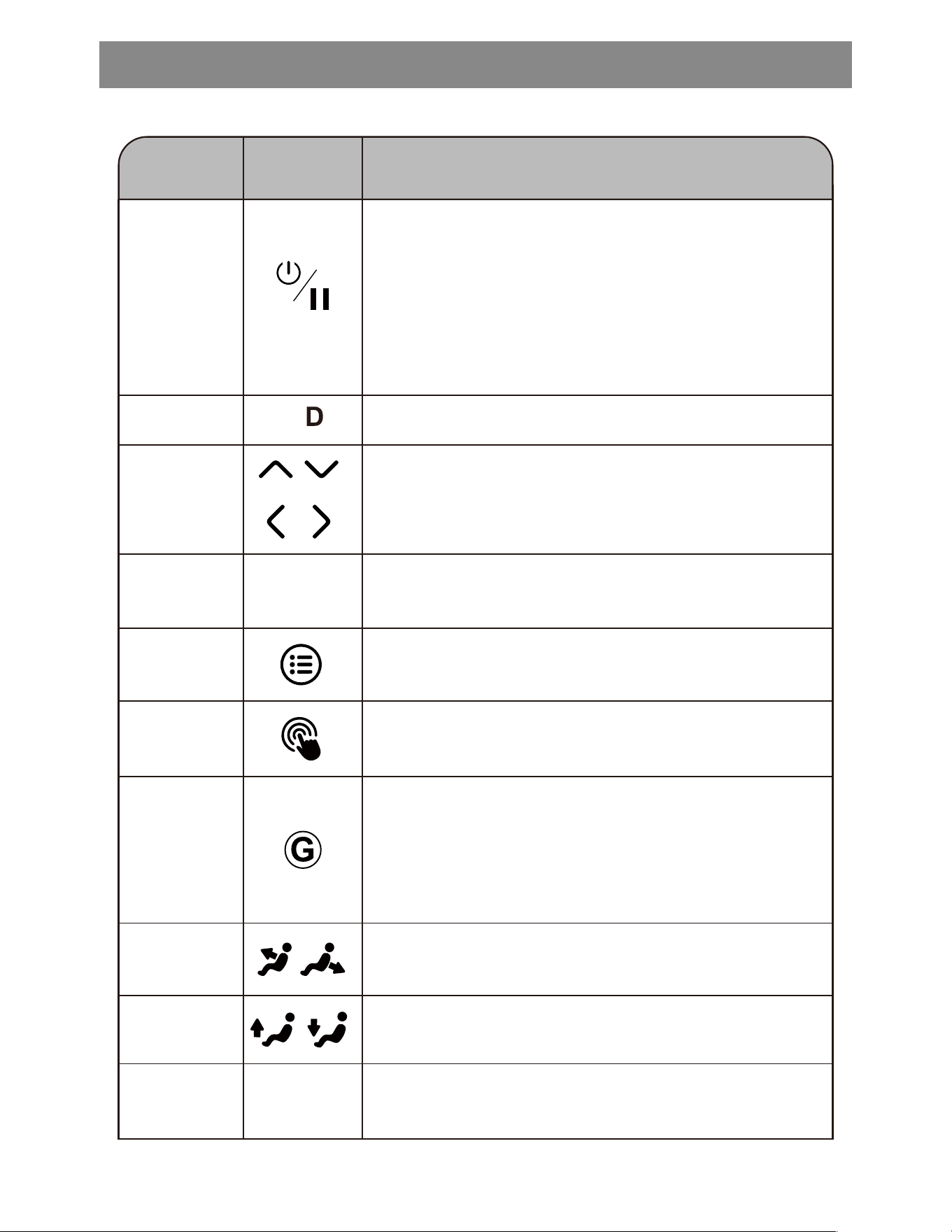
Move up, down, le�, and right to adjust the posi�on
of the selected yellow area.
The cursor
up and down
The or so key
Press this key, start zero gravity massage func�on,
simulate the weightlessness of outer space, let the
body more relaxed and comfortable. There are three
levels of zero gravity, and the reverse Angle will increase
gradually. Press the fourth to disable zero gravity.
Zero
gravity key
Control leg li� and landingLeg li� key
Control backrest li�ing and landing.
Backrest
li� key
Make sure to perform the func�ons indicated by the
current yellow area.
Enter key
OK
Press this bu�on to automa�cally adjust the back and
legs to the best Angle for reading/TV.
Read/TV key
Book
/ TV
Press this key to jump to the main menu interface.Menu
Press this key to jump to manual massage interface
Manual
program key
REMOTE CONTROLLER
The keys DescribeThe name
Enable/disable the 4D massage func�on.
4
4D massage
On/pause
bu�on
When powered on, press this key to enter the standby
state of the massage chair. When THE MASSAGE CHAIR
IS WORKING, PRESS THIS key, the MASSAGE chair WILL
stop working, pause this key again, and the MASSAGE
chair will resume its work before suspension. Long press
this key to close the massage chair.When the �ming �me
is up, the push rod is no longer in posi�on. It is necessary
to press the switch bu�on again to restore.
2. Main screen descrip�on
3. Auto Programs interface descrip�on
07
Press buttons to make selection
OK
Press buttons to make selection
OK
Remote Sound
Air Intensity
Air Zone
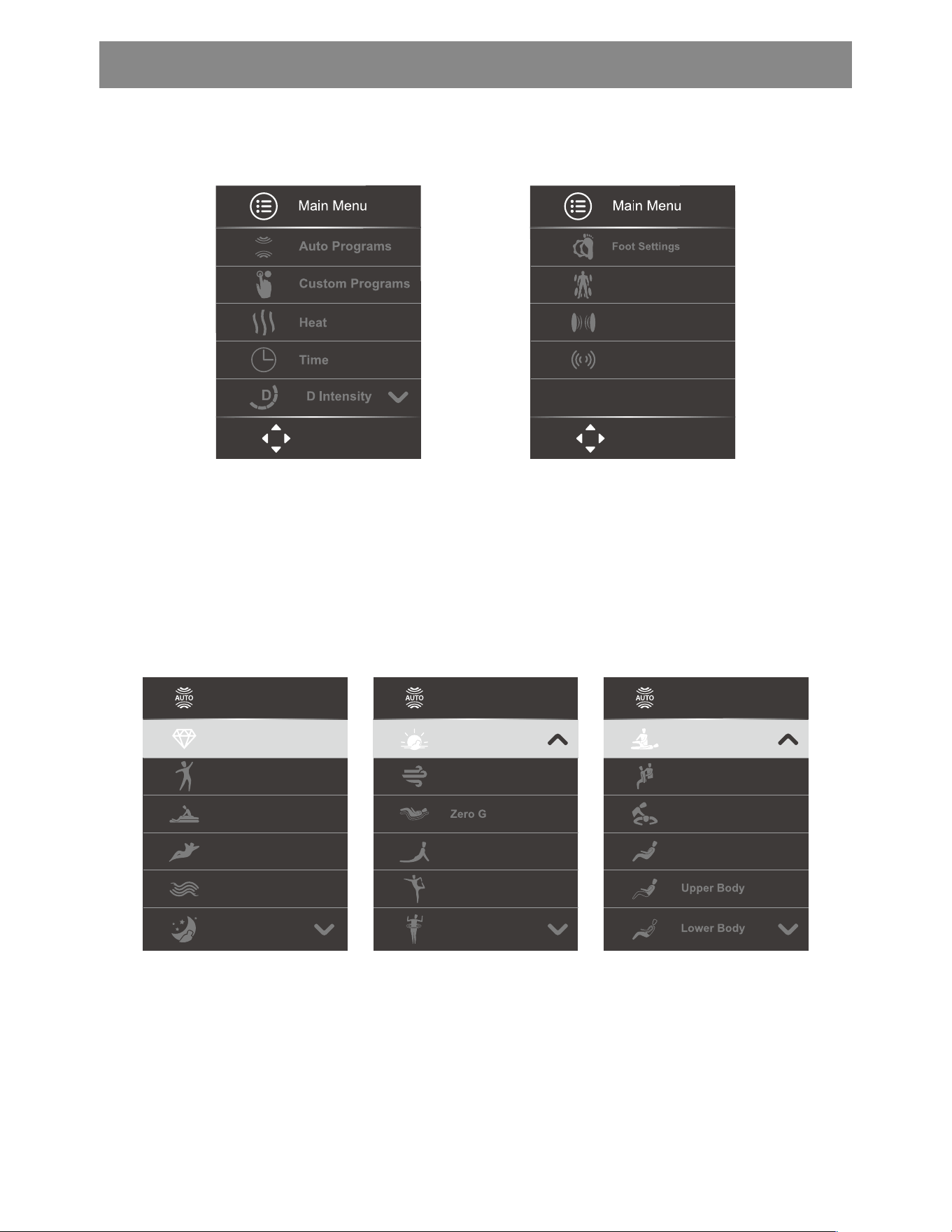
The main menu interface is shown in the figure above, with automa�c massage func�on,
manual massage func�on, hea�ng and hot compress func�on, massage �me adjustment, 4D
massage func�on, foot roller massage, air bag area massage selec�on, pressure intensity
selec�on, sound selec�on and other func�ons.
Automa�c program interface 1 Automa�c program interface 2 Automa�c program interface 3
Auto Programs
Relieve
Renew
Zen
Vigor
Calm
Bed Time
Auto Programs
Athlete
Stress Free
Mid Body
Total Body
Auto Programs
Rise&Shine
Air Only
Extend
Yoga
Stretch
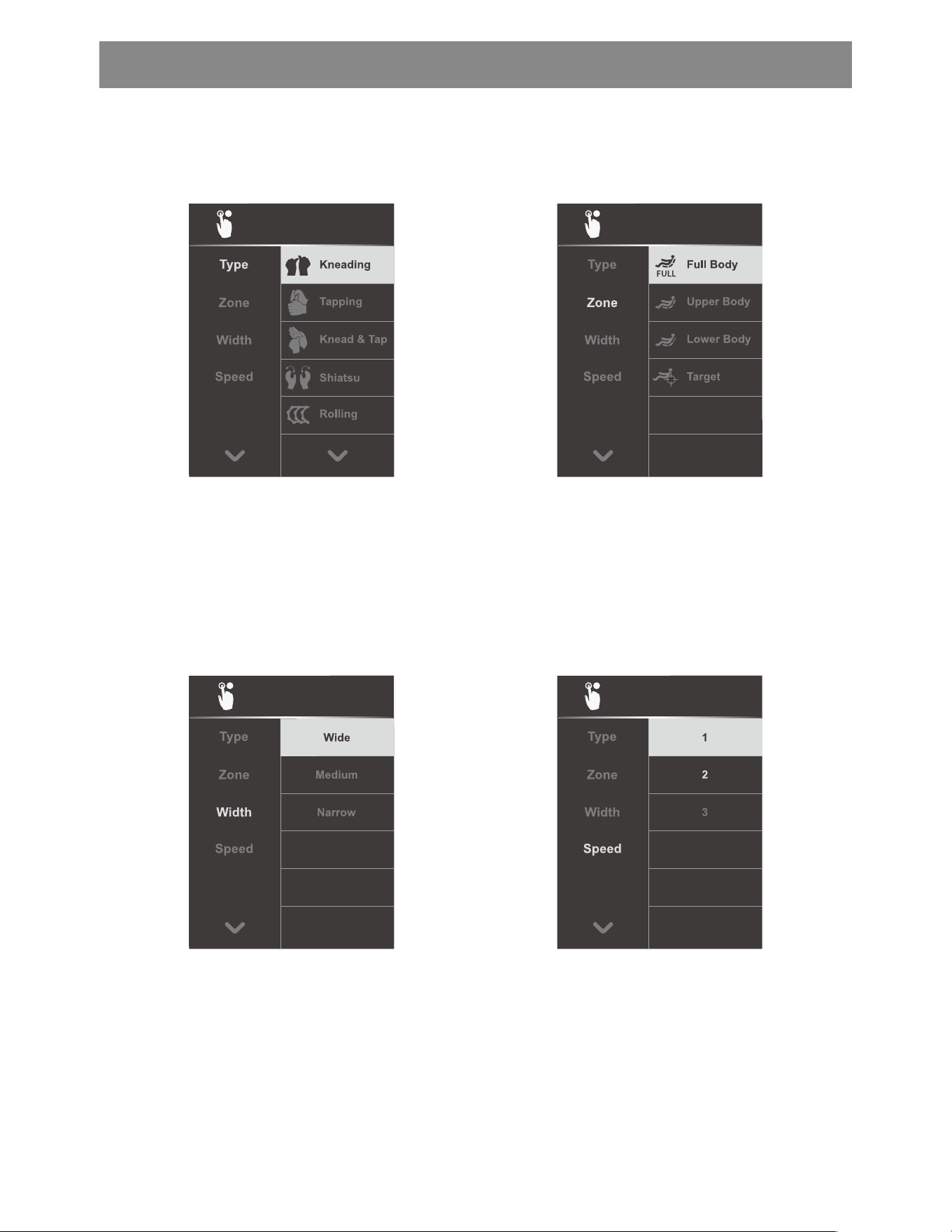
The automa�c massage program is shown in the picture above. There are 18
preset massage types to choose from, which can be used in different situa�ons.
REMOTE CONTROLLER
�
�
4. Custom Programs massage interface
Custom Programs
Custom Programs
Custom Programs
08
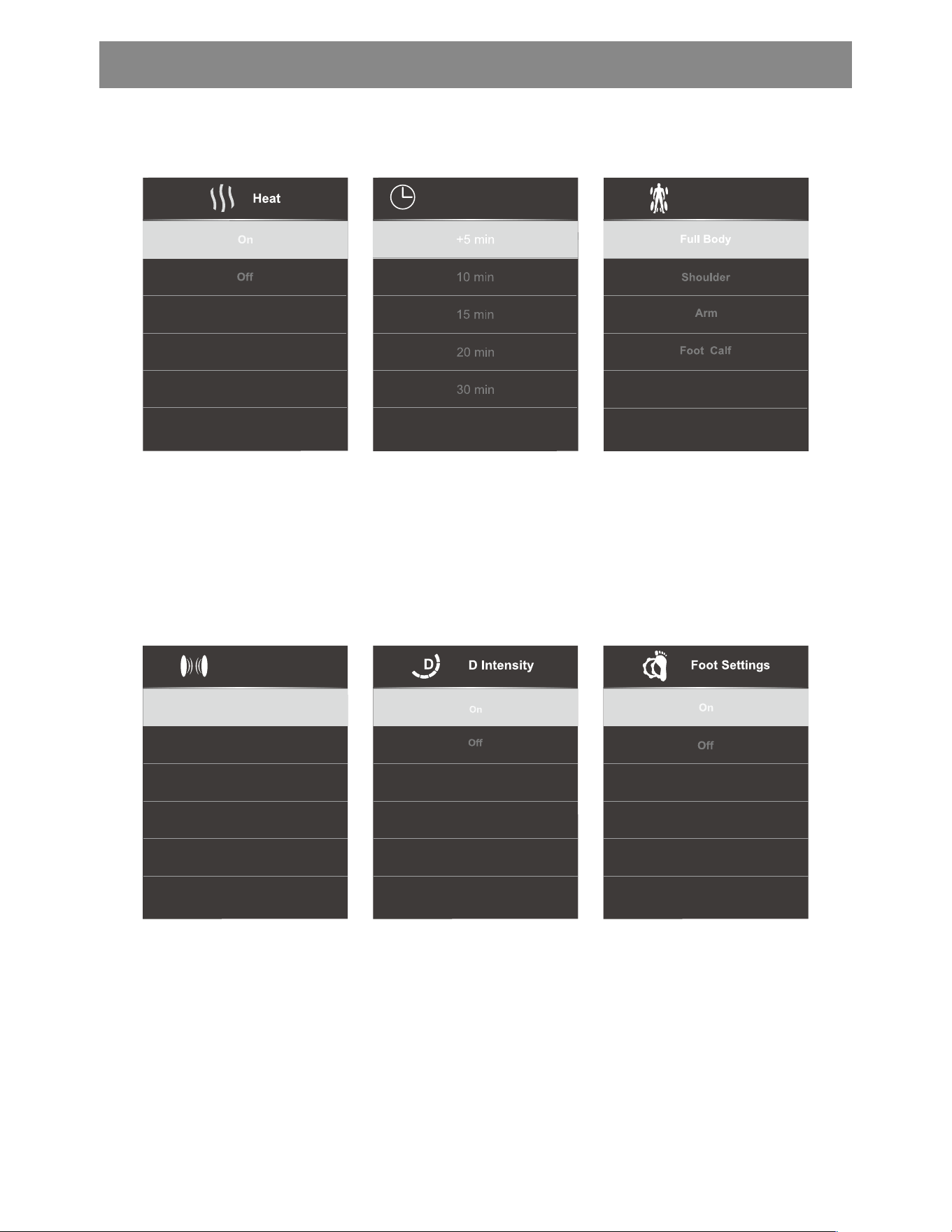
The manual massage program is
shown in the figure above. There are
5 types of massage to choose from:
kneading, tapping, kneading, shiatsu
and massage.
The manual massage procedure is
shown in the picture above. There
are 4 massage areas to choose from:
whole body, upper body, lower
body and fixed point.
The manual massage procedure is
shown in the picture above, and
there are three movement widths to
choose from, wide, medium and
narrow.
Manual massage program as shown
in the picture above, there are 3
massage speed op�ons, weak,
medium, strong.
Custom Programs
REMOTE CONTROLLER
Time
Air Zone
Air Intensity
1
2
3
09
5. Other func�on interface descrip�on
The hea�ng func�on is
shown in the figure
above. Turn on/off the
hea�ng and heat
compress func�on on the
back as required.
The func�on of �me is
shown in the figure
above. Choose to
increase the massage
�me according to the
need.
Air bag area selec�on as
shown in the figure
above, according to the
need to select the air bag
massage area.
The selec�on of air
pressure intensity is
shown in the figure
above. It can be divided
into 1, 2 and 3 levels. The
air pressure intensity gear
can be selected as
required.
The 4D massage func�on
is shown in the figure
above. Enable/disable the
4D massage func�on as
required.
The foot roller massage
func�on is shown in the
figure above. Turn on/off
the foot roller massage
func�on as required.
REMOTE CONTROLLER
4
4
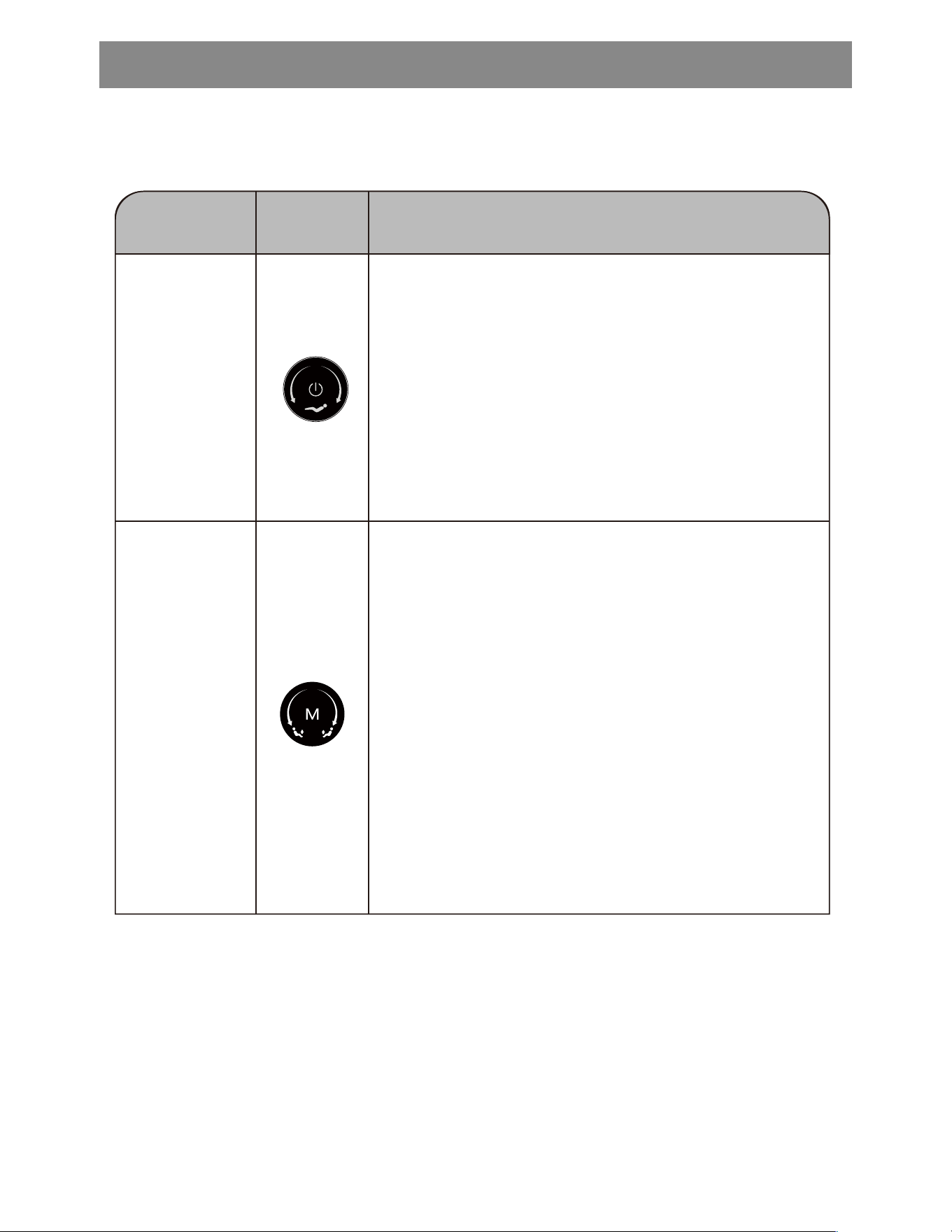
6. Descrip�on of shortcut keys and knobs
10
The keysThe name Describe
Bu�on func�on: In power state, long press
to open/close the massage chair, massage
chair into standby state.
Knob func�on: on the state, clockwise
rota�on, backrest down; Turn counter
clock wise and raise the backrest.
Bu�on FUNCTION: SWITCH back and
forth between "AUTOMATIC MASSAGE
-PRO GRAM 1" and "AUTOMATIC
MASSAGE PROGRAM 8" when STARTING.
Knob func�on: on the state, clockwise
trotaion, leg up; Turn counterclockwise
and land on your legs.
The switch
machine key
Manual
program key
REMOTE CONTROLLER
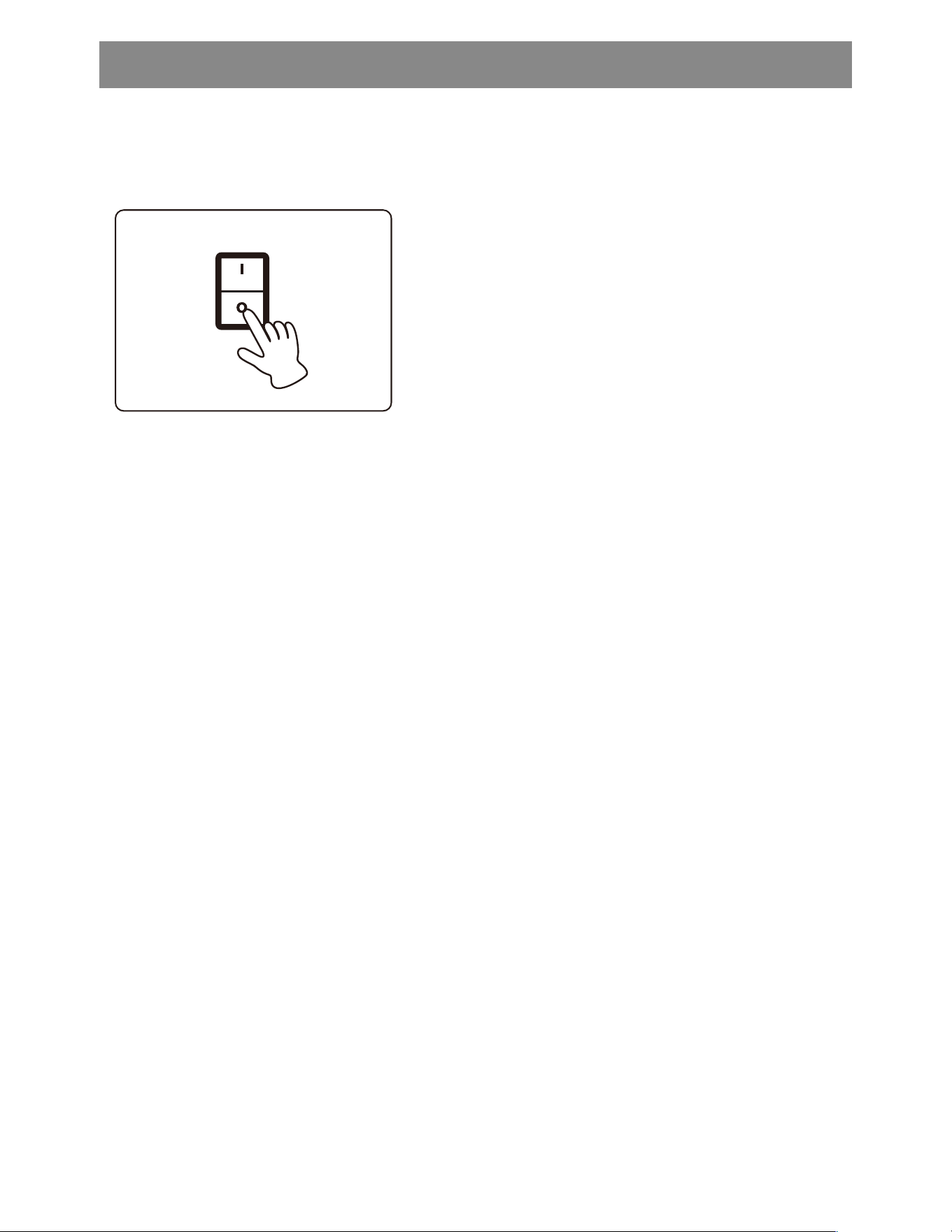
7. End of massage
1) Press the power bu�on of the remote control to stop all
ac�ons Put back the remote control.
2) Please make sure to adjust the power supply of the
massage chair to the "O" posi�on.
3) Unplug the power supply.
* Do not twist or twist the power cord to prevent it from
breaking.
11
REMOTE CONTROLLER
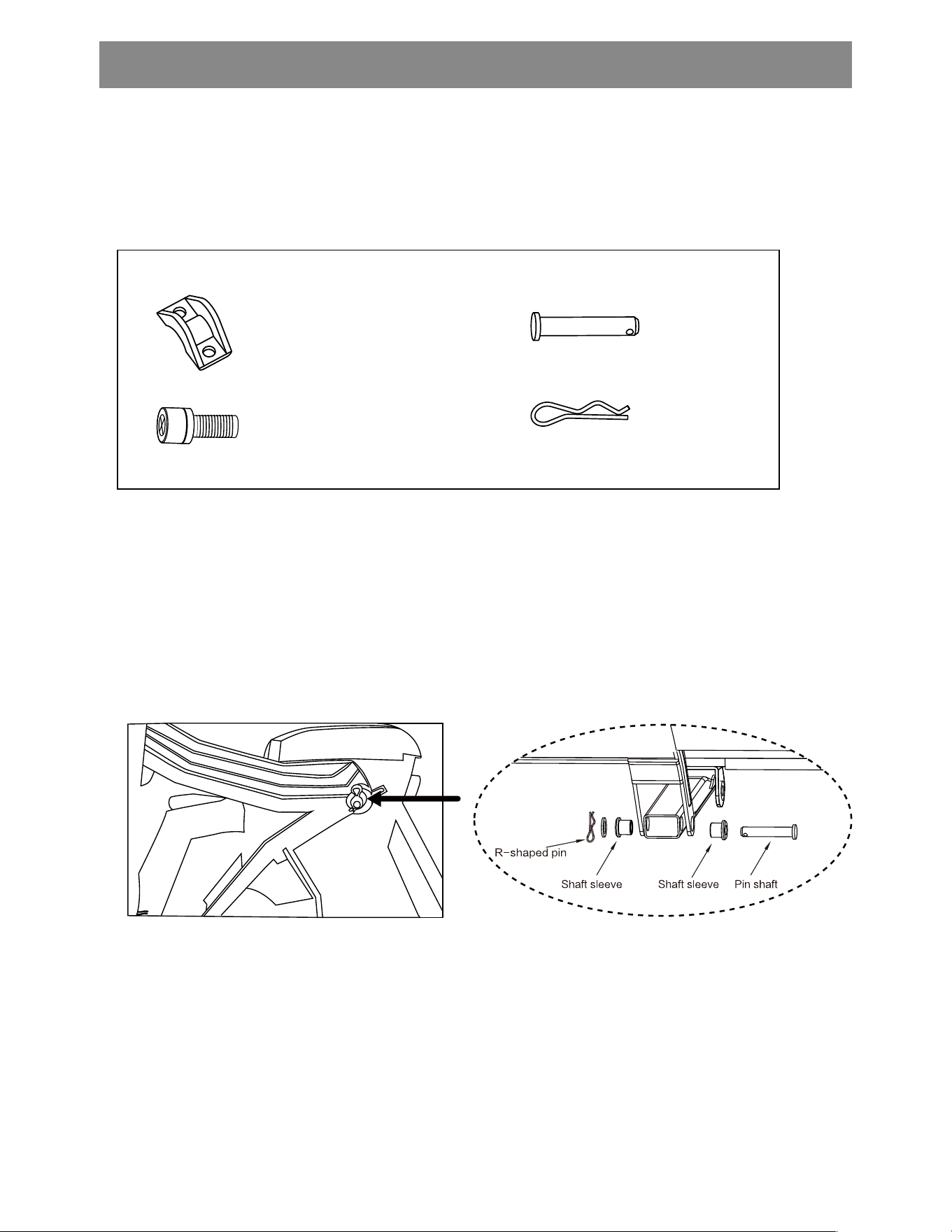
1. Open the box, slowly take out the massage chair and legs, and check
whether the installa�on accessories are complete
2. Install leg link sha�
Press block x2
Short screw x4
Pin x2
R pin x2
The leg installation instructions
12
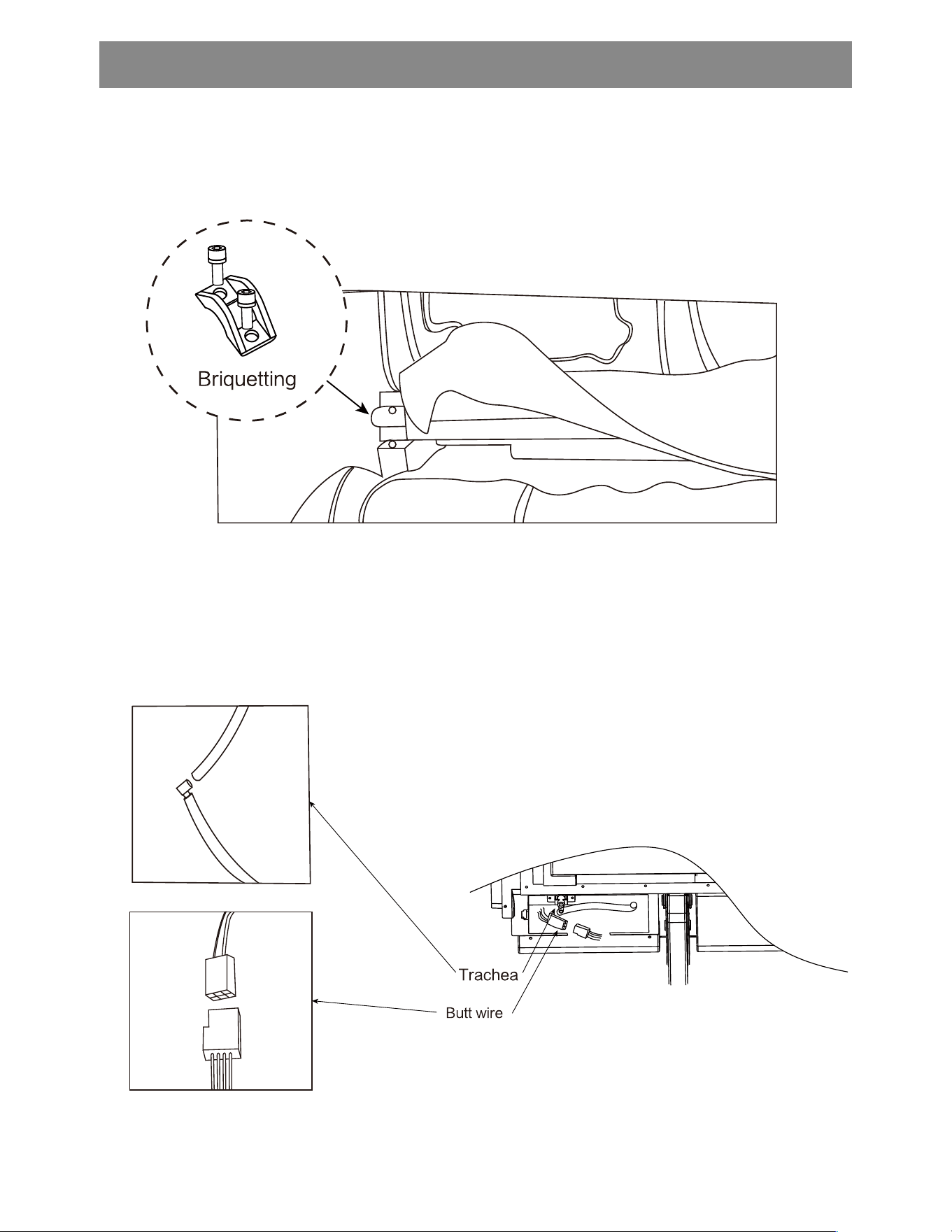
The leg installation instructions
4. Connect the docking wire to the air pipe
3. Place the shank sha� into the slot, then install the leg press block and
�ghten the cross screw with the appropriate tool
13

Cleaning
Do not use steel wool, abrasive cleaning agents, or corrosive liquids such
as gasoline or acetone to clean the product.
1. Remove the plug from the power socket
2. Wipe the product, control panel, and power cable with a dry cloth
3. Do not use wet cloth or detergent.
Store
1. Remove the plug from the power socket
2. Please store this product in a cool and dry place, avoid sunlight.
3. Do not put heavy objects on the product
If the leather case is damaged or mechanical failure, please stop using
this product and consult the authorized a�er-sales service center or
customer service center in your country (region).
14
CARE & MAINTENANCE
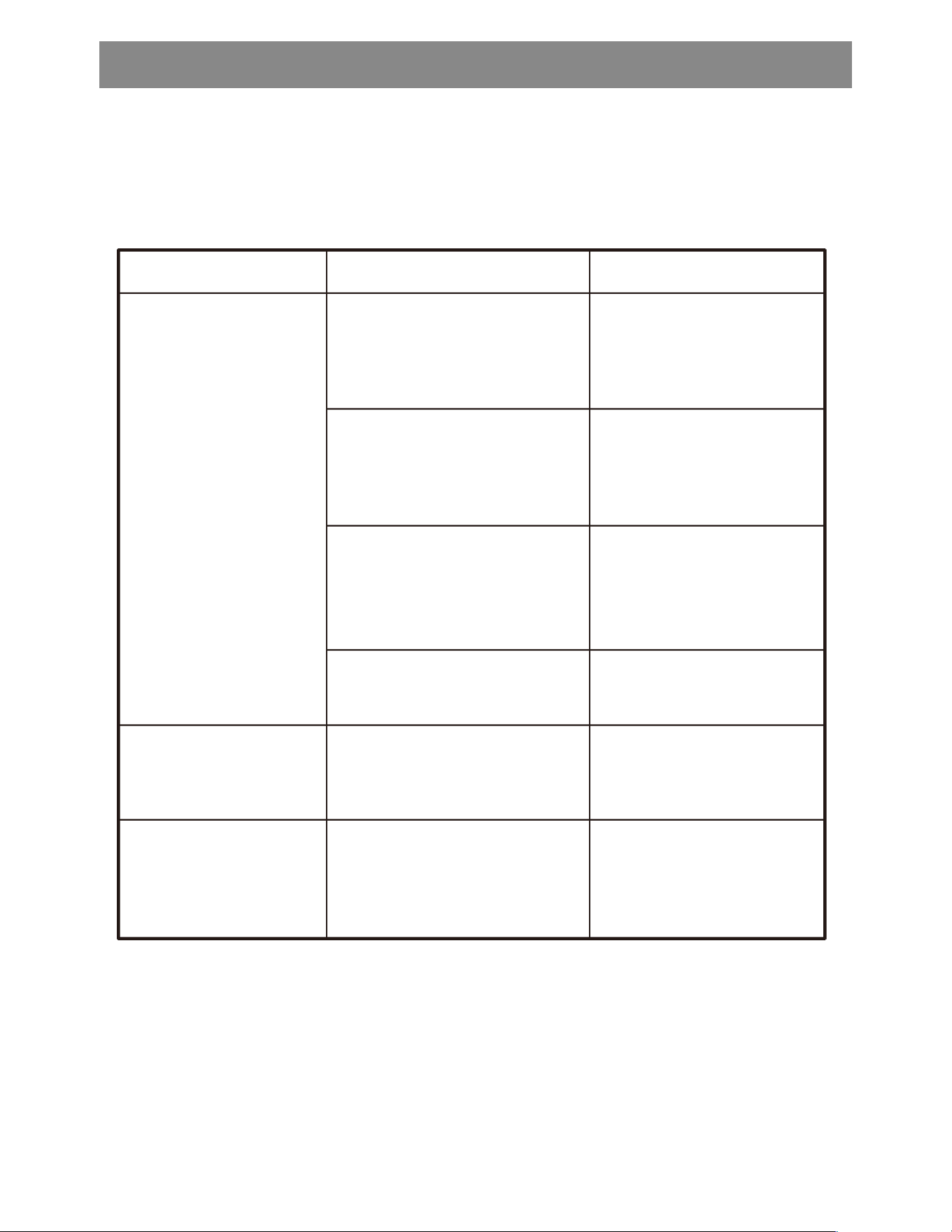
This page summarises the most common problems you would encounter with the
product.lf you are unable to solve the problem with informa�on below, please
contact its authoriseddealers immediately.
This is normal and does not
mean that the product is
faulty.
Noise is made by the mechanical
parts of the product.
Noise can be heard from
the product
Ensure the voltage on the
product corresponds to the
local mains voltage and then
plug in again.Then press on
the power switch.
The product is not plugged in
properly.
Sugges�on
Possible CauseProblem
lf you want another session,
press the On/Off bu�on
again.
The product has just finished its
15-min auto �mer session and
has automa�cally switched to
standby mode.
You may have used the product
con�nuously for more than 45
minutes and the overheat
protec�on has been ac�vated.
An excessive load has been
applied on the product.
The product is likely to be
overused.
Unplug the product and let
it cool down for 60 minutes
before you use it again.
Reduce tne exesand
start again.
Unplug the product and let
it cool down before using it
again.
The product does not
work
The product is
abnormally warm
TROUBLE- SHOOTING
15
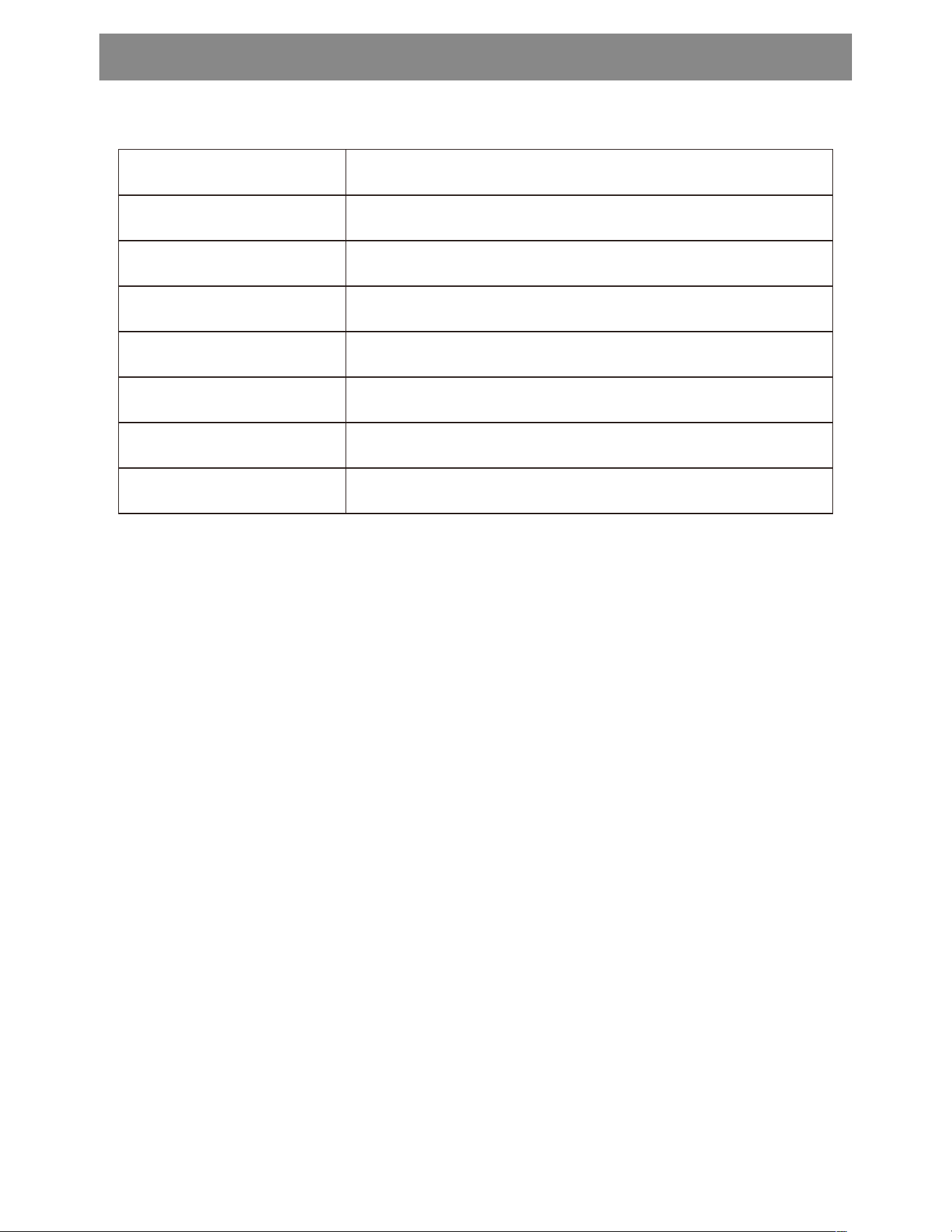
Name of Product
Type of Product
The rated voltage
Rated frequency
Power Consump�on
Security level
180LB
Intelligent high-end massage chair
CF-9216
120V~
60Hz
150W
I Class
The product weight
PRODUCT SPECIFICATIONS
Specifica�on Descrip�on
Project Name
16

17
WARRANTY
30 days uncondi�onally Return
Comfier product can be returned to receive a full refund for any reason within 30 days.
Please contact our customers service (supportus@comfier.com), our staff will contact
you within 24 hours.
90 days refund/replace
Comfier product can be returned / replaced within 90 days if the product break down in
the period of proper use.
12 months Warranty
If the product break down within 12 months in the period of proper use, customers can
enjoy the relevant warranty to get them replaced.
A�en�on!
No warranty will be given to any force majeure and man-made causes to a defec�ve
product, such as improper care, personal tear down and willful damage,etc.
If you have any issue about the product, please feel free to contact us by sending
email to supportus@comfier.com We will strive to provide the best service possible
within 24 hours.
WARRANTY
18
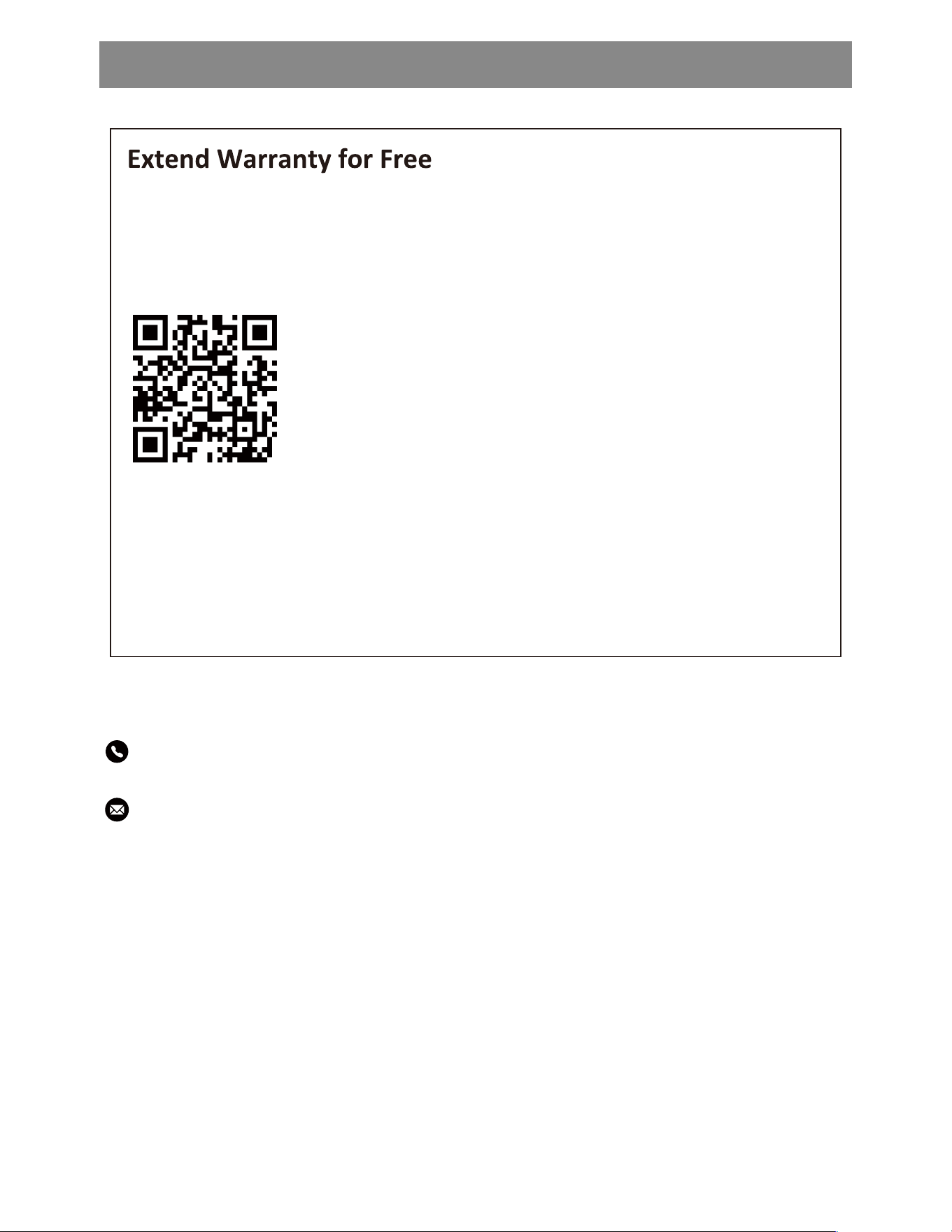
1) Enter the following URL or scan the QR code below to find COMFIER facebook
page and like it, enter“Warranty” to messenger to extend your warranty from
1 year to 3 years.
h�ps://www.facebook.com/comfiermassager
OR 2) Send message“Warranty” and email us supportus@comfier.com to
extend your warranty from 1 year to 3 years.
Tel: (248) 819-2623
Monday-Friday 9:00AM-4:30PM
Email: supportus@comfier.com
Have queson ?

19
NOTE: This equipment has been tested and found to comply with the limits for a
Class B digital device, pursuant to Part 15 of the FCC Rules. These limits are designed
to provide reasonable protec�on against harmful interference in a residen�al
installa�on. This equipment generates, uses and can radiate radio frequency energy
and, if not installed and used in accordance with the instruc�ons, may cause harmful
interference to radio communica�ons.However, there is no guarantee that
interference will not occur in a par�cular installa�on. If this equipment does cause
harmful interference to radio or television recep�on, which can be determined by
turning the equipment off and on, the user is encouraged to try to correct the
interference by one or more of the following measures:
• Reorient or relocate the receiving antenna.
• Increase the separa�on between the equipment and receiver.
• Connect the equipment into an outlet on a circuit different from that to which the
receiver is connected.
• Consult the dealer or an experienced radio / TV technician for help.
This device complies with Part 15 of the FCC Rules. Opera�on is subject to the following
two condi�ons: (1) this device may not cause harmful interference, and (2) this device
must accept any interference received, including interference that may cause undesired
opera�on.
WARNING: Changes or modifica�ons to this unit is not expressly approved by the party
responsible for compliance could void the user's authority to operate the equipment.
FCC STATEMENT