PLEASE READ AND SAVE THESE IMPORTANT INSTRUCTIONS
Instruction Manual
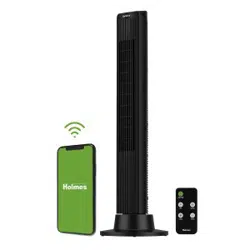
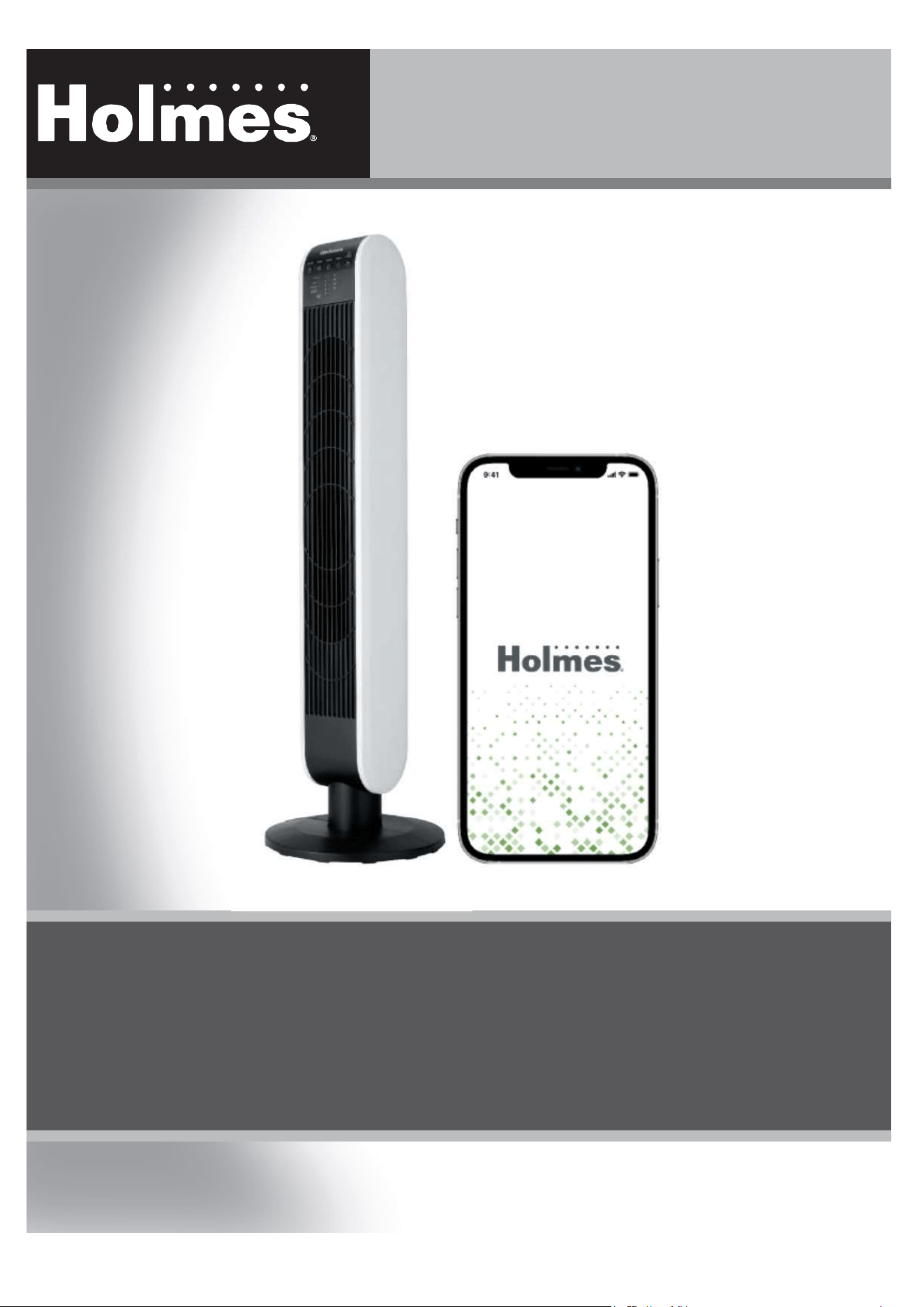
40 Inch Digital Tower Fan
with SmartConnect App
Item: 12862
Model: 32510397

When using electrical appliances, basic safety precautions
should always be taken including the following:
1. Read all instructions before using this fan.
2. Use fan only for purposes described in the instruction
manual. This fan is not for continuous operation or
equivalent.
3. To protect against electrical shock do not immerse
fan, plug or cord in water or spray with liquids and
plug the appliance directly into a 120V AC electrical
outlet.
4. Not intended for use by children.
5. Unplug from outlet when not in use, when moving
fan from one location to another, before putting on
or taking off parts and before cleaning.
6. Avoid contact with moving parts.
7. Do not operate in the presence of explosive and/or
flammable fumes.
8. To avoid fire hazard, NEVER place the cord under
rugs or any parts near an open flame, cooking or
other heating appliance.
9. Do not operate any appliance with a damaged cord
or plug after the appliance malfunctions, or has been
dropped/damaged in any manner. Discard fan or
return to an authorized service facility for
examination and/or repair.
10. Do not run cord under carpeting. Do not cover cord
with throw rugs, runner, or similar coverings. Do not
route cord under furniture or appliances. Arrange
cord away from traffic area and where it will not be
tripped over.
11. WARNING: To reduce the risk of fire, electric
shock, or injury to persons, do not use replacement
parts or attachments not recommended by the
manufacturer (e.g. parts made at home using a 3D
printer).
12. Do not let the cord hang over the edge of a table,
counter or come in contact with hot surfaces or leave
exposed to high traffic areas.
13. Do not use outdoors.
14. To disconnect, grip plug and pull from wall outlet.
Never yank on cord.
15. Always use on a dry, level surface.
16. Do not operate fan until fully assembled with all
parts properly in place.
17. This fan is intended for household use ONLY and
not for commercial or industrial applications.
18. WARNING: To reduce the risk of electrical shock
and injury to persons, do not use in window.
19. WARNING: To reduce the risk of fire or electric
shock, do not use this fan with any solid-state speed
control device.
20. This fan employs overload protection (fuse). A blown
fuse indicates an overload or short-circuit situation. If
the fuse blows, unplug the product from the outlet.
Replace the fuse as per the user servicing instructions
(follow product marking for proper fuse rating) and
check the product. If the replacement fuse blows, a
short circuit may be present and the product should
be discarded or contact customer service.
PLEASE READ AND SAVE THESE
IMPORTANT SAFETY INSTRUCTIONS
PLEASE READ AND SAVE T HESE
IMPORTANT SAFETY INSTRUCTIONS
W
ARNI
N
G
CR2025/3
V
• INGESTION HAZARD: This product contains a button cell or coin battery.
• DEATH or serious injury can occur if ingested.
• A swallowed button cell or coin battery can cause Internal
Chemical Burns in as little as 2 hours.
• KEEP new and used batteries OUT OF REACH of CHILDREN
• Seek immediate medical attention if a battery is suspected to be
swallowed or inserted inside any part of the body.
21. a) Remove and immediately recycle or dispose of used
batteries according to local regulations and keep away
from children. Do NOT dispose of batteries in
household trash or incinerate.
b) Even used batteries may cause severe injury or
death.
c) Call a local poison control center for treatment
information.
d) Always use the same size and grade battery as
CR2025 for this product.
e) Always use a voltage 3V battery for this product.
f) Non-rechargeable batteries are not to be recharged.
g) Do not force discharge, recharge, disassemble, heat
above 104ºF or incinerate. Doing so may result in
injury due to venting, leakage or explosion resulting in
chemical burns.
h) Ensure the batteries are installed correctly according
to polarity (+ and -).
i) Do not mix old and new batteries, different brands
or types of batteries, such as alkaline, carbon-zinc, or
rechargeable batteries.
j) Remove and immediately recycle or dispose of
batteries from equipment not used for an extended
period of time according to local regulations.
k) Always completely secure the battery compartment.
If the battery compartment does not close securely, stop
using the product, remove the batteries, and keep them
away from children.
PLEASE READ AND SAVE THESE
IMPORTANT SAFETY INSTRUCTIONS
THIS APPLIANCE HAS A POLARIZED PLUG (one blade is wider than the
other). To reduce the risk of electric shock, this plug is intended to fit in
a polarized outlet only one way. If the plug does not fit fully in the
outlet, reverse the plug. If it still does not fit, contact a qualified
electrician to install the proper outlet.
DO NOT ATTEMPT TO MODIFY THIS PLUG OR DEFEAT THIS
SAFETY FEATURE IN ANY WAY.
F
G
H
A
B
C
D
E
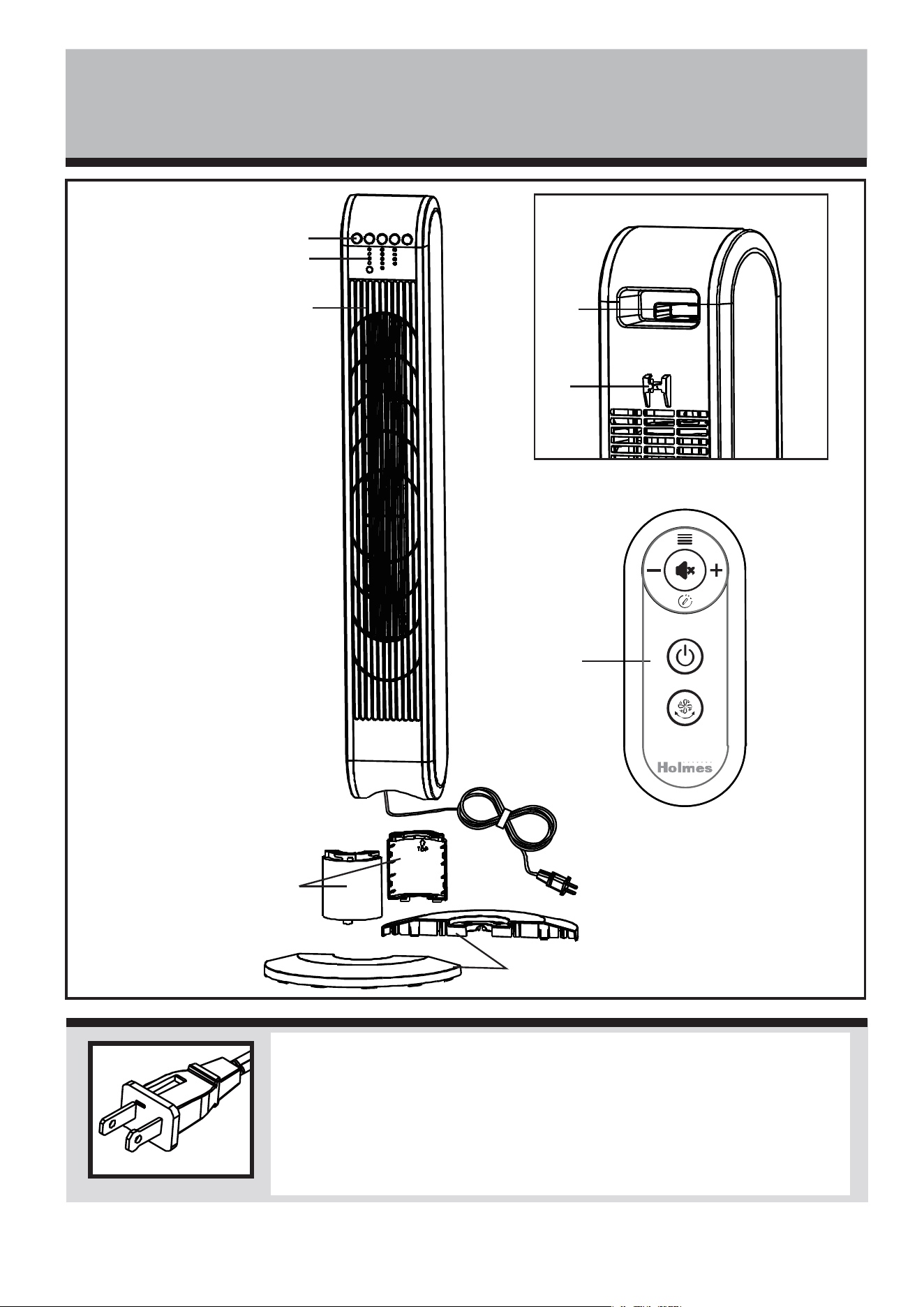
A. Control Panel
B. Indicator Lights
C. Fan Grill
D. Base Post Halves
E. Base Halves
F. Carrying Handle/
Remote Control Storage
G. Plug Storage Clip
H. Remote Control
Figure 1 Figure 2
Step 1
Step 2
Step 3
PA RT S A N D AS S E M B LY
Figure 1 Figure 2
ASSEMBLY
Estimated assembly time: 5-10 minutes
Tool-free. 3 thumb screws included.
NOTE: MAKE SURE YOU REMOVE ALL CONTENTS FROM
THE PACKAGE. PLEASE CHECK PACKAGING MATERIALS FOR
PARTS THAT COULD BE REQUIRED TO OPERATE YOUR FAN.
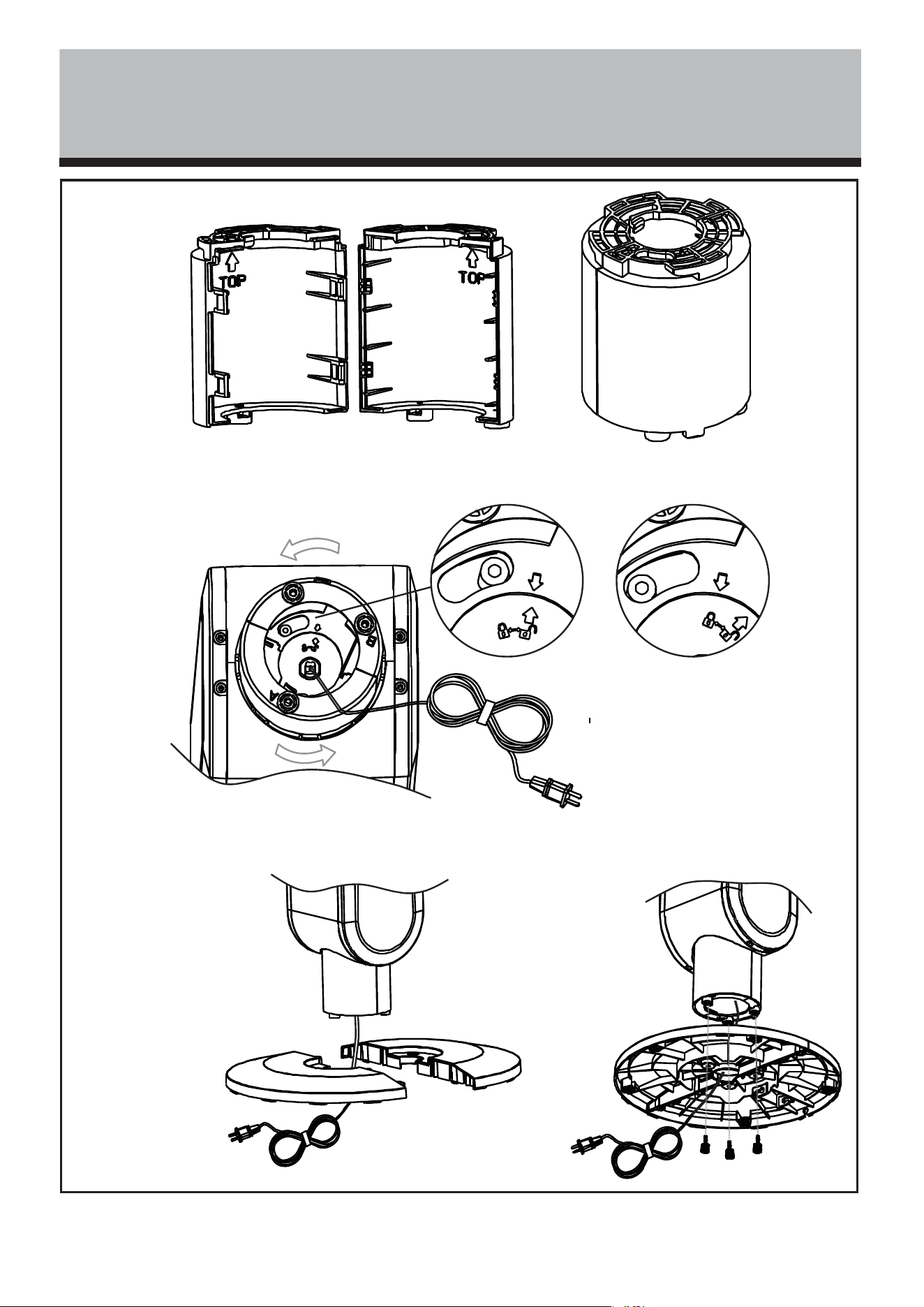
1. Assemble Base Post around the power cord by
snapping Post Halves (D) together. Refer to Figure 2,
step 1.
2. Line up the top of the Base Post with the base of the
fan housing.
3. Insert the Base Post into the opening of the fan
housing aligning the arrows. See Figure 2, step 2.
4. Rotate the Base Post counterclockwise to lock.
5. Assemble Base Halves (E) around the power cord. To
secure the Base Halves together, slide the posts of
one base half into the slots of the second base half.
Refer to Figure 2, step 3.
6. Line up the screws holes of the base halves with the
holes located on the bottom of the Base Post. Secure
with the three thumb screws included with the fan.
Refer to Figure 2, step 3.
7. Turn fan right side up and place on a dry and
level surface.
OPERATING INSTRUCTIONS
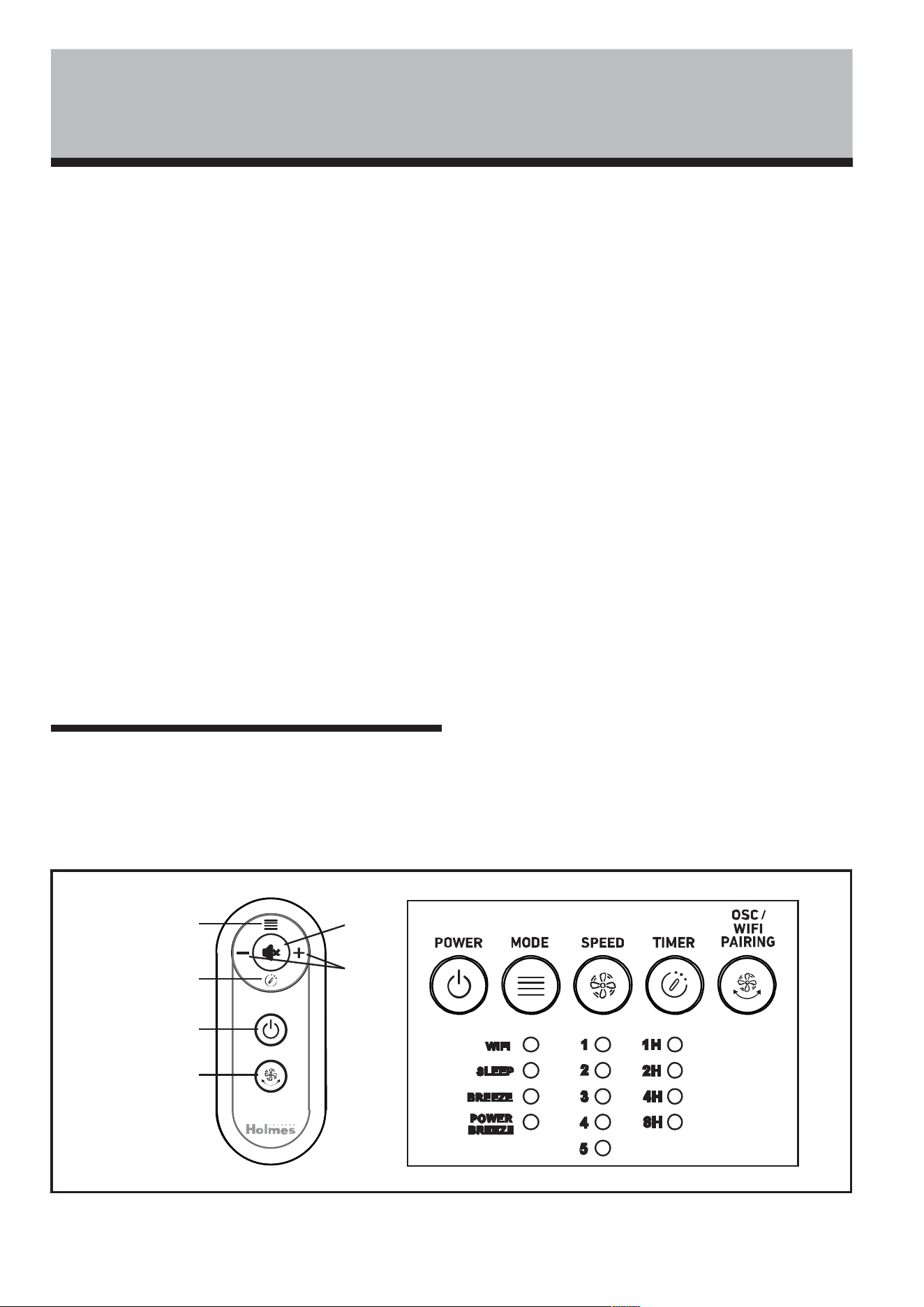
(Figure 4)
1. Plug the cord into a standard 120 Volt AC outlet.
2. To turn the fan ON, press the POWER button (E)
located on the control panel or remote control.
3. Press the SPEED button (C) to cycle through the 5
speed settings in sequence.
The corresponding indicator light will illuminate to
confirm the selection: speed 1-5.
4. To turn OSCILLATION ON and OFF, press the
OSCILLATION button (F).
5. To set automatic shutoff, press the TIMER button (D).
When set, the fan will run and automatically shut off
after the set duration (1H, 2H, 4H or 8H) has expired.
6. To activate SLEEP mode, press the MODE button (A).
This function slows the BREEZE setting by one level
every ten minutes until it reaches LOW.
To activate BREEZE mode, press the MODE button
again.
The fan will cycle through alternating speeds with
brief pauses to simulate a natural outdoor breeze:
BREEZE I: Cycles through low and medium speeds.
BREEZE II: Cycles through medium and low speeds.
BREEZE III: Cycles through medium, high and low
speeds.
To activate POWER BREEZE mode, press the MODE
button again. This function will provide maximum air
velocity.
NOTE: To silence setting confirmation beeps, press the
MUTE button (B) on the remote control. To re-activate
setting confirmation beeps, press the MUTE button again.
A. Mode
B. Mute
C. Speed
D. Timer
E. Power
F. Oscillation
A SS E MB LY A N D O P E R AT I N G
I N S TR U C T I O N S
Figure 4
A
D
E
F
B
C
REMOTE CONTROL
(SEE FIGURE 5)
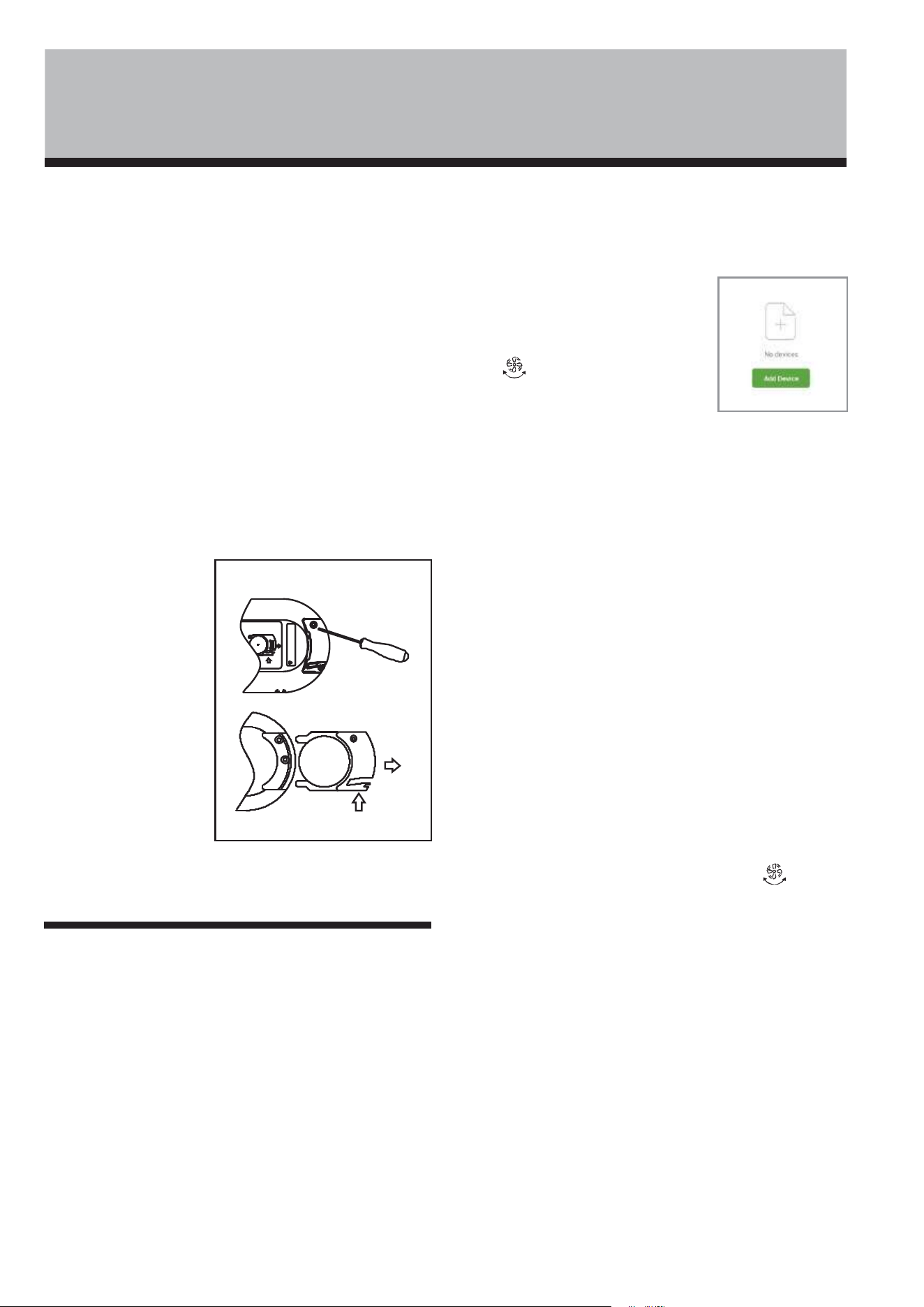
NOTE: REMOVE THE PROTECTIVE STICKER FROM THE
REMOTE CONTROL BATTERY BEFORE OPERATION.
This remote includes one lithium CR2025/3V button cell
battery. Remove battery before discarding the remote.
Battery Replacement
Button cell batteries should be disposed of properly,
including keeping it away from children. Even used
button cell batteries may cause injury.
1. Locate the battery compartment on the bottom back
of the remote control handset. Push tab and pull out
battery tray.
2. Remove the old battery.
3. Place the new battery into the battery tray.
4. Slide battery tray into the battery compartment of the
remote control handset.
NOTES:
1. Remove the battery
from the remote
control when it is not
being used for an
extended period
of time.
2. Remove used battery
promptly.
3. Do not discard used
batteries into
household trash
containers. Contact
your local
government for disposal or recycling practices in
your area.
SETTING UP THE HOLMES MOBILE APP
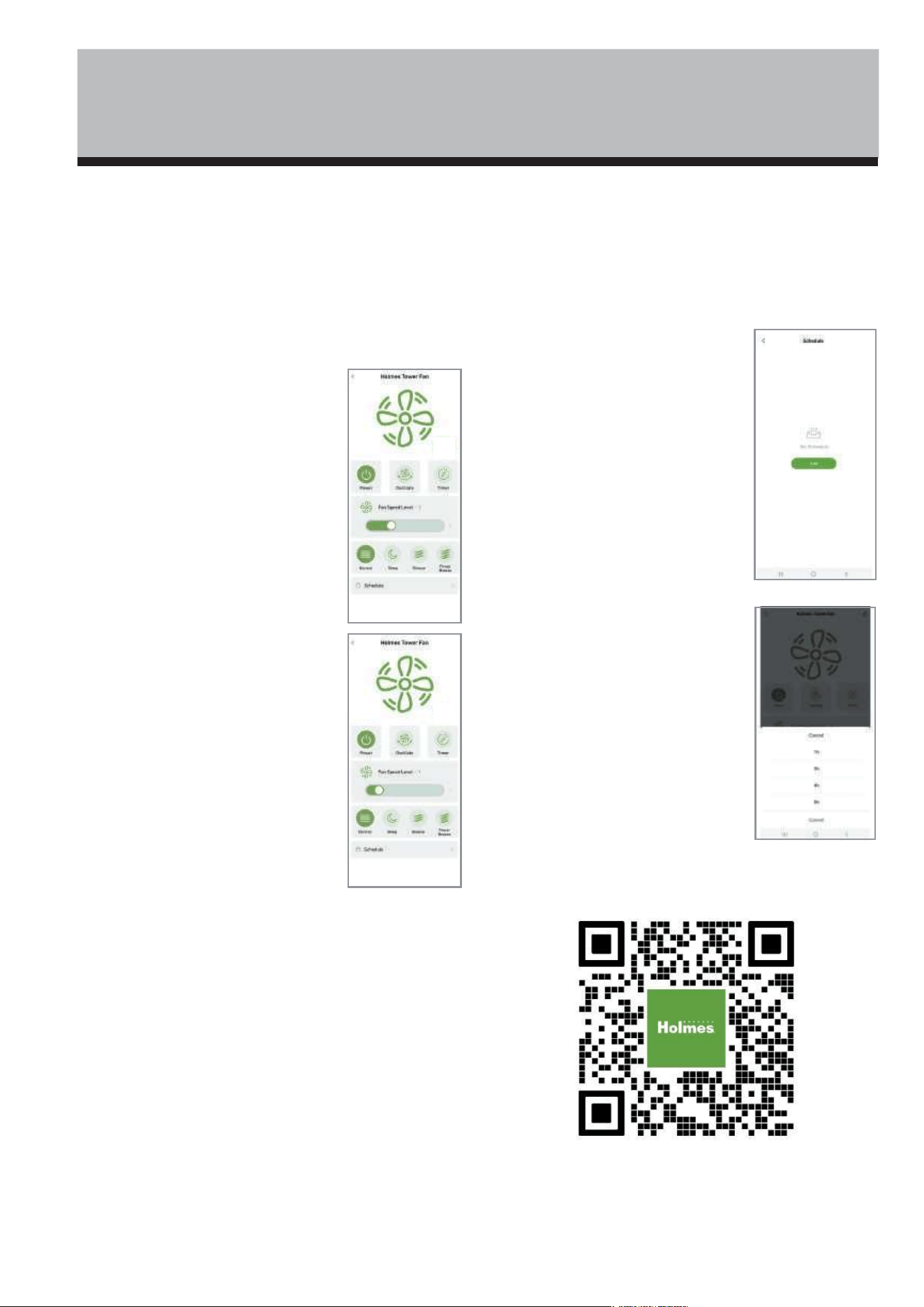
Note: A 2.4 GHz Wi-Fi network is required.
1. Download the Holmes
®
App from Google Play, the
Apple App Store or the QR code located on the back of this
Instruction Manual.
2. Create an account by following the steps in the App.
3. Enter the verification code you received to confirm your
account and create a password.
4. Select "Add Device" or the plus (+) sign in the top right
corner.
Auto Pairing (Recommended Method)
1. Ensure Bluetooth
®
and Wi-Fi are activated on your
mobile device.
2. Ensure Nearby Services and Location permissions are set to
allowed for the Holmes App. (This is
required to detect nearby Wi-Fi and
Bluetooth signals and pair your fan).
3. Press and hold the OSC/WIFI PAIRING
button on the fan's control panel for
5 seconds, until an audible beep is heard
and the red indicator light is flashing
which indicates the device is in pairing mode.
Note: if pairing is not completed within 2-3 minutes, the
device will exit pairing mode and step 2 will need to be
repeated.
4. Select “Auto Scan” at the top of the screen. You should see an
icon for the fan that has been found.
5. Click "Next."
6. Input your Wi-Fi name and password.
7. Wait for the connection to be established.
8. Press "Done" (top right-hand corner).
Your fan is now available to control from your smartphone.
Manual Pairing
If Auto Pairing is unsuccessful:
1. Ensure Bluetooth
®
and Wi-Fi are activated on your mobile
device.
2. Ensure Nearby Services and Location permissions are set to
allowed for the Holmes App. (This is required to detect nearby
Wi-Fi and Bluetooth signals and pair your fan).
3. Ensure the fan has been unplugged for 10 seconds or
more, then replug and power on the fan.
4. Press and hold the OSC/WIFI PAIRING button on the
fan's control panel for 5 seconds, until the red indicator light
is flashing. The device is now in pairing mode. Note: if pairing
is not completed within 2-3 minutes, the device will exit
pairing mode and step 3 will need to be repeated.
5. On your mobile device, click "add device", then select "add
manually" at the top of the screen. Click the fan icon.
6. When the fan is successfully found by Bluetooth
®
, click the
green "+" on the fan icon that appears.
7. Enter your Wi-Fi name and password.
8. Wait for the connection to be established (green
checkmark), then press Next.
9. Press done (top right-hand corner). The fan is now
available to control from your smartphone.
OPEN
P US H
OPE N
PUSH
CR 2025
REL EA S E
R E M OT E C O N T RO L A N D M O B I L E A P P
I NS T R U CT I O N S
Figure 5
CONTROLLING THE FAN WITH THE
HOLMES
®
APP
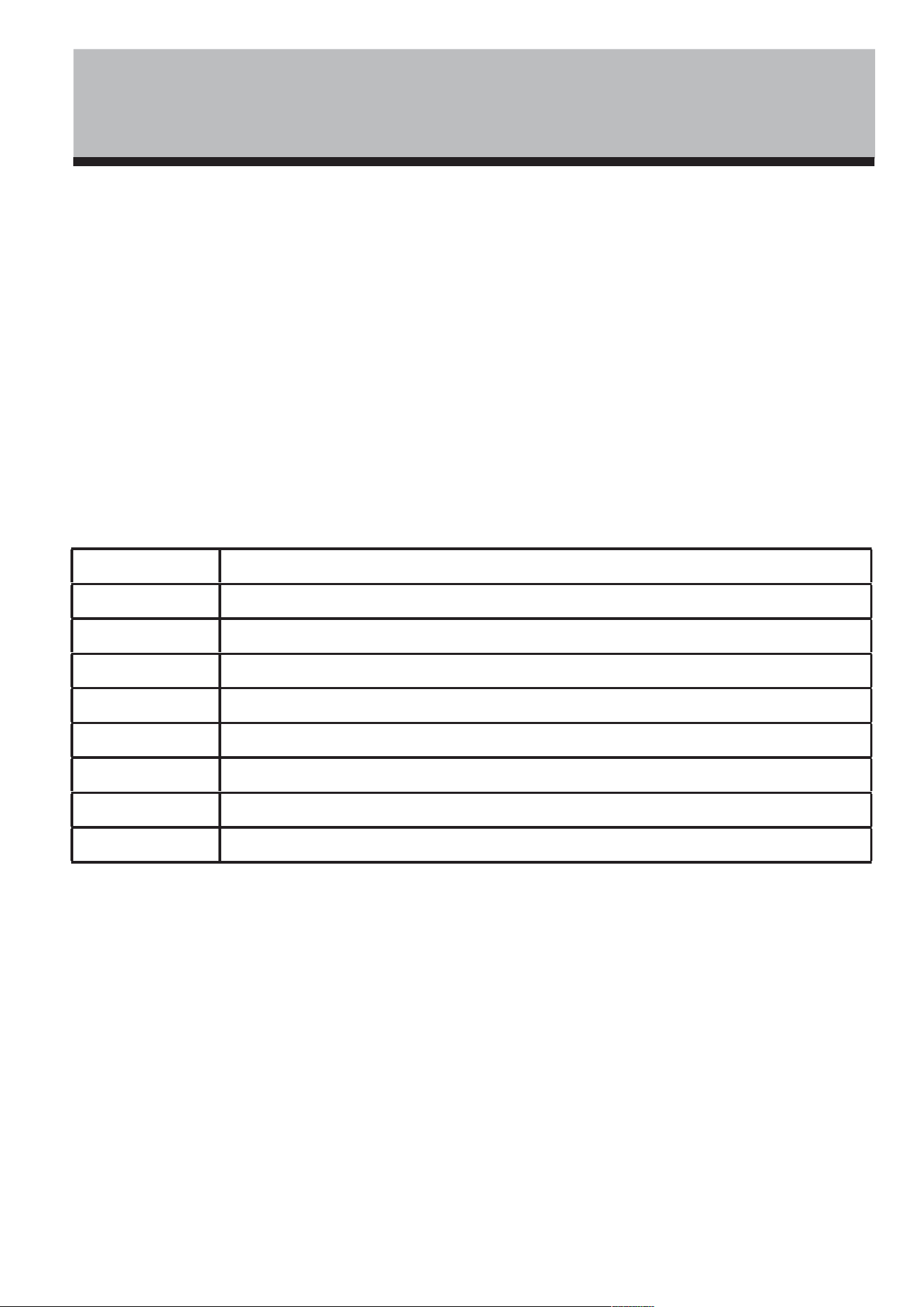
The Holmes
®
App has the same functionality as the
remote control, as well as additional features.
1. Power
2. Fan Speed
3. Oscillation
Note: The control panel display on
the tower fan will change to match
the setting selected in the app.
1. POWER: Press to turn ON/OFF
2. SPEED: Slide your finger across
the speed level scroll bar to increase
or decrease fan speed.
3. OSCILLATION: Press to turn
ON/OFF.
4. MODE: Press icons to select
preferred mode.
• Normal - Steady Fan Speed
• Sleep - Low Fan Speed
• Breeze - Alternating Fan Speed
• Power Breeze - Maximum Air
Velocity
5. TIMER:
To set your fan for auto-shutoff, select a
run-time of 1H, 2H, 4H or 8H.
• The default setting is 1 hour.
• Choose the number of hours from
the list.
6. SCHEDULE
To Set Schedule:
1. Press Schedule.
2. Select Add on the next page.
3. Select the time of day the fan should turn on or off.
Be sure to choose the hour and minutes.
4. Click on “Repeat” and select which
day of the week the schedule will be
active.
5. Click "Power" and select whether
the fan should turn on or off.
6. Select your desired fan speed, mode
and oscillation.
7. Click "save" to save selection and
return to the previous menu.
8. Your saved schedule will appear
on the Schedule screen.
9. To turn OFF the schedule, press
the slider button to the right. It will
change from green to gray to indicate
the schedule is off. To turn ON the
schedule, press the slider button
again. It will change from gray to
green to indicate the schedule is ON.
M O B I LE A P P IN S T R U C T IO N S
4. Mode
5. Timer
6. Schedule
V O I CE A S S IS TA N T I N S T RU C T IO N S
SETTING UP VOICE ASSISTANT
To pair the Tower Fan with Amazon Alexa and Google Voice Enabled Devices:
1. Open the Holmes
®
App.
2. Select the "Me" icon in the bottom bar.
3. Choose the icon of the Voice Assistant you wish to connect.
4. Follow the instructions that appear.
Voice Assistant Functionality
Use the following command sequence for Amazon Alexa enabled devices: “Alexa, “Primary Command” + “Device
Name” + “Secondary Command”(if applicable). For example, “Alexa, Activate Holmes
®
Fan” or “Alexa, Turn Up
Holmes
®
Fan speed by 3”.
Use the following command sequence for Google Assistant enabled devices: “Hey Google, “Primary Command” +
“Device Name” + “Secondary Command”(if applicable) For example, “Hey Google, Activate Holmes
®
Fan” or “Hey
Google, Turn Up Holmes
®
Fan speed by 3”.
Note: The default “Device Name” is “Holmes
®
Fan”. To personalize the device name, see below.
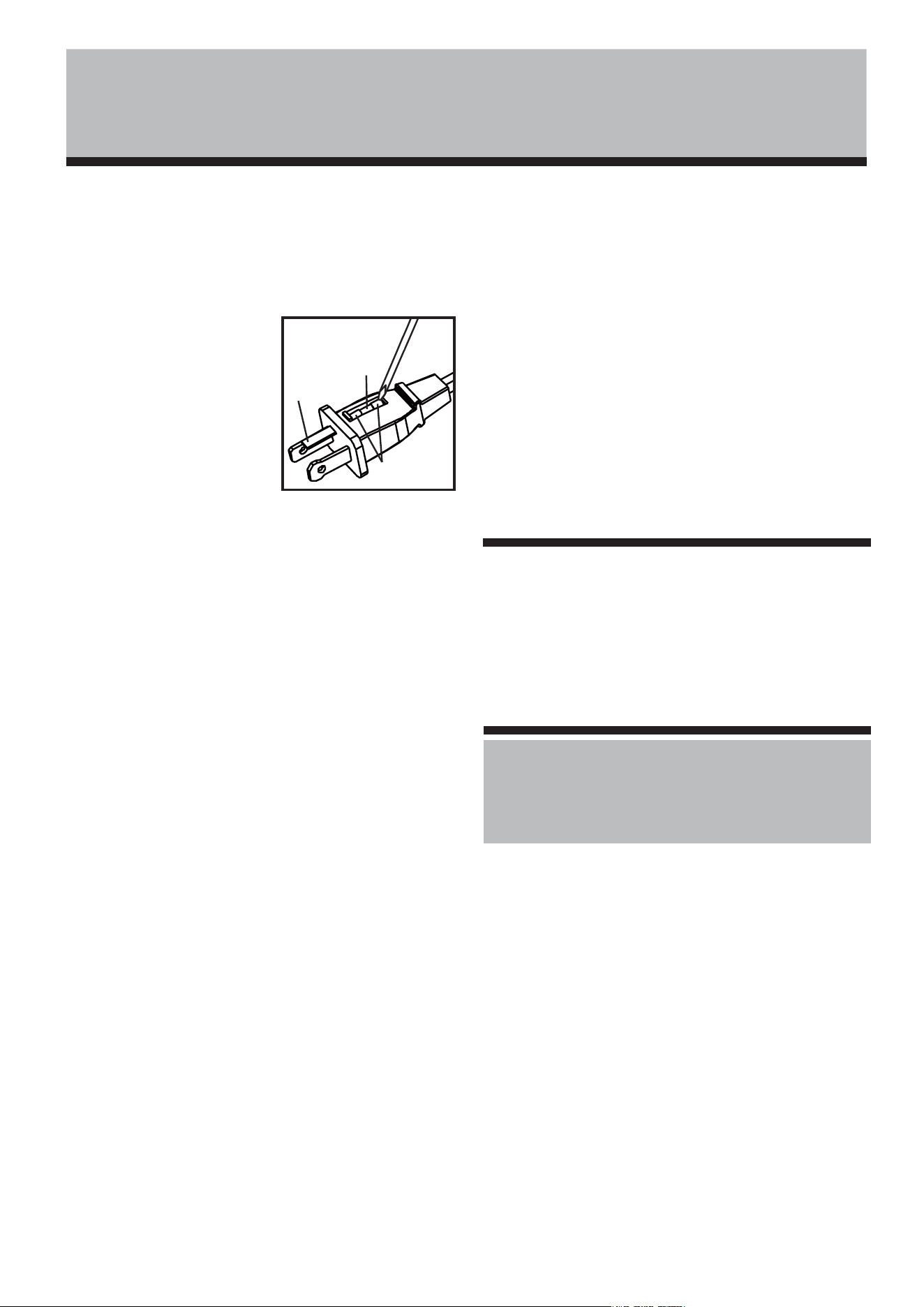
Action Command
Turn the fan On “Activate,” “Power On,” “Turn on,” “Start”
Turn the fan Off “Power Off,” “Turn Off,” “Deactivate,”
Increase the speed “Turn Up,” “Raise,” “Increase”, “Set the fan speed to __” (1,2,3,4 or 5)
Decrease the speed “Turn Down,” “Lower,” “Decrease”, “Set the fan speed to __” (1,2,3,4 or 5)
Set the timer “Set Countdown to ___ hours” (choose between 1-15 hours)
Oscillation On “Turn On Oscillation,” “Start Oscillation,” “Activate Oscillation”
Oscillation Off “Turn Off Oscillation,” “Stop Oscillation,” “Deactivate Oscillation”
Mode “Set Mode to Normal” “Set Mode to Breeze” “Set Mode to Sleep” “Set Mode to Power Breeze”
PERSONALIZING THE DEVICE NAME
To personalize the fan name for easier voice commands:
1. Open the Holmes
®
App.
2. Select the product name you wish to change.
3. Select the pencil icon in the top right corner.
4. On the following screen, click on or tap the name of the product.
5. Tap the current name of the fan.
6. Rename the product and press save.
Note: The name will automatically update for both Amazon Alexa and Google Voice Enabled Devices.
Google, Google Play and Google Home are trademarks of Google LLC.
Amazon, Alexa and all related logos are trademarks of Amazon.com, Inc. or its affiliates.
App Store is a service mark of Apple Inc.
MINIMUM SYSTEM REQUIREMENTS iOS 13 OR ANDROID™ 10
C LE AN I N G A N D M A I N T E N A N C E
CLEANING/MAINTENANCE INSTRUCTIONS
Follow these instructions to correctly and safely care for
this fan.
REPLACEABLE FUSE
If the (2.5 Amp, 125 Volt)
replaceable fuse blows, please
contact customer service for
information on how to order
a new fuse. Follow the below
instructions to replace the
fuse on the plug.
User Servicing
Instructions
1. Unplug this fan. Grasp plug and remove from the
receptacle or other outlet device. Do not unplug by
pulling on cord.
2. Open fuse cover, located on the top of the plug, by
using your thumb or a flathead screwdriver to slide
the cover down towards the prongs.
NOTE: Ensure that fuse cover is completely open
before attempting to remove fuse.
3. Remove fuse carefully by using a small screwdriver
to pry the fuse out of the compartment by the metal
ends of the fuse. (see Figure 5)
4. Place plug on a solid, flat surface. Insert new
2.5 Amp, 125 Volt fuse into fuse compartment and
use a small screwdriver to secure the metal ends of
the fuse into the compartment.
CAUTION: Risk of fire. Replace fuse only with
2.5 Amp, 125 Volt fuse.
5. Slide fuse cover closed completely. If fuse cover is
difficult to close, make sure fuse is secured in place
completely by pressing down on metal ends of the
fuse.
6. Risk of fire. Do not replace attachment plug. Contains
a safety device (fuse) that should not be removed.
Discard product if the attachment plug is damaged.
FAN CLEANING
1. Always unplug the fan before cleaning.
2. Do not allow water to drip on or enter into fan
housing.
3. Be sure to use a soft cloth moistened with a mild
soap solution.
4. Do not use gasoline, thinner or benzene as a
cleaner.
Unplug the fan, then clean the fan grill, housing, and
base with a soft, damp cloth. Do not attempt to remove
the fan blade. Use CAUTION around the housing area.
Do not allow the motor or other electrical components to
be exposed to water.
FAN STORAGE
• Store the fan in a clean, dry location between seasons
or when not in use for an extended period.
• Keep the fan protected from dirt and dust during storage.
NOTE: This fan can also be used during the cold winter
season to circulate warm air throughout your home.
Figure 5
Fuse
Metal ends
Fuse cover
For inquiries regarding recycling and proper disposal
of this product, please contact your local waste
management facility.

FCC STATEMENT
Potential for Radio/Television interference
This device complies with Part 15 of the FCC Rules. Operation is subject to the following two conditions:
(1) This device may not cause harmful interference, and
(2) this device must accept any interference received, including interference that may cause undesired operation.
This product has been tested and found to comply with the limits for a Class B digital device, pursuant to part 15 of
the FCC rules.
These limits are designed to provide reasonable protection against harmful interference in a residential installation.
The product generates, uses, and can radiate radio frequency energy and, if not installed and used in accordance
with the instructions, may cause harmful interference to radio communications. However, there is no guarantee that
the interference will not occur in a particular installation. If the product does cause harmful interference to radio or
television reception, which can be determined by turning the product on or off, the user is encouraged to try to
correct the interference by one or more of the following measures:
• Reorient or relocate the receiving antenna.
• Increase the separation between the product and the receiver.
• Connect the product into an outlet on a circuit different from that to which the receiver is connected.
• Consult the dealer or an experienced radio/TV technician for help.
• Changes or modifications not expressly approved by the party responsible for compliance could void the user’s
authority to operate the equipment.
The following importer is the responsible party:
Company Name: SEG Products US Corp.
Address: 8 The Green, Suite #6962, Dover, DE 19901
Telephone: 1-959-202-4223
F C C STAT E M E N T
WA R R A N T Y I N F O R M AT I O N
Printed In China
©
2024 Sunbeam Products, Inc. All rights reserved.
HOLMES
®
is a registered trademark of Sunbeam Products, Inc. used under license.
Distributed by Star Elite Inc., Montreal, Canada H3B 3X9
SEH026-010824
3 YEAR LIMITED WARRANTY
This device has a 3 Year limited warranty for the original purchaser from the date of purchase against workmanship and defects
in material. If under normal use, your product fails to operate, a replacement or refund will be provided to you with proof of
purchase. Star Elite Inc. may deny claims of damage caused by misuse or modifications of this product.
Warranty Service
If you have any problems, please do not contact the store. Contact our customer service at:
www.getholmesfans.com
info@getholmesfans.com
1-866-769-3166 (8:30 am - 5:00 pm EST) Monday - Friday
Our customer service will be happy to assist you.