

AXISPeopleCounter
TableofContents
Solutionoverview...........................................3
AXISPeopleCounter.............................................3
What’sthedifferencebetweenAXISPeopleCounterandAXISP8815-23D
PeopleCounter?................................................3
Mountthecamera..........................................5
Findthedeviceonthenetwork................................8
Accessthedevice...............................................8
Securepasswords...............................................8
Installtheapplicationonthecamera...............................9
Additionalsettings..........................................10
Howtosetdateandtime.........................................10
Createauseraccount............................................10
Howtosetupthecounter........................................10
Howtoadjustthecountingarea...................................11
Aboutmultiplecamerasetup......................................1 1
Howtosetupaschedule.........................................12
Anonymizepeople...............................................13
Howtocopytheapplicationsettingstoanothercamera................13
Howtovalidatethesystem...................................14
Howtovalidatethecounter.......................................
14
Howtone-tunethecounter.....................................
14
Statistics..................................................15
ConnectacameratoafolderinAXISStoreDataManager..............15
Downloadstatistics..............................................
15
Reportdatatoaremotedestination................................16
Troubleshooting............................................17
Restarttheapplication...........................................17
Howtoresettheapplication......................................17
Howtobackupthesettings.......................................17
Howtorestorethesettings.......................................17
Generatealogreport............................................18
Howtomanageyourlicense......................................18
Aboutthelightwebinterface.................................19
PeoplecountingappsAPI.....................................20
Commonexamples..............................................20
APIspecication................................................22
2
AXISPeopleCounter
Solutionoverview
Solutionoverview
Anoverviewofthedifferentdevices,applications,andtoolsneededforacompletesystem.
AXISPeopleCounter
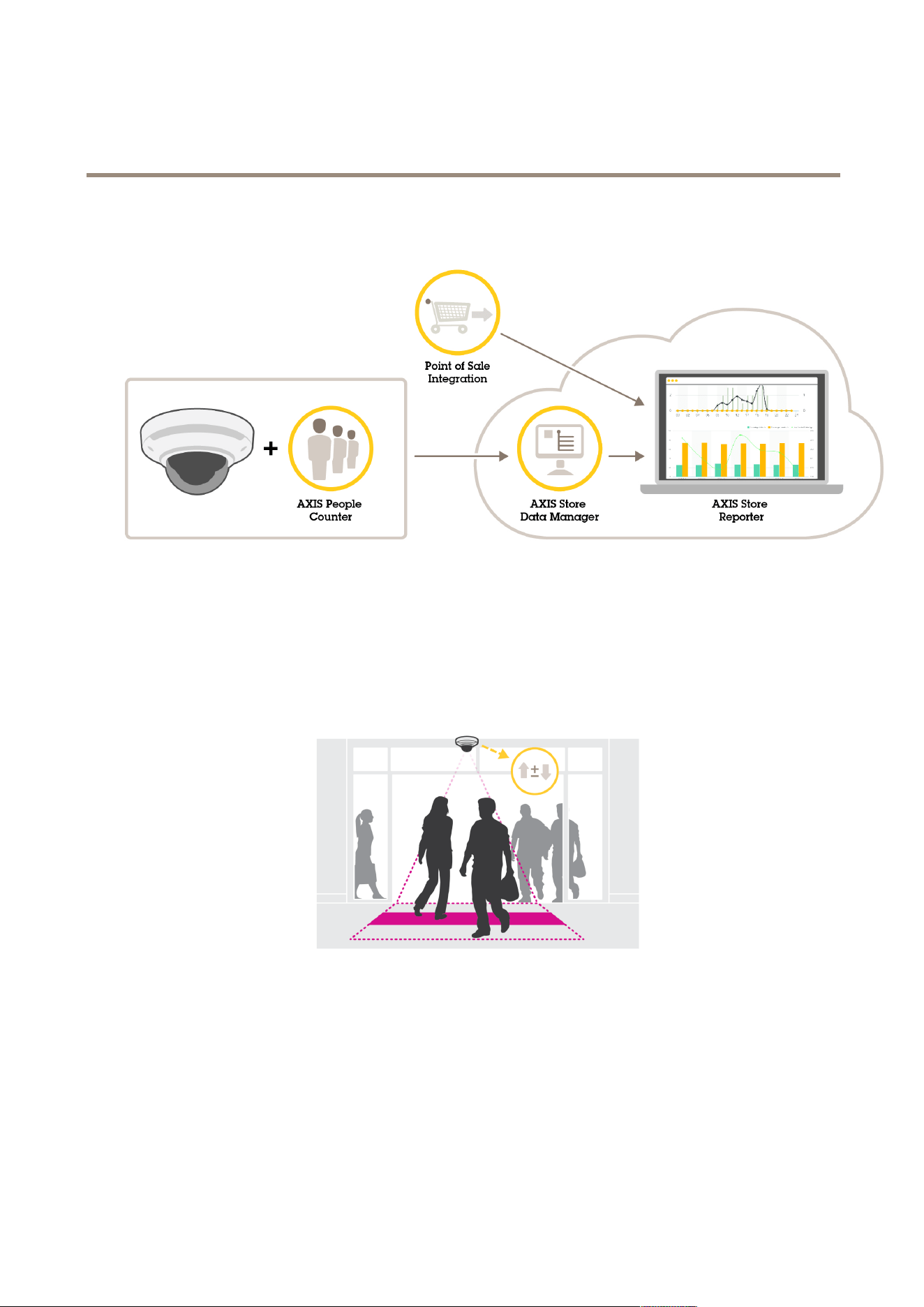
AXISPeopleCounterisananalyticapplicationthatcanbeinstalledonanetworkcamera.
Thecounterisembeddedinthecamerawhichmeansyoudonotneedadedicatedcomputertoruntheapplication.
AXISPeopleCounterisintendedforretailenvironments,likestoresorshoppingmalls,orotherenvironmentswhereyouwantto
countpeople.
What’sthedifferencebetweenAXISPeopleCounterandAXISP8815-23DPeople
Counter?
Theapplicationshavetwodifferentalgorithmsforcountingpeoplewhichmakesthemsuitablefordifferentenvironments:
•AXISPeopleCounterrecognizesobjectsthatmoveintheeldofviewandidentiesthemaspeoplebasedontheiroverall
sizeandmovement.AXISPeopleCounterissuitableformostscenarios,coveringsingleaswellasdoubledoorentrances.
3
AXISPeopleCounter
Solutionoverview
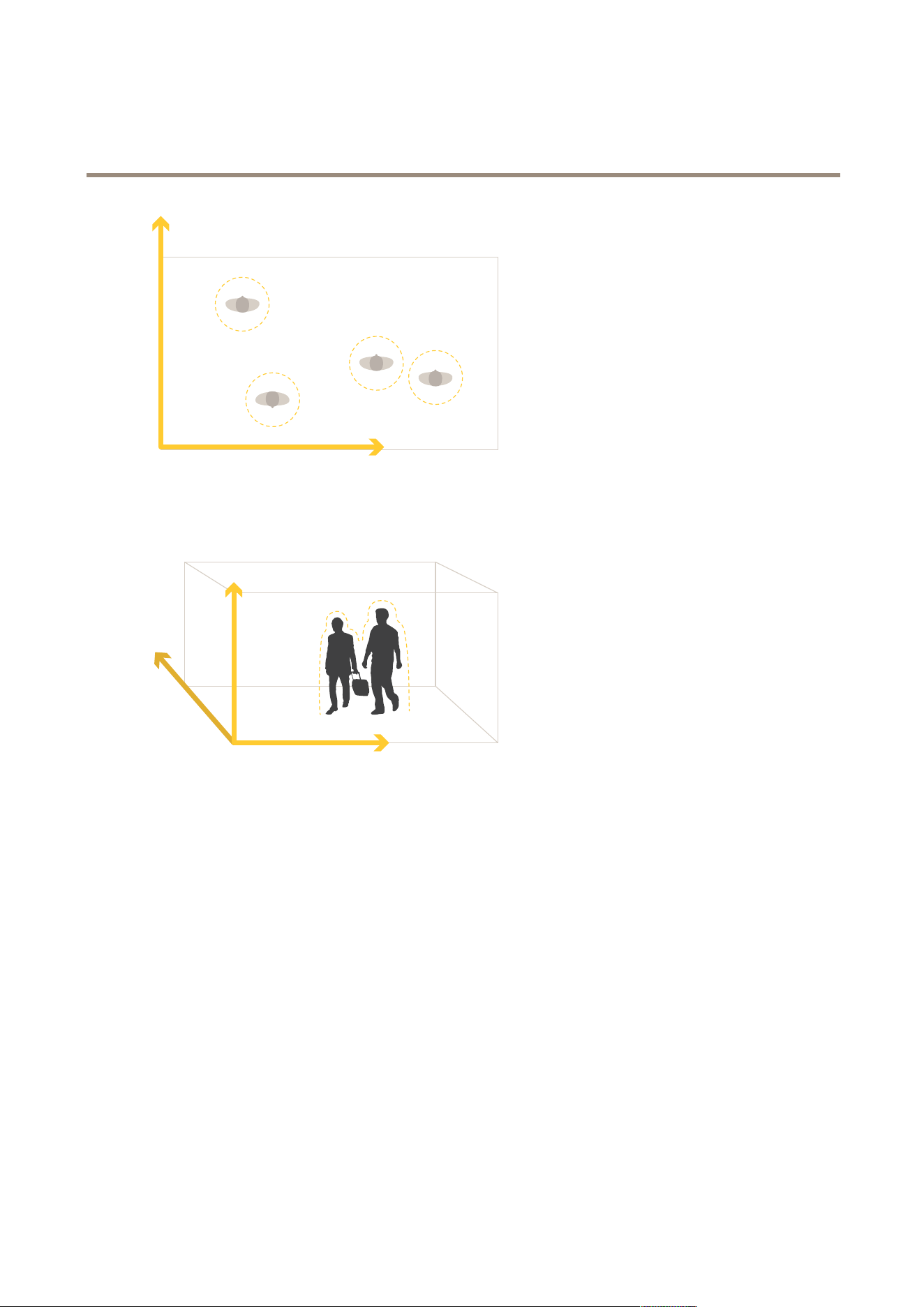
•AXISP8815-23DPeopleCountercalculatesthedepthwithinthemaximumcountingareainordertomeasuretheheight
andthesizeoftheobject.AXISP8815-23DPeopleCounterissuitableforcrowdedscenariosandsceneswithchallenging
lightconditionslikestrongsunlight,glaresandshadows.
4
AXISPeopleCounter
Mountthecamera
Mountthecamera
NO NO
NO
TICE TICE
TICE
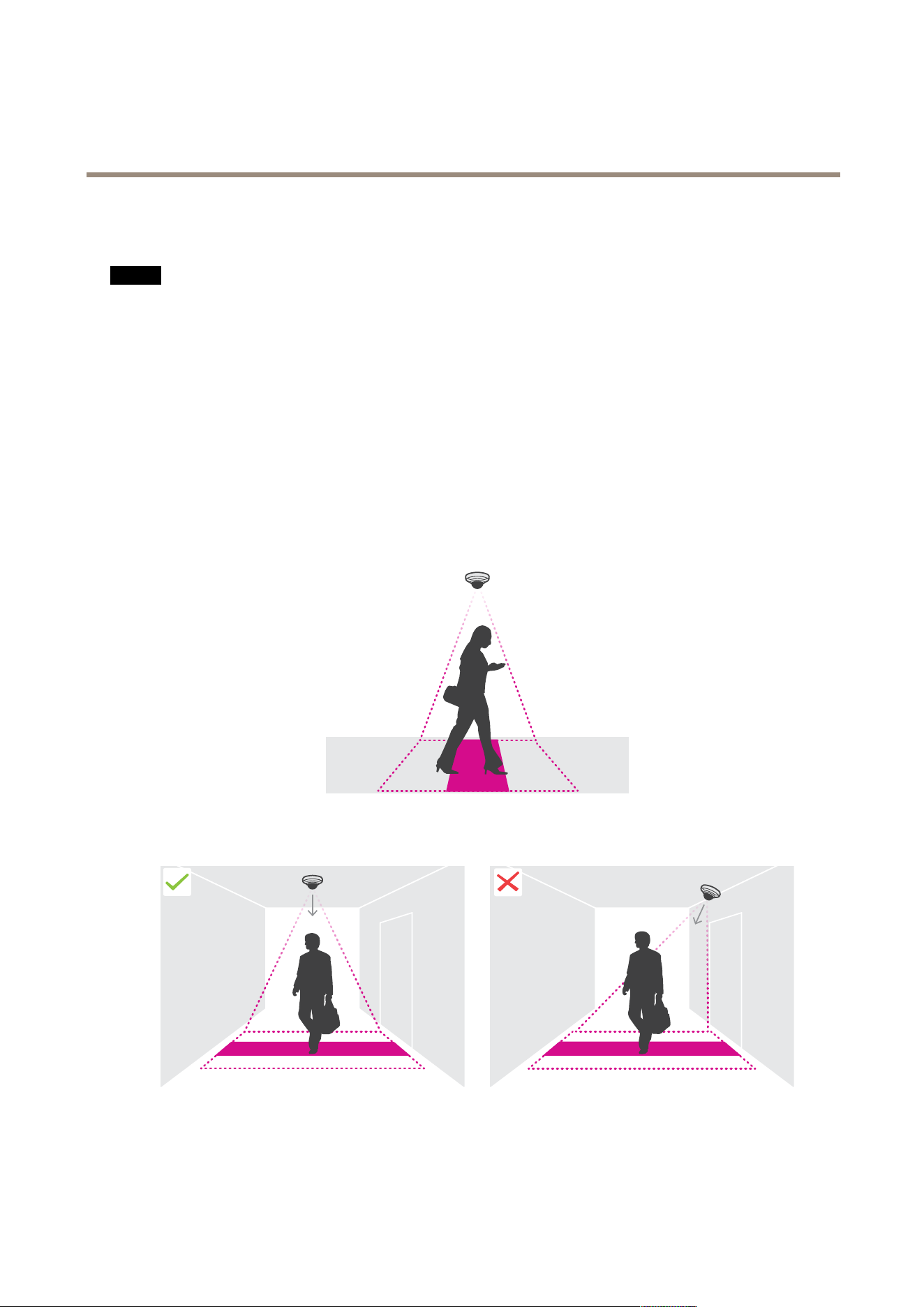
Theapplicationisdesignedforretailscenarioswhereitcountsobjectswiththecharacteristicsofanadultpedestrian.The
exactheightlimitationoftheobjectdependsoncameramodel,cameralens,andtheselectedcountersensitivity.
Inadditiontotheinstructionsinthecamera’sInstallationGuide,therearesomeimportantstepstofollowfortheapplicationto
behaveintheexpectedway:
•Werecommendthatyouinstallthecameraataminimumheightof270cm(8.9ft).
•Asarule-of-thumb,thecameracoversanareaaswideasthecamera’smountingheight.Fordetailsaboutaspecic
cameramodel,seetheCameraselectorforretailanalyticstoolavailableatwww.axis.com
•Afterinstallation,thecoveredareacanbeincreaseddependingonthecamera’szoomsetting.
•Ifthecameraismountedhighenough,youcangetacoveragewidthof8meters.Youcancoverevenwiderentrancesby
usingmultiplecounters.
•Thecameramustbemountedstraightabovethepointwherepeoplepass.
•Makesurethecameraisfacingstraightdown,inlinewiththeceiling.
•Ifyouinstalltheapplicationbeforeyouinstallthecamera,youcanusethecountingareaindicatedintheliveviewto
positionthecamera.Thecountingareashouldgofromlefttoright,perpendiculartothepathwherepeoplecross.
5
AXISPeopleCounter
Mountthecamera
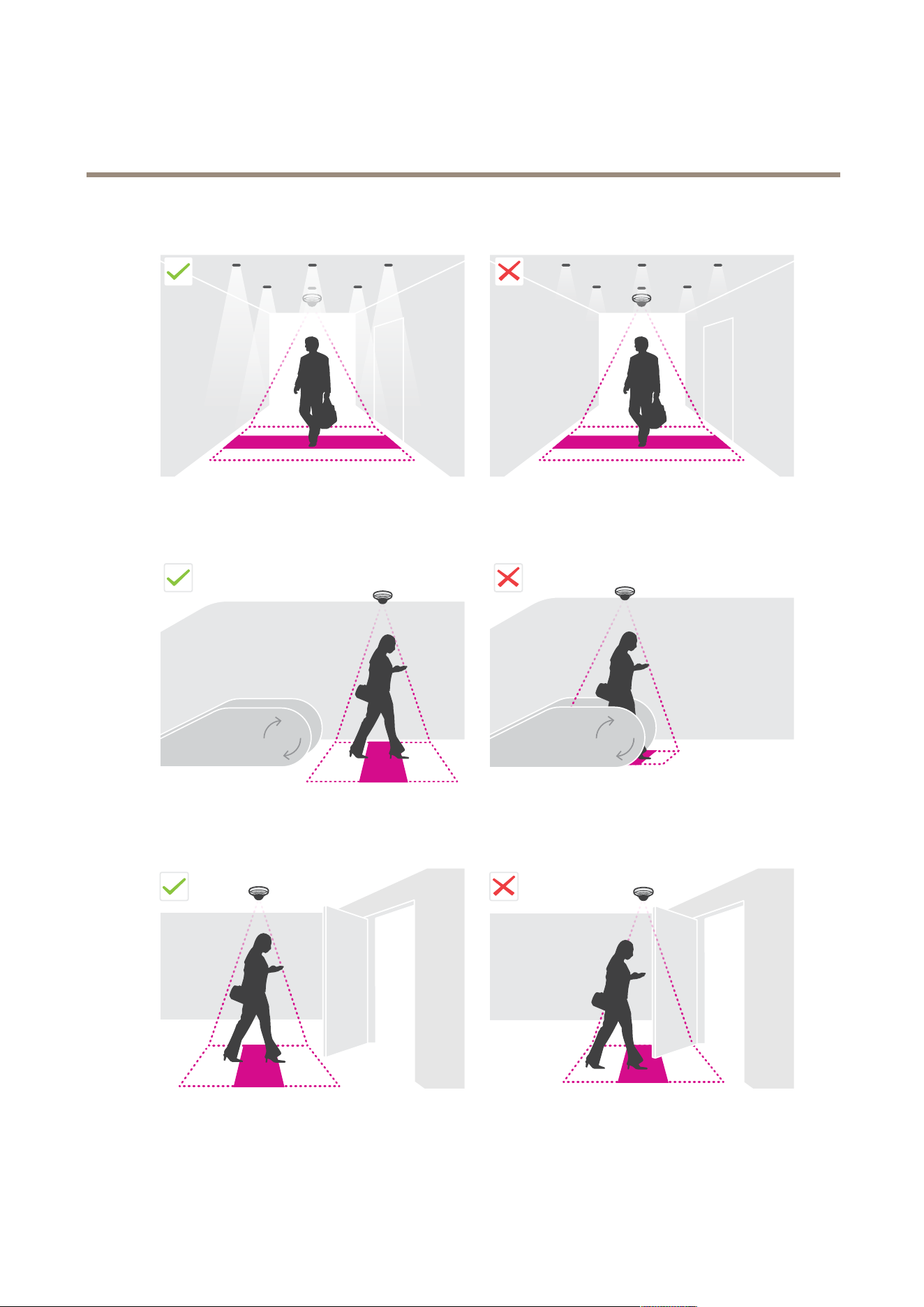
•MakesurethereissufcientwhitelightorIRilluminationonsite.
•Makesurethattherearenocontinuouslymovingobjectsinthecountingarea.Forexample,donotinstallthecamera
aboveanescalator.
•Makesuretherearenomovingobjectsinterferinginthecountingarea.Forexample,donotinstallthecameratoo
closetoadoor.
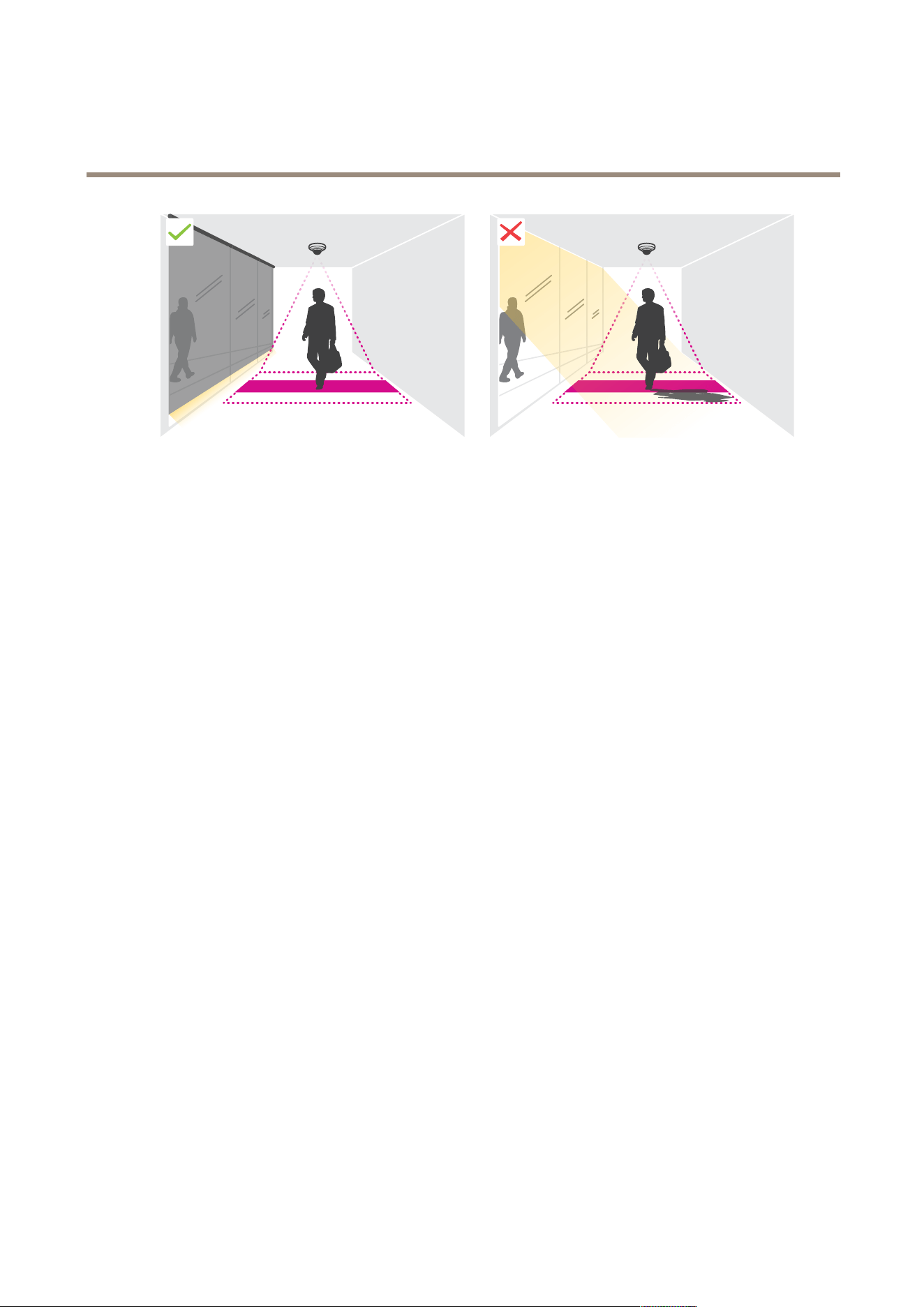
•Avoidgettingverystronglight,likesunlight,andsharpshadowsinthecameraview.
6
AXISPeopleCounter
Mountthecamera
7

AXISPeopleCounter
Findthedeviceonthenetwork
Findthedeviceonthenetwork
TondAxisdevicesonthenetworkandassignthemIPaddressesinWindows®,useAXISIPUtilityorAXISDeviceManager.Both
applicationsarefreeandcanbedownloadedfromaxis.com/support.
FormoreinformationabouthowtondandassignIPaddresses,gotoHowtoassignanIPaddressandaccessyourdevice.
Accessthedevice
1.OpenabrowserandentertheIPaddressorhostnameoftheAxisdevice.
IfyoudonotknowtheIPaddress,useAXISIPUtilityorAXISDeviceManagertondthedeviceonthenetwork.
2.Entertheusernameandpassword.Ifyouaccessthedeviceforthersttime,youmustsettherootpassword.SeeSeta
newpasswordfortherootaccountonpage8.
3.Theliveviewpageopensinyourbrowser.
Securepasswords
Important
Axisdevicessendtheinitiallysetpasswordincleartextoverthenetwork.Toprotectyourdeviceaftertherstlogin,set
upasecureandencryptedHTTPSconnectionandthenchangethepassword.
Thedevicepasswordistheprimaryprotectionforyourdataandservices.Axisdevicesdonotimposeapasswordpolicyasthey
maybeusedinvarioustypesofinstallations.
Toprotectyourdatawestronglyrecommendthatyou:
•Useapasswordwithatleast8characters,preferablycreatedbyapasswordgenerator.
•Don’texposethepassword.
•Changethepasswordatarecurringinterval,atleastonceayear.
Setanewpasswordfortherootaccount
Important
Thedefaultadministratorusernameisroot.Ifthepasswordforrootislost,resetthedevicetofactorydefaultsettings.
Towatchthisvideo,gotothewebversionofthisdocument.
www.axis.com/products/online-manual/37891#t10098905
Supporttip:Passwordsecurityconrmationcheck
1.Typeapassword.Followtheinstructionsaboutsecurepasswords.SeeSecurepasswordsonpage8.
8

AXISPeopleCounter
Findthedeviceonthenetwork
2.Retypethepasswordtoconrmthespelling.
3.ClickCreatelogin.Thepasswordhasnowbeencongured.
Installtheapplicationonthecamera
Note
•Thelicenseisonlyvalidforonecamera.Youcannotactivatethelicenseonanothercamerawithoutanewregistrationkey.
•Toinstallapplicationsonthecamerayouneedadministratorrights.
1.Installthecameraonyournetwork..
2.Gotothecamera’swebpageinyourbrowser,seetheUserManualforthecamera.
3.Forproductswithrmware7.10orlater,gotoSettings>Apps.
Forproductswithrmware6.50orprevious,gotoSetup>Applications.
4.Uploadtheapplicationle(.eap)tothecamera.
5.Activatethelicense.Ifyou’reonline,enterthelicensecode.Theapplicationautomaticallyactivatesthelicense.
Howtoactivatethelicensewhenyou’reofine
Toactivatethelicensewhenyou’reofine,youneedalicensekey.Ifyoudon’thavealicensekeyonthecomputer,dothefollowing:
1.Gotowww.axis.com/applications
2.GotoLicensekeyregistration.YouneedthelicensecodeandtheAxisdeviceserialnumber.
3.Savethelicensekeyleonthecomputerandselectthelewhentheapplicationasksforit.
Accesstheapplicationsettings
1.Inthecamera’swebpage,gotoSettings>Apps,selecttheapplicationandclickOpen.
9

AXISPeopleCounter
Additionalsettings
Additionalsettings
Howtosetdateandtime
Thedateandtimesettingsareimportantforyourcameratokeepthecorrecttimeforalongerperiodoftime,andforthestatistics
tobeattributedtothecorrecttime.
1.Tosetthedateandtimeyouneedtogotothecamera’swebpage.
-Forproductswithrmware7.10orlater,gotoSettings>System>Dateandtime.
-Forproductswithrmware6.50orprevious,gotoSetup>SystemOptions>Date&Time.
2.Fordetailedinstructionsabouttheuseraccount,gototheproduct’sbuilt-inhelp
.
1.Inthecamera’swebpage,gotoSetup>SystemOptions>Date&Time.
2.Intheapplication,gotoSettings>Generalandselectthecorrecttimezone.
Createauseraccount
Youcancreateuseraccountswithdifferentprivileges,sothatunauthorizedpersonnelcanviewstatisticsbutnotchangeany
settingsofthecounter.
1.Tocreateauseraccount,gotothecamera’swebpage.
-Forproductswithrmware7.10orlater,gotoSettings>System>Users.
-Forproductswithrmware6.50orprevious,gotoSetup>SystemOptions>Security>Users.
2.Fordetailedinstructionsabouttheuseraccount,gotothecamera’sbuilt-inhelp.
Howtosetupthecounter
Tocheckiftheapplicationiscalibratedforyourcamera,gototheCameraselectorforretailanalyticstoolatwww.axis.com
1.Intheapplication’swebpage,gotoSettings>General.
2.MakesureStatusison.
3.IntheNameeld,typethenameofthecameraorlocation.
Thiscanbeforexample“Axis_Main_entrance_T_building”.Allcamerasneedtohaveuniquenames.
4.SetCalibrationmode.Dooneofthefollowing:
-Iftheapplicationiscalibratedforyourcamera,selectHeightsetting.TypethemountingheightintheVisual
heighteld.
-Iftheapplicationisnotcalibrated,selectManualsettingandclickSetup.Placeapersonunderneaththecamera
andadjustthesizeoftheyellowboxsothatitcoversjustoneperson.
5.Ifyouneedtozoomin,dooneofthefollowing:
-TurnonDigitalzoomandclickSetup.
-Ifthecamerahasopticalzoom,youneedtogotothecamera’swebpagetoadjustthezoom.
6.SetDirectionintoUporDown,dependingonthedirectionofthepeoplepassingbyinliveview.
10

AXISPeopleCounter
Additionalsettings
7.Toadjustthecountingarea,gotoHowtoadjustthecountingareaonpage11.
Howtoadjustthecountingarea
Note
Thecameramodelandthemountingheightbothlimithowmuchyoucanadjustthecountingarea.
Intheliveviewimage,thecountingareaisindicatedbytwobluelinesandaredarea.Apersonneedstopassthroughthered
areatobecounted.
Usethecurvaturesettingstochangetheshapesothatitisnaturalforpeopletopassthroughthecountingarea.Keepthecurvature
asclosetoastraightangleaspossible.
1.GotoSettings>Countingarea.
2.Tomovetheentirecountingareaupordown,usetheLineoffsetslider.Howmuchitcanbemoveddependsonthe
countingareasize.
3.Toadjusttheheightofthecountingarea,usetheCountingareaheightslider.
4.Toadjustthewidthofthecountingarea,usetheCountingareawidthslider.Howmuchitcanbechangedwilldepend
onthecamera’smountingheight.
5.Touseacurvedcountingarea,turnontheCurvedlineandthenusetheRadiusslidertoadjusttheradius.
6.Tochangethedirectionofthecurvature,clickontheRadiusicon.
7.PresstheSubmitbuttonwhenyouaredone,otherwisethesettingsarenotsaved.
8.Thecountermayneedtobene-tunedforbestperformance,seeHowtovalidatethesystemonpage14.
Aboutmultiplecamerasetup
NO NO
NO
TICE TICE
TICE
Youcanonlyusethisfeaturewithcamerasofthesamemodel.
Ifyouneedtocoverawideentrancewithseveralcountersyoucansetupmultiplecameras,alsocalledNeighbourcounters.To
calculatehowmanycamerasareneededtocovertheentirewidthoftheentrance,usetheCameraselectorforretailanalyticstool
availableataxis.com/tools
Theprimarycameraoverridesthefollowingsettingsonthesecondarycameras:
•Visualheight
•Countersensitivity
•Digitalzoom
•Network&time
•Lineoffset
•Countingzoneheight
•Countingschedule
Howtosetupmultiplecameras
1.Mountthecamerassidebysidefollowingthemeasurementsindicatedbythecameraselectortool.
2.Gototheprimarycamera’sapplicationwebpageandselectSettings>Advanced>Neighbourcounters.
11
AXISPeopleCounter
Additionalsettings
3.SelectEnableasprimary.
4.Foreachsecondarycamera,youhavetogotoSettings>Advanced>Neighbourcounters>Displaycameracredential
andcopythefollowingcredentials:
-IPaddress:thecamera’sURL
-Username:automaticallysettoAxisAnalytics
-Password:automaticallygenerated
5.Gobacktotheprimarycamera’swebpageandpastethecredentialsintotheformunderNeighbourcounters.
6.IfthecamerasareconguredtosenddatatoAXISStoreDataManager,makesurethatonlytheprimarycamerais
connected.Theprimarycameraautomaticallyuploadsthedatafromallthesecondarycamerasasonesingleunit.
7.Whenyouhaveconnectedallcameras,gotoCalibratesecondaryposition.
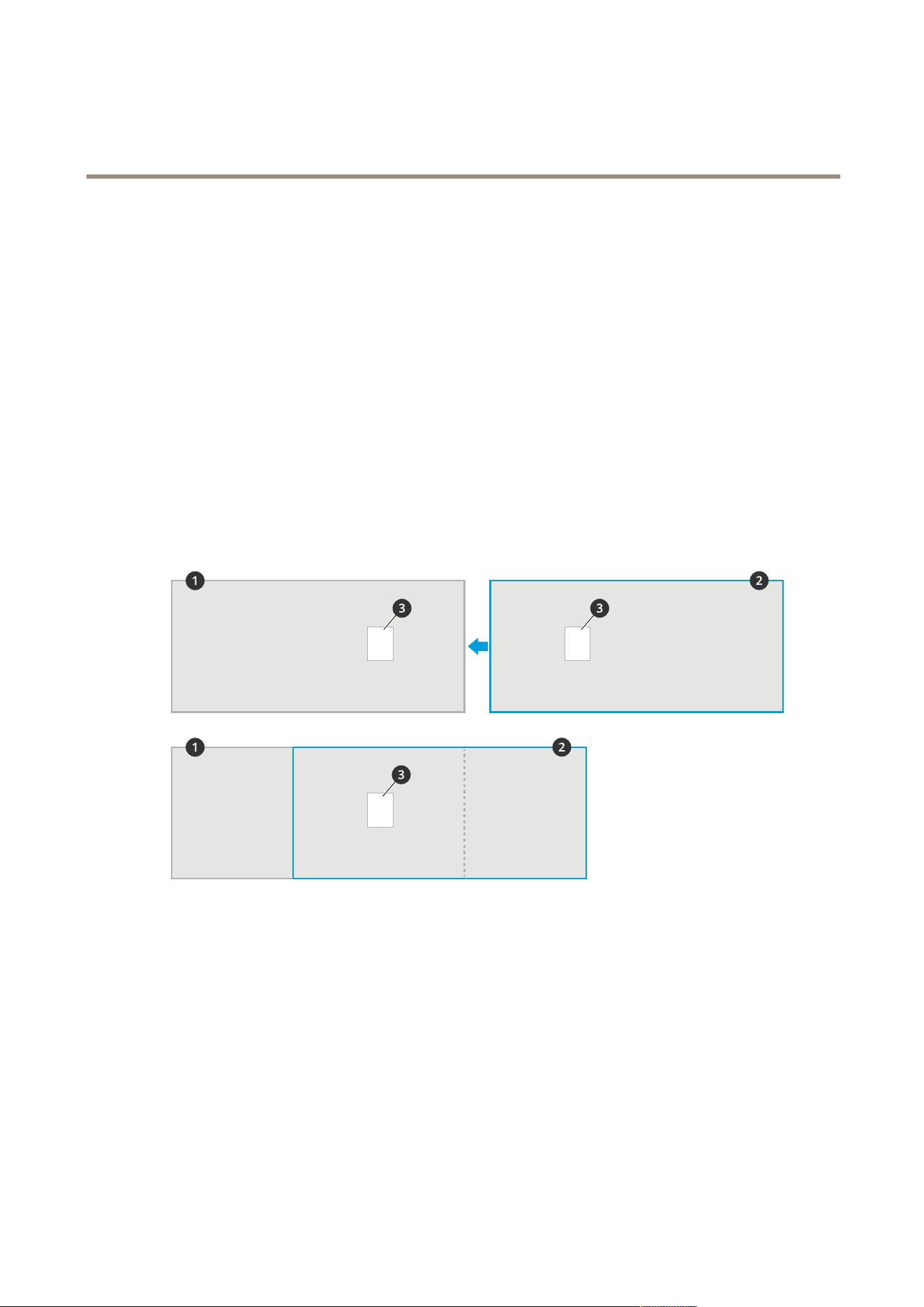
8.Placeanobject,forexampleasheetofpaper,attheexactmid-pointbetweenthetwocameras.It’sveryimportantthat
youplacetheobjectexactlyinthemiddleofthetwocamerassincetheobjectisusedasareferencepointtocalibrate
thecameras.
9.Dragtheviewofthesecondarycameraovertheprimarycameraview.Trytoavoidverticaloffset.
1
Primarycameraview
2
Secondarycameraview
3
Referenceobject
10.Oncethecalibrationisdone,gotoLiveviewintheprimarycameratoviewallofthesecondarycameras.
Ifyoucan’tseethevideostreamfromthesecondarycamerasintheprimarycamera,makesurethattherearenootherconnections
tothesecondarycamerasrunning.
Howtosetupaschedule
Theapplicationautomaticallydisablesthecountingfunctionalitywhenitgetsdark.Ifyouwanttolimitthecountingfurther,
youcansetupaschedule.
1.GotoSettings>Schedule.
12

AXISPeopleCounter
Additionalsettings
2.Selectstartandstoptimesbymovingtheslider.YoucansetindividualschedulesforeachdayoftheweekbyselectingPer
dayscheduleandthenmovethecorrespondingslider.
Howtodisabletheapplicationonaspecicdayoftheweek
Deselectthecheckboxnexttotheslider.
Anonymizepeople
Youcanconguretheapplicationsothatpeoplecannolongerbeidentiedfromthecamera.Therearetwolevelsofanonymization;
softandhard.
Anonymizesoft
Thisfeatureblocksallvideostreamsandimagesfromthecamera.Theliveviewstillshowsablurredimagewhichmeansyou
canstillseewhatisgoingonbutyoucan'tidentifypeople.
1.GotoMaintenance>Anonymize.
2.ClickAnonymizesoft.
3.Togobacktonormalmode,clickResetanonymization.Onlyuserswithanadministratoraccountcandothis.
Anonymizehard
Important
Anonymizehardremovesalladministratorusers,lockstherootpassword,andcanonlybereversedbydoingareset
tofactorydefaultonthecamera.
1.GotoMaintenance>Anonymize.
2.ClickAnonymizehard.
Howtocopytheapplicationsettingstoanothercamera
Usethecopyfunctionalityifyouwanttocopytheapplicationsettingsto,forexample,othercamerasinthesamestorewiththe
samemountingheight.Camera-specicsettings,suchastheapplicationlicenseandcameraname,arenotincluded.
1.Tocopytheapplicationsettings,gotoMaintenance>Parameterbackups.
2.ClickCopy.Thecomputersavestheleinyourbrowser’sdefaultfolderfordownloads.
13

AXISPeopleCounter
Howtovalidatethesystem
Howtovalidatethesystem
Note
Beforeyouvalidatethesystem,makesureyouhavemountedthecameraaccordingtotherecommendations.SeeMountthe
cameraonpage5.
Whenyouhaveinstalledandsetupallcamerasinthebuilding,werecommendthatyouvalidatetheaccuracyandne-tunethe
system.Thisislikelytoincreasetheaccuracyoridentifyanyproblemswiththecounters.
Togetanoverview,gotoStatisticsandlookatthecountingdataforacoupleofdaysback.Ifthedifferencebetweennumberof
personsgoinginandoutis<5%it’sagoodrstindicationthatthesystemisconguredcorrectly.
Ifthedifferenceisgreaterthanthat,gotoHowtovalidatethecounteronpage14.
Howtovalidatethecounter
1.GotoLiveview.
2.ClickontheTestaccuracybutton.
3.ClickHidetohidetheautomaticcounter.
4.ClickStartandmanuallycount100ormorepassagesbypressingtheupanddownarrowsonyourkeyboard.Youcan
alsousetheInandOutbuttons.
5.ClickResetifyouneedtostartoverandResultwhenyouaredone.
6.Checktheaccuracytable.Undernormalcircumstances,thetotalaccuracypercentageshouldnotbelessthan95%.
7.Ifyou’renotsatisedwiththeaccuracyofthecounter,gotoHowtone-tunethecounteronpage14.
Howtone-tunethecounter
1.GotoMountthecameraonpage5andmakesureit’snotthephysicalmountingthatismakingthecounternotwork
correctly.
2.GotoSettings>General.
3.GototheCountersensitivityslider,orclickSetupifthecounterisrunninginmanualmode,anddooneofthefollowing:
-Ifthecounteriscountingtoomanycomparedtothecontrolgure,decreasethecountersensitivitywithabout
20unitsorincreasethesizeoftheyellowboxslightly.
-Ifthecounteriscountingtoofewcomparedtothecontrolgure,increasethecountersensitivitywithabout
20unitsordecreasethesizeoftheyellowboxslightly.
4.GotoHowtovalidatethecounteronpage14torevalidatetheaccuracy.
14

AXISPeopleCounter
Statistics
Statistics
Thereareseveralwaystousethestatisticsfromthecounter:
•Intheapplication’swebpage,viewreal-timecountingdatainthebuilt-ingraphs.
•Viewbuilt-ingraphsindayandweekviewfromthestatisticspage.Thedataisupdatedinrealtime.
Dataisavailableonthecameraforupto90daysandupdatedevery15minutes.Thedataisstoredin15-minutebins
representingtheinandoutcountsforthe15-minuteperiods.
•DownloaddatathroughanopenAPI.SeeVAPIX
®
Library.
•UseAXISStoreDataManager,asoftwarepackagethatactsasacentralpointtostoreandmanagedatacollectedfromall
devices.SeeConnectacameratoafolderinAXISStoreDataManageronpage15.
•UseAXISStoreReporter,astatisticalweb-basedsolution,formanagingandmonitoringhistoricaldata.
•Downloadstatisticstoyourcomputer,seeDownloadstatisticsonpage15.
ConnectacameratoafolderinAXISStoreDataManager
Toperformthistask,theapplicationmustbeinstalledonthecamera.
1.InAXISStoreDataManager,gotoSourcesandgettheFolderconnectionidentierandtheFolderconnectionpassword
forthefolderyouwanttoconnectto.
2.Inthecamera’swebpage,gotoSettings>Appsandopentheapplication’swebpage.
3.Intheapplication’swebpage,gotoSettings>Reporting.
4.Toenablepushingdatatoaserver,selectEnabled.
5.EnterthewebaddressforAXISStoreDataManager,forexample
https://[systemintegrator1].asdm.axis.com/datamanagerwhere[systemintegrator1]is
replacedbyauniquename.
6.EntertheFolderconnectionidentierandFolderconnectionpassword.
7.Totesttheconnection,clickRuntest.
8.ClickSubmit.
Downloadstatistics
1.GotoStatistics>Downloadstatistics.
2.Selecttheleformat:
-Ifyouselect.xml,.csvor.jsonformatyoucanalsoselectthetimeinterval.
-Fileformat.cntisaproprietary,binaryformat,availableforcompatibilityreasons.
3.Selectdateinthecalendar.Thedataispresentedinanewtabinyourbrowser.
4.Ifyouwanttosavethedataasalocalleonthecomputer,right-clickandselectSaveas.Thebrowsersavestheleinthe
defaultdownloadfolder.
Ifyouwanttodownloadallavailabledata,clickDownloadallnexttotheleformat.
15

AXISPeopleCounter
Statistics
Reportdatatoaremotedestination
Tomakethedevicepushdatatoaremotedestinationevery15minutes:
1.GotoSettingsandcheckthatthedevicehasaname.
Thenamehelpsyouidentifywhichdevicethereportcomesfrom.
2.GotoSettings>Reporting>PushreportingandselectEnable.
3.IntheURLeld,entertheaddressoftheserver,forexamplehttps://example.com/server.
4.Optionally,enteratokentoletthedeviceauthenticateitselftotheserverintheAPIkeyeld.
5.ClickRuntest.
Iftheconnectionissuccessful,it’sindicatedbyagreencheckmark.
6.ClickSubmit.
16

AXISPeopleCounter
Troubleshooting
Troubleshooting
IssueAction
Thesoftwaredoesn’tuploadtoAXISStoreDataManager.
Themostcommonreasonisnetworkcommunicationproblems.
RuntheconnectiontestunderSettings>Reportingtoget
informationabouttherootcausefortheproblem.
Thesoftwaredoesn’tcount.Makesuretheinstructionsforhowtomountthecamerahas
beenfollowed,seeMountthecameraonpage5.
Thesoftwaredoesn’tcountcorrectly.Makesurepeoplepasstheentirecountingzone,crossingboth
bluelines.Theyshouldnotturnleftorrightbeforetheyhave
passedbothlines.
There’snovideostreaminliveview.Makesurenooneelseiswatchingthevideoorthatyouhave
avideostreamtoaVMSorotherongoingrecording.Checkif
thecamerahasalimitednumberofviewersorvideostreams
allowedatthesametime.
Thesoftwarepromptsmewithawarningsayingthattheframe
rateistoolow.
1.Makesurethescenehassufcientlighting.Ifthesceneis
toodark,thecameradoesnotdeliverenoughframespersecond
fortheapplicationtowork.
2.Iftheprocessorinthecamerahasahighworkload,the
applicationmightsuffer.Whenstreamingvideofromthe
cameramakesuretoopenonlyonestreamatatime.
Thesoftwaredoesn’tcountafterchangingparameters.Afterchangingtheparametersthesoftwaremayneedtorunup
to10minutesbeforethecountingaccuracyisoptimal.
Istillcan’tgetthesoftwaretocount.Ifyouhavefollowedtheadviceaboveandstillcan’tgetthe
softwaretowork,contactyourAxisreseller.
Restarttheapplication
Ifthecountingisinaccurateorthewebinterfaceunusuallyslow,youcantryrestartingtherunningservicesorrestartthedevice.
Torestartthedevice,gotoMaintenance>Restart.
Howtoresettheapplication
GotoMaintenance>Resetanddooneofthefollowing:
•Toclearallcountingdatafromthecamera,clickCleardata.
•Torestoreallsettingsoftheapplicationtodefault,clickRestoresettings.
Howtobackupthesettings
1.Tobackuptheapplicationsettings,gotoMaintenance>Parameterbackups.
2.ClickBackup.Thecomputersavestheleinyourbrowser’sdefaultfolderfordownloads.
Howtorestorethesettings
1.GotoMaintenance>Parameterbackups.
2.BrowsetoselectthepreviouslysavedbackupleandthenclickRestore.
17

AXISPeopleCounter
Troubleshooting
Generatealogreport
Ifyouhaveanytroublewithyourdeviceyoucangeneratealogreport.
1.GotoMaintenance>Logs.
2.ClickGeneratelogs.
3.Thebrowsersavestheleonthedefaultdownloadbrowseronthecomputer.
4.Attachthelogreportwhensubmittinganissuetosupport.
Howtomanageyourlicense
GotoMaintenance>Registration.
•Toregisteralicense,clickontheRegistrationpage.
•Ifyouwanttoremoveyoulicensefromthisproduct,clickClearregistration.
•Ifyouhaveanupdatedlicense,clickRenewlicense.
18

AXISPeopleCounter
Aboutthelightwebinterface
Aboutthelightwebinterface
Thereisalight-weightversionofthewebinterfaceattheURLhttp://<servername>/people-counter/lite/index.html.Thesepagescan
forinstancebeusedtoembedtheapplicationintosystems,forexampleAXISCameraStationorMilestone'sXProtectSmartClient.
Therearefourpagesavailable:
•http://<servername>/people-counter/lite/day.html:Thepageshowsthedayplot,thesameplotthatcanbeseenon
theStatisticspage.
•http://<servername>/people-counter/lite/week.html:Thepageshowstheweekplot,thesameplotthatcanbeseenon
theStatisticspage.
•http://<servername>/people-counter/lite/count.html:Apagethatshowsthelivecountforthecurrentday.
•http://<servername>/people-counter/lite/liveview.html:Aslimversionoftheliveviewpagethatshowslivecountandthe
videostreamwiththecountingareaasoverlay.
Themenuatthebottomofthepagescanbedisabledbyappending?cleantotheURL:sabove,e.g.http://<servername>/people-
counter/lite/liveview.html?clean.Youcanalsoaddalangtagbeforelitetodisplaythesepagesinotherlanguages,example
http://<servername>/people-counter/cn/lite/liveview.html
19

AXISPeopleCounter
PeoplecountingappsAPI
PeoplecountingappsAPI
ThefollowingapplicationsincludePeoplecounterfunctionality:
AXISPeoplecounter-Intendedforretailenvironments,likestoresorshoppingmalls,orotherenvironmentswhereyouwantto
countpeople.
AXISOccupancyEstimator-Keepstrackofhowmanypeoplearecurrentlyoccupyingaclosedarea.Theapplicationcanalso
estimatehowlongtheaveragepersonspendsinthearea.
AXISDirectionDetector-Monitorsinwhatdirectionpeoplearepassingunderacamera.Ifapersonismovinginoneofthe
directions,theapplicationcantriggeranalarm.
AXISTailgatingDetector-Detectsifmorethanonepersonpassesunderacameraduringapredenedtimeinterval.Ifthe
applicationdetectsmorethanonepersonitcantriggeranalarm.
AXISRandomSelector-Detectswhensomeoneisleavingthepremisesandrandomlydeterminesifthatpersonshouldbescheduled
forinspectionornot.
Commonexamples
Note
Thevalueof<appname>inthedifferentexamplesspeciestheapplicationaccordingtothetablebelow.
ValueApplication
people-counter
AXISPeopleCounter
occupancy-estimator
AXISOccupancyEstimator
direction-detector
AXISDirectionDetector
tailgating-detector
AXISTailgatingDetector
random-selector
AXISRandomSelector
Example
RequestrealtimedatafromPeopleCounter.
Request
http://<servername>/local/<appname>/.api?live-sum.json
Return
{
"serial":"00408CAC512B",
"name":"Exitsouth",
"timestamp":"20170503112756",
"in":12,
"out":318
}
SeeRequestreal-timedataonpage22formoreinformation.
Example
ListalldaysofdataavailableinPeopleCounter.
Request
http://<servername>/local/<appname>/.api?list-cnt.json
Return
{
20

AXISPeopleCounter
PeoplecountingappsAPI
"timestamp":"20170513132513",
"days":["20170510","20170511","20170513"]}
}
SeeListavailabledataonpage22formoreinformation.
Example
Requesthistoricaldataforthe12thtothe15thofMay2017.
Request
http://<servername>/local/<appname>/.api?export-cnt&date=20170512-20170515
SeeDownloadbinarydataonpage23formoreinformation.
Example
Requestallavailablehistoricaldata.
Request
http://<servername>/local/<appname>/.api?export-cnt&date=all
SeeDownloadbinarydataonpage23formoreinformation.
Example
RequesthistoricalCSVdataforthe12thandthe15thofMay2017with15-minuteresolution.
Request
http://<servername>/local/<appname>/.api?export-csv&date=20170512,20170515&res=15m
SeeRequestCSVdataonpage23formoreinformation.
Example
Requesthistoricaldataforallavailabledays,with24-hourresolution.
Request
http://<servername>/local/<appname>/.api?export-csv&date=all&res=24h
SeeRequestCSVdataonpage23formoreinformation.
Example
RequesthistoricalXMLdataforthe12thandthe15thofMay2017with15-minuteresolution.
Request
http://<servername>/local/<appname>/.api?export-xml&date=20170512,20170515&res=15m
SeeRequestXMLdataonpage24formoreinformation.
Example
RequestLiveviewinformationfromPeopleCounter.
Request
http://<servername>/local/<appname>/.api?cntpos.json
Response
{
"width":320,
"height":240,
"left":0,
"right":296,
"top":88,
"bottom":224,
"yfirst":88,
"ylast":152,
"radius":0
21

AXISPeopleCounter
PeoplecountingappsAPI
}
SeeLiveviewinformationonpage26formoreinformation.
APIspecication
Requestreal-timedata
ReturnsJSONlewithrealtimecountingdata.
Request
http://<servername>/local/<appname>/.api?live-sum.json
Thevalueof<appname>speciestheapplicationaccordingtothetablebelow.
ValueApplication
people-counter
AXISPeopleCounter
occupancy-estimator
AXISOccupancyEstimator
direction-detector
AXISDirectionDetector
tailgating-detector
AXISTailgatingDetector
random-selector
AXISRandomSelector
Return
{
"serial":"<camera-serial>",
"name":"<counter-name>",
"timestamp":"<timestamp>",
"in":<in>,
"out":<out>
}
Returnvaluedescriptions
ValueDescription
<camera-serial>cameraserialnumber
<counter-name>
nameofthecounter
<timestamp>timeinthecameraintheformatYYYYMMDDhhmmss
<in>numberofpeoplepassinginuntilnowtoday
<out>
numberofpeoplepassingoutuntilnow
Listavailabledata
Returnsalistofdayswheredataexists.
Request
http://<servername>/local/<appname>/.api?list-cnt.json
Thevalueof<appname>speciestheapplicationaccordingtothetablebelow.
ValueApplication
people-counter
AXISPeopleCounter
occupancy-estimator
AXISOccupancyEstimator
22

AXISPeopleCounter
PeoplecountingappsAPI
ValueApplication
direction-detector
AXISDirectionDetector
tailgating-detector
AXISTailgatingDetector
random-selector
AXISRandomSelector
Return
{
"timestamp":"<timestamp>",
"days":["YYYYMMDD",[..]"YYYYMMDD"]}
}
Returnvaluedescriptions
ValueDescription
<timestamp>timeinthecameraintheformatYYYYMMDDhhmmss
<days>anarrayofdayswherethereexists
Downloadbinarydata
Thisscriptreturnsabinarydataleforthegivendate(s),tobeusedinAXISStoreDataManager
Request
http://<servername>/local/<appname>/.api?export-cnt&date=<date>
Thevalueof<appname>speciestheapplicationaccordingtothetablebelow.
ValueApplication
people-counter
AXISPeopleCounter
occupancy-estimator
AXISOccupancyEstimator
direction-detector
AXISDirectionDetector
tailgating-detector
AXISTailgatingDetector
random-selector
AXISRandomSelector
Requestparameterdescriptions
ParameterDescription
adateoftheformYYYYMMDD
adateintervaloftheformYYYYMMDD-YYYYMMDD
commaseparateddatesoftheformYYYYMMDD,[..],YYYYMMDD
<date>
allforallavailabledata
Return
Abinarydataleforthegivendate(s).
RequestCSVdata
ReturnshistoricaldatainCSVformat
Request
http://<servername>/local/<appname>/.api?export-csv[&date=<date>][&res=<res>]
23

AXISPeopleCounter
PeoplecountingappsAPI
Thevalueof<appname>speciestheapplicationaccordingtothetablebelow.
ValueApplication
people-counter
AXISPeopleCounter
occupancy-estimator
AXISOccupancyEstimator
direction-detector
AXISDirectionDetector
tailgating-detector
AXISTailgatingDetector
random-selector
AXISRandomSelector
Requestparameterdescriptions
ParameterDescription
adateoftheformYYYYMMDD
adateintervaloftheformYYYYMMDD-YYYYMMDD
commaseparateddatesoftheformYYYYMMDD,[..],YYYYMMDD
<date>
all(default)forallavailabledata
15m(default)fordatain15minutebins
1hfordatain1hourbins
<res>
24hfordatain1daybins
Return
Thisscriptreturnsdatainplaintext,comma-separatedvalues.Therstlinecontainsadescriptionofeachelement,andthefollowing
linescontainthecorrespondingdataforthechosentimeintervalandresolution.
RequestXMLdata
ReturnshistoricaldatainXMLformat
Request
http://<servername>/local/<appname>/.api?export-xml[&date=<date>][&res=<res>]
Thevalueof<appname>speciestheapplicationaccordingtothetablebelow.
ValueApplication
people-counter
AXISPeopleCounter
occupancy-estimator
AXISOccupancyEstimator
direction-detector
AXISDirectionDetector
tailgating-detector
AXISTailgatingDetector
random-selector
AXISRandomSelector
Requestparameterdescriptions
24

AXISPeopleCounter
PeoplecountingappsAPI
ParameterDescription
adateoftheformYYYYMMDD
adateintervaloftheformYYYYMMDD-YYYYMMDD
commaseparateddatesoftheformYYYYMMDD,[..],YYYYMMDD
<date>
all(default)forallavailabledata
15m(default)fordatain15minutebins
1hfordatain1hourbins
<res>
24hfordatain1daybins
Return
ThisscriptreturnsdatainXMLformat.TheDTDlecanbefoundat
http://<servername>/local/<appname>/appdata.dtd.
RequestJSONdata
ReturnshistoricaldatainJSONformat
Request
http://<servername>/local/<appname>/.api?export-json[&date=<date>][&res=<res>]
Thevalueof<appname>speciestheapplicationaccordingtothetablebelow.
ValueApplication
people-counter
AXISPeopleCounter
occupancy-estimator
AXISOccupancyEstimator
direction-detector
AXISDirectionDetector
tailgating-detector
AXISTailgatingDetector
random-selector
AXISRandomSelector
Requestparameterdescriptions
ParameterDescription
adateoftheformYYYYMMDD
adateintervaloftheformYYYYMMDD-YYYYMMDD
commaseparateddatesoftheformYYYYMMDD,[..],YYYYMMDD
<date>
all(default)forallavailabledata
15m(default)fordatain15minutebins
1hfordatain1hourbins
<res>
24hfordatain1daybins
Return
ThisscriptreturnsdatainJSONformat.
25

AXISPeopleCounter
PeoplecountingappsAPI
Clearcountingdata
Request
http://<servername>/local/<appname>/.apioperator?clear-data
Thevalueof<appname>speciestheapplicationaccordingtothetablebelow.
ValueApplication
people-counter
AXISPeopleCounter
occupancy-estimator
AXISOccupancyEstimator
direction-detector
AXISDirectionDetector
tailgating-detector
AXISTailgatingDetector
random-selector
AXISRandomSelector
Return
OK
Liveviewinformation
ReturnsinformationabouttheplacementofthelinesinLiveview.
Request
http://<servername>/local/<appname>/.api?cntpos.json
Thevalueof<appname>speciestheapplicationaccordingtothetablebelow.
ValueApplication
people-counter
AXISPeopleCounter
occupancy-estimator
AXISOccupancyEstimator
direction-detector
AXISDirectionDetector
tailgating-detector
AXISTailgatingDetector
random-selector
AXISRandomSelector
Response
{
"width":<width>,
"height":<height>,
"left":<left>,
"right":<right>,
"top":<top>,
"bottom":<bottom>,
"yfirst":<yfirst>,
"ylast":<ylast>,
"radius":<radius>
}
Returnvaluedescriptions
ValueDescription
<width>
<height>
dimensionofthevideostream
26

AXISPeopleCounter
PeoplecountingappsAPI
ValueDescription
<left>
<right>
xcoordinatesinpixelsforstartandstopforthebluelinesinLiveview
<top>
<bottom>
ycoordinatesinpixelsforthetwobluelinesinLiveview
<yrst>
<ylast>
ycoordinatesinpixelsforthetopandbottomoftheredcountingarea,disregardingcurvature
<radius>radiusinpixelsdescribingthecurvatureoftheredcountingarea,asmeasuredinthecenteroftheareaon
bothaxes,oriftheareaisnotcurved
Showthesystemlog
Request
http://<servername>/local/<appname>/.apioperator?show-logs
Thevalueof<appname>speciestheapplicationaccordingtothetablebelow.
ValueApplication
people-counter
AXISPeopleCounter
occupancy-estimator
AXISOccupancyEstimator
direction-detector
AXISDirectionDetector
tailgating-detector
AXISTailgatingDetector
random-selector
AXISRandomSelector
Return
Displaysthesystemlogs.
Generatealogarchive
Request
http://<servername>/local/<appname>/.apioperator?generate-logs
Thevalueof<appname>speciestheapplicationaccordingtothetablebelow.
ValueApplication
people-counter
AXISPeopleCounter
occupancy-estimator
AXISOccupancyEstimator
direction-detector
AXISDirectionDetector
tailgating-detector
AXISTailgatingDetector
random-selector
AXISRandomSelector
Return
Alogarchive
27

AXISPeopleCounter
PeoplecountingappsAPI
Listpeoplecounterparameters
Request
http://<servername>/local/<appname>/.api?params.json
Thevalueof<appname>speciestheapplicationaccordingtothetablebelow.
ValueApplication
people-counter
AXISPeopleCounter
occupancy-estimator
AXISOccupancyEstimator
direction-detector
AXISDirectionDetector
tailgating-detector
AXISTailgatingDetector
random-selector
AXISRandomSelector
Return
AJSONobjectofallthePeopleCounterrelatedparameters.
Setpeoplecounterparameters
Thepostformathasaformatwherepairsandvaluesneedtobespecied,bestdescribedbyanexample:
&p1=Counter.Enable&v1=1&p2=Counter.Height&v2=280&setparams=needstobeincluded
Note
ForFirmware-version5.60andlater,use:setparams&Counter.Height=280instead.
Request
http://<servername>/local/<appname>/.apioperator?setparams
Thevalueof<appname>speciestheapplicationaccordingtothetablebelow.
ValueApplication
people-counter
AXISPeopleCounter
occupancy-estimator
AXISOccupancyEstimator
direction-detector
AXISDirectionDetector
tailgating-detector
AXISTailgatingDetector
random-selector
AXISRandomSelector
Return
OK
28

UserManualVer.M8.2
AXISPeopleCounter
Date:April2021
©AxisCommunicationsAB,2017-2021
PartNo.T10098452