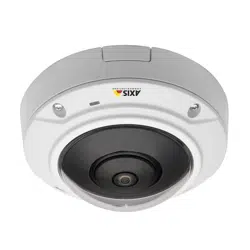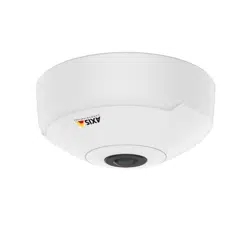


AXISM30-PNetworkCameraSeries
TableofContents
Systemoverview............................................3
Productoverview...........................................4
Quickstartguide...........................................5
Setup.....................................................12
Howtoaccesstheproduct........................................12
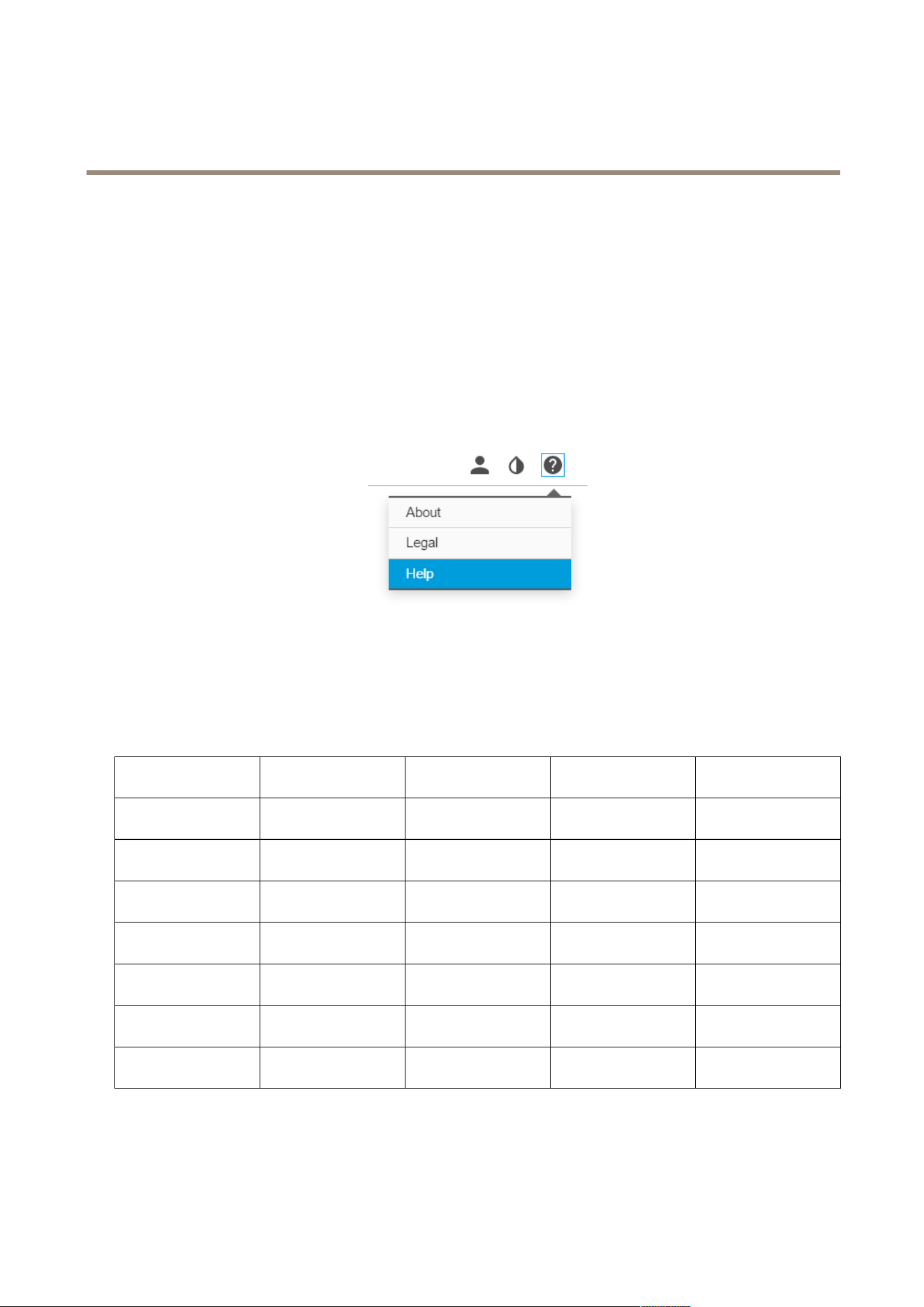
Abouttheproduct'sbuilt-inhelp...................................13
Aboutcapturemodes............................................13
Howtochoosevideocompressionformat............................14
Howtoreducebandwidthandstorage..............................14
Howtoreducenoiseinlow-lightconditions..........................15
Howtoselectexposuremode......................................15
Howtosetupamonitor..........................................15
Howtotriggeranaction.........................................15
Aboutoverlays..................................................16
Aboutapplications..............................................16
Troubleshooting............................................17
Howtoresettofactorydefaultsettings.............................17
Howtocheckthecurrentrmware.................................17
Howtoupgradethermware.....................................17
Technicalissues,cluesandsolutions................................18
Performanceconsiderations.......................................19
Specications..............................................20
SDcardslot....................................................20
Buttons.......................................................20
Connectors....................................................20
2
AXISM30-PNetworkCameraSeries
Systemoverview
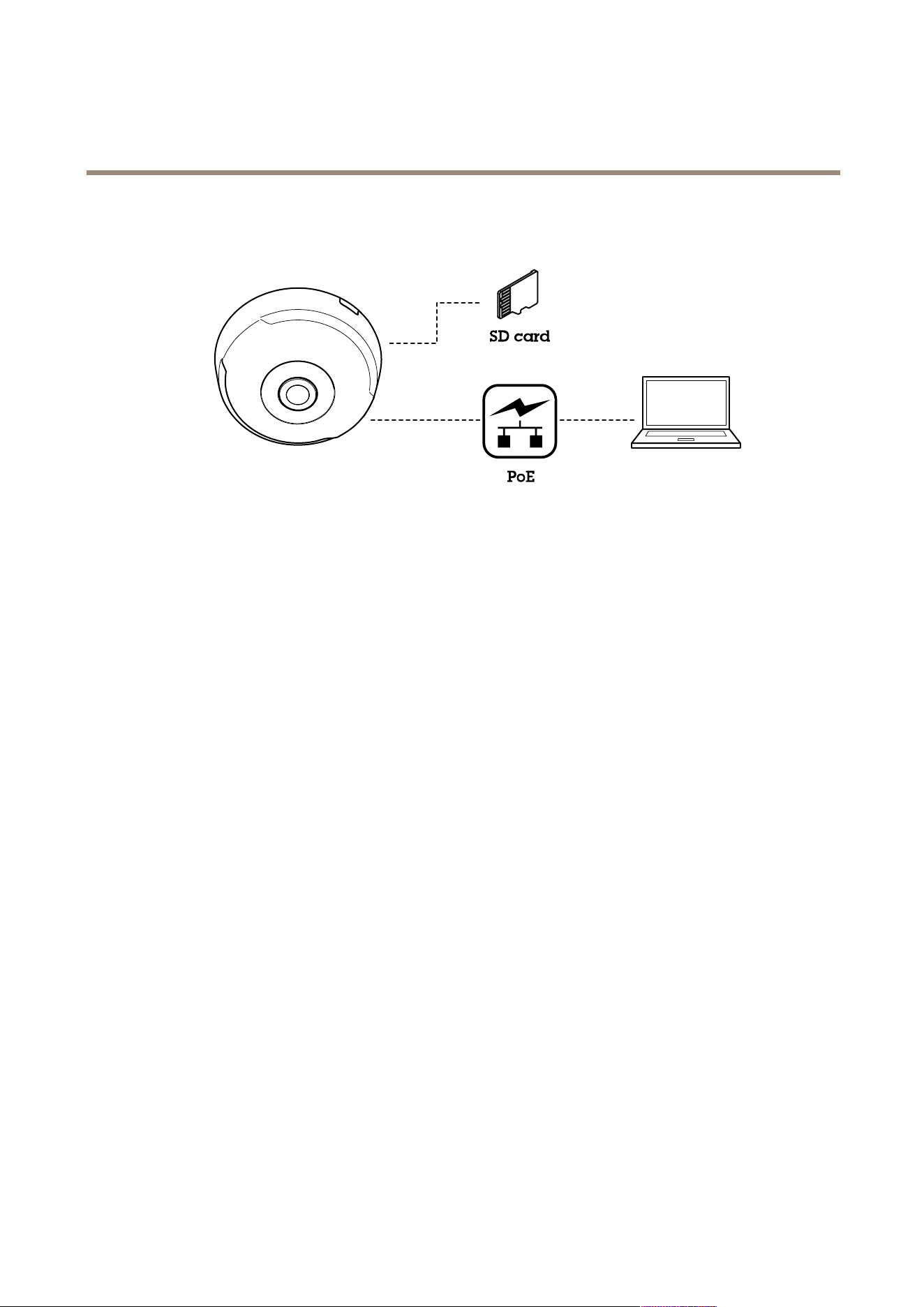
Systemoverview
3
AXISM30-PNetworkCameraSeries
Quickstartguide
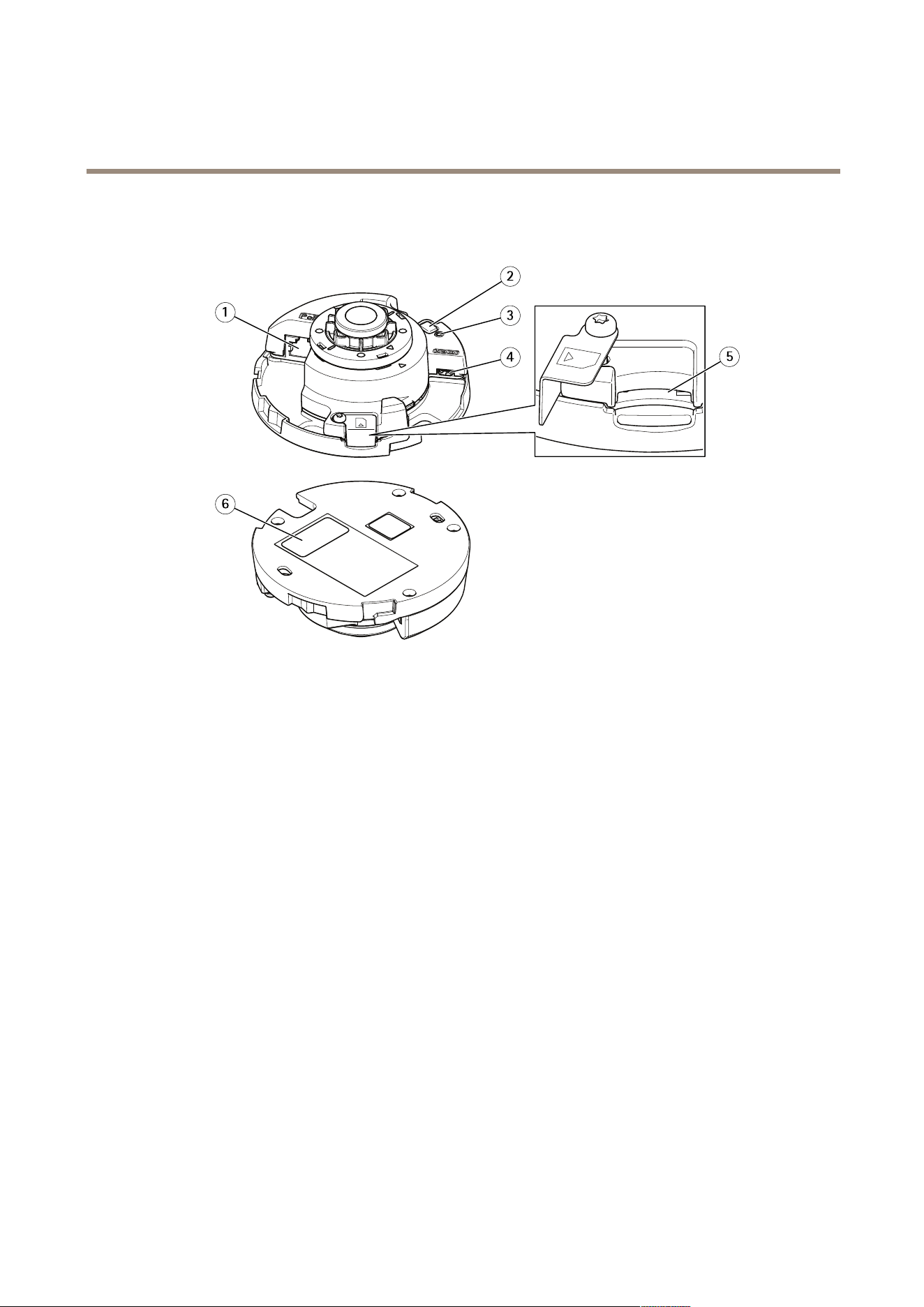
Quickstartguide
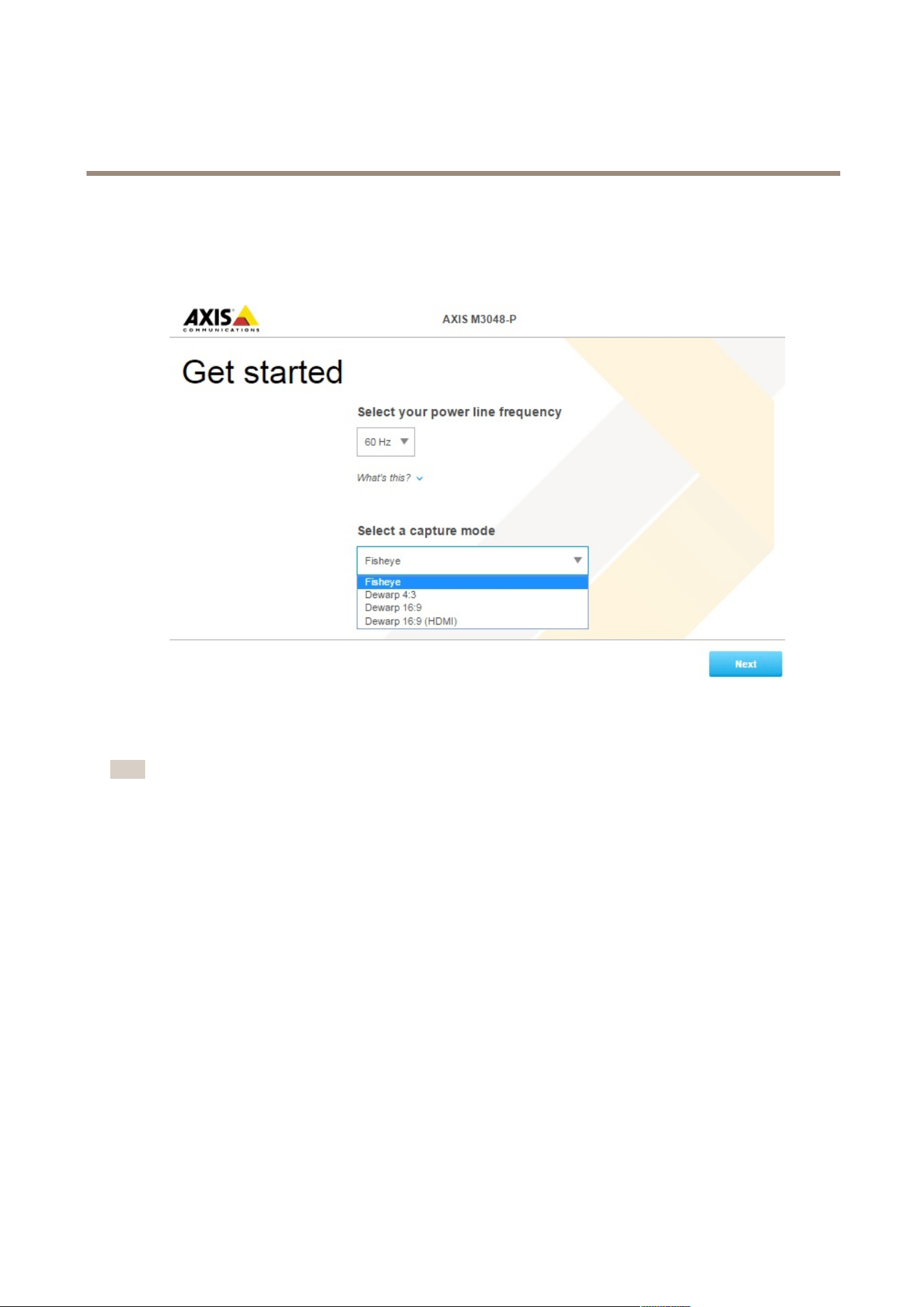
Afterstartingupthecameraforthersttime,createaloginandstarttheGetstartedguide.
Selectthepowerlinefrequencyandcapturemode.Pleasebeawareofthatthesupportedresolutionsfordewarpedviewsdiffer
dependingontheselectedcapturemode.SelectingtheFisheyemode,youwillhaveaccessonlytothefulloverviewimagevia
webinterfaceandnootherviews.
Note
YoushouldselecttheHDMIcapturemodeonlywhenintendtoconnectamonitortotheHDMIoutput.Thesupported
resolutionswillbelimitedforthismodeandfortheHDMIoutputsource,youcanchoosebetweentheoverviewand
theselecteddewarpedview.
5
AXISM30-PNetworkCameraSeries
Quickstartguide
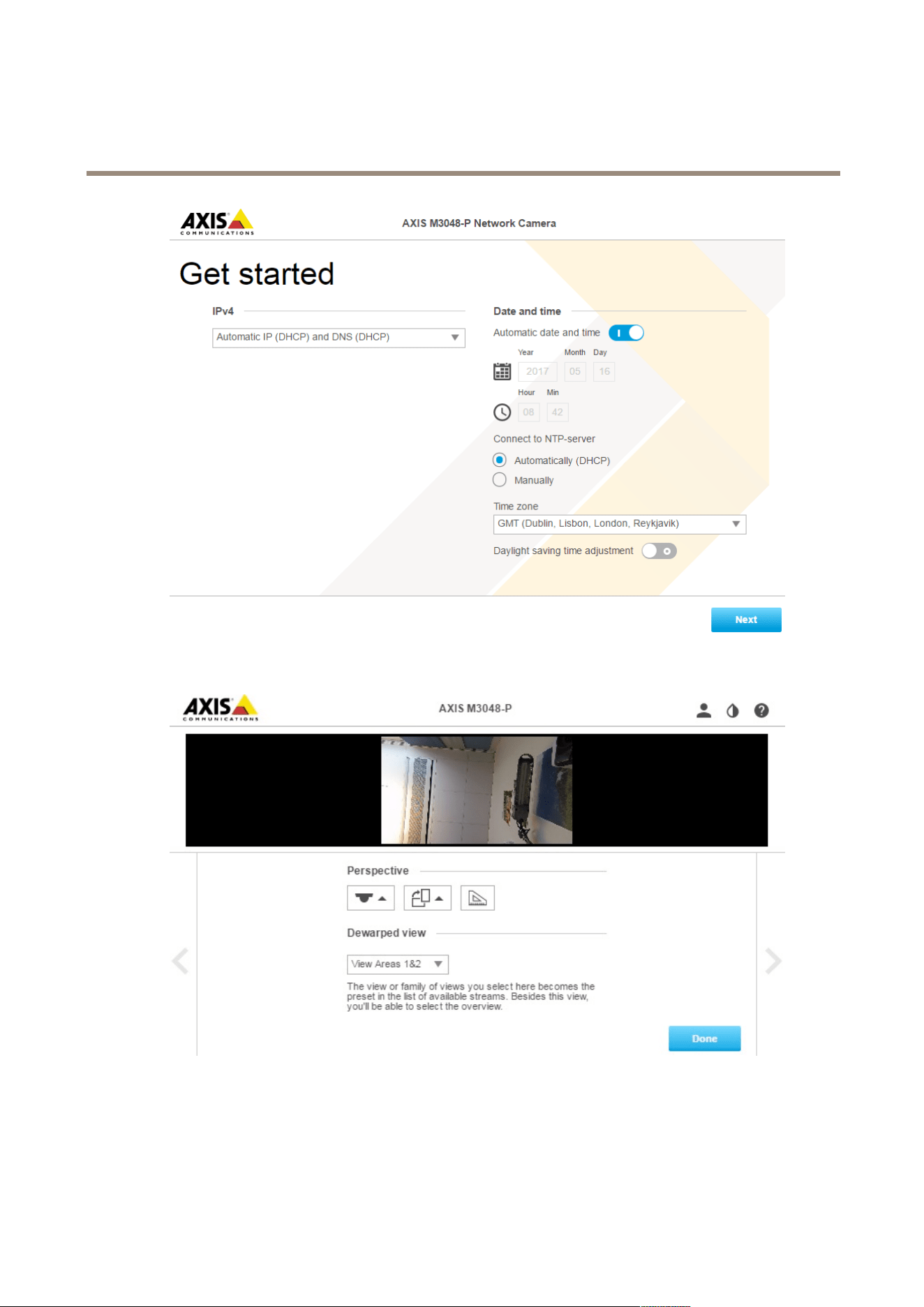
Inthenextstep,settheIPsettingsanddate/time.
Continueandselecttheperspective/orientationdependingonhowthecameraisinstalled.Inthisstep,youwillselectthepreferred
dewarpedviewaswell(notforFisheyemode).
Inthewallmountmode,someviewsarenotavailableduetothattheydon’ttinthismountoption.Seethetablebelowforthe
availableviewsindifferentperspective/orientationmodes.
6

AXISM30-PNetworkCameraSeries
Quickstartguide
View\Perspective
Ceiling
WallDesktop
Overview
XXX
PanoramaXXX
DoublePanoramaX
-
X
Quad
X
-
X
ViewAreas1&2XXX
CornerLeft
X
-
X
CornerRight
X
-
X
DoubleCorner
X
-
X
Corridor
XXX
SelectingtheFisheye,youwillhaveaccesstoonlyfulloverviewimagewherethehighestresolutionis1920x1920for
AXISM3047-Pand2880x2880forAXISM3048-P.Inthenexttableyoucanalsoseethehighest/lowestavailableresolutionfor
differentviewsineachcapturemodeforAXISM3047-PandAXISM3048-P.
View\Capturemode
Dewarp4:3Dewarp16:9
Dewarp16:9(HDMI)Dewarp16:925/30
fps,M3047-Ponly
Overview
1920x1920/2048x2048
480x480
1920x1920/2048x2048
480x480
1920x1920/2048x2048
480x480
1200x1200/480x480
Panorama
1920x720/2304x864
640x240
2304x648/2560x720
1280x360
2304x648/2560x7202048x576/1280x360
DoublePanorama
1920x1440/2304x1728
480x360
2304x1296/2560x1440
640x360
2304x1296/2560x1440
640x360
2048x1152/640x360
Quad
1920x1440/2304x1728
480x360
2304x1296/2560x1440
640x360
2304x1296/2560x1440
640x360
2048x1152/640x360
ViewAreas1&2
1920x1440/1920x1440
480x360
1920x1080/2048x1152
640x360
1920x1080/2048x1152
640x360
1280x720/640x360
CornerLeft
1920x720/1728x864
640x240/1440x720
1728x648/1920x720
640x240
1728x648/1920x720
640x240
1728x648/640x240
CornerRight
1920x720/1728x864
640x240/1440x720
1728x648/1920x720
640x240
1728x648/1920x720
640x240
1728x648/640x240
DoubleCorner
1920x1440/1728x1728
480x360/480x480
1728x1296/1920x1440
480x360
1728x1296/1920x1440
480x360
1728x1296/480x360
Corridor
1920x1440/1728x1728
480x360/480x480
2304x1296/2560x1440
640x360
2304x1296/2560x1440
640x360
2048x1152/640x360
PleasenotethatthemostoflowestvaluesarethesameforbothAXISM3047-PandAXISM3048-P.
Whenyouhaveselectedthedesiredperspectiveanddewarpedview,clickDone.
7
AXISM30-PNetworkCameraSeries
Quickstartguide
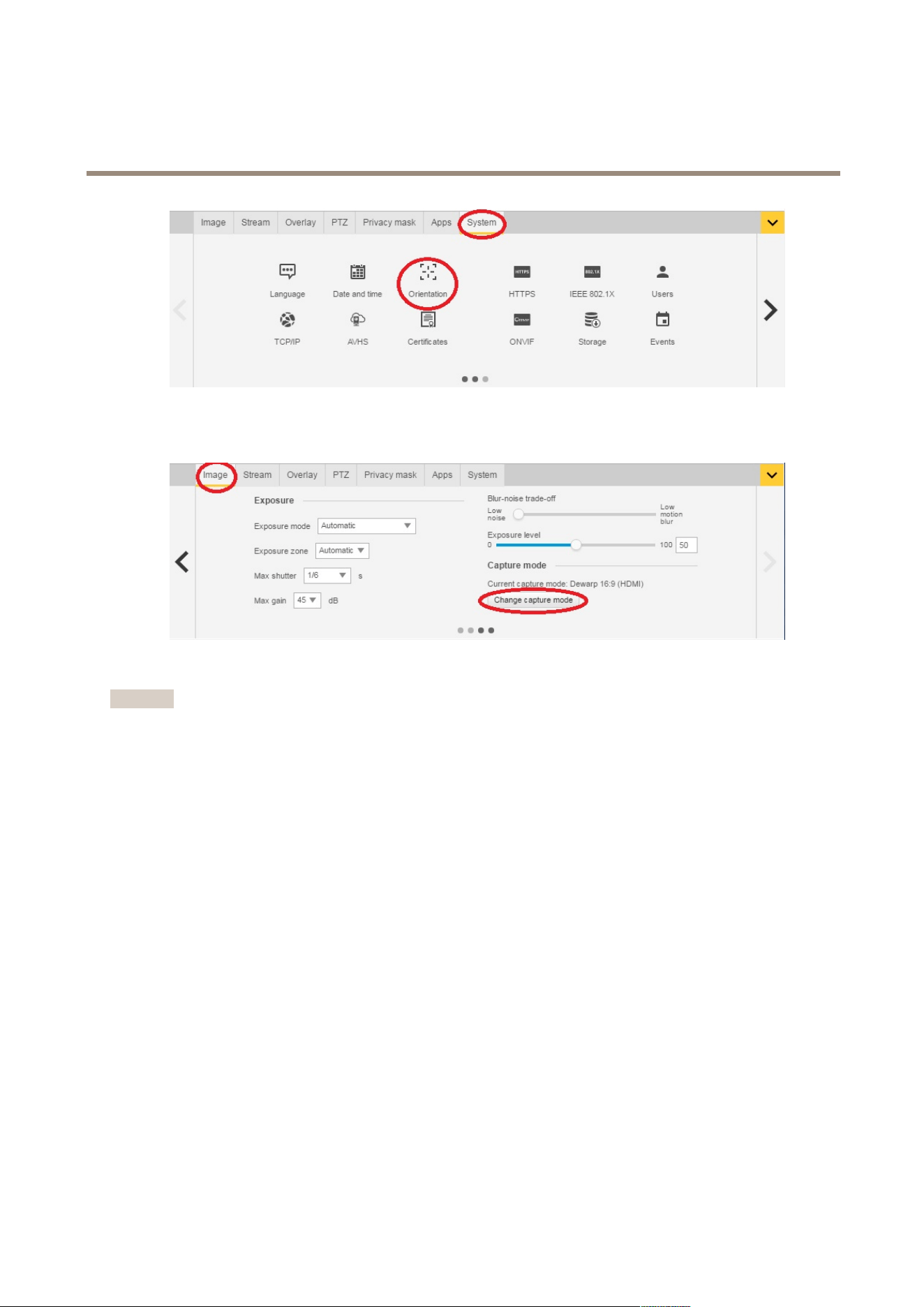
Afterthesetupiscompleted,itisstillpossibletochangethecongurationsinthecamera’swebpages.Tochangethedewarpedview
orperspectivemode,gotoSystem>Orientation.
Tochangecapturemode,gotoSettings>Image>Capturemode.ClickChangecapturemode.
Important
Whenchangingthecapturemode,theboundariesofthevideoimagewillbechanged.Italsoresetsotherimagesettings,
suchas:
•Exposurezones
•Guardtours
•Imageoverlays
•Motiondetectionwindows
•Presetpositions
•Privacymasks
•Viewareas
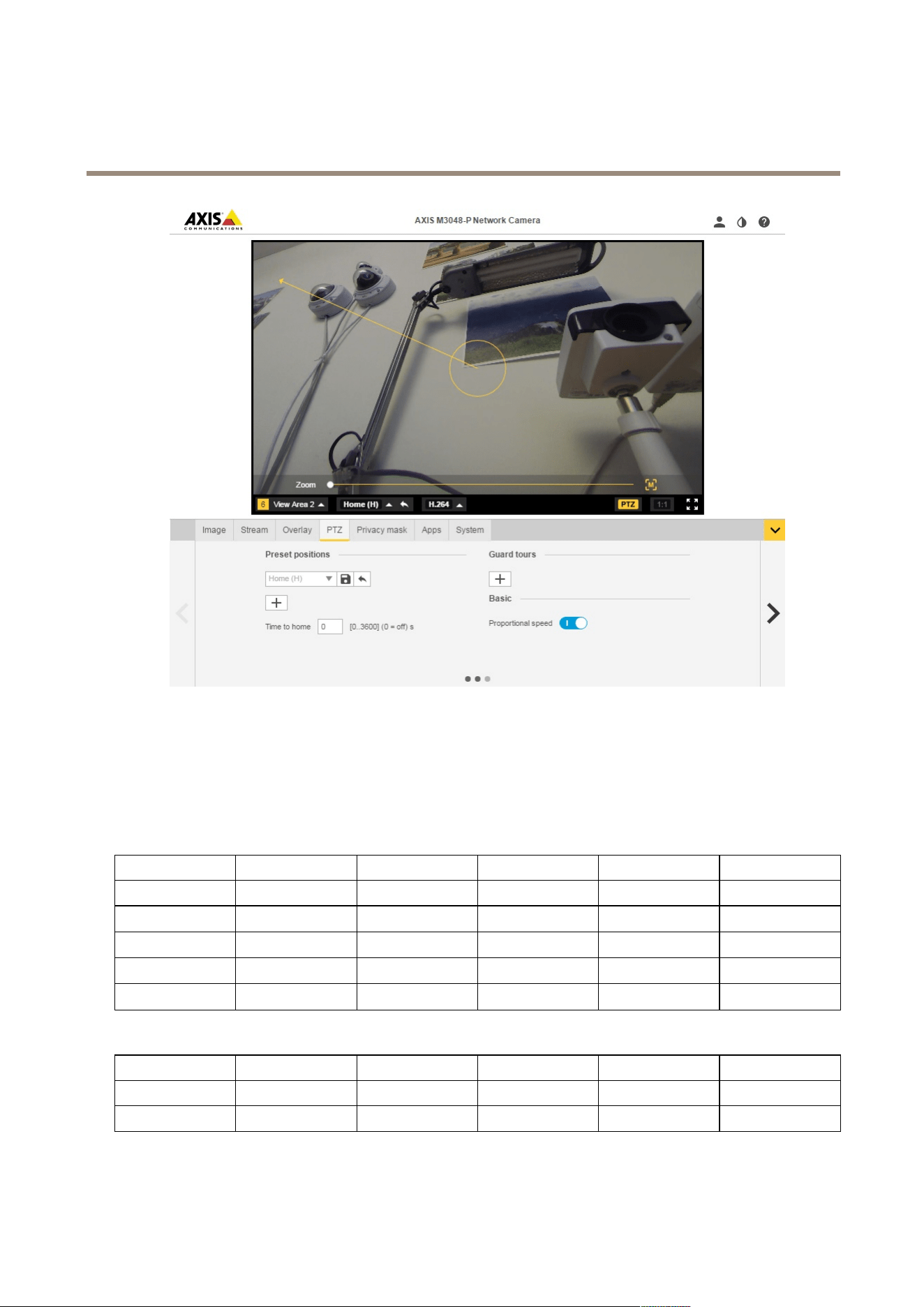
Tochange/adjusttheviewareas
1.GotoSettings>Image>Capturemode.
2.Selectdewarp16:9or4:3capturemode.
3.SelectViewAreas1&2intheorientationoption.
4.GotoSettings>PTZ.
5.Inyourvideostrem,clickonthepointerinthemiddleofthecircle.
6.Holdthemousebuttonanddragthepointeraroundtondyourdesiredviewarea.
8
AXISM30-PNetworkCameraSeries
Quickstartguide
Youmightcreateseveralpresetpositionsanddotheabovestepsforeachposition.
Setupmultiplevideostreams
ThetablesshowsdifferentpossiblevideostreamswhichcanbepulledsimultaneouslyfromAXISM3047-PandAXISM3048-P.
Fisheye
AXISM3047-PAXISM3048-P
Stream
ViewResolutionResolution
FPSCodec
s1
sheye
2048x20482880x2880
25/30
h264ormjpeg
s2
sheye
<=2048x2048<=2048x2048
25/30
h264ormjpeg
s3
sheye
<=720x720<=720x720
25/30
h264andmjpeg
s4
sheye
<=720x720<=720x720
25/30
h264andmjpeg
Dewarp4:3
AXISM3047-PAXISM3048-P
Stream
ViewResolutionResolution
FPSCodec
s1
sheye
1920x19202048x2048
12.5/15
h264ormjpeg
9

AXISM30-PNetworkCameraSeries
Quickstartguide
s2
dewarpmaxdewarp
resolution
maxdewarp
resolution
12.5/15
h264ormjpeg
s3
sheye
<=1920x1920<=1920x1920
12.5/15
h264ormjpeg
s3
dewarp
<=1920x1440<=1920x1440
12.5/15
h264ormjpeg
s4
sheye
<=720x720<=720x720
12.5/15
h264andmjpeg
s4
dewarpw<=720h<=720w<=720h<=720
12.5/15
h264andmjpeg
Dewarp16:9
AXISM3047-PAXISM3048-P
Stream
ViewResolutionResolution
FPSCodec
s1
sheye
1920x19202048x2048
12.5/15
h264ormjpeg
s2
dewarpmaxdewarp
resolution
maxdewarp
resolution
12.5/15
h264ormjpeg
s3
sheye
<=1920x1920<=1920x1920
12.5/15
h264ormjpeg
s3
dewarp
<=1920x1080<=1920x1440
12.5/15
h264ormjpeg
s4
sheye
<=720x720<=720x720
12.5/15
h264andmjpeg
s4
dewarpw<=720h<=720w<=720h<=720
12.5/15
h264andmjpeg
Dewarp16:9HDMI
AXISM3047-PAXISM3048-P
Stream
ViewResolutionResolution
FPSCodec
s1
sheye
1920x19202048x2048
12.5/15
h264ormjpeg
s2
dewarpmaxdewarp
resolution
maxdewarp
resolution
12.5/15
h264ormjpeg
s3
HDMIoutput
sheye
720p720p
N/AN/A
s3
HDMIoutput
dewarp
720p720p
N/AN/A
s4
sheye
<=720x720<=720x720
12.5/15
h264andmjpeg
s4
dewarpw<=720h<=720w<=720h<=720
12.5/15
h264andmjpeg,
32:9resolutions
notavailable
(AXISM3047-Ponly)-Dewarp16:9@30fps
AXISM3047-P
Stream
ViewResolution
FPSCodec
s1
sheye
1200x1200
25/30
h264ormjpeg
s2
dewarpmaxdewarp
resolution
25/30
h264ormjpeg
s3
sheye
<=1200x1200
25/30
h264ormjpeg
s3
dewarp
<=1920x1296
25/30
h264ormjpeg
10

AXISM30-PNetworkCameraSeries
Quickstartguide
s4
sheye
<=720x720
25/30
h264andmjpeg
s4
dewarpw<=720h<=720
25/30
h264andmjpeg
HDMISupportedoutputformats
•720x480p@59.94/60Hz
•1280x720p@59.94/60Hz
•720x576p@50Hz
•1280x720p@50Hz
11

AXISM30-PNetworkCameraSeries
Setup
Setup
Howtoaccesstheproduct
AXISIPUtilityandAXISCameraManagementarerecommendedmethodsforndingAxisproductsonthenetworkandassigning
themIPaddressesinWindows®.Bothapplicationsarefreeandcanbedownloadedfromwww.axis.com/support
Theproductcanbeusedwiththefollowingbrowsers:
•Chrome
TM
(recommended),Firefox
®
,Edge
®
,orOpera
®
withWindows
®
•Chrome
TM
(recommended)orSafari
®
withOSX
®
•Chrome
TM
orFirefox
®
withotheroperatingsystems.
Howtoaccesstheproductfromabrowser
1.Startawebbrowser.
2.EntertheIPaddressorhostnameoftheAxisproductinthebrowser’saddresseld.
ToaccesstheproductfromaMaccomputer(OSX),gotoSafari,clickonBonjourandselecttheproductfromthe
drop-downlist.
IfyoudonotknowtheIPaddress,useAXISIPUtilitytolocatetheproductonthenetwork.Forinformationabout
howtodiscoverandassignanIPaddress,seethedocumentAssignanIPAddressandAccesstheVideoStreamonAxis
Supportwebataxis.com/support
Note
ToshowBonjourasabrowserbookmark,gotoSafari>Preferences.
3.Enteryourusernameandpassword.Ifthisisthersttimetheproductisaccessed,therootpasswordmustrstbe
congured.
4.Theproduct’sliveviewpageopensinyourbrowser.
Aboutsecurepasswords
Important
Whensettingtheinitialpassword,thepasswordissentincleartextoverthenetwork.Ifthereisariskofnetworksnifng,
rstsetupasecureandencryptedHTTPSconnectionbeforeresettingthepasswords.
Thedevicepasswordistheprimaryprotectionforthedataandservices.Axis’productsdonotimposeapasswordpolicyasproducts
maybeusedinvarioustypesofinstallations,buttoprotectyourdatadothefollowing:
•Don’tusethedefaultpasswordthatcomeswiththeproducts.
•Useapasswordwithatleast8characters,preferablyusingapasswordgenerator.
•Don’texposethepassword.
•Changepasswordatarecurringinterval,atleastonceayear.
Setapasswordfortherootaccount
Important
Thedefaultadministratorusernamerootispermanentandcannotbedeleted.Ifthepasswordforrootislost,theproduct
mustberesettothefactorydefaultsettings.
12
AXISM30-PNetworkCameraSeries
Setup
Thedefaultrootaccounthasfullprivilegesandshouldbereservedforadministrativetasks.Alwayscreateauseraccountwithlimited
privilegesfordailyuse.Thisreducestheexposureoftheadministrativeaccount.
1.Makesuretofollowtheinstructionsaboutsecurepasswords,seeAboutsecurepasswordsonpage12.
2.Typeapasswordandthenretypeittoconrmthespelling.
3.ClickCreatelogin.Thepasswordhasnowbeencongured.
Abouttheproduct'sbuilt-inhelp
Youcanaccessthebuilt-inhelpthroughyourproduct’swebpage.Thehelpprovidesmoredetailedinformationonthefeaturesand
theirsettings.
Aboutcapturemodes
Acapturemodeisoneofthepossibleviewsforthisproductandcanbeaccessedfromthedrop-downlistintheproduct’slive
streamview.
Inthetableyoucanseethehighest/lowestavailableresolutionfordifferentviewsineachcapturemodefor
AXISM3047-PandAXISM3048-P.
View\Capturemode
Dewarp4:3Dewarp16:9
Dewarp16:9(HDMI)Dewarp16:925/30
fps,M3047-Ponly
Overview
1920x1920/2048x2048
480x480
1920x1920/2048x2048
480x480
1920x1920/2048x2048
480x480
1200x1200/480x480
Panorama
1920x720/2304x864
640x240
2304x648/2560x720
1280x360
2304x648/2560x7202048x576/1280x360
DoublePanorama
1920x1440/2304x1728
480x360
2304x1296/2560x1440
640x360
2304x1296/2560x1440
640x360
2048x1152/640x360
Quad
1920x1440/2304x1728
480x360
2304x1296/2560x1440
640x360
2304x1296/2560x1440
640x360
2048x1152/640x360
ViewAreas1&2
1920x1440/1920x1440
480x360
1920x1080/2048x1152
640x360
1920x1080/2048x1152
640x360
1280x720/640x360
CornerLeft
1920x720/1728x864
640x240/1440x720
1728x648/1920x720
640x240
1728x648/1920x720
640x240
1728x648/640x240
CornerRight
1920x720/1728x864
640x240/1440x720
1728x648/1920x720
640x240
1728x648/1920x720
640x240
1728x648/640x240
13

AXISM30-PNetworkCameraSeries
Setup
DoubleCorner
1920x1440/1728x1728
480x360/480x480
1728x1296/1920x1440
480x360
1728x1296/1920x1440
480x360
1728x1296/480x360
Corridor
1920x1440/1728x1728
480x360/480x480
2304x1296/2560x1440
640x360
2304x1296/2560x1440
640x360
2048x1152/640x360
Howtoselectcapturemode
Whatcapturemodetochoosedependsontherequirementsofframerateandresolutionforthespecicsurveillancesetup.See
thedatasheetforspecicationsaboutavailablecapturemodes.Tondthelatestversionofthedatasheet,gotowww.axis.com>
product>Support&Documentation.
Howtochoosevideocompressionformat
Decidingwhichcompressionmethodtochoosedependsonyourviewingrequirements,andonthepropertiesofyournetwork.The
availableoptionsare:
MotionJPEG
MotionJPEGorMJPEGisadigitalvideosequencethatismadeupofaseriesofindividualJPEGimages.Theseimagesarethen
displayedandupdatedataratesufcienttocreateastreamthatshowsconstantlyupdatedmotion.Fortheviewertoperceivemotion
videotheratemustbeatleast16imageframespersecond.Fullmotionvideoisperceivedat30(NTSC)or25(PAL)framespersecond.
TheMotionJPEGstreamusesconsiderableamountsofbandwidth,butprovidesexcellentimagequalityandaccesstoeveryimage
containedinthestream.
H.264orMPEG-4Part10/AVC
Note
H.264isalicensedtechnology.TheAxisproductincludesoneH.264viewingclientlicense.Installingadditionalunlicensed
copiesoftheclientisprohibited.Topurchaseadditionallicenses,contactyourAxisreseller.
H.264can,withoutcompromisingimagequality,reducethesizeofadigitalvideolebymorethan80%comparedtotheMotion
JPEGformatandbyasmuchas50%comparedtotheMPEG-4standard.Thismeansthatlessnetworkbandwidthandstoragespace
arerequiredforavideole.Orseenanotherway,highervideoqualitycanbeachievedforagivenbitrate.
Formoreinformation,seewww.axis.com/compression-formats
Howtoreducebandwidthandstorage
Important
Ifyoureducethebandwidthitcanresultinlessdetailsinthepicture.
1.GotoliveviewandselectH.264.
2.GototheStreamtab.
3.Dooneormoreofthefollowing:
-TurnontheZipstreamfunctionality.
-TurnontheGOPandsetahighGOPlengthvalue.
-Increasethecompression.
-TurnonthedynamicFPS.
14

AXISM30-PNetworkCameraSeries
Setup
Howtoreducenoiseinlow-lightconditions
Toreducenoiseinlow-lightconditions,youcanadjustoneormoreofthefollowingsettings:
•Makesurethattheexposuremodeisautomatic.
Note
Increasingthemaxshuttervaluecanresultinmotionblur.
•Theshutterspeedshouldbeasslowaspossible,whichmeansyoushouldsetmaxshuttertothehighestpossiblevalue.
•Reducesharpnessintheimage.
•Tryloweringthemaxgainvalue.
Howtoselectexposuremode
Thereareseveralexposuremodeoptionsinthecamerathatadjustsaperture,shutterspeed,andgaintoimproveimagequalityfor
specicsurveillancescenes.IntheImagetab,selectbetweenthefollowingoptions:
•Formostusecases,selectAutomaticexposure.
•Forenvironmentswithcertainarticiallighting,forexampleuorescentlighting,selectFlicker-free.
Selectthesamefrequencyasthepowerlinefrequency.
•Forenvironmentswithcertainarticiallightandbrightlight,forexampleoutdoorswithuorescentlightingatnightand
sunduringdaytime,selectFlicker-reduced.
Selectthesamefrequencyasthepowerlinefrequency.
•Tolockthecurrentexposuresettings,selectHoldcurrent.
Howtosetupamonitor
TheproductcanbeconnectedtoaHDMIdisplayandtransmitvideotothatdisplaywithouttheneedforanetworkconnection.The
displaycaneitherbeusedforsurveillanceorasapublicviewe.g.inastore.
1.ConnectanexternalmonitorusingtheHDMIconnector.
2.ConrmcapturemodeDewarp16:9(HDMI)isselected.
3.ChangetheHDMIsettingsunderSystem>HDMI.FormoreinformationaboutHDMIsettings,pleaseseetheonlinehelp
Howtotriggeranaction
1.GotoSettings>System>Eventstosetupanactionrule.Theactionruledeneswhentheproductwillperformcertain
actions.Actionrulescanbesetupasscheduled,recurring,orforexample,triggeredbymotiondetection.
2.SelectwhatTriggermustbemettotriggertheaction.Ifyouspecifymorethanonetriggerfortheactionrule,all
ofthemmustbemettotriggertheaction.
3.SelectwhichActionthecamerashouldperformwhentheconditionsaremet.
Note
Ifyoumakechangestoanactiveactionrule,theactionruleneedstoberestartedforthechangestotakeeffect.
15

AXISM30-PNetworkCameraSeries
Setup
Aboutoverlays
Note
ImageandtextoverlaywillnotbedisplayedonvideostreamoverHDMI.
Overlaysaresuperimposedoverthevideostream.Theyareusedtoprovideextrainformationduringrecordings,suchasatimestamp,
orduringproductinstallationandconguration.
Aboutapplications
AXISCameraApplicationPlatform(ACAP)isanopenplatformthatenablesthirdpartiestodevelopanalyticsandotherapplications
forAxisproducts.Forinformationaboutavailableapplications,downloads,trialsandlicenses,gotowww.axis.com/applications
TondtheusermanualsforAxisapplications,gotowww.axis.com
Note
•Severalapplicationscanrunatthesametimebutsomeapplicationsmightnotbecompatiblewitheachother.Certain
combinationsofapplicationsmightrequiretoomuchprocessingpowerormemoryresourceswhenruninparallel.Verify
thattheapplicationsworktogetherbeforedeployment.
16

AXISM30-PNetworkCameraSeries
Troubleshooting
Troubleshooting
Howtoresettofactorydefaultsettings
Important
Resettofactorydefaultshouldbeusedwithcaution.Aresettofactorydefaultresetsallsettings,includingtheIPaddress,to
thefactorydefaultvalues.
Toresettheproducttothefactorydefaultsettings:
1.Disconnectpowerfromtheproduct.
2.Pressandholdthecontrolbuttonwhilereconnectingpower.SeeProductoverview.
3.Keepthecontrolbuttonpressedfor15–30secondsuntilthestatusLEDindicatorashesamber.
4.Releasethecontrolbutton.TheprocessiscompletewhenthestatusLEDindicatorturnsgreen.Theproducthasbeenreset
tothefactorydefaultsettings.IfnoDHCPserverisavailableonthenetwork,thedefaultIPaddressis192.168.0.90
5.UsetheinstallationandmanagementsoftwaretoolstoassignanIPaddress,setthepassword,andaccessthevideostream.
Theinstallationandmanagementsoftwaretoolsareavailablefromthesupportpagesonwww.axis.com/support
Howtocheckthecurrentrmware
Firmwareisthesoftwarethatdeterminesthefunctionalityofnetworkdevices.Oneofyourrstactionswhentroubleshootinga
problemshouldbetocheckthecurrentrmwareversion.Thelatestversionmaycontainacorrectionthatxesyourparticular
problem.
Tocheckthecurrentrmware:
1.Gototheproduct’swebpage.
2.Clickonthehelpmenu.
3.ClickAbout.
Howtoupgradethermware
Important
Preconguredandcustomizedsettingsaresavedwhenthermwareisupgraded(providedthatthefeaturesareavailablein
thenewrmware)althoughthisisnotguaranteedbyAxisCommunicationsAB.
Note
Whenyouupgradetheproductwiththelatestrmware,theproductreceivesthelatestfunctionalityavailable.Alwaysread
theupgradeinstructionsandreleasenotesavailablewitheachnewreleasebeforeupgradingthermware.Tondthelatest
rmwareandthereleasenotes,gotowww.axis.com>product>Support&Documentation.
1.Downloadthelatestrmwareletoyourcomputer,availablefreeofchargeatwww.axis.com/support/rmware
2.Logintotheproductasanadministrator.
3.GotoSettings>System>Maintenanceintheproduct’swebpageandfollowtheinstructions.
4.Theupgradetakesawhile,don'tbreakthepowertotheproduct.Whentheupgradeisnished,theproductrestarts
automatically.
17

AXISM30-PNetworkCameraSeries
Troubleshooting
AXISCameraManagementcanbeusedformultipleupgrades,seewww.axis.com/products/axis-camera-managementformore
information.
Technicalissues,cluesandsolutions
Ifyoucan’tndwhatyou’relookingforhere,trythetroubleshootingsectionataxis.com/support
Problemsupgradingthermware
FirmwareupgradefailureIfthermwareupgradefails,theproductreloadsthepreviousrmware.Themostcommonreason
isthatthewrongrmwarelehasbeenuploaded.Checkthatthenameofthermwarele
correspondstoyourproductandtryagain.
ProblemssettingtheIPaddress
Theproductislocatedona
differentsubnet
IftheIPaddressintendedfortheproductandtheIPaddressofthecomputerusedtoaccessthe
productarelocatedondifferentsubnets,youcannotsettheIPaddress.Contactyournetwork
administratortoobtainanIPaddress.
TheIPaddressisbeingused
byanotherdevice
DisconnecttheAxisproductfromthenetwork.Runthepingcommand(inaCommand/DOS
window,typepingandtheIPaddressoftheproduct):
•Ifyoureceive:Replyfrom<IPaddress>:bytes=32;time=10...
thismeansthattheIPaddressmayalreadybeinusebyanotherdeviceonthenetwork.
ObtainanewIPaddressfromthenetworkadministratorandreinstalltheproduct.
•Ifyoureceive:Requesttimedout,thismeansthattheIPaddressisavailable
forusewiththeAxisproduct.Checkallcablingandreinstalltheproduct.
PossibleIPaddressconict
withanotherdeviceonthe
samesubnet
ThestaticIPaddressintheAxisproductisusedbeforetheDHCPserversetsadynamicaddress.
ThismeansthatifthesamedefaultstaticIPaddressisalsousedbyanotherdevice,theremay
beproblemsaccessingtheproduct.
Theproductcannotbeaccessedfromabrowser
Cannotlogin
WhenHTTPSisenabled,ensurethatthecorrectprotocol(HTTPorHTTPS)isusedwhenattempting
tologin.Youmayneedtomanuallytypehttporhttpsinthebrowser’saddresseld.
Ifthepasswordfortheuserrootislost,theproductmustberesettothefactorydefaultsettings.
SeeHowtoresettofactorydefaultsettings.
TheIPaddresshasbeen
changedbyDHCP
IPaddressesobtainedfromaDHCPserveraredynamicandmaychange.IftheIPaddresshas
beenchanged,useAXISIPUtilityorAXISCameraManagementtolocatetheproductonthe
network.Identifytheproductusingitsmodelorserialnumber,orbytheDNSname(ifthename
hasbeencongured).
Ifrequired,astaticIPaddresscanbeassignedmanually.Forinstructions,gotoaxis.com/support.
Certicateerrorwhenusing
IEEE802.1X
Forauthenticationtoworkproperly,thedateandtimesettingsintheAxisproductmustbe
synchronizedwithanNTPserver.GotoSettings>System>Dateandtime
Theproductisaccessiblelocallybutnotexternally
Routerconguration
CheckthatyourrouterallowsincomingdatatrafctotheAxisproduct.Theroutermustsupport
UPnP
®
.
Firewallprotection
ChecktheInternetrewallwithyournetworkadministrator.
Problemswithstreaming
MulticastH.264only
accessiblebylocalclients
Checkifyourroutersupportsmulticasting,oriftheroutersettingsbetweentheclientandthe
productneedtobecongured.TheTTL(TimeToLive)valuemayneedtobeincreased.
18

AXISM30-PNetworkCameraSeries
Troubleshooting
NomulticastH.264
displayedintheclient
CheckwithyournetworkadministratorthatthemulticastaddressesusedbytheAxisproduct
arevalidforyournetwork.
Checkwithyournetworkadministratortoseeifthereisarewallpreventingviewing.
PoorrenderingofH.264
images
Ensurethatyourgraphicscardisusingthelatestdriver.Thelatestdriverscanusuallybe
downloadedfromthemanufacturer’swebsite.
Colorsaturationisdifferent
inH.264andMotionJPEG
Modifythesettingsforyourgraphicsadapter.Gototheadapter’sdocumentationformore
information.
Lowerframeratethan
expected
•SeePerformanceconsiderationsonpage19.
•Reducethenumberofapplicationsrunningontheclientcomputer.
•Limitthenumberofsimultaneousviewers.
•Checkwiththenetworkadministratorthatthereisenoughbandwidthavailable.
•Lowertheimageresolution.
•Intheproduct’swebpage,setacapturemodethatprioritizesframerate.Changingthe
capturemodetoprioritizeframeratemightlowerthemaximumresolutiondepending
ontheproductusedandcapturemodesavailable.
•Themaximumframespersecondisdependentontheutilityfrequency(60/50Hz)of
theAxisproduct.
Performanceconsiderations
Whensettingupyoursystem,itisimportanttoconsiderhowvarioussettingsandsituationsaffecttheperformance.Somefactors
affecttheamountofbandwidth(thebitrate)required,otherscanaffecttheframerate,andsomeaffectboth.Iftheloadonthe
CPUreachesitsmaximum,thisalsoaffectstheframerate.
Thefollowingfactorsarethemostimportanttoconsider:
•Highimageresolutionorlowercompressionlevelsresultinimagescontainingmoredatawhichinturnaffectsthe
bandwidth.
•AccessbylargenumbersofMotionJPEGorunicastH.264clientsaffectsthebandwidth.
•Simultaneousviewingofdifferentstreams(resolution,compression)bydifferentclientsaffectsbothframerateand
bandwidth.
Useidenticalstreamswhereverpossibletomaintainahighframerate.Streamprolescanbeusedtoensurethat
streamsareidentical.
•AccessingMotionJPEGandH.264videostreamssimultaneouslyaffectsbothframerateandbandwidth.
•Heavyusageofeventsettingsaffectstheproduct’sCPUloadwhichinturnaffectstheframerate.
•UsingHTTPSmayreduceframerate,inparticularifstreamingMotionJPEG.
•Heavynetworkutilizationduetopoorinfrastructureaffectsthebandwidth.
•Viewingonpoorlyperformingclientcomputerslowersperceivedperformanceandaffectsframerate.
•RunningmultipleAXISCameraApplicationPlatform(ACAP)applicationssimultaneouslymayaffecttheframerateand
thegeneralperformance.
19

AXISM30-PNetworkCameraSeries
Specifications
Specifications
Tondthelatestversionoftheproduct’sdatasheet,gotowww.axis.com>product>Support&Documentation.
LEDindicators
Note
•TheStatusLEDcanbeconguredtoashwhileaneventisactive.
StatusLED
Indication
Unlit
Connectionandnormaloperation.
GreenShowssteadygreenfor10secondsfornormaloperationafterstartupcompleted.
Amber
Steadyduringstartup.Flashesduringrmwareupgradeorresettofactorydefault.
Amber/RedFlashesamber/redifnetworkconnectionisunavailableorlost.
RedFirmwareupgradefailure.
SDcardslot
NO NO
NO
TICE TICE
TICE
•RiskofdamagetoSDcard.Donotusesharptools,metalobjects,orexcessiveforcewheninsertingorremovingthe
SDcard.Useyourngerstoinsertandremovethecard.
•Riskofdatalossandcorruptedrecordings.DonotremovetheSDcardwhiletheproductisrunning.Disconnectpoweror
unmounttheSDcardfromtheproduct’swebpagebeforeremoval.
ThisproductsupportsmicroSD/microSDHC/microSDXCcards(notincluded).
ForSDcardrecommendations,seewww.axis.com
Buttons
Controlbutton
Thecontrolbuttonisusedfor:
•Resettingtheproducttofactorydefaultsettings.SeeHowtoresettofactorydefaultsettingsonpage17.
•ConnectingtoanAXISVideoHostingSystemservice.Toconnect,pressandholdthebuttonforabout3secondsuntilthe
statusLEDashesgreen.
Connectors
HDMIconnector
UsetheHDMI
TM
connectortoconnectadisplayorpublicviewmonitor.
Networkconnector
RJ45EthernetconnectorwithPoweroverEthernet(PoE).
20

UserManualVer.M1.20
AXISM30-PNetworkCameraSeries
Date:July2017
©AxisCommunicationsAB,2017
PartNo.1750945