- 1 -
Item No. 209472
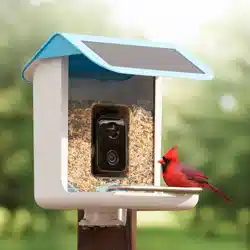
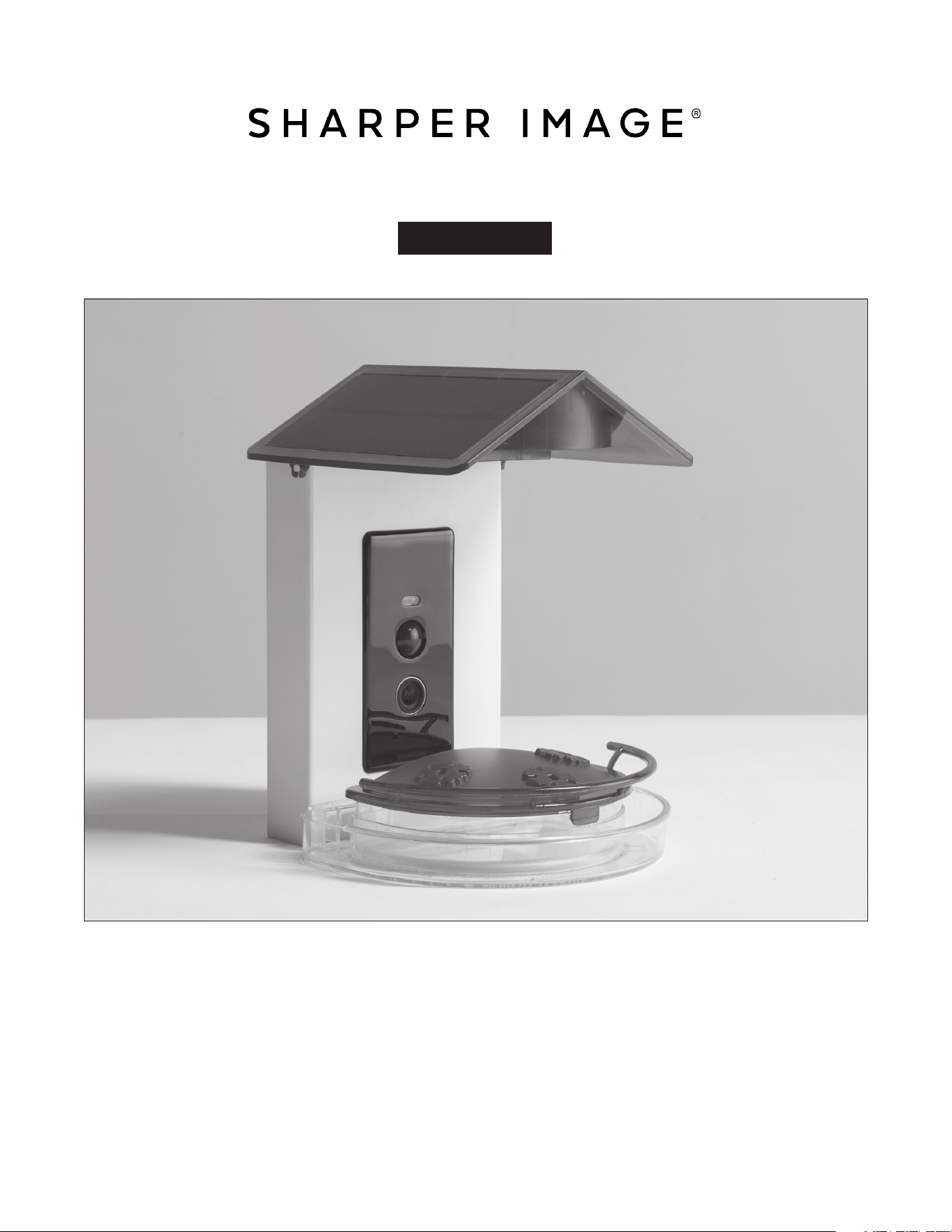
VIDEO CAMERA HUMMINGBIRD FEEDER
User Guide
Thank you for purchasing the Video Camera Hummingbird Feeder. Please take a moment to
read this guide and store it for future reference.
- 2 -
INTRODUCTION
The Video Camera Hummingbird Feeder detects, identifies, and records various hummingbird
species, sending images and video to your smartphone when they land.
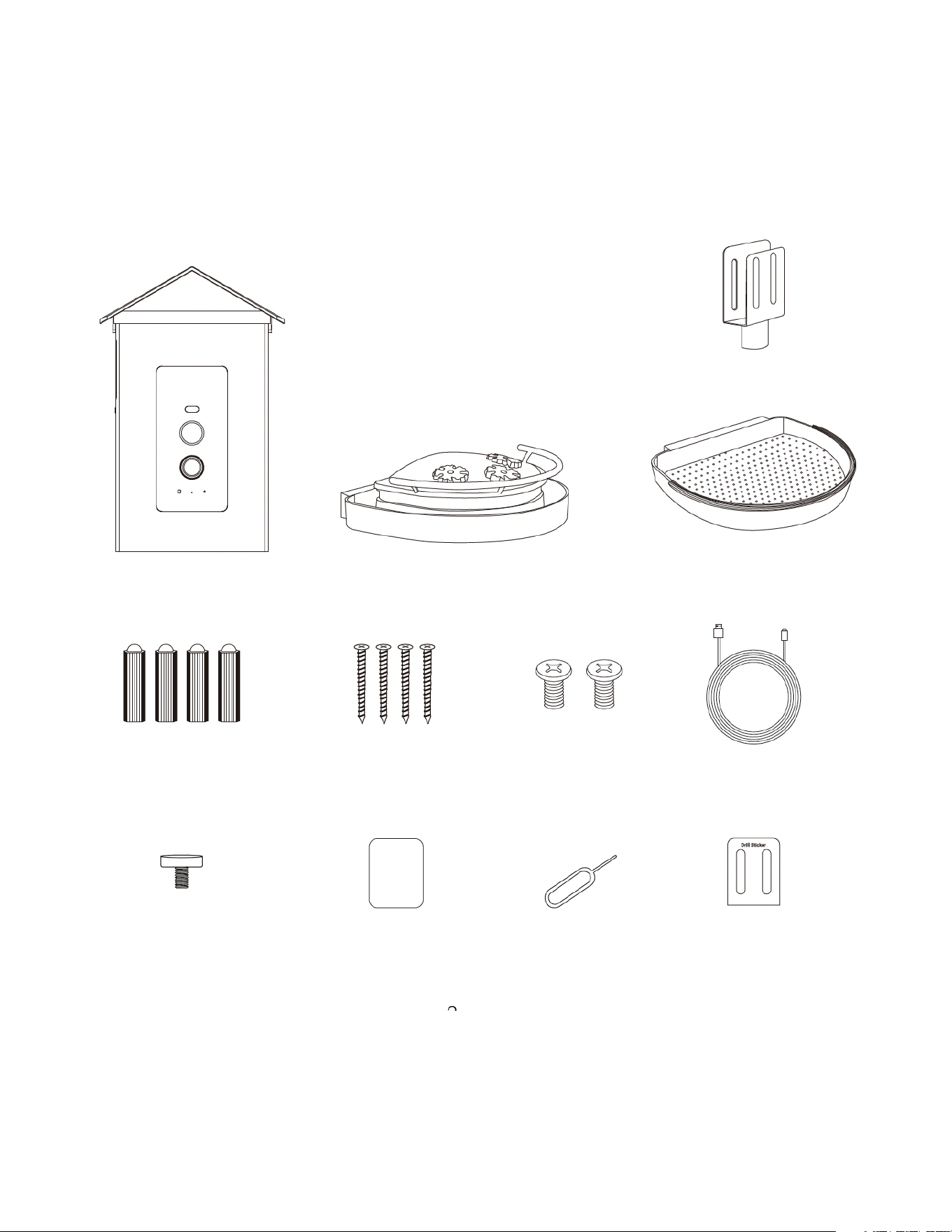
CONTENTS OF PACKAGE
BRACKET
SEED PLATE
NECTAR PLATE
HUMMINGBIRD
FEEDER
GREEN SCREW
SPACERS
SCREWS FOR
BRACKET X4
SCREWS FOR
PERCH X2
CHARGING
CABLE
TRANSPARENT
NUT SCREW
WATERPROOF
RUBBER
RESET
PIN
DRILL
STICKER
- 3 -
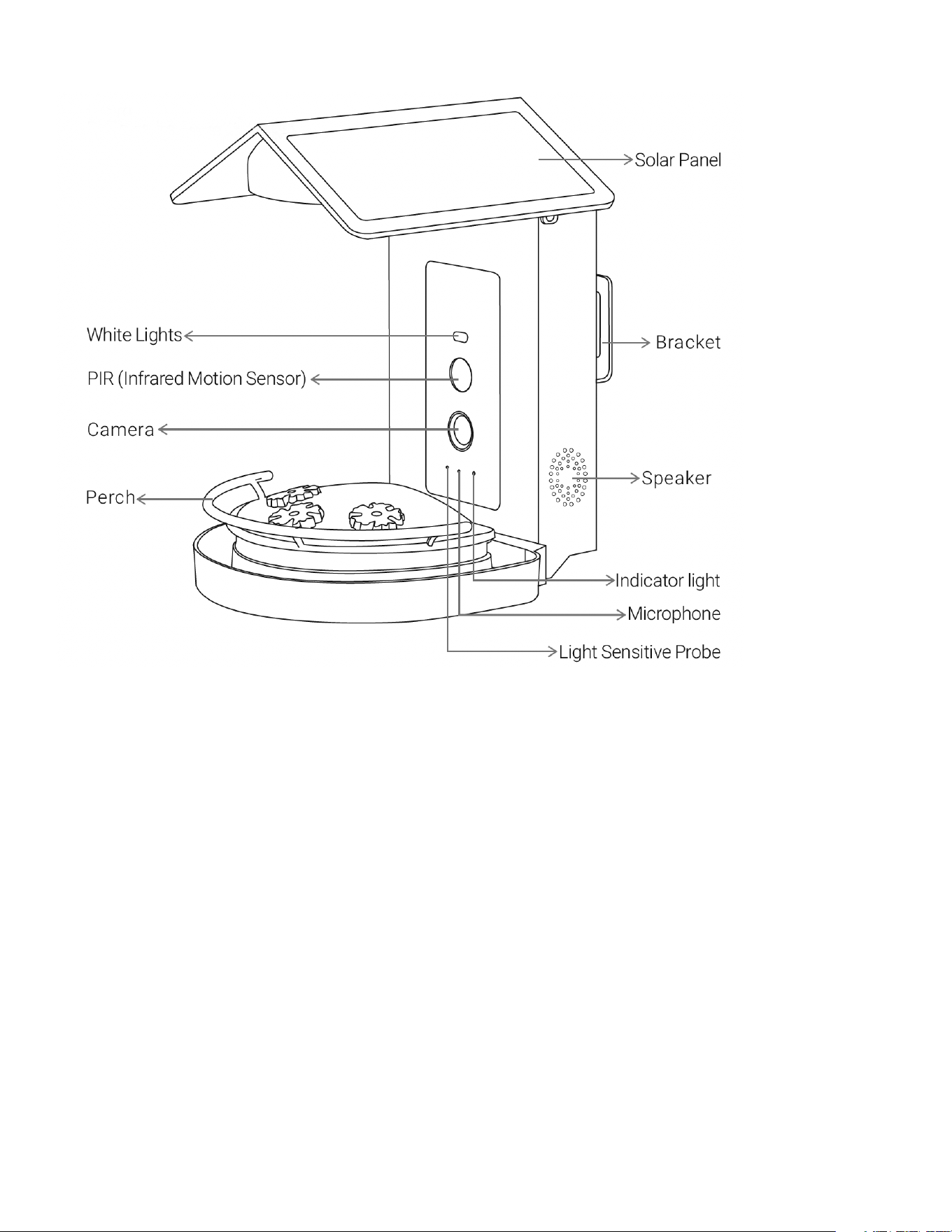
DESCRIPTION OF PARTS
SPECIFICATIONS
Item No. 209472
Charging USB and Solar Energy (USB charging cable included)
Battery 52000 mAh Rechargeable Lithium-Ion Battery
Camera Resolution 2.0 megapixels
Video Resolution 1080P HD Live Stream Video
Operating Temperature -5°F to 120°F (-20.5°C to 48.5°C)
Connectivity Wi-Fi connection @ 2.4GHz
Field of View 130°
Dimensions 7.32’’ L x 5.59’’ W x 9.84’’ H
Power Supply DC 5V/2A
Power Consumption 2W (Max.)
Night Vision Range 8m (Max.)
Anti-Flicker 50HZ / 60HZ
- 4 -
SOLAR PANEL SPECIFICATIONS
IPCE 19%
Working Voltage (Vmp) 5V±5%
Working Current (Imp) 400mA±5%
Open Circuit Voltage (VOC) 7.2V±5%
Short-Circuit Current (ISC) 480mA±5%
LED INDICATOR LIGHT STATUS
Green light on continuously Camera on
Red light fast blinking Pairing mode
Green light fast blinking Network connecting
Green light on continuously Network connected
Reg light slow blinking Abnormal status (may need to be reset)
Yellow light on continuously Firmware updating
Red light on continuously Battery charging
Green light on continuously Battery fully charged
NOTES BEFORE INSTALLATION
1. Keep this device out of reach of children and pets.
2. Make sure the camera has been fully charged (DC 5V/2A). It is recommended to charge the
camera indoors first using the included type-C charging cord. Once set up, you can plug the
type-C charging cord directly into the solar panel for continuous hassle-free charging.
3. Working temperature: -5°F to 120°F
4. Do not expose the camera lens to direct sunlight.
5. The camera is rated IP65 waterproof for use in the rain or snow. However, do not submerge the
camera in water.
PLEASE NOTE:
• This device will not connect to a 5G (5GHz) Wi-Fi frequency. You must have a 2.4GHz router or a
dual-band (2.4GHz + 5G) router and enable both bands. Consult your router instructions for details.
• Strong lights may interfere with scanning the QR code.
• Avoid placing this device behind furniture or near a microwave oven.
• Keep this device within your Wi-Fi network range.
- 5 -
INSTALLATION
BRACKET INSTALLATION
METHOD 1
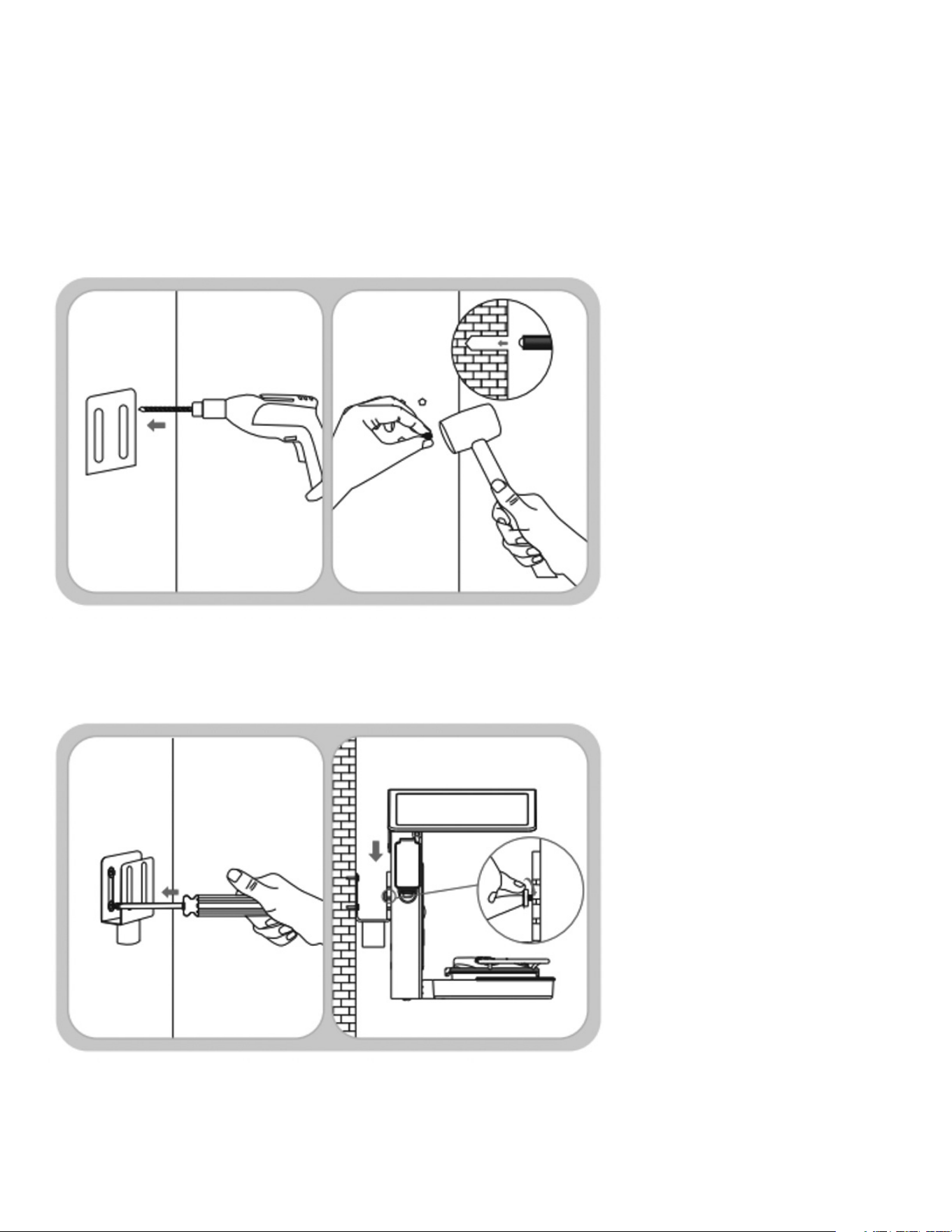
1. Use the provided template to mark the holes onto whatever surface you have chosen for
installation. Use a drill to drill 4 holes as indicated, then insert the provided green plastic wall anchor
screws into the holes.
2. Use the included long screws to mount the bracket as shown. Snap the feeder into the bracket
from the top and then attach it with the transparent nut screw.
- 6 -
BRACKET INSTALLATION
METHOD 2
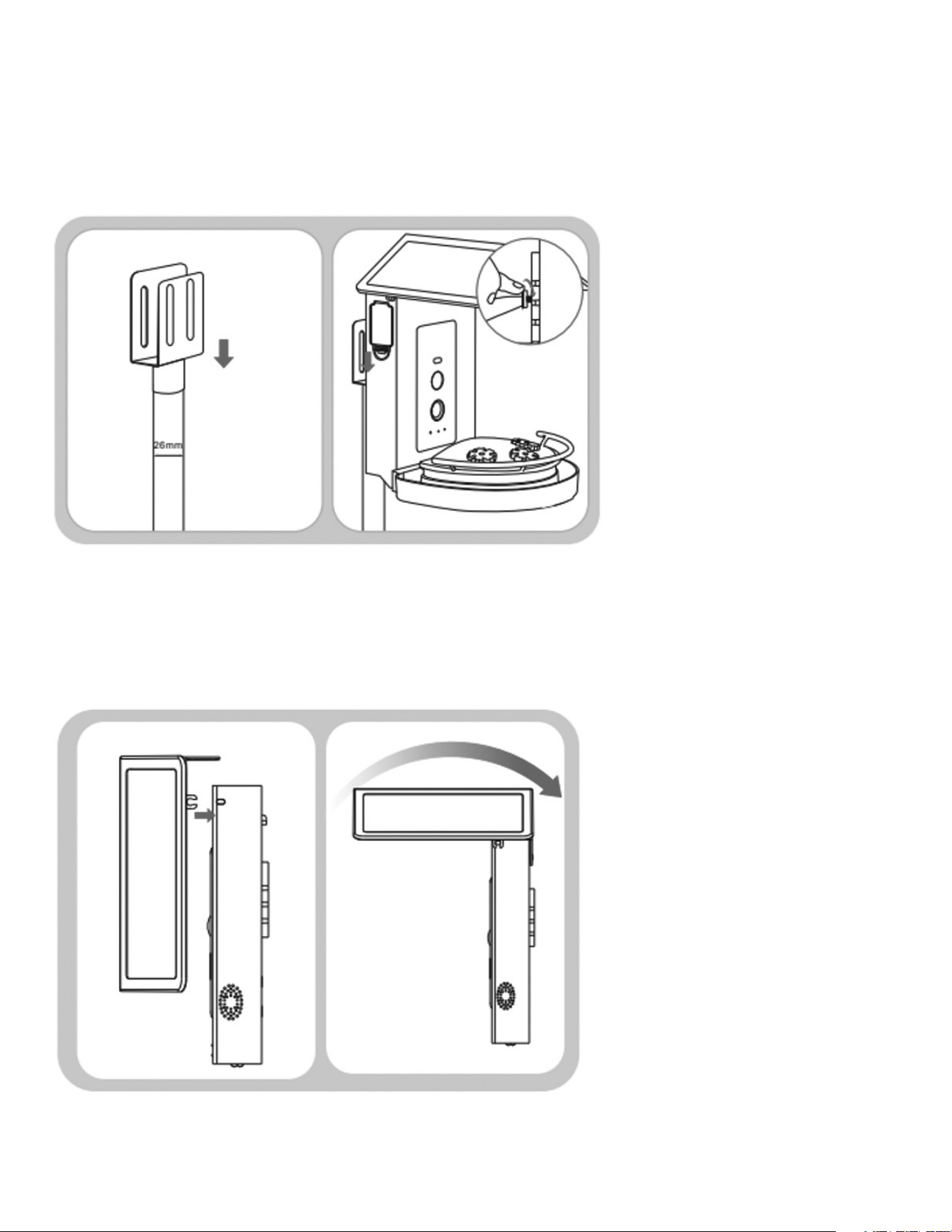
1. Use the provided bracket and attach it to a suitable sized pole. Snap the feeder into the bracket
from the top and then attach it with the transparent nut screw.
TOP COVER INSTALLATION
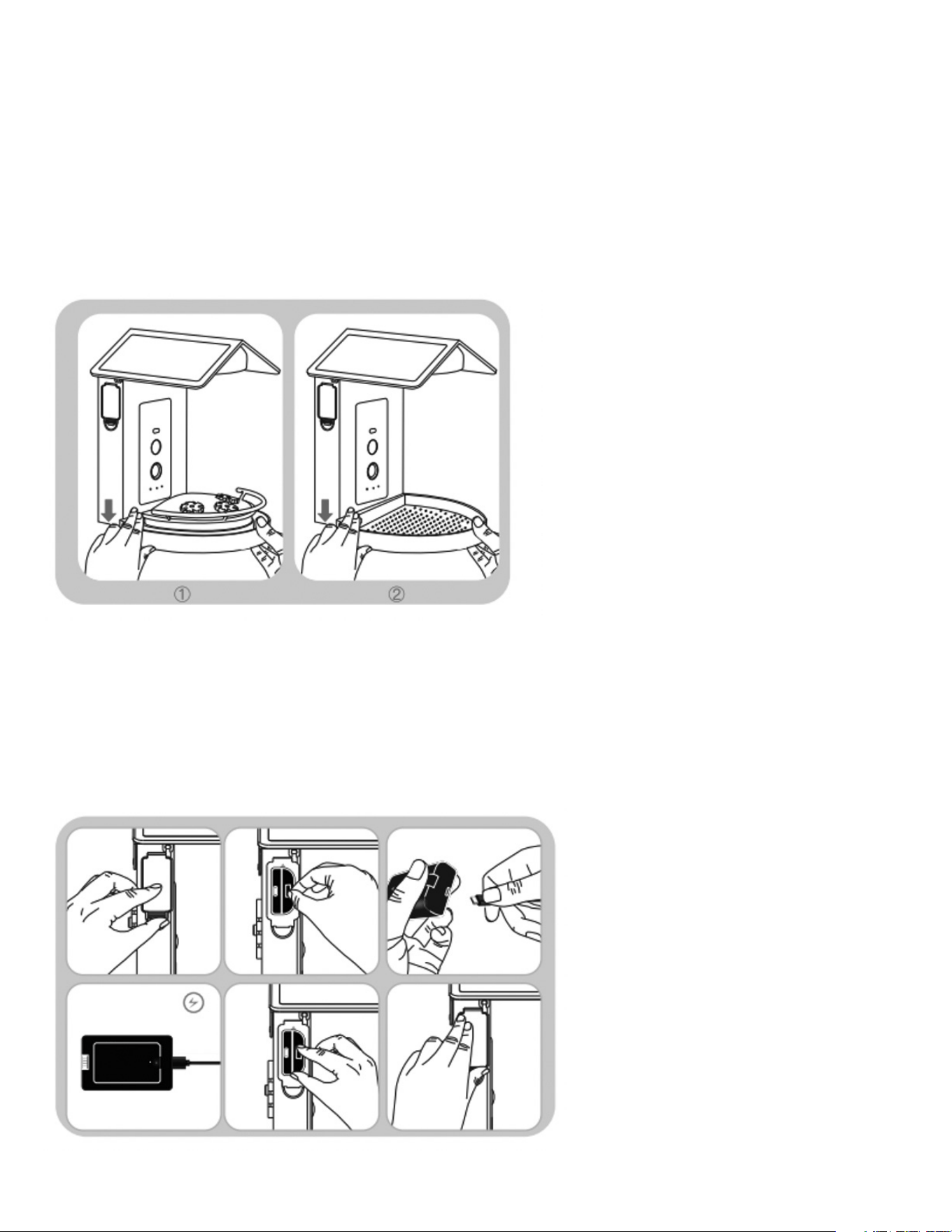
1. Align the top cover with the groove of the feeder and press down, twist upwards and snap the top
cover into position.
- 7 -
FOOD PLATE INSTALLATION
(
2 OPTIONS
)
OPTION 1:
Install the nectar plate onto the feeder from the top and fix. It can be filled with a table sugar and
water mixture or hummingbird nectar. The plate can easily be removed for washing.
OPTION 2:
Install the seed plate onto the feeder from the top and fix. It can be filled with dry food for other
types of birds. The plate can easily be removed for washing.
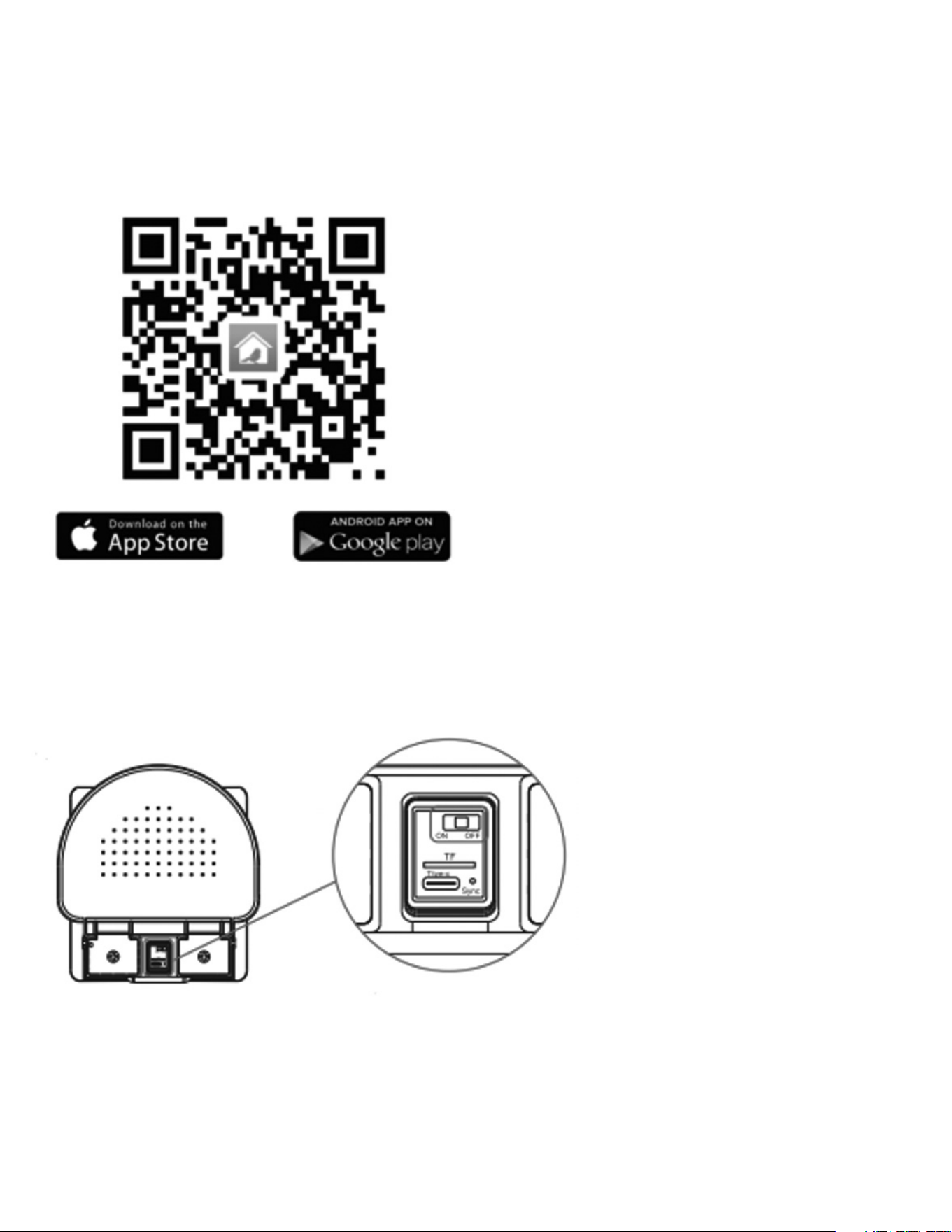
HOW TO CHARGE
1. Remove the battery from the battery slot on the side of the camera.
2. Insert the included type-C charging cable into the battery to charge. While charging the red light
will remain on and will turn green once fully charged.
3. After fully charging the battery, insert the battery pack back into the battery slot on the side of the
camera and close the cover.
- 8 -
DOWNLOADING AND CONNECTING TO THE APP
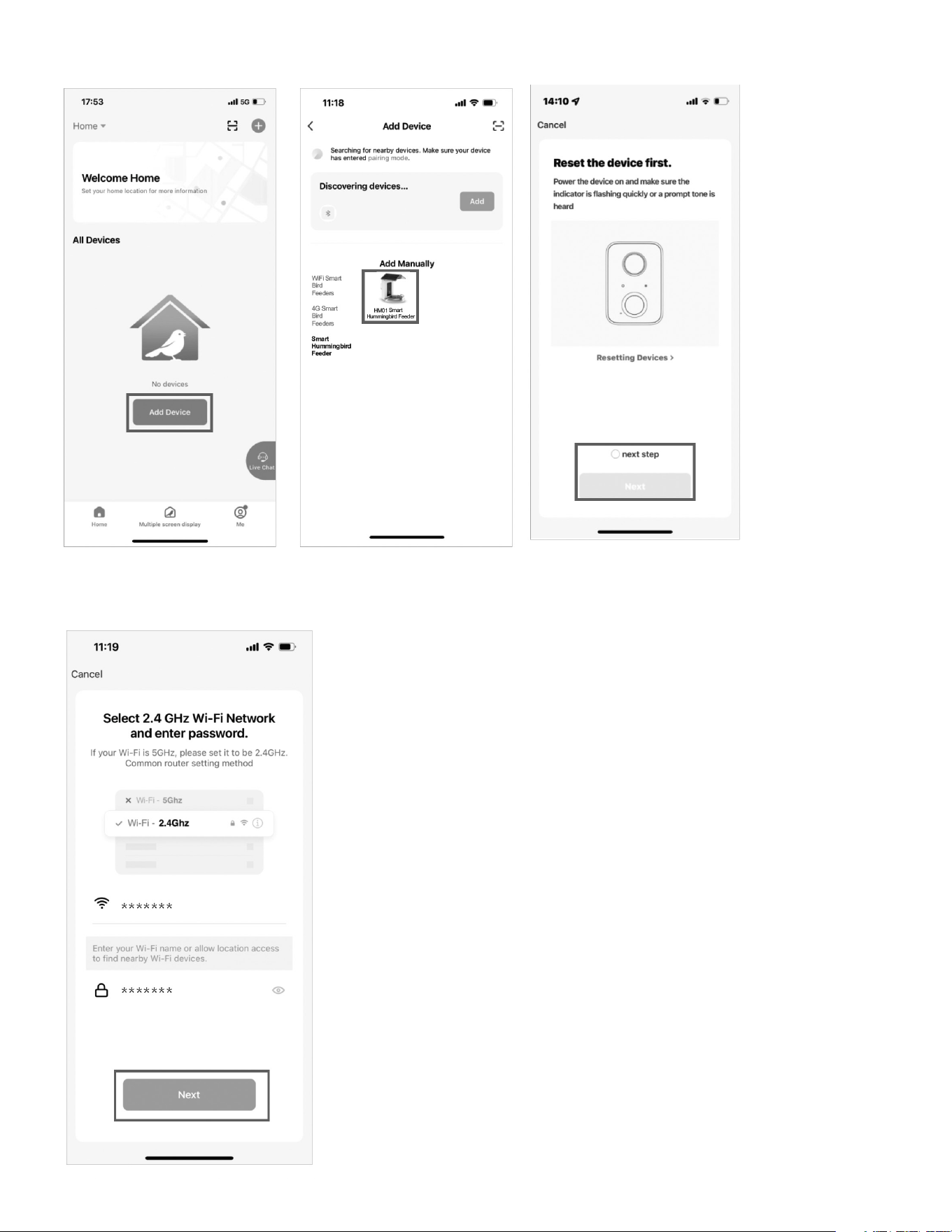
To download the required app, scan the QR code below or search for the “Bird Lover” app in the
iTunes app Store or Google Play. Once downloaded, the app will prompt you to register your device.
Enter your phone number or email address and select the country you live in. You will receive a text
or email with a registration code. You will then be able to create a password.
WI-FI CONNECTION
1. To turn the bird feeder on, move the switch to the on position located on the underside of the
feeder.
- 9 -
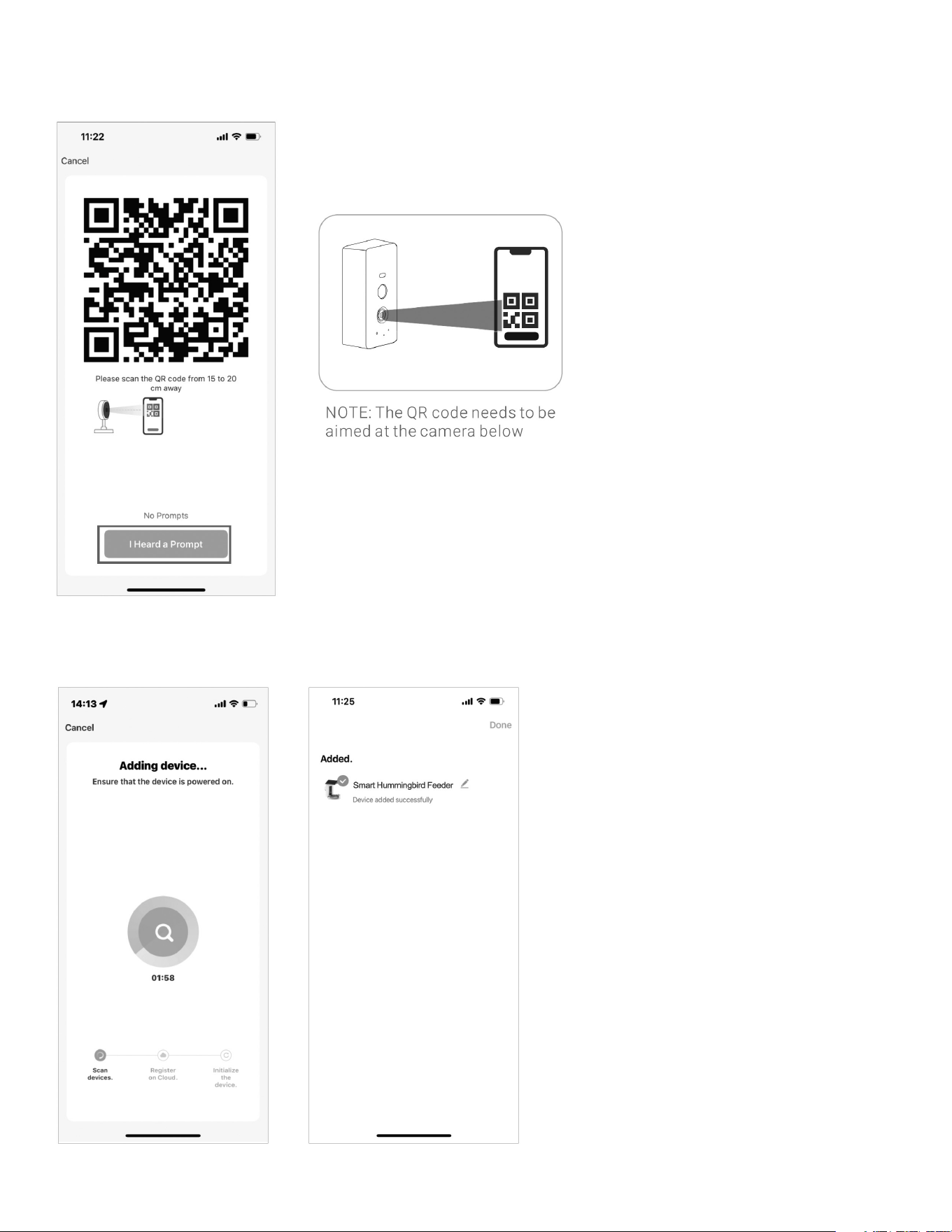
2. Open the app and connect according to the following steps.
3. Find and select your 2.4GHz Wi-Fi network and enter your home’s Wi-Fi password.
- 10 -
4. Scan the QR code displayed on your mobile device with the hummingbird feeder’s camera. Once
you hear the connection prompt select “I Heard Prompt”.
5. Wait for your device to be added. Once the feeder (called Smart hummingbird Feeder in the app)
has been added, click “Done” in the right hand corner of the screen.
- 11 -
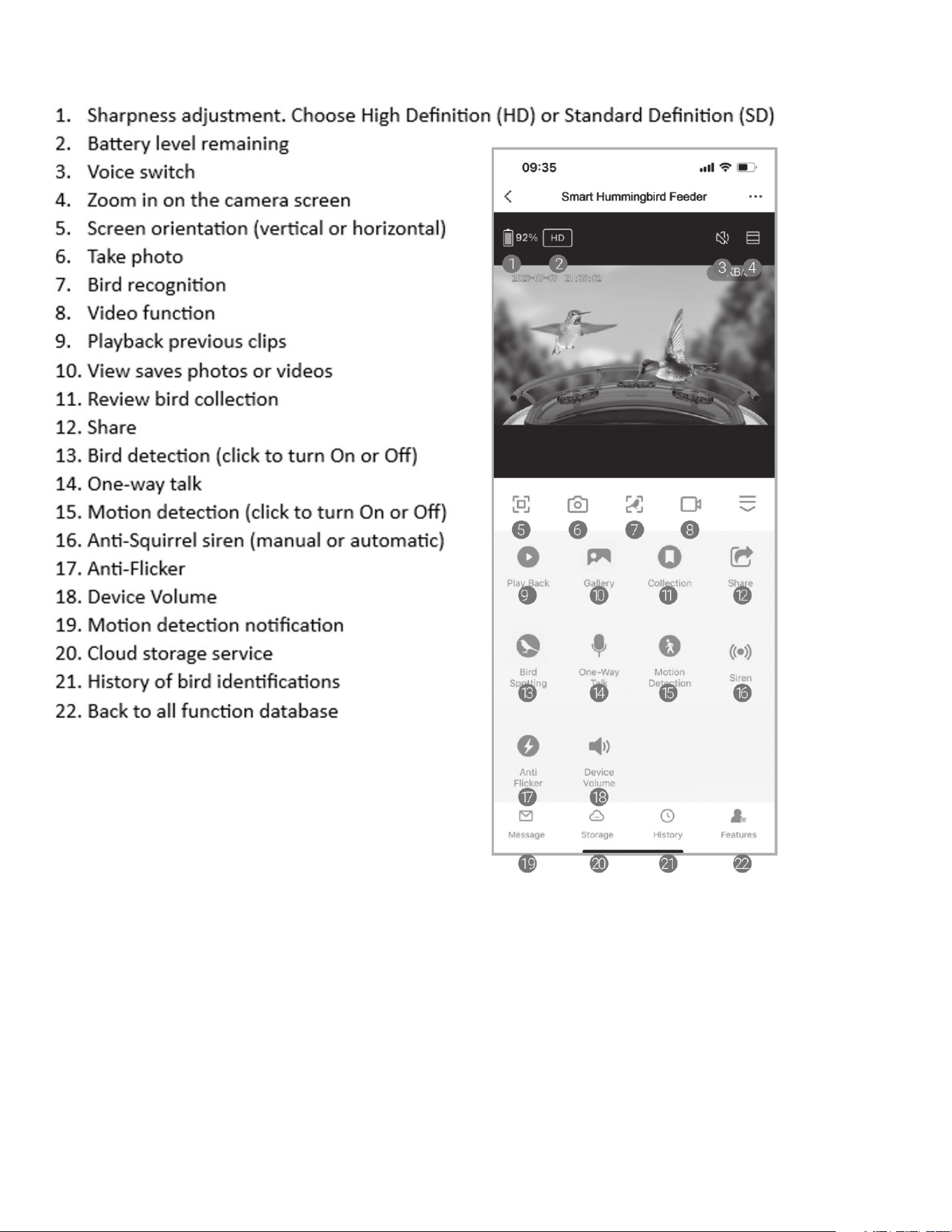
APP INTERFACE

- 12 -
FREQUENTLY ASKED QUESTIONS
1. Q: Does this device need Wi-Fi to operate?
A: Yes, the Video Camera Hummingbird Feeder requires a Wi-Fi- connection to operate. It uses a
2.4GHz Wi-Fi connection to stream videos to your mobile device.
2. Q: Does the device have local storage?
A: Yes, it will have local storage if you insert the included memory card or purchase iCloud service in the
app. You can use either option to store, view and playback your photos and videos.
3. Q: Do I need to create an account to use the app?
A: Yes, you will need to create an account to use the app. An email address or phone number is required
to receive the verification code for registration.
4. Q: What operating systems is the app compatible with?
A: The app is compatible with Apple iOS (10.1 and above) and Android (V5.0 and above) systems.
5. Q: Can more than one person connect to the Video Camera Hummingbird Feeder?
A: No, only one person can directly connect to the bird feeder. However, you can share the device with
other users and set up different accounts. Each account will have different data.
6. Q: How do I share the Video Camera Hummingbird Feeder with other users?
A: Each user will need to install the “Bird Lover” app. When the app is ready, the following methods can
be used to share the device:
When they have an individual account:
• Sharing the device by adding their account names
• Adding new accounts to your family group
When they don’t have an individual account:
• Use your main account and password to log in the same way as you do.
7. Q: What languages are available?
A: The “Bird Lover” app is translated into all major world languages, but the bird identification results
will only be in English or Chinese.
8. Q: How long does the battery last?
A: This will depend on how often the camera is used. The battery can last up to 3 months on standby
mode on a full charge.
9. Q: How is the battery charged?
A: The battery can be charged indoors via the included type-C charging cord. Or, you can connect the
type-C charging cord directly to the solar panel for continuous charging during daylight hours. You
should decide which option is best for you based on your weather conditions.
10. Q: Can the device be voice controlled?
A: Yes, the app supports third-party voice services, including Amazon Alexa and Google Assistant. If you
have one of these devices, you can use voice control.
11. Q: Why are there no saved videos, even after I inserted a memory card or purchased Cloud
storage through the app?
A: Please adjust the recording settings after you insert the memory card or bought Cloud service. Then,
the camera will automatically record videos when motion is detected.
- 13 -
12. Q: Why is “Playback” not available?
A: Confirm that the memory card is installed correctly or the payment action for Cloud storage has
been completed. If the memory card cannot be read, please format it to FAT32 on a computer. Product
supports 4G-128G memory cards. Please also make sure you have enabled “Recording Settings” and
turn on the detection mode.
13. Q: How do I turn the message notifications On or Off?
A: Enter the main page and find “Me” on the left side near the bottom of the screen. Click the “ ”
icon and set the app notification to turn On or Off, “Enable Notifications”. You can also set up a “Do-
Not Disturb” schedule in the same interface. You can turn the “Motion Selection” On or Off in the UI
interface. You can turn the “Detection Alarm Settings” On and Off in the Settings interface.
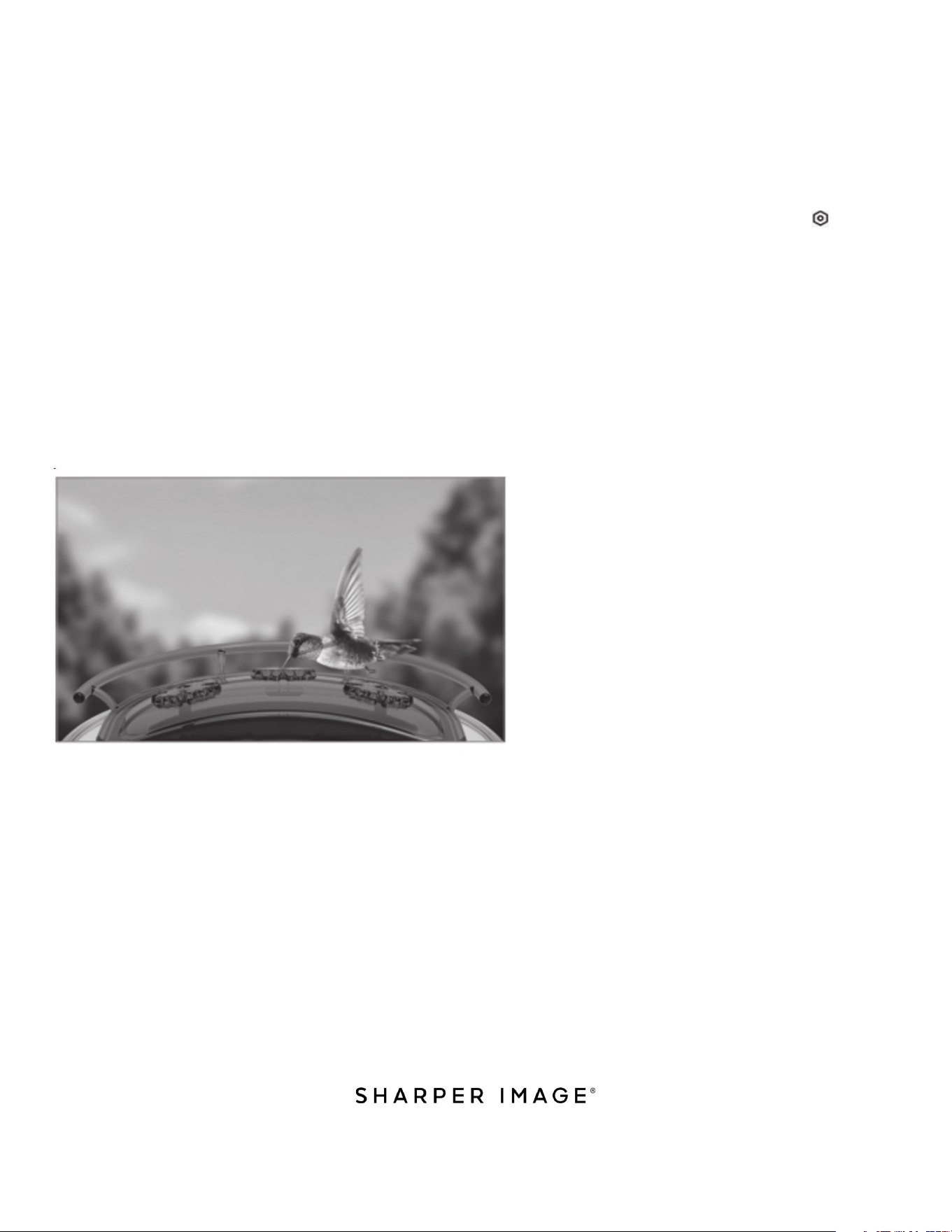
14. Q: Why did my device misidentify a bird?
A: The result accuracy depends on the angle and clarity of the bird pictures. To ensure you get a correct
result, please ensure the picture is clear and the identifying features (bird head, tail, wings, or pattern
on feathers) are not covered by obstacles. The bird should occupy the main position of the picture.
If there are two or more bird species in one picture, the identified result will be the one in the main
position.
OPTIMUM ANGLE FOR ACCURATE BIRD IDENTIFICATION
WARRANTY AND CUSTOMER SERVICE
This item from SharperImage.com includes a 1-year limited replacement warranty. If you have any
questions not covered in this guide, please call our Customer Service department at 1 (877) 210-3449.
Customer Service agents are available Monday through Friday, 9:00 a.m. to 6:00 p.m. ET.
The SHARPER IMAGE® name and logo are registered trademarks.
©Sharper Image. All Rights Reserved.