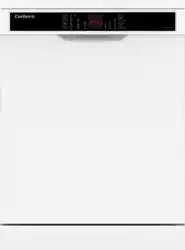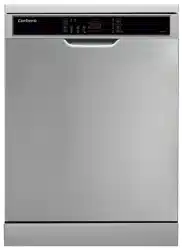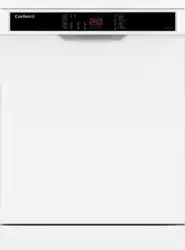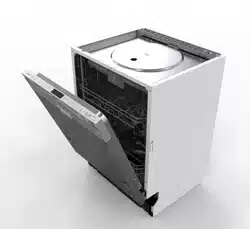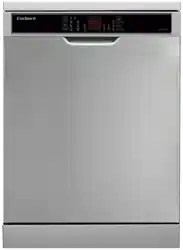
Dishwasher / User ManualEN
CLVV8622INVX / CLVV8622INVW
Thank you for choosing this product.
This user manual contains important information on safety and instructions intended to
assist you in the operation and maintenance of your appliance.
Please take the time to read this user manual before using your appliance and keep this
book for future reference.
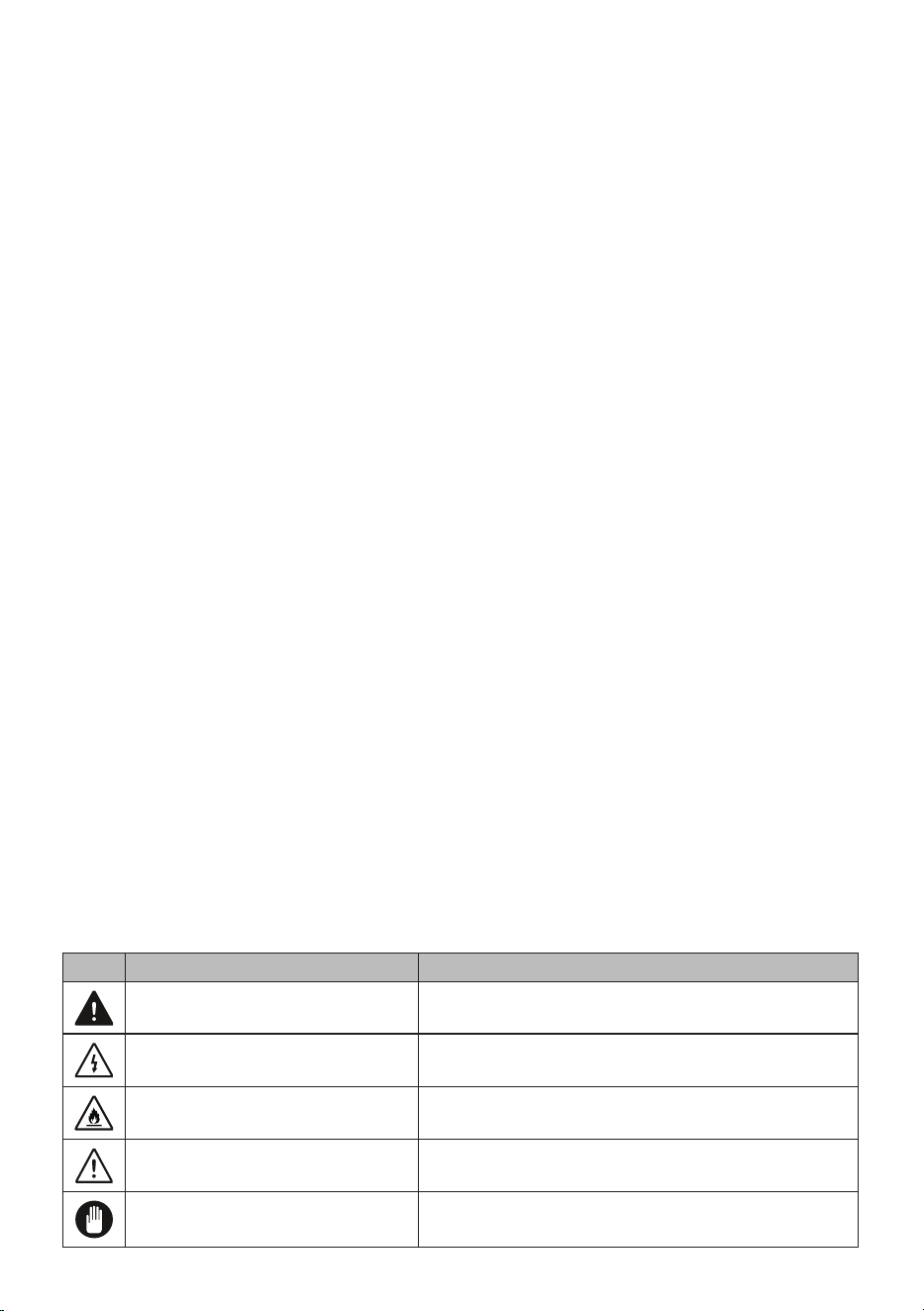
Icon Type Meaning
WARNING Serious injury or death risk
RISK OF ELECTRIC SHOCK Dangerous voltage risk
FIRE Warning; Risk of re / ammable materials
CAUTION Injury or property damage risk
IMPORTANT Operating the system correctly

CONTENTS
1 SAFETY INSTRUCTIONS .............................................................................. 4
1.1 General Safety Warnings ..............................................................................................4
1.2 Inallation Warnings
.....................................................................................................5
1.3 During Usage..................................................................................................................6
2 INSTALLATION ................................................................................................ 9
2.1 Machine Positioning .......................................................................................................9
2.2 Water Connection
..........................................................................................................9
2.3 Water Inlet Hose
............................................................................................................9
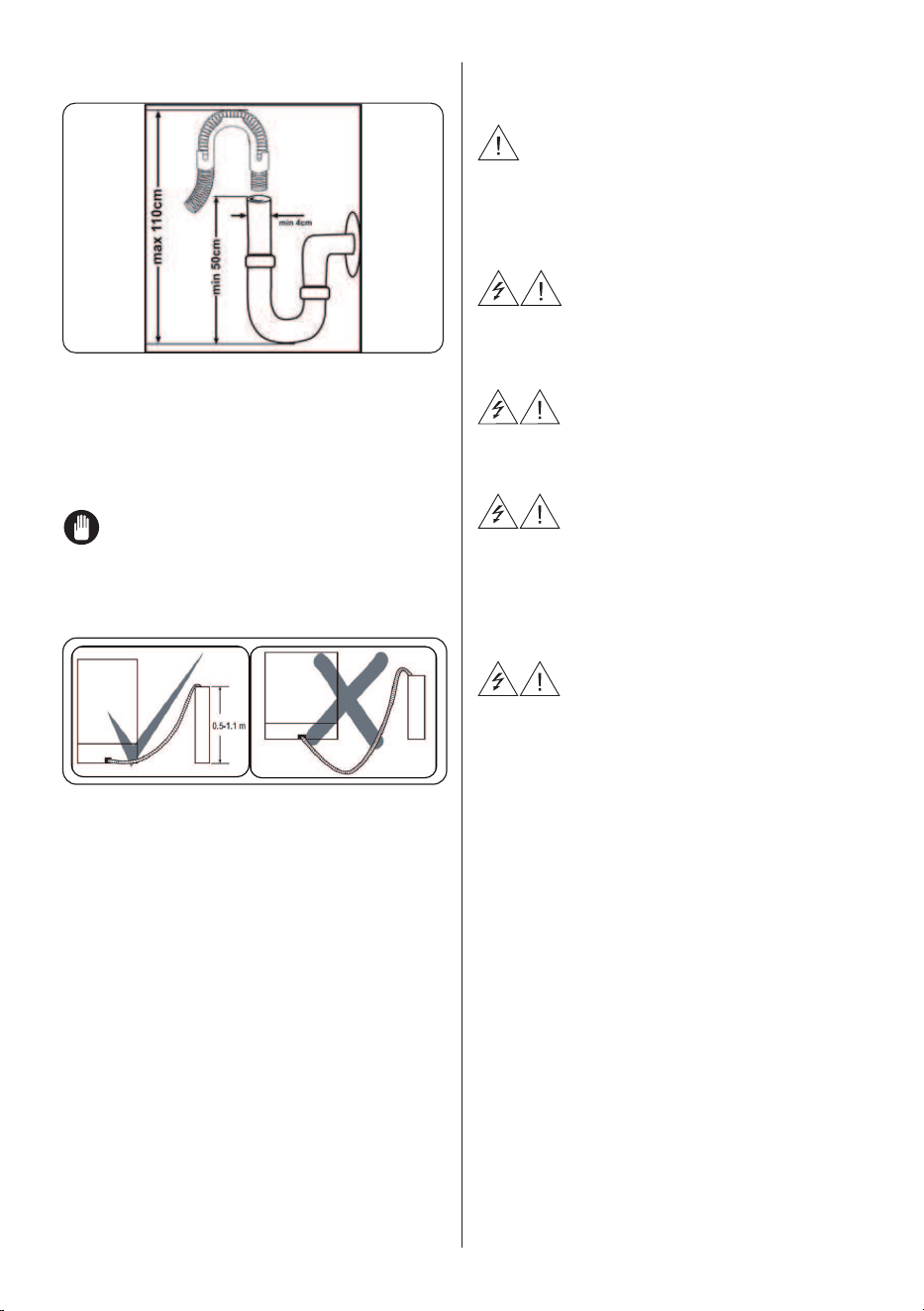
2.4 Drain Hose (Model Depending)
....................................................................................10
2.5 Electrical Connection
...................................................................................................10
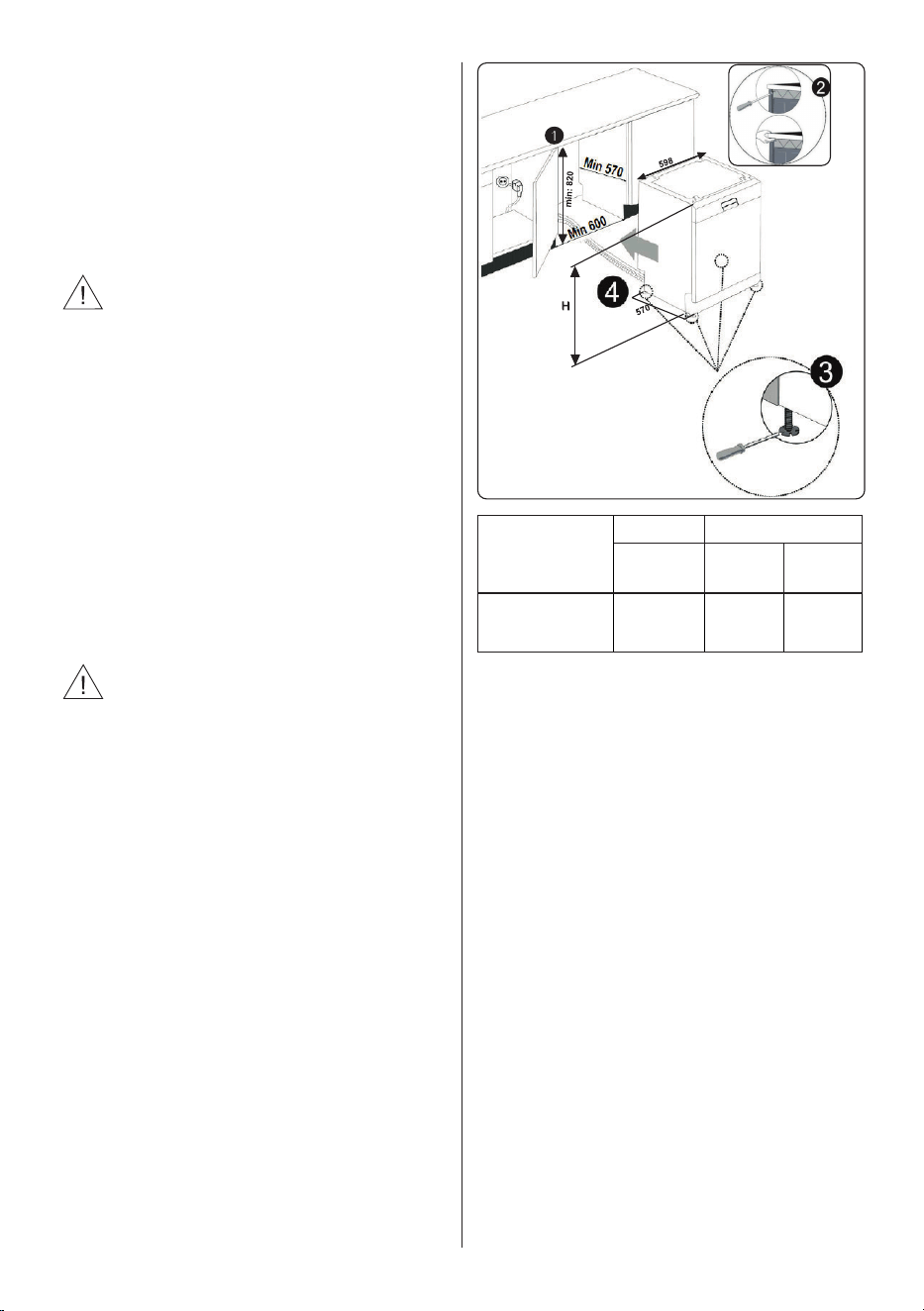
2.6 Fitting The Machine Undercounter
...............................................................................11
3 TECHNICAL SPECIFICATIONS ................................................................... 12
3.1 General Sppearance ....................................................................................................12
3.2 Technical Specications
...............................................................................................12
4 BEFORE USING THE APPLIANCE ............................................................. 14
4.1 Preparing Your Dishwasher For Fir Use ....................................................................14
4.2 Salt Usage (IF AVAILABLE)
..........................................................................................14
4.3 Fill The Salt (IF AVAILABLE)
........................................................................................14
4.4 Te Strip
.......................................................................................................................15
4.5 Water Hardness Table
..................................................................................................15
4.6 Water Softener Syem
.................................................................................................15
4.7 Setting
..........................................................................................................................15
4.8 Detergent Usage
..........................................................................................................16
4.9 Filling The Detergent
....................................................................................................16
4.10 Using Combined Detergents
......................................................................................16
4.11 Rinse-aid Usage
.........................................................................................................16
4.12 Filling The Rinse-aid And Setting
...............................................................................16
5 LOADING YOUR DISHWASHER .................................................................. 18
5.1 Recommendations .......................................................................................................18
5.2 Alternative Basket Loads
..............................................................................................21
6 PROGRAMME TABLE ................................................................................... 22
7 THE CONTROL PANEL
................................................................................. 24
7.1 Changing a Programme ..............................................................................................25
7.2 Cancelling a Programme
..............................................................................................26
7.3 Switching The Machine O
...........................................................................................26
8 CLEANING AND MAINTENANCE ................................................................ 28
8.1 Filters ............................................................................................................................28
8.2 Spray Arms
...................................................................................................................28
8.3 Drain Pump...................................................................................................................29
9 TROUBLESHOOTING .................................................................................. 30

EN - 4
1 SAFETY INSTRUCTIONS
1.1 General Safety Warnings
• Read these instructions carefully before using your
appliance and keep this manual for future reference.
Please check the packaging of your machine
before installation and the outer surface of the
machine once the packaging has been removed. Do
not operate the machine if it appears damaged or if
the packaging has been opened.
• Packaging materials protect your machine from any
damage that might occur during transportation. The
packaging materials are environmentally friendly
as they are recyclable. Use of recycled material
reduces raw material consumption and decreases
waste production.
This appliance can be used by children aged from
8 years and above, and by persons with reduced
physical, sensory or mental capabilities or lack of
experience and knowledge if they have been given
supervision or instruction concerning the use of the
appliance in a safe way and understand hazards
involved. Children should not be allowed to play with
the appliance.
Remove packaging and keep it out of reach of
children.
Keep children away from detergents and rinse
aids.
EN - 5
There may be some residue left in the machine
after washing. Keep children away from the machine
when it is open.
1.2 Installation Warnings
• Choose a suitable and safe place to install your
machine.
• Only original spare parts should be used with the
machine.
Unplug the machine before installation.
Your machine must only be installed by an
authorised service agent. Installation by anyone other
than an authorised agent may cause your warranty to
be void.
Check that the indoor electrical fuse system is
connected in line with safety regulations.
All electrical connections must match the values on
the plate.
Ensure the machine does not stand on the
electrical supply cable.
Never use an extension cord or a multiple socket
connection.
The plug should be accessible after the machine is
installed.
• After installation, run your machine unloaded for the
rst time.
The machine must not be plugged in during
positioning.
EN - 6
Always use the coated plug supplied with your
machine.
If the electrical cable is damaged, it should only
be replaced by a qualied electrician.
• Connect the hose directly to the water inlet tap. The
pressure supplied by the tap should be a minimum
of 0.03 MPa and a maximum of 1 MPa. If the
pressure exceeds 1 MPa, a pressure relief valve
must be tted between the connection.
1.3 During Usage
• This machine is for domestic use only; do not use
it for other purposes. Commercial use will void the
guarantee.
Do not stand, sit or place loads on the open door
the dishwasher.
Only use detergents and rinse aids produced
specically for dishwashers. Our company is not
responsible for any damage that may occur due to
misuse.
Do not drink water from the machine.
Due to the danger of explosion, do not place any
chemical dissolving agents into the machine’s washing
section.
• Check the heat-resistance of plastic items before
washing them in the machine.
Only put items in the machine which are suitable for
dishwashing, and take care not to overll the baskets.
EN - 7
Do not open the door while the machine is in
operation, hot water may spill out. Safety devices
ensure the machine stops if the door is opened.
The machine door should not be left open. It may
cause accidents.
Place knives and other sharp objects in the cutlery
basket in a blade-down position.
For models with the automatic door-opening
system, when the EnergySave option is active, the
door will open at the end of a program. To prevent
damage to your dishwasher, do not attempt to close
the door for one minute after it has opened. For
eective drying, keep the door open for 30 minutes
after a programme has ended. Do not stand in front of
the door after the auto-open signal sounds.
In the case of a malfunction, repair should only
be performed by an authorised service company,
otherwise the warranty will be void.
Before repair work, the machine should be
disconnected from the mains. Do not pull the cable to
unplug the machine. Switch o the water tap.
Operation at a low voltage will cause a decline in
performance levels.
For safety, disconnect the plug once a program has
nished.
To avoid an electric shock, do not unplug the
machine with wet hands.

EN - 8
Pull the plug to disconnect the machine from the
mains, never pull on the cord.
EN - 9
2 INSTALLATION
2.1 Machine Positioning
When positioning the machine, place it in
an area where dishes can be easily loaded
and unloaded. Do not put the machine in
an area where the ambient temperature
falls below 0°C.
Read all warnings located on the packaging
before removing the packaging and
positioning the machine.
Place the machine close to a water tap
and drain. Take into consideration that the
connections will not be altered once the
machine is in position.
Do not hold the machine by its door or
panel.
Leave an adequate distance around the
machine to allow ease of movement when
cleaning.
Ensure the water inlet and outlet
hoses are not squeezed or trapped
and that the machine does not stand on the
electrical cable while positioning.
Adjust the feet so the machine is level and
balanced. The machine should be placed
on at ground otherwise it will be unstable
and the door of the machine will not close
properly.
2.2 Water Connection
We recommend tting a lter to your water
inlet supply in order to prevent damage to
your machine due to contamination (sand,
rust, etc.) from indoor plumbing. This will
also help prevent yellowing and deposit
formation after washing.
Note printing on the water inlet hose!
If models are marked with 25°, the water
temperature may be max. 25 °C (cold
water).
For all other models:
Cold water preferred; hot water max.
temperature 60 °C.
2.3 Water Inlet Hose
WARNING: Use the new water inlet
hose supplied with your machine, do not
use an old machine’s hose.
WARNING: Run water through the
new hose before connecting.
WARNING: Connect the hose
directly to the water inlet tap. The pressure
supplied by the tap should be a minimum
of 0.03 MPa and a maximum of 1 MPa. If
the pressure exceeds 1 MPa, a pressure
relief valve must be tted between the
connection.
WARNING: After the connections are
made, turn the tap on fully and check
for water leaks. Always turn o the water
inlet tap after a wash program has nished.
An Aquastop water spout is available
with some models. Do not damage it
or allow it to become kinked or twisted.
EN - 10
2.4 Drain Hose (Model Depending)
Connect the water drain hose directly to
water drain hole or to the sink outlet spigot.
This connection should be minimum 50
cm and maximum 110 cm from oor that
dishwasher is placed.
IMPORTANT: Items will not wash
properly if a drain hose longer than 4 m
is used.
2.5 Electrical Connection
WARNING: Your machine is set to
operate at 220-240 V. If the mains voltage
supply to your machine is 110 V, connect
a transformer of 110/220 V and 3000 W
between the electrical connection.
Connect the product to a
grounded outlet protected by a fuse
complying with the values in the
“Technical Specications” table”.
The earthed plug of the
machine must be connected
to an earthed outlet supplied by
suitable voltage and current.
In the absence of earthing
installation, an authorised
electrician should carry out an earthing
installation. In the case of use without
earthing installed, we will not be
responsible for any loss of use that may
occur.
The plug on this appliance
may incorporate 13A fuse depending on
the target country. (For Example UK,
Saudi Arabia)
EN - 11
2.6 Fitting The Machine Undercounter
If you wish to t your machine
undercounter, there must be sucient
space to do so and the wiring-plumbing
must be suitable to do so (1). If the space
under the countertop is suitable for tting
your machine, remove the worktop as
shown in the illustration (2).
WARNING: The countertop, which
the machine will be placed under, must be
stable in order to prevent imbalance.
The top panel of the dishwasher must
be removed to t the machine under the
countertop.
To remove the top panel, remove the
screws that hold it on, located at the rear
of the machine. Then, push the panel 1 cm
from the front towards the rear and lift it.
Adjust the machine feet according to the
slope of the oor (3).
Fit your machine by pushing it under the
counter taking care not to crush or bend the
hoses (4).
WARNING: After removing the top
panel of your dishwasher, the machine
should be placed in a space of the
dimensions shown in the gure below.
H1: min A
H2: min B1
H3: min B2
60 cm
A B
All
Products
B
1
B
2
Product’s Height
(±2 mm) 820 mm 830 mm 835 mm
A: If there is no felt on the top of the
product; you should take into account this
product’s height.
B1: If there is felt on the top of the product
with 2nd basket; you should take into
account this product’s height.
B2: If there is felt on the top of the product
with 3rd basket; you should take into
account this product’s height.
EN - 12
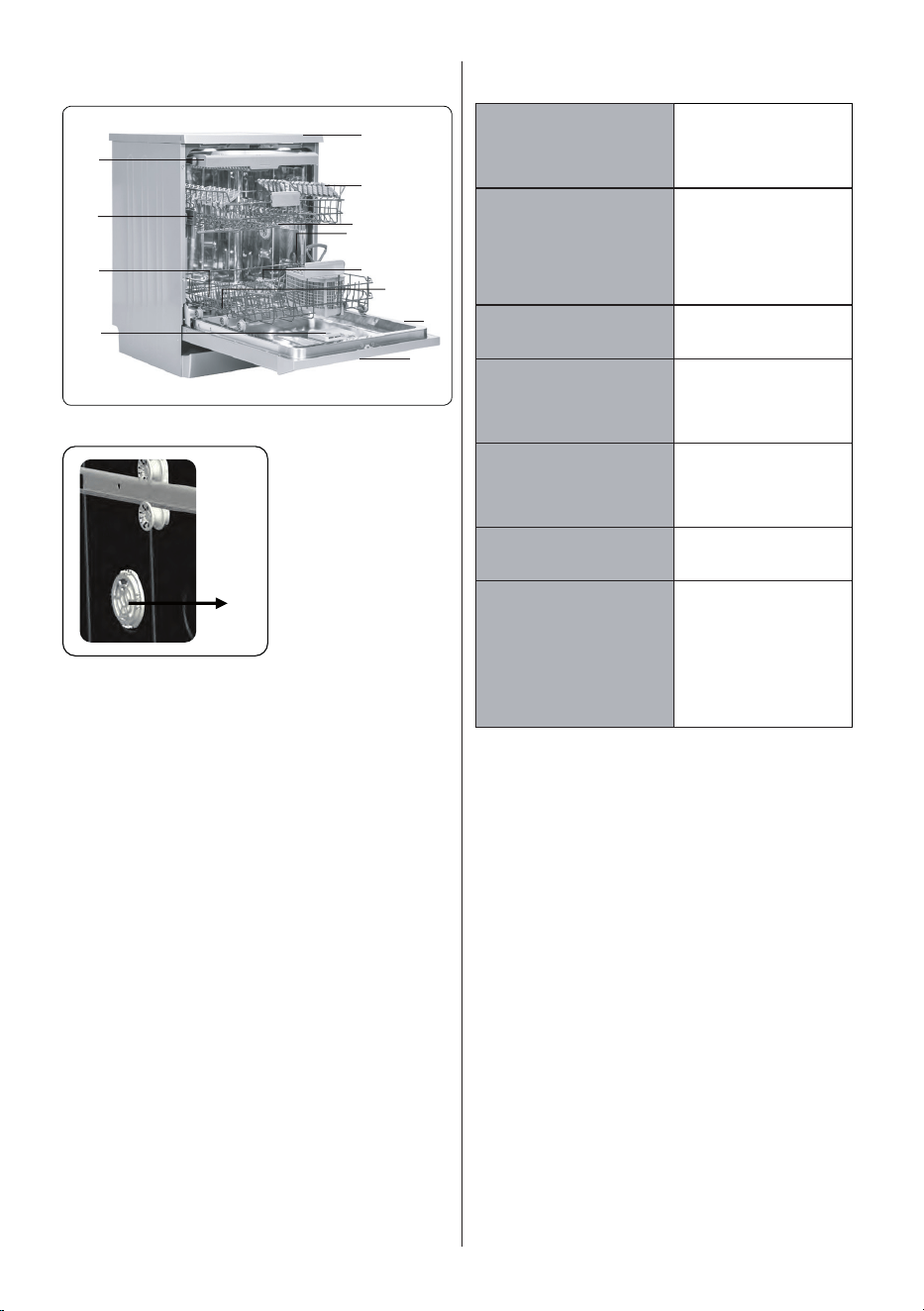
3 TECHNICAL SPECIFICATIONS
1
2
4
3
5
6
7
8
9
10
11
12
13
3.1 General Sppearance
1. Worktop
2. Upper basket with racks
3. Upper spray arm
4. Lower basket
5. Lower spray arm
6. Filters
7. Rating plate
8. Control panel
9. Detergent and rinse-aid dispenser
10. Cutlery basket
11. Salt dispenser
12. Upper basket track latch
13. Turbo Drying Unit: This system
enhances the drying performance of
your dishes.
3.2 Technical Specications
Capacity 15 place settings
Dimensions
Height
Width
Depth
850(mm)
598(mm)
598(mm)
Net weight 48,5 kg
Operating voltage /
frequency
220-240V 50 Hz
Total current 10(A)
Total power 1900(W)
Water supply
pressure
Maximum: 1
(Mpa) Minimum:
0.03 (Mpa)
The system has an heater to heat the
air pumped into the dishes with a
special fan. Turbo drying isn’t active in
mini 14 and quick 30 programs.
EN - 13
RECYCLING
• Some machine components and
packaging consist of recyclable
materials.
• Plastics are marked with the
international abbreviations:(>PE<,
>PP<, etc. )
• The cardboard parts consist of recycled
paper. They can be put into waste
paper containers for recycling.
• Material unsuitable for domestic waste
must be disposed of at recycling
centres.
• Contact a relevant recycling centre to
obtain information about disposal of
different materials.
PACKAGING AND THE ENVIRONMENT
• Packaging materials protect your
machine from damage that may occur
during transportation. The packaging
materials are environmentally friendly
as they are recyclable. The use of
recycled material reduces raw material
consumption and therefore decreases
waste production.
CE Declaration of Conformity
We declare that our products meet the
applicable European Directives, Decisions
and Regulations and the requirements
listed in the standards referenced.
Disposal of Your Old Machine
The symbol on the product or
on its packaging indicates that
this product may not be treated
as household waste. Instead, it
shall be taken to the applicable
collection point for the recycling
of electrical and electronic
equipment. By ensuring
this product is disposed of correctly,
you will help prevent potential negative
consequences for the environment and
human health, which could otherwise be
caused by inappropriate waste handling of
this product. For more detailed information
about recycling this product, please contact
your local city office, your household waste
disposal service or the shop where the
product was purchased.
EN - 14
4 BEFORE USING THE
APPLIANCE
4.1 Preparing Your Dishwasher For First
Use
• Make sure the electricity and supply
water specications match the values
indicated in the installation instructions
for the machine.
• Remove all packaging material inside the
machine.
• Set the water softener level.
• Fill the rinse aid compartment..
4.2 Salt Usage (IF AVAILABLE)
For a good washing function, the
dishwasher needs soft, i.e. less calcareous
water. Otherwise, White lime residues
will remain on the dishes and the interior
equipment. This will negatively aect your
machine’s washing, drying and shining
performance. When water ows through
the softener system, the ions forming the
hardness are removed from the water and
the water reaches the softness required to
obtain the best washing result. Depending
on the level of hardness of the inowing
water, these ions that harden the water
accumulate rapidly inside the softener
system. Therefore, the softener system
has to be refreshed so that it operates with
the same performance also during the next
wash. For this purpose, dishwasher salt is
used.
Machine can only be used by special
dishwasher salt to soften the water. Do not
use any small grained or powdered type
of salts which can easily soluble. Using
any other type of salt can damage your
machine.
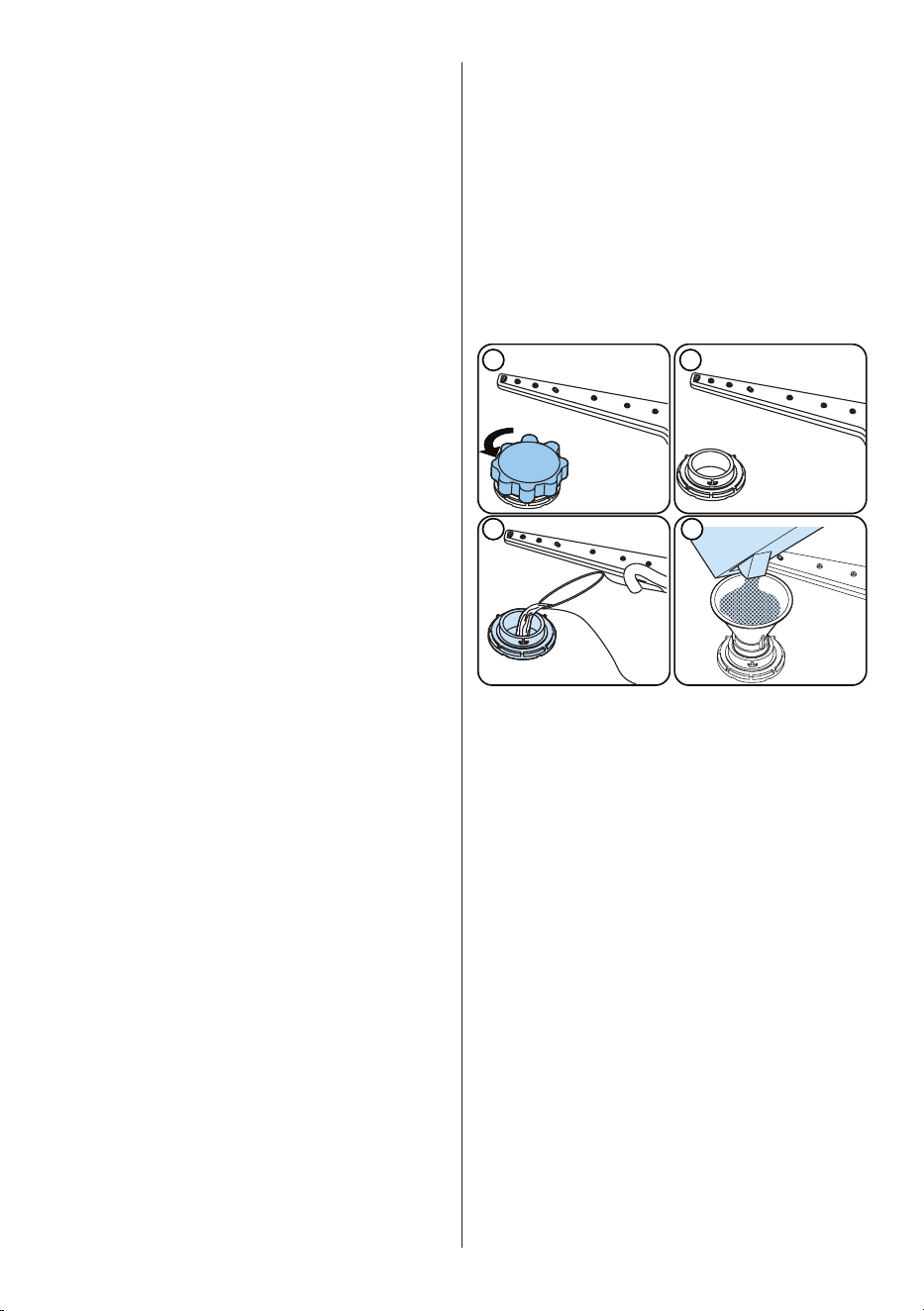
4.3 Fill The Salt (IF AVAILABLE)
To add softener salt, open the salt
compartment cap by turning it counter
clockwise. (1) (2) At rst use, ll the
compartment with 1 kg salt and water (3)
until it is almost overowing. If available,
using a funnel (4) will make lling easier.
Replace the cap and close it. After every
20-30 Cycles add salt into your machine
until it lls up (approx. 1 kg).
3 4
1 2
SALT
Only add water to the salt compartment
on rst use.
Use softener salt specically produced for
use in dishwashers.
When you start your dishwasher, the salt
compartment is lled with water, therefore
put the softener salt in prior to starting your
machine.
If the softener salt has overowed and you
do not start the machine immediately, run
a short washing program to protect your
machine against corrosion.
EN - 15
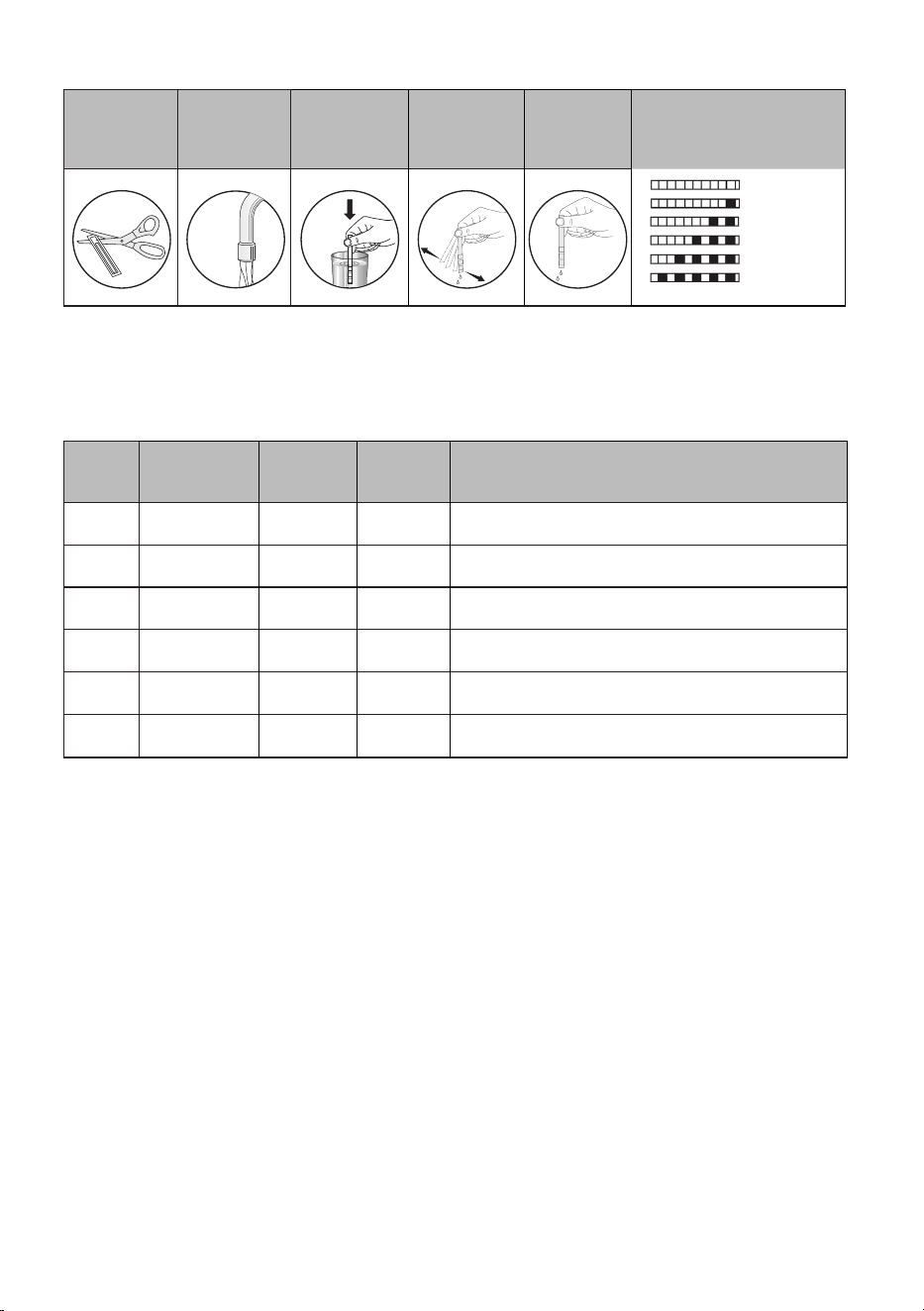
4.4 Test Strip
Run water
through the
tap (1min.)
Keep the
strip in the
water (1sec)
Shake the
strip.
Wait
(1min.)
Set the hardness level of
your machine.
1
2
3
4
5
6
1
munite
1
second
1
munite
NOTE: The level is set to 3 as default. If the water is well water or has a hardness level
above 90 dF, we recommend that you use lter and renement devices.
4.5 Water Hardness Table
Level German dH
French
dF
British
dE
Indicator
1 0-5 0-9 0-6 L1 is seen on the display.
2 6-11 10-20 7-14 L2 is seen on the display.
3 12-17 21-30 15-21 L3 is seen on the display.
4 18-22 31-40 22-28 L4 is seen on the display.
5 23-31 41-55 29-39 L5 is seen on the display.
6 32-50 56-90 40-63 L6 is seen on the display.
4.6 Water Softener System
The dishwasher is equipped with a water softener which reduces the hardness in the
mains water supply. To nd out the hardness level of your tap water, contact your water
company or use the test strip (if available).
4.7 Setting
• Turn the machine on by pressing the On/O button.
• Press the Program button for at least 3 seconds immediately after the machine is turned
on.
• Release the Program button when “SL” is shown. Next, the last setting level is displayed.
• Press the program button to set the desired level. Each press of the program button
increases the level. Once level 6 has been reached, the next press returns the level to
1.
• The last selected water hardness level is stored in the memory by turning the machine
o with the On/O button.
EN - 16
4.8 Detergent Usage
Only use detergents specically designed
for domestic dishwashers. Keep your
detergents in cool, dry places out of reach
of children.
Add the proper detergent for the selected
program to ensure the best performance.
The amount of detergent needed depends
on the cycle, load size, and soil level of
dishes.
Do not ll detergent into the detergent
compartment more than required; otherwise
you can see whitish streaks or bluish layers
on glass and dishes and may cause glass
corrosion. Continued use of too much
detergent may cause machine damage.
Using little detergent can result in poor
cleaning and you can see whitish streaksin
hard water.
See the detergent manufacturer’s
instructions for a further information.
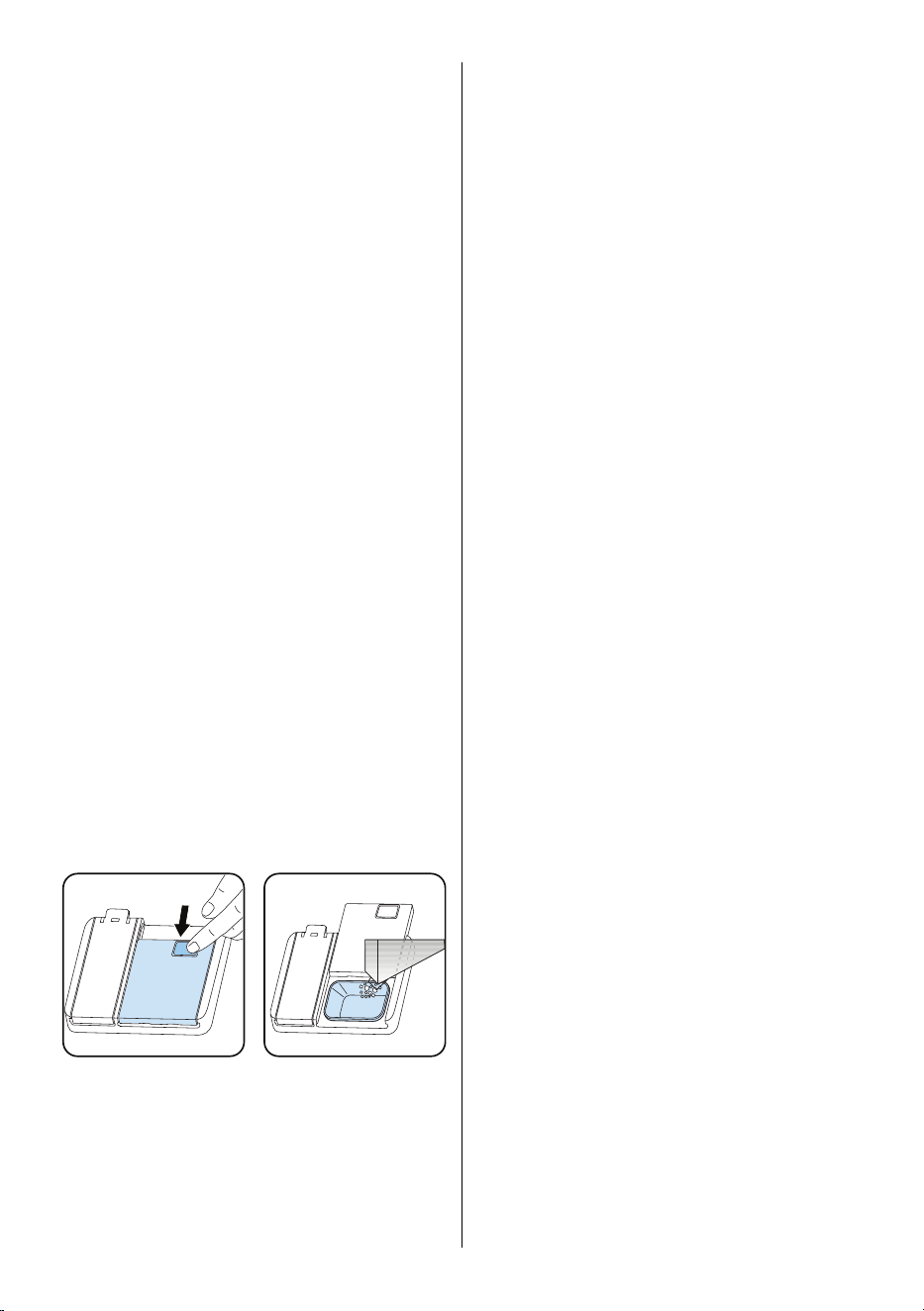
4.9 Filling The Detergent
Push the latch to open the dispenser and
pour in the detergent.
Close the lid and press it until it locks in
place. The dispenser should be relled just
before the start of each programme. If the
dishes are heavily soiled, place additional
detergent in the pre-wash detergent
chamber.
DETERGENT
4.10 Using Combined Detergents
These products should be used according
to the manufacturer’s instructions.
Never put combined detergents into the
interior section or the cutlery basket.
Combined detergents contain not only
the detergent but also rinse-aid, salt
replacement substances and additional
components depending on the combination.
We recommend you do not use combined
detergents in short programmes. Please
use powder detergents instead.
If you encounter problems when using
combined detergents, please contact the
detergent manufacturer.
When you stop using combined detergents,
make sure that water hardness and rinse
aid settings are set to the correct level.
4.11 Rinse-aid Usage
The rinse aid helps to dry the dishes
without streaks and stains. Rinse-aid is
required for stain-free utensils and clear
glasses. The rinse aid is automatically
released during the hot rinse phase. If
rinse aid dosage setting set too low, whitish
stains remains on dishes and dishes do not
dry and washed clean.
If rinse aid dosage setting set too height,
you can see bluish layers on glass and
dishes.
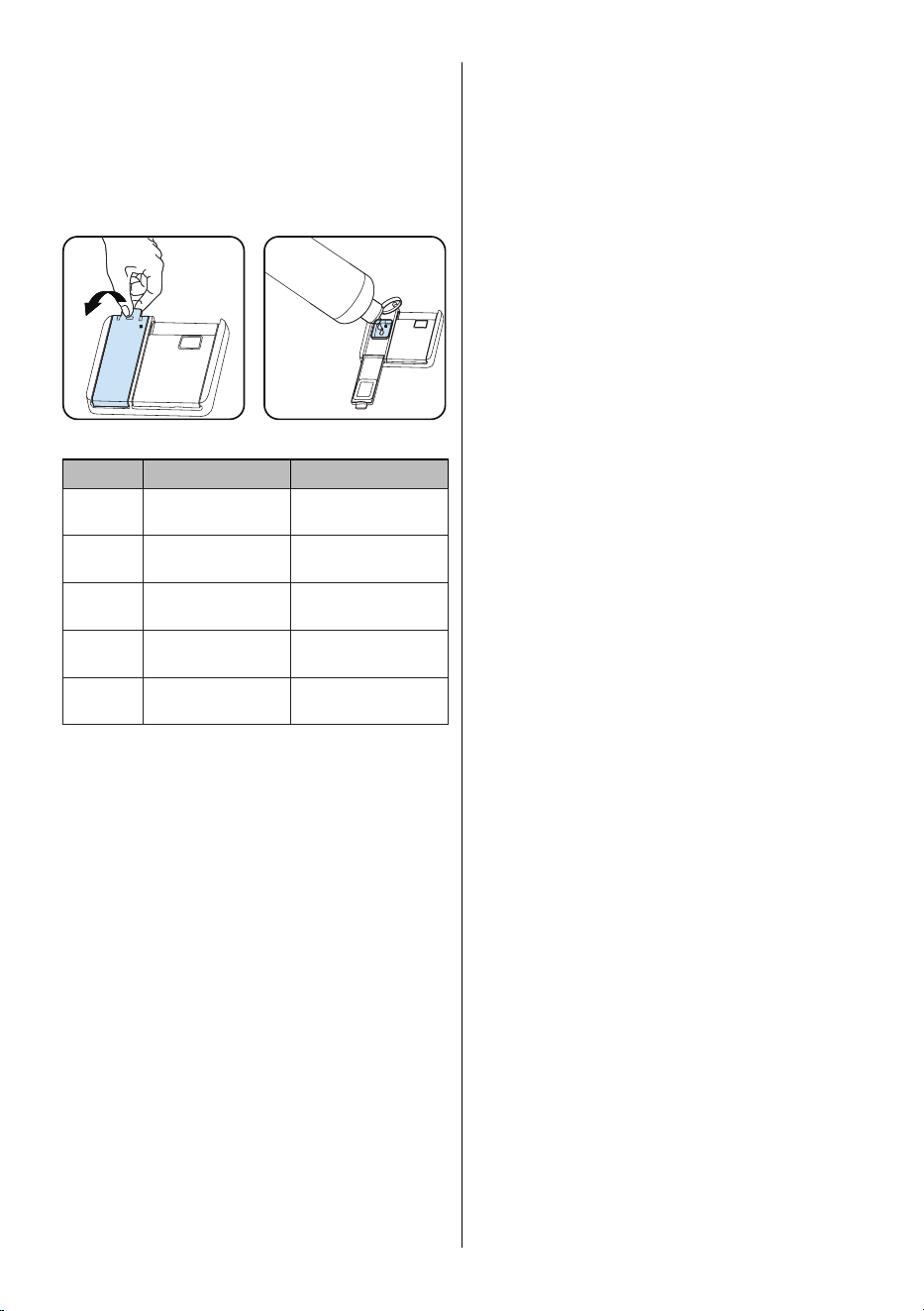
4.12 Filling The Rinse-aid And Setting
To ll the rinse aid compartment, open
the rinse-aid compartment cap. Fill the
compartment with rinse aid to the MAX
level and then close the cap. Be careful not
to overll the rinse aid compartment and
wipe up any spills.
In order to change the rinse aid level,
follow the below steps before turning on
the machine:
• Turn on the machine by pressing the On/
O button.
• Press the Programme button for at least
5 seconds immediately after the machine
is turned on.
• Release the Programme button when
“rA” is shown. Rinse aid level setting
follows water hardness level setting.
Next, the last setting level is displayed.
• Set the level by pushing the programme
button.
EN - 17
• Switch o the machine to save the
setting.
• The factory setting is “4”.
If the dishes are not drying properly or are
spotted, increase the level. If blue stains
form on your dishes, decrease the level.
Level Brightener Dose Indicator
1 Rinse-aid not
dispensed
r1 is shown on the
display.
2 1 dose is
dispensed
r2 is shown on the
display.
3 2 doses are
dispensed
r3 is shown on the
display.
4 3 doses are
dispensed
r4 is shown on the
display.
5 4 doses are
dispensed
r5 is shown on the
display.
EN - 18
5 LOADING YOUR DISHWASHER
For best results, follow these loading
guidelines.
Loading the household dishwasher up to the
capacity indicated by the manufacturer will
contribute to energy and water savings.
Manual pre-rinsing of tableware items leads
to increased water and energy consumption
and is not recommended You can place
cups, glasses, stemware, small plates,
bowls, etc. in upper basket. Do not lean long
glasses against one another or they cannot
remain steady and may receive damage.
When placing long stem glasses and
goblets, lean them against the basket edge
or rack and not against other items.
Place all containers such as cups, glasses
and pots into the dishwasher with the
opening facing downwards otherwise water
can collect on items.
If there is cutlery basket in machine, you
are recommended to use the cutlery grid
in order to obtain the best result. Place all
large (pots, pans, lids, plates, bowls etc.)
and very dirty items in the lower rack.
Dishes and cutlery should not be placed
above each other.
WARNING: Take care not to obstruct
the rotation of spray arms.
WARNING:Make sure after loading
the dishes do not prevent opening the
detergent dispenser.
5.1 Recommendations
Remove any coarse residue on dishes
before placing the dishes in the machine.
Start the machine with full load.
Do not overload the drawers or place
dishes in the wrong basket.
WARNING: To avoid any possible
injuries, place long-handle and sharp-
pointed knives with their sharp points facing
down or horizontally on the baskets.
EN - 19
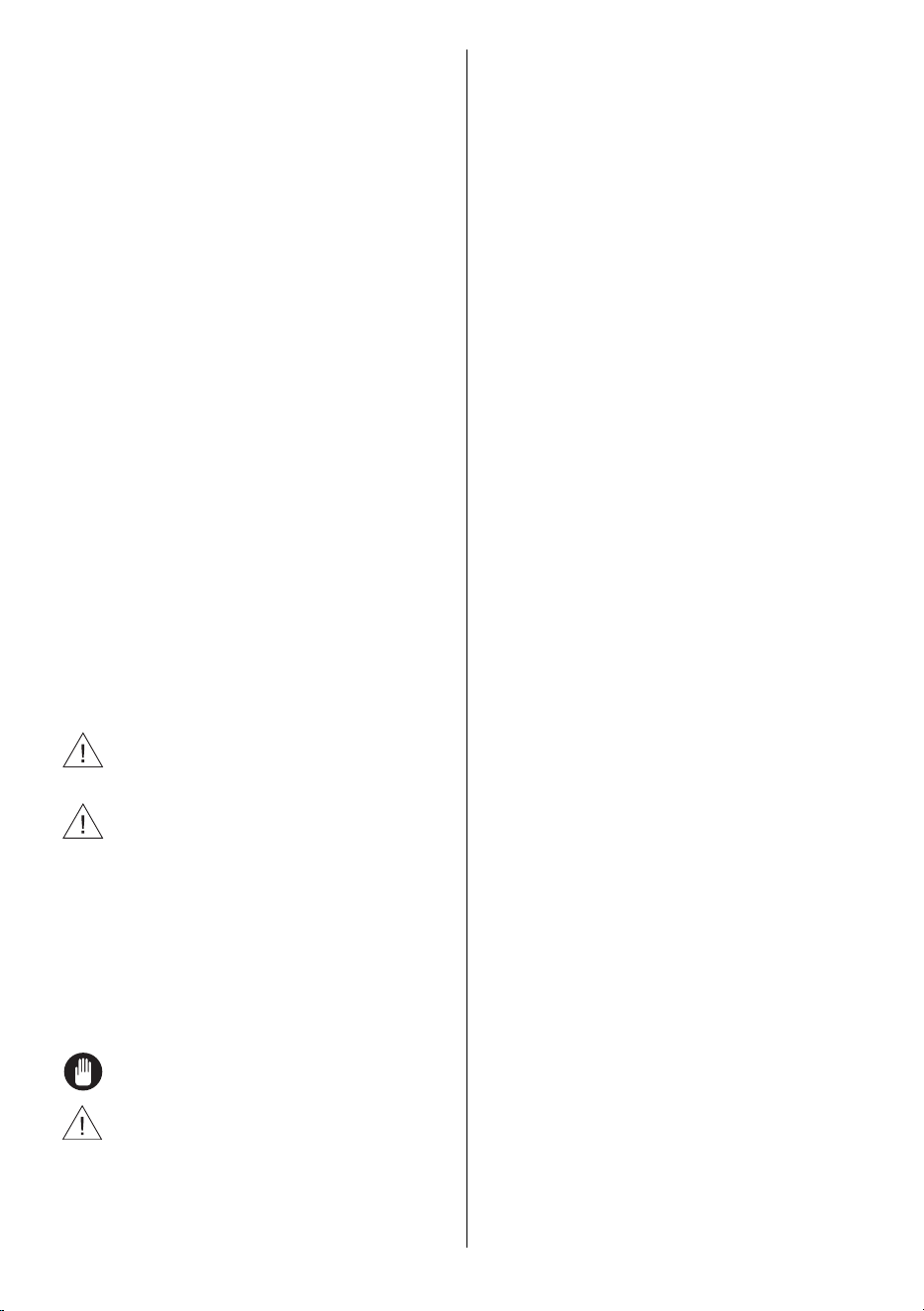
Four Folding Racks (15 pc)
The folding racks allow easier placement of
larger items, such as pots and pans. Each
section can be folded separately. The
racks can be raised up, or folded down, as
shown in the images.
1
2
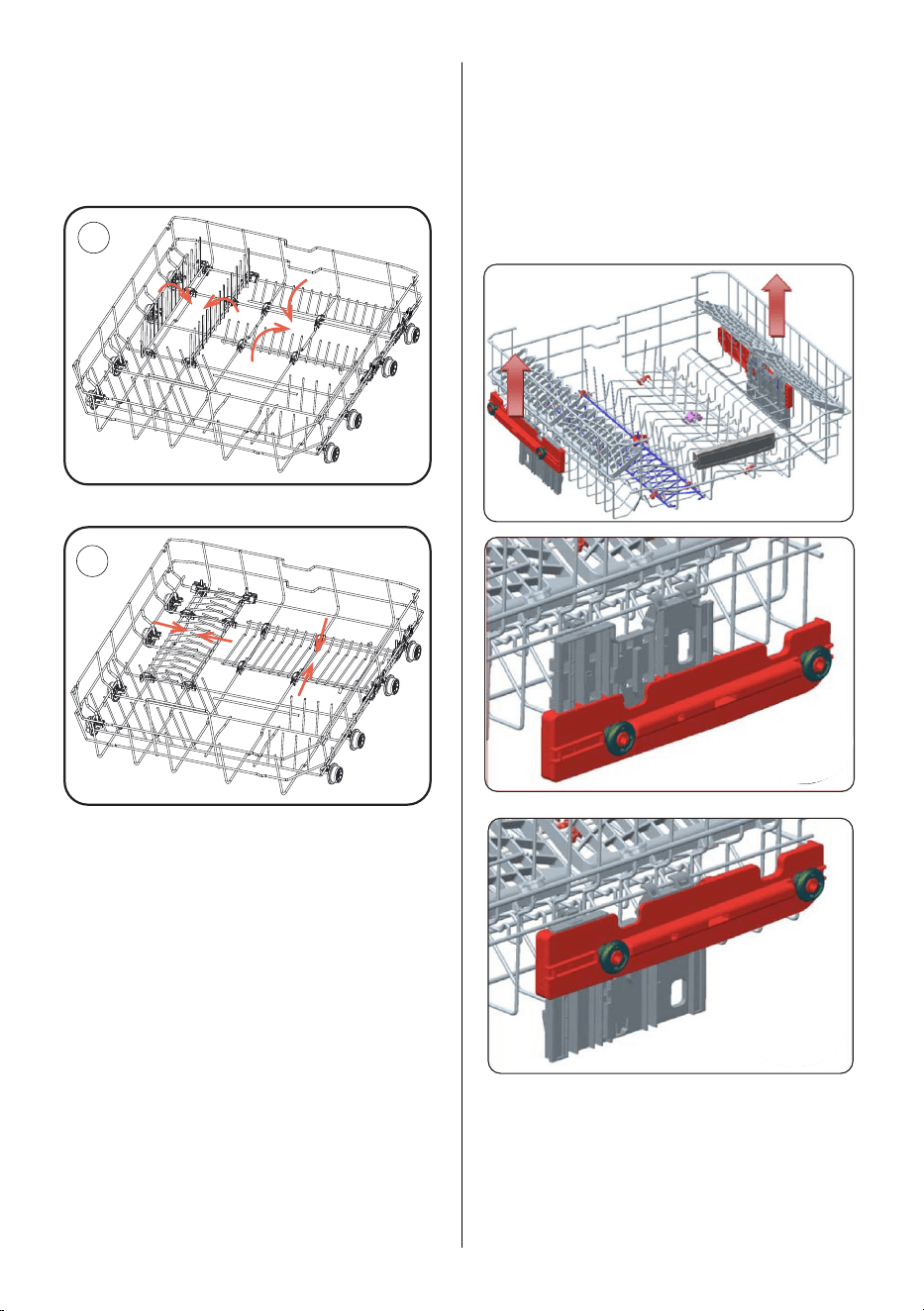
Height Adjustment
The upper basket includes a mechanism
which enables the height of the basket
to be adjusted up (1) or down (2) without
having to remove the basket. Hold the
basket on both sides and pull it up or push
it down, ensuring both sides of the upper
basket are in the same position.
1
2
EN - 20
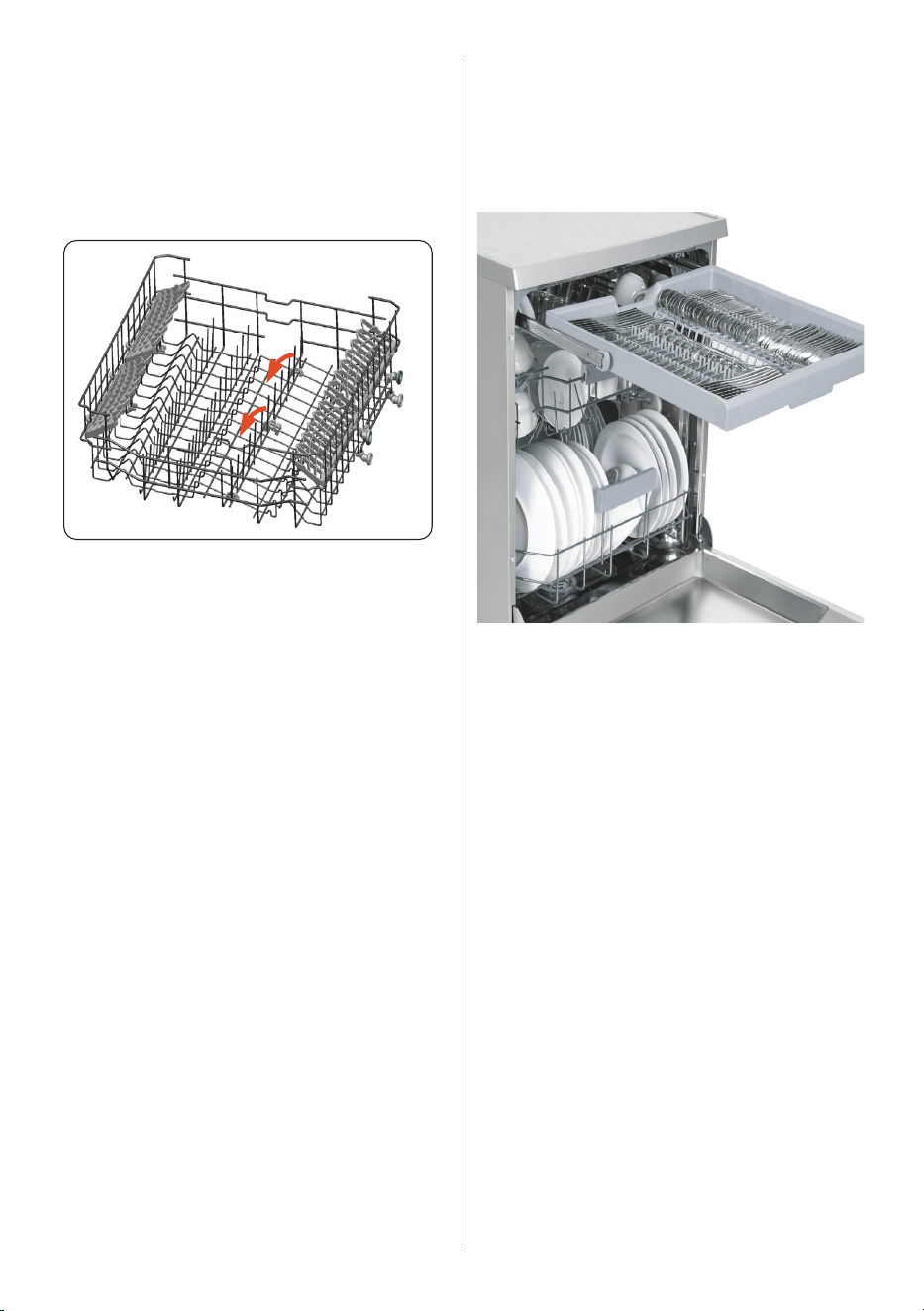
Height Adjustable Rack (peg type)
The foldable racks in the upper basket
enable the placement of large items such
as pots and pans. Each section can be
folded separately. The foldable racks can
be either raised up or folded down.
Upper Cutlery Basket
The upper cutlery basket is designed for
the placement of large and small cutlery
and
utensils.
WARNING: Knives and other sharp objects
must be placed horizontally in the cutlery
basket.
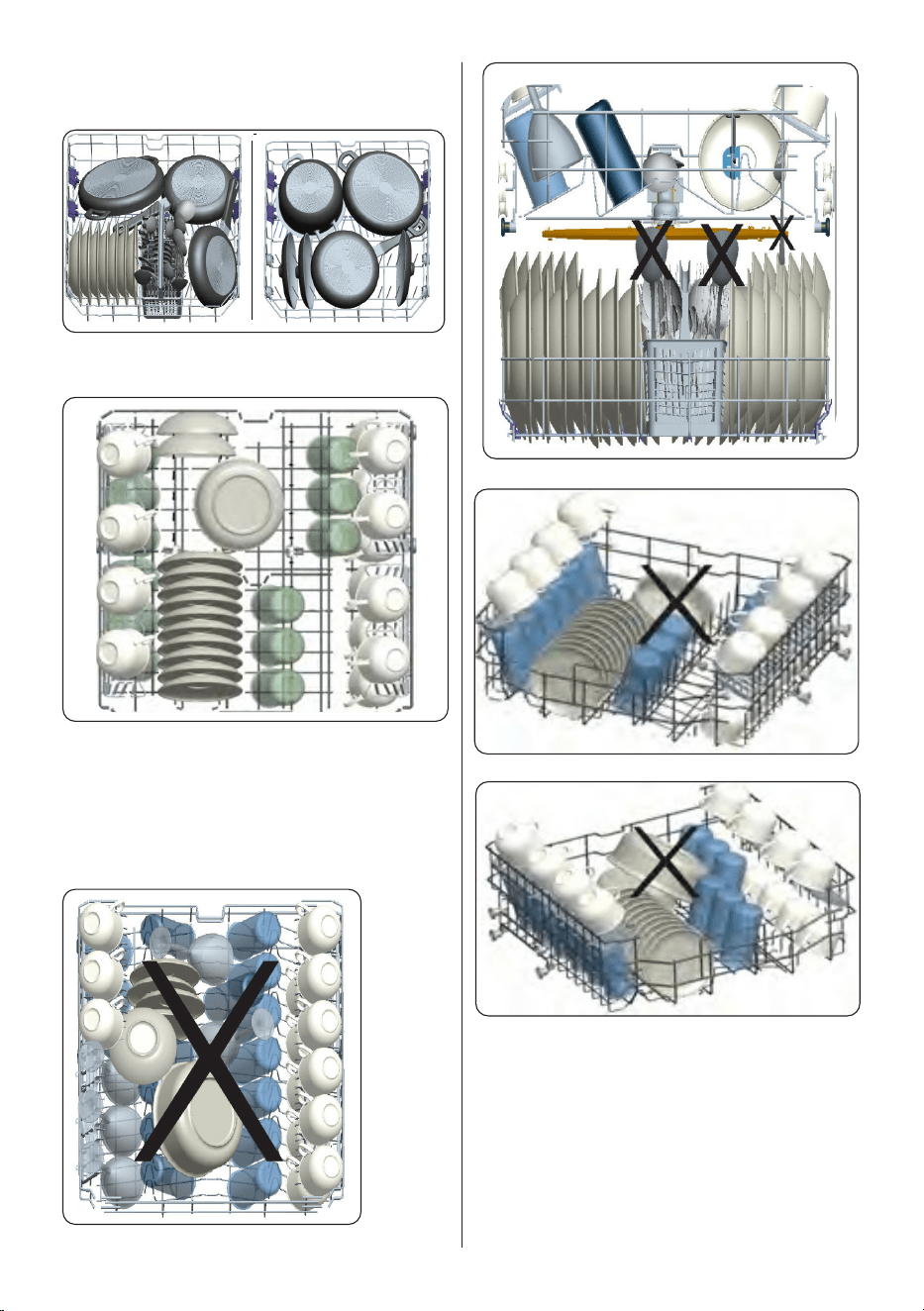
5.2 Alternative Basket Loads
Lower Basket
Top Basket
Incorrect Loads
Incorrect loading can cause poor washing
and drying performance. Please follow the
manufacturer’s recommendations for a
good performans result.
EN - 21
EN - 22
6 PROGRAMME TABLE
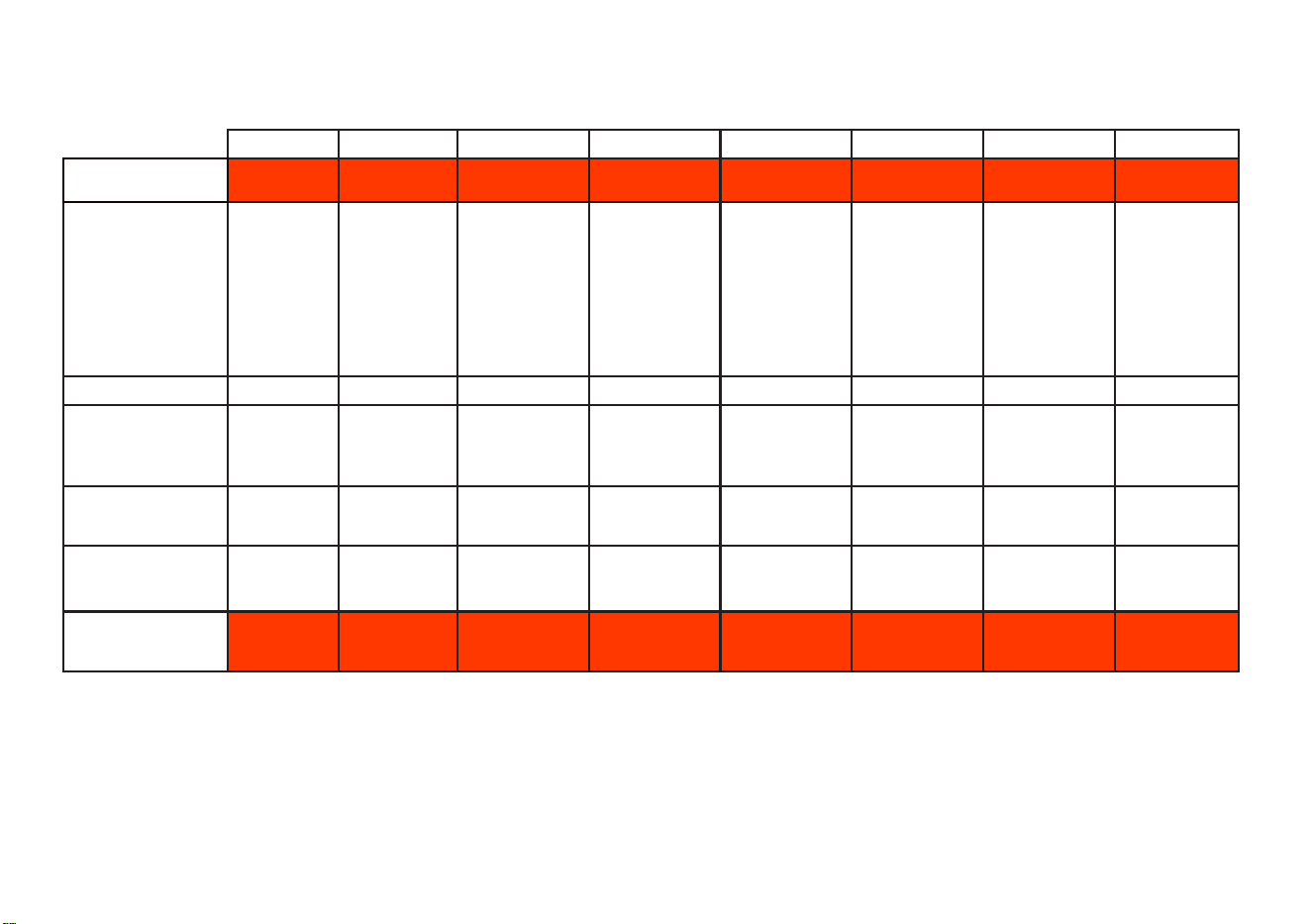
P1 P2 P3 P4 P5 P6 P7 P8
Program Name: Mini 14’ Quick 30’ Eco
Dual Pro Wash
60°C
Super 50’
Smart
30°C - 50°C
Smart
50°C - 60°C
Smart
60°C - 70°C
Type of Soil:
Fastest
program for
lightly soiled
and recently
used dishes
and suitable
for 4 place
settings.
Suitable for
lightly soiled
dishes and
quick wash.
Standard
program for
normally soiled
daily using
dishes with
reduced energy
and water
consumptions.
Suitable for
both lightly
soiled delicate
glassware on
upper rack and
heavily soiled
crockery on
lower rack.
Suitable for
normally soiled
daily dishes with
faster program.
Auto program
for normally
soiled delicate
dishes.
Auto program
for normally
soiled dishes.
Auto program
for heavily
soiled dishes.
Level of Soil: Light Light Medium Heavy Medium Medium Medium Heavy
Amount of Detergent:
A: 25 cm3
B: 15 cm3”
B A A A A A A A
Program Duration
(h:min)
00:14 00:30 04:30 01:53 00:50 01:12 - 01:31 01:47 - 02:02 01:49 - 02:59
Electiricity
consumption (kWh/
cycle)
0.340 0.650 0.861 1.600 1.000 0.650 - 0.850 1.050 - 1.325 1.250 - 1.900
Water consumption
(l/cycle)
6.6 10.9 9.0 15.4 9.5 10.6 - 17.7 10.9 - 18.5 11.8 - 24.0

EN - 23
• The program duration may change according to the amount of dishes, the water
temperature, the ambient temperature and selected additional functions.
• Values given for programmes other than the eco programme are indicative only.
• Eco programme is suitable to clean normally soiled tableware, that for this use, it is the
most ecient programme in terms of its combined energy and water consumption, and
that it is used to assess compliance with the EU ecodesign legislation.
• Washing tableware in a household dishwasher usually consumes less energy and
water in the use phase than hand dishwashing when the household dishwasher is used
according to the manufacturer’s instructions.
• Only use powder detergent for short programs.
• Short programs do not include drying.
• To assist drying, we recommend slightly opening the door after a cycle is complete.
• You can access the product database where the model information is stored by reading
the QR code on the energy label.
NOTE: According to regulations 1016/2010 and 1059/2010, Eco program energy
consumption values may dier. This table is in line with regulations 2019/2022 and
2017/2022.
EN - 24
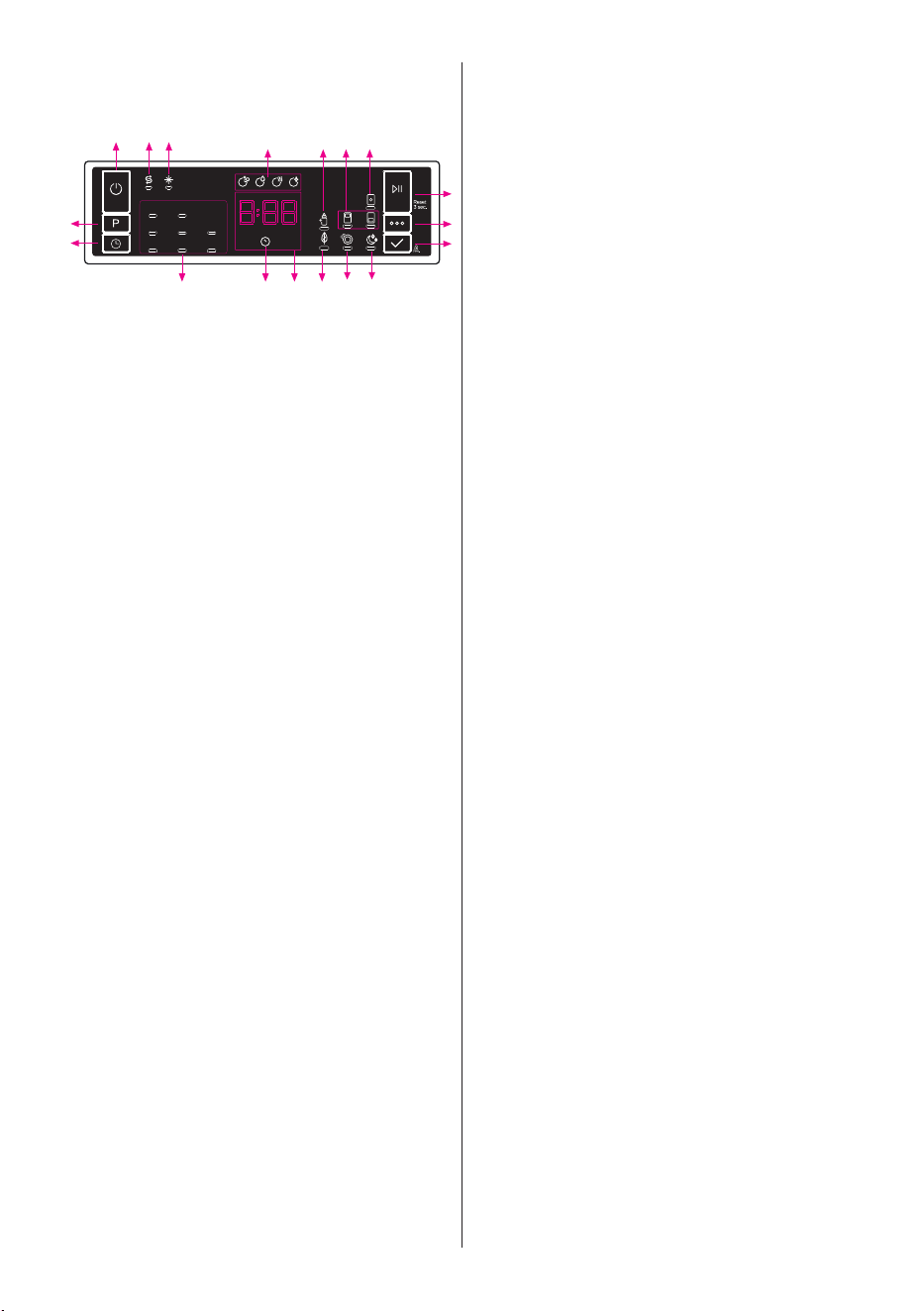
7 THE CONTROL PANEL
1
2
3
2.1
98
6
5
7
16 11 12 10
13 14 153.1 4
1. On/Off Button
2. Program Selection Button
2.1. Program Indicators
3. Delay Button
3.1. Delay Indicator
4. Remaining Time Indicator
5. Start/Pause Button
6. Options Button
7. Select Button
8. Salt Indicator
9. Rinse Aid Indicator
10. Tablet Indicator
11. Extra Hygiene Indicator
12. Half Load Indicators
13. Energy Save (Auto Door) Indicator
14. Extra Fast Indicator
15. Extra Silent Indicator
16. Washing Step Indicators
a- Washing Step Indicator
b- Rinse Step Indicator
c- Drying Step Indicator
d- End Step Indicator
1. On/O Button
Turn the machine on by pressing the
On/O button.
2. Program Selection Button
Select a suitable programme by pressing
the Programme button. The selected
program indicator (2.1) will be on. For the
details of the programs refer to section
Program Table.
3. Delay Button
You can delay the start time of the
programme for 1-2...24 hours by pressing
the delay button (3) before the programme
starts. The delay indicator (3.1) will be on.
If you want to change the delay time,rst
press the Start/Pause button and then the
delay button to select a new delay time.
To activate the new delay time, press the
Start/Pause button. To cancel the delay,
you need to switch to 0 hour by using the
delay when the machine is paused.
4. Remaining Time Indicator
Programme ow can be monitored via
the Wash,Rinse, Dry, End indicators and
Remai ning Time Indicator.
5. Start/Pause Button
Press the Start/Pause button to start the
programme. The wash lamp turns on and
the Remaining Time Indicator shows the
programme duration. It also indicates the
remaining time during the programme ow.
If you open the door of your machine when
the programme is running the duration
of the programme pauses,and related
washing step indicator blinks.
6. Options Button
Options can be selected by pressing the
Options button repeatedly. The chosen opti-
on will be indicated by a blinking LED.
7. Select Button
Select the option by pressing the Select
button. The LED for the chosen option will
then remain lit.
8. Salt Indicator
When there is insucient softening salt,
the salt lack warning indicator turns on and
you should ll up the salt chamber.
9. Rinse Aid Indicator
When the rinse aid level is low, the rinse
aid lack warning indicator turns on and you
should ll the rinse aid chamber.
10. Tablet Indicator
Select the Tablet Detergent function when
using a combined detergent that contains
salt, rinse aid or other extras. The Tablet
Detergent Indicator will remain on for as
long as it is selected.
11. Extra Hygiene Indicator
Select the Extra Hygiene function to
increase the wash temperature, for a
maximum hygiene washing operation. The
Extra Hygiene Indicator will illuminate.
12. Half Load Indicator
Select the Half Load function to choose
which area of the dishwasher contains
dishes to be washed. You can select
both baskets, the upper basket only, or
the lower basket only. Press the button
until the indicator corresponding to the
basket containing the dishes to be washed
illuminates. The Half Load Indicator will
illuminate while this function is in operation.
Dishes placed in other areas will not be
washed.
13. Energy Save (Auto Door) Indicator
Select the Energy Save (Auto Door) option
to enable the door of the machine to open
at the end of the programme to increase
drying efficiency. This function also saves
energy by operating at a lower
temperature.
14. Extra Fast Indicator
Select the Extra Fast function to decrease
the duration of a programme, providing
more economical water usage. The Extra
Fast Indicator will illuminate.
15. Extra Silent Indicator
Select the Extra Silent function for a more
sensitive and silent washing operation. The
Extra Silent Indicator will illuminate. This
option reduces the sound pressure level of
the washing.
16. Washing Step Indicators
The display will show the indicator corres-
ponding to the status of the programme in
operation. While the Drying indicator is on,
the machine will remain silent with respect
to the programme you have selected for
15 to 100 minutes.
*
Wash
* Rinse
* Dry
* End
NOTE:
Child lock is activated/deactiva-
ted by pressing select button (7) for about
3 seconds. When it is activated, all leds
blink and “CL” is shown on Remaning Time
Indicator (4) once. When it is deactivated,
all leds and “CL” blink twice.
NOTE:
If you switch the machine to o
position after selecting the delay time and
the programme has started, the delayed
time is cancelled.
NOTE:
To save any program as favou-
rite program, press program selection (2)
and delay (3) buttons at the same time. To
select favourite program, press program
selection button (2) for 3 seconds.
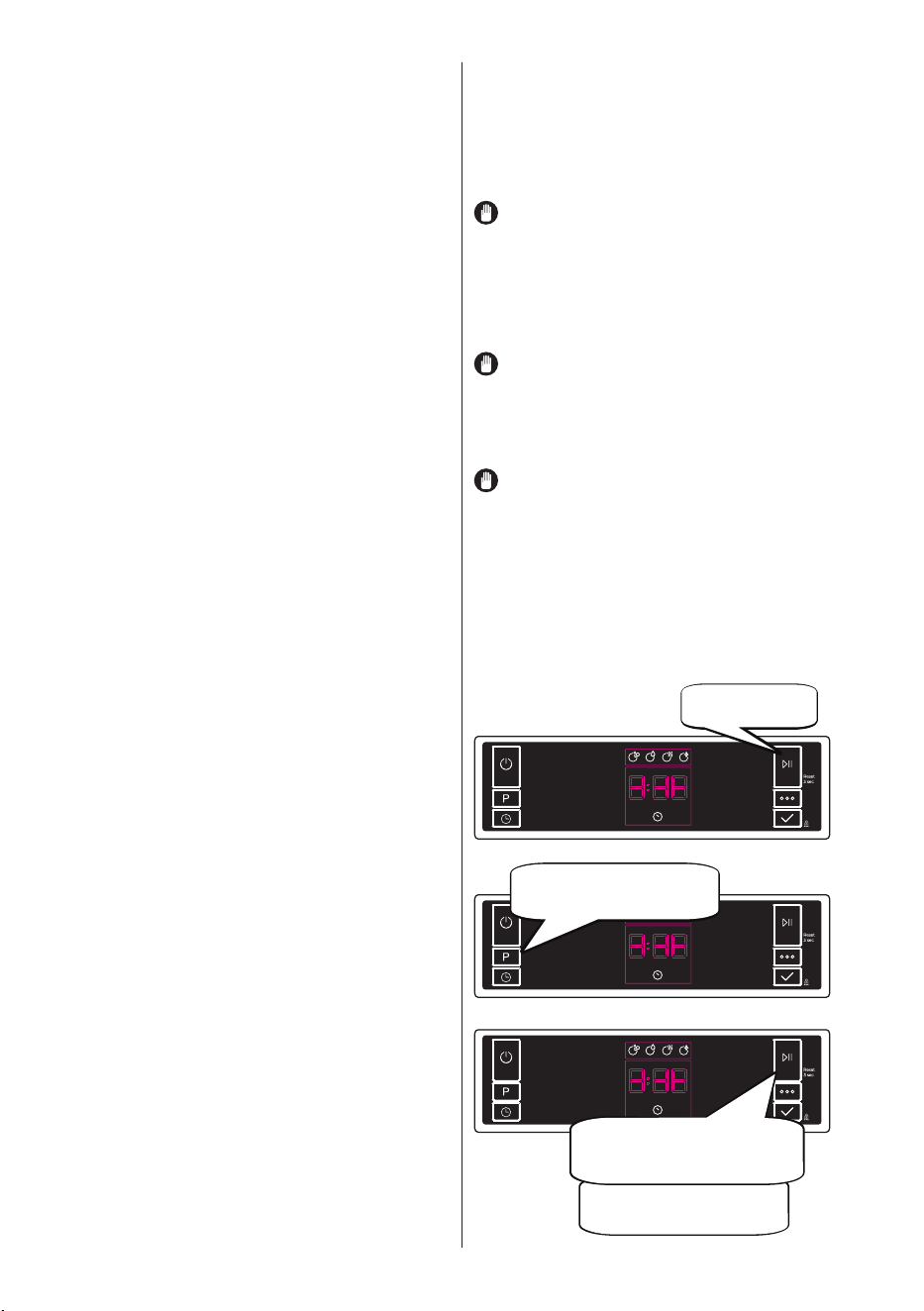
7.1 Changing a Programme
If you would like to change the programme
when the machine is already running.
Press the Start/
Pause button.
After the programme stops, select
your desired programme via the
programme selection button.
Start newly selected programme by
pressing the Start/Pause button.
The new programme will resume
the course of the old programme.
EN - 25
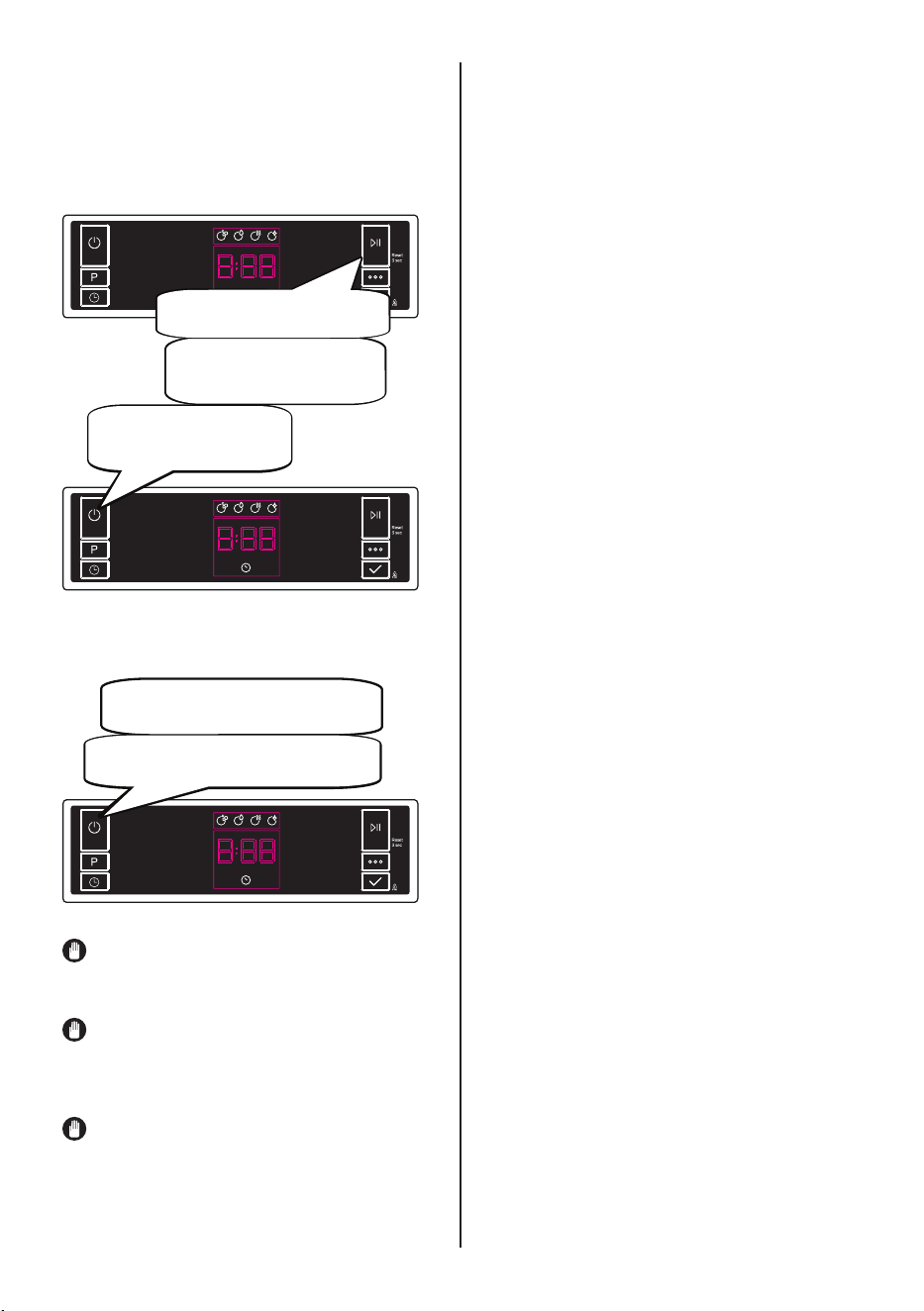
7.2 Cancelling a Programme
If you would like to cancel a programme
when it is running.
Press the Start/Pause
button for 3 seconds.
During cancellation, the
End light blinks.
The machine discharges the water
inside it in about 30 seconds.
When the End light turns on,
switch your machine off by
pressing the On/Off button.
7.3 Switching The Machine O
Switch your machine off with On/Off button
after the programme has ended and the
End light turns on.
Pull the plug out of the outlet. Turn of the
water tap.
NOTE: Do not open the door before the
programme ends.
NOTE: At the end of washing program-
me, you can leave the door of your machine
ajar to hasten the drying.
NOTE: If the door of machine is opened
or power is cut o during washing the
programme will continue when the door is
closed or the power is restored.
Buzzer Sound Control
(Model Depending)
To change the buzzer sound level, follow
the below steps:
1. Open the door and press Option (6) and
Select (7) buttons at the same time for 3
seconds.
2. When sound setting is recognized,
buzzer gives a long sound and machine will
display last set level, from “S0” to “S3”.
3. To decrease sound level press Select
button (7). To increase sound level, press
Options button (6).
4. To save the selected sound level, turn off
the machine.
’’S0’’ level means all voices are off. Factory
setting is “S3”.
Save Power Mode
To activate or deactivate save power mode,
follow the below steps:
1. Open the door and press Program (2)
and Option (6) buttons at the same time for
3 seconds.
2. After 3 seconds, the machine will display
last Setting, “IL1” or “IL0”.
3. When Save Power Mode is activated,
“IL1” will be displayed. On this mode, inte-
rior lights (if avaliable) will turn off 2 minutes
after the door is opened, and the machine
will turn off 15 minutes after any interven-
tion in order to save energy.
4. When Save Power Mode is deactivated
“IL0” will be displayed. If Save Power Mode
is deactive, interior lights will be on as long
as the door is open, and the machine will
always be on unless it is turned off by user.
5. To save the selected setting, turn off the
machine.
In factory setting, Save Power Mode is ac-
tive.
EN - 26

Natural Ion Tech (Model Depending)
This function provides extra hygiene to the
machine thanks to Ion Technology. It opera-
tes as an independent program. This func-
tion is activated by pressing Options button
(6) for 3 seconds in ready state. At the end
of 3 seconds, “Ion” will be displayed which
indicates that Natural Ion Tech function is
activated. The button is released after “Ion”
is displayed. If there is no intervention by
user, 24 hours after activation of Natural Ion
Tech function, it is automatically cancelled.
NOTE: If machine is turned off, Natural
Ion Tech function is cancelled.
NOTE: Natural Ion Tech function does
not work with any program.
Crystalight (Model Depending)
This technology which have Ion and Light
Technology together, provides to extra hygi-
ene. It prevents bad odor during a washing
program that includes a drying step.
Crystalight function is activated or deacti-
vated before starting program by pressing
Options button (6) for 6 seconds. At the end
of 6 seconds, “U1” will be displayed which
indicates Crystalight function is activated.
When it is deactivated, at the end of 6 se-
conds, “U0” will be displayed. Crystalight
setting follows Natural Ion Tech setting.
Default set is “UO”.
NOTE: If user do not deactivate Crysta-
light function at the end of program, it will
remain active until the machine turns off.
NOTE: If Crystalight or Natural Ion Tech
function is active, Natural Ion Tech warn-
ing led lights up like dimming during door is
open.
EN - 27
8 CLEANING AND
MAINTENANCE
Cleaning your dishwasher is important to
maintain the machine’s service life
Make sure that the water softening setting
(If available) is done correctly and correct
amount of detergent is used to prevent
limescale accumulation. Rell the salt
compartment when the salt sensor light
comes on.Oil and limescale may build up in
your Dishwasher over time. If this occurs:
• Fill the detergent compartment
but do not load any dishes. Select
a programme which runs at high
temperature and run the Dishwasher
empty. If this does not clean your
Dishwasher sufficiently, use a
cleaning agent designed for use with
dishwashers.
• To extend the life of your dishwasher,
clean the appliance regularly on each
month
• Wipe the door seals regularly with a
damp cloth to remove any accumulated
residue or foreign objects.
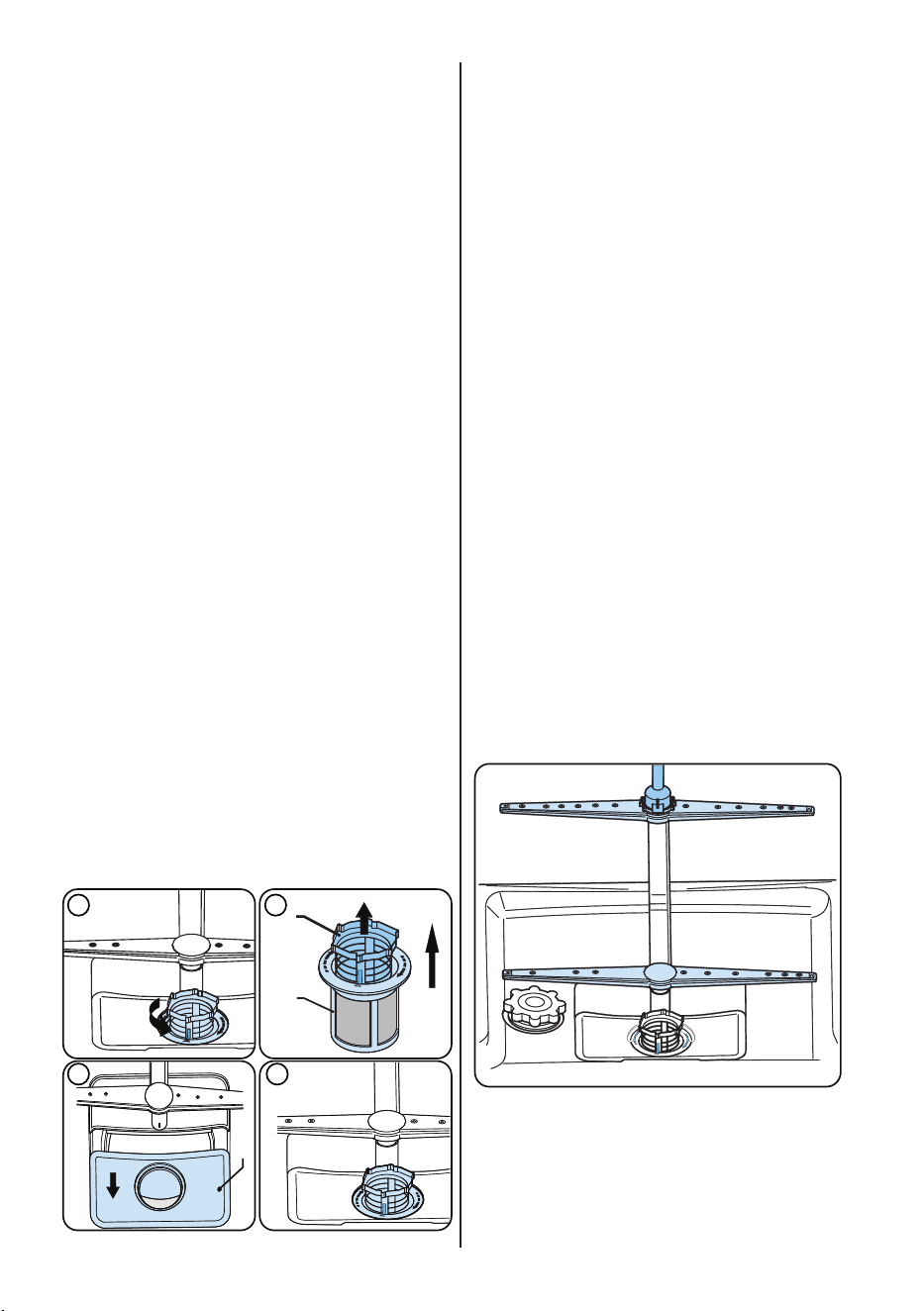
8.1 Filters
Clean the lters and spray arms at least
once a week. If any food waste remains
or foreign objects on the coarse and
ne lters, remove them and clean them
thoroughly with water.
a) Micro Filter b)
Coarse Filter
c) Metal Filter
3 4
1 2
a
c
b
To remove and clean the lter combination,
turn it counter clockwise and remove it by
lifting it upwards (1).Pull the coarse lter out
of the micro lter (2).Then pull and remove
the metal lter (3).Rinse the lter with lots of
water until it is free of residue. Reassemble
the lters. Replace the lter insert, and
rotate it clockwise (4).
• Never use your dishwasher without a
filter.
• Incorrect fitting of the filter will reduce
the washing effectiveness.
• Clean filters are necessary for proper
running of the machine.
8.2 Spray Arms
Make sure that the spray holes are not
clogged and that no food waste or foreign
object is stuck to the spray arms. If there is
any clogging,remove the spray arms and
clean them under water. To remove the
upper spray arm undo the nut holding it in
position by turning it clockwise and pulling
it downwards. Make sure that the nut is
properly tightened when retting the upper
spray arm.
EN - 28

EN - 29
8.3 Drain Pump
Large food residues or foreign objects which
were not captured by the filters may block
the waste water pump. The rinsing water will
then be above the filter.
Warning Risk of cuts!
When cleaning the waste water pump,
ensure that you do not injure yourself on p
ieces of broken glass or pointed
implements.
In this case:
1. First always disconnect the appliance
from the power supply.
2. Take out baskets.
3. Remove the filters.
4. Scoop out water, use a sponge if requi-
red.
5.Check the area and remove any foreign
objects.
6. Install filters.
7.
Re-insert baskets.
EN - 30
9 TROUBLESHOOTING
FAULT POSSIBLE CAUSE TROUBLESHOOTING
The programme does
not start.
Your Dishwasher is not plugged in. Plug your Dishwasher in.
Your Dishwasher is not switched on.
Switch your Dishwasher on by pressing the
On/O button.
Fuse blown. Check your indoor fuses.
Water inlet tap is closed. Turn on the water inlet tap.
Your Dishwasher door is open. Close the Dishwasher door.
Water inlet hose and machine lters
are clogged.
Check the water inlet hose and machine
lters and make sure they are not clogged.
Water remains inside
the machine.
Water drain hose is clogged or
twisted.
Check the drain hose, then either clean or
untwist it.
The lters are clogged. Clean the lters.
The programme is not nished yet. Wait until the programme is nished.
Machine stops during
washing.
Power failure. Check mains power.
Water inlet failure. Check water tap.
Shaking and hitting
noises are heard during
a wash operation.
The spray arm is hitting the dishes in
the lower basket.
Move or remove items blocking the spray
arm.
Partial food wastes
remain on the dishes.
Dishes placed incorrectly, sprayed
water not reaching aected dishes.
Do not overload baskets.
Dishes leaning each another.
Place dishes as instructed in the section on
loading your dishwasher.
Not enough detergent used.
Use the correct amount of detergent, as
instructed in the programme table.
Wrong wash programme selected.
Use the information in the programme table
to select the most appropriate programme.
Spray arms clogged with food waste.
Clean the holes in the spray arms with thin
objects.
Filters or water drain pump clogged
or lter misplaced.
Check the drain hose and lters are
correctly tted.
EN - 31
FAULT POSSIBLE CAUSE TROUBLESHOOTING
Whitish stains remains
on dishes.
Not enough detergent used.
Use the correct amount of detergent, as
instructed in the programme table.
Rinse aid dosage and/or water
softener setting set too low.
Increase rinse aid and/or water softener
level.
High water hardness level. Increase water softerner level and add salt.
Salt compartment cap not closed
properly.
Check that the salt compartment cap is
closed properly.
Dishes do not dry.
Drying option is not selected. Select a programme with a drying option.
Rinse aid dosage set too low. Increase rinse aid dosage setting.
Rust stains form on the
dishes.
Stainless-steel quality of the dishes
is insucient.
Use only dishwasher-proof sets.
High level of salt in wash water.
Adjust the water hardness level using water
hardness table.
Salt compartment cap not closed
properly.
Check that the salt compartment cap is
closed properly.
Too much salt spilled in the
Dishwasher while lling it with salt.
Use funnel while lling salt to the
compartment to avoid spillage.
A poor mains grounding. Consult a qualied electrician immediately.
Detergent remains in the
detergent compartment.
Detergent was added when the
detergent compartment was wet.
Make sure detergent compartment is dry
before use.
EN - 32
AUTOMATIC FAULT WARNINGS AND WHAT TO DO
TROUBLE
CODE
POSSIBLE FAULT WHAT TO DO
FF
Water inlet system failure
Make sure the water inlet tap is open and water is owing.
Separate the inlet hose from the tap and clean the lter of
the hose.
Contact for service if the error continues.
F5
Pressure system failure
Contact for service.
F3
Continuous water input
Close the tap and contact for service.
F2
Inability to discharge water
Water discharge hose and lters may be clogged.
Cancel the program.
If the error continues, contact for service.
F8
Heater error
Contact for service.
F1 Overow
Unplug the machine and close the tap.
Contact for service.
FE Faulty electronic card Contact for service.
F7 Overheating Contact for service.
F9 Diverter position error Contact for service.
F6 Faulty heater sensor Contact for service.
HI High voltage failure Contact for service.
LO Low voltage failure Contact for service.
The installation and repairing procedures should always carried out by the Authorised
Service Agent in order to avoid possible risks. The manufacturer shall not be held liable
for damages that may arise from procedures carried out by unauthorised persons. Repairs
may be carried out by technicians only. If a component has to be replaced, ensure that only
original spare parts are used.
Improper repairs or use of non-original spare parts may cause considerable damage and
put the user at considerable risk.
Contact information for your customer service can be found on the back of this document.
Function-relevant genuine spare parts according to the corresponding Ecodesign order can
be obtained from Customer Service for a period of at least 10 years from the date on which
your appliance was placed on the market within the European Economic Area.

CERTIFICADO DE GARANTÍA
Imprescindible la presentación de la factura de compra acompañada del presente certificado de garantía.
Riesgos cubiertos.
Este aparato está garantizado contra cualquier defecto de funcionamiento, siempre que se destine a uso doméstico,
procediéndose a su reparación dentro del plazo de garantía y sólo por la red de SAT autorizados.
Nuestros electrodomésticos Corberó cuentan con la garantía legal del fabricante que cubre cualquier avería o defecto durante36
meses, desde su fecha factura de 1 de enero del 2022. En caso de que fuera necesario, nosotros nos ocupamos de cualquier posible
incidencia siempre que se deba a un componente defectuoso o fallo de fabricación.
Excepciones de garantía.
• Que la fecha del certificado no coincida con la fecha de venta de la factura original.
• Averías producidas por golpe, por caída o cualquier otra causa de fuerza mayor.
• Si el apa
rato ha sido manipulado por personal no autorizado.
• Las averías producidas o derivadas como consecuencia de un uso inadecuado, por defectos de instalación,
por introducir modificaciones en el aparato que alteren su funcionamiento.
• Puestas en marcha, mantenimiento, limpiezas, componentes sujetos a desgaste, lámparas, piezas estéticas,
oxidaciones, plásticos, gomas, carcasas y cristales.
“ESTAS EXCEPCIONES ANULAN LA GARANTÍA, SIENDO LA REPARACIÓN CON CARGO AL CLIENTE”
Periodo amparado en aparatos según ley de garantias en la venta de bienes de consumo Ley vigente es “RD 7/2021”
Horario de atención Lunes a Viernes de 9h00 a 19h00. Teléfono de contacto_ 911 08 08 08 Mail de contacto_ [email protected] web_ www.corbero.es
Dirección de Servicio técnico oficial_Vidal i Ribes 8-10 08950 Esplugues de Llobregat Barcelona
Sevicio Técnico Oficial: 911 08 08 08
Los hornos microondas (a excepción de los integrables) y los hornos sobremesa en el caso de cualquier incidencia de
funcionamiento, deben de llevarse al servicio técnico más próximo por parte del cliente. No se recojen ni reparan en el
domicilio.
•
Garantía termos eléctricos. Garantía de 3 años incluyendo los costes de desplazamiento y mano de obra que
correspondan de la reparación del producto, teniendo que tener un mantenimiento una vez cada 12 meses.
Especialmente si Ud. ha instalado un aparato a gas, tenga presente como titular de la instalación, la obligatoriedad de
realizar una revisión completa de los equipos, (según Real Decreto 238 / 2013, del 5 Abril. RITE. IT3, M. Lo termos
eléctricos y calderas que incluyen depósitos acumuladores de agua caliente, para que se aplique la prestación de la
Garantía, es obligatorio que el ánodo de magnesio esté operativo y que realice la función de protección
adecuadamente. Para ello es recomendable que el ánodo se revise bianualmente por el Servicio Oficial y sea renovado
cuando fuera necesario. Periodicidad que deberá ser anual en aquellas zonas con aguas críticas (contenido de CaCO3
superiores a 200mg/L, es decir a partir de 20ºfH de dureza). Depósitos sin el correcto estado del ánodo de protección, no
tienen la cobertura de la garantía. Independientemente del tipo de depósito o producto, todas las válvulas de
sobrepresión de calefacción o a.c.s., deberán ser canalizadas para evitar daños en Ia vivienda por descargas de agua. La
garantía del producto no asume los daños causados por Ia no canalización del agua derramada por esta válvula.
•

CERTIFICATE OF GUARANTEE
The presentation of the purchase invoice accompanied by this guarantee certificate is essential.
Covered Risks.
This appliance is guaranteed against any malfunction, provided that it is intended for domestic use, proceeding to its repair within
the warranty period and only by the authorized SAT network.
Our Corberó appliances have the manufacturer's legal warranty that covers any breakdown or defect for 36 months, from the
invoice date of January 1, 2022. If necessary, we take care of any possible incident whenever it is due to a defective component or
manufacturing fault. Warranty Exceptions
Warranty Exceptions
•
That the date of the certificate does not coincide with the date of sale of the original invoice.
•
Faults produced by blow, by fall or any other cause of force majeure.
•
If the device has been manipulated by unauthorized personnel.
•
Faults produced or derived as a consequence of improper use, installation defects, or modifications to the device that
alter its operation.
•
Start-up, maintenance, cleaning, components subject to wear, lamps, aesthetic parts,
oxidation, plastics, rubbers, housings and crystals.
“THESE EXCEPTIONS VOID THE WARRANTY, THE REPAIR BEING CHARGED TO THE CUSTOMER”
Period covered in devices according to the law of guarantees in the sale of consumer goods Current law is “RD 7/2021”
Hours of operation Monday to Friday from9h00 a 19h00. Telephone contact_ 911 08 08 08 Contact email_ [email protected] web_ www.corbero.es
Official Technical Service Address_Vidal i Ribes 8-10 08950 Esplugues de Llobregat Barcelona
Official Technical Service: 911 08 08 08
Microwave ovens (with the exception of built-in ones) and tabletop ovens in the event of any incident of
operation, they must be taken to the nearest technical service by the customer. They are not collected or repaired at
home.
•
Electric thermos guarantee. 3-year warranty including travel and labor costs that correspond to the repair of the
product, having to have maintenance once every 12 months. Especially if you have installed a gas appliance, keep in
mind as the owner of the installation, the obligation to carry out a complete review of the equipment, (according to
Royal Decree 238 / 2013, of April 5. RITE. IT3, M. Lo thermos electrical and boilers that include hot water storage tanks,
for the benefit of the Guarantee to apply, it is mandatory that the magnesium anode is operational and that it performs
the protection function adequately.For this, it is recommended that the anode be checked biannually by the Official
Service and is renewed when necessary Periodicity that must be annual in those areas with critical waters (CaCO3
content greater than 200mg/L, that is, from 20ºfH of hardness) Deposits without the correct state of the protection
anode are not covered by the warranty Regardless of the type of tank or product, all heating or DHW overpressure
valves must be channeled to avoid damage and n the house due to water discharges. The product warranty does not
cover damages caused by not channeling the water spilled by this valve.
•

www.corbero.es
Servicruz SL
Vidal i Ribes 8-10 08950 Esplugues de Llobregat Barcelona
Telf. 911 08 08 08
El periodo minimo en el que se deben suministrar las piezas de
recambio para la lavadora de uso doméstico es de 10 años.