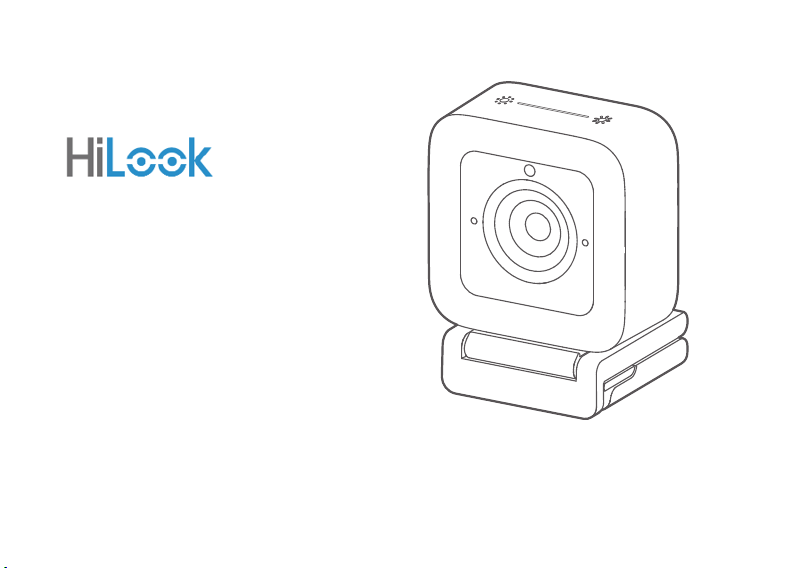
User Manual
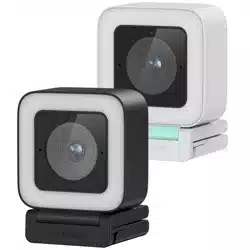
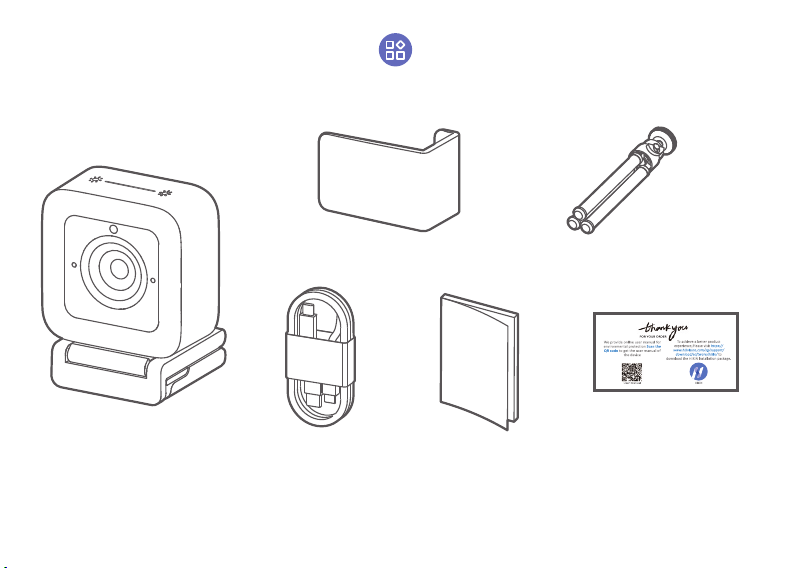
Live Camera
1
USB Cable Quick Start Guide
Privacy Cover
Tripod
Camera
User Manual Card
Packing List
2
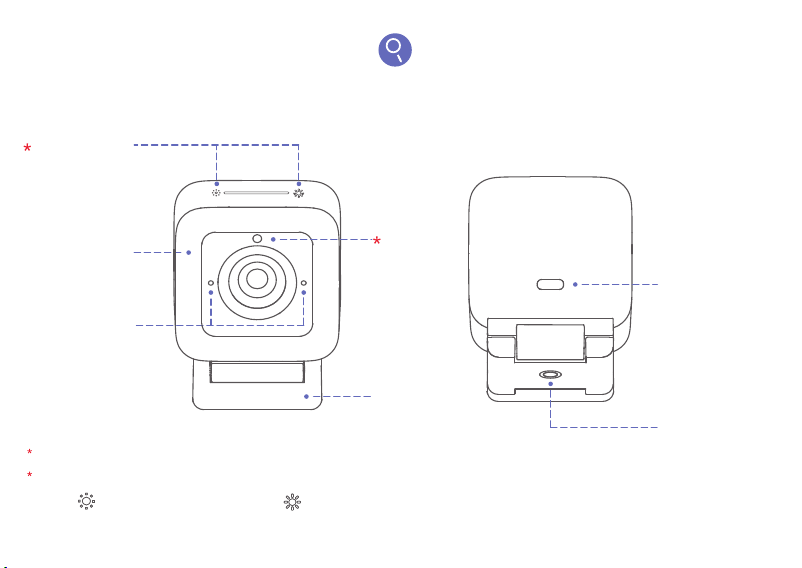
Functions
Indicator
Brightness Adjustment
Supplement
Light
Microphone
Press to brigten the light. Press to dim the light.
When the indicator is white, the device is working normally.
The brightness of the supplement light is divided into five levels.
Indicator
Type C Interface
1/4-20UNC
Tapped Hole
Bracket
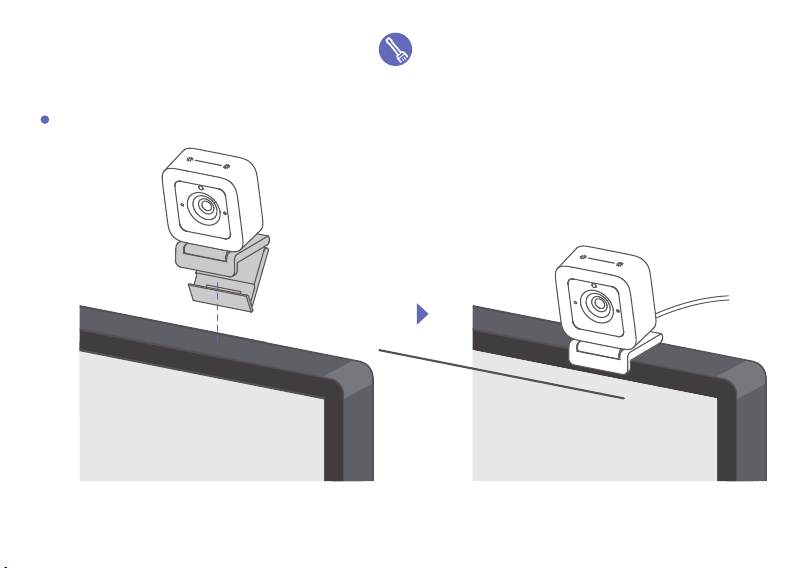
Installation Guide
Installation with a Clamp
3
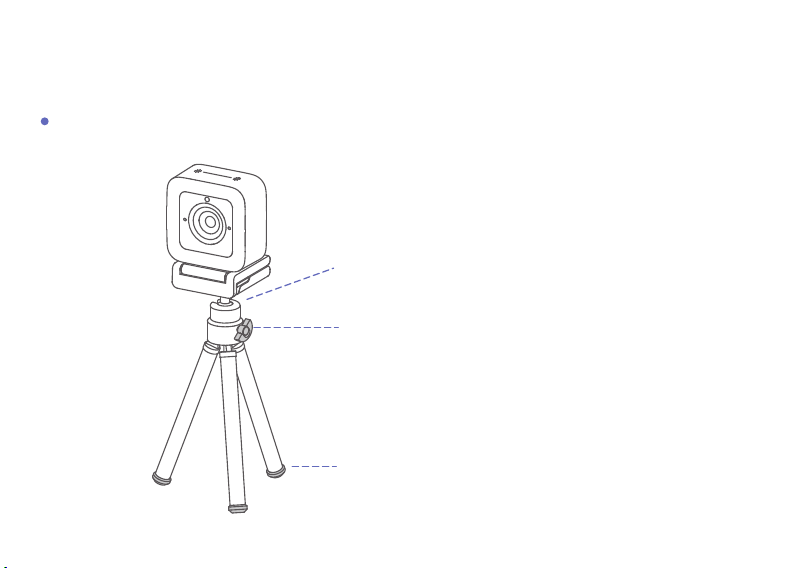
Installation with a Tripod
Rotate the multi-angle lock to adjust direction.
Align the 1/4-20UNC screw hole of the bracket with the top
of the tripod, and rotate the screw to finish installation.
Strentch out the foot to adjust the monopod leg length.
4
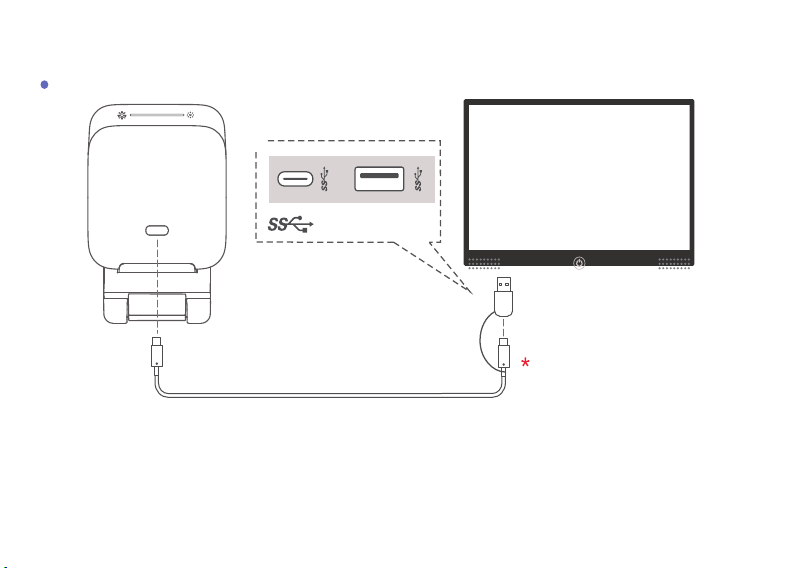
USB Cable
*Connect the device to intelligent terminals, such as computers and conference flat panels.
*It is recommended to plug into USB3.0 interface of the terminal.
*It is recommended to connect the the device to intelligent terminals with Type C interface or
Type-C-to-A adapter.
*It is recommended to use the supplied cable for audio quality.
*
Connection
USB 3.0
5
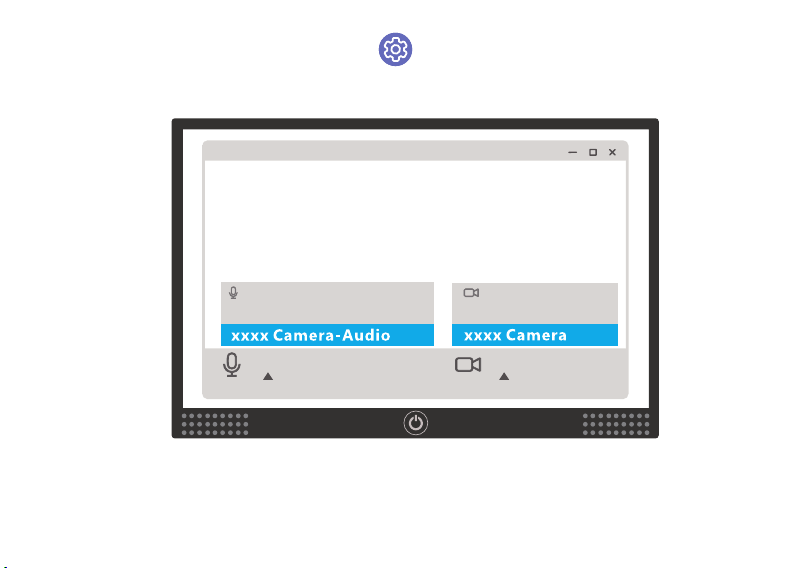
Setup Guide
Select Speaker
Select Camera
Default Settings Default Settings
Mute
Camera
Power on the device and run the conference/video software. Set the microphone as xxxx Camera-
Audio, camera as xxxx Camera to finish the setup.
6
Using Guide
7
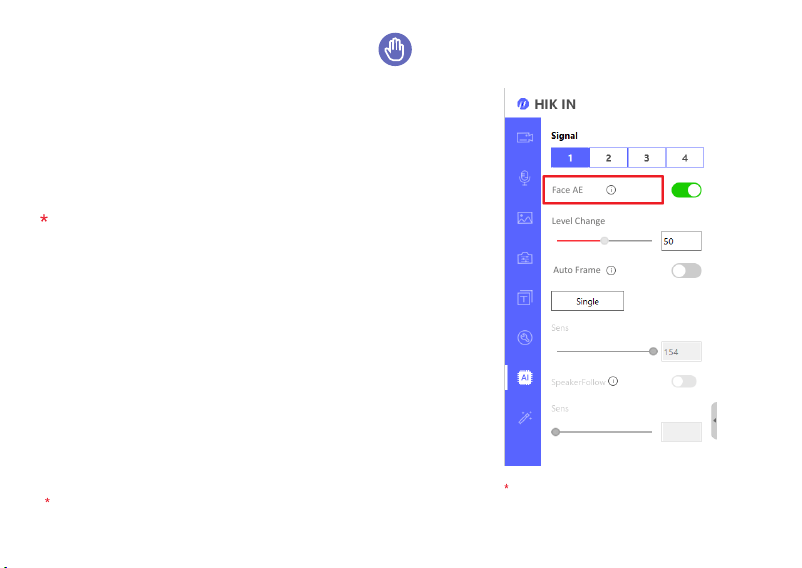
Face AE
Level Change
By enabling Face AE, the camera adjusts the
image brightness according to the face
brightness, making everyone look better in the
video.
You can adjust image brightness manually
through Level Change.
Level Change
Auto Frame
Face AE
The above picture is a
screenshot of HIK IN interface.
To achieve a better product experience, please visit
https://www.hikvision.com/sg/support/download/software/
hikin/ to download the HIK IN installation package.
Face AE is supported by AI series cameras.
8
Auto Frame
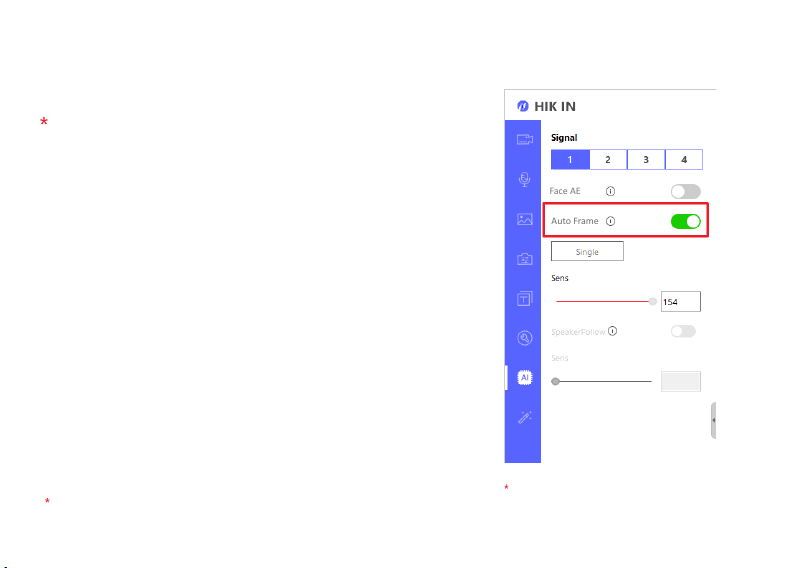
The camera adjusts to the best view angle
automatically according to the number and
location of attendees.
Auto Frame is disabled by default.
To enable this function, download HIK IN
first and enable Auto Frame.
The above picture is a
screenshot of HIK IN interface.
Auto Frame
Face AE
Auto Frame is supported by AI series cameras.
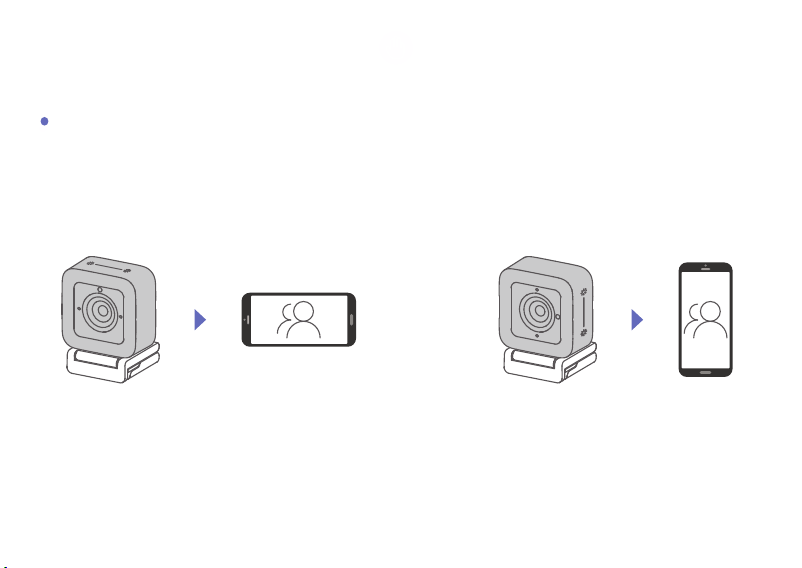
Three sides of the camera can be magnetically attached to the bracket, allowing free switching
between landscape and portrait mode.
Landscape Mode & Portrait Mode
9
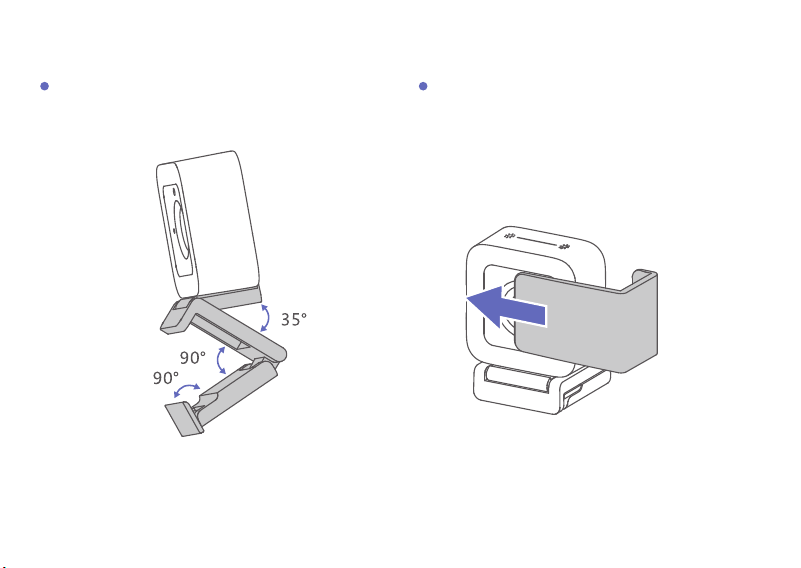
Angle Adjustment Privacy Protection
Cover the lens with the privacy cover if it is
necessary to protect privacy.
10

FAQ
Visit http://enpinfodata.hikvision.com/analysisQR/showQR/f1d86042 for frequently asked questions.
Warnings
Laws and Regulations
The device should be used in compliance with local laws, electrical safety regulations, and fire prevention regulations.
Electrical Safety
The socket-outlet shall be installed near the equipment and shall be easily accessible.
Battery
CAUTION: Risk of explosion if the battery is replaced by an incorrect type.
Improper replacement of the battery with an incorrect type may defeat a safeguard (for example, in the case of some lithium battery types).
Do not dispose of the battery into fire or a hot oven, or mechanically crush or cut the battery, which may result in an explosion.
Do not leave the battery in an extremely high temperature surrounding environment, which may result in an explosion or the leakage of flammable liquid or gas.
Do not subject the battery to extremely low air pressure, which may result in an explosion or the leakage of flammable liquid or gas.
Dispose of used batteries according to the instructions.
Cautions
Fire Prevention
No naked flame sources, such as lighted candles, should be placed on the equipment.
Transportation
Keep the device in original or similar packaging while transporting it.
DO NOT drop the product or subject it to physical shock.
Power Supply
EUT will be charged by specified source which the output circuit comply with LPS/PS 2.
Refer to the device label for the standard power supply. Please make sure your power supply matches with your device.
Use a power adapter provided by qualified manufacturers. It is recommended to provide an independent power adapter for each device as adapter overload may
cause over-heating or a fire hazard.
Maintenance
If the product does not work properly, please contact your dealer or the nearest service center. We shall not assume any responsibility for problems caused by
unauthorized repair or maintenance.
Cleaning
Please use a soft and dry cloth to clean the interior and exterior surfaces. Do not use alkaline detergents.
Using Environment
To avoid heat accumulation, good ventilation is required for a proper operating environment.
DO NOT expose the device to extremely hot, cold, dusty, corrosive, saline-alkali, or damp environments. For temperature and humidity requirements, see device
specification.
DO NOT expose the device to high electromagnetic radiation.
Emergency
If smoke, odor, or noise arises from the device, immediately turn off the power, unplug the power cable, and contact the service center.
Safety Instruction

Regulatory Information
FCC Information
Please take attention that changes or modification not expressly approved by the party responsible for compliance could void the user’s authority to operate the
equipment.
FCC compliance: This equipment has been tested and found to comply with the limits for a Class B digital device, pursuant to part 15 of the FCC Rules. These limits are
designed to provide reasonable protection against harmful interference when the equipment is operated in a commercial environment. This equipment generates,
uses, and can radiate radio frequency energy and, if not installed and used in accordance with the instruction manual, may cause harmful interference to radio
communications. Operation of this equipment in a residential area is likely to cause harmful interference in which case the user will be required to correct the
interference at his own expense.
FCC Conditions
This device complies with part 15 of the FCC Rules. Operation is subject to the following two conditions:
1. This device may not cause harmful interference.
2. This device must accept any interference received, including interference that may cause undesired operation.
This equipment complies with FCC radiation exposure limits set forth for an uncontrolled environment. This equipment should be installed and operated with
minimum distance 20cm between the radiator & your body.
EU Conformity Statement
This product and - if applicable - the supplied accessories too are marked with "CE" and comply therefore with the applicable harmonized European standards
listed under Directive 2014/53/EU(RED), the Low Voltage Directive 2014/35/EU, the EMC Directive 2014/30/EU, the RoHS Directive 2011/65/EU.
2012/19/EU (WEEE directive): Products marked with this symbol cannot be disposed of as unsorted municipal waste in the European Union. For proper recycling,
return this product to your local supplier upon the purchase of equivalent new equipment, or dispose of it at designated collection points. For more information see:
www.recyclethis.info.
2006/66/EC (battery directive): This product contains a battery that cannot be disposed of as unsorted municipal waste in the European Union. See the product
documentation for specific battery information. The battery is marked with this symbol, which may include lettering to indicate cadmium (Cd), lead (Pb), or mercury
(Hg). For proper recycling, return the battery to your supplier or to a designated collection point. For more information, see: www.recyclethis.info.
Industry Canada ICES-003 Compliance
This device meets the CAN ICES-3 (B)/NMB-3(B) standards requirements.

©2022 Hangzhou Hikvision Digital Technology Co., Ltd. All rights reserved.
About this Manual
The Manual includes instructions for using and managing the Product. Pictures, charts, images and all other information hereinafter are for description and
explanation only. The information contained in the Manual is subject to change, without notice, due to firmware updates or other reasons. Please find the latest
version of this Manual at the Hikvision website (https://www.hikvision.com/).
Please use this Manual with the guidance and assistance of professionals trained in supporting the Product.
Trademarks
and other Hikvision’s trademarks and logos are the properties of Hikvision in various jurisdictions.
Other trademarks and logos mentioned are the properties of their respective owners.
Disclaimer
TO THE MAXIMUM EXTENT PERMITTED BY APPLICABLE LAW, THIS MANUAL AND THE PRODUCT DESCRIBED, WITH ITS HARDWARE, SOFTWARE AND FIRMWARE,
ARE PROVIDED “AS IS” AND “WITH ALL FAULTS AND ERRORS”. HIKVISION MAKES NO WARRANTIES, EXPRESS OR IMPLIED, INCLUDING WITHOUT LIMITATION,
MERCHANTABILITY, SATISFACTORY QUALITY, OR FITNESS FOR A PARTICULAR PURPOSE. THE USE OF THE PRODUCT BY YOU IS AT YOUR OWN RISK. IN NO EVENT
WILL HIKVISION BE LIABLE TO YOU FOR ANY SPECIAL, CONSEQUENTIAL, INCIDENTAL, OR INDIRECT DAMAGES, INCLUDING, AMONG OTHERS, DAMAGES FOR LOSS
OF BUSINESS PROFITS, BUSINESS INTERRUPTION, OR LOSS OF DATA, CORRUPTION OF SYSTEMS, OR LOSS OF DOCUMENTATION, WHETHER BASED ON BREACH OF
CONTRACT, TORT (INCLUDING NEGLIGENCE), PRODUCT LIABILITY, OR OTHERWISE, IN CONNECTION WITH THE USE OF THE PRODUCT, EVEN IF HIKVISION HAS
BEEN ADVISED OF THE POSSIBILITY OF SUCH DAMAGES OR LOSS.
YOU ACKNOWLEDGE THAT THE NATURE OF THE INTERNET PROVIDES FOR INHERENT SECURITY RISKS, AND HIKVISION SHALL NOT TAKE ANY RESPONSIBILITIES
FOR ABNORMAL OPERATION, PRIVACY LEAKAGE OR OTHER DAMAGES RESULTING FROM CYBER-ATTACK, HACKER ATTACK, VIRUS INFECTION, OR OTHER
INTERNET SECURITY RISKS; HOWEVER, HIKVISION WILL PROVIDE TIMELY TECHNICAL SUPPORT IF REQUIRED.
YOU AGREE TO USE THIS PRODUCT IN COMPLIANCE WITH ALL APPLICABLE LAWS, AND YOU ARE SOLELY RESPONSIBLE FOR ENSURING THAT YOUR USE
CONFORMS TO THE APPLICABLE LAW. ESPECIALLY, YOU ARE RESPONSIBLE, FOR USING THIS PRODUCT IN A MANNER THAT DOES NOT INFRINGE ON THE RIGHTS
OF THIRD PARTIES, INCLUDING WITHOUT LIMITATION, RIGHTS OF PUBLICITY, INTELLECTUAL PROPERTY RIGHTS, OR DATA PROTECTION AND OTHER PRIVACY
RIGHTS. YOU SHALL NOT USE THIS PRODUCT FOR ANY PROHIBITED END-USES, INCLUDING THE DEVELOPMENT OR PRODUCTION OF WEAPONS OF MASS
DESTRUCTION, THE DEVELOPMENT OR PRODUCTION OF CHEMICAL OR BIOLOGICAL WEAPONS, ANY ACTIVITIES IN THE CONTEXT RELATED TO ANY NUCLEAR
EXPLOSIVE OR UNSAFE NUCLEAR FUEL-CYCLE, OR IN SUPPORT OF HUMAN RIGHTS ABUSES.
IN THE EVENT OF ANY CONFLICTS BETWEEN THIS MANUAL AND THE APPLICABLE LAW, THE LATTER PREVAILS.
Open Source Software Disclaimer
This product cannot be launched without the contribution of open source software. HIKVISION respects the Intellectual Property of others, has established and
will continue to improve its open source compliance system. You can get this product's Open Source Software Declaration and Copyleft Source Code by visiting
http://opensource.hikvision.com/Home.

UD27610B-C