Rev. V04282022DT (DS0332) www.akiascreens.com 1
Floor Motorized Tab-Tension Series
Floor Rising Tab-Tensioned Motorized Screen
User’s Guide
IMPORTANT SAFEGUARDS
Read these instructions carefully and retain them for future use. If this product is passed to a third
party, then these instructions must be included.
Caution:
The screen’s Black Bottom Drop is already set to its maximum drop distance. There is
NO extra Black Bottom Drop in the roller. Please be aware of this as it will void your
warranty with AKIA Screens. Unapproved changes or modifications (except for cutting
the power cord for hardwire installations) to this unit are prohibited and will void your
warranty.
• To avoid damaging the unit, do not use with any unauthorized accessories not recommended by
the manufacturer.
• Handle the unit carefully during transportation to avoid any damages.
• To ensure safe and reliable operation, direct connection to a properly grounded power source is
advised.
• The power outlet supplying power to the unit should be close to the unit and easily accessible.
• Do not install the unit on uneven or inclined surfaces.
• Do not put heavy objects on the power cord and position it properly to avoid creating a trip
obstacle.
• Never overload the power cord to prevent an electric shock or fire due to a loose contact or a
short circuit.
• There are not user serviceable parts in this unit. Do not attempt to disassemble this unit by
yourself. No one except authorized technicians can open and make repairs to this unit.
• Make sure the power source this unit is connected to has a continuous power flow.
• If there is need to use an extension cord, make sure the cord has an equal rating as the
appliance to avoid overheat.
• Do not handle the power plug when your hands are wet, or your feet are in contact with water.
• Remote controller contains CR2032 button cell battery, keep the battery out of children’s reach
and prevent them biting or swallowing the battery.
User’s Guide Floor Motorized Tab-Tension Series
Rev. V04282022DT (DS0332) www.akiascreens.com 2
Do not use this unit under the following circumstances.
• Disconnect the power cord under the conditions of heavy rain, wind, thunder, or lightning.
• Avoid direct Sunshine, rain shower and moisture.
• Keep away from fire sources and high temperature to prevent this device from overheating.
• Cut off the power supply first before transportation or maintenance.
• Fully disconnect from the power supply when the unit is not in use for a long period of time, as
should be done with any other electric household appliance.
• To avoid possible injury and/or an electric shock, do not attempt to use the screen if there is
obvious damage or if there are any evident broken parts.
• Keep hands clear from the closing panels.
• Keep away from children when screen is in operation.
WARNING
Individual modifications to this product are prohibited and will void the manufacturer’s warranty. Please
contact the AKIA Screens Customer Service Team with any questions.
SCREEN MAINTAINANCE
Dust, dirt, and scratches on the projection screen surface will affect the quality and performance of the
projection image. For optimal results we advise to pay attention to the following instructions.
1) The screen surface has a horizontal structure. DO NOT wipe the screen up and down or in a circular
motion.
Wipe very gently when needed from left to right only.
2) Please clean the dust on the screen surface with a soft brush or microfiber cloth (rough towel or
cloth may damage the screen’s surface).
3) Gently wipe the screen with a lightly moistened microfiber cloth with mild soap diluted in water.
Notes:
The following precautions should be followed at all times to avoid damaging the
material, which is not covered under warranty.
▪ Don’t touch the screen material to avoid leaving fingerprints. Use gloves when handling the
material.
▪ Don’t scratch the material, as it will leave permanent markings on the screen’s surface.
▪ Don’t point to the screen material with a fingertip or other sharp objects to prevent damage to
the material.
▪ Don’t use acetone, benzene, alcohol, and any other organic solvents to clean the screen
material. Using such chemicals will permanently damage the screen.
User’s Guide Floor Motorized Tab-Tension Series
Rev. V04282022DT (DS0332) www.akiascreens.com 3
FCC Regulatory Compliance
This device complies with Part 15 of the FCC Rules.
Operation is subject to the following two conditions:
(1) this device may not cause harmful interference, and (2) this device must accept any interference received,
including interference that may cause undesired operation.
Changes or modifications not expressly approved by the party responsible for compliance could void the user’s
authority to operate the equipment.
This equipment has been tested and found to comply with the limits for a Class B digital device, pursuant to Part
15 of the FCC Rules. These limits are designed to provide reasonable protection against harmful interference in
a residential installation. This equipment generates, uses, and can radiate radio frequency energy and, if not
installed and used in accordance with the instructions, may cause harmful interference to radio communications.
However, there is no guarantee that interference will not occur in a particular installation.
If this equipment does cause harmful interference to radio or television reception, which can be determined by
turning the equipment off and on, the user is encouraged to try to correct the interference by one or more of the
following measures:
-- Reorient or relocate the receiving antenna.
-- Increase the separation between the equipment and receiver.
-- Connect the equipment into an outlet on a circuit different from that to which the receiver is connected.
-- Consult the dealer or an experienced radio/TV technician for help.
This equipment complies with FCC radiation exposure limits set forth for an uncontrolled environment. This
transmitter must not be co-located or operating in conjunction with any other antenna or transmitter.
User’s Guide Floor Motorized Tab-Tension Series
Rev. V04282022DT (DS0332) www.akiascreens.com 4
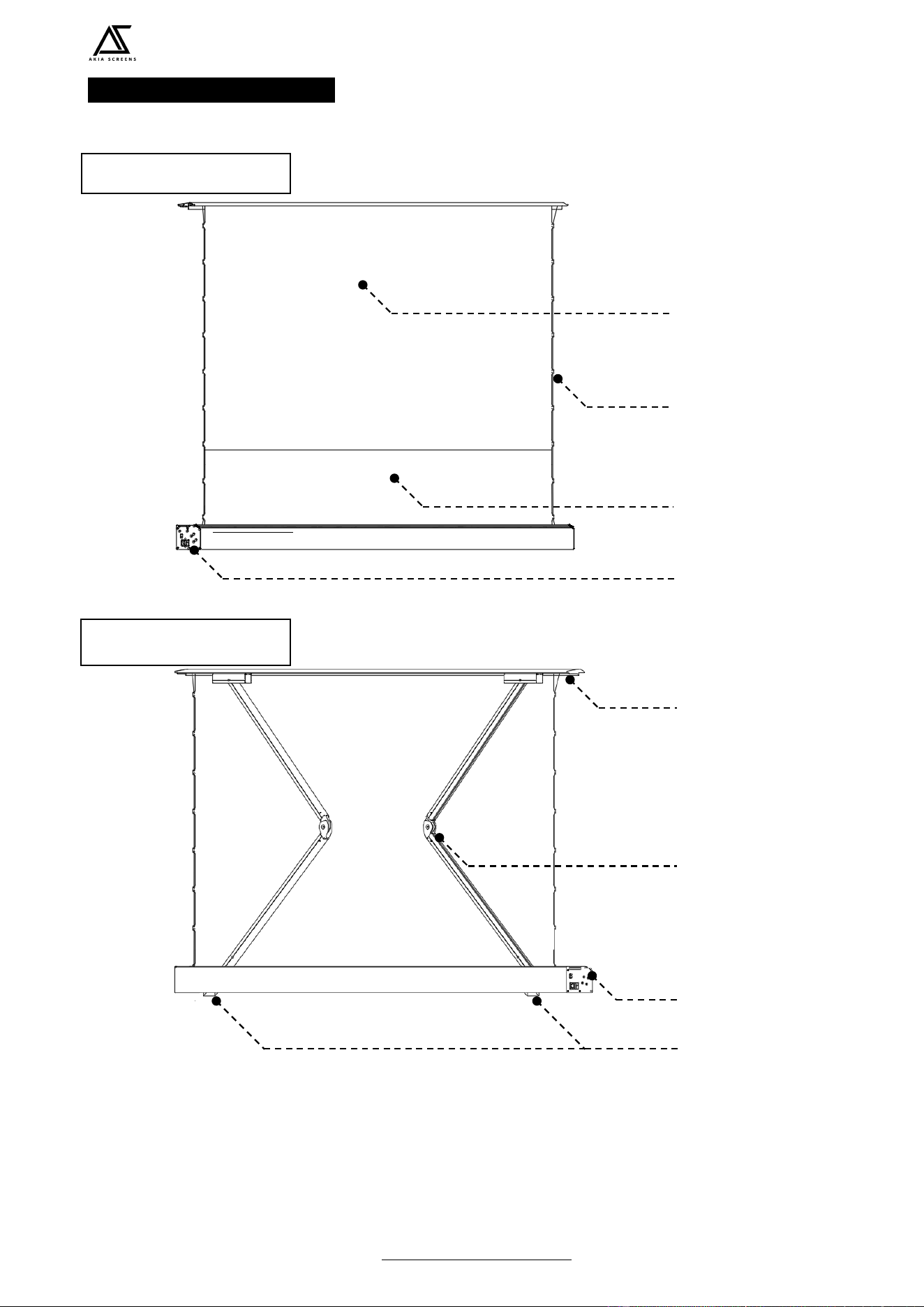
PARTS IDENTIFICATION
Note: Please always store the screen flat horizontally. Never store the screen in a vertical
position as it will permanently damage the screen’s structure, shift the material, and
cause wrinkles/folds which will void the warranty.
Screen material
Bottom black masking
border
Power terminal /
Power switch
Tab/Strings
Cross-rising spring
scissor mechanism
Case/Housing
Closing Panel/Lid
Feet
Front of screen
Back of screen
User’s Guide Floor Motorized Tab-Tension Series
Rev. V04282022DT (DS0332) www.akiascreens.com 5
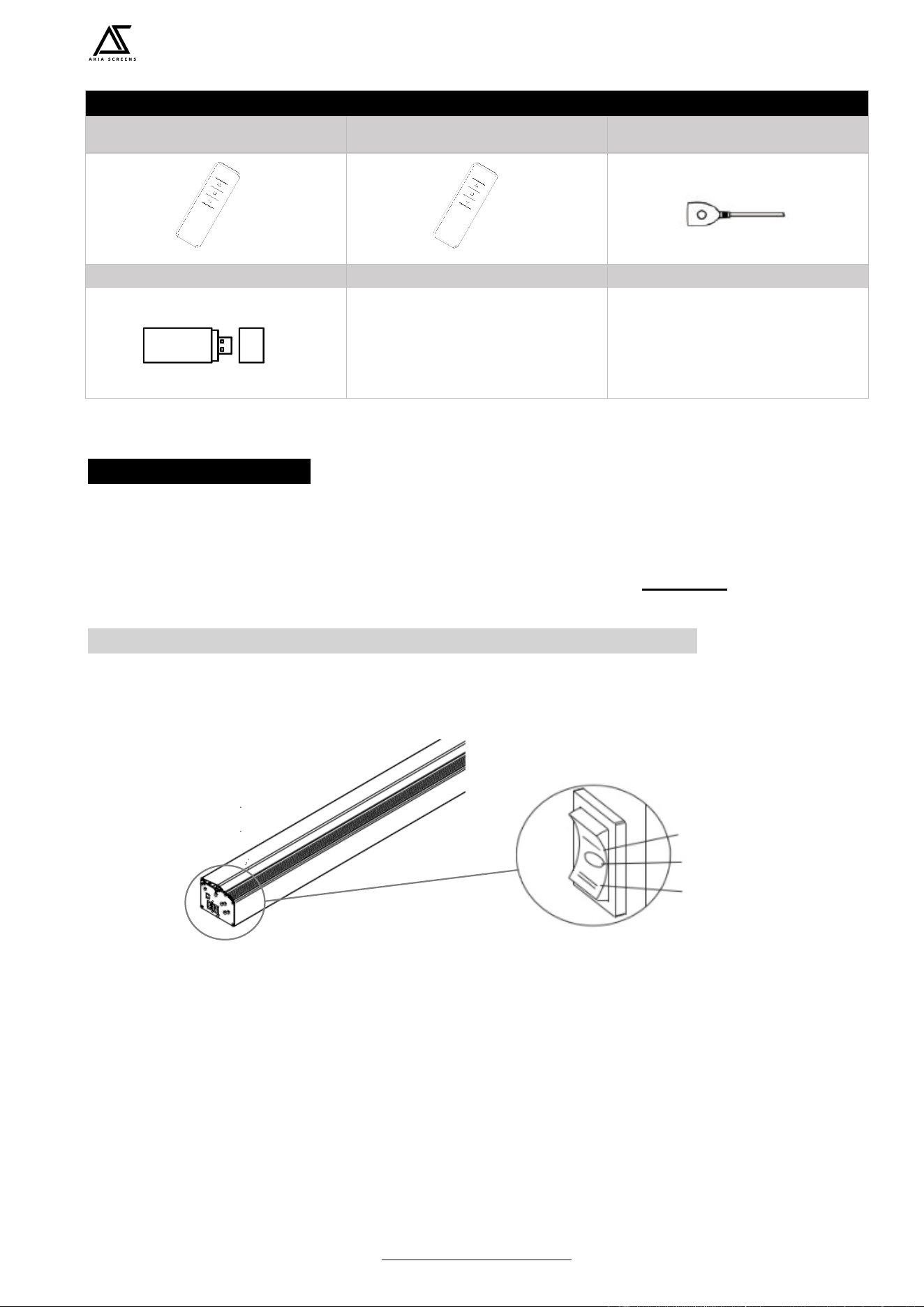
Floor Motorized Tab-Tension Series | Controls and Accessories
A. RF (Radio Frequency) Remote
control
B. IR (InfraRed) Remote Control
C. IR extended receiver
※ Installed inside housing near circuit
board box
D. RF wireless trigger (USB type)
SCREEN OPERATION
Electric Current: Depending on your region, the screen will operate in either 110v or 220v voltage.
1. After ensuring the power outlet & screen are compatible (voltage), plug the power cord into the power
outlet.
2. Once the screen has power, you’ll be able to control it using any of the 4 methods described below.
4 ways to control your Floor Motorized Tab-Tension Screen
1. Manual Operation Switch: The left side of the screen's housing includes a UP/STOP/DOWN
switch to raise, lower and stop the screen without the use of the RF/IR remote.
2. RF Remote Control (Item A): The RF (A) remote is best used when the screen is concealed or
when long distance control is required. The RF technology therefore is more versatile as it does not
require line of sight to operate the screen.
Stop
Down
Up
User’s Guide Floor Motorized Tab-Tension Series
Rev. V04282022DT (DS0332) www.akiascreens.com 6
3. IR Remote Control (Item B) and IR Eye Receiver
(Item
C
): The IR remote (B) requires a direct
line of sight through the screen’s IR receiver. Place the IR Eye Receiver (C) in a suitable location
free from obstruction. Then point the IR remote to the IR Eye receiver to operate the screen.
※ IR Eye Receiver has been installed in the housing
4. RF wireless trigger (USB type) (Item D): The RF wireless trigger (D) can synchronize to your
projector’s power cycle for easy operation.
※ The trigger has been synchronized to your electric screen.
a. Connect the RF wireless trigger into the projector’s USB port.
b. Make sure to enable this feature if needed in your projector’s menu settings.
c. Power ON the projector. The screen should raise (up) the screen automatically.
d. Power OFF the projector. The screen should descend (down) the screen automatically.
NOTE
➢ When powering off the projector, assure it is completely powered off (ex. fan off), then the
screen will retract automatically.
➢ If the motorized screen does not automatically drop or retract, repeat the process from step
one.
BATTERY CHANGING METHOD
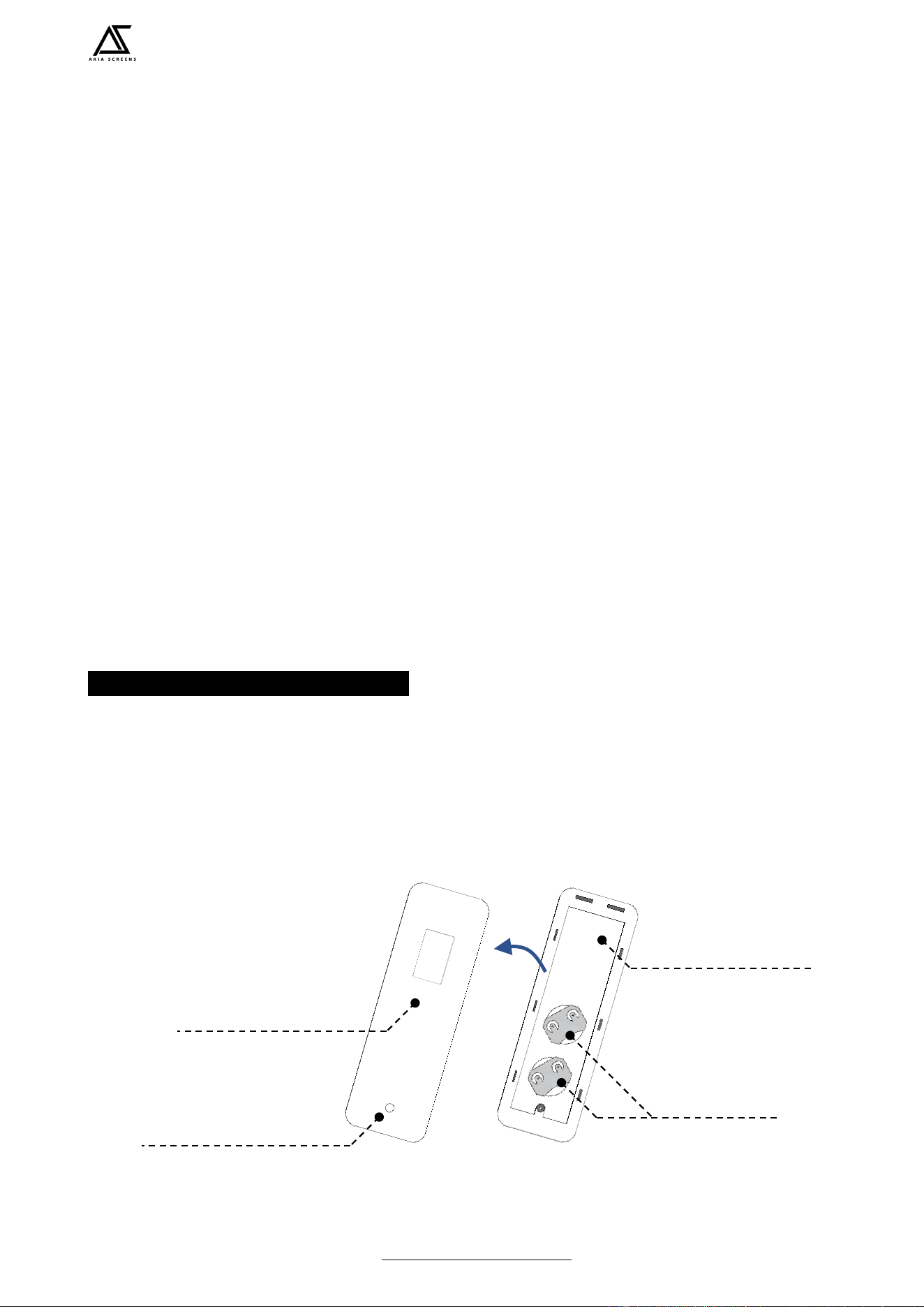
Follow the steps below to replace the CR2032 button cell batteries (2x required) on the remote control.
a. Unscrew the back cover of the remote control.
b. PUSH UP to remove the back cover.
c. Replace the old batteries with new batteries.
d. Put the back cover on the remote control secure with screw.
e. Check the operation of the remote control to verify screen responds to the commands.
Front cover
Screw hole
Back cover
CR2032 Button
Cell battery
User’s Guide Floor Motorized Tab-Tension Series
Rev. V04282022DT (DS0332) www.akiascreens.com 7
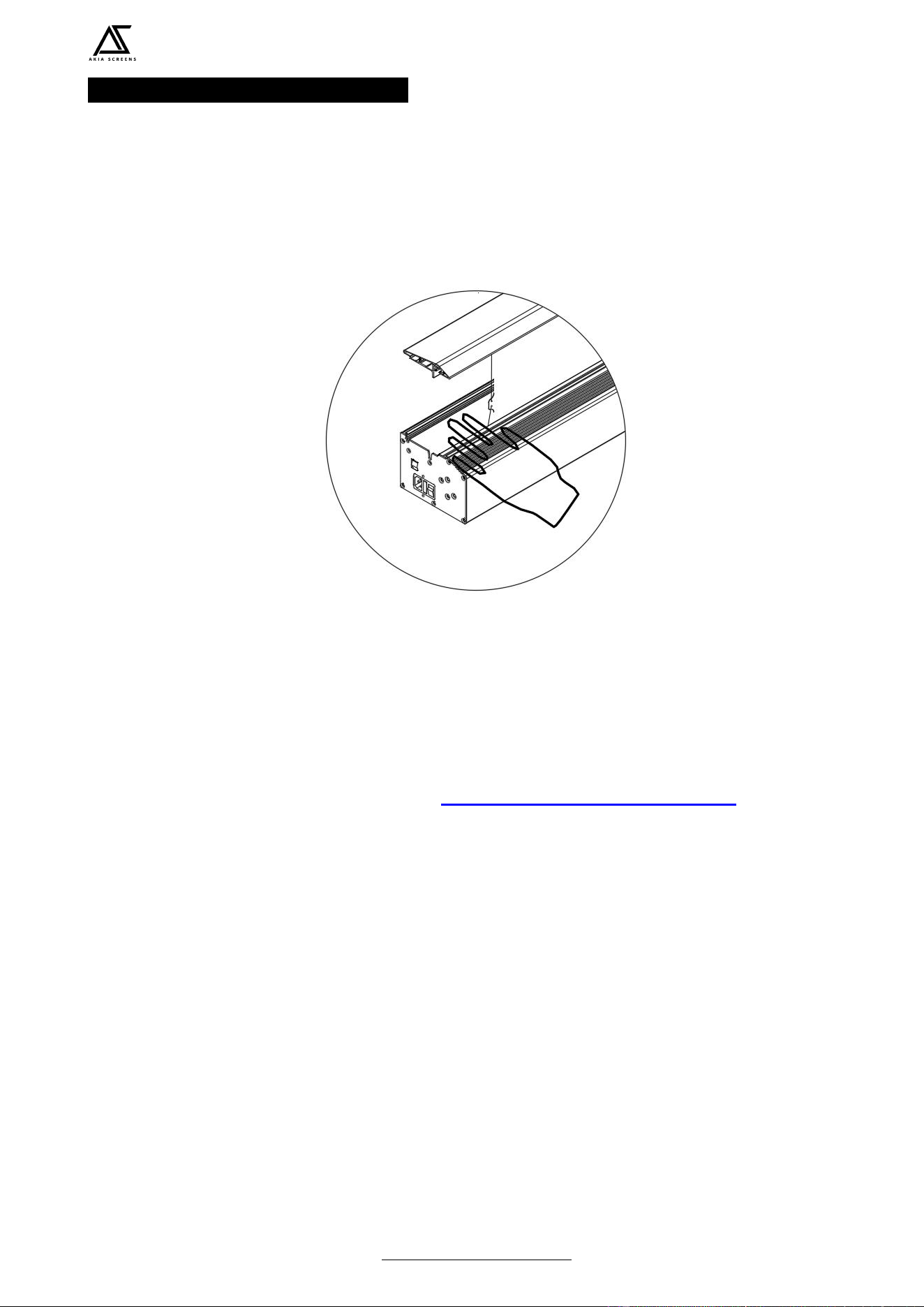
ANTI-PINCH SAFETY FEATURE
Prevent injury or damage to the screen when an object interferes with the screen’s descent during its
operation. The screen is equipped with an anti-pinch safety feature which prevents the closing panel/lid
to stop when it detects an object
For more information, technical support or your local AKIA Screens
contact, please visit
http://www.akiacreens.com/