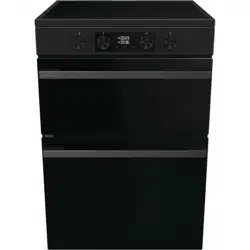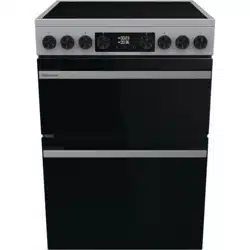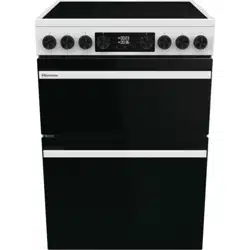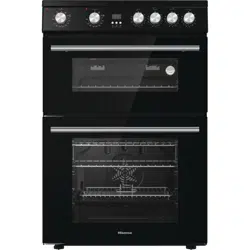

DETAILED
INSTRUCTIONS
FOR USE OF ELECTRIC
FREE STANDING
COOKER
HDE3211BIWUK
HDE3211BIBUK
GB IE MT

You’ll soon be enjoying your new Freestanding Cooker
It all begins here, with your instructions. Don’t worry, there’s
nothing too technical coming up. Just simple, step-by-step
guidance to get you up and running quickly. Sound good?
Then let’s get started.
2

3
Contents
Safety information
Getting to know your Freestanding Cooker
Installing your Freestanding Cooker
Using your Freestanding Cooker
Technical Data
Care and maintenance
Product support
Troubleshooting
Technical specification
Cleaning
Control panel
Installation requirements
Overview
SAFETY INFORMATION
Accessories
Electrical connection
Oven functions
General oven and cooking tips
Practical Cooking Advice
Cooking Tips - Hob
Replacing the oven lamps
How to remove th
e oven doors
Energy fiche
Declaration of conformance to product standards
Disposal
33
31
29
29
28
14
10
8
4
9
12
15
18
19
21
32
34
34
4
SAFETY INFORMATION
IMPORTANT
INSTALLATION WARNINGS
DURING USAGE
IMPORTANT: Prior to Installation ensure that the local supply conditions (electricity
voltage and frequency) are compatible with the requirements of your freestanding
cooker.
IMPORTANT: Carefully unpack and examine the appliance for any damage. If you
think there is a defect, do not use the appliance and contact product support.
Packaging materials should be collected together and disposed of immediately as
they maybe harmful to children.
IMPORTANT: Keep the electrical cable (not supplied) of your freestanding cooker
away from the hot areas of your appliance, do not let the cable touch the appliance.
Keep the cable away from sharp edges and heated surfaces.
IMPORTANT: If you do not intend to use your built in oven for a long period of time
IIMPORTANT:
in use.
IMPORTANT: This appliance can be used by children aged from 8 years and above
and persons with reduced physical, sensory or mental capabilities or lack of
WARNING: Before obtaining access to terminals, all supply circuits must be
disconnected.
IMPORTANT:
smoke or an unusual odour from the heating elements and insulation materials. To
eliminate this odour run the oven at 250 degrees for 40-60 minutes with the oven
empty.
IMPORTANT: The materials surrounding the appliance (cabinets) must be able to
withstand a minimum temperature of 100°C.
IMPORTANT:
IMPORTANT: In the event that the cable connecting your freestanding cooker
becomes damaged, it must be replaced by a suitably qualified person. This cable
must not be replaced by an unauthorised person.
IMPORTANT: Ensure that the electric supply cable is not trapped or damaged
during installation.
Please read these instructions fully before installing or
operating.
5
SAFETY INFORMATION
IMPORTANT: This appliance has been designed for non-professional, domestic use
only. Do not use this oven for commercial use or any other application e.g room
heating.
WARNING: Danger of fire: do not store flammable items on or near the cooking
surfaces or inside the oven.
IMPORTANT: Do not hang towels, dishcloths or clothes from the built-in oven or its
handles.
IMPORTANT: When the door of the oven is open, do not hang or lean anything on
it. You may unbalance your appliance or damage the door or door hinges.
IMPORTANT: When using the grill the oven door must be kept closed.
IMPORTANT: Maintenance and repair work must only be performed by authorised
service technicians. Installation and repair work that is carried out by unauthorised
technicians is dangerous and could invalidate your guarantee.
IMPORTANT: Your appliance is produced in accordance with all applicable local and
international standards and regulations.
WARNING:
avoid the possibility of electric shock.
IMPORTANT: Do not try to lift or move this appliance by pulling on the door handle.
CAUTION: Take care when closing the oven door that there is nothing obstructing
it from closing as this may break the glass door.
CAUTION: Before starting to use your appliance, ensure curtains, paper or
flammable items are kept away from your appliance. Do not keep flammable
materials inside of or around your cooker.
CAUTION: When the cooker is hot never touch the oven glass by hand or with tools.
CAUTION: Do not allow children in the kitchen when cooking or after, as the parts
may still be hot. Many parts of the cooker will become hot and present a
considerable hazard to children.
GENERAL SAFETY WARNINGS
WARNING:
the appliance and cover flame e.g with a lid or a fire blanket.
WARNING: The appliance and its accessible parts become hot during use. Care
should be taken to avoid touching heating elements.
experience and knowledge if they have been given supervision or instruction
concerning use of the appliance in a safe way and understand the hazards
involved. Children shall not play with the appliance. Cleaning and user
maintenance shall not be made by children without supervision.
6
SAFETY INFORMATION
IMPORTANT:
cooker isolation switch.
WARN
W
WARNING:
CAUTION: The cooking process has to be supervised. A short term cooking process
has to be supervised continuously.
WARNING: Unattended cooking on a hob with fat or oil can be dangerous and may
result in a fire.
of electric shock.
ARNING: Metallic objects such as knives, forks, spoons and lids should not be
placed on the hob surface since they can get hot.
ING: Do not use harsh abrasive cleaners or sharp metal scrapers to clean the
oven door glass since they can scratch the surface, which may result in shattering
of the glass.
IMPORTANT: Do not remove the control knobs to clean the control panel.
GENERAL SAFETY WARNINGS

7
Getting to know your Freestanding Cooker
Ready? Let’s begin...
If you require any further assistance, our technical experts are happy to help. For
full details, refer to the product support section at the end of these instructions.
Please read these instructions carefully. They contain important information which
will help you get the best from your freestanding cooker and ensure safe and
correct installation and operation.
8
Getting to know your Freestanding Cooker
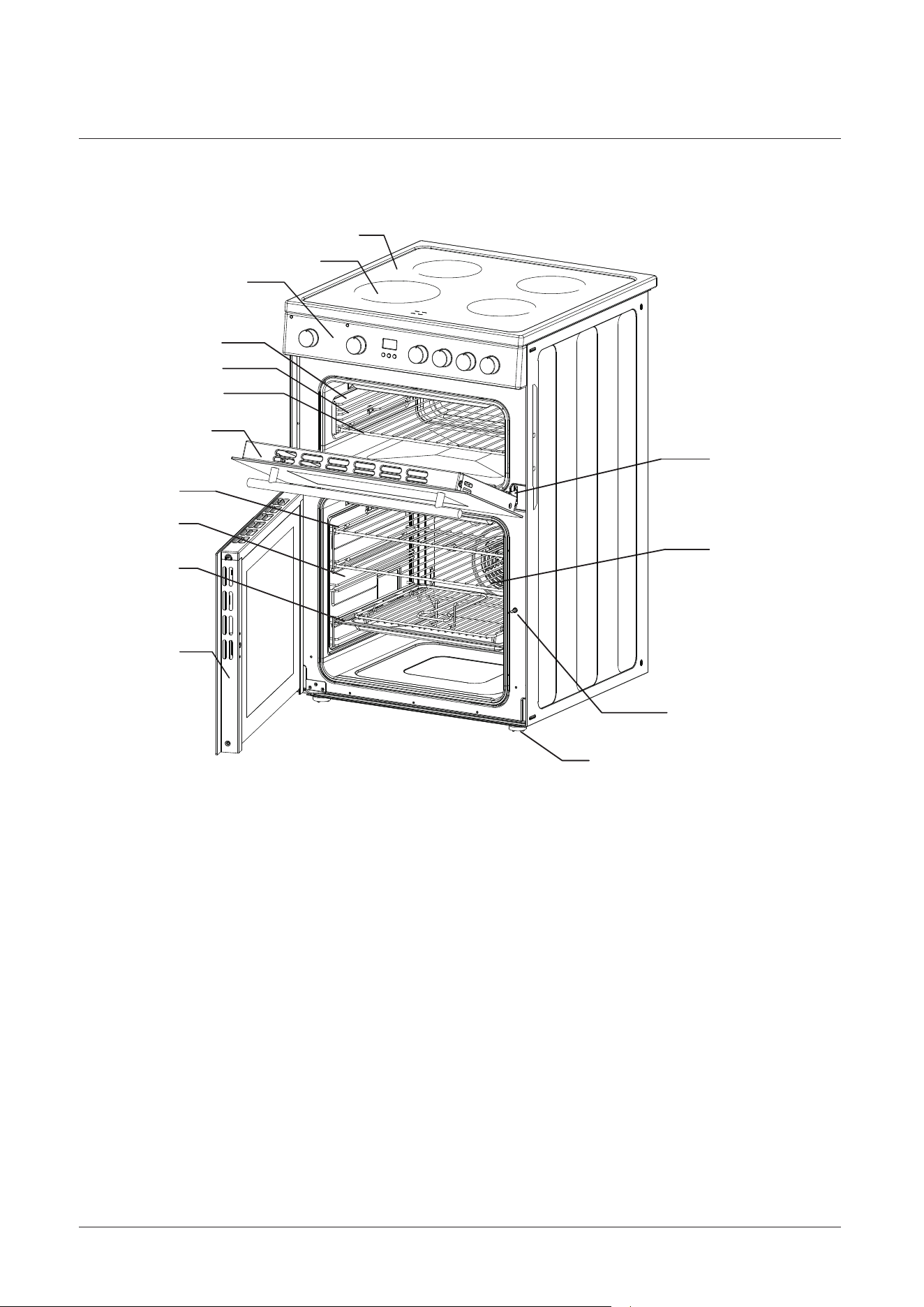
Overview
2
7
11
8
9
10
1
3
5
4
6
15
14
13
12
1. Hob
2. Cooking zone
3. Control Panel
5.
4.
Shelf positions
6.
7.
Wire Shelf
Oven Door
Shelf positions
Baking tray
Catalytic panel
Catalytic panel
8.
10.
9.
Oven Door11.
12. Hinge
13. Wire Shelf
14. Door lock
15. Anti slip feet
9
Getting to know your Freestanding Cooker
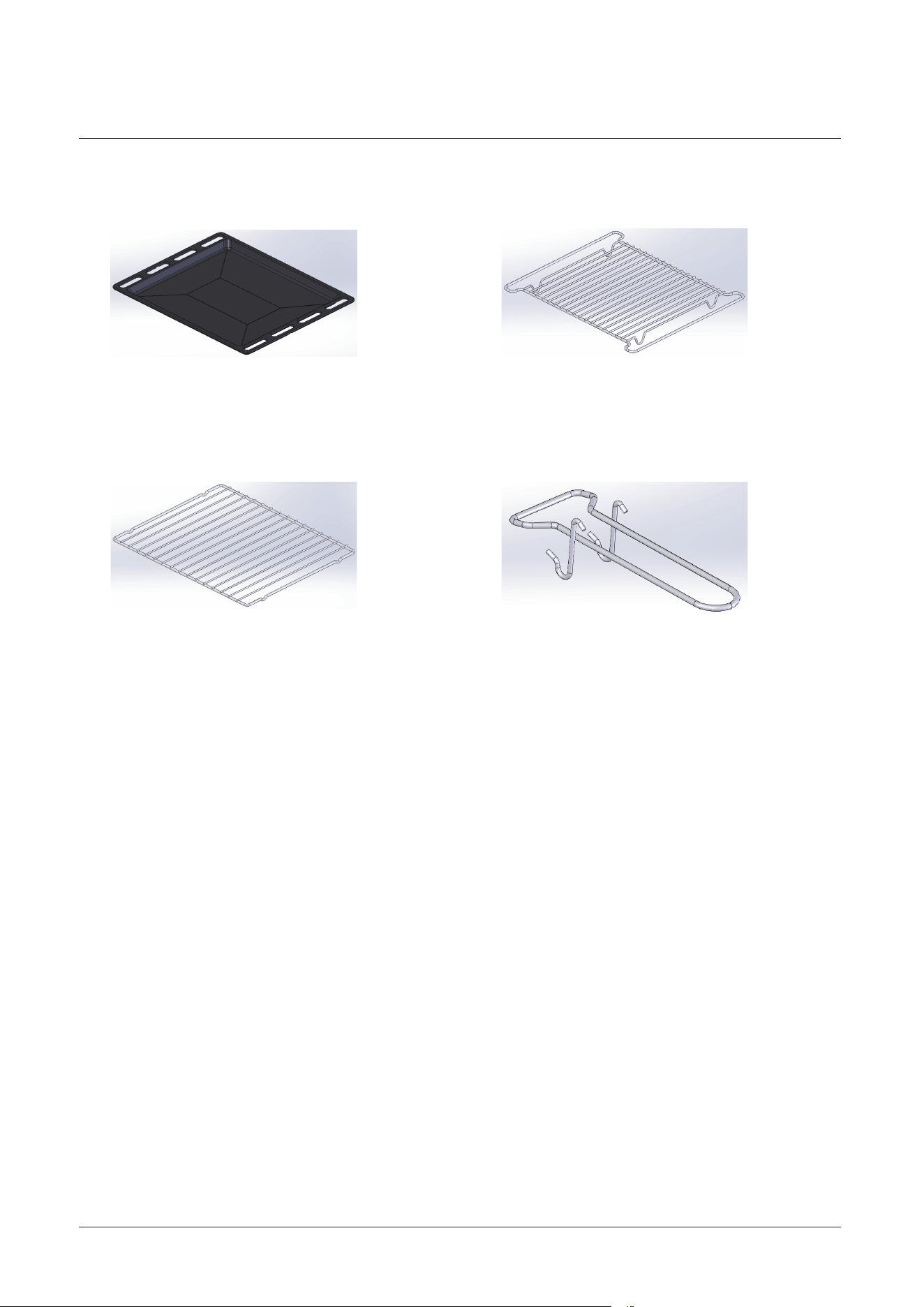
Accessories
Grill pan handle x 1
Baking tray x 1
Grill insert x 1
Chrome shelves x 3
1.
2.
4.3.
10
Installing your Freestanding Cooker
Installation requirements
Positioning
First Use
THIS COOKER MUST BE INSTALLED BY A QUALIFIED INSTALLER IN
ACCORDANCE WITH LOCAL REGULATIONS.
IMPORTANT: CONTACT AN AUTHORISED SERVICE AGENT FOR
INSTALLATION OF YOUR FREESTANDING COOKER!
1. Make sure that there are no combustible or flammable materials, such as curtains,
in the vicinity of the installation.
2. Furniture and cabinets surrounding the cooker must be of material resistant to
temperatures greater than 100°C.
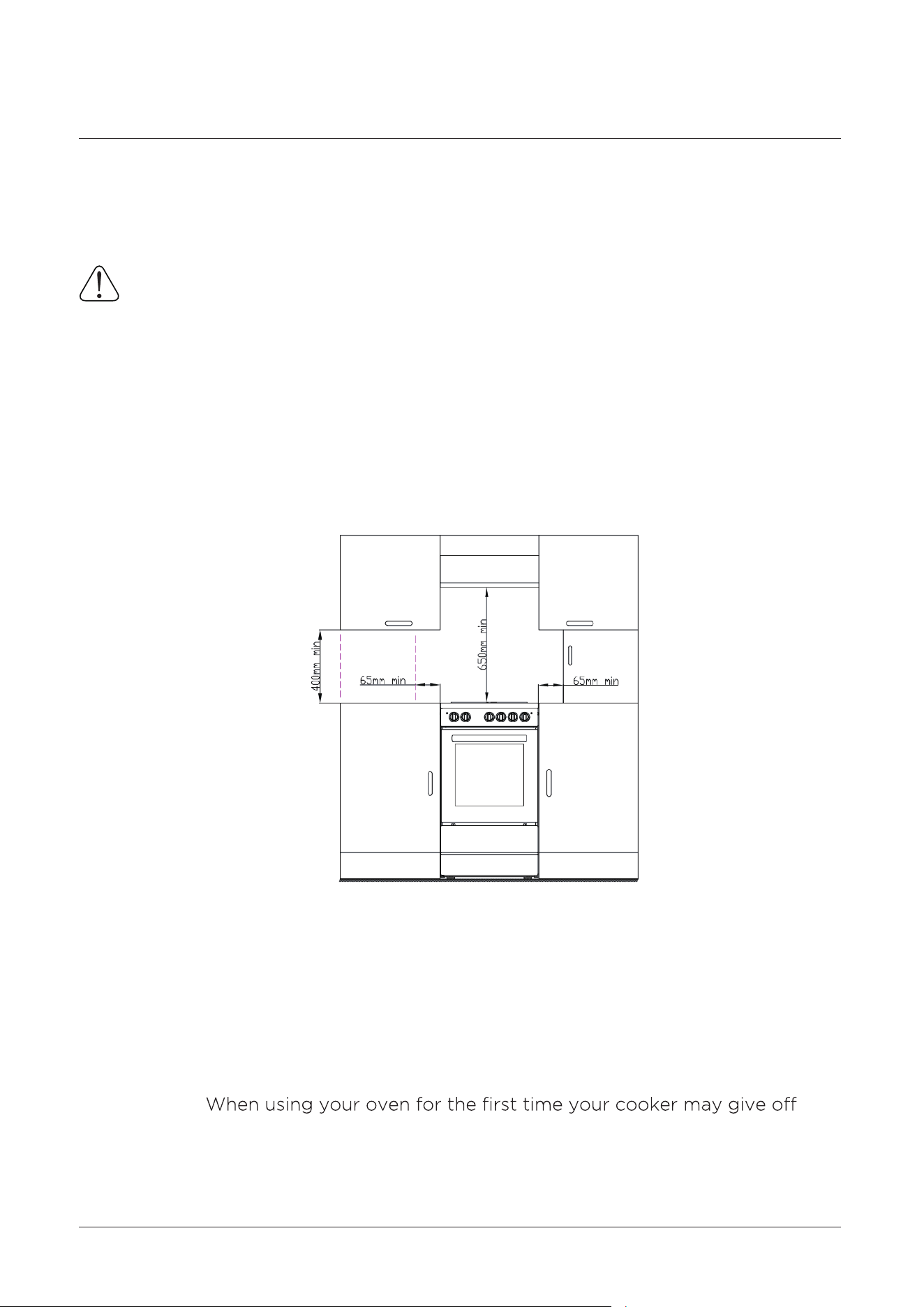
3. Surrounding furniture, cabinets and extractor fans should be positioned in
accordance with the diagram shown in the figure 1.
4. There must be at least 2cm of free space between the back wall and the rear of
the appliance to allow for ventilation and air circulation.
5. If fitted, the extractor fan must be at least 65cm above the hotplates. If no fan is
fitted the minimum distance between the hotplates and any cabinet or other
structure must be 75cm.
IMPORTANT:
smoke or an unusual odour from the heating elements and insulation materials.
This is normal for new cookers. To eliminate this odour run the oven at 250
degrees for 40-60 mins with the oven empty.
Figure 1
11
Installing your Freestanding Cooker
Unpacking
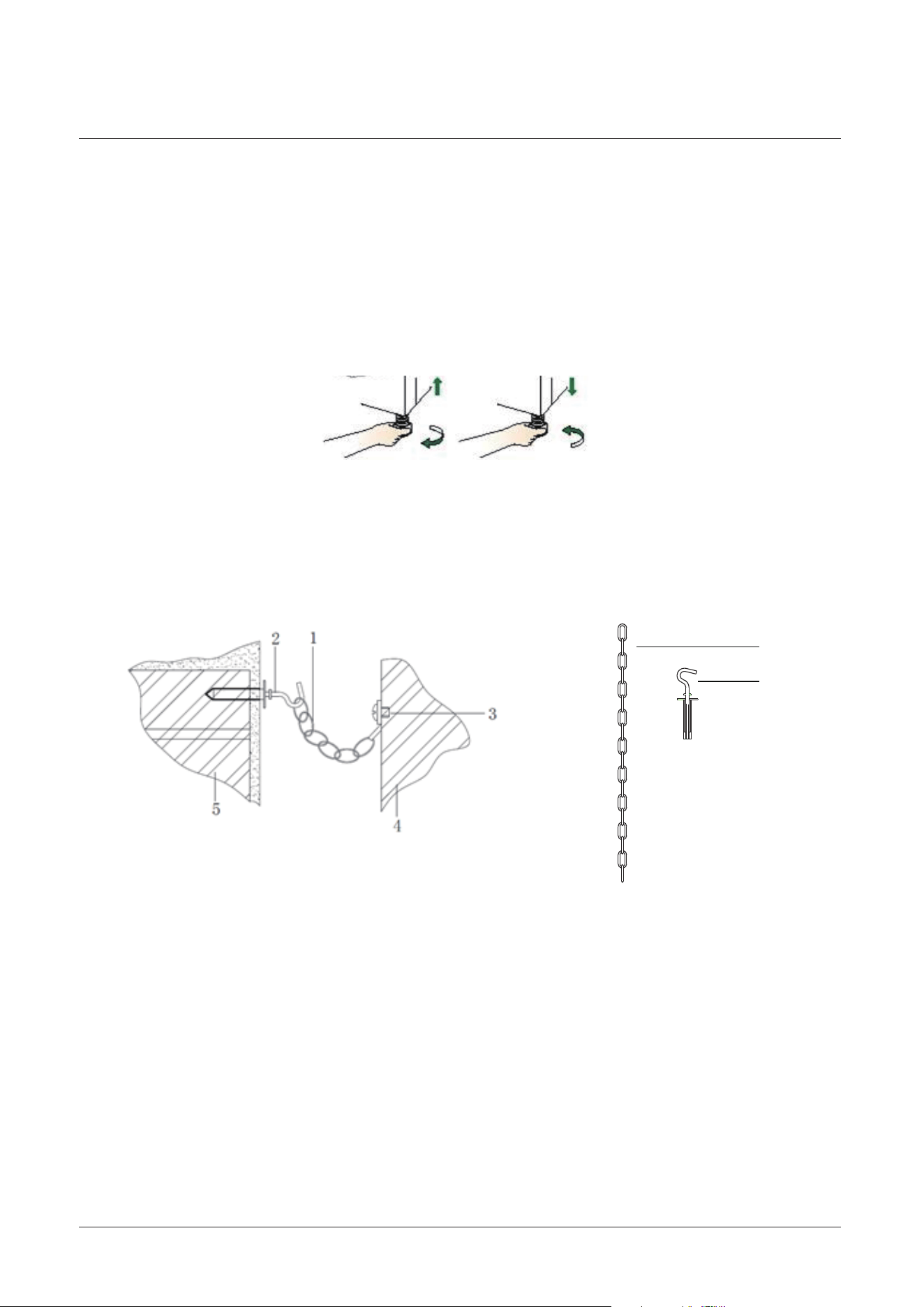
Levelling feet
Safety chain
Carefully unpack and examine the appliance for any damage. If you think there is a
defect, do not use the appliance and call an authorized service technician.
The height and level of the appliance can be adjusted by rotating the feet located
underneath the appliance at each corner. Rotate the feet to decrease or increase
the height.
The appliance must be secured against the possibility of tipping forward by using
the supplied sa
fety chains attached to the rear of your oven. Fasten the stability
hook provided by inserting a wall plug into the kitchen wall and then connect the
safety chain to the hook via the locking mechanism.
1. Safety chain (supplied and mounted to oven)
Stability hook
Chain attachment for the rear of the cooker
Rear of the cooker
Kitchen wall
2.
3.
4.
5.
2
1
12
Installing your Freestanding Cooker
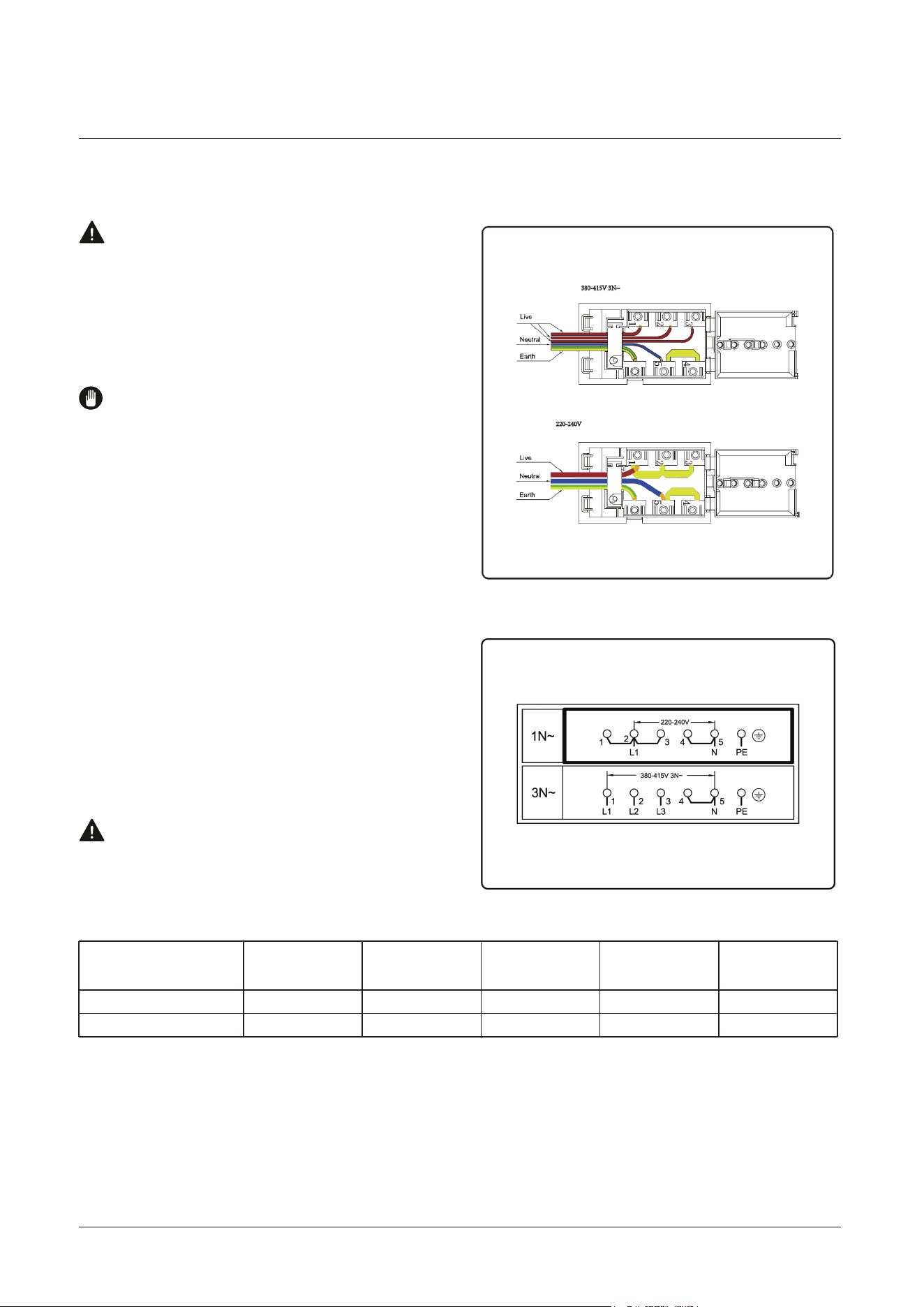
Fitting a Power Supply Cable
4 mm
2
4 mm
2
4 mm
2
Min 2.5 Min 2.5 Min 2.5 Min 2.5 Min 2.5
--
WARNING: Installation MUST ONLY
be carried out by a qualified approved
installer, ie. an Electrician.
WARNING: Connect the power cord
must be in accordance with the
instructions listed in the table below:
Connecting appropriate power supply
‘ terminal board/ connector block’:
REFER to TECHNICAL table at the
rear of this manual for correct rating
for your corresponding model
purchased.
1. Using a screwdriver, prize open tabs
of the Terminal board cover.
2. Remove the wire clamp screw.
4. Fasten cable clamp and close the
cover of the terminal board.
5. The AC power supply should be
220-240V or 380-415V, 50-60Hz.
3. Fasten the wire
s beneath the
corresponding screw heads, using
brass ‘bridge’ for single phase supply.
EN - 4
WARNING:
WARNING:
WARNING:
WARNING:
EN - 4
1. SAFETY INSTRUCTIONS
1.1 General Safety Warnings
WARNING:
WARNING:
WARNING:
WARNING:
EN - 2
Icon Type Meaning
WARNING Serious injury or death risk
RISK OF ELECTRIC SHOCK Dangerous voltage risk
SYMBOL ISO 7010 W021
CAUTION
IMPORTANT / NOTE
220-240V 1N~
380-415V 3N~
Wire cross-sectional area
L1 L2 L3 N E
(mm
2
) connection mode

13
Installing your Freestanding Cooker
The electrical capacity of the system and sockets will support the maximum
power of the appliance, as indicated on the data plate.
Earth continuity. The electrical safety of this appliance can only be guaranteed if
the cooker is correctly installed and earthed, in compliance with regulations on
electrical installations.
The supply cable should be positioned so that it does not reach a temperature of
more than 50℃ with respect to the room temperature, anywhere along its length.
Before switching fuse ON in meter-box check:
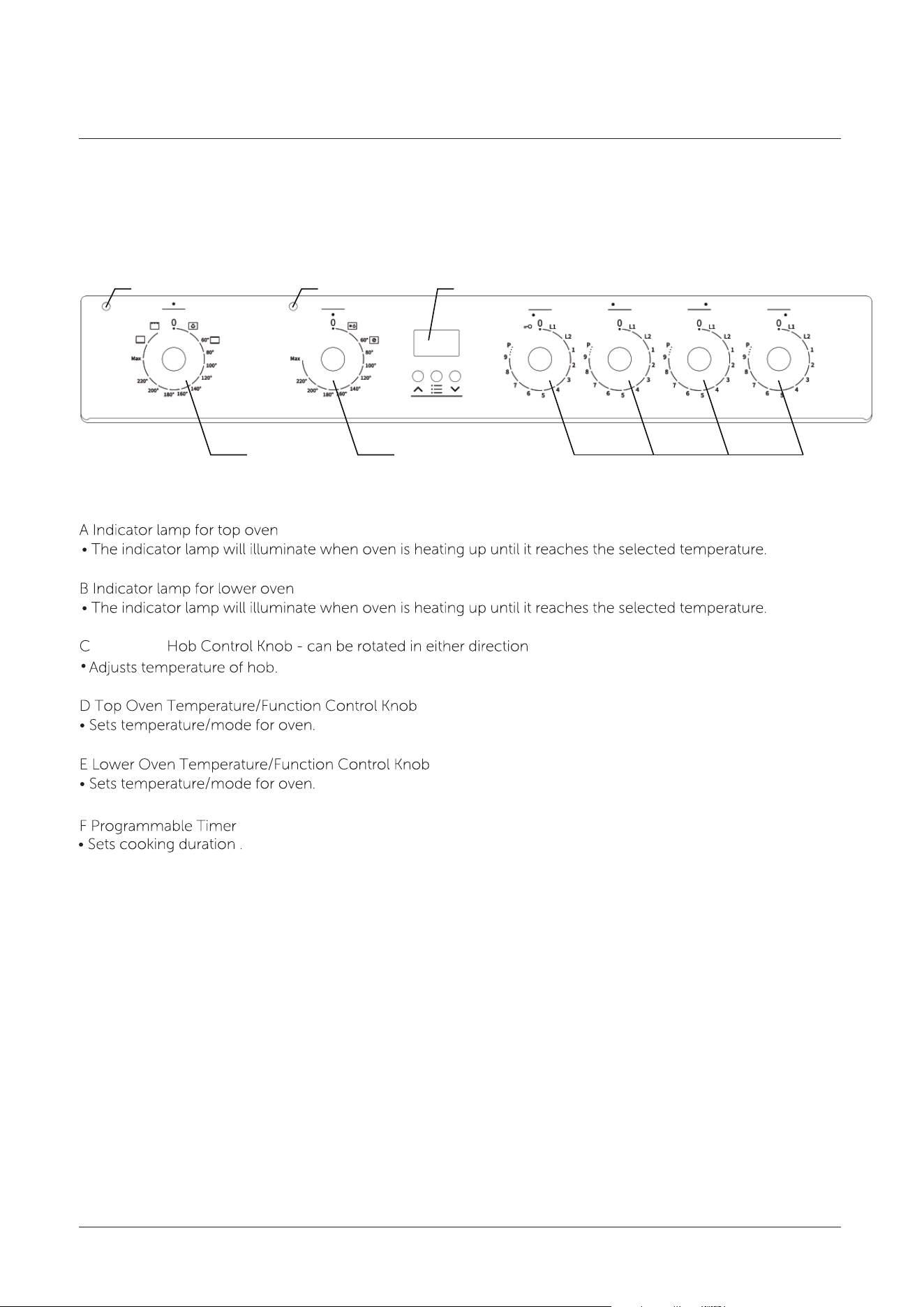
14
Installing your Freestanding Cooker
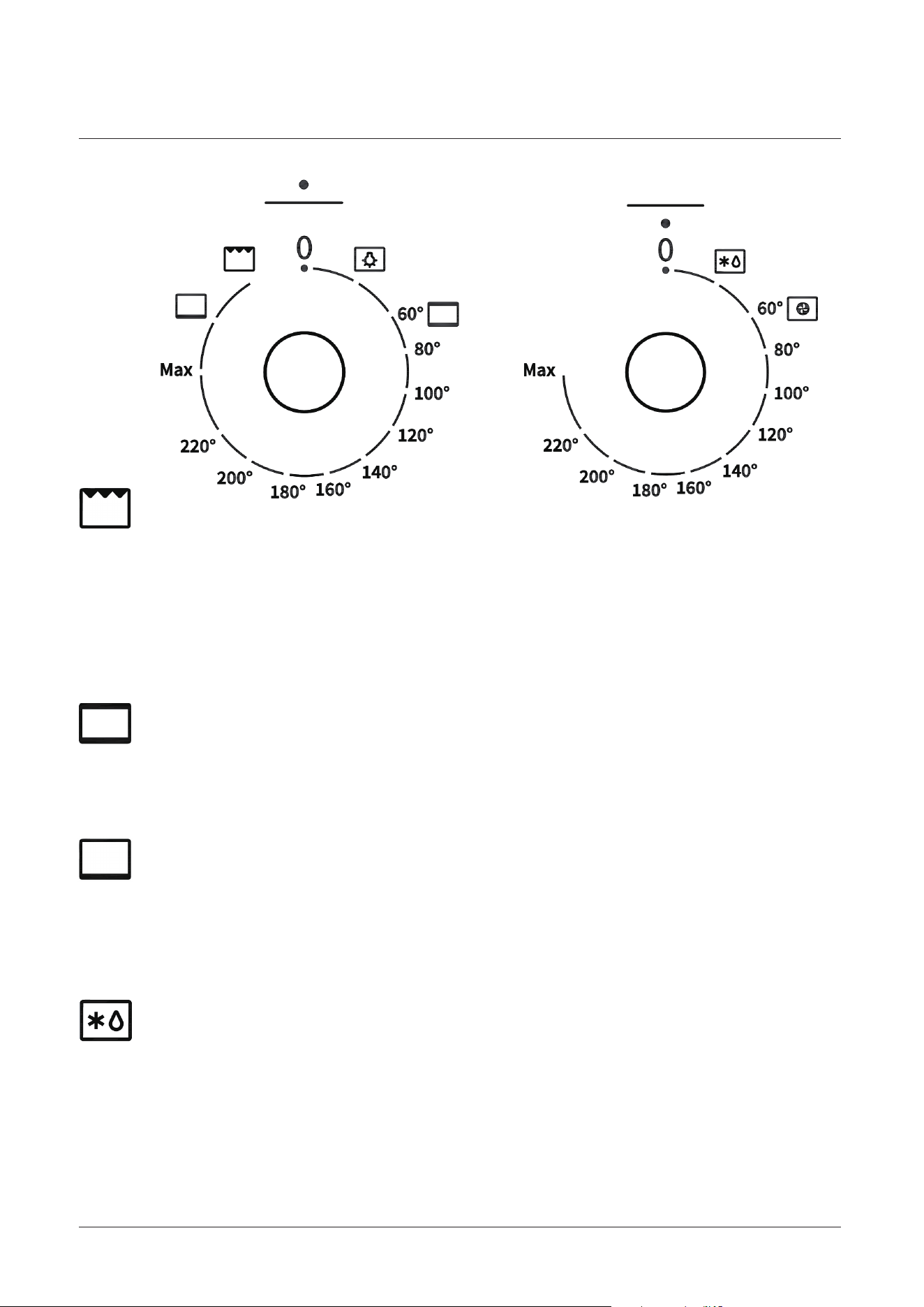
Control panel
A
B F
C
ED
Induction
15
Using your Freestanding Cooker
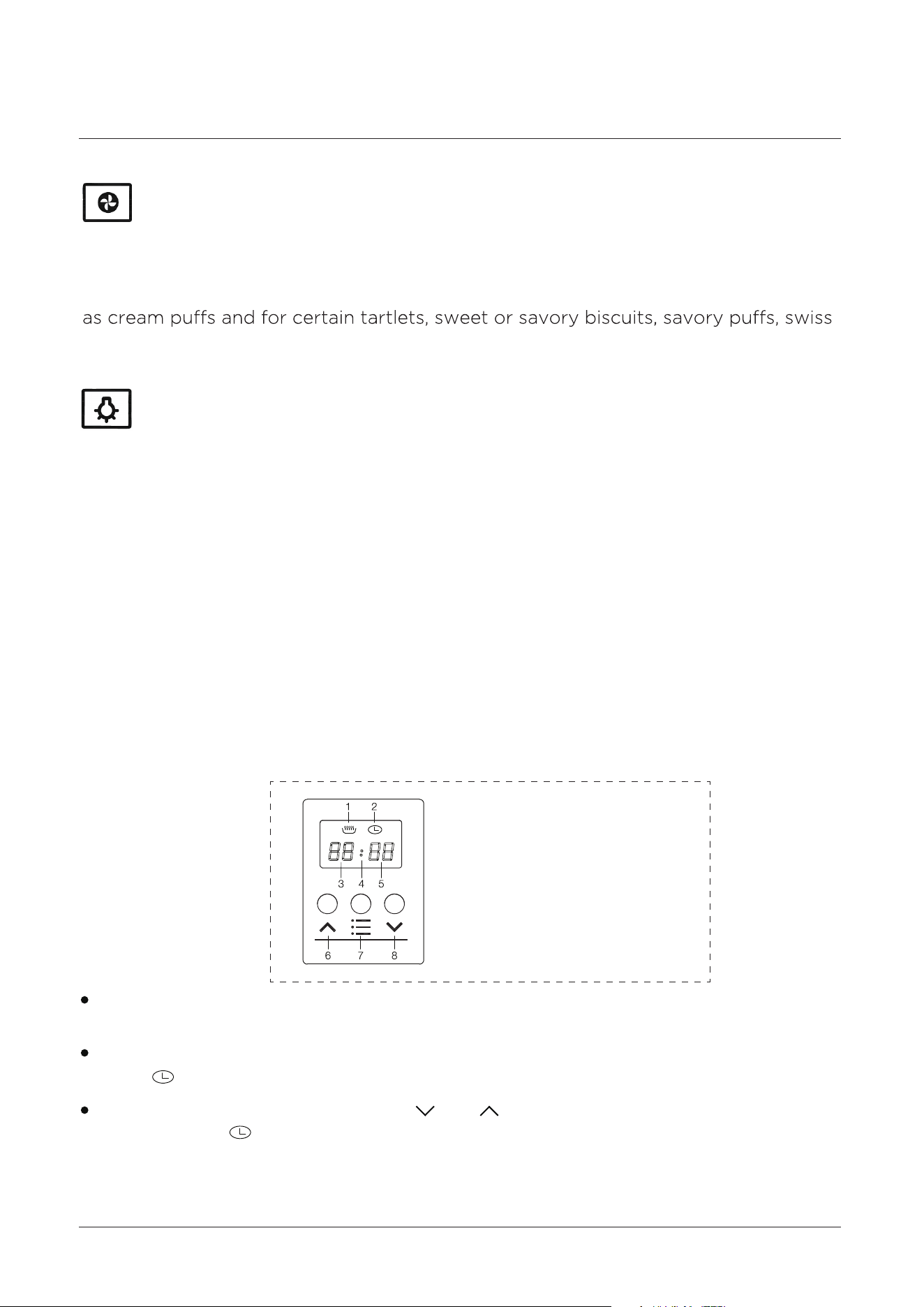
Oven functions
Grill
Defrost
Bottom Element
Convetional
The top central heating elements comes on .The extremely high and direct
temperature of the grill makes it possible to brown the surface of meats and roasts
while locking the juices in to keep them tender. The grill is also highly recommended
for dishes that require a high temperature on the surface: beef steaks, veal, rib steak,
fillets, hamburgers etc.
Hot air comes from the upper and lower element in the oven. This is called
Conventional cooking and is ideal for joints of meat.
When set to ‘Defrost’ mode, the fan located at the back of the oven circulates room
temperature air around the food. This is recommended for the defrosting of all
types of food, but in particular for delicate types of food which do not require heat,
for example: ice cream cakes, cream or custard desserts, fruit cakes, etc. By using
‘Defrost’ mode, the defrosting time is ap
proximately halved.
Bottom element cooking is used for foods that typically need cooking with heat
from underneath - Cakes and Bread are examples of where this function would be
useful.
16
Using your Freestanding Cooker
When set to Baking mode, the fan element and the fan operate providing a delicate
heat distributed uniformly throughout the oven. This mode is ideal for baking and
cooking delicate foods on multiple shelves, especially cakes that need to rise such
rolls and small portions of vegetables, etc.
The oven light will operate on all oven functions.
To set the time of day, press the “ ” or“ ” buttons. 15 seconds after the last
change, the will disappear, confirming the time has been set.
After the appliance has been electrically connected “00.00” will be displayed and
the will flash.
The oven is fitted with a 3 button programmable timer, you must set the time of
day before you can operate your appliance.
The first time you use your appliance, we recommend that you set the temperature
setting to the highest mark. Set the function switch control knob to a cooking mo
de
and leave the oven on for about 40-60 minutes with nothing in it and the oven door
shut. Then, open the oven door and allow the oven to cool. Any odour that may be
detected during this initial use is due to the evaporation of substances used to
protect the oven during storage.
Fan Oven
Oven light
Using your appliance for the first time
Note: The clock has a 24-hour display
Digital Automatic Clock
1 Heating indication
2 Clock indication
3 Hour indication
4 Second indication
5 Minute indication
6 Up
7 Set
8 Down

17
Using your Freestanding Cooker
After power on, the screen will display “00: 00 ” and “ ” clock indicator will be on.
If you press “ ” up key or “ ” down key for more than 3 seconds, the value will
change quickly.
When setting the Time of Day or Duration Timer the “ : ” does not blink although
will blink when in either either normal Time of Day mode or Duration Timer is
displayed.
The buzzer will sound for up 60 seconds at the end of the cooking time duration
that has been set has been reached. The “ 00: 00 ” display and “ ” heating
indication will flash for this period unless the “ ” selection button is pressed.
The clock will return to the time of day display when either of the above tow
actions occur.
Alternatively press the “ ” selection button and the oven will start cooking
immediately. If duration timer setting does need to exceed 59 minutes then initially
the “ ” selection button should be pressed 4 times instead of 3 to bypass the
hour duration selection.
Press “ ” selection button 3 times until “ ” heating indicator is flashing, then
press “ ” up key or the “ ” do wn key to select the cooking duration time in hours.
Then press the “ ” selection button to enter the cooking duration time in minutes
setting.The “ ” heating indicator will remain flashing for 15 seconds once the
cooking duration time is set and neither of the “ ” up key or “ ” down keys are
pressed again whilst flashing.
When “ ” clock indicator and hour indication are flashing, press “ ” up key or
“ ” down key to select a number value from (0-23) for the hour time, then press
“ ” set key to change to the minute setting. Whilst flashing press ‘ ‘ up key or
‘ ‘ down key to select a number value from (0-59) for the minute time. The “ ”
clock indicator will remain flashing for 15 seconds once the time is set and neither
of the “
” up key or “ ” down keys and pressed again whilst flashing.
Time of day setting procedure
NOTE: Digital clock is displayed in 24 hour format
Starting-up procedure
Duration timer setting procedure
Audible ‘End of Cooking’ buzzer
Remarks

18
Using your Freestanding Cooker
When the oven is on, do not leave the door open for longer than necessary,
otherwise the knobs may get very hot.
Always leave 1cm gap between dishes on the same shelf. This allows the heat to
circulate freely around them.
To reduce fat splashing when you add vegetables to hot fat around a roast, dry
them thoroughly or brush lightly with cooking oil.
Where dishes may boil and spill over during cooking, place them on a baking tray.
The wire shelves should always be pushed firmly to the back of the oven.
Baking trays with food cooking on them should be placed level with the front edge
of the oven’s wire shelves. Other containers should be placed centrally. Keep all
trays and containers away from the back of the oven, as over-browning of the food
may occur. For even browning, the maximum recommended size of a baking tray is
340 mm (13½”) by 340 mm (13½”).
Set cooking mode selection knob to symbol to switch on the oven light/s. The oven
light/s stay on when the oven is operating.
The oven light
General oven and cooking tips
19
Using your Freestanding Cooker
Place it on a lower rack, lower the temperature, and increase the cooking time.
Use less liquid, lower the temperature, and increase the cooking time.
Grease the pan well and sprinkle it with a dusting of flour or use greaseproof paper.
Increase the temperature by 10℃and reduce the cooking time.
Use less liquid or lower the temperature by 10℃.
When baking cakes, always place them in a preheated oven .Make sure you wait
prevent cake from dropping/sinking – do not open the oven door during baking.
When using this mode, we advise you to set the thermostat to 200℃, as it is the
Please use the grill pan set provided ensuring that there is no unwanted spillages
formed inside your oven. When using this mode, we recommend you set the
thermostat to the highest setting. However, this does not mean you cannot use
lower temperatures, simply by adjusting the thermostat knob to the desired
temperature.
Use the grill mode , placing the food under the center of the grill (situated on
the 3rd or 4th rack from the bottom) due to the central part of the top heating
element being active.
You should always preheat your oven before placing food in it to cook.
Once the food has been placed i
n the oven, the most appropriate cooking mode
can then be selected.
Preheating
Using the Grill
Baking Cakes
Pastry is too dry
Pastry dropped
Pastry is too dark on top
Cooked well on the inside but sticky on the outside
The Pastry sticks to the pan
food in the best possible way. With time you will learn to make the best use of this
versatile cooking appliance and the following directions are only a guideline which
may be varied according to your own personal experience.
Practical Cooking Advice

20
Using your Freestanding Cooker
Make sure that the grid is inserted so that it is in the center of the oven. If you would
like to increase the amount of heat from below, use the low rack heights. For savory
roasts (especially duck and wild game), dress the meat with lard or bacon on the
top.
When cooking white meat ,fowl and fish, use temperature setting from 180℃to
200℃.
In general, the larger the roast, the lower the temperature setting. Place the meat on
the center of the grid and place the dripping pan beneath it to catch the fat.
For red meat that should be well done on the outside while tender and juicy in the
inside, it is a good idea to start with a high temperature setting (200℃-220℃) for a
short tim eth,en turn the oven down afterwards.
Cooking Fish and Meat
Use a lower temperature setting. It is not necessary to remove the food from all the
racks at the same time.

21
Using your Freestanding Cooker
When food comes to the boil, reduce the power setting.
Using a lid will reduce cooking times and save energy by retaining heat.
Minimise the amount of liquid or fat to reduce cooking times.
To cook juicy flavoursome steaks:
1. Stand the meat at room temperature for about 20 minutes before cooking.
2. Heat up a heavy-based frying pan.
5. Leave the steak to rest on a warm plate for a few minutes to allow it to relax and
become tender before serving.
3. Brush both sides of the steak with oil. Drizzle a small amount of oil into the hot pan
and then lower the meat onto the hot pan.
4. Turn the steak only onve during cooking. The exact cooking time will depend on the
thickness of the steak and how “well done” you want it. Times may vary from about
2-8 minutes per side. Press the steak to gauge how cookde it is - the firmer it feels the
more ‘ well done’ it will be.
Some tasks, including cooking rice by the absorption method, may require a setting
higher than the lowest setting to ensure the food is cooked properly in the time
recommended.
Start cooking on a high setting and reduce the setting when the food has heated
through.
Simmering occurs below boiling point, at around 85
°C, when bubbles are rising
occasionally to the surface of the water or sauce. It is the key to delicious soups
and tender stews because the flavours delevop without overcooking the food.
You should also cook egg-based and flour thickend sauces below boiling point.
Simmering, cooking rice
Searing Steak
Take care when frying as oil and fat heat up very quickly, particulary if you’re using
the boost setting. At extreme high temperatures oil and fat may ignite spontaneously
which could present a serious fire risk.
COOKING TIPS - HOB

22
Using your Freestanding Cooker
1. Choose an induction compatible flat-based wok or a large frying pan.
3. Preheat the pan briefly and add two tablespoons of oil.
4. Cook any meat first, and then put it aside and keep warm.
6. Stir the ingredients gently to make sure they are heated through.
7. Serve immediately.
1 - 2
3 - 4
5 - 6
7 - 8
9
Delicate warming for small amounts of food
Melting chocolate, butter, and foods that burn quickly
Gentle simmering
Slow warming
Reheating
Rapid simmering
Cooking rece
Pancakes
Sauteing
Stir-frying
Searing
Bring soup to the boil
Boiling water
Cooking pasta
5. Stir-fry the vegetables. When they are hot but still crisp, turn the cooking zone to a
lower setting, return the meat to the pan and add your sauce.
2. Have all the ingredients and equipment ready. Stir-frying should be quick. If cooking
large quantities, cook the food in several smaller batches.
For stir-frying
HEAT SETTINGS
Heat Setting Suitabiltiy
23
Using your Freestanding Cooker
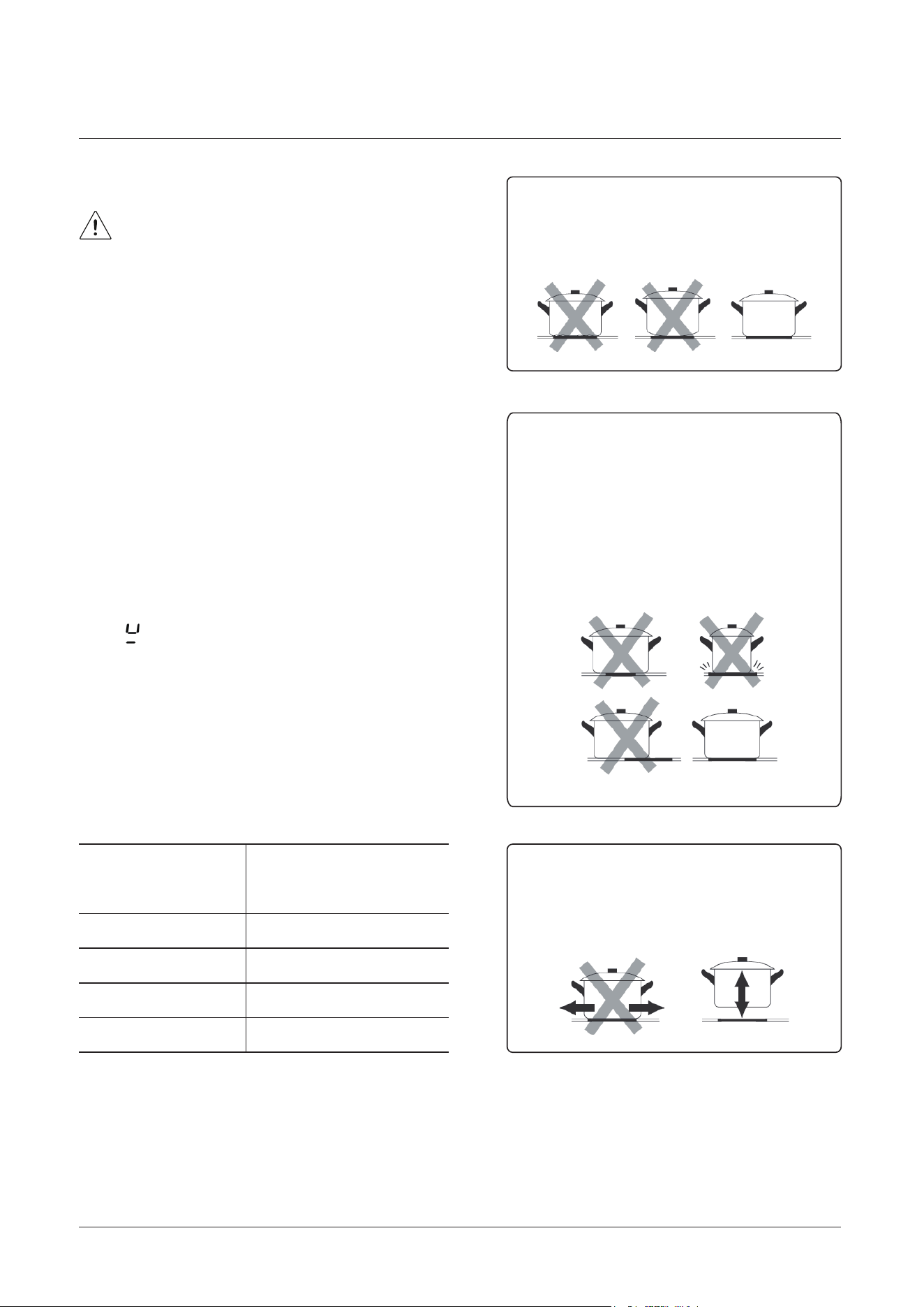
Induction cooking is a safe, advanced, ecient, and economical cooking technology.
It works by electromagnetic vibrations generating heat directly in the pan, rather than
indirectly through heating the glass serfaces. The glass becomes hot only because the
pan eventually warms it up.
Read this guide, taking special not of the
‘Safety Warnings’ section.
Remove any protective film that may still
be on your induction hob.
The controls respond to touch, so you don’t need
to apply any pressure.
Use the ball of your finger, not its tip.
You will hear a beep each time a touch is registered.
Make sure the controls are always clean, dry, and
that there are no objects (e.g. a utensil or a cloth)
covering them. Even a thin film of water may make
the controls dicult to operate.
A Word On Induction Cooking
iron pot
magnetic circuit
ceramic glass plate
induction coil
induced currents
Before using your new cooktop
Using the Touch Controls
USING THE HOTPLATES OF YOUR COOKER
24
Using your Freestanding Cooker
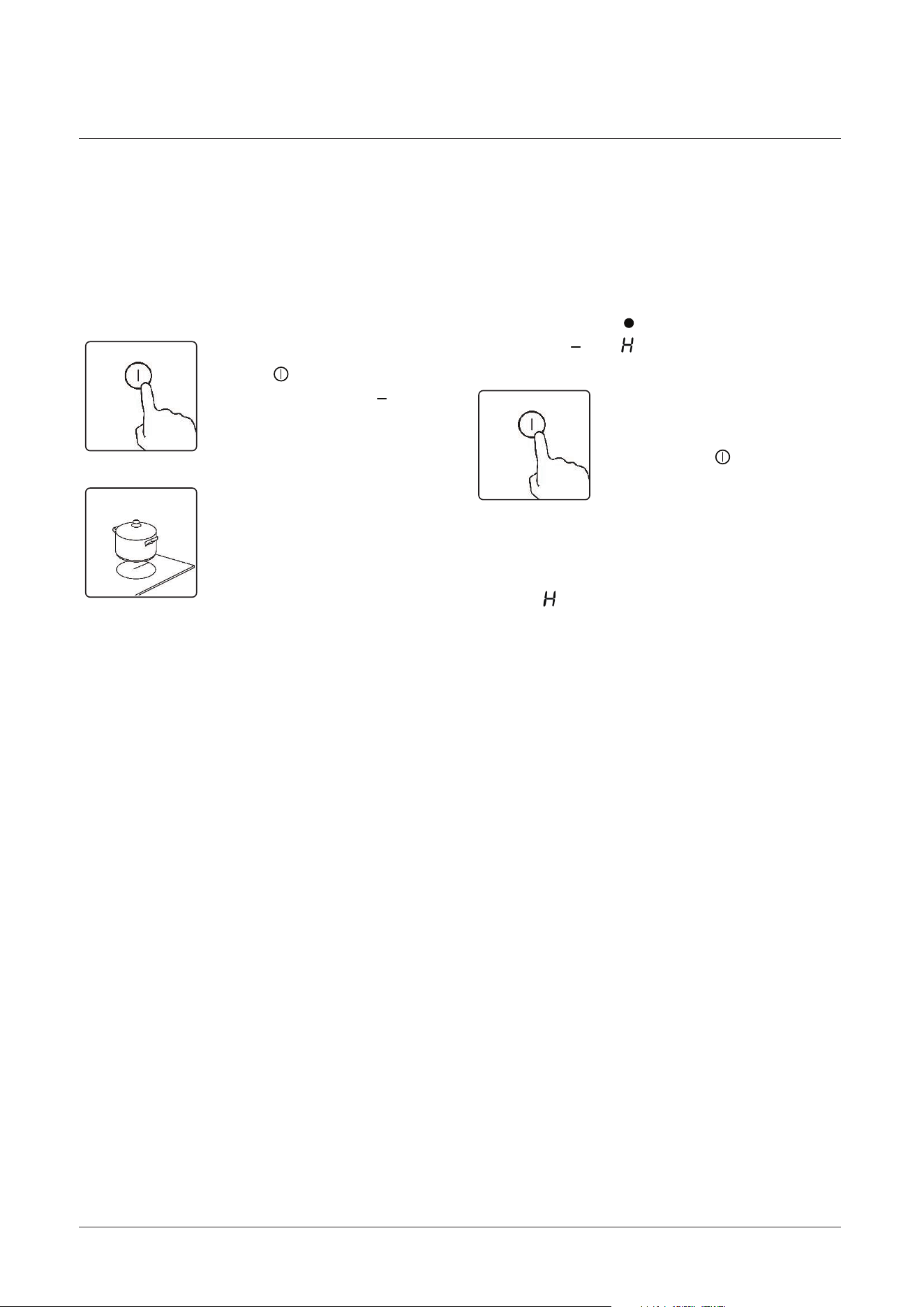
Only use cookware with a base
suitable for induction cooking. Look
for the induction symbol on the
packaging or on the bottom of the pan.
You can check whether your cookware
is suitable by carrying out a magnet test.
Move a magnet towards the base of the
pan. If it is attracted, the pan is suitable
for induction.
If you do not have a magnet:
1. Put some water in the pan you want to
check.
2. Follow the steps under ‘To start cooking’.
160
180
210
280
120
140
160
180
Cookware made by the following materials
is not suitable: pure stainless steel, aluminum
or copper without a magnetic base, glass,
wood, porcelain, ceramic, and earthenware.
3. If ‘ ’ does not flash in the display and
the water is heating, the pan is suitable.
Do not use cookware with
Make sure that the base of your
pan is smooth, sits flat against
the glass, and is the same size
as the cooking zone. Always
centre your pan on the cooking
zone.
Always lift pans o the
ceramic hot - DO NOT slide,
or they may scratch the glass.
jagged edges or a curved base.
Choosing the Right Cookware
Size of Minimum Cookware
Element (mm) diameter (mm)
EN - 2
Icon Type Meaning
WARNING Serious injury or death risk
RISK OF ELECTRIC SHOCK Dangerous voltage risk
SYMBOL ISO 7010 W021
CAUTION
IMPORTANT / NOTE
25
Using your Freestanding Cooker
The hob has 4 cooking zones, each with
its own control knob and indicator.
1. Turn the cooking zone o by turning
the relevant control knob anti-clockwise
back to the o ‘ ’ position. The indicator
will show ‘ ’ or ‘ ’.
1. Touch the ON/
OFF ‘ ’ key, all the
indicators show ‘ ’.
2. Place a suitable pan
on the cooking zone
that you wish to use.
Make sure the bottom
of the pan and the
surface of the cooking
zone are clean and dry.
3. Select the heating zone you wish to
use and turn the control knob clockwise.
The relevant indicator on the hob for
that zone will show the power level
selected.
4. Adjust the power level up/down by
turning the control knob clockwise /
anti-clockwise. The power levels range
from 1-9 as well as keep warm (L1 & L2)
and Boost (P) settings. You can modify
the power level at any time.
To Start Cooking When You Have Finished Cooking
Beware of Hot Surfaces
USING YOUR HOB
2. Turn the whole hob
o by touching the
ON/OFF ‘ ’ key.
When ‘ ’ is displayed the cooking zone
is too hot to touch. It will disappear when
the surface has cooled down to a safe
temperature. It can also be used as an
energy saving function if you want to
heat further pans, use the hotplate
that is still hot.

26
Using your Freestanding Cooker
1. Adjust the power the relevant zone to level 9 by turning the control knob clockwise.
1. Turn the relevant control knob anti-clockwise to the o ‘ ’ position, then clockwise
to the chosen power level.
The boost function will remain on for 5 minutes, after that the zone will set to
level 9 automatically.
To use the keep warm function, set the control knob to L1 or L2.
You can lock the controls to prevent unintended use (for example children
accidentally turning the cooking zones on).
When the controls are locked, all the controls except the ON/OFF key are disabled.
To cancel the keep warm function, turn the control knob back to the o ‘ ’ position
or to another power level setting.
2. Turn the control knob clockwise briefly to position ‘P’. Allow the control knob to
spring back to position ‘9’ and the indicator on the hob will show ‘p’.
Activating the Boost Function
Cancelling the Boost Function
USING THE BOOST FUNCTION
KEEP WARM FUCTION
LOCKING THE CONTROLS (CHILD LOCK)
EN - 2
Type Meaning
WARNING Serious injury or death risk
RISK OF ELECTRIC SHOCK Dangerous voltage risk
SYMBOL ISO 7010 W021
CAUTION
IMPORTANT / NOTE
EN - 2
Icon Type Meaning
WARNING Serious injury or death risk
RISK OF ELECTRIC SHOCK Dangerous voltage risk
SYMBOL ISO 7010 W021
CAUTION
IMPORTANT / NOTE
EN - 4
WARNING:
WARNING:
WARNING:
WARNING:
EN - 4
1.1 General Safety Warnings
WARNING:
WARNING:
WARNING:
WARNING:
EN - 4
SAFETY INSTRUCTIONS
1.1 General Safety Warnings
WARNING:
WARNING:
WARNING:
WARNING:
EN - 10
1.4 During Cleaning and Maintenance
Disposal of your old machine
27
Using your Freestanding Cooker
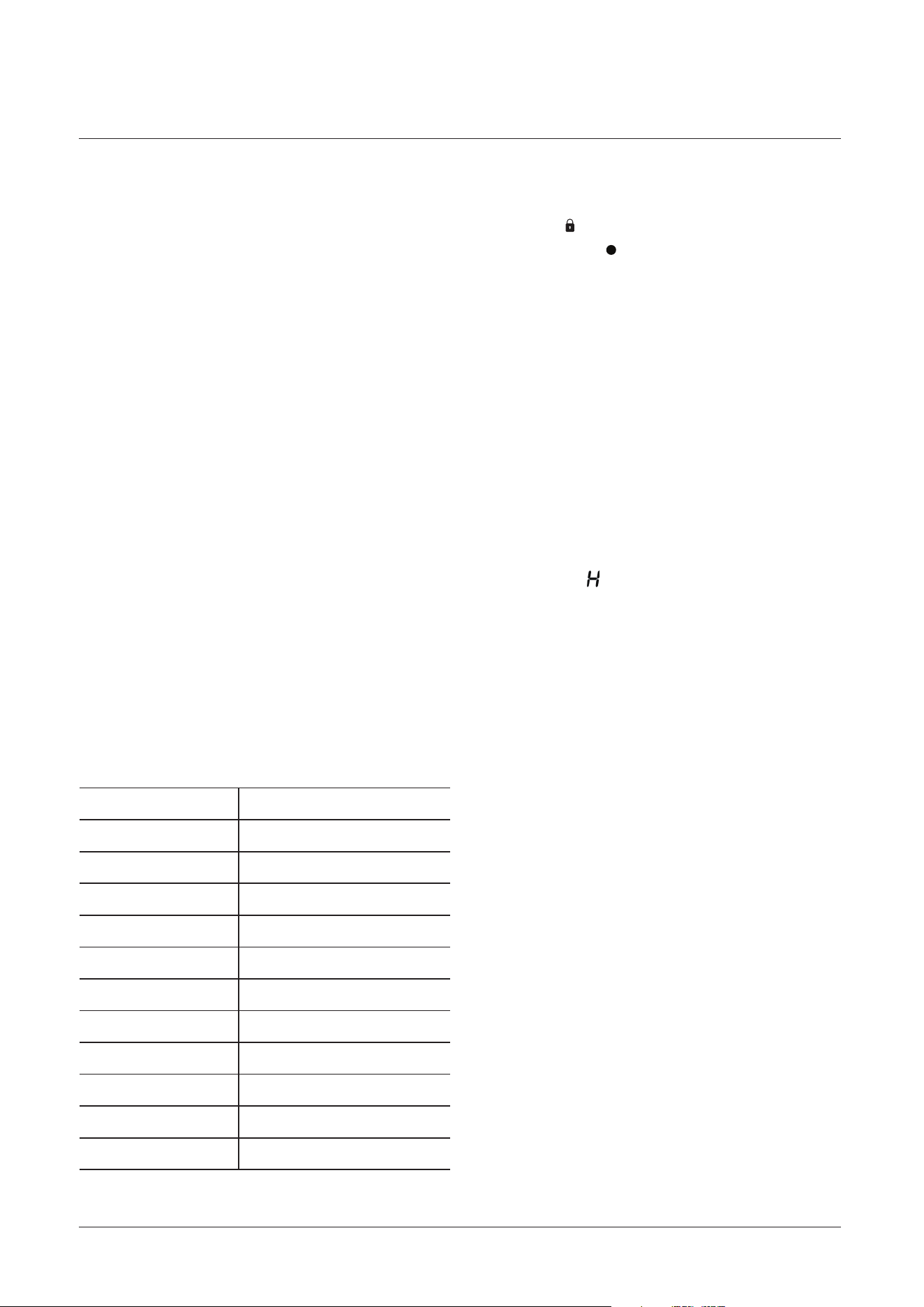
1. Turn the far left control knob anti-clockwise to the ‘ ’ symbol for approx 2 seconds.
Following a beep, allow the control to spring back to the ‘ ’ position and the indicators
on the hob for the 2 rear zones will show ‘L’ and ‘O’ (Lock).
2. After approx 1 minute, the ‘L’ and ‘O’ will disappear but the controls will remain locked.
If one of the controls are attempted to be turned on, the ‘L’ and ‘O’ will display again.
Repeat the above steps. Following a beep, the ‘L’ and ‘O’ will disappear and the conrols
will unlock.
A safety feature of the hob is auto shuadown. This occurs whenever you forget to
switch o a cooking zone. The default shutdown times are shown in the table
below:
L1
L2
1
2
3
4
5
6
7
8
9
2h
2h
8h
8h
8h
4h
4h
4h
2h
2h
2h
Although the hob itself does not heat, when a heating zone has been operating for
some time, there will be some residual heat. The letter ‘ ’ appears to warn you to
keep away from the particular zone until it has returned to a safe temperature.
To Lock the controls
Power level Max working time
To Unlock the controls
RESIDUAL HEAT WARNING
AUTO SHUTDOWN
28
Care and maintenance
The ceramic glass should be regularly cleaned, always wipe clean immediately after
hob is still hot. Smudges from pans with an aluminum bottom can be easily cleaned
cooking, rinse with water and wipe dry with a clean cloth. Never use abrasive or
corrosive detergents, cleaning powders, oven sprays, spot-removers, steel wool or
scourers.
Never use steam cleaner for cleaning inside the cooker.
Clean the glass surfaces with special glass cleaning agents.
Clean the glass surfaces with special glass cleaning agents.
Do not clean your cooker with a steam cleaner.
Do not wash any part of your cooker in a dishwasher.
In order to keep enamelled parts as new, it is necessary to clean them frequently
with mild warm soapy water and then dry with a cloth. Do not wash them while hot
and never use abrasive powders or abrasive cleaning materials. Do not leave
anything spilled onto enamelled parts for long periods of time.
Enamelled Parts:
Ceramic Glass:
Never use flammable agents like acid, thinner or petrol when cleaning your
appliance.
After cleaning the interior parts of the cooker with a soapy cloth, rinse it and then
dry thoroughly with a soft cloth.
Do not clean using caustic creams, abrasive cleaning powders, thick wire wool or
hard tools. Enamelled parts of the cooker can be damaged if excess cleaning liquids
are not immediately removed.
Before cleaning your cooker or performing maintenance, make sure that the
cooking mode selection knob and the cooking temperature selection knob is set to
‘OFF’. To extend the life of your cooker, it must be cleaned frequently. The inside o
f
the cooker should preferable be cleaned immediately after use, when it is still warm
(but not hot, with warm water and soap. The soap should be rinsed away and the
interior dried thoroughly. Avoid using abrasive detergents, scourers, acidic cleaners
such as lime scale remover, etc, as these could damage the enamel, and can result
in development of rust and corrosion. If stains are particularly tough to remove, use
cleaners specifically recommended to clean cookers and follow the instructions
provided with the cleaner.
WARNING! Isolate the power supply to the appliance and make sure that the
cooker is cool.
Cleaning
29
Care and maintenance
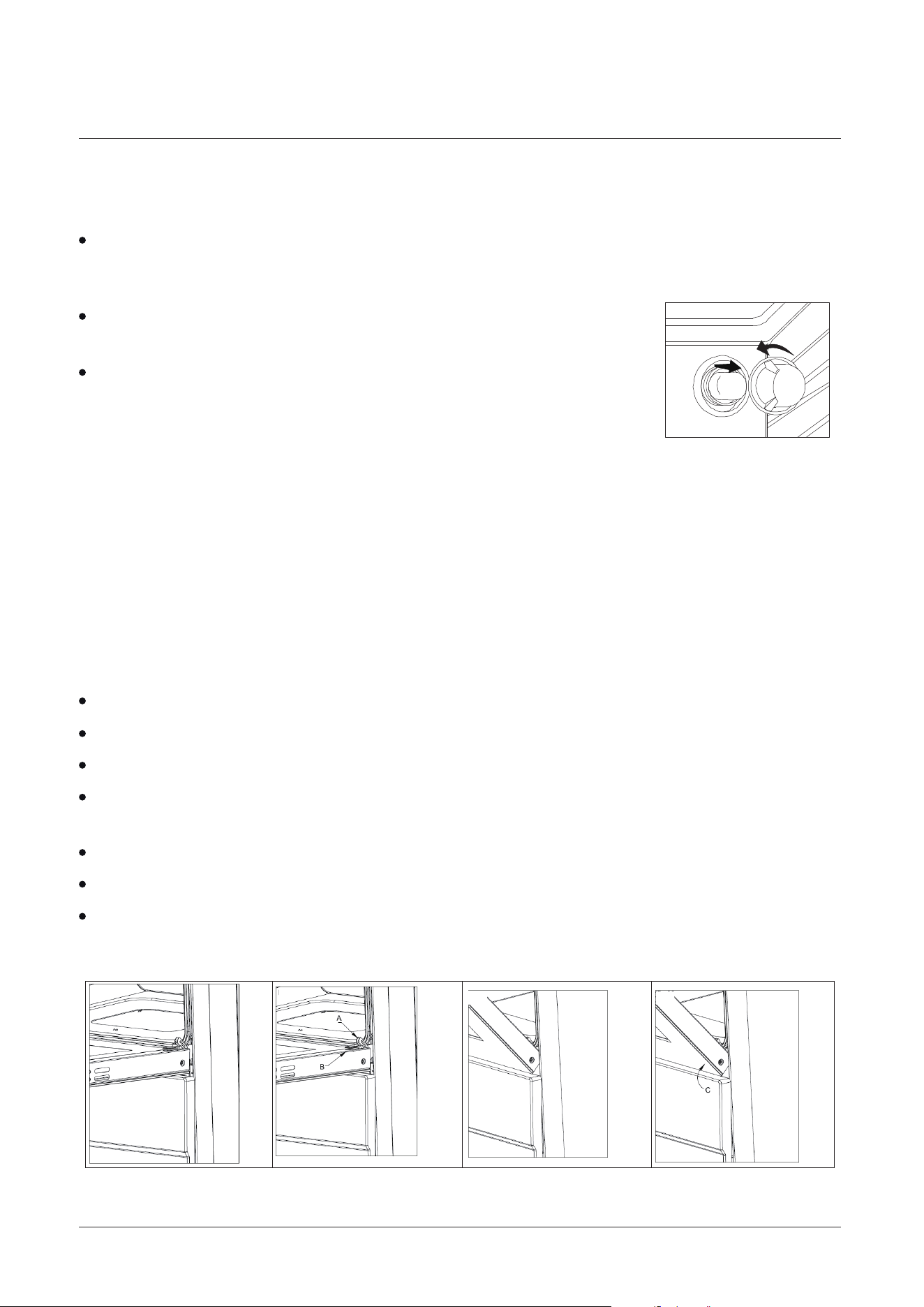
Open the door to the full extent (fig.1)
Open the lever A completely on the left and right hinges (fig.2).
Hold the door as shown in (fig.3).
Rest the door on a soft surface.
To replace the door, repeat the above steps in reverse.
Withdraw the hinge hooks from their location following arrow C ( fig.4).
Gently close the door (fig.3) until left and right hinge levers A are hooked to part
B of the door (fig.4).
For a more thorough clean, you can
remove and disassemble the oven door.
Proceed as follows:
Oven door removal and assemble procedure:
Remove the glass cover of the lamp-holder by rotating
anti-clockwise.
Replace the glass cover. Reconnect the appliance to the mains power supply.
Remove the lamp and replace with a lamp resistant to high
temperatures (300℃) with the following characteristics:
Disconnect the oven from the power supply at the fuse-box by means of the
switch used to connect the appliance to the electrical mai
ns ;or unplug the
appliance.
Replacing the oven lamps
Cleaning the oven door / How to remove the oven doors
Voltage: 220-240V
Wattage: 25W
Type: G9(Halogen lamp)
Energy eciency class: G
Fig.1
Fig.2
Fig.3
Fig.4
30
Care and maintenance
Removing the Inner Pane of Glass
Cleaning the door glass
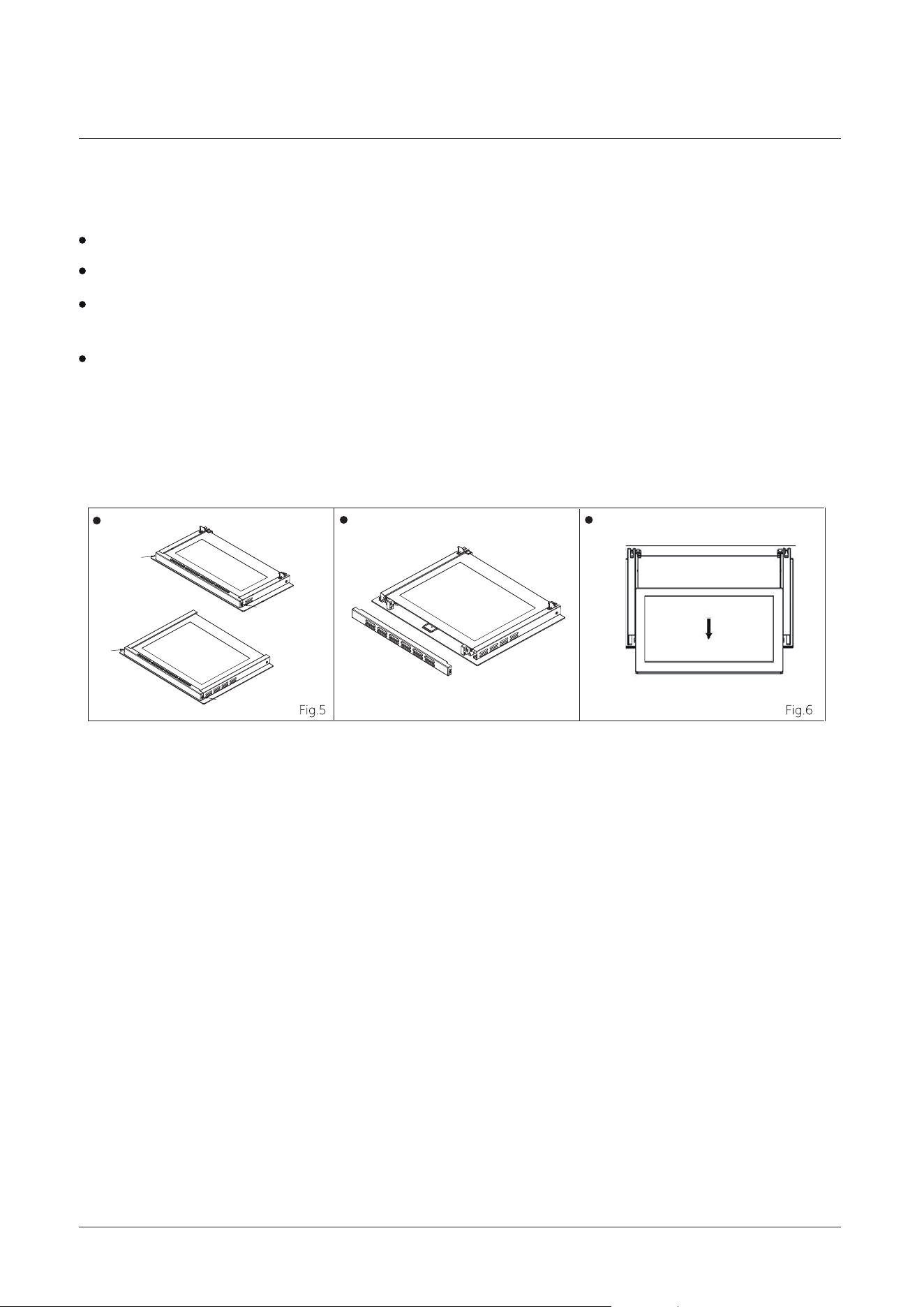
Double oven door: Remove the seal “G” by unscrew the no.2 bolts (Fig.5)
Gently pull out the inner pane of glass (Fig.6)
Now you can also clean the inside of the outer glass.
Clean the glass with an appropriate cleaner. Dry thoroughly, and place on a soft
surface.
Clean the glass door using non-abrasive products or sponges and dry it with a soft
cloth.
Lower door
Upper door
G
G
G
G
31
Technical Data
We apologise for any inconvenience cause by minor inconsistencies within these
instructions that may occur due to product improvements and development.
All images and drawings are for illustration purposes only.
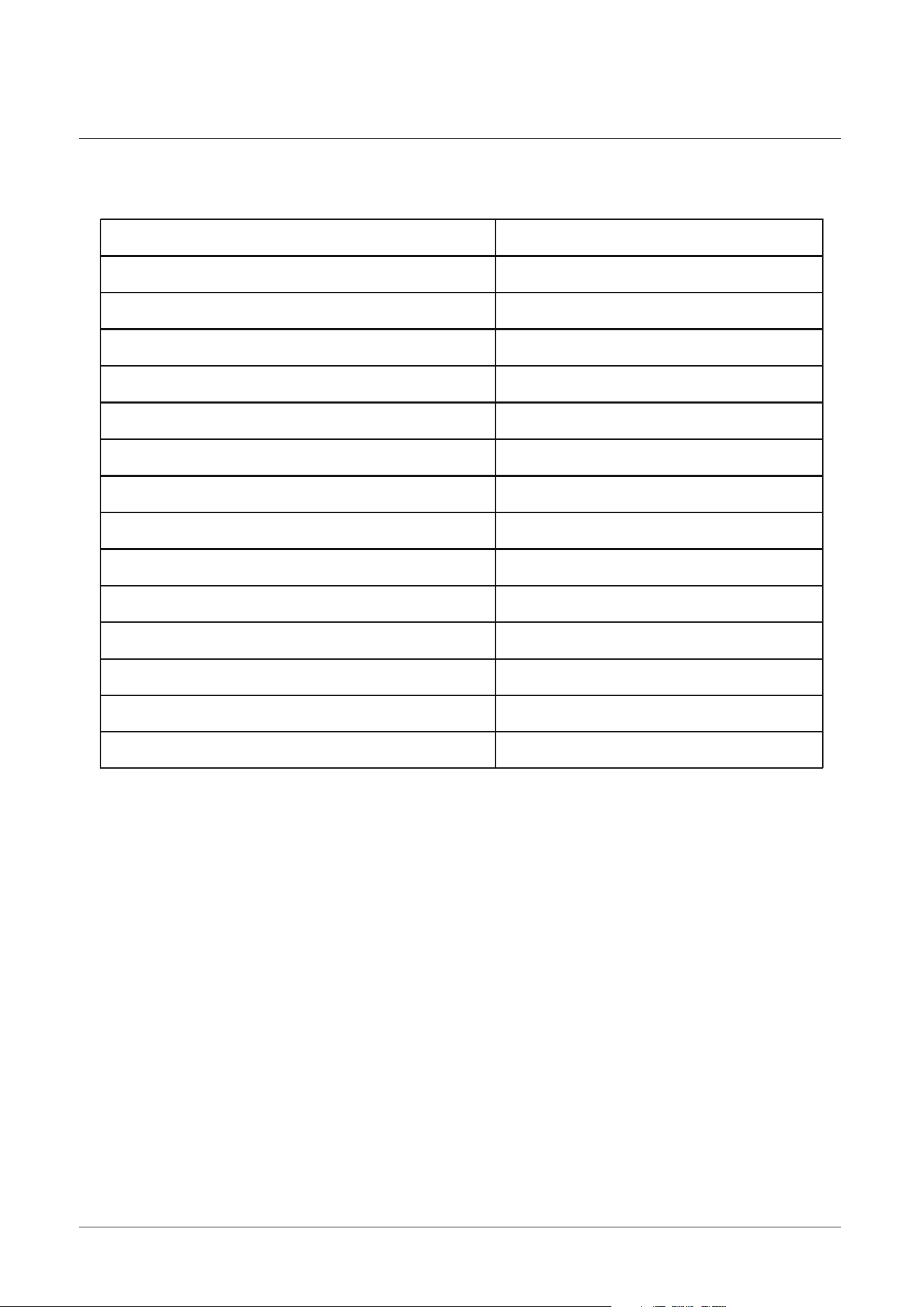
Technical specification
Model HDE3211BIWUK / HDE3211BIBUK
Voltage and frequency
Upper oven power consumption
Lower oven power consumption
Total oven power consumption
Upper oven usable capacity
Lower oven usable capacity
Power consumption for LF zone
Power consumption for LR zone
Power consumption for RF zone
Power consumption
for RR zone
Total ceramic zone power consumption
Total power consumption
Energy rating
Product dimension
600 x 595 x 900mm
220-240V AC 50Hz
1600-1900W
1710-2030W
3310-3930
31L
68L
A
1500W
7200W
10510-11130W
3000W
2100W
1500W
32
Technical Data
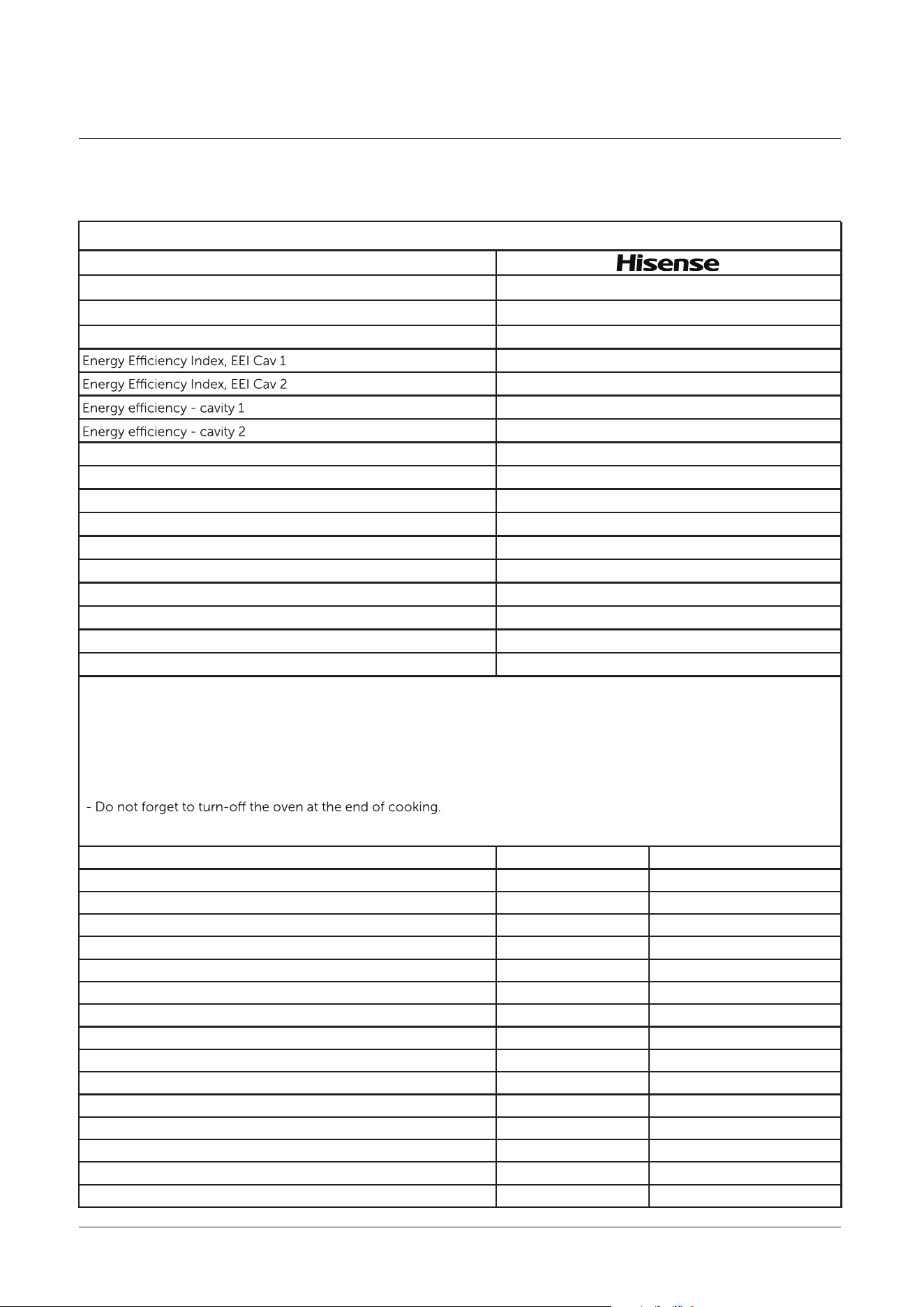
Energy fiche
Brand
Product fiche pursuant to Delegated Regulation(EU) No. 65/2014 and 66/2014
Product Line
Net weight(kg)
Large Description
54 ± 2
73.5
90.5
A+
A
0.5
-
-
0.76
2
Electricity
31L
68L
0.87W ( with electric timer)
-
Energy consumption conventional(kWh) - cavity 1
Energy consumption conventional(kWh) - cavity 2
Energy consumption forced air convection(kWh) - cavity 1
Energy consumption forced air convection(kWh) - cavity 2
Oven number
Heat source
Cavity capacity(I) - cavity 1
Cavity capacity(I) - cavity 2
Power Consumption in standby mode
Power Consumption in network stand-by mode
Energy Saving Tips
Oven
- Cook the meals together, if possible.
- Keep the pre-heating time short.
- Do not elongate cooking time.
- Do not open oven door during cooking period.
Type of Hob Electric
Number of Cooking Zones 4
Heating Technology-1
Size-1
cm
Energy Consumption-1 Wh/kg
Heating Technology-2
Size-2 cm
Energy Consumption-2 Wh/kg
Heating Technology-3
Size-3 cm
Energy Consumption-3 Wh/kg
Heating Technology-4
Size-4 cm
Energy Consumption-4 Wh/kg
Energy Consumption of Hob Wh/kg
This hob complies with EN 60350-2
Energy Saving Tips
Hob
- Use cookwares having flat base.
- Use cookwares with proper size .
- Use cookwares with lid.
- Minimize the amount of liquid or fat.
- When liquid starts boiling , reduce the setting.
Induction
Ø21
180.0
191.3
190.0
Induction
Ø16
Induction
Ø18
Induction
Ø16
204.7
191.5
FS Cooker with Double Oven
HDE3211BIWUK / HDE3211BIBUK
33
Product support
Troubleshooting
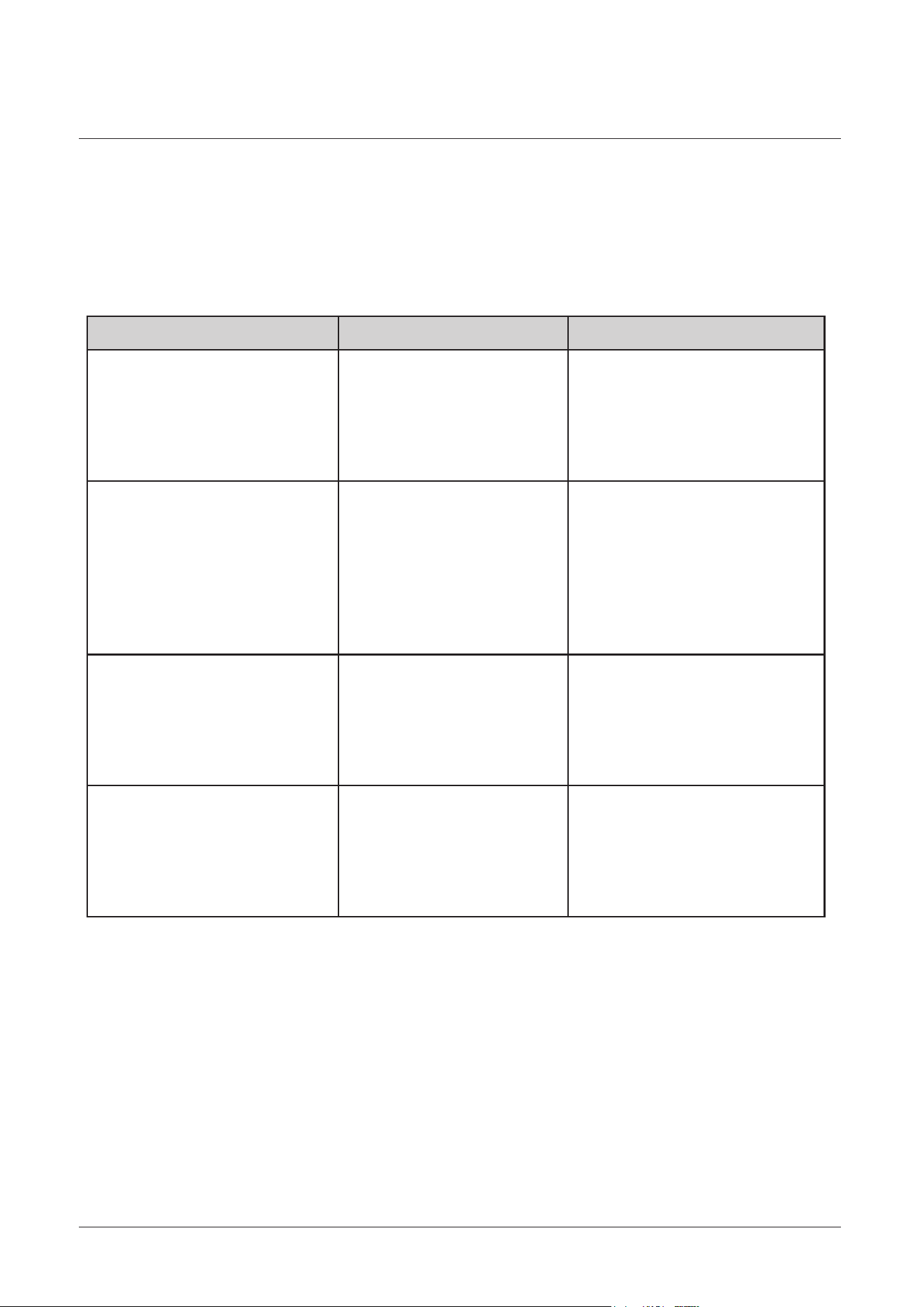
If you have a problem with your appliance, check the troubleshooting table below
to try and rectify your problem before calling your product support service centre.
Problem Possible Cause Solution
Nothing works
The cooking zones are not
operating
Oven not heating up
Oven will not operate Control knob is not set in
the correct position
Move the control knob In a
clockwise direction and select
the desired function
Power is turned off at the
isolation switch or the
consumer unit
Poor electrical connection
Poor electrical connection
Power is turned off at the
isolation switch
Oven temperature not set
correctly
Door is not properly closed
Ensure isolation switch is on
and check the consumer unit has
not tripped out
Have the connections been
checked by a qualified
electrician?
electrician?
Ensure that the correct
temperature has been
selected and the door is
properly closed
Ensure the isolation switch is on,
check the consumer unit has not
tripped out
Have the connections been
checked by an electrician

34
Product support
Disposal must be carried out in accordance with local environmental regulations for
waste disposal.
For more detailed information about treatment, recovery and recycling of this
product, please contact your local authority, your household waste disposal service
or the retailer where you purchased the product.
Declaration of conformance to product standards
Disposal
This appliance conforms to all relavant standards applicable to domestic appliances
sold in the UK.
This appliance/fitting is marked according to the European directive
2012/19/EU on Waste Electrical and Electronic Equipment (WEEE).
By ensuring this product is disposed of correctly, you will help prevent
potential negative consequences for the environment and human health,
which could otherwise be caused by inappropriate waste handling of this product.
The symbol on the product, or on the documents accompanying the product, the
crossed out wheelie bin symbol, indicates that this appliance/fitting may not be
treated as household waste. Instead it shall be handed over to the applicable
collection point for the recycling of electrical and electronic equipment.