EQE6879A
User ManualRefrigeration
EN
2
2 www.electrolux.com
WE’RE THINKING OF YOU
Thank you for choosing Electrolux. We have designed this product to make your life simpler and deliver
impeccable performance for many years. Please spend a few minutes reading this document to get the best
from your new Electrolux appliance.
This appliance is designed to work safely within 130-280V, 50Hz. If in your area Voltage fluctuations are beyond
this range , you are adviced to use suitable Voltage stabilizer /Electrical protection to safeguard the Appliance.
Company warranty for appliance not applicable if voltage fluctuates beyond this range.
Visit our website to:
Get usage advice or service information:
www.electrolux.com
Register your product for better service:
www.electrolux.co.th/support/register-warranty
CUSTOMER CARE AND SERVICE
Always use original spare parts.
When contacting our Authorised Service Centre, ensure that you have the following data available:
Model, PNC, Serial Number.
The information can be found on the rating plate.
Warning / Caution-Safety information.
General information and tips.
Environmental information.
Subject to change without notice.
Get usage advice, brochures, troubl
www.electrolux.com
Register your product for better service:
www.electrolux.com/productregistration
Buy Accessories, Consumables and Original spare parts for your appliance:
www.electrolux.com/shop
Warning / Caution-Safety information.
General information and tips.
Thank you for choosing this Electrolux product. We have created it to give you
impeccable performance for many years, with innovative technologies that help
make life simpler features you might not find on ordinary appliances. Please spend
a few minutes reading to get the very best from it.
Always use original spare parts.
When contacting our Authorised Service Centre, ensure that you have the follow-
The information can be found on the rating plate.
Register your product for better service:
www.electrolux.com/productregistration
Buy Accessories, Consumables and Original spare parts for your appliance:
www.electrolux.com/shop
Warning / Caution-Safety information.
General information and tips.
Thank you for choosing this Electrolux product. We have created it to give you
impeccable performance for many years, with innovative technologies that help
make life simpler features you might not find on ordinary appliances. Please spend
a few minutes reading to get the very best from it.
Always use original spare parts.
When contacting our Authorised Service Centre, ensure that you have the follow-
The information can be found on the rating plate.
Register your product for better service:
www.electrolux.com/productregistration
Buy Accessories, Consumables and Original spare parts for your appliance:
www.electrolux.com/shop
Warning / Caution-Safety information.
General information and tips.
Environmental information.
Thank you for choosing this Electrolux product. We have created it to give you
impeccable performance for many years, with innovative technologies that help
make life simpler features you might not find on ordinary appliances. Please spend
a few minutes reading to get the very best from it.
Always use original spare parts.
When contacting our Authorised Service Centre, ensure that you have the follow-
The information can be found on the rating plate.
CONTENTS
1. SAFETY INFORMATION .............................................................................................................................................................. 3
2. DESCRIPTION OF THE APPLIANCE ......................................................................................................................................5
3. INSTALLING YOUR NEW APPLIANCE ..................................................................................................................................6
4. CONTROL PANEL .......................................................................................................................................................................... 8
5. SETTING COOLING TEMPERATURES....................................................................................................................................11
6. AUTOMATIC ICE & WATER DISPENSER ..............................................................................................................................12
7. STORAGE FEATURESER ............................................................................................................................................................. 15
8. GENERAL INFORMATION ........................................................................................................................................................ 18
9. FOOD STORAGE GUIDE ...........................................................................................................................................................20
10. TROUBLESHOOTING .................................................................................................................................................................21
11. NOISES ........................................................................................................................................................................................... 24
3ENGLISH
1. SAFETY INFORMATION
Note: You must read these warnings carefully
before installing or using the refrigerator. If
you need assistance, contact your customer
care centre. The manufacturer will not accept
liability, should these instructions or any other
safety instructions incorporated in this book be
ignored.
WARNING
• It is essential the electric outlet is properly
earthed to ground. Consult a qualified
electrician if you are unsure.
• Do not use electrical appliances inside the
food storage compartments of the
appliance, unless they are of the type
recommended by the manufacturer.
• Unplug the refrigerator before cleaning or
moving it to avoid electric shock.
• Never unplug the refrigerator by pulling the
electrical cord as this may damage it. Grip
the plug firmly and pull straight out.
• If the power cord is damaged, it must be
replaced by the manufacturer, its service
agent or similarly qualified persons in order
to avoid a hazard
• Don’t use a steam cleaner. If livecomponents
come into contact with condensing steam,
they may short-circuit or cause an electric
shock.
• Do not store explosive substances such as
aerosol cans with a flammable propellant
this appliance. If pressurised aerosol
containers bear the word ‘flammable’ and/or
a small flame symbol, do not store them
inside any refrigerator or freezer.If you do so
you may cause an explosion.
• Do not damage the refrigerant circuit.
• This appliance contains insulation formed
with flammable blowing gases. Avoid safety
hazards by carefully disposing of this
appliance.
• If you wish to discard this refrigerator, please
contact your local authorities and ask for the
correct method of disposal.
• When you dispose of your old refrigerators
and freezers, remove any doors. Children
can suffocate if they get trapped inside.
• When positioning the appliance, ensure the
supply cord is not trapped or damaged.
• Do not locate multiple portable socket-
outlets or portable power supplies at the rear
of the appliance.
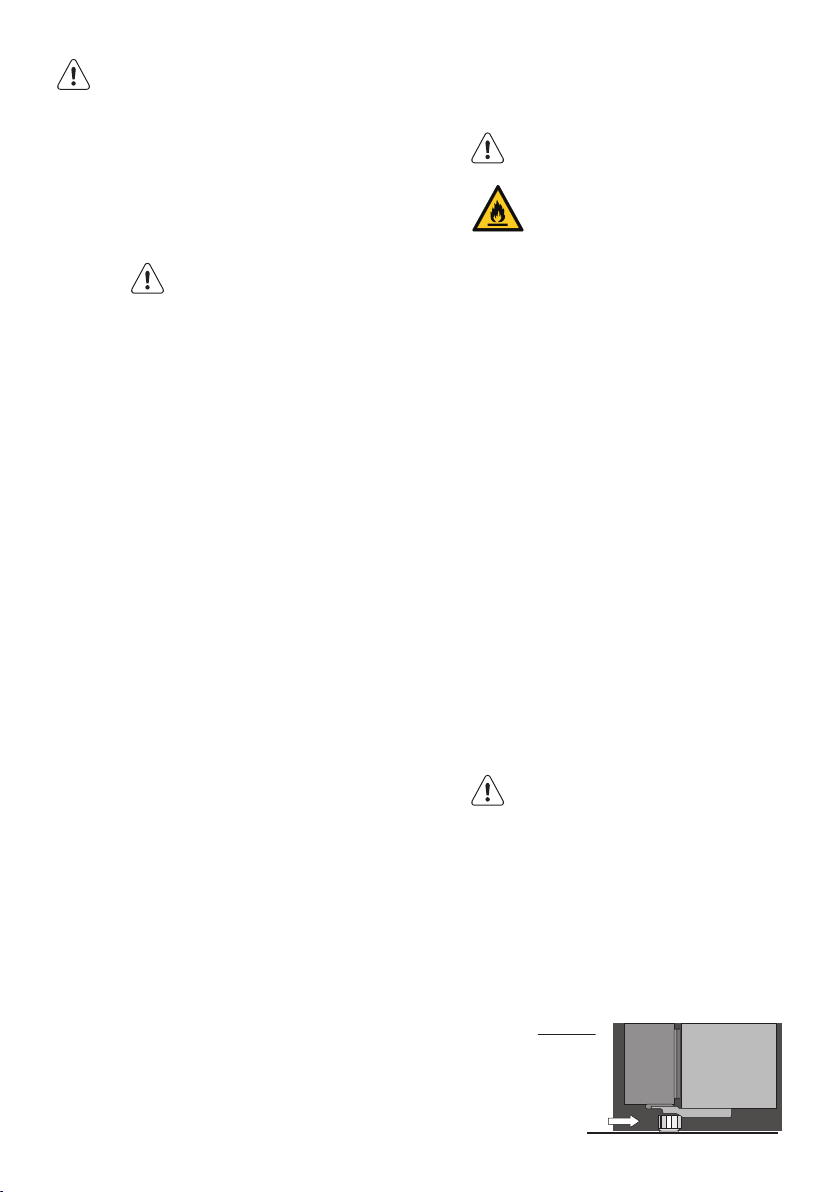
WARNING
R600a refrigerant warning
This appliance contains flammable
R600a refrigerant. Avoid safety
hazards by carefully installing,
handling, servicing and disposing of
this appliance.
• Ensure that the tubing of the refrigerant
circuit is not damaged during transportation
and installation.
• Leaking refrigerant may cause eye injuries or
ignite.
• The room for installing appliance must be
at least 1m
3
per 8g of refrigerant.The amount
of refrigerant in the appliance can be found
on the rating plate inside the appliance.
• If you are unsure of the refrigerant check the
rating plate inside the refrigerator
compartment.
• It is hazardous for anyone other than an
Authorised Service Person to service this
appliance. In Queensland Australia the
Authorisation Service Person MUST hold
a Gas Work Authorisation for hydrocarbon
refrigerants to carry out servicing or repairs
which involve the removal of covers.
• Keep ventilation openings in the appliance
enclosure or in the built-in structure, clear of
obstruction.
• Do not use mechanical devices or other
means to accelerate the defrosting process,
other than those recommended by the
manufacturer.
WARNING
Stable Footing
When your refrigerator is in place, you
need to stabilise it. Lift the front of the
refrigerator to take the weight off each
stability foot and make small quarter
turns to each foot until it is in firm
contact with the floor. If you intend to
move the refrigerator, remember to
wind up each foot so that you can
move it freely. Repeat the process of the
foot adjustment once you have settled
on the new location of the refrigerator.
Side View
Stabilising foot
wound down
4 www.electrolux.com
GENERAL WARNINGS
Read the following carefully to avoid damage
or injury. It is important to use your refrigerator
safely. Check these safety points before using
your refrigerator.
• The appliance must be plugged into its own
dedicated electrical outlet.
• The plug must be accessible when the
refrigerator is in position.
• It is essential the powerpoint is properly
earthed to ground. Consult a qualified
electrician if you are unsure.
• Don’t use extension cords or adapter plugs
with this refrigerator.
• If the supply cord is damaged, it must be
replaced by the manufacturer, its service
agent or similarly qualified persons in order
to avoid a hazard.
• Unplug the appliance before cleaning and
before changing the light bulb(when fitted) to
avoid electric shock.
• Never unplug the refrigerator by pulling the
electrical cord as this may damage it. Grip
the plug firmly and pull straight out.
• Choose a location for your refrigerator that
isn’t too cold. The ambient room temperature
should be above 10°C.
• Stand your refrigerator in a dry place avoid
areas of high moisture or humidity.
• Don’t put the refrigerator in frosty or
unprotected areas like a garage or on the
verandah.
• Don’t plug your refrigerator into a timer fitted
to the powerpoint.
• Do not put the refrigerator in direct sunlight,
near stoves, fires or heaters.
• Do not put the refrigerator on an uneven
surface.
• Do not store flammable materials on or
under the appliance, e.g. aerosols.
• Do not store explosive substances such as
aerosol cans with a flammable propellant in
this appliance.
• Never store fizzy drinks in the freezer
compartment.
• Never try to repair the refrigerator yourself,
only use a qualified or authorised service
person for repairs.
• Never use electric heaters or dryers to
defrost the freezer because you can receive
an electric shock
• When transporting and installing the
refrigerator, care should be taken to ensure
that no parts of the refrigerating circuit are
damaged.
• Keep ventilation openings in the appliance
enclosure or in the built-in structure clear of
obstruction.
• When installed correctly, your refrigerator
should:
– Have adequate space at the back and
sides for air circulation.
– Be vertically aligned to the surrouning
cupboards.
– Have doors that will self-close from a
partially open position.
• The appliance is not to be used by persons
(including children) with reduced physical,
sensory or mental capabilities, or lack of
experience and knowledge, unless they have
been given supervision or instruction.
• Children being supervised not to play with
the appliance.
NOTE: You must read these warnings carefully
before installing or using the refrigerator. If you
need assistance, contact your Customer Care
Department. The manufacturer will not accept
liability, should these instructions or any other
safety instructions incorporated in this book be
ignored.
ENVIRONMENTAL INFORMATION
This appliance is intended to be used in
household and similar applications
such as,
• The kitchen areas in shops, offices
and other working enviroments;
• Farm house and by clients in hotels,
motels and other residential type
enviroments;
• Bed and breakfast type environments;
• Catering and similar non-retail
applications;
5ENGLISH
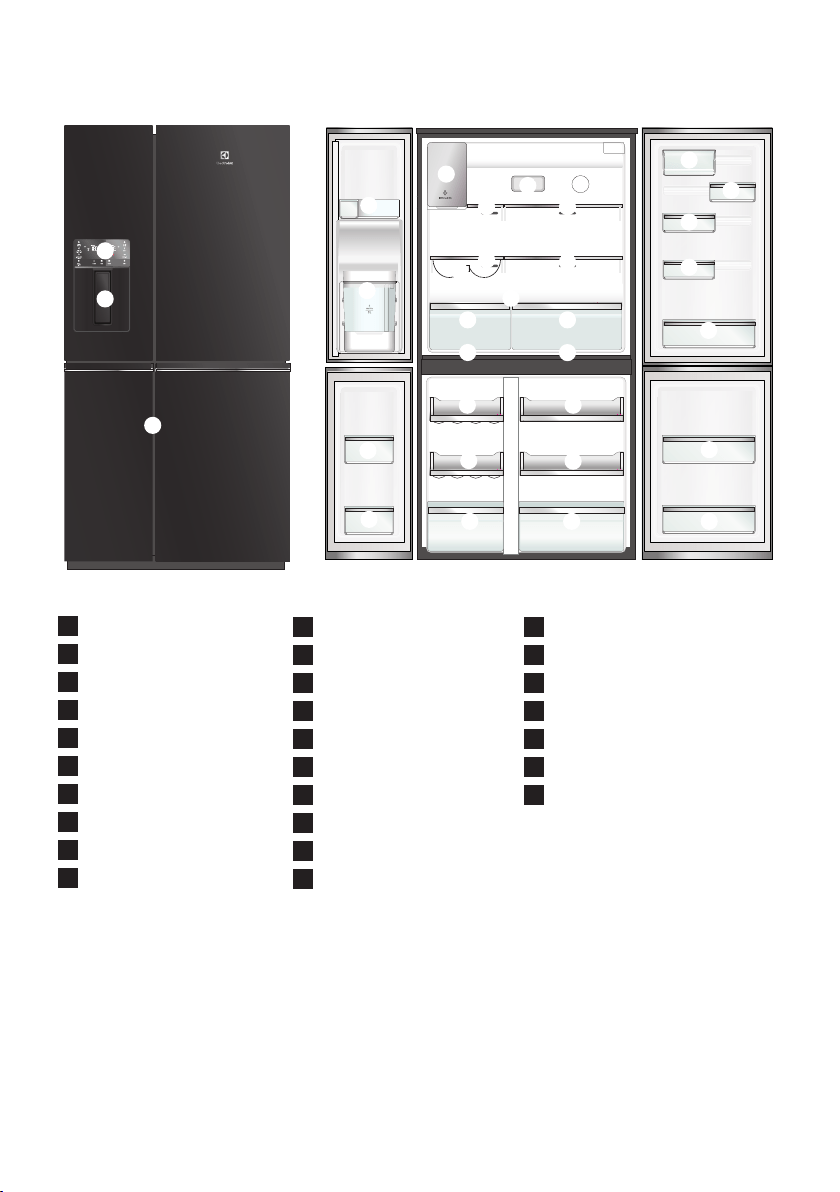
2. DESCRIPTION OF THE APPLIANCE
1
2
3
4 5
6
7
9
10
11
12
13
14
15
16
17
18
19
20
21
23
24
25
27
22
23
26
8
10
11
19 20
24
1
Ice Maker
2
Air distributor - Multiflow
3
Air filter
4
Flip up glass shelf
5
Slide/fold glass shelf
6
Left Spillsafe™ glass shelf
7
Wine rack
8
Right Spillsafe™ glass shelf
9
Crisper shelf cover
10
Crisper
11
Snack Zone compartment
12
Upper fixed door bin
13
Internal tank
14
FlexStor™ dairy bin
15
FlexStor™ 1/3 bin
16
FlexStor™ 2/3 bin
17
FlexStor™ sliding bin
18
Bottle storage bin
19
FlexSpace™ shelf
20
Freezer shelf
21
FlexSpace™ drawer
22
Freezer drawer
23
FlexSpace™ door bin
24
Freezer door bin
25
Refrigerator/Freezer control panel
26
Water and Ice Dispenser Trigger
27
TASTESEALFLEX control Panel
(On door side)
6 www.electrolux.com
3. INSTALLING YOUR NEW APPLIANCE
Unpacking
ENVIRONMENT
Most of the packing materials
are recyclable. Please d ispose of
those materials through your local
recycling depot or by placing them in
appropriate collection containers.
Important – check for any damages or marks.
If you find the refrigerator is damaged or
marked, you must report it within 7 days should
you wish to claim for damage/marks under the
manufacturers warranty. This does not affect
your statutory rights.
Clean your refrigerator thoroughly following
the instructions in the “Cleaning” section and
wipe off any dust that has accumulated during
shipping.
Locating the refrigerator
CAUTION
Automatic aerosol systems (such as
insect control) should not be located
adjacent to the product as the spray
may cause long term damage to the
external plastics of the appliance.
Do not put the refrigerator in a location that is
too cold or is unprotected, for example in
a garage or on a veranda. The ambient
temperature should be above 10°C.
Put the refrigerator in a dry place avoiding
areas of high moisture or humidity.
Ensure the refrigerator is located on an even
surface.
Adequate ventilation around your
refrigerator
The diagram below shows the recommened
airspace to allow for ventilation of your
refrigerator.
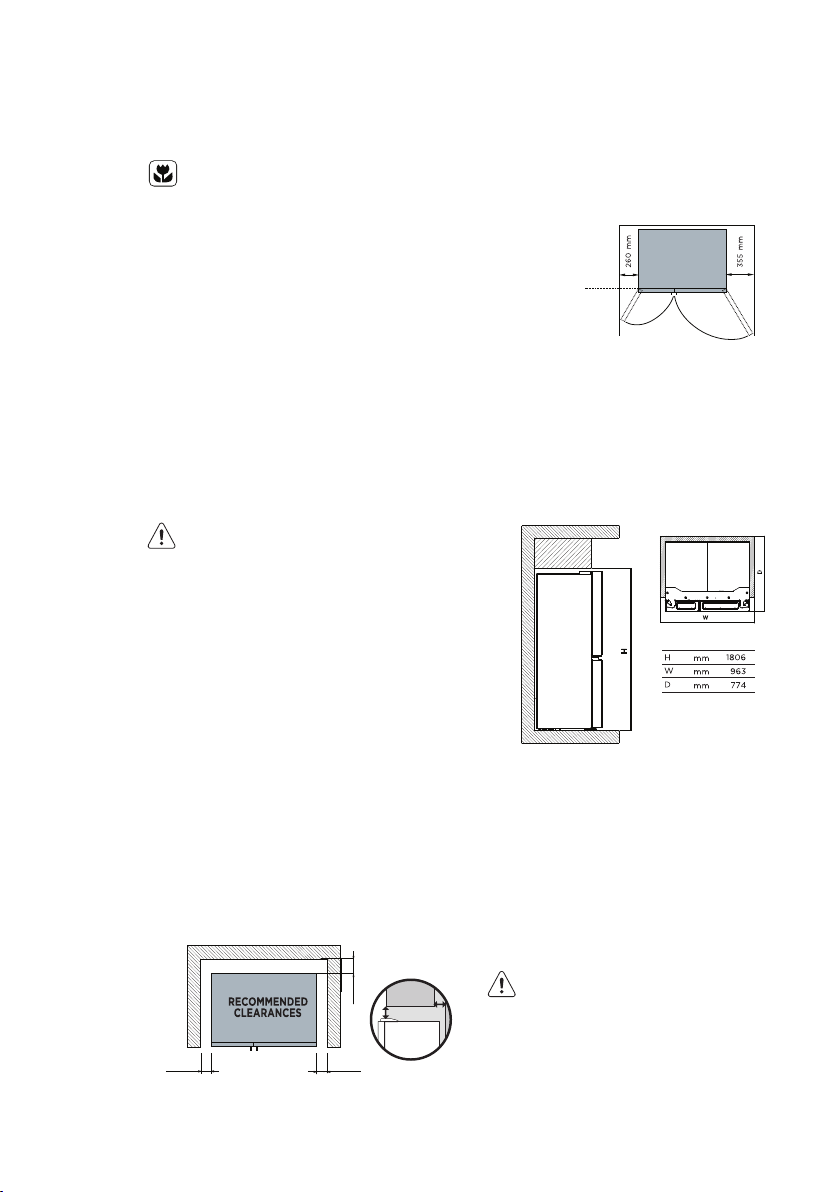
When positioned in a corner area, spacing of
right side at least 260 mm and left side at
least 355 mm on the hinge side will allow the
doors to open enough to enable the removal of
bins and shelves.
Note: Doors are designed to sit proud of cabinetry
(not flush). The clearances shown above are the
recommended minimum clearances.
Installing your refrigerator
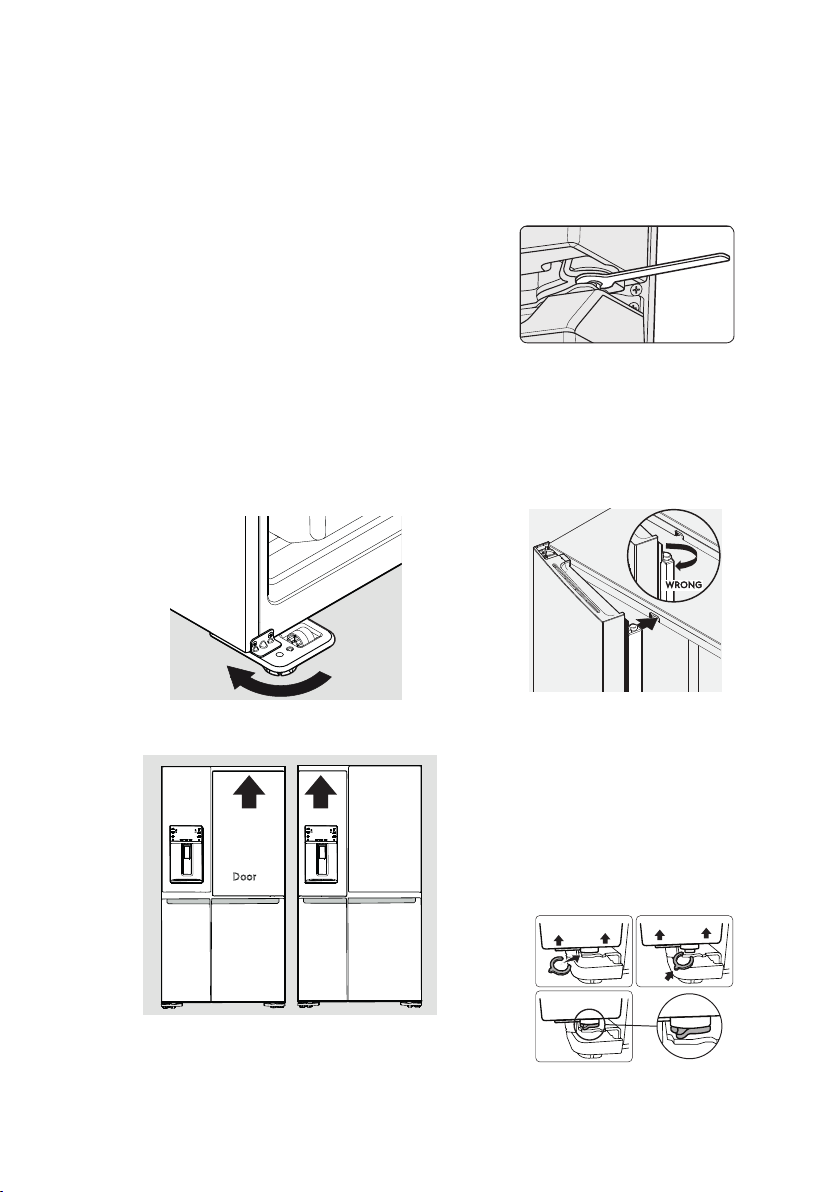
Allow the following clearances for ease of
installation, proper air circulation, and plumbing
and electrical connections:
Note: If your refrigerator is placed with the door hinge
side against a wall, you may have to allow additional
space so the door can be opened wider.
Door opening
Your refrigerator should be positioned to allow
easy access to a counter when removing food.
For best use of refrigerator drawers and freezer
baskets, the refrigerator should be in a position
where both can be fully opened.
CAUTION
LED lighting
Your appliance is fitted with long life
LED lighting. In the unlikely event the
LED lights should fail, then the LED
lights should be serviced by the service
agent, to avoid a safety hazard. Refer
to the warranty page for contact
details.
25
mm
25
mm
25
mm
35
mm
25
mm
Front face of bench
aligned to front corner
edge of cabinet
D
W
Space required
7ENGLISH
Cabinet Leveling & Refrigerator Door
Alignment (if necessary)
• All four corners of the cabinet must rest firmly
on the floor
• The front should be slightly elevated to
• ensure that doors close and seal properly.
• Doors should align with each other and be
level.
Most of these conditions can be met by raising
or lowering the adjustable front rollers.
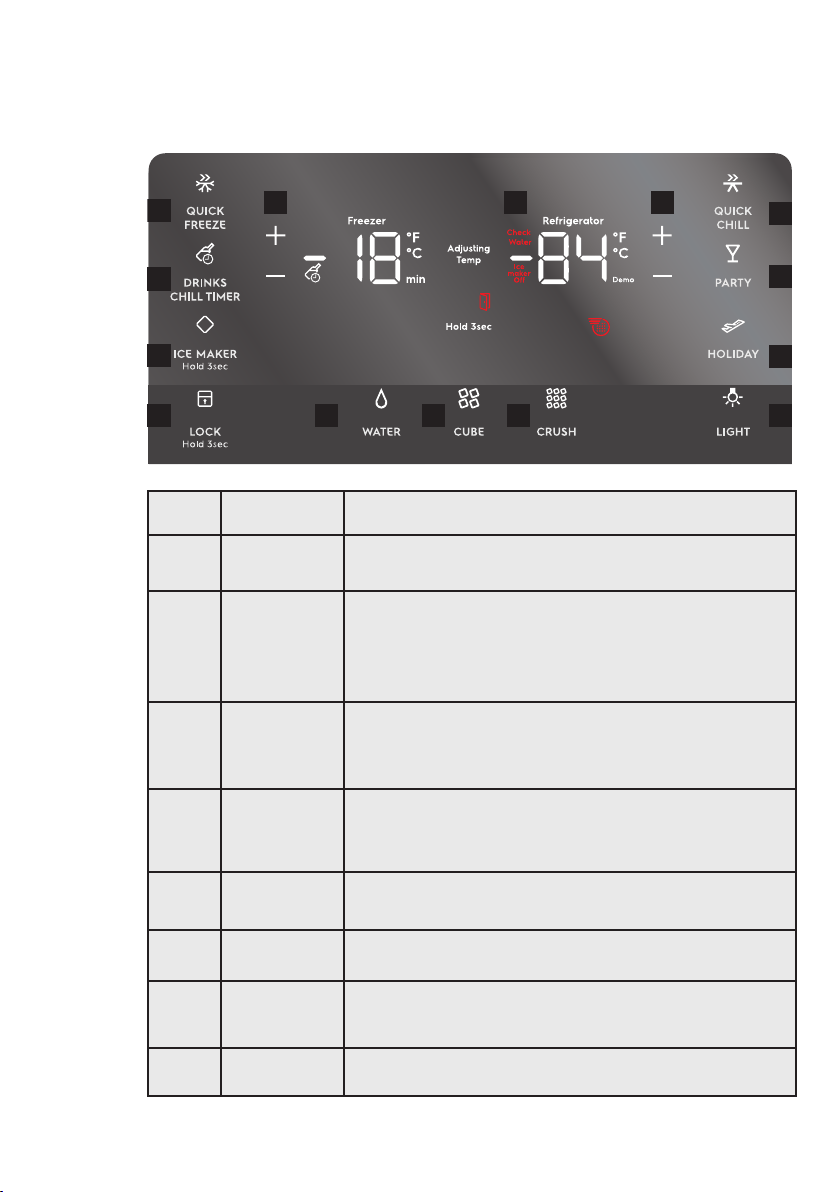
To level the cabinet using the front rollers:
1. Lower anti-tip legs until they are both
touching the floor. Use a pair of pliers to
adjust.
To raise: turn leg clockwise.
To lower: turn leg counterclockwise.
2. Ensure both doors are bind-free with their
seals touching the cabinet on all four sides
and that cabinet is stable.
Anti-Tip
Legs
To make final door height adjustments:
1. Insert Electrolux 10mm wrench into the shaft
of the lower hinge.
2. To lower door: turn adjustment screw
clockwise.
To raise door: turn adjustment screw counter
clockwise.
Flipper Mullion
Adjust Flipper Mullion for proper connection
with the mullion guide by ensuring the flipper
mullion is folded and perpendicular to the fresh
food door. If the mullion guide is not in the
correct position, it could prevent the door from
closing completely.
Bottom Doors Vertical Alignment
In some cases the bottom doors might be
slightly vertically misaligned. To correct this
dierence it may be used the C-Shaped Shim
supplied with the unit.
The shim must be installed on the bottom hinge
of the lower door lifting it to get access of the
pin where the shim must be attached, as follows
on the images.
Door
Door
8 www.electrolux.com
4. CONTROL PANEL
4.1 External User interface
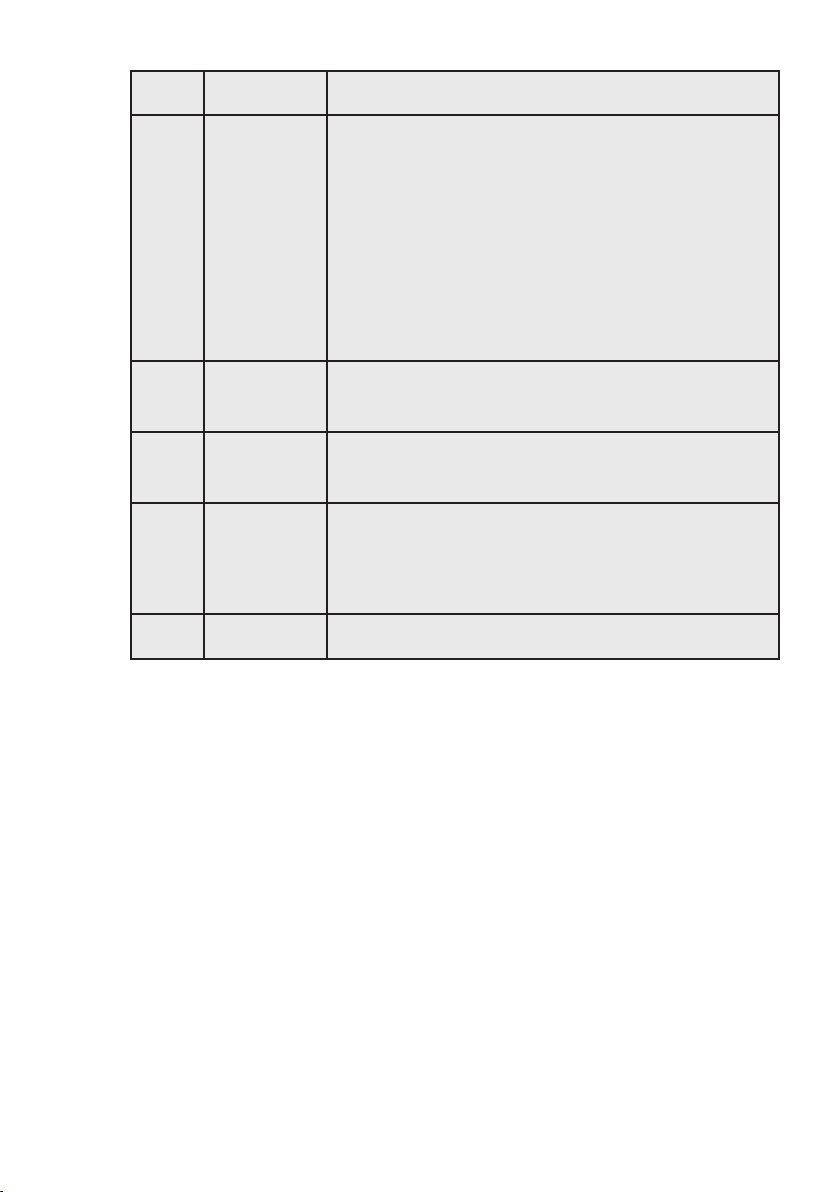
BUTTON
/ ICON
DESCRIPTION PRIMARY FUNCTION
1 QUICK FREEZE
Activates a faster rate for freezing food in the freezer.
Deactivates after 12 hours.
2
DRINKS CHILL
TIMER
Quickly chills a drink inside the freezer compartment.
Touch the Drinks Chill Key, a time value will display on
the freezer temp display (in minutes) and can be changed
using the +/- buttons. A tone will sound when the time has
been input. Range is from 20-45 minutes in 5 minute
intervals.
3 ICE MAKER
When LED is lit, the ice maker is on.
When ice maker is in OFF state, the indicator will blink
when dispensing ice. Press and hold for 3 seconds to
turn ice maker on/off.
4 LOCK
Press and hold for 3 seconds to enable/disable.
While in the locked state, you will not be able to change
any settings on the display nor dispense ice and water.
The indicator will flash and an audible warning tone is played.
5 WATER
Press the “water” key to select water. An indicator light
will be illuminated above the active feature.
6 CUBE
Press the “cube” key to select cubed ice. An indicator
light will be illuminated above the active feature.
7 CRUSH
Press the “crush” key to select crushed ice. An indicator
light will be illuminated above the active feature.
8 LIGHT Toggles dispenser light On and Off.
1
2
3
4 5
6
7 8
9
10
11
12 13 12
9ENGLISH
BUTTON
/ ICON
DESCRIPTION PRIMARY FUNCTION
9 HOLIDAY
Maximum energy efficiency when the user is away from the
appliance for an extend period. Conserves energy by
increasing the time between automatic defrost.
Manually turned on/off
It also turns off automatically when the user opens one of
those doors/drawers or press the lever (dispenser) after 30
minutes from the time it was turned on.
After turns it off, the product will recover the internal temp to
set temperatures and the “Ice Maker” function will also
recover the previous status (On or OFF) automatically. BUT
other function status won’t be recover.
10 PARTY
This bottom should set up the freezer in -23°C and the fridge
in 0°C during 6 hours. After that, the product should return
to the previous settings.
11 QUICK CHILL
Quick chill is a faster rate for chilling food in the
refrigerator compartment. Deactivates after 6 hours.
12
ADJUSTING
TEMP
Press either the + or - to adjust to desired temperature setting.
Freezer temp - Control temperatures range
From -23°C to -15°C.
Refrigerator temp - Control temperatures range
From +1°C to +7°C.
13 CHECK WATER When the panel show “check water”, fill the internal tank up.
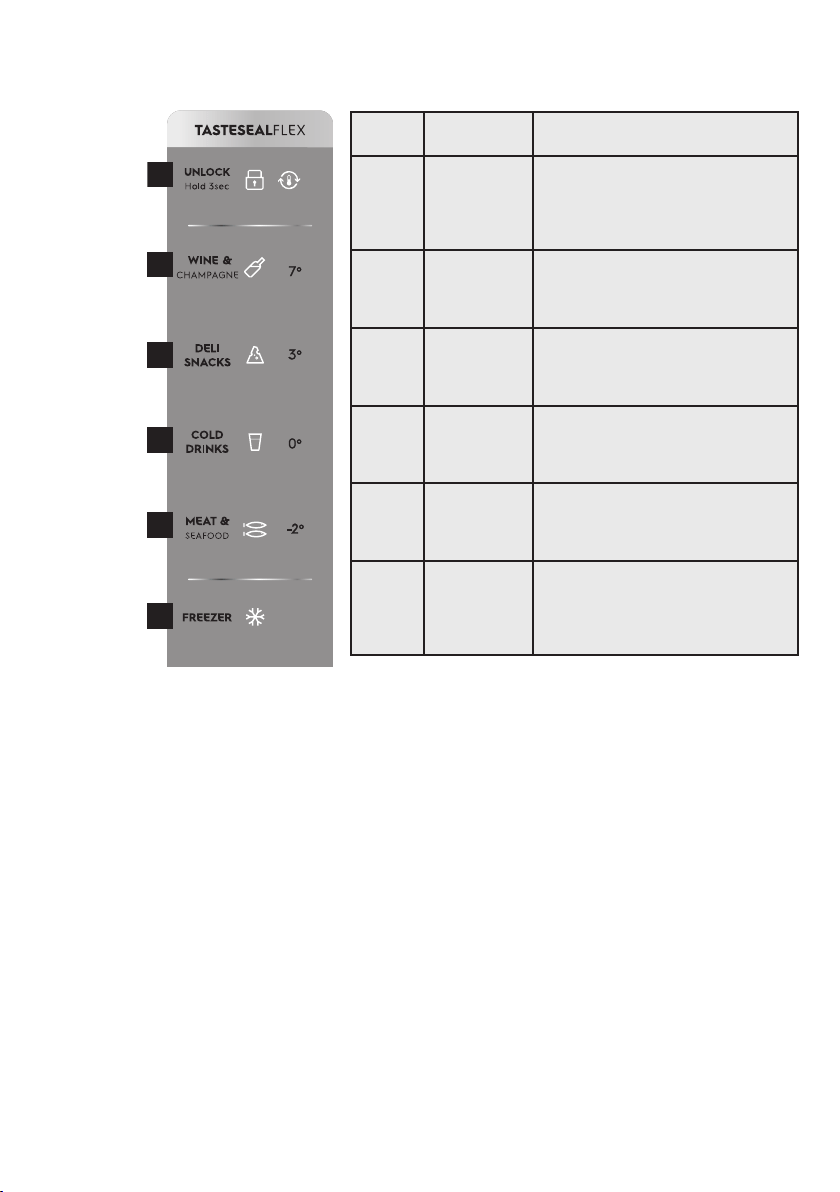
10 www.electrolux.com
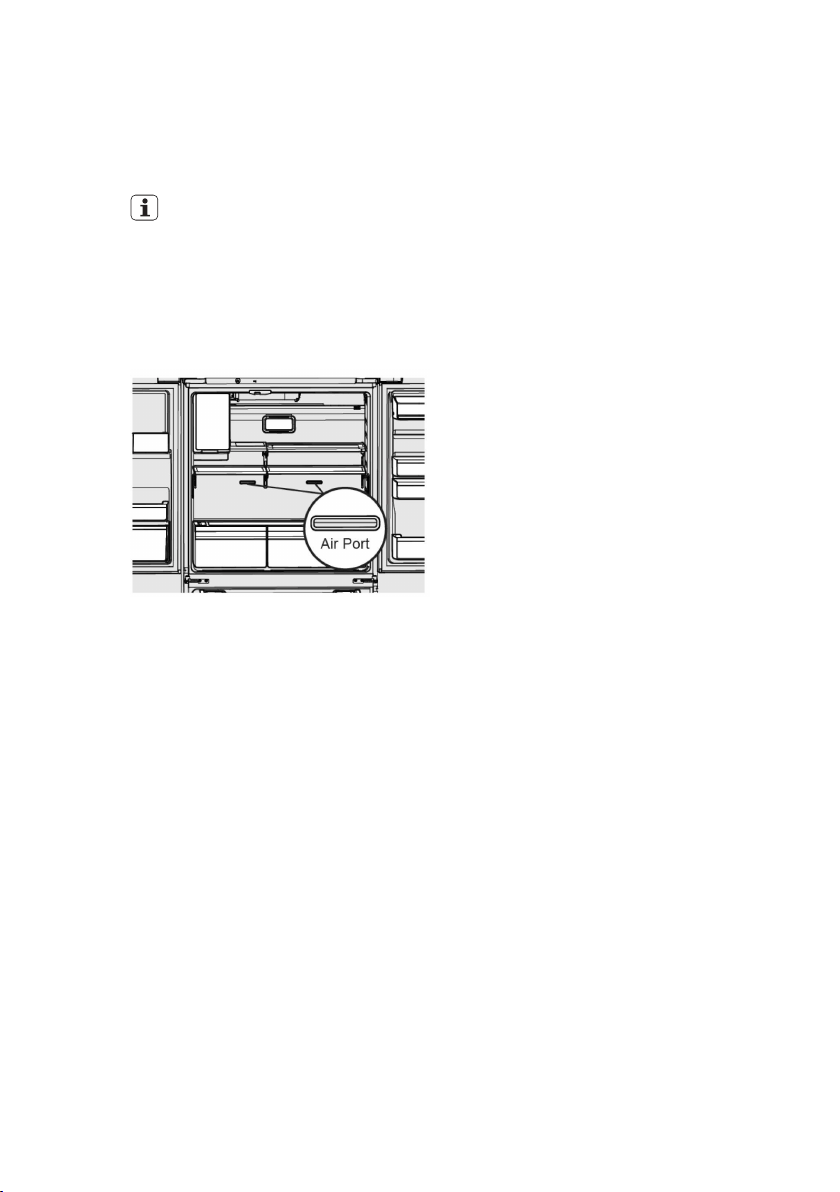
4.2 TASTESEALFLEX control panel
1
2
3
4
5
6
BUTTON
/ ICON
DESCRIPTION PRIMARY FUNCTION
1 Unlock
The interface will automatically lock
after 3 seconds without any inter-
action. Press and hold 3 seconds to
unlock the interface. A tone will sound
to confirm your choice.
2
Wine &
Champagne
Choosing Wine & Champagne will set
TASTESEALFLEX temperature to 7°C.
A tone will sound to confirm your
choice.
3 Deli Snacks
Choosing Deli Snacks will set
TASTESEALFLEX temperature to 3°C.
A tone will sound to confirm your
choice.
4 Cold Drinks
Choosing Cold Drinks will set
TASTESEALFLEX temperature to 0°C.
A tone will sound to confirm your
choice.
5
Meat &
Seafood
Choosing Meat & Seafood will set
TASTESEALFLEX temperature to -2°C.
A tone will sound to confirm your
choice.
6 Freezer
Choosing Freezer will set
TASTESEALFLEX temperature to the
same temperature as the freezer
compartment. A tone will sound to
confirm your choice.
11ENGLISH
5. SETTING COOLING TEMPERATURES
Note: The recommended settings for a product
installed in a kitchen is 3˚C for the fresh food
compartment and -18˚C for the freezer.
IMPORTANT
If your product has food freezing in
the fresh food compartment, increase
the temperature setting 1 or 2 degrees
Celsius.
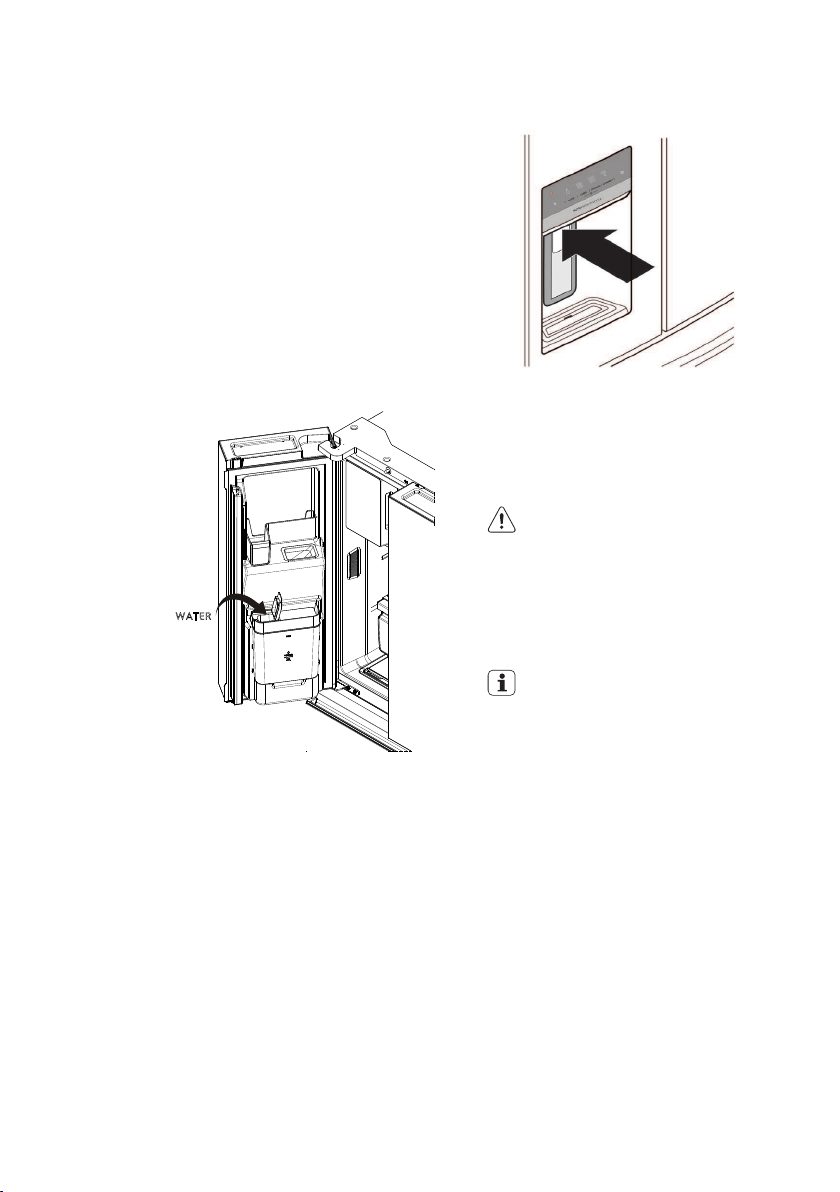
If you place food within 3 cm in front of
the air ports, there may be the chance
of freezing food.
Note: Control features and alarms may vary by model.
Alerts and Alarms
Air Filter Installation
First operation the refrigerator need to
installation the air filter which storage at crisper
left side and follow installation method as
below.
Carbon activated air filter
1. Remove plastic wrap.
2. Install filter according to your refrigerator’s
use&care guide.
3. Reset filter reminder light on your refrigerator.
4. Replace filter every 6 months.
When illuminated, air filter needs to be
replaced. Change the air filter every 6 months.
To reset, press and hold button for 3 seconds.
Tone will sounds once it has been reset.
Door Open
If a door has been left open for 5 minutes or
more, an alarm will sound and the d oor open
indicator will illuminate on the display. The
alarm can be turned off by closing the door or
pressing any key. Control panel will return to
normal operation after the door is closed.
Error Tone
An alarm will sound if the user tries to make a
selection that is not available.
12 www.electrolux.com
6. AUTOMATIC ICE & WATER DISPENSER
Using the ice maker after installation
Before making ice for the first time, be sure
to prime the water supply system. Air in new
plumbing lines can result in two or three empty
ice maker cycles. Furthermore, if the system is
not flushed, the first ice cubes may be
discolored or have an odd flavor.
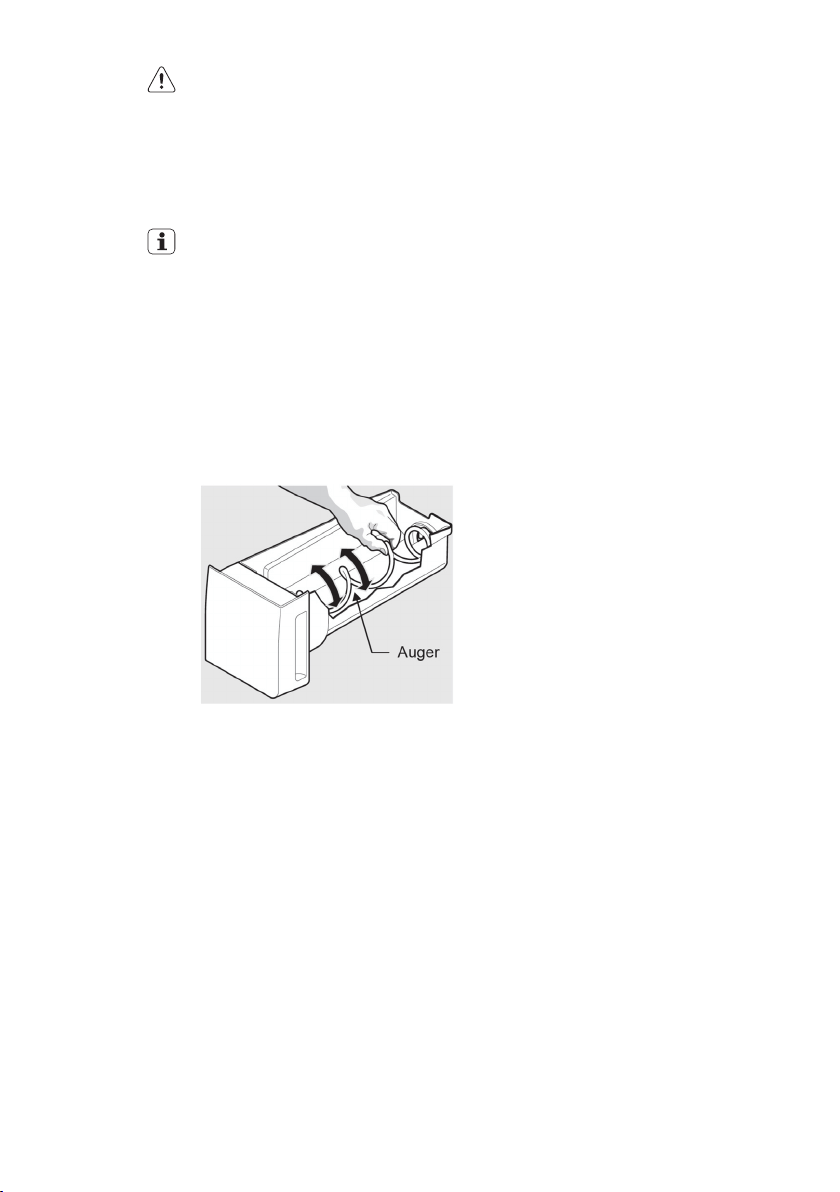
Refilling the water tank
• The water tank must be placed on the door.
• Pour potable water through the funnel at the
lid of water tank.
• Ensure that ice maker and dispenser is
switched on.
WATER
Priming the water supply system
1. Begin filling the system by pressing and
holding a drinking glass against the
dispenser.
2. Keep the glass in this position until water
comes out of the dispenser. It may take
about 1½ minutes.
3. Continue dispensing water for about four
minutes to flush the system and plumbing
connections of any impurities (stopping to
empty the glass as necessary).
Dispenser
Dispenser
Note: The water dispenser has a built-in device
that shuts off the water flow after three minutes
of continuous use. To reset this shut-off device,
simply release the dispenser paddle.
Only the first 750 ml of dispensed water is
chilled.
CAUTION
Do not fill the Water tank with anything
other then clean water (Filtered or
Mineral water).
Soft drink, juice, tea or hot water etc,
can damage your automatic icemaker.
The Water tank can withstand a
maximum water temperature of 60°C
Tip and Useful Information
Remove and clean ice bin and water
tank once a month, discarding unused
ice and water. This will ensure fresh ice
and smooth operation of your icemaker.
Make sure your refrigerator is level to
avoid
uneven ice cubes.
Ice maker operation & care
After the refrigerator is installed properly and
has cooled for several hours, the ice maker can
produce ice within 24 hours. The ice maker will
fill the ice bin from the rear. You must dispense
some ice to force the ice forward in the bin. This
will allow the bin to fill completely.
Ice Maker and Storage Bin Capacity
This ice maker should produce 1 kg of ice per
24 hours. The ice bin will hold about 1.8 kg of
ice.

13ENGLISH
CAUTION
If the water supply to your refrigerator
is softened, be sure the softener is
properly maintained. Chemicals from
a water softener can damage the ice
maker.
Cleaning the ice maker
Clean the ice maker and ice bin at regular
intervals, especially prior to vacation or moving.
1. Turn off the icemaker.
2. Remove the ice bin by pulling straight out.
3. Empty and carefully clean the ice bin with
mild detergent. Do not use harsh or abrasive
cleaners. Do not place in dishwasher. Rinse
with clear water.
4. Allow the ice bin to dry completely before
placing it back into the freezer.
5. Place ice bin back into position. Turn the ice
maker on.
Remove and empty the ice bin if:
• An extended power failure (one hour or
longer) causes ice cubes in the ice bin to
melt and refreeze together after power is
restored, jamming the dispenser mechanism.
• You do not use the ice dispenser frequently.
Ice cubes will freeze together in the bin,
jamming the dispenser mechanism.
Removing Ice Bin
Remove the ice bin and shake to loosen the
cubes or clean as explained above.
Turning the ice maker on and off
IMPORTANT
Your ice maker is turned on at the
factory so it can work as soon as you
install your refrigerator. If you do not
fill the water tank, set the ice maker’s
On/Off feature to Off; otherwise, the
ice maker’s fill valve may make a loud
chattering noise when it attempts to
operate without water.
Ice production is controlled by the ice maker’s
On/Off feature on the control panel. Pressing
the On/Off feature turns the ice maker on & off.
Note: The ice maker also has a built-in plastic
signal arm that automatically stops ice
production when the ice bin is full. This signal
arm should not be used to manually stop the
ice maker.
IMPORTANT
Turning off the ice maker simply d
isables ice making. You will still be able
to dispense existing ice, and you will
still be able to dispense water.
Ice maker/dispenser tips
• If your refrigerator is not connected to a
water supply or the water supply is turned off,
turn off the ice maker as d escribed in the
previous section.
• The following sounds are normal when the
ice maker is operating:
- Motor running
- Ice dropping into ice bin
- Water valve opening or closing
- Running water
• If you need a large quantity of ice at one
time, it is best to get cubes directly from the
ice bin.
• Ice cubes stored too long may develop an
odd flavor. Empty the ice bin as explained
below.
• When dispensing cubed ice, it is normal to
have a small quantity of little pieces along
with the whole cubes.
• To avoid splashing, dispense ice into your
container before adding liquids.
• It is normal for ice to fill to the top of the ice
bin.
14 www.electrolux.com
CAUTION
Never use an ice pick or similar
sharp instrument to break up the ice.
This could damage the ice bin and
dispenser mechanism.
To loosen stuck ice, use warm water.
Before replacing the ice bin, make sure
it is completely dry.
IMPORTANT
When removing or replacing the ice
bin, avoid rotating the auger in the ice
bin. If the auger is accidentally rotated,
you must realign the auger by turning
it in 45 degree turns (see below) until
the ice bin fits into place with the drive
mechanism. If the auger is not properly
aligned when replacing the ice bin,
the refrigerator will not dispense ice.
The fresh food door also may not close
properly causing warm air to leak into
the fresh food compartment.
Adjusting the Ice Bin Auger
15ENGLISH
7. STORAGE FEATURESER
CAUTION
To avoid personal injury or property d
amage, handle tempered glass shelves
carefully. Shelves may break suddenly if
nicked, scratched or exposed to sudde
n temperature change. Allow the glass
shelves to stabilize to room temperature
before cleaning. Do not wash in
dishwasher.
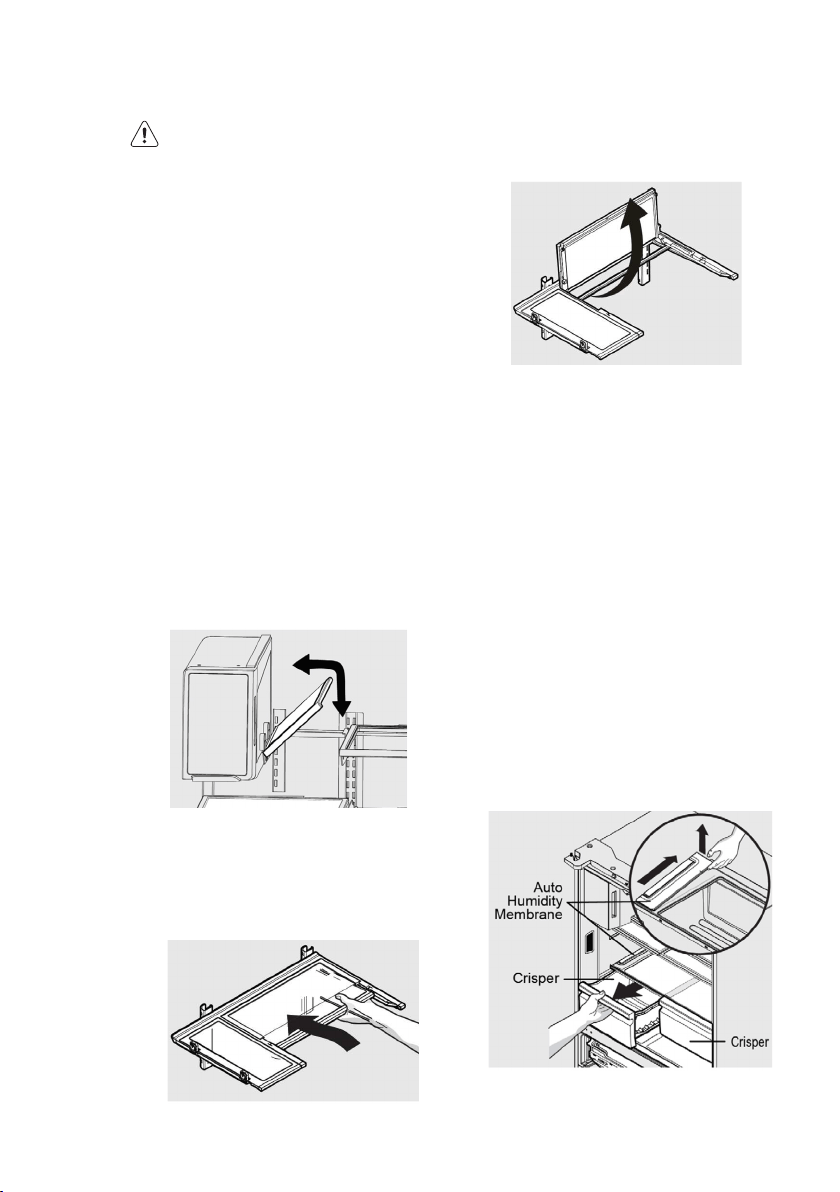
You can easily adjust shelf positions in the
fresh food compartments to suit your needs.
The shelves have mounting brackets that
attach to slotted supports at the rear of each
compartment.
To change a shelf position:
1. Remove all food from shelf.
2. Lift the front edge up and pull the shelf out.
3. Replace by inserting the mounting bracket
hooks into the desired support slots.
4. Lower the shelf and lock into position.
To adjust the flip shelf:
1. Remove food from shelf.
2. Lift the right side edge of shelf upwards and
push to the left towards ice maker
Flip Shelf
To adjust the slide-under/flip shelf:
1. Pull front half shelf forward until its back
drops down, then gently push front half shelf
back and under back half shelf.
Slide-Under/Flip Shelf
2. With front half fully below back half, lift front
of shelf to flip it upwards toward the back of
the cabinet.
Slide-Under/Flip Shelf
Drawers
Your refrigerator includes a variety of storage
drawers.
FreshSeal
TM
Crisper (with automatic humidity
control)
Crisper drawers are designed for storing
fruits, vegetables, and other fresh produce.
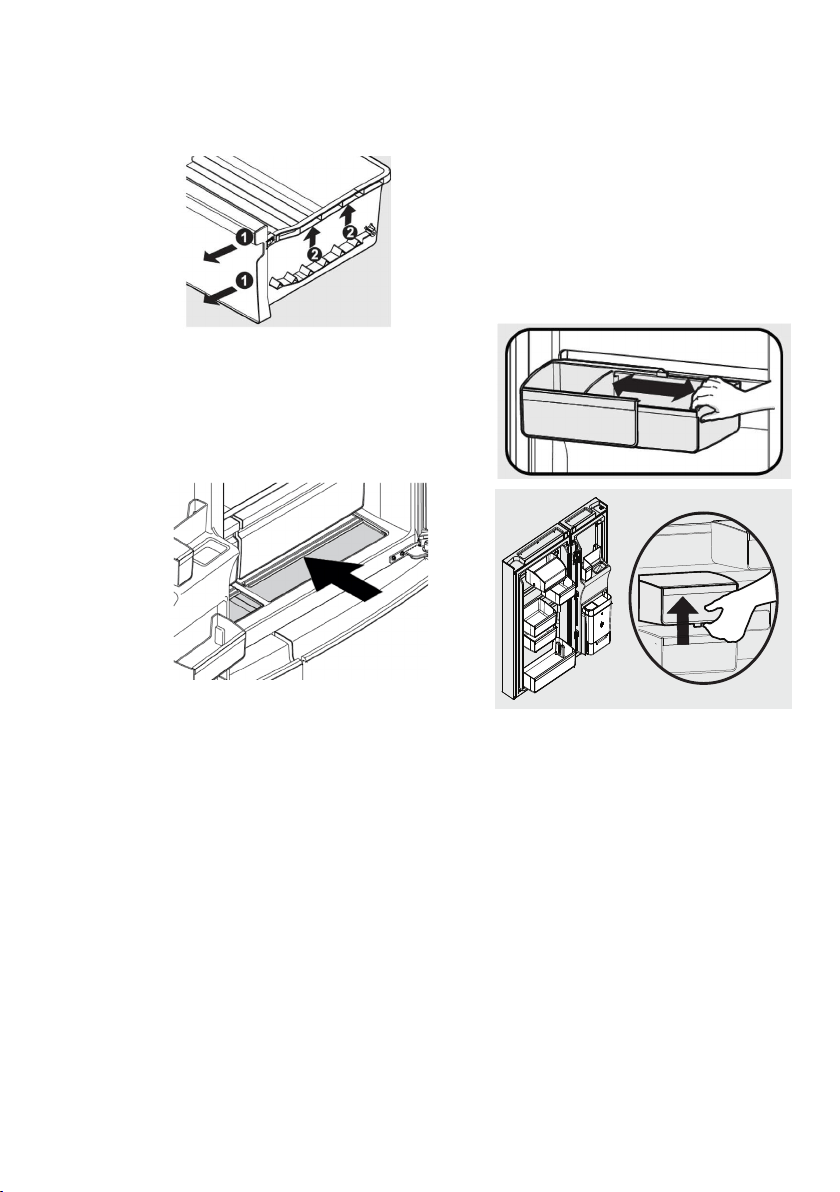
Crispers have an auto humidity control (with
replaceable membrane) on the side of each
crisper under the humidity control cover.
To remove the auto humidity control
membrane:
1. Reach to back of humidity control cover.
2. Pull up on cover.
3. Pull cover towards back of cabinet and
remove.
4. Replace humidity membrane.
5. Replace cover by reversing the steps above.
Repeat for both crispers.
Opening the Crisper Drawer
16 www.electrolux.com
To remove the FreshSeal
TM
Crisper for
cleaning:
1. Pull the drawer out until it stops.
2. Lift the front slightly and remove the drawer.
Removing the FreshSeal
TM
Crisper
Recessed SnackZone
This drawer is ideal for storage of deli meats
and cheese.
Slid e back the cover to allow access to the
drawers.
Opening the SnackZone
Doors
Storage bins
The doors to your fresh food compartment use
a system of modular storage bins. All of these
bins are removable for easy cleaning. Bins can
be adjusted to your needs.
Door bins are ideal for storing jars, bottles,
cans, and large drink containers. They also
enable quick selection of frequently used items.
Adjustable door bins
Some models have adjustable door bins that
can be moved to suit individual needs.
To adjust the collapsible door bin:
1. Make sure bin is securely seated on rail in
door.
2. Grab one side of bin and place other hand
on adjustable side.
3. Pull on side of bin until the bin is adjusted to
desired width.
Note: It can be difficult to pull out the
collapsible bin. Some force may be required.
To move door bin along a rail:
1. Tilt bin up so the back of the bin is off the
door but the hook is still engaged.
2. Slide bin along rail to desired position.
3. Lower bin back into place.
To move door bin from rail to rail:
1. Lift bin up disengaging the hook.
2. Move bin to desired rail location.
3. Push bin hook into rail engaging the hook.
Adjustable Door Bins
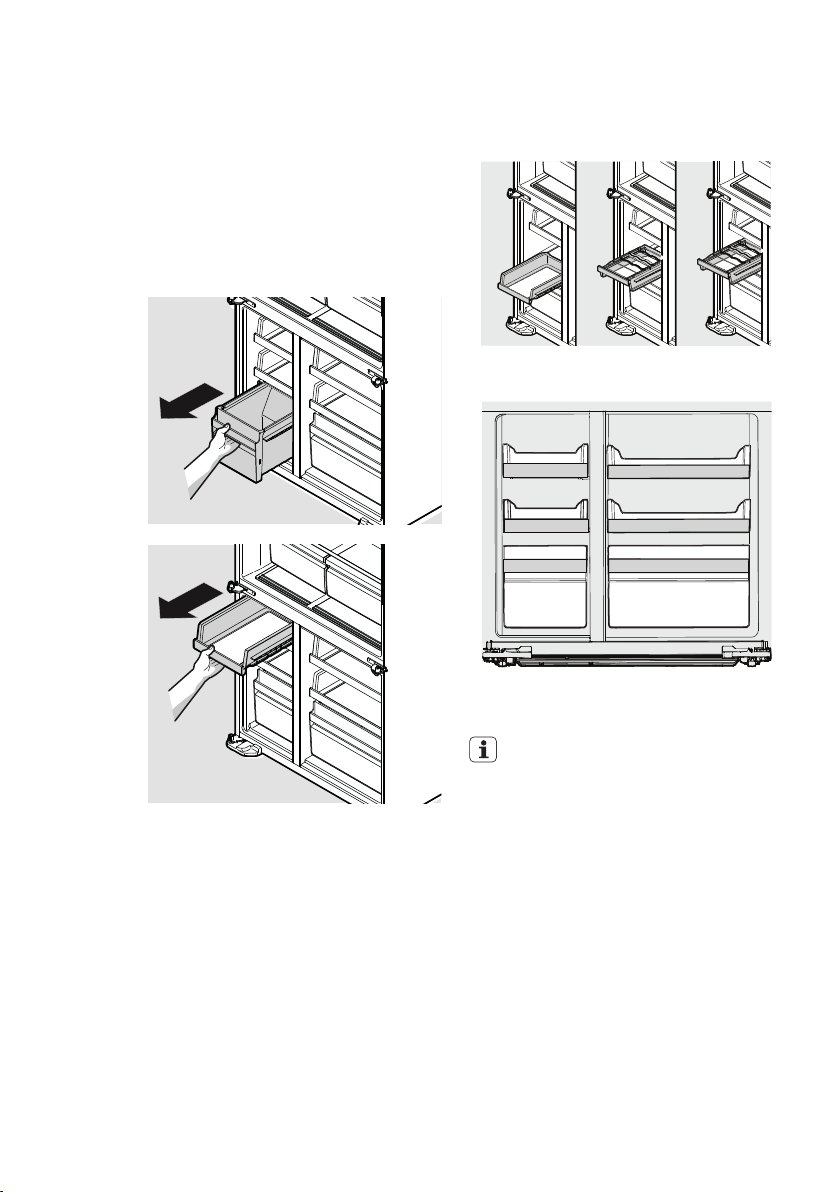
17ENGLISH
The middle drawers in the FlexSpace™ and
freezer can be mounted up to three height
positions and can also invert 90 degrees
allowing storage of bottles in the FlexSpace™.
Shelves in 3 Height Positions & Inverted
Possible Shelf Configuration Example
IMPORTANT
There are wheels on the back of all
shelves. Make sure all wheels are
aligned on their respective tracks for
proper function. If shelf is not aligned
properly, it will cause problems with the
door operation.
Freezer storage
To remove freezer and FlexSpace shelves and
drawers:
All freezer and FlexSpace shelves and drawers
are removable.
1. Open doors completely to gain access to
shelves/drawers.
2. Pull the shelf/drawer to the stopper. Lift up
and pull to remove it from the cabinet.
3. Reverse the steps to reinstall shelf/drawer.
Shelves in 3 Height Positions & Inverted
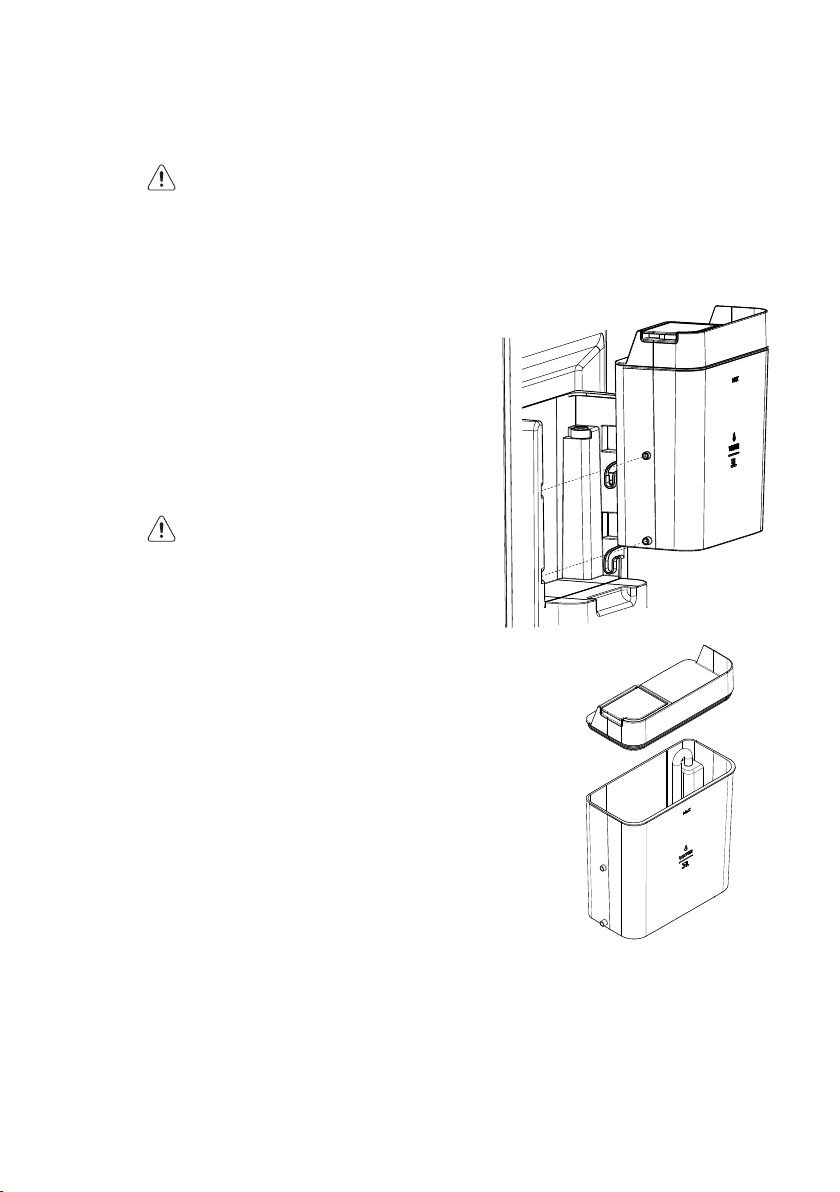
18 www.electrolux.com
8. GENERAL INFORMATION
8.1 CLEANING YOUR REFRIGERATOR
WARNING
BEFORE CLEANING: Turn the
refrigerator off at the power point and
unplug the cord to prevent any chance
of electrocuting yourself.
Doors and exterior (white and silver)
You should only clean the doors with lukewarm
soapy water and a soft cloth.
Stainless Steel
Your stainless steel refrigerator is manufactured
from mark-resistant stainless steel. This stainless
steel has a special advanced protective
coating that eases the removal of marks such
as fingerprints and water spots. To keep its
appearance, clean it regularly with lukewarm
soapy water and a soft cloth.
CAUTION
Never use stainless steel cleaners,
abrasive pads or other cleaners that
will scratch the surface. Damage to the
appliance after d elivery is not covered
by your warranty.
Water Tank
The tank has to be removed from the door only
for cleaning purposes, to fill the portable water
only, the tank must be placed on the door and
the funnel on the lid has to be used
Interior
Clean the inside of your refrigerator regularly
with a soft cloth, unscented mild soap and
lukewarm water. Thoroughly dry all surfaces
and removable parts and avoid getting water
on the controls. Replace removable parts, plug
power cord in and switch the power on before
returning the food.
Ice and water
Clean the components of the ice maker/water
dispenser regularly with a soft cloth, unscented
mild soap and rinsing thoroughly with lukewarm
water.For further information on the care and
cleaning of your ice maker, ice dispenser of
water dispenser refer to the section “Ice and
Water Models”
Water Tank Assembly
Clean the inside of the water tank regularly with
a soft cloth, unscented mild soap and rinse
thoroughly with lukewarm water to completely
remove any soap residue.
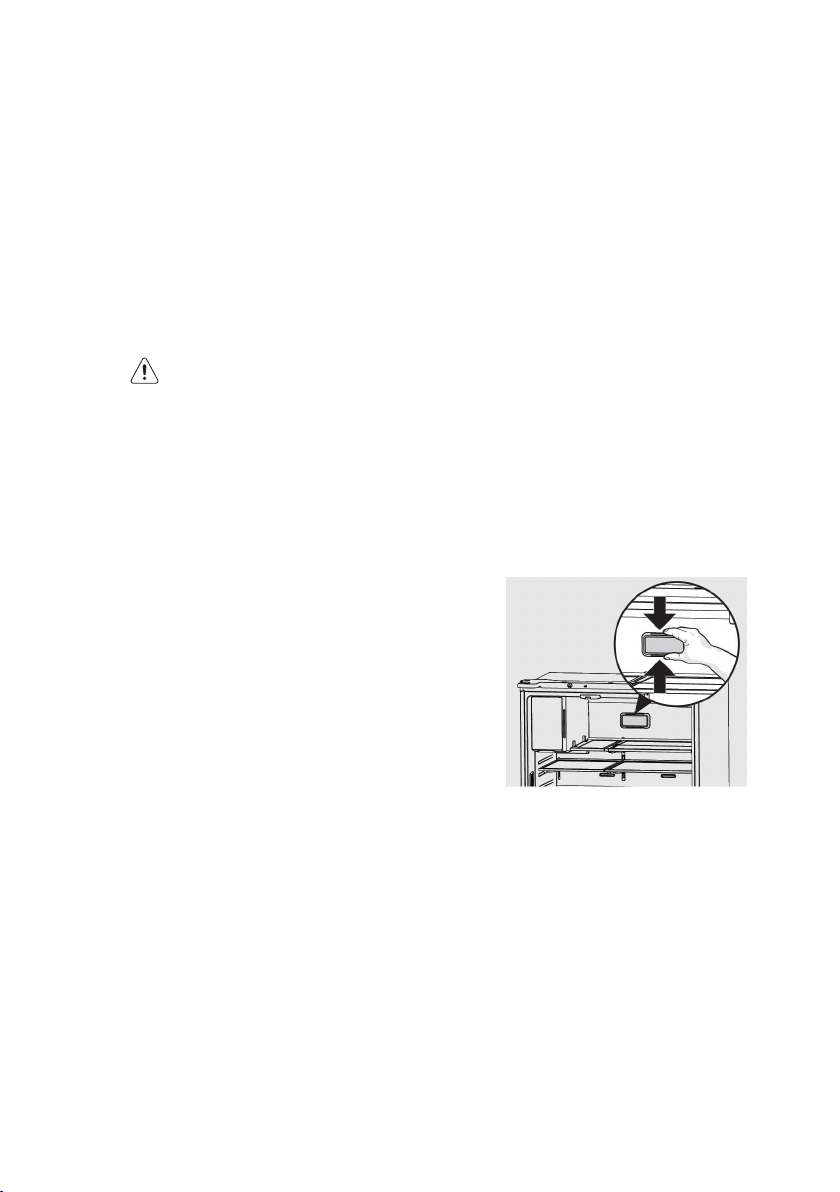
Water tank cleaning:
The tank has to be removed from the door and
lift the lid off water tank.
NOTE: When customer assembled tank to door
To avoid water leaks ensure that tank nozzle
fully engaged with housing socket.
19ENGLISH
8.2 CHANGING THE FILTER
Air Filter (select models)
The air filter is located in the top center of the
fresh food compartment.
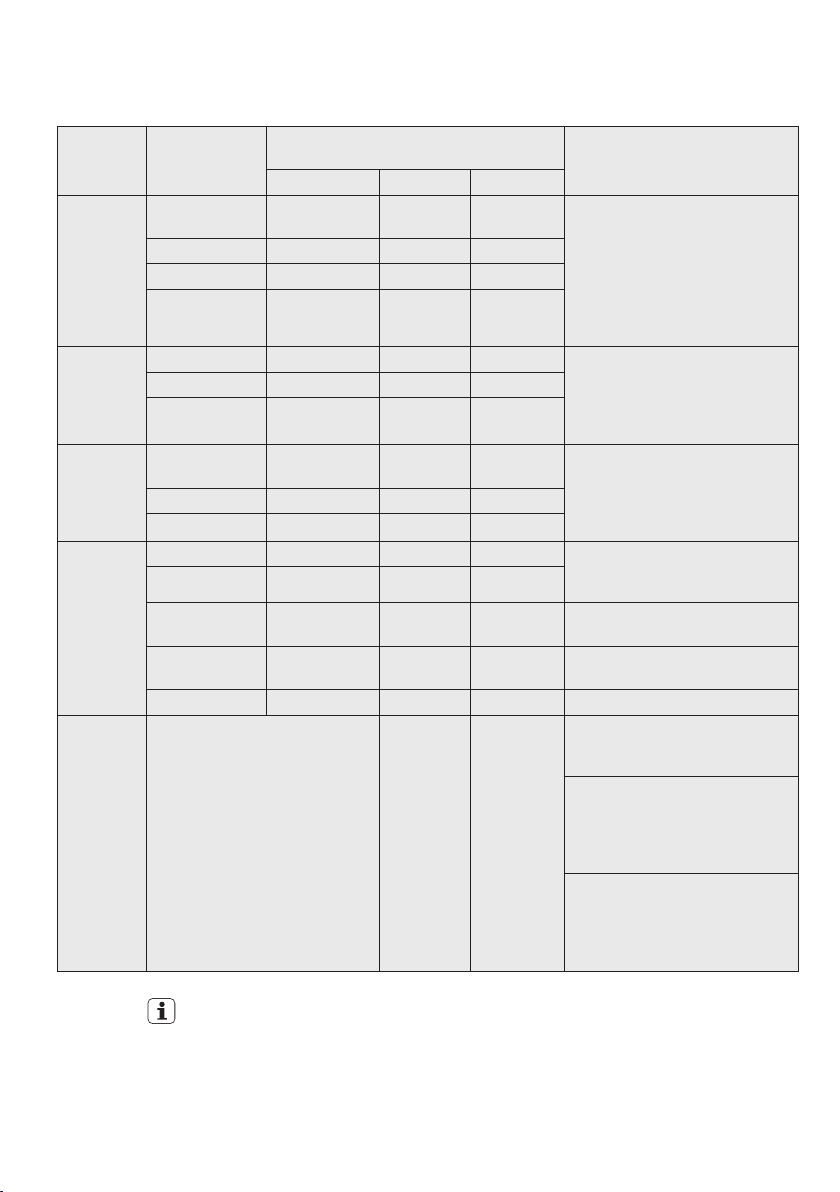
Replacing your Air Filter
To ensure optimal filtering of refrigerator odors,
you should change the air filter six months (The
filter status light on the Touch Panel prompts
you to replace the filter after six month)
1. Remove the air filter cover by squeezing the
sides of the cover together and removing
from liner
2. Remove the old filter and discard it.
3. Unpack the new filter and slid e it into the
housing. The open face must (carbon media)
of the filter should be installed facing the air
port (hole) in the multiflow.
4. Replace the air filter cover by squeezing the
sides and snapping it back into place.
5. Press and hold the “Reset Air Filter” button
on the control panel for three seconds. When
the LED turns off, the status has been reset..
Door seals
Always keep door seals clean by washing them
with a mild detergent and warm water, followed
by a thorough drying. Sticky food and drink can
cause seals to stick to the cabinet and tear when
you open the door.
Never use hot water, solvents, commercial
kitchen cleaners, aerosol cleaners, metal
polishes, caustic or abrasive cleaners, or
scourers to clean your refrigerator. Many
commercially available cleaning products and
detergents contain solvents that will damage
your refrigerator. Use only a soft cloth with an
unscented mild soap and lukewarm water.
CAUTION
To clean a crisper or freezer bin with
telescopic extension slides, simply wipe
with a damp cloth and warm soapy
water. Never immerse the cover in water,
as this could affect the operation of the
slide.
Switching off your refrigerator
If you switch off your refrigerator for an extended
period, follow these steps to reduce the chances
of mould.
1. Remove all food.
2. Remove the power plug from the power point.
3. Thoroughly clean and dry the Interior.
4. Ensure that all the doors are wedged open
slightly for air circulation.
20 www.electrolux.com
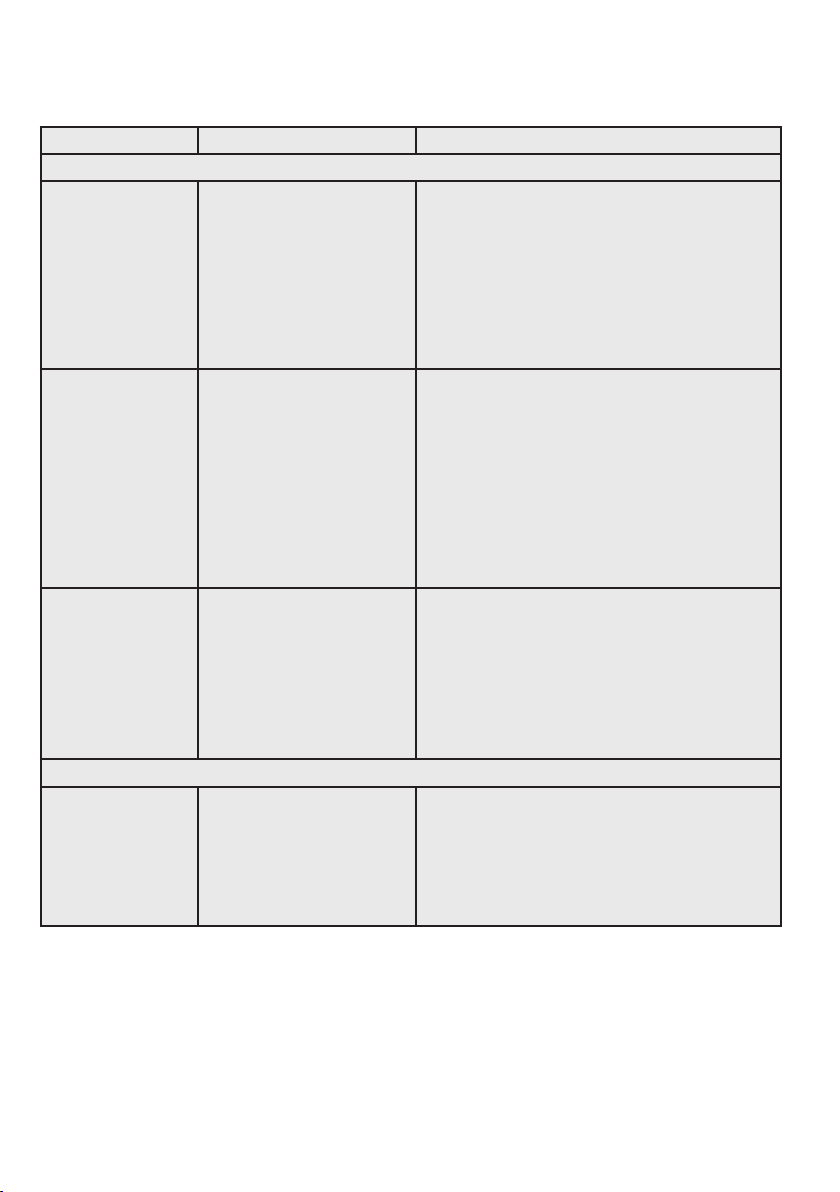
9. FOOD STORAGE GUIDE
CATEGORY PRODUCT
RECOMMENDED STORAGE TIMES FOR FRESH
FOODS *
STORAGE TIPS
REFRIGERATOR ULTRA CHILL FREEZER
MEAT Sausages and
Mince
1-2 Days 3-5 Days 2-3 Months Keep cold meat at the back of the
refrigerator where it is coldest.
Plastic can cause meat to sweat if
stored in refrigerator for more than a
day.
Roast can take up to 48 hours to defrost
properly, transfer frozen roast to the
refrigerator 2 days before use.
Chops and Steak 3-4 Days 5-7 Days 4-6 Months
Cold Meats 3-5 Days 5-7 Days 4-6 Months
Roasts 3-5 Days 1 week 12 Months
POULTRY Chicken 1-2 Days 5-7 Days 2 Months If poultry takes on a smell or colour you
are unsure about it is best to throw it out.
Whole eggs are not suitable for
freezing, slightly beaten eggs may be
frozen for four months.
Roast Chicken 3-5 Days 1 week 12 Months
Eggs 6 Weeks Not Suitable Not Suitable
SEAFOOD Whole fish and
fillets
2-3 Days 5-7 Days 2 Months Store in an airtight container or foil.
Never freeze prawns in salty water as
this will dehydrate the flesh.
Lobster and Crab 1-2 Days 3-5 Days 2 Months
Prawns 1-2 Days 3-5 Days 2 Months
DAIRY Milk Until Expiry Date Not Suitable Not Suitable If dairy takes on a smell or colour and
you are unsure about it, it is best to
throw it out.
Yoghurt 7- 10 Days Not Suitable Not Suitable
Hard Cheeses 2 Weeks – 2
Months
1-2 Months 2 Months
(Grated)
Depending on the variety hard cheese
can last from 2 weeks to 2 months.
Soft Cheeses 1-2 Weeks 2-4 Weeks * Not Suitable * Texture may change depending of the
type of soft cheese
Butter 8 Weeks 3-4 Months 12 Months
FRUIT &
VEGETABLES
Every fruit and vegetable has a different
shelf life. Some stay fresh for a couple
of days e.g. beans, others can last for a
couple of months e.g. onions.
Not Suitable 8-12 Months
When
freezing chop
and blanch
in small
portions.
Keep vegetables in the crisper and
away from the air vents to avoid
freezing.
If you wash fruit and vegetables before
storing them make sure they are dry or
wrap in absorbent paper before storing
in the refrigerator as this can make them
susceptible to rotting.
Try to keep fruit and vegetables
separated as fruits that give off high
levels of ethylene (the ripening agent)
can prematurely ripen and spoil
surrounding vegetables
IMPORTANT
* Please note, use this information as a guide only, actual storage times will vary depending
on how you use your refrigerator.
21ENGLISH
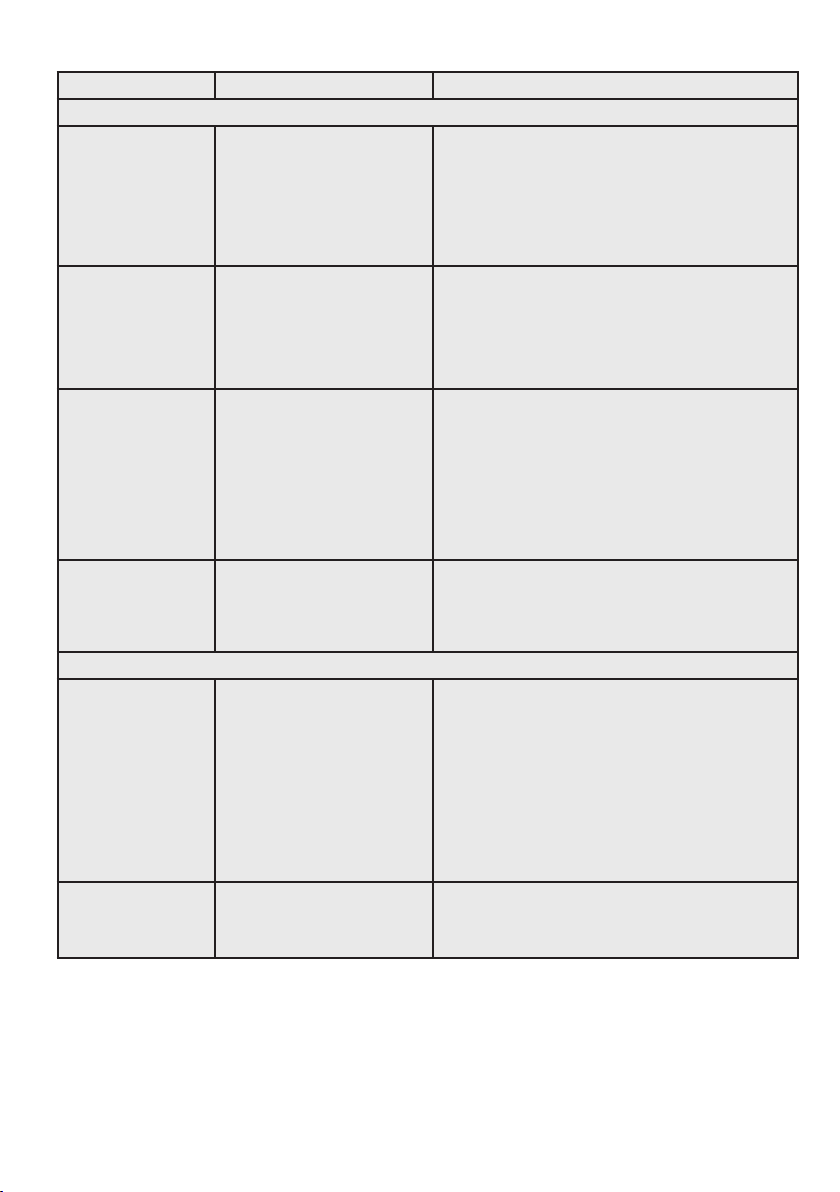
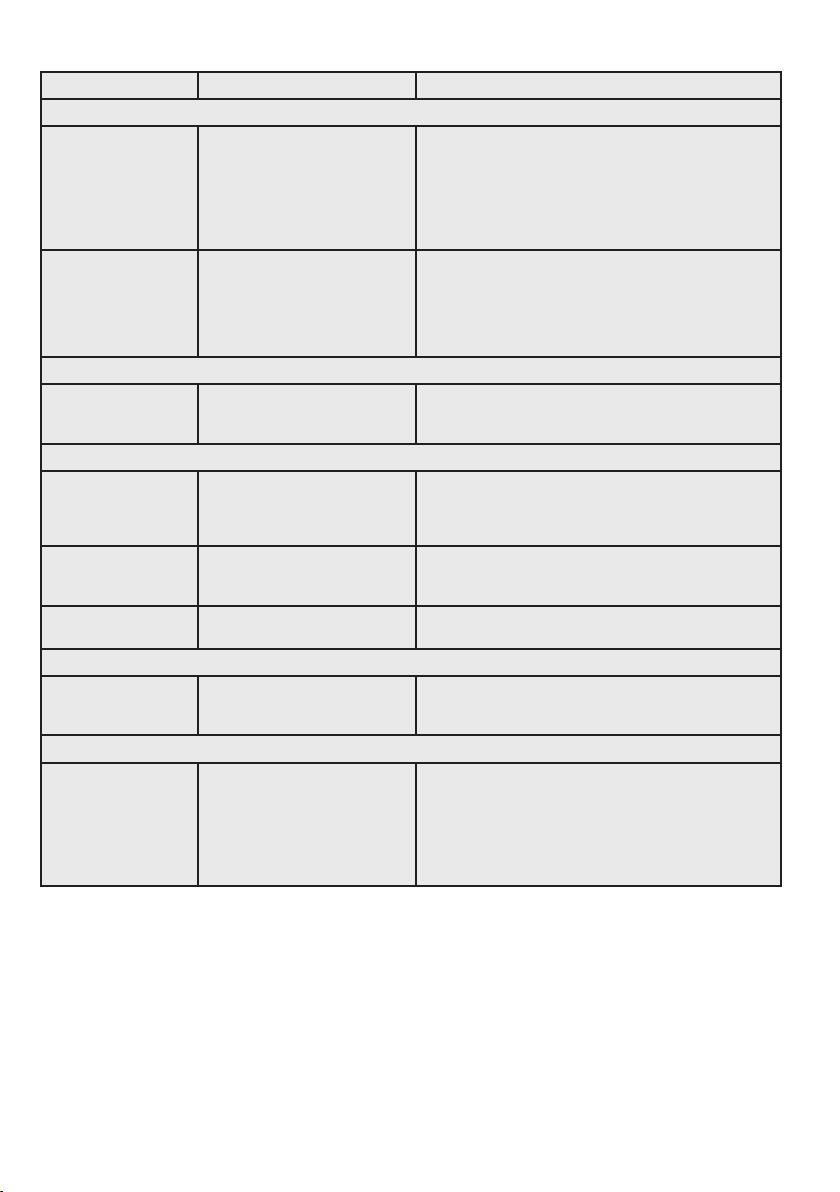
10. TROUBLESHOOTING
Concern Potential Cause Common Solution
Automatic Ice Maker
Ice maker is not
making any ice.
• Ice maker is turned off.
• Refrigerator is not connected
to water line or water valve
is not open.
• The water supply line is
kinked.
• The water filter is not seated
properly.
• The water filter may be
clogged with foreign
material.
• Turn on ice maker. For the fresh food ice maker,
press ice maker on-off button once.
• Connect the unit to the household water supply and
ensure the water valve is open.
• Ensure that the supply line does not kink when the
refrigerator is pushed into place against the wall.
• Remove and re-install the water filter. Be sure to
seat it fully into the locked position.
• If water dispenses slowly or not at all, or if the filter
is six months old or older, it should be replaced.
Ice maker is not
making enough ice.
• Ice maker is producing less
ice than you expect.
• The water filter may be
clogged with foreign
material.
• The water supply line is
kinked.
• Water pressure is extremely
low. Cut-off and cut-on
pressures are too low
(well systems only).
• Reverse osmosis system is in
regenerative phase.
• The ice maker will produce approximately 1 kg of
ice every 24 hours depending on usage conditions.
• If water dispenses slower than normal, or if the filter
is six months old or older, it should be replaced.
• Ensure that the supply line does not kink when the
refrigerator is pushed into place against the wall.
• Have someone turn up the cut-off and cut-on
pressure on the water pump system (well systems
only).
• It is normal for a reverse osmosis system to be
below 137 kPa (20 psi) during the regenerative
phase.
Ice cubes are
freezing together.
• Ice cubes are not being
used frequently enough or
interruption of power for
prolonged time.
• Ice cubes are hollow (shells
of ice with water inside). The
hollow cubes break open in
the bin and leak their water
onto existing ice, which
causes it to freeze together.
• Remove ice container and discard ice. The ice
maker will produce fresh supply. Ice should be used
at least twice weekly to keep the cubes separated.
• This generally occurs when the ice maker does
not get enough water. This is usually the result of
a clogged water filter or restricted water supply.
Replace the water filter and if the condition still
occurs, check to see if the water valve is not turned
on all the way or if there is a kinked water supply
line.
Dispenser (Ice & Water)
Dispenser (Ice &
water) not dispensing
ice.
• There is no ice in the bin to
be dispensed.
• The refrigerator doors are
not completely closed.
• Dispenser paddle has
been pressed too long and
the dispenser motor has
overheated.
• See the “Ice maker is not making any ice” section.
• Be sure the refrigerator doors are completely
closed.
• The motor overload protector will reset in about
three minutes and then ice can be dispensed.
22 www.electrolux.com
Concern Potential Cause Common Solution
Dispenser (Ice & Water)
Ice dispenser is
jammed.
• Ice has melted and frozen
around auger due to
infrequent use, temperature
fluctuations, and/or power
outages.
• Ice cubes are jammed
between ice maker and back
of ice container.
• Remove ice container, thaw, and empty the
contents. Clean container, wipe dry, and replace in
proper position. When new ice is made, dispenser
should operate.
• Remove ice cubes that are jamming the dispenser.
Dispenser (Ice &
water) not dispensing
water.
• Dispenser (Ice & water) not
dispensing water.
• Remove and reinstall the water filter. Be sure to
rotate it to the right until it stops and the grip end
is vertical.
• Replace filter cartridge. Be sure to rotate it to the
right until it stops and the grip end is vertical.
• Open household water line valve. See CONCERN
column AUTOMATIC ICE MAKER.
Water not cold
enough.
• As warmer tap water goes
through the filter and enters
the water supply system,
the chilled water is pushed
through to the dispenser.
Once the chilled water is
used up, it will take several
hours to bring the freshly
replaced water to a cooler
temperature.
• Add ice to cup or container before dispensing
water.
Water has an odd
taste and/or odor.
• Water has not been
dispensed for an extended
period of time.
• Unit not properly connected
to cold water line.
• Draw and discard 10-12 glasses of water to freshen
the supply.
• Connect unit to cold water line that supplies water
to the kitchen faucet.
Opening/Closing Of Doors/Drawer
Door(s) will not close. • Door was closed too hard,
causing other door to open
slightly.
• Refrigerator is not level.
It rocks on the floor when
moved slightly.
• Refrigerator is touching a
wall or cabinet.
• Check gasket and
cabinet interface for any
obstructions.
• Close both doors gently.
• Ensure floor is level and solid, and can adequately
support the refrigerator. Contact a carpenter to
correct a sagging or sloping floor.
• Ensure floor is level and solid, and can adequately
support the refrigerator. Contact a carpenter to
correct a sagging or sloping floor.
• Clean the refrigerator door gaskets and interface
with warm, soapy water to remove any grease,
dirt and grime from the surface. Wipe clean with
a dry cloth. Inspect the gasket to make sure it is
thoroughly clean.
Drawers are difficult
to move.
• Food is touching shelf on top
of drawer.
• Track that drawers slide on
is dirty.
• Remove top layer of items in drawer.
• Ensure drawer is properly installed on track.
• Clean drawer, rollers, and track.
• See Care & Cleaning.
23ENGLISH
Concern Potential Cause Common Solution
Running of Refrigerator
Compressor does
not run.
• Refrigerator is in defrost
cycle.
• Plug at electrical outlet is
disconnected.
• House fuse blown or tripped
circuit breaker.
• Power outage.
• This is normal for a fully automatic defrost
refrigerator. The defrost cycle occurs periodically,
lasting about 30 minutes.
• Ensure plug is tightly pushed into outlet.
• Check/replace fuse with a 15 amp time-delay fuse.
Reset circuit breaker.
• Check house lights. Call local electric company.
Refrigerator seems to
run too much or too
long.
• Your variable speed
compressor is designed to
run 100% of the time except
during the defrost cycle. At
times it will run faster, such
as after a defrost cycle.
• It is normal for the compressor to run continuously
except during defrost mode.
Digital Temperature Setting Display
Digital temperature
displays an error.
• Electronic control system
has detected a performance
problem.
• Call your Electrolux service representative, who can
interpret any messages or number codes flashing
on the digital displays.
Water/Moisture/Frost Inside Refrigerator
Moisture collects on
inside of refrigerator
walls.
• Weather is hot and humid.
• Flipper mullion
• The rate of frost buildup and internal sweating
increases.
• Adjust flipper mullion. (See “To adjust the flipper
mullion” in the Installation section.)
Water collects on
bottom side of
drawer cover.
• Vegetables contain and give
off moisture.
• It is not unusual to have moisture on the bottom
side of the cover.
Water collects in
bottom of drawer.
• Washed vegetables and fruit
drain while in the drawer
• Dry items before putting them in the drawer. Water
collecting in bottom of drawer is normal
Water/Moisture/Frost Outside Refrigerator
Moisture collects on
outside of refrigerator
or between doors.
• Weather is humid. • This is normal in humid weather. When humidity is
lower, the moisture should disappear.
Food in Fresh Food Compartment
Food is freezing. • Temperature setting is too
low.
• Temperature sensor is
covered by food (right side
of fresh food area).
• Food is covering the air
ports.
• Move the setting to a higher degree.
• Allow space for air flow to the sensor.
• Allow space between the air ports and the food.
24 www.electrolux.com
BRRR
!
HISSS!
CLICK!
BLUBB!
CRACK!
SSSRR
R!
OK
CLICK!
CLICK!
SSSRRR!
SSSRRR!
BRRR!
BRRR!
HISSS!
HISSS!
BLUBB!
BLUBB!
CRACK!CRACK!
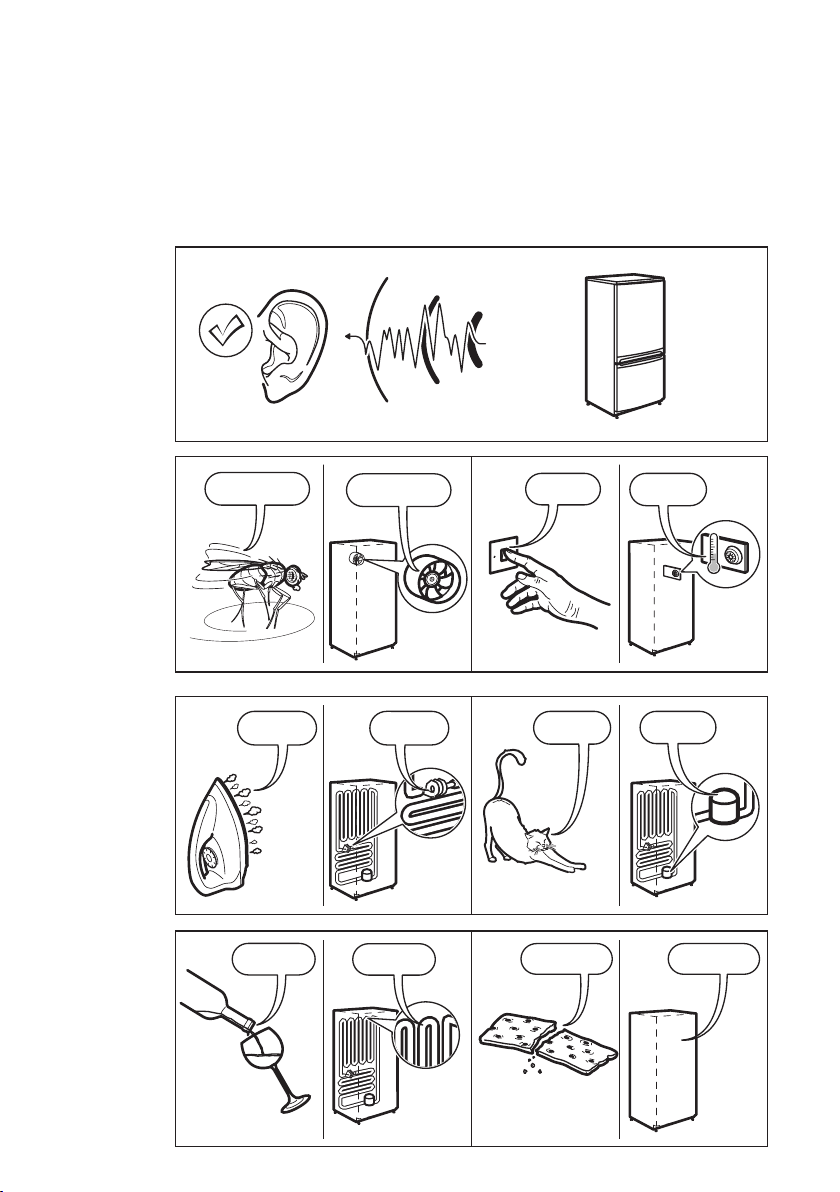
11. NOISES
Appliance noise
Your new refrigerator may make sounds that your old one didn’t make. Because the
sounds are new to you, you might be concerned about them. Most of the new sounds
are normal. Hard surfaces, like the floor, walls and cabinets, can make the sounds seem
louder than they actually are. The following describes the kinds of sounds and what
may be making them.

25ENGLISH


www.electrolux.com/shop
A10883170-A-202022