2 4
3
5
6
7
USER MANUAL
BOOMBOX
SPEAKER
THE
INTRODUCTION
UNIT AT A GLANCE
FEATURE AT A GLANCE
QUICK START GUIDE
CHARGING YOUR DEVICE
FUNCTIONS
MULTI-LINK MODE
PARTY LED LIGHTS
PLAYING MUSIC FROM MICRO SD CARD
AUX-IN MODE
SOUND PROFILES
RESET FUNCTION
SAFETY GUIDELINES
FAQ & ADDITIONAL RESOURCES
SUPPORT
LIMITED WARRANTY
SPECIFICATIONS
. . . . . . . . . . . . . . . . . . . . . . . . . . . . . . . . . . . . . . . . . . . . . . . . 1
. . . . . . . . . . . . . . . . . . . . . . . . . . . . . . . . . . . . . . . . . . . . . . 2
. . . . . . . . . . . . . . . . . . . . . . . . . . . . . . . . . . . . . . . . . . 3
. . . . . . . . . . . . . . . . . . . . . . . . . . . . . . . . . . . . . . . . . . . . 4
. . . . . . . . . . . . . . . . . . . . . . . . . . . . . . . . . . . . . . . 5
. . . . . . . . . . . . . . . . . . . . . . . . . . . . . . . . . . . . . . . . . . . . . . . . . . . . . .6
. . . . . . . . . . . . . . . . . . . . . . . . . . . . . . . . . . . . . . . . . . . . . . 8
. . . . . . . . . . . . . . . . . . . . . . . . . . . . . . . . . . . . . . . . . . . . . 9
. . . . . . . . . . . . . . . . . . . . . . . . 10
. . . . . . . . . . . . . . . . . . . . . . . . . . . . . . . . . . . . . . . . . . . . . . . . 11
. . . . . . . . . . . . . . . . . . . . . . . . . . . . . . . . . . . . . . . . . . . . . . 11
. . . . . . . . . . . . . . . . . . . . . . . . . . . . . . . . . . . . . . . . . . . . . . . 12
. . . . . . . . . . . . . . . . . . . . . . . . . . . . . . . . . . . . . . . . . . . . 12
. . . . . . . . . . . . . . . . . . . . . . . . . . . . . . 13
. . . . . . . . . . . . . . . . . . . . . . . . . . . . . . . . . . . . . . . . . . . . . . . . . . . . . . . 13
. . . . . . . . . . . . . . . . . . . . . . . . . . . . . . . . . . . . . . . . . . . 13
. . . . . . . . . . . . . . . . . . . . . . . . . . . . . . . . . . . . . . . . . . . . . . . 13
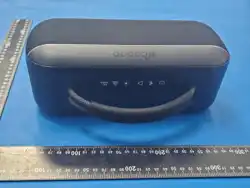
Welcome to your new Raycon Boombox Speaker!
We are Raycon. We create carefully crafted wireless audio products for
go-getters who need tech that keeps up with them. We teamed up with
expert engineers, leading taste-makers, and platinum artists to design
products you’ll love to use.
We believe in the the early risers and the one-more-milers of the world.
Premium audio, inspired by you.
Before using your product, we strongly encourage you to fully read
through this user guide. You can also visit our support center at
www.rayconglobal.com/support. This web page has more specific
guidelines and helpful videos for you to navigate your product. For best
performance, charge fully before first use.
Pairing ID: The Boombox Speaker
INTERNATIONAL MANUAL
For international versions of the manual, please visit
rayconglobal.com/support.
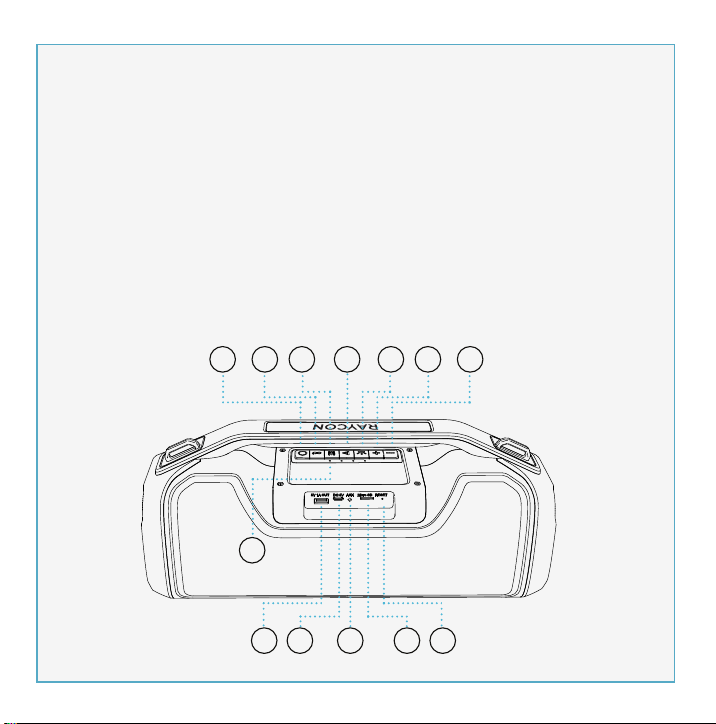
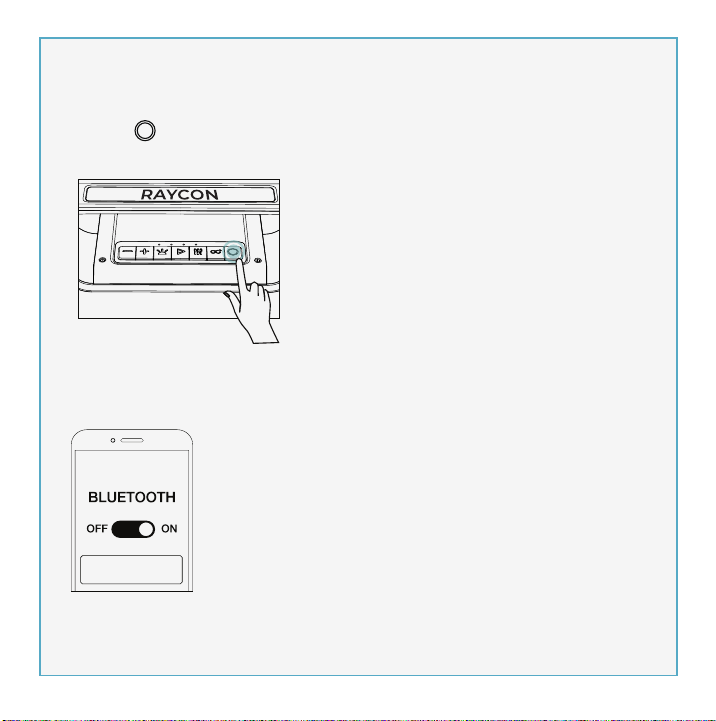
1. Power On/Off
2. Multi-link
3. EQ
4. Play/Pause
5. Battery Indicator
6. Light Control
7. Next/Volume Up
8. Previous/Volume Down
9. 5V/1A Power Output
10. Charging Port
11. AUX IN Port
12. Micro SD Slot
13. Reset Slot
3. Enjoy your Raycon Boombox Speaker!
2. From the source device, go to Bluetooth settings and ensure Bluetooth is
on. Search for “The Boombox Speaker” and select it to pair.
The Boombox Speaker
1. Hold “ ” for about 3 seconds to power speaker on. The speaker will
enter pairing mode automatically.
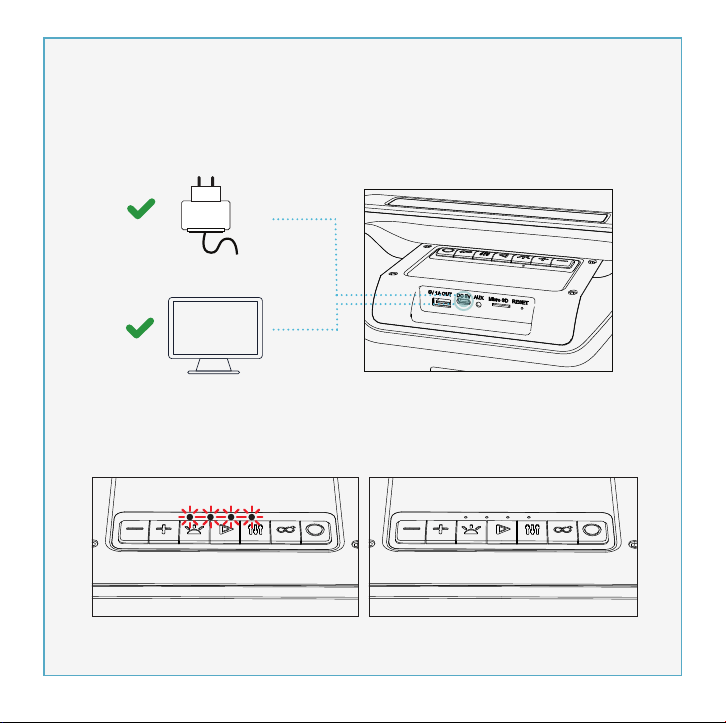
PC
Charger
5v
1-3A
1. Use a standard 5V/1-3A charger or a PC to charge this device.
2. While charging, the 4 LEDs will stay on. After fully charging, all 4 LED
lights will turn off. Charge time should be 4-8 hours.
CONTROL PANAL TOP VIEW
PHONE CALL CONTROL
VOICE ASSISTANT CONTROL
Reject Call
Switch call audio
between Phone and
Boombox Speaker
(During a call)
Answer/End Call
Activate Voice
Assistant
Charging Fully Charged
Press
Hold for 1.5 sec
Hold for 1.5 sec
Hold for 1.5 sec
Volume Down- Press
Previous - Hold for 1.5 sec
Volume Up- Press
Next - Hold for 1.5 sec
MEDIA PLAYER CONTROL
Play/Pause
- Press
13
Model: RBS951
RDID: D951-21E-Q321
Bluetooth Version: V5.0
Speaker Size: 3.5 inch x2
Power Output: 20W x 2, 4Ω
Dimension: 390 x 137 x 175mm
Pairing Name: The Boombox Speaker
Battery Capacity: 7.4V, 3600mAh
Play Time: up to 7 hours
Support Profile: HSP/HFP/A2DP/AVRCP
Frequency Response: 80Hz-12kHz
Bluetooth Range: Up to 10 Meters
If your device is not functioning correctly, please visit www.rayconglob-
al.com/support for customer support, and we will be more than happy to
help you.
Visit: www.rayconglobal.com/support.
Visit: www.rayconglobal.com/warranty.
8
12
1. Don’t use/store this speaker in extreme temperatures.
2. Please store in cool and dry area, and keep away from anything that
generates heat, such as radiators, stoves, etc.
3. Listen to music at a proper volume to avoid damaging your hearing
and speaker.
4. When cleaning this speaker, use a soft dry cloth. For more severe
stains, dampen the cloth with water only. Anything else increases the
chance of dissolving the paint or damaging the plastic.
If the speaker does not turn off or
respond, the speaker can be reset
by inserting a small round pin into
the Reset Slot to press the button
inside. Please be gentle when
inserting pin.
10
2. Insert a Micro SD card into Micro SD port.
The speaker will play the stored music
automatically.
1. Hold “ ” for about 3 seconds to
turn speaker on.
You can also play music using a Micro SD card. Note that if your Raycon
Power Speaker is in Bluetooth Mode, inserting a Micro SD card will
automatically switch the speaker to Micro SD mode. To return to
Bluetooth Mode, remove the Micro SD Card.
Micro SD
9 10 11 12 13
1 2 3 4
5
6
7
8
11
To enjoy music from your MP3/MP4 player or other compatible device,
use the supplied audio cable to connect from Line Out port on the device
to the Aux In port on your Raycon Boombox Speaker.
The speaker will automatically switch to AUX Mode when a compatible
device is connected using the audio cable. To return to Bluetooth Mode,
disconnect AUX cable from speaker.
Your sound, your way. Our sound profiles are designed by artists and
producers at the top of the industry. Press “ ” to toggle between sound
profiles.
PURE SOUND
Our most refined
sound, perfect to hear
every single note.
BALANCED SOUND
A leveled sound that is
great for all around
performance and clarity.
BASS SOUND
Our bass boosted
sound, great for songs
with strong beats and
a go-to for bass lovers.
FCC WARNING
This device complies with part 15 of the FCC Rules. Operation is subject
to the following two conditions:
(1) this device may not cause harmful interference, and
(2) this device must accept any interference received, including
interference that may cause undesired operation. Any changes or
modifications not expressly approved by the party responsible for
compliance could void the user's authority to operate the equipment.
NOTE: This equipment has been tested and found to comply with the
limits for a Class B digital device, pursuant to Part 15 of the FCC Rules.
These limits are designed to provide reasonable protection against
harmful interference in a residential installation. This equipment
generates, uses, and can radiate radio frequency energy and, if not
installed and used in accordance with the instructions, may cause
harmful interference to radio communications. However, there is no
guarantee that interference will not occur in a particular installation.
If this equipment does cause harmful interference to radio or television
reception,which can be determined by turning the equipment off and
on, the user is encouraged to try to correct the interference by one or
more of the following measures:
- Reorient or relocate the receiving antenna.
- Increase the separation between the equipment and receiver.
- Connect the equipment into an outlet on a circuit different from that
to which the receiver is connected.
- Consult the dealer or an experienced radio/TV technician for help. The
device has been evaluated to meet general RF exposure statement.
The device can be used in portable exposure condition without
restriction.
aux appareils radio exempts de licence. L'exploitationestautorisée aux
deux conditions suivantes:
(1) l'appareil ne doit pas produire de brouillage, et
(2) l'utilisateur de l'appareildoit accepter tout brouillageradioélectriquesu-
bi, mêmesi le brouillageest susceptible d'encompromettre le fonctionne-
ment.
IC Caution:
- English:
This device complies with Industry Canada licence-exempt RSS
standard(s).
Operation is subject to the following two conditions:
(1) This device may not cause interference, and
(2) This device must accept any interference, including interference that
may cause undesired operation of the device.
- French:
Le présentappareilestconforme aux CNR d'Industrie Canada applicables
9
Table of Contents INTRODUCTION UNIT AT A GLANCE feature AT A GLANCE Quick Start Guide Charging your device functions
Functions
FAQ & Additional RESOURCES
LIMITED WARRANTY
SPECIFICATIONS
SUPPORT
Multi-link MODE
SAFETY GUIDELINES
reset function
PLAYING MUSIC FROM MICRO SD CARD AUX-IN MODE
SOUND PROFILES
PARTY LED LIGHTS
power bank for your phone
1
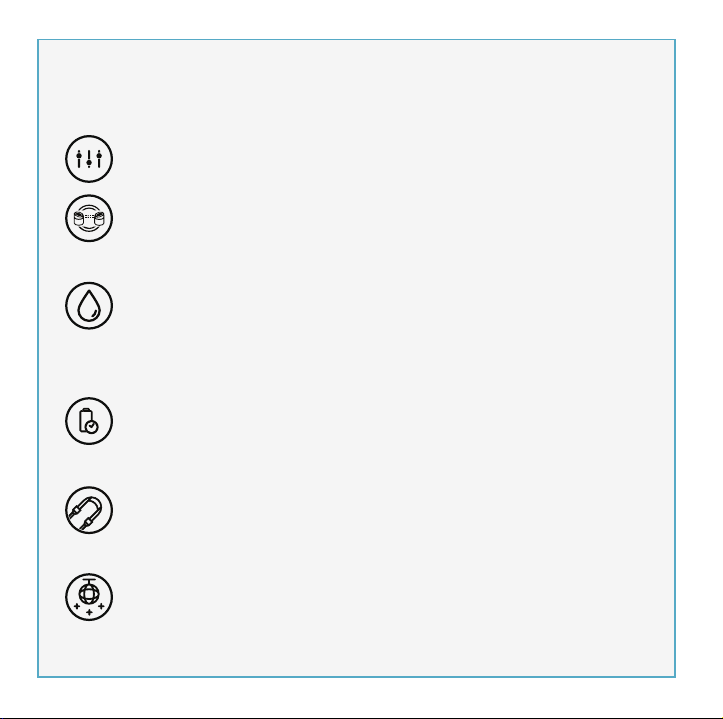
THREE SOUND PROFILES
Bring the noise your way with three distinct sound profiles.
MULTI-LINK MODE
Link the Boombox with multiple speakers via Bluetooth to have a
multi-speaker or multi-room wall of sound.
IPX5 WATER RESISTANCE
Inside or outside, your party is protected from whatever nature
throws at it because the Boombox is dressed in IPX5 water
resistance.
7 HRS OF WIRELESS PLAY TIME
A long lasting battery makes sure the Boombox brings it until
closing time.
ON THE GO STRAP
Take your party on the road with the added portability of an on the
go strap.
PARTY LED LIGHTS
You are the DJ and the Boombox is the club. Bring a light show
wherever you go.
2AZOV-RBS951
27185-RBS951
The Boombox Speaker

2 4
3
5
6
7
USER MANUAL
BOOMBOX
SPEAKER
THE
INTRODUCTION
UNIT AT A GLANCE
FEATURE AT A GLANCE
QUICK START GUIDE
CHARGING YOUR DEVICE
FUNCTIONS
MULTI-LINK MODE
PARTY LED LIGHTS
PLAYING MUSIC FROM MICRO SD CARD
AUX-IN MODE
SOUND PROFILES
RESET FUNCTION
SAFETY GUIDELINES
FAQ & ADDITIONAL RESOURCES
SUPPORT
LIMITED WARRANTY
SPECIFICATIONS
. . . . . . . . . . . . . . . . . . . . . . . . . . . . . . . . . . . . . . . . . . . . . . . . 1
. . . . . . . . . . . . . . . . . . . . . . . . . . . . . . . . . . . . . . . . . . . . . . 2
. . . . . . . . . . . . . . . . . . . . . . . . . . . . . . . . . . . . . . . . . . 3
. . . . . . . . . . . . . . . . . . . . . . . . . . . . . . . . . . . . . . . . . . . . 4
. . . . . . . . . . . . . . . . . . . . . . . . . . . . . . . . . . . . . . . 5
. . . . . . . . . . . . . . . . . . . . . . . . . . . . . . . . . . . . . . . . . . . . . . . . . . . . . .6
. . . . . . . . . . . . . . . . . . . . . . . . . . . . . . . . . . . . . . . . . . . . . . 8
. . . . . . . . . . . . . . . . . . . . . . . . . . . . . . . . . . . . . . . . . . . . . 9
. . . . . . . . . . . . . . . . . . . . . . . . 10
. . . . . . . . . . . . . . . . . . . . . . . . . . . . . . . . . . . . . . . . . . . . . . . . 11
. . . . . . . . . . . . . . . . . . . . . . . . . . . . . . . . . . . . . . . . . . . . . . 11
. . . . . . . . . . . . . . . . . . . . . . . . . . . . . . . . . . . . . . . . . . . . . . . 12
. . . . . . . . . . . . . . . . . . . . . . . . . . . . . . . . . . . . . . . . . . . . 12
. . . . . . . . . . . . . . . . . . . . . . . . . . . . . . 13
. . . . . . . . . . . . . . . . . . . . . . . . . . . . . . . . . . . . . . . . . . . . . . . . . . . . . . . 13
. . . . . . . . . . . . . . . . . . . . . . . . . . . . . . . . . . . . . . . . . . . 13
. . . . . . . . . . . . . . . . . . . . . . . . . . . . . . . . . . . . . . . . . . . . . . . 13
Welcome to your new Raycon Boombox Speaker!
We are Raycon. We create carefully crafted wireless audio products for
go-getters who need tech that keeps up with them. We teamed up with
expert engineers, leading taste-makers, and platinum artists to design
products you’ll love to use.
We believe in the the early risers and the one-more-milers of the world.
Premium audio, inspired by you.
Before using your product, we strongly encourage you to fully read
through this user guide. You can also visit our support center at
www.rayconglobal.com/support. This web page has more specific
guidelines and helpful videos for you to navigate your product. For best
performance, charge fully before first use.
Pairing ID: The Boombox Speaker
INTERNATIONAL MANUAL
For international versions of the manual, please visit
rayconglobal.com/support.
1. Power On/Off
2. Multi-link
3. EQ
4. Play/Pause
5. Battery Indicator
6. Light Control
7. Next/Volume Up
8. Previous/Volume Down
9. 5V/1A Power Output
10. Charging Port
11. AUX IN Port
12. Micro SD Slot
13. Reset Slot
3. Enjoy your Raycon Boombox Speaker!
2. From the source device, go to Bluetooth settings and ensure Bluetooth is
on. Search for “The Boombox Speaker” and select it to pair.
The Boombox Speaker
1. Hold “ ” for about 3 seconds to power speaker on. The speaker will
enter pairing mode automatically.
PC
Charger
5v
1-3A
1. Use a standard 5V/1-3A charger or a PC to charge this device.
2. While charging, the 4 LEDs will stay on. After fully charging, all 4 LED
lights will turn off. Charge time should be 4-8 hours.
CONTROL PANAL TOP VIEW
PHONE CALL CONTROL
VOICE ASSISTANT CONTROL
Reject Call
Switch call audio
between Phone and
Boombox Speaker
(During a call)
Answer/End Call
Activate Voice
Assistant
Charging Fully Charged
Press
Hold for 1.5 sec
Hold for 1.5 sec
Hold for 1.5 sec
Volume Down- Press
Previous - Hold for 1.5 sec
Volume Up- Press
Next - Hold for 1.5 sec
MEDIA PLAYER CONTROL
Play/Pause
- Press
13
Model: RBS951
RDID: D951-21E-Q321
Bluetooth Version: V5.0
Speaker Size: 3.5 inch x2
Power Output: 20W x 2, 4Ω
Dimension: 390 x 137 x 175mm
Pairing Name: The Boombox Speaker
Battery Capacity: 7.4V, 3600mAh
Play Time: up to 7 hours
Support Profile: HSP/HFP/A2DP/AVRCP
Frequency Response: 80Hz-12kHz
Bluetooth Range: Up to 10 Meters
If your device is not functioning correctly, please visit www.rayconglob-
al.com/support for customer support, and we will be more than happy to
help you.
Visit: www.rayconglobal.com/support.
Visit: www.rayconglobal.com/warranty.
8
12
1. Don’t use/store this speaker in extreme temperatures.
2. Please store in cool and dry area, and keep away from anything that
generates heat, such as radiators, stoves, etc.
3. Listen to music at a proper volume to avoid damaging your hearing
and speaker.
4. When cleaning this speaker, use a soft dry cloth. For more severe
stains, dampen the cloth with water only. Anything else increases the
chance of dissolving the paint or damaging the plastic.
If the speaker does not turn off or
respond, the speaker can be reset
by inserting a small round pin into
the Reset Slot to press the button
inside. Please be gentle when
inserting pin.
10
2. Insert a Micro SD card into Micro SD port.
The speaker will play the stored music
automatically.
1. Hold “ ” for about 3 seconds to
turn speaker on.
You can also play music using a Micro SD card. Note that if your Raycon
Power Speaker is in Bluetooth Mode, inserting a Micro SD card will
automatically switch the speaker to Micro SD mode. To return to
Bluetooth Mode, remove the Micro SD Card.
Micro SD
9 10 11 12 13
1 2 3 4
5
6
7
8
11
To enjoy music from your MP3/MP4 player or other compatible device,
use the supplied audio cable to connect from Line Out port on the device
to the Aux In port on your Raycon Boombox Speaker.
The speaker will automatically switch to AUX Mode when a compatible
device is connected using the audio cable. To return to Bluetooth Mode,
disconnect AUX cable from speaker.
Your sound, your way. Our sound profiles are designed by artists and
producers at the top of the industry. Press “ ” to toggle between sound
profiles.
PURE SOUND
Our most refined
sound, perfect to hear
every single note.
BALANCED SOUND
A leveled sound that is
great for all around
performance and clarity.
BASS SOUND
Our bass boosted
sound, great for songs
with strong beats and
a go-to for bass lovers.
FCC WARNING
This device complies with part 15 of the FCC Rules. Operation is subject
to the following two conditions:
(1) this device may not cause harmful interference, and
(2) this device must accept any interference received, including
interference that may cause undesired operation. Any changes or
modifications not expressly approved by the party responsible for
compliance could void the user's authority to operate the equipment.
NOTE: This equipment has been tested and found to comply with the
limits for a Class B digital device, pursuant to Part 15 of the FCC Rules.
These limits are designed to provide reasonable protection against
harmful interference in a residential installation. This equipment
generates, uses, and can radiate radio frequency energy and, if not
installed and used in accordance with the instructions, may cause
harmful interference to radio communications. However, there is no
guarantee that interference will not occur in a particular installation.
If this equipment does cause harmful interference to radio or television
reception,which can be determined by turning the equipment off and
on, the user is encouraged to try to correct the interference by one or
more of the following measures:
- Reorient or relocate the receiving antenna.
- Increase the separation between the equipment and receiver.
- Connect the equipment into an outlet on a circuit different from that
to which the receiver is connected.
- Consult the dealer or an experienced radio/TV technician for help. The
device has been evaluated to meet general RF exposure statement.
The device can be used in portable exposure condition without
restriction.
aux appareils radio exempts de licence. L'exploitationestautorisée aux
deux conditions suivantes:
(1) l'appareil ne doit pas produire de brouillage, et
(2) l'utilisateur de l'appareildoit accepter tout brouillageradioélectriquesu-
bi, mêmesi le brouillageest susceptible d'encompromettre le fonctionne-
ment.
IC Caution:
- English:
This device complies with Industry Canada licence-exempt RSS
standard(s).
Operation is subject to the following two conditions:
(1) This device may not cause interference, and
(2) This device must accept any interference, including interference that
may cause undesired operation of the device.
- French:
Le présentappareilestconforme aux CNR d'Industrie Canada applicables
9
Table of Contents INTRODUCTION UNIT AT A GLANCE feature AT A GLANCE Quick Start Guide Charging your device functions
Functions
FAQ & Additional RESOURCES
LIMITED WARRANTY
SPECIFICATIONS
SUPPORT
Multi-link MODE
SAFETY GUIDELINES
reset function
PLAYING MUSIC FROM MICRO SD CARD AUX-IN MODE
SOUND PROFILES
PARTY LED LIGHTS
power bank for your phone
1
THREE SOUND PROFILES
Bring the noise your way with three distinct sound profiles.
MULTI-LINK MODE
Link the Boombox with multiple speakers via Bluetooth to have a
multi-speaker or multi-room wall of sound.
IPX5 WATER RESISTANCE
Inside or outside, your party is protected from whatever nature
throws at it because the Boombox is dressed in IPX5 water
resistance.
7 HRS OF WIRELESS PLAY TIME
A long lasting battery makes sure the Boombox brings it until
closing time.
ON THE GO STRAP
Take your party on the road with the added portability of an on the
go strap.
PARTY LED LIGHTS
You are the DJ and the Boombox is the club. Bring a light show
wherever you go.
2AZOV-RBS951
27185-RBS951
The Boombox Speaker

2 4
3
5
6
7
USER MANUAL
BOOMBOX
SPEAKER
THE
INTRODUCTION
UNIT AT A GLANCE
FEATURE AT A GLANCE
QUICK START GUIDE
CHARGING YOUR DEVICE
FUNCTIONS
MULTI-LINK MODE
PARTY LED LIGHTS
PLAYING MUSIC FROM MICRO SD CARD
AUX-IN MODE
SOUND PROFILES
RESET FUNCTION
SAFETY GUIDELINES
FAQ & ADDITIONAL RESOURCES
SUPPORT
LIMITED WARRANTY
SPECIFICATIONS
. . . . . . . . . . . . . . . . . . . . . . . . . . . . . . . . . . . . . . . . . . . . . . . . 1
. . . . . . . . . . . . . . . . . . . . . . . . . . . . . . . . . . . . . . . . . . . . . . 2
. . . . . . . . . . . . . . . . . . . . . . . . . . . . . . . . . . . . . . . . . . 3
. . . . . . . . . . . . . . . . . . . . . . . . . . . . . . . . . . . . . . . . . . . . 4
. . . . . . . . . . . . . . . . . . . . . . . . . . . . . . . . . . . . . . . 5
. . . . . . . . . . . . . . . . . . . . . . . . . . . . . . . . . . . . . . . . . . . . . . . . . . . . . .6
. . . . . . . . . . . . . . . . . . . . . . . . . . . . . . . . . . . . . . . . . . . . . . 8
. . . . . . . . . . . . . . . . . . . . . . . . . . . . . . . . . . . . . . . . . . . . . 9
. . . . . . . . . . . . . . . . . . . . . . . . 10
. . . . . . . . . . . . . . . . . . . . . . . . . . . . . . . . . . . . . . . . . . . . . . . . 11
. . . . . . . . . . . . . . . . . . . . . . . . . . . . . . . . . . . . . . . . . . . . . . 11
. . . . . . . . . . . . . . . . . . . . . . . . . . . . . . . . . . . . . . . . . . . . . . . 12
. . . . . . . . . . . . . . . . . . . . . . . . . . . . . . . . . . . . . . . . . . . . 12
. . . . . . . . . . . . . . . . . . . . . . . . . . . . . . 13
. . . . . . . . . . . . . . . . . . . . . . . . . . . . . . . . . . . . . . . . . . . . . . . . . . . . . . . 13
. . . . . . . . . . . . . . . . . . . . . . . . . . . . . . . . . . . . . . . . . . . 13
. . . . . . . . . . . . . . . . . . . . . . . . . . . . . . . . . . . . . . . . . . . . . . . 13
Welcome to your new Raycon Boombox Speaker!
We are Raycon. We create carefully crafted wireless audio products for
go-getters who need tech that keeps up with them. We teamed up with
expert engineers, leading taste-makers, and platinum artists to design
products you’ll love to use.
We believe in the the early risers and the one-more-milers of the world.
Premium audio, inspired by you.
Before using your product, we strongly encourage you to fully read
through this user guide. You can also visit our support center at
www.rayconglobal.com/support. This web page has more specific
guidelines and helpful videos for you to navigate your product. For best
performance, charge fully before first use.
Pairing ID: The Boombox Speaker
INTERNATIONAL MANUAL
For international versions of the manual, please visit
rayconglobal.com/support.
1. Power On/Off
2. Multi-link
3. EQ
4. Play/Pause
5. Battery Indicator
6. Light Control
7. Next/Volume Up
8. Previous/Volume Down
9. 5V/1A Power Output
10. Charging Port
11. AUX IN Port
12. Micro SD Slot
13. Reset Slot
3. Enjoy your Raycon Boombox Speaker!
2. From the source device, go to Bluetooth settings and ensure Bluetooth is
on. Search for “The Boombox Speaker” and select it to pair.
The Boombox Speaker
1. Hold “ ” for about 3 seconds to power speaker on. The speaker will
enter pairing mode automatically.
PC
Charger
5v
1-3A
1. Use a standard 5V/1-3A charger or a PC to charge this device.
2. While charging, the 4 LEDs will stay on. After fully charging, all 4 LED
lights will turn off. Charge time should be 4-8 hours.
CONTROL PANAL TOP VIEW
PHONE CALL CONTROL
VOICE ASSISTANT CONTROL
Reject Call
Switch call audio
between Phone and
Boombox Speaker
(During a call)
Answer/End Call
Activate Voice
Assistant
Charging Fully Charged
Press
Hold for 1.5 sec
Hold for 1.5 sec
Hold for 1.5 sec
Volume Down- Press
Previous - Hold for 1.5 sec
Volume Up- Press
Next - Hold for 1.5 sec
MEDIA PLAYER CONTROL
Play/Pause
- Press
13
Model: RBS951
RDID: D951-21E-Q321
Bluetooth Version: V5.0
Speaker Size: 3.5 inch x2
Power Output: 20W x 2, 4Ω
Dimension: 390 x 137 x 175mm
Pairing Name: The Boombox Speaker
Battery Capacity: 7.4V, 3600mAh
Play Time: up to 7 hours
Support Profile: HSP/HFP/A2DP/AVRCP
Frequency Response: 80Hz-12kHz
Bluetooth Range: Up to 10 Meters
If your device is not functioning correctly, please visit www.rayconglob-
al.com/support for customer support, and we will be more than happy to
help you.
Visit: www.rayconglobal.com/support.
Visit: www.rayconglobal.com/warranty.
8
12
1. Don’t use/store this speaker in extreme temperatures.
2. Please store in cool and dry area, and keep away from anything that
generates heat, such as radiators, stoves, etc.
3. Listen to music at a proper volume to avoid damaging your hearing
and speaker.
4. When cleaning this speaker, use a soft dry cloth. For more severe
stains, dampen the cloth with water only. Anything else increases the
chance of dissolving the paint or damaging the plastic.
If the speaker does not turn off or
respond, the speaker can be reset
by inserting a small round pin into
the Reset Slot to press the button
inside. Please be gentle when
inserting pin.
10
2. Insert a Micro SD card into Micro SD port.
The speaker will play the stored music
automatically.
1. Hold “ ” for about 3 seconds to
turn speaker on.
You can also play music using a Micro SD card. Note that if your Raycon
Power Speaker is in Bluetooth Mode, inserting a Micro SD card will
automatically switch the speaker to Micro SD mode. To return to
Bluetooth Mode, remove the Micro SD Card.
Micro SD
9 10 11 12 13
1 2 3 4
5
6
7
8
11
To enjoy music from your MP3/MP4 player or other compatible device,
use the supplied audio cable to connect from Line Out port on the device
to the Aux In port on your Raycon Boombox Speaker.
The speaker will automatically switch to AUX Mode when a compatible
device is connected using the audio cable. To return to Bluetooth Mode,
disconnect AUX cable from speaker.
Your sound, your way. Our sound profiles are designed by artists and
producers at the top of the industry. Press “ ” to toggle between sound
profiles.
PURE SOUND
Our most refined
sound, perfect to hear
every single note.
BALANCED SOUND
A leveled sound that is
great for all around
performance and clarity.
BASS SOUND
Our bass boosted
sound, great for songs
with strong beats and
a go-to for bass lovers.
FCC WARNING
This device complies with part 15 of the FCC Rules. Operation is subject
to the following two conditions:
(1) this device may not cause harmful interference, and
(2) this device must accept any interference received, including
interference that may cause undesired operation. Any changes or
modifications not expressly approved by the party responsible for
compliance could void the user's authority to operate the equipment.
NOTE: This equipment has been tested and found to comply with the
limits for a Class B digital device, pursuant to Part 15 of the FCC Rules.
These limits are designed to provide reasonable protection against
harmful interference in a residential installation. This equipment
generates, uses, and can radiate radio frequency energy and, if not
installed and used in accordance with the instructions, may cause
harmful interference to radio communications. However, there is no
guarantee that interference will not occur in a particular installation.
If this equipment does cause harmful interference to radio or television
reception,which can be determined by turning the equipment off and
on, the user is encouraged to try to correct the interference by one or
more of the following measures:
- Reorient or relocate the receiving antenna.
- Increase the separation between the equipment and receiver.
- Connect the equipment into an outlet on a circuit different from that
to which the receiver is connected.
- Consult the dealer or an experienced radio/TV technician for help. The
device has been evaluated to meet general RF exposure statement.
The device can be used in portable exposure condition without
restriction.
aux appareils radio exempts de licence. L'exploitationestautorisée aux
deux conditions suivantes:
(1) l'appareil ne doit pas produire de brouillage, et
(2) l'utilisateur de l'appareildoit accepter tout brouillageradioélectriquesu-
bi, mêmesi le brouillageest susceptible d'encompromettre le fonctionne-
ment.
IC Caution:
- English:
This device complies with Industry Canada licence-exempt RSS
standard(s).
Operation is subject to the following two conditions:
(1) This device may not cause interference, and
(2) This device must accept any interference, including interference that
may cause undesired operation of the device.
- French:
Le présentappareilestconforme aux CNR d'Industrie Canada applicables
9
Table of Contents INTRODUCTION UNIT AT A GLANCE feature AT A GLANCE Quick Start Guide Charging your device functions
Functions
FAQ & Additional RESOURCES
LIMITED WARRANTY
SPECIFICATIONS
SUPPORT
Multi-link MODE
SAFETY GUIDELINES
reset function
PLAYING MUSIC FROM MICRO SD CARD AUX-IN MODE
SOUND PROFILES
PARTY LED LIGHTS
power bank for your phone
1
THREE SOUND PROFILES
Bring the noise your way with three distinct sound profiles.
MULTI-LINK MODE
Link the Boombox with multiple speakers via Bluetooth to have a
multi-speaker or multi-room wall of sound.
IPX5 WATER RESISTANCE
Inside or outside, your party is protected from whatever nature
throws at it because the Boombox is dressed in IPX5 water
resistance.
7 HRS OF WIRELESS PLAY TIME
A long lasting battery makes sure the Boombox brings it until
closing time.
ON THE GO STRAP
Take your party on the road with the added portability of an on the
go strap.
PARTY LED LIGHTS
You are the DJ and the Boombox is the club. Bring a light show
wherever you go.
2AZOV-RBS951
27185-RBS951
The Boombox Speaker

2 4
3
5
6
7
USER MANUAL
BOOMBOX
SPEAKER
THE
INTRODUCTION
UNIT AT A GLANCE
FEATURE AT A GLANCE
QUICK START GUIDE
CHARGING YOUR DEVICE
FUNCTIONS
MULTI-LINK MODE
PARTY LED LIGHTS
PLAYING MUSIC FROM MICRO SD CARD
AUX-IN MODE
SOUND PROFILES
RESET FUNCTION
SAFETY GUIDELINES
FAQ & ADDITIONAL RESOURCES
SUPPORT
LIMITED WARRANTY
SPECIFICATIONS
. . . . . . . . . . . . . . . . . . . . . . . . . . . . . . . . . . . . . . . . . . . . . . . . 1
. . . . . . . . . . . . . . . . . . . . . . . . . . . . . . . . . . . . . . . . . . . . . . 2
. . . . . . . . . . . . . . . . . . . . . . . . . . . . . . . . . . . . . . . . . . 3
. . . . . . . . . . . . . . . . . . . . . . . . . . . . . . . . . . . . . . . . . . . . 4
. . . . . . . . . . . . . . . . . . . . . . . . . . . . . . . . . . . . . . . 5
. . . . . . . . . . . . . . . . . . . . . . . . . . . . . . . . . . . . . . . . . . . . . . . . . . . . . .6
. . . . . . . . . . . . . . . . . . . . . . . . . . . . . . . . . . . . . . . . . . . . . . 8
. . . . . . . . . . . . . . . . . . . . . . . . . . . . . . . . . . . . . . . . . . . . . 9
. . . . . . . . . . . . . . . . . . . . . . . . 10
. . . . . . . . . . . . . . . . . . . . . . . . . . . . . . . . . . . . . . . . . . . . . . . . 11
. . . . . . . . . . . . . . . . . . . . . . . . . . . . . . . . . . . . . . . . . . . . . . 11
. . . . . . . . . . . . . . . . . . . . . . . . . . . . . . . . . . . . . . . . . . . . . . . 12
. . . . . . . . . . . . . . . . . . . . . . . . . . . . . . . . . . . . . . . . . . . . 12
. . . . . . . . . . . . . . . . . . . . . . . . . . . . . . 13
. . . . . . . . . . . . . . . . . . . . . . . . . . . . . . . . . . . . . . . . . . . . . . . . . . . . . . . 13
. . . . . . . . . . . . . . . . . . . . . . . . . . . . . . . . . . . . . . . . . . . 13
. . . . . . . . . . . . . . . . . . . . . . . . . . . . . . . . . . . . . . . . . . . . . . . 13
Welcome to your new Raycon Boombox Speaker!
We are Raycon. We create carefully crafted wireless audio products for
go-getters who need tech that keeps up with them. We teamed up with
expert engineers, leading taste-makers, and platinum artists to design
products you’ll love to use.
We believe in the the early risers and the one-more-milers of the world.
Premium audio, inspired by you.
Before using your product, we strongly encourage you to fully read
through this user guide. You can also visit our support center at
www.rayconglobal.com/support. This web page has more specific
guidelines and helpful videos for you to navigate your product. For best
performance, charge fully before first use.
Pairing ID: The Boombox Speaker
INTERNATIONAL MANUAL
For international versions of the manual, please visit
rayconglobal.com/support.
1. Power On/Off
2. Multi-link
3. EQ
4. Play/Pause
5. Battery Indicator
6. Light Control
7. Next/Volume Up
8. Previous/Volume Down
9. 5V/1A Power Output
10. Charging Port
11. AUX IN Port
12. Micro SD Slot
13. Reset Slot
3. Enjoy your Raycon Boombox Speaker!
2. From the source device, go to Bluetooth settings and ensure Bluetooth is
on. Search for “The Boombox Speaker” and select it to pair.
The Boombox Speaker
1. Hold “ ” for about 3 seconds to power speaker on. The speaker will
enter pairing mode automatically.
PC
Charger
5v
1-3A
1. Use a standard 5V/1-3A charger or a PC to charge this device.
2. While charging, the 4 LEDs will stay on. After fully charging, all 4 LED
lights will turn off. Charge time should be 4-8 hours.
CONTROL PANAL TOP VIEW
PHONE CALL CONTROL
VOICE ASSISTANT CONTROL
Reject Call
Switch call audio
between Phone and
Boombox Speaker
(During a call)
Answer/End Call
Activate Voice
Assistant
Charging Fully Charged
Press
Hold for 1.5 sec
Hold for 1.5 sec
Hold for 1.5 sec
Volume Down- Press
Previous - Hold for 1.5 sec
Volume Up- Press
Next - Hold for 1.5 sec
MEDIA PLAYER CONTROL
Play/Pause
- Press
13
Model: RBS951
RDID: D951-21E-Q321
Bluetooth Version: V5.0
Speaker Size: 3.5 inch x2
Power Output: 20W x 2, 4Ω
Dimension: 390 x 137 x 175mm
Pairing Name: The Boombox Speaker
Battery Capacity: 7.4V, 3600mAh
Play Time: up to 7 hours
Support Profile: HSP/HFP/A2DP/AVRCP
Frequency Response: 80Hz-12kHz
Bluetooth Range: Up to 10 Meters
If your device is not functioning correctly, please visit www.rayconglob-
al.com/support for customer support, and we will be more than happy to
help you.
Visit: www.rayconglobal.com/support.
Visit: www.rayconglobal.com/warranty.
8
12
1. Don’t use/store this speaker in extreme temperatures.
2. Please store in cool and dry area, and keep away from anything that
generates heat, such as radiators, stoves, etc.
3. Listen to music at a proper volume to avoid damaging your hearing
and speaker.
4. When cleaning this speaker, use a soft dry cloth. For more severe
stains, dampen the cloth with water only. Anything else increases the
chance of dissolving the paint or damaging the plastic.
If the speaker does not turn off or
respond, the speaker can be reset
by inserting a small round pin into
the Reset Slot to press the button
inside. Please be gentle when
inserting pin.
10
2. Insert a Micro SD card into Micro SD port.
The speaker will play the stored music
automatically.
1. Hold “ ” for about 3 seconds to
turn speaker on.
You can also play music using a Micro SD card. Note that if your Raycon
Power Speaker is in Bluetooth Mode, inserting a Micro SD card will
automatically switch the speaker to Micro SD mode. To return to
Bluetooth Mode, remove the Micro SD Card.
Micro SD
9 10 11 12 13
1 2 3 4
5
6
7
8
11
To enjoy music from your MP3/MP4 player or other compatible device,
use the supplied audio cable to connect from Line Out port on the device
to the Aux In port on your Raycon Boombox Speaker.
The speaker will automatically switch to AUX Mode when a compatible
device is connected using the audio cable. To return to Bluetooth Mode,
disconnect AUX cable from speaker.
Your sound, your way. Our sound profiles are designed by artists and
producers at the top of the industry. Press “ ” to toggle between sound
profiles.
PURE SOUND
Our most refined
sound, perfect to hear
every single note.
BALANCED SOUND
A leveled sound that is
great for all around
performance and clarity.
BASS SOUND
Our bass boosted
sound, great for songs
with strong beats and
a go-to for bass lovers.
FCC WARNING
This device complies with part 15 of the FCC Rules. Operation is subject
to the following two conditions:
(1) this device may not cause harmful interference, and
(2) this device must accept any interference received, including
interference that may cause undesired operation. Any changes or
modifications not expressly approved by the party responsible for
compliance could void the user's authority to operate the equipment.
NOTE: This equipment has been tested and found to comply with the
limits for a Class B digital device, pursuant to Part 15 of the FCC Rules.
These limits are designed to provide reasonable protection against
harmful interference in a residential installation. This equipment
generates, uses, and can radiate radio frequency energy and, if not
installed and used in accordance with the instructions, may cause
harmful interference to radio communications. However, there is no
guarantee that interference will not occur in a particular installation.
If this equipment does cause harmful interference to radio or television
reception,which can be determined by turning the equipment off and
on, the user is encouraged to try to correct the interference by one or
more of the following measures:
- Reorient or relocate the receiving antenna.
- Increase the separation between the equipment and receiver.
- Connect the equipment into an outlet on a circuit different from that
to which the receiver is connected.
- Consult the dealer or an experienced radio/TV technician for help. The
device has been evaluated to meet general RF exposure statement.
The device can be used in portable exposure condition without
restriction.
aux appareils radio exempts de licence. L'exploitationestautorisée aux
deux conditions suivantes:
(1) l'appareil ne doit pas produire de brouillage, et
(2) l'utilisateur de l'appareildoit accepter tout brouillageradioélectriquesu-
bi, mêmesi le brouillageest susceptible d'encompromettre le fonctionne-
ment.
IC Caution:
- English:
This device complies with Industry Canada licence-exempt RSS
standard(s).
Operation is subject to the following two conditions:
(1) This device may not cause interference, and
(2) This device must accept any interference, including interference that
may cause undesired operation of the device.
- French:
Le présentappareilestconforme aux CNR d'Industrie Canada applicables
9
Table of Contents INTRODUCTION UNIT AT A GLANCE feature AT A GLANCE Quick Start Guide Charging your device functions
Functions
FAQ & Additional RESOURCES
LIMITED WARRANTY
SPECIFICATIONS
SUPPORT
Multi-link MODE
SAFETY GUIDELINES
reset function
PLAYING MUSIC FROM MICRO SD CARD AUX-IN MODE
SOUND PROFILES
PARTY LED LIGHTS
power bank for your phone
1
THREE SOUND PROFILES
Bring the noise your way with three distinct sound profiles.
MULTI-LINK MODE
Link the Boombox with multiple speakers via Bluetooth to have a
multi-speaker or multi-room wall of sound.
IPX5 WATER RESISTANCE
Inside or outside, your party is protected from whatever nature
throws at it because the Boombox is dressed in IPX5 water
resistance.
7 HRS OF WIRELESS PLAY TIME
A long lasting battery makes sure the Boombox brings it until
closing time.
ON THE GO STRAP
Take your party on the road with the added portability of an on the
go strap.
PARTY LED LIGHTS
You are the DJ and the Boombox is the club. Bring a light show
wherever you go.
2AZOV-RBS951
27185-RBS951
The Boombox Speaker
2 4
3
5
6
7
USER MANUAL
BOOMBOX
SPEAKER
THE
INTRODUCTION
UNIT AT A GLANCE
FEATURE AT A GLANCE
QUICK START GUIDE
CHARGING YOUR DEVICE
FUNCTIONS
MULTI-LINK MODE
PARTY LED LIGHTS
PLAYING MUSIC FROM MICRO SD CARD
AUX-IN MODE
SOUND PROFILES
RESET FUNCTION
SAFETY GUIDELINES
FAQ & ADDITIONAL RESOURCES
SUPPORT
LIMITED WARRANTY
SPECIFICATIONS
. . . . . . . . . . . . . . . . . . . . . . . . . . . . . . . . . . . . . . . . . . . . . . . . 1
. . . . . . . . . . . . . . . . . . . . . . . . . . . . . . . . . . . . . . . . . . . . . . 2
. . . . . . . . . . . . . . . . . . . . . . . . . . . . . . . . . . . . . . . . . . 3
. . . . . . . . . . . . . . . . . . . . . . . . . . . . . . . . . . . . . . . . . . . . 4
. . . . . . . . . . . . . . . . . . . . . . . . . . . . . . . . . . . . . . . 5
. . . . . . . . . . . . . . . . . . . . . . . . . . . . . . . . . . . . . . . . . . . . . . . . . . . . . .6
. . . . . . . . . . . . . . . . . . . . . . . . . . . . . . . . . . . . . . . . . . . . . . 8
. . . . . . . . . . . . . . . . . . . . . . . . . . . . . . . . . . . . . . . . . . . . . 9
. . . . . . . . . . . . . . . . . . . . . . . . 10
. . . . . . . . . . . . . . . . . . . . . . . . . . . . . . . . . . . . . . . . . . . . . . . . 11
. . . . . . . . . . . . . . . . . . . . . . . . . . . . . . . . . . . . . . . . . . . . . . 11
. . . . . . . . . . . . . . . . . . . . . . . . . . . . . . . . . . . . . . . . . . . . . . . 12
. . . . . . . . . . . . . . . . . . . . . . . . . . . . . . . . . . . . . . . . . . . . 12
. . . . . . . . . . . . . . . . . . . . . . . . . . . . . . 13
. . . . . . . . . . . . . . . . . . . . . . . . . . . . . . . . . . . . . . . . . . . . . . . . . . . . . . . 13
. . . . . . . . . . . . . . . . . . . . . . . . . . . . . . . . . . . . . . . . . . . 13
. . . . . . . . . . . . . . . . . . . . . . . . . . . . . . . . . . . . . . . . . . . . . . . 13
Welcome to your new Raycon Boombox Speaker!
We are Raycon. We create carefully crafted wireless audio products for
go-getters who need tech that keeps up with them. We teamed up with
expert engineers, leading taste-makers, and platinum artists to design
products you’ll love to use.
We believe in the the early risers and the one-more-milers of the world.
Premium audio, inspired by you.
Before using your product, we strongly encourage you to fully read
through this user guide. You can also visit our support center at
www.rayconglobal.com/support. This web page has more specific
guidelines and helpful videos for you to navigate your product. For best
performance, charge fully before first use.
Pairing ID: The Boombox Speaker
INTERNATIONAL MANUAL
For international versions of the manual, please visit
rayconglobal.com/support.
1. Power On/Off
2. Multi-link
3. EQ
4. Play/Pause
5. Battery Indicator
6. Light Control
7. Next/Volume Up
8. Previous/Volume Down
9. 5V/1A Power Output
10. Charging Port
11. AUX IN Port
12. Micro SD Slot
13. Reset Slot
3. Enjoy your Raycon Boombox Speaker!
2. From the source device, go to Bluetooth settings and ensure Bluetooth is
on. Search for “The Boombox Speaker” and select it to pair.
The Boombox Speaker
1. Hold “ ” for about 3 seconds to power speaker on. The speaker will
enter pairing mode automatically.
PC
Charger
5v
1-3A
1. Use a standard 5V/1-3A charger or a PC to charge this device.
2. While charging, the 4 LEDs will stay on. After fully charging, all 4 LED
lights will turn off. Charge time should be 4-8 hours.
CONTROL PANAL TOP VIEW
PHONE CALL CONTROL
VOICE ASSISTANT CONTROL
Reject Call
Switch call audio
between Phone and
Boombox Speaker
(During a call)
Answer/End Call
Activate Voice
Assistant
Charging Fully Charged
Press
Hold for 1.5 sec
Hold for 1.5 sec
Hold for 1.5 sec
Volume Down- Press
Previous - Hold for 1.5 sec
Volume Up- Press
Next - Hold for 1.5 sec
MEDIA PLAYER CONTROL
Play/Pause
- Press
13
Model: RBS951
RDID: D951-21E-Q321
Bluetooth Version: V5.0
Speaker Size: 3.5 inch x2
Power Output: 20W x 2, 4Ω
Dimension: 390 x 137 x 175mm
Pairing Name: The Boombox Speaker
Battery Capacity: 7.4V, 3600mAh
Play Time: up to 7 hours
Support Profile: HSP/HFP/A2DP/AVRCP
Frequency Response: 80Hz-12kHz
Bluetooth Range: Up to 10 Meters
If your device is not functioning correctly, please visit www.rayconglob-
al.com/support for customer support, and we will be more than happy to
help you.
Visit: www.rayconglobal.com/support.
Visit: www.rayconglobal.com/warranty.
8
12
1. Don’t use/store this speaker in extreme temperatures.
2. Please store in cool and dry area, and keep away from anything that
generates heat, such as radiators, stoves, etc.
3. Listen to music at a proper volume to avoid damaging your hearing
and speaker.
4. When cleaning this speaker, use a soft dry cloth. For more severe
stains, dampen the cloth with water only. Anything else increases the
chance of dissolving the paint or damaging the plastic.
If the speaker does not turn off or
respond, the speaker can be reset
by inserting a small round pin into
the Reset Slot to press the button
inside. Please be gentle when
inserting pin.
10
2. Insert a Micro SD card into Micro SD port.
The speaker will play the stored music
automatically.
1. Hold “ ” for about 3 seconds to
turn speaker on.
You can also play music using a Micro SD card. Note that if your Raycon
Power Speaker is in Bluetooth Mode, inserting a Micro SD card will
automatically switch the speaker to Micro SD mode. To return to
Bluetooth Mode, remove the Micro SD Card.
Micro SD
9 10 11 12 13
1 2 3 4
5
6
7
8
11
To enjoy music from your MP3/MP4 player or other compatible device,
use the supplied audio cable to connect from Line Out port on the device
to the Aux In port on your Raycon Boombox Speaker.
The speaker will automatically switch to AUX Mode when a compatible
device is connected using the audio cable. To return to Bluetooth Mode,
disconnect AUX cable from speaker.
Your sound, your way. Our sound profiles are designed by artists and
producers at the top of the industry. Press “ ” to toggle between sound
profiles.
PURE SOUND
Our most refined
sound, perfect to hear
every single note.
BALANCED SOUND
A leveled sound that is
great for all around
performance and clarity.
BASS SOUND
Our bass boosted
sound, great for songs
with strong beats and
a go-to for bass lovers.
FCC WARNING
This device complies with part 15 of the FCC Rules. Operation is subject
to the following two conditions:
(1) this device may not cause harmful interference, and
(2) this device must accept any interference received, including
interference that may cause undesired operation. Any changes or
modifications not expressly approved by the party responsible for
compliance could void the user's authority to operate the equipment.
NOTE: This equipment has been tested and found to comply with the
limits for a Class B digital device, pursuant to Part 15 of the FCC Rules.
These limits are designed to provide reasonable protection against
harmful interference in a residential installation. This equipment
generates, uses, and can radiate radio frequency energy and, if not
installed and used in accordance with the instructions, may cause
harmful interference to radio communications. However, there is no
guarantee that interference will not occur in a particular installation.
If this equipment does cause harmful interference to radio or television
reception,which can be determined by turning the equipment off and
on, the user is encouraged to try to correct the interference by one or
more of the following measures:
- Reorient or relocate the receiving antenna.
- Increase the separation between the equipment and receiver.
- Connect the equipment into an outlet on a circuit different from that
to which the receiver is connected.
- Consult the dealer or an experienced radio/TV technician for help. The
device has been evaluated to meet general RF exposure statement.
The device can be used in portable exposure condition without
restriction.
aux appareils radio exempts de licence. L'exploitationestautorisée aux
deux conditions suivantes:
(1) l'appareil ne doit pas produire de brouillage, et
(2) l'utilisateur de l'appareildoit accepter tout brouillageradioélectriquesu-
bi, mêmesi le brouillageest susceptible d'encompromettre le fonctionne-
ment.
IC Caution:
- English:
This device complies with Industry Canada licence-exempt RSS
standard(s).
Operation is subject to the following two conditions:
(1) This device may not cause interference, and
(2) This device must accept any interference, including interference that
may cause undesired operation of the device.
- French:
Le présentappareilestconforme aux CNR d'Industrie Canada applicables
9
Table of Contents INTRODUCTION UNIT AT A GLANCE feature AT A GLANCE Quick Start Guide Charging your device functions
Functions
FAQ & Additional RESOURCES
LIMITED WARRANTY
SPECIFICATIONS
SUPPORT
Multi-link MODE
SAFETY GUIDELINES
reset function
PLAYING MUSIC FROM MICRO SD CARD AUX-IN MODE
SOUND PROFILES
PARTY LED LIGHTS
power bank for your phone
1
THREE SOUND PROFILES
Bring the noise your way with three distinct sound profiles.
MULTI-LINK MODE
Link the Boombox with multiple speakers via Bluetooth to have a
multi-speaker or multi-room wall of sound.
IPX5 WATER RESISTANCE
Inside or outside, your party is protected from whatever nature
throws at it because the Boombox is dressed in IPX5 water
resistance.
7 HRS OF WIRELESS PLAY TIME
A long lasting battery makes sure the Boombox brings it until
closing time.
ON THE GO STRAP
Take your party on the road with the added portability of an on the
go strap.
PARTY LED LIGHTS
You are the DJ and the Boombox is the club. Bring a light show
wherever you go.
2AZOV-RBS951
27185-RBS951
The Boombox Speaker
2 4
3
5
6
7
USER MANUAL
BOOMBOX
SPEAKER
THE
INTRODUCTION
UNIT AT A GLANCE
FEATURE AT A GLANCE
QUICK START GUIDE
CHARGING YOUR DEVICE
FUNCTIONS
MULTI-LINK MODE
PARTY LED LIGHTS
PLAYING MUSIC FROM MICRO SD CARD
AUX-IN MODE
SOUND PROFILES
RESET FUNCTION
SAFETY GUIDELINES
FAQ & ADDITIONAL RESOURCES
SUPPORT
LIMITED WARRANTY
SPECIFICATIONS
. . . . . . . . . . . . . . . . . . . . . . . . . . . . . . . . . . . . . . . . . . . . . . . . 1
. . . . . . . . . . . . . . . . . . . . . . . . . . . . . . . . . . . . . . . . . . . . . . 2
. . . . . . . . . . . . . . . . . . . . . . . . . . . . . . . . . . . . . . . . . . 3
. . . . . . . . . . . . . . . . . . . . . . . . . . . . . . . . . . . . . . . . . . . . 4
. . . . . . . . . . . . . . . . . . . . . . . . . . . . . . . . . . . . . . . 5
. . . . . . . . . . . . . . . . . . . . . . . . . . . . . . . . . . . . . . . . . . . . . . . . . . . . . .6
. . . . . . . . . . . . . . . . . . . . . . . . . . . . . . . . . . . . . . . . . . . . . . 8
. . . . . . . . . . . . . . . . . . . . . . . . . . . . . . . . . . . . . . . . . . . . . 9
. . . . . . . . . . . . . . . . . . . . . . . . 10
. . . . . . . . . . . . . . . . . . . . . . . . . . . . . . . . . . . . . . . . . . . . . . . . 11
. . . . . . . . . . . . . . . . . . . . . . . . . . . . . . . . . . . . . . . . . . . . . . 11
. . . . . . . . . . . . . . . . . . . . . . . . . . . . . . . . . . . . . . . . . . . . . . . 12
. . . . . . . . . . . . . . . . . . . . . . . . . . . . . . . . . . . . . . . . . . . . 12
. . . . . . . . . . . . . . . . . . . . . . . . . . . . . . 13
. . . . . . . . . . . . . . . . . . . . . . . . . . . . . . . . . . . . . . . . . . . . . . . . . . . . . . . 13
. . . . . . . . . . . . . . . . . . . . . . . . . . . . . . . . . . . . . . . . . . . 13
. . . . . . . . . . . . . . . . . . . . . . . . . . . . . . . . . . . . . . . . . . . . . . . 13
Welcome to your new Raycon Boombox Speaker!
We are Raycon. We create carefully crafted wireless audio products for
go-getters who need tech that keeps up with them. We teamed up with
expert engineers, leading taste-makers, and platinum artists to design
products you’ll love to use.
We believe in the the early risers and the one-more-milers of the world.
Premium audio, inspired by you.
Before using your product, we strongly encourage you to fully read
through this user guide. You can also visit our support center at
www.rayconglobal.com/support. This web page has more specific
guidelines and helpful videos for you to navigate your product. For best
performance, charge fully before first use.
Pairing ID: The Boombox Speaker
INTERNATIONAL MANUAL
For international versions of the manual, please visit
rayconglobal.com/support.
1. Power On/Off
2. Multi-link
3. EQ
4. Play/Pause
5. Battery Indicator
6. Light Control
7. Next/Volume Up
8. Previous/Volume Down
9. 5V/1A Power Output
10. Charging Port
11. AUX IN Port
12. Micro SD Slot
13. Reset Slot
3. Enjoy your Raycon Boombox Speaker!
2. From the source device, go to Bluetooth settings and ensure Bluetooth is
on. Search for “The Boombox Speaker” and select it to pair.
The Boombox Speaker
1. Hold “ ” for about 3 seconds to power speaker on. The speaker will
enter pairing mode automatically.
PC
Charger
5v
1-3A
1. Use a standard 5V/1-3A charger or a PC to charge this device.
2. While charging, the 4 LEDs will stay on. After fully charging, all 4 LED
lights will turn off. Charge time should be 4-8 hours.
CONTROL PANAL TOP VIEW
PHONE CALL CONTROL
VOICE ASSISTANT CONTROL
Reject Call
Switch call audio
between Phone and
Boombox Speaker
(During a call)
Answer/End Call
Activate Voice
Assistant
Charging Fully Charged
Press
Hold for 1.5 sec
Hold for 1.5 sec
Hold for 1.5 sec
Volume Down- Press
Previous - Hold for 1.5 sec
Volume Up- Press
Next - Hold for 1.5 sec
MEDIA PLAYER CONTROL
Play/Pause
- Press
13
Model: RBS951
RDID: D951-21E-Q321
Bluetooth Version: V5.0
Speaker Size: 3.5 inch x2
Power Output: 20W x 2, 4Ω
Dimension: 390 x 137 x 175mm
Pairing Name: The Boombox Speaker
Battery Capacity: 7.4V, 3600mAh
Play Time: up to 7 hours
Support Profile: HSP/HFP/A2DP/AVRCP
Frequency Response: 80Hz-12kHz
Bluetooth Range: Up to 10 Meters
If your device is not functioning correctly, please visit www.rayconglob-
al.com/support for customer support, and we will be more than happy to
help you.
Visit: www.rayconglobal.com/support.
Visit: www.rayconglobal.com/warranty.
8
12
1. Don’t use/store this speaker in extreme temperatures.
2. Please store in cool and dry area, and keep away from anything that
generates heat, such as radiators, stoves, etc.
3. Listen to music at a proper volume to avoid damaging your hearing
and speaker.
4. When cleaning this speaker, use a soft dry cloth. For more severe
stains, dampen the cloth with water only. Anything else increases the
chance of dissolving the paint or damaging the plastic.
If the speaker does not turn off or
respond, the speaker can be reset
by inserting a small round pin into
the Reset Slot to press the button
inside. Please be gentle when
inserting pin.
10
2. Insert a Micro SD card into Micro SD port.
The speaker will play the stored music
automatically.
1. Hold “ ” for about 3 seconds to
turn speaker on.
You can also play music using a Micro SD card. Note that if your Raycon
Power Speaker is in Bluetooth Mode, inserting a Micro SD card will
automatically switch the speaker to Micro SD mode. To return to
Bluetooth Mode, remove the Micro SD Card.
Micro SD
9 10 11 12 13
1 2 3 4
5
6
7
8
11
To enjoy music from your MP3/MP4 player or other compatible device,
use the supplied audio cable to connect from Line Out port on the device
to the Aux In port on your Raycon Boombox Speaker.
The speaker will automatically switch to AUX Mode when a compatible
device is connected using the audio cable. To return to Bluetooth Mode,
disconnect AUX cable from speaker.
Your sound, your way. Our sound profiles are designed by artists and
producers at the top of the industry. Press “ ” to toggle between sound
profiles.
PURE SOUND
Our most refined
sound, perfect to hear
every single note.
BALANCED SOUND
A leveled sound that is
great for all around
performance and clarity.
BASS SOUND
Our bass boosted
sound, great for songs
with strong beats and
a go-to for bass lovers.
FCC WARNING
This device complies with part 15 of the FCC Rules. Operation is subject
to the following two conditions:
(1) this device may not cause harmful interference, and
(2) this device must accept any interference received, including
interference that may cause undesired operation. Any changes or
modifications not expressly approved by the party responsible for
compliance could void the user's authority to operate the equipment.
NOTE: This equipment has been tested and found to comply with the
limits for a Class B digital device, pursuant to Part 15 of the FCC Rules.
These limits are designed to provide reasonable protection against
harmful interference in a residential installation. This equipment
generates, uses, and can radiate radio frequency energy and, if not
installed and used in accordance with the instructions, may cause
harmful interference to radio communications. However, there is no
guarantee that interference will not occur in a particular installation.
If this equipment does cause harmful interference to radio or television
reception,which can be determined by turning the equipment off and
on, the user is encouraged to try to correct the interference by one or
more of the following measures:
- Reorient or relocate the receiving antenna.
- Increase the separation between the equipment and receiver.
- Connect the equipment into an outlet on a circuit different from that
to which the receiver is connected.
- Consult the dealer or an experienced radio/TV technician for help. The
device has been evaluated to meet general RF exposure statement.
The device can be used in portable exposure condition without
restriction.
aux appareils radio exempts de licence. L'exploitationestautorisée aux
deux conditions suivantes:
(1) l'appareil ne doit pas produire de brouillage, et
(2) l'utilisateur de l'appareildoit accepter tout brouillageradioélectriquesu-
bi, mêmesi le brouillageest susceptible d'encompromettre le fonctionne-
ment.
IC Caution:
- English:
This device complies with Industry Canada licence-exempt RSS
standard(s).
Operation is subject to the following two conditions:
(1) This device may not cause interference, and
(2) This device must accept any interference, including interference that
may cause undesired operation of the device.
- French:
Le présentappareilestconforme aux CNR d'Industrie Canada applicables
9
Table of Contents INTRODUCTION UNIT AT A GLANCE feature AT A GLANCE Quick Start Guide Charging your device functions
Functions
FAQ & Additional RESOURCES
LIMITED WARRANTY
SPECIFICATIONS
SUPPORT
Multi-link MODE
SAFETY GUIDELINES
reset function
PLAYING MUSIC FROM MICRO SD CARD AUX-IN MODE
SOUND PROFILES
PARTY LED LIGHTS
power bank for your phone
1
THREE SOUND PROFILES
Bring the noise your way with three distinct sound profiles.
MULTI-LINK MODE
Link the Boombox with multiple speakers via Bluetooth to have a
multi-speaker or multi-room wall of sound.
IPX5 WATER RESISTANCE
Inside or outside, your party is protected from whatever nature
throws at it because the Boombox is dressed in IPX5 water
resistance.
7 HRS OF WIRELESS PLAY TIME
A long lasting battery makes sure the Boombox brings it until
closing time.
ON THE GO STRAP
Take your party on the road with the added portability of an on the
go strap.
PARTY LED LIGHTS
You are the DJ and the Boombox is the club. Bring a light show
wherever you go.
2AZOV-RBS951
27185-RBS951
The Boombox Speaker
2 4
3
5
6
7
USER MANUAL
BOOMBOX
SPEAKER
THE
INTRODUCTION
UNIT AT A GLANCE
FEATURE AT A GLANCE
QUICK START GUIDE
CHARGING YOUR DEVICE
FUNCTIONS
MULTI-LINK MODE
PARTY LED LIGHTS
PLAYING MUSIC FROM MICRO SD CARD
AUX-IN MODE
SOUND PROFILES
RESET FUNCTION
SAFETY GUIDELINES
FAQ & ADDITIONAL RESOURCES
SUPPORT
LIMITED WARRANTY
SPECIFICATIONS
. . . . . . . . . . . . . . . . . . . . . . . . . . . . . . . . . . . . . . . . . . . . . . . . 1
. . . . . . . . . . . . . . . . . . . . . . . . . . . . . . . . . . . . . . . . . . . . . . 2
. . . . . . . . . . . . . . . . . . . . . . . . . . . . . . . . . . . . . . . . . . 3
. . . . . . . . . . . . . . . . . . . . . . . . . . . . . . . . . . . . . . . . . . . . 4
. . . . . . . . . . . . . . . . . . . . . . . . . . . . . . . . . . . . . . . 5
. . . . . . . . . . . . . . . . . . . . . . . . . . . . . . . . . . . . . . . . . . . . . . . . . . . . . .6
. . . . . . . . . . . . . . . . . . . . . . . . . . . . . . . . . . . . . . . . . . . . . . 8
. . . . . . . . . . . . . . . . . . . . . . . . . . . . . . . . . . . . . . . . . . . . . 9
. . . . . . . . . . . . . . . . . . . . . . . . 10
. . . . . . . . . . . . . . . . . . . . . . . . . . . . . . . . . . . . . . . . . . . . . . . . 11
. . . . . . . . . . . . . . . . . . . . . . . . . . . . . . . . . . . . . . . . . . . . . . 11
. . . . . . . . . . . . . . . . . . . . . . . . . . . . . . . . . . . . . . . . . . . . . . . 12
. . . . . . . . . . . . . . . . . . . . . . . . . . . . . . . . . . . . . . . . . . . . 12
. . . . . . . . . . . . . . . . . . . . . . . . . . . . . . 13
. . . . . . . . . . . . . . . . . . . . . . . . . . . . . . . . . . . . . . . . . . . . . . . . . . . . . . . 13
. . . . . . . . . . . . . . . . . . . . . . . . . . . . . . . . . . . . . . . . . . . 13
. . . . . . . . . . . . . . . . . . . . . . . . . . . . . . . . . . . . . . . . . . . . . . . 13
Welcome to your new Raycon Boombox Speaker!
We are Raycon. We create carefully crafted wireless audio products for
go-getters who need tech that keeps up with them. We teamed up with
expert engineers, leading taste-makers, and platinum artists to design
products you’ll love to use.
We believe in the the early risers and the one-more-milers of the world.
Premium audio, inspired by you.
Before using your product, we strongly encourage you to fully read
through this user guide. You can also visit our support center at
www.rayconglobal.com/support. This web page has more specific
guidelines and helpful videos for you to navigate your product. For best
performance, charge fully before first use.
Pairing ID: The Boombox Speaker
INTERNATIONAL MANUAL
For international versions of the manual, please visit
rayconglobal.com/support.
1. Power On/Off
2. Multi-link
3. EQ
4. Play/Pause
5. Battery Indicator
6. Light Control
7. Next/Volume Up
8. Previous/Volume Down
9. 5V/1A Power Output
10. Charging Port
11. AUX IN Port
12. Micro SD Slot
13. Reset Slot
3. Enjoy your Raycon Boombox Speaker!
2. From the source device, go to Bluetooth settings and ensure Bluetooth is
on. Search for “The Boombox Speaker” and select it to pair.
The Boombox Speaker
1. Hold “ ” for about 3 seconds to power speaker on. The speaker will
enter pairing mode automatically.
PC
Charger
5v
1-3A
1. Use a standard 5V/1-3A charger or a PC to charge this device.
2. While charging, the 4 LEDs will stay on. After fully charging, all 4 LED
lights will turn off. Charge time should be 4-8 hours.
CONTROL PANAL TOP VIEW
PHONE CALL CONTROL
VOICE ASSISTANT CONTROL
Reject Call
Switch call audio
between Phone and
Boombox Speaker
(During a call)
Answer/End Call
Activate Voice
Assistant
Charging Fully Charged
Press
Hold for 1.5 sec
Hold for 1.5 sec
Hold for 1.5 sec
Volume Down- Press
Previous - Hold for 1.5 sec
Volume Up- Press
Next - Hold for 1.5 sec
MEDIA PLAYER CONTROL
Play/Pause
- Press
13
Model: RBS951
RDID: D951-21E-Q321
Bluetooth Version: V5.0
Speaker Size: 3.5 inch x2
Power Output: 20W x 2, 4Ω
Dimension: 390 x 137 x 175mm
Pairing Name: The Boombox Speaker
Battery Capacity: 7.4V, 3600mAh
Play Time: up to 7 hours
Support Profile: HSP/HFP/A2DP/AVRCP
Frequency Response: 80Hz-12kHz
Bluetooth Range: Up to 10 Meters
If your device is not functioning correctly, please visit www.rayconglob-
al.com/support for customer support, and we will be more than happy to
help you.
Visit: www.rayconglobal.com/support.
Visit: www.rayconglobal.com/warranty.
8
12
1. Don’t use/store this speaker in extreme temperatures.
2. Please store in cool and dry area, and keep away from anything that
generates heat, such as radiators, stoves, etc.
3. Listen to music at a proper volume to avoid damaging your hearing
and speaker.
4. When cleaning this speaker, use a soft dry cloth. For more severe
stains, dampen the cloth with water only. Anything else increases the
chance of dissolving the paint or damaging the plastic.
If the speaker does not turn off or
respond, the speaker can be reset
by inserting a small round pin into
the Reset Slot to press the button
inside. Please be gentle when
inserting pin.
10
2. Insert a Micro SD card into Micro SD port.
The speaker will play the stored music
automatically.
1. Hold “ ” for about 3 seconds to
turn speaker on.
You can also play music using a Micro SD card. Note that if your Raycon
Power Speaker is in Bluetooth Mode, inserting a Micro SD card will
automatically switch the speaker to Micro SD mode. To return to
Bluetooth Mode, remove the Micro SD Card.
Micro SD
9 10 11 12 13
1 2 3 4
5
6
7
8
11
To enjoy music from your MP3/MP4 player or other compatible device,
use the supplied audio cable to connect from Line Out port on the device
to the Aux In port on your Raycon Boombox Speaker.
The speaker will automatically switch to AUX Mode when a compatible
device is connected using the audio cable. To return to Bluetooth Mode,
disconnect AUX cable from speaker.
Your sound, your way. Our sound profiles are designed by artists and
producers at the top of the industry. Press “ ” to toggle between sound
profiles.
PURE SOUND
Our most refined
sound, perfect to hear
every single note.
BALANCED SOUND
A leveled sound that is
great for all around
performance and clarity.
BASS SOUND
Our bass boosted
sound, great for songs
with strong beats and
a go-to for bass lovers.
FCC WARNING
This device complies with part 15 of the FCC Rules. Operation is subject
to the following two conditions:
(1) this device may not cause harmful interference, and
(2) this device must accept any interference received, including
interference that may cause undesired operation. Any changes or
modifications not expressly approved by the party responsible for
compliance could void the user's authority to operate the equipment.
NOTE: This equipment has been tested and found to comply with the
limits for a Class B digital device, pursuant to Part 15 of the FCC Rules.
These limits are designed to provide reasonable protection against
harmful interference in a residential installation. This equipment
generates, uses, and can radiate radio frequency energy and, if not
installed and used in accordance with the instructions, may cause
harmful interference to radio communications. However, there is no
guarantee that interference will not occur in a particular installation.
If this equipment does cause harmful interference to radio or television
reception,which can be determined by turning the equipment off and
on, the user is encouraged to try to correct the interference by one or
more of the following measures:
- Reorient or relocate the receiving antenna.
- Increase the separation between the equipment and receiver.
- Connect the equipment into an outlet on a circuit different from that
to which the receiver is connected.
- Consult the dealer or an experienced radio/TV technician for help. The
device has been evaluated to meet general RF exposure statement.
The device can be used in portable exposure condition without
restriction.
aux appareils radio exempts de licence. L'exploitationestautorisée aux
deux conditions suivantes:
(1) l'appareil ne doit pas produire de brouillage, et
(2) l'utilisateur de l'appareildoit accepter tout brouillageradioélectriquesu-
bi, mêmesi le brouillageest susceptible d'encompromettre le fonctionne-
ment.
IC Caution:
- English:
This device complies with Industry Canada licence-exempt RSS
standard(s).
Operation is subject to the following two conditions:
(1) This device may not cause interference, and
(2) This device must accept any interference, including interference that
may cause undesired operation of the device.
- French:
Le présentappareilestconforme aux CNR d'Industrie Canada applicables
9
Table of Contents INTRODUCTION UNIT AT A GLANCE feature AT A GLANCE Quick Start Guide Charging your device functions
Functions
FAQ & Additional RESOURCES
LIMITED WARRANTY
SPECIFICATIONS
SUPPORT
Multi-link MODE
SAFETY GUIDELINES
reset function
PLAYING MUSIC FROM MICRO SD CARD AUX-IN MODE
SOUND PROFILES
PARTY LED LIGHTS
power bank for your phone
1
THREE SOUND PROFILES
Bring the noise your way with three distinct sound profiles.
MULTI-LINK MODE
Link the Boombox with multiple speakers via Bluetooth to have a
multi-speaker or multi-room wall of sound.
IPX5 WATER RESISTANCE
Inside or outside, your party is protected from whatever nature
throws at it because the Boombox is dressed in IPX5 water
resistance.
7 HRS OF WIRELESS PLAY TIME
A long lasting battery makes sure the Boombox brings it until
closing time.
ON THE GO STRAP
Take your party on the road with the added portability of an on the
go strap.
PARTY LED LIGHTS
You are the DJ and the Boombox is the club. Bring a light show
wherever you go.
2AZOV-RBS951
27185-RBS951
The Boombox Speaker
2 4
3
5
6
7
USER MANUAL
BOOMBOX
SPEAKER
THE
INTRODUCTION
UNIT AT A GLANCE
FEATURE AT A GLANCE
QUICK START GUIDE
CHARGING YOUR DEVICE
FUNCTIONS
MULTI-LINK MODE
PARTY LED LIGHTS
PLAYING MUSIC FROM MICRO SD CARD
AUX-IN MODE
SOUND PROFILES
RESET FUNCTION
SAFETY GUIDELINES
FAQ & ADDITIONAL RESOURCES
SUPPORT
LIMITED WARRANTY
SPECIFICATIONS
. . . . . . . . . . . . . . . . . . . . . . . . . . . . . . . . . . . . . . . . . . . . . . . . 1
. . . . . . . . . . . . . . . . . . . . . . . . . . . . . . . . . . . . . . . . . . . . . . 2
. . . . . . . . . . . . . . . . . . . . . . . . . . . . . . . . . . . . . . . . . . 3
. . . . . . . . . . . . . . . . . . . . . . . . . . . . . . . . . . . . . . . . . . . . 4
. . . . . . . . . . . . . . . . . . . . . . . . . . . . . . . . . . . . . . . 5
. . . . . . . . . . . . . . . . . . . . . . . . . . . . . . . . . . . . . . . . . . . . . . . . . . . . . .6
. . . . . . . . . . . . . . . . . . . . . . . . . . . . . . . . . . . . . . . . . . . . . . 8
. . . . . . . . . . . . . . . . . . . . . . . . . . . . . . . . . . . . . . . . . . . . . 9
. . . . . . . . . . . . . . . . . . . . . . . . 10
. . . . . . . . . . . . . . . . . . . . . . . . . . . . . . . . . . . . . . . . . . . . . . . . 11
. . . . . . . . . . . . . . . . . . . . . . . . . . . . . . . . . . . . . . . . . . . . . . 11
. . . . . . . . . . . . . . . . . . . . . . . . . . . . . . . . . . . . . . . . . . . . . . . 12
. . . . . . . . . . . . . . . . . . . . . . . . . . . . . . . . . . . . . . . . . . . . 12
. . . . . . . . . . . . . . . . . . . . . . . . . . . . . . 13
. . . . . . . . . . . . . . . . . . . . . . . . . . . . . . . . . . . . . . . . . . . . . . . . . . . . . . . 13
. . . . . . . . . . . . . . . . . . . . . . . . . . . . . . . . . . . . . . . . . . . 13
. . . . . . . . . . . . . . . . . . . . . . . . . . . . . . . . . . . . . . . . . . . . . . . 13
Welcome to your new Raycon Boombox Speaker!
We are Raycon. We create carefully crafted wireless audio products for
go-getters who need tech that keeps up with them. We teamed up with
expert engineers, leading taste-makers, and platinum artists to design
products you’ll love to use.
We believe in the the early risers and the one-more-milers of the world.
Premium audio, inspired by you.
Before using your product, we strongly encourage you to fully read
through this user guide. You can also visit our support center at
www.rayconglobal.com/support. This web page has more specific
guidelines and helpful videos for you to navigate your product. For best
performance, charge fully before first use.
Pairing ID: The Boombox Speaker
INTERNATIONAL MANUAL
For international versions of the manual, please visit
rayconglobal.com/support.
1. Power On/Off
2. Multi-link
3. EQ
4. Play/Pause
5. Battery Indicator
6. Light Control
7. Next/Volume Up
8. Previous/Volume Down
9. 5V/1A Power Output
10. Charging Port
11. AUX IN Port
12. Micro SD Slot
13. Reset Slot
3. Enjoy your Raycon Boombox Speaker!
2. From the source device, go to Bluetooth settings and ensure Bluetooth is
on. Search for “The Boombox Speaker” and select it to pair.
The Boombox Speaker
1. Hold “ ” for about 3 seconds to power speaker on. The speaker will
enter pairing mode automatically.
PC
Charger
5v
1-3A
1. Use a standard 5V/1-3A charger or a PC to charge this device.
2. While charging, the 4 LEDs will stay on. After fully charging, all 4 LED
lights will turn off. Charge time should be 4-8 hours.
CONTROL PANAL TOP VIEW
PHONE CALL CONTROL
VOICE ASSISTANT CONTROL
Reject Call
Switch call audio
between Phone and
Boombox Speaker
(During a call)
Answer/End Call
Activate Voice
Assistant
Charging Fully Charged
Press
Hold for 1.5 sec
Hold for 1.5 sec
Hold for 1.5 sec
Volume Down- Press
Previous - Hold for 1.5 sec
Volume Up- Press
Next - Hold for 1.5 sec
MEDIA PLAYER CONTROL
Play/Pause
- Press
13
Model: RBS951
RDID: D951-21E-Q321
Bluetooth Version: V5.0
Speaker Size: 3.5 inch x2
Power Output: 20W x 2, 4Ω
Dimension: 390 x 137 x 175mm
Pairing Name: The Boombox Speaker
Battery Capacity: 7.4V, 3600mAh
Play Time: up to 7 hours
Support Profile: HSP/HFP/A2DP/AVRCP
Frequency Response: 80Hz-12kHz
Bluetooth Range: Up to 10 Meters
If your device is not functioning correctly, please visit www.rayconglob-
al.com/support for customer support, and we will be more than happy to
help you.
Visit: www.rayconglobal.com/support.
Visit: www.rayconglobal.com/warranty.
8
12
1. Don’t use/store this speaker in extreme temperatures.
2. Please store in cool and dry area, and keep away from anything that
generates heat, such as radiators, stoves, etc.
3. Listen to music at a proper volume to avoid damaging your hearing
and speaker.
4. When cleaning this speaker, use a soft dry cloth. For more severe
stains, dampen the cloth with water only. Anything else increases the
chance of dissolving the paint or damaging the plastic.
If the speaker does not turn off or
respond, the speaker can be reset
by inserting a small round pin into
the Reset Slot to press the button
inside. Please be gentle when
inserting pin.
10
2. Insert a Micro SD card into Micro SD port.
The speaker will play the stored music
automatically.
1. Hold “ ” for about 3 seconds to
turn speaker on.
You can also play music using a Micro SD card. Note that if your Raycon
Power Speaker is in Bluetooth Mode, inserting a Micro SD card will
automatically switch the speaker to Micro SD mode. To return to
Bluetooth Mode, remove the Micro SD Card.
Micro SD
9 10 11 12 13
1 2 3 4
5
6
7
8
11
To enjoy music from your MP3/MP4 player or other compatible device,
use the supplied audio cable to connect from Line Out port on the device
to the Aux In port on your Raycon Boombox Speaker.
The speaker will automatically switch to AUX Mode when a compatible
device is connected using the audio cable. To return to Bluetooth Mode,
disconnect AUX cable from speaker.
Your sound, your way. Our sound profiles are designed by artists and
producers at the top of the industry. Press “ ” to toggle between sound
profiles.
PURE SOUND
Our most refined
sound, perfect to hear
every single note.
BALANCED SOUND
A leveled sound that is
great for all around
performance and clarity.
BASS SOUND
Our bass boosted
sound, great for songs
with strong beats and
a go-to for bass lovers.
FCC WARNING
This device complies with part 15 of the FCC Rules. Operation is subject
to the following two conditions:
(1) this device may not cause harmful interference, and
(2) this device must accept any interference received, including
interference that may cause undesired operation. Any changes or
modifications not expressly approved by the party responsible for
compliance could void the user's authority to operate the equipment.
NOTE: This equipment has been tested and found to comply with the
limits for a Class B digital device, pursuant to Part 15 of the FCC Rules.
These limits are designed to provide reasonable protection against
harmful interference in a residential installation. This equipment
generates, uses, and can radiate radio frequency energy and, if not
installed and used in accordance with the instructions, may cause
harmful interference to radio communications. However, there is no
guarantee that interference will not occur in a particular installation.
If this equipment does cause harmful interference to radio or television
reception,which can be determined by turning the equipment off and
on, the user is encouraged to try to correct the interference by one or
more of the following measures:
- Reorient or relocate the receiving antenna.
- Increase the separation between the equipment and receiver.
- Connect the equipment into an outlet on a circuit different from that
to which the receiver is connected.
- Consult the dealer or an experienced radio/TV technician for help. The
device has been evaluated to meet general RF exposure statement.
The device can be used in portable exposure condition without
restriction.
aux appareils radio exempts de licence. L'exploitationestautorisée aux
deux conditions suivantes:
(1) l'appareil ne doit pas produire de brouillage, et
(2) l'utilisateur de l'appareildoit accepter tout brouillageradioélectriquesu-
bi, mêmesi le brouillageest susceptible d'encompromettre le fonctionne-
ment.
IC Caution:
- English:
This device complies with Industry Canada licence-exempt RSS
standard(s).
Operation is subject to the following two conditions:
(1) This device may not cause interference, and
(2) This device must accept any interference, including interference that
may cause undesired operation of the device.
- French:
Le présentappareilestconforme aux CNR d'Industrie Canada applicables
9
Table of Contents INTRODUCTION UNIT AT A GLANCE feature AT A GLANCE Quick Start Guide Charging your device functions
Functions
FAQ & Additional RESOURCES
LIMITED WARRANTY
SPECIFICATIONS
SUPPORT
Multi-link MODE
SAFETY GUIDELINES
reset function
PLAYING MUSIC FROM MICRO SD CARD AUX-IN MODE
SOUND PROFILES
PARTY LED LIGHTS
power bank for your phone
1
THREE SOUND PROFILES
Bring the noise your way with three distinct sound profiles.
MULTI-LINK MODE
Link the Boombox with multiple speakers via Bluetooth to have a
multi-speaker or multi-room wall of sound.
IPX5 WATER RESISTANCE
Inside or outside, your party is protected from whatever nature
throws at it because the Boombox is dressed in IPX5 water
resistance.
7 HRS OF WIRELESS PLAY TIME
A long lasting battery makes sure the Boombox brings it until
closing time.
ON THE GO STRAP
Take your party on the road with the added portability of an on the
go strap.
PARTY LED LIGHTS
You are the DJ and the Boombox is the club. Bring a light show
wherever you go.
2AZOV-RBS951
27185-RBS951
The Boombox Speaker
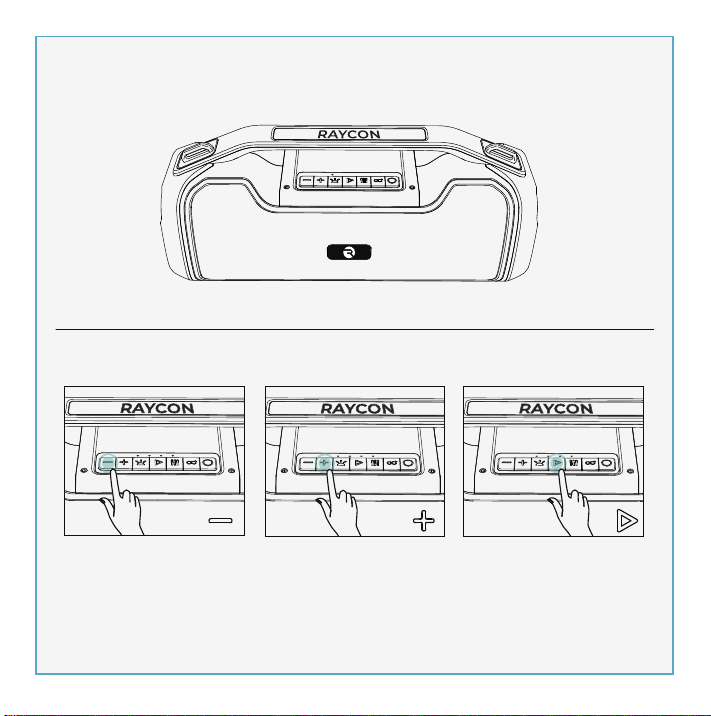
2 4
3
5
6
7
USER MANUAL
BOOMBOX
SPEAKER
THE
INTRODUCTION
UNIT AT A GLANCE
FEATURE AT A GLANCE
QUICK START GUIDE
CHARGING YOUR DEVICE
FUNCTIONS
MULTI-LINK MODE
PARTY LED LIGHTS
PLAYING MUSIC FROM MICRO SD CARD
AUX-IN MODE
SOUND PROFILES
RESET FUNCTION
SAFETY GUIDELINES
FAQ & ADDITIONAL RESOURCES
SUPPORT
LIMITED WARRANTY
SPECIFICATIONS
. . . . . . . . . . . . . . . . . . . . . . . . . . . . . . . . . . . . . . . . . . . . . . . . 1
. . . . . . . . . . . . . . . . . . . . . . . . . . . . . . . . . . . . . . . . . . . . . . 2
. . . . . . . . . . . . . . . . . . . . . . . . . . . . . . . . . . . . . . . . . . 3
. . . . . . . . . . . . . . . . . . . . . . . . . . . . . . . . . . . . . . . . . . . . 4
. . . . . . . . . . . . . . . . . . . . . . . . . . . . . . . . . . . . . . . 5
. . . . . . . . . . . . . . . . . . . . . . . . . . . . . . . . . . . . . . . . . . . . . . . . . . . . . .6
. . . . . . . . . . . . . . . . . . . . . . . . . . . . . . . . . . . . . . . . . . . . . . 8
. . . . . . . . . . . . . . . . . . . . . . . . . . . . . . . . . . . . . . . . . . . . . 9
. . . . . . . . . . . . . . . . . . . . . . . . 10
. . . . . . . . . . . . . . . . . . . . . . . . . . . . . . . . . . . . . . . . . . . . . . . . 11
. . . . . . . . . . . . . . . . . . . . . . . . . . . . . . . . . . . . . . . . . . . . . . 11
. . . . . . . . . . . . . . . . . . . . . . . . . . . . . . . . . . . . . . . . . . . . . . . 12
. . . . . . . . . . . . . . . . . . . . . . . . . . . . . . . . . . . . . . . . . . . . 12
. . . . . . . . . . . . . . . . . . . . . . . . . . . . . . 13
. . . . . . . . . . . . . . . . . . . . . . . . . . . . . . . . . . . . . . . . . . . . . . . . . . . . . . . 13
. . . . . . . . . . . . . . . . . . . . . . . . . . . . . . . . . . . . . . . . . . . 13
. . . . . . . . . . . . . . . . . . . . . . . . . . . . . . . . . . . . . . . . . . . . . . . 13
Welcome to your new Raycon Boombox Speaker!
We are Raycon. We create carefully crafted wireless audio products for
go-getters who need tech that keeps up with them. We teamed up with
expert engineers, leading taste-makers, and platinum artists to design
products you’ll love to use.
We believe in the the early risers and the one-more-milers of the world.
Premium audio, inspired by you.
Before using your product, we strongly encourage you to fully read
through this user guide. You can also visit our support center at
www.rayconglobal.com/support. This web page has more specific
guidelines and helpful videos for you to navigate your product. For best
performance, charge fully before first use.
Pairing ID: The Boombox Speaker
INTERNATIONAL MANUAL
For international versions of the manual, please visit
rayconglobal.com/support.
1. Power On/Off
2. Multi-link
3. EQ
4. Play/Pause
5. Battery Indicator
6. Light Control
7. Next/Volume Up
8. Previous/Volume Down
9. 5V/1A Power Output
10. Charging Port
11. AUX IN Port
12. Micro SD Slot
13. Reset Slot
3. Enjoy your Raycon Boombox Speaker!
2. From the source device, go to Bluetooth settings and ensure Bluetooth is
on. Search for “The Boombox Speaker” and select it to pair.
The Boombox Speaker
1. Hold “ ” for about 3 seconds to power speaker on. The speaker will
enter pairing mode automatically.
PC
Charger
5v
1-3A
1. Use a standard 5V/1-3A charger or a PC to charge this device.
2. While charging, the 4 LEDs will stay on. After fully charging, all 4 LED
lights will turn off. Charge time should be 4-8 hours.
CONTROL PANAL TOP VIEW
PHONE CALL CONTROL
VOICE ASSISTANT CONTROL
Reject Call
Switch call audio
between Phone and
Boombox Speaker
(During a call)
Answer/End Call
Activate Voice
Assistant
Charging Fully Charged
Press
Hold for 1.5 sec
Hold for 1.5 sec
Hold for 1.5 sec
Volume Down- Press
Previous - Hold for 1.5 sec
Volume Up- Press
Next - Hold for 1.5 sec
MEDIA PLAYER CONTROL
Play/Pause
- Press
13
Model: RBS951
RDID: D951-21E-Q321
Bluetooth Version: V5.0
Speaker Size: 3.5 inch x2
Power Output: 20W x 2, 4Ω
Dimension: 390 x 137 x 175mm
Pairing Name: The Boombox Speaker
Battery Capacity: 7.4V, 3600mAh
Play Time: up to 7 hours
Support Profile: HSP/HFP/A2DP/AVRCP
Frequency Response: 80Hz-12kHz
Bluetooth Range: Up to 10 Meters
If your device is not functioning correctly, please visit www.rayconglob-
al.com/support for customer support, and we will be more than happy to
help you.
Visit: www.rayconglobal.com/support.
Visit: www.rayconglobal.com/warranty.
8
12
1. Don’t use/store this speaker in extreme temperatures.
2. Please store in cool and dry area, and keep away from anything that
generates heat, such as radiators, stoves, etc.
3. Listen to music at a proper volume to avoid damaging your hearing
and speaker.
4. When cleaning this speaker, use a soft dry cloth. For more severe
stains, dampen the cloth with water only. Anything else increases the
chance of dissolving the paint or damaging the plastic.
If the speaker does not turn off or
respond, the speaker can be reset
by inserting a small round pin into
the Reset Slot to press the button
inside. Please be gentle when
inserting pin.
10
2. Insert a Micro SD card into Micro SD port.
The speaker will play the stored music
automatically.
1. Hold “ ” for about 3 seconds to
turn speaker on.
You can also play music using a Micro SD card. Note that if your Raycon
Power Speaker is in Bluetooth Mode, inserting a Micro SD card will
automatically switch the speaker to Micro SD mode. To return to
Bluetooth Mode, remove the Micro SD Card.
Micro SD
9 10 11 12 13
1 2 3 4
5
6
7
8
11
To enjoy music from your MP3/MP4 player or other compatible device,
use the supplied audio cable to connect from Line Out port on the device
to the Aux In port on your Raycon Boombox Speaker.
The speaker will automatically switch to AUX Mode when a compatible
device is connected using the audio cable. To return to Bluetooth Mode,
disconnect AUX cable from speaker.
Your sound, your way. Our sound profiles are designed by artists and
producers at the top of the industry. Press “ ” to toggle between sound
profiles.
PURE SOUND
Our most refined
sound, perfect to hear
every single note.
BALANCED SOUND
A leveled sound that is
great for all around
performance and clarity.
BASS SOUND
Our bass boosted
sound, great for songs
with strong beats and
a go-to for bass lovers.
FCC WARNING
This device complies with part 15 of the FCC Rules. Operation is subject
to the following two conditions:
(1) this device may not cause harmful interference, and
(2) this device must accept any interference received, including
interference that may cause undesired operation. Any changes or
modifications not expressly approved by the party responsible for
compliance could void the user's authority to operate the equipment.
NOTE: This equipment has been tested and found to comply with the
limits for a Class B digital device, pursuant to Part 15 of the FCC Rules.
These limits are designed to provide reasonable protection against
harmful interference in a residential installation. This equipment
generates, uses, and can radiate radio frequency energy and, if not
installed and used in accordance with the instructions, may cause
harmful interference to radio communications. However, there is no
guarantee that interference will not occur in a particular installation.
If this equipment does cause harmful interference to radio or television
reception,which can be determined by turning the equipment off and
on, the user is encouraged to try to correct the interference by one or
more of the following measures:
- Reorient or relocate the receiving antenna.
- Increase the separation between the equipment and receiver.
- Connect the equipment into an outlet on a circuit different from that
to which the receiver is connected.
- Consult the dealer or an experienced radio/TV technician for help. The
device has been evaluated to meet general RF exposure statement.
The device can be used in portable exposure condition without
restriction.
aux appareils radio exempts de licence. L'exploitationestautorisée aux
deux conditions suivantes:
(1) l'appareil ne doit pas produire de brouillage, et
(2) l'utilisateur de l'appareildoit accepter tout brouillageradioélectriquesu-
bi, mêmesi le brouillageest susceptible d'encompromettre le fonctionne-
ment.
IC Caution:
- English:
This device complies with Industry Canada licence-exempt RSS
standard(s).
Operation is subject to the following two conditions:
(1) This device may not cause interference, and
(2) This device must accept any interference, including interference that
may cause undesired operation of the device.
- French:
Le présentappareilestconforme aux CNR d'Industrie Canada applicables
9
Table of Contents INTRODUCTION UNIT AT A GLANCE feature AT A GLANCE Quick Start Guide Charging your device functions
Functions
FAQ & Additional RESOURCES
LIMITED WARRANTY
SPECIFICATIONS
SUPPORT
Multi-link MODE
SAFETY GUIDELINES
reset function
PLAYING MUSIC FROM MICRO SD CARD AUX-IN MODE
SOUND PROFILES
PARTY LED LIGHTS
power bank for your phone
1
THREE SOUND PROFILES
Bring the noise your way with three distinct sound profiles.
MULTI-LINK MODE
Link the Boombox with multiple speakers via Bluetooth to have a
multi-speaker or multi-room wall of sound.
IPX5 WATER RESISTANCE
Inside or outside, your party is protected from whatever nature
throws at it because the Boombox is dressed in IPX5 water
resistance.
7 HRS OF WIRELESS PLAY TIME
A long lasting battery makes sure the Boombox brings it until
closing time.
ON THE GO STRAP
Take your party on the road with the added portability of an on the
go strap.
PARTY LED LIGHTS
You are the DJ and the Boombox is the club. Bring a light show
wherever you go.
2AZOV-RBS951
27185-RBS951
The Boombox Speaker
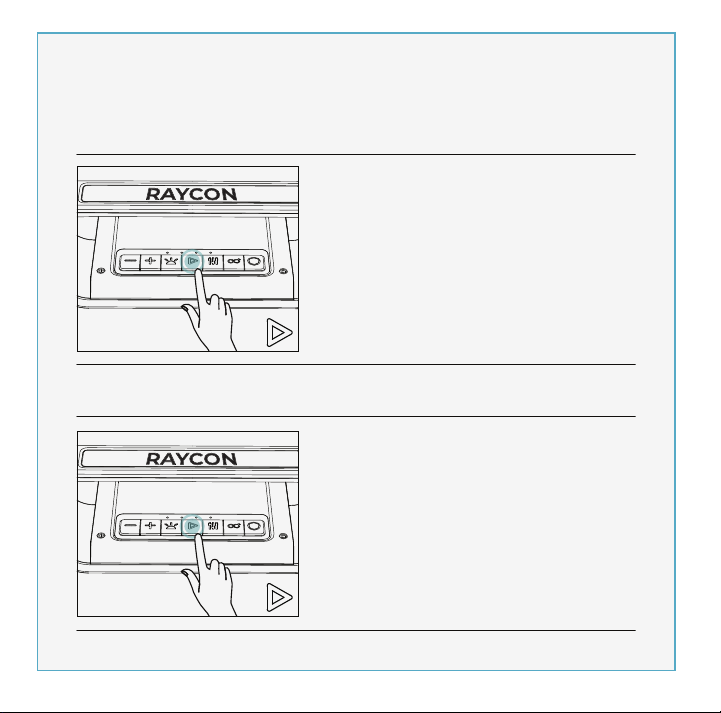
2 4
3
5
6
7
USER MANUAL
BOOMBOX
SPEAKER
THE
INTRODUCTION
UNIT AT A GLANCE
FEATURE AT A GLANCE
QUICK START GUIDE
CHARGING YOUR DEVICE
FUNCTIONS
MULTI-LINK MODE
PARTY LED LIGHTS
PLAYING MUSIC FROM MICRO SD CARD
AUX-IN MODE
SOUND PROFILES
RESET FUNCTION
SAFETY GUIDELINES
FAQ & ADDITIONAL RESOURCES
SUPPORT
LIMITED WARRANTY
SPECIFICATIONS
. . . . . . . . . . . . . . . . . . . . . . . . . . . . . . . . . . . . . . . . . . . . . . . . 1
. . . . . . . . . . . . . . . . . . . . . . . . . . . . . . . . . . . . . . . . . . . . . . 2
. . . . . . . . . . . . . . . . . . . . . . . . . . . . . . . . . . . . . . . . . . 3
. . . . . . . . . . . . . . . . . . . . . . . . . . . . . . . . . . . . . . . . . . . . 4
. . . . . . . . . . . . . . . . . . . . . . . . . . . . . . . . . . . . . . . 5
. . . . . . . . . . . . . . . . . . . . . . . . . . . . . . . . . . . . . . . . . . . . . . . . . . . . . .6
. . . . . . . . . . . . . . . . . . . . . . . . . . . . . . . . . . . . . . . . . . . . . . 8
. . . . . . . . . . . . . . . . . . . . . . . . . . . . . . . . . . . . . . . . . . . . . 9
. . . . . . . . . . . . . . . . . . . . . . . . 10
. . . . . . . . . . . . . . . . . . . . . . . . . . . . . . . . . . . . . . . . . . . . . . . . 11
. . . . . . . . . . . . . . . . . . . . . . . . . . . . . . . . . . . . . . . . . . . . . . 11
. . . . . . . . . . . . . . . . . . . . . . . . . . . . . . . . . . . . . . . . . . . . . . . 12
. . . . . . . . . . . . . . . . . . . . . . . . . . . . . . . . . . . . . . . . . . . . 12
. . . . . . . . . . . . . . . . . . . . . . . . . . . . . . 13
. . . . . . . . . . . . . . . . . . . . . . . . . . . . . . . . . . . . . . . . . . . . . . . . . . . . . . . 13
. . . . . . . . . . . . . . . . . . . . . . . . . . . . . . . . . . . . . . . . . . . 13
. . . . . . . . . . . . . . . . . . . . . . . . . . . . . . . . . . . . . . . . . . . . . . . 13
Welcome to your new Raycon Boombox Speaker!
We are Raycon. We create carefully crafted wireless audio products for
go-getters who need tech that keeps up with them. We teamed up with
expert engineers, leading taste-makers, and platinum artists to design
products you’ll love to use.
We believe in the the early risers and the one-more-milers of the world.
Premium audio, inspired by you.
Before using your product, we strongly encourage you to fully read
through this user guide. You can also visit our support center at
www.rayconglobal.com/support. This web page has more specific
guidelines and helpful videos for you to navigate your product. For best
performance, charge fully before first use.
Pairing ID: The Boombox Speaker
INTERNATIONAL MANUAL
For international versions of the manual, please visit
rayconglobal.com/support.
1. Power On/Off
2. Multi-link
3. EQ
4. Play/Pause
5. Battery Indicator
6. Light Control
7. Next/Volume Up
8. Previous/Volume Down
9. 5V/1A Power Output
10. Charging Port
11. AUX IN Port
12. Micro SD Slot
13. Reset Slot
3. Enjoy your Raycon Boombox Speaker!
2. From the source device, go to Bluetooth settings and ensure Bluetooth is
on. Search for “The Boombox Speaker” and select it to pair.
The Boombox Speaker
1. Hold “ ” for about 3 seconds to power speaker on. The speaker will
enter pairing mode automatically.
PC
Charger
5v
1-3A
1. Use a standard 5V/1-3A charger or a PC to charge this device.
2. While charging, the 4 LEDs will stay on. After fully charging, all 4 LED
lights will turn off. Charge time should be 4-8 hours.
CONTROL PANAL TOP VIEW
PHONE CALL CONTROL
VOICE ASSISTANT CONTROL
Reject Call
Switch call audio
between Phone and
Boombox Speaker
(During a call)
Answer/End Call
Activate Voice
Assistant
Charging Fully Charged
Press
Hold for 1.5 sec
Hold for 1.5 sec
Hold for 1.5 sec
Volume Down- Press
Previous - Hold for 1.5 sec
Volume Up- Press
Next - Hold for 1.5 sec
MEDIA PLAYER CONTROL
Play/Pause
- Press
13
Model: RBS951
RDID: D951-21E-Q321
Bluetooth Version: V5.0
Speaker Size: 3.5 inch x2
Power Output: 20W x 2, 4Ω
Dimension: 390 x 137 x 175mm
Pairing Name: The Boombox Speaker
Battery Capacity: 7.4V, 3600mAh
Play Time: up to 7 hours
Support Profile: HSP/HFP/A2DP/AVRCP
Frequency Response: 80Hz-12kHz
Bluetooth Range: Up to 10 Meters
If your device is not functioning correctly, please visit www.rayconglob-
al.com/support for customer support, and we will be more than happy to
help you.
Visit: www.rayconglobal.com/support.
Visit: www.rayconglobal.com/warranty.
8
12
1. Don’t use/store this speaker in extreme temperatures.
2. Please store in cool and dry area, and keep away from anything that
generates heat, such as radiators, stoves, etc.
3. Listen to music at a proper volume to avoid damaging your hearing
and speaker.
4. When cleaning this speaker, use a soft dry cloth. For more severe
stains, dampen the cloth with water only. Anything else increases the
chance of dissolving the paint or damaging the plastic.
If the speaker does not turn off or
respond, the speaker can be reset
by inserting a small round pin into
the Reset Slot to press the button
inside. Please be gentle when
inserting pin.
10
2. Insert a Micro SD card into Micro SD port.
The speaker will play the stored music
automatically.
1. Hold “ ” for about 3 seconds to
turn speaker on.
You can also play music using a Micro SD card. Note that if your Raycon
Power Speaker is in Bluetooth Mode, inserting a Micro SD card will
automatically switch the speaker to Micro SD mode. To return to
Bluetooth Mode, remove the Micro SD Card.
Micro SD
9 10 11 12 13
1 2 3 4
5
6
7
8
11
To enjoy music from your MP3/MP4 player or other compatible device,
use the supplied audio cable to connect from Line Out port on the device
to the Aux In port on your Raycon Boombox Speaker.
The speaker will automatically switch to AUX Mode when a compatible
device is connected using the audio cable. To return to Bluetooth Mode,
disconnect AUX cable from speaker.
Your sound, your way. Our sound profiles are designed by artists and
producers at the top of the industry. Press “ ” to toggle between sound
profiles.
PURE SOUND
Our most refined
sound, perfect to hear
every single note.
BALANCED SOUND
A leveled sound that is
great for all around
performance and clarity.
BASS SOUND
Our bass boosted
sound, great for songs
with strong beats and
a go-to for bass lovers.
FCC WARNING
This device complies with part 15 of the FCC Rules. Operation is subject
to the following two conditions:
(1) this device may not cause harmful interference, and
(2) this device must accept any interference received, including
interference that may cause undesired operation. Any changes or
modifications not expressly approved by the party responsible for
compliance could void the user's authority to operate the equipment.
NOTE: This equipment has been tested and found to comply with the
limits for a Class B digital device, pursuant to Part 15 of the FCC Rules.
These limits are designed to provide reasonable protection against
harmful interference in a residential installation. This equipment
generates, uses, and can radiate radio frequency energy and, if not
installed and used in accordance with the instructions, may cause
harmful interference to radio communications. However, there is no
guarantee that interference will not occur in a particular installation.
If this equipment does cause harmful interference to radio or television
reception,which can be determined by turning the equipment off and
on, the user is encouraged to try to correct the interference by one or
more of the following measures:
- Reorient or relocate the receiving antenna.
- Increase the separation between the equipment and receiver.
- Connect the equipment into an outlet on a circuit different from that
to which the receiver is connected.
- Consult the dealer or an experienced radio/TV technician for help. The
device has been evaluated to meet general RF exposure statement.
The device can be used in portable exposure condition without
restriction.
aux appareils radio exempts de licence. L'exploitationestautorisée aux
deux conditions suivantes:
(1) l'appareil ne doit pas produire de brouillage, et
(2) l'utilisateur de l'appareildoit accepter tout brouillageradioélectriquesu-
bi, mêmesi le brouillageest susceptible d'encompromettre le fonctionne-
ment.
IC Caution:
- English:
This device complies with Industry Canada licence-exempt RSS
standard(s).
Operation is subject to the following two conditions:
(1) This device may not cause interference, and
(2) This device must accept any interference, including interference that
may cause undesired operation of the device.
- French:
Le présentappareilestconforme aux CNR d'Industrie Canada applicables
9
Table of Contents INTRODUCTION UNIT AT A GLANCE feature AT A GLANCE Quick Start Guide Charging your device functions
Functions
FAQ & Additional RESOURCES
LIMITED WARRANTY
SPECIFICATIONS
SUPPORT
Multi-link MODE
SAFETY GUIDELINES
reset function
PLAYING MUSIC FROM MICRO SD CARD AUX-IN MODE
SOUND PROFILES
PARTY LED LIGHTS
power bank for your phone
1
THREE SOUND PROFILES
Bring the noise your way with three distinct sound profiles.
MULTI-LINK MODE
Link the Boombox with multiple speakers via Bluetooth to have a
multi-speaker or multi-room wall of sound.
IPX5 WATER RESISTANCE
Inside or outside, your party is protected from whatever nature
throws at it because the Boombox is dressed in IPX5 water
resistance.
7 HRS OF WIRELESS PLAY TIME
A long lasting battery makes sure the Boombox brings it until
closing time.
ON THE GO STRAP
Take your party on the road with the added portability of an on the
go strap.
PARTY LED LIGHTS
You are the DJ and the Boombox is the club. Bring a light show
wherever you go.
2AZOV-RBS951
27185-RBS951
The Boombox Speaker
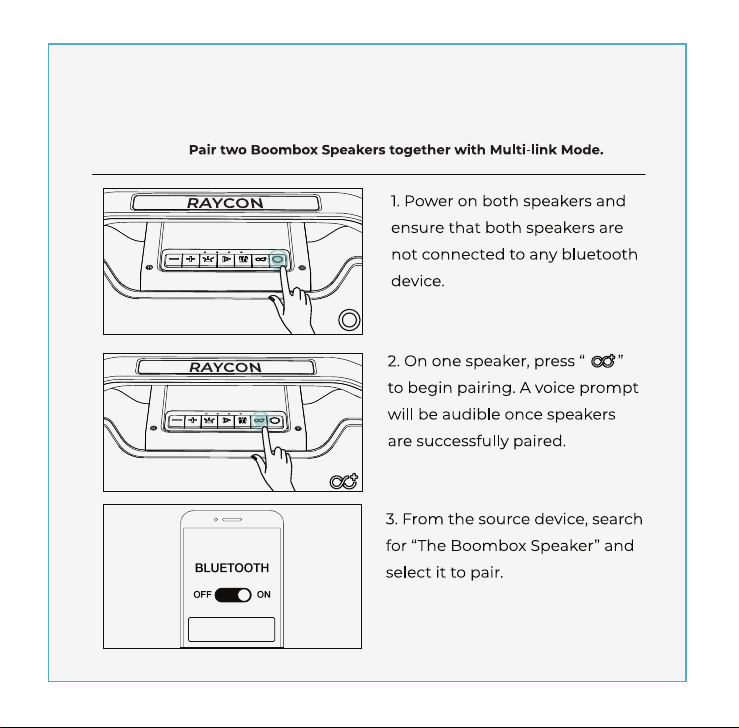
2 4
3
5
6
7
USER MANUAL
BOOMBOX
SPEAKER
THE
INTRODUCTION
UNIT AT A GLANCE
FEATURE AT A GLANCE
QUICK START GUIDE
CHARGING YOUR DEVICE
FUNCTIONS
MULTI-LINK MODE
PARTY LED LIGHTS
PLAYING MUSIC FROM MICRO SD CARD
AUX-IN MODE
SOUND PROFILES
RESET FUNCTION
SAFETY GUIDELINES
FAQ & ADDITIONAL RESOURCES
SUPPORT
LIMITED WARRANTY
SPECIFICATIONS
. . . . . . . . . . . . . . . . . . . . . . . . . . . . . . . . . . . . . . . . . . . . . . . . 1
. . . . . . . . . . . . . . . . . . . . . . . . . . . . . . . . . . . . . . . . . . . . . . 2
. . . . . . . . . . . . . . . . . . . . . . . . . . . . . . . . . . . . . . . . . . 3
. . . . . . . . . . . . . . . . . . . . . . . . . . . . . . . . . . . . . . . . . . . . 4
. . . . . . . . . . . . . . . . . . . . . . . . . . . . . . . . . . . . . . . 5
. . . . . . . . . . . . . . . . . . . . . . . . . . . . . . . . . . . . . . . . . . . . . . . . . . . . . .6
. . . . . . . . . . . . . . . . . . . . . . . . . . . . . . . . . . . . . . . . . . . . . . 8
. . . . . . . . . . . . . . . . . . . . . . . . . . . . . . . . . . . . . . . . . . . . . 9
. . . . . . . . . . . . . . . . . . . . . . . . 10
. . . . . . . . . . . . . . . . . . . . . . . . . . . . . . . . . . . . . . . . . . . . . . . . 11
. . . . . . . . . . . . . . . . . . . . . . . . . . . . . . . . . . . . . . . . . . . . . . 11
. . . . . . . . . . . . . . . . . . . . . . . . . . . . . . . . . . . . . . . . . . . . . . . 12
. . . . . . . . . . . . . . . . . . . . . . . . . . . . . . . . . . . . . . . . . . . . 12
. . . . . . . . . . . . . . . . . . . . . . . . . . . . . . 13
. . . . . . . . . . . . . . . . . . . . . . . . . . . . . . . . . . . . . . . . . . . . . . . . . . . . . . . 13
. . . . . . . . . . . . . . . . . . . . . . . . . . . . . . . . . . . . . . . . . . . 13
. . . . . . . . . . . . . . . . . . . . . . . . . . . . . . . . . . . . . . . . . . . . . . . 13
Welcome to your new Raycon Boombox Speaker!
We are Raycon. We create carefully crafted wireless audio products for
go-getters who need tech that keeps up with them. We teamed up with
expert engineers, leading taste-makers, and platinum artists to design
products you’ll love to use.
We believe in the the early risers and the one-more-milers of the world.
Premium audio, inspired by you.
Before using your product, we strongly encourage you to fully read
through this user guide. You can also visit our support center at
www.rayconglobal.com/support. This web page has more specific
guidelines and helpful videos for you to navigate your product. For best
performance, charge fully before first use.
Pairing ID: The Boombox Speaker
INTERNATIONAL MANUAL
For international versions of the manual, please visit
rayconglobal.com/support.
1. Power On/Off
2. Multi-link
3. EQ
4. Play/Pause
5. Battery Indicator
6. Light Control
7. Next/Volume Up
8. Previous/Volume Down
9. 5V/1A Power Output
10. Charging Port
11. AUX IN Port
12. Micro SD Slot
13. Reset Slot
3. Enjoy your Raycon Boombox Speaker!
2. From the source device, go to Bluetooth settings and ensure Bluetooth is
on. Search for “The Boombox Speaker” and select it to pair.
The Boombox Speaker
1. Hold “ ” for about 3 seconds to power speaker on. The speaker will
enter pairing mode automatically.
PC
Charger
5v
1-3A
1. Use a standard 5V/1-3A charger or a PC to charge this device.
2. While charging, the 4 LEDs will stay on. After fully charging, all 4 LED
lights will turn off. Charge time should be 4-8 hours.
CONTROL PANAL TOP VIEW
PHONE CALL CONTROL
VOICE ASSISTANT CONTROL
Reject Call
Switch call audio
between Phone and
Boombox Speaker
(During a call)
Answer/End Call
Activate Voice
Assistant
Charging Fully Charged
Press
Hold for 1.5 sec
Hold for 1.5 sec
Hold for 1.5 sec
Volume Down- Press
Previous - Hold for 1.5 sec
Volume Up- Press
Next - Hold for 1.5 sec
MEDIA PLAYER CONTROL
Play/Pause
- Press
13
Model: RBS951
RDID: D951-21E-Q321
Bluetooth Version: V5.0
Speaker Size: 3.5 inch x2
Power Output: 20W x 2, 4Ω
Dimension: 390 x 137 x 175mm
Pairing Name: The Boombox Speaker
Battery Capacity: 7.4V, 3600mAh
Play Time: up to 7 hours
Support Profile: HSP/HFP/A2DP/AVRCP
Frequency Response: 80Hz-12kHz
Bluetooth Range: Up to 10 Meters
If your device is not functioning correctly, please visit www.rayconglob-
al.com/support for customer support, and we will be more than happy to
help you.
Visit: www.rayconglobal.com/support.
Visit: www.rayconglobal.com/warranty.
8
12
1. Don’t use/store this speaker in extreme temperatures.
2. Please store in cool and dry area, and keep away from anything that
generates heat, such as radiators, stoves, etc.
3. Listen to music at a proper volume to avoid damaging your hearing
and speaker.
4. When cleaning this speaker, use a soft dry cloth. For more severe
stains, dampen the cloth with water only. Anything else increases the
chance of dissolving the paint or damaging the plastic.
If the speaker does not turn off or
respond, the speaker can be reset
by inserting a small round pin into
the Reset Slot to press the button
inside. Please be gentle when
inserting pin.
10
2. Insert a Micro SD card into Micro SD port.
The speaker will play the stored music
automatically.
1. Hold “ ” for about 3 seconds to
turn speaker on.
You can also play music using a Micro SD card. Note that if your Raycon
Power Speaker is in Bluetooth Mode, inserting a Micro SD card will
automatically switch the speaker to Micro SD mode. To return to
Bluetooth Mode, remove the Micro SD Card.
Micro SD
9 10 11 12 13
1 2 3 4
5
6
7
8
11
To enjoy music from your MP3/MP4 player or other compatible device,
use the supplied audio cable to connect from Line Out port on the device
to the Aux In port on your Raycon Boombox Speaker.
The speaker will automatically switch to AUX Mode when a compatible
device is connected using the audio cable. To return to Bluetooth Mode,
disconnect AUX cable from speaker.
Your sound, your way. Our sound profiles are designed by artists and
producers at the top of the industry. Press “ ” to toggle between sound
profiles.
PURE SOUND
Our most refined
sound, perfect to hear
every single note.
BALANCED SOUND
A leveled sound that is
great for all around
performance and clarity.
BASS SOUND
Our bass boosted
sound, great for songs
with strong beats and
a go-to for bass lovers.
FCC WARNING
This device complies with part 15 of the FCC Rules. Operation is subject
to the following two conditions:
(1) this device may not cause harmful interference, and
(2) this device must accept any interference received, including
interference that may cause undesired operation. Any changes or
modifications not expressly approved by the party responsible for
compliance could void the user's authority to operate the equipment.
NOTE: This equipment has been tested and found to comply with the
limits for a Class B digital device, pursuant to Part 15 of the FCC Rules.
These limits are designed to provide reasonable protection against
harmful interference in a residential installation. This equipment
generates, uses, and can radiate radio frequency energy and, if not
installed and used in accordance with the instructions, may cause
harmful interference to radio communications. However, there is no
guarantee that interference will not occur in a particular installation.
If this equipment does cause harmful interference to radio or television
reception,which can be determined by turning the equipment off and
on, the user is encouraged to try to correct the interference by one or
more of the following measures:
- Reorient or relocate the receiving antenna.
- Increase the separation between the equipment and receiver.
- Connect the equipment into an outlet on a circuit different from that
to which the receiver is connected.
- Consult the dealer or an experienced radio/TV technician for help. The
device has been evaluated to meet general RF exposure statement.
The device can be used in portable exposure condition without
restriction.
aux appareils radio exempts de licence. L'exploitationestautorisée aux
deux conditions suivantes:
(1) l'appareil ne doit pas produire de brouillage, et
(2) l'utilisateur de l'appareildoit accepter tout brouillageradioélectriquesu-
bi, mêmesi le brouillageest susceptible d'encompromettre le fonctionne-
ment.
IC Caution:
- English:
This device complies with Industry Canada licence-exempt RSS
standard(s).
Operation is subject to the following two conditions:
(1) This device may not cause interference, and
(2) This device must accept any interference, including interference that
may cause undesired operation of the device.
- French:
Le présentappareilestconforme aux CNR d'Industrie Canada applicables
9
Table of Contents INTRODUCTION UNIT AT A GLANCE feature AT A GLANCE Quick Start Guide Charging your device functions
Functions
FAQ & Additional RESOURCES
LIMITED WARRANTY
SPECIFICATIONS
SUPPORT
Multi-link MODE
SAFETY GUIDELINES
reset function
PLAYING MUSIC FROM MICRO SD CARD AUX-IN MODE
SOUND PROFILES
PARTY LED LIGHTS
power bank for your phone
1
THREE SOUND PROFILES
Bring the noise your way with three distinct sound profiles.
MULTI-LINK MODE
Link the Boombox with multiple speakers via Bluetooth to have a
multi-speaker or multi-room wall of sound.
IPX5 WATER RESISTANCE
Inside or outside, your party is protected from whatever nature
throws at it because the Boombox is dressed in IPX5 water
resistance.
7 HRS OF WIRELESS PLAY TIME
A long lasting battery makes sure the Boombox brings it until
closing time.
ON THE GO STRAP
Take your party on the road with the added portability of an on the
go strap.
PARTY LED LIGHTS
You are the DJ and the Boombox is the club. Bring a light show
wherever you go.
2AZOV-RBS951
27185-RBS951
The Boombox Speaker
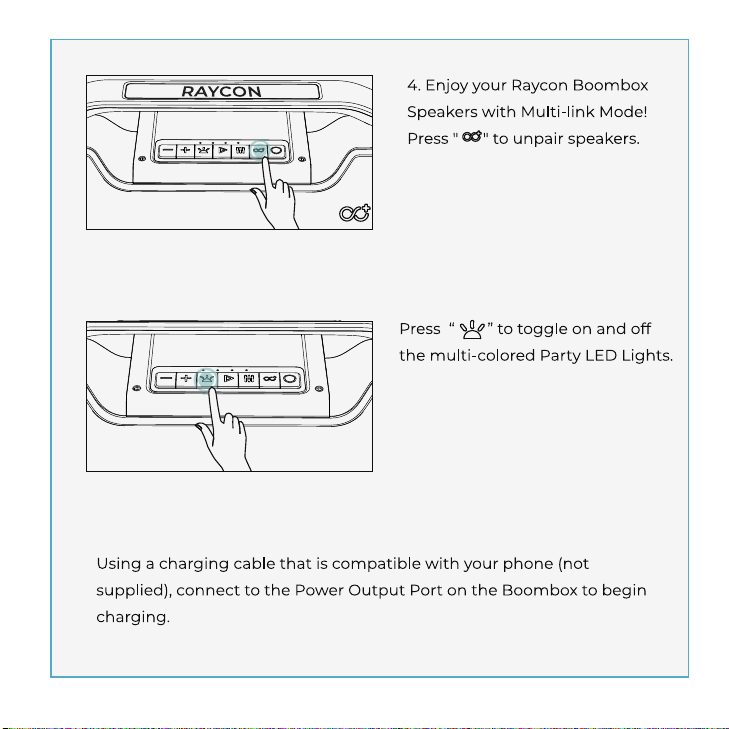
2 4
3
5
6
7
USER MANUAL
BOOMBOX
SPEAKER
THE
INTRODUCTION
UNIT AT A GLANCE
FEATURE AT A GLANCE
QUICK START GUIDE
CHARGING YOUR DEVICE
FUNCTIONS
MULTI-LINK MODE
PARTY LED LIGHTS
PLAYING MUSIC FROM MICRO SD CARD
AUX-IN MODE
SOUND PROFILES
RESET FUNCTION
SAFETY GUIDELINES
FAQ & ADDITIONAL RESOURCES
SUPPORT
LIMITED WARRANTY
SPECIFICATIONS
. . . . . . . . . . . . . . . . . . . . . . . . . . . . . . . . . . . . . . . . . . . . . . . . 1
. . . . . . . . . . . . . . . . . . . . . . . . . . . . . . . . . . . . . . . . . . . . . . 2
. . . . . . . . . . . . . . . . . . . . . . . . . . . . . . . . . . . . . . . . . . 3
. . . . . . . . . . . . . . . . . . . . . . . . . . . . . . . . . . . . . . . . . . . . 4
. . . . . . . . . . . . . . . . . . . . . . . . . . . . . . . . . . . . . . . 5
. . . . . . . . . . . . . . . . . . . . . . . . . . . . . . . . . . . . . . . . . . . . . . . . . . . . . .6
. . . . . . . . . . . . . . . . . . . . . . . . . . . . . . . . . . . . . . . . . . . . . . 8
. . . . . . . . . . . . . . . . . . . . . . . . . . . . . . . . . . . . . . . . . . . . . 9
. . . . . . . . . . . . . . . . . . . . . . . . 10
. . . . . . . . . . . . . . . . . . . . . . . . . . . . . . . . . . . . . . . . . . . . . . . . 11
. . . . . . . . . . . . . . . . . . . . . . . . . . . . . . . . . . . . . . . . . . . . . . 11
. . . . . . . . . . . . . . . . . . . . . . . . . . . . . . . . . . . . . . . . . . . . . . . 12
. . . . . . . . . . . . . . . . . . . . . . . . . . . . . . . . . . . . . . . . . . . . 12
. . . . . . . . . . . . . . . . . . . . . . . . . . . . . . 13
. . . . . . . . . . . . . . . . . . . . . . . . . . . . . . . . . . . . . . . . . . . . . . . . . . . . . . . 13
. . . . . . . . . . . . . . . . . . . . . . . . . . . . . . . . . . . . . . . . . . . 13
. . . . . . . . . . . . . . . . . . . . . . . . . . . . . . . . . . . . . . . . . . . . . . . 13
Welcome to your new Raycon Boombox Speaker!
We are Raycon. We create carefully crafted wireless audio products for
go-getters who need tech that keeps up with them. We teamed up with
expert engineers, leading taste-makers, and platinum artists to design
products you’ll love to use.
We believe in the the early risers and the one-more-milers of the world.
Premium audio, inspired by you.
Before using your product, we strongly encourage you to fully read
through this user guide. You can also visit our support center at
www.rayconglobal.com/support. This web page has more specific
guidelines and helpful videos for you to navigate your product. For best
performance, charge fully before first use.
Pairing ID: The Boombox Speaker
INTERNATIONAL MANUAL
For international versions of the manual, please visit
rayconglobal.com/support.
1. Power On/Off
2. Multi-link
3. EQ
4. Play/Pause
5. Battery Indicator
6. Light Control
7. Next/Volume Up
8. Previous/Volume Down
9. 5V/1A Power Output
10. Charging Port
11. AUX IN Port
12. Micro SD Slot
13. Reset Slot
3. Enjoy your Raycon Boombox Speaker!
2. From the source device, go to Bluetooth settings and ensure Bluetooth is
on. Search for “The Boombox Speaker” and select it to pair.
The Boombox Speaker
1. Hold “ ” for about 3 seconds to power speaker on. The speaker will
enter pairing mode automatically.
PC
Charger
5v
1-3A
1. Use a standard 5V/1-3A charger or a PC to charge this device.
2. While charging, the 4 LEDs will stay on. After fully charging, all 4 LED
lights will turn off. Charge time should be 4-8 hours.
CONTROL PANAL TOP VIEW
PHONE CALL CONTROL
VOICE ASSISTANT CONTROL
Reject Call
Switch call audio
between Phone and
Boombox Speaker
(During a call)
Answer/End Call
Activate Voice
Assistant
Charging Fully Charged
Press
Hold for 1.5 sec
Hold for 1.5 sec
Hold for 1.5 sec
Volume Down- Press
Previous - Hold for 1.5 sec
Volume Up- Press
Next - Hold for 1.5 sec
MEDIA PLAYER CONTROL
Play/Pause
- Press
13
Model: RBS951
RDID: D951-21E-Q321
Bluetooth Version: V5.0
Speaker Size: 3.5 inch x2
Power Output: 20W x 2, 4Ω
Dimension: 390 x 137 x 175mm
Pairing Name: The Boombox Speaker
Battery Capacity: 7.4V, 3600mAh
Play Time: up to 7 hours
Support Profile: HSP/HFP/A2DP/AVRCP
Frequency Response: 80Hz-12kHz
Bluetooth Range: Up to 10 Meters
If your device is not functioning correctly, please visit www.rayconglob-
al.com/support for customer support, and we will be more than happy to
help you.
Visit: www.rayconglobal.com/support.
Visit: www.rayconglobal.com/warranty.
8
12
1. Don’t use/store this speaker in extreme temperatures.
2. Please store in cool and dry area, and keep away from anything that
generates heat, such as radiators, stoves, etc.
3. Listen to music at a proper volume to avoid damaging your hearing
and speaker.
4. When cleaning this speaker, use a soft dry cloth. For more severe
stains, dampen the cloth with water only. Anything else increases the
chance of dissolving the paint or damaging the plastic.
If the speaker does not turn off or
respond, the speaker can be reset
by inserting a small round pin into
the Reset Slot to press the button
inside. Please be gentle when
inserting pin.
10
2. Insert a Micro SD card into Micro SD port.
The speaker will play the stored music
automatically.
1. Hold “ ” for about 3 seconds to
turn speaker on.
You can also play music using a Micro SD card. Note that if your Raycon
Power Speaker is in Bluetooth Mode, inserting a Micro SD card will
automatically switch the speaker to Micro SD mode. To return to
Bluetooth Mode, remove the Micro SD Card.
Micro SD
9 10 11 12 13
1 2 3 4
5
6
7
8
11
To enjoy music from your MP3/MP4 player or other compatible device,
use the supplied audio cable to connect from Line Out port on the device
to the Aux In port on your Raycon Boombox Speaker.
The speaker will automatically switch to AUX Mode when a compatible
device is connected using the audio cable. To return to Bluetooth Mode,
disconnect AUX cable from speaker.
Your sound, your way. Our sound profiles are designed by artists and
producers at the top of the industry. Press “ ” to toggle between sound
profiles.
PURE SOUND
Our most refined
sound, perfect to hear
every single note.
BALANCED SOUND
A leveled sound that is
great for all around
performance and clarity.
BASS SOUND
Our bass boosted
sound, great for songs
with strong beats and
a go-to for bass lovers.
FCC WARNING
This device complies with part 15 of the FCC Rules. Operation is subject
to the following two conditions:
(1) this device may not cause harmful interference, and
(2) this device must accept any interference received, including
interference that may cause undesired operation. Any changes or
modifications not expressly approved by the party responsible for
compliance could void the user's authority to operate the equipment.
NOTE: This equipment has been tested and found to comply with the
limits for a Class B digital device, pursuant to Part 15 of the FCC Rules.
These limits are designed to provide reasonable protection against
harmful interference in a residential installation. This equipment
generates, uses, and can radiate radio frequency energy and, if not
installed and used in accordance with the instructions, may cause
harmful interference to radio communications. However, there is no
guarantee that interference will not occur in a particular installation.
If this equipment does cause harmful interference to radio or television
reception,which can be determined by turning the equipment off and
on, the user is encouraged to try to correct the interference by one or
more of the following measures:
- Reorient or relocate the receiving antenna.
- Increase the separation between the equipment and receiver.
- Connect the equipment into an outlet on a circuit different from that
to which the receiver is connected.
- Consult the dealer or an experienced radio/TV technician for help. The
device has been evaluated to meet general RF exposure statement.
The device can be used in portable exposure condition without
restriction.
aux appareils radio exempts de licence. L'exploitationestautorisée aux
deux conditions suivantes:
(1) l'appareil ne doit pas produire de brouillage, et
(2) l'utilisateur de l'appareildoit accepter tout brouillageradioélectriquesu-
bi, mêmesi le brouillageest susceptible d'encompromettre le fonctionne-
ment.
IC Caution:
- English:
This device complies with Industry Canada licence-exempt RSS
standard(s).
Operation is subject to the following two conditions:
(1) This device may not cause interference, and
(2) This device must accept any interference, including interference that
may cause undesired operation of the device.
- French:
Le présentappareilestconforme aux CNR d'Industrie Canada applicables
9
Table of Contents INTRODUCTION UNIT AT A GLANCE feature AT A GLANCE Quick Start Guide Charging your device functions
Functions
FAQ & Additional RESOURCES
LIMITED WARRANTY
SPECIFICATIONS
SUPPORT
Multi-link MODE
SAFETY GUIDELINES
reset function
PLAYING MUSIC FROM MICRO SD CARD AUX-IN MODE
SOUND PROFILES
PARTY LED LIGHTS
power bank for your phone
1
THREE SOUND PROFILES
Bring the noise your way with three distinct sound profiles.
MULTI-LINK MODE
Link the Boombox with multiple speakers via Bluetooth to have a
multi-speaker or multi-room wall of sound.
IPX5 WATER RESISTANCE
Inside or outside, your party is protected from whatever nature
throws at it because the Boombox is dressed in IPX5 water
resistance.
7 HRS OF WIRELESS PLAY TIME
A long lasting battery makes sure the Boombox brings it until
closing time.
ON THE GO STRAP
Take your party on the road with the added portability of an on the
go strap.
PARTY LED LIGHTS
You are the DJ and the Boombox is the club. Bring a light show
wherever you go.
2AZOV-RBS951
27185-RBS951
The Boombox Speaker
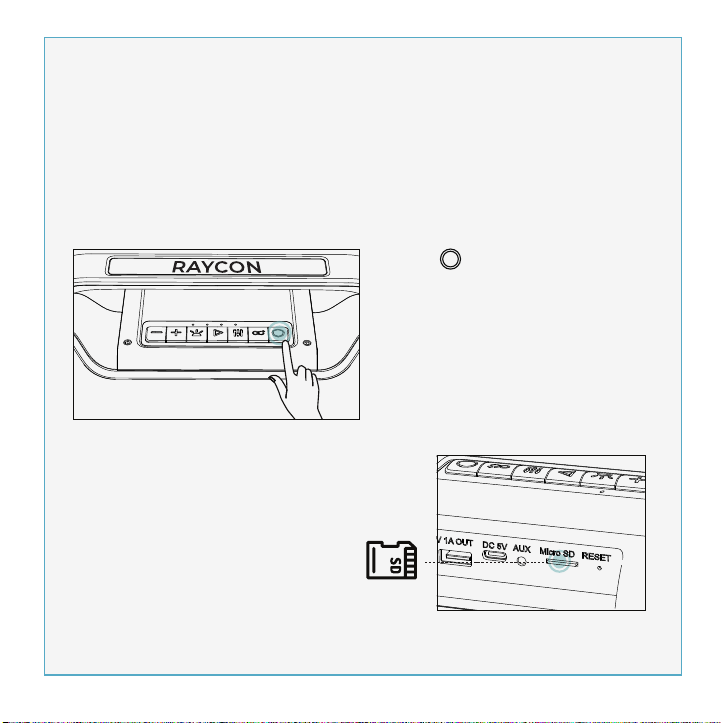
2 4
3
5
6
7
USER MANUAL
BOOMBOX
SPEAKER
THE
INTRODUCTION
UNIT AT A GLANCE
FEATURE AT A GLANCE
QUICK START GUIDE
CHARGING YOUR DEVICE
FUNCTIONS
MULTI-LINK MODE
PARTY LED LIGHTS
PLAYING MUSIC FROM MICRO SD CARD
AUX-IN MODE
SOUND PROFILES
RESET FUNCTION
SAFETY GUIDELINES
FAQ & ADDITIONAL RESOURCES
SUPPORT
LIMITED WARRANTY
SPECIFICATIONS
. . . . . . . . . . . . . . . . . . . . . . . . . . . . . . . . . . . . . . . . . . . . . . . . 1
. . . . . . . . . . . . . . . . . . . . . . . . . . . . . . . . . . . . . . . . . . . . . . 2
. . . . . . . . . . . . . . . . . . . . . . . . . . . . . . . . . . . . . . . . . . 3
. . . . . . . . . . . . . . . . . . . . . . . . . . . . . . . . . . . . . . . . . . . . 4
. . . . . . . . . . . . . . . . . . . . . . . . . . . . . . . . . . . . . . . 5
. . . . . . . . . . . . . . . . . . . . . . . . . . . . . . . . . . . . . . . . . . . . . . . . . . . . . .6
. . . . . . . . . . . . . . . . . . . . . . . . . . . . . . . . . . . . . . . . . . . . . . 8
. . . . . . . . . . . . . . . . . . . . . . . . . . . . . . . . . . . . . . . . . . . . . 9
. . . . . . . . . . . . . . . . . . . . . . . . 10
. . . . . . . . . . . . . . . . . . . . . . . . . . . . . . . . . . . . . . . . . . . . . . . . 11
. . . . . . . . . . . . . . . . . . . . . . . . . . . . . . . . . . . . . . . . . . . . . . 11
. . . . . . . . . . . . . . . . . . . . . . . . . . . . . . . . . . . . . . . . . . . . . . . 12
. . . . . . . . . . . . . . . . . . . . . . . . . . . . . . . . . . . . . . . . . . . . 12
. . . . . . . . . . . . . . . . . . . . . . . . . . . . . . 13
. . . . . . . . . . . . . . . . . . . . . . . . . . . . . . . . . . . . . . . . . . . . . . . . . . . . . . . 13
. . . . . . . . . . . . . . . . . . . . . . . . . . . . . . . . . . . . . . . . . . . 13
. . . . . . . . . . . . . . . . . . . . . . . . . . . . . . . . . . . . . . . . . . . . . . . 13
Welcome to your new Raycon Boombox Speaker!
We are Raycon. We create carefully crafted wireless audio products for
go-getters who need tech that keeps up with them. We teamed up with
expert engineers, leading taste-makers, and platinum artists to design
products you’ll love to use.
We believe in the the early risers and the one-more-milers of the world.
Premium audio, inspired by you.
Before using your product, we strongly encourage you to fully read
through this user guide. You can also visit our support center at
www.rayconglobal.com/support. This web page has more specific
guidelines and helpful videos for you to navigate your product. For best
performance, charge fully before first use.
Pairing ID: The Boombox Speaker
INTERNATIONAL MANUAL
For international versions of the manual, please visit
rayconglobal.com/support.
1. Power On/Off
2. Multi-link
3. EQ
4. Play/Pause
5. Battery Indicator
6. Light Control
7. Next/Volume Up
8. Previous/Volume Down
9. 5V/1A Power Output
10. Charging Port
11. AUX IN Port
12. Micro SD Slot
13. Reset Slot
3. Enjoy your Raycon Boombox Speaker!
2. From the source device, go to Bluetooth settings and ensure Bluetooth is
on. Search for “The Boombox Speaker” and select it to pair.
The Boombox Speaker
1. Hold “ ” for about 3 seconds to power speaker on. The speaker will
enter pairing mode automatically.
PC
Charger
5v
1-3A
1. Use a standard 5V/1-3A charger or a PC to charge this device.
2. While charging, the 4 LEDs will stay on. After fully charging, all 4 LED
lights will turn off. Charge time should be 4-8 hours.
CONTROL PANAL TOP VIEW
PHONE CALL CONTROL
VOICE ASSISTANT CONTROL
Reject Call
Switch call audio
between Phone and
Boombox Speaker
(During a call)
Answer/End Call
Activate Voice
Assistant
Charging Fully Charged
Press
Hold for 1.5 sec
Hold for 1.5 sec
Hold for 1.5 sec
Volume Down- Press
Previous - Hold for 1.5 sec
Volume Up- Press
Next - Hold for 1.5 sec
MEDIA PLAYER CONTROL
Play/Pause
- Press
13
Model: RBS951
RDID: D951-21E-Q321
Bluetooth Version: V5.0
Speaker Size: 3.5 inch x2
Power Output: 20W x 2, 4Ω
Dimension: 390 x 137 x 175mm
Pairing Name: The Boombox Speaker
Battery Capacity: 7.4V, 3600mAh
Play Time: up to 7 hours
Support Profile: HSP/HFP/A2DP/AVRCP
Frequency Response: 80Hz-12kHz
Bluetooth Range: Up to 10 Meters
If your device is not functioning correctly, please visit www.rayconglob-
al.com/support for customer support, and we will be more than happy to
help you.
Visit: www.rayconglobal.com/support.
Visit: www.rayconglobal.com/warranty.
8
12
1. Don’t use/store this speaker in extreme temperatures.
2. Please store in cool and dry area, and keep away from anything that
generates heat, such as radiators, stoves, etc.
3. Listen to music at a proper volume to avoid damaging your hearing
and speaker.
4. When cleaning this speaker, use a soft dry cloth. For more severe
stains, dampen the cloth with water only. Anything else increases the
chance of dissolving the paint or damaging the plastic.
If the speaker does not turn off or
respond, the speaker can be reset
by inserting a small round pin into
the Reset Slot to press the button
inside. Please be gentle when
inserting pin.
10
2. Insert a Micro SD card into Micro SD port.
The speaker will play the stored music
automatically.
1. Hold “ ” for about 3 seconds to
turn speaker on.
You can also play music using a Micro SD card. Note that if your Raycon
Power Speaker is in Bluetooth Mode, inserting a Micro SD card will
automatically switch the speaker to Micro SD mode. To return to
Bluetooth Mode, remove the Micro SD Card.
Micro SD
9 10 11 12 13
1 2 3 4
5
6
7
8
11
To enjoy music from your MP3/MP4 player or other compatible device,
use the supplied audio cable to connect from Line Out port on the device
to the Aux In port on your Raycon Boombox Speaker.
The speaker will automatically switch to AUX Mode when a compatible
device is connected using the audio cable. To return to Bluetooth Mode,
disconnect AUX cable from speaker.
Your sound, your way. Our sound profiles are designed by artists and
producers at the top of the industry. Press “ ” to toggle between sound
profiles.
PURE SOUND
Our most refined
sound, perfect to hear
every single note.
BALANCED SOUND
A leveled sound that is
great for all around
performance and clarity.
BASS SOUND
Our bass boosted
sound, great for songs
with strong beats and
a go-to for bass lovers.
FCC WARNING
This device complies with part 15 of the FCC Rules. Operation is subject
to the following two conditions:
(1) this device may not cause harmful interference, and
(2) this device must accept any interference received, including
interference that may cause undesired operation. Any changes or
modifications not expressly approved by the party responsible for
compliance could void the user's authority to operate the equipment.
NOTE: This equipment has been tested and found to comply with the
limits for a Class B digital device, pursuant to Part 15 of the FCC Rules.
These limits are designed to provide reasonable protection against
harmful interference in a residential installation. This equipment
generates, uses, and can radiate radio frequency energy and, if not
installed and used in accordance with the instructions, may cause
harmful interference to radio communications. However, there is no
guarantee that interference will not occur in a particular installation.
If this equipment does cause harmful interference to radio or television
reception,which can be determined by turning the equipment off and
on, the user is encouraged to try to correct the interference by one or
more of the following measures:
- Reorient or relocate the receiving antenna.
- Increase the separation between the equipment and receiver.
- Connect the equipment into an outlet on a circuit different from that
to which the receiver is connected.
- Consult the dealer or an experienced radio/TV technician for help. The
device has been evaluated to meet general RF exposure statement.
The device can be used in portable exposure condition without
restriction.
aux appareils radio exempts de licence. L'exploitationestautorisée aux
deux conditions suivantes:
(1) l'appareil ne doit pas produire de brouillage, et
(2) l'utilisateur de l'appareildoit accepter tout brouillageradioélectriquesu-
bi, mêmesi le brouillageest susceptible d'encompromettre le fonctionne-
ment.
IC Caution:
- English:
This device complies with Industry Canada licence-exempt RSS
standard(s).
Operation is subject to the following two conditions:
(1) This device may not cause interference, and
(2) This device must accept any interference, including interference that
may cause undesired operation of the device.
- French:
Le présentappareilestconforme aux CNR d'Industrie Canada applicables
9
Table of Contents INTRODUCTION UNIT AT A GLANCE feature AT A GLANCE Quick Start Guide Charging your device functions
Functions
FAQ & Additional RESOURCES
LIMITED WARRANTY
SPECIFICATIONS
SUPPORT
Multi-link MODE
SAFETY GUIDELINES
reset function
PLAYING MUSIC FROM MICRO SD CARD AUX-IN MODE
SOUND PROFILES
PARTY LED LIGHTS
power bank for your phone
1
THREE SOUND PROFILES
Bring the noise your way with three distinct sound profiles.
MULTI-LINK MODE
Link the Boombox with multiple speakers via Bluetooth to have a
multi-speaker or multi-room wall of sound.
IPX5 WATER RESISTANCE
Inside or outside, your party is protected from whatever nature
throws at it because the Boombox is dressed in IPX5 water
resistance.
7 HRS OF WIRELESS PLAY TIME
A long lasting battery makes sure the Boombox brings it until
closing time.
ON THE GO STRAP
Take your party on the road with the added portability of an on the
go strap.
PARTY LED LIGHTS
You are the DJ and the Boombox is the club. Bring a light show
wherever you go.
2AZOV-RBS951
27185-RBS951
The Boombox Speaker

2 4
3
5
6
7
USER MANUAL
BOOMBOX
SPEAKER
THE
INTRODUCTION
UNIT AT A GLANCE
FEATURE AT A GLANCE
QUICK START GUIDE
CHARGING YOUR DEVICE
FUNCTIONS
MULTI-LINK MODE
PARTY LED LIGHTS
PLAYING MUSIC FROM MICRO SD CARD
AUX-IN MODE
SOUND PROFILES
RESET FUNCTION
SAFETY GUIDELINES
FAQ & ADDITIONAL RESOURCES
SUPPORT
LIMITED WARRANTY
SPECIFICATIONS
. . . . . . . . . . . . . . . . . . . . . . . . . . . . . . . . . . . . . . . . . . . . . . . . 1
. . . . . . . . . . . . . . . . . . . . . . . . . . . . . . . . . . . . . . . . . . . . . . 2
. . . . . . . . . . . . . . . . . . . . . . . . . . . . . . . . . . . . . . . . . . 3
. . . . . . . . . . . . . . . . . . . . . . . . . . . . . . . . . . . . . . . . . . . . 4
. . . . . . . . . . . . . . . . . . . . . . . . . . . . . . . . . . . . . . . 5
. . . . . . . . . . . . . . . . . . . . . . . . . . . . . . . . . . . . . . . . . . . . . . . . . . . . . .6
. . . . . . . . . . . . . . . . . . . . . . . . . . . . . . . . . . . . . . . . . . . . . . 8
. . . . . . . . . . . . . . . . . . . . . . . . . . . . . . . . . . . . . . . . . . . . . 9
. . . . . . . . . . . . . . . . . . . . . . . . 10
. . . . . . . . . . . . . . . . . . . . . . . . . . . . . . . . . . . . . . . . . . . . . . . . 11
. . . . . . . . . . . . . . . . . . . . . . . . . . . . . . . . . . . . . . . . . . . . . . 11
. . . . . . . . . . . . . . . . . . . . . . . . . . . . . . . . . . . . . . . . . . . . . . . 12
. . . . . . . . . . . . . . . . . . . . . . . . . . . . . . . . . . . . . . . . . . . . 12
. . . . . . . . . . . . . . . . . . . . . . . . . . . . . . 13
. . . . . . . . . . . . . . . . . . . . . . . . . . . . . . . . . . . . . . . . . . . . . . . . . . . . . . . 13
. . . . . . . . . . . . . . . . . . . . . . . . . . . . . . . . . . . . . . . . . . . 13
. . . . . . . . . . . . . . . . . . . . . . . . . . . . . . . . . . . . . . . . . . . . . . . 13
Welcome to your new Raycon Boombox Speaker!
We are Raycon. We create carefully crafted wireless audio products for
go-getters who need tech that keeps up with them. We teamed up with
expert engineers, leading taste-makers, and platinum artists to design
products you’ll love to use.
We believe in the the early risers and the one-more-milers of the world.
Premium audio, inspired by you.
Before using your product, we strongly encourage you to fully read
through this user guide. You can also visit our support center at
www.rayconglobal.com/support. This web page has more specific
guidelines and helpful videos for you to navigate your product. For best
performance, charge fully before first use.
Pairing ID: The Boombox Speaker
INTERNATIONAL MANUAL
For international versions of the manual, please visit
rayconglobal.com/support.
1. Power On/Off
2. Multi-link
3. EQ
4. Play/Pause
5. Battery Indicator
6. Light Control
7. Next/Volume Up
8. Previous/Volume Down
9. 5V/1A Power Output
10. Charging Port
11. AUX IN Port
12. Micro SD Slot
13. Reset Slot
3. Enjoy your Raycon Boombox Speaker!
2. From the source device, go to Bluetooth settings and ensure Bluetooth is
on. Search for “The Boombox Speaker” and select it to pair.
The Boombox Speaker
1. Hold “ ” for about 3 seconds to power speaker on. The speaker will
enter pairing mode automatically.
PC
Charger
5v
1-3A
1. Use a standard 5V/1-3A charger or a PC to charge this device.
2. While charging, the 4 LEDs will stay on. After fully charging, all 4 LED
lights will turn off. Charge time should be 4-8 hours.
CONTROL PANAL TOP VIEW
PHONE CALL CONTROL
VOICE ASSISTANT CONTROL
Reject Call
Switch call audio
between Phone and
Boombox Speaker
(During a call)
Answer/End Call
Activate Voice
Assistant
Charging Fully Charged
Press
Hold for 1.5 sec
Hold for 1.5 sec
Hold for 1.5 sec
Volume Down- Press
Previous - Hold for 1.5 sec
Volume Up- Press
Next - Hold for 1.5 sec
MEDIA PLAYER CONTROL
Play/Pause
- Press
13
Model: RBS951
RDID: D951-21E-Q321
Bluetooth Version: V5.0
Speaker Size: 3.5 inch x2
Power Output: 20W x 2, 4Ω
Dimension: 390 x 137 x 175mm
Pairing Name: The Boombox Speaker
Battery Capacity: 7.4V, 3600mAh
Play Time: up to 7 hours
Support Profile: HSP/HFP/A2DP/AVRCP
Frequency Response: 80Hz-12kHz
Bluetooth Range: Up to 10 Meters
If your device is not functioning correctly, please visit www.rayconglob-
al.com/support for customer support, and we will be more than happy to
help you.
Visit: www.rayconglobal.com/support.
Visit: www.rayconglobal.com/warranty.
8
12
1. Don’t use/store this speaker in extreme temperatures.
2. Please store in cool and dry area, and keep away from anything that
generates heat, such as radiators, stoves, etc.
3. Listen to music at a proper volume to avoid damaging your hearing
and speaker.
4. When cleaning this speaker, use a soft dry cloth. For more severe
stains, dampen the cloth with water only. Anything else increases the
chance of dissolving the paint or damaging the plastic.
If the speaker does not turn off or
respond, the speaker can be reset
by inserting a small round pin into
the Reset Slot to press the button
inside. Please be gentle when
inserting pin.
10
2. Insert a Micro SD card into Micro SD port.
The speaker will play the stored music
automatically.
1. Hold “ ” for about 3 seconds to
turn speaker on.
You can also play music using a Micro SD card. Note that if your Raycon
Power Speaker is in Bluetooth Mode, inserting a Micro SD card will
automatically switch the speaker to Micro SD mode. To return to
Bluetooth Mode, remove the Micro SD Card.
Micro SD
9 10 11 12 13
1 2 3 4
5
6
7
8
11
To enjoy music from your MP3/MP4 player or other compatible device,
use the supplied audio cable to connect from Line Out port on the device
to the Aux In port on your Raycon Boombox Speaker.
The speaker will automatically switch to AUX Mode when a compatible
device is connected using the audio cable. To return to Bluetooth Mode,
disconnect AUX cable from speaker.
Your sound, your way. Our sound profiles are designed by artists and
producers at the top of the industry. Press “ ” to toggle between sound
profiles.
PURE SOUND
Our most refined
sound, perfect to hear
every single note.
BALANCED SOUND
A leveled sound that is
great for all around
performance and clarity.
BASS SOUND
Our bass boosted
sound, great for songs
with strong beats and
a go-to for bass lovers.
FCC WARNING
This device complies with part 15 of the FCC Rules. Operation is subject
to the following two conditions:
(1) this device may not cause harmful interference, and
(2) this device must accept any interference received, including
interference that may cause undesired operation. Any changes or
modifications not expressly approved by the party responsible for
compliance could void the user's authority to operate the equipment.
NOTE: This equipment has been tested and found to comply with the
limits for a Class B digital device, pursuant to Part 15 of the FCC Rules.
These limits are designed to provide reasonable protection against
harmful interference in a residential installation. This equipment
generates, uses, and can radiate radio frequency energy and, if not
installed and used in accordance with the instructions, may cause
harmful interference to radio communications. However, there is no
guarantee that interference will not occur in a particular installation.
If this equipment does cause harmful interference to radio or television
reception,which can be determined by turning the equipment off and
on, the user is encouraged to try to correct the interference by one or
more of the following measures:
- Reorient or relocate the receiving antenna.
- Increase the separation between the equipment and receiver.
- Connect the equipment into an outlet on a circuit different from that
to which the receiver is connected.
- Consult the dealer or an experienced radio/TV technician for help. The
device has been evaluated to meet general RF exposure statement.
The device can be used in portable exposure condition without
restriction.
aux appareils radio exempts de licence. L'exploitationestautorisée aux
deux conditions suivantes:
(1) l'appareil ne doit pas produire de brouillage, et
(2) l'utilisateur de l'appareildoit accepter tout brouillageradioélectriquesu-
bi, mêmesi le brouillageest susceptible d'encompromettre le fonctionne-
ment.
IC Caution:
- English:
This device complies with Industry Canada licence-exempt RSS
standard(s).
Operation is subject to the following two conditions:
(1) This device may not cause interference, and
(2) This device must accept any interference, including interference that
may cause undesired operation of the device.
- French:
Le présentappareilestconforme aux CNR d'Industrie Canada applicables
9
Table of Contents INTRODUCTION UNIT AT A GLANCE feature AT A GLANCE Quick Start Guide Charging your device functions
Functions
FAQ & Additional RESOURCES
LIMITED WARRANTY
SPECIFICATIONS
SUPPORT
Multi-link MODE
SAFETY GUIDELINES
reset function
PLAYING MUSIC FROM MICRO SD CARD AUX-IN MODE
SOUND PROFILES
PARTY LED LIGHTS
power bank for your phone
1
THREE SOUND PROFILES
Bring the noise your way with three distinct sound profiles.
MULTI-LINK MODE
Link the Boombox with multiple speakers via Bluetooth to have a
multi-speaker or multi-room wall of sound.
IPX5 WATER RESISTANCE
Inside or outside, your party is protected from whatever nature
throws at it because the Boombox is dressed in IPX5 water
resistance.
7 HRS OF WIRELESS PLAY TIME
A long lasting battery makes sure the Boombox brings it until
closing time.
ON THE GO STRAP
Take your party on the road with the added portability of an on the
go strap.
PARTY LED LIGHTS
You are the DJ and the Boombox is the club. Bring a light show
wherever you go.
2AZOV-RBS951
27185-RBS951
The Boombox Speaker
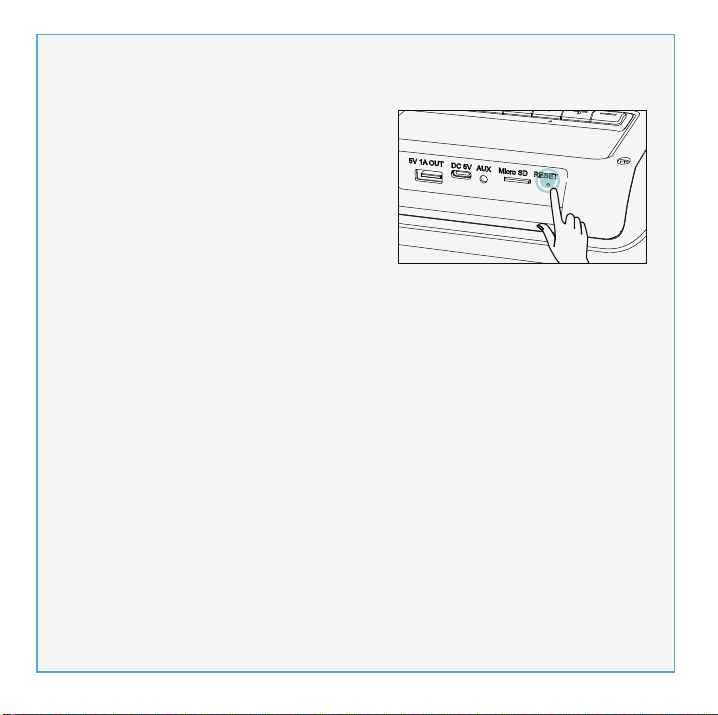
2 4
3
5
6
7
USER MANUAL
BOOMBOX
SPEAKER
THE
INTRODUCTION
UNIT AT A GLANCE
FEATURE AT A GLANCE
QUICK START GUIDE
CHARGING YOUR DEVICE
FUNCTIONS
MULTI-LINK MODE
PARTY LED LIGHTS
PLAYING MUSIC FROM MICRO SD CARD
AUX-IN MODE
SOUND PROFILES
RESET FUNCTION
SAFETY GUIDELINES
FAQ & ADDITIONAL RESOURCES
SUPPORT
LIMITED WARRANTY
SPECIFICATIONS
. . . . . . . . . . . . . . . . . . . . . . . . . . . . . . . . . . . . . . . . . . . . . . . . 1
. . . . . . . . . . . . . . . . . . . . . . . . . . . . . . . . . . . . . . . . . . . . . . 2
. . . . . . . . . . . . . . . . . . . . . . . . . . . . . . . . . . . . . . . . . . 3
. . . . . . . . . . . . . . . . . . . . . . . . . . . . . . . . . . . . . . . . . . . . 4
. . . . . . . . . . . . . . . . . . . . . . . . . . . . . . . . . . . . . . . 5
. . . . . . . . . . . . . . . . . . . . . . . . . . . . . . . . . . . . . . . . . . . . . . . . . . . . . .6
. . . . . . . . . . . . . . . . . . . . . . . . . . . . . . . . . . . . . . . . . . . . . . 8
. . . . . . . . . . . . . . . . . . . . . . . . . . . . . . . . . . . . . . . . . . . . . 9
. . . . . . . . . . . . . . . . . . . . . . . . 10
. . . . . . . . . . . . . . . . . . . . . . . . . . . . . . . . . . . . . . . . . . . . . . . . 11
. . . . . . . . . . . . . . . . . . . . . . . . . . . . . . . . . . . . . . . . . . . . . . 11
. . . . . . . . . . . . . . . . . . . . . . . . . . . . . . . . . . . . . . . . . . . . . . . 12
. . . . . . . . . . . . . . . . . . . . . . . . . . . . . . . . . . . . . . . . . . . . 12
. . . . . . . . . . . . . . . . . . . . . . . . . . . . . . 13
. . . . . . . . . . . . . . . . . . . . . . . . . . . . . . . . . . . . . . . . . . . . . . . . . . . . . . . 13
. . . . . . . . . . . . . . . . . . . . . . . . . . . . . . . . . . . . . . . . . . . 13
. . . . . . . . . . . . . . . . . . . . . . . . . . . . . . . . . . . . . . . . . . . . . . . 13
Welcome to your new Raycon Boombox Speaker!
We are Raycon. We create carefully crafted wireless audio products for
go-getters who need tech that keeps up with them. We teamed up with
expert engineers, leading taste-makers, and platinum artists to design
products you’ll love to use.
We believe in the the early risers and the one-more-milers of the world.
Premium audio, inspired by you.
Before using your product, we strongly encourage you to fully read
through this user guide. You can also visit our support center at
www.rayconglobal.com/support. This web page has more specific
guidelines and helpful videos for you to navigate your product. For best
performance, charge fully before first use.
Pairing ID: The Boombox Speaker
INTERNATIONAL MANUAL
For international versions of the manual, please visit
rayconglobal.com/support.
1. Power On/Off
2. Multi-link
3. EQ
4. Play/Pause
5. Battery Indicator
6. Light Control
7. Next/Volume Up
8. Previous/Volume Down
9. 5V/1A Power Output
10. Charging Port
11. AUX IN Port
12. Micro SD Slot
13. Reset Slot
3. Enjoy your Raycon Boombox Speaker!
2. From the source device, go to Bluetooth settings and ensure Bluetooth is
on. Search for “The Boombox Speaker” and select it to pair.
The Boombox Speaker
1. Hold “ ” for about 3 seconds to power speaker on. The speaker will
enter pairing mode automatically.
PC
Charger
5v
1-3A
1. Use a standard 5V/1-3A charger or a PC to charge this device.
2. While charging, the 4 LEDs will stay on. After fully charging, all 4 LED
lights will turn off. Charge time should be 4-8 hours.
CONTROL PANAL TOP VIEW
PHONE CALL CONTROL
VOICE ASSISTANT CONTROL
Reject Call
Switch call audio
between Phone and
Boombox Speaker
(During a call)
Answer/End Call
Activate Voice
Assistant
Charging Fully Charged
Press
Hold for 1.5 sec
Hold for 1.5 sec
Hold for 1.5 sec
Volume Down- Press
Previous - Hold for 1.5 sec
Volume Up- Press
Next - Hold for 1.5 sec
MEDIA PLAYER CONTROL
Play/Pause
- Press
13
Model: RBS951
RDID: D951-21E-Q321
Bluetooth Version: V5.0
Speaker Size: 3.5 inch x2
Power Output: 20W x 2, 4Ω
Dimension: 390 x 137 x 175mm
Pairing Name: The Boombox Speaker
Battery Capacity: 7.4V, 3600mAh
Play Time: up to 7 hours
Support Profile: HSP/HFP/A2DP/AVRCP
Frequency Response: 80Hz-12kHz
Bluetooth Range: Up to 10 Meters
If your device is not functioning correctly, please visit www.rayconglob-
al.com/support for customer support, and we will be more than happy to
help you.
Visit: www.rayconglobal.com/support.
Visit: www.rayconglobal.com/warranty.
8
12
1. Don’t use/store this speaker in extreme temperatures.
2. Please store in cool and dry area, and keep away from anything that
generates heat, such as radiators, stoves, etc.
3. Listen to music at a proper volume to avoid damaging your hearing
and speaker.
4. When cleaning this speaker, use a soft dry cloth. For more severe
stains, dampen the cloth with water only. Anything else increases the
chance of dissolving the paint or damaging the plastic.
If the speaker does not turn off or
respond, the speaker can be reset
by inserting a small round pin into
the Reset Slot to press the button
inside. Please be gentle when
inserting pin.
10
2. Insert a Micro SD card into Micro SD port.
The speaker will play the stored music
automatically.
1. Hold “ ” for about 3 seconds to
turn speaker on.
You can also play music using a Micro SD card. Note that if your Raycon
Power Speaker is in Bluetooth Mode, inserting a Micro SD card will
automatically switch the speaker to Micro SD mode. To return to
Bluetooth Mode, remove the Micro SD Card.
Micro SD
9 10 11 12 13
1 2 3 4
5
6
7
8
11
To enjoy music from your MP3/MP4 player or other compatible device,
use the supplied audio cable to connect from Line Out port on the device
to the Aux In port on your Raycon Boombox Speaker.
The speaker will automatically switch to AUX Mode when a compatible
device is connected using the audio cable. To return to Bluetooth Mode,
disconnect AUX cable from speaker.
Your sound, your way. Our sound profiles are designed by artists and
producers at the top of the industry. Press “ ” to toggle between sound
profiles.
PURE SOUND
Our most refined
sound, perfect to hear
every single note.
BALANCED SOUND
A leveled sound that is
great for all around
performance and clarity.
BASS SOUND
Our bass boosted
sound, great for songs
with strong beats and
a go-to for bass lovers.
FCC WARNING
This device complies with part 15 of the FCC Rules. Operation is subject
to the following two conditions:
(1) this device may not cause harmful interference, and
(2) this device must accept any interference received, including
interference that may cause undesired operation. Any changes or
modifications not expressly approved by the party responsible for
compliance could void the user's authority to operate the equipment.
NOTE: This equipment has been tested and found to comply with the
limits for a Class B digital device, pursuant to Part 15 of the FCC Rules.
These limits are designed to provide reasonable protection against
harmful interference in a residential installation. This equipment
generates, uses, and can radiate radio frequency energy and, if not
installed and used in accordance with the instructions, may cause
harmful interference to radio communications. However, there is no
guarantee that interference will not occur in a particular installation.
If this equipment does cause harmful interference to radio or television
reception,which can be determined by turning the equipment off and
on, the user is encouraged to try to correct the interference by one or
more of the following measures:
- Reorient or relocate the receiving antenna.
- Increase the separation between the equipment and receiver.
- Connect the equipment into an outlet on a circuit different from that
to which the receiver is connected.
- Consult the dealer or an experienced radio/TV technician for help. The
device has been evaluated to meet general RF exposure statement.
The device can be used in portable exposure condition without
restriction.
aux appareils radio exempts de licence. L'exploitationestautorisée aux
deux conditions suivantes:
(1) l'appareil ne doit pas produire de brouillage, et
(2) l'utilisateur de l'appareildoit accepter tout brouillageradioélectriquesu-
bi, mêmesi le brouillageest susceptible d'encompromettre le fonctionne-
ment.
IC Caution:
- English:
This device complies with Industry Canada licence-exempt RSS
standard(s).
Operation is subject to the following two conditions:
(1) This device may not cause interference, and
(2) This device must accept any interference, including interference that
may cause undesired operation of the device.
- French:
Le présentappareilestconforme aux CNR d'Industrie Canada applicables
9
Table of Contents INTRODUCTION UNIT AT A GLANCE feature AT A GLANCE Quick Start Guide Charging your device functions
Functions
FAQ & Additional RESOURCES
LIMITED WARRANTY
SPECIFICATIONS
SUPPORT
Multi-link MODE
SAFETY GUIDELINES
reset function
PLAYING MUSIC FROM MICRO SD CARD AUX-IN MODE
SOUND PROFILES
PARTY LED LIGHTS
power bank for your phone
1
THREE SOUND PROFILES
Bring the noise your way with three distinct sound profiles.
MULTI-LINK MODE
Link the Boombox with multiple speakers via Bluetooth to have a
multi-speaker or multi-room wall of sound.
IPX5 WATER RESISTANCE
Inside or outside, your party is protected from whatever nature
throws at it because the Boombox is dressed in IPX5 water
resistance.
7 HRS OF WIRELESS PLAY TIME
A long lasting battery makes sure the Boombox brings it until
closing time.
ON THE GO STRAP
Take your party on the road with the added portability of an on the
go strap.
PARTY LED LIGHTS
You are the DJ and the Boombox is the club. Bring a light show
wherever you go.
2AZOV-RBS951
27185-RBS951
The Boombox Speaker

2 4
3
5
6
7
USER MANUAL
BOOMBOX
SPEAKER
THE
INTRODUCTION
UNIT AT A GLANCE
FEATURE AT A GLANCE
QUICK START GUIDE
CHARGING YOUR DEVICE
FUNCTIONS
MULTI-LINK MODE
PARTY LED LIGHTS
PLAYING MUSIC FROM MICRO SD CARD
AUX-IN MODE
SOUND PROFILES
RESET FUNCTION
SAFETY GUIDELINES
FAQ & ADDITIONAL RESOURCES
SUPPORT
LIMITED WARRANTY
SPECIFICATIONS
. . . . . . . . . . . . . . . . . . . . . . . . . . . . . . . . . . . . . . . . . . . . . . . . 1
. . . . . . . . . . . . . . . . . . . . . . . . . . . . . . . . . . . . . . . . . . . . . . 2
. . . . . . . . . . . . . . . . . . . . . . . . . . . . . . . . . . . . . . . . . . 3
. . . . . . . . . . . . . . . . . . . . . . . . . . . . . . . . . . . . . . . . . . . . 4
. . . . . . . . . . . . . . . . . . . . . . . . . . . . . . . . . . . . . . . 5
. . . . . . . . . . . . . . . . . . . . . . . . . . . . . . . . . . . . . . . . . . . . . . . . . . . . . .6
. . . . . . . . . . . . . . . . . . . . . . . . . . . . . . . . . . . . . . . . . . . . . . 8
. . . . . . . . . . . . . . . . . . . . . . . . . . . . . . . . . . . . . . . . . . . . . 9
. . . . . . . . . . . . . . . . . . . . . . . . 10
. . . . . . . . . . . . . . . . . . . . . . . . . . . . . . . . . . . . . . . . . . . . . . . . 11
. . . . . . . . . . . . . . . . . . . . . . . . . . . . . . . . . . . . . . . . . . . . . . 11
. . . . . . . . . . . . . . . . . . . . . . . . . . . . . . . . . . . . . . . . . . . . . . . 12
. . . . . . . . . . . . . . . . . . . . . . . . . . . . . . . . . . . . . . . . . . . . 12
. . . . . . . . . . . . . . . . . . . . . . . . . . . . . . 13
. . . . . . . . . . . . . . . . . . . . . . . . . . . . . . . . . . . . . . . . . . . . . . . . . . . . . . . 13
. . . . . . . . . . . . . . . . . . . . . . . . . . . . . . . . . . . . . . . . . . . 13
. . . . . . . . . . . . . . . . . . . . . . . . . . . . . . . . . . . . . . . . . . . . . . . 13
Welcome to your new Raycon Boombox Speaker!
We are Raycon. We create carefully crafted wireless audio products for
go-getters who need tech that keeps up with them. We teamed up with
expert engineers, leading taste-makers, and platinum artists to design
products you’ll love to use.
We believe in the the early risers and the one-more-milers of the world.
Premium audio, inspired by you.
Before using your product, we strongly encourage you to fully read
through this user guide. You can also visit our support center at
www.rayconglobal.com/support. This web page has more specific
guidelines and helpful videos for you to navigate your product. For best
performance, charge fully before first use.
Pairing ID: The Boombox Speaker
INTERNATIONAL MANUAL
For international versions of the manual, please visit
rayconglobal.com/support.
1. Power On/Off
2. Multi-link
3. EQ
4. Play/Pause
5. Battery Indicator
6. Light Control
7. Next/Volume Up
8. Previous/Volume Down
9. 5V/1A Power Output
10. Charging Port
11. AUX IN Port
12. Micro SD Slot
13. Reset Slot
3. Enjoy your Raycon Boombox Speaker!
2. From the source device, go to Bluetooth settings and ensure Bluetooth is
on. Search for “The Boombox Speaker” and select it to pair.
The Boombox Speaker
1. Hold “ ” for about 3 seconds to power speaker on. The speaker will
enter pairing mode automatically.
PC
Charger
5v
1-3A
1. Use a standard 5V/1-3A charger or a PC to charge this device.
2. While charging, the 4 LEDs will stay on. After fully charging, all 4 LED
lights will turn off. Charge time should be 4-8 hours.
CONTROL PANAL TOP VIEW
PHONE CALL CONTROL
VOICE ASSISTANT CONTROL
Reject Call
Switch call audio
between Phone and
Boombox Speaker
(During a call)
Answer/End Call
Activate Voice
Assistant
Charging Fully Charged
Press
Hold for 1.5 sec
Hold for 1.5 sec
Hold for 1.5 sec
Volume Down- Press
Previous - Hold for 1.5 sec
Volume Up- Press
Next - Hold for 1.5 sec
MEDIA PLAYER CONTROL
Play/Pause
- Press
13
Model: RBS951
RDID: D951-21E-Q321
Bluetooth Version: V5.0
Speaker Size: 3.5 inch x2
Power Output: 20W x 2, 4Ω
Dimension: 390 x 137 x 175mm
Pairing Name: The Boombox Speaker
Battery Capacity: 7.4V, 3600mAh
Play Time: up to 7 hours
Support Profile: HSP/HFP/A2DP/AVRCP
Frequency Response: 80Hz-12kHz
Bluetooth Range: Up to 10 Meters
If your device is not functioning correctly, please visit www.rayconglob-
al.com/support for customer support, and we will be more than happy to
help you.
Visit: www.rayconglobal.com/support.
Visit: www.rayconglobal.com/warranty.
8
12
1. Don’t use/store this speaker in extreme temperatures.
2. Please store in cool and dry area, and keep away from anything that
generates heat, such as radiators, stoves, etc.
3. Listen to music at a proper volume to avoid damaging your hearing
and speaker.
4. When cleaning this speaker, use a soft dry cloth. For more severe
stains, dampen the cloth with water only. Anything else increases the
chance of dissolving the paint or damaging the plastic.
If the speaker does not turn off or
respond, the speaker can be reset
by inserting a small round pin into
the Reset Slot to press the button
inside. Please be gentle when
inserting pin.
10
2. Insert a Micro SD card into Micro SD port.
The speaker will play the stored music
automatically.
1. Hold “ ” for about 3 seconds to
turn speaker on.
You can also play music using a Micro SD card. Note that if your Raycon
Power Speaker is in Bluetooth Mode, inserting a Micro SD card will
automatically switch the speaker to Micro SD mode. To return to
Bluetooth Mode, remove the Micro SD Card.
Micro SD
9 10 11 12 13
1 2 3 4
5
6
7
8
11
To enjoy music from your MP3/MP4 player or other compatible device,
use the supplied audio cable to connect from Line Out port on the device
to the Aux In port on your Raycon Boombox Speaker.
The speaker will automatically switch to AUX Mode when a compatible
device is connected using the audio cable. To return to Bluetooth Mode,
disconnect AUX cable from speaker.
Your sound, your way. Our sound profiles are designed by artists and
producers at the top of the industry. Press “ ” to toggle between sound
profiles.
PURE SOUND
Our most refined
sound, perfect to hear
every single note.
BALANCED SOUND
A leveled sound that is
great for all around
performance and clarity.
BASS SOUND
Our bass boosted
sound, great for songs
with strong beats and
a go-to for bass lovers.
FCC WARNING
This device complies with part 15 of the FCC Rules. Operation is subject
to the following two conditions:
(1) this device may not cause harmful interference, and
(2) this device must accept any interference received, including
interference that may cause undesired operation. Any changes or
modifications not expressly approved by the party responsible for
compliance could void the user's authority to operate the equipment.
NOTE: This equipment has been tested and found to comply with the
limits for a Class B digital device, pursuant to Part 15 of the FCC Rules.
These limits are designed to provide reasonable protection against
harmful interference in a residential installation. This equipment
generates, uses, and can radiate radio frequency energy and, if not
installed and used in accordance with the instructions, may cause
harmful interference to radio communications. However, there is no
guarantee that interference will not occur in a particular installation.
If this equipment does cause harmful interference to radio or television
reception,which can be determined by turning the equipment off and
on, the user is encouraged to try to correct the interference by one or
more of the following measures:
- Reorient or relocate the receiving antenna.
- Increase the separation between the equipment and receiver.
- Connect the equipment into an outlet on a circuit different from that
to which the receiver is connected.
- Consult the dealer or an experienced radio/TV technician for help. The
device has been evaluated to meet general RF exposure statement.
The device can be used in portable exposure condition without
restriction.
aux appareils radio exempts de licence. L'exploitationestautorisée aux
deux conditions suivantes:
(1) l'appareil ne doit pas produire de brouillage, et
(2) l'utilisateur de l'appareildoit accepter tout brouillageradioélectriquesu-
bi, mêmesi le brouillageest susceptible d'encompromettre le fonctionne-
ment.
IC Caution:
- English:
This device complies with Industry Canada licence-exempt RSS
standard(s).
Operation is subject to the following two conditions:
(1) This device may not cause interference, and
(2) This device must accept any interference, including interference that
may cause undesired operation of the device.
- French:
Le présentappareilestconforme aux CNR d'Industrie Canada applicables
9
Table of Contents INTRODUCTION UNIT AT A GLANCE feature AT A GLANCE Quick Start Guide Charging your device functions
Functions
FAQ & Additional RESOURCES
LIMITED WARRANTY
SPECIFICATIONS
SUPPORT
Multi-link MODE
SAFETY GUIDELINES
reset function
PLAYING MUSIC FROM MICRO SD CARD AUX-IN MODE
SOUND PROFILES
PARTY LED LIGHTS
power bank for your phone
1
THREE SOUND PROFILES
Bring the noise your way with three distinct sound profiles.
MULTI-LINK MODE
Link the Boombox with multiple speakers via Bluetooth to have a
multi-speaker or multi-room wall of sound.
IPX5 WATER RESISTANCE
Inside or outside, your party is protected from whatever nature
throws at it because the Boombox is dressed in IPX5 water
resistance.
7 HRS OF WIRELESS PLAY TIME
A long lasting battery makes sure the Boombox brings it until
closing time.
ON THE GO STRAP
Take your party on the road with the added portability of an on the
go strap.
PARTY LED LIGHTS
You are the DJ and the Boombox is the club. Bring a light show
wherever you go.
2AZOV-RBS951
27185-RBS951
The Boombox Speaker

2 4
3
5
6
7
USER MANUAL
BOOMBOX
SPEAKER
THE
INTRODUCTION
UNIT AT A GLANCE
FEATURE AT A GLANCE
QUICK START GUIDE
CHARGING YOUR DEVICE
FUNCTIONS
MULTI-LINK MODE
PARTY LED LIGHTS
PLAYING MUSIC FROM MICRO SD CARD
AUX-IN MODE
SOUND PROFILES
RESET FUNCTION
SAFETY GUIDELINES
FAQ & ADDITIONAL RESOURCES
SUPPORT
LIMITED WARRANTY
SPECIFICATIONS
. . . . . . . . . . . . . . . . . . . . . . . . . . . . . . . . . . . . . . . . . . . . . . . . 1
. . . . . . . . . . . . . . . . . . . . . . . . . . . . . . . . . . . . . . . . . . . . . . 2
. . . . . . . . . . . . . . . . . . . . . . . . . . . . . . . . . . . . . . . . . . 3
. . . . . . . . . . . . . . . . . . . . . . . . . . . . . . . . . . . . . . . . . . . . 4
. . . . . . . . . . . . . . . . . . . . . . . . . . . . . . . . . . . . . . . 5
. . . . . . . . . . . . . . . . . . . . . . . . . . . . . . . . . . . . . . . . . . . . . . . . . . . . . .6
. . . . . . . . . . . . . . . . . . . . . . . . . . . . . . . . . . . . . . . . . . . . . . 8
. . . . . . . . . . . . . . . . . . . . . . . . . . . . . . . . . . . . . . . . . . . . . 9
. . . . . . . . . . . . . . . . . . . . . . . . 10
. . . . . . . . . . . . . . . . . . . . . . . . . . . . . . . . . . . . . . . . . . . . . . . . 11
. . . . . . . . . . . . . . . . . . . . . . . . . . . . . . . . . . . . . . . . . . . . . . 11
. . . . . . . . . . . . . . . . . . . . . . . . . . . . . . . . . . . . . . . . . . . . . . . 12
. . . . . . . . . . . . . . . . . . . . . . . . . . . . . . . . . . . . . . . . . . . . 12
. . . . . . . . . . . . . . . . . . . . . . . . . . . . . . 13
. . . . . . . . . . . . . . . . . . . . . . . . . . . . . . . . . . . . . . . . . . . . . . . . . . . . . . . 13
. . . . . . . . . . . . . . . . . . . . . . . . . . . . . . . . . . . . . . . . . . . 13
. . . . . . . . . . . . . . . . . . . . . . . . . . . . . . . . . . . . . . . . . . . . . . . 13
Welcome to your new Raycon Boombox Speaker!
We are Raycon. We create carefully crafted wireless audio products for
go-getters who need tech that keeps up with them. We teamed up with
expert engineers, leading taste-makers, and platinum artists to design
products you’ll love to use.
We believe in the the early risers and the one-more-milers of the world.
Premium audio, inspired by you.
Before using your product, we strongly encourage you to fully read
through this user guide. You can also visit our support center at
www.rayconglobal.com/support. This web page has more specific
guidelines and helpful videos for you to navigate your product. For best
performance, charge fully before first use.
Pairing ID: The Boombox Speaker
INTERNATIONAL MANUAL
For international versions of the manual, please visit
rayconglobal.com/support.
1. Power On/Off
2. Multi-link
3. EQ
4. Play/Pause
5. Battery Indicator
6. Light Control
7. Next/Volume Up
8. Previous/Volume Down
9. 5V/1A Power Output
10. Charging Port
11. AUX IN Port
12. Micro SD Slot
13. Reset Slot
3. Enjoy your Raycon Boombox Speaker!
2. From the source device, go to Bluetooth settings and ensure Bluetooth is
on. Search for “The Boombox Speaker” and select it to pair.
The Boombox Speaker
1. Hold “ ” for about 3 seconds to power speaker on. The speaker will
enter pairing mode automatically.
PC
Charger
5v
1-3A
1. Use a standard 5V/1-3A charger or a PC to charge this device.
2. While charging, the 4 LEDs will stay on. After fully charging, all 4 LED
lights will turn off. Charge time should be 4-8 hours.
CONTROL PANAL TOP VIEW
PHONE CALL CONTROL
VOICE ASSISTANT CONTROL
Reject Call
Switch call audio
between Phone and
Boombox Speaker
(During a call)
Answer/End Call
Activate Voice
Assistant
Charging Fully Charged
Press
Hold for 1.5 sec
Hold for 1.5 sec
Hold for 1.5 sec
Volume Down- Press
Previous - Hold for 1.5 sec
Volume Up- Press
Next - Hold for 1.5 sec
MEDIA PLAYER CONTROL
Play/Pause
- Press
13
Model: RBS951
RDID: D951-21E-Q321
Bluetooth Version: V5.0
Speaker Size: 3.5 inch x2
Power Output: 20W x 2, 4Ω
Dimension: 390 x 137 x 175mm
Pairing Name: The Boombox Speaker
Battery Capacity: 7.4V, 3600mAh
Play Time: up to 7 hours
Support Profile: HSP/HFP/A2DP/AVRCP
Frequency Response: 80Hz-12kHz
Bluetooth Range: Up to 10 Meters
If your device is not functioning correctly, please visit www.rayconglob-
al.com/support for customer support, and we will be more than happy to
help you.
Visit: www.rayconglobal.com/support.
Visit: www.rayconglobal.com/warranty.
8
12
1. Don’t use/store this speaker in extreme temperatures.
2. Please store in cool and dry area, and keep away from anything that
generates heat, such as radiators, stoves, etc.
3. Listen to music at a proper volume to avoid damaging your hearing
and speaker.
4. When cleaning this speaker, use a soft dry cloth. For more severe
stains, dampen the cloth with water only. Anything else increases the
chance of dissolving the paint or damaging the plastic.
If the speaker does not turn off or
respond, the speaker can be reset
by inserting a small round pin into
the Reset Slot to press the button
inside. Please be gentle when
inserting pin.
10
2. Insert a Micro SD card into Micro SD port.
The speaker will play the stored music
automatically.
1. Hold “ ” for about 3 seconds to
turn speaker on.
You can also play music using a Micro SD card. Note that if your Raycon
Power Speaker is in Bluetooth Mode, inserting a Micro SD card will
automatically switch the speaker to Micro SD mode. To return to
Bluetooth Mode, remove the Micro SD Card.
Micro SD
9 10 11 12 13
1 2 3 4
5
6
7
8
11
To enjoy music from your MP3/MP4 player or other compatible device,
use the supplied audio cable to connect from Line Out port on the device
to the Aux In port on your Raycon Boombox Speaker.
The speaker will automatically switch to AUX Mode when a compatible
device is connected using the audio cable. To return to Bluetooth Mode,
disconnect AUX cable from speaker.
Your sound, your way. Our sound profiles are designed by artists and
producers at the top of the industry. Press “ ” to toggle between sound
profiles.
PURE SOUND
Our most refined
sound, perfect to hear
every single note.
BALANCED SOUND
A leveled sound that is
great for all around
performance and clarity.
BASS SOUND
Our bass boosted
sound, great for songs
with strong beats and
a go-to for bass lovers.
FCC WARNING
This device complies with part 15 of the FCC Rules. Operation is subject
to the following two conditions:
(1) this device may not cause harmful interference, and
(2) this device must accept any interference received, including
interference that may cause undesired operation. Any changes or
modifications not expressly approved by the party responsible for
compliance could void the user's authority to operate the equipment.
NOTE: This equipment has been tested and found to comply with the
limits for a Class B digital device, pursuant to Part 15 of the FCC Rules.
These limits are designed to provide reasonable protection against
harmful interference in a residential installation. This equipment
generates, uses, and can radiate radio frequency energy and, if not
installed and used in accordance with the instructions, may cause
harmful interference to radio communications. However, there is no
guarantee that interference will not occur in a particular installation.
If this equipment does cause harmful interference to radio or television
reception,which can be determined by turning the equipment off and
on, the user is encouraged to try to correct the interference by one or
more of the following measures:
- Reorient or relocate the receiving antenna.
- Increase the separation between the equipment and receiver.
- Connect the equipment into an outlet on a circuit different from that
to which the receiver is connected.
- Consult the dealer or an experienced radio/TV technician for help. The
device has been evaluated to meet general RF exposure statement.
The device can be used in portable exposure condition without
restriction.
aux appareils radio exempts de licence. L'exploitationestautorisée aux
deux conditions suivantes:
(1) l'appareil ne doit pas produire de brouillage, et
(2) l'utilisateur de l'appareildoit accepter tout brouillageradioélectriquesu-
bi, mêmesi le brouillageest susceptible d'encompromettre le fonctionne-
ment.
IC Caution:
- English:
This device complies with Industry Canada licence-exempt RSS
standard(s).
Operation is subject to the following two conditions:
(1) This device may not cause interference, and
(2) This device must accept any interference, including interference that
may cause undesired operation of the device.
- French:
Le présentappareilestconforme aux CNR d'Industrie Canada applicables
9
Table of Contents INTRODUCTION UNIT AT A GLANCE feature AT A GLANCE Quick Start Guide Charging your device functions
Functions
FAQ & Additional RESOURCES
LIMITED WARRANTY
SPECIFICATIONS
SUPPORT
Multi-link MODE
SAFETY GUIDELINES
reset function
PLAYING MUSIC FROM MICRO SD CARD AUX-IN MODE
SOUND PROFILES
PARTY LED LIGHTS
power bank for your phone
1
THREE SOUND PROFILES
Bring the noise your way with three distinct sound profiles.
MULTI-LINK MODE
Link the Boombox with multiple speakers via Bluetooth to have a
multi-speaker or multi-room wall of sound.
IPX5 WATER RESISTANCE
Inside or outside, your party is protected from whatever nature
throws at it because the Boombox is dressed in IPX5 water
resistance.
7 HRS OF WIRELESS PLAY TIME
A long lasting battery makes sure the Boombox brings it until
closing time.
ON THE GO STRAP
Take your party on the road with the added portability of an on the
go strap.
PARTY LED LIGHTS
You are the DJ and the Boombox is the club. Bring a light show
wherever you go.
2AZOV-RBS951
27185-RBS951
The Boombox Speaker

2 4
3
5
6
7
USER MANUAL
BOOMBOX
SPEAKER
THE
INTRODUCTION
UNIT AT A GLANCE
FEATURE AT A GLANCE
QUICK START GUIDE
CHARGING YOUR DEVICE
FUNCTIONS
MULTI-LINK MODE
PARTY LED LIGHTS
PLAYING MUSIC FROM MICRO SD CARD
AUX-IN MODE
SOUND PROFILES
RESET FUNCTION
SAFETY GUIDELINES
FAQ & ADDITIONAL RESOURCES
SUPPORT
LIMITED WARRANTY
SPECIFICATIONS
. . . . . . . . . . . . . . . . . . . . . . . . . . . . . . . . . . . . . . . . . . . . . . . . 1
. . . . . . . . . . . . . . . . . . . . . . . . . . . . . . . . . . . . . . . . . . . . . . 2
. . . . . . . . . . . . . . . . . . . . . . . . . . . . . . . . . . . . . . . . . . 3
. . . . . . . . . . . . . . . . . . . . . . . . . . . . . . . . . . . . . . . . . . . . 4
. . . . . . . . . . . . . . . . . . . . . . . . . . . . . . . . . . . . . . . 5
. . . . . . . . . . . . . . . . . . . . . . . . . . . . . . . . . . . . . . . . . . . . . . . . . . . . . .6
. . . . . . . . . . . . . . . . . . . . . . . . . . . . . . . . . . . . . . . . . . . . . . 8
. . . . . . . . . . . . . . . . . . . . . . . . . . . . . . . . . . . . . . . . . . . . . 9
. . . . . . . . . . . . . . . . . . . . . . . . 10
. . . . . . . . . . . . . . . . . . . . . . . . . . . . . . . . . . . . . . . . . . . . . . . . 11
. . . . . . . . . . . . . . . . . . . . . . . . . . . . . . . . . . . . . . . . . . . . . . 11
. . . . . . . . . . . . . . . . . . . . . . . . . . . . . . . . . . . . . . . . . . . . . . . 12
. . . . . . . . . . . . . . . . . . . . . . . . . . . . . . . . . . . . . . . . . . . . 12
. . . . . . . . . . . . . . . . . . . . . . . . . . . . . . 13
. . . . . . . . . . . . . . . . . . . . . . . . . . . . . . . . . . . . . . . . . . . . . . . . . . . . . . . 13
. . . . . . . . . . . . . . . . . . . . . . . . . . . . . . . . . . . . . . . . . . . 13
. . . . . . . . . . . . . . . . . . . . . . . . . . . . . . . . . . . . . . . . . . . . . . . 13
Welcome to your new Raycon Boombox Speaker!
We are Raycon. We create carefully crafted wireless audio products for
go-getters who need tech that keeps up with them. We teamed up with
expert engineers, leading taste-makers, and platinum artists to design
products you’ll love to use.
We believe in the the early risers and the one-more-milers of the world.
Premium audio, inspired by you.
Before using your product, we strongly encourage you to fully read
through this user guide. You can also visit our support center at
www.rayconglobal.com/support. This web page has more specific
guidelines and helpful videos for you to navigate your product. For best
performance, charge fully before first use.
Pairing ID: The Boombox Speaker
INTERNATIONAL MANUAL
For international versions of the manual, please visit
rayconglobal.com/support.
1. Power On/Off
2. Multi-link
3. EQ
4. Play/Pause
5. Battery Indicator
6. Light Control
7. Next/Volume Up
8. Previous/Volume Down
9. 5V/1A Power Output
10. Charging Port
11. AUX IN Port
12. Micro SD Slot
13. Reset Slot
3. Enjoy your Raycon Boombox Speaker!
2. From the source device, go to Bluetooth settings and ensure Bluetooth is
on. Search for “The Boombox Speaker” and select it to pair.
The Boombox Speaker
1. Hold “ ” for about 3 seconds to power speaker on. The speaker will
enter pairing mode automatically.
PC
Charger
5v
1-3A
1. Use a standard 5V/1-3A charger or a PC to charge this device.
2. While charging, the 4 LEDs will stay on. After fully charging, all 4 LED
lights will turn off. Charge time should be 4-8 hours.
CONTROL PANAL TOP VIEW
PHONE CALL CONTROL
VOICE ASSISTANT CONTROL
Reject Call
Switch call audio
between Phone and
Boombox Speaker
(During a call)
Answer/End Call
Activate Voice
Assistant
Charging Fully Charged
Press
Hold for 1.5 sec
Hold for 1.5 sec
Hold for 1.5 sec
Volume Down- Press
Previous - Hold for 1.5 sec
Volume Up- Press
Next - Hold for 1.5 sec
MEDIA PLAYER CONTROL
Play/Pause
- Press
13
Model: RBS951
RDID: D951-21E-Q321
Bluetooth Version: V5.0
Speaker Size: 3.5 inch x2
Power Output: 20W x 2, 4Ω
Dimension: 390 x 137 x 175mm
Pairing Name: The Boombox Speaker
Battery Capacity: 7.4V, 3600mAh
Play Time: up to 7 hours
Support Profile: HSP/HFP/A2DP/AVRCP
Frequency Response: 80Hz-12kHz
Bluetooth Range: Up to 10 Meters
If your device is not functioning correctly, please visit www.rayconglob-
al.com/support for customer support, and we will be more than happy to
help you.
Visit: www.rayconglobal.com/support.
Visit: www.rayconglobal.com/warranty.
8
12
1. Don’t use/store this speaker in extreme temperatures.
2. Please store in cool and dry area, and keep away from anything that
generates heat, such as radiators, stoves, etc.
3. Listen to music at a proper volume to avoid damaging your hearing
and speaker.
4. When cleaning this speaker, use a soft dry cloth. For more severe
stains, dampen the cloth with water only. Anything else increases the
chance of dissolving the paint or damaging the plastic.
If the speaker does not turn off or
respond, the speaker can be reset
by inserting a small round pin into
the Reset Slot to press the button
inside. Please be gentle when
inserting pin.
10
2. Insert a Micro SD card into Micro SD port.
The speaker will play the stored music
automatically.
1. Hold “ ” for about 3 seconds to
turn speaker on.
You can also play music using a Micro SD card. Note that if your Raycon
Power Speaker is in Bluetooth Mode, inserting a Micro SD card will
automatically switch the speaker to Micro SD mode. To return to
Bluetooth Mode, remove the Micro SD Card.
Micro SD
9 10 11 12 13
1 2 3 4
5
6
7
8
11
To enjoy music from your MP3/MP4 player or other compatible device,
use the supplied audio cable to connect from Line Out port on the device
to the Aux In port on your Raycon Boombox Speaker.
The speaker will automatically switch to AUX Mode when a compatible
device is connected using the audio cable. To return to Bluetooth Mode,
disconnect AUX cable from speaker.
Your sound, your way. Our sound profiles are designed by artists and
producers at the top of the industry. Press “ ” to toggle between sound
profiles.
PURE SOUND
Our most refined
sound, perfect to hear
every single note.
BALANCED SOUND
A leveled sound that is
great for all around
performance and clarity.
BASS SOUND
Our bass boosted
sound, great for songs
with strong beats and
a go-to for bass lovers.
FCC WARNING
This device complies with part 15 of the FCC Rules. Operation is subject
to the following two conditions:
(1) this device may not cause harmful interference, and
(2) this device must accept any interference received, including
interference that may cause undesired operation. Any changes or
modifications not expressly approved by the party responsible for
compliance could void the user's authority to operate the equipment.
NOTE: This equipment has been tested and found to comply with the
limits for a Class B digital device, pursuant to Part 15 of the FCC Rules.
These limits are designed to provide reasonable protection against
harmful interference in a residential installation. This equipment
generates, uses, and can radiate radio frequency energy and, if not
installed and used in accordance with the instructions, may cause
harmful interference to radio communications. However, there is no
guarantee that interference will not occur in a particular installation.
If this equipment does cause harmful interference to radio or television
reception,which can be determined by turning the equipment off and
on, the user is encouraged to try to correct the interference by one or
more of the following measures:
- Reorient or relocate the receiving antenna.
- Increase the separation between the equipment and receiver.
- Connect the equipment into an outlet on a circuit different from that
to which the receiver is connected.
- Consult the dealer or an experienced radio/TV technician for help. The
device has been evaluated to meet general RF exposure statement.
The device can be used in portable exposure condition without
restriction.
aux appareils radio exempts de licence. L'exploitationestautorisée aux
deux conditions suivantes:
(1) l'appareil ne doit pas produire de brouillage, et
(2) l'utilisateur de l'appareildoit accepter tout brouillageradioélectriquesu-
bi, mêmesi le brouillageest susceptible d'encompromettre le fonctionne-
ment.
IC Caution:
- English:
This device complies with Industry Canada licence-exempt RSS
standard(s).
Operation is subject to the following two conditions:
(1) This device may not cause interference, and
(2) This device must accept any interference, including interference that
may cause undesired operation of the device.
- French:
Le présentappareilestconforme aux CNR d'Industrie Canada applicables
9
Table of Contents INTRODUCTION UNIT AT A GLANCE feature AT A GLANCE Quick Start Guide Charging your device functions
Functions
FAQ & Additional RESOURCES
LIMITED WARRANTY
SPECIFICATIONS
SUPPORT
Multi-link MODE
SAFETY GUIDELINES
reset function
PLAYING MUSIC FROM MICRO SD CARD AUX-IN MODE
SOUND PROFILES
PARTY LED LIGHTS
power bank for your phone
1
THREE SOUND PROFILES
Bring the noise your way with three distinct sound profiles.
MULTI-LINK MODE
Link the Boombox with multiple speakers via Bluetooth to have a
multi-speaker or multi-room wall of sound.
IPX5 WATER RESISTANCE
Inside or outside, your party is protected from whatever nature
throws at it because the Boombox is dressed in IPX5 water
resistance.
7 HRS OF WIRELESS PLAY TIME
A long lasting battery makes sure the Boombox brings it until
closing time.
ON THE GO STRAP
Take your party on the road with the added portability of an on the
go strap.
PARTY LED LIGHTS
You are the DJ and the Boombox is the club. Bring a light show
wherever you go.
2AZOV-RBS951
27185-RBS951
The Boombox Speaker
2 4
3
5
6
7
USER MANUAL
BOOMBOX
SPEAKER
THE
INTRODUCTION
UNIT AT A GLANCE
FEATURE AT A GLANCE
QUICK START GUIDE
CHARGING YOUR DEVICE
FUNCTIONS
MULTI-LINK MODE
PARTY LED LIGHTS
PLAYING MUSIC FROM MICRO SD CARD
AUX-IN MODE
SOUND PROFILES
RESET FUNCTION
SAFETY GUIDELINES
FAQ & ADDITIONAL RESOURCES
SUPPORT
LIMITED WARRANTY
SPECIFICATIONS
. . . . . . . . . . . . . . . . . . . . . . . . . . . . . . . . . . . . . . . . . . . . . . . . 1
. . . . . . . . . . . . . . . . . . . . . . . . . . . . . . . . . . . . . . . . . . . . . . 2
. . . . . . . . . . . . . . . . . . . . . . . . . . . . . . . . . . . . . . . . . . 3
. . . . . . . . . . . . . . . . . . . . . . . . . . . . . . . . . . . . . . . . . . . . 4
. . . . . . . . . . . . . . . . . . . . . . . . . . . . . . . . . . . . . . . 5
. . . . . . . . . . . . . . . . . . . . . . . . . . . . . . . . . . . . . . . . . . . . . . . . . . . . . .6
. . . . . . . . . . . . . . . . . . . . . . . . . . . . . . . . . . . . . . . . . . . . . . 8
. . . . . . . . . . . . . . . . . . . . . . . . . . . . . . . . . . . . . . . . . . . . . 9
. . . . . . . . . . . . . . . . . . . . . . . . 10
. . . . . . . . . . . . . . . . . . . . . . . . . . . . . . . . . . . . . . . . . . . . . . . . 11
. . . . . . . . . . . . . . . . . . . . . . . . . . . . . . . . . . . . . . . . . . . . . . 11
. . . . . . . . . . . . . . . . . . . . . . . . . . . . . . . . . . . . . . . . . . . . . . . 12
. . . . . . . . . . . . . . . . . . . . . . . . . . . . . . . . . . . . . . . . . . . . 12
. . . . . . . . . . . . . . . . . . . . . . . . . . . . . . 13
. . . . . . . . . . . . . . . . . . . . . . . . . . . . . . . . . . . . . . . . . . . . . . . . . . . . . . . 13
. . . . . . . . . . . . . . . . . . . . . . . . . . . . . . . . . . . . . . . . . . . 13
. . . . . . . . . . . . . . . . . . . . . . . . . . . . . . . . . . . . . . . . . . . . . . . 13
Welcome to your new Raycon Boombox Speaker!
We are Raycon. We create carefully crafted wireless audio products for
go-getters who need tech that keeps up with them. We teamed up with
expert engineers, leading taste-makers, and platinum artists to design
products you’ll love to use.
We believe in the the early risers and the one-more-milers of the world.
Premium audio, inspired by you.
Before using your product, we strongly encourage you to fully read
through this user guide. You can also visit our support center at
www.rayconglobal.com/support. This web page has more specific
guidelines and helpful videos for you to navigate your product. For best
performance, charge fully before first use.
Pairing ID: The Boombox Speaker
INTERNATIONAL MANUAL
For international versions of the manual, please visit
rayconglobal.com/support.
1. Power On/Off
2. Multi-link
3. EQ
4. Play/Pause
5. Battery Indicator
6. Light Control
7. Next/Volume Up
8. Previous/Volume Down
9. 5V/1A Power Output
10. Charging Port
11. AUX IN Port
12. Micro SD Slot
13. Reset Slot
3. Enjoy your Raycon Boombox Speaker!
2. From the source device, go to Bluetooth settings and ensure Bluetooth is
on. Search for “The Boombox Speaker” and select it to pair.
The Boombox Speaker
1. Hold “ ” for about 3 seconds to power speaker on. The speaker will
enter pairing mode automatically.
PC
Charger
5v
1-3A
1. Use a standard 5V/1-3A charger or a PC to charge this device.
2. While charging, the 4 LEDs will stay on. After fully charging, all 4 LED
lights will turn off. Charge time should be 4-8 hours.
CONTROL PANAL TOP VIEW
PHONE CALL CONTROL
VOICE ASSISTANT CONTROL
Reject Call
Switch call audio
between Phone and
Boombox Speaker
(During a call)
Answer/End Call
Activate Voice
Assistant
Charging Fully Charged
Press
Hold for 1.5 sec
Hold for 1.5 sec
Hold for 1.5 sec
Volume Down- Press
Previous - Hold for 1.5 sec
Volume Up- Press
Next - Hold for 1.5 sec
MEDIA PLAYER CONTROL
Play/Pause
- Press
13
Model: RBS951
RDID: D951-21E-Q321
Bluetooth Version: V5.0
Speaker Size: 3.5 inch x2
Power Output: 20W x 2, 4Ω
Dimension: 390 x 137 x 175mm
Pairing Name: The Boombox Speaker
Battery Capacity: 7.4V, 3600mAh
Play Time: up to 7 hours
Support Profile: HSP/HFP/A2DP/AVRCP
Frequency Response: 80Hz-12kHz
Bluetooth Range: Up to 10 Meters
If your device is not functioning correctly, please visit www.rayconglob-
al.com/support for customer support, and we will be more than happy to
help you.
Visit: www.rayconglobal.com/support.
Visit: www.rayconglobal.com/warranty.
8
12
1. Don’t use/store this speaker in extreme temperatures.
2. Please store in cool and dry area, and keep away from anything that
generates heat, such as radiators, stoves, etc.
3. Listen to music at a proper volume to avoid damaging your hearing
and speaker.
4. When cleaning this speaker, use a soft dry cloth. For more severe
stains, dampen the cloth with water only. Anything else increases the
chance of dissolving the paint or damaging the plastic.
If the speaker does not turn off or
respond, the speaker can be reset
by inserting a small round pin into
the Reset Slot to press the button
inside. Please be gentle when
inserting pin.
10
2. Insert a Micro SD card into Micro SD port.
The speaker will play the stored music
automatically.
1. Hold “ ” for about 3 seconds to
turn speaker on.
You can also play music using a Micro SD card. Note that if your Raycon
Power Speaker is in Bluetooth Mode, inserting a Micro SD card will
automatically switch the speaker to Micro SD mode. To return to
Bluetooth Mode, remove the Micro SD Card.
Micro SD
9 10 11 12 13
1 2 3 4
5
6
7
8
11
To enjoy music from your MP3/MP4 player or other compatible device,
use the supplied audio cable to connect from Line Out port on the device
to the Aux In port on your Raycon Boombox Speaker.
The speaker will automatically switch to AUX Mode when a compatible
device is connected using the audio cable. To return to Bluetooth Mode,
disconnect AUX cable from speaker.
Your sound, your way. Our sound profiles are designed by artists and
producers at the top of the industry. Press “ ” to toggle between sound
profiles.
PURE SOUND
Our most refined
sound, perfect to hear
every single note.
BALANCED SOUND
A leveled sound that is
great for all around
performance and clarity.
BASS SOUND
Our bass boosted
sound, great for songs
with strong beats and
a go-to for bass lovers.
FCC WARNING
This device complies with part 15 of the FCC Rules. Operation is subject
to the following two conditions:
(1) this device may not cause harmful interference, and
(2) this device must accept any interference received, including
interference that may cause undesired operation. Any changes or
modifications not expressly approved by the party responsible for
compliance could void the user's authority to operate the equipment.
NOTE: This equipment has been tested and found to comply with the
limits for a Class B digital device, pursuant to Part 15 of the FCC Rules.
These limits are designed to provide reasonable protection against
harmful interference in a residential installation. This equipment
generates, uses, and can radiate radio frequency energy and, if not
installed and used in accordance with the instructions, may cause
harmful interference to radio communications. However, there is no
guarantee that interference will not occur in a particular installation.
If this equipment does cause harmful interference to radio or television
reception,which can be determined by turning the equipment off and
on, the user is encouraged to try to correct the interference by one or
more of the following measures:
- Reorient or relocate the receiving antenna.
- Increase the separation between the equipment and receiver.
- Connect the equipment into an outlet on a circuit different from that
to which the receiver is connected.
- Consult the dealer or an experienced radio/TV technician for help. The
device has been evaluated to meet general RF exposure statement.
The device can be used in portable exposure condition without
restriction.
aux appareils radio exempts de licence. L'exploitationestautorisée aux
deux conditions suivantes:
(1) l'appareil ne doit pas produire de brouillage, et
(2) l'utilisateur de l'appareildoit accepter tout brouillageradioélectriquesu-
bi, mêmesi le brouillageest susceptible d'encompromettre le fonctionne-
ment.
IC Caution:
- English:
This device complies with Industry Canada licence-exempt RSS
standard(s).
Operation is subject to the following two conditions:
(1) This device may not cause interference, and
(2) This device must accept any interference, including interference that
may cause undesired operation of the device.
- French:
Le présentappareilestconforme aux CNR d'Industrie Canada applicables
9
Table of Contents INTRODUCTION UNIT AT A GLANCE feature AT A GLANCE Quick Start Guide Charging your device functions
Functions
FAQ & Additional RESOURCES
LIMITED WARRANTY
SPECIFICATIONS
SUPPORT
Multi-link MODE
SAFETY GUIDELINES
reset function
PLAYING MUSIC FROM MICRO SD CARD AUX-IN MODE
SOUND PROFILES
PARTY LED LIGHTS
power bank for your phone
1
THREE SOUND PROFILES
Bring the noise your way with three distinct sound profiles.
MULTI-LINK MODE
Link the Boombox with multiple speakers via Bluetooth to have a
multi-speaker or multi-room wall of sound.
IPX5 WATER RESISTANCE
Inside or outside, your party is protected from whatever nature
throws at it because the Boombox is dressed in IPX5 water
resistance.
7 HRS OF WIRELESS PLAY TIME
A long lasting battery makes sure the Boombox brings it until
closing time.
ON THE GO STRAP
Take your party on the road with the added portability of an on the
go strap.
PARTY LED LIGHTS
You are the DJ and the Boombox is the club. Bring a light show
wherever you go.
2AZOV-RBS951
27185-RBS951
The Boombox Speaker
2 4
3
5
6
7
USER MANUAL
BOOMBOX
SPEAKER
THE
INTRODUCTION
UNIT AT A GLANCE
FEATURE AT A GLANCE
QUICK START GUIDE
CHARGING YOUR DEVICE
FUNCTIONS
MULTI-LINK MODE
PARTY LED LIGHTS
PLAYING MUSIC FROM MICRO SD CARD
AUX-IN MODE
SOUND PROFILES
RESET FUNCTION
SAFETY GUIDELINES
FAQ & ADDITIONAL RESOURCES
SUPPORT
LIMITED WARRANTY
SPECIFICATIONS
. . . . . . . . . . . . . . . . . . . . . . . . . . . . . . . . . . . . . . . . . . . . . . . . 1
. . . . . . . . . . . . . . . . . . . . . . . . . . . . . . . . . . . . . . . . . . . . . . 2
. . . . . . . . . . . . . . . . . . . . . . . . . . . . . . . . . . . . . . . . . . 3
. . . . . . . . . . . . . . . . . . . . . . . . . . . . . . . . . . . . . . . . . . . . 4
. . . . . . . . . . . . . . . . . . . . . . . . . . . . . . . . . . . . . . . 5
. . . . . . . . . . . . . . . . . . . . . . . . . . . . . . . . . . . . . . . . . . . . . . . . . . . . . .6
. . . . . . . . . . . . . . . . . . . . . . . . . . . . . . . . . . . . . . . . . . . . . . 8
. . . . . . . . . . . . . . . . . . . . . . . . . . . . . . . . . . . . . . . . . . . . . 9
. . . . . . . . . . . . . . . . . . . . . . . . 10
. . . . . . . . . . . . . . . . . . . . . . . . . . . . . . . . . . . . . . . . . . . . . . . . 11
. . . . . . . . . . . . . . . . . . . . . . . . . . . . . . . . . . . . . . . . . . . . . . 11
. . . . . . . . . . . . . . . . . . . . . . . . . . . . . . . . . . . . . . . . . . . . . . . 12
. . . . . . . . . . . . . . . . . . . . . . . . . . . . . . . . . . . . . . . . . . . . 12
. . . . . . . . . . . . . . . . . . . . . . . . . . . . . . 13
. . . . . . . . . . . . . . . . . . . . . . . . . . . . . . . . . . . . . . . . . . . . . . . . . . . . . . . 13
. . . . . . . . . . . . . . . . . . . . . . . . . . . . . . . . . . . . . . . . . . . 13
. . . . . . . . . . . . . . . . . . . . . . . . . . . . . . . . . . . . . . . . . . . . . . . 13
Welcome to your new Raycon Boombox Speaker!
We are Raycon. We create carefully crafted wireless audio products for
go-getters who need tech that keeps up with them. We teamed up with
expert engineers, leading taste-makers, and platinum artists to design
products you’ll love to use.
We believe in the the early risers and the one-more-milers of the world.
Premium audio, inspired by you.
Before using your product, we strongly encourage you to fully read
through this user guide. You can also visit our support center at
www.rayconglobal.com/support. This web page has more specific
guidelines and helpful videos for you to navigate your product. For best
performance, charge fully before first use.
Pairing ID: The Boombox Speaker
INTERNATIONAL MANUAL
For international versions of the manual, please visit
rayconglobal.com/support.
1. Power On/Off
2. Multi-link
3. EQ
4. Play/Pause
5. Battery Indicator
6. Light Control
7. Next/Volume Up
8. Previous/Volume Down
9. 5V/1A Power Output
10. Charging Port
11. AUX IN Port
12. Micro SD Slot
13. Reset Slot
3. Enjoy your Raycon Boombox Speaker!
2. From the source device, go to Bluetooth settings and ensure Bluetooth is
on. Search for “The Boombox Speaker” and select it to pair.
The Boombox Speaker
1. Hold “ ” for about 3 seconds to power speaker on. The speaker will
enter pairing mode automatically.
PC
Charger
5v
1-3A
1. Use a standard 5V/1-3A charger or a PC to charge this device.
2. While charging, the 4 LEDs will stay on. After fully charging, all 4 LED
lights will turn off. Charge time should be 4-8 hours.
CONTROL PANAL TOP VIEW
PHONE CALL CONTROL
VOICE ASSISTANT CONTROL
Reject Call
Switch call audio
between Phone and
Boombox Speaker
(During a call)
Answer/End Call
Activate Voice
Assistant
Charging Fully Charged
Press
Hold for 1.5 sec
Hold for 1.5 sec
Hold for 1.5 sec
Volume Down- Press
Previous - Hold for 1.5 sec
Volume Up- Press
Next - Hold for 1.5 sec
MEDIA PLAYER CONTROL
Play/Pause
- Press
13
Model: RBS951
RDID: D951-21E-Q321
Bluetooth Version: V5.0
Speaker Size: 3.5 inch x2
Power Output: 20W x 2, 4Ω
Dimension: 390 x 137 x 175mm
Pairing Name: The Boombox Speaker
Battery Capacity: 7.4V, 3600mAh
Play Time: up to 7 hours
Support Profile: HSP/HFP/A2DP/AVRCP
Frequency Response: 80Hz-12kHz
Bluetooth Range: Up to 10 Meters
If your device is not functioning correctly, please visit www.rayconglob-
al.com/support for customer support, and we will be more than happy to
help you.
Visit: www.rayconglobal.com/support.
Visit: www.rayconglobal.com/warranty.
8
12
1. Don’t use/store this speaker in extreme temperatures.
2. Please store in cool and dry area, and keep away from anything that
generates heat, such as radiators, stoves, etc.
3. Listen to music at a proper volume to avoid damaging your hearing
and speaker.
4. When cleaning this speaker, use a soft dry cloth. For more severe
stains, dampen the cloth with water only. Anything else increases the
chance of dissolving the paint or damaging the plastic.
If the speaker does not turn off or
respond, the speaker can be reset
by inserting a small round pin into
the Reset Slot to press the button
inside. Please be gentle when
inserting pin.
10
2. Insert a Micro SD card into Micro SD port.
The speaker will play the stored music
automatically.
1. Hold “ ” for about 3 seconds to
turn speaker on.
You can also play music using a Micro SD card. Note that if your Raycon
Power Speaker is in Bluetooth Mode, inserting a Micro SD card will
automatically switch the speaker to Micro SD mode. To return to
Bluetooth Mode, remove the Micro SD Card.
Micro SD
9 10 11 12 13
1 2 3 4
5
6
7
8
11
To enjoy music from your MP3/MP4 player or other compatible device,
use the supplied audio cable to connect from Line Out port on the device
to the Aux In port on your Raycon Boombox Speaker.
The speaker will automatically switch to AUX Mode when a compatible
device is connected using the audio cable. To return to Bluetooth Mode,
disconnect AUX cable from speaker.
Your sound, your way. Our sound profiles are designed by artists and
producers at the top of the industry. Press “ ” to toggle between sound
profiles.
PURE SOUND
Our most refined
sound, perfect to hear
every single note.
BALANCED SOUND
A leveled sound that is
great for all around
performance and clarity.
BASS SOUND
Our bass boosted
sound, great for songs
with strong beats and
a go-to for bass lovers.
FCC WARNING
This device complies with part 15 of the FCC Rules. Operation is subject
to the following two conditions:
(1) this device may not cause harmful interference, and
(2) this device must accept any interference received, including
interference that may cause undesired operation. Any changes or
modifications not expressly approved by the party responsible for
compliance could void the user's authority to operate the equipment.
NOTE: This equipment has been tested and found to comply with the
limits for a Class B digital device, pursuant to Part 15 of the FCC Rules.
These limits are designed to provide reasonable protection against
harmful interference in a residential installation. This equipment
generates, uses, and can radiate radio frequency energy and, if not
installed and used in accordance with the instructions, may cause
harmful interference to radio communications. However, there is no
guarantee that interference will not occur in a particular installation.
If this equipment does cause harmful interference to radio or television
reception,which can be determined by turning the equipment off and
on, the user is encouraged to try to correct the interference by one or
more of the following measures:
- Reorient or relocate the receiving antenna.
- Increase the separation between the equipment and receiver.
- Connect the equipment into an outlet on a circuit different from that
to which the receiver is connected.
- Consult the dealer or an experienced radio/TV technician for help. The
device has been evaluated to meet general RF exposure statement.
The device can be used in portable exposure condition without
restriction.
aux appareils radio exempts de licence. L'exploitationestautorisée aux
deux conditions suivantes:
(1) l'appareil ne doit pas produire de brouillage, et
(2) l'utilisateur de l'appareildoit accepter tout brouillageradioélectriquesu-
bi, mêmesi le brouillageest susceptible d'encompromettre le fonctionne-
ment.
IC Caution:
- English:
This device complies with Industry Canada licence-exempt RSS
standard(s).
Operation is subject to the following two conditions:
(1) This device may not cause interference, and
(2) This device must accept any interference, including interference that
may cause undesired operation of the device.
- French:
Le présentappareilestconforme aux CNR d'Industrie Canada applicables
9
Table of Contents INTRODUCTION UNIT AT A GLANCE feature AT A GLANCE Quick Start Guide Charging your device functions
Functions
FAQ & Additional RESOURCES
LIMITED WARRANTY
SPECIFICATIONS
SUPPORT
Multi-link MODE
SAFETY GUIDELINES
reset function
PLAYING MUSIC FROM MICRO SD CARD AUX-IN MODE
SOUND PROFILES
PARTY LED LIGHTS
power bank for your phone
1
THREE SOUND PROFILES
Bring the noise your way with three distinct sound profiles.
MULTI-LINK MODE
Link the Boombox with multiple speakers via Bluetooth to have a
multi-speaker or multi-room wall of sound.
IPX5 WATER RESISTANCE
Inside or outside, your party is protected from whatever nature
throws at it because the Boombox is dressed in IPX5 water
resistance.
7 HRS OF WIRELESS PLAY TIME
A long lasting battery makes sure the Boombox brings it until
closing time.
ON THE GO STRAP
Take your party on the road with the added portability of an on the
go strap.
PARTY LED LIGHTS
You are the DJ and the Boombox is the club. Bring a light show
wherever you go.
2AZOV-RBS951
27185-RBS951
The Boombox Speaker