1
Range Extender 2nd Generation
Z-Wave™ Technical Manual

2
Ring Range Extender
Introduction
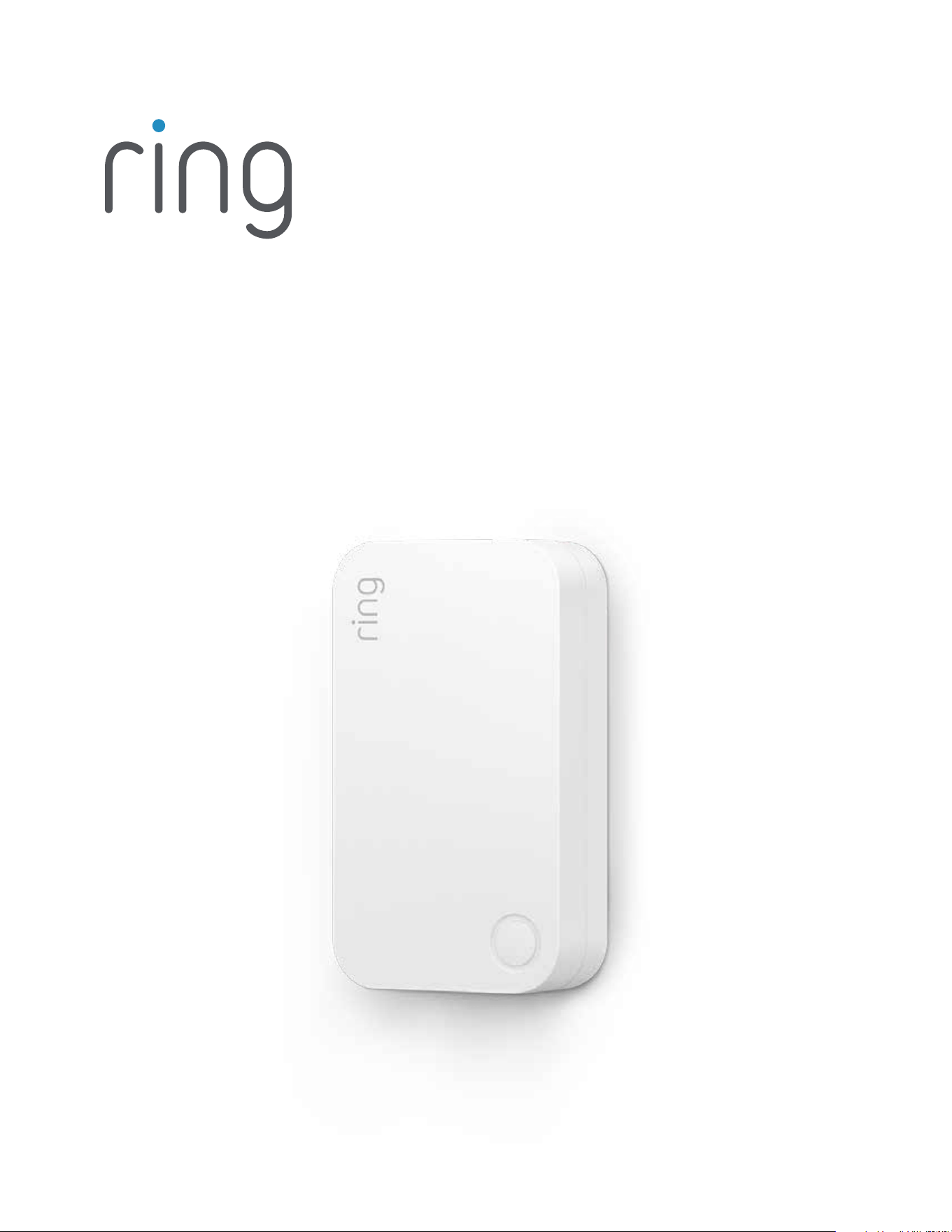
Ring Alarm Range Extender is a wireless repeater for the Ring Alarm system which helps to improve the
range and reliability of the Ring Alarm network by listening for and repeating network communication
between the Ring Alarm Base Station and other Ring Alarm end devices. After installing the Range
Extender and setting up the Range Extender in the Ring app, the devices added to Ring Alarm’s
network can utilize the Range Extender’s routing and repeating to communicate eectively with the
Base Station. The Ring Alarm Base Station is required to enable Range Extender features and functions
within the Ring app.
Notes:
1. This product can be operated in any Z-Wave™ network with other Z-Wave certified devices from
other manufacturers. All mains operated nodes within the network will act as repeaters regardless of
vendor to increase reliability of the network.
2. SmartStart enabled products can be added into a Z-Wave network by scanning the Z-Wave QR
Code present on the product with a controller providing SmartStart inclusion. No further action
is required and the SmartStart product will be added automatically within 10 minutes of being
switched on in the network vicinity.

3
Installation & Set Up
Ring Alarm Range Extender – Basic Setup & Installation
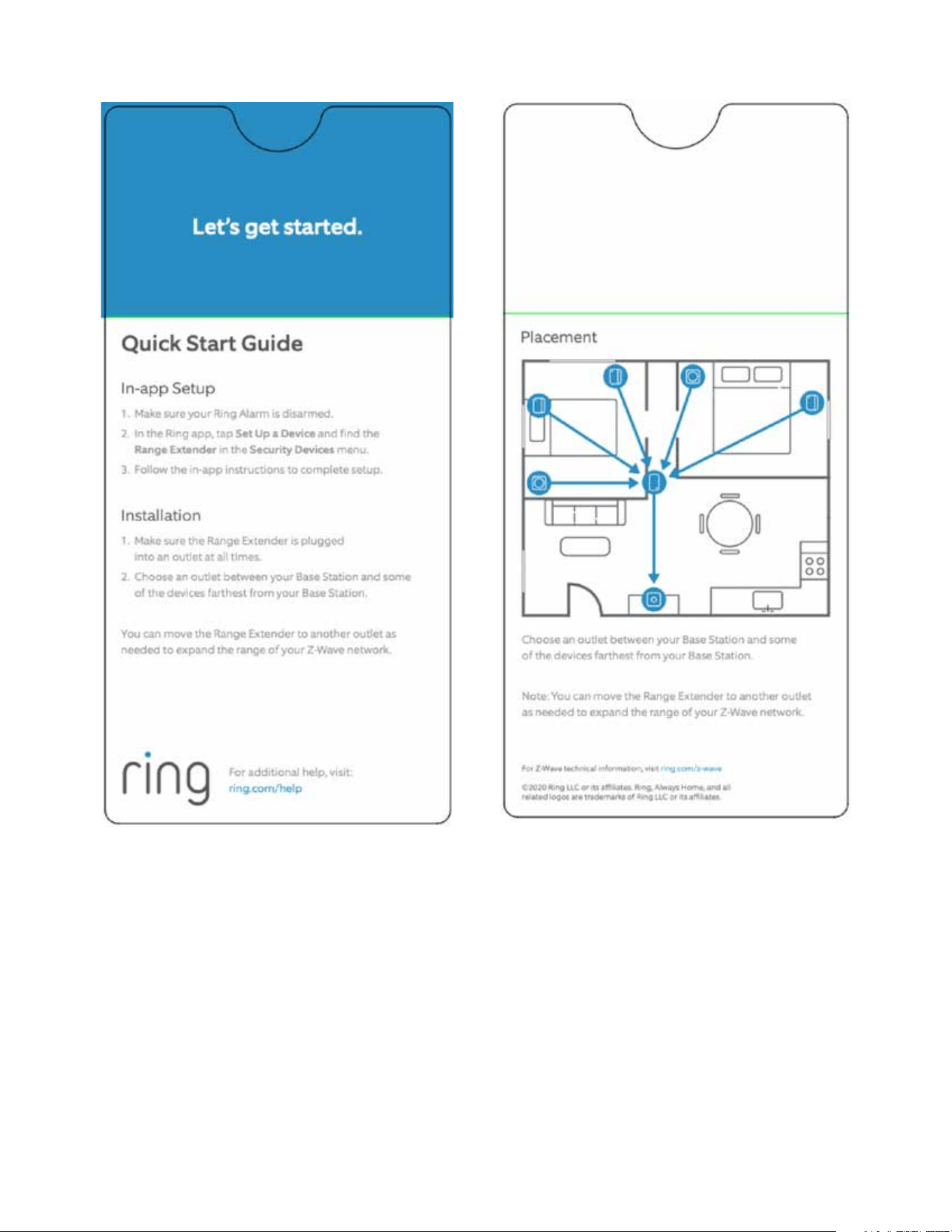
In-app Setup
1. Ensure your Ring Alarm system is disarmed.
2. In the Ring app, tap Set Up a Device and find theRange Extender in the Security Devices menu.
3. Follow the in-app instructions to complete setup. Plug in the Range Extender to trigger setup mode.
a. Tap the button on the front to retry setup mode.
Installation
1. The Range Extender plugs into a standard outlet.
2. Choose a location for installing your Range Extender. For best coverage, install the Range Extender
in an outlet between the Base Station and end devices which may require the use of the Range
Extender to improve their ability to communicate with the Base Station.
Note
This product can be operated in any Z-Wave network with other Z-Wave certified devices from other
manufacturers. All mains operated nodes within the network will act as repeaters regardless of vendor
to increase reliability of the network.
This is a SmartStart enabled product which can be added into a Z-Wave network by scanning the
Z-Wave QR Code present on the product with a controller providing SmartStart inclusion. No further
action is required and the SmartStart product will be added automatically within 10 minutes of being
switched on in the network vicinity. This product can also be operated in any Z-Wave network with other
Z-Wave certified devices from other manufacturers.
Z-Wave Instructions
Z-Wave Device Type: Repeater
Role Type: Always On Slave (AOS)
GENERIC_TYPE_REPEATER_SLAVE (0x0F)
SPECIFIC_TYPE_REPEATER_SLAVE (0x01)
4
5
Ring Alarm Range Extender – Inclusion
Adding Ring Alarm Range Extender to a Z-Wave Network
Ring Alarm Range Extender can be added via SmartStart or Classic inclusion mode.
Note
When prompted for the QR Code or PIN, you may find them on the device, on the box, or on a card
inside the box. Keep the device nearby. You’ll be prompted to plug in the Range Extender to power on
the device and enter setup mode.
SmartStart Inclusion Steps:
1. Initiate the add flow for Security Devices in the Ring mobile application – Follow the guided add flow
instructions provided in the Ring mobile application.
2. When prompted by the mobile application, scan the QR code found on the package of the Range
Extender. The QR code can also be found on the device itself.
3. Plug the device into a standard outlet and the device will go into SmartStart inclusion mode. While in
this mode, Range Extender can be added to a Z-Wave controller that supports SmartStart. When in
SmartStart inclusion mode, SmartStart can be restarted by tapping the button on the front of
the device.
Classic Inclusion Steps:
Classic Inclusion should be used if the controller does not support SmartStart.
1. Initiate add flow for Security Devices in the Ring mobile application – Follow the guided add flow
instructions provided in the Ring mobile application.
2. Select Add Manually and enter the 5-digit DSK PIN found on the package of the Ring Alarm Range
Extender or the 5-digit DSK PIN found under the QR code on the device.
3. After powering on the device, press and hold the button on the front of the device for ~3 seconds.
Release the button and the device will enter Classic inclusion mode which implements both classic
inclusion with a Node Information Frame, and Network Wide Inclusion. During Classic Inclusion
mode, the green LED will blink three times followed by a brief pause, repeatedly. When Classic
inclusion times-out, the device will blink alternating red and green a few times.
LED Behabior for Inclusion Blink Pattern
SmartStart Started Green LED three times, repeated after a brief pause
Classic Inclusion Started Green LED three times, repeated after a brief pause
Classic Inclusion Timed-Out Alternate red and green a few times
Inclusion Successful (Authenticated S2) Green LED on solid
Inclusion Not Successful (Self-Destruct) Red LED on solid

6
Ring Alarm Range Extender – Exclusion
Removing Ring Alarm Keypad from a Z-Wave Network
Exclusion Instructions:
1. Initiate remove “Ring Alarm Range Extender” flow in the Ring Alarm mobile application – Select the
settings icon from device details page and choose Remove Device to remove the device. This will
place the controller into Remove or “Z-Wave Exclusion” mode.
2. Locate the pinhole reset button on the back of the device.
3. With the controller in Remove (Z-Wave Exclusion) mode, use a paper clip or similar object and tap
the pinhole button. The device’s red LED turns on solid to indicate the device was removed from
the network.
Ring Alarm Range Extender – Factory Reset
Factory Default Instructions
1. To restore Ring Alarm Range Extender to factory default settings, locate the pinhole reset button on
the device. This is found on the back of the device after unplugging the device from the outlet.t.
2. Using a paperclip or similar object, insert it into the pinhole, press and hold the button down for
10 seconds.
3. The device will rapidly blink green continuously for 10 seconds. After about 10 seconds, when the
green blinking stops, release the button. The red LED will turn on solid to indicate the device was
removed from the network.
Note
Use this procedure only in the event that the network primary controller is missing or otherwise
inoperable.
Wake-Up Notification
Not applicable. Ring Alarm Range Extender is an Always On Slave (AOS) and does not support Wake
Up Command Class.
7
Z-Wave Command Classes
Command Class Version
Association 2
Association Group Information 3
Device Reset Locally 1
Firmware Update Meta Data 5
Indicator 3
Manufacturer Specific 2
Multi-Channel Association 3
Powerlevel 1
Security 2 1
Security 0 1
Supervision 1
Transport Service 2
Version 3
Z-Wave Plus™ Info 2
Notification 8
Configuration 4
Battery 2
Association Command Class
Group Identifier Max Nodes Description
1 (Lifeline) 0x05
1. Notification Report
a. See notification CC section for notifications that are sent
2. Battery Report
3. Device Reset Locally Notification

8
Parameter
Number
Description
Number
of
Bytes
Default Min Max Format
1
Heartbeats:
This parameter is the number min-
utes between heartbeats. Heart-
beats are automatic battery reports
on a timer after the last event.
1 70 (0x46) 1 (0x01) 70 (0x46)
0x01
Unsigned
2
Number of application level retries
attempted for messages either not
ACKed or messages encapsulated
via supervision get that did not
receive a report.
1 1 (0x01) 0 (0x00) 5 (0x05)
0x01
Unsigned
3
Application Level Retry Base Wait
Time Period: The number base
seconds used in the calculation for
sleeping between retry messages.
1 5 (0x05) 1 (0x01) 60 (0x3C)
0x01
Unsigned
4
This parameter allows a user, via
software, to configure the various
LED indications on the device.
1 1 (0x01) 0 (0x00) 1 (0x01) enum
5
The number of milliseconds
waiting for a Supervisory Report
response to a Supervisory Get
encapsulated command from the
device before attempting a retry.
2
1500
(0x5DC)
500 (0x1F4)
5000
(0x1388)
0x01
Unsigned
Configuration Command Class
The device has the following supported configuration parameters.

9
Notification Command Class, V8
Sensor Condition Command Class and Value Association Group
AC mains power
reconnected
Notification Report
Type: 0x08 Power Management
State: 0x03 AC mains reconnected
1 (Lifeline)
AC mains power
disconnected
Notification Report
Type: 0x08 Power Management
State: 0x02 AC mains disconnected
1 (Lifeline)
Watchdog Notification
Notification Report
Type: System 0x09
State Value: 0x04 System Software Failure
State Parameter Value = 0x55
1 (Lifeline)
Software Fault (Ring)
Notification Report
Type: System 0x09
State Value: 0x04 System Software Failure
State Parameter Value = 0xAA (Ring Value for Soft Fault)
1 (Lifeline)
Software Fault (SDK)
Notification Report
Type: System 0x09
State Value: 0x04 System Software Failure
State Parameter Value = 0xA9 (SDK Value for Soft Fault)
1 (Lifeline)
Software Reset
(Not triggered by failure)
Notification Report
Type: System 0x09
State Value: 0x04 System Software Failure
State Parameter Value = 0xAC
1 (Lifeline)
Power On Reset
Notification Report
Type: 0x08 Power Management
Event Parameter: 0x01 Power has been applied
1 (Lifeline)
Brownout
Notification Report
Type: 0x08 Power Management
Event: 0x05 Voltage Drop/Drift
1 (Lifeline)
Pin Reset (soft reset)
Notification Report
Type: System 0x09
State Value: 0x04 System Software Failure
State Parameter Value = 0xAB
1 (Lifeline)
Dropped Frame
Notification Report
Type: System 0x09
State Value: 0x04 System Software Failure
State Parameter Value = 0xAD
1 (Lifeline)

10
Supplier’s Declaration of Conformity – Compliance Information Statement
Unique Identifier: Ring Contact Sensor
Responsible Party and Party issuing Supplier’s Declaration of Conformity
Ring LLC dba Ring
1523 26th Street
Santa Monica, CA 90404 U.S.A.
www.ring.com / L[email protected]
FCC Compliance Statement (for products subject to Part 15)
This device complies with Part 15 of the FCC Rules. Operation is subject to the following two conditions:
(1) This device may not cause harmful interference, and (2) this device must accept any interference
received, including interference that may cause undesired operation.
NOTE: This equipment has been tested and found to comply with the limits for a Class B digital device,
pursuant to Part 15 of the FCC Rules. These limits are designed to provide reasonable protection
against harmful interference in a residential installation. This equipment generates, uses, and can
radiate radio frequency energy and, if not installed and used in accordance with the instructions, may
cause harmful interference to radio communications.
However, there is no guarantee that interference will not occur in a particular installation. If this
equipment does cause harmful interference to radio or television reception, which can be determined
by turning the equipment o and on, the user is encouraged to try to correct the interference by one or
more of the following measures:
• Reorient or relocate the receiving antenna.
• Increase the separation between the equipment and receiver.
• Connect the equipment into an outlet on a circuit dierent from that to which the receiver
is connected.
• Consult the dealer or an experienced radio/TV technician for help.
Innovation, Science and Economic Development Canada (ISED) Compliance
This device contains licence-exempt transmitter(s)/ receiver(s) that comply with Innovation, Science
and Economic Development Canada’s licence-exempt RSS(s). Operation is subject to the following
two conditions:
1. This device may not cause interference.
2. This device must accept any interference, including interference that may cause undesired operation
of the device.
Conformité Innovation Sciences et Développement Économique Canada (ISDE) L’émetteur/récepteur
exempt de licence contenu dans le présent appareil est conforme aux CNR d’Innovation, Sciences et
Développement économique Canada applicables aux appareils radio exempts de licence.
L’exploitation est autorisée aux deux conditions suivantes:
1. L’appareil ne doit pas produire de brouillage.

11
To review your warranty coverage, please visit www.ring.com/warranty.
© 2020 Ring LLC or its affiliates.
Ring, Always Home, and all related logos are trademarks of Ring LLC or its affiliates.
2. L’appareil doit accepter tout brouillage radioélectrique subi, même si le brouillage est susceptible
d’en compromettre le fonctionnement.
CAN ICES-3 (B)/NMB-3(B)
In accordance with FCC requirements of human exposure to radio frequency fields, the radiating
element shall be installed such that a minimum separation distance of 20 cm is maintained from the
general population.
Conformément aux exigences d’Industrie Canada
en matière d’exposition humaine aux champs de radiofréquences, l’élément rayonnant doit être
installé de telle sorte qu’une distance minimale de 20 cm soit maintenue par rapport à la population
générale.
WARNING: Changes or modifications to this unit not expressly approved by the party responsible for
compliance could void the user’s authority to operate the equipment.
AVERTISSEMENT : Tout changement ou modification à cet appareil qui n’a pas fait l’objet d’une
autorisation expresse par la partie responsable de sa conformité pourrait annuler le droit pour
l’utilisateur d’opérer l’équipement.
CAUTION: To reduce the risk of electrical shock, DO NOT open the unit. There are no user serviceable
parts inside the unit. Refer to customer support for any repairs.
ATTENTION : Pour réduire le risque d’électrocution, NE PAS ouvrir l’appareil. Aucune pièce interne n’est
réparable par l’utilisateur. Veuillez vous référer au service à la clientèle pour toute réparation.
CAUTION: Danger of explosion if battery is incorrectly replaced. Replace only with the same or
equivalent type recommended by the manufacturer. Dispose of the used batteries according to the
manufacturer’s instructions.
ATTENTION : Danger d’explosion si la pile n’est pas remplacée correctement. Remplacez la pile
uniquement par une pile identique ou par une pile du même type que celle recommandée par le
fabricant. Suivez les instructions du fabricant pour jeter les piles usées.