
E-mail: CustomerSeice@vevor.com
MULTIFUNCTIONAL DIGITAL
HEAT PRESS MACHINE
USER GUIDE

E-mail: CustomerSeice@vevor.com
MULTIFUNCTIONAL DIGITAL
HEAT PRESS MACHINE
USER GUIDE
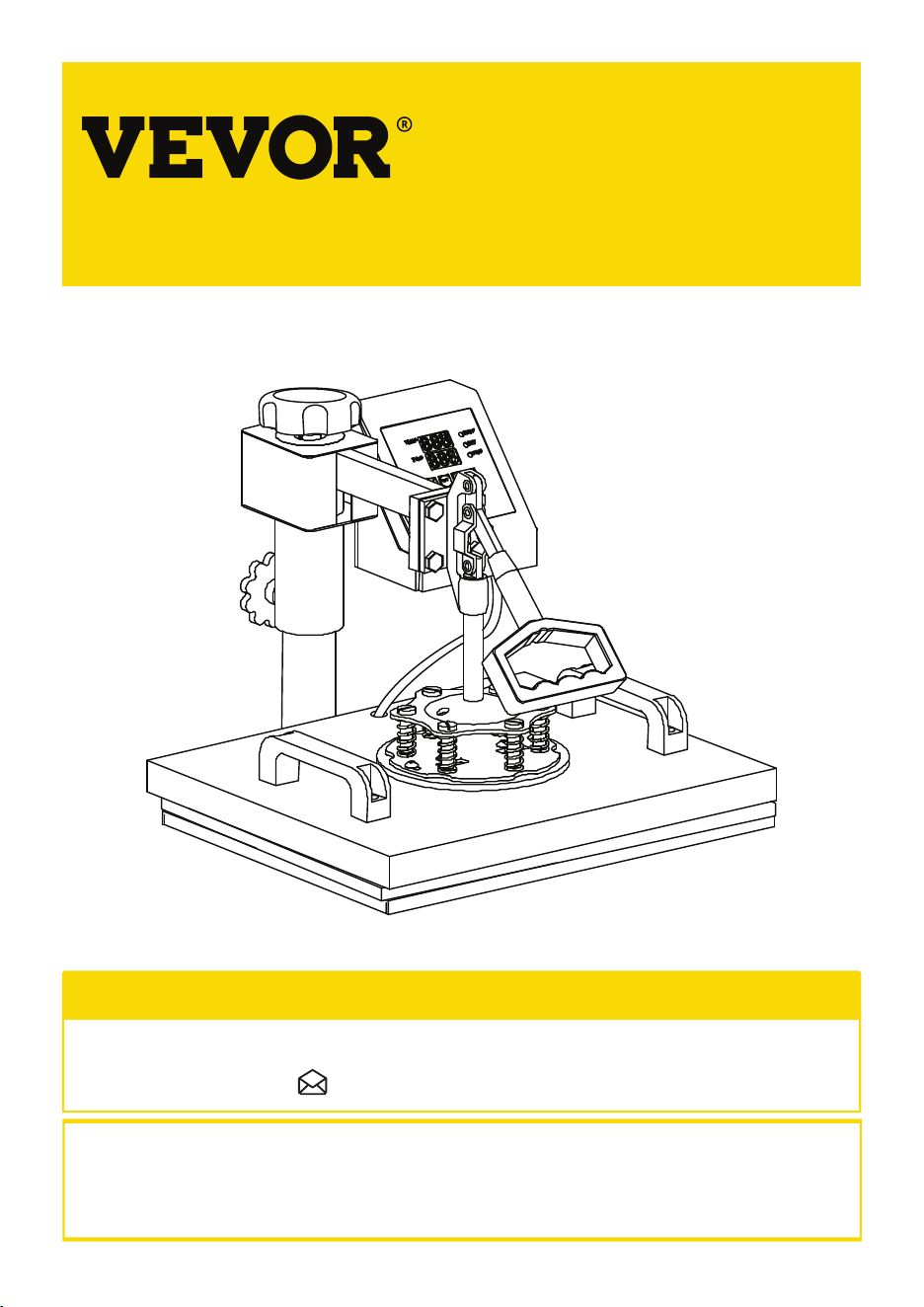
MULTIFUNCTIONAL DIGITAL
HEAT PRESS MACHINE
This is the original instruction, please read all manual instructions carefully before operating. VEVOR
reserves clear interpretation of our user manual. The appearance of the product shall be subject to the
product you received. Please forgive us that we won't inform you again if there is any technology or
software updates on our product.
NEED HELP? CONTACT US!
Have product questions? Need technical suppo? Please feel free to contact us:
CustomerSe[email protected]
01
02
CONTENTS
REPLACE BAKING COASTER
HEAT PRESS MACHINE PARTS INTRODUCTION
3
PARTS LIST
4
ASSEMBLY & USE STEPS
5
INTELLIGENT TEMPERATURE CONTROLLER OPERATION METHOD
6
Ⅰ. PREPARATION BEFORE USING
6
Ⅱ. SET TEMPERATURE REQUIRED
6
REPLACE BAKING TRAY MAT
8-9
REPLACE BAKING CAP MAT
10-12
13-14
Ⅲ. PRINTING METHODS
15
Ⅳ. TROUBLE SHOOTING FOR TRANSFER QUALITY
15-16
.................................................................................................................................
................................................................................................................................
.................................................................................................................................
.............................................................................................................................
............................................................................................................................
...............................................................................................................................................
................................................................................

MULTIFUNCTIONAL DIGITAL
HEAT PRESS MACHINE
This is the original instruction, please read all manual instructions carefully before operating. VEVOR
reserves clear interpretation of our user manual. The appearance of the product shall be subject to the
product you received. Please forgive us that we won't inform you again if there is any technology or
software updates on our product.
NEED HELP? CONTACT US!
Have product questions? Need technical suppo? Please feel free to contact us:
CustomerSe[email protected]
01
02
CONTENTS
REPLACE BAKING COASTER
HEAT PRESS MACHINE PARTS INTRODUCTION
3
PARTS LIST
4
ASSEMBLY & USE STEPS
5
INTELLIGENT TEMPERATURE CONTROLLER OPERATION METHOD
6
Ⅰ. PREPARATION BEFORE USING
6
Ⅱ. SET TEMPERATURE REQUIRED
6
REPLACE BAKING TRAY MAT
8-9
REPLACE BAKING CAP MAT
10-12
13-14
Ⅲ. PRINTING METHODS
15
Ⅳ. TROUBLE SHOOTING FOR TRANSFER QUALITY
15-16
.................................................................................................................................
................................................................................................................................
.................................................................................................................................
.............................................................................................................................
............................................................................................................................
...............................................................................................................................................
................................................................................
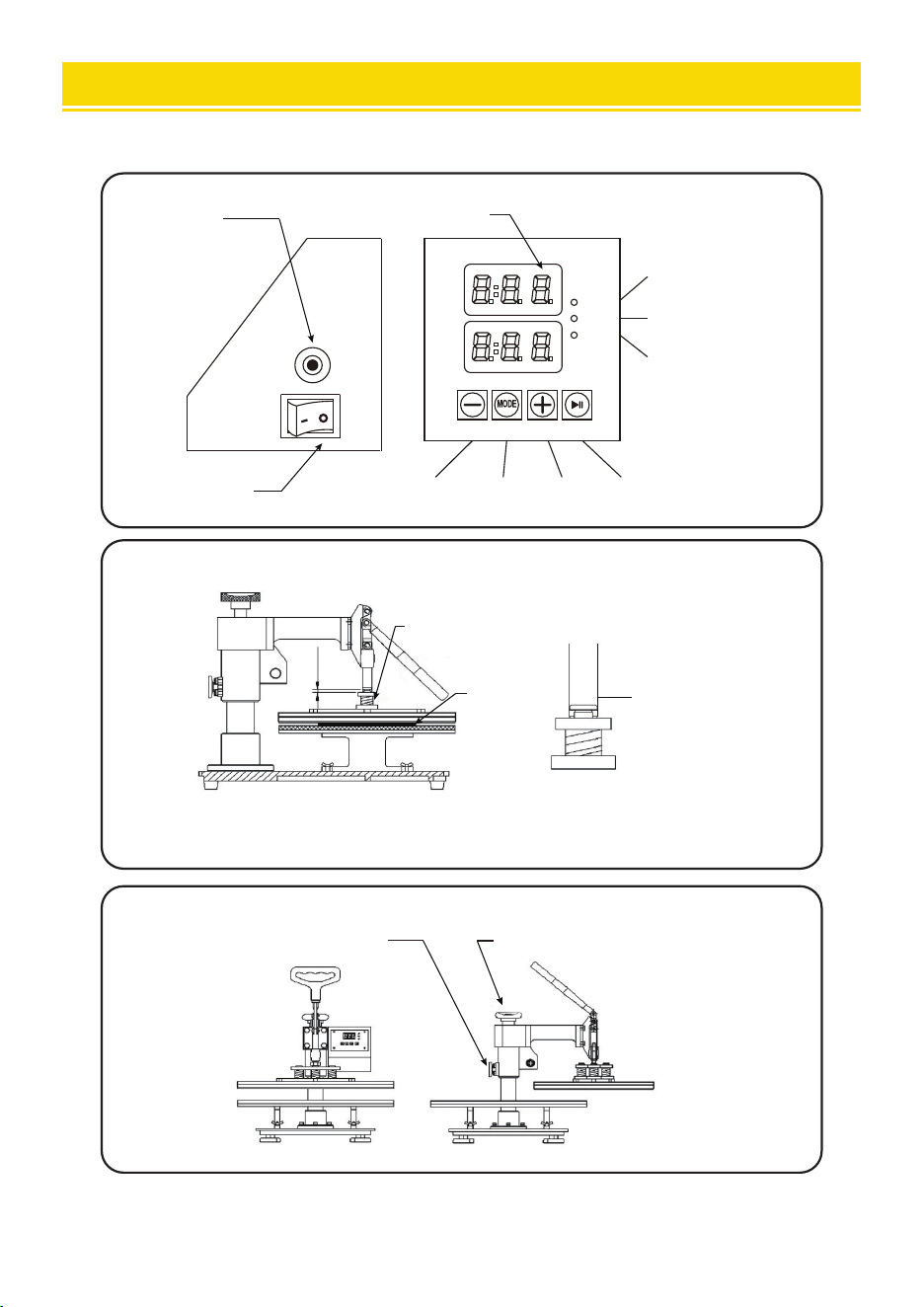
PARTS LIST
04
HEAT PRESS MACHINE PARTS INTRODUCTION
TEMP
TEMP
TIME
SET
TIME
overload
protector design
power switch
display
temperature light
set light
time light
minus mode plus sta
best pressure for heat press
rotation lock screw swiveling pressure adjustment
spring
T-shi: 3/8-1/2”
other object: 3/16”
3/16”
spring
object
03
1PC
1PC
A Phillips screwdriver can be turned into a slotted
screwdriver by rotating it 180 degrees
5in1 Heat Press
6in1 Heat Press
8in1 Heat Press
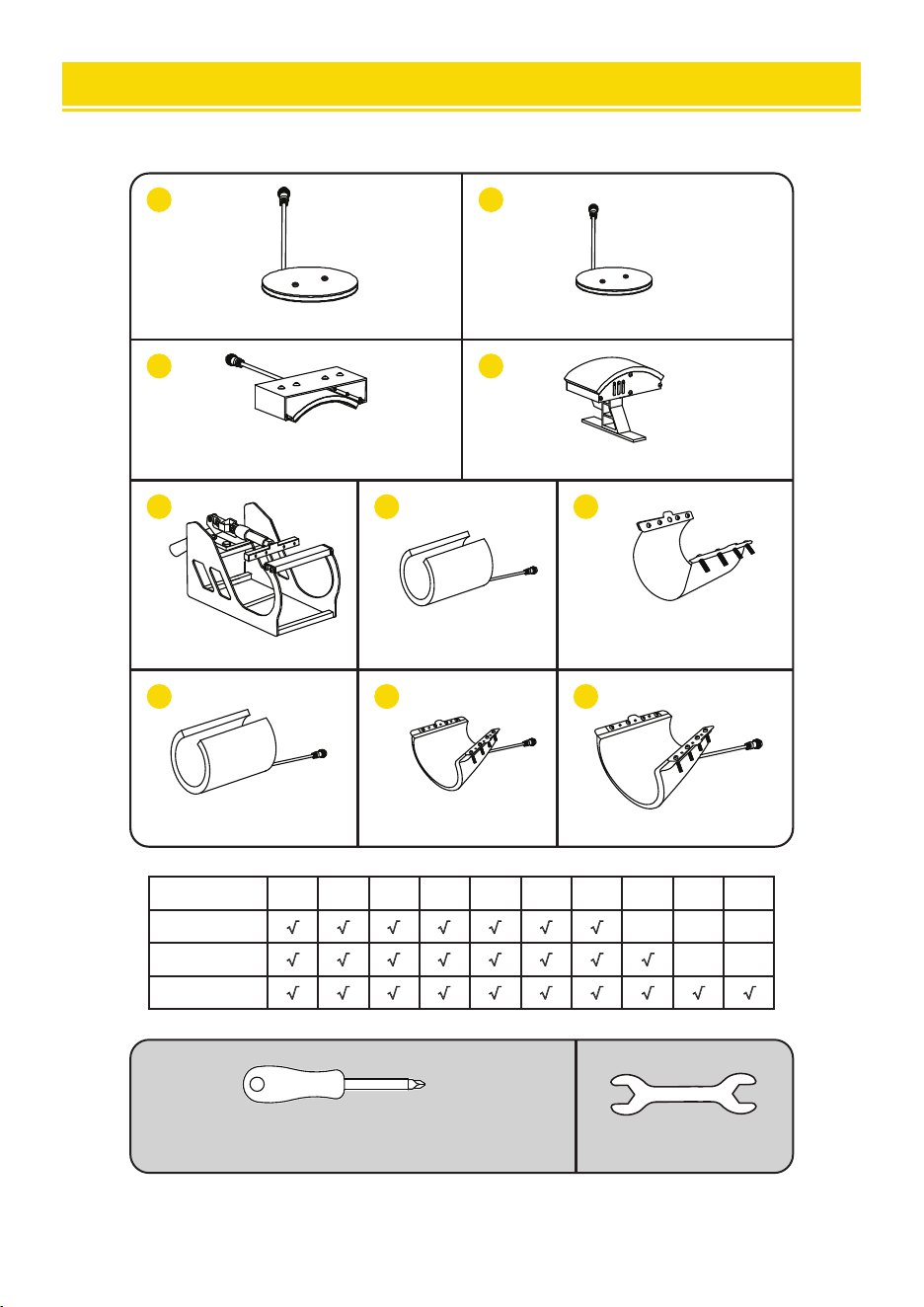
Pa A Pa B Pa C Pa D Pa E Pa F Pa H Pa G Pa I Pa J
√ √ √
√ √ √ √
√ √ √ √ √ √ √ √
√ √ √ √ √ √ √ √ √ √
1PC 1PC
1PC 1PC
A
B
C
D
1PC
E
F
1PC
G
1PC
1PC
H
1PC
I
1PC
J
PARTS LIST
04
HEAT PRESS MACHINE PARTS INTRODUCTION
TEMP
TEMP
TIME
SET
TIME
overload
protector design
power switch
display
temperature light
set light
time light
minus mode plus sta
best pressure for heat press
rotation lock screw swiveling pressure adjustment
spring
T-shi: 3/8-1/2”
other object: 3/16”
3/16”
spring
object
03
1PC
1PC
A Phillips screwdriver can be turned into a slotted
screwdriver by rotating it 180 degrees
5in1 Heat Press
6in1 Heat Press
8in1 Heat Press
Pa A Pa B Pa C Pa D Pa E Pa F Pa H Pa G Pa I Pa J
√ √ √
√ √ √ √
√ √ √ √ √ √ √ √
√ √ √ √ √ √ √ √ √ √
1PC 1PC
1PC 1PC
A
B
C
D
1PC
E
F
1PC
G
1PC
1PC
H
1PC
I
1PC
J
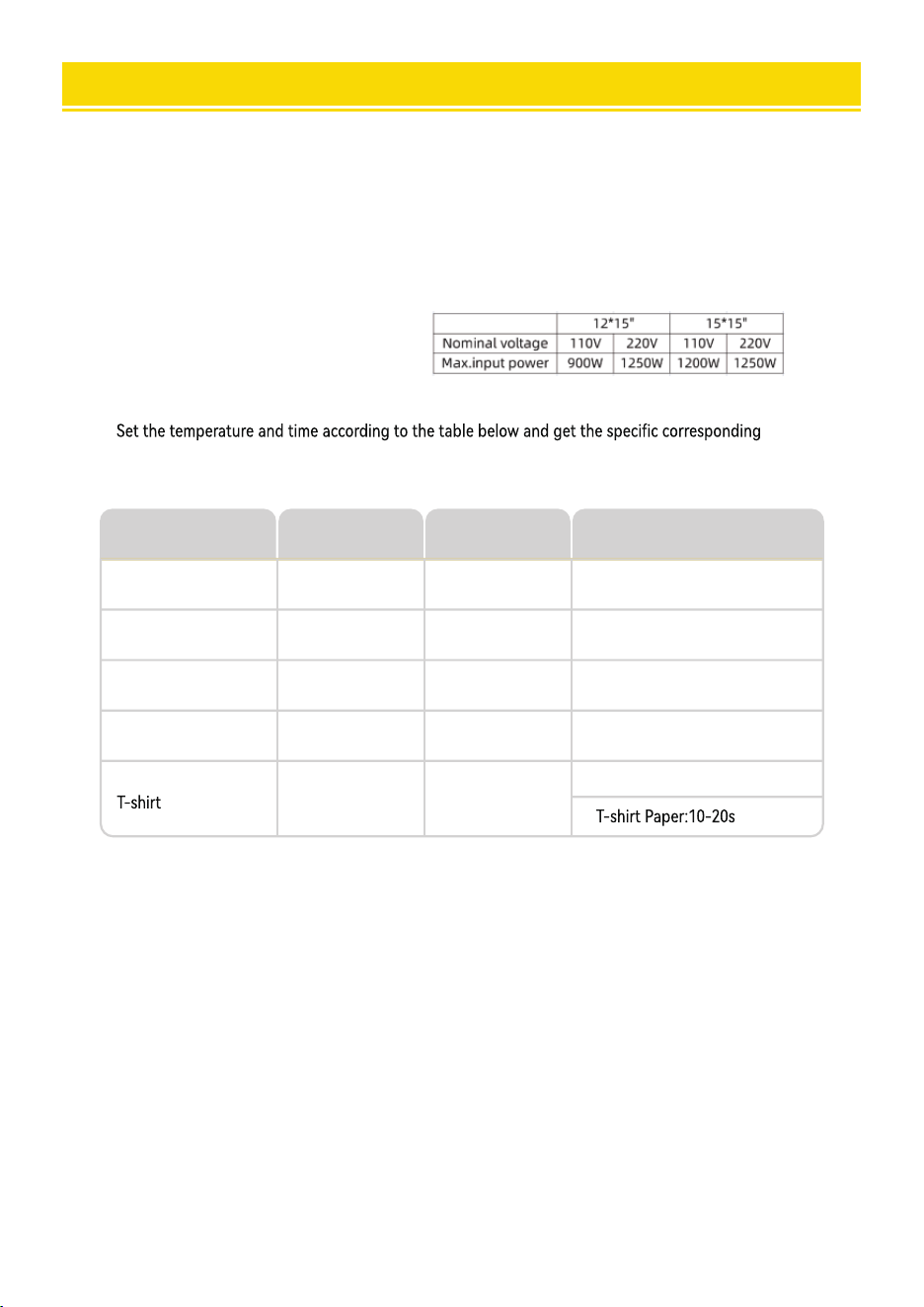
INTELLIGENT TEMPERATURE CONTROLLER OPERATION METHOD
Ⅱ.Set temperature required
Ⅰ
.Preparation before Using:
Check the connection between power plug and electrical socket of electrical cabinet.
Be sure to operate with safe ground wire!!!
Heat press element must be securely plugged into the machine before you switch the machine
on.Plug your electrical cord into the machine. Plug electrical socket into wall plug.
temperature and timing setting.(Temperature is measured in Degrees Fahrenheit.)
Press the “MODE”button ONCE,see the “set light” turning red.Then press
the “plus/minus key” to set the initial heating temperature.
1.
2.
A.Initial Temperature Setting ( Range:200-450℉)
Press the “MODE” button for THE SECOND TIME;see the “temperature light” turning
red.Then press the “plus or minus key” to set the highest heating temperature.
B.Highest Temperature Setting ( Range:93-232℃)
Press the “MODE” button for THE THIRD TIME;see the”time light” turning red.
Then press the “plus or minus key” to set the proper heating time.
C.Proper Heating Time Setting ( Range:0-999 sec.)
Press
Object
Mugs
Tiles
Metal board
Plate
230
230
230
230
330
330
300
355
40
40
40
150
Initial
Temperature
Highest
Temperature
Proper Heating
Time ( s )
Sublimation paper:30-50s
230 355
06
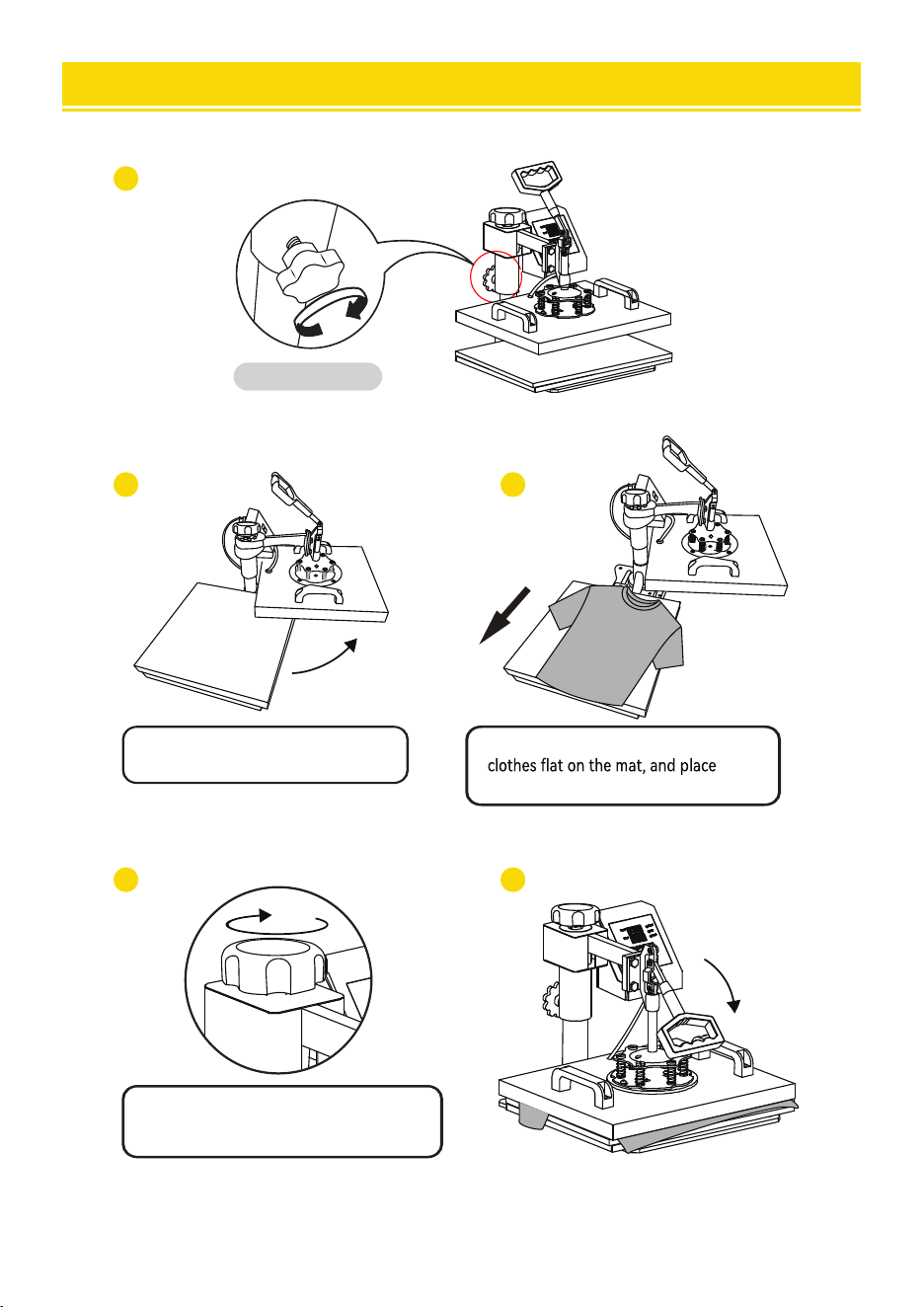
ASSEMBLY & USE STEPS
1
2 3
4 5
Tighten knob.
Rotate the heat transfer board
to the side.
Pull out the mat below, place the
the pattern on the clothes.
Turn this adjustment switch
to adjust the pressure.
05
Turn the power.
on by flipping the on/off Switch on.
D. Fahrenheit to Celsius
After turning on the hot stamping machine, press the+and - buttons simultaneously for about five seconds.
When PAE is displayed, press the MODE key to display (F-C), and change F to C in the time display gear,
so that Fahrenheit is converted to Celsius.
INTELLIGENT TEMPERATURE CONTROLLER OPERATION METHOD
Ⅱ.Set temperature required
Ⅰ
.Preparation before Using:
Check the connection between power plug and electrical socket of electrical cabinet.
Be sure to operate with safe ground wire!!!
Heat press element must be securely plugged into the machine before you switch the machine
on.Plug your electrical cord into the machine. Plug electrical socket into wall plug.
temperature and timing setting.(Temperature is measured in Degrees Fahrenheit.)
Press the “MODE”button ONCE,see the “set light” turning red.Then press
the “plus/minus key” to set the initial heating temperature.
1.
2.
A.Initial Temperature Setting ( Range:200-450℉)
Press the “MODE” button for THE SECOND TIME;see the “temperature light” turning
red.Then press the “plus or minus key” to set the highest heating temperature.
B.Highest Temperature Setting ( Range:93-232℃)
Press the “MODE” button for THE THIRD TIME;see the”time light” turning red.
Then press the “plus or minus key” to set the proper heating time.
C.Proper Heating Time Setting ( Range:0-999 sec.)
Press
Object
Mugs
Tiles
Metal board
Plate
230
230
230
230
330
330
300
355
40
40
40
150
Initial
Temperature
Highest
Temperature
Proper Heating
Time ( s )
Sublimation paper:30-50s
230 355
06
ASSEMBLY & USE STEPS
1
2 3
4 5
Tighten knob.
Rotate the heat transfer board
to the side.
Pull out the mat below, place the
the pattern on the clothes.
Turn this adjustment switch
to adjust the pressure.
05
Turn the power.
on by flipping the on/off Switch on.
D. Fahrenheit to Celsius
After turning on the hot stamping machine, press the+and - buttons simultaneously for about five seconds.
When PAE is displayed, press the MODE key to display (F-C), and change F to C in the time display gear,
so that Fahrenheit is converted to Celsius.
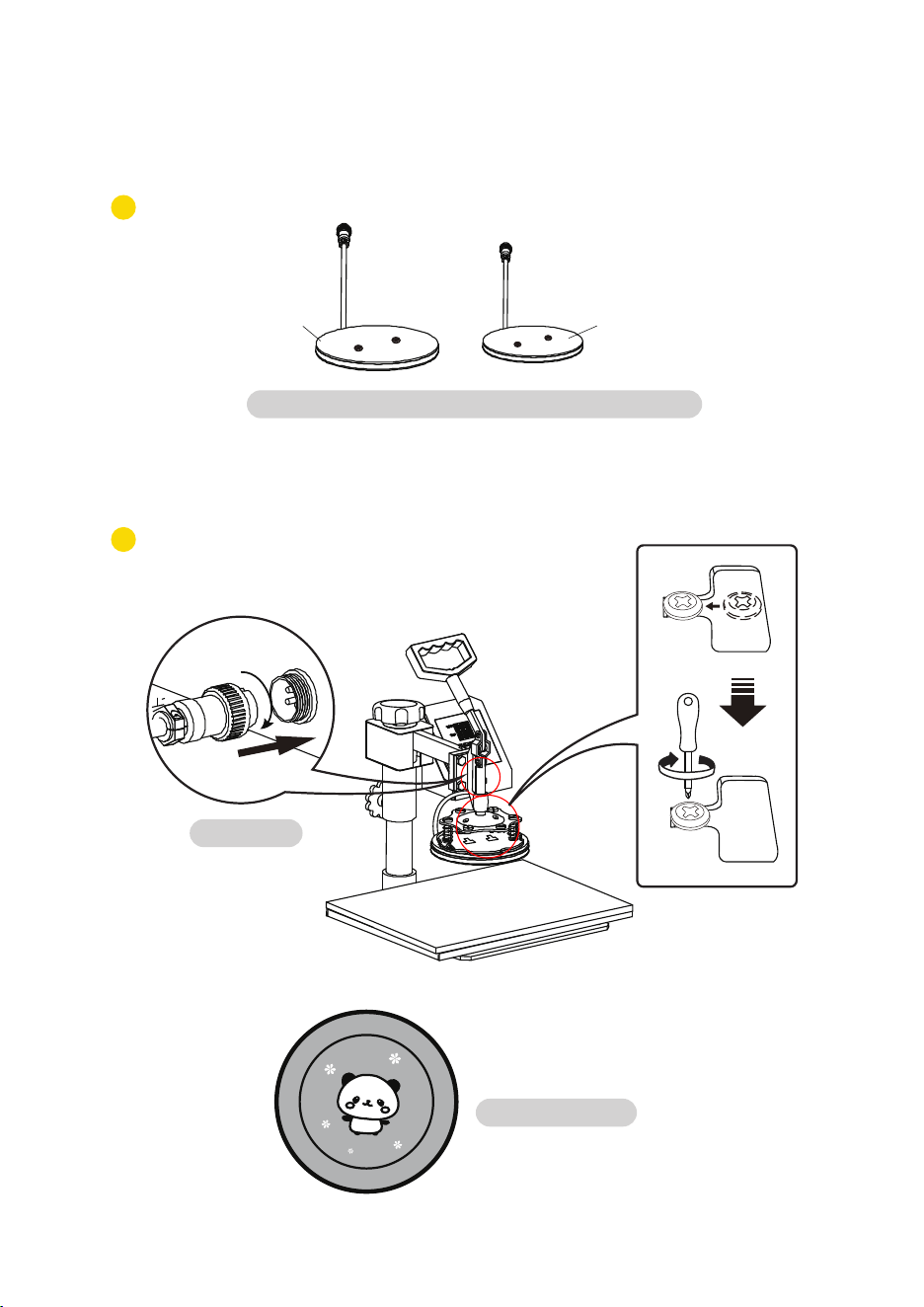
1
2
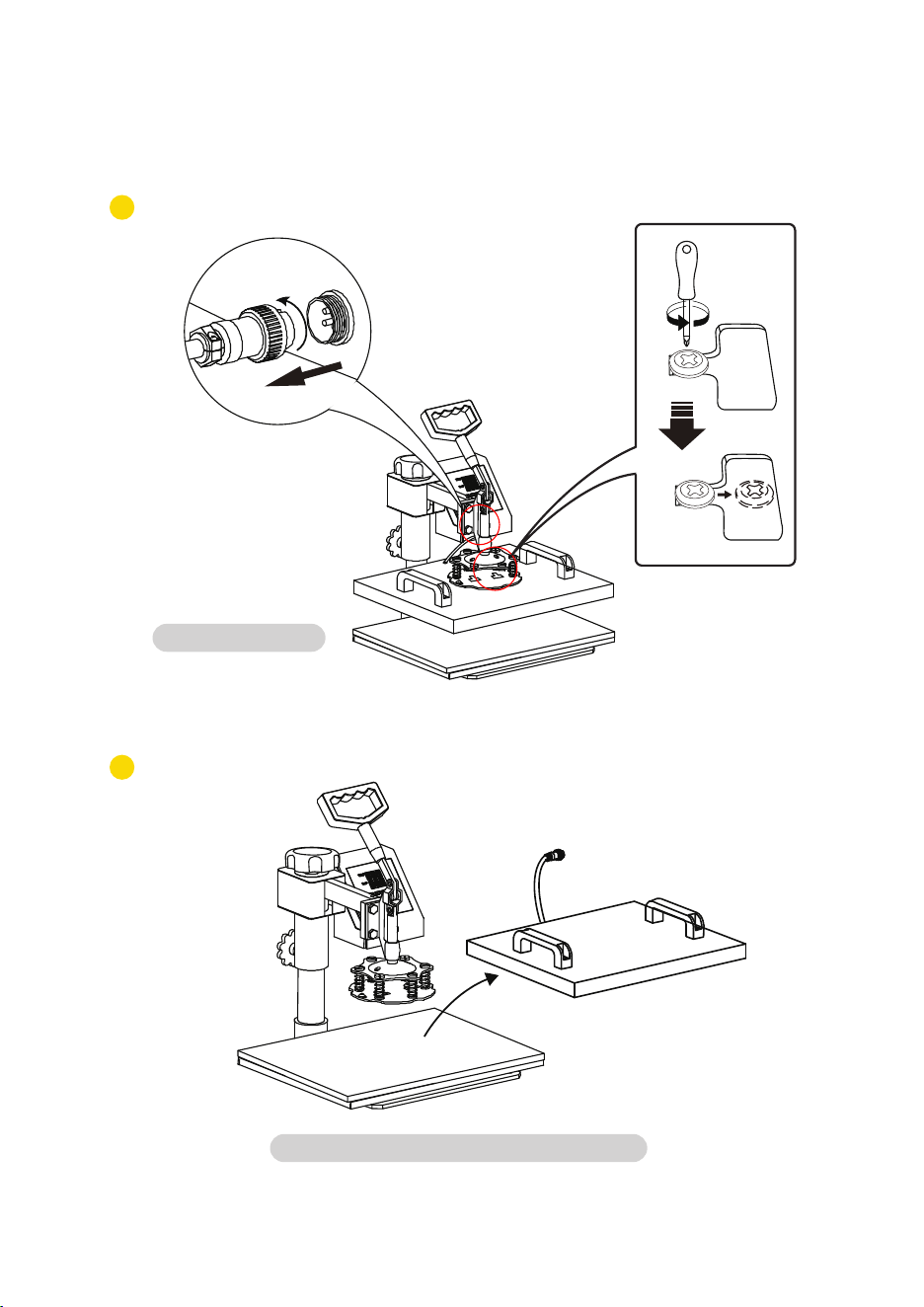
Pluck the plug.
Rotate the heat transfer board to the side.
Replace Baking Tray Mat
0807
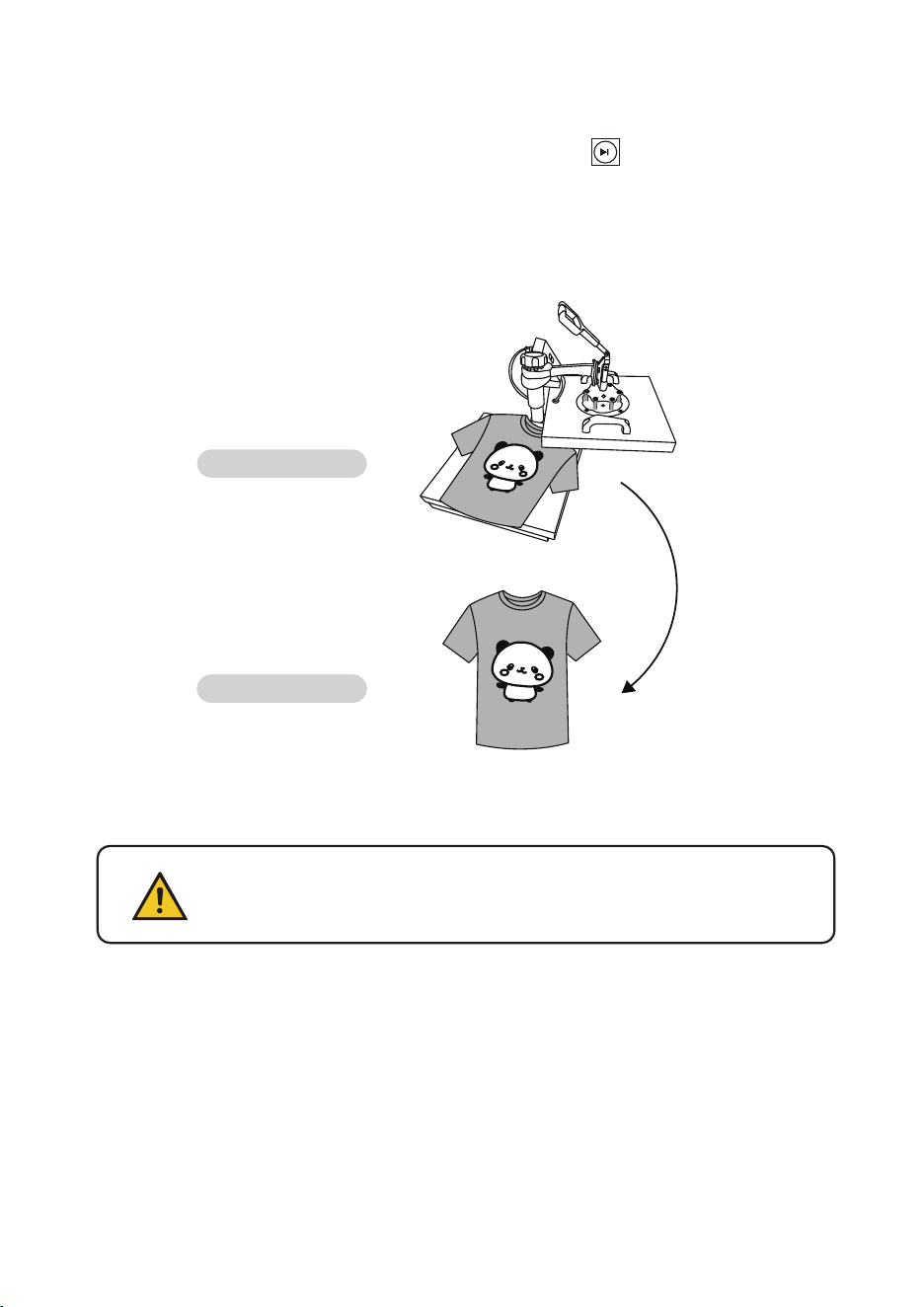
Turn o the power and pull out the mat. It is recommended to wear heat-resistant gloves
when removing clothes or remove them after 2-3 minutes. Be careful of hot heat.
Printed pattern
Note
• The machine has a self -locking function for temperature setting.
---If the staing temperature is set to 340°F,the machine will automatically limit the
maximum temperature setting range from 340 to 430°F.
---Conversely,if setting the maximum temperature as 250°F at rst,the machine will
automatically limit the staing temperature setting range from 200 to 250°F.
• Initial heating temperature always=<Highest heating temperature
Printed clothes
Press the “MODE”button for THE FOURTH TIME;nish the setting , The set light is on,
and the temperature will continue to rise. When the set maximum temperature is reached, the
countdown stas. After the countdown ends, the "BEEF" sound will be emitted, the indicator
light will turn o, and the operation is complete.and the machine stands by to work.
D.Finish the Setting and Stands by to Work
Use a Phillips screwdriver to unscrew the screws in the two holes on the
pressure plate to replace the accessories
1
2
Pluck the plug.
Rotate the heat transfer board to the side.
Replace Baking Tray Mat
0807
Turn o the power and pull out the mat. It is recommended to wear heat-resistant gloves
when removing clothes or remove them after 2-3 minutes. Be careful of hot heat.
Printed pattern
Note
• The machine has a self -locking function for temperature setting.
---If the staing temperature is set to 340°F,the machine will automatically limit the
maximum temperature setting range from 340 to 430°F.
---Conversely,if setting the maximum temperature as 250°F at rst,the machine will
automatically limit the staing temperature setting range from 200 to 250°F.
• Initial heating temperature always=<Highest heating temperature
Printed clothes
Press the “MODE”button for THE FOURTH TIME;nish the setting , The set light is on,
and the temperature will continue to rise. When the set maximum temperature is reached, the
countdown stas. After the countdown ends, the "BEEF" sound will be emitted, the indicator
light will turn o, and the operation is complete.and the machine stands by to work.
D.Finish the Setting and Stands by to Work
Use a Phillips screwdriver to unscrew the screws in the two holes on the
pressure plate to replace the accessories
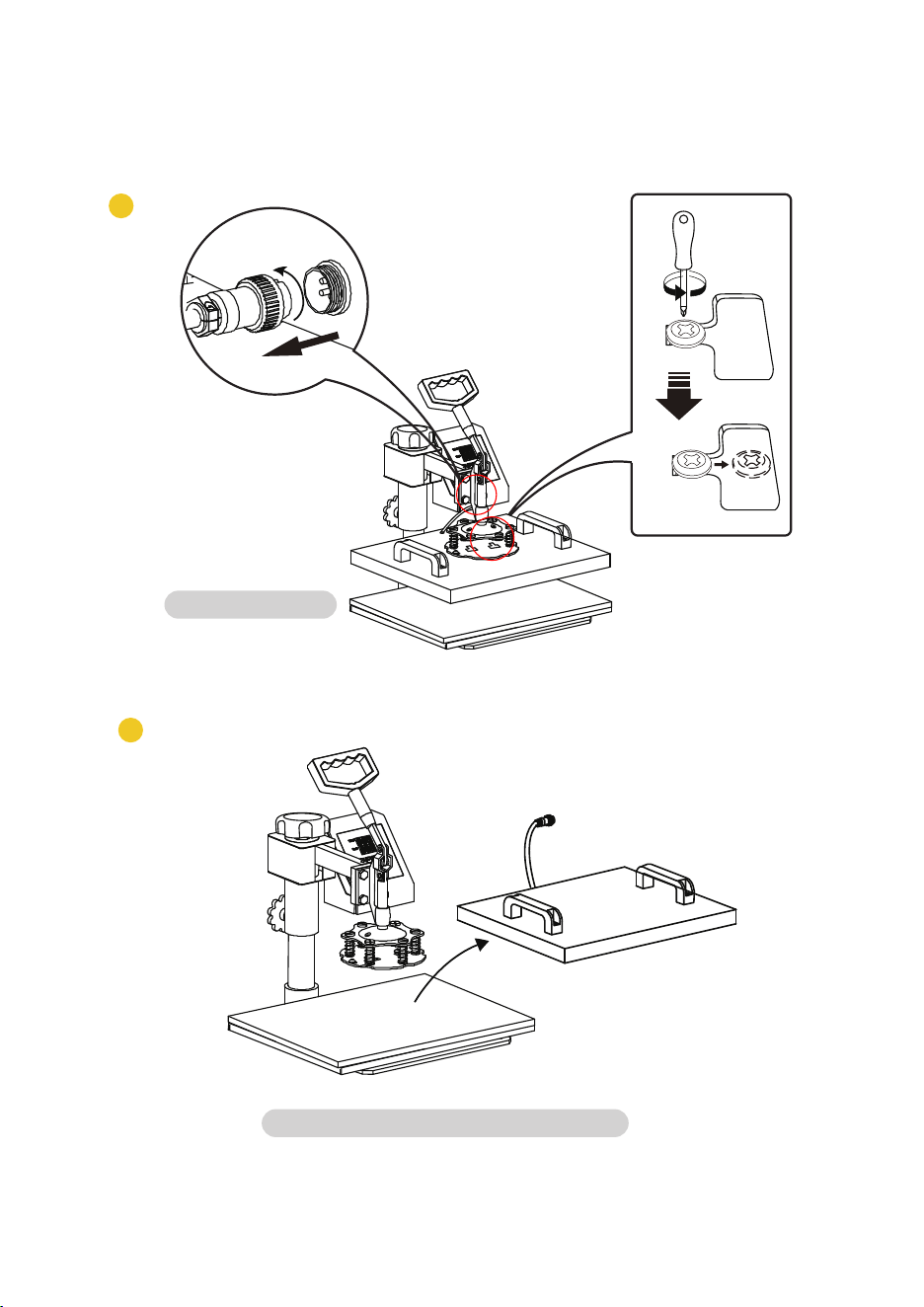
2
1
Replace Baking Cap Mat
Pluck the plug.
Rotate the heat transfer board to the side.
10
Select the appropriate size baking pan mat ( Pa A or B ).
3
4
Plug in.
Patterned plate.
Replace Baking Tray Mat
A B
09
2
1
Replace Baking Cap Mat
Pluck the plug.
Rotate the heat transfer board to the side.
10
Select the appropriate size baking pan mat ( Pa A or B ).
3
4
Plug in.
Patterned plate.
Replace Baking Tray Mat
A B
09
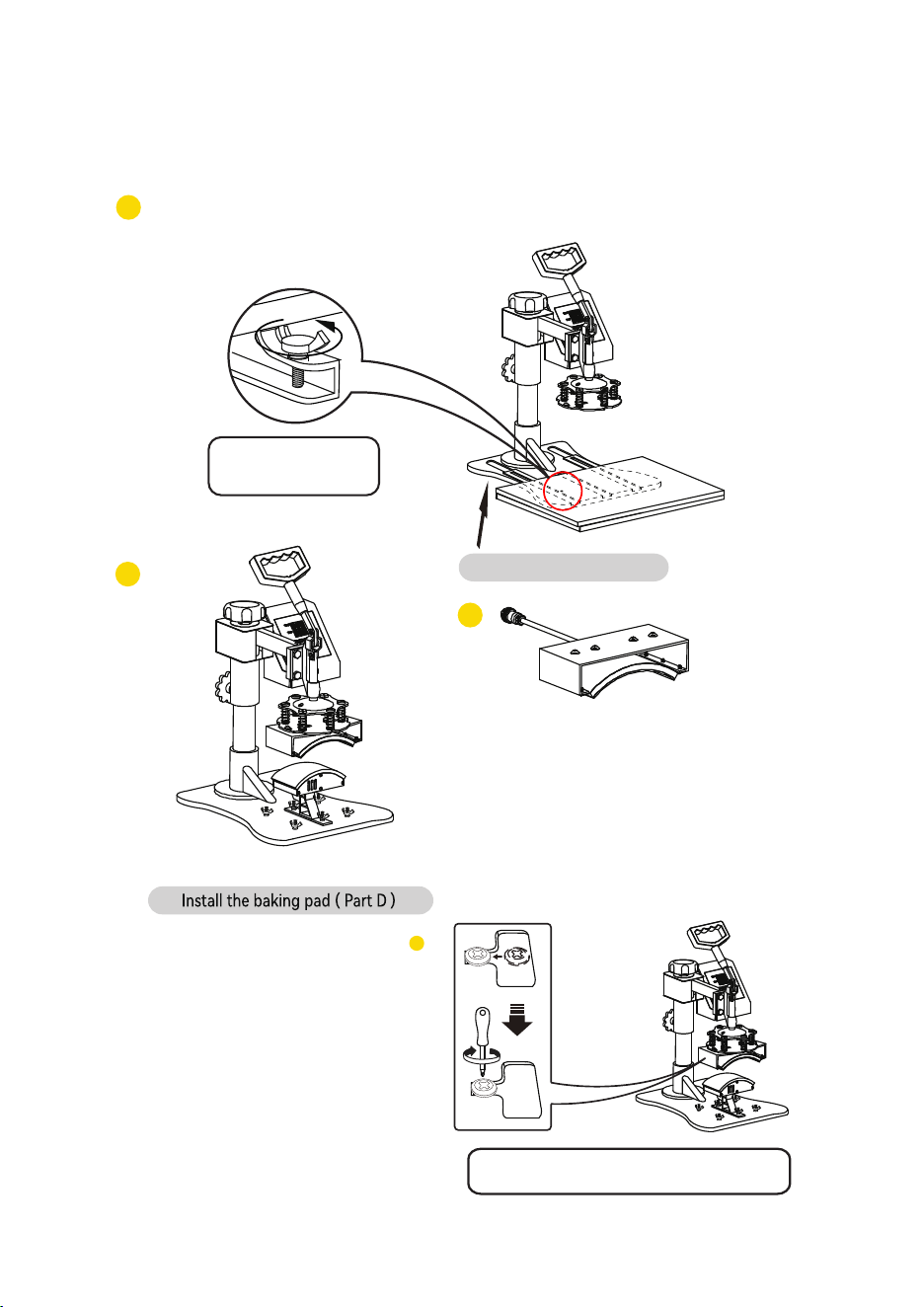
Use the screwdriver 4 to tighten the 2 screws just
removed and put the cap on.
Shaped hat
6
Replace Baking Cap Mat
12
Replace Baking Cap Mat
Loosen the bottom
screw and remove.
Lift the cushion up
4
5
3
11
Unscrew the four butterfly screws at the bottom
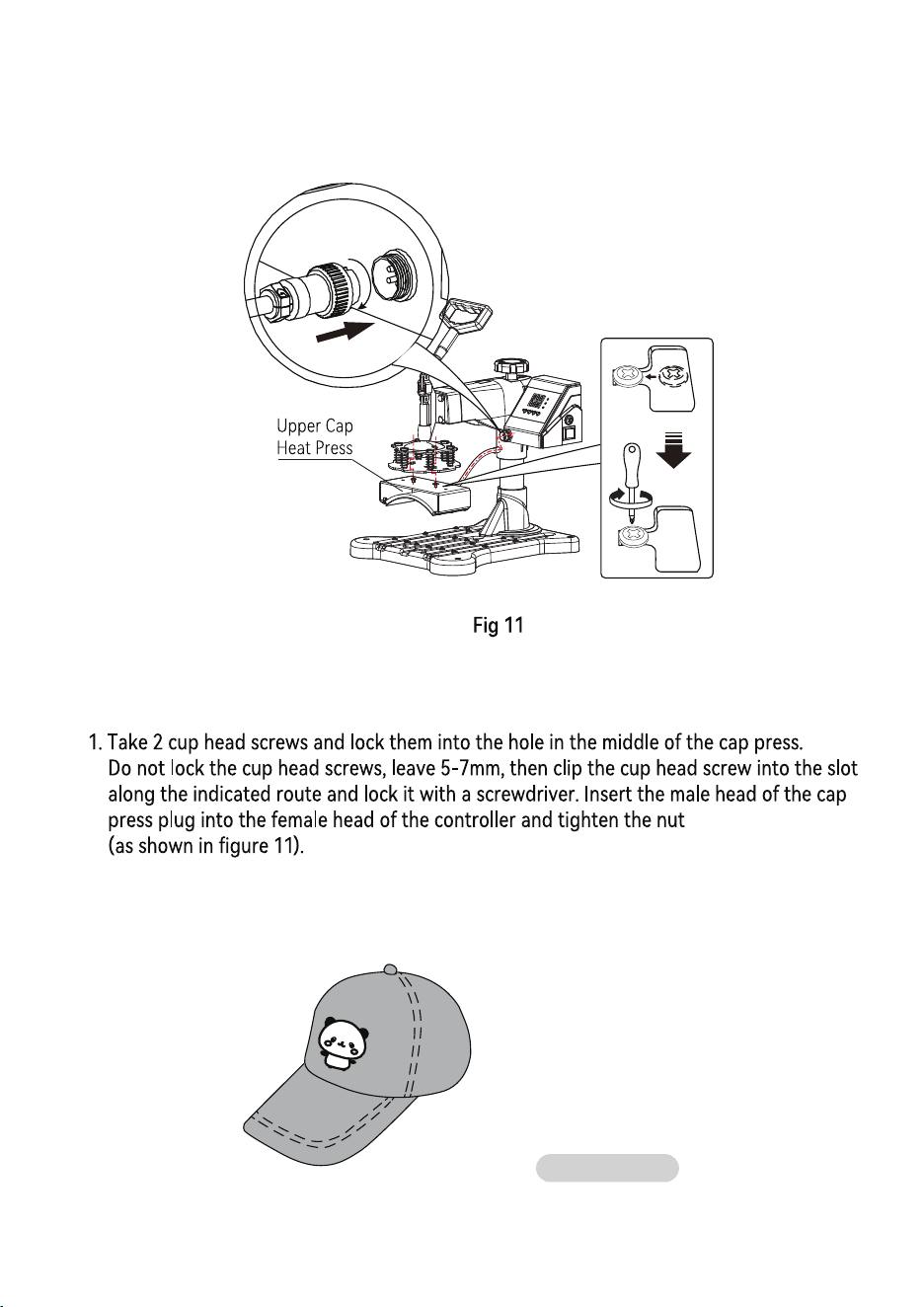
Use the screwdriver 4 to tighten the 2 screws just
removed and put the cap on.
Shaped hat
6
Replace Baking Cap Mat
12
Replace Baking Cap Mat
Loosen the bottom
screw and remove.
Lift the cushion up
4
5
3
11
Unscrew the four butterfly screws at the bottom

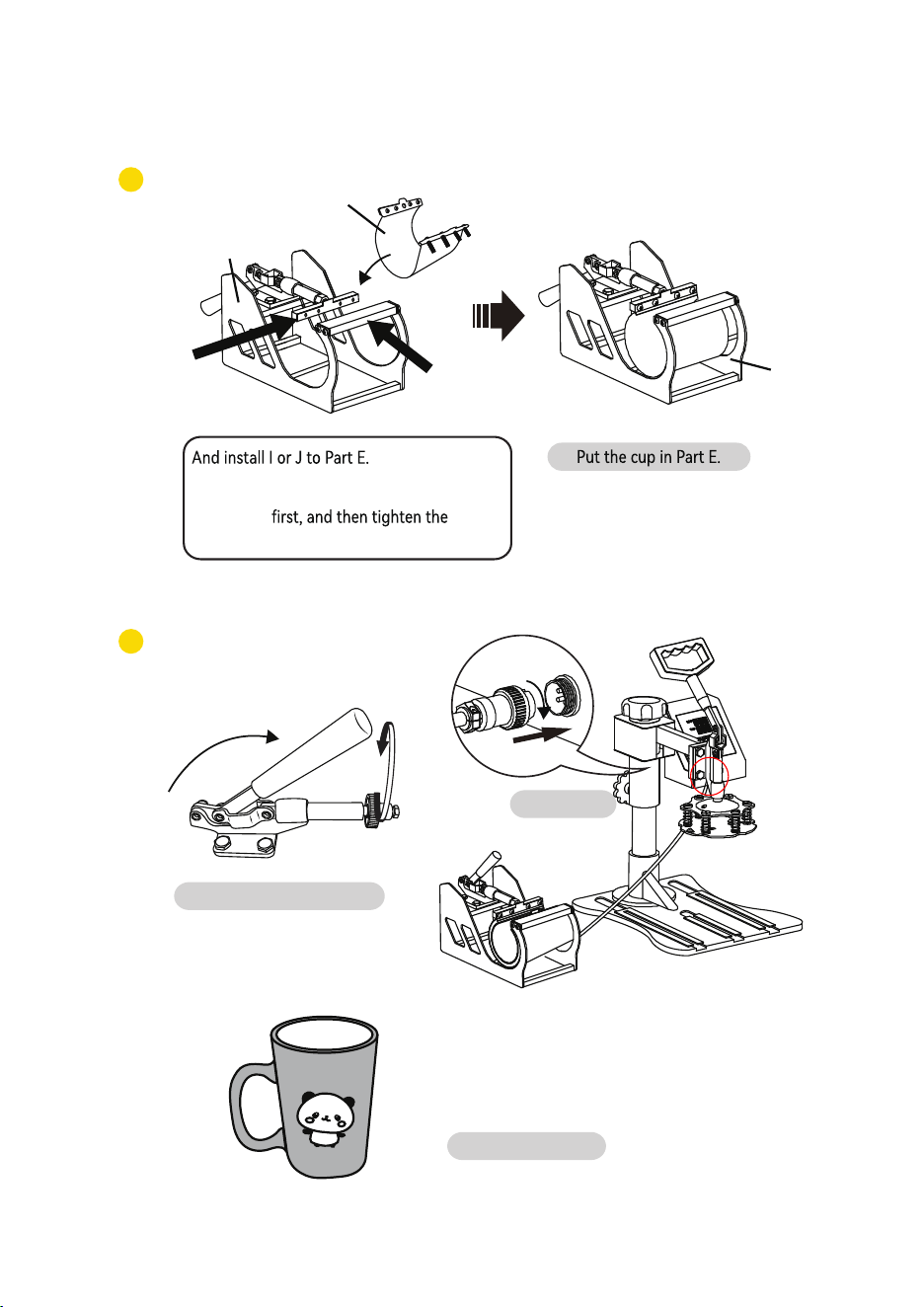
E
1
(Tighten the screws on both sides.
We suggest to tighten the screws on
the side
①
screws on the side ② )
2
Adjust the tightness.
Plug in.
Shaped cup
Replace Baking Coaster
I or J
E
①
②
1413
2
1
Select the appropriate size
(Tighten the screws on both sides. We suggest
to tighten the screws on the side ①
then tighten the screws on the side ② )
Adjust the tightness.
Plug in.
Shaped cup
Replace Baking Coaster
E
G
F or H
E
①
②
Install G to Part E.
baking coaster (Part F or H)
E
1
(Tighten the screws on both sides.
We suggest to tighten the screws on
the side
①
screws on the side ② )
2
Adjust the tightness.
Plug in.
Shaped cup
Replace Baking Coaster
I or J
E
①
②
1413
2
1
Select the appropriate size
(Tighten the screws on both sides. We suggest
to tighten the screws on the side ①
then tighten the screws on the side ② )
Adjust the tightness.
Plug in.
Shaped cup
Replace Baking Coaster
E
G
F or H
E
①
②
Install G to Part E.
baking coaster (Part F or H)
CAUTION
•
CHECK the correct voltage before using the machine.Be SURE to operate with reliable grounded
protection connections.
• TURN OFF the machine,and then DISCONNECT the power-supply before
replacing the heat units.DO NOT forget to wearing insulated gloves if the unit
is still under high-temperature.
•
please place a hot stamping replacement ( it could be a scrap and can be used
• AVOID touching the heating units and the compression spring without
protection in case of potential damage,of body during use.
• If it’s hard to pushing the grasp,please adjust the rotation lock screw in order
to reduce the pressure of compression spring.Or, it will damage to the
strength of the machine.
• Before lifting the machine,please lock the machine head by rotation lock screw
and loosen the handle(don’t screw the rotation lock screw too tight).Besides,
do not put down the machine beyond the limit.When meeting the falling limit,
you can feel an obvious pressure on the swiveling pressure adjustment wheel.
• Keep children away from the machine!!!
•
DO NOT attempt to press products that are not intended for normal heat transfer. Baking pads
should be avoided of empty burning.
16
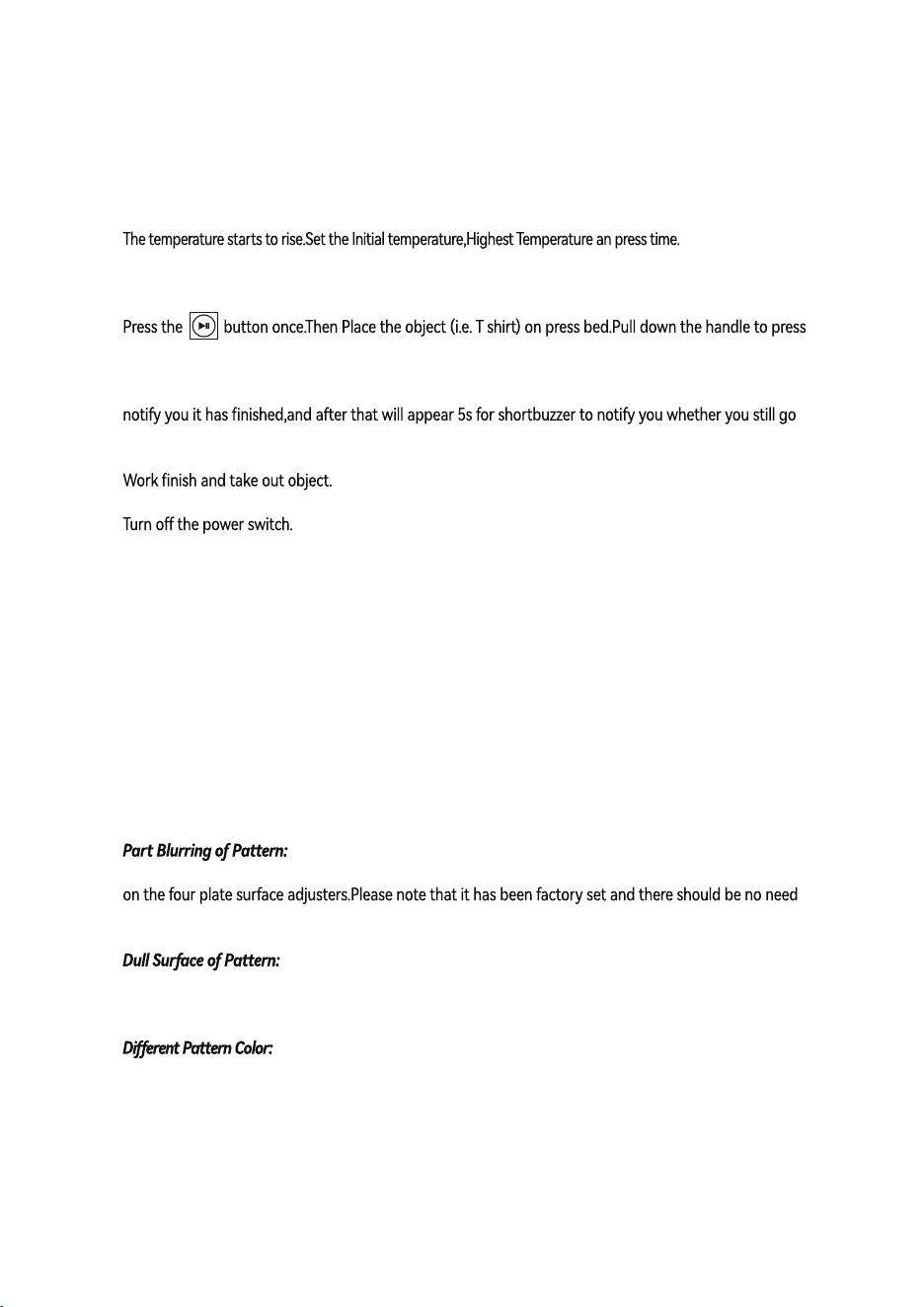
Ⅲ.Printing methods
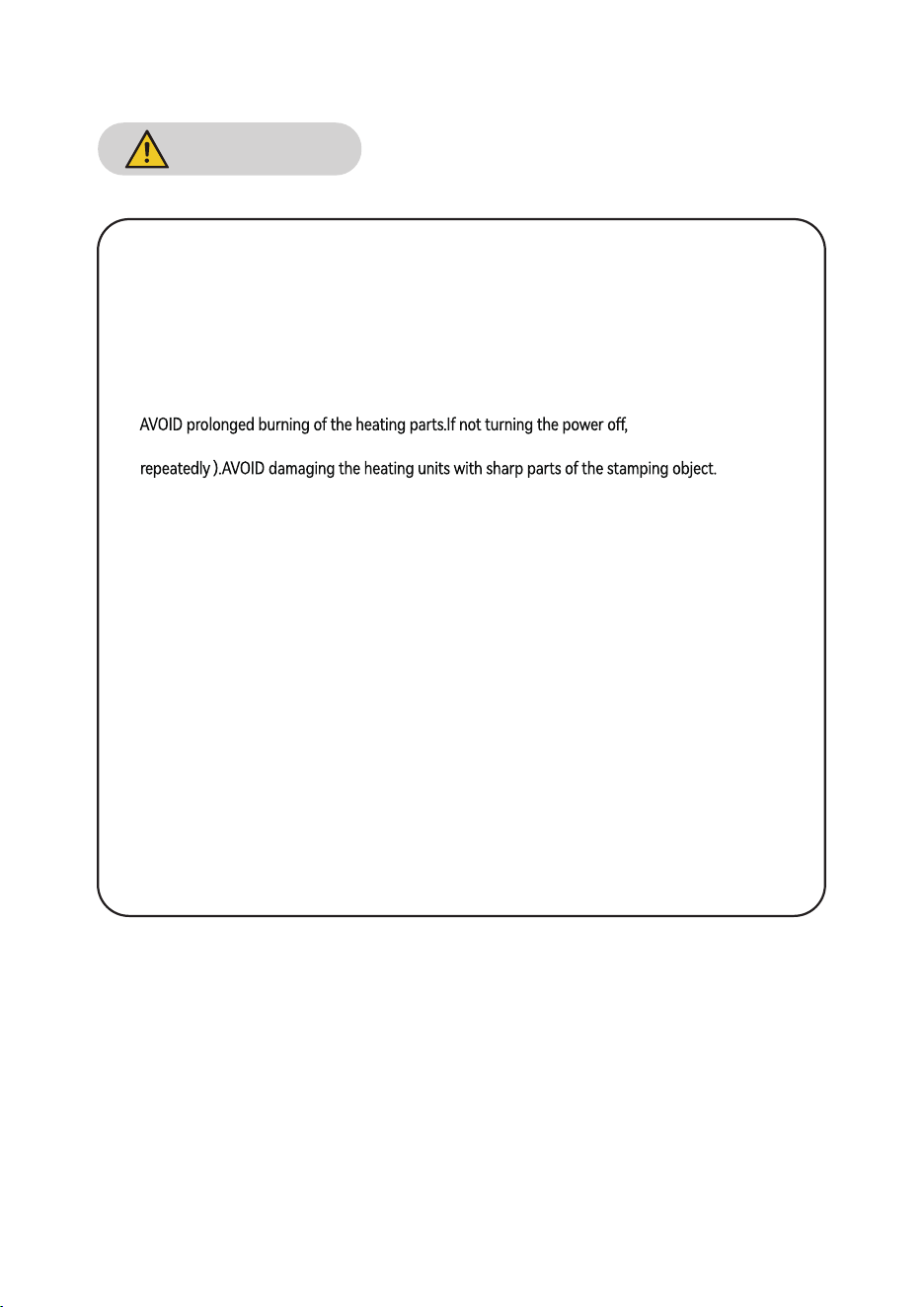
Ⅳ. Trouble shooting for transfer quality
Pale Color:The temperature is too low/the pressure is not correct/or not pressed long enough.
Blurring Pattern:Too much transfer time causes proliferation.
Heat was not distributed correctly through heat plate.
Allow more time between press operations.Pressure distribution can also be the cause,which can be set
to adjust them.
The pressure is too lager or the temperature is too high.
Scarred Pattern:Transfer time is too long.
The pressure is not correct or the transfer paper is poor quality.
Adhesive Paper:the temperature is too high or poor printing ink.
Adjust pressure to your requirement (Neither too tight nor too loose),
Plug in the power cord and turn the power switch ON.
Once the temperature rise to the Initial temperature,the buzzer will send out a shot “BEEF” sound.
the object.
Wait for the time ends up with a long buzzer sound.(Note: There will be about 5s time for long buzzer to
on the next work,if not the temperature will fall down to the Initial temperature )
15
MADE IN CHINA
Precautions: The area 1.5cm from the edge of the heating plate is a non hot stamping area;
CAUTION
•
CHECK the correct voltage before using the machine.Be SURE to operate with reliable grounded
protection connections.
• TURN OFF the machine,and then DISCONNECT the power-supply before
replacing the heat units.DO NOT forget to wearing insulated gloves if the unit
is still under high-temperature.
•
please place a hot stamping replacement ( it could be a scrap and can be used
• AVOID touching the heating units and the compression spring without
protection in case of potential damage,of body during use.
• If it’s hard to pushing the grasp,please adjust the rotation lock screw in order
to reduce the pressure of compression spring.Or, it will damage to the
strength of the machine.
• Before lifting the machine,please lock the machine head by rotation lock screw
and loosen the handle(don’t screw the rotation lock screw too tight).Besides,
do not put down the machine beyond the limit.When meeting the falling limit,
you can feel an obvious pressure on the swiveling pressure adjustment wheel.
• Keep children away from the machine!!!
•
DO NOT attempt to press products that are not intended for normal heat transfer. Baking pads
should be avoided of empty burning.
16
Ⅲ.Printing methods
Ⅳ. Trouble shooting for transfer quality
Pale Color:The temperature is too low/the pressure is not correct/or not pressed long enough.
Blurring Pattern:Too much transfer time causes proliferation.
Heat was not distributed correctly through heat plate.
Allow more time between press operations.Pressure distribution can also be the cause,which can be set
to adjust them.
The pressure is too lager or the temperature is too high.
Scarred Pattern:Transfer time is too long.
The pressure is not correct or the transfer paper is poor quality.
Adhesive Paper:the temperature is too high or poor printing ink.
Adjust pressure to your requirement (Neither too tight nor too loose),
Plug in the power cord and turn the power switch ON.
Once the temperature rise to the Initial temperature,the buzzer will send out a shot “BEEF” sound.
the object.
Wait for the time ends up with a long buzzer sound.(Note: There will be about 5s time for long buzzer to
on the next work,if not the temperature will fall down to the Initial temperature )
15
MADE IN CHINA
Precautions: The area 1.5cm from the edge of the heating plate is a non hot stamping area;