
©2022 Hangzhou Hikvision Digital Technology Co., Ltd. All rights reserved.
About this Manual
The Manual includes instructions for using and managing the Product. Pictures, charts, images and all other information hereinafter are for description and explanation only. The information contained in the Manual is subject to change,
without notice, due to rmware updates or other reasons. Please nd the latest version of this Manual at the Hikvision website (https://www.hikvision.com/).
Please use this Manual with the guidance and assistance of professionals trained in supporting the Product.
and other Hikvision's trademarks and logos are the properties of Hikvision in various jurisdictions. Other trademarks and logos mentioned are the properties of their respective owners.
Disclaimer
TO THE MAXIMUM EXTENT PERMITTED BY APPLICABLE LAW, THIS MANUAL AND THE PRODUCT DESCRIBED, WITH ITS HARDWARE, SOFTWARE AND FIRMWARE, ARE PROVIDED “AS IS” AND “WITH ALL FAULTS AND ERRORS”. HIKVISION MAKES
NO WARRANTIES, EXPRESS OR IMPLIED, INCLUDING WITHOUT LIMITATION, MERCHANTABILITY, SATISFACTORY QUALITY, OR FITNESS FOR A PARTICULAR PURPOSE. THE USE OF THE PRODUCT BY YOU IS AT YOUR OWN RISK. IN NO EVENT WILL
HIKVISION BE LIABLE TO YOU FOR ANY SPECIAL, CONSEQUENTIAL, INCIDENTAL, OR INDIRECT DAMAGES, INCLUDING, AMONG OTHERS, DAMAGES FOR LOSS OF BUSINESS PROFITS, BUSINESS INTERRUPTION, OR LOSS OF DATA, CORRUPTION OF
SYSTEMS, OR LOSS OF DOCUMENTATION, WHETHER BASED ON BREACH OF CONTRACT, TORT (INCLUDING NEGLIGENCE), PRODUCT LIABILITY, OR OTHERWISE, IN CONNECTION WITH THE USE OF THE PRODUCT, EVEN IF HIKVISION HAS BEEN
ADVISED OF THE POSSIBILITY OF SUCH DAMAGES OR LOSS.
YOU ACKNOWLEDGE THAT THE NATURE OF INTERNET PROVIDES FOR INHERENT SECURITY RISKS, AND HIKVISION SHALL NOT TAKE ANY RESPONSIBILITIES FOR ABNORMAL OPERATION, PRIVACY LEAKAGE OR OTHER DAMAGES RESULTING FROM
CYBER-ATTACK, HACKER ATTACK, VIRUS INSPECTION, OR OTHER INTERNET SECURITY RISKS; HOWEVER, HIKVISION WILL PROVIDE TIMELY TECHNICAL SUPPORT IF REQUIRED.
YOU AGREE TO USE THIS PRODUCT IN COMPLIANCE WITH ALL APPLICABLE LAWS, AND YOU ARE SOLELY RESPONSIBLE FOR ENSURING THAT YOUR USE CONFORMS TO THE APPLICABLE LAW. ESPECIALLY, YOU ARE RESPONSIBLE, FOR USING THIS
PRODUCT IN A MANNER THAT DOES NOT INFRINGE ON THE RIGHTS OF THIRD PARTIES, INCLUDING WITHOUT LIMITATION, RIGHTS OF PUBLICITY, INTELLECTUAL PROPERTY RIGHTS, OR DATA PROTECTION AND OTHER PRIVACY RIGHTS. YOU
SHALL NOT USE THIS PRODUCT FOR ANY PROHIBITED END-USES, INCLUDING THE DEVELOPMENT OR PRODUCTION OF WEAPONS OF MASS DESTRUCTION, THE DEVELOPMENT OR PRODUCTION OF CHEMICAL OR BIOLOGICAL WEAPONS, ANY
ACTIVITIES IN THE CONTEXT RELATED TO ANY NUCLEAR EXPLOSIVE OR UNSAFE NUCLEAR FUEL-CYCLE, OR IN SUPPORT OF HUMAN RIGHTS ABUSES.
IN THE EVENT OF ANY CONFLICTS BETWEEN THIS MANUAL AND THE APPLICABLE LAW, THE LATER PREVAILS.
Appearance
1
This product and - if applicable - the supplied accessories too are marked with
"CE" and comply therefore with the applicable harmonized European standards
listed under the Directive 2014/53/EU(RED),Directive 2014/30/
EU(EMCD),Directive 2014/35/EU(LVD),Directive 2011/65/EU(RoHS).
1. Risk of explosion if the battery is replaced by an incorrect type.
2. Improper replacement of the battery with an incorrect type may defeat a safeguard (for example, in the case of some lithium battery types).
3. Do not dispose of the battery into fire or a hot oven, or mechanically crush or cut the battery, which may result in an explosion.
4. Do not leave the battery in an extremely high temperature surrounding environment, which may result in an explosion or the leakage of flammable liquid or gas.
5. Do not subject the battery to extremely low air pressure, which may result in an explosion or the leakage of flammable liquid or gas.
6. Dispose of used batteries according to the instructions.
+ identifies the positive terminal(s) of equipment which is used with, or generates direct current. - identifies the negative terminal(s) of equipment which is used with, or
generates direct current.
1. Install the equipment according to the instructions in this manual.
2. To prevent injury, this equipment must be securely attached to the floor/wall in accordance with the installation instructions.
The serial port of the equipment is used for debugging only.
2012/19/EU (WEEE directive): Products marked with this symbol
cannot be disposed of as unsorted municipal waste in the European
Union. For proper recycling, return this product to your local supplier
upon the purchase of equivalent new equipment, or dispose of it at
designated collection points. For more information see:
www.recyclethis.info
2006/66/EC (battery directive): This product contains a battery that cannot be disposed of as unsorted
municipal waste in the European Union. See the product documentation for specic battery
information. The battery is marked with this symbol, which may include lettering to indicate cadmium
(Cd), lead (Pb), or mercury (Hg). For proper recycling, return the battery to your supplier or to a
designated collection point. For more information see:www.recy-clethis.info
1
Hangzhou Hikvision Digital Technology CO.,Ltd. No.555 Qianmo Road, Binjiang District, Hangzhou 310052, China
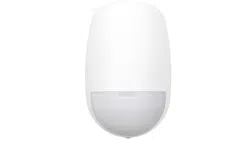
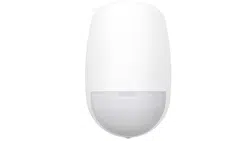
Wireless Double PIR Detector
DS-PDP18-HM-WE/WB
Battery
Bracket Tamper
Connecter
High and Low
Mounting
Adjustment Lever
Power Switch
Tamper
Button
2
Hangzhou Hikvision Digital Technology CO.,Ltd. No.555 Qianmo Road, Binjiang District, Hangzhou 310052, China
2
Set Up
3
Installation
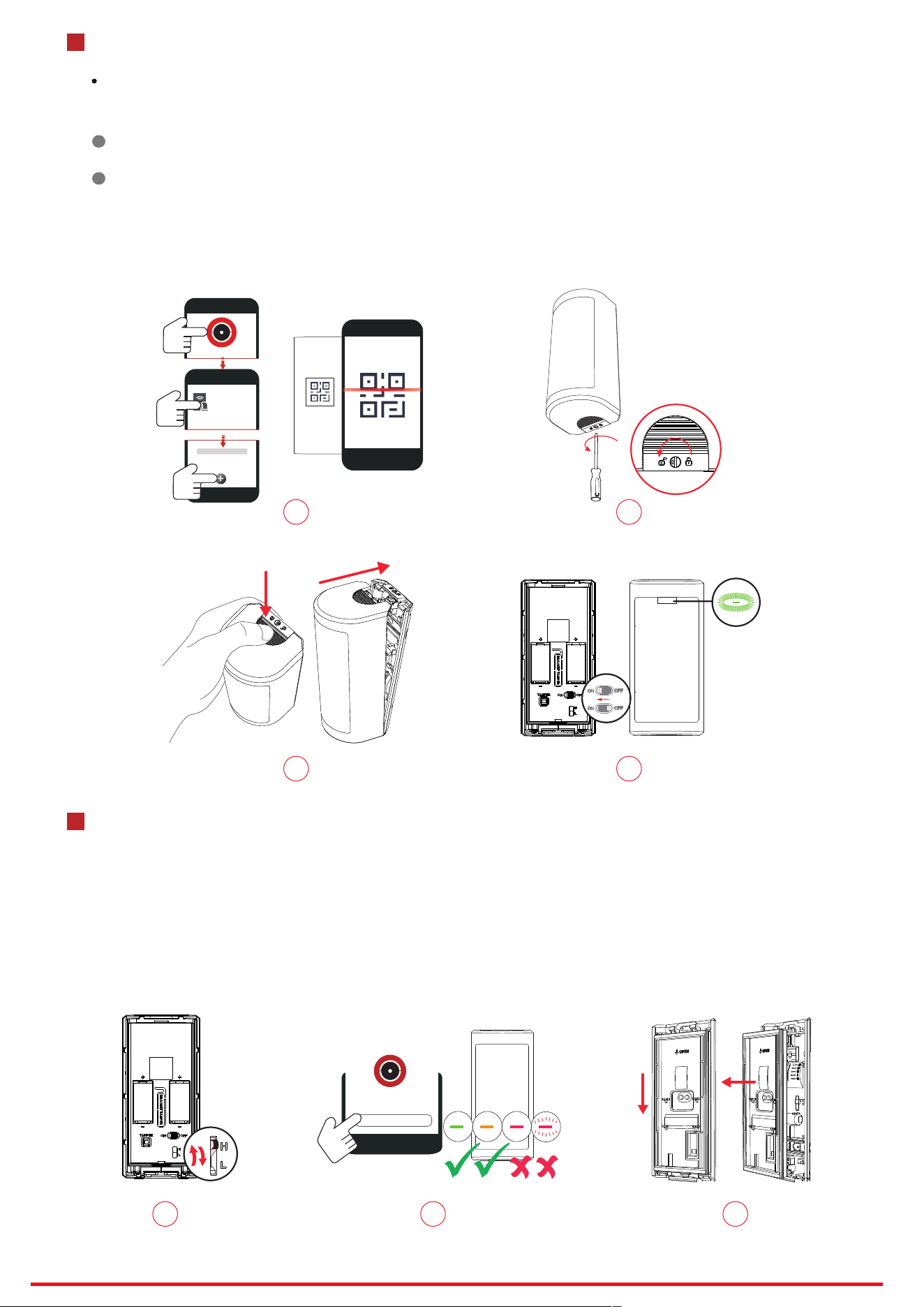
Enrollment Preparation
Log in to the APP Store, download and install the App.
Power on the security control panel.
Log in the APP and tap the icon "+" . Scan the QR code or input the control panel serial No. to add the control panel.
In the APP, tap the "Enrollment Mode" button on the control panel page to make the control panel enter the enrollment status.
1
Enroll the Peripheral Locally
2
Enroll the Peripheral with QR and serial No.
In the APP, tap the icon "+"and scan the QR code or serial No. on the peripheral.
1. Enrollment
2. Adjust the knob to the unlock icon.
1. Adjust H or L mode according to the mounting height.
H Model: 2.5 to 3 m (typical 2.7 m)
L Model: 0.8 to 1.2 m (typical 1 m)
2. Check Signal Strength
Solid Green for 3 s - Strong Signal
Solid Orange for 3 s - Medium Signal
Solid Red for 3 s - Weak Signal
Flash Red for 6 times - Lost Signal
3. Slide the middle frame downward to seperate the middle frame and the rear panel.
3. Press the button to remove the rear panel and the middle frame.
4. Adjust the power switch to ON.
Enrollment succeeded: Flash green for 7 times.
xxxx
Device
1
3
2
4
Signal Strength Test
1 2 3

3
Hangzhou Hikvision Digital Technology CO.,Ltd. No.555 Qianmo Road, Binjiang District, Hangzhou 310052, China
4. Secure the rear panel with 2 screws.
5.6. Install the middle frame back to the rear panel.
7. Install the front panel back.
8. Adjust the knob to the lock icon.
4. Secure the bracket with one screw.
5. Thread the tamper wire out of the hole. Install the rear panel to the bracket with one screw.
6. Remove the soft glue at the threading hole of the middle frame.
7. Thread the tamper wire through the hole of the middle frame.
8.9. Install the middle frame back to the rear panel.
10. Remove the bracket tamper connector.
11. Connect and fix the tamper wire with the bracket tamper connector.
12. Install the front panel back.
13. Adjust the knob to the lock icon.
1
Mounting with screws
4 7 8
5
6
2
Mounting with bracket
4
6
7
8
9
5
10 11 12 13
4
Hangzhou Hikvision Digital Technology CO.,Ltd. No.555 Qianmo Road, Binjiang District, Hangzhou 310052, China
4
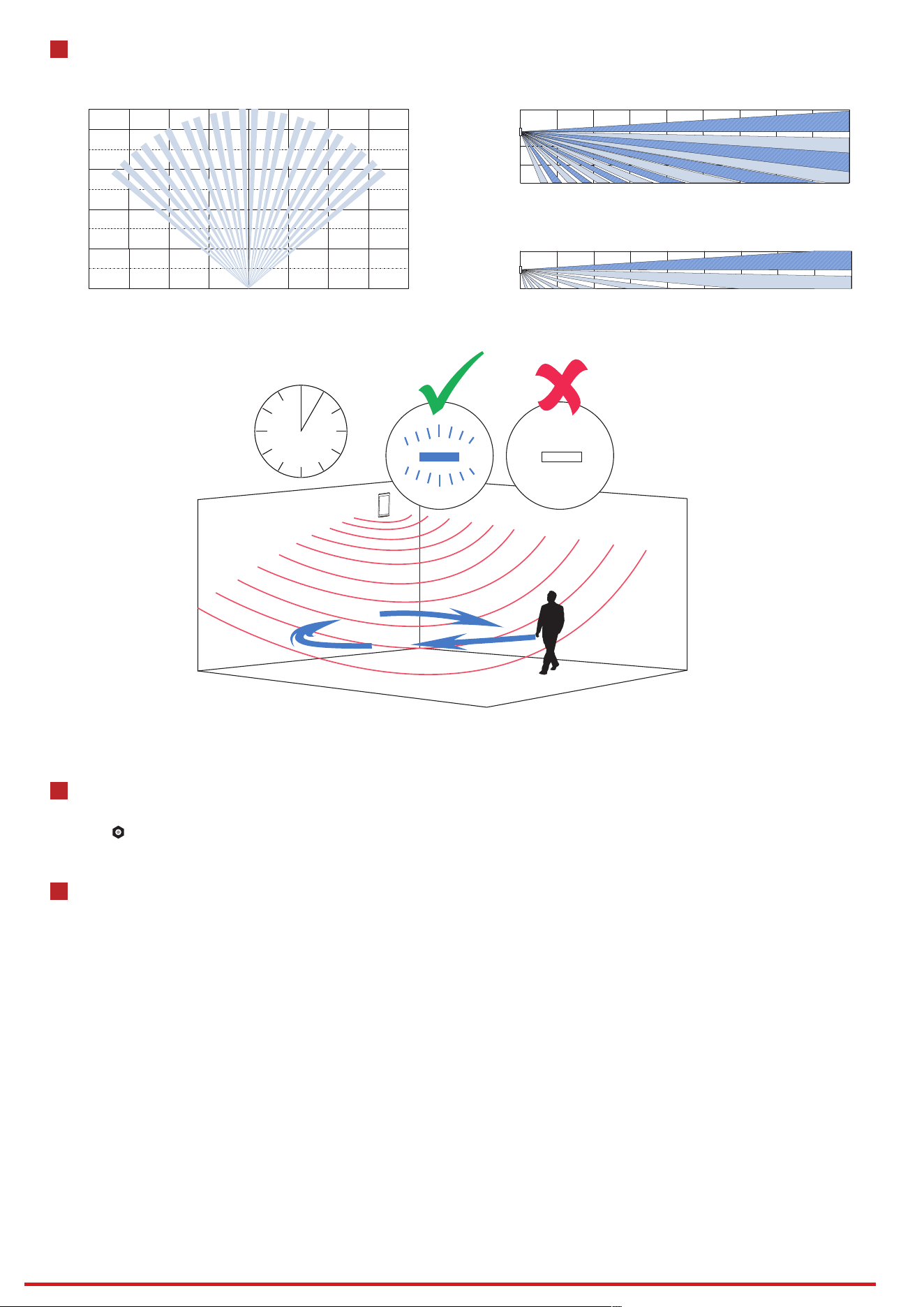
Detection Range
6
Operation Caution and Device Maintenance
- All the electronic operation should be strictly compliance with the electrical safety regulations, re prevention regulations and other related
regulations in your local region.
- Do not drop the device or subject it to physical shock, and do not expose it to high electromagnetism radiation. Avoid the equipment
installation on vibrations surface or places subject to shock (ignorance can cause equipment damage).
- Please make sure that the power has been disconnected before you wire, install or dismantle the device.
- If smoke, odors or noise rise from the device, turn o the power at once and unplug the power cable, and then please contact the service
center.
- Do not drop the device or subject it to physical shock, and do not expose it to high electromagnetism radiation. Avoid the equipment
installation on vibrations surface or places subject to shock (ignorance can cause equipment damage).
- Do not place the device in extremely hot (refer to the specication of the device for the detailed operation temperature), cold, dusty or
damp locations, and do not expose it to high electromagnetic radiation.
- The device for indoor use shall be kept from rain and moisture.
Exposing the equipment to direct sun light, low ventilation or heat source such as heater or radiator is forbidden (ignorance can cause re
danger).
- Do not aim the device at the sun or extra bright places. A blooming or smear may occur otherwise (which is not a malfunction however), and
aecting the endurance of sensor at the same time.
- Improper use or replacement of the battery may result in hazard of explosion. Replace with the same or equivalent type only. Dispose of
used batteries according to the instructions provided by the battery manufacturer.
- Do not expose the device to the corrosive gas. Otherwise the equipment damage may occur.
- Do not expose the device to the explosive situation.
5
Set Up with App
You can view the device status including temperature, signal intensity, battery level, lid, external input, etc.,on the device page.
Tap the button to enter the settings page.
Top View
Side View
High Mounting
3min
4m
8m
12m
16m
0m
0 4m
8m
4m 8m 12m16m 12m 16m
18m
16m14m12m10m6m 8m
1m
0m
2m
2m 4m 18m
2.7m
2m
1m
0m
16m14m12m10m2m 4m 6m 8m
4m
18m

5
Hangzhou Hikvision Digital Technology CO.,Ltd. No.555 Qianmo Road, Binjiang District, Hangzhou 310052, China
7
Specification
UD28395B
Detection Method Passive Infrared
18 m(16 m according to EN50131-2-2)
90°
118
0.3 to 2 m/s
Auto, Pet
20000lux
Up to 24 Kg
Support
Support
Support
Front, Rear
Support
Support
Support
Power Up Enrolling
Blue(Alarm)
Tri-X Wireless
Two-Way RF Wireless
868 MHz
AES-128 Encryption
1.6 Km
Support
Power up, Remote ID, QR Code
Battery Powered
CR123A × 2
3 V
-25 °C to 60 °C (-13 °F to 140 °F)
-25 °C to 60 °C (-13 °F to 140 °F)
10% to 90%
IP65
67.3 mm × 141.6 mm × 60 mm
301 g
Wall
Indoor, Outdoor
Adjustment bracket included
2.5 to 3m High Mount
0.8 to 1.2m Low Mount
5 years in work status (being triggered 20
times per day)
Detection Range
Detection Angle
Detection Zones
Detectable Speed
Sensitivity
White Light Filter
Pet Immunity
Digital Temperature Compensation
Digital Processing
Sealed Optics
Tamper Protection
Environment Temperature Indicator
Signal Strength Indicator
Directional Detection
Power Switch
LED Indicator
Transmission Technology
Transmission Method
Transmission Frequency
Transmission Security
Transmission Range(Free Space)
Frequency Hopping
Enrolling Method
Standard Battery Life
Power Supply
Battery Type
Typical Voltage
Operation Temperature
Storage Temperature
Operation Humidity
IP Rate
Dimension(W × H × D)
Weight
Mounting Height
Mounting Method
Application Scenario
Bracket