Thanks for choosing us!
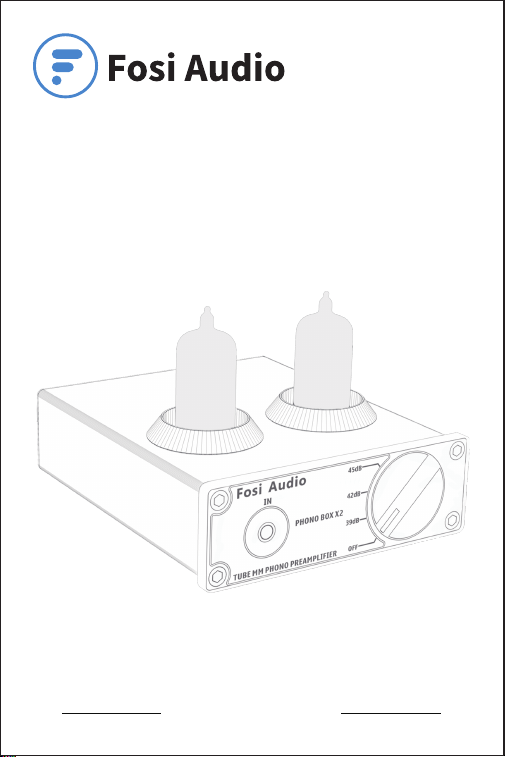
Fosi Audio BOX X2 User Manual

Product Specifications
Fosi Audio BOX X2 is a Hifi tube phono preamp for MM turntable
that features the Multi-function Knob which contains Power Switch
and Gain Adjustment Switch with DC 12V power supply. The BOX
X2 supports MM turntable input, 3.5mm AUX input and RCA line
output for powered speakers or amplifiers for your home audio
system. Compact ultra-low noise phono turntable preamp that
converts phono signals to line level signals, which will provide you
with serious sound performance.
Input Interface:
Output Interface:
MM turntable input,
3.5mm AUX input,
12V DC input
RCA output
Product Adapter Input
Voltage Range:
AC 100V - 240V
DC Input Voltage: 12V
Output Voltage Level: 600 Mv @3mV 1kHz
SNR: ≥ 98dB
THD: ≤0.1%
Frequency Response: Standard RIAA
Product Weight: 0.66 lb/300g
Output: Active(powered) speakers,
Amplifier
Product Dimensions: 4.66 inch*3.85 inch*1.29 inch
(L118.5*W98*H33MM)
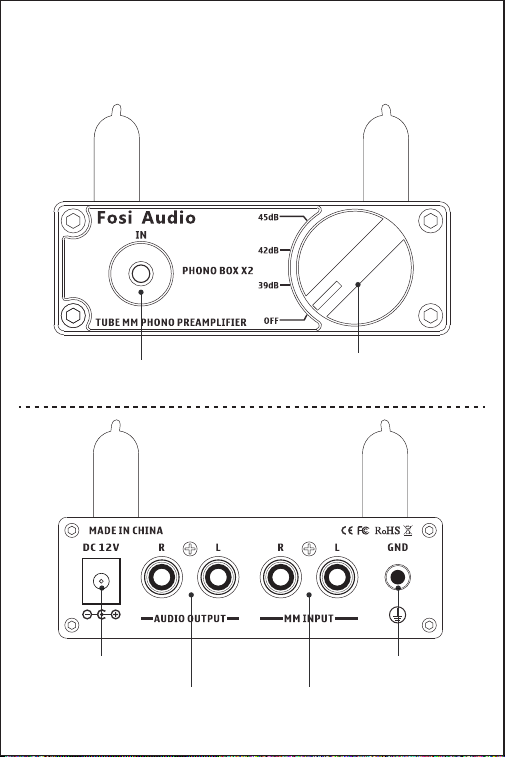
Product Overview & Control
Functions
3.5mm AUX Input
Multi-function Knob:
Power Switch/Gain
Adjustments Switch
DC Input Grounding Post
RCA Output MM Turntable Input
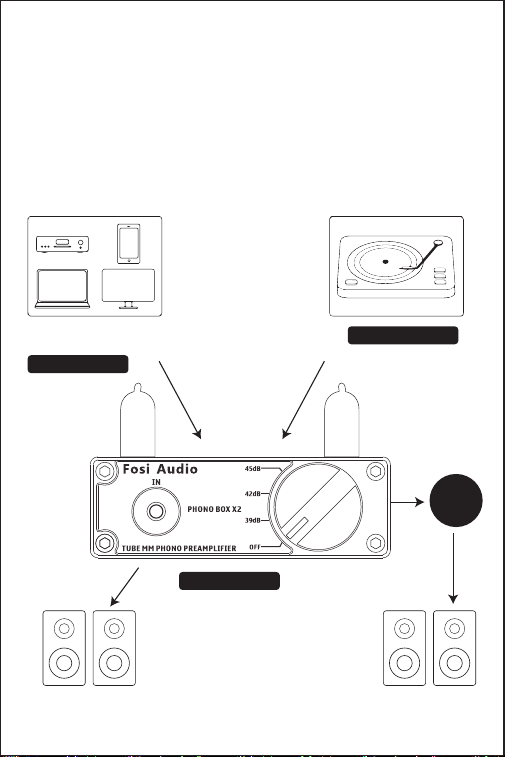
Quick Setup
Package Contents
Fosi Audio BOX X2 *1
Vacuum Tube *2
DC 12V Power Adapter *1
MM Turntable Input
BOX X2-Preamp
Tablet, Laptop, PC ,TV, PS4,
DVD, Phone, Tablet, Laptop, ..
Passive SpeakersActive Speakers
Power
Amp
3.5mm AUX Input

Step 1: Install the vacuum tubes to the BOX X2.
Note 1: Electronic tube is not divided into left and right,
check the pins before installing the electronic
tube there is no deformation, if there is a
deformation of the situation you can use your
hand to dial the right.
Note 2: Please note that electronic tubes are fragile and
need to be handled gently.
Step 2(OUTPUT): Connect speakers to the BOX X2.
RCA output: Use RCA cable to connect the RCA line output of
BOX X2 to your active (powered) speakers.
Or use RCA cable to connect the RCA line output of
BOX X2 to your amplifier, then use speaker’s wire
to connect the amplifier with your passive
speakers.
Step 3(INPUT): Connect the audio source (MM turntable input,
3.5MM AUX input) to the BOX X2.
(1): MM turntable input: Use RCA Cable to connect your MM
turntable to the RCA inputs of BOX X2,
then connect the ground wire of your
MM turntable to the grounding post of
BOX X2.
Note 1: If your MM turntable is no need to connect a ground
wire, the ground wire can be omitted.
Note2: MM Turntable Input can only be connected to the
turntable, and cannot be used as a normal
preamplifier connected to other audio sources,
such as CD player, TV, etc.
(2):
3.5mm Input: Use a 3.5mm Audio cable to connect the BOX
X2 and your device.

Note: Once 3.5mm AUX plug in ,the MM input will automatically
interrupted, so the input mode will turn to 3.5mm AUX
input.
Input priority: 3.5MM AUX input > MM turntable input.
Step 4: Connect the power adapter to BOX X2 and the socket.
Turn the Multi-function Knob ( Power Switch/Gain
Adjustment Switch) clockwise for one time to power on
the BOX X2.
Note1: The power adapter does not have a power indicator light,
so connecting to the socket means power is on.
Note2: Before connecting the power supply, please make sure
that the BOX X2 is in “OFF” position when connecting to
the power adapter. Otherwise there is a “POP” click
sound from your speakers.
When the connection is completed, please turn on the BOX X2
first, then turn on the amplifier (or powered speakers), at last turn
on your turntable or other audio source, then enjoy.
Note: If you turn on the amplifier (or powered speakers)
first, then turn on the BOX X2, there is a “POP”
click sound from your speakers, it is normal that all
the phono preamp have the same issues, please
don’t worry about it, the “POP” click sound will not
damage your amplifiers or speakers.
Step 1: Install the vacuum tubes to the BOX X2.
Note 1: Electronic tube is not divided into left and right,
check the pins before installing the electronic
tube there is no deformation, if there is a
deformation of the situation you can use your
hand to dial the right.
Note 2: Please note that electronic tubes are fragile and
need to be handled gently.
Step 2(OUTPUT): Connect speakers to the BOX X2.
RCA output: Use RCA cable to connect the RCA line output of
BOX X2 to your active (powered) speakers.
Or use RCA cable to connect the RCA line output of
BOX X2 to your amplifier, then use speaker’s wire
to connect the amplifier with your passive
speakers.
Step 3(INPUT): Connect the audio source (MM turntable input,
3.5MM AUX input) to the BOX X2.
(1): MM turntable input: Use RCA Cable to connect your MM
turntable to the RCA inputs of BOX X2,
then connect the ground wire of your
MM turntable to the grounding post of
BOX X2.
Note 1: If your MM turntable is no need to connect a ground
wire, the ground wire can be omitted.
Note2: MM Turntable Input can only be connected to the
turntable, and cannot be used as a normal
preamplifier connected to other audio sources,
such as CD player, TV, etc.
(2): 3.5mm Input: Use a 3.5mm Audio cable to connect the BOX
X2 and your device.

Troubleshooting/QA
1: Get noise/humming when turn the BOX X2 on?
• Please know that when no inputs connected to BOX X2, the
default input way is MM input mode, in this mode, the gain of the
amplify is much large then other input modes, so it’s normal that
will have some humming sound when no sound pass through.
• Please unplug all the inputs from the BOX X2, then turn it on to
check if the noise still or not.
• If the noise disappear, the noise may from the audio source or
audio cable, please exchange the audio source and the audio
cable to try again.
• If the noise still, the noise may from BOX X2 or amplifier/
speakers:
• Please exchange the audio cables and amplifier (powered
speakers) to have a try and make sure that the noise is from
which devices.
• Please check whether the gain is too high, if the gain is too high,
the bottom noise may be more obvious.
• Please make sure all the cables completely pushed into the
device, incompletely connection will cause this issue.
• Please make sure that your turntable is MM output and
also make sure that it is phono output, some turntables
built-in phono preamplifier, so it should connect the
3.5mm AUX input on the BOX X2 not the phono input.
Also make sure the grounding wire is connected well
with the BOX X2, please reconnect it to have a try.
• Please keep this device away from other electronic devices, like
the FM radio or WIFI router.
• Please make sure the tubes is completely pushed into the socket,
incompletely connection will cause this issue.
Note: Once 3.5mm AUX plug in ,the MM input will automatically
interrupted, so the input mode will turn to 3.5mm AUX
input.
Input priority: 3.5MM AUX input > MM turntable input.
Step 4: Connect the power adapter to BOX X2 and the socket.
Turn the Multi-function Knob ( Power Switch/Gain
Adjustment Switch) clockwise for one time to power on
the BOX X2.
Note1: The power adapter does not have a power indicator light,
so connecting to the socket means power is on.
Note2: Before connecting the power supply, please make sure
that the BOX X2 is in “OFF” position when connecting to
the power adapter. Otherwise there is a “POP” click
sound from your speakers.
When the connection is completed, please turn on the BOX X2
first, then turn on the amplifier (or powered speakers), at last turn
on your turntable or other audio source, then enjoy.
Note: If you turn on the amplifier (or powered speakers)
first, then turn on the BOX X2, there is a “POP”
click sound from your speakers, it is normal that all
the phono preamp have the same issues, please
don’t worry about it, the “POP” click sound will not
damage your amplifiers or speakers.


• Please reconnect the power adapter to the BOX X2 to try again.
Note: • If the noise still, please contact us via email at support
@fosiaudio.com.
• BOX X2 is a preamplifier, not a power amplifier, can not
be connected with passive speakers directly.
2. All cables are connected, but there is no audio output?
• Please check if your audio source, BOX X2, amplifier or powered
speakers all are turned on and in working mode.
• Please check whether the light of the vacuum tube is always on
after power on, check whether there is a problem with the vacuum
tube.
• Please check if the music in your audio source is paused.
• Please make sure that you are chose the correct input mode of
the BOX X2, if the 3.5mm AUX input plug in, the MM input mode
will be interrupted, at this time if you want to use the MM input,
you need to disconnect the 3.5mm AUX input first.
• If the connection is right but the BOX X2 does not work, please
try another power supply (Any DC12V power adapter can work
with BOX X2, you can use the power adapter of WIFI router or
camera) that is suitable for the BOX X2. If BOX X2 works after
replacing the appropriate power adapter, it means that the power
adapter is probably broken, please contact us to replace the
power adapter; if BOX X2 still not works after replacing the
appropriate power adapter, it means that the BOX X2 is probably
broken, please contact us to replace the BOX X2.
Note: Make sure that all the cables are completely pushed into the
device.

3. How to distinguish Power Switch and Gain Adjustment
Switch?
• Power switch means turn the power switch knob(multi-function
knob) clockwise for one time to power on the BOX X2. Adjusting
the gain means turning the gain adjustment knob (multi-function
knob) clockwise all the time to adjust the gain.
4. How do you switch between inputs?
• The BOX X2 supports two inputs: MM turntable input, 3.5mm AUX
Input.
The priority of switching between the two inputs: 3.5MM AUX Input
> MM Turntable input.
5. My turntable doesn't have a ground wire connection.
Does this need a ground wire hooked up for it to be able
to work?
• No, it does not need a ground wire to operate. However, if your
turntable has any ground loop, it will be piped and amplified
through the BOX X2.
6. How to attach ground wire?
• here is a post to attach the ground wire.
7. How does grounding post work? My turntable has fork
spade type Terminal?
• You can connect the fork spade type terminal to the grounding
post.
8. Does this have analog to digital conversion?
• No. This product is a phono preamp/tube preamplifier.
• Please reconnect the power adapter to the BOX X2 to try again.
Note: • If the noise still, please contact us via email at support
@fosiaudio.com.
• BOX X2 is a preamplifier, not a power amplifier, can not
be connected with passive speakers directly.
2. All cables are connected, but there is no audio output?
• Please check if your audio source, BOX X2, amplifier or powered
speakers all are turned on and in working mode.
• Please check whether the light of the vacuum tube is always on
after power on, check whether there is a problem with the vacuum
tube.
• Please check if the music in your audio source is paused.
• Please make sure that you are chose the correct input mode of
the BOX X2, if the 3.5mm AUX input plug in, the MM input mode
will be interrupted, at this time if you want to use the MM input,
you need to disconnect the 3.5mm AUX input first.
• If the connection is right but the BOX X2 does not work, please
try another power supply (Any DC12V power adapter can work
with BOX X2, you can use the power adapter of WIFI router or
camera) that is suitable for the BOX X2. If BOX X2 works after
replacing the appropriate power adapter, it means that the power
adapter is probably broken, please contact us to replace the
power adapter; if BOX X2 still not works after replacing the
appropriate power adapter, it means that the BOX X2 is probably
broken, please contact us to replace the BOX X2.
Note: Make sure that all the cables are completely pushed into the
device.

9. Is the gain enough to support MC cartridge?
• No. It is for MM cartridge.
10. My turntable has an optional built-in phono preamp or
switch to the line. Can I still use this instead of my built-in
preamp?
• Yes, deselect the preamp on your turntable.
Note: Please confirm whether your turntable has a built-in phono
preamp, if there is a phono preamp, and it cannot be
deselected, then you can only connect 3.5 mm input, can
not connect MM Turntable input.
11. Can I hook the BOX X2 to the power amplifier for my
system?
• Yes. You can connect the BOX X2 to the power amplifier through
the RCA output.
12. Can this work with my turntable and headphones?
• No,this can not work with headphones,because it does not have
headphones output.
13. Can I directly connect this phono preamp to the
speakers?
• If your speakers are powered speakers, you can directly connect
this preamp to the speakers. But you need to add an amplifier or
receiver to the passive speakers.
14. What equalization is incorporated in this preamp?
• RIAA equalization.
3. How to distinguish Power Switch and Gain Adjustment
Switch?
• Power switch means turn the power switch knob(multi-function
knob) clockwise for one time to power on the BOX X2. Adjusting
the gain means turning the gain adjustment knob (multi-function
knob) clockwise all the time to adjust the gain.
4. How do you switch between inputs?
• The BOX X2 supports two inputs: MM turntable input, 3.5mm AUX
Input.
The priority of switching between the two inputs: 3.5MM AUX Input
> MM Turntable input.
5. My turntable doesn't have a ground wire connection.
Does this need a ground wire hooked up for it to be able
to work?
• No, it does not need a ground wire to operate. However, if your
turntable has any ground loop, it will be piped and amplified
through the BOX X2.
6. How to attach ground wire?
• here is a post to attach the ground wire.
7. How does grounding post work? My turntable has fork
spade type Terminal?
• You can connect the fork spade type terminal to the grounding
post.
8. Does this have analog to digital conversion?
• No. This product is a phono preamp/tube preamplifier.

15. Can you hook a subwoofer to this unit?
• Yes, if your subwoofer is powered, you can connect the BOX X2
directly to the subwoofer, but you need add a sub amplifier
between the BOX X2 and the subwoofer if your subwoofer is
passive subwoofer.
16. Which vacuum tube can be replaced to the BOX X2?
• If necessary, tubes below are substitutions: GE 5654 EF95, 6AK5,
6AK5W, 403A/403B, 6J1, 6J1P, 6J2, 6J3, 6J4, 6J5 vacuum tubes,
etc. You can replace the vacuum tubes to DIY your stereo system.
17. Sound quality is not good?
• Make sure all the cables are fully connected.
• Adjust the gain of the BOX X2 to achieve the right tone.
• Please try to change the sound source and cables to test.
18. Can it be left on all the time?
• The BOX X2 is designed with a power switch. It can stay
connected safely without power consumption all the time, you
only need to turn off the power switch on the BOX X2.
19. Why the BOX X2 came with a broken vacuum tube?
• Due to long-distance transportation, the vacuum tube may be
damaged during transportation. If you find that the vacuum tube
is damaged or other problems, please contact Fosi Audio
after-sales email immediately, and we will replace the vacuum
tube for you.
Any problems please leave a message to the customer
support email address: suppor[email protected]

15. Can you hook a subwoofer to this unit?
• Yes, if your subwoofer is powered, you can connect the BOX X2
directly to the subwoofer, but you need add a sub amplifier
between the BOX X2 and the subwoofer if your subwoofer is
passive subwoofer.
16. Which vacuum tube can be replaced to the BOX X2?
• If necessary, tubes below are substitutions: GE 5654 EF95, 6AK5,
6AK5W, 403A/403B, 6J1, 6J1P, 6J2, 6J3, 6J4, 6J5 vacuum tubes,
etc. You can replace the vacuum tubes to DIY your stereo system.
17. Sound quality is not good?
• Make sure all the cables are fully connected.
• Adjust the gain of the BOX X2 to achieve the right tone.
• Please try to change the sound source and cables to test.
18. Can it be left on all the time?
• The BOX X2 is designed with a power switch. It can stay
connected safely without power consumption all the time, you
only need to turn off the power switch on the BOX X2.
19. Why the BOX X2 came with a broken vacuum tube?
• Due to long-distance transportation, the vacuum tube may be
damaged during transportation. If you find that the vacuum tube
is damaged or other problems, please contact Fosi Audio
after-sales email immediately, and we will replace the vacuum
tube for you.
Any problems please leave a message to the customer
support email address: suppor[email protected]
Comparison Section
Model
Type
Phono Preamp/
Headphone
amplifier
Phono Preamp Phono Preamp Phono Preamp/
Headphone
amplifier
Input
RCA RCA+3.5mm AUX MM turntable
input+
3.5MM AUX input
+ Bluetooth input
MM Turntable+
3.5mm AUX
Output Powered Speakers
+ Headphone
Powered
Speakers
RCA output Powered
Speakers
+Headphone
THD ≤ 0.08% ≤ 0.1% ≤ 0.1% ≤ 0.1%
SNR ≥ 70dB ≥ 98dB ≥ 70dB ≥ 70dB
Power Adapter 12V/1.5A 12V/1.5A 12V/1.5A 12V/1.5A
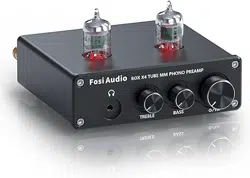
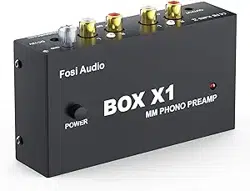
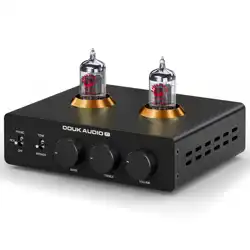
BOX X1 BOX X2 BOX X3 BOX X4

Our website: www.fosiaudio.com
Amazon store: www.amazon.com/fosiaudio
Our Youtube channel: Fosi Audio
Our Facebook page: Fosi Audio
After-sale Service and Technical Support Email:
support@fosiaudio.com
customer@fosiaudioshop.com
Warranty Information
• All Fosi Audio products have an 18-month limited warranty on
parts and labor from the date of purchase. Please contact us if
you have any problems.
About Fosi Audio
• Fosi Audio designs and builds innovative audio products with
all your music in mind. Great sound, simple but elegant
designs, high-quality materials, and truly useful features are
what Fosi Audio is about. We sincerely hope you get as much
enjoyment from our products as we’ve had to create them!
Fosi Audio Product’s User Manual